Researchers at Zimperium’s zLabs have analyzed an Android Trojan that uses an automated, multi-stage infection process.
What’s new is that RatHat gives a live AI assistant the keys to the accessibility tree of the infected device and uses it to determine where to tap or scroll, rather than following a hardcoded script.
The variable attack path makes it harder for signature- and rule-based mobile security tools to detect this Trojan.
It also abuses Android Debug Bridge (ADB), a legitimat
Researchers at Zimperium’s zLabs have analyzed an Android Trojan that uses an automated, multi-stage infection process.
What’s new is that RatHat gives a live AI assistant the keys to the accessibility tree of the infected device and uses it to determine where to tap or scroll, rather than following a hardcoded script.
The variable attack path makes it harder for signature- and rule-based mobile security tools to detect this Trojan.
It also abuses Android Debug Bridge (ADB), a legitimate tool that lets a computer communicate with an Android device. By turning on Wireless Debugging, RatHat can escape the normal app sandbox.
The attack
The infection chain is unusually elaborate for a mobile threat, combining social engineering, accessibility abuse, and remote AI decision-making into a single pipeline.
Victims are lured through smishing (SMS phishing) texts and malicious ads that lead to fake download pages, sometimes disguised as a popular streaming app or even a browser like Chrome. These pages trick people into sideloading a malicious APK (Android Package Kit).
Once installed, the app pressures the user into enabling Android’s Accessibility Service, using a fake “network restriction” excuse or bogus financial incentive. Accessibility services run in the background and can inspect screen content and interact with apps on the user’s behalf.
With accessibility access, the malware silently taps through Developer Options, turns on Wireless Debugging, and reads the six-digit pairing code straight off the screen. It then pairs with the infected device without a person or computer to complete the process. This is a known, legitimate Android feature (normally used by app developers to test on a phone over Wi-Fi) that RatHat repurposes for self-escalation.
That self-pairing gives the malware a shell-level ADB session, which it uses to drop two disguised native binaries: A Go-based “agent” that runs system commands with elevated privileges, and a reverse-proxy client that opens a persistent tunnel back to the attacker’s server, bypassing firewalls and NAT (Network Address Translation).
To steal login credentials, the Trojan creates overlays for targeted apps, most of which are financial. These overlays can also steal one-time passwords (OTPs) and multi-factor authentication (MFA) codes.
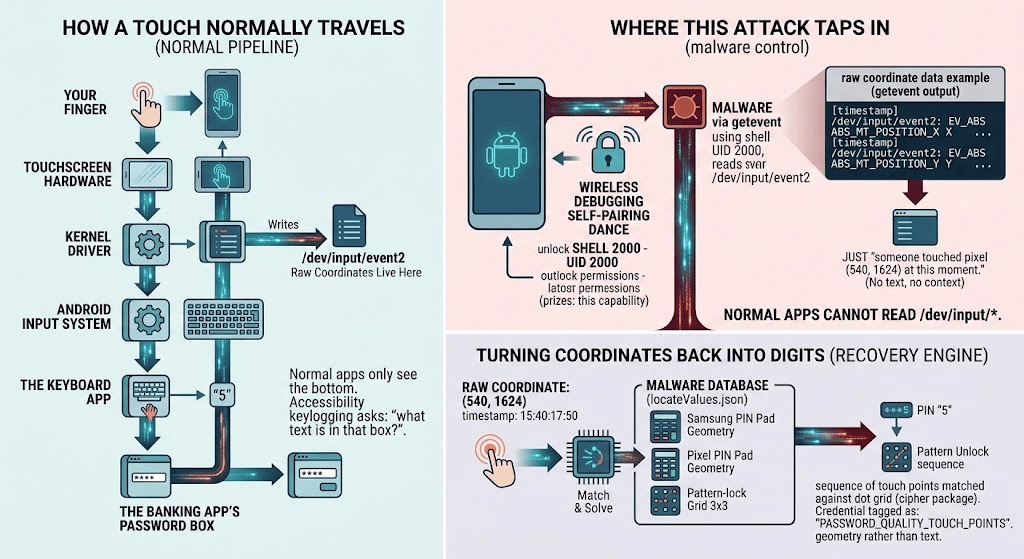
Perhaps its most novel capability records raw touch coordinates (where the finger touches the screen) directly from the input driver. It then matches those coordinates against a database of known keypad and pattern-lock layouts to reconstruct PIN codes and unlock patterns, completely bypassing protections against screen-reading.
Other capabilities include intercepting SMS messages, a form of semi-autonomous device control provided by the AI service, and the ability to restore the malicious app after it has been uninstalled using a hidden background program.
How to stay safe
Most of RatHat’s tricks depend on convincing someone to sideload an app and grant it accessibility permissions, which means the usual mobile security advice remains the strongest defense.
Only install apps from Google Play or another trusted official store. This does not guarantee safety, but it significantly reduces the risk.
Be suspicious of any app that asks you to enable Accessibility Service for reasons unrelated to accessibility. Consider Android’s Advanced Protection Mode, which Google has started using to restrict which apps can request accessibility permissions in the first place.
Never enable Developer Options or Wireless Debugging unless you understand why you need them. Legitimate apps have no reason to ask for them.
If you already use Malwarebytes Mobile Security on your Android, you are protected. Our Text Protection feature will have helped prevent you from tapping the link in the first place. We also detect this threat as Android/Trojan.Exploit.RatHat. If you don’t use it yet, get Malwarebytes Mobile Security here.
If your device is infected with RatHat, you will need to perform a factory reset because its persistence mechanism can survive normal app removal.
RatHat combines AI-driven screen control, Android debugging abuse and advanced credential theft to give attackers deep control of infected phones.
RatHat is the new Android trojan you should know about. Zimperium researchers just published a breakdown of a strain they’ve traced to China-based operators, and what makes it different isn’t the credential theft, which is standard fare by now. It’s what it does to get there.
It starts the way most mobile fraud does: a text message or a shady a
RatHat combines AI-driven screen control, Android debugging abuse and advanced credential theft to give attackers deep control of infected phones.
RatHat is the new Android trojan you should know about. Zimperium researchers just published a breakdown of a strain they’ve traced to China-based operators, and what makes it different isn’t the credential theft, which is standard fare by now. It’s what it does to get there.
It starts the way most mobile fraud does: a text message or a shady ad pointing to a fake app store. Once someone installs the APK, the malware doesn’t just ask for permissions and hope.
“RatHat is primarily distributed through deceptive phishing sites promoted via malvertising, smishing campaigns, and third-party forums, luring victims into manually downloading malicious APKs that appear to be legitimate apps” reads the report published by Zimperium.
The dropper hides its payload in two encrypted files. Both use the same simple decoding process: skip a 24-byte header, read the data length, apply a basic XOR and subtraction operation to each byte, and then decompress the result with Gzip. The second stage is a DEX file loaded directly into memory through reflection. It contains the code needed to unpack and install the final malware.
The droppers also abuse native Android SessionInstaller APIs to get around restrictions on app installation and Accessibility Services, allowing the malware to install its payload and access protected APIs.
RedHat uses four anti-analysis techniques. First, it modifies the ZIP container in ways Android ignores but tools such as unzip and apktool cannot handle correctly. Second, it uses a 61 MB AndroidManifest.xml containing unusual data blocks that can make analysis tools crash or run out of memory. Third, the DEX code contains invalid pseudo-instructions that break disassemblers even though Android can still run the app. Finally, strings are encrypted using StringFog and an additional custom scheme that swaps bytes and applies a 16-byte XOR key.
The malware also checks for debuggers, ptrace, debug settings, Frida, Xposed, root indicators and emulators, making analysis much harder.
The malware first tries to gain access to Android’s Accessibility Service. It then uses that access to silently enable Developer Options and Wireless Debugging on the victim’s phone. It doesn’t need a second device, a cable, or a user to manually approve a USB debugging connection.
This is the most interesting part of the attack. RatHat uses the same Accessibility Service to read the ADB pairing code directly from the phone’s screen. It then pairs with the phone’s own debug interface without any user interaction. In simple terms, the malware tricks the phone into giving itself control.
The malware then places two disguised native binaries in /data/local/tmp. Both are written in Go. One, liblocal-service.so, works as a shell command tool and handles persistence, battery settings and permission changes that are not visible in the main app code. The other, libmedia_codec.so, is a modified FRP reverse-proxy client. Its role is to create a tunnel that lets the attacker connect remotely to the phone’s ADB shell from anywhere on the internet.
The credential theft itself runs on three tracks. There’s a standard Accessibility-based keylogger reading text fields, a second component scraping URLs straight out of browser address bars, and then something considerably more interesting: a hardware-level keylogger running from that same ADB shell, reading raw touch coordinates off /dev/input. Paired with a JSON file mapping out keypad layouts for every major phone brand, a screen tap becomes a digit. It’s a workaround for FLAG_SECURE, custom keyboards, and lock-screen protections all at once, because none of those defenses touch the input driver itself.
On the banking side, RatHat serves fake overlays on top of real banking and payment apps, WeChat and Alipay included, to grab PINs and login credentials while the person thinks they’re using the real interface. Combine that with SMS interception for 2FA codes and you’ve got full account takeover without the victim noticing anything unusual happened.
RatHat serializes the phone’s live Accessibility tree into XML and sends it to a mainstream generative AI assistant, which returns screen coordinates and text so the malware can decide where to tap next. The report puts it plainly:
“Generative AI UI-Automation Engine: This is a particularly unique feature.” continues the report.”The malware serializes the device’s live Accessibility tree to XML and communicates with one of the world’s most popular Generative AI assistants (Figure 4). This AI is used for non-malicious actions including:
Resolving a named target’s centre coordinates on the screen as JSON to direct synthetic clicks.
Resolving a target’s actual on-screen text from the XML (without translating).
Signaling automatic navigation commands like SCROLL_DOWN.”
That single change is what separates RatHat from a decade of scripted Android RATs. Old-school automation breaks the moment a button moves or a layout changes on a new OS version. An AI reading the screen in real time doesn’t care. It just looks and taps, the same way a person would.
Persistence is where things get properly ugly. Uninstall the app and it throws up a fake Google Play error to cancel the removal. Manage to force it through anyway, and the Go agent running outside the app’s lifecycle notices, silently reinstalls the APK, and re-grants every permission, accessibility included, without a single tap from the user. As the researchers describe it:
RatHat uses several communication channels to maintain control of infected Android devices and steal data. The app registers with its C&C server over HTTP and keeps a WebSocket connection open for real-time communication. A separate Go-based agent runs a local server and uses a disguised FRP component to expose it to the internet, allowing attackers to bypass NAT and firewall protections. The C&C infrastructure can receive credentials, SMS messages, files, app lists, lock-screen data and logs, while sending commands, updates, screen-monitoring tools and other components to the device.
There is still an important weak point: the attack needs Accessibility Service access to get started. That makes a basic security rule more important than ever: don’t give Accessibility permissions to apps that have no clear reason to use them, even if the app provides a convincing explanation.
“RatHat’s multi-tiered architecture, reliance on out-of-lifecycle daemons, and use of real-time GenAI decision loops illustrate why traditional, signature-based mobile security controls are insufficient.” concludes the report.

 Entrar