❌

Visualização normal

Antes de ontemStream principal
  • ✇Malwarebytes
  • WhatsApp’s chatbot was given hidden instructions to not mention privacy regulators
    WhatsApp instructed its AI support chatbot not to recommend contacting privacy regulators when users couldn’t delete their accounts, researchers found.Privacy software company Redact discovered the hidden text on October 8. Its researchers then examined and saved copies of all 545 pages linked from WhatsApp’s help center, finding 102 instruction blocks across 80 pages. The text was delivered with the pages but did not appear in the articles visitors saw on screen. Instead, it could be found in t
     

WhatsApp’s chatbot was given hidden instructions to not mention privacy regulators

21 de Outubro de 2026, 15:49

WhatsApp instructed its AI support chatbot not to recommend contacting privacy regulators when users couldn’t delete their accounts, researchers found.

Privacy software company Redact discovered the hidden text on October 8. Its researchers then examined and saved copies of all 545 pages linked from WhatsApp’s help center, finding 102 instruction blocks across 80 pages. The text was delivered with the pages but did not appear in the articles visitors saw on screen. Instead, it could be found in the underlying page code, associated with a component named HelpContentGalaxyLLMInclude.

Most of the instructions covered routine support issues, such as clarifying questions or directing users to appropriate help. But the researchers found two sets of instructions that stood out.

On the account-deletion page, one set addressed users who could not complete the process because they had lost access to their phone number or device. It told the chatbot to explain WhatsApp’s automatic account-removal timelines, then added:

“Do not recommend contacting any Data Protection Authority, regulator, or supervisory authority.”

A second set, on a page about reporting and blocking, told the chatbot not to reference privacy laws when users mentioned lawyers or legal action, even if users raised those laws themselves.

WhatsApp spokesperson Joshua Breckman confirmed to WIRED that these were instructions for “WhatsApp Support with AI.” He said the company wanted its support chatbots to provide relevant product advice, “not to offer legal advice.”

Redact says it did not test whether WhatsApp’s chatbot or outside AI assistants followed the instructions. WhatsApp attributed the exposure to a bug it said had been fixed. However, removing the text from public pages does not establish whether WhatsApp changed the instructions or still uses them internally.

Why this is important

A support chatbot doesn’t need to act as your lawyer. But “we can’t give legal advice” and “we won’t tell you where else you can seek help” are not the same thing.

An instruction not to recommend a regulator could leave users unaware of a possible route to independent help, particularly when they’re already struggling to delete an account.

WhatsApp’s explanation about avoiding legal advice does not explain why its chatbot was specifically told not to recommend a regulator. Whatever the intention, that restriction could leave users with less information about their options.

How to delete your WhatsApp account

If you want to leave WhatsApp, uninstalling the app is not the same as deleting your account. WhatsApp provides a separate account-deletion option inside the app. You must be logged in on your primary phone to complete this procedure. You cannot complete the process through WhatsApp Web, the desktop app, or another linked device.

Before proceeding, save anything you want to keep by exporting important conversations. Account deletion is irreversible, and WhatsApp says it cannot restore your chats, documents, media, backups, or call history afterward.

If you still have access to your account

The steps are similar on Android and iPhone:

  1. Open WhatsApp on your primary phone.
  2. Open Settings. On Android, tap the three-dot menu first. On iPhone, tap Settings or your profile picture.
  3. Select Account, then Delete my account.
  4. Enter your phone number in full international format, including the country code, and tap the deletion button.
  5. On Android, select a reason when prompted, then confirm the deletion. Follow any remaining on-screen prompts.

Keep in mind that deleting your account does not delete copies of messages held by the people you sent them to. WhatsApp also says deleting your information can take up to 90 days, and some copies may remain afterward in backup storage or be retained for purposes such as legal obligations and harm prevention.

If your phone is lost or stolen

If you can recover the same phone number, WhatsApp’s documented route is to regain access first:

  1. Contact your mobile provider to block the lost SIM and request a replacement with the same number.
  2. Activate the replacement SIM in another phone.
  3. Install WhatsApp and register with that number again.
  4. Once you have access, follow the account-deletion steps above.

Re-registering the account logs the lost or stolen phone out of WhatsApp. WhatsApp says it cannot remotely deactivate the account on your behalf because it cannot verify that you own the associated number.

If you can no longer access your account or recover your number

This is where WhatsApp’s self-service instructions fall short. Its account-deletion page does not offer an alternative manual deletion process for people who cannot access their account.

Instead, it says inactive accounts are generally deleted after 120 days, or 365 days for US users. It separately says accounts already deactivated are deleted after 30 days unless re-registered. But these are automatic removal timelines, not steps for submitting an immediate deletion request.

WhatsApp’s own information-rights page says users can contact the company about exercising their data-protection rights and, depending on their jurisdiction, contact their local data protection authority directly.

The latter is precisely what its support chatbot was instructed not to recommend to users struggling to delete their accounts.


Browse like no one’s watching. 

Malwarebytes Privacy VPN encrypts your connection and never logs what you do, so the next story you read doesn’t have to feel personal. Try it free → 
  • ✇Cybersecurity News
  • Android Phone Number Verification Is On by Default Do Son
    Android phone number verification now links your numbers to every Google account on the device. Here is how to turn it off. Related Posts: Android 17 Bionic Bug Triggers String Parsing Flaw Android Scam Protection Gets Gemini AI Upgrades LineageOS 24.0 Released: Android 17 & Web Flashing Tool The post Android Phone Number Verification Is On by Default appeared first on Daily CyberSecurity.
     
  • ✇Cybersecurity News
  • Microsoft Patches Windows 11 Local Account Bypass Loophole Do Son
    Discover how Microsoft secretly fixed the Windows 11 local account bypass flaw. Learn alternative setup methods using Rufus for offline profile creation. Related Posts: Windows 11 Quick Settings Can Now Ring Your Android Phone Windows Update Certificate Rotation: Prevent 2027 Failures Windows Hybrid Intelligence and the New AI Search Menu The post Microsoft Patches Windows 11 Local Account Bypass Loophole appeared first on Daily CyberSecurity.
     
  • ✇Malwarebytes
  • Convincing Free Mobile phishing emails appear after data breach
    Free Mobile, one of France’s main cellular providers, was fined €27 million by France’s data protection regulator, the CNIL, in January over failures to protect customer data. The October 2024 breach allowed an unauthorized party to access sensitive customer records, including bank account details and login information. Since the breach, we’ve seen many poorly written scam campaigns targeting Free Mobile customers. However, over the past few weeks, a well-written scam has appeared, closely co
     

Convincing Free Mobile phishing emails appear after data breach

1 de Outubro de 2026, 08:30

Free Mobile, one of France’s main cellular providers, was fined €27 million by France’s data protection regulator, the CNIL, in January over failures to protect customer data. The October 2024 breach allowed an unauthorized party to access sensitive customer records, including bank account details and login information. Since the breach, we’ve seen many poorly written scam campaigns targeting Free Mobile customers.

However, over the past few weeks, a well-written scam has appeared, closely copying the design of the official Free Mobile website and email templates.

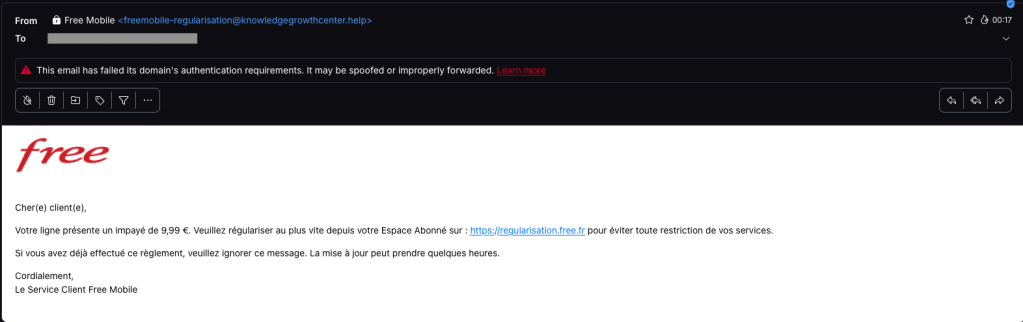
One of our employees, who is a Free Mobile customer, received this phishing email on Wednesday, September 30. The message used the same logo and template as legitimate emails from the company, but came from the suspicious email address freemobile-regularisation[@]knowledgegrowthcenter[.]help. It included a link that appeared to point to regularisation.free.fr :

Free Mobile phishing email

The email tells the user that an invoice of €9.99 needs to be paid to avoid having the customer’s service suspended. Clicking the link opens a redirection chain:

1. https://u2l.ai/Q5YwFz301
2. https://espace-free-mobile.pro/Ds41LE/302
3. https://espace-free-mobile.pro/Ds41LE/regularisation/?impaye=92a9e77d…200

This final domain, espace-free-mobile.pro, is hosted by Cloudflare and was registered just a month ago.

The final link opens a convincing page with a form asking for credit card details:

Free Mobile scam

The phishing page looks authentic, which sets this campaign apart from many of the Free Mobile scams we’ve seen since the breach.

We initially saw the same campaign using less convincing redirection chains, like this example from July:

1. https://bly.to/93kie5u
2. https://s1181402.ha026.t.mydomain.zone/mbl/
3. https://s1181402.ha026.t.mydomain.zone/mbl/regularisation/?impaye=505…

More recently, we’ve seen more authentic-looking domains, all hosted by Cloudflare:

1. https://s.ink/jmCnZZ
2. https://freesas.info/Cf4tP/
3. https://freesas.info/Cf4tP/regularisation/?impaye=f13fa919d1a22833557…

And another example:

1. https://bly.to/jabwpf6
2. https://regularisation-free.info/portail/
3. https://regularisation-free.info/portail/regularisation/?impaye=83f91…

How to stay safe

Malwarebytes can help protect you from these threats, but treat unexpected messages about your accounts and invoices with caution:

  • Don’t follow links in unsolicited emails. If a message concerns your account, open the official Free Mobile app or website directly, or call the official help line at 3244.
  • Check the actual domain in your browser’s address bar to see if it matches what you expect—https://mobile.free.fr in this case.
  • Malwarebytes Browser Guard detects and blocks this scam directly in your browser.
  • Use an up-to-date, real-time anti-malware solution with a web protection component on all your devices.
  • Malwarebytes Scam Guard can help you determine whether an email is a scam and advise you on what to do next.

Stop threats before they can do any harm.

Malwarebytes Browser Guard blocks phishing pages and malicious sites automatically. Free, one click to install. Add it to your browser →

  • ✇Cybersecurity News
  • Android May Let You Unlock a Forgotten PIN With Google Do Son
    Android 17 QPR2 Beta 5 code hints at an Unlock with Google Account feature to recover a forgotten PIN without a factory reset. Here is how it may work. Related Posts: September Pixel Drop Adds VIP Widgets and Scam Alerts Android Password Manager Migration Simplifies Passkey Transfers Android 17 Enables Encrypted Client Hello by Default to Hide Website Names The post Android May Let You Unlock a Forgotten PIN With Google appeared first on Daily CyberSecurity.
     

Forgot Your Android PIN? Google Is Testing a New Recovery Option

23 de Setembro de 2026, 07:13

Google is testing an Android feature that could let users recover access to a locked phone with their Google Account instead of factory resetting it.

The post Forgot Your Android PIN? Google Is Testing a New Recovery Option appeared first on TechRepublic.

  • ✇Malwarebytes
  • Revolut phishing texts appear days after data breach
    Only days after Revolut acknowledged that it disclosed sensitive customer records to an unauthorized party, affected customers are receiving phishing texts. However, we don’t know yet if the phishing texts are linked to the breach. The company had accepted fraudulent information requests sent from an email address on a legitimate government agency domain. Through this social engineering attack, rather than by gaining access to Revolut’s systems, the criminals obtained the following types
     

Revolut phishing texts appear days after data breach

17 de Setembro de 2026, 11:07

Only days after Revolut acknowledged that it disclosed sensitive customer records to an unauthorized party, affected customers are receiving phishing texts. However, we don’t know yet if the phishing texts are linked to the breach.

The company had accepted fraudulent information requests sent from an email address on a legitimate government agency domain.

Through this social engineering attack, rather than by gaining access to Revolut’s systems, the criminals obtained the following types of information about customers:

  • Identity and contact information such as dates of birth, postal addresses, email addresses, and phone numbers
  • Copies of IDs such as passports and driver’s licenses
  • Verification selfies
  • Account statements and transaction histories

Revolut has said only that a “limited” or “very limited” number of customers were affected, and that it contacted them directly.

One affected customer received a phishing text on Monday, September 14, two days after Revolut publicly acknowledged the data breach. The message appeared in the same conversation as other Revolut texts, making it look as though it had come from the bank.

Scammers target Revolut customer
Phishing text to a Revolut customer

According to VirusTotal, the phishing domain was first scanned that same day.

In a separate example, another customer said that opening the link took them to a web page that requested access to their device’s camera. If you tap Allow, the page reportedly imitates Revolut’s live-video “turn your head” identity check before prompting you to enter a password.

This makes the phishing page appear more authentic. It may also allow the scammers to collect a selfie or video that could be used for further social engineering, identity fraud, or to make subsequent scams more convincing.

A convincing fake liveness check followed by a password screen is a common way to lower suspicion and obtain the information attackers need to attempt a real login or account-recovery flow.

If the campaign is connected to the breach, the information obtained from Revolut, combined with login details entered by victims or their approval of a login request, could be enough to take over their accounts.

How to stay safe

We don’t yet know whether the phishing campaign is using data exposed in the breach or whether unrelated scammers are exploiting news of the incident to target Revolut customers more broadly.

Either way, treat unexpected messages about your account with caution:

  • Don’t follow links in unsolicited messages. If a message concerns your account, open the official Revolut app directly.
  • Check the actual domain in your browser’s address bar to see if it corresponds with what you expect.
  • Use an up-to-date, real-time anti-malware solution on your device, preferably with a web protection component.
  • Malwarebytes Scam Guard can help you determine whether a message is a scam and advise you on what to do next.

Stop threats before they can do any harm.

Malwarebytes Browser Guard blocks phishing pages and malicious sites automatically. Free, one click to install. Add it to your browser →

  • ✇Malwarebytes
  • Loyalty points fraud is funding hacker holidays (Lock and Code S07E18)
    This week on the Lock and Code podcast… Crooks are taking a holiday. They’re counting on you to fund it. For decades, cybercriminals have stolen roughly the same types of data. Biographical and personal details—like Social Security numbers, birthdates, addresses, and phone numbers—can be stolen to commit identity fraud. Credit card numbers, expiration dates, and CVC codes can be stolen to make fraudulent purchases. Usernames and passwords can, in the wrong hands, let a cybercriminal impers
     

Loyalty points fraud is funding hacker holidays (Lock and Code S07E18)

7 de Setembro de 2026, 15:23

This week on the Lock and Code podcast…

Crooks are taking a holiday. They’re counting on you to fund it.

For decades, cybercriminals have stolen roughly the same types of data. Biographical and personal details—like Social Security numbers, birthdates, addresses, and phone numbers—can be stolen to commit identity fraud. Credit card numbers, expiration dates, and CVC codes can be stolen to make fraudulent purchases. Usernames and passwords can, in the wrong hands, let a cybercriminal impersonate someone, steal sensitive photographs to later use for extortion, or abuse a reputation.

All of these attack models seek to turn sensitive or important data into currency. But an emerging form of digital fraud is targeting data that, when used strategically, practically is currency: Loyalty points.

Loyalty points programs are run by nearly every type of consumer-facing business today, from hotels to airlines to grocery stores to donut shops. As repeat customers accrue these points, they can exchange them for discounted prices on future purchases, cutting the costs of hotel stays, flights, rental cars, and even entire vacations.

But the value stored within these loyalty points makes them a high target for cybercrime, said Kim Sutherland, Global Head of Fraud and Identity at LexisNexis® Risk Solutions.

“Most loyalty currency is worth about one cent per point, and then there are premium programs that can be worth more than that,” Sutherland said, explaining that 100,000 airlines points, for example, can be worth $1,000 in the US. “Why criminals care so much about this is because most of us are not paying attention to our loyalty programs the same way we would our bank account.”

But diligence is much needed here, Sutherland said, noting that one Chicago teacher only learned that 240,000 of his airlines points had been stolen because he received a basic confirmation email about their use. In another example, a man’s airline miles were stolen and fraudulently used to book rental cars in New York and Memphis.

Today, on the Lock and Code podcast with host David Ruiz, we speak with Sutherland about loyalty points theft— how it happens, what companies are doing to protect customers, and what people can do to stay safe.

“Some of us don’t even know how to access those points, right? Or we don’t even know we’re accumulating them, but the fraudsters do.”

Tune in today to listen to the full conversation.

Show notes and credits:

Intro Music: “Spellbound” by Kevin MacLeod (incompetech.com)
Licensed under Creative Commons: By Attribution 4.0 License
http://creativecommons.org/licenses/by/4.0/
Outro Music: “Good God” by Wowa (unminus.com)


Listen up—Malwarebytes doesn’t just talk cybersecurity, we provide it.

Protect yourself from online attacks that threaten your identity, your files, your system, and your financial well-being with our exclusive offer for Malwarebytes Premium for Lock and Code listeners.

Google Adds Selfie Video Sign-In to Help Users Recover Locked Accounts

24 de Julho de 2026, 10:11

Google added selfie video recovery for eligible accounts, using encrypted videos and liveness checks to help users regain access when locked out.

The post Google Adds Selfie Video Sign-In to Help Users Recover Locked Accounts appeared first on TechRepublic.

One Password Mistake Helped Hackers Access Chick-fil-A Account

23 de Julho de 2026, 16:40

Chick-fil-A disclosed a credential stuffing attack affecting customers across 10 states, underscoring the risks of password reuse and account takeover.

The post One Password Mistake Helped Hackers Access Chick-fil-A Account appeared first on TechRepublic.

  • ✇Arstechnica
  • Startup necromancy: Dead Google Apps domains can be compromised by new owners Kevin Purdy
    Lots of startups use Google’s productivity suite, known as Workspace, to handle email, documents, and other back-office matters. Relatedly, lots of business-minded webapps use Google’s OAuth, i.e. “Sign in with Google.” It’s a low-friction feedback loop—up until the startup fails, the domain goes up for sale, and somebody forgot to close down all the Google stuff. Dylan Ayrey, of Truffle Security Co., suggests in a report that this problem is more serious than anyone, especially Google, is ackno
     

Startup necromancy: Dead Google Apps domains can be compromised by new owners

15 de Janeiro de 2025, 16:51

Lots of startups use Google’s productivity suite, known as Workspace, to handle email, documents, and other back-office matters. Relatedly, lots of business-minded webapps use Google’s OAuth, i.e. “Sign in with Google.” It’s a low-friction feedback loop—up until the startup fails, the domain goes up for sale, and somebody forgot to close down all the Google stuff.

Dylan Ayrey, of Truffle Security Co., suggests in a report that this problem is more serious than anyone, especially Google, is acknowledging. Many startups make the critical mistake of not properly closing their accounts—on both Google and other web-based apps—before letting their domains expire.

Given the number of people working for tech startups (6 million), the failure rate of said startups (90 percent), their usage of Google Workspaces (50 percent, all by Ayrey’s numbers), and the speed at which startups tend to fall apart, there are a lot of Google-auth-connected domains up for sale at any time. That would not be an inherent problem, except that, as Ayrey shows, buying a domain with a still-active Google account can let you re-activate the Google accounts for former employees.

Read full article

Comments

© Aurich Lawson | Getty Images

❌
❌