Visualização normal

Antes de ontemStream principal
  • ✇Malwarebytes
  • Two critical Chrome flaws put users at risk on malicious websites
    Update September 4, 2026 Shortly after this article was published, Google released another Chrome update that patches an actively exploited flaw in the V8 JavaScript engine, tracked as CVE-2026-85046. Google rates the vulnerability as high severity and says an exploit already exists in the wild. An attacker could use a crafted HTML page to execute arbitrary code inside the Chrome sandbox. Because it is already being exploited, HKCERT rates the overall risk as extremely high. After ins
     

Two critical Chrome flaws put users at risk on malicious websites

2 de Setembro de 2026, 08:15

Update September 4, 2026

Shortly after this article was published, Google released another Chrome update that patches an actively exploited flaw in the V8 JavaScript engine, tracked as CVE-2026-85046.

Google rates the vulnerability as high severity and says an exploit already exists in the wild. An attacker could use a crafted HTML page to execute arbitrary code inside the Chrome sandbox. Because it is already being exploited, HKCERT rates the overall risk as extremely high.

After installing the latest update, Chrome should be at version 152.0.7977.82/.83 on Windows and Mac, or 152.0.7977.82 on Linux.

Chrome is rolling out an update for its desktop browser. The update includes 26 security fixes, two of which Google rates as critical use-after-free vulnerabilities.

How to update Chrome

If you don’t want to wait for the rollout to reach you, manually updating is easy.

The easiest option is to allow Chrome to update automatically. But you can end up lagging behind if you never close your browser or if something goes wrong with the update.

To update manually, click the More menu (three dots), then go to Settings > About Chrome. If an update is available, Chrome will start downloading it automatically. Restart Chrome to complete the update, and you’ll be protected against these vulnerabilities.

You can find an explanation of the version numbering system and step-by-step instructions in our guide: How to update Chrome on every operating system.

Technical details

Let’s look at the two critical vulnerabilities. Both are use-after-free (UAF) vulnerabilities. A use-after-free vulnerability occurs when a program attempts to access a memory location after it has been freed. That can cause crashes or, in some cases, allow an attacker to run their own code.

The first, tracked as CVE-2026-84353, was found in Shared Tab Groups and could allow a remote attacker using social engineering to execute arbitrary code outside the browser sandbox via a crafted HTML page. Here, social engineering likely means an attacker would have to lure you to a malicious website or open an email in HTML format.

The other critical vulnerability, tracked as CVE-2026-84352, was found in WebGL. WebGL, short for Web Graphics Library, is a browser technology that lets websites display interactive 2D and 3D graphics. The vulnerability could allow a remote attacker to execute arbitrary code outside the sandbox via a crafted HTML page.

Chrome vulnerabilities that enable remote code execution outside the browser sandbox are particularly valuable to attackers because they can turn a visit to a malicious or compromised website into direct code running on the underlying operating system, often without requiring additional exploitation steps.


Stop threats before they can do any harm.

Malwarebytes Browser Guard blocks phishing pages and malicious sites automatically. Free, one click to install. Add it to your browser →
  • ✇Cybersecurity News
  • Windows 11 KB5120998 Bugs Emerge Do Son
    Learn about the latest Windows 11 KB5120998 bugs causing desktop black screens and cursor glitches. Find out how to uninstall this optional update safely. Related Posts: Microsoft Defender False Alarm: "Antivirus Is Turned Off" Windows 11 Relieves OneDrive Nags Windows 11 26H2 Enters Release Preview Channel The post Windows 11 KB5120998 Bugs Emerge appeared first on Daily CyberSecurity.
     

Windows 11 KB5120998 Bugs Emerge

Por:Do Son
30 de Agosto de 2026, 23:25

Learn about the latest Windows 11 KB5120998 bugs causing desktop black screens and cursor glitches. Find out how to uninstall this optional update safely.

Related Posts:

The post Windows 11 KB5120998 Bugs Emerge appeared first on Daily CyberSecurity.

  • ✇Malwarebytes
  • Update Chrome before you browse again
    Chrome is rolling out an update for its desktop browser. The update includes 327 security fixes, ten of which address critical vulnerabilities. The stable channel has been updated to 152.0.7977.64/.65 for Windows and Mac, and 152.0.7977.64 for Linux. How to update Chrome If you don’t want to wait for the rollout to reach you, manually updating is easy. The easiest option is to allow Chrome to update automatically. But you can end up lagging behind on updates if you never close your b
     

Update Chrome before you browse again

26 de Agosto de 2026, 10:10

Chrome is rolling out an update for its desktop browser. The update includes 327 security fixes, ten of which address critical vulnerabilities.

The stable channel has been updated to 152.0.7977.64/.65 for Windows and Mac, and 152.0.7977.64 for Linux.

How to update Chrome

If you don’t want to wait for the rollout to reach you, manually updating is easy.

The easiest option is to allow Chrome to update automatically. But you can end up lagging behind on updates if you never close your browser or if something goes wrong, such as an extension preventing the update.

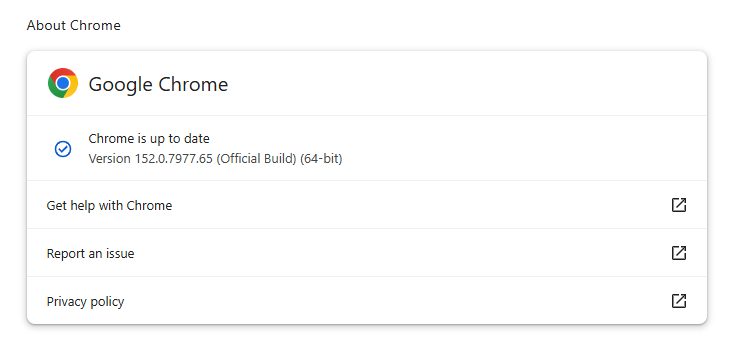
To update manually, click the More menu (three dots), then go to Settings > About Chrome. If an update is available, Chrome will start downloading it automatically. Restart Chrome to complete the update, and you’ll be protected against these vulnerabilities.

Chrome 152.0.7977.65 is up to date

You can find an explanation of the version numbering system and step-by-step instructions in our guide: How to update Chrome on every operating system.

Technical details

We want to highlight two vulnerabilities out of the hundreds because we think they could attract attackers if they go unpatched for too long. Both can be triggered by simply visiting a malicious website.

The first is a critical vulnerability in ANGLE (Almost Native Graphics Layer Engine), tracked as CVE-2026-79282. A remote attacker could exploit it using a crafted HTML page to execute arbitrary code outside the browser sandbox.

Chrome uses ANGLE to translate graphics commands used by web pages and browsers into something your operating system and graphics card can process.

Chrome vulnerabilities that enable remote code execution outside the browser sandbox are particularly valuable to attackers because they can turn a visit to a malicious or compromised website into direct code execution on the underlying operating system, often without requiring additional exploitation steps.

A researcher also discovered a use-after-free vulnerability in Chrome’s V8 engine. Tracked as CVE-2026-78899, it has a CVSS score of 8.8 out of 10.  Successful exploitation of this could allow a remote attacker to execute arbitrary code inside the sandbox via a crafted HTML page.

Chrome’s V8 engine is the part of Chrome, and other Chromium-based browsers, that runs JavaScript. Use-after-free is a class of vulnerability caused by incorrect use of dynamic memory during a program’s operation. If, after freeing a memory location, a program does not clear the pointer to that memory, an attacker may be able to use the error to manipulate the program.

The phrase “inside the sandbox” means the malicious code would run in a restricted, sealed-off environment rather than directly on your whole computer. That limits what the attacker can do as it constrains them to the browser, lowering the impact compared with code running outside the sandbox. However, attackers often chain multiple vulnerabilities together to escape the sandbox and achieve a more serious compromise. So, the phrase describes an important security limitation, but it does not mean the vulnerability is harmless.


Stop threats before they can do any harm.

Malwarebytes Browser Guard blocks phishing pages and malicious sites automatically. Free, one click to install. Add it to your browser →
  • ✇Malwarebytes
  • Update Chrome now: Two critical vulnerabilities fixed
    Chrome is rolling out an update for its desktop versions. The update includes 15 security fixes, two of which address critical buffer overflow vulnerabilities. The stable channel has been updated to 151.0.7922.169/.170 for Windows and Mac, and 151.0.7922.169 for Linux. How to update Chrome If you don’t want to wait for the rollout to reach you, manually updating is easy. The easiest option is to allow Chrome to update automatically. But you can end up lagging behind on updates if you
     

Update Chrome now: Two critical vulnerabilities fixed

19 de Agosto de 2026, 07:32

Chrome is rolling out an update for its desktop versions. The update includes 15 security fixes, two of which address critical buffer overflow vulnerabilities.

The stable channel has been updated to 151.0.7922.169/.170 for Windows and Mac, and 151.0.7922.169 for Linux.

How to update Chrome

If you don’t want to wait for the rollout to reach you, manually updating is easy.

The easiest option is to allow Chrome to update automatically. But you can end up lagging behind on updates if you never close your browser or if something goes wrong, such as an extension preventing the update.

To update manually, click the More menu (three dots), then go to Settings > About Chrome. If an update is available, Chrome will start downloading it automatically. Restart Chrome to complete the update, and you’ll be protected against these vulnerabilities.

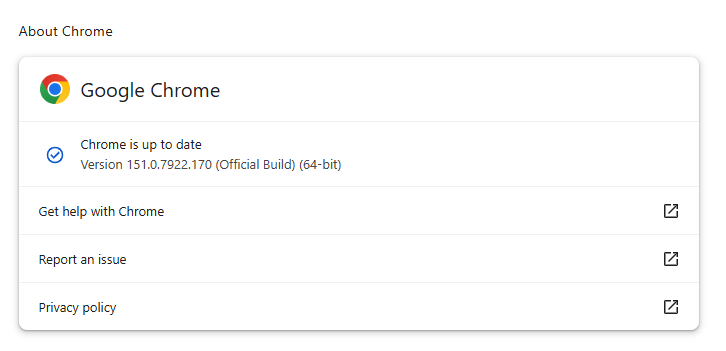
Chrome is up to date
Chrome 151.0.7922.170 is up to date

You can find an explanation of the version numbering system and step-by-step instructions in our guide: How to update Chrome on every operating system.

Technical details

As mentioned earlier, the two vulnerabilities rated critical in this update are both buffer overflow flaws.

A buffer overflow is a type of software vulnerability that exists when an area of memory within a software application reaches its address boundary and writes into an adjacent memory region. In software exploit code, two common areas that are targeted for overflows are the stack and the heap.

The first one is tracked as CVE-2026-76034 and was found in WebGL (Web Graphics Library). WebGL is a JavaScript application programming interface (API) that allows web browsers to render interactive 2D and 3D graphics smoothly. A remote attacker can exploit this vulnerability to execute arbitrary code outside the sandbox via a crafted HTML page. 

The second critical vulnerability is tracked as CVE-2026-76036 and sits in Dawn, the underlying open-source library that implements the WebGPU standard. It acts as a bridge, allowing web apps to talk directly to computer graphics hardware. This vulnerability also allows a remote attacker to execute arbitrary code outside the sandbox via a crafted HTML page.

Chrome vulnerabilities that enable remote code execution outside the browser sandbox are particularly valuable to attackers because they can turn a visit to a malicious or compromised website into direct code execution on the underlying operating system, often without requiring additional exploitation steps.

The sandbox normally limits a compromised renderer process’s access to files, devices, and other sensitive system resources. Bypassing it substantially expands an attacker’s ability to steal data, establish persistence, deploy malware, or move further through an enterprise environment.


From reporting threats to removing them.

Cybersecurity risks should never spread beyond a headline. Keep threats off your devices by downloading Malwarebytes today.

  • ✇Malwarebytes
  • Apple fixes another image-processing flaw that could allow code execution
    Apple has released security updates for more than two dozen security vulnerabilities across iPhone, iPad, and macOS Tahoe,including yet another image parsing vulnerability that could compromise your device. This update delivers security fixes that were first made available in the iOS 27 and iPadOS 27 betas. Updates for your particular device The table below shows which updates are available and points you to the relevant security content for each one. Name and information linkAvailab
     

Apple fixes another image-processing flaw that could allow code execution

18 de Agosto de 2026, 11:55

Apple has released security updates for more than two dozen security vulnerabilities across iPhone, iPad, and macOS Tahoe,including yet another image parsing vulnerability that could compromise your device.

This update delivers security fixes that were first made available in the iOS 27 and iPadOS 27 betas.

Updates for your particular device

The table below shows which updates are available and points you to the relevant security content for each one.

Name and information linkAvailable for
iOS 26.6.1 and iPadOS 26.6.1iPhone 11 and later, iPad Pro 12.9-inch 3rd generation and later, iPad Pro 11-inch 1st generation and later, iPad Air 3rd generation and later, iPad 8th generation and later, and iPad mini 5th generation and later
iOS 18.7.10 and iPadOS 18.7.10iPhone XS, iPhone XS Max, iPhone XR, iPad 7th generation
macOS Tahoe 26.6.2macOS Tahoe
visionOS 26.6.1Details coming soon

How to update your Apple devices

How to update your iPhone or iPad

For iOS and iPadOS users, here’s how to check if you’re using the latest software version:

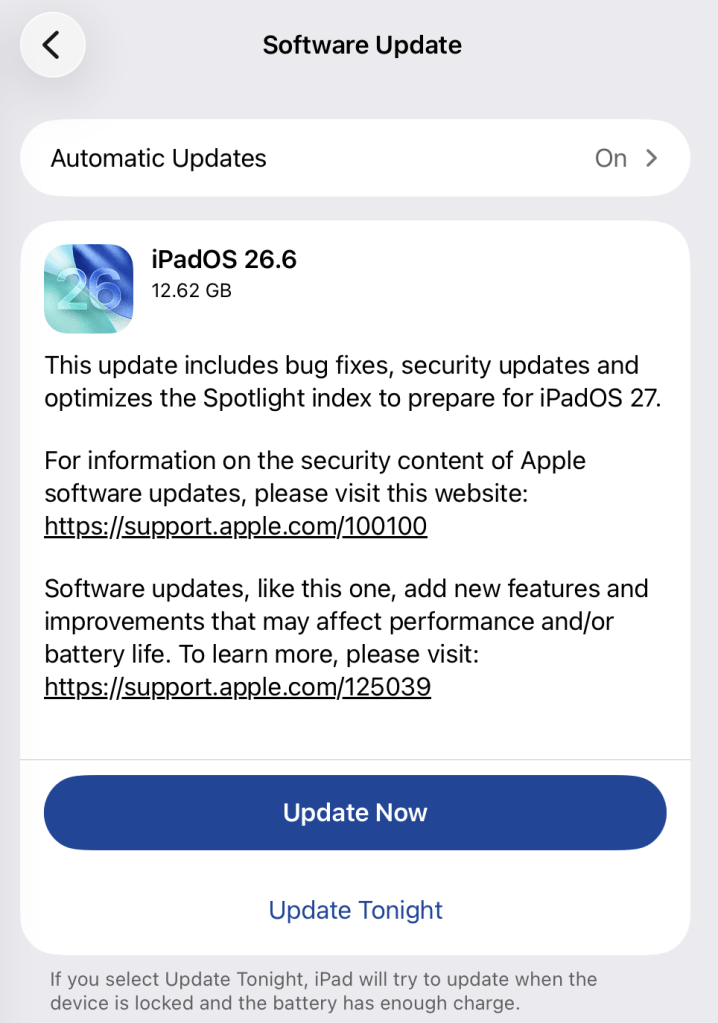
Go to Settings > General > Software Update. You will see if there are updates available and be guided through installing them.

Turn on Automatic Updates if you haven’t already—you’ll find it on the same screen.

Update now
Update is ready

How to update macOS on any version

To update macOS on any supported Mac, use the Software Update feature, which Apple designed to work consistently across all recent versions. Here are the steps:

  • Click the Apple menu in the upper-left corner of your screen.
  • Choose System Settings (or System Preferences on older versions).
  • Select General in the sidebar, then click Software Update on the right. On older macOS, just look for Software Update directly.
  • Your Mac will check for updates automatically. If updates are available, click Update Now (or Upgrade Now for major new versions) and follow the on-screen instructions. Before you upgrade to macOS Tahoe 26, please read these instructions.
  • Enter your administrator password if prompted, then let your Mac finish the update (it might need to restart during this process).
  • Make sure your Mac stays plugged in and connected to the internet until the update is done.

Technical details

Of the 27 vulnerabilities, CVE-2026-65346 is the one that stands out. It is an ImageIO integer-overflow bug in which merely processing a malicious image may result in arbitrary code execution, a substantially stronger stated impact than the many “crash-only” findings in this release.

ImageIO is Apple’s framework that handles image parsing. An integer overflow means the vulnerability lets a malicious hacker trick the program into performing an integer operation where the result exceeds the allocated memory space. This can lead to attackers running malicious programs or gaining elevated privileges. In this case, it allows the attacker to run code on the target’s device.

There is no indication in Apple’s advisory that CVE-2026-65346 or any other listed vulnerability was exploited in the wild, but cybercriminals will often try to reverse engineer the patch to come up with an exploit, or the researchers who found it will post a proof-of-concept once everyone has had a chance to apply the update. At that point, these vulnerabilities can be used against you.


Scammers know more about you than you think. 

Malwarebytes Mobile Security protects you from phishing, scam texts, malicious sites, and more. With real-time AI-powered Scam Guard built right in. 

Download for iOS → Download for Android → 

  • ✇Malwarebytes
  • ShieldBreak bypasses Microsoft’s patch for earlier Defender flaw
    Microsoft Defender’s latest patch bypass shows a familiar problem. A newly disclosed Microsoft Defender flaw called ShieldBreak shows that fixing one attack path doesn’t always close every route to the same result. Microsoft has assigned ShieldBreak the identifier CVE-2026-69414 and confirmed it is an elevation of privilege (EoP) vulnerability in the Microsoft Malware Protection Engine. Microsoft says it is still working on a security update. If that sounds somehow familiar, you’re pro
     

ShieldBreak bypasses Microsoft’s patch for earlier Defender flaw

17 de Agosto de 2026, 10:34

Microsoft Defender’s latest patch bypass shows a familiar problem.

A newly disclosed Microsoft Defender flaw called ShieldBreak shows that fixing one attack path doesn’t always close every route to the same result.

Microsoft has assigned ShieldBreak the identifier CVE-2026-69414 and confirmed it is an elevation of privilege (EoP) vulnerability in the Microsoft Malware Protection Engine. Microsoft says it is still working on a security update.

If that sounds somehow familiar, you’re probably thinking of RoguePlanet, another vulnerability in Defender that Microsoft acknowledged on June 16 and patched on July 8.

A short timeline

At the time, the published exploit for RoguePlanet was described as depending on a race condition, meaning it was not guaranteed to work the same way on every machine. That was one reason the vulnerability was concerning but still somewhat limited from a practical point of view.

Microsoft’s July fix should have closed the door on that problem. But security fixes do not always eliminate a weakness at the root of the problem. Sometimes they block one known attack path, while a researcher later finds a different route to reach the same end result.

That appears to be what happened here. ShieldBreak has been described as a patch bypass because it reportedly sidesteps the earlier RoguePlanet fix, although it uses a different exploitation method rather than simply repeating the original attack.

In August, the same researcher disclosed ShieldBreak, and Microsoft responded by publishing a new advisory for CVE-2026-69414.

The advisory says the issue has been publicly disclosed, proof-of-concept (PoC) exploit code exists, exploitation is considered more likely, and no official fix is available yet. Microsoft says it is working on one.

How to stay safe

Until Microsoft releases a fix, the most important protection is preventing untrusted code from running on your computer in the first place. ShieldBreak is a local privilege escalation issue, so an attacker first needs some level of access to the machine.

Based on the best public reporting available right now, ShieldBreak appears to require Microsoft Defender to be enabled in order to work. Public testing indicates that the exploit does not succeed when Defender is off or when another product is registered as the active antivirus provider.

You're safe if Defender is turned off

So, narrowly speaking, disabling Defender appears to stop this specific ShieldBreak chain from working. However, that is not a good safety recommendation for most people. Turning off your antivirus removes an important layer of protection and could leave your computer exposed to other attacks.

For home users, all that means:

  • Install Microsoft’s security updates as soon as they become available.
  • Be very careful with downloads, email attachments, cracked software, and “fix” tools from random websites.
  • Keep backups of important files somewhere not directly connected to the PC.
  • Use an up-to-date, real-time anti-malware solution to alert you about and remove threats from your computer.

CNET Editors' Choice Award 2026

“One of the best cybersecurity suites on the planet.” 

According to CNET. Read their review


  • ✇Malwarebytes
  • Update your Mac: Screen Sharing vulnerability exploited in the wild
    The Dutch National Cyber Security Centre (NCSC) issued a warning after being notified of several incidents where a vulnerability in Apple’s Screen Sharing feature was exploited to install Monero cryptominers. The vulnerability, tracked as CVE-2026-65400, was patched by Apple on August 6. It is an authentication-bypass flaw in macOS Screen Sharing that can let an attacker on the network connect without valid credentials. macOS’s built-in Screen Sharing service is a remote-control feature co
     

Update your Mac: Screen Sharing vulnerability exploited in the wild

17 de Agosto de 2026, 07:56

The Dutch National Cyber Security Centre (NCSC) issued a warning after being notified of several incidents where a vulnerability in Apple’s Screen Sharing feature was exploited to install Monero cryptominers.

The vulnerability, tracked as CVE-2026-65400, was patched by Apple on August 6. It is an authentication-bypass flaw in macOS Screen Sharing that can let an attacker on the network connect without valid credentials.

macOS’s built-in Screen Sharing service is a remote-control feature commonly associated with port 5900. Successful exploitation can allow a remote attacker on a reachable network to authenticate to the service without legitimate credentials.

Apple said the bug was fixed through “improved state management,” which suggests an authentication-flow or session-state validation failure rather than a cryptographic break.

The patch was issued for macOS Tahoe 26.6.1, Sequoia 15.7.9, and Sonoma 14.8.9. Practical exposure requires Screen Sharing to be enabled, so the highest-risk systems are those where port 5900 is internet-accessible, typically through a router port-forward, public IP assignment, or hosting-provider setup. Hosts reachable only from an internal network are still potentially exposed, but attackers would have to gain a position on that network.

An attacker could view and control the Mac remotely because that is the function Screen Sharing provides. NCSC says active cases involved attackers gaining root access and installing cryptomining software, specifically for Monero mining.

The criminals likely chose Monero mining because it does not depend on heavily specialized, application-specific integrated circuits (ASICs), but can be done with any CPU or GPU.

Cryptomining isn’t necessarily the worst an attacker could do. With a root-level compromise an attacker could enable persistence, data theft, credential and key harvesting, deployment of additional malware, and lateral movement.

How to stay safe

Install the update

The best way to protect your Mac is to install the update.

To update macOS on any supported Mac, use the Software Update feature, which Apple designed to work consistently across all recent versions. Here are the steps:

  • Click the Apple menu in the upper-left corner of your screen.
  • Choose System Settings (or System Preferences on older versions).
  • Select General in the sidebar, then click Software Update on the right. On older macOS, just look for Software Update directly.
  • Your Mac will check for updates automatically. If updates are available, click Update Now (or Upgrade Now for major new versions) and follow the on-screen instructions. Before you upgrade to macOS Tahoe 26, please read these instructions.
  • Enter your administrator password if prompted, then let your Mac finish the update (it might need to restart during this process).
  • Make sure your Mac stays plugged in and connected to the internet until the update is done.

Make sure Screen Sharing is disabled

If you can’t update immediately, check whether Screen Sharing is enabled and turn it off if you don’t use it.

  1.  Click the Apple menu in the top-left corner of the screen.
  2. Select System Settings.
  3. In the left sidebar, click General.
  4. Click Sharing on the right; you may need to scroll down.
  5. Find Screen Sharing:
    • If the switch is off/grey, it is disabled.
    • If the switch is on/colored, click it to switch it off.

Also check Remote Management on that same Sharing page. It provides another remote-control route and should be off unless the owner knowingly uses it for work or IT support.


Macs need protection too

Malwarebytes Premium Security for Mac stops threats and protects your Mac and personal files from hackers and cybercriminals.

  • ✇Malwarebytes
  • “Zoomsday” flaws could let one Zoom participant attack another
    Researchers have found three vulnerabilities in the popular Zoom meeting platform that could let one meeting participant attack another through malicious collaboration data. The vulnerabilities, tracked as CVE-2026-53413, CVE-2026-53414, and CVE-2026-53415, affect the code Zoom uses to process annotation data shared during meetings. The researchers named the set of flaws “Zoomsday.” Affected applications are: Zoom Workplace on all supported platforms before version 7.1.5 and 7.0.6, de
     

“Zoomsday” flaws could let one Zoom participant attack another

12 de Agosto de 2026, 11:43

Researchers have found three vulnerabilities in the popular Zoom meeting platform that could let one meeting participant attack another through malicious collaboration data.

The vulnerabilities, tracked as CVE-2026-53413, CVE-2026-53414, and CVE-2026-53415, affect the code Zoom uses to process annotation data shared during meetings. The researchers named the set of flaws “Zoomsday.”

Affected applications are:

  • Zoom Workplace on all supported platforms before version 7.1.5 and 7.0.6, depending on the release branch
  • Zoom Workplace VDI Client for Windows before versions 7.0.11 and 6.6.16, depending on the release branch
  • Zoom Rooms on all supported platforms before version 7.1.5
  • Zoom Meeting SDK on all supported platforms before version 7.1.5

What can happen

What this means is that someone in the same Zoom meeting could send data that the Zoom app was not prepared to handle. Instead of simply displaying a drawing, text box, or other annotation, a vulnerable client could be tricked into crashing, leaking information, or even running attacker-controlled code.

Annotation features sound simple, but the underlying process is not. Your Zoom client receives structured data from another participant and turns that data into an object it can display on screen. According to the research, the annotation parser contained several memory-safety bugs. Like any software that processes data supplied by a third party, it has to be very careful about validating lengths, counts, and references before using them.

Remarkably, there is a discrepancy between the severity ratings assigned by the researchers, who rated them as Critical, and Zoom, which rated them as High.

The difference appears to come down to how the vulnerabilities are scored under the Common Vulnerability Scoring System (CVSS score). Zoom considers successful exploitation to require user interaction.

In practice, an attacker would first need to get into the same meeting as the intended victim. That could mean joining an open meeting, abusing a leaked meeting link, posing as an expected attendee, or compromising an account that already has access. Zoom considers it user interaction if the attacker persuades the target to join a meeting with the intent to compromise their machine.

How to stay safe

Zoom has published a security bulletin explaining which programs need to be updated and where to find the fixed versions.

To protect yourself from Zoomsday and have safe meetings:

  • Update Zoom to the latest version as soon as possible.
  • Restrict who can join your Zoom meetings. Use passcodes, waiting rooms, authenticated-user restrictions, and unique meeting links for sensitive calls.
  • If features like annotation, whiteboards, remote control, file transfer, or third-party apps are not needed, consider turning them off, especially for meetings that have an open invitation nature.
  • One crashed meeting is not proof of an attack, but if it happens on a regular basis, it’s worth investigating.
  • Use an up-to-date, real-time anti-malware solution to block malicious code on your devices.
  • Organizations should also check their device-management tools to make sure every deployed Zoom client is receiving updates.

From reporting threats to removing them.

Cybersecurity risks should never spread beyond a headline. Keep threats off your devices by downloading Malwarebytes today.

  • ✇Malwarebytes
  • Patch Tuesday: Update now to fix 421 flaws, including three zero-days
    Microsoft’s August 2026 Patch Tuesday addresses 421 Microsoft vulnerabilities, including 62 rated Critical. One Windows vulnerability has been exploited in the wild by the Lazarus group to gain SYSTEM privileges. The August update is smaller than July’s record-breaking release, but it’s still among Microsoft’s largest Patch Tuesday batches. More importantly, it includes several flaws likely to attract attacker interest: a publicly disclosed Windows privilege escalation flaw with a proof-of-co
     

Patch Tuesday: Update now to fix 421 flaws, including three zero-days

12 de Agosto de 2026, 10:48

Microsoft’s August 2026 Patch Tuesday addresses 421 Microsoft vulnerabilities, including 62 rated Critical. One Windows vulnerability has been exploited in the wild by the Lazarus group to gain SYSTEM privileges.

The August update is smaller than July’s record-breaking release, but it’s still among Microsoft’s largest Patch Tuesday batches. More importantly, it includes several flaws likely to attract attacker interest: a publicly disclosed Windows privilege escalation flaw with a proof-of-concept (PoC), a newly completed unauthenticated SharePoint remote code execution (RCE) chain, and a potentially wormable Windows DNS Server flaw.

How to apply patches and check if you’re protected

These updates fix security problems and help keep your Windows PC protected. Here’s how to make sure you’re up to date:

  • Click the Start button, then open Settings.
  • Select Windows Update (usually at the bottom of the menu on the left).
  • Click Check for updates. Windows will search for the latest security updates. If you’ve enabled Get the latest updates as soon as they’re available under More options, you may be prompted to restart immediately to complete the update. Otherwise, continue to the next step.
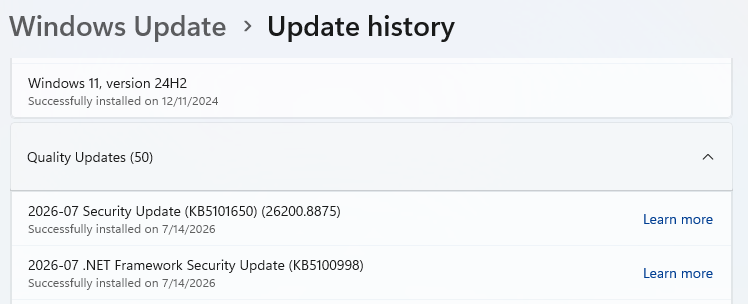
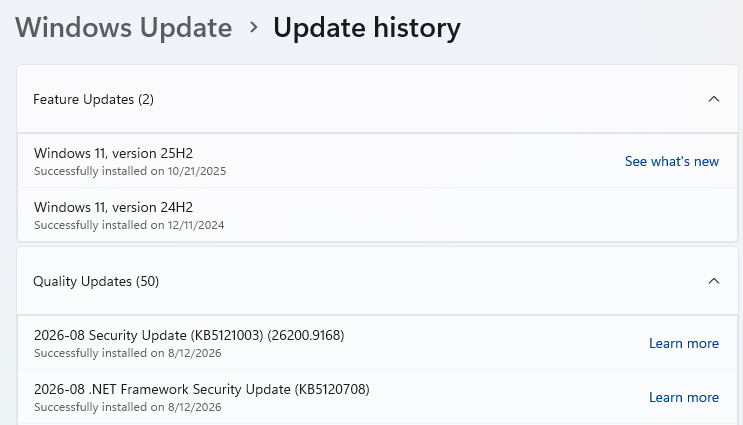
Windows update history - August 12, 2026
  • If updates are available, they’ll start downloading automatically. When they’re ready, click Install or Restart now if prompted. Your computer may need a restart to finish the update.
  • After restarting, go back to Windows Update and check again. If it says You’re up to date, you’re all set.
Windows up to date

Technical details

Windows Deployment Services (WDS) users should prioritize CVE-2026-62893 (CVSS score 9.8 out of 10), an unauthenticated RCE flaw in the TFTP (Trivial File Transfer Protocol) server. TFTP normally runs on UDP port 69 and has no built-in authentication. It is primarily an enterprise and school network issue, but it could enable lateral movement where WDS is deployed.

Microsoft also fixed CVE-2026-62832, a publicly disclosed elevation of privilege (EoP) vulnerability in the Windows User Profile Service. It maps to the issue researchers called LegacyHive, for which a limited public proof of concept was released in July.

The PoC demonstrates how a local authenticated attacker could abuse the service’s registry hive handling to load another user’s hive, potentially including an administrator’s. The released demonstration is deliberately constrained and requires credentials for another user, but the availability of code and the broad Windows footprint make this one a strong candidate for exploitation attempts.

Another good reason to promptly update is the number (I counted 48) of remote code execution (RCE) fixes for Office applications and components, including Excel, Word, Outlook, PowerPoint, and the Office graphics component. Document-borne vulnerabilities are attractive to phishing operators because email attachments and shared documents provide delivery mechanisms that people are likely to open.


CNET Editors' Choice Award 2026

“One of the best cybersecurity suites on the planet.” 

According to CNET. Read their review


  • ✇Malwarebytes
  • Apple WebKit vulnerabilities reveal your IP address, despite Private Relay
    Three WebKit mechanisms have been discovered to bypass Apple’s iCloud Private Relay. In fact, the mechanisms can bypass any browser‑level proxy configuration, including Psylo’s proxy, Tor-on-iOS proxy setups, and so on. Private Relay is a VPN-like system for Safari on iOS which is meant to prevent websites from viewing the visitor’s IP address and location. But because all three methods described by the researchers occur outside WebKit’s normal page loading path, Apple’s iCloud Private Rel
     

Apple WebKit vulnerabilities reveal your IP address, despite Private Relay

6 de Agosto de 2026, 11:30

Three WebKit mechanisms have been discovered to bypass Apple’s iCloud Private Relay. In fact, the mechanisms can bypass any browser‑level proxy configuration, including Psylo’s proxy, Tor-on-iOS proxy setups, and so on.

Private Relay is a VPN-like system for Safari on iOS which is meant to prevent websites from viewing the visitor’s IP address and location.

But because all three methods described by the researchers occur outside WebKit’s normal page loading path, Apple’s iCloud Private Relay never sees them and, as a result, means you can’t hide your IP address or Domain Name System (DNS) path in these cases.

The three features are:

  • DNS prefetching
    Modern browsers try to be faster by looking up the IP addresses of links on a page before you click them, a feature known as DNS prefetching. In WebKit, these DNS lookups can bypass the configured proxy/relay and go straight through the system’s normal DNS stack, exposing which DNS servers you are using and, indirectly, where you really are. Even if the actual page load goes through Private Relay, the prefetch DNS queries can still leak metadata about your network.
  • WebAuthn and passkeys
    WebAuthn (the standard behind passkeys) sometimes needs to fetch a small file from the website’s domain to verify that the credential is being used on the right site. The researchers found that, on Apple platforms, this fetch is performed outside the usual WebKit page‑loading path, which means it is not sent through the Safari proxy or Private Relay. The result is that a site using passkeys can cause your device to contact it directly, revealing your true IP address even if the rest of your browsing is supposedly hidden behind a relay.
  • WebTransport and related technologies
    WebTransport is a newer API that gives websites a way to open low‑latency, bidirectional connections to a server. In the scenarios the researchers tested, these WebTransport connections were also initiated outside the proxied WebKit code path, creating another route for sites to receive traffic straight from the device. That traffic again carries the device’s real IP, not the relay or proxy IP the user expects.

From a user‑experience point of view, the problem is that all three mechanisms look like normal browser behavior and require no special tricks from a malicious site.

What’s affected

Affected are Safari on iOS and macOS when Private Relay is used, because Private Relay is implemented as a WebKit‑level proxy that only applies to Safari traffic. Additionally, any iOS/macOS browser or app that relies on WebKit’s proxy configuration to hide the IP (e.g., Psylo, Onion Browser/Tor on iOS, and other proxy browsers), since they all hit the same WebKit behavior.

And that’s not necessarily all. For most of iOS’s history, any app that browsed the web had to use Apple’s WebKit framework and JavaScript engine. This meant that Chrome, Firefox, Edge, Brave, and other browsers on iPhone were effectively different shells around the same WebKit engine Safari uses. Under pressure from the EU’s Digital Markets Act (DMA), Japan’s Smartphone Act, and similar regulatory pushes, Apple introduced a mechanism for non‑WebKit engines, but only in constrained ways.

Malwarebytes’ Senior manager for iOS software Roman Dvoinev commented:

“Basically the API has been “open” for a while, but no browser vendor has actually shipped a non-WebKit browser yet. Major players are still in prototype phase, as Apple’s bar for shipping a browser to iOS is very high.”

Malwarebytes VPN is not affected, since it tunnels the device’s entire network traffic at the system level.

The researchers have reported the problems to Apple and are expecting patches by fall.


Browse like no one’s watching. 

Malwarebytes Privacy VPN encrypts your connection and never logs what you do, so the next story you read doesn’t have to feel personal. Try it free → 

  • ✇Malwarebytes
  • Update your iPhone, iPad and Mac to fix Apple security holes
    Apple has shipped a hefty round of July security patches, headlined by iOS/iPadOS 26.6, macOS Tahoe 26.6, and Safari 26.6, with dozens of vulnerabilities squashed across kernel, WebKit, media frameworks, and core apps. These updates are primarily about improving security rather than adding new features, and users should install them as soon as possible. Updates for your particular device The table below shows which updates are available and points you to the relevant security content for t
     

Update your iPhone, iPad and Mac to fix Apple security holes

28 de Julho de 2026, 08:35

Apple has shipped a hefty round of July security patches, headlined by iOS/iPadOS 26.6, macOS Tahoe 26.6, and Safari 26.6, with dozens of vulnerabilities squashed across kernel, WebKit, media frameworks, and core apps. These updates are primarily about improving security rather than adding new features, and users should install them as soon as possible.

Updates for your particular device

The table below shows which updates are available and points you to the relevant security content for that subject.

iOS 26.6 and iPadOS 26.6iPhone 11 and later, iPad Pro 12.9-inch 3rd generation and later, iPad Pro 11-inch 1st generation and later, iPad Air 3rd generation and later, iPad 8th generation and later, and iPad mini 5th generation and later
macOS Tahoe 26.6macOS Tahoe
macOS Sequoia 15.7.8macOS Sequoia
macOS Sonoma 14.8.8macOS Sonoma
tvOS 26.6Apple TV HD and Apple TV 4K (all models)
watchOS 26.6Apple Watch Series 6 and later
visionOS 26.6Apple Vision Pro (all models)
Safari 26.6macOS Sonoma and macOS Sequoia

How to update your Apple devices

How to update your iPhone or iPad

For iOS and iPadOS users, here’s how to check if you’re using the latest software version:

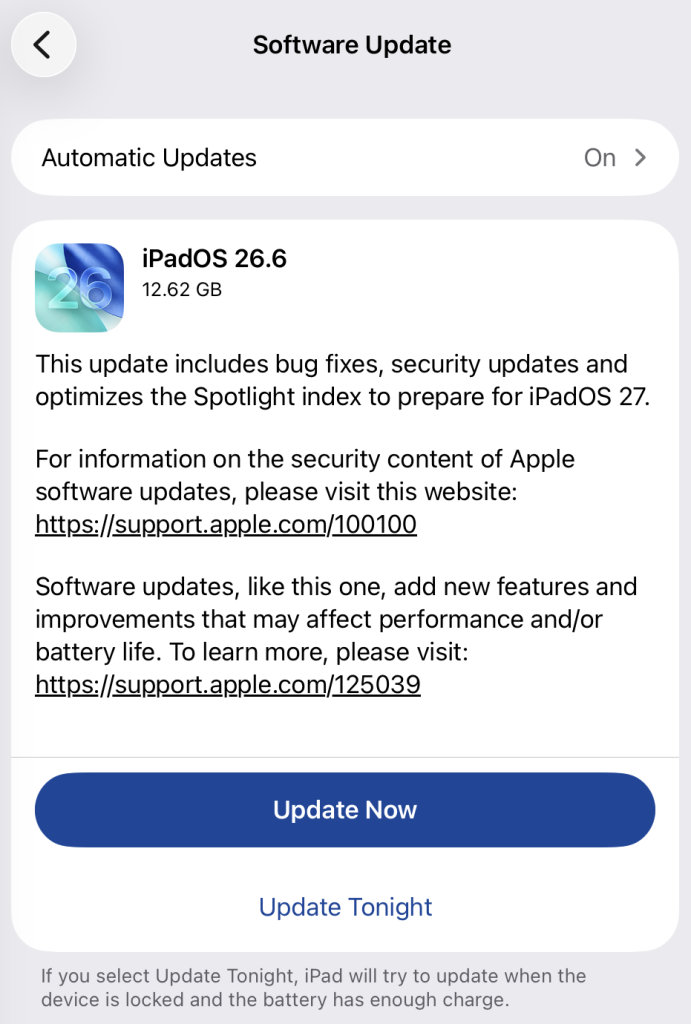
Go to Settings > General > Software Update. You will see if there are updates available and be guided through installing them.

Turn on Automatic Updates if you haven’t already—you’ll find it on the same screen.

iPadOS update options

How to update macOS on any version

To update macOS on any supported Mac, use the Software Update feature, which Apple designed to work consistently across all recent versions. Here are the steps:

  • Click the Apple menu in the upper-left corner of your screen.
  • Choose System Settings (or System Preferences on older versions).
  • Select General in the sidebar, then click Software Update on the right. On older macOS, just look for Software Update directly.
  • Your Mac will check for updates automatically. If updates are available, click Update Now (or Upgrade Now for major new versions) and follow the on-screen instructions. Before you upgrade to macOS Tahoe 26, please read these instructions.
  • Enter your administrator password if prompted, then let your Mac finish the update (it might need to restart during this process).
  • Make sure your Mac stays plugged in and connected to the internet until the update is done.

How to update your Safari browser

Safari updates are included with macOS updates, so installing the latest version of macOS will also update Safari. To check manually:

  • Open the Apple menu > System Settings > General > Software Update.
  • If you see a Safari update listed separately, click Update Now to install it.
  • Restart your device when prompted.

If you’re on an older macOS version that’s still supported (like Sonoma or Sequoia), Apple may offer Safari updates independently through Software Update.

Technical details

Among the more interesting vulnerabilities patched in this update are CVE-2026-43818 in ImageIO,  CVE-2026-43776 in AppleDouble, and CVE-2026-64763 to 64766 in SceneKit.

Although found in different applications, these vulnerabilities have one thing in common. Their descriptions say:

“Processing a maliciously crafted file may lead to unexpected app termination or arbitrary code execution.”

The identical “processing a maliciously crafted file may lead to unexpected app termination or arbitrary code execution” language is not a coincidence. It’s Apple’s standard impact boilerplate for file‑parsing bugs across multiple frameworks, including ImageIO, AppleDouble, and SceneKit. The similarities reflect shared exploitation patterns (untrusted file input hitting native parsers), while the differences lie in what each framework does and which file types/contexts are affected.

ImageIO is the system framework responsible for reading and displaying image formats such as JPEG, PNG, TIFF, RAW, GIF, and other formats. It’s used throughout iOS and macOS by apps including Photos, Safari, Messages, Mail, and Preview.

SceneKit is a 3D graphics and scene graph framework used for rendering models, animations, and complex 3D scenes in apps and games on Apple platforms. It parses scene description files and 3D assets and turns them into renderable content.

AppleDouble is something macOS uses behind the scenes to keep extra file information like icons and other Finder details in cases where your files live on certain types of disks or servers. When Apple mentions “AppleDouble” in security notes, it’s talking about the code that reads and writes that hidden metadata, particularly when files are stored on network drives or shared with non‑Apple systems.

Apple’s advisories reuse a standard warning for any memory‑corruption bug in a file parser: the best‑case outcome is just a crash, the worst case is someone running their malicious code on your device. ImageIO, AppleDouble, and SceneKit all sit in that same danger zone. Although the file types are different, they all present the same underlying risk.

Until you’ve installed this update, it’s an even worse idea than usual to open unsolicited messages and emails with images in them.


Scammers know more about you than you think. 

Malwarebytes Mobile Security protects you from phishing, scam texts, malicious sites, and more. With real-time AI-powered Scam Guard built right in. 

Download for iOS → Download for Android → 

  • ✇Malwarebytes
  • Millions of cars could be tracked and unlocked by a hidden security flaw
    A car alarm vendor’s coding mistake has left millions of vehicles vulnerable to theft and location tracking. Thanks to the way dealers sell car alarms, many affected drivers don’t even know they have one installed. The device is the KARR Security System, a Bluetooth-enabled aftermarket alarm built by Acrisure Protection Group. It’s installed by dealers, primarily at Honda, Toyota, Mazda, Ford, and Jeep dealerships in Southern California. Aftermarket car alarms are a strange corner of the a
     

Millions of cars could be tracked and unlocked by a hidden security flaw

23 de Julho de 2026, 08:24

A car alarm vendor’s coding mistake has left millions of vehicles vulnerable to theft and location tracking. Thanks to the way dealers sell car alarms, many affected drivers don’t even know they have one installed.

The device is the KARR Security System, a Bluetooth-enabled aftermarket alarm built by Acrisure Protection Group. It’s installed by dealers, primarily at Honda, Toyota, Mazda, Ford, and Jeep dealerships in Southern California.

Aftermarket car alarms are a strange corner of the auto industry. Dealers install them in your car before you ever see the vehicle, then try to sell you the subscription afterward. Say no and the hardware still stays put. According to researchers at the University of California San Diego, KARR systems are installed in about 2.2 million American vehicles, and around half of owners don’t even know they’re there.

The research team, led by computer science professor Aaron Schulman, investigated the system and found a single design flaw repeated across nearly a decade of installations.

Every KARR device shares the same authentication key, and it’s stored in plain text inside the KARR smartphone app. Extract it once and you can communicate with any KARR-equipped vehicle made since 2017. That is what the researchers did.

What the attack actually does

Standing within about five yards of a target vehicle, an attacker using the researchers’ proof-of-concept tool can unlock the vehicle and even disable its ignition, potentially leaving a driver stranded. The only outward sign is a brief beep and flicker when the command is sent. The owner receives no alert.

The location tracking issue is arguably even more concerning. KARR units continuously broadcast Bluetooth identifiers, so crowdsourced radio databases like WiGLE have been logging their locations for years. Feed a device’s identifier into WiGLE and you can build a picture of where that car has been parked. It’s a stalker’s dream. The researchers also demonstrated a “mayhem” mode that triggers horns and lights across multiple parked vehicles at once.

Owners who declined the paid service and assumed the hardware was inactive were wrong. According to the researchers, dormant units accept a single Bluetooth wake-up command before exposing the same functionality.

Eighteen months, one conference deadline

UC San Diego disclosed the flaw to Acrisure in January 2025, but a firmware fix did not arrive until July 20, 2026—roughly 18 months later, and only weeks before the team was due to present its findings at the DEF CON hacker conference next month. Acrisure has publicly characterized the real-world risk as low.

Compare that with Subaru’s response to a similar connected-car flaw disclosed last year. Researchers found that Subaru’s Starlink admin portal could hand over any car to anyone armed with a license plate and the owner’s last name or email. From there, someone could unlock the doors and start the engine—or dig into a year of location history accurate to within five meters.

The underlying problems there were an insecure password-reset endpoint and weak protection against two-factor authentication (2FA) bypass. Subaru fixed the issues within 24 hours.

The fix can’t reach half its audience

The awkward part here is that the patch ships through the KARR companion app, which only paying customers would ever have downloaded. The researchers estimate that at least half of car owners with these devices installed didn’t ask for it, meaning that there’s little chance they’ll run the app or update the firmware. Roughly a million people cannot patch what they do not know exists. This includes many folks who might have purchased a KARR-equipped vehicle on the second-hand market.

How to check your car

Look for a KARR sticker on the driver-side window, or one reading “SWDS” for SouthWest Dealer Services (an Acrisure subsidiary). Then check the underside of the dashboard for a small button with a blinking light, according to Wired. If you find one, download the KARR app and apply the firmware update—even if you never knowingly signed up for the alarm in the first place.


From reporting threats to removing them.

Cybersecurity risks should never spread beyond a headline. Keep threats off your devices by downloading Malwarebytes today.

  • ✇Malwarebytes
  • WhatsApp Web chats exposed by Adobe’s Acrobat extension flaw
    HermeticReader is the name given to a recently disclosed vulnerability in the Adobe Acrobat PDF extension for Chrome, tracked as CVE-2026-48294. Researchers discovered the issue in early June 2026 and reported it to Adobe, which patched the flaw over a single weekend. They found that a single visit to a malicious website could turn Adobe’s Acrobat Chrome browser extension into a silent spy on your WhatsApp Web conversations. The exploit worked across platforms, meaning any Windows, macOS,
     

WhatsApp Web chats exposed by Adobe’s Acrobat extension flaw

23 de Julho de 2026, 08:24

HermeticReader is the name given to a recently disclosed vulnerability in the Adobe Acrobat PDF extension for Chrome, tracked as CVE-2026-48294.

Researchers discovered the issue in early June 2026 and reported it to Adobe, which patched the flaw over a single weekend. They found that a single visit to a malicious website could turn Adobe’s Acrobat Chrome browser extension into a silent spy on your WhatsApp Web conversations.

The exploit worked across platforms, meaning any Windows, macOS, Linux, or ChromeOS device was potentially vulnerable if it met three conditions:

  • It used Google Chrome or another Chromium-based browser compatible with Chrome extensions, which account for around 78% of the browser market.
  • It had the vulnerable Adobe Acrobat PDF extension installed and enabled. The extension has reportedly been installed on around 329 million browsers.
  • It had at least one WhatsApp Web tab open or the user was logged into WhatsApp Web when they visited a malicious website.

HermeticReader did not exploit a bug in WhatsApp itself. It also didn’t require malware on the device or stolen usernames and passwords.

There are plenty of potential victims. And if these conditions were met, a visit to a specially crafted website could give an attacker access to your WhatsApp chat list, contact names, profile name, messages, and the contents of whichever conversation was open at the time.

How the attack worked

HermeticReader effectively broke the browser’s same‑origin protections via the Adobe extension’s privileged context. Same‑origin protections are basically the browser’s rule that says websites aren’t allowed to snoop on each other’s private data unless they’re clearly part of the same site (same scheme, host, and port).

The problem was that the Adobe extension operated with much higher privileges than a normal website, effectively bypassing those restrictions. It was like giving a visitor a master key that opened every apartment in the building instead of just the one they were invited into.

How to stay safe

Adobe fixed the vulnerability in version 26.5.2.3 of the Acrobat PDF extension. The update is installed automatically, but it’s worth checking that you’re running the latest version. Versions 26.5.2.2 and earlier are affected by HermeticReader.

The affected extension ID is efaidnbmnnnibpcajpcglclefindmkaj.

You should also:

  • Review the devices linked to your WhatsApp account and sign out of any you don’t recognize or no longer use.
  • Remove browser extensions you don’t use, recognize, or trust.
  • Keep software and extensions updated so security fixes are installed as soon as they’re available.

HermeticReader is a reminder that browser extensions sit in a powerful position between users and the web, and that convenience integrations can become privacy liabilities if messaging and storage flows are not tightly constrained. Even well‑known brands can ship features that briefly put your privacy at risk.


Scammers don’t need to hack you. They just need you to click once. 

Malwarebytes Identity Theft Protection catches suspicious activity before it becomes a problem.

  • ✇Malwarebytes
  • What happens if you visit a WordPress site hacked through wp2shell?
    WordPress has patched a serious core vulnerability chain known as wp2shell, and site owners are understandably focused on updating their own sites. But there’s another question worth asking: what happens to ordinary visitors when they land on a compromised site? Because a hacked website becomes a delivery mechanism for scams, credential theft, malware, and malicious redirects. The wp2shell vulnerabilities are especially concerning because they affect WordPress Core itself, don’t require a
     

What happens if you visit a WordPress site hacked through wp2shell?

21 de Julho de 2026, 11:57

WordPress has patched a serious core vulnerability chain known as wp2shell, and site owners are understandably focused on updating their own sites. But there’s another question worth asking: what happens to ordinary visitors when they land on a compromised site?

Because a hacked website becomes a delivery mechanism for scams, credential theft, malware, and malicious redirects.

The wp2shell vulnerabilities are especially concerning because they affect WordPress Core itself, don’t require a malicious or vulnerable plugin, and can be exploited without authentication on vulnerable versions. Experts say the chain can lead to full administrative control of a site and remote code execution with web server privileges, meaning an attacker can change what the site serves to visitors.

And cybercriminals are already doing their dirty work:

“Exploitation activity began within hours of the patch release. Wordfence observed endpoint probing and SQL injection attempts the same evening, and public proof-of-concept code was reported in the days that followed.”

Once attackers control a WordPress site, they rarely stop at defacement. A common next step is to quietly inject JavaScript, redirect visitors to malicious pages, or load content from attacker-controlled infrastructure. That can expose visitors to fake login pages, scam pop-ups, browser-based malware, or drive-by downloads, depending on the attacker’s goals.

The possible harm

This isn’t an exhaustive list, but these are some of the ways visitors to a wp2shell-compromised site could be affected:

  • Credential theft. Attackers can inject fake login forms or iframe-based overlays that imitate Microsoft 365, Google, banking, or social media sign-in pages to steal usernames and passwords.
  • Malware delivery. The site can be turned into a staging point for browser exploitation, malicious downloads, or redirect visitors to malware-hosting pages.
  • Scams and fraud. Visitors may be redirected to fake support pages, fake giveaways, or fraudulent payment prompts.
  • Tracking and profiling. Attackers can use injected scripts to fingerprint visitors, harvest browser details, and track victims across sessions.
  • Search and reputation damage. Search engines and security tools may flag the site, which can expose visitors to warnings and reduce trust long after the initial compromise.

What you can do

Be cautious, even on websites you normally trust. If something looks different from what you’d expect, treat it as a warning sign.

Be especially wary of unexpected login prompts, download requests, and browser warnings. For site owners, it means patching quickly and treating compromise as a possibility, not an edge case.

Keep your operating system, browsers, and security software up to date. Compromised websites can also try to exploit known vulnerabilities on visitors’ devices.

Use an up-to-date, real-time anti-malware solution that can alarm you if a website tries to infect your device.

Pro tip: Use Malwarebytes’  free Browser Guard extension. It uses heuristic detection to identify malicious websites, block scams, and protect against other web-based threats.


Stop threats before they can do any harm.

Malwarebytes Browser Guard blocks phishing pages and malicious sites automatically. Free, one click to install. Add it to your browser →
AWS Billion-Dollar Software Bug Explained

20 de Julho de 2026, 14:28

An AWS software bug showed some customers billing estimates in the billions and trillions. Here is what failed, why invoices were unaffected, and what IT teams should know.

The post AWS Billion-Dollar Software Bug Explained appeared first on TechRepublic.

  • ✇Malwarebytes
  • Shark vacuum flaw exposes cameras, home maps and Wi-Fi passwords
    Shark’s cloud-connected robot vacuums are currently exposed by an unpatched AWS (Amazon Web Services) IoT (Internet of Things) policy flaw that could turn one compromised device into a remote-control skeleton key for many others in the same region, with access to cameras, maps, and Wi‑Fi passwords. A researcher using the handle tokay0 took apart a Shark RV2320EDUS robot vacuum and found that its embedded AWS IoT certificate is allowed to publish and subscribe to topics for any Shark device in
     

Shark vacuum flaw exposes cameras, home maps and Wi-Fi passwords

17 de Julho de 2026, 09:29

Shark’s cloud-connected robot vacuums are currently exposed by an unpatched AWS (Amazon Web Services) IoT (Internet of Things) policy flaw that could turn one compromised device into a remote-control skeleton key for many others in the same region, with access to cameras, maps, and Wi‑Fi passwords.

A researcher using the handle tokay0 took apart a Shark RV2320EDUS robot vacuum and found that its embedded AWS IoT certificate is allowed to publish and subscribe to topics for any Shark device in the same AWS Region, not just itself.

An AWS Region is a distinct geographical location where Amazon clusters its cloud data centers. Each AWS Region is completely isolated from the others. There are currently 39 AWS Regions worldwide.

By design, AWS provides per-device “shadows” that store state such as configuration and commands. However, Shark’s overly permissive Message Queuing Telemetry Transport (MQTT) policy lets a stolen certificate talk to other vacuums’ shadows as well.

Simply put, this means that each vacuum is supposed to have its own private “inbox” in the cloud. Because Shark’s cloud rules are too broad, a certificate stolen from one vacuum can also send commands to other vacuums’ inboxes.

While the certificate was extracted from the vacuum using physical access and a debug console, meaning the initial compromise requires hands‑on access, the subsequent abuse is remote and cloud‑based.

For owners, this is not just about someone starting your vacuum at 3:00 am. According to the researcher, an attacker with that cloud access could:

  • Watch from the vacuum’s camera, turning it into a mobile surveillance device inside your home.
  • Steal the Wi‑Fi password, which the researcher says is stored in plaintext, potentially giving them a foothold on your local network.
  • Copy the vacuum’s map of your house, revealing room layouts and how frequently different areas are used.

We have seen before how “smart” vacuums can become privacy and safety risks when vendors cut corners on security. Malwarebytes Labs has covered how Ecovacs robot vacuums could be hijacked to play obscene messages and spy on users through their speakers and sensors, showing how quickly a helpful household appliance can become an unwanted house guest.

Using the certificate from his own vacuum, the researcher was able to monitor traffic from Shark devices in the same AWS Region and determine which ones supported remote command execution. During a 24‑hour period in a single AWS Region, the researcher observed 1,517,605 unique Shark serial numbers and observed 673,816 devices (about 44%) responded in a way that indicated support for the remote command execution feature.

The researcher wrote:

“It is difficult to estimate the exact number of affected devices and even more difficult to find which devices have these misconfigured certificates that allow cross-device publishing.”

But concluded that:

“A very large number of SharkNinja IoT devices are affected by this vulnerability.”

How to stay safe

The problem at the heart of this issue is a cloud-side policy that is not strict enough. That makes this a server-side problem, not a firmware bug you can patch yourself.

According to the researcher, SharkNinja has not fixed the vulnerability despite being notified more than six months ago. Until that changes, owners should:

  • Put pressure on Shark to fix the issue.
  • Disable remote control for the vacuum or disconnect it from Wi-Fi if you do not need its smart features.
  • Watch for announcements from Shark about a fix, CVE, or recall.

Browse like no one’s watching. 

Malwarebytes Privacy VPN encrypts your connection and never logs what you do, so the next story you read doesn’t have to feel personal. Try it free → 

  • ✇Malwarebytes
  • Security updates available for Adobe, Chrome, Firefox, VMWare, and Zoom
    Security updates are not just for enterprises with a dedicated security team and a change-management calendar. For consumers and small businesses, they are one of the simplest ways to shut down known attack paths before criminals get a chance to use them. That matters because attackers love these flaws. because browser bugs, code execution issues, authentication bypasses, and privilege-escalation problems can be turned into a foothold, a data theft opportunity, or a full system compromise if
     

Security updates available for Adobe, Chrome, Firefox, VMWare, and Zoom

16 de Julho de 2026, 07:47

Security updates are not just for enterprises with a dedicated security team and a change-management calendar. For consumers and small businesses, they are one of the simplest ways to shut down known attack paths before criminals get a chance to use them.

That matters because attackers love these flaws. because browser bugs, code execution issues, authentication bypasses, and privilege-escalation problems can be turned into a foothold, a data theft opportunity, or a full system compromise if left unpatched.

If you only do one thing after reading a security advisory, make it this: update the affected software promptly, restart when required, and verify the version afterward.

Adobe

Adobe released a large batch of security updates covering ColdFusion, Commerce/Magento Open Source, and Experience Manager. The ColdFusion bulletin alone includes multiple critical flaws that could lead to arbitrary code execution.

The updates and instructions can be found on the pages we linked to.

Chrome

Google patched 15 security flaws in Chrome, including two critical use-after-free bugs in Ozone. The fixes are in Chrome 150.0.7871.124/.125, depending on platform.

You can find an explanation of the version numbering system and step-by-step instructions in our guide to how to update Chrome on every operating system.

Firefox

Mozilla fixed two critical Firefox flaws in Firefox 152.0.6, and it says public exploit code exists for both issues. One affects JavaScript/WebAssembly and the other involves DOM navigation and site isolation, which makes this more than routine housekeeping.

Users should update Firefox to version 152.0.6 as soon as possible. For most users this can simply be done by restarting the browser. If you see the “What’s new” tab, the update is complete.

VMWare

Broadcom released a fix for a critical authentication bypass in VMware Avi Load Balancer, tracked as CVE-2026-47865. The issue could allow a network-accessible attacker to reach the Avi Control Plane, which makes it especially important in environments that expose management services or rely on load balancers at the edge.

Updates and the instructions to apply them can be found in the Security Advisory.

Zoom

Zoom Security Bulletin ZSB-26014 covers a critical issue in Zoom Workplace for Windows, described as improper input validation. The public record identifies the issue as CVE-2026-53412.

For users, the action item is to update Zoom Workplace for Windows to the vendor-fixed release as soon as it is available in your environment. For small businesses, that means updating not just the app on employee laptops, but also any centralized deployment package so the old build doesn’t come right back on the next install cycle.


CNET Editors' Choice Award 2026

“One of the best cybersecurity suites on the planet.” 

According to CNET. Read their review


  • ✇Malwarebytes
  • Claude for Chrome flaw could let rogue extensions access your Gmail
    First reported in May, ClaudeBleed is basically a “fake remote control” problem. A sneaky browser extension can pretend to be Claude’s own website and secretly drive the Claude for Chrome extension to read your data and take action in your accounts. The Claude for Chrome browser extension is an assistant that has the user’s permission to access services like Gmail or Google Drive when you ask it to. ClaudeBleed happens because the extension can’t reliably tell the difference between the user
     

Claude for Chrome flaw could let rogue extensions access your Gmail

15 de Julho de 2026, 11:25

First reported in May, ClaudeBleed is basically a “fake remote control” problem. A sneaky browser extension can pretend to be Claude’s own website and secretly drive the Claude for Chrome extension to read your data and take action in your accounts.

The Claude for Chrome browser extension is an assistant that has the user’s permission to access services like Gmail or Google Drive when you ask it to. ClaudeBleed happens because the extension can’t reliably tell the difference between the user asking for help and a malicious script asking on their behalf.

So instead of you clicking a button to say “Claude, read this email,” a rogue extension can whisper the same request behind your back, and Claude obliges. Or it can have Claude draft or send an email in your name.

Once a malicious extension can send commands to Claude as if it were you, it can:

  • Ask Claude to read your Gmail, fetch Google Drive files, or clone private GitHub repositories, depending on what tools Claude for Chrome exposes.
  • Have Claude send emails or manipulate documents under your logged‑in session, with no obvious indication that the request didn’t come from you.
  • Leave you seeing only a normal‑looking Claude interaction or brief permission prompt, while the real driver is the rogue extension running in the background.

Anthropic acknowledged the researchers’ reports the next day, then closed both of them as resolved. But according to the researchers, while Anthropic’s fix addressed some symptoms, it left the fundamental privilege handoff and agency controls brittle. For example, an allowlist patch changed what could be asked, but not who could ask it.

After examining the latest version of Claude for Chrome, Manifold Security wrote:

“Eight Claude for Chrome releases later, the bypass is still six lines of JavaScript. We reported it to Anthropic in May. The code is unchanged in the latest version.”

How to stay safe

Users should remember that Claude for Chrome is still officially in beta before trusting it to perform tasks automatically. Some pointers:

  • Turn off Act without asking in Claude for Chrome. This removes the assistant’s ability to perform actions without your approval, making it much harder for a rogue extension to abuse its permissions.
  • Review your Chrome extensions and remove anything you don’t fully trust. Any extension that can run scripts on claude.ai may be able to trigger Claude’s tasks, so keep your extension list as small as possible. If you don’t recognize or use an extension, remove it.
  • Be cautious about giving AI browser assistants access to sensitive accounts like Gmail, Google Docs, and Google Calendar. Limiting which services the assistant can access reduces your exposure if something goes wrong.
  • Until Anthropic ships a more comprehensive fix, consider disabling Claude for Chrome on systems where you handle sensitive mail, documents, or business accounts.

Stop threats before they can do any harm.

Malwarebytes Browser Guard blocks phishing pages and malicious sites automatically. Free, one click to install. Add it to your browser →
  • ✇Malwarebytes
  • July 2026 Patch Tuesday fixes 622 Microsoft CVEs, including three zero-days
    Just one month ago, June 2026 Patch Tuesday broke Microsoft’s previous record with 206 CVEs and three zero‑days. July now triples that count, reinforcing that the era of “small” Patch Tuesdays may be over as AI‑driven vulnerability discovery ramps up. The update includes 59 critical vulnerabilities, as well as three publicly disclosed zero-days. Microsoft classifies these as zero-days because information about the vulnerabilities became public before patches were available. Two are known to b
     

July 2026 Patch Tuesday fixes 622 Microsoft CVEs, including three zero-days

15 de Julho de 2026, 09:21

Just one month ago, June 2026 Patch Tuesday broke Microsoft’s previous record with 206 CVEs and three zero‑days. July now triples that count, reinforcing that the era of “small” Patch Tuesdays may be over as AI‑driven vulnerability discovery ramps up.

The update includes 59 critical vulnerabilities, as well as three publicly disclosed zero-days. Microsoft classifies these as zero-days because information about the vulnerabilities became public before patches were available. Two are known to be actively exploited by attackers.

How to apply patches and check if you’re protected

These updates fix security problems and keep your Windows PC protected. Here’s how to make sure you’re up to date:

1. Open Settings

  • Click the Start button, then open Settings.

2. Go to Windows Update

  • Select Windows Update (usually at the bottom of the menu on the left).

3. Check for updates

  • Click Check for updates. Windows will search for the latest security updates.
  • If you’ve enabled Get the latest updates as soon as they’re available under More options, you may be prompted to restart immediately. If so, restart your computer to complete the update. Otherwise, continue to the next step.
    Windows Update History for July 2026

4. Download and install

  • If updates are available, they’ll start downloading automatically. When they’re ready, click Install or Restart now if prompted. Your computer may need a restart to finish the update.

5. Double-check you’re up to date

  • After restarting, go back to Windows Update and check again. If it says You’re up to date, you’re all set.
Windows is up to date

Technical details

Let’s look at the three zero-days.

First is a Windows BitLocker security feature bypass vulnerability, tracked as CVE-2026-50661. It is not known to be actively exploited. Microsoft describes it as:

“Protection mechanism failure in Windows BitLocker allows an unauthorized attacker to bypass a security feature with a physical attack.”

In other words, even if you’ve encrypted your machine with BitLocker, an attacker could exploit this vulnerability to access your data if they have physical access to your computer.

Next is the actively exploited CVE-2026-56155, an Active Directory Federation Services (ADFS) elevation of privilege (EoP) vulnerability. ADFS is a Microsoft software component that provides single sign-on (SSO) and federated access. It acts as a trust broker between an organization’s Active Directory and applications. An attacker who successfully exploited this vulnerability could gain administrator privileges. Reportedly, Microsoft discovered the vulnerability while investigating active attacks.

Last but not least is CVE-2026-56164, a Microsoft SharePoint Server elevation of privilege vulnerability. SharePoint Server is the on-premises version of Microsoft’s web-based collaboration and document management platform. A missing authentication check in Microsoft Office SharePoint could allow an attacker to elevate privileges over a network.

Both actively exploited vulnerabilities have been added to the Cybersecurity and Infrastructure Security Agency (CISA) Known Exploited Vulnerabilities (KEV) Catalog, which sets patch deadlines for Federal Civilian Executive Branch (FCEB) agencies. CISA has also urged organizations using SharePoint Server to implement hardening measures after the latest exploitations.


CNET Editors' Choice Award 2026

“One of the best cybersecurity suites on the planet.” 

According to CNET. Read their review


  • ✇Malwarebytes
  • Two Chrome updates in two days fix critical vulnerabilities
    Updating Chrome is becoming an almost daily task lately. But it’s too important to ignore. On Wednesday, July 8, Google released another Chrome update, just one day later after the previous one. Between them, the two updates fixed 27 security vulnerabilities, including two critical flaws that could be exploited to compromise Chrome. Google says both are “use-after-free” memory vulnerabilities, which can sometimes allow attackers to run malicious code. Google has not reported any of these
     

Two Chrome updates in two days fix critical vulnerabilities

10 de Julho de 2026, 07:32

Updating Chrome is becoming an almost daily task lately. But it’s too important to ignore.

On Wednesday, July 8, Google released another Chrome update, just one day later after the previous one.

Between them, the two updates fixed 27 security vulnerabilities, including two critical flaws that could be exploited to compromise Chrome. Google says both are “use-after-free” memory vulnerabilities, which can sometimes allow attackers to run malicious code. Google has not reported any of these vulnerabilities as being actively exploited.

The Stable channel has been updated to 150.0.7871.114/.115 for Windows and macOS, and 150.0.7871.114 for Linux. The updates will roll out over the coming days and weeks.

How to update Chrome

If you don’t want to wait for the rollout to reach you, manually updating is easy.

The easiest option is to allow Chrome to update automatically. But you can end up lagging behind on updates if you rarely close your browser or if something goes wrong, such as an extension preventing the update.

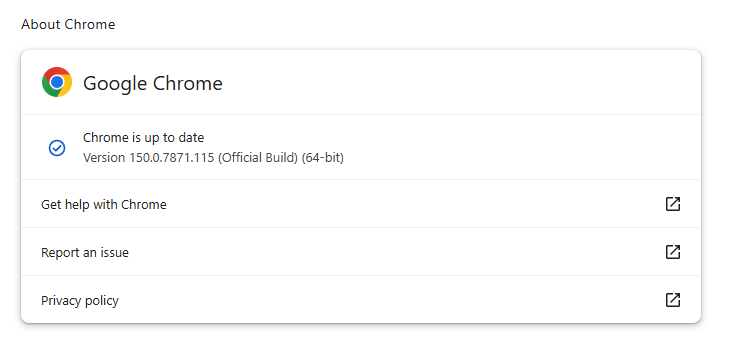
To update manually, click the More menu (three dots), then go to Settings > About Chrome. If an update is available, Chrome will start downloading it automatically. Restart Chrome to complete the update, and you’ll be protected against these vulnerabilities.

Chrome 150.0.7871.115 is up to date

You can find an explanation of the version numbering system and step-by-step instructions in our guide to how to update Chrome on every operating system.

The version numbering system

With updates arriving within days of each other, it’s helpful to understand Chrome’s version numbering system so you can quickly tell whether you’re running the latest release.

The Chrome version number consists of four parts separated by dots, like this:

MAJOR.MINOR.BUILD.PATCH

Each part has a specific meaning. In order of relevance they are:

  • MAJOR: This number increases with each major Chrome release, which may include new features or changes.
  • MINOR: This number is typically zero and rarely changes. It mainly supports the versioning scheme but doesn’t usually affect how users track updates.
  • BUILD: This number increases steadily and identifies a specific build of Chrome’s source code. When comparing versions, it is the first number to check after the major version.
  • PATCH: This number increases as Google releases smaller fixes and security updates for a particular build. It resets with each new build and helps identify minor updates within the same build.

For example, a version like 137.0.7151.56 means:

  • Major version 137 (the milestone release)
  • Minor version 0 (almost always 0)
  • Build number 7151 (the code snapshot)
  • Patch number 56 (the latest fix for that build)

Why does the version number matter?

The BUILD and PATCH numbers together identify the exact version of Chrome you’re running. Even if two versions share the same major number, higher build or patch numbers means you have a newer, more up-to-date Chrome version.

Sometimes you might see slightly different patch numbers on the same major build, for example, 118.0.5993.117 vs. 118.0.5993.118. This usually happens because Google released a quick fix or minor patch shortly after the initial release. Both are part of the same major update, but the higher patch number is newer.

How to check if you have the latest version

To verify your Chrome version:

  1. Open Chrome.
  2. Click the three-dot menu () in the top-right corner.
  3. Go to Help > About Google Chrome.

Chrome will display your current version and automatically check for updates. If an update is available, it will download automatically and prompt you to restart your browser.


Stop threats before they can do any harm.

Malwarebytes Browser Guard blocks phishing pages and malicious sites automatically. Free, one click to install. Add it to your browser →
❌
❌