Apple is challenging a UK order reportedly requiring access to encrypted iCloud data, reviving a wider dispute over privacy, security, and lawful access.
The post Apple Challenges UK Demand For Access To Encrypted iCloud Data appeared first on TechRepublic.
Apple is challenging a UK order reportedly requiring access to encrypted iCloud data, reviving a wider dispute over privacy, security, and lawful access.
Details of parents and staff, including email addresses and phone numbers, are among data taken by cybercriminalsThe Department for Education and a police database have been targeted by a cyber-attack, exposing more than 740,000 pieces of data.Details of government officials, senior school leaders, university staff, police officers and members of the public have been taken by hackers. Continue reading...
Introduction
Mexico is one of the host countries for the 2026 FIFA World Cup, with matches to be played in three major cities: Mexico City, Monterrey, and Guadalajara. These locations are expected to see a large influx of international visitors, increasing the potential security risks. Many of those risks arise from users connecting to public wireless networks.
To better understand the wireless environments that visitors may encounter, we at Kaspersky GReAT conducted a wardriving assessment in t
Mexico is one of the host countries for the 2026 FIFA World Cup, with matches to be played in three major cities: Mexico City, Monterrey, and Guadalajara. These locations are expected to see a large influx of international visitors, increasing the potential security risks. Many of those risks arise from users connecting to public wireless networks.
To better understand the wireless environments that visitors may encounter, we at Kaspersky GReAT conducted a wardriving assessment in the three host cities. The aim of the study was to analyze characteristics, deployment patterns, security configurations and potential exposure risks of public Wi-Fi infrastructure in urban wireless environments.
The information collected during the assessment was used exclusively for passive observation and infrastructure analysis. No attempts were made to authenticate, intercept communications, exploit systems or interact with the detected wireless networks beyond the publicly broadcast management information.
During processing of the collected data, one step involved filtering out networks belonging to cars or cell phones categorized as mobile hotspots because they do not represent networks that can be considered part of the assessment.
Research scope
The cities included in the study have high population density and extensive wireless infrastructure deployments. We chose areas with the most prominent wireless network activity and highly concentrated public access points. We carried out wardriving research in Monterrey back in 2008, but the city’s hotspot landscape has changed since then.
We chose the following analysis areas for each of the cities:
Mexico City: México City Stadium, Mexico City International Airport, Zócalo, Paseo de la Reforma, Colonia Roma, La Condesa, Polanco, and Coyoacán.
Guadalajara: Guadalajara Stadium, Guadalajara International Airport, the city center, Zapopan, Providencia, Avenida Chapultepec, Colonia Americana, Tlaquepaque, and the area around Andares.
Monterrey: Monterrey Stadium, Monterrey International Airport, Fundidora Park, Cintermex Monterrey, the downtown area, Barrio Antiguo, MacroPlaza, and the San Pedro financial district.
The wireless information was collected using passive wireless reconnaissance techniques. The collected information included:
SSID analysis and information exposure, including BSSID-derived SSIDs
Default router configurations and ISP deployments
Frequency and signal characteristics
Channel congestion and spectrum usage
Wireless security configurations, including:
Open and insecure wireless networks
WPS-enabled networks
Secure networks (WPA2/WPA3) with WPS enabled
We performed a wireless infrastructure analysis in Mexico City, Guadalajara, and Monterrey. We drove through the areas surrounding the World Cup stadiums, tourist zones, and other places where fan concentrations are likely to be largest. Our goal was to evaluate the security status, deployment characteristics and operational exposure of detected wireless networks.
In total, we recorded 84,588 signals with 69,473 unique Service Set Identifiers (SSIDs) in busy locations and World Cup zones across the three cities. Mexico City accounted for 61.4% of the signals, Guadalajara for 23.6%, and Monterrey for 14.8%. Approximately 82% of the signals had a single SSID (81.9%, 81.34%, and 84% respectively). Notably, they all operate under the IEEE 802.11 standard protocol.
Particular attention was given to identifying standard deployment patterns, legacy configurations, default vendor settings and information disclosure through publicly broadcast wireless identifiers.
The following sections present the results that were obtained by analyzing wireless infrastructure across the three locations.
Our findings
SSID analysis and information exposure
SSID analysis was conducted to evaluate naming conventions, deployment standardization and potential information exposure.
Only a few networks (0.0047%) have an invisible SSID, meaning the names of these networks are not broadcast. Some users prefer to hide the SSID for various reasons, such as the network’s purpose, the profile of its users, internal policies, etc. In contrast, the rest of the networks maintained active SSID broadcasting.
SSID structures may unintentionally disclose operational details about internet service providers (ISPs), device manufacturers, deployment practices, organizational ownership or user identity. The repeated presence of default SSID naming patterns across the analyzed locations indicates a significant degree of infrastructure homogeneity and reuse of default wireless configurations. It may also facilitate passive infrastructure profiling by revealing standard characteristics in use.
Approximately 34% of the detected networks retained the default SSID naming conventions provided by the manufacturer or ISP, while 66% used customized identifiers.
Distribution of SSID naming conventions (download)
Several recurring SSID naming conventions associated with ISP-provided deployments were identified in the three cities. The most frequently observed patterns include identifiers such as “Club_Totalplay_WiFi”, “izzi WiFi”, and “Megacable WiFi”, which suggests extensive standardization of wireless infrastructure deployment. Additionally, we observed distinctive location-specific SSIDs in each area of analysis, such as “XXXX-Internet para Todos-CDMX” or “RED JALISCO”.
Sequential SSID naming structures were also identified during the analysis. Patterns such as “INFINITUMXX” and “IZZI-XX” suggest automated ISP deployment and large-scale deployment strategies.
We identified 33 unique sequential naming structures among the 137 sequential SSIDs in total, representing approximately 0.16% of the detected wireless networks.
The following graph shows the top five sequential SSID patterns found in the largest number of networks:
Five most frequently observed sequential patterns (download)
Several customized SSIDs contained personal or organizational identifiers, including family names, professions, addresses or internal department references. Although personalized SSIDs may simplify local network identification for users, they may also expose sensitive information that could be useful for social engineering, physical targeting, or organizational profiling.
BSSID-derived SSID
During the analysis, multiple networks were identified that used the physical MAC address of a Wi-Fi access point (BSSID) as the visible SSID. This practice exposes hardware-level information that could facilitate vendor fingerprinting and targeted reconnaissance activities.
The organizationally unique identifier (OUI) contained in the first bytes of the BSSID identifies the equipment manufacturer. Threat actors can correlate exposed manufacturers with device-specific vulnerabilities.
Notably, we found that more than 30% of networks in all three cities reuse the MAC address as the SSID.
Default router configurations and ISP deployments
We performed wireless infrastructure profiling to identify the most common wireless equipment manufacturers and ISP deployments across the three locations.
Large-scale ISP deployments frequently use standardized wireless configurations and vendor-specific hardware platforms. Identifying dominant manufacturers and ISP naming conventions can provide insight into infrastructure and deployment practices facilitating the mapping of standardized attack surfaces.
The following figure shows the distribution of the most commonly used manufacturers.
Most frequently observed wireless equipment manufacturers (download)
The manufacturer analysis revealed a strong concentration of wireless infrastructure among a limited number of vendors. Across the three locations, Huawei Technologies, MediaTek-based devices, and other manufacturers’ equipment that is distributed through ISP channels represented a significant portion of the detected deployments. Mexico City had the most diverse infrastructure, while Monterrey and Guadalajara had a greater concentration of wireless equipment known as SOHO (small office/home office) or residential-grade hardware. The widespread presence of standard vendor platforms may facilitate infrastructure fingerprinting and large-scale targeting of known device-specific vulnerabilities.
Most frequently observed wireless equipment manufacturers across the three cities (download)
ISP deployments frequently exhibited standardized configuration patterns and recurring manufacturer identifiers. Our ISP deployment analysis revealed a high concentration of access points associated with major residential internet providers. Deployments associated with Infinitum, Totalplay and Izzi represented a substantial portion of the detected wireless infrastructure across all locations. These findings suggest a high degree of deployment standardization across networks associated with major residential internet providers. This observation was supported by the repeated presence of ISP-associated SSIDs such as “Infinitum”, “Totalplay”, and “Izzi”, combined with manufacturer identifiers frequently associated with consumer equipment, including Huawei, ZTE and other residential wireless equipment vendors.
It is important to note that, for this analysis, ISPs were primarily inferred from SSID naming conventions and manufacturer fingerprint data. A significant portion of the detected wireless networks fell into the “UNKNOWN/CUSTOM” category. This classification includes custom hotspots and networks whose naming conventions did not expose identifiable ISP-associated patterns. The findings suggest that many users and organizations (as we saw previously, approximately 66%) use custom network names, limiting direct provider attribution.
The following figure illustrates the distribution of ISP-associated wireless deployments in general.
To better understand this distribution, we took the most frequently observed ISPs by city.
Most frequently observed ISPs across the three cities (download)
Frequency and signal characteristics
We also analyzed wireless signal characteristics to evaluate coverage quality, signal strength, and frequency band utilization in the three cities. In dense urban environments, signal quality and frequency spectrum distribution can affect wireless reliability, client connectivity, roaming performance, and overall network efficiency.
Signal quality analysis revealed that a substantial portion of the detected access points operated under weak or very weak signal conditions. Monterrey had the highest percentage of very weak signals, with approximately 50% of detected deployments. Similar patterns were observed in Guadalajara and Mexico City, suggesting high-density wireless environments with overlapping coverage areas. Only a limited percentage of networks were classified within the very good or excellent signal categories across the three locations.
Signal stability analysis revealed that most detected wireless deployments exhibited stable beacon transmission behavior. More than 96% of the detected access points across all locations were classified as stable, while only a small percentage exhibited unstable or indeterminate signal behavior.
These findings imply that the majority of the wireless infrastructure observed during the assessment corresponded to permanently deployed access points rather than transient or intermittent wireless devices.
Frequency band analysis revealed the strong prevalence of 2.4 GHz wireless deployments across the three locations. More than 95% of the detected wireless networks operated within the 2.4 GHz spectrum, while only a small percentage of deployments were classified under the unknown or non-standard frequency categories. This uneven distribution reflects the continued prevalence of legacy-compatible wireless infrastructure and SOHO deployments.
These findings are consistent with dense urban wireless environments with large numbers of access points in restricted spectrum allocations.
Channel congestion and spectrum usage
Next, we analyzed wireless channel utilization to evaluate frequency spectrum congestion and channel allocation patterns across the three cities. Our analysis focused on the 2.4 GHz spectrum, where channel overlap and high access point density commonly produce interference and degraded wireless performance. In densely populated wireless environments, an excessive concentration of access points on a limited number of channels can lead to co-channel interference, packet collisions, reduced throughput, and degraded network stability.
Spectrum congestion analysis revealed that the 2.4 GHz band consistently experienced elevated congestion levels across the three cities. The detailed results showed a strong concentration of deployments on channels 11, 6 and 1, which are traditionally recommended as non-overlapping channels within the 2.4 GHz spectrum. Channel 11 was the most utilized channel, accounting for 25.2% of the detected access points, followed by channel 6 with 22.5% and channel 1 with 19.5%. This distribution indicates that most wireless deployments adhere to standard channel allocation practices for 2.4 GHz Wi-Fi environments.
The following figure illustrates the overall distribution of the most frequently utilized wireless channels.
To further assess wireless spectrum saturation, the detected access points were grouped according to channel congestion levels: VERY_HIGH, HIGH, UNKNOWN, MEDIUM, LOW and NONE.
Mexico City had the highest proportion of heavily congested wireless channels, with approximately 7% of detected access points operating under HIGH congestion conditions. Guadalajara followed with nearly 5% of deployments categorized as HIGH congestion, while Monterrey had the lowest percentage at approximately 3.29%.
These findings suggest that wireless spectrum saturation increases proportionally with urban infrastructure density and access point concentration. Despite the presence of congested deployments, most detected access points were categorized as LOW or MEDIUM congestion, suggesting severe spectrum saturation was localized rather than uniformly distributed.
A thorough analysis of individual channel utilization revealed that channels 11, 6 and 1 consistently experienced the highest congestion levels across the three cities, which correlates with our previous findings. These channels accounted for the majority of VERY_HIGH congestion classifications, particularly within the 2.4 GHz band.
In Mexico City, channel 11 alone accounted for more than 25% of detected deployments and consistently exhibited VERY_HIGH congestion levels.
This behavior reflects the limited availability of non-overlapping channels within the 2.4 GHz spectrum and the widespread reliance on default wireless configurations.
Overall, the channel utilization analysis showed that wireless deployments are concentrated heavily within the traditional, non-overlapping 2.4 GHz channels. While this strategy reduces adjacent-channel interference, excessive access point density on the same channels can still produce significant co-channel contention and poor wireless performance in high-density urban environments.
Wireless security configurations
The next thing we evaluated was the security posture of the detected wireless networks. We analyzed the wireless security configurations advertised by access points in each of the locations.
Overall security configuration distribution
The analysis revealed that WPA2 was the dominant wireless authentication mechanism across the three cities. Mexico City had the highest WPA2 adoption rate at 81.19%, followed by Monterrey at 79.19% and Guadalajara at 77.59%.
The study found that every 6th open access point (17%) was unsafe, namely 16.5% in Mexico City, 18.5% in Guadalajara, and 17.2% in Monterrey. Open wireless deployments were consistently present across all locations, ranging between 10% and 12% of detected access points. These findings show that despite the widespread deployment of modern wireless security standards, encryption adoption remains incomplete.
Distribution of wireless authentication mechanisms across the three locations (download)
To simplify the interpretation of wireless security posture, we grouped detected networks into four categories:
Secure (WPA2/WPA3)
Insecure (Open/WEP)
Weak (WPA)
Unknown
Across the three locations, secure networks comprised most of detected deployments, accounting for approximately 82% of all access points. However, insecure open networks still account for between 10% and 12% of detected wireless infrastructure, consistent with our previous findings. It is important to mention that networks within the unknown category are not considered secure.
Mexico City had the highest percentage of secure deployments at 83.54%, while Guadalajara had the highest percentage of insecure open networks at 12.46%. Although Monterrey had the lowest percentage of insecure networks, open deployments still accounted for more than 10% of the detected access points.
Wireless security posture grouping across the three locations (download)
Although modern WPA2/WPA3 encryption standards dominate current wireless deployments, the continued presence of open and legacy WPA deployments indicates that insecure wireless configurations remain relevant from an operational standpoint. These networks may expose users to passive traffic interception, unauthorized monitoring, rogue access point attacks, and credential harvesting techniques.
WPS-enabled networks
We also analyzed Wi-Fi Protected Setup (WPS) in all the locations to evaluate additional attack surfaces. WPS is a standard feature on wireless routers that enables devices such as printers, repeaters or mobile phones to connect to a secure Wi-Fi network without manually entering a long password, typically through a PIN-based enrolled mechanism. Although WPA2 and WPA3 provide strong encryption mechanisms, the presence of WPS can introduce security weaknesses due to inherently vulnerable PIN-based enrollment methods.
By combining detections from the three locations, we found that 55% of all detected access points did not advertise WPS capabilities, leaving 45% of deployments vulnerable to WPS-based abuse. These results suggest that, despite the adoption of modern encryption standards, a significant portion of wireless infrastructure continues to expose legacy convenience features.
During the analysis, we found that Mexico City had the highest proportion of WPS-enabled networks, with 46.61% of the detected access points advertising WPS capabilities. Guadalajara was second with 43.45%, while Monterrey had the lowest proportion at 40.93%.
The percentage of detected access points advertising WPS capabilities across the three locations (download)
Almost half of the detected wireless networks in each city continued to advertise WPS, indicating that WPS prevalence is consistently high across the three cities.
Secure networks with WPS enabled
In many cases, networks classified as secure because of WPA2/WPA3 encryption still had WPS functionality enabled, which effectively increased the available attack surface.
To further assess the relationship between encryption strength and WPS exposure, we conducted a secondary analysis of secure networks (WPA2/WPA3) only. The results showed that around half of all secure deployments still exposed WPS, with the following breakdown for each city:
Mexico City: 53.7%
Guadalajara: 50.9%
Monterrey: 47.5%
The proportion of secure networks with WPS enabled across the three locations (download)
These findings indicate that encryption strength alone is not enough to evaluate wireless security posture because additional protocol features, such as WPS, may still expose exploitable attack vectors.
Additional security considerations
Overall, travelers operating within dense public environments are exposed not only to insecure wireless infrastructure but also to various risks associated with digital interactions. These risks include many threats, from public USB charging systems and phishing QR codes to proximity-based protocols and exposure to shared public devices, such as interactive totems or kiosks. One particular point that should be taken into account in light of our research is the issue of rogue wireless deployments.
Rogue access points are not necessarily malicious; they may be set up accidentally by misconfiguring router settings. An entry point for potential compromise might be caused by various misconfigurations, from a weak password to an insecure protocol. However, attackers deploy such unauthorized hotspots with malicious intent to infiltrate a network. Threat actors may deploy rogue access points posing as legitimate public wireless networks in airports, hotels, cafés and tourist areas. These deployments are called “evil twins” and can trick users into connecting to attacker-controlled infrastructure capable of intercepting traffic, harvesting credentials, or performing man-in-the-middle attacks. Further risk lies in the potential compromise of local network devices or even malware distribution. Such threats complement our findings, underscoring the importance of implementing traffic encryption, using a security solution and exercising extreme caution while browsing via public networks.
Conclusion
The wardriving assessment conducted in Mexico City, Guadalajara, and Monterrey revealed that modern wireless infrastructure continues to present multiple forms of operational exposure despite the widespread adoption of WPA2 and WPA3 security standards. The analysis demonstrated that wireless environments are highly standardized in all the locations, with recurring ISP deployments, default SSID naming conventions, homogeneous manufacturer distribution, and predictable channel allocation practices observed in all three cities.
Although most of the detected networks were classified as secure under WPA2/WPA3 authentication mechanisms, a significant proportion were exposing additional attack surfaces through enabled WPS functionality, default configurations, sequential SSID structures, and infrastructure metadata disclosure. This demonstrates that encryption strength alone is insufficient for evaluating the overall security posture of wireless infrastructure. Additionally, the prevalence of open networks and legacy wireless configurations indicates that insecure deployments are still operationally relevant in all the locations.
The results also showed that wireless infrastructure is heavily concentrated within the 2.4 GHz spectrum, particularly around channels 11, 6, and 1. This leads to elevated congestion and increased co-channel interference in densely populated urban environments.
SSID analysis further revealed that publicly broadcast wireless identifiers frequently expose valuable operational information about ISPs, equipment manufacturers, deployment templates, organizational ownership, and user-defined naming practices. The identification of default ISP naming conventions, sequential SSID structures, and BSSID-derived SSIDs demonstrated that many deployments prioritize operational convenience and simplicity over exposure minimization and privacy.
The scope of the threats stemming from vulnerable wireless configurations poses serious digital exposure risks for users. The widespread presence of standard deployments, predictable SSID naming and publicly exposed infrastructure identifiers can facilitate passive reconnaissance, infrastructure fingerprinting and opportunistic targeting.
Recommendations
To minimize the risks of wireless-based exposure and the attack surface related to hotspot infrastructure, we recommend taking the following measures:
Disable WPS functionality on wireless routers whenever possible, particularly within WPA2/WPA3 deployments.
Avoid using default SSID naming conventions that disclose ISP providers, router manufacturers, or deployment templates.
Refrain from using personal, organizational, or location-based identifiers in wireless network names.
Avoid configuring SSID using BSSID or naming conventions derived from MAC addresses, as these may expose hardware fingerprinting information.
Promote migration toward modern WPA3-capable infrastructure while removing legacy wireless protocols when operationally feasible.
Reduce wireless congestion by optimizing channel allocation strategies and minimizing excessive dependence on the 2.4 GHz spectrum.
Encourage adoption of 5 GHz and newer wireless technologies to reduce interference and improve spectrum efficiency.
The findings presented in this assessment emphasize the importance of combining strong wireless encryption standards, secure deployment practices, exposure minimization strategies, and user awareness to enhance the overall security posture of wireless environments.
Health service has given US tech firm ‘unlimited access’ to certain data to build integrated platform, according to reportsUK politics live – latest updatesMPs have warned that an NHS decision to grant Palantir access to identifiable patient information in its plan to use AI to improve the health service is “dangerous” and will fuel public fears that data privacy is not being prioritised.NHS England has allowed staff from the US tech firm and other contractors to access patient data before it ha
MPs have warned that an NHS decision to grant Palantir access to identifiable patient information in its plan to use AI to improve the health service is “dangerous” and will fuel public fears that data privacy is not being prioritised.
NHS England has allowed staff from the US tech firm and other contractors to access patient data before it has been pseudonymised, despite internal fears of a “risk of loss of public confidence”, the Financial Times reported.
Introduction
The primary goal for attackers in a phishing campaign is to bypass email security and trick the potential victim into revealing their data. To achieve this, scammers employ a wide range of tactics, from redirect links to QR codes. Additionally, they heavily rely on legitimate sources for malicious email campaigns. Specifically, we’ve recently observed an uptick in phishing attacks leveraging Amazon SES.
The dangers of Amazon SES abuse
Amazon Simple Email Service (Amazon SES) is a cl
The primary goal for attackers in a phishing campaign is to bypass email security and trick the potential victim into revealing their data. To achieve this, scammers employ a wide range of tactics, from redirect links to QR codes. Additionally, they heavily rely on legitimate sources for malicious email campaigns. Specifically, we’ve recently observed an uptick in phishing attacks leveraging Amazon SES.
The dangers of Amazon SES abuse
Amazon Simple Email Service (Amazon SES) is a cloud-based email platform designed for highly reliable transactional and marketing message delivery. It integrates seamlessly with other products in Amazon’s cloud ecosystem, AWS.
At first glance, it might seem like just another delivery channel for email phishing, but that isn’t the case. The insidious nature of Amazon SES attacks lies in the fact that attackers aren’t using suspicious or dangerous domains; instead, they are leveraging infrastructure that both users and security systems have grown to trust. These emails utilize SPF, DKIM, and DMARC authentication protocols, passing all standard provider checks, and almost always contain .amazonses.com in the Message-ID headers. Consequently, from a technical standpoint, every email sent via Amazon SES – even a phishing one – looks completely legitimate.
Phishing URLs can be masked with redirects: a user sees a link like amazonaws.com in the email and clicks it with confidence, only to be sent to a phishing site rather than a legitimate one. Amazon SES also allows for custom HTML templates, which attackers use to craft more convincing emails. Because this is legitimate infrastructure, the sender’s IP address won’t end up on reputation-based blocklists. Blocking it would restrict all incoming mail sent through Amazon SES. For major services, that kind of measure is ineffective, as it would significantly disrupt user workflows due to a massive number of false positives.
How compromise happens
In most cases, attackers gain access to Amazon SES through leaked IAM (AWS Identity and Access Management) access keys. Developers frequently leave these keys exposed in public GitHub repositories, ENV files, Docker images, configuration backups, or even in publicly accessible S3 buckets. To hunt for these IAM keys, phishers use various tools, such as automated bots based on the open-source utility TruffleHog, which is designed for detecting leaked secrets. After verifying the key’s permissions and email sending limits, attackers are equipped to spread a massive volume of phishing messages.
Examples of phishing with Amazon SES
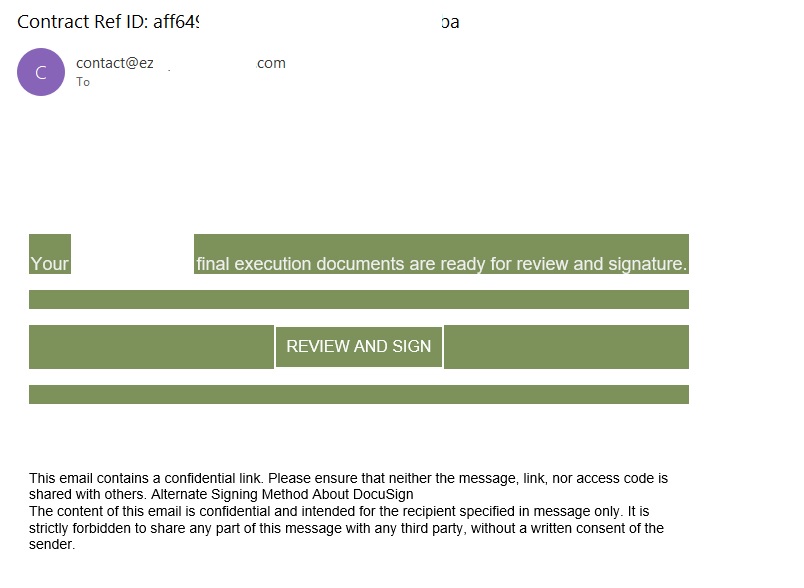
In early 2026, one of the most common themes in phishing emails sent with Amazon SES was fake notifications from electronic signature services.
Phishing email imitating a Docusign notification
The email’s technical headers confirm that it was sent with Amazon SES. At first glance, it all looks legitimate enough.
Phishing email headers
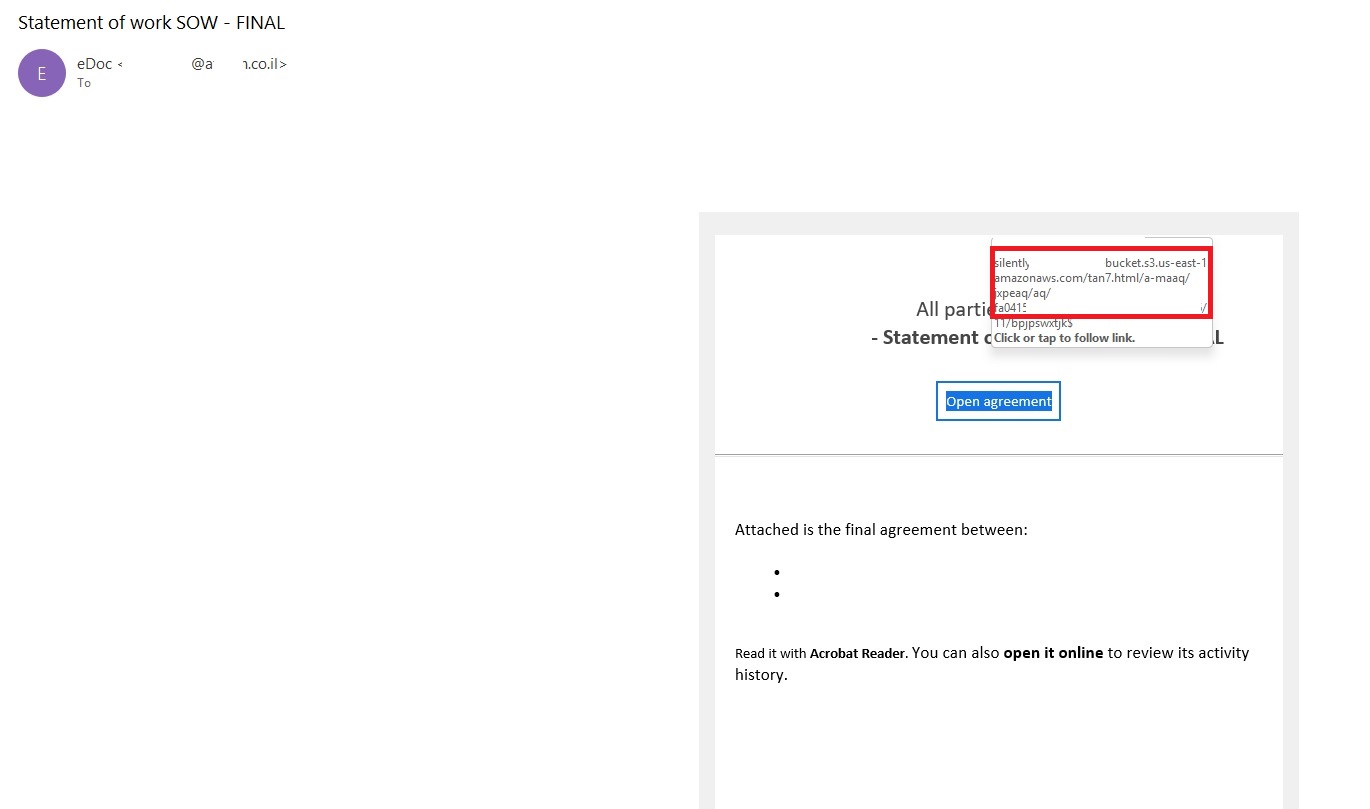
In these emails, the victim is typically asked to click a link to review and sign a specific document.
Phishing email with a “document”
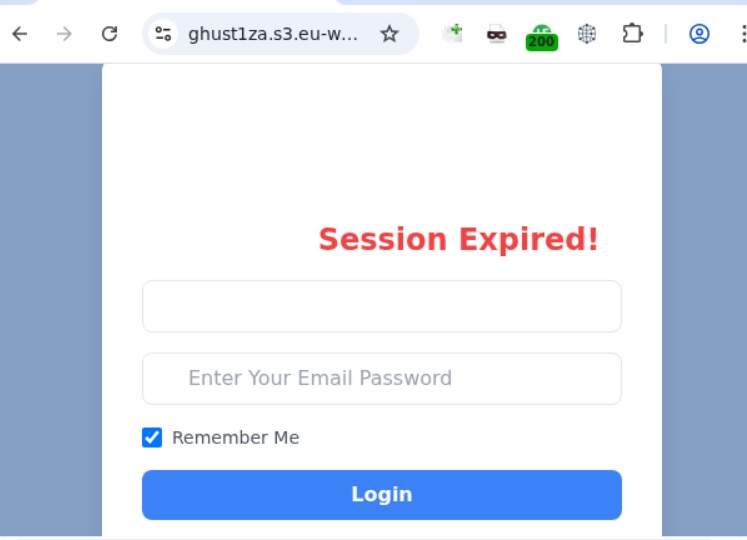
Upon clicking the link, the user is directed to a sign-in form hosted on amazonaws.com. This can easily mislead the victim, convincing them that what they’re doing is safe.
Phishing sign-in form
The resulting form is, of course, a phishing page, and any data entered into it goes directly to the attackers.
Amazon SES and BEC
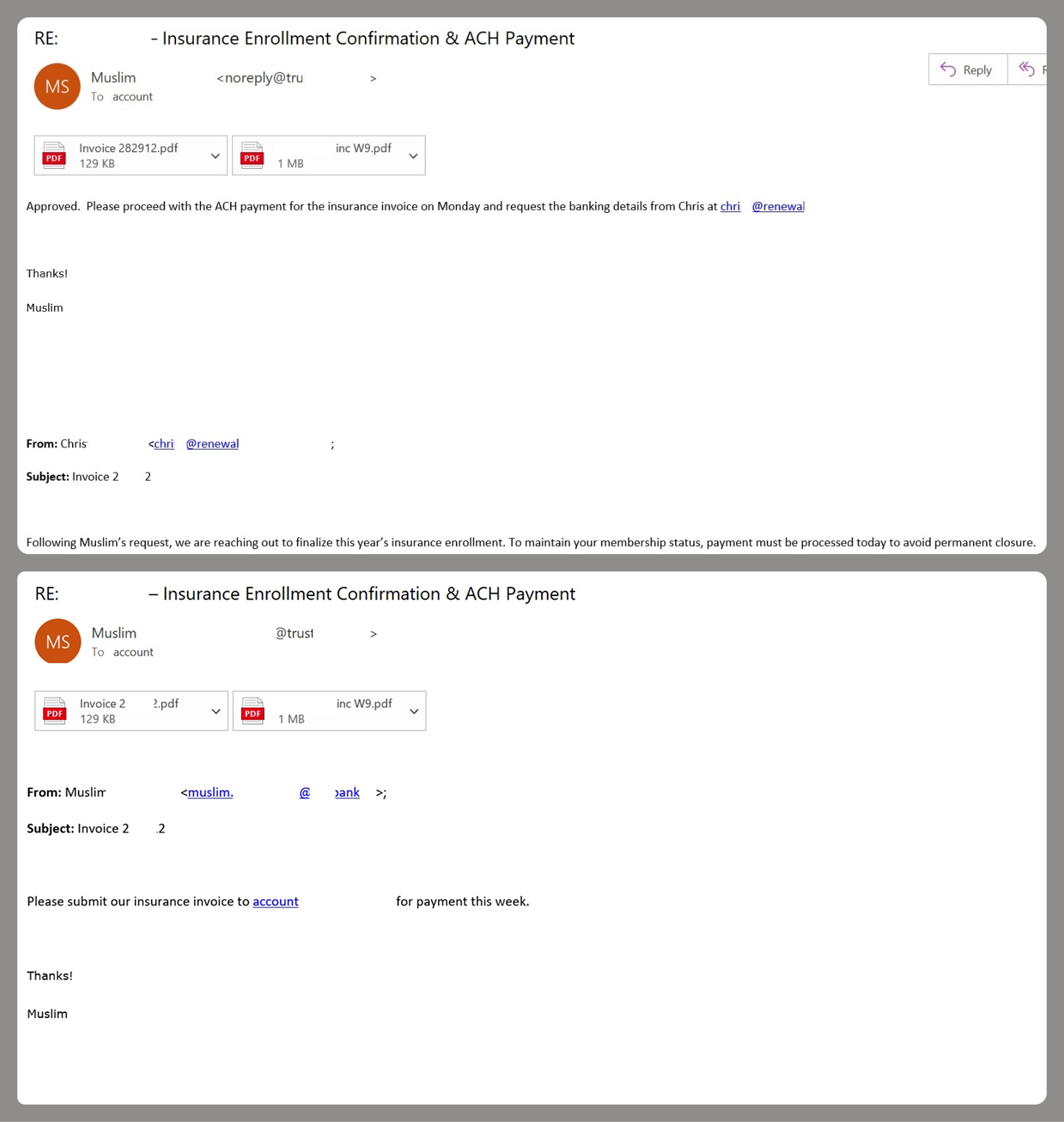
However, Amazon SES is used for more than just standard phishing; it’s also a vehicle for a very sophisticated type of BEC campaigns. In one case we investigated, a fraudulent email appeared to contain a series of messages exchanged between an employee of the target organization and a service provider about an outstanding invoice. The email was sent as if from that employee to the company’s finance department, requesting urgent payment.
BEC email featuring a fake conversation between an employee and a vendor
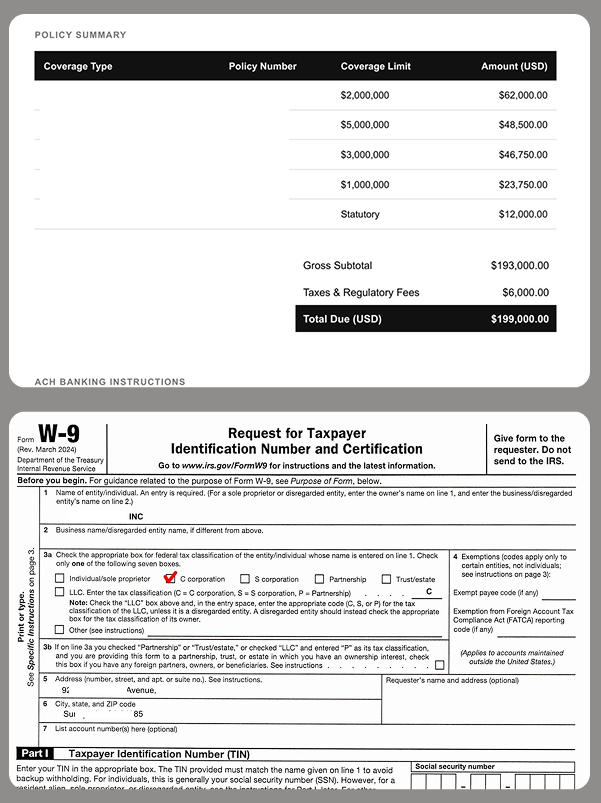
The PDF attachments didn’t contain any malicious phishing URLs or QR codes, only payment details and supporting documentation.
Forged financial documents
Naturally, the email didn’t originate with the employee, but with an attacker impersonating them. The entire thread quoted within the email was actually fabricated, with the messages formatted to appear as a legitimate forwarded thread to a cursory glance. This type of attack aims to lower the user’s guard and trick them into transferring funds to the scammers’ account.
Takeaways
Phishing via Amazon SES experienced an uptick in January 2026 and has remained relatively steady through Q1. By weaponizing this service, attackers avoid the effort of building dubious domains and mail infrastructure from scratch. Instead, they hijack existing access keys to gain the ability to blast out thousands of phishing emails. These messages pass email authentication, originate from IP addresses that are unlikely to be blocklisted, and contain links to phishing forms that look entirely legitimate.
Since these Amazon SES phishing attacks stem from compromised or leaked AWS credentials, prioritizing the security of these accounts is critical. To mitigate these risks, we recommend following these guidelines:
Implement the principle of least privilege when configuring IAM access keys, granting elevated permissions only to users who require them for specific tasks.
Transition from IAM access keys to roles when configuring AWS; these are profiles with specific permissions that can be assigned to one or several users.
Enable multi-factor authentication, an ever-relevant step.
Configure IP-based access restrictions.
Set up automated key rotation and run regular security audits.
Use the AWS Key Management Service to encrypt data with unique cryptographic keys and manage them from a centralized location.
We recommend that users remain vigilant when handling email. Do not determine whether an email is safe based solely on the From field. If you receive unexpected documents via email, a prudent precaution is to verify the request with the sender through a different communication channel. Always carefully inspect where links in the body of an email actually lead. Additionally, robust email security solutions can provide an essential layer of protection for both corporate and personal correspondence.
Banks, governments and tech providers urged to upgrade security because current systems will soon be obsolete Banks, governments and technology providers need to be prepared for quantum computer hackers capable of breaking most existing encryption systems by 2029, Google has warned.The tech company said in a blogpost that quantum computers would pose a “significant threat to current cryptographic standards” before the end of the decade and urged other companies to follow its lead. Continue read
Banks, governments and tech providers urged to upgrade security because current systems will soon be obsolete
Banks, governments and technology providers need to be prepared for quantum computer hackers capable of breaking most existing encryption systems by 2029, Google has warned.
The tech company said in a blogpost that quantum computers would pose a “significant threat to current cryptographic standards” before the end of the decade and urged other companies to follow its lead.
In a move that bucks the entire industry trend, TikTok has confirmed it will not implement end-to-end encryption (E2EE) for direct messages on its platform — arguing that E2EE would make users less safe. We break down what’s really going on: the child safety argument, the privacy counterargument, the geopolitical questions surrounding ByteDance, and what […]
The post TikTok Says No to End-to-End Encryption: Here’s Why That’s a Big Deal appeared first on Shared Security Podcast.
The post TikTok S
In a move that bucks the entire industry trend, TikTok has confirmed it will not implement end-to-end encryption (E2EE) for direct messages on its platform — arguing that E2EE would make users less safe. We break down what’s really going on: the child safety argument, the privacy counterargument, the geopolitical questions surrounding ByteDance, and what […]
Millions installed 'productivity' Chrome extensions that became malware after acquisition. Here's how browser extensions became enterprise security's weakest link.
The post The Chrome Extension Backdoor: How ‘Productivity Tools’ Became Enterprise Attack Vectors appeared first on Security Boulevard.
Millions installed 'productivity' Chrome extensions that became malware after acquisition. Here's how browser extensions became enterprise security's weakest link.
Shadow AI leaks data to uncontrolled external systems and spreads virally across organizations, requiring user training and compliant alternatives rather than prohibition.
The post Shadow AI: When Everyone Becomes a Data Leak Waiting to Happen appeared first on Security Boulevard.
Shadow AI leaks data to uncontrolled external systems and spreads virally across organizations, requiring user training and compliant alternatives rather than prohibition.
TikTok has shifted to a majority-American entity, TikTok USDS Joint Venture, LLC, to comply with U.S. national security requirements and avoid a ban. This week we discuss why a recent privacy policy update went viral—especially language about sensitive data like immigration status and precise location—and argue much of it reflects longstanding practices and required California […]
The post TikTok’s New U.S. Deal and Privacy Policy: What Users Don’t Understand appeared first on Shared Security Po
TikTok has shifted to a majority-American entity, TikTok USDS Joint Venture, LLC, to comply with U.S. national security requirements and avoid a ban. This week we discuss why a recent privacy policy update went viral—especially language about sensitive data like immigration status and precise location—and argue much of it reflects longstanding practices and required California […]
Explore the evolving landscape of privacy and security in the age of AI. This article examines the cultural and regulatory differences between the U.S. and Europe, the limitations of current policies, and the imperative for architectural solutions to ensure that autonomous systems can uphold privacy standards.
The post Why the US–EU Privacy Divide Still Matters in the Age of AI appeared first on Security Boulevard.
Explore the evolving landscape of privacy and security in the age of AI. This article examines the cultural and regulatory differences between the U.S. and Europe, the limitations of current policies, and the imperative for architectural solutions to ensure that autonomous systems can uphold privacy standards.
Russian state has tolerated parallel probiv market for its convenience but now Ukrainian spies are exploiting itRussia is scrambling to rein in the country’s sprawling illicit market for leaked personal data, a shadowy ecosystem long exploited by investigative journalists, police and criminal groups.For more than a decade, Russia’s so-called probiv market – a term derived from the verb “to pierce” or “to punch into a search bar” – has operated as a parallel information economy built on a network
Russian state has tolerated parallel probiv market for its convenience but now Ukrainian spies are exploiting it
Russia is scrambling to rein in the country’s sprawling illicit market for leaked personal data, a shadowy ecosystem long exploited by investigative journalists, police and criminal groups.
For more than a decade, Russia’s so-called probiv market – a term derived from the verb “to pierce” or “to punch into a search bar” – has operated as a parallel information economy built on a network of corrupt officials, traffic police, bank employees and low-level security staff willing to sell access to restricted government or corporate databases.
Sensitive information relates to more than 100 individuals and their refereesPersonal details submitted by applicants for a job at Tate art galleries have been leaked online, exposing their addresses, salaries and the phone numbers of their referees, the Guardian has learned.The records, running to hundreds of pages, appeared on a website unrelated to the government-sponsored organisation, which operates the Tate Modern and Tate Britain galleries in London, Tate St Ives in Cornwall and Tate Live
Sensitive information relates to more than 100 individuals and their referees
Personal details submitted by applicants for a job at Tate art galleries have been leaked online, exposing their addresses, salaries and the phone numbers of their referees, the Guardian has learned.
The records, running to hundreds of pages, appeared on a website unrelated to the government-sponsored organisation, which operates the Tate Modern and Tate Britain galleries in London, Tate St Ives in Cornwall and Tate Liverpool.
When courts ban people from accessing leaked data – as happened after the airline’s data breach – only hackers and scammers winFollow our Australia news live blog for latest updatesGet our breaking news email, free app or daily news podcastIt’s become the playbook for big Australian companies that have customer data stolen in a cyber-attack: call in the lawyers and get a court to block anyone from accessing it.Qantas ran it after suffering a major cybersecurity attack that accessed the frequent
It’s become the playbook for big Australian companies that have customer data stolen in a cyber-attack: call in the lawyers and get a court to block anyone from accessing it.
I think I could count on one hand the people I know who have NOT had their email hacked. Maybe they found a four-leaf clover when they were kids! Email hacking is one of the very unfortunate downsides of living in our connected, digital world. And it usually occurs as a result of a data breach – a situation that even the savviest tech experts find themselves in.
What is a data breach?
In simple terms, a data breach happens when personal information is accessed, disclosed without permission, or l
I think I could count on one hand the people I know who have NOT had their email hacked. Maybe they found a four-leaf clover when they were kids! Email hacking is one of the very unfortunate downsides of living in our connected, digital world. And it usually occurs as a result of a data breach – a situation that even the savviest tech experts find themselves in.
What is a data breach?
In simple terms, a data breach happens when personal information is accessed, disclosed without permission, or lost. Companies, organisations, and government departments of any size can be affected. Data stolen can include customer login details (email addresses and passwords), credit card numbers, identifying IDs of customers e.g. driver’s license numbers and/or passport numbers, confidential customer information, company strategy, or even matters of national security.
Data breaches have made headlines, particularly over the last few years. When the Optus and Medibank data breaches hit the news in 2022 affecting almost 10 million Aussies apiece, we were all shaken. But then when Aussie finance company Latitude was affected in 2023 with a whopping 14 million people from both Australia and New Zealand, it almost felt inevitable that by now, most of us would have been impacted.
The reality is that data breaches have been happening for years. In fact, the largest data breach in Australian history happened in 2019 to the online design site Canva which affected 139 million users globally. In short, it can happen to anyone, and the chances are you may have already been affected.
Your email is more valuable than you think
The sole objective of a hacker is to get their hands on your data. Any information that you share in your email account can be very valuable to them. Why do they want your data, you ask? It’s simple really – so they can cash in!
Some will keep the juicy stuff for themselves – passwords or logins to government departments or large companies they may want to ’target’ with the aim of extracting valuable data and/or funds. The more sophisticated ones will sell your details including name, telephone, email address, and credit card details to cash in on the dark web. They often do this in batches. Some experts believe they can get as much as AU$250 for a full set of details including credit cards. So, you can see why they’d be interested in you.
The other reason why hackers will be interested in your email address and password is that many of us re-use our login details across our other online accounts. Once they’ve got their hands on your email credentials, they may be able to access your online banking and investment accounts, if you use the same credentials everywhere. So, you can see why I harp on about using a unique password for every online account!
How big is the problem?
There is a plethora of statistics on just how big this issue is – all of them concerning. According to the Australian Institute of Criminology, of all the country’s cybercrime reports in 2024, about 21.9% involved identity theft and misuse. The Australian Bureau of Statistics adds that the identity theft victimisation rate has steadily increased from 0.8% to 1.2% from 2021 to 2024, respectively.
Meanwhile, The Australian Government revealed that at least one cybercrime is reported every 6 minutes, with business email compromise alone costing the national economy up to $84 million in losses. Regardless of which statistic you choose to focus on, we have a big issue on our hands.
How does an email account get hacked?
Hackers use a range of techniques—some highly sophisticated, others deceptively simple—to gain access. It is important to know how these attacks happen so you can stay ahead and prevent them.
Phishing scams: These are deceptive emails that trick you into entering your login details on a fake website that looks legitimate.
Data breaches: If a website where you used your email and password gets breached, criminals can use those leaked credentials to try and access your email account.
Weak or reused passwords: Using simple, easy-to-guess passwords or the same password across multiple sites makes it easy for hackers to gain access.
Malware: Malicious software like keyloggers can be installed on your computer without your knowledge, capturing everything you type, including passwords.
Unsecure Wi-Fi networks: Using public Wi-Fi without a VPN can expose your data to criminals monitoring the network.
From email hack to identity theft
Yes, absolutely. An email account is often the central hub of your digital life. Once a cybercriminal controls it, they can initiate password resets for your other online accounts, including banking, shopping, and social media. They can intercept sensitive information sent to you, such as financial statements or medical records.
With enough information gathered from your emails, they can commit identity theft, apply for credit in your name, or access other sensitive services. If you suspect your email was hacked, it’s crucial to monitor your financial statements and consider placing a fraud alert with credit bureaus.
Signs that your email has been hacked
You can no longer log in. The most obvious sign of an email hack is when your password suddenly stops working. Cybercriminals often change the password immediately to lock you out.
Friends receive strange messages from you. If your contacts report receiving spam or phishing emails from your address that you didn’t send, it’s a major red flag that someone else has control of your account.
Unusual activity in your folders. Check your “Sent” folder for messages you don’t recognize. Hackers might also set up forwarding rules to send copies of your incoming emails to their own address, so check your settings for any unfamiliar forwarding addresses.
Password reset emails you didn’t request. Receiving unexpected password reset emails for other services (like your bank or social media) is a sign that a hacker is using your email to try and take over your other online accounts.
Security alerts from your provider. Pay attention to notifications about new sign-ins from unfamiliar devices, locations, or IP addresses. These are often the first warnings that your account has been compromised.
Steps to email recovery
If you find yourself a victim of email hacking, these are a few very important steps you need to take. Fast.
Change your password
Using a separate, clean device, this is the very first thing you must do to ensure the hacker can’t get back into your account. It is essential that your new password is complex and totally unrelated to previous passwords. Always use random words and characters, a passphrase with a variety of upper and lower cases, and throw in some symbols and numbers.
I really like the idea of a crazy, nonsensical sentence – easier to remember and harder to crack! But, better still, get yourself a password manager that will create a password that no human would be capable of creating. If you find the hacker has locked you out of your account by changing your password, you will need to reset the password by clicking on the ‘Forgot My Password’ link.
Update other accounts that use the same password
This is time-consuming, but essential. Ensure you change any other accounts that use the same username and password as your compromised email. Hackers love the fact that many people use the same logins for multiple accounts, so it is guaranteed they will try your info in other email applications and sites such as PayPal, Amazon, Netflix – you name it!
Once the dust has settled, review your password strategy for all your online accounts. A best practice is to ensure every online account has its own unique and complex password.
Sign out of all devices
Most email services have a security feature that lets you remotely log out of all active sessions. Once you’ve changed your password, signing out from your email account also signs out the hacker and forces them to log-in with the new password, which fortunately they do not know. These, combined with two- or multi-factor authentication, will help you to regain control of your account and prevent further compromise.
Inform your email contacts
A big part of the hacker’s strategy is to get their claws into your address book to hook others as well. Send a message to all your email contacts as soon as possible so they know to avoid opening any emails—most likely loaded with malware—that have come from you.
Commit to multi-factor authentication
Two-factor or multi-factor authentication may seem like an additional, inconvenient step to your login, but it also adds another layer of protection. Enabling this means you will need a special one-time-use code to log in, aside from your password. This is sent to your mobile phone or generated via an authenticator app. So worthwhile!
Check your email settings
It is common for hackers to modify your email settings so that a copy of every email you receive is automatically forwarded to them. Not only can they monitor your logins to other sites; they can also keep a watchful eye on any particularly juicy personal information. So, check your mail forwarding settings to ensure no unexpected email addresses have been added.
Also, ensure your ‘reply to’ email address is actually yours. Hackers have been known to create an email address that looks similar to yours, so that when someone replies, it will go straight to their account, not yours.
Don’t forget to check your email signature to ensure nothing spammy has been added, as well as your recovery phone number and alternate email address. Hackers also change these to maintain control. Update them to your own secure details.
Scan your computer for malware and viruses
Regularly scanning your devices for unwanted invaders is essential. If you find anything, please ensure it is addressed, and then change your email password again. If you don’t have antivirus software, please invest in it.
Comprehensive security software will provide you with a digital shield for your online life, protecting all your devices – including your smartphone – from viruses and malware. Some services also include a password manager to help you generate and store unique passwords for all your accounts.
Consider creating a new email address
If you have been hacked several times and your email provider isn’t mitigating the amount of spam you are receiving, consider starting afresh. Do not, however, delete your old email address because email providers are known to recycle old email addresses. This means a hacker could spam every site they can find with a ‘forgot my password’ request and try to impersonate you and steal your identity.
Your email is an important part of your online identity so being vigilant and addressing any fallout from hacking is essential for your digital reputation. Even though it may feel that getting hacked is inevitable, you can definitely reduce your risk by installing some good-quality security software on all your devices.
Trusted and reliable comprehensive security software will alert you when visiting risky websites, warn you when a download looks dodgy, and block annoying and dangerous emails with anti-spam technology. It makes sense really – if you don’t receive the dodgy phishing email – you can’t click on it. Smart!
Finally, don’t forget that hackers love social media – particularly those of us who overshare on it. So, before you post details of your adorable new kitten, remember it may just provide the perfect clue for a hacker trying to guess your email password!
Report the incident
Reporting an email hack is a crucial step to create a necessary paper trail for disputes with banks or credit agencies. When reporting, gather evidence such as screenshots of suspicious activity, unrecognized login locations and times, and any phishing emails you received. This information can be vital for the investigation.
Your email provider: Use their official support or recovery channels immediately. They can help you investigate and regain control of your account. Do not use links from suspicious emails claiming to be from support.
Financial institutions: If you’ve disclosed sensitive financial information or use the email for banking, contact your bank and credit card companies immediately. Alert them to potential fraud and monitor your statements.
Friends, family, and contacts: Send a message to your contacts warning them that your account was compromised. Advise them not to open suspicious messages or click on links sent from your address during that time.
Your employer: If it’s a work email, or if your personal email is used for work purposes, notify your IT department immediately. They need to take steps to protect company data and systems.
Relevant authorities: For financial loss or identity theft, you can report the incident to authorities like the FBI’s Internet Crime Complaint Center or Action Fraud in the UK. This creates an official record and aids in wider law enforcement efforts.
Check if online accounts linked to your email were compromised
Prioritize critical accounts: Immediately check your online banking, financial, and government-related accounts. Review recent activity for any unauthorized transactions or changes.
Review social media and shopping sites: Check your social media for posts or messages you didn’t send. Review your online shopping accounts like Amazon for any purchases or address changes you don’t recognize.
Enable alerts: Turn on login and transaction alerts for your sensitive accounts. This will give you real-time notifications of any suspicious activity in the future.
Should you delete your hacked email account?
Generally, no. Deleting the account can cause more problems than it solves. Many online services are linked to that email, and deleting it means you lose the ability to receive password reset links and security notifications for those accounts.
More importantly, some email providers recycle deleted addresses, meaning a hacker could potentially re-register your old email address and use it to impersonate you and take over your linked accounts.
The better course of action is to regain control, thoroughly secure the account with a new password and multi-factor authentication, and clean up any damage. Only consider migrating to a new email address after you have fully secured the old one.
Future-proof your email after reclaiming control
Run a full security scan: Before doing anything else, run a comprehensive scan with a trusted antivirus program on all your devices to ensure no malware or keyloggers remain.
Double-check security settings: Confirm that your recovery email and phone number are correct and that multi-factor authentication is enabled, preferably using an authenticator app rather than SMS.
Review account permissions: Check which third-party apps and websites have access to your email account. Revoke access for any service you don’t recognize or no longer use.
Set periodic reminders: Make it a habit to review your account’s security logs and settings every few months to catch any potential issues early.
Learn to spot phishing: Be skeptical of unsolicited emails asking for personal information or creating a sense of urgency. Check the sender’s address and hover over links before clicking.
Keep software updated:Regularly update your operating system, web browser, and security software to protect against the latest vulnerabilities.
Secure your devices: Use comprehensive security software like McAfee+ on all your devices—computers, tablets, and smartphones—to protect against malware, viruses, and risky websites.
Provider-specific email recovery
Each email provider has a specific, structured process for account recovery. It is vital to only use the official recovery pages provided by the service and be wary of scam websites or third-party services that claim they can recover your account for a fee. Below are the official steps of the major providers that you can follow.
Enter your email address and follow the on-screen prompts. You will be asked questions to confirm your identity, such as previous passwords or details from your recovery phone number or email.
Once you regain access, you will be prompted to create a new password.
Immediately visit the Google Security Checkup to review recent activity, remove unfamiliar devices, check third-party app access, and enable 2-step verification.
You’ll need to provide your email, phone, or Skype name, and verify your identity using the security information linked to your account.
If you cannot access your recovery methods, you will be directed to an account recovery form where you must provide as much information as possible to prove ownership.
After resetting your password, visit your Microsoft account security dashboard to review sign-in activity, check connected devices, and enable two-step verification.
Final thoughts
Your email account is the master key to your digital kingdom, and protecting it is more critical than ever since many of your other accounts are connected with your email. Realizing “my email has been hacked” is a stressful experience, but taking swift and correct action can significantly limit the damage.
By following the recovery steps and adopting strong, ongoing security habits like using a password manager and enabling multi-factor authentication, you can turn a potential crisis into a lesson in digital resilience. Stay vigilant, stay proactive, and keep your digital front door securely locked.
To add another wall of defense, consider investing in a trusted and reliable comprehensive security software like McAfee+. Our solution will help you dodge hacking attempts by alerting you when visiting risky websites, or downloading questionable apps, and blocking malicious emails with anti-spam technology.
Tax season isn’t just busy for taxpayers—it’s prime time for scammers, too. As you gather your W-2s, 1099s, and other tax documents, cybercriminals are gearing up to exploit the flood of personal and financial data in circulation. From phishing emails posing as the IRS to fake tax preparers looking to steal your refund, these scams can lead to identity theft, fraudulent tax returns, and serious financial headaches.
The good news? IRS scams follow predictable patterns, and with a little awarenes
Tax season isn’t just busy for taxpayers—it’s prime time for scammers, too. As you gather your W-2s, 1099s, and other tax documents, cybercriminals are gearing up to exploit the flood of personal and financial data in circulation. From phishing emails posing as the IRS to fake tax preparers looking to steal your refund, these scams can lead to identity theft, fraudulent tax returns, and serious financial headaches.
The good news? IRS scams follow predictable patterns, and with a little awareness, you can spot the warning signs before falling victim. Let’s break down the most common tax scams and how you can safeguard your personal information this filing season.
Impersonation Schemes
A commonly used tactic involves hackers posing as collectors from the IRS, as tax preparers, or government bureaus. This tactic is pretty effective due to Americans’ concerns about misfiling their taxes or accidentally running into trouble with the IRS. Scammers take advantage of this fear, manipulating innocent users into providing sensitive information or money over the phone or by email. And in extreme cases, hackers may be able to infect computers with malware via malicious links or attachments sent through IRS email scams.
Robocalls
Another tactic used to take advantage of taxpayers is the canceled social security number scam. Hackers use robocalls claiming that law enforcement will suspend or cancel the victim’s Social Security number in response to taxes owed. Often, victims are scared into calling the fraudulent numbers back and persuaded into transferring assets to accounts that the scammer controls. Users need to remember that the IRS will only contact taxpayers through snail mail or in person, not over the phone.
Emails
Another scam criminals use involves emails impersonating the IRS. Victims receive a phishing email claiming to be from the IRS, reminding them to file their taxes or offering them information about their tax refund via malicious links. If a victim clicks on the link, they will be redirected to a spoofed site that collects the victim’s personal data, facilitating identity theft. What’s more, a victim’s computer can become infected with malware if they click on a link with malicious code, allowing fraudsters to steal more data.
Phony CPAs
Scammers also take advantage of the fact that many users seek out the help of a tax preparer or CPA during this time. These criminals will often pose as professionals, accepting money to complete a user’s taxes but won’t sign the return. This makes it look like the user completed the return themselves. However, these ghost tax preparers often lie on the return to make the user qualify for credits they haven’t earned or apply changes that will get them in trouble. Since the scammers don’t sign, the victim will then be responsible for any errors. This could lead to the user having to repay money owed, or potentially lead to an audit.
While these types of scams can occur at any time of the year, they are especially prevalent leading up to the April tax filing due date. Consumers need to be on their toes during tax season to protect their personal information and keep their finances secure. To avoid being spoofed by scammers and identity thieves, follow these tips:
File before cybercriminals do it for you. The easiest defense you can take against tax seasons schemes is to get your hands on your W-2 and file as soon as possible. The more prompt you are to file, the less likely your data will be raked in by a cybercriminal.
Keep an eye on your credit and your identity. Keeping tabs on your credit report and knowing if your personal information has been compromised in some way can help prevent tax fraud. Together, they can let you know if someone has stolen your identity or if you have personal info on the dark web that could lead to identity theft.
Our credit monitoring servicecan keep an eye on changes to your credit score, report, and accounts with timely notifications and guidance so you can take action to tackle identity theft.
Our identity monitoring servicechecks the dark web for your personal info, including email, government IDs, credit card and bank account info, and more—then provides alerts if your data is found on the dark web, an average of 10 months ahead of similar services.
Beware of phishing attempts. It’s clear that phishing is the primary tactic crooks are leveraging this tax season, so it’s crucial you stay vigilant around your inbox. This means if any unfamiliar or remotely suspicious emails come through requesting tax data, double check their legitimacy with a manager or the security department before you respond. Remember: the IRS will not initiate contact with taxpayers by email, text messages, or social media channels to request personal or financial info. So someone contacts you that way, ignore the message.
Watch out for spoofed websites. Scammers have extremely sophisticated tools that help disguise phony web addresses for DIY tax software, such as stolen company logos and site designs. To avoid falling for this, go directly to the source. Type the address of a website directly into the address bar of your browser instead of following a link from an email or internet search. If you receive any suspicious links in your email, investigating the domain is usually a good way to tell if the source is legitimate or not.
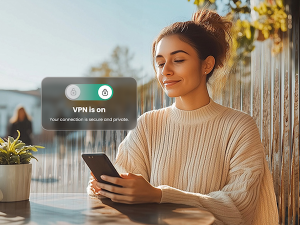
Use a VPN, especially in public. Also known as a virtual private network, a VPN helps protect your vital personal info and other data with bank-grade encryption. The VPN encrypts your internet connection to keep your online activity private on any network, even public networks. Using a public network without a VPN can increase your risk because others on the network can potentially spy on your browsing and activity. If you’re new to the notion of using a VPN, check out this article on VPNs and how to choose one so that you can get the best protection and privacy possible. (Our McAfee+ plans offer a VPN as part of your subscription.)
Protect yourself from scam messages. Scammers also send links to scam sites via texts, social media messages, and email. Text Scam Detector can help you spot if the message you got is a fake. It uses AI technology that automatically detects links to scam URLs. If you accidentally click, don’t worry, it can block risky sites if you do.
Consider an identity theft protection solution. If for some reason your personal data does become compromised, be sure to use an identity theft solution such as McAfee Identity Theft Protection, which allows users to take a proactive approach to protect their identities with personal and financial monitoring and recovery tools to help keep their identities personal and secured.
Apple says removal of tool after government asked for right to see data will make iCloud users more vulnerableBusiness live – latest updatesApple has taken the unprecedented step of removing its strongest data security tool from customers in the UK, after the government demanded “backdoor” access to user data.UK users will no longer have access to the advanced data protection (ADP) tool, which uses end-to-end encryption to allow only account holders to view items such as photos or documents they
Apple has taken the unprecedented step of removing its strongest data security tool from customers in the UK, after the government demanded “backdoor” access to user data.
UK users will no longer have access to the advanced data protection (ADP) tool, which uses end-to-end encryption to allow only account holders to view items such as photos or documents they have stored online in the iCloud storage service.
Money stolen falls from record $1.25bn to $813m as more victims refuse to pay off criminal gangsRansomware payments fell by more than a third last year to $813m (£650m) as victims refused to pay cybercriminals and law enforcement cracked down on gangs, figures reveal.The decline in such cyber-attacks – where access to a computer or its data is blocked and money is then demanded to release it – came despite a number of high-profile cases in 2024, with victims including NHS trusts in the UK and th
Money stolen falls from record $1.25bn to $813m as more victims refuse to pay off criminal gangs
Ransomware payments fell by more than a third last year to $813m (£650m) as victims refused to pay cybercriminals and law enforcement cracked down on gangs, figures reveal.
The decline in such cyber-attacks – where access to a computer or its data is blocked and money is then demanded to release it – came despite a number of high-profile cases in 2024, with victims including NHS trusts in the UK and the US doughnut firm Krispy Kreme.
Italian and Irish regulators want answers on how data harvested by chatbot could be used by Chinese governmentThe Chinese AI platform DeepSeek has become unavailable for download from some app stores in Italy as regulators in Rome and in Ireland demanded answers from the company about its handling of citizens’ data.Amid growing concern on Wednesday about how data harvested by the new chatbot could be used by the Chinese government, the app disappeared from the Apple and Google app stores in Ital
Italian and Irish regulators want answers on how data harvested by chatbot could be used by Chinese government
The Chinese AI platform DeepSeek has become unavailable for download from some app stores in Italy as regulators in Rome and in Ireland demanded answers from the company about its handling of citizens’ data.
Amid growing concern on Wednesday about how data harvested by the new chatbot could be used by the Chinese government, the app disappeared from the Apple and Google app stores in Italy with customers seeing messages that said it was “currently not available in the country or area you are in” for Apple and the download “was not supported” for Google, Reuters reported.
As organizations increasingly measure environmental impact towards their sustainability goals, many are focusing on their data centers.
KPMG found that the majority of the top 100 companies measure and report on their sustainability efforts. Because data centers consume a large amount of energy, Gartner predicts that by 2027, three in four organizations will have implemented a data center sustainability program, which often includes implementing a green data center.
“Responsibilities for sustai
As organizations increasingly measure environmental impact towards their sustainability goals, many are focusing on their data centers.
KPMG found that the majority of the top 100 companies measure and report on their sustainability efforts. Because data centers consume a large amount of energy, Gartner predicts that by 2027, three in four organizations will have implemented a data center sustainability program, which often includes implementing a green data center.
“Responsibilities for sustainability are increasingly being passed down from CIOs to infrastructure and operations (I&O) leaders to improve IT’s environmental performance, particularly around data centers,” said Autumn Stanish, Senior Principal Analyst at Gartner. “This has led many down the path of greater spending and investment in environmental solutions, but environmental impact shouldn’t be the only focus. Sustainability can also have a significant positive impact on non-environmental factors, such as brand, innovation, resilience and attracting talent.”
Organizations increasingly building green data centers
The International Energy Agency (IEA) found data centers account for 1 to 1.5 percent of global electricity consumption. Reducing energy consumption is often a top priority when designing and building a green data center. Because AI uses more computing power than traditional methods, data centers are increasingly using more energy, which is only predicted to increase as use cases for AI continue to expand.
The term green data center does not refer to a single technology, but instead a strategic approach designed to more efficiently use resources that starts at the very beginning of the process. Every decision regarding processes, environment and technology is made with sustainability as a top priority. For example, green data centers often use a smaller physical space and typically use low-emission materials in construction.
However, green data centers add new cybersecurity risks as well as increase known risks. Organizations must keep cybersecurity at the center of each green data center decision.
Here are five green data center trends to consider in terms of cybersecurity when designing and implementing a green data center.
1. Advanced cooling technologies
Many green data centers reduce their reliance on traditional air conditioning by using advanced cooling techniques, liquid cooling or precision cooling. These techniques often use IoT devices for monitoring temperatures and energy use. However, IoT devices can provide entry points for cyber criminals to access the network and all connected systems. Additionally, IoT devices expand the potential attack surface area.
By proactively taking steps for each IoT device, organizations can effectively use advanced cooling techniques without significantly increasing their risk. As part of the installation process for each IoT device, administrators should change the preinstalled passwords with complex passwords. Many organizations also use a VPN local virtual private network for IoT devices to limit access to other systems in case of a cybersecurity incident.
2. Extending life of equipment
Purchasing new equipment regularly for a data center increases its environmental impact as well as costs. Many organizations are using upgrades, refurbishments and efficient maintenance to extend the lifespan. However, older equipment may have more cybersecurity vulnerabilities and be less likely to use the latest (and most secure) technologies and techniques. By regularly evaluating the benefits of continuing to use a piece of equipment for sustainability reasons with its cybersecurity risk, organizations can make a balanced decision. Additionally, installing all updates in a timely manner also reduces risk.
A common technique to reduce resources in data centers is virtualization. Because virtualization involves creating an abstract layer over computer hardware, organizations can use less physical equipment, resulting in lower energy consumption. A single physical server often runs multiple servers. Because virtual servers consume less energy, this often significantly reduces energy consumption.
However, virtual servers contain more entry points for breaches and attacks than physical servers. Additionally, cyber criminals often target the hypervisor that manages the virtual machines. By compromising the hypervisor, threat actors take control of a large portion of the data center and can inflict significant damage, especially through a ransomware attack.
Organizations can reduce their virtualization risk by ensuring that the user privileges for the virtual machines and hypervisor are appropriate for each person’s work-related tasks. By using segmentation in virtualized environments, cyber criminals can only access a small portion of the network and systems, which limits damage. Additionally, organizations should regularly audit which users have escalated privileges in a domain controller to reduce attackers waiting in the wings.
4. Renewable energy sources
By shifting from such as fossil fuels to renewable sources like solar, wind or hydropower, data centers can decrease their reliance on non-renewable energy and reduce the emission of greenhouse gasses. Because solar and wind farms are often in different locations than the data centers themselves, using these energy sources creates a larger attack area that increases the risk. Additionally, each system used for the new energy source adds to the surface area as well. Renewable energy sources also often use the power grid and the internet, which creates new sources of vulnerability. Because these energy sources often contain a high volume of sensitive data, organizations must proactively mitigate the risk of a data breach and compliance issues.
5. Data center infrastructure management (DCIM)
Green data centers typically use a DCIM to monitor and manage all aspects of the data center infrastructure, including power distribution and cooling systems, from a single location. Because of the real-time monitoring of power consumption, organizations can identify issues and make changes quickly to reduce the environmental impact instead of waiting until after the impact has occurred.
Due to its integration with other systems, the DCIM creates a target for attackers to gain access to other data. The high level of integration makes it possible for threat actors to gain access to the DCIM from other interconnected systems. Organizations must focus on creating strong access controls to make sure that only authorized users gain access to reduce data leaks and breaches.
Balancing security and sustainability
Because sustainability is the top concern with a green data center, organizations can inadvertently make decisions that increase cybersecurity vulnerabilities. With a balanced approach that considers both sustainability and cybersecurity, organizations can reduce the environmental impact of their data center while also reducing the risk of a breach or attack.

 Entrar