

Visualização normal

Antes de ontemStream principal
  • ✇Posts By SpecterOps Team Members - Medium
  • Part 16: Tool Description Jared Atkinson
    On Detection: Tactical to FunctionalWhy it is Difficult to Say What a Tool DoesIntroductionOver the years, I’ve noticed that we have a difficult time describing a specific tool’s functionality. I participated in conversations or listened to lectures where someone inevitably attempts to describe the techniques or behavior that they associate with a given tool. Someone might say “mimikatz is used for Credential Dumping” which is technically true, but does not provide a comprehensive description of
     

Part 16: Tool Description

On Detection: Tactical to Functional

Why it is Difficult to Say What a Tool Does

Introduction

Over the years, I’ve noticed that we have a difficult time describing a specific tool’s functionality. I participated in conversations or listened to lectures where someone inevitably attempts to describe the techniques or behavior that they associate with a given tool. Someone might say “mimikatz is used for Credential Dumping” which is technically true, but does not provide a comprehensive description of mimikatz’s capabilities. In these interactions, I’ve often found this problem to be obvious, even to the speaker, but it has been difficult to pin down exactly what to do about it.

In this article, I plan to demonstrate WHY this problem exists. We will dig into two examples, the first shows that a single sample can implement multiple, independent techniques, while the second shows that changing a parameter can cause a different procedure to be executed. In reality, the problem is that a tool is an arbitrary bucket for tradecraft. Some tools are purpose built for one purpose and one purpose only, while others are frameworks that facilitate many different capabilities. Our analysis must go deeper than the tool layer to really discern what we are attempting to detect and I hope that this post provides a perspective on that topic.

One Tool, Multiple Techniques

This section dissects a sample that appears to implement a single technique, Token Impersonation, but upon a deeper review we find that the functionality of the tool can be broken apart. Specifically, we find that the tool builds in a design decision that causes two related but independent techniques to be combined in one chain. Depending on the execution context, the first half of the chain could be omitted completely, or it could have been implemented by a separate, purpose built, tool.

Dependency Graph Review

I want to start with a review of the Dependency Graph. This is a topic that I described in detail in Part 11 of this series, but a quick review will help this article stand on its own.

While the function chain is helpful in describing the actual sequence of functions that were called by the sample, a single function chain does not always tell the entire story. In my previous post I introduced functional composition which we then used as a mechanism for evaluating whether two function chains were equivalent. At the end of the post we showed two function chains that ostensibly implemented the same Process Injection variant (seen below).

File Mapping Injection Variant 1
File Mapping Injection Variant 2

The two samples called the same functions, however, the samples called the functions in a different order. An obvious question that might arise is “how important is the order of the functions in the chain?” These chains are not literally the same due to the difference in their function order, but are they equivalent? We were able to answer that question using functional composition because both function chains produced the same dependency graph (shown below):

This analysis shows that dependency graphs can be used to evaluate equivalency between samples, but is that the only use case for dependency graphs? In this post, I want to explore a different use case for this analytical tool that will put another tool in our tool belt for understanding how to describe and categorize adversary tradecraft.

Can a single tool implement multiple techniques?

For this section we will assess the function chain implemented in Justin Bui’s PrimaryTokenTheft tool. I’ve included a diagram showing the layout of the code implementation.

Note: I highly recommend spending some time comparing the code itself to this diagram, especially if you are are relatively new to programming or operating system APIs.

The function chain

The result of analyzing the tool is a function chain as shown below:

Function Chain for PrimaryTokenTheft

If we were working towards building a robust behavioral detection rule, we would work to derive the corresponding operation chain. However, in this post, we are interested in looking at the function chain from a different direction. Our goal is to understand how the functions in the function chain are interconnected and what the implications of those relationships are.

Dependency as Techniques

While the function chain is a useful analytical tool, it leaves out a lot of details. For example, it is impossible to tell from the function chain alone how the different functions interact with one another and what the implications of those interactions are. I think of the function chain as viewing the sample in 2D. We are able to derive a general gist of what the sample does, but we are missing something. So what happens when we add an extra dimension, composition, to the mix? I’ve included the dependency graph for the PrimaryTokenTheft sample below:

Dependency Graph for PrimaryTokenTheft

Notice that the functions break out into two discrete/disconnected dependency graphs. The top dependency graph, which I will label as “token impersonation”, is composed of OpenProcess, OpenProcessToken, and ImpersonateLoggedOnUser. The bottom dependency graph, which I will label as “privilege enablement”, is composed of GetCurrentProcess, OpenProcessToken, LookupPrivilegeValue, and AdjustTokenPrivilege. We can then analyze the two dependency graphs to understand what sub-functionality each performs. For example, the token impersonation dependency graph opens a handle to a target process (OpenProcess), opens a handle to the target process’s primary token (OpenProcessToken), applies that token to the calling thread (ImpersonateLoggedOnUser). Thus we can say that the purpose of this dependency graph is to perform token impersonation. Hmmm, token impersonation is the purpose of the tool itself, so what is this second dependency graph responsible for? Let’s take a look! It appears that this second dependency graph opens a handle to calling process (GetCurrentProcess), it opens a handle to its own primary token (OpenProcessToken), it then looks up the value associated with the SeDebugPrivilege (LookupPrivilegeValue), it then enables the SeDebugPrivilege privilege (AdjustTokenPrivileges). If we refer back to the function chain, we can see that the functions that make up the second dependency graph are called first. This is because the SeDebugPrivilege ensures that the calling process is able to perform token impersonation without any issues. For this reason I will refer to this dependency graph as Privilege Enablement for the remainder of this post.

So what are the takeaways from this analysis? An interesting observation is that each dependency graph seems to represent some minimum viable capability. While it is technically possible to create a program that simply calls OpenProcess with no follow on functions, the resulting program will not behave in a consequential way. In order for the program to do anything useful, it must implement the full dependency graph.

Another important observation is that multiple dependency graphs can be implemented within the same sample or tool. We can imagine many situations where the a tool is not required to implement Privilege Enablement as part of its Token Impersonation workflow. If the tool is run as a high privilege context, it would be able to perform the token impersonation without enabling SeDebugPrivilege first.

One Tool, Multiple Procedures

In this section I want to explore an idea that was first pointed out to me by Nathan Davis. He worked with me to learn this methodology and made an interesting finding while applying the ideas from this series to a component of PowerSploit’s PowerUp module. He was building a function chain for PowerUp’s Get-ProcessTokenPrivilege function, when he noticed that the function chain would change slightly depending on whether a specific parameter were specified by the caller or not.

PowerSploit/Privesc/PowerUp.ps1 at master · PowerShellMafia/PowerSploit

Nathan specifically noticed that the the Get-ProcessTokenPrivilege function took two optional parameters, Id and Special, as shown in the image below:

It is quite common for PowerShell functions or command line applications to accept arguments via the command line, but I had not properly considered how different parameters can affect what happens when the application or function is executed. The primary example that Nathan found is shown in the image below.

Notice that the snippet begins with an if statement which specifically checks whether the Id parameter was specified on the command line. PSBoundParameters is a special variable that contains a dictionary of the parameters that were passed to the function. Checking whether a parameter exists within the dictionary is a standard way of checking whether a parameter was specified in when the function was called. This means that the condition for the if statement is checking whether the caller passed the Id parameter. If the Id parameter was passed, then the kernel32!OpenProcess function would be called. However, the else statement indicates that if the Id parameter was not specified, the kernel32!GetCurrentProcess function would be called instead. This means that there are, at least, two paths that might manifest as a result of calling this one function.

Note: This seems obvious in retrospect, but I still think this is valuable exercise for folks to see as they delve into applying the On Detection model to their analysis of attacker tools and behaviors.

OpenProcess vs. GetCurrentProcess

At this point, we know that there are two possible functional variations depending on the Id parameter, but if you’ve made it this far into the series and are like me you are probably wondering just how different those two functional variations might be. Do both functions abstract to the same operation? If so, this function-level difference does not really affect our description of the tool. We see that the output of both functions is stored in the ProcessHandle variable, so they probably are not terribly different. Well, the only way to definitively answer that question is to dig into the function call stacks for both kernel32!OpenProcess and kernel32!GetCurrentProcess.

Note: This next section walks through the generation of function call stacks for both kernel32!OpenProcess and kernel32!GetCurrentProcess. For those that have read the entire series, this is probably repetitive. However, this provides necessary context for those readers that are just joining us AND it never hurts to get another repetition of analysis under our belt.

kernel32!OpenProcess

The first step to analyzing a function call stack is to open the specified DLL file in a disassembler (we are using IDA Free in this post). We derive the DLL file from the code on line 1370 in the proceeding image. It specifically refers to $Kernel32::OpenProcess which indicates that it calls the version of OpenProcess that kernel32.dll implements (otherwise known as kernel32!OpenProcess). I’ve included an image of the kernel32!OpenProcess function’s implementation below:

Implementation of kernel32!OpenProcess

Notice the jmp cs:__imp_OpenProcess instruction. This indicates that execution should be redirected to an imported function (indicated by __imp_) named OpenProcess. The import table indicates that kernel32!OpenProcess redirects to api-ms-win-core-processthreads-l1–1–2!OpenProcess.

We can use the Get-NtApiSet function from James Forshaw’s NtObjectManager module to resolve the api-ms-win-core-processthreads-l1–1–2 ApiSet. In doing so, we find that the OS will redirect any calls to api-ms-win-core-processthreads-l1–1–2!OpenProcess to kernelbase!OpenProcess.

Using Get-NtApiSet to resolve api-ms-win-core-processthreads-l1–1–2

Next we can open kernelbase.dll in our disassembler and browse to its implementation of OpenProcess which is shown below:

Implementation of kernelbase!OpenProcess

While kernelbase!OpenProcess appears to do a bit more work than kernel32!OpenProcess, we find that it very quickly calls another imported function (__imp_NtOpenProcess). After consulting the imports table, we find that NtOpenProcess is implemented in ntdll.dll. Finally we open ntdll.dll in the disassembler and browse to the implementation of NtOpenProcess, shown below:

Implementation of ntdll!NtOpenProcess

We see that ntdll!NtOpenProcess makes a syscall to a kernel-mode function that we will call NtOpenProcess. We can now use the syscall rule which allows us to summarize a function call stack that ends in a syscall using a single operation, in this case the Process Open operation. With our analysis complete, we can graph the relationship between these functions using a “function call stack” which is shown below. For more information about function call stack, I recommend reading Part 2 of this series.

Function Call Stack for kernel32!OpenProcess

kernel32!GetCurrentProcess

Next we will analyze GetCurrentProcess which, according to line 1380 of the Get-ProcessTokenPrivilege code snippet that is shared above, is implemented by kernel32.dll. We’ve already loaded kernel32.dll into our disassembler, so we can use the Exports tab to view the GetCurrentProcess function’s implementation.

Implementation of kernel32!GetCurrentProcess

The first thing you should notice is that kernel32!GetCurrentProcess does not make a call or jmp of any kind. Instead, it sets the rax register, which is implicitly set to 0, to 0xFFFFFFFFFFFFFFFF (hex) or -1 (decimal) and returns the value. This means it does not make a syscall or remote procedure call, and therefore does not seem to implement an operation within the construct of our model. It turns out that -1 is considered a special “pseudo-handle” by Microsoft. Microsoft describes this pseudo-handle in the Remarks section of the GetCurrentProcess function documentation, “[it] is a special constant, currently (HANDLE)-1, that is interpreted as the current process handle.” This description indicates that it is possible for a developer to skip the call to kernel32!GetCurrentProcess altogether. If the developer is interacting with the calling process’s handle they can pass (HANDLE)-1 directly to the subsequent function call, which will be advapi32!OpenProcessToken in this case. However, the documentation states that Microsoft reserves the right to change this value, so kernel32!GetCurrentProcess provides a mechanism for programmer to avoid a breaking change.

This means that the “function call stack” for kernel32!GetCurrentProcess is quite simple as shown below:

Function Call Stack for kernel32!GetCurrentProcess

If you are like me, you might be wondering, “if all kernel32!GetCurrentProcess does is return -1, then how am I supposed to observe that?” We don’t see a syscall. We don’t see a Remote Procedure Call. What should we be looking for? Unfortunately, the answer is that this activity will likely fly below the proverbial EDR radar. Of course one could hook the kernel32!GetCurrentProcess function, but that would probably be quite noisy and attackers can simply skip the call and pass (HANDLE)-1 directly. This is an example, though, that not all functions correspond to operations, and in those cases where they do not we can basically ignore them with respect to our model.

Comparison

Now that we’ve created the respective function call stacks for kernel32!OpenProcess and kernel32!GetCurrentProcess we can compare them to understand the difference between the two routes that Get-ProcessTokenPrivilege affords us. When a Process Identifier is specified to the Id parameter, the Process Open operation is executed, however, if the Id parameter is not specified then the function focuses on the calling process which can be done without a full operation.

OpenProcessToken and GetTokenInformation

After obtaining the handle, both paths converge. We first see, on line 1387, the ProcessHandle that was returned from either OpenProcess or GetCurrentProcess passed as a parameter to advapi32!OpenProcessToken. This is a simple function that opens a handle to the process’s primary token.

Next, on line 1389, we see a call to an internal function called Get-TokenInformation. Notice that the InformationClass parameter is set to “Privileges.” To learn more about the Get-TokenInformation function, we can browse to its source code which is located in the same file, but on line 936. If we look through the functions implementation, we eventually find some conditional branching that is interested in the InformationClass parameter. Remember that Get-ProcessTokenPrivilege passed the string “Privilege” to this parameter? Well on line 1043 we find the section of code that is executed when InformationClass equals “Privileges.”

We immediately see two calls to advapi32!GetTokenInformation. This behavior of calling the function twice may seem strange at first, but it is following the function’s intended use case. The problem is that the size of the TOKEN_PRIVILEGES structure is variable, so the first call is to ascertain the size of the structure and the second call is to retrieve the values.

Notice that the second parameter passed to advapi32!GetTokenInformation is 3. This is the information class that corresponds with TokenPrivileges. When you hear information class, you should immediately start thinking about sub-operations. When we dig into advapi32!GetTokenInformation, we find that it eventually calls the NtQueryInformationToken syscall, as expected. This means that we would want to focus on the sub-operation which would be Token Query — TokenPrivileges. I’ve included the function call stack for those following along.

CloseHandle

Finally, we have another fork in the road based on the use of the Id parameter. If the Id parameter was specified by the caller kernel32!CloseHandle is called by the function. If not, the function does not call kernel32!CloseHandle. The reason for this is that the pseudo-handle does not have to be closed explicitly, while the real handle, opened with kernel32!OpenProcess should be.

Operation Chain Comparison

We can now compare the operation chains for the two routes that are afforded to us by Get-ProcessTokenPrivilege. The first path, top, occurs when a Process Identifier is passed to the function via the Id parameter. The Id is meant to specify a target process for whom’s token privileges should be checked. The second path, bottom, more or less represents the default behavior which is focused on the calling process. Notice that these two chains are identical for the middle three operations with the second chain missing the first, Process Open, and last, Handle Close, operations. We know from prior analysis that these differences are minimal in practice, so we should be able to design a detection strategy that handles both situations, given necessary telemetry.

Conclusion

While there are almost certainly better examples of a single parameter drastically changing the function/operation chains that are executed, this is a simple example that demonstrates that a tool cannot simply be described using a single chain. This is why questions like “What does mimikatz do?” are so difficult to answer. The proper response is that mimikatz is a tool that has numerous modules (i.e., sekurlsa, kerberos, dpapi, etc.) which have numerous commands (i.e., logonPasswords, tickets, pth, minidump), which have numerous parameters. Of course these parameters may or may not affect the function chain that is executed, but the idea stands. It is often not possible to describe what a tool does in one succinct answer. Given a specific command line, it is possible to produce the function chain that would be executed. It is also possible to use the module, command, parameter options to map all possible function chains that mimikatz might execute. It is, however, important to understand that using this approach we would be using the command line to derive the function chain which is a more abstract description and is therefore generalizable to many non-mimikatz implementations as well. So we should think of a command line as the beginning of a path to understanding the behavior rather than the end of the detection road.

On Detection: Tactical to Functional Series


Part 16: Tool Description was originally published in Posts By SpecterOps Team Members on Medium, where people are continuing the conversation by highlighting and responding to this story.
  • ✇Posts By SpecterOps Team Members - Medium
  • Part 15: Function Type Categories Jared Atkinson
    On Detection: Tactical to FunctionalSeven Ways to View API FunctionsIntroductionWelcome back to Part 15 of the On Detection: Tactical to Functional blog series. I wrote this article to serve as a resource for those attempting to create tool graphs to describe the capabilities of the attacker tools or malware samples they encounter. Throughout this series, I’ve analyzed many API functions and summarized my analysis through function call stacks. As I expanded the range of functions I’ve analyzed,
     

Part 15: Function Type Categories

On Detection: Tactical to Functional

Seven Ways to View API Functions

Introduction

Welcome back to Part 15 of the On Detection: Tactical to Functional blog series. I wrote this article to serve as a resource for those attempting to create tool graphs to describe the capabilities of the attacker tools or malware samples they encounter. Throughout this series, I’ve analyzed many API functions and summarized my analysis through function call stacks. As I expanded the range of functions I’ve analyzed, I noticed that there is not a one-size-fits-all solution when creating function call stacks.

Overall, I’ve found that there are, at least, seven different types of functions:

  1. Standard Functions (Syscalls)
  2. Sub-operations (NtQueryInformation* or NtSetInformation*)
  3. Remote Procedure Calls (NdrClientCall*)
  4. Local Security Authority Functions (LsaCallAuthenticationPackage)
  5. Driver IOCTLs (DeviceIoControl or NtFsControlFile)
  6. Compound Functions (Multiple operations)
  7. Local Functions

In this article, I work to categorize functions based on their function type. To do so, I will introduce the category and what makes its functions unique, share a sample whose critical function exemplifies the category, provide the sample’s tool graph and explain how it works, and finally break down the specific function call stack that demonstrates the category in question. Ultimately, you should have the toolset to identify the category to which a given function belongs based on a few heuristics I will share along the journey. This knowledge will empower you to better understand and categorize the attacker tools or malware samples you encounter.

This article is broken down into sections that describe and demonstrate the categories. I subdivide each section further into a “category introduction,” where I will explain the category at a high level; the “sample,” where I will introduce the tool or malware sample that we will analyze to learn about the category; the “tool graph,” where I will explain how the sample implements its functionality; and the “function call stack,” where I will focus on the sample’s critical function which exemplifies the category of focus.

While this article follows several relevant articles that examine individual function types in depth, I consider it more of a preamble to such deep dives. Here, I will introduce two or three new function-type categories I have not previously discussed, but I plan to write a subsequent deep dive on each eventually.

1. Standard Function (syscall)

The first and most common category is the so-called standard functions. These functions are standard because they represent the most common construction and serve as excellent starting points for anyone interested in gaining experience building function call stacks. Standard functions typically involve multiple layers of redirection between DLLs but will inevitably pass the caller-supplied arguments to a system call (syscall) for execution in the kernel. If you’ve followed this series, you will be highly familiar with standard functions and know that we use the syscall as an abstraction layer, which I call an operation. As we progress into other categories, we will see that the operation will remain, but we will derive it differently.

Sample

Our standard function sample comes from DGRonpa’s excellent Process_Injection repository. I enjoy this repo because they have created simple proof-of-concept implementations for the Process Injection technique’s diverse set of procedures. If you are just getting started with implementing the analytical process I present in this series, I recommend you check out this project. It demonstrates how slight implementation changes can have a massive impact on the mutual detectability of malware samples. This article will focus on the Shellcode_Injection.cpp sample, which implements the canonical process injection procedure. For those unfamiliar with process injection, it is primarily a defense evacuation technique used by attackers to inject or migrate their malicious code into an otherwise legitimate process, thus making them less susceptible to detection.

Process_Injection/Classical_Injeciton/Shellcode_Injection.cpp at main · DGRonpa/Process_Injection

Tool Graph

Tool Graph: Shellcode_Injection.cpp

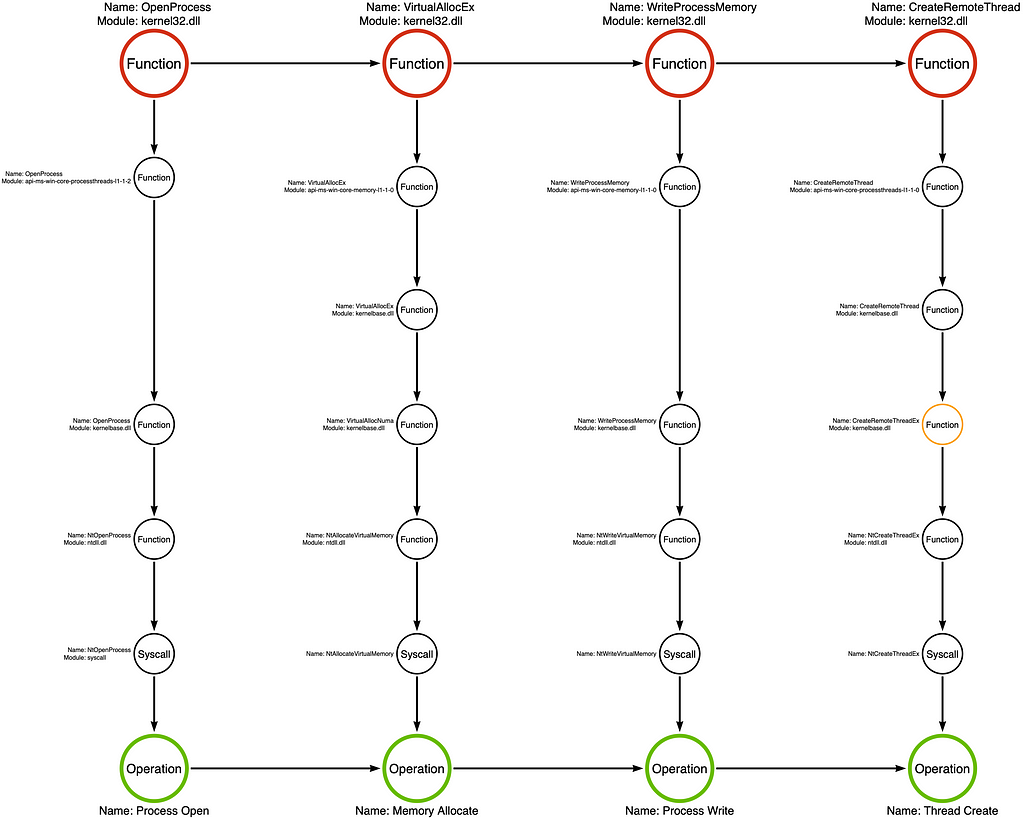
We can construct the tool graph by analyzing the source code at the link in the previous section. In doing so, we see that the sample begins by opening a handle to the target process, the process that the attacker intends to inject their code into, by calling the kernel32!OpenProcess function. Next, the code passes the process handle to kernel32!VirtualAllocEx. VirtualAllocEx is a function that allows an application to allocate a buffer in the memory of a different or remote process. The memory buffer will hold the attacker’s shellcode. Next, the sample writes shellcode to the newly allocated buffer via the kernel32!WriteProcessMemory function. Finally, the sample calls kernel32!CreateRemoteThread to execute the shellcode in the target process, thus finalizing the injection routine.

Function Call Stack

Function Call Stack: kernel32!CreateRemoteThread

Based on my analysis of this sample, it appears that kernel32!CreateRemoteThread is the sample’s critical function. I attribute this choice to the fact that CreateRemoteThread is the function that causes the injection. When the sample calls CreateRemoteThread, we can say that process injection has occurred. Let’s take a look at the function call stack for kernel32!CreateRemoteThread. It is worth understanding the general flow we expect in standard functions.

By analyzing the function call stack, we find that the final function, before the Operation, is a system call (syscall) named NtCreateThreadEx. Syscalls, like NtCreateThreadEx, are responsible for transitioning execution from user-mode to kernel-mode. This transition serves as a boundary whereby analysts can treat the kernel-side functionality as opaque, as it is not standard for a user-mode application to interact with kernel code except through very specific windows like syscalls.

2. Sub-Operations

Now that we have built the foundation, we can look at functions that offer a slight variation. Like Standard functions, this next function-type category is also based around a syscall but provides a bit more variation that must be accounted for by analysts. I call this group of functions Sub-Operations. These functions are often difficult to discern at the Win32 API layer but become evident at the Native API or Syscall layers due to a unique naming convention where the Native API and Syscall are referred to by Nt(Query/Set)Information* where the * represents a specific object type such as Process, File, etc.

For more detailed information on functions in the sub-operation category, I recommend reading Part 14 of this series.

Sample

To demonstrate the Sub-Operation category, we will investigate a sample that Jonathan Johnson wrote for our Malware Morphology workshop. This sample, called Sample 1, implements a simple version of Token Impersonation, and we will find that its critical function is a Sub-Operation.

MalwareMorphology/Sample 1/src/Source.cpp at main · jaredcatkinson/MalwareMorphology

I encourage you to check out the full workshop to see how attackers can change their approach when facing different constraints or circumstances. The slides and labs are available in the linked GitHub repository, and a video recording of the workshop lecture is available on NorthSec’s YouTube channel.

Tool Graph

Tool Graph: Malware Morphology Sample 1

Let’s analyze Sample 1’s source code to build the tool graph. This sample starts by calling kernel32!OpenProcess to open a handle to the target process. In this case, the target process is the process from whom the attacker wants to impersonate. Next, it passes the process handle to advapi32!OpenProcessToken and opens a handle to the target process’s primary token. The primary token represents the user context the attacker is after. While the attacker now has access to their target token, Windows does not allow a process to impersonate the primary token of a different process, so Jonny calls advapi32!DuplicateToken to make a fresh copy of the token. Finally, he passes the duplicated token to advapi32!SetThreadToken to execute the impersonation. Finally, Jonny follows good programming practice by cleaning up the handles he opened by calling kernel32!CloseHandle three times. It is important to note that these calls to CloseHandle are purely optional, so it is plausible that a malicious implementation may exclude them.

Function Call Stack

Function Call Stack: advapi32!SetThreadToken

When it comes to Token Impersonation, the moment of impersonation represents the critical point in the function chain. As a result, we can identify advapi32!SetThreadToken as the crucial function in the function chain.

The function call stack, shown below, appears to follow a similar pattern to the Standard Function. However, the implementation diverges when the code reaches kernelbase.dll. In this case, the high-level function, advapi32!SetThreadToken is a wrapper around a more generic low-level function called ntdll!NtSetInformationThread. In Part 14 of this series, I discussed a class of functions called Nt(Set/Query)Information* that facilitate the setting (writing) or querying (reading) of metadata properties for the target object specified by the *, which in this case happens to be a Thread. The caller specifies which specific metadata property to query or set via an information class.” Each object type has a unique set of information classes. You can see in the screenshot below that SetThreadToken specifies information class 5 via the second parameter, which corresponds to ThreadImpersonationToken.

For this category of functions, the information class is critical for properly assigning the operation. If we treated advapi32!SetThreadToken as if it were a Standard Function, we would derive the operation from the syscall, NtSetInformationThread, meaning the operation would be Thread Set. The problem is that the Thread Set operation covers ALL of the Thread’s metadata properties, including properties irrelevant to token impersonation, such as ThreadIoPriority. While it may be interesting to know whether someone changed a thread’s IO priority, that change does not indicate Token Impersonation. All said, there are 41 Thread information classes (metadata properties), and only one is relevant to this particular procedure. Therefore, we require a way to differentiate between Thread Set operations, and the most natural option for doing so is using the information class as an additional indicator. Thus, the resulting operation is Thread Set: ThreadImpersonationToken.

3. Remote Procedure Calls (NdrClientCall4)

Now, we’ve reached the categories I have not yet covered in this series. The first is related to remote procedure call (RPC) procedures. Functions built on RPC Procedures do not result in syscalls, at least not directly. Instead, they implement the client component of the RPC client/server relationship. In the RPC model, the client and server can exist within different processes or even on different systems. Previously, I mentioned that syscalls are responsible for transferring execution from user mode to kernel mode. Similarly, an RPC procedure transfers execution from the client application, the Win32 API function, to the server application. This process is commonly referred to as Interprocess Communication (IPC). Especially in cases where the client and server exist on separate systems, this boundary is at least as robust as the user mode/kernel mode boundary. A key feature of RPC is that the server component generally constrains the set of sub-routines a client can execute on the server. This constraint creates an opportunity to establish our operation abstraction layer.

Sample

For this third class of functions I decided to use a BOF called sc_create that is included in the TrustedSec CS-Remote-OPs-BOF project. Based on the commit history, it appears that it was originally written by Christopher Paschen. The BOF’s name indicates that Christopher reimplemented the functionality of the sc.exe create command. I’ve found that BOFs provide a great starting point for analysts that are trying to get their feet wet in this typeof analysis. Their simplicity can primarily be attributed to the fact that BOF often implement very discrete capabilities which limits the amount of digging that one must do.

CS-Remote-OPs-BOF/src/Remote/sc_create/entry.c at main · trustedsec/CS-Remote-OPs-BOF

Tool Graph

Tool Graph: sc_create BOF

Our analysis of the sc_create BOF found that it first opened a handle to the Service Control Manager (SCM) via the advapi32!OpenSCManagerW function. Next, the BOF creates the target service via the advapi32!CreateServiceW function. While the operator can specify specific service details such as its name, binary path, and start type during creation, some other features must be added after the fact. To make these additional changes, the tool calls the advapi32!ChangeServiceConfig2W function. Finally, we see the tool close the handles to the newly created service and the SCM by calling the advapi32!CloseServiceHandle function twice.

Function Call Stack

Function Call Stack: advapi32!CreateServiceW

Since the technique in this example is Service Creation, it makes sense to choose advapi32!CreateServiceW as the sample’s critical function for investigation.

CreateServiceW is the first function category that does not make a syscall. Technically, it does EVENTUALLY, but there is an important caveat. You see, advapi32!CreateServiceW is an API function wrapper around an RPC Procedure. In the image below, we see the kernelbase!CreateServiceW function call the rpcrt4!NdrClientCall2 function. NdrClientCall2 is one of a set of functions, represented by NdrClientCall*, that RPC clients can use to make requests. Analysis of the NdrClientCall2’s first and second parameters, which is outside the scope of this article, allows us to identify that kernelbase!CreateServiceW invokes the RCreateServiceW procedure from the Microsoft Service Control Manager Remote Protocol (MS-SCMR).

The Service Control Manager (services.exe) implements its API via RPC, allowing other applications to interact with it. Applications can query, create (as we see here), delete, or modify services through the MS-SCMR RPC interface. Now, we need to understand that the relationship between the calling application and the Service Control Manager is a client/server relationship where clients can make local AND remote requests. The remote aspect is why service creation is a powerful lateral movement technique. Given sufficient permissions, attackers can create malicious services on remote systems. The client/server relationship is essential in our analysis because it acts like a boundary where interaction is constrained to a finite set of RPC procedures like RCreateServiceW. This constraint allows for the application of the operation abstraction layer, which is labeled Service Create in this specific case.

Note: This is not to say that it is not valuable to understand what happens on the server side of the interaction because, in some cases, like this one, an understanding of the server-side component can reveal an alternative procedure to achieve the same outcome (lateral movement via service creation). That said, the ability to implement the server-side implementation, especially remotely, has shown in my analysis to be the exception, not the rule. I will write more about this in a future post.

4. LSA Functions (LsaCallAuthenticationPackage)

Next, we encounter a function type category that took me a while to understand, the LSA Function. Eventually, I discovered that LSA Functions are to RPC Procedures as Sub-Operations are to Standard Functions. That is, LSA Functions rely on a specific RPC Procedure called SspirCallRpc, which the Microsoft Security Support Provider Interface (MS-SSPI) implements. MS-SSPI offers an extensible framework for authentication whereby Microsoft and third-party vendors can extend how users authenticate to the system. As a result, all interactions with “Authentication Packages” flow through the same RPC Procedure. However, the Local Security Authority (LSA) determines how to handle each request based on the specified Authentication Package and AP function. These additional variables indicate that it will not be enough to observe the invocation of SspirCallRpc. Instead, more precise monitoring is necessary, but unfortunately, I am not aware of any vendor that supports this level of monitoring as of this writing.

I highly recommend checking out Evan McBroom’s excellent LSA Whisper project to learn more about the Authentication Packages and LSA.

Sample

This category of functions is the one that inspired me to write this post. I struggled to integrate functions that interact with the Local Security Authority (LSA) into my model for an extended period. When I finally understood how they fit, I realized I had incorrectly conceptualized other categories, like RPC functions. This category is essential when considering modern tradecraft, as shown by my colleagues Will Schroeder in his work on Rubeus and Evan McBroom in his work on LSA Whisperer. Many modern workflows manipulate an agent’s identity context through interactions with LSA, so modern detection approaches must understand these underlying mechanisms. With that in mind, we will look at the inner workings of the pass-the-ticket (ptt) argument in many of Rubeus’ commands.

Rubeus/Rubeus/lib/LSA.cs at master · GhostPack/Rubeus

Tool Graph

Tool Graph: Rubeus ptt

At this point, each sample we have investigated supported one use case. Rubeus is a full-featured tool suite that supports many Kerberos-related attacks. The pass-the-ticket feature assumes the operator has a Kerberos ticket and facilitates adding that ticket to the ticket cache of the specified logon session.

The tool graph below shows that Rubeus begins by connecting to the Local Security Authority (LSA) server using the secur32!LsaConnectUntrusted function. This results in an LSA handle that the tool uses in subsequent calls. Next, the application finds the Kerberos authentication package (AP) by calling the secur32!LsaLookupAuthenticationPackage function. Rubeus then calls secur32!LsaCallAuthenticationPackage specifying the Kerberos authentication package’s KerbSubmitTicket function. The KerbSubmitTicket AP function adds the supplied ticket to the specified logon session’s ticket cache. Finally, Rubeus releases the LSA handle by calling secur32!LsaDeregisterLogonProcess.

Function Call Stack

Function Call Stack: secur32!LsaCallAuthenticationPackage (Kerberos KerbSubmitTicket)

The secur32!LsaCallAuthenticationPackage function is responsible for “passing-the-ticket” in the sense that it is the function that adds the ticket to the ticket cache. For that reason, let’s dig a bit deeper into it to understand how it works.

When we open secur32!LsaCallAuthenticationPackage in our disassembler, we see that it eventually makes an RPC Procedure call to the SspirCallRpc procedure implemented by the Microsoft Security Support Provider Interface (MS-SSPI). You might immediately think that I’m crazy because we just covered RPC Procedures in the previous section, but it turns out that this particular case is more complicated than that. That’s because there is an additional layer or two of abstraction. The SspirCallRpc procedure acts as a gateway for applications to interact with LSA regardless of the authentication package and function that the caller specifies. Behind the scenes, MS-SSPI (loaded in lsass.exe) handles these calls and passes execution to the appropriate authentication package, such as kerberos.dll. As a result, observing a call to the SspirCallRpc procedure only indicates that some authentication-related operation has occurred. However, it does not provide the necessary level of detail to determine whether the operation is the one you are interested in, such as adding a Kerberos ticket to the ticket cache, in this case via KerbSubmitTicket. Like Sub-Operations, this category requires that we operate at a more granular level if we can hope to use this signal in any meaningful detection strategy.

It is also worth noting that these LSA-related operations function based on the same client/server relationship as RPC but are often constrained to the local machine only. The lsass.exe application runs as a protected process on modern operating systems, so LsaCallAuthenticationPackage or SspirCallRpc, more specifically, acts as an interface for applications to interact with LSA. This constraint allows us, again, to treat the LSA side of this interaction opaquely. I’ve found it helpful to label the resulting operation using the AP function, which in this example is KerbSubmitTicket.

5. Driver IOCTLs

Another important category I have not extensively written about is Driver IOCTLs. These functions rely on making specific Input/Output Control calls to kernel drivers via API functions like kernel32!DeviceIOControl and ntdll!NtfsControlFile. IOCTLs facilitate direct interaction with a kernel driver and represent something between a Syscall and an RPC Procedure. In this case, we treat the transfer of execution from the client application to the kernel driver as the boundary for abstraction.

Sample

To demonstrate Driver IOCTLs in practice, I will use Matt Graeber’s Get-System implementation from the PowerSploit project. Get-System provides two approaches to Token Theft. The first follows the traditional Token Impersonation approach, while the second relies on a trick with named pipes. For this analysis, I will focus on the named pipe approach.

PowerSploit/Privesc/Get-System.ps1 at d943001a7defb5e0d1657085a77a0e78609be58f · PowerShellMafia/PowerSploit

Thanks to Jonathan Johnson for helping to identify a function that embodies this category. He pointed me to one of his blog posts focused on advapi32!ImpersonateNamedPipeClient, which inspired me to find a sample that leverages that function. If you want to understand how I constructed the function call stack, I recommend you read his post.

Exploring Impersonation through the Named Pipe Filesystem Driver

Tool Graph

Tool Graph: PowerSploit Get-System

After consulting the source code for our sample, I found that the named pipe impersonation trick is a bit complicated. It starts with a call to advapi32!CreatePipe, which generates a new pipe with a fairly permissive DACL. Next, we interact with the Service Control Manager (SCM) via advapi32!OpenSCManagerW. This call results in a handle to the local SCM. Matt passes the SCM handle to advapi32!CreateServiceW to create a new service that the attack will eventually use to connect to the named pipe. Services can run as the NT AUTHORITY\SYSTEM user, resulting in the “named pipe client” being SYSTEM. We then see a call to advapi32!CloseServiceHandle to close the service handle. Next, Get-System calls advapi32!OpenServiceW to open a new handle to the service. The service handle is passed to advapi32!StartServiceW to execute the service, thus connecting to the named pipe. After the service is executed, the sample is cleaned up via advapi32!DeleteService and two calls to advapi32!CloseServiceHandle. Finally, advapi32!ImpersonateNamedPipeClient is called to steal the SYSTEM account token.

Function Call Stack

Function Call Stack: advapi32!ImpersonateNamedPipeClient

As mentioned earlier, I selected this sample to highlight the advapi32!ImpersonateNamedPipeClient function.

Like many other functions, ImpersonateNamedPipeClient flows to kernelbase.dll, where it makes a call to a Native API function called ntdll!NtFsControlFile. The Microsoft documentation for the NtFsControlFile function states that “[it] sends a control code directly to a specified file system or file system filter driver, causing the corresponding driver to perform the specified action.” We can see from the arguments passed to NtFsControlFile that the handle is to the specified named pipe, which, in the case of Matt’s Get-System implementation, is the dummy named pipe created via the CreatePipe function call. We also see that kernelbase!ImpersonateNamePipeClient hardcodes the sixth parameter, representing the FsControlCode, to 0x11001C.

Implementation of kernelbase!ImpersonateNamedPipeClient

The FsControlCode tells the driver which sub-routine to execute. In his blog post analyzing the function, Jonny explains that this control code is known as FSCTL_PIPE_IMPERSONATE and that the components of the control code indicate that this is function number 7 for named pipes (FILE_DEVICE_NAMED_PIPE). We can, therefore, use the control code as the abstraction layer for our operation, which we will call Pipe Impersonate.

6. Compound Functions

A special category is the Compound Function. A Compound Function is a function that, at the Win32 API level, appears as a single function but, lower in the function call stack, breaks down into many more specific functions and, thus, operations. We typically find that Compound Functions implement logic to execute an everyday routine that would normally require multiple individual function calls. A great example of a compound function is dbghelp!MiniDumpWriteDump, which creates process crash dumps. It is built on top of kernel32!ReadProcessMemory. However, a crash dump requires numerous specific memory reads to occur. MiniDumpWriteDump implements this logic, so the application developer is not required to understand the details of the crash dump or process memory structures.

Sample

We will look at Justin Bui’s Primary Token Theft sample for this category. Justin wrote this program to evaluate which processes would be the best targets for System Token Theft. It is a relatively simple program, but it allows us to see a third implementation of Token Impersonation. I challenge you to analyze this sample’s operation chain and compare it to the sample we used to dig into Sub-Operations.

PrimaryTokenTheft/main.cpp at master · slyd0g/PrimaryTokenTheft

Tool Graph

Tool Graph: PrimaryTokenTheft

The tool graph for the PrimaryTokenTheft sample is relatively straightforward compared to some of our other examples. In all, we see that there were three function calls kernel32!OpenProcess, advapi32!OpenProcessToken, and advapi32!ImpersonateLoggedOnUser. The first function, kernel32!OpenProcess is used to open a handle to the target process. This process typically runs in the context of a user with desirable access, such as the NT AUTHORITY/SYSTEM account or a Domain Administrator account. The resulting handle is then passed to advapi32!OpenProcessToken, which opens a handle to the desired access token. Finally, Justin passes the token handle to advapi32!ImpersonateLoggedOnUser, where all the magic happens.

Function Call Stack

Function Call Stack: advapi32!ImpersonateLoggedOnUser

Digging into the advapi32!ImpersonateLoggedOnUser function’s call stack, everything progresses normally, like a standard function, until we reach kernelbase.dll. As shown in the image below, we see calls to ntdll!NtQueryInformationToken, ntdll!NtDuplicateToken, ntdll!NtSetInformationThread, and ntdll!NtClose.

Implementation of kernelbase!ImpersonateLoggedOnUser

As a result, the function call stack splits at kernelbase!ImpersonateLoggedOnUser. The end effect is that rather than a one-to-one relationship between the function and the operation, we find that advapi32!ImpersonateLoggedOnUser has a one-to-four relationship, which has massive implications for our detection engineering efforts. Each underlying function will fit within one of the categories covered in this article. For example, NtQueryInformationThread and NtSetInformationThread belong to the Sub-Operation category, while NtDuplicateToken and NtClose belong to the Standard Function category.

You will notice that the resulting operation chain for this particular sample is not much different from that of the sample used in the Sub-Operation section. This similarity means that these two samples are likely to be mutually detectable, or, put another way, they can both be detected using the same analytic.

7. Local Functions (memcpy or GetCurrentProcess)

The final category is probably the least important from the detection engineering perspective. However, understanding how to spot functions from this set will empower you to separate the wheat from the chaff. Local Functions is the name I’ve given to the functions that never cross a relevant boundary. They often, if not always, are resolved within the initial implementation DLL and perform local tasks. You will find that as you begin to analyze complicated functions, you will encounter many local functions, so you must understand how to spot these functions so you can be sure that you can safely ignore them.

Sample

In this example, we will rely on the Get-ProcessTokenPrivilege PowerShell function from Will Schroeder’s PowerUp module. This function is a helper function that implements something similar to whoami /priv.

PowerSploit/Privesc/PowerUp.ps1 at master · PowerShellMafia/PowerSploit

Tool Graph

Tool Graph: Get-ProcessTokenPrivilege

The tool graph shows that this PowerShell function is meant to check which privileges are enabled for the current user context. We see kernel32!GetCurrentProcess emits a handle to the calling process. That handle is then passed to advapi32!OpenProcessToken, which returns a handle to the calling process’s primary token. Finally, the advapi32!GetTokenInformation function is called to return a list of the token’s enabled privileges.

Note: Can you identify which categories advapi32!OpenProcessToken and advapi32!GetTokenInformation fit into?

Function Call Stack

Function Call Stack: kernel32!GetCurrentProcess

In this sample, the kernel32!GetCurrentProcess function represents the Local Function category. After opening kernel32.dll in IDA, we can browse to the implementation of the GetCurrentProcess function. We see that this function does not do much. It returns -1, which functions as a pseudo-handle for the calling process.

Implementation of kernel32!GetCurrentProcess

As a result, the function call stack is essentially non-existent, as shown below. Since kernel32!GetCurrentProcess does not cross a client/server boundary like that of user-mode/kernel-mode, RPC client/server, or LSA client/auth package it does not have a corresponding operation.

Conclusion

For as long as I can remember, we have used API functions to describe a particular malware sample’s functionality. These function chains have proven helpful to Detection Engineers as they provide a blueprint for observation. However, not all functions are created equally. In our analysis, we’ve identified seven function categories, each requiring a different analytical approach. I hope the descriptions in this article help you determine which type of function you have encountered so you can ensure you are collecting data with an adequate level of granularity.

On Detection: Tactical to Functional Series


Part 15: Function Type Categories was originally published in Posts By SpecterOps Team Members on Medium, where people are continuing the conversation by highlighting and responding to this story.

  • ✇Posts By SpecterOps Team Members - Medium
  • Misconfiguration Manager: Detection Updates Joshua Prager
    TL;DR: The Misconfiguration Manager DETECT section has been updated with relevant guidance to help defensive operators identify the most prolific attack techniques from the Misconfiguration Manager project.BackgroundIf you have been following SpecterOps’s offensive security research over the last few years, you may have noticed our interest in targeting attack paths leveraging Microsoft’s Configuration Manager (CM), formerly known as System Center Configuration Manager or SCCM.At SO-CON 2024, Du
     

Misconfiguration Manager: Detection Updates

TL;DR: The Misconfiguration Manager DETECT section has been updated with relevant guidance to help defensive operators identify the most prolific attack techniques from the Misconfiguration Manager project.

Background

If you have been following SpecterOps’s offensive security research over the last few years, you may have noticed our interest in targeting attack paths leveraging Microsoft’s Configuration Manager (CM), formerly known as System Center Configuration Manager or SCCM.

At SO-CON 2024, Duane Michael, Chris Thompson, and Garrett Foster released the Misconfiguration Manager project, which represented a knowledge base of offensive techniques. Additionally, the project contained a large list of preventive controls complemented by a small list of detective controls that I had put together for the launch of the project. You can read more about the original attack and defensive techniques from the project launch on Duane’s blog, Misconfiguration Manager: Overlooked and Overprivileged.

This project grabbed my attention before launch due to its relatability to my network operations background. As many security researchers began this career path, I started my career in customer support and eventually found myself in system administration. Many years ago, I can remember learning how to deploy security patches, software, and operating systems via SCCM. One lesson that stood out to me was this understanding that access to SCCM was to be guarded due to the power this management tool had within the entire Active Directory domain. Once implemented, SCCM managed the whole domain with high levels of privilege and the SCCM console acted as a central point of administration.

Fast-forward many years, I was happy to help document detections for this project and give defenders a chance to detect the prolific attack techniques targeting Microsoft’s Configuration Manager. My goal was to give the current industry the tools that I needed when I was responsible for guarding the use of SCCM.

DETECT-4

DETECT-4: Monitor App Deployments via Status Message Queue

Configuration Manager can deploy applications to domain-joined and non-domain-joined clients within the scoped environment. These application deployments need only to reference a UNC path, which opens quite a wide gate to where the application can be sourced. Applications can be locally hosted on the targeted client machine, stored within a remote hosted share, or uploaded and hosted within Configuration Manager, itself. Luckily, Configuration Manager maintains the Status Message Queue log that queries the backend Configuration Manager MSSQL database and returns the plain text verbiage of each application deployment. Defenders can ingest these status messages into a centralized logging solution (Elastic, Splunk, etc). The logs without the corresponding MSSQL database returns are located on the Site Server’s smsprov.log file. There are several open-source projects that aid in collecting the status messages and most of them will require configuring DB Connect at some point to match the collected SMSProv log to the MSSQL returns to get the full event ingested.

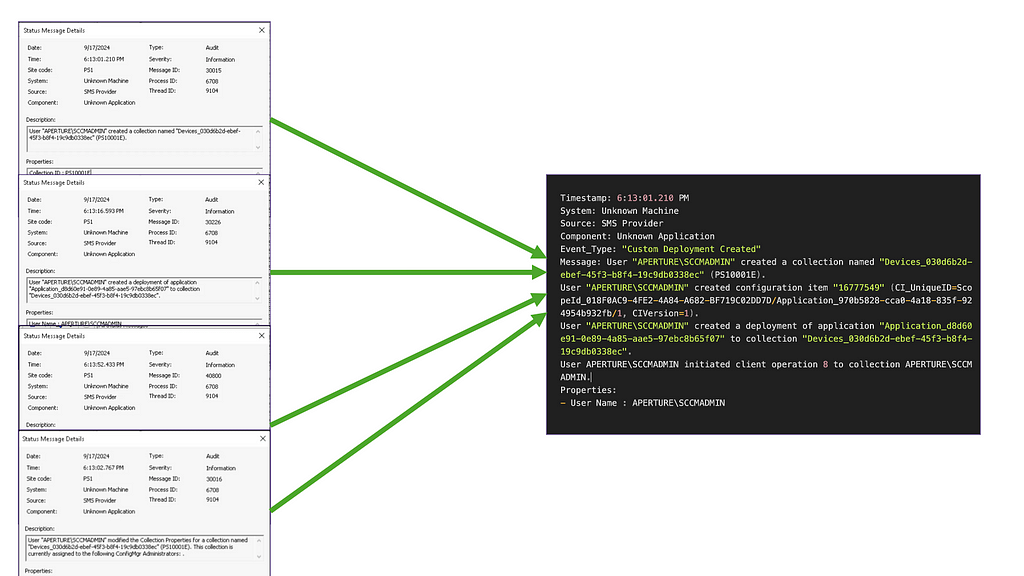
Once ingested, defenders can use this data source to build a composite event identifying the collection creation (Message: 30015) or the modification of a collection (Message: 30016), the creation of a deployment (Message: 30226), and the initiation of the deployment (Message: 40800).

Composite Event For Application Deployment

DETECT-5 and DETECT-6

DETECT-5: Monitor Group Membership Changes to SMS Admins Group

DETECT-6: Monitor Group Membership Changes for RBAC_Admins Table

The SMS Admins security group and the RBAC_Admins table represent the local security group with access to the SMS Provider, a WMI provider with write access to Configuration Manager (CM) databases. When a Full Administrator is added via the console or directly through modifications to the RBAC_Admins and RBAC_ExtendedPermissions tables in the site database, the account gets added to the local SMS Admins group on computers hosting the SMS Provider role. Defenders can leverage object access auditing to identify modifications to the local security group SMS Adminsindicating a new member has been maliciously added/removed (Event ID: 4732 [Add] or Event ID: 4733 [Removed]). Ideally, an organization would not frequently change this local security group.

A custom SQL audit must be created from the Configuration Manager MSSQL database to target the modification to the RBAC_Admins table and generate the event within an event provider. For the example in DETECT-6 , I chose to forward the event to the Application log. When the modification occurs, an SQL Audit Event (Event ID: 33025) will be generated with the data containing the INSERT that occurred in RBAC_Admins table.

Audit event: audit_schema_version:1
event_time:2024-10-23 03:11:01.1300947
...snip...
session_server_principal_name:APERTURE\ATLAS$
server_principal_name:APERTURE\atlas$
...snip...
object_name:RBAC_Admins
statement:INSERT INTO RBAC_Admins (AdminSID, LogonName, IsGroup, IsDeleted,
CreatedBy, CreatedDate, ModifiedBy, ModifiedDate, SourceSite)
SELECT 0x0105000000000005150000007D2E52AA5AD54377C5FC12F357040000,
'APERTURE\testsubject1', 0, 0, '', '', '', '', 'ps1' WHERE NOT EXISTS
( SELECT 1 FROM RBAC_Admins WHERE LogonName = 'APERTURE\testsubject1' )
...snip...

DETECT-7

DETECT-7: Monitor Read Access to the SMSTemp Directory

Configuration Manager implementations can utilize a preboot execution environment (PXE) to deploy pre-configured gold-image operating systems to target clients within the environment. The components that enable this capability typically involve Distribution Points that contain domain credentials within PXE media. The Distribution Point will host a REMINST (Remote Install) share that contains PXE boot variable files within an SMSTemp directory. System Access Control List (SACL) can be set on the SMSTemp directory (Event ID: 4663) and the related PXE variable files that offensive tooling will scrape to find domain credentials.

Event ID: 4663
An attempt was made to access an object.
Subject:
Security ID: SYSTEM
Account Name: ATLAS$
Account Domain: APERTURE
Logon ID: 0x3E7
Object:
Object Server: Security
Object Type: File
Object Name: C:\RemoteInstall\SMSTemp\2024.09.07.09.10.30.0001.
{7CEC8AFB-6AD5-45C1-A6E2-433D7F4D2E71}.boot.var
Handle ID: 0x528
Resource Attributes: S:AI
Process Information:
Process ID: 0xfbc
Process Name: C:\Windows\System32\svchost.exe
Access Request Information:
Accesses: ReadData (or ListDirectory)

Additionally, Detailed File Share auditing (Event ID: 5145) enabled on the Distribution Point will monitor for connections to the REMINST file share. YMMV on the verbosity of enabling this particular audit category — but as defenders we typically have the power to filter at the data shipper level.

DETECT-8

DETECT-8: Monitor Connections to Winreg Named Pipe

The use of the \\.\winreg named pipe can be used to query Configuration Manager infrastructure to obtain reconnaissance on PXE configurations or general Configuration Manager implementation details. The protocol is implemented on top of DCERPC, and can be detected via Zeek DCERPC logs or more specifically auditing the Detailed File Share events on Configuration Manager infrastructure.

Additionally, Microsoft Sysmon Operational logging contains Named Pipe Connections (Event ID: 18) which can be used to identify the general use of the \\.\winreg named pipe.

Event ID: 18
Pipe Connected:
RuleName: -
EventType: ConnectPipe
UtcTime: 2024-10-24 15:02:05.541
ProcessGuid: {8288158a-ce46-66cf-eb03-000000000000}
ProcessId: 4
PipeName: \winreg
Image: System
User: NT AUTHORITY\SYSTEM

DETECT-9

DETECT-9: Monitor Local Object Access for SCCM Logs and Settings

The Misconfiguration Manager project has multiple methods of remotely enumerating Configuration Manager site information. However, the Configuration Manager settings can be enumerated locally if the adversary has control over a Configuration Manager-managed client. Typically, a Configuration Manager-managed client will have the following directories:

  • C:\Windows\CCMCACHE
  • C:\Windows\CCMSETUP
  • C:\Windows\CCM\Logs

These directories can be triaged for the DNS names of the site servers, distribution points, and management points. Additionally, the registry key/value HKLM:\SOFTWARE\Microsoft\SMS\DP\ManagementPoints will enumerate the Distribution Points and Management Points for that particular Configuration Manager-enrolled client.

Defenders can enable custom auditing on these directories and their child files. Defenders can also set SACLs on the registry key and the related child value ManagementPointsvia SACLs (Event ID: 4663).

Event ID: 4663
An attempt was made to access an object.

Subject:
Security ID: APERTURE\TESTSUBJECT1
Account Name: TESTSUBJECT1
Account Domain: APERTURE
Logon ID: 0x7FE94D

Object:
Object Server: Security
Object Type: File
Object Name: C:\Windows\CCM\Logs\CcmMessaging.log
Handle ID: 0x4a4
Resource Attributes: S:AI

Process Information:
Process ID: 0x1594
Process Name: C:\Tools\SharpSCCM.exe

Access Request Information:
Accesses: ReadData (or ListDirectory)

Access Mask: 0x1

Conclusion

Ultimately, our goal of the Misconfiguration Manager project is to empower defenders with the same depth of knowledge that adversaries exploit. By implementing and testing these detections, organizations can better guard access to their implementation of Configuration Manager; ensuring they remain a reliable tool for system management rather than a vector for compromise.


Misconfiguration Manager: Detection Updates was originally published in Posts By SpecterOps Team Members on Medium, where people are continuing the conversation by highlighting and responding to this story.

❌
❌