The Coder registry attack hijacked Cloudflare IPs to serve malicious Terraform modules from registry.coder.com, stealing developer secrets.
Related Posts:
Mirage Kitten Malware Targets Aviation and Fintech Sectors
US Offers $10M for IRGC Cyber Leader
Toy Ghouls Backdoor Uses HiveMQ and Element for C2
The post Coder Registry Attack: Hijacked Cloudflare Pool Served Malicious Terraform Modules appeared first on Daily CyberSecurity.
You've had your iPhone stolen. A day later, you get a text from Apple saying they've found it, and a very helpful woman called Alice from Apple Support calls to walk you through recovering it. She's polite. She's professional. But she is not from Apple. She's not even human. And she's about to break into your iPhone.
Meanwhile, OpenAI, Anthropic, and Meta have all announced - with varying degrees of drama - that their AI agents have "broken out of the sandbox" and gone hacking. James takes a
You've had your iPhone stolen. A day later, you get a text from Apple saying they've found it, and a very helpful woman called Alice from Apple Support calls to walk you through recovering it. She's polite. She's professional. But she is not from Apple. She's not even human. And she's about to break into your iPhone.
Meanwhile, OpenAI, Anthropic, and Meta have all announced - with varying degrees of drama - that their AI agents have "broken out of the sandbox" and gone hacking. James takes a step back and asks the awkward question: is this really an emergent AI apocalypse, or did they just leave the door open?
All this and more in episode 483 of the "Smashing Security" podcast with cybersecurity expert and keynote speaker Graham Cluley, and special guest James Ball.
Expel analyzed the SynkLoader malware attack chain. Discover how SynkLoader malware uses Teams phishing and fake lock screens to steal credentials.
Related Posts:
macOS ClickFix Malware Exploits Polygon C2
WeedHack Malware Still Hits Minecraft Gamers via Fake Sites
Cruciferra Malware Loader Uses ClickFix Lures to Kill EDR
The post SynkLoader Malware Deploys Multi-Language Attack Tools appeared first on Daily CyberSecurity.
Password notebooks are making an unexpected comeback as infostealers and browser attacks revive debate over the safest way to store credentials.
The post The Password Notebook Is Back — but Is It Actually Safer? appeared first on TechRepublic.
Socket tracked 77 malicious Firefox extensions that steal crypto wallet secrets and credentials. See how the Offside Wallet Theft Factory works.
Related Posts:
Grandoreiro Banking Trojan Returns With a DLL Sideloading Campaign
Clop Deploys Custom Web Shell in PTC Windchill Extortion Attacks
WordlistLoader Delivers Amatera Stealer Through ClearFake Campaigns
The post 77 Malicious Firefox Extensions Steal Crypto Wallet Secrets and Credentials appeared first on Daily CyberSecurity.
Apollo Global Management confirmed a social-engineering breach exposing sensitive personal data amid a wider hacking campaign targeting financial firms.
The post Apollo Confirms Data Breach Amid Cyberattacks Targeting Financial Firms appeared first on TechRepublic.
Apollo Global Management confirmed a social-engineering breach exposing sensitive personal data amid a wider hacking campaign targeting financial firms.
StopAndProtect malware turns hacked WordPress sites into a botnet for ransomware and data theft. Check Point exposed 5,000+ victims.
Related Posts:
Cisco Talos Exposes UAT-10147 Agentic AI Attacks
Operation ASTERIX: Crypto Scam Used AI and Fake Wallets
Operation QUICSILVER Targets Myanmar Government With Go Backdoor
The post StopAndProtect Malware Turns Hacked WordPress Sites Into a Botnet appeared first on Daily CyberSecurity.
Unit 42 details how attackers exploit enterprise collaboration tools for identity phishing and credential theft. Discover key defense strategies.
The post Identity Abuse Through Trusted Communication Channels appeared first on Unit 42.
The DOJ charged 17 Iranians in a Mabna Institute cyber theft campaign that stole 31TB of research from universities for the IRGC.
Related Posts:
PATCHCORD Malware Hits Afghan Telecom in New APT36 Campaign
HoneyMyte CoolClient Rootkit Deploys Kernel Driver
Armored Likho Still Toolkit Deploys Covert Spying Implants
The post DOJ Charges 17 Iranians in Mabna Institute Cyber Theft appeared first on Daily CyberSecurity.
France’s tax authority confirmed a cyberattack exposed taxpayer data as officials investigate the breach’s scope and an unverified 678,000-record claim.
The post Nearly 700,000 French Taxpayer Records Reportedly Stolen in Government Cyberattack appeared first on TechRepublic.
France’s tax authority confirmed a cyberattack exposed taxpayer data as officials investigate the breach’s scope and an unverified 678,000-record claim.
Criminals are hacking into public Wi-Fi devices—at hotels, conference centers, and so on—around the world and changing their DNS settings. The goal is to redirect users to fake login pages and steal their credentials.
Criminals are hacking into public Wi-Fi devices—at hotels, conference centers, and so on—around the world and changing their DNS settings. The goal is to redirect users to fake login pages and steal their credentials.
DentaQuest says a May 2026 network breach affected 15 million people, exposing Social Security numbers and dental or vision health information.
The post DentaQuest Breach Affects 15 Million in Largest US Health Data Breach Reported in 2026 appeared first on TechRepublic.
Gunra ransomware has expanded its operations through a structured ransomware-as-a-service (RaaS) affiliate program, prompting the FBI, CISA and other agencies to issue a joint advisory warning organizations about the threat. The Gunra ransomware variant uses a double-extortion model, encrypting victim data while threatening to publish stolen information on a dedicated leak site if ransom demands are not met.
The FBI first observed Gunra in April 2025 as a double-extortion ransomware variant d
Gunra ransomware has expanded its operations through a structured ransomware-as-a-service (RaaS) affiliate program, prompting the FBI, CISA and other agencies to issue a joint advisory warning organizations about the threat. The Gunra ransomware variant uses a double-extortion model, encrypting victim data while threatening to publish stolen information on a dedicated leak site if ransom demands are not met.
The FBI first observed Gunra in April 2025 as a double-extortion ransomware variant derived from leaked Conti ransomware source code.
Gunra Ransomware Shifts to Affiliate Model
By early 2026, the group had expanded through a formal ransomware-as-a-service affiliate program advertised on dark web forums.
The program provides affiliates with a management panel, configurable ransomware builder, cross-platform locker payloads and affiliate documentation. The FBI also observed Gunra operating under new branding aliases, including Golden Community, while recruiting penetration testers and ethical hackers as initial access brokers.
Gunra initially focused on Windows environments before introducing a Linux variant and moving toward broader cross-platform targeting.
Victims observed on the group’s dedicated leak site include organizations across the Americas, Europe, the Middle East, Africa and the Asia-Pacific.
Targeted sectors include healthcare and public health, financial services and insurance, critical manufacturing, transportation, government services, utilities, academia, media and communications, retail, and professional and nonprofit services.
VPN Vulnerabilities Used for Initial Access
According to the advisory, Gunra actors primarily gained initial access by exploiting known vulnerabilities in internet-facing devices, including firewall and VPN gateways. The FBI observed exploitation of CVE-2024-55591 and CVE-2025-24472, authentication bypass vulnerabilities affecting specific FortiOS and FortiProxy versions.
The Republic of Korea’s National Police Agency also observed Gunra actors exploiting credential exposure and SSH access control weaknesses in internet-facing VPN gateways to obtain unauthorized remote access.
After gaining access, attackers used tools including Impacket utilities to move laterally through victim networks using SMB. In one case, actors compromised an SSL-VPN appliance using default credentials where account lockout controls were absent. They later used stolen session information to access internal virtual desktop infrastructure and move through systems including Active Directory servers and IT personnel workstations.
Data Theft Precedes Encryption
The double-extortion ransomware operation involves stealing sensitive information before encrypting systems. The FBI observed Gunra actors collecting business-critical documents, databases, personally identifiable information, and internal email communications.
In at least one case, the actors used a malicious executable called main.exe to exfiltrate data from Microsoft OneDrive and SharePoint. Compressed archives containing sensitive information were also transferred to the Mega file-sharing service, with the volume of exfiltrated data reaching tens of terabytes.
For encryption, Gunra uses ChaCha20 and RSA-4096 algorithms and has been observed using the .ENCRT extension for encrypted files. A documented sample from July 2025 used the .CRYPT extension. The ransomware also uses Windows Management Instrumentation to delete volume shadow copies before encryption, while one victim had backup and archived data deleted from both primary and disaster recovery infrastructure.
Agencies Urge Patching and Network Segmentation
The authoring agencies recommend that organizations prioritize patching known exploited vulnerabilities in internet-facing systems, including VPN gateways and RDP-exposed infrastructure. They also advise implementing and testing offline, immutable backups stored in physically separate and segmented locations.
Network segmentation is another key recommendation, intended to restrict lateral movement and limit the spread of ransomware between systems.
The agencies also recommend reviewing domain controllers, servers, workstations and Active Directory environments for unrecognized accounts, auditing administrative privileges, requiring MFA where possible and testing security controls against the Gunra techniques mapped to the MITRE ATT&CK framework.
The joint advisory was published August 10, 2026, as part of the ongoing #StopRansomware initiative.
Security researchers found 150 lookalike Open VSX extensions published under trusted names, highlighting how extension marketplaces can expose developer credentials, source code, and CI/CD systems to supply-chain risk.
The post 77 Counterfeit Open VSX Extensions Collected Developer and CI/CD Data appeared first on TechRepublic.
Security researchers found 150 lookalike Open VSX extensions published under trusted names, highlighting how extension marketplaces can expose developer credentials, source code, and CI/CD systems to supply-chain risk.
Fake downloads of The Odyssey are spreading Lumma Stealer malware capable of stealing passwords, cookies, payment data, and cryptocurrency information.
The post Fake The Odyssey Downloads Are Hiding Password-Stealing Malware appeared first on TechRepublic.
Fake downloads of The Odyssey are spreading Lumma Stealer malware capable of stealing passwords, cookies, payment data, and cryptocurrency information.
In this article
Pre-encryptionEncryptionPost-encryptionDefending against DeadLock ransomwareIndicators of compromise
Microsoft Threat Intelligence tracks DeadLock ransomware as an emerging financially motivated operation distinguished by its use of decentralized infrastructure to support victim communications and data leak operations. Its recovery ecosystem combines the Session messaging network with blockchain-backed services that store and deliver resourc
Microsoft Threat Intelligence tracks DeadLock ransomware as an emerging financially motivated operation distinguished by its use of decentralized infrastructure to support victim communications and data leak operations. Its recovery ecosystem combines the Session messaging network with blockchain-backed services that store and deliver resources used throughout the extortion process. This architecture likely increases the resilience of portions of its communication, leak-hosting, and negotiation infrastructure, allowing DeadLock operators to recover from some disruption efforts while maintaining continuity for victims. Microsoft has observed DeadLock ransomware being deployed by multiple groups including an affiliate of the Lynx and INC ransomware ecosystems.
First observed in July 2025, DeadLock operators employ double extortion tactics, encrypting victim environments while threatening to publicly release exfiltrated data. As of July 2026, the operators have published more than 80 compromised organizations on their data leak site, called the DeadLock blog, with more than half of the claimed victims in Europe. Microsoft identified DeadLock ransomware impacting organizations across information technology (IT), mining, transportation and logistics, manufacturing, hospitality, consumer goods, and other sectors in Europe, Asia, North America, South America, and Africa.
The DeadLock encryptor includes a resource-aware throttling mechanism designed to maintain system responsiveness during encryption. In addition to its encryption capabilities, the ransomware also appears to implement language or country-based geofencing designed to avoid running in environments associated with former Soviet and Commonwealth of Independent States (CIS)-linked countries as well as select Middle Eastern countries, a pattern commonly observed among ransomware operators believed to operate from those regions. Together, these capabilities demonstrate how DeadLock combines established ransomware tradecraft with decentralized infrastructure designed to improve operational resilience.
In this blog, we present a technical analysis of the DeadLock ransomware encryptor, covering its execution flow, defense evasion techniques, encryption design, and post-encryption behaviors, including a decentralized recovery chat system. We also provide indicators of compromise (IOCs), Microsoft Defender detections, and mitigation guidance to help organizations defend against this threat and similar ransomware activity.
Pre-encryption
Configuration parsing
Before performing any malicious activity, the DeadLock encryptor decrypts an embedded configuration blob using XOR decoding with an 8-byte key.
Below are the malware’s configuration fields and their values.
As an early exit check, the malware queries the system’s default and user interface (UI) languages. If either language matches the exclude list in the configuration, the malware self-deletes immediately without performing any encryption.
The following languages trigger this exit behavior:
LANGID
Language
Country
1049
Russian
Russia
1058
Ukrainian
Ukraine
1059
Belarusian
Belarus
1064
Tajik (Cyrillic)
Tajikistan
1065
Persian
Iran
1067
Armenian
Armenia
1068
Azeri (Latin)
Azerbaijan
1079
Georgian
Georgia
1087
Kazakh
Kazakhstan
1088
Kyrgyz
Kyrgyzstan
1090
Turkmen
Turkmenistan
1114
Syriac
Syria
2072
Romanian (Moldova)
Moldova
2092
Azeri (Cyrillic)
Azerbaijan
2115
Uzbek (Cyrillic)
Uzbekistan
8193
Arabic
Oman
9217
Arabic (Yemen)
Yemen
Command-line processing and privilege elevation
The encryptor’s behavior branches based on command-line arguments and the current privilege level. If a target directory path is provided as the command-line argument, the malware skips all preparation steps and jumps directly to encryption. This feature allows the operator to invoke the encryptor with specific targets for focused encryption. If no sub-commands are provided and the process is already elevated, the malware proceeds normally through all execution phases.
The more interesting case occurs when no command-line argument is provided while the process is not elevated. In this scenario, the malware attempts to gain administrator privileges through a batch-script-based elevation technique. It generates a randomly named .cmd file (8 uppercase characters, such as ESYEKQSY.cmd) and executes it using ShellExecuteW with the RunAs verb, which triggers the Windows User Account Control (UAC) consent dialog. If the user denies the prompt, the malware retries up to 10 times before giving up and exiting.
During dynamic analysis, the sample did not successfully relaunch itself with elevated privileges. As a result, full pre-encryption preparation appears to require execution from an already elevated context. When invoked with a target path, the malware bypasses preparation and proceeds directly to encrypt accessible files. This behavior is specific to the analyzed sample and may change in later variants.
Token privilege escalation
When running with administrator privileges, the malware further expands its access by enabling SeDebugPrivilege, SeRestorePrivilege, SeBackupPrivilege, SeTakeOwnershipPrivilege, SeAuditPrivilege, and SeSecurityPrivilege. These privileges increase the malware’s ability to interact with system processes, protected files, and security-related settings, helping it overcome common access restrictions and maximize the scope of files and resources it can target during the encryption phase.
Recycle bin emptying
The malware silently empties the recycle bin on all drives without any UI or confirmation dialog, eliminating a potential source of file recovery for victims.
Custom icon registration
To visually brand encrypted files, the malware writes an embedded .ico file to C:\ProgramData\<UID>.ico and registers it as the default icon for files with the extension .dlock.
To associate the custom icon with encrypted files, the ransomware creates the HKLM\SOFTWARE\Classes\.dlock\DefaultIcon registry key and sets its (Default) value to the path of the dropped icon file.
Below is the malware’s embedded .ico file.
Figure 1. DeadLock icon for encrypted files
Process and service termination
Before starting encryption, the malware terminates processes and disables services that could interfere with file access or provide defensive capabilities. This approach ensures that locked files become accessible for encryption while simultaneously disrupting the environment’s ability to detect, respond to, or recover from the attack.
For services, the malware enumerates all active Win32 services and compares them against the stop list in the configuration. For each matching service, DeadLock sets its start type to DISABLED and sends a stop command to terminate that service. Notable targets include windefend (Windows Defender), vss/swprv/wbengine (Volume Shadow Copy and Backup services), mssearch, Hyper-V services (vmcompute, vmms), and Active Directory services (adws, ntds, kdc). Below is the full service stop list in the malware configuration:
Figure 2. Service stop list
For processes, the malware enumerates all running processes and terminates any matching its stop list while skipping its own process ID. Targeted processes include security tools (msmpeng, securityhealthservice, smartscreen), backup and cloud sync applications (onedrive, dropbox, googledrivefs, owncloud), remote access tools (anydesk, putty, mstsc, rustdesk), shell and system processes (explorer, powershell, taskmgr, cmd), and search/indexing services. Below is the full process stop list in the malware configuration:
Figure 3. Process stop list
Event log clearing
To eliminate forensic evidence, the malware employs three complementary methods that collectively ensure every event log channel on the system is cleared of existing entries, disabled from recording future events, and has its access permissions locked down:
Direct clearing: Clears the following log channels via the classic Event Log API: Application, Security, Setup, Servicing, Eventlog, Forwarded Events, Windows PowerShell, and System.
Registry-based disabling: Enumerates every sub-key under HKLM\SOFTWARE\Microsoft\Windows\CurrentVersion\WINEVT\Channels. For each channel, sets Enabled to 0 (disabling all future logging) and overwrites ChannelAccess with a restrictive Security Descriptor Definition Language (SDDL) string that limits access to SYSTEM, built-in administrators, and local admin.
Modern API enumeration: Uses wevtapi.dll to enumerate all registered event log channel paths (including custom application channels not in the hardcoded list) before clearing each one.
By combining API-based clearing, registry manipulation, and full channel enumeration, the malware covers multiple log sources, including third-party application logs and custom diagnostic channels, to minimize existing forensic evidence on the infected device.
Directory traversal
To maintain system stability and ensure the victim can access ransom instructions, the malware excludes specific directories, file extensions, and file names from encryption. This selective encryption model is a common ransomware design pattern where the system must remain operational enough for the victim to receive instructions and facilitate payment.
Extensions and file names from the configuration’s file exclude list are skipped during encryption:
Figure 4. List of skipped extensions and file names
For directory processing, the malware uses a two-tier directory exclusion system applied at different stages of the encryption pipeline. Tier 1 provides rough filtering that saves significant time by avoiding traversal overhead, while tier 2 provides granular path-specific exclusions within directories that are traversed. Both prevent encryption, but they operate at different stages of the traversal pipeline.
In its pre-traversal phase (tier 1), the malware checked at the drive batch level before threads are spawned for traversal. If a top-level directory matches against the configured directory exclude list (\users\*\appdata, program files (x86)\, program files\, and programdata\), the entire tree is skipped without being walked.
In its during-traversal phase (tier 2), the malware checked the file name during recursive directory enumeration and applied to both subdirectories and files as they are encountered. In this tier, the directory and file names are checked against the configured sub-path exclude list below.
Figure 5. Sub-path exclude list
Encryption
Resource-aware throttling
One of the more distinctive aspects of the DeadLock encryptor is its resource-aware throttling mechanism, designed to keep the infected system responsive during encryption. The malware spawns a dedicated monitoring/dispatch thread per drive batch that acts as a gatekeeper for file encryption dispatch. Before dispatching each new file to be encrypted, this thread polls system resource utilization and checks against hardcoded thresholds:
Polls memory and CPU idle before each file dispatch
Calculates memory usage percentage and CPU idle percentage
If memory usage exceeds 29% or CPU load exceeds 70% (idle < 30%), the dispatch thread pauses via a waitable timer and retries until resources return below thresholds
Once thresholds are within limits, atomically sets a dispatch flag on the work queue and signals waiting encrypting worker threads
With this mechanism, worker threads already encrypting files are not interrupted, and only the dispatch of new files is gated. This means partially encrypted files are expected to complete, and the throttling manifests as reduced parallelism rather than stop/start behavior. This approach can prevent system hangs that would alert the user and reduce the likelihood of behavioral detection by maintaining normal-looking resource consumption patterns.
Thread architecture
For the encryption work itself, the malware spawns directory processing threads, with the thread count being 2 times the CPU core number. Each thread recursively traverses directories, dropping ransom notes and dispatching files for encryption. Individual file encryption threads are tasked with handling the actual cryptographic operations.
Cryptographic scheme
The DeadLock ransomware implements a hybrid cryptographic design that combines Curve25519 elliptic-curve cryptography with the XChaCha20 stream cipher for file encryption. Key encapsulation uses the Networking and Cryptography Library (NaCl) crypto_box construction, which pairs an asymmetric key exchange with authenticated encryption to securely wrap each file’s symmetric key.
The configuration’s operator public key 03bf50bbf97c4e951e66ff12b689a37a3ce675b4921e254eae76da77573843e4a9 is 33 bytes. The leading 03 byte is a SEC1 compressed point format prefix borrowed from Bitcoin/secp256k1. The malware validates this prefix byte against a lookup table that accepts 00, 02, 03, 04, and 05, mapping each to an expected key length.
After format validation, only the remaining 32 bytes are used in the actual Curve25519 ECDH scalar multiplication. This SEC1 prefix is non-standard for Curve25519, which natively uses bare 32-byte keys, and the malware author has likely adopted it for format versioning across their builder and decryptor tooling.
Per-file encryption process
For each target file, the malware performs the following sequence of operations:
Rename the target file from <filename> to <filename>.<UID>.dlock
Open the renamed file and retrieve file size/attributes
Clear the system attribute if FILE_ATTRIBUTE_SYSTEM is set
24-byte random XChaCha20 nonce (first 16 bytes for HChaCha20 subkey derivation, last 8 bytes as stream nonce)
32-byte random ephemeral Curve25519 private key
12-byte random file tag (only the first byte is functionally referenced by the encryptor to derive padding length; the remaining 11 bytes serve as a random file identifier written to the cleartext footer, likely used by the decryptor for file correlation/tracking)
Perform Curve25519 ECDH: Multiply the ephemeral private key by the attacker’s embedded public key to derive a shared secret
Build metadata plaintext: XChaCha20 key + 24-byte XChaCha20 nonce + random padding + dDlK magic + optional FA flag + chunk parameters
Encrypt metadata using crypto_box (XSalsa20-Poly1305) with the ECDH shared secret and a zero nonce
Encrypt file content using XChaCha20 with the generated key and 24-byte nonce
Append the encrypted footer/metadata to the end of the file
The use of a zero crypto_box nonce is worth noting. This is cryptographically safe because each file generates a unique ephemeral Curve25519 keypair, which produces a unique ECDH shared secret per file. With this, a constant zero nonce never repeats with the same key.
The entire design ensures that each file is encrypted with a distinct key derived from a per-file ephemeral key exchange, eliminating any possibility of key reuse across files. Overall, the cryptographic construction is sound and does not present a practical path to decryption without the attacker’s private key.
File size-based encryption strategy
To balance encryption thoroughness with speed, the malware implements a tiered encryption policy based on file size. The encryption rule in the configuration 1000,05052429880,025124288000,010524288000,F991114288000 encodes this policy. Each comma-separated entry is parsed by splitting at position 3: the first 3 characters represent the encryption percentage (decimal), and the remaining characters represent the file size threshold (decimal bytes). The special prefix F replaces the percentage field with a chunked-full mode.
Rule
Encryption percent
File size threshold
Behavior
1000
100%
≥ 0 bytes
Default: encrypt entire file
05052429880
50%
≥ ~50 MB
Encrypt 50% of file in distributed chunks
025124288000
25%
≥ ~118 MB
Encrypt 25% in distributed chunks
010524288000
10%
≥ ~500 MB
Encrypt 10% in distributed chunks
F991114288000
Chunked
≥ ~1 GB
Special full-chunk mode with calculated intervals
Rules are evaluated in order, and the last matching rule wins. For example, when the malware processes a 2 GB file, all rules match, but the final F99… entry will determine the encryption behavior.
For partial encryption, the malware calculates:
Total bytes to encrypt = ceil(file_size × (percentage / 100))
This creates an intermittent encryption pattern where 512-byte blocks are encrypted at regular intervals throughout the file. The result is a file that is rendered unusable while requiring only a fraction of the time needed for full encryption. This is a crucial optimization for the ransomware when targeting large files such as databases, virtual machine images, and backups.
File footer
After encryption, the malware appends a structured metadata blob to the end of each file. This footer contains all the information the decryptor needs to reverse the encryption, along with markers for format validation:
Figure 6. DeadLock file footer
The footer serves several important functions:
Key and nonce reconstruction: The cleartext ephemeral Curve25519 public key (33 bytes) at the end of the footer allows the decryptor to recompute the ECDH shared secret and open the crypto_box to recover the XChaCha20 key and nonce used for file content encryption.
Inner dDlK magic (decryption validation): After the decryptor opens the crypto_box, it checks for the dDlK marker at the expected offset (32 + 24 + padding_length bytes into the plaintext) to confirm the correct private key was used and that decryption succeeded. While the Poly1305 Message Authentication Code (MAC) already provides cryptographic integrity verification, this marker offers a fast format-level sanity check.
FA flag (decryption mode indicator): This flag is used by the decryptor to determine which read strategy to use when reversing the encryption. It is present when the file was encrypted using sequential/contiguous block encryption, and absent when intermittent/skip encryption was used. Specifically, FA is appended in two cases:
F-prefix rule matched: When the file size triggers the F991114288000 config entry (the special chunked-full mode), the FA flag is always set.
Percentage rule with zero skip interval: When a percentage-based rule matches but the calculated skip interval between encrypted chunks works out to zero (meaning the percentage effectively covers the entire file), FA is also set.
Without this flag, the 8-byte chunk parameters in the footer would be ambiguous as they could represent either a block count or a skip interval. The FA flag resolves this ambiguity and enables the decryptor to correctly reconstruct the original file.
File identifier/format tag: The 12-byte random value in the cleartext footer serves as a file identifier (with the first byte used to derive the padding length inside the encrypted payload).
Post-encryption
Wallpaper
As an immediate visual indicator of compromise, the malware generates a custom BMP wallpaper file at runtime using the victim’s screen resolution. Below is an example of the generated BMP wallpaper:
Figure 7. DeadLock wallpaper
The wallpaper is written to C:\ProgramData\<UID>.bmp (on Vista and later) or C:\Documents and Settings\All Users\Application Data\<UID>.bmp (on XP), set as the desktop background, and persisted in the registry at HKLM\SOFTWARE\Microsoft\Windows\CurrentVersion\Policies\System\Wallpaper.
Ransom notes deployment
After encrypting files, the malware deploys two types of ransom notes, each with distinct deployment logic and purpose:
Text note (HOW_RECOVER.<UID>.txt): The text note is dropped into every encrypted directory, but with a notable timing behavior: it is only deployed during the second pass of the directory processing loop. The malware iterates over drive batches multiple times, and the text note drop is gated by an iteration counter. On the first pass, the text note is suppressed, likely to prioritize encryption speed before littering the file system with ransom note files. For defenders and analysts, this has a practical implication: if testing with a minimal drive configuration that only triggers a single iteration, the text note will never appear.
Below is the text note content from the malware’s configuration.
Figure 8. DeadLock text ransom note
HTML note (RECOVERY_CHAT.<UID>.html): This file is dropped to all drive root directories and all Desktop folders. Unlike the text note, the HTML note is a full interactive web application with a self-contained single-page application that implements end-to-end encrypted chat, a paginated data leak blog, and a file browser, all without requiring a traditional backend server. The technical architecture of this recovery chat system is detailed in Recovery chat: Technical architecture.
Recovery chat: Technical architecture
The most distinctive feature of the DeadLock ransomware is its recovery chat system. The RECOVERY_CHAT.<UID>.html file is a self-contained HTML application that implements a full end-to-end encrypted chat system, a paginated data leak blog, and a file browser, all without requiring a traditional backend server.
Figure 9. HTML application “About” page UI
The architecture is designed with three decentralized components.
Polygon blockchain as configuration store
Rather than relying on traditional domain-based infrastructure that can be seized or taken offline, the DeadLock operators store configuration data on the Polygon blockchain. Two smart contracts serve as censorship-resistant infrastructure:
Contract
Address
Function selector
Purpose
Chat proxy
0x8EF7c3e531d871D3B9D559722DE77EB1dEc19dAe
0x933a9ce8
Stores the proxy server URL
Blog
0x757984507c82c8dA1d3969c535dB5706eEE6426C
0xd4070542
Stores actor’s blog posts
The HTML page issues eth_call requests to public Polygon Remote Procedure Call (RPC) endpoints (no wallet required with read-only calls) to obtain the proxy server address. The blog contract takes offset and limit parameters (for pagination) and returns structured data including post titles, bodies, timestamps, image URLs, and file attachment links.
On-chain storage provides several strategic advantages for the threat actor: the proxy URL can be updated by modifying the smart contract without changing any victim-facing infrastructure, and no domain registration or DNS infrastructure is required. This represents a notable evolution in ransomware infrastructure design.
The HTML recovery chat cycles through six public RPC endpoints for redundancy: polygon-bor-rpc.publicnode[.]com, polygon.drpc[.]org, polygon-pokt.nodies[.]app, polygon-rpc[.]com, 1rpc[.]io/matic, and polygon.meowrpc[.]com.
Session network for end-to-end encrypted chat
For victim-operator communication, chat messages are routed through the Session decentralized messenger network, which is an onion-routed, swarm-based messaging protocol that provides anonymity for both parties. The proxy server (whose URL is retrieved from the blockchain) acts as a relay between the victim’s browser and Session swarm nodes.
Figure 10. HTML application ”Chat” page UI
Key generation: DeadLock’s design choice is that the victim’s Session identity is derived deterministically from their sign-in credentials. When the victim enters their credentials on the HTML page, the following derivation occurs:
Figure 11. Derivation after victim entered credentials
This deterministic derivation means the same credentials always produce the same keypair, and no account registration is needed as the victim’s Session identity exists only when they enter the correct credentials. If the victim forgets their credentials, the identity is unrecoverable (as stated by the actor in the chat UI). The 05 prefix is Session’s standard network identifier for user accounts.
Sending a message: The following sequence occurs when a message is sent:
Encode the body and timestamp as protobuf
Create an actor message and a self-sync copy
Pad plaintext to 160-byte boundary
Sign the padded content and key context with Ed25519
Append the sender public key and signature
Seal each payload with the recipient’s Curve25519 key
Wrap in Session’s onion request protobuf format (verb: PUT, path: /api/v1/message)
Ask the proxy to submit both copies to their respective swarms
Receiving a message: The following sequence occurs when a message is received:
Sign “retrieve” + timestamp with the victim’s Ed25519 key
Select a node associated with the victim’s own swarm
Ask the proxy to poll for messages addressed to that identity
Open each sealed box with the victim’s Curve25519 keypair
Remove the appended public key and signature
Strip padding, decode protobuf, and extract the message body
Data leak blog and Wasabi file hosting
The recovery chat page also provides access to a data leak blog whose content is stored on the Polygon blockchain.
Figure 12. Redacted HTML app “Blog” page UI
Blog posts retrieved from the smart contract support BBCode formatting, image galleries, and file attachments using either direct URLs or Wasabi protocol links that open an in-browser file explorer. The HTML application contains a full Amazon Web Services (AWS) S3-compatible file browser that parses the Wasabi credentials from the URI, generates AWS4-HMAC-SHA256 signed requests, lists bucket contents with folder navigation, and generates pre-signed download URLs for individual files. This allows the attacker to host stolen data on Wasabi and provide victims or the public with browsable access to the leaked files without running a web server.
Infrastructure resilience summary
Figure 13. HTML recovery chat infrastructure summary
The architecture is significantly more resilient to takedown and censorship efforts, but it is not independent of off-chain infrastructure:
Proxy replacement: The actor can update the on-chain proxy URL without changing the HTML
On-chain persistence: Contract-stored blog data is resistant to conventional hosting takedowns
RPC dependency: The page still requires access to at least one public Polygon RPC endpoint
Proxy dependency: Chat access depends on the current custom proxy remaining reachable
Storage dependency: Images and leaked files can be removed from CDN or Wasabi hosting
Session resilience: Distributed swarm storage reduces reliance on a single messaging server
This infrastructure model represents a meaningful evolution from traditional ransomware communication channels and poses new challenges for takedown efforts.
Self-deletion
As a final cleanup step after encryption completes, the malware creates a batch to delete its own binary from disk. The cleanup batch loops until it successfully deletes the malware binary, then removes itself:
Figure 14. Self-deleting batch loop
Defending against DeadLock ransomware
Microsoft recommends the following mitigations to reduce the impact of this threat.
Read the human-operated ransomware threat overview for advice on developing a holistic security posture to prevent ransomware, including credential hygiene and hardening recommendations.
Turn on cloud-delivered protection in Microsoft Defender Antivirus or the equivalent for your antivirus product to cover rapidly evolving attacker tools and techniques. Cloud-based machine learning protections block a huge majority of new and unknown variants.
Run endpoint detection and response (EDR) in block mode so that Microsoft Defender for Endpoint can block malicious artifacts, even when your non-Microsoft antivirus does not detect the threat or when Microsoft Defender Antivirus is running in passive mode. EDR in block mode works behind the scenes to remediate malicious artifacts that are detected post-breach.
Configure investigation and remediation in full automated mode to let Microsoft Defender for Endpoint take immediate action on alerts to resolve breaches, significantly reducing alert volume.
Configure automatic attack disruption in Microsoft Defender XDR. Automatic attack disruption is designed to contain attacks in progress, limit the impact on an organization’s assets, and provide more time for security teams to remediate the attack fully.
To help preserve existing systems in the event of a ransomware attack, configure a Controlled Folder Access (CFA) policy to be as strict as possible. CFA protects valuable data from threats like ransomware by preventing write access to common system folders; more folders can also be added. Establishing this policy ahead of a ransomware event can enable organizations to respond quickly to ransomware signals, deploying the CFA policy to limit the destructive impact of an active attack. In certain instances, a CFA policy can also be leveraged proactively on specific sensitive assets that will not be negatively impacted by restrictive protections. Use audit mode to evaluate the impact to your organization in these cases.
Microsoft Defender XDR customers can turn on attack surface reduction rules to prevent several of the infection vectors of this threat. These rules, which can be configured by any user, offer significant hardening against targeted attacks. In observed attacks, Microsoft customers who had the following rules turned on could mitigate the attack in the initial stages and prevent hands-on-keyboard activity:
Block process creations originating from PSExec and WMI commands (Some organizations might experience compatibility issues with this rule on certain server systems but should deploy it to other systems to prevent lateral movement originating from PsExec and WMI)
You can assess how an attack surface reduction rule might impact your network by opening the security recommendation for that rule in Vulnerability management. In the Recommendation details pane, check the user impact to determine what percentage of your devices can accept a new policy enabling the rule in blocking mode without adverse impact to user productivity.
Microsoft Defender detections
Microsoft Defender customers can refer to the list of applicable detections below. Microsoft Defender coordinates detection, prevention, investigation, and response across endpoints, identities, email, apps to provide integrated protection against attacks like the threat discussed in this blog.
Microsoft Defender Antivirus
Microsoft Defender Antivirus detects threat components as the following malware:
The following alerts might indicate threat activity associated with this threat. These alerts, however, can be triggered by unrelated threat activity and are not monitored in the status cards provided with this report.
Ransomware-linked threat actor detected
Ransomware behavior detected in the file system
Possible ransomware activity
File backups were deleted
Potential human-operated malicious activity
Possible data exfiltration
Suspicious wallpaper change
The following alerts might indicate threat activity associated with DeadLock ransomware if Defender for Endpoint is set to block mode.
‘DeadLock’ ransomware was detected
‘DeadLock’ ransomware was prevented
Microsoft Defender for Cloud Apps
The following alert might indicate threat activity associated with this threat. This alert, however, can be triggered by unrelated threat activity and are not monitored in the status cards provided with this report.
Ransomware activity
Microsoft Security Copilot
Microsoft Security Copilot is embedded in Microsoft Defender and provides security teams with AI-powered capabilities to summarize incidents, analyze files and scripts, summarize identities, use guided responses, and generate device summaries, hunting queries, and incident reports.
Security Copilot is also available as a standalone experience where customers can perform specific security-related tasks, such as incident investigation, user analysis, and vulnerability impact assessment. In addition, Security Copilot offers developer scenarios that allow customers to build, test, publish, and integrate AI agents and plugins to meet unique security needs.
Threat intelligence reports
Microsoft Defender XDR customers can use the following threat analytics reports in the Defender portal (requires license for at least one Defender XDR product) to get the most up-to-date information about the threat actor, malicious activity, and techniques discussed in this blog. These reports provide the intelligence, protection information, and recommended actions to prevent, mitigate, or respond to associated threats found in customer environments.
Microsoft Security Copilot customers can also use the Microsoft Security Copilot integration in Microsoft Defender Threat Intelligence, either in the Security Copilot standalone portal or in the embedded experience in the Microsoft Defender portal to get more information about this threat actor.
To hear stories and insights from the Microsoft Threat Intelligence community about the ever-evolving threat landscape, listen to the Microsoft Threat Intelligence podcast.
Analysis of XCSSET v40 reveals a macOS malware targeting developers via Xcode. Unit 42 used advanced pattern matching and AI to decode its logic.
The post The Xcode Assassin Returns: A Deep Dive Into the Latest XCSSET Version appeared first on Unit 42.
In this article
The CaptiveCrunch campaignStorm-2945 and Midnight BlizzardCaptiveCrunch tradecraft and toolingHow to protect against CaptiveCrunch activityMicrosoft Defender detections and hunting guidanceIndicators of compromise
Since early May 2026, Microsoft Threat Intelligence has observed Storm-2945, a sub-cluster of Midnight Blizzard, conducting widespread but targeted traffic manipulation attacks involving hospitality sector networks served by captiv
Since early May 2026, Microsoft Threat Intelligence has observed Storm-2945, a sub-cluster of Midnight Blizzard, conducting widespread but targeted traffic manipulation attacks involving hospitality sector networks served by captive portals worldwide. Despite some tactic, technique, and procedure (TTP) similarities to the Forest Blizzard DNS hijacking operation that we publicly disclosed in April 2026, we attribute this campaign, which we call CaptiveCrunch, to Storm-2945. As reported by ReliaQuest on July 23, a portion of this activity leverages doppelganger domains mimicking Microsoft online services to conduct follow-on adversary-in-the-middle (AitM) phishing operations that abuse the device code authentication flow in Microsoft Entra ID. Microsoft Threat Intelligence has also identified active traffic manipulation attacks leading to the delivery of malware on impacted systems. Microsoft has observed Storm-2945 leveraging AI to support a significant portion of these operations.
Today, we are sharing our findings on these ongoing intrusions to raise awareness of this threat and enable customers to protect their devices, especially while traveling. We provide our assessment of Storm-2945’s relationship to Midnight Blizzard and analysis of the CaptiveCrunch campaign, detailing the malware and tradecraft used in these operations. We also provide mitigation, detection, and hunting guidance to help organizations identify and defend against Storm-2945 and related activity.
Microsoft Threat Intelligence would like to thank our partners at Anthropic and OpenAI for their collaboration and support during this investigation.
The CaptiveCrunch campaign
Since February 2026, Storm-2945 has conducted AI-augmented operations including targeted device code and OAuth code phishing campaigns leading to Entra device registration and subsequent data collection from Microsoft 365. Since early May 2026, Microsoft Threat Intelligence has observed Storm-2945 manipulating DNS and HTTP traffic from networks served by captive portals to redirect user traffic through actor-controlled infrastructure. Although our investigation into the initial compromise vector for the captive portal networks is ongoing, we have observed notable commonalities in the equipment and management systems used across multiple affected networks. These similarities suggest that the activity might not be limited to isolated compromises of individual venues and could reflect access to shared services within portions of the captive portal ecosystem.
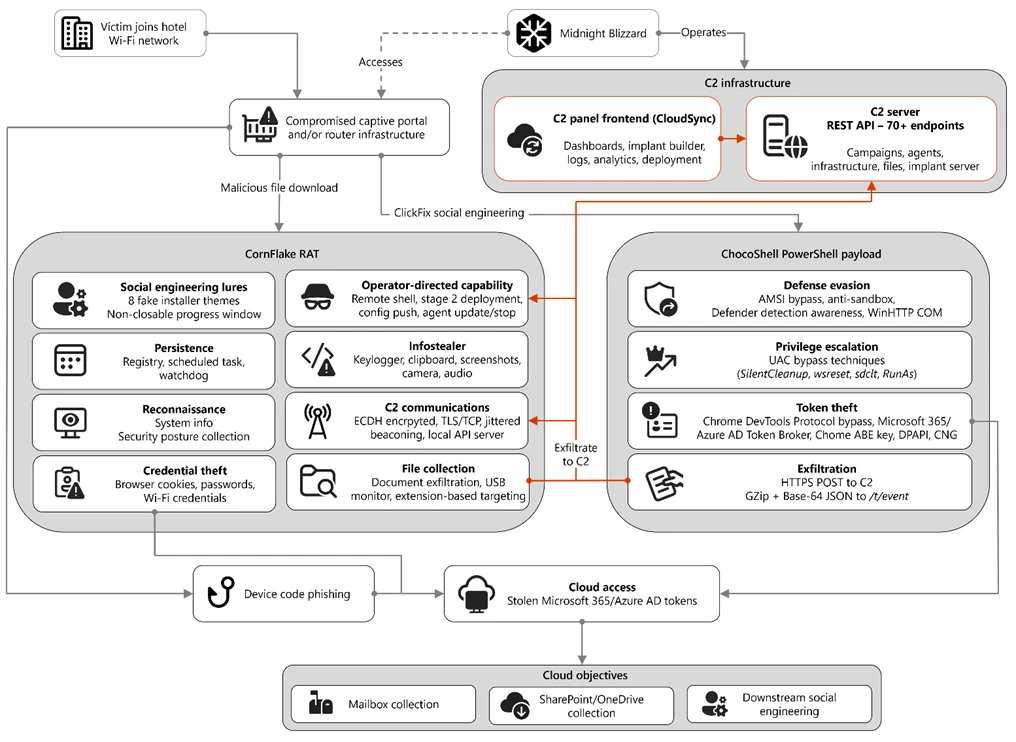
Figure 1. Overview of the CaptiveCrunch attack flow
As part of the CaptiveCrunch campaign, Storm-2945 has leveraged their AitM position to redirect users through actor-controlled phishing infrastructure and has also delivered malware purporting to be browser or operating system updates in response to automated connectivity checks issued by users’ browsers. Multiple variants have been delivered, including fully-featured Windows remote access trojans (RAT) in compiled Golang, with functionality to conduct system enumeration, collect files and keystrokes, steal credentials and session tokens, conduct audio and video surveillance, monitor for removable media, and provide the threat actor a remote shell on infected systems.
The threat actor infrastructure leverages a variety of ClickFix techniques to elicit the user into downloading and executing the malware:
Figure 2. ClickFix prompt with manual user instructionsFigure 3. ClickFix prompt with additional user instructions after verification failure
In addition to variants of malware targeting Windows systems, Microsoft Threat Intelligence is also aware of indications that the threat actor might be targeting Android devices with similar techniques as the ClickFix landings also include instructions for Android devices to download and install an APK file.
To date, Microsoft has identified widespread compromise of Wi-Fi networks at hospitality-related organizations and other networks serviced by captive portal equipment in several countries. ReliaQuest has identified this activity not only at hotels, but also conference centers and other shared venues, and assesses that the goal of this activity is to access the accounts of corporate travelers.
Storm-2945 and Midnight Blizzard
Microsoft Threat Intelligence assesses that Storm-2945 is an operational sub-cluster of Midnight Blizzard based on distinctive technical and operational overlaps. These include technical similarities to Storm-2372, a Midnight Blizzard initial access operations sub-cluster, also notable for their device code and OAuth code phishing operations tracked throughout 2025, Microsoft Graph-based email exfiltration, social engineering delivered via commercial messaging apps, and significant similarities in victimology.
Midnight Blizzard is a Russia-based threat actor attributed by the US and UK governments to the Foreign Intelligence Service of the Russian Federation, also known as the SVR. This threat actor is known to primarily target governments, diplomatic entities, non-governmental organizations (NGOs), and information technology (IT) service providers, primarily in the US and Europe. Midnight Blizzard is consistent and persistent in their operational targeting, and their objectives rarely change. Their focus is to collect intelligence through longstanding and dedicated espionage in support of Russian foreign policy interests.
Midnight Blizzard operations often involve compromise of valid accounts and, in some highly targeted cases, advanced techniques to compromise authentication mechanisms within an organization to expand access and evade detection. They utilize diverse initial access methods, and Midnight Blizzard is also adept at identifying and abusing OAuth applications to move laterally across cloud environments and for post-compromise activity, such as email collection.
CaptiveCrunch tradecraft and tooling
CornFlake: Remote access and infostealer implant
CornFlake is a full-featured Windows RAT written in Go that serves as Storm-2945’s primary persistent implant. Microsoft has observed the threat actor rapidly iterating on this malware layer, which features customizable capabilities from the social engineering user interface and data collection capabilities to anti-detection and evasion techniques.
On initial execution, CornFlake operates in dropper mode: it displays a convincing fake progress window designed to occupy the victim’s attention while the binary copies itself to %APPDATA%\svchost32\svchost32.exe and establishes persistence.
Fake window options configurable by the threat actor at build time:
winupdate — A Windows Update screen displaying “Working on updates… Don’t turn off your computer”
defender — A Windows Security virus scan
directx — A DirectX End-User Runtime Web Installer
vcredist — A Microsoft Visual C++ 2015-2022 Redistributable installer
sysopt — A disk optimization utility
netfix — A Windows Network Diagnostics tool
browser — A browser update prompt
pdfview — A document viewer installer
Figure 4. False update window
CornFlake registers as a Windows service named svchost32 with the display name “Cloud Sync Service” and description “Synchronizes files with the cloud storage provider”, deliberately mimicking the legitimate svchost.exe process. It establishes redundant persistence mechanisms: Windows service registrations, Registry Run keys, named scheduled tasks, and a persistence watchdog routine that runs continuously to restore any persistence mechanism that is removed by defenders or endpoint protection.
For command and control (C2), CornFlake performs an Elliptic Curve Diffie-Hellman (ECDH) P-256 ephemeral key exchange with the C2 server, derives a session key via SHA-256, and communicates over a custom JSON protocol framed within the encrypted channel. This provides an encrypted channel to the C2 server, with each C2 session using a unique ephemeral key, making decryption of captured traffic impossible without the session-specific private key. The runtime configuration file sync.dat supports hot reconfiguration of C2 servers, watched directories, file targeting patterns, and Transport Layer Security (TLS) settings without requiring redeployment.
Once established on a victim system, CornFlake provides the operator with a comprehensive collection toolkit, gated by configuration flags that allow selective activation post-deployment:
Capability
Description
Keylogging
Raw input API-based keylogger capturing all keystrokes, including password fields
Clipboard monitoring
Captures clipboard changes with SHA-256 deduplication and records the active window title at time of capture
Screenshot capture
Idle-triggered and on-demand screenshots with configurable idle threshold
Audio surveillance
Windows Audio Session API (WASAPI)-based microphone capture, encoded as WAV files
Video surveillance
Media Foundation-based webcam capture, encoded as JPEG
Browser credential theft
ChromeKatz-derived module supporting live cookie extraction from process memory (Chromium browsers) and stored password extraction from on-disk databases, including Chrome App-Bound Encryption (ABE) bypass and Firefox NSS/SDR decryption
File exfiltration
Targets files based on file extensions with real-time file system monitoring and an upload throttle (1,000 files or 500 MB per cycle). File extensions are categorized as Documents, Archives, Images, Code, Data, Emails, and Keys
USB drive monitoring
Detects and scans removable media when inserted
Security posture sweep
Collects 18 categories of host intelligence including installed software, antivirus (AV)/endpoint detection and response (EDR) products, Defender exclusions, User Account Control (UAC) level, Remote Desktop Protocol (RDP) history, Office most recently used (MRU) files, and credential hints
Remote shell
Arbitrary command execution via cmd.exe or PowerShell (with -NoP flag to suppress profile-based detection)
CornFlake also exposes a localhost HTTP API server (/upload, /reload, /status) that transforms the RAT into a modular platform: companion or next-stage payloads such as ChocoShell could task file exfiltration, trigger configuration hot reloads or check C2 connectivity using the pre-established secure C2 channel for communication.
ChocoShell: PowerShell infostealer
ChocoShell is the campaign’s Powershell-based infostealer, delivered and executed entirely in-memory. Its primary objective is the high-volume theft of browser session cookies, saved passwords, Microsoft 365 Single Sign-On (SSO) tokens, and Wi-Fi credentials from compromised systems. Where CornFlake provides the operator with a persistent, long-running foothold on the device, ChocoShell is designed to extract the most operationally valuable credentials, giving the operator access to victim cloud environments.
The ChocoShell script was authored with full developer comments that reveal the operator’s intent behind each code decision, including explicit references to Microsoft detection signatures and the reasoning behind specific evasion choices. The consistent coding standard and descriptive commentary suggest the author might have leveraged AI-assisted code generation.
Defense evasion. Upon execution, ChocoShell beacons to a hardcoded C2 server at 213.145.86[.]112 and implements several evasion techniques in sequence. It disables the Antimalware Scan Interface (AMSI) via .NET reflection to prevent ScriptBlock scanning and evades Microsoft behavioral detection that triggers on suspicious PowerShell web request cmdlets. A timing-based sandbox detection check is also employed as a virtual machine (VM) detection mechanism, silently exiting without performing any collection if detected.
C2 communication. ChocoShell communicates with its C2 server using HTTPS with URI paths designed to blend in with legitimate web traffic. Beacons use /t/pixel.gif?m=<status>, mimicking an image tracking pixel. Additional tooling is fetched from /cdn/chunks/polyfill-7e2b.min.js, disguised as a JavaScript polyfill file. This downloaded module is Base64-decoded and executed in memory via [ScriptBlock]::Create(), providing browser encryption key extraction capabilities, SYSTEM token impersonation, and Defender signature locking. Exfiltrated data is sent by POST to /t/event as GZip-compressed, Base64-wrapped JSON.
Privilege escalation. ChocoShell requires administrative privileges for its most impactful capabilities: SYSTEM token impersonation for Chrome ABE decryption, Volume Shadow Copy Service (VSS) shadow copy creation, Defender signature locking. It implements three silent UAC bypass techniques with ordered fallback:
SilentCleanup task hijack: Writes a malicious command to HKCU\Environment\windir, then triggers the built-in SilentCleanup scheduled task, which resolves %windir% from the user’s environment, executing the threat actor’s command at elevated privilege. The registry value is cleaned up after two seconds to avoid cloud detection.
wsreset.exe COM hijack: Creates a COM handler key in HKCU\Software\Classes and launches the auto-elevating Windows Store reset tool.
sdclt.exe folder hijack: Hijacks HKCU\Software\Classes\Folder\shell\open\command and launches the Windows Backup utility with the /KickOffElev flag.
If none of the silent bypasses succeed (for example, the user is not a local administrator), ChocoShell falls back to a visible UAC prompt via Start-Process -Verb RunAs. Notably, the script also contains a variant designed to execute within the WinGet Desired State Configuration (DSC) host process (ConfigurationRemotingServer), suggesting an attack vector through malicious WinGet DSC configuration used in Windows machine provisioning.
Credential and session theft. Once running with elevated permissions, ChocoShell locks Defender signature updates and systematically harvests data from multiple sources. For Chromium-based browsers (Chrome, Edge, Brave, Opera, Opera GX, Vivaldi), it extracts the master encryption key from the browser’s Local State file, handling both the modern ABE scheme (Chrome v127+) and the legacy data protection API (DPAPI)-only scheme. ABE decryption requires SYSTEM-level DPAPI access, which the malware obtains by impersonating a SYSTEM process token borrowed from winlogon.exe, wininit.exe, or services.exe. Locked browser SQLite databases are accessed through three strategies: shared file access, Volume Shadow Service snapshots, and direct copy as a fallback.
As a parallel collection path, ChocoShell launches Chrome, Edge, and Brave with the –remote-debugging-port flag and issues Network.getAllCookies through the Chrome DevTools Protocol (CDP). This completely bypasses ABE, enabling the browser to perform its own internal decryption and returns plaintext cookie values. To handle privilege issues (SYSTEM-launched browsers inherit the wrong token), the malware creates transient scheduled tasks with TASK_LOGON_INTERACTIVE_TOKEN to launch the browser under the signed-in user’s session. After extraction, the browser is stopped and relaunched with –restore-last-session to avoid alerting the user.
For Firefox family browsers (Firefox, Waterfox, LibreWolf, Floorp, Zen), the malware copies unencrypted cookies.sqlite databases from each profile. Additionally, ChocoShell collects Microsoft 365 and Azure Active Directory (AD) access tokens, refresh tokens, and Web Account Manager (WAM) tokens from .tbres files in the Token Broker cache. Collection of these tokens represents a significant threat to enterprise environments, as threat actors could replay SSO sessions without browser cookies. Additionally, Wi-Fi credentials are harvested via netsh wlan show profile with key=clear.
Exfiltration and cleanup. All collected data is aggregated into a JSON structure, GZip-compressed, Base64-encoded, and sent by POST to the C2’s /t/event endpoint. After exfiltration, all collected data variables are nulled, garbage collection is forced, VSS shadow copies are deleted via Windows Management Instrumentation (WMI), temporary elevation scripts are removed, and all UAC bypass registry keys (already cleaned during escalation) are verified removed.
FruitStone: Operator C2 panel
FruitStone is the web-based C2 panel that Storm-2945 operators use to manage the entire CaptiveCrunch campaign infrastructure. Implemented as a single-page application (HTML and JavaScript) serving as the front-end of the C2 server with all functionality exposed without authentication, FruitStone provides a centralized dashboard for managing compromised endpoints, building and deploying new campaign payloads, and reviewing all collected data (such as screenshots, keystrokes, browser credentials).
Operational cover. The panel is branded as “CloudSync Console” with a footer reading “Acuity Systems, Inc. — Cloud Infrastructure Portal v3.2.1,” designed to appear as legitimate enterprise cloud management software if the panel URL is discovered by defenders or hosting providers. This masquerading extends to the CornFlake agent’s service name (Cloud Sync Service) and description (“Synchronizes files with the cloud storage provider”), creating a consistent cover story across the toolchain.
Figure 5. CloudSync Console panel masquerade
Session management and multi-operator support. FruitStone uses JSON Web Token (JWT)-based authentication, session revocation, and rate limiting with IP blocking to prevent brute force attacks against the panel sign in. Multiple operators could be provisioned with individual accounts, and all active sessions are visible with IP address, user-agent, and creation time to enable operational security awareness across the operators.
Agent management. The panel displays all registered CornFlake agents in a dashboard with real-time status updates via Server-Sent Events (SSE). Each agent card shows comprehensive system information including hostname, username, OS version, CPU, RAM, disk usage, screen resolution, timezone, domain membership, and camera/microphone presence, all collected during the CornFlake posture sweep. Agents are grouped by country and subnet, with geographic distribution visualized on a map.
Operators could interact with individual agents through:
Remote shell — Interactive cmd.exe or PowerShell command execution with command history
File system browser — Live directory traversal and arbitrary file download from compromised hosts
Collection tasking — On-demand screenshot, process list, keylog buffer flush, clipboard dump, security posture survey, ChromeKatz cookie/password extraction, camera capture, and audio recording
Configuration push — Live runtime reconfiguration of C2 servers, watch paths, and C2 beacon timing
Agent update — In-place implant update by pushing a new CornFlake build to a running agent
Agent kill — Remote termination of the CornFlake implant
Campaign builder. A step-by-step wizard enables operators to configure and build new CornFlake payloads directly from the panel:
Identity — Campaign ID, C2 host and port, HTTP base URL, executable file name (svchost32.exe by default), and dropper type (C dropper at ~19 KB, Go stub at ~8 MB, or standalone self-installer)
File Paths — Configure targeted directories and file extensions by category (documents, archives, images, code, data, emails, encryption keys)
Figure 8. File paths tab
Evasion — Enable garble symbol randomization (for GoLang payloads), XOR string encoding, GZip upload compression, and debug mode
Figure 9. Evasion tab
Infrastructure management. FruitStone provides management interfaces for three layers of supporting infrastructure:
Proxy relays — Multi-proxy C2 relay architecture with TLS certificate tracking (fingerprint, expiry), health checks, connection counts, bytes forwarded, and rotation capabilities that push updated server lists to all online agents
Beacon profiles — Configurable timing profiles controlling agent sleep intervals, reconnection delays, TLS Server Name Indication (SNI) spoofing (like teams.microsoft.com), and DNS fallback domains
Staging servers — External payload hosting infrastructure with push-to-deploy, file listing, and health monitoring
Figure 10. View of the CloudSync staging servers interface
Device code abuse for cloud access
Since July 16, Microsoft has observed a portion of CaptiveCrunch landing pages redirecting users to device code authentication flow experiences. In these cases, users served these landings might be instructed to enter a device code into a legitimate Microsoft sign-in page, a technique commonly referred to as device code phishing.
Device code authentication is a legitimate OAuth workflow designed for devices that cannot support a traditional sign-in experience. However, threat actors could abuse this flow by initiating an authentication request on behalf of a user then convincing the user to enter an actor-controlled device code into a legitimate Microsoft authentication page. When successful, the victim authenticates the threat actor’s session rather than their own.
This activity is consistent with previously reported device code phishing operations conducted by Midnight Blizzard since August 2024. The observed technique does not appear fundamentally novel; however, integrating device code phishing into captive portal and traffic manipulation operations might increase the likelihood that users perceive the authentication request as legitimate. For additional details on Midnight Blizzard-related device code phishing techniques, see: Storm-2372 conducts device code phishing campaign. To understand other threat actors’ use of device code phishing and associated mitigations, see Inside an AI‑enabled device code phishing campaign.
How to protect against CaptiveCrunch activity
Minimize trust in hospitality and guest networks
When traveling, users should treat hotel, conference, airport, and other guest wireless networks as untrustworthy.
Prefer private connectivity (including mobile hotspots, satellite, and eSIM-based cellular data connections) over public Wi‑Fi whenever practical.
Consider using enterprise-managed travel routers or hotspot devices that establish encrypted tunnels back to trusted corporate infrastructure before accessing sensitive resources.
Avoid downloading software updates, certificates, browser updates, network troubleshooting tools, or security utilities presented through captive portals or other unexpected web prompts.
Verify update requests through trusted operating system mechanisms rather than pop-up messages or website prompts.
Strengthen identity and access controls
Organizations should assume that public and hospitality network infrastructure might not be trustworthy and should adopt controls that limit exposure to traffic manipulation, credential theft, and device code phishing.
Educate users to recognize ClickFix-style prompts, fake verification checks, and paste-and-run instructions as malicious, especially when they invoke command interpreters or script hosts such as cmd.exe, PowerShell, rundll32.exe, or mshta.exe.
Use passwordless solutions like passkeys and implement multifactor authentication (MFA).
Only allow device code flow where necessary. Microsoft recommends blocking device code flow wherever possible. Where necessary, configure Microsoft Entra ID’s device code flow in your Conditional Access policies.
Implement a sign-in risk policy to automate response to risky sign-ins. A sign-in risk represents the probability that a given authentication request is not authorized by the identity owner. A sign-in risk-based policy can be implemented by adding a sign-in risk condition to Conditional Access policies that evaluates the risk level of a specific user or group. Based on the risk level (high/medium/low), a policy can be configured to block access or force MFA.
When a user is a high risk and Conditional access evaluation is enabled, the user’s access is revoked, and they are forced to re-authenticate.
For regular activity monitoring, use Risky sign-in reports, which surface attempted and successful user access activities where the legitimate owner might not have performed the sign-in.
Use a Security Service Edge (SSE) solution like Global Secure Access to secure access to any app or resource using network, identity, and endpoint access controls.
Reduce exposure during captive portal registration
Organizations should review what information employees provide to hospitality providers when connecting to guest networks.
Do not reuse corporate credentials on hotel, conference, or guest-network registration pages.
Where possible, organizations should evaluate whether venue-provided wireless is required for corporate events and conferences.
Organizations should minimize unnecessary disclosure of employee identities, organizational affiliations, and travel details when booking accommodations or registering for guest network access, consistent with corporate policy and applicable local requirements.
Microsoft Defender detections and hunting guidance
Microsoft Defender customers can refer to the list of applicable detections below. Microsoft Defender coordinates detection, prevention, investigation, and response across endpoints, identities, email, apps to provide integrated protection against attacks like the threat discussed in this blog.
Microsoft Defender for Endpoint detects Storm-2945 activity under the detection Suspicious activity linked to a Russian state-sponsored threat actor has been detected. However, these alerts might be triggered by unrelated threat actor activity. The following chart lists Microsoft Defender detections specific to the TTPs utilized by Storm-2945 in this attack.
CornFlake registers a Windows service, a Registry Run key, a scheduled task
Microsoft Defender for Endpoint – Suspicious Scheduled Task Process Launched – Suspicious scheduled task – Suspicious file added to run key – Suspicious service registration
Microsoft Defender XDR – User account compromise via OAuth device code phishing – Malicious sign in from an IP address associated with recognized attacker infrastructure – Suspicious Azure authentication through possible device code phishing
Microsoft Security Copilot is embedded in Microsoft Defender and provides security teams with AI-powered capabilities to summarize incidents, analyze files and scripts, summarize identities, use guided responses, and generate device summaries, hunting queries, and incident reports.
Security Copilot is also available as a standalone experience where customers can perform specific security-related tasks, such as incident investigation, user analysis, and vulnerability impact assessment. In addition, Security Copilot offers developer scenarios that allow customers to build, test, publish, and integrate AI agents and plugins to meet unique security needs.
Threat intelligence reports
Microsoft Defender XDR customers can use the following threat analytics reports in the Defender portal (requires license for at least one Defender XDR product) to get the most up-to-date information about the threat actor, malicious activity, and techniques discussed in this blog. These reports provide the intelligence, protection information, and recommended actions to prevent, mitigate, or respond to associated threats found in customer environments.
Microsoft Security Copilot customers can also use the Microsoft Security Copilot integration in Microsoft Defender Threat Intelligence, either in the Security Copilot standalone portal or in the embedded experience in the Microsoft Defender portal to get more information about this threat actor.
Hunting queries
Microsoft Defender XDR
Microsoft Defender XDR customers can run the following advanced hunting queries to find related activity in their networks:
Detect file creation after Wi-Fi connectivity test on devices
The following query checks for a file creation on a device within two minutes of the device performing built‑in Network Connectivity Status Indicator (NCSI) test, which occurs when network connectivity is established to a Wi-Fi network with a captive portal. This activity might indicate an attacker’s initial access file presence on a device.
Please note that not all files discovered through this query might be malicious or related to this threat activity.
The following query checks for the CornFlake RAT Windows service registration.
DeviceRegistryEvents
| where RegistryKey has @"\SYSTEM\CurrentControlSet\Services\svchost32"
| where ActionType == "RegistryValueSet"
| where (RegistryValueName == "DisplayName" and RegistryValueData == "Cloud Sync Service")
    or (RegistryValueName == "Description" and RegistryValueData == "Synchronizes files with the cloud storage provider")
| project
    Timestamp,
    DeviceName,
    DeviceId,
    RegistryKey,
    RegistryValueName,
    RegistryValueData,
    ActionType,
    InitiatingProcessFileName,
    InitiatingProcessCommandLine,
    InitiatingProcessAccountName,
    ReportId
Microsoft Sentinel
Microsoft Sentinel customers can use the TI Mapping analytics (a series of analytics all prefixed with ‘TI map’) to automatically match the malicious domain indicators mentioned in this blog post with data in their workspace. If the TI Map analytics are not currently deployed, customers can install the Threat Intelligence solution from the Microsoft Sentinel Content Hub to have the analytics rule deployed in their Sentinel workspace.
Detect network IP and domain indicators of compromise using ASIM
The following query checks IP addresses and domain IOCs across data sources supported by ASIM network session parser:
//IP list and domain list- _Im_NetworkSession
let lookback = 30d;
let ioc_ip_addr = dynamic(["213.145.86.112"]);
let ioc_domains = dynamic(["213.145.86.112/t/pixel.gif", "213.145.86.112/cdn/chunks/polyfill-7e2b.min.js", "213.145.86.112/t/event"]);
_Im_NetworkSession(starttime=todatetime(ago(lookback)), endtime=now())
| where DstIpAddr in (ioc_ip_addr) or DstDomain has_any (ioc_domains)
| summarize imNWS_mintime=min(TimeGenerated), imNWS_maxtime=max(TimeGenerated),
  EventCount=count() by SrcIpAddr, DstIpAddr, DstDomain, Dvc, EventProduct, EventVendor
Detect web sessions IP and file hash indicators of compromise using ASIM
The following query checks IP addresses, domains, and file hash IOCs across data sources supported by ASIM web session parser:
//IP list - _Im_WebSession
let lookback = 30d;
let ioc_ip_addr = dynamic(["213.145.86.112"]);
let ioc_sha_hashes =dynamic([“918fa52ae45ed60ba7cc8bdc99c3cbe9ab92e0375ec31fc05d0d4513be11c593”, “be99857449d2856dd5a84e21c8a3d5e0e01456adb44062ddec5a6b4970d8d42c”]);
_Im_WebSession(starttime=todatetime(ago(lookback)), endtime=now())
| where DstIpAddr in (ioc_ip_addr) or FileSHA256 in (ioc_sha_hashes)
| summarize imWS_mintime=min(TimeGenerated), imWS_maxtime=max(TimeGenerated),
  EventCount=count() by SrcIpAddr, DstIpAddr, Url, Dvc, EventProduct, EventVendor
Detect domain and URL indicators of compromise using ASIM
The following query checks domain and URL IOCs across data sources supported by ASIM web session parser:
// file hash list - imFileEvent
// Domain list - _Im_WebSession
let ioc_domains = dynamic(["https://213.145.86.112/t/pixel.gif", "https://213.145.86.112/cdn/chunks/polyfill-7e2b.min.js", "https://213.145.86.112/t/event"]);
_Im_WebSession (url_has_any = ioc_domains)
ChocoShell C2 communications
The following query detects ChocoShell communications with its C2 server using HTTPS with URI paths designed to blend in with legitimate web traffic. Beacons use /t/pixel.gif?m=<status>, mimicking an image tracking pixel.
let lookback = 30d;
let ioc_url_artifacts = dynamic(["/t/pixel.gif?m="]);
_Im_WebSession(starttime=todatetime(ago(lookback)), endtime=now())
| where DstDomain  in (ioc_url_artifacts)
| summarize imWS_mintime=min(TimeGenerated), imWS_maxtime=max(TimeGenerated),
  EventCount=count() by SrcIpAddr, DstIpAddr, Url, Dvc, EventProduct, EventVendor
To hear stories and insights from the Microsoft Threat Intelligence community about the ever-evolving threat landscape, listen to the Microsoft Threat Intelligence podcast.
Introduction
We have been tracking two new backdoors, OctLurk and SilkLurk, observed in attacks against government organizations primarily in Central Asia since January 2025. Identified victims are located in Afghanistan, Kyrgyzstan, Tajikistan, Uzbekistan, Kazakhstan, and the Syrian Arab Republic. These organizations operate across several sectors, including healthcare, research, government offices, ministries of foreign affairs, logistics, law‑enforcement agencies, urban planning and facilitie
We have been tracking two new backdoors, OctLurk and SilkLurk, observed in attacks against government organizations primarily in Central Asia since January 2025. Identified victims are located in Afghanistan, Kyrgyzstan, Tajikistan, Uzbekistan, Kazakhstan, and the Syrian Arab Republic. These organizations operate across several sectors, including healthcare, research, government offices, ministries of foreign affairs, logistics, law‑enforcement agencies, urban planning and facilities management, and public educational establishments.
The backdoor loaders are customized for each victim and use information from the victim’s machine to decrypt the payload. Both the loaders and the backdoors are heavily obfuscated, making analysis more complicated. OctLurk and SilkLurk can download and inject additional plugins to perform further malicious actions, including launching command shells, performing file system activity, synthesizing keyboard and mouse events, network scanning, credential dumping, keylogging, password theft from browsers, email collection, and remote access. Furthermore, the attackers deployed a specialized utility we named LurkProxy, which we also cover in this report. While it has a highly similar architecture to the OctLurk backdoor, it is not a backdoor itself.
Our investigation shows that the same threat actor operates both SilkLurk and OctLurk , and some victims infected with SilkLurk also contain OctLurk. We assess with medium confidence that the same actor is behind both backdoors, and that they are Chinese‑speaking. However, at the time of publication, we couldn’t attribute this activity to any known group.
OctLurk
OctLurk Deployment
The attacker created a scheduled task named GoogleUpDate on remote machines using admin credentials. The task runs once with System account privileges right after it was created, executing the batch script located at C:\Users\<username>\Videos\1.bat (MD5 6ecf84fb18f6747ed08d7598364d853a). Prior to executing the task, the actor queries its status. It is then run, as shown below.
The 1.bat script creates a service named NgcCIntSvc, which loads the loader DLL named oleasapi.dll (MD5 082d49ef9f14e6811d68c7e0e82e5069). The ServiceMain parameter in the service’s registry entry is set to invoke the RegisterService function of oleasapi.dll as shown below.
LurkPoxy Deployment
In another case, the attacker at first checked connectivity to the domain dns[.]ssentialserv[.]xyz as shown below. At the time of our research, the domain was resolving to the address 154[.]196[.]162[.]76 which is used as a LurkProxy C2 server.
After confirming that the C2 server was reachable, the attacker executed the batch script C:\Users\[username]\Desktop\auto.bat (MD5 b874123a80fc4f40e06872b9cb54ebc6). The script created a service named Cusrxsrv, which loads a DLL named msbasesysdc.dll. In the service registry, the ServiceMain parameter was set to call the RegisterService function of msbasesysdc.dll as shown below.
We identified several service names — specitsrc, cmtastsvc, PNRPHostSvc, vmictimerosync, and vmicagent — that the attackers used to load a malicious DLL onto compromised machines.
OctLurk loader
The loader DLL exports two methods, Refresh and RegisterService. The previously created service first calls RegisterService, which in turn invokes Refresh, the method that contains the malicious code. To locate the payload, the loader double-XOR-decrypts and then zlib-decompresses a set of hard‑coded bytes, yielding the payload file path. The payload bytes itself undergoes the same double‑XOR decryption and zlib decompression to produce the backdoor DLL bytes.
The double‑XOR decryption uses two distinct multibyte keys:
Key 1: hard‑coded in the loader
Key 2: derived from the serial number of the C: drive
The backdoor DLL is reflectively injected into memory and its entry point is executed. The loader can then call the DLL’s exported methods either by name or by ordinal; both the method name and the ordinal number are hard‑coded in the loader and are decrypted using the same double‑XOR and zlib‑decompression process applied to the payload path and bytes.
OctLurk backdoor
The loader invokes the backdoor’s curl_easy_escape function (ordinal 2). The backdoor then creates a stream socket using a hard‑coded C2 address (dns[.]multitoconference[.]com) and port 443. It gathers the following information from the victim machine:
OS information as RTL_OSVERSIONINFOW structure
Computer name
User name
Local host name
Local IP address in format %u.%u.%u.%u, with local hostname-to-IP-address translation
Current local date and time as SYSTEMTIME struct
To encrypt the collected data, the backdoor employs a hard‑coded XOR key, which in most cases we observed was the string FDrertgr##@QEWASGkio865ehyf98foidsjzhug874392dfsREFDfdsAGH43wea98h. In addition, it generates 0x53 (83) random bytes — this length is also hard‑coded in the sample — and uses them as a second XOR key. The collected victim information is first compressed with zlib (deflate), and then XOR‑encrypted twice, first with the hard‑coded string key and then with the randomly generated byte sequence. The final data is arranged as follows:
The backdoor initially transmits a 16‑byte header that specifies the size of the incoming data packet, as shown below. It then sends the actual data packet.
0x00: randomly picked 10 chars from the string “zyxwvutsrqponmlkjihgfedcbaABCDEFGHIJKLMNOPQRSTUVWXYZ9876543210-_”
0x0A: \x00\x00
0x0C: next_packet_size
The first packet received is 16 bytes long, and its last four bytes specify the size of the subsequent data packet. The format of the subsequent data packet is shown below.
0x00: XOR key; size 83 bytes
0x53: compressed data size
0x57: compressed data in the format: <uncompressed_size> <deflate(data)>
The received data is decrypted using a double‑XOR method: first with the XOR key contained in the packet, then with a hard‑coded XOR key. After the XOR decryption, the data is zlib decompressed. The data may be a command or a plugin code.
OctLurk loads plugins from the C2 server directly into memory to perform various tasks. Each plugin exports two methods — ins_ctl_db and oct_lk_col — with the actual functionality implemented in oct_lk_col. Our analysis shows that the plugins listed below are commonly deployed on victim machines.
Command Shell: provides a command shell
File Manager: performs filesystem interaction
Interaction Manager: synthesizes keyboard and mouse events
The table below provides a detailed description of operations performed by these plugins, where each switch case value denotes command ID.
Plugin type
Description
File Manager
● case 0x10020: for each drive, retrieve the following information: volume GUID path, drive letter, volume name, file system name, drive type, volume serial number, total size in bytes, and free space in bytes.
● case 0x10030: search for a file that matches a specified name and retrieve the following information: file attributes, creation time, last access time, last write time, file size, the file’s name, and its short (8.3) name.
● case 0x10040: recursively list all files in a specified location, including only those whose size, creation time, last write time, and last access time fall within the threshold values defined by C2. For each listed file, retrieve the following details: file attributes, creation time, last access time, last write time, file size, file name and alternative name for the file
● case 0x10050: use the ShellExecuteExW API to open the specified file path, which may be an executable, a document, or a folder.
● case 0x10051: execute the specified command line using the CreateProcessAsUserW API.
● case 0x10060: perform the following file‑system operations: copy, delete, move, and rename — using the SHFileOperationW API.
● case 0x10070: create a directory.
● case 0x10080: set the attributes for a file or directory.
● case 0x10090: for the filename provided by C2, set the file created, last accessed, and last modified timestamps to the values received from C2.
● case 0x20010: get the size of a file.
● case 0x20020: read a file from the system in chunks, starting at a specified offset.
● case 0x20030: calculate the CRC32 of each file data chunk, and retrieve the file created, last accessed, and last written times.
● case 0x20040: close the file handle and free the associated metadata (file path, handle, and size).
● case 0x20110: create a file at the specified path and write the bytes received from C2 into it. Then set the file created, last accessed, and last modified times using the timestamps supplied by C2.
Command Shell
● case 0x3E9: launch cmd.exe as shell.
● case 0x3EA: send the exit command to close the command shell.
● case Default: if a command string is received from the C2 and the shell is running, write the command to the shell. Then read the shell’s output and send it back to the C2.
If a command string is received from the C2 server and the shell is not already running, execute the command using C:\Windows\System32\cmd.exe /S /C "<command_string>" > %TEMP%\tmp%d%x.tmp where %d and %x are random values. Afterwards, read the output from the temporary file tmp%d%x.tmp and then delete the file.
Interaction Manager
● case 0x3E9: capture the entire screen as a BMP image.
● case 0x3EA: capture the entire screen at specified intervals.
● case 0x3EC: retrieve clipboard data.
● case 0x3ED: copy the data to the clipboard.
● case 0x3F3: MOUSEEVENTF_LEFTDOWN: set the cursor to the specified position and press the left mouse button.
● case 0x3F5: MOUSEEVENTF_LEFTDOWN | MOUSEEVENTF_LEFTUP: move the cursor to the specified position, then press and release the left mouse button.
● case 0x3F6: MOUSEEVENTF_RIGHTDOWN: set the cursor to the specified position and press the right mouse button.
● case 0x3F7: MOUSEEVENTF_RIGHTUP: set the specified cursor position and release the right mouse button.
● case 0x3F8: MOUSEEVENTF_MOVE: move the mouse cursor to specific coordinates, simulating a mouse movement event.
● case 0x3F9: MOUSEEVENTF_WHEEL: move the mouse wheel by a specified amount.
● case 0x3FD: press the key indicated by the virtual‑key code.
● case 0x3FE: KEYEVENTF_KEYUP: release the key identified by the virtual-key code.
● case DEFAULT: MOUSEEVENTF_LEFTUP: move the cursor to the specified position and release the left mouse button.
Post-compromise activity
The attacker used the command‑shell plugin installed via the OctLurk backdoor to perform the following actions:
Victim fingerprinting
The attacker used admin credentials to create a scheduled task named GoogleUpDate on remote machines. This task runs once with System account privileges, executing the script located at C:\windows\temp\in.bat (MD5 45cf5916fab4272a1313c26e67aa9220, 4e6d5c4770d5a822d7fcce6a74f7ad73). After querying the task’s status, the attacker triggers its execution, as shown below.
The batch script runs a series of commands that collect comprehensive information about the machine’s hardware, software, and network configuration as shown in the table below. The results are saved in three files — info.txt, <hostname>.datb, and <hostname>_logs.datb — all stored in the %TEMP% directory.
Command
Description
chcp 1256
Changes the system’s code page to 1256, which supports Arabic characters.
powershell $PSVersionTable
Retrieves the version information of PowerShell.
qwinsta
Views all active sessions on the local machine.
klist sessions
Displays a list of logon sessions on this computer (Including Kerberos).
TASKLIST /V
Lists all running tasks with detailed information.
findstr /i /c:”explorer.exe”
Searches for explorer.exe in a case-insensitive manner. Used together with TASKLIST /V.
wevtutil qe Security /f:text /c:5 /rd:true /q:”*[System[(EventID=4624)]] and *[EventData[Data[@Name=’LogonType’]=10]]”
Retrieves the last 5 events from the Security event log where the event ID is 4624 (successful logon event) and the logon type is 10 (remote interactive logon e.g., Remote Desktop Protocol).
Displays detailed information about the current user, including their security identifiers (SIDs), privileges, group memberships, and authentication details.
Searches the Windows Registry under HKEY_LOCAL_MACHINE (HKLM) for entries where the value name is “ProfileImagePath” and the type is REG_EXPAND_SZ. It points to the location of a user’s profile folder.
cmd.exe /c dir /b c:\users
Lists the contents of the C:\Users directory.
wmic startup get caption,command | findstr exe
Filters startup items for executable files.
powershell “get-MpComputerStatus”
Retrieves the status and configuration details of Microsoft Defender Antivirus (formerly Windows Defender) on a Windows system.
Queries exclusion settings for Microsoft Defender Antivirus. This is where you can configure files, folders, processes, and extensions that should be excluded from being scanned by Defender.
wevtutil gli Security
Configures the Security event log.
wevtutil gl Security /f:xml
Retrieves events from the Security log in XML format.
wevtutil gli “Windows PowerShell”
Configures the Windows PowerShell event log.
wevtutil gl “Windows PowerShell” /f:xml
Retrieves events from the Windows PowerShell log in XML format.
wevtutil gli System
Configures the System event log.
wevtutil gl System /f:xml
Retrieves events from the System log in XML format.
schtasks /query /fo LIST /v | findstr “TaskName> Status> ‘Task To Run’> ‘Run As User’>”
Lists all scheduled tasks in verbose mode and extracts the following fields: Status, Task To Run, Run As User, and TaskName.
Provides network configuration details, such as IP address, DNS, DHCP status, etc.
ipconfig /all
Displays detailed network configuration.
netstat -e -s
Displays detailed network protocol statistics.
certutil -urlcache
Displays URL cache entries.
ipconfig /displaydns
Displays the contents of the DNS client resolver cache.
Event log collection
The attackers ran commands to export successful logon events for remote interactive logons (e.g., Remote Desktop Protocol) and to query those events for specific users.
Credential harvesting
Impacket — secretsdump
Attackers ran a malicious file named Adobe.exe (MD5 32a5985543433a4f60da2fafd873b927), which is a portable‑executable version of Impacket’s secretsdump.py tool. Using this tool, they extracted password hashes from domain controllers, the critical servers in an Active Directory environment. Immediately after harvesting the hashes, they issued commands to list all members of the “Domain Controllers” group, likely to identify and target additional domain controllers for further compromise.
Keylogger
Attackers dropped and executed a keylogger located at C:\Users\Public\Pictures\AnyDesk.exe (MD5: 2a571f6cee42a17d873f4c942649813f). They then created a scheduled task named AnyDesk to run the keylogger whenever any user logged on as shown below.
The keylogger creates two files: C:\Users\Public\Libraries\msect\dev0, which stores captured keystrokes, and C:\Users\Public\Libraries\msect\dev1, which holds clipboard data. Before writing to these files, the captured data is encoded by subtracting 2 from each byte.
Browser Password Decryptor
The Browser Password Decryptor tool C:\users\[username]\libraries\64.exe (MD5 37dc84e4bcad92fa28f1e7778d088283) is used to extract passwords from browsers. The tool offers two options: -help to extract passwords from Chrome and -exit to extract passwords from Firefox. For Chrome, the tool targets the Login Data and Local State databases located at %LOCALAPPDATA%\Google\Chrome\User Data\Default\Login Data and %LOCALAPPDATA%\Google\Chrome\User Data\Local State, respectively. The Local State contains the master key, which is essential for decrypting encrypted login information stored in the Login Data database file. For Firefox, the tool targets the logins.json file located at %APPDATA%\Mozilla\Firefox\Profiles\{profile folder}. The logins.json file in Firefox stores encrypted usernames and passwords for websites.
Pandora RC agent provides remote control of a victim’s computer, allowing attackers to monitor and manipulate the system. Using administrative credentials, the attacker creates a scheduled task named GoogleUpDate on the compromised machines. This task runs once with System account privileges and executes the script 1.bat, which can be found at either C:\Users\[username]\1.bat or C:\ProgramData\1.bat (MD5 5e26df131ff0a679a0a2699b723b46e3). The task’s status is first queried, then it is executed, as shown below.
The batch script 1.bat executes a command that downloads and installs the Pandora RC agent using the arguments shown below.
EHUSER: a Pandora RC user
STARTEHORUSSERVICE: start the agent after the installation finishes (default = 1)
EHORUSINSTALLFOLDER: specify the folder where you want to install the agent (default: %ProgramFiles%\_agent)
DESKTOPSHORTCUT: 0: do not create a desktop shortcut
Network scan: FSCAN
Fscan is a comprehensive internal‑network scanning tool that offers a range of functions, including network discovery, vulnerability assessment, reverse‑shell creation, and brute forcing of common services. The executable is dropped to %TEMP%\fc.exe (MD5: cf903e4a1629aa0582fd0363b5786676) and writes its output to %TEMP%\result.txt. Using Fscan, both internal and public networks were scanned to identify services running on specific ports, such as Secure Shell (SSH) on port 22 and MySQL on port 3306. The tool also attempted to access these services using credentials from the password file pp.txt.
Email harvesting
The attackers used the curl command to connect to an email server, authenticate with a username and password, and issue a command to select the Inbox folder. Typically, the goal is to:
Verify that a connection to the email server is working
Authenticate the user
Prepare the Inbox folder for reading or manipulating messages (e.g., listing, fetching, or deleting emails)
LurkProxy
In a similar manner to the OctLurk backdoor, the attacker also deployed another implant we named LurkProxy, which uses a heavily obfuscated version of the OctLurk loader. While LurkProxy has a nearly identical architecture to the OctLurk backdoor, its primary role is to proxy network traffic. Like the OctLurk, it exports a function named curl_escape_easy, which the loader invokes. Once executed, LurkProxy listens on all interfaces on hard‑coded port 64980 and establishes a TLS‑encrypted connection to the C2 server (154[.]196[.]162[.]76). The C2 communication uses a proprietary binary protocol, where each packet is compressed with zlib, encrypted with a double‑XOR scheme, and follows the structure outlined below.
Offset
Data
Type
0x00 (00)
Unused
–
0x08 (08)
Packet control flags. Bit 0 indicates high priority packet, bit 1 indicates single packet
bit array
0x0C (12)
Command number
int
0x10 (16)
Handler number (unique identifier for each proxy client in the first mode)
int
0x14 (20)
Command integer argument
int
0x18 (24)
Unused
–
0x1C (28)
Data 1 payload size
int
0x20 (32)
Data 2 payload size
int
0x24 (36)
Data 1 byte stream
bytes
0x24 (36) + N
Data 2 byte stream
bytes
LurkProxy can function as a reverse proxy in two distinct modes as described below. The mode is selected by a static flag, meaning the proxy can operate in only one mode at a time. In the implant we examined, the first (SOCKS5) mode was used.
Mode 1: SOCKS5 proxy
When a client connects, LurkProxy sends to the C2 the command 0x1000010, indicating that the connection has been established and includes the target address in the packet data. The C2 server then opens a connection to that address, enabling bidirectional communication through the appropriate commands.
Mode 2: transparent proxy
In this mode, the target address and port are hard‑coded. Upon startup, LurkProxy immediately connects to the predefined target via the C2 channel using the same command. All subsequent client connections are routed through this single, fixed target. This mode handles raw network traffic directly, bypassing the SOCKS5 layer.
Command ID
Direction
Description
Arguments
0x1000010
Implant -> C2
When a new proxy client connects, it creates a proxy session and notifies C2 of the successful configuration
Target port in command integer argument
UTF-16 encoded connection hostname in data 1
0x1000010
C2 -> Implant
Used to control the session, allowing it to pause or stop proxying
Action in command integer argument (1 to pause, or any other value to terminate)
0x1000030
Implant -> C2
Sent when the LurkProxy is shut down
–
0x1000050
Implant -> C2
Forwards the received bytes from the client to C2
Raw TCP bytes in data 1
0x1000050
C2 -> Implant
Forwards the received bytes from the proxy target to the client
Raw TCP bytes in data 1
SilkLurk
Deployment
The attacker created a service that executes legitimate binaries, such as NetSetSvc.exe (NVIDIA debug dump), nvgwls.exe (NVIDIA background tool responsible for autotuning), RtkSmbus.exe (Realtek Semiconductor’s noise‑cancelling program), and RtkNGUI64.exe (Realtek High‑Definition Audio Manager), to side‑load malicious loader DLLs: nvml.dll, vulkan-1.dll, RtkSmbusLoc.dll, and RtkNGUI64Loc.dll, respectively. These DLLs act as a loader that will inject SilkLurk backdoor into the process memory.
SilkLurk loader
SilkLurk loader working logic
The loader first verifies that it is running within the legitimate executable that loads it. Next, it moves the payload file (in the analyzed sample, it was named OneDrive.dat) from its module location (C:\ProgramData\Microsoft\Network\Connections in the analyzed sample) to the hard‑coded payload path (C:\ProgramData\Microsoft OneDrive\setup in the analyzed sample). Note that the hard-coded payload path may vary depending on the loader.
Next, the loader creates a service named RmSs to maintain persistence. The service will run the legitimate module binary (C:\ProgramData\Microsoft\Network\Connections\nvgwls.exe) that loads the malicious loader (vulkan-1.dll). The service is configured with the parameters mentioned below. Additionally, the service configuration is modified to restart the service in the event of a failure. Finally, the loader starts the service.
Service Type:SERVICE_WIN32_OWN_PROCESS
Start Type:SERVICE_AUTO_START
Error Control:SERVICE_ERROR_NORMAL
On service start, loader calls StartServiceCtrlDispatcher, which will invoke ServiceProc. The ServiceProc then calls the routine s_1800078F0_decrypt_and_run_payload. This routine computes a 32-bit hash (dword) of the victim’s computer name. The dword hash is used by a custom algorithm made up of arithmetic and logical operations to decrypt the hardcoded payload file path. The payload bytes themselves are decrypted with the same algorithm that decoded the file path. By using the victim’s computer name in the decryption of both the file path and the payload bytes, the loader becomes specific to each victim. The decrypted bytes contain shellcode with the following structure:
Shellcode offset
Description
0x000 (0)
Stub code, which performs reflective code injection
0x770 (1904)
Hardcoded value 0x11113F68, XORed with the computer name hash
0x774 (1908)
Hardcoded byte 0xD9, used as XOR key to decrypt import DLL names and APIs
0x775 (1909)
Size of the encrypted backdoor
0x779 (1913)
Encrypted backdoor data blob
The stub code decrypts and injects the backdoor blob into memory. To decrypt the blob, it first computes a dword hash of the computer’s name. This hash is then fed into a custom algorithm — a series of arithmetic and logical operations — that performs the decryption. This algorithm differs from the one used to decrypt the payload file.
The IMAGE_DOS_HEADER of the backdoor binary is zeroed out. Information in the IMAGE_NT_HEADERS, such as ImageSize and NumberOfSections, is XOR-decrypted using the hash of the computer name. The first three sections are decrypted again using a custom algorithm (a series of arithmetic and logical operations) before being injected into memory.
During import resolution, DLL names and API names are XOR‑decrypted using a hard‑coded single‑byte key. After the import DLL is loaded and the API addresses are resolved, the DLL and API name strings are zeroed out.
During relocation, the size of each relocation block, the value of each relocation entry, and the bytes to be relocated are XOR‑decrypted using the dword hash of the computer name. Afterward, the entry point is also XOR‑decrypted with the same hash and then invoked.
SilkLurk backdoor
The backdoor contains a hardcoded configuration of 0x4AC (1196) bytes, with the first 0x10 (16) bytes holding a mutex string and the remaining 0x49C (1180) bytes comprising encrypted configuration data; this configuration is written to a hardcoded filename (e.g., 2470b666bece868f, 27879a4df1a740ff) that differs across samples and is placed in the %APPDATA% directory. The configuration is decrypted using a custom algorithm involving a series of arithmetic and logical operations that is distinct from the algorithm used to decrypt the encrypted backdoor blob and payload file. The configuration has the following structure:
Offset
Description
0x00 (000)
C2 Host 1
0x64 (100)
C2 Host 2
0xC8 (200)
C2 Host 3
0x12C (300)
C2 Host 4
0x190 (400)
Port for C2 Host 1
0x192 (402)
Port for C2 Host 2
0x194 (404)
Port for C2 Host 3
0x196 (406)
Port for C2 Host 4
0x198 (408)
Unknown 21 bytes
0x1AD (429)
Proxy address 1
0x22A (554)
Proxy username 1
0x2A7 (679)
Proxy password 1
0x324 (804)
Proxy address 2
0x3A1 (929)
Proxy username 2
0x41E (1054)
Proxy password 2
The backdoor creates a TCP socket and connects to the C2 server defined in the configuration. If proxy details are provided, it attempts to establish the C2 connection through the proxy. The proxy request uses the following format:
After successfully connecting to the C2 server, it generates a random 32‑byte (0x20) network key that will be used to encrypt and decrypt network packets. This key is appended to the magic dword, as shown in the table below, creating a 40‑byte block that is then encrypted with a custom algorithm: a series of arithmetic and logical operations that differs from the one used to decrypt the configuration.
Field offset
Field size (in bytes)
Field value
0x00 (00)
0x04 (04)
0x0C7FFBE86h (magic dword)
0x04 (04)
0x04 (04)
0
0x08 (08)
0x20 (32)
Network key (will be used to encrypt and decrypt network traffic)
It then prepares a packet to send the key to the command‑and-control server, as shown in the table below. The packet contains a 0xC (12‑byte) header, a 0x28 (40‑byte) block of encrypted network‑key data (see the table above), and a randomly generated payload whose size ranges from 0x14 (20) to 0xB4 (180) bytes.
Encrypted network key data (as mentioned in above table)
0x34 (52)
size between 0x14 (20) and 0xB4 (180)
Random data bytes
After sending the key, the backdoor collects the following victim information: local computer name, DNS domain assigned to the local computer, user’s logon name, processor architecture, OS major version and build number, host IP address, current process ID, tick count value, and backdoor module name. The collected victim information is first compressed and then encrypted using the network key. The custom algorithm (a series of arithmetic and logical operations) used to encrypt collected victim information is different from the algorithms used to decrypt the configuration and encrypt the network key. Before sending the victim information, a 0x0F (15) byte header is generated and encrypted using the same custom algorithm used to encrypt the collected victim data. The header follows the format as shown in the table below.
Field offset
Field size (in bytes)
Field value
0x00 (00)
0x04 (04)
0xC7FFBE86 (magic dword)
0x04(04)
0x04 (04)
Message type (1 means victim information)
0x08 (08)
0x04 (04)
Data size (size of encrypted victim information)
0x0C (12)
0x01 (01)
Compression flag (1 means compressed)
0x0D (13)
0x02 (02)
Size of random bytes, between 0x14 and 0x96 bytes
Finally, the encrypted header and victim information are formatted as shown below and transmitted to the C2 server.
Once the backdoor has transmitted the victim information, it waits for a 0x13‑byte (19‑byte) response from the C2 server. This response follows the structure presented in the table below.
Field offset
Field size (in bytes)
Field value
0x00 (00)
0x04 (04)
Random dword
0x04 (04)
0x0F (15)
Encrypted header data
The encrypted header contained in the response is decrypted with the network key that was generated and shared with the C2 server. After decryption, the header retains the same size and structure as the one used in the victim information message.
The message type field in the header (offset 0x04) determines which operation (command) to perform. Next, the backdoor figures out the size of the command data to receive by adding up the size of the encrypted data (found at position 0x08 in the received header) and the size of the random bytes (found at position 0x0D in the received header). The received command data is first decompressed, based on the compression flag located at position 0x0D in the received header, and then decrypted using the custom algorithm that was used to encrypt the sent data. The backdoor supports the following commands:
Command (message type)
Description
03
Based on subcommand, perform the following operations:
00: Get target system’s local time
01: Set sleep time in milliseconds, after which to reconnect to the C2 server
04
Send current backdoor configuration
05
Update backdoor configuration
06
Receive and inject additional payloads (plugins) into memory. Based the on subcommand, perform the following operations:
01: Inject payload (plugin) bytes into memory and execute payload’s entry point
03: Call export method of injected plugin
Post-compromise activity
The threat actor operating the SilkLurk backdoor first used it to invoke cmd.exe to launch PowerShell. Within PowerShell, they ran commands such as net use to connect to shared network resources with administrative credentials. After establishing the connection, they searched the shared drives for confidential documents to exfiltrate. Once the search was complete, they disconnected from the network share to erase evidence of which internal servers had been accessed. To archive the stolen data, they employed legitimate archiving tools: WinRAR and 7‑Zip.
Below are the paths and names of the WinRAR and 7Zip binaries used by the attackers.
The SilkLurk backdoor opened a command shell (cmd.exe). Using this shell, the attacker executed the file C:\ProgramData\microsoft\html help\kmsonline.exe (MD5: 3c9a1ba8e0c7475706adc6376e9d7b7c). The kmsonline.exe binary acted as a dropper for the PlugX malware, deploying the malicious files listed below.
Our Kaspersky Threat Attribution Engine (KTAE) also identified a strong degree of similarity between kmsonline.exe (MD5: 3c9a1ba8e0c7475706adc6376e9d7b7c) and PlugX.
PlugX was configured to communicate with the C2 domain gycudore[.]kozow[.]com and the IP address 64[.]7[.]198[.]130. Below are the extracted configuration fields from PlugX.
Config field name
Value
Injection Target Process
%SystemRoot%\system32\svchost.exe
Home Directory
%ALLUSERSPROFILE%\Symantec
Persistence Name
SymantecRAS
Service Display Name
SymantecRAS
Service Description
Symantec RAS Services
Campaign ID
KG_MFA
Infrastructure
The threat infrastructure relies on VPS servers. Some OctLurk and LurkProxy C2 addresses are referenced in a public report by Kazakhstan’s State Technical Service (STS) company. According to available data, a campaign targeting critical infrastructure in Kazakhstan was discovered in March 2025. During this campaign, attackers employed the TrustFall (STS internal designation) remote access malware, also known as MystRodX (Qianxin) and SilentRaid (Cisco) and designed for Linux-based operating systems. Subsequently, in October 2025, STS researchers found additional TrustFall samples, while also discovering its new C2 servers via active probing. Notably, three observed TrustFall C2 addresses were also leveraged by OctLurk and LurkProxy. This overlap points to shared infrastructure across multiple OS-targeting campaigns, though it remains unclear whether these activities ran concurrently or at different times.
Attribution
We identified multiple artifacts confirming that OctLurk and SilkLurk are operated by the same threat actor. Several users infected with OctLurk were also found to be infected with SilkLurk, and in some cases both malware families used the same staging directory. Below are examples of these artifacts.
In one incident, the attackers created the service C:\Windows\system32\svchost.exe -k ExAstSrc -s ExAstSrc to deploy OctLurk. They used OctLurk to obtain a command shell and were observed dropping the SilkLurk loader vulkan-1.dll (MD5 be4731c09734da2e8eb6814a9c82f266) via this shell, as shown below.
In another incident, we observed attackers using the same directory C:\ProgramData\intel\ to drop both the OctLurk and SilkLurk loader DLLs.
In one incident, the attacker used SilkLurk to obtain a command shell (cmd.exe) and then deployed and executed the PlugX malware. The PlugX sample was configured to contact gycudore[.]kozow[.]com as its command‑and‑control (C2) server, while the SilkLurk backdoor used ctyuhjerf[.]kozow[.]com for C2. PlugX is a well‑known modular remote‑access Trojan (RAT) that has been active since at least 2008 and historically linked to Chinese-speaking threat actors. This suggests that both OctLurk and SilkLurk were also developed and operated by a Chinese‑speaking actor, although at this time, we cannot attribute this activity to a known threat group.
Conclusions
The emergence of the OctLurk and SilkLurk multi‑plugin malware framework highlights how threat actors continuously refine their tactics to evade detection and maintain control over compromised networks. Both families operate primarily in memory, leaving only a minimalistic loader on disk that relies on machine‑specific data (OctLurk uses the drive serial number, and SilkLurk uses the computer name) to decode payload locations and contents. This victim‑specific encoding makes reverse engineering and automated detection considerably harder.
In addition to sophisticated obfuscation, the attackers establish redundant access channels, harvest credentials, and deploy well‑known remote access and monitoring tools. These secondary pathways ensure persistence even if the original infection vector is discovered or neutralized.
Coca-Cola has confirmed data was stolen in the ransomware attack on Fairlife after the Anubis gang published allegedly stolen files, escalating the incident.
The post Coca-Cola Confirms Data Theft as Fairlife Ransomware Attack Escalates appeared first on TechRepublic.
Coca-Cola has confirmed data was stolen in the ransomware attack on Fairlife after the Anubis gang published allegedly stolen files, escalating the incident.

 Entrar