Patch ManageEngine Key Manager Plus, Log360, and PAM360 now to fix CVE-2026-77690, CVE-2026-13594, and nine other critical and high flaws.
Related Posts:
Penpot File Takeover Flaw Details and PoC Exploit Publicly Disclosed
Attackers Exploit SonicWall SonicOS SSLVPN Flaw CVE-2026-19868 in the Wild
Veeam Releases Kernel Updates to Fix Critical CVE-2026-98432 Flaw Across Backup Appliances
The post Zoho Patches 11 Flaws in ManageEngine Key Manager Plus, Log360, and PAM360 appeared first on Daily
Install the ASUS security vulnerabilities update to fix four critical ASUS security vulnerabilities affecting ASUS routers and Windows system software.
Related Posts:
Cisco Patches High-Severity Remote Code Execution in UCS Central Alongside ISE and Unified CM Flaws
Attackers Exploit Critical GPUStack Authentication Bypass in the Wild to Run Reverse Shells
Control Web Panel Patches Ten Flaws Allowing Unauthenticated Root Code Execution
The post ASUS Security Vulnerabilities Patched in New Upd
Install the ASUS security vulnerabilities update to fix four critical ASUS security vulnerabilities affecting ASUS routers and Windows system software.
Apple issued warnings across 99 nations as the Apple mercenary spyware threat targets investigative journalists with sophisticated surveillance tools.
Related Posts:
BITTER PapRAT Malware Targets South Asian Organizations
Hugging Face Malware Campaign Infects AI GPU Servers
PSK Agent RAT Hits Magento Stores Through StyleSmuggler Exploitation
The post Apple Mercenary Spyware Threat Prompts Global Alerts appeared first on Daily CyberSecurity.
Supermarkets in Sweden, Belgium, Luxembourg, Ireland and Estonia were throwing out spoiled food on Monday after their fridges and freezers stopped doing their job. In at least two cases, temperatures had been pushed to 50 degrees Celsius (122 degrees Fahrenheit). The apparent supermarket cyberattack came only weeks after attackers took control of cooling equipment in hundreds of stores across France.
That raises an obvious question: why are supermarket freezers suddenly a target, and why now?
Supermarkets in Sweden, Belgium, Luxembourg, Ireland and Estonia were throwing out spoiled food on Monday after their fridges and freezers stopped doing their job. In at least two cases, temperatures had been pushed to 50 degrees Celsius (122 degrees Fahrenheit). The apparent supermarket cyberattack came only weeks after attackers took control of cooling equipment in hundreds of stores across France.
That raises an obvious question: why are supermarket freezers suddenly a target, and why now?
How the Supermarket Cyberattack Unfolded Across Europe
Sweden saw some of the clearest signs of tampering. ICA Group spokesperson Gustaf Nilsson told the TT news agency that "a limited number" of stores were affected overnight by an incident involving refrigeration systems. One ICA Kvantum store in Sjöbo, in southern Sweden, was more direct. In a Facebook post, it said its fridges and freezers had been hacked and set to 50 degrees Celsius, and that staff were discarding affected products. The Coop chain also reported problems with fridges and freezers at six stores in central Sweden, according to TT, though it did not immediately share details.
In Belgium, Delhaize said an "IT incident" had affected refrigeration in several dozen stores, mostly in Belgium and a few in neighbouring Luxembourg. "In the affected stores, the range of fresh and frozen products is temporarily somewhat limited. Our distribution centers are operating normally, and there has been no disruption to deliveries to our stores," spokesperson Sarah De Meester said. Carrefour said a cyberattack targeting refrigeration had affected 15 of its more than 700 Belgian stores, and described the impact as "extremely limited.
In Ireland, Musgrave Group said refrigeration systems in 13 SuperValu stores were affected by the "cyber incident." Chilled and frozen products were removed from sale as a precaution. By Monday afternoon, the company said the incident had been "fully resolved" and that restocking of chilled and frozen ranges was "well under way."
In Estonia, refrigeration technology company Kitman Coldtech said attackers had accessed a computer controlling a client's refrigeration system and raised the temperature to 50 degrees Celsius, public broadcaster ERR reported. Chief executive Jann Mutso declined to name the store but said the attack was addressed within minutes and caused no significant damage. The Selver supermarket chain confirmed that one of its outlets was affected.
Is This Supermarket Cyberattack Linked to France?
None of the companies has publicly linked Monday's incidents to France, but the pattern is hard to miss.
Last month, attackers remotely took control of refrigeration systems in hundreds of supermarkets and independent stores across France. They pushed fridge and freezer temperatures as high as 50 degrees Celsius. French TV channel BFM reported that the attackers appeared to trigger a forced defrost option, which kept units heating instead of cooling. By morning, tonnes of food had perished. Some equipment had melted, and in some stores the heat had sparked fires.
Five of France's major retail groups were hit: E.Leclerc, Intermarché, Carrefour, Monoprix and Coopérative U. At least 300 Intermarché and Netto stores were affected. Coopérative U reported more than 100 stores, Carrefour said 80, and Monoprix said about 5% of its roughly 490 stores were targeted.
Bruce Hallas, CEO at Re-thinking the Human Factor, who lives in France, noted on LinkedIn that current estimates sit around 400 stores. He added that some individual branches reported losses of about €250,000. Retailers say millions of euros' worth of food was spoiled, which makes food losses the most visible cost of the attack.
Why the Supermarket Cyberattack Targeted Fridges
The French case offers the strongest clue. The attack did not rely on a new exploit. It targeted ageing systems: internet-connected devices that were still online years after their manufacturer stopped supporting them. Experts say this weakness is common across retail and industry. The cyberattacks in France appeared to target old systems in particular.
Timing made the damage worse. In France, the attackers struck while shops were closed, so temperatures kept rising for hours with no one in the store to notice. Monday's incidents in Sweden also happened overnight.
Estonia shows the other side of the picture. There, the intrusion was caught within minutes and caused no significant damage. The difference between tonnes of ruined stock and almost no loss came down to how quickly someone noticed.
What We Still Don't Know
Key questions remain open. The reports do not say who is behind the attacks or what they want. The full scale is also unclear. Estimates for France range from around 400 to more than 500 stores, and ICA has not said how many of its Swedish stores were hit. The chains affected on Monday have not confirmed whether their equipment shares the ageing, unsupported setup seen in France.
What is clear is that the same tactic has now reached at least five European countries, with fridge temperatures set to 50 degrees Celsius each time.
An Amadeus airline data breach compromised passenger travel records across Malaysia Airlines, JAL, ANA, and Cathay Pacific via compromised credentials.
Related Posts:
Gitee Exposed Credentials Found Across Millions of Repositories
OffiDocs Chrome Extensions With 2.3 Million Installs Caught Harvesting Browsing URLs
Keystone Wallet Data Breach Exposes Customer Orders
The post Amadeus Airline Data Breach Hits Major Global Carriers appeared first on Daily CyberSecurity.
An Amadeus airline data breach compromised passenger travel records across Malaysia Airlines, JAL, ANA, and Cathay Pacific via compromised credentials.
Brotli vulnerability CVE-2026-111497 affected products list: fixes for Node.js, .NET, Envoy, PAN-OS and distros, plus VMware and others still unpatched.
Related Posts:
Critical MediaTek Vulnerabilities Patched in Chipsets
Public PoC Exploit Disclosed for Linux Kernel Bonding Vulnerability
Critical FreePBX Vulnerabilities Patched in User Manager
The post Brotli Vulnerability Affected Products: Vendor Patch Status List appeared first on Daily CyberSecurity.
Brotli vulnerability CVE-2026-111497 affected products list: fixes for Node.js, .NET, Envoy, PAN-OS and distros, plus VMware and others still unpatched.
The Binance hack investigation reveals a $6.3B breach tied to TraderTraitor, prompting massive stablecoin freezes and an infrastructure overhaul.
Related Posts:
Polymarket Supply Chain Attack Drains Trader Wallets
Binance Hot Wallet Breach Prompts Multibillion-Dollar Inquiry
NetamLoader Hides in Windows Update Folder in Suspected Supply Chain Attack on Asian Government
The post Binance Hack Investigation Traces Historic $6.3B Breach appeared first on Daily CyberSecurity.
Sign up here to receive Bellingcat’s biggest investigations by email as soon as they are published. Become a member and support our work here.
Imagery captured by the European Space Agency’s freely available Sentinel-2 and Sentinel-1 satellites appears to be delayed over Gaza and parts of the West Bank, a Bellingcat analysis has found.
While the delay remains relatively short at just 24 hours, this can still impact the speed at which analysts and researchers can observe what is happening
Sign up here to receive Bellingcat’s biggest investigations by email as soon as they are published. Become a member and support our work here.
Imagery captured by the European Space Agency’s freely available Sentinel-2 and Sentinel-1 satellites appears to be delayed over Gaza and parts of the West Bank, a Bellingcat analysis has found.
While the delay remains relatively short at just 24 hours, this can still impact the speed at which analysts and researchers can observe what is happening in the region.
For example, the Israeli Defence Forces demolished homes in the West Bank Palestinian city of Hebron in recent days. New imagery captured on October 26, which included Hebron, would allow open source researchers to quickly confirm the demolitions, assess the impacted area and observe any unreported IDF activity. But imagery for the western half of Hebron was not available until October 27 due to the Sentinel-2 delay, inhibiting real-time fact-checking and reporting on this evolving situation.
A spokesperson for the European Union told Bellingcat that the delay was not related to events in Gaza but to “mitigate possible threats” due to the war in the Middle East “including Iran’s attacks on its neighbours and possible threats to European interests”. The delayed region of Sentinel tiles that cover Gaza as well as parts of Israel and the West Bank also extends over the Eastern Mediterranean Sea.
The European Union ordered a 24-hour delay on Sentinel satellite imagery over the Gulf of Oman earlier this year during US and Israeli strikes on Iran. However the delay impacting Gaza and parts of the West Bank has not been announced or previously reported.
“Such decisions are taken unanimously by all EU Member states and will stay in place as long as necessary,” the spokesperson said. They also said that while the Copernicus program, which includes the Sentinel satellites, operated a free and open data policy there were limitations to this for security.
When asked if the delay, which began in late March, was related to the presence of US vessels in the Eastern Mediterranean or if there were other areas of delay, the spokesperson said they had no further comment.
However, in July, the European Union published Council Decision 2026/1716, which ordered a 24-hour delay on Sentinel imagery over the Gulf of Oman, after a request from the US government which was involved in strikes on Iran at that time.
Just two weeks later, the European Union issued a corrigendum that unpublished decision 2026/1716 and removed it from the Council of the European Union record, although satellite data shows the delay has remained.
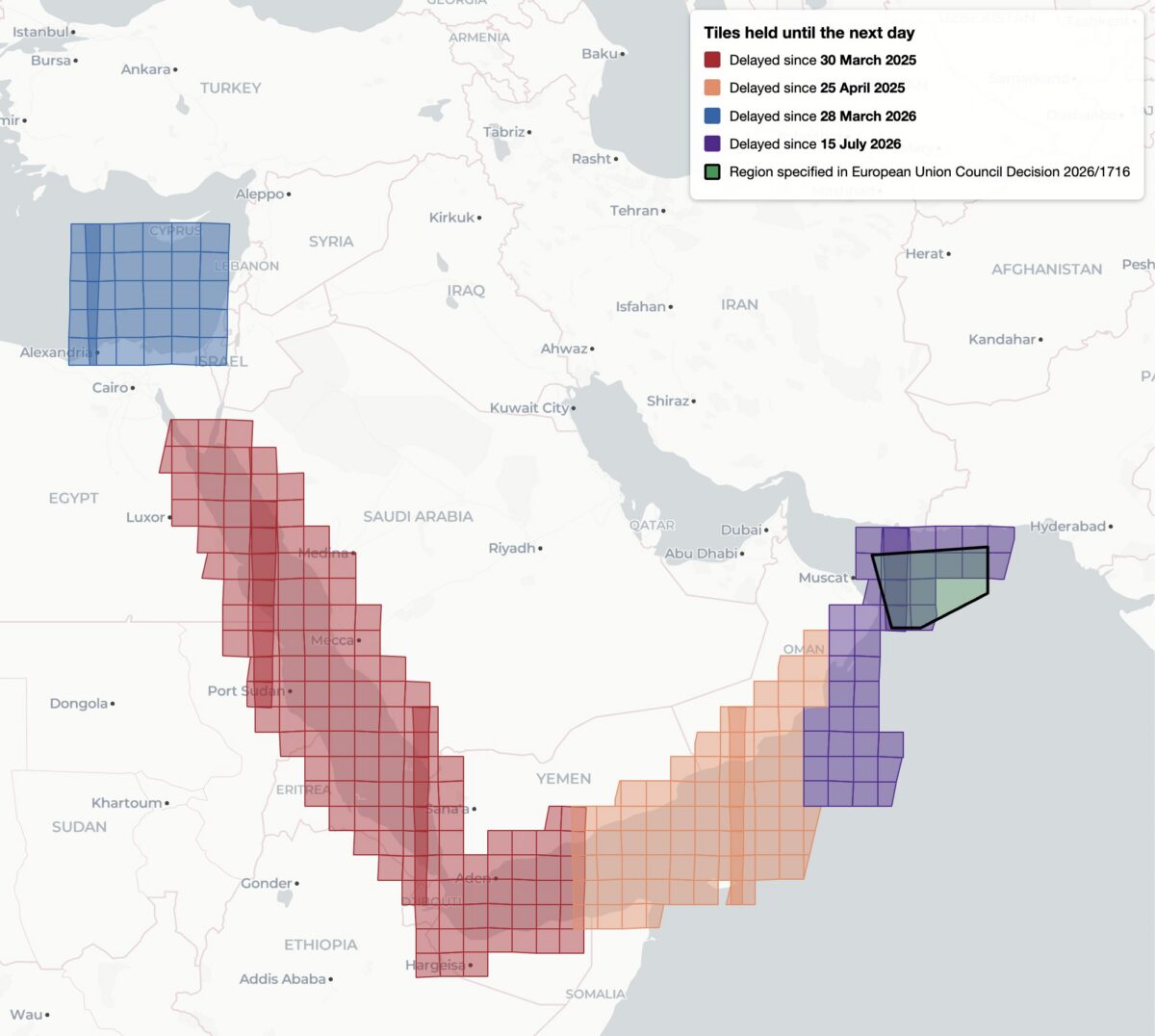
This decision, while it was available, was reportedly the first public notification of delayed Sentinel imagery. Yet it was not the first time that Sentinel imagery has been restricted, analysis shows. Bellingcat found four distinct regions of delayed satellite imagery during 2025 and 2026: the Gulf of Oman, the Gulf of Aden/western Arabian Sea, the Red Sea as well as the previously unreported delay in the Eastern Mediterranean Sea and parts of Israel, the West Bank and the entirety of Gaza.
Bellingcat’s analysis shows the regions where Sentinel-2 imagery is subject to a 24-hour delay, and when the delay was imposed. Only the July 15, 2026 delay over the Gulf of Oman was referenced by European Commission directives and the region referenced in 2026/1716 encompasses only a portion of the delayed tiles.
Bellingcat’s analysis shows that these delays have been implemented in stages. Twenty-four hour delays of Sentinel-2 imagery were first observed by open source researchers in March and April 2025 after the US launched a naval and air strike campaign against Houthi targets in Yemen.
The previously unreported imagery delay in the Eastern Mediterranean began on March 28, 2026, the same month that commercial American space imaging company Planet Labs also restricted imagery across the Middle East. The Gulf of Oman delay began on July 15, 2026, two days after the publication of Council Decision 2026/1716.
Decision 2026/1716 also specified that the delay be implemented for both Sentinel-2 and Sentinel-1 radar imagery. Bellingcat’s analysis of Sentinel-1 image availability shows that this is the case for both the Gulf of Oman region and the unreported region over the Eastern Mediterranean Sea. However, the 2025 restrictions on Sentinel-2 imagery in the Red Sea and Gulf of Aden are not implemented in Sentinel-1.
Sentinel-1 imagery uses “synthetic aperture radar” to capture lower resolution radar images that can collect data at night and on cloudy days. This differs from Sentinel-2, which captures optical satellite imagery at higher resolution.
Bellingcat’s analysis shows the regions where Sentinel-1 satellite imagery is subject to a 24-hour delay and when that delay was imposed.
A Tale of Two Tiles
Sentinel satellite imagery is most commonly accessed by open source researchers through Copernicus Browser, a free online platform, but it is also distributed as large tiled files in the Copernicus Data Space Ecosystem. These tiles are numbered using the Military Grid Reference System, and can be listed using APIs that provide information on each tile, including the capture and publication time. By comparing the capture and publication time, the publication delay can be computed.
For example, the catalog information for the tile T36RXV, which includes Gaza and portions of the West Bank, Negev and Egypt, provides the following metadata for the October 21, 2026 capture.
Metadata from tile T36RXV, which includes Gaza and portions of the West Bank, Negev and Egypt.
This shows that while the image was captured at 08:20 UTC on October 21, it was not published until 10:09 UTC on October 22 — almost 26 hours later. This is in contrast to the neighboring tile T36RYV, which includes parts of the West Bank, Israel, and Jordan. API data for this tile shows that the image was published at 12:10 UTC on October 21, just under four hours after the capture time.
Metadata from tile T36RYV, which includes parts of the West Bank, Israel, and Jordan.
This difference is not unique to this date either. Bellingcat’s analysis shows that this tile has been consistently delayed by one day since March 28, 2026.
Graphing the publication delay for two adjacent Sentinel-2 tiles shows a clear difference beginning March 28, 2026.
This method can be extended further, and by analysing every tile with valid publication date timestamps, Bellingcat identified all global Sentinel-2 and Sentinel-1 delays since 2023. The only consistent delays visible were those identified in the Gulf of Oman, the Gulf of Aden/western Arabian Sea, the Red Sea and Eastern Mediterranean in 2025 and 2026.
Impact on open source investigations
While the 24-hour delay on certain Sentinel imagery is a less severe restriction than other satellite providers have imposed, it can still impact the open source research process in fast moving situations. This is especially so in recent months as the European Space Agency’s Sentinel satellite data has emerged as a refuge as other satellite data is censored.
The image below shows how imagery for the eastern half of Hebron was visible on October 26, but not the western half where demolitions took place earlier this week.
The city of Hebron, Palestine, seen in Copernicus Browser on October 26, 2026. While imagery is available for the eastern half of the city, there is no recent imagery of the western half.
The shape of the missing tiles can be seen by zooming out within the Copernicus browser, demonstrating how imagery of Gaza and other parts of Israel and the West Bank are also delayed.
The missing tiles also include Gaza, parts of Israel, Egypt, and Cyprus, and the Eastern Mediterranean Sea.
Sentinel imagery covering western Hebron after the demolitions took place was published on October 27. However, the delay prevented local reports from being verified with satellite imagery while the situation was still ongoing.
Some Sentinel-2 users have previously described the challenges of covering fast-moving issues in the Gulf of Oman when the Sentinel delay was announced in March.
Bellingcat is a non-profit and the ability to carry out our work is dependent on the kind support of individual donors. If you would like to support our work, you can do so here. You can also subscribe to our Newsletter and follow us on Bluesky here, Instagram here, Reddit here and YouTube here.
Binance probes a DevOps engineer’s hacked laptop after a $6.3 billion theft linked by researchers to North Korean hackers, and promises to cover all customer losses.
Binance probes a DevOps engineer’s hacked laptop after a $6.3 billion theft linked by researchers to North Korean hackers, and promises to cover all customer losses.
Cisco Talos observed a new AI-integrated command-and-control (C2) framework in the wild called “NIK C2.”NIK C2 contains a Windows implant, using which, an actor can dump credentials, stream the victim's keystrokes to collect the targeted victim’s sensitive data, and instruct an integrated AI model to analyze the harvested data, all within the compromised session.In this framework, the actor has abused the OpenAI Chat Completions application programming interface (API), which is a HTTP endpoint t
Cisco Talos observed a new AI-integrated command-and-control (C2) framework in the wild called “NIK C2.”
NIK C2 contains a Windows implant, using which, an actor can dump credentials, stream the victim's keystrokes to collect the targeted victim’s sensitive data, and instruct an integrated AI model to analyze the harvested data, all within the compromised session.
In this framework, the actor has abused the OpenAI Chat Completions application programming interface (API), which is a HTTP endpoint that enables ChatGPT-style conversations programmatically.
In addition to the features that enable theft, an actor can also deploy desktop screen-locking ransomware via the NIK C2 implant onto the victim machine, leading to a ransom demand in Bitcoin or USDT cryptocurrencies.
NIK C2 reshapes adversary tradecraft by collapsing collection and exploitation into a single continuous session, effectively erasing the offline processing delays that historically granted defenders critical detection windows.
Such AI-enabled adversarial frameworks require defenders to move beyond traditional detection and embrace continuous behavioral vigilance as the new baseline.
NIK C2 implant: AI-integrated remote access tool
The NIK C2 implant is a Go-based, 64-bit Windows remote access tool that grants persistent control over compromised hosts using a resilient dual-channel C2 architecture. It communicates over TLS-secured WebSockets on port 443 alongside an HTTP fallback polling loop every 250 milliseconds, protecting all traffic with AES-256-GCM encryption derived from a hardcoded seed. To survive takedowns, the implant routes traffic across three prioritized C2 tiers, which are runtime-updated URLs, an embedded encrypted server list, and a hardcoded fallback address. Beyond standard operations, the implant features surveillance, theft, lateral movement, and evasion capabilities, including credential dumping, RDP session hijacking, process hollowing, and a C2-driven screen lock ransomware module.
Notably, the NIK C2 implant embeds a fully integrated OpenAI API client via its ai_generate command, allowing operators to route arbitrary prompts to the OpenAI Chat Completions API directly through the infected host. The NIK C2 implant manages API key resolution, request assembly, and response parsing locally, returning the encrypted generative AI results to the actor's C2.
The observed NIK C2 implant samples in the wild contains an embedded build path (/opt/nik_panel/data/build_52b79724a1fc4b8f/main.go), which identifies the project as "nik_panel" and indicates that the implant was cross compiled for Windows from a Linux development environment. Furthermore, the embedded eight-byte hex token matching the build identifier highlights that the threat actor's infrastructure actively tracking and versioning the implants.
Talos observed that the NIK C2 implant development trajectory spans at least three distinct versions. All binaries observed in the wild were compiled with Go 1.23.4 (which was released in December 2024), placing the entire sample set compiled no earlier than late 2024. The actor has Zeroed PE TimeDateStamp fields and near-epoch filesystem timestamps (manifesting as Nov 29, 1979) are applied consistently across all samples.
We developed a timeline based on the initial sighting dates of NIK C2 implant variants in OSINT.
Figure 2. NIK C2 implant evolution timeline.
The pace of capability addition across the three versions indicates a technically proficient team with prior malware operations experience is actively expanding NIK C2 towards a full-service adversarial framework.
Active NIK C2 server seen in the wild
During our research, we observed that a threat actor hosted the NIK C2 framework on a server at IP address “87.120.196[.]120”, resolving the domain “total-sitevv[.]lol”. The C2 server hosted an SSL/TLS certificate (serial number 7d16381a9de823943b5a0987dbd0f26edf22052b and jarm:"28d28d28d00000000042d42d0000001f361a1bf80ed39a1e352adeb016a07b" ) with the Common Name (CN) set to nik-panel. This CN value matches strings embedded within the implant binary. Observing the NIK C2 infrastructure active in the wild allowed us to assess with moderate confidence that NIK C2 is not merely a proof of concept, but a fully functional, AI-integrated C2 framework.
Figure 3. NIK C2 was observed in the wild during the research period.
NIK C2 implant integrates OpenAI’s API
AI integration is one of the most architecturally distinct features of NIK C2 implant. It constructs a fully formed HTTP request to OpenAI’s production inference endpoint, transmits it from the victim machine IP address, parses the JSON response, and returns the AI-generated text to the actor’s panel. The entire operation from receiving the actor prompt to returning the large language model (LLM) reply is executed synchronously with a 60-second timeout.
The implant begins by extracting three fields from the command payload received from the C2. The first field, identified by the key prompt, is the text the actor wants to send to the AI model. If the prompt string has zero length, the handler immediately constructs an error response and returns without making any outbound network call. The second field, identified by the key api_key is the OpenAI API key to use for authentication. The third field, identified by the key model, specifies which OpenAI model to use.
Figure 4. Snippet of NIK C2 implant AI handler module.
After extracting the three parameters, the implant checks whether the actor supplied an API key. If not, it calls the operating system's environment variable reader with the string OPENAI_API_KEY and uses the victim’s API key. This fallback is not a backup mechanism for API key resolution. It is a deliberate design with significant operational implications. If the victim has configured an OpenAI account on their machine, that account's API key will be used to fund the actor's AI inference. OpenAI's billing system will charge the victim's payment method, and OpenAI's access logs will show the victim's API key as the one that made the requests, allowing no trace attributable to the threat actor.
If the actor does not specify a model name, the implant falls back to a five-character default string stored in the binary data section. Decoding the five-character value showed gpt-4 confirming that GPT4 is the default when no model is specified. The actor can override this by passing any valid OpenAI model identifier in the command payload, allowing selection of newer models as they become available without requiring a binary update.
The implant builds the OpenAI API request body by constructing a map with four fields. The first field uses the key model and contains the resolved model name. The second field uses key messages and contains a two-element array of message maps. The third field uses the key temperature and contains a floating-point value read from a constant in the binary data section. The fourth field uses the key max_tokensand contains an integer value also read from binary.
The message array is constructed in the order that the OpenAI Chat Completions API expects. The system message is first followed by the user message. The system message map has the role system and a content string that is exactly 68 bytes long hardcoded in the binary. This 68-byte string is the implant's behavioral instruction to the AI. It defines the model's operational role and response style for the duration of the session. The user message map has the role userand contains the actor's prompt text verbiage. The complete map structure is then serialized to JSON. The JSON message is sent to the URL https:// api.openai.com/v1/chat/completions, the OpenAI Chat Completions endpoint, through an HTTP POST request.
Figure 5. Snippet of NIK C2 implant AI handler module.
When the HTTP response arrives with a 200 status code, the handler uses Golang's JSON decoder to parse the response body directly into a generic map structure without defining a typed schema. It then navigates the decoded map by string key lookups in the sequence that the OpenAI Chat Completions API response structure defines. The outermost map is queried for the key choices which in a successful response contains an array. The implant checks that this array is non-empty, then accesses its element keys messageand content. The string value at key contentis the AI model-generated text response.
After successfully extracting the AI-generated content, the handler assembles a result map with four entries. The key status is set to a constant string that reads as generated. The key code is set to the AI model's response text, so that the actor receives the full content of the model’s replies. The key modelis set to the resolved model name that was used for the request, confirming which model produced the output. The key usageis set to the raw usage object from the OpenAI response, which contains the prompt token count, completion token count, and total token count. This usage data allows the actor to track how many tokens are consumed per request. The completed result map is ultimately transmitted to the C2 server over WebSocket or through the HTTP fallback C2 address.
Figure 6. AI model response is encapsulated in JSON message and will be sent to C2.
Dual execution modes of NIK C2 implant
Upon execution, the implant inspects its command-line arguments to determine its execution path. The argumentwatchdog activates supervisory monitoring to relaunch the core process if terminated, the copywatchdog tracks file copy operations, and the absence of either defaults execution to primary agent mode.
In primary mode, it uses a named mutex to enforce single-instance execution, logs a messagereading [NIK] Starting, generates a 32-byte cryptographic session key if uninitialized, decodes its obfuscated C2 address, and sets its masquerade name to “svchost.exe” or “simvol.exe”.
After initial setup, the binary records its process ID (PID) in the victim's temporary application folder and executes its persistence and evasion routines. These routines include copying to %appdata%/Roaming/Microsoft/Network with modified access controls, configuring Windows autostart registry entries, and masquerading its process. Finally, it starts the local proxy server, initiates the WebSocket communication loop in a separate goroutine, and enters a continuous heartbeat polling loop on the main thread.
Implant’s C2 command surface overview
The implant command dispatcher module facilitates over 52 commands that are directed by the C2 panel. The dispatcher module uses byte-level string matching to map the associated modules that are launched as concurrent goroutines, allowing multiple operations to run in parallel.
The following table shows the NIK C2 implant’s command categories:
Extracts all saved WiFi SSIDs and plaintext passwords via Windows wireless
configuration tooling.
Surveillance
Keylogger
Real-time live stream per keystroke to actor panel, plus accumulated buffer
dump on demand.
Surveillance
Screen Capture
Full-screen screenshot and continuous screen stream.
Surveillance
Camera & Audio
Camera snapshot and stream, microphone recording, live audio feed.
Surveillance
Clipboard Monitor
Real-time clipboard content interception and replacement.
Remote Control
HVNC
Hidden Virtual Network Computing — full desktop control invisible to the victim.
Lateral Movement
SOCKS5/HTTP Proxy
Embedded proxy routing actor traffic through victim into internal network.
Lateral Movement
Reverse Proxy Tunnel
Bidirectional TCP relay tunneled over C2 WebSocket for LAN pivoting.
Lateral Movement
RDP Operations
RDP session interaction for lateral movement to other Windows hosts.
Persistence
Autostart &
Masquerade
Registry Run key persistence, process name masquerading, COM hijacking.
Persistence
Self-Heal Watchdog
External watchdog subprocess monitors and relaunches agent on termination.
Evasion
Defense Bypass
AMSI patch, debugger detection, stealth mode, UAC bypass, process hollowing.
AI
AI Generate
Live OpenAI API inference routed through victim machine with actor prompts.
Destructive
Boot Ransomware
Master Boot Record raw backup via PowerShell disk read and Screen-locking ransomware via LOLbin, registry persistence, crypto payment demand.
Destructive
Bootkit Preparation
UEFI vs. BIOS detection, Secure Boot query, bootkit binary staging.
Implant deploys screen-locking ransomware
The ransomware module of the implant operates as a multi-stage attack controller that the actor runs in sequence to prepare, deploy, and retract a screen-locking ransomware payload.
At first, it executes PowerShell to execute a raw disk copy command that reads directly from the physical drive device path (“\\.\PhysicalDrive0”) and writes the first sector, which is Master Boot Record (MBR), to a file named “mbr_backup.bin” in the Windows temporary directory.
Next, the module constructs a complete self-contained HTML lock screen code entirely at runtime from a hardcoded format string, parameterized with actor supplied Bitcoin and USDT wallet addresses, prices, contact email, timer duration, and custom text from the C2 command message, allowing the actor to fully customize the ransom demands.
Figure 8. Screenlocker HTML code is hardcoded in NIK C2 implant binary.
After generating the HTML code, the binary writes it to the file “lock_screen.html”in the system temporary directory. It then generates a Windows batch script that calls mshta.exe with the path to the HTML file, followed by an infinite loop construct with a five-second timeout between iterations, ensuring that if the user somehow closes the window it reopens within five seconds. This batch file is written to the temp directory as “lock_start.bat”.
The implant then runs a reg add command that writes a registry Run key named “SystemLock” under the current user's autostart path, pointing to a cmd /c invocation of the batch file, so the lock screen is executed on every user's logon. Additionally, a background goroutine is spawned that continuously monitors and relaunches the lock screen process. Finally, the module sends a confirmation response to C2 with the path of the deployed HTML file and the timer value.
The design of this ransomware module is notable for several reasons. It does not encrypt any files, which means it leaves no forensic trail of file modification timestamps or encryption markers. It relies entirely on a screen lock, which is considerably faster to deploy than a file encryption ransomware. The persistence via registry Run key and a self-healing loop ensures the screen lock survives user attempts to dismiss it and survives a system restart.
Figure 9. Desktop lockscreen page of the ransomware deployed by the NIK C2 implant.
Implant’s bootkit preparation feature
The bootkit preparation module of the implant is designed to survey the victim machine's boot firmware environment and then stage a bootkit payload file.
It executes bcdedit /enum, the Windows Boot Configuration Data editor, with the output flag that enumerates all boot entries while hiding the console window. The implant reads the full output and searches for three specific substrings in sequence including EFI,Windows Boot Manager, and Windows Legacy OS Loader. If any of these are found, the boot type is classified as UEFI. The binary also searches for ntldr, the legacy Windows NT loader used by BIOS-mode systems as a fallback. Based on which string was matched, the boot type is recorded as either "UEFI" or "BIOS" as a string of the appropriate length. Separately, the binary runs a PowerShell command invoking Confirm-SecureBootUEFI, which is a built-in PowerShell command that returns to the current Secure Boot state. The output is searched for the string True to detect an enabled Secure Boot and for False to detect an explicitly disabled Secure Boot. If neither is present, the value is recorded as unknown. The result is sent back to the C2, a map containing the boot type classification and the Secure Boot status string.
Then the implant writes a 16-byte placeholder file named “bootkit.bin” to the system temporary directory. The bytes written spell out "NIK_BOOTKIT_PREP" in ASCII, which serves as a staging marker rather than an actual bootkit binary. This placeholder confirms that the target path is writable by the current process, establishes the file location that subsequent operations will reference, and can be overwritten by the actual bootkit binary delivered through the implant's file-upload or file-write command handlers. The path to the staged file is returned to the C2 in response.
Implant’s theft functionality
When the actor issues the theft category commands from the C2, the implant executes the associated goroutines to collect the targeted data into a result map space in the victim machine memory:
WiFi password theft (wifi_steal)
The implant executes netshcommands directly via Go’s exec.Command function by passing arguments as discrete tokens rather than through a shell string. Harvested results are formatted under specific labels: plaintext Wi-Fi passwords appear under Key Content:, saved network names are cataloged under WiFi Profiles:(with missing entries flagged using the per-entry format[%s] not found), and execution failures or absent interfaces return standardized error strings such as [WiFi] no wireless adapter or access deniedand No WiFi profiles found.
netsh wlan show profiles
netsh wlan show profile name="" key=clear
The implant stages targeted browser database files into an archive alongside the Local State file, which contains the AES master key protected by Data Protection Application Programming Interface (DPAPI). The implant imports and executes the CryptUnprotectDataWindows API to unwrap the AES key and decrypt the databases locally. Otherwise, it exfiltrates the raw encrypted databases to the C2 server for offline extraction.
Targeted browser database files are shown in the table:
Browsers
Targeted files
Chrome
Login Data, Cookies, Web Data, Local State, Bookmarks
Edge
Login Data, Cookies, Web Data, Local State
Brave
Login Data, Cookies,leveldb file
Opera
Login Data from folder Opera Software\Opera Stable\
The implant extracts Discord tokens and session cookies from the levelDB store on the victim machine. The extracted outputs are labelled as === Discord Tokens === and DISCORD TOKENS. The browser session cookies (Discord_Cookies) are extracted from the copied Cookies database.
Victim’s desktop-based wallets are collected directly from the wallet storage paths. Browser extension wallets are extracted from chromium LevelDB stored by extension ID.
Desktop based wallet storage paths targeted are listed below:
/AppData/Roaming/Exodus/exodus.wallet
/AppData/Roaming/Electrum/wallets
/AppData/Local/Electrum/data/wallets
/AppData/Roaming/Ethereum/keystore
/AppData/Local/LedgerLive
wallet.dat (Bitcoin Core)
/AppData/Roaming/atomic (Atomic Wallet)
Electrum\wallets
Browser extension wallets targeted:
Wallet
Extension ID
MetaMask (Chrome/Brave)
nkbihfbeogaeaoehlefnkodbefgpgknn
MetaMask (Edge)
nkbihfbeogaeaoehlefnkodbefgpgknn
Coinbase Wallet
hnbohgpbmfldddohgoiefkeifpjficbk
Phantom (Chrome)
lnbcamaoebkogjmdnaofbeemigaalhlp
Brave Wallet
odbfpeeihodbihlmhbnhakoadhilfibh
Seed phrase, private key file, and system reconnaissance
The implant performs two regular expression patterns to search on the entire filesystem of the victim machine. These two regular expressions are designed to scan file names for sensitive cryptographic assets and credentials, functioning as case-insensitive patterns ?i. The first expression targets cryptocurrency recovery materials and wallet backups by matching keywords like "seed," "mnemonic," or "wallet" paired with common plain-text and data file extensions (.txt, .md, .csv, .dat), while the second seeks out asymmetric private keys and general secrets using terms like "private," "privkey," or "secret" paired with both text files and standard cryptographic key containers (.key, .pem). Because both patterns use unanchored, greedy matching (.*) without start (^) or end ($) boundary anchors, they capture any file where these sensitive terms precede the target extensions. Matched data are collected under the label of seed candidates and archived into “browserdata.zip”.
The implant also performs victim machine reconnaissance by executing the following commands and uses chcp 65001 prefix to force the output in UTF-8 format.
After all collection paths are complete, the implant assembles all collected data into a single document that looks like a formatted report with clearly labeled sections for each data category such as === CRYPTO ===, === WIFI ===, === BROWSER ===.
Keylogger: Keystrokes livestreamed to C2
The keylogger module of the implant uses a persistent background goroutine that polls all 256 Windows virtual key codes, detecting keypresses via dynamically resolved API calls, and transmits the captured input. When a compromised victim presses a valid key on the keyboard, it is simultaneously streamed live as an AES-256-GCM encrypted JSON payload over WebSocket to C2 and also appends to an in-memory buffer capped at 10,000 entries and halved when full to prevent memory leaks. On an actor's dump command, this buffer is concatenated into a single string and returned to C2 via WebSocket or HTTP fallback, ensuring complete data transfer even during network interruptions.
Stolen data exfiltration to C2
Once the archive is assembled, the entire result map is handed to the result transmission routine of the implant. That routine constructs a new JSON object containing five specific fields. It includes the command identifier echoed back from the original command. It also contains the agent's persistent identifier, formatted as ag_<16 hex chars>. The type field is set to the string quick_steal_response. Finally, the data field holds the complete result map.
Once constructed, this object is forwarded to the encryption routine. The routine serializes the object into JSON. It then generates 12 fresh random bytes to serve as a nonce. Next, it encrypts the serialized JSON using AES-256-GCM with a static key derived from a hardcoded seed. It concatenates the nonce, the ciphertext, and the 16-byte authentication tag and Base64-encodes the entire payload. The encrypted payload is placed in a wrapper object under the "e" key alongside the plain-text agent ID, and the wrapper is JSON marshaled into the final payload.
This encrypted payload is then delivered through an available transmission path. The sending routine first checks whether the WebSocket connection is live. If it is, the payload is written directly into a WebSocket text frame on the existing connection, reaching the actor's panel with minimal latency. If the WebSocket is not currently connected, the routine falls back to an HTTP POST request to the endpoint path /api/c2/result on the C2 server, using the same encrypted body format. This dual-path design ensures stolen data is delivered even during WebSocket interruptions, as the HTTP channel remains functional independently of the WebSocket state.
Implant’s C2 protocol
The implant C2 architecture is designed for two independent, simultaneously operating communication channels. The primary channel is a persistent WebSocket connection over TLS. The secondary channel is an HTTP polling loop that posts to a fixed API endpoint at regular intervals.
With the primary channel, the connection begins with a TCP dial to the C2 server address with an eight-second timeout. If the port is not explicitly present in the configured address, port 443 is appended automatically. Once the TCP socket is established, it is wrapped in a TLS session using a custom certificate configuration that pins to a specific certificate rather than validating against the system's certificate authority store. This prevents standard TLS interception proxies from observing traffic.
Immediately after a successful WebSocket handshake but before any command is received, the implant transmits a full system registration message. The implant collects victim data such as the machine hostname, the local LAN IP address, the Windows username from the environment, a user security identifier, the local reverse-proxy port number that was assigned when the embedded proxy server was started, and the detected upstream proxy configuration derived from the Windows registry proxy settings. All of this is assembled into a JSON object and encrypted and sent to the C2.
Figure 10. Snippet of NIK C2 IMPLANT’s C2 communication handler function.
The HTTP polling channel runs independently. Every approximately 250 milliseconds, the agent collects a fresh snapshot of victim state hostname, watchdog status, local IP, username, current timestamp, and system uptime encrypts it in the same wire format and posts it to the /api/c2/update endpoint on the C2 server.
Below table shows the C2 endpoints that the implant communicates:
Endpoint
Purpose
/api/c2/update
Reconnaissance beacon – victim system info
/api/c2/result
Command output exfiltration
/api/c2/screen
Screenshot upload
/api/c2/file_chunk
File exfiltration
/api/c2/rproxy_up
Reverse proxy upstream data
/api/c2/ws
Websocket – actor command channel
Every message on both channels, in both directions, uses the same symmetric encryption scheme. A hardcoded seed value stored in obfuscated form in the binary data section is decoded at startup and produces a 32-byte AES key.
The C2 server then responds with an encrypted payload, whose inner map contains a command array identical in structure to those delivered over WebSocket. Commands received through HTTP are dispatched through the same logic. If the HTTP POST fails, the agent rotates to the next server address before retrying.
Figure 11. Snippet of NIK C2 implant’s C2 communication handler function.
The result transmission to the C2 is performed by the implant when a command handler completes its operation, the result is packaged into a response envelope containing the original command's identifier, the implant's own identifier, a type string formed by appending _response to the command name, the result data payload, and a top-level type marker of "result". This object is encrypted and delivered through either directly over the WebSocket connection if it is active, or via an HTTP POST to /api/c2/result.
Implant’s defense evasion and anti-analysis techniques
The NIK C2 implant deploys a layered set of defense evasion measures that activate immediately at startup and operate across the full compromise session. On launch, It hides its console window via API ShowWindow, renames the binary to “csrss.exe” in the Windows temp directory to impersonate a legitimate system process, disables Windows Recent Documents telemetry through a registry write action, and applies a critical-process flag via API NtSetInformationProcesswith the parameter value0x1Dfor ProcessBreakOnTermination that causes a Blue Screen of Death if any attempt is made to terminate the process through Task Manager or taskkill actions.
Figure 12. Snippet of NIK C2 implant’s evasion handler module.
Alongside these, two anti-debug checks IsDebuggerPresent and CheckRemoteDebuggerPresent run silently and call os.Exit(0) on detection, leaving no exception record or crash evidence. When directed by the C2, the implant can also escalate privileges without a UAC prompt using the fodhelper.exe COM hijack, which writes the implant path into HKCU\Software\Classes\ms-settings\Shell\Open\command, triggers elevation, and cleans the registry key within two seconds.
The implant bypasses the Antimalware Scan Interface (AMSI) by executing a hardcoded, embedded PowerShell script that patches memory inside “System.Management.Automation.dll”. Specifically, it overwrites the AmsiInitFailed field with a six-byte stub (MOV EAX, E_INVALIDARG; RET), forcing initialization to report failure and disabling content inspection for the remaining of the PowerShell session.
The emergence of NIK C2, an AI-enabled command-and-control framework, underscores a critical shift in modern malware design: the transition from static intrusion toolsets to dynamic, modular implants that adapt on demand. By embedding a live AI pipeline directly into the C2 loop, the compromised host is no longer a passive foothold but an autonomous operational asset. Operators can dynamically generate context-aware lure material, execute localized deception, synthesize operational intelligence, and craft targeted payloads directly on the compromised hosts — all while lowering the technical barrier which was traditionally required for such sophisticated tradecraft.
Coverage
The following ClamAV signature detects and blocks this threat:
Win.Trojan.GoDiscorder-10060526-0
Indicators of compromise (IOCs)
IOCs for this research can be found at our GitHub repository here.
Content This Infostealer Trend Report summarizes the distribution channels, number of malware samples, number of detections, and information on companies targeted by new Infostealers (malware designed to steal information) collected during the month of September 2026. The data was compiled based on detection logs from AhnLab SEcurity intelligence Center (ASEC) and AhnLab products, and includes […]
Content This Infostealer Trend Report summarizes the distribution channels, number of malware samples, number of detections, and information on companies targeted by new Infostealers (malware designed to steal information) collected during the month of September 2026. The data was compiled based on detection logs from AhnLab SEcurity intelligence Center (ASEC) and AhnLab products, and includes […]
The OpenSSL 4.1.0 release introduces initial Elbrus e2k architecture support, DTLS 1.3 protocol capabilities, and post-quantum performance upgrades.
Related Posts:
Apple Presto Return Scanner Targets In-Box Fraud
Come Back to Firefox Campaign Champions Web Privacy
eMudhra Rogue Certificates Flood Certificate Transparency
The post OpenSSL 4.1.0 Release Introduces Elbrus Support and DTLS 1.3 appeared first on Daily CyberSecurity.
Cyfirma links PHP2Shell scans of 216 vulnerable hosts to a suspected North Korean campaign using AI to rank public exploits.
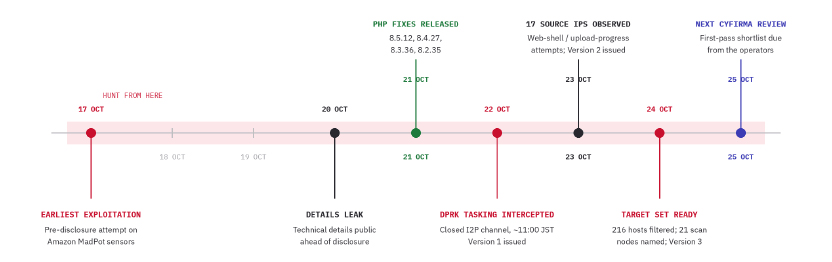
On October 21, PHP released emergency patches for two critical vulnerabilities, CVE-2026-109618 and CVE-2026-109619, both rated 9.2 on the CVSS scale. The flaws affect all PHP versions that handle web requests. The vulnerable code dates back to PHP 5.4, released in 2012, and resides in the PHP engine itself rather than in individual applications. Attackers can exploit
Cyfirma links PHP2Shell scans of 216 vulnerable hosts to a suspected North Korean campaign using AI to rank public exploits.
On October 21, PHP released emergency patches for two critical vulnerabilities, CVE-2026-109618 and CVE-2026-109619, both rated 9.2 on the CVSS scale. The flaws affect all PHP versions that handle web requests. The vulnerable code dates back to PHP 5.4, released in 2012, and resides in the PHP engine itself rather than in individual applications. Attackers can exploit the flaws to execute code remotely by sending specially crafted HTTP requests, without authentication.
Exploitation attempts increased rapidly after the vulnerabilities became public. Cloudflare researchers reported tens of thousands of attempts within the first 45 minutes, hundreds of thousands in just two hours, and millions by October 22.
Cyfirma reported that a group of North Korea-linked group has identified 216 hosts that may still be vulnerable to PHP2Shell. The operators communicate through a private I2P channel that Cyfirma has monitored since October 22. On October 24, they reported that 216 hosts appeared to be unpatched or only partly protected, earlier than Cyfirma expected.
They are checking the systems from 21 compromised machines. At the time Cyfirma captured the conversation, the operators had already checked about one-third of the targets.
“Two handles active since March 2026, coordinating in a closed I2P channel; staging infrastructure shared in-channel.” states the cybersecurity firm. “Target set and scan nodes. “On 24 October the operators reported 216 unpatched or partially mitigated hosts and named 21 scan nodes; the same addresses were seen performing web-shell tooling and upload-progress session-poisoning attempts.”
The scanning is slow on purpose. Volume stays low, the machines rotate, and any node that shows filtering or rate limiting gets pulled and never reused. That’s why a rate-based alert will probably stay quiet.
Who’s behind it? Cyfirma assesses with moderate confidence a link to the Lazarus family of North Korean groups, based on language, operating style and old habits with PHP web shells and hijacked web servers. It has no shared malware or infrastructure to point to yet, and it admits that a Korean-speaking criminal crew without state backing would fit the same facts. Its confidence in the campaign itself is high.
Government agencies and banks come first. Next in line are logistics, ports, airports and aviation, manufacturing, and online transaction and trading platforms. The countries named are the US, Japan, South Korea, Thailand, Indonesia, Australia, Taiwan, India, Singapore, the UAE, Saudi Arabia and the EU.
Cyfirma has not named any victims or seen the full list of targeted systems. The operators have not announced when they plan to launch attacks, and the researchers have not confirmed that this group has compromised systems on a large scale. Cyfirma gives the campaign an imminence score of 78 out of 100. The operators plan to check all 216 hosts, select the most promising targets, and decide which publicly available exploits to adapt.
The group does not appear to be developing new exploits. Instead, its members use a local AI model to rank public exploit repositories, then test the results manually in a lab. Cyfirma believes this approach could help attackers turn newly disclosed vulnerabilities into working attacks more quickly. However, researchers warn that some proof-of-concept exploits shared online are fake and may contain malware, so downloading and running them can be dangerous.
Technical details leaked on October 20, ahead of coordinated disclosure, and the PHP project shipped fixes on October 21. Apache mod_php with default settings and prefork is the confirmed worst case for 109618, with full unauthenticated code execution. For 109619, PHP-FPM is validated through the upload-progress path.
One correction matters for your temporary controls. Early coverage tied the session upload-progress field to 109618, but PHP’s advisories put it under 109619 only. Disabling upload progress does nothing for 109618, so the two bugs need different stopgaps.
Triggering the bug is easy, but reliable code execution isn’t. The attacker has to land a follow-up request on the same worker and shape heap data into the freed space, otherwise the worker crashes or answers normally. VulnCheck reports working code execution on x86-64 with ASLR enabled against PHP 8.4.10 to 8.4.26, while ARM64 only leaks memory so far.
Short of code execution, attackers have already shown worker crashes, arbitrary file reads through OPcache and a leak of about 67 KB of process memory. The fixed releases are PHP 8.5.12, 8.4.27, 8.3.36 and 8.2.35. PHP 8.1, 8.0 and 7.4 get only minimal backports, and vendors such as cPanel EasyApache, CloudLinux, TuxCare and Plesk carry their own builds, so confirm coverage with yours.
Anything from PHP 5.4 to 7.3 has no fix, so migrate or isolate it. Restart every worker after patching, because a reload that keeps old workers alive leaves the stale state in place. Isolate anything internet-facing that you can’t patch within hours, starting with Apache mod_php.
If you suspect a host is compromised, capture memory and logs before you patch, since a restart destroys the CVE-2026-109619 state. Then rebuild the host from a trusted image and rotate every secret the PHP worker could reach. Hunt back to October 17, the earliest known exploitation, and use long time windows.
The strongest single signal is a PHP or web server process spawning something it never normally spawns. Application logs will usually show nothing, because the bug fires before application code runs. Look for odd multipart POSTs to endpoints that never take uploads, bursts of worker crashes and memory errors, new PHP files in web roots, and new cron jobs, local users or SSH keys.
Cyfirma includes Sigma, Splunk and YARA content, though it says the YARA set hasn’t been tested on real application code yet. It also lists 21 scan-node addresses, 17 source addresses from October 23 and 15 staging addresses, all defanged. Some scan nodes are described as compromised and may belong to victims, so hunt for prior contact before assuming who owns them.
If you can’t patch yet, the advisory suggests limits such as a low post_max_size and disabling session upload progress for 109619. Cyfirma is clear that none of it replaces patching. The operators’ own selection rule is the most useful detail in the whole advisory, because they dropped every host that showed a fixed version or sat behind heavy filtering. That makes a current version string a cheap filter against you, and for once being boring pays off.
“Hosts still bannering older PHP are the ones the operators kept.” Cyfirma states.
Kaspersky uncovered the BlackX UEFI bootkit APT41 campaign bypassing Secure Boot via Baton Drop to spy on Central Asian diplomatic agencies.
Related Posts:
APT28 Uses Hookedge Backdoor to Spy on Naval Shipbuilder and Defense Firms in Two NATO Countries
China-Linked Operator Used AI Agents to Breach 48 Government and Corporate Targets Across Asia
Lazarus Operation FlashHole Abuses CrossWeb EX and GitHub to Spy on South Korean Firms
The post APT41 Deploys BlackX UEFI Bootkit Against Central Asi
Citizen Lab confirmed Pegasus on a Serbian rector’s iPhone 6 days before elections, raising the known civil society spyware target count to 16.
The Citizen Lab published a research note confirming that the iPhone of Vladan Đokić, Rector of the University of Belgrade, was infected with NSO Group’s Pegasus spyware sometime in 2026. The infection used a zero-click exploit, meaning Đokić did nothing to trigger it. No tap, no opened file, nothing.
“In collaboration with the SHARE Foundation,
Citizen Lab confirmed Pegasus on a Serbian rector’s iPhone 6 days before elections, raising the known civil society spyware target count to 16.
The Citizen Lab published a research note confirming that the iPhone of Vladan Đokić, Rector of the University of Belgrade, was infected with NSO Group’s Pegasus spyware sometime in 2026. The infection used a zero-click exploit, meaning Đokić did nothing to trigger it. No tap, no opened file, nothing.
“In collaboration with the SHARE Foundation, we found with high confidence that Professor Vladan Đokić, Rector of the University of Belgrade, and prominent supporter of the Serbian student movement, was hacked with NSO Group’s Pegasus spyware in 2026.” states Citizen Lab.
Đokić became a prominent figure in Serbia’s student-led pro-democracy movement after refusing to facilitate a government crackdown on protesters. Serbian authorities raided his offices on March 31, seizing computers and servers. The Citizen Lab found the infection with high confidence and describes the investigation as ongoing.
The timing raises questions. The discovery came just six days before Serbia’s snap parliamentary elections on October 25. Until September, Đokić had been publicly named as a possible candidate to lead the Student List. Since he spoke out against the crackdown, pro-government media have repeatedly attacked him.
Citizen Lab explained what a Pegasus infection means. Once installed, the spyware can give its operator the same access to a device as its owner. This includes private and encrypted messages, and the ability to turn on the microphone and camera without the owner’s knowledge.
“With the assistance of the SHARE Foundation, the Citizen Lab analyzed forensic artifacts collected from Vladan Đokić’s Apple iPhone at his request and with his consent.” reads the report. “We found with high confidence that it was infected with NSO Group’s Pegasus spyware in 2026. The infection leveraged a zero-click exploit.”
In a statement published by the university, Đokić called the spyware “another attempt of intimidation.” He called for an independent investigation, the public release of its findings, and criminal prosecution of those responsible.
“Additionally, we note that Rade Bajić, who, as a prosecutor, investigated official corruption in a failed project in Belgrade, received an Apple Threat Notification.” continues Citizen Labs.
The Citizen Lab also flagged Rade Bajić, a senior prosecutor who worked on the “Generalštab” case, a corruption investigation into the removal of heritage protections from a Belgrade site to clear the way for a luxury development backed by a company linked to Jared Kushner, President Trump’s son-in-law. Bajić says he was removed from the investigation in November 2025 without explanation, and spoke at a student protest in February denouncing political interference in the case.
He received an Apple Threat Notification on August 13 and a reminder on August 27. The Citizen Lab treats this as a high-confidence indicator that his device was likely targeted with mercenary spyware. Forensic analysis of his device is still ongoing and no confirmation of infection has been published yet.
These two cases bring the known total to at least 16 members of Serbian civil society targeted or infected with commercial spyware in 2026. In September, the SHARE Foundation, with support from Citizen Lab and Amnesty International, reported an earlier wave of attacks. The victims included a student protester confirmed to have been infected with Pegasus, opposition party members, and local officials. Those cases occurred around the period leading up to Serbia’s March local elections. The latest confirmed case was discovered just six days before the October parliamentary elections.
Serbia’s security service dismissed the September reports as purely trivial sensationalism and said it operates within Serbian law. Citizen Lab did not identify who was behind the attack on Đokić’s phone. Pegasus is sold only to governments and state agencies, which limits the number of possible operators.
If you received an Apple Threat Notification, treat your device as compromised until a technical expert confirms otherwise. In Serbia, contact the SHARE Foundation. Everywhere else, Access Now’s Digital Security Helpline supports journalists, human rights defenders, and activists. Enable Lockdown Mode on your iPhone immediately, keep iOS updated, and get your close contacts and colleagues screened as well.
In January, we responded to the Lazarus Group’s novel attack campaign against South Korea, which followed last year’s Operation SyncHole. In this new operation, the group employed an updated malware chain that included both their old and new malware, which we disclosed in full, and used another mandatory South Korean security software program as a part of infection chain using a watering‑hole strategy. Notably, the group targeted victims more selectively, sending spear‑phishing emails with links
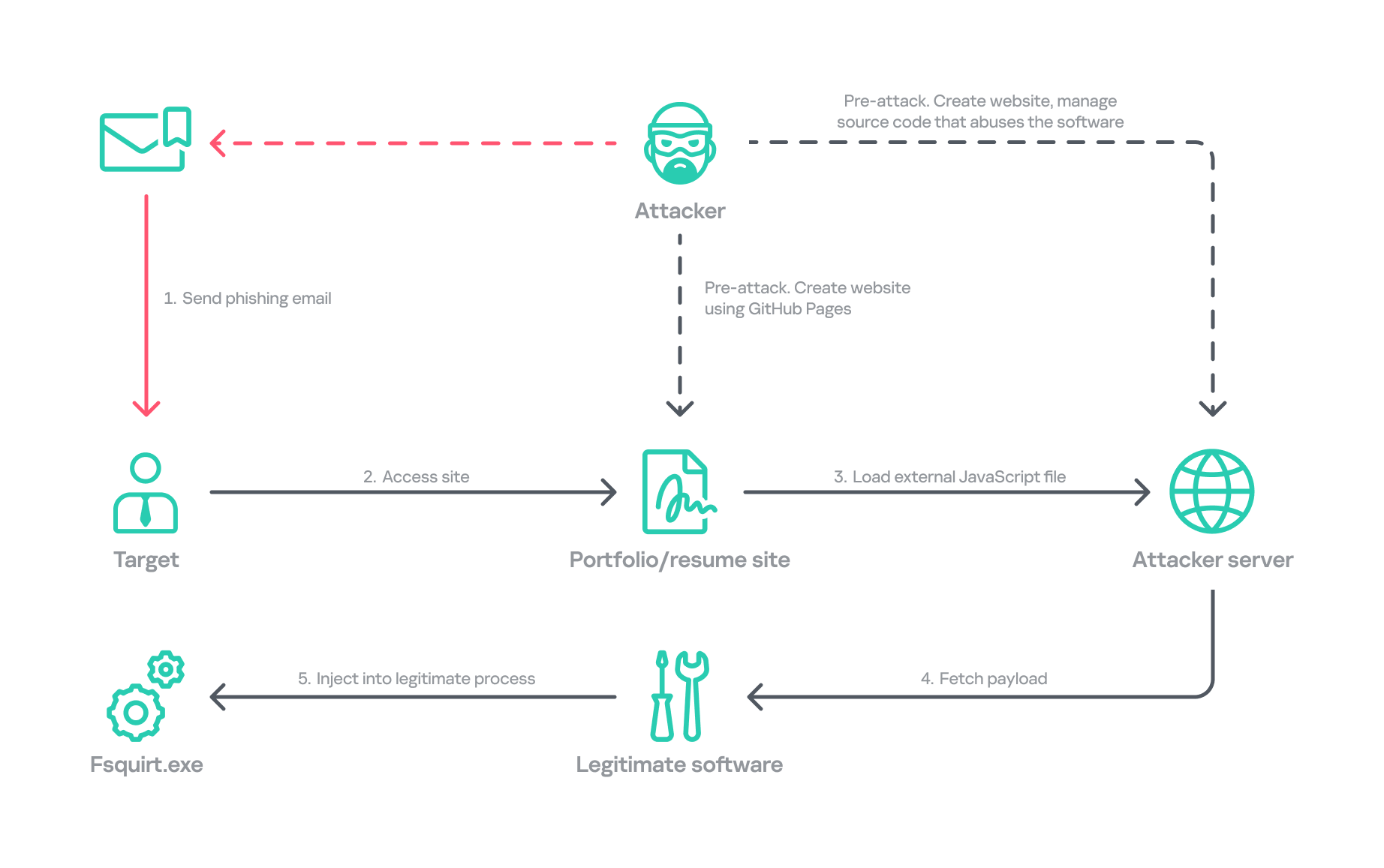
In January, we responded to the Lazarus Group’s novel attack campaign against South Korea, which followed last year’s Operation SyncHole. In this new operation, the group employed an updated malware chain that included both their old and new malware, which we disclosed in full, and used another mandatory South Korean security software program as a part of infection chain using a watering‑hole strategy. Notably, the group targeted victims more selectively, sending spear‑phishing emails with links to fabricated but relevant sites, such as portfolio and résumé pages tailored to each target. We dubbed this activity Operation FlashHole.
Operation FlashHole attack flow during initial compromise
Our examination reveals that the earliest evidence of this new operation dates back to July 2025. This suggests the group began preparing for the campaign shortly after ending Operation SyncHole, which lasted at least four months. We identified a minimum of three organizations impacted by the campaign in South Korea’s software, construction, and wired communication equipment manufacturing sectors. These sectors differ from those affected by Operation SyncHole, indicating that the group has expanded its target scope over time.
Background
After more than a year since the first observation of Operation SyncHole, we detected a suspicious execution chain originating from legitimate South Korean software. This chain mirrors the one from the previous operation; however, this time, the attacker abused CrossWeb EX instead of Cross EX, which was abused in Operation SyncHole. Both applications are related to financial security. CrossWeb EX is a financial security solution that is required to access widely used online banking and government websites. It encrypts communications between the user’s browser and the web server using public key infrastructure (PKI). This is not the first time Lazarus has abused this software. It was also used in 2021 to deploy the Racket downloader and again in 2022 and 2023. Although the exact method by which CrossWeb EX was abused remains unclear, we determined that the attack chain ultimately leads to the execution of the malware in memory.
We noted that the spawned process was running with a high integrity level. The parent process, INISAFECrossWebEXSvc.exe, originates from the installation bundle of INISAFE CrossWeb EX V3 version 3.4.1.2, released in 2023 after KrCERT’s public advisory.
As we already mentioned in our SyncHole blog post, this pattern closely mirrors the long‑standing strategy employed by the Lazarus Group to target South Korea. Since CrossWeb EX and similar software is mandatory for South Korean users and typically runs in the background to interact with the browser, it has been leveraged as a critical attack vector by the group. In 2025, a paper was presented at the USENIX Security Symposium that investigated vulnerabilities in South Korea’s mandatory security software and demonstrated how such software can unintentionally create a massive attack surface.
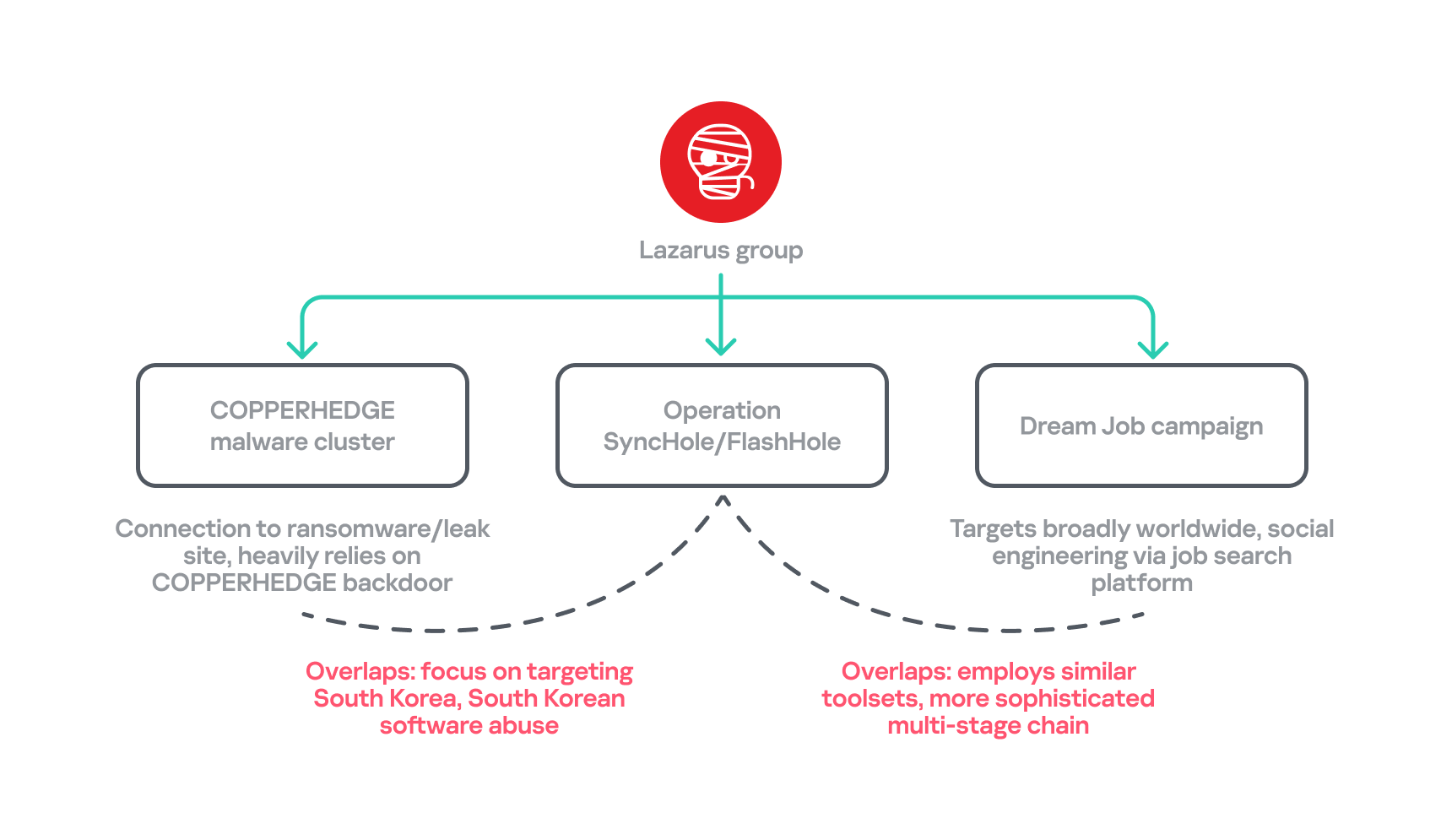
In July 2026, the South Korean government and several local security vendors also published a joint security advisory covering typical Lazarus attack techniques, including exploitation of financial security software. While this advisory overlaps with our findings from Operation FlashHole and Operation SyncHole, and AhnLab’s detailed analysis report Operation Double Barrel covers a wide range of recent Lazarus Group activities, we are conducting a more granular classification based on their TTPs. We will discuss this further in the attribution section.
Initial infection vector
Although we could not precisely determine what triggered the infection chain, our analysis uncovered a suspicious website hosted on GitHub Pages that is associated with the GitHub account used as the C2 channel. The GitHub account was created last September, and the initial version of the site was designed to showcase the résumé of a senior network appliance developer. In January, however, this site was replaced with another featuring an interior design showcase. The first site was likely accessed by an employee of a wired communication manufacturing company, while the second site likely affected a target in the construction sector.
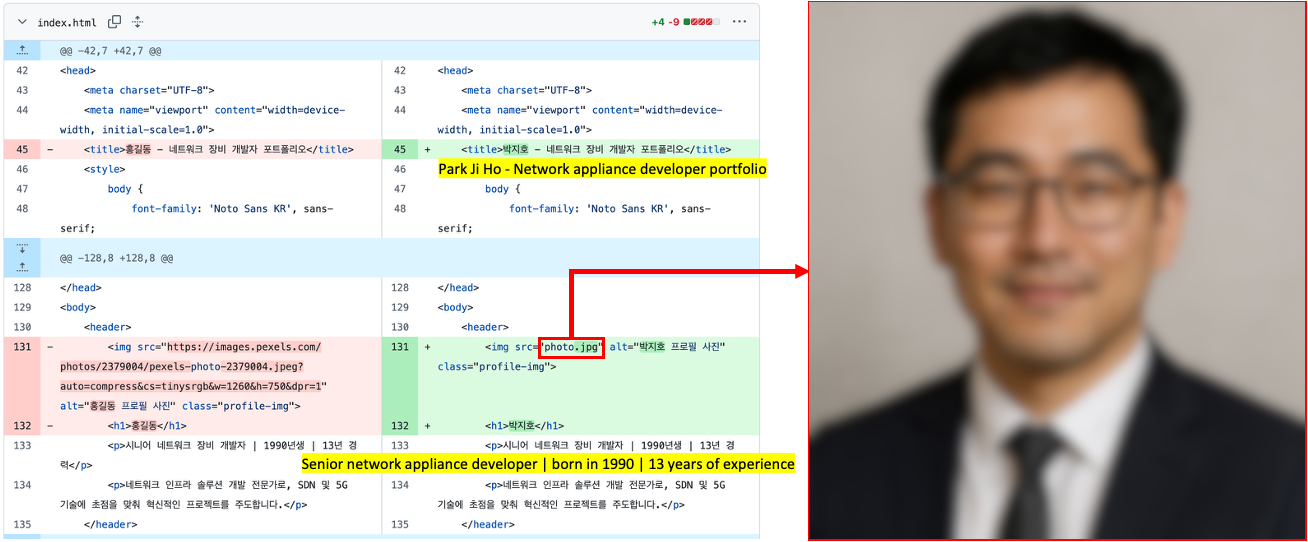
Appearance of the malicious websites
The first site with the résumé had a photograph supposedly of a job seeker, but the lack of EXIF metadata and the unnatural texture of the image indicate that it was generated by AI. This suggests the Lazarus Group has incorporated AI into its long‑standing strategy, like other Korean‑speaking threat actors (1, 2). The group most likely also used AI to create the lure site: the job seeker’s name resembles the Korean version of “John Doe,” and the portfolio was populated with seemingly meaningless details and random companies. The generated site was then manually tailored to specific targets.
Suspected use of an AI-generated image on the résumé site
The websites contained embedded links that loaded an external JavaScript file via a script tag.
Malicious link embedded in the résumé site: hxxps://javadevhouse.co[.]kr/ajax/libs/jquery/1.7.3/jquery.min.js
Malicious link embedded in interior design site: hxxps://pythonapischool[.]com/api/detach
Based on the analysis, we assess with medium-to-high confidence that the targets received phishing emails containing links to the malicious site hosted on GitHub Pages (using the domain <username>.github.io). The research results showed a high possibility that visiting the malicious site initiated an infection process involving CrossWeb EX software. This assessment aligns with Lazarus’s recent approach, as detailed in the joint advisory published by the South Korean government and security companies.
Full infection chain
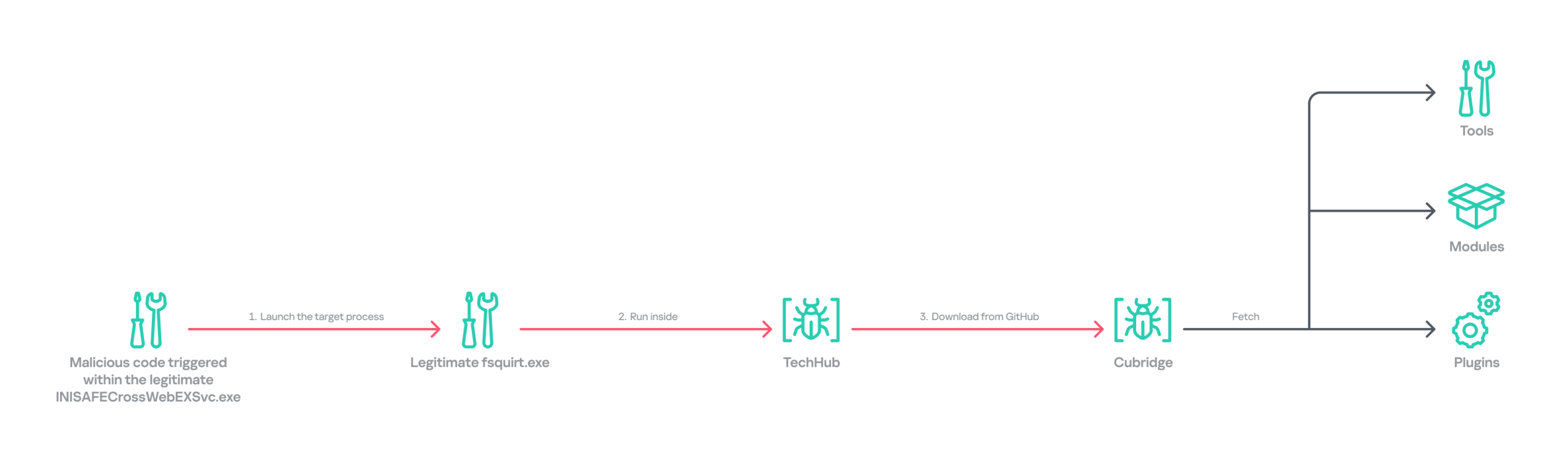
Following the initial compromise, the legitimate Windows binary fsquirt.exe was executed under the CrossWeb EX process and injected with shellcode containing a malicious DLL – TechHub malware. From our extensive and thorough examination, we identified several malicious payloads and reconstructed the complete infection chain. The infection chain is rather complex and reveals the Lazarus Group’s advanced operational techniques on targeted hosts. These techniques conceal their malicious payloads, intent and their sophisticated malware delivery framework. The latter was updated extensively compared to the previous campaign, despite the new operation starting less than a year later. Significantly, the execution chain below exists only in memory during the initial infiltration, highlighting the attackers’ considerable efforts to hide the initial compromise.
Initial infection chain
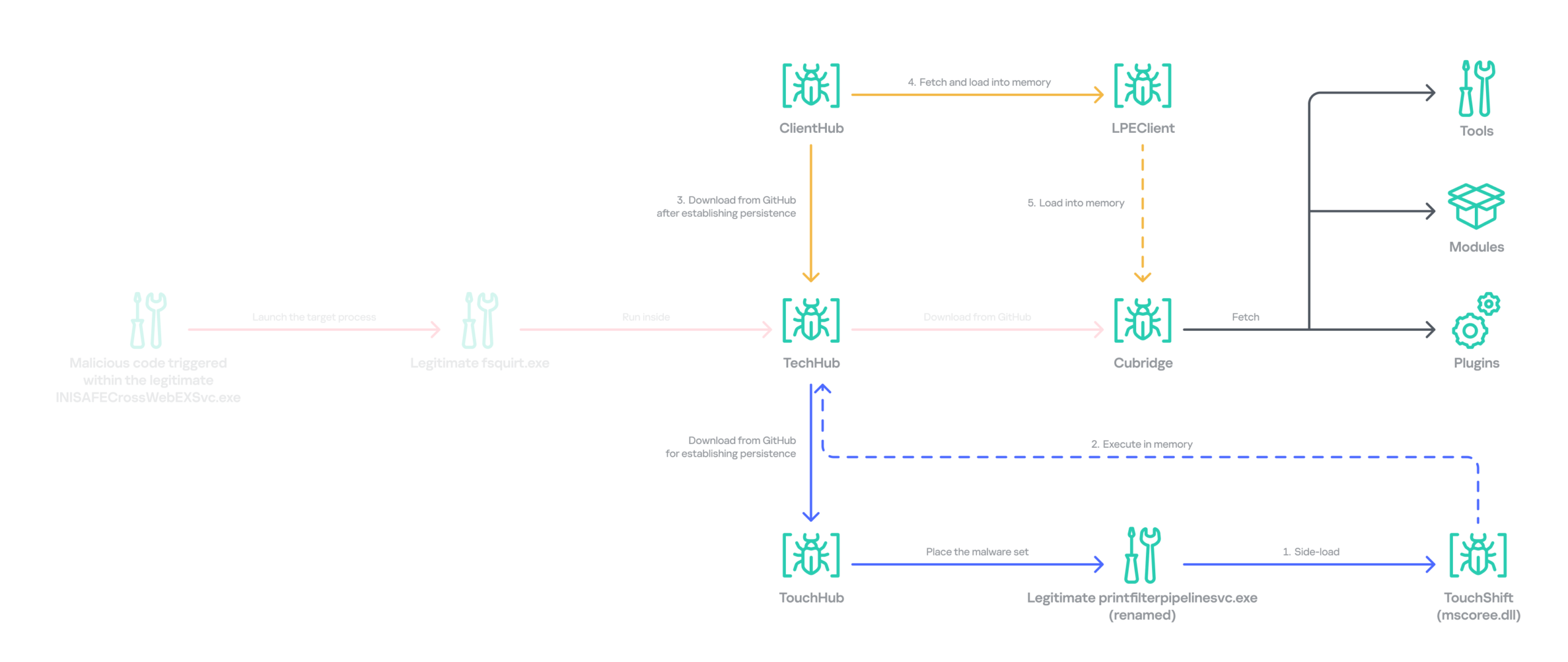
Following the initial compromise, the group sought to maintain persistence on the network by installing a pair of malware strains – TouchHub and TouchShift – leveraging DLL side‑loading under the name mscoree.dll. TouchHub was deployed by the first instance of TechHub. It then used DLL side-loading to launch TouchShift, which led to the in‑memory execution of another TechHub instance. After launching the second time, TechHub deployed another pair, ClientHub and LPEClient, rather than executing Cubridge directly. Only minimal traces of these files were found on disk; the remainder of the malicious code persisted exclusively in memory.
Expanded infection chain after gaining persistence
Since Cubridge remains only in memory at the initial compromise stage, we suspect the group designed this indirect, multistage chain to deliberately redeploy Cubridge after gaining persistence, as it serves as the most sophisticated orchestrator of the attack.
Malware set
The full chain comprises advanced variants of the known Lazarus malware strains, including TechHub, Cubridge, TouchShift, LPEClient, and the newly identified TouchHub and ClientHub.
TechHub – the start of the chain
TechHub, a downloader that plays a central role in this attack, communicates with GitHub using a Personal Access Token (PAT). It serves as the initial payload, providing the top of the chain with sufficient functionality to profile compromised hosts and facilitate subsequent payloads.
This variant is a more advanced version of the malware named CLOUDBURST by Mandiant and NickelLoader by ESET. According to their reports, the earlier version communicated with a C2 server via HTTP(S) to fetch additional payloads. The latest iteration we found, however, communicates with GitHub instead and has updated command strings.
We identified three variants of TechHub in the chain: an in‑memory version, a simple DLL side‑loading version, and a DLL side‑loading version that uses a registered Windows service. Depending on which stage loads the malware, it contacts a private GitHub repository via the GitHub API using either hard‑coded credentials or credentials retrieved from its configuration file.
When TechHub loads, it creates a 4‑byte hexadecimal identifier (ID) in the range 0x1000–0xFFFF or reads one from the configuration file, enabling the attackers to distinguish between compromised hosts. TechHub then checks a GitHub issue by sending the request GET /issues?state=[open/closed] to determine whether any previous communication remains active and removes any traces of it if found. It then proceeds with the handshaking process.
It creates a new issue titled 1[ID] with the body “hel” using the POST /issues request, and sets its status to open.
It then retrieves a file from the repository containing the 2[ID] value in its name. This file contains the RSA public key.
It generates a random 16‑byte XOR key, encrypts it with the provided RSA public key, and uploads the result, prefixed with 1[ID], to the repository.
The hard‑coded IV is XORed with the generated 16‑byte key and then used after the handshake.
During file exchange, filenames follow the pattern [1|2][ID][random-16-byte-key] throughout communication. The “2” prefix indicates delivery from the repository to TechHub, while “1” indicates delivery from TechHub to the repository. The random 16‑byte key in the filename is used for AES encryption or decryption of each file’s contents, employing either a hard‑coded IV or an updated IV.
After the key exchange is complete, TechHub reads a file with the prefix “2” once again and verifies that the delivered data equals “hel”. If the check passes, TechHub gathers extensive information from the infected host. This data is then encrypted and sent to the repository. After transmitting the device information, the process concludes by updating the body of the previously created issue from “hel” to “hey” using PATCH /issues/[issue number]. The malware is now fully prepared to receive commands from the repository.
TechHub supports four commands. The laeca command deploys a payload packaged in shellcode that reflectively loads the embedded payload directly into memory.
Command
Description
mqdrz
Collect information about the device and its running processes
laeca
Directly invoke the received shellcode in memory
aqvxp
Terminate the current process
rtcya
Beaconing after finishing the handshake process
Cubridge – the framework orchestrator
Cubridge, deployed via TechHub on the compromised host, is capable of retrieving various payloads through multiple methods. It serves as the central orchestrator of the entire malware framework, supporting a range of plugins, modules, and tools. An earlier version of Cubridge was also disclosed in the reports covering the previous version of TechHub. In those reports, Mandiant identified it as SIDESHOW, and ESET identified one of its modules as LightlessCan.
To establish communication with the C2 server, Cubridge randomly selects one of the predefined C2 servers and constructs a dedicated C2 URL for every request, using the pattern [C2_URL]/[page1]/[page2]/[page3]. This is achieved by concatenating terms from predefined word lists. Our analysis identified a single hardcoded C2 server – hxxps://cubedesign[.]co[.]kr/news/AABBCC – associated with the examined instance that is configured to version 5.1. During URL generation, AABBCC is substituted with a null value. The page3 segment is assigned a randomly generated integer between 10000000 and 99999999. Consequently, each generated URL is designed to appear authentic and remain unique for each request.
The predefined list for page1 is shown below. TechHub randomly selects one item from the list.
The predefined word list for page2 is shown below.
article, list, story
This means the hardcoded URL can later be transformed, for example, into hxxps://cubedesign[.]co[.]kr/news/economy/article/12345678 by following the steps described above.
Authentication using the POST request with the C2 server requires three parameters in the form of key‑value pairs. Each key is randomly generated using a different predefined word dictionary, and the associated values consist of a randomly generated 8‑byte hexadecimal bot ID, a fixed authentication token (KW4Ofw982CNJjxd51AVqkGAop), and a randomly generated 16‑byte hexadecimal session ID.
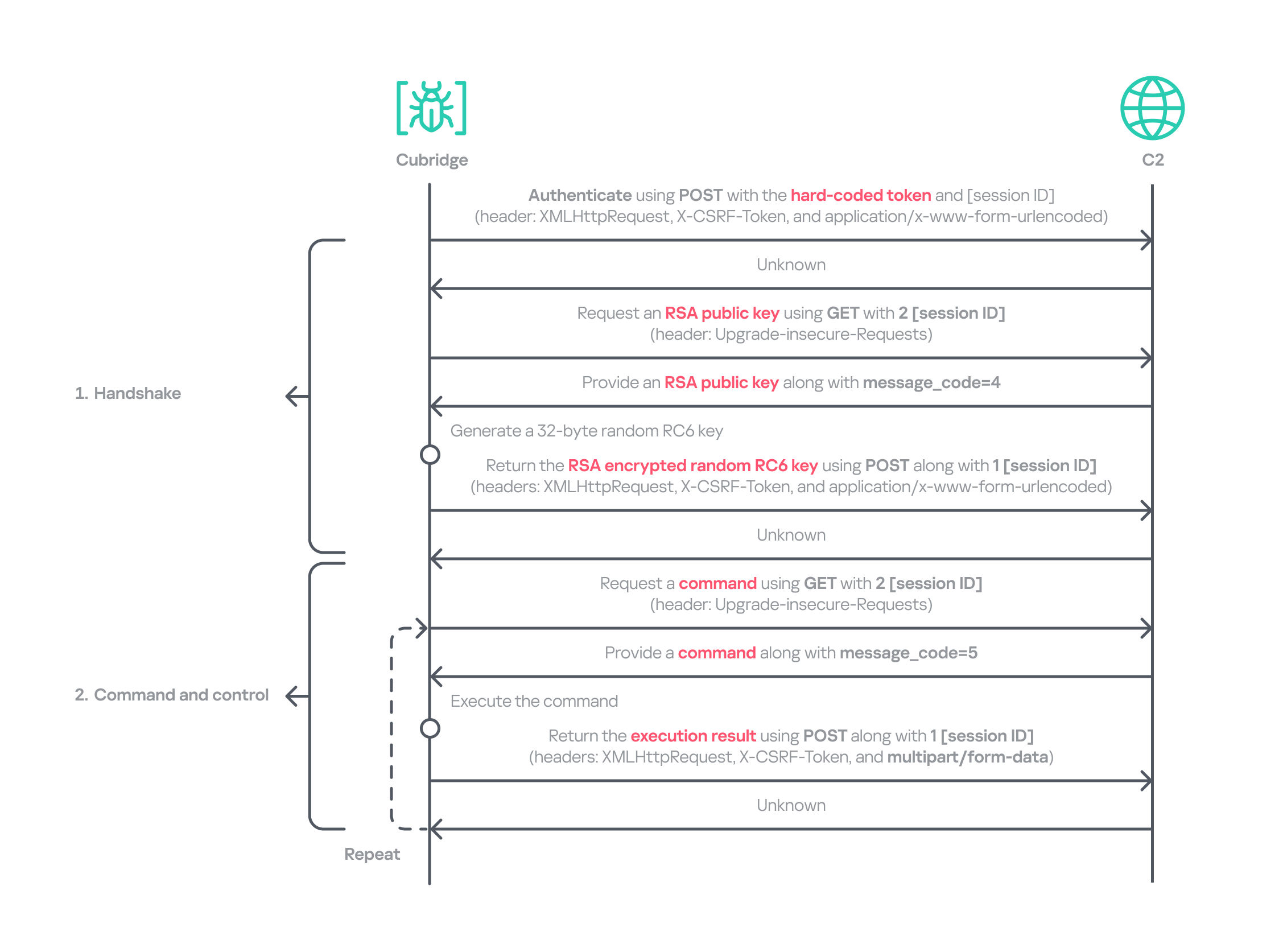
Cubridge employs a more robust handshaking process than TechHub, combining the RSA and RC6 algorithms. Unlike TechHub, it skips the profiling step and proceeds directly to command and control after the handshake. During communication, the malware mimics browser requests, using X‑CSRF‑Token and X‑Requested‑With headers for authentication and the Upgrade‑Insecure‑Requests header to request additional data.
Cubridge’s communication sequence
Cubridge contains extensive functionality, with a particular focus on loading subsequent‑stage payloads. The commands employ various techniques, such as DLL injection, reflective loading, and section‑mapping injection. The payloads may be delivered in various forms:
Plugins – reusable extensions that add functionality as needed and can be invoked at any time (in shellcode and DLL form);
Tools (in DLL form) – independent utilities that perform one-off tasks;
Modules – components that are loaded once and remain active providing an extended set of functionalities.
It is anticipated that the commands for plugins and shellcode will load identical types of plugins because both support a similarly formed exported function for subsequent activity. The shellcode can be generated using the open‑source sRDI tool to package a DLL‑style plugin. The capabilities of a single DLL are likely utilized to load a tool that works independently because when a single DLL is loaded, only its DllMain entry point and its parameters are accessible; no other exported functions are exposed.
Command
Payload type
Description
0
–
Collect device info including the computer name, time zone, PID, and other similar details
1
Archive the specified file/directory using the legacy ZipCrypto algorithm and the hard‑coded password: xdkiTajAAxc3i/w[<881fnC!G*cb1Dit2sh.gAk/
2
Create a file at the specified path
3
Possibly plugin
Inject the provided DLL payload into the target process and load it reflectively using reflective DLL injection
4
Plugin
Reflectively load a plugin in DLL format
5
Retrieve the address of the specified exported function from the target plugin and run it with the provided parameters
6
Retrieve all information about the loaded plugins
7
Unload the specified plugin
8
Shellcode
Inject the provided shellcode into the target process and load it using section mapping injection
9
Load the provided shellcode directly into memory
10
Retrieve the address of the specified export function from the target shellcode (likely a plugin in shellcode form) and run it with the provided parameter
11
Retrieve all information about the loaded shellcode
12
Unload the specified shellcode
13
–
Set the scheduled Cubridge execution time (in minutes) by updating a global variable
14
Set the scheduled Cubridge execution time (in minutes) by updating a global variable, while disabling monitoring by also updating another global variable
15
Terminate in a controlled manner
16
Get the configuration for Cubridge: retrieve the global flags, the number of C2 servers, the C2 addresses, etc.
17
Update the global flags, the number of C2 servers, the C2 addresses, etc.
18
Tool
Load a DLL reflectively with the specified parameter
19
Configure the parameters for loading a single DLL
20
Unload the single DLL
21
Module
Load the “action module” (ActionModule.dll) reflectively and invoke its AppinfoView export function
22
Load the “function module” (FunctionModule.dll) reflectively and invoke its PresentationFontConfig export function
Commands 21 and 22 each load a different module. As their internal names imply, the action module manages basic file and process operations, while the function module implements Windows’ default commands. The action module covers commands 23–41, and the function module handles commands 42–79.
The action module handles system operation commands, file system interactions, and process behavior. It is invoked by passing the appropriate command and parameters to its AppinfoView export function. The module supports 19 commands, numbered 23 through 41. Execution results are first sent to Cubridge, which then forwards them to the C2 server.
Command
Role
23
Get local disk space for each drive
24
Get information about the specified file or directory
25
Execute the provided command
26
Get information about the specified file or directory (similar to command 24)
27
Execute the provided command under the target process (PPID spoofing)
28
Execute the provided command under the target process within the provided session (PPID spoofing + session impersonation)
29
Get detailed information about processes
30
Terminate the provided process
31
Suspend all threads belonging to the specified process
32
Resume all threads belonging to the specified process
33
Permanently delete the file by overwriting its entire contents with the sequence: 0 → 1 → random bytes → 1 → 0
34
Rename the provided file to :EFS (the alternate data stream area) and delete it using the native API SetFileInformationByHandle
35
Set the current working directory
36
Copy the specified file to the provided path
37
Delete the specified directory
38
Move the specified file to the provided path
39
Create the provided directory
40
Initiate a non‑blocking connection attempt to the specified IP address and port (possibly for port scanning)
41
Read the specified file
The function module implements commands that emulate Windows’ built-in commands. Similar to the action module, its DllMain routine initializes all supported command functions, which are later accessed through the PresentationFontConfig export. Altogether, the module offers 38 commands, numbered from 42 to 79. While we believe this module is based on the previous LightlessCan, this is the first time we’ve seen it in the form of a separate module.
Command
Role
42
Capture all displays and archive them using the legacy ZipCrypto algorithm with the hard‑coded password: xdkiTajAAxc3i/w[<881fnC!G*cb1Dit2sh.gAk/
43
Synchronize the MAC (Modified, Accessed, and Created) times of the file provided in the second argument to match those of the file provided as the first argument
44
Get information about the specified directory
45
Get information about the specified drive
46
Inject the provided DLL payload into the target process
47
Unload the specified DLL from the specified process
48
Implementation of the ipconfig command
49
Implementation of the net command
50
Implementation of the netsh advfirewall firewall command
51
Implementation of the netstat command
52
Implementation of the ping -6 command
53
Implementation of the reg command
54
Implementation of the sc command
55
Implementation of the ping command
56
Implementation of the whoami command
57
Implementation of the nslookup command
58
Implementation of the schtasks command
59
Implementation of the systeminfo command
60
Implementation of the arp command
61
Call the CryptUnprotectData function to retrieve the AES key that DPAPI protects. Extract the key using the encrypted_key keyword from Chromium’s Local State file located at: %LOCALAPPDATA%\Google\Chrome\User Data\Local State
62
Not implemented
63
Not implemented
64
Read the specified file and decrypt it using an XOR operation with the key 0x59. Then extract the paths from the decrypted buffer and archive files and directories at these paths with the legacy ZipCrypto algorithm, using the hard‑coded password: xdkiTajAAxc3i/w[<881fnC!G*cb1Dit2sh.gAk/
65 ~ 79
Not implemented
Besides the modules, we also observed that the actor deployed various plugins and tools.
Type of payload
Name
Description
Plugin
ADFinder (AdFinder.dll)
Launches LDAP queries in an Active Directory environment, taking six arguments such as log file path, ADsPath, search filter, and attribute names
Plugin
FileCollector (Dll.dll)
Recursively scans every subdirectory and file in the provided directory, gathering detailed information about each
Tool
Browser stealer
Can be injected into Chromium-based browsers, such as Google Chrome, Microsoft Edge, and Brave. Once injected, it extracts files and credentials from the victim’s browsers, including stored passwords, bookmarks, history, preferences, and cookies
Tool
Process collector
Iterates over all running processes, collecting each process’s ID, path, and command line
TouchHub installs a service for TouchShift
During our analysis, we obtained a previously unknown malware sample from TechHub’s private GitHub repository, which served as a parent installer for TouchShift. We dubbed this malware TouchHub. Upon execution, it copies the legitimate printfilterpipelinesvc.exe to C:\Windows\System32\RasConv\ImeBroker.exe, registers it as a service, and places an embedded TouchShift payload named mscoree.dll in the same directory. Following creation, the malware synchronizes the MAC timestamps of C:\Windows\System32\drivers\monitor.sys with those of the newly written file, hindering forensic analysis.
It then goes through the service registration process by collecting up to 100 legitimate service names that are registered under the netsvcs svchost group in HKLM\SOFTWARE\Microsoft\Windows NT\CurrentVersion\Svchost. It randomly selects one of these names, appends two random alphabetic characters to form a new service name, and uses this name to create a service that runs the hard‑coded command line C:\Windows\System32\RasConv\ImeBroker.exe -TimeBroker with the description Microsoft Service. The newly created service is started immediately.
Overall, TouchHub creates three files in the designated directory to launch TouchShift with SYSTEM privileges.
Path
Type
Description
C:\Windows\System32\RasConv\ImeBroker.exe
Executable file registered as a service
Copied from C:\Windows\System32\printfilterpipelinesvc.exe
C:\Windows\System32\RasConv\mscoree.dll
Side-loaded TouchShift payload
Dropped by TouchHub. It contains encrypted payloads and includes portions of a legitimate DLL’s contents, which significantly inflates its size
C:\Windows\System32\RasConv\ActivationStore.dat
TechHub’s configuration file
Dropped by TouchHub after extracting configuration values
TouchShift, a prevalent loader employed across multiple infection chains
The version of TouchShift dropped by TouchHub is almost identical to the version described in Mandiant’s blog post, even sharing the same malicious export function, LockClrVersion. It takes the argument supplied by TouchHub and XORs it with a hard‑coded key. The resulting value is XORed once more with the executable’s filename, and this result is used as the AES key. All strings involved in this process (the argument, the XOR key, the filename) must be exactly 16 bytes long. If a string is shorter, it is padded with NULL bytes (\x00); if it is longer, it is truncated to 16 characters. For example, one of the string combinations in the obtained sample was:
Argument: -TimeBroker\x00\x00\x00\x00\x00 (padded with NULL)
Hard-coded XOR key: x809G736iC3f8Wp8
Executable filename: ImeBroker.exe\x00\x00\x00 (padded with NULL)
After deriving the key, the malware decrypts the embedded payload using AES‑CBC‑128 without padding. The decrypted data is shellcode that starts with a call instruction. It wraps the next‑stage payload – identified as the third version of TechHub (DLL side-loading with a registered service) – that reads the ActivationStore.dat file as an external configuration.
ClientHub
We also identified a new piece of malware stored in TechHub’s private repository, which we named ClientHub. It supports various commands formed using a bitmask. There are at least two versions of ClientHub: one that communicates with websites via HTTP(S) and one that interacts with the Dropbox API using credentials.
Depending on the version, its configuration is sourced from internal resources or the external configuration file C:\Program Files\Common Files\System\msadc\msadc.inc. The configuration comprises keys and IVs for the SNOW 1.0 algorithm, scheduled execution times, and C2 server addresses encrypted with the SNOW stream cipher. The SNOW cipher is a family of high‑speed stream ciphers used for secure data encryption in telecommunications and wireless networks. This is the first time it has been observed in the malware of the Lazarus Group.
To establish C2 communication, the malware initially generates a 32‑byte random array. It subsequently overwrites portions of this array with data collected from the compromised device. The resulting 32‑byte array comprises a blend of random bytes and relevant information. This array is later used as the key for the SNOW algorithm to decrypt data received from the C2 server. Finally, the key array is encrypted with a hard‑coded RSA public key and encoded in Base64.
Offset
Size
Field value
0
4
Current process ID
4
4
First four bytes of the decrypted C2 server information.
8
7
Randomly generated bytes
15
1
Calculated flag value that indicates a state machine.
16
8
Current system time, represented as a FILETIME structure.
24
8
Randomly generated bytes
The ciphertext is delivered to the C2 server via GET requests. Each request contains headers that are atypical for malware: Sec-CH-UA, Sec-CH-UA-Platform, Sec-CH-UA-Mobile, Sec-Fetch-Mode, and Sec-Fetch-Dest. These headers are normally used by legitimate Chromium‑based browsers and enable malware to imitate legitimate traffic and evade detection. The C2 server replies with commands in a custom header and message body.
struct header
{
  int has_more_data // whether more body data remains
  int body_checksum;// ROR13 checksum for the body data
  int body_type;    // specifies the body type
  int unknown;
  int body_length;  // Length of the body data
  int IV[2];        // Random IV used to encrypt the body data
};
The body_type field in the header determines how the subsequent payload is processed. This value functions as a bitmask, with each bit representing a distinct flag (e.g., 0x1, 0x2, 0x4, etc.). The resulting behavior also depends on whether the least‑significant bit (bit 0) is set: when the value is odd, the malware interprets the incoming message body as an additional payload that is subsequently loaded into memory. Conversely, when the value is even, the malware invokes the previously loaded payload.
The odd value supports four distinct loading methods based on the received message body and ensures that each method executes only once.
Bitmask
Value in decimal
Description
Result sent to the C2
0x00000001
1
DLL loading: load the received body reflectively along with the provided parameter
The payload’s image base
0x00000011
3
Plugin: load the received body reflectively, obtain the address of a function in the payload, and then invoke that function along with the provided parameter
The payload’s image base, the address of the invoked function, and the execution result
0x00000101
5
Plugin: load the received body reflectively, obtain the address of a function in the payload, but refrain from invoking it immediately
The payload’s image base, the address of the function
0x00001011
11
Plugin: execute the behavior associated with value 3, then unload immediately after invoking the plugin
–
0x00010001
17
DLL loading: load the received body reflectively with the provided parameter, maintaining stateful communication via a persistent interactive session using a shared buffer
The payload’s image base, the address of the interactive shared buffer, and the execution result
The even value provides two distinct invocation methods for DLLs and plugins that have already been loaded and are associated with the odd‑value bitmask. The 2 (0x10) flag allows the payload previously loaded with the 1, 3, or 5 bitmask to be reused and invoked directly. The value 16 (0x10000) corresponds to the 17 (0x10001) flag in loading mode and uses the established interactive shared buffer to exchange data. All values are guaranteed to act independently.
Bitmask
Value in decimal
Description
Result sent to the C2
0x00000010
2
Invoke the previously loaded DLLs and plugins along with the provided parameter
The execution result
0x00000100
4
Not implemented
–
0x00001000
8
Unload the previously loaded DLLs and plugins
The execution result
0x00010000
16
Send the updated parameter to the payload loaded by the command with the value 17, and exchange data through the interactive session. This command also determines whether to retrieve the execution result or unload the payload
The execution result
Taking into account the loading mechanism, we identified four plugins deployed to the target that work perfectly with ClientHub.
Plugin
Description
File archiver
Archives the provided file using the legacy ZipCrypto algorithm (without password protection) and returns the compressed data
File collector
Searches for all files matching the provided search pattern and collects metadata including filename, MAC timestamps, file size, and attribute values
File cleaner
Overwrites the provided file with NULL bytes, renames it to a randomly generated filename of the same length, and then deletes it. If a directory with a search pattern is provided, it locates all matching files, renames each to a randomly generated name of identical length to its original name, and deletes them
Drive and session monitor
Monitors remote session changes and local drive changes for the provided duration (in 10-minute intervals) and returns the collected status information
In addition to the plugins, ClientHub supports the loading of LPEClient malware and communication with it. We found that ClientHub’s body_type values 16 and 17 correspond to LPEClient’s C2 communication mechanism.
LPEClient
LPEClient is the only malware that was also observed in Operation SyncHole, indicating that the actor relies heavily on it for sophisticated victim profiling and payload delivery across multiple operations. LPEClient first appeared in 2019, and was discovered in 2020. Since then, the tool has been widely observed in the Dream Job and Cascade Hole campaigns that targeted South Korea. Recent research conducted by Check Point revealed that LPEClient was used to deploy the FudModule malware using a zero-day.
LPEClient has evolved continuously over time, but we discovered that it recently underwent a major operational revamp. It no longer contains the C2 server address itself; instead, it interacts with ClientHub via a shared buffer. We believe this change is intended to enhance concealment.
Timeline of LPEClient
The previous version collected the computer name, memory status, CPU specifications, operating system details, version of the ntoskrnl.exe file, firmware table, antivirus name, domain name, user name, the integrity level of the current process, and a random byte sequence of 1,568 bytes. The newly updated LPEClient variant mostly collects the same information; however, it also introduces several changes.
It does not collect the version of the ntoskrnl.exe file by querying the FileVersion value. Instead, depending on the specific build, it reads either the HKLM\SOFTWARE\Microsoft\Windows NT\CurrentVersion\UBR registry key or the SYSTEM_BUILD_VERSION_INFORMATION structure to retrieve the revision portion of the Windows build number. These values can be used to infer the system’s cumulative update or patch level.
To collect information about installed antivirus products, it switched from querying a WQL command to reading the WMI repository file directly. It now reads C:\Windows\System32\wbem\Repository\OBJECTS.DATA and searches for keywords such as AntiVirusProduct, companyName, and displayName to identify the installed products.
It also collects low‑level Windows security mitigation states. To achieve this, it queries the SYSTEM_KERNEL_VA_SHADOW_INFORMATION structure for the Kernel VA Shadow mitigation status and the SYSTEM_SHADOW_STACK_INFORMATION structure for the Shadow Stack (CET) protection status.
Additionally, it generates a 32‑byte random unique identifier by using the HighwayHash algorithm and an XOR operation with the current system time. The collected information, including the generated identifier, is compressed with the XPRESS Huffman algorithm using the maximum compression setting. The compressed data is then concatenated with the message ID 0xF07D6B34 and encrypted using GOST (also known as Magma), Russia’s national cryptographic standard that employs a DES‑like structure, before being sent to the ClientHub via a shared buffer. Initially, KrCERT described the algorithm as a custom DES‑like scheme. However, further analysis by us and Check Point confirmed that it is actually the GOST algorithm. The key is randomly generated by a proprietary key‑generation algorithm and prepended to the encrypted message.
The next request handles the key exchange by delivering the message ID 0xA39CF278 together with the generated unique identifier. The response is decrypted using the AES‑CBC‑256 algorithm. The SHA‑256 hash of the previously generated 1,568‑byte random value, which was originally sent to the C2 server during the collection phase, serves as the key for this decryption.
Through this process, LPEClient obtains a byte array comprising four 1,568‑byte blocks from the C2 response. Each block contains an ML‑KEM‑1024 public key, where ML‑KEM is a NIST‑standardized post‑quantum key encapsulation mechanism derived from CRYSTALS‑Kyber. LPEClient then generates four distinct pairs of shared keys and ciphertexts from these blocks, encrypts the ciphertexts with the GOST algorithm, and transmits them to the C2 server via ClientHub together with the message identifier 0xEF8C0D51 and the associated identifier. Now that the preparation phase for receiving payloads is complete, the malware is ready to receive payloads forwarded by ClientHub from the C2 server, along with the necessary parameters. The use of post-quantum cryptography shows that the group intends to hide subsequent payloads.
The response to the 0xEF8C0D51 message is decrypted with the Threefish algorithm using a 128-byte key, composed of the four distinct shared keys. Threefish is a tweakable block cipher that accepts a ‘tweak’ value alongside the key and the message. The concept of a tweak is similar to that of a nonce or initialization vector, which are used in different types of ciphers. In LPEClient communication, the tweak for the decryption is derived by XORing the unique identifier with 165 (0xA5). The first four bytes of the decrypted message must specify the parameter’s length, followed by the parameter itself and then the payload. The payload must be larger than 4 KB and start with the characters 'MZ', which indicates that the decrypted payload is an executable file. The payload is then reflectively loaded into memory. After successful loading, LPEClient sends the message ID 0xCB790A25 to the C2 server.
Before loading the acquired payload, LPEClient takes measures to bypass security products. Instead of invoking VirtualProtect directly, the malware uses the identified HeapPageAllocator::ProtectPages in jscript9.dll to modify the memory page protection of the MD4Update function. The beginning of the function is then overwritten with a hard‑coded opcode sequence that serves as a syscall stub with the required arguments. LPEClient then uses the syscall stub to disable a user‑mode syscall instrumentation hook.
We identified the final payload that was ultimately loaded as Cubridge. The overall communication process is as follows.
Data relay flow between LPEClient and C2 via ClientHub
Comparison of plugins and modules
Throughout the engagement, we identified a variety of payloads deployed by TechHub, Cubridge, and ClientHub. These payloads have been categorized as tools, plugins, and modules that constitute the group’s modular malware framework. While we have not yet ascertained which payloads are deployed under specific conditions, the evidence suggests that the Lazarus Group’s toolkit is becoming increasingly sophisticated and segmented into specialized components rather than a single comprehensive backdoor. We also believe that TechHub and Cubridge may share similar tools.
These modularizations are not confined to the instances within this campaign. As previously noted, similar patterns have been identified in CookiePlus, MISTPEN, SIGNBT, and IMETHOD. Note that we have reclassified the ThreatNeedle variant used in Operation SyncHole as the latest version of IMETHOD, the predecessor of ThreatNeedle in use since at least 2016.
Infrastructure
Based on the information we obtained from the TechHub malware, we identified at least three primary repositories used as the C2 server and one fallback repository. The earliest evidence indicates that the group has been leveraging GitHub as a C2 server since at least July 2025. We suspect that all the accounts were created using hijacked email accounts, and disguised as normal repositories by copying or creating normal projects to avoid suspicion.
For the Cubridge and ClientHub C2 servers, the Lazarus Group employed only a minimal number of compromised yet legitimate South Korean media and interior design websites. Later, we observed that a broader range of compromised legitimate sites across various industries were also exploited. In addition, one ClientHub sample that we detected used Dropbox as a C2 channel.
Victims
We have identified at least three firms from the software, construction, and wired communication equipment industries in South Korea that were targeted by Operation FlashHole. As with the previous operation, however, we remain confident that a considerably larger number of organizations across a broader spectrum of industries have been affected.
The software sector was the only sector targeted in both the SyncHole and FlashHole campaigns. This suggests the actor is eager to compromise the sector, steal source code, and exploit vulnerabilities for further attacks.
Attribution and links to other campaigns
Operation FlashHole is the latest wave in the broader Cascade Hole campaign, which involves the use of South Korean software as a potential entry point to deliver malware targeting the country. Although the malware chain has advanced significantly since last year, we assess with medium-to-high confidence that the same actor is responsible for both the SyncHole and FlashHole operations based on the initial vector, targets, multi‑stage chain, and technical and operational improvements. The use of LPEClient in particular is a strong indicator supporting this assessment.
The malware strains used in the attack are historically linked to the toolsets observed in the Lazarus Group’s notorious Dream Job campaign. Earlier versions of TechHub (also known as CLOUDBURST and NickelLoader), Cubridge (also known as SIDESHOW and LightlessCan), and TouchShift were all observed in that campaign, especially between 2022 and 2023.
We also discovered that both CookiePlus and ClientHub have significant overlaps in class name, configuration path, and plugins. Based on these similarities, we assess with medium‑high confidence that ClientHub is an advanced version of CookiePlus.
Since July, around the time Operation SyncHole began winding down, we have also observed several notable attacks against South Korea employing the COPPERHEDGE backdoor and targeting various South Korean organizations. Interestingly, the start times of these activities align with the earliest evidence we have identified for Operation FlashHole. Although the backdoor was part of the second phase of Operation SyncHole, it has been operating independently with its custom loader since then. These incidents featured malware chains and tools that were distinct from those used in Operation SyncHole and FlashHole.
As AhnLab noted in their report, the same backdoor was likely observed in atypical activity, specifically the Gunra ransomware infection. Our investigation further revealed that one instance of a backdoor infection ultimately resulted in the exfiltration of data to a dark web leak site, which clearly differed from Gunra’s. The site appears to have been crafted exclusively for this activity. In summary, unlike other attacks, the backdoor was used in conjunction with both ransomware and data exfiltration.
Data leakage site linked to the COPPERHEDGE backdoor on the dark web
Another noteworthy point is that the recent Dream Job campaign employs an updated malware chain that, since around 2024, has primarily involved MISTPEN and ForestTiger rather than the earlier arsenal that included tools such as TechHub and Cubridge. However, the updated versions of this older malware have now re-emerged as part of Operation FlashHole. Considering these changes and all aspects of each attack’s TTPs, we have organized a classification for each attack.
Overlaps between the recent attacks by Lazarus Group
Conclusion
Our analysis shows that the Lazarus Group begins preparing for its next operation shortly after completing the previous one, ultimately deploying an enhanced malware chain by refining existing tools. The group continues to use the advanced version of LPEClient for profiling and payload delivery, indicating that the tool is meticulously managed and well maintained. Ironically, the group seems to have adopted more secure post-quantum cryptography faster than many legitimate security products. These observations suggest the involvement of a dedicated developer, with others orchestrating comprehensive attack scenarios against newly targeted software.
We anticipated that specialized attacks targeting South Korea would persist. However, we did not foresee multiple attack campaigns being executed simultaneously, each leveraging different types of software and tools. Notably, the COPPERHEDGE cluster appears to be involved in monetizing the attacks, while Operation FlashHole is focused on espionage. We are closely monitoring these changes to understand their motivations and ultimate goals.
In October 2025, the South Korean government unveiled a comprehensive cybersecurity plan that will phase out the mandatory installation of security software for users beginning in 2026. We estimate that operations exploiting this software will remain highly active for some time, maximizing efficiency, before the software is fully eliminated or mitigated.
Kaspersky products detect the exploits and malware used in this attack with the following verdicts: MEM:Trojan.Win64.Shellcode.gen, Trojan.Win64.DLLhijack.*, Trojan.Win64.Lazarus.*.
Sam Altman confirms an OpenAI humanoid robot is coming, with a demo due in 2027. The real hurdle is building the robot's brain.
Related Posts:
TP-Link Moves Router Assembly to the United States
Google DMA Compliance Under EU Review After Fine
ChatGPT Chrome Extension Now Reads Your Open Tabs
The post OpenAI Humanoid Robot Confirmed by Sam Altman appeared first on Daily CyberSecurity.

 Entrar