Background
Network-connected surveillance cameras are now widespread in both home and enterprise environments, so securing them is essential to safeguarding physical spaces and sensitive assets. As these devices continue to gain new features and network connectivity capabilities, vulnerabilities in their implementation can have significant security implications.
During our research, we discovered a denial-of-service vulnerability that affects Intelbras IP cameras systems. The flaw resides in a f
Network-connected surveillance cameras are now widespread in both home and enterprise environments, so securing them is essential to safeguarding physical spaces and sensitive assets. As these devices continue to gain new features and network connectivity capabilities, vulnerabilities in their implementation can have significant security implications.
During our research, we discovered a denial-of-service vulnerability that affects Intelbras IP cameras systems. The flaw resides in a firmware update endpoint that is accessible without authentication and allows anyone with access to the local Wi-Fi network to knock cameras offline. A single request disrupts the camera for only about a minute, but sending periodic requests keeps the device offline indefinitely. We reported the issue to Intelbras, monitored the remediation process, validated the fix in the new firmware, and will now demonstrate the exploitation procedure step-by-step.
Following our notification, Intelbras patched the vulnerability and released updated firmware (R.260804) along with update instructions. A candidate ID of CAN-2026-2035970 has been assigned by MITRE following submission, pending the final CVE assignment. Additionally, the Intelbras team recently informed us that MITRE has classified the vulnerability as Medium, assigning it a score of 5.1 under the CVSS 4.0 framework. The issue discussed in this article is no longer present in the latest firmware version.
Firmware
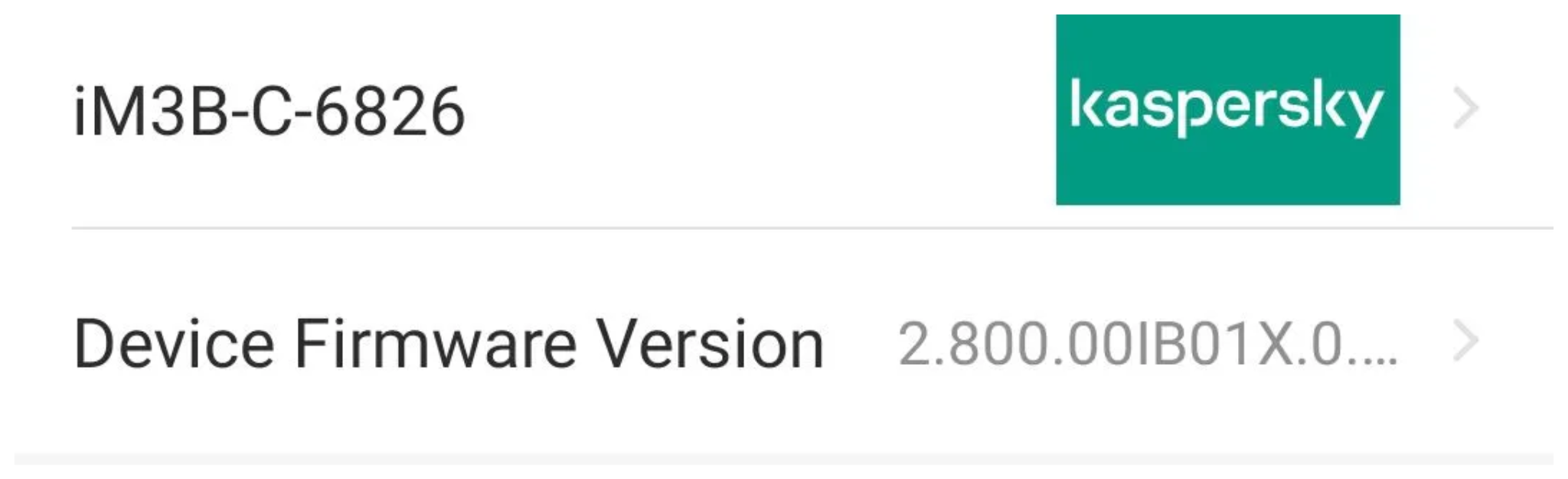
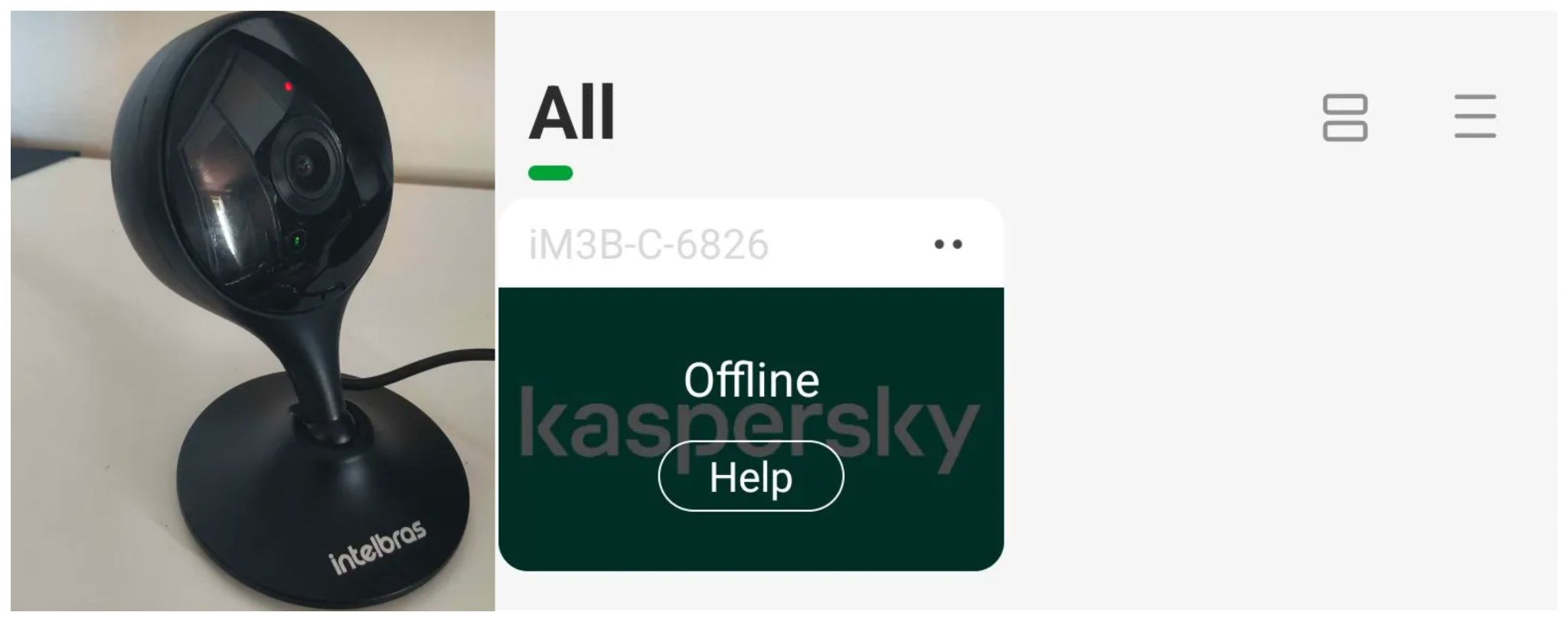
Intelbras provides firmware files on its official website. While users can manually install these updates via an SD card, the cameras also natively support firmware upgrades over the local network via their web interface and mobile app. We obtained the firmware version v240927 for the iM3B-C (IM3 C) camera, which was the latest available version at the time of our research. According to Intelbras, the same firmware is also compatible with the iMX C, iM4 C, iM5 SC, iME 360 C, and iM7+ FC models. Below, we can view the firmware version and the camera model used as an example.
To provide context, we will explain how the camera’s authentication mechanism works and why it is relevant to accessing the camera’s endpoints. The main firmware component is an ARM binary named sonia, responsible for controlling the kernel drivers used by the camera hardware, authentication, and livestream recording, among other things.
How authentication works
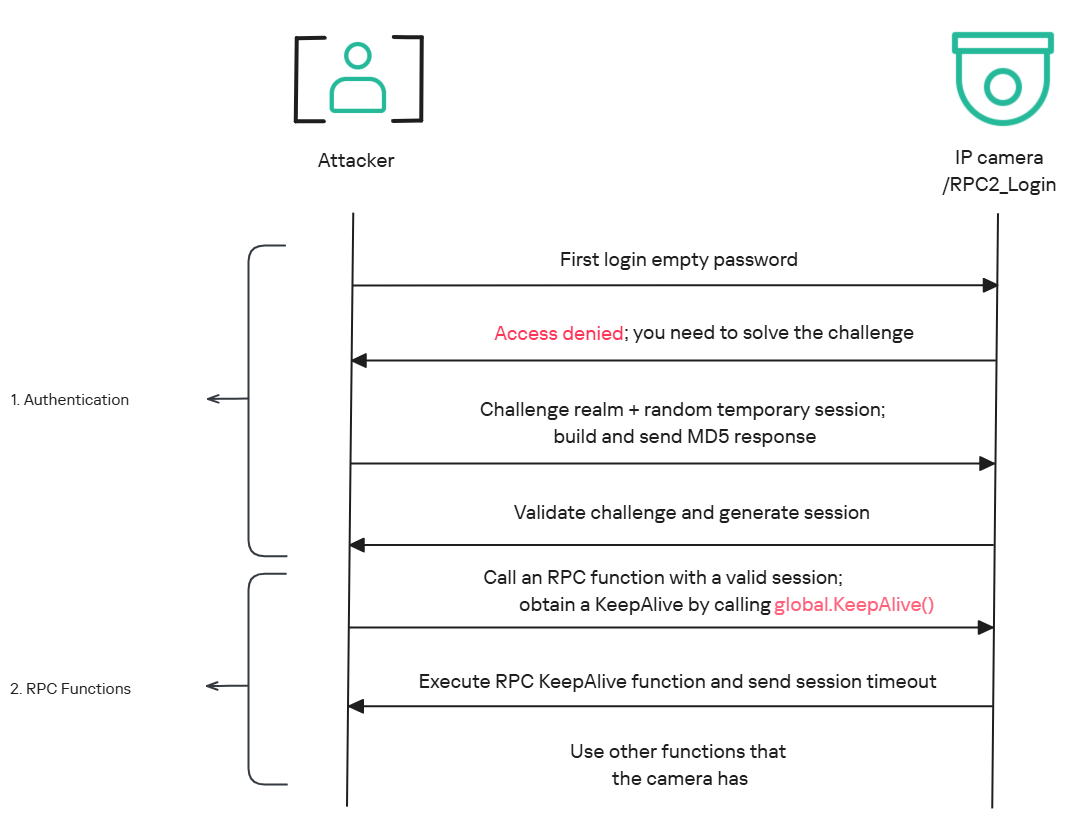
The global.login RPC method handles authentication at the /RPC2_Login endpoint. First, the client, such as the mobile app or a custom script, sends the username and an empty password. The camera responds with an authentication challenge (a set of values to verify the password without transmitting it). This response returns a temporary session, the encryption type in the encryption field, a random value, and a realm (authentication scope). At this stage, a false response is normal and does not indicate a failed login, as the authentication process is not yet complete.
Next, the client calculates the response password from the authentication challenge. It first generates an MD5 (username:realm:original_password) hash as the base. It then calculates a second MD5 (username:random:first_md5) hash, where first_md5 is the result of the previous step. To complete the authentication, the client sends this final result back to /RPC2_Login in a second global.login call, passing the username, calculated password, and temporary session ID.
If the login is accepted, the camera returns true and a new, authenticated session. This session must be used for all subsequent RPC calls, including the camera’s other endpoints, for example, the one that reboots the device or those that expose sensitive information.
Affected endpoint
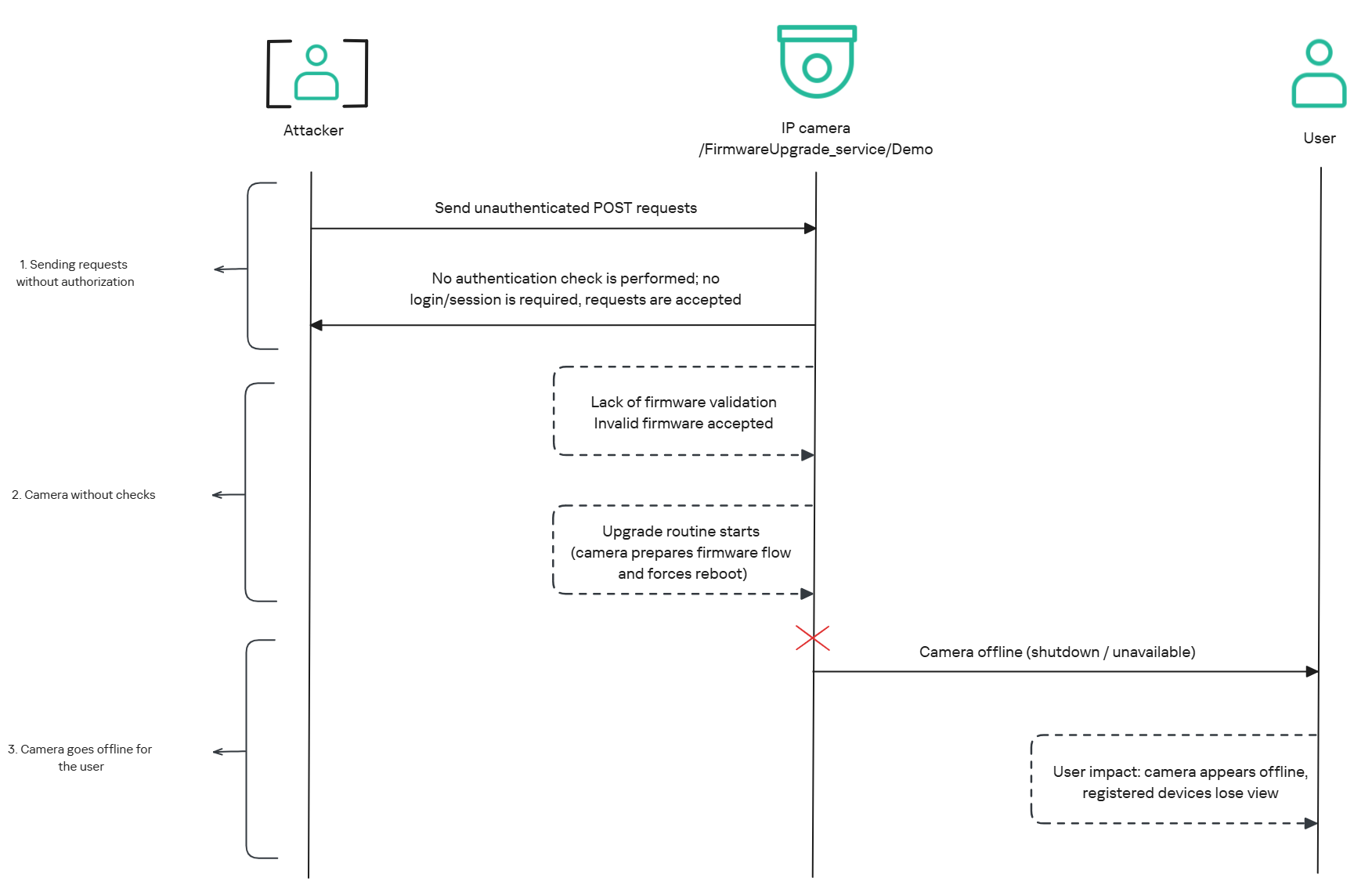
The affected endpoint is the firmware upgrade route http://<ip_address>/firmwareUpgrade_service/Demo, which lacks authentication checks; furthermore, it fails to verify whether the firmware is actually valid before initiating the upgrade process. This creates a serious issue because the upgrade requires the camera to reboot, and that is precisely when the problem occurs: the camera enters reboot mode and eventually shuts down, appearing offline to the user and anyone who has the camera registered on their device.
PoC: vulnerability exploitation
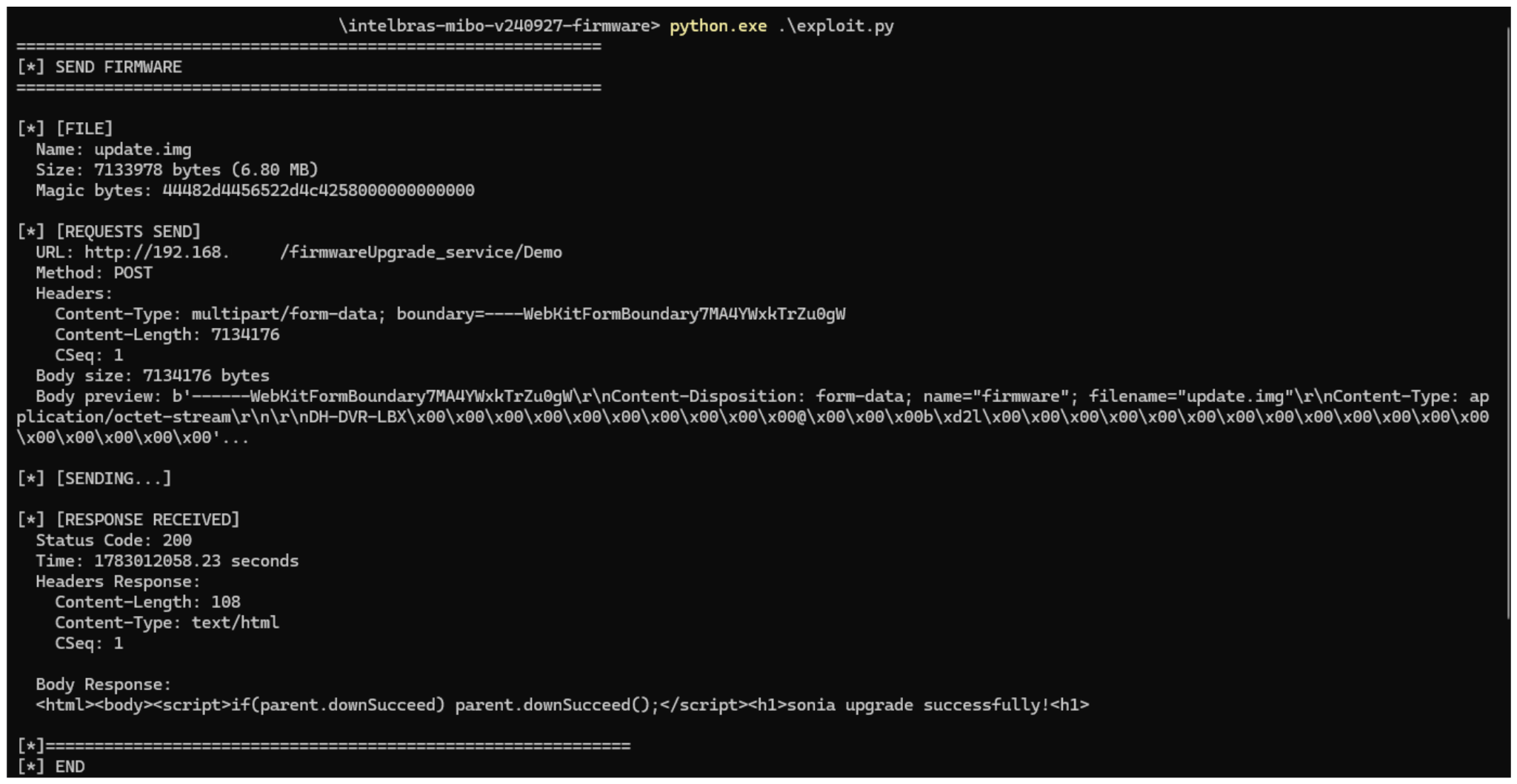
Now that we have outlined how the vulnerability works, we will use a Python script on an iM3B-C camera to exploit it for demonstration purposes. The exploit contacts the camera’s endpoint to upload firmware. Below, we can see sonia creating the endpoint responsible for the firmware upgrade.
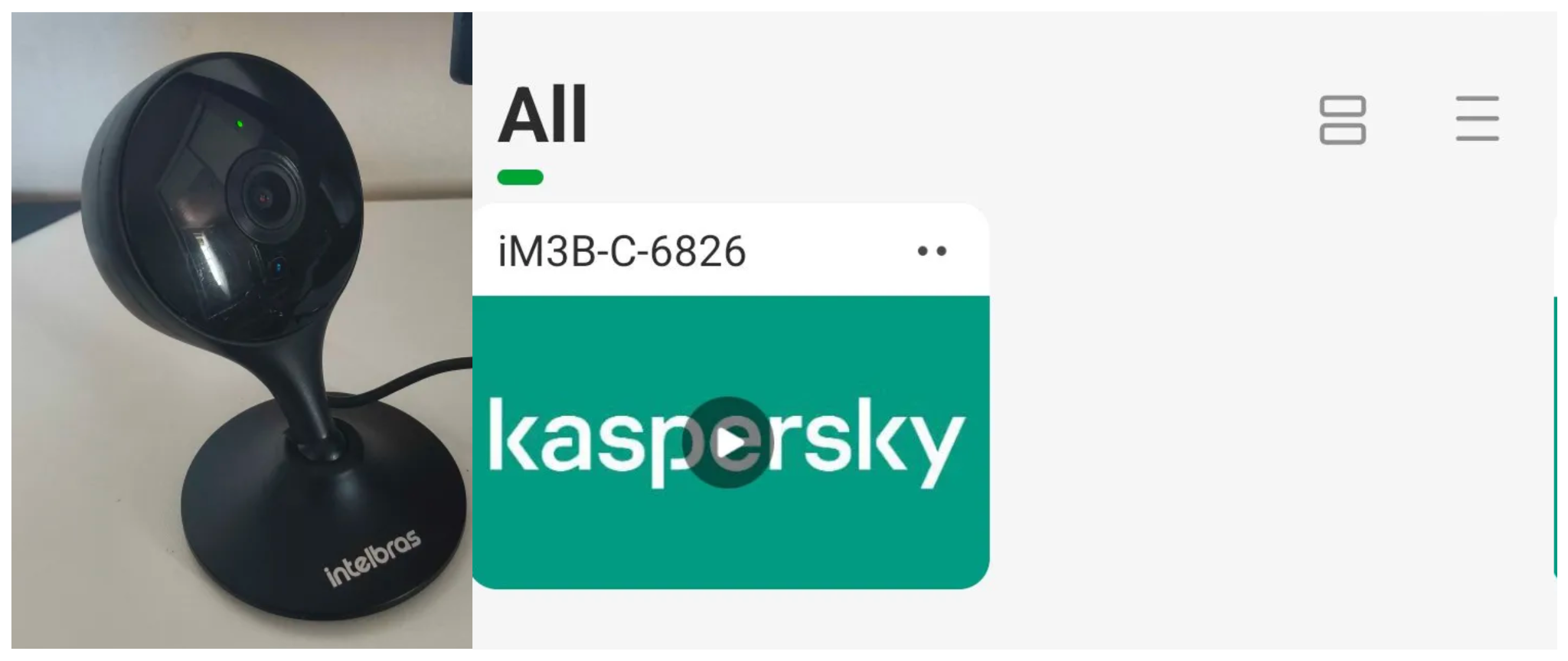
Next, the exploit will hit the endpoint and cause the camera to reboot. Consequently, mobile phones running the Intelbras app will lose connection with the registered device. Below, we can see the camera operating normally: the green light is on and the app is showing it is available for viewing.
The camera is online
After the exploit executes, we can see the effects: the camera goes offline and loses connection to the registered devices.
The camera is offline
The exploit is quite simple: it sends an HTTP POST request with the firmware, which causes the camera to accept the request and initiate the reboot process. It does not matter whether the firmware is original; the reboot process will start regardless.
New firmware version
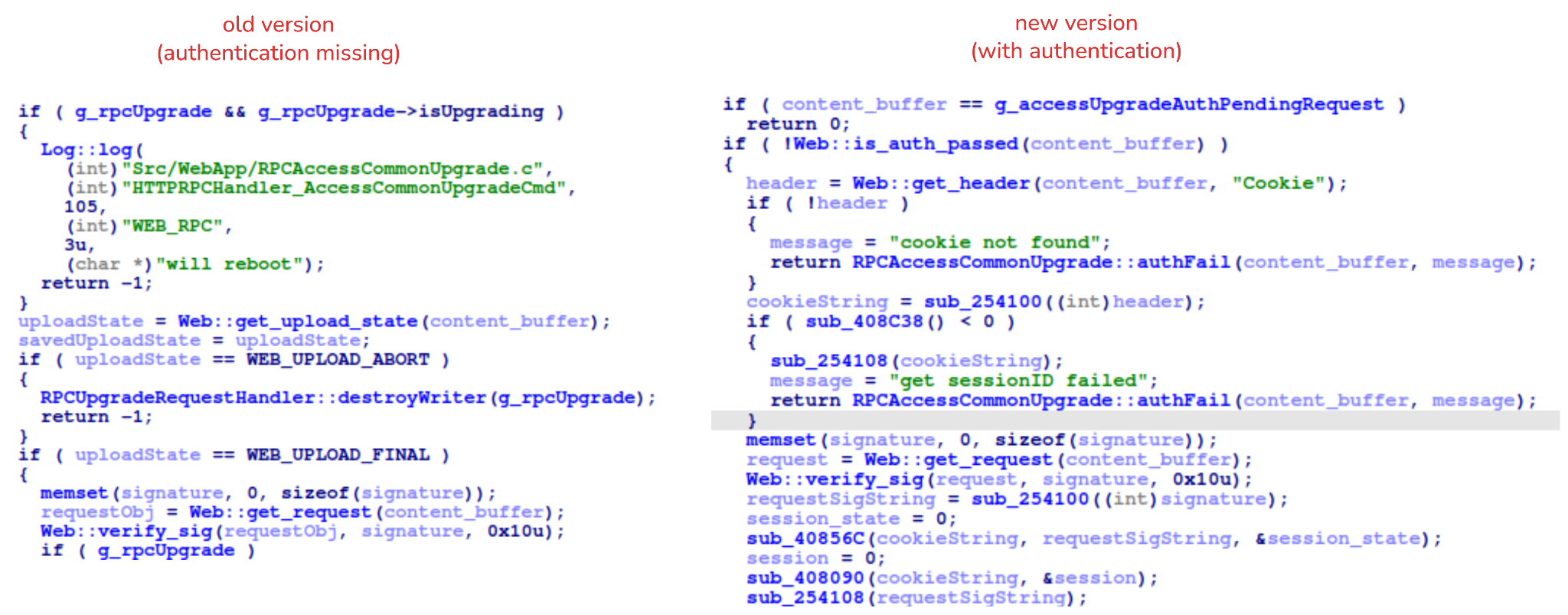
After we notified Intelbras about this flaw in the endpoint implementation, the company contacted the OEM vendor. As a result, a new firmware version was released that requires authentication to initiate an update through this endpoint.
Below, we can compare the new firmware, which validates cookies and session data, with the old firmware, which performed no authentication checks and proceeded directly to the update routine.
Real risk
An attacker can remotely trigger the camera firmware upgrade and reboot process without authenticating or supplying a valid firmware image. This may cause the device to go offline, which results in a denial-of-service condition preventing legitimate users from accessing live monitoring or managing the camera.
The potential impact is significant due to the number of affected users. The Intelbras Mibo Smart app, which the company provides to connect and manage the devices mentioned in this report, has over 4,000,000 downloads. Brazil represents the largest user base, followed by Paraguay, Ecuador, Colombia, Argentina, Chile, Peru, Bolivia, Uruguay, and Venezuela. As a result, exploitation of this issue affects a large number of users.
Takeaways
This is a medium-severity vulnerability that Intelbras is already aware of. The issue has been addressed in a newer firmware release (R.260804 along with update instructions), which mitigates this attack vector. Because the vulnerability directly affects the availability and normal operation of the affected cameras, it is highly recommended that users verify the firmware version currently installed on their devices and update to the latest available version as soon as possible. Keeping the firmware up to date is an essential security practice, especially for internet-connected surveillance devices, as outdated versions may remain exposed to known vulnerabilities.
Introduction
Imagine you’ve ordered a small paper unicorn from an online marketplace. You clicked “Buy”, received a cheerful notification, and expect a courier to bring the box tomorrow. If the unicorn is delayed by a day, it will be annoying but not catastrophic: an apology, a discount promo code — and the incident is forgotten.
Now let’s multiply one late unicorn by several hundred thousand orders.
Packages start heading to the wrong cities. The website shows an item is in stock, even though t
Imagine you’ve ordered a small paper unicorn from an online marketplace. You clicked “Buy”, received a cheerful notification, and expect a courier to bring the box tomorrow. If the unicorn is delayed by a day, it will be annoying but not catastrophic: an apology, a discount promo code — and the incident is forgotten.
Now let’s multiply one late unicorn by several hundred thousand orders.
Packages start heading to the wrong cities. The website shows an item is in stock, even though the required bin is empty. Conveyors stop, boxes get stuck between floors, the cargo piles up with no freight manifest. Trucks line up at the gates, and every minute of downtime turns into blown schedules, support tickets, fines, and lost sales.
It is at exactly this scale that a cyberincident in a warehouse becomes a problem for the entire business. A modern warehouse is no longer just a big building with shelving. It is a tightly interconnected hybrid system: web applications, radio channels, and an automated factory. Physical processes here depend on data, and errors in data have very physical consequences. Examples include an outage that affected warehouse management systems at the grocery giant Morrisons, and the 2025 Form 10-K annual report of United Natural Foods, Inc. (UNFI), which confirmed unauthorized activity on information technology systems that impacted order fulfillment. More recently, reports emerged that a cyberattack disrupted eight CEVA Logistics warehouses across Europe and exposed customer delivery data.
This paper follows a single order through a warehouse to show where the operation is vulnerable, the stages it traverses, the systems that drive it, and the points where an attacker can reach them. We then set out the threat model: what is at risk, who is in a position to take it, and how each risk lands on the business. From there, we look at how an attacker gets in, and what reaching the warehouse management system costs in practical terms: orders unshipped, inventory records nobody can trust, and an operation that stops. We close with recommendations on where the controls that matter actually sit.
Tracing the unicorn
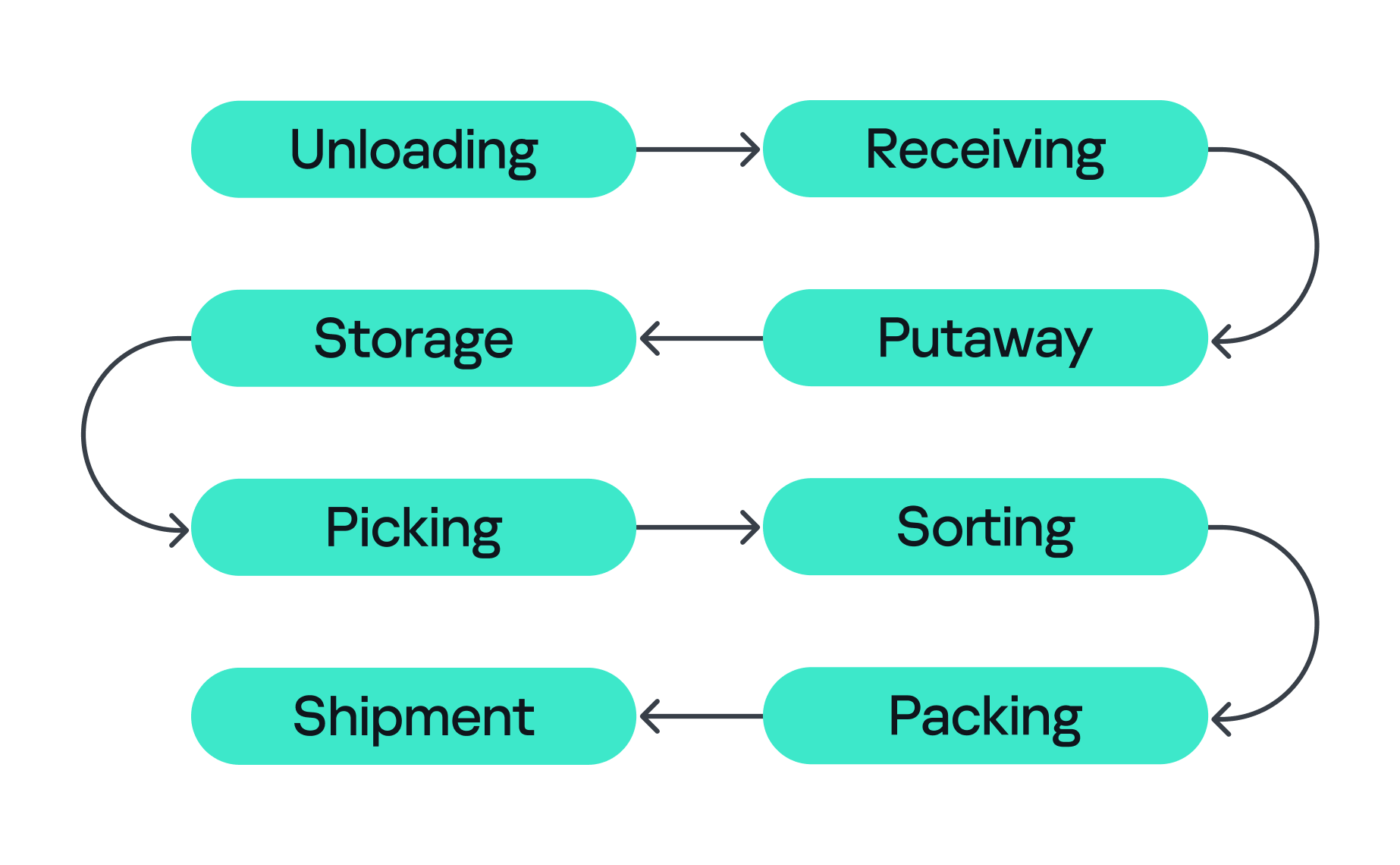
A modern warehouse is a sequence of stages involving many machines and people, all working together to keep the business process stable so that, in the end, your order gets delivered. This process consists of eight main stages, shown in the figure below.
Stages of order fulfillment
So let’s assume we’ve ordered our paper unicorn and are waiting for it at home. Let’s follow our order through all the main stages, from its arrival at the warehouse to the final stop on its journey.
Unloading First, the unicorn arrives in the unloading zone, packed in a big truck. The driver is assigned a gate, for example, via a tablet with kiosk mode enabled, or an outdoor display board, indicating where the truck should park and where the cargo will be unloaded. Even at this very first step, a digital command (the gate number on the screen) is already triggering a physical action. Therefore, incorrectly assigned gates can create a queue, delay unloading, or send goods into the wrong workflow.
Receiving At this stage, employees identify the cargo. They scan a barcode using a portable data terminal (PDT) and the central system receives a message indicating that this object arrives at the warehouse. From this moment, the unicorn exists in two forms at once: as a real box and as a record in the information system. If these two versions diverge, the error is inherited by all subsequent processes.
Putaway Next, the goods are moved into internal storage. Two new devices come into play here. First, a thermal printer, connected to the internal network over Wi-Fi, creates an internal label for each item. Then an employee, forklift, or automated system moves the goods to the assigned bin, often with the help of lifts controlled by PLCs. Both of these devices can be valuable attack entry points: one can let an adversary pivot into the internal network, while the other can give them control over an electric motor.
Storage Then the unicorn goes into storage. Many distribution centers use multi-level mezzanine structures: several floors of metal shelving inside a huge space. They allow efficient use of the building’s height, but at the same time complicate control over the technical infrastructure. Wi-Fi access points, cameras, switches, cables, and sensors may be mounted high overhead or buried deep inside the rows. A forgotten Ethernet cable or misconfigured networked device (access point or switch) left behind in a dark corner can become a convenient initial access point into critical infrastructure.
Picking When the customer places an order, picking begins if the goods were already stored in the warehouse or as soon as they are unloaded. A PDT, workstation, light indicator, or voice terminal directs the employee to the required bin where they pick the goods and move them to the next stage. These devices are themselves potential attack entry points: compromising a workstation or PDT could allow an attacker to manipulate picking information, which could misdirect employees to the wrong bin. Here, both the speed and integrity of the information are critical, and any manipulation or disruption can lead to wrong orders, delays, or problems in subsequent stages.
Sorting At the sorting stage, the warehouse starts to look more like a factory. Boxes move through conveyor belts and pass through different scanners, diverters, and chutes. The sorting plans are usually stored and managed by dedicated servers, while PLCs are responsible for controlling the machinery and executing these plans. For example, when the warehouse management system (WMS) decides that our unicorn should take route A, the control system needs to activate the right diverter at the right moment, sometimes within a fraction of a second.
Packing During packing, an employee or a robotic arm places the goods into the final box, prints the shipping label, and sometimes measures the dimensions and weight of the package. Safety mechanisms usually prevent robotic arms from leaving the controlled zone and harming nearby operators, but their compromise might inflict physical damage on the packages being processed.
Shipment Finally, at the shipping stage, the parcel heads to the gates. Automated guided vehicles (AGVs) and autonomous mobile robots (AMRs) move containers and pallets across the warehouse, while the dock management system coordinates the truck that will carry the unicorn onward to a store, a sorting center, or straight to the customer. These robots are themselves a potential target for attackers. Attacks can be conducted against AGVs and AMRs to interfere with their operation, for example by affecting their navigation or preventing them from reaching their intended destination.
All eight stages are coordinated by the WMS. It looks like a large web application, but in its role it’s closer to the operating system of the entire warehouse: it knows which goods exist, where they’re located, who or what should move them, and where they go next, linking employees, inventory levels, storage addresses, tasks, and orders. It also exchanges data externally: with ERP systems, transport platforms, marketplaces, dark stores, and external carriers.
Surrounding the WMS is an even larger digital ecosystem: identity services, databases, APIs, printers, carrier systems, technicians’ laptops, video surveillance, access control, fire and gas alarms, power supply, and a building management system (BMS).
That is why a single “warehouse network” doesn’t really exist. As we’ve seen, there are many overlapping technologies — IT infrastructure, OT systems, radio, cloud services, building security, and automation — layered on top of one another. A lone vulnerability scanner will never tell you whether a warehouse is secure.
Hunting the unicorn
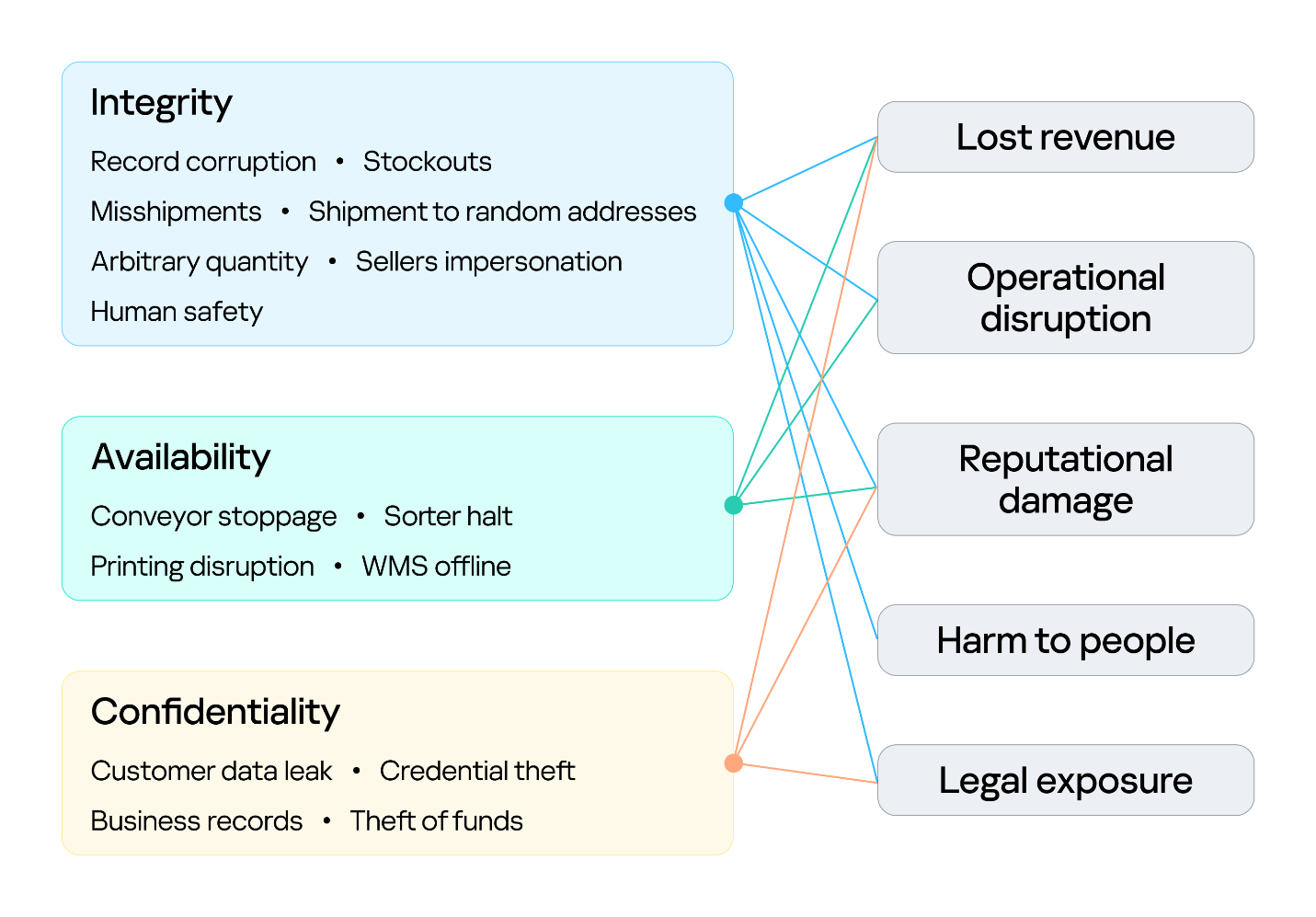
Securing an environment such as a warehouse requires a comprehensive security assessment covering all of its interconnected systems. This involves identifying vulnerabilities across each system and understanding how weaknesses can be combined into attack paths that a real attacker could exploit. But a vulnerability only matters in proportion to what it exposes and who is able to reach it, so before looking at the weaknesses themselves, we need to understand what an attacker in this environment is actually after, because in a warehouse, the blast radius extends well beyond data. Everything we just traced — the systems, the devices, and the people operating them — exists to keep goods moving, and attacks in various parts along that chain can affect the business differently. The chart below shows what is at risk in the warehouse and where those risks land for the business. The segment on the left groups them under the three core security properties: integrity, availability, and confidentiality. The segment on the right maps each property to the business outcomes a failure can cause.
Warehouse risks
The first area at risk is integrity. Inventory counts, locations, orders, and shipment data must stay in sync with the physical world. Corrupting a record silently desynchronizes the operation, and because the eight stages form a dependency chain, one falsified entry early on is inherited downstream, surfacing later as stockouts and mis-shipments. In its deliberate forms, this lets an attacker redirect goods, release stock, and perform other actions on behalf of the platform’s vendors under cover of legitimate records. Integrity is also a safety concern: when people or machines act on information that no longer reflects the physical environment, a data failure can become a physical incident. This is why integrity is the only property linked to all five outcomes, including harm to people.
The second is availability, the warehouse’s ability to keep goods moving. Halting a conveyor, a sorter, label printing, or the WMS stops orders from shipping, and in a business built on speed, every hour of downtime means delayed deliveries and broken promises. Ransomware can bring the whole warehouse to a standstill. The impact shows up as operational disruption, lost revenue, and reputational damage.
The third is confidentiality. Customer data, business records, and system credentials are valuable targets. Their exposure leads to legal liability and reputational damage, and stolen credentials often open the door to further attacks. Where the WMS connects to financial or ERP processes, the risk extends to theft of funds.
Knowing what is at risk tells us what an attacker stands to gain; the next question is who is in a position to take it. Threat actors differ in the access they already hold. For example, an attacker may be authenticated and privileged, have limited physical or remote access, or have no legitimate access to the environment at all. Based on their relationship with the warehouse and their level of access, threat actors can generally be divided into two categories:
External. An attacker with no legitimate relationship with the warehouse or the organization, operating without authorized access. External attackers can be divided into two categories based on their physical proximity to the environment:
Remote. An attacker operating from outside the site’s physical area, reaching the environment through whatever the organization exposes or makes reachable over the internet, including web services, remote access infrastructure, and third-party connections used by suppliers, carriers, and integrators.
Proximate. An attacker with no legitimate access who has nevertheless moved within physical range of the site’s locally reachable technologies. They may, for example, be in a parking lot, a neighboring unit, or a delivery bay. Their proximity may allow them to interact with wireless, radio, Bluetooth, or other short-range interfaces without possessing an account, badge, employment relationship, or other authorized access.
Internal. An individual with legitimate access to the warehouse, its systems, or its information, who intentionally or unintentionally creates a security risk. This includes employees, administrators, operators, contractors, and temporary staff.
Combining these threat actors and their access levels with the risks identified earlier, the vulnerabilities present in each system, the resulting attack surfaces, and the potential attack paths between them provides a threat model for the warehouse environment. This allows an organization to understand how different systems and people could be targeted, how individual weaknesses could be combined, and where security controls are most needed.
Cornering the unicorn
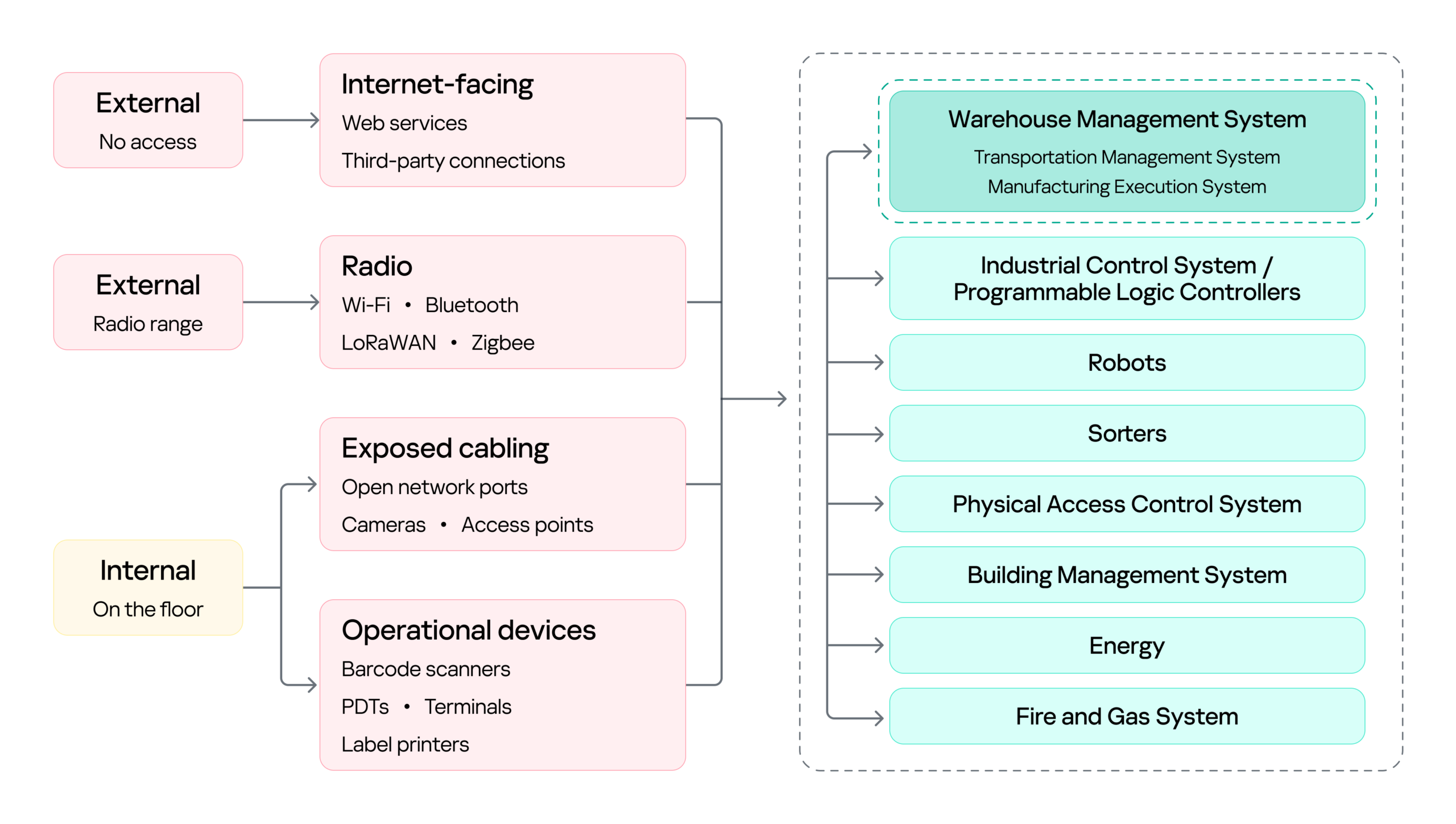
Knowing what is at risk and who might come after it still leaves the most practical question open: how they would actually get in, and how far they could go once they did. The diagram below sets out the warehouse’s attack surface: every point where an attacker can get in, organized by the access that reaching each point requires.
Warehouse attack surface
On the left are the attacker categories discussed above, distinguished by where they stand and what access they already hold. Each reaches the environment through a different set of entry points, and the impact of a successful attack can land on several systems, from the WMS to OT systems such as robots, sorters, and physical access control system (PACS). The WMS is highlighted because it is the most significant of these: it coordinates the OT systems, so compromising it can affect the entire operation rather than a single process.
Next, we will cover the initial access vectors, the points a threat actor can use to reach the warehouse environment. Following that, we turn to the impact on the logistics processes themselves, focusing on the WMS, since its compromise affects every logistics operation that depends on it.
Initial attack vectors
Internet-facing services
Remote access through internet-facing services, third-party connections, and corporate networks gives an external attacker a foothold on the warehouse network infrastructure. It is a well-covered problem and not specific to this environment, so we note it here as an entry point but will not examine it further.
Wi-Fi, Bluetooth, and other radio channels
Wi-Fi connects handhelds, tablets, printers, cameras, and workstations. Bluetooth serves scanners, headsets, and positioning beacons. Zigbee and similar low-power protocols run lighting, sensors, and building automation, while LoRaWAN carries telemetry over long distances. Cellular provides a backup channel for kiosks and contractor equipment, and proprietary protocols control industrial panels and specialized machinery.
Radio passes through windows, gates, roofing, and thin external panels, so a network built for receiving and processing goods may be reachable from the parking lot and, with a directional antenna, from considerably farther away.
That reach matters in two ways. It gives an external attacker a place to start, as proximity alone is enough to reach the Wi-Fi and the low-power protocols, and from there to gain an initial foothold in the warehouse networks.
However, radio does not only lead into the network. It also connects directly to the field devices and carries the live control traffic of warehouse operations, which makes availability a first-order concern. If hundreds of handhelds lose their connection at once, picking stops. If an AGV loses its control channel, the safe reaction may be to halt in place, and a stopped machine can block an entire route.
Physical network
The scale of the warehouse itself is part of the attack surface. A fulfillment warehouse can run up to tens of thousands of square meters, with racking climbing several stories and walkways threading through it. Structured cabling runs along that racking, cameras and access points are mounted on that, and wall jacks sit behind pallets that have not moved in months. Almost none of it is in anyone’s line of sight.
That gives a person in the warehouse something a normal office does not: unsupervised access to live network infrastructure. Unplugging a ceiling camera leaves an active port. An unused jack behind a shelf leaves another. Neither requires tools, credentials, or any interaction with a system that logs anything. And since the camera or access point sits on the same segment as the rest of the site, the compromised port, not being isolated, opens a path to the network core.
Barcode scanners
Barcode scanners are everywhere in a warehouse. They are the main tool workers use to tell the system what is moving and where, supporting receiving, picking, packing, and inventory management. A typical setup has handheld scanners communicating with a base station, which is in turn connected to a workstation or another business system.
This makes the scanner an entry point into the core network in two ways.
First, through the barcode itself. Since the scanner acts as a keyboard to the connected host, a maliciously crafted barcode or QR code can inject keystrokes when scanned, potentially giving the attacker an initial foothold on the host without directly accessing the network.
Second, through the scanner’s wireless link. During a customer engagement, with the provided test stand of such a device, we discovered that an attacker within range could inject keystrokes into the connected host and potentially achieve remote code execution without user interaction. This attack pattern was observed across multiple vendors, including, for example, Honeywell devices affected by CVE-2026-4272.
In both cases, the result is the same: a foothold on a host inside the warehouse network. The scanner is simply the entry point; the significance of that foothold comes from the host’s trusted position within the operational environment and its connectivity to core systems.
Portable data terminals
Portable data terminals (PDTs) are essentially ordinary Android devices with an embedded barcode scanner, carried by workers to scan items; each scan is passed to a dedicated application that forwards it to a remote server over an API. To keep workers on task, the devices usually run in kiosk mode, locking the user to that single application and preventing interaction with the rest of the Android system.
That lockdown is exactly what an attacker wants to break, and breaking it is what turns the terminal into an initial access vector: escaping the kiosk can expose the Wi-Fi password of the network the terminal is connected to, or allow malicious software to be installed that gives the attacker remote access to the network over the internet.
Printers
Warehouses contain different types of printers. Alongside the usual IT printers used for documents and paperwork, there are specialized thermal printers, small devices that use heated elements on the printhead to create labels, barcodes, and tags. As we mentioned earlier, these are mainly used to print the labels, usually containing barcodes, that are attached to goods during the putaway stage.
Here we focus on mobile thermal printers: small, battery-powered devices that workers can carry or wear. They typically connect to the internal network over Wi-Fi to receive print commands, while also supporting Bluetooth for connecting to nearby devices. This combination makes them a potential entry point into the internal network.
Some models, such as the Zebra ZQ630, support multiple interfaces and can run applications directly on the device. During a security assessment, we discovered that apps can be uploaded and executed over Bluetooth. By exploiting a pairing misconfiguration, an attacker within Bluetooth range could bypass pairing, upload malicious software, and gain an initial foothold through the printer.
Impact on logistics processes (attacks on WMS)
With a foothold in the network, an attacker can pivot to the logistics processes themselves: from the WMS through the warehouse infrastructure to the PLCs and the machinery they drive. As we saw earlier, all OT systems and devices are interconnected and the WMS sits at the head of that chain: it is the system of record every other process reads from and writes to, so compromising it reaches all of them at once. That, and its being specific to this environment, is why it is the focus here.
Warehouse management systems (WMS) are the software platforms that optimize warehouse processes from the entry of goods to their exit. They provide real-time visibility into inventory and orchestrate end-to-end fulfillment by integrating with many warehouse subsystems and pieces of automation equipment, such as conveyors, PLCs, robotics, scanners, and voice systems. A typical WMS includes modules for receiving, inventory control, order management, labor management, shipping, and reporting. Major vendors include SAP EWM, Oracle Warehouse Management, Manhattan Active, Blue Yonder, Infor, Körber/HighJump, Microsoft, and TECSYS.
To picture how central this is, think back to our unicorn. From the moment it was scanned at receiving, it stopped being only a physical box and became a record inside the WMS, a record the system then used to decide where it should be stored, when it should be picked, how it should be sorted, and where it should ship. Every device employed along the way — the PDT at receiving, the printer at putaway, the workstation at picking, the conveyor at sorting — was really just talking to the WMS. It is the thread that ties all eight stages together, which is exactly what makes it such a valuable target.
Because modern WMS platforms are usually web-based and heavily interconnected, they inherit common web and API vulnerabilities alongside flaws specific to the WMS itself. A recent example is CVE-2026-70774 in Oracle Warehouse Management, part of Oracle E-Business Suite. Oracle rated it High and described it as an easily exploitable authorization bypass flaw in which a low-privileged attacker with network access can compromise the application, affecting integrity and availability by allowing unauthorized creation, deletion, or modification of critical data.
A flaw like this may look like a typical web application issue, but its consequences in a warehouse are more serious, because the WMS is the system of record. If an attacker can modify its data, they can alter stock levels, bin locations, receiving records, picking tasks, or shipment information, silently corrupting the digital twin of the warehouse. And since the eight stages form a dependency chain, that corruption doesn’t stay contained: a falsified record at receiving is inherited by putaway, picking, and everything downstream. The physical box and its record diverge, and every later process trusts the record.
The most direct version of this attack comes from an authorization bypass flaw like the Oracle vulnerability above. Here the threat actor can be an external attacker who has reached the application over the network, or an insider such as a low-privileged operator or storekeeper who already holds a legitimate account.
The danger grows when such a flaw is chained with others. An external attacker who combines remote code execution with SQL injection could generate shipment orders to arbitrary addresses together with the documents needed for goods to physically leave the warehouse, fabricate waybills, acceptance or transfer records, and registers, while also exposing customer data such as names and delivery addresses. In effect, the goods are sent out with legitimate-looking paperwork.
This is why ordinary web vulnerabilities carry considerable weight in a WMS. For an external attacker or an insider probing beyond their assigned role, broken access control could open a path into another warehouse zone, allow manipulation of other workers’ tasks, permit unauthorized exception operations, or expose administrative APIs. A server-side request forgery flaw could force the WMS server to reach resources an external attacker cannot touch directly, and if the network is flat or only formally segmented, that server may in turn reach internal management panels, cloud service interfaces, or systems sitting close to the operational network, turning a single web bug into a bridge between IT and OT.
Attacks on a WMS don’t always target the application directly, though. As we saw while tracing the unicorn, the warehouse is full of connected devices that already hold trusted access. A handheld terminal carries authenticated WMS API access as a matter of course, and anyone who gains control of that terminal inherits it (by escaping the kiosk, for example). Depending on the device’s permissions, that might mean confirming picks that never occurred, falsifying receiving operations, adjusting stock counts, or marking orders complete — something warehouse employees themselves could use to avoid their assigned duties.
Where the WMS is connected to control and automation systems, access to the WMS can extend into physical operations, including conveyors, sorting systems, lifts, doors, and pumps.
PLCs translate WMS instructions and sensor inputs into physical actions. Compromising a system that controls them therefore creates an opportunity to manipulate those actions. The impact can be as simple as a sorting diverter sending boxes down the wrong route, a conveyor repeatedly entering an error state and creating a backlog, or a falsified sensor value causing a line to be treated as clear when it is full.
However the WMS is compromised, the business consequence is the same: inventory corruption, unauthorized shipments, and operational disruption, each reaching the customer in the end as a late or missing delivery, the wrong item in the box, or a personal address exposed to a stranger.
Securing the unicorn
We followed our unicorn through web applications and databases, radio channels and PDTs, printers, conveyors, robots, and the loading zone. Because warehouse environments combine IT, OT, wireless, physical, and human components, security controls should be implemented as a single, coordinated security architecture rather than as isolated measures. Network segmentation should be a foundational control, with clear separation between corporate IT, warehouse OT, operational devices, management networks, and externally connected systems. Segmentation should also extend across facilities and customer environments so that each site and customer integration is isolated from the others, limiting the potential impact of a compromise. A zero-trust approach should reinforce this architecture by requiring explicit authentication and authorization for connections between systems, regardless of their network location, and by applying least-privilege access wherever possible. Regular penetration testing of the corporate IT environment, including domain services, identity infrastructure, and endpoints, should be incorporated into the warehouse security program.
Physical and network access controls should be implemented together. Access to warehouse facilities, network rooms, communication cabinets, and operational areas should be restricted according to business need, with appropriate authentication, monitoring, and access logging. Network infrastructure should be hardened through controls such as switch port security, MAC-based access restrictions where appropriate, and IEEE 802.1X with EAP-TLS for strong device and user authentication. Network equipment should also be securely configured and regularly reviewed to ensure that unused interfaces, insecure management protocols, default credentials, and unnecessary services are disabled.
Web applications and their supporting infrastructure should be governed through a secure software development lifecycle (SSDLC), including security requirements, secure coding practices, code and dependency review, and application security assessment before deployment and throughout the application’s lifecycle. Third-party applications and components should be continuously monitored and updated, with a defined vulnerability and patch management process. This should explicitly include warehouse management systems (WMS), warehouse portals, APIs, and other applications that provide operational or customer-facing functionality.
Wireless technologies should be subject to dedicated security assessment and engineering. Radio-frequency surveys should be conducted to establish expected coverage, identify unauthorized or unexpected signals, validate the availability and protection of operational communications, and determine whether wireless deployments create unintended access paths into warehouse networks. Wireless security should be assessed not only from a connectivity perspective but also in terms of authentication, encryption, device provisioning, protocol exposure, interference resilience, and the potential impact of unauthorized devices.
Warehouse operational devices should be incorporated into the organization’s endpoint security and vulnerability management processes. Devices should receive security updates and firmware patches on a defined schedule, with accelerated remediation for critical vulnerabilities. Security assessments should be performed periodically to identify weaknesses in device configuration, applications, exposed services, and authentication mechanisms.
Personnel security should form an additional layer of the warehouse security architecture. In most industrial and ICS environments, getting inside means clearing background checks, holding relevant qualifications, or proving prior experience; the hiring process itself acts as a filter. A warehouse is different. Roles in sorting, packing, and courier work are hired quickly and in volume, and they typically require no prior expertise, certification, or specialized background at all. An ordinary person can walk in off the street, be hired within days, and immediately hold legitimate physical access to the facility. Therefore, a more restrictive and risk-based approach to hiring should be considered, particularly for roles that provide access to sensitive areas, operational systems, network infrastructure, or customer assets.
Ultimately, all of these measures serve the same objective: protecting the continuity and reliability of the warehouse as a whole. This matters because real warehouses handle food, medicines, machine parts, and the millions of ordinary things people and companies depend on every day. Protecting their journey means seeing the warehouse as it has actually become: a single digital system with doors, motors, shelving, and radio signals, and with entirely real consequences when it fails. And if the security program works, the customer never knows any of this happened. The unicorn simply arrives at the scheduled time.
If your warehouse operations rely on interconnected systems like these, we can help identify the gaps before an adversary does. Reach out to discuss a security assessment.
A Broadcom Wi-Fi flaw dating back to 2010 allows attackers within Wi-Fi range to execute code on vulnerable routers without authentication.
Researcher Quentin Kaiser presented a talk at Hexacon in Paris documenting a vulnerability in Broadcom’s proprietary 802.11 implementation that has been present in their SDK since at least 2010. The bug allows an attacker to get unauthenticated remote code execution on affected routers without knowing the WiFi password or going through the normal WPS set
A Broadcom Wi-Fi flaw dating back to 2010 allows attackers within Wi-Fi range to execute code on vulnerable routers without authentication.
Researcher Quentin Kaiser presented a talk at Hexacon in Paris documenting a vulnerability in Broadcom’s proprietary 802.11 implementation that has been present in their SDK since at least 2010. The bug allows an attacker to get unauthenticated remote code execution on affected routers without knowing the WiFi password or going through the normal WPS setup process.
As of October 15, 2026, none of the affected devices in Belgium had received a patch.
“A vulnerability affecting Broadcom’s proprietary implementation of 802.11 has been present in their SDK since at least 2010. An incomplete patch was silently released in 2018, followed by Broadcom’s recommendation to move to hostapd instead, making it a definitive forever day on eCos-based platforms (BCM3380, BCM3383, BCM33834) and a potential forever day on Linux platforms (BCM3390, BCM65xx, BCM68xx) unless affected Original Equipment Manufacturers (OEMs) are willing to migrate.” states Kaiser. “The vulnerability can be triggered remotely over WiFi without knowledge of the network key or completion of a normal WPS enrollment. Exploitation provides controlled information disclosure and arbitrary code execution.”
The vulnerability affects the WPS EAP reassembly code, which handles part of the wireless setup process used by many consumer routers. An attacker within Wi-Fi range can exploit the flaw without knowing the Wi-Fi password, completing the setup process, or requiring any action from the user. The attack can expose information and allow the attacker to run code on the router. In his demonstration, Kaiser extracted the Wi-Fi password from the router’s memory and sent it over the wireless connection. He then used the password to connect to the network.
These attacks are not just theoretical. Kaiser demonstrated working exploits against two devices: the Orange Belgium ASKEY TCG3000 and the Proximus Sagemcom F@st/BBOX3V+. Both allowed an attacker to run code without authentication. In one demonstration, the attacker opened a reverse shell using only Wi-Fi frames, without needing a command server accessible over the internet. The attack can work from a distance. The close antenna placement shown in the video was only for the laboratory setup and is not a requirement for the attack.
In the video below, Kaiser exploited an Orange Belgium router (ASKEY TCG3000). The attack allowed him to run code on the device without authentication. The code retrieves the Wi-Fi password (PSK) from the router’s NVRAM and sends it back to the attacker over Wi-Fi. He then used the stolen password to connect to the network, confirming that the exploit works and that the password is correct.
Do not be misled by how close the antenna is in the video. The attack can work over much longer distances.
In the next video, the researcher exploited a Proximus router (BBOX3V+, also known as Sagemcom F@st). This attack also allows code execution without authentication. He used it to open a reverse shell over Wi-Fi frames, without needing a command-and-control (C2) server hosted in the cloud.
Broadcom quietly released an incomplete fix in 2018, then told customers to migrate to a different software stack entirely rather than shipping a complete patch for their own code. On eCos-based platforms, covering chipsets like BCM3380, BCM3383, and BCM33834, that makes this a permanent unfixable bug by design. On Linux-based platforms (BCM3390, BCM65xx, BCM68xx) the situation depends entirely on whether individual manufacturers decide to act.
Kaiser reported the bugs to Broadcom in July 2026. Broadcom said a patch was available and told him to ask the affected device manufacturers to contact Broadcom directly. The company refused to assign a CVE or share the notification it had sent through its customer portal. CERT/CC opened a case but closed it the same day after confirming that Broadcom could assign CVEs itself and had no intention of doing so. This was not a proper disclosure process. It was a dead end, with a paper trail.
Kaiser’s rough calculation, done with Belgian telecom market data, puts the affected device count at around 850,000 for Proximus, 500,000 for VOO’s legacy fleet, and 210,000 for Orange Belgium, totalling somewhere north of 1.5 million potentially exposed gateways in one small country. Telenet may also be affected through Sagemcom devices but Kaiser couldn’t confirm because he couldn’t get hold of one.
The affected manufacturers sell into markets well beyond Belgium. The chipsets in question appear in devices across dozens of vendors and hundreds of products worldwide. Kaiser is publishing a fingerprinting script and a YARA rule specifically to help map the full scope of affected deployments, because right now nobody has a complete picture.
A vulnerability introduced in 2010 and only partly fixed in 2018 still affects routers in use today. Kaiser says AI-assisted analysis helped him find the bugs in less than a week, instead of months. This can help defenders find vulnerabilities faster, but attackers can do the same.
The risk is greatest in targeted attacks where an attacker is within Wi-Fi range, such as hotel network attacks or surveillance of nearby targets. Compromised routers are difficult to monitor, and attackers can quietly intercept or collect network traffic. Most users and security teams rarely check the firmware on ISP-provided routers.
“Although I could have done this research by myself, it would have taken me months to get there. With AI frontier models it took me less than a week.” Kaiser concludes. “Which is a good thing because we can start looking into deeper and deeper layers of our technical infrastructure for a fraction of the cost.”
A 16-year-old flaw in Broadcom’s Wi-Fi software can let attackers within wireless range take control of affected routers without knowing the network password.
Security researcher Quentin Kaiser disclosed the issue at Hexacon in Paris on October 16, 2026, warning that old code remains in widely deployed devices.
According to Kaiser’s research, the flaw has existed in Broadcom’s software development kit since at least 2010. It affects its proprietary Wi-Fi Protected Setup (WPS) implementatio
A 16-year-old flaw in Broadcom’s Wi-Fi software can let attackers within wireless range take control of affected routers without knowing the network password.
Security researcher Quentin Kaiser disclosed the issue at Hexacon in Paris on October 16, 2026, warning that old code remains in widely deployed devices.
According to Kaiser’s research, the flaw has existed in Broadcom’s software development kit since at least 2010. It affects its proprietary Wi-Fi Protected Setup (WPS) implementation. It allows memory leaks and attacker-controlled code execution before normal WPS enrollment finishes.
The flaw sits in code that joins fragmented Extensible Authentication Protocol messages used by WPS. Weak length checks allow crafted wireless messages to overflow a memory buffer.
16-Year-Old Broadcom Wi-Fi Flaw
Attackers can then read or change memory and redirect the router’s program flow to run their own code. This is an over-the-air attack, not a password-cracking method. The attacker needs wireless reach to the target but not its network key.
Kaiser demonstrated stealing the saved Wi-Fi password from an Orange Belgium ASKEY TCG3000 router and sending it back through wireless frames. He then joined the network using the stolen password.
A second demonstration against a Proximus BBOX3V+ provided a remote command shell over Wi-Fi frames without a cloud command server. These tests show why a strong password alone cannot stop exploitation of the affected software.
Kaiser confirmed exploitation on devices used by three Belgian internet providers. These include Proximus BBOX3V+, VOO’s Netgear CG3100 and CG3700, Technicolor TC7210 and CGA4233, and Orange’s ASKEY TCG3000. Possible exposure involving Telenet equipment remains unconfirmed.
His estimates place the affected Belgian fleet at roughly 1.56 million gateways across Proximus, legacy VOO, and Orange. These are researcher estimates, not verified provider totals. He warns that the wider issue could affect millions of access points worldwide, although the full count remains unknown.
The finding follows earlier Broadcom-related wireless security concerns, including the separate Kr00k Wi-Fi vulnerability. The new research concerns WPS message handling rather than that earlier flaw.
Kaiser describes a 2018 patch as incomplete. In correspondence reproduced in his slides, Broadcom said it had long known about the issue and had offered replacement software based on hostapd and WPA Supplicant since 2018. That leaves device makers responsible for moving away from the old implementation.
Kaiser reported the eCos issue on July 18 and the Linux issue on July 27. He says Broadcom declined to assign a CVE, and the tested Belgian devices remained unpatched as of October 15.
His detection toolkit includes a wireless fingerprinting script and YARA rules for firmware checks. These are screening tools, not final proof of exploitability. Findings need further review.
The risk also draws renewed attention to Nearest-Neighbor attacks, where compromised nearby systems provide wireless reach. That case used different methods, but shows why nearby Wi-Fi exposure matters.
Há mais de duas décadas, configurar um roteador doméstico significa seguir praticamente a mesma rotina: escolher uma banda Wi-Fi, dar um nome à sua rede, escolher um tipo de segurança e definir uma senha. Depois de digitar o nome da rede, geralmente aparece ao lado uma opção para ocultar o nome da rede, às vezes identificada como ocultar SSID ou simplesmente como rede oculta ou rede fechada. Se você selecionar essa opção, a rede criada não aparecerá automaticamente na lista de redes Wi-Fi dispon
Há mais de duas décadas, configurar um roteador doméstico significa seguir praticamente a mesma rotina: escolher uma banda Wi-Fi, dar um nome à sua rede, escolher um tipo de segurança e definir uma senha. Depois de digitar o nome da rede, geralmente aparece ao lado uma opção para ocultar o nome da rede, às vezes identificada como ocultar SSID ou simplesmente como rede oculta ou rede fechada. Se você selecionar essa opção, a rede criada não aparecerá automaticamente na lista de redes Wi-Fi disponíveis em smartphones, computadores ou dispositivos de casa inteligente. Será necessário digitar manualmente o nome correto da rede. Somente então o dispositivo poderá localizar essa rede e se conectar a ela. À primeira vista, ocultar o nome da sua rede sem fio pode parecer uma precaução inteligente: impedir que vizinhos ou pessoas que passem pelo local invadam sua rede Wi-Fi, já que simplesmente não conseguem vê-la. Mas, na realidade, as coisas funcionam de maneira diferente: todos os seus dispositivos revelarão a existência da rede oculta, e isso não acontece apenas quando estão em casa.
Como os dispositivos se conectam ao Wi-Fi
Cada ponto de acesso Wi-Fi transmite um pequeno pacote de dados aproximadamente 10 vezes por segundo para que seu smartphone ou computador possa mostrar uma lista com os nomes das redes próximas, como JohnWiFi, TommyNet, CafeDeArts_Guest ou outras variações criativas. Esse pacote contém: (i) o nome da rede (Service Set Identifier, ou SSID), (ii) um identificador exclusivo do ponto de acesso (Basic Service Set Identifier, ou BSSID) e (iii) informações sobre o canal de rádio utilizado pela rede. Essas informações ajudam os dispositivos a (i) escolher a melhor rede para se conectar e (ii) ingressar automaticamente em redes que já conhecem. Por isso, nenhum dos dados desse pacote é criptografado. As redes ocultas também transmitem esses pacotes de anúncio; a única diferença é que deixam o campo SSID em branco. Esse método de localização de redes é chamado de descoberta passiva, pois um cliente Wi-Fi, como um smartphone, por exemplo, precisa apenas escutar as ondas de rádio para identificar os pontos de acesso próximos.
Além disso, o cliente pode procurar redes Wi-Fi por conta própria, em um processo conhecido como descoberta ativa. Seu smartphone ou computador transmite continuamente os nomes das redes Wi-Fi que conhece e às quais gostaria de se conectar. Se uma dessas redes estiver próxima, o ponto de acesso responde e a conexão é estabelecida.
A descoberta ativa pode, às vezes, ajudar a economizar a bateria do smartphone e é indispensável quando se trabalha com redes ocultas. Localizar uma rede oculta e conectar-se a ela torna-se um processo de duas etapas. Primeiro, o smartphone “detecta” que há um ponto de acesso Wi-Fi próximo com um nome de rede oculto. Em seguida, ele tenta acessar essa rede transmitindo os nomes (SSIDs) que já conhece, seja de redes ocultas às quais já se conectou anteriormente, seja do nome que o usuário digitou ao se conectar pela primeira vez a uma rede oculta. Se o nome corresponder, o roteador responde e a conexão é estabelecida.
Um nome de rede oculto (SSID) não oculta de fato sua rede Wi-Fi
A lista comum de redes Wi-Fi disponíveis no smartphone ou computador não exibirá as redes que não transmitem um SSID público. No entanto, qualquer software especializado de varredura de redes Wi-Fi pode identificá-las facilmente, ele apenas não exibirá seus nomes. Além disso, as redes ocultas continuam sendo fáceis de identificar e distinguir umas das outras graças ao BSSID exclusivo de cada roteador.
Portanto, ocultar o nome de uma rede Wi-Fi não a torna realmente invisível e não protege você contra cibercriminosos. Vale observar que qualquer análise em grande escala, como o mapeamento geográfico de redes Wi-Fi, utiliza BSSIDs, e não SSIDs. Além dos enormes bancos de dados mantidos pela Apple e pelo Google, também existem projetos públicos de mapeamento de pontos de acesso, como o WiGLE.
Se alguém quiser invadir uma rede em um local específico, um software especializado permite descobrir seu SSID simplesmente esperando que um dos clientes legítimos se conecte e monitorando a sessão de descoberta ativa. A partir daí, essa pessoa poderá se conectar à rede Wi-Fi, desde que ela utilize um protocolo de segurança suficientemente fraco.
Seus dispositivos expõem nomes de redes Wi-Fi ocultas e dados pessoais
A principal desvantagem de um SSID oculto é que smartphones e computadores precisam transmiti-lo antes de poderem se conectar à rede sem fio. E fazem isso em qualquer lugar, não apenas nas proximidades do ponto de acesso em questão. Assim que qualquer rede com um nome oculto aparece dentro do alcance do sinal, o cliente tenta se conectar e, durante essa tentativa, transmite os nomes de todas as redes ocultas que conhece. Essa transmissão não é criptografada, o que significa que qualquer pessoa nas proximidades pode capturar os dados transmitidos.
Em 2021, pesquisadores da Universidade de Hamburgo realizaram um experimento coletando dados de sinais de rádio em uma rua movimentada. Em apenas três sessões de uma hora de monitoramento, eles coletaram 252 mil solicitações de conexão Wi-Fi provenientes dos smartphones de pessoas que passavam pelo local. Dessas solicitações, 23% continham o SSID de uma rede à qual o smartphone teria preferido se conectar.
E é nesse ponto que entra em cena um fator em que poucas pessoas pensam: o próprio nome da rede. Doze por cento dos SSIDs identificados eram longas sequências numéricas que se pareciam muito com senhas. Assim, quando alguém conhece o SSID e o BSSID, pode consultar o BSSID em um serviço como o WiGLE e descobrir o endereço físico do ponto de acesso. Uma vez no local, um invasor pode tentar usar essa sequência tanto como SSID quanto como senha para se conectar à rede e com uma boa chance de sucesso. A amostra dos pesquisadores também incluiu 106 SSIDs que continham um nome ou sobrenome, 92 SSIDs que indicavam um endereço residencial e três que revelavam um endereço de e-mail.
Diante de tudo isso, não é de surpreender que Apple e Asus recomendem não usar o recurso de SSID oculto.
Outras desvantagens de ocultar sua rede Wi-Fi
Além dos problemas relacionados ao vazamento de dados, a tecnologia de SSID oculto (uma herança das primeiras versões do Wi-Fi) também prejudica o desempenho das versões modernas do protocolo de rádio. Na banda de 6 GHz, procurar uma rede Wi-Fi oculta entre 59 canais possíveis gera muito tráfego e consome muita energia: o cliente precisa percorrer todas as opções e enviar muitas solicitações. Como resultado, o desempenho de todas as redes Wi-Fi próximas na banda de 6 GHz diminui, e o próprio cliente consome mais bateria ao enviar todas essas solicitações.
A Asus também destaca que dispositivos Windows podem tender a se conectar primeiro a redes visíveis, mesmo quando uma rede com SSID oculto está disponível e marcada como preferencial.
Quando ocultar um SSID realmente faz sentido
Não há muitos cenários em que ocultar o nome da rede seja realmente útil. Por exemplo, se um roteador for destinado a um pequeno grupo de pessoas, mas estiver instalado em um local muito movimentado, um SSID oculto pode reduzir o número de tentativas de conexão e diminuir a carga sobre o roteador. Mas lembre-se de que isso melhora o desempenho, não a segurança, e apenas ligeiramente.
Outro caso semelhante é uma rede Wi-Fi técnica destinada a um número limitado de dispositivos fixos, como uma rede de câmeras de segurança ou dispositivos de casa inteligente. Esses dispositivos permanecem sempre no mesmo local, portanto, sempre que tentam se conectar à rede Wi-Fi designada, encontram-na imediatamente e nenhum dado é exposto; a menos que um invasor esteja efetivamente monitorando o sinal de rádio próximo ao roteador. Ao mesmo tempo, é menos provável que pessoas de fora tentem se conectar a uma rede desse tipo.
Como tornar seu Wi-Fi mais seguro
Para proteger sua rede Wi-Fi contra invasores que tentem acessá-la por meio da rede sem fio, não oculte o SSID. Em vez disso, use o moderno protocolo de segurança WPA3 junto com uma senha longa. Os invasores podem interceptar dados transmitidos pelo ar e, em seguida, tentar descobrir a senha por meio de ataques de força bruta. Por isso, uma senha Wi-Fi forte deve ter pelo menos 20 caracteres. A maneira mais fácil de gerar e armazenar senhas longas e difíceis de descobrir é usar um gerenciador de senhas que sincronize entre seus dispositivos. Dessa forma, elas estarão sempre à mão, independentemente do dispositivo que você estiver usando.
Se alguns de seus dispositivos mais antigos não forem compatíveis com WPA3, não há problema em usar WPA2 com Protected Management Frames (PMF) ativado, que protege contra vários tipos de ataques a redes Wi-Fi.
Você também deve se certificar de que o Wi-Fi Protected Setup (WPS) esteja desativado, pois ele basicamente substitui sua senha por um código PIN fácil de adivinhar.
Quanto ao nome da rede, em vez de ocultá-lo, escolha um que não revele seu nome, endereço ou qualquer outra informação pessoal. Também é recomendável evitar nomes de rede padrão, como ISPName-XXXX ou dlink, mas por outro motivo: nomes genéricos como esses podem confundir você e seus convidados. Se não quiser que seu ponto de acesso apareça nos mapas de geolocalização de redes Wi-Fi da Apple, do Google e de outros provedores, você pode adicionar o sufixo _nomap ao final do nome da rede, mas não há garantia de que isso realmente funcionará.
Além de proteger sua rede Wi-Fi, certifique-se de que seu roteador esteja configurado de forma segura de maneira geral. Antes de tudo, isso significa definir uma senha de administrador longa e exclusiva e manter o roteador atualizado com o firmware mais recente disponibilizado pelo fabricante. E, se tiver um pouco mais de tempo, você pode até melhorar o desempenho do seu Wi-Fi.
Como as redes Wi-Fi são invadidas e como protegê-las:
Em 2026, o proprietário de um roteador doméstico comum, de uma smart TV ou de uma TV box é um alvo de grande interesse para os cibercriminosos. Esses dispositivos são facilmente recrutados para botnets e redes de proxy residencial, sobre as quais já falamos anteriormente.
Os criminosos “sublicenciam” o dispositivo infectado, permitindo que terceiros paguem para acessar qualquer site usando o endereço IP da vítima, fazendo parecer que é o proprietário do dispositivo quem está realizando os acesso
Em 2026, o proprietário de um roteador doméstico comum, de uma smart TV ou de uma TV box é um alvo de grande interesse para os cibercriminosos. Esses dispositivos são facilmente recrutados para botnets e redes de proxy residencial, sobre as quais já falamos anteriormente.
Os criminosos “sublicenciam” o dispositivo infectado, permitindo que terceiros paguem para acessar qualquer site usando o endereço IP da vítima, fazendo parecer que é o proprietário do dispositivo quem está realizando os acessos. Esse serviço é procurado para todo tipo de esquema ilícito: desde fraude publicitária e campanhas de spam até tentativas de descoberta de senhas por força bruta e invasão de contas. Em nosso artigo anterior, explicamos como os roteadores domésticos são recrutados para essas redes de proxy; hoje, vamos analisar uma categoria de dispositivos ainda mais vulnerável e igualmente onipresente: smart TVs e TV boxes.
Esses dispositivos atraem os criminosos por dois motivos. Primeiro, ao contrário de computadores e smartphones, as TVs quase sempre ficam conectadas à tomada e têm uma conexão rápida com a Internet. Uma tela apagada não significa que o dispositivo esteja desligado. Além disso, a interface de usuário e as ferramentas de monitoramento limitadas fazem com que processos suspeitos executados em segundo plano possam passar facilmente despercebidos pelos usuários.
A ameaça está evoluindo e se tornando mais agressiva. Um estudo recente constatou que, quando um proxyware chega a um set-top box, os riscos para o proprietário vão muito além de ter o próprio tráfego desviado.
A estratégia de marketing da SuperBox se baseia fortemente na promessa de oferecer milhares de canais de TV sem assinatura nem mensalidades. No entanto, assim que sai da caixa, o dispositivo não é capaz de fazer nada disso. Para ter acesso a conteúdo pirata, é necessário instalar a loja de aplicativos proprietária da marca.
Quando você a abre e instala aplicativos adicionais, os milhares de canais de TV realmente aparecem. Enquanto isso, nos bastidores, sem nenhum aviso ou solicitação de permissão, o dispositivo inunda sites externos com solicitações não autorizadas, e o tráfego de rede aumenta drasticamente.
Os pesquisadores descobriram vários fatos alarmantes. Primeiro, a vítima pode ser incluída simultaneamente em até cinco botnets. A SuperBox executa clientes de várias redes de proxyware ao mesmo tempo, que chegam a competir entre si, bloqueando a instalação de softwares concorrentes.
Mas o verdadeiro choque foram os ataques à rede interna. O proxyware da TV box não impõe nenhuma limitação ao que seus “clientes” pagantes podem fazer na rede. Eles podem acessar não apenas sites externos, mas também dispositivos dentro da sua rede doméstica.
Normalmente, as configurações do seu roteador doméstico e do provedor de serviços de Internet (ISP) protegem você contra ataques externos. Mas o proxyware contorna essas barreiras porque opera de dentro da rede. Durante um experimento, os pesquisadores confirmaram que um invasor na Internet pode facilmente usar o set-top box infectado para abrir o painel de administração de um roteador doméstico, como um Linksys, que deveria estar acessível apenas ao proprietário quando conectado à rede Wi-Fi doméstica. Isso significa que os hackers podem tentar roubar dados de outros dispositivos da mesma residência ou até mesmo criptografar o armazenamento de rede doméstico (NAS).
Ao mesmo tempo, falhas no firmware de fábrica da SuperBox permitem que hackers instalem e executem remotamente qualquer aplicativo com privilégios de superusuário, e essa ameaça está longe de ser apenas hipotética. Durante três semanas de monitoramento, o set-top box usado no teste sofreu mais de 1.300 ataques por meio da rede de proxy doméstica. Os invasores instalaram três tipos diferentes de malware, incluindo um módulo para realizar ataques DDoS.
O malware usa vários métodos para obter acesso ao sistema e permanece ativo mesmo após reinicializações e quedas de energia.
Como saber se seu set-top box está trabalhando para os hackers
Se você tem um set-top box barato ou uma Android TV de uma marca pouco conhecida, vale a pena verificar se há alguma anomalia.
O método mais confiável é analisar o tráfego de rede. Use as estatísticas disponíveis no painel de controle do seu roteador, mas observe que alguns modelos de baixo custo podem não oferecer esse recurso. Nos roteadores Asus, esse recurso é chamado de Traffic Analyzer; nos TP-Link, de Traffic Usage; e nos Keenetic, de Traffic Monitor. Encontre sua TV ou set-top box na lista de dispositivos e verifique a proporção entre os dados baixados e enviados. Esses dispositivos devem consumir muito tráfego para baixar vídeos, mas enviar pouquíssimos dados. Se seu set-top box estiver silenciosamente enviando gigabytes de dados ou permanecer ativo na rede mesmo quando estiver ocioso, esse é um sinal claro de que ele pode estar infectado.
Se as estatísticas de tráfego não estiverem disponíveis, procure sinais indiretos:
Os LEDs de atividade da rede e da memória não param de piscar, mesmo quando ninguém está usando o dispositivo.
O gabinete do set-top box fica constantemente morno ou quente.
A interface apresenta atraso em relação ao controle remoto, e o set-top box trava aleatoriamente, sem relação com a reprodução de vídeos pesados.
A velocidade da Internet nos outros dispositivos (computadores ou celulares) sofre uma queda significativa.
Ao tentar acessar sites conhecidos pela rede Wi-Fi doméstica, você se depara constantemente com um CAPTCHA, um sinal de que sua rede pode estar comprometida e ter sido identificada como fonte de spam.
O suporte técnico do seu provedor de serviços de Internet entra em contato para perguntar sobre um volume de tráfego de rede suspeito.
O que fazer com um dispositivo infectado
A melhor solução é desconectar o dispositivo da Internet e descartá-lo. Se precisar continuar usando-o, siga estas etapas para minimizar os riscos:
Realize uma redefinição de fábrica (hard reset). Restaure o set-top box ao estado original.
Deixe-o desconectado da Internet antes de configurá-lo novamente. Na primeira vez que ligá-lo após a redefinição, ignore a etapa de configuração do Wi-Fi e não conecte o cabo Ethernet.
Bloqueie a instalação de aplicativos. Acesse as configurações do Android e desative a instalação de aplicativos de fontes desconhecidas. Não se esqueça de desativar todos os recursos de depuração que estiverem ativados: depuração USB, depuração sem fio e ADB. Os nomes dos itens de menu podem variar de acordo com a versão do Android e o fabricante do dispositivo.
Isole-o na rede. Configure uma rede Wi-Fi para convidados no roteador e conecte a TV box a ela. Ative o isolamento de clientes (Client Isolation) nas configurações do roteador, se esse recurso estiver disponível. Isso impedirá que a TV box detecte outros dispositivos da sua rede doméstica, protegendo seus computadores e o armazenamento de rede.
Verifique se há atualizações. Depois que a TV box estiver conectada à rede para convidados, verifique se há atualizações oficiais de firmware. Às vezes, os fabricantes corrigem vulnerabilidades conhecidas, embora não seja recomendável contar com isso no caso de marcas pouco conhecidas.
Suas medidas de proteção mais confiáveis
Comprar dispositivos baratos com recursos de streaming de conteúdo pirata e instalar softwares de fontes duvidosas é uma maneira praticamente certa de comprometer sua rede doméstica. Seu endereço IP se tornará uma fonte de atividade maliciosa, o que, na melhor das hipóteses, fará com que seu provedor de serviços de Internet bloqueie seu acesso e, na pior das hipóteses, fará com que você entre no radar das autoridades policiais. Além disso, os hackers podem usar a TV box como ponto de partida para atacar seus computadores e NAS domésticos, o que pode levar ao roubo de dados pessoais ou a um ataque de ransomware.
A melhor proteção é comprar dispositivos de marcas confiáveis e pagar por conteúdo legal. Além disso, para evitar que alguém assuma o controle da sua rede, certifique-se de que o painel de administração do roteador e os outros dispositivos domésticos estejam protegidos por senhas fortes e exclusivas. Para não precisar memorizar todas elas, use um gerenciador de senhas confiável, como o Kaspersky Password Manager. Além disso, o recurso Smart Home Monitor incluído no Kaspersky Premium permite manter todos os seus dispositivos sob controle.
Talvez haja outras coisas que você não saiba sobre seus dispositivos de casa inteligente:
Pesquisadores de segurança descobriram uma maneira de hackear um Boeing 737 com um dispositivo do tamanho de uma moeda. O 737 é um dos aviões comerciais mais utilizados no mundo, então, é bem provável que você já tenha voado em um pelo menos uma vez.
O ataque requer a instalação de um pequeno dispositivo em uma porta acessível por uma escotilha na parte externa do avião. Segundo os pesquisadores, essa porta frequentemente está ao alcance não apenas das equipes de manutenção, mas também de outros
Pesquisadores de segurança descobriram uma maneira de hackear um Boeing 737 com um dispositivo do tamanho de uma moeda. O 737 é um dos aviões comerciais mais utilizados no mundo, então, é bem provável que você já tenha voado em um pelo menos uma vez.
O ataque requer a instalação de um pequeno dispositivo em uma porta acessível por uma escotilha na parte externa do avião. Segundo os pesquisadores, essa porta frequentemente está ao alcance não apenas das equipes de manutenção, mas também de outros funcionários do aeroporto e da companhia aérea. E a instalação do dispositivo leva menos de 60 segundos. Então, vamos falar sobre o que é, de fato, esse pequeno e misterioso dispositivo, o que ele é capaz de fazer e se ainda é seguro viajar em um Boeing 737.
Por que é mais difícil hackear um avião do que um carro
A maioria de nós já se acostumou com a ideia de que nossos computadores e celulares podem ser invadidos. Esse provavelmente é o assunto mais comum neste blog. Mas também abordamos ataques a alvos menos comuns: carros, robôs cortadores de grama, embaralhadores automáticos de cartas, bicicletas e até colchões. No mundo de hoje, todos esses (e muitos outros) dispositivos contêm computadores minúsculos (ou não tão minúsculos).
Os aviões não são exceção. Uma aeronave comercial moderna é equipada com uma série de computadores, alguns dos quais controlam funções críticas, desde o cálculo dos parâmetros de decolagem até o próprio controle do voo. Mas há uma diferença fundamental: ao contrário dos fabricantes da maioria dos dispositivos inteligentes para uso doméstico, os fabricantes de aeronaves comerciais levam a segurança muito a sério, o que torna muito mais difícil acessar esses sistemas externamente.
Talvez seja por isso que há alguns anos, a ideia de invadir um avião de verdade tenha despertado a curiosidade dos pesquisadores de segurança mais curiosos. Uma equipe da Universidade da Califórnia em San Diego e do Oberlin College (os pesquisadores que finalmente conseguiram realizar o feito) passou mais de uma década tentando solucionar esse problema. Como mencionado acima, o principal desafio ao hackear um avião é que seus sistemas críticos não estão conectados à Internet externa. Por isso, estudar vetores de ataque relacionados a aeronaves não era considerado especialmente promissor na comunidade de pesquisa em cibersegurança: acessar remotamente sistemas isolados é extremamente difícil, e as chances de um invasor obter acesso físico eram consideradas muito baixas.
Dois outros projetos bem-sucedidos fizeram os pesquisadores da UC San Diego Kirill Levchenko e Aaron Schulman mudarem essa percepção: um hack de um Chevrolet Impala e uma pesquisa sobre dispositivos de clonagem de cartões de pagamento. O hack do carro levou a equipe a comprar componentes usados de computadores de bordo de Boeing 737 e montar sua própria bancada de testes. A pesquisa sobre dispositivos de clonagem deu a eles a ideia de criar um pequeno dispositivo físico que pudesse ser conectado diretamente aos sistemas internos da aeronave.
Em sua bancada de testes, os pesquisadores verificaram o que aconteceria caso se conectassem ao barramento ARINC 429 por meio dessa porta e enviassem sinais elétricos mais potentes do que os normalmente trocados entre os componentes do Boeing. Eles descobriram que isso permitia substituir comandos legítimos pelos próprios comandos. A partir daí, só faltava construir um dispositivo pequeno o suficiente para caber na porta que haviam encontrado.
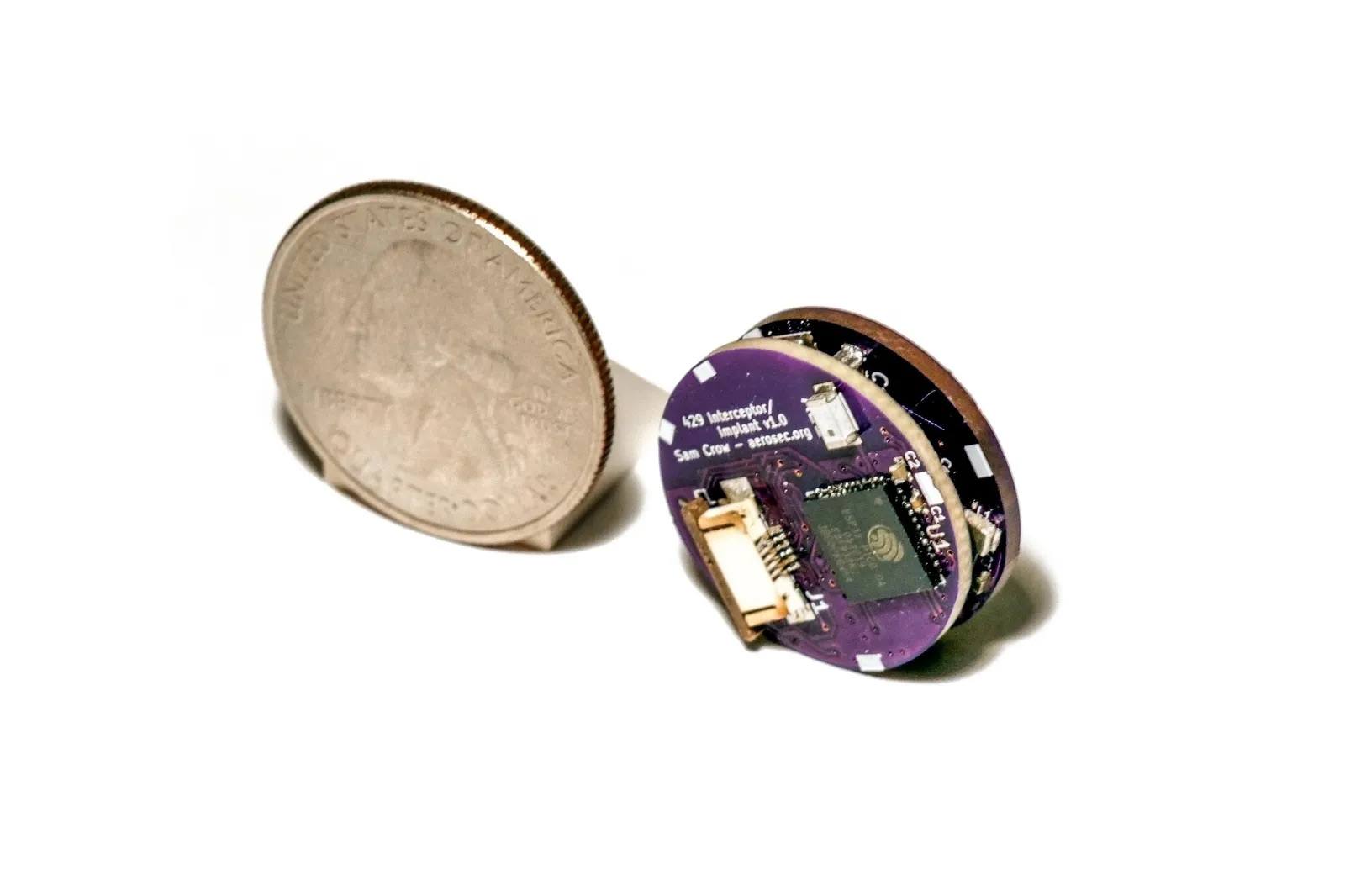
Passo a passo, a equipe construiu um dispositivo compacto o suficiente para ser encaixado na porta desprotegida. A versão final custou menos de US$ 100 e parece ter sido construída principalmente com componentes disponíveis no mercado: um pequeno microcontrolador, componentes eletrônicos para se comunicar com o barramento e um módulo Wi-Fi. Essa última parte poderia permitir que o dispositivo se conectasse à rede Wi-Fi pública disponível durante o voo, dando ao invasor acesso pela Internet e, por fim, permitindo que ele controlasse o dispositivo remotamente. E todo o processo de instalação na porta leva menos de um minuto.
O dispositivo que os pesquisadores construíram para se conectar aos sistemas do Boeing 737. Uma moeda é colocada ao lado para dar uma ideia da escala. Foto: UC San Diego Jacobs School of Engineering. CC BY 4.0. Fonte
Os pesquisadores deram ao ataque o nome de “Bus Driver”, aparentemente em um jogo de palavras: “bus” se refere tanto a um veículo de transporte de passageiros quanto ao canal de dados que permite a comunicação entre os componentes de um sistema. O ataque permite que alguém se insira nesse canal e substitua os comandos que estão sendo enviados, assumindo, na prática, o controle do barramento.
O que o dispositivo improvisado de hacking do Boeing 737 é capaz de fazer
Uma porta desprotegida, um dispositivo do tamanho de uma moeda e acesso ao barramento: tudo isso parece promissor, mas o que os pesquisadores conseguiram fazer de fato? Que tipo de dano esse pequeno dispositivo pode causar? Ao que tudo indica, bastante. E potencialmente, até mesmo fatal. Ao obter a capacidade de adulterar os dados que trafegam entre o computador de gerenciamento de voo e a unidade de controle e exibição, os pesquisadores descobriram que poderiam interferir em vários aspectos críticos da operação da aeronave.
Pesquisadores testando o Bus Driver em equipamentos aviônicos reais de um Boeing 737. A interface do ataque está em execução na tela da MCDU. Foto: UC San Diego Jacobs School of Engineering. CC BY 4.0. Fonte
Primeiro, o dispositivo implantado pode alterar os dados usados para calcular os parâmetros de decolagem e pouso. Por exemplo, ele pode alterar o peso da aeronave sem combustível registrado, o que distorce o cálculo das velocidades necessárias para uma decolagem segura.
O dispositivo também pode manipular a temperatura presumida, que pilotos usam para determinar quanto empuxo do motor é necessário durante a decolagem. Se o sistema receber valores incorretos, em determinadas condições a aeronave pode ficar com empuxo insuficiente para decolar com segurança, podendo até mesmo ultrapassar o final da pista. Cálculos incorretos durante o pouso também apresentam riscos igualmente sérios.
O dispositivo implantado também pode alterar a rota que o piloto automático está seguindo. Em um voo de longa duração, um desvio de apenas alguns graus, sutil o suficiente para passar despercebido, poderia fazer a aeronave se afastar muito da rota e ficar sem combustível em algum ponto sobre o oceano.
Além disso, um invasor poderia usar o dispositivo para conduzir a aeronave para o espaço aéreo de um país que não faça parte de sua rota de voo autorizada. Esse tipo de desvio também pode causar tragédias: a história da aviação civil registra mais de um caso em que um avião de passageiros foi abatido por engano por forças militares após entrar em espaço aéreo restrito.
É claro que as chances de um desvio como esse passar despercebido pelos pilotos e pelo controle de tráfego são muito baixas, mas os desastres tendem a acontecer exatamente quando ocorrem vários erros humanos.
Depois de instalado, o dispositivo fica praticamente invisível dentro da porta e é muito difícil de detectar, a menos que se saiba o que procurar. Fonte
Por fim, o dispositivo não apenas permite que alguém altere os parâmetros de voo, como também permite ocultar essas alterações dos pilotos. Por exemplo, um invasor poderia carregar uma nova rota no computador de voo e, ao mesmo tempo, alterar o que é exibido na MCDU, fazendo com que os pilotos continuem vendo a rota original.
Dito isso, os pesquisadores observam que, na maioria dos casos, uma tripulação atenta perceberia a discrepância. Os dados corretos continuam sendo exibidos em outras telas da cabine de comando, e passar para o controle manual permite que os pilotos desativem o piloto automático e retomem o controle da aeronave.
Então, devemos todos passar a viajar de trem?
Para encerrar, vou tentar tranquilizar quem sofre de aerofobia há muito tempo, e quem quer que este artigo tenha acabado de deixar com medo de voar. Os próprios pesquisadores afirmam que, apesar de tudo o que descobriram, continuam voando em Boeing 737. E, para evitar causar qualquer problema no mundo real, eles deliberadamente não revelaram exatamente qual porta usaram em seus experimentos.
Os pesquisadores também entraram em contato com a Boeing em 2020 para compartilhar suas descobertas. A Boeing levou as informações a sério e trabalhou para solucionar o problema.
Especificamente, os pesquisadores sugeriram que a Boeing removesse a porta vulnerável ou a selasse com resina epóxi, impedindo fisicamente que alguém pudesse conectar um dispositivo não autorizado. Também há opções mais complexas, como redesenhar as proteções elétricas do barramento interno para impedir que um dispositivo malicioso se sobreponha aos sinais legítimos e usar sistemas capazes de detectar esse tipo de ataque.
A longo prazo, os pesquisadores recomendam que a Boeing, assim como outros fabricantes de aeronaves, adote autenticação criptográfica para as mensagens trocadas entre os componentes aviônicos.
Não se sabe publicamente se a Boeing seguiu essa recomendação específica ou adotou suas próprias medidas para solucionar o problema. Quando os repórteres da Wired perguntaram à empresa sobre o assunto, a resposta foi bastante vaga:
“Nossos especialistas técnicos estão confiantes de que as camadas de proteção existentes na aeronave, incluindo as incorporadas ao projeto do sistema e ao ambiente operacional, oferecem mitigação suficiente para limitar significativamente a viabilidade e o risco de ataques no mundo real.”
Então, não: aparentemente, ainda não há motivo para deixar de voar em Boeing 737. Dito isso, tenho muito respeito pelos trens, então também não vou tentar convencer você a não viajar de trem nem a usar outras formas de transporte. Na verdade, já escrevi sobre hacking de trens neste blog, embora, nesse caso, o objetivo tenha sido construtivo, e não destrutivo.
Graham gets a phone call from the police. Well, someone who sounds convincingly like the police. There's just one small problem: what they really want is the 24-word seed key to Graham's cryptocurrency wallet.
Meanwhile, if you've stayed in a hotel recently, the free Wi-Fi you connected to might have come with an unexpected extra: an all-you-can-eat buffet of "Captive Crunch" for a Russian intelligence-linked hacking group.
And a group calling itself the "ExFilSquad" has walked off with 6
Graham gets a phone call from the police. Well, someone who sounds convincingly like the police. There's just one small problem: what they really want is the 24-word seed key to Graham's cryptocurrency wallet.
Meanwhile, if you've stayed in a hotel recently, the free Wi-Fi you connected to might have come with an unexpected extra: an all-you-can-eat buffet of "Captive Crunch" for a Russian intelligence-linked hacking group.
And a group calling itself the "ExFilSquad" has walked off with 600,000 records of the UK's teachers and head teachers from the Department for Education — sending an unusually polite ransom demand.
All this and more in episode 479 of the "Smashing Security" podcast with cybersecurity expert and keynote speaker Graham Cluley, and special guest Danny Palmer.
Microsoft has warned that hotel, conference, and other hospitality Wi-Fi networks are being actively abused by a Russian group to target travelers worldwide. The campaign, dubbed “CaptiveCrunch” turns a routine Wi-Fi login moment into an opportunity to compromise corporate accounts and devices.
From the user’s perspective, nothing looks out of the ordinary: they connect to hotel Wi-Fi, get the usual captive portal prompt, and perhaps see a familiar‑looking message about needing to update some
Microsoft has warned that hotel, conference, and other hospitality Wi-Fi networks are being actively abused by a Russian group to target travelers worldwide. The campaign, dubbed “CaptiveCrunch” turns a routine Wi-Fi login moment into an opportunity to compromise corporate accounts and devices.
From the user’s perspective, nothing looks out of the ordinary: they connect to hotel Wi-Fi, get the usual captive portal prompt, and perhaps see a familiar‑looking message about needing to update something before they can browse. However, behind the scenes, the allegedly state-linked group position themselves in the network path and manipulate DNS (Domain Name System) and HTTP traffic from captive‑portal Wi-Fi.
From there, several things can happen:
Logins are stolen: The user’s browser session is redirected to attacker‑controlled phishing pages, like fake Microsoft login prompts, where credentials, device codes, or OAuth tokens are harvested.
Malware is downloaded: The user is presented with fake update or ClickFix dialogs that download malware. In these cases, usually a remote access trojan (RAT) plus an infostealer.
A machine-in-the-middle attack (MitM) where traffic is quietly proxied through attacker infrastructure, putting the user in a position for further credential theft.
Reportedly, one of the main malware strains used in these attacks is called CornFlake, a remote access trojan (RAT) that can capture webcam images, microphone audio, and keystrokes.
The infostealer was identified as ChocoShell, a fileless Powershell-based information stealer which primarily goes after browser session cookies, saved passwords, Microsoft 365 Single Sign-On (SSO) tokens, and Wi-Fi credentials from compromised systems.
Microsoft lists a set of fake dialogs that may appear once you connect to compromised Wi‑Fi:
winupdate: A bogus Windows Update window with “Working on updates… Don’t turn off your computer.”
defender: A fake Windows Security virus scan.
directx: “DirectX End‑User Runtime Web Installer.”
vcredist: A Microsoft Visual C++ redistributable installer.
sysopt: A disk optimization utility.
netfix: A Windows Network Diagnostics ‘fix’ tool.
browser: A browser update prompt.
pdfview: A document/PDF viewer installer.
How to stay safe
Malwarebytes has long warned about the safety of public Wi-Fi. Here’s how you can stay safe while traveling:
Use your own phone’s hotspot instead of using the public Wi‑Fi. A mobile connection, especially with an eSIM and a reputable carrier, significantly reduces the likelihood of an attack compared to an unknown hotel network.
If you’re forced to use public Wi‑Fi, use a VPN with an active Kill Switch: Complete the authentication on the hotel portal first, then launch your VPN before opening any website or app. The Kill Switch feature will instantly block all internet traffic if the VPN disconnects even for a second, preventing cybercriminals from injecting malicious code out in the open. While CaptiveCrunch operates around captive portals and pre‑VPN flows, a VPN still reduces other risks and limits passive data collection once you’re online.
Always inspect the certificate of any public Wi‑Fi login or ‘security’ portal that asks for more than a room number or basic credentials. These aren’t always a straight‑up giveaway, but sometimes they can be an obvious clue: mismatched hostnames, untrusted issuers, or plain HTTP are red flags that should stop you from proceeding.
Many captive portals ask for an email address for registration or marketing. Even in benign cases, there is little value in handing over your real inbox. If you must provide an address, consider giving a fake one or a throwaway alias that is unrelated to your primary accounts.
If you are asked to download software, a certificate, a browser update, or a fix tool in order to connect, stop. You should never have to download anything just to log into Wi‑Fi.
Don’t rush to follow instructions on a webpage or prompt, especially if it asks you to run commands on your device or copy-paste code. Be cautious of pages urging immediate action: sophisticated ClickFix pages add countdowns, user counters, or other pressure tactics to make you act quickly.
Secure your devices. Use an up-to-date, real-time anti-malware solution with a web protection component.
Avoid entering Microsoft 365, Google Workspace, or other high‑value credentials directly into any page reached via captive portal redirection. If you need to check corporate mail, follow known URLs rather than clicking through prompts.
And last but not least, update your browser, operating systems, and other important software before you travel. That reduces the chance of getting legitimate update requests while you’re away.
From reporting threats to removing them.
Cybersecurity risks should never spread beyond a headline. Keep threats off your devices by downloading Malwarebytes today.
A Copa do Mundo de 2026 é um dos eventos de futebol mais aguardados do ano. O torneio será sediado em três países: EUA, Canadá e México. Infelizmente, eventos desse porte atraem não apenas torcedores, mas também golpistas de todo o mundo. Já revelamos como os cibercriminosos estão se preparando para a Copa do Mundo e hoje estamos falando sobre segurança digital para os torcedores no México.
O país sediará 13 partidas e receberá milhões de turistas. Eles ficarão hospedados em hotéis, assistirão a
A Copa do Mundo de 2026 é um dos eventos de futebol mais aguardados do ano. O torneio será sediado em três países: EUA, Canadá e México. Infelizmente, eventos desse porte atraem não apenas torcedores, mas também golpistas de todo o mundo. Já revelamos como os cibercriminosos estão se preparando para a Copa do Mundo e hoje estamos falando sobre segurança digital para os torcedores no México.
O país sediará 13 partidas e receberá milhões de turistas. Eles ficarão hospedados em hotéis, assistirão a jogos, frequentarão restaurantes, transitarão por aeroportos e visitarão pontos turísticos populares, e em todos os lugares que forem, a tentação de se conectar a redes Wi-Fi públicas será grande.
Avaliamos mais de 84.500 (!) pontos de acesso Wi-Fi públicos na Cidade do México, em Guadalajara e em Monterrey, e temos muitas informações para compartilhar sobre a segurança deles. Alerta de spoiler: muitas redes ainda usam padrões de segurança desatualizados, então, você realmente não deve sair de férias sem proteção confiável e um eSIM.
O que foi testado e de que forma
Percorrer o México a pé à procura de pontos de acesso Wi-Fi públicos teria sido um pouco complicado, embora tenha sido exatamente isso que fizemos num estudo semelhante sobre a segurança de redes Wi-Fi em Paris. Você pode conferir os resultados desse estudo na postagem Como é a segurança das redes Wi-Fi em Paris?
Dessa vez, a missão era muito mais desafiadora: mapear o cenário de redes sem fio de três grandes metrópoles. Foi por isso que recorremos ao wardriving, ou seja, usamos um smartphone ou notebook para buscar e registrar redes sem fio de dentro de um veículo em movimento. Isso é parecido com o que seu telefone faz ao procurar redes Wi-Fi próximas constantemente. Porém, em vez de nos conectarmos a elas, apenas coletamos dados.
Todas as informações foram estritamente usadas para observação passiva e análise de infraestrutura. Os especialistas da Equipe de Pesquisa e Análise Global da Kaspersky (GReAT) coletaram apenas informações de serviço transmitidas publicamente. Não houve tentativas de autenticação, interceptação de tráfego, exploração de sistemas ou interação com as redes sem fio detectadas. Os pontos de acesso móveis implementados em carros e em dispositivos móveis foram excluídos da amostra.
Nosso principal alvo era a Cidade do México, a capital do país e uma das cidades com maior densidade demográfica da América Latina. Percorremos de carro alguns dos pontos turísticos mais populares da cidade: Estádio da Cidade do México, Aeroporto Internacional, Zócalo, Paseo de la Reforma, Colonia Roma, La Condesa, Polanco e Coyoacán.
Percorremos rotas semelhantes em Guadalajara e Monterrey: estádios, avenidas principais, aeroportos e bairros populares. Abaixo, é possível ver um mapa de calor das áreas que percorremos. As regiões em vermelho representam as áreas de maior densidade de pontos de acesso público, passando pelas regiões em amarelo e verde, até chegar nas azuis, que representam a concentração mais baixa.
Mapa de calor mostrando a localização de todos os pontos de acesso Wi-Fi encontrados na Cidade do México
Mapa de calor mostrando a localização de todos os pontos de acesso Wi-Fi encontrados em Guadalajara
Mapa de calor mostrando a localização de todos os pontos de acesso Wi-Fi encontrados em Monterrey
Usamos reconhecimento passivo por rádio para registrar 84.500 sinais e 69.500 identificadores de rede exclusivos nessas três cidades. A maioria dos sinais foi captada na Cidade do México (61,4%), seguida por Guadalajara (23,6%) e Monterrey (14,8%).
O que analisamos:
Identificadores de rede sem fio (SSIDs): os nomes que aparecem na lista de redes Wi-Fi disponíveis
Informações obtidas desses identificadores
Configurações padrão do roteador e como os ISPs implementam suas redes
Frequências usadas e características do sinal
Carga dos canais e uso do espectro de radiofrequência
Configurações de segurança das redes sem fio:
Redes abertas e inseguras
Redes com WPS ativado
Redes seguras (WPA2/WPA3) com WPS ativado
Você pode encontrar a versão completa do estudo no blog Securelist.
Nomes de pontos de acesso Wi-Fi públicos reveladores
Os nomes das redes (SSIDs) podem revelar muitas informações de forma involuntária sobre os fabricantes do hardware, ISPs e métodos de implementação, além de revelar se um ponto de acesso pertence a uma empresa ou a um usuário.
Cerca de 34% das redes Wi-Fi públicas registradas nem sequer alteraram seus nomes, mantendo os SSIDs originais dos fabricantes dos roteadores ou usando convenções de nomenclatura padrão dos seus ISPs. Essa pode ser uma informação bastante útil para atacantes, pois esse tipo de nome de rede permite que eles saibam qual ponto de acesso pertence a determinado provedor, qual hardware está sendo usado e a sua configuração padrão provável.
Outro fato preocupante é o grande número de redes Wi-Fi (mais de 30%) que usam o endereço MAC do ponto de acesso (BSSID) como nome da rede visível. Os primeiros bytes de um BSSID contêm um Identificador organizacional único (OUI) que revela quem é o fabricante do roteador. Essa é uma informação útil para pessoas mal-intencionadas: elas podem descobrir quem fabricou o hardware e testar vulnerabilidades específicas relativas aos modelos dessa marca.
O Wi-Fi do México está bem protegido?
Pode-se considerar que um ponto de acesso protegido com WPA2/WPA3 está mais ou menos seguro. Todos os outros mecanismos de autenticação produzem resultados muito mais fracos. Agrupamos as redes Wi-Fi públicas em quatro categorias:
Seguras (WPA2/WPA3)
Inseguras (abertas/WEP)
Fracas (WPA)
Indeterminadas
Os resultados obtidos nas três cidades são muito parecidos: cerca de 82% de todos os pontos de acesso analisados estão protegidos por padrões seguros. O protocolo WPA, que é inseguro e está desatualizado, quase não é utilizado. No entanto, mais de 10% dos pontos de acesso são completamente inseguros. Quem se conecta a essas redes corre o risco de ser vítima de interceptação de tráfego e vigilância oculta.
Mas a segurança não é avaliada apenas pelos protocolos WPA. Também verificamos a presença do WPS, o conhecido recurso que possibilita a conexão rápida a uma rede sem necessidade de senha e que é altamente vulnerável a ataques. Descobriu-se que o WPS está ativado em 47% dos pontos de acesso na Cidade do México (quase a metade), 43% em Guadalajara e 41% em Monterrey. Em média, 45% dos pontos de acesso são potencialmente vulneráveis a ataques relacionados ao WPS, o que representa um sacrifício à segurança em nome da conveniência.
Além disso, esse recurso permaneceu ativo com frequência até mesmo em redes WPA2/WPA3 aparentemente seguras (cerca de metade delas utilizava WPS). Isso mostra que, para que um ponto de acesso Wi-Fi seja considerado seguro, não basta ter WPA2/WPA3, pois recursos adicionais, como o WPS, ainda podem viabilizar ataques.
O que mais os turistas precisam saber
Os riscos digitais em uma viagem não se limitam apenas a redes Wi-Fi públicas, especialmente porque muitas pessoas estão migrando do Wi-Fi público para um eSIM. Ainda há muitas ameaças em lugares com grande movimentação de pessoas: carregadores USB públicos, códigos QR com links trocados, ataques por meio de NFC e Bluetooth e, é claro, táticas de engenharia social. Vamos nos aprofundar em cada um desses fatores.
Estações de carregamento. Os carregadores USB públicos também podem ser perigosos: pessoas mal-intencionadas podem obter acesso aos dados no seu dispositivo ou tentar instalar um malware. Detalhamos esses ataques na nossa postagem Roubo de dados durante o carregamento do smartphone.
Códigos QR perigosos. Os criminosos podem disseminar códigos QR contendo phishing em pontos turísticos populares. Os pretextos podem variar bastante; por exemplo, anúncios de “eventos” para torcedores de um time específico ou links que supostamente oferecem descontos ou exibem cardápios de restaurantes. Na realidade, qualquer código QR postado na rua pode ser considerado inseguro por padrão, e você não deve utilizar seu smartphone para lê-los, a menos que tenha um Analisador de ameaças de códigos QR instalado.
Transmissões, ingressos e bolões falsos. Em postagens anteriores, descrevemos casos em que pessoas mal-intencionadas estavam distribuindo malware por meio de aplicativos IPTV falsos para aproveitar da empolgação em torno da Copa do Mundo de 2026. Lembre-se, mesmo que você planeje assistir aos jogos em casa, ainda precisa ficar alerta e não confiar em qualquer site que anuncie transmissões gratuitas, ofereça bolões ou prometa pagamentos bastante generosos.
Apesar da prevalência de pontos de acesso Wi-Fi públicos WPA2/WPA3 seguros na Cidade do México, em Guadalajara e em Monterrey, nosso estudo mostra que as redes Wi-Fi públicas continuam vulneráveis. Também é importante lembrar que os invasores podem criar redes falsas (as chamadas gêmeas do mal) disfarçadas de redes Wi-Fi públicas legítimas em aeroportos, hotéis, cafeterias e pontos turísticos.
É quase impossível para um usuário comum dizer o quanto um ponto de acesso específico é seguro ao tentar se conectar a ele. É por isso que a opção mais segura é usar dados móveis para acessar a Internet, eliminando por completo a necessidade de Wi-Fi. Além disso, não há necessidade de pesquisar as leis locais, tarifas e outras informações relativas a redes móveis para cada país que você planeja visitar. Basta comprar um cartão eSIM global on-line em dois cliques. Explicamos como facilitar todo esse processo na postagem Internet móvel com a Kaspersky eSIM Store.
Se você ainda planeja usar uma rede Wi-Fi pública, sempre use uma VPN para proteger seu dispositivo e dados ao se conectar a redes Wi-Fi desconhecidas e desprotegidas. Isso cria um túnel criptografado entre o seu dispositivo e o servidor VPN, impossibilitando a interceptação dos seus dados ao longo do caminho. Ainda não escolheu uma VPN? Experimente a Kaspersky Secure Connection, que está incluída nas assinaturas do Kaspersky Premium e do Kaspersky Plus.
Agora, se você ainda planeja participar da Copa do Mundo sem nenhuma solução de segurança cibernética, pelo menos siga estas regras básicas de higiene digital:
Não use carregadores USB públicos
Não envie informações confidenciais por conexões que não são seguras
Não faça login em contas bancárias, e-mail ou redes sociais por meio de redes Wi-Fi inseguras
Desative o Bluetooth e o NFC ao frequentar lugares com grande movimentação de pessoas
Não confie nos códigos QR postados na rua
Somente se conecte a um Wi-Fi público quando for absolutamente necessário
Leia também os seguintes artigos e garanta que torcer pelo seu time favorito não seja apenas emocionante, mas também seguro:
Introduction
Mexico is one of the host countries for the 2026 FIFA World Cup, with matches to be played in three major cities: Mexico City, Monterrey, and Guadalajara. These locations are expected to see a large influx of international visitors, increasing the potential security risks. Many of those risks arise from users connecting to public wireless networks.
To better understand the wireless environments that visitors may encounter, we at Kaspersky GReAT conducted a wardriving assessment in t
Mexico is one of the host countries for the 2026 FIFA World Cup, with matches to be played in three major cities: Mexico City, Monterrey, and Guadalajara. These locations are expected to see a large influx of international visitors, increasing the potential security risks. Many of those risks arise from users connecting to public wireless networks.
To better understand the wireless environments that visitors may encounter, we at Kaspersky GReAT conducted a wardriving assessment in the three host cities. The aim of the study was to analyze characteristics, deployment patterns, security configurations and potential exposure risks of public Wi-Fi infrastructure in urban wireless environments.
The information collected during the assessment was used exclusively for passive observation and infrastructure analysis. No attempts were made to authenticate, intercept communications, exploit systems or interact with the detected wireless networks beyond the publicly broadcast management information.
During processing of the collected data, one step involved filtering out networks belonging to cars or cell phones categorized as mobile hotspots because they do not represent networks that can be considered part of the assessment.
Research scope
The cities included in the study have high population density and extensive wireless infrastructure deployments. We chose areas with the most prominent wireless network activity and highly concentrated public access points. We carried out wardriving research in Monterrey back in 2008, but the city’s hotspot landscape has changed since then.
We chose the following analysis areas for each of the cities:
Mexico City: México City Stadium, Mexico City International Airport, Zócalo, Paseo de la Reforma, Colonia Roma, La Condesa, Polanco, and Coyoacán.
Guadalajara: Guadalajara Stadium, Guadalajara International Airport, the city center, Zapopan, Providencia, Avenida Chapultepec, Colonia Americana, Tlaquepaque, and the area around Andares.
Monterrey: Monterrey Stadium, Monterrey International Airport, Fundidora Park, Cintermex Monterrey, the downtown area, Barrio Antiguo, MacroPlaza, and the San Pedro financial district.
The wireless information was collected using passive wireless reconnaissance techniques. The collected information included:
SSID analysis and information exposure, including BSSID-derived SSIDs
Default router configurations and ISP deployments
Frequency and signal characteristics
Channel congestion and spectrum usage
Wireless security configurations, including:
Open and insecure wireless networks
WPS-enabled networks
Secure networks (WPA2/WPA3) with WPS enabled
We performed a wireless infrastructure analysis in Mexico City, Guadalajara, and Monterrey. We drove through the areas surrounding the World Cup stadiums, tourist zones, and other places where fan concentrations are likely to be largest. Our goal was to evaluate the security status, deployment characteristics and operational exposure of detected wireless networks.
In total, we recorded 84,588 signals with 69,473 unique Service Set Identifiers (SSIDs) in busy locations and World Cup zones across the three cities. Mexico City accounted for 61.4% of the signals, Guadalajara for 23.6%, and Monterrey for 14.8%. Approximately 82% of the signals had a single SSID (81.9%, 81.34%, and 84% respectively). Notably, they all operate under the IEEE 802.11 standard protocol.
Particular attention was given to identifying standard deployment patterns, legacy configurations, default vendor settings and information disclosure through publicly broadcast wireless identifiers.
The following sections present the results that were obtained by analyzing wireless infrastructure across the three locations.
Our findings
SSID analysis and information exposure
SSID analysis was conducted to evaluate naming conventions, deployment standardization and potential information exposure.
Only a few networks (0.0047%) have an invisible SSID, meaning the names of these networks are not broadcast. Some users prefer to hide the SSID for various reasons, such as the network’s purpose, the profile of its users, internal policies, etc. In contrast, the rest of the networks maintained active SSID broadcasting.
SSID structures may unintentionally disclose operational details about internet service providers (ISPs), device manufacturers, deployment practices, organizational ownership or user identity. The repeated presence of default SSID naming patterns across the analyzed locations indicates a significant degree of infrastructure homogeneity and reuse of default wireless configurations. It may also facilitate passive infrastructure profiling by revealing standard characteristics in use.
Approximately 34% of the detected networks retained the default SSID naming conventions provided by the manufacturer or ISP, while 66% used customized identifiers.
Distribution of SSID naming conventions (download)
Several recurring SSID naming conventions associated with ISP-provided deployments were identified in the three cities. The most frequently observed patterns include identifiers such as “Club_Totalplay_WiFi”, “izzi WiFi”, and “Megacable WiFi”, which suggests extensive standardization of wireless infrastructure deployment. Additionally, we observed distinctive location-specific SSIDs in each area of analysis, such as “XXXX-Internet para Todos-CDMX” or “RED JALISCO”.
Sequential SSID naming structures were also identified during the analysis. Patterns such as “INFINITUMXX” and “IZZI-XX” suggest automated ISP deployment and large-scale deployment strategies.
We identified 33 unique sequential naming structures among the 137 sequential SSIDs in total, representing approximately 0.16% of the detected wireless networks.
The following graph shows the top five sequential SSID patterns found in the largest number of networks:
Five most frequently observed sequential patterns (download)
Several customized SSIDs contained personal or organizational identifiers, including family names, professions, addresses or internal department references. Although personalized SSIDs may simplify local network identification for users, they may also expose sensitive information that could be useful for social engineering, physical targeting, or organizational profiling.
BSSID-derived SSID
During the analysis, multiple networks were identified that used the physical MAC address of a Wi-Fi access point (BSSID) as the visible SSID. This practice exposes hardware-level information that could facilitate vendor fingerprinting and targeted reconnaissance activities.
The organizationally unique identifier (OUI) contained in the first bytes of the BSSID identifies the equipment manufacturer. Threat actors can correlate exposed manufacturers with device-specific vulnerabilities.
Notably, we found that more than 30% of networks in all three cities reuse the MAC address as the SSID.
Default router configurations and ISP deployments
We performed wireless infrastructure profiling to identify the most common wireless equipment manufacturers and ISP deployments across the three locations.
Large-scale ISP deployments frequently use standardized wireless configurations and vendor-specific hardware platforms. Identifying dominant manufacturers and ISP naming conventions can provide insight into infrastructure and deployment practices facilitating the mapping of standardized attack surfaces.
The following figure shows the distribution of the most commonly used manufacturers.
Most frequently observed wireless equipment manufacturers (download)
The manufacturer analysis revealed a strong concentration of wireless infrastructure among a limited number of vendors. Across the three locations, Huawei Technologies, MediaTek-based devices, and other manufacturers’ equipment that is distributed through ISP channels represented a significant portion of the detected deployments. Mexico City had the most diverse infrastructure, while Monterrey and Guadalajara had a greater concentration of wireless equipment known as SOHO (small office/home office) or residential-grade hardware. The widespread presence of standard vendor platforms may facilitate infrastructure fingerprinting and large-scale targeting of known device-specific vulnerabilities.
Most frequently observed wireless equipment manufacturers across the three cities (download)
ISP deployments frequently exhibited standardized configuration patterns and recurring manufacturer identifiers. Our ISP deployment analysis revealed a high concentration of access points associated with major residential internet providers. Deployments associated with Infinitum, Totalplay and Izzi represented a substantial portion of the detected wireless infrastructure across all locations. These findings suggest a high degree of deployment standardization across networks associated with major residential internet providers. This observation was supported by the repeated presence of ISP-associated SSIDs such as “Infinitum”, “Totalplay”, and “Izzi”, combined with manufacturer identifiers frequently associated with consumer equipment, including Huawei, ZTE and other residential wireless equipment vendors.
It is important to note that, for this analysis, ISPs were primarily inferred from SSID naming conventions and manufacturer fingerprint data. A significant portion of the detected wireless networks fell into the “UNKNOWN/CUSTOM” category. This classification includes custom hotspots and networks whose naming conventions did not expose identifiable ISP-associated patterns. The findings suggest that many users and organizations (as we saw previously, approximately 66%) use custom network names, limiting direct provider attribution.
The following figure illustrates the distribution of ISP-associated wireless deployments in general.
To better understand this distribution, we took the most frequently observed ISPs by city.
Most frequently observed ISPs across the three cities (download)
Frequency and signal characteristics
We also analyzed wireless signal characteristics to evaluate coverage quality, signal strength, and frequency band utilization in the three cities. In dense urban environments, signal quality and frequency spectrum distribution can affect wireless reliability, client connectivity, roaming performance, and overall network efficiency.
Signal quality analysis revealed that a substantial portion of the detected access points operated under weak or very weak signal conditions. Monterrey had the highest percentage of very weak signals, with approximately 50% of detected deployments. Similar patterns were observed in Guadalajara and Mexico City, suggesting high-density wireless environments with overlapping coverage areas. Only a limited percentage of networks were classified within the very good or excellent signal categories across the three locations.
Signal stability analysis revealed that most detected wireless deployments exhibited stable beacon transmission behavior. More than 96% of the detected access points across all locations were classified as stable, while only a small percentage exhibited unstable or indeterminate signal behavior.
These findings imply that the majority of the wireless infrastructure observed during the assessment corresponded to permanently deployed access points rather than transient or intermittent wireless devices.
Frequency band analysis revealed the strong prevalence of 2.4 GHz wireless deployments across the three locations. More than 95% of the detected wireless networks operated within the 2.4 GHz spectrum, while only a small percentage of deployments were classified under the unknown or non-standard frequency categories. This uneven distribution reflects the continued prevalence of legacy-compatible wireless infrastructure and SOHO deployments.
These findings are consistent with dense urban wireless environments with large numbers of access points in restricted spectrum allocations.
Channel congestion and spectrum usage
Next, we analyzed wireless channel utilization to evaluate frequency spectrum congestion and channel allocation patterns across the three cities. Our analysis focused on the 2.4 GHz spectrum, where channel overlap and high access point density commonly produce interference and degraded wireless performance. In densely populated wireless environments, an excessive concentration of access points on a limited number of channels can lead to co-channel interference, packet collisions, reduced throughput, and degraded network stability.
Spectrum congestion analysis revealed that the 2.4 GHz band consistently experienced elevated congestion levels across the three cities. The detailed results showed a strong concentration of deployments on channels 11, 6 and 1, which are traditionally recommended as non-overlapping channels within the 2.4 GHz spectrum. Channel 11 was the most utilized channel, accounting for 25.2% of the detected access points, followed by channel 6 with 22.5% and channel 1 with 19.5%. This distribution indicates that most wireless deployments adhere to standard channel allocation practices for 2.4 GHz Wi-Fi environments.
The following figure illustrates the overall distribution of the most frequently utilized wireless channels.
To further assess wireless spectrum saturation, the detected access points were grouped according to channel congestion levels: VERY_HIGH, HIGH, UNKNOWN, MEDIUM, LOW and NONE.
Mexico City had the highest proportion of heavily congested wireless channels, with approximately 7% of detected access points operating under HIGH congestion conditions. Guadalajara followed with nearly 5% of deployments categorized as HIGH congestion, while Monterrey had the lowest percentage at approximately 3.29%.
These findings suggest that wireless spectrum saturation increases proportionally with urban infrastructure density and access point concentration. Despite the presence of congested deployments, most detected access points were categorized as LOW or MEDIUM congestion, suggesting severe spectrum saturation was localized rather than uniformly distributed.
A thorough analysis of individual channel utilization revealed that channels 11, 6 and 1 consistently experienced the highest congestion levels across the three cities, which correlates with our previous findings. These channels accounted for the majority of VERY_HIGH congestion classifications, particularly within the 2.4 GHz band.
In Mexico City, channel 11 alone accounted for more than 25% of detected deployments and consistently exhibited VERY_HIGH congestion levels.
This behavior reflects the limited availability of non-overlapping channels within the 2.4 GHz spectrum and the widespread reliance on default wireless configurations.
Overall, the channel utilization analysis showed that wireless deployments are concentrated heavily within the traditional, non-overlapping 2.4 GHz channels. While this strategy reduces adjacent-channel interference, excessive access point density on the same channels can still produce significant co-channel contention and poor wireless performance in high-density urban environments.
Wireless security configurations
The next thing we evaluated was the security posture of the detected wireless networks. We analyzed the wireless security configurations advertised by access points in each of the locations.
Overall security configuration distribution
The analysis revealed that WPA2 was the dominant wireless authentication mechanism across the three cities. Mexico City had the highest WPA2 adoption rate at 81.19%, followed by Monterrey at 79.19% and Guadalajara at 77.59%.
The study found that every 6th open access point (17%) was unsafe, namely 16.5% in Mexico City, 18.5% in Guadalajara, and 17.2% in Monterrey. Open wireless deployments were consistently present across all locations, ranging between 10% and 12% of detected access points. These findings show that despite the widespread deployment of modern wireless security standards, encryption adoption remains incomplete.
Distribution of wireless authentication mechanisms across the three locations (download)
To simplify the interpretation of wireless security posture, we grouped detected networks into four categories:
Secure (WPA2/WPA3)
Insecure (Open/WEP)
Weak (WPA)
Unknown
Across the three locations, secure networks comprised most of detected deployments, accounting for approximately 82% of all access points. However, insecure open networks still account for between 10% and 12% of detected wireless infrastructure, consistent with our previous findings. It is important to mention that networks within the unknown category are not considered secure.
Mexico City had the highest percentage of secure deployments at 83.54%, while Guadalajara had the highest percentage of insecure open networks at 12.46%. Although Monterrey had the lowest percentage of insecure networks, open deployments still accounted for more than 10% of the detected access points.
Wireless security posture grouping across the three locations (download)
Although modern WPA2/WPA3 encryption standards dominate current wireless deployments, the continued presence of open and legacy WPA deployments indicates that insecure wireless configurations remain relevant from an operational standpoint. These networks may expose users to passive traffic interception, unauthorized monitoring, rogue access point attacks, and credential harvesting techniques.
WPS-enabled networks
We also analyzed Wi-Fi Protected Setup (WPS) in all the locations to evaluate additional attack surfaces. WPS is a standard feature on wireless routers that enables devices such as printers, repeaters or mobile phones to connect to a secure Wi-Fi network without manually entering a long password, typically through a PIN-based enrolled mechanism. Although WPA2 and WPA3 provide strong encryption mechanisms, the presence of WPS can introduce security weaknesses due to inherently vulnerable PIN-based enrollment methods.
By combining detections from the three locations, we found that 55% of all detected access points did not advertise WPS capabilities, leaving 45% of deployments vulnerable to WPS-based abuse. These results suggest that, despite the adoption of modern encryption standards, a significant portion of wireless infrastructure continues to expose legacy convenience features.
During the analysis, we found that Mexico City had the highest proportion of WPS-enabled networks, with 46.61% of the detected access points advertising WPS capabilities. Guadalajara was second with 43.45%, while Monterrey had the lowest proportion at 40.93%.
The percentage of detected access points advertising WPS capabilities across the three locations (download)
Almost half of the detected wireless networks in each city continued to advertise WPS, indicating that WPS prevalence is consistently high across the three cities.
Secure networks with WPS enabled
In many cases, networks classified as secure because of WPA2/WPA3 encryption still had WPS functionality enabled, which effectively increased the available attack surface.
To further assess the relationship between encryption strength and WPS exposure, we conducted a secondary analysis of secure networks (WPA2/WPA3) only. The results showed that around half of all secure deployments still exposed WPS, with the following breakdown for each city:
Mexico City: 53.7%
Guadalajara: 50.9%
Monterrey: 47.5%
The proportion of secure networks with WPS enabled across the three locations (download)
These findings indicate that encryption strength alone is not enough to evaluate wireless security posture because additional protocol features, such as WPS, may still expose exploitable attack vectors.
Additional security considerations
Overall, travelers operating within dense public environments are exposed not only to insecure wireless infrastructure but also to various risks associated with digital interactions. These risks include many threats, from public USB charging systems and phishing QR codes to proximity-based protocols and exposure to shared public devices, such as interactive totems or kiosks. One particular point that should be taken into account in light of our research is the issue of rogue wireless deployments.
Rogue access points are not necessarily malicious; they may be set up accidentally by misconfiguring router settings. An entry point for potential compromise might be caused by various misconfigurations, from a weak password to an insecure protocol. However, attackers deploy such unauthorized hotspots with malicious intent to infiltrate a network. Threat actors may deploy rogue access points posing as legitimate public wireless networks in airports, hotels, cafés and tourist areas. These deployments are called “evil twins” and can trick users into connecting to attacker-controlled infrastructure capable of intercepting traffic, harvesting credentials, or performing man-in-the-middle attacks. Further risk lies in the potential compromise of local network devices or even malware distribution. Such threats complement our findings, underscoring the importance of implementing traffic encryption, using a security solution and exercising extreme caution while browsing via public networks.
Conclusion
The wardriving assessment conducted in Mexico City, Guadalajara, and Monterrey revealed that modern wireless infrastructure continues to present multiple forms of operational exposure despite the widespread adoption of WPA2 and WPA3 security standards. The analysis demonstrated that wireless environments are highly standardized in all the locations, with recurring ISP deployments, default SSID naming conventions, homogeneous manufacturer distribution, and predictable channel allocation practices observed in all three cities.
Although most of the detected networks were classified as secure under WPA2/WPA3 authentication mechanisms, a significant proportion were exposing additional attack surfaces through enabled WPS functionality, default configurations, sequential SSID structures, and infrastructure metadata disclosure. This demonstrates that encryption strength alone is insufficient for evaluating the overall security posture of wireless infrastructure. Additionally, the prevalence of open networks and legacy wireless configurations indicates that insecure deployments are still operationally relevant in all the locations.
The results also showed that wireless infrastructure is heavily concentrated within the 2.4 GHz spectrum, particularly around channels 11, 6, and 1. This leads to elevated congestion and increased co-channel interference in densely populated urban environments.
SSID analysis further revealed that publicly broadcast wireless identifiers frequently expose valuable operational information about ISPs, equipment manufacturers, deployment templates, organizational ownership, and user-defined naming practices. The identification of default ISP naming conventions, sequential SSID structures, and BSSID-derived SSIDs demonstrated that many deployments prioritize operational convenience and simplicity over exposure minimization and privacy.
The scope of the threats stemming from vulnerable wireless configurations poses serious digital exposure risks for users. The widespread presence of standard deployments, predictable SSID naming and publicly exposed infrastructure identifiers can facilitate passive reconnaissance, infrastructure fingerprinting and opportunistic targeting.
Recommendations
To minimize the risks of wireless-based exposure and the attack surface related to hotspot infrastructure, we recommend taking the following measures:
Disable WPS functionality on wireless routers whenever possible, particularly within WPA2/WPA3 deployments.
Avoid using default SSID naming conventions that disclose ISP providers, router manufacturers, or deployment templates.
Refrain from using personal, organizational, or location-based identifiers in wireless network names.
Avoid configuring SSID using BSSID or naming conventions derived from MAC addresses, as these may expose hardware fingerprinting information.
Promote migration toward modern WPA3-capable infrastructure while removing legacy wireless protocols when operationally feasible.
Reduce wireless congestion by optimizing channel allocation strategies and minimizing excessive dependence on the 2.4 GHz spectrum.
Encourage adoption of 5 GHz and newer wireless technologies to reduce interference and improve spectrum efficiency.
The findings presented in this assessment emphasize the importance of combining strong wireless encryption standards, secure deployment practices, exposure minimization strategies, and user awareness to enhance the overall security posture of wireless environments.
Na conferência de segurança da informação NDSS Symposium 2026, realizada em fevereiro em San Diego, um renomado grupo de pesquisadores apresentou um estudo que revelou o ataque AirSnitch, capaz de contornar o recurso de isolamento de clientes Wi-Fi, também conhecido como rede de visitantes ou isolamento de dispositivos. Esse ataque permite conectar-se a uma rede sem fio por meio de um ponto de acesso e, a partir daí, acesse outros dispositivos conectados, inclusive os que usam identificadores de
Na conferência de segurança da informação NDSS Symposium 2026, realizada em fevereiro em San Diego, um renomado grupo de pesquisadores apresentou um estudo que revelou o ataque AirSnitch, capaz de contornar o recurso de isolamento de clientes Wi-Fi, também conhecido como rede de visitantes ou isolamento de dispositivos. Esse ataque permite conectar-se a uma rede sem fio por meio de um ponto de acesso e, a partir daí, acesse outros dispositivos conectados, inclusive os que usam identificadores de rede (SSIDs) diferentes no mesmo hardware. Os dispositivos-alvo podem facilmente estar em sub-redes sem fio protegidas por WPA2 ou WPA3. Na verdade, o ataque não quebra a criptografia; ele explora a maneira como os pontos de acesso lidam com chaves de grupo e roteamento de pacotes.
Na prática, isso significa que redes de visitantes oferecem um nível muito baixo de segurança real. Se as redes corporativa e de visitantes estiverem no mesmo dispositivo físico, o AirSnitch permite que um invasor conectado injete tráfego malicioso em SSIDs vizinhos. Em alguns casos, ele pode até realizar um ataque man-in-the-middle (MitM) completo.
A segurança do Wi-Fi e o papel do isolamento
A segurança do Wi-Fi está em constante evolução. Sempre que surge um ataque viável contra a geração de proteção mais recente, o setor responde com algoritmos e processos mais complexos. Esse ciclo começou com os ataques FMS, usados para quebrar chaves de criptografia WEP, e continua até hoje. Exemplos recentes incluem os ataques KRACK ao WPA2 e os FragAttacks, que afetam todas as versões do protocolo de segurança WEP até WPA3.
Atacar redes Wi-Fi modernas de forma eficaz (e discreta) não é uma tarefa simples. A maioria dos profissionais considera que usar WPA2/WPA3 com chaves complexas e separar redes por finalidade costuma ser suficiente para a proteção. No entanto, apenas especialistas sabem que o isolamento de clientes nunca foi padronizado nos protocolos IEEE 802.11. Fabricantes diferentes implementam esse isolamento de formas distintas, usando a Camada 2 ou 3 da arquitetura de rede (ou seja, no roteador ou no controlador Wi-Fi), o que significa que o comportamento de sub-redes isoladas varia bastante dependendo do ponto de acesso específico ou do modelo do roteador.
Embora o marketing afirme que o isolamento de clientes é ideal para impedir que visitantes de restaurantes ou hotéis ataquem uns aos outros, ou para garantir que visitantes corporativos não possam acessar nada além da Internet, na prática, esse isolamento muitas vezes depende do fato de ninguém tentar explorá-lo. É justamente isso que a pesquisa sobre o AirSnitch demonstra.
Tipos de ataques AirSnitch
O nome AirSnitch não se refere a uma única vulnerabilidade, mas a toda uma família de falhas de arquitetura em pontos de acesso Wi-Fi. Também é o nome de uma ferramenta de código aberto usada para testar roteadores quanto a esses pontos fracos específicos. Ainda assim, os profissionais de segurança precisam lembrar que a linha entre teste e ataque é bastante tênue.
O modelo desses ataques é sempre parecido: um cliente malicioso se conecta a um ponto de acesso com isolamento ativado. Outros usuários (as vítimas) estão conectados ao mesmo SSID ou a SSIDs diferentes no mesmo ponto de acesso. Esse cenário é comum; por exemplo, uma rede de visitantes pode estar aberta e sem criptografia, ou um invasor pode simplesmente obter a senha do Wi-Fi de visitante se passando por um visitante legítimo.
Para determinados ataques AirSnitch, o invasor precisa saber previamente o endereço MAC ou o IP da vítima. Em última análise, a eficácia de cada ataque depende do fabricante do hardware (veja mais detalhes abaixo).
Ataque de GTK
Após o handshake do WPA2/WPA3, o ponto de acesso e os clientes compartilham uma Group Transient Key (GTK) para lidar com o tráfego de broadcast. Nesse cenário, o invasor encapsula os pacotes destinados a uma vítima específica dentro de um pacote de tráfego de transmissão. Em seguida, ele envia esses pacotes diretamente à vítima, falsificando o endereço MAC do ponto de acesso. Esse ataque permite apenas a injeção de tráfego, o que significa que o invasor não recebe uma resposta. Mesmo assim, já é suficiente para enviar anúncios de roteamento ICMPv6 maliciosos ou mensagens DNS e ARP ao cliente, ignorando efetivamente o isolamento. Essa é a forma mais universal do ataque, funcionando em redes WPA2/WPA3 que usam uma GTK compartilhada. Alguns pontos de acesso corporativos, no entanto, permitem a randomização da GTK por cliente, o que neutraliza esse método.
Redirecionamento de pacotes de transmissão
Nessa versão do ataque, o invasor nem precisa se autenticar primeiro no ponto de acesso. Ele envia pacotes ao ponto de acesso com um endereço de destino de transmissão (FF:FF:FF:FF:FF:FF) e a sinalização ToDS definida como 1. Como resultado, muitos pontos de acesso tratam esse pacote como tráfego de transmissão legítimo, o criptografam usando a GTK e o enviam para todos os clientes na sub-rede, incluindo a vítima. Assim como no método anterior, é possível encapsular o tráfego especificamente destinado a uma única vítima dentro dos pacotes.
Redirecionamento via roteador
Esse ataque explora uma falha de arquitetura entre as Camadas de segurança 2 e 3 presente no hardware de alguns fabricantes. O invasor envia um pacote ao ponto de acesso, definindo o endereço IP da vítima como destino na camada de rede (L3). No entanto, na camada sem fio (L2), o destino é definido como o próprio endereço MAC do ponto de acesso, evitando que o filtro de isolamento seja acionado. O subsistema de roteamento (L3) depois encaminha o pacote de volta à vítima, contornando completamente o isolamento da L2. Assim como nos métodos anteriores, trata-se de um ataque apenas de transmissão em que o invasor não vê a resposta.
Roubo de porta para interceptação de pacotes
O invasor se conecta à rede usando uma versão falsificada do endereço MAC da vítima e inunda a rede com respostas ARP dizendo: “este endereço MAC está na minha porta e SSID”. O roteador da rede alvo atualiza suas tabelas MAC e começa a enviar o tráfego da vítima para essa nova porta. Com isso, o tráfego destinado à vítima acaba sendo recebido pelo invasor, mesmo que a vítima esteja conectada a outro SSID.
Se o invasor estiver em uma rede aberta e sem criptografia, isso significa que o tráfego destinado a um cliente em uma rede protegida por WPA2/WPA3 pode acabar sendo transmitido “em claro”, permitindo que qualquer pessoa próxima o capture.
Roubo de porta para envio de pacotes
Nessa versão, o invasor se conecta diretamente ao adaptador Wi-Fi da vítima e o bombardeia com solicitações ARP, falsificando o endereço MAC do ponto de acesso. Como resultado, o computador da vítima passa a enviar seu tráfego ao invasor em vez da rede. Ao combinar essas duas técnicas de roubo de porta, um invasor pode, em vários cenários, realizar um ataque completo de MitM.
Consequências práticas dos ataques AirSnitch
Ao combinar várias dessas técnicas, um hacker pode realizar algumas ações bastante graves:
Interceptação completa de tráfego bidirecional para um ataque MitM. Isso significa que o invasor pode capturar e modificar dados entre a vítima e o ponto de acesso sem que ela perceba.
Movimentação entre SSIDs. Um invasor em uma rede de visitantes pode alcançar hosts em uma rede corporativa restrita, desde que ambas usem o mesmo ponto de acesso físico.
Ataques ao RADIUS. Como muitas empresas usam a autenticação via RADIUS no Wi-Fi corporativo, um invasor pode falsificar o endereço MAC do ponto de acesso para interceptar os pacotes iniciais de autenticação RADIUS. A partir daí, ele pode tentar descobrir o segredo compartilhado por força bruta. Com isso em mãos, ele pode criar um servidor RADIUS e um ponto de acesso falsos para capturar dados de qualquer dispositivo que se conecte a eles.
Exposição de dados não criptografados em sub-redes “seguras”: o tráfego que deveria estar protegido por WPA2/WPA3 pode ser retransmitido a um cliente em uma rede de visitantes aberta, ficando exposto a qualquer pessoa próxima.
Para executar esses ataques com eficiência, um hacker precisa de um dispositivo capaz de transmitir e receber dados simultaneamente com o adaptador e o ponto de acesso da vítima. Em um cenário do mundo real, isso geralmente envolve um notebook com dois adaptadores Wi-Fi usando drivers Linux configurados especificamente para esse tipo de operação. Vale destacar que o ataque não é totalmente discreto: ele gera um grande volume de pacotes ARP, pode causar pequenas instabilidades no Wi-Fi quando é iniciado e reduzir a velocidade para cerca de 10 Mbps. Mesmo com esses sinais, ainda representa uma ameaça real em muitos ambientes.
Dispositivos vulneráveis
Como parte do estudo, vários pontos de acesso e roteadores corporativos e domésticos foram testados. A lista incluiu produtos da Cisco, Netgear, Ubiquiti, Tenda, D-Link, TP-Link, LANCOM e ASUS, além de roteadores com firmwares populares na comunidade, como DD-WRT e OpenWrt. Todos os dispositivos testados apresentaram vulnerabilidade a pelo menos algumas das técnicas descritas. Mais preocupante ainda: os modelos D-Link DIR-3040 e LANCOM LX-6500 foram vulneráveis a todas as variações do AirSnitch.
Curiosamente, alguns roteadores já contam com mecanismos de proteção que bloqueiam esses ataques, mesmo que as falhas de arquitetura de base continuem presentes. Por exemplo, o Tenda RX2 Pro desconecta automaticamente qualquer cliente cujo endereço MAC apareça simultaneamente em dois BSSIDs, o que na prática impede o roubo de porta.
Os pesquisadores destacam que qualquer administrador de rede ou equipe de segurança de TI que leve a proteção a sério deve testar suas próprias configurações. Essa é a única maneira de identificar exatamente quais ameaças se aplicam ao ambiente da organização.
Como proteger a rede corporativa contra o AirSnitch
O risco é maior para organizações que operam redes Wi-Fi de visitantes e corporativa no mesmo ponto de acesso, sem segmentação adicional por VLAN. Também há riscos significativos para empresas que utilizam RADIUS com configurações desatualizadas ou segredos compartilhados fracos para autenticação sem fio.
Em resumo, é preciso deixar de tratar o isolamento de clientes como uma medida real de segurança e passar a vê-lo apenas como um recurso de conveniência. A segurança real precisa ser tratada de outra forma:
Segmentar a rede com VLANs. Cada SSID deve ter sua própria VLAN, com marcação de pacotes 802.1Q aplicada de ponta a ponta: do ponto de acesso até o firewall ou roteador.
Implementar inspeção de pacotes mais rigorosa no nível de roteamento, dependendo dos recursos de hardware. Recursos como Inspeção dinâmica de ARP, DHCP snooping e limitação do número de endereços MAC por porta ajudam a proteger contra a falsificação de IP/MAC.
Ativar chaves GTK individuais por cliente, se o equipamento for compatível.
Usar configurações mais robustas de RADIUS e 802.1X, incluindo conjuntos de cifras modernos e segredos compartilhados robustos.
Registrar e analisar anomalias de autenticação EAP/RADIUS no SIEM. Isso ajuda a identificar diversas tentativas de ataque além do AirSnitch. Outros sinais de alerta a serem observados incluem um mesmo endereço MAC aparecendo em diferentes SSIDs, picos de solicitações ARP ou clientes alternando rapidamente entre BSSIDs ou VLANs.
Aplicar segurança em camadas superiores na topologia de rede. Muitos desses ataques perdem força se a organização tiver implementado TLS e HSTS de forma abrangente em todo o tráfego de aplicações corporativas, exigir o uso de VPN ativa em todas as conexões Wi-Fi ou tiver adotado plenamente uma arquitetura de confiança zero.
It’s called AirSnitch:
Unlike previous Wi-Fi attacks, AirSnitch exploits core features in Layers 1 and 2 and the failure to bind and synchronize a client across these and higher layers, other nodes, and other network names such as SSIDs (Service Set Identifiers). This cross-layer identity desynchronization is the key driver of AirSnitch attacks.
The most powerful such attack is a full, bidirectional machine-in-the-middle (MitM) attack, meaning the attacker can view and modify data before it mak
Unlike previous Wi-Fi attacks, AirSnitch exploits core features in Layers 1 and 2 and the failure to bind and synchronize a client across these and higher layers, other nodes, and other network names such as SSIDs (Service Set Identifiers). This cross-layer identity desynchronization is the key driver of AirSnitch attacks.
The most powerful such attack is a full, bidirectional machine-in-the-middle (MitM) attack, meaning the attacker can view and modify data before it makes its way to the intended recipient. The attacker can be on the same SSID, a separate one, or even a separate network segment tied to the same AP. It works against small Wi-Fi networks in both homes and offices and large networks in enterprises...
It’s hard to overstate the role that Wi-Fi plays in virtually every facet of life. The organization that shepherds the wireless protocol says that more than 48 billion Wi-Fi-enabled devices have shipped since it debuted in the late 1990s. One estimate pegs the number of individual users at 6 billion, roughly 70 percent of the world’s population.
Despite the dependence and the immeasurable amount of sensitive data flowing through Wi-Fi transmissions, the history of the protocol has been littered
It’s hard to overstate the role that Wi-Fi plays in virtually every facet of life. The organization that shepherds the wireless protocol says that more than 48 billion Wi-Fi-enabled devices have shipped since it debuted in the late 1990s. One estimate pegs the number of individual users at 6 billion, roughly 70 percent of the world’s population.
Despite the dependence and the immeasurable amount of sensitive data flowing through Wi-Fi transmissions, the history of the protocol has been littered with security landmines stemming both from the inherited confidentiality weaknesses of its networking predecessor, Ethernet (it was once possible for anyone on a network to read and modify the traffic sent to anyone else), and the ability for anyone nearby to receive the radio signals Wi-Fi relies on.
Ghost in the machine
In the early days, public Wi-Fi networks often resembled the Wild West, where ARP spoofing attacks that allowed renegade users to read other users' traffic were common. The solution was to build cryptographic protections that prevented nearby parties—whether an authorized user on the network or someone near the AP (access point)—from reading or tampering with the traffic of any other user.

 Entrar