Entrar



Inside the 2026 SMB threat landscape: From phishing and scams to fake AI tools

Small and medium-sized businesses (SMBs) remain attractive targets for cybercriminals – in both mass cyberattacks and sophisticated campaigns targeting larger enterprises through trusted relationship attacks. At the same time, smaller businesses may lack the robust cybersecurity policies and necessary resources to protect themselves against an evolving threat landscape.
Kaspersky believes that raising awareness can help small and medium-sized enterprises develop an effective protection strategy. Ahead of International SMB Day on June 27, Kaspersky presents the findings of its 2026 threat analysis for SMBs, which includes real-world examples of attacks.
Key findings
- In the first four months of 2026, Kaspersky solutions detected over 33,300 cyberattacks on SMBs masquerading as popular artificial intelligence (AI) tools – almost five times more than in 2025 and 39% more than the number of attacks disguised as the office and collaboration tools that Kaspersky’s research focuses on.
- Popular messengers and communication services remained the attacker’s most widespread lure, with almost 415,000 attacks involving fake messenger apps and video conferencing software.
- The attackers follow trends: the AI tools Claude and OpenClaw (ex-ClawdBot/MoltBot), which have gained popularity in 2026, were among the common AI lures.
- Fraudsters use fake AI tools to scam businesses out of money, while corporate accounts on social media also remain targets.
- The majority of initial accesses to corporate infrastructures sold on the dark web are allegedly accesses to SMBs. This could be because SMBs tend not to be as well protected as large enterprises and, at the same time, may be trusted contractors for those well-protected enterprises.
Malware and potentially unwanted applications (PUAs) disguised as popular services
Kaspersky researchers used data from Kaspersky Security Network (KSN) to explore how frequently malicious and unwanted files are disguised as legitimate applications that may be used by SMBs. KSN is a system for processing anonymized cyberthreat-related data shared voluntarily by Kaspersky users. For this part of the report, only anonymized data received from users of Kaspersky solutions for SMBs were analyzed.
According to a survey by the Small Business & Entrepreneurship Council (SBE Council), small business owners continue to embrace artificial intelligence and digital transformation as they maintain a generally positive outlook on the economy. Threat actors are also aware of the hype surrounding AI and exploit it for their own benefit. In particular, they actively distribute cyberthreats under the guise of popular AI services.
From January to April 2026, Kaspersky solutions detected 33,352 attacks on SMB users in which malware or potentially unwanted applications for PCs were disguised as five popular AI services. This figure represents an increase of almost five times compared to the previous year. This highlights an evolving trend in which threat actors are weaponizing trust in widely used AI platforms and services, especially popular ones like Claude. Kaspersky experts note that it’s important to download apps from official sources and to verify which apps are available for which platforms.
In the first four months of 2026, Kaspersky researchers also identified more than 1,100 unique samples of malware and PUAs detected in the SMB sector that masqueraded as five popular AI applications, representing a 21% increase compared to the same period of 2025. The samples were mainly different types of Trojware (Trojans and Trojan-like malware), including those capable of downloading and running other malware on compromised devices. Trojware disguises itself as harmless files to trick users into installing them. Their functionality may vary depending on the particular type of Trojware. This may include stealing, deleting, blocking, modifying or copying users’ data, as well as other malicious actions. Trojware therefore represents a highly dangerous cyberthreat to entrepreneurs and businesses.
Kaspersky experts also note that the threat landscape is constantly evolving with new lures appearing all the time. For example, in the first four months of 2026, Kaspersky solutions blocked hundreds of attacks in which malware or PUAs for PCs were disguised as OpenClaw (previously known as Clawdbot or Moltbot).
Other lures for SMBs: Fake communication apps and office software
Kaspersky analysts also explored how attackers leverage other legitimate applications as lures to target SMBs. For example, from January to April 2026, Kaspersky solutions blocked 414,736 attacks on SMB users in which malicious software or PUAs for PCs were disguised as the popular communication apps that Kaspersky’s report focuses on. The number of attacks changed marginally compared to the previous year’s figure, indicating that the lure of fake communication apps remains a serious cyberthreat.
Various fake office applications and collaborative platforms also remain among the lures that attackers may exploit to target SMBs. According to Kaspersky telemetry, more than 24,000 attacks were detected from January to April 2026 in which malware or PUAs for PCs were disguised as specific office applications.
In 2026, AI-related baits have become more widespread among cybercriminals than traditional fake office and collaboration tools. Kaspersky experts note that the more publicity and hype there is around certain tools, the more likely a user is to come across a fake package online.
Scammers and phishers tricking victims into providing credentials and funds
In 2026, Kaspersky researchers observed a wide range of phishing campaigns and scams targeting businesses and entrepreneurs. Fraudsters mimic financial and AI services as well as other platforms in order to steal credentials, personal information and funds.
In the following example, fraudsters disguise themselves as a bank that allegedly offers services for businesses (in other similar schemes they may offer business loans). Entrepreneurs are prompted to visit a scam website and enter their data to open a business account. The requested information varies depending on the scam, but may include name, email address, phone number, social security number, date of birth and address. Scammers may then use this data in their schemes or sell it on the dark web.
Kaspersky experts advise: if you encounter such a website, you should not rush to enter any data. First, examine it. Does the purported financial organization actually exist? How old is the website? Check the WHOIS records and read user reviews before entering any information on the page.
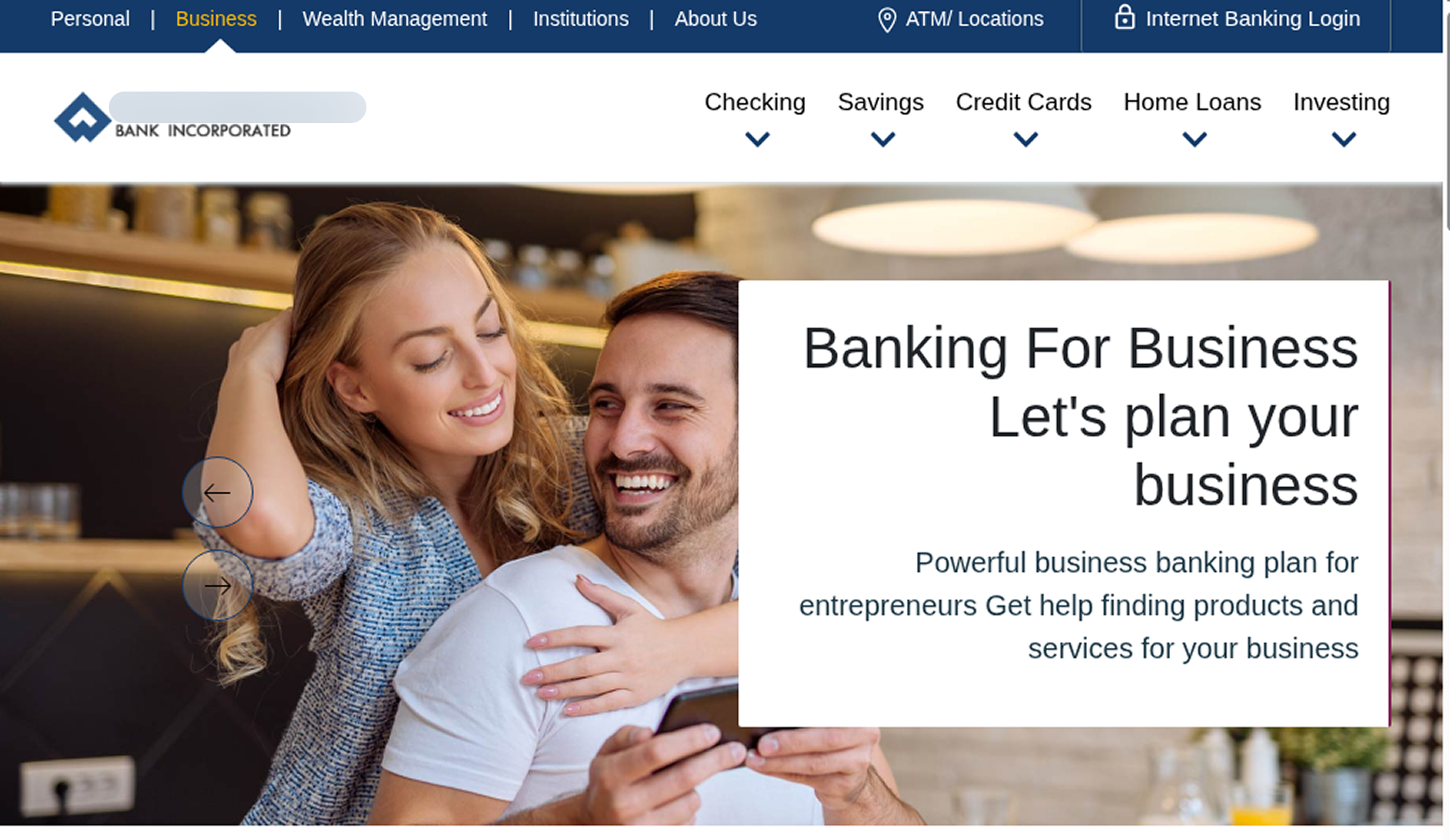
Example of a scam page targeting entrepreneurs
As with many other cyberthreats, AI services are also leveraged as a lure in scams. For example, Kaspersky experts identified a scam website for an AI service “built for contractors”. According to the text on the fraudulent page, the tool can help with “estimates, invoices and schedule”. However, in reality, in such schemes victims usually receive nothing after paying for a subscription, while the scammers get all the money.
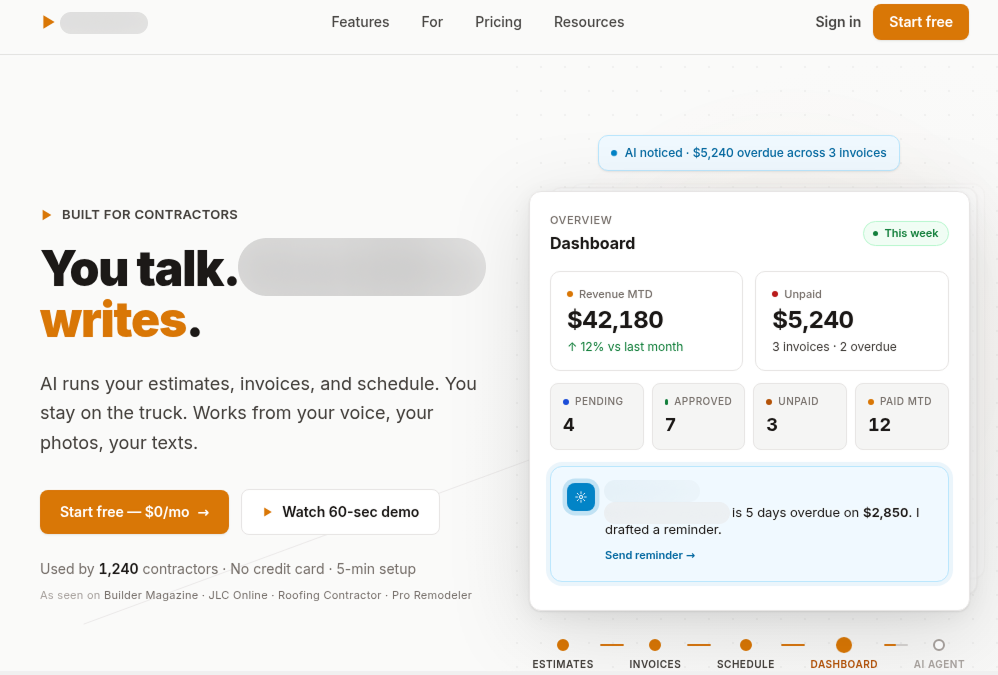
Example of a scam page promoting an AI tool
Kaspersky experts note that business accounts on social networks and messengers remain attractive targets for cybercriminals in 2026. In one scheme, phishers distributed notifications with fake alerts related to companies’ business pages. The notifications claimed that Facebook’s review system had detected behavior that seriously violated its Community Standards and Advertising Policies. To avoid permanent restriction of their business page on the social network, owners were prompted to fill out an appeal form and provide personal and business email addresses, phone numbers, as well as the name of their business page and the password for their social network account. The attackers’ goal was to obtain credentials. To reduce user vigilance and appear legitimate, fraudsters also sent victims a fake appeal code.
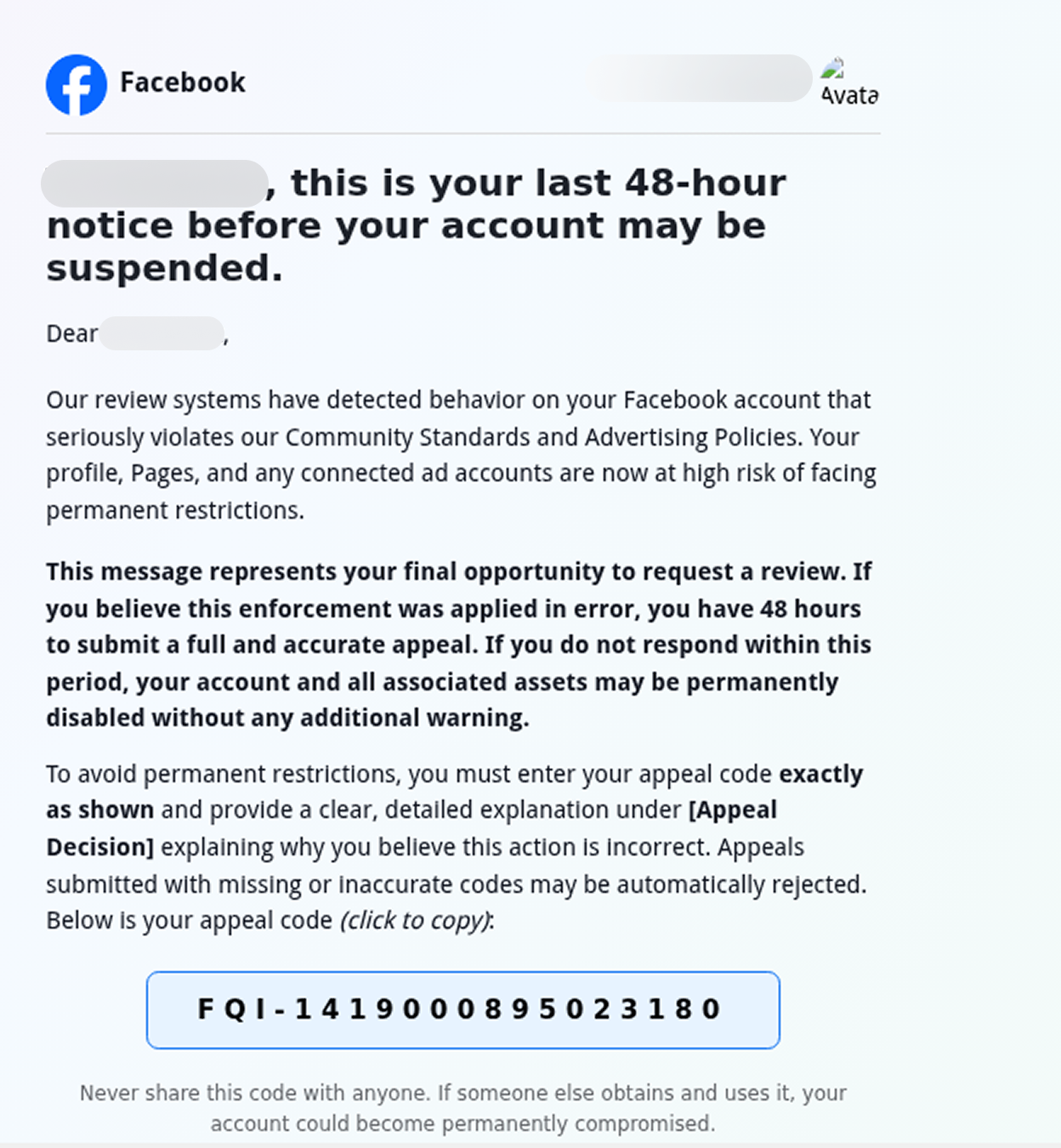
Example of a fake notification
Email threats: Fake online documents and exploitation of legitimate platforms
Email remains one of the most widely used channels for cyberattacks targeting enterprises, including small and medium-sized businesses. In 2026, attackers have frequently combined email distribution with the exploitation of legitimate third-party platforms. This is how phishers and scammers usually attempt to bypass traditional email filters and exploit user trust in reputable services. Kaspersky researchers have also observed a large number of schemes targeting corporate users in which phishers and scammers use fake online documents or nonexistent meetings as bait.
In one recent scheme detected by Kaspersky, the attackers sent a fake notification disguised as a letter from OneDrive. The victim was prompted to access the document by clicking a button, but in reality, it led to a phishing website where users risked losing their confidential data. To make the email appear legitimate, the attackers added a phrase designed to lower the victim’s vigilance: “This item is encrypted and hosted within your secure cloud perimeter.” They also parsed the recipient’s email address and used the extracted data in the fake notification text so that the email looked like a standard notification from this type of service: “[email address domain as company name] has successfully uploaded a new file for [the user’s name as stated in their email address].”
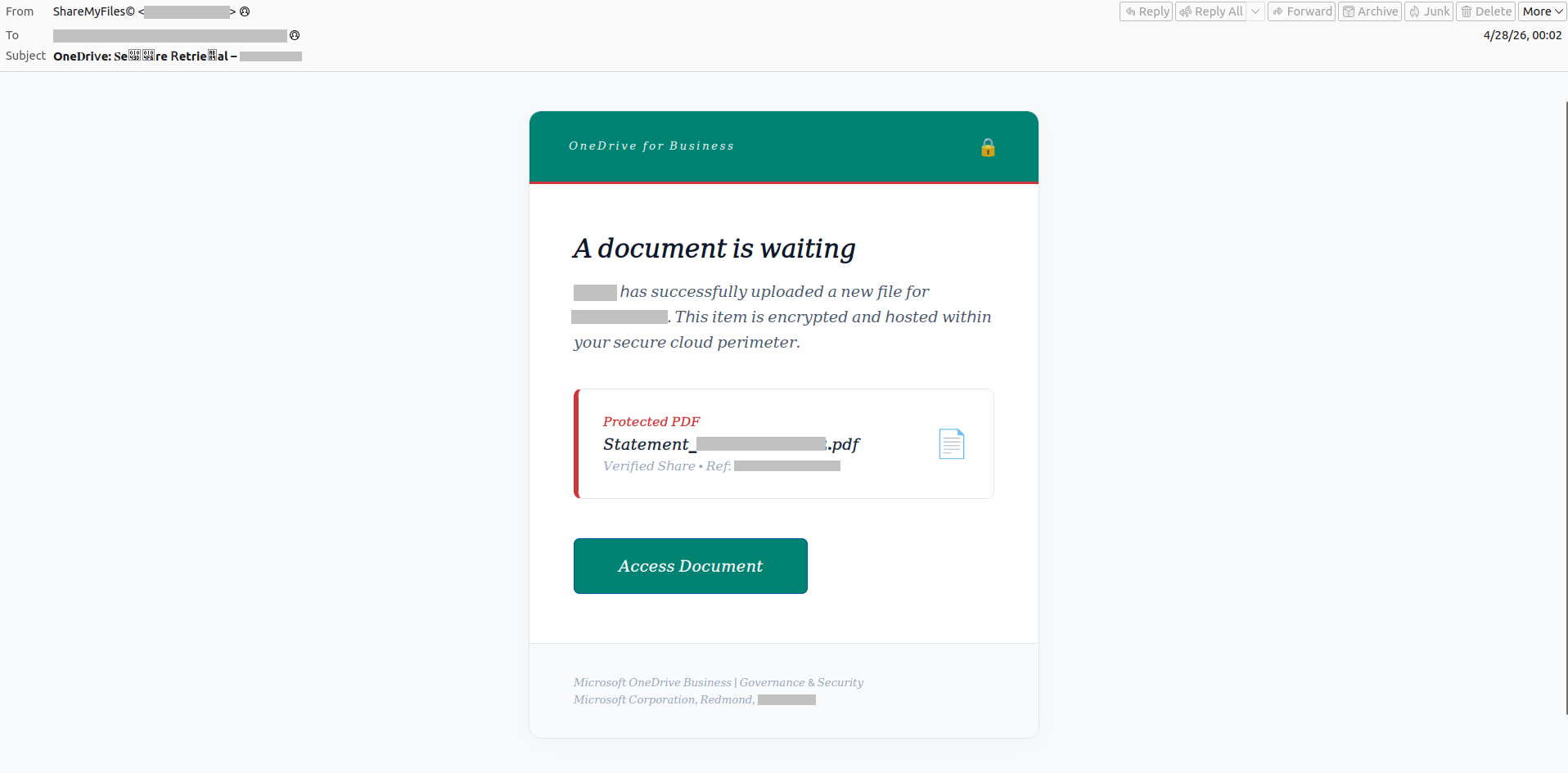
Example of a phishing scheme with fake online documents
Attackers also use other pretexts to trick victims into sharing confidential information, for example fake compliance issues. In the example below, the attackers posed as Apple representatives. The fake notification stated: “Apple has identified a compliance issue related to Google Ads campaigns directing traffic to Apple product detail pages associated with the victim’s seller account.” However, the button in the email led to a phishing website where users are tricked into sharing confidential data.
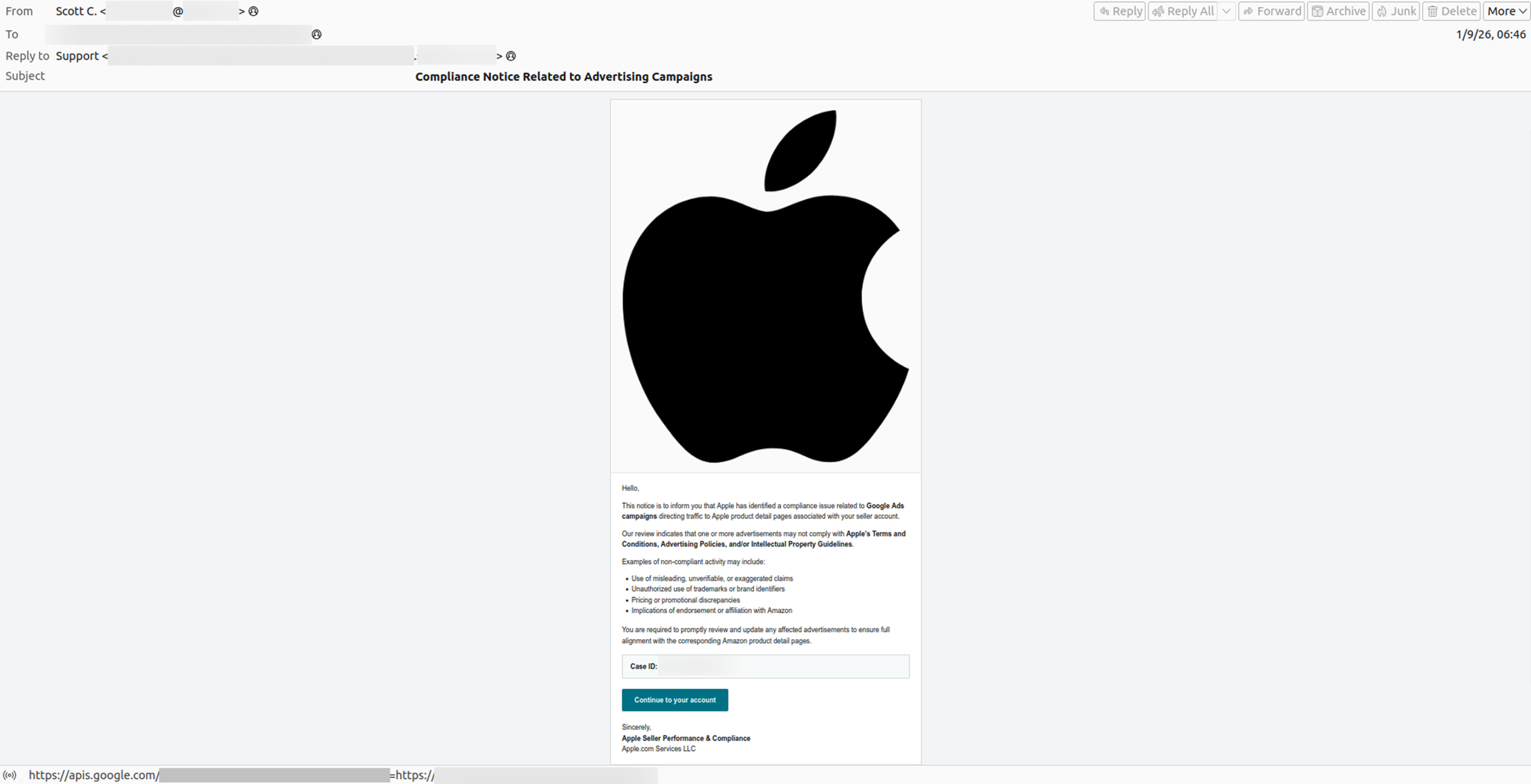
Example of a fake compliance issue notification
Kaspersky experts observed another notable two-stage scheme aimed at stealing credentials from corporate emails, which involved distributing an invitation to a nonexistent meeting. The scheme is deployed in two stages. In stage one, a corporate user receives an email about a fictitious meeting. After clicking the “Accept Meeting Invitation” button, the user is redirected to a legitimate Zoom Docs (previous Zoom canvas brand) page. In stage two, the victim is prompted to click a hyperlink that reads “Click Here to Accept Meeting”. However, the URL of a phishing page is hidden behind this hyperlink.
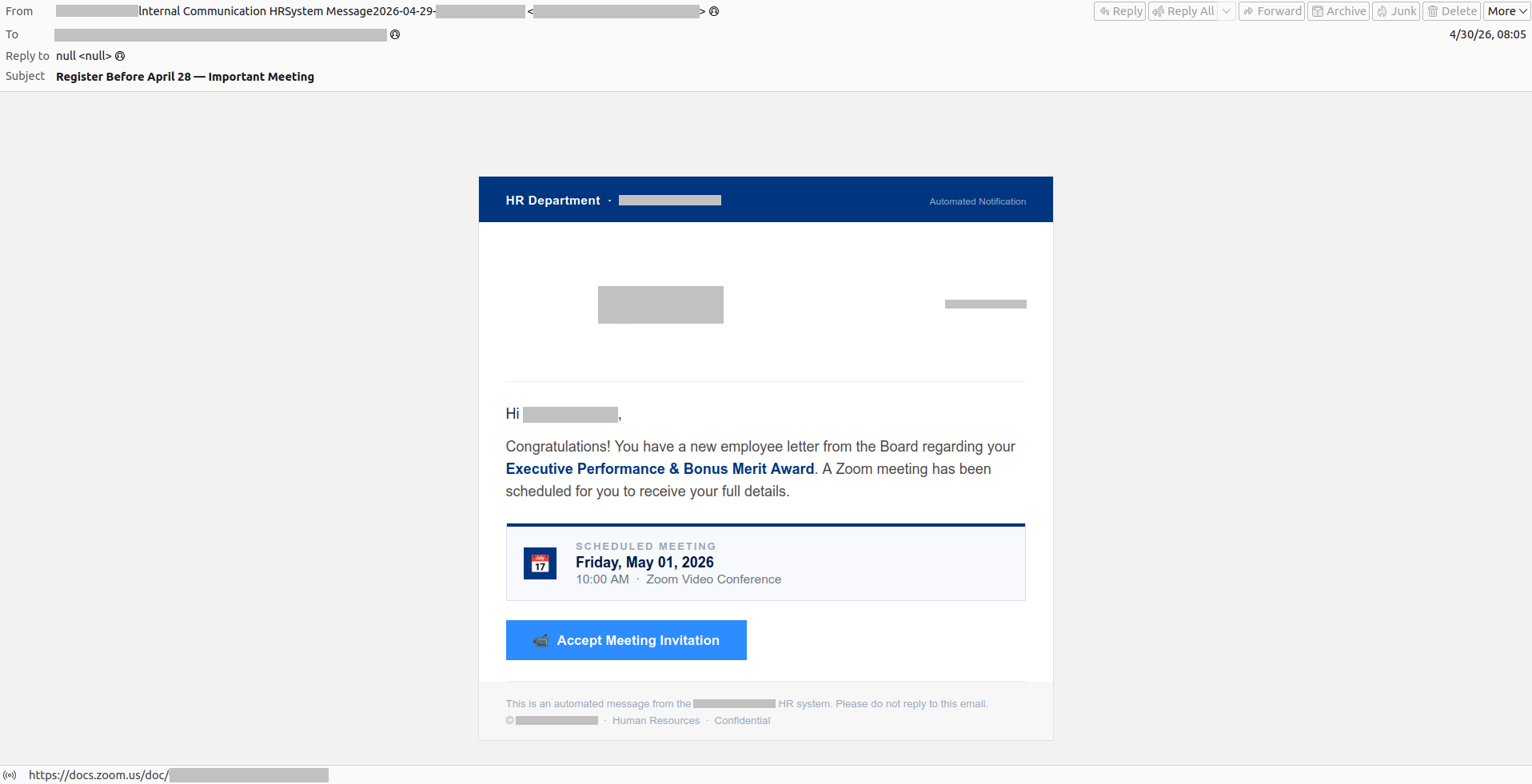
Example of an email with a fake meeting
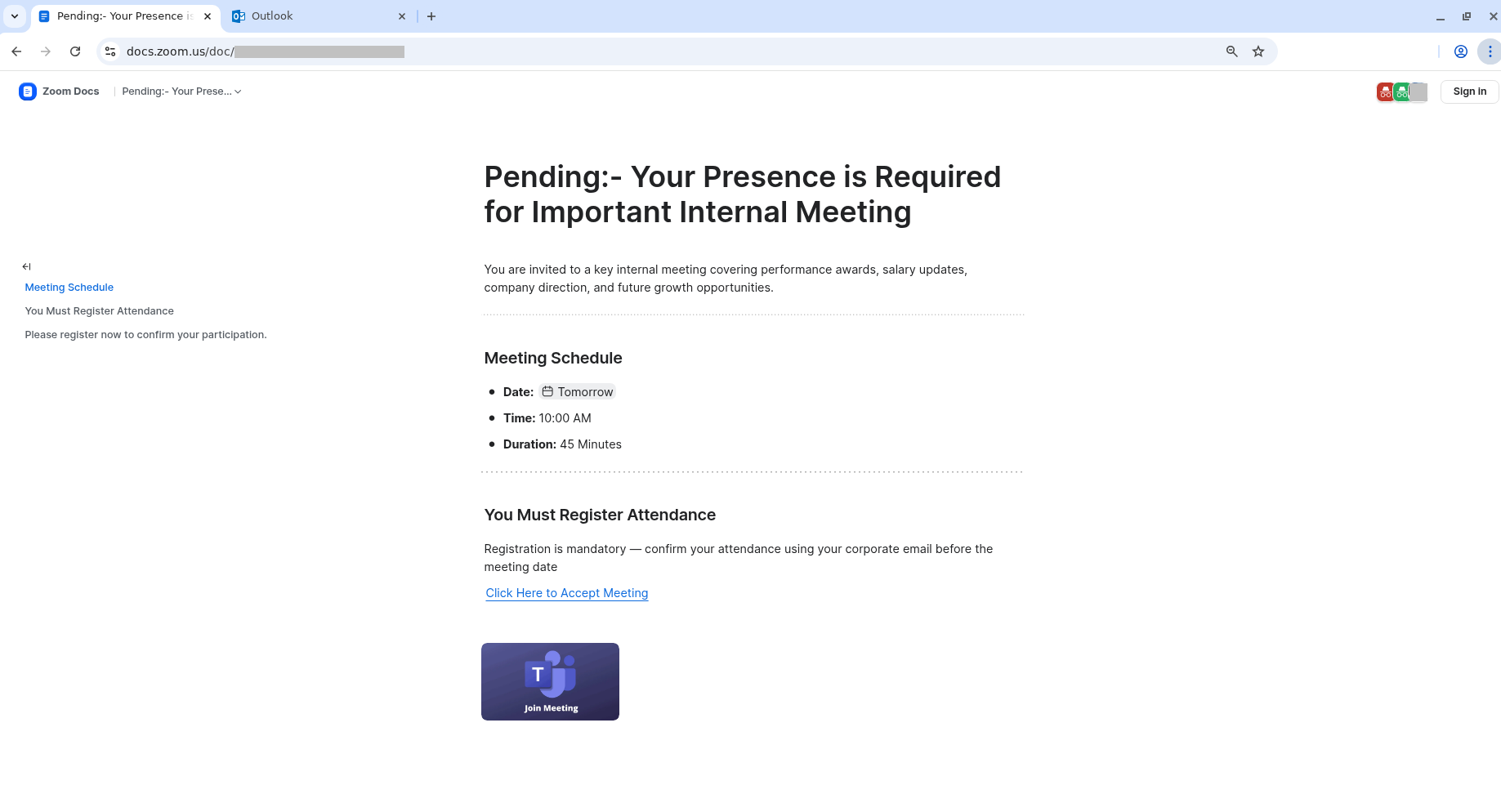
Zoom Docs page containing the phishing link
Malware is also actively distributed via email. In 2025, individuals and corporate users encountered over 144 million malicious and potentially unwanted email attachments, representing a 15% increase from the previous year.
Kaspersky experts note that the lures used in subject lines and texts of malicious emails can appear relatively harmless and rather unsophisticated. In the example below, the attackers target businesses with a fake request for “the best quote for the items attached.” However, the attached file actually contains a Trojan.
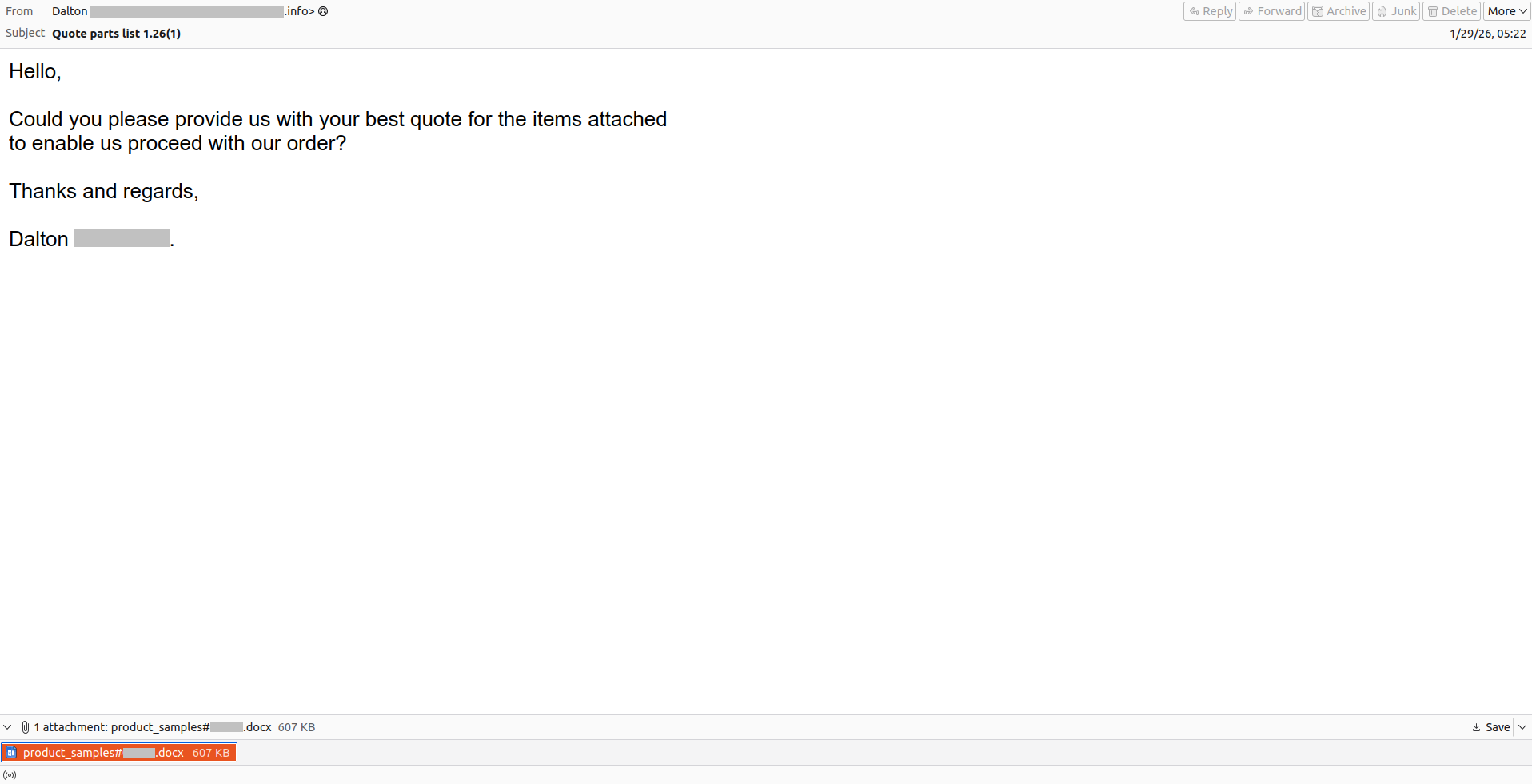
Example of a malicious email
Corporate infrastructure access for sale: Posts on the dark web
To assess threat actor activity, Kaspersky Digital Footprint Intelligence experts analyzed hundreds of posts offering initial access to corporate infrastructures published on dark web forums from January to April of both 2025 and 2026. Kaspersky experts note that a single post may contain several offers for access to different allegedly compromised companies.
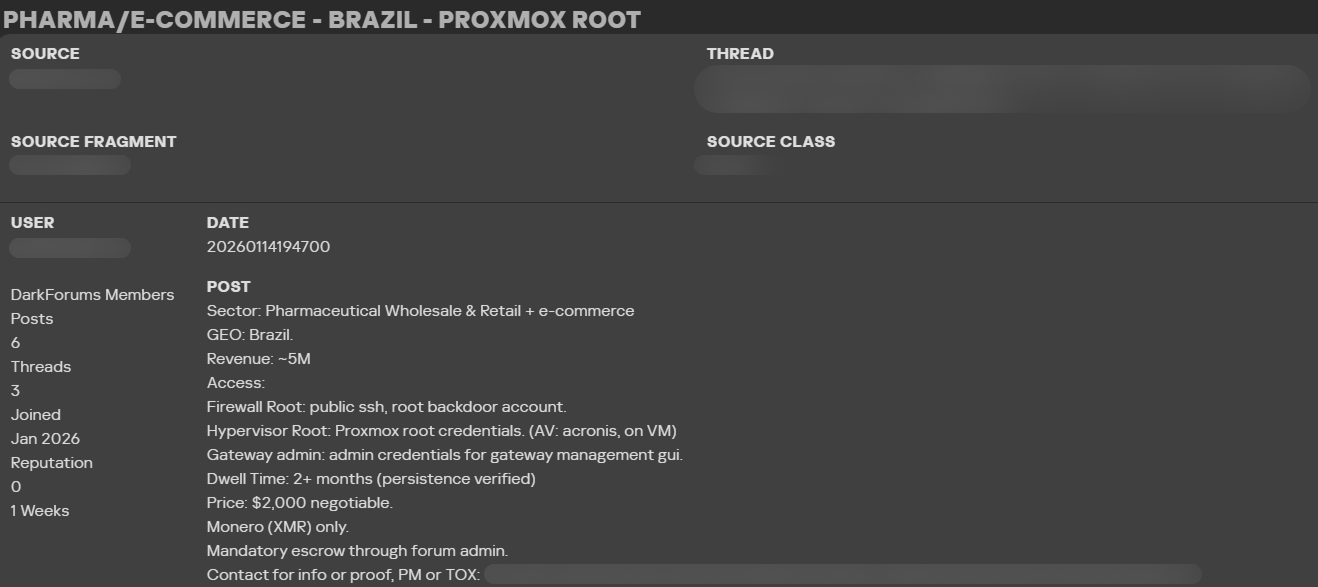
Example of a post on a darknet forum
Initial access brokers (IABs) sell initial access to compromised businesses, for example, via RDP or web shells. In their posts, IABs may provide information about the region where the allegedly compromised companies are located, their industry and revenue, as well as the type of access. IABs sell access that the buyers can then use for different purposes, including ransomware attacks, stealing corporate confidential information or other fraudulent activity. The price of initial access on dark web forums may depend on the revenue, industry or location of the allegedly compromised companies, or on the access privileges. For example, accounts with admin rights are usually more expensive because they can provide attackers with a wide range of possibilities.
According to the research, there were more posts offering initial access to companies of different sizes located in the Middle East (up 53% from last year), Africa (up 40%) and Latin America (up 17%). Meanwhile the number of posts related to companies located in Europe decreased by 34%. According to Kaspersky experts, this decline can be partially explained by the closure of a dark web forum containing such posts around the time of the study. The number of publications related to companies located in the APAC region also decreased slightly (down 4%), but remained at a consistently significant level for the second year in a row.
At the same time, the number of posts where the region was not specified decreased by 56% in 2026 compared to the previous year. Kaspersky analysts assume that this may indicate that initial access posts from IABs are becoming more targeted and unique.
Share of posts with initial access offers by business size
For this research, Kaspersky experts defined a small business as having an annual revenue of up to US$50 million, and a medium-sized business as having an annual revenue of between US$50 million and US$1 billion.
According to Kaspersky’s research, at the beginning of 2026 the share of posts on dark web forums with offers of initial access to allegedly compromised small businesses was larger than the shares of posts offering access to medium, large or nonprofit organizations. However, this share decreased in the first four months of 2026 compared to the same period in 2025. The share of posts concerning medium‑sized organizations also remained significant for two consecutive years. Taken together, posts concerning small and medium‑sized organizations account for more than half of all the analyzed posts with initial access offers on dark web forums.
At the same time for a certain number of posts initial access brokers didn’t indicate companies’ revenue, therefore, making it impossible to determine the size of the company.
Kaspersky experts note that despite the prevalence of posts concerning small businesses, threat actors may target medium‑sized businesses because they generate higher revenues than small businesses and may have weaker security defenses than large businesses.
SMBs can also become targets as a part of trusted relationship attacks, which enable the attackers to reach larger organizations. According to the Global Report by Kaspersky Security Services, the share of trusted relationship attacks among the initial vectors increased from 12.7% in 2024 to 15.5% in 2025. Therefore, the common belief that small and medium‑sized enterprises are of no interest to attackers is a misconception. Companies of all sizes need to understand the cyberthreat landscape, adhere to cybersecurity rules, implement appropriate cybersecurity solutions, and continuously improve employee awareness.
Cybersecurity action plan for SMBs
SMBs can reduce risks and ensure business continuity by investing in comprehensive cybersecurity solutions and increasing employee awareness. To protect themselves from the ever-evolving threat landscape, companies are advised to follow these rules:
- Define access rules for corporate resources such as internet services, email accounts, shared folders, and online documents. Keep access lists up to date and revoke access promptly when employees leave the company.
- Regularly back up important data to ensure the preservation of corporate information in case of emergencies.
- Establish clear guidelines for using external services and resources. Create well-defined procedures for coordinating specific tasks, such as implementing new software, with the IT department and other responsible managers. Develop short, easy-to-understand cybersecurity guidelines for employees, with a special focus on account and password management, email protection, and safe web browsing. A well-rounded training program will equip employees with the necessary knowledge and ability to apply it in practice.
- Raise employees’ security awareness. Conduct dedicated training to teach staff how to detect and address potential threats, and track their educational progress. Organizations can achieve this with the Kaspersky Automated Security Awareness Platform through interactive online modules and simulated phishing campaigns that build sustainable cyber hygiene habits across all teams.
- Implement specialized cybersecurity solutions that fit your budget, size, and industry requirements, with an emphasis on scalability and ease of integration.
- Kaspersky Small Office Security Premium is an easy-to-use solution that protects against advanced threats and also provides access to security awareness training for employees, making it ideal for micro-businesses.
- Small and medium-sized enterprises with more mature IT expertise should consider Kaspersky Next Optimum, which is designed specifically for growing organizations and offers real-time protection, threat visibility, as well as EDR and XDR investigation and response capabilities.
- Protect your business against email-borne threats. Kaspersky Security for Mail Server, a comprehensive email security platform that offers robust, multi-layered protection at mailbox and gateway levels, can help with this. Powered by machine learning and leading global threat intelligence, it effectively addresses all mail security challenges.
- Adopt specialized solutions such as Kaspersky Digital Footprint Intelligence to monitor the surface, deep, and dark webs for information about a company’s credentials, leaked data, and lookalike websites. Small and medium-sized companies with limited IT security budgets can partner with a managed security service provider (MSSP) to access this comprehensive digital risk protection service at an affordable, subscription-based price point.