Microsoft is developing the Windows 11 27H2 update, focusing on core system stability, new wallpapers, and 64-bit speed via Intel APX register expansion.
Microsoft launches Windows 11 Cloud Rebuild, a native recovery tool that downloads fresh system images and drivers directly from the cloud without USB media.
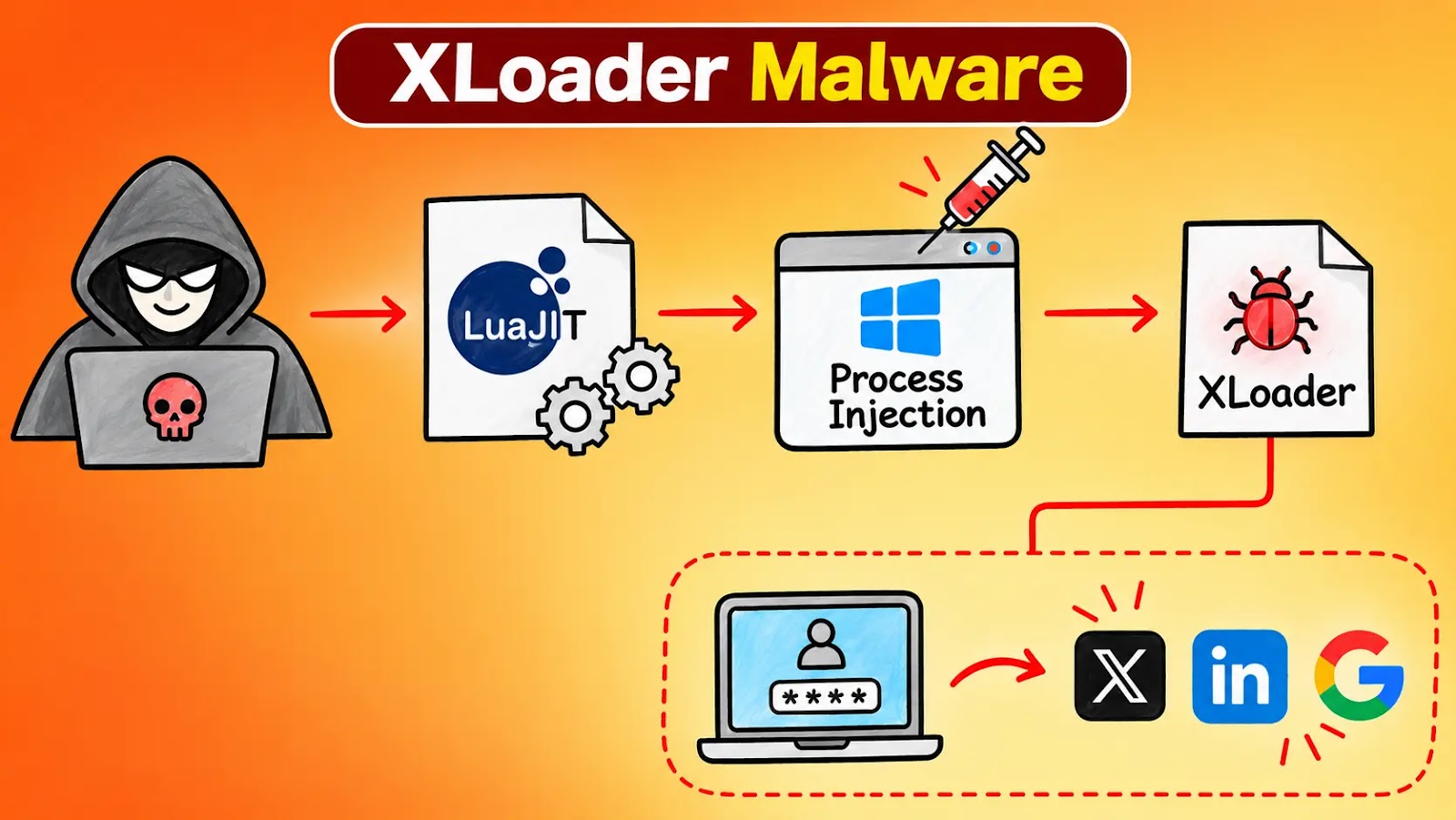
A new XLoader infection chain. It hides the credential stealer inside an embedded LuaJIT interpreter. It moves it into another Windows process through shared-section injection. The campaign uses business-themed email lures. It also delivered Agent Tesla, Remcos and XWorm . The chain starts with order and payment emails. One Greek-language message has a subject starting […]
A public proof-of-concept exploit for CVE-2023-21768 shows how attackers with local access can gain SYSTEM privileges through the Windows Ancillary Function Driver for WinSock.
Researchers Valentina Palmiotti, known as chompie, and Ruben Boonen published the code. Their complete exploit targets vulnerable Windows 11 22H2 systems.
The release concerns a vulnerability patched in January 2023, not a newly disclosed Windows flaw. IBM published the researchers’ technical analysis on March 21, 2023.
The vulnerability carries a CVSS score of 7.8 and requires low-level local privileges, with no user interaction. It does not provide a direct route into a computer over the internet. The flaw sits in afd.sys, a Windows kernel driver that handles requests from the WinSock networking interface.
According to IBM’s technical analysis, the researchers compared driver versions from December 2022 and January 2023 to understand Microsoft’s fix. Only one function, AfdNotifyRemoveIoCompletion, appeared to have changed, helping them narrow their investigation.
The older code failed to check a memory pointer supplied from a user application. That missing check let a local attacker write to kernel memory, where Windows stores sensitive system data.
Microsoft’s updated code added validation to ensure that pointers from user mode reference suitable user-space memory rather than protected kernel addresses.
POC for Windows WinSock Ancillary Vulnerability
The researchers said they diagnosed, reproduced, and turned the flaw into a working exploit in about one day, despite having no previous experience with this driver.
Their findings show how comparing patched and unpatched software can reveal enough detail to build an attack quickly.
The public GitHub repository describes the code as a demonstration. Its complete privilege escalation chain works on vulnerable Windows 11 22H2 installations, while the underlying memory-write capability works across vulnerable systems.
These are separate claims, and the repository does not promise full exploit compatibility with every affected Windows version. To move from a limited memory write to broader control, the exploit changes Windows I/O ring objects. These objects support queued input and output work.
The technique builds on research by Yarden Shafir and enables kernel memory reads and writes. The exploit then replaces a target process’s security token with one carrying SYSTEM privileges.
IBM also reported that 360 IceSword Lab found a different exploit in the wild in January 2023. That sample used the ProcessSocketNotifications interface rather than the researchers’ direct driver approach. This report does not establish that attackers used the published GitHub code.
Administrators should verify that affected devices received Microsoft’s fix or later applicable updates. IBM’s demonstration also worked without being blocked by HVCI, showing why that protection should not replace patching.
Fake Adobe Acrobat pages distribute signed ScreenConnect installers configured for attacker-controlled remote access to Windows PCs, CloudSEK’s researchers say.
Microsoft has resolved an issue in Windows 11 that prevented non-administrator users from connecting to devices with Administrator protection enabled. This fix was included in KB5127936, released on October 28, 2026, and is part of subsequent updates. While this issue is urgent for affected organizations, Microsoft has categorized the release as a preview update rather […]
Microsoft explains why deleting Windows 11 Prefetch files degrades application startup performance while highlighting their crucial digital forensics role.
Microsoft has released an emergency Windows update to remove trust in certificates associated with compromised eMudhra certificate authority keys. The out-of-band update, issued on October 26, 2026, eliminates seven certificates from the Windows trust list. Following this, the same removals were applied to Microsoft Edge on October 27, as stated by the Microsoft Security Response […]
Attackers are compromising camera management software to gain remote access, run malicious DLLs through a legitimate Windows component, and maintain persistent footholds in enterprise environments. The incidents show how overlooked surveillance applications can become entry points into broader corporate networks. Huntress observed several intrusions during September and October involving CMS.exe, a camera management application installed […]
Microsoft has introduced a new command-line tool that gives IT admins a faster way to check and manage OneDrive sync across company devices. Microsoft introduced the OneDrive Sync Client Command Line Interface (CLI) at the OneDrive + Copilot event held today. It is aimed at teams that look after large Microsoft 365 setups.
The tool runs with a simple command called odsync and can be used from PowerShell. In the live demo, Microsoft’s Andrey Esipov showed how admins can pull detailed device health information without clicking through settings screens or digging through log files.
According to the demo, the CLI lists every OneDrive account set up on a device, including machines with more than one account, and it can narrow the results down to a single account. It also shows the version of both the sync client and the CLI, whether OneDrive is running, and how it was installed on the system.
Admins can also see Folder Backup settings, including which folders are being backed up to the cloud. One of the most useful features for security teams is the ability to view the Group Policy settings applied to the sync client. This helps confirm that a device actually follows company rules.
The tool also reports overall status at the client, account, and Folder Backup level. When something goes wrong, admins can switch on verbose output for deeper troubleshooting.
Built for Scripts, Automation and AI Agents
A key detail is that the CLI can return results in JSON format. This makes it easy to plug the output into scripts, Microsoft Intune remediation jobs, or reporting tools. Microsoft says the tool works in both interactive and non-interactive modes. It is designed for admins, developers, scripts, and AI agents such as GitHub Copilot CLI.
For example, an admin could run a script across many devices to spot machines where Folder Backup is turned off or where OneDrive is not running at all. Until now, this kind of check often needed custom scripts, registry checks, or third-party utilities.
OneDrive sync is a common blind spot in many companies. Settings that drift away from policy can leave sensitive files outside approved storage or sync them to places they should never reach.
A tool that quickly shows the sync client’s real state on each device gives defenders better visibility. It also helps them catch weak setups before they turn into security incidents.
The OneDrive Sync CLI is not yet generally available. Microsoft says it is coming soon to private preview. The company has not shared a public release date, the supported platforms, or a full list of commands. Based on what has been shown so far, the tool focuses on reading and reporting device state rather than changing settings.

 Entrar