Visualização de leitura

ShieldBreak bypasses Microsoft’s patch for earlier Defender flaw

Microsoft Defender’s latest patch bypass shows a familiar problem.

A newly disclosed Microsoft Defender flaw called ShieldBreak shows that fixing one attack path doesn’t always close every route to the same result.

Microsoft has assigned ShieldBreak the identifier CVE-2026-69414 and confirmed it is an elevation of privilege (EoP) vulnerability in the Microsoft Malware Protection Engine. Microsoft says it is still working on a security update.

If that sounds somehow familiar, you’re probably thinking of RoguePlanet, another vulnerability in Defender that Microsoft acknowledged on June 16 and patched on July 8.

A short timeline

At the time, the published exploit for RoguePlanet was described as depending on a race condition, meaning it was not guaranteed to work the same way on every machine. That was one reason the vulnerability was concerning but still somewhat limited from a practical point of view.

Microsoft’s July fix should have closed the door on that problem. But security fixes do not always eliminate a weakness at the root of the problem. Sometimes they block one known attack path, while a researcher later finds a different route to reach the same end result.

That appears to be what happened here. ShieldBreak has been described as a patch bypass because it reportedly sidesteps the earlier RoguePlanet fix, although it uses a different exploitation method rather than simply repeating the original attack.

In August, the same researcher disclosed ShieldBreak, and Microsoft responded by publishing a new advisory for CVE-2026-69414.

The advisory says the issue has been publicly disclosed, proof-of-concept (PoC) exploit code exists, exploitation is considered more likely, and no official fix is available yet. Microsoft says it is working on one.

How to stay safe

Until Microsoft releases a fix, the most important protection is preventing untrusted code from running on your computer in the first place. ShieldBreak is a local privilege escalation issue, so an attacker first needs some level of access to the machine.

Based on the best public reporting available right now, ShieldBreak appears to require Microsoft Defender to be enabled in order to work. Public testing indicates that the exploit does not succeed when Defender is off or when another product is registered as the active antivirus provider.
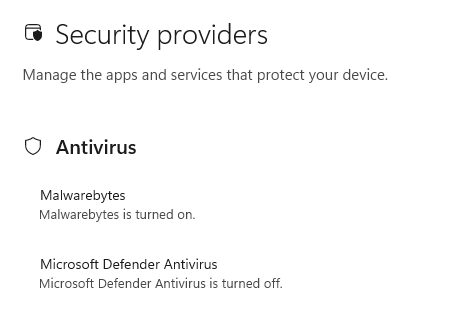
You're safe if Defender is turned off

So, narrowly speaking, disabling Defender appears to stop this specific ShieldBreak chain from working. However, that is not a good safety recommendation for most people. Turning off your antivirus removes an important layer of protection and could leave your computer exposed to other attacks.

For home users, all that means:

  • Install Microsoft’s security updates as soon as they become available.
  • Be very careful with downloads, email attachments, cracked software, and “fix” tools from random websites.
  • Keep backups of important files somewhere not directly connected to the PC.
  • Use an up-to-date, real-time anti-malware solution to alert you about and remove threats from your computer.

CNET Editors' Choice Award 2026

“One of the best cybersecurity suites on the planet.” 

According to CNET. Read their review


Microsoft fixes RoguePlanet zero-day in Defender

Microsoft issued a security update that fixes the zero-day vulnerability known as RoguePlanet in Microsoft Defender.

RoguePlanet is tracked as CVE-2026-50656, a Microsoft Defender elevation of privilege (EoP) vulnerability. As we reported last month, if successfully exploited, RoguePlanet can allow an attacker to elevate privileges from a standard user account to NT AUTHORITY\SYSTEM, the highest privilege level on Windows.

This means an attacker who gains access to a standard user account on your computer could use the vulnerability to take complete control of the system. They don’t need advanced hacking skills or administrator permissions to do this.

Microsoft fixed the vulnerability by releasing Microsoft Malware Protection Engine version 1.1.26060.3008, an update to the core scanning engine that powers Microsoft Defender and other Microsoft security products.

How to protect your system

If Windows Security shows that another antivirus, such as Malwarebytes, is protecting your PC and Microsoft Defender Antivirus is turned off (as shown below), this particular vulnerability does not affect your system. Defender’s scanning engine isn’t running, so it can’t be exploited through this flaw.

Security providers
If you’re running another antivirus and Defender is turned off, there’s nothing to worry about

Most users are already protected

By default, Microsoft Defender automatically updates both its malware definitions and the Microsoft Malware Protection Engine.

But if you’re in any doubt, you can check the version of the Malware Protection Engine on your system. Here’s how:

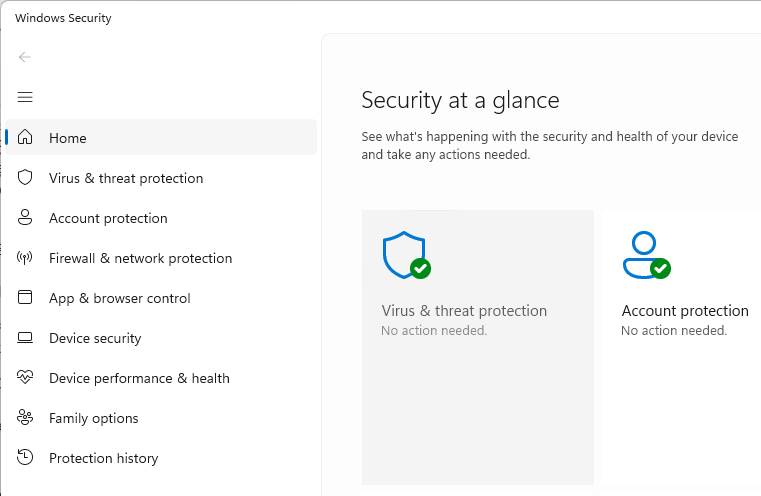
  1. Click the Start button, type Security, and choose Windows Security from the results.
    Virus & threat protection
  2. Select Virus & threat protection, then under Virus & threat protection updates, click Check for updates.
  3. Click Settings (the cog icon) then select About.
  4. Look for a line called Engine Version. That number is the version of the Malware Protection Engine used by Microsoft Defender.
    • If your Engine Version is 1.1.26060.3008 or higher, your system has the patched (or newer) engine.
    • If your Engine Version is 1.1.26050.11 or lower, your system is still running a vulnerable engine. Run Windows Update and check for Defender updates again, or wait for the automatic update to complete.

Note: Version numbers are compared from left to right. For example, 1.1.26060.3008 is newer than 1.1.26050.11 because 26060 is higher than 26050.

If you use Windows Defender, leave automatic updates turned on. The Malware Protection Engine normally updates automatically, so most home users will receive the fix without doing anything. These steps are simply a way to double-check your system has the updated engine.


We don’t just report on threats—we remove them

Cybersecurity risks should never spread beyond a headline. Keep threats off your devices by downloading Malwarebytes today.

Microsoft working on a fix for RoguePlanet, a flaw that grants full PC control

A publicly available exploit called RoguePlanet can give attackers the highest level of access on Windows systems. Microsoft has confirmed the vulnerability and says it’s working on a security update.

RoguePlanet is tracked under CVE-2026-50656, where it’s described as a Microsoft Defender Elevation of Privilege (EoP) vulnerability.

In its advisory, Microsoft says:

“Microsoft is aware of an elevation of privilege in the Microsoft Malware Protection Engine in Microsoft Defender publicly referred to as “RoguePlanet “. We are working to provide a high quality security update that addresses this vulnerability. We will provide information in this CVE when the update is available.”

If successfully exploited, RoguePlanet can allow an attacker to elevate privileges from a standard user account to NT AUTHORITY\SYSTEM, the highest privilege level on Windows.

This means an attacker who manages to get access to a standard user account on your computer could use the vulnerability to gain complete control of the system. They don’t need advanced hacking skills or administrator permission to do this.

The success of the published exploit does depend on a race condition, though. This means its success depends on the precise timing of two events. The researcher wrote:

“I have managed to get a 100% success rate on some machines while it struggled to work on others.”

It seems that the problem lies in a high-level part of the Microsoft Defender code, which may help to explain why Microsoft says it’s working on a “high quality security update.”

This same researcher has submitted three earlier Microsoft Defender vulnerabilities known as BlueHammer (CVE-2026-33825), UnDefend (CVE-2026-45498), and RedSun (CVE-2026-41091), as well as four other Windows zero-days, all of which have since been patched by Microsoft.

How to protect your machine

The exploit reportedly works whether you’re using active protection or not, so disabling Microsoft Defender is not a solution. But there are a few things you can do to protect your machine:

  • Look out for a Microsoft security update addressing this vulnerability and install it as soon as it becomes available.
  • Back up your important data on a platform or device that is not directly connected to your computer.
  • Be careful about downloading executable files from unknown sources or running files that are recommended to you without you asking for them.
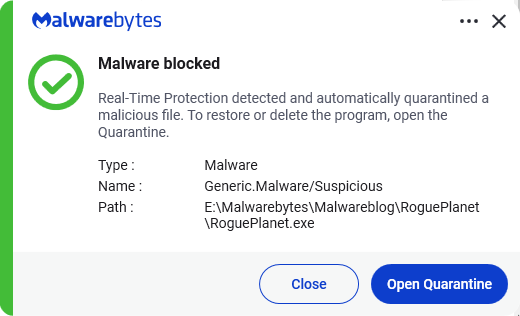
  • Do not rely on Microsoft Defender as your only anti-malware solution. Malwarebytes detects RoguePlanet.exe (the exploit code) based on its behavior.
    Malwarebytes blocks the exploit code

Obviously, we’ll keep you posted about this and other security issues, so stay tuned.


CNET Editors' Choice Award 2026

“One of the best cybersecurity suites on the planet.” 

According to CNET. Read their review


Microsoft Defender vulnerabilities are being exploited in the wild

Two Microsoft Defender vulnerabilities are being actively exploited in the wild.

On May 20, 2026, the Cybersecurity and Infrastructure Security Agency (CISA) added a notable set of actively exploited vulnerabilities to its Known Exploited Vulnerabilities (KEV) catalog. The KEV catalog tracks vulnerabilities known to be exploited in the wild and sets patch deadlines for Federal Civilian Executive Branch (FCEB) agencies.

Five of the added vulnerabilities are quite old by vulnerability standards. Patches were released in 2008, 2009, and 2010. But the Microsoft Defender vulnerabilities are from this year. Those two are:

  • CVE‑2026‑41091 (CVSS score 7.8 out of 10): a Microsoft Defender elevation of privilege vulnerability. A local attacker who already has some access to a machine can abuse Defender to gain SYSTEM‑level permissions, effectively giving them full control over Windows.
  • CVE‑2026‑45498 (CVSS score 4.0 out of 10): a Microsoft Defender denial‑of‑service vulnerability. Here, an attacker can interfere with Defender in a way that disrupts its normal operation. If attackers can crash or disable your antivirus engine on demand, they can create a safer environment for their malware to run undetected.

You should take patching these vulnerabilities seriously if:

  • You rely on Microsoft Defender as your primary endpoint protection
  • You manage Windows systems in a business, school, or local government environment
  • You have shared machines, terminal servers, or any environment where multiple users log on to the same system

As you’d expect from us, we don’t advise relying on Windows Defender alone. There are better options available, and they are not mutually exclusive.

How to patch

Security products are software, and software has bugs. When those bugs end up in a list of known exploited vulnerabilities, ignoring them is like leaving your front door open because “the alarm will catch anyone coming in.” 

Make sure Windows Update is enabled and set to receive updates for Microsoft products. Defender platform updates are often delivered alongside regular cumulative updates.

Also check that recent Microsoft Defender security intelligence and platform updates are installed.

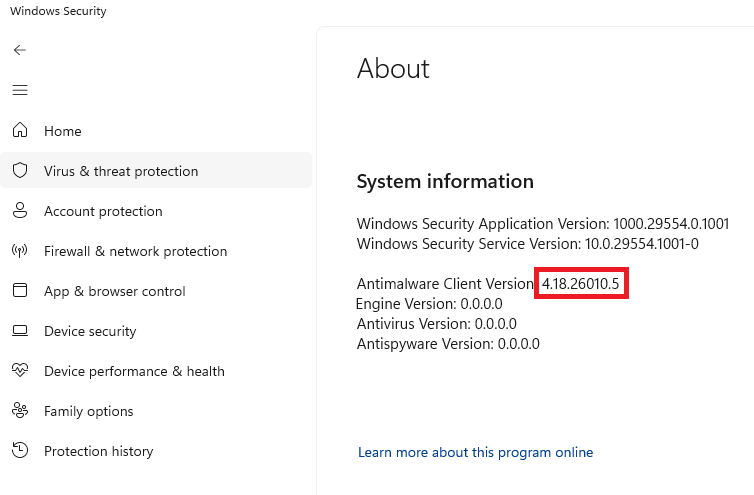
The first version of the Microsoft Defender Antimalware Platform with these vulnerabilities addressed is 4.18.26040.7.

You can usually find that version number in Windows Security:

  1. Open Start and search for Windows Security
  2. Go to Virus & threat protection
  3. Click Settings or the gear icon
  4. Open About
Windows Defender version number

Even with auto-update enabled, I didn’t receive this patch immediately. Defender platform updates can lag behind definitions or only appear when a cumulative Windows update lands. Microsoft typically releases updates for the Microsoft Defender Antimalware Platform once a month, or as needed to protect against new threats. 

So, I’ll have to wait. Good thing I’m protected.


We don’t just report on threats—we remove them

Cybersecurity risks should never spread beyond a headline. Keep threats off your devices by downloading Malwarebytes today.

Crush malware faster: Introducing Bitdefender sandbox integration with EclecticIQ

The challenge: Slow, fragmented malware analysis 

Cyber threats evolve rapidly, with advanced persistent threats (APTs) and zero-day malware bypassing traditional defences. SOC analysts need a faster, more integrated way to analyse suspicious files and URLs - without switching between multiple tools. 

❌