When your pet goes missing, it can be totally heartbreaking.
So hearing that they’ve been found is no doubt very welcome news. Even better to see a photo of them looking safe and well.
But while the photo may look exactly like your pet, that doesn’t mean the person who sent it has your pet or even ever saw it.
The BBC reports how criminals are sending owners AI-generated images of their missing pets, demanding money for their return, and sometimes threatening to harm the animals when owners refuse to pay.
The BBC interviewed two targets of this scam who were both contacted after posting a missing pet message on social media. The scammers sent them pictures of their beloved pets and demanded a ransom for their safe return.
Messages like these exploit two powerful emotions in quick succession: relief that a beloved pet has been found, followed by fear that something terrible will happen unless the owner acts immediately.
The scam typically follows this pattern:
A scammer finds a missing pet appeal, which is typically posted to social media or local sites with an accompanying photo and contact details.
The scammer contacts the owner and claims to have found the animal. An image fabricated with the help of AI makes the claim appear more convincing.
They ask for money which may be described as a reward or as payment for emergency treatment.
They add pressure. They might refuse to meet until payment arrives, or threaten to sell or harm the pet.
Our data backs this report up. Over the last month, people anonymously submitted three distinctive types of pet related scam attempts to Malwarebytes Scam Guard:
“We found your missing cat” message, with photos: Someone claimed to have found a user’s missing cat and had images of it.
Found pet callback lure: A voicemail claimed to have found a lost cat and supplied a callback number.
Humane Society impersonation and payment demand: A caller claimed a missing cat needed emergency surgery, and demanded successive Zelle payments.
How to stay safe
Sadly, while it can be very useful to use social media to retrieve lost pets, it also attracts scammers and other abuse.
You don’t have to stop asking for help online, but you can put some safeguards between an unexpected message and any payment.
Keep some identifying details private. Leave a distinctive feature out of the public description so you can ask a supposed finder about it later.
Do not pay in advance to secure a reunion. Be particularly wary of someone who insists that you send money before they will let you see the animal. Arrange any legitimate handover in a safe, public location, and verify that it is your pet before paying a reward.
Verify veterinary claims independently. If someone says your pet is at an animal hospital, find the hospital’s contact details yourself and call it directly. Do not rely on the number or payment link in the message.
A second pair of eyes can help you assess a demand without the same emotional pressure. Malwarebytes Scam Guard can help you identify whether a message might be a scam and how to proceed.
If someone is threatening your pet, remember that when they make threats to your pet, it is very likely they don’t have a clue where it is either, so don’t let them extort you.
Something feel off? Check it before you click.
Malwarebytes Scam Guard helps you analyze suspicious links, texts, and screenshots instantly.
Statistics on Malware Distributed to the Financial Sector In Attack Stage 1, phishing (attacks that trick users into revealing information) had the highest rate at 2.1, Up from 1.8 The previous month. In Attack Stage 2, “Dropper/Downloader” (a type that downloads additional malware) was the most common at 1.1, Though this was a decrease from […]
Purpose and Scope This report summarizes the quantity of new ransomware samples collected, the number of compromised systems, and statistics on targeted businesses during the month of September 2026, as well as major Korean & global ransomware issues. The analysis is based on data collected through ATIP (AhnLab Threat Intelligence Platform) and AhnLab Smart Defense, […]
At just 17 years old, Jordan DeMay was murdered by strangers online.
That’s how Jordan’s father, John DeMay, described what happened to his son four years ago. At home in Michigan, Jordan was readying for a weekend trip when he received a friend request on Instagram. The invite was sent by a user named “dani.robertts” whose profile showed an attractive young woman. After accepting the request, Jordan and the account chatted about nothing in particular—teenage matters, getting to know one another—before “dani” became flirtatious, eventually sending Jordan what she claimed was a nude photograph of herself.
Jordan responded in kind with an explicit photograph of himself.
But here, a trap was revealed.
“Dani Robertts” was not a young, friendly, interested woman. Dani Robertts was several men, sending messages from thousands of miles away in Lagos, Nigeria, who had followed a script to pressure young men into handing over their money. This was not the first time these men had run this scam. But with a great deal of investigative work, it hopefully has become the last.
What happened to Jordan can happen to anyone—and it has happened to far too many young men and women today. It is a type of attack commonly referred to as “sextortion.”
Today, on the Lock and Code podcast with host David Ruiz, we speak with John DeMay about his son Jordan, his family’s relationship with social media, and what parents should know.
The Federal Trade Commission (FTC) has filed a complaint accusing Digital Forensics Corporation of exploiting people already targeted by sextortionists.
We have talked about sextortion and recovery scams in the past, but we never looked specifically at the combination. Apparently, there is a lot of money to be made for those ruthless enough to take money from victims already in a state of panic.
The FTC has accused Digital Forensics Corporation, its owner Dmitry Belkin, and affiliated companies of misleading sextortion victims into paying at least $60 million for assistance that, in numerous instances, they did not provide. A federal court has temporarily halted the defendants’ activities while the case proceeds.
Most of the time, sextortion emails are a bluff sent to a large number of targets to see if one takes the bait. But sextortion can also involve intimate images that someone really possesses. In those cases, a criminal threatens to share the material unless the victim pays, sends more images, or complies with other demands.
In those cases, victims can feel desperate, especially when the demands keep coming, and may look for help to make it stop. According to the FTC, Digital Forensics targeted people searching for that help through advertisements on Google, YouTube, X, and other platforms. The company allegedly claimed it could track down criminals worldwide, identify perpetrators, and provide law enforcement with evidence needed to make arrests.
Digital Forensics allegedly charged between $1,499 and $20,000 for a “Phase 1” package. That was supposed to include communicating with the sextortionist, tracking their location, producing an investigative report, and reporting the crime to law enforcement.
According to the FTC, Digital Forensics Corporation changed the victims’ account settings to block the sextortionist, fabricated chat transcripts, and presented pre-saved coordinates, often in Nigeria or the Philippines, as the sextortionist’s location.
After collecting the first payment, the company allegedly pressured customers to purchase “Phase 2” services, supposedly providing ongoing account monitoring and further assistance. The FTC says the company did not follow through on those promises either.
Another huge red flag was that the company also allegedly discouraged victims from blocking their blackmailers, contrary to law enforcement and expert advice.
The allegations against Digital Forensics Corporation have not yet been decided by the court.
How to stay safe
Be wary of anyone who promises to stop the threats or pressures you to pay immediately. Help should offer clear information and realistic options. It should not turn your fear into another payment deadline.
If someone is threatening to share intimate images, you do not have to handle it alone.
Preserve the threats and account details. Keep the messages, usernames, and payment demands. Block the offender but do not delete your account or the messages, since they may help real investigators.
Stop communicating and block the blackmailer. Do not pay them or give them access to your devices or financial accounts. Report the account using the platform’s safety tools.
Tell someone you trust about the sextortion. A friend, family member, counselor, or other trusted adult can provide support while you decide what to do next.
Report the crime. Contact local police. In the US, you can also report sextortion to the FBI. If it involves a minor, report it through the National Center for Missing and Exploited Children’s CyberTipline.
If you have already paid a service that you believe misled you, keep its ads, messages, contract, and receipts, and report your experience to the FTC through ReportFraud.ftc.gov.
If you’re unsure whether something is a scam or not, ask Malwarebytes Scam Guard. It can help you assess it and provide advice on next steps.
Something feel off? Check it before you click.
Malwarebytes Scam Guard helps you analyze suspicious links, texts, and screenshots instantly.
Note The September 2026 Dark Web Breach Incident Trend Report focuses on data breach cases and the sale of initial access credentials posted on the deep web and dark web forums. The report explicitly states that the accuracy of some of its content cannot be fully verified due to the nature of the sources. Major […]
Note The September 2026 Dark Web Threat Actor Trend Report focuses on threat actors active on the deep web and dark web, as well as publicly reported cyberattack incidents. It is noted that the factual accuracy of some content cannot be independently verified. Major Issues Some hacktivist groups claimed responsibility for DDoS attacks targeting the […]
Purpose and Scope This report summarizes statistics on new ransomware samples, affected systems, and statistics on targeted businesses collected during the month of August 2026, as well as major Korean & Global ransomware issues. Statistics on targeted businesses were compiled based on the time when publicly available information from ransomware groups’ DLS (Dedicated Leak Sites, […]
Microsoft Threat Intelligence tracks DeadLock ransomware as an emerging financially motivated operation distinguished by its use of decentralized infrastructure to support victim communications and data leak operations. Its recovery ecosystem combines the Session messaging network with blockchain-backed services that store and deliver resources used throughout the extortion process. This architecture likely increases the resilience of portions of its communication, leak-hosting, and negotiation infrastructure, allowing DeadLock operators to recover from some disruption efforts while maintaining continuity for victims. Microsoft has observed DeadLock ransomware being deployed by multiple groups including an affiliate of the Lynx and INC ransomware ecosystems.
First observed in July 2025, DeadLock operators employ double extortion tactics, encrypting victim environments while threatening to publicly release exfiltrated data. As of July 2026, the operators have published more than 80 compromised organizations on their data leak site, called the DeadLock blog, with more than half of the claimed victims in Europe. Microsoft identified DeadLock ransomware impacting organizations across information technology (IT), mining, transportation and logistics, manufacturing, hospitality, consumer goods, and other sectors in Europe, Asia, North America, South America, and Africa.
The DeadLock encryptor includes a resource-aware throttling mechanism designed to maintain system responsiveness during encryption. In addition to its encryption capabilities, the ransomware also appears to implement language or country-based geofencing designed to avoid running in environments associated with former Soviet and Commonwealth of Independent States (CIS)-linked countries as well as select Middle Eastern countries, a pattern commonly observed among ransomware operators believed to operate from those regions. Together, these capabilities demonstrate how DeadLock combines established ransomware tradecraft with decentralized infrastructure designed to improve operational resilience.
In this blog, we present a technical analysis of the DeadLock ransomware encryptor, covering its execution flow, defense evasion techniques, encryption design, and post-encryption behaviors, including a decentralized recovery chat system. We also provide indicators of compromise (IOCs), Microsoft Defender detections, and mitigation guidance to help organizations defend against this threat and similar ransomware activity.
Pre-encryption
Configuration parsing
Before performing any malicious activity, the DeadLock encryptor decrypts an embedded configuration blob using XOR decoding with an 8-byte key.
Below are the malware’s configuration fields and their values.
As an early exit check, the malware queries the system’s default and user interface (UI) languages. If either language matches the exclude list in the configuration, the malware self-deletes immediately without performing any encryption.
The following languages trigger this exit behavior:
LANGID
Language
Country
1049
Russian
Russia
1058
Ukrainian
Ukraine
1059
Belarusian
Belarus
1064
Tajik (Cyrillic)
Tajikistan
1065
Persian
Iran
1067
Armenian
Armenia
1068
Azeri (Latin)
Azerbaijan
1079
Georgian
Georgia
1087
Kazakh
Kazakhstan
1088
Kyrgyz
Kyrgyzstan
1090
Turkmen
Turkmenistan
1114
Syriac
Syria
2072
Romanian (Moldova)
Moldova
2092
Azeri (Cyrillic)
Azerbaijan
2115
Uzbek (Cyrillic)
Uzbekistan
8193
Arabic
Oman
9217
Arabic (Yemen)
Yemen
Command-line processing and privilege elevation
The encryptor’s behavior branches based on command-line arguments and the current privilege level. If a target directory path is provided as the command-line argument, the malware skips all preparation steps and jumps directly to encryption. This feature allows the operator to invoke the encryptor with specific targets for focused encryption. If no sub-commands are provided and the process is already elevated, the malware proceeds normally through all execution phases.
The more interesting case occurs when no command-line argument is provided while the process is not elevated. In this scenario, the malware attempts to gain administrator privileges through a batch-script-based elevation technique. It generates a randomly named .cmd file (8 uppercase characters, such as ESYEKQSY.cmd) and executes it using ShellExecuteW with the RunAs verb, which triggers the Windows User Account Control (UAC) consent dialog. If the user denies the prompt, the malware retries up to 10 times before giving up and exiting.
During dynamic analysis, the sample did not successfully relaunch itself with elevated privileges. As a result, full pre-encryption preparation appears to require execution from an already elevated context. When invoked with a target path, the malware bypasses preparation and proceeds directly to encrypt accessible files. This behavior is specific to the analyzed sample and may change in later variants.
Token privilege escalation
When running with administrator privileges, the malware further expands its access by enabling SeDebugPrivilege, SeRestorePrivilege, SeBackupPrivilege, SeTakeOwnershipPrivilege, SeAuditPrivilege, and SeSecurityPrivilege. These privileges increase the malware’s ability to interact with system processes, protected files, and security-related settings, helping it overcome common access restrictions and maximize the scope of files and resources it can target during the encryption phase.
Recycle bin emptying
The malware silently empties the recycle bin on all drives without any UI or confirmation dialog, eliminating a potential source of file recovery for victims.
Custom icon registration
To visually brand encrypted files, the malware writes an embedded .ico file to C:\ProgramData\<UID>.ico and registers it as the default icon for files with the extension .dlock.
To associate the custom icon with encrypted files, the ransomware creates the HKLM\SOFTWARE\Classes\.dlock\DefaultIcon registry key and sets its (Default) value to the path of the dropped icon file.
Below is the malware’s embedded .ico file.
Figure 1. DeadLock icon for encrypted files
Process and service termination
Before starting encryption, the malware terminates processes and disables services that could interfere with file access or provide defensive capabilities. This approach ensures that locked files become accessible for encryption while simultaneously disrupting the environment’s ability to detect, respond to, or recover from the attack.
For services, the malware enumerates all active Win32 services and compares them against the stop list in the configuration. For each matching service, DeadLock sets its start type to DISABLED and sends a stop command to terminate that service. Notable targets include windefend (Windows Defender), vss/swprv/wbengine (Volume Shadow Copy and Backup services), mssearch, Hyper-V services (vmcompute, vmms), and Active Directory services (adws, ntds, kdc). Below is the full service stop list in the malware configuration:
Figure 2. Service stop list
For processes, the malware enumerates all running processes and terminates any matching its stop list while skipping its own process ID. Targeted processes include security tools (msmpeng, securityhealthservice, smartscreen), backup and cloud sync applications (onedrive, dropbox, googledrivefs, owncloud), remote access tools (anydesk, putty, mstsc, rustdesk), shell and system processes (explorer, powershell, taskmgr, cmd), and search/indexing services. Below is the full process stop list in the malware configuration:
Figure 3. Process stop list
Event log clearing
To eliminate forensic evidence, the malware employs three complementary methods that collectively ensure every event log channel on the system is cleared of existing entries, disabled from recording future events, and has its access permissions locked down:
Direct clearing: Clears the following log channels via the classic Event Log API: Application, Security, Setup, Servicing, Eventlog, Forwarded Events, Windows PowerShell, and System.
Registry-based disabling: Enumerates every sub-key under HKLM\SOFTWARE\Microsoft\Windows\CurrentVersion\WINEVT\Channels. For each channel, sets Enabled to 0 (disabling all future logging) and overwrites ChannelAccess with a restrictive Security Descriptor Definition Language (SDDL) string that limits access to SYSTEM, built-in administrators, and local admin.
Modern API enumeration: Uses wevtapi.dll to enumerate all registered event log channel paths (including custom application channels not in the hardcoded list) before clearing each one.
By combining API-based clearing, registry manipulation, and full channel enumeration, the malware covers multiple log sources, including third-party application logs and custom diagnostic channels, to minimize existing forensic evidence on the infected device.
Directory traversal
To maintain system stability and ensure the victim can access ransom instructions, the malware excludes specific directories, file extensions, and file names from encryption. This selective encryption model is a common ransomware design pattern where the system must remain operational enough for the victim to receive instructions and facilitate payment.
Extensions and file names from the configuration’s file exclude list are skipped during encryption:
Figure 4. List of skipped extensions and file names
For directory processing, the malware uses a two-tier directory exclusion system applied at different stages of the encryption pipeline. Tier 1 provides rough filtering that saves significant time by avoiding traversal overhead, while tier 2 provides granular path-specific exclusions within directories that are traversed. Both prevent encryption, but they operate at different stages of the traversal pipeline.
In its pre-traversal phase (tier 1), the malware checked at the drive batch level before threads are spawned for traversal. If a top-level directory matches against the configured directory exclude list (\users\*\appdata, program files (x86)\, program files\, and programdata\), the entire tree is skipped without being walked.
In its during-traversal phase (tier 2), the malware checked the file name during recursive directory enumeration and applied to both subdirectories and files as they are encountered. In this tier, the directory and file names are checked against the configured sub-path exclude list below.
Figure 5. Sub-path exclude list
Encryption
Resource-aware throttling
One of the more distinctive aspects of the DeadLock encryptor is its resource-aware throttling mechanism, designed to keep the infected system responsive during encryption. The malware spawns a dedicated monitoring/dispatch thread per drive batch that acts as a gatekeeper for file encryption dispatch. Before dispatching each new file to be encrypted, this thread polls system resource utilization and checks against hardcoded thresholds:
Polls memory and CPU idle before each file dispatch
Calculates memory usage percentage and CPU idle percentage
If memory usage exceeds 29% or CPU load exceeds 70% (idle < 30%), the dispatch thread pauses via a waitable timer and retries until resources return below thresholds
Once thresholds are within limits, atomically sets a dispatch flag on the work queue and signals waiting encrypting worker threads
With this mechanism, worker threads already encrypting files are not interrupted, and only the dispatch of new files is gated. This means partially encrypted files are expected to complete, and the throttling manifests as reduced parallelism rather than stop/start behavior. This approach can prevent system hangs that would alert the user and reduce the likelihood of behavioral detection by maintaining normal-looking resource consumption patterns.
Thread architecture
For the encryption work itself, the malware spawns directory processing threads, with the thread count being 2 times the CPU core number. Each thread recursively traverses directories, dropping ransom notes and dispatching files for encryption. Individual file encryption threads are tasked with handling the actual cryptographic operations.
Cryptographic scheme
The DeadLock ransomware implements a hybrid cryptographic design that combines Curve25519 elliptic-curve cryptography with the XChaCha20 stream cipher for file encryption. Key encapsulation uses the Networking and Cryptography Library (NaCl) crypto_box construction, which pairs an asymmetric key exchange with authenticated encryption to securely wrap each file’s symmetric key.
The configuration’s operator public key 03bf50bbf97c4e951e66ff12b689a37a3ce675b4921e254eae76da77573843e4a9 is 33 bytes. The leading 03 byte is a SEC1 compressed point format prefix borrowed from Bitcoin/secp256k1. The malware validates this prefix byte against a lookup table that accepts 00, 02, 03, 04, and 05, mapping each to an expected key length.
After format validation, only the remaining 32 bytes are used in the actual Curve25519 ECDH scalar multiplication. This SEC1 prefix is non-standard for Curve25519, which natively uses bare 32-byte keys, and the malware author has likely adopted it for format versioning across their builder and decryptor tooling.
Per-file encryption process
For each target file, the malware performs the following sequence of operations:
Rename the target file from <filename> to <filename>.<UID>.dlock
Open the renamed file and retrieve file size/attributes
Clear the system attribute if FILE_ATTRIBUTE_SYSTEM is set
24-byte random XChaCha20 nonce (first 16 bytes for HChaCha20 subkey derivation, last 8 bytes as stream nonce)
32-byte random ephemeral Curve25519 private key
12-byte random file tag (only the first byte is functionally referenced by the encryptor to derive padding length; the remaining 11 bytes serve as a random file identifier written to the cleartext footer, likely used by the decryptor for file correlation/tracking)
Perform Curve25519 ECDH: Multiply the ephemeral private key by the attacker’s embedded public key to derive a shared secret
Build metadata plaintext: XChaCha20 key + 24-byte XChaCha20 nonce + random padding + dDlK magic + optional FA flag + chunk parameters
Encrypt metadata using crypto_box (XSalsa20-Poly1305) with the ECDH shared secret and a zero nonce
Encrypt file content using XChaCha20 with the generated key and 24-byte nonce
Append the encrypted footer/metadata to the end of the file
The use of a zero crypto_box nonce is worth noting. This is cryptographically safe because each file generates a unique ephemeral Curve25519 keypair, which produces a unique ECDH shared secret per file. With this, a constant zero nonce never repeats with the same key.
The entire design ensures that each file is encrypted with a distinct key derived from a per-file ephemeral key exchange, eliminating any possibility of key reuse across files. Overall, the cryptographic construction is sound and does not present a practical path to decryption without the attacker’s private key.
File size-based encryption strategy
To balance encryption thoroughness with speed, the malware implements a tiered encryption policy based on file size. The encryption rule in the configuration 1000,05052429880,025124288000,010524288000,F991114288000 encodes this policy. Each comma-separated entry is parsed by splitting at position 3: the first 3 characters represent the encryption percentage (decimal), and the remaining characters represent the file size threshold (decimal bytes). The special prefix F replaces the percentage field with a chunked-full mode.
Rule
Encryption percent
File size threshold
Behavior
1000
100%
≥ 0 bytes
Default: encrypt entire file
05052429880
50%
≥ ~50 MB
Encrypt 50% of file in distributed chunks
025124288000
25%
≥ ~118 MB
Encrypt 25% in distributed chunks
010524288000
10%
≥ ~500 MB
Encrypt 10% in distributed chunks
F991114288000
Chunked
≥ ~1 GB
Special full-chunk mode with calculated intervals
Rules are evaluated in order, and the last matching rule wins. For example, when the malware processes a 2 GB file, all rules match, but the final F99… entry will determine the encryption behavior.
For partial encryption, the malware calculates:
Total bytes to encrypt = ceil(file_size × (percentage / 100))
This creates an intermittent encryption pattern where 512-byte blocks are encrypted at regular intervals throughout the file. The result is a file that is rendered unusable while requiring only a fraction of the time needed for full encryption. This is a crucial optimization for the ransomware when targeting large files such as databases, virtual machine images, and backups.
File footer
After encryption, the malware appends a structured metadata blob to the end of each file. This footer contains all the information the decryptor needs to reverse the encryption, along with markers for format validation:
Figure 6. DeadLock file footer
The footer serves several important functions:
Key and nonce reconstruction: The cleartext ephemeral Curve25519 public key (33 bytes) at the end of the footer allows the decryptor to recompute the ECDH shared secret and open the crypto_box to recover the XChaCha20 key and nonce used for file content encryption.
Inner dDlK magic (decryption validation): After the decryptor opens the crypto_box, it checks for the dDlK marker at the expected offset (32 + 24 + padding_length bytes into the plaintext) to confirm the correct private key was used and that decryption succeeded. While the Poly1305 Message Authentication Code (MAC) already provides cryptographic integrity verification, this marker offers a fast format-level sanity check.
FA flag (decryption mode indicator): This flag is used by the decryptor to determine which read strategy to use when reversing the encryption. It is present when the file was encrypted using sequential/contiguous block encryption, and absent when intermittent/skip encryption was used. Specifically, FA is appended in two cases:
F-prefix rule matched: When the file size triggers the F991114288000 config entry (the special chunked-full mode), the FA flag is always set.
Percentage rule with zero skip interval: When a percentage-based rule matches but the calculated skip interval between encrypted chunks works out to zero (meaning the percentage effectively covers the entire file), FA is also set.
Without this flag, the 8-byte chunk parameters in the footer would be ambiguous as they could represent either a block count or a skip interval. The FA flag resolves this ambiguity and enables the decryptor to correctly reconstruct the original file.
File identifier/format tag: The 12-byte random value in the cleartext footer serves as a file identifier (with the first byte used to derive the padding length inside the encrypted payload).
Post-encryption
Wallpaper
As an immediate visual indicator of compromise, the malware generates a custom BMP wallpaper file at runtime using the victim’s screen resolution. Below is an example of the generated BMP wallpaper:
Figure 7. DeadLock wallpaper
The wallpaper is written to C:\ProgramData\<UID>.bmp (on Vista and later) or C:\Documents and Settings\All Users\Application Data\<UID>.bmp (on XP), set as the desktop background, and persisted in the registry at HKLM\SOFTWARE\Microsoft\Windows\CurrentVersion\Policies\System\Wallpaper.
Ransom notes deployment
After encrypting files, the malware deploys two types of ransom notes, each with distinct deployment logic and purpose:
Text note (HOW_RECOVER.<UID>.txt): The text note is dropped into every encrypted directory, but with a notable timing behavior: it is only deployed during the second pass of the directory processing loop. The malware iterates over drive batches multiple times, and the text note drop is gated by an iteration counter. On the first pass, the text note is suppressed, likely to prioritize encryption speed before littering the file system with ransom note files. For defenders and analysts, this has a practical implication: if testing with a minimal drive configuration that only triggers a single iteration, the text note will never appear.
Below is the text note content from the malware’s configuration.
Figure 8. DeadLock text ransom note
HTML note (RECOVERY_CHAT.<UID>.html): This file is dropped to all drive root directories and all Desktop folders. Unlike the text note, the HTML note is a full interactive web application with a self-contained single-page application that implements end-to-end encrypted chat, a paginated data leak blog, and a file browser, all without requiring a traditional backend server. The technical architecture of this recovery chat system is detailed in Recovery chat: Technical architecture.
Recovery chat: Technical architecture
The most distinctive feature of the DeadLock ransomware is its recovery chat system. The RECOVERY_CHAT.<UID>.html file is a self-contained HTML application that implements a full end-to-end encrypted chat system, a paginated data leak blog, and a file browser, all without requiring a traditional backend server.
Figure 9. HTML application “About” page UI
The architecture is designed with three decentralized components.
Polygon blockchain as configuration store
Rather than relying on traditional domain-based infrastructure that can be seized or taken offline, the DeadLock operators store configuration data on the Polygon blockchain. Two smart contracts serve as censorship-resistant infrastructure:
Contract
Address
Function selector
Purpose
Chat proxy
0x8EF7c3e531d871D3B9D559722DE77EB1dEc19dAe
0x933a9ce8
Stores the proxy server URL
Blog
0x757984507c82c8dA1d3969c535dB5706eEE6426C
0xd4070542
Stores actor’s blog posts
The HTML page issues eth_call requests to public Polygon Remote Procedure Call (RPC) endpoints (no wallet required with read-only calls) to obtain the proxy server address. The blog contract takes offset and limit parameters (for pagination) and returns structured data including post titles, bodies, timestamps, image URLs, and file attachment links.
On-chain storage provides several strategic advantages for the threat actor: the proxy URL can be updated by modifying the smart contract without changing any victim-facing infrastructure, and no domain registration or DNS infrastructure is required. This represents a notable evolution in ransomware infrastructure design.
The HTML recovery chat cycles through six public RPC endpoints for redundancy: polygon-bor-rpc.publicnode[.]com, polygon.drpc[.]org, polygon-pokt.nodies[.]app, polygon-rpc[.]com, 1rpc[.]io/matic, and polygon.meowrpc[.]com.
Session network for end-to-end encrypted chat
For victim-operator communication, chat messages are routed through the Session decentralized messenger network, which is an onion-routed, swarm-based messaging protocol that provides anonymity for both parties. The proxy server (whose URL is retrieved from the blockchain) acts as a relay between the victim’s browser and Session swarm nodes.
Figure 10. HTML application ”Chat” page UI
Key generation: DeadLock’s design choice is that the victim’s Session identity is derived deterministically from their sign-in credentials. When the victim enters their credentials on the HTML page, the following derivation occurs:
Figure 11. Derivation after victim entered credentials
This deterministic derivation means the same credentials always produce the same keypair, and no account registration is needed as the victim’s Session identity exists only when they enter the correct credentials. If the victim forgets their credentials, the identity is unrecoverable (as stated by the actor in the chat UI). The 05 prefix is Session’s standard network identifier for user accounts.
Sending a message: The following sequence occurs when a message is sent:
Encode the body and timestamp as protobuf
Create an actor message and a self-sync copy
Pad plaintext to 160-byte boundary
Sign the padded content and key context with Ed25519
Append the sender public key and signature
Seal each payload with the recipient’s Curve25519 key
Wrap in Session’s onion request protobuf format (verb: PUT, path: /api/v1/message)
Ask the proxy to submit both copies to their respective swarms
Receiving a message: The following sequence occurs when a message is received:
Sign “retrieve” + timestamp with the victim’s Ed25519 key
Select a node associated with the victim’s own swarm
Ask the proxy to poll for messages addressed to that identity
Open each sealed box with the victim’s Curve25519 keypair
Remove the appended public key and signature
Strip padding, decode protobuf, and extract the message body
Data leak blog and Wasabi file hosting
The recovery chat page also provides access to a data leak blog whose content is stored on the Polygon blockchain.
Figure 12. Redacted HTML app “Blog” page UI
Blog posts retrieved from the smart contract support BBCode formatting, image galleries, and file attachments using either direct URLs or Wasabi protocol links that open an in-browser file explorer. The HTML application contains a full Amazon Web Services (AWS) S3-compatible file browser that parses the Wasabi credentials from the URI, generates AWS4-HMAC-SHA256 signed requests, lists bucket contents with folder navigation, and generates pre-signed download URLs for individual files. This allows the attacker to host stolen data on Wasabi and provide victims or the public with browsable access to the leaked files without running a web server.
Infrastructure resilience summary
Figure 13. HTML recovery chat infrastructure summary
The architecture is significantly more resilient to takedown and censorship efforts, but it is not independent of off-chain infrastructure:
Proxy replacement: The actor can update the on-chain proxy URL without changing the HTML
On-chain persistence: Contract-stored blog data is resistant to conventional hosting takedowns
RPC dependency: The page still requires access to at least one public Polygon RPC endpoint
Proxy dependency: Chat access depends on the current custom proxy remaining reachable
Storage dependency: Images and leaked files can be removed from CDN or Wasabi hosting
Session resilience: Distributed swarm storage reduces reliance on a single messaging server
This infrastructure model represents a meaningful evolution from traditional ransomware communication channels and poses new challenges for takedown efforts.
Self-deletion
As a final cleanup step after encryption completes, the malware creates a batch to delete its own binary from disk. The cleanup batch loops until it successfully deletes the malware binary, then removes itself:
Figure 14. Self-deleting batch loop
Defending against DeadLock ransomware
Microsoft recommends the following mitigations to reduce the impact of this threat.
Read the human-operated ransomware threat overview for advice on developing a holistic security posture to prevent ransomware, including credential hygiene and hardening recommendations.
Turn on cloud-delivered protection in Microsoft Defender Antivirus or the equivalent for your antivirus product to cover rapidly evolving attacker tools and techniques. Cloud-based machine learning protections block a huge majority of new and unknown variants.
Run endpoint detection and response (EDR) in block mode so that Microsoft Defender for Endpoint can block malicious artifacts, even when your non-Microsoft antivirus does not detect the threat or when Microsoft Defender Antivirus is running in passive mode. EDR in block mode works behind the scenes to remediate malicious artifacts that are detected post-breach.
Configure investigation and remediation in full automated mode to let Microsoft Defender for Endpoint take immediate action on alerts to resolve breaches, significantly reducing alert volume.
Configure automatic attack disruption in Microsoft Defender XDR. Automatic attack disruption is designed to contain attacks in progress, limit the impact on an organization’s assets, and provide more time for security teams to remediate the attack fully.
To help preserve existing systems in the event of a ransomware attack, configure a Controlled Folder Access (CFA) policy to be as strict as possible. CFA protects valuable data from threats like ransomware by preventing write access to common system folders; more folders can also be added. Establishing this policy ahead of a ransomware event can enable organizations to respond quickly to ransomware signals, deploying the CFA policy to limit the destructive impact of an active attack. In certain instances, a CFA policy can also be leveraged proactively on specific sensitive assets that will not be negatively impacted by restrictive protections. Use audit mode to evaluate the impact to your organization in these cases.
Microsoft Defender XDR customers can turn on attack surface reduction rules to prevent several of the infection vectors of this threat. These rules, which can be configured by any user, offer significant hardening against targeted attacks. In observed attacks, Microsoft customers who had the following rules turned on could mitigate the attack in the initial stages and prevent hands-on-keyboard activity:
Block process creations originating from PSExec and WMI commands (Some organizations might experience compatibility issues with this rule on certain server systems but should deploy it to other systems to prevent lateral movement originating from PsExec and WMI)
You can assess how an attack surface reduction rule might impact your network by opening the security recommendation for that rule in Vulnerability management. In the Recommendation details pane, check the user impact to determine what percentage of your devices can accept a new policy enabling the rule in blocking mode without adverse impact to user productivity.
Microsoft Defender detections
Microsoft Defender customers can refer to the list of applicable detections below. Microsoft Defender coordinates detection, prevention, investigation, and response across endpoints, identities, email, apps to provide integrated protection against attacks like the threat discussed in this blog.
Microsoft Defender Antivirus
Microsoft Defender Antivirus detects threat components as the following malware:
The following alerts might indicate threat activity associated with this threat. These alerts, however, can be triggered by unrelated threat activity and are not monitored in the status cards provided with this report.
Ransomware-linked threat actor detected
Ransomware behavior detected in the file system
Possible ransomware activity
File backups were deleted
Potential human-operated malicious activity
Possible data exfiltration
Suspicious wallpaper change
The following alerts might indicate threat activity associated with DeadLock ransomware if Defender for Endpoint is set to block mode.
‘DeadLock’ ransomware was detected
‘DeadLock’ ransomware was prevented
Microsoft Defender for Cloud Apps
The following alert might indicate threat activity associated with this threat. This alert, however, can be triggered by unrelated threat activity and are not monitored in the status cards provided with this report.
Ransomware activity
Microsoft Security Copilot
Microsoft Security Copilot is embedded in Microsoft Defender and provides security teams with AI-powered capabilities to summarize incidents, analyze files and scripts, summarize identities, use guided responses, and generate device summaries, hunting queries, and incident reports.
Security Copilot is also available as a standalone experience where customers can perform specific security-related tasks, such as incident investigation, user analysis, and vulnerability impact assessment. In addition, Security Copilot offers developer scenarios that allow customers to build, test, publish, and integrate AI agents and plugins to meet unique security needs.
Threat intelligence reports
Microsoft Defender XDR customers can use the following threat analytics reports in the Defender portal (requires license for at least one Defender XDR product) to get the most up-to-date information about the threat actor, malicious activity, and techniques discussed in this blog. These reports provide the intelligence, protection information, and recommended actions to prevent, mitigate, or respond to associated threats found in customer environments.
Microsoft Security Copilot customers can also use the Microsoft Security Copilot integration in Microsoft Defender Threat Intelligence, either in the Security Copilot standalone portal or in the embedded experience in the Microsoft Defender portal to get more information about this threat actor.
To hear stories and insights from the Microsoft Threat Intelligence community about the ever-evolving threat landscape, listen to the Microsoft Threat Intelligence podcast.
Sextortion scammers are using email addresses from data leaked by the ShinyHunters hacking group to add some credibility to their feeble attempts to convince people they have embarrassing information about them.
Sextortion emails are messages claiming that the scammer recorded you through your webcam while you watched pornography and now demand payment. They have been around for years and keep evolving with small changes in wording and fake technical detail.
In this campaign, the scammers pretend to be ShinyHunters. What hasn’t changed is the basic truth: there is no malware, no recording, and no credible evidence behind the threat. Despite seeing countless versions of these emails over the years, I’ve yet to encounter one that was backed up by the evidence the sender claimed to have.
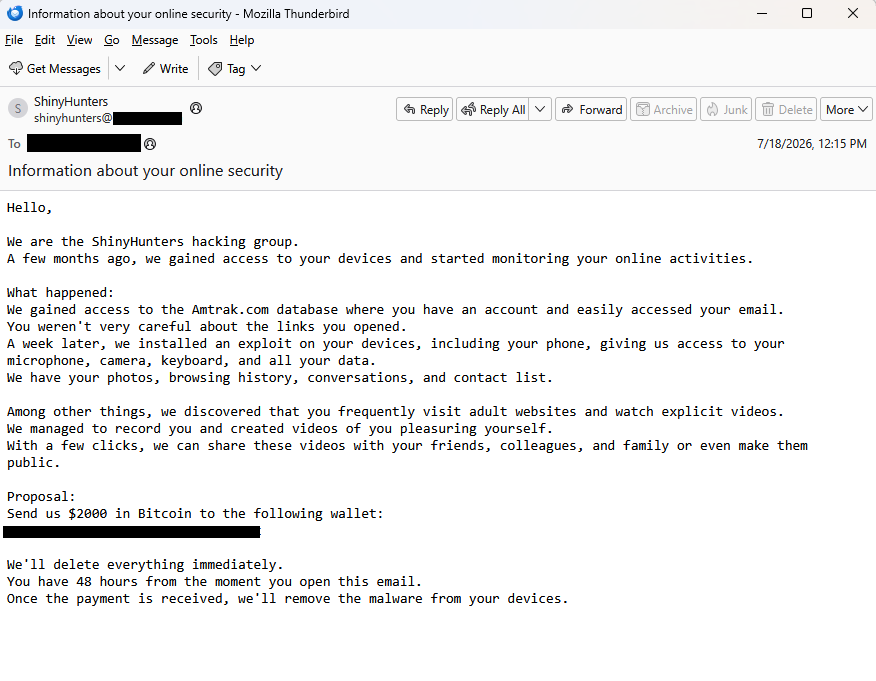
BleepingComputer reports that ShinyHunters data leaks are fueling a $2,000 sextortion email scam and shared the following example:
“Subject: Information about your online security
Hello,
We are the ShinyHunters hacking group. A few months ago, we gained access to your devices and started monitoring your online activities.
What happened: We gained access to the Amtrak.com database where you have an account and easily accessed your email. You weren’t very careful about the links you opened. A week later, we installed an exploit on your devices, including your phone, giving us access to your microphone, camera, keyboard, and all your data. We have your photos, browsing history, conversations, and contact list.
Among other things, we discovered that you frequently visit adult websites and watch explicit videos. We managed to record you and created videos of you pleasuring yourself. With a few clicks, we can share these videos with your friends, colleagues, and family or even make them public.
Proposal: Send us $2000 in Bitcoin to the following wallet: xxxxxxxxxxxxxxxxxxxxxxxxxxxxxxxxx
We’ll delete everything immediately. You have 48 hours from the moment you open this email. Once the payment is received, we’ll remove the malware from your devices.”
BleepingComputer states it has seen data from the Amtrak, Hallmark, ADT, Substack, Betterment, CarGurus, Panera Bread, and McGraw Hill breaches used to target victims in this sextortion email campaign.
A California community college also issued a warning after seeing the campaign target people affected by the Canvas data breach.
They confirmed that the targeted email addresses had previously appeared in data leaked by ShinyHunters. They also contacted the group, which denied being behind the sextortion emails.
The increase to a $2,000 demand may suggest the scammers paid someone for the email lists. Although it’s more likely they simply downloaded the leaked data after ShinyHunters published it following failed extortion attempts.
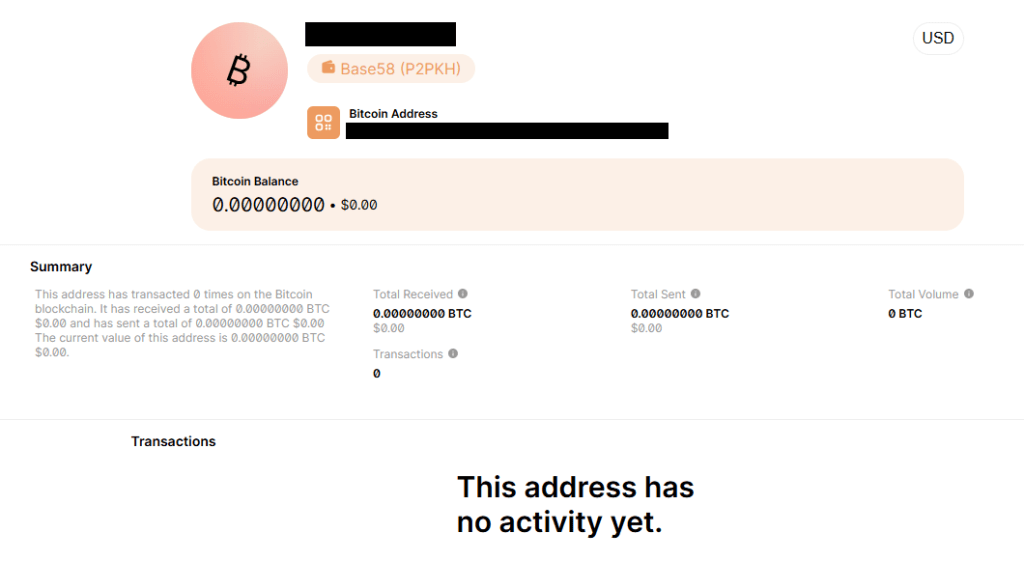
A quick check of the Bitcoin address used in the email shows no activity.
No activity on their Bitcoin address
Let’s keep it that way. With any luck, these dungeon dwellers will eventually give up trying to scare people out of their hard-earned money.
How to react to sextortion emails
Some sextortion emails are badly written, but many have been polished by AI and look convincing. Regardless of how professional they look, they should be treated the same way: as unsubstantiated threats designed to scare victims into paying.
First and foremost, never reply to emails of this kind. Responding confirms that someone is actively reading messages sent to that address and may encourage further scam attempts.
Don’t let yourself be rushed into action. Scammers rely on the fact that you will not take the time to think this through and subsequently make mistakes. Ask for advice if you’re not sure.
An attachment is not proof. Most sextortion emails contain no evidence at all, and attachments are often used to deliver malware or make the threats appear more convincing.
If the email includes a password you’ve used before, change it immediately anywhere it’s still in use. Then enable two-factor authentication (2FA) wherever possible. If you’re having trouble keeping track of your passwords, consider using a password manager.
Delete the message, report it as spam, and move on.
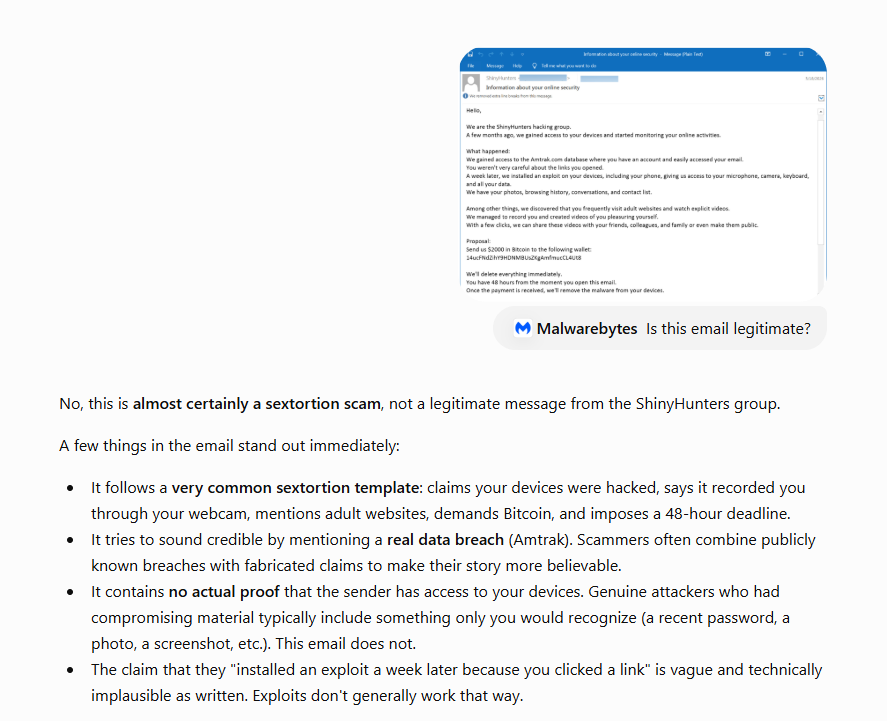
Pro tip: Malwarebytes Scam Guard recognized this email for what it is: sextortion. It can recognize scams and advise you how to proceed.
While these sextortion emails are almost always bluffs, if you’re concerned about webcam spying, Malwarebytes Webcam Monitoring can alert you when applications attempt to access your camera.

 Entrar