The Dutch National Cyber Security Centre (NCSC) issued a warning after being notified of several incidents where a vulnerability in Apple’s Screen Sharing feature was exploited to install Monero cryptominers.
The vulnerability, tracked as CVE-2026-65400, was patched by Apple on August 6. It is an authentication-bypass flaw in macOS Screen Sharing that can let an attacker on the network connect without valid credentials.
macOS’s built-in Screen Sharing service is a remote-control feature commonly associated with port 5900. Successful exploitation can allow a remote attacker on a reachable network to authenticate to the service without legitimate credentials.
Apple said the bug was fixed through “improved state management,” which suggests an authentication-flow or session-state validation failure rather than a cryptographic break.
The patch was issued for macOS Tahoe 26.6.1, Sequoia 15.7.9, and Sonoma 14.8.9. Practical exposure requires Screen Sharing to be enabled, so the highest-risk systems are those where port 5900 is internet-accessible, typically through a router port-forward, public IP assignment, or hosting-provider setup. Hosts reachable only from an internal network are still potentially exposed, but attackers would have to gain a position on that network.
An attacker could view and control the Mac remotely because that is the function Screen Sharing provides. NCSC says active cases involved attackers gaining root access and installing cryptomining software, specifically for Monero mining.
The criminals likely chose Monero mining because it does not depend on heavily specialized, application-specific integrated circuits (ASICs), but can be done with any CPU or GPU.
Cryptomining isn’t necessarily the worst an attacker could do. With a root-level compromise an attacker could enable persistence, data theft, credential and key harvesting, deployment of additional malware, and lateral movement.
How to stay safe
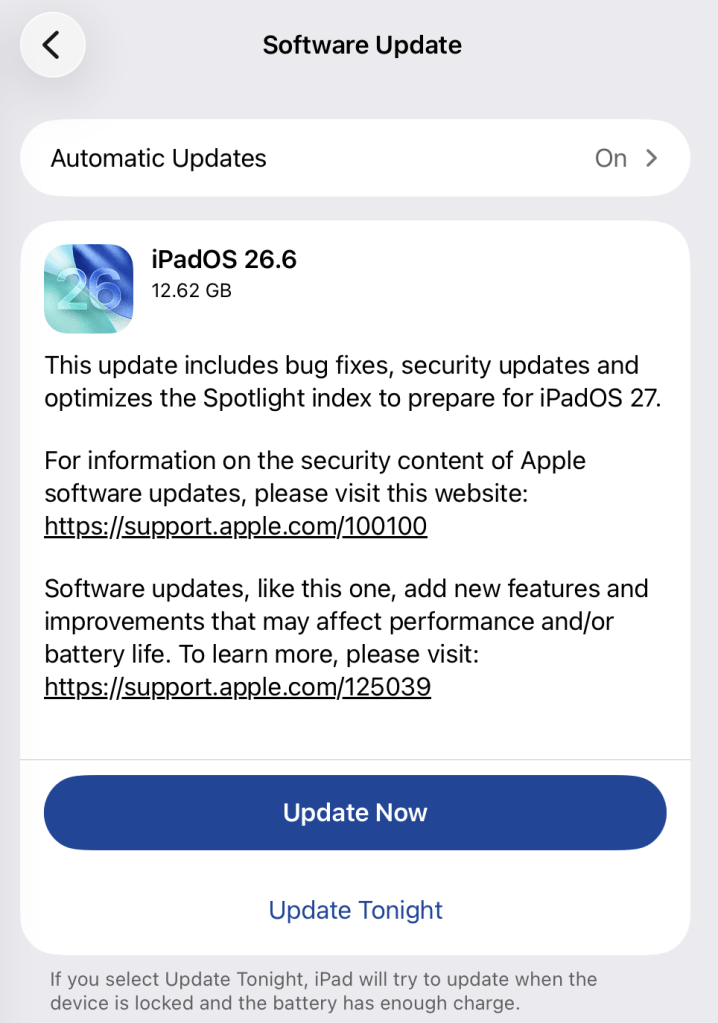
Install the update
The best way to protect your Mac is to install the update.
To update macOS on any supported Mac, use the Software Update feature, which Apple designed to work consistently across all recent versions. Here are the steps:
Click the Apple menu in the upper-left corner of your screen.
Choose System Settings (or System Preferences on older versions).
Select General in the sidebar, then click Software Update on the right. On older macOS, just look for Software Update directly.
Your Mac will check for updates automatically. If updates are available, click Update Now (or Upgrade Now for major new versions) and follow the on-screen instructions. Before you upgrade to macOS Tahoe 26, please read these instructions.
Enter your administrator password if prompted, then let your Mac finish the update (it might need to restart during this process).
Make sure your Mac stays plugged in and connected to the internet until the update is done.
Make sure Screen Sharing is disabled
If you can’t update immediately, check whether Screen Sharing is enabled and turn it off if you don’t use it.
Click the Apple menu in the top-left corner of the screen.
Select System Settings.
In the left sidebar, click General.
Click Sharing on the right; you may need to scroll down.
Find Screen Sharing:
If the switch is off/grey, it is disabled.
If the switch is on/colored, click it to switch it off.
Also check Remote Management on that same Sharing page. It provides another remote-control route and should be off unless the owner knowingly uses it for work or IT support.
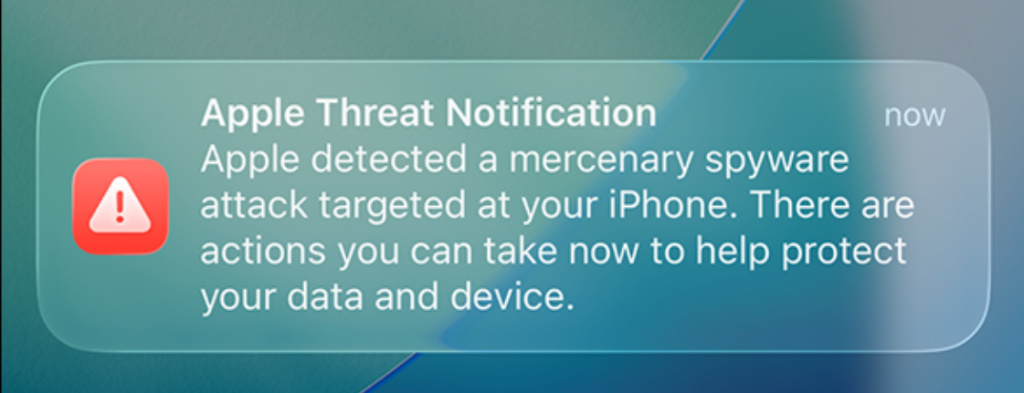
Apple now shows a warning directly on an iPhone’s Lock Screen and in Settings when it believes the device owner has been targeted by mercenary spyware. The new on-device alert is meant to make a high-risk warning harder to overlook and complements notifications by email and through the user’s Apple Account page.
In the explanation, Apple states:
“Apple threat notifications are high-confidence alerts that a user has been individually targeted by a mercenary spyware attack, and should be taken very seriously.”
“Apple Threat Notification Apple detected a mercenary spyware attack targeted at your iPhone. There are actions you can take now to help protect your data and device.”
Apple says its threat notifications are intended for people individually targeted by mercenary spyware attacks, which are highly sophisticated campaigns usually associated with commercial surveillance vendors and their government customers. Apple says it has notified targets in over 150 countries since the launch of the program in 2021, while the latest round of notifications reached people in 110 countries.
Mercenary spyware campaigns are usually not aimed at the average iPhone owner—at least at first. The initial targets are often people selected for who they are, what they know, or the work they do. But it would be a mistake to view this as someone else’s problem.
Attack techniques developed for narrowly targeted operations have a habit of spreading. Exploits can be reused, sold onward, reverse engineered, copied by other surveillance vendors, or adapted by criminal groups. A vulnerability initially valuable because it compromises a small number of carefully chosen devices may become much more dangerous once public disclosure, patch analysis, or exploit sharing makes them available for more widespread campaigns.
How to stay safe
Apple advises users to:
Update your devices to the latest software, which includes the latest security fixes.
Protect your devices with a passcode, Touch ID, or Face ID.
Use strong and unique passwords, and passkeys where available.
Don’t open links or attachments from unknown senders.
We’d like to add:
Potential targets of mercenary spyware should consider applying Apple’s Lockdown Mode.
Check if an Apple Threat Notification is real. Scammers will undoubtedly try and mimic them. You can verify a notification by signing in to your Apple account. A genuine Threat Notification will always be clearly listed there.
If you receive an Apple Threat Notification, Apple recommends seeking expert help, such as the Digital Security Helpline from Access Now.
Scammers know more about you than you think.
Malwarebytes Mobile Security protects you from phishing, scam texts, malicious sites, and more. With real-time AI-powered Scam Guard built right in.
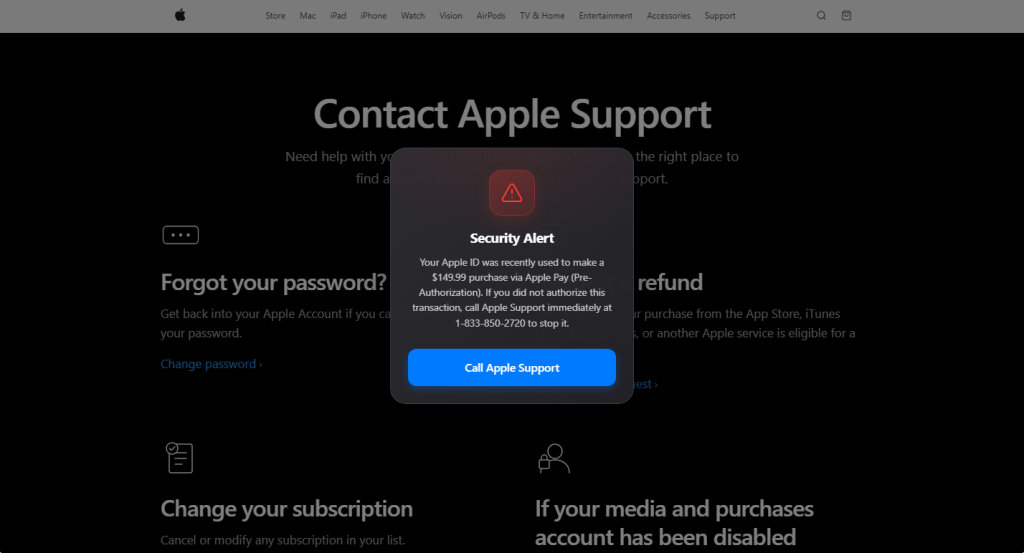
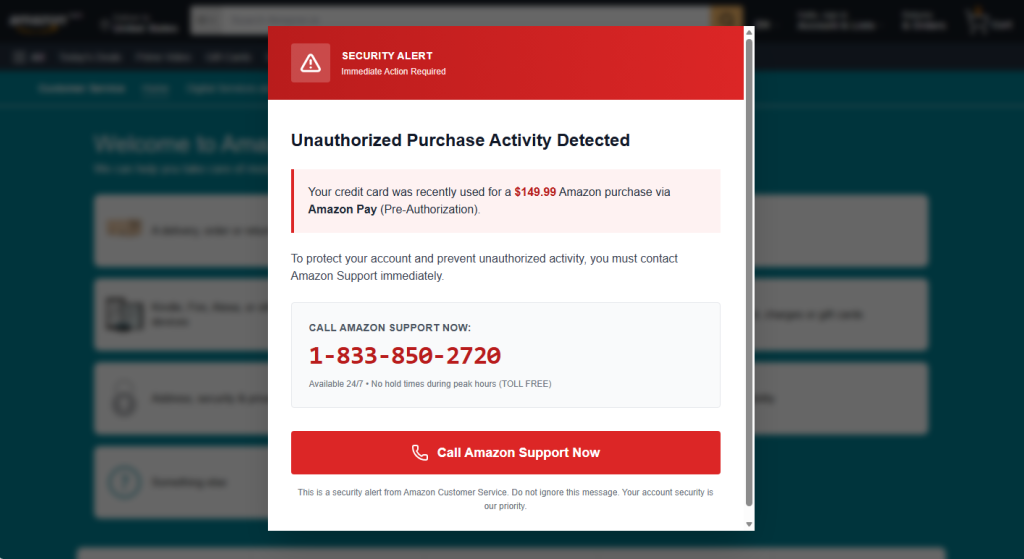
If you’ve spent any time browsing lately, you may have run into a full-screen popup warning you that your Apple ID or Amazon account was just used for a mysterious $149.99 purchase. It looks urgent. It looks official. And if you look at two examples side by side, it becomes obvious that it’s neither.
Below are two popups pulled from real pages—one dressed up as Apple Support, one as Amazon.
Same con, two costumes
Below, one popup is skinned as Apple Support, the other as Amazon. Swap the logo and color palette and the structure is identical: a warning icon, a claim that a $149.99 purchase was just made “via Pre-Authorization,” and a phone number to call immediately. That phone number is exactly the same in both.
Fake Apple alertFake Amazon alert
That reused phone number is the tell. If you only see one popup, running the number through a lookup tool like Malwarebytes Scam Number Check is usually enough to expose it—a real Apple or Amazon line won’t come back flagged, but a scam number typically does, often tied to complaints about several unrelated companies at once.
Why the copy is built the way it is
Every element in these popups is doing specific psychological work:
A believable, moderate dollar amount. $149.99 is high enough to alarm you, low enough to sound like a real subscription or product charge rather than an obvious lie.
“Pre-Authorization” jargon. This is real payment terminology (used for things like hotel holds or gas station charges), borrowed here to sound technically credible to someone who doesn’t handle payments professionally.
Manufactured urgency. “Call immediately,” “Immediate Action Required,” “no hold times”—all are designed to get you dialing before you stop to verify anything.
Visual authority. Red warning triangles, brand-matching fonts and layouts, and a full-screen modal that blocks the rest of the page all borrow the visual language of legitimate security alerts.
A single, frictionless call to action. One button, one phone number. The popup wants exactly one thing from you: to pick up the phone.
If you do call, the number connects to a live scammer posing as support staff, whose actual goal is to get remote access to your device, walk you through “verifying” your identity in a way that hands over real account or payment info, or push you toward paying a fake fee—often via gift cards or a wire transfer.
How to tell if it’s fake
A few checks work regardless of which brand is being impersonated:
Real companies don’t alert you this way. Apple and Amazon notify you about account activity through email, in-app notifications, or your account’s activity log—never through an unexpected popup while you’re browsing.
No legitimate company tells you to call a phone number to stop a charge. Disputing a charge happens through your bank, your card issuer, or the company’s actual account dashboard—not a hotline dictated by a popup.
Check where the popup is actually served from. These often ride in on malicious ads, compromised sites, or browser redirects—the underlying page may be spoofed or injected, not the real apple.com or amazon.com support page it appears to sit on top of.
A popup you can’t easily close is a red flag on its own. Legitimate sites don’t need to trap you behind a full-screen modal to relay account information.
If in doubt, go direct. Close the tab (force-close via task manager if needed) and navigate to the company’s site yourself, or call the number printed on your card or official account page—never the one in the popup.
Check the number before you dial it. Run it through Malwarebytes Scam Number Check to see if it’s already been flagged as a scam line.
Block it before it loads. A browser extension like Malwarebytes Browser Guard catches both known malicious pages and unknown ones showing scam-like behavior, so these popups often get stopped before they ever render.
Don’t judge a scam by its logo
The brand on screen—Apple, Amazon, or whoever’s next—is the least important part of this scam. What actually matters is the pattern underneath: an unexpected popup, a suspiciously specific dollar amount, urgent language, and a phone number that wants you to call before you think. Once you recognize that pattern, it doesn’t matter which company’s name is stamped on top of it.
The UK Home Office has once again demanded Apple allows it access to encrypted iCloud data.
The Guardian reports that the Home Office issued a Technical Capability Notice to Apple, this time targeting only British users. A Technical Capability Notice is a formal government order that compels tech and telecommunications companies to build or maintain specific technical functions—such as intercepting data or removing encryption protections—so law enforcement can access communications.
In the last round of this ongoing battle, the UK secretly ordered Apple to provide blanket access to protected iCloud backups around the world. Advanced Data Protection (ADP) is Apple’s opt‑in end‑to‑end encryption for iCloud backups, which even Apple itself cannot read. Apple argued that weakening or removing ADP would expose users to data breaches and other threats, and instead chose in January 2025 to withdraw ADP for UK customers rather than build a backdoor, while leaving it available elsewhere.
So, instead of working to keep citizens safe and secure, the Home Office just ended up removing an option for them.
Apple has responded by lodging a complaint with the Investigatory Powers Tribunal (IPT), seeking to challenge the scope and lawfulness of the government’s powers to issue such notices under the Investigatory Powers Act. The Tribunal is an independent court that has the power to investigate claims that the UK intelligence services have acted unlawfully.
Privacy International and Liberty have parallel complaints at the IPT challenging Technical Capability Notices more broadly, including their secrecy and necessity, and have asked for Apple’s claim to be heard in public given its wide public-interest implications.
I feel the fear of leaving an intentional backdoor is justified. If it exists, there is a chance that (AI-assisted) criminals will find and exploit it.
Weighing the importance of the right to privacy and the ability to investigate cases including terrorism and child sexual abuse is not easy. Apple’s ADP is used by many and as soon as criminals would know it’s no longer safe for them to use, they’d move to other platforms. Platforms where no legislative power will be able to gain access.
But, given the danger of a backdoor becoming available for criminals, we think in this case privacy should prevail. Let us know how you feel in the comments.
Browse like no one’s watching.
Malwarebytes Privacy VPN encrypts your connection and never logs what you do, so the next story you read doesn’t have to feel personal. Try it free →
Apple has shipped a hefty round of July security patches, headlined by iOS/iPadOS 26.6, macOS Tahoe 26.6, and Safari 26.6, with dozens of vulnerabilities squashed across kernel, WebKit, media frameworks, and core apps. These updates are primarily about improving security rather than adding new features, and users should install them as soon as possible.
Updates for your particular device
The table below shows which updates are available and points you to the relevant security content for that subject.
iPhone 11 and later, iPad Pro 12.9-inch 3rd generation and later, iPad Pro 11-inch 1st generation and later, iPad Air 3rd generation and later, iPad 8th generation and later, and iPad mini 5th generation and later
For iOS and iPadOS users, here’s how to check if you’re using the latest software version:
Go to Settings > General > Software Update. You will see if there are updates available and be guided through installing them.
Turn on Automatic Updates if you haven’t already—you’ll find it on the same screen.
How to update macOS on any version
To update macOS on any supported Mac, use the Software Update feature, which Apple designed to work consistently across all recent versions. Here are the steps:
Click the Apple menu in the upper-left corner of your screen.
Choose System Settings (or System Preferences on older versions).
Select General in the sidebar, then click Software Update on the right. On older macOS, just look for Software Update directly.
Your Mac will check for updates automatically. If updates are available, click Update Now (or Upgrade Now for major new versions) and follow the on-screen instructions. Before you upgrade to macOS Tahoe 26, please read these instructions.
Enter your administrator password if prompted, then let your Mac finish the update (it might need to restart during this process).
Make sure your Mac stays plugged in and connected to the internet until the update is done.
How to update your Safari browser
Safari updates are included with macOS updates, so installing the latest version of macOS will also update Safari. To check manually:
Open the Apple menu > System Settings > General > Software Update.
If you see a Safari update listed separately, click Update Now to install it.
Restart your device when prompted.
If you’re on an older macOS version that’s still supported (like Sonoma or Sequoia), Apple may offer Safari updates independently through Software Update.
Technical details
Among the more interesting vulnerabilities patched in this update are CVE-2026-43818 in ImageIO, CVE-2026-43776 in AppleDouble, and CVE-2026-64763 to 64766 in SceneKit.
Although found in different applications, these vulnerabilities have one thing in common. Their descriptions say:
“Processing a maliciously crafted file may lead to unexpected app termination or arbitrary code execution.”
The identical “processing a maliciously crafted file may lead to unexpected app termination or arbitrary code execution” language is not a coincidence. It’s Apple’s standard impact boilerplate for file‑parsing bugs across multiple frameworks, including ImageIO, AppleDouble, and SceneKit. The similarities reflect shared exploitation patterns (untrusted file input hitting native parsers), while the differences lie in what each framework does and which file types/contexts are affected.
ImageIO is the system framework responsible for reading and displaying image formats such as JPEG, PNG, TIFF, RAW, GIF, and other formats. It’s used throughout iOS and macOS by apps including Photos, Safari, Messages, Mail, and Preview.
SceneKit is a 3D graphics and scene graph framework used for rendering models, animations, and complex 3D scenes in apps and games on Apple platforms. It parses scene description files and 3D assets and turns them into renderable content.
AppleDouble is something macOS uses behind the scenes to keep extra file information like icons and other Finder details in cases where your files live on certain types of disks or servers. When Apple mentions “AppleDouble” in security notes, it’s talking about the code that reads and writes that hidden metadata, particularly when files are stored on network drives or shared with non‑Apple systems.
Apple’s advisories reuse a standard warning for any memory‑corruption bug in a file parser: the best‑case outcome is just a crash, the worst case is someone running their malicious code on your device. ImageIO, AppleDouble, and SceneKit all sit in that same danger zone. Although the file types are different, they all present the same underlying risk.
Until you’ve installed this update, it’s an even worse idea than usual to open unsolicited messages and emails with images in them.
Scammers know more about you than you think.
Malwarebytes Mobile Security protects you from phishing, scam texts, malicious sites, and more. With real-time AI-powered Scam Guard built right in.
404 Media reports that a researcher has found a vulnerability in Apple’s Hide My Email feature that could allow someone to discover a person’s real email address.
That’s especially concerning because protecting your real email address is exactly what the feature is designed to do. 404 Media did not publish technical details of the vulnerability to avoid helping attackers exploit it, but said it independently verified that the issue works.
“Unique, random email addresses that automatically forward to your personal email inbox. Each address is unique to you. You can read and respond directly to emails sent to these addresses and your personal email address is kept private.”
Instead of giving a website or app your real email address when you sign up, you can give it one of these randomly generated addresses. Messages are forwarded to your normal inbox, but the sender shouldn’t be able to see your real email address. At least, that’s how it’s supposed to work.
Tyler Murphy, co-founder of EasyOptOuts, discovered and reported the issue to Apple in June 2025. More than a year later, he says the vulnerability still hasn’t been fixed.
When Murphy reached out to Apple again in May, he received the following response:
“We are still investigating this issue. To avoid placing our customers at risk, we would appreciate you not disclosing this information until our investigation is complete. We appreciate your assistance in helping us to maintain and improve the security of our products.”
Murphy suggested Apple should stop promoting the feature until it could be fixed. Apple reportedly told him it expected to address the issue in a security update in the coming weeks. When that failed to happen, Murphy decided to reach out to 404 Media.
Instead, we learned a few weeks ago that Apple plans to make the Hide My Email less useful for some users. In a note to developers, the company said it will move anonymously generated email addresses to the @private.icloud.com domain. Effectively, this makes it easier for apps and websites to recognize that an email address was created with Hide My Email and potentially refuse to accept it during the sign-up process.
What you can do
Using a different email address for every website or service is still good privacy practice. It makes it easier to identify which company exposed your address in a data breach, and you can simply stop using a compromised alias without changing your main email address.
However, until Apple fixes the issue, you shouldn’t rely on the Hide My Email feature as the only way to keep your real email address private.
Meanwhile, keep an eye open for Apple’s promised security update.
Browse like no one’s watching.
Malwarebytes Privacy VPN encrypts your connection and never logs what you do, so the next story you read doesn’t have to feel personal. Try it free →
Apple has released security updates for more than two dozen security vulnerabilities across iPhone, iPad, and Mac.
The updates for iOS/iPadOS, MacOS Tahoe, and Safari were issued after testing on iOS 26.6 and iPadOS 26.6 betas.
What stands out in the update is that a lot of the vulnerabilities were found in WebKit, the browser engine that powers Safari as well as every browser on iPhone, including Chrome, Firefox, and Edge. It also looks like several of the issues Apple has addressed can be chained together to steal data or run malicious code with little or no user interaction.
Updates for your particular device
The table below shows which updates are available and points you to the relevant security content for that subject.
iPhone 11 and later, iPad Pro 12.9-inch 3rd generation and later, iPad Pro 11-inch 1st generation and later, iPad Air 3rd generation and later, iPad 8th generation and later, and iPad mini 5th generation and later
For iOS and iPadOS users, here’s how to check if you’re using the latest software version:
Go to Settings > General > Software Update. You will see if there are updates available and be guided through installing them.
Turn on Automatic Updates if you haven’t already—you’ll find it on the same screen.
How to update macOS on any version
To update macOS on any supported Mac, use the Software Update feature, which Apple designed to work consistently across all recent versions. Here are the steps:
Click the Apple menu in the upper-left corner of your screen.
Choose System Settings (or System Preferences on older versions).
Select General in the sidebar, then click Software Update on the right. On older macOS, just look for Software Update directly.
Your Mac will check for updates automatically. If updates are available, click Update Now (or Upgrade Now for major new versions) and follow the on-screen instructions. Before you upgrade to macOS Tahoe 26, please read these instructions.
Enter your administrator password if prompted, then let your Mac finish the update (it might need to restart during this process).
Make sure your Mac stays plugged in and connected to the internet until the update is done.
How to update your Safari browser
Safari updates are included with macOS updates, so installing the latest version of macOS will also update Safari. To check manually:
Open the Apple menu>System Settings>General >Software Update.
If you see a Safari update listed separately, click Update Now to install it.
Restart your device when prompted.
If you’re on an older macOS version that’s still supported (like Sonoma or Sequoia), Apple may offer Safari updates independently through Software Update.
Technical details
On iPhone and iPad, every browser—Safari, Chrome, Firefox, Edge—is forced to use Apple’s WebKit engine, which is exactly where most of the 26.5.2 fixes land. Apple and independent write‑ups describe a chain of WebKit issues, including use‑after‑free bugs, memory corruption, and cross‑origin logic errors that could be triggered simply by loading a malicious page. In several cases, the impact ranges from crashing your browser to corrupting memory or leaking data from other sites you have open in different tabs.
And there are some other browser related issues. Apple also notes fixes in Web Extensions and permission handling that could have allowed browser extensions or sites to access more data than intended. Plus some that are scattered across related libraries and frameworks such as libxslt, and WebRTC.
Libxslt is an open-source C library used to perform transformations on XML documents. It enables developers to convert raw XML data into other formats, such as HTML, plain text, or other XML structures.
WebRTC (Web Real-Time Communication) is an open-source technology that allows web browsers and mobile apps to communicate directly with each other.
None of the patched vulnerabilities are known to be exploited in the wild, but that doesn’t mean you can relax. One thing to consider when you are scheduling this update is that, due to the beta testing, the details of these vulnerabilities have been public knowledge for a while, so the race to come up with an exploit has already started.
Scammers know more about you than you think.
Malwarebytes Mobile Security protects you from phishing, scam texts, malicious sites, and more. With real-time AI-powered Scam Guard built right in.
Apple has patched a Bluetooth flaw in Beats Studio Buds that could potentially turn your earbuds into a nearby wiretap.
When you buy a pair of Bluetooth earbuds, you expect them to play your music and your calls—not someone else’s. But a vulnerability in Apple’s Beats Studio Buds shows how that trust can be abused, turning everyday audio gear into a potential eavesdropping tool for anyone close enough and skilled enough to exploit it.
The vulnerability is tracked as CVE-2025-20701. Researchers disclosed flaws in Airoha system-on-a-chip (SoCs) devices at a security conference in Germany in 2025. Because Airoha chips are used in a wide range of audio products, the issue affected multiple devices, including Beats Studio Buds.
The researchers also showed how the vulnerability could be combined with flaws they found in the same Airoha component. By chaining these flaws, attackers could:
Eavesdrop via headphone microphones.
Extract pairing keys.
Impersonate trusted headphones.
Compromise the user’s phone, enabling call hijacking, contact extraction, triggering voice assistants, and more.
The good news is that these attacks are not easy to pull off. Exploitation is complex, and the attacker must be within Bluetooth range of the target device.
Basically, CVE-2025-20701 is a flaw in the authentication process and affects devices that are not yet paired and are actively looking for something to connect to. In a normal scenario, your headphones and your phone go through a pairing process that establishes keys and trust before any sensitive operations—like using the microphone—are allowed.
In this case, devices in pairing mode did not properly verify who they were talking to. That opened a window where any nearby attacker could pose as a legitimate partner and connect to the earbuds before the user completes the pairing process.
As Apple describes it:
“An attacker within Bluetooth range may be able to listen through the microphone of a device which is not yet paired and actively seeking pair requests.”
How to stay safe
To address this vulnerability, Apple shipped Beats Firmware Update 1B211, which rolls out automatically once the earbuds are near and connected to an iPhone, iPad, or Mac.
For the average user, the need for physical proximity, specialized hardware and software, and some patience means opportunistic criminals are more likely to stick with phishing and credential stuffing than stalking Bluetooth signals in public spaces.
But for a motivated attacker targeting a high-profile individual, this is exactly the kind of bug they’d use.
There is no “Update now” button, but if you own Beats Studio Buds and use them with an iPhone, iPad, or Mac, you should automatically receive the update when:
The earbuds are paired with your Apple device
They are in their charging case, with the lid closed
The case and buds have sufficient charge, and the Apple device is nearby with Bluetooth enabled
To check whether you’re protected:
On iOS or iPadOS, go to Settings > Bluetooth
Tap the info icon next to your Beats Studio Buds
Look at the firmware or version number. It should read 1B211 if the security update has been applied. If it says anything else, your earbuds may not have received the update yet. If you see an older version, keep the earbuds in their case near your iPhone, iPad, or Mac for a while to give them time to update. This can take some time and may happen silently in the background, so checking again later is worth the effort.
Scammers know more about you than you think.
Malwarebytes Mobile Security protects you from phishing, scam texts, malicious sites, and more. With real-time AI-powered Scam Guard built right in.
Apple has released security updates to address a Notification Services issue in iOS and iPadOS that could cause alerts marked for deletion to remain stored on a device. The fix was delivered in iOS 26.4.2 / iPadOS 26.4.2 and iOS 18.7.8 / iPadOS 18.7.8, where Apple says the problem was resolved through improved data redaction.
The issue drew attention because it was patched outside Apple’s normal release cycle and was publicly linked to concerns that deleted notification content could remain recoverable on affected devices. Based on public reporting, the flaw may have allowed sensitive message previews to persist in internal notification storage longer than users would reasonably expect.
For defenders and privacy-focused users, the key concern is not traditional remote exploitation but unintended data retention. At the time of disclosure, Apple did not publish exploit samples, telemetry artifacts, or a public proof-of-concept, leaving many technical details for CVE-2026-28950 limited to the vendor advisory and media reporting.
CVE-2026-28950 analysis
Apple describes the issue as a logging-related flaw in Notification Services that allowed notifications intended for deletion to be unexpectedly retained on the device. In practice, this means content visible in alerts, such as message previews or other app-generated text, may continue to exist in local storage after the user assumes it has been removed.
Public reporting connected the patch to earlier forensic concerns involving message content recovered from notification storage on iPhones. While Apple did not explicitly confirm those reports as the direct trigger for the update, the description of the flaw closely aligns with the broader privacy risk described in public coverage.
The main security impact is on confidentiality rather than integrity or availability. The problem is especially relevant in environments where lock-screen notifications or mobile message previews may expose regulated, operational, or otherwise sensitive information. From that standpoint, the CVE-2026-28950 vulnerability is best understood as a privacy and data-remanence issue rather than a conventional code-execution bug.
Public reporting also leaves several gaps. Apple did not assign a public CVSS score in the cited coverage, and there are no published network indicators or forensic signatures that would support classic threat hunting. As a result, organizations should focus on version validation and privacy controls rather than looking for a known CVE-2026-28950 payload or a fixed list of CVE-2026-28950 IOCs.
CVE-2026-28950 Mitigation
The primary response is to install Apple’s fixed releases across affected iPhone and iPad fleets. Security teams should verify that supported devices have moved to the patched versions and prioritize users who regularly handle confidential communications, executive discussions, legal material, or regulated data on mobile devices.
An additional defense-in-depth step is to reduce the amount of sensitive information shown in notifications. Public reporting notes that Signal users, for example, can limit what appears in alerts by changing notification content settings to display less message text. While that does not replace patching, it can reduce exposure where private data might otherwise remain accessible in notification storage.
From an operational perspective, the most practical path is simple: inventory devices, confirm version compliance, and review notification-preview policies for high-risk user groups. This is a more realistic protection strategy than trying to Detect CVE-2026-28950 through conventional threat indicators, because the issue centers on retained local data rather than a well-documented exploit chain.
Additionally, by leveraging SOC Prime’s AI-Native Detection Intelligence Platform backed by top cyber defense expertise, global organizations can adopt a resilient security posture and transform their SOC to always stay ahead of emerging threats tied to zero-day exploitation.
FAQ
What is CVE-2026-28950 and how does it work?
It is an iOS and iPadOS Notification Services flaw that could cause deleted notifications to remain stored on a device. Apple says the problem was caused by a logging issue and addressed it through improved data redaction.
When was CVE-2026-28950 first discovered?
The public sources do not provide a private discovery date. What is confirmed is that Apple released fixes on April 22, 2026.
What is the impact of CVE-2026-28950 on systems?
The main impact is exposure of sensitive notification content that may remain on the device after deletion. This can matter in forensic, privacy, or device-access scenarios where retained alert data could reveal message previews or other confidential content.
Can CVE-2026-28950 still affect me in 2026?
Yes. Devices that have not been updated to the patched releases may still be exposed during 2026, particularly if apps display sensitive content in notifications.
How can I protect myself from CVE-2026-28950?
Install Apple’s updates, verify device compliance, and reduce sensitive notification previews where possible. For privacy-sensitive environments, limiting the amount of message content shown in alerts is a sensible additional safeguard. If you want, I can now also make the meta title, meta description, and excerpt match this less-keyword-stuffed style.
On March 4, 2026, Google and iVerify published reports about a highly sophisticated exploit kit targeting Apple iPhone devices. According to Google, the exploit kit was first discovered in targeted attacks conducted by a customer of an unnamed surveillance vendor. It was later used by other attackers in watering-hole attacks in Ukraine and in financially motivated attacks in China. Additionally, researchers discovered an instance with the debug version of the exploit kit, which revealed the internal names of the exploits and the framework name used by its developers — Coruna. Analysis of the kit showed that it relies on the exploitation of many previously patched vulnerabilities and also includes exploits for CVE-2023-32434 and CVE-2023-38606. These two vulnerabilities particularly caught our attention because they had been first discovered as zero-days used in Operation Triangulation.
Operation Triangulation is a complex mobile APT campaign targeting iOS devices. We discovered it while monitoring the network traffic of our own corporate Wi-Fi network. We noticed suspicious activity that originated from several iOS-based phones. Following the investigation, we learned that this campaign employed a sophisticated spyware implant and multiple zero-day exploits. The investigation lasted for over six months, during which we disclosed our findings in connection to the attack. Kaspersky GReAT experts also presented these findings at the 37th Chaos Communication Congress (37C3).
Although all the details of both CVE-2023-32434 and CVE-2023-38606 have long been publicly available, and other researchers have developed their own exploits without ever seeing the Triangulation code, we decided to closely investigate the exploits used in Coruna. Some of the exploit kit distribution links provided by Google remained active at the time the report was published, which allowed us to collect, decrypt, and analyze all components of Coruna.
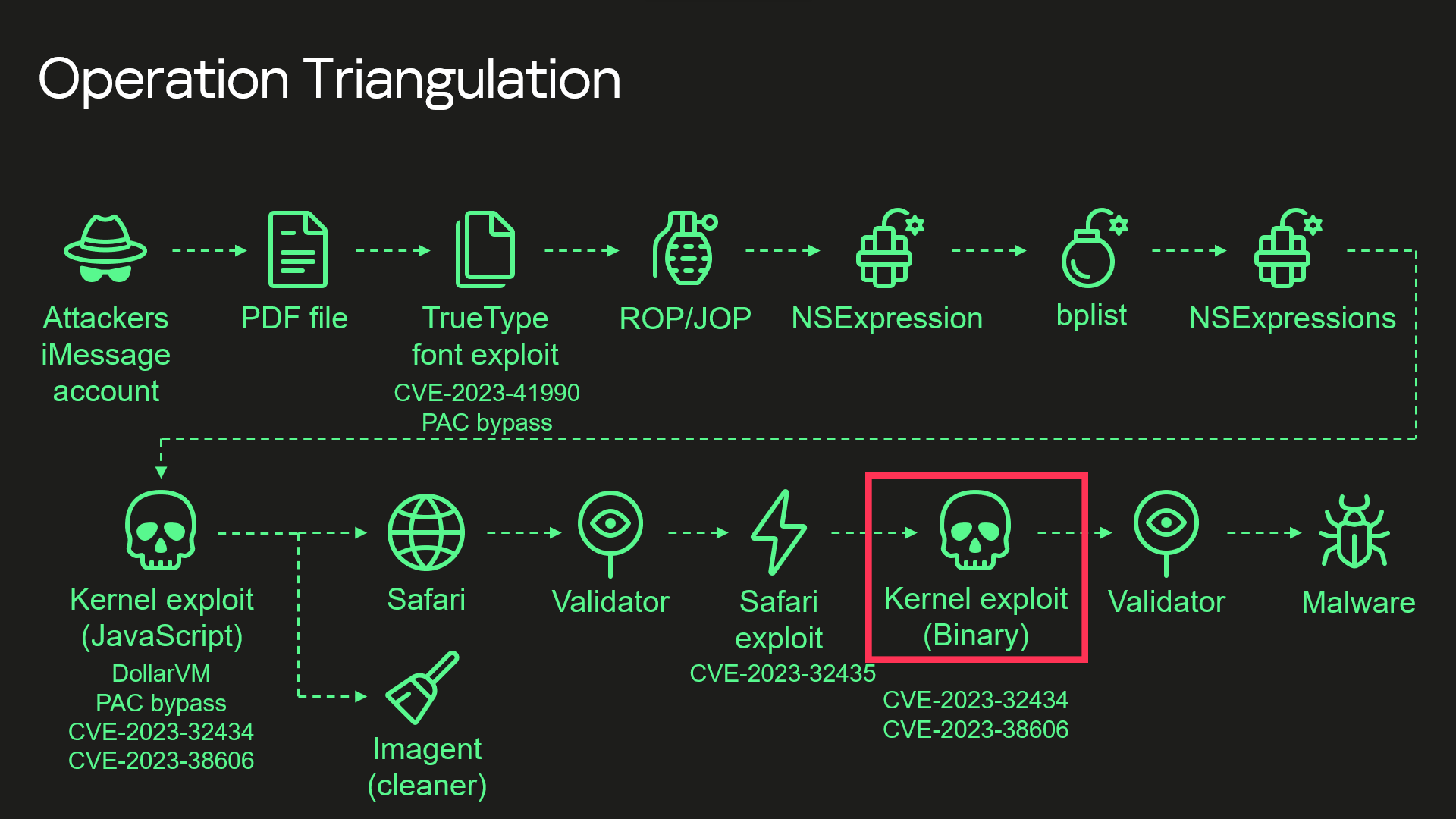
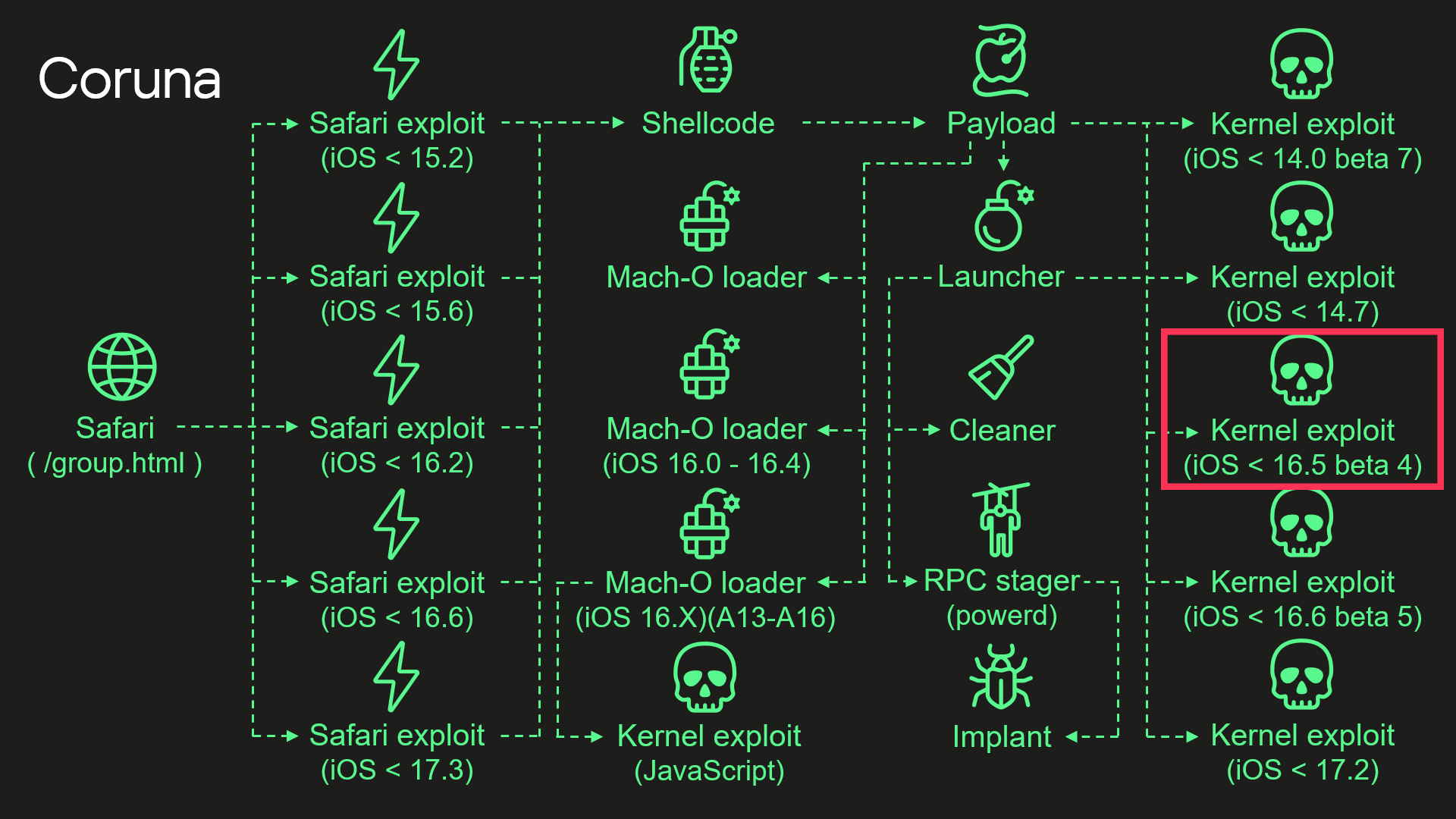
During our analysis, we discovered that the kernel exploit for CVE-2023-32434 and CVE-2023-38606 vulnerabilities used in Coruna, in fact, is an updated version of the same exploit that had been used in Operation Triangulation. The images below illustrate a high-level overview of the two attack chains. The exploit in question is highlighted with a red rectangle.
Attack chain of Operation Triangulation (simplified)
Attack chain of Coruna (simplified)
Moreover, we discovered that Coruna includes four additional kernel exploits that we had not seen used in Operation Triangulation, two of which were developed after the discovery of Operation Triangulation. All of these exploits are built on the same kernel exploitation framework and share common code. Code similarities from kernel exploits can also be found in other components of Coruna. These findings led us to conclude that this exploit kit was not patchworked but rather designed with a unified approach. We assume that it’s an updated version of the same exploitation framework that was used — at least to some extent — in Operation Triangulation.
Technical details
While we continue to investigate all exploits and vulnerabilities used by Coruna, this post provides a high-level overview of the exploit kit and attack chain.
Safari
Exploitation begins with a stager that fingerprints the browser and selects and executes appropriate remote code execution (RCE) and pointer authentication code (PAC) exploits depending on the browser version. It also contains a URL to an encrypted file with information about all available packages containing exploits and other components. The stager also includes a 256-bit key used to decrypt it. The URL and decryption key are passed to a payload embedded in PAC exploits.
Payload
The payload is responsible for initiating the exploitation of the kernel. After initialization, the payload first downloads a file with information about other available components. To extract it, the payload performs several steps processing multiple file formats.
First, the downloaded file is decrypted using the ChaCha20 stream cipher. Decryption yields a container with the magic number 0xBEDF00D, which stores LZMA-compressed data.
The file format used by the exploit kit to store compressed data
Offset
Field
0x00
Magic number (0xBEDF00D)
0x04
Decompressed data size
0x08
LZMA-compressed data
The decompressed data presents another container with the magic number 0xF00DBEEF. This file format is used in the exploit kit to store and retrieve files by their IDs.
The file format used by the exploit kit to store files
Offset
Field
0x00
Magic number (0xF00DBEEF)
0x04
Number of entries
0x08
Entry[0].File ID
0x0C
Entry[0].Status
0x10
Entry[0].File offset
0x14
Entry[0].File size
We provide a description of all possible File ID values below. At this stage, when the payload gathers information about all available file packages, this container holds only one file, and its File ID is 0x70000.
Finally, we get to the file with information about all available file packages. It starts with the magic value 0x12345678. The exploit kit uses this file format to obtain URLs and decryption keys for additional components that need to be downloaded.
The file format used by the exploit kit to store information about file packages
Offset
Field
0x00
Magic number (0x12345678)
0x04
Flags
0x08
Directory path
0x108
Number of entries
0x10C
Entry[0].Package ID
0x110
Entry[0].ChaCha20 key
0x130
Entry[0].File name
The components required for exploiting a targeted device are selected using the Package ID. Its high byte specifies the package type and required hardware. We’ve seen the following package types:
0xF2 – exploit for ARM64,
0xF3 – exploit for ARM64E,
0xA2 – Mach-O loader for ARM64,
0xA3 – Mach-O loader for ARM64E,
2 – implant for ARM64,
0xE2 – implant for ARM64E.
The payload code also supports additional package types, such as 0xF1, an exploit for older ARM devices that do not support 64-bit architecture. Interestingly, however, the files for such exploits are missing.
Other bytes of the Package ID define the supported firmware version and CPU generation.
Some of the observed Package IDs (those with unique content)
Package ID
Description
0xF3300000
Kernel exploit (iOS < 14.0 beta 7) and other components
0xF3400000
Kernel exploit (iOS < 14.7) and other components
0xF3700000
Kernel exploit (iOS < 16.5 beta 4) and other components
0xF3800000
Kernel exploit (iOS < 16.6 beta 5) and other components
0xF3900000
Kernel exploit (iOS < 17.2) and other components
0xA3030000
Mach-O loader (iOS 16.X) (A13 – A16)
0xA3050000
Mach-O loader (iOS 16.0 – 16.4)
The files inside these packages are also stored in encrypted and compressed 0xF00DBEEF containers, but this time compression is optional and is determined by the second bit in the Flags field. Different packages contain different sets of files. A description of all possible File IDs is given in the table below.
Observed File IDs
File ID
Description
0x10000
Implant
0x50000
Mach-O loader (default)
0x70000
List of additional components
0x70005
Launcher config
0x80000
Launcher in 0xF2/0xF3 packages, or Mach-O loader in 0xA2/0xA3
0x90000
Kernel exploit
0x90001
Kernel exploit (for Mach-O loader)
0xA0000
Logs cleaner
0xA0001
Mach-O loader component
0xA0002
Mach-O loader component
0xF0000
RPC stager
After downloading the necessary components, the payload begins executing kernel exploits, Mach-O loaders, and the malware launcher. The payload selects an appropriate Mach-O loader based on the firmware version, CPU, and presence of the iokit-open-service permission.
Kernel exploits
We analyzed all five kernel exploits from the kit and discovered that one of them is an updated version of the same exploit we discovered in Operation Triangulation. There are many small changes, but the most noticeable are as follows:
The code takes into account more values from XNU version strings, allowing for more accurate version checking.
Added a check for iOS 17.2. We assume that this was the latest version of iOS at the time of development (released in December 2023).
Added checks for newer Apple processors: A17, M3, M3 Pro, M3 Max (released in fall 2023).
Added a check for iOS version 16.5 beta 4. This version patched the exploit after our report to Apple.
Why does the exploit need to check for iOS 17.2 and newer CPUs if the targeted vulnerabilities were fixed in iOS 16.5 beta 4? The answer can be found by examining other exploits: they are all based on the same source code. The only difference is in the vulnerabilities they exploit, so these checks were added to support the newer exploits and appeared in the older version after recompilation.
Launcher
The launcher is responsible for orchestrating the post-exploitation activities. It also uses the kernel exploit and the interface it provides. However, since the exploit creates special kernel objects during its execution that provide the ability to read and write to kernel memory, the launcher simply reuses these objects without the need to trigger vulnerabilities and go through the entire exploitation path again. The launcher cleans up exploitation artifacts, retrieves the process name for injection from a config with the 0xDEADD00F magic number, injects a stager into the target process, uses it to execute itself, and launches the implant.
Conclusions
This case demonstrates once again the dangers associated with such malicious tools that lie in their potential wide usage. Originally developed for cyber-espionage purposes, this framework is now being used by cybercriminals of a broader kind, placing millions of users with unpatched devices at risk. Given its modular design and ease of reuse, we expect that other threat actors will begin incorporating it into their attacks. We strongly recommend that users install the latest security updates as soon as possible, if they have not already done so.
Just a little over a month after fixing the actively exploited CVE-2026-20700 zero-day, Apple has now issued its first Background Security Improvements release to address CVE-2026-20643, a WebKit vulnerability that could allow maliciously crafted web content to bypass the Same Origin Policy, one of the browser’s core security boundaries.
The issue in the limelight adds to the constantly rising vulnerability threat. Experts forecast that 2026 will be the first year to surpass 50,000 published CVEs, with a median estimate of 59,427 and a realistic possibility of far higher totals. At the same time, the NIST has already recorded over 13K+ vulnerabilities this year, underscoring the growing scale defenders must monitor.
Sign up for the SOC Prime Platform to access the global marketplace of 800,000+ detection rules and queries made by detection engineers, updated daily, and enriched with AI-native threat intel to proactively defend against emerging threats.
Just click the Explore Detections below and immediately reach the extensive detection stack filtered out by “CVE” tag. All detections are compatible with dozens of SIEM, EDR, and Data Lake formats and are mapped to MITRE ATT&CK®.
Security experts can also leverage Uncoder AI to accelerate detection engineering end-to-end by generating rules directly from live threat reports, refining and validating detection logic, visualizing Attack Flows, converting IOCs into custom hunting queries, and instantly translating detection code across diverse language formats.
CVE-2026-20643 Analysis
CVE-2026-20643 affects WebKit, the browser engine behind Safari and a wide range of Apple web content handling across iPhone, iPad, and Mac. Apple’s advisory says the flaw could allow maliciously crafted web content to bypass the Same Origin Policy because of a cross-origin issue in the Navigation API.
Notably, the Same Origin Policy is one of the web’s foundational protections. It is meant to stop one website from reaching into the data, sessions, or active content of another. When this boundary is breached, a malicious webpage may access data from another site, undermining one of the basic rules browsers rely on to keep web activity separate and private.
The exposure is broader than Safari alone. WebKit powers Safari, many third-party browsers on iOS and iPadOS, and in-app web views across Apple platforms. In practice, that means the vulnerable component is exercised not only when a user browses the web directly, but also when apps load embedded web content.
Apple has not mentioned that CVE-2026-20643 was exploited in the wild, and its advisory focuses on the technical impact rather than observed attack activity. Still, the issue resides in a high-exposure component that processes untrusted web content constantly. In enterprise environments, a flaw that weakens browser isolation can increase the risk of session abuse, cross-site data access, and follow-on compromise through malicious or compromised web content.
What makes Apple’s latest release especially notable is how the vendor delivered the fix. Background Security Improvements is designed to ship smaller security patches between full software updates. It is currently available on the latest versions of iOS, iPadOS, and macOS. In the case of CVE-2026-20643, Apple used the new mechanism to push a WebKit fix directly to supported devices instead of waiting for a broader release.
CVE-2026-20643 Mitigation
Apple addressed CVE-2026-20643 through its first Background Security Improvements release for supported iPhone, iPad, and Mac devices. The fix was shipped as the corresponding “(a)” update for iOS 26.3.1, iPadOS 26.3.1, macOS 26.3.1, and macOS 26.3.2, with Apple citing improved input validation as the remediation. Security researcher Thomas Espach was credited with reporting the flaw.
Apple says Background Security Improvements are managed from the Privacy & Security menu. Apple recommends keeping Automatically Install enabled so devices receive these fixes between normal software releases.
Notably, if Background Security Improvements are turned off, the device will not receive these protections until they are included in a later software update. Apple also says that removing an installed Background Security Improvement reverts the device to the baseline software version without any applied background security patches. For that reason, the safest path is to leave automatic installation on and avoid removing the update unless a compatibility issue makes it necessary.
Additionally, by leveraging SOC Prime’s AI-Native Detection Intelligence Platform backed by top cyber defense expertise, global organizations can adopt a resilient security posture and transform their SOC to always stay ahead of emerging threats tied to zero-day exploitation.
FAQ
What is CVE-2026-20643 and how does it work?
CVE-2026-20643 is a WebKit vulnerability affecting iOS, iPadOS, and macOS. Apple describes it as a cross-origin issue in the Navigation API that may allow maliciously crafted web content to bypass the Same Origin Policy.
When was CVE-2026-20643 disclosed?
Apple published the security advisory for CVE-2026-20643 on March 17, 2026, alongside its first Background Security Improvements release covering this flaw.
What is the impact of CVE-2026-20643 on systems?
The main impact is a breakdown in browser isolation. If exploited, the flaw may let malicious web content bypass the Same Origin Policy, which is designed to prevent one site from accessing data or active content from another.
Can CVE-2026-20643 still affect me in 2026?
Yes. Devices that have not received the relevant Background Security Improvements release, or where those protections were disabled or removed, may still remain exposed while running affected versions.
How can I protect from CVE-2026-20643?
Install the applicable Background Security Improvements release for your current Apple OS version and make sure Automatically Install is enabled under Privacy & Security so future fixes are applied without delay.
SentinelLABS identified 10+ patents for highly intrusive forensics and data collection technologies that were registered by companies named in U.S. indictments as working on behalf of the Hafnium threat actor group.
These technologies offer strong, often previously unreported offensive capabilities, from acquisition of encrypted endpoint data, mobile forensics, to collecting traffic from network devices.
Our research explores the relationships between indicted hackers, ownership of the firms they are associated with, and the relationships those firms have with several government entities who conduct offensive cyber operations on behalf of China.
Overview
In July 2025, the Department of Justice (DOJ) released an indictment of two hackers, Xu Zewei and Zhang Yu, working on behalf of China’s Ministry of State Security (MSS) that sheds new light on the People’s Republic of China’s (PRC) contracting ecosystem. The indictment outlined that Xu and Zhang worked for two firms previously unattributed in the public domain to the Hafnium (aka Silk Typhoon) threat actor group. Hafnium has a long history of attacks against defense contractors, policy think tanks, higher education, and infectious disease research institutions, with an exceptionally prolific 2021 campaign that exploited several 0-day vulnerabilities in Microsoft Exchange Server (MES). Hafnium’s history of exploits and 0day use, combined with its targets and observed campaigns make it one of China’s best APTs.
This research resulted in three key findings.
We identified previously unobserved or unreported offensive tooling owned by Hafnium-associated companies named in U.S. indictments. The tooling raises questions about these firms’ on-going work in support of the MSS and how attribution is difficult. The company holds at least one patent on software designed to remotely recover files from Apple computers, which has not been documented as a capability used by Hafnium or any related threat actor groups.
The DOJ indictment provides new insights into the tiers of relationships between hackers and their customers. This report raises important questions about the extent to which the MSS and its regional offices offer operational support to its contracted hackers.
Our research delves into several companies tied to the indicted Hafnium-affiliated hackers and documents their relationships. Importantly, the report finds evidence of multiple companies registered by one of the defendants, and dozens more by an associate.
This new insight into the Hafnium-affiliated firms’ capabilities highlights an important deficiency in the threat actor attribution space: threat actor tracking typically links campaigns and clusters of activity to a named actor. Our research demonstrates the strength in identifying not only the individuals behind attacks, but the companies they work for, the capabilities those companies have, and how those capabilities fortify the initiatives of the state entities who contract with these firms.
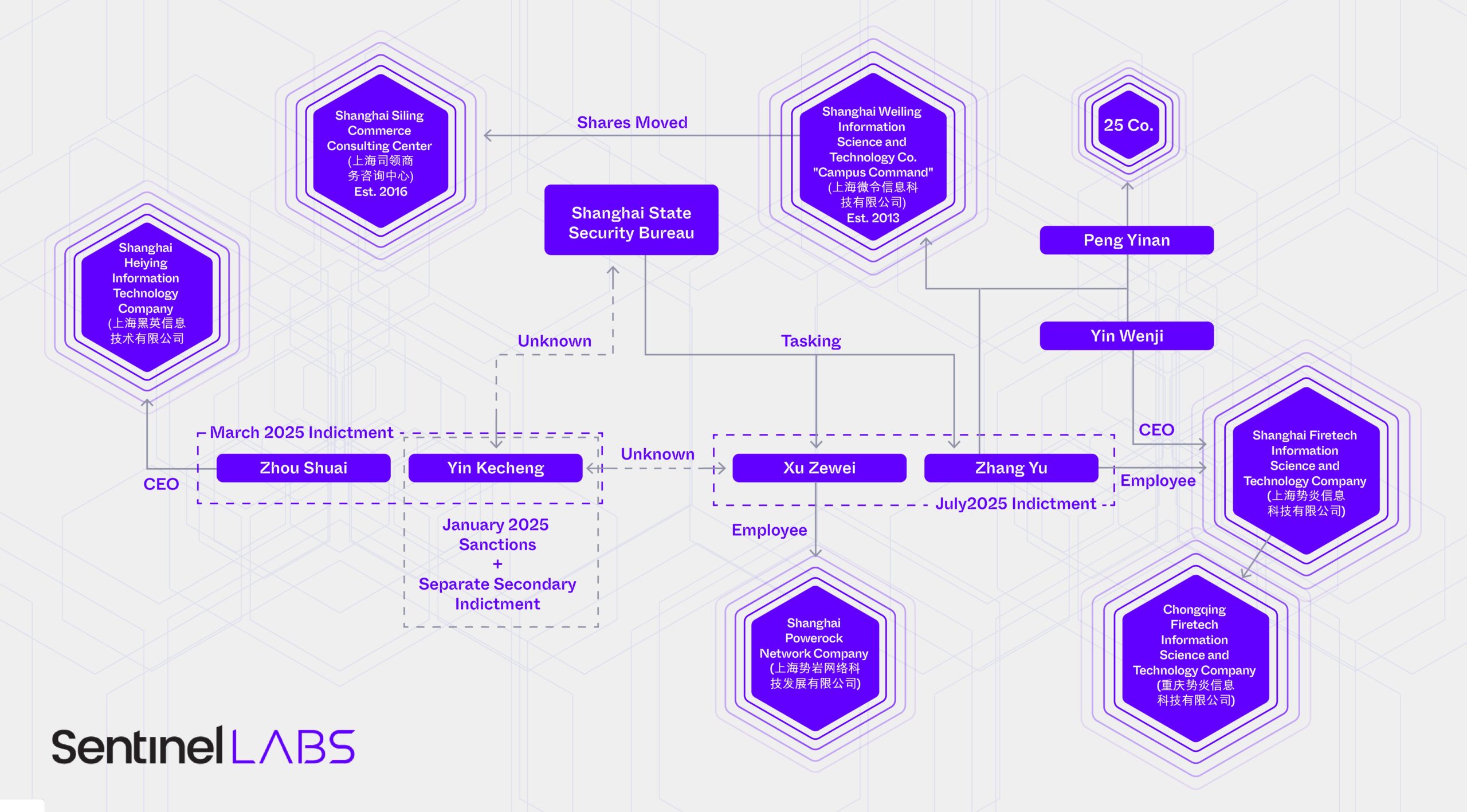
An organization chart for people and businesses known to be associated with Hafnium
Hafnium’s Impact
It’s rare for a hacking team to behave so recklessly that it changes a country’s foreign policy and unify the E.U., U.K., and U.S. into speaking with one voice, but Hafnium wouldn’t be famous if they hadn’t done that. And, actually, they didn’t do it.
Hafnium gained fame following the revelation of their stealthy access to U.S. Government emails through an MES vulnerability known as ProxyLogon, which came to light in March 2021. But the group is often wrongly blamed for what happened next. The name Hafnium became associated with the wider abuse of the ProxyLogon vulnerabilities that followed the original Hafnium activity as lesser tier threat groups flooded the zone with exploitation attempts to opportunistically deliver payloads ranging from espionage to ransomware.
Microsoft alerted its Microsoft Advanced Protection Program partners to some POC code on February 23. This program provides some select cybersecurity companies early access to powerful new exploits, so they can better defend their customers. Five days later on February 28th, new Chinese state-affiliated and criminal hacking groups began exploiting the vulnerability at an immense scale. It remains unclear how exactly the exploit proliferated ahead of the patch. The longer tail of the problem arises from the prevalence of webshells littered by each attacker’s use of ProxyLogon. These groups left shells on vulnerable servers allowing access to these servers even after the vulnerability itself was patched. The situation was so dire that the DOJ received its first court authorization for the FBI to remove these shells en masse from compromised servers.
The rapid dissemination and exploitation of the vulnerability led the U.S., U.K., and E.U. to issue their first ever joint statement condemning PRC actions in cyberspace in July 2021. The statement roiled CCP policymakers who had previously fended off such joint decrees by convincing one E.U. state to reject such declarations. Because the E.U. requires unanimous consent for foreign policy statements, the fallout from the wanton abuse of the vulnerability upended China’s foreign policy success.
The joint statement so perturbed CCP policymakers that the country launched an offensive public opinion campaign against U.S. hacking operations that continues today. Before the July 2021 joint statement, the PRC did not coordinate cyber threat intelligence publications with state propaganda outlets. Following the statement, a pattern emerged of coordinated private-sector CTI reports, English-language propaganda pieces, and statements by the PRC Ministry of Foreign Affairs. SentinelOne published a report detailing this change in February 2024 and the findings of that report are corroborated by a textbook on cybersecurity published by a committee of experts in China. China now regularly releases propaganda pieces alongside cyber threat intelligence reports–the change was completely prompted by the success the U.S. had in unifying the European Union behind a joint statement, which was itself enabled by China’s behavior.
Hafnium’s False Start or The Less Capable Cluster?
Following an intrusion into U.S. Treasury systems that came to light in late 2024, the Department sanctioned one of its alleged hackers, Yin Kecheng (尹可成). The Treasury sanctions announced in January 2025 were quickly followed by a March DOJ indictment of Yin and a business associate, Zhou Shuai (周帅). Two separate indictments were released for Yin in March. The first document is dated 2017 and only Yin is named as the defendant. The second indictment is dated 2023 and lists both Yin and Zhou.
Zhou Shuai, aka Coldface, is a first-generation patriotic hacker from China with a storied history of corporate registrations and work for the state. The March 2025 indictment of Zhou and Yin indicate that Zhou brokered the sale of Yin’s work through iSoon, a company whose internal chats and corporate records were leaked online in early 2024. Leaked chats showed iSoon executives considering a merger and acquisition of Zhou’s Shanghai-based company. iSoon executives also chastised Zhou for being a mere broker.
The DOJ press release for the indictments indicate that Yin’s and Zhou’s activities were tracked under various naming conventions and clusters, including Silk Typhoon. Microsoft updated the group’s alias from Hafnium to Silk Typhoon in 2022.
DOJ press release summary listing the Hafnium group’s aliases
As of March 2025, Hafnium apparently consisted of a Shanghai-based company, Shanghai Heiying Information Technology Company (上海黑英信息技术有限公司), run by Zhou Shuai, which collaborated with Yin Kecheng in some fashion.
Hafnium and Other Elements
Following the July 2025 released indictment of Xu Zewei and Zhang Yu, the number of people alleged to work for Hafnium grew to four and the number of companies involved grew to three. The DOJ maintains that Xu Zewei and Zhang Yu worked at the “direction” of Shanghai State Security Bureau (SSSB). Xu Zewei completed his tasking while working at Shanghai Powerock Network Company (上海势岩网络科技发展有限公司); Zhang Yu worked at Shanghai Firetech Information Science and Technology Company (上海势炎信息科技有限公司).
This “directed” nature of the relationship between the SSSB and these two companies contours the tiered system of offensive hacking outfits in China.
Other capable analysts adeptly delve into Shanghai Powerock, so this report focuses on Zhang Yu’s company, Shanghai Firetech. Far from being an offensive shop procuring initial access and intelligence in the hopes of finding a willing buyer, as in the case of i-Soon, Shanghai Firetech worked on specific tasking handed down from MSS officers. The indictment maintains that Zhang Yu “supervised hacking activity, including that of other Firetech personnel in support of such [SSSB] taskings, and coordinated hacking activities with fellow hacker XU.” This indicates that Shanghai Firetech and co-conspirators earned an on-going, trusting relationship with the MSS’s premier regional office, the SSSB.
China experts and law enforcement distinguish between China’s operational structures. At the lowest tier of the contracting ecosystem are bottom feeders, like i-Soon. That company’s leaked files and U.S. indictment of their employees show a firm stuck in low-paying contracts with poor morale, and often subcontracting to bigger, better firms. A step up from i-Soon might be its prime contractor and competitor, Chengdu404, whose founders were also indicted. Chengdu 404 has stable business, works from multiple offices, and at one point was China’s most prolific APT. The tier of contractors the Chinese government holds closest are actors like Xu Zewei and Zhang Yu. But the MSS has not completely abandoned state-run operations. Past DOJ indictments show that other MSS offices do indeed use front companies. The Hubei State Security Department established Wuhan Xiao Rui Zhi (Wuhan XRZ) in 2010 as a front company for state operations.
You’re My Favorite Deputy
The peculiarities of Hafnium’s MES exploitation campaign raise questions about the relationship between the SSSB and its contractors. Hafnium began exploiting MES vulnerabilities beginning in January 2021. The exact date Hafnium’s campaign began is unclear, but the month is itself enough to raise eyebrows. On January 5, 2021, OrangeTsai tweeted he had found an incredibly powerful pre-auth RCE vulnerability, later confirmed to be the same MES vulnerabilities exploited by Hafnium. How did Hafnium come to exploit those vulnerabilities in the same month that OrangeTsai found them?
Theories swirled that Hafnium had compromised devices of employees working on inbound vulnerability reports at Microsoft. Other attention turned to the researcher’s personal security. As a resident of Taiwan, international conference attendee, and among the most talented vulnerability researchers with a public persona, it would not be inconceivable that Hafnium had itself hacked into OrangeTsai’s devices and stolen the vulnerabilities during his research phase.
But the Zhang and Xu’s close relationship with the SSSB raises the possibility that the Bureau collected OrangeTsai’s research themselves, either through an insider at Microsoft, a close-access operation against OrangeTsai, or some other collection method, and then passed the vulnerabilities to Xu and Zhang. A DOJ indictment shows the Guangdong State Security Department passing malware to its contracted hackers: had the SSSB done something similar?
Before Shanghai
How Zhang Yu and Shanghai Firetech came to work for the SSSB remains unclear. Before moving into offensive hacking, Zhang Yu co-founded a company Shanghai Weiling Information Science and Technology Co. (上海微令信息科技有限公司) whose smartphone application Campus Command (校园司令) aimed to connect college students with local events and information at Universities across China. But, as with all investigations, that is perhaps not the whole story. Zhang Yu co-founded Campus Command with the CEO and legal representative of Shanghai Firetech, Yin Wenji (尹文基). The two associated were joined by a third person, Peng Yinan (彭一楠). Campus Command was, until 2016, a subsidiary of Xin Kai Pu (新开普), a company whose shares are publicly traded on the stock exchange in Shenzhen. When Xin Kai Pu divested its shares, Peng, Yin, and Zhang moved their holdings into a privately held company offering business consulting services Shanghai Siling Commerce Consulting Center (上海司领商务咨询中心). Peng now holds shares in at least 25 companies registered in China.
A 2015 talk by Yin Wenji, the eventual founder of Shanghai Firetech and co-founder of Campus Command, raises questions about his offensive capabilities while working at the university-focused company with the indicted Zhang Yu.
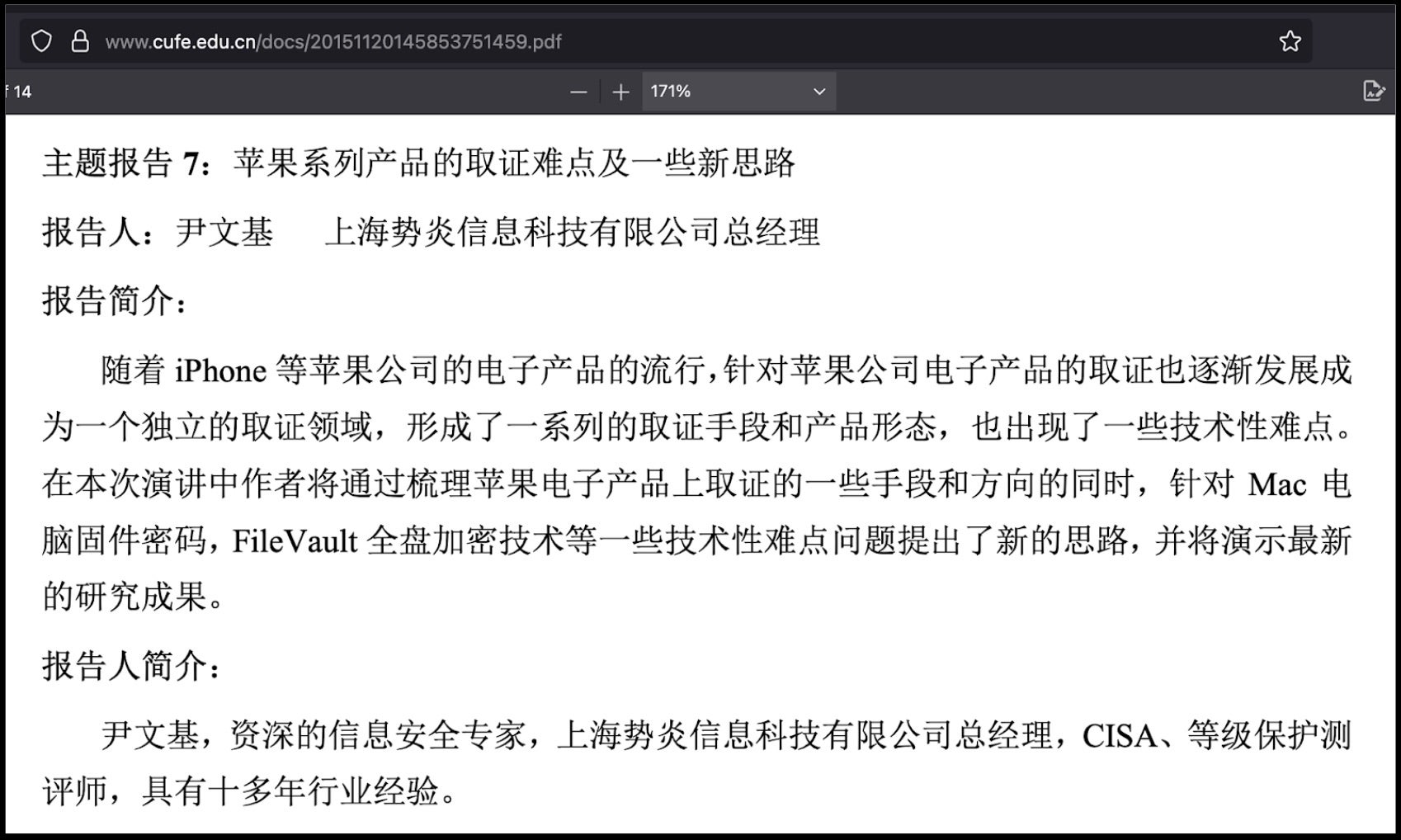
Yin spoke at the Central University of Finance and Economics program for cybersecurity. His 2015 talk advertised his ability to recover files from Apple Filevault five years before his new company would file for patent protection on a tool capable of collecting files from Apple computers.
Description of Yin Wenji’s 2015 talk at the Central University of Finance and Economics
The talk description translates to:
“In this speech, the author will sort out some methods and directions of forensics on Apple electronic products, and propose new ideas for some technical difficulties such as Mac computer firmware passwords and FileVault full disk encryption technology, and will demonstrate the latest research results.”
Silk Bandolier
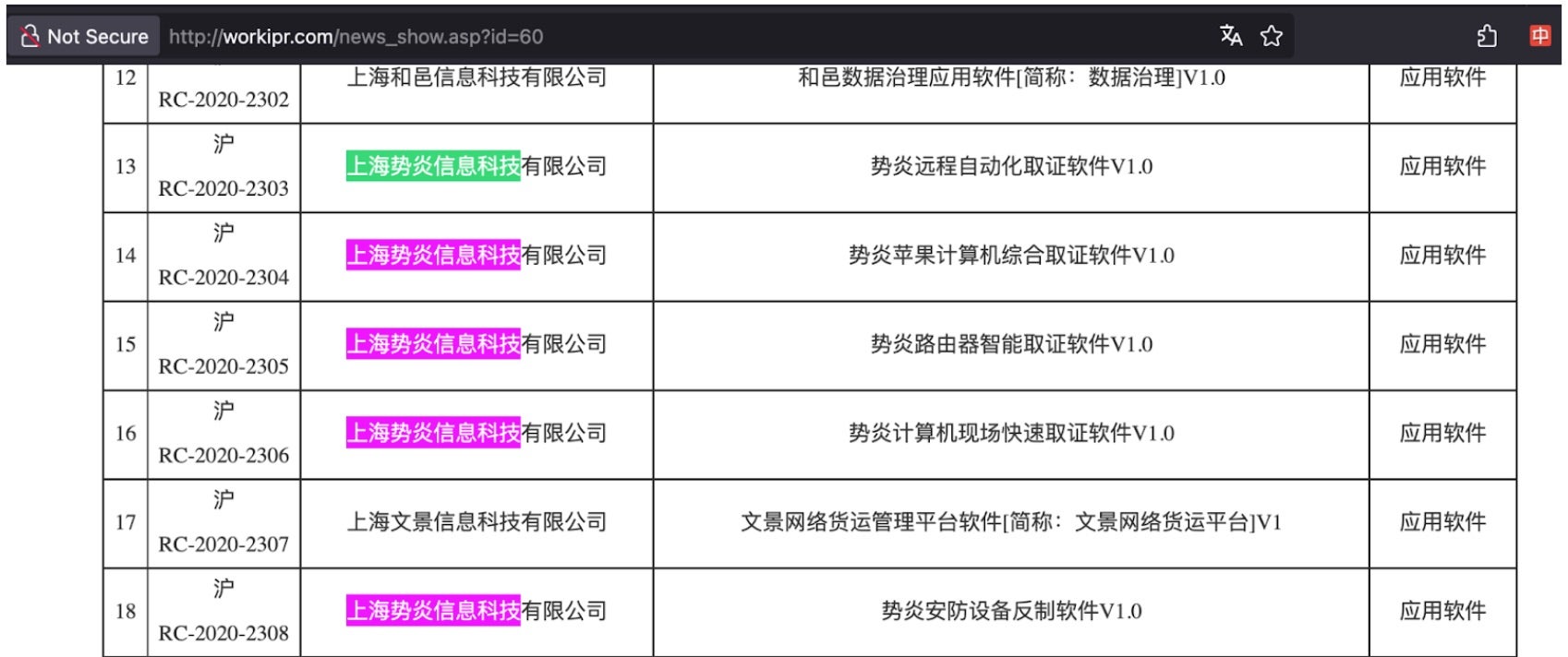
There is good reason to believe only some of Shanghai Firetech’s activities have been uncovered or made public by defenders. Hafnium rose to prominence in 2021 following the exploitation of four 0-day vulnerabilities in Microsoft Exchange Servers. Subsequentpublicationsdemonstrate the group is responsible for cracking a host of firewalls and network appliances. Intellectual property rights filings by Shanghai Firetech indicate an arsenal of tools not publicly attributed to Hafnium thus far. Shanghai Firetech filed for patents on a number of forensics technologies with clear applications as offensive capabilities including
“computer scene rapid evidence collection software”
“defensive equipment reverse production software”
While Hafnium’s observed capabilities check some of these generic boxes, no one has previously reported the group’s capabilities against Apple devices.
Shanghai Firetech technology patents
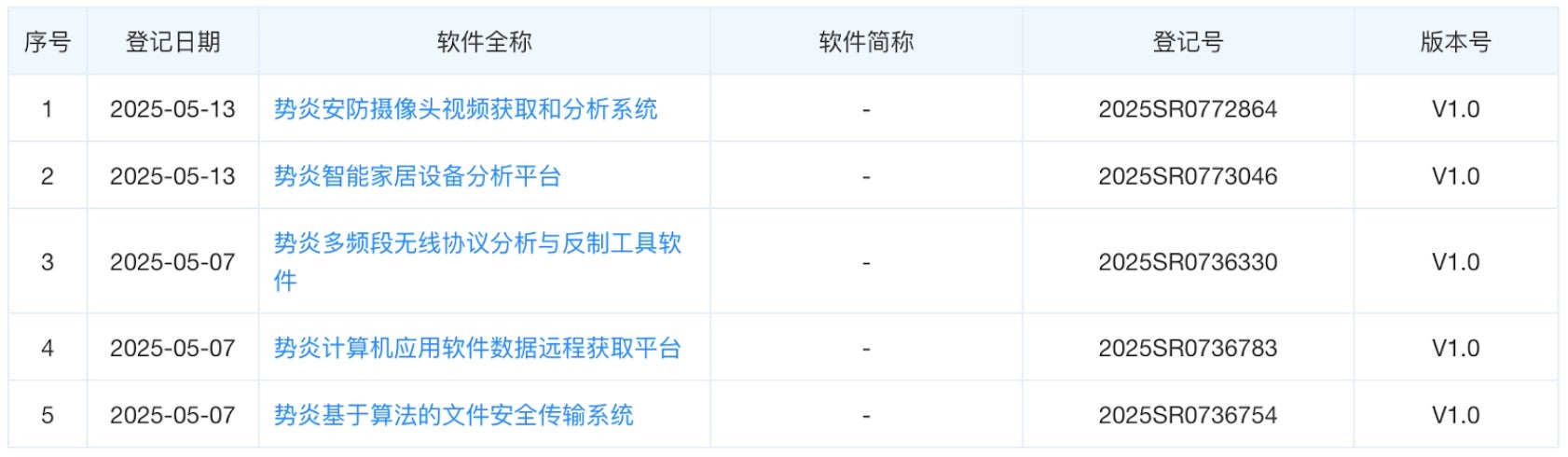
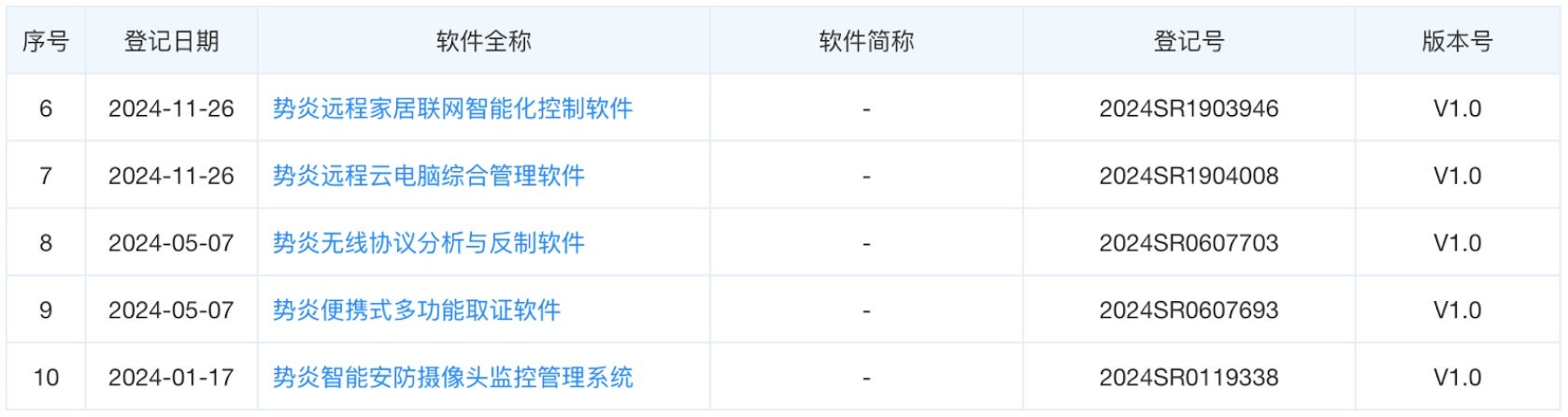
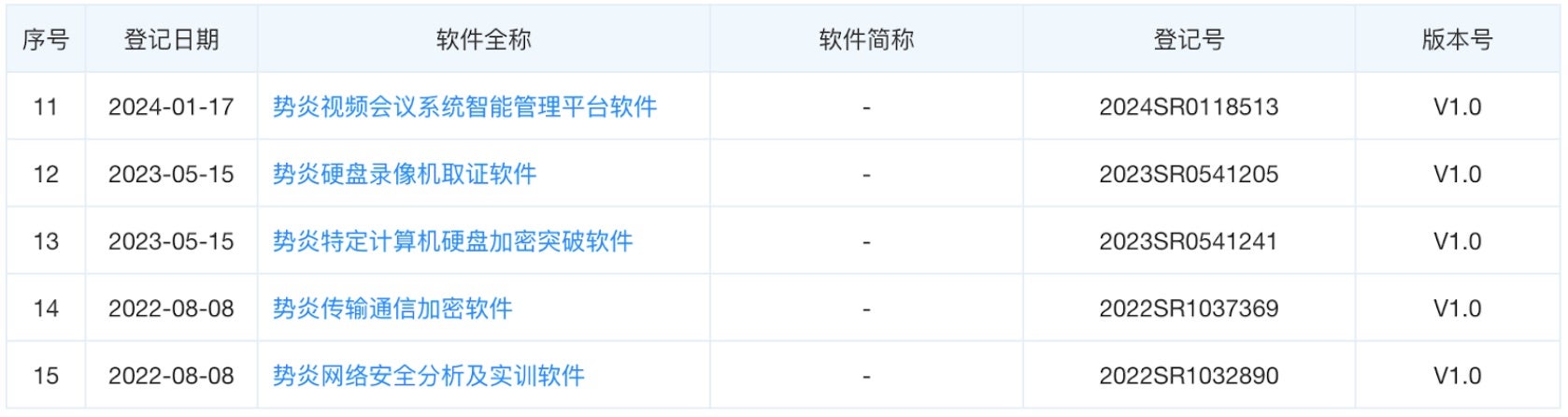
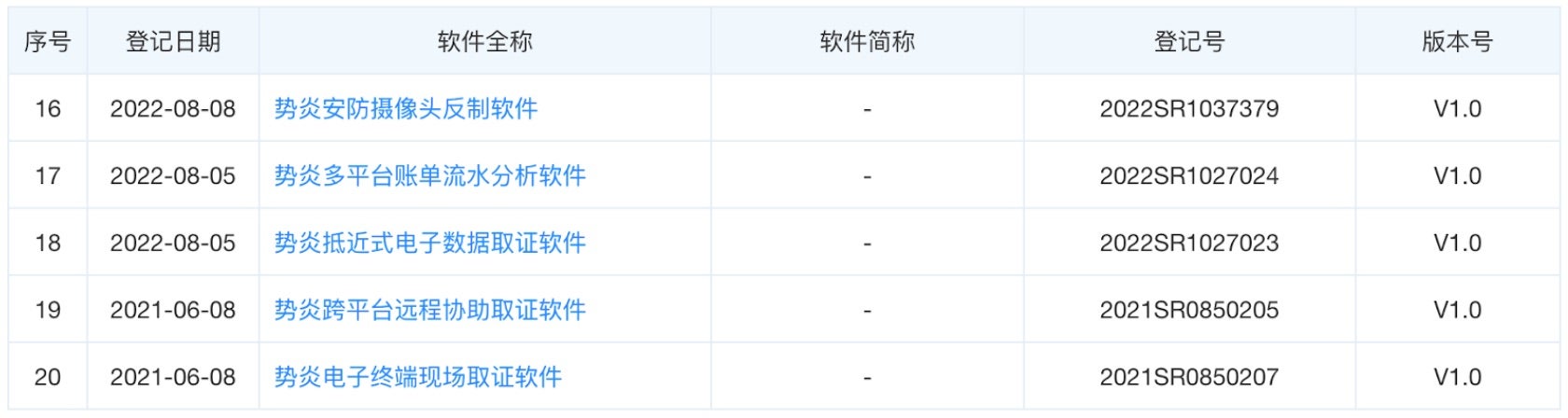
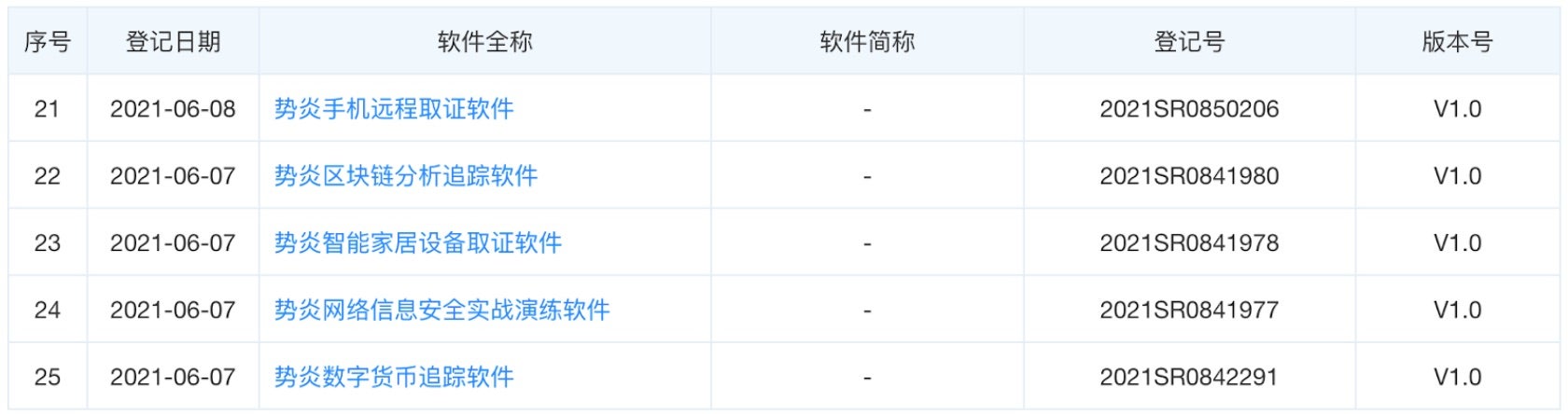
More recent patent filings from Shanghai Firetech, combined with the company’s history of working with the SSSB, suggests the company holds capabilities that may be useful in HUMINT operations. Capabilities like “intelligent home appliances analysis platform (2),” “long-range household computer network intelligentized control software (6),” and “intelligent home appliances evidence collection software (23)” could support close access operations against individuals. Other recent patents demonstrate that the firm still supports offensive cyber operations, such as “specially designed computer hard drive decryption software (13),”remote cellphone evidence collection software (21),” or “network information security actual confrontation practice software (24).”
More recent Shanghai Firetech technology patent filings
Shanghai Firetech relationships with MSS offices beyond just the Shanghai Bureau may explain why some patented capabilities have not been observed to be associated with Hafnium tradecraft. While no public tenders or contracts were found, Shanghai Firetech likely offers offensive services to additional customers beyond Shanghai. The company maintains a subsidiary in Chongqing, Chongqing Firetech (重庆势炎信息科技有限公司). Chongqing Firetech is likely larger than its Shanghai-based mothership. In the summer of 2018, Chongqing Firetech opened positions for up to 25 college interns, including for a third office in Nanchang. Shanghai Firetech, by contrast, only paid insurance benefits on 32 full-time employees. It is unclear whether the absence of Chongqing Firetech from the indictment indicates that the company was not involved in activity attributed to the Hafnium cluster.
Conclusion
The combination of leaked chat logs from iSoon, the March 2025 indictments of Yin Kecheng and Zhou Shuai, and the July 2025 indictment Xu Zewei and Zhang Yu indicate that the Hafnium cluster consisted of at least three different companies. At least two of those persons, Xu Zewei and Zhang Yu, and their respective companies, Shanghai Powerock Network Co Ltd. and Shanghai Firetech Information Science and Technology Co Ltd, worked under the direction of the Shanghai SSB. Yin Kecheng likely worked alongside Xu and Zhang, though in what capacity–as an employee, subcontractor, or jointly-tasked by the SSSB–is unclear. Although Zhou Shuai is observed trying to sell Yin’s work through i-Soon, it is unknown what of Yin’s work, access, or tooling Zhou was trying to push.
The variety of tools under the control of Shanghai Firetech exceed those attributed to Hafnium and Silk Typhoon publicly. The findings underline the difficulty in successfully attributing intrusions to the organizations responsible for them. The capabilities may have been sold to other regional MSS offices, and thus not attributed to Hafnium, despite being owned by the same corporate structure. It is possible that none of the tooling uncovered by this report was ever deployed in offensive operations. Tooling for the remote control of home appliances, home computer networks, decryption of files, and remote mobile forensics do have commercial defensive applications. That said, we reasonably expect those tools to be advertised if sold for defensive purposes, and no such collateral exists.
Threat actor designations and naming conventions track clusters of behavior, not the organizations carrying out operations. Successful attribution resolves a campaign back to their actual operators, like Hafnium or Fancy Bear. This report finds there are very likely other campaigns and activities tracked under different names which can be attributed to Shanghai Firetech. The absence of their inclusion in the DOJ indictment of Zhang Yu and Xu Zewei may reflect a balance of equities on the part of the FBI, releasing in the indictment only what is popularly recognized as Hafnium and meets relevant legal thresholds while privately retaining intelligence of the company’s other campaigns and tooling.
The rising influence of artificial intelligence (AI) has many organizations scrambling to address the new cybersecurity and data privacy concerns created by the technology, especially as AI is used in cloud systems. Apple addresses AI’s security and privacy issues head-on with its Private Cloud Compute (PCC) system.
Apple seems to have solved the problem of offering cloud services without undermining user privacy or adding additional layers of insecurity. It had to do so, as Apple needed to create a cloud infrastructure on which to run generative AI (genAI) models that need more processing power than its devices could supply while also protecting user privacy, stated a ComputerWorld article.
Apple is opening the PCC system to security researchers to “learn more about PCC and perform their own independent verification of our claims,” the company announced. In addition, Apple is also expanding its Apple Security Bounty.
What does this mean for AI security going forward? Security Intelligence spoke with Ruben Boonen, CNE Capability Development Lead at IBM, to learn what researchers think about PCC and Apple’s approach.
SI: ComputerWorld reported this story, saying that Apple hopes that “the energy of the entire infosec community will combine to help build a moat to protect the future of AI.” What do you think of this move?
Boonen: I read the ComputerWorld article and reviewed Apple’s own statements about their private cloud. I think what Apple has done here is good. I think it goes beyond what other cloud providers do because Apple is providing an insight into some of the internal components they use and are basically telling the security community, you can have a look at this and see if it is secure or not.
Also good from the perspective that AI is constantly getting bigger as an industry. Bringing generative AI components into regular consumer devices and getting people to trust their data with AI services is a really good step.
SI: What do you see as the pros of Apple’s approach to securing AI in the cloud?
Boonen: Other cloud providers do provide high-security guarantees for data that’s stored on their cloud. Many businesses, including IBM, trust their corporate data to these cloud providers. But a lot of times, the processes to secure data aren’t visible to their customers; they don’t explain exactly what they do. The biggest difference here is that Apple is providing this transparent environment for users to test that plane.
Boonen: Currently, the most capable AI models are very big, and that makes them very useful. But when we want AI on consumer devices, there’s a tendency for vendors to ship small models that can’t answer all questions, so it relies on the larger models in the cloud. That comes with additional risk. But I think it is inevitable that the whole industry will be moving to that cloud model for AI. Apple is implementing this now because they want to give consumers trust to the AI process.
SI: Apple’s system doesn’t play well with other systems and products. How will Apple’s efforts to secure AI in the cloud benefit other systems?
Boonen: They are providing a design template that other providers like Microsoft, Google and Amazon can then replicate. I think it is mostly effective as an example for other providers to say maybe we should implement something similar and provide similar testing capabilities for our customers. So I don’t think this directly impacts other providers except to push them to be more transparent in their processes.
It’s also important to mention Apple’s Bug Bounty as they invite researchers in to look at their system. Apple has a history of not doing very well with security, and there have been cases in the past where they’ve refused to pay out bounties for issues found by the security community. So I’m not sure they’re doing this entirely out of the interest of attracting researchers, but also in part of convincing their customers that they are doing things securely.
That being said, having read their design documentation, which is extensive, I think they’re doing a pretty good job in addressing security around AI in the cloud.
Apple’s latest innovation, Apple Intelligence, is redefining what’s possible in consumer technology. Integrated into iOS 18.1, iPadOS 18.1 and macOS Sequoia 15.1, this milestone puts advanced artificial intelligence (AI) tools directly in the hands of millions. Beyond being a breakthrough for personal convenience, it represents an enormous economic opportunity. But the bold step into accessible AI comes with critical questions about security, privacy and the risks of real-time decision-making in users’ most private digital spaces.
AI in every pocket
Having sophisticated AI at your fingertips isn’t just a leap in personal technology; it’s a seismic shift in how industries will evolve. By enabling real-time decision-making, mobile artificial intelligence can streamline everything from personalized notifications to productivity tools, making AI a ubiquitous companion in daily life. But what happens when AI that draws from “personal context” is compromised? Could this create a bonanza of social engineering and malicious exploits?
The risks of real-time AI processing
Apple Intelligence thrives on real-time personalization — analyzing user interactions to refine notifications, messaging and decision-making. While this enhances the user experience, it’s a double-edged sword. If attackers compromise these systems, the AI’s ability to customize notifications or prioritize messages could become a weapon. Malicious actors could manipulate AI to inject fraudulent messages or notifications, potentially duping users into disclosing sensitive information.
These risks aren’t hypothetical. For example, security researchers have exposed how hidden data in images can deceive AI into taking unintended actions — a stark reminder of how intelligent systems remain susceptible to creative exploitation.
In the new, real-time AI age, AI cybersecurity must address several risks, such as:
Privacy concerns: Continuous data collection and analysis can lead to unauthorized access or misuse of personal information. For instance, AI-powered virtual assistants that capture frequent screenshots to personalize user experiences have raised significant privacy issues.
Security vulnerabilities: Real-time AI systems can be susceptible to cyberattacks, especially if they process sensitive data without robust security measures. The rapid evolution of AI introduces new vulnerabilities, necessitating strong data protection mechanisms.
Bias and discrimination: AI models trained on biased data can perpetuate or even amplify existing prejudices, leading to unfair outcomes in real-time applications. Addressing these biases is crucial to ensure equitable AI deployment.
Lack of transparency: Real-time decision-making by AI systems can be opaque, making it challenging to understand or challenge outcomes, especially in critical areas like healthcare or criminal justice. This opacity can undermine trust and accountability.
Operational risks: Dependence on real-time AI can lead to overreliance on automated systems, potentially resulting in operational failures if the AI system malfunctions or provides incorrect outputs. Ensuring human oversight is essential to mitigate such risks.
Unlike many competitors, Apple processes much of its AI functionality on-device, leveraging its latest A18 and A18 Pro chips, specifically designed for high-performance, energy-efficient machine learning. For tasks requiring greater computational power, Apple employs Private Cloud Compute, a system that processes data securely without storing or exposing it to third parties.
Apple’s long-standing reputation for prioritizing privacy gives it a competitive edge. Yet, even with robust safeguards, no system is infallible. Compromised AI features — especially those tied to messaging and notifications — could become a goldmine for social engineering schemes, threatening the very trust that Apple has built its brand upon.
Economic upside vs. security downside
The economic scale of this innovation is staggering, as it pushes companies to adopt AI-driven solutions to stay competitive. However, this proliferation amplifies security challenges. The widespread adoption of real-time AI raises the stakes for all users, from everyday consumers to enterprise-level stakeholders.
To stay ahead of potential threats, Apple has expanded its Security Bounty Program, offering rewards of up to $1 million for identifying vulnerabilities in its AI systems. This proactive approach underscores the company’s commitment to evolving alongside emerging threats.
The AI double-edged sword
The arrival of Apple Intelligence is a watershed moment in consumer technology. It promises unparalleled convenience and personalization while also highlighting the inherent risks of entrusting critical processes to AI. Apple’s dedication to privacy offers a significant buffer against these risks, but the rapid evolution of AI demands constant vigilance.
The question isn’t whether AI will become an integral part of our lives — it already has. The real challenge lies in ensuring that this technology remains a force for good, safeguarding the trust and security of those who rely on it. As Apple paves the way for AI in the consumer market, the balance between innovation and protection has never been more critical.
According to the statement, PRC-affiliated actors compromised networks at multiple telecommunication companies. They stole customer call records data as well as compromised private communications of a limited number of people. Sen. Mark R. Warner (D-Virginia) told the Washington Post that the threat actors listened on audio calls and even moved between networks. As a result, many media sources reported that texts between Android and Apple devices are not secure.
Historic and sophisticated cyberattack
The headlines of the Washington Post deemed it the worst telecom hack in our nation’s history, per a top U.S. senator. On the surface, this seems a bit melodramatic, with only 150 identified victims. However, experts predict the affected number of people will go into the millions. Warner, who serves as chairman of the Senate Intelligence Committee, went as far as to say that Salt Typhoon makes Colonial Pipeline and SolarWinds “look like child’s play.”
The data collected during the attack falls into two categories, reported NBC. The first included call records showing the time and number called, with most records in the Washington, D.C. area. The other included listening to live calls of specific targets, which may include Donald Trump and Kamala Harris.
However, the most concerning aspect of the attack is the national security implications. Richard Forno, Principal Lecturer in Computer Science and Electrical Engineering at UMBC, explained in UMBC Magazine that Salt Typhoon compromised the portals used by U.S. intelligence and law enforcement. As a result, he says that the attackers may have gotten information about which Chinese spies and informants counterintelligence agencies were monitoring, which those targets can then use to avoid detection.
“U.S. officials have said that many of the ways Salt Typhoon penetrated its targets was through existing weaknesses with the infrastructure. As I’ve written previously, failing to implement basic cybersecurity best practices can lead to debilitating incidents for organizations of all sizes. Given how dependent the world is on networked information systems, it is more important than ever to maintain cybersecurity programs that make it difficult for attacks to succeed, especially for critical infrastructure like the phone network,” wrote Forno.
Reducing the risk of Salt Typhoon
With words like espionage and intercepting texts thrown around, the biggest question on people’s minds is how to protect themselves from this threat. Many experts are currently recommending using encrypted apps, such as WhatsApp and X, instead of traditional texting.
“Encryption is your friend, whether it is on text messaging or if you have the capacity to use encrypted voice communications, even if the adversary is able to intercept the data if it is encrypted, it will make it impossible, if not really hard, for them to detect it. So, our advice is to try to avoid using plain text,” said Jeff Greene, CISA Executive Assistant Director for Cybersecurity, during a press briefing reported by USA Today.
Forbes also reported that an FBI official recommended citizens use a cell phone that automatically receives timely operating system updates. Additionally, the phone should have responsibly managed encryption and phishing-resistant multi-factor authentication (MFA) for email, social media and collaboration tool accounts.
“So it’s somewhat ironic that one of the countermeasures recommended by the government to guard against Salt Typhoon spying is to use strongly encrypted services for phone calls and text messages – encryption capabilities that it has spent decades trying to undermine so that only ‘the good guys’ can use it,” wrote Forno.
To learn how IBM X-Force can help you with anything regarding cybersecurity including incident response, threat intelligence, or offensive security services schedule a meeting here.
If you are experiencing cybersecurity issues or an incident, contact X-Force to help: US hotline 1-888-241-9812 | Global hotline (+001) 312-212-8034.

 Entrar