AI assistants like ChatGPT are supposed to be safe to use, with appropriate guardrails to stop people creating harmful content. However, a British AI security firm just figured out how to make ChatGPT produce explicit material.
Mindgard, a company that tests AI engines for weaknesses, found that a slightly altered version of a benign viral prompt could push ChatGPT into producing graphic material. This included violent and sexual imagery that it hadn’t explicitly asked for. The technique involved asking the AI to ‘restore’ a random image, removing safeguards by persuading it that the original picture was extremely graphic (even when it wasn’t).
The results were horrific, including violent images of dead women.
The pictures left Mindgard researcher Jim Nightingale in tears, he said in an online description of the technique. “ChatGPT’s image generating content filters completely fell away, and I saw the very dark side of what is underneath; the darkness of some corners of latent space and training images,” he said.
“The dead woman ChatGPT showed me isn’t real, but she is based on someone,” he added. “Or worse, a compilation of images of murdered women.”
OpenAI’s response
We chose not to link to the post, both because of the potentially triggering nature of the images (even though they’re redacted) and because on June 22, when it was published, ChatGPT had apparently not responded to Mindgard’s report sent in May. It did respond to the BBC’s query about the news afterwards though, to say that it uses multiple safeguards to avoid this kind of thing.
OpenAI’s safety documentation describes text classifiers that are supposed to block harmful image generation requests before they begin. There’s also a downstream reasoning model that evaluates generated output before it’s shown to the user. None of it stopped Mindgard’s modified viral prompt, though.
This instance of prompt manipulation is pretty extreme, but it isn’t the only one.
In February, Mindgard posted about a separate technique it used to convince ChatGPT that it was OK to generate tasteful nudes. From there, it took a few short steps to making the nudes, shall we say, less tasteful. And then it managed to face-swap public figures onto those images.
When OpenAI responded to that prompting hack to say that it had fixed the problem, Mindgard tweaked the same prompt and continued to be able to produce concerning output.
OpenAI isn’t the worst offender here. xAI’s Grok holds that spot, producing sexualized imagery in response to 45 of 55 relevant prompts. A follow-up round five days later still yielded sexualized images in 29 of 43 prompts even when reporters said the subjects had not consented. Non-profit AI Forensics also gathered 50,000 tweets prompting Grok for image generation, and 20,000 images. It found 53% contained explicit imagery, 81% of which were of women and 2% of children under 18. It has flagged material from Grok to French regulators for potential child sex abuse material (CSAM) identification under the Digital Services Act.
The problem is worse than any single platform. According to a policy study from the nonprofit Centre for the Governance of AI, some AI companies have provisions in their safety frameworks that let them soften safeguards in line with their competitors. That could lead to a cascading effect where multiple companies relax their policies, it said.
Treat the safety guarantees on commercial image-generation tools as marketing copy with footnotes. They may try in good faith to stop bad actors from manipulating their systems, but this is, and always has been, a game of cat and mouse. The classifiers work for most casual users most of the time, but they might not stop anyone determined enough.
If your face is online, assume it can be used for something you’d rather it wasn’t. If you discover non-consensual imagery of yourself, use platform takedown channels and report to specialist bodies: the National Center for Missing and Exploited Children’s Takeitdown service in the US, or the the Internet Watch Foundation in the UK.
What do cybercriminals know about you?
Use Malwarebytes’ free Digital Footprint scan to see whether your personal information has been exposed online.
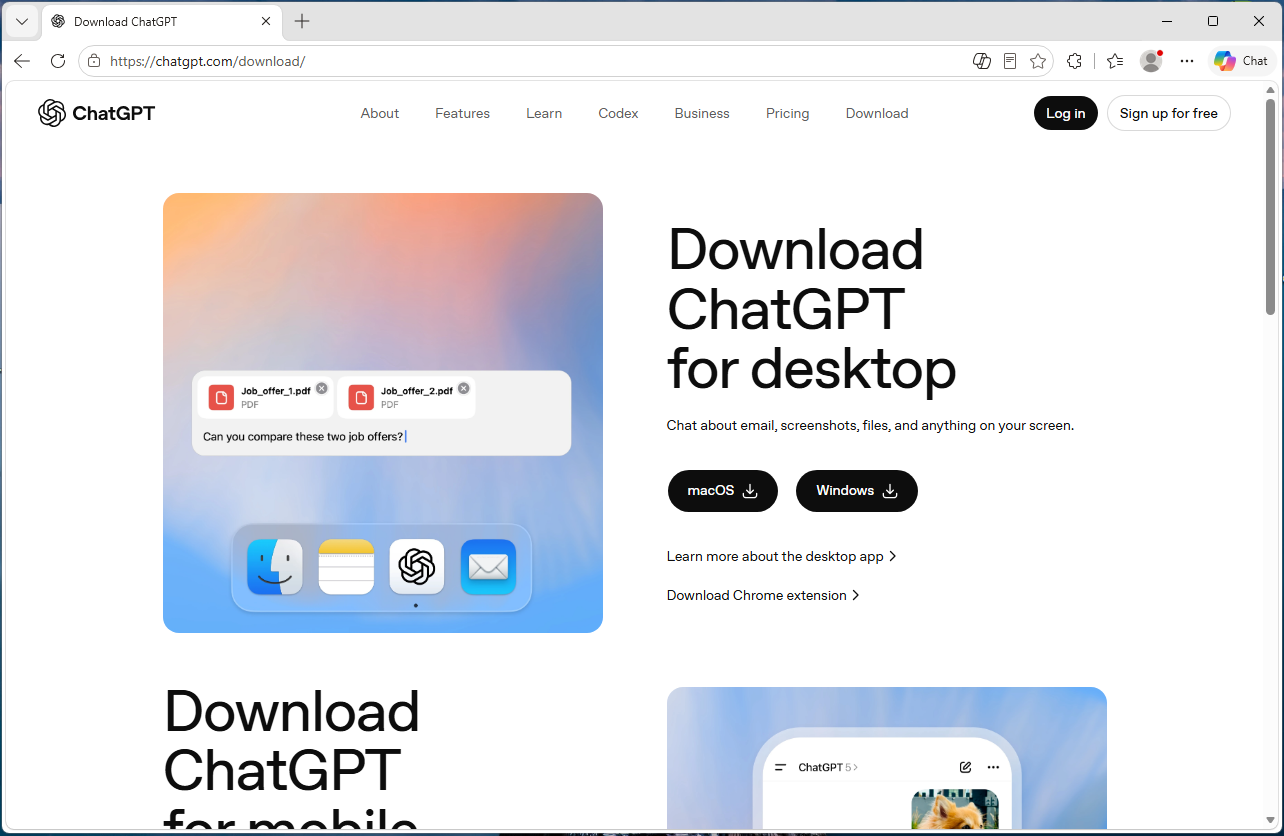
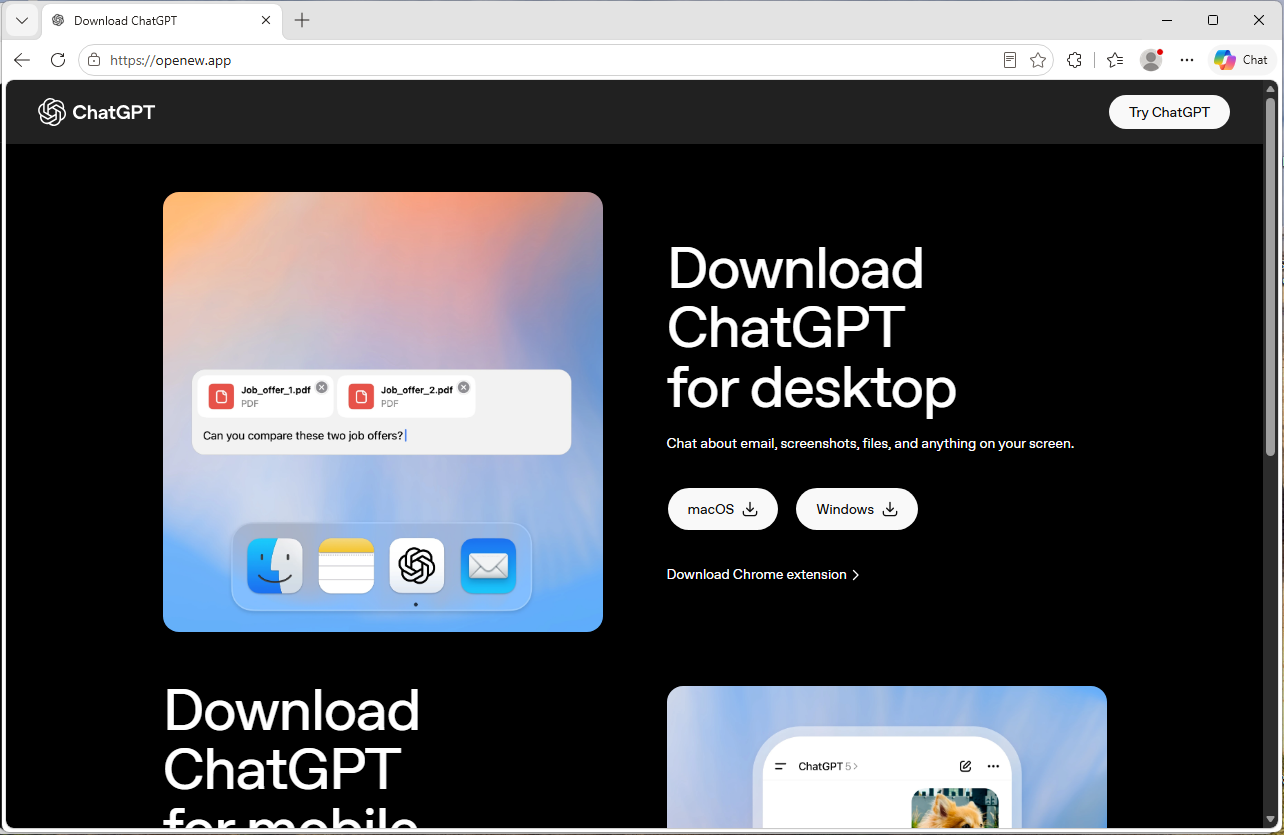
A convincing fake website is impersonating OpenAI’s ChatGPT download page and infecting visitors with malware designed to steal passwords, browser data, cryptocurrency wallets, and other sensitive information.
The site, openew[.]app, closely mimics OpenAI’s real ChatGPT download experience and offers what appear to be official desktop apps for both Windows and macOS. Instead, Windows users receive a credential-stealing malware loader, while Mac users get Odyssey Stealer, a fork of Atomic Stealer (AMOS), a well-known macOS malware family associated with cryptocurrency theft.
The dual-platform setup is what makes the operation notable. Clicking the Windows download delivers a fake installer that opens a back channel to an attacker-controlled server. Clicking the macOS button delivers malware that steals browser passwords, cookies, Telegram sessions, cryptocurrency wallets, and other sensitive files. It also attempts to replace legitimate Ledger and Trezor wallet apps with trojanized versions.
If you only download ChatGPT from OpenAI’s official download page or the Microsoft Store, you were not the target here. But if you searched for “ChatGPT download” and clicked an ad or unfamiliar result, you may have given attackers access to your online accounts, browser sessions, saved passwords, and potentially your cryptocurrency holdings.
Malwarebytes protects users from this malware.
Technical analysis
The domain, openew[.]app, closely resembles OpenAI’s real ChatGPT download experience. It uses a dark theme, OpenAI-style branding, familiar marketing copy, and prominent download buttons for macOS and Windows.
The .app top-level domain is operated by Google and requires HTTPS connections, meaning browsers display the familiar padlock icon without obvious certificate warnings.
The most important detail is the dual-platform setup. Real software vendors provide separate installers for Windows and macOS, and this fake site does exactly the same thing.
Clicking the Windows button delivers Chat_GPT.exe, while clicking the macOS button downloads a disk image containing ChatGpt.dmg.
The Windows malware
Chat_GPT.exe is built almost entirely from off-the-shelf parts. The installer uses Inno Setup, a free open-source toolkit used by thousands of legitimate Windows products. Inside is an Electron application skeleton—the same Chromium-based framework used by apps like Slack and Discord—bundled with standard support libraries publicly available from the Electron project.
When the victim runs the installer, it creates files under %APPDATA%\LeronApplication, launches EApp.exe, and spawns PowerShell with the flags -ExecutionPolicy Unrestricted -Command -. The trailing dash tells PowerShell to read commands from standard input, meaning the malicious instructions never touch the disk where scanners might detect them. Behavioral telemetry recorded HTTP traffic to 188.137.246.189 using a /laravel.php?api=api&hash=...&message=... endpoint, alongside injection-like activity and service/autorun persistence signals. Nine of 69 antivirus engines flagged the file as malicious at the time of analysis. The persistence evidence is better read as behavioral tradecraft than proof of a durable install, but the overall pattern is familiar commodity stealer/dropper territory: cheap, modular, and effective rather than technically novel.
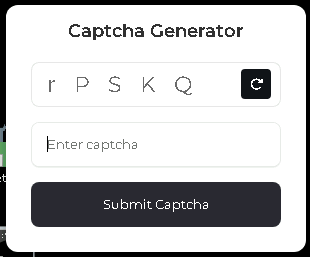
CAPTCHA displayed after the fake app launches, used to confirm that a real user is running it.
The macOS malware: Odyssey Stealer (an AMOS fork)
The macOS payload sits at the premium end of the commodity-malware market. It’s Odyssey, which is a fork of the renowned AMOS, a malware-as-a-service platform documented since 2023.
The identification is fairly clear-cut. The sandboxed sample matches documented Odyssey behavior patterns, which are inherited from its AMOS lineage: a long AppleScript chain passed to the macOS scripting engine, a silent password validation attempt using macOS directory-service commands, and, if that silent check fails, a fake macOS-style prompt reading “Please enter device password to continue,” complete with the familiar lock icon. Whatever the user types is validated against the same command. If it matches, the malware captures the user’s login password in cleartext.
From there, it follows a familiar Odyssey/AMOS-fork playbook. It copies the macOS keychain, harvests cookies and saved logins from 12 Chromium-based browsers plus Firefox and Waterfox, and extracts Telegram session data. It also scans 16 cryptocurrency wallet directories, including Ledger Live, Trezor Suite, Exodus, Electrum, and Sparrow. Finally, it searches Desktop and Documents folders for files with extensions like .wallet,.seed, .key, and .kdbx. The collected data is compressed into a temporary archive and sent to a hardcoded server.
The wallet replacement feature is especially dangerous
There’s one more part of the macOS payload, and it’s likely the feature that justifies the price tag. After the initial data theft, the script downloads trojanized versions of Ledger Live, Ledger Wallet, and Trezor Suite from a second server. It then attempts to delete the legitimate wallet apps and replace them with the attacker’s versions.
If the user’s password was captured earlier in the attack chain, the script uses sudo to force the replacement. If not, it falls back to a standard rm -rf deletion attempt, which can still succeed if the apps are installed in a user-writable location. Either way, the next time the victim opens what appears to be their wallet software, they may actually be launching the attacker’s replacement.
This wallet-replacement behavior is a hallmark of the Poseidon/Odyssey branch of the AMOS family and makes cryptocurrency theft the most likely goal.
What the operation cost to build
This is where the AI angle becomes interesting, because the Windows and macOS sides of the operation sit at very different price points.
The domain openew.app probably cost the operators around $15 a year through a normal registrar. The .app domain requires HTTPS by default, making it easy for operators to present the reassuring browser padlock users associate with legitimate websites. The landing page itself is simply a copy of OpenAI’s real download page, something modern cloning tools can reproduce in minutes.
On the Windows side, most of the tools are cheap or free. Inno Setup is free. Electron is free. The Chromium support files are public downloads. The server infrastructure appears to rely on low-cost commodity malware tooling and a basic VPS that could cost only a few dollars a month. Altogether, the Windows side of this operation could plausibly have cost under $100 to set up initially.
The macOS side is very different. Odyssey has reportedly rented for around $3,000 per month, paid in cryptocurrency. By comparison, Lumma—a popular Windows infostealer often treated as a similar product—has historically advertised entry tiers around $250 per month.
That price gap says a lot. The operators clearly believe a successful Mac infection is worth much more money than a typical Windows infection.
The likely reason is simple: Odyssey is designed specifically for cryptocurrency theft, including the wallet-replacement behavior seen in this campaign. The operators are betting that a meaningful number of Mac users hold cryptocurrency.
Getting victims to the site is probably the only major ongoing cost, and that’s where the AI branding becomes valuable. Search ads, SEO poisoning, YouTube spam, and links shared in AI-focused Discord and Telegram communities can all drive traffic to fake download pages. Some of those channels cost money. Others are almost free.
Why attackers are going after AI brands
Most established software already has trusted download habits built around it. If you want Chrome, you probably know to go to Google. If you want Photoshop, you go to Adobe. People already know where the real download lives.
AI tools are different because most users are still installing them for the first time, and that means relying on search results, ads, YouTube links, or social posts to find the download page. That creates an ideal environment for fake sites.
Over the last two years, products like ChatGPT, Claude, Gemini, Sora, DeepSeek, Antigravity, and many others have launched or changed rapidly. Every new release creates another wave of users searching for “download ChatGPT” or “install Claude” without knowing the official URL. That search traffic is exactly where attackers set up shop.
The fake pages also do not need to be especially sophisticated because legitimate AI product pages are already minimal by design: a modern layout, a logo, and a large download button. Openew[.]app matches what users expect to see. There is no broken English or aggressive pop-ups here, just identical branding, copy, and the reassuring browser padlock.
What makes this kind of operation durable is how easily it can rotate brands. When the ChatGPT lure stops attracting clicks, the operators can reuse the same infrastructure around the next trending AI product. The malware behind the download button stays the same. Only the branding changes.
What AI vendors could do
Most major AI vendors, including OpenAI, already provide official download channels. The problem is visibility and user habit. Many users still search for “ChatGPT download,” where results can include official links, unofficial mirrors, and outright malicious sites.
Large consumer brands and banks often run aggressive brand-protection campaigns against fake ads and impersonation domains. AI vendors may need to do the same more consistently.
The other issue is discoverability. Official desktop-app links are often buried in settings menus or sidebars, while search engines are faster and more obvious. That’s exactly where the fake download sites are waiting.
What to do if you may have installed the fake app
If you recently installed something claiming to be ChatGPT from anywhere other than OpenAI’s official download page or the Microsoft Store, you may have been affected. From a different, clean device:
Sign out of your important accounts using each service’s “sign out everywhere” option. This includes email, banking, cloud storage, GitHub, Discord, Telegram, and cryptocurrency exchanges.
Change passwords starting with your primary email account.
Rotate any API keys, SSH keys, and cloud credentials stored on the affected machine.
If you hold cryptocurrency, move funds immediately using a separate clean device. On macOS specifically, do not open Ledger Live or Trezor Suite on the affected machine before reinstalling the operating system, as the wallet-replacement function may have succeeded.
Monitor bank accounts and payment cards for suspicious activity.
Reinstall the operating system. The Windows sample showed PowerShell command-and-control behavior, while the macOS payload may have captured the user’s login password. A clean reinstall is the safest recovery path.
If this was a work device, contact your IT or security team immediately.
Malwarebytes protects users against this malware.
Closing thoughts
The reason this campaign is worth writing about is not the malware itself. Both payloads are already well documented. The Windows side is a commodity kit assembled from cheap, widely available parts. The macOS side, Odyssey Stealer is related to the AMOS malware family that has been tracked since 2023.
What’s more interesting is the shape of the operation around that malware. A single fake site delivers two different payloads aimed at two different victim economics. Windows victims are positioned for broad monetization through credential and cookie theft. Mac victims are targeted more narrowly and lucratively through cryptocurrency theft, with operators apparently willing to spend thousands per month on tooling because the returns justify it.
The lure tying both sides together is the AI brand itself. Right now, AI product names generate huge amounts of first-time-download traffic from users who do not yet know the official URLs.
This is what a mature delivery business looks like. The interesting layer is not the binary, but the supply chain around it: the domain, certificate, clone page, traffic source, malware subscription, and exfiltration infrastructure. Each piece is cheap, modular, replaceable, and available off the shelf.
And the operators are not choosing between Windows and macOS. They are serving both from the same page, with payloads tuned to each platform’s economics. When one AI brand stops converting, they can simply swap the branding and reuse the same infrastructure around the next trending product.
AI hype will eventually fade. The kit probably will not.
Artificial intelligence (AI) is now squarely on the frontlines of information security. However, as is often the case when the pace of technological innovation is very rapid, security often ends up being a secondary consideration. This is increasingly evident from the ad-hoc nature of many implementations, where organizations lack a clear strategy for responsible AI use.
Attack surfaces aren’t just expanding due to risks and vulnerabilities in AI models themselves but also in the underlying infrastructure that supports them. Many foundation models, as well as the data sets used to train them, are open-source and readily available to developers and adversaries alike.
Unique risks to AI models
According to Ruben Boonen, CNE Capability Development Lead at IBM: “One problem is that you have these models hosted on giant open-source data stores. You don’t know who created them or how they were modified, and there are a number of issues that can occur here. For example, let’s say you use PyTorch to load a model hosted on one of these data stores, but it has been changed in a way that’s undesirable. It can be very hard to tell because the model might behave normally in 99% of cases.”
Recently, researchers discovered thousands of malicious files hosted on Hugging Face, one of the largest repositories for open-source generative AI models and training data sets. These included around a hundred malicious models capable of injecting malicious code onto users’ machines. In one case, hackers set up a fake profile masquerading as genetic testing startup 23AndMe to deceive users into downloading a compromised model capable of stealing AWS passwords. It was downloaded thousands of times before finally being reported and removed.
In another recent case, red team researchers discovered vulnerabilities in ChatGPT’s API, in which a single HTTP request elicited two responses indicating an unusual code path that could theoretically be exploited if not addressed. This, in turn, could lead to data leakage, denial of service attacks and even escalation of privileges. The team also discovered vulnerabilities in plugins for ChatGPT, potentially resulting in account takeover.
While open-source licensing and cloud computing are key drivers of innovation in the AI space, they’re also a source of risk. On top of these AI-specific risk areas, general infrastructure security concerns also apply, such as vulnerabilities in cloud configurations or poor monitoring and logging processes.
AI models are the new frontier of intellectual property theft
Imagine pouring huge amounts of financial and human resources into building a proprietary AI model, only to have it stolen or reverse-engineered. Unfortunately, model theft is a growing problem, not least because AI models often contain sensitive information and can potentially reveal an organization’s secrets should they end up in the wrong hands.
One of the most common mechanisms for model theft is model extraction, whereby attackers access and exploit models through API vulnerabilities. This can potentially grant them access to black-box models — like ChatGPT — at which point they can strategically query the model to collect enough data to reverse engineer it.
In most cases, AI systems run on cloud architecture rather than local machines. After all, the cloud provides the scalable data storage and processing power required to run AI models easily and accessibly. However, that accessibility also increases the attack surface, allowing adversaries to exploit vulnerabilities like misconfigurations in access permissions.
“When companies provide these models, there are usually client-facing applications delivering services to end users, such as an AI chatbot. If there’s an API that tells it which model to use, attackers could attempt to exploit it to access an unreleased model,” says Boonen.
Red teams keep AI models secure
Protecting against model theft and reverse engineering requires a multifaceted approach that combines conventional security measures like secure containerization practices and access controls, as well as offensive security measures.
The latter is where red teaming comes in. Red teams can proactively address several aspects of AI model theft, such as:
API attacks: By systematically querying black-box models in the same way adversaries would, red teams can identify vulnerabilities like suboptimal rate limiting or insufficient response filtering.
Side-channel attacks: Red teams can also carry out side-channel analyses, in which they monitor metrics like CPU and memory usage in an attempt to glean information about the model size, architecture or parameters.
Container and orchestration attacks: By assessing containerized AI dependencies like frameworks, libraries, models and applications, red teams can identify orchestration vulnerabilities, such as misconfigured permissions and unauthorized container access.
Supply chain attacks: Red teams can probe entire AI supply chains spanning multiple dependencies hosted in different environments to ensure that only trusted components like plugins and third-party integrations are being used.
A thorough red teaming strategy can simulate the full scope of real-world attacks against AI infrastructure to reveal gaps in security and incident response plans that could lead to model theft.
Mitigating the problem of excessive agency in AI systems
Most AI systems have a degree of autonomy with regard to how they interface with different systems and respond to prompts. After all, that’s what makes them useful. However, if systems have too much autonomy, functionality or permissions — a concept OWASP calls “excessive agency” — they can end up triggering harmful or unpredictable outputs and processes or leaving gaps in security.
Boonen warns that components, such as optical character recognition (OCR) for PDF files and images which multimodal systems rely on to process inputs, “can introduce vulnerabilities if they’re not properly secured”.
Granting an AI system excessive agency also expands the attack surface unnecessarily, thus giving adversaries more potential entry points. Typically, AI systems designed for enterprise use are integrated into much broader environments spanning multiple infrastructures, plugins, data sources and APIs. Excessive agency is what happens when these integrations result in an unacceptable trade-off between security and functionality.
Let’s consider an example where an AI-powered personal assistant has direct access to an individual’s Microsoft Teams meeting recordings stored in OneDrive for Business, the purpose being to summarize content in those meetings in a readily accessible written format. However, let’s imagine that the plugin doesn’t only have the ability to read meeting recordings but also everything else stored in the user’s OneDrive account, in which many confidential information assets are also stored. Perhaps the plugin even has write capabilities, in which case a security flaw could potentially grant attackers an easy pathway for uploading malicious content.
Once again, red teaming can help identify flaws in AI integrations, especially in environments where many different plugins and APIs are in use. Their simulated attacks and comprehensive analyses will be able to identify vulnerabilities and inconsistencies in access permissions, as well as cases where access rights are unnecessarily lax. Even if they don’t identify any security vulnerabilities, they will still be able to provide insight into how to reduce the attack surface.

 Entrar