UPD 23.10.2026: added Kaspersky SIEM rules and events for developing custom detection rules or conducting threat hunting.
UPD 22.10.2026: added a description of how the Kaspersky Managed Detection and Response service detects the described malicious activity.
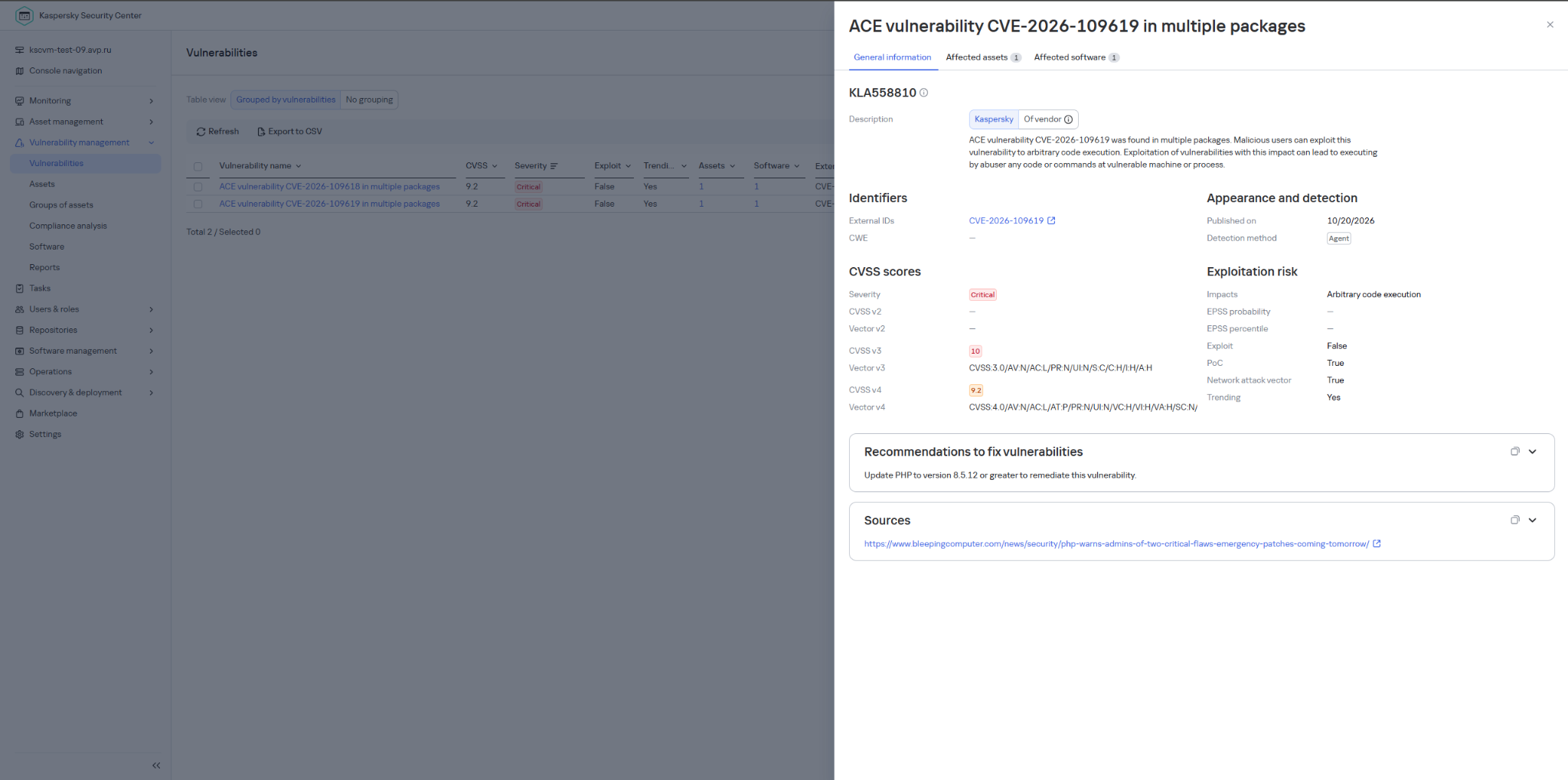
UPD 22.10.2026: added a description of how Kaspersky Vulnerability Management detects vulnerable versions of PHP.
Vulnerability overview
On October 20, 2026, the PHP security team published a preliminary notice regarding an upcoming emergency release that addresses two critical vulnerabilities (both rated 9.2 on the CVSS scale). The patches were released on Wednesday, October 21, 2026, at 14:00 UTC.
The release was expedited after information about the vulnerabilities was leaked to the public before the scheduled embargo was lifted. In a post on Hacker News, a user reported two RCE vulnerabilities in PHP, allegedly affecting all versions starting with PHP 5.4.0.
The vulnerabilities in question are CVE-2026-109618 and CVE-2026-109619. Shortly after the post appeared, researchers confirmed the existence of the vulnerabilities. Along with the leak of details, an exploit unofficially named PHP2Shell appeared online. In the leaked demo video, the exploit is shown in action on web servers running WordPress, MediaWiki, phpBB, Magento, Joomla, Laravel, Symfony, Drupal, and WHMCS — platforms that power many modern websites. The authenticity of the demonstration and the exact behavior of the exploit had not been independently verified at the time of publication.
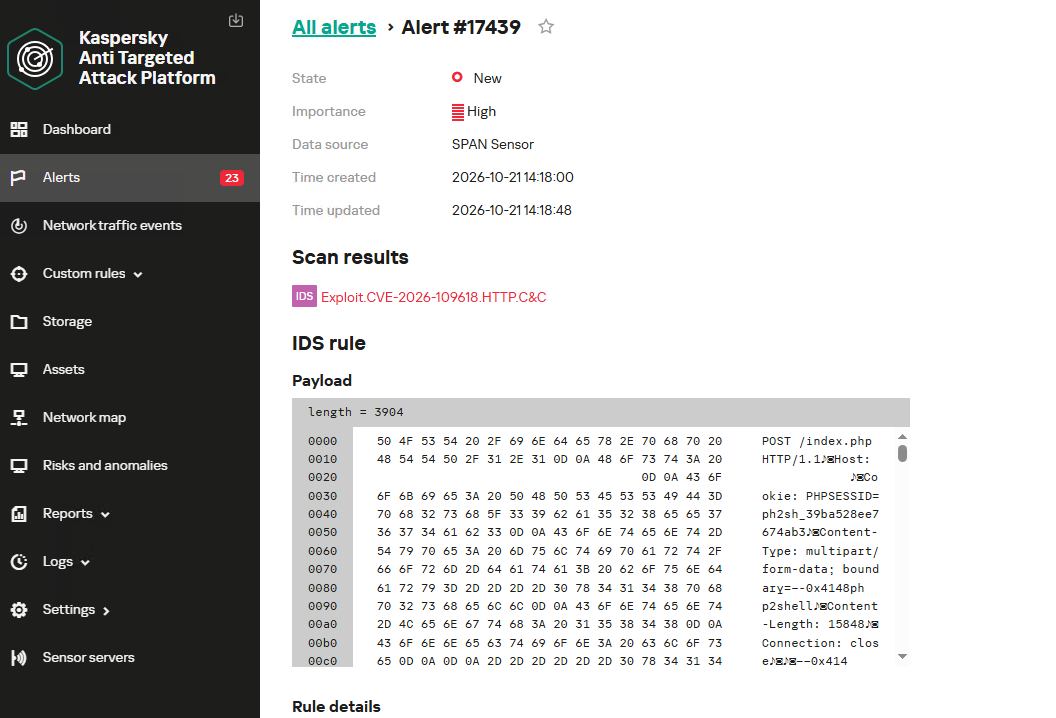
According to the researcher who published the PoC, the vulnerabilities are related to the handling of the multipart/form-data MIME type in conjunction with the session upload progress mechanism (session.upload_progress) in the PHP core and fall under the categories of use-after-free and memory corruption. This means that the flaws cannot be fixed via application code, and the only fix is to update PHP on the server. The attack requires no authentication: an attacker with network access to a PHP application can execute arbitrary code with the privileges of the PHP process without needing to authenticate. Security advisories issued by the PHP team on October 21 confirm this information.
The vulnerabilities affect PHP versions 5, 7, and 8. As of this publication, branches 8.2 through 8.5 are supported. Older branches, including PHP 8.1, 8.0, 7.x, and 5.x, have reached the end of their lifecycle; however, due to the critical severity of the vulnerabilities, backported patches have also been released for versions 7.4, 8.0, and 8.1.
Sansec experts estimate that widespread exploitation could begin within 15 minutes of the update’s release. We strongly recommend that administrators responsible for publicly accessible PHP web servers take the following steps before the patch is available:
Take an inventory of all PHP-based systems in your infrastructure (such as web servers, control panels, and third-party software).
Disable upload-progress: set session.upload_progress.enabled = Off using the php_admin_flag in PHP-FPM pools.
Block multipart requests on nginx and Apache servers.
Consider temporarily isolating PHP applications that connect to the Internet until fixes are released.
Be ready to install the patch immediately upon its release.
Plan to migrate servers running unsupported versions (8.1 and earlier) to the latest PHP branch.
Detection by Kaspersky solutions
Kaspersky solutions detect the described malicious activity at various stages of the attack. Possible detection scenarios are listed below.
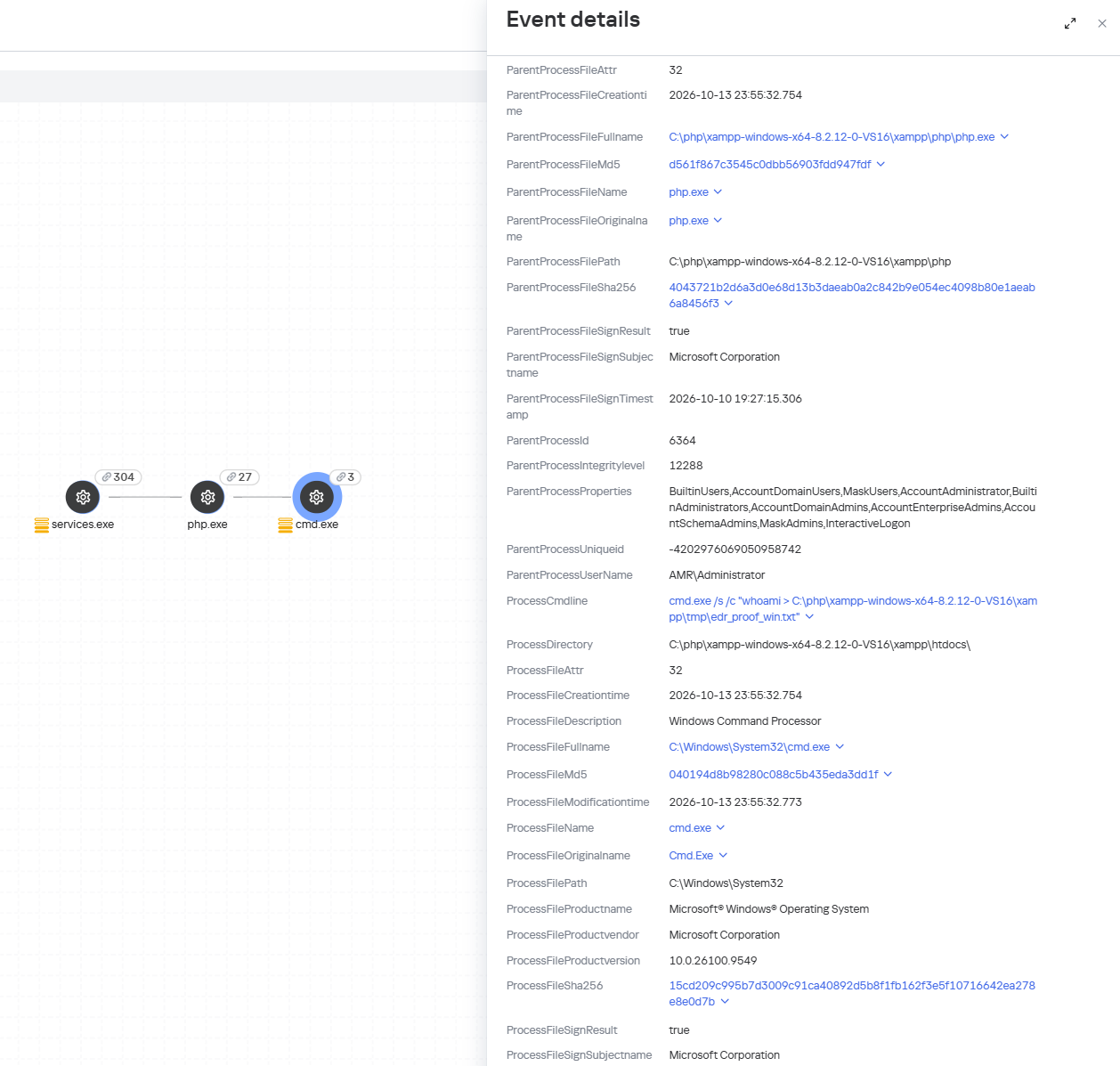
When an attempt is made to exploit these RCE vulnerabilities, Kaspersky Endpoint Detection and Response promptly alerts the user to suspicious actions performed in the context of a web server, on both Linux and Windows machines. This activity is detected by the following rules:
Spawning of suspicious processes by the web server;
Creation of suspicious executable files in the web application directory;
Creation of suspicious scripts in the web application directory;
Creation of files with uncommon extensions in the web application directory;
Execution of reconnaissance commands by the web server process;
Execution of persistence commands by the web server process;
Delivery and launch of web shells on the web server.
Moreover, MDR detects other malicious activity not directly related to remote code execution.
To protect companies that use our Kaspersky SIEM system, the product repository includes rules that help detect the following malicious activity.
Execution of suspicious executable files by web server processes on Windows and Linux machines:
R300_04_Windows shell started by a web application
R152_08_A running Linux shell process has a suspicious parent process
Execution of reconnaissance commands by the web server process:
R286_05_Possible web-shell (Linux)
We also recommend monitoring the creation of scripts or executable files in the web server directory when developing your own detection rules or conducting threat hunting:
((DeviceEventClassID = '4663' AND DeviceCustomString1 ilike 'WriteData') OR DeviceEventClassID = '11')
AND match(FileName,'(?i).*\.(php|asp|aspx|ashx|jsp|js|jar|jse|dll|exe|bat|ps1|vbs|wsf|wsh|msi|msp|hta|cpl)$')
AND match(DestinationProcessName,'(?i).*(php-cgi|nginx|httpd|w3wp)\.exe')
Name = 'openat' AND has(SA.Nametype, 'CREATE')
AND
length(arrayFilter(x -> match(x, '(public_html|var/www|usr/local/apache2|usr/local/httpd|var/apache|srv/www|home/httpd/html|srv/http|usr/share/nginx/html|var/lib/pgsql/data|usr/local/mysql/data|var/lib/mysql|var/vsftpd|etc/bind|var/named)'), SA.FileName))>1
AND
length(arrayFilter(x -> match(x, '\.(aspx|asp|asmx|asax|ashx|jspx|jsp|js|phpt|php|phtml|pht|cfm|shtml|htaccess|fcgi|cgi|pl|py|sh)'), SA.FileName))>1
WordPress has patched a serious core vulnerability chain known as wp2shell, and site owners are understandably focused on updating their own sites. But there’s another question worth asking: what happens to ordinary visitors when they land on a compromised site?
Because a hacked website becomes a delivery mechanism for scams, credential theft, malware, and malicious redirects.
The wp2shell vulnerabilities are especially concerning because they affect WordPress Core itself, don’t require a malicious or vulnerable plugin, and can be exploited without authentication on vulnerable versions. Experts say the chain can lead to full administrative control of a site and remote code execution with web server privileges, meaning an attacker can change what the site serves to visitors.
And cybercriminals are already doing their dirty work:
“Exploitation activity began within hours of the patch release. Wordfence observed endpoint probing and SQL injection attempts the same evening, and public proof-of-concept code was reported in the days that followed.”
Once attackers control a WordPress site, they rarely stop at defacement. A common next step is to quietly inject JavaScript, redirect visitors to malicious pages, or load content from attacker-controlled infrastructure. That can expose visitors to fake login pages, scam pop-ups, browser-based malware, or drive-by downloads, depending on the attacker’s goals.
The possible harm
This isn’t an exhaustive list, but these are some of the ways visitors to a wp2shell-compromised site could be affected:
Credential theft. Attackers can inject fake login forms or iframe-based overlays that imitate Microsoft 365, Google, banking, or social media sign-in pages to steal usernames and passwords.
Malware delivery. The site can be turned into a staging point for browser exploitation, malicious downloads, or redirect visitors to malware-hosting pages.
Scams and fraud. Visitors may be redirected to fake support pages, fake giveaways, or fraudulent payment prompts.
Tracking and profiling. Attackers can use injected scripts to fingerprint visitors, harvest browser details, and track victims across sessions.
Search and reputation damage. Search engines and security tools may flag the site, which can expose visitors to warnings and reduce trust long after the initial compromise.
What you can do
Be cautious, even on websites you normally trust. If something looks different from what you’d expect, treat it as a warning sign.
Be especially wary of unexpected login prompts, download requests, and browser warnings. For site owners, it means patching quickly and treating compromise as a possibility, not an edge case.
Keep your operating system, browsers, and security software up to date. Compromised websites can also try to exploit known vulnerabilities on visitors’ devices.
Use an up-to-date, real-time anti-malware solution that can alarm you if a website tries to infect your device.
Pro tip: Use Malwarebytes’ free Browser Guard extension. It uses heuristic detection to identify malicious websites, block scams, and protect against other web-based threats.
Stop threats before they can do any harm.
Malwarebytes Browser Guard blocks phishing pages and malicious sites automatically. Free, one click to install. Add it to your browser →

 Entrar