
Visualização de leitura

Amazon and Apple impersonated in “$149.99 unauthorized charge” scam

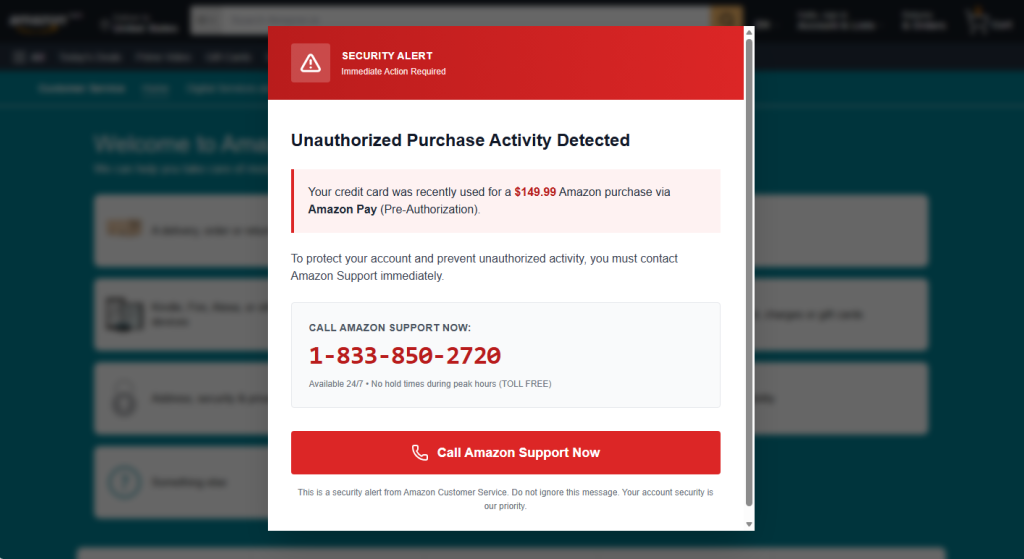
If you’ve spent any time browsing lately, you may have run into a full-screen popup warning you that your Apple ID or Amazon account was just used for a mysterious $149.99 purchase. It looks urgent. It looks official. And if you look at two examples side by side, it becomes obvious that it’s neither.

Below are two popups pulled from real pages—one dressed up as Apple Support, one as Amazon.

Same con, two costumes

Below, one popup is skinned as Apple Support, the other as Amazon. Swap the logo and color palette and the structure is identical: a warning icon, a claim that a $149.99 purchase was just made “via Pre-Authorization,” and a phone number to call immediately. That phone number is exactly the same in both.
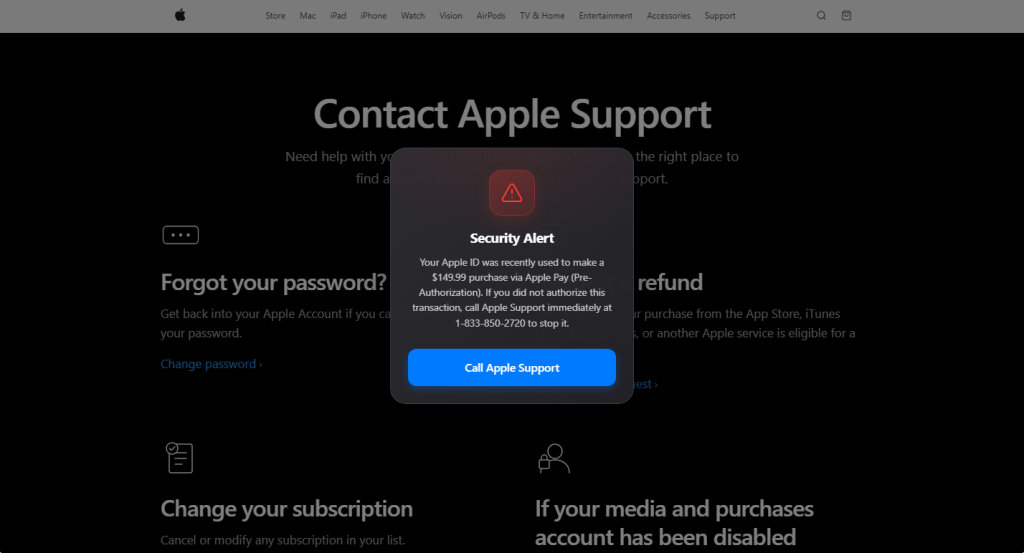
Fake Apple alert

Fake Amazon alert

That reused phone number is the tell. If you only see one popup, running the number through a lookup tool like Malwarebytes Scam Number Check is usually enough to expose it—a real Apple or Amazon line won’t come back flagged, but a scam number typically does, often tied to complaints about several unrelated companies at once.

Why the copy is built the way it is

Every element in these popups is doing specific psychological work:

  • A believable, moderate dollar amount. $149.99 is high enough to alarm you, low enough to sound like a real subscription or product charge rather than an obvious lie.
  • “Pre-Authorization” jargon. This is real payment terminology (used for things like hotel holds or gas station charges), borrowed here to sound technically credible to someone who doesn’t handle payments professionally.
  • Manufactured urgency. “Call immediately,” “Immediate Action Required,” “no hold times”—all are designed to get you dialing before you stop to verify anything.
  • Visual authority. Red warning triangles, brand-matching fonts and layouts, and a full-screen modal that blocks the rest of the page all borrow the visual language of legitimate security alerts.
  • A single, frictionless call to action. One button, one phone number. The popup wants exactly one thing from you: to pick up the phone.

If you do call, the number connects to a live scammer posing as support staff, whose actual goal is to get remote access to your device, walk you through “verifying” your identity in a way that hands over real account or payment info, or push you toward paying a fake fee—often via gift cards or a wire transfer.

How to tell if it’s fake

A few checks work regardless of which brand is being impersonated:

  1. Real companies don’t alert you this way. Apple and Amazon notify you about account activity through email, in-app notifications, or your account’s activity log—never through an unexpected popup while you’re browsing.
  2. No legitimate company tells you to call a phone number to stop a charge. Disputing a charge happens through your bank, your card issuer, or the company’s actual account dashboard—not a hotline dictated by a popup.
  3. Check where the popup is actually served from. These often ride in on malicious ads, compromised sites, or browser redirects—the underlying page may be spoofed or injected, not the real apple.com or amazon.com support page it appears to sit on top of.
  4. A popup you can’t easily close is a red flag on its own. Legitimate sites don’t need to trap you behind a full-screen modal to relay account information.
  5. If in doubt, go direct. Close the tab (force-close via task manager if needed) and navigate to the company’s site yourself, or call the number printed on your card or official account page—never the one in the popup.
  6. Check the number before you dial it. Run it through Malwarebytes Scam Number Check to see if it’s already been flagged as a scam line.
  7. Block it before it loads. A browser extension like Malwarebytes Browser Guard catches both known malicious pages and unknown ones showing scam-like behavior, so these popups often get stopped before they ever render.

Don’t judge a scam by its logo

The brand on screen—Apple, Amazon, or whoever’s next—is the least important part of this scam. What actually matters is the pattern underneath: an unexpected popup, a suspiciously specific dollar amount, urgent language, and a phone number that wants you to call before you think. Once you recognize that pattern, it doesn’t matter which company’s name is stamped on top of it.
Watch out for “high paying, low effort” Amazon job texts

Remote, flexible, high‑paying work is a tempting prospect, and the holy grail for many people looking for a new role. But it’s not just recruiters who are aware of this, job scammers do too and are happy to use it as an easy lure.

That lure tends to be even more tempting when they claim to be recruiting for a household name like Amazon. The fraudsters use SMS, WhatsApp, Telegram, and email-to-text gateways to blast out offers that look personalized but are actually mass‑produced scripts tweaked with different names, job titles, and reference numbers.

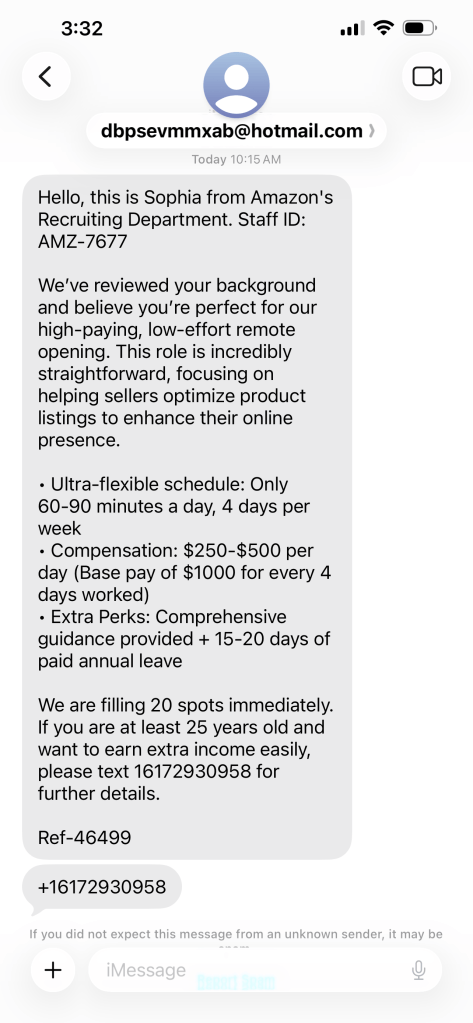
In recent months, one script has shown up again and again: A supposed recruiter called Sophia from Amazon’s recruiting department, promising $250–$500 a day for just 60–90 minutes of simple work. It’s a textbook example of a “task scam” or “gamified job scam,” where victims are slowly pushed toward paying “deposits” or handing over sensitive personal data.

Here is the exact wording of one such message, sent from a Hotmail address and asking the victim to text a US number for more information:

example of job scam offer by Sophia from Amazon

“Hello, this is Sophia from Amazon’s Recruiting Department. Staff ID: AMZ-7677

We’ve reviewed your background and believe you’re perfect for our high-paying, low-effort remote opening. This role is incredibly straightforward, focusing on helping sellers optimize product listings to enhance their online presence.

  • Ultra-flexible schedule: Only 60–90 minutes a day, 4 days per week
  • Compensation: $250–$500 per day (Base pay of $1000 for every 4 days worked)
  • Extra Perks: Comprehensive guidance provided + 15–20 days of paid annual leave

We are filling 20 spots immediately. If you are at least 25 years old and want to earn extra income easily, please text 16172930958 for further details.

Ref-46499”

Variations of this “Sophia from Amazon” script have been reported to the Better Business Bureau, posted on social media as scam warnings, and shared in discussion threads after users realized the Amazon job offer was fake. The details change slightly sometimes: We’ve seen “Grace from Amazon” and other minor changes, but the structure and unrealistic promises remain the same.

Red flags

With the help of Malwarebytes Scam Guard we noticed these red flags:

  • Non‑Amazon contact details. The message comes from a Hotmail address and directs you to text a standalone number, not to apply via the official Amazon Jobs site. Amazon’s own fraud alert says it does not recruit via generic webmail accounts and does not send official hiring communications from non‑Amazon domains.
  • Unsolicited job offer out of the blue. The FTC specifically warns that random texts offering you a job at a well‑known company, even if they claim to have reviewed your background, are classic job scams designed to steal money or identity, not real recruitment.
  • Too much money for too little work. Promising $250–$500 per day for 60–90 minutes of “low‑effort” remote work is exactly the sort of disproportionate pay that indicates something might be a job scam. In many “task scams,” criminals advertise simple actions like liking videos, optimizing apps, or boosting product listings for outsized rewards. The too good to be true principle applies here.
  • A vague, feel‑good job description. “Helping sellers optimize product listings to enhance their online presence” sounds plausible but tells you nothing about tools, targets, metrics, or reporting lines, which are all thing you’d expect in a legitimate Amazon job posting. Task scam scripts often rely on generic buzzwords like “optimization,” “promotion,” or “boosting” to sound professional without committing to anything real.
  • Urgency and scarcity pressure. The claim that Amazon is “filling 20 spots immediately” is there to stop you from thinking too long about it, a very popular tactic among all scammers. Legitimate Amazon recruitment may set application windows, but it does not pressure strangers via text to grab a limited number of mystery roles.
  • Off‑channel communication and likely pivot to WhatsApp/Telegram.
    Reports of similar Amazon‑themed job scams show that after the first reply, scammers usually move the victim to WhatsApp, Telegram, or a browser‑based “work portal” controlled by the criminals. Once there, “Sophia from Amazon” (or whatever name is used) can build rapport and walk victims through increasingly risky steps.

The risks are real though

Even if you spot some of the issues, it’s tempting to think you can “just see what they say.” With scams like these, there are several ways engagement can escalate badly.

  • Upfront payments and task‑platform losses. In many task scams, victims are told to complete small tasks and they’ll see small profits in an online wallet. But soon they’re asked to deposit their own money to unlock higher‑paying levels. The platform, which may claim to be connected to Amazon’s seller tools, then blocks withdrawals or vanishes once enough victims have deposited funds.
  • Identity theft and account takeover. The fake recruiter may ask for sensitive personal details for onboarding purposes: full name, address, date of birth, ID scans, bank details, or even selfies with an ID card. This data can be abused directly or resold, allowing criminals to open accounts, apply for loans, or bypass identity checks elsewhere.
  • Money mule or parcel mule involvement. Some fake jobs tied to brands like Amazon turn out to be reshipping or parcel mule scams, which are roles that involve receiving packages and forwarding them, often purchased with stolen cards. Others are payment mule schemes where the “employee” receives funds into their own bank account or crypto wallet and then forwards the money on. In both cases, you can end up laundering stolen goods or funds, with potential legal consequences.
  • Malware or phishing links masquerading as Amazon tools. A scammer impersonating Amazon recruiters might send links to fake login pages, supposed “Amazon optimization dashboards,” or APK files claiming to be Amazon tools. These can steal your Amazon credentials or install malware, putting not only your Amazon account at risk but also other accounts that reuse the same password.
  • Psychological pressure and sunk‑cost manipulation. Once you’ve invested time, shared some data, or sent a small payment, scammers exploit the feeling of not wanting to cut your losses and pressure you to send “just one more” deposit to release your wages or avoid losing your progress. Victims in task scam cases have reported losing thousands of dollars as they kept trying to finish one last task set to unlock everything they were owed.

How to stay safe

If someone who says they’re from Amazon—or another company—suddenly offers you a remarkably easy job via text, treat it as a warning sign, not an opportunity. Always verify directly with the company itself, rely on trusted job platforms, and resist the urge to just see what happens when a stranger promises big money for almost no work.

Once you know the red flags, it is easier to stay safe from task scams.

  • Do not respond to unsolicited job offers via text messages or messaging apps
  • Never pay to get paid
  • Verify the legitimacy of the employer through official channels
  • Don’t trust anyone who offers to pay you for something illegal such as rating or liking things online

It’s also important to keep in mind that legitimate employers do not ask employees to pay for the opportunity to work. And as with most scams, if it sound to good to be true, it probably is. If you run into a task scam, please report it to the FTC at ReportFraud.ftc.gov


Something feel off? Check it before you click.  

Malwarebytes Scam Guard helps you analyze suspicious links, texts, and screenshots instantly.  

Available with Malwarebytes Premium Security for all your devices, and in the Malwarebytes app for iOS and Android.  

Try it free → 

❌