❌

Visualização de leitura

Grindr users’ sensitive data shared through ad auctions without valid consent

Norway’s privacy regulator Datatilsynet has fined advertising technology company Xandr 92 million Norwegian kroner, approximately $9.6 million, for unlawfully processing and sharing sensitive information about Grindr users.

While the decision concerns users in Norway, the data-sharing practices were not confined to Norwegian users. BleepingComputer reports that information about Grindr users in other countries was also exposed through the advertising system.

Between July 2018 and April 2020, Xandr handled real-time advertising auctions involving Grindr users. These automated auctions let advertisers bid to display an ad, but also involved circulating information about the person who would see it. Sensitive information revealing sexual orientation could potentially reach thousands of companies.

Crucially, users did not have to disclose their sexual orientation in their profiles. Datatilsynet said that simply being identified as a Grindr user was information that indicated sexual orientation.

According to the regulator, Xandr relied on Grindr to obtain consent without checking whether that consent was valid. As a company jointly responsible for the processing, Xandr had its own obligations. It was not enough to simply assume the app had obtained the explicit consent required.

This was not a case of hackers breaking into a dating app. The information was flowing through an advertising business without a valid legal basis. Privacy group noyb, which filed the complaint in cooperation with the Norwegian Consumer Council, says such systems use tracking identifiers to build profiles of people’s interests, habits, and behavior.


Personal Data Remover

Are your details being used by cybercriminals? 


Although Xandr now belongs to Microsoft, the misconduct predates its acquisition. Microsoft completed its purchase of Xandr from AT&T on June 6, 2022, more than two years after the period covered by the fine. Microsoft told BleepingComputer it was reviewing the decision and assessing its options.

How to protect your privacy

This is a Norwegian enforcement action, but the data-sharing practices crossed borders. Users in the US and elsewhere shouldn’t assume their information stayed private just because the fine was issued in Norway.

You can limit how much additional information you disclose by giving a dating app only what you need to use it.

  • Leave optional profile fields blank when the information feels too personal.
  • Avoid publishing your workplace, home address, regular schedule, or other details that make you easy to locate.
  • Review location permissions and advertising settings and limit them where possible.
  • Think carefully before linking social accounts that reveal more of your identity.
  • Don’t use dating apps on company-issued devices.

These precautions cannot guarantee privacy. Responsibility for unlawful sharing lies with the companies involved. This case shows that sensitive information can come from using the service itself, not just from what you write in your bio.


Scammers don’t need to hack you. They just need you to click once. 

Malwarebytes Identity Theft Protection catches suspicious activity before it becomes a problem.
ShieldBreak bypasses Microsoft’s patch for earlier Defender flaw

Microsoft Defender’s latest patch bypass shows a familiar problem.

A newly disclosed Microsoft Defender flaw called ShieldBreak shows that fixing one attack path doesn’t always close every route to the same result.

Microsoft has assigned ShieldBreak the identifier CVE-2026-69414 and confirmed it is an elevation of privilege (EoP) vulnerability in the Microsoft Malware Protection Engine. Microsoft says it is still working on a security update.

If that sounds somehow familiar, you’re probably thinking of RoguePlanet, another vulnerability in Defender that Microsoft acknowledged on June 16 and patched on July 8.

A short timeline

At the time, the published exploit for RoguePlanet was described as depending on a race condition, meaning it was not guaranteed to work the same way on every machine. That was one reason the vulnerability was concerning but still somewhat limited from a practical point of view.

Microsoft’s July fix should have closed the door on that problem. But security fixes do not always eliminate a weakness at the root of the problem. Sometimes they block one known attack path, while a researcher later finds a different route to reach the same end result.

That appears to be what happened here. ShieldBreak has been described as a patch bypass because it reportedly sidesteps the earlier RoguePlanet fix, although it uses a different exploitation method rather than simply repeating the original attack.

In August, the same researcher disclosed ShieldBreak, and Microsoft responded by publishing a new advisory for CVE-2026-69414.

The advisory says the issue has been publicly disclosed, proof-of-concept (PoC) exploit code exists, exploitation is considered more likely, and no official fix is available yet. Microsoft says it is working on one.

How to stay safe

Until Microsoft releases a fix, the most important protection is preventing untrusted code from running on your computer in the first place. ShieldBreak is a local privilege escalation issue, so an attacker first needs some level of access to the machine.

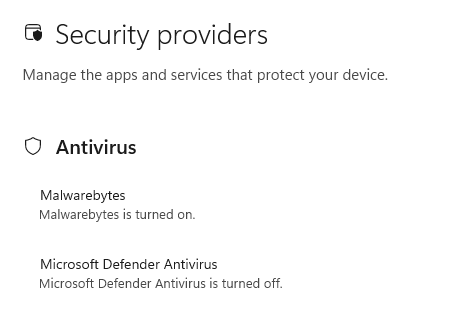
Based on the best public reporting available right now, ShieldBreak appears to require Microsoft Defender to be enabled in order to work. Public testing indicates that the exploit does not succeed when Defender is off or when another product is registered as the active antivirus provider.

You're safe if Defender is turned off

So, narrowly speaking, disabling Defender appears to stop this specific ShieldBreak chain from working. However, that is not a good safety recommendation for most people. Turning off your antivirus removes an important layer of protection and could leave your computer exposed to other attacks.

For home users, all that means:

  • Install Microsoft’s security updates as soon as they become available.
  • Be very careful with downloads, email attachments, cracked software, and “fix” tools from random websites.
  • Keep backups of important files somewhere not directly connected to the PC.
  • Use an up-to-date, real-time anti-malware solution to alert you about and remove threats from your computer.

CNET Editors' Choice Award 2026

“One of the best cybersecurity suites on the planet.” 

According to CNET. Read their review →


❌