Visualização de leitura

Phishing for Codes: Russian Threat Actors Target Microsoft 365 OAuth Workflows
Volexity Blog - Phishing for Codes - Russian Threat Actors Target Microsoft 365 OAuth Workflows
KEY TAKEAWAYS
  • Since early March 2025, Volexity has observed multiple Russian threat actors aggressively targeting individuals and organizations with ties to Ukraine and human rights.
  • These recent attacks use a new technique aimed at abusing legitimate Microsoft OAuth 2.0 Authentication workflows.
  • The attackers are impersonating officials from various European nations, and in one instance leveraged a compromised Ukrainian Government account.
  • Both Signal and WhatsApp are used to contact targets, inviting them to join or register for private meetings with various national European political officials or for upcoming events.
  • Some of the social engineering campaigns seek to fool victims into clicking links hosted on Microsoft 365 infrastructure
  • The primary tactics observed involve the attacker requesting victim's supply Microsoft Authorization codes, which grant the attacker with account access to then join attacker-controlled devices to Entra ID (previously Azure AD), and to download emails and other account-related data.

Since early March 2025, Volexity has observed multiple suspected Russian threat actors conducting highly targeted social engineering operations aimed at gaining access to the Microsoft 365 (M365) accounts of targeted individuals. This activity comes on the heels of attacks Volexity reported on back in February 2025, where Russian threat actors were discovered targeting users and organizations through Device Code Authentication phishing.

Since that reporting, while there has been an observable drop in Russian threat actors leveraging that specific method, Volexity has observed them pivoting to different methods of attack that abuse other legitimate M365 OAuth authentication workflows. These recently observed attacks rely heavily on one-on-one interaction with a target, as the threat actor must both convince them to click a link and send back a Microsoft-generated code.

Volexity is currently tracking what is believed to be at least two Russian threat actors, which it tracks as UTA0352 and UTA0355, that are behind these attacks. It is plausible that there are overlaps between these threat actors and those Volexity previously reported as conducting Device Code Authentication phishing campaigns in January and February 2025. This blog post details the different techniques used by these threat actors and the commonalities between their campaigns, which can be summarized as follows:

  • The attacker contacts the victim via a messaging application (Signal, WhatsApp) and invites them to join a video call to discuss the conflict in Ukraine.
  • Once the victim has responded, the attacker sends an OAuth phishing URL that they claim is required to join the video call.
  • The victim is asked to return the Microsoft-generated OAuth code back to the attacker.
  • If the victim shares the OAuth code, the attacker is then able to generate an access token that ultimately allows access the victim’s M365 account.

Diplomatic Channels to Nowhere

In March 2025, Volexity learned that some of its customers' staff were receiving suspicious messages via Signal and WhatsApp. The targeted staff members worked at NGOs that support human rights and specifically have expertise and experience working on issues related to Ukraine. The messages claimed to be from European political officials and were themed around discussing matters involving Ukraine. In each observed instance, the call to action was to arrange a meeting between the target and a political official, or Ambassador, of the European country of which the sender claimed to represent.

If the target responded to messages, the conversation would quickly progress towards actually scheduling an agreed upon time for the meeting. However, perhaps in an attempt to not arouse suspicion, in some cases the "Ambassador" would not be immediately available, and the meeting would be scheduled for days later.

As the agreed meeting time approached, the purported European political official would make contact again and share instructions on how to join the meeting. These instructions typically came in the form of a document uploaded into the messaging platform. This "official" would then send a link for the target to click on in order to join the meeting. These shared URLs all pointed to the official login portal for M365 via login.microsoftonline.com.

It should come as no surprise that these were, in fact, phishing campaigns, and the supplied instructions involved sending a code back to the attacker. However, unlike the previously observed attacks, these URLs were not associated with Device Code Authentication workflows. Instead, these URLs pointed to other Microsoft OAuth 2.0 authentication workflows associated with various legitimate first-party Microsoft applications. Volexity attributes the initial series of attacks observed to a suspect Russian threat actor it tracks as UTA0352.

In these campaigns, clicking the link alone would not be enough for the account to be compromised. The code would need to be supplied back to the attacker. The supplied links would redirect to official Microsoft URLs and, in the process, generate a Microsoft Authorization Token that would then appear as part of the URI, and in some cases, within the body of the redirect page. This code could then be used to generate an Access Token, which would grant the holder with access to the account for which it was generated. In multiple observed instances, the attacker would request the code be emailed or sent back via WhatsApp or Signal.

Volexity observed UTA0352 impersonating individuals representing the following countries and affiliations:

  • Mission of Ukraine to the European Union
  • Permanent Delegation of the Republic of Bulgaria to NATO
  • Permanent Representation of Romania to the European Union

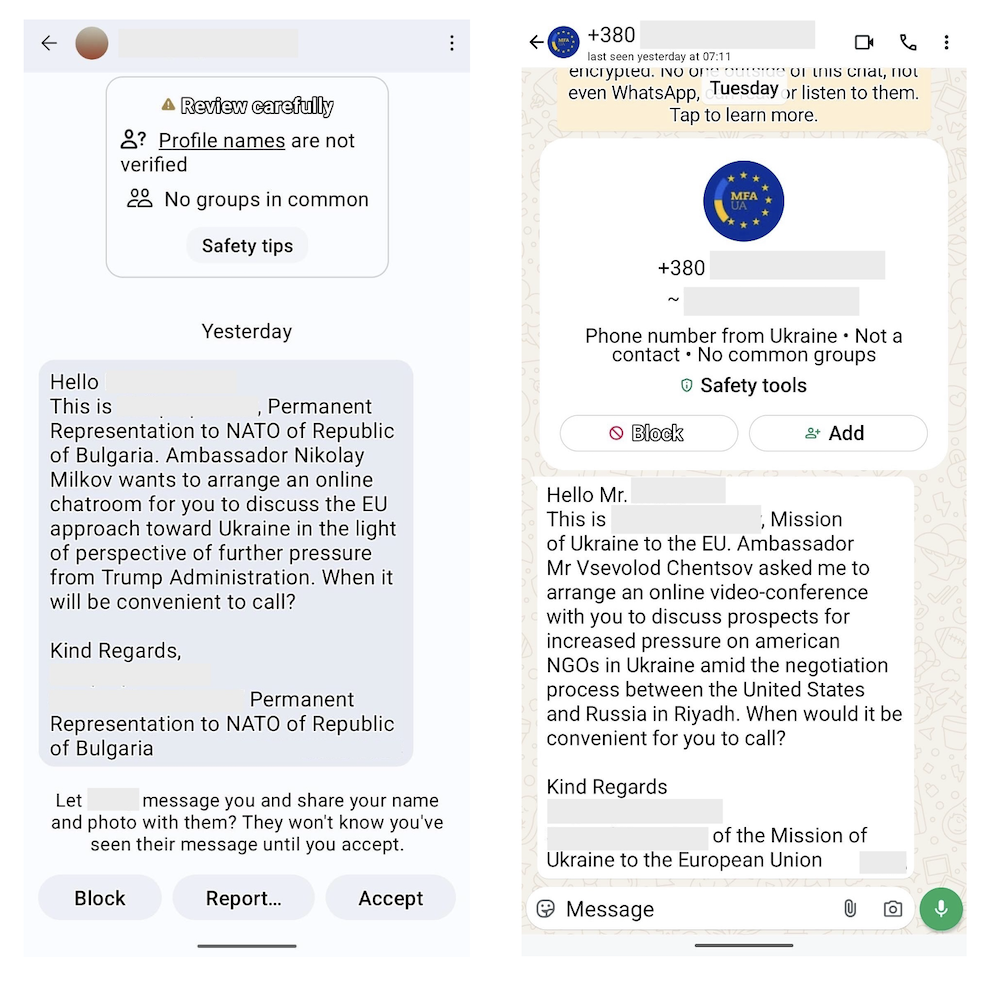
Based on other observations, Volexity believes UTA0352 also likely impersonated officials from Poland as well, but Volexity did not observe this directly. The images below show examples of initial outreach messages sent by UTA0352 impersonating various identities on Signal (left) and WhatsApp (right).
Phishing via Visual Studio Code

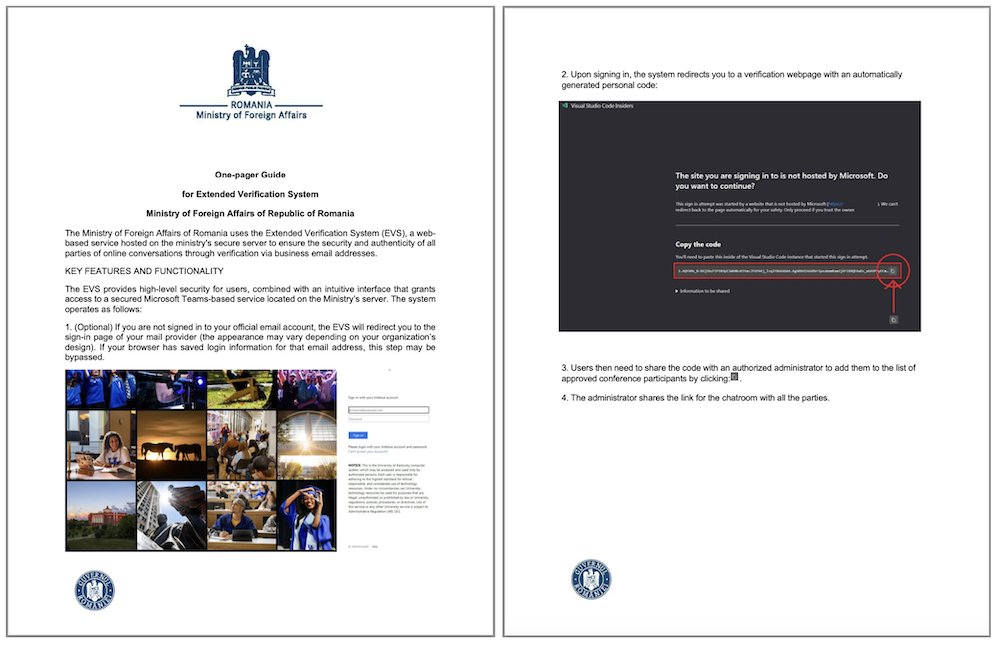
In mid-March 2025, one of Volexity's customers was contacted by UTA0352 claiming to be a government official from Romania. They attempted to set up a meeting with their Ambassador. Once the user engaged, the attacker sent a message explaining the need to set up a meeting on their web-based “Extended Verification System (EVS)” hosted on their secure servers. This message was accompanied by a PDF file with instructions on what to expect and how to join, after which a maliciously crafted URL was sent to the target.

The image below shows the two-page PDF document purporting to be from the Romanian Ministry of Foreign Affairs.
The URL shared by UTA0352 had the following format:

https://login.microsoftonline[.]com/organizations/oauth2/v2.0/authorize?state=https://mae.gov[.]ro/[REMOVED]&client_id=aebc6443-996d-45c2-90f0-388ff96faa56&scope=https://graph.microsoft.com/.default&response_type=code&redirect_uri=https://insiders.vscode.dev/redirect&login_hint=<EMAIL HERE>

This URL format is used by M365 to log in to both Microsoft-native/first-party applications and third-party applications using M365’s OAuth workflows. The key parameters of the URL are described in the Microsoft OAuth documentation; for convenience, they are briefly described below:

Parameter Description
state A value to denote the user’s state in the application before the request occurred
client_id The application that made the request
scope The access level requested
response_type The method used to send the token back
redirect_uri The handling URI to receive the generated token afterwards

If the user is already logged in with the account specified in the login_hint parameter, they will be seamlessly redirected. If the user is not already authenticated, they will be prompted to log in to their M365 account. Once authenticated, the user is redirected to an in-browser version of Visual Studio Code, hosted at insiders.vscode.dev. The URL redirects the user to the /redirect page, which is designed to receive login parameters from M365, including OAuth. When the user is redirected to this page, they are presented with the following dialog:
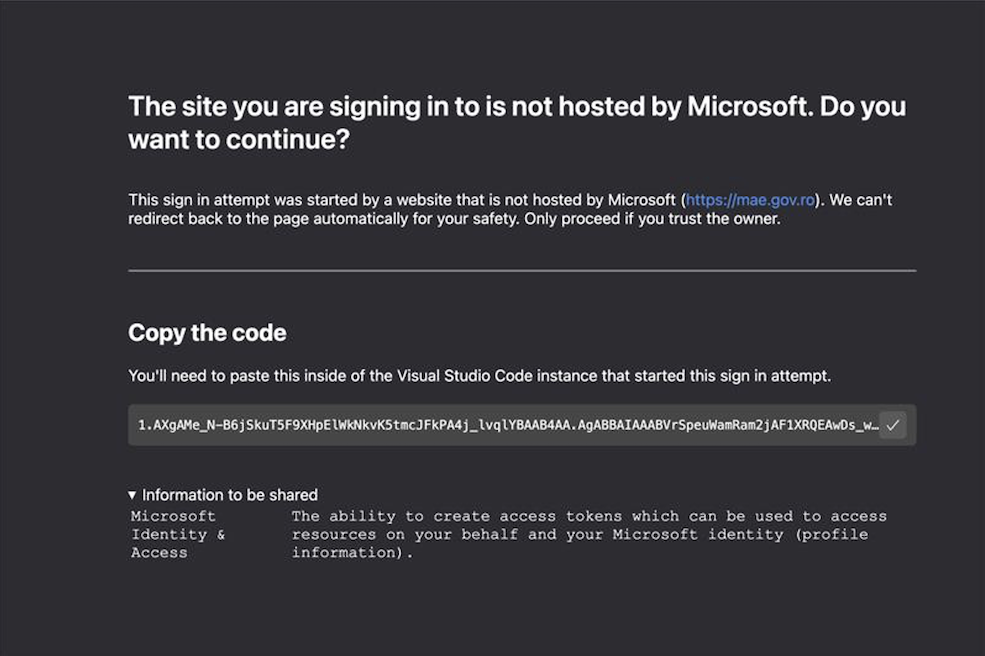
The code displayed via the Visual Studio Code dialog is an OAuth 2.0 authorization code that can be used for up to 60 days. This code can be submitted to Microsoft’s OAuth workflow for an access token, which can then be used to access the M365 Graph API. Since the original request asked for the user’s default access rights, anyone with access to this authorization code also has access to all resources normally available to the user. It should be noted that this code also appeared as part of the URI in the address bar. The Visual Studio Code appears to have been set up to make it easier to extract and share this code, whereas most other instances would simply lead to blank pages.

The message shown under the main header uses the state value from the prior request, which is commonly used to indicate where the request to authenticate came from. However, as described in Microsoft's documentation, this value is arbitrary. It is up to the handling application (in this case, Visual Studio Code) to decide if and how to use this value. UTA0352 abused this to make it look like an authentication attempt to a Romanian government service. This is a theme repeated in other phishing attacks as an effort to make the links appear legitimate.

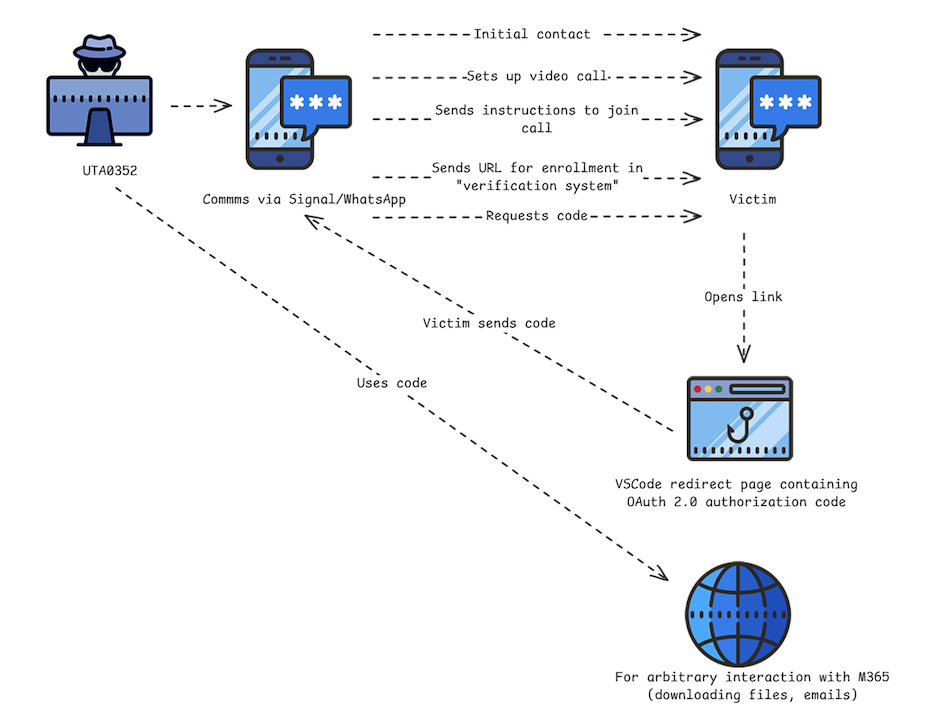
The diagram below shows the overall workflow followed by the attacker to target users leveraging the Visual Studio Code first-party application. The workflow varies slightly from other attacks observed later but is fairly similar overall.
Earlier Variations of Visual Studio Code Phishing

In addition to the phishing attack described above, Volexity also identified an older variation of a phishing campaign believed to have been employed by UTA0352. In this earlier campaign, the following URL format was used:

hxxps://login.microsoftonline[.]com/common/oauth2/authorize?redirect=https://zoom.us/j/<snip>&client_id=aebc6443-996d-45c2-90f0-388ff96faa56&resource=https://graph.microsoft.com&response_type=code&redirect_uri=https://vscode-redirect.azurewebsites.net&login_hint=<removed>&ui_locales=en-US&mkt=en-US&client-request-id=<removed>

The URL differs from the one previously described, in that it employs the format used by the AzureAD v1.0 specification, not v2.0 used in the initially observed campaign. The key differences between the URL parameters used are noted below:

Parameter Initially Observed Campaign Earlier Campaign Variation
redirect_uri Usesinsiders.vscode.dev Uses vscode-redirect.azurewebsites.net.
resource This is the scope parameter in the Oath 2.0 flow This is the AzureAD v1.0 field used to define the resource for which access is required
redirect Unused in the previously documented campaign This parameter is included in the request to make it look like the user may be logging into a Zoom call, but it is unused in AzureAD v1.0 authentication workflows

The workflow the older campaign variation initiates is similar to the initially observed campaign. If a user is logged in, they are redirected to vscode-redirect.azurewebsites.net, which in turn redirects to a local IP address (127.0.0.1). When this happens, instead of yielding a user interface with the Authorization Code, the code is only available in the URL. The final URL is in the following format:

hxxp://127.0.0.1:9217/callback?code=1.ARsAIGLD9ki0FE63WmhS-KbgFENkvK5tmX[snipped]D&session_state=[uuid]

This yields a blank page when rendered in the user’s browser. The attacker must request that the user share the URL from their browser in order for the attacker to obtain the code.

UTA0355: Phishing via Compromised Ukrainian Government Account

Then, in early April 2025, Volexity identified another new Microsoft 365 OAuth phishing campaign. This time, the campaign started with an email from a legitimate, compromised Ukrainian Government email account, which was then followed by messages sent via Signal and WhatsApp. The emails and follow-up messages invited targets to join a video conference related to Ukraine's efforts "to investigate and prosecute atrocity crimes, as well as the country’s cooperation with international partners in this field.

As with previous OAuth phishing techniques that Volexity has reported, the ultimate intention of this campaign is to use the legitimate Microsoft 365 authentication API to gain access to the victim’s email data. However, in this campaign, the attacker uses the stolen OAuth authorization code to register a new device to the victim’s Microsoft Entra ID (formerly Azure Active Directory) on a permanent basis. After registering the device in Entra ID, the attacker then needs to further socially engineer the target into approving a two-factor authentication request in order to gain access to the victim’s email.

While this campaign uses similar techniques to those employed by UTA0352, Volexity currently tracks these attacks separately and attributes this activity to a threat actor it has labeled UTA0355.

Multi-stage Social Engineering

Unlike the attacks that Volexity observed from UTA0352, this new phishing campaign started with an email that was sent to multiple targets. The email invited the targets to a video conference and included the event details. The email did not include any links or instructions, but it did solicit interest from the recipient on if they wished to attend. However, despite the initial outreach coming via email, Volexity found that UTA0355 quickly followed up with each recipient via Signal or WhatsApp, referencing the email that was sent, likely to add legitimacy to their messaging.

Volexity believes that UTA0355 only sent the email from the compromised Ukrainian Government account to individuals for whom it had out-of-band contact information. This was likely to facilitate real-time conversations to assist with social engineering efforts, and to keep information outside of email where it could more easily be discovered or later examined.

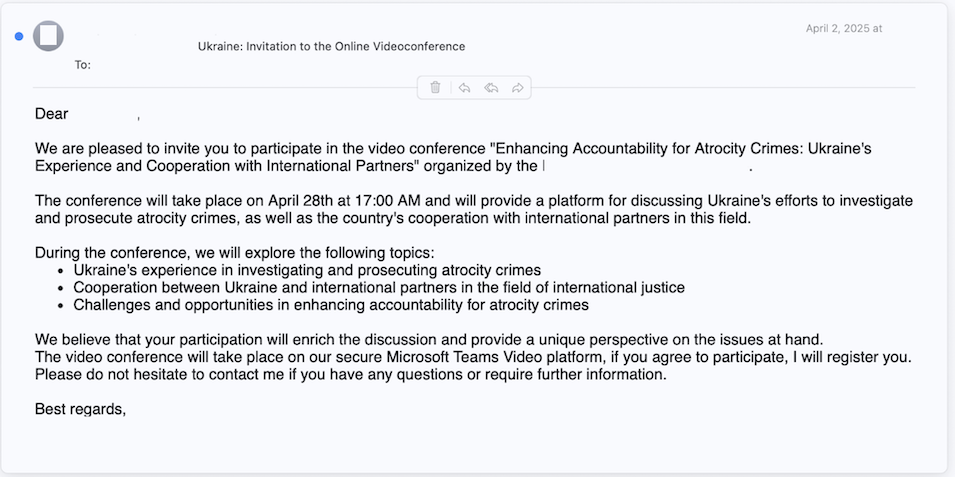
The initial email that was sent to various targets is shown in the image below.
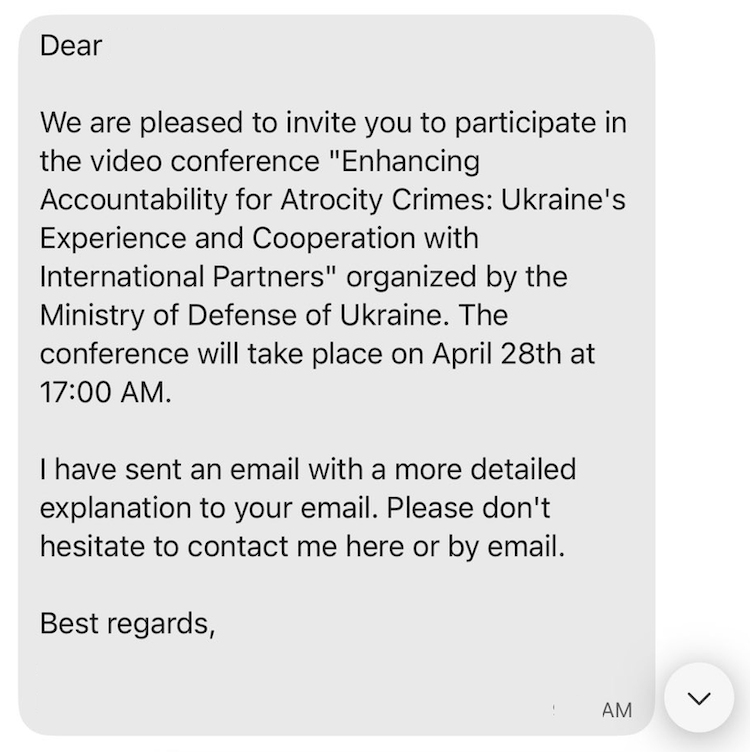
Not long after this email was sent to various targets, the follow-up message from UTA0355 referencing the email was sent via Signal or WhatsApp; an example of which is shown below.
OAuth Phishing and the Device Registration Service

Like other OAuth phishing techniques, the one used in this campaign involved direct interaction with the victim to have them click a link and supply a code back to the attacker. This code is then sought by the attacker and used to obtain illicit access to M365 resources.

Victim Interaction

If the target responded to the message UTA0355 sent via Signal or WhatsApp, they would be sent an M365 login URL to click; the URL format is shown below:

https://login.microsoftonline.com/common/oauth2/authorize?url=https://teams.microsoft.com/[redacted]&client_id=29d9ed98-a469-4536-ade2-f981bc1d605e&resource=01cb2876-7ebd-4aa4-9cc9-d28bd4d359a9&response_type=code&redirect_uri=https%3A%2F%2Flogin.microsoftonline.com%2FWebApp%2FCloudDomainJoin%2F8&amr_values=ngcmfa&login_hint=<email@address.here>

After the victim logged in via the shared Microsoft URL, they would be redirected to a new URL that contained an OAuth authorization code within the URL. The attacker included additional instructions indicating the victim should share the URL they see in their address bar after the redirect occurs. The URL generated by the victim’s browser, and subsequently returned to UTA0355, follows the format below:

https://login.microsoftonline.com/WebApp/CloudDomainJoin/8?code=[redacted]&session_state=[redacted]

By sharing this URL with the attacker, the victim would unknowingly hand over all the information required to authenticate as themselves. This is similar to other observed and suspected attack campaigns. And again, this does require the target to both click a link and send back a code or URL. However, the victim is only ever asked to interact with legitimate Microsoft 365 services, which users may inherently see as trustworthy. Additionally, it may not immediately appear obvious to a user that sharing data from their address bar, or from text displayed on a legitimate Microsoft webpage, would facilitate granting an attacker access to their M365 account.

UTA0355 OAuth Abuse

The URL the victim would share with the attacker includes a code parameter containing an OAuth authorization code, which would then be used to grant access tokens. Unlike similar previous campaigns, the resource requested in the initial login is not access to the Microsoft Graph API; instead, it is for the Device Registration Service. This service is used by Windows to join new devices to Entra ID. The attacker would use this access to join a new device named DESKTOP-[redacted] to the victim’s Entra ID. Volexity was able to use the ROADTools project to replicate these steps, and followed this guide to create a new token with full permissions for Microsoft Graph API access. This technique uses a flaw in the Entra ID API design to grant an access token with a greater level of access than that initially granted.

After the initial interaction had taken place, and UTA0355 had registered their device with the victim’s Microsoft Entra ID (Azure AD), Volexity observed an additional interaction with the victim. In this interaction, UTA0355 requested that the victim approve a two-factor authentication (2FA) request to “gain access to a SharePoint instance associated with the conference”. This was required to bypass additional security requirements, which were put in place by the victim’s organization, in order to gain access to their email.

Post-compromise Activity

Volexity assesses with high confidence that the attacker required the victim to approve a 2FA request to access email items. In logs reviewed by Volexity, initial device registration was successful shortly after interacting with the attacker. Access to email data occurring the following day, which was when UTA0355 had engineered a situation where their 2FA request would be approved. Once access was granted, logs showed the attacker downloaded the target’s email using a session tied to the newly registered device.

The login activity, email access, and device registration all took place using a client IP address belonging to a proxy network that was geolocated to where the victim was located.

Detecting Related Activity

To generally prevent or detect these attacks, Volexity recommends the following:

  • Consider alerting on M365 login activity where the Visual Studio Code client_id value aebc6443-996d-45c2-90f0-388ff96faa5 is used in combination with a resourceDisplayName containing “Microsoft Graph”. Depending on your environment and the usage of Visual Studio Code, this may or may not be feasible, as legitimate users will also login using this client_id.
  • Consider alerting on the following URL format (either embedded in email or proxy logs). Note that the parameters in the URL can appear in any order, and that the redirect_uri values must be set to insiders.vscode.dev/redirect or vscode-redirect.azurewebsites.net:

    https://login.microsoftonline.com/organizations/oauth2/v2.0/authorize?state=[any_url]&client_id=aebc6443-996d-45c2-90f0-388ff96faa56&scope=https://graph.microsoft.com/.default&response_type=code&login_hint=[email]&redirect_uri=https://insiders.vscode.dev/redirect

    https://login.microsoftonline[.]com/common/oauth2/authorize?redirect=[any_url]&client_id=aebc6443-996d-45c2-90f0-388ff96faa56&resource=https://graph.microsoft.com&response_type=code&redirect_uri=https://vscode-redirect.azurewebsites.net&login_hint=[email]&ui_locales=en-US&mkt=en-US&client-request-id=[removed]

  • Evaluate the business impact associated with blocking access to the insiders.vscode[.]dev and vscode-redirect.azurewebsites.net hostnames and consider implementing such blocks.
  • Educate users about the risks associated with new and unknown contacts established through secure messaging platforms. It is crucial that users understand the importance of verifying the identities of contacts that reach out via Signal, WhatsApp, or other secure messaging platforms. Verification should be done out-of-band instead of trusting information provided via unsolicited or unexpected outreach.
  • Consider looking for newly registered devices, and correlate with registering IP addresses to look for low-reputation or proxy IP addresses appearing in the ClientIPAddress.
    • Be aware that ongoing access to the user’s email via the Microsoft Graph API will not contain an attacker IP address in the ClientIPAddress field; instead, it contains a Microsoft IP address. This behavior does not appear to be documented and is counterintuitive to security analysis.
    • While attacker activity cannot easily be tracked via the ClientIPAddress field, Volexity was able to track attacker activity based on the unique deviceId value associated with the device that was registered by the attacker.
    • The ClientAppID field for ongoing access may differ from the user’s typical email client, as it will use an AppID corresponding to one created by the attacker.
  • Consider implementing conditional access policies that restrict access to organizational resources to only approved or managed devices. This can be effective at preventing device registration and unauthorized access to other resources such as email.
    • At the time of publication, Volexity is not aware of a way to block specific first-party Microsoft apps via conditional access policies. Conditional access can be used to block access to all services for non-compliant devices; however, this may prove challenging for organizations to implement in a short timeframe.
    • It should also be noted that Microsoft Teams was one of the resources Volexity also observed UTA0352 targeting. It is not likely reasonable or feasible for most organizations to block this, if it were even possible.

Conclusion

Motivated threat actors will continuously look for new ways to circumvent security controls and gain access to resources using new methods that are not well known to users or cyber defense teams. This latest series of attacks marks the second time since January 2025 that Russian threat actors have blitzed little-known techniques to obtain access to M365 resources. Volexity surmises that these attacks targeting NGOs, Think Tanks, and human rights defenders may be ramping up in order to capitalize on the current situation these individuals and organizations are facing in the form of budget cuts and reduced staffing.

Similar to the Device Code Authentication phishing campaigns that Volexity reported in February 2025, these recent campaigns benefit from all user interactions taking place on Microsoft’s official infrastructure; there is no attacker-hosted infrastructure used in these attacks. Similarly, these attacks do not involve malicious or attacker-controlled OAuth applications for which the user must explicitly grant access (and thus could easily be blocked by organizations). The use of Microsoft first-party applications that already have consent granted has proven to make prevention and detection of this technique rather difficult.

Organizations should train users to be highly vigilant when it comes to unsolicited contact, especially if it arrives via secure messaging apps and request that users click links or open attachments. Further, for this specific type of attack to be successful, the attacker must request that the user send back a URL or code from the link they clicked on. This tactic is not something users are typically trained to be aware of and should be added to an organization's users' security awareness training.

At this time, Volexity notes that NGOs, organizations related to human rights and providing aid and humanitarian assistance, and those with ties to Ukraine are likely the most at risk and potential targets of these campaigns. And while this threat activity is ongoing in limited targeted attacks, Volexity expects that this method of attack will continue and may become more widespread. Therefore, organizations should broadly warn users about this type of attack.

Finally, all messages attributed to UTA0352 and UTA0355 were themed around Ukraine, and targeted numerous individuals and organizations that have historically been targeted by Russian threat actors. Based on this, and the use of similar tactics observed in February 2025, Volexity assesses with medium confidence that both UTA0352 and UTA0355 are Russian threat actors. It is unclear if they are working in coordination or have overlaps with Volexity's previous reporting.

INVESTIGATIVE ASSISTANCE


If any organization or individual believes they may have been targeted by UTA0352, UTA0355, or in a similar attack, please feel free to reach out to Volexity via our contact form. We would be glad to assess any potential targeting and assist in determining if such an attack may have succeeded.

Acknowledgements

Volexity would like to thank its customers for their vigilance, cooperation, hard work, and dedication to defending human rights. Volexity would also like to thank the MIL.CERT-UA of the Ministry of Defence of Ukraine for their ongoing assistance and cooperation.

The post Phishing for Codes: Russian Threat Actors Target Microsoft 365 OAuth Workflows appeared first on Volexity.
Multiple Russian Threat Actors Targeting Microsoft Device Code Authentication

Volexity-Blog-Multiple-Russian-Threat-Actors-Targeting-Microsoft-Device-Code-Authentication

KEY TAKEAWAYS
  • Volexity has observed multiple Russian threat actors conducting social-engineering and spear-phishing campaigns targeting organizations with the ultimate goal of compromising Microsoft 365 accounts via Device Code Authentication phishing.
  • Device Code Authentication phishing follows an atypical workflow to that expected by users, meaning users may not recognize it as phishing.
  • Recent campaigns observed have been politically themed, particularly around the new administration in the United States and the changes this might mean for nations around the world.

Starting in mid-January 2025, Volexity identified several social-engineering and spear-phishing campaigns by Russian threat actors aimed at compromising Microsoft 365 (M365) accounts. These attack campaigns were highly targeted and carried out in a variety of ways. The majority of these attacks originated via spear-phishing emails with different themes. In one case, the eventual breach began with highly tailored outreach via Signal.

Through its investigations, Volexity discovered that Russian threat actors were impersonating a variety of individuals in order to socially engineer targets, including impersonating individuals from the following:

  • United States Department of State
  • Ukrainian Ministry of Defence
  • European Union Parliament
  • Prominent research institutions

Communications carried a variety of different themes and messages, but they all ultimately resulted in the attacker inviting the targeted user to one of the following:

  • Microsoft Teams Meeting / Video Conference
  • Access to applications and data as an external M365 user
  • Join a chatroom on a secure chat application

When these attacks were successful and the attackers gained access to accounts, the post-exploitation phase often had unique characteristics in each case:

  • The way the attackers accessed material from compromised organizations (scripts versus native applications)
  • The infrastructure used to access stolen accounts

Despite the differences, Volexity found the attacks had one thing in common: they were all Device Code Authentication attacks. While this attack method is not new, it is one that is definitely lesser known and not commonly leveraged by nation-state actors. Details on the social-engineering and spear-phishing campaigns, along with how Device Code Authentication attacks work, will be covered further in this blog post. What Volexity has observed is that this method has been more effective at successfully compromising accounts than most other targeted spear-phishing campaigns.

Volexity assesses with high confidence that the series of attacks described in this blog post are from Russia-based threat actors. At this time, Volexity is tracking this activity under three different threat actors and assesses with medium confidence that at least one of them is CozyLarch (overlapping with DarkHalo, APT29, Midnight Blizzard, CozyDuke). Volexity is tracking the remaining activity under UTA0304 and UTA0307. It is possible that all the activity described in this blog post is a single threat actor, but despite the similar targeting, timing, and attack method, other observed components of the operations are different enough to be tracked separately, for now.

From Secure Chat to Insecure Authentication

The discovery of this threat activity started toward the end of January 2025, when Volexity uncovered a highly targeted attack that had successfully compromised the M365 account of one of its customers. This breach was discovered after Volexity identified suspicious sign-in activity to the account, which was followed by a rapid download of files from the user's OneDrive. All authentication and download events came from virtual private server (VPS) and Tor IP addresses, which is not the most subtle way to access an account. Volexity noted this activity was likely scripted, as the User-Agent string for later access and file downloads was the Python User-Agent string python-requests/2.25.1.

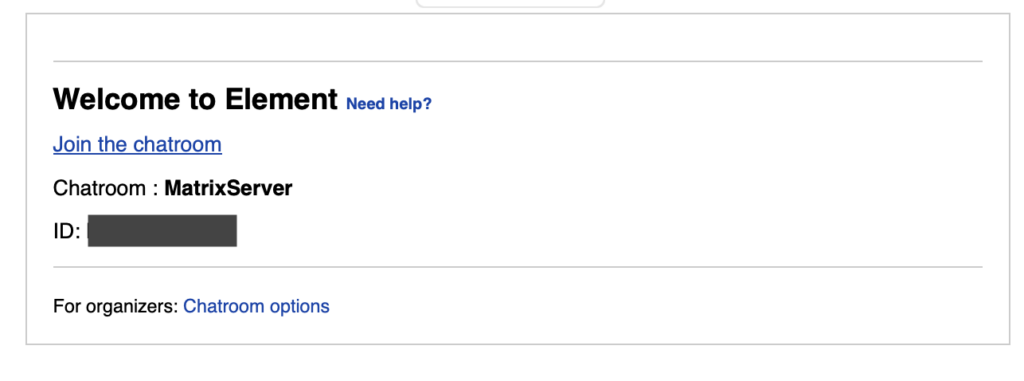
Volexity then performed a detailed investigation into this incident, in an effort to identify how the account was compromised. A review of login activity showed the legitimate user had logged in and approved a multi-factor authentication (MFA) request. However, subsequent access was not from the legitimate user's IP address. This caused Volexity to initially suspect a phishing attack involving an adversary-in-the-middle (AiTM) framework. As a result, Volexity reviewed emails to the user leading up the time of the authentication event. This review identified a suspicious email just moments before the login activity from an email address purporting to be from someone with the name of a high-ranking official from the Ukrainian Ministry of Defence. The email was structured to look like a meeting invite for a chatroom on the messaging application, Element. Element is another encrypted messaging application that offers the ability for users to self-host a server with functionality that includes group video chats. The “invitation” email sent is shown below .

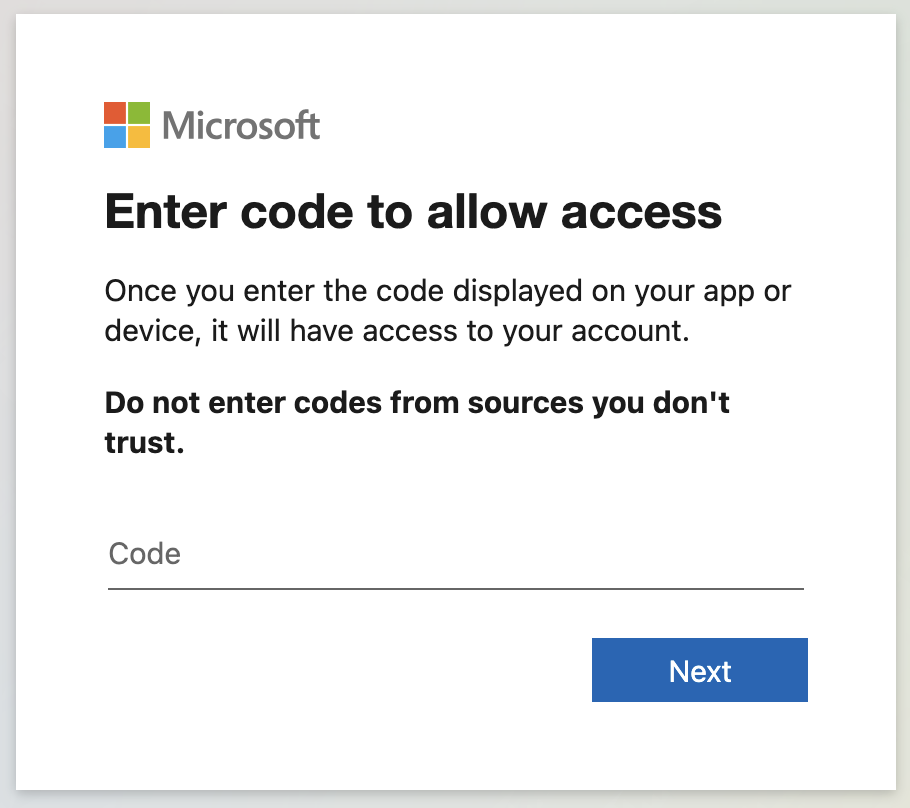
In fact, all hyperlinks in the email were linked to https://login.microsoftonline.com/common/oauth2/deviceauth, the page used for the Microsoft Device Code authentication workflow. Clicking the link leads to the dialogue shown below.

Microsoft describes the purpose of this workflow as allowing '"users to sign in to input-constrained devices such as a smart TV, IoT device, or a printer.” However, in this case, it means if an attacker can convince a user to enter a specific code into this dialogue (and log in), they are granted long-term access to the user’s account.

From Signal to Element

After working with its customer more closely, Volexity learned that the victim had been contacted on Signal by an individual purporting to be from the Ukrainian Ministry of Defence. This individual then requested the victim move off Signal to another secure chat application called Element. The attacker then had the victim join an Element server they controlled under the domain sen-comms[.]com. This allowed the attacker to further communicate with the victim in real time and inform them they needed to click a link from an email to join a secure chat room. This is where the email Volexity had discovered came into play. The message was a ploy to fool the user into thinking they were being invited into a secure chat, when in reality they were giving the attacker access to their account. The generated Device Codes are only valid for 15 minutes once they are created. As a result, the real-time communication with the victim, and having them expect the "invitation", served to ensure the phish would succeed through timely coordination.

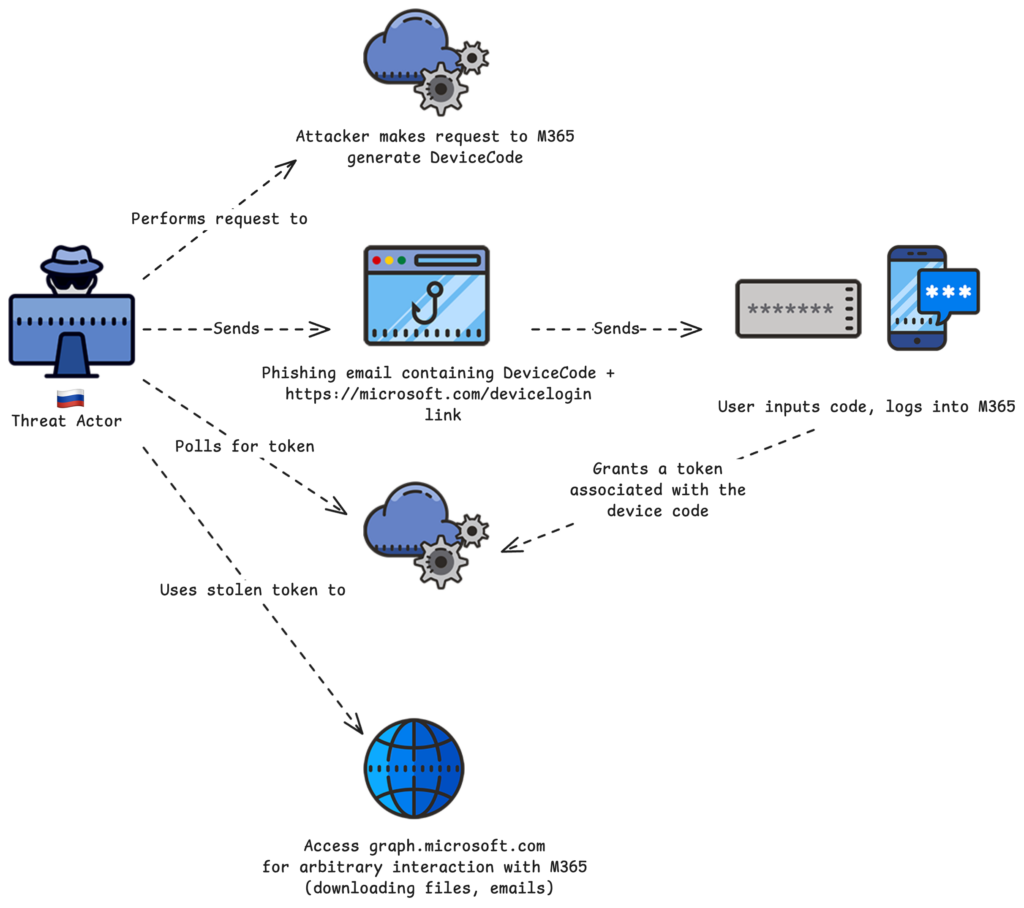
The diagram below shows a high-level depiction of how the attack worked.

UTA0304 Infrastructure

Volexity tracks the threat actor behind this campaign as UTA0304. Through research conducted on the custom domain used by UTA0304 to operate its own Element server, Volexity was able to pivot and discover additional infrastructure it believes is likely operated by the group. The table below represents the list of infrastructure that Volexity has tied to this threat actor.

Domain IP Address Confidence
sen-comms[.]com 107.189.27.41 High
afpi-sec[.]com 144.172.113.77 Medium
chromeelevationservice[.]com 167.88.162.72 Medium
comms-net[.]com 107.189.26.199 High

Spoofing the United States Department of State

In early February 2025, Volexity observed multiple spear-phishing campaigns targeting users with fake Microsoft invitations purporting to be from the United States (US) Department of State. These emails were themed as invitations to join the US Department of State’s Microsoft tenant as an external user, or as invitations to a Microsoft Teams chat named “Measuring Influence Operations".

Similar to the campaign conducted by UTA0304, these fake US Department of State emails were targeting users with a Device Code OAuth phishing workflow. Each email was aimed at convincing the user to accept the invitation and enter a unique code provided in the phishing email. The link in the invitations would direct users to the Microsoft Device Code authentication page. If the user entered the code provided in the phishing email, the authentication page would subsequently authorize the threat actor to access to the user’s account. However, it is worth noting that this campaign was sent out of the blue, with no precursor or build up to the emails, so users would not be expecting these messages. Even if they were to fall for the campaign, they would have to have done it within 15 minutes of receiving the email. This dramatically decreased the likelihood that this attack would be successful.

After reviewing various parts of the attack, Volexity assesses with medium confidence that the Russian threat actor CozyLarch (aka APT29 or Midnight Blizzard) was behind these US Department of State themed spear-phishing campaigns. Additional details on each campaign are described in the sections that follow.

Campaign 1: M365 Tenant External User Invitation

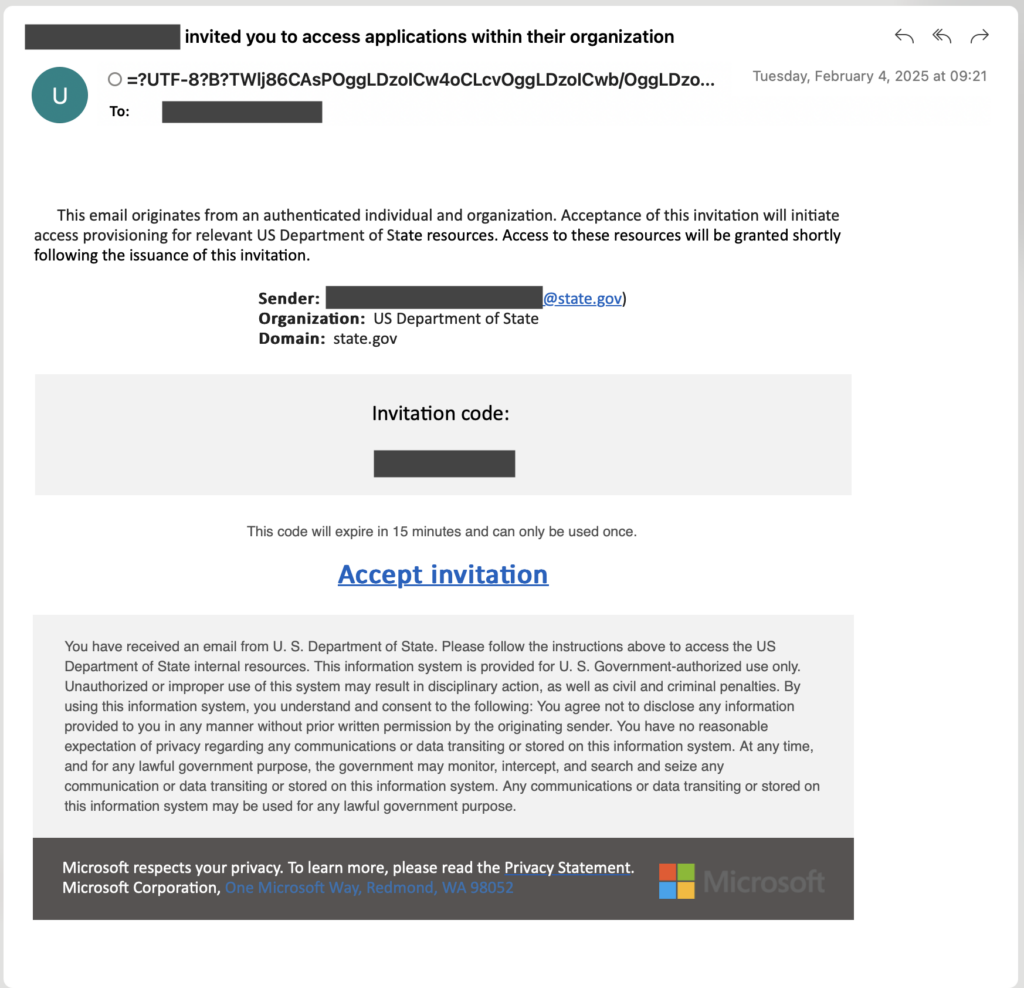
CozyLarch sent invitations to several users, inviting them to access applications within the M365 tenant for the US Department of State. The invitation email was designed to look like a real invitation that would be sent from Microsoft, as shown below.

In this instance, the “Accept invitation” hyperlink goes to https://www.microsoft.com/devicelogin, which is a simple redirect that sends the user to https://login.microsoftonline.com/common/oauth2/deviceauth.

The redirect link takes the user to the Microsoft Device Code OAuth workflow, and it is the same URL that UTA0304 directly embedded in their phishing campaign. However, unlike UTA0304, CozyLarch opted to use the redirect URL rather than the final login URL, perhaps because it may look even more recognizable to a discerning user, given that it is hosted on the main Microsoft domain. If the user entered the code provided from the email and continued through the authentication process, the attacker was granted access to the user’s M365 account.

Campaign 2: M365 Teams Chat Invitation

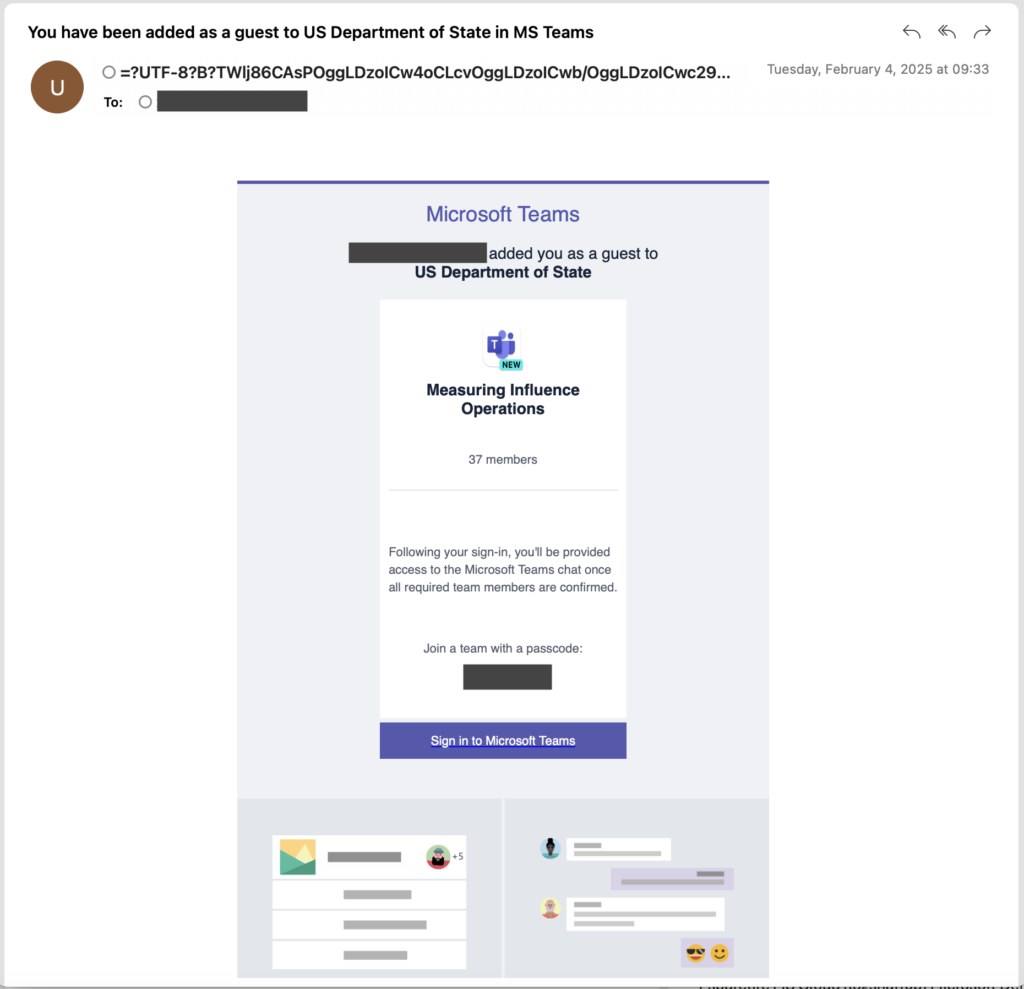
CozyLarch launched a second campaign, in which they targeted users with a fake invitation to join a Microsoft Teams chat named “Measuring Influence Operations”. The email made it appear as though there were already 37 other members in the chat.  A screenshot of one of the observed spear-phishing messages is shown below.

The “Sign in to Microsoft Teams” button in the email body is a hyperlink that leads to the same https://www.microsoft.com/devicelogin URL observed in the other campaign. The attack flow and end goal are the same, with only a small difference in the theme of the emails.

Email Source Analysis

The emails are designed to appear as though they come from Microsoft. The messages used mixed encoding in the “friendly” name that make the address difficult to discern. An example of the full “from” header used in one phishing email is given below:

\"Mic\udb40\udc30\udb40\udc30\udb40\udc30\u200br\udb40\udc30\udb40\udc30o\udb40\udc30\udb40\udc30soft Invitations on behal f of US Dep\udb40\udc30\udb40\udc30\udb40\udc30artme\udb40\udc30\udb40\udc30\udb40\udc30nt of St\udb40\udc30\udb40\udc30\udb40\udc30 ate \uff1cinvites\uff20mic\udb40\udc30\udb40\udc30\udb40\udc30\u200br\udb40\udc30\udb40\udc30o\udb40\udc30\udb40\udc30soft.co m\uff1e\u180e\u3000\u180e\u3000\u180e \u180e\u3000\u180e\u3000\u180e\u3000\u180e\u3000\u180e\u3000\u180e\u3000 \u180e\u3000\u180e\u3000\u180e\u3000\u180e\u3000\u180e\u3000\u180e\u3000\u180e\u3000\u180e\u3000\u180e\u3000\u180e\u3000 \u180e \u180e\u3000\u180e \u180e\u3000\u180e\u3000\u180e\u3000\u180e\u3000\u180e\u3000\u180e\u3000\u180e \u3000\u180e\u3000\u180e\u3000\u180e\u3000\u180e\u3000\u180e\u3000\u180e\u3000\u180e\u3000\u180e\u3000\u180e\u3000\u180e  \u180e\u3000\u180e\u3000\u180e\u3000\u180e\u3000\u180e\u3000\u180e\u3000\u180e\u3000\u180e\u3000\u180e\u3000 \u180e\u3000\u180e\u3000\u180e\u3000\u180e\u3000\u180e\u3000\u180e\u3000\u180e\u3000\u180e\u3000\u180e\u3000\u180e\u3000 \u180e\u3000\u180e\u3000\u180e\u3000\u180e\u3000\u180e\u3000\u180e\u3000\u180e\u3000\u180e\u3000\u180e\u3000\u180e\u3000 \u180e\u3000\u180e\u3000\u180e\u3000\u180e\u3000\u180e\u3000\u180e\u3000\u180e\u3000\u180e\u3000\u180e\u3000\u180e\u3000 \u180e\u3000\u180e\u3000\u180e\u3000\u180e\u3000\u180e\u3000\u180e\u3000\u180e\u3000\u180e\u3000\u180e\u3000\u180e\u3000 \u180e\u3000\u180e\u3000\u180e\u3000\u180e\u3000\u180e\u3000\u180e\u3000\u180e\u3000\u180e\u3000\u180e\u3000\u180e\u3000 \u180e\u3000\u180e\u3000\u180e\u3000\u180e\u3000\u180e\u3000\u180e\u3000\u180e\u3000\u180e\u3000\u180e\u3000\u180e\u3000 \u180e\u3000\u180e\u3000\u180e \u061c Cc:\" <sheilmagnett@gmail.com>

The attacker attempted to make it appear as if the emails were from invites@microsoft[.]com, and also set the Reply-To header as invites@microsoft[.]com. However, the true address could be seen at the end of the From: field; all messages were sent via Google Gmail accounts. Volexity observed the following Gmail accounts as the actual senders of the messages observed:

  • brensonkarl@gmail[.]com
  • kaylassammers@gmail[.]com
  • kendisggibson@gmail[.]com
  • leslytthomson@gmail[.]com
  • mikedanvil@gmail[.]com
  • sheilmagnett@gmail[.]com
  • susannmarton@gmail[.]com

These addresses are believed to be controlled by CozyLarch and can be used to reliably detect phishing emails that may have been sent.

Using Wireless Proxy Networks for Email Distribution

Volexity also noted that the sending IP address associated with each spear-phishing email was recorded in the headers. Looking at the Received header in the messages, it became apparent that the attacker was using Proxy IP addresses based in the US to send messages. Volexity observed nearly a dozen IP addresses belonging to mobile networks in the US (AT&T and Verizon Wireless).

European Parliament and Donald Trump

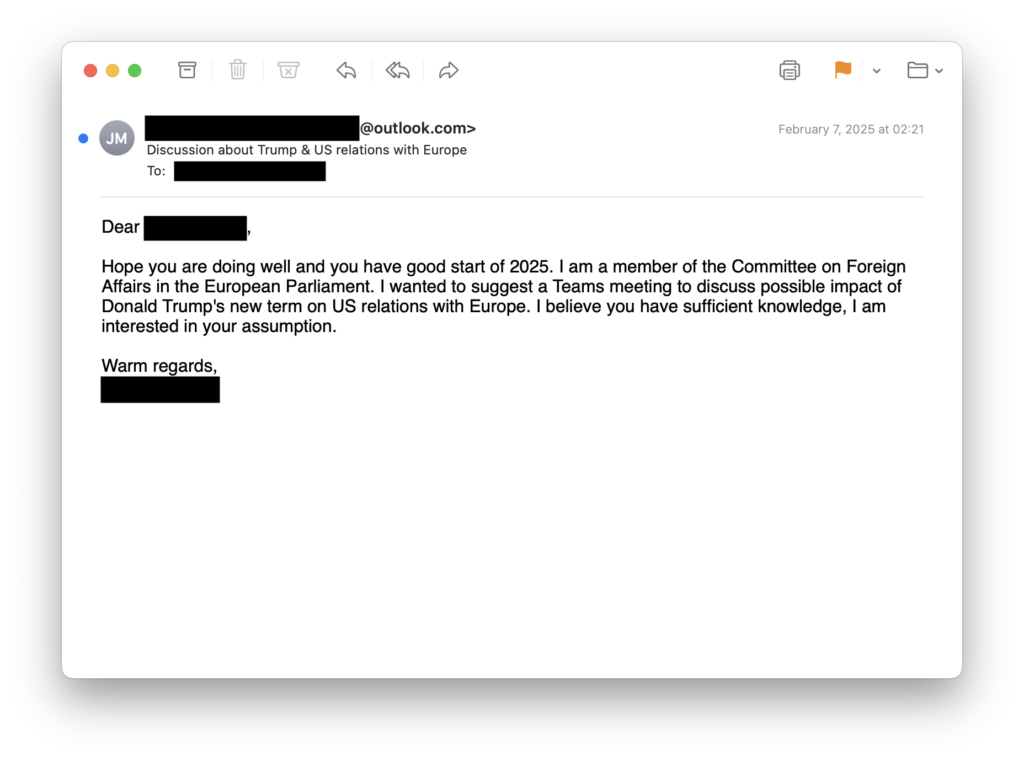
Starting in late January through to the publication of this blog (February 13, 2025), Volexity has observed another campaign by a Russian threat actor it tracks as UTA0307 targeting numerous organizations. UTA0307 created a fake email under the identity of a member of the European Parliament who is on the Committee on Foreign Affairs. The threat actor reached out to numerous individuals with personalized emails requesting a Microsoft Teams meeting to discuss Donald Trump and his impact on relations between the US and the European Union. Volexity also observed a smaller set of campaigns centered on discussing China's foreign policy and China-European Union relations.

The email subject lines used in these various campaigns are listed below:

  • Trump and EU
  • Discussion on Eastern Europe and the Caucasus
  • Discussion about Donald Trump's new term
  • Discussion about Trump & US relations with Europe
  • Collaboration on China and East Asia Research

The image below shows an example spear phish that was sent by UTA0307.

None of the initial emails contained any malicious content or links at the onset. The threat actor was leveraging a tactic that has become commonplace for numerous nation-state actors, where they wait until a conversation has started prior to sending anything malicious. This serves the purpose of knowing they have an engaged target, and that the target's guard is potentially down. In the specific cases of Device Code Authentication phishing, it is especially important to have a responsive target, as the threat actor has only 15 minutes to convince the target to enter the code that has been generated.

A Different Device Code OAuth Phishing Technique

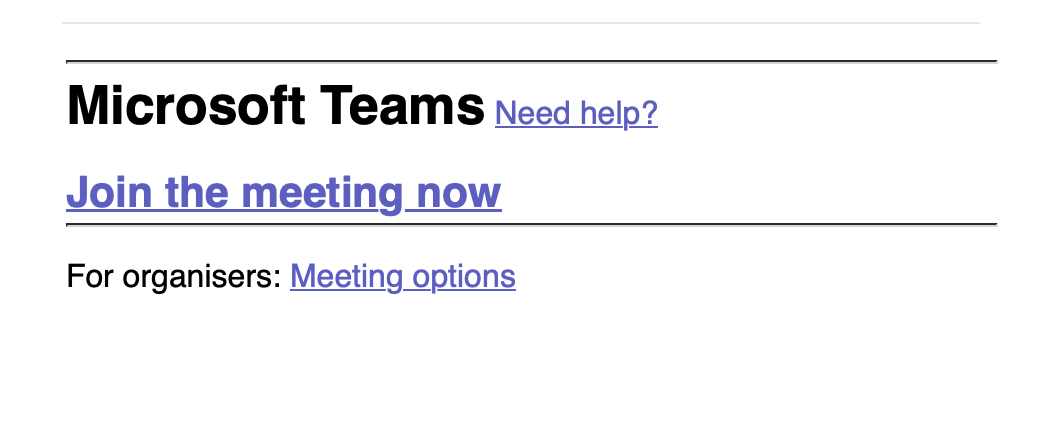
Volexity actually discovered the operations of UTA0307 following a successful compromise. Similar to the initial discovery of UTA0304, Volexity worked backwards from detecting a breach to identifying the above spear-phishing emails. In this case, the victim had engaged from the initial email and had several messages back and forth with UTA0307 regarding a meeting being set up. They agreed to join a Microsoft Teams meeting, and a fake invitation email was sent. However, this time the link in the email did not go to Microsoft. The target received an email with the subject "Join Teams meeting", and the body of the email, shown below, was designed to look like a real invitation.

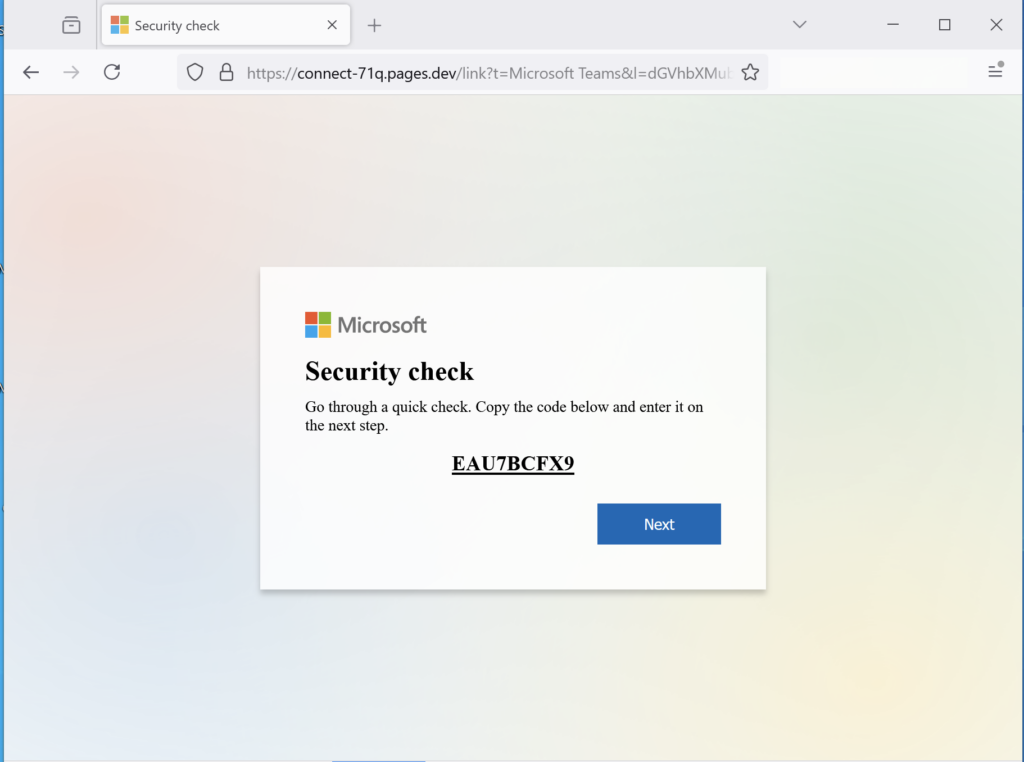
The “Join the meeting now” hyperlink, however, linked to a website controlled by UTA0307 (connect-71q.pages[.]dev). This page in turn was set up to automatically generate a new Microsoft Device Code each time it was visited. The website was designed to appear as an official Microsoft interstitial page before the user can join a Microsoft Teams meeting. The message that appears on the landing page (shown below) claims that the victim needs to pass a security check by copying a code and entering it on a subsequent page

When the user clicks the “Next” button, a new tab is opened with the real Microsoft Device Code Authentication interface that requests an authentication code. If the victim enters the code supplied by the phishing page, they grant UTA0307 access to their M365 account. Interestingly, in the background of the initial phishing page, Volexity noted that the website would continuously poll the domain rosejob[.]com. It appears this domain was set up to monitor successful Device Code Authentication and, if detected, would redirect the user to a real Microsoft Teams meeting URL in an effort to make the activity appear legitimate.

The threat actor never joined this Microsoft Teams meeting. However, UTA0307 did add authorization for an authentication application under their control to enable multi-factor authentication when logging into the compromised account. Volexity assesses with medium confidence that this was a requirement of logging into the account, even with the stolen authentication token.

One benefit of this attack workflow versus other previously observed DeviceID phishing workflows is that, when a DeviceID code is generated, it is only valid for 15 minutes. Having an interstitial page that automatically generates new codes means UTA0307 does not have to worry about their phishing content expiring.

UTA0307 Post-compromise Activities, Targeting and Attribution

Volexity observed UTA0307 exfiltrating documents from a compromised M365 account that would be of interest to a Russian threat actor. This was determined based on identification of FileDownloaded operations observed in M365 audit log data. Given this information about the threat actor’s objectives, their targeting, and their use of a highly similar technique to that used in recent days and weeks by CozyLarch and UTA0304, Volexity assesses with medium confidence that UTA0307 is also a Russian threat actor.

However, the exact implementation of the DeviceID OAuth phishing technique used in this activity differs slightly from those previously documented by Volexity, which provides some evidence that this activity may have been conducted by a separate threat actor. For example, while the previously observed phishing campaigns saw the attacker use the client ID for Microsoft Office when handling Device Code Authentication, this activity instead used the client ID for Microsoft Teams, as shown below (note that Microsoft uses appId and client_id interchangeably in their logs when referring to the ID for an application):

"appDisplayName": "Microsoft Teams",

"appId": "1fec8e78-bce4-4aaf-ab1b-5451cc387264",

Another difference between this and the UTA0304 campaign is that in this case, all subsequent access to the compromised account occurred via Mullad VPN exit nodes (versus the other observed VPS and Tor IP addresses). Based on these two factors, Volexity has chosen to track this activity under the UTA0307 alias, rather than CozyLarch or UTA0304.

Detecting Device Code Authentication

Volexity identified a way to reliably detect this attack through monitoring and analysis of Microsoft Entra ID sign-in logs. When a user enters a device code and subsequently authenticates, it results in a login to the application associated with the generated code. This can be a common application like Microsoft Office that is frequently accessed by users and would not be a reliable indicator. However, the good news is that Device Code Authentications result in the authenticationProtocol field being set with the value deviceCode.

The line below is what will appear in the JSON data in the Entra ID sign-in logs when a Device Code Authentication occurs:

“authenticationProtocol": "deviceCode",

Volexity further noted that as authenticated sessions refresh and are kept alive, subsequent sign-ins that initially occurred via a deviceCode often do not have anything set for authenticationProtocol, but they contain the following entry:

  “originalTransferMethod": "deviceCodeFlow",

These values can be searched and filtered on in the Entra Admin center by adding filters for "Authentications Protocol" and "Original Transfer Method". The latter can be filtered in both interactive and non-interactive sign-ins. The frequency and legitimacy of these values occurring in the sign-in logs for a particular organization may vary, as this is a legitimate Microsoft feature. An organization can evaluate their risk and usage of these workflows, and potentially use this information as a proactive detection mechanism.

If an organization has the ability to monitor URLs that are being accessed by users or sent in email, there are additional detection opportunities to discover Device Code Authentication attacks. The following official URLs can be monitored for as related to Microsoft Device Code Authentication:

  • https://login.microsoftonline.com/common/oauth2/deviceauth
  • https://www.microsoft.com/devicelogin
  • https://aka.ms/devicelogin

Organizations can monitor for access to these URLs or for their presence in various communication methods, such as email. Attackers can find other means to redirect users to these URLs, but one of the main advantages of using the list above in phishing attacks is that the URL displayed is hosted on a legitimate Microsoft domain.

Preventing Device Code Authentication

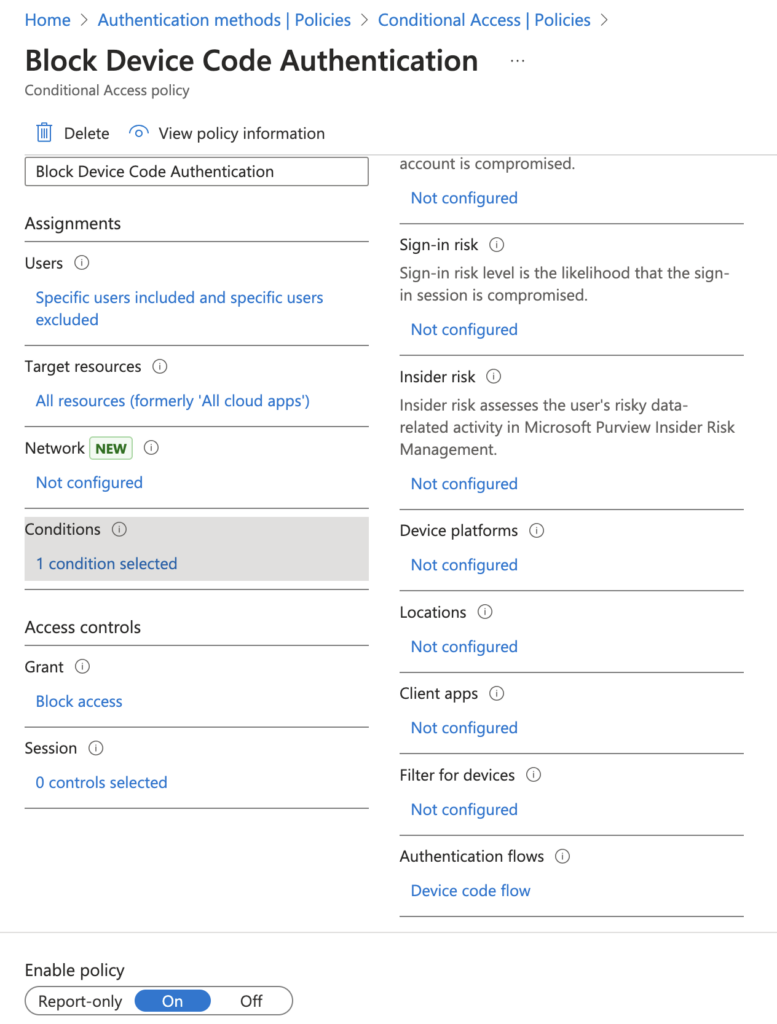
Volexity believes the most effective way to prevent this potential attack vector is through conditional access policies on an organization's M365 tenant. It is possible for organizations to create a conditional access policy that disallows device code authentication altogether. It is fairly trivial to set up, and Microsoft provides online guidance on exactly how to do this. Based on Volexity's own testing, blocking the "Device code flow" from "Authentications flows" prevents this attack from working.  The image below shows what a conditional access policy would look like once it's set up and in place to block this authentication flow.

Prior to implementing such a policy, organizations should evaluate the use of Device Code Authentication in their environment. This feature is used legitimately, and blocking it could have a negative impact. Volexity's review of its own customers identified several instances of legitimate access to resources via these means. However, at the majority of Volexity's customers, there was either no recent Device Code Authentication activity or there was only activity tied to the attacks described in this blog post.

Conclusion

Volexity continues to track multiple spear-phishing campaigns targeting Device Code Authentication. This blog post serves to cover a few of the larger and unique campaigns observed. Volexity has observed other similar spear-phishing campaigns in recent weeks targeting Device Code Authentication that it believes are the work of Russian threat actors. Further, it should be noted that it is possible this is the work of a single threat actor running multiple, different campaigns. However, at this time, Volexity believes this activity is sufficiently different enough to warrant tracking this activity under two different unknown threat actors and one it believes is likely CozyLarch.

While Device Code Authentication attacks are not new, they appear to have been rarely leveraged by nation-state threat actors . Volexity's visibility into targeted attacks indicates this particular method has been far more effective than the combined effort of years of other social-engineering and spear-phishing attacks conducted by the same (or similar) threat actors. It appears that these Russian threat actors have made a concerted effort to launch several campaigns against organizations with a goal of simultaneously abusing this method before the targets catch on and implement countermeasures.

The detection mechanisms and countermeasures to these attacks have been available for years. However, Volexity believes they are seldom implemented and that most organizations are not even aware of this authentication flow, let alone the means to detect its misuse. These attacks serve as a reminder that threat actors will constantly look for ways to abuse legitimate features, and organizations must continually evaluate and implement methods to detect and prevent such attacks.

These attacks also serve as a good opportunity to engage with users and remind them to be on the lookout for anything out of the ordinary when it comes to accessing resources when they are asked for login credentials or authorization grants. This phishing workflow has proven useful for an attacker, as many traditional sources of evidence and detection, both for a user and network defenders, are not present. For example:

  1. There is no “malicious” link or attachment. The only link is to the provider’s infrastructure (in this case, Microsoft). This means users cannot easily identify the link as being suspicious, and automated solutions detecting malicious emails will likely fail to do so for the same reason.
  2. Users are generally less aware of attacks that leverage legitimate services, and may be even less aware when it comes to those that involve entering a device code rather than their username or password.
  3. After successful authentication, the logs will show the authenticating application as a legitimate or benign application, reducing signal that can be keyed off of in sign-in logs by detection teams.

These are items that organizations should look to further train users on and implement technical countermeasures against where possible.

Indicators associated with these campaigns are available on the Volexity GitHub.

If you believe you have been targeted by a similar attack and want to share details with Volexity for informational purposes, additional investigation, or incident response, please contact us.

Volexity's Threat Intelligence research, such as the content from this blog, is published to customers via its Threat Intelligence Service. The activity described in this blog post was shared with Volexity Threat Intelligence customers in TIB-20250206, TIB-20250211, and TIB-20250213.


If you are interested in learning more about Volexity’s services, including Network Security Monitoring and Incident Response, or our leading memory forensics solutions, Volexity Surge Collect Pro for memory acquisition and Volexity Volcano for memory analysis, please do not hesitate to contact us.

The post Multiple Russian Threat Actors Targeting Microsoft Device Code Authentication appeared first on Volexity.

❌