Researchers tracked a large AI‑themed investment scam campaign involving more than 15,000 domains. It uses cloaking and deepfakes to hide from security tools while targeting ordinary users.
Criminals abused the Keitaro ad-tracking platform as part of a cloaking system so real victims see scam content, while security scanners, ad reviewers, and some random visitors see harmless pages, making the operation hard to detect and shut down.
Keitaro is a commercial tracking platform originally meant for digital marketers to manage ad campaigns, test which ads work best, and route visitors to different landing pages.
Because it is feature rich, easy to spin up on regular hosting, and built to filter and route traffic, criminals found they can abuse those capabilities to run scams at scale.
Traffic starts in many places. The scammers used compromised websites, spam emails, social media posts, and online ads, all quietly routing through the same tracking infrastructure.
The scam sites typically promise “Smart AI Trading Technology” or “Intelligent Trading Solutions” and claim consistently high returns, often reinforced with deepfake images or fabricated media to look more credible.
Some parts of the campaign now use deepfake videos and fake interviews with well-known public figures, making it look like a celebrity, or finance expert personally endorses the platform.
Once you follow a link, the cloaking part of the operation kicks in. Cloaking is the trick that makes these scams so hard to see from the outside.
When you click an ad or link, your visit passes through a traffic distribution system (TDS), a kind of router for web visitors that decides which page you see. In these cases, the TDS is connected to the tracker.
The system checks things like:
Your country/region
Your device and browser
Where you came from (Facebook ad, Google ad, email link, etc.)
Sometimes your IP address reputation or other subtle fingerprints
You’re shown the real investment scam landing page only if you match the “ideal victim” profile (for example, a regular consumer in a target country coming from a social media ad).
Everyone else, like a security researcher, ad platform reviewer, or automated scanner, gets shown a benign page, like a generic blog or placeholder site.
How to stay safe
The best way to stay safe is to stay informed about the tricks scammers use. Learn to spot the red flags that almost always give away scams and phishing emails, and remember:
There is no such thing as a risk-free, consistently profitable investment. If you’re looking to invest, navigate directly to known, regulated financial institutions.
Deepfakes are very convincing nowadays, so you will hardly be able to tell the difference between the real celebrity and their deepfake persona.
Don’t act upon unsolicited investment advice, whether it reaches you by email, social media, or sponsored search results.
Researchers have uncovered a long-running phishing operation that abuses trusted Google services to hijack tens of thousands of Facebook accounts.
The compromised Facebook accounts are mainly business and advertiser profiles, which criminals can monetize after gaining access and control.
The attackers found a way to send phishing emails that come “through Google,” making them look legitimate at first glance. The emails are sent via Google’s AppSheet platform, so they pass the usual technical checks (SPF, DKIM, DMARC), and many email filters treat them as trusted.
Google AppSheet is a development platform that lets people build mobile and web apps without writing code. It can automate workflows and notifications, typically used to send app-driven alerts and internal updates.
And that’s where the phishers abused it. The sender name can be customized, and the sending address may look something like noreply@appsheet.com, delivered through appsheet.bounces.google.com. To the average user, it looks like a perfectly normal notification, in these cases often about Facebook policy violations, copyright complaints, or verification issues.
Researchers linked these emails to a Vietnamese‑linked operation that has already compromised around 30,000 Facebook accounts and is still active.
The stolen accounts are mostly pages and business profiles that have financial value: advertising accounts, brand pages, and companies that rely on Facebook for marketing. Once inside, attackers run scams, place fraudulent ads, or sell access to others. In some cases, the same group offers “account recovery” services to fix the problems they created.
No matter the lure, the goal is the same: Facebook credentials, 2FA codes, and recovery data. The phishing sites are just the entry point. Behind them is a fairly industrial infrastructure built around Telegram bots and channels to collect and process stolen data.
How to stay safe
This campaign is not “just another phishing mail.” It is one more example of how attackers exploit the trust we place in major platforms.
Facebook does not send complaints, verification requests, security checks, job offers, and other urgent messages through Google infrastructure.
Any email that claims your Facebook or Instagram account is about to be disabled, locked, or punished deserves extra scrutiny, especially if it demands action within 24 hours.
If you get a worrying message about your account, go directly to facebook.com or the Facebook app. Don’t click links in the message.
If a form asks for password, multiple 2FA codes, date of birthm phone number, and ID photos in one go, then stop. That’s the “full recovery pack” these attackers need to take over your account.
The FIFA World Cup 2026 is scheduled to begin June 11 across the US, Canada, and Mexico. The web is filling with sites impersonating ticket vendors, telecoms, sticker publishers, toy manufacturers, immigration services, and crypto projects, all linked to the World Cup brand. Together, they map out four recurring patterns of fraud and risk targeting fans.
What World Cup fans need to know
If you’re planning anything around the 2026 World Cup, whether it’s buying a ticket or merchandise, booking a flight, applying for a US visa, or speculating on “World Cup” crypto, expect a surge in scams and other risky World Cup-related activity.
The good news is the patterns are obvious once you know what to look for:
Countdown timers that reset when you reload the page
Prices 80–90% below retail
The word “official” used without a clear link to the brand behind it
Crypto tokens claiming to be “official” World Cup products
Your headline rule for the next two months: If a site uses the World Cup or a known brand to get your money, stop and verify it from the official source before you do anything else.
How these World Cup scams work
The path to these scam sites is almost always the same: a fan searches for something on search engines or social media (for example, “World Cup 2026 jersey,” “buy Panini sticker album,” “visa to attend the World Cup,” “FIFA World Cup token”) and lands one of the hundreds of sites set up to exploit that demand.
Often the route there runs through an ad network. That might involve a sponsored search result, a banner on an unrelated site, or a redirect chain that sends the victim to a different domain than the one they clicked. (Note that tools like Malwarebytes Browser Guard can block malicious ads, scam domains, and redirect chains before the page loads.)
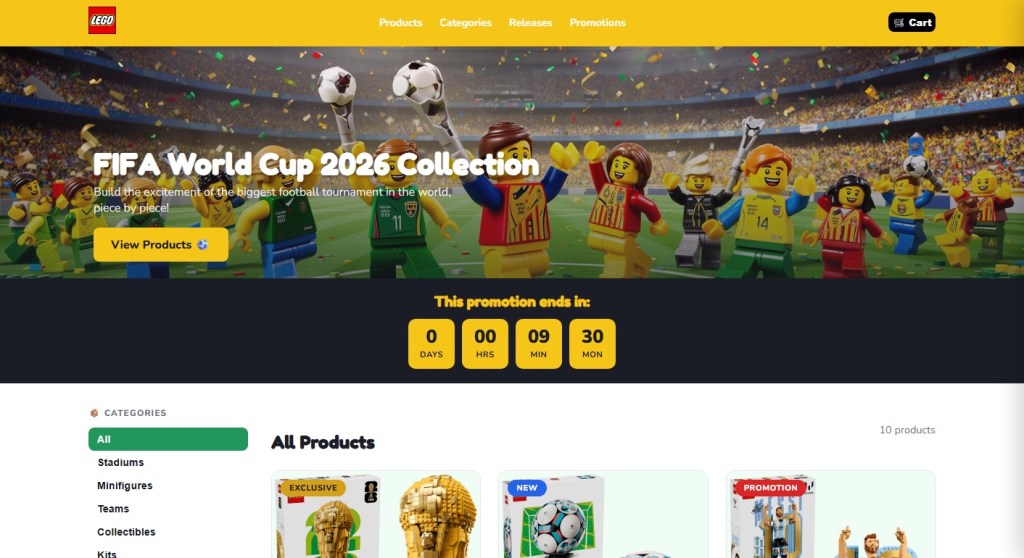
The branding on the destination site is consistent with the legitimate company. There are testimonials and satisfied-customer counts, so nothing looks immediately wrong. Urgency tricks like “Only a few items left” and the countdown timer are there to prevent you from looking too closely or investigating too deeply.
We’ve found these sites group naturally into four categories: crypto, travel, merchandise, and predictors. The sites in each category have their own tells, but they’re united by brand parasitism: borrowing authority from FIFA, the host nations, or a real licensee like LEGO or Panini.
Crypto
The most crowded category is crypto, and the biggest risk comes from sites that claim or imply official links to the World Cup.
One site marketed its token as “the official community token celebrating the FIFA World Cup 2026,” advertising a “Mega Airdrop,” a 7-billion-token total supply, and a participant counter pinned to the symbolic number 48 (the count of qualified national teams). Another shows FIFA’s official mascot, using tournament branding to sell an unlicensed token.
None of the sites we examined are connected to FIFA. FIFA does have a real digital-collectibles ecosystem—the FIFA Collect NFT marketplace, the Right-to-Buy ticket NFTs, and the FIFA Rivals game on the Mythos chain—all of which sit on FIFA-controlled infrastructure and are documented at FIFA’s own domains. None of the sites we examined sit inside that ecosystem. The real partners for 2026 are documented and easy to verify. “World Cup token” is not one of them.
We found multiple sites using FIFA branding to create a false sense of legitimacy. But there’s a real risk you’ll receive nothing, receive something you can’t sell, or sign a transaction that gives the operator access to your wallet.
Some sites don’t pretend to be official, but still carry risk to World Cup fans. One Solana-based token branded itself the “World Cup Rug Index,” with the tagline “Every match is a market. Every loss is a rug,” and a contract ending in “pump,” the signature of pump.fun launches.
In crypto, a “rug” is when early holders sell and the price collapses, leaving later buyers with losses. These projects are not scams in the sense of pretending to be something they’re not. They are openly speculative. The risk is in the structure: early buyers can sell into demand from later buyers, who are left holding the losses.
This is different from the fake “World Cup tokens” above. Those rely on FIFA branding to create a false sense of legitimacy. These rely on momentum, where most participants arrive late.
There is no official World Cup token
There is no official World Cup token
There is no official World Cup token
There is no official World Cup token
Travel
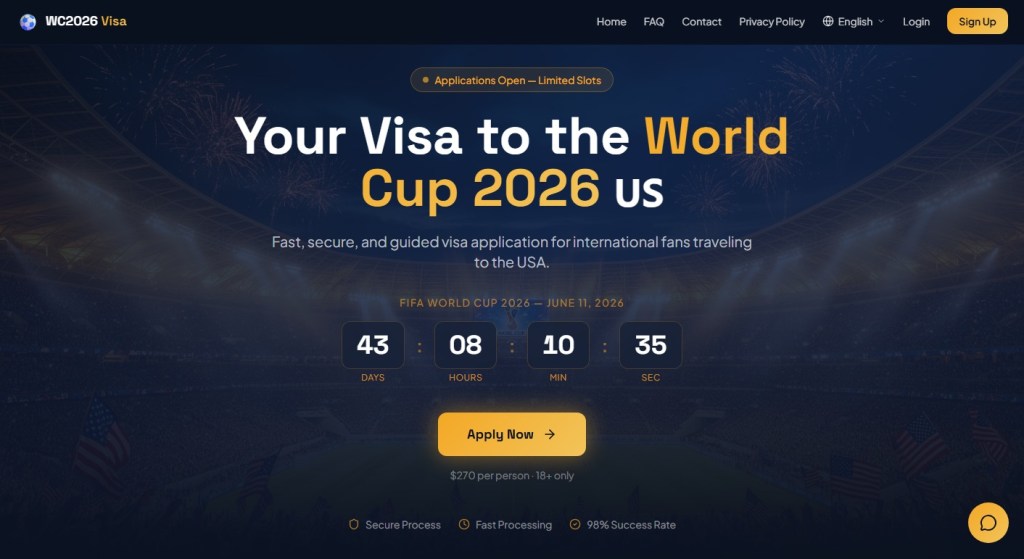
The most dangerous category is the “World Cup visa.” One site, WC2026 Visa, advertised a “Visa to the World Cup 2026 US” for $270 per person, with a “98% Success Rate,” a countdown to June 11, and the standard reassuring trio: “Secure Process,” “Fast Processing,” “18+ only.”
There is no such product. The US Department of State has stated this directly: there is no special tournament visa. Foreign visitors traveling to the United States for the World Cup must use the same B1/B2 visitor visa, or the Visa Waiver Program with an ESTA authorisation, that any other tourist would. The only tournament-specific visa programme is FIFA PASS (the Priority Appointment Scheduling System), a routing mechanism that gives ticket holders earlier interview slots at US consulates. It doesn’t bypass the interview, it doesn’t issue a visa, it doesn’t cost $270, and access to it begins with buying a ticket directly from FIFA.
A site advertising a dedicated “World Cup visa” tricks people into believing they’re going down an official immigration pathway. Any personal data harvested in the process, such as passport details, date of birth, travel plans, and in some flows a payment instrument, gives the operator all the data they need for identity theft. Fans should only apply through .gov sites in the US, .gc.ca in Canada, and .gob.mx in Mexico.
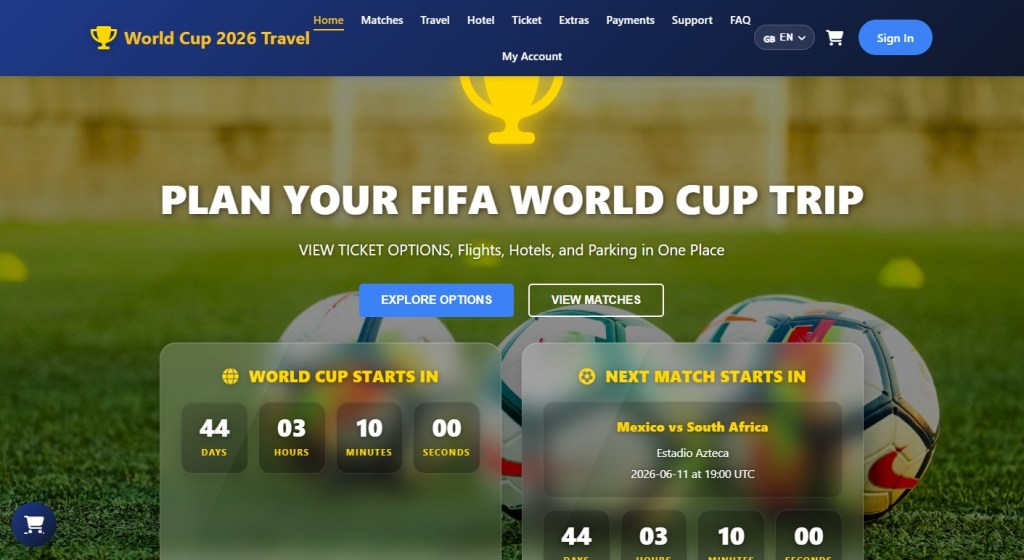
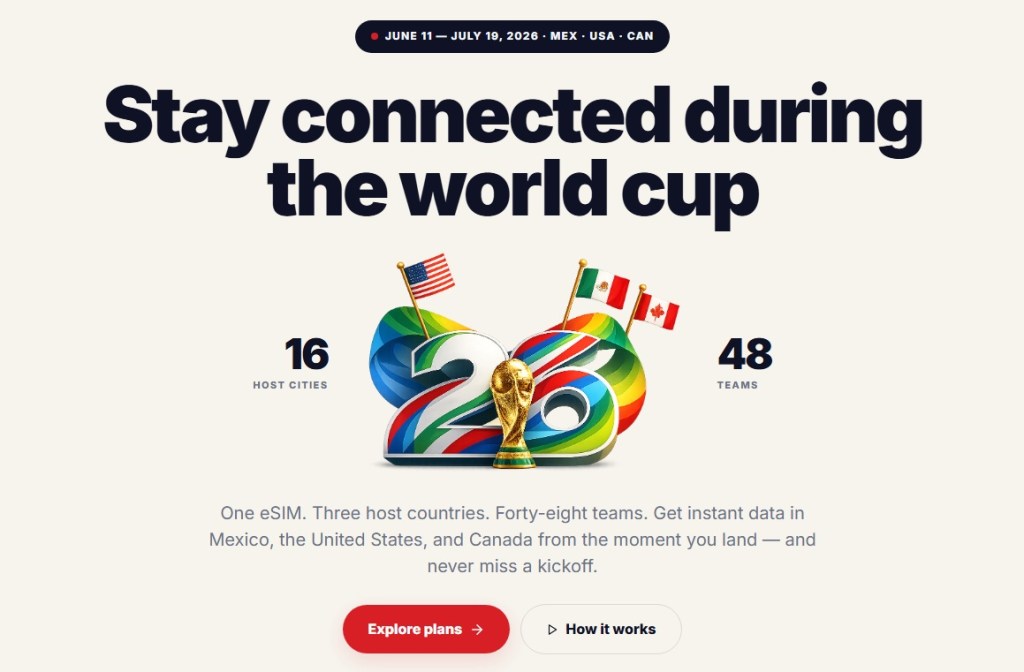
Travel portals aggregating tickets, flights, and hotels, and eSIM sites selling connectivity for the tournament are not inherently fraudulent and are often real businesses. But any site invoking the World Cup deserves the same scrutiny: who actually fulfils this product, what is the refund policy in writing, and is this domain legitimately connected to a known brand or partner?
Scam site selling World Cup tickets
Scam site offering Visas
Scam site selling World Cup tickets
Scam site selling eSIMs
Merchandise
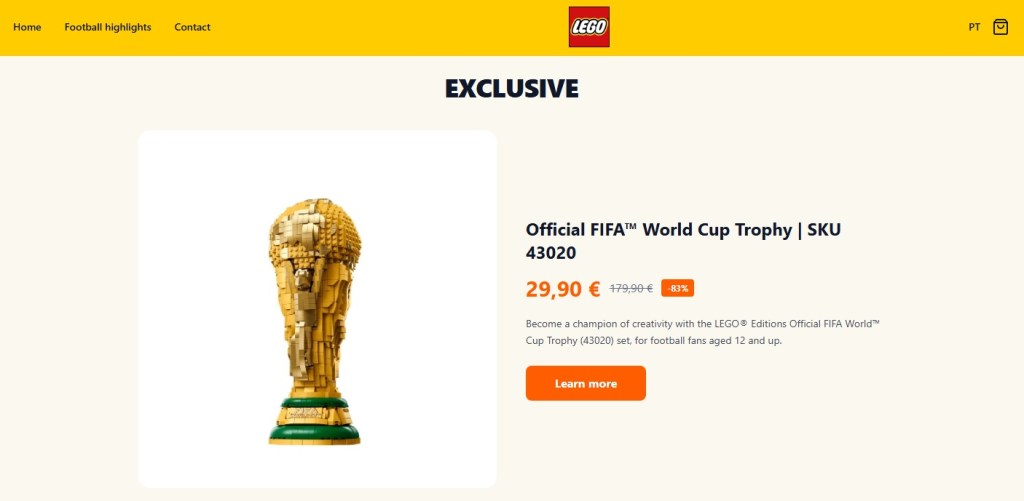
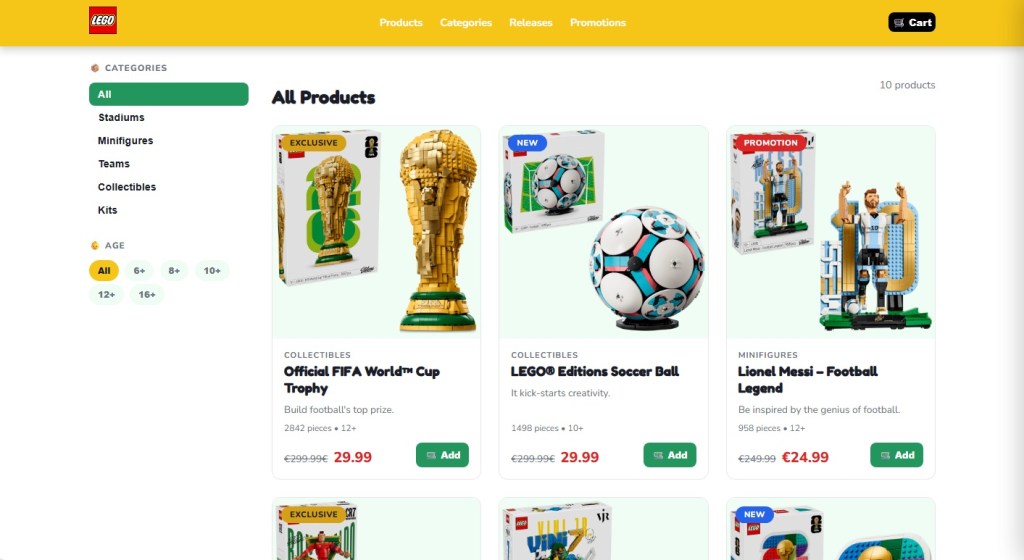
The merchandise category is where the impersonation gets most aggressive, because there are real licensees to imitate. LEGO’s partnership with FIFA is genuine, announced in late 2025. It debuted with the LEGO Editions FIFA World Cup Official Trophy, joined in 2026 by player sets featuring Messi, Ronaldo, Mbappé, and Vinicius Jr. A whole cluster of LEGO-styled scam storefronts now prices the trophy set at €29.99, marked down from €299.99, an 83–90% discount. LEGO does not discount its premium licensed sets by 90%.
Related to those storefronts is the “LEGO FIFA World Cup 2026 Quiz Challenge” pattern, promising “exclusive edition rewards” for fans who complete a quiz. Quiz-funnel scams are a long-running affiliate-marketing genre, and the typical mechanic is to harvest contact information and push the user toward a subscription billing flow disguised as a shipping fee for the “prize.” LEGO does not run quiz funnels. Its real World Cup activity runs through LEGO.com and physical LEGO stores.
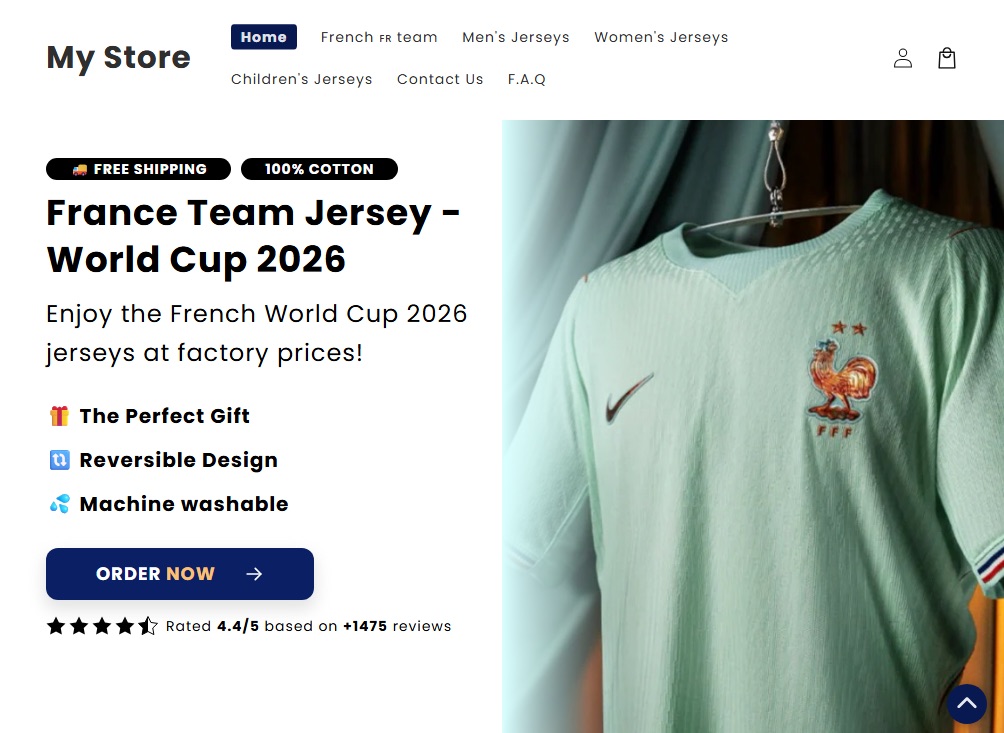
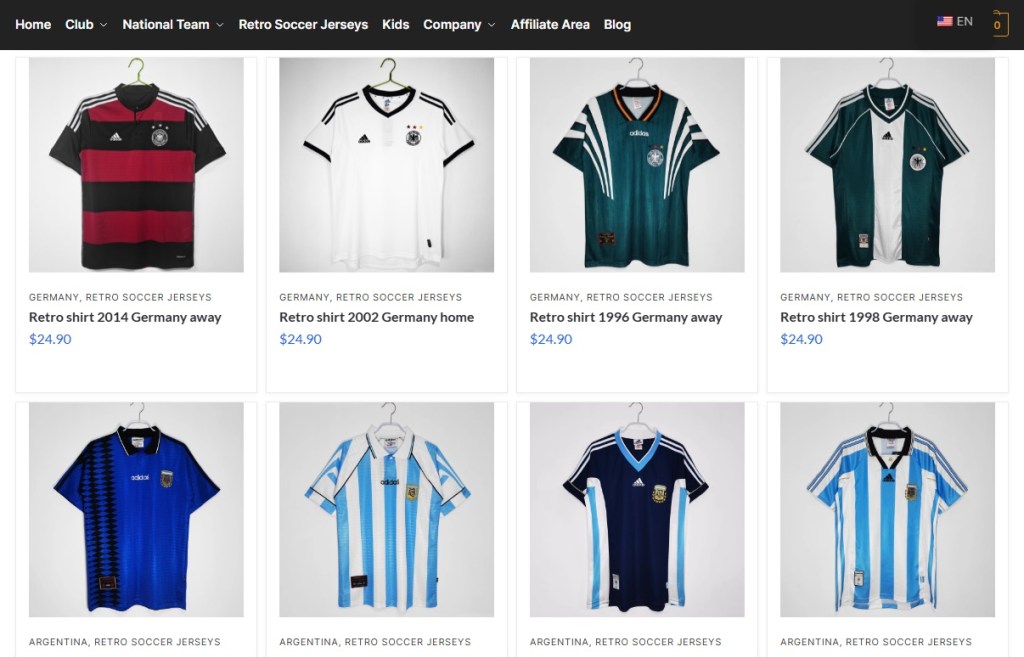
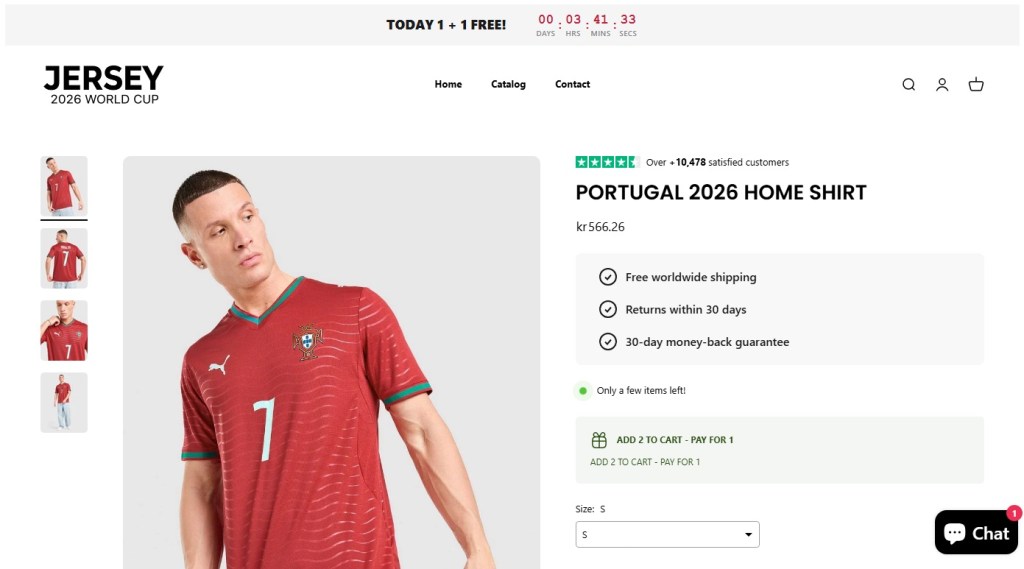
Counterfeit jersey storefronts have been a fixture of the open web for years, and the World Cup cycle multiplies them. Typical examples: a site branded simply “JERSEY 2026 World Cup” selling a Portugal home shirt with a “BUY 2, PAY FOR 1” overlay, a 30-day countdown, and a Trustpilot-shaped widget claiming over ten thousand satisfied customers; or a retro-jersey storefront offering Germany and Argentina shirts at $24.90 each. Search demand spikes during a World Cup year and counterfeit storefronts spin up to meet it; many will be offline shortly after the tournament ends.
Then there is the Panini-styled storefront pattern: pages advertising the official 2026 sticker album under headers like “ONE-TIME PURCHASE BY NIF” (NIF being the Portuguese personal tax identifier, a phrase that appears nowhere in legitimate Panini commerce). These pages combine sub-ten-minute countdowns, inventory counters (“There are still 127 Units”), and country-specific scarcity claims (“Only 5,000 units available for Portugal!”).
The high-pressure funnel and unusual NIF framing point to localised affiliate or look-alike storefronts, not Panini’s own commerce flow, which runs through paninistore.com and licensed retail. These are not Panini storefronts. They are look-alike commerce flows using Panini’s brand to sell through high-pressure funnels. Whether the product arrives or not, the user is not buying from the company they think they are.
Fake World Cup jersey site
Fake Panini site
Fake World Cup Lego site
Fake World Cup jersey site
Fake World Cup jersey site
Fake World Cup Lego site
Fake World Cup Lego site
Fake World Cup Lego site
Predictions and prize pools
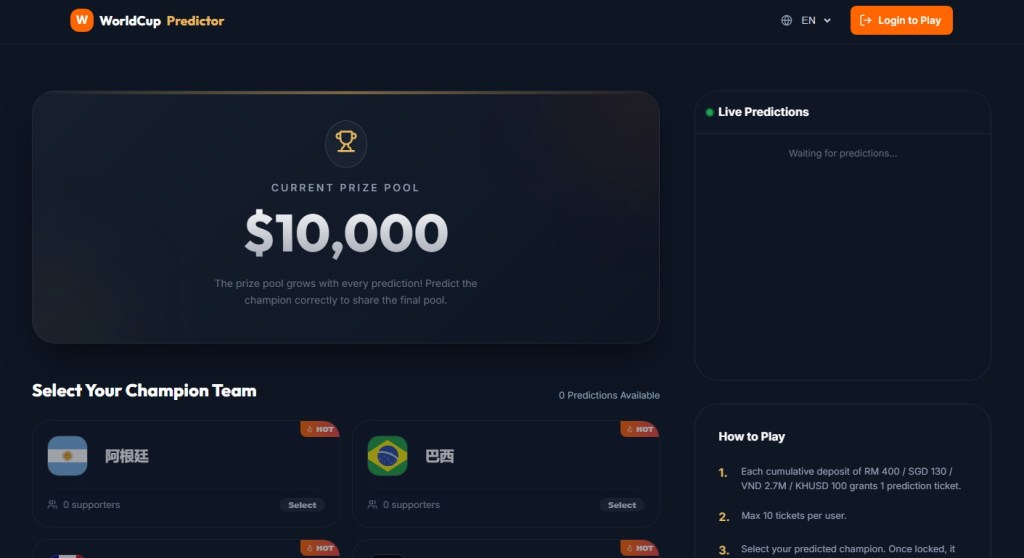
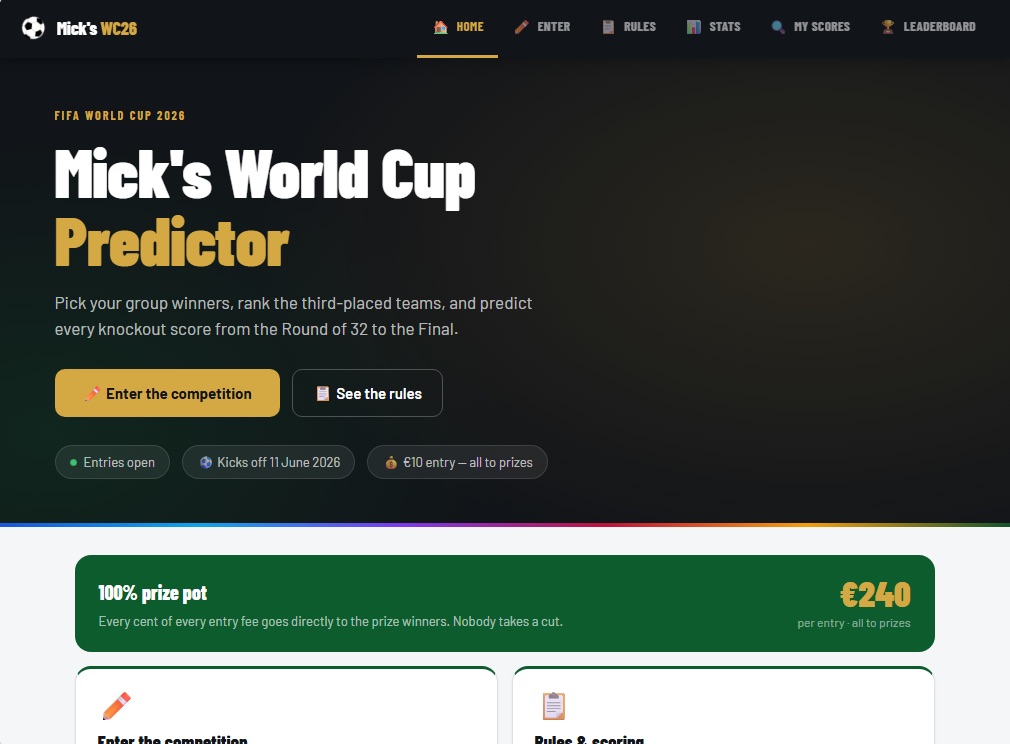
“WorldCup Predictor” sites present a prize pool that supposedly grows with every prediction, and ask users to select a champion team from flag tiles. You are paying for entries into a pooled outcome tied to the tournament.
These sites are not pretending to be something they’re not. The risk is that they operate without clear oversight. There is no visible licensing, no clear jurisdiction, and no way to verify from the front end whether payouts are enforced or even guaranteed.
Licensed sportsbooks and regulated platforms typically do not present themselves this way. They identify their licensing authority, provide responsible gambling tools, and use verified payment processors. A “Login to play” button, a flag picker, and a floating prize pool are not the same thing.
“World Cup Predictor” sites are paid-entry pools, closer to unlicensed betting
“World Cup Predictor” sites are paid-entry pools, closer to unlicensed betting
What FIFA, the brands, and the platforms could be doing better
Many of these sites would not exist, or would be far shorter-lived, if a few things changed upstream. Brand owners with active 2026 partnerships—LEGO, Panini, the national federations, the kit manufacturers—could reduce confusion by publishing a single canonical page each, well before kickoff, listing authorized retailers and the exact SKUs and prices of their World Cup products. Someone trying to verify whether a €29.99 LEGO trophy is real should not have to triangulate between Brickset, LEGO’s newsroom, and a third-party blog.
FIFA’s own licensing communications have improved compared with past tournaments, and the LEGO and Panini announcements were clearly disclosed on inside.fifa.com. But the gap between “FIFA has announced a partnership” and “here are the only sites authorized to sell on FIFA’s behalf” remains wide. Closing it would make impersonation much harder.
Search engines and ad networks carry a large share of the structural responsibility. Visa-impersonation pages are precisely the kind of sites that surface through paid search ads against terms like “world cup visa,” and platforms have the data to detect and block them at scale.
What to do if you may have been caught
Every World Cup cycle generates its own scam economy. 2018 had fake ticket marketplaces; 2022 leaned on phishing around Qatar’s Hayya system; 2026 is building around meme coins and visa impersonation. What’s different this time is the speed: sites can be spun up, monetized, and abandoned within weeks, and AI-generated copy, mascot art, and product images have stripped away many of the visual cues people used to rely on.
This cycle’s scam economy moves fast, but the basics still work: treat unsolicited “World Cup” links with suspicion, type official domains yourself, and ignore pressure from countdown timers.
If you think you’ve been caught:
If you entered card details: Contact your card issuer immediately and request a refund for an unauthorized or non-delivered transaction.
If you submitted personal or passport data: Treat it as compromised. Monitor your credit, place a fraud alert if available, and watch for targeted phishing.
If you connected your crypto wallet or signed a transaction: Revoke permissions, move remaining assets to a new wallet, and stop using the old one for anything valuable.
If you bought goods that weren’t delivered: Keep your order confirmation, URL, and payment record. Report it to your national consumer protection body (FTC in the US, Action Fraud in the UK, or your local equivalent).
Always verify through official channels. That’s FIFA.com for tickets, paniniamerica.net or paninistore.com for stickers, LEGO.com for LEGO Editions sets, and official government sites for visas. Remember, legitimate sources do not rely on countdown timers.
Stop threats before they can do any harm.
Malwarebytes Browser Guard blocks phishing pages and malicious sites automatically. Free, one click to install. Add it to your browser →
An FTC report says that Americans last year lost $2.1 billion in social media scams, such as shopping and investment schemes. Social media site have become the place where most of these scams start, and more than half of that money was stolen in scams began on Facebook, WhatsApp, and Instagram.
A new report from the U.S.-China Economic and Security Review Commission reveals that while China is aggressively prosecuting fraud targeting its own citizens, it continues to turn a blind eye to industrial-scale scam centers victimizing Americans. This selective enforcement has incentivized Chinese criminal syndicates to pivot toward U.S. targets, resulting in over $10 billion in losses in 2024 through "pig-butchering" and crypto investment schemes. As attackers integrate AI to scale these operations and exploit cryptocurrency for money laundering, experts warn that organizations must treat social engineering as a structural infrastructure threat rather than a simple training issue, as diplomatic solutions remain unlikely in the current geopolitical climate
In those cases, scammers created a PayPal subscription and then paused it, which triggered PayPal’s genuine “Your automatic payment is no longer active” notification. They also set up a fake subscriber account, likely a Google Workspace mailing list, which automatically forwarded any email it received to all other group members.
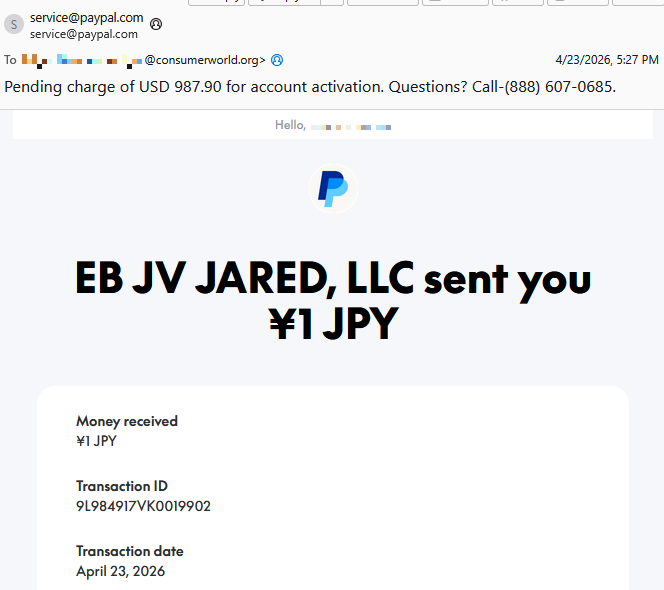
Recently, ConsumerWorld.org alerted us that tech support scammers have found a way to manipulate the subject line of PayPal payment notifications.
This is a screenshot of the example they sent us.
Screenshot email from PayPal scammers
As you can see, the email comes from service@paypal.com. It wasn’t spoofed, which means it passes standard security checks (DKIM, SPF, DMARC).
While the body of the email says that you received a payment of ¥1 JPY (a whopping $0.0063), the subject line tells a different story:
“Pending charge of USD 987.90 for account activation. Questions? Call-(888) 607-0685.”
As an extra bonus for the scammers, the email contains personalized details—the recipient’s actual name and a real transaction ID.
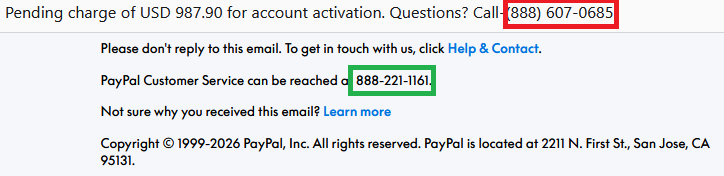
The number in the subject line is not PayPal’s. The legitimate contact number appears inside the email.
“The amount doesn’t match what I see in the email body—that’s weird and scary.”
“I need to call this number immediately to dispute this charge.”
They call the number in the subject line, only to reach tech support scammers.
These scammers pretend to be PayPal support and may try to:
Get you to “verify” payment methods
Collect banking details
Convince you to install remote access tools
Take control of accounts or devices
All of the above
How the subject line is altered is still unclear. Based on PayPal’s documented email behavior, subject lines are typically fixed and not meant to include arbitrary free text or phone numbers. Our findings indicate that the subject line was already weaponized at the point PayPal’s systems signed the email. If someone along the way had rewritten the subject, the dkim=pass header.d=paypal.com result would likely fail.
One possibility is that the scammer abused PayPal’s note or remittance field in a way that surfaces in certain payout templates, including the subject line and HTML <title>, even though normal merchant payment‑received emails don’t allow arbitrary subjects.
The title tag matches the subject line of the email
We have contacted PayPal for comment and will update this post if we hear back.
How to avoid PayPal scams
The best way to stay safe is to stay informed about the tricks scammers use. Learn to spot the red flags that almost always give away scams and phishing emails, and remember:
Use verified, official ways to contact companies. Don’t call numbers listed in suspicious emails or attachments.
Beware of someone wanting to connect to your computer remotely. One of the tech support scammer’s biggest weapons is their ability to connect remotely to their victims. If they do this, they essentially have total access to all of your files and folders.
Report suspicious emails to PayPal.Send the email to phishing@paypal.com to support their investigations.
If you’ve fallen victim to a tech support scam:
Paid the scammer? Contact your bank or card provider and let them know what’s happened. You can also file a complaint with the FTC or your local law enforcement, depending on your region.
Shared a password? Change it anywhere it’s used. Consider using a password manager and enable 2FA for important accounts.
Gave access to your device?Run a full security scan. If scammers had access to your system, they may have planted a backdoor so they can revisit whenever they feel like it. Malwarebytes can remove these and other software left behind by scammers.
Watch your accounts: Keep an eye out for unexpected payments or suspicious charges on your credit cards and bank accounts.
Be wary of suspicious emails. If you’ve fallen for one scam, they may target you again.
Pro tip: Malwarebytes Scam Guard recognized this email as a call back scam. Upload any suspicious text, emails, attachments, and other files to ask for its opinion. It’s really very good at recognizing scams.
Something feel off? Check it before you click.
Malwarebytes Scam Guard helps you analyze suspicious links, texts, and screenshots instantly.
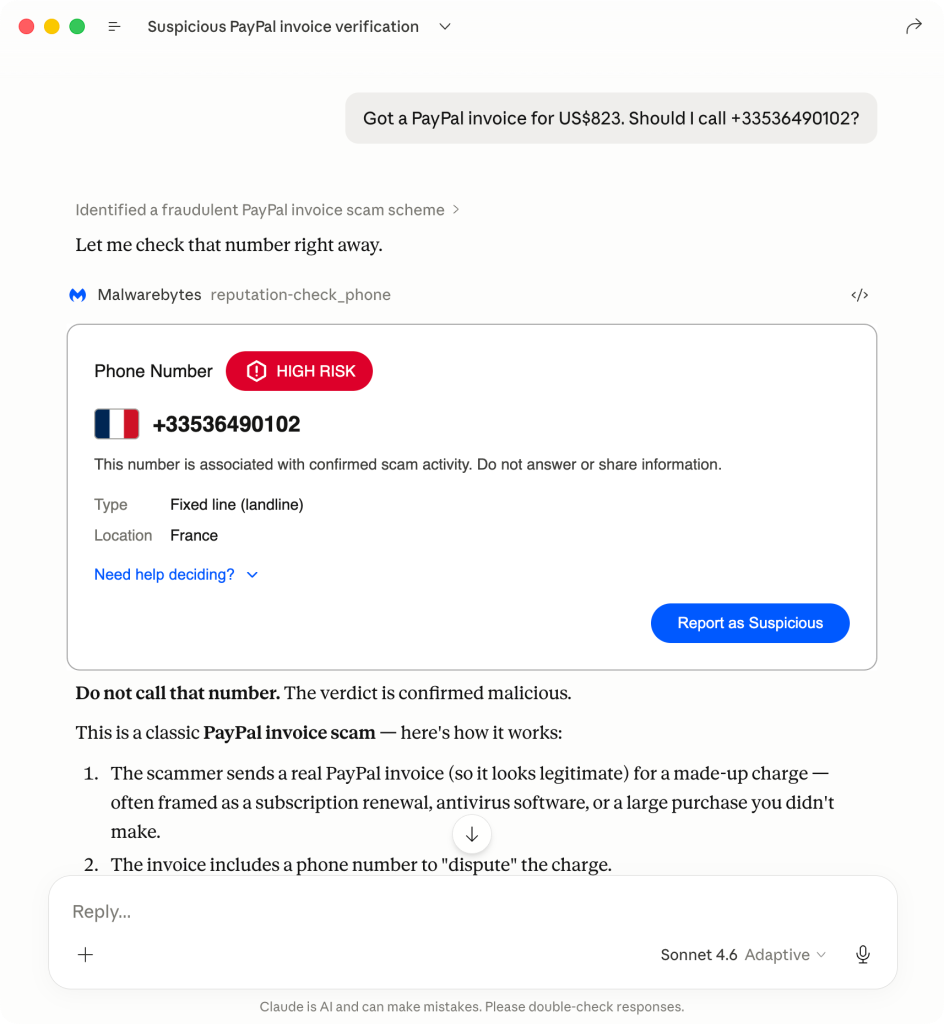
We're in Claude! Now everyone can use our threat intel to check suspicious links, phone numbers, or email addresses. We're committed to helping you spot scams.
For years, Malwarebytes has protected people by going where they are, and where people are today is increasingly within AI tools. As these chatbots tackle more everyday questions—like what to wear for an interview, how to replace a pendant light in the home, and where to eat during upcoming travel—it won’t be long before people ask these same tools how to stay safe online. And with online scams arriving through phone calls, emails, texts, and suspicious links, the time is now to make the internet safer.
That’s where Malwarebytes comes in.
To ensure that people can trust the answers they receive from their AI tools, Malwarebytes has now integrated its years of threat intelligence into two of the most popular providers: ChatGPT and now Claude.
Plus, with scams being harder to spot, even savvy internet users are getting caught off guard. In fact, according to research we conducted last year, 66% of people said it’s hard to tell a scam from the real thing.
Now, we’re hoping it’s easier. After connecting Malwarebytes to Claude, you can simply ask: “Malwarebytes, is this a scam?” and you’ll get a clear, informed answer, super fast.
How to use Malwarebytes in Claude
Users can activate Malwarebytes in Claude in three simple steps with no Malwarebytes account needed. Here’s how:
Open Claude and navigate to Customize > Connectors
Click the + button and select Browse connectors
Search for Malwarebytes and click Connect
Now, all you have to do is ask Malwarebytes to check suspicious links, emails, text messages, or websites directly in Claude. You’ll get instant, trusted answers powered by our pioneering threat intelligence.
Here’s what you can check
Check links: Paste a URL you received in a text, email, or message, and Claude will tell you if it’s safe to click.
Check phone numbers: Share a phone number from an unknown caller or message, and Claude will check if it’s associated with scams.
Check email addresses: Share a sender’s email address, and Claude will check if the domain is linked to phishing or fraud.
Look up domain registration: Ask Claude to look up WHOIS information for a domain to see when it was registered, who the registrar is, and whether it looks legitimate.
Check multiple items at once: If you receive a message with several links, phone numbers, or email addresses, Claude can check them all in a single step.
Report suspicious content: If you confirm something is a scam, you can ask Claude to report it to the Malwarebytes threat intelligence team for further analysis.
Understanding the results
Using Claude to check links, phone numbers, or email addresses can provide one of four verdicts. Here’s what each of those means and how you should proceed:
Malicious: This link, number, or email address is a confirmed threat. Do not click the link, call the number, or reply to the email.
Suspicious: This link, number, or email address may be dangerous. The context suggests that the link, number, or email address may be risky, but there is no confirmed threat yet. It’s best to proceed with caution.
Safe: This link, number, or email address is known and legitimate. It is safe to interact with.
Unknown: No information is available in the threat intelligence database. This does not mean it’s safe, so be careful. However, it’s important to note that any “unknown” results will trigger a WHOIS lookup for registrar abuse contacts.
Help center
If you need step-by-step instructions to set up or use Malwarebytes in Claude, visit our Help Center.
Why this matters
Scams are everywhere nowadays, and to add insult to injury, they’re getting a lot harder to spot. But, by bringing Malwarebytes into the tools you already use—like Claude— we’re making it easier to protect yourself without disrupting your day. So, whether you’re working, learning, or just staying connected, Malwarebytes can help keep you safe.
Researchers have documented a long‑running campaign that uses fake CAPTCHA pages to trick mobile users into sending dozens of international SMS messages in the background.
If you’ve spent any time on today’s web, CAPTCHAs may seem like background noise: click a few traffic lights, prove you’re human, move on. Something scammers have learned to abuse in ClickFix campaigns where they lure victims into infecting their own machines.
Recently, though, researchers found a twist where “prove you’re human” quietly turns into “run up an international phone bill.” The research describes an International Revenue Share Fraud (IRSF) campaign. IRSF, also known as SMS pumping fraud, abuses the complex pricing structures of international calls and SMS traffic to generate revenue by inflating message volume to particular destinations.
Instead of installing malware on the victim’s device, the scam exploits how telecom billing and affiliate networks work, turning ordinary web traffic into premium SMS revenue for cybercriminals.
How it works
A typical flow for the scam looks like this:
Victims arrive via malvertising or TDS redirects, often from typosquatted telecom domains, onto a page that looks like a basic image‑selection or quiz CAPTCHA.
To “continue,” they’re prompted to tap a button that opens their SMS app with a prefilled message and recipient list.
This isn’t one SMS to one number. The fake CAPTCHA runs through multiple steps, and each message is preconfigured with more than a dozen international numbers across 17 countries known for high termination fees, including Azerbaijan, Myanmar, and Egypt.
On a typical consumer plan, that can translate to roughly $30 in international SMS charges per person, with a slice of the termination fees flowing back to the attacker via revenue‑sharing agreements.
To keep you from simply backing out, the pages deploy dedicated back‑button hijacking. JavaScript rewrites browser history and bounces you back to the scam when you try to leave. The researchers also found the campaign was plugged into a Click2SMS‑style affiliate network that advertises “all kinds of traffic allowed” and carrier billing, effectively packaging IRSF as another monetization option for shady publishers.
This operation defrauds both individuals and telecom carriers. Victims face unexpected premium SMS charges on their bills and may struggle to trace the cause. Carriers pay revenue shares to the perpetrators and may absorb losses from customer disputes or chargebacks.
Never send an SMS to “prove you’re human.” Legitimate CAPTCHAs run entirely in your browser. They won’t open your SMS or dialer app.
Check your mobile bill regularly for small, unfamiliar international SMS charges, not just big spikes. If you see anything suspicious, dispute it quickly and ask your provider to block international or premium SMS if you don’t need it.
Use a mobile protection app that blocks known malicious sites, like these domains involved in this campaign:
sweeffg[.]online
colnsdital[.]com
zawsterris[.]com
megaplaylive[.]com
ruelomamuy[.]com
Malwarebytes blocks ruelomamuy[.]com
Scammers know more about you than you think.
Malwarebytes Mobile Security protects you from phishing, scam texts, malicious sites, and more. With real-time AI-powered Scam Guard built right in.
Scammers have found a way to abuse legitimate Apple account notification emails to trick targets into calling fake tech support numbers.
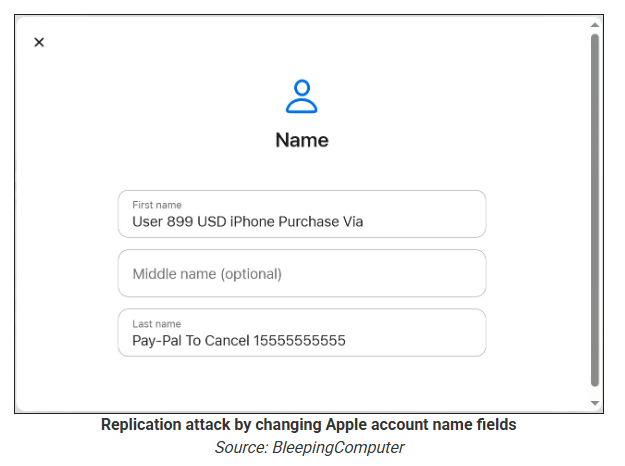
According to a report from BleepingComputer, scammers create an Apple account and insert a phishing message into the personal information fields, then modify the account so that Apple sends a genuine security alert about the change to the target.
BleepingComputer was able to replicate the attack.
The attacker creates an Apple ID they control, then stuffs the phishing message into the personal information fields (first name, last name, possibly address), splitting it across fields because they will not fit into just one.
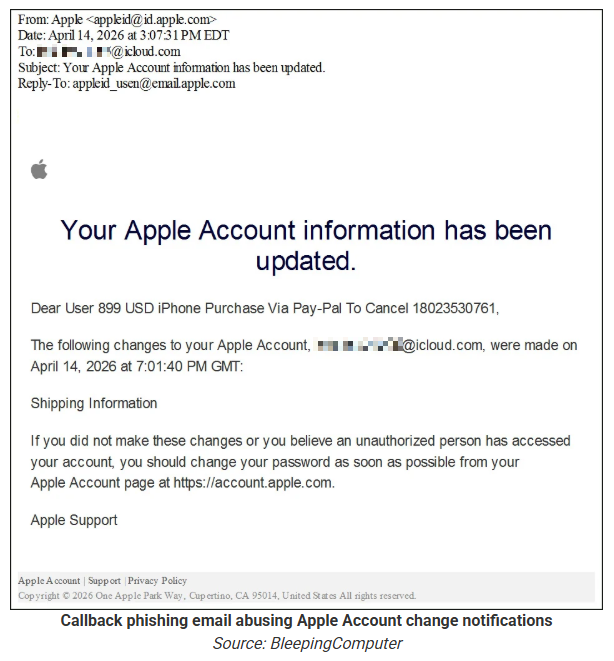
To launch the phish, the attacker changes something benign on their specially created Apple account, such as shipping information, which causes Apple’s systems to send a “Your Apple account was updated” security email.
While the original alert is addressed to the attacker’s iCloud email, they are then able to redistribute it to a wider victim list, for example through a mailing list.
In the copy the targets receive, the email headers still show a legitimate Apple sender, and the presence of the attacker’s iCloud address can even make it look like “someone else” has gained access to the account.
Because Apple includes those user-supplied fields in the security email, the phishing text is delivered inside a legitimate message sent from Apple’s own infrastructure.
This method, called call-back phishing, filters out suspicious users, so the scammers can focus on the people who fell for the first part.
The emails come from a legitimate source, sail through every security filter because of that, and look convincing enough to scare the receiver into thinking someone spent $899 from their PayPal account.
But the structure of the email does not make sense.
“Dear User” is immediately followed by the scam message where your name should have been. The header says it’s about account information rather than a purchase. And the iCloud account does not belong to the recipient. So, once you know how it’s done, they’re not impossible to spot. Which is why we wrote this blog.
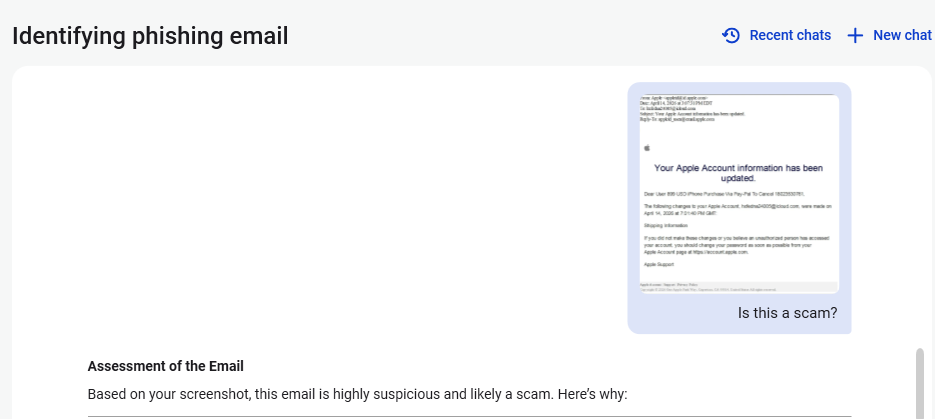
And when in doubt, you can always ask Malwarebytes Scam Guard.
Scam Guard identified the screenshot as a scam and guides users through the next steps.
Scams like these work, because many users still view phone calls as more trustworthy than email, especially if the email itself passed all the usual technical authenticity checks and they initiated the call themselves.
How to stay safe
Tech support scammers will try to convince callers to install some kind of remote desktop application to steal data from your computer, or ask for financial details so they can steal your money.
To stay safe from these scammers:
Be wary of unexpected alerts about high‑value purchases you do not recognize. They are suspicious even if they come from a real domain.
Never call a number sent to you by unsolicited means or even found in sponsored search results.
Carefully read emails and text messages, even if they come form trustworthy addresses. Does the email make sense from a structural and linguistic point of view?
If someone claiming to be support for a legitimate company asks for remote access or payment details during a call, hang up and contact the company through official channels.
Use Malwarebytes Scam Guard to analyze any kind of message that alarms you or urges you to take immediate action.
Something feel off? Check it before you click.
Malwarebytes Scam Guard helps you analyze suspicious links, texts, and screenshots instantly.
Scammers dressed up like Catholic Charities and legitimate pro bone legal services on social media platforms are targeting immigrants and bilking them for money. Manhattan DA Alvin Bragg is pressing Meta to follow its own terms and shut them down.
A dreadful thing happens far too often whenever an older adult falls for a scam: They get blamed for it. Not the scammers who lied and cheated their victim out of money. Not law enforcement for failing to recover funds. Not even the Big Tech companies that could have the most important role in protecting people online—and which, it turns out, knowingly bring in revenue every year from fraud.
Instead, it is the older adults themselves whose stories are often shirked aside because of a mix of ageism and denial. Allegedly left behind by technology, only an octogenarian would hand their password over in a phishing scheme, or open an email attachment from a stranger, or send money to a fake charity online. Everyone else, everyone else believes, is too savvy for the same.
The data disagrees.
When Malwarebytes studied this last year, it found that, depending on the type of scam—especially for things like “sextortion”—younger individuals were far more likely to report falling victim. Further, digging into data from the US Federal Trade Commission revealed entirely separate patterns. For example, while Americans between the ages of 80 and 89 reported the highest median loss due to fraud in 2024, they also made up the smallest share of their population to report a loss at all. And in 2025, that same group represented the smallest share of reported identity theft, a crime far more likely to be reported by people between 30 and 39.
Questions about who reports what crimes at what rate are valid to explore, but it’s important to see the big picture: Americans lost at least $15.9 billion to fraud last year. Protecting older adults is actually about protecting everyone, and that’s because modern scams don’t arrive only where people over 70 spend time. They arrive where we all are, which is online. They come through endless text messages, they slide into social media DMs, and they prey on things any of us can be—a widow, a divorcee, or simply a lonely person.
According to Marti DeLiema, Assistant Professor at the University of Minnesota’s School of Social Work, scams and fraud are now the most common form of organized crime globally, rivaling weapons trafficking, drug trafficking, human trafficking, and sex trafficking. In 2024 alone, she said, the FTC estimated that older adults in the US had as much as $81.5 billion stolen from them. And the tools meant to fight back—broad consumer awareness campaigns, embedded warning messages at the point of transaction, the training of bank tellers and retail clerks—are nowhere near keeping pace.
So what actually works? And who, if anyone, is doing the work?
Today, on the Lock and Code podcast with host David Ruiz, we speak with DeLiema about who is really susceptible to financial fraud, why victims often describe a scam as a form of betrayal trauma, and why the companies best positioned to stop scam messages from reaching consumers may be the ones least motivated to do so.
“This is not a technical capability problem at all. This is a conflict of incentives.”
When we read about this new malware tactic, or that novel social engineering approach, it’s easy to forget that there are scammers out there making a living from ancient methods.
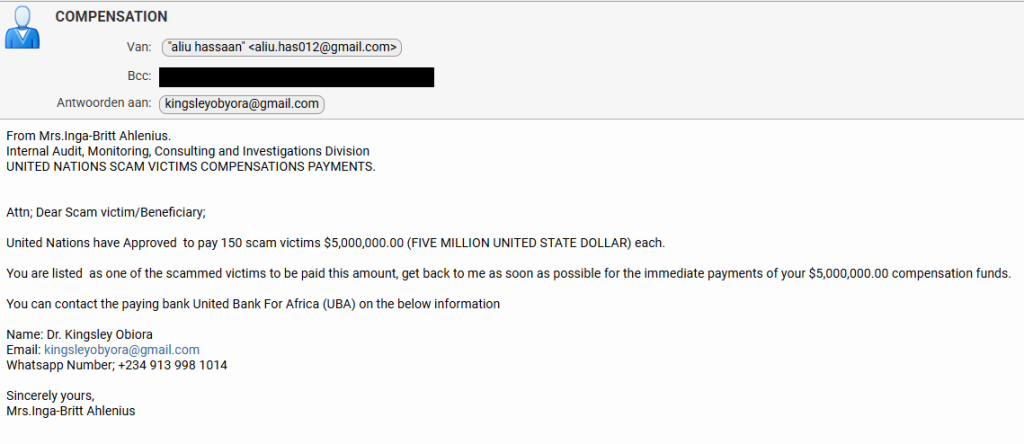
Recently, one of our researchers received this variation on the good old Nigerian advance-fee scam.
From: Mrs.Inga-Britt Ahlenius. Internal Audit, Monitoring, Consulting and Investigations Division UNITED NATIONS SCAM VICTIMS COMPENSATIONS PAYMENTS.
Attn; Dear Scam victim/Beneficiary;
United Nations have Approved to pay 150 scam victims $5,000,000.00 (FIVE MILLION UNITED STATE DOLLAR) each.
You are listed as one of the scammed victims to be paid this amount, get back to me as soon as possible for the immediate payments of your $5,000,000.00 compensation funds.
You can contact the paying bank United Bank For Africa (UBA) on the below information
The scammers got a few details right. Anyone looking up the names in the email will find that they exist and are associated with the mentioned organizations.
Inga–Britt Monica Stigsdotter Ahlenius is a Swedish auditor, public servant and former Under-Secretary-General for the United Nations.
The name “Inga‑Britt Ahlenius” has been reused across many such 419‑style advance‑fee scams, sometimes claiming she is a UN fund monitoring agent or under‑secretary general distributing tens of millions in “compensation” or “unclaimed funds.”
Kingsley Obiora is a Nigerian economist who served as the Deputy Governor of Economic Policy at the Central Bank of Nigeria from 2020 to 2023. Which lends a degree of credibility to the Nigerian country code (+234) in the number they want us to contact by WhatsApp.
So, we decided to put our “friend” Tess to work once again. Loyal readers will remember how Tess almost fell for a task scammer. So maybe she’s eligible for that five-million-dollar compensation.
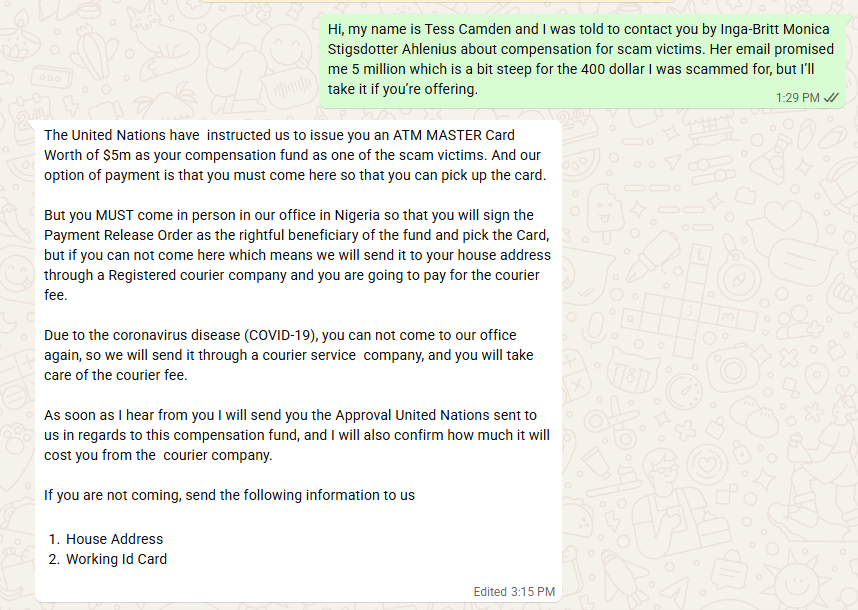
They came right to the point. We’d have to pay a courier fee to get our $5 million dollar ATM card. And I’m pretty sure that if we agreed to pay that, additional costs would swiftly follow. Once you’ve invested a bit of money, you’re likely to keep going since you don’t want to lose what you’ve already paid.
So, I offered to pick up the ATM card in person. Always wanted to see Nigeria.
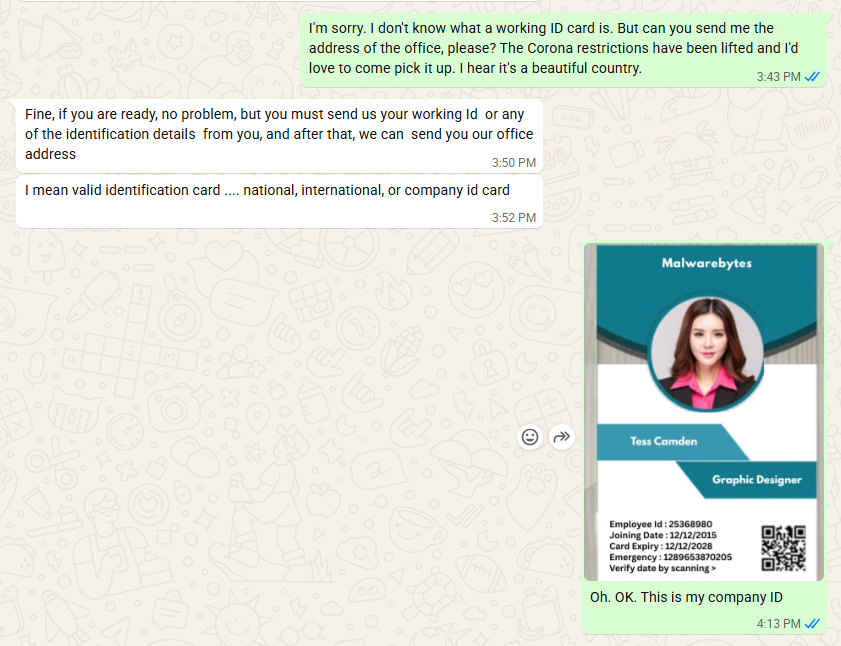
For a while I thought they saw through my bluff. Maybe I shouldn’t have disclosed just yet that I work for Malwarebytes. But it quickly became clear they trusted me about as much as I trusted them.
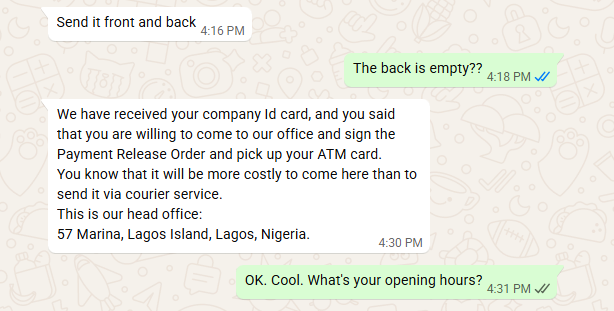
I’ll play along as long as I can, but after giving me the physical address of the UBA bank in Lagos, Nigeria, they started to make it more difficult to pick up the ATM card in person.
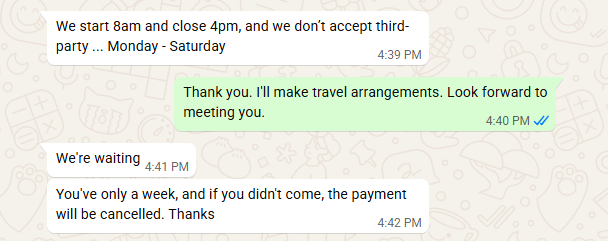
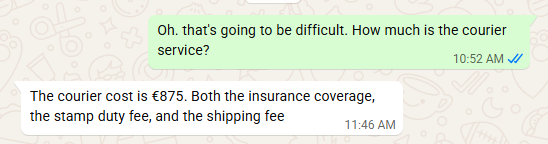
A week is not a long time to arrange a trip to Nigeria, so I tried to get an idea of how much the “courier” would set me back before they gave up on me.
I didn’t expect it to be that much, to be honest. Maybe they thought they could raise the price since I contemplated to pick it up in person. Or they just wanted to get rid of me. You’d expect them to charge maybe €75 for the courier and then come up with €200 for stamp duty and €600 for insurance later on.
Consequences are real
It’s easy to laugh at talk of five‑million‑dollar ATM cards, but campaigns like this still make money. Behind every “Dear Scam victim/Beneficiary” is someone who is lonely, in debt, or simply overwhelmed by official‑sounding language. Once they’ve paid the first “courier fee,” the sunk‑cost effect kicks in, and it becomes harder and harder to walk away.
This is especially true for people who have already been victims of scams, who are clearly the target here.
How to stay safe
Tess’ efforts have helped us highlight the red flags in this type of scam:
Receiving news of a huge payout out of the blue should definitely trigger the “too good to be true” alarm bells.
For important communications, free webmail and WhatsApp are rarely the official contact channels.
Scammers apply pressure to act quickly and ask you to pay a fee before you receive anything.
They often use vague job titles and ask you to keep things quiet.
Odd language and capitalization can be a clue, although AI is making these less common.
Any one of these signs is a reason to stop and delete the email. Together, they spell out a classic advance‑fee scam.
For Tess this was a safe experiment: no money lost, just a few evenings spent sparring with a “UN compensation officer” on WhatsApp. For the people these criminals really want to reach, the stakes are much higher.
If you, or someone you care about, ever receives a message promising life‑changing money in exchange for a small courier fee or processing charge, treat it as a warning sign, not a windfall.
Close the tab, delete the message, and, if in doubt, ask a trusted friend or advisor before you act.
The easiest way to recognize a golden‑oldie scam is still the simplest: if it sounds too good to be true, it probably isn’t true.
Something feel off? Check it before you click.
Malwarebytes Scam Guard helps you analyze suspicious links, texts, and screenshots instantly.

 Entrar













![Malwarebytes blocks ruelomamuy[.]com](https://www.malwarebytes.com/wp-content/uploads/sites/2/2026/04/ruelomamuycomblock.png)