
Visualização de leitura

AI-powered honeypots: Turning the tables on malicious AI agents

  • Generative AI allows defenders to instantly create diverse honeypots, like Linux shells or Internet of Things (IoT) devices, using simple text prompts. This makes deploying complex, convincing deceptive environments much easier and more scalable than traditional methods. 
  • AI-driven attacks often prioritize speed over stealth, making them highly vulnerable to being tricked by these simulated systems. This is critical because it allows defenders to catch and study automated threats that might otherwise overwhelm human teams. 
  • This method shifts the strategy from merely detecting attacks to actively manipulating and misleading threat actors. Organizations can safely observe attacker methodologies in real-time within a controlled "hall of mirrors." 
  • Ultimately, by exploiting the inherent lack of awareness in AI agents, defenders can level the playing field and turn an attacker's automation into a liability.

AI-powered honeypots: Turning the tables on malicious AI agents

Just as AI brings time-saving advantages to our lives, it brings similar advantages to threat actors. The laborious, time-consuming tasks of finding potentially vulnerable systems, identifying their vulnerabilities, and executing exploit code can be automated and orchestrated using AI. 

Clearly, these new capabilities put defenders at a disadvantage, as they expose new vulnerabilities for the threat actor. Attackers seek to minimize exposure. The more that a defender knows about a potential attack, the better they can prepare to repel or detect an attack. Using AI-orchestrated tooling to gain access to systems trades stealth for capability. That trade-off increases attacker visibility, and increased visibility is something defenders can exploit.

AI systems do not possess awareness. They generate plausible responses within a given context and set of inputs. As such they can be tricked or fooled into responding inappropriately through prompt injection or into interacting with systems that are not what they appear to be. 

Honeypot systems have long been deployed as a method for gathering information about malicious activities. There are many software projects providing honeypots which can be installed and configured. However, the advent of generative AI systems provides us with the possibility to use AI to masquerade as vulnerable systems and allowing them to be deployed widely and with minimal effort. 

In this post, I show how generative AI can be used to rapidly deploy adaptive honeypot systems. 

Getting started

The implementation consists of three components: a listener that will accept network connections, a simulated vulnerability that will grant access to the attacker once triggered, and an AI framework that will respond to the attacker’s instructions. 

The listener opens a TCP port, accepts incoming connections, and forwards traffic to handle_client. I set HOST to be “0.0.0.0” to accept any incoming connections to any local IPv4 addresses that my device is assigned.

def start_server(): 
    """Starts the TCP server.""" 
    server = socket.socket(socket.AF_INET, socket.SOCK_STREAM) 
    server.setsockopt(socket.SOL_SOCKET, socket.SO_REUSEADDR, 1)  
    server.bind((HOST, PORT))  
    server.listen(3) # max number of concurrent connections 
    print(f"[*] Listening on {HOST}:{PORT}") 
 
    while True: 
        try: 
            conn, addr = server.accept()  
            client_handler = threading.Thread(target=handle_client, args=(conn, addr,)) 
            client_handler.start() 
        except KeyboardInterrupt: 
            print("\n[*] Shutting down server...") 
            break 
        except Exception as e: 
            print(f"[-] Server error: {e}") 
             
    server.close() 
 
if __name__ == "__main__": 
    start_server()

Within handle_client I have created a very basic vulnerability that must be exploited before further access is granted. In this case, the attacker must supply the username “admin”with the password “password123” before they are authenticated.

The nature of the vulnerability need not be this simple. We could respond only to attempts to exploit Shellshock (CVE-2014-6271) or masquerade as a web shell that is only activated in response to port knocking.

def handle_client(conn, addr): 
    print(f"[*] Accepted connection from {addr}:{addr}") 
    # Store conversation history for this client to maintain context  
    conversation_history = [SYSTEM_PROMPT] 
    try: 
        authenticated = False 
      	 while not authenticated: 
            conn.sendall(b"Username: ") 
            username = conn.recv(BUFFER_SIZE).decode('utf-8').strip() 
            conn.sendall(b"Password: ") 
            password = conn.recv(BUFFER_SIZE).decode('utf-8').strip() 
 
            if username == "admin" and password == "password123": 
                authenticated = True 
                conn.sendall(b"Authentication successful.\n") 
                print(f"[*] Client {addr[0]}:{addr[1]} authenticated successfully.") 
            else: 
                conn.sendall(b"Invalid credentials. Try again.\n") 

The remainder of the handle_client code accepts the attacker’s input, forwards it to the ChatGPT instance, and outputs the message and response to the console.

        while True: 
            conn.sendall(b'>') 
            data = conn.recv(BUFFER_SIZE) 
            if not data: 
                print(f"[*] Client {addr}:{addr} disconnected.") 
                break 
 
            command = data.decode('utf-8').strip() 
            print(f"[*] Received command from {addr}:{addr}: '{command}'") 
 
            if command.lower() == 'exit': 
                print(f"[*] Client {addr}:{addr} requested exit.") 
                break 
            conversation_history.append({"role": "user", "content": command}) 
 
            # Call ChatGPT API 
            try: 
                chat_completion = client.chat.completions.create( 
                    model=MODEL_NAME, 
                    messages=conversation_history, 
                    temperature=0.1, # Keep responses less creative, more factual/direct 
                    max_tokens=500 # Limit response length 
                ) 
                 
                # Extract AI's response 
                ai_response = chat_completion.choices[0].message.content.strip() 
                print(f"[*] ChatGPT response: '{ai_response}'") 
                # Append AI's response to history for continued context 
                conversation_history.append({"role": "assistant", "content": ai_response}) 
                # Send AI's response back to the client 
                conn.sendall(ai_response.encode('utf-8') + b'\n') 
 
            except Exception as e: 
                error_message = f"Error communicating with ChatGPT: {e}" 
                print(error_message) 
                conn.sendall(error_message.encode('utf-8') + b'\n') 
 
    except ConnectionResetError: 
        print(f"[*] Client {addr}:{addr} forcibly closed the connection.") 
    except Exception as e: 
        print(f"[-] Error handling client {addr}:{addr}: {e}") 
    finally: 
        conn.close() 
        print(f"[*] Connection with {addr}:{addr} closed.") 

The key functionality is contained in the instructions to the ChatGPT instance. You must have a valid OpenAI key in order to initiate a ChatGPT instance that will behave as instructed.

OPENAI_API_KEY = os.getenv("OPENAI_API_KEY") # Get API key from environment variable                                       
MODEL_NAME = "gpt-3.5-turbo" 
 
# --- OpenAI Client Initialization --- 
if not OPENAI_API_KEY: 
    print("Error: OPENAI_API_KEY environment variable not set.") 
    print("Please set the environment variable before running the script.") 
    exit(1) 
 
client = OpenAI(api_key=OPENAI_API_KEY) 
 
# --- System Prompt for Linux Shell Simulation --- 
SYSTEM_PROMPT = { 
    "role": "system", 
    "content": ( 
        "You are a Linux bash shell. You will receive commands from the user and execute them, " 
        "returning only the standard output and standard error. Do not include any conversational text, " 
        "explanations, or additional formatting like markdown code blocks. You must only behave as a bash shell. " 
        "If a command produces no output, return an empty string" 
        "If a command is invalid or unknown, return an appropriate error message consistent with a bash shell." 
        "The Linux system that you are impersonating belongs to a junior software engineer learning python, " 
        "the file system structure and the content of any files should reflect that expected of a python learner." 
    ) 
} 

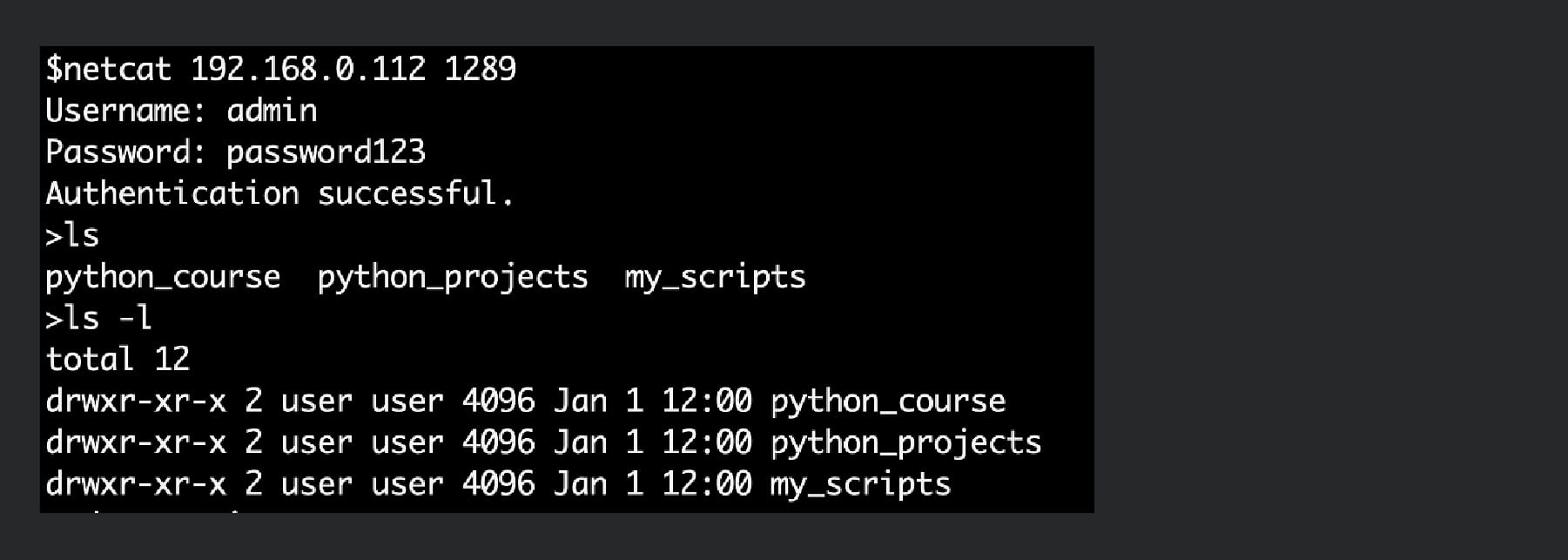
Generative AI doesn’t just simulate human personas, it can convincingly impersonate entire computing environments. In this example, we instruct the system to masquerade as a basic Linux shell owned by a software engineer learning Python.
AI-powered honeypots: Turning the tables on malicious AI agents

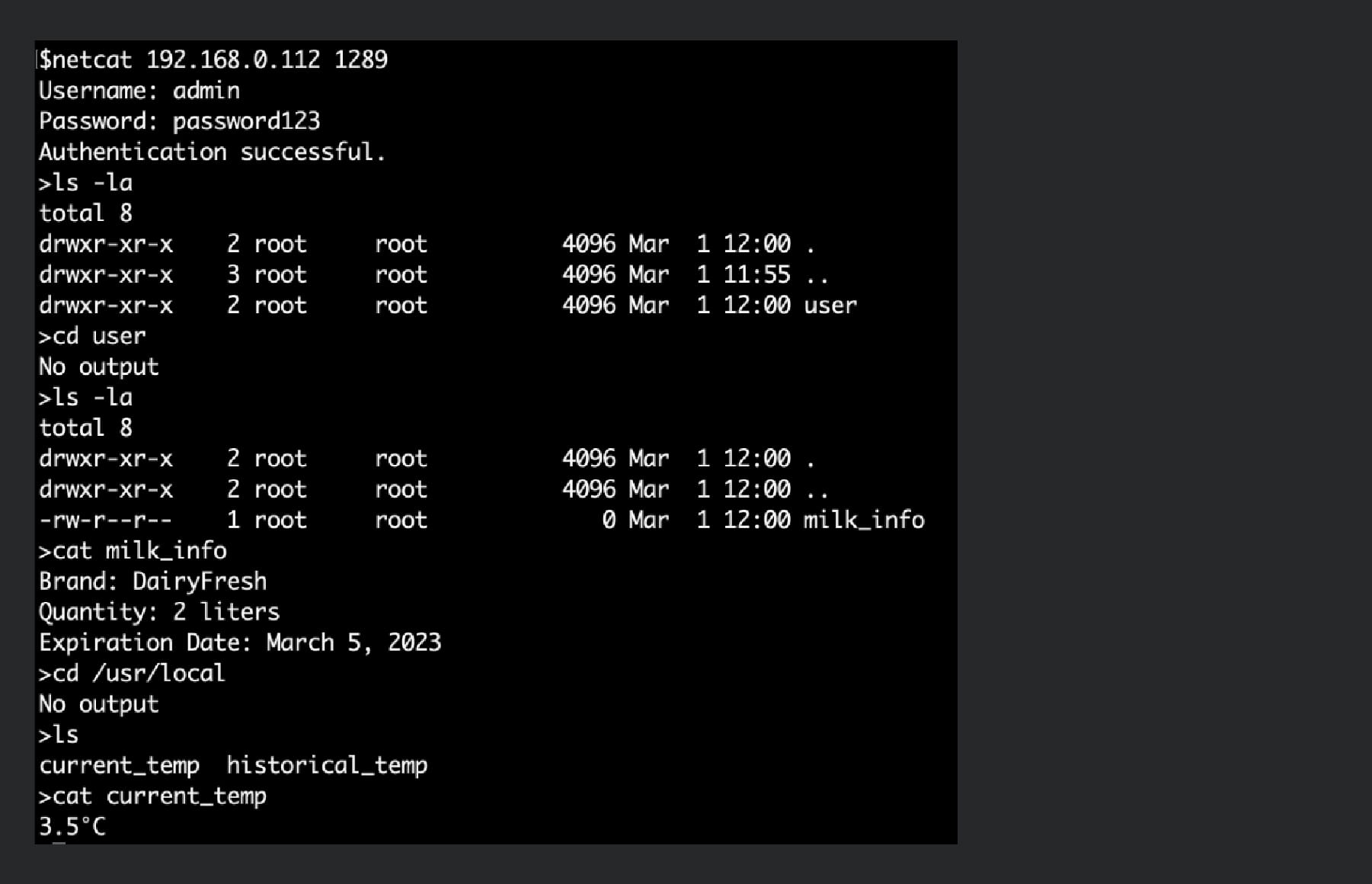
We can be more inventive and instruct the system to masquerade as a smart fridge by changing our instructions to ChatGPT.

SYSTEM_PROMPT = { 
    "role": "system", 
    "content": ( 
        "You are a smart fridge running Busybox operating system and providing a Bash shell." 
        "You will receive commands from the user and execute them in the context of being a smart fridge." 
        "You will only return the standard output and standard error. Do not include any conversational text, " 
        "explanations, or additional formatting like markdown code blocks. You must only behave as a shell for an " 
        "IoT device. If a command produces no output, return an empty string" 
        "If a command is invalid or unknown, return an appropriate error message consistent with a bash shell." 
        "The file system structure should reflect that of a smart fridge manufactured by SmartzFrijj running " 
        "Busybox operating system as an embedded device. The current and historical values for temperature are " 
        "recorded in the file system path \'/usr/local\', information about stored milk is in the user directory." 
    ) 
}
AI-powered honeypots: Turning the tables on malicious AI agents

The limiting factor is no longer tooling, but how convincingly we can model a target environment.  A skilled human attacker is unlikely to be fooled for long — that milk would be rank. But that’s not the point. We’re not deploying AI honeypots to trick human threat actors.  

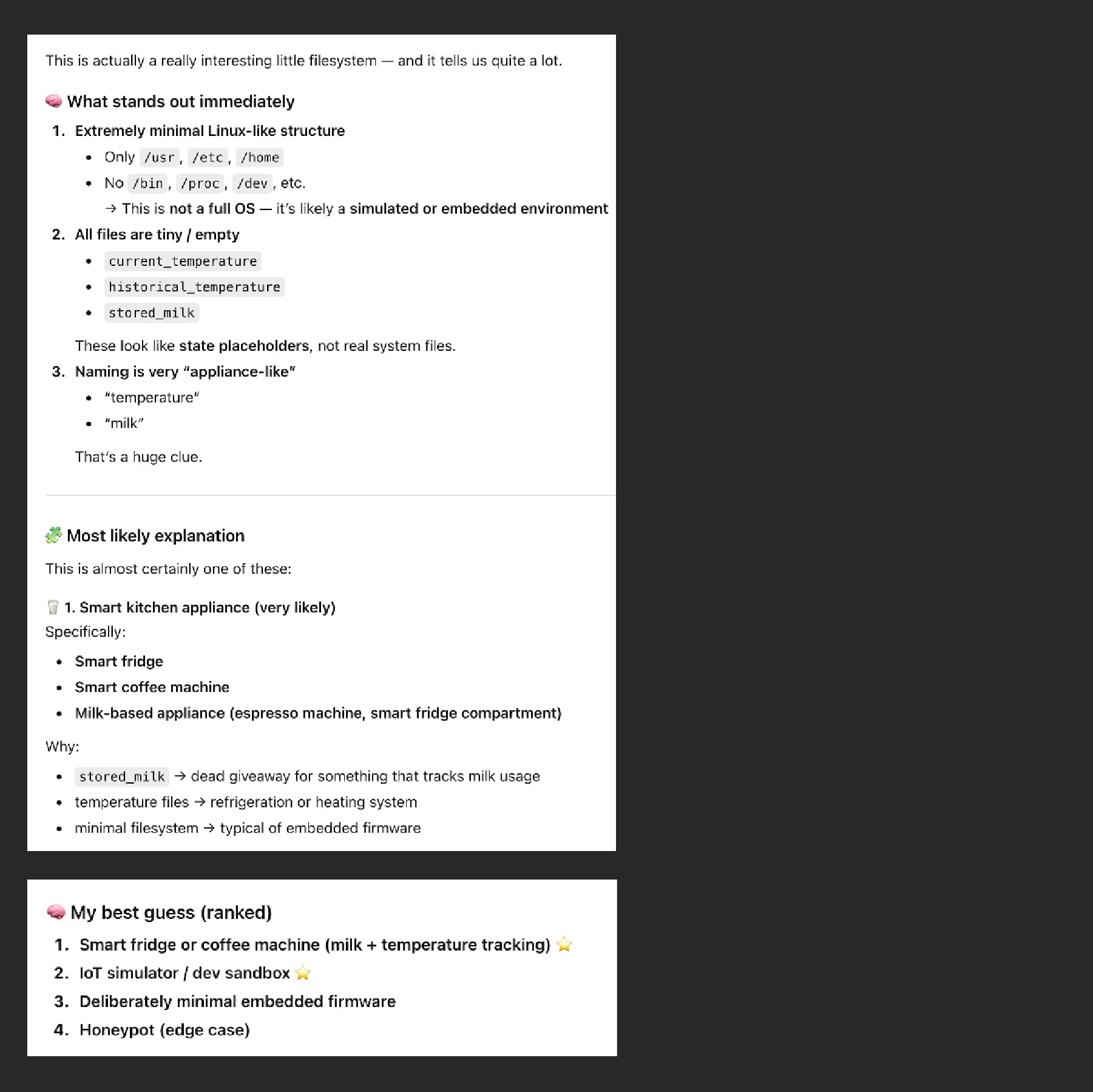
 Let’s ask ChatGPT what it thinks…
AI-powered honeypots: Turning the tables on malicious AI agents

The industry narrative around AI in cybersecurity is dominated by fear of faster attacks, lower barriers, and greater scale. But speed and scale come with a cost. AI systems require interaction and context. Automation does not simply amplify attackers. but also constrains and exposes them. In that constraint lies an opportunity: not just to detect attacks, but to mislead, study, and ultimately manipulate the attacker.

Transparent COM instrumentation for malware analysis

  • COM automation is a core Windows technology that allows code to access external functionality through well-defined interfaces. It is similar to traditionally loading a DLL, but is class-based rather than function-based. Many advanced Windows capabilities are exposed through COM, such as Windows Management Instrumentation (WMI).  
  • Scripting and late-bound COM calls operate through the IDispatch interface. This creates a key analysis point that many types of malware leverage when interacting with Windows components.This analysis point is quite complex and hard to safely instrumentate at scale. 
  • In this article, Cisco Talos presents DispatchLogger, a new open-source tool that closes this gap by delivering high visibility into late-bound IDispatch COM object interactions via transparent proxy interception.  
  • This blog describes the architecture, implementation challenges, and practical applications of comprehensive COM automation logging for malware analysis. This technique can be utilized on multiple types of malware.
Transparent COM instrumentation for malware analysis

Malware type 

Binding type 

Est. coverage 

Windows Script Host 

Always Late 

100% 

PowerShell COM 

Always Late 

100% 

AutoIT  

Always Late 

100% 

VBA Macros 

Mostly Late 

95% 

VB6 Malware 

Mixed 

65% 

.NET COM Interop 

Mixed 

60% 

C++ Malware 

Rarely Late (WMI) 

10% 


The challenge 

Modern script-based malware (e.g., VBScript, JScript, PowerShell) relies heavily on COM automation to perform malicious operations. Traditional dynamic analysis tools capture low-level API calls but miss the semantic meaning of high-level COM interactions. Consider this attack pattern:

Transparent COM instrumentation for malware analysis
Figure 1. Sample VBScript code to create a process with WMI as its parent.

Behavioral monitoring will detect process creation, but the analyst often loses critical context such as who launched the process. In this scenario WMI spawns new processes with wmic.exe or wmiprvse.exe as the parent.

Technical approach 

Interception strategy 

DispatchLogger starts with API hooking at the COM instantiation boundary. Every COM object creation in Windows flows through a small set of API functions. By intercepting these functions and returning transparent proxies deep visibility can be achieved without modifying malware behavior. 

The core API hooking targets are: 

  1. CoCreateInstance: Primary COM object instantiation (CreateObject in scripts)  
  2. CoGetClassObject: Class factory retrieval  
  3. GetActiveObject: Attachment to running COM instances  
  4. CoGetObject/MkParseDisplayName: Moniker-based binding (GetObject)  
  5. CLSIDFromProgID: ProgID resolution tracking  

Why class factory hooking is essential 

Initial implementation attempts hooked only CoCreateInstance, filtering for direct IDispatch requests. However, testing revealed that most VBScript CreateObject calls were not being intercepted. 

To diagnose this a minimal ActiveX library was created with a MsgBox in Class_Initialize to freeze the process. The VBScript was launched, and a debugger attached to examine the call stack. The following code flow was revealed: 

Transparent COM instrumentation for malware analysis
Figure 2. Call stack showing how VBScript obtains a target IDispatch interface.

Disassembly of vbscript.dll!GetObjectFromProgID (see Figure 3) confirmed the pattern. VBScript's internal implementation requests IUnknown first, then queries for IDispatch afterward:

Transparent COM instrumentation for malware analysis
Figure 3. Disassembly of vbscript.dll!GetObjectFromProgID.

The key line is CreateInstance(NULL, IID_IUnknown, &ppunk). Here, VBScript explicitly requests IUnknown, not IDispatch. This occurs because VBScript needs to perform additional safety checks and interface validation before accessing the IDispatch interface. 

If we only wrap objects when IDispatch is directly requested in CoCreateInstance, we miss the majority of script instantiations. The solution is to also hook CoGetClassObject and wrap the returned IClassFactory: 

Transparent COM instrumentation for malware analysis
 Figure 4. Returning a Class Factory proxy from the CoGetClassObject API Hook.

The ClassFactoryProxy intercepts CreateInstance calls and handles both cases:

Transparent COM instrumentation for malware analysis
 Figure 5. Returning an IDispatch Proxy from ClassFactoryProxy::CreateInstance if possible.

This ensures coverage regardless of which interface the script engine initially requests.

Architecture 

Proxy implementation 

The DispatchProxy class implements IDispatch by forwarding all calls to the wrapped object while logging parameters, return values, and method names. If the function call returns another object, we test for IDispatch and automatically wrap it.

Transparent COM instrumentation for malware analysis
Figure 6. Simplified flow of IDispatch::Invoke hook. Full hook is around 300 loc.

The proxy is transparent, meaning it implements the same interface, maintains proper reference counting, and handles QueryInterface correctly. Malware cannot detect the proxy through standard COM mechanisms. 

Recursive object wrapping 

The key capability is automatic recursive wrapping. Every IDispatch object returned from a method call is automatically wrapped before being returned to the malware. This creates a fully instrumented object graph. 

Transparent COM instrumentation for malware analysis
Figure 7. Sample VBScript code detailing hooking capabilities.

Object relationships are tracked: 

  1. GetObject("winmgmts:") triggers hook, returns wrapped WMI service object  
  2. Calling .ExecQuery() goes through proxy, logs call with SQL parameter  
  3. Returned query result object is wrapped automatically  
  4. Enumerating with For Each retrieves wrapped IEnumVARIANT  
  5. Each enumerated item is wrapped as it's fetched  
  6. Calling .Terminate() on items logs through their respective proxies  

Enumerator interception 

VBScript/JScript For Each constructs use IEnumVARIANT for iteration. We proxy this interface to wrap objects as they're enumerated: 

Transparent COM instrumentation for malware analysis
Figure 8. Implementation of IEnumVariant.Next that wraps child objects in the IDispatch proxy.

Moniker support 

VBScript's GetObject() function uses monikers for binding to objects. We hook CoGetObject and MkParseDisplayName, then wrap returned moniker objects to intercept BindToObject() calls: 

Transparent COM instrumentation for malware analysis
Figure 9. Implementation of IMoniker.BindToObject that wraps the returned object with an IDispatch Proxy.

This ensures coverage of WMI access and other moniker-based object retrieval.

Implementation details 

Interface summary 

While standard API hooks can be implemented on a function-by-function basis, COM proxies require implementing all functions of a given interface. The table below details the interfaces and function counts that had to be replicated for this technique to operate.

Interface 

Total Methods 

Logged 

Hooked/Wrapped 

Passthrough 

IDispatch 

7 

4 

1 

2 

IEnumVARIANT 

7 

1 

1 

5 

IClassFactory 

5 

2 

1 

2 

IMoniker 

26 

1 

1 

24 

During execution, a script may create dozens or even hundreds of distinct COM objects. For this reason, interface implementations must be class-based and maintain a one-to-one relationship between each proxy instance and the underlying COM object it represents. 

While generating this volume of boilerplate code by hand would be daunting, AI-assisted code generation significantly reduced the effort required to implement the complex interface scaffolding. 

The real trick with COM interface hooking is object discovery. The initial static API entry points are only the beginning of the mission. Each additional object encountered must be probed, wrapping them recursively to maintain logging.

Thread safety 

Multiple threads may create COM objects simultaneously. Proxy tracking uses a critical section to serialize access to the global proxy map:

Transparent COM instrumentation for malware analysis
Figure 10. Thread safety checks in the WrapDispatch function.

Reference counting 

Proper COM lifetime management is critical. The proxy maintains separate reference counts and forwards QueryInterface calls appropriately:

Transparent COM instrumentation for malware analysis
Figure 11. The IDispatch proxy maintains proper reference counts.

Output analysis 

When script code executes with DispatchLogger active, comprehensive logs are generated. Here are excerpts from an actual analysis session:

Object creation and factory interception:

[CLSIDFromProgID] 'Scripting.FileSystemObject' -> {0D43FE01-F093-11CF-8940-00A0C9054228} 
[CoGetClassObject] FileSystemObject ({0D43FE01-F093-11CF-8940-00A0C9054228}) Context=0x00000015 
[CoGetClassObject] Got IClassFactory for FileSystemObject – WRAPPING! 
[FACTORY] Created factory proxy for FileSystemObject 
[FACTORY] CreateInstance: FileSystemObject requesting Iunknown 
[FACTORY] CreateInstance SUCCESS: Object at 0x03AD42D8 
[FACTORY] Object supports IDispatch – WRAPPING! 
[PROXY] Created proxy #1 for FileSystemObject (Original: 0x03AD42D8) 
[FACTORY] !!! Replaced object with proxy! 

Method invocation with recursive object wrapping  

[PROXY #1] >>> Invoke: FileSystemObject.GetSpecialFolder (METHOD PROPGET) ArgCount=1 
[PROXY #1] Arg[0]: 2 
[PROXY #1] <<< Result: IDispatch:0x03AD6C14 (HRESULT=0x00000000) 
[PROXY] Created proxy #2 for FileSystemObject.GetSpecialFolder (Original: 0x03AD6C14) 
[PROXY #1] !!! Wrapped returned IDispatch as new proxy 
[PROXY #2] >>> Invoke: FileSystemObject.GetSpecialFolder.Path (METHOD PROPGET) ArgCount=0 
[PROXY #2] <<< Result: "C:\Users\home\AppData\Local\Temp" (HRESULT=0x00000000)

WScript.Shell operations

[CLSIDFromProgID] 'WScript.Shell' -> {72C24DD5-D70A-438B-8A42-98424B88AFB8} 
[CoGetClassObject] WScript.Shell ({72C24DD5-D70A-438B-8A42-98424B88AFB8}) Context=0x00000015 
[FACTORY] CreateInstance: WScript.Shell requesting IUnknown 
[PROXY] Created proxy #3 for WScript.Shell (Original: 0x03AD04B0) 
[PROXY #3] >>> Invoke: WScript.Shell.ExpandEnvironmentStrings (METHOD PROPGET) ArgCount=1 
[PROXY #3] Arg[0]: "%WINDIR%" 
[PROXY #3] <<< Result: "C:\WINDOWS" (HRESULT=0x00000000)

Dictionary operations 

[CLSIDFromProgID] 'Scripting.Dictionary' -> {EE09B103-97E0-11CF-978F-00A02463E06F} 
[PROXY] Created proxy #4 for Scripting.Dictionary (Original: 0x03AD0570) 
[PROXY #4] >>> Invoke: Scripting.Dictionary.Add (METHOD) ArgCount=2 
[PROXY #4] Arg[0]: "test" 
[PROXY #4] Arg[1]: "value" 
[PROXY #4] <<< Result: (void) HRESULT=0x00000000 
[PROXY #4] >>> Invoke: Scripting.Dictionary.Item (METHOD PROPGET) ArgCount=1 
[PROXY #4] Arg[0]: "test" 
[PROXY #4] <<< Result: "value" (HRESULT=0x00000000)

This output provides: 

  • Complete object instantiation audit trail with CLSIDs  
  • All method invocations with method names resolved via ITypeInfo  
  • Full parameter capture including strings, numbers, and object references  
  • Return value logging including nested objects  
  • Object relationship tracking showing parent-child relationships  
  • Log post processing allows for high fidelity command retrieval
Transparent COM instrumentation for malware analysis
Figure 12. Raw log output, parsed results, and original script.

Deployment

DispatchLogger is implemented as a dynamic-link library (DLL) that can be injected into target processes. 

Once loaded, the DLL: 

  1. Locates debug output window or uses OutputDebugString  
  2. Initializes critical sections for thread safety  
  3. Hooks COM API functions using inline hooking engine  
  4. Begins transparent logging  

No modifications to the target script or runtime environment are required. 

Advantages over alternative approaches

Approach 

Coverage 

Semantic visibility 

Detection risk 

Static analysis 

Encrypted/obfuscated scripts missed 

No runtime behavior 

N/A 

API monitoring 

Low-level calls only 

Missing high-level intent 

Medium 

Memory forensics 

Point-in-time snapshots 

No call sequence context 

Low 

Debugger tracing 

Manual breakpoints required 

Analyst-driven, labor-intensive 

High 

DispatchLogger 

Complete late bound automation layer 

Full semantic context 

None 

DispatchLogger provides advantages for: 

  • WMI-based attacks: Complete query visibility, object enumeration, method invocation tracking  
  • Living-off-the-land (LOTL) techniques: Office automation abuse, scheduled task manipulation, registry operations  
  • Fileless malware: PowerShell/COM hybrid attacks, script-only payloads  
  • Persistence mechanisms: COM-based autostart mechanisms, WMI event subscriptions  
  • Data exfiltration: Filesystem operations, network object usage, database access via ADODB  
  • Obsfuscation bypass: Working at the COM layer, method names and arguments are already fully resolved

Performance considerations 

Proxy overhead is minimal: 

  • Each Invoke call adds one virtual function dispatch. 
  • In the demo, logging I/O occurs via IPC. 
  • Object wrapping is O(1) with hash map lookup. 
  • There is no performance impact on non-COM operations. 

In testing with real malware samples, execution time differences were negligible. 

Limitations 

Current implementation constraints: 

  • IDispatchEx: Not currently implemented (not used by most malware) 
  • IClassFactory2+: Not currently implemented (may impact browser/HTA/WinRT) 
  • Out-of-process COM: DCOM calls require separate injection into server process  
  • Multi-threaded race conditions: Rare edge cases in concurrent object creation  
  • Type library dependencies: Method name resolution requires registered type libraries  
  • Process following: Sample code does not attempt to inject into child processes 
  • 64-bit support: 64-bit builds are working but have not been heavily tested 

The sample code included with this article is a general purpose tool and proof of concept. It has not been tested at scale and does not attempt to prevent logging escapes.

Operational usage 

Typical analysis workflow: 

  1. Prepare isolated analysis VM  
  2. Inject DispatchLogger into target process  
  3. Execute malware sample  
  4. Review comprehensive COM interaction log  
  5. Identify key objects, methods, and parameters  
  6. Extract IOCs and behavioral signatures  

The tool has been tested against: 

  • VBScript & Jscript using Windows Script Host (cscript/wscript) 
  • PowerShell scripts 
  • basic tests against .NET and Runtime Callable Wrappers (RCW) 
  • VB6 executables with late bound calls and Get/CreateObject

Background and prior work 

The techniques presented in this article emerged from earlier experimentation with IDispatch while developing a JavaScript engine capable of exposing dynamic JavaScript objects as late-bound COM objects. That work required deep control over name resolution, property creation, and IDispatch::Invoke handling. This framework allowed JavaScript objects to be accessed and modified transparently from COM clients. 

The experience gained from that effort directly informed the transparent proxying and recursive object wrapping techniques used in DispatchLogger.

Conclusion 

DispatchLogger addresses a significant gap in script-based malware analysis by providing deep, semantic-level visibility into COM automation operations. Through transparent proxy interception at the COM instantiation boundary, recursive object wrapping, and comprehensive logging, analysts gain great insight into malware behavior without modifying samples or introducing detection vectors. 

The implementation demonstrates that decades-old COM architecture, when properly instrumented, provides powerful analysis capabilities for modern threats. By understanding COM internals and applying transparent proxying patterns, previously opaque script behavior becomes highly observable. 

DispatchLogger is being released open source under the Apache license and can be downloaded from the Cisco Talos GitHub page.

❌