 Entrar
Scammers Weaponize Amazon SES to Bypass Security
The post Scammers Weaponize Amazon SES to Bypass Security appeared first on Daily CyberSecurity.

The post Scammers Weaponize Amazon SES to Bypass Security appeared first on Daily CyberSecurity.
Microsoft flagged 8.3 billion phishing emails as attackers turned to QR codes, fake CAPTCHAs, PhaaS kits, and file-based payloads.
The post Microsoft Flagged 8.3B Phishing Emails in Q1 as QR Codes, CAPTCHAs Rise appeared first on TechRepublic.
Robinhood fixed an account-creation flaw that hackers abused to send convincing phishing emails from its own system to some users over the weekend.
The post Hackers Abuse Robinhood Signup Process to Deliver Phishing Emails appeared first on TechRepublic.
Originally published at DKIM2 Explained: What’s Changing and What to Do by Hagop K..
Our team was at a deliverability summit where ...
The post DKIM2 Explained: What’s Changing and What to Do appeared first on EasyDMARC.
The post DKIM2 Explained: What’s Changing and What to Do appeared first on Security Boulevard.
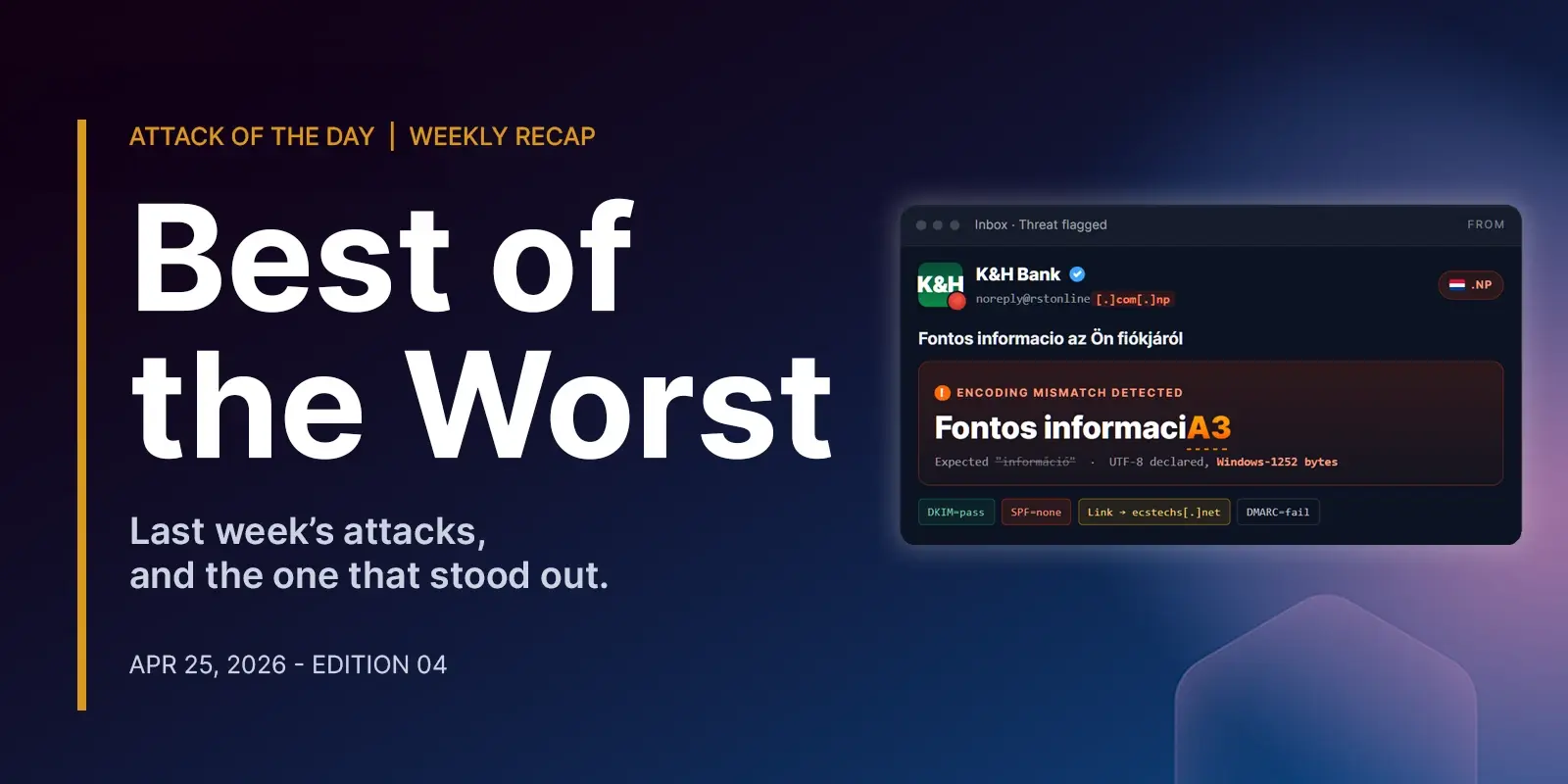
The post Best of the Worst: Five Attacks That Looked Broken (and Worked) appeared first on Security Boulevard.
Hackers are abusing n8n workflows to deliver malware and evade detection, according to Cisco Talos, using trusted automation to bypass security defenses.
The post New Phishing Attack Turns n8n Into On-Demand Malware Machine appeared first on TechRepublic.
Originally published at How to Tell if An Email is Fake: Complete Verification Guide by Levon Vardumyan.
A fake email is an email that appears ...
The post How to Tell if An Email is Fake: Complete Verification Guide appeared first on EasyDMARC.
The post How to Tell if An Email is Fake: Complete Verification Guide appeared first on Security Boulevard.
Is MXToolbox worth it in 2026? Discover its features, limitations, user reviews, and how it compares to PowerDMARC for email security.
The post MXtoolbox Review: Features, User Experiences, Pros & Cons (2026) appeared first on Security Boulevard.
Is your sales team accidentally looking like phishers? Learn 5 proven ways to secure sales outreach emails and start landing in inboxes.
The post Sales Outreach Security: 5 Ways to Stop Your Sales Team from Looking Like Phishers appeared first on Security Boulevard.
Google has brought end-to-end encrypted Gmail to Android and iOS for eligible Workspace users, extending secure mobile email without extra apps.
The post Google Rolls Out End-to-End Encryption to Eligible Gmail Users on Mobile appeared first on TechRepublic.
Google has made a big step forward by extending end-to-end encryption to Android and iOS devices for Gmail client-side encryption (CSE) users, says an expert.
“All in all, this is a welcome update, especially in light of recent concerns surrounding WhatsApp’s encryption methods,” said Gartner analyst Avivah Litan. “Google’s approach offers verifiable customer-managed keys and ensures the provider does not have access to encrypted content.”
This, she said, addresses allegations raised in the January 2026 lawsuit against Meta regarding their internal access to customer encrypted message data.
Meta has reportedly said the claims are false, and that WhatsApp messages remain protected by default. The suit’s allegations have not been proven in court.
Litan noted that Google’s encryption update is only for organizations subscribing to its Enterprise Plus with Assured Controls edition. Messages and attachments are encrypted directly on-device, with encryption keys managed externally by the customer.
“For CSOs in regulated industries, this development is significant, as it supports secure mobile communication, compliance with regulations such as HIPAA [the U.S. Health Insurance Portability and Accountability Act] and GDPR [the European General Data Protection Regulation], and reduces the risk of plaintext data exposure on mobile devices,” she said. “External recipients retain the ability to reply via a web portal.”
However, Litan added, the capability remains opt-in, requires premium licensing and administrative configuration, and disables several Gmail functions, including AI features and comprehensive search, on encrypted content. But, she pointed out, the limitations are consistent with those in Gmail web and desktop implementations.
It’s also a capability that Microsoft doesn’t provide. A Microsoft spokesperson said in an email that the company doesn’t currently offer end-to-end Outlook encryption on mobile, although messages can be digitally signed and encrypted.
In its April 9 announcement, Google said Workspace users can compose and read end-to-end encrypted messages natively within the Gmail app on Android and iOS without the need to download extra apps or use mail portals. Users with a Gmail E2EE license can send an encrypted message to any recipient, regardless of their email address. If the recipient uses the Gmail app, the encrypted message will be delivered as a normal message thread to their inbox, but if not, they can seamlessly and securely read and reply in their own native browser. This, Google said, ensures that all users have a simple and secure interface, regardless of their email service or device.
Google Workspace admins will need to enable the Android and iOS clients in the CSE admin interface to give users access to the new capability. This can be done in the Admin Console.
End users also need to be taught the new process: To add client-side encryption to any message, they must click the lock icon and select ‘additional encryption’. Then they can compose a message and add attachments as they normally do.
Forrester Research Senior Analyst Andrew Cornwall noted the biggest benefit for enterprises is that Workspace admins or Google can disable the ability to take screenshots and screen recordings when users read an encrypted message in the Gmail app. That will prevent Android and iOS recipients from forwarding a message as an image, he said, noting that Google can also disable screenshots in Android Chrome for business users and presumably will do this when Android users with email programs other than Gmail open a message in a browser.
From a user’s perspective, he added, this encryption gives Gmail an advantage over third-party email programs like Outlook and Thunderbird, which won’t automatically decrypt messages that have been encrypted using Google’s encryption mechanism. Unlike some encryption methods, Gmail doesn’t require the exchange of a key in advance, so users will be more likely to use it.
However, he pointed out, Google’s client-side encryption doesn’t encrypt headers or message senders, so an attacker with access to the device can still get some potentially sensitive information even with encryption enabled.
“If you’re planning to use Gmail to commit financial crimes or plan a revolution,” he added, “you should know that Google controls the display and often the keyboard on devices they build. Even if emails are encrypted on device, your messages may still be available while being read or composed.”
And while end-to-end encryption (E2EE) is considered by experts to be an excellent protection against the hijacking of data in transit, it won’t protect data on compromised devices, stolen and hacked devices, or in unencrypted backups.
David Shipley, CEO of security awareness provider Beauceron Security, noted the extension of Gmail end to end encryption to mobile platforms will help organizations ensure compliance with privacy concerns. “On the downside,” he added, “this is going to be a powerful tool for criminals. If they spin up a Google Workspace tenant and send encrypted messages to end users who aren’t on Gmail, in those cases, users will get a link to a new portal to read the sent message which will not be intercepted by a lot of security tools like email filters.”
This article originally appeared on Computerworld.

Find out why Gmail is filtering your emails, what triggers its spam filters, and how to fix it — including authentication, sender reputation, and content issues.
The post Is Gmail Filtering Your Emails? Causes, Signs & Fixes appeared first on Security Boulevard.
Learn how to send secure email in Gmail using Confidential Mode, S/MIME encryption, and best practices to protect sensitive messages in Google Workspace.
The post How to Send Secure Email in Gmail: Step-by-Step Guide appeared first on Security Boulevard.
Iran-linked hackers breached FBI Director Kash Patel’s personal email, leaking older messages in a retaliatory cyberattack with no classified data exposed.
The post Iran-Linked Hackers Breach FBI Director Kash Patel’s Email, Leak Messages Online appeared first on TechRepublic.
Fake “trusted sender” labels can mislead users, as scammers embed them into email bodies to disguise phishing emails and create a false sense of security.
The post Fake ‘Trusted Sender’ Labels Misused in New Apple Mail Phishing Scheme appeared first on TechRepublic.
Researchers reveal how Microsoft Copilot can be manipulated by prompt injection attacks to generate convincing phishing messages inside trusted AI summaries.
The post Researchers Uncover New Phishing Risk Hidden Inside Microsoft Copilot appeared first on TechRepublic.
In 2024, threat actors were already abusing URL rewriting mechanisms in phishing campaigns to mask malicious domains. Between the second and fourth quarters of 2025, LevelBlue SpiderLabs identified a notable escalation in this tactic, with adversaries deliberately constructing multi‑layered URL rewriting as redirectors, chaining together multiple trusted providers to further obscure the final malicious domain and evade traditional email security controls.


Zero-trust collapses when email whitelists create permanent exceptions. Here's why this hidden risk undermines modern security investments.
The post The Zero-Trust Paradox: Why Email Whitelists are Undoing Millions in Security Investment appeared first on Security Boulevard.
A practical guide to Outlook HIPAA compliance. Learn encryption requirements, configuration steps, and when to choose dedicated HIPAA email solutions.
The post Is Outlook Email Encryption HIPAA Compliant? A Complete Guide for 2026 appeared first on Security Boulevard.
Today’s security ecosystem generates a staggering amount of complex telemetry. For instance, processing a single email requires analyzing sender reputation, authentication results, link behavior, infrastructure metadata, and countless other attributes. Simultaneously, Cloud access security broker (CASB) engines continuously scan SaaS environments for signals that detect misconfigurations, risky access, and exposed data.
But while detections have become more sophisticated, explanations have not always kept pace.
Security and IT teams are often aware when something is flagged, but they do not always know, at a glance, why. End users are asked to make real-time decisions about emails that may impact the entire organization, yet they are rarely given clear, contextual guidance in the moment that matters.
Cloudy changes that.
Cloudy is our LLM-powered explanation layer, built directly into Cloudflare One. It translates complex machine learning outputs into precise, human-readable guidance for security teams and end users alike. Instead of exposing raw technical signals, Cloudy surfaces the reasoning behind a detection in a way that drives informed action.
For Cloudflare Email Security, this means helping users understand why a message was flagged before they escalate it to the security operations center, or SOC. For Cloudflare CASB, it means helping administrators quickly understand the risk and remediation path for SaaS findings without having to manually assess low-level signals.
This post outlines how we are extending Cloudy across Phishnet and API CASB to improve decision making, reduce unnecessary noise, and turn complex security signals into clear, actionable insight.
When an email is analyzed by Cloudflare Email Security, it is not evaluated by a single signal or model. Instead, a wide range of machine learning models analyze different parts of the message, from sender reputation and message structure to content, links, and behavioral patterns. This model set continues to grow as our machine learning team regularly trains and deploys new detections to keep pace with evolving threats.
Based on this analysis, messages are labeled with outcomes such as Malicious, Suspicious, Spam, Bulk, or Spoof. While these detections have been effective, we consistently heard feedback from customers that it was not always clear why a message was flagged. The decision was correct, they told us — but the reasoning behind it was often opaque to both end users and security teams.
To address this, we introduced the first version of Cloudy: LLM-powered summaries for detections. These summaries translate what our machine learning models are seeing into human readable explanations. Initially, these summaries were available in the Cloudflare dashboard to help SOC teams during investigations. Over the past few months, customer feedback has confirmed that these explanations significantly improve understanding in our detections.
As we continued speaking with customers, another challenge surfaced. Our Phishnet tool allows users to submit messages to the SOC when they believe an email may be suspicious. While this empowers employees to participate in security, many SOC teams told us their queues were being flooded with submissions that turned out to be clean messages.
The result was unnecessary backlog and slower response times for emails that actually required investigation.
At the same time, customers told us that traditional security awareness training was not always enough. Users still struggled to evaluate emails in the moment, when it mattered most. They wanted more contextual guidance directly within the workflow where decisions are made.
This upgrade is designed to address both of these problems. By bringing clearer explanations and contextual education directly into Phishnet, we aim to help users make better decisions while reducing noise for SOC teams, without sacrificing security.
As organizations and attack techniques have evolved, so has the role of the end user. Modern email threats increasingly rely on social engineering, subtle impersonation, and psychological pressure which places users directly in the decision path.
In response, users are being asked to act as an additional layer of defense. However, traditional security awareness tools often fall short. Training is typically delivered through periodic sessions or simulated phishing campaigns, disconnected from real messages and real decisions. When users encounter an unfamiliar email, they are left without enough context to confidently assess risk.
This gap commonly leads to one of two outcomes. Some users submit nearly every questionable message to the SOC, creating excessive noise and slowing down investigations. Others interact with messages they should not, simply because nothing in the moment signals clear risk.
By embedding Cloudy directly into Phishnet, we close this gap.
Users receive immediate, contextual explanations that help them understand what Cloudflare is seeing and why a message may be risky. This enables users to make informed decisions at the point of interaction, reduces unnecessary escalations to the SOC, and allows security teams to focus on the messages that truly require attention.
Over time, this approach shifts users from being a source of noise to becoming an effective part of the detection and response workflow. The result: stronger email security, without adding friction or burden to security teams.
In the next month, we will be upgrading our Phishnet reporting button to extend the Cloudy summaries.
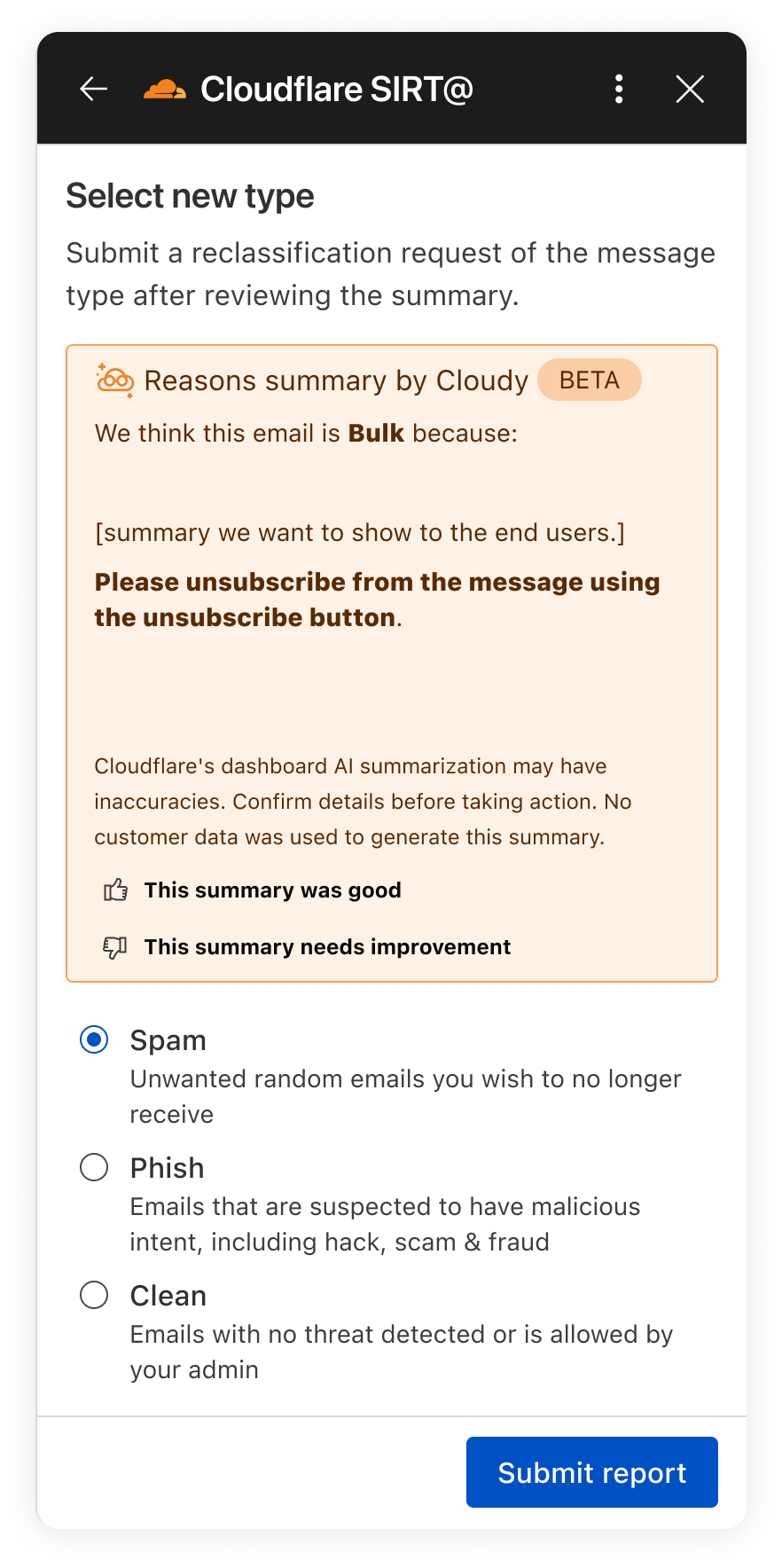
The new Phishnet screens will show Cloudy summaries.
With this upgrade, end users receive a simplified, user-friendly version of Cloudy summaries at the moment they report a message. These summaries are generated in real time using Cloudflare Workers AI and run directly on Cloudflare’s global Workers platform when a user interacts with a message in Phishnet.
When a user clicks the Phishnet reporting button, the request triggers a Workers-based workflow that aggregates structured outputs from multiple detection models associated with that message. These model outputs include signals such as sender reputation, domain and infrastructure characteristics, authentication results, link and content analysis, and behavioral indicators collected during message processing.
The aggregated signals are then passed to Workers AI, where a series of purpose-built prompts generate a natural language explanation. Each prompt is designed to transform low-level detection outputs into a concise and human-readable summary. This process focuses on explanation rather than classification and does not alter the original disposition of the message.
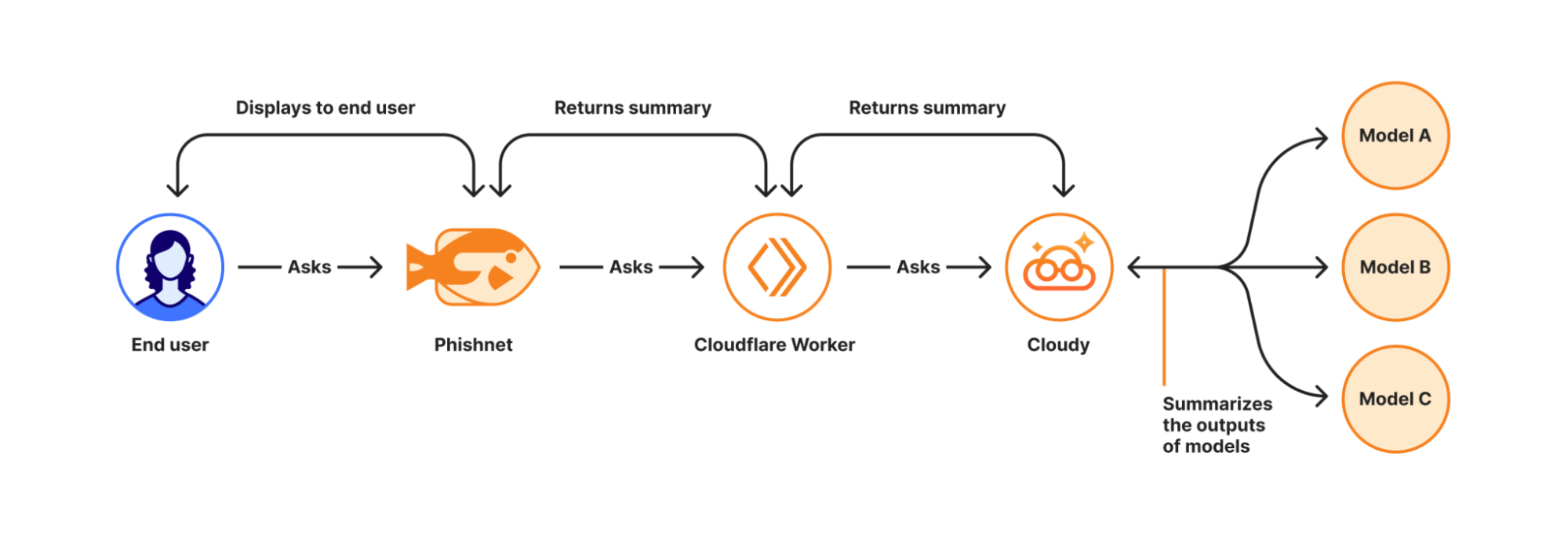
How Cloudy transforms detections into clear explanations.
For this experience, we intentionally redesigned the summaries compared to those shown to administrators in the Cloudflare dashboard. During testing, we found that admin-focused summaries often relied on technical concepts that were difficult for non-technical users to interpret. Terms such as ASNs, IP reputation, or authentication failures required translation.
To ensure end users can understand the summaries, Phishnet emphasizes plain-language explanations while preserving the meaning of the underlying detections.
Signal | What it means | Cloudy translation for end users |
SPF Fail | Sender explicitly not authorized by SPF | This email failed a sender verification check. |
DKIM Fail | Message signature does not validate | The message integrity check failed, which can be a sign of tampering. |
DMARC Fail | DMARC policy check failed | The sender’s domain could not confirm this email is legitimate. |
Reply to Mismatch | Reply To differs from From | Replies may go to a different address than the sender shown. |
Domain Age | Domain recently registered | The sender domain is newly created, which is common in phishing. |
URL Low Reputation | Destination URL has poor reputation | The link destination has signals associated with risk. |
Because this workflow runs on the Cloudflare Workers platform, summaries are generated with low latency and at global scale — so users receive immediate feedback at the moment of interaction. This real-time context allows users to better understand why an email may be risky or why it appears safe before deciding whether to escalate it to the SOC.
We are currently beta testing this experience with Microsoft customers to ensure the summaries are accurate and reliable. Cloudy summaries are not trained on customer data. We are also applying additional validation to ensure the generated explanations do not hallucinate. Accuracy is critical at this stage as incorrect guidance could introduce real security risk.
Following the beta period, we plan to expand access to all Microsoft users. We will also bring similar upgrades to the Phishnet sidebar for Google Workspace users later in 2026.
But helping end users better understand what makes an email risky is only part of the story. We are also applying Cloudy to the administrative side of security operations, where clarity and speed matter just as much. Beyond Phishnet, Cloudy now translates complex CASB findings into structured explanations that help security and IT teams quickly understand risk, prioritize remediation, and take confident action across their SaaS environments.
Inside Cloudflare One, our SASE platform, CASB connects to the SaaS and cloud tools your teams already use. By talking to providers over API, CASB gives security and IT teams:
A consolidated view of misconfigurations, overshared files, and risky access patterns across apps like Microsoft 365, Google Workspace, Slack, Salesforce, Box, GitHub, Jira, and Confluence (CASB Integrations).
Continuous scanning for new issues as users collaborate, share, and adopt new tools.
Findings that are organized, searchable, and exportable for triage and reporting.
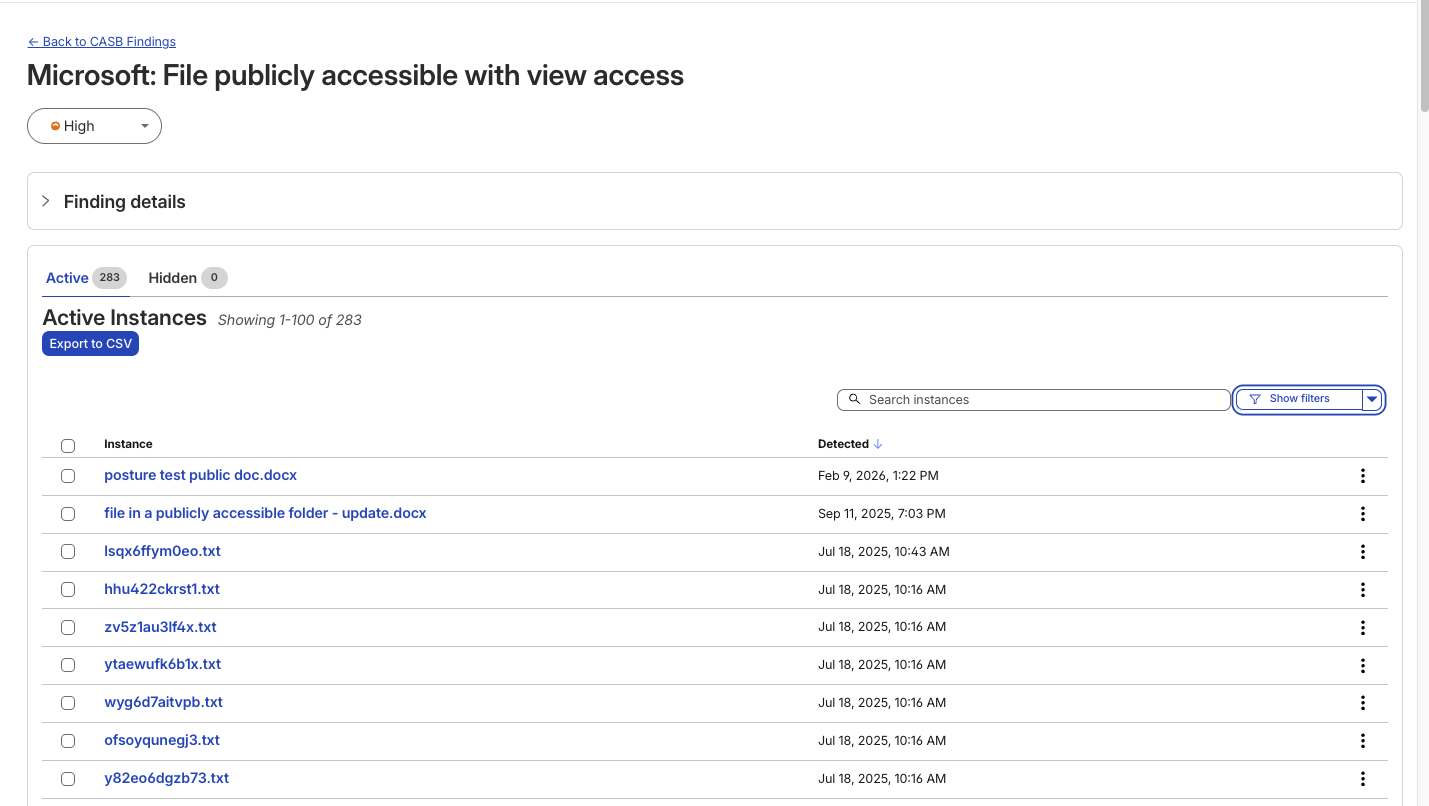
A typical CASB Findings page showing detections for a Microsoft 365 finding.
Until now, understanding what exactly triggered a CASB Finding — the detections that CASB makes across connected SaaS integrations — has been a black box. While the information was there to put together an explanation of why that file, that user, that configuration was triggering a CASB Finding Type, it wasn’t exactly obvious the reason why it was ultimately detected by our system.
With the introduction of Cloudy summaries in CASB, users receive a short description of the detection rationale with the specific details of the match listed out for easy comprehension.
Unlike a simple text summary, Cloudy for CASB provides a structured breakdown designed for immediate remediation. As seen in our beta testing across different providers, from Microsoft 365 to Dropbox, the model consistently parses findings into two distinct sections:
Risk: It identifies exactly why the finding matters. For instance, rather than just noting a 'Suspended User,' Cloudy clarifies that this 'may indicate a compromised account or a user who should no longer have access to company data'.
Guidance: It offers immediate next steps. Instead of generic advice, it suggests specific actions, such as verifying if a suspension was intentional or reviewing an application's legitimacy before revoking access.
This structure ensures that analysts can understand the gravity of a finding without needing deep expertise in the specific SaaS application involved.

An example Cloudy Summary in a CASB Posture Finding.
Finding Type | Technical Signal | Cloudy Translation (Risk & Guidance) |
Identity & Access | Dropbox: Suspended User | Risk: A suspended user account may indicate a compromised account or a user who should no longer have access to company data. Guidance: Verify that the suspension is intentional and that the user's access has been properly revoked. |
Shadow IT | Google Workspace: Installed 3rd-party app | Risk: This installed application with Google Sign In access may pose a risk of unauthorized access to user data. Guidance: Review the application's legitimacy and necessity, and consider revoking access if it is no longer needed. |
Email Security | Microsoft 365: Domain DMARC record not present | Risk: The absence of a DMARC record may leave the domain vulnerable to email spoofing and phishing attacks. Guidance: Configure a DMARC record for the domain to specify how to handle unauthenticated emails. |
Data Loss Prevention | Microsoft 365: File publicly accessible + DLP Match | Risk: This file being shared publicly with edit access may allow unauthorized modifications... especially given the potential sensitive content indicated by the DLP Profile match. Guidance: Review the file's content... and consider restricting access if necessary. |
We know that when it comes to our customers getting to the bottom of identified security issues, time is of the essence. We believe that any amount of unnecessary uncertainty or lack of clarity around what’s going wrong just puts more time between an imperfect state and one that is more secure.
We built this feature on the same privacy-first foundations as all products at Cloudflare. Cloudy summaries in CASB are generated using Cloudflare Workers AI, ensuring that your data remains within our secure infrastructure during analysis. The models are not trained on your SaaS data, and the summaries are generated ephemerally to aid in triage. This allows your team to leverage the speed of AI without exposing sensitive internal documents or configurations to public models.
For Email Security, we will continue to expand how Cloudy supports both administrators and end users. Our focus is on delivering clearer explanations, better in context guidance, and deeper integration into daily workflows.
For CASB, we’re excited to look for opportunities where Cloudy can make it even easier for CASB administrators to understand what’s going on across their cloud and SaaS apps. Keep an eye out as we look to expand Cloudy coverage to allow administrators to query their findings using natural language, further reducing the time it takes to identify and remediate risks.
Looking ahead, this includes richer explanations for additional detection types, tighter feedback loops between user actions and detections, and continued improvements to how users and SOC teams collaborate through Phishnet. Our goal is to make Cloudy a core part of how organizations understand, trust, and act on email security decisions.
We provide all organizations (whether a Cloudflare customer or not) with free access to our Retro Scan tool, allowing them to use our predictive AI models to scan existing inbox messages in Microsoft 365.
Retro Scan will detect and highlight any threats found, enabling organizations to remediate them directly in their email accounts. With these insights, organizations can implement further controls, either using Cloudflare Email Security or their preferred solution, to prevent similar threats from reaching their inboxes in the future.
If you are interested in how Cloudflare can help secure your inboxes, sign up for a phishing risk assessment here.

