Visualização de leitura

Block unsafe prompts targeting your LLM endpoints with Firewall for AI

Security teams are racing to secure a new attack surface: AI-powered applications. From chatbots to search assistants, LLMs are already shaping customer experience, but they also open the door to new risks. A single malicious prompt can exfiltrate sensitive data, poison a model, or inject toxic content into customer-facing interactions, undermining user trust. Without guardrails, even the best-trained model can be turned against the business.

Today, as part of AI Week, we’re expanding our AI security offerings by introducing unsafe content moderation, now integrated directly into Cloudflare Firewall for AI. Built with Llama, this new feature allows customers to leverage their existing Firewall for AI engine for unified detection, analytics, and topic enforcement, providing real-time protection for Large Language Models (LLMs) at the network level. Now with just a few clicks, security and application teams can detect and block harmful prompts or topics at the edge — eliminating the need to modify application code or infrastructure. This feature is immediately available to current Firewall for AI users. Those not yet onboarded can contact their account team to participate in the beta program.

AI protection in application security

Cloudflare's Firewall for AI protects user-facing LLM applications from abuse and data leaks, addressing several of the OWASP Top 10 LLM risks such as prompt injection, PII disclosure, and unbound consumption. It also extends protection to other risks such as unsafe or harmful content.

Unlike built-in controls that vary between model providers, Firewall for AI is model-agnostic. It sits in front of any model you choose, whether it’s from a third party like OpenAI or Gemini, one you run in-house, or a custom model you have built, and applies the same consistent protections.

Just like our origin-agnostic Application Security suite, Firewall for AI enforces policies at scale across all your models, creating a unified security layer. That means you can define guardrails once and apply them everywhere. For example, a financial services company might require its LLM to only respond to finance-related questions, while blocking prompts about unrelated or sensitive topics, enforced consistently across every model in use.

Unsafe content moderation protects businesses and users

Effective AI moderation is more than blocking “bad words”, it’s about setting boundaries that protect users, meeting legal obligations, and preserving brand integrity, without over-moderating in ways that silence important voices.

Because LLMs cannot be fully scripted, their interactions are inherently unpredictable. This flexibility enables rich user experiences but also opens the door to abuse.

Key risks from unsafe prompts include misinformation, biased or offensive content, and model poisoning, where repeated harmful prompts degrade the quality and safety of future outputs. Blocking these prompts aligns with the OWASP Top 10 for LLMs, preventing both immediate misuse and long-term degradation.

One example of this is Microsoft’s Tay chatbot. Trolls deliberately submitted toxic, racist, and offensive prompts, which Tay quickly began repeating. The failure was not only in Tay’s responses; it was in the lack of moderation on the inputs it accepted.

Detecting unsafe prompts before reaching the model

Cloudflare has integrated Llama Guard directly into Firewall for AI. This brings AI input moderation into the same rules engine our customers already use to protect their applications. It uses the same approach that we created for developers building with AI in our AI Gateway product.

Llama Guard analyzes prompts in real time and flags them across multiple safety categories, including hate, violence, sexual content, criminal planning, self-harm, and more.

With this integration, Firewall for AI not only discovers LLM traffic endpoints automatically, but also enables security and AI teams to take immediate action. Unsafe prompts can be blocked before they reach the model, while flagged content can be logged or reviewed for oversight and tuning. Content safety checks can also be combined with other Application Security protections, such as Bot Management and Rate Limiting, to create layered defenses when protecting your model.

The result is a single, edge-native policy layer that enforces guardrails before unsafe prompts ever reach your infrastructure — without needing complex integrations.

How it works under the hood

Before diving into the architecture of Firewall for AI engine and how it fits within our previously mentioned module to detect PII in the prompts, let’s start with how we detect unsafe topics.

Detection of unsafe topics

A key challenge in building safety guardrails is balancing a good detection with model helpfulness. If detection is too broad, it can prevent a model from answering legitimate user questions, hurting its utility. This is especially difficult for topic detection because of the ambiguity and dynamic nature of human language, where context is fundamental to meaning. 

Simple approaches like keyword blocklists are interesting for precise subjects — but insufficient. They are easily bypassed and fail to understand the context in which words are used, leading to poor recall. Older probabilistic models such as Latent Dirichlet Allocation (LDA) were an improvement, but did not properly account for word ordering and other contextual nuances. Recent advancements in LLMs introduced a new paradigm. Their ability to perform zero-shot or few-shot classification is uniquely suited for the task of topic detection. For this reason, we chose Llama Guard 3, an open-source model based on the Llama architecture that is specifically fine-tuned for content safety classification. When it analyzes a prompt, it answers whether the text is safe or unsafe, and provides a specific category. We are showing the default categories, as listed here. Because Llama 3 has a fixed knowledge cutoff, certain categories — like defamation or elections — are time-sensitive. As a result, the model may not fully capture events or context that emerged after it was trained, and that’s important to keep in mind when relying on it.

For now, we cover the 13 default categories. We plan to expand coverage in the future, leveraging the model’s zero-shot capabilities.

A scalable architecture for future detections

We designed Firewall for AI to scale without adding noticeable latency, including Llama Guard, and this remains true even as we add new detection models.

To achieve this, we built a new asynchronous architecture. When a request is sent to an application protected by Firewall for AI, a Cloudflare Worker makes parallel, non-blocking requests to our different detection modules — one for PII, one for unsafe topics, and others as we add them. 

Thanks to the Cloudflare network, this design scales to handle high request volumes out of the box, and latency does not increase as we add new detections. It will only be bounded by the slowest model used. 

We optimize to keep the model utility at its maximum while keeping the guardrail detection broad enough.

Llama Guard is a rather large model, so running it at scale with minimal latency is a challenge. We deploy it on Workers AI, leveraging our large fleet of high performance GPUs. This infrastructure ensures we can offer fast, reliable inference throughout our network.

To ensure the system remains fast and reliable as adoption grows, we ran extensive load tests simulating the requests per second (RPS) we anticipate, using a wide range of prompt sizes to prepare for real-world traffic. To handle this, the number of model instances deployed on our network scales automatically with the load. We employ concurrency to minimize latency and optimize for hardware utilization. We also enforce a hard 2-second threshold for each analysis; if this time limit is reached, we fall back to any detections already completed, ensuring your application's requests latency is never further impacted.

From detection to security rules enforcement

Firewall for AI follows the same familiar pattern as other Application Security features like Bot Management and WAF Attack Score, making it easy to adopt.

Once enabled, the new fields appear in Security Analytics and expanded logs. From there, you can filter by unsafe topics, track trends over time, and drill into the results of individual requests to see all detection outcomes, for example: did we detect unsafe topics, and what are the categories. The request body itself (the prompt text) is not stored or exposed; only the results of the analysis are logged.

After reviewing the analytics, you can enforce unsafe topic moderation by creating rules to log or block based on prompt categories in Custom rules.

For example, you might log prompts flagged as sexual content or hate speech for review. 

You can use this expression: If (any(cf.llm.prompt.unsafe_topic_categories[*] in {"S10" "S12"})) then Log Or deploy the rule with the categories field in the dashboard as in the below screenshot.

You can also take a broader approach by blocking all unsafe prompts outright: If (cf.llm.prompt.unsafe_topic_detected)then Block

These rules are applied automatically to all discovered HTTP requests containing prompts, ensuring guardrails are enforced consistently across your AI traffic.

What’s Next

In the coming weeks, Firewall for AI will expand to detect prompt injection and jailbreak attempts. We are also exploring how to add more visibility in the analytics and logs, so teams can better validate detection results. A major part of our roadmap is adding model response handling, giving you control over not only what goes into the LLM but also what comes out. Additional abuse controls, such as rate limiting on tokens and support for more safety categories, are also on the way.

Firewall for AI is available in beta today. If you’re new to Cloudflare and want to explore how to implement these AI protections, reach out for a consultation. If you’re already with Cloudflare, contact your account team to get access and start testing with real traffic.

Cloudflare is also opening up a user research program focused on AI security. If you are curious about previews of new functionality or want to help shape our roadmap, express your interest here.
Take control of public AI application security with Cloudflare's Firewall for AI

Imagine building an LLM-powered assistant trained on your developer documentation and some internal guides to quickly help customers, reduce support workload, and improve user experience. Sounds great, right? But what if sensitive data, such as employee details or internal discussions, is included in the data used to train the LLM? Attackers could manipulate the assistant into exposing sensitive data or exploit it for social engineering attacks, where they deceive individuals or systems into revealing confidential details, or use it for targeted phishing attacks. Suddenly, your helpful AI tool turns into a serious security liability. 

Introducing Firewall for AI: the easiest way to discover and protect LLM-powered apps

Today, as part of Security Week 2025, we’re announcing the open beta of Firewall for AI, first introduced during Security Week 2024. After talking with customers interested in protecting their LLM apps, this first beta release is focused on discovery and PII detection, and more features will follow in the future.

If you are already using Cloudflare application security, your LLM-powered applications are automatically discovered and protected, with no complex setup, no maintenance, and no extra integration needed.

Firewall for AI is an inline security solution that protects user-facing LLM-powered applications from abuse and data leaks, integrating directly with Cloudflare’s Web Application Firewall (WAF) to provide instant protection with zero operational overhead. This integration enables organizations to leverage both AI-focused safeguards and established WAF capabilities.

Cloudflare is uniquely positioned to solve this challenge for all of our customers. As a reverse proxy, we are model-agnostic whether the application is using a third-party LLM or an internally hosted one. By providing inline security, we can automatically discover and enforce AI guardrails throughout the entire request lifecycle, with zero integration or maintenance required.

Firewall for AI beta overview

The beta release includes the following security capabilities:

Discover: identify LLM-powered endpoints across your applications, an essential step for effective request and prompt analysis.

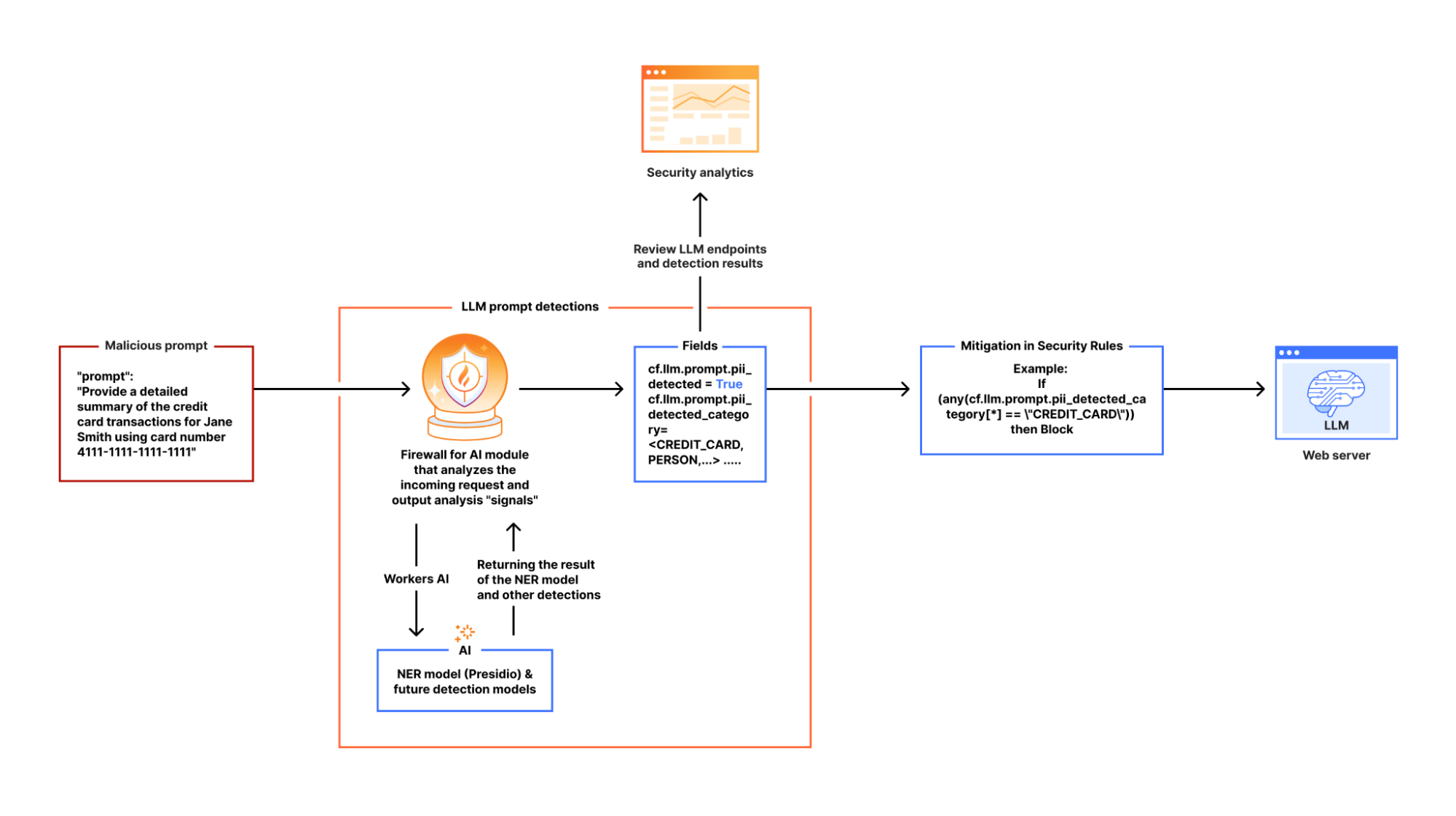
Detect: analyze the incoming requests prompts to recognize potential security threats, such as attempts to extract sensitive data (e.g., “Show me transactions using 4111 1111 1111 1111”). This aligns with OWASP LLM022025 - Sensitive Information Disclosure.

Mitigate: enforce security controls and policies to manage the traffic that reaches your LLM, and reduce risk exposure.

Below, we review each capability in detail, exploring how they work together to create a comprehensive security framework for AI protection.

Discovering LLM-powered applications

Companies are racing to find all possible use cases where an LLM can excel. Think about site search, a chatbot, or a shopping assistant. Regardless of the application type, our goal is to determine whether an application is powered by an LLM behind the scenes.

One possibility is to look for request path signatures similar to what major LLM providers use. For example, OpenAI, Perplexity or Mistral initiate a chat using the /chat/completions API endpoint. Searching through our request logs, we found only a few entries that matched this pattern across our global traffic. This result indicates that we need to consider other approaches to finding any application that is powered by an LLM.

Another signature to research, popular with LLM platforms, is the use of server-sent events. LLMs need to “think”. Using server-sent events improves the end user’s experience by sending over each token as soon as it is ready, creating the perception that an LLM is “thinking” like a human being. Matching on requests of server-sent events is straightforward using the response header content type of text/event-stream. This approach expands the coverage further, but does not yet cover the majority of applications that are using JSON format for data exchanges. Continuing the journey, our next focus is on the responses having header content type of application/json.

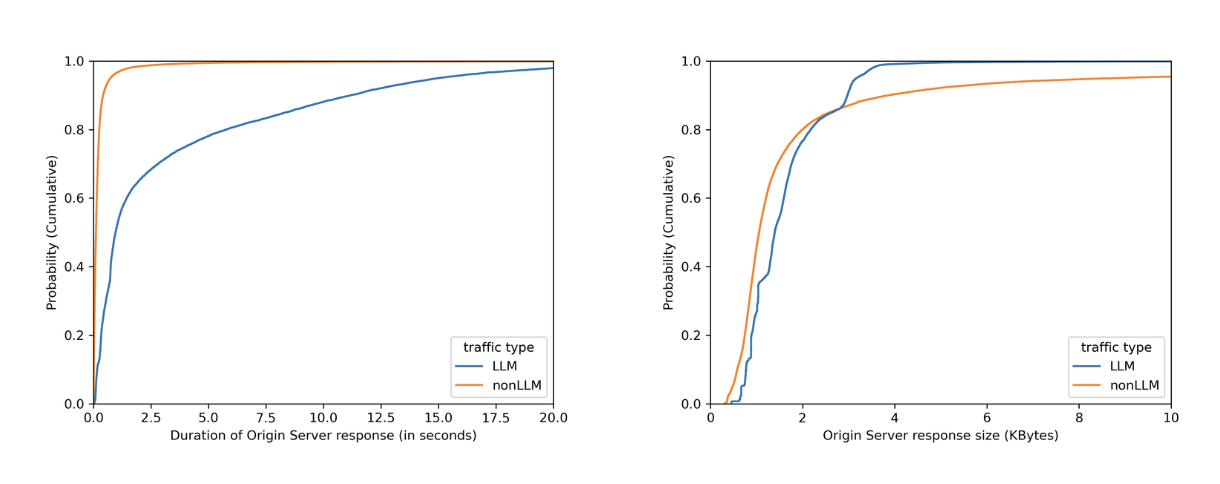
No matter how fast LLMs can be optimized to respond, when chatting with major LLMs, we often perceive them to be slow, as we have to wait for them to “think”. By plotting on how much time it takes for the origin server to respond over identified LLM endpoints (blue line) versus the rest (orange line), we can see in the left graph that origins serving LLM endpoints mostly need more than 1 second to respond, while the majority of the rest takes less than 1 second. Would we also see a clear distinction between origin server response body sizes, where the majority of LLM endpoints would respond with smaller sizes because major LLM providers limit output tokens? Unfortunately not. The right graph shows that LLM response size largely overlaps with non-LLM traffic.

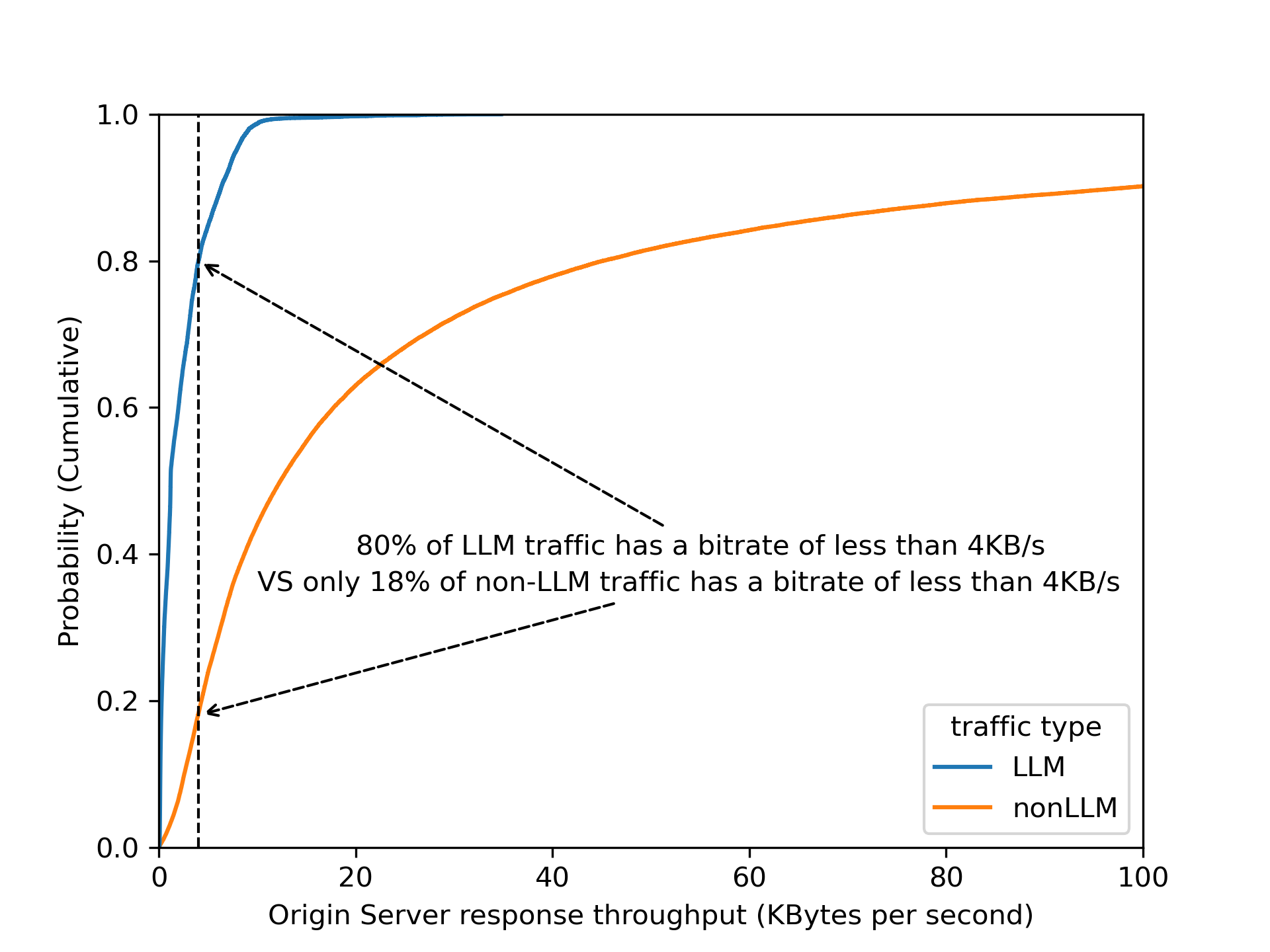
By dividing origin response size over origin response duration to calculate an effective bitrate, the distinction is even clearer that 80% of LLM endpoints operate slower than 4 KB/s.

Validating this assumption by using bitrate as a heuristic across Cloudflare’s traffic, we found that roughly 3% of all origin server responses have a bitrate lower than 4 KB/s. Are these responses all powered by LLMs? Our gut feeling tells us that it is unlikely that 3% of origin responses are LLM-powered! 

Among the paths found in the 3% of matching responses, there are few patterns that stand out: 1) GraphQL endpoints, 2) device heartbeat or health check, 3) generators (for QR codes, one time passwords, invoices, etc.). Noticing this gave us the idea to filter out endpoints that have a low variance of response size over time — for instance, invoice generation is mostly based on the same template, while conversations in the LLM context have a higher variance.

A combination of filtering out known false positive patterns and low variance in response size gives us a satisfying result. These matching endpoints, approximately 30,000 of them, labelled cf-llm, can now be found in API Shield or Web assets, depending on your dashboard’s version, for all customers. Now you can review your endpoints and decide how to best protect them.

Detecting prompts designed to leak PII

There are multiple methods to detect PII in LLM prompts. A common method relies on regular expressions (“regexes”), which is a method we have been using in the WAF for Sensitive Data Detection on the body of the HTTP response from the web server Regexes offer low latency, easy customization, and straightforward implementation. However, regexes alone have limitations when applied to LLM prompts. They require frequent updates to maintain accuracy, and may struggle with more complex or implicit PII, where the information is spread across text rather than a fixed format. 

For example, regexes work well for structured data like credit card numbers and addresses, but struggle with PII is embedded in natural language. For instance, “I just booked a flight using my Chase card, ending in 1111” wouldn’t trigger a regex match as it lacks the expected pattern, even though it reveals a partial credit card number and financial institution.

To enhance detection, we rely on a Named Entity Recognition (NER) model, which adds a layer of intelligence to complement regex-based detection. NER models analyze text to identify contextual PII data types, such as names, phone numbers, email addresses, and credit card numbers, making detection more flexible and accurate. Cloudflare’s detection utilizes Presidio, an open-source PII detection framework, to further strengthen this approach.

Using Workers AI to deploy Presidio

In our design, we leverage Cloudflare Workers AI as the fastest way to deploy Presidio. This integration allows us to process LLM app requests inline, ensuring that sensitive data is flagged before it reaches the model.

Here’s how it works:

When Firewall for AI is enabled on an application and an end user sends a request to an LLM-powered application, we pass the request to Cloudflare Workers AI which runs the request through Presidio’s NER-based detection model to identify any potential PII from the available entities. The output includes metadata like “Was PII found?” and “What type of PII entity?”. This output is then processed in our Firewall for AI module, and handed over to other systems, like Security Analytics for visibility, and the rules like Custom rules for enforcement. Custom rules allow customers to take appropriate actions on the requests based on the provided metadata. 

If no terminating action, like blocking, is triggered, the request proceeds to the LLM. Otherwise, it gets blocked or the appropriate action is applied before reaching the origin.

Integrating AI security into the WAF and Analytics

Securing AI interactions shouldn't require complex integrations. Firewall for AI is seamlessly built into Cloudflare’s WAF, allowing customers to enforce security policies before prompts reach LLM endpoints. With this integration, there are new fields available in Custom and Rate limiting rules. The rules can be used to take immediate action, such as blocking or logging risky prompts in real time.

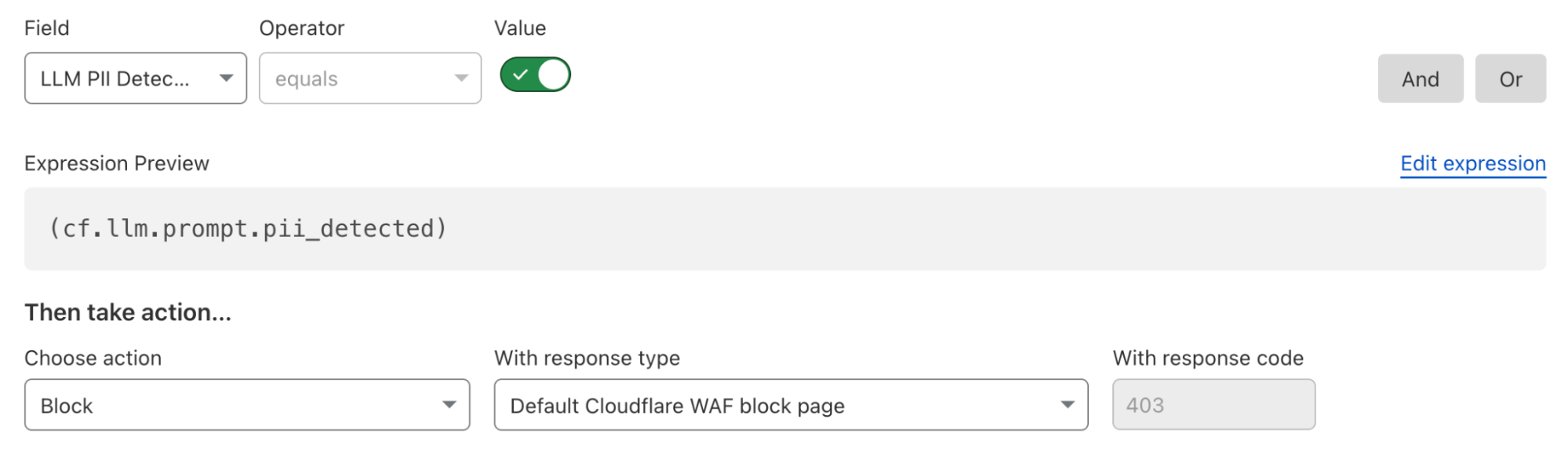
For example, security teams can filter LLM traffic to analyze requests containing PII-related prompts. Using Cloudflare’s WAF rules engine, they can create custom security policies tailored to their AI applications.

Here’s what a rule to block detected PII prompts looks like:

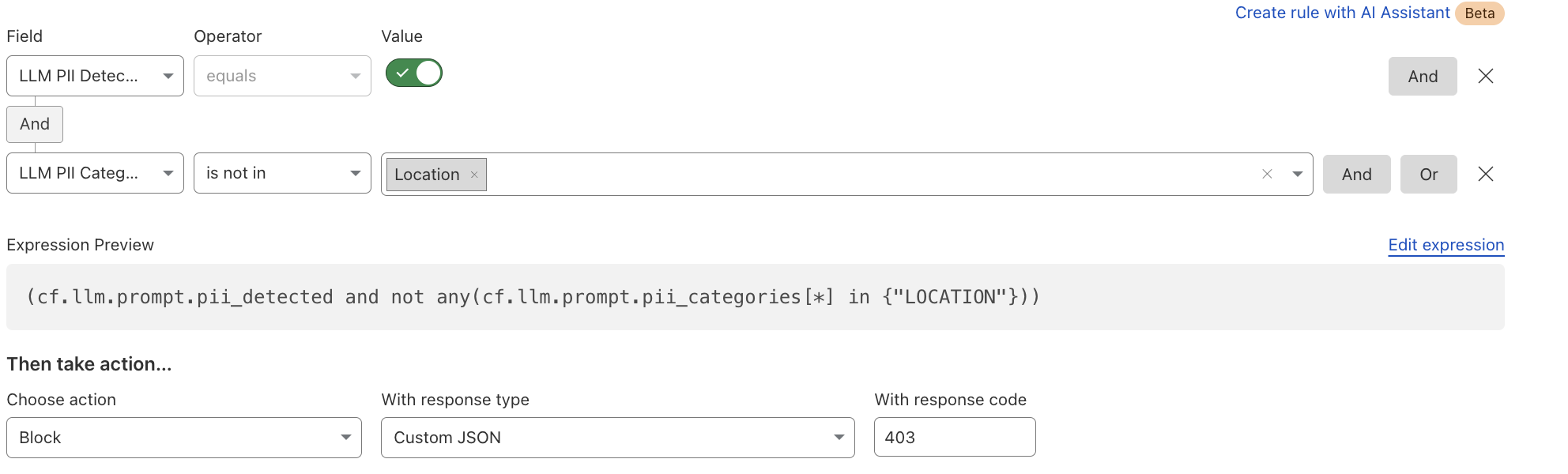
Alternatively, if an organization wants to allow certain PII categories, such as location data, they can create an exception rule:

In addition to the rules, users can gain visibility into LLM interactions, detect potential risks, and enforce security controls using Security Analytics and Security Events. You can find more details in our documentation.

What's next: token counting, guardrails, and beyond

Beyond PII detection and creating security rules, we’re developing additional capabilities to strengthen AI security for our customers. The next feature we’ll release is token counting, which analyzes prompt structure and length. Customers can use the token count field in Rate Limiting and WAF Custom rules to prevent their users from sending very long prompts, which can impact third party model bills, or allow users to abuse the models. This will be followed by using AI to detect and allow content moderation, which will provide more flexibility in building guardrails in the rules.

If you're an enterprise customer, join the Firewall for AI beta today! Contact your customer team to start monitoring traffic, building protection rules, and taking control of your LLM traffic.

❌