
Visualização de leitura

[Updated] Another Chrome zero-day under attack: update now

Google issued an extra patch for a security vulnerability in Chrome that is being actively exploited, and it’s urging users to update. The patch fixes three flaws in Chrome, and for one of them Google says an exploit already exists in the wild.

Chrome is by far the world’s most popular browser, with an estimated 3.4 billion users, that makes for a massive target. When Chrome has a security flaw that can be triggered just by visiting a website, billions of users are exposed until they update.

That’s why it’s important to install these patches promptly. Staying unpatched means you could be at risk just by browsing the web. Attackers often exploit these kinds of flaws before most users have a chance to update. Always let Chrome update itself, and don’t delay restarting it as updates usually fix exactly this kind of risk.

How to update Chrome

The latest version number is 143.0.7499.109/.110 for Windows and macOS, and 143.0.7499.109 for Linux. So, if your Chrome is on version 143.0.7499.109 or later, it’s protected from these vulnerabilities.

The easiest way to update is to allow Chrome to update automatically, but you can end up lagging behind if you never close your browser or if something goes wrong—such as an extension stopping you from updating the browser.

To update manually, click the More menu (three dots), then go to Settings > About Chrome. If an update is available, Chrome will start downloading it. Restart Chrome to complete the update, and you’ll be protected against these vulnerabilities.

You can also find step-by-step instructions in our guide to how to update Chrome on every operating system.

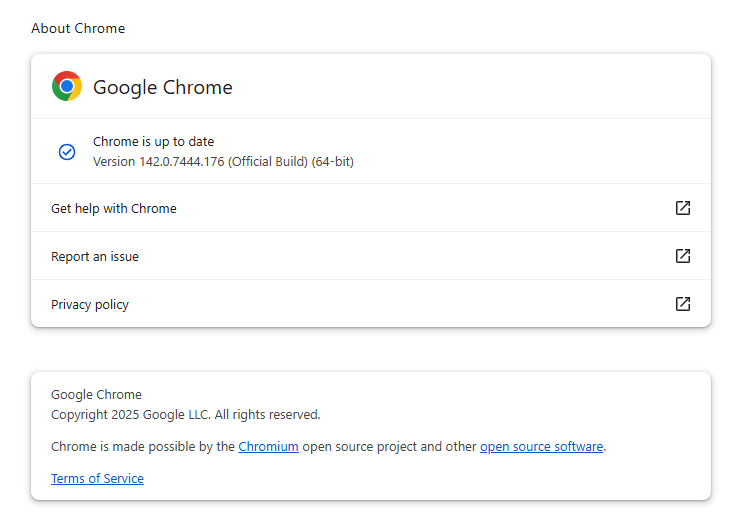
Chrome is up to date

2025 exploited zero-days in Chrome

Public reporting indicates that Chrome has seen at least seven zero-days exploited in 2025, several of them in the V8 JavaScript engine and some linked to targeted espionage.

So, 2025 has been a relatively busy year for Chrome zero‑days.

In March, a sandbox escape tracked as CVE‑2025‑2783 showed up in espionage operations against Russian targets.

May brought more bad news: an account‑hijacking flaw (CVE‑2025‑4664), followed in June by multiple V8 issues (including CVE‑2025‑5419 and CVE‑2025‑6558) that let attackers run code in the browser and in some cases hop over the sandbox boundary.

September added a V8 type‑confusion bug (CVE‑2025‑10585) serious enough to justify another out‑of‑band patch.

And with the November update, Google patched CVE-2025-13223, reported by Google’s Threat Analysis Group (TAG), which focuses on spyware and nation-state attackers who regularly use zero-days for espionage.

The latest security advisory mentions a vulnerability that has not yet received a CVE ID but is referred to as 466192044. Google states it is aware that an exploit for 466192044 exists in the wild.

If we’re lucky, this update will close out 2025’s run of Chrome zero-days. We will keep you posted if we find out more about the nature of the latest zero-day vulnerability.

Update December 13, 2025

“466192044” is now tracked as CVE-2025-14174: out of bounds memory access in ANGLE in Google Chrome on Mac prior to 143.0.7499.110 allowed a remote attacker to perform out of bounds memory access via a crafted HTML page. CISA has added the vulnerability to their list of known exploited vulnerabilities.

ANGLE is used as the default Web Graphics Library backend for both Google Chrome and Mozilla Firefox on Windows platforms. Chrome uses ANGLE for all graphics rendering on Windows.


We don’t just report on threats—we remove them

Cybersecurity risks should never spread beyond a headline. Keep threats off your devices by downloading Malwarebytes today.
Chrome zero-day under active attack: visiting the wrong site could hijack your browser

Google has released an update for its Chrome browser that includes two security fixes. Both are classified as high severity, and one is reportedly exploited in the wild. These flaws were found in Chrome’s V8 engine, which is the part of Chrome (and other Chromium-based browsers) that runs JavaScript.

Chrome is by far the world’s most popular browser, used by an estimated 3.4 billion people. That scale means when Chrome has a security flaw, billions of users are potentially exposed until they update.

These vulnerabilities are serious because they affect the code that runs almost every website you visit. Every time you load a page, your browser executes JavaScript from all sorts of sources, whether you notice it or not. Without proper safety checks, attackers can sneak in malicious instructions that your browser then runs—sometimes without you clicking anything. That could lead to stolen data, malware infections, or even a full system compromise.

That’s why it’s important to install these patches promptly. Staying unpatched means you could be open to an attack just by browsing the web, and attackers often exploit these kinds of flaws before most users have a chance to update. Always let your browser update itself, and don’t delay restarting to apply security patches, because updates often fix exactly this kind of risk.

How to update

The Chrome update brings the version number to 142.0.7444.175/.176 for Windows, 142.0.7444.176 for macOS and 142.0.7444.175 for Linux. So, if your Chrome is on the version number 142.0.7444.175 or later, it’s protected from these vulnerabilities.

The easiest way to update is to allow Chrome to update automatically, but you can end up lagging behind if you never close your browser or if something goes wrong—such as an extension stopping you from updating the browser.

To update manually, click the “More” menu (three stacked dots), then choose Settings > About Chrome. If there is an update available, Chrome will notify you and start downloading it. Then relaunch Chrome to complete the update, and you’ll be protected against these vulnerabilities.

You can find more detailed update instructions and how to read the version number in our article on how to update Chrome on every operating system.

Chrome is up to date

Technical details

Both vulnerabilities are characterized as “type confusion” flaws in V8.

Type confusion happens when code doesn’t verify the object type it’s handling and then uses it incorrectly. In other words, the software mistakes one type of data for another—like treating a list as a single value or a number as text. This can cause Chrome to behave unpredictably and, in some cases, let attackers manipulate memory and execute code remotely through crafted JavaScript on a malicious or compromised website.

The actively exploited vulnerability—Google says “an exploit for CVE-2025-13223 exists in the wild”—was discovered by Google’s Threat Analysis Group (TAG). It can allow a remote attacker to exploit heap corruption via a malicious HTML page. Which means just visiting the “wrong” website might be enough to compromise your browser.

Google hasn’t shared details yet about who is exploiting the flaw, how they do it in real-world attacks, or who’s being targeted. However, the TAG team typically focuses on spyware and nation-state attackers that abuse zero days for espionage.

The second vulnerability, tracked as CVE-2025-13224, was discovered by Google’s Big Sleep, an AI-driven project to discover vulnerabilities. It has the same potential impact as the other vulnerability, but cybercriminals probably haven’t yet figured out how to use it.

Users of other Chromium-based browsers—like Edge, Opera, and Brave—can expect similar updates in the near future.


We don’t just report on threats—we remove them

Cybersecurity risks should never spread beyond a headline. Keep threats off your devices by downloading Malwarebytes today.

❌