Entrar
More PayPal emails hijacked to deliver tech support scams
Scammers have found another way to get deceptive messages delivered through PayPal’s legitimate services.
In December 2025, we reported that PayPal closed a loophole that let scammers send real emails with fake purchase notices.
In those cases, scammers created a PayPal subscription and then paused it, which triggered PayPal’s genuine “Your automatic payment is no longer active” notification. They also set up a fake subscriber account, likely a Google Workspace mailing list, which automatically forwarded any email it received to all other group members.
Recently, ConsumerWorld.org alerted us that tech support scammers have found a way to manipulate the subject line of PayPal payment notifications.
This is a screenshot of the example they sent us.
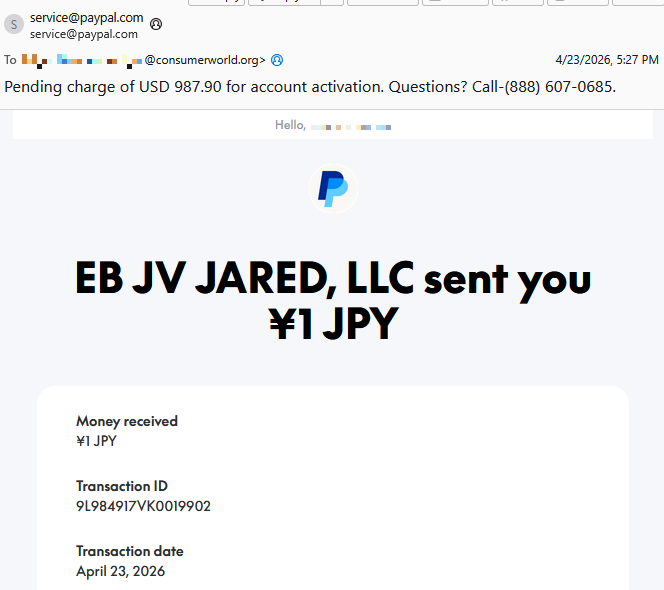
As you can see, the email comes from service@paypal.com. It wasn’t spoofed, which means it passes standard security checks (DKIM, SPF, DMARC).
While the body of the email says that you received a payment of ¥1 JPY (a whopping $0.0063), the subject line tells a different story:
“Pending charge of USD 987.90 for account activation. Questions? Call-(888) 607-0685.”
As an extra bonus for the scammers, the email contains personalized details—the recipient’s actual name and a real transaction ID.
The number in the subject line is not PayPal’s. The legitimate contact number appears inside the email.
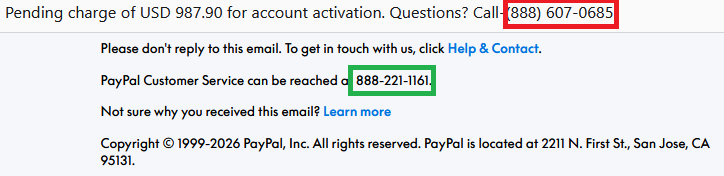

The intention of the email is straightforward.
Recipients think:
- “Oh no! There’s a pending charge for $987.90.”
- “The amount doesn’t match what I see in the email body—that’s weird and scary.”
- “I need to call this number immediately to dispute this charge.”
They call the number in the subject line, only to reach tech support scammers.
These scammers pretend to be PayPal support and may try to:
- Get you to “verify” payment methods
- Collect banking details
- Convince you to install remote access tools
- Take control of accounts or devices
- All of the above
How the subject line is altered is still unclear. Based on PayPal’s documented email behavior, subject lines are typically fixed and not meant to include arbitrary free text or phone numbers. Our findings indicate that the subject line was already weaponized at the point PayPal’s systems signed the email. If someone along the way had rewritten the subject, the dkim=pass header.d=paypal.com result would likely fail.
One possibility is that the scammer abused PayPal’s note or remittance field in a way that surfaces in certain payout templates, including the subject line and HTML <title>, even though normal merchant payment‑received emails don’t allow arbitrary subjects.

We have contacted PayPal for comment and will update this post if we hear back.
How to avoid PayPal scams
The best way to stay safe is to stay informed about the tricks scammers use. Learn to spot the red flags that almost always give away scams and phishing emails, and remember:
- Use verified, official ways to contact companies. Don’t call numbers listed in suspicious emails or attachments.
- Beware of someone wanting to connect to your computer remotely. One of the tech support scammer’s biggest weapons is their ability to connect remotely to their victims. If they do this, they essentially have total access to all of your files and folders.
- Report suspicious emails to PayPal. Send the email to
phishing@paypal.comto support their investigations.
If you’ve fallen victim to a tech support scam:
- Paid the scammer? Contact your bank or card provider and let them know what’s happened. You can also file a complaint with the FTC or your local law enforcement, depending on your region.
- Shared a password? Change it anywhere it’s used. Consider using a password manager and enable 2FA for important accounts.
- Gave access to your device? Run a full security scan. If scammers had access to your system, they may have planted a backdoor so they can revisit whenever they feel like it. Malwarebytes can remove these and other software left behind by scammers.
- Watch your accounts: Keep an eye out for unexpected payments or suspicious charges on your credit cards and bank accounts.
- Be wary of suspicious emails. If you’ve fallen for one scam, they may target you again.
Pro tip: Malwarebytes Scam Guard recognized this email as a call back scam. Upload any suspicious text, emails, attachments, and other files to ask for its opinion. It’s really very good at recognizing scams.
Something feel off? Check it before you click.
Malwarebytes Scam Guard helps you analyze suspicious links, texts, and screenshots instantly.
Available with Malwarebytes Premium Security for all your devices, and in the Malwarebytes app for iOS and Android.