❌

Visualização de leitura

Have an older iPhone or iPad? Apple has a security update for you

Apple’s latest updates include a fix for a CoreGraphics bug that may have been exploited in targeted attacks. The fix is now available for older iPhones and iPads.

Apple released security updates on October 26. Apple first fixed the flaw in iOS 26.7.1. Its latest updates also bring the fix to older devices that can’t run iOS 26, including the iPhone XS, iPhone XS Max, iPhone XR, and seventh-generation iPad.

The iOS 18.7.11 update is a backport: it brings a fix from a newer software version to an older one. Here, Apple has made the fix available to older devices running iOS 18, so they can be protected without upgrading to an operating system they don’t support.

Updates for your particular device

The table below shows which updates are available and links to Apple’s security information for each one.

Name and information linkAvailable for
iOS 27.2 and iPadOS 27.2iPhone 11 and later, iPad Pro 12.9-inch 4th generation and later, iPad Pro 11-inch 2nd generation and later, iPad Air 4th generation and later, iPad 9th generation and later, and iPad mini 6th generation and later
iOS 26.7.2 and iPadOS 26.7.2iPhone 11 and later, iPad Pro 12.9-inch 3rd generation and later, iPad Pro 11-inch 1st generation and later, iPad Air 3rd generation and later, iPad 8th generation and later, and iPad mini 5th generation and later
iOS 18.7.11 and iPadOS 18.7.11iPhone XS, iPhone XS Max, iPhone XR, iPad 7th generation
macOS Golden Gate 27.2macOS Golden Gate
macOS Tahoe 26.7.2macOS Tahoe
macOS Sequoia 15.8.2macOS Sequoia
tvOS 27.2Apple TV 4K 2nd generation and later
watchOS 27.2Apple Watch Series 9 and later
visionOS 27.2Apple Vision Pro (all models)
Safari 27.2macOS Sequoia and macOS Tahoe
tvOS 26.6.1 (no published CVE entries)Apple TV HD and Apple TV 4K 1st generation

How to update your Apple devices

How to update your iPhone or iPad

For iOS and iPadOS users, here’s how to check if you’re using the latest software version:

Go to Settings > General > Software Update. You will see if there are updates available and be guided through installing them.

Turn on Automatic Updates if you haven’t already—you’ll find it on the same screen.

How to update your Mac

To update macOS on any supported Mac, use the Software Update feature, which Apple designed to work consistently across all recent versions. Here are the steps:

  • Click the Apple menu in the upper-left corner of your screen.
  • Choose System Settings (or System Preferences on older versions).
  • Select General in the sidebar, then click Software Update on the right. On older macOS, just look for Software Update directly.
  • Your Mac will check for updates automatically. If updates are available, click Update Now (or Upgrade Now for major new versions) and follow the on-screen instructions. Before you upgrade to macOS Tahoe 26, please read these instructions.
  • Enter your administrator password if prompted, then let your Mac finish the update (it might need to restart during this process).
  • Keep your Mac plugged in and connected to the internet until the update is done.

How to update your Safari browser

Safari updates are included with macOS updates, so installing the latest version of macOS will also update Safari. To check manually:

  • Open the Apple menu > System Settings > General > Software Update.
  • If you see a Safari update listed separately, click Update Now to install it.
  • Restart your device when prompted.

Technical details

The headline bug is CVE-2026-86950, in CoreGraphics, Apple’s framework for drawing graphics, images and PDF content. It’s an out-of-bounds write flaw, where software writes data outside the memory set aside for it. The result is that “processing a maliciously crafted file may lead to arbitrary code execution.”

Apple says it is aware of a report that the flaw may have been exploited in an “extremely sophisticated attack against specific targeted individuals” on versions of iOS before iOS 27.

That wording indicates Apple believes the bug was used in real attacks against a limited group of users.

Usually, journalists, activists and officials are the targets of this kind of attack. If you think you could be a target of highly sophisticated spyware, you should update, restart your phone, and consider applying Apple’s Lockdown Mode.


Scammers know more about you than you think. 

Malwarebytes Mobile Security protects you from phishing, scam texts, malicious sites, and more. With real-time AI-powered Scam Guard built right in. 

.wp-block-kadence-advancedbtn.kb-btns97520_6de029-2f{gap:var(--global-kb-gap-xs, 0.5rem );justify-content:flex-start;align-items:center;}.kt-btns97520_6de029-2f .kt-button{font-weight:normal;font-style:normal;}.kt-btns97520_6de029-2f .kt-btn-wrap-0{margin-right:5px;}.wp-block-kadence-advancedbtn.kt-btns97520_6de029-2f .kt-btn-wrap-0 .kt-button{color:#555555;border-color:#555555;}.wp-block-kadence-advancedbtn.kt-btns97520_6de029-2f .kt-btn-wrap-0 .kt-button:hover, .wp-block-kadence-advancedbtn.kt-btns97520_6de029-2f .kt-btn-wrap-0 .kt-button:focus{color:#ffffff;border-color:#444444;}.wp-block-kadence-advancedbtn.kt-btns97520_6de029-2f .kt-btn-wrap-0 .kt-button::before{display:none;}.wp-block-kadence-advancedbtn.kt-btns97520_6de029-2f .kt-btn-wrap-0 .kt-button:hover, .wp-block-kadence-advancedbtn.kt-btns97520_6de029-2f .kt-btn-wrap-0 .kt-button:focus{background:#444444;}

ul.menu .wp-block-kadence-advancedbtn .kb-btn97520_074a67-a8.kb-button{width:initial;}.wp-block-kadence-advancedbtn .kb-btn97520_074a67-a8.kb-button{color:var(--color-neutral-10);background:var(--color-brand-blue-60);border-top-left-radius:40px;border-top-right-radius:40px;border-bottom-right-radius:40px;border-bottom-left-radius:40px;padding:var(--kb-btn-padding);margin:var(--kb-btn-margin);box-shadow:1px 1px 2px 0px rgba(0, 0, 0, 0.2);}.wp-block-kadence-advancedbtn .kb-btn97520_074a67-a8.kb-button:hover, .wp-block-kadence-advancedbtn .kb-btn97520_074a67-a8.kb-button:focus{box-shadow:0px 4px 0px 0px var(--color-brand-blue-90);}Try it now

Apple Fixes CoreGraphics Flaw Used in Targeted Attacks

CVE-2026-86950

Apple has released iOS 26.7.1 and iPadOS 26.7.1 to address CVE-2026-86950, a CoreGraphics vulnerability the company says may have been used in targeted attacks. The updates came out on September 28, 2026, along with matching fixes for macOS Tahoe 26.7.1 and macOS Sequoia 15.8.1.  The flaw is in CoreGraphics, a core Apple framework that handles graphics rendering. According to Apple, processing a maliciously crafted file may lead to arbitrary code execution. In practice, an attacker could run their own code on a vulnerable device by getting it to open a specially prepared file.  Apple described the root cause as an out-of-bounds write issue. This type of memory bug happens when software writes data past the edge of the memory area set aside for it. The company said it fixed the problem with improved bounds checking.  In its advisory, Apple stated: "Apple is aware of a report that this issue may have been exploited in an extremely sophisticated attack against specific targeted individuals on versions of iOS before iOS 27."  Apple credited Meta Product Security with reporting the vulnerability. 

Devices Covered by the iOS and iPadOS Update 

The iOS 26.7.1 and iPadOS 26.7.1 fix is available for iPhone 11 and later. On the iPad side, it covers: 
  • iPad Pro 12.9-inch (3rd generation and later) 
  • iPad Pro 11-inch (1st generation and later) 
  • iPad Air (3rd generation and later) 
  • iPad (8th generation and later) 
  • iPad mini (5th generation and later) 

CVE-2026-86950 Also Reaches macOS 

The issue is not limited to iOS and iPadOS. Apple published separate security notes for macOS Tahoe 26.7.1 and macOS Sequoia 15.8.1, both released on September 28, 2026. Each describes the same CoreGraphics flaw, the same arbitrary code execution risk, and the same out-of-bounds write fix. Each also credits Meta Product Security.  The macOS notes repeat Apple's statement that the bug may have been exploited against specific individuals on versions of iOS before iOS 27. The Tahoe update applies to macOS Tahoe, and the Sequoia update applies to macOS Sequoia.

Advisory Rates CVE-2026-86950 as High Risk 

A separate advisory, also dated September 28, 2026, classifies the problem as a remote code execution vulnerability in Apple products. It warns that a remote attacker could exploit the flaw to trigger remote code execution on a targeted system.  The advisory rates the risk level as High for two reasons. The flaw is being exploited in an extremely sophisticated attack on specific targeted individuals running versions of iOS before iOS 27. A crafted file is also enough to achieve arbitrary code execution.  The advisory lists the following as affected: 
  • Versions prior to iOS 26.7.1 and iPadOS 26.7.1 
  • Versions prior to macOS Tahoe 26.7.1 
  • Versions prior to macOS Sequoia 15.8.1 
It recommends that users visit the vendor's website for details before installing and then apply the vendor's fixes. The related Apple support pages are: 

Apple's Disclosure Approach 

Apple says that, to protect customers, it does not disclose, discuss, or confirm security issues until it has investigated them and patches or releases are available. The company references vulnerabilities by CVE-ID when possible, as it did with CVE-2026-86950. Recent releases are listed on its security releases page, and more information is on its Product Security page.  Apple's notes also state that information about products not made by Apple, or about independent websites it does not control, is provided without recommendation or endorsement. Apple directs users to contact those vendors for further details.  Since attackers have reportedly already used the flaw, owners of supported iPhones and iPads should install iOS 26.7.1 or iPadOS 26.7.1. Mac users should update to macOS Tahoe 26.7.1 or macOS Sequoia 15.8.1, depending on which version they run. 

Public PoC Released for Apple CoreGraphics Zero-Day CVE-2026-86950

Apple patched a CoreGraphics zero-day that may have been exploited in targeted attacks. A public PoC for the flaw is now available.

Apple patched a zero-day vulnerability, tracked as CVE-2026-86950, in CoreGraphics that attackers may have exploited to target specific individuals. The flaw is an out-of-bounds write that can lead to arbitrary code execution when the system processes a specially crafted file.

The vulnerability affects iOS 26.7 and earlier versions before iOS 27, as well as iPadOS 26.7 and earlier and supported versions of macOS Tahoe and macOS Sequoia. Apple released iOS 26.7.1, iPadOS 26.7.1, macOS Tahoe 26.7.1 and macOS Sequoia 15.8.1 to address the issue.

“Processing a maliciously crafted file may lead to arbitrary code execution. Apple is aware of a report that this issue may have been exploited in an extremely sophisticated attack against specific targeted individuals on versions of iOS before iOS 27.” reads Apple’s advisory. “Description: “An out-of-bounds write issue was addressed with improved bounds checking.”

The more important sentence, however, is the one that turns this from another vulnerability disclosure into a security incident worth watching. Apple says it knows of a report that the flaw may have been exploited in an “extremely sophisticated attack against specific targeted individuals” running versions of iOS before iOS 27.

Apple hasn’t disclosed who was targeted, how many people were affected, whether the attacks succeeded, or when exploitation started. It also hasn’t explained how attackers delivered the malicious files. That leaves an important part of the attack chain unknown.

CoreGraphics handles graphics and rendering functions across Apple’s operating systems, including processing content such as images and PDFs. Attackers can trigger the flaw by tricking the victim into opening a malicious file sent through a web page, an email attachment, or a messaging application, However, Apple hasn’t confirmed any of these delivery methods for CVE-2026-86950.

That distinction matters. A crafted file doesn’t need to look like an obvious executable for a vulnerability in a system component that processes content to become useful to an attacker. The security boundary can be crossed while the operating system is simply doing what it’s designed to do: interpreting a file.

Meta Product Security discovered and reported the vulnerability to Apple. The involvement of Meta is particularly interesting because the company has previously identified attacks involving Apple vulnerabilities and targeted users of its messaging platforms.

Apple did not provide many details, which is common with security fixes. Researchers at Calif analyzed the patch and published a detailed report called The Great Glyph Grift. It explains how a small rounding error in font rendering could eventually lead to memory corruption on Apple devices.

The bug was in CoreGraphics, specifically in the code that smooths the edges of letters and other shapes. CoreGraphics converts floating-point coordinates into a fixed-point format, dividing each pixel into a 4096 × 4096 grid of smaller units.

The problem happened when a number was too large to fit into a 32-bit integer. Different parts of CoreGraphics handled this overflow differently. One function limited the value to the maximum allowed integer, while another simply truncated it. This mismatch created the vulnerability.

“Converting between a double and an int32_t, when the double value exceeds the bounds of an int32_t (i.e., outside the range of [-2147483648, 2147483647]), is undefined behavior and clang may optimize this to use different floating point conversion instructions. Before the patch, aa_moveto used the ARM64 instruction FCVTZS Wd, Dn to convert to a 32-bit integer, saturating to INT32_MAX or INT32_MIN on overflow.” reads the Calif’s report. “The other function, aa_lineto, converted the double to 64-bit integers with the ARM64 instruction FCVTZS Vd.2D,Vn.2D, then used XTN to keep the low 32 bits (truncation). The patch ensures the scaled value can never exceed the size of a 32-bit signed integer using manual clamping (as shown above) to avoid the undefined behaviour entirely.”

When a glyph’s path gets recorded, CoreGraphics builds a bounding box from all the edge coordinates to figure out how big a buffer it needs for rendering. If one coordinate wraps around due to the truncation bug, the subtraction used to compare points can flip sign, and the bounding box calculation picks the wrong edge. The box ends up smaller than it should be.

That undersized box feeds straight into an allocation decision. Small buffer, real edges, the renderer writes past the end of it. Classic out-of-bounds write, just reached through a genuinely weird path involving font math instead of the usual string parsing.

Calif didn’t stop at the CoreGraphics patch. They noticed Meta credited the finding, so they compared two recent WhatsApp builds and found Meta had quietly added stricter PDF validation to WhatsApp’s attachment-scoring system, including new checks that flag malformed or unverifiable embedded fonts. That’s a strong hint about the delivery format: a booby-trapped font inside a PDF, sent as an attachment.

Worth noting, the researchers were upfront about the limits of their own work.

“We’ve provided our minimal PDF and TrueType font generation scripts, a sample harness, and a Makefile for generating this example crashing file in our GitHub repository.” the report continues. “Going from this to code execution is another exercise entirely.”

They built a reliable crash, not a working exploit chain. That’s not a small gap, but it’s also not nothing, since a crash PoC against a zero-click surface is exactly the kind of thing defenders want to study before attackers get there first.

CoreGraphics’ rasterizer is used everywhere fonts get drawn on Apple platforms, which means the attack surface isn’t limited to one app. Anywhere a file gets automatically rendered into a thumbnail or preview is a potential trigger, no user interaction required beyond receiving the file. That’s the whole appeal of zero-click bugs to attackers and the whole nightmare for defenders.

The Hacker News revealed that proof-of-concept (PoC) code is now circulating publicly, which raises the urgency for anyone who hasn’t patched yet.

“Security researchers have published the first public proof-of-concept for CVE-2026-86950, an Apple CoreGraphics flaw Apple says may have been used in attacks against specific targeted individuals.” The Hacker News reports. “The trigger is a malicious PDF with a crafted embedded font that crashes unpatched iPhones and Macs. The code causes a crash, not an execution error. Turning the memory corruption into a working exploit is separate work the analysis does not demonstrate.”

This isn’t a bug you can mitigate with better input sanitization on your own app, since the flaw sits inside the OS rendering stack itself. Updating is the fix, full stop. And if you’re the kind of team that reads vendor advisories literally, maybe start reading “sophisticated attack against specific targeted individuals” as the understatement it actually is.

Researchers at Calif published a PoC that triggers the bug on macOS and iOS.

Follow me on Twitter: @securityaffairs and Facebook and Mastodon

Pierluigi Paganini

(SecurityAffairs – hacking, Apple)

U.S. CISA adds Apple Multiple Products flaw to its Known Exploited Vulnerabilities catalog

U.S. Cybersecurity and Infrastructure Security Agency (CISA) adds Apple Multiple Products flaw to its Known Exploited Vulnerabilities catalog.

The U.S. Cybersecurity and Infrastructure Security Agency (CISA) added an Apple Multiple Products flaw, tracked as CVE-2026-86950 (CVSS score of 8.8), to its Known Exploited Vulnerabilities (KEV) catalog.

This week, Apple has released security updates for iOS, iPadOS and macOS to fix a zero-day vulnerability CVE-2026-86950 in CoreGraphics that may have been exploited in attacks against specific individuals. The flaw is an out-of-bounds write that can lead to arbitrary code execution when the system processes a specially crafted file.

The vulnerability affects iOS 26.7 and earlier versions before iOS 27, as well as iPadOS 26.7 and earlier and supported versions of macOS Tahoe and macOS Sequoia. Apple released iOS 26.7.1, iPadOS 26.7.1, macOS Tahoe 26.7.1 and macOS Sequoia 15.8.1 to address the issue.

“Processing a maliciously crafted file may lead to arbitrary code execution. Apple is aware of a report that this issue may have been exploited in an extremely sophisticated attack against specific targeted individuals on versions of iOS before iOS 27.” reads Apple’s advisory. “Description: “An out-of-bounds write issue was addressed with improved bounds checking.”

Apple says it knows of a report that the flaw may have been exploited in an “extremely sophisticated attack against specific targeted individuals” running versions of iOS before iOS 27.

Apple hasn’t disclosed who was targeted, how many people were affected, whether the attacks succeeded, or when exploitation started. It also hasn’t explained how attackers delivered the malicious files. That leaves an important part of the attack chain unknown.

CoreGraphics handles graphics and rendering functions across Apple’s operating systems, including processing content such as images and PDFs. Attackers can trigger the flaw by tricking the victim into opening a malicious file sent through a web page, an email attachment, or a messaging application, However, Apple hasn’t confirmed any of these delivery methods for CVE-2026-86950.

That distinction matters. A crafted file doesn’t need to look like an obvious executable for a vulnerability in a system component that processes content to become useful to an attacker. The security boundary can be crossed while the operating system is simply doing what it’s designed to do: interpreting a file.

Meta Product Security discovered and reported the vulnerability to Apple. The involvement of Meta is particularly interesting because the company has previously identified attacks involving Apple vulnerabilities and targeted users of its messaging platforms.

According to Binding Operational Directive (BOD) 22-01: Reducing the Significant Risk of Known Exploited Vulnerabilities, FCEB agencies have to address the identified vulnerabilities by the due date to protect their networks against attacks exploiting the flaws in the catalog.

Experts also recommend that private organizations review the Catalog and address the vulnerabilities in their infrastructure.

CISA orders federal agencies to fix the flaw by October 2nd, 2026.

Follow me on Twitter: @securityaffairs and Facebook and Mastodon

Pierluigi Paganini

(SecurityAffairs – hacking, CISA)

Apple Patches CoreGraphics Zero-Day Linked to Sophisticated Targeted Attacks

Apple patched zero-day CVE-2026-86950 in CoreGraphics, exploited in sophisticated targeted attacks against specific iOS users.

Apple has released security updates for iOS, iPadOS and macOS to fix a zero-day vulnerability, tracked as CVE-2026-86950, in CoreGraphics that may have been exploited in attacks against specific individuals. The flaw is an out-of-bounds write that can lead to arbitrary code execution when the system processes a specially crafted file.

The vulnerability affects iOS 26.7 and earlier versions before iOS 27, as well as iPadOS 26.7 and earlier and supported versions of macOS Tahoe and macOS Sequoia. Apple released iOS 26.7.1, iPadOS 26.7.1, macOS Tahoe 26.7.1 and macOS Sequoia 15.8.1 to address the issue.

“Processing a maliciously crafted file may lead to arbitrary code execution. Apple is aware of a report that this issue may have been exploited in an extremely sophisticated attack against specific targeted individuals on versions of iOS before iOS 27.” reads Apple’s advisory. “Description: “An out-of-bounds write issue was addressed with improved bounds checking.”

The more important sentence, however, is the one that turns this from another vulnerability disclosure into a security incident worth watching. Apple says it knows of a report that the flaw may have been exploited in an “extremely sophisticated attack against specific targeted individuals” running versions of iOS before iOS 27.

Apple hasn’t disclosed who was targeted, how many people were affected, whether the attacks succeeded, or when exploitation started. It also hasn’t explained how attackers delivered the malicious files. That leaves an important part of the attack chain unknown.

CoreGraphics handles graphics and rendering functions across Apple’s operating systems, including processing content such as images and PDFs. Attackers can trigger the flaw by tricking the victim into opening a malicious file sent through a web page, an email attachment, or a messaging application, However, Apple hasn’t confirmed any of these delivery methods for CVE-2026-86950.

That distinction matters. A crafted file doesn’t need to look like an obvious executable for a vulnerability in a system component that processes content to become useful to an attacker. The security boundary can be crossed while the operating system is simply doing what it’s designed to do: interpreting a file.

Meta Product Security discovered and reported the vulnerability to Apple. The involvement of Meta is particularly interesting because the company has previously identified attacks involving Apple vulnerabilities and targeted users of its messaging platforms.

Last year, WhatsApp disclosed that a vulnerability in its iOS and macOS applications, tracked as CVE-2025-55177, was likely chained with Apple’s ImageIO zero-day CVE-2025-43300 in zero-click attacks against fewer than 200 users. There is no evidence that the new CoreGraphics vulnerability was used through WhatsApp, and SecurityWeek reported that it was seeking clarification from Meta.

That uncertainty is worth keeping intact. It would be easy to connect the two incidents simply because Meta reported the new Apple flaw, but the available information doesn’t establish that link.

The patch itself is also interesting because Apple has fixed the vulnerability in the older operating system branches rather than treating the move to the latest major release as the only answer. Apple released iOS 26.7.1 and iPadOS 26.7.1 for supported iPhones and iPads, while macOS Tahoe 26.7.1 and macOS Sequoia 15.8.1 address the problem on Macs.

CISA had not yet added CVE-2026-86950 to its Known Exploited Vulnerabilities catalog.

This isn’t the first Apple vulnerability this year to carry an exploitation warning. In February, Apple patched CVE-2026-20700, a memory corruption issue in the dynamic linker, or dyld, after reporting that it had been weaponized in sophisticated attacks.

The pattern is more relevant than the individual CVE. Attackers targeting a small number of people don’t need a vulnerability that affects millions of devices indiscriminately. They need a reliable flaw in a component that processes content, a way to get that content in front of the target, and an exploitation chain that can survive the platform’s security controls.

The practical response is straightforward. Organizations managing Apple devices should identify systems still running affected releases and prioritize the relevant security updates, particularly where devices belong to executives, researchers, journalists, government personnel or other users who may face targeted attacks.

Follow me on Twitter: @securityaffairs and Facebook and Mastodon

Pierluigi Paganini

(SecurityAffairs – hacking, Apple)

Update your iPhone, iPad, or Mac: Flaw could run attackers’ code

Apple has released updates for iPhones, iPads, and Macs to fix a flaw that could let an attacker run code when a device processes a malicious file. Apple says it may have been used in highly targeted attacks against iPhone users running versions of iOS before iOS 27.

The fix is in iOS and iPadOS 26.7.1, as well as macOS Sequoia 15.8.1 and macOS Tahoe 26.7.1. Check Software Update on each of your Apple devices and install the latest version offered.

Updates for your particular device

The table below shows which relevant updates are available and links to Apple’s security information for each one.

UpdateAvailable for
iOS 26.7.1 and iPadOS 26.7.1iPhone 11 and later, iPad Pro 12.9-inch 3rd generation and later, iPad Pro 11-inch 1st generation and later, iPad Air 3rd generation and later, iPad 8th generation and later, and iPad mini 5th generation and later
macOS Tahoe 26.7.1macOS Tahoe
macOS Sequoia 15.8.1macOS Sequoia

How to update your Apple devices

How to update your iPhone or iPad

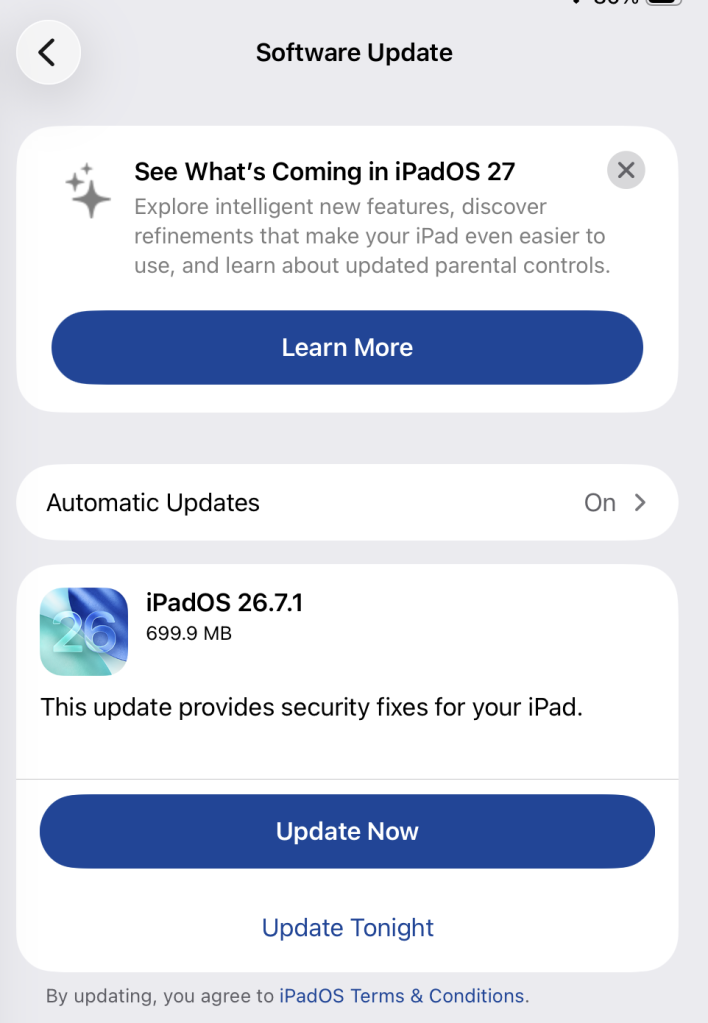
To check if you’re using the latest software version, go to Settings > General > Software Update. You’ll see if an update is available and be guided through installing it.

Turn on Automatic Updates if you haven’t already—you’ll find it on the same screen.

Available update options on iPad

How to update macOS on any version

To update macOS on any supported Mac, use Software Update:

  • Click the Apple menu in the upper-left corner of your screen.
  • Choose System Settings (or System Preferences on older versions).
  • Select General in the sidebar, then click Software Update on the right. On older macOS, look for Software Update directly.
  • Your Mac will check for updates automatically. If updates are available, click Update Now (or Upgrade Now for major new versions) and follow the on-screen instructions. Before you upgrade to macOS Tahoe 26, read Apple’s instructions.
  • Enter your administrator password if prompted, then let your Mac finish the update. It may need to restart.
  • Make sure your Mac stays plugged in and connected to the internet until the update is done.

Technical details

The bug, CVE-2026-86950, affects CoreGraphics, an Apple framework used throughout its operating systems and apps to display and process visual content such as images and PDFs.

It’s an out-of-bounds write issue, which Apple addressed with improved bounds checking. This type of bug happens when software writes data beyond the limits of its allocated area of memory. It can overwrite other data in memory, interfere with the normal operation of the program, cause a crash, or even let an attacker take control of the affected process. In this case, processing a maliciously crafted file may lead to an attacker running their own code.

Apple says it is aware of a report that the issue may have been exploited in an “extremely sophisticated attack” against specific people using versions of iOS before iOS 27. Although the reported attack was highly targeted, other attackers could try to exploit the flaw now that it has been disclosed. 


Scammers know more about you than you think. 

Malwarebytes Mobile Security protects you from phishing, scam texts, malicious sites, and more. With real-time AI-powered Scam Guard built right in. 

.wp-block-kadence-advancedbtn.kb-btns97520_6de029-2f{gap:var(--global-kb-gap-xs, 0.5rem );justify-content:flex-start;align-items:center;}.kt-btns97520_6de029-2f .kt-button{font-weight:normal;font-style:normal;}.kt-btns97520_6de029-2f .kt-btn-wrap-0{margin-right:5px;}.wp-block-kadence-advancedbtn.kt-btns97520_6de029-2f .kt-btn-wrap-0 .kt-button{color:#555555;border-color:#555555;}.wp-block-kadence-advancedbtn.kt-btns97520_6de029-2f .kt-btn-wrap-0 .kt-button:hover, .wp-block-kadence-advancedbtn.kt-btns97520_6de029-2f .kt-btn-wrap-0 .kt-button:focus{color:#ffffff;border-color:#444444;}.wp-block-kadence-advancedbtn.kt-btns97520_6de029-2f .kt-btn-wrap-0 .kt-button::before{display:none;}.wp-block-kadence-advancedbtn.kt-btns97520_6de029-2f .kt-btn-wrap-0 .kt-button:hover, .wp-block-kadence-advancedbtn.kt-btns97520_6de029-2f .kt-btn-wrap-0 .kt-button:focus{background:#444444;}
ul.menu .wp-block-kadence-advancedbtn .kb-btn97520_074a67-a8.kb-button{width:initial;}.wp-block-kadence-advancedbtn .kb-btn97520_074a67-a8.kb-button{color:var(--color-neutral-10);background:var(--color-brand-blue-60);border-top-left-radius:40px;border-top-right-radius:40px;border-bottom-right-radius:40px;border-bottom-left-radius:40px;box-shadow:1px 1px 2px 0px rgba(0, 0, 0, 0.2);}.wp-block-kadence-advancedbtn .kb-btn97520_074a67-a8.kb-button:hover, .wp-block-kadence-advancedbtn .kb-btn97520_074a67-a8.kb-button:focus{box-shadow:0px 4px 0px 0px var(--color-brand-blue-90);}Try it now
❌