Today Fox-IT is publicly releasing its full Cobalt Strike Beacon Corpus, containing 56,843 raw beacons and their parsed configurations, from 190,182 sightings collected from 30,604 unique IP addresses running a Team Server (the Cobalt Strike command-and-control server that beacons connect back to) between 4 July 2018 and 29 September 2026, over eight years of beacon data. The corpus is available on Hugging Face: https://huggingface.co/datasets/fox-srt/cobaltstrike-beacon-corpus
Back in March 2022 we published Mining Data from Cobalt Strike Beacons. That post covered 128,340 beacon sightings collected from July 2018 to February 2022, and it introduced our Python project dissect.cobaltstrike for parsing them.
Since then, public scanning for Team Servers has become routine, and Cobalt Strike has shipped versions 4.6 through 4.13. Researchers have regularly asked us for an updated dataset. And here it is, a large, consistent, long-running dataset for the infosec community to build on. The corpus includes the raw beacon payloads, not just our parsed output, so anyone can reproduce our results or improve on them.
We also see publishing this corpus as an act of preservation. C2 infrastructure is short-lived, as the median Team Server is reachable for just 14 days, and the beacons it serves vanish with it. Eight years of collection captures things that can no longer be observed today, like the waves of cracked 4.0 builds or the adoption of leaked versions. By publishing the raw beacons alongside the parsed data, we keep that record available for anyone to study, long after the servers themselves are gone.
What’s in the corpus
The corpus is published on Hugging Face as two Parquet files:
File
Size
Rows
Contents
beacons.parquet
52 MB
190,182
Every sighting of a beacon, with collection metadata, network context and the parsed beacon configuration.
payloads.parquet
9.7 GB
56,843
The raw beacon payloads, wrapped in CaRT as an extra safety layer so the samples are neutered until you deliberately unpack them.
All beacons were downloaded directly from internet-facing Team Servers, mostly on TCP ports 80 and 443 (HTTP and HTTPS) and UDP port 53 (DNS), with a small number on other ports. We deliberately didn’t include samples from other sources such as VirusTotal, so the corpus reflects the Cobalt Strike landscape as it was visible on the internet.
How we collected it
The collection method matches our 2022 post. We fingerprint likely Team Servers on the internet, then request a beacon payload from each one using a URI that passes Cobalt Strike’s checksum8 check. Every beacon that comes back is parsed with dissect.cobaltstrike, which decodes the configuration block. The result is stored as a sighting.
Discovery: candidate hosts from our own internet-wide scanning. As in 2022, we’re keeping our fingerprints private so they stay effective; writing your own is left as an exercise for the reader.
Download: x86 beacons over HTTP(S) and DNS.
DNS: for DNS listeners we’re not publishing that fingerprint either, but it’s not rocket science. The beacon is fetched as a series of TXT record lookups sent over UDP port 53 directly to the Team Server’s DNS listener.
Parse: Use dissect.cobaltstrike to parse the beacon and export the configuration
Enrich: TLS certificate data captured at collection time (where available) and GeoIP/ASN via historical GeoIP databases.
Note that there might be some small gaps in the collection due to automation issues that we did not catch in time.
Getting started
Most research only needs the beacons.parquet dataset. The payloads.parquet dataset containing raw beacon payloads is only required if you want to re-parse the beacons or look into the ones that failed parsing.
I’m a big fan of DuckDB (and SQLite), and over time I’ve become fond of SQL for querying data as well. DuckDB is very fast, and AI assistants are very good at writing SQL queries. These days, that beats hand-writing pandas code and the matching matplotlib charts. That’s why I recommend exploring the data with DuckDB, for example in a Jupyter notebook.
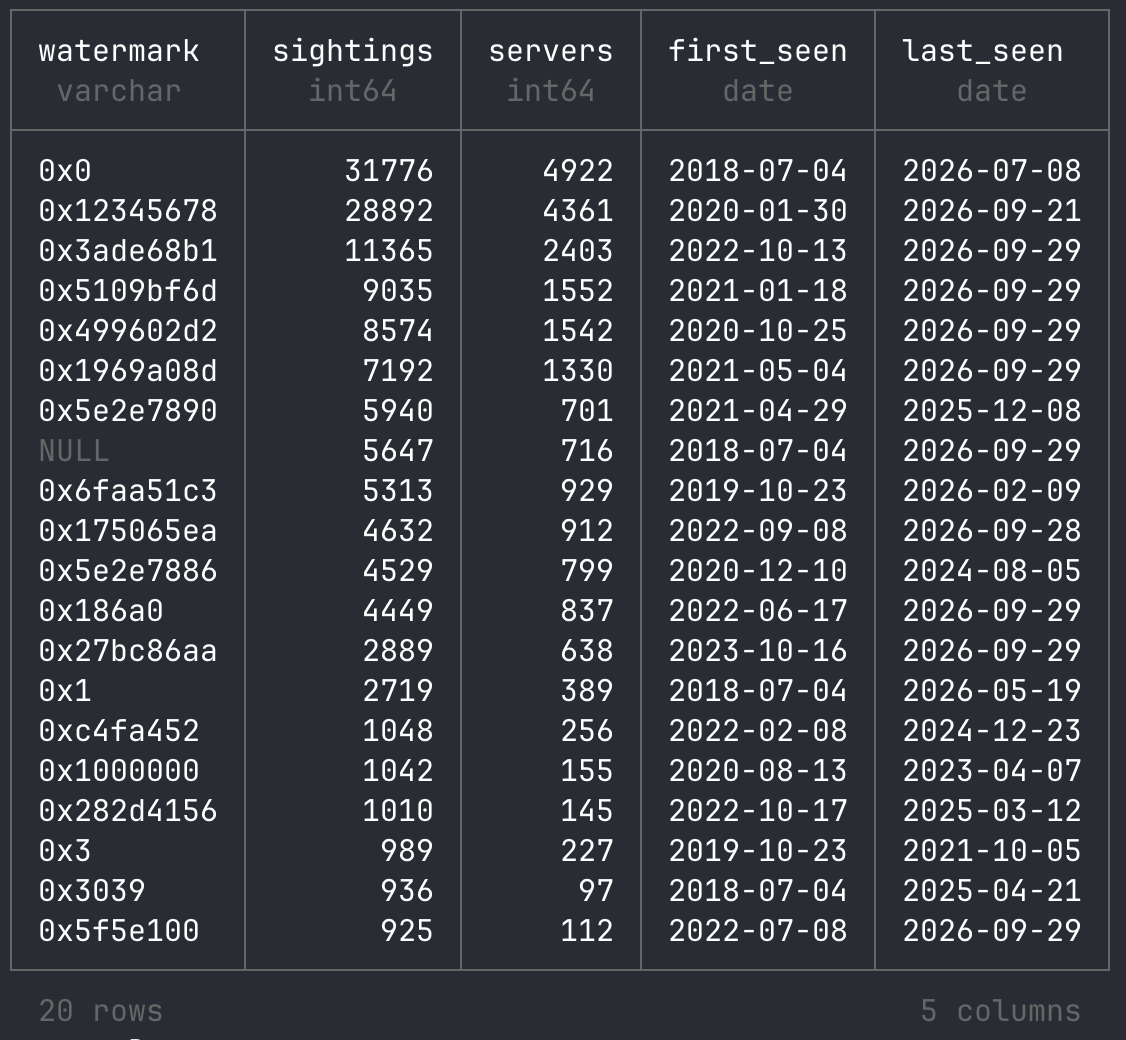
An example of using DuckDB to query the dataset on Hugging Face directly:
SELECT watermark,
       count(*)                          AS sightings,
       count(DISTINCT collected_from_ip) AS servers,
       min(collected_on)                 AS first_seen,
       max(collected_on)                 AS last_seen
FROM 'hf://datasets/fox-srt/cobaltstrike-beacon-corpus/data/beacons.parquet'
GROUP BY watermark
ORDER BY sightings DESC
LIMIT 20;
Take a look at our Jupyter notebook in the Hugging Face repository as a starting point. It contains every query and chart from the sections below, so you can rerun them or adapt them to your own research questions.
A first look at the data
Here are a few quick results to show what the corpus can answer. They’re a starting point, not a full analysis. As with our 2022 post, we invite researchers to explore the data; see also “Research ideas” below.
Old versions never die
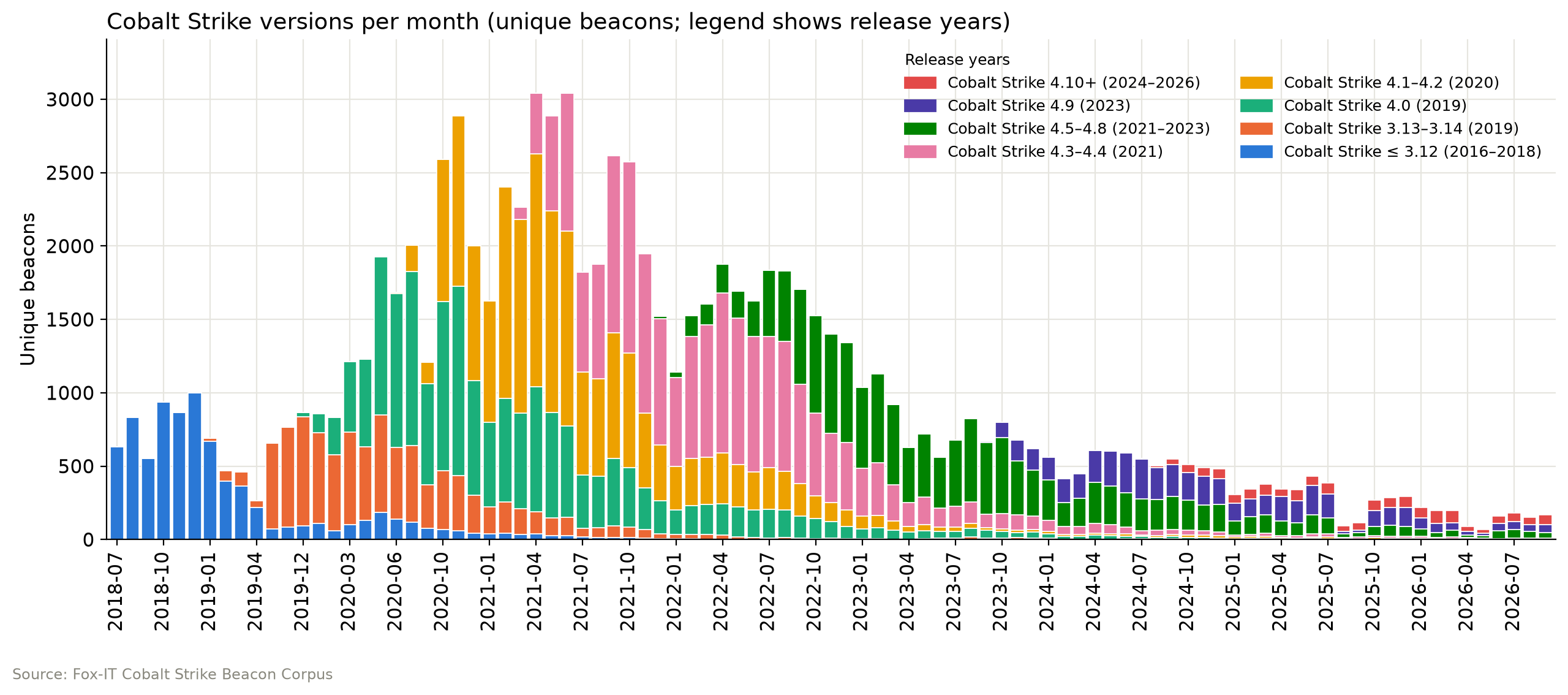
Each Cobalt Strike release takes over from the last, but old versions linger. Cobalt Strike 4.0 dominated most of 2020, 4.1–4.2 drove the early 2021 peak of about 3,000 beacons a month, 4.3–4.4 led from mid-2021 through 2022, and 4.5–4.8 took over in 2023. Since 2024, 4.9 and 4.5–4.8 have shared the lead, while 4.10+ remains a small share. Volume has since dropped to around 200 beacons a month, partly because fewer servers stage their beacon, which brings us to the next graph.
No beacon for you
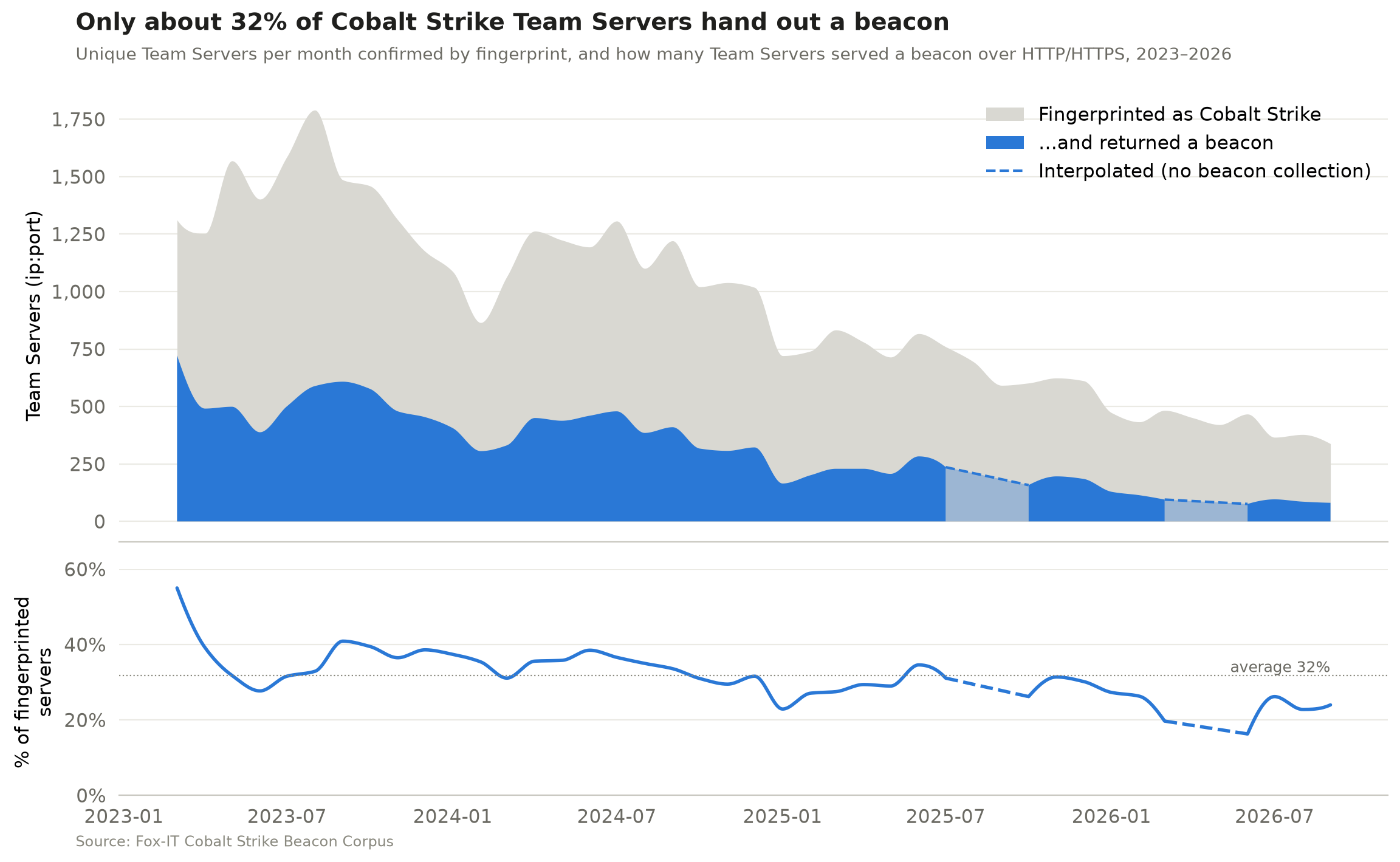
Our collection relies on beacon staging, meaning a Team Server can serve its beacon as a downloadable payload to anyone who requests the right URI or DNS record. Operators can turn this off (the host_stage option in the Malleable C2 profile), and disabling it is common OPSEC advice. To measure how much this affects our beacon collection, we counted two numbers per month:
The unique Team Servers (ip:port) confirmed by our high-confidence HTTP fingerprint
The unique Team Servers (ip:port) that handed out a beacon over HTTP(S)
These are monthly totals, not a server-by-server match. On average, the Team Servers that handed out a beacon were only about 32% of those we fingerprinted, and that share has drifted down from around 40% in 2023 to 20–25% in 2026. In other words, because not every server hands out a beacon, the corpus shows only part of the Cobalt Strike landscape, and that part is getting smaller. Disabled beacon staging is the most likely reason, but not the only one. Servers can go offline between fingerprinting and download or block our scanners, and our fingerprint doesn’t catch every Team Server.
The dashed sections mark months when beacon collection wasn’t running, because of an automation error that went unnoticed for a while.
The short life of a Cobalt Strike Team Server
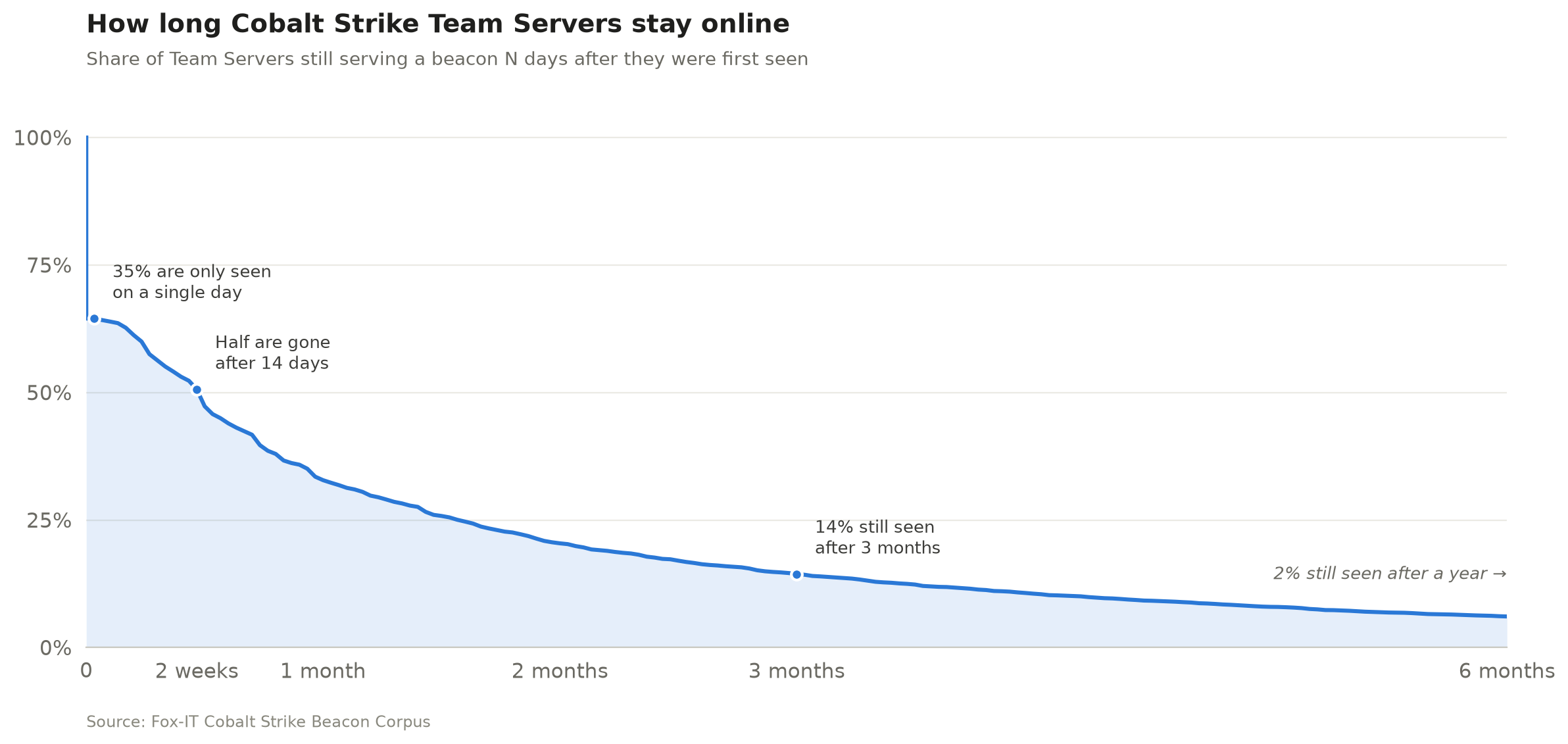
The median Team Server was reachable for 14 days. 35% were seen on a single day only, just 14% were still serving a beacon after three months, and only 2% after a year.
We identify a Team Server by its public key and C2 domains from the beacon configuration (or its IP address when the configuration contains no domains), so a server that moves to a new IP is still counted once. This allows us to measure how long a Team Server typically stays online. Identifying servers by public key alone or by ip:port gives almost the same result, a median lifetime of 14–15 days. These are first-to-last-sighting spans, so a server may have been online before our first and after our last sighting. Servers still active in the last 30 days are left out.
It’s always DNS
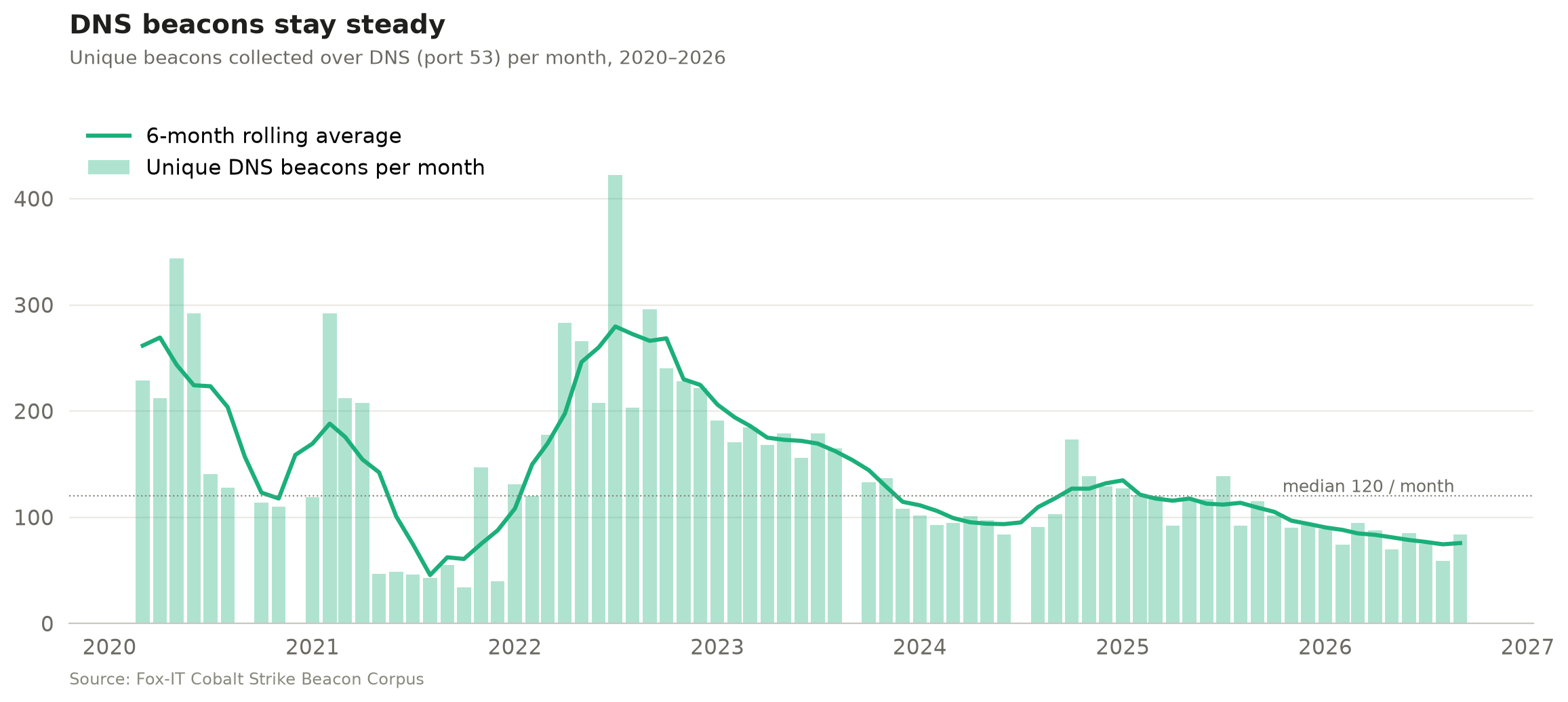
Most public scanning focuses only on HTTP(S) beacons, but we’ve also collected DNS beacons since 2020 (apart from the months when our automation broke). DNS beacons have declined much less steeply than HTTP(S) ones, perhaps because they get far less attention in public research and OPSEC advice, so fewer operators think to lock them down. After a peak in 2022, they have mostly hovered around 100 a month since 2024, with a median of 120 over the whole period.
Parse me if you can
The corpus also includes 128 unique beacons (0.23%) that we downloaded but couldn’t parse. Note that the corpus doesn’t contain HTML pages or other responses that were unlikely to be a beacon. We excluded those before publishing. At first glance, most are beacons with custom modifications that dissect.cobaltstrike can’t parse yet. And some payloads from the early years aren’t Cobalt Strike at all, but Metasploit Meterpreter payloads. We’ve deliberately left them in for researchers to analyse. You can find all unparsed beacons with: WHERE config_json IS NULL
The unparsed count used to be higher, but we managed to bring that down. We noticed some operators customised their beacon configs, for example by shuffling the order of the configuration settings or changing their type values, which broke our parser (and probably most others). The corpus helped us find these cases, so we made the config scanning of dissect.cobaltstrike independent of layout and added many other features and fixes along the way. See the dissect.cobaltstrike v1.3.0 release notes.
Research ideas
Some other research questions that could be answered using the corpus:
Clustering: Group operators by config features (watermark, SPAWNTO/PROCINJ hash, C2 profile, certificate, sleep/jitter, specific beacon modifications)
Classification: Separate red team from criminal infrastructure. Build and publish labelled subsets.
Infrastructure: Top hosting providers that are hosting a Cobalt Strike Team Server.
Certificates: Pivot on x509 reuse across servers and time or find how many are running the default Cobalt Strike keystore certificate.
Benchmarks: Use the corpus as a shared test set for config extractors and ML models.
Parser failures: 128 beacons can’t be parsed by dissect.cobaltstrike. Figure out why.
Over to you
Eight years of Cobalt Strike beacons are now one download away on Hugging Face. Run your own queries, pick up one of the research ideas above or come up with your own, dig into the beacons we couldn’t parse, and share what you find.
Before you start, read the Limitations section on the dataset card. The raw payloads are real Cobalt Strike beacons, so handle them like any other malware sample.
During our research of activity affecting a diplomatic organization in Indonesia, we uncovered a previously undocumented malware family that we have named SharkLoader. What initially appeared to be an isolated case quickly expanded into a broader campaign as we identified additional SharkLoader infections across multiple countries and sectors.
Our investigation revealed that SharkLoader serves as a loader designed to deploy Cobalt Strike Beacon on compromised systems. We observed the threat actor deploying SharkLoader through exploitation of internet-facing applications, including Microsoft Exchange, Microsoft SharePoint, and Openfire Server, as well as through malware-based delivery mechanisms.
Beyond the diplomatic entity in Indonesia, we identified related activity targeting government organizations in Taiwan, software development companies across multiple countries, and entities in other sectors located in Hong Kong, Lebanon, Syria, Colombia, North Macedonia, Nepal, Serbia, and more. The observed victimology suggests a campaign with broad geographic reach and a diverse target set rather than a narrow focus on a specific industry or region.
For now, we are tracking this activity as StrikeShark. Although the operators utilize several open-source post-compromise tools associated with Chinese-speaking developers, we have not identified direct code reuse, infrastructure overlap, or operational similarity to confidently attribute the activity to any known APT or cybercrime group. As a result, attribution remains preliminary and the campaign’s ultimate objectives are still under research.
Initial infection
Our analysis of SharkLoader intrusions indicates that the threat actor employs multiple methods to gain initial access to victim environments. During our investigation, we observed two primary infection vectors: the exploitation of vulnerabilities in internet-facing applications and the deployment of custom dropper samples, some of which were disguised as legitimate software.
Exploitation of public-facing applications
In the incident affecting an Indonesian diplomatic entity, the threat actor exploited Microsoft Exchange vulnerabilities, including CVE-2021-26855 (ProxyLogon), to gain access to the target environment. Similar activity was observed in Taiwan, where software development organizations were compromised through exploitation of Openfire (CVE-2023-32315). In a separate incident affecting a Colombian organization, the threat actor exploited a GeoServer instance vulnerable to CVE-2024-36401.
Beyond these incidents, we identified additional exploitation activity targeting vulnerabilities in multiple internet-facing enterprise applications and network appliances including those listed below:
As of the time of writing this article, we haven’t obtained the exploits the attackers used. However, based on the vulnerabilities observed across multiple attacks, we assess with medium confidence that the threat actor primarily relies on publicly available proof-of-concept (PoC) exploits to gain initial access. All the vulnerabilities identified during our investigation have publicly available exploit code, including PoCs hosted on GitHub and other open-source platforms, suggesting the actor leverages existing offensive resources rather than develops custom exploit capabilities. The victim profile also indicates that the activity is largely opportunistic, affecting organizations across various industries, regions, and technology environments without a clear focus on a specific target set. Also, one of the IP addresses associated with the C2 domain was also observed conducting internet-wide scanning activity, potentially aimed at identifying and exploiting vulnerable internet-facing systems at scale.
Following exploitation, the attacker established persistence on compromised servers through the deployment of webshells. Although we were unable to recover the webshell files, a series of commands whose execution we observed in our telemetry along with the detection records of webshells strongly indicate their use for post-exploitation activities.
One of the earliest observed actions involved copying the legitimate Windows application SystemSettings.exe to a new location before executing it.
cd C:\Windows\ImmersiveControlPanel\
copy SystemSettings.exe C:\ProgramData\
cd C:\ProgramData\
SystemSettings.exe
This application was later abused as part of a DLL sideloading chain used to launch SharkLoader, which in this scenario was hidden in the malicious SystemSettings.dll library. We suspect that this DLL along with malicious encrypted files, which we’ll describe further, was uploaded through the webshell to the same directory as SystemSettings.exe.
In another case involving the exploitation of CVE-2021-27076, the threat actor launched SystemSettings.exe triggering the subsequent SharkLoader sideloading chain from different directories on the system, which suggests renewed operational activity in the victim environment. In some of the cases, they used security product vendor names as the directory names, allegedly to appear legitimate.
cd C:\ProgramData\KasperskyLab\
dir
.\SystemSettings.exe
cd %APPDATA%
dir
cd kasperskylab
dir
.\SystemSettings.exe
Dropper-based distribution
In several observed cases, the threat actor distributed SharkLoader through custom dropper executables masquerading as legitimate software installers or applications such as Google Update and Cisco AnyConnect. However, the exact delivery mechanism used to distribute these droppers remains unknown.
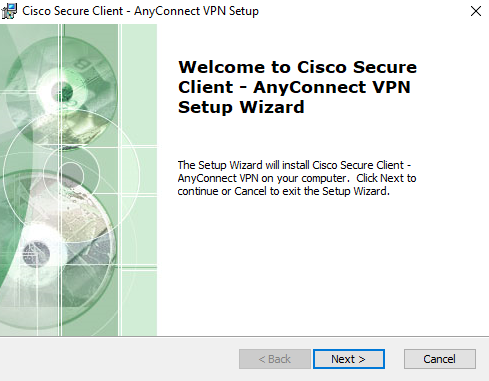
In one of the samples we analyzed, the threat actor used a legitimate Cisco AnyConnect VPN installer as a lure. The custom dropper extracted zlib-compressed data embedded within its resource section, decompressed it into an MSI package, and wrote the file to %APPDATA%\reports\AnyConnect-win-4.msi. The MSI package was a legitimate Cisco AnyConnect VPN installer, which was subsequently executed via the ShellExecuteW API, making the user believe the custom dropper was a legitimate application.
While the Cisco AnyConnect installer was decompressed and executed, SharkLoader components were silently dropped into directories in %APPDATA% different from %APPDATA%\reports\ in the background, executing the malware loader once the installation process completes.
Malicious Cisco Secure Client installer
In addition to installer-themed lures, several SharkLoader droppers use decoy PDF documents to persuade victims to open the malicious file. However, not all samples employ this technique, as some droppers function solely as a delivery mechanism for SharkLoader without presenting any lure content.
Among the samples analyzed, most droppers write the decoy PDF to a subdirectory named aswerf within the %TEMP% directory, while others save the document directly to %TEMP%.
Analysing the sample shows the PDF files are stored within the dropper’s resource section under the resource name TELEMETRY and are compressed with zlib. Upon execution, the dropper extracts and decompresses the embedded PDF, writes it to disk using the same filename as the dropper executable but with a PDF extension, and launches it via cmd.exe /c to display the decoy document to the victim.
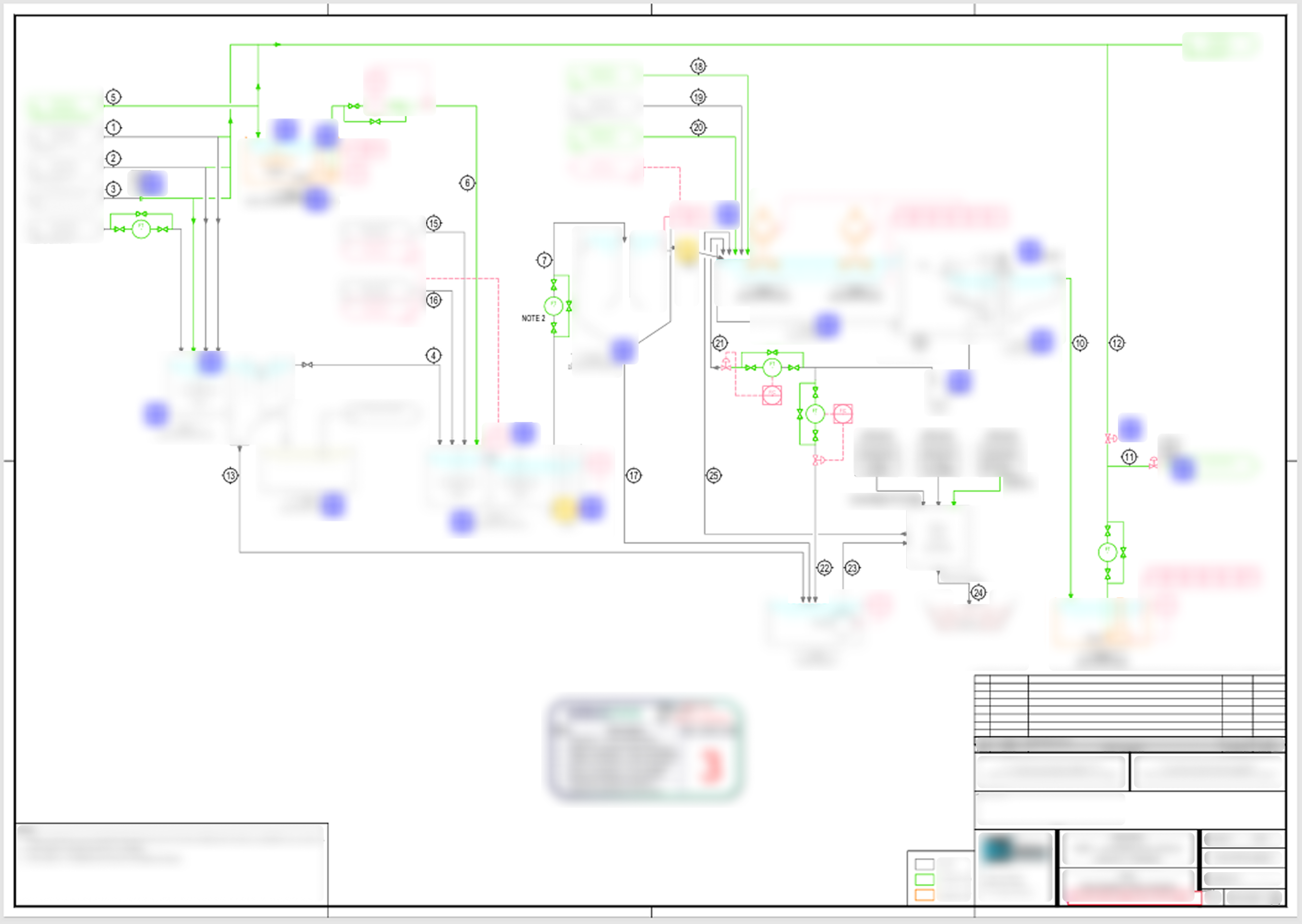
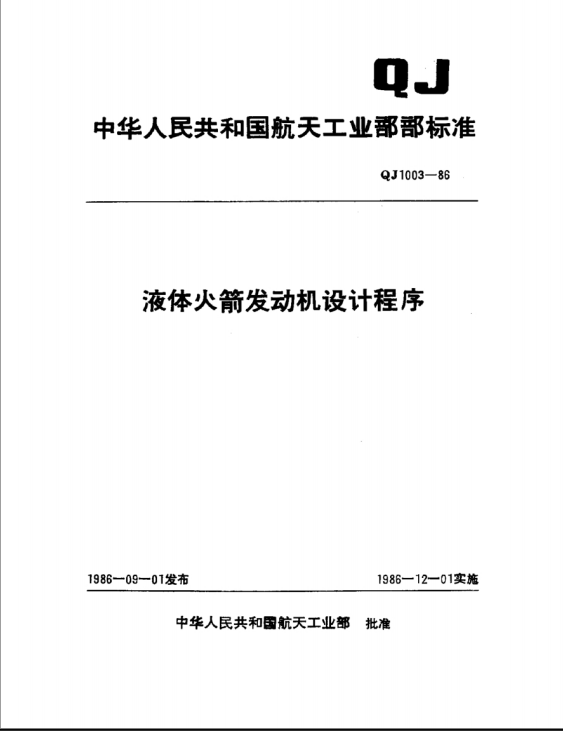
The following are examples of PDF documents extracted and displayed by the droppers during the deployment of SharkLoader.
Lure document 1. The document appears to be related to a biological treatment process and was produced by an engineering consultant
Lure Document 2. Translated title: Liquid Rocket Engine Design Program
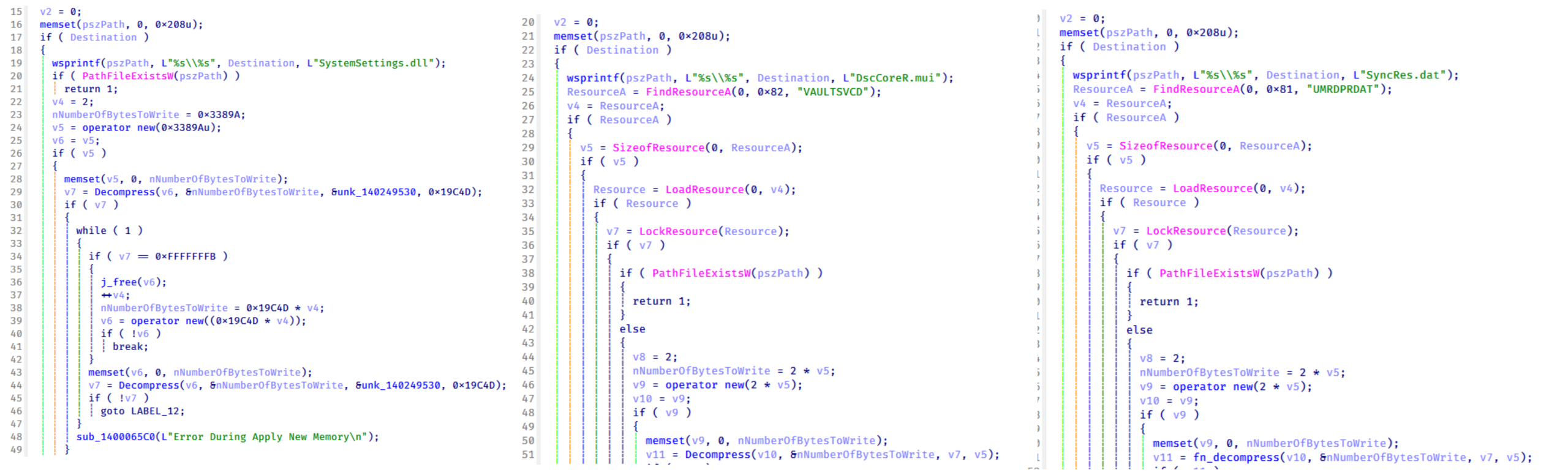
In one dropper sample, discovered on a machine located in Lebanon (MD5: 1F65544978B8EA0E745E573B8EE9684B), the dropper extracts and decompresses SystemSettings.dll from zlib-compressed data embedded within the binary and writes it to %APPDATA%\xwreg. It also extracts and decompresses DscCoreR.mui and SyncRest.dat from resources named VAULTSVCD and UMRDPRDAT, respectively, and writes them to the same directory.
The dropper extracts SystemSettings.dll from the binary and retrieves encrypted components from the resource section
The dropper then copies the legitimate SystemSettings.exe application from C:\Windows\ImmersiveControlPanel to the target location to facilitate DLL sideloading. Across other SharkLoader dropper samples analyzed, the malware components were observed being written to either %APPDATA%\xwreg or %APPDATA%\xgdf.
SharkLoader installation
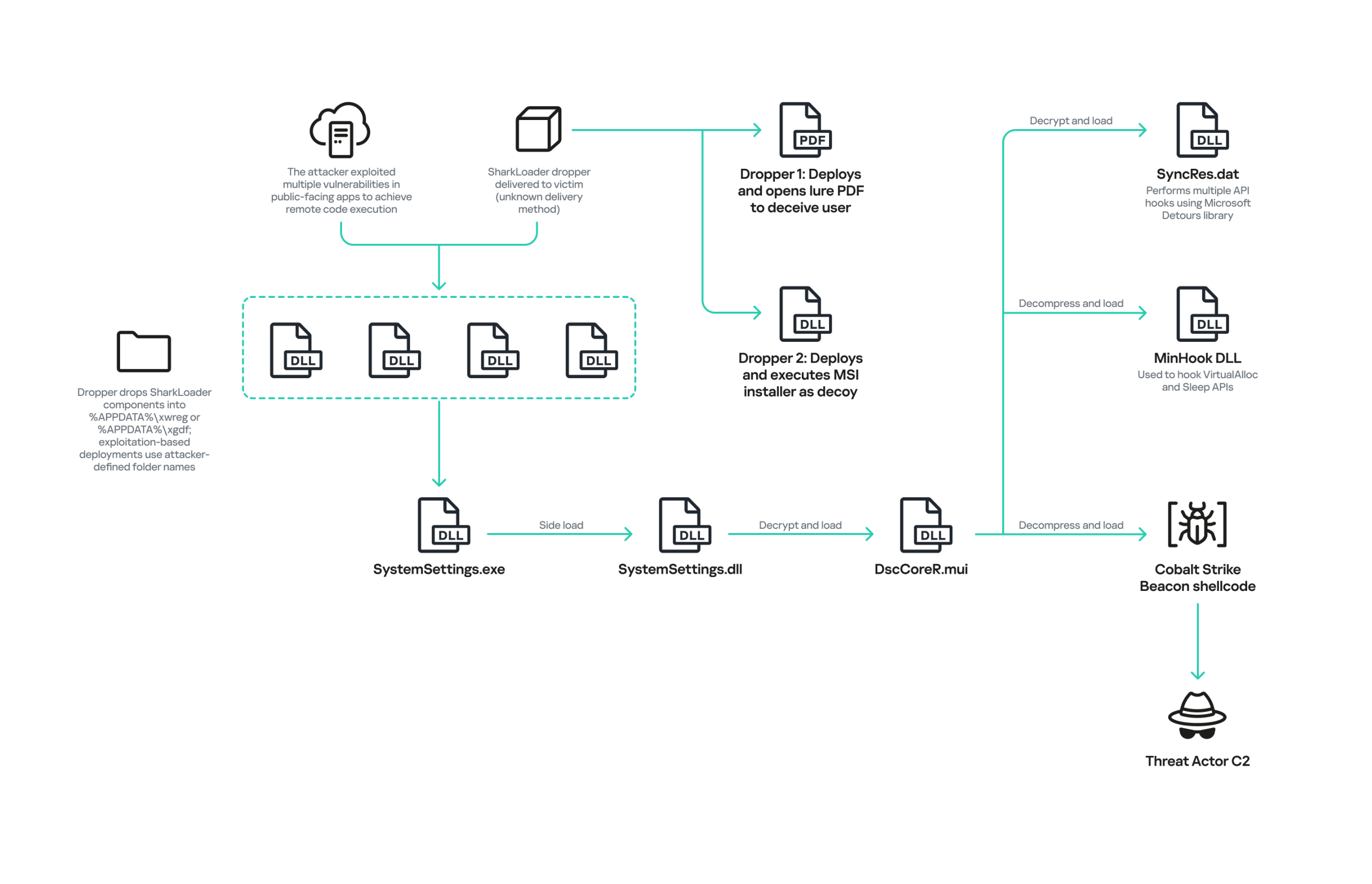
SharkLoader is composed of multiple components that work together to load and execute the final implant, a Cobalt Strike Beacon.
Filename
Description
SystemSettings.exe
Legitimate Windows application abused for DLL side-loading of the
malicious DLL SystemSettings.dll.
SystemSettings.dll
Main malicious SharkLoader DLL responsible for the core loader functionality.
DscCoreR.mui
An encrypted module that contains an embedded Cobalt Strike Beacon and the MinHook library. This module loads SyncRes.dat, installs a couple of API hooks, and executes the Beacon directly in memory.
SyncRes.dat
An encrypted DLL that is used to install multiple API hooks.
While the majority of SharkLoader samples analyzed rely on the sideloading of SystemSettings.dll, other variants leverage alternative DLL side-loading targets, including msedge.dll, PrintDialog.dll, and miracastview.dll, each of them leveraging a corresponding legitimate application.
Across the different variants examined, the encrypted modules were also observed using a variety of filenames, including:
SharkLoader infection chain observed in the StrikeShark campaign
In the dropper-based infections, after deploying all required SharkLoader components, the dropper creates two scheduled tasks through the Windows Task Scheduler COM interfaces. Task names:
Both tasks are configured to execute the copied SystemSettings.exe from the malware’s working directory (for example, %APPDATA%\xwreg or %APPDATA%\xgdf), triggering the side-loading of the malicious SharkLoader DLL.
The first scheduled task uses a time-based trigger that executes every five minutes, providing long-term persistence.
The second task is configured to execute every second, likely to ensure immediate execution of SharkLoader following deployment.
After a delay of approximately 1.5 seconds, the dropper removes the second scheduled task by using the Task Scheduler COM interfaces, leaving the first task in place to maintain persistence on the system.
SharkLoader DLL – Main implant
For the detailed analysis of the infection chain, we’ll focus on the SharkLoader components deployed by a malicious dropper named 一种异常状况的截图(包括操作系统和输入法版本).pdf.exe (MD5: 24FCEBDEECBA65004FDB0923763D74FD), which was identified in a campaign targeting a government entity in Taiwan.
Filename
MD5
SystemSettings.exe
D98F568496512E4F98670C61C97CB07A
SystemSettings.dll
AA3086BE652C8B20B0B29B2730D57119
DscCoreR.mui
A514D1BB62D7916475946FE7C07AC0AA
SyncRest.dat
9CBD560F820C95D7C38342CD558CB5C6
“PerfectDLL Hijacking” technique
Once the malicious DLL is loaded, SharkLoader implements a technique commonly referred to as “Perfect DLL Hijacking” and originally described by a security researcher named Elliot Killick on his blog. The purpose of this technique is to bypass the Windows loader lock and safely create a malicious thread via the CreateThread API without risking a deadlock.
According to Microsoft’s Dynamic-Link Library Best Practices, the Windows loader holds a synchronization object known as the “loader lock” while executing the DllMain function. This mechanism ensures that only one thread can perform DLL loading and initialization operations within a process at any given time. As a result, invoking APIs such as CreateThread or LoadLibrary from within DllMain can lead to deadlocks because the loader lock remains held throughout the execution of the function.
To avoid this issue, SharkLoader manipulates the process’s internal loader state to release the loader lock before invoking CreateThread from the DllMain execution path. By doing so, it attempts to execute its malicious code without triggering the loader-related deadlocks that can occur when threads are created while the loader lock remains held.
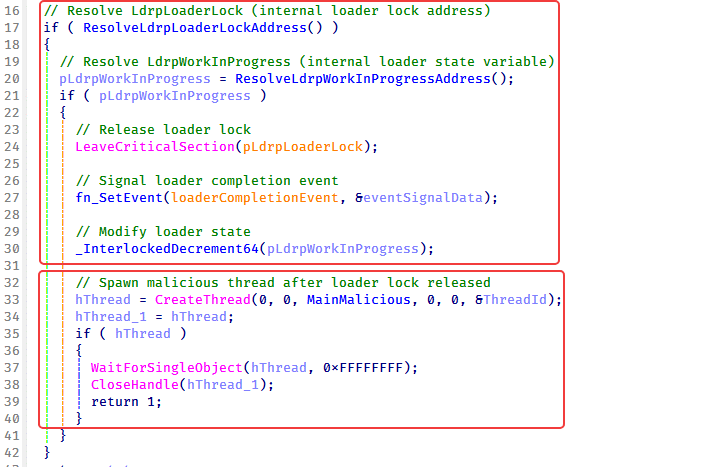
Implementation of the Perfect DLL Hijacking technique to bypass the Windows Loader Lock
Based on the code, SharkLoader first resolves the addresses of several undocumented loader structures within ntdll.dll, including:
LdrpLoaderLock: the critical section object used by the Windows loader to synchronize module loading and initialization operations
LdrpWorkInProgress: an internal loader state variable that tracks whether module initialization is currently in progress
After locating these structures, SharkLoader forcefully releases the loader lock by invoking LeaveCriticalSection on LdrpLoaderLock. It then decrements the value of LdrpWorkInProgress with InterlockedDecrement64, effectively marking the initialization process as complete.
Finally, the malware signals the loader completion event via SetEvent before creating a new thread to execute its malicious functionality. As a result, these actions manipulate the loader’s internal state and cause Windows to treat the DLL initialization process as having completed successfully. This allows SharkLoader to continue execution after forcefully releasing the loader lock, despite still operating from within the DllMain execution path.
Decryption and loading of >DscCoreR.mui
As shown in the previous section, the loader creates a new thread after escaping the Windows loader lock. This thread subsequently spawns a second thread responsible for decrypting and reflectively loading the encrypted file, DscCoreR.mui.
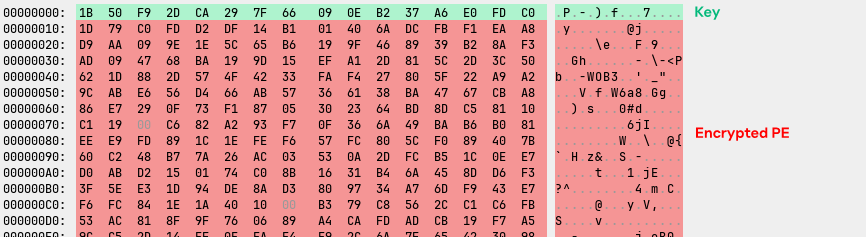
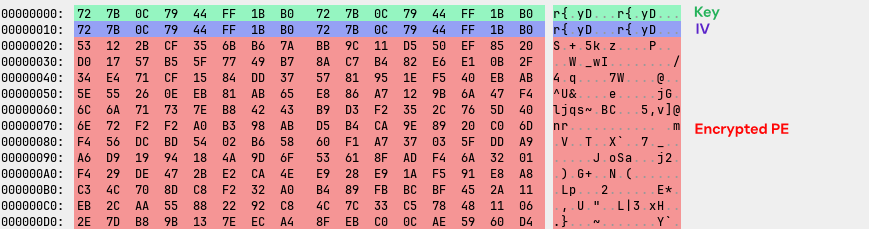
The routine first reads the encrypted file into memory and extracts the first 16 bytes to use as the Blowfish decryption key. It then initializes the Blowfish cipher by using custom P-array and S-box constants embedded in the loader and decrypts the file in ECB mode with the extracted key. Once decryption is complete, the resulting PE file is reflectively loaded into memory and executed without being written to disk.
Structure of the encrypted DscCoreR.mui file containing the 16-byte Blowfish key bytes followed by the encrypted PE bytes
The decrypted DscCoreR.mui file is a packed PE file with its MZ header removed, likely as an anti-analysis measure. After decryption, SharkLoader processes the PE image by parsing its headers, allocating memory for the image, mapping its sections, applying relocations, resolving imported functions, and setting the appropriate memory protections. Once the in-memory PE loading process is complete, the main loader, SystemSettings.dll, transfers execution to the entry point of the mapped image, which contains the packer stub.
The stub then unpacks the protected code, invokes the DLL’s DllMain function, and returns execution to SystemSettings.dll. Finally, SystemSettings.dll calls the exported function SetUserProcessPriorityBoost from the mapped DLL, triggering execution of the fully unpacked next-stage DLL.
DscCoreR.mui and SyncRes.dat DLLs
Within the decrypted and unpacked DscCoreR.mui code, the malware proceeds to load and decrypt a second encrypted file, SyncRes.dat, before reflectively loading the resulting DLL into memory.
The mapped DLL installs multiple API hooks by using Microsoft Detours, which will be discussed in the next section.
After mapping and loading SyncRes.dat for API hooks, the DscCoreR.mui performs installation of the Vectored Exception Handler (VEH) and then creates a thread in a suspended state that is later used to execute the Cobalt Strike Beacon shellcode. Additionally, to facilitate additional API hooks, it decompresses and loads the MinHook library and uses it to install hooks on the VirtualAlloc and Sleep APIs.
The DscCoreR.mui then decompresses the Cobalt Strike Beacon shellcode into the memory region associated with the suspended thread and then the suspended thread is resumed, resulting in execution of the beacon.
Decryption and loading of SyncRes.dat
To decrypt SyncRes.dat, the malware extracts a 16-byte AES-128 key and a 16-byte initialization vector (IV) directly from the file itself. The first 16 bytes of the file contain the AES key, while the subsequent 16 bytes contain the IV. The remaining file content consists of AES-encrypted data, which is decrypted using the extracted key and IV. Once decrypted, the resulting data reveals a PE image with its MZ header removed, similar to DscCoreR.mui.
Structure of the encrypted SyncRes.dat file showing the AES key, IV, and encrypted PE bytes
Similar to the decrypted DscCoreR.mui module, the decrypted SyncRes.dat file is also protected by an unknown custom packer. After decryption, the loader reflectively loads the PE image before transferring execution to the module’s entry point.
The entry point contains a packer stub responsible for unpacking the protected code in memory. Once the unpacking routine is complete, the malware invokes a specific exported function named StartEngineData, which serves as the primary execution routine of the third-stage DLL.
Before continuing with the DscCoreR.mui analysis, we will first discuss SyncRes.dat.
SyncRes.dat decrypted DLL: Multiple API hooks
The decrypted and unpacked SyncRes.dat DLL is primarily responsible for installing multiple Windows API hooks by using the Microsoft Detours library. After attaching all detour hooks, it calls DetourTransactionCommitEx to apply them in one commit.
The following table lists the hooked Windows APIs and their corresponding hook handler functions.
Hooked Windows APIs
Detour function description
CreateProcessA
Saves all original CreateProcessA parameters for use in the parent process (PPID) spoofing routine.
Creates a new thread that executes the process creation routine responsible for PPID spoofing.
Falls back to the original CreateProcessA if the thread creation fails.
Identifies an svchost.exe process that has the same security context as the current SharkLoader process.
Builds an extended startup attribute list to set the selected svchost.exe as the spoofed parent.
Calls the original CreateProcessA with the modified parent attribute.
As a result, any new process created by the current process (primarily from the Cobalt Strike beacon) is spawned under svchost.exe instead of the current module process.
CreateProcessW
Saves all original CreateProcessW parameters for use in the PPID spoofing routine, which is executed through an APC-based mechanism rather than a dedicated thread compared to the CreateProcessA API hook.
Schedules a delayed process creation (10 microseconds) through APC execution using CreateWaitableTimerW and SleepEx.
The timer callback performs the svchost.exe PPID spoofing logic, similar to the CreateProcessA spoofing routine.
As a result, new processes created via CreateProcessW by the current process (primarily from the Cobalt Strike beacon) are launched under svchost.exe through an APC-based execution mechanism
OpenProcessToken
Once hooked, the malware initializes jitasm to construct a direct syscall stub for NtOpenProcessToken at runtime.
Invokes NtOpenProcessToken through the constructed direct syscall stub, redirecting the original API (OpenProcessToken) call flow.
AdjustTokenPrivileges
Redirects the API call to a direct NtAdjustPrivilegesToken syscall stub constructed by jitasm.
OpenProcess
Redirects the API call to a direct NtOpenProcess syscall stub constructed by jitasm.
WriteProcessMemory
Redirects the API call to a direct NtWriteVirtualMemory syscall stub constructed by jitasm.
NtCreateUserProcess
Redirects the API call to a direct NtCreateUserProcess syscall stub constructed by jitasm.
LoadLibraryA
Redirects the API call to a function that resolves LdrLoadDll API using a ROR13-based API hashing algorithm.
Uses the original parameters to invoke LdrLoadDll directly.
If LdrLoadDll resolution or invocation fails, uses CreateTimerQueue and CreateTimerQueueTimer to schedule a 10-millisecond delayed execution of the original LoadLibraryA, with CreateEventW used for synchronization.
GetModuleHandleA
Redirects the API call to a custom function that resolves the module base address through the following steps:
Enumerates loaded modules within the current process using CreateToolhelp32Snapshot, Module32FirstW, and Module32NextW.
Compares each enumerated module name with the module name provided in the API parameter.
Returns the module base address if a match is found.
Falls back to the original GetModuleHandleA API if the custom resolution routine fails.
GetModuleHandleW
Similar approach to the GetModuleHandleA API hooks above.
GetProcAddress
The original GetProcAddress parameters are passed to the hook handler.
The hook handler computes a Murmur32 hash of the requested function name.
The hook handler parses the module’s PE structure and locates the export table.
Each exported function name is hashed using the same Murmur32 algorithm and compared against the previously generated hash.
If a hash match is found, the corresponding function address is returned. If no match is found, the call falls back to the original GetProcAddress.
LoadLibraryExA
The hook handler redirects the API call to its original address. In short, the hooked LoadLibraryExA calls the original LoadLibraryExA function.
VirtualAllocEx
Redirects the API call to a direct NtAllocateVirtualMemory syscall stub constructed by jitasm.
VirtualProtectEx
Redirects the API call to a direct NtProtectVirtualMemory syscall stub constructed by jitasm.
VirtualProtect
Redirects the API call to a direct NtProtectVirtualMemory syscall stub constructed by jitasm.
ResumeThread
Redirects the API call to a direct NtResumeThread syscall stub constructed by jitasm.
GetThreadContext
Redirects the API call to a direct NtGetContextThread syscall stub constructed by jitasm.
OpenThread
Redirects the API call to a direct NtOpenThread syscall stub constructed by jitasm.
NtCreateThread
Redirects the API call to a direct NtCreateThread syscall stub constructed by jitasm.
NtCreateThreadEx
Redirects the API call to a direct NtCreateThreadEx syscall stub constructed by jitasm.
NtQueueApcThread
Redirects the API call to a direct NtQueueApcThread syscall stub constructed by jitasm.
NtQueueApcThreadEx
Redirects the API call to a direct NtQueueApcThreadEx syscall stub constructed by jitasm.
ExpandEnvironmentStringsA
The detour redirects the API to a custom function that creates a new thread. That thread executes a routine that calls the ExpandEnvironmentStringsA API.
CreateFileMappingA
The detour redirects the API call to a custom function that creates a new thread. Within the thread, it initializes thread-pool and timer objects, sets a threadpool timer for 10 ms and a waitable timer for 0.1 ms, then calls CreateFileMappingNumaA.
If thread creation fails, CreateFileMappingNumaA is called directly without creating a thread.
MapViewOfFile
The detour redirects the API call to a custom function that creates a new thread. The thread runs a similar thread-pool and timer setup to the previous function, resolves MapViewOfFileEx via GetProcAddress, calls it with zeroed arguments, and stores the return value.
UnmapViewOfFile
The detour redirects the API to a function that tries to run the unmap (same API) in a new thread.
The thread creates an event and timer queue, schedules a callback after 10 ms to call UnmapViewOfFile and signal the event, then waits and cleans up.
If thread creation fails, it calls UnmapViewOfFile directly.
NtMapViewOfSectionEx
Redirects the API call to a direct NtMapViewOfSectionEx syscall stub constructed by jitasm.
NtCreateNamedPipeFile
Redirects the API call to a direct NtCreateNamedPipeFile syscall stub constructed by jitasm.
NtReadFile
Redirects the API call to a direct NtReadFile syscall stub constructed by jitasm.
NtWriteFile
Redirects the API call to a direct NtWriteFile syscall stub constructed by jitasm.
EtwEventWrite
The detour redirects EtwEventWrite to a stub that always returns 1, which prevents ETW logging.
EventWriteEx
The detour redirects EventWriteEx to a function that always returns 0, which prevents ETW logging.
EventWrite
The detour redirects EventWrite to a function that always returns 0, which prevents ETW logging.
Upon completing the installation of API hooks via the decrypted SyncRes.dat, the DscCoreR.mui DLL proceeds with the remaining functions, which are discussed below.
VEH registration and access violation handling
Following the installation of the API hooks, the malware registers a Vectored Exception Handler (VEH) to monitor exceptions generated during runtime. The handler specifically checks for access violation exceptions (0xC0000005). When such an exception occurs, it retrieves the faulting memory address from the exception record and calls VirtualProtect to restore read, write, and execute (RWX) permissions to the corresponding memory page before resuming execution.
During our analysis, no access violations were observed. It is possible that this mechanism is intended to handle access violations that may occur under specific runtime conditions.
Thread creation for Cobalt Strike Beacon execution
The malware creates a new thread in a suspended state that is intended to execute the Cobalt Strike Beacon shellcode. The thread entry point is configured to point to a memory buffer that will later contain the beacon shellcode.
At this stage, the buffer does not yet contain the actual Cobalt Strike Beacon shellcode. Instead, the thread is created in a suspended state so that the malware can prepare and inject the shellcode into the buffer before execution. Once the beacon payload has been written into the buffer, the malware resumes the suspended thread using the ResumeThread API, which triggers the execution of the Cobalt Strike beacon.
MinHook DLL, API hooking, and Cobalt Strike beacon
After creating the suspended thread for beacon execution, the malware decompresses a zlib-compressed MinHook PE file embedded within DscCoreR.mui. The MinHook library is used to install API hooks for the VirtualAlloc and Sleep functions. Once the MinHook DLL is decompressed and loaded into memory, the malware resolves the exported functions MH_Initialize and MH_CreateHook, which are then used to install hooks on the VirtualAlloc and Sleep APIs.
After the hooks are installed, the malware invokes a function that decompresses a zlib-compressed Cobalt Strike Beacon shellcode embedded within the malware. The function first decompresses the shellcode into a temporary buffer and then allocates executable memory using VirtualAlloc with RWX permissions. The decompressed beacon is subsequently copied into the allocated memory region.
Because the VirtualAlloc API has already been hooked at this stage, the hook handler captures the address and size of the allocated memory used to store the beacon shellcode. The hook records the addresses and sizes of the first three successful memory allocations and stores these values in global variables to track specific memory regions allocated during execution. These tracked regions are associated with memory buffers used by the Cobalt Strike Beacon during runtime.
The second hook, on the Sleep API, is used when Cobalt Strike Beacon calls Sleep, such as during beacon sleep intervals. It temporarily modifies the memory protection of the tracked allocation regions by using VirtualProtect, changing their protection to PAGE_READWRITE (RW) before invoking the original Sleep function. After the sleep period ends, the malware restores the memory protection of those regions to PAGE_EXECUTE_READWRITE (RWX). This behavior suggests that the malware developer implemented this mechanism to evade memory scanning techniques that identify executable (RWX) code regions in memory.
Finally, after the API hooks are installed and the Cobalt Strike Beacon shellcode has been written to the thread buffer, the malware calls the ResumeThread API to resume the suspended thread and begin execution of the beacon.
Persistence mechanism
While the analyzed SharkLoader implant does not contain a built-in persistence mechanism especially when it comes to cases when it is dropped after the exploitation of a public-facing application, our investigations revealed that the threat actor employs several techniques to maintain access to compromised systems.
Registry Run key: In the incident that affected an organization in Hong Kong, the attacker manually created a registry Run key to launch SystemSettings.exe upon user logon. The following command was used:
This technique allows the malware to automatically execute whenever the user logs in, ensuring persistent access.
Scheduled task: In the separate compromise that affected a diplomatic government entity in Indonesia, the attacker established persistence through a scheduled task configured to execute SharkLoader daily. The task, named "\Microsoft\Windows\Edge\Edgeupdate", was configured to run C:\ADriveLogs_Logs\SystemSettings.exe by using the following command:
Running the task with SYSTEM privileges ensures that SharkLoader executes even if no user is logged in.
Post-compromise activity
Following initial compromise and persistence, the attacker engaged in extensive reconnaissance and credential theft activities.
System information enumeration: The attacker initially gathered basic system information by using the following commands:
systeminfo
ipconfig /all
tasklist /svc
Post-exploitation tools: Our analysis revealed the use of several third-party post-exploitation tools, most of which are open-source and developed by Chinese-speaking developers. These tools included:
Tool name
Description
FScan
Network scanner tool with vulnerability
exploitation modules
Searchall
Sensitive information search tool
Pillager
Information gathering tool
We also detected the use of SharpGPOAbuse by the threat actor, a tool designed to modify Group Policy Objects within Active Directory environments.
Active Directory enumeration: In the compromise affecting a diplomatic government entity in Indonesia, the attacker used both Cobalt Strike and a webshell to enumerate the internal Active Directory environment. They executed a series of commands to gather information about the network, users, and groups:
Network information:
ping -n
netstat -ano
arp -a
net share
User and group information:
query user
nslookup
quser
net group /domain
Specific group membership:
powershell "Get-ADGroupMember -Identity "" -Recursive | Select-Object Name, ObjectClass"
dsquery group -name "" | dsget group -members -expand | dsget user -samid -display -email"
powershell "Get-ADGroupMember -Identity "" -Recursive | Where-Object { $_.ObjectClass -eq "computer" } | Select-Object Name, SamAccountName"
powershell -exec bypass -c "Get-ADUser -Filter * -Prop * | select sAMAccountName
net group "Domain Controllers" /domain
net group "Enterprise Admins" /domain
net group "Organization Management" /domain
net group "domain admins" /domain
Process enumeration:
tasklist /SVC | findstr $selfname.exe
Directory listing:
dir \\c$
dir \\c$\inetpub
dir \\c$\inetpub\custerr
dir \\c$\inetpub\wwwroot\
Credential dumping: The attacker also attempted to dump credentials from the compromised machine by targeting both the LSASS process and the NTDS database file. The following commands were observed:
ntdsutil "ac i ntds" "ifm" "create full $temp" q q
Procdump64.exe -accepteula -ma lsass.exe $temp\lsass.dmp
Dumping the LSASS process allows the attacker to extract in-memory credentials, while accessing the NTDS database enables retrieval of Active Directory account password hashes. This combination of techniques allows the attacker to obtain privileged credentials for lateral movement, privilege escalation, and deeper compromise.
Victimology
The victimology observed in this campaign shows a combination of strategic and opportunistic characteristics. Confirmed victims include government-related entities, such as the ministry in Taiwan and the diplomatic organization in Indonesia, as well as software development companies in Taiwan, Lebanon, and Syria. Additional affected organizations were identified in Hong Kong, Colombia, Macedonia, Nepal, and Serbia.
Targeting of government and software development organizations may indicate a cyber-espionage objective, although our confidence remains low due to the limited post-compromise activity observed, which primarily consisted of credential access, system reconnaissance, and lateral movement. The compromise of government and software development organizations could indicate an interest in gathering political intelligence or intellectual property.
At the same time, the use of SharkLoader and Cobalt Strike, alongside the exploitation of public-facing applications and malicious installers and droppers, suggests the attacker may also be opportunistically targeting vulnerable systems. The absence of clear evidence of data exfiltration thus far does not exclude this possibility, as Cobalt Strike’s file operation and data exfiltration modules could be employed at a later stage.
Although the full scope of the campaign is not yet known, the combination of targeted and opportunistic activity suggests it should continue to be closely monitored.
Attribution
Our investigation reveals no code or infrastructure overlap linking SharkLoader to any existing threat actor at this time. The TTPs employed during the operation also do not align with those of known actors.
However, analysis of the post-exploitation open-source tools used during the campaign revealed that several reconnaissance tools, including FScan, Searchall, and Pillager, were developed by individuals identified as Chinese speaking developers on GitHub.
We assess StrikeShark to be a Chinese-speaking threat actor with low confidence. This assessment is based on limited indicators and should be considered preliminary. Further investigation is required to characterize this cluster more fully, and the possibility remains that other actors may also be utilizing these tools.
Conclusion
Our investigation discovered a previously undocumented intrusion cluster that we are tracking as StrikeShark. The StrikeShark campaign represents a sophisticated malware threat to entities worldwide. The use of SharkLoader to deploy Cobalt Strike, coupled with API hook installation to evade detection, demonstrates a significant level of technical expertise. The campaign’s broad targeting across sectors and geographic regions suggests a potential focus on espionage or information gathering. While the precise objectives remain under investigation, the combination of targeting government entities and software developers warrants heightened vigilance.
Given that our visibility is limited to incidents observed through Kaspersky telemetry, we suspect the actual number of compromises may be significantly higher and extend beyond these victims as the threat actor actively used several exploitations of public facing application.
Key Takeaways Private Threat Briefs: 20+ private DFIR reports annually. Contact us today for pricing or a demo! Table of Contents: Case Summary Analysts Initial Access Execution Persistence Privilege Escalation Defense Evasion Credential Access Discovery Lateral Movement Command and Control Exfiltration Impact Timeline Diamond Model Indicators Detections MITRE ATT&CK Case Summary The intrusion […]
Key Takeaways Case Summary This case from May 2024 started with a malicious download from a website mimicking the teleconferencing application Zoom. When visiting the website and downloading a file that seems intended for installing Zoom, the user was, in fact, installing a malicious program created with Inno Setup. The malicious program was a d3f@ck […]
Key Takeaways Case Summary This intrusion began near the end of January 2024 when the user downloaded and executed a file using the same name (setup_wm.exe) and executable icon, as … Read More

 Entrar