❌

Visualização de leitura

Chrome and Firefox updates fix serious security flaws. Install now

On October 27, Google issued a new Stable channel update for Chrome.

Most users are on Chrome’s Stable channel. The desktop update brings Chrome to versions 156.0.8078.73/.74 for Windows and Mac and 156.0.8078.73 for Linux. The update includes 52 security fixes, including four rated Critical.

On the same day, Mozilla issued Security Advisory 2026-118, which fixes 167 vulnerabilities. Firefox 159 also introduces several new features.

Both updates will roll out over the coming days and weeks.

How to update Chrome

The easiest option is to allow Chrome to update automatically. But you can end up lagging behind on updates if you never close your browser or if something goes wrong, such as an extension preventing the update.

If you don’t want to wait for the rollout to reach you, manually updating is easy. Open About Google Chrome from Chrome’s settings or Help menu. Chrome will check for updates. If one is available, click Relaunch to apply it.
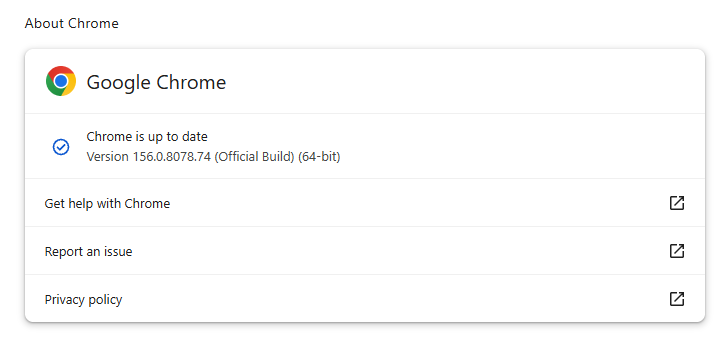
Chrome version 156.0.8078.74 is up to date

You can find an explanation of the version numbering system and step-by-step instructions in our guide: How to update Chrome on every operating system.

How to update Firefox

To update Firefox, open the browser and click the menu button at the right side of the Firefox toolbar, then go to Help and select About Firefox. The About Mozilla Firefox window will open.

Firefox will automatically check for updates. If one is available, it will be downloaded. Once done, you’ll be prompted to click Relaunch. After Firefox restarts, it will be up to date.
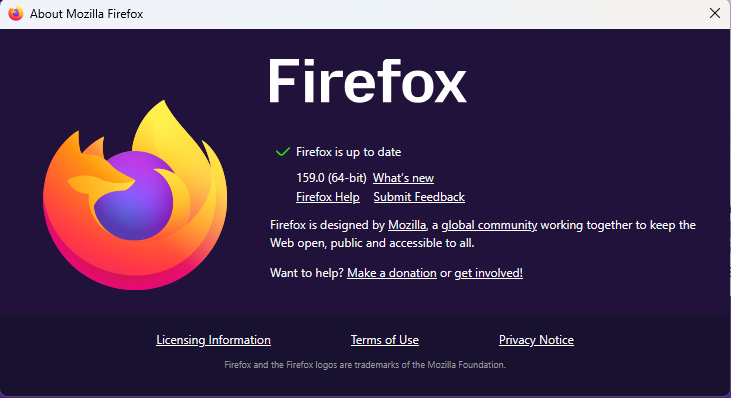
After the update, the version should be 159.0 or later

Technical details

These Chrome and Firefox updates address a familiar problem: browser code mishandling memory while processing web content. Both releases fix use-after-free vulnerabilities, including flaws in page layout, JavaScript processing, and SVG graphics.

A use-after-free vulnerability occurs when a program attempts to access a memory location after it has been freed. That can cause crashes or, in some cases, allow an attacker to run their own code.

There’s another connection between these updates: both Google and Mozilla credit OpenAI Codex Security with finding bugs fixed in these releases. AI can help security teams examine browser code for weaknesses, alongside human code reviews and automated tests that check how software handles unexpected inputs.

Mozilla’s collaboration with Anthropic shows how AI-discovered findings can lead to fixes: researchers validated vulnerabilities before reporting them, giving Mozilla’s team reproducible bugs to investigate, repair, and deliver to users.


Browse like no one’s watching. 

Malwarebytes Privacy VPN encrypts your connection and never logs what you do, so the next story you read doesn’t have to feel personal. Try it free → 

Firefox Enterprise Adds DLP and AI Controls to Block Sensitive Data Leaks

Mozilla released Firefox Enterprise 158.0 on October 13, 2026, introducing its first dedicated enterprise browser with built-in data loss prevention and AI-use controls.

The browser combines Firefox with a self-hosted Admin Console, giving security teams central control over browsing, web access, and how employees share company data. According to Mozilla’s Firefox Enterprise release notes, organizations must deploy the console on their own infrastructure.

Supporting services, including browser updates, Sync, telemetry, and crash collection, also run within the organization’s environment. This setup keeps management data under company control rather than relying on an external management service.

The main addition is DLP, which lets administrators block or warn about pasting, file uploads, downloads, and printing on selected websites.

Firefox Enterprise Admin Console and supporting services (source : firefox )
Firefox Enterprise Admin Console and supporting services (source: Firefox)

Teams can display custom messages explaining restrictions. For example, they can block employees from pasting company information into unapproved AI tools while keeping approved services available.

Firefox Enterprise Adds DLP and AI Controls

Built-in checks run locally in the browser, so content doesn’t travel over the network for inspection. Organizations using a third-party DLP agent through Firefox’s Content Analysis interface retain that setup.

Firefox Enterprise turns off its built-in DLP and hands inspection to the existing agent. Warnings and blocks appear in the Admin Console, though administrators can turn off that logging.

The focus on browser data controls comes as AI tools create new exposure risks. Cyber Security News previously covered the BioShocking AI browser attack, where researchers manipulated browsing context to make AI agents expose sensitive information. Firefox’s release notes describe controls over data movement, not a specific fix for that attack.

Data loss prevention (DLP) (source : firefox )
Data loss prevention (DLP) (source: Firefox)

Employees must sign in through the company’s single sign-on provider before browsing. Firefox Enterprise supports OpenID Connect and follows the provider’s multi-factor authentication requirements.

Administrators can also require device security conditions, including disk encryption and running endpoint protection, before allowing access. Firefox signs employees out if their device no longer meets those conditions.

Profile encryption is enabled by default. Browsing history, form data, saved logins, and TLS session tokens are encrypted using a key supplied by the Admin Console.

A copied profile folder cannot be decrypted without that key. Optional watermarks can show an employee’s email address and the time on sensitive pages, helping trace shared images without physically preventing screenshots.

The console supports more than 130 enterprise policies, including restrictions on extensions and update controls. These controls address risks highlighted in earlier reporting on AI browser extension vulnerabilities that exposed private sessions and data. Lockdown Mode can disable JavaScript JIT compilation, block service workers, prevent HTTP downgrades, and isolate selected sites.

Security event logging is optional for each event type, with records sent to the organization’s console rather than Mozilla. Teams can integrate with SIEM systems and remotely sign out lost devices. Firefox Enterprise also inherits security fixes from Firefox 158, while access requires a deployed console and an early-access request.

An EDR alert reveals an attack. But can it tell the full story? Discover how to reconstruct the attack timeline.

The post Firefox Enterprise Adds DLP and AI Controls to Block Sensitive Data Leaks appeared first on Cyber Security News.

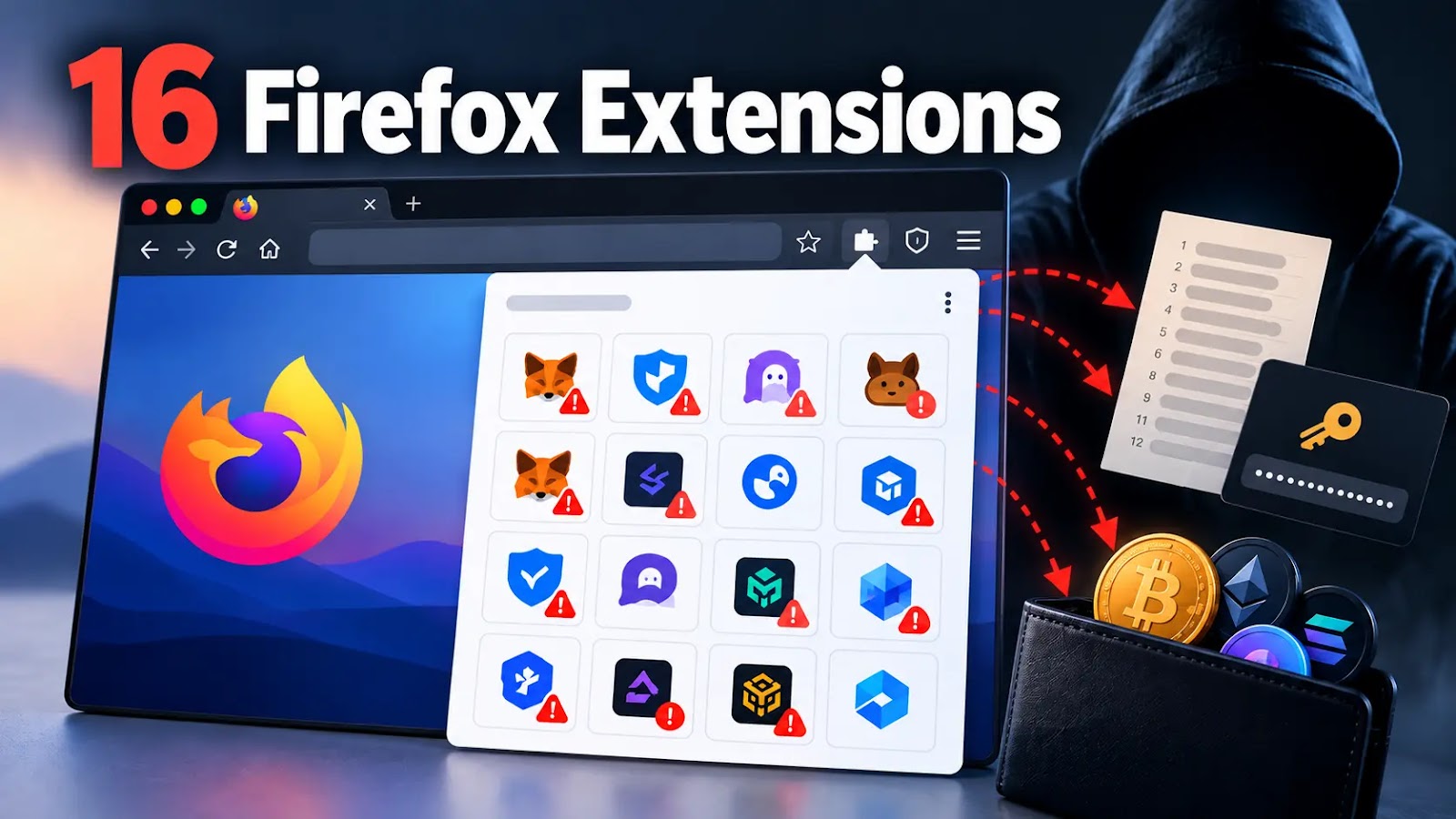
16 Malicious Firefox Extensions Impersonate Crypto Wallets to Steal Seed Phrases and Private Keys

16 malicious Firefox extensions that impersonate cryptocurrency wallets to intercept recovery phrases and private keys during wallet imports. Disguised as wallet portals, desktop utilities, and browser tools, the packages attempt to transmit secrets to attacker-controlled Cloudflare Workers. Mozilla had unpublished the extensions by October 5, 2026, according to Socket’s October 7 report. Fifteen packages contain […]

The post 16 Malicious Firefox Extensions Impersonate Crypto Wallets to Steal Seed Phrases and Private Keys appeared first on GBHackers Security | #1 Globally Trusted Cyber Security News Platform.

Malicious Firefox add-ons caught stealing cryptowallet seed phrases and browser credentials

Every time you add an extension or plugin to your browser, there's a risk that you might be doing more than managing your cryptocurrency wallet, generating passwords, taking notes, or tracking sports results. There's a chance that you have just handed a complete stranger access to your savings. Read more in my article on the Hot for Security blog.

Security updates available for Adobe, Chrome, Firefox, VMWare, and Zoom

Security updates are not just for enterprises with a dedicated security team and a change-management calendar. For consumers and small businesses, they are one of the simplest ways to shut down known attack paths before criminals get a chance to use them.

That matters because attackers love these flaws. because browser bugs, code execution issues, authentication bypasses, and privilege-escalation problems can be turned into a foothold, a data theft opportunity, or a full system compromise if left unpatched.

If you only do one thing after reading a security advisory, make it this: update the affected software promptly, restart when required, and verify the version afterward.

Adobe

Adobe released a large batch of security updates covering ColdFusion, Commerce/Magento Open Source, and Experience Manager. The ColdFusion bulletin alone includes multiple critical flaws that could lead to arbitrary code execution.

The updates and instructions can be found on the pages we linked to.

Chrome

Google patched 15 security flaws in Chrome, including two critical use-after-free bugs in Ozone. The fixes are in Chrome 150.0.7871.124/.125, depending on platform.

You can find an explanation of the version numbering system and step-by-step instructions in our guide to how to update Chrome on every operating system.

Firefox

Mozilla fixed two critical Firefox flaws in Firefox 152.0.6, and it says public exploit code exists for both issues. One affects JavaScript/WebAssembly and the other involves DOM navigation and site isolation, which makes this more than routine housekeeping.

Users should update Firefox to version 152.0.6 as soon as possible. For most users this can simply be done by restarting the browser. If you see the “What’s new” tab, the update is complete.

VMWare

Broadcom released a fix for a critical authentication bypass in VMware Avi Load Balancer, tracked as CVE-2026-47865. The issue could allow a network-accessible attacker to reach the Avi Control Plane, which makes it especially important in environments that expose management services or rely on load balancers at the edge.

Updates and the instructions to apply them can be found in the Security Advisory.

Zoom

Zoom Security Bulletin ZSB-26014 covers a critical issue in Zoom Workplace for Windows, described as improper input validation. The public record identifies the issue as CVE-2026-53412.

For users, the action item is to update Zoom Workplace for Windows to the vendor-fixed release as soon as it is available in your environment. For small businesses, that means updating not just the app on employee laptops, but also any centralized deployment package so the old build doesn’t come right back on the next install cycle.


CNET Editors' Choice Award 2026

“One of the best cybersecurity suites on the planet.” 

According to CNET. Read their review →


Claude Mythos Has Found 271 Zero-Days in Firefox

That’s a lot. No, it’s an extraordinary number:

Since February, the Firefox team has been working around the clock using frontier AI models to find and fix latent security vulnerabilities in the browser. We wrote previously about our collaboration with Anthropic to scan Firefox with Opus 4.6, which led to fixes for 22 security-sensitive bugs in Firefox 148.

As part of our continued collaboration with Anthropic, we had the opportunity to apply an early version of Claude Mythos Preview to Firefox. This week’s release of Firefox 150 includes fixes for 271 vulnerabilities identified during this initial evaluation...

The post Claude Mythos Has Found 271 Zero-Days in Firefox appeared first on Security Boulevard.

Mozilla: Anthropic's Mythos found 271 security vulnerabilities in Firefox 150

Earlier this month, Anthropic said its Mythos Preview model was so good at finding cybersecurity vulnerabilities that the company was limiting its initial release to "a limited group of critical industry partners." Since then, debate has raged over whether the model presages an era of turbocharged AI-aided hacking or if Anthropic is just building hype for what is a relatively normal step up on the ladder of advancing AI capabilities.

Mozilla added some important data to that debate Tuesday, writing in a blog post that early access to Mythos Preview had helped it pre-identify 271 security vulnerabilities in this week's release of Firefox 150. The results were significant enough to get Firefox CTO Bobby Holley to enthuse that, in the never-ending battle between cyberattackers and cyberdefenders, "defenders finally have a chance to win, decisively."

"We've rounded the curve"

Holley didn't go into detail on the severity of the hundreds of vulnerabilities that Mythos reportedly detected simply by analyzing the unreleased source code of Firefox's latest version. But by way of comparison, he noted that Anthropic's Opus 4.6 model found only 22 security-sensitive bugs when analyzing Firefox 148 last month.

Read full article

Comments

© Getty Images

Microsoft Patch Tuesday, March 2026 Edition

Microsoft Corp. today pushed security updates to fix at least 77 vulnerabilities in its Windows operating systems and other software. There are no pressing “zero-day” flaws this month (compared to February’s five zero-day treat), but as usual some patches may deserve more rapid attention from organizations using Windows. Here are a few highlights from this month’s Patch Tuesday.

Image: Shutterstock, @nwz.

Two of the bugs Microsoft patched today were publicly disclosed previously. CVE-2026-21262 is a weakness that allows an attacker to elevate their privileges on SQL Server 2016 and later editions.

“This isn’t just any elevation of privilege vulnerability, either; the advisory notes that an authorized attacker can elevate privileges to sysadmin over a network,” Rapid7’s Adam Barnett said. “The CVSS v3 base score of 8.8 is just below the threshold for critical severity, since low-level privileges are required. It would be a courageous defender who shrugged and deferred the patches for this one.”

The other publicly disclosed flaw is CVE-2026-26127, a vulnerability in applications running on .NET. Barnett said the immediate impact of exploitation is likely limited to denial of service by triggering a crash, with the potential for other types of attacks during a service reboot.

It would hardly be a proper Patch Tuesday without at least one critical Microsoft Office exploit, and this month doesn’t disappoint. CVE-2026-26113 and CVE-2026-26110 are both remote code execution flaws that can be triggered just by viewing a booby-trapped message in the Preview Pane.

Satnam Narang at Tenable notes that just over half (55%) of all Patch Tuesday CVEs this month are privilege escalation bugs, and of those, a half dozen were rated “exploitation more likely” — across Windows Graphics Component, Windows Accessibility Infrastructure, Windows Kernel, Windows SMB Server and Winlogon. These include:

–CVE-2026-24291: Incorrect permission assignments within the Windows Accessibility Infrastructure to reach SYSTEM (CVSS 7.8)
–CVE-2026-24294: Improper authentication in the core SMB component (CVSS 7.8)
–CVE-2026-24289: High-severity memory corruption and race condition flaw (CVSS 7.8)
–CVE-2026-25187: Winlogon process weakness discovered by Google Project Zero (CVSS 7.8).

Ben McCarthy, lead cyber security engineer at Immersive, called attention to CVE-2026-21536, a critical remote code execution bug in a component called the Microsoft Devices Pricing Program. Microsoft has already resolved the issue on their end, and fixing it requires no action on the part of Windows users. But McCarthy says it’s notable as one of the first vulnerabilities identified by an AI agent and officially recognized with a CVE attributed to the Windows operating system. It was discovered by XBOW, a fully autonomous AI penetration testing agent.

XBOW has consistently ranked at or near the top of the Hacker One bug bounty leaderboard for the past year. McCarthy said CVE-2026-21536 demonstrates how AI agents can identify critical 9.8-rated vulnerabilities without access to source code.

“Although Microsoft has already patched and mitigated the vulnerability, it highlights a shift toward AI-driven discovery of complex vulnerabilities at increasing speed,” McCarthy said. “This development suggests AI-assisted vulnerability research will play a growing role in the security landscape.”

Microsoft earlier provided patches to address nine browser vulnerabilities, which are not included in the Patch Tuesday count above. In addition, Microsoft issued a crucial out-of-band (emergency) update on March 2 for Windows Server 2022 to address a certificate renewal issue with passwordless authentication technology Windows Hello for Business.

Separately, Adobe shipped updates to fix 80 vulnerabilities — some of them critical in severity — in a variety of products, including Acrobat and Adobe Commerce. Mozilla Firefox v. 148.0.2 resolves three high severity CVEs.

For a complete breakdown of all the patches Microsoft released today, check out the SANS Internet Storm Center’s Patch Tuesday post. Windows enterprise admins who wish to stay abreast of any news about problematic updates, AskWoody.com is always worth a visit. Please feel free to drop a comment below if you experience any issues apply this month’s patches.

❌