Visualização de leitura

ToxicPanda 2.0 can take over your Android phone and banking apps

Researchers have uncovered ToxicPanda 2.0, an Android banking Trojan and remote-access tool designed for account takeover and “on-device fraud.”

Not only does ToxicPanda 2.0 have a much larger target list of banks and e-wallets, it has also expanded its capabilities by combining banking overlays, remote access, PIN capture, Android accessibility abuse, and attempted Wireless Debugging automation. Together, those functions can help operators turn a compromised phone into a platform for account takeover, financial fraud, and longer-term device control.

The core objective is on-device fraud. That means that rather than logging in from an attacker-controlled machine, the operator can carry out actions from the victim’s infected phone, taking over the device, IP address, app session, and behavioral context that banks may use when deciding whether a transaction is fraudulent.

ToxicPanda 2.0 is built around abusing Android’s Accessibility Service, a legitimate feature intended to help people interact with their devices. When a victim grants this permission to a malicious app, the malware can inspect interface elements, observe app activity, automate interactions, and place deceptive content over legitimate apps, known as overlays.

ToxicPanda has historically relied on social engineering to persuade users to sideload a malicious Android application rather than install it through Google Play. The latest campaign uses Amazon AWS-hosted buckets to deliver ToxicPanda 2.0 samples.

After installation, the dropper presents a fake installation flow, requests VPN privileges, blocks certain Google Play and Google Play Services network communications, decrypts an embedded payload, and then seeks Accessibility Service permission for the installed payload.

The consequences can include stolen banking usernames and passwords, intercepted or captured PINs, fraudulent transactions, loss of access to the device, and exposure of the phone’s screen-lock secret. An attacker that can operate inside an active banking session from the victim’s device may have a better chance of evading controls designed to identify unfamiliar devices or unusual login locations.

How to stay safe

However sophisticated it is, ToxicPanda 2.0 still relies heavily on social engineering to get targets to install the malicious app and give it the permissions it needs. So our main recommendations are:

  • Avoid sideloading apps, especially from links in unsolicited messages, ads, or alleged support communications.
  • Treat requests for Accessibility access, Device Administrator privileges, developer settings, and VPN permissions with particular caution, especially if it’s not clear why the app needs those permissions or if you don’t fully trust it.
  • Use an up-to-date, real-time anti-malware solution for your device that can detect and block the malicious payload. Malwarebytes for Android detects apps in the ToxicPanda 2.0 campaign as Android/Trojan.Dropper.agent and Android/Trojan.FakeApp.ACR2401245FC11.

If your device is infected

Although it may require a factory reset to regain control of an infected device, there are some things you can try first:

  • First, put the phone in airplane mode and turn off Wi-Fi and Bluetooth. This can cut off command-and-control communications and ongoing credential theft while you investigate.
  • Use another device to freeze or closely monitor transactions, revoke active sessions, and reset your banking credentials.
  • Do not interact with fake “system update” screens or unexpected prompts for Accessibility, VPN, Device Administrator, Developer Options, or Wireless Debugging.
  • Start Android Safe Mode. Google recommends Safe Mode to help identify problems caused by downloaded apps. Remove recently installed or suspicious apps one at a time, reboot normally, and see whether the problem returns.
  • Remove Accessibility access first. In Settings > Accessibility > Installed apps/Downloaded apps, disable any service you do not recognize. Focus on recently installed apps or anything pretending to be an update, system component, security tool, document viewer, or bank helper.
  • Next, check Device Administrator rights. Go to Security & privacy > More security settings > Device admin apps and disable any unrecognized administrator before attempting removal. An app with Device Administrator privileges can make the Uninstall control unavailable.
  • Then check your VPNs. Go to Settings > Network & internet > VPN or search Settings for “VPN,” and delete any VPN profile you did not deliberately install. The ToxicPanda dropper uses VPN permission as part of its reported Google Play and Google Play Services blocking process.
  • Disable dangerous developer functionality. Search Settings for Developer options, turn it off entirely, and make sure Wireless debugging and USB debugging are off.
  • Remove all the suspicious apps you found. Go to Settings > Apps > See all apps, enable Show system apps if necessary, then locate recently installed or unfamiliar apps. Force stop the suspicious app, clear its storage, and select Uninstall. If an app has a generic name, blank icon, odd install date, or was installed outside Google Play, treat it as suspicious. 
  • Reboot normally after removal, then re-check Accessibility, Device Administrator, VPN, and Developer Options. Also review the installed-app list for a second suspicious package, since the reported campaign uses a dropper to decrypt and install its payload.

Please note: The given paths in Settings may differ depending on your device manufacturer or Android version.

If you’re having trouble removing ToxicPanda manually and you can’t install or update Malwarebytes, please reach out to our Support team. They can walk you through the process.


Scammers know more about you than you think. 

Malwarebytes Mobile Security protects you from phishing, scam texts, malicious sites, and more. With real-time AI-powered Scam Guard built right in. 

Download for iOS → Download for Android → 

Judge Orders Google to Fix Rival App Store Installs

A federal judge severely reprimanded Google, ordering immediate fixes to the anticompetitive friction obstructing rival app store installs on Google Play.

Related Posts:

The post Judge Orders Google to Fix Rival App Store Installs appeared first on Daily CyberSecurity.

IT threat evolution in Q2 2026. Mobile statistics

IT threat evolution in Q2 2026. Mobile statistics
IT threat evolution in Q2 2026. Non-mobile statistics

The mobile section of the quarterly cyberthreat report includes statistics on malware, adware, and potentially unwanted software for Android, as well as descriptions of the most notable threats for Android and iOS discovered during the reporting period. These statistics are based on detection alerts from Kaspersky products, collected from users who consented to provide statistical data to Kaspersky Security Network.

The quarter in figures

According to Kaspersky Security Network, in Q2 2026:

  • More than 1.99 million attacks on mobile devices utilizing malware, adware, or unwanted mobile software were blocked.
  • The Trojan-Banker category was the most prevalent mobile malware threat with a 30.77% share of total detected applications.
  • More than 304,000 malicious installation packages were discovered, including:
    • 93,574 packages were related to mobile banking Trojans;
    • 570 packages were related to mobile ransomware Trojans.

Quarterly highlights

Attacks on mobile devices involving malware, adware, or unwanted software continued their downward trend, falling to 1,996,823 in Q2 from 2,676,328 the previous quarter.

Attacks on users of Kaspersky mobile solutions, Q4 2024 — Q2 2026 (download)

We noted a downward trend in attacks driven by specific strains of pre-installed Trojans — a shift likely tied to the rollout of patched vendor firmware.

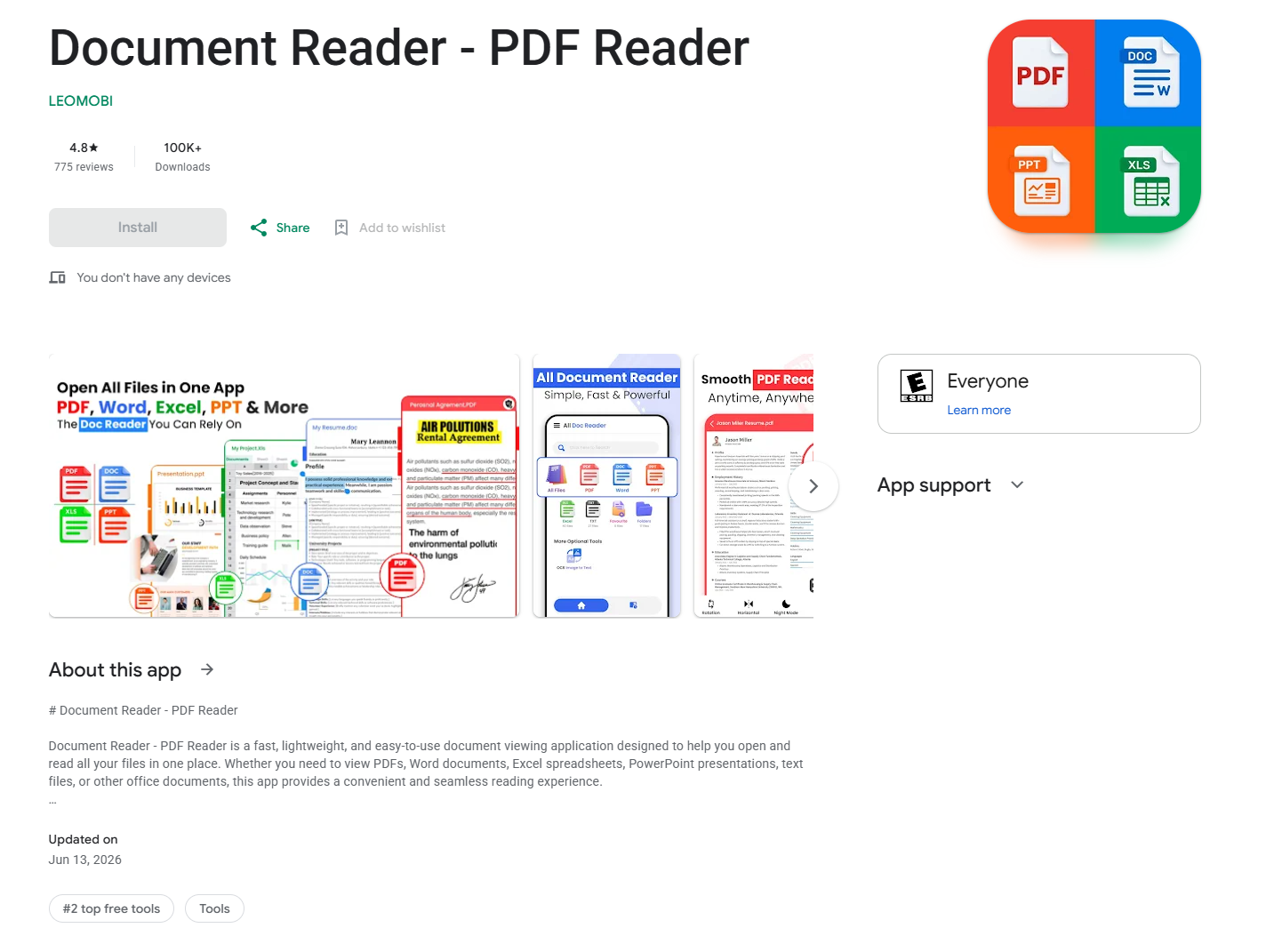
In Q2, our telemetry uncovered multiple malicious loaders hosted directly on Google Play. As highlighted in a prior report (link in Russian), one such instance involved a PDF reader app trojanized to drop the Anatsa banking malware. Upon execution, the app presented users with a fake request to install an update, which served as a front to stage the banking Trojan on the victim’s device.

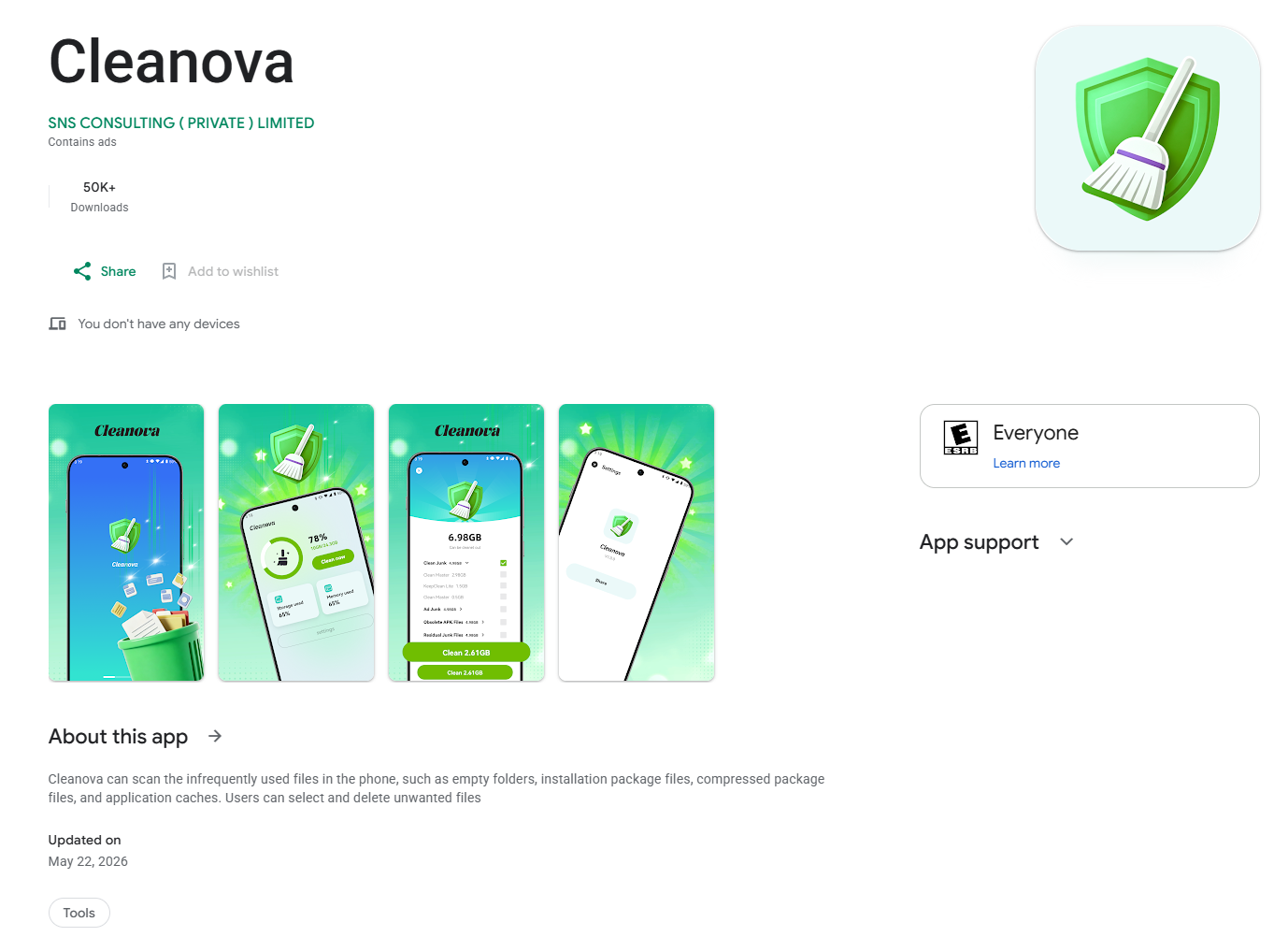
Another notable case involves a loader we detected in the Cleanova app alongside several others. The malware sent requests to a command-and-control server containing telemetry gathered from various SDKs that track the installation source. A malicious payload was returned only for certain sources. This is a fairly interesting method for bypassing app store review processes while ensuring precise victim targeting. If an analytics SDK indicates that an arbitrary installation originated from a source outside the threat actors’ scope, the malicious logic remains dormant. This effectively hides the malware from app store scanners.

Mobile threat statistics

In Q2, the number of Android malware samples totaled 304,128. It remained steady compared to the previous reporting period.

Detected malicious and potentially unwanted installation packages, Q2 2025 — Q2 2026 (download)

The detected installation packages were distributed by type as follows:

Detected mobile apps by type, Q1 — Q2 2026* (download)

* Data for the previous quarter may differ slightly from previously published data due to certain verdicts being retrospectively revised.

While the number of newly discovered banking Trojan variants fell precipitously, they continued to dominate the threat landscape as they did in Q1. Notably, the share of Creduz malware family among identified banking samples has grown significantly despite low activity in victim telemetry. This discrepancy suggests the threat actors are actively iterating on the malware — likely testing new features or bypasses — by generating a high volume of builds before staging a broader campaign.

Share* of users attacked by the given type of malicious or potentially unwanted apps out of all targeted users of Kaspersky mobile products, Q1 — Q2 2026 (download)

* The total may exceed 100% if the same users experienced multiple attack types.

Within the adware category, the sharpest declines were observed in the HiddenAd and MobiDash families. Meanwhile, the proportion of users targeted by Trojan-Dropper malware increased, primarily driven by surges in banking droppers such as Trojan-Dropper.AndroidOS.Banker and Trojan-Dropper.AndroidOS.Mamont. The corresponding drop in the Trojan-Banker category is partially explained by a shift in tactics: several banking Trojans which are now being packed were subsequently reclassified as droppers.

TOP 20 most frequently detected types of mobile malware

Note that the malware rankings below exclude riskware or potentially unwanted software, such as RiskTool or adware.

Verdict %* Q1 2026 %* Q2 2026 Difference in p.p. Change in ranking
Backdoor.AndroidOS.Triada.ag 7.09 9.35 +2.25 0
DangerousObject.Multi.Generic. 5.84 5.65 -0.19 0
DangerousObject.AndroidOS.GenericML. 5.51 5.25 -0.26 0
Trojan.AndroidOS.Boogr.gsh 2.15 3.33 +1.18 +9
Backdoor.AndroidOS.Triada.z 3.08 3.23 +0.15 +3
Trojan-Banker.AndroidOS.Mamont.hl 1.10 2.48 +1.38 +22
Trojan.AndroidOS.Fakemoney.v 3.44 2.31 -1.13 -2
Trojan-Spy.AndroidOS.Btmob.e 0.00 2.27 +2.27
Trojan.AndroidOS.Triada.fe 2.98 2.18 -0.81 0
Trojan-Dropper.AndroidOS.Banker.dd 0.01 2.16 +2.15
Trojan.AndroidOS.Triada.hf 2.23 1.93 -0.29 +1
Backdoor.AndroidOS.Triada.ad 1.40 1.93 +0.53 +8
Backdoor.AndroidOS.Keenadu.a 2.73 1.88 -0.85 -3
Backdoor.AndroidOS.Triada.ab 1.72 1.79 +0.07 +2
Trojan-Banker.AndroidOS.Mamont.iv 1.03 1.63 +0.60 +16
Trojan.AndroidOS.Generic. 1.32 1.47 +0.15 +7
Backdoor.AndroidOS.Triada.ae 1.76 1.44 -0.31 -2
Trojan.AndroidOS.Fakemoney.ej 0.00 1.43 +1.43
Trojan.AndroidOS.Triada.ii 2.07 1.41 -0.66 -5
Trojan-Spy.AndroidOS.Agent.asa 0.02 1.38 +1.36

* Unique users who encountered this malware as a percentage of all attacked users of Kaspersky mobile solutions.

The distribution of top malware families in Q2 largely mirrors the rankings from the previous reporting period. Newer variants of the Mamont banking Trojan climbed the leaderboards, displacing older iterations. This shift points to ongoing, active development of new variants by the threat actors behind the malware.

Mobile banking Trojans

In Q2, the total volume of Trojan-Banker applications dropped sharply compared to the previous quarter, totaling 93,574 installation packages.

Number of installation packages for mobile banking Trojans detected by Kaspersky, Q2 2025 — Q2 2026 (download)

Against the backdrop of this trend, the distribution shifted heavily toward Creduz Trojans. However, as noted earlier, this shift was not reflected in real-world attack metrics: virtually the entire leaderboard by proportion of targeted users continues to be dominated by diverse Mamont variants.

TOP 10 mobile bankers

Verdict %* Q1 2026 %* Q2 2026 Difference in p.p. Change in ranking
Trojan-Banker.AndroidOS.Mamont.hl 3.27 11.13 +7.86 +6
Trojan-Banker.AndroidOS.Mamont.iv 3.08 7.33 +4.25 +6
Trojan-Banker.AndroidOS.Mamont.mv 0.00 5.12 +5.12
Trojan-Banker.AndroidOS.Agent.ws 3.78 4.99 +1.22 +2
Trojan-Banker.AndroidOS.Mamont.mg 0.35 4.71 +4.36 +62
Trojan-Banker.AndroidOS.Faketoken.pac 2.56 4.10 +1.54 +6
Trojan-Banker.AndroidOS.Mamont.jo 15.75 3.73 -12.02 -6
Trojan-Banker.AndroidOS.Mamont.mc 0.83 3.51 +2.67 +26
Trojan-Banker.AndroidOS.Mamont.lf 0.00 2.79 +2.79
Trojan-Banker.AndroidOS.Agent.eq 0.89 2.58 +1.69 +23

* Unique users who encountered this malware as a percentage of all users of Kaspersky mobile security solutions who encountered banking threats.

Google Plans Global Rollout of Privacy-Focused Age Signals API

Google plans to expand its Play Age Signals API globally, helping Android developers tailor app experiences without collecting exact birth dates.

The post Google Plans Global Rollout of Privacy-Focused Age Signals API appeared first on TechRepublic.

IT threat evolution in Q1 2026. Mobile statistics

IT threat evolution in Q1 2026. Mobile statistics
IT threat evolution in Q1 2026. Non-mobile statistics

In the third quarter of 2025, we updated the methodology for calculating statistical indicators based on the Kaspersky Security Network. These changes affected all sections of the report except for the statistics on installation packages, which remained unchanged.

To illustrate the differences between the reporting periods, we have also recalculated data for the previous quarters. Consequently, these figures may significantly differ from the previously published ones. However, subsequent reports will employ this new methodology, enabling precise comparisons with the data presented in this post.

The Kaspersky Security Network (KSN) is a global network for analyzing anonymized threat information, voluntarily shared by users of Kaspersky solutions. The statistics in this report are based on KSN data unless explicitly stated otherwise.

The quarter in numbers

According to Kaspersky Security Network, in Q1 2026:

  • More than 2.67 million attacks utilizing malware, adware, or unwanted mobile software were prevented.
  • The Trojan-Banker category was the prevalent mobile malware threat with a 52.96% share of total detected applications.
  • More than 306,000 malicious installation packages were discovered, including:
    • 162,275 packages related to mobile banking Trojans;
    • 439 packages related to mobile ransomware Trojans.

Quarterly highlights

The number of malware, adware, or unwanted software attacks on mobile devices decreased to 2,676,328 in Q1, down from 3,239,244 in the previous quarter.

Attacks on users of Kaspersky mobile solutions, Q3 2024 — Q1 2026 (download)

The overall drop in attack volume stems primarily from a reduction in adware and RiskTool detections. Nonetheless, this trend does not equate to a lower risk for mobile users. As shown later in this report, the number of unique users targeted by these threats remained relatively stable.

In Q1, Synthient researchers identified a link between the notorious Kimwolf botnet and the IPIDEA proxy network. This network was later taken down in cooperation with GTIG.

In early 2026, we discovered several apps on Google Play and the App Store that contained a new version of the SparkCat crypto stealer.

The Trojan code, meticulously concealed, was embedded into the infected Android apps. The obfuscated malicious Rust library was decrypted using a Dalvik-like virtual machine custom-built by the attackers. The iOS version of the malware also underwent several changes; specifically, the attackers began leveraging Apple’s proprietary Vision framework for optical character recognition (OCR).

Mobile threat statistics

The number of Android malware samples saw a slight increase compared to Q4 2025, reaching a total of 306,070.

Detected malicious and potentially unwanted installation packages, Q1 2025 — Q1 2026 (download)

The detected installation packages were distributed by type as follows:

Detected mobile apps by type, Q4 2025* — Q1 2026 (download)

* Data for the previous quarter may differ slightly from previously published figures due to certain verdicts being retrospectively revised.

Threat actors once again ramped up the production of new banking Trojans; as a result, this category overtook all others in volume, accounting for more than half of all installation packages.

Share* of users attacked by the given type of malicious or potentially unwanted app out of all targeted users of Kaspersky mobile products, Q4 2025 — Q1 2026 (download)

* The total percentage may exceed 100% if the same users encountered multiple attack types.

Following the surge in banking Trojan installation packages, the number of associated attacks also rose, causing Trojan-Banker apps to climb one spot in terms of their share of targeted users. Mamont variants emerged as the most prevalent banking Trojans, accounting for 73.5% of detections, with the rest of the users encountering Faketoken, Rewardsteal, Creduz, and other families.

Yet banking Trojans were still outpaced by adware and RiskTool-type unwanted apps when measured by the total number of affected users. Despite a decrease in their share of installation packages, these two app types retained their positions as the top two threats by attack volume. The most common adware detections involved HiddenAd (44.9%) and MobiDash (38.1%), while most frequently seen RiskTool apps were Revpn (67%) and SpyLoan (20.5%).

TOP 20 most frequently detected types of mobile malware

Note that the malware rankings below exclude riskware or potentially unwanted software, such as RiskTool or adware.

Verdict %* Q4 2025 %* Q1 2026 Difference in p.p. Change in ranking
Backdoor.AndroidOS.Triada.ag 2.62 7.09 +4.48 +10
DangerousObject.Multi.Generic. 6.75 5.84 -0.92 -1
DangerousObject.AndroidOS.GenericML. 3.52 5.51 +1.99 +6
Trojan-Banker.AndroidOS.Mamont.jo 0.00 5.28 +5.28
Trojan.AndroidOS.Fakemoney.v 5.40 3.44 -1.96 -1
Trojan-Downloader.AndroidOS.Keenadu.l 0.00 3.35 +3.35
Trojan-Banker.AndroidOS.Mamont.jx 0.00 3.09 +3.09
Backdoor.AndroidOS.Triada.z 4.87 3.08 -1.79 -2
Trojan.AndroidOS.Triada.fe 5.01 2.98 -2.02 -4
Backdoor.AndroidOS.Keenadu.a 2.07 2.73 +0.66 +6
Trojan-Banker.AndroidOS.Mamont.jg 0.34 2.37 +2.03
Trojan.AndroidOS.Triada.hf 2.15 2.23 +0.07 +3
Trojan.AndroidOS.Boogr.gsh 2.35 2.15 -0.20 0
Trojan.AndroidOS.Triada.ii 5.68 2.07 -3.60 -11
Backdoor.AndroidOS.Triada.ae 1.91 1.76 -0.16 +3
Backdoor.AndroidOS.Triada.ab 1.79 1.72 -0.08 +3
Trojan.AndroidOS.Triada.gn 2.38 1.58 -0.80 -5
Trojan-Banker.AndroidOS.Mamont.gg 1.56 1.50 -0.06 +2
Trojan.AndroidOS.Triada.ga 1.48 1.50 +0.01 +4
Backdoor.AndroidOS.Triada.ad 0.53 1.40 +0.87 +44

* Unique users who encountered this malware as a percentage of all attacked users of Kaspersky mobile solutions.

The pre-installed Triada.ag backdoor rose to the top spot; it is similar to the older Triada.z version we documented previously. Because the same variant was pre-installed across a wide range of devices, the total number of affected users is aggregated. Consequently, Triada outpaced even Mamont, as users encountered a variety of Mamont variants, causing the share of that banking Trojan to spread across multiple rows. Other pre-installed Triada variants (Triada.z, Triada.ae, Triada.ab, and Triada.ad) also made the rankings. Furthermore, we observed increasing activity from the Keenadu.a backdoor, while diverse variants of the embedded Triada Trojan remained in the rankings.

Mobile banking Trojans

Q1 2026 saw a characteristic rise in mobile banking Trojan activity, with the number of packages totaling 162,275, a 50% increase compared to the prior quarter.

Number of installation packages for mobile banking Trojans detected by Kaspersky, Q1 2025 — Q1 2026 (download)

We saw a similar growth in the previous quarter, with banking Trojan volumes rising by 50% during that period as well. Various Mamont variants accounted for the absolute majority of packages and represented nearly every entry in the rankings of most frequent banking Trojans by affected user count.

TOP 10 mobile bankers

Verdict %* Q4 2025 %* Q1 2026 Difference in p.p. Change in ranking
Trojan-Banker.AndroidOS.Mamont.jo 0.00 15.75 +15.75
Trojan-Banker.AndroidOS.Mamont.jx 0.00 9.22 +9.22
Trojan-Banker.AndroidOS.Mamont.jg 1.47 7.08 +5.61 +24
Trojan-Banker.AndroidOS.Mamont.gg 6.79 4.48 -2.32 -3
Trojan-Banker.AndroidOS.Mamont.ks 0.00 3.98 +3.98
Trojan-Banker.AndroidOS.Agent.ws 6.03 3.78 -2.25 -2
Trojan-Banker.AndroidOS.Mamont.hl 4.30 3.27 -1.03 +1
Trojan-Banker.AndroidOS.Mamont.iv 6.00 3.08 -2.92 -3
Trojan-Banker.AndroidOS.Mamont.jb 3.93 3.07 -0.86 +1
Trojan-Banker.AndroidOS.Mamont.jv 0.00 2.79 +2.79

* Unique users who encountered this malware as a percentage of all users of Kaspersky mobile security solutions who encountered banking threats.

Trojan BeatBanker e BTMOB: técnicas de infecção e como manter a segurança | Blog oficial da Kaspersky

Para conseguir concretizar seus planos ardilosos, os desenvolvedores de malware para Android precisam enfrentar vários desafios sucessivos: enganar os usuários para invadir o smartphone, burlar os softwares de segurança, convencer as vítimas a conceder várias permissões do sistema, manter a distância de otimizadores de bateria integrados que consomem muitos recursos e, depois de tudo isso, ter a certeza de que o malware realmente gera lucro. Os criadores do BeatBanker, uma campanha de malware baseado em‑Android descoberta recentemente por nossos especialistas, desenvolveram algo novo para cada uma dessas etapas. O ataque é voltado, por enquanto, para usuários brasileiros, mas as ambições dos desenvolvedores quase certamente motivará uma expansão internacional, então, vale a pena permanecer em alerta e estudar os truques do agente da ameaça. É possível encontrar uma análise técnica completa do malware na Securelist.

Como o BeatBanker se infiltra em um smartphone

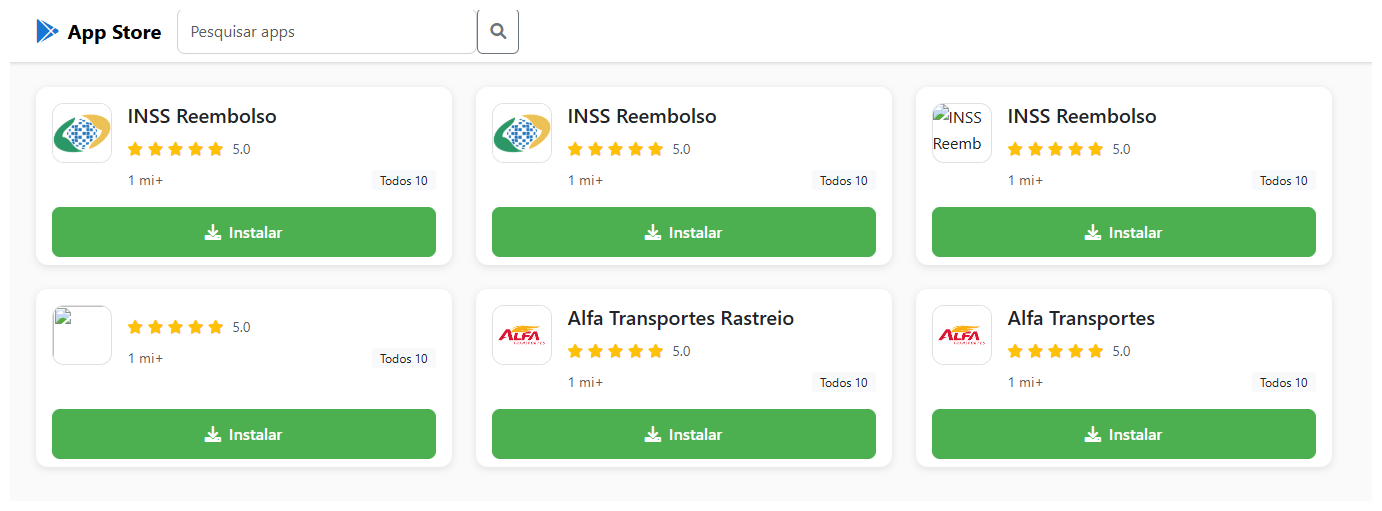
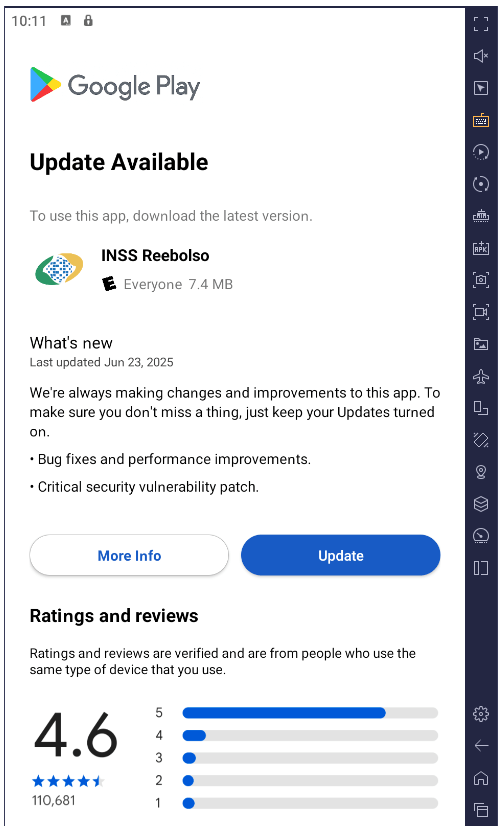
O malware é distribuído por páginas de phishing especialmente criadas que imitam a Google Play Store. Uma página facilmente confundida com o Marketplace oficial convida os usuários a baixar um aplicativo aparentemente útil. Em uma campanha, o trojan se disfarçou como o aplicativo de serviços do governo brasileiro, o INSS Reembolso. Em outra, ele se apresentava como um aplicativo da Starlink.

O site malicioso cupomgratisfood{.}shop faz um excelente trabalho ao imitar uma loja de aplicativos. Não está claro por que o aplicativo INSS Reembolso falso aparece todas as três vezes. Para transparecer mais credibilidade, talvez?!

A instalação ocorre em várias etapas para evitar a solicitação de muitas permissões ao mesmo tempo e para acalmar ainda mais a vítima. Depois que o primeiro aplicativo é baixado e iniciado, ele exibe uma interface que também se assemelha ao Google Play e simula uma atualização para o aplicativo falso, ao solicitar a permissão do usuário para instalar aplicativos, algo que não parece fora do comum no contexto. Se essa permissão for concedida, o malware baixará módulos maliciosos adicionais no smartphone.

Após a instalação, o trojan simula uma atualização do aplicativo chamariz via Google Play ao solicitar permissão para instalar aplicativos enquanto baixa módulos maliciosos adicionais no processo

Todos os componentes do trojan são criptografados. Antes de descriptografar e prosseguir para os próximos estágios da infecção, ele verifica se o smartphone é real e se ele está no país de destino. O BeatBanker encerra imediatamente o próprio processo se encontrar discrepâncias ou detectar que está sendo executado em ambientes emulados ou de análise. Isso complica a análise dinâmica do malware. Aliás, o falso downloader de atualizações injeta módulos diretamente na RAM para evitar a criação de arquivos no smartphone que seriam visíveis ao software de segurança.

Todos esses truques não são novidade e são frequentemente usados em malwares complexos para computadores desktop. No entanto, para smartphones, essa sofisticação ainda é uma raridade, e nem todas as ferramentas de segurança conseguirão detectar isso. Usuários de produtos da Kaspersky estão protegidos contra essa ameaça.

Reprodução de áudio como um escudo

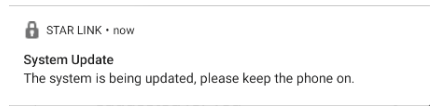
Uma vez estabelecido no smartphone, o BeatBanker baixa um módulo para minerar a criptomoeda Monero. Os autores estavam muito preocupados com a possibilidade dos sistemas agressivos de otimização de bateria do smartphone desligarem o minerador, então eles criaram um truque: tocar um som quase inaudível o tempo todo. Os sistemas de controle de consumo de energia normalmente poupam os aplicativos que estão reproduzindo áudio ou vídeo para evitar cortar a música de fundo ou os players de podcast. Dessa forma, o malware pode ser executado continuamente. Além disso, ele exibe uma notificação persistente na barra de status para solicitar ao usuário que mantenha o telefone ligado para uma atualização do sistema.

Exemplo de uma notificação de atualização persistente do sistema de outro aplicativo malicioso disfarçado como um aplicativo da Starlink

Controle via Google

Para gerenciar o trojan, os autores utilizam o Firebase Cloud Messaging (FCM) legítimo do Google, um sistema para receber notificações e enviar dados de um smartphone. Esse recurso está disponível para todos os aplicativos e é o método mais popular para enviar e receber dados. Graças ao FCM, os invasores podem monitorar o status do dispositivo e alterar as configurações de acordo com suas necessidades.

Não acontecerá nada durante um tempo, depois que o malware for instalado, os invasores esperam pacientemente. Então, eles acionam o minerador, mas com o cuidado de reduzir a intensidade, se o telefone superaquecer, a bateria começar a descarregar ou o proprietário estiver usando o dispositivo. Tudo isso é feito via FCM.

Roubo e espionagem

Além do minerador de criptomoedas, o BeatBanker instala módulos extras para espionar o usuário e realizar o roubo no momento certo. O módulo de spyware solicita a permissão dos Serviços de Acessibilidade, e se ela for concedida, o monitoramento de tudo o que estiver acontecendo no smartphone começa.

Se o proprietário abrir o aplicativo Binance ou Trust Wallet para enviar USDT, o malware sobrepõe uma tela falsa na parte superior da interface da carteira ao trocar efetivamente o endereço do destinatário pelo seu próprio endereço. Todas as transferências vão para os golpistas.

O trojan possui um sistema de controle remoto avançado e é capaz de executar muitos outros comandos:

  • Interceptação de códigos únicos do Google Autenticador
  • Gravação de áudio do microfone
  • Streaming da tela em tempo real
  • Monitoramento da área de transferência e interceptação de pressionamentos de tecla
  • Envio de mensagens SMS
  • Simulação de toques em áreas específicas da tela e entrada de texto de acordo com um script enviado pelo invasor e muito mais

Tudo isso torna possível roubar a vítima quando ela usa qualquer outro serviço bancário ou de pagamento, não apenas os pagamentos de criptomoedas.

Às vezes, as vítimas são infectadas com um módulo diferente para espionagem e controle remoto por smartphone, o trojan de acesso remoto BTMOB. Seus recursos maliciosos são ainda mais amplos, incluindo:

  • Aquisição automática de determinadas permissões no Android 13 a 15
  • Rastreamento contínuo de geolocalização
  • Acesso às câmeras frontal e traseira
  • Obtenção de códigos PIN e senhas para desbloqueio da tela
  • Captura da digitação do teclado

Como se proteger contra o BeatBanker

Os criminosos virtuais estão constantemente refinando seus ataques e criando novas soluções como formas de lucrar com as vítimas. Apesar disso, é possível se proteger seguindo algumas precauções simples:

  • Baixe aplicativos somente de fontes oficiais, como o Google Play ou a loja de aplicativos pré-instalada pelo fornecedor. Se encontrar um aplicativo ao pesquisar na Internet, não o abra por meio de um link do navegador, em vez disso, acesse o aplicativo Google Play ou outra loja consolidada em seu smartphone e procure por ele lá. Enquanto estiver fazendo isso, verifique o número de downloads, o histórico do aplicativo, as classificações e os comentários. Evite aplicativos novos, aplicativos com classificações baixas e aqueles com um pequeno número de downloads.
  • Verifique todas as permissões concedidas. Não conceda permissões sem a certeza do que elas fazem ou por que esse aplicativo específico as requer. Tenha muito cuidado com permissões como Instalar aplicativos desconhecidos, Acessibilidade, Superusuário e Exibir sobre outros aplicativos. Escrevemos sobre isso em detalhes em um artigo separado.
  • Equipe seu dispositivo com uma solução antimalware abrangente. Naturalmente, recomendamos o Kaspersky for Android. Os usuários dos produtos Kaspersky estão protegidos contra o BeatBanker, detectado com os veredictos HEUR:Trojan-Dropper.AndroidOS.BeatBanker e HEUR:Trojan-Dropper.AndroidOS.Banker.*.
  • Atualize regularmente o sistema operacional e o software de segurança. Para o Kaspersky for Android, atualmente indisponível no Google Play, consulte nossas instruções detalhadas sobre como instalar e atualizar o aplicativo.

Ameaças aos usuários do Android estão aumentando bastante ultimamente. Confira nossas outras postagens sobre os ataques Android mais relevantes e difundidos, além das dicas para manter você e seus entes queridos seguros:

Mobile malware evolution in 2025

Starting from the third quarter of 2025, we have updated our statistical methodology based on the Kaspersky Security Network. These changes affect all sections of the report except for the installation package statistics, which remain unchanged.

To illustrate trends between reporting periods, we have recalculated the previous year’s data; consequently, these figures may differ significantly from previously published numbers. All subsequent reports will be generated using this new methodology, ensuring accurate data comparisons with the findings presented in this article.

Kaspersky Security Network (KSN) is a global network for analyzing anonymized threat intelligence, voluntarily shared by Kaspersky users. The statistics in this report are based on KSN data unless explicitly stated otherwise.

The year in figures

According to Kaspersky Security Network, in 2025:

  • Over 14 million attacks involving malware, adware or unwanted mobile software were blocked.
  • Adware remained the most prevalent mobile threat, accounting for 62% of all detections.
  • Over 815 thousand malicious installation packages were detected, including 255 thousand mobile banking Trojans.

The year’s highlights

In 2025, cybercriminals launched an average of approximately 1.17 million attacks per month against mobile devices using malicious, advertising, or unwanted software. In total, Kaspersky solutions blocked 14,059,465 attacks throughout the year.

Attacks on Kaspersky mobile users in 2025 (download)

Beyond the malware mentioned in previous quarterly reports, 2025 saw the discovery of several other notable Trojans. Among these, in Q4 we uncovered the Keenadu preinstalled backdoor. This malware is integrated into device firmware during the manufacturing stage. The malicious code is injected into libandroid_runtime.so – a core library for the Android Java runtime environment – allowing a copy of the backdoor to enter the address space of every app running on the device. Depending on the specific app, the malware can then perform actions such as inflating ad views, displaying banners on behalf of other apps, or hijacking search queries. The functionality of Keenadu is virtually unlimited, as its malicious modules are downloaded dynamically and can be updated remotely.

Cybersecurity researchers also identified the Kimwolf IoT botnet, which specifically targets Android TV boxes. Infected devices are capable of launching DDoS attacks, operating as reverse proxies, and executing malicious commands via a reverse shell. Subsequent analysis revealed that Kimwolf’s reverse proxy functionality was being leveraged by proxy providers to use compromised home devices as residential proxies.

Another notable discovery in 2025 was the LunaSpy Trojan.

LunaSpy Trojan, distributed under the guise of an antivirus app

LunaSpy Trojan, distributed under the guise of an antivirus app

Disguised as antivirus software, this spyware exfiltrates browser passwords, messaging app credentials, SMS messages, and call logs. Furthermore, it is capable of recording audio via the device’s microphone and capturing video through the camera. This threat primarily targeted users in Russia.

Mobile threat statistics

815,735 new unique installation packages were observed in 2025, showing a decrease compared to the previous year. While the decline in 2024 was less pronounced, this past year saw the figure drop by nearly one-third.

Detected Android-specific malware and unwanted software installation packages in 2022–2025 (download)

The overall decrease in detected packages is primarily due to a reduction in apps categorized as not-a-virus. Conversely, the number of Trojans has increased significantly, a trend clearly reflected in the distribution data below.

Detected packages by type

Distribution* of detected mobile software by type, 2024–2025 (download)

* The data for the previous year may differ from previously published data due to some verdicts being retrospectively revised.

A significant increase in Trojan-Banker and Trojan-Spy apps was accompanied by a decline in AdWare and RiskTool files. The most prevalent banking Trojans were Mamont (accounting for 49.8% of apps) and Creduz (22.5%). Leading the persistent adware category were MobiDash (39%), Adlo (27%), and HiddenAd (20%).

Share* of users attacked by each type of malware or unwanted software out of all users of Kaspersky mobile solutions attacked in 2024–2025 (download)

* The total may exceed 100% if the same users encountered multiple attack types.

Trojan-Banker malware saw a significant surge in 2025, not only in terms of unique file counts but also in the total number of attacks. Nevertheless, this category ranked fourth overall, trailing far behind the Trojan file category, which was dominated by various modifications of Triada and Fakemoney.

TOP 20 types of mobile malware

Note that the malware rankings below exclude riskware and potentially unwanted apps, such as RiskTool and adware.

Verdict % 2024* % 2025* Difference in p.p. Change in ranking
Trojan.AndroidOS.Triada.fe 0.04 9.84 +9.80
Trojan.AndroidOS.Triada.gn 2.94 8.14 +5.21 +6
Trojan.AndroidOS.Fakemoney.v 7.46 7.97 +0.51 +1
DangerousObject.Multi.Generic 7.73 5.83 –1.91 –2
Trojan.AndroidOS.Triada.ii 0.00 5.25 +5.25
Trojan-Banker.AndroidOS.Mamont.da 0.10 4.12 +4.02
Trojan.AndroidOS.Triada.ga 10.56 3.75 –6.81 –6
Trojan-Banker.AndroidOS.Mamont.db 0.01 3.53 +3.51
Backdoor.AndroidOS.Triada.z 0.00 2.79 +2.79
Trojan-Banker.AndroidOS.Coper.c 0.81 2.54 +1.72 +35
Trojan-Clicker.AndroidOS.Agent.bh 0.34 2.48 +2.14 +74
Trojan-Dropper.Linux.Agent.gen 1.82 2.37 +0.55 +4
Trojan.AndroidOS.Boogr.gsh 5.41 2.06 –3.35 –8
DangerousObject.AndroidOS.GenericML 2.42 1.97 –0.45 –3
Trojan.AndroidOS.Triada.gs 3.69 1.93 –1.76 –9
Trojan-Downloader.AndroidOS.Agent.no 0.00 1.87 +1.87
Trojan.AndroidOS.Triada.hf 0.00 1.75 +1.75
Trojan-Banker.AndroidOS.Mamont.bc 1.13 1.65 +0.51 +8
Trojan.AndroidOS.Generic. 2.13 1.47 –0.66 –6
Trojan.AndroidOS.Triada.hy 0.00 1.44 +1.44

* Unique users who encountered this malware as a percentage of all attacked users of Kaspersky mobile solutions.

The list is largely dominated by the Triada family, which is distributed via malicious modifications of popular messaging apps. Another infection vector involves tricking victims into installing an official messaging app within a “customized virtual environment” that supposedly offers enhanced configuration options. Fakemoney scam applications, which promise fraudulent investment opportunities or fake payouts, continue to target users frequently, ranking third in our statistics. Meanwhile, the Mamont banking Trojan variants occupy the 6th, 8th, and 18th positions by number of attacks. The Triada backdoor preinstalled in the firmware of certain devices reached the 9th spot.

Region-specific malware

This section describes malware families whose attack campaigns are concentrated within specific countries.

Verdict Country* %**
Trojan-Banker.AndroidOS.Coper.a Türkiye 95.74
Trojan-Dropper.AndroidOS.Hqwar.bj Türkiye 94.96
Trojan.AndroidOS.Thamera.bb India 94.71
Trojan-Proxy.AndroidOS.Agent.q Germany 93.70
Trojan-Banker.AndroidOS.Coper.c Türkiye 93.42
Trojan-Banker.AndroidOS.Rewardsteal.lv India 92.44
Trojan-Banker.AndroidOS.Rewardsteal.jp India 92.31
Trojan-Banker.AndroidOS.Rewardsteal.ib India 91.91
Trojan-Dropper.AndroidOS.Rewardsteal.h India 91.45
Trojan-Banker.AndroidOS.Rewardsteal.nk India 90.98
Trojan-Dropper.AndroidOS.Agent.sm Türkiye 90.34
Trojan-Dropper.AndroidOS.Rewardsteal.ac India 89.38
Trojan-Banker.AndroidOS.Rewardsteal.oa India 89.18
Trojan-Banker.AndroidOS.Rewardsteal.ma India 88.58
Trojan-Spy.AndroidOS.SmForw.ko India 88.48
Trojan-Dropper.AndroidOS.Pylcasa.c Brazil 88.25
Trojan-Dropper.AndroidOS.Hqwar.bf Türkiye 88.15
Trojan-Banker.AndroidOS.Agent.pp India 87.85

* Country where the malware was most active.
** Unique users who encountered the malware in the indicated country as a percentage of all users of Kaspersky mobile solutions who were attacked by the same malware.

Türkiye saw the highest concentration of attacks from Coper banking Trojans and their associated Hqwar droppers. In India, Rewardsteal Trojans continued to proliferate, exfiltrating victims’ payment data under the guise of monetary giveaways. Additionally, India saw a resurgence of the Thamera Trojan, which we previously observed frequently attacking users in 2023. This malware hijacks the victim’s device to illicitly register social media accounts.

The Trojan-Proxy.AndroidOS.Agent.q campaign, concentrated in Germany, utilized a compromised third-party application designed for tracking discounts at a major German retail chain. Attackers monetized these infections through unauthorized use of the victims’ devices as residential proxies.

In Brazil, 2025 saw a concentration of Pylcasa Trojan attacks. This malware is primarily used to redirect users to phishing pages or illicit online casino sites.

Mobile banking Trojans

The number of new banking Trojan installation packages surged to 255,090, representing a several-fold increase over previous years.

Mobile banking Trojan installation packages detected by Kaspersky in 2022–2025 (download)

Notably, the total number of attacks involving bankers grew by 1.5 times, maintaining the same growth rate seen in the previous year. Given the sharp spike in the number of unique malicious packages, we can conclude that these attacks yield significant profit for cybercriminals. This is further evidenced by the fact that threat actors continue to diversify their delivery channels and accelerate the production of new variants in an effort to evade detection by security solutions.

TOP 10 mobile bankers

Verdict % 2024* % 2025* Difference in p.p. Change in ranking
Trojan-Banker.AndroidOS.Mamont.da 0.86 15.65 +14.79 +28
Trojan-Banker.AndroidOS.Mamont.db 0.12 13.41 +13.29
Trojan-Banker.AndroidOS.Coper.c 7.19 9.65 +2.46 +2
Trojan-Banker.AndroidOS.Mamont.bc 10.03 6.26 –3.77 –3
Trojan-Banker.AndroidOS.Mamont.ev 0.00 4.10 +4.10
Trojan-Banker.AndroidOS.Coper.a 9.04 4.00 –5.04 –4
Trojan-Banker.AndroidOS.Mamont.ek 0.00 3.73 +3.73
Trojan-Banker.AndroidOS.Mamont.cb 0.64 3.04 +2.40 +26
Trojan-Banker.AndroidOS.Faketoken.pac 2.17 2.95 +0.77 +5
Trojan-Banker.AndroidOS.Mamont.hi 0.00 2.75 +2.75

* Unique users who encountered this malware as a percentage of all users of Kaspersky mobile solutions who encountered banking threats.

In 2025, we observed a massive surge in activity from Mamont banking Trojans. They accounted for approximately half of all new apps in their category and also were utilized in half of all banking Trojan attacks.

Conclusion

The year 2025 saw a continuing trend toward a decline in total unique unwanted software installation packages. However, we noted a significant year-over-year increase in specific threats – most notably mobile banking Trojans and spyware – even though adware remained the most frequently detected threat overall.

Among the mobile threats detected, we have seen an increased prevalence of preinstalled backdoors, such as Triada and Keenadu. Consistent with last year’s findings, certain mobile malware families continue to proliferate via official app stores. Finally, we have observed a growing interest among threat actors in leveraging compromised devices as proxies.

Keeping Google Play & Android app ecosystems safe in 2025

Posted by Vijaya Kaza, VP and GM, App & Ecosystem Trust

The Android ecosystem is a thriving global community built on trust, giving billions of users the confidence to download the latest apps. In order to maintain that trust, we’re focused on ensuring that apps do not cause real-world harm, such as malware, financial fraud, hidden subscriptions, and privacy invasions. As bad actors leverage AI to change their tactics and launch increasingly sophisticated attacks, we’ve deepened our investments in AI and real-time defenses over the last year to maintain the upper hand and stop these threats before they reach users.

Upgrading Google Play’s AI-powered, multi-layered user protections

We’ve seen a clear impact from these safety efforts on Google Play. In 2025, we prevented over 1.75 million policy-violating apps from being published on Google Play and banned more than 80,000 bad developer accounts that attempted to publish harmful apps. These figures demonstrate how our proactive protections and push for a more accountable ecosystem are discouraging bad actors from publishing malicious apps, while our new tools help honest developers build compliant apps more easily. Initiatives like developer verification, mandatory pre-review checks, and testing requirements have raised the bar for the Google Play ecosystem, significantly reducing the paths for bad actors to enter.

User safety is at the core of everything we build. Over the years, we’ve continually introduced ways to help users stay safe and make informed app choices — from parental controls to data safety transparency and app badges. We’re constantly improving our policies and protections to encourage safe, high-quality apps on Google Play and stop bad actors before they cause harm.

Apps on Google Play undergo rigorous reviews for safety and compliance with our policies. Last year, we shared that Google Play runs over 10,000 safety checks on every app we publish, and we continue to check and recheck apps after they’ve been published. In 2025, we continued scaling our defenses even further by:

  • Boosting AI-enhanced app detection: We integrated Google’s latest generative AI models into our review process, helping our human review team continue to find complex malicious patterns faster.
  • Preventing unnecessary access to sensitive data: We prevented over 255,000 apps from getting excessive access to sensitive user data and continued to strengthen our privacy policies. Our commitment to privacy-forward app development, supported by tools like Play Policy Insights in Android Studio and Data safety section, has empowered developers to continue to: minimize privacy-sensitive permission requests, and prioritize the user in their design choices.
  • Blocking spam ratings and reviews: Whether they lead to review inflation or deflation, spam ratings and reviews can negatively impact our users’ trust and our developers’ growth. We’re continually evolving our detection models to help ensure app reviews are accurate. Our anti-spam protections blocked 160 million spam ratings and reviews last year, including inflated and deflated reviews. We also prevented an average 0.5-star rating drop for apps targeted by review bombing, protecting our users and developers from unhelpful reviews.
  • Safeguarding kids and families: Our approach to kids and families is built on the core belief that children deserve a safe, enriching digital environment. Our commitment is to empower parents with robust tools while providing children with access to high-quality, age-appropriate content. Last year, we announced new layers of protection, in addition to our existing safeguards, to prevent younger audiences from discovering or downloading apps involving activities like gambling or dating.

Enhancing Google Play Protect to help keep the entire Android ecosystem safe

We also continued to improve our protections for the broader Android ecosystem, by expanding Google Play Protect and real-time security measures like in-call scam protections to help keep users safe from scams, fraud, and other threats.

As Android’s built-in defense against malware and unwanted software, Google Play Protect now scans over 350 billion Android apps daily. This proactive protection constantly checks both Play apps and those from other sources to ensure they are not potentially harmful. And, last year, its real-time scanning capability identified more than 27 million new malicious apps from outside Google Play, warning users or blocking the app to neutralize the threat. To benefit from these protections, we recommend that users always keep Google Play Protect on.

While fraudsters are constantly evolving their tactics, Google Play Protect is evolving faster. Last year, we expanded:

  • Enhanced fraud protection: Google Play Protect’s enhanced fraud protection analyzes and automatically blocks the installation of apps that may abuse sensitive permissions to commit financial fraud. This protection is triggered when a user attempts to install an app from an "Internet-sideloading source" — such as a web browser or messaging app — that requests a sensitive permission. Building on the success of our initial pilot in Singapore, we expanded enhanced fraud protection to 185 markets, now covering more than 2.8 billion Android devices. In 2025, we blocked 266 million risky installation attempts and helped protect users from 872,000 unique, high-risk applications.
  • In-call scam protection: We also introduced new protections to combat social engineering attacks during phone calls. This feature preemptively disables the ability to turn off Google Play Protect during phone calls, stopping bad actors from being able to trick users into disabling their device's built-in defenses to download a malicious app while on a call.

Partnering with developers for a more secure, privacy-friendly future

Keeping Android and Google Play safe requires deep collaboration. We want to thank our global developer community for their partnership and for sharing their feedback on the tools and support they need to succeed.

In 2025, we focused on reducing friction for developers and providing them with tools to safeguard their businesses:

  • Building safer apps more easily: We’re helping developers streamline their work by bringing insights directly into their natural workflows. It starts with Play Policy Insights in Android Studio, which gives developers real-time feedback as they code. We focused first on permissions and APIs that grant deeper system access or handle personal data, like location or photos. This gives developers a head start on policy requirements, including prominent disclosures or usage declarations, while they’re still building. When developers move to Play Console to prepare their apps for submission, our expanded pre-review checks help catch common reasons for rejection, like improper usage of credentials or permissions and broken privacy policy links, ensuring smoother, faster reviews.
  • Stronger threat detection with Play Integrity API: Every day, apps and games make over 20 billion checks with Play Integrity API to protect against abuse and unauthorized access. In 2025, we added hardware-backed signals to make it even harder for bad actors to spoof devices and introduced new in-app prompts that let users fix common issues like network errors without leaving the app. We also launched device recall in beta to help developers identify repeat bad actors even after a device has been reset, all while protecting user privacy.
  • Building trust through developer verification: We’ve seen how effective developer verification is on Google Play, and now we’re applying those lessons to the broader Android ecosystem. By ensuring there is a real, accountable identity behind every app, verification helps legitimize authentic developers and prevents bad actors from hiding behind anonymity to repeatedly cause harm. After gathering feedback during our early access period, we’ll open up verification to all developers this year. We’ve also added a dedicated account type for students and hobbyists, which will allow them to distribute these apps to a limited number of devices without the full verification requirements.
  • Greater security with every Android release: In Android 16, developers can protect users’ most private information, like bank logins, with just one line of code. We’ve integrated this feature automatically to certain apps for an instant security boost against “tapjacking,” a trick where bad apps use hidden layers to steal clicks for ad fraud.

Looking ahead

Our top priority remains making Google Play and Android the most trusted app ecosystems for everyone. This year, we’ll continue to invest in AI-driven defenses to stay ahead of emerging threats and equip Android developers with the tools they need to build apps safely. To empower developers who distribute their apps on Google Play, we’ll maintain our focus on embedding checks to help build apps that are compliant by design, while providing guidance to help proactively avoid policy violations before an app is published. We’ll also roll out Android developer verifications to hold bad actors accountable and prevent them from hiding behind anonymity to cause repeated harm.

Thank you for being part of the Google Play and Android community as we work together to build a safer app ecosystem.

How we kept the Google Play & Android app ecosystems safe in 2024

Posted by Bethel Otuteye and Khawaja Shams (Android Security and Privacy Team), and Ron Aquino (Play Trust and Safety)

Android and Google Play comprise a vibrant ecosystem with billions of users around the globe and millions of helpful apps. Keeping this ecosystem safe for users and developers remains our top priority. However, like any flourishing ecosystem, it also attracts its share of bad actors. That’s why every year, we continue to invest in more ways to protect our community and fight bad actors, so users can trust the apps they download from Google Play and developers can build thriving businesses.

Last year, those investments included AI-powered threat detection, stronger privacy policies, supercharged developer tools, new industry-wide alliances, and more. As a result, we prevented 2.36 million policy-violating apps from being published on Google Play and banned more than 158,000 bad developer accounts that attempted to publish harmful apps.

But that was just the start. For more, take a look at our recent highlights from 2024:

Google’s advanced AI: helping make Google Play a safer place


To keep out bad actors, we have always used a combination of human security experts and the latest threat-detection technology. In 2024, we used Google’s advanced AI to improve our systems’ ability to proactively identify malware, enabling us to detect and block bad apps more effectively. It also helps us streamline review processes for developers with a proven track record of policy compliance. Today, over 92% of our human reviews for harmful apps are AI-assisted, allowing us to take quicker and more accurate action to help prevent harmful apps from becoming available on Google Play.

That’s enabled us to stop more bad apps than ever from reaching users through the Play Store, protecting users from harmful or malicious apps before they can cause any damage.

Working with developers to enhance security and privacy on Google Play

To protect user privacy, we’re working with developers to reduce unnecessary access to sensitive data. In 2024, we prevented 1.3 million apps from getting excessive or unnecessary access to sensitive user data. We also required apps to be more transparent about how they handle user information by launching new developer requirements and a new “Data deletion” option for apps that support user accounts and data collection. This helps users manage their app data and understand the app’s deletion practices, making it easier for Play users to delete data collected from third-party apps.

We also worked to ensure that apps use the strongest and most up-to-date privacy and security capabilities Android has to offer. Every new version of Android introduces new security and privacy features, and we encourage developers to embrace these advancements as soon as possible. As a result of partnering closely with developers, over 91% of app installs on the Google Play Store now use the latest protections of Android 13 or newer.

Safeguarding apps from scams and fraud is an ongoing battle for developers. The Play Integrity API allows developers to check if their apps have been tampered with or are running in potentially compromised environments, helping them to prevent abuse like fraud, bots, cheating, and data theft. Play Integrity API and Play’s automatic protection helps developers ensure that users are using the official Play version of their app with the latest security updates. Apps using Play integrity features are seeing 80% lower usage from unverified and untrusted sources on average.

We’re also constantly working to improve the safety of apps on Play at scale, such as with the Google Play SDK Index. This tool offers insights and data to help developers make more informed decisions about the safety of an SDK. Last year, in addition to adding 80 SDKs to the index, we also worked closely with SDK and app developers to address potential SDK security and privacy issues, helping to build safer and more secure apps for Google Play.

Google Play’s multi-layered protections against bad apps


To create a trusted experience for everyone on Google Play, we use our SAFE principles as a guide, incorporating multi-layered protections that are always evolving to help keep Google Play safe. These protections start with the developers themselves, who play a crucial role in building secure apps. We provide developers with best-in-class tools, best practices, and on-demand training resources for building safe, high-quality apps. Every app undergoes rigorous review and testing, with only approved apps allowed to appear in the Play Store. Before a user downloads an app from Play, users can explore its user reviews, ratings, and Data safety section on Google Play to help them make an informed decision. And once installed, Google Play Protect, Android’s built-in security protection, helps to shield their Android device by continuously scanning for malicious app behavior.

Enhancing Google Play Protect to help keep users safe on Android


While the Play Store offers best-in-class security, we know it’s not the only place users download Android apps – so it’s important that we also defend Android users from more generalized mobile threats. To do this in an open ecosystem, we’ve invested in sophisticated, real-time defenses that protect against scams, malware, and abusive apps. These intelligent security measures help to keep users, user data, and devices safe, even if apps are installed from various sources with varying levels of security.


Google Play Protect automatically scans every app on Android devices with Google Play Services, no matter the download source. This built-in protection, enabled by default, provides crucial security against malware and unwanted software. Google Play Protect scans more than 200 billion apps daily and performs real-time scanning at the code-level on novel apps to combat emerging and hidden threats, like polymorphic malware. In 2024, Google Play Protect’s real-time scanning identified more than 13 million new malicious apps from outside Google Play1.

Google Play Protect is always evolving to combat new threats and protect users from harmful apps that can lead to scams and fraud. Here are some of the new improvements that are now available globally on Android devices with Google Play Services:

  • Reminder notifications in Chrome on Android to re-enable Google Play Protect: According to our research, more than 95 percent of app installations from major malware families that exploit sensitive permissions highly correlated to financial fraud came from Internet-sideloading sources like web browsers, messaging apps, or file managers. To help users stay protected when browsing the web, Chrome will now display a reminder notification to re-enable Google Play Protect if it has been turned off.
  • Additional protection against social engineering attacks: Scammers may manipulate users into disabling Play Protect during calls to download malicious Internet-sideloaded apps. To prevent this, the Play Protect app scanning toggle is now temporarily disabled during phone or video calls. This safeguard is enabled by default during traditional phone calls as well as during voice and video calls in popular third-party apps.
  • Automatically revoking app permissions for potentially dangerous apps: Since Android 11, we’ve taken a proactive approach to data privacy by automatically resetting permissions for apps that users haven't used in a while. This ensures apps can only access the data they truly need, and users can always grant permissions back if necessary. To further enhance security, Play Protect now automatically revokes permissions for potentially harmful apps, limiting their access to sensitive data like storage, photos, and camera. Users can restore app permissions at any time, with a confirmation step for added security.

Google Play Protect’s enhanced fraud protection pilot analyzes and automatically blocks the installation of apps that may use sensitive permissions frequently abused for financial fraud when the user attempts to install the app from an Internet-sideloading source (web browsers, messaging apps, or file managers).

Building on the success of our initial pilot in partnership with the Cyber Security Agency of Singapore (CSA), additional enhanced fraud protection pilots are now active in nine regions – Brazil, Hong Kong, India, Kenya, Nigeria, Philippines, South Africa, Thailand, and Vietnam.

In 2024, Google Play Protect’s enhanced fraud protection pilots have shielded 10 million devices from over 36 million risky installation attempts, encompassing over 200,000 unique apps.

By piloting these new protections, we can proactively combat emerging threats and refine our solutions to thwart scammers and their increasingly sophisticated fraud attempts. We look forward to continuing to partner with governments, ecosystem partners, and other stakeholders to improve user protections.

App badging to help users find apps they can trust at a glance on Google Play

In 2024, we introduced a new badge for government developers to help users around the world identify official government apps. Government apps are often targets of impersonation due to the highly sensitive nature of the data users provide, giving bad actors the ability to steal identities and commit financial fraud. Badging verified government apps is an important step in helping connect people with safe, high-quality, useful, and relevant experiences. We partner closely with global governments and are already exploring ways to build on this work.

We also recently introduced a new badge to help Google Play users discover VPN apps that take extra steps to demonstrate their strong commitment to security. We allow developers who adhere to Play safety and security guidelines and have passed an additional independent Mobile Application Security Assessment (MASA) to display a dedicated badge in the Play Store to highlight their increased commitment to safety.

Collaborating to advance app security standards

In addition to our partnerships with governments, developers, and other stakeholders, we also worked with our industry peers to protect the entire app ecosystem for everyone. The App Defense Alliance, in partnership with fellow steering committee members Microsoft and Meta, recently launched the ADA Application Security Assessment (ASA) v1.0, a new standard to help developers build more secure mobile, web, and cloud applications. This standard provides clear guidance on protecting sensitive data, defending against cyberattacks, and ultimately, strengthening user trust. This marks a significant step forward in establishing industry-wide security best practices for application development.

All developers are encouraged to review and comply with the new mobile security standard. You’ll see this standard in action for all carrier apps pre-installed on future Pixel phone models.

Looking ahead


This year, we’ll continue to protect the Android and Google Play ecosystem, building on these tools and resources in response to user and developer feedback and the changing landscape. As always, we’ll keep empowering developers to build safer apps more easily, streamline their policy experience, and protect their businesses and users from bad actors.


1 Based on Google Play Protect 2024 internal data.

❌