Visualização de leitura

The hidden work of modernizing Malwarebytes

Most of the work that keeps a security product trustworthy is invisible. Users see a scan complete, a threat blocked, an update applied overnight. They don’t see the platform underneath. Runtimes, managed libraries, native drivers, and Windows requirements must all stay current and work together across millions of endpoints. Our migration to .NET 10 is one example of how we keep that platform moving and our focus in this article.

It would be easy to call these upgrades maintenance tasks and move on. But that is underselling them. Our code runs continuously, with elevated privileges, next to some of the most sensitive parts of Windows.

Every dependency in our stack, from the runtime and third-party libraries to native drivers and operating-system requirements, affects the environment in which our software runs. When one changes, everything that relies on it may have to change too.

The problem: platforms fall behind by standing still 

In endpoint security, the ground never stops moving. Windows evolves. Threats evolve. Hardware evolves, from ARM64 laptops to machines with far more memory and faster storage than the ones our code was first written for.  

A platform that stands still does not stay the same. It falls behind. Every skipped release of a dependency or runtime widens the gap between the ecosystem we built on and the one that is stable today.  

A modern runtime and .Net 10 in particular can give us better security, faster code paths, a smaller memory footprint, and richer diagnostics. It also gives our engineers language and tooling improvements that help them work more efficiently. 

The stakes are also particularly high for security software: 

  • A web app can be rolled back with a deployment. Software already installed on a customer’s endpoint cannot. 
  • Our code runs with high privileges, alongside kernel drivers and anti-tamper protections.   
  • A runtime regression does not affect one server. It has the potential to affect millions of machines.  

So we treat a runtime upgrade with the same rigor as a security feature. 

The challenge: everything moves together 

Malwarebytes for Windows is not a single program. It is a coordinated system: a user-facing interface, several long-running Windows services, an installer, a self-update pipeline, a plugin surface, and third-party managed dependencies.  

These sit above native drivers and our detection engine. The .NET 10 migration covered the managed parts of Malwarebytes while leaving this native core untouched. But the different layers still have to work together. 

The migration had to satisfy several requirements at once:  

  • Security-sensitive code had to behave identically before and after the change.  
  • Native drivers and anti-tamper layers had to continue working correctly with the  managed code. 
  • The installer and update pipeline had to deploy the new runtime files and clean up old ones.  
  • Plugins and third-party dependencies had to remain compatible. 
  • Existing Malwarebytes installations had to continue working.  
  • Our automated validation had to be extensive enough to trust the result without inspecting every path by hand. 

The boundary between managed and native code deserved particular attention. Managed code in our services talks to native components through interfaces such as P/Invoke and COM. A runtime change can subtly affect how these different parts of Malwarebytes communicate and work together. 

Those differences may never show up in a demo. They might only surface on one machine in 10,000. Finding them before customers do is the important part. 

Not every update looks the same 

There are three main reasons we update a dependency: We choose to, the platform underneath forces us to, or a vulnerability makes us. Each comes with a different timeline.  

Elective modernization. We may choose to move to a new runtime, a new major version of a library, or a new platform capability to take advantage of new features, fixes, or security improvements.  

Baseline shifts. As platform requirements evolve, some older compatibility constraints can hold back modernization. For example, moving to .NET 10 allowed us to update the application baseline and adopt a newer, supported runtime. As part of the same change, Windows 7 support was deprecated. 

Forced patches. Sometimes a vulnerability is disclosed in a library we ship or a system we depend on. The change is no longer optional and the timeline is not ours. What we can control is our readiness: the testing, release process, and staged rollout that allow us to respond quickly without introducing new problems. 

Different reasons and different timelines, but each requires the same careful approach. 

The .NET migration: Why we did it 

Moving to .NET 10 gives Malwarebytes a more secure, supported, and capable foundation for Windows, with several compounding benefits: 

Security. A modern runtime benefits from Microsoft’s ongoing security work, including safer defaults, stronger cryptography, and mitigations for memory and interoperability bugs. Staying on a runtime that Microsoft actively supports means we can continue to apply fixes when vulnerabilities are discovered.  

A supported foundation. It may not be a glamorous reason, but .NET 10 keeps us on a supported, actively developed platform that is better aligned with newer versions of Windows. It makes it easier to adopt future fixes, features, and improvements as routine work instead of one-off projects. 

Diagnostics and observability. Modern .NET has stronger built-in tracing, metrics, and crash diagnostics. In a security product, understanding how code behaves in the field matters. Better diagnostics help us identify and resolve reliability issues.  

Performance and memory efficiency. Recent .NET releases have improved the just-in-time compiler, garbage collector, and core libraries. Our processes run all day in the background, so how efficiently they run and manage memory matters. These capabilities give us more opportunities to improve efficiency, although the impact will vary between components. 

The .NET migration: How we did it  

The guiding principle is simple: Never advance faster than the evidence allows.  

We started by isolating the work on a dedicated branch. We retargeted the platform and refreshed every managed dependency so the new runtime and the codebase agreed on exactly which components should ship.  

That surfaced some of the less obvious consequences of the upgrade early on: libraries that had been renamed or folded into the runtime, files that were no longer needed, and new ones that had to ship in their place. 
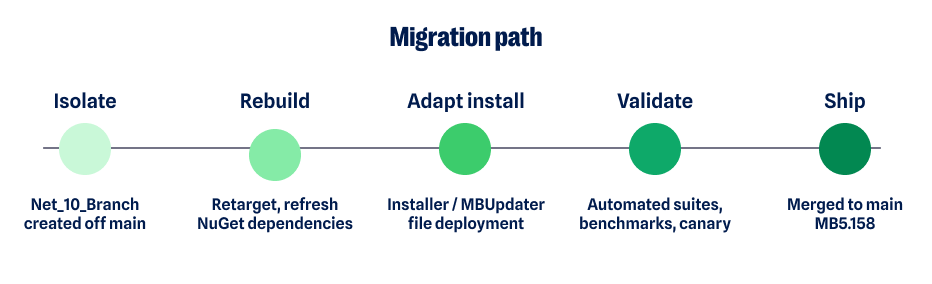
Migration path

Deployment is easy to overlook and expensive to get wrong. A runtime migration is not only about the code that runs. It is also about what lands on the customer’s disk.  

Our installer and update service had to learn the new runtime’s file layout. They had to remove dependencies the runtime now provides, stop shipping renamed files, and deliver replacements cleanly during both fresh installs and in-place updates.  

Getting deployment right is the difference between an upgrade users never notice and one that creates a support problem. 

Once the build was working correctly, the focus moved to validation. 

The migration involved: 

  • Extensive automated testing across services, install, and update paths. 
  • Compatibility validation against real-world configurations and previous installations. 
  • Performance benchmarking to catch regressions in startup, memory, and scan behavior. 
  • Canary and staged deployment, starting with small populations and expanding only when results showed it was safe to do so. 
  • Continuous monitoring and automated regression detection in the field. 
  • Cross-functional work across platform, QA, installation and update, and release engineering. 
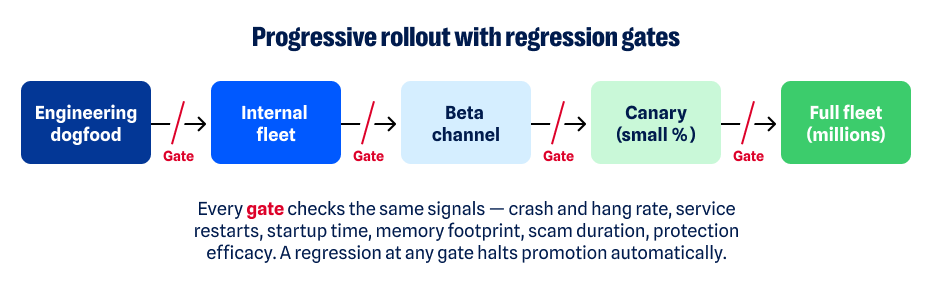
Progressive rollout flow

“We never advanced faster than the evidence allowed. Every gate had to turn green on its own.” 

The .NET migration: The tradeoffs  

None of this was free, and the choices involved deliberate tradeoffs.  

The tradeoff on the branch was drift. Isolating the migration protected the main codebase, but the longer that branch existed, the more it could diverge from active development. We managed that risk through frequent integration rather than leaving one large, risky merge until the end.  

The tradeoff on rollout was speed. Staged deployment also meant customers received the update later than they would with a big-bang release. We accepted that tradeoff. Evidence from smaller populations gives us an opportunity to catch problems before an update reaches a much larger number of endpoints. 

The tradeoff on AOT was flexibility. Ahead-of-time compilation can improve startup performance but can also constrain dynamic behavior. We applied it selectively, component by component, rather than everywhere by default. 

What the .NET 10 migration means for customers

The best outcome of infrastructure work is that customers benefit from it without having to think about it.  

On .NET 10, those benefits for Malwarebytes customers include:   

  • Improved reliability on a fully supported, actively maintained runtime.  
  • A more secure foundation that benefits from the platform’s continuing security improvements.  
  • Access to new .NET features and fixes. 
  • Better support for newer versions of Windows. 
  • Newer .NET tools can help us develop and deliver new protection faster. 

Lessons worth keeping  

Every one of these updates—the runtime, the baselines, the security patches—leaves the team holding a few convictions more firmly.  

Platform upgrades are strategic investments in everything built on top of them. Modernization also works best when it is continuous: the longer a platform falls behind, the more difficult the eventual upgrade can become. 

Automation is particularly important for changes of this breadth. So are the small, unglamorous decisions made years earlier, such as maintaining clean boundaries between components and having a build process that knows precisely what it ships. 

Those foundations are what make larger changes possible.  

“Technical debt compounds like financial debt. The cheapest upgrade is the one you never postponed.”  

What comes next  

No upgrade is a finish line. Each one is a step in a longer pattern: modernize continuously, in deliberate steps, so the platform never falls behind. Baselines will shift again. Vulnerabilities will land without warning. Each will meet the same discipline: the same tests, the same staged rollout, and the same evidence before we move forward. 

That discipline is what a product trusted to run every day, on every machine, without a second thought is actually made of.  

Malwarebytes for Windows on .NET 10 shipped in version 5.6.0. It is the latest step in a long-standing commitment to invest in the platform beneath the product so the protection on top of it can keep getting better. 


CNET Editors' Choice Award 2026

“One of the best cybersecurity suites on the planet.” 

According to CNET. Read their review


Fake listings can turn trusted platforms into scam springboards

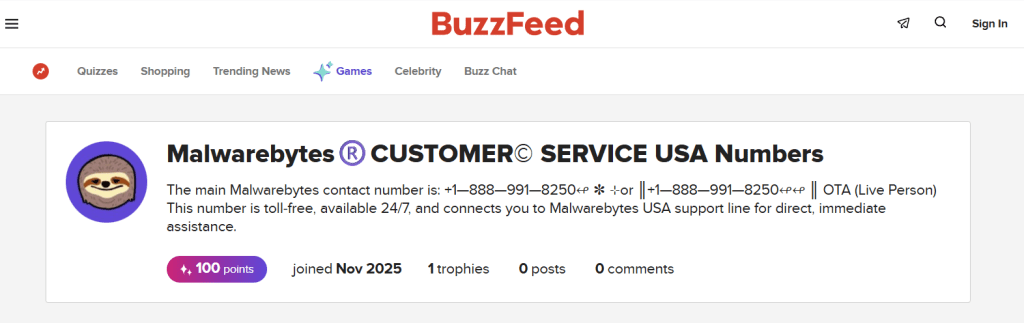
Recently, we found a listing on BuzzFeed from someone pretending to be Malwarebytes Support. It reminded us why we need to be cautious about content on platforms where anyone can create an entry.

Based on the phone number, we suspect the people behind this listing are trying to draw callers into a tech support scam. The scammer may use social engineering to persuade victims to grant remote access to their devices.

Fake Malwarebytes-branded listing on BuzzFeed
This is not Malwarebytes’ phone number 

At first glance, this kind of lure can look convincing. It borrows the familiarity of a well-known publication, uses a recognizable security brand, and may appear in an ad placement or search result where people expect to find legitimate information.

But the combination of a trusted platform and a trusted brand does not make something trustworthy.

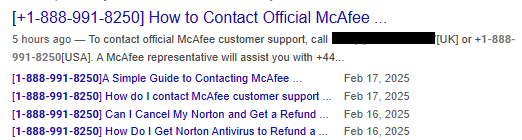
The phone number in the listing has also been used in similar scams impersonating McAfee and Norton.

Same number for McAfee customer support and Norton

Phone Scam Check

Don’t recognize that number? We’ll check it.


Scammers do not always need to build a convincing website from scratch. They can use platforms that let people create listings, ads, storefronts, pages, reviews, or posts, relying on the platform’s reputation to do part of the work for them.

How scammers borrow a platform’s credibility

The whole point of online marketplaces and social media is to make it easy for people to create posts and listings.

Someone wants to sell an old camera, a handcrafted item, a digital product, or perhaps offer a service. They create an account, fill out a form, add a few photos, write a description, and make their listing visible to a huge audience.

You can imagine how attractive this is to scammers.

Our own research found that 47% of people encountered scams on social media at least once a week, while 36% encountered them on buying-and-selling platforms.

A fake listing can borrow credibility from:

  • The platform’s familiar design
  • Its domain name and security certificate
  • The assumption that listings have been reviewed
  • Brand names and logos used without permission
  • Ratings, reviews, or sales claims that look legitimate at first glance

The scammer does not need to persuade victims that an unfamiliar domain is safe. They only need them to believe that content hosted by a marketplace, classified site, social-media platform, advertising network, or review site is safe.

People are rightly cautious when they land on a random website with an odd name. But they may lower their guard when they see a familiar marketplace or media brand in the browser address bar.

Many marketplace scams are straightforward. A seller advertises a product that does not exist, sends a counterfeit item, or tries to persuade the buyer to pay outside the platform.

From listing to scam

But some listings are only the beginning of the scam.

A listing might advertise:

  • Antimalware software or a “lifetime” security subscription
  • Device-cleaning or PC-repair services
  • Account-recovery help
  • Printer, router, smart-TV, or smartphone support
  • A low-cost or free trial that requires victims to call a number
  • A product description containing a “support” phone number or an external link

The product or service being advertised is irrelevant. The real purpose is to get victims to call a number, visit another website, install remote-access software, or hand over payment details.

How to stay safe

Large platforms do try to remove fraudulent listings. They use automated detection, seller controls, user reports, brand-protection programs, and moderation teams.

But platforms operating at scale face a difficult problem: legitimate users can create an enormous number of listings, posts, ads, and product pages in a short time. Review systems can miss malicious content, particularly when scammers change names, images, wording, accounts, phone numbers, and links faster than moderators can respond.

Users therefore need to take precautions:

  • Be suspicious of listings offering security software, technical support, account recovery, or device repair at an unusually low price.
  • Treat unexpected phone numbers in ads, listings, product images, comments, and pop-ups as untrusted, especially when they appear in an unrelated category. Our example appeared in the “Quizzes” section of BuzzFeed.
  • Do not assume a listing is genuine because it appears on a large, familiar platform.
  • Before engaging, check the seller’s history, reviews, contact details, and return information, bearing in mind that these can also be manipulated.
  • Avoid sellers who pressure you to continue the conversation off-platform.
  • Never allow an unsolicited “support agent” to access your computer remotely.
  • Do not pay with gift cards, cryptocurrency, wire transfers, or payment apps. Use a payment method that offers purchase protection and may allow you to dispute an unauthorized or fraudulent charge.
  • Type the company’s official website address into your browser, use its official app, or rely on a saved bookmark. Verify any support number through one of these official channels.
  • Report suspicious listings to the hosting platform and to the impersonated brand.

If you have already called a scammer or granted remote access:

  • Disconnect the device from the internet
  • Remove remote-access software
  • Change important passwords from a known-clean device
  • Contact your bank or card provider if any payment details were shared

The rule of thumb is simple: a trusted platform can host untrusted content. Scammers thrive on borrowed credibility.

Pro tip: Use Malwarebytes Scam Guard to help you figure out whether something is a scam and what to do next.

Our Support team is available 24/7 to help with anything from quick questions to complex issues. Visit help.malwarebytes.com to contact us directly or search our knowledge base.


Something feel off? Check it before you click.  

Malwarebytes Scam Guard helps you analyze suspicious links, texts, and screenshots instantly.  

Available with Malwarebytes Premium Security for all your devices, and in the Malwarebytes app for iOS and Android.  

Try it free → 

Beyond the Play Store: How Android threats really spread

You probably think of your phone’s security the way you think of your front door: as long as you’re downloading apps from the Play Store, you’re safe. And for the most part, that’s true. Google reviews apps before they’re published.

But some apps reach your phone without ever passing through the Play Store.

Take Albiriox, a banking Trojan-as-a-service discovered late last year. It’s an Android Remote Access Trojan (RAT) built for on-device fraud. Instead of simply stealing usernames and passwords, it performs fraudulent transactions directly on the victim’s phone. Researchers found it spreading through apps with generic names like “utility,” “security,” “retailer,” or “investment” that victims didn’t remember installing from the Play Store. Instead, they had been sideloaded, downloaded through links in text messages, or installed from websites outside Google’s review process.

This is exactly the kind of threat Malwarebytes for Android is designed to detect. Here’s a look at the different layers of protection working behind the scenes.

I’d like to thank Malwarebytes Director of Software Development Egor Tashchilin for sharing the technical expertise that helped inform this article.

Catching what never went through the Play Store

Apps installed outside the Play Store never go through Google’s review process. That means they can reach your device without the security checks applied to Play Store apps.

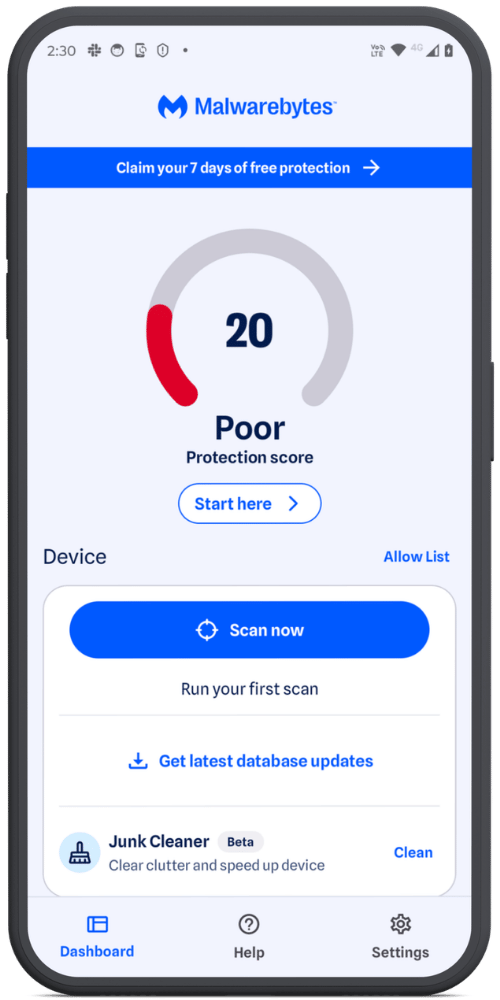
Instead of relying on where an app came from, Malwarebytes scans your device itself, searching for Potentially Unwanted Programs (PUPs) and other malicious files, whether they were sideloaded, bundled with other software, or downloaded through a browser.

Malwarebytes for Android: Dashboard

Even Play Store apps can turn nasty later 

Not every threat starts out malicious.  

In one widely reported case, a barcode scanner app with roughly 10 million installs on the Play Store had malicious code added to it that wasn’t present in previous versions. The update used heavy obfuscation to avoid detection and was signed with the same digital certificate as earlier clean versions, so it appeared completely legitimate. Once installed, it caused browsers to open on their own and redirect users to unwanted websites. 

A similar pattern has emerged in other Play Store incidents researchers have tracked. Apps are updated with malicious code long after installation as a way to evade detection and avoid raising suspicion. 

This is exactly why Real-Time Protection (RTP) doesn’t just watch for new installs—it also reacts to previously unscanned versions of apps you already have. RTP monitors newly installed apps, along with any new or changed files on your device. If an existing app receives a version it hasn’t seen before, RTP treats it as new and scans it, rather than assuming “already installed” means “still safe.” 

Looking inside archives, without touching them 

Malware doesn’t always sit out in the open, either. Cybercriminals often hide malicious files inside ZIP files and other archives, hoping a security scanner won’t bother looking inside.  

Ours does.  

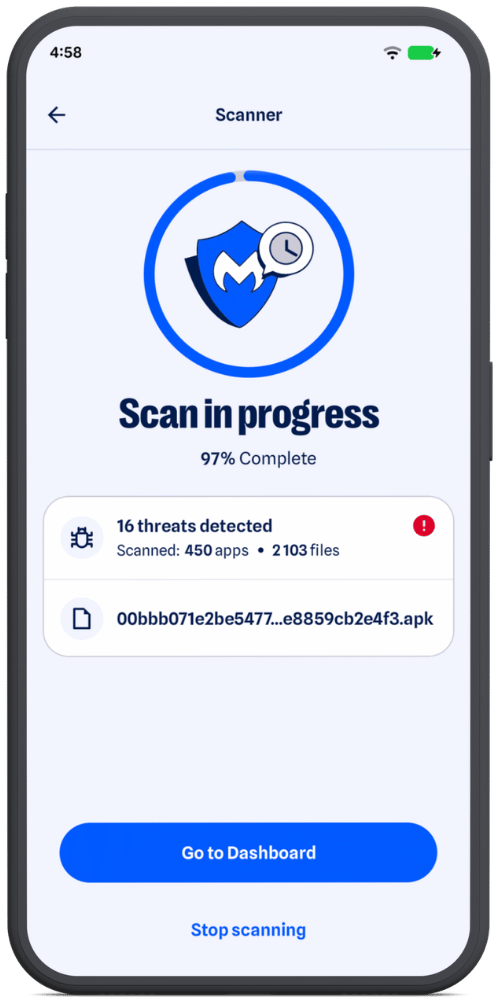
It decompresses archive contents to inspect what’s inside without modifying or altering the original file. The archive is only ever read—we never write anything back to it. If something needs closer inspection, such as a nested archive or an APK’s compiled .dex code, it’s extracted to a temporary sandboxed location and deleted as soon as the scan is complete, so it’s never left on your device. 

Archives are not all handled the same way. ZIP files are inspected entry by entry, while APKs receive a deeper analysis  of the compiled code they contain. Nested archives are scanned independently too, so malware can’t simply hide one layer deeper. 

Malwarebytes for Android: Threats detected

Scanning deeply, without draining your battery 

Analyzing an app in real depth—its code, behavior, and structure—takes processing power. Done carelessly, it can slow your phone and drain the battery. 

Malwarebytes is designed to avoid that.  

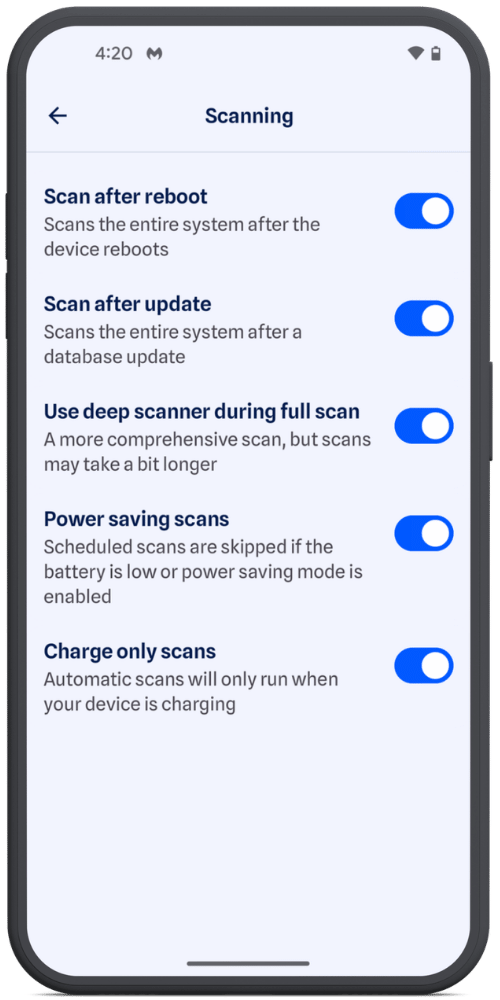
Automatic background scans, such as scheduled scans, scans after an app update, or after a reboot, check your battery conditions before they begin. Depending on your settings, they can wait until your phone is charging or has enough power. Manual Scans always run immediately. 

When a scan starts, Malwarebytes automatically adjusts its workload based on your device’s available processing power, allowing more capable devices to process work in parallel without overloading lower-end devices. 

Malwarebytes for Android: Energy saving options

A threat database that never sits still 

Mobile adware surged in the second half of 2025, while newer banking malware families have become increasingly sophisticated. Some even check whether they’re running on a real phone or inside a security test environment before revealing any malicious behavior.  

A scanner is only as good as its knowledge of what to look for. That’s why we continuously update our detection database with newly identified and verified threats rather than relying on a static, aging picture of the threat landscape. 

Malwarebytes for Android: Scan complete

More than 10 scanners, working together 

Under the hood, Malwarebytes for Android isn’t a single scanning engine. It’s more than 10 specialized scanners, each designed to detect different kinds and levels of threats. 

That’s because modern Android malware rarely relies on just one technique. A banking Trojan, for example, may combine abuse of Accessibility Services with fake login screens placed over legitimate banking or cryptocurrency apps. 

Some scanners look for known indicators of malicious activity, while others examine an app’s structure, origin, and behavior. Additional layers combine multiple signals and use heuristic analysis to detect more complex or previously unseen threats. 

By layering multiple detection methods, a technique that slips past one scanner is more likely to be caught by another. 

And we don’t stop there. Our researchers continuously monitor how Android threats evolve and regularly add new detection and protection layers. As attackers develop new techniques and find new places to hide, we’re constantly adapting to stay one step ahead. 


Scammers know more about you than you think. 

Malwarebytes Mobile Security protects you from phishing, scam texts, malicious sites, and more. With real-time AI-powered Scam Guard built right in. 

Download for iOS → Download for Android → 


Watch out for renewal scams pretending to be Malwarebytes

Fake subscription renewal notices are doing the rounds again. Some of these scams impersonate Malwarebytes, and we’ve also seen them reach our customers.

You’re more likely to trust the message if you’re already a customer of the company mentioned in the email. That’s what the scammers are counting on.

So we want to make people aware that these scams are becoming increasingly common, and explain how to spot them.

Software renewal scams (including fake Malwarebytes “renewal” emails and calendar invites) are a specific, very active form of phishing and tech support fraud that contribute to millions of dollars in losses every year.

What to look out for

The template is easy enough to recognize once you know how to spot the signs:

  • The sender’s email address doesn’t belong to the company the sender claims to represent. Often the messages come from compromised accounts or from lookalike domains designed to appear legitimate. Always check the sender’s email address carefully.
  • The emails will often include lots of official-looking (but made-up) details and reference numbers, along with a charge large enough to provoke concern. The amount is typically several hundred dollars, but it can be much higher.
  • The message usually ends with a phone number to call or a link where you can supposedly dispute the charge. The wording and amounts vary from scam to scam. The phone numbers change too, often using local-looking numbers or hosted voice services to appear more trustworthy. Below is one example we saw that uses a callback lure, encouraging the target to call a phone number and engage with a tech support scam:

Subject: Account Maintenance Update

From: <redacted sender name> <redacted-email@example.com>


Your order for Malwarebytes Ultimate Protection has been confirmed. The total amount of $276.50 USD has been successfully charged.

Invoice Details:

Invoice #: INV‑ZIDNQCWSMO
Product: Ultimate Security Pack
License Term: 3 Years
Seats: 3 Devices
Subtotal: $276.50 USD
Tax: $0.00 USD
Grand Total: $276.50 USD
Activation Code: 8fd14ea8‑4014‑4430‑ba19‑313554098112

Your license is now active and will renew automatically.

For billing inquiries, reach us at +1 (810) 210‑5434.


  • Other fake renewal notices may pretend to come from PayPal or other payment providers and direct you to a website where you’re asked to log in. These are phishing emails trying to steal your banking credentials.

How to stay safe

If you receive a subscription renewal communication claiming to be from us, our Help Center article explains how our legitimate renewal notices work and how to verify they’re genuine.

In general:

  • Do not click links or call phone numbers in unsolicited emails.
  • When in doubt, check the origin of the email by going directly to the company’s official website and ask about it through official channels. Don’t follow sponsored search results to get there, as these can be scams.
  • Do not give out personal details, pins, passwords, payment information, or verification codes during an unsolicited call. Legitimate companies will not ask for passwords or verification codes over the phone.
  • Never allow a stranger to take over your computer remotely. It allows scammers to quickly search your computer for valuable information.

Pro tip: Malwarebytes Scam Guard can help you determine whether an email is a scam and advise you on the next steps.


Something feel off? Check it before you click.  

Malwarebytes Scam Guard helps you analyze suspicious links, texts, and screenshots instantly.  

Available with Malwarebytes Premium Security for all your devices, and in the Malwarebytes app for iOS and Android.  

Try it free → 

88% of people struggle to tell what&#8217;s real online

What would you trade for a technology that can do almost anything? For many people, the answer is clear: Everything they thought they could trust.

In a few, short years, Artificial Intelligence (AI) tools have granted people unfettered access to easier writing, faster image generation, quicker coding, and near-instantaneous answers, advice, and information—advantages they value and want. But the same tools that can spruce up a dating profile or reimagine an old photograph can also manipulate the broader world online, and people are noticing.

According to new research from Malwarebytes, 88% of people said it’s becoming harder to tell what content online is genuinely human or real, with 84% saying that “convincing video evidence” no longer feels like proof. Further, 85% said it can be hard to tell scams apart from the real thing—a major uptick from the 66% who said the same thing last year.

Statistics from the Face Value report

These are the first signs of AI’s counterfeit world. Replete with fake websites, fake products, fake videos, fake pictures, fake voices, and even fake people, it is threatening to swallow the web.

The latest report from Malwarebytes, Face value: How AI is reshaping trust, identity, and scams exposes the hidden cost of AI on the public: an excess of fraud that is dismantling trust in reality and in one another.

The damage arrives in large moments and small, from the US parent who said they “received a voicemail that sounded exactly like my son’s voice, saying he was in trouble and needed money for legal fees,” to the two entirely unrelated respondents fooled by the same AI-generated video of rabbits bouncing on a trampoline, to the individual worried about “my grandfather showing me AI slop and he thought it was real.”

For this research, Malwarebytes surveyed 1,500 adults aged 18 and older across the US, UK, Austria, Germany, and Switzerland about their uses, feelings, and concerns regarding AI. The sample was equally split for gender with a spread of ages, geographical regions, and race groups, and weighted to provide a balanced view.

The complete findings can be found in the full report:

Here are some of the key takeaways and findings:

  • 88% said it’s becoming harder to tell what content online is genuinely human or real
  • 84% said convincing video evidence no longer feels like proof 
  • 85% of people said it’s hard to tell a scam from the real thing (up from 66% last year)
  • 50% have experienced some form of AI fraud or scam, such as being misled by AI-generated photos of products or receiving a highly personalized scam message
  • 19% have specifically experienced some form of AI-driven identity harm, including the 10% who have had someone use AI to generate sexually explicit content of them without permission
  • 81% fear someone stealing their family’s likeness, yet only 13% have created a family codeword to guard against it
  • 67% worry about voice cloning, yet only 19% have turned off voicemail recordings to prevent it
  • 45% say it’s okay to use AI for personal emotional tasks (like writing wedding vows or a eulogy)
  • 34% say it’s okay to use AI to help create or improve a dating profile
  • One in three self-avowed daily users of AI said it’s okay to generate explicit images of someone without their consent 

Defeat would be the wrong lesson to take from all this. It is true now that the internet requires assistance, but there are plenty of safe places to seek help.

While Malwarebytes works to provide new tools, we’d like to remind both the AI anxious and the eager about the first rule of the internet: Remember the human. People’s voices, bodies, choices, and agency belong to them and them alone. 

As for every fake video, product, website, and image, understand that there’s help. No one needs to navigate an artificial internet alone. Whether through scam detection, identity protection, and simple awareness, people have more options than they may realize.

❌