❌

Visualização de leitura

Windows 11 Speed Test Tool Arrives as Native Utility

Microsoft introduces a native Windows 11 speed test tool developed with AI agents, measuring network latency, download rates, and upload performance.

Related Posts:

The post Windows 11 Speed Test Tool Arrives as Native Utility appeared first on Daily CyberSecurity.

In good company: 10 CIOs every CIO should follow

CIOs are dealing with a lot of change, from the rapid rise of AI and cloud modernization, to cybersecurity and workforce transformation. Many are sharing what they’re learning as they tackle these challenges, including what’s working, what isn’t, and how they’re implementing new technologies in their organizations. Here, a select group of tech leaders reveal the CIOs they follow and why.

Suma Nallapati, chief AI and information officer, City and County of Denver

I follow Suma Nallapati primarily through public technology and AI leadership discussions. She regularly discusses AI adoption, responsible AI, digital transformation, technology strategy, AI governance, human-centered technology, and using AI to improve public services. I find her perspective particularly valuable because she connects AI strategy with practical organizational and citizen outcomes. She also emphasizes responsible and human-centered AI rather than viewing AI simply as a technology implementation exercise. One initiative I found particularly interesting was Denver’s use of AI through its multilingual Sunny chatbot and other city services. Her current role includes scaling AI across areas such as resident engagement, internal automation, permitting, and emergency response while maintaining governance, transparency, and public trust. – Sachin Gupta, senior IT manager, Arrow Electronics

Jennifer Hartsock, chief information and digital officer, Cargill

I follow Jennifer Hartsock through the CIO community, as well as through her thought leadership, interviews, and LinkedIn. I especially enjoy hearing her perspective in longer-form conversations where she talks candidly about the realities of leading technology and transformation in a large, complex organization. Hartsock talks about many of the issues CIOs are navigating right now, including AI, digital transformation, technology operating models, talent, and leadership. A consistent theme in her perspective is connecting tech decisions back to the business, including how tech teams work with the business, and how you create greater ownership closer to the outcomes you’re trying to achieve. – Kathy Kay, EVP and CIO, Principal Financial Group

Fletcher Previn, SVP and CIO, Cisco

Fletcher Previn’s profile shows how a modern technology leader can discuss change without reducing it to a narrative about vendors. He explores AI, culture, talent, and productivity, with an emphasis on conditions that determine whether transformation lasts. The insight worth returning to is his focus on adoption as a leadership responsibility. New technology fails when teams lack learning time, managers lack clarity, and incentives reward behavior that no longer serves the business. CIOs can apply that lens to modernization, security initiatives, and data governance. It encourages an honest definition of progress based on decisions and outcomes rather than launch dates or dashboards. – Sherif Koussa, CEO, Software Secured

Kellie Romack, CDIO, ServiceNow

What makes Kellie Romack’s perspective valuable is she talks about AI from inside a large enterprise IT organization, not the outside. Her posts regularly cover enterprise AI, AI governance, autonomous IT, workforce transformation, cybersecurity, digital transformation, and how the CIO role is changing.

The point that stayed with me was her argument that CIO organizations now have to redesign jobs, teams, and workflows around AI while building new human skills at the same time. That’s a useful distinction. It frames successful AI adoption as an organizational and leadership problem as much as a technology one. Her seat at ServiceNow also gives her a view of what happens after the experiments stop. ServiceNow has reported that its internal AI use cases grew from 15 to more than 200. That makes her worth reading about for any CIO trying to understand what scaling enterprise AI actually looks like. – Tapabrata Biswas, project manager, InfluxIQ Tech Pvt. Ltd.

Mike Blandina, CIO, Snowflake

I follow Mike Blandina for his practical perspective on enterprise AI adoption and the operational realities behind digital transformation. His commentary consistently connects emerging technology with the governance, workforce skills, and measurable outcomes needed to make it useful. One insight that particularly resonates with me comes from this CIO.com article.

He makes the case for building an editing culture rather than a writing culture. As AI increasingly handles first drafts of code, reports, and other work, he argues that the critical human skill becomes evaluating outputs, identifying mistakes, and knowing when to challenge the system. I also appreciate his emphasis on data lineage, access permissions, and measuring actual productivity improvements instead of AI tool logins. Those are the less visible decisions that determine whether enterprise AI adoption delivers lasting value. – Parth Patel, director of operations, Shaligram

Deepa Soni, EVP and CIO, New York Life Insurance Company

Deepa Soni’s insights are particularly valuable because she oversees AI in one of the most critical and regulated sectors of financial services, a Fortune 100 life insurance company where AI decisions have real consequences for policyholders and regulators.

Soni frequently shares in-depth thoughts on what responsible AI adoption truly looks like within a large financial institution. She discusses the delicate balance between the speed of innovation and the readiness of governance, as well as how tech leaders can foster cultures that promote both agility and accountability. What sets her apart is that her approach to AI strategy is rooted in operational realities rather than just vendor hype, which is a rare and precious perspective for CIOs facing similar challenges. – Viren Meghani, technical architect and independent researcher in AI governance

Sears Merritt, CIO and head of enterprise technology and experience, MassMutual

I follow Sears Merritt on LinkedIn and through his interviews. He talks about what enterprise AI costs to run and how to keep the option to change your mind. Merritt also discusses why AI vendor contracts should be capped at 12 months to maintain flexibility, how success metrics are defined before AI pilots begin to determine whether they should be scaled, and the data platform he spent three years building before the AI wave arrived. This is useful to other CIOs because he’s one of the few CIOs at a regulated insurer who talks about AI in the language of procurement and measurement rather than vision. – Egiziago Cioffi, IT/enterprise architect and CEO, SynSphere Italia

Ganesh Ariyur, CIO and head of enterprise technology, Gainwell Technologies

I follow Ganesh Ariyur for his insightful views on AI, enterprise architecture, transformation, tech strategy, governance, and ways CIOs can link tech investments to quantifiable business value. What I find particularly helpful is his content extends beyond just talking about new technologies. He continually positions technology choices in relation to business results, operational frameworks, financial discipline, and implementation. This is particularly important for CIOs facing pressure to showcase ROI from AI and modernization efforts.

An example is his work, The 2026 CIO Operating Model: Architecture, AI, and Enterprise Value. His main point is that tech strategy must be viewed more like capital strategy, with CIOs assessing issues like if cloud expenditures enhance unit economics, and if architecture facilitates quicker decision-making. That viewpoint is important as it transitions the dialogue from which technology to implement, to what ways technology should transform the enterprise’s operations and value creation. – Ketan Patel, digital marketing manager, WeDoWebApps

Jim Swanson, EVP and CIO, Johnson & Johnson

I’m interested in how Jim Swanson thinks about the relationship between technology and the business, particularly where innovation carries considerable responsibility. For example, he recently discussed how AI agents are changing the way people interact with enterprise software. What caught my attention was his emphasis on the complexity that comes with that change — the integration, oversight, and accountability required to make it work. Those are questions that deserve as much attention as the technology itself. – Bill Huber, partner, ISG

Kimberly Basile, CIO, Kyndryl

I follow Kim Basile along with her bylined pieces on Kyndryl’s newsroom and interviews in the business press. She discusses enterprise AI adoption, workforce readiness, AI governance, platform modernization, and security leadership, informed by her earlier role as SVP and CISO at Leidos. Basile speaks from inside a transformation few CIOs have experienced, having helped guide Kyndryl’s technology separation from IBM and consolidate its application portfolio. She treats governance and people readiness as part of AI adoption from the start, and she’s candid about what hasn’t worked. In a recent feature on agentic AI, for instance, she said Kyndryl initially focused on counting agents, and the number didn’t tell the true story. Her team pivoted to measure business process flows. She also identified automating a process that hadn’t been properly validated as one of the company’s biggest mistakes. Activity metrics are easy to report, so organizations default to them. Her lesson pushes CIOs to validate a process before automating it.

She matters beyond the technology because women remain underrepresented in IT leadership, and she uses her visibility to lift others. When she was named to Women We Admire’s Top Women CIOs of 2026, her second year on the list, she used her post to congratulate the other honorees by name and highlight how these leaders help employees embrace technology. That generosity matters in a field where women CIOs are still too few. As the co-founder of Girl Power Talk, I pay attention to leaders who open doors for the next generation of women in tech. Basile does that consistently. – Sameer Somal, founder and CEO, Blue Ocean Global Technology

Your AI is only as good as the network underneath it

When an AI workload is not performing as expected, the obvious place to look is the GPU. Do we have enough compute capacity? Would adding more GPUs solve the problem?

Not necessarily.

The GPUs may be perfectly capable of handling the workload, but if the network is not able to move data quickly and consistently, adding more compute could result in more expense without addressing the real bottleneck.

This is something I think we risk losing sight of in the rush to invest in AI. GPUs cannot do their job alone. They rely on huge amounts of data moving quickly between compute, storage and applications, which means the network has a big part to play in how well that investment actually performs.

For CIOs, this means looking beyond how much compute they have and asking whether the network and wider infrastructure can keep pace.

AI is changing what the network needs to do

Enterprise networks have always had to move data reliably between systems. The difference with AI is the volume, speed and pattern of that traffic. Large AI workloads are distributed across multiple GPUs because the processing requirements are simply too great for one processor to handle efficiently. Those GPUs need to communicate constantly, exchanging data and synchronizing their work. Training is particularly demanding because GPUs may need to exchange parameters and gradients throughout the process, creating large volumes of traffic. As the number of GPUs increases, so does the importance of the connections between them.

This changes the relationship between compute and the network. Adding more GPUs increases processing capacity, but it can also increase the amount of data that needs to move between systems. If the network can’t keep pace, it can become the bottleneck that prevents that additional compute from delivering the expected performance.

Organizations do not need thousands of GPUs before this starts to matter. Even relatively modest enterprise deployments can involve large datasets moving between storage and compute, multiple accelerators working together and applications accessing models in real time.

The important point is that AI readiness cannot be measured simply by counting GPUs. You can continue adding compute, but there comes a point where the network determines how effectively that compute can be used. If data cannot reach the GPUs quickly enough, or communication between them is slowed by congestion or latency, expensive resources can spend time waiting rather than processing.

At that point, the organization doesn’t have a compute shortage — it has an infrastructure problem.

More bandwidth does not solve every problem

The obvious response might be to add more network capacity. While bandwidth certainly matters, increasing it does not remove every potential constraint. AI workloads can be particularly sensitive to latency, congestion, packet loss and inconsistent performance. Cisco notes that AI pipelines create different traffic patterns across training and inference, with training requiring both high bandwidth and low latency as GPUs continuously exchange information. The infrastructure therefore needs to manage not just capacity, but how traffic moves through the environment.

That distinction matters.

Imagine hundreds of GPUs working together on the same task. Their value comes partly from their ability to operate in parallel, so if one part of the network slows communication between them, the effect can extend beyond that individual connection. GPUs may be left waiting for other parts of the workload to catch up. The fastest component in the environment is not much use if it is constantly waiting for the slowest.

Storage adds another dimension. AI depends on data, which means moving large datasets from storage systems into compute environments and, depending on the workload, moving information back again. A network that performs well for GPU-to-GPU communication could still encounter problems elsewhere in that journey.

AI infrastructure does not usually exist in isolation, either. Enterprises are introducing GPU clusters into data centers that already support conventional applications, storage platforms, cloud connectivity and other business-critical systems. AI traffic therefore becomes another part of an increasingly complex infrastructure estate.

This is where network design starts to have a direct bearing on the economics of AI.

If an organization has invested heavily in accelerated compute, it wants those resources doing useful work for as much of the time as possible. A network bottleneck that leaves GPUs underutilized is not simply an IT performance issue — it means the business is getting less value from some of its most expensive infrastructure.

You cannot fix what you cannot see

Another challenge is knowing where the problem actually is. Infrastructure teams can see whether devices are available, track bandwidth utilization and receive alerts when something fails. That remains important, but increasingly complex AI environments demand a broader view.

A switch can be working. A server can be healthy. The GPUs can be available. Storage can be online. Yet the workload can still be performing below expectations. That’s because understanding individual components does not necessarily tell you how well the overall system is working. This is where the distinction between monitoring and observability becomes useful.

Traditional monitoring generally tells teams whether infrastructure components are operating within expected parameters. Observability goes further, bringing together information from across the environment to help teams understand why a system is behaving in a particular way. IBM describes network observability as providing real-time visibility into the performance, behavior and health of the network by drawing on data from across the infrastructure, rather than focusing solely on predefined metrics and reactive troubleshooting. For AI environments, that wider view is increasingly important.

If a training job slows down, teams need to be able to establish whether the cause is compute, storage, congestion on a network path, packet loss, a degraded link or something else entirely. Looking at each device separately can make that difficult, particularly when the issue is not a complete failure but a gradual deterioration in performance. Those are often the harder problems to find. A component that fails completely usually generates an alert, but a connection that still works yet is performing badly can be much less obvious. The infrastructure is technically available, but the workload is taking longer, GPUs are being used less efficiently and costs are creeping up. End-to-end visibility gives infrastructure teams a better chance of seeing those relationships.

AI readiness is an infrastructure question

As AI moves deeper into business operations, the consequences of infrastructure performance will become harder to ignore. A bottleneck during an experiment might delay a development team, but the same problem affecting a production AI service could have consequences for employees, customers or other systems that depend on it.

This means the network needs to be considered as part of the AI investment from the outset, rather than something to revisit when performance problems appear.

That does not necessarily mean replacing the existing network or building an entirely separate environment for AI. In many cases, the infrastructure already in place may be perfectly capable of supporting the workloads being introduced. The important thing is knowing where its limits are. That requires an understanding of what those workloads actually need, where genuine constraints exist and whether IT teams have enough visibility across compute, networking and storage to spot problems as they emerge.

Ultimately, it is not how much compute an organization has that matters, but how well it can use it. If CIOs are investing heavily in GPUs, they need to make sure the infrastructure around them is not holding them back.

Controversy Surrounding the .lan Domain Application

Discover the controversy surrounding ICANN gTLD applications for the .lan domain. Learn how this impacts OpenWrt and local network configurations worldwide.

Related Posts:

The post Controversy Surrounding the .lan Domain Application appeared first on Daily CyberSecurity.

Autonomous networking doesn’t start with AI. It starts with proof.

It’s 2 a.m. The change window is open. The plan was reviewed and the change review board signed off. And still, everyone on the call is holding their breath because nobody actually knows what will happen next. That feeling isn’t paranoia. It’s the accurate read of an industry that has spent decades changing production networks with no way to prove the outcome first.

Every other engineering discipline solved this long ago. Aerospace models a system before it flies. Pharma models a molecule before it enters a trial. Software gets a compiler and a test suite before code ships. Networking never got the equivalent, so it built rituals around the gap instead: change windows, war rooms, and the quiet understanding that the only real test environment is production itself. Not because engineers weren’t careful, but because the discipline never had the tooling to prove itself before shipping.

Now the pressure to close that gap is compounding. Leaders want AI managing the network the way it’s starting to manage everything else. But I hear the same hesitation in nearly every conversation I have with network and security leaders, and it’s rational. Automating a network you don’t fully understand doesn’t create efficiency; it accelerates risk. When neither your team nor the AI agents acting on their behalf have a deterministic answer for what a change will do to the production network, you’re not automating your network; you’re automating risk at machine speed.

Here’s the part I want IT leaders to hear as encouragement, not caution. This gap is closable, and it doesn’t require waiting for AI to get smarter. It requires a different standard of proof. A change shouldn’t be graded on who reviewed it or how confident the room felt. It should be modeled against the full production network, spanning every vendor and every protocol layer, and graded as a deterministic pass or fail, the same way a software build either builds and passes the test suite or it doesn’t. That’s not a bigger dashboard. Visibility tells you what already happened. Proof tells you what will happen next, before it does. That distinction is the whole game, and it’s why the fix has to be architectural, not more data flowing into the same review process.

Once that standard exists, the rest of the autonomous networking conversation gets a lot less scary. AI agents can propose changes, get a real answer, and iterate until the answer is yes, with a human deciding when to pull the trigger. Engineers get their time back for architecture instead of manual validation and firefighting. The organizations that get to autonomous networking first will be the ones that built this foundation before handing the keys to AI.

IDC recently published a Spotlight: Navigating the Shift to Autonomous Networking that delves into the barriers to autonomous networking and its recommendations on how to successfully embrace the technology. I encourage you to read it.

Chris Barnard, vice president of Enterprise Infrastructure at IDC, recently joined me for a conversation around how to successfully prepare for autonomous networking. You can watch it here.

AI’s real bottleneck isn’t compute — it’s the network underneath

For such a rapid innovation cycle, AI has been given unprecedented levels of responsibility. According to the Stanford AI Index 2026, 88% of organizations used AI in 2025, with 70% using generative AI in at least one business function. Most analysts agree that this technology, particularly when it comes to generative and agentic AI, is yet to reach full maturity, yet it’s already making itself indispensable to most enterprises. Employees expect LLM-based copilots to respond as readily as any other business application, customers are increasingly exposed to AI as part of their user experience, and emerging agentic models need to communicate continuously with applications and infrastructure as they crunch data and carry out tasks. Any hint of delay within those interactions has the potential to disrupt productivity, sow mistrust in the technology, and limit any return on investment (ROI).

Most businesses now inhabit a multi-cloud environment that spans countries and continents. When an AI request depends on information stored in one cloud environment, processing capacity hosted in another, and an application delivered somewhere else entirely, latency becomes the deciding factor. Each network hop, particularly through public Internet pathways, increases response time. Repeat these delays across hundreds, thousands, or even millions of individual requests – from both humans and AI agents – and the whole organization becomes artificially hampered. Sometimes connectivity becomes so hampered that IT teams must step in and spend valuable time rectifying it.

A recent Censuswide survey commissioned by DE-CIX found that IT teams in the US and UK spend an average of 11.5 hours every week resolving cloud connectivity issues – that’s more than a full working day each week spent on network troubleshooting. This is the “hidden productivity tax” that organizations are now paying, and it may be why the ROI for AI initiatives feels lukewarm at best, and impossible to measure at worst. McKinsey’s 2025 global AI survey found that only 39% of respondents could attribute any enterprise-level EBIT impact to AI, and most of those reported a contribution below 5%. That’s why even the best models can only get you so far – compute power may command the budget, but it’s the network that determines value.

A tax on productivity

Consider what happens when an employee asks an AI assistant to carry out a simple task like summarizing an internal document or doing some number crunching. The application may need to verify the employee’s identity, locate the relevant information, send it to a model operating in another cloud environment, and return the response through the user-facing application. An agent completing a more involved task could make this journey repeatedly as it gathers information and interacts with other systems. If one connection is slow or unreliable, the delay follows the request all the way back to the user, and if that connection fails, a whole team may be drafted in to isolate a problem that appeared inside the application but originated somewhere along the network path.

Engineers who could be improving AI services or supporting new deployments are instead tracing routes, investigating intermittent failures, and working around infrastructure that behaves unpredictably. What makes this particularly striking is the contradiction that was revealed as part of DE-CIX’s survey. While enterprises concede that more than a full working day per week is spent on network troubleshooting, as noted above, nearly all (96%) say their networks are “ready” to support future cloud and AI projects. This doesn’t prove that enterprise networks are fundamentally unprepared, but it does reveal a disconnect between strategic confidence and everyday operational experience. When more than a working day can disappear into connectivity troubleshooting each week, some of the expected productivity benefit from AI is already being spent before the technology has had an opportunity to deliver it.

AI performance and network performance are inseparable

Users don’t experience a model and its supporting infrastructure as individual sets of requests – they just experience “fast” or “slow” workloads. A cutting-edge AI model will still feel ineffective if the information it needs travels along congested or unpredictable public transit routes, so any real-time interaction with AI will become an exercise in frustration with small delays that compound over time, slowing teams down.  As AI services become more distributed, network performance is becoming inseparable from application performance, but it’s rarely given the same attention as model accuracy, compute capacity, or the cost of running AI inference.

IT leaders are beginning to take note, however, despite being a little overconfident about their network readiness. Alongside latency between cloud environments, security vulnerabilities including DDoS attacks, and downtime or reliability concerns are triggering a change in approach towards network connectivity. That’s why many are now turning to private, direct connectivity to cloud providers through an Internet or Cloud Exchange or via other means of directly connecting to the cloud providers’ private connectivity solutions, bypassing the pitfalls of the public Internet and IP transit.

Direct connectivity offers a greater degree of sovereignty, visibility, and control over data pathways that can reduce latency and enhance security. Public Internet connectivity will remain essential, of course, but business-critical AI traffic should not follow routes that can change unexpectedly or introduce additional network hops. It isn’t a universal cure for poor AI performance, but it can remove some of the uncertainty from an operating model that increasingly depends on information moving quickly and reliably between distributed environments.

Turning network performance into a business metric

The next 12 months could be a turning point for businesses looking to prove AI’s worth. CIOs simply need to account for the full cost of delivering an AI service, including the hours spent diagnosing connectivity problems and the value lost when applications respond inconsistently. In other words, they need to bring network teams into AI planning from the outset, considering their network infrastructure with the same rigor they apply to selecting AI models and projects. Private interconnection can provide more direct and predictable routes between environments, while effective observability can reveal how traffic moves, where delays accumulate, and how reliably the entire workflow performs. Without that control and visibility, network friction will remain a “hidden tax on productivity” that could stall AI deployments and weaken the case for future investment.

Getting voice infrastructure right when deploying voice AI for CX

Across all verticals and regions, contact centers are under pressure to modernize and improve customer experience (CX). With today’s consumers being digital-centric and mobile-first, CX expectations are higher than ever, and IT and contact center leaders are struggling to keep pace, especially when it comes to adopting new technology.

Voice AI is the latest technology wave for improving CX, and while most contact center leaders want to adopt it, they need a fuller understanding of all that is needed for voice and AI to work together effectively. This is especially true for enterprise-scale contact centers that must support a global customer base.

While AI can easily scale in these environments, most voice traffic must still traverse the PSTN. Customer usage of digital channels keeps growing – including voice-capable apps like WhatsApp and Viber, but voice remains the primary channel for contact center interactions.

Both modes of voice are important, but telephony-based voice is central for CX, and as contact centers adopt AI, the integration of voice with AI will be essential. This article will review the benefits of this integration, the key capabilities needed for Voice AI and why I think it’s so important for contact centers to own their voice when adopting AI.

What is Voice AI and how it impacts CX

Following in the footsteps of ChatGPT and Agentic AI, Voice AI is the latest AI wave. While Voice AI is currently at the early adoption stage, I see it becoming foundational to modern CX, just like these predecessors quickly became.

Being so new, some explanation is in order. Voice AI refers to AI applications or platforms that are voice-based, meaning that voice can be used for both inputs and outputs when human customers make inquiries with a contact center.

Customers can use several modes to make these inquiries, but the “input” usually starts with voice, which the Voice AI platform is able to understand – and now can do so at a much higher level than with legacy voice technologies. For the “output”, Voice AI can respond to the customer using speech (or text) in a conversational manner that can often take the inquiry through to completion.

In more familiar terms, Voice AI applications are known as digital assistants, automated voice agents, or intelligent chatbots. Customers have been using legacy versions of this for years – think of the traditional IVR – but with today’s AI, the voice experience feels more natural. Furthermore, these applications can understand voice at a much deeper level, by integrating more extensively with back-office systems, leading to better CX outcomes, both with human agents and for self-service.

Once contact center leaders are comfortable with the Voice AI concept, they need to think about it more practically – how it impacts CX. This is what drives business value, and to frame that, here are some leading examples:

  • Being automated, Voice AI can manage customer inquiries 24/7 – this is especially important for global brands with centralized contact center operations.
  • Voice AI platforms, by nature, can scale quickly and at nominal cost – making them an ideal solution to handle both expected growth in  call volumes, and unexpected spikes in traffic.
  • Improving self-service automation is a core driver for any form of AI, especially Voice AI. This will lead to higher containment rates where self-service options handle more inquiries, and higher deflection rates, where more routine inquiries are routed away from human agents to AI agents. Going a step further, these capabilities will improve the agent experience, which leads to another layer of operational benefits.
  • Elevating omnichannel capabilities – today’s customers expect a seamless experience across all channels, and with voice being the preferred channel for contacting a company, a clean handoff to other modes and human agents is critical.
  • Better outcomes drive better CX – voice is a more expensive channel to support than text, but when properly supported, Voice AI will deliver better CX than text. It can be validated with metrics such as CSAT scores, loyalty, retention, referrals, purchasing trends, etc.

Key considerations for voice infrastructure

With the above in mind, I think the converse outcomes speak even more loudly when either voice or AI – and especially together as Voice AI – do not perform as intended. Not only would this negate the above benefits, but the negative impact will be even more consequential. As noted, most contact centers urgently want to modernize with cloud and AI – precisely to avoid these negative consequences.

While this article focuses on AI-ready contact centers, the broader intention is to build a case for Voice AI that will help legacy-based contact centers advance their plans for getting on this much-needed path. No other channel has a greater impact on CX, and the Voice AI opportunity adds a new dimension of business value with voice, along with leveraging AI for automation and customer engagement wherever they are, and whatever language they speak.

Technology aside, my underlying message for all contact centers is to own your voice. The best way to own your voice is by having the right infrastructure in place. To varying degrees, contact centers have long relied on purpose-built voice infrastructure, since so much of their voice traffic is still PSTN-based. However, as contact centers adopt AI, it’s easy to overlook the complexities of integrating telephony-based voice into AI applications.

Voice infrastructure is technical by nature, and there are some key elements that IT and contact center leaders must keep in mind when deploying AI in tandem with voice. In AVOXI’s 2025 State of International Voice Report, 77% of enterprises cited difficulty consistently achieving high-quality voice, highlighting an existing challenge that becomes even more important as contact centers integrate voice with AI. This is especially relevant for contact centers serving a global customer base, and at minimum, voice infrastructure must include the following:

  • A global network to support telephony, and for large-scale contact centers, this means managing voice traffic seamlessly across dozens of local and international carriers.
  • Telephone numbers, both for all local markets and toll-free numbers – and ensuring the numbers are in working order and connect properly to the contact centers.
  • Quality Assurance to support SLAs, and real-time network analytics to monitor voice performance, especially for uptime, reliability and quality.
  • Orchestration capabilities to route calls from AI agents to human agents – accurately, securely, and without losing context – all in real time.
  • Integration of telephony-based voice traffic with both AI and CCaaS platforms – at scale and in accordance with local compliance and privacy requirements.

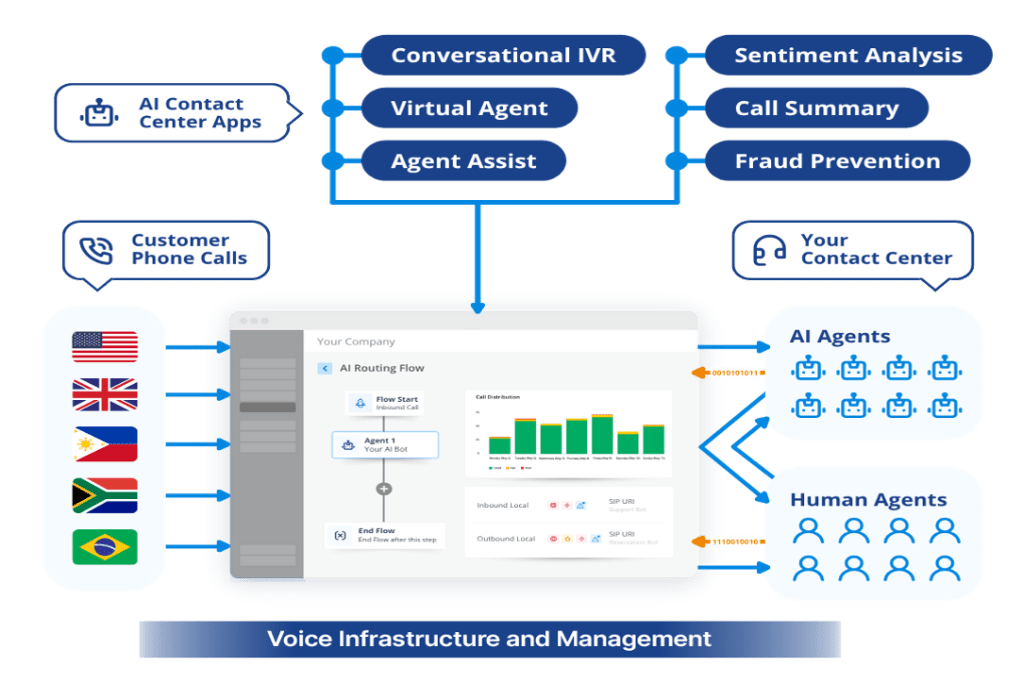
There are other elements to voice infrastructure as well, and the key idea here is to explain why these are fundamental capabilities; not just to support the most important channel your customers rely on, but for voice to be effectively integrated with the AI platforms and applications contact centers are now rushing to deploy. The visual below illustrates how the main infrastructure pieces must interwork to support Voice AI.

Voice infrastructure and management diagram.

Jon Arnold

More than anything else, voice infrastructure is about minimizing latency, given the real-time nature of voice communication. When customers speak to human agents, some incremental latency can be tolerated by both parties, but when the customer is relying on an AI agent to understand them, that same degree of latency – or worse – will lead to a multitude of problems, both during and after the interaction.

The AI part of Voice AI isn’t advanced enough to respond accurately when there are gaps in the conversation, echo, choppy audio, garbled speech, etc. That’s the scenario contact center leaders need to avoid – not just for poor quality bot-to-human communication, but for inaccurate speech-to-text outputs like transcriptions and call summaries. This will be the result when overlooking voice infrastructure, and it will completely defeat the purpose of using AI.

Again, the best way to do that is to put just as much consideration into the voice infrastructure piece as with AI platforms. By nature, neither AI nor CCaaS platforms can natively address the voice capabilities outlined above, hence the importance of owning your voice.

Vendor considerations for integrating voice with AI

Without a proper voice infrastructure, Voice AI will simply not be effective. No matter how “intelligent” the AI platform, these capabilities are not native or comprehensive enough to manage telephony-based voice, especially at scale and on a global basis.

The key point to recognize is that both AI and CCaaS platforms will be at their best when they receive voice streams that have already passed all the hurdles required to make them AI-ready. Considering all the things that can go wrong with this traffic if not managed properly, and the computational resources needed for this, bolting voice on to one of these platforms is risky at best.

IT and contact center technology leaders could choose to leave the job of monitoring voice performance up to an AI or CCaaS vendor. However, many contact centers rely on multiple vendors, which is challenging when adopting new technologies. There are various issues to consider:

  • How will call flows be orchestrated in real time?
  • Can you trust voice to be managed by one of these vendors when their competitors are also part of your deployment?
  • What would happen to your voice infrastructure (and corresponding customer service phone numbers) if you switched out from the vendor you’ve entrusted for this?

Making good decisions here really comes down to what’s most important. When adopting AI, IT and contact center technology leaders must balance two priorities, neither of which should be compromised: providing the highest possible quality voice experience with telephony, and providing the most impactful forms of automation with AI – especially for self-service.

Even though telephony-based voice isn’t the only mode for voice, it’s the most important one for CX. PSTN calling will be with us for years to come, and when architecting your voice stack, telephony must be a core consideration. App-based voice options have their virtues, but for today’s AI deployment decisions for CX, telephony will have a far greater impact.

This brings us to the familiar best-of-breed versus all-in-one trade-off that contact center leaders must consider with Voice AI. In short, telephony-based voice is best handled by voice infrastructure vendors, just as AI applications or CCaaS applications are best handled by those platforms. Not only will you get the best AI outcomes with best-of-breed for voice infrastructure, but the contact center will have much more flexibility in a constantly changing environment:

  • Avoiding vendor lock-in, especially for capabilities that are not core competencies or focus areas.
  • Ability to support multiple AI platforms, especially for customer bases with specific languages or dialects, or verticals with complex terminology – this is where voice quality is paramount.
  • Enabling contact centers to enter new geographies that are only supported by certain carriers for telephony, or have specific requirements for compliance, privacy, data sovereignty, etc.
  • Premises-based contact centers ready for cloud migration can keep their voice infrastructure in place, leaving them open to choose the best-fit AI and CCaaS partners.

To make the right decisions about voice infrastructure, contact center leaders must consider what each of the following options can offer:

  • Carrier partners – especially regional or global telcos such as BT, Orange and Tata. While they can provide the core elements to support telephony at scale, you will be locked into their network footprint and because they are primarily in the network business, software integration with AI platforms is not their forte.
  • CCaaS providers – the likes of NiCE, Genesys, Five9, etc., provide the foundational technology for CX, but voice is just one of many modes they must support. Also, most are cloud-native and lack the critical voice pedigree necessary to directly support telephony in particular.
  • API/messaging-based platforms – Twilio being a prime example – do have extensive global reach with voice networks, but mostly for outbound traffic. They are not focused on broader CX like CCaaS providers; and more importantly, their voice offerings are not out-of-the-box the way a best-of-breed partner would be.
  • AI platforms – such as PolyAI, Cresta and ElevenLabs – are rapidly expanding, and these will be your primary partners for Voice AI. These vendors are highly specialized, and their value comes from being purpose-built for conversational AI. However, when the voice component is about telephony, this is where integrations with voice infrastructure partners are so critical.
  • Voice infrastructure – leading vendors such as AVOXI – offer purpose-built solutions for both PSTN and cloud-based voice. These are the best-of-breed providers best suited for global contact centers deploying Voice AI, as well as hybrid contact centers that must support all modes of voice.

Conclusion: Own your voice

The core theme here has been the importance of owning your voice, and how doing so requires an understanding of the role voice infrastructure plays with Voice AI. As contact center leaders look to add Voice AI to their expanding portfolio of AI capabilities, my intention is to make clear how considerations for supporting voice infrastructure are just as important as those for conversational AI.

While complementary, the requirements for each are quite different, and both are best served by best-of-breed partners. As AI platforms become CX differentiators, and as long as voice remains the most important communications channel for CX, voice infrastructure is fundamental to the success of Voice AI. This article makes the case for best-of-breed, not just for getting the best outcomes with Voice AI, but to provide the most flexibility for contact centers as their deployments continue evolving.

With FCC ban on new Chinese-made optical transceivers for DCs likely, it may be time to stock up

A likely US administration ban on Chinese optical transceivers for AI data centers may have an unintended consequence: IT will rush to buy as many of the components as possible before restrictions kick in.

The US Federal Communications Commission (FCC) “is working on the measure to bar imports of new Chinese optical transceivers” and officials hope to publish and implement it this year, Reuters reported on Tuesday.  

The report, citing four sources familiar with the matter, said that the official rationale is “to prevent Chinese firms from stealing data, installing malware or disrupting service at US data centers.” The sources did, however, stress that such a ban could still be modified or shelved.

A valid concern

Analysts and consultants agree that the concern, albeit hypothetical at the moment, is valid. 

If implemented, such a ban would have a severe impact on data center (DC) strategies for both enterprises and hyperscalers. Although higher costs for replacement products would be all but certain, the greater concern is the lack of availability of non-Chinese transceivers and other components, regardless of price. 

A potentially even more worrying element of a ban is the need for far more sophisticated supply chain visibility. That is because many of those non-Chinese component suppliers actually use some Chinese components in their products, which means that the exact wording of any potential FCC restrictions will be critical. It will define how closely enterprises will need to examine their suppliers’ supply chains.

Aman Mahapatra, chief strategy officer for Tribeca Softtech, a New York City-based technology consulting firm, said that he thinks that an FCC ban is quite likely, because it “has run this exact playbook four times in eighteen months, against drones, routers, robots, and the July 28 inverter and robotics restrictions. The mechanism is tested, the machinery is warm.”

If the ban is enacted, said geopolitical analyst Irina Tsukerman, “CIOs will need to reassess vendor diversification, and other factors such as replacement compatibility, lifecycle planning and inventory management, given that many organizations have historically treated optical components as interchangeable commodities.”

“Enterprises will also need much greater visibility into firmware development, manufacturing origin, as well as subcontractors, and software update processes, because future procurement decisions are increasingly likely to examine the entire supply chain rather than simply the company selling the finished product,” she added. This will make future procurement more complex.

IT pain will vary

Tsukerman said that, although prices would certainly spike, the pain felt will vary based on the nature and size of each affected business She noted that while hyperscale operators can negotiate directly with manufacturers, secure long-term supply, and qualify multiple vendors for critical components due to their purchasing power, enterprises, regional data center operators, and colocation providers generally lack that leverage. Rather, they often depend on distributors supplying lower-cost Chinese products, making them considerably more vulnerable to price increases and delivery delays.

Mahapatra added that the preliminary indications suggest any such ban would have a “new models only” framing that would protect the installed base while restricting the next generation of products, which, he said, would be a compromise “generous enough to mute the hyperscaler objection.”

But, he said, “the enterprise CIO running a colocation expansion or private AI cluster is about to discover they are competing with Microsoft and Meta for the same constrained supply and losing.”

He recommended that enterprises lock down forward optics supply for anything they plan to build through 2028 before the restriction publishes, because, he pointed out, “announced-but-not-effective bans consume non-Chinese capacity through panic buying, and buyers who move after publication pay in schedule rather than dollars.”

However, such a move depends on how serious IT considers the cybersecurity risks from the Chinese components. Tsukerman argued that data leakage and malware fears need to be taken seriously, because modern optical transceivers often contain firmware, onboard memory, and management interfaces, and may also offer capabilities that can influence how traffic is monitored and managed throughout the data center.

In that case, she noted, “the risk would extend beyond espionage to include compromised firmware updates, manipulation of diagnostic information, disruption of maintenance support, delayed replacement shipment, or in the worst case scenario, interference with critical infrastructure during periods of heightened political tension.”

However, Mahapatra sees the risk quite differently.

“A transceiver is a comparatively dumb device converting electrical signals to optical and back, not a router running a network operating system with deep packet visibility,” he said. “The near-term espionage risk from currently shipping Chinese optics is thin, and CISOs who reallocate budget toward this threat over their software supply chain and identity attack surfaces are responding to headlines rather than risk.”

The suppliers involved

Consultant Brian Levine, executive director of FormerGov, labeled the potential US administration move as “one of the more consequential supply-chain moves the FCC has contemplated, because optical transceivers are the workhorse components that move data across fiber inside every AI data center, and Chinese vendors dominate that market.”

He noted that Chinese vendors Innolight and Eoptolink alone reportedly account for the majority of the 800-gig modules going into Nvidia’s AI clusters, so a ban “wouldn’t be a minor substitution,” and non-Chinese alternatives such as Coherent and Lumentum in the US don’t yet have sufficient capacity to fill the gap.

Nader Henein, a Gartner VP analyst, agreed, adding that since the nature of the AI data center supply chain is both complex and fragile, a small change can deliver a disproportionate industry impact.

“If you remove one provider from the equation, it’s not as if the others have capacity to fulfil the increase in demand, so it’s not simply a question of added cost, it’s a question of placing a ceiling on capacity and growth,” he said.

Tsukerman said that her list of the companies most likely to benefit from such an FCC ban would include Coherent, Lumentum, Applied Optoelectronics and Cisco’s Acacia business, while Broadcom and Marvell, as well as  Japanese and Taiwanese manufacturers, also provide important optical and connectivity technologies that support advanced networking infrastructure.

Other components in the crosshairs

She pointed out that there is also a strong probability that a transceiver ban would quickly be followed by attacks on other components. 

Networking switches, SmartNICs, data processing units, baseboard management controllers, storage controllers, intelligent power distribution units, cooling management controllers, optical transport systems, and embedded management processors “all perform functions that could influence the operation of an entire facility if compromised,” she said. “None of these products simply passes data or delivers electricity. They manage, monitor, or control critical infrastructure, making them increasingly attractive targets for supply-chain attacks.”

Her list of likely future US targets for restrictions also includes top-of-rack switches, spine switches, and rack management systems,.

Flavio Villanustre, CISO for the LexisNexis Risk Solutions Group, echoed Henein’s fears about industry impact.

“I think that the appropriate response to these types of risks needs to be more nuanced than just a blanket ban,” he said. “Since 15%-20% of all world’s semiconductors are manufactured in China, and that number rises to 80% or 85% if you include Taiwan, blocking Chinese imports for these components could hamper the entire datacenter industry.”

Although there have been rumors of insecure or trojanized hardware components sourced from China in the past, given that many large American and multinational technology vendors manufacture their parts there, ”a sledgehammer approach could spike prices for these types of systems, jeopardizing development of new technologies,” he noted. “A far more reasonable approach would be to require appropriate testing and quality controls to ensure that those risks are appropriately mitigated.”

Would likely harm the US

In addition, independent technology analyst Carmi Levy said that he is skeptical about whether an FCC ban would ultimately be a good move for the US.

“It’s fair to ask whether this will truly make American technology infrastructure more secure, or whether it’s little more than a performative stunt designed to score geopolitical points,” Levy said, pointing out that Canada didn’t end up any safer because of the Huawei and ZTE ban, and “no one should fool themselves into believing a Chinese data center ban in the US would be any different. It would only add further constraints to a supply chain that’s already close to collapsing under its own weight [and it] will likely harm American interests more than anyone else’s.”

But he also concluded that such a move would likely fail, given the current global state of data center technologies. 

“Chinese suppliers and components have been so ingrained in the global technology supply chain for so long that no ban of any form could hope to have any tangible impact on so-called national security,” Levy said. “To claim otherwise exposes the true motivations of this misdirected policy strategy.”

This article originally appeared on NetworkWorld.

Post-quantum encryption for Cloudflare IPsec is generally available

While more than two-thirds of human-generated TLS traffic to Cloudflare is already protected by post-quantum cryptography, the world of site-to-site networking has been a different story. For years, the IPsec community remained caught between the high bar of Internet-scale interoperability and the niche requirements of specialized hardware. That gap is now closing. 

Earlier this month, we announced that Cloudflare has moved its target for full post-quantum security forward to 2029, spurred by several recent advances in quantum computing. To advance that goal, we’ve made post-quantum encryption in Cloudflare IPsec generally available.

Using the new IETF draft for hybrid ML-KEM (FIPS 203), we’ve successfully tested interoperability with branch connectors from Fortinet and Cisco — meaning you can start protecting your wide-area network (WAN) against harvest-now-decrypt-later attacks today using hardware you already have.

This post explains how we implemented the new hybrid IPsec handshake, why it took four years longer to land than its TLS counterpart, and how the industry is finally consolidating around a standard that works at Internet scale.

Cloudflare IPsec

Cloudflare IPsec is a WAN Network-as-a-Service that replaces legacy network architectures by connecting data centers, branch offices, and cloud VPCs to Cloudflare's global IP Anycast network. Customers get simplified configuration, high availability (if a data center becomes unavailable, traffic is automatically rerouted to the nearest healthy one), and the scale of Cloudflare's global network. This is done through encrypted IPsec tunnels that support both site-to-site WAN, outbound Internet connections, and connectivity to the Cloudflare One SASE platform. 

Post-quantum encryption in IPsec

Cloudflare IPsec now uses post-quantum encryption with hybrid ML-KEM (FIPS 203) to stop harvest-now-decrypt-later attacks. These are attacks where an adversary harvests data today and then decrypts later, after Q-Day, when there are powerful quantum computers that can break the classical public key cryptography used across the Internet.  Harvest-now-decrypt-later attacks are becoming a concern for more organizations as Q-Day approaches faster than expected.

ML-KEM (Module-Lattice-Based Key-Encapsulation Mechanism) is a post-quantum cryptography algorithm that is based on mathematical assumptions that are not known to be vulnerable to attacks by quantum computers. It does not require special hardware or a dedicated physical link between sender and receiver. ML-KEM is intentionally designed to be implemented in software across standard processors to provide post-quantum encryption of network traffic. 

Draft-ietf-ipsecme-ikev2-mlkem specifies post-quantum encryption for IPsec using hybrid ML-KEM, which combines the well-understood security of classical Diffie-Hellman and the post-quantum security of ML-KEM in a single, standards-compliant handshake. Specifically, a classical Diffie-Hellman exchange runs first, its derived key encrypts a second exchange that runs ML-KEM, and the outputs of both are mixed into the session keys that secure IPsec data plane traffic sent using the Encapsulating Security Payload (ESP) protocol. 

Our interoperable implementation 

Earlier we announced the closed beta of our implementation of draft-ietf-ipsecme-ikev2-mlkem in production in our Cloudflare IPsec product and tested it against a reference implementation (strongswan). Now that we have made this implementation generally available, we have also confirmed interoperability with several other vendors, including Cisco and Fortinet, which is a big win for this new standard.

Cisco: Customers using Cisco 8000 Series Secure Routers after version 26.1.1 as their branch connector can also now establish post-quantum Cloudflare IPsec tunnels per draft-ietf-ipsecme-ikev2-mlkem.

Fortinet: Customers using Fortinet FortiOS 7.6.6 and later as their branch connector can now establish post-quantum Cloudflare IPsec tunnels to Cloudflare's global network per draft-ietf-ipsecme-ikev2-mlkem.

The importance of being interoperable

Given that upgrading cryptography is hard and can take years, our 2029 target date for a full update to post-quantum cryptography is going to require concentrated effort. That’s why we hope the IPsec community continues to focus on the development of interoperable standards like draft-ietf-ipsecme-ikev2-mlkem.

Let us explain why these standards are vitally important. A full specification for hybrid ML-KEM in IPsec, draft-ietf-ipsecme-ikev2-mlkem, became available only in late 2025. That's roughly four years after support for hybrid ML-KEM landed in TLS. (In fact, Cloudflare turned on hybrid post-quantum key agreement with TLS in 2022, even before NIST finalized the standardization of ML-KEM, because the TLS community quickly converged on a single, interoperable approach and pushed it into production. Today more than two-thirds of the human-generated TLS traffic to Cloudflare's network is protected with hybrid ML-KEM.)

The four-year delay is likely due in part to the IPsec community's continued interest in Quantum Key Distribution (QKD), as codified in RFC 8784, published in 2020. We've written before about why QKD is not part of our post-quantum strategy: QKD requires specialized hardware and a dedicated physical link between the two parties, which fundamentally means it will not operate at Internet scale. Also, QKD does not provide authentication, so you still need post-quantum cryptography anyway to stop active attackers. It’s difficult to find implementations of QKD that interoperate across vendors.   

The U.S. NSA, Germany's BSI, and the UK's NCSC have all warned against solely relying on QKD. Post-quantum cryptography, by contrast, runs on the hardware you already have, authenticates the parties at both ends, and works end-to-end across the Internet. 

RFC 9370, published in 2023, opened the door to post-quantum cryptography in IPsec, allowing up to seven key exchanges to be run in parallel with classical Diffie-Hellman. However, RFC 9370 did not specify which ciphersuites should be used in these parallel key exchanges. In the absence of that specification, some vendors shipped early implementations under RFC 9370 before the hybrid ML-KEM draft was available, defining their own ciphersuites including some which are not NIST-standardized. This is exactly the kind of “ciphersuite bloat” NIST SP 800 52r2 warned against. And the risks to interoperability have played out in practice: Cloudflare IPsec does not yet interoperate with Palo Alto Networks' RFC 9370–based implementation, because it was launched before draft-ietf-ipsecme-ikev2-mlkem was available. 

Fortunately, we now have draft-ietf-ipsecme-ikev2-mlkem that fills in the gaps in RFC 9370, specifying hybrid ML-KEM as one of the key exchange mechanisms that can be operated in parallel with classical Diffie-Hellman. We hope to add Palo Alto Networks to the list of interoperable post-quantum branch connectors as the industry continues to consolidate around draft-ietf-ipsecme-ikev2-mlkem.

But the journey towards interoperable post-quantum IPsec standards is not over yet. While draft-ietf-ipsecme-ikev2-mlkem supports post-quantum encryption, we still need IPsec standards for post-quantum authentication, so that we can stop attacks by quantum adversaries on live systems after Q-Day. Given the shortened timeline for full post-quantum readiness, we hope the IPsec community will continue to focus on interoperable PQC implementations, rather than diverting focus to niche use cases with QKD.

Towards an interoperable post-quantum Internet

At Cloudflare, we’re helping make a secure and post-quantum Internet accessible to everyone, without specialized hardware and at no extra cost to our customers. Post-quantum Cloudflare IPsec is one more step on our path to full post-quantum security by 2029, and we’re doing it in a way that ensures that the Internet remains open and interoperable for years to come. 

New AirSnitch attack bypasses Wi-Fi encryption in homes, offices, and enterprises

It’s hard to overstate the role that Wi-Fi plays in virtually every facet of life. The organization that shepherds the wireless protocol says that more than 48 billion Wi-Fi-enabled devices have shipped since it debuted in the late 1990s. One estimate pegs the number of individual users at 6 billion, roughly 70 percent of the world’s population.

Despite the dependence and the immeasurable amount of sensitive data flowing through Wi-Fi transmissions, the history of the protocol has been littered with security landmines stemming both from the inherited confidentiality weaknesses of its networking predecessor, Ethernet (it was once possible for anyone on a network to read and modify the traffic sent to anyone else), and the ability for anyone nearby to receive the radio signals Wi-Fi relies on.

Ghost in the machine

In the early days, public Wi-Fi networks often resembled the Wild West, where ARP spoofing attacks that allowed renegade users to read other users' traffic were common. The solution was to build cryptographic protections that prevented nearby parties—whether an authorized user on the network or someone near the AP (access point)—from reading or tampering with the traffic of any other user.

Read full article

Comments

© Getty Image | BlackJack3D

Ways to Tell if a Website Is Fake

Unfortunately, scammers today are coming at us from all angles, trying to trick us into giving up our hard-earned money. We all need to be vigilant in protecting ourselves online. If you aren’t paying attention, even if you know what to look for, they can still catch you off guard. There are numerous ways to detect fake sites, phishing, and other scams, including emails.

Before we delve into the signs of fake websites, we will first take a closer look at the common types of scams that use websites, what happens when you accidentally access a fake website, and what you can do in case you unknowingly purchased items from it.

What are fake or scam websites?

Fake or scam websites are fraudulent sites that look legitimate while secretly attempting to steal your personal information, money, or account access.

These deceptive platforms masquerade as trustworthy businesses or organizations, sending urgent messages that appear to be from popular shopping websites offering fantastic limited-time deals, banking websites requesting immediate account verification, government portals claiming you owe taxes or are eligible for refunds, and shipping companies asking for delivery fees.

The urgency aims to trick you into logging in and sharing sensitive information, such as credit card numbers, Social Security details, login credentials, and personal data. Once you submit your data, the scammers will steal your identity, drain your accounts, or sell your details to other criminals on the dark web.

These scam websites have become increasingly prevalent because they’re relatively inexpensive to create and can reach millions of potential victims quickly through email and text campaigns, social media ads, and search engine manipulation.

Cybersecurity researchers and consumer protection agencies discover these fraudulent sites through various methods, including monitoring suspicious domain registrations, analyzing reported phishing attempts, and tracking unusual web traffic patterns. According to the FBI’s Internet Crime Complaint Center, losses from cyber-enabled fraud totaled $13.7 billion, with fake websites accounting for a significant portion of these losses.

Consequences of visiting a fake website

Visiting a fake website, accidentally or intentionally, can expose you to several serious security risks that can impact your digital life and financial well-being:

  • Credential theft: Scammers can capture your login information through fake login pages that look identical to legitimate sites. Once they have your username and password, they can access your real accounts and steal personal information or money.
  • Credit card fraud: When you enter your bank or credit card details on fraudulent shopping or fake service portals, scammers can use your payment information for unauthorized purchases or sell these to other criminals on the dark web.
  • Malware infection: Malicious downloads, infected ads, or drive-by downloads may happen automatically when you visit certain fake sites. These, in turn, can steal personal files, monitor your activity, or give criminals remote access to your device.
  • Identity theft: Fake sites can collect personal information, such as Social Security numbers, addresses, or birthdates, through fraudulent forms or surveys.
  • Account takeovers: Criminals can use stolen credentials to access your email, banking, or social media accounts, potentially locking you out and using your accounts for further scams.

Common types of scam websites

Scammers employ various tactics to create fake websites that appear authentic, but most of these techniques follow familiar patterns. Knowing the main types of scam sites helps you recognize danger faster. This section lists the most common categories of scam websites, explains how they operate, and identifies the red flags that alert you before they can steal your information or money.

  • Fake shopping stores: These fraudulent e-commerce sites steal your money and personal information without delivering products. They offer unrealistic discounts (70%+ off), have no customer service contact information, or accept payments only through wire transfers or gift cards. These sites often use stolen product images and fake customer reviews to appear legitimate.
  • Phishing login pages: These sites mimic legitimate services such as banks, email providers, or social media platforms to harvest your credentials. Their URLs that don’t match the official domain, such as “bankofamerica-security.com” instead of “bankofamerica.com.” Their urgent messages claim your account will be suspended unless you log in immediately.
  • Tech support scam sites: These fake websites claim to detect computer problems and offer remote assistance for a fee. They begin with a pop-up ad with a loud alarm to warn you about viruses, providing phone numbers to call “immediately” or requesting remote desktop access from unsolicited contacts.
  • Investment and crypto sites: These sites guarantee incredible returns on cryptocurrency or investment opportunities, feature fake celebrity endorsements, or pressure you to invest quickly before a “limited-time opportunity” expires.
  • Giveaway and lottery pages: You receive notifications with a link to a page that claims you’ve won prizes In contests you never entered, but require upfront fees or personal information to receive them. They will request bank account details to “process your winnings” or upfront processing fees.
  • Shipping and parcel update portals: These typically appear as tracking pages that mimic delivery services, such as USPS, UPS, or FedEx, to steal personal information or payment details. The pages ask for immediate payment to release and deliver the packages, or for login credentials to accounts you don’t have with that carrier.
  • Malware download pages: These ill-intentioned sites offer “free” but uncertified software, games, or media files that contain harmful code to infect your device once you click on the prominent “Download” button.
  • Advance fee and loan scams: These sites claim to guarantee approved loans or financial services, regardless of your credit score. But first, you will have to post an upfront payment or processing fees before any actual assistance is rendered.

Understanding these common scam types helps you recognize fake sites before they can steal your information or money. When in doubt, verify legitimacy by visiting official websites directly through bookmarks or search engines rather than clicking suspicious links.

For the latest warnings and protection guidance, check resources from the Federal Trade Commission and the FBI’s Internet Crime Complaint Center.

Recognize a fake site

You can protect yourself by learning to recognize the warning signs of fake sites. By understanding what these scams look like and how they operate, you’ll be better equipped to shop, bank, and browse online with confidence. Remember, legitimate companies will never pressure you to provide sensitive information through unsolicited emails or urgent pop-up messages.

  1. Mismatched domain name and brand: The website URL doesn’t match the company name they claim to represent, like “amazoon-deals.com” instead of “amazon.com.” Scammers use similar-looking domains to trick you into thinking you’re on a legitimate site.
  2. Spelling mistakes and poor grammar: Legitimate businesses invest in professionally created content to ensure clean and error-free writing or graphics. If you are on a site with multiple typos, awkward phrasing, or grammatical errors, this indicates that it was hastily created and not thoroughly reviewed, unlike authentic websites.
  3. Missing or invalid security certificate: The site lacks the “https://” prefix in the URL or displays security warnings in your browser. Without proper encryption, any information you enter can be intercepted by criminals.
  4. Fantastic deals: Look out for prices that are dramatically low—like designer items at 90% off or electronics at impossibly low costs. Scammers use unrealistic bargains to lure victims into providing payment information.
  5. High-pressure countdown timers: The site displays urgent messages such as “Only 2 left!” or countdown clocks with limited-time offers that reset when you refresh the page. These fake urgency tactics push you to make hasty decisions without proper research.
  6. No physical address, contact information, or legitimate business details: The site provides only an email address or contact form. In the same vein, any email address they provide may look strange, like northbank@hotmail.com. Any legitimate business will not use a public email account, such as Hotmail, Gmail, or Yahoo.
  7. Missing or vague return policy: Legitimate businesses want satisfied customers and provide clear policies for returns and exchanges. Scams, however, often fail to provide clear refund policies, return instructions, or customer service information.
  8. Stolen or low-quality images: Scammers often steal images from legitimate sites without permission, making their product photos look pixelated, watermarked, or inconsistent in style and quality.
  9. Fake or generic reviews: Authentic reviews include specific details and a mix of ratings and comments. On fake websites, however, customer reviews are often overly positive, using generic language, posted on the same dates, or containing similar phrasing patterns.
  10. Limited payment options: Legitimate businesses offer secure payment options with buyer protection. Fake websites, however, only accept wire transfers, cryptocurrency, gift cards, or other non-reversible or untraceable payment methods.
  11. Recently registered domain: The website was created very recently—often just days or weeks ago, whereas established businesses typically have older, stable web presences.
  12. Fake password: If you’re at a fake site and type in a phony password, the fake site is likely to accept it.

Recognize phishing, SMiShing, and other fake communications

Most scams typically start with social engineering tactics, such as phishing, smishing, and fake social media messages containing suspicious links, before directing you to a fake website.

From these communications, the scammers impersonate legitimate organizations before finally executing their malevolent intentions. To avoid being tricked, it is essential to recognize the warning signs wherever you encounter them.

Email phishing red flags

Fake emails are among the most common phishing attempts you’ll encounter. If you see any of these signs in an unsolicited email, it is best not to engage:

  • One way to recognize a phishing email is by its opening greeting. A legitimate email from your real bank or business will address you by name rather than a generic greeting like “Valued Customer” or something similar.
  • In the main message, look for urgent language, such as “Act now!” or “Your account will be suspended immediately.” Legitimate organizations rarely create artificial urgency around routine account matters. Also, pay attention to the sender’s email address. Authentic companies use official domains, not generic email services like Gmail or Yahoo for business communications.
  • Be suspicious of emails requesting your credentials, Social Security number, or other sensitive information. Banks and reputable companies will never ask for passwords or personal details via email.
  • Look closely at logos and formatting. Spoofed emails often contain low-resolution images, spelling errors, or slightly altered company logos that don’t match the authentic versions.

SMS and text message scams

Smishing messages bear the same signs as phishing emails and have become increasingly sophisticated. These fake messages often appear to come from delivery services, banks, or government agencies. Common tactics include fake package delivery notifications, urgent banking alerts, or messages claiming you’ve won prizes or need to verify account information.

Legitimate organizations typically don’t include clickable links in unsolicited text messages, especially for account-related actions. When in doubt, don’t click the link—instead, open your banking app directly or visit the official website by typing the URL manually.

Social media phishing

Social media platforms give scammers new opportunities to create convincing fake profiles and pages. They might impersonate customer service accounts, create fake giveaways, or send direct messages requesting personal information. These fake sites often use profile pictures and branding that closely resemble legitimate companies.

Unusual sender behavior is another indicator of a scam across all platforms. This includes messages from contacts you haven’t heard from in years, communications from brands you don’t typically interact with, or requests that seem out of character for the supposed sender.

Examples of fake or scam websites

Scammers have become increasingly cunning in creating fake websites that closely mimic legitimate businesses and services. Here are some real-life examples of how cybercriminals use fake websites to victimize consumers:

USPS-themed scams and websites

Scammers exploit your trust in the United States Postal Service (USPS), designing sophisticated fake websites to steal your personal information, payment details, or money. They know you’re expecting a package or need to resolve a delivery issue, making you more likely to enter sensitive information without carefully verifying the site’s authenticity.

USPS-themed smishing attacks arrive as text messages stating your package is delayed, undeliverable, or requires immediate action. Common phrases include “Pay $1.99 to reschedule delivery” or “Your package is held – click here to release.”

Common URL tricks in USPS scams

Scammers use various URL manipulation techniques to make their fake sites appear official. Watch for these red flags:

  • Misspelled domains: Sites like “uspps.com,” “uspo.com,” or “us-ps.com” instead of the official “usps.com”
  • Extra characters: URLs containing hyphens, numbers, or additional words like “usps-tracking.com” or “usps2024.com”
  • Different extensions: Domains ending in .net, .org, .info, or country codes instead of .com
  • Subdomain tricks: URLs like “usps.fake-site.com” where “usps” appears as a subdomain rather than the main domain
  • HTTPS absence: Legitimate USPS pages use secure HTTPS connections, while some fake sites may only use HTTP

Verify through official USPS channels

Always verify package information and delivery issues through official USPS channels before taking any action on suspicious websites or messages:

  • Official USPS website: Report the incident directly to usps.com by typing the URL into your browser rather than clicking links from emails or texts. Use the tracking tool on the homepage to check your package status with the official tracking number.
  • Official USPS mobile app: The USPS mobile app, available from official app stores, provides secure access to tracking, scheduling, and delivery management. Verify that you are downloading from USPS by checking the publisher name and official branding.
  • USPS Customer Service: If you receive conflicting information or suspect a scam, call USPS Customer Service at 1-800-ASK-USPS (1-800-275-8777) to verify delivery issues or payment requests.
  • Your local post office: When you need definitive verification, speak with postal workers at your local USPS location who can access your package information directly in their systems.

Where and how to report fake USPS websites

Reporting fake USPS websites helps protect others from falling victim to these scams and assists law enforcement in tracking down perpetrators.

  • Report to USPS: Forward suspicious emails to the United States Postal Inspection Service and report fake websites through the USPS website’s fraud reporting section. The Postal Inspection Service investigates mail fraud and online scams targeting postal customers.
  • File with the Federal Trade Commission: Report the fraudulent website at ReportFraud.ftc.gov, providing details about the fake site’s URL, any money lost, and screenshots of the fraudulent pages.
  • Contact the Federal Bureau of Investigation: Submit reports through the FBI’s Internet Crime Complaint Center, especially if you provided personal information or lost money to the scam.
  • Alert your state attorney general: Many state attorneys general’s offices track consumer fraud and can investigate scams targeting residents in their jurisdiction.

Remember that legitimate USPS services are free for standard delivery confirmation and tracking. Any website demanding payment for basic package tracking or delivery should be treated as suspicious and verified through official USPS channels before providing any personal or financial information.

Tech support pop-up ads scams

According to the Federal Trade Commission, tech support scams cost Americans nearly $1.5 billion in 2024. These types of social engineering attacks are increasingly becoming sophisticated, making it more important than ever to verify security alerts through official channels.

Sadly, many scammers are misusing the McAfee name to create fake tech support pop-up scams and trick you into believing your computer is infected or your protection has expired, and hoping you’ll act without thinking.

These pop-ups typically appear while you’re browsing and claim your computer is severely infected with viruses, malware, or other threats. They use official-looking McAfee logos, colors, and messaging to appear legitimate to get you to call a fake support number, download malicious software, or pay for unnecessary services.

Red flags of fake McAfee pop-up

Learning to detect fake sites and pop-ups protects you from scams. Be on the lookout for these warning signs:

  • Offering phone numbers to call immediately: Legitimate McAfee software never displays pop-ups demanding you call a phone number right away for virus removal.
  • Requests for remote access: Authentic McAfee alerts won’t ask you for permission to control your computer to “fix” issues remotely.
  • Immediate payment demands: Real McAfee pop-ups don’t require instant payment to resolve security threats.
  • Countdown timers: Fake alerts often include urgent timers claiming your computer will be “locked” or “damaged” if you don’t act immediately.
  • Poor grammar and spelling: Many fraudulent pop-ups contain obvious spelling and grammatical errors.
  • Browser-based alerts: Genuine McAfee software notifications appear from the actual installed program, not through your web browser.

Properly close a McAfee-themed pop-up ad

If you see a suspicious pop-up claiming to be from McAfee, here’s exactly what you should do:

  1. Close the tab immediately: Don’t click anywhere on the pop-up, not even the “X” button, as this might trigger malware downloads.
  2. Use keyboard shortcuts: Press Ctrl+Alt+Delete or Command+Option+Escape (Mac) to force-close your browser safely.
  3. Don’t call any phone numbers: Never call support numbers displayed on the pop-ups, as these connect you directly to scammers.
  4. Avoid downloading software: Don’t download any “cleaning” or “security” tools offered through pop-ups.
  5. Clear your browser cache: After closing the pop-up, clear your browser’s cache and cookies to remove any tracking elements.

Verify your actual McAfee protection status

To check if your McAfee protection is genuinely active and up-to-date:

  • Open your installed McAfee software directly: Click on the McAfee icon in your system tray or search for McAfee in your start menu.
  • Visit the official McAfee website: Go directly to mcafee.com by typing it into your address bar.
  • Log in to your McAfee account: Check your subscription status through your official McAfee online account.
  • Use the McAfee mobile app: Download the official McAfee Mobile Security app to monitor your protection remotely.

Remember, legitimate McAfee software updates and notifications come through the installed program itself, not through random browser pop-ups. Your actual McAfee protection works quietly in the background without bombarding you with alarming messages.

Crush fake tech support pop-ups

Stay protected by trusting your installed McAfee software and always verifying security alerts through official McAfee channels, such as your installed McAfee dashboard or the official website.

  1. Close your browser safely. If you see a fake McAfee pop-up claiming your computer is infected, don’t click anything on the pop-up. Instead, close your browser completely using Alt+F4 (Windows) or Command+Q (Mac). If the pop-up does not close, open Task Manager (Ctrl+Shift+Esc) and end the browser process. This prevents any malicious scripts from running and stops the scammers from accessing your system.
  2. Clear browser permissions. Fake security pop-ups often trick you into allowing notifications that can bombard you with more scam alerts. Go to your browser settings and revoke notification permissions for suspicious sites. In Chrome, go to Settings > Privacy and Security > Site Settings > Notifications, then remove any unfamiliar or suspicious websites from the list of allowed sites.
  3. Remove suspicious browser extensions. Malicious extensions can generate fake McAfee alerts and redirect you to scam websites. Check your browser extensions by going to the extensions menu and removing any that you don’t recognize or that you didn’t intentionally install.
  4. Reset your browser settings. If fake pop-ups persist, reset your browser to its default settings to remove unwanted changes made by malicious websites or extensions, while preserving your bookmarks and saved passwords. In most browsers, you can find the reset option under Advanced Settings.
  5. Run a complete security scan. Use your legitimate antivirus software to perform a full system scan. If you don’t have security software, download a reputable program from the official vendor’s website only, such as McAfee Total Protection, to detect and remove any malware that might be generating the fake pop-ups.
  6. Update your operating system and browser. Ensure your device has the latest security and web browser updates installed, which often include patches for vulnerabilities that scammers exploit. Enable automatic updates to stay protected against future threats.
  7. Review and adjust notification settings. Configure your browser to block pop-ups and block sites from sending you notifications. You could be tempted to allow some sites to send you alerts, but we suggest erring on the side of caution and just block all notifications.

Steps to take if you visited or purchased from a fake site

Be prepared and know how to respond quickly when something doesn’t feel right. If you suspect you’ve encountered a fake website, trust your instincts and take these protective steps immediately.

  1. Disconnect immediately: Close your browser by using Alt+F4 (Windows), Ctrl + W (Chrome), or Command+Q (Mac) on your keyboard.
  2. Run a comprehensive security scan: If you suspect a virus or malware, disconnect from the internet to prevent data transmission. Conduct a full scan using your antivirus software to detect and remove any potential threats that may have been downloaded.
  3. Contact your credit card issuer: Call the number on the back of your card and report the fraudulent charges for which you can receive zero liability protection. Card companies allow up to 60 days for charge disputes under federal law and can refund payments made to the fake store. Consider requesting a temporary freeze on your account while the investigation proceeds.
  4. Cancel your credit card: Request a replacement card with a new number to give you a fresh start. Your card issuer can expedite the request if needed, often within 24-48 hours.
  5. Document everything thoroughly: Save all emails, receipts, order confirmations, and screenshots of the fake website before it potentially disappears. This documentation will be crucial for your chargeback and insurance claims, and any legal proceedings.
  6. Update passwords on other accounts: Scammers often test stolen credentials across multiple platforms, so if you reused the same password on the fake site that you use elsewhere, change those passwords immediately. Enable two-factor authentication on important accounts like email, banking, and social media.
  7. Stay alert for follow-up scams: Scammers may attempt to contact you via phone, email, or text claiming to “resolve” your situation through fake shipping notifications, additional payments to “release” your package, or “refunds” on your money in exchange for personal information.
  8. Monitor your credit and financial accounts. Keep a close eye on your bank and credit card statements for several months and place a fraud alert on your credit reports through one of the three major credit bureaus—TransUnion, Equifax, and Experian. Consider a credit freeze for maximum protection.
  9. Check for legitimate alternatives. If you were trying to purchase a specific product, research authorized retailers or the manufacturer’s official website. Verify business credentials, secure payment options, and return policies before making new purchases.

Report a scam website, email, or text message

  • Federal Trade Commission: Report fraudulent websites to the FTC, which investigates consumer complaints and uses this data to identify patterns of fraud and take enforcement action against scammers.
  • FBI’s Internet Crime Complaint Center: Submit detailed reports to the IC3 for suspected internet crimes. IC3 serves as a central hub for reporting cybercrime and coordinates with law enforcement agencies nationwide.
  • State Attorney General: If the fake store claimed to be located in your state, consider reporting to your state attorney general’s office, as these have dedicated fraud reporting systems and can take action against businesses operating within state boundaries. Find your state’s reporting portal through the National Association of Attorneys General website.
  • Domain registrar, hosting provider, social media: Look up the website’s registration details using a WHOIS tool, then report abuse to both the domain registrar and web hosting company. Most providers have dedicated abuse reporting emails and will investigate violations of their terms of service. If the fake page is on social media, you can report it to the platform to protect other consumers.
  • Search engines: Report fraudulent sites to Google through their spam report form and to Microsoft Bing via their webmaster tools to prevent the fake sites from appearing in search results.
  • The impersonated brand: If scammers are impersonating a legitimate company, report directly to that company’s fraud department or customer service. Most brands have dedicated channels for reporting fake websites and will work to shut them down.
  • Share your experience to protect others: Leave reviews on scam-reporting websites such as the Better Business Bureau’s Scam Tracker or post about your experience on social media to warn friends and family. Your experience can help others avoid the same trap and contribute to the broader fight against online fraud.
  • Essential evidence to gather:
    • Full website URL and any redirected addresses
    • Screenshots of the fraudulent pages, including fake logos or branding
    • Transaction details, if you made a purchase (receipts, confirmation emails, payment information)
    • Email communications from the scammers
    • Date and time when you first encountered the site
    • Any personal information you may have provided
  • Additional reporting resources: The CISA maintains an updated list of reporting resources, while the Anti-Phishing Working Group investigates cases of fake sites that appear to be collecting personal information fraudulently. For text message scams, forward the message to 7726 (SPAM).

Final thoughts

Recognizing fake sites and emails becomes easier with practice. The key is to trust your instincts—if something feels suspicious or too good to be true, take a moment to verify through official channels. With the simple verification techniques covered in this guide, you can confidently navigate the digital world and spot fake sites and emails before they cause harm.

Your best defense is to make these quick security checks a regular habit—verify URLs, look for secure connections, and trust your instincts when something feels off. Go directly to the source or bookmark your most frequently used services and always navigate to them. Enable two-factor authentication on important accounts, and remember that legitimate companies will never ask for sensitive information via email. Maintaining healthy skepticism about unsolicited communications will protect not only your personal information but also help create a safer online environment for everyone.

For the latest information on fake websites and scams and to report them, visit the Federal Trade Commission’s scam alerts or the FBI’s Internet Crime Complaint Center.

The post Ways to Tell if a Website Is Fake appeared first on McAfee Blog.

What to Do If Your Email Is Hacked

I think I could count on one hand the people I know who have NOT had their email hacked. Maybe they found a four-leaf clover when they were kids! Email hacking is one of the very unfortunate downsides of living in our connected, digital world. And it usually occurs as a result of a data breach – a situation that even the savviest tech experts find themselves in.

What is a data breach?

In simple terms, a data breach happens when personal information is accessed, disclosed without permission, or lost. Companies, organisations, and government departments of any size can be affected. Data stolen can include customer login details (email addresses and passwords), credit card numbers, identifying IDs of customers e.g. driver’s license numbers and/or passport numbers, confidential customer information, company strategy, or even matters of national security.

Data breaches have made headlines, particularly over the last few years. When the Optus and Medibank data breaches hit the news in 2022 affecting almost 10 million Aussies apiece, we were all shaken. But then when Aussie finance company Latitude was affected in 2023 with a whopping 14 million people from both Australia and New Zealand, it almost felt inevitable that by now, most of us would have been impacted.

The reality is that data breaches have been happening for years. In fact, the largest data breach in Australian history happened in 2019 to the online design site Canva which affected 139 million users globally. In short, it can happen to anyone, and the chances are you may have already been affected.

Your email is more valuable than you think

The sole objective of a hacker is to get their hands on your data. Any information that you share in your email account can be very valuable to them. Why do they want your data, you ask? It’s simple really – so they can cash in!

Some will keep the juicy stuff for themselves – passwords or logins to government departments or large companies they may want to ’target’ with the aim of extracting valuable data and/or funds. The more sophisticated ones will sell your details including name, telephone, email address, and credit card details to cash in on the dark web. They often do this in batches. Some experts believe they can get as much as AU$250 for a full set of details including credit cards. So, you can see why they’d be interested in you.

The other reason why hackers will be interested in your email address and password is that many of us re-use our login details across our other online accounts. Once they’ve got their hands on your email credentials, they may be able to access your online banking and investment accounts, if you use the same credentials everywhere. So, you can see why I harp on about using a unique password for every online account!

How big is the problem?

There is a plethora of statistics on just how big this issue is – all of them concerning. According to the Australian Institute of Criminology, of all the country’s cybercrime reports in 2024, about 21.9% involved identity theft and misuse. The Australian Bureau of Statistics adds that the identity theft victimisation rate has steadily increased from 0.8% to 1.2% from 2021 to 2024, respectively.

Meanwhile, The Australian Government revealed that at least one cybercrime is reported every 6 minutes, with business email compromise alone costing the national economy up to $84 million in losses. Regardless of which statistic you choose to focus on, we have a big issue on our hands.

How does an email account get hacked?

Hackers use a range of techniques—some highly sophisticated, others deceptively simple—to gain access. It is important to know how these attacks happen so you can stay ahead and prevent them.

  • Phishing scams: These are deceptive emails that trick you into entering your login details on a fake website that looks legitimate.
  • Data breaches: If a website where you used your email and password gets breached, criminals can use those leaked credentials to try and access your email account.
  • Weak or reused passwords: Using simple, easy-to-guess passwords or the same password across multiple sites makes it easy for hackers to gain access.
  • Malware: Malicious software like keyloggers can be installed on your computer without your knowledge, capturing everything you type, including passwords.
  • Unsecure Wi-Fi networks: Using public Wi-Fi without a VPN can expose your data to criminals monitoring the network.

From email hack to identity theft

Yes, absolutely. An email account is often the central hub of your digital life. Once a cybercriminal controls it, they can initiate password resets for your other online accounts, including banking, shopping, and social media. They can intercept sensitive information sent to you, such as financial statements or medical records.

With enough information gathered from your emails, they can commit identity theft, apply for credit in your name, or access other sensitive services. If you suspect your email was hacked, it’s crucial to monitor your financial statements and consider placing a fraud alert with credit bureaus.

Signs that your email has been hacked

  • You can no longer log in. The most obvious sign of an email hack is when your password suddenly stops working. Cybercriminals often change the password immediately to lock you out.
  • Friends receive strange messages from you. If your contacts report receiving spam or phishing emails from your address that you didn’t send, it’s a major red flag that someone else has control of your account.
  • Unusual activity in your folders. Check your “Sent” folder for messages you don’t recognize. Hackers might also set up forwarding rules to send copies of your incoming emails to their own address, so check your settings for any unfamiliar forwarding addresses.
  • Password reset emails you didn’t request. Receiving unexpected password reset emails for other services (like your bank or social media) is a sign that a hacker is using your email to try and take over your other online accounts.
  • Security alerts from your provider. Pay attention to notifications about new sign-ins from unfamiliar devices, locations, or IP addresses. These are often the first warnings that your account has been compromised.

Steps to email recovery

If you find yourself a victim of email hacking, these are a few very important steps you need to take. Fast.

Change your password

Using a separate, clean device, this is the very first thing you must do to ensure the hacker can’t get back into your account. It is essential that your new password is complex and totally unrelated to previous passwords. Always use random words and characters, a passphrase with a variety of upper and lower cases, and throw in some symbols and numbers.

I really like the idea of a crazy, nonsensical sentence – easier to remember and harder to crack! But, better still, get yourself a password manager that will create a password that no human would be capable of creating. If you find the hacker has locked you out of your account by changing your password, you will need to reset the password by clicking on the ‘Forgot My Password’ link.

Update other accounts that use the same password

This is time-consuming, but essential. Ensure you change any other accounts that use the same username and password as your compromised email. Hackers love the fact that many people use the same logins for multiple accounts, so it is guaranteed they will try your info in other email applications and sites such as PayPal, Amazon, Netflix – you name it!

Once the dust has settled, review your password strategy for all your online accounts. A best practice is to ensure every online account has its own unique and complex password.

Sign out of all devices

Most email services have a security feature that lets you remotely log out of all active sessions. Once you’ve changed your password, signing out from your email account also signs out the hacker and forces them to log-in with the new password, which fortunately they do not know. These, combined with two- or multi-factor authentication, will help you to regain control of your account and prevent further compromise.

Inform your email contacts

A big part of the hacker’s strategy is to get their claws into your address book to hook others as well. Send a message to all your email contacts as soon as possible so they know to avoid opening any emails—most likely loaded with malware—that have come from you.

Commit to multi-factor authentication

Two-factor or multi-factor authentication may seem like an additional, inconvenient step to your login, but it also adds another layer of protection. Enabling this means you will need a special one-time-use code to log in, aside from your password. This is sent to your mobile phone or generated via an authenticator app. So worthwhile!

Check your email settings

It is common for hackers to modify your email settings so that a copy of every email you receive is automatically forwarded to them. Not only can they monitor your logins to other sites; they can also keep a watchful eye on any particularly juicy personal information. So, check your mail forwarding settings to ensure no unexpected email addresses have been added.

Also, ensure your ‘reply to’ email address is actually yours. Hackers have been known to create an email address that looks similar to yours, so that when someone replies, it will go straight to their account, not yours.

Don’t forget to check your email signature to ensure nothing spammy has been added, as well as your recovery phone number and alternate email address. Hackers also change these to maintain control. Update them to your own secure details.

Scan your computer for malware and viruses

Regularly scanning your devices for unwanted invaders is essential. If you find anything, please ensure it is addressed, and then change your email password again. If you don’t have antivirus software, please invest in it.

Comprehensive security software will provide you with a digital shield for your online life, protecting all your devices – including your smartphone – from viruses and malware. Some services also include a password manager to help you generate and store unique passwords for all your accounts.

Consider creating a new email address

If you have been hacked several times and your email provider isn’t mitigating the amount of spam you are receiving, consider starting afresh. Do not, however, delete your old email address because email providers are known to recycle old email addresses. This means a hacker could spam every site they can find with a ‘forgot my password’ request and try to impersonate you and steal your identity.

Your email is an important part of your online identity so being vigilant and addressing any fallout from hacking is essential for your digital reputation. Even though it may feel that getting hacked is inevitable, you can definitely reduce your risk by installing some good-quality security software on all your devices.

Trusted and reliable comprehensive security software will alert you when visiting risky websites, warn you when a download looks dodgy, and block annoying and dangerous emails with anti-spam technology. It makes sense really – if you don’t receive the dodgy phishing email – you can’t click on it. Smart!

Finally, don’t forget that hackers love social media – particularly those of us who overshare on it. So, before you post details of your adorable new kitten, remember it may just provide the perfect clue for a hacker trying to guess your email password!

Report the incident

Reporting an email hack is a crucial step to create a necessary paper trail for disputes with banks or credit agencies. When reporting, gather evidence such as screenshots of suspicious activity, unrecognized login locations and times, and any phishing emails you received. This information can be vital for the investigation.

  • Your email provider: Use their official support or recovery channels immediately. They can help you investigate and regain control of your account. Do not use links from suspicious emails claiming to be from support.
  • Financial institutions: If you’ve disclosed sensitive financial information or use the email for banking, contact your bank and credit card companies immediately. Alert them to potential fraud and monitor your statements.
  • Friends, family, and contacts: Send a message to your contacts warning them that your account was compromised. Advise them not to open suspicious messages or click on links sent from your address during that time.
  • Your employer: If it’s a work email, or if your personal email is used for work purposes, notify your IT department immediately. They need to take steps to protect company data and systems.
  • Relevant authorities: For financial loss or identity theft, you can report the incident to authorities like the FBI’s Internet Crime Complaint Center or Action Fraud in the UK. This creates an official record and aids in wider law enforcement efforts.

Check if online accounts linked to your email were compromised

  • Prioritize critical accounts: Immediately check your online banking, financial, and government-related accounts. Review recent activity for any unauthorized transactions or changes.
  • Review social media and shopping sites: Check your social media for posts or messages you didn’t send. Review your online shopping accounts like Amazon for any purchases or address changes you don’t recognize.
  • Enable alerts: Turn on login and transaction alerts for your sensitive accounts. This will give you real-time notifications of any suspicious activity in the future.

Should you delete your hacked email account?

Generally, no. Deleting the account can cause more problems than it solves. Many online services are linked to that email, and deleting it means you lose the ability to receive password reset links and security notifications for those accounts.

More importantly, some email providers recycle deleted addresses, meaning a hacker could potentially re-register your old email address and use it to impersonate you and take over your linked accounts.

The better course of action is to regain control, thoroughly secure the account with a new password and multi-factor authentication, and clean up any damage. Only consider migrating to a new email address after you have fully secured the old one.

Future-proof your email after reclaiming control

  • Run a full security scan: Before doing anything else, run a comprehensive scan with a trusted antivirus program on all your devices to ensure no malware or keyloggers remain.
  • Double-check security settings: Confirm that your recovery email and phone number are correct and that multi-factor authentication is enabled, preferably using an authenticator app rather than SMS.
  • Review account permissions: Check which third-party apps and websites have access to your email account. Revoke access for any service you don’t recognize or no longer use.
  • Set periodic reminders: Make it a habit to review your account’s security logs and settings every few months to catch any potential issues early.
  • Learn to spot phishing: Be skeptical of unsolicited emails asking for personal information or creating a sense of urgency. Check the sender’s address and hover over links before clicking.
  • Keep software updated:Regularly update your operating system, web browser, and security software to protect against the latest vulnerabilities.
  • Secure your devices: Use comprehensive security software like McAfee+ on all your devices—computers, tablets, and smartphones—to protect against malware, viruses, and risky websites.

Provider-specific email recovery

Each email provider has a specific, structured process for account recovery. It is vital to only use the official recovery pages provided by the service and be wary of scam websites or third-party services that claim they can recover your account for a fee. Below are the official steps of the major providers that you can follow.

Gmail

  1. Go to Google’s official Account Recovery page.
  2. Enter your email address and follow the on-screen prompts. You will be asked questions to confirm your identity, such as previous passwords or details from your recovery phone number or email.
  3. Once you regain access, you will be prompted to create a new password.
  4. Immediately visit the Google Security Checkup to review recent activity, remove unfamiliar devices, check third-party app access, and enable 2-step verification.

Yahoo email

  1. Navigate to the Yahoo Sign-in Helper page.
  2. Enter your email address or recovery phone number and click “Continue.”
  3. Follow the instructions to receive a verification code or account key to prove your identity.
  4. Once verified, create a new, strong password.
  5. After regaining access, go to your Account Security page to review recent activity, check recovery information, and turn on 2-step verification.

Outlook or Hotmail

  1. Go to the official Microsoft account recovery page.
  2. You’ll need to provide your email, phone, or Skype name, and verify your identity using the security information linked to your account.
  3. If you cannot access your recovery methods, you will be directed to an account recovery form where you must provide as much information as possible to prove ownership.
  4. After resetting your password, visit your Microsoft account security dashboard to review sign-in activity, check connected devices, and enable two-step verification.

Final thoughts

Your email account is the master key to your digital kingdom, and protecting it is more critical than ever since many of your other accounts are connected with your email. Realizing “my email has been hacked” is a stressful experience, but taking swift and correct action can significantly limit the damage.

By following the recovery steps and adopting strong, ongoing security habits like using a password manager and enabling multi-factor authentication, you can turn a potential crisis into a lesson in digital resilience. Stay vigilant, stay proactive, and keep your digital front door securely locked.

To add another wall of defense, consider investing in a trusted and reliable comprehensive security software like McAfee+. Our solution will help you dodge hacking attempts by alerting you when visiting risky websites, or downloading questionable apps, and blocking malicious emails with anti-spam technology.

The post What to Do If Your Email Is Hacked appeared first on McAfee Blog.

❌