Discover how upcoming Windows 11 unified memory features will let users allocate RAM between the CPU, GPU, and NPU for optimized gaming and AI performance.
Analysis of the Aeternum botnet loader, a threat leveraging Polygon blockchain smart contracts for decentralized C2 infrastructure and payload execution.
Fake helpdesk callers use Microsoft Teams and Quick Assist to access employee computers, where attackers install new GoGRPC backdoor in suspected ransomware operations
The US Federal Government is committing $600 million to build one of the world’s most advanced AI infrastructure systems. Executive Order 14363, the Genesis Mission, connects national laboratory supercomputers across nuclear simulation, biodefense, energy grid modeling, and every major scientific domain. Fifty-one organizations signed on, including NVIDIA, OpenAI, IBM, Microsoft, AWS, Google, and Oracle.
The security framework governing these workloads was not written for this scale of use.
NIST SP 800-234, the High-Performance Computing Security Overlay, is well-constructed, tailoring 60 controls across four security zones, building on the SP 800-53B moderate baseline. It was designed for deterministic HPC workloads such as climate simulations, finite element analysis, and computational fluid dynamics. These workloads share a common attribute: code that runs the same way, every time, and behaves predictably under well-understood inputs. The security controls governing those workloads assume you can scan at the perimeter, clear memory between jobs, and attest to integrity at load time.
AI workloads break every one of those assumptions.
SentinelOne has submitted a formal proposal to the NIST HPC Security Working Group regarding this gap, and NIST has acknowledged it. We have a post on LinkedIn to share our proposal, and welcome commentary from across the industry.
The supply chain problem just got a lot more dangerous
This spring, in just three weeks, three AI-driven supply chain attacks targeted widely deployed software: LiteLLM, the most-used AI infrastructure package in Python development environments, Axios, the most-downloaded HTTP client in the JavaScript ecosystem, and CPU-Z, a trusted system diagnostic tool with a legitimate signed binary from the official vendor domain.
SentinelOne stopped all three on the same day each attack launched, with no prior knowledge of any payload.
The most important aspect of this outcome is how these attacks were stopped, and why signature-based detection couldn’t work. Each attack arrived through a trusted delivery channel. LiteLLM was compromised after credentials were stolen via Trivy, a security scanner. The attacker published two malicious versions to the PyPI repository. In at least one confirmed case, an AI coding agent with unrestricted permissions auto-updated to the infected version, meaning there was no human review or approval step before the payload ran. The Axios attacker exploited a legacy access token that the project maintainers had forgotten to revoke, bypassing every npm security control. CPU-Z attackers targeted the vendor’s distribution infrastructure directly; anyone who downloaded from the official website received a properly signed binary containing a payload. In all three cases, while the authorization chain was legitimate, the intent was not.
This is the defining characteristic of modern supply chain attacks: the workflow is verified, but the intent has been subverted. Every perimeter control, signature library, and reputation lookup checks authorization and passes. These attacks were designed to exploit that gap, and they ran at machine speed through automated pipelines with no human checkpoint.
To put this into the context of HPC and AI workloads running at scale, a compromised Python package in a developer’s environment is a serious incident; a poisoned training pipeline on classified biodefense data on a national laboratory supercomputer is on a different order of magnitude. The model it produces may be correct 99.9 percent of the time and adversarially wrong under precisely targeted conditions. No perimeter scan, signature check, or load-time integrity verification will catch it after training completes.
Where the current framework falls short
Of the 60 controls SP 800-234 tailors, three bear directly on AI workload protection, and each carries a documented gap. In a fourth area, supply chain, the overlay does not tailor at all.
SI-3 (Malware scanning): The control acknowledges that real-time scanning is most effective but explicitly permits tailoring for performance on HPC systems, deferring to perimeter scanning before data reaches the compute zone. For traditional HPC workloads, that tradeoff may be defensible, but for AI workloads, it leaves behavioral analysis of the execution process completely unaddressed. A poisoned training run that executes within the expected statistical range of a training job looks like legitimate compute to a perimeter scanner.
SI-4 (System monitoring): The control notes that high-speed data flows in HPC environments can overwhelm standard monitoring tools, and lacks AI-specific monitoring requirements or telemetry collection requirements from execution pipelines. The practical interpretation of this is: monitor what you can, accept the gap for what you can’t. On infrastructure running AI at scale, that gap creates a primary attack surface.
SC-4 (Information in shared resources): Requires GPU memory clearing between user reassignments. It addresses data residency at the transition but does not address runtime behavioral monitoring of workloads during execution, side-channel attack detection, or anomalous compute-pattern identification while training is active.
SR family (Supply chain risk management): The overlay carries all 12 moderate-baseline SR controls forward from SP 800-53B, with no HPC or AI-specific guidance, and supply chain is not among the 14 categories it tailors to. The SR controls still address only the conventional software and hardware supply chain; they say nothing about training-data provenance, model-weight integrity, or pre-trained-model validation, and the framework defines no AI equivalent of a software bill of materials. LiteLLM, Axios, and CPU-Z all arrived through legitimate software supply chain channels. AI workloads carry that same exposure one layer deeper, in the data and model artifacts that software trains on, which is exactly where the overlay is silent
AI Runtime Threats
The attacks against AI workloads on HPC are not theoretical, and they are not detectable at the perimeter.
Training data poisoning scales at rates most security teams are not equipped to respond to. Research1 across 41 studies documents attack success rates exceeding 60 percent from manipulation of 100 to 500 training samples, a fraction of a percent of a typical dataset. Poisoning as little as 3 percent2 of training data achieved 41 percent attack success rates in code-generating models. OWASP’s LLM Top 103 documents the consequence. Backdoors leave model behavior intact until a specific trigger activates adversarial outputs. The model ships, it gets deployed, and operates correctly, until it doesn’t. No post-training audit reliably catches a well-designed poisoning attack.
GPU side-channel attacks are executed remotely by a co-tenant workload on shared GPU infrastructure; no physical access is required. The NVBleed research demonstrated covert channel attacks on NVIDIA NVLink, achieving over 91 percent accuracy in recovering data-dependent information from co-tenant GPU workloads on a shared fabric. The BarraCUDA research demonstrated the extraction of neural network weights via electromagnetic side channels from NVIDIA hardware. Both attack classes execute during active training, not at job transition. If your HPC environment runs multiple projects or security classifications on shared accelerators, the co-tenancy model is an active attack surface today.
Inference pipeline compromise survives load-time integrity checks. A model with clean weights at deployment faces attacks through three vectors: hot-swap modification of serving configurations while inference runs; preprocessing and postprocessing layer injection that alters inputs before they reach the model or modifies outputs before delivery; and adversarial input manipulation that triggers targeted misbehavior in a model that appears fully operational. For AI serving safety-critical inference, each is a security risk, not just a research concern.
The characteristic that makes AI workloads uniquely difficult is persistence. A compromised simulation may produce visibly wrong results, but a compromised model can produce correct results the overwhelming majority of the time and adversarially wrong results under precisely targeted conditions. By the time anyone has reason to investigate, the window for recovery has often closed.
Securing HPC AI Workloads
We know the technology required to address these gaps exists and has been proven at scale in environments with performance constraints far tighter than those in HPC. What is needed is a well-defined architecture that enables the secure execution of large-scale AI workloads.
Dedicated security compute. Runtime security that shares CPU resources with the workload it monitors can be starved of CPU time under heavy load and interfered with by a workload that achieves kernel-level access. The SPiCa research demonstrated that eBPF monitoring pipelines can be manipulated from within the kernel by rootkits filtering events before they reach the analysis engine, meaning that a co-scheduled monitor is not a reliable monitor.
Every other infrastructure function on an HPC node has dedicated resources. The job scheduler, the filesystem client, and the out-of-band management plane. Security monitoring is infrastructure and should be afforded the same dedicated resources.
Modern HPC nodes have 128 to 256 CPU cores. One reserved for security monitoring is less than one percent of the available compute. Linux kernel CPU isolation via isolcpus, nohz_full, and rcu_nocbs is production-proven in high-frequency trading and real-time systems, with bounded, predictable overhead.
eBPF-based behavioral telemetry at the training layer. Effective monitoring of an AI training pipeline means continuous observation of compute behavior profiles, memory access patterns, GPU utilization, and inter-node communication, with behavioral baselines established for approved training configurations. A poisoning attack that executes within expected statistical ranges is not visible to a perimeter scanner, but it is visible to a behavioral baseline that knows what the training job should look like.
This is the same principle that SentinelOne’s on-device Behavioral AI detected for LiteLLM, Axios, and CPU-Z. The LiteLLM detection flagged a Python interpreter executing Base64-decoded code in a spawned subprocess. The CPU-Z detection flagged an anomalous process chain: cpuz_x64.exe spawning PowerShell, which spawned csc.exe, which spawned cvtres.exe. CPU-Z doesn’t do that. The behavioral baseline knew what legitimate execution looked like, and in these cases, that behavior was the decisive signal.
Cloudflare uses an eBPF-based architecture to mitigate DDoS attacks exceeding 7 Tbps. SentinelOne uses it to detect and stop threats in under one second across enterprise fleets. A training job that begins writing to unexpected locations, establishing anomalous inter-node communication, or deviating from its expected compute profile is detectable at runtime, before the model completes training. The performance argument against runtime monitoring on HPC was never about the technology; it requires a shift in architecture.
Inference-time output monitoring. Deployed models require continuous observation of output distributions, latency patterns, confidence score distributions, and input-output statistical properties. A model under adversarial input attack, or serving modified weights, exhibits detectable output patterns before any human analyst notices the outputs are wrong. Circuit-breaker logic needs to be designed into the serving architecture, not added after the first incident.
Model integrity verification that runs during inference. Load-time attestation is a necessary and important requirement; it is not sufficient. Long-running inference deployments are vulnerable to hot-swap attacks that replace weights after the initial integrity check passes. Continuous cryptographic hash verification of loaded model weights, running on the dedicated security core with automated circuit-breaker logic on failure, closes that vector. For a model serving safety-critical calculations, the re-verification frequency should match the workload’s risk profile with predictable overhead.
An SR-family extension for the AI supply chain. The existing SR controls address software supply chain risk. They do not address training data provenance, model weight integrity at ingestion, or pre-trained model validation. An AI bill of materials, including cryptographic documentation from the training data source through intermediate checkpoints to the deployed model, is the model-layer equivalent of software supply chain controls. Without it, every pre-trained model loaded into an HPC environment is an unverified artifact from an unverified chain.
Defending AI at Every Layer
The supply chain attacks this spring demonstrated what happens when defense architecture falls behind the delivery mechanisms attackers use. LiteLLM, Axios, and CPU-Z all arrived through trusted channels, carrying payloads no signature database contained. They were stopped because behavioral detection does not require prior knowledge of the payload. It requires knowing what legitimate execution looks like and acting when execution deviates.
Defenders protecting AI workloads face that same problem across every layer they own. HPC is the hardest version of it. But identities, endpoints, applications, and infrastructure all carry the same exposure at different scales. SentinelOne gives defenders coverage across all four, with behavioral AI running at each layer to catch what signatures miss. The specifics of how that works across your AI environment are in our AI security overview.
Citations
1 “Data Poisoning 2018–2025: A Systematic Review. IACIS (2025)”, and “Data Poisoning Vulnerabilities Across Health Care AI Architectures. JMIR (2026)
2 “Poisoning Attacks on LLMs Require a Near-Constant Number of Poison Samples” (2025). arXiv:2510.07192 and Huang et al., 2020.
3 OWASP (2025) LLM04:2025 Data and Model Poisoning. OWASP Gen AI Security Project.
A password spray campaign targeting Azure CLI sign-ins exposed how narrow Conditional Access policies can leave Microsoft 365 accounts vulnerable even when MFA is enabled.
A fresh supply chain attack targeting the widely used node-ipc npm package has raised new concerns across the JavaScript ecosystem after researchers uncovered multiple malicious releases containing an obfuscated credential stealer and backdoor functionality. Security analysts confirmed that several recently published package tarballs were infected with malware capable of harvesting sensitive data from developer systems and CI environments.The compromised versions identified as malicious include:
node-ipc@9.1.6
node-ipc@9.2.3
node-ipc@12.0.1
Researchers at Socket reported that the suspicious versions were flagged within approximately three minutes of publication, classifying the activity as malware almost immediately. Their investigation found that the malicious node-ipc releases contained heavily obfuscated code designed to fingerprint systems, collect local files, compress stolen data, encrypt the payload, and exfiltrate information through DNS-based communication channels.The incident marks another major security issue involving the long-running npm package, which was previously linked to one of the most discussed software supply chain incidents in the Node.js community.
The latest attack does not appear to be a typosquatting campaign. Instead, analysts believe the threat actor republished or reintroduced malicious functionality directly into legitimate node-ipc package versions.Researchers also pointed to earlier compromises connected to the package. In 2022, versions 10.1.1 and 10.1.2 contained geo-targeted destructive malware that checked whether systems were located in Russia or Belarus before recursively overwriting files. Versions 11.0.0 and 11.1.0 included the controversial “peacenotwar” dependency associated with unauthorized file-writing behavior.The newly discovered malware specifically affects the CommonJS implementation of the npm package. According to the technical analysis, the malicious payload exists only in the node-ipc.cjs file. The ESM wrapper, node-ipc.js, remained clean in the reviewed package artifacts and simply imported source files without containing the injected payload.Investigators also identified an unusual forensic indicator across the infected tarballs. Every file within the reviewed archives carried the timestamp “Oct. 26, 1985.” Researchers noted that this timestamp appeared consistently across all analyzed malicious package artifacts and may help investigators identify infected caches or registry mirrors.
Dormant Maintainer Account Allegedly Hijacked
The investigation suggests the attack may have originated through the takeover of a dormant maintainer account. The node-ipc project reportedly has 12 npm maintainers, including an account named “atiertant,” which still retains publishing privileges despite years of inactivity.Independent researcher Ian Ahl, also known online as @TekDefense and CTO at Permiso, publicly identified what he described as the likely attack vector: an expired email domain linked to the maintainer account.According to the published timeline:
Atlantis-software[.]net was originally registered on Jan. 10, 2001.
The domain expired on Jan. 10, 2025, after reportedly not being renewed.
An attacker allegedly re-registered the domain through NameCheap on May 7, 2026.
The attacker may then have configured mail servers and initiated an npm password reset.
Three malicious node-ipc versions were subsequently published on May 14, 2026, between 14:25 and 14:26 UTC.
Researchers believe that if the npm recovery email address was still associated with the expired domain, the new domain owner could have intercepted password reset emails and regained publishing access without directly compromising the maintainer’s infrastructure.
Credential Stealer Activated Through CommonJS Loading
The malware embedded inside the node-ipc npm package relied on runtime execution rather than installation scripts. When applications used require("node-ipc"), the malicious node-ipc.cjs file executed an appended obfuscated IIFE during module loading.The payload exposed an internal runner function named __ntRun, creating additional execution paths beyond the initial automatic activation. Analysts noted that any downstream code invoking require("node-ipc").__ntRun() could trigger another round of data collection and exfiltration.The malware used an environment variable called __ntw to distinguish execution paths. In most cases, the parent process spawned a detached child process that handled credential harvesting independently. If the child process failed, the malware executed within the current process instead.
Extensive Data Collection Targeted Developer Environments
The malicious node-ipc code performed extensive reconnaissance using Node.js operating system APIs. The malware gathered details including:
Operating system platform
System architecture
Hostname
Kernel version
Environment variables
The payload also attempted to execute uname -a and stored results inside uname.txt. Additional harvested files included /etc/hosts and envs.txt, which contained sorted environment variables formatted as KEY=value.
Researchers warned that the environment collection process was not selective. Any secrets stored in environment variables—including cloud credentials, CI tokens, registry credentials, API keys, and database secrets—could be captured by the credential stealer.
The malware reportedly targeted a wide range of developer and infrastructure assets, including:
AWS, Azure, GCP, OCI, and DigitalOcean configuration files
SSH keys and SSH configurations
Kubernetes, Docker, Helm, and Rancher credentials
npm, Yarn, GitHub CLI, GitLab CLI, and Netrc credentials
The payload skipped files larger than 4 MiB and intentionally avoided recursively scanning node_modules and .git directories.
DNS TXT Queries Used for Data Exfiltration
One of the more unusual aspects of the attack involved the malware’s exfiltration mechanism. Instead of using traditional HTTP or HTTPS communication, the credential stealer relied on DNS TXT queries.The malware attempted to communicate with the bootstrap resolver:
sh[.]azurestaticprovider[.]net:443
Researchers described the domain as a deliberate lookalike of Microsoft’s legitimate Azure Static Web Apps infrastructure. At the time of analysis, the domain resolved to IP address 37.16[.]75.69.Exfiltrated data was transmitted under the DNS zone:
bt[.]node[.]js
The malware generated TXT query prefixes using:
xh
xd
xf
For a compressed archive of roughly 500 KiB, analysts estimated the malware could generate approximately 29,400 DNS TXT queries during exfiltration.The payload created compressed gzip archives from collected files, temporarily storing them in:
/nt-/.tar.gz
Although the malware attempted to delete the archive afterward using unlinkSync(), interrupted executions could leave the malicious tarballs on disk for forensic recovery.
Impact and Indicators of Compromise
Security researchers confirmed that the malicious node-ipc npm package versions were capable of stealing credentials and configuration files from systems loading the CommonJS entrypoint.The reviewed samples did not establish persistence mechanisms such as cron jobs, launchd services, or secondary malware downloads. The primary operational window focused on credential collection, archive creation, DNS exfiltration, and cleanup.Investigators identified several indicators of compromise tied to the malicious tarballs, including:
Researchers advised developers and organizations to immediately remove the compromised node-ipc npm package versions and reinstall verified clean releases. They also recommended auditing package-lock files, Yarn lockfiles, build caches, and local npm caches for malicious artifacts.Organizations whose systems loaded the infected CommonJS versions were urged to treat local credentials and environment secrets as compromised. Recommended remediation steps included rotating SSH keys, npm tokens, cloud provider credentials, GitHub and GitLab tokens, Kubernetes credentials, Docker registry secrets, Terraform credentials, and database access keys.Security teams were additionally encouraged to monitor DNS traffic for TXT query patterns beginning with xh, xd, or xf under the bt[.]node[.]js domain, as well as unusual bursts of high-volume DNS TXT traffic that could indicate active exfiltration attempts involving the malicious tarballs.
Windows Interprocess Communication (IPC) is one of the most complex technologies within the Windows operating system. At the core of this ecosystem is the Remote Procedure Call (RPC) mechanism, which can function as a standalone communication channel or as the underlying transport layer for more advanced interprocess communication technologies. Because of its complexity and widespread use, RPC has historically been a rich source of security issues. Over the years, researchers have identified numerous vulnerabilities in services that rely on RPC, ranging from local privilege escalation to full remote code execution.
In this research, I present a new vulnerability in the RPC architecture that enables a novel local privilege escalation technique likely in all Windows versions. This technique enables processes with impersonation privileges to elevate their permissions to SYSTEM level. Although this vulnerability differs fundamentally from the “Potato” exploit family, Microsoft has not issued a patch despite proper disclosure.
I will demonstrate five different exploitation paths that show how privileges can be escalated from various local or network service contexts to SYSTEM or high-privileged users. Some techniques rely on coercion, some require user interaction and some take advantage of background services. As this issue stems from an architectural weakness, the number of potential attack vectors is effectively unlimited; any new process or service that depends on RPC could introduce another possible escalation path. For this reason, I also outline a methodology for identifying such opportunities.
Finally, I examine possible detection strategies, as well as defensive approaches that can help mitigate such attacks.
MSRPC
Microsoft RPC (Remote Procedure Call) is a Windows technology that enables communication between two processes. It enables one process to invoke functions that are implemented in another process, even though they are running in different execution contexts.
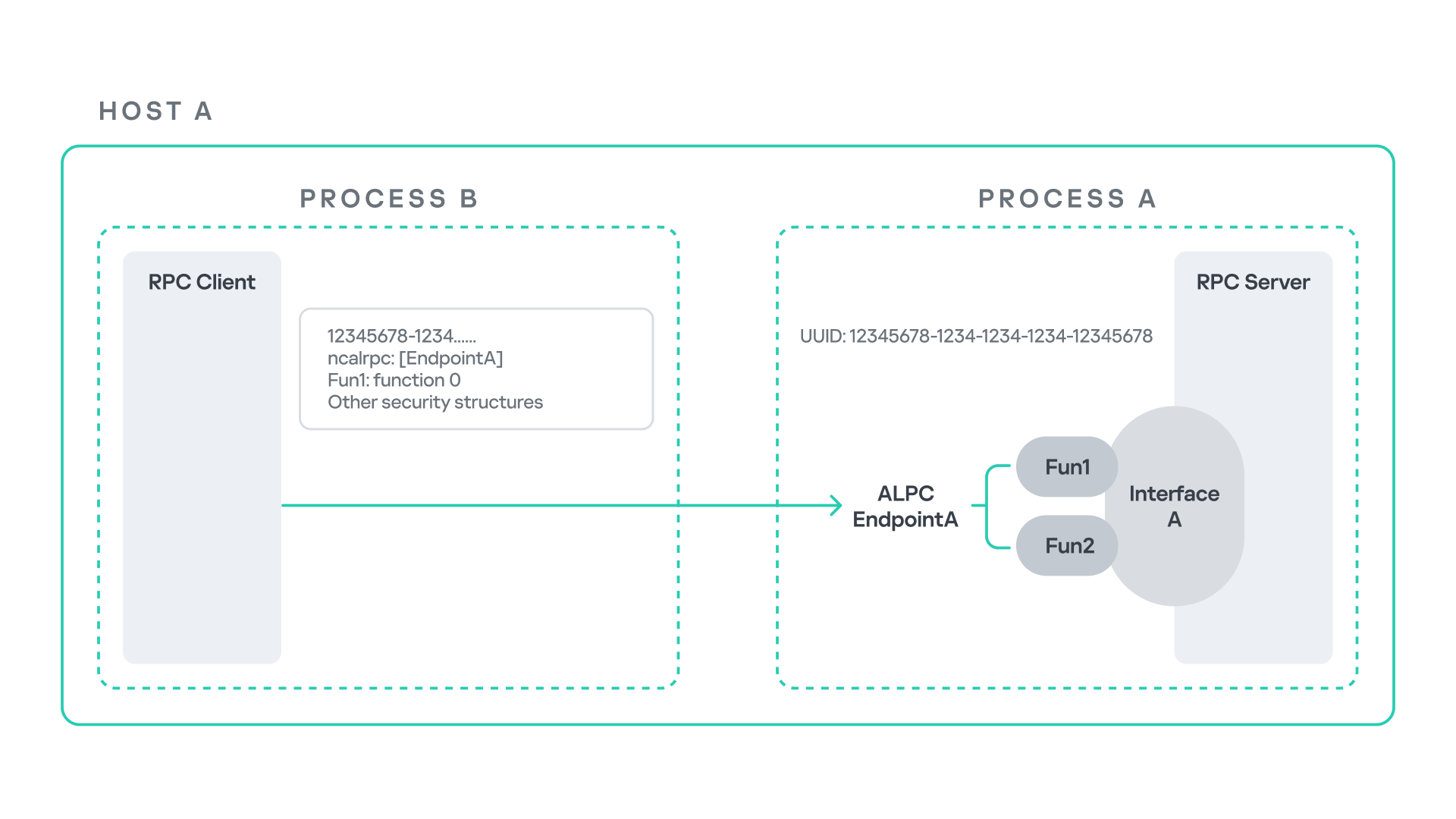
The figure below illustrates this mechanism.
Let us assume that Host A is running two processes: Process A and Process B. Process B needs to execute a function that resides inside Process A. To enable this type of interaction, Windows provides the Remote Procedure Call (RPC) architecture, which follows a client–server model. In this model, Process A acts as the RPC server, exposing its functionality through an interface, in our example, Interface A. Each RPC interface is uniquely identified by a Universally Unique Identifier (UUID), which is represented as a 128-bit value. This identifier enables the operating system to distinguish one interface from another.
The interface defines a set of functions that can be invoked remotely by the RPC client implemented in Process B. In our example, the interface exposes two functions: Fun1 and Fun2.
To communicate with the server, the RPC client must establish a connection through a communication endpoint. An endpoint represents the access point that enables transport between the client and the server. Because RPC supports multiple transport mechanisms, different endpoint types may exist, depending on the underlying transport.
For example:
When TCP is used as the transport layer, the endpoint is a TCP port.
When SMB is used, communication occurs through a named pipe.
When ALPC is used, the endpoint is an ALPC port.
Each transport mechanism is associated with a specific RPC protocol sequence. For instance:
ncacn_ip_tcp is used for RPC over TCP.
ncacn_np is used for RPC over named pipes.
ncalrpc is used for RPC over ALPC.
In this research, I focus specifically on Advanced Local Procedure Call (ALPC) as the RPC transport mechanism. ALPC is a Windows interprocess communication mechanism that predates MSRPC. Today, RPC can leverage ALPC as an efficient transport layer for communication between processes located on the same machine.
For simplicity, an ALPC port can be thought of as a communication channel similar to a file, where processes can send messages by writing to it, and receive messages by reading from it.
When the client wants to invoke a remote function, for example, Fun1, it must construct an RPC request. This request includes several important pieces of information, such as the interface UUID, the protocol sequence, the endpoint, and the function identifier. In RPC, functions are not referenced by name, but by a numerical identifier called the operation number (OPNUM). Depending on the requirements of the call, the request may also contain additional structures, such as security-related information.
Impersonation in Windows
In Windows, impersonation enables a service to temporarily operate using another user’s security context. For example, a service may need to open a file that belongs to a user while performing a specific operation. By impersonating the calling user, the system allows the service to access that file, even if the service itself would not normally have permission to do so. You can read more about impersonation in James Forshaw’s book Windows Security Internals.
This research focuses specifically on RPC impersonation. Instead of describing the interaction as a service and a user, I refer to the participants as a client and a server. In this model, the RPC server may temporarily adopt the identity of the client that initiated the request.
To perform this operation, the RPC server can call the RpcImpersonateClient API, which causes the server thread to execute under the client’s security context.
However, in some situations, a client may not want the server to be able to impersonate its identity. To control this behavior, Windows introduces the concept of an impersonation level. This defines how much authority the client grants the server to act on its behalf.
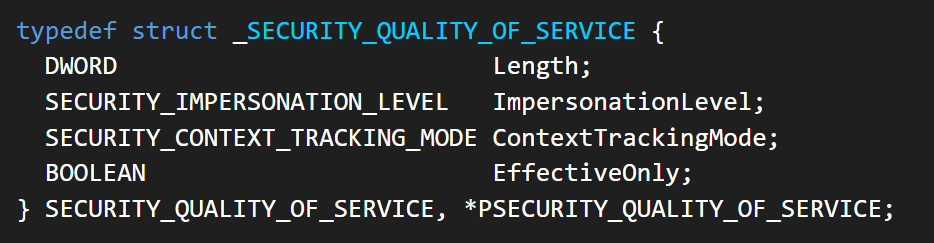
These settings are defined as part of the Security Quality of Service (SQOS) parameters, specified using the SECURITY_QUALITY_OF_SERVICE structure.
As you can see, this structure contains the impersonation level field, which determines the extent to which the server can assume the client’s identity.
Impersonation levels range from Anonymous, where the server cannot impersonate the client at all, to Impersonate and Delegate, which allow the server to act fully on behalf of the client.
At the same time, not every server process is allowed to impersonate a client. If any process could perform impersonation freely, it would pose a serious security risk. To prevent this, Windows requires the server process to possess a specific privilege called SeImpersonatePrivilege. Only processes with this privilege can successfully impersonate a client.
This privilege is granted by default to certain service accounts, such as Local Service and Network Service.
Interaction between Group Policy service and TermService
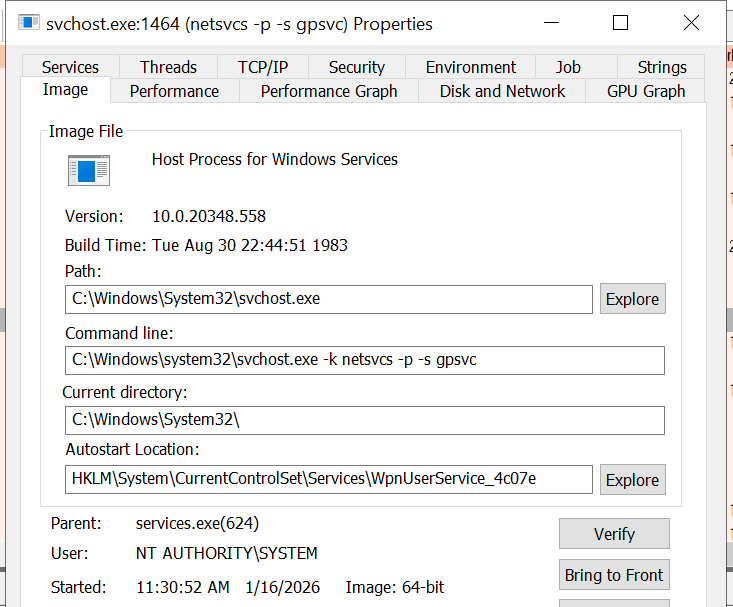
The Group Policy Client service (gpsvc) is a core Windows service responsible for applying and enforcing group policy settings on a system. It runs under the SYSTEM account inside svchost.exe.
When a group policy update is triggered, Windows uses an executable called gpupdate.exe. This tool can be executed with the /force flag to force an immediate refresh of all group policy settings. Internally, this executable communicates with the Group Policy service, which coordinates the update process.
At a certain stage during this operation, the Group Policy service attempts to communicate with TermService (Terminal Service, the Remote Desktop Services service) using RPC.
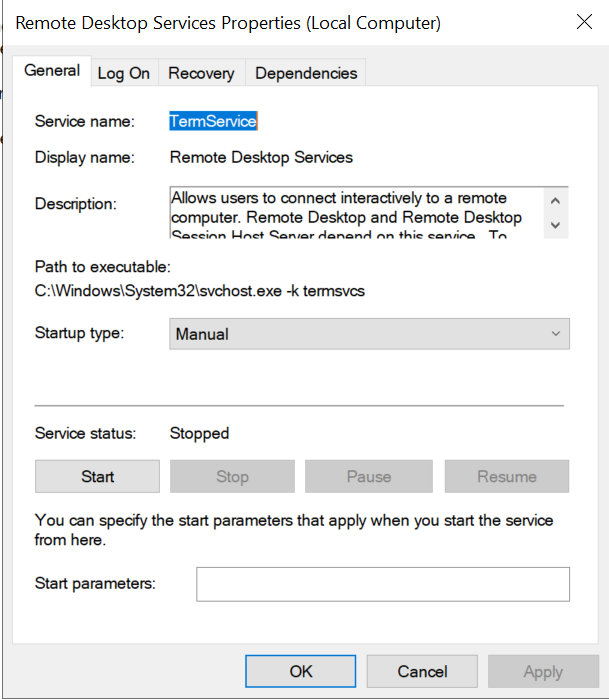
TermService is responsible for providing remote desktop functionality. This service is not running by default and can be enabled manually by the administrator via activation of Remote Desktop access. When this happens, the service exposes an RPC server with multiple interfaces and endpoints. TermService runs under the NT AUTHORITY\Network Service account.
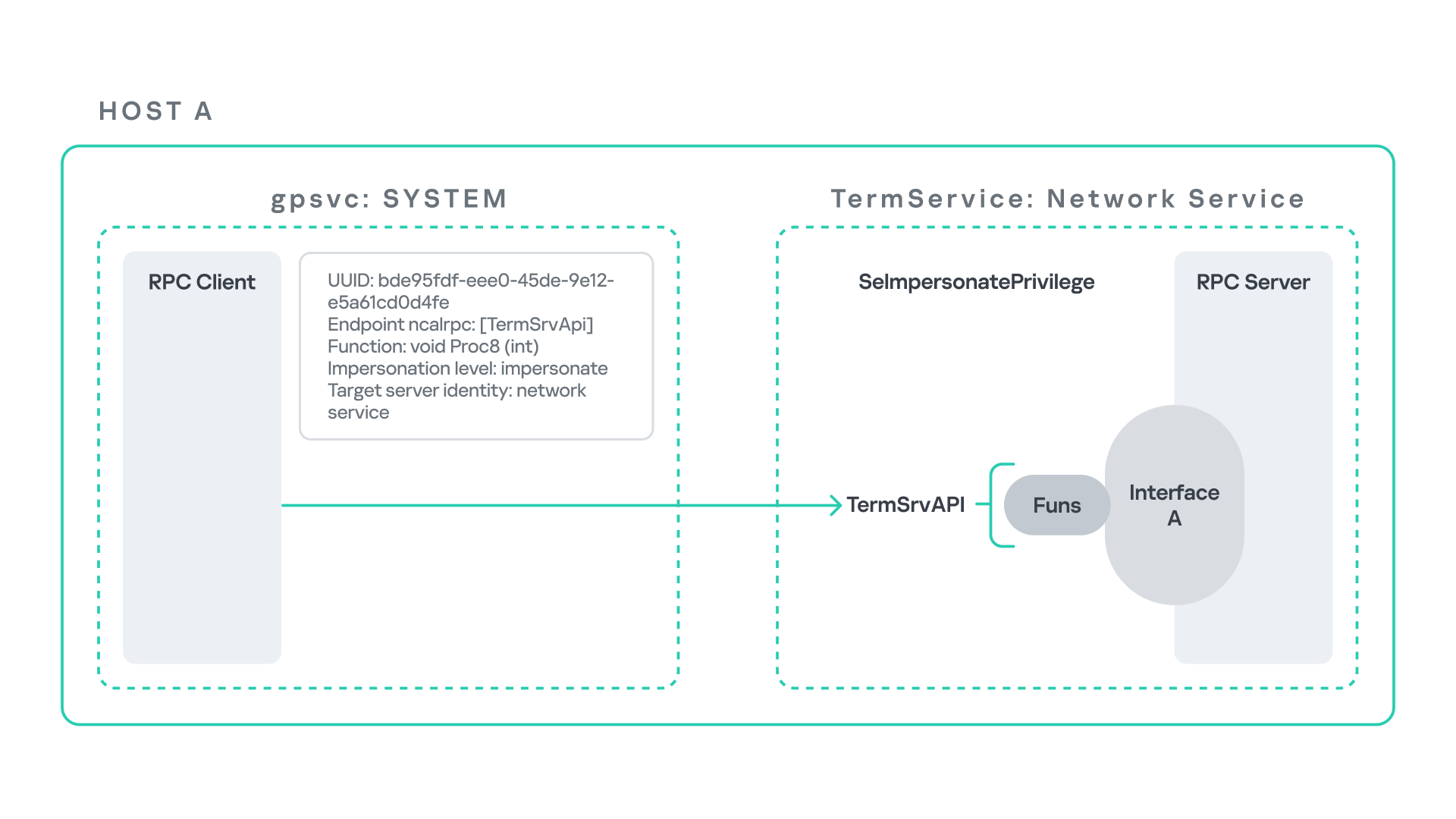
When the command gpupdate /force is executed, the Group Policy service performs an RPC call to the TermService using the following parameters:
UUID: bde95fdf-eee0-45de-9e12-e5a61cd0d4fe.
Endpoint: ncalrpc:[TermSrvApi].
Function: void Proc8(int).
However, because TermService is disabled by default, the RPC call fails and an exception occurs in rpcrt4.dll (the RPC runtime). The returned error is:
0x800706BA (RPC_S_SERVER_UNAVAILABLE, 1722).
This error indicates that the RPC client could not reach the target server.
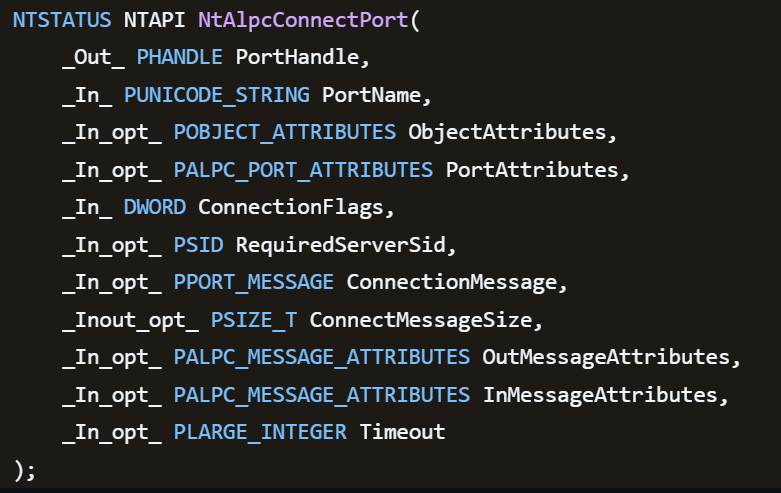
Tracing the failure path further reveals that the root cause originates from a call to NtAlpcConnectPort, which is used by RPC to establish an ALPC connection between processes.
The NtAlpcConnectPort function is responsible for connecting to a specific ALPC port and returning a handle that the client can use for further communication. This function accepts multiple parameters.
The first two parameters include:
A pointer to the returned port handle.
The ALPC port name, represented as an ASCII string.
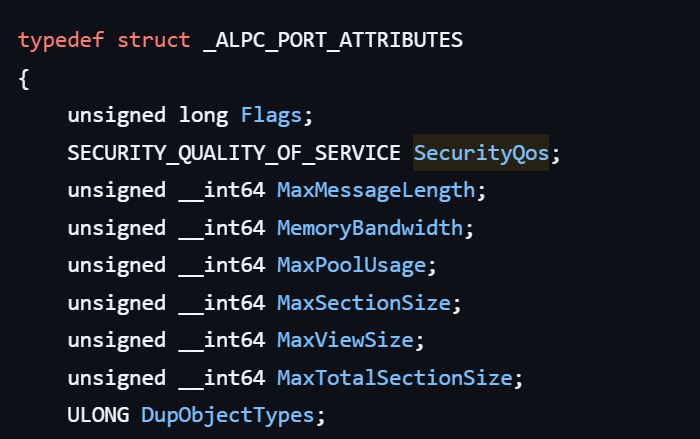
Another important argument is PortAttributes, which is an ALPC_PORT_ATTRIBUTES structure. Inside this structure is the SECURITY_QUALITY_OF_SERVICE structure, which, as mentioned above, defines the impersonation level used for the connection.
The final parameter of interest is RequiredServerSid, which specifies the expected identity of the target server process. This identity is represented using a Security Identifier (SID) structure.
Inspecting this call reveals that the Group Policy service attempts to connect to the RPC server using an impersonation level of Impersonate, expecting the remote server to run under the Network Service account. This behavior makes sense because TermService normally runs under Network Service.
Based on all the information above, the following scheme can be created to illustrate the interaction between TermService and gpsvc.
Up to this point, nothing unusual has occurred. An RPC client attempts to connect to an RPC server that is unavailable, resulting in an exception handled by the RPC runtime.
However, an interesting question arises: What if an attacker compromises a service that runs under the Network Service identity and mimics the exact RPC server exposed by TermService?
Could the attacker deploy a fake RPC server with the same endpoint?
If so, would the RPC runtime allow the client to connect to this illegitimate server?
And if the connection is successful, how could an attacker leverage this behavior?
Coercing the Group Policy service
To better understand the implications of the previously described behavior, let us consider the following attack scenario.
Imagine an attacker has compromised a service running on the system under the Network Service account, for example, an IIS server operating under the Network Service account. With this level of access, the attacker can deploy a malicious RPC server.
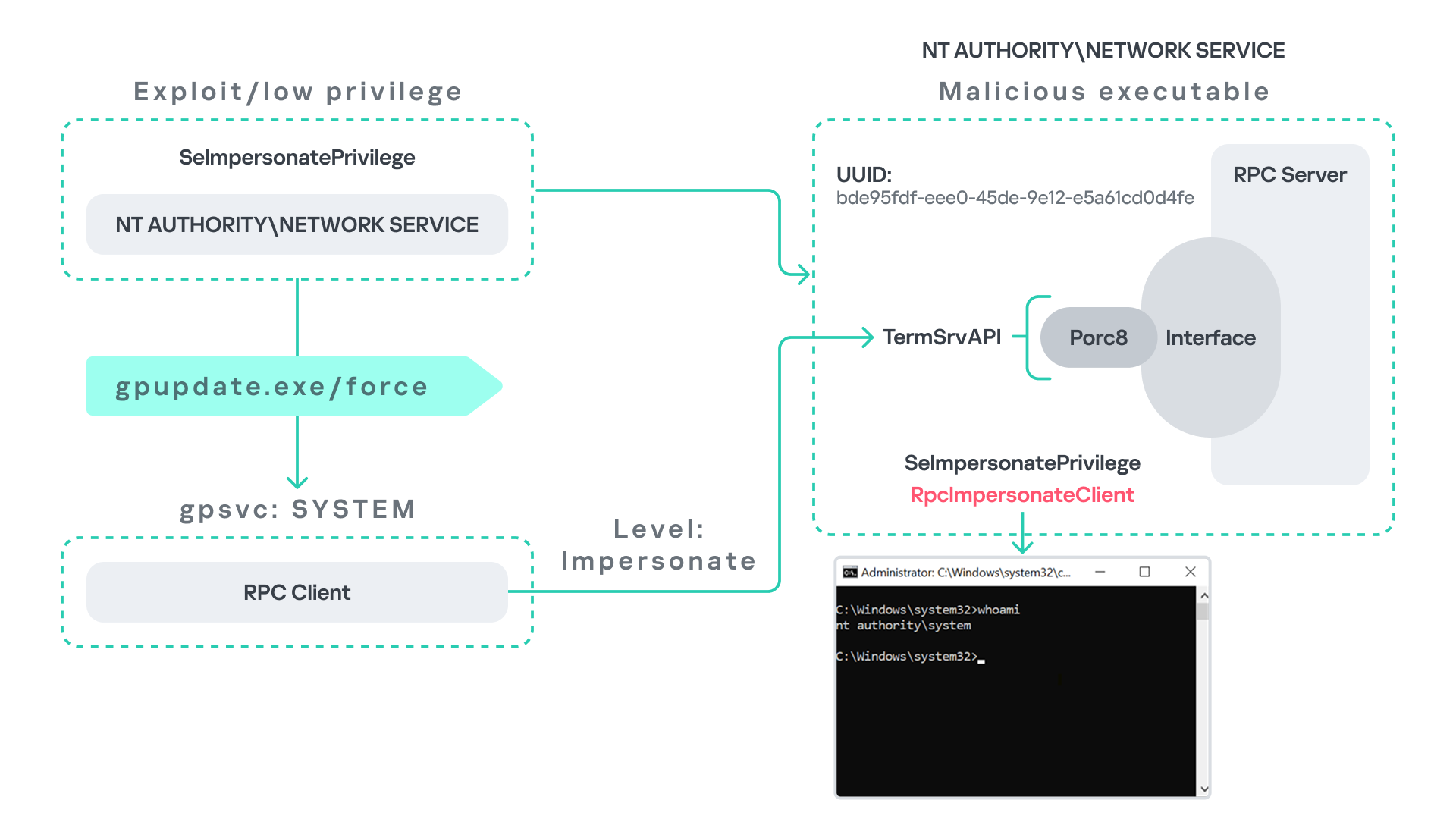
The attacker’s RPC server is designed to mimic the RPC interface exposed by the Remote Desktop service (TermService). Specifically, it implements the same RPC interface UUID and exposes the same endpoint name: TermSrvApi. Once deployed, the malicious server listens for RPC requests that would normally be directed to the legitimate RDP service.
Next, the attacker coerces the Group Policy service by triggering a policy update using gpupdate.exe /force. This causes the Group Policy Client service, which runs under the SYSTEM account, to perform the previously described RPC call. As observed earlier, this RPC call uses a high impersonation level (Impersonate).
When the attacker’s fake RPC server receives the request, it calls RpcImpersonateClient. This enables the server thread to impersonate the security context of the calling client, which, in this case, is SYSTEM.
As a result, the attacker can elevate privileges from Network Service to SYSTEM. In our proof-of-concept implementation, the exploit demonstrates privilege escalation by spawning a SYSTEM-level command prompt.
When this attack scenario was first discussed, it was purely theoretical. However, after implementing the malicious RPC server, the experiment confirmed that Windows allowed the server to be deployed and started successfully, and that the RPC runtime permitted the client to connect to the malicious endpoint. This made it possible to reliably escalate privileges from Network Service to SYSTEM using this technique. For this attack to succeed, though, at least one group policy must be applied on the system.
RPC architecture flow
Further investigation revealed that many Windows services attempt to communicate with TermService using RPC. These RPC calls often originate from winsta.dll, which acts as the RPC client component.
Windows processes invoke APIs exposed by winsta.dll; these APIs rely internally on RPC communication with TermService. This pattern is common in Windows; many system DLLs use RPC behind the scenes when their exported APIs are called.
However, it appears that the RPC runtime (rpcrt4.dll) does not provide a mechanism to verify the legitimacy of RPC servers. Moreover, Windows allows another process to deploy an RPC server that exposes the same endpoint as a legitimate service.
As a result, this architectural design introduces a large attack surface because RPC is heavily used across numerous system DLLs. Applications that invoke seemingly benign APIs may unintentionally trigger privileged RPC interactions. Under certain conditions, these interactions could be abused to achieve local privilege escalation without the user’s knowledge.
Identifying RPC calls to unavailable servers
As the issue appears to stem from an architectural weakness, a systematic approach is needed to identify RPC clients attempting to communicate with servers that are unavailable. First, I need a platform capable of monitoring RPC activity and extracting relevant information from each RPC request.
Specifically, I need to capture key RPC metadata, including:
Interface UUID, endpoint, and OPNUM.
Impersonation level and RPC status code.
Client process privilege level, process name, and module path.
This information is critical because it enables me to reconstruct the RPC interaction, mimic the expected RPC server, and determine how the call is triggered.
The platform that provides this capability is Event Tracing for Windows (ETW). ETW is a built-in Windows logging framework that captures both kernel-mode and user-mode events in real time.
Windows provides a tool called logman to collect ETW data. It enables us to create trace sessions, select event providers, and configure the verbosity level of the tracing process. The collected tracing data is stored in an .etl file, which can later be analyzed using tools such as Event Viewer or other ETW analysis utilities.
ETW provides deep visibility into RPC activity without requiring modifications to applications. Through ETW, it is possible to capture detailed RPC information, such as:
RPC bindings
Endpoints
Interface UUIDs
Authentication details
Call flow and timing
RPC status codes
However, I’m not interested in every RPC event. My focus is on RPC call failures, specifically those that return the status RPC_S_SERVER_UNAVAILABLE.
For an event to be relevant to this research, the exception must meet two conditions:
It must originate from a high-privileged process because impersonating such a process may allow an attacker to escalate privileges to a more powerful security context.
The RPC call must use a high impersonation level, enabling the server to fully impersonate the client once the connection is established.
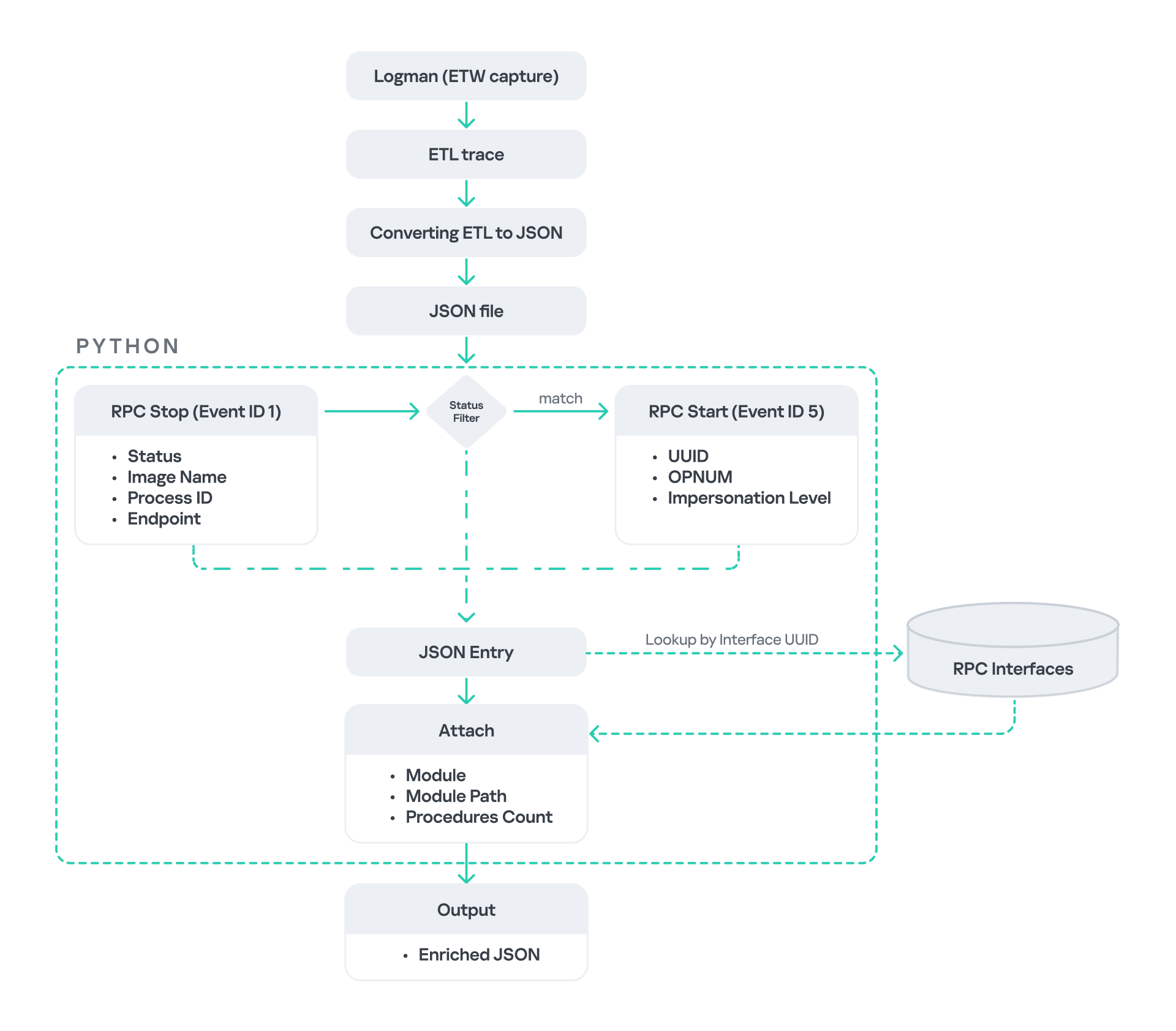
I cannot rely solely on the raw ETW output to implement this framework because it contains thousands of events, making manual filtering with standard tools inefficient. Therefore, I need to automate this process. The workflow shown below enables me to efficiently filter and extract only those events that are relevant to this analysis.
After generating the logs as an .etl file, I convert them to JSON format using tools such as etw2json. JSON is a much easier format to process programmatically. In this case, I use a Python script to filter and extract the relevant information.
The filtering process begins with a search for Event ID 1, which corresponds to an RPC stop event. This event indicates that the RPC client has completed the call and the result is available. From this event, I can extract useful information, such as:
Status code
Client process name
Client process ID
Endpoint
After extracting the status code, I filter for the specific value RPC_S_SERVER_UNAVAILABLE, which indicates that the target server was unreachable during an RPC call. These events represent the scenarios that are of interest.
However, Event ID 1 does not contain all of the required RPC metadata. To obtain the missing information, it is correlated with Event ID 5, which represents the RPC start event. This event is generated when the client initiates the RPC call.
By matching the metadata between Event ID 1 and Event ID 5, I can recover the missing details, including:
Interface UUID
OPNUM
Impersonation level
After correlating and filtering these events, a JSON entry is obtained that is almost ready for analysis. At this stage, the data can be enriched further by adding context that will be helpful when reversing or analyzing the RPC server implementation. For example, the following can be identified:
The DLL where the RPC interface is implemented
The location of that DLL
The number of procedures exposed by the interface
To retrieve this information, I match the UUID with an external RPC interface database. In this case, I used the RPC database, which contains a comprehensive list of RPC interfaces and their corresponding DLL implementations.
At the end of this process, a complete JSON dataset is obtained that can be used for further analysis.
One important observation is that the RPC calls I am looking for may only occur when specific system actions are triggered. Additionally, the resulting exceptions may vary from one system to another depending on which services are enabled or disabled. Therefore, I need a reliable way to generate these RPC exceptions.
In this research, I used several approaches to trigger such events:
Monitoring RPC activity during system startup
I observed RPC activity while the system booted. During startup, many services initialize and perform various RPC calls, which increases the chances of capturing calls to unavailable servers.
Triggering administrative operations I developed PowerShell scripts that perform common administrative tasks, such as updating Group Policy, changing network settings, or creating new users. These operations often trigger RPC communication and may generate exceptions.
Disabling services intentionally
After observing that Remote Desktop was disabled by default, I extended this idea by disabling additional services one by one and repeating the previous steps. This approach can reveal RPC clients that attempt to connect to services that are no longer available.
Additional privilege escalation paths
After running the logging and monitoring framework described earlier, I identified four additional scenarios that can lead to privilege escalation. The following sections introduce each case and explain how escalation can be achieved.
User interaction: From Edge to RDP
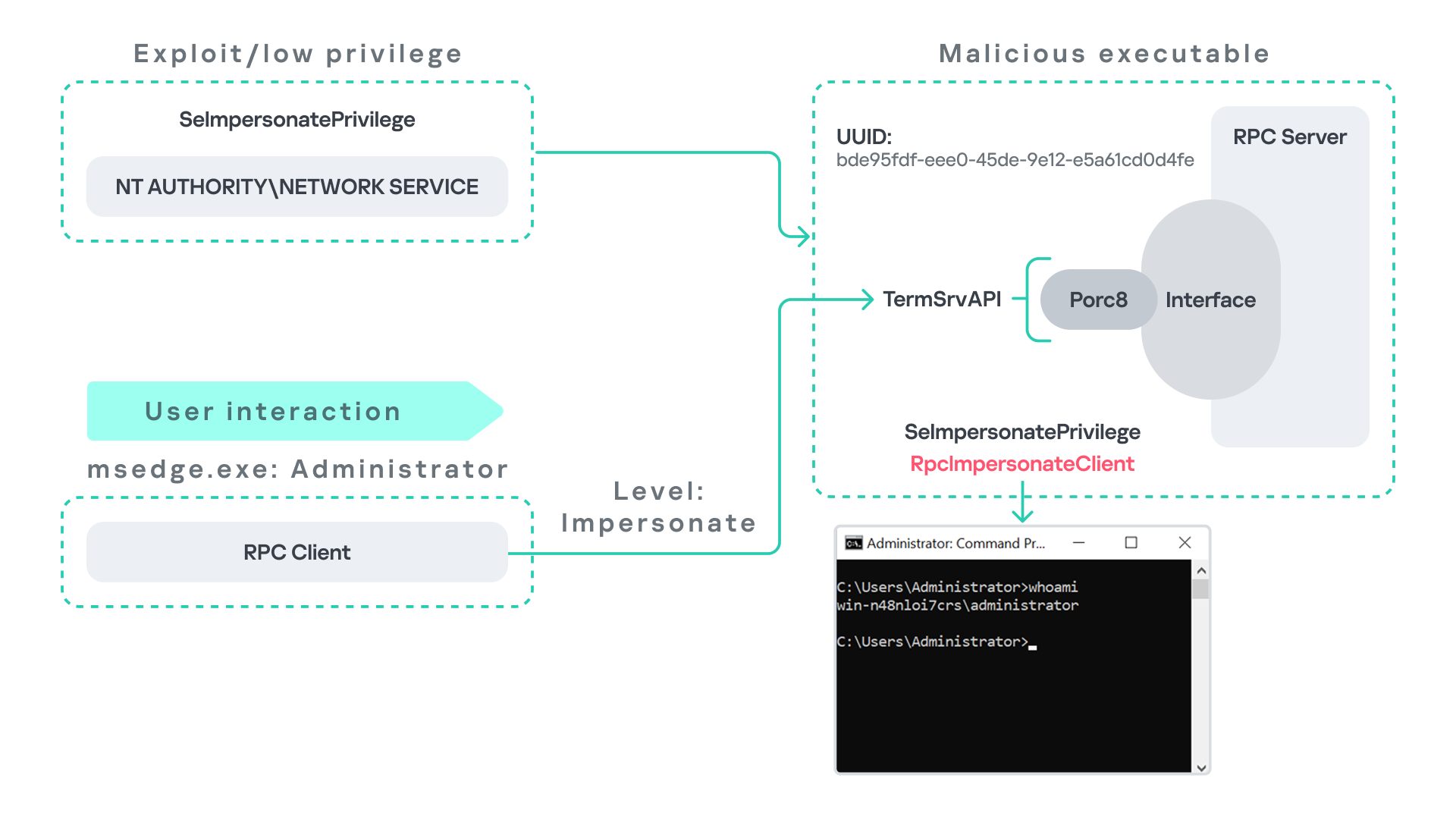
Microsoft Edge (msedge.exe) comes preinstalled on Windows systems. During startup, Edge triggers an RPC call to TermService. This RPC call is performed with a high impersonation level.
As previously discussed, Terminal Service is disabled by default. Because of this, the expected RPC server is unavailable, creating an opportunity for the attack scenario illustrated below.
The attack follows the same initial assumption as before: the attacker has already compromised a process running under the Network Service account. From there, they deploy the same malicious RPC server that mimics the legitimate TermService RPC interface.
However, unlike the previous scenario where the attacker coerced the Group Policy service, no coercion is required this time. Instead, the attacker simply waits for a high-privileged user, such as an administrator, to launch msedge.exe.
When Edge starts, it triggers the RPC client to attempt communication with the expected TermService RPC interface. Because the legitimate server is not running, the request is received by the attacker’s fake RPC server. Since the RPC call is made with a high impersonation level, the malicious server can call RpcImpersonateClient to impersonate the client process.
As a result, the attacker is able to impersonate the administrator-level client and escalate privileges from Network Service to Administrator.
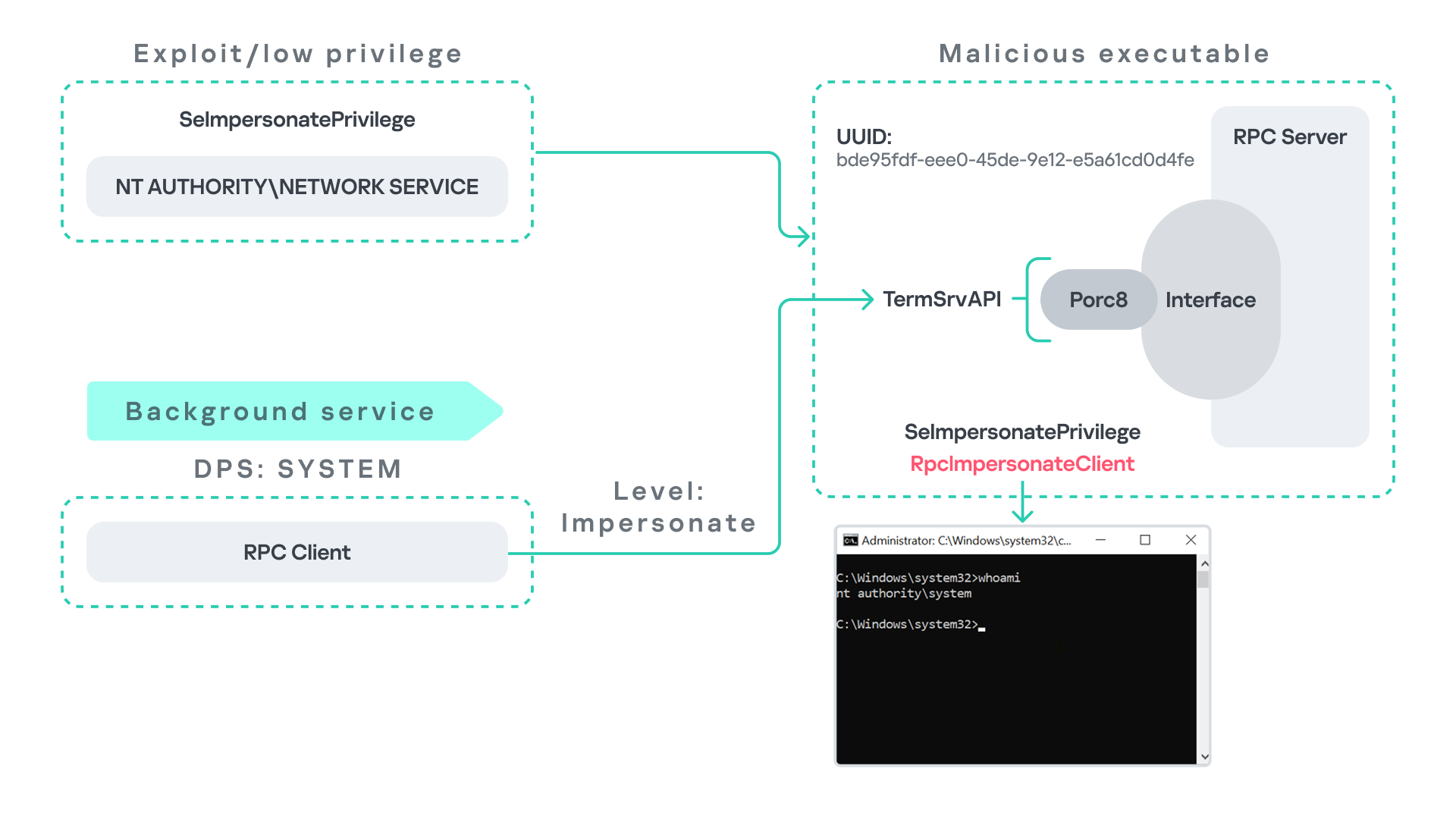
Background services: From WDI to RDP
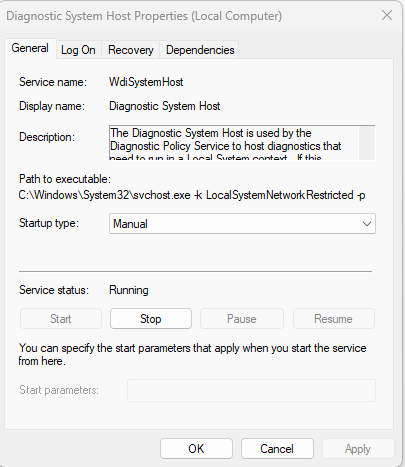
Some background Windows services periodically attempt to make RPC calls to the RDP service without user interaction. One such service is the WdiSystemHost service. The Diagnostic System Host Service (WDI) is a built-in Windows service that runs system diagnostics and performs troubleshooting tasks. This service runs under the SYSTEM account.
During normal operation, WDI periodically performs background RPC calls to the Remote Desktop service (TermService) using a high impersonation level. These RPC interactions occur automatically every 5–15 minutes and do not require any user input.
This behavior can be abused in a similar manner to the previous attack scenarios, as illustrated in the figure below.
In this case, however, no user interaction or coercion is required. After deploying a malicious RPC server that mimics the expected TermService RPC interface, the attacker only needs to wait for the WDI service to perform its periodic RPC call. Because the request is made with a high impersonation level, the malicious server can invoke RpcImpersonateClient and impersonate the calling process. This enables the attacker to escalate privileges to SYSTEM.
Abusing the Local Service account: From ipconfig to DHCP
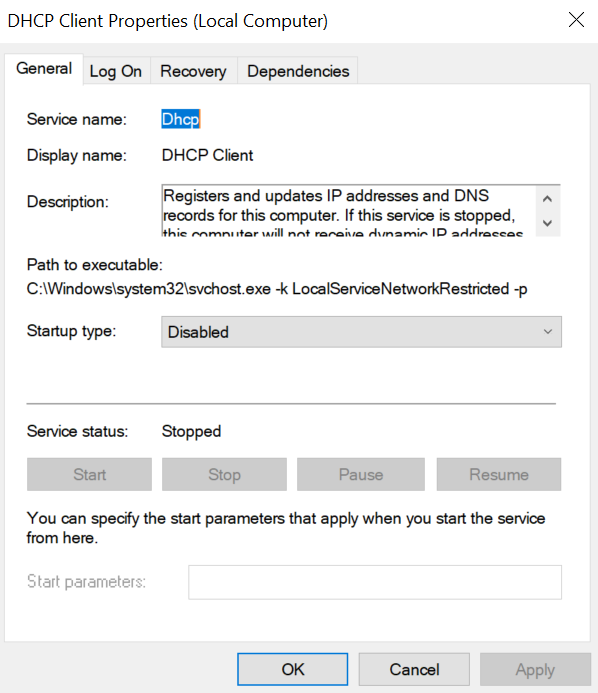
Another scenario involves the DHCP Client service, which manages DHCP client operations on Windows systems. This service runs under the Local Service account and is enabled by default.
The DHCP Client service exposes an RPC server with multiple interfaces and endpoints. These interfaces are frequently invoked by various system DLLs, often using a high impersonation level.
In this scenario, instead of compromising a process running under Network Service, it is assumed the attacker has compromised a process running under the Local Service account. I also assume that the DHCP Client service is disabled, meaning the legitimate RPC server is unavailable.
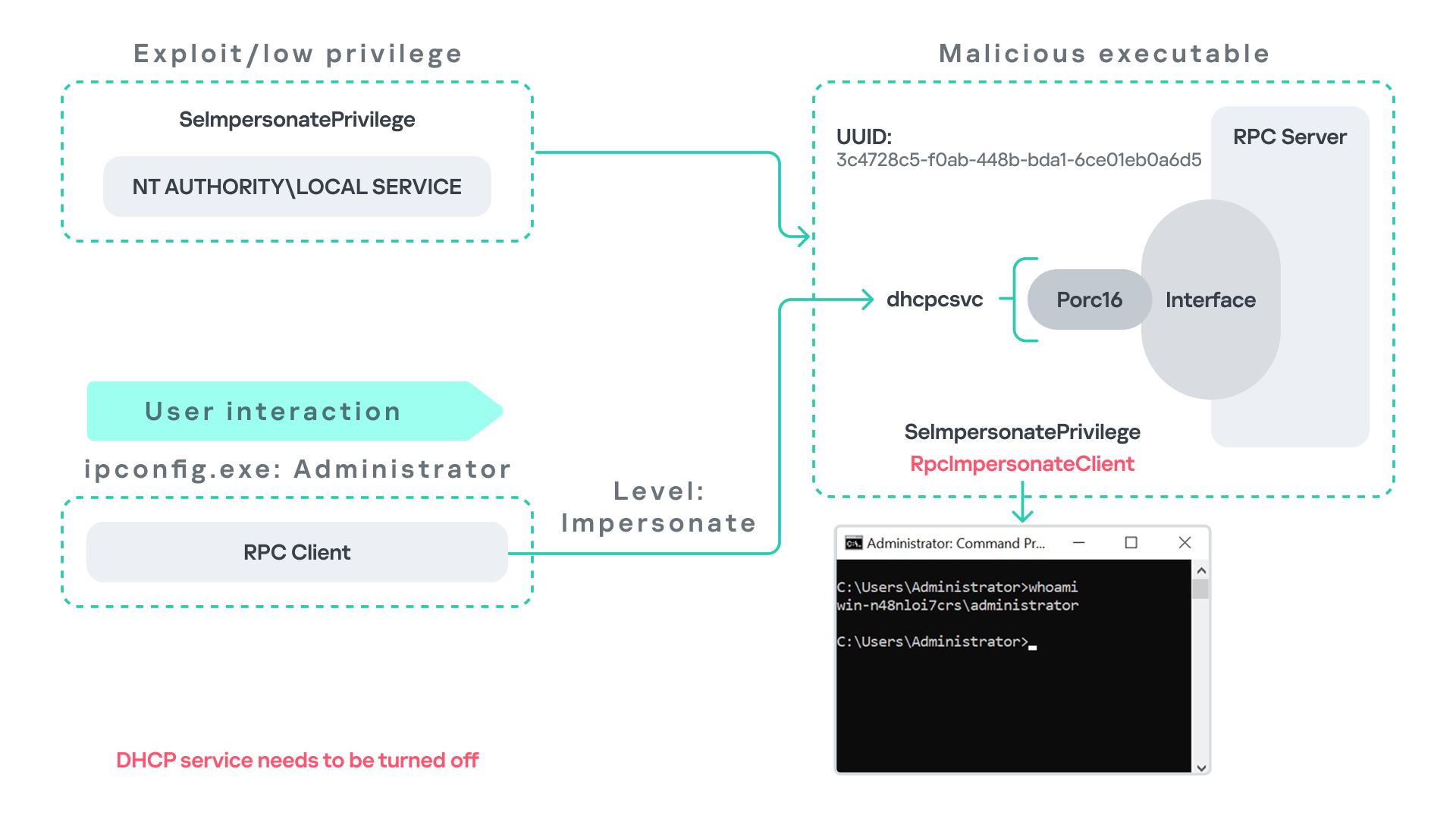
As the figure below illustrates, the attacker can leverage this situation to escalate privileges.
After gaining control of a Local Service process, the attacker deploys a malicious RPC server that mimics the legitimate RPC server normally exposed by the DHCP Client service. Once the malicious server is running, the attacker waits for a high-privileged user, such as an administrator, to execute ipconfig.exe.
When ipconfig is run, it internally triggers an RPC request to the DHCP Client service. Since the legitimate RPC server is not running, the request is received by the attacker’s fake RPC server. Because the RPC call is performed with a high impersonation level, the malicious server can call RpcImpersonateClient to impersonate the client.
As a result, the attacker can escalate privileges from the Local Service account to the Administrator account.
Abusing Time
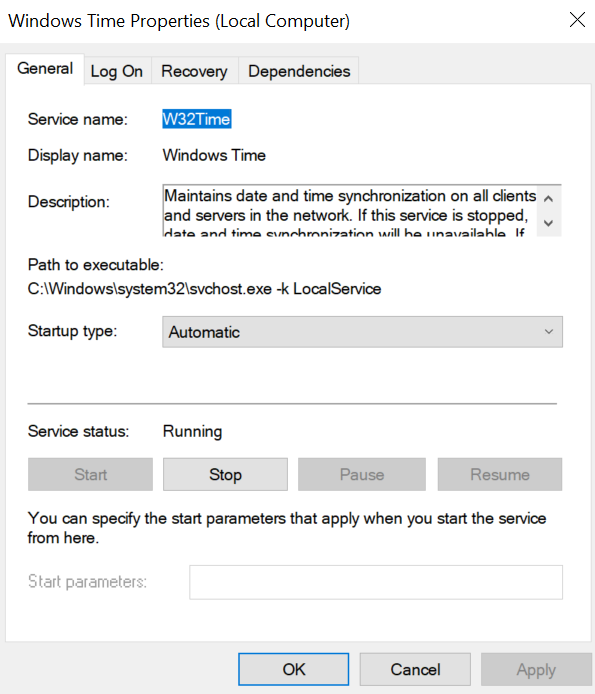
The Windows Time service (W32Time) is responsible for maintaining date and time synchronization across systems in a Windows environment. This service is enabled by default and runs under the Local Service account.
The service exposes an RPC server with two endpoints:
\PIPE\W32TIME_ALT
\RPC Control\W32TIME_ALT
The executable C:\Windows\System32\w32tm.exe interacts with the Windows Time service through RPC. However, before connecting to the valid RPC endpoints exposed by the service, the executable first attempts to access the nonexistent named pipe: \PIPE\W32TIME. This named pipe is not exposed by the legitimate W32Time service. However, if this endpoint were available, w32tm.exe would attempt to connect to it.
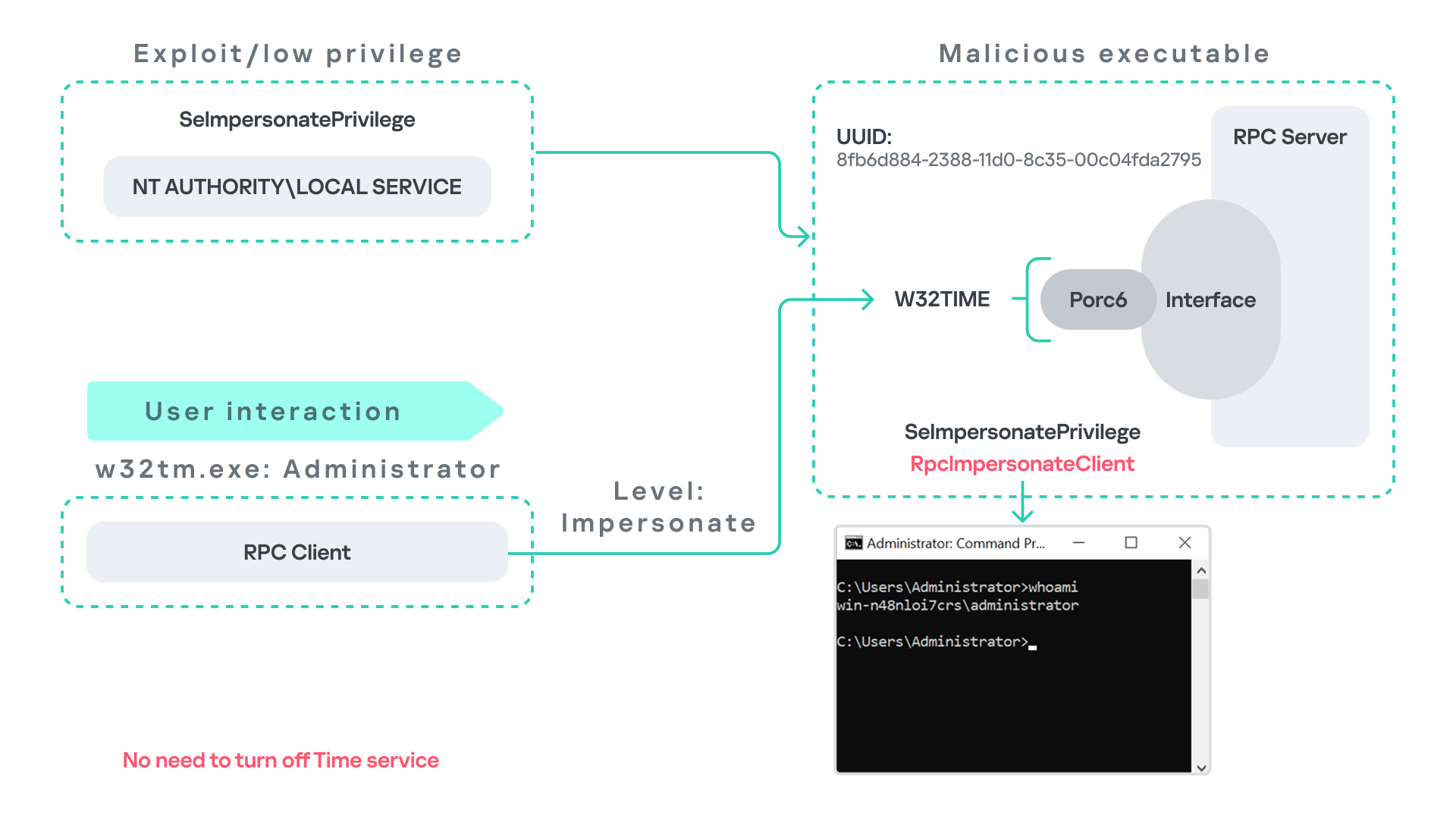
An attacker can abuse this behavior by deploying a malicious RPC server that mimics the legitimate RPC interface of the Windows Time service. Rather than exposing the legitimate endpoints, the attacker’s server exposes the nonexistent endpoint \PIPE\W32TIME, as shown in the figure below.
As in the previous scenarios, it is assumed the attacker has already compromised a process running under the Local Service account. The attacker then deploys a fake RPC server that implements the same RPC interface as the Windows Time service, but which exposes the alternative endpoint used by w32tm.exe.
Once the malicious server is running, the attacker simply waits for a high-privileged user, such as an administrator, to execute w32tm.exe. When the executable runs, it attempts to connect to the endpoint \PIPE\W32TIME. Because the attacker’s fake server exposes this endpoint, the RPC request is directed to the malicious server.
Since the RPC call is performed with a high impersonation level, the malicious server can impersonate the calling client. As a result, the attacker can escalate privileges from the Local Service account to the Administrator account.
In this scenario, it is important to note that the legitimate Windows Time service does not need to be disabled. Because the executable attempts to connect to a nonexistent endpoint, it is sufficient for the attacker to expose that endpoint through the malicious RPC server.
Vulnerability disclosure
After discovering the vulnerability, Kaspersky Security Services prepared a 10-page technical report describing the issue and the various aforementioned exploitation scenarios. The report was submitted to the Microsoft Security Response Center (MSRC) to report the vulnerability and request a fix.
Twenty days later, Microsoft responded, indicating that they did not classify the vulnerability as high severity. According to their assessment, the issue was classified as moderate severity and would therefore not be patched immediately. No CVE would be assigned, and the case would be closed without further tracking.
Microsoft explained that the moderate severity classification was due to the requirement that the originating process had to already possess the SeImpersonatePrivilege privilege. Since this privilege was typically required for the attack to succeed, Microsoft determined that the issue did not require immediate remediation.
Kaspersky Security Services respect Microsoft’s assessment and only published the research after the embargo period ends. In line with the coordinated vulnerability disclosure policy, Kaspersky Security Services will refrain from publishing detailed instructions that could enable or accelerate mass exploitation.
The disclosure timeline is shown below:
2025-09-19: Vulnerability reported to Microsoft Security Response Center (Case 101749).
2025-10-10: MSRC response – the case was assessed as moderate severity, not eligible for a bounty, no CVE was issued, and the case was closed without further tracking.
2026-04-24: expected whitepaper publication date.
Detection and defense
As discussed above, this vulnerability is related to an architectural design behavior. Fully preventing it would require Microsoft to release a patch that addresses the underlying issue.
Nevertheless, organizations can still take steps to detect and mitigate potential abuse. ETW-based monitoring within the framework described above enables defenders to identify RPC exceptions in their environment, especially when RPC clients attempt to connect to unavailable servers.
I have provide the tools used in the previously described framework so that organizations can check their environment for such behavior. You can find all of them in the research repository.
By monitoring these events, administrators can identify situations where legitimate RPC servers are expected but not running. In some cases, the attack surface may be reduced by enabling the corresponding services, ensuring that the legitimate RPC server is available. This can hinder attackers from deploying malicious RPC servers that imitate legitimate endpoints.
It is also good practice to reduce the use of the SeImpersonatePrivilege privilege in processes where it is not required. Some system processes need this privilege for normal operations. However, granting it to custom processes is generally not considered good security practice.
Conclusion
All the exploits described in this research were tested on Windows Server 2022 and Windows Server 2025 with the latest available updates prior to the submission date. The proof-of-concept implementations can be found in the research repository. However, it is highly likely that this issue may also be exploitable on other Windows versions.
Because the vulnerability stems from an architectural design issue, there may be additional attack scenarios beyond those presented in this research. The exact exploitation paths may vary from one system to another depending on factors such as installed software, the DLLs involved in RPC communication, and the availability of corresponding RPC servers.
Content. a number of malware samples including phishing, web shell, droppers, backdoor malware, downloaders, Infostealer, and CoinMiner targeting the financial sector have been distributed. we observed a number of cases where Korean disguised attachment names and HTML/JS execution methods were utilized to propagate phishing. account compromise campaigns through the Telegram API were confirmed, with approximately […]
Is your personal computer (PC) feeling a bit sluggish? Giving it a good, old-fashioned cleaning can improve its performance, and it only takes minutes. If you’ve never cleaned your PC before, you have a few options to speed up the process.
In this guide, we explain why computers slow down over time, set expectations for what a cleaning routine can and can’t do, and share step-by-step instructions to help you clean your PC and restore optimal performance.
PCs perform more slowly over time
For the most part, PCs don’t slow down on their own. It’s rarely one single problem. It’s how we accumulate apps, files, and services that slow your PC down as it ages. A few examples come to mind:
You create files: These personal files that you create take up increasing amounts of disk space. When your drive gets crowded, Windows has less room to perform its background tasks, so everything feels slower.
Temporary files add up: These are created constantly for updates, browsing, and app activity, and they don’t always clean up after themselves.
You collect unused apps: Old apps consume storage, and some keep running services even when you never open them.
Windows adds services: When Windows updates, it further accumulates background services and other processes that reduce performance.
Startup programs multiply: Many apps sneak into your startup list, which makes your computer boot slower and run “busy” right from the start.
Dust builds up inside the machine: Dust traps heat, and when your PC gets too warm, it automatically slows down to protect itself.
What PC cleaning can and can’t do for performance
Cleaning is definitely worth doing, but you should set realistic expectations for how much your PC’s performance can improve. Similar to decluttering your home, you are not rebuilding your house, but it will feel much easier to live in.
What PC cleaning can accomplish
PC cleaning addresses software-level performance bottlenecks. When you remove temporary files, clear browser caches, and delete unused applications, you’re freeing up valuable disk space and reducing the workload on your system. This directly impacts how quickly your computer can access and process information.
Startup optimization also delivers some of the most noticeable improvements. If your computer takes several minutes to boot because too many programs are launching automatically, trimming your startup list can cut boot times significantly. You’ll also notice improved responsiveness during everyday tasks when fewer background processes compete for system resources.
You will also notice faster web browsing when you clear accumulated browser data, quicker file searches when your system isn’t indexing thousands of temporary files, and smoother multitasking when background services aren’t consuming unnecessary memory. With proper system maintenance, you can restore 15-30% of lost performance on aging computers.
What PC cleaning cannot fix
Hardware limitations represent the biggest constraint on what cleaning can accomplish. If your processor struggles with modern software demands or your RAM is maxed out during normal use, no amount of cleaning will change these hardware realities. Cleaning your PC to make it faster depends largely on whether software bloat or hardware constraints are your primary bottleneck.
Gaming performance, video editing, and other intensive tasks rely heavily on central processing unit (CPU) and graphics processing unit (GPU) capabilities. While a clean system ensures these components aren’t fighting unnecessary background processes, cleaning won’t magically boost frame rates or rendering speeds beyond your hardware’s capabilities.
But first, back up your files
Any cleanup is safer when you know your important stuff is protected. You don’t have to do a complicated backup routine; just make sure the essentials are safe.
Check your cloud backups: If you use OneDrive, Google Drive, or iCloud, you may already be backed up without realizing it. Give those files a quick review. It only takes two minutes to confirm that your data is backed up in the cloud.
Consider an external backup: An external drive gives you a second copy of your files in case something goes wrong. It’s especially helpful for photos, work documents, or anything you’d hate to lose.
In newer versions of Windows, go to Settings > Update & Security > Backup to set up File History, or use Settings > Accounts > Sync your settings for cloud backup. This ensures you won’t lose important files.
Step by step: Clean up your computer
Now that you’ve ensured your important files are safe, you can start the cleanup process that makes a noticeable difference in PC performance. You don’t need advanced technical skills, and you don’t need to do everything at once.
Remove temporary files and unused apps
Go to Settings > System > Storage > Temporary files and review the categories. This will take you to a screen that gives you insight into what your drive space looks like and allow you to safely remove many of them with a few clicks, especially cache and old system leftovers.
In Windows 10/11, go to Settings > Apps > Apps & features, then sort apps by size or installation date to identify large or forgotten programs. Click any app and select “Uninstall” to remove it.
You can also use the built-in Disk Cleanup tool by typing “Disk Cleanup” in the Start menu search. Select categories such as “Temporary files,” “Recycle Bin,” and “System cache” to review the files and remove any that are not needed. If you’re unsure what a program does, research it online before removing it, as some applications may be essential for your system’s operation. For example, you might want to keep “Windows update log files,” in case you ever need to troubleshoot Windows.
Set Windows Storage Sense for automatic cleanup
Instead of performing a manual cleanup, you can use Windows Storage Sense to keep your system clean. Navigate to Settings > System > Storage > Storage Sense to configure this powerful feature. You can set it to automatically remove temporary files, empty your recycle bin, and clear your Downloads folder of files older than 30 days.
Removing old and unused apps benefits you in two ways. First, it frees up disk space. Second, outdated apps can contain security loopholes that hackers may exploit. Older apps might have gone without an update, which can lead to security loopholes that hackers can exploit. Remove the old app, and you remove the loophole.
Use Disk Cleanup
Disk Cleanup is an older Windows tool, but it’s still reliable. It can clear system files and cached data safely when used carefully. In Disk Cleanup, you can confidently delete Temporary files, Recycle Bin contents, System error memory dump files, and old Windows Update cleanup files. Temporary Internet Files and Downloaded Program Files are also safe to remove, as your browser will recreate what it needs.
To access this tool, search “Disk Cleanup” in the Start menu, and choose your main drive (usually C:) when prompted. Review the temporary file categories before removing them. Just read descriptions, and avoid deleting anything you might need for troubleshooting.
Manage large files effectively
Identify space-consuming files by looking for large video files, old software installers, or duplicate files that you no longer need. Move important large files to external storage or cloud services to free up local space while keeping them accessible.
Clear your browser cache and cookies
This one is a bit of a double-edged sword. Your cache and cookies make many web pages load faster. By storing images, preferences, and other info, cookies speed up load times. However, the data that cookies store can get bloated over time. If the disk space they use looks a little high to you, clean them out. You can do this in Windows by typing “Cookies” in your search bar or selecting “Delete browsing data” from your browser’s menu.
Note that this may remove any saved passwords stored in your browser. However, if you’re using a password manager, this isn’t a worry. The manager does the remembering for you.
Shut off startup apps
Windows runs several apps at startup, some of which you certainly need, such as antivirus software or online protection software. Other apps, however, might not be needed to run right away and just slow down startup.
To review your startup apps, type “Startup” in the Windows search bar or press Ctrl + Shift + Esc to open Task Manager. Click the Startup tab to see a list of apps and their impact on performance. Disable programs you don’t need immediately, but keep essential security software enabled. Focus on applications marked with “High” startup impact.
Keep essential security software enabled at startup, and research unfamiliar programs before disabling them or just leave them alone.
Erase sensitive files from the recycle bin
You’d think that deleting files in the recycle bin erases them entirely. Not so. It only removes the “pointer” to those files, but the data remains on the drive. The only way to completely remove files is when something new overwrites them, which can take time.
To completely erase files with sensitive info, use a file shredder tool similar to that in McAfee+. Although this doesn’t necessarily improve performance, it helps prevent identity theft.
Update your operating system and drivers
Ensure optimal performance and security with the latest updates. Go to Settings > Update & Security > Windows Update and click “Check for updates.” For driver updates, visit Settings > Update & Security > Windows Update > View optional updates, or use Device Manager by right-clicking the Start button and selecting it. Updated drivers improve hardware compatibility and can resolve performance issues.
Run a comprehensive security scan
If your PC feels abnormally slow, malware may be the real cause. Complete your cleanup by scanning for malware and other threats that may be causing the slowdown. Some threats run quietly in the background, consuming system resources and compromising privacy.
Use built-in Windows Security or trusted tools: Start with a quick scan, and follow up with a deeper scan if anything looks suspicious. This can remove hidden processes that slow down your system.
Avoid random “free cleaners”: Many of them bundle adware or unwanted programs. Stick to well-known security vendors and official sources.
Deep clean with a PC Optimizer
For a deeper clean, consider PC cleaning software such as McAfee PC Optimizer, designed to detect and clear out unnecessary files, manage startup apps, and even clean the registry at the press of a button. These cleaners usually come with customizable settings to suit your preferences. You can set automatic clean-ups at regular intervals, thus saving time, and freeing you from the hassle of remembering to run the cleanup.
To choose reliable and safe PC cleaning software, read reviews and understand what each feature does. Always use a trusted, reputable security software and avoid downloading PC cleaners from unknown sources, as some may contain malware.
Special considerations for SSD drives
If your PC uses a solid-state drive (SSD), avoid traditional defragmentation as it can reduce the drive’s lifespan without providing performance benefits. Windows automatically runs TRIM commands to instruct your SSD to delete data blocks that are no longer used.
You can manually enable TRIM by opening Command Prompt as an administrator and running “fsutil behavior set DisableDeleteNotify 0” to confirm it’s enabled. However, we do not recommend doing this. It’s best to let Windows handle optimization automatically.
Windows registry: To clean or not to clean
The Windows registry is your computer’s central database, storing critical configuration settings for your operating system and installed programs. Registry cleaning is a misunderstood part of PC optimization. Many people think it’s essential, but modern Windows systems usually don’t benefit from it. In addition, today’s Windows versions manage registry complexity more effectively than older versions.
Unlike clearing temporary files or uninstalling old apps, manual registry changes can have far-reaching consequences and serious issues if done incorrectly. A single incorrect change can prevent apps from opening or cause system instability. Unless you’re troubleshooting a specific issue, it’s safer to skip it.
A clean slate for you and your PC
Restart your computer after completing these steps to ensure all changes take effect properly. Regular maintenance every 3-6 months will help keep your PC running smoothly and securely.
Physically clean your computer
Another aspect of cleaning your PC to improve its performance entails physical cleanup, specifically dust removal. When dust builds up, your PC can’t cool itself properly, leading to slower speeds, louder fans, and random stuttering. Follow this quick guide:
Power down and disconnect everything: Turn off your computer entirely and unplug all cables before cleaning. This prevents electrical damage and keeps you safe during the cleaning process.
Discharge static electricity: Touch a grounded metal object or use an anti-static wrist strap before handling internal components. Static electricity can damage sensitive computer parts.
Use compressed air for dust removal: Blow out dust from vents, fans, and internal components using short bursts of compressed air. Hold the can upright and maintain a few inches of distance to avoid moisture buildup.
Support fan blades while cleaning: Gently hold fan blades in place when using compressed air to prevent them from spinning too fast, which can damage the motor or create electrical feedback.
Clean case vents and intake areas: Remove dust from all ventilation openings, especially intake fans and exhaust vents, which tend to accumulate dust.
Avoid liquids near electronics: Never use water, cleaning solutions, or damp cloths on internal components. If you must clean the exterior case, use slightly damp cloths only on plastic surfaces, avoiding all ports and openings.
Focus on heat-generating components: Pay special attention to the CPU cooler, graphics card fans, and power supply vents, as dust here directly impacts cooling performance.
Clean regularly for sustained performance: Dust-free systems run cooler and prevent thermal throttling, where your CPU or GPU reduces performance to avoid overheating. This keeps your computer running at optimal speed.
Know when to seek professional help: If you’re uncomfortable opening your computer case or notice excessive dust buildup in hard-to-reach areas, consider having a professional service perform a thorough cleaning.
Reassemble and test: Once you have completed the cleaning, reconnect all cables and secure the side panel. Power on your system and check that the CPU fan spins properly. Monitor temperatures during initial use to ensure adequate cooling.
Clean your PC to improve your game, somewhat
If you’re asking this question, you’re probably gaming — and yes, cleaning can help restore lost frames per second (FPS), but it won’t magically exceed your hardware’s capabilities.
Dust buildup causes thermal throttling, which leads to frame drops and stuttering. Physical cleaning will reduce overheating, improve airflow, and help maintain stable frame rates.
Meanwhile, too many processes can consume CPU time and RAM, hindering your gaming experience. Trimming startup apps and closing unused background tools can improve gaming smoothness.
Remember, though, that cleaning won’t address your PC’s hardware limitations. If your GPU can’t handle your settings, no amount of cleanup will make it a high-end card. Cleaning keeps your current hardware running at its best.
Find the best PC cleaner
For most users, combining manual cleaning with reputable automated tools provides the best results. Quality PC optimizers can safely handle routine maintenance tasks, but it’s also important to choose trusted solutions that won’t cause more problems than they solve.
Make safe choices
The market offers both legitimate optimization software as well as potentially harmful programs that could compromise your system’s security and privacy. Red flags to watch for include solutions that:
Bundle adware or unwanted programs that install alongside the cleaner
Promise unrealistic performance gains through aggressive registry modifications
Exaggerate scan results, claiming thousands of “critical errors” to pressure you into purchasing
Request excessive system permissions beyond what’s needed for basic cleanup tasks
Lack of transparency about what files or settings will be modified
Choose trustworthy PC cleaning tools by:
Downloading only from official vendors and verified software repositories
Reading user reviews and expert evaluations from reputable technology publications
Verifying the software publisher’s reputation and track record in cybersecurity
Checking for clear privacy policies that explain data collection practices
Looking for tools that provide detailed cleanup reports before making changes
Considering integrated solutions that include PC optimization and protection capabilities for better compatibility and coordinated system management
Consider hardware upgrades
If you have done everything you can to clean your PC systemically and physically, and it is still running slow, it might be time to consider a hardware upgrade. Modern computers with sufficient RAM and processing power respond well to maintenance, while older systems may need hardware upgrades to see meaningful improvements. In this day and age, upgrading to 8GB or 16GB will likely deliver more dramatic performance improvements than any cleaning routine.
Similarly, switching from a traditional hard drive to an SSD provides speed boosts that far exceed what software optimization can do. For example, upgrading to an SSD can dramatically reduce boot times, while routine PC cleaning typically produces more modest improvements. The sweet spot for PC cleaning benefits occurs when you can balance adequate hardware and software accumulation.
Final thoughts
Cleaning your PC is an essential part of maintaining its performance. While it might not drastically increase your PC’s speed, it contributes to overall efficiency, responsiveness, and longevity.
The key to lasting results is establishing a consistent maintenance routine, whether it means weekly disk cleanups, monthly startup reviews, or quarterly deep cleans with trusted tools. Take note that it is best to approach PC cleaning carefully, deleting with discretion to avoid accidentally removing necessary files or applications. For those who aren’t comfortable doing it manually, reliable PC cleaning software like McAfee+ can simplify the process and save time.
In April, we shared our vision for a global virtual private cloud on Cloudflare, a way to unlock your applications from regionally constrained clouds and on-premise networks, enabling you to build truly cross-cloud applications.
Today, we’re announcing the first milestone of our Workers VPC initiative: VPC Services. VPC Services allow you to connect to your APIs, containers, virtual machines, serverless functions, databases and other services in regional private networks via Cloudflare Tunnels from your Workers running anywhere in the world.
Once you set up a Tunnel in your desired network, you can register each service that you want to expose to Workers by configuring its host or IP address. Then, you can access the VPC Service as you would any other Workers service binding — Cloudflare’s network will automatically route to the VPC Service over Cloudflare’s network, regardless of where your Worker is executing:
export default {
  async fetch(request, env, ctx) {
    // Perform application logic in Workers here

    // Call an external API running in a ECS in AWS when needed using the binding
    const response = await env.AWS_VPC_ECS_API.fetch("http://internal-host.com");

    // Additional application logic in Workers
    return new Response();
  },
};
Workers VPC is now available to everyone using Workers, at no additional cost during the beta, as is Cloudflare Tunnels. Try it out now. And read on to learn more about how it works under the hood.
Connecting the networks you trust, securely
Your applications span multiple networks, whether they are on-premise or in external clouds. But it’s been difficult to connect from Workers to your APIs and databases locked behind private networks.
We have previously described how traditional virtual private clouds and networks entrench you into traditional clouds. While they provide you with workload isolation and security, traditional virtual private clouds make it difficult to build across clouds, access your own applications, and choose the right technology for your stack.
A significant part of the cloud lock-in is the inherent complexity of building secure, distributed workloads. VPC peering requires you to configure routing tables, security groups and network access-control lists, since it relies on networking across clouds to ensure connectivity. In many organizations, this means weeks of discussions and many teams involved to get approvals. This lock-in is also reflected in the solutions invented to wrangle this complexity: Each cloud provider has their own bespoke version of a “Private Link” to facilitate cross-network connectivity, further restricting you to that cloud and the vendors that have integrated with it.
With Workers VPC, we’re simplifying that dramatically. You set up your Cloudflare Tunnel once, with the necessary permissions to access your private network. Then, you can configure Workers VPC Services, with the tunnel and hostname (or IP address and port) of the service you want to expose to Workers. Any request made to that VPC Service will use this configuration to route to the given service within the network.
This ensures that, once represented as a Workers VPC Service, a service in your private network is secured in the same way other Cloudflare bindings are, using the Workers binding model. Let’s take a look at a simple VPC Service binding example:
Like other Workers bindings, when you deploy a Worker project that tries to connect to a VPC Service, the access permissions are verified at deploy time to ensure that the Worker has access to the service in question. And once deployed, the Worker can use the VPC Service binding to make requests to that VPC Service — and only that service within the network.
That’s significant: Instead of exposing the entire network to the Worker, only the specific VPC Service can be accessed by the Worker. This access is verified at deploy time to provide a more explicit and transparent service access control than traditional networks and access-control lists do.
This is a key factor in the design of Workers bindings: de facto security with simpler management and making Workers immune to Server-Side Request Forgery (SSRF) attacks. We’ve gone deep on the binding security model in the past, and it becomes that much more critical when accessing your private networks.
Notably, the binding model is also important when considering what Workers are: scripts running on Cloudflare’s global network. They are not, in contrast to traditional clouds, individual machines with IP addresses, and do not exist within networks. Bindings provide secure access to other resources within your Cloudflare account – and the same applies to Workers VPC Services.
A peek under the hood
So how do VPC Services and their bindings route network requests from Workers anywhere on Cloudflare’s global network to regional networks using tunnels? Let’s look at the lifecycle of a sample HTTP Request made from a VPC Service’s dedicated fetch() request represented here:
It all starts in the Worker code, where the .fetch() function of the desired VPC Service is called with a standard JavaScript Request (as represented with Step 1). The Workers runtime will use a Cap’n Proto remote-procedure-call to send the original HTTP request alongside additional context, as it does for many other Workers bindings.
The Binding Worker of the VPC Service System receives the HTTP request along with the binding context, in this case, the Service ID of the VPC Service being invoked. The Binding Worker will proxy this information to the Iris Service within an HTTP CONNECT connection, a standard pattern across Cloudflare’s bindings to place connection logic to Cloudflare’s edge services within Worker code rather than the Workers runtime itself (Step 2).
The Iris Service is the main service for Workers VPC. Its responsibility is to accept requests for a VPC Service and route them to the network in which your VPC Service is located. It does this by integrating with Apollo, an internal service of Cloudflare One. Apollo provides a unified interface that abstracts away the complexity of securely connecting to networks and tunnels, across various layers of networking.
To integrate with Apollo, Iris must complete two tasks. First, Iris will parse the VPC Service ID from the metadata and fetch the information of the tunnel associated with it from our configuration store. This includes the tunnel ID and type from the configuration store (Step 3), which is the information that Iris needs to send the original requests to the right tunnel.
Second, Iris will create the UDP datagrams containing DNS questions for the A and AAAA records of the VPC Service’s hostname. These datagrams will be sent first, via Apollo. Once DNS resolution is completed, the original request is sent along, with the resolved IP address and port (Step 4). That means that steps 4 through 7 happen in sequence twice for the first request: once for DNS resolution and a second time for the original HTTP Request. Subsequent requests benefit from Iris’ caching of DNS resolution information, minimizing request latency.
In Step 5, Apollo receives the metadata of the Cloudflare Tunnel that needs to be accessed, along with the DNS resolution UDP datagrams or the HTTP Request TCP packets. Using the tunnel ID, it determines which datacenter is connected to the Cloudflare Tunnel. This datacenter is in a region close to the Cloudflare Tunnel, and as such, Apollo will route the DNS resolution messages and the Original Request to the Tunnel Connector Service running in that datacenter (Step 5).
The Tunnel Connector Service is responsible for providing access to the Cloudflare Tunnel to the rest of Cloudflare’s network. It will relay the DNS resolution questions, and subsequently the original request to the tunnel over the QUIC protocol (Step 6).
Finally, the Cloudflare Tunnel will send the DNS resolution questions to the DNS resolver of the network it belongs to. It will then send the original HTTP Request from its own IP address to the destination IP and port (Step 7). The results of the request are then relayed all the way back to the original Worker, from the datacenter closest to the tunnel all the way to the original Cloudflare datacenter executing the Worker request.
What VPC Service allows you to build
This unlocks a whole new tranche of applications you can build on Cloudflare. For years, Workers have excelled at the edge, but they've largely been kept "outside" your core infrastructure. They could only call public endpoints, limiting their ability to interact with the most critical parts of your stack—like a private accounts API or an internal inventory database. Now, with VPC Services, Workers can securely access those private APIs, databases, and services, fundamentally changing what's possible.
This immediately enables true cross-cloud applications that span Cloudflare Workers and any other cloud like AWS, GCP or Azure. We’ve seen many customers adopt this pattern over the course of our private beta, establishing private connectivity between their external clouds and Cloudflare Workers. We’ve even done so ourselves, connecting our Workers to Kubernetes services in our core datacenters to power the control plane APIs for many of our services. Now, you can build the same powerful, distributed architectures, using Workers for global scale while keeping stateful backends in the network you already trust.
It also means you can connect to your on-premise networks from Workers, allowing you to modernize legacy applications with the performance and infinite scale of Workers. More interesting still are some emerging use cases for developer workflows. We’ve seen developers run cloudflared on their laptops to connect a deployed Worker back to their local machine for real-time debugging. The full flexibility of Cloudflare Tunnels is now a programmable primitive accessible directly from your Worker, opening up a world of possibilities.
The path ahead of us
VPC Services is the first milestone within the larger Workers VPC initiative, but we’re just getting started. Our goal is to make connecting to any service and any network, anywhere in the world, a seamless part of the Workers experience. Here’s what we’re working on next:
Deeper network integration. Starting with Cloudflare Tunnels was a deliberate choice. It's a highly available, flexible, and familiar solution, making it the perfect foundation to build upon. To provide more options for enterprise networking, we're going to be adding support for standard IPsec tunnels, Cloudflare Network Interconnect (CNI), and AWS Transit Gateway, giving you and your teams more choices and potential optimizations. Crucially, these connections will also become truly bidirectional, allowing your private services to initiate connections back to Cloudflare resources such as pushing events to Queues or fetching from R2.
Expanded protocol and service support. The next step beyond HTTP is enabling access to TCP services. This will first be achieved by integrating with Hyperdrive. We're evolving the previous Hyperdrive support for private databases to be simplified with VPC Services configuration, avoiding the need to add Cloudflare Access and manage security tokens. This creates a more native experience, complete with Hyperdrive's powerful connection pooling. Following this, we will add broader support for raw TCP connections, unlocking direct connectivity to services like Redis caches and message queues from Workers ‘connect()’.
Ecosystem compatibility. We want to make connecting to a private service feel as natural as connecting to a public one. To do so, we will be providing a unique autogenerated hostname for each Workers VPC Service, similar to Hyperdrive’s connection strings. This will make it easier to use Workers VPC with existing libraries and object–relational mapping libraries that may require a hostname (e.g., in a global ‘fetch()’ call or a MongoDB connection string). Workers VPC Service hostname will automatically resolve and route to the correct VPC Service, just as the ‘fetch()’ command does.
Get started with Workers VPC
We’re excited to release Workers VPC Services into open beta today. We’ve spent months building out and testing our first milestone for Workers to private network access. And we’ve refined it further based on feedback from both internal teams and customers during the closed beta.
Now, we’re looking forward to enabling everyone to build cross-cloud apps on Workers with Workers VPC, available for free during the open beta. With Workers VPC, you can bring your apps on private networks to region Earth, closer to your users and available to Workers across the globe.

 Entrar